#helpdesk-twitch
1 messages · Page 779 of 1
 fiery bough
 viscid pebbleBOT
@fiery bough Please provide a log from your last stream. To do this, in OBS go to Help > Log Files > Upload Last Log File and paste the link to the log file here.
fiery bough
viscid pebbleBOT
@fiery bough 1) Restart OBS
2) Start your stream/recording for about 30 seconds. Make sure you replicate any issues as best you can, which means having any games/apps open and captured, etc.
3) Stop your stream/recording.
4) Select Help > Log Files > Upload Current Log File. Copy the URL and paste the link here.
Note: If you do not see an obsproject.com URL, you will need to update OBS Studio to version 22+.
fiery bough
 strong kernel
@fiery bough https://obsproject.com/analyzer/?url=https%3A%2F%2Fobsproject.com%2Flogs%2FieXwAmF1TmHyZhqi
Some unrelated things to consider but nothing to suggest there's an issue with your bitrate.
 light harness
hey does anyone know if my buddy is trying to use stream elements while streaming from PS4 if he will need a capture card?
viscid pebbleBOT
@light harness Consoles do not have native support for overlays. You would need a capture card, PS4 remote play or Xbox companion app and a PC with OBS in order to have overlays over your console gameplay.
We have a blog post about how to set up console streaming with our essential tools: https://blog.streamelements.com/how-to-stream-on-console-7b620b1c46c3
fiery bough
Hey @strong kernel do you think its my connection? I'm not so sure what the issue is anymore, everything was running perfectly this past Sunday
 snow nebula
Hey if I had an over lay made in Fivver how do I download it to Stream elements so I can add stuff to it? For example new follower alert?
viscid pebbleBOT
@snow nebula We've released our new Overlay Editor revamp. You can check out the changes and how to work with it here: https://youtu.be/X5VzXjqAsjk
Check out our blog post as well: https://blog.streamelements.com/streamelements-overlay-editor-just-got-even-better-c22cb5b4853e
snow nebula
I have watched the video. It was very good. However it didn't answer my question. I have an over lay screen premade for me. How do I add it to stream elements?
 keen gazelle
Is it possible for me as a moderator to edit commands in a bot on a stremer?
viscid pebbleBOT
@keen gazelle "Follow these steps to grant managers/moderators access to your dashboard:
- Click on your channel name at the top of the dashboard
- Create a new invite at one of three access levels (Bot Supervisor, Editor, Full Control)
- Send this invite to a mod/manager to give them access to your dashboard. The link is one-time-use and expires after 72 hours if not accepted
Video tutorial: https://youtu.be/zl_h-ttZDF0"
 ionic kelp
Bot supervisor
 frosty rune
I changed my channel's name and now the streamelements' bot stopped working on the chat
viscid pebbleBOT
@frosty rune If you changed your name on Twitch, please follow these steps:
- Visit https://streamelements.com/logout and then log in again by connecting with Twitch.
- On the right side of the dashboard page that opens, select Join under bot settings. If it says Part select that and then select Join to send the bot to the chat. Don't forget to mod the bot by typing /mod streamelements in your channel if you have not already.
- Post your old and your new name here so that we can update your channel's chatstats tracking (must be done by staff).
frosty rune
what am i supposed to do?
viscid pebbleBOT
@frosty rune Please ask your question in one helpdesk channel only. A support volunteer or StreamElements staff member will assist you as soon as they are available. Asking in multiple places will only result in confusion, not faster answers. Thank you for your patience.
 snow nova
Hi there! I am setting up the giveaway bot, which I have done. However here is where the problem lies. When any user types !ticket 1 it does not work and also when they go to the website. Does the user has to log into streamelements site just to enter a ticket?
 lament blade
hello how to make SE react to an emote posted with the same emote

can i do it in a chat as a mod?
strong kernel
@lament blade No, not in chat, it'd require options only in the dashboard.
lament blade
alright thanks
 dense fractal
Can anyone here help me out with obs live and the overlay manager for streamelements?
viscid pebbleBOT
@dense fractal Welcome to the helpdesk! Please let us know how we can assist you today and a support volunteer or staff member will assist you as soon as they are available. Thank you for your patience.
dense fractal
I've got it mostly figured out but i'm having an issue that when i put in the browser source it's only showing the top left of the entire stream. I have the resolution set to 1920 by 1080.
viscid pebbleBOT
@dense fractal The default resolution for StreamElements overlays (theme and custom) is 1920x1080. Please add them in OBS at their full resolution and use CTRL+F to fit to screen if necessary. You can then downscale your stream in OBS settings > Video if you'd like https://i.imgur.com/6bWXxjR.png
 dense fractal
...That..actually worked.
 slender folio
So I've been streaming without a problem for a few weeks now, with OBS.Live/SE for about 2 weeks, and suddenly when I tried to stream tonight I was dropping frames like crazy. Where do I start to diagnose?
My upload speeds seem fine from my ISP
 tender vapor
I changed my twitch name from "realFENX" to "FENXszn" today and lost the StreamElements bot. The commands no longer work too. Can someone help me with this?
viscid pebbleBOT
@tender vapor If you changed your name on Twitch, please follow these steps:
- Visit https://streamelements.com/logout and then log in again by connecting with Twitch.
- On the right side of the dashboard page that opens, select Join under bot settings. If it says Part select that and then select Join to send the bot to the chat. Don't forget to mod the bot by typing /mod streamelements in your channel if you have not already.
- Post your old and your new name here so that we can update your channel's chatstats tracking (must be done by staff).
strong kernel
@slender folio Speed tests are not an indication of your actual connection to Twitch's ingest servers. Use this: https://r1ch.net/projects/twitchtest
Test your upload bandwidth and connection quality to Twitch
strong kernel
Finish the onboarding or click Do it Later.
snow nova
I take it, I posted my question in the wrong place.
strong kernel
@snow nova Commands must be enabled to be used.
snow nova
I did that, still did not work
strong kernel
This is a screenshot from your account.
Please enable the !enter command.
!ticket is an alias of it.
snow nova
@snow nova Commands must be enabled to be used.
@strong kernel Must of done that, when ya took it lol!
I just like enabled it
but thank you for checking/helping
tender vapor
My old name is realFENX
My new name is FENXszn
slender folio
@strong kernel uh...so what does it mean when my quality is 0 across the board? usually I stream at 5000kbps using the san jose server https://i.imgur.com/2UcFjMc.png
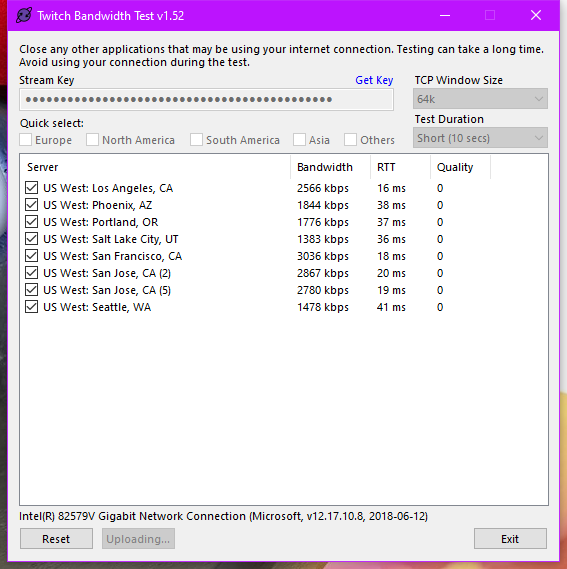 strong kernel
Means you may want to talk to your ISP.
slender folio
thanks, I guess I know what I'm doing next!
 worthy stirrup
is there a way to combine sepearate overlays into one because i havbe one for alerts, one for chat, one for cam border and it would be easier to have it all in one place
 hot hound
Good evening, I noticed an issue with the chat bot where I cant get any of the regular commands to work in chat. I did find that if I pull the bot setup wizard up on my OBS the commands work. But as soon as i close it, the commands stop working. Is there anyway to get the bot/commands to work again?
snow nova
@strong kernel I do have a question, but am not sure if this is the place. Its more aimed at streamelements than Twitch it self.
ionic kelp
@hot hound channel name? No links please.
hot hound
SystemicTTV
ionic kelp
@worthy stirrup yes. Just add the widgets in the one overlay.
snow nova
StreamElements a giveaway has started "Give away 1"
say !ticket 1 to buy 1 tickets. A ticket costs 0 Points
Is there a way I can edit it, to say it this way:
StreamElements a giveaway has started "Give away 1"
say !enter to join in the giveaway.
ionic kelp
@hot hound disable custom bot name in OBS.Live.
viscid pebbleBOT
If your commands recently stopped working and you're using OBS.Live and a custom bot name do the following:
- In OBS.Live, click on the hamburger menu (three stripes) at the top left of your activity feed
- Click on Stream Settings > Custom bot name
- In the Custom bot name field select Set custom bot name, not your already existing username (with capital letters). Note: If you already connected an account that way, the third entry will show as the account name (see image https://i.imgur.com/sO7fWOX.png).
- Scroll a bit down and click on the purple Connect Custom Bot Account button
- Log in as usual and Authorize the custom bot name
- Back in the Activity feed, click on the Send Test Message button and check if your custom bot name starts working again
 ionic kelp
Ignoring that and change it to streamelements.
lament blade
so I have a little problem
everytime I upload my merch onto the thing it doesnt save it even after I press save.
it has been around 15 minutes now and still hasnt changed. Is this just slow loading times or is something wrong?
worthy stirrup
@ionic kelp but i have like semi-complex things in different overlays like is there a way to just take overlays and combine them into one
ionic kelp
You can duplicate the widget into another but beyond that no.
#helpdesk-merch @lament blade
worthy stirrup
by duplicate do you mean just make it again in a new overlay?
ionic kelp
No. There's a button in the editor to copy it from overlay a to b.
lament blade
sorry sudo
ionic kelp
Click the widget in the layers then the 2 squares on another.
worthy stirrup
aah ok ty
hot hound
@ionic kelp that did it, thank you very much!
lament blade
Hello! When using a non-business PayPal account for donations, what information gets shown publicly? (phone, email, name, address, etc)
 silk viper
Hello! my chat stats doesnt work, help pls
There used to be such a problem, but it was due to the fact that I renamed the channel. Now I haven't changed the name of the channel, but the statistics stopped working
 shell arch
Trying to use stream elements app and trying to set up a overlay but when I paste the custom url instead of the overlay it just puts the actual url on the screen
 dapper kernel
Hi! I cannot see my chatstats list for some reason. It says 404 NOT FOUND when I click chatstats.
 fresh lake
hello. I just added the leaderboards for my twitch channel's extensions. But extension says no data on subs section. Twitch:achilbeard ( already tried logout and relog)
 jolly gazelle
hello guys- not working CHATTERSLEADERBOARD. No Data... my twitch is ArinaAmi
viscid pebbleBOT
@jolly gazelle If you changed your name on Twitch, please follow these steps:
- Visit https://streamelements.com/logout and then log in again by connecting with Twitch.
- On the right side of the dashboard page that opens, select Join under bot settings. If it says Part select that and then select Join to send the bot to the chat. Don't forget to mod the bot by typing /mod streamelements in your channel if you have not already.
- Post your old and your new name here so that we can update your channel's chatstats tracking (must be done by staff).
 zenith widget
viscid pebbleBOT
zenith widget
viscid pebbleBOT
@silk viper If you changed your name on Twitch, please follow these steps:
- Visit https://streamelements.com/logout and then log in again by connecting with Twitch.
- On the right side of the dashboard page that opens, select Join under bot settings. If it says Part select that and then select Join to send the bot to the chat. Don't forget to mod the bot by typing /mod streamelements in your channel if you have not already.
- Post your old and your new name here so that we can update your channel's chatstats tracking (must be done by staff).
@shell arch To add your overlays to OBS, add a new browser source in your scene. Paste your overlay URL in the browser source properties, set the dimensions to 1920x1080 (unless you changed them on the website) and check Shutdown source when not visible. https://youtu.be/KDvLynUqXI4
@dapper kernel If you changed your name on Twitch, please follow these steps:
- Visit https://streamelements.com/logout and then log in again by connecting with Twitch.
- On the right side of the dashboard page that opens, select Join under bot settings. If it says Part select that and then select Join to send the bot to the chat. Don't forget to mod the bot by typing /mod streamelements in your channel if you have not already.
- Post your old and your new name here so that we can update your channel's chatstats tracking (must be done by staff).
zenith widget
@fresh lake Sub data will be filled over time in the extension as people sub and resub. The extension pulls data from the twitch chat once its installed.
 gaunt anchor
I'm dropping frames while streaming and I'm trying to prevent that. Anyway you can combine browser sources to make it easier on the internet?
viscid pebbleBOT
@gaunt anchor Dropped Frames means that you have a bad connection between your device and the streaming platform and most likely something related to your ISP not handling the connection properly.
Speed tests usually cannot help solve this problem and its best to use this guide: https://obsproject.com/wiki/Dropped-Frames-and-General-Connection-Issues
If you stream to twitch, use the !twitchtest command and do a connection test to your regional servers.
 iron vortex
Hello, I'm trying to set up my tipping page and need some help please
ionic kelp
@viral willow overlays yes though anything animated is a no go. OBS.Live is windows only.
 viral willow
I am not too familar with streaming, how would I be able to use it then if I can't download it?
Oh, just using it in the browser?
ionic kelp
You'd add it as a browser source.
viral willow
How would I do that if you don't mind me asking? 😄
viscid pebbleBOT
We've released our new Overlay Editor revamp. You can check out the changes and how to work with it here: https://youtu.be/X5VzXjqAsjk
Check out our blog post as well: https://blog.streamelements.com/streamelements-overlay-editor-just-got-even-better-c22cb5b4853e
ionic kelp
And this.
viscid pebbleBOT
To add your overlays to OBS, add a new browser source in your scene. Paste your overlay URL in the browser source properties, set the dimensions to 1920x1080 (unless you changed them on the website) and check Shutdown source when not visible. https://youtu.be/KDvLynUqXI4
viral willow
thank you 🙂
 rigid nymph
I can't seem to remove a twitch channel I added by mistake.
 viscid pebbleBOT
@rigid nymph There is no easy way to unlink 2 owner-type accounts from each other. The only way is to make a closure request from here: https://streamelements.com/dashboard/account/security
WARNING: In submitting a closure request, all linked channels within the account will be deleted and you will lose all associated data. This includes overlays, custom commands, timers and past data (tips, subs, etc). You can still reconnect with the deleted account, but you are essentially starting fresh.
zenith widget
@viral willow click on the widget -> settings on the left side -> change text there
viral willow
I do
but it doesn't change it
Unless I'm changing it in the wrong section
No, I don't think it's changing for me for some reason
zenith widget
 dull quail
I hope this is the right place to ask... I'm trying to update my social media links in the Profile Page but when I hit Save a little box comes up saying There was an error updating your settings!. How do I resolve this?
zenith widget
Theres a bug that prevents saving if you are removing a link.
Either change it to a dummy link or leave it as it is
lament blade
none of the overlays are working for me in obs. it emulates on streamelements but doesent show up
 gaunt flower
im trying to upload to overlay but only half of it shows up in obs?
viscid pebbleBOT
The default resolution for StreamElements overlays (theme and custom) is 1920x1080. Please add them in OBS at their full resolution and use CTRL+F to fit to screen if necessary. You can then downscale your stream in OBS settings > Video if you'd like https://i.imgur.com/6bWXxjR.png
dull quail
@zenith widget ah ok, thank you. I changed my name on Twitch some time ago and forgot to update the links in SE. When you get a moment, can you migrate my stats from ethancentaurai to ravendwyr please?
gaunt flower
what size do i make the video capture of my face to fit the template
gaunt flower
thank youuu
 royal jungle
All my overlays when import them to OBS aren't working, they show up like the image.
royal jungle
thank you! 🙂
 limber tinsel
SHARE ELEMENTS PLISS
jolly gazelle
@jolly gazelle If you changed your name on Twitch, please follow these steps:
- Visit https://streamelements.com/logout and then log in again by connecting with Twitch.
- On the right side of the dashboard page that opens, select Join under bot settings. If it says Part select that and then select Join to send the bot to the chat. Don't forget to mod the bot by typing /mod streamelements in your channel if you have not already.
- Post your old and your new name here so that we can update your channel's chatstats tracking (must be done by staff).
@viscid pebble my nickname ArinaAmi and old one same
 normal gust
I have a question. I made an Rotating Widget / Slideshow with four 10 sec Videos. They rotate as they should in the Editor. But in Obs and the Browser Preview are they invisible or not loaded or something like that, bcs they dont show up
zenith widget
The asset widget is currently bugged
devs are aware, but no ETA on a fix
@jolly gazelle same what?
normal gust
oh, okay, thanks for the info, I guess Ill just wait then, till it's fixed^^
gaunt flower
like when ur switching between scenes in obs, a tarnsitions for that
zenith widget
we don't do transitions
jolly gazelle
@jolly gazelle same what?
@zenith widget My nickname is ArinaAmi and old ArinaAmi too, was not changed
zenith widget
fixed
 worn iris
How do i remove my twitch account and have only my YT account linked on streamelements
viscid pebbleBOT
@worn iris There is no easy way to unlink 2 owner-type accounts from each other. The only way is to make a closure request from here: https://streamelements.com/dashboard/account/security
WARNING: In submitting a closure request, all linked channels within the account will be deleted and you will lose all associated data. This includes overlays, custom commands, timers and past data (tips, subs, etc). You can still reconnect with the deleted account, but you are essentially starting fresh.
worn iris
unable to delete account says invalid username everytime
ionic kelp
@worn iris Try lowercase. Do note as it said you can't save any accounts both will be deleted along with whatever you setup already.
 devout schooner
my frems keep dropping can someone help pls
viscid pebbleBOT
@devout schooner Dropped Frames means that you have a bad connection between your device and the streaming platform and most likely something related to your ISP not handling the connection properly.
Speed tests usually cannot help solve this problem and its best to use this guide: https://obsproject.com/wiki/Dropped-Frames-and-General-Connection-Issues
If you stream to twitch, use the !twitchtest command and do a connection test to your regional servers.
 slate marsh
hey guys and gals - my donation link from twitch comes up with a 404 page in SE....anyone know how to fix this? Ta!
viscid pebbleBOT
@slate marsh Please provide your account ID found at the top of this page: https://streamelements.com/dashboard/account/channels This ID is public info and safe to share here.
zenith widget
So you've renamed your channel, meaning you will need to edit the link in the panel
viscid pebbleBOT
@gusty yarrow Welcome to the helpdesk! The regular helpdesk channels are in English but we do provide multi-language support in the following channels: #🇩🇪︱deutsch | #🇫🇷︱français | #🇪🇸︱español | #🇵🇹︱português | #🇳🇱︱nederlands | #🇮🇹︱italiano | #🇵🇱︱polski | #🇨🇳︱中文語言服務區-chinese | #🇯🇵︱日本語-japanese | #🇭🇺︱magyar | #🇰🇷︱한국어-korean | #🇹🇭︱ไทย-thai | #🇷🇺︱русский | #🇺🇦︱українська | #🇨🇿︱czech
ionic kelp
ingilizce lütfen.
 gusty yarrow
I switched from streamlabs to streamlabs and my alert box is not displayed
lament blade
I have a question about twitch extension
"StreamElements Leaderboards"
Is there a way to display donators leaderboard? I cant seem to find any options
zenith widget
the extension cannot show tips
as its not linked to our main system
its only linked to your chat
viscid pebbleBOT
@gusty yarrow To add your overlays to OBS, add a new browser source in your scene. Paste your overlay URL in the browser source properties, set the dimensions to 1920x1080 (unless you changed them on the website) and check Shutdown source when not visible. https://youtu.be/KDvLynUqXI4
 mossy shuttle
15 OCT. 2020: Your bank details are being verified. This process takes up to 7 business days. / Today: Still waiting. Anyone can help me?
viscid pebbleBOT
@mossy shuttle Please contact us via email for support with SE.Pay. You can use our contact form here: https://streamelements.com/contact Thank you.
 heady bronze
i downloaded overylays on streamelements, how do i incorporate them into my obs?
viscid pebbleBOT
@heady bronze To add your overlays to OBS, add a new browser source in your scene. Paste your overlay URL in the browser source properties, set the dimensions to 1920x1080 (unless you changed them on the website) and check Shutdown source when not visible. https://youtu.be/KDvLynUqXI4
 keen swallow
Hey! How can I change my Bank account for SE.pay?
viscid pebbleBOT
@keen swallow Please contact us via email for support with SE.Pay. You can use our contact form here: https://streamelements.com/contact Thank you.
 magic jungle
im having trouble with the bot
dosent respond to commands, dosent announce events
tried parting and muting
viscid pebbleBOT
@magic jungle If your commands recently stopped working and you're using OBS.Live and a custom bot name do the following:
- In OBS.Live, click on the hamburger menu (three stripes) at the top left of your activity feed
- Click on Stream Settings > Custom bot name
- In the Custom bot name field select Set custom bot name, not your already existing username (with capital letters). Note: If you already connected an account that way, the third entry will show as the account name (see image https://i.imgur.com/sO7fWOX.png).
- Scroll a bit down and click on the purple Connect Custom Bot Account button
- Log in as usual and Authorize the custom bot name
- Back in the Activity feed, click on the Send Test Message button and check if your custom bot name starts working again
zenith widget
👍
shell arch
When I try and do an overlay on the mobile app it doesn’t give the overlay it just shows the actual url on screen
zenith widget
what app are you using?
shell arch
The stream elements app
zenith widget
 mint spruce
so, i am using obs.live but connected with StreamElements and i dont know how to connect the chat of the twitch in the obs.live and i need help
can someone help me ?
zenith widget
Streamelements on top -> chat
 hot raven
i'm trying to set up custom bot commands for my discord server and for my youtube channel and when i tried to test it in the chat, the links were coming out as ***
how do i fix this
viscid pebbleBOT
@hot raven If links in chat are appearing as ***** either mod the bot or disable block hyperlinks in your twitch channel settings: https://dashboard.twitch.tv/settings/moderation
 vale aurora
can anyone help me please, i am trying to set up commands through stream elements for twitch and they are not working
 ancient granite
Hi, I've never had any problems with my alerts that I have put in my SE overlays. But last stream they either didn't play at all for chat, or sometimes a gif was played but no sound, only time they played properly where both I and chat heard them was when I on the SE site in one of my overlays. So seems like they only played through the browser and not through OBS Studio. I have changed nothing it just didn't seem to want to work anymore haha. Does anyone have any idea why or what I can do to fix this? I am so bad with audio things. 
 crisp saddle
Anyone know why SE.Pay is taking so long to verify my bank details, i cant withdraw the money thats been there for over 2-3 weeks and it says it takes up to 7 business days
viscid pebbleBOT
@crisp saddle Please contact us via email for support with SE.Pay. You can use our contact form here: https://streamelements.com/contact Thank you.
 distant pebble
Hi! I would like to block a specific user from donating, I can't seem to find the setting in the tipping settings?
 dark grail
hello am I mistaken or is the loyalty points linked with the twitch chat ?
ionic kelp
@dark grail as long as you're detected in chat you earn them.
dark grail
that's what I.thought but members of my chat arnt getting the points they win from stream elements like one member has 8k points but it only shows 1.2k in twitch
ionic kelp
Have they changed their name by chance?
dark grail
nope had someone new join then they won a raffle but the points didnt change
 zenith obsidian
Hello I have a problem while creating an alertbox on the streamElements web interface, it seems that when I want to do the text over image, the text disappear (perhaps the text is behind but I'm not sure)
 left aurora
Hey, I have trouble renaming my twitch bot. I don't see the option in ground control
ionic kelp
@left aurora same channel with name as here by chance?
lament blade
hey! I'm trying to have the bot run a command on a timer and I can't seem to figure out how to do that. Can anyone help?
ionic kelp
Not possible.
Bot can't run its own commands.
And even then having it run another bot's commands is heavily discouraged.
lament blade
alright, thank you
 craggy lion
Hello, I would like to get help with the loyalty point command.
Is there a code for giving a user points in twitch chat?
Example: !addpoints @sullen temple 100
The user will receive 100 points
left aurora
@left aurora same channel with name as here by chance?
@ionic kelp you mean twitch?
ionic kelp
Yes
 eager fern
left aurora
eager fern
left aurora
@ionic kelp yes it is the same name
 obsidian osprey
How do I set up lifetime
 bronze glade
Any chance i could get assistance with setting up my stream on a single pc, mainly playing warzone atm. thank you
 main kayak
hi, I made an overlay of media request with streamelements, but when I played the song request, it shows"NO ACTIVE WIDGETS WERE DETECTED FOR MEDIA REQUEST"
I would need some help, thanks
 nimble dune
Right click on the BrowserSource > Properties > Scroll down a bit > Refresh cache of current page
main kayak
thanks, it works
another question.... is there any way that i can turn up the volume?
i see no volume adjust button on the mediarequest dashboard
nimble dune
Are you using in OBS.Live or in website?
main kayak
the sound is from the website
wait.... it's from obs, but i can't really adjust it if i want it to be louder
nimble dune
main kayak
can turn down the volume, but can't make it louder, both the ovs volume and the speaker's volume is at the max
guess some sort of bug....
now i see the volume.... I swear it wasn't there when i was asking
nimble dune

main kayak
thanks
nimble dune
You're welcome! 
 tender wave
I have a question, premise that I am quite prevented, how do I create a command that says 5 minutes automatically "Hello" I am a moderator and then I have to do it through "command option ....."
or looked a little bit at the commands (!cmd on discord) that are there but I did not understand a lot
nobody can help me?
 rare haven
a fellow streamer and friend of ours ordered some merch and he even wore it on his stream 2 days ago but it doesn't show on our order history that he ever purchased it. I know it takes a couple days to show up but he has already received the merch and ordered it over a week ago. Is that revenue just gone?
tender wave
!cmd
viscid pebbleBOT
You can add, remove and make changes to custom commands in chat with !command/!cmd flags:
!command add (commandname) (commandresponse) - allows you **to add **a new custom command
!command remove (commandname) - allows you to delete a custom command
!command edit (commandname) (commandresponse) - allows you to edit an existing custom command
!command show (commandname) - allows you to see the raw response of a command before variables are used
!command options (commandname) -(flag) - allows you to change settings for an existing custom command
Valid flags for !cmd options include: -enable -disable -cd (number in seconds) -usercd (number in seconds) -cost (number) -level (number) -type (say, whisper or reply) -count (number)
Syntax example: !cmd options twitter -usercd 60 -type reply -level 250
 dapper tusk
Hello! I have a question regarding the alert box. When I select text over image, I don't see the text at all
viscid pebbleBOT
@dapper tusk Text not showing up over your alerts? Go to the Advanced Text Settings and set the top margin to 50, you can work your way to the right position from there.
 latent oracle
Via search, I found some OLDER answers, but i wasn't sure it had since changed, or if its dev plans. Is there an offset/delay alert slider/field? Id like to offset my Raid Notification by 10/15 seconds. or does any one know the CSS to do that?
dapper tusk
Thanks 🙂
obsidian osprey
Is there no loyalty system now
nimble dune
There is no loyalty for youtube.
Only twitch
obsidian osprey
Ohhh
viscid pebbleBOT
@obsidian osprey Please ask your question in one helpdesk channel only. A support volunteer or StreamElements staff member will assist you as soon as they are available. Asking in multiple places will only result in confusion, not faster answers. Thank you for your patience.
obsidian osprey
So how do you get loyalty on YouTube or is there no way
rare haven
anyone else not see the purchase history when someone has bought your merch?
 still pond
hi, im having trouble implementing a theme from stream elements to stream labs, i don't know why it isn't showing up in streamlabs, any ideas?
viscid pebbleBOT
@still pond We're not able to troubleshoot issues with using our overlays in StreamLabs OBS (SLOBS) as we don't have the tools to support their software. We recommend using OBS Studio or OBS Studio with our plugin OBS.Live.
still pond
stream elements doesn't work in streamlabs obs, only obs studio?
viscid pebbleBOT
@still pond To add your overlays to OBS, add a new browser source in your scene. Paste your overlay URL in the browser source properties, set the dimensions to 1920x1080 (unless you changed them on the website) and check Shutdown source when not visible. https://youtu.be/KDvLynUqXI4
nimble dune
You can try this 👆 but as the bot said: We're not able to troubleshoot issues with using our overlays in StreamLabs OBS (SLOBS) as we don't have the tools to support their software.
still pond
I see, thank you!
 timid falcon
Hello yesterday in my stream the bot didnt work. I stream in obs. The commands were not working and are on, ow can i fix that??
viscid pebbleBOT
@timid falcon Go to the Dashboard > Right side > Part channel > Join channel(https://streamelements.com/dashboard)
 timid falcon
okay thanks
nimble dune
Worked?
timid falcon
give me 5 min and ill let you know
nimble dune
Okay 🙂
nimble dune
Nice, you're welcome!
timid falcon
very good service haha
nimble dune

lament blade
can someone help me (:
 rapid robin
Hey, @nimble dune I've posted this a few times but no answers, hoping you could help... - Do you know a solution to the Sponsor Rotation widget when the first image doesn't show?
lament blade
how do i make it that my stream elements doesnt time out my nightbot?
 proud topaz
is there a live command that I can give points to everyone in the chat?
rapid robin
@lament blade mod your nightbot
lament blade
oh LMAO okay im slow ty
rapid robin
@proud topaz yes, look under the points commands, theres multiple
ancient granite
I don't know if my earlier post might just be getting lost or maybe no one has any idea, is it okay to post something again?
proud topaz
can you tell me the command that I give a point to everyone please?
rapid robin
proud topaz
tanks
ancient granite
Hi, I've never had any problems with my alerts that I have put in my SE overlays. But last stream they either didn't play at all for chat, or sometimes a gif was played but no sound, only time they played properly where both I and chat heard them was when I on the SE site in one of my overlays. So seems like they only played through the browser and not through OBS Studio. I have changed nothing it just didn't seem to want to work anymore haha. Does anyone have any idea why or what I can do to fix this? I am so bad with audio things.
 visual sphinx
Hey yeah so im streaming right now and for my friends it says im offline what could be the solution?
viscid pebbleBOT
@ancient granite If you are not hearing your alerts and/or Media Request, you are most likely using the Control Audio via OBS option in your browser source properties.
To make sure you hear the alerts and the stream also hears them, follow along the screenshot bellow.
https://cdn.discordapp.com/attachments/199460642975907840/685371800456134686/unknown.png

 pulsar wagon
hello 🙂 is it possible to share a custom overlay with friends?
viscid pebbleBOT
@lament blade Read and follow our server rules:
- We do not tolerate toxicity! Treat the community team, staff and all members with respect.
- No advertisement or channel promotion, anywhere on the server.
- No NSFW/NSFL
- No unsolicited DMs or friend requests to server members
Make sure to read the #rules in any server you join.
 nimble dune
💯
 dusky dew
Hey Guys, Who can I talk to about help with "giveaways"?
nimble dune

 split totem
Does anyone know where to find the default alert sound used by streamelements? I had customized some alerts like subs but I used music  I want to change them back to the original default sound that like follows use but I don't have that sound to use on the alert. Its called default.ogg on the other ones like on here but it doesnt exist on my sub one anymore
I am assuming i need to upload it as a custom sound now that it has been removed
 wary halo
It's in the pinned messages
dusky dew
ahh nuts, okay! Is there a way I can limit the amount of tickets purchased at any 1 time with !enter or !ticket to 1?
We're doing a 24 hour stream and I want to provide the ability to enter once a hour, rewarding people who stay the most, with more entries and better odds!
split totem
@wary halo Why would I ever check there  Thanks!
 lucid marsh
hello how can I show bbtv emotes on my overlays?
ancient granite
What bot showed me I already know and have
tender wave
I have a question, premise that I am quite prevented, how do I create a command that says 5 minutes automatically "Hello" I am a moderator and then I have to do it through "command option ....."
or looked a little bit at the commands (!cmd on discord) that are there but I did not understand a lot
nobody can help me?
 quaint steeple
sorry if this has been asked a thousand times before, but how can i remove social links from my profile page? there doesnt seem to be a button to remove anything, and deleting the link gives an error message when i try to save changes. if the links cannot be removed, is there a way i can just disable the profile page altogether?
 latent wolf
The Streamelements bot is saying one of my viewers doesnt have points to buy a iten but he had
viral willow
Hello, I edited my name but it's not changing 😦

or any other text I change
anyone know what Im doing wrong?
quaint steeple
@viral willow can you call me in discord and i may be able to walk you thru it?
viral willow
At the moment I can't right now 😦
still pond
i'm having trouble editing a overlay, when i edit the twitter part it still says "/twitter"
 rain basin
Is there a way to copy text settings from the alert follower box to the others without clicking and doing it all over again and again?
 still magnet
could somone point me to a video that shows me how to put a lastest sub and follower on my stream please
dusky dew
Hey guys still need help on this one
Is there a way I can limit the amount of tickets purchased at any 1 time with !enter or !ticket to 1?
We're doing a 24 hour stream and I want to provide the ability to enter once a hour, rewarding people who stay the most, with more entries and better odds!
 icy crater
I have no idea how to activate the setup i created
wrong wording I have no idea how to activate an overlay i created
 hoary yarrow
is there a widget for chat to show rewards they can redeem from Loyalty store?
 cerulean vale
Hello!
So, the links in my timers aren't showing up in my stream chat on twitch. Any idea what i need to do?
 gleaming tendon
Anyone can help me pls: I got a Tip today by my donation streamelements link but it didnt appear in my stream and also in streamelements dashboard. Thanks
 raven ingot
My stream elements bot just stopped working mid stream. Is there a way to fix this without ending stream?
 sweet sail
Can you help me and repair chatstats data on my channel: Proste_Davca again they are empty 😦
tender wave
!cmd
viscid pebbleBOT
You can add, remove and make changes to custom commands in chat with !command/!cmd flags:
!command add (commandname) (commandresponse) - allows you **to add **a new custom command
!command remove (commandname) - allows you to delete a custom command
!command edit (commandname) (commandresponse) - allows you to edit an existing custom command
!command show (commandname) - allows you to see the raw response of a command before variables are used
!command options (commandname) -(flag) - allows you to change settings for an existing custom command
Valid flags for !cmd options include: -enable -disable -cd (number in seconds) -usercd (number in seconds) -cost (number) -level (number) -type (say, whisper or reply) -count (number)
Syntax example: !cmd options twitter -usercd 60 -type reply -level 250
 solid vapor
HI friends; does SE still have a streamathon widget? Trying to set up a Sub-a-thon
wary halo
yes, it's in the Themes Gallery under the 'widgets' tab
solid vapor
❤️ ty that was the only place I didnt look
 charred summit
Hey folks, having an issue where the rotator widget doesn't show in the preview or OBS, however it displays fine in the SE editor. This rotator contains a webm video basically
any help much appreciated!
viscid pebbleBOT
@charred summit OBS > Settings > Advanced > Scroll down > Enable or disable Browser Source Hardware Acceleration, depending on its current state > Restart OBS (This does not apply for OBS on Mac)
https://i.imgur.com/ggMe9ZE.png
 charred summit
Thanks @viscid pebble ! I tried that just now and it's still not loading (I'm on PC btw). Any other ideas to try?
tender wave
I have a question, premise that I am quite prevented, how do I create a command that says 5 minutes automatically "Hello" I am a moderator and then I have to do it through "command option ....."
or looked a little bit at the commands (!cmd on discord) that are there but I did not understand a lot
nobody can help me?
 snow bloom
i have a problem with stream elements is someone willing to help ne??
viscid pebbleBOT
Welcome to the helpdesk! Please let us know how we can assist you today and a support volunteer or staff member will assist you as soon as they are available. Thank you for your patience.
lament blade
I'm getting "payment refused" can I get support plz?
 uneven ridge
My streamelements isn't responding to commands in chat. Can anyone help me?
viscid pebbleBOT
@uneven ridge Go to the Dashboard > Right side > Part channel > Join channel(https://streamelements.com/dashboard)
 fallow sail
Hey! I was wondering if there is a way to change the bank account under Se.Pay I no longer use the bank account that I had it setup with, and would like to change it to my new one but I can't find anywhere to do it at :/ Can I get some help?
uneven ridge
It's still not working
viscid pebbleBOT
@fallow sail Please contact us via email for support with SE.Pay. You can use our contact form here: https://streamelements.com/contact Thank you.
 cold sequoia
Hi, I have a question, how can I activate the option we're its shows on live stream new followers
lament blade
@viscid pebble help?
viscid pebbleBOT
@uneven ridge If your commands recently stopped working and you're using OBS.Live and a custom bot name do the following:
- In OBS.Live, click on the hamburger menu (three stripes) at the top left of your activity feed
- Click on Stream Settings > Custom bot name
- In the Custom bot name field select Set custom bot name, not your already existing username (with capital letters). Note: If you already connected an account that way, the third entry will show as the account name (see image https://i.imgur.com/sO7fWOX.png).
- Scroll a bit down and click on the purple Connect Custom Bot Account button
- Log in as usual and Authorize the custom bot name
- Back in the Activity feed, click on the Send Test Message button and check if your custom bot name starts working again
uneven ridge
@viscid pebble Thank you! 🥳
lament blade
Why am I getting payment refused?
 umbral grail
why does gta 5 FiveM lag when im not even streaming and the program is open not doing anything??
 dense root
Hey, I'm new to moderating for a friend on their twitch stream. They gave me Editing power through their stream elements, but the unique commands I'm adding aren't showing up, unless I manually add them in the chat.
 abstract hemlock
Are you sure that you selected the correct SE account? @dense root
dense root
Yes, It shows me the bar at the top telling me "you are moderating for"
abstract hemlock
give me the streamer' username and yours please, i'll give it a look
dense root
LastPenfighter and Navine
I deleted the command and ended up putting it in manually in the chat, and it's working, but I'm also not seeing a list of his unique commands that I know are there as well.
abstract hemlock
1 sec, i'll check
@dense root You have editor access to the youtube account of the streamer no the twitch account
dense root
Ahhhh, that would be why. I'll harass him. Thank you! I was so frustrated.
abstract hemlock
😅
dense root
Thank you!
 gritty hazel
Is there not a way to use Soundtrack by Twitch on StreamElements OBS, only OBS Studio?
abstract hemlock
There is no "StreamElements OBS", obs.live is an add-on developed by StreamElements for OBS Studio
gritty hazel
okay so than does anyone know why Soundtrack would not read or see
viscid pebbleBOT
@gritty hazel Obs.live is a plugin for OBS Studio for the best OBS support, please join their Official Discord @ discord.gg/obsproject
tender wave
I have a question, premise that I am quite prevented, how do I create a command that says 5 minutes automatically "Hello" I am a moderator and then I have to do it through "command option ....."
or looked a little bit at the commands (!cmd on discord) that are there but I did not understand a lot
nobody can help me?
abstract hemlock
iirc you can't make timers via commands, so need bot supervisor access to the streamer account and setup that timer via the website
 opaque trench
if i made a store with a logo and i deleteed it how do i repopulate my store with a new image?
icy crater
Sooo how DO I activate customized overlays?
abstract hemlock
If you are talking about SE.Merch you can create "new items" with the same design @opaque trench
viscid pebbleBOT
@icy crater To add your overlays to OBS, add a new browser source in your scene. Paste your overlay URL in the browser source properties, set the dimensions to 1920x1080 (unless you changed them on the website) and check Shutdown source when not visible. https://youtu.be/KDvLynUqXI4
 sudden anvil
it still comes up and i don't know how to stop it i was told to log out and back in again but that didn't help
abstract hemlock
Try with the white "x" or the "refresh" icon (on the top left of the dock)
 sharp bone
hey, not sure if this is the right channel but my streamelements chatbot isnt working? i have disconnected it and then reconnected but still not working? everything is turned on right and nothing has been changed as it was previosuly working
viscid pebbleBOT
@sharp bone StreamElements menu, on top of OBS > Logout > Login
sharp bone
perfect, didnt realise it would be that simple. thank you!
 mighty badger
Is there a way I can set up a donation goal repeating every month?
or even a goal in general, I can't find the setting anywhere
viscid pebbleBOT
@mighty badger To reset goals:
- from the Overlay Editor > Session data on top right (monitor symbol) > Goals tab > reset progress of desired goal
- from the Dashboard > Activity feed on the left > Widget data on the right > Goals tab -> reset progress of desired goal
Note: Goal widgets (progress) only counts up and doesn't go down automatically, if you lose followers/subs.
mighty badger
I'm not looking to reset a goal as I've never set one since I don't know where
abstract hemlock
@mighty badger it depends Sub goal will be under label>subscribers, Followers goal will be under Label>followers and so on and so on
main kayak
my audience said that when i muted out the audio input, they couldn't hear the media request's sound, but my OBS does senses the audio output from the browser source... Is there something that I do to fix it?
mighty badger
aahh, so the goals are hiding in the overlay facepalm
I figured they'd be in the tipping page settings...
Thank you~
abstract hemlock
@main kayak if the media request is playing through the media request dock OBS will "sense" it on the "desktop audio" mixer, but if you have the media request widget, obs' mixer will see on the browser source tab (that if you selected the "control audio via OBS" option on the browser source)
main kayak
thanks, I think it's working
 hexed hemlock
hello, i cant show my own channel chat stats, it says 404 not found what should i do? and !watchtime command does not work correctly it says 20 hours or something, (No, i haven't change my name )
main kayak
@abstract hemlock sorry, but my audience said it's still not working
viscid pebbleBOT
@hexed hemlock Please provide your account ID found at the top of this page: https://streamelements.com/dashboard/account/channels This ID is public info and safe to share here.
hexed hemlock
5f70e4fbff6cc3492907fd48
 fathom barn
live now,,, stream elements recognizing NO audio
never had an issue until this stream
main kayak
hear no echo, just one sound
hexed hemlock
@abstract hemlock it's working now! i hope !watchtime command does work correctly ty
viscid pebbleBOT
@hexed hemlock 10 minutes of watch time is given to those in chat when the loyalty points are handed out (every 10 minutes). Therefore, loyalty must be enabled to watch time to work properly.
There is no direct link between watch time and all-time points.
It can’t be calculated from the number of all-time points a user has because subs may earn points at a faster rate and !bonus all command increases all-time points for users in the chat at that time.
Giving points to a single user do not affect all-time, only when giving to all in chat.
@fathom barn Obs.live is a plugin for OBS Studio for the best OBS support, please join their Official Discord @ discord.gg/obsproject
 versed breach
Hi! Are there any issues with the Extra Life goal tracker right now? It's not showing updated info from my extra life ID.
It just says $0 of $0.
abstract hemlock
@versed breach Did you fill the "extra Life ID" on the widget?
 rustic narwhal
is the bot dead atm?
viscid pebbleBOT
@rustic narwhal Go to the Dashboard > Right side > Part channel > Join channel(https://streamelements.com/dashboard)
hexed hemlock
i just wanted to ask, can i hide my channel chat stats from followers?
 grizzled yoke
Hello helpeur
i've problemwith stream element when switch the scene
i have an occured error view this screen
viscid pebbleBOT
@grizzled yoke Obs.live is a plugin for OBS Studio for the best OBS support, please join their Official Discord @ discord.gg/obsproject
abstract hemlock
@stiff sky https://streamelements.com/dashboard/bot-modules disable Twitter module

StreamElements
The Ultimate All in One Platform for Streamers
 stiff sky
@abstract hemlock Thanks!
mighty badger
Can I disable sections on my StreamElements Profile Page website?
For example, I don't use the Song Requests, can I remove that from my site?
rustic narwhal
i already parted and joined
its neither working from custom name nor streamelements but im midstream
it reacts to SO
but doesnt respond to commands in chat
viscid pebbleBOT
@rustic narwhal StreamElements menu, on top of OBS > Logout > Login
rustic narwhal
cant midstream
wary halo
yes you can
rustic narwhal
i can
mighty badger
Okay nvm, when the time comes I'll either make a site or have one made custom for me. But! Can I get help in cleaning up/changing my url? It contains letter and that makes it feel inauthentic
abstract hemlock
@mighty badger streamelements.com/odeseos is already taken
abstract hemlock
if the youtube account that owns that URL is yours you can send us an email to support@streamelements.com with both JWT token (twitch and youtube) and we will swap them
 sly python
Where can I find my encoder settings? My stream is saying that it is overloaded and to check encoder settings, but I can't find them
mighty badger
if the youtube account that owns that URL is yours you can send us an email to support@streamelements.com with both JWT token (twitch and youtube) and we will swap them
@abstract hemlock Can I not remove that account altogether, or must that action be confirmed by mods first?
versed breach
I've tried deleting my extra life widgets several times and put the ID back in and it's still not working.
abstract hemlock
@mighty badger You can delete your YT account, but that won't give you the URL without the numbers on your twitch account, that need to be made by our dev team
mighty badger
But that will eliminate the need for the YT JWT token, correct?
sly python
nevermind. Think I found it
abstract hemlock
@mighty badger you need the JWT token to delete the account
mighty badger
Alright, so is JWT the personal access token?
viscid pebbleBOT
@mighty badger You can find your JWT token on your account channels page (Show Secrets to reveal the token): https://streamelements.com/dashboard/account/channels
READ ME: This is a private security token. Do NOT share this token here or other public places, only with a StreamElements staff member in private.
mighty badger
It doesn't show a connected email or username to my own profile, so I can't request an account deletion. Can I just send one email asking to close my youtube profile account and switching urls so that my Twitch profile account has the clean /odeseos URL?
abstract hemlock
Yes please, send the email with the JWT of each account with that request
mighty badger
Email sent~
 cedar crag
hi there! I'm planning to do a subathon and realize the marathon timer only works with streamlabs... is there another app or widget that works with streamelements in terms of subathon timers?
@mighty badger
mighty badger
yes?
mighty badger
Best of luck~
abstract hemlock
@cedar crag https://streamelements.com/dashboard/themes > Widget
cedar crag
THANK YOU!! @abstract hemlock
quaint steeple
hi! is there a way for me to remove social links from my profile page, or at the very least disable the profile page if that isnt possible?
 ocean pike
Heyo, any quick way to add a video into a layer from a URL instead of uploading it to your servers?
abstract hemlock
@quaint steeple that's not possible at the moment.
ocean pike
Hey, Renziito 
abstract hemlock
@ocean pike Hey there... The only way to do that is creating a custom widget and add the src of the asset on the html
ocean pike
Cool, thought so - couldn't find a quick existing way to do it.
Thanks for the info!
Another question, though 
abstract hemlock

ocean pike
I asked yesterday, Nethyr (?) said it can't be
Tested today with viewers, 100% an issue
To tip viewers have to log in
 magic spindle
How to connect donatpay to streamelements or how it is there
ocean pike
Safety and all that. Good so far. The problem arises when they have tipped by logging in with Twitch, then go to look at the channel commands link and the page straight away redirect them to their SE dashboard.
So they have to click the back button on the browser to get back to the commands page. I can't replicate it on my side - I click on the commands link and look at it. But for multiple viewers they instead get redirected to their SE dashboard (that has no use to them since they don't stream)
abstract hemlock
@ocean pike Nethyr is right.. that isn't possible... BUT maybe the link that they use is wrong .. i.e https://streamelements.com/creecham/commands or https://streamelements.com/creechamp/command will redirect to the "their" dashboard
 viral root
I have trouble with opening a dashboard from a streamer I moderate for. Everytime i try to open the dashboard it sends me back to the log in page. Every other dashboard I have access to seems to work normal. Could someone see if there is something wrong?
Channel name: Joost
ocean pike
📜 Channel commands list: https://streamelements.com/creechamp/commands
^ That is what the bot posts in chat
They click on it and get redirected to their dashboard.
abstract hemlock
@ocean pike so weird.. i can't replicate that behavior, which browser are your viewers using?
@viral root ask the streamer to logout and log back in
viscid pebbleBOT
@viral root Please logout of StreamElements at https://streamelements.com/logout and then login again to your account (Twitch/YouTube/Facebook).
ocean pike
I'll have to come back with that one. Will do more testing on stream tomorrow.
abstract hemlock

viscid pebbleBOT
Our Dashboard and Overlay Editor are Chromium Optimized. We strongly recommend using Chrome. Opera GX and the new Microsoft Edge Chromium might work closest to Chrome as its also Chromium built. Firefox also works, but some things might look a bit different or not work. We do not recommend using Internet Explorer with our Dashboard as it does not support functions.
If the website doesn’t work on chrome, be sure none of your plugins is blocking our website or clear your cookies. You can try if the website works in an incognito tab.
viral root
Thank you, I will do that.
abstract hemlock
@viral root make sure that the streamer do the same
mighty badger
Can you confirm that my email has arrived?
abstract hemlock
@mighty badger yes, i'll look into it a bit 😅
mighty badger
Not saying it has to be done right away 😅
just want to know it arrived~
abstract hemlock
@mighty badger sure you want to delete the YT account? i can merge those accounts and then create a task for our dev team only to swap the links instead of create the task to delete, wait for it to happen and then create another one for the exchange
mighty badger
Hmm, if you can add it as a sub under my main Twitch account that'd be fine too
abstract hemlock
mighty badger
Thank you very much~
magic spindle
How to connect donatpay to streamelements or how it is there
abstract hemlock
@magic spindle iirc you need to connect it on your donatepay dashboard
magic spindle
Well, I understood that, but I don't understand how to connect it
 covert lava
Out of curiosity is there a way to remove an Alert Asset without completely deleting the stream store item and making it from scratch? I don't see a remove option
abstract hemlock
@covert lava You can disable it
 grim pecan
I don't get why people auto raid me and i get the alert but when they autohost me i get nothing, can the autohost alert come back please? it's really useful 😦
viscid pebbleBOT
@grim pecan "Due to changes to Twitch API, we have filtered out hosts and will only show these ones on your activity feed:
- All hosts coming from an online channel with at least 1+ viewer
- Auto host events with at least 1 viewer - only from a channel that just went offline
Note: If you see X channel has hosted you with no viewers on the back, that is considered an offline host or a host with 0 viewers, we do not show these."
 grim raft
how can i see stream elements animations and movement in OBS? i can see everything moving and working fine in the streamelements overlay editor but it is still in the OBS studio
covert lava
D@abstract hemlock im not trying to disable the whole stream item. Just remove the gif I added to the assest spot
abstract hemlock
@covert lava Oh, you can change the asset on the item, and the asset will stay on your library
 sacred lynx
Hey everyone! I had a quick question. I am working on setting up custom commands, but they are not operating correctly in my chat, who would I talk to about this
viscid pebbleBOT
@sacred lynx Welcome to the helpdesk! Please let us know how we can assist you today and a support volunteer or staff member will assist you as soon as they are available. Thank you for your patience.
@grim raft Right click on the BrowserSource > Properties > Scroll down a bit > Refresh cache of current page
covert lava
@abstract hemlock but is there a way to just delete the asset without redoing the whole thing?
abstract hemlock
I don't understand what are you trying to do 😅
- The assets remain on your library
- You can access to your library via any widget that allows you do add assets on it or via the items on the store
- You can delete the assets at any point
lament blade
Chat Stats 404 page not found I recently changed my username from jimbiker_youtube to jimbiker_twitch and i have lost all chat stats on streamelements ç___ç someone can help me ? please
viscid pebbleBOT
@lament blade If you changed your name on Twitch, please follow these steps:
- Visit https://streamelements.com/logout and then log in again by connecting with Twitch.
- On the right side of the dashboard page that opens, select Join under bot settings. If it says Part select that and then select Join to send the bot to the chat. Don't forget to mod the bot by typing /mod streamelements in your channel if you have not already.
- Post your old and your new name here so that we can update your channel's chatstats tracking (must be done by staff).
abstract hemlock
@lament blade from jimbiker_youtube to jimbiker_twitch correct?
lament blade
@abstract hemlock yes renziito 🙂
abstract hemlock
fixed
lament blade
very thanks 🙂
sweet sail
Can I please you for fix my chats stats data? Channel: Proste_Davca ♥ Thank you
abstract hemlock
@sweet sail done
sweet sail
@abstract hemlock Thank you.. can I know where is problem? Because this is like 50 time, when they are empty :/
sorry for my english 😄
abstract hemlock
Our dev team is still investigating of the exact cause of this, but in the meantime you can always ask us here to fix it .. takes a few seconds
sweet sail
@abstract hemlock Okey, thank you, have a nice night ♥♥♥
 glossy sphinx
im trying to set up a custom chat bot name but im not getting the option in the ground control app for it
i at some point had it but stopped working a while ago
viscid pebbleBOT
@glossy sphinx Currently renaming the bot fully works with OBS.Live.
You can follow this video guide to set it up: https://discordapp.com/channels/141203863863558144/494513233416421386/561516184718278676
If you don't want to use OBS.Live and want to stick with Ground Control, please let us know your Twitch username.
 pine token
hello, my subbadges do not show up when the bot send it, only in textform
can you help?
glossy sphinx
so i watched video and i dont get the option for a custom bot name by going to stream settings like it showed, i even uninstalled ground control and reinstalled it
abstract hemlock
read again please
glossy sphinx
oh i see, my apologies, thank you!
 sharp dawn
im currently havin issues getting into the dashboard
viscid pebbleBOT
@sharp dawn Please logout of StreamElements at https://streamelements.com/logout and then login again to your account (Twitch/YouTube/Facebook).
viscid pebbleBOT
@sharp dawn Our Dashboard and Overlay Editor are Chromium Optimized. We strongly recommend using Chrome. Opera GX and the new Microsoft Edge Chromium might work closest to Chrome as its also Chromium built. Firefox also works, but some things might look a bit different or not work. We do not recommend using Internet Explorer with our Dashboard as it does not support functions.
If the website doesn’t work on chrome, be sure none of your plugins is blocking our website or clear your cookies. You can try if the website works in an incognito tab.
sharp dawn
im on a chromium based browser and i have been able to access the the dashboad until today
i am a bot supervisor in one channel, and bot editor in another, both channels are live. i cannot access any dashboards, not even my own
 hollow trench
In my event list widget gifted subs are not showing up, is there a reason why? Also, in my gifted subs label, I cannot find out how to put the amount of the subs they gifted. I tried {amount} but that did not work.
abstract hemlock
The streamers needs to https://streamelements.com/logout and then login again @sharp dawn
sharp dawn
oh how come? did something change?
abstract hemlock
nothing change, but probably the access token need to be refreshed on the accounts
sharp dawn
how come i can't access my own dashboard?
i am presented with this
and clicking that just reloads the page
abstract hemlock
the logout and log back in didn't fix it?
sharp dawn
nope
abstract hemlock
try google chrome or maybe incognito mode let's see if any extension is causing troubles on your end, i was able to enter to your account with no issues
hollow trench
Does anyone know the problem I am having?
abstract hemlock
incognito mode isn't working for you?
sharp dawn
i tried on a fresh install of chrome, with no extensions
it takes me to the dashboard on the first login, after authorising my twitch account. then when i try to switch to a different channel to moderate, i can no longer access any dashboards
even after logging out and back in again
abstract hemlock
@sharp dawn the streamers needs to do the same (logout and log back in)
sharp dawn
ok
seems silly that the streamers i moderate need to logout for me to access my own dashboard, but il try and ask them to.
that worked, thanks.
hope its not something that happens often
lament blade
i can't game capture apex legends does anyone know a fix?
viscid pebbleBOT
@lament blade Obs.live is a plugin for OBS Studio for the best OBS support, please join their Official Discord @ discord.gg/obsproject
 olive maple
i can not get screen display to work or game capture
viscid pebbleBOT
@olive maple Obs.live is a plugin for OBS Studio for the best OBS support, please join their Official Discord @ discord.gg/obsproject
 untold yew
Trying to change res and it says disable video output?
 jade remnant
stop all recording/streaming/virtual outputs under tools menu
olive maple
i did still nothing
also they seem to not even be trying to help over at obs
we are being told they don't do the suport for you obs version
your*
jade remnant
where did they say that?
i cant see that message
i see messages saying about streamlabs
but not anything for obs
 radiant scroll
hi question my ground control isnt loading for desktop is there an issue?
 dry hare
Is the process running in task manager when you check the details tab?
radiant scroll
@dry hare yes but there isnt any cpu movement just memory and nothing is popping up
dry hare
Stop the process and restart ground control
 fierce pond
Hi folks i'm new to the whole streamelements question how do you add add social links in either custom command or bot timers cuz when i enter the info it shows this *** in my twitch stream
viscid pebbleBOT
If links in chat are appearing as ***** either mod the bot or disable block hyperlinks in your twitch channel settings: https://dashboard.twitch.tv/settings/moderation
 rare thicket
anyone else getting issues with Extra-Life displays showing $0?
viscid pebbleBOT
@silk rune Read and follow our server rules:
- We do not tolerate toxicity! Treat the community team, staff and all members with respect.
- No advertisement or channel promotion, anywhere on the server.
- No NSFW/NSFL
- No unsolicited DMs or friend requests to server members
Make sure to read the #rules in any server you join.
 worn meadow
I am not able to add alerts
viscid pebbleBOT
@worn meadow To add your overlays to OBS, add a new browser source in your scene. Paste your overlay URL in the browser source properties, set the dimensions to 1920x1080 (unless you changed them on the website) and check Shutdown source when not visible. https://youtu.be/KDvLynUqXI4
 lime remnant
Are extra life donations able to be tracked through activity tab?
zenith widget
Unfortunately, no.
lime remnant
:o
Custom browser dock time
I am adding my participant ID to my extra life donation widget in stream elements but it is not updating :/
 heady current
so is there any way to quickly edit the same element across multiple overlays? like changing an audio sound for cheering across all the scenes?
 prisma relic
that would be an OBS thing, correct?
 untold crest
@heady current The solution I would recommend is to keep alertbox as separate overlay, so you can adjust every scene in one place. You can also duplicate widgets between scenes, so you can update just one overlay and then copy alertbox to rest of them
 unique whale
hey, im trying to set up my alerts through stream elements and when i preview them from the editor, they show up on my stream and work fine, but they dont actually work if someone follows or does something
 sleek acorn
Hello! can someone help me merge my streamelements
accidentally logged in on my youtube account I want to merge everything in one account
ionic kelp
@sleek acorn Couple things:
Only benefit is it helps switching between accounts. No data/overlays can be shared between them.
Once you merge there is no going back outside of deleting EVERYTHING from both accounts and starting entirely from scratch.
Proceed with merging?
viscid pebbleBOT
@unique whale Please provide your account ID found at the top of this page: https://streamelements.com/dashboard/account/channels This ID is public info and safe to share here.
unique whale
5c66b0919b81debad7f825f6
sleek acorn
@ionic kelp yes
viscid pebbleBOT
@lament blade Read and follow our server rules:
- We do not tolerate toxicity! Treat the community team, staff and all members with respect.
- No advertisement or channel promotion, anywhere on the server.
- No NSFW/NSFL
- No unsolicited DMs or friend requests to server members
Make sure to read the #rules in any server you join.
Account Merging - Please note:
- Merging accounts only allows faster ways to switch between accounts
- Merging accounts does not allow data sharing between accounts - different streaming platforms, different type of events
- Merging accounts allows duplicating/sharing overlays between the accounts
If you understand the limitations of merging and want to proceed, please find the JWT tokens (!jwt) from both accounts you want to merge and you will be directed to DM them to a staff member
ionic kelp
@sleek acorn Send that info to @zenith widget noting which token is for which account.
viscid pebbleBOT
You can find your JWT token on your account channels page (Show Secrets to reveal the token): https://streamelements.com/dashboard/account/channels
READ ME: This is a private security token. Do NOT share this token here or other public places, only with a StreamElements staff member in private.
sleek acorn
@ionic kelp done! Thank you!
 lost agate
 burnt pollen
Hello peeps,
I'm making a halloween themed layout but how can I copy my alert box to other overlays again please
Ignore my question, found it 🙂
wary halo
 spiral jetty
Hi! Does SE offer some form of integration with Extra Life?
ionic kelp
The alert widget yes.
spiral jetty
I'll check it out
ionic kelp
But beyond that nothing else to my understanding.
unique whale
hey, im trying to set up my alerts through stream elements and when i preview them from the editor, they show up on my stream and work fine, but they dont actually work if someone follows or does something
@unique whale
ionic kelp
@unique whale Since you don't have your twitch linked to discord what's your channel name so I can test something? No links please.
unique whale
athernals
ionic kelp
You got the activity feed open along with an overlay that has an alertbox?
unique whale
yes
ionic kelp
Hopefully that should trigger it.
 wooden shell
hey, can someone help me with getting the streamelements bot in chat? It was working for the longest time and now its just gone. I tried to part channel and join back and no luck
viscid pebbleBOT
@wooden shell If your commands recently stopped working and you're using OBS.Live and a custom bot name do the following:
- In OBS.Live, click on the hamburger menu (three stripes) at the top left of your activity feed
- Click on Stream Settings > Custom bot name
- In the Custom bot name field select Set custom bot name, not your already existing username (with capital letters). Note: If you already connected an account that way, the third entry will show as the account name (see image https://i.imgur.com/sO7fWOX.png).
- Scroll a bit down and click on the purple Connect Custom Bot Account button
- Log in as usual and Authorize the custom bot name
- Back in the Activity feed, click on the Send Test Message button and check if your custom bot name starts working again
wooden shell
Thank you
 sacred flume
is there any good documentation how to add and edit chat commands via chat ?
zenith widget
!cmd @sacred flume
viscid pebbleBOT
You can add, remove and make changes to custom commands in chat with !command/!cmd flags:
!command add (commandname) (commandresponse) - allows you **to add **a new custom command
!command remove (commandname) - allows you to delete a custom command
!command edit (commandname) (commandresponse) - allows you to edit an existing custom command
!command show (commandname) - allows you to see the raw response of a command before variables are used
!command options (commandname) -(flag) - allows you to change settings for an existing custom command
Valid flags for !cmd options include: -enable -disable -cd (number in seconds) -usercd (number in seconds) -cost (number) -level (number) -type (say, whisper or reply) -count (number)
Syntax example: !cmd options twitter -usercd 60 -type reply -level 250
sacred flume
but for example the level power isnt shown here 
like which lvl is what kind of user
viscid pebbleBOT
Chat/Bot Levels
100 - Viewer
250 - Subscriber (Twitch subscribers automatically placed at this level)
300 - Regular
400 - VIP (Twitch VIP automatically placed at this level)
500 - Moderator (Twitch chat moderators automatically placed at this level)
1000 - Super Moderator__
1500 - Broadcaster
Dashboard Manager Levels
Bot Supervisor
Editor
Full Access
Owner
https://i.imgur.com/s61Liry.png
 sacred flume
and there's no kind of pdf or something like that that could be easily safed or found by google search ? 
 tender comet
Hello! I hope you all are doing great. I'd like to ask something I'm trying to achieve but don't really know how to do it. I'd like to run a shoutout command (that I already have working properly) when a user raids me. And a !welcome command when a user follows me. They both work properly if I write them on the chat, but not if the bot writes it using the chat module
is there any way I could achieve this?
thank u for the help in advance 🙂
zenith widget
@sacred flume In the dashboard you can see the levels as well
but not the command edit/add usage in chat
although its better to use the dashboard to make commands
@tender comet unfortunately, no
for both
tender comet
oh no 😦
sacred flume
but if you dont have acces to the dashboard you have to go with the chatcommands 
viscid pebbleBOT
@sacred flume "Follow these steps to grant managers/moderators access to your dashboard:
- Click on your channel name at the top of the dashboard
- Create a new invite at one of three access levels (Bot Supervisor, Editor, Full Control)
- Send this invite to a mod/manager to give them access to your dashboard. The link is one-time-use and expires after 72 hours if not accepted
Video tutorial: https://youtu.be/zl_h-ttZDF0"
sacred flume
jeah but if people dont like to give it to you
tender comet
Then, if I'm using the awesome shoutouts widget, do I have to run the command manually?
zenith widget
Not sure
maybe
@sacred flume if you look at the levels shown above, one half is the manager permissions
sacred flume
yeah sure. but the streamer has to give me the dashboard permission but if he doesnt like to do that i have to use the chat commands ^^
zenith widget
That is true
sacred flume
i mean this discord seems having the whole informations with the commands. but firstly i tried to google it how to do that kind of stuff and its pretty tough to find those information. for example i found the permissions levels just on reddit and it seems like it was already otudated as the moderator was level 1000 instead of 500.
do you know the streamlabs bot documentation ?
if that would be found with the first link you google it would just be super amazing
 slender prism
When someone redeems a sound effect from the stream store, it works but the chat notification always ends with "elementsOkay" Is this normal?
 oblique steeple
elementsOkay is a sub emotes from the "StreamElements" Twitch channel. Are you using a custom bot name?
slender prism
yea, renamed streamelements to a custom name.
oblique steeple
Then use !pepes disable in chat to disable them
slender prism
does that effect any other emotes?
oblique steeple
I think the predefined commands and timers only use "elementsOkay". It doesn't affect any emotes you added
dapper tusk
I just switched from StreamLabs to StreamElements. Is it possible to import follower data too? Or at least change the number manually?
slender prism
I will give it a try. What is the command to enable them back just in case? !pepes enable?
oblique steeple
yup
slender prism
By the way, the store is the only one that doesn't show. The others on the timers and such do work.
oblique steeple
@dapper tusk What number do you mean exactly?
dapper tusk
The one you see on the dashboard
oblique steeple
@slender prism Well it affects the sub emotes. If some timers use normal Twitch emotes like "PogChamp", they obviously work since they're available to everyone
@dapper tusk You mean these?
dapper tusk
Exactly. The follower count only shows the ones that I got since I switched from SL to SE. But the tips amount is working just fine
oblique steeple
Yeah no you can't import followers for that one. Same with the Activity Feed. It'll only show the followers from now on.
dapper tusk
And I guess I can't recreate them?
Unless I tell the followers to unfollow then follow again xD
oblique steeple
Nope. 
Please don't ask in multiple channels and be patient when asking for support @glossy nexus
ionic kelp
@olive maple2 things:
There's a reason everyone pings are disabled. They get annoying when you have several thousand people who get notified.
That doesn't help whatever you issue might've been/is.
olive maple
when everyone is asking for the fix all night yesterday it's reasonable
that was outright uncalled for
ionic kelp
Not all issues are the same so your fix might not work with someone else.
olive maple
this covers all the new issues of the update!
olive maple
cus a group of us who were on here last night went through it to fix the issues after you refered us to obs support which then told us they are not who does support for your obs it's a whole dif thing
no ! there was one a few days ago!
day before yesterday
ionic kelp
Your issue is with game capture. OBS.Live does nothing with that and is nothing more than an addon for our browser docks.
And that has nothing to do with any updates.
olive maple
no it the who obs
is*
you can't size anything or drag give a red dot thats it
then the captures stopped working for all types of capture !
ionic kelp
And that is an OBS issue that would be sorted in their server.
olive maple
it's missing code from both scroll abilities and coding for video cards
nope! the version that uses streamelements is not their support
its made by you guys
ionic kelp
Again you're using OBS. OBS.Live is not a standalone version. It's merely a plugin that adds SE browser docks to OBS.
ionic kelp
And how do you know?
olive maple
you can add the plugin to reg but it is not the same as the one you download on your website
two dif.
codinging isn't the same
ionic kelp
Again how do you know that?
olive maple
i talked to obs! You can go into your obs and look at the coding
it's an open source file
you can ever edit the code yourself
even*
ionic kelp
I'm going to ask you to stop right here.
The issue isn't with OBS.Live as that doesn't interfere with capture methods.
You don't stream with it. You use OBS.
Uninstalling and using an older version does nothing. That simply keeps you at an outdated version that is missing possible fixed/needed updates.
Should you have any issue with capture methods you need to ask on the OBS server.
olive maple
wrong!
i am sorry but you are wrong! I get why you think it but it's a dif. client then reg obs
the obs sever told us flat out just what I told you! you can go look on yourself!
you can see it in the code as well
sacred lynx
Hey there! I had a quick question on custom commands
 versed socket
hiya. I'm having trouble getting sound redemptions to work
 wet verge
Please let me know if this is in the wrong channel but I am setting my alert box text to display OVER the image, however it isn't working. Looks to my (untrained) eye that the image is over text and therefore you can't see the alert message
viscid pebbleBOT
@wet verge Text not showing up over your alerts? Go to the Advanced Text Settings and set the top margin to 50, you can work your way to the right position from there.
wet verge
PERFECT! thank you
sacred lynx
For some reason, my Custom Commands are not showing populating when typed in, but the base commands are
 gusty moth
Hey I got an anoying problem. If I try to Upload an alert in my streamelements library, it just says "Failed while uploading file" (Its not too big)
sacred lynx
Hey @ionic kelp , apologies I didn’t see this. I just use OBS Studio. I don’t believe it’s used for anything else
nimble dune
Hey, my chat stats not working username ddaniii_ 😄 (i changed before my twitch username but it was fixed)
ionic kelp
@nimble dune Try again in about 30 minutes. Stats bit seems to be derping again.
@sacred lynx You don't have Streamelements in the menu up top?
@gusty moth what file format is it?
nimble dune
@ionic kelp Okay thanks 😄
gusty moth
.mov cause the background needs to be transparent @ionic kelp
 hasty bolt
Having issues with one of my alerts the host won’t go off on twitch if some host me and I have it set on 0 in SE
ionic kelp
@gusty moth Convert to .webm.... Mov won't work with us.
gusty moth
oh okay ty ❤️
 unreal comet
How do I make my twitch chat dark themed in obs.live again?
ionic kelp
Pinned messages in #helpdesk-selive
unreal comet
Cheers 🙂
sacred lynx
I'm not positive what you mean @ionic kelp , the base commands work, but for some reason the custom one wont
Streamelements is set as one of my mods
ionic kelp
No. I'm trying to eliminate what a cause would be. Do you have streamelements in the menus of OBS?
sacred lynx
I do not
viscid pebbleBOT
Go to the Dashboard > Right side > Part channel > Join channel(https://streamelements.com/dashboard)
sacred lynx
made a random one, and that worked lol
ok, I got it
I just deleted and remade it, it works, sorry about that
Now, 2nd question, is there a way to add to that command mid stream, without having to retype out the entire response? Like If I wanted to add something to the end of it to edit?
ionic kelp
Unfortunately no and not in the case you're using it anyways.
lament blade
hello
I am waiting for a payment by SE.pay since October 2nd. I have no news on this subject....
Who can I contact within SE?
viscid pebbleBOT
@lament blade Please contact us via email for support with SE.Pay. You can use our contact form here: https://streamelements.com/contact Thank you.
 analog ledge

rare thicket
@zenith widget sorry for the delay. It’s the goal widget. The last two days have been sporadically showing $0 out of $0. A number of people reported it in the Extra Life discord as well.
 silent swift
out of nowhere my stream lags on twitch but when im playing the game it doesnt lag just the stream any ideeas
 hushed epoch
looks like the workaround to the RIAA DMCAs is to just play videogame OSTs 🤔
wary halo
Or just play DMCA free music? 😛
hushed epoch
its hard to find something you like that way
wary halo
StreamBeats has a lot of different albums and genres
and they are going to add even more soon
Even christmas/holiday style music
 boreal anvil
Hi everybody,
I got a little question regarding the Bot Timer.
If I add more than one message in one timer, will every message be posted or just one randomly?
ionic kelp
@boreal anvil It'll go in the order they're listed.
boreal anvil
alright. thx, @ionic kelp 🙂
ionic kelp
@hushed epoch Also recommend these guys. Got some good shit along with a license to play as indicated there https://wintergatan.net/collections/download
 fervent sequoia
i was wondering is it possible to transfer watchtime cuz i wanna change my name but not lose my watchtime and points
 hardy carbon
Anyone else having issues with the new Among us Chat overlay not appearing on OBS?
I had it running fine initially and now everytime I open back up OBS i have to add it as a new overlay for it to work.
 feral falcon
Really stupid question (I'm switching from twitch studio to OBS). I put a follower goal on my Browser overlay, but the count is incorrect. Is there a way to correct this?
viscid pebbleBOT
To reset goals:
- from the Overlay Editor > Session data on top right (monitor symbol) > Goals tab > reset progress of desired goal
- from the Dashboard > Activity feed on the left > Widget data on the right > Goals tab -> reset progress of desired goal
Note: Goal widgets (progress) only counts up and doesn't go down automatically, if you lose followers/subs.
@lament blade Read and follow our server rules:
- We do not tolerate toxicity! Treat the community team, staff and all members with respect.
- No advertisement or channel promotion, anywhere on the server.
- No NSFW/NSFL
- No unsolicited DMs or friend requests to server members
Make sure to read the #rules in any server you join.
radiant scroll
@dry hare it still wont load, ive uninstalled it reinstalled itnothing it still wont load
dry hare
@radiant scroll not sure what you’re referring to
radiant scroll
ground control~
@dry hare ground control desktop for stream elements isnt working it is broken i have uninstalled it and reinstalled it still wont load when i open it or double click
dry hare
Try this:
close Ground Control in Task Manager, open a command prompt as an administrator, and enter del %homepath%\.se-gc\config.json
@heady current The solution I would recommend is to keep alertbox as separate overlay, so you can adjust every scene in one place. You can also duplicate widgets between scenes, so you can update just one overlay and then copy alertbox to rest of them
@untold crest I know you can copy them over. But they copy over to the exact same spot which isnt always the same spot in the different scenes
 mellow shadow
 storm whale
how come my chat wont pop up on the side even tho i have it on?
 mint crane
helloo. i want to use media share via streamelements page and it keeps muting the video preview for some reason
i mean i have it open in a browser on a streamelements webpage
i clicked "use here"
 wraith breach
My screen is black and not capturing anything
mint crane
cool
viscid pebbleBOT
@wraith breach Obs.live is a plugin for OBS Studio for the best OBS support, please join their Official Discord @ discord.gg/obsproject
 cyan grove
Hello all i am trying to get my edited scense that i created on the website to streamelements scenes
if that makes sense
Hello looking to take my overlays i have designed import them to my streamelements how does this work?
viscid pebbleBOT
@cyan grove To add your overlays to OBS, add a new browser source in your scene. Paste your overlay URL in the browser source properties, set the dimensions to 1920x1080 (unless you changed them on the website) and check Shutdown source when not visible. https://youtu.be/KDvLynUqXI4
cyan grove
ok so now how do i load in the different tickers for like subs. and things like that?
 undone bridge
Just setting up my alertbox now and it offsets the alert so much that you can't see it, how do I go about fixing that?
viscid pebbleBOT
@undone bridge The default resolution for StreamElements overlays (theme and custom) is 1920x1080. Please add them in OBS at their full resolution and use CTRL+F to fit to screen if necessary. You can then downscale your stream in OBS settings > Video if you'd like https://i.imgur.com/6bWXxjR.png
lament blade
Is there a way to create a timer that always posts your most recent youtube video? or is this something I would need to update manually?
 twin sentinel
Take a look at this and use it in a timer: <#command-share message>
fierce pond
Sup room
How do you post social link in streamelements i followed the steps but on twitch stream the link doesn't show but shows asterisks instead
 golden hatch
Is there a way to get rid of the back up playlist on a media share queue, I hate hitting the end of my queue and having to stop music that wasnt requested from playing
nvm i got it
lament blade
Checking it out Benno thanks
wary halo
How do you post social link in streamelements i followed the steps but on twitch stream the link doesn't show but shows asterisks instead
@fierce pond disable hyperlink protection in your twitch moderation settings
fierce pond
Ok let try it
 livid bone
can someone help me
viscid pebbleBOT
@livid bone Welcome to the helpdesk! Please let us know how we can assist you today and a support volunteer or staff member will assist you as soon as they are available. Thank you for your patience.
livid bone
hello
i came here about a week ago about trying to imoport moobot to streamlabs but it kept coming up with a url error i was just wondering if there was an improvement on getting it on there
lament blade
Hello
 knotty plume
any one have some good alerts
i submitted an image for my sub alert and it wont change
 pastel lagoon
Plugins do not come out, what will I do?
viscid pebbleBOT
@pastel lagoon Please ask your question in one helpdesk channel only. A support volunteer or StreamElements staff member will assist you as soon as they are available. Asking in multiple places will only result in confusion, not faster answers. Thank you for your patience.
 calm grail
Is there any updates for the Extra Life Donation Goal Tracker? Mine is still showing $0 raised and was working earlier in the week.
 cobalt slate
Twitch have issus wit StreamElements strealabs tipeeestream Live FEED , dont show subs resubs more? and no alerts. and Email fromTwitch feed 1 new subs lol.
Streamlabs streamELements tipeestream email zero 0 subs wierd days on twitch
abstract hemlock
@versed breach @calm grail @rare thicket i'll check with our dev team abou the goal tracker
 true hound
Can I change the alerts to activate them in special moments (for scary or halloween streams) but without changing the ones I already have? (for the alerts i use streamlabs)
lament blade
anyone speak spanish?
viscid pebbleBOT
@lament blade Welcome to the helpdesk! The regular helpdesk channels are in English but we do provide multi-language support in the following channels: #🇩🇪︱deutsch | #🇫🇷︱français | #🇪🇸︱español | #🇵🇹︱português | #🇳🇱︱nederlands | #🇮🇹︱italiano | #🇵🇱︱polski | #🇨🇳︱中文語言服務區-chinese | #🇯🇵︱日本語-japanese | #🇭🇺︱magyar | #🇰🇷︱한국어-korean | #🇹🇭︱ไทย-thai | #🇷🇺︱русский | #🇺🇦︱українська | #🇨🇿︱czech
wary halo
Can I change the alerts to activate them in special moments (for scary or halloween streams) but without changing the ones I already have? (for the alerts i use streamlabs)
@true hound if you want another set of alerts you just make another alertbox and just disable the usual one until halloween is over
undone bridge
Custom fonts aren't showing up on OBS for my chatbox
viscid pebbleBOT
@undone bridge Google Fonts
More than 900 google fonts are supported at this time. You can preview them here: https://fonts.google.com/
Custom Fonts
Steps:
- Install the font on the streaming PC or choose a pre-installed windows font.
- In the overlay widget settings, select Text Settings
- Click on Enable Custom Font
- Type the name of the font as it appears in the windows font directory (This is usually
C:\Windows\Fonts)
Note: After installing fonts, the browser and OBS must be restarted for the font to appear.
rare thicket
@abstract hemlock
abstract hemlock

We are investigating issues with the Extra Life donation tracker/alert and will provide an update when it is resolved. Thank you for your patience.
 Twitter
·
Twitter
·
@stoic moth You can enable the tts seetings on the alertbox
 stoic moth
oh it does it automaticly for bits?
abstract hemlock
@stoic moth
rare thicket
@abstract hemlock you rock
 sullen sentinel
In BeardedGreatDanes stream !boo $(redeem boo) does not work for my user. A command like that in GreenApp_21 that uses points does not work either. I have enough points in both for it to work. I am a mod in both so I have the rights for just about every command.
abstract hemlock
@sullen sentinel BeardedGreatDanes is his username?
abstract hemlock
sullen sentinel
StreamElements
The Ultimate All in One Platform for Streamers
abstract hemlock
GreenApp_21 doesn't have !boo command
sullen sentinel
his is !scare
abstract hemlock
Try this
viscid pebbleBOT
@sullen sentinel Please logout of StreamElements at https://streamelements.com/logout and then login again to your account (Twitch/YouTube/Facebook).
sullen sentinel
I don't have a login for streamelement. Should I make one?
abstract hemlock
let's try that
sullen sentinel
It worked when I signed into streamelements! thank you so much! 🙂
 river shadow
I recently imported a streamlabs alertbox into streamelements, but the corresponding overlay has some sort of cropping that I don't know how to get rid of
you can only see the alertbox when it's over the dotted grey, not over the flat grey
abstract hemlock
@river shadow try changing the resolution
river shadow
the overlay resolution is already 1080p
fierce pond
Can anyone here me some good twitch banner an thumbnail
river shadow
and the size of the dotted grey box is 800x600
viscid pebbleBOT
@river shadow Please provide your account ID found at the top of this page: https://streamelements.com/dashboard/account/channels This ID is public info and safe to share here.
river shadow
5a4ac7e04712910001382cbf
abstract hemlock
i just refresh it
lament blade
Is there a simple widget like in Streamlabs as "donation goal" or is there only advanced goal widget?
Looking for something clean as this
river shadow
@abstract hemlock thank you!
abstract hemlock
@lament blade under each one there is a "goal" section
true hound
@true hound if you want another set of alerts you just make another alertbox and just disable the usual one until halloween is over
@wary halo you have the link bc i dont find it
 raven wigeon
so im trying to make a donation goal to a charity that isnt part of tiltify or extra life that updates whenever someone doantes
and i cant seem to figure it out
 dusky cave
trying to live stream on twitch with my obs and keep getting the message that the stream key is incorrect. Any suggestions?
Another issue that I am having is that i experienced a 2 sec poweroutage and when everything came back on I am no longer able to live stream says something about need to fix the bind IP address
viscid pebbleBOT
@dusky cave Obs.live is a plugin for OBS Studio for the best OBS support, please join their Official Discord @ discord.gg/obsproject
 surreal shell
Is there a way to transfer over all my chat stats data from all my past names to my current one? My stats seem extremely out of date, and they're also very inaccurate, saying for example that there's only been 9,841 total messages sent in my stream, where there've actually been just under 110k in total. Most of my top chatters don't come to my stream anymore, my top emotes are also old emotes, some from my old name, etc.
 charred charm
Is there a way to import a overlay layer back into an overlay that it was deleted from?
viscid pebbleBOT
@surreal shell If you changed your name on Twitch, please follow these steps:
- Visit https://streamelements.com/logout and then log in again by connecting with Twitch.
- On the right side of the dashboard page that opens, select Join under bot settings. If it says Part select that and then select Join to send the bot to the chat. Don't forget to mod the bot by typing /mod streamelements in your channel if you have not already.
- Post your old and your new name here so that we can update your channel's chatstats tracking (must be done by staff).
surreal shell
The old names are
Raidenthepuppy
Heatherthepuppy
Heatherthehusky
and the new name is HeatherMoontail
Not sure if you can transfer multiple names to the current one, but that'd be great
abstract hemlock
i wasn't able to find any chatstats under your old usernames, the new one is already tracking all your chat stats for now on
hollow trench
Is there anyone here that can help me with alerts? I am having a problem
dusky cave
i have an issue going live keeps telling me to check the stream key?
viscid pebbleBOT
@hollow trench Welcome to the helpdesk! Please let us know how we can assist you today and a support volunteer or staff member will assist you as soon as they are available. Thank you for your patience.
abstract hemlock
@dusky cave i reccommend to connect your acount intead of using a stream key (settings>steam)
dusky cave
ive tried that and still having the same issue?
hollow trench
I have a custom .webm alert box and I am trying to play alert message within the alert box. I am using the "text over image" layout and the message is not dipslaying within the alert box.
viscid pebbleBOT
@dusky cave Obs.live is a plugin for OBS Studio for the best OBS support, please join their Official Discord @ discord.gg/obsproject
abstract hemlock
@hollow trench Text Settings > Advance and check the margins
hollow trench
Thank you I will try that
What would be corrdiantes for center?
I got it. Thank you for the help @abstract hemlock !
 limber canopy
how do i get my overlays to my streamlabs
viscid pebbleBOT
@limber canopy We're not able to troubleshoot issues with using our overlays in StreamLabs OBS (SLOBS) as we don't have the tools to support their software. We recommend using OBS Studio or OBS Studio with our plugin OBS.Live.
@limber canopy To add your overlays to OBS, add a new browser source in your scene. Paste your overlay URL in the browser source properties, set the dimensions to 1920x1080 (unless you changed them on the website) and check Shutdown source when not visible. https://youtu.be/KDvLynUqXI4
 uneven glacier
Only get 404 on chatstats 😦 https://stats.streamelements.com/c/nonacu_ov
StreamElements
Description Chat Stats tracks emote usage on Twitch in real time. See which emotes are the most popular on every Twitch channel
abstract hemlock
Did you change your twitch username recently?
uneven glacier
No
abstract hemlock
@uneven glacier fixed
uneven glacier
❤️ @abstract hemlock
 rancid patrol
I am using the Extra Life super theme and all of my scenes that have a donation tracker have stopped working. Is there anyway to refresh them or something?
abstract hemlock
We are investigating issues with the Extra Life donation tracker/alert and will provide an update when it is resolved. Thank you for your patience.
Twitter
·
 pulsar plume
Hey there!
I've been trying to send a full controll link to someone, but it gives me the following error. What could I do?
 maiden ore
can someone help me with a watchtime command
abstract hemlock
@pulsar plume make sure that your friend isn't roleplaying to anyone else at the moment
viscid pebbleBOT
@maiden ore 10 minutes of watch time is given to those in chat when the loyalty points are handed out (every 10 minutes). Therefore, loyalty must be enabled to watch time to work properly.
There is no direct link between watch time and all-time points.
It can’t be calculated from the number of all-time points a user has because subs may earn points at a faster rate and !bonus all command increases all-time points for users in the chat at that time.
Giving points to a single user do not affect all-time, only when giving to all in chat.
maiden ore
ive done all that
pulsar plume
@pulsar plume make sure that your friend isn't roleplaying to anyone else at the moment
Oh she is. But than she can't be my mod?
abstract hemlock
@pulsar plume let her know that she needs to stop roleplaying someone else to click that link
pulsar plume
I see. Thank you!
 raven thunder
Yo media share is buggin on me because I cant play in the media share que without it echoing somehow..
 rustic ember
https://twitter.com/StreamElementsS/status/1322672139745579009
@abstract hemlock Thanks for that. I just joined the discord to ask about my tracker not working. Glad I searched 🙂
We are investigating issues with the Extra Life donation tracker/alert and will provide an update when it is resolved. Thank you for your patience.
Twitter
·
 gray mango
I got an super themers, but i need in 720P. I changed resolution, and image dont resize. what i need to get an 720p theme?
abstract hemlock
@gray mango you need to resize each widget on the overlay
gray mango
ahhh ok! ty man!
 turbid totem
I have a problem in the store, in streamlabs I'm logged in with twitch and my twitch is linked to streamlabs but I can't see my points in the stores of the streams. Can someone help me???
abstract hemlock
You need to login in streamelements.com no streamlabs
 steep ridge
Is there a way to add queue system for ppl to play as a command for twitch???
abstract hemlock
@steep ridge check this one: #widget-share message
 warped radish
My condensed recent follow, sub, bits tip bar has been broken for a while and it looks like its not getting fixed any time soon
is there a newer one anywhere?
viscid pebbleBOT
@warped radish Please provide a proper screenshot with the issue visible. If not sure how to take a screenshot, you can check here: https://www.take-a-screenshot.org
warped radish
 midnight vortex
i have a question does anyone know what happen to alerts like in soures when you press the plus icon on the stream elements program and go into sources? its not there
or did stream elements took that out recently??
abstract hemlock
@warped radish could you provide a proper screenshot? i don't know where is that
@midnight vortex what do you mean?
midnight vortex
in the stream elements program that you dowload right?
abstract hemlock
no
abstract hemlock
if you are talking about obs.live (this is just a plugin for OBS Studio)
Where are you seeing those 3 dots @warped radish ?
warped radish
its at the bottom of the big screenshot
midnight vortex
when you go into sources on the stream elements obs in the soruces part of the program when you press the little cross icon i dont see the browswer source there anymore or somthing like that
warped radish
sometimes it just doesnt show anything
abstract hemlock
@midnight vortex you don't see this?
@warped radish that's a widget made by one of our code guru you can @ him here: #dev-chat
midnight vortex
@abstract hemlock negivtive
abstract hemlock
Do you have obs.live installed?
midnight vortex
@abstract hemlock i have stream elements obs installed then yes
warped radish
ill have to @ him again in there. what do i do if i cant get him to fix it? is there a similar more common compressed widget?
abstract hemlock
@midnight vortex do you see "StreamElements" at the top of OBS?
@warped radish check #widget-share 🙂
midnight vortex
@midnight vortex no
abstract hemlock
then you don't have obs.live installed @midnight vortex
viscid pebbleBOT
@midnight vortex OBS.Live is a Plugin for OBS created by StreamElements. You can download OBS.Live here: https://streamelements.com/obslive
Please make sure you have the latest version of OBS installed, Current Version: 26.0.2. You can install OBS here: https://obsproject.com/
warped radish
is there a search term that i could look up to get what im looking for in #widget-share
midnight vortex
@midnight vortex so i have to install both obs and stream elements as well?
abstract hemlock
@warped radish try "recent"
midnight vortex
@abstract hemlock so i have to install both obs and stream elements as well? as in like two programs into one?
abstract hemlock
@midnight vortex OBS Studio, is the streaming software.
obs.live is the plugin created by StreamElements for OBS Studio
 novel oyster
any reason why all alerts don't show up at all times? like some people can donate bits / money some will show up as an alert and some wont (No variation set specifically)
abstract hemlock
You can't see any alerts on your OBS? (even if you replay them?)
novel oyster
I see all alerts for the most part. It's just sometimes the bit donations / regular donations don't pop up but the next few will and when I try to replay them they wont replay
even after restarting OBS.live and trying to replay them they wont show up
midnight vortex
@abstract hemlock thank you
viscid pebbleBOT
@novel oyster OBS > Settings > Advanced > Scroll down > Enable or disable Browser Source Hardware Acceleration, depending on its current state > Restart OBS (This does not apply for OBS on Mac)
https://i.imgur.com/ggMe9ZE.png
You can add, remove and make changes to custom commands in chat with !command/!cmd flags:
!command add (commandname) (commandresponse) - allows you **to add **a new custom command
!command remove (commandname) - allows you to delete a custom command
!command edit (commandname) (commandresponse) - allows you to edit an existing custom command
!command show (commandname) - allows you to see the raw response of a command before variables are used
!command options (commandname) -(flag) - allows you to change settings for an existing custom command
Valid flags for !cmd options include: -enable -disable -cd (number in seconds) -usercd (number in seconds) -cost (number) -level (number) -type (say, whisper or reply) -count (number)
Syntax example: !cmd options twitter -usercd 60 -type reply -level 250
 scarlet ermine
Thanks!
novel oyster
Thank you :)
scarlet ermine
I’m just mod from the channel and I can’t add do I need to be editor?
novel oyster
Should I be able to replay them after just as a test? cause I just kinda wanted to give it a shot... and it still wont pop up
abstract hemlock
@scarlet ermine you can use that command as a mod
viscid pebbleBOT
@novel oyster Please provide your account ID found at the top of this page: https://streamelements.com/dashboard/account/channels This ID is public info and safe to share here.
scarlet ermine
is not working @abstract hemlock
novel oyster
Account ID
5957ea0c40188f04b52e5aeb
abstract hemlock
@scarlet ermine the streamer need to have the command command enable for mods
@novel oyster name of your overlay please
novel oyster
if you need a specific name where the alert doesn't pop up I could give you that aswell
1 sec
"new alerts 2020" just renamed it so it will be first too
abstract hemlock
@novel oyster i can see every event working properly
novel oyster
now try to play the bit alert from "technomuffinz"
aswell as some of the recent donations
from viking
suddenly they don't work
 royal forge
where do i put my stream key it disconnected
abstract hemlock
@novel oyster https://streamelements.com/dashboard/tipping-settings the profanity filter was enable, this affect all alerts
@royal forge Settings > Stream, but i recommend to connect your account
@novel oyster
novel oyster
Ahhhhh
But how would that be affected by the filter when there was just a bunch of bits tho 
But I will keep it disabled
Thank you :)
royal forge
thank you
lament blade
streamelements mediashare will not work, it does not detect an widget for it even though i clearly did
viscid pebbleBOT
@lament blade Right click on the BrowserSource > Properties > Scroll down a bit > Refresh cache of current page
 pallid imp
So I am using OBS live and clicked away the chat how do I get it back?
lime remnant
Hello can I please have someone reset my chatstat statistics.
It wasn't counting for the last few months so the current data on there is useless to me and I would like to start again,.
 native granite
Hey everyone,
I'm currently streaming on Xbox one, but got twitch open on my gaming laptop next to me to watch, reply to people etc. I'm wanting to add overlays onto it , such as displaying new followers et and wondering what is the best program to use ?
Thanks 😊✌
Example, I've downloaded stream elements but can I put what I'm streaming on my Xbox onto it ?
viscid pebbleBOT
Consoles do not have native support for overlays. You would need a capture card, PS4 remote play or Xbox companion app and a PC with OBS in order to have overlays over your console gameplay.
We have a blog post about how to set up console streaming with our essential tools: https://blog.streamelements.com/how-to-stream-on-console-7b620b1c46c3
New to StreamElements?
Check out our YouTube channel https://www.youtube.com/c/streamelements/videos
with tutorial videos from setting up the basics, to in-depth details on how to use our product.
New to OBS? Here is a 4 step quick start guide
https://obsproject.com/wiki/OBS-Studio-Quickstart
Want to learn even more? Here is an in-depth overview
https://obsproject.com/wiki/OBS-Studio-Overview
 placid raptor
@pallid imp view > docks
@lime remnant provide username\accountid
placid raptor
on top, StreamElements > Login\Logout
pallid imp
oh I found it it was standing under the streamelements tab
ty it helped xD now I know where to find it 😄
placid raptor
and what about the chat dock? do you see it available now?
 fallow pecan