#helpdesk-twitch
1 messages · Page 688 of 1
 cursive trench
 lament blade
You may want to state what you need help with first before asking :P
cursive trench
Yeh sry
uh
So basically, my alerts work on stream and when i emulate it works
but it just doesnt appear on OBS
lament blade
Did you add the browser link?
cursive trench
Yeh I have
like when i emulate it and stuff
it appears on my obs
but when someone actually follows me, it appears on my stream
but not obs
so i dont see my alerts
 round brambleBOT
@cursive trench OBS -> settings -> advanced -> scroll down -> enable/disable hardware accel.
https://i.imgur.com/ggMe9ZE.png
 cursive trench
I've tried enabling and disabling it already
Still won't work :/
The alerts appear when i press that refresh button or something in the activity feed
 chrome folio
 peak cove
how do I change the text color of the message redeemed in the store?
 abstract hemlock
@peak cove wdym?
peak cove
@abstract hemlock the text is black
I want to change to white
I already found it
thanks
 clever plank
How do i make my timed messages come from myself, insted of StreamElements?
round brambleBOT
@clever plank Currently renaming the bot fully works with OBS.Live.
You can follow this video guide to set it up: https://discordapp.com/channels/141203863863558144/494513233416421386/561516184718278676
If you don't want to use OBS.Live and want to stick with Ground Control, please let us know your Twitch username.
 gray wraith
in need of some help new to streaming and kind of getting everything set up
round brambleBOT
@gray wraith New to Stream Elements?
Check out our YouTube channel https://www.youtube.com/c/streamelements/videos
with tutorial videos from setting up the basics, to in depth details on how to use our product.
New to OBS? Here is a 4 step quickstart guide
https://obsproject.com/wiki/OBS-Studio-Quickstart
Want to learn even more? Here is an in-depth overview
https://obsproject.com/wiki/OBS-Studio-Overview
abstract hemlock
@gray wraith click on the label, then Settings and change "message"
gray wraith
@abstract hemlock where do i do that at?
abstract hemlock
@gray wraith on the web editor
 vivid coyote
So I've got a question about commands, specifically variables. I'm trying to make a command that takes two usernames, and puts them in the same message, but I can't figure out if it's possible to pull two separate usernames. Here's what it looks like rn, any help would be appreciated
${user{1}} & ${user{2}} have been shoved into one oversized shirt that says "This is our getalong shirt". Get along you two!
 strong kernel
Where do you want to pull the names from?
vivid coyote
Ideally as part of the command, so it can be used on the fly. I'm thinking something like !getalong @(user1) @(user2)
strong kernel
I mean, specifically, where are the names coming from? The sender? Someone who's @? Randomly?
How do you want it to pick names?
 lost spoke
Hey. Anyone know how to change the streaming service in OBS.Live? It really doesn't want to switch using stream settings.
vivid coyote
Just people in the chat, like if person A and person B are bickering, then can use the command to poke fun at them.
round brambleBOT
@lost spoke Streamelements on top of OBS -> Logout -> login
lost spoke
Never would have guessed that. Thank you.
strong kernel
@vivid coyote Then you'd probably want it to be ${1} and ${2}, and not put the @ in front of their names when you use the command.
vivid coyote
Is there any way to @ them to highlight it? Or is just treating it as a plain text the best it's gonna get
strong kernel
There's no way to tell it to reference different people with ${user} each time it's put in the command.
vivid coyote
Drats. Thanks for the help
 potent latch
Can anyone tell me how to get my commands on twitch set up?
 summer prism
Hey guys.
round brambleBOT
@potent latch New to Stream Elements?
Check out our YouTube channel https://www.youtube.com/c/streamelements/videos
with tutorial videos from setting up the basics, to in depth details on how to use our product.
New to OBS? Here is a 4 step quickstart guide
https://obsproject.com/wiki/OBS-Studio-Quickstart
Want to learn even more? Here is an in-depth overview
https://obsproject.com/wiki/OBS-Studio-Overview
summer prism
Anyone know some HTML code to access a webcam and add it as a layer?
 rose yacht
I'm confused as to how the Timers work. I just started using Stream Elements today and set up about 8 Timers I set the interval to 5mins thinking every 5 mins it would post 1. But it seems it posts them all with a 30s gap in between each at every interval. is this correct?
 ionic kelp
@summer prism Not possible.
ionic kelp
Because that's not how our overlays work.
summer prism
Ok thank you even though that wasnt that great of an explanation lol
I'm just overloading CPU with my laptop from using a capture card and webcam and as soon as I click "go live" on OBS my computer goes crazy. I've tried all tricks with resolutions and FPS. ANY advice would help
😩
round brambleBOT
@summer prism Due to the way laptops are designed, your system must be configured to run OBS on a specific GPU, depending on the type of capture you are trying to do.
For Game Capture and Window Capture (recommended), your system must be configured to run OBS on your laptop’s high performance GPU (default); for Display Capture, your system must be configured to run OBS on your laptop’s power saving GPU (iGPU).
If you are running Windows 10 1903 or newer, use this guide for instructions on how to configure your system: https://github.com/obsproject/obs-studio/wiki/Laptop-GPU-Selection-Windows-10
For instructions on configuring an older version of Windows (you should consider upgrading), use this guide: https://obsproject.com/wiki/Laptop-Troubleshooting
round brambleBOT
@summer prism For the best OBS support, please join their Official Discord @ discord.gg/obsproject
ionic kelp
Type it in the appropriate support channel.
 tacit meteor
im having issues seting up SEPAY
Ive opened an ally online acct.... but now i cant find where to input the bank info
ionic kelp
@tacit meteor Not needed until payout.
ionic kelp
Do you have anything available?
round brambleBOT
Please contact us via email for support with SE.Pay. You can use our contact form here: https://streamelements.com/contact Thank you
tacit meteor
i tried to use wifes acct last week ... it was returned so i opened my own acct to try again
ionic kelp
In that case gotten do that as it's not something we can help with here.
 opaque bolt
I'm having trouble uploading GIFs to the overlay builder. Just states that it fails regularly. The file sizes are terribly large. Unsure how to troubleshoot.
(might be in the wrong channel, wasn't sure which one was best for this issue)
 zenith widget
If they are above 30mb they wont upload
opaque bolt
Hm...that explains two of them at least then.
Was trying three different files and all of them had the same issue.
Managed to find one that was able to upload, looks like it's under the file size, so that likely was the issue.
Thanks!
 wanton pendant
Good morning.
Yesterday I started a !sraffle and the countdown worked quite well. But, after the 150 Sec. message, nothing happened, no winner was drawn. I used !sraffle very often over the last 2 months, but this time, after a break of 3 weeks, no winner was drawn. So yesterday I had to use another bot, to do a raffle like this. Please help me, I would like to use your system in the future 🙂
opaque bolt
I'm running into an issue where the uploaded image and sound file for an alert is being ignored and the notice pops up with the old image and sound. I was able to get it to show correctly once after a reload of the website, but then it'll revert back after.
I've cleared my cache and cookies, and I'm using Chrome. Still no luck even after that, it's ignoring my current settings for images and sounds and reverting back to the template's that was used.
wanton pendant
yes, a lot of ppl entered the raffle (!join) but there was no winner drawn, unlike the raffles before
opaque bolt
So it does seem to be picky regarding which notice reflects the image and sound set, and now I spotted where I can change it for the other ones as well. Thanks.
The sound has a strange echo that is not heard on the original mp3 or when I playback the sound. Is that normal?
Checking some of the other notifications, it seems to be playing two notifications at the same time. Sometimes it's the same file twice, sometimes it's the old sound and the new sound. What other sound settings are available that might be causing this?
zenith widget
Sorry, I had to do something 
@wanton pendant can you start a raffle now and i'll try and join it and see how it behaves?
@opaque bolt is the echo only from obs or the editor? or do you have both open atm?
wanton pendant
is it working without a running stream?
zenith widget
yes
opaque bolt
Ah, I do have both open currently. That likely the cause?
zenith widget
yes
opaque bolt
Bingo. Thanks!
wanton pendant
it is running for 10 mins now 🙂
 wanton pendant
never did
zenith widget
i'll change the bot to english and fiddle with it a bit to see - 10 minutes it too long
times a wasting
wanton pendant
yep, do what u have to 🙂
participants never got a confirmation about joining the raffle
wanton pendant
how to stop a raffle? i changed it to 30 seconds
zenith widget
i stopped it
 obsidian pawn
Hi! So I'm having trouble with my stream video output. On my screen, and on OBS itself, everything looks fine and is running fine. But to those viewing my stream, while the audio is fine, the video/gameplay is all choppy and lagging behind, and at times even completely frozen, while the audio is still playing fine. I have my video output settings set as low as what I saw recommended, and my CPU usage down as low as possible. What could be causing this and how cn I fix it? TIA! ❤️
zenith widget
@wanton pendant There was a reason i wanted to see the 10 minute one 🙂
round brambleBOT
@obsidian pawn Please provide a log from your last stream. To do this, in OBS go to Help > Log Files > Upload Last Log File and paste the link to the log file here.
obsidian pawn
 peak storm
Hi. What are the argument options for raffles? Just points and length of time?
zenith widget
@wanton pendant it seems it drew me as the winner after 10 minutes
What I suggest is, if the issue again happens and no winner is chosen, even if the bot says that the timer is done counting, then take a screenshot
and come here
wanton pendant
right, it seems so. yesterday, it didn't do anything after the 150 sec reminder.
zenith widget
@peak storm Yes
zenith widget
Its dependent on how many people join
if not enough, only 1 winner will be chosen
the more that join, the better
peak storm
ooh ic. tyvm
 royal echo
uhmmm soo does anyone know how to get a custom overlay/widget sharable link?
googled lots of different things but nothing came up
( i mean something like this https://strms.net/advanced_bar_rotator_by_cookla33 )
zenith widget
Not at the current moment.
 cedar hound
can i use overlays while streaming xbox 1 to twitch?
round brambleBOT
@cedar hound Consoles do not have native support for overlays. You would need a capture card and a PC with OBS in order to have Overlays over your console gameplay.
We have an blog post about how to setup console streaming with our essential tools: https://blog.streamelements.com/how-to-stream-on-console-7b620b1c46c3
cedar hound
fuck
wanton pendant
@zenith widget do u need a timestamp, when the last bot announcement (150 sec.) happened yesterday? it was 5:17:53 cest
zenith widget
Better when its live
 wispy relic
Hi
Can someone help me?
Im trying to switch from streamlabs to streamelements but im having a really hard time on the alert box, my will only show half of the premade alertbox on the website
On the website at the edit part it shows perfectly, when it goes to OBS, just shows half
round brambleBOT
The default resolution for StreamElements overlays (theme and custom) is 1920x1080. Please add them in OBS at their full resolution and use CTRL+F to fit to screen if necessary. You can then downscale your stream in OBS settings > Video if you'd like https://i.imgur.com/6bWXxjR.png

 tawny zealot
hello pleaes help me i dont know how to reset my goals
such as follower and subscriber goal pls halp
<@&364840891023622144>
 prisma relic
🙈 no tags please 🙂
 ebon forum

tawny zealot
pls help
prisma relic
... give me a minute.
round brambleBOT
@tawny zealot To reset goals:
- from the overlay editor -> data on top -> goal tab -> reset progress of desired goal
- from the dashboard -> activity feed on the left -> widget data on the right -> goals tab -> reset progress of desired goal
Note: Goal widgets(progress) only counts up and doesn't go down automatically, if you loose followers/subs
prisma relic
website
prisma relic
tawny zealot
i found it
 buoyant schooner
Hey good morning all, I am wondering regarding the giveaway function on SE.
I have created a giveaway which have to purchase tickets through the website, however, I was wondering is they any way to create tickets (enter the giveaway) via the twitch chat through command?
Is they any way to remove yourself from the giveaway, and anyway to set your own command?
 nimble dune
@buoyant schooner Yes can via command !ticket 1 the number is how many you added tickets. And maybe not sure but might to you need enable in default commands. Or how many points have to buy the ticket.
buoyant schooner
Yeah I found it says !enter
Anyway to change it to like !join for example
Also, anyway to remove myself from giveaway 😂 now I joined it haha
@nimble dune
 vapid raven
pt-br pls
zenith widget
#🇵🇹︱português @vapid raven
nimble dune
@buoyant schooner You need to re-crate the giveaway i see can't remove.
round brambleBOT
@buoyant schooner Check out the StreamElements ideas board: https://strms.net/ideas. You'll be able to add ideas, upvote ideas you agree with, and track their progress with email notifications. Adding and upvoting ideas also helps the staff know which ideas should be prioritized so please take some time to upvote.
buoyant schooner
Now that's cheating 😛 😂
nimble dune
You can create an idea https://strms.net/ideas
nimble dune
No
buoyant schooner
fair play, I been up hour well tired nearly 9 am 😦
nimble dune
for just talk go to #general-chat
buoyant schooner
Oh yeah, forgot I changed channels 😂
prisma relic
Anyway to change it to like !join for example
@buoyant schooner and follow up here; ya. in the Chat Commands settings
buoyant schooner
❤️ thx
Do I have to type !join 1 ?
to purchase the tickets? or can I just type !join @prisma relic
buoyant schooner
🙂
@prisma relic cheers ❤️
I can't see the text below too small 😦 I can enlarge it but didn't think needed it lol
Everytime I type !giveaway it just tells me what giving away with the link 😂
Silly thing
prisma relic
looks right to me. either !ticket # !giveaway # or !join # should work with that screen capture you posted
buoyant schooner
Ooooo I did wrong one 😄
It's !enter not !giveaway 😄
derp me 😄 @prisma relic told you tired 😂
changed enter to join
^^^
prisma relic
🙂 haha. ya. no problem. all of those will work. !enter !ticket & !join
buoyant schooner
yeah
you're a star ❤️
I still figuring out how to remove myself now from giveaway 😂
any idea? @prisma relic
 sweet socket
might wanna reset the giveaway for that haha
prisma relic
^^^ negative. @nimble dune mentioned it before; can't do that.
buoyant schooner
yeah 😦 wondered if you knew if any scripts 😄
hmmmmm
Also, I have sound effects in the store, is they anyway to add a command to the chat so they can type let's say !scream !roar and it plays the sound 🙂
prisma relic
there has got to be something in #widget-share for that. but nothing jumps out immediately for me
lament blade
How can I get watchtime command?
prisma relic
do you have it enabled in the commands settings? !watchtime
 untold crest
@buoyant schooner for chat command if you have !redeem scream you have to create a command scream with response: ${redeem scream}
untold crest
Have you disabled TTS for all of your variations? For example if you disabled TTS for sub alert, go to "Variations" panel and switch it off for other variations too
 narrow apex
lemme check
fixed
also
is there a way to setup bannerrs?
like that show different things
zenith widget
Banners on stream?
untold crest
Sure. You can use image/asset rotator
This one will display any information you want to display on stream. You can specify animations, delays between slides and between cycles
 spring lily
Hi, my Chat Stats shows a 404 page, is there anything I can do to fix it?
round brambleBOT
@spring lily If you changed your name on Twitch please follow these steps:
🔹 Visit https://streamelements.com/logout and then log in again with by connecting with Twitch.
🔹 On the right side of the dashboard page that opens, select "Join" under bot settings. If it says "Part" select that and then select "Join" to send the bot to the chat. Don't forget to mod the bot by typing /mod streamelements in your channel if you have not already.
🔹 Post your old and your new name here so that we can update your channel's chatstats tracking (must be done by staff).
spring lily
old nick was CrisInuyasha22 new is CrisInuyasha
zenith widget
Done
 calm cave
how i unlink my yt streame code from streamellements
buoyant schooner
@untold crest So whatever the name is of the $redeemed item
example: shope name: Roar ${redeem roar}
prisma relic
from the website @calm cave or in OBS ?
calm cave
i understand but i dont now how
prisma relic
do you want to delete your account from Stream Elements? or remove your YT log in?
calm cave
i want remove YT login
round brambleBOT
@calm cave There is no easy way to unlink 2 owner type accounts from each other. The only way is to make a closure request from here: https://streamelements.com/dashboard/account/security
WARNING: In submitting a closure request you will delete both linked accounts and loose all data from both accounts. This includes overlays, custom commands, timers and past data(tips, subs, etc). You can still relogin with the deleted account, but you are essentially starting fresh.
prisma relic
like this @buoyant schooner
@buoyant schooner for chat command if you have
!redeem screamyou have to create a commandscreamwith response:${redeem scream}
then use this; like lx mentioned
buoyant schooner
🙂
 digital cradle
I have a problem with a giveaway that i started 2 weeks ago... The max tickets allowed to buy are 50 tickets, and i have a list with people with more than 50... How can i solve it?? And what is happening?
zenith widget
I don't see any active giveaway on your twitch account
On which account is the giveaway at?
zenith widget
no need
 bronze loom
I need help with getting a webcam, mic and headset for streaming on twitch
Any ideas?
zenith widget
If you mean buying them -> #general-chat
wispy relic
can someone help me with this? https://clips.twitch.tv/BovineNeighborlyManateePastaThat;
my game seems normal while playing, only on stream that happens
digital cradle
checking
you are the best!! thank u!!! 😄 its fine now
and, Is it possible that there are people who have bought tickets and are no longer listed because they are no longer subs?
zenith widget
they should be listed
wispy relic
it doesnt happen ingame, only on the stream
i cant see any of the black pixels around characters and spells
its so weird
zenith widget
Might be an OBS thing - best to ask in their discord: https://discord.gg/obsproject
digital cradle
ok, thats all, thanks! @zenith widget 👌🏽
 humble crystal
Hi i have one little problem. Why from today i don´t see my subs count? I have number 0 , but 20 is correct...
zenith widget
@humble crystal https://streamelements.com/dashboard/session -> totals tab -> reset session
i did it for you
 strong hedge
my top tipper label doesn't work, it shows: top tipper: no data. how to fix it?
zenith widget
@strong hedge for starters, don't post in multiple channels
theres no data, because no one has tipped you yet
round brambleBOT
@strong hedge Please provide your account ID found at the top of this page: https://streamelements.com/dashboard/account/channels This ID is public info and safe to share here.
strong hedge
5ed96704ddb114de7cc5248e
 candid vortex
What do I do if my chatbot is not working
round brambleBOT
@candid vortex Go to the dashboard -> right side -> part channel -> join channel (https://streamelements.com/dashboard)
 candid vortex
I do not know where that is
zenith widget
@strong hedge which overlay are you looking into?
strong hedge
on the top left you can see: " top tipper: no data"
candid vortex
Why wont my chatbot appear when I do !test
round brambleBOT
@candid vortex Go to the dashboard -> right side -> part channel -> join channel (https://streamelements.com/dashboard)
zenith widget
If you follow the instructions you will be able to get the bot in your channel
@strong hedge Do NOT post your overlay links publicly like that!
set a period for the widget
else it won't show anything
 inland nest
How do I get the audio from the game, music or discord to differentiate so that way they are not all under desktop audio and all picked up. Is there a way I can do that so if I wanted my stream to hear the game and music, but not me and my friends talking in Discord?
round brambleBOT
@inland nest How to separate media request (MR) audio in OBS:
(Please follow one of the steps for your set up)
MUTE MR FOR YOURSELF, STREAM CAN HEAR
• Make a new overlay in the editor, ONLY add the media request widget,
• Add a new browser source in OBS, add the URL and set the dimensions correctly,
• Tick the box for "Control audio via OBS"
https://cdn.discordapp.com/attachments/712428275049431120/716618713998033047/unknown.png
• Go to Edit > Advanced Audio , set your MR overlay to "Monitor Off"
NOTE: This will play through the Desktop Audio, if you mute your desktop audio, it will mute the MR.
CONTROL AUDIO SEPARATELY FROM YOU AND STREAM
• For this you will need a VAC (use command !vac),
• Run your MR either in Chrome or in Ground Control (use command !gc),
DO NOT CLICK "SHOW ON STREAM"
• Set Chrome or GC in the VAC as an audio input and output,
• Add the audio output from VAC as an audio input in OBS,
NOTE: this will not be able to show the video in OBS
It is currently not possible to separate audio for yourself and stream if you ALSO want to show the video in OBS.
The only way to do this would be to follow the last set of instructions above and then use Window Capture on GC or Chrome.
Thank you 
@inland nest How to exclude audio sources for a stream or recording: https://obsproject.com/forum/resources/8/
Voicemeeter Banana guide: https://obsproject.com/forum/resources/397/
 warped iron
hello
 charred quartz
@warped iron hi, how can i help you?
warped iron
eu stream elements overlays doesnt work on streamlab ?
spring lily
@zenith widget thanks very much for fixing my chatstats! I didnt see earlier sorry 😄
round brambleBOT
@warped iron To add your overlays to OBS, add a new browser source in your scene. Paste your overlay URL in the browser source properties, set the dimensions to 1920x1080 (unless you changed them on the website), and ☑ “Shutdown source when not visible” https://youtu.be/KDvLynUqXI4
warped iron
!slobs
round brambleBOT
We're not able to troubleshoot issues with using our overlays in StreamLabs OBS (SLOBS) as we don't have the tools to support their software. We recommend using OBS Studio or OBS Studio with our plugin OBS.Live.
warped iron
okey
 toxic igloo
I want to create a bot that responds specifically to our mod on our Twitch channel (he gets grouchy and starts @'ing the stream elements). For example:
michaelatkin316: FU @ streamelements
StreamElements: No Michaelatkin316, FU
Would I type in the command alias? How do I specify the specific user to trigger the command alias, if that makes sense?
Would it be something like this? In the command alias: {user michaelatkin316} FU
zenith widget
there is no variable or options for commands to respond only to specific users
 trail ivy
is there any way to enable an option to pay for the tipping fees?
untold crest
This is not really possible as fees are calculated on PayPal/SE.Pay depending on payment method selected (account balance, credit card or other payment method).
 scarlet nexus
Can someone help me please, I’m new to streaming and recently set up a bot . The song request feature comes up but no song plays does anyone know how to fix this ?
 pine imp
Que onda todos gringos.
 wary halo
@pine imp do not ping random staff members please
 cedar nexus
So when i'm streaming and people host me with 1 viewer it doesn't pop up as a notifcation
 jaunty stratus
hello does anyone stream from a ps4 using stream elements ?
i'll be streaming for the first time properly and i dont know if stream elements would work
round brambleBOT
@cedar nexus Due to changes to Twitch API, we have filtered out hosts and will only show these ones on your activity feed:
- All hosts coming from an online channel with at least 1+ viewer
- Auto host events with at least 1 viewer - only from a channel that just went offline
Note: If you see "X channel has hosted you" with no viewers on the back, that is considered an offline host or a host with 0 viewers, we do not show these.
Note for Mixer streamers: The above 2 filters currently apply for Mixer and we are aware its actually not how Mixer hosts work. We do plan on changing it, but no ETA on when.
cedar nexus
Oh okay so there is nothing i can do
scarlet nexus
Can someone help me please, I’m new to streaming and recently set up a bot . The song request feature comes up but no song plays does anyone know how to fix this ?
 weak delta
You need to enable media request on the dashboard, click show on stream and hide/show video and make sure you have the media request widget in your overlay @scarlet nexus
 sharp topaz
I need some help with streamelements in general. I have tried everything to get it to work but it does not seemed to be linked properly with twitch because only some of my stream activity is working and I am not receiving notifications of followers while I am streaming.
weak delta
You get other notifications @sharp topaz? Are the followers appearing in the activity feed?
sharp topaz
so for example my chatbox is working but my notifications are not, and in my activity feed only sometimes I am seeing followers.
it seems to skip some of my follows
weak delta
OK just wanna make sure we got everything lined up. So you see a new follower on your Twitch feed via the creator dashboard, correct? But you don't see it on your StreamElements activity feed and therefore do not get an alert for it, correct?
sharp topaz
I am trying to delete my account and just start over with stream elements
weak delta
But only sometimes, right?
sharp topaz
that is correct
weak delta
Hmm.
weak delta
@sharp topaz Please provide your account ID found at the top of this page: https://streamelements.com/dashboard/account/channels This ID is public info and safe to share here.
sharp topaz
5eddb42737efbe720d008856
weak delta
You can, if you want to send a picture of your Twitch feed vs your SE feed so I could see how it's out of sync.
sharp topaz
i recently disconnected twitch in hopes of fixing it
weak delta
Just don't have anything that compromises your account in the picture.
I'm gonna have somebody look at your account to make sure everything is synced up properly. I'll let you know when I have any information.
weak delta
Ah yeah that's definitely off.
Give me some time and I'll get back to you. I'll tag you with news once I've got it!
sharp topaz
thanks!
 jaunty latch
how can I show on the right that I am streaming ?
I have already linked the twitch account and discord
charred quartz
"on the right", @jaunty latch, where?
jaunty latch
the user list (discord)
charred quartz
show in the obs screen who are your viewers?
 soft oak
is it possible to invoke a sound though a command using streamelements? Someone said there are custom overlays available for this in streamelements, and asked me to find it here
lament blade
Hey guys, have a question about SE.Pay. I am living in Spain, so i made up a Spain SE.Pay account with all my information. But the community i am streaming is russian, so mostly people will donate to me from Russia. Will they be able also to use the russian credit cards on SE.Pay? Or for russian community in my case it's only PayPal which is working?
And if SE.Pay won't work for me, could u recommend me anything that i could use for donations?
Thank you!
weak delta
@soft oak The stream store section of your dashboard is what you're looking for. It's right here: https://streamelements.com/dashboard/store/items It has a video there to help you get started.
 rugged nova
ok don't know if this is the right place to ask this since i dont see a helpdesk for the widgets but, is there a way to get the chat widget to come from the top instead of the bottom?
 dull blade
DOES ANYONE NOW IF I CAN REACT TO A VIDEO ON TWITCH STREAM
weak delta
Whoa now.
Let's bring it down to a mild whimper, please.
@rugged nova I just look in the default widget and I don't see it unfortunately, you can check out this chat widget and see if it fits your needs but I haven't used it so I can't say for sure: https://discordapp.com/channels/141203863863558144/457957557470887947/656092139817664523
 jade remnant
what the caps?
soft oak
this might be a dumb question as I only mod and don't stream myself yet, but I haven't understood overlays yet. Namely, should I grant streamelements special access?
weak delta
You should make StreamElements a mod in your channel.
And editor in your Twitch channel depending on what you're doing, as far as I know there are some things such as being able to run ads via the bot where it would need editor.
But if you plan to use StreamElements bot, making it a mod is required so you don't run into any issues with it.
rugged nova
@weak delta thank you, this is what I was looking for. It has the feature. I think they need to add that feature though..
jade remnant
@dull blade how many servers do you have to be told to not spam and to turn off caps?
rugged nova
@dull blade read twitch tos it should tell you
ionic kelp
@lament blade As long as it's a CC that our processer can do transactions with then yes they can do SE.Pay..... The only regional restrictions with SE.Pay is for the streamer and being in an eligible country with ID.
 kind flare
I have just started using streamelements for my twitch alerts instead of streamlabs. I really like it but for some reason when someone hosts me the alert doesn't show(although it will show up if its emulated in the editor). It doesn't show up on the activity list or on the ground control program. Anyone any ideas why?
 inner wraith
Could anyone help me on how to get my chat box on my live stream? I’m streaming on Xbox one
round brambleBOT
@kind flare Due to changes to Twitch API, we have filtered out hosts and will only show these ones on your activity feed:
- All hosts coming from an online channel with at least 1+ viewer
- Auto host events with at least 1 viewer - only from a channel that just went offline
Note: If you see "X channel has hosted you" with no viewers on the back, that is considered an offline host or a host with 0 viewers, we do not show these.
Note for Mixer streamers: The above 2 filters currently apply for Mixer and we are aware its actually not how Mixer hosts work. We do plan on changing it, but no ETA on when.
kind flare
Ok thanks
soft oak
How can a streamelements overlay be triggered by a command in chat, using streamelements bot and streamlabs obs?
sweet socket
The overlay cant be triggered by a command
also streamlabs tend to block our overlays as well
round brambleBOT
OBS.Live is a Plugin for OBS created by StreamElements. You can download OBS.Live here: https://streamelements.com/obslive
Please make sure you have the latest version of OBS installed, Current Version: 25.0.4. You can install OBS here: https://obsproject.com/
sweet socket
I would recommend using out OBS.Live plugin, overlays etc in OBS.Studios
sharp topaz
obs studio is soooo much better then streamlabs obs
 grave bobcat
Hello. I hope this is the right place for this question. So I'm setting up the StreamElements bot to post my discord and such but it keeps cutting out the links. How can I fix this problem? :3
round brambleBOT
@grave bobcat If links in chat are appearing as ***** either mod the bot or disable block hyperlinks in your twitch channel settings https://dashboard.twitch.tv/settings/moderation
grave bobcat
oh wow, ty. xD I am an idiot 😂
weak delta
 tight phoenix
how can you make the bot create a number with a decimal based on two counters?
basically a K/D decimal based on a kill counter and death counter that I already have set up
 still onyx
Hello Staff! is anyone there who can help me with Se.pay?
round brambleBOT
@still onyx Please contact us via email for support with SE.Pay. You can use our contact form here: https://streamelements.com/contact Thank you
 buoyant river
Hi! Is there a way to not have a message show in chat when a timeout occurs? I'm trying to do a message purge from chat that anyone can do for themselves. Using the SE chatbot !vanish command template works but it drops a message into the chat that says “You were timed out for 1 seconds.” I don’t want that text to show in chat. Any suggestions?
weak delta
Yup if it's in the overlay you've got set up on OBS then that's it.
Make sure it's visible and voila!
lament blade
How do you delete an overlay?
 twin sentinel
Select the three dots in your overlay category. @lament blade
 terse sand
this is the closest server to me . and thats my quality. what should i do guys??
 vernal ivy
hello, question. If I already had merch for stream elements on mixer, can I transfer them to the twitch version without starting all over?
wary halo
no
vernal ivy
damn thanks
 strong rock
hello
how can i change the profile from "obs" that is linked to a different "twitch" account than the one i need to use now
i'm logged in on twitch on the browser with the correct account
but OBS shows another twitch account for the activity feed window INSIDE obs
round brambleBOT
@strong rock Streamelements on top of OBS -> Logout -> login
vernal ivy
any idea when hats will be available in the merch section?
sweet socket
no ETA, for other merch related questions, please use #helpdesk-merch
vernal ivy
damn 0-2
 solemn talon
Hello, is there someone who's having issues with the Event Rotator Widget (CO6Studio)? For me it is only working in the preview, nothing in live stream. Already tried to clear the cache
sharp topaz
@weak delta any news on whats going on with my account?
 spiral hazel
hi~~
weak delta
Not yet but soon @sharp topaz !
 hollow sonnet
hi! sorry for my english, but i trye to disable my account... so... in website appears a message like this "username is invalid" and i cant close my account. someone can help me?
solemn talon
@ionic kelp was you message referring to me?
ionic kelp
yes
solemn talon
ok thank you
ionic kelp
As that's a custom one that's the proper place for it.
round brambleBOT
@ionic kelp mass deleted 3 messages.
@spiral hazel Please follow our community rules:
- No advertisement or stream promotion
- Respect ALL server members
- No NSFW/NSFL
Thank you
spiral hazel
I'm sorry.
weak delta
@sharp topaz You should be good!
The stuff it missed won't be there but going forward, you should be perfectly fine. If you continue to have issues, just swing on back!
sharp topaz
thanks!
hollow sonnet
😦
weak delta
What's wrong?
 proud trellis
Stream elements wont load on my pc, I just get a white screen, that's it. Refreshing the page doesn't help
weak delta
You using Chrome? If so, try incognito.
proud trellis
Yeah, how do I fix it?
weak delta
Try incognito, we gotta test something.
 loud hamlet
Is it just me or does the StreamElements overlay just removed all the pictures?
I tried re-adding the overlays from the website but it's not working
soft oak
had same issue in edge, which I guess is chromium based. But it ran in chrome then. @proud trellis keep trying it out in different browsers is my advice
proud trellis
K I'll try
I've used most the browsers that I know, my mane search engine is bing and that's what I've been using. Theres still no change
I dont understand why it's still not working
hollow sonnet
hi! sorry for my english, but i trye to disable my account... so... in website appears a message like this "username is invalid" and i cant close my account. someone can help me?
weak delta
@hollow sonnet If you want to close your account, use all the same details you're filling out now and shoot an email to the CTO Reem: reem@streamelements.com and your account will be closed. Please refer to Point 5 in the terms: https://streamelements.com/terms
And what is likely happening @proud trellis is you might have an extension that is interfering with the website so that's why I had advised incognito.
 final bay
Hey Guys, i need some assistance. I'm using Streamelements atm. But none of my Subs are shown on stream, not even at the timeline on streamelements dot com
The last Sub was shown on May 31st. After that none of my incoming subs are liste or shown on stream
proud trellis
@weak delta I just did it, but I'm still having the same problem
weak delta
Is the entire page white or can you still see some parts? If you can try to log out and log back in.
gray wraith
so the website isnt pulling up how do fix that>
proud trellis
Its completely white I was able to sign up for the help center but that was when I went to support
When I click on streamelements.com its completely white
round brambleBOT
@proud trellis Our Dashboard and Overlay editor are Chromium Optimized. We strongly recommend using Chrome. Opera GX and the new Microsoft Edge Chromium might work closest to Chrome as its also Chromium built. FireFox also works, but some things might look a bit different or not work. We do not recommend using Internet Explorer with our Dashboard as it does not support functions.
If the website doesn’t work on chrome, be sure none of your plugins are blocking our website or clear your cookies. You can try if the website works in a incognito tab.
hollow sonnet
@weak delta thank you so much! :3
 cyan lantern
I'm having problems getting my NerdOrDie Arcade Pop merch alert to trigger. Thoughts?
opaque bolt
New to stream elements, so pardon the noob questions! Is there a way to save all of the alert settings done in one overlay, and then copy/paste them into another overlay?
EDIT: Found my answer! still learning where to tinker. 😦
 lone cobalt
my alerts on streamlabs OBS arent coming up since i linked streamelements?
ionic kelp
!slobs
round brambleBOT
We're not able to troubleshoot issues with using our overlays in StreamLabs OBS (SLOBS) as we don't have the tools to support their software. We recommend using OBS Studio or OBS Studio with our plugin OBS.Live.
 hardy carbon
I recently updated my subscriber and cheer alterts in streamelements but do not see my updated alterts when I emulate them in the preview screen. Why might this be the case?
 worthy zenith
Is there a way to export leaderboard points?
lament blade
can someone say me why i hear my media request 2 times when i show it on stream is this a fixable bug ??
weak delta
Do you have the media request page open and also have it play in OBS? @lament blade
@hardy carbon Make sure you don't have variations that are interfering both sub and cheers alerts have variations and what's probably happening is the VARIATION is getting triggered.
hardy carbon
Thank you it is fixed!
lament blade
nope
 mossy bramble
so im having a weird issue, with my twitch media request
its not showing on stream but its on the dashboard.
and while in the dashboard editor its showing the video there in the window where it shouldnt be
ive tried signing out , and in. no changes cleared cache and reloaded overlay nothing?
 serene python
I have a problem where on stream my alerts wont activate and only do when i use emulate on the edit thing on the overlays
 tranquil hull
How to reward users with channel points (the custom streamelements ones) for subbing and donating bits?
i dont see the option on the loyalty tab
 half basin
Whenever I get a host alert it doesn't show up in the activity feed or on stream? How do I fix this
 elder tartan
How do you super mod someone?
nimble dune
You can here ->https://streamelements.com/dashboard/bot-commands/user-management and add their username and select super moderator then add user @elder tartan

StreamElements
The Ultimate All in One Platform for Streamers
 loud sedge
hey there fellas, since i recently moved from SLOBS to OBS.Live w/ streamelements i was wondering where i am supposed to change the settings for the host amount to trigger. in my alert box it is set to 0 it should trigger every alert but i just get the default chat line from twitch it self and no alert and nothing in the activity feed. where is my mistake?
proud trellis
Thanks @weak delta sand @round bramble chrome did work but do you have any insight as to when Streamelements will be available on other browsers
mossy bramble
OK so my issue now is media request works but when i hit show on stream it doesnt show on my stream it just shows on the editor as if i was playing it on my stream? any ideas?
round brambleBOT
@loud sedge Due to changes to Twitch API, we have filtered out hosts and will only show these ones on your activity feed:
- All hosts coming from an online channel with at least 1+ viewer
- Auto host events with at least 1 viewer - only from a channel that just went offline
Note: If you see "X channel has hosted you" with no viewers on the back, that is considered an offline host or a host with 0 viewers, we do not show these.
Note for Mixer streamers: The above 2 filters currently apply for Mixer and we are aware its actually not how Mixer hosts work. We do plan on changing it, but no ETA on when.
weak delta
@half basin That applies to you as well. ^
half basin
Ok! thank you!
mossy bramble
yeah im still totally lost, ive tried signing out, and back in. ive tried ended and starting stream. clearing cache.. not sure why i cant use show on stream for media request.
and it happened out of the blue in the middle of streaming
 compact ruin
Hi, My chatbot had my twitch name as I had changed it via Ground Control ... The last two days the chatbot now says StreamElements and the option has gone from Ground Control ... Any ideas how to rename it ... Thanks
 undone wing
Whenever we use the Raffle Command it only gives points to a single winner, been happening for about a week now, any thoughts?
Used to award 3 winners, now only one
figured it out, if the currency amount isnt above the max threshhold for a single raffle, it wont assign multiple winners, thx anyways!
 stone imp
Hello, I'm trying to upload some .ogg files for alert sounds but they're failing to upload. Is the minimum file size 200kb?
abstract hemlock
@compact ruin try again, close Ground Control in Task Manager, then open up a command prompt as administrator and enter this:
del %homepath%\.se-gc\config.json
 primal oak
my obs shows im still streaming, but my feed disappeared from my twitch, wat do?
stone imp
@abstract hemlock I'm not using Ground Control. I was on the overlay editor trying to upload the files. I have Ground Control installed but it isn't on. I followed the steps anyway. I got the same error 😦
round brambleBOT
@primal oak Streamelements on top of OBS -> Logout -> login
primal oak
still not working,
and i hit stop stream so i could restart it, but its just sitting at "stopping stream"
abstract hemlock
@primal oak Try to close OBS from the task manager
primal oak
if i do that wont i lose my recording?
stone imp
Converted the file to a different format and was able to upload it. Not sure why .ogg wouldn't work for me.
 raw hearth
I need help with alerts
round brambleBOT
@raw hearth Welcome to the helpdesk! Please let us know how we can assist you today and a support volunteer or staff member will assist you as soon as they are available. Thank you for your patience.
 void sigil
how do I copy the url and put it in streamlabs?
twin sentinel
What exactly is your issue? @raw hearth
round brambleBOT
@void sigil To add your overlays to OBS, add a new browser source in your scene. Paste your overlay URL in the browser source properties, set the dimensions to 1920x1080 (unless you changed them on the website), and ☑ “Shutdown source when not visible” https://youtu.be/KDvLynUqXI4
void sigil
thanks
raw hearth
@twin sentinel its how do i add someones username when they follow on my alerts is there a comman?
twin sentinel
Create an alertbox and add the needed variable in the events message.
raw hearth
I dont know the neede varibeal so is there like (username) or what ce thats what i need
twin sentinel
The available variables are listed below the message field.
raw hearth
Where are they?
twin sentinel
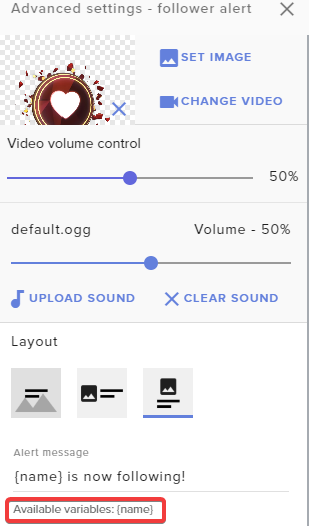 raw hearth
Omg @twin sentinel thank you so much ur the best how can i ever repay u
twin sentinel
You are welcome. That is what we are here for.
 safe hatch
Hi there you awesome peeps. Can you tell me the command to add channel points to a person in chat. it says !addpoints username and amount but that doesnt work.? any suggestions
twin sentinel
We do not have access to the twitch channel points.
We have our own loyalty system.
safe hatch
ya thats what I mean... loyality points for the giveaways
 carmine knot
☁️ You got ${random.0-7} out of 7 dragon balls ☁️ // #${count channel_points_wish_for_anything +1}
This should to pick a number between 0 and 7 correct
 viscid socket
hey peeps, my alerts for subs, followers and bits work but the tip doesn't work since I switched to streamelements as a payment method. any ideas why that might be?
twin sentinel
@safe hatch is the default !addpoints command enabled in your account?
@viscid socket Are the tips in your activity feed?
viscid socket
no they aren't
twin sentinel
Is it via Paypal?
safe hatch
@twin sentinel yes it is
twin sentinel
correct @carmine knot
@viscid socket Best to contact PayPal, if there is anything set on hold.
viscid socket
it is always pending tho
twin sentinel
Then contact PayPal on this.
viscid socket
okay so it's because of that you think? cause I had the same settings on streamlabs and it worked
twin sentinel
If a viewer tipped through PayPal but no information appears in your StreamElements account, this generally means PayPal has held the tip for verification. Until PayPal clears the tip and sends back a confirmation to your StreamElements account, no information will appear there and no alert will play, as that confirmation is the only way for us to be aware of a successful transaction. If you believe there may be an issue with the transaction, you'll need to contact PayPal support as StreamElements is only a passthrough service and never actually gets involved with the transaction or touches the money.
@safe hatch So when you enter the command in chat with name and amount, there is no response from the bot?
round brambleBOT
@safe hatch Please connect your streaming account (Twitch, YouTube, or Facebook) with Discord by going to ⚙ Settings and then Connections here in Discord. https://streamable.com/eg92w
 safe hatch
no theres no response
viscid socket
@twin sentinel it shows up on my tip list though. even though it's still pending. did you mean that by activity?
twin sentinel
Does the bot answer to other commands? @safe hatch
safe hatch
yes absolutely...all other commands seem to work.
twin sentinel
I mean the StreamElements activity feed. @viscid socket
round brambleBOT
@safe hatch Please provide your account ID found at the top of this page: https://streamelements.com/dashboard/account/channels This ID is public info and safe to share here.
viscid socket
yes it's showing up there @twin sentinel it's on the activity feed
twin sentinel
When you replay it via the activity feed, do you see an emulation in your OBS and your overlay editor?
twin sentinel
Then it should also have had an alert, when it was added to your activity feed, when it appeared.
viscid socket
that's strange - no one saw it tho - me included
twin sentinel
You can try to relaod the overlays via the activity feed, to get them freshly connected.
viscid socket
how do I do that? my gifs also didn't really work - gif that I active via command on chat
they were very delayed - by like a minute
twin sentinel
Reload the overlays via the reload button at the top of the activity feed.
tranquil hull
Ok i foound the sub and bit donator loyalty points settings, but is there a way for gifted subs to get points
so the gifter gets points
twin sentinel
Not to my knowledge.
viscid socket
thank you @twin sentinel
 burnt remnant
could anyone possibly help me with some overlay issues?
round brambleBOT
@burnt remnant Welcome to the helpdesk! Please let us know how we can assist you today and a support volunteer or staff member will assist you as soon as they are available. Thank you for your patience.
bronze loom
Can someone hop in a discord call with me?
round brambleBOT
@bronze loom Welcome to the helpdesk! Please let us know how we can assist you today and a support volunteer or staff member will assist you as soon as they are available. Thank you for your patience.
bronze loom
Anyone know how to fix overlays being cropped into the corner?
round brambleBOT
@bronze loom To add your overlays to OBS, add a new browser source in your scene. Paste your overlay URL in the browser source properties, set the dimensions to 1920x1080 (unless you changed them on the website), and ☑ “Shutdown source when not visible” https://youtu.be/KDvLynUqXI4
 mental coral
does streamelements work with a mac?
abstract hemlock
@mental coral since StreamElements its a website, you can use any OS, but if you meant obs.live, that add-on is for Windows users only, you still can use OBS Studio without it
 cosmic swallow
hellooo good morning. I want to ask
round brambleBOT
@cosmic swallow Welcome to the helpdesk! Please let us know how we can assist you today and a support volunteer or staff member will assist you as soon as they are available. Thank you for your patience.
cosmic swallow
if I want to make !time command that show my current time (streamer time) and if it's possible the date too, what is the variable and response example?
thank you so much for the help in advance (‐^▽^‐)
twin sentinel
Check pinned messages in this channel.
cosmic swallow
oki thanks
 opaque lark
hey there! im currently playing round with the alert box overlay and i cant seem to be able to change the bits/cheer video or sound effect, any help?!
cosmic swallow
example of accurate times
$(time.PST8PDT)
${time.Asia/Seoul}
You can specify time zones using locations so LA would be ${time.America/Los_Angeles}
https://en.wikipedia.org/wiki/List_of_tz_database_time_zones
@proud pumice
I found this one, can anyone give me the response sample?

This is a list of time zones from release 2017c of the tz database.
twin sentinel
It would be hh:mm if I am not wrong.
cosmic swallow
like if I make the !time command, the response will be "Right now, it is ${time.Asia/Seoul} in XX place."
is it like that?
cosmic swallow
oo thank you! I'm gonna make one right now
tyvm (‐^▽^‐)
oh it is working!
but there is no date and p.m/a.m yet mmmm I hope it would goes like 18:00 so my viewer will know
thank you so much
weak delta
hey there! im currently playing round with the alert box overlay and i cant seem to be able to change the bits/cheer video or sound effect, any help?!
@opaque lark
You mean it won't let you save them or you change it, emulate and it plays something else?
If the latter, check the variations. Probably overriding.
opaque lark
ah ill check the variations now, thanks!
also the chat alert module seems to be bugging out for me:
i just want it to do hosts and raids, nothing else!
twin sentinel
What browser are you using?
 wooden jetty
Hi, I'm trying to simplify the command that the viewer needs to type in the chat to redeem a product from the store
Which is the variable that copies the message that the viewer place after the command?
opaque lark
@twin sentinel opera
round brambleBOT
@opaque lark Our Dashboard and Overlay editor are Chromium Optimized. We strongly recommend using Chrome. Opera GX and the new Microsoft Edge Chromium might work closest to Chrome as its also Chromium built. FireFox also works, but some things might look a bit different or not work. We do not recommend using Internet Explorer with our Dashboard as it does not support functions.
If the website doesn’t work on chrome, be sure none of your plugins are blocking our website or clear your cookies. You can try if the website works in a incognito tab.
wooden jetty
For example, if they type "!msg hello", can I use a variable only to copy the "hello" part?
twin sentinel
${1:}
 cyan pollen
Hey all I have a small problem keeping me from streaming. Every time I click "start streaming" the frames just starts to drop dramatically and stays down with a 92 percent frame drop though it wasnt doing this yesterday...any solutions?
opaque lark
so shall i try chrome?
twin sentinel
yes please.
opaque lark
kk
round brambleBOT
@cyan pollen Please provide a log from your last stream. To do this, in OBS go to Help > Log Files > Upload Last Log File and paste the link to the log file here.
cyan pollen
twin sentinel
round brambleBOT
@young geyser Please follow our community rules:
- No advertisement or stream promotion
- Respect ALL server members
- No NSFW/NSFL
Thank you
opaque lark
@twin sentinel i refreshed the page a few times and it seems to have fixed it lol
wooden jetty
How can I simplify the command which the viewer purchase a product from the store? I'm trying to simplify this command "!redeem msg (message)"
I'd like to use only "!msg (message)"
Or something easier
abstract hemlock
@wooden jetty you can try something like this !msg message ${redeem msg ${1:}}
 sterile lodge
Hello all, I want to know if there's a way to display the SL leaderboard directly on Discord servers
 versed canopy
my bitrate on obs live keeps going from hig to low and its really bad viewing experience when it goes to low
twin sentinel
@sterile lodge Best to contact StreamLabs on this.
round brambleBOT
@versed canopy Please provide a log from your last stream. To do this, in OBS go to Help > Log Files > Upload Last Log File and paste the link to the log file here.
sterile lodge
@twin sentinel I'm using stream elements leaderboard sorry
twin sentinel
That is not an option afaik.
 fast pebble
Hey guys, can I change my chat to dark mode with obs live studio?
Can't see the setting in the cogwheel of the chat...
twin sentinel
Check pinned messages in #helpdesk-selive
weak delta
@weak delta Hey. Sorry to tag you, but I have a follow-up question from my earlier message about making a roulette wheel with one of the widgets. Is there a way to make the text on the wedges go horizontally instead of vertically?
@lament blade
All good, I don't know of a way with the way that that particular widget is built but theoretically something like that would be possible if you can code it.
versed canopy
lament blade
can someone teach me how I create the live coin shop because I could teach him how to set up his shop
he already has his command to see how many points we have but the store doesn't know how to do it
versed canopy
whats this ^
cyan pollen
@twin sentinel I figured out what it was my Ext was missing a firmware update which cut my 10k plus feed to 230 but ill keep this material for future use and the link to the twitch test help me find a way better quality hub so thanks!
lament blade
I have stream elements setup with sound and text alerts for stuff, but the sounds can only be heard in the editor and not from the browser source in obs when emulating, anyone know how to fix?
versed canopy
ok now my stream is on 0 bitrate what do i do
lament blade
Ok thanks
 velvet fulcrum
can i double the points of loyalty for whom is sub for my channel?
round brambleBOT
@versed canopy For the best OBS support, please join their Official Discord @ discord.gg/obsproject
wooden jetty
@wooden jetty you can try something like this !msg message
${redeem msg ${1:}}
@abstract hemlock this didn't work
abstract hemlock
@wooden jetty i just test it and it works ${redeem ITEMNAME ${1:}}
round brambleBOT
@dense solar You can download our Desktop App Ground Control here: https://streamelements.com/groundcontrol
 muted arch
is there a way to strip the @ from a username when they are mentioned as ${1} so i can use it for a url link
abstract hemlock
${channel ${1}} @muted arch
muted arch
ok thanks i will try
 dreamy frigate
is anyone around to help me with the giveaway function? its not registering anyone typing !ticket (number)
abstract hemlock
@dreamy frigate the command is enable?
 placid parcel
Is there a way to restart the tip goal? I try to put one, but it takes old tips, or that were test
abstract hemlock
@placid parcel https://streamelements.com/dashboard/session check the goal tab
StreamElements
The Ultimate All in One Platform for Streamers
placid parcel
@abstract hemlock thanks
 novel skiff
Hi there, I used to stream in bigger resolution than 1280 x 720, but becouse of FPSIssues, i needed to put it on lower. Now I'm using TwitchStudio, its definetly better, but I can not ( dont know how ) to make Overlay in resolution 1280x720 🙂
Any hellp?
abstract hemlock
@lament blade better ask on #dev-chat
@novel skiff i'm don't have twitch studio install on my pc to help you with that
novel skiff
My Twitchstudio is already in 1280 x 720, and that Resolution is what I am using. The question is if I can make overlay in 1280x720 and not another bigger one?
 crude nymph
Hey how do i change the bot command !points on the streamelements bot?
i keep getting this error in chat when trying to edit it
no command with trigger points found :/
@crude nymph could you share a screenshot please?
 abstract crystal
is there a way to login to streamelements with another twitch account. It just defaults to my inactive everytime. i tried clearing cookies and cache on the website. :/
abstract hemlock
@abstract crystal log out of twitch and then try again
charred quartz
My Twitchstudio is already in 1280 x 720, and that Resolution is what I am using. The question is if I can make overlay in 1280x720 and not another bigger one?
@novel skiff please keep questions to only one channel, doing "multichannel-asking" only generate overload in our support team ;), thx ❤️
abstract crystal
kk
novel skiff
My bad. Thank you for Infromation, didnt know 🙂
abstract hemlock
@crude nymph streamer username please
crude nymph
@abstract hemlock Anaguel
its basically the default !points command im trying to edit, its called !sigils in the default commands on the bot
but it just keeps shooting out that error, no matter if i edit !points or !sigils
abstract hemlock
iirc you can't edit custom commands
crude nymph
hmm default commands?
abstract hemlock
yes, if the streamer rename the default command from !points to !sigils this is still a default command
crude nymph
ahhh yeah i see, im trying to come up with a work around to it; like disable the default command and then just make a custom command  seems like it could work that way
abstract hemlock
 yes
yes
crude nymph
alright thanks for your wisdom!
 sudden surge
Hello! I am trying to get help with displaying alerts live on OBS when streaming. We can hear my alerts popping off but we cannot see the widget box
round brambleBOT
@sudden surge To add your overlays to OBS, add a new browser source in your scene. Paste your overlay URL in the browser source properties, set the dimensions to 1920x1080 (unless you changed them on the website), and ☑ “Shutdown source when not visible” https://youtu.be/KDvLynUqXI4
 rigid vigil
Need some help. I see that the media player has a button to show on stream but when i click it, it has a pop up saying "NO ACTIVE WIDGETS WERE DETECTED FOR MEDIA REQUEST" how do i fix this?
charred quartz
Need some help. I see that the media player has a button to show on stream but when i click it, it has a pop up saying "NO ACTIVE WIDGETS WERE DETECTED FOR MEDIA REQUEST" how do i fix this?
@rigid vigil add a media request widget into the overlay
lament blade
hi everyone! im just trying to figure out the default stream elements alert resolution. if any1 knows can you please @ me
charred quartz
hi everyone! im just trying to figure out the default stream elements alert resolution. if any1 knows can you please @ me
@lament blade it didin't has one, it its relative the text (user name size) and the image / gif being used in the background or foreground
sudden surge
@round bramble All of that has been done. The webcam overlay is appearing, and the alerts can be heard. However, the alerts cannot be seen live.
lament blade
@charred quartz so when you first add a alert it comes up with the default animation and sound. im just trying to figure out the res for it. i havent moved it or done any thing to it.
sudden surge
default is 733/618
rigid vigil
@charred quartz where would i find that widget
charred quartz
@charred quartz so when you first add a alert it comes up with the default animation and sound. im just trying to figure out the res for it. i havent moved it or done any thing to it.
@lament blade it doesn't has one, u can add your custom files the size u want and it will work, if u want a recommended size for creating content for it use: 360x200 or close
sudden surge
733X618
lament blade
@sudden surge love you thanks so much your a life saver
sudden surge
@lament blade ❤️
lament blade
@charred quartz thank you very much my good sir
rigid vigil
where do i find media request widget?
abstract hemlock
rigid vigil
ah ty
 pure harness
Hello, I was trying to use one of the overlays for my obs for twitch, however, it is too "zoomed in" and I cant figure out how to rescale it so that it can fit on my obs without looking like it trails off my screen. Thank you for your help in advance! Also my apologize if I am entering this in the wrong help channel.
abstract crystal
are you capturing it with browser capture? @pure harness
if so make sure the dimensions when you do add browser source are 1920 x 1080
pure harness
yes
abstract crystal
by default they are 800 x 600
pure harness
ok, I will double check it. Thank you 😄
abstract crystal
no problemo
 digital elm
Hey is there any way to get the bot to ban when a banned phrase is used? I only see "timeout length" so i assume its not a feature but just wanted to double check
 tight iris
There is an option for that on twitch itself i believe
abstract crystal
theres a blacklist option on twitch that either bans instantly when used, or uses automod and then the mod either needs to let it through delete/ban the message
i dont know about the streamlabs pov
@digital elm
 long rover
How do u use premade overlays on streamelements ( cause my donation alert doesn't seem to be working) I already copied and pasted the link
abstract hemlock
@long rover Do you see the alert on the web editor?
round brambleBOT
@long rover You can test Alerts via the Emulate bell on the lower left side of the Overlay Editor. Simply go to your Dashboard -> My Overlays -> Pencil/edit button on the overlay. Make sure the "Preview LIVE on stream" option is on to see the alert in OBS/Xsplit https://streamable.com/vtulg9
 long rover
@long rover Do you see the alert on the web editor?
@abstract hemlock i don't really know how to use it yet I'm new to stream elements thanks for the tip and its a template that I just downloaded
 silk hinge
anyone down to help a noob streamer
 heady anvil
can anyone help me out with SE pay
 ripe kernel
Does anyone know if profanity protection blocks words only in English or it blocks words in other languages too?
abstract crystal
some english and some spanish. its not foolproof @ripe kernel
ripe kernel
@abstract crystal thanks! I'll add some manually then!
abstract crystal
No problem
ionic kelp
@heady anvil depending on the question maybe.
 dreamy vale
Hey I was just wondering if the StreamElements bug where the bot stops working properly after changing the name is fixed
 slender zinc
With a bot
silk hinge
which
silk hinge
i did didn't see for stream ele
dreamy vale
I just changed the name of the bot but saw that there was a problem with it a few months ago, but now my bot won't revert back to StreamElements and does all commands under my name, or if I set it under a new name, it runs the commands through both my name and the second account for the bot
nimble dune
@silk hinge The viewers need to login to the site
And then will be calculating the loyalty.
slender zinc
@nimble dune do you know how to fix black screen of game capture
round brambleBOT
Due to the way laptops are designed, your system must be configured to run OBS on a specific GPU, depending on the type of capture you are trying to do.
For Game Capture and Window Capture (recommended), your system must be configured to run OBS on your laptop’s high performance GPU (default); for Display Capture, your system must be configured to run OBS on your laptop’s power saving GPU (iGPU).
If you are running Windows 10 1903 or newer, use this guide for instructions on how to configure your system: https://github.com/obsproject/obs-studio/wiki/Laptop-GPU-Selection-Windows-10
For instructions on configuring an older version of Windows (you should consider upgrading), use this guide: https://obsproject.com/wiki/Laptop-Troubleshooting
silk hinge
i got that to work
nimble dune
@slender zinc It is laptop?
nimble dune
@slender zinc What are you trying to capture?
But for that issue go over to #helpdesk-selive
slender zinc
Everything I try doesn't work
round brambleBOT
You can test Alerts via the Emulate bell on the lower left side of the Overlay Editor. Simply go to your Dashboard -> My Overlays -> Pencil/edit button on the overlay. Make sure the "Preview LIVE on stream" option is on to see the alert in OBS/Xsplit https://streamable.com/vtulg9
 silk hinge
in my alert overlay
its only half showing up i cant reposition it not sure whats wrong
round brambleBOT
@silk hinge The default resolution for StreamElements overlays (theme and custom) is 1920x1080. Please add them in OBS at their full resolution and use CTRL+F to fit to screen if necessary. You can then downscale your stream in OBS settings > Video if you'd like https://i.imgur.com/6bWXxjR.png
 swift swan
How do I crop ion the editor?
zenith widget
You can't...in a way - not the usual image editing cropping way.
zenith widget
Yes, what kind of a widget are you trying to "crop"?
zenith widget
Not possible
swift swan
So things are outa the way
zenith widget
the overlay editor is not an image or video editor
zenith widget
scaling
zenith widget
So when images and videos are positions in a web form, their top left corner is placed in a 0 height and 0 width position in the widget area.
The reason only the bottom works is because of the scaling options and how image/videos positioning works in general in websites.
swift swan
Weird
zenith widget
widgets are essentially a mini webpage
swift swan
Yea
zenith widget
So if you want to "crop" the top of a widget, you will have to have that widget as a standalone overlay, the widget full sized, added to OBS and then you can use ALT+drag the top border to crop.
But thats excessive, so its best o just add the webm asset directly to OBS
swift swan
I just wanted to hide the top and bottom to see more of the games
Idk how Sony Vegas can keeep a webm clear backgroud
dull blade
i have stream labels to see new followers but i did so you can see how follow as last but when sombody follow hes coming up but not un the latest followers
 stuck siren
Anyone else experienced obs.live issues since Twitch changed their interface? I haven't changed a single setting, running at 4.5ish upload, around 4%CPU, and still dropping over 10% frames at times. Everything was fine up until this week
dull blade
nah i doing good with it
zenith widget
@stuck siren the UI change in Twitch has nothing to do with dropped frames
round brambleBOT
@stuck siren Dropped Frames usually means that you have a bad connection with the streaming service(Twitch/Youtube/Mixer/Facebook) and most likely something related to your ISP not handling the connection properly.
Speed tests usually cannot help solve this problem and its best to use this guide: https://obsproject.com/wiki/Dropped-Frames-and-General-Connection-Issues
zenith widget
@dull blade Im not sure I understand. The most recent follower shows up in the labels, but then doesn't show?
prisma relic
look for the "emulate" 🙂
zenith widget
the alert emulation will not trigger the SL alert box/widget
round brambleBOT
We're not able to troubleshoot issues with using our overlays in StreamLabs OBS (SLOBS) as we don't have the tools to support their software. We recommend using OBS Studio or OBS Studio with our plugin OBS.Live.
 warm violet
Anyone able to fix the overlay lag even tho your game runs fine and your barely even using your gpu?
round brambleBOT
@warm violet OBS -> settings -> advanced -> scroll down -> enable/disable hardware accel.
https://i.imgur.com/ggMe9ZE.png
long rover
why is my preview not the same as the one I placed for my alert??
zenith widget
@long rover can you elaborate?
 humble iron
i need help
 viscid pebbleBOT
Hi @humble iron, Please ask your question(s) or describe the problem you're looking to solve so staff or a support volunteer can assist you as soon as they are available.
humble iron
join chit chat so i can ask case its alot
long rover
@long rover can you elaborate?
@zenith widget I found out on how to fix it. I redownloaded the overlay and it worked but at first the first download had like a shark dancing but it shouldn't be supposed to be a shark but yeah its now fixed
humble iron
i need help please
round brambleBOT
@humble iron Please ask your question in one helpdesk channel only. A support volunteer or StreamElements staff member will assist you as soon as they are available. Asking in multiple places will only result in confusion, not faster answers. Thank you for your patience.
humble iron
join chit chat so i can ask case its alot
@zenith widget join chit chat call i need help
and its alot to type
case idk how to explain it
zenith widget
I'm not available for voice currently.
humble iron
o ok well ill try to explain
when i stream how to i make it to were even tho obs is closed it shows me the chat and stuff like that
???
can you help
zenith widget
Are you on a 1 monitor setup?
humble iron
yes
zenith widget
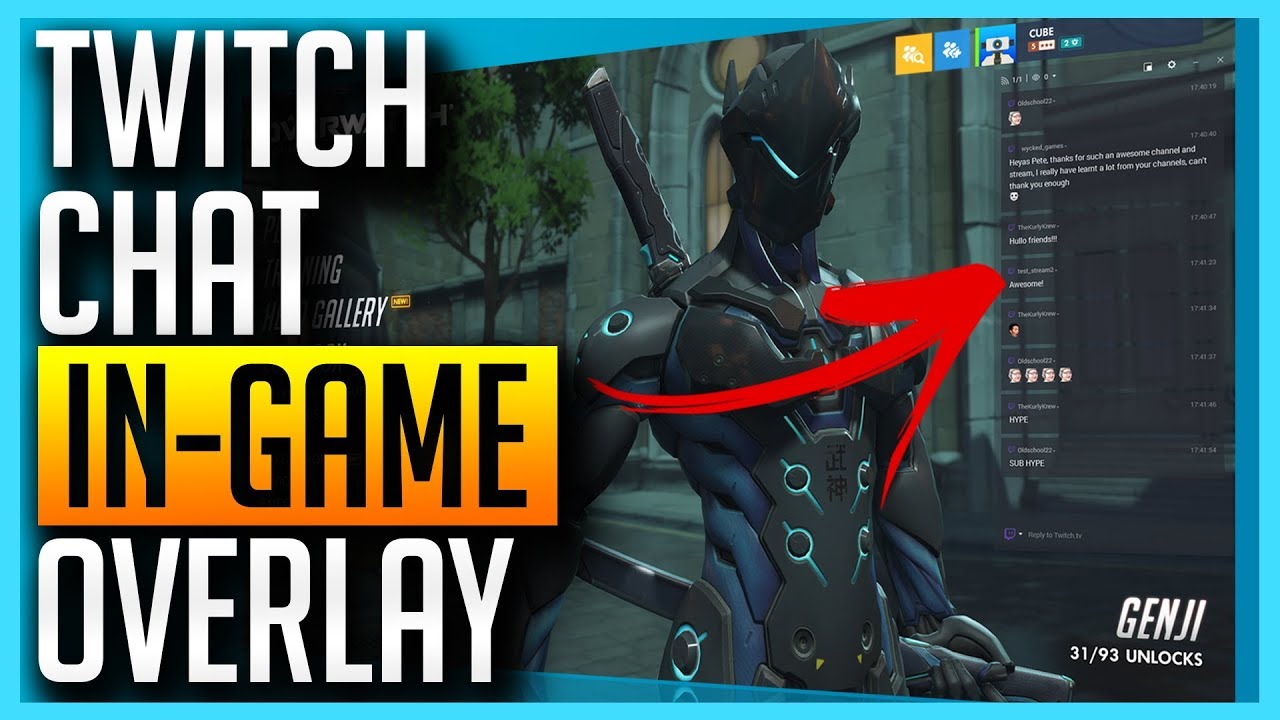
Only got 1 monitor and still want to interact with your stream chat? No Problem! In this video we show you how you can read (and respond to) Twitch chat from within your game! 👇🏻Timestamps & Links👇🏻
⏩ Timestamps, click to skip ahead!
0. Introduction 0:00
- Download and Insta...
humble iron
that dasent work
that was posted
2 years ago
and it changed
so
Hello
you there
sweet socket
I see that but we handle support for our services in here
humble iron
join chit chat call i need to ask
sweet socket
For in game chat, please google around, also, a 2 year old video can still be relevant
zenith widget
we don't have anything that can show your twitch chat in-game
on a 1 monitor setup
 tight plank
Hey there, I'm having some issues with the streamelements chat stats. Not sure if this is the correct place to ask, but couldn't hurt to ask, I figured.
round brambleBOT
@tight plank If you changed your name on Twitch please follow these steps:
🔹 Visit https://streamelements.com/logout and then log in again with by connecting with Twitch.
🔹 On the right side of the dashboard page that opens, select "Join" under bot settings. If it says "Part" select that and then select "Join" to send the bot to the chat. Don't forget to mod the bot by typing /mod streamelements in your channel if you have not already.
🔹 Post your old and your new name here so that we can update your channel's chatstats tracking (must be done by staff).
tight plank
I did change my twitch name a while ago and it just doesn't show up
thank you
that's amazing
sweet socket
No worries
warm violet
yea that bot dont play it helped me fix an issue i had for like hours even while googling lol @tight plank
sweet socket
@warm violet we control the bot with commands 😉
sweet socket
Just be sure to put your old username and new username here and I’ll request a chat stat fix for you with the staff
tight plank
Okay, I followed the steps, bot is in the channel's chat, with mod access. I did change my name 3 times in total, first time was in 2015ish
Should I put all 3 or just the last 2 names?
sweet socket
Last 2 should be good, if that doesn’t work they’ll let me know
tight plank
Alrgght, thanks, so I changed from mythsardan_ to tct_mythsardan
 spring stag
Guys I need help - try changing the settings for chat events but they won’t save?
Like a pop up for tips for example won’t save?
sweet socket
You mean the alerts?
Are you setting them in a overlay?
charred quartz
and it changed
@humble iron https://github.com/danieloneill/TwitchOverlay
GitHub
A Twitch chat overlay for streamers to follow their stream chat while gaming. - danieloneill/TwitchOverlay
lament blade
Hi
round brambleBOT
@lament blade If you would like help from the StreamElements support volunteers/staff please post your question in one of the helpdesk channels and someone will assist you as soon as they are available
#helpdesk-twitch | #helpdesk-youtube | #helpdesk-facebook | #helpdesk-mobile | #helpdesk-selive | #651453660810838026 | #helpdesk-merch
Thank you for being patient.
 little oak
youre in twitch help desk, how can we help you?
sweet socket
Alrgght, thanks, so I changed from mythsardan_ to tct_mythsardan
@tight plank chat stat fix is done
warm violet
this might be the wrong place to ask, but the paypal business account , is that something you should wait for until you actually start getting quite a few donations a stream?
zenith widget
its up to you
warm violet
hmmm yea i guess there really isnt a reason to wait its free and what not. Thank you
 stray ingot
hi is there any reason why its fussy noise on my stream thanks
round brambleBOT
@stray ingot For the best OBS support, please join their Official Discord @ discord.gg/obsproject
 fallow elbow
hi help obs chat is in light mode how to i make it dark
sweet socket
check the pinned message in #helpdesk-selive
#helpdesk-selive message
stray ingot
@round bramble thanks
 manic night
Hello
untold crest
Hi!
 thin pelican
Hello, how can I link my bots twitch account to streamelements? I cannot find anywhere to input the oath token
zenith widget
@thin pelican You just need to go to our dashboard and click "join channel"
thin pelican
@zenith widget The stream elements dashboard?
zenith widget
yes
thin pelican
I have activated the chatbot on the dashboard but I would like to rename the bot by using a twitch account I own
is this possible?
round brambleBOT
@thin pelican Currently renaming the bot fully works with OBS.Live.
You can follow this video guide to set it up: https://discordapp.com/channels/141203863863558144/494513233416421386/561516184718278676
If you don't want to use OBS.Live and want to stick with Ground Control, please let us know your Twitch username.
thin pelican
Wouldn't it be easier to have a youtube link rather than a link to half way up a discord chat in another channel? 🤔
thin pelican
Okay, that was in a weird hidden away place but I got it, thanks for the help!
 iron onyx
Hi, ive been trying to use media request to play music during my streams. but when i play a song it seems to play twice at the same time and just sounds terrible on the actual stream. i turn the volume all the way down on my laptop so it cant be playing twice through my mic... not sure what else to try
 severe bobcat
hey dudes, i was wondering if it was possible to do a giveaway and make sure certain people dont win without making many people into regulars
zenith widget
You mean rig the giveaway? Unfortunately, unless you want to make it sub only, there isn't any way to limit it
round brambleBOT
@iron onyx Make sure to ☑️ “Shutdown source when not visible” for all browser sources (all OBS scenes). If using studio mode, uncheck “Swap Preview/Output scenes After Transitioning.” Also keep in mind that sound can play from any overlay loaded in the browser (editor or launched). https://i.imgur.com/6bWXxjR.png https://i.imgur.com/yY0wcFl.png



 peak briar
on my twitch chat the !emote bttv command doesn't work right - it shows the emotes that I deleted yesterday and didn't add the new that I added (15h ago added and deletet)?
zenith widget
!emotes update
peak briar
oh okay thank you, where can I see that this exists?
is that on other commands as well?
zenith widget
!emotes is a default command, used to either show all emotes, bttv, ffz or update the emotes
 celest ocean
Hi, excuse me but someone knows how to make a subscriber count command?
zenith widget
${channel.subs}
peak briar
!emotesis a default command, used to either show all emotes, bttv, ffz or update the emotes
@zenith widget oh okay, is there a way to show both in one?
zenith widget
both in one?
peak briar
yes
zenith widget
That still doesn't clarify your question
peak briar
I mean, that for example when I write !emotes all that both emotes will be shown in one message?
is there a command like to this?
zenith widget
!emotes all should show you your sub emotes(if the bot is gifted a sub to you) + bttv + ffz
peak briar
while !emotes bttv works
lament blade
whaduup peeps! got this server forwarded cuz i need some help with what i believe is a simple problem
problem is i put a command in the bot and made it super Moderator but when it pops up in chat it doesnt work
im trying this with the !sraffle command
zenith widget
@peak briar Sometimes it won't work. Not sure why
@lament blade What do you mean it doesn't work?
peak briar
right now it doesn't work at all and it doesn't matter how often I try, what do you mean exactly with:
Sometimes it won't work. Not sure why
Do you mean that it doesn't work on specific channels or sometimes on all channels?
lament blade
What i mean is that the !sraffle command isnt working when used by the StreamElements bot.
it does work when i type it in chat myself
thanks for taking the time to help out appreciate that @zenith widget
zenith widget
@peak briar the all option might not work for your specific channel
peak briar
@zenith widget can I somehow fix that? :/
zenith widget
No
peak briar
oh okay...
zenith widget
@lament blade seems to be working fine
lament blade
I want streamelements bot to start the raffle
not me typing it in chat myself
the command !sraffle works fine when I type it
But when i create a timer with the !sraffle command in it
the command doesnt work
so the bot cant use the command
i already added StreamElements To super moderator
but when the message pops up (i.e) "StreamElements:!sraffle"
the raffle doesnt start
zenith widget
The bot cannot trigger its own commands
lament blade
thank you 🙂
zenith widget
If you started with the timer and the command usage, we would not be going around a bush 
lament blade
i havent slept okay
zenith widget
No worries, I'm running on 4 hours of sleep and been awake already 10 hours 😉
lament blade
but i really apreciate your help i know how to fix it now
i need another bot XD
an extra one ofcourse
i love streamelements!
really easy to use
 dense jungle
hey guys i wanted to ask you if you can still switch the payment methods even you connected a paypal email adress? Because i wanted to change it from paypal to my personal bank account
untold crest
It wouldn't be possible to use direct wiretransfers, because your bank would not send us notification, that there is payment received (PayPal/SE.Pay informs us about that).
dense jungle
ok thanks
 slow crag
hey guys i want to ask if its possible to set up a bot which writes every for example 10 minutes a message in the chatbox ?
 granite tulip
hi i need help to link a go fund me to my twitch
slow crag
thx @weak delta
twin sentinel
@granite tulip Can you elaborate? If you are searching for your donation link, you can find it here: https://streamelements.com/dashboard/tipping-settings > tipping settings.
untold crest
@granite tulip I think you are looking for this one: https://discordapp.com/channels/141203863863558144/457957557470887947/709114221581041664
granite tulip
@twin sentinel im planning to do a 24 hour charity stream and wondering how i can link the go fund me to twitch
untold crest
We have alertbox for gofundme, linked above.
granite tulip
and then does anyone know how i could link the paypal to that
 still remnant
Hello. I'm trying to setup a custom alert box and the text wont show above the alert box. is there a setting im missing?
ionic kelp
Change the margins for the text
still remnant
??
ionic kelp
Click text settings for the alert type and adjust it.
still remnant
oooohhh that's weird that it didnt do that itself lol
you have saved my sanity, thank you very much lol
untold crest
@granite tulip you are not linking paypal to that, you just provide campaign id in widget settings and it grabs data for alerts directly from gofundme. You can add link to that campaign in panel below stream and/or in bot command/timer
granite tulip
oh thank you
 versed socket
Hiya. I'm having problems with my alerts. For some reason no matter what I change in the settings for cheer alerts it doesn't change anything! And also I don't receive any alerts at all for hosts. Any help is appreciated 😊
round brambleBOT
@versed socket Due to changes to Twitch API, we have filtered out hosts and will only show these ones on your activity feed:
- All hosts coming from an online channel with at least 1+ viewer
- Auto host events with at least 1 viewer - only from a channel that just went offline
Note: If you see "X channel has hosted you" with no viewers on the back, that is considered an offline host or a host with 0 viewers, we do not show these.
Note for Mixer streamers: The above 2 filters currently apply for Mixer and we are aware its actually not how Mixer hosts work. We do plan on changing it, but no ETA on when.
untold crest
And about alerts for cheers - take a look into "Variations" tab
 tough burrow
went to go close out the app but someone closed out the chat window on the right hand side. How do I get chat on that right side again @viscid pebble
versed socket
@untold crest thanks so much! I never would have thought to check in there
 gentle quail
Im having trouble with some labels displaying right in obs with an overlay I've created. they seem to display when I manually emulate them in stream elements, but it wont update with real alerts, or stay displaying the info when i open obs for the first time Any suggestions?
 late terrace
for the hype cup, is there a way to set how much total donation actually fills the cup? or is it only a fun visualization thing
 last jackal
How do I delete account
 vagrant mist
Alguien habla español?
wary halo
#🇪🇸︱español <<
 idle cypress
good morning! my in game overlay isn't showing up. I removed the scene and added it back. nothing i try works. I am using a browser source for the rebel alliance. Any help would be appreciated.
ionic kelp
@ionic herald You can disable the chat notification but you won't be able to redeem the item in chat. You'd have to use the panel extension or do it from the website.
 ionic herald
Why is it that bad?
ionic kelp
It's not bad but not exactly what people want usually.
ionic herald
Can we not just set this to “whisper” instead of global chat answering
ionic kelp
Not with the current design.
ionic herald
Is this planned to be changed?
round brambleBOT
Check out the StreamElements ideas board: https://strms.net/ideas. You'll be able to add ideas, upvote ideas you agree with, and track their progress with email notifications. Adding and upvoting ideas also helps the staff know which ideas should be prioritized so please take some time to upvote.
idle cypress
Does anyone know why only one of my overlays isn't working but all the rest are?
 clear sleet
Question about Custom chat commands. When using urlfetch for webhooks on ifttt.com is there a way to hide the response from chat
round brambleBOT
OBS -> settings -> advanced -> scroll down -> enable/disable hardware accel.
https://i.imgur.com/ggMe9ZE.png
clear sleet
Other than whispering the person that sent the command?
 wintry parcel
friends, is timer function working pproperly?
idle cypress
My enable browser source is checked!
ionic kelp
Yes. You're most likely not having meet the requirements.
idle cypress
it was before
ionic kelp
Try disabling and looking again.
ionic kelp
Screenshot the timer.
idle cypress
Nothing happened
ionic kelp
!cache
round brambleBOT
Right click on the BrowserSource > Properties > Scroll down a bit > Refresh Cache of current page
wintry parcel
Isn't this supposed to make bot send a command every 10 minutes stream is online
Offline one worked
idle cypress
I did it again but nothing changed.
ionic kelp
You have at least 1 message every 10 minutes to trigger it?
wintry parcel
yes @ionic kelp
way more than that
it's a bit awkward because I am live for 36 min already and it didn't happen.
as I said - offline one worked
idle cypress
I tried a totally new overlay and nothing is working.
ionic kelp
Can you see it in browser if you preview it there?
ionic kelp
Can you do the same thing you did for the cache but screenshot it instead? Scroll down and hide the link.
idle cypress
this?
ionic kelp
I actually want to the see options above that.