#helpdesk-twitch
1 messages · Page 620 of 1
 dim marten
 muted fox
@sweet socket You know any good tips for growing my channel?
 zenith kite
Quick question, is the link to the current Giveaway (shown with !gaveaway) also available as a variable?
dim marten
Last thing I have questions on right now. Is it possible to set a counter to a specific value to start, then count +1 each use?
That way I don't have to start my counters at 0, when most are around 200 or more at this point haha
 sweet socket
@dim marten atm its only available through the obs.live pugin yes
dim marten
lets hope it doesn't bug out my OBS install this time lol
sweet socket
@lament blade what browser are you using? Be sure that you are using Chrome or Chromium Edge, if its still buggy in there, use the browsers incognito tab
dim marten
I install it to which folder? the /obs-studio/obs-studio folder? For some reason mine is nested like that.
 lament blade
Ok I’ll try chrome
sweet socket
@sweet socket You know any good tips for growing my channel?
@muted fox This differs for every channel, there is not really an answer for this, but you can always search some tricks and tips on youtube
muted fox
ok
lament blade
Ok chrome let me in, thank you
muted fox
Can I post my stream in this channel and u guys tell me how it looks?>
sweet socket
@zenith kite if its not in the variables list, then I dont think so, but you can always ask in #dev-chat
sweet socket
@muted fox posting your channel isnt allowed in this discord
muted fox
ok
 round brambleBOT
@lament blade Twitch prime (new and resub) and paid subscriptions (resub only) must be shared in chat manually by the person subscribing in order for the subscription information to be sent to StreamElements. For twitch prime, the user needs to have sharing enabled on https://www.twitch.tv/settings/prime. For paid subs, if the share box doesn't show up immediately it will when they refresh the page. https://i.imgur.com/VNJN0Uv.gif https://i.imgur.com/2297EA7.png

 sweet socket
people need to share their subs for StreamElements to see them
lament blade
Ok thank you
muted fox
@sweet socket I need to be a partner on twitch for subs right?
sweet socket
no, you need to get affiliated
muted fox
Where can I find this?
sweet socket
you can see your progress under your achievements on twitch
dim marten
what about counters? I have multiple for deaths/wins/derps, and most are at like 150+ at this point, I don't want to have to run the commands 150+ times to get them back to where they should be xD
 untold crest
!editcounter <counterName> <newValue> for example !editcounter deaths 0
dim marten
👍 Thanks
 drifting dock
help. I have a two pc set up. I logged into my twitch account in two my gaming pc, and on the seperate pc I logged into my youtube. I want everything to be on one PC, but when I try to add the YT channel I get a message saying that the channel is already claimed. Any help on unclaiming the account and being able to log into my main PC> thanks
round brambleBOT
@drifting dock Account Merging - Please note:
- Merging accounts only allows faster ways to switch between accounts
- Merging accounts does not allow data sharing between accounts - different streaming platforms, different type of events
- Merging accounts allows duplicating/sharing overlays between the accounts
If you understand the limitations of merging and want to proceed, please find the JWT tokens (!jwt) from both accounts you want to merge and you will be directed to DM them to a staff member.
drifting dock
Yes Please
 ionic kelp
Do note if you want to remove an account from the 2 in the future you'll need to delete EVERYTHING from the accounts.
drifting dock
Can I just remove the account and link it to my main account?
ionic kelp
Not once you do this.
drifting dock
Instead of merging I should just remove the account and on my separate PC link my YT account?
Just did the above^^^ and it worked. Thanks for the help
dim marten
well, the 'editcounter' bit isn't working?
https://i.imgur.com/2573Tvh.png
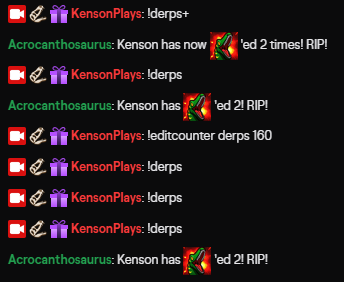
oh, every single mod command was disabled for some reason
 olive holly
@zenith widget hey there, it is been a week. Any news? 
 lyric python
Hey! I'm trying to figure out why my media request and media share widgets aren't showing on stream. I can't seem to figure out why they don't appear on stream when I click "show on stream"
lyric python
yes
 little oak
have you added to obs as a browser source?
lyric python
yes
It seems that I can get alerts, but my media share is specifically just refusing to work lol
little oak
are you playing the preview that is defaulted or did you request a song? reason i ask is cause few try to to play what's there and the default video will not show?
lyric python
i'm playing the preview rn. i'll try requesting something
dim marten
Assuming there's no way to make an alias for a sound 'store' items? I'd like to make !rawr play a sound, and not have to run !redeem rawr
little oak
That's it, the preview will not show up untill you request a song 🙂
little oak
The Preview is basically just a show that the video is displaying stating that it is active 🙂
lyric python
thx for the help!
little oak
You're Welcome 
 formal flicker
Hello
dim marten
Hmm. Got it, but I can't seem to put an counter and {redeem rawr} in same message?
/me Reaver has Rawr'ed ${count reaverrawr} times! {redeem rawr}
The counter fires but not the sound effect.
round brambleBOT
@formal flicker If you would like help from the StreamElements support volunteers/staff please post your question in one of the helpdesk channels and someone will assist you as soon as they are available
#helpdesk-twitch | #helpdesk-youtube | #helpdesk-facebook | #helpdesk-mobile | #helpdesk-selive | #651453660810838026 | #helpdesk-merch
Thank you for being patient.
lament blade
Hello everyone, tell me how to add the G2A PAY payment method for donates, otherwise the choice was only paypal and SE PAY, but for Ukraine these methods are not suitable.
 wheat cedar
um I have apparently muted my alerts on the website, but I dont know how I did it or undo it...any help?
little oak
there is a volume icon top right hand corner within your overlay editor???
little oak
go here https://streamelements.com/dashboard then hit that join button right side 🙂
under "bot setting"
dim marten
I'm assuming the filter > banned words > scan section > username would remove all messages from people who's names match words in the list?
Also: How do you define regulars? What makes a person Regular with SE? Based on X hours or . . . ?
 potent coral
Over the past few days I have noticed that my chat does not show up on 3 of my 4 overlays and i am getting no notifications. Anyone have any ideas? I have search online and have had a hard time finding help. Thanks!
 lofty moth
can I find chat logs anywhere in SE?
little oak
afaik, no we do not monitor that but may come in the near future for there is many many ways online to get chat loogs specially one like cbenni and others like that
 flint root
Hi I want to merge my twitch to my fb-logged in stream elements but its gives me error that it is already claimed.
round brambleBOT
@flint root Account Merging - Please note:
- Merging accounts only allows faster ways to switch between accounts
- Merging accounts does not allow data sharing between accounts - different streaming platforms, different type of events
- Merging accounts allows duplicating/sharing overlays between the accounts
If you understand the limitations of merging and want to proceed, please find the JWT tokens (!jwt) from both accounts you want to merge and you will be directed to DM them to a staff member.
 scarlet tiger
@lofty moth you can use twitch chatlogs feature
flint root
!jwt
round brambleBOT
You can find your JWT token on your account channels page ("Show Secrets" to reveal the token): https://streamelements.com/dashboard/account/channels
READ ME:
This is a private security token. Do NOT share this token here or other public places, only with a StreamElements staff member in private.
scarlet tiger
@flint root dm both jwt tokens to @zenith widget
flint root
Thank you @scarlet tiger
scarlet tiger

@dim marten 1)yes
2) Regulars may be trusted users who suppress filters (they will not apply to them)
 coarse barn
Hi a channel I mod for has recently changed their name and now I cant bring up sub stats it keeps saying 0
round brambleBOT
@coarse barn If you changed your name on Twitch please follow these steps:
🔹 Visit https://streamelements.com/logout and then log in again with by connecting with Twitch.
🔹 On the right side of the dashboard page that opens, select "Join" under bot settings. If it says "Part" select that and then select "Join" to send the bot to the chat. Don't forget to mod the bot by typing /mod streamelements in your channel if you have not already.
🔹 Post your new name here so that we can update your channel's chatstats tracking (must be done by staff).
 jagged minnow
any1 know how i can setup KappaGen (emotesplosion) for obs studio? i went to streamelements website and coudlt find it listed in widgets...
round brambleBOT
@jagged minnow To add your overlays to OBS, add a new browser source in your scene. Paste your overlay URL in the browser source properties, set the dimensions to 1920x1080 (unless you changed them on the website), and ☑ “Shutdown source when not visible” https://youtu.be/KDvLynUqXI4
jagged minnow
when i type kappagen in the widgets section it says there are no results tho =/
scarlet tiger
Screenshot?
little oak
also make sure !kappagen command is enable via default cmds https://streamelements.com/dashboard/bot-commands/default-commands
jagged minnow
scarlet tiger
In the overlay editor > Widgets on top > Press Ctrl+F > Search for KappaGen
little oak
^^^
little oak
thats it 
jagged minnow
thanks! i never use streamelements website, dont tell them 😄
little oak
no worry we got you, always come here if you are unsure of anything and we will help you 🙂
scarlet tiger
jagged minnow
i saw a big streamer using it and i was like woah i need to steal that@!
little oak
make sure the default !kappagen is enabled as well under default chat commands
its amazing i use it as well
 rose nacelle
Hello everyone, can i ask something about twitch stream? 🙂 I have a little problem ..
little oak
@rose nacelle ask away 🙂
jagged minnow
and how do i enable it?
little oak
cmd or the kappa?
https://streamelements.com/dashboard/bot-commands/default-commands you will find !kappagen here
rose nacelle
Okay, thank you. I'm trying to stream LoL but when I'm in game and while im streaming everything is fine except that every 5 seconds i have a spike lag (the seconds are always 5, I don't know if u understood :D) Any advice?
round brambleBOT
@rose nacelle Please provide a log from your last stream. To do this, in OBS go to Help > Log Files > Upload Last Log File and paste the link to the log file here.
rose nacelle
Ok, sorry for bothering u 😦
little oak
NO NO, Youre fine
rose nacelle
Okay, so the main problem should be the gpu i guess?
little oak
the red and yellow
rose nacelle
okay
jagged minnow
ok so once i finsihed inputting the values, how do i get the code to input into OBS?
little oak
you will do it like this. there is two ways
sweet socket
@little oak it didnt capture anything
you'll need a cleanlog
look at the no output session
round brambleBOT
@rose nacelle 1) Restart OBS
2) Start your stream/recording for about 30 seconds. Make sure you replicate any issues as best you can, which means having any games/apps open and captured, etc.
3) Stop your stream/recording.
4) Select Help > Log Files > Upload Current Log File. Copy the URL and paste the link here.
(Note: If you do not see an obsproject.com URL, you will need to update OBS Studio to version 22+)
rose nacelle
little oak
there we go, my apologies for that
rose nacelle
no problem, is aweome that u guys help us ahahaha
rose nacelle
actually y
little oak
here are the results
Wifi is not really good nor made for gaming, it is best on wired connection
jagged minnow
got it working, thanks alot @little oak @scarlet tiger
rose nacelle
i've streamed in the past with wifi and had no problem, i think the problem was the gpu
going to try and see if i fixed just by changing that setting
if not i will try wired 🙂
 rose nacelle
ok i have a problem again ahahaa
sweet socket
Wifi streaming is not stable enough, what is your upload speed? @rose nacelle
rose nacelle
usually between 12-19
sweet socket
and what do you use as bitrate?
rose nacelle
ehm..? 😄
sweet socket
do you use OBS.Studios with our plugin?
go to settings -> output and check your video bitrate
rose nacelle
well, i think so, i downloaded from ur website
sweet socket
then yes, follow the settings and it will say video bitrate
sweet socket
no, it will say video bitrate
ah okay, sometimes it help to have a lower bitrate, but what are you actually experiencing with issues?
choppy stream?
rose nacelle
is strange
like, when im in game, every 5 seconds it stops
for half a second
spike lag..
little oak
its the wifi
sweet socket
so that is the wifi connection indeed
you're already saying it with the lag, lag is a connection issue
rose nacelle
but it is normal that i have this issue exactl every 5 seconds? is not a random number
sweet socket
probably tries to reconnect every 5 seconds
rose nacelle
ok, one more thing
sweet socket
try it out once with a Ethernet cable from your router and see if the stream doesnt have lag spikes, its the best way to test this out
rose nacelle
in the control panel nvidia, should i use integrated?
or the nvidia gpu? cuz if i use the nvidia it cant record my screen for some reason..
sweet socket
I dont know your specs, but im guessing integrated is the Intel HD Graphics one which you dont wanna use
so yhea the nvidia one
round brambleBOT
@rose nacelle Due to the way laptops are designed, your system must be configured to run OBS on a specific GPU, depending on the type of capture you are trying to do.
For Game Capture and Window Capture (recommended), your system must be configured to run OBS on your laptop’s high performance GPU (default); for Display Capture, your system must be configured to run OBS on your laptop’s power saving GPU (iGPU).
If you are running Windows 10 1903 or newer, use this guide for instructions on how to configure your system: https://github.com/obsproject/obs-studio/wiki/Laptop-GPU-Selection-Windows-10
For instructions on configuring an older version of Windows (you should consider upgrading), use this guide: https://obsproject.com/wiki/Laptop-Troubleshooting
 vestal quest
On merch it will not let me add my PayPal account but I've added my email will I still get the money for it
sweet socket
#helpdesk-merch please @vestal quest
sweet socket
@coarse barn I'll be sure to ask someone from staff to do this for you
what was the old username?
rose nacelle
btw i did that on the guide, but in the preview while im trying to record desktop (if i use nvidia) i have black screen, while if i put it on the iGPU it shows me the preview on my desktop
ionic kelp
The 2nd paragraph explains it.
rose nacelle
ah ok sorry didnt check it, my bad
 low haven
I have an issue with streamelements, the clients chat screen is not working for me
it's not updating any chats people are chatting
rose nacelle
ah ok that's what i did, i mean even earlier worked with the iGPU but i was wondering if it has to be on GPU, never mind thank u a lot for the help, i will try to use ethernet to see if it solver my 5 secs problem
low haven
anyone know what the reason could be?
sweet socket
@low haven have you logged out and back in again?
lament blade
Hello all is it possible to make this on streamelements:
For Example credits after stream where it shows all new followers, subs etc.
low haven
if i'm streaming live can i log out and back in without the live being interrupted
little oak
@lament blade we have this, maybe this is it? https://discordapp.com/channels/141203863863558144/457957557470887947/471391075257286657
@low haven logout of?
low haven
if I logout of treamelements on streamelements obs, does it shut down the stream meanwhile logging out
little oak
if its our obs.live, yes you can logout and bacc in with no interupptions
little oak
You're Welcome
low haven
Valorant hype in the streaam!
little oak
lament blade
Guy's anyone who can tell me how to change the name of the bot?
round brambleBOT
@lament blade Currently renaming the bot fully works with OBS.Live.
You can follow this video guide to set it up: https://discordapp.com/channels/141203863863558144/494513233416421386/561516184718278676
If you don't want to use OBS.Live and want to stick with Ground Control, please let us know your Twitch username.
sweet socket
it shows in the video guide
little oak
the video in the descripton is from obs.live activitry feed
 inland vessel
Hello Im having issues with my alert sounds coming through on stream. They work fine on when i test them on the editor.
round brambleBOT
@inland vessel If you are not hearing your Alerts and/or Media request, you are most likely using the "Control Audio via OBS" option in your browser source properties.
To make sure you hear the alerts and the stream also hears them, follow along the screenshot bellow.
https://cdn.discordapp.com/attachments/199460642975907840/685371800456134686/unknown.png
 little oak
try that and see?
inland vessel
thanks
 rough grail
I have issues with FPS drops i didnt change settings and its really annoying cuz its almost impossible to stream
After one of the latest updates
round brambleBOT
@rough grail Please provide a log from your last stream. To do this, in OBS go to Help > Log Files > Upload Last Log File and paste the link to the log file here.
rough grail
little oak
you have capture interference also try running it in admin mode for a smoother transition???
rough grail
Might be a dymb question but what is capture interference? and how can i fix it? I dont see admin mode only studio mode.
 main token
I’m here, now what must I do ??
little oak
@rough grail Game capture tries to capture any ful screen app
Display capture tries to capture the same app because it´s using the whole display. That`s why they conflict each other.
inland vessel
So I have set my setting for the alert audio to match yours and it still doesnt work on in studio
little oak
@main token that will be you tip link for your default !top comand in chat when you enable it via dashbord
rough grail
i always use Game capture. So i should delete the display capture of my sources?
rose nacelle
I did exacty the same as the guide about the black screen, so i put the obs studio in the nvidia control panel in the iGPU, but i still have the black screen if i try to record the screen..
little oak
either or, or you can hit the eye to turn one of them off and see if it still presists @rough grail
rose nacelle
btw, following what u explain to Cruzey
rough grail
thx @little oak
little oak
You're Welcome
little oak
Hard to say because you are on a laptop and they are built totally different from a desktop
the description that the AI should explain why and give details about it
have you try the links that it provided?
rose nacelle
ya..
rough grail
So wait i didnt see u answering this. Where can i enable admin mode?
rose nacelle
gonna read once more
little oak
Rclicc on your desktop obs.exe icon
@rough grail
you will see this on your desktop
Rclicc on that then select run as Admin
 little oak
Rclicc that streamelements
rough grail
ait
little oak
but Rclicc the one you use most
little oak
but SE would be better
You're Welcome
actually do you want it to always run as admin?
@rough grail
we can set that up
rough grail
I want to do whats best for the stream and myself
little oak
i will make a lil video for ya
rough grail
ait
little oak
just clicc that and apply it and hit ok an done. it will always open in admin no matter what
rough grail
allright
little oak
Happy Streaming
rough grail
thx
inland vessel
I have set my advance sound setting to match what the bot told me but still can not hear the sound on stream. Any addition ideas?
 covert crow
So i keep getting this error code "Encoding oerloaded!" Consider turning down video settings or using a faster encoding prreset." Could someone help? I have watched a billon and a half videos and nothing works. I have a high end pc and nothing works.
round brambleBOT
@covert crow 1) Restart OBS
2) Start your stream/recording for about 30 seconds. Make sure you replicate any issues as best you can, which means having any games/apps open and captured, etc.
3) Stop your stream/recording.
4) Select Help > Log Files > Upload Current Log File. Copy the URL and paste the link here.
(Note: If you do not see an obsproject.com URL, you will need to update OBS Studio to version 22+)
covert crow
 shell marsh
guys, why my !watchtime command is sittin on 0 sec, i have loyalty enabled
is there anything else i can do ?
little oak
long as you have Loyatly enabled and the command !watchtime enabled via SE site. Then Ffrom there as they earn points watchtime is earned every 10 mins 🙂
It will monitor it when you go live
shell marsh
okay i am live, so it must track it already
so i need tto give it 10 mins ?
does it matter howw much points i reward people or ?
little oak
Yes, When you are live it will start counting every 10 minutes you are live and you can customized how many points they recieve while watching any points that are rewarded will also be tracced for the viewers time
You can tracc their watchtime here via SE site https://streamelements.com/dashboard/leaderboard/watchtime
shell marsh
i only care about watchtime, is it affected by points or i can keep em at 0 ?
shell marsh
thank you , working already
little oak
Youre Welcome
covert crow
@round bramble ????
 late nova
lament blade
late nova
lament blade
@round bramble I recently changed my twitch name, now the streamelements bot isnt showing up in my chat. I tried to logout of streamelements OBS and back in to reset up the bot but states its already connected. Help please.
round brambleBOT
@lament blade If you changed your name on Twitch please follow these steps:
🔹 Visit https://streamelements.com/logout and then log in again with by connecting with Twitch.
🔹 On the right side of the dashboard page that opens, select "Join" under bot settings. If it says "Part" select that and then select "Join" to send the bot to the chat. Don't forget to mod the bot by typing /mod streamelements in your channel if you have not already.
🔹 Post your new name here so that we can update your channel's chatstats tracking (must be done by staff).
 coral flume
@abstract hemlock hi there, any ideia why I didn't get those reports?
lament blade
it worked, thank you!
round brambleBOT
@late nova Welcome to the helpdesk! Please let us know how we can assist you today and a support volunteer or staff member will assist you as soon as they are available. Thank you for your patience.
 frank dove
@round bramble Hello! I updated the OBS extension yesterday and since then my OBS keeps disconnecting and reconnecting like crazy, It's a real bummer.... anyone else experiencing the same issues? >.< Been live for 20 minutes and it disconnected 4 times already....
lament blade
!obslog
round brambleBOT
Please provide a log from your last stream. To do this, in OBS go to Help > Log Files > Upload Last Log File and paste the link to the log file here.
frank dove
lament blade
 nocturne parrot
i'm tryna get my overlays to my stream on twitch on obs, how do you do that
round brambleBOT
@nocturne parrot To add your overlays to OBS, add a new browser source in your scene. Paste your overlay URL in the browser source properties, set the dimensions to 1920x1080 (unless you changed them on the website), and ☑ “Shutdown source when not visible” https://youtu.be/KDvLynUqXI4
 analog forge
This isn't for twitch but there is not a help channel for it. What is the size of the profile banner? when you go to your profile.
little oak
1200 x480
analog forge
Thank you
 lament blade
Hello, someone tip me via sepay on March 22. The thing is that in SE.Pay this tip is still on pending. What can I do? Usually it should take 2-3 days to be clear, right?
If that tip came through PaySafe Card, it could take up to 21 days to clear up
 dusty mortar
Hi the alerts for raids and hosts aren't working :( can you help me?
lament blade
@lament blade yep, it was through paysafecard. thanks for your help, i was super confused. didn't know that 🙂
 odd peak
Is there anyway to keep labels centered? No matter what options I choose for formatting they always seem to revert to left align.
dusty mortar
Also after the update on obs, the stream info window is no longer there
lament blade
@odd peak there should be text allign options in the text settings for all labels
 undone wing
Having an issue with having a store item with a video as a preview asset, after a user redeems it, which works fine, the next time i get a follower alert, the audio from that video will get played, any thoughts? I can reproduce the result each time if you want specific steps
odd peak
Thank you @lament blade . I actually found my solution. I never set a width for the container. So the bounding boxes where set to text and would ignore formatting. All good now. Thanks for the quick response none the less 🙂
undone wing
If there is a better way to have a small video play with a chat command, i would appreciate any suggestions, tia
round brambleBOT
@lament blade Please follow our community rules:
- No advertisement or stream promotion
- Respect ALL server members
- No NSFW/NSFL
Thank you
 open hound
Hey there :)
I got a problem with my custom bot name in GroundControl not showing up anymore. Worked flawlessly for months.. but now i cant bring it back. Any thoughts? Thank you ❤️
 vagrant vigil
I'm unable to generate a new invite link to invite managers. The button is unclickable.
round brambleBOT
@open hound Due to a recent change from Twitch API, these features are affected by the change:
- Ground Control does not have Custom Bot Name
- Subscriber count will count the Channel and any other permanent sub you may have (+1 or +2 or +3 on top).
We are working on fixing both issues, but there is no ETA.
OBS.Live still has Custom Bot name working fine in it.
open hound
Thanks Bot 😄
 wary osprey
Hi, i changed my nickname on twitch and i lost all my points, what i need to do to rehave this points ?
 twin sentinel
If the channel has that command active, try !rename <oldname> in the channel.
If the command is active, the points will be transferred to your new account.
wary osprey
and if its not active ?
twin sentinel
Then I am afraid you would have to contact the streamer, if they can activate it or transfer your points.
wary osprey
if i put my old nick again on twitch ?
twin sentinel
You are logged in with your new account and type the command !rename followed by your old nickname.
wary osprey
i did it but in some it didn't work, if i put my old nick on the twitch will the points come back?
twin sentinel
I am not sure if your accountId with twitch will match your old nickname if you take it back.
wary osprey
ok, i'm gonna try, thanks a lot
 fluid scroll
I'm having issues with my Alert Box on OBS.Live. It isn't functioning the same as it is in the SE Editor. Any suggestions?
twin sentinel
Can you elaborate on this?
fluid scroll
Alert is supposed to be 10 secs, and IF it works it lasts for maybe 1.5 secs
ionic kelp
Check variations?
fluid scroll
I have it set to where it all should be the same
I have tried it 2 different ways too... tried it with the alert box on each of my scenes and also tried it where the alert box is its own scene and i add a browser source to each scene on OBS
vagrant vigil
I'm unable to generate a new invite link to invite managers. The button is unclickable.
twin sentinel
Have you selected a permission level?
vagrant vigil
Let me check
 obsidian bronze
Hi i have a question too, i want to create a !hosting command with Thanks to all the users currently hosting: $customapi(https://api.crunchprank.net/twitch/hosts/$%7Bchannel%7D?implode). but i only get this when i try it in my stream No user with the name "${channel}" found.
any idea what i did wrong, thanks for your help 🙂
 faint briar
Hello, i have a question. I had a money from donatos in streamelements And i didn't withdraw this money but Now i have zero money in se.pay
round brambleBOT
@faint briar Please contact us via email for support with SE.Pay. You can use our contact form here: https://streamelements.com/contact Thank you
 dense wyvern
i just got affiliate on twitch and was wondering how to set up that store under the chat box where ppl can buy things with their channel points
twin sentinel
That is a twitch thing. Nothing to do with StreamElements.
twin sentinel
This is a twitch feature and not connected with StreamElemetns. So we cannot help you with that here.
dense wyvern
are you talking to me or Aimi?
twin sentinel
To you.
dense wyvern
Im rly confused
twin sentinel
This is a twitch guide for the channel points: https://help.twitch.tv/s/article/channel-points-guide?language=en_US
dense wyvern
it says their to go to community and click channel points but there is no channel point section
for that link
twin sentinel
@dense wyvern Again, we cannot assist you with this.
 ancient otter
Guys, is there anyway to export loyalty system on SE? I work for a brand and I need to multiply the points by 100
 vapid harness
Hi, since a week or two I an not able to use Twitch global emotes in my Emotesplosion. Any suggestion?
twin sentinel
@vapid harness Try !emotes update with the defalt command !emotes being enabled in your chat.
@ancient otter https://github.com/Slikrick/streamelements-csv
round brambleBOT
@rough grail Please provide a log from your last stream. To do this, in OBS go to Help > Log Files > Upload Last Log File and paste the link to the log file here.
vapid harness
@twin sentinel I already did this. Its in the streamelements section of kappagen (choose emotes) that they arent available
twin sentinel
What browser are you using?
vapid harness
Google chrome
 quick kelp
Why does this show up whenever I open my Merch store?
scarlet tiger
You are renamed yourself?
quick kelp
I have.
vapid harness
@smoky shale the category is checked but I dont see any emotes...
twin sentinel
@vapid harness Asking internally on this.
scarlet tiger
You must use old username at this time @quick kelp
ancient otter
@twin sentinel Thank you so much <3
ionic kelp
@quick kelp It's under zeezorboi
quick kelp
@ionic kelp thanks mate!!
twin sentinel
@fluid scroll What is your alert duration set to, what is your audio file length and what is your gif/video length in your alert settings?
scarlet tiger
@quick kelp only FYI
Your URL will still use your old username for the time being, there are technical issues currently with changing the merch store's URL after a name change.
rough grail
How can i get the chat back on Streamelements OBS Live
twin sentinel
StreamElements > Chat
round brambleBOT
@lament blade Currently renaming the bot fully works with OBS.Live.
You can follow this video guide to set it up: https://discordapp.com/channels/141203863863558144/494513233416421386/561516184718278676
If you don't want to use OBS.Live and want to stick with Ground Control, please let us know your Twitch username.
@rough grail Streamelements on top of OBS -> Logout -> login
fluid scroll
@twin sentinel Duration is 10 secs. audio files are 1-1.5 secs. The video file is one that I got from Own3d. So maybe a 2-3 secs top loop.
lament blade
@lament blade Currently renaming the bot fully works with OBS.Live.
You can follow this video guide to set it up: https://discordapp.com/channels/141203863863558144/494513233416421386/561516184718278676
If you don't want to use OBS.Live and want to stick with Ground Control, please let us know your Twitch username.
@round bramble Twitchname is imperator10o
round brambleBOT
@fluid scroll Follow these steps to grant managers/moderators access to your dashboard:
- Click on your Channel Name at the top of the dashboard and select Settings
- Create a new invite at one of three access levels (Bot Supervisor, Editor, Full Control)
- Send this invite to a mod/manager to give them access to your dashboard. The link is one-time-use and expires after 72 hours if not accepted
Video tutorial: https://youtu.be/zl_h-ttZDF0
twin sentinel
@fluid scroll Please DM me an editor access link to your account.
Also name the overlay and the event you are testing please.
@lament blade Asked internally to activate the GroundControl rename for your account.
 wanton finch
A store item keeps playing its audio clip, I'm live now if you want to check it out
this is part of a problem thats been going on for about a month now. I'm live so I can't really help trouble shoot. Thanks if you get the chance to help
 pastel nexus
for some reason my alert box wont work on my custom made overlay any help will be appreciated
twin sentinel
@pastel nexus Is this the default alertbox, or a custom one?
pastel nexus
default
lament blade
@twin sentinel thank you very much, worked just fine. thanks for the quick help. have a good one
 untold trench
Hey Guys
Is there any way to define the names/images of the stream boss?
cant find a setting, and random is boring ^^
twin sentinel
@pastel nexus What exactly is not working?
@fluid scroll There is an error I do not know what it is when you emualate an event in your alertbox. Askled internally on this.
pastel nexus
the alert box wont shgow on my obs
round brambleBOT
@pastel nexus You can test Alerts via the bell on the lower right corner of the Overlay Editor. Simply go to your Dashboard -> My Overlays -> Pencil/edit button on the overlay. Make sure the "Show Emulated events on stream" option is on to see the alert in OBS/Xsplit https://streamable.com/h6qgy
 pastel nexus
perfect thank you
 void ridge
#geburtstag
lament blade
@void ridge  #🇩🇪︱deutsch
 hasty lava
Is there a way to switch my twitch commands to mixer?
ancient otter
Guys, i have my csv (loyalty points) exported, i made an alteration and saved, but when I try to import shows up the message 'failed to import' i've imported from 'Import from CSV' option but didn't made any change, I'm doing something wrong?
 brisk depot
guys, my obs.live doesnt have media request
 drowsy violet
how do you set up the point system
brisk depot
twitch settings
drowsy violet
in twitch>?
dim marten
@scarlet tiger but how do you set regulars? Usually I have them automatically become one at like 16 hours, a week of watching.
 mighty crater
Im having a couple of issues with streamelements OBS... The media request area no longer shows anything & I am unable to change the chat box to Dark Mode... Without these 2 features Streamelements is Useless to me & I might as well be using OBS studio
scarlet tiger
@dim marten it is not possible, you must assigned them via command !level <username> 300 or via dashboard >> User Managment
dim marten
oof. that's an fairly uncommon way imo, every other bot I've used allow it based on hours. (I know "Ideas" but I don't submit ideas anymore as over the years, not a single one has ever gotten a single vote besides mine)
twin sentinel
@fluid scroll You said it might be something with your audio. Can you eablorate please?
 lapis barn
Oi
dim marten
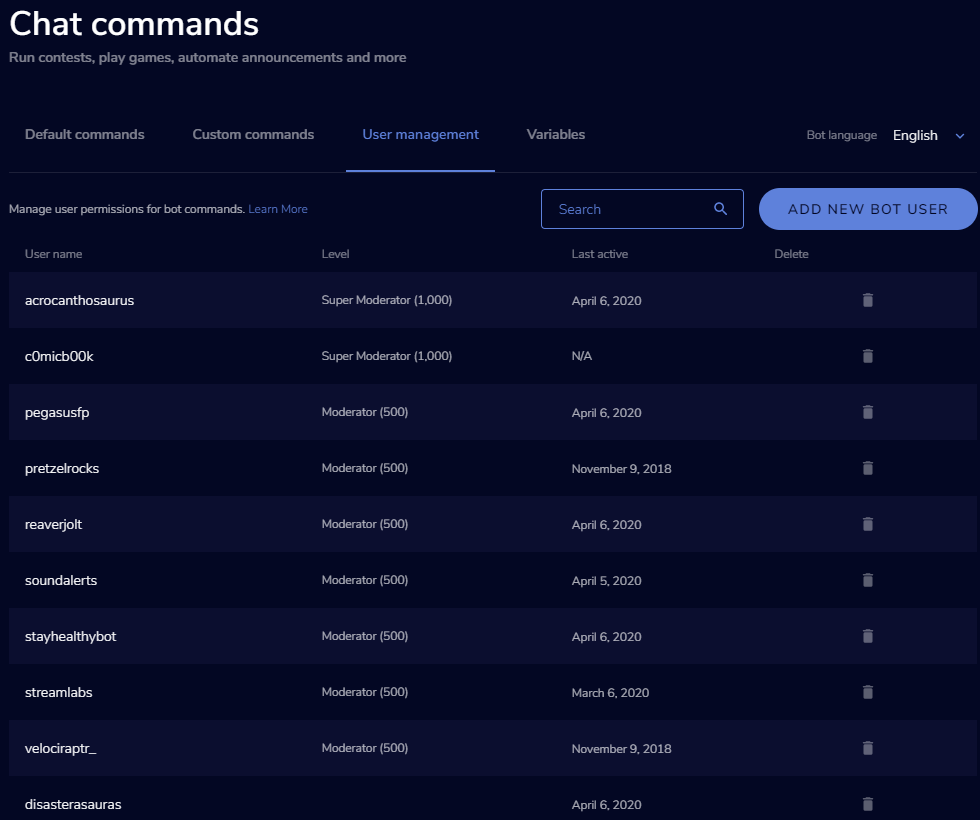
Not seeing a way to make someone a regular via user management?
https://i.imgur.com/mkg1qSM.png
 fluid scroll
I'm rebuilding the alerts using everything but my custom sounds. Tests are going well so far
 sonic lake
guys ı need help
streamelements Something went wrong trying to update the title.
what's the problem ?
twin sentinel
@fluid scroll Then your sound file might really be the issue here.
fluid scroll
yeah... seems like it, I was trying to do some custom sounds of my little girl saying stuff, but I can roll with the defaults
sonic lake
anybody help ?
dim marten
and it seems there's already an idea for 'automatic regulars' posted by 'streamelements staff' even 2 years ago with like 90 votes haha.
round brambleBOT
@sonic lake Please logout of StreamElements at https://streamelements.com/logout and then login again to your account (Twitch/Youtube/Facebook/Mixer)
twin sentinel
@dim marten You can make someone a regular by adding them in that list via the ADD NEW BOT USER button.
dim marten
oh, 'bot user' made me think for actual bots haha
 open rose
I'm getting internal server error on my giveaway.
 slow spade
could someone help me with an alert idea i have?
round brambleBOT
@slow spade Welcome to the helpdesk! Please let us know how we can assist you today and a support volunteer or staff member will assist you as soon as they are available. Thank you for your patience.
@open rose Please logout of StreamElements at https://streamelements.com/logout and then login again to your account (Twitch/Youtube/Facebook/Mixer)
slow spade
i heard that i could make it so an amazon echo could turn on LED lights when streamelements gets an alert. Could i do the same thing with a smart outlet so it could turn something on when i get an alert for a couple seconds?
twin sentinel
@slow spade That would require custom coding if I am not wrong. Best ask in #dev-chat
slow spade
@twin sentinel okay thanks!
dim marten
Is it not possible to create 'random sound effect' redemptions? Not seeing a way to do that.
 weak delta
Is anything wrong again?
Two things have happened and they aren't in recent event list.
The first missed one just came through.
The second one just came through now too.
At least a 60 second delay before they happened and then SE saw them in the event list and played them on stream.
 scarlet wadi
Hello, is here someone? Do you think, could you help me please with media request?
dim marten
Hmm, is this an issue on Twitch's end or SE? Trying to add all my quotes from my old bot but the bot's not responding for like 20s each and there's a 0 second cooldown while setting up my quotes.
Also, is it possible to read a random line from a text file stored on say, DropBox as an 'joke' command?
weak delta
Delay weirdness seems to have stopped.
@dim marten I can't say for sure but I just experienced massive delay as well but in alerts so perhaps related?
dim marten
you sure? Still doing it for me.
Looking at the variables I'm not seeing a 'read random line' type thing, if it's not possible to read a random line from a .txt(stored on dropbox) for my jokes command I may need to go back to my old bot on my desktop.
open rose
Logging in and out didn't fix it and now my viewers are getting server errors.
Or out and then in
Seeing a ton of server errors still.
This is the second stream where I've had issues with SE.
Recently.
Using the URL doesn't work either, viewers reporting that it sits loading for them.
lament blade
Media Request on stream elements obs is blank dark blue screen
open rose
Nevermind, using alternate means for the giveaway.
 old fiber
how do i add my overlay can i add it on streamlabs or no
 smoky plover
weak delta
smoky plover
weak delta
Type /mod StreamElements in chat
Or go to your role manager in your creator dashboard and add it that way.
The first way is much easier.
 split shard
Is it possible that the song request isn't working?
 rapid crater
Help I need somebody
 split shard
It seems like they have some server errors. 'cos the song request inst working either
 prime birch
this is happening to me for some weeks i dont think its a server error
 dense crane
are alerts down again
split shard
I think so... it does not work at my end
 distant swan
Hello! How can I empty the bit cup in OBS?
dense crane
yeah its massively delayed on my end
 little pike
Am I the only one that's missing the "Media Request" feature entirely in streamelements?
I'm new to streamelements and that feature apparently doesn't even exist for me. Ideas?
 strong kernel
We're seeing excessive server load at this time and are working on having a solution as soon as possible. We apologize for the inconvenience. Hang tight.
 rustic karma
Mine has just started working again
 twilit marlin
oki was asking as we where having problems on the stream im modding right now so just wanted confirmation 😋
strong kernel
@little pike I understand the frustration but a Discord message, an email, and a tweet is a bit overkill, wouldn't you say? Look in the "More" section of your account.
Oh, YouTube comment, not email, apologies.
little pike
I was only following instructions of posting in the helpdesk channel and tweeting. I was just trying to use my resources as I'm new to using streamelements and I didn't know the best way to get in contact. Thanks for your feedback.
I could hardly see "More" on the scroll - some formatting issue is likely the cause on my end.
Please disregard my inquiries at this time as you've resolved them. Thanks.
twilit marlin
will you guys let us know in here when its back up at some point 😋
little pike
In the videos I've watched, the "media request" was located elsewhere instead of under "more" which also lead to my confusion.
lament blade
hey i am having trouble with my SteamElements not showing the chat box...
i added the source for chat box and still wont show
scarlet tiger
Is Your stream's chat widget added?
 rapid robin
Are spam filters not working for anyone else?
round brambleBOT
@lament blade To add your overlays to OBS, add a new browser source in your scene. Paste your overlay URL in the browser source properties, set the dimensions to 1920x1080 (unless you changed them on the website), and ☑ “Shutdown source when not visible” https://youtu.be/KDvLynUqXI4
scarlet tiger
@rapid robin yeah, not working for me too
lament blade
im using Steamlabs OBS
 mortal cloud
hj
lament blade
and i have OBS.live
mortal cloud
hi
lament blade
im trying to find out which is better to use
i like them both but the chat box in both arent working
round brambleBOT
@mortal cloud Please follow our community rules:
- No advertisement or stream promotion
- Respect ALL server members
- No NSFW/NSFL
Thank you
rapid robin
Bot is fully responsive on all other ends if I'm not mistaken. Assuming this will get sorted though.
 serene granite
@rapid robin try to make the bot part and join again through the dashboard, and please let us know if its fixed
mortal cloud
hi
scarlet tiger
@mortal cloud please dont put your twitch channel here, thanks
scarlet tiger
For me word filter - i tested only it
lament blade
im not trying to advertise but just trying to trouble shoot my issues
rapid robin
Emote protection, Paragraph and caps. Havent noticed banned phrases yet. Keeping an eye out.
strong kernel
You don't seem to have them enabled currently.
strong kernel
One moment.
Can you screenshot an example of a message that wasn't hit by the filter?
 spiral sleet
Hi folks. Media Request has stopped responding to my chat bot (I have it set up with some random requests to put in if viewers aren't requesting). Is there any reason for Streamelements to suddenly stop responding to my chatbot? (My bot has a custom account name)
It responds to my account, it responds to viewer accounts, but not my bot account.
round brambleBOT
@mortal cloud Please follow our community rules:
- No advertisement or stream promotion
- Respect ALL server members
- No NSFW/NSFL
Thank you
 serene vine
Hi, I'm new to streaming. I'm having trouble activating my Tips through Streamelements. For some reason when I place my Tips URL in my panel on my channel, It doesn't work. Thoughts? -and Yes , I've watched the How To Video, no luck.
 tepid ore
Good afternoon, I'm having a lot of issues using the !reedeem command via chat, it will not activate even after adding the store window as a browser. Any tips or articles?
strong kernel
@serene vine I don't see a panel for tips in your channel.
serene vine
@strong kernel Yes, I took it down because my Tip URL won't work
tepid ore
oh, that's just my stupid typing LUL
serene vine
@strong kernel Tips panel up! Thanks for your time!
strong kernel
@serene vine You need to put an image in if you want the "image links to" link to actually be applied to something.
tepid ore
the goal for me is to have viewers be able to play sounds using the chat, but when they use the !redeem it says there are no items. it is an item that is 0 cost, but subs only so it doesn't show in the store.
serene vine
@strong kernel DOH! quarantine is getting to me! Thanks for the help!
strong kernel
@tepid ore Sub only items will show in the store. What item?
tepid ore
They're sound files
strong kernel
Specific example.
 unkempt dust
Hello, people in my chat can't use default commands from the bot, only the custom ones.
Mods can use them, not normal users
All the commands that they are trying are in "Everyone" category
scarlet tiger
Yes, its known issue, actually
unkempt dust
Any workaround or..?
scarlet tiger
No ETA of the fix, but soon...
unkempt dust
Okay, thanks!
 terse maple
hey guys, does anyone know why loyalty points wont gain per 10 min for certain users, this only started occuring after a username change, i reset my token
 long frost
Hi everyone - I know a few are reporting misc issues but wanted to report specifically that the !cmd edit/add/remove are all producing this error:
an error occurred while updating your command, please try again later or use the website Kappa
scarlet tiger
Thanks for the report
 gray sigil
Good evening, Is there a know bug with the move layer buttons? No matter what I select, the Move Up 1 Layer and Move Down 1 Layer always moves the same layer.
 dry hare
@terse maple part the bot from your dashboard and then rejoin it
terse maple
thats all? known issue? sweet thanks bro
 dense cloak
Hi! Can you add g2pay option to my se pannel? Username: FMIgor_Kowalski
 hot belfry
parting and rejoining isn't working to reset the bot in a channel I'm modding. The bot is only responding to mods in chat and no one else
scarlet tiger
@dense cloak G2A Pay is disabled at this time due to issues they had with new EU regulations.
dense cloak
OK thanks!
long frost
Looks like bot has restarted and I'm seeing the issues I was facing previously resolved, thanks team 
spiral sleet
I'm seeing my issue seems to be resolved now too. Thank you.
 fathom zodiac
is there a reason why !bingo twitch no longer works?
 severe talon
Hello, was wondering if anyone knows why the replay notification button does not work for me? Or is that not what I think it is 👀
strong kernel
You don't have an alertbox.
fathom zodiac
is there a reason why !bingo twitch no longer works?
severe talon
thank you @strong kernel 😄
 weary prairie
question, I am sure there is an easy solution to this...
I cast several leagues and scrim series, and I have different scenes for them all using their unique names and logos.
I just made copies of a overlay in SE and set them all all up. What I am seeing is that all my scenes in OBS are pulling the last version of the overlay, so all 4 are showing the last overlay I made instead of all 4 showing their own.
I just changed the browser source for one scene and it changed it for all of them....
Is this because I created the scenes as copies? Or because I created the overlays as copies?
strong kernel
Every overlay has its own URL. Duplicated overlays do not share URLs.
lament blade
Did you know a way i can make discord still play through my headphones but the stream not hear it ?
The only way i found was a janky input switch and its pretty tough for me to use
round brambleBOT
@lament blade How to exclude audio sources for a stream or recording: https://obsproject.com/forum/resources/8/
Voicemeeter Banana guide: https://obsproject.com/forum/resources/397/
 clear elk
So I finally remembered to video my issue of the first alert of the day being stock settings, including sound. Is it okay that I attach it in here? The sound isn't there, but you'll see what I mean anyways.
 marsh hound
hi wonderful team! I am looking for the ability to delay different aspects of an alert. Is it possible for me to have the sound start first and then have the graphic come in later?
fathom zodiac
Anyone run into issues with !bingo twitch?
strong kernel
@marsh hound You'll need to either bake that into your video file or custom code it.
fathom zodiac
Does that still work for people or do you get a message that says theres no emotes?
strong kernel
@fathom zodiac Known issue. No ETA. Bugging multiple times is annoying, not helpful.
fathom zodiac
Sorry, I never got a response for it before
marsh hound
okay - I can code it I think
fathom zodiac
But thanks for letting me know
marsh hound
how do I go about choosing my image via code? Currently it's set to a shark, also, there's text animation/delay settings but not image related settings for delay.
strong kernel
@marsh hound {{image}} will use the image set into the alertbox.
For more questions, #dev-chat
 lavish sail
Hey! How do I sign out of Ground Control? I am trying to log in with a 2nd account but cannot sign out
strong kernel
@lavish sail Remove the JWT token.
 formal river
Hello there. I was wondering if there was a way that I can change the watchtime format to not show it in days, but rather in minutes format?
strong kernel
@formal river It's not possible to change our watchtime format. You'd need to be using a custom API watchtime solution instead.
lavish sail
Ok, and Im also trying to get a custom bot name, and I've done everything i need to do, but it is not showing in my ground control.
strong kernel
@lavish sail What is your username?
formal river
Could I edit the API for watchtime within the dashboard?
lavish sail
For the bot or for ground control?
strong kernel
@lavish sail Your Twitch username.
lavish sail
voidbrand
strong kernel
@formal river You found yourself a third party watchtime API to use?
formal river
No, Im not familiar with how to find that. 😛
formal river
okay, so if i use one, how would i fix it for the bot?
strong kernel
"Fix it?"
You do know what an API is, right?
@lavish sail Restart Ground Control.
formal river
I know what it is, but I don't know the actual meaning.
lavish sail
Now it its there, thank you so much
formal river
Is there a website that you can recommend for me to look up custom apis for the watchtime command? If not, I will just google one.
lament blade
Is there a way to permanently ban someone using the banned words list?
also what does "regular expression?" mean
lament blade
Thank you.
formal river
I guess I'm not going to get any help.
strong kernel
Custom APIs by definition are third party. We don't just have some giant list of them
Other people make them.
formal river
Okay, thats all you had to say. Thank you.
round brambleBOT
@lament blade Please follow our community rules:
- No advertisement or stream promotion
- Respect ALL server members
- No NSFW/NSFL
Thank you
 sinful portal
hello, i got a some custom overlays for alert such as a new follower and Subscriber but the text won't appear over my image. idk why it isn't working. i am using text over image layout as well
dim marten
Never got a response for this:
Is it possible to read a random line from a .txt file, like on Dropbox or something? (for my !joke command)
 midnight granite
I have these settings set and I saved it, but when I test it, it doesn't reflect the changes. Is there something that I am missing?
strong kernel
@midnight granite Edit the variations, not just the main alert.
@dim marten https://api.thefyrewire.com/docs
dim marten
It tells me 'nothing to see here'
Redirects to homepage with that ^^
strong kernel
@opaque wharf Please keep all communication in the public channels. Thank you.
 south dirge
Hello, why does importing hours from another bot converts it into minutes? For example: one hour is being converted to one minute.
dim marten
Tried on 2 other browsers, none of them load said page.
strong kernel
@dim marten https://thefyrewire.com/docs/api/

@south dirge Because different systems are made different ways.
@sinful portal Text settings > Advanced, play with margins.
south dirge
Is there an api or anything that can convert it back to hours?
strong kernel
You'll have to convert it manually.
south dirge
How do I do that?
strong kernel
In the spreadsheet, with a formula.
south dirge
Okay thanks
strong kernel
Community widgets are provided as is and it's up to you to install and maintain it.
lament blade
I want to add a sound.
 little needle
my KBS is around 3k is there a fix to that?
strong kernel
Pardon?
 dim parrot
I am having an issue getting my Tiltify donations to show on my overlay. I have tried re-linking streamelements and tiltify, doing the test donation on the overlay editor works but not actual donations.
round brambleBOT
@trim kettle New to Stream Elements?
Check out our YouTube channel https://www.youtube.com/c/streamelements/videos
with tutorial videos from setting up the basics, to in depth details on how to use our product.
New to OBS? Here is a 4 step quickstart guide
https://obsproject.com/wiki/OBS-Studio-Quickstart
Want to learn even more? Here is an in-depth overview
https://obsproject.com/wiki/OBS-Studio-Overview
 shadow tinsel
Would like to go back to using our custom bot name, been 3 months. I read Ground Control isn't working and that we need to message here. Our channel is TeamVASH and bot name is Meagsbot (+ we don't use SE.OBS live)
dim marten
I think only way for custom name atm is obs.live
little needle
@strong kernel my KB/S is bellow 5000 which is causing the stream to lag
lavish sail
hi, ive set up a custom bot name for my streamelements bot. It works, but when a command is recieved, the bot spams it.
voidbrandbot: The new merch is here PogChamp Check it out: https://merch.streamelements.com/voidbrand
voidbrandbot: The new merch is here PogChamp Check it out: https://merch.streamelements.com/voidbrand
voidbrandbot: The new merch is here PogChamp Check it out: https://merch.streamelements.com/voidbrand
voidbrandbot: The new merch is here PogChamp Check it out: https://merch.streamelements.com/voidbrand
voidbrandbot: The new merch is here PogChamp Check it out: https://merch.streamelements.com/voidbrand
voidbrandbot: The new merch is here PogChamp Check it out: https://merch.streamelements.com/voidbrand```
(It spams it a lot more but discord won't allow me to put it in)
How do I fix?@little needle So contact your ISP and get ready to be told that it's because everyone is quarantined?
@lavish sail Restart Ground Control.
little needle
ohhh got ya thanks
lavish sail
Ofc when you contact support it fixes itself -_-
 worn bear
Hi! I know there are lots of questions about SE shout commands, but i'm a bit stuck. I have the regular !so and that works fine. However, I want to be able to push through a shout out for raids through TouchPortal. is there a way the command can recognize a raid streamer without needing the @ and manually typing their name? This way it's just a push of the button.
strong kernel
TouchPortal?
worn bear
cheaper version of stream deck
strong kernel
No, a command needs some kind of input, it can't automatically remember the last raider.
 ornate cosmos
Hello is anyone on?
round brambleBOT
@ornate cosmos Welcome to the helpdesk! Please let us know how we can assist you today and a support volunteer or staff member will assist you as soon as they are available. Thank you for your patience.
ornate cosmos
Im trying to figure out how to get the chat to alert me when someone types
 abstract hemlock
@ornate cosmos i saw that same request on twitter, that could be done with a custom widget, in fact that was on my to-do list but i was too bussy 😅
ornate cosmos
thank you. can you point me in the right direction?
i keep missing when people type because I cant hear an alert
ornate cosmos
different channel?
 drowsy flower
Can anyone tell me where or why my bot keeps posting: 'Response Message'
abstract hemlock
@drowsy flower check your timers 😉
drowsy flower
@drowsy flower check your timers 😉
@abstract hemlock There's no timer for the bot to say "Response Message" ?? is it triggering from a timer?
dim parrot
I am having an issue getting my Tiltify donations to show on my overlay. I have tried re-linking streamelements and tiltify, doing the test donation on the overlay editor works but not actual donations. Could I please get some help or ideas for solutions I may not have thought of?
abstract hemlock
@drowsy flower check your timers, one by one and check, one of them had the "Response Message" as a response
worn bear
Thanks @strong kernel. One more follow up question, does SE allow custom scripting for the chat bot?
^perhaps that's a redundant question?
ionic kelp
If you mean like python then no.
drowsy flower
@drowsy flower check your timers, one by one and check, one of them had the "Response Message" as a response
@abstract hemlock High fives.. thank you
 honest lark
I wanna get a custom bot name, and I've done everything i need to do, but it is not showing in my ground control. My name on twitch is ClaraSeufzer. Can you help me? 
dim marten
Would it be possible to somehow include 'browser sources' from services like Kappamon? (Virtual stream pet) via url's like:
https://stream.kappamon.com/t/xxxx-xxxxx-xxxxx
scarlet tiger
Try it
dim marten
How would I insert it? Custom HTML and remove all the other code or?
round brambleBOT
@dim marten To add your overlays to OBS, add a new browser source in your scene. Paste your overlay URL in the browser source properties, set the dimensions to 1920x1080 (unless you changed them on the website), and ☑ “Shutdown source when not visible” https://youtu.be/KDvLynUqXI4
dim marten
nonono, as in an element on my SE overlay
 zenith widget
@dim marten no, or at least hard to do i believe due to iframes
dim marten
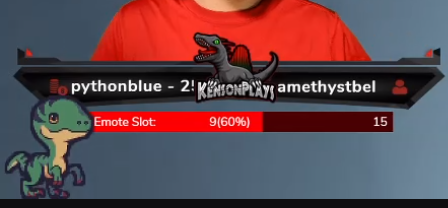
Yea, it's a cute little pet that shows on your stream, like:
https://i.imgur.com/jmdDzlJ.png
Can respond to commands and stuff.
 undone wing
Having an issue with having a store item with a video as a preview asset, after a user redeems it, which works fine, the next time i get a follower alert, the audio from that video will get played, any thoughts? I can reproduce the result each time if you want specific steps
zenith widget
@dim marten Try and implement it via the custom widget - if it doesn't load at all, it can't be embedded in our overlays.
@undone wing Its a known issue with the video files for the store redemptions. no ETA on a fix
undone wing
ah ok, thx!
dim marten
Thing is, not sure how to implement it. I tried pasting the url into an iframe, but nothing.
zenith widget
Then it can't be embedded as mentioned earlier
dim marten
ripperoni, was hoping to consolidate as many sources as I can.
Is there a way via overlay to trigger multiple countdowns? Like maybe !piglatin triggers a 5 minute countdown displayed on overlay for how long I have to talk with pig latin (limited to mods and up for streamloots)
In addition, a way to maybe trigger overlay elements via SE bot command would be nice if possible?
 dreamy walrus
can a phone use streamelements on twitch?
ionic kelp
@dreamy walrus For IRL yes. It's only on android unfortunately.
zenith widget
@dim marten https://discordapp.com/channels/141203863863558144/457957557470887947/690518619607531580 maybe this can spark an idea on how to set it up
 slender raft
Hey kei, im trying to upload a banner for my se merch and i have the correct sizes for it, but it says its not correct
ionic kelp
Unfortunately out of luck.
dreamy walrus
ight
zenith widget
@slender raft 1) What browser are you using
2) #helpdesk-merch
 light wren
Hello! I noticed that suddenly I am seeing some weird items in my stream store (not my merch store), any idea what are these?
zenith widget
where are you looking exactly? @light wren
light wren
The StreamStore function:
zenith widget
try incognito mode 
clear cache or something
im not seeing the same thing on my side when i look at it
light wren
interestingly, some of them are enabled but I have no idea what they are and they do not appear in the actual public store
zenith widget
zenith widget
i see this, hence why i suggested incognito mode or clearing your cache @light wren 🙂
light wren
Must be some weird thing with the cache, incognito does not show them
zenith widget
@fathom zodiac no -  someone to sub to you
light wren
Thanks @zenith widget !
 west mango
Hey, I'm looking to choose some overlays
but unsure what to pick. I don't play the major games like Fortnite or LoL
zenith widget
There are non-game themed overlays as well
You can also still use the game themed ones and remove some things you don't want from them
west mango
I'm looking for the ones that has a countdown on it
fathom zodiac
@zenith widget hahaha thanks! 😄
Ill convince people its for "testing" purposes hahaha
zenith widget
@west mango force field
west mango
Hmm... thatl ooks good
looks good
But, for me I'm not that popular to use that overaly
I only got like 130 followers
zenith widget
I use it, when ever I stream rarely
you don't have to be popular, plus these themes are free anyway
west mango
Alright, alright.
I'm gonna try and edit the names and stuff
Might need some help but whatever
Just this looks good?
lament blade
Hello
I need help resetting my goal.
It is showing the incorrect number of followers.
round brambleBOT
@lament blade To reset goals:
- from the overlay editor -> data on top -> goal tab -> reset progress of desired goal
- from the dashboard -> activity feed on the left -> widget data on the right -> goals tab -> reset progress of desired goal
Note: Goal widgets(progress) only counts up and doesn't go down automatically, if you loose followers/subs
 frozen lily
I'm using the ${time.EST} variable and noticed the time is an hour off.
Does this not reflect daylight savings time or have I used the wrong timezone?
zenith widget
I would suggest to take a look at this: https://discordapp.com/channels/141203863863558144/199460642975907840/328081534479499266
frozen lily
thank you @zenith widget I went with ${time.America/Detroit} for Eastern Time zone, time is accurate now! 
zenith widget

 wooden mountain
Hi there. Is it impossible for SE widgets to use session data? I wanted to use the Advanced Goal widget by MRBOOST to have a daily (so current session data) follower goal on my stream. But it can only do 7 days / 30 days / total  . @pallid osprey
zenith widget
You will have to poke @pallid osprey about this
wooden mountain
thanks, i just did
 glass gate
Hi all, new to Stream Elements and struggling with fixing the youtube/fb/twitter name on the overlays
it won't let me edit any text, am i doing anything wrong?
twin sentinel
What browser are you using?
glass gate
Chrome
twin sentinel
When you select the text field with the social name in the overlay editor, on the top left there should be a message field where you can change the message to your social handle.
glass gate
gotch ya
thank you so much, i just realized that it was the name of the box that i kept on editing and not the actual message
cheers
 inland knoll
Hi everyone, is there a command to see all my quotes - I see you can use !quote for a random quote?
zenith widget
Not at the current moment, but we are working on having a UI for it.
No ETA on when
inland knoll
is there a command to add a quote?
lament blade
I am sorry if this is incorrect channel to ask for help but I am trying to add my first store item, I go through creation process, click save, and I get a message: "Something went wrong..." No any other explanations. What am I missing? 😦
 reef vapor
I'd like to put a bar with donations in my stream. Can someone help me with that?
round brambleBOT
@reef vapor New to Stream Elements?
Check out our YouTube channel https://www.youtube.com/c/streamelements/videos
with tutorial videos from setting up the basics, to in depth details on how to use our product.
New to OBS? Here is a 4 step quickstart guide
https://obsproject.com/wiki/OBS-Studio-Quickstart
Want to learn even more? Here is an in-depth overview
https://obsproject.com/wiki/OBS-Studio-Overview
 vagrant scroll
Hi guys, will it be possible again to use a custom bot name?
round brambleBOT
@vagrant scroll Currently renaming the bot fully works with OBS.Live.
You can follow this video guide to set it up: https://discordapp.com/channels/141203863863558144/494513233416421386/561516184718278676
If you don't want to use OBS.Live and want to stick with Ground Control, please let us know your Twitch username.
sweet socket
I am sorry if this is incorrect channel to ask for help but I am trying to add my first store item, I go through creation process, click save, and I get a message: "Something went wrong..." No any other explanations. What am I missing? 😦
@lament blade can you send a screenshot here of everything filled in?
 alpine linden
Hi, I'm having trouble getting onto any dashboard from the stream elements website, it puts me back onto the home page and will not allow me to go further than that anymore? May I request some help? :)
sweet socket
@alpine linden are you using a Chromium based browser like Google Chrome or Chromium Edge?
lament blade
That will be like 10 different screenshots. I do not want to spam. The process takes 3 steps and there is a lot of scrolling for the first two steps to actually capture all information 😦
sweet socket
paste them all in paint and drag em next to each other, make it one file
lament blade
Okay!
sweet socket
would be the easiest way 😄
alpine linden
@sweet socket I am yeah, using chrome, I've been using Stream Elements for a long time, but about a week ago it's been stopping me from accessing anything but the home page
 mild osprey
same with me^^
sweet socket
try a incognito tab please Ska
alpine linden
I'll try it now :)
sweet socket
It's mostly about plugins blocking our site for some reason, these plug ins dont work in private tabs most of the times
so either disable the plug in or use a incognito tab for it
mild osprey
still getting kicked on incognito
zenith widget
I know you 
alpine linden
@sweet socket Thank you! It definitely works on incognito for me, but most certainly doesnt normally
mild osprey
👀
zenith widget
mods for trainwreck?
mild osprey
zenith widget
So visit this page: https://streamelements.com/logout and ask him to also do this and then login to the dashboard.
mild osprey
still bugging out for me 😦
zenith widget
Well he needs to do the same
mild osprey
im trying to access my own settings though. not his
 mild osprey
easy 
zenith widget

mild osprey
thanks 
zenith widget
@alpine linden also for you ⤴️
 pallid osprey

StreamElements
The Ultimate All in One Platform for Streamers
alpine linden
@zenith widget thank you!
lament blade
Aparently I have no idea how to use paint
😮
I also do not understand what is category and it is not explained on the guide I found. That is the blank spot I left 😮
Oh, also... It might be stupid question but I use streamlabs obs for streaming... Can I still use streamelements or stream elements is also a streaming platform?
wooden mountain
@pallid osprey Thank you so much. Oh and I love the way it looks 🙂
pallid osprey
thanks man!
ionic kelp
@lament blade You can use our overlay in their software but any problems you have with it are your problem. We 100% recommend using OBS Studio.
lament blade
Oooh.. So it is two different platforms. OMG. I am so stupid. I thought that elemets are like a plugin. I am so sorry 😦
ancient otter
I tried to configure an 'Message Vip' to show some message on my screen on SE Store, but when they redeem the message, don't show anything on Stream, but the SE Bot shows on chat that I redeemed the message, I'm doing something wrong?
lament blade
So, if I want to move from streamlabs to streamelements, I need to download OBS.live?
 atomic heath
Hello I was seeing if I could use streamlab as my manager to set my custom overlay
 jade remnant
@lament blade you can use obs on its own, or use obs with the SE plugin (obs.live)
ionic kelp
@lament blade You do not. You can do it entirely from within Vanilla OBS!
jade remnant
@atomic heath please ask streamlabs
ionic kelp
Alerts on the other hand require our extension to move.
lament blade
I am like super confused... I love streamelemets loyalty program and store, so can I run it while using streamlabs obs or should I download something else?
atomic heath
Can I ask streamlabs through this?
ionic kelp
You can but we don't help with any overlay issues you might experience.
sweet socket
our recommendation is not using StreamLabs since they mostly block our overlays
atomic heath
What would you recommend?
sweet socket
we recommend using OBS.Studios with the OBS.live plugin
which can be downloaded through our website
lament blade
That is fine. But can you tell me what I need to download to use your overlays and everything?
ionic kelp
Just OBS Studio.
sweet socket
you make the overlays over at the streamelements website
when you save that, it will give you a link
round brambleBOT
To add your overlays to OBS, add a new browser source in your scene. Paste your overlay URL in the browser source properties, set the dimensions to 1920x1080 (unless you changed them on the website), and ☑ “Shutdown source when not visible” https://youtu.be/KDvLynUqXI4
sweet socket
No worries!
muted fox
@sweet socket
sweet socket
thats me 
muted fox
were u the one helping me the other night?
With my stream and stuff
U were looking over my logs and such
sweet socket
correct, however you dont necessarily have to tag me, we have a lot of support people hanging around, what can I help you with tho? 😄
little oak
Ethernet > Wifi
sweet socket
That's good to hear!
wooden mountain
@pallid osprey I still have a single request for you. Dw if it's too much though. But I would love the widget to show an obvious goal for viewers. As in : "Follower goal today : 16/100". Maybe make it so we can write the text titles ourselves in the editor?
 agile peak
Help! Hey guys, I got a problem, every time I try to access my overlays and stuff - it shows me the main website, when I click on overlays it reloads the site and shows me the main website again... relogging doesn't solve the problem... I don't know what to do and I'm mad rn xD
twin sentinel
@agile peak What browser are you using?
agile peak
Chrome
 wraith beacon
Hello, I seek help with media requests. For some time now the volume slider has been missing, this used to be there. I'm using google chrome. My super mods can't change the volume either with the !volume command. Streamelements bot says that an error has occurred. This questions has probably been asked multiple times, but can't seem to find the right solution. Thanks for the help 🙂
twin sentinel
Try to clear cookies and cache @agile peak
@wraith beacon The volume slider is in the video itslef for you.
agile peak
@twin sentinel didnt work, still the same problem - also I am a editor for another streamer and I can't help that person rn because of this issue
wraith beacon
Yes, I've seen that. It's the normal YouTube audio slider. There used to be a on site audio slider which made super mods control the volume of the video. Is this deleted?
round brambleBOT
@agile peak Please logout of StreamElements at https://streamelements.com/logout and then login again to your account (Twitch/Youtube/Facebook/Mixer)
ionic kelp
@wraith beacon That was done at the request of YT.
twin sentinel
Let the streamer you have access to, do that, too. @agile peak
agile peak
relog didnt do anything and I'll ask her to do so
ionic kelp
Basically it's limited to the embed controls or chat.
wraith beacon
@ionic kelp ahh I see. Thanks!
Such a shame, was fun for mods to have control over that option 🙂
ancient otter
Hello guys, I tried to configure an 'Vip Message' to show some message on my screen on SE Store, but when they redeem the message, don't show anything on Stream, but the SE Bot shows on chat that I redeemed the message, I'm doing something wrong?
twin sentinel
@ancient otter Have you added the store redemptions widget to your overlay?
agile peak
@twin sentinel still doesnt work D:
ancient otter
Hmm, I don't think so, i thought it shows on alerts normally haha
twin sentinel
Try it via an incognito window @agile peak
ancient otter
Let me check here
ionic kelp
Nope. It's a separate widget.
agile peak
@twin sentinel it works once but when I try to access the site again, I have the same issue like before
and I can't do anything on the other streamers account
twin sentinel
Try to log out, clear your cookies and cache in chrome and log back in.
sweet socket
@agile peak its a plugin in the normal window causing to not open the website
thats why you dont have it in incognito, try disabling your plug ins or clear your cookies like Benno recommended!
agile peak
I did all the mentioned already, the logout button doesnt even work anymore... I'm so done -.-
Okay, when I delete all my cookies and stuff I'm able to login to my account once - should I reload the site or try to access the account I am editor on, it puts me back to the mainsite where I can click on the orange "my dashboard" button but when I click on it - it just reloads the same site
btw I can't even press the logout button - it just doesn't give me any feedback
vapid harness
Good morning @twin sentinel, anything new regarding why I cant choose Twitch emotes in Kappagen Emotesplosion?
sweet socket
Did you already disable all your plug ins on Chrome? @agile peak
agile peak
Yep did that already
round brambleBOT
@verbal meadow Welcome to the helpdesk! Please let us know how we can assist you today and a support volunteer or staff member will assist you as soon as they are available. Thank you for your patience.
 verbal meadow
My streamelements bot doesnt work
twin sentinel
have you renamed yourself lately?
round brambleBOT
@verbal meadow Please connect your streaming account (Twitch, YouTube, or Facebook) with Discord by going to ⚙ Settings and then Connections here in Discord. https://streamable.com/eg92w
 verbal meadow
ready
jade remnant
@vapid harness type !emotes update in your twitch chat
refresh your kappagen overlay in the editor and see if the emotes are there
round brambleBOT
@verbal meadow Go to the dashboard -> right side -> part channel -> join channel (https://streamelements.com/dashboard)
 verbal meadow
oh deam, it was muted, sorry for i didnt see it, its on now, thank you
 vestal gorge
when a notification appears in the alert box in my overlay, it does not appear in OBS. how to fix?
twin sentinel
#🇵🇹︱português
 random dune
my stream labels arnt updating anyone know why. just showing older info
 median mesa
Login and logout of streamelements.obs is fine, but turns out obsproject.com website seems busy/took too long to respond.
No choice but to manage my stream titles, etc via web browser atm
 gray birch
Hello I'm having trouble streaming Riots new game Valorant. I'm not sure why but everytime I switch my scene to show the gameplay OBS freezes in a certain frame and it gets stuck like that but only in OBS the game works fine for me.
twin sentinel
@vapid harness Forwared it to staff and devs that they are aware.
gray birch
And im not dropping any frames or anything either. Its like OBS just literally freezes on the frame for no reason
round brambleBOT
@median mesa For the best OBS support, please join their Official Discord @ discord.gg/obsproject
random dune
anyone know why my stream label widgets are not staying up to date?
twin sentinel
Are the events in your activity feed?
random dune
i think so. my follow works fine. i set up a recent bit/ember label and a ember goal bar which went up to date last night but now wont register new things
twin sentinel
This is for mixer right? #651453660810838026
random dune
yes but no ones on there
figured it might be simalr on twitch
al labels were workgn then suddenly stopped and are showing old info
agile peak
@twin sentinel I downloaded a new browser and have the same issues I have on chrome :/ I don't know what else I should do
twin sentinel
@random dune You referring to twitch now?
vestal gorge
when a notification appears in the alert box in my overlay, it does not appear in OBS. how to fix?
random dune
like i set up an ember goal bar and it wen to what it was supposed to 200/1000 but then i got a 50 donation and it didnt move
twin sentinel
Please keep these questions in the matching channels please. @random dune
random dune
man can u not just help no one is on mixer?
its a simple question
seems twitch users have also
twin sentinel
I am not that experienced with mixer.
@random dune What issue are you having with twitch then exactly?
random dune
my point is the fix will probable work on both
i dont use twitch. my stream elements lables arnt working thats my problem
figured someone could help
twin sentinel
@vestal gorge Are these live events, which are in your activity feed? Or are you referring to emulated test events?
random dune
wow very helpful damn guess ill try google again. thought this was a helpful place?
 severe bramble
hi everyone how do i add the overlays to my sttream?
round brambleBOT
@severe bramble To add your overlays to OBS, add a new browser source in your scene. Paste your overlay URL in the browser source properties, set the dimensions to 1920x1080 (unless you changed them on the website), and ☑ “Shutdown source when not visible” https://youtu.be/KDvLynUqXI4
 iron valley
Dear and kind support! Are you all right?
Is it possible to download an audio from the library I uploaded?
Thank you!
twin sentinel
@iron valley Only via we dev console.
vestal gorge
@twin sentinel i am talking about emulated events
round brambleBOT
@vestal gorge You can test Alerts via the bell on the lower right corner of the Overlay Editor. Simply go to your Dashboard -> My Overlays -> Pencil/edit button on the overlay. Make sure the "Show Emulated events on stream" option is on to see the alert in OBS/Xsplit https://streamable.com/h6qgy
 iron valley
@twin sentinel Thanks for the answer, could you show the way to do this?
twin sentinel
@iron valley Add the audio to an alertbox event, open the dev console in chrome (F12) and emulate the event. Then the link will be show in the dev console. Take the link and download the audio file.
iron valley
I love you ^
vestal gorge
@Benno i am talking about emulated events, do u konw what is It?
agile peak
yeah sadly ^^' @wary lark
 wary lark
alright i gotcha
StreamElements
The Ultimate All in One Platform for Streamers
click on that link
and then sign back in
it should fix it
twin sentinel
@vestal gorge Yes, you emulate them via the emuation bell in your editor?
If they are not showing in your OBS, read what the bot posted above again please.
agile peak
@wary lark it works for me but I still can't access the dashboard from the streamer I am a editor for ^^'
ionic kelp
They need to do it as well.
wary lark
the streamer will need to do the same
agile peak
okay, thank you 😄
wary lark
round brambleBOT
@karmic tree Welcome to the helpdesk! Please let us know how we can assist you today and a support volunteer or staff member will assist you as soon as they are available. Thank you for your patience.
 karmic tree
I need to add a donation button to my twitch profile
round brambleBOT
Twitch's official help guide for Panels: https://help.twitch.tv/customer/portal/articles/2416760-how-to-edit-info-panels
twin sentinel
@karmic tree ^
inland knoll
Hi there, I'm adding items to my store and get this along the top - what does it mean?
vestal gorge
@twin sentinel
I did as the boot showed and still it does not appear in the obs
twin sentinel
Make sure the "Show Emulated events on stream" option is on to see the alert in OBS
@inland knoll What browser are you using?
inland knoll
Chrome
 weary solar
any idea why overlays arent working?
round brambleBOT
@weary solar OBS -> settings -> advanced -> scroll down -> enable/disable hardware accel.
https://i.imgur.com/ggMe9ZE.png



 twin sentinel
@inland knoll Try to clear your cache in chrome and try to access the page again.
 unborn barn
HI MY STREAMELELMENTS ISNT WORKING IN MY CHATR
round brambleBOT
@unborn barn Please connect your streaming account (Twitch, YouTube, or Facebook) with Discord by going to ⚙ Settings and then Connections here in Discord. https://streamable.com/eg92w
iron valley
@twin sentinel Am I getting close to the path? I cannot find the line that plays the audio.
twin sentinel
@iron valley Check console when you emulate an event.
unborn barn
i cant watch that vid
twin sentinel
@unborn barn Connect your twitch account with your discord account please.
unborn barn
im tyrying
inland knoll
sorted it, thanks @twin sentinel thought it was some new filtering mechanism 🙂
iron valley
@twin sentinel 💙 💙 💙 💙 💙 💙 💙 💙 💙 💙 💙 💙 💙 💙 💙 💙 💙 💙 💙 💙 💙 💙 💙 💙 💙 💙 💙 💙 💙 💙 💙 💙 💙 💙 💙 💙 💙 💙 💙 💙 💙 💙 💙 💙 💙 💙 💙 💙 💙 💙 💙 💙 💙 💙 💙 💙 💙 💙 💙 💙 💙
round brambleBOT
@unborn barn Go to the dashboard -> right side -> part channel -> join channel (https://streamelements.com/dashboard)
unborn barn
not there
twin sentinel
Scroll down.
unborn barn
thanks
lament blade
Hey I need help with getting stream elements on my streams but I don’t have a laptop so if anyone could help pm me
Please
twin sentinel
Do you stream from console @lament blade ?
lament blade
@twin sentinel yes playstation 4
round brambleBOT
@lament blade Here is a guide on how to setup the most essential tools for streaming from your console, while using StreamElements tools without involving a Capture Card! It's easy to do, take 4 minutes to read and 10 to 15 minutes to setup!
Read all about it here: https://blog.streamelements.com/how-to-stream-on-console-7b620b1c46c3
 hallow fulcrum
Hello all! So i recently made the switch from Mixer to twitch, and i noticed that when i set up the tipping page for twitch it made a completely new URL with some numbers at the end of it. Is there a way i can use the same URL from mixer and still have the Alert go off when im on Twitch?
twin sentinel
Try to set the things up via phone. And definately check out the guide the bot linked you @lament blade
@hallow fulcrum We can ask devs to change your url, but the accoutns will stay completely separate.
lament blade
@twin sentinel I have tried on my phone it says I need to download it on windows but I have an iPhone
twin sentinel
The editing of commands and bot for example should be possible from phone.
hallow fulcrum
@twin sentinel That'll be amazing. I guess im a little picky on what the URL says. The numbers just makes it less professional
twin sentinel
can you name me the names you have in the url please, not link the urls and what account should have which name please.
 quartz girder
i need help
round brambleBOT
@quartz girder Welcome to the helpdesk! Please let us know how we can assist you today and a support volunteer or staff member will assist you as soon as they are available. Thank you for your patience.
hallow fulcrum
@twin sentinel Currently the mixer one is mayfired/tip. I want the Twitch one to be the mixer one instead of mayfired-6992/tip.