#helpdesk-twitch
1 messages · Page 612 of 1
 wary halo
should be good enough to stream
 round brambleBOT
@undone thorn Please provide a log from your last stream. To do this, in OBS go to Help > Log Files > Upload Last Log File and paste the link to the log file here.
 undone thorn
So I don’t understand why I start my stream and if I pull it up on twitch to watch it then I see a frozen screen?
undone thorn
What’s that?
wary halo
so we can see if there are things that could be improved
undone thorn
Where do I find it and I’ll give it to you?
wary halo
 civic pewter
Everything works fine now for the store redemption. Thank you to @abstract hemlock
 proper fulcrum
I still can't see my overlays while I'm gaming
undone thorn
Ok I’ll do that now
wary halo
@proper fulcrum that is not an option we provide, you can see them on your stream or in OBS.Live, we don't have an ingame overlay option
 abstract hemlock
Oh, i misread your question im sorry, i didn't realize you were refering to an ingame overlay
undone thorn
undone thorn
Yes
wary halo
you can read the information given there and click those green links for solutions to those problems
wary halo
what is your bitrate set to?
if you are streaming in 720p then it would be best around 4000-5000
undone thorn
Video bitrate?
wary halo
but overall that laptop isn't great for streaming at all
undone thorn
It says 800 kbps
wary halo
800? yeah that's not right
wary halo
that should be 4000 at least
undone thorn
Is that why I keep lagging?
wary halo
no, higher bitrate is less lag
well, it's a 2 core with 4gb of ram
that is not good for streaming
undone thorn
Can you give me a laptop that will do it for me?
 undone thorn
No I mean like a suggestion on one I should get
wary halo
and it all depends on the budget ofcourse
undone thorn
Of course I don’t want to spend an obscure amount of money so what am I looking at?
Is an intel i5 going to stream well or should I go higher?
wary halo
if the budget is not too high i would go for those newer AMD chips to be honest
AMD Ryzen 5 or 7
undone thorn
Ok
Is there anything else I should be looking at when I buy a laptop for streaming?
Or just as long as the cpu is good?
wary halo
more than 4gb of RAM would be nice 😉
minimum of 8
maybe a dedicated GPU
but there are so many different laptops, there must be one in your budget or even second hand if it's not too old
undone thorn
Ok so all of that you just said will give me a laptop that won’t give me problems streaming?
wary halo
i can't give any guarantees, i'm not a laptop expert and it depends on a lot of different things. but it will definitely be a step in the right direction.
maybe want to check out some tech forums or some YT vids
abstract hemlock
and tbh for the same money you can get a nice desktop PC 🙂

 atomic oyster
hi i am having an issue with trying to stream to twitch when i hit go live i get this but everything is set for twitch
 tepid nebula
Its not an idea and this may be the wrong location so sorry now but Wanted to see is there a way to make it so my twitter texyt can be hyperlined so people can click on it while in stream?
undone thorn
Ok so what pc would do the job for me?
abstract hemlock
@atomic oyster log out and log back in on the StreamElements menu
undone thorn
Is there a specific pc tower I can get that will do it?
atomic oyster
@abstract hemlock thank you
 simple cliff
how long are donations using paypal through this service held?
abstract hemlock
@simple cliff let me find some information for you
If a viewer tipped through PayPal but no information appears in your StreamElements account, this generally means PayPal has held the tip for verification. Until PayPal clears the tip and sends back a confirmation to your StreamElements account, no information will appear there and no alert will play, as that confirmation is the only way for us to be aware of a successful transaction. If you believe there may be an issue with the transaction, you'll need to contact PayPal support as StreamElements is only a passthrough service and never actually gets involved with the transaction or touches the money.
okay, interesting.. ty
 autumn steppe
hello helpful folks, is custom chatbot name still available with ground control? seems to be taking longer than previously to make itself available in ground control after following the steps to make it appear.
autumn steppe
tyvm
 wispy forge
Is there a Sub count command?
 ruby creek
How can I disconnect my Twitch from sream elements?
 ornate cosmos
 vernal mauve
ayo
 harsh epoch
I really need help I’ve messaged in here three times about the merch store not working for me and no one has come back to me as of yet
abstract hemlock
@wispy forge you can create a custom command with this variable on it ${channel.subs}
@ruby creek why you want to do that?
round brambleBOT
@ornate cosmos Welcome to the helpdesk! Please let us know how we can assist you today and a support volunteer or staff member will assist you as soon as they are available. Thank you for your patience.
abstract hemlock
@harsh epoch sorry maybe your question got lost, can we go to #helpdesk-merch and can you tell me exactly was is the issue with your merch store, maybe share a screenshot there?
wispy forge
Thanks
 wraith scaffold
is there a way to only turn down the volume for the song request music?
abstract hemlock
@wraith scaffold let's try to keep the questions in one channel only please
wispy forge
So i made the sub command but the count is wrong its saying 57 when theres 76 subs
abstract hemlock
@wispy forge you have 76 subscribers or subspoints?
wispy forge
yes
 limber axle
I am trying to get my alerts to work on the my SE dashboard, i test the alerts and see it in the preview but do not see it in OBS. I see the chat window in the overlay but not the alerts. Any ideas?
Edit: I found out I didn't check the box: "Show emulated Events on stream" within the Event Emulator test button. Hope this helps others!
round brambleBOT
@deft slate Due to a recent change from Twitch API, these features are affected by the change:
- Ground Control does not have Custom Bot Name
- Subscriber count will count the Channel and any other permanent sub you may have (+1 or +2 or +3 on top).
We are working on fixing both issues, but there is no ETA.
OBS.Live still has Custom Bot name working fine in it.
 lavish aspen
is it possible to merge over watch time from streamlabs to streamelements somehow?
 vital pendant
yo, if i type !watchtime on my channel the bot answers only with ... has spent 0 secs watching ... how can i fix this?
 pulsar gulch
Hello, is it possible to add a specific font either than what's on the list ?
 visual trench
how is stream elements better then streamlabs?
 ionic kelp
@visual trench Well being entirely free is one thing.
visual trench
how do i test alertboxes?
ionic kelp
Create overlay.
Add alertbox widget.
Bottom left corner of overlay area.
 hasty cypress
how do i get my chat back on my obs after i x off of it
ionic kelp
@hasty cypress view>docks>chat
@visual trench Go here then the overlay tab on the left. Then click the pencil on the imported alertbox and then bottom left of the green area. https://streamelements/dashboard
visual trench
ok and one last thing how do i setup a media reuqest
ionic kelp
First part is add the media request widget to your overlay. After that i cant really help as I'm on mobile atm and don't use it.
lavish aspen
@vital pendant you have to active the loyalty system to track watchtime
 lament blade
Hey guys! Is there a way to skip songs on media requets when using the Stream Deck?
lavish aspen
Do anyone know why sometimes when people subscribe that alerts dont play? had it happen sometimes for few people
 steep bramble
how can i import an overlay file from my computer?
ionic kelp
.overlay or something else?
steep bramble
yup .overlay
ionic kelp
No can do. That's streamlabs proprietary overlay which won't work with us.
steep bramble
gotcha thanks
visual trench
im so confused on how to use media request when i use it it saids no active widgets were detected foir media requests and when i click go to my overlays i dont know what to do next
abstract hemlock
@visual trench on the webeditor of your overlay add the Media request widget, and thats it
visual trench
where is it tho?
im at widgets and i dont see it
is it now playing?
@abstract hemlock
where is media request widget
 ebon trench
I think there is a bug in my stream elements. I tried to make a command (!game) but it says theres already one for that command, I checked both customs and default section but it wasn't there, I even checked the !commands site but it still wasn't there. Not sure what happened nor how to fix it. (channel is ELLeon)
Sorry I already typed this earlier but no one replied
visual trench
how do i get the link for an overlay
lament blade
Is there a command on Streamelements that lets me pause a song that is being played through media request?
pulsar gulch
is it possible to make a command that will trigger a gif + sound to appear on stream ?
lament blade
I know I can skip the songs with the !skip command, but can I pause the current one with a command aswell?
ebon trench
!pause works @lament blade
abstract hemlock
@ebon trench do you mind to invite me as an editor to give it a look?
@visual trench just did you get the url?
@pulsar gulch you can use an item on a stream store or a custom widget let me get it for you
ebon trench
Oh my bad I'm a mod not the streamer
abstract hemlock
@pulsar gulch here you go https://discordapp.com/channels/141203863863558144/457957557470887947/664809625169690644
lament blade
@ebon trench Ohh really? Is it somewhere in the default command tab?
pulsar gulch
Would it be possible to make my streamdeck for that ? instead of a command @abstract hemlock
ebon trench
Yeah you could press ctr F to find it on the default section
 solid heath
can someone help with alerts?
abstract hemlock
@pulsar gulch im not entirely sure cause i dont have a streamdeck but maybe you could ask on #dev-chat 🙂
pulsar gulch
Thank you 
solid heath
I'm not sure if I need to be here or OBSLIVE can someone help
round brambleBOT
@solid heath Welcome to the helpdesk! Please let us know how we can assist you today and a support volunteer or staff member will assist you as soon as they are available. Thank you for your patience.
solid heath
Alerts from stream elements to OBSlive
lament blade
@ebon trench Thank you, good sir!
abstract hemlock
@solid heath you have your overlay with the Alertbox widget in it?
solid heath
yes.. so some came over but some will not
 tight hinge
any idea how to make your mic not to pick up your keyboard so much?
solid heath
cheers, sub, host custom pics will not come over @abstract hemlock
 hoary zealot
Why when i put a new tip goal show the old one ? I already deleted and tried again and still show the old tip goal ¬¬
abstract hemlock
@solid heath they appear on your activity feed?
@hoary zealot did you mean the total of the goal?
solid heath
yes @abstract hemlock
abstract hemlock
mind to invite me as an editor on SE to have a closer look?
round brambleBOT
@solid heath Follow these steps to grant managers/moderators access to your dashboard:
- Click on your Channel Name at the top of the dashboard and select Settings
- Create a new invite at one of three access levels (Bot Supervisor, Editor, Full Control)
- Send this invite to a mod/manager to give them access to your dashboard. The link is one-time-use and expires after 72 hours if not accepted
Video tutorial: https://youtu.be/zl_h-ttZDF0
solid heath
@abstract hemlock sent in DM
ruby creek
I need to disconnect stream elements from my twitch cuz its make my stream lag ,can someone help me disconnect plz
abstract hemlock
@ruby creek i dont think that possible, what make you say that StreamElements is making your stream lag?
ruby creek
It’s ok I figured out
abstract hemlock
👍
 lethal rose
Is there a way to make somebody a manager for my streamelements so they can modify permissions for commands and things like that for me?
 little oak
yes, go here( https://streamelements.com/dashboard/account/channels ) and create an invite for what position you want them to have a generate the invite link @lethal rose
lethal rose
Ty
 sharp gyro
I switched to StreamElements a while ago and imported my streamlabs alert box into an SE overlay I still use. I used to be able to edit that alert box, but now it does not show up. Please help.
 unkempt kayak
i cant stream oder watch streams in the evening. It says "connecting to chat" but nothing happens... In the morning everything is working perfectly tho.
 white harbor
How do I set up commands so if someone for example types !video then a video comes up on my stream?
 lean cradle
how do i get stream elements to join my twitch
 dawn sierra
How do i put overlays on my twitch when broadcasting from my ps4?
 fathom zodiac
would there be a reason why streamelement commands would stop working?
I can't seem to get anything to appear on a live stream?
Even any of the modules
unkempt kayak
i cant stream oder watch streams in the evening. It says "connecting to chat" but nothing happens... In the morning everything is working perfectly tho.
fathom zodiac
is the bot down by any chance?
@unkempt kayak can you use any of your commands?
from streamelements
unkempt kayak
No
I simply cant Connection to the Twitch Chat in the evening. In the Morning Everything is ok.
Sameproblem when i Want to watch streams
fathom zodiac
Sorry guys I figured out my issue
round brambleBOT
@white harbor Welcome to the helpdesk! Please let us know how we can assist you today and a support volunteer or staff member will assist you as soon as they are available. Thank you for your patience.
white harbor
How do I set up commands so if someone for example types !video then a video comes up on my stream?
👌🏻😃
 scarlet tiger
What video?
 knotty lance
Hi
scarlet tiger
Hey
lament blade
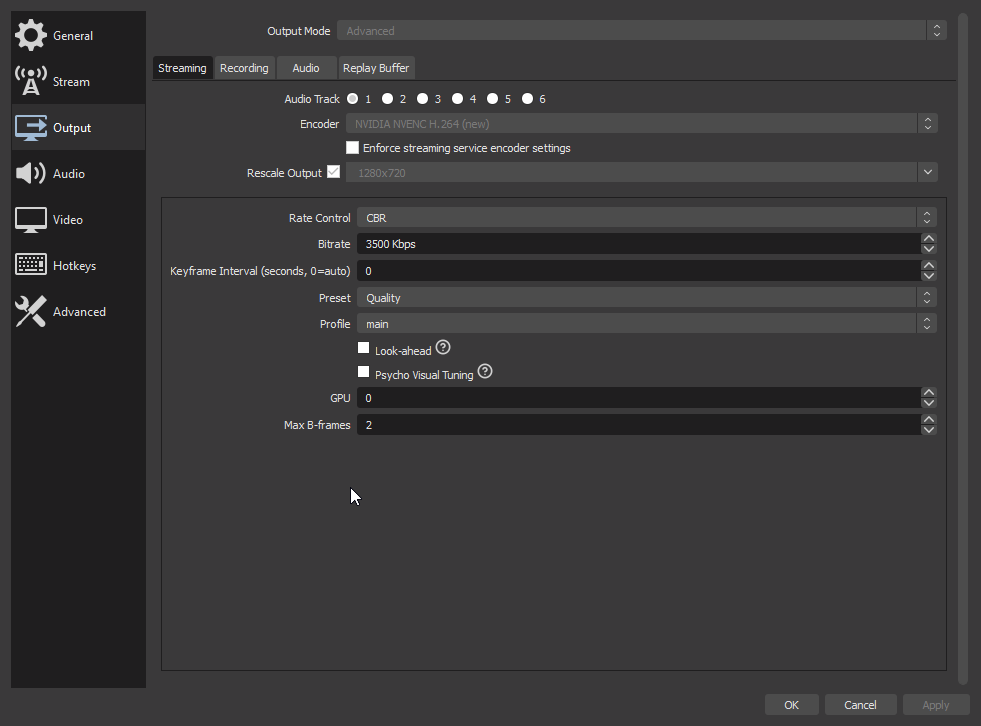
Hey Guys, any reccomend me better settings for my stream? I have good internet, just not a great pc
I got an i5 6500 and a 1070
 round brambleBOT
@lament blade There are no "best settings".
Please understand that every setup will be very different.
Any guides or videos that claim otherwise are misinforming. Your best option is to start with a base and adjust as necessary.
You can run the OBS auto-configuration tool. To use the auto-config, click on the Tools menu in OBS, select Auto-Configuration Wizard, and then just follow the on-screen directions.
You can use this tool to get baseline settings for your hardware and adjust as necessary from there.
Test, test, and test again. We are happy to offer suggestions for any issues you may be having afterwards, but not a list of settings.
Thank you
lament blade
Yea I’d love any suggestions
little oak
you should be able to pull off 1080px60 on your gpu and your i5 cpu @6000 bitrate
cause
i have an i3 cpu with a 1050ti oc and i can pull 1440x900p@60FPS
lament blade
Ohh
little oak
but every PC is very different even if your best friend has the exact same PC you will need to see what your results are on a auto-wizard configuration and see what it says then go from there and just test test test
lament blade
Okay cool
little oak
but you should be able to hit what i said right on the nose
im 80 generations behind and i do pretty good at that on mine LUL
lament blade
Sweet
little oak
run the auto-wizard and lests see what we get 🙂
lament blade
Okay gimme a min 😄
little oak
let her rip 🙂
lament blade
Where do I run it at
little oak
up top on your obs you should see tool then clicc for the drop down box and you will see the auto-wizard
lament blade
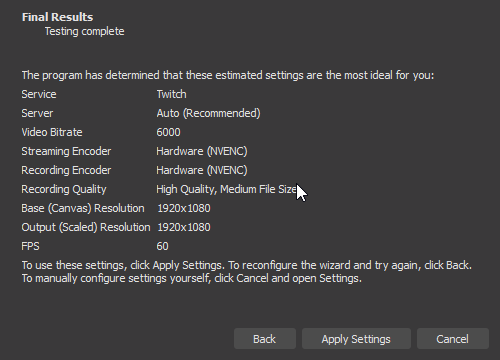 little oak
now that some sexy results right there 
you should be able to handle that including the overlays you will add and all the other goodies
little oak
now after you set up everything you will want to run several test to see what goes and what dont but i feel you shouldnt run into any trouble with them settings considering twitch keeps up with tech
sweet have fun killing them campers 🙂
lament blade
Awesome thanks for help man
little oak
You're Welcome 
 tawdry surge
How do i add the bot to my twitch chat
?
And how do i add the !followage command and stuff like that?
lament blade
What bot
tawdry surge
Streamelements bot
round brambleBOT
@tawdry surge To set up the bot for your YouTube stream, please follow these steps:
- Make sure your stream is public. The bot cannot join a private/unlisted stream.
- Your stream must be live for the bot to join the chat.
- Add https://youtube.com/c/streamelements as a Comment Moderator at https://www.youtube.com/comment_management
- When live, be sure to look at Live chat instead of Top chat, as Top chat will hide the bot messages.
little oak
yes we have a bot for your chat Krazeehhh 🙂
little oak
after you have you bot set up and it responds then go here for all of the bot options https://streamelements.com/dashboard/bot-commands/default-commands
ok for twitch
tawdry surge
This is a twitch helpdesk
little oak
https://streamelements.com/dashboard go here and clicc join channel
little oak
bot executed the wrong link, my apologies
also make sure you mod the bot when it joins your channel 🙂
tawdry surge
How
Oh ok
I know how to do it
But I have a another question
Do i get my overlays when I stream on ps4?
little oak
you need to have remote play or a capture card
little oak
that is the only way you can have overlays on your stream from obs
little oak
yes PS4 has an app called remote play and obs can picc it up
tawdry surge
How do i do it?
 dense cargo
Hi guys, I hope everyone's well. I've been streaming for quite a while now, been using elements layouts, but its the first time ever I'm creating my own layouts. My problem is: I create a personal blank layout, set it up. I want to use my alert boxes from before, so i close the editor, i switch to my old layout, i click on my alert box, then "duplicate widget", i choose other layouts... and then, my personal, new layouts are not showing in the list. What am i doing wrong? Is it impossible to copy old widgets to new, personal layouts? Please, help if you can and have a nice day, take care guys
little oak
@tawdry surge wish i could help you with that for as i am cluelass as you are lol. I am an Xbox player so if i help you may give me  face as i try to help LOL
tawdry surge
Lol
It's all good
But at least I added the bot. That's the most important thing I wanted
 past tinsel
my overlays are not showing up? Aswell as my alerts
little oak
but im sure you will find one within here who knows how to
@past tinsel via site or obs.live?
little oak
go to the browser source where your input the source code on obs.live double clicc it then scroll down a lil and hit refresh cache of current page then test it an see if it pops up
little oak
when you double clicc where you stored the browser source on obs.live
little oak
i cant do calls as for i am deaf 🙂
past tinsel
oh thats all good,
little oak
ok have you created the overlay right?
past tinsel
yep here i'll send you the photos of what i mean
little oak
ok
past tinsel
little oak
now that those are created then we now need to add the source codes to your obs.live as a browser source
little oak
under scenes
past tinsel
yep
little oak
then under source add it as a browser source
past tinsel
omg i understand,
little oak
after you create your scenes
little oak
add all 3 then layer it out on the obs where you want it 🙂
correct now add them on the source side as a browser 🙂
past tinsel
wait the left or the right?
little oak
right where it says game capture add them there
little oak
as a browser source
no
those are your scenes for when you switch
say like
youre playing a game
but youre done an just wanna cvhat so you switch to another scene where its just you and your chat
little oak
yeah thats the one browser aka browser source 🙂
little oak
or do either if you like as for my i do new an name them just de3pends how you want it
if you create new make sure your game is at the very bottom so the overlays lay over your game
past tinsel
yeah
little oak
due note: if you add lets say you add "chat" to every "scene" make sure you turn off Shutdown source when not visible or they will one all at once
@dense cargo which browser are you using?
dense cargo
@little oak firefox latest version
little oak
alright, we do have a few hiccups with that browser as well as microsoft edge. We are best on Chrome, try that browser and see what happens?
dense cargo
will do thanks
little oak

dense cargo
yes, you were right. chrome refreshes the layout list properly, so i can copy my old widgets to new ones too
 dense cargo
although i am not really willing to use chrome in the future, are you guys planning to fix issues in firefox too?
little oak
you dont have too just use thy chrome to do all your edits only then continue your fav browser
dense cargo
thats what imma do, thanks again 😄 was just wondering
little oak
im not for sure if they are or not but they could be and if so there is no ETA for atm
past tinsel
@little oak does it work the same way for the alerts too?
little oak
You're Welcome and maybe it will blow over an you can continue using FF cause we do get hiccups now an then on t=others
@past tinsel yes add it as a browser to your source
little oak
You're Welcome
past tinsel
so i did my first live stream but it didn't save on twitch
little oak
you need to turn on the "save past broadcast" on twitch
in your settings
go here https://dashboard.twitch.tv/u/URNAME/settings/channel and save that option
copy and paste that link then replace urname with your stream name then hit enter
past tinsel
holy jesus, thank you, you good loving person 🙂
 candid jasper
My bot is actually Turkish but in tip announcements it is still english. How i can change that
ionic kelp
Can you screenshot what you mean?
 lucid plinth
how do i import streanlabs to streamelements
little oak
looks good. does they show with in obs.live your alearts when you test them? you should see it pop up via site and obs at the same time?
via site within overlay make sure thats checced an then you can emulate any thing within
lament blade
@lucid plinth you can use our import center for that: https://streamelements.com/dashboard/account/import

StreamElements
The Ultimate All in One Platform for Streamers
little oak
ah crap LUL
lament blade
2fast4u

 serene jasper
Anyone able to assist a streaming rookie? All I need is a clickable hyperlink to be dispalyed through the duration of my stream on Twitch - it links to a form to be filled out by viewers during the stream. I put the link in the description but people don't. seem capable of finding it
little oak
you need to add that link to your twitch panel
down below your video you will see edit panels
serene jasper
I did that - but people still seem unable to find it
there's no way to add a link on top of the stream screen itself?
ionic kelp
No.
serene jasper
sad times
 real lark
I have a problem with the stream elements website. On one pc i can start the editor and everything is fine, but on my streaming pc when i open the editor everything freezes in place and i can't do anything. do anyone knows what the problem can be here. is in chrome browser
 midnight dew
His there app to see who unfollow you
 worldly bane
Hi there! I am new with streamelements, I have a problem, and that is that when I open obs it gives me this error: obs live there is no software update available. And it won't let me access the live obs tools
little oak
there is no such thing as that i believe
re download our launcher via site and see if it will fix that and overide that "no software update"
before you relaunch the exe kill all obs in your task manager
little oak
when you are in your overlay and youre editing it you will see a bell then hover over the bell and select an alert to emulate it vis site and obs
past tinsel
but it didn't show like that on stream?
it was zoomed in and was half off the screen
nvm
i know how to fix it
🙂
little oak
lavish aspen
will lowering to 720p60 from 1080p60 as Affiliate ensure encoding options more or not? kinda annoying that Twitch has not yet gotten good servers for us all :/
little oak
Transcoding is only guaranteed to partners and then affiliates get priority based on availability according to the FAQs, so sometimes your stream will have the quality option and sometimes it won't. It depends on if the transcoders are all already in-use. Also, I might be wrong but I think the transcoders are assigned to the servers so if it's not a big deal to connect to a different server region (i.e. perhaps a Canadian Twitch server instead of a US one)
afaik you can stream at the FPS that you want but affiliates get to change the quality for viewers when its available. you may have it and you may not
if you dont have that option, you will stay at the output you choose
little oak
via twitch site or obs?
 golden swan
obs
little oak
ok you will have to sign in with your main account and nt the streamkey then at the top go to view then docc then choose twitch info docc
little oak
You're Welcome
 kind sundial
Hello Lads. I`m using LLama overlay for my stream. I want to ask you for help. So i want to change the icons from the "ingame" overlay "top tip" to latest cheer. But i cant find solution to change it. Do we have options to do? Thanks for helping.
round brambleBOT
@willow saffron Please contact us via email for support with SE.Pay. You can use our contact form here: https://streamelements.com/contact Thank you
 rare flower
Hello how can i reset all Streamelements Bot settings to default
ionic kelp
Define default?.
rare flower
like the settings who everyone starts with
hoary zealot
@abstract hemlock Yeah, i can't reset the total of the goal ... any tip ?
 wise cliff
Hey I'm starting a stream and my layout is completely blank
I'm not sure why it's doing this, all of the SE elements are not showing up on any of my pages
 viral maple
Hi, I can't change my bot's name, I'm using OBS.Live :c
round brambleBOT
@viral maple Custom bot name requirements
- StreamElements bot modded and in chat
- Active overlay with alerts
- StreamElements tipping page in the panels below the stream (!panels)
- OBS.Live or Ground Control open
- Create a twitch account for the name you want to use or run the bot under your own name
- Custom bot name doesn't work on Mac
@wise cliff OBS -> settings -> advanced -> scroll down -> enable/disable hardware accel.
https://i.imgur.com/ggMe9ZE.png
 viral maple
I need to disable that?
 twin sentinel
@viral maple The enable/disable was not meant for you.
viral maple
Ohh sorry
twin sentinel
Make sure you meet the requirements the bot posted above and try to set the custom bot name.
viral maple
I already made all the requirements for the custom bot, but I don't know where I need to go next
twin sentinel
viral maple
So...i must install ground control? I mean... I have Obs.live and I understand that I can change the bot's name there too
ionic kelp
That's not GC.
twin sentinel
@viral maple You only need to install OBS.Live and set the custom bot name like in the video I posted the link to.
 raven vessel
round brambleBOT
raven vessel
round brambleBOT
@raven vessel To reset goals:
- from the overlay editor -> data on top -> goal tab -> reset progress of desired goal
- from the dashboard -> activity feed on the left -> widget data on the right -> goals tab -> reset progress of desired goal
Note: Goal widgets(progress) only counts up and doesn't go down automatically, if you loose followers/subs
viral maple
Ohh I find it thanks @twin sentinel
twin sentinel
What widget are you using to show the data? Is the donation you recieved in your activity feed?
twin sentinel
The session data is only for the session of a stream. You can choose different time frames in the widgets settings.
 foggy rose
Hi. I just started using Stream Elements and tried using it in my recent stream. I am using the Alert Box widget as well as the Recent Events widget. Someone raided me with 1 viewer, and while this showed up in my Twitch Activity feed, it did not show in my Stream Elements activity feed. It played the alert noise, but no alert or event showed(when I tested with emulation it worked...) I have hosts and raids both set to 0 on the Alert Box widget, so they should be triggering, and the sound is playing properly, so I am not sure what the issue is.
round brambleBOT
@foggy rose To add your overlays to OBS, add a new browser source in your scene. Paste your overlay URL in the browser source properties, set the dimensions to 1920x1080 (unless you changed them on the website), and ☑ “Shutdown source when not visible” https://youtu.be/KDvLynUqXI4
foggy rose
It seemed to be happening with 0 viewer hosts as well. The sound plays but no event history or alert shows (emulated ones worked...)
twin sentinel
@foggy rose When you emulate an event via the editor, does it show in your OBS (make sure the checkbox next to the emulation bell is acitivated)?
wise cliff
Enabling and disabling the Hardware Accel did nothing to correct it my layout is still missing
round brambleBOT
@foggy rose Due to changes to Twitch API, we have filtered out hosts and will only show these ones on your activity feed:
- All hosts coming from an online channel with at least 1+ viewer
- Auto host events with at least 1 viewer - only from a channel that just went offline
Note: If you see "X channel has hosted you" with no viewers on the back, that is considered an offline host or a host with 0 viewers, we do not show these.
Note for Mixer streamers: The above 2 filters currently apply for Mixer and we are aware its actually not how Mixer hosts work. We do plan on changing it, but no ETA on when.
twin sentinel
@wise cliff Is the overlay showing in the browser when you launch the overlay?
 topaz kestrel
Hi, why the bot doesn’t do anything?
foggy rose
@twin sentinel Yes, it does show.
 dry hare
@topaz kestrel make sure the bot is in your channel and a moderator
topaz kestrel
Oh he have to be moderator
 jolly crown
I don't know if this is the right section for this but does anyone know the reason why my stream looks like a old static television? https://gyazo.com/f16b15b44288646f3aaef8f7a49b37df
foggy rose
I thought maybe it was the 0 host thing, but the sound plays each time, which is confusing.
round brambleBOT
@foggy rose OBS -> settings -> advanced -> scroll down -> enable/disable hardware accel.
https://i.imgur.com/ggMe9ZE.png
@jolly crown Please provide a log from your last stream. To do this, in OBS go to Help > Log Files > Upload Last Log File and paste the link to the log file here.
foggy rose
But the recent events aren't catching the hosts/raids? Like I said, the emulation ones work, but non emulation ones only play the alert sound, and nothing else.
jolly crown
I haven't been streaming due to this reason and just recorded for seven seconds of it
twin sentinel
@jolly crown Isn't this a video of your twitch page?
@foggy rose Try what the bot posted above about the hardware acceleration.
Also be aware that we do only show certain hosts/raids, like the bot posted above.
jolly crown
no I just stream not too long ago and seeing that quality made me end the stream immediately
twin sentinel
Do you have the log of that stream?
jolly crown
No I don't
twin sentinel
@jolly crown I recommend to start a stream again and post a clean log here.
round brambleBOT
- Restart OBS
- Start your stream/recording for about 30 seconds. Make sure you replicate any issues as best you can, which means having any games/apps open and captured, etc.
- Stop your stream/recording.
- Select Help > Log Files > Upload Current Log File. Copy the URL and paste the link here.
(Note: If you do not see an obsproject.com URL, you will need to update OBS Studio to version 22+)
foggy rose
@twin sentinel Okay. Thank you. As far as showing only certain hosts/raids goes, will it still play the alert noise even it it doesn't show the host/raid? That's what is confusing me. It played the noise I set every single time.
twin sentinel
No, it should only play an alert and make the noise when the event shows up in the activity feed.
foggy rose
Hmm. I will try the hardware acceleration thing and hope for the best. Thank you.
jolly crown
https://obsproject.com/logs/YpZ539fGmSjOZc-L guessing that's what I am suppose to link?
twin sentinel
jolly crown
So I need to fix the gpu issue?
 worthy coral
Hey i got problem, that everybody in my channel got 0 sec watchtime and i don't know what to do with it... Can anybody help me please?
scarlet tiger
@worthy coral Is loyalty system enabled?
round brambleBOT
@worthy coral 10 minutes of watchtime are given to those in chat when the loyalty points are handed out (every 10 minutes). Therefore, loyalty must be enabled for watchtime to work properly.
There is no direct link between watchtime and all-time points.
It can’t be calculated from the amount of all-time points a user has because subs may earn points at a faster rate and !bonus all command increases all-time points for users in chat at that time.
Giving points to a single user does NOT affect all-time, only when giving to all in chat.
twin sentinel
@jolly crown Take a look at the log-analysis. There are useful tips on how to improve in there.
worthy coral
Ah, its disabled, sorry, im an idiot 😦 😄
scarlet tiger
And you can use #🇨🇿︱czech channel in future 😉
worthy coral
ah, didnt saw it, sorry 😄
 clever frost
where do i find my jwt token=
round brambleBOT
@clever frost You can find your JWT token on your account channels page ("Show Secrets" to reveal the token): https://streamelements.com/dashboard/account/channels
READ ME:
This is a private security token. Do NOT share this token here or other public places, only with a StreamElements staff member in private.
jolly crown
I am looking at the log but I am a noob when it comes towards computer and obs so kind of confused
beside the capture interference
twin sentinel
There are tips on how to improve in the analysis I posted.
jolly crown
Okay thank you
sharp gyro
Hi there - anyone have this problem?I switched to StreamElements a while ago and imported my streamlabs alert box into an SE overlay I still use. I used to be able to edit that alert box, but now it does not show up. Please help.
wise cliff
For some reason my response didn't post. I still can't get my layout to come back and I'm missing alerts. Toggling hardware acceleration did nothing
 mellow pier
I had an issue again last night where streamelements wasn't syncing with twitch. I had 2 more followers last night and it didn't register with streamelements. I've parted with the bot and logged out, logged back in and added the bot back. I don't know if it is working again or not
 faint mauve
Where do i go to my overlays
 weary prairie
@faint mauve the "my overlays" tab on streamelements .com
 quaint bridge
hey guys is songrequest working right for you? when it's playing my backup playlist some songs get cut in half
 mystic helm
is there a welcome bot for streamelements?
scarlet tiger
@mystic helm no Welcome function by StreamElements
But you can use customapi by thefyrewire
scarlet tiger
You mean Welcome messages in chat or on overlay?
So, you can use Custom Greetings widget by Zanzer
https://discordapp.com/channels/141203863863558144/457957557470887947/667683961006456852
 coarse barn
Hi a channel I mod for has recently changed his twitch name and now the command for subs is broken it keeps saying 0 what do I do?
round brambleBOT
@coarse barn If you changed your name on Twitch please follow these steps:
🔹 Visit https://streamelements.com/logout and then log in again with by connecting with Twitch.
🔹 On the right side of the dashboard page that opens, select "Join" under bot settings. If it says "Part" select that and then select "Join" to send the bot to the chat. Don't forget to mod the bot by typing /mod streamelements in your channel if you have not already.
🔹 Post your new name here so that we can update your channel's chatstats tracking (must be done by staff).
coarse barn
His name is Naghz
hoary zealot
Have a way to reset the tip goal or will be aways the same ? I'm trying to make a new one but only show the total goal of the old goal and i'm trying everything to reset it and not working
hoary zealot
@sleek bay On streamelements, you put what size ? 1080p ? 720p? and on your OBS are on 1080p or 720 ?
wary halo
@sleek bay make sure it's 1920x1080 in the browser source properties
 sleek bay
it is
wary halo
what is your base canvas set to in OBS?
 viscid pebbleBOT
Hi @lament blade, Please ask your question(s) or describe the problem you're looking to solve so staff or a support volunteer can assist you as soon as they are available.
 finite rain
so after the crash day before yesterday my audio from the media player has been a lot more glitchy is there anything i can do to clear this up
round brambleBOT
@lament blade OBS -> settings -> advanced -> scroll down -> enable/disable hardware accel.
https://i.imgur.com/ggMe9ZE.png
wary halo
disable that
 slow mountain
Hello everyone, I am new to streaming and wanted to ask for some tips.
I've only heard good things about this streaming element, how does it work setting up the overlay and the different elements like alerts and so on?
round brambleBOT
@slow mountain New to Stream Elements?
Check out our YouTube channel https://www.youtube.com/c/streamelements/videos
with tutorial videos from setting up the basics, to in depth details on how to use our product.
New to OBS? Here is a 4 step quickstart guide
https://obsproject.com/wiki/OBS-Studio-Quickstart
Want to learn even more? Here is an in-depth overview
https://obsproject.com/wiki/OBS-Studio-Overview
slow mountain
wow that was fast lol xD thanks !
finite rain
do yall have software that works on macbook i pro
 sinful phoenix
Hello, I am a dashboard manager for a Twitch streamer that uses StreamElements and they've asked me to find out why the bot isn't responding to any of the commands that get typed in chat.
wary halo
@finite rain we don't have products that support Mac
finite rain
ok
wary halo
@lament blade you might be better off asking that in #helpdesk-selive
finite rain
np im using a mac supported obs could this be the reason for the lag due to the transision from yall to it
ok ty yall rock keep up the great work
wary halo
could be, but i know little to nothing about mac's unfortunately 😛
finite rain
lol ok thanks for trying ill be back for more questions at some point this week lol
but yall are so much better then streamlabs
round brambleBOT
@sinful phoenix Go to the dashboard -> right side -> part channel -> join channel (https://streamelements.com/dashboard)
 wary halo
that usually fixes the issue Geeks99
if you can't see it, then the streamer might have to do that themselves but you can do it while being live
sinful phoenix
The bot is already in the channel though
wary halo
yeah, but parting and rejoining might ' reactivate' it 😉
sinful phoenix
I should've said, it's responding to a select amount of commands
Not none at all.
My bad.
wary halo
which commands is the bot not responding to? custom commands or default commands?
or a mix ofcourse
 dark island
hello
wary halo

dark island
i have error with profile page i can't update it
dark island
any help
wary halo
which profile page?
dark island
StreamElements
The Ultimate All in One Platform for Streamers
sinful phoenix
@wary halo So far only !setgame and !settitle works
wary halo
what is it that you would like to update @dark island ?
scarlet tiger
It is known bug @dark island try put link without https
scarlet tiger
Try add only https://www.facebook.com
dark island
i want to change facebook from my personal fb to my page and change discord server to my second one
scarlet tiger
Yes
dark island
but it doesn't save
scarlet tiger
Try firstly only link above
dark island
same error
round brambleBOT
@sleek bay To add your overlays to OBS, add a new browser source in your scene. Paste your overlay URL in the browser source properties, set the dimensions to 1920x1080 (unless you changed them on the website), and ☑ “Shutdown source when not visible” https://youtu.be/KDvLynUqXI4
dark island
the error show up in bottom right corner
sinful phoenix
@wary halo Only 2 default commands are wiling to work
sleek bay
@round bramble Im aware, this is the result i get as you can see
I read the guide, did all as you said, this is what i see
 strong kernel
@sleek bay Screenshot your browser source properties.
sinful phoenix
That's a bot @sleek bay 😄
strong kernel
@sleek bay You just deleted your overlays, so it's a little difficult to help you until you make a new one.
sleek bay
Yes, i thought it's a problem with that particular one
i don't know what to do
Trying to figure it out
strong kernel
There's no problem with the overlay, only how you're adding it in OBS.
I need a screenshot of your Settings>Video and of your browser source properties, please.
Do not delete it this time.
Also, please hide the link.
sleek bay
 mossy saffron
I'm having a problem with my audio, It is receiving both my Elgato HD60 and Yeti Blackout Microphone fine, but there is no audio in the in my stream
strong kernel
@sleek bay You're putting a 1080p browser source into a 720p canvas. It's too big by default. Press Ctrl+F to fit it.
round brambleBOT
@mossy saffron For the best OBS support, please join their Official Discord @ discord.gg/obsproject
sleek bay
PRessing ctrl+F this is what happens
strong kernel
@sleek bay Start over. Completely delete the browser source and make it new. Set it to 1920x1080, add the link, press OK, do nothing else, and screenshot what you have.
strong kernel
Well that looks fine now.
sleek bay
when i click on the canvas, i think i clicked on the game scnee and not on the browser source thats why ctrl f dfidnt work
Last issues i with the guide for song requests, what the girl is showing in the video, doesn't match what we have now on the site
strong kernel
Can you be more specific or just ask "how do you ____?"
sleek bay
ok how do you enable song requests without adding the YouTube video on the stream video
say someone requests a song using !sr, what if i just want the audio and no video on screen#
strong kernel
Viewer requests are enabled in the Media request section of your account, with the toggle in the top left.
sleek bay
without adding a media request widget ?
strong kernel
When you're controlling media request, be it through the site or through OBS.Live, then it's just captured as desktop audio by virtue of you listening to it.
sleek bay
strange you would say that, because hwen i test it, i aslo get the youtube video showing on stream
strong kernel
That shouldn't happen if you haven't added the widget.
Get rid of the widget. Don't show on stream.
sleek bay
ok let me check
strong kernel
Just click play.
sleek bay
ahh i see what you're saying, even if it plays in stream elements in the browser, it just gets captured as desktop audio, so it doesnt really matter
righ tright
 silver igloo
what is the command for !clip
scarlet tiger
One moment
If you are looking for clip command, you can use for example thefyrewire's customapi.
Guide is here >> https://thefyrewire.com/docs/api/twitch/clips/#required-parameters
silver igloo
ok so just copy that command and us it in custom commands ?
scarlet tiger
See guide
dark island
so
slow mountain
hey if im change the bot modules why he doesnt save my own created sentences
scarlet tiger
Do you use the chat alert module?
If yes
Check its settings for a missing number or text in the variations of the alerts.
It looks greyed out, but its actually blank.
@slow mountain ^
slow mountain
solved thanks ^^ problem was the language .. i had the wrong one ^^
sleek bay
what is a good way to transition between scenes ? Say in-game to brb to stream ended
 tropic jackal
Hey, so my tiltify widgets have been broken for a few days now. I can't select my campaign or anything. Anyone able to help?
strong kernel
@sleek bay That's up to you. You can use the default or find a transition. Since transitions can't be handled cloud-based, we don't really deal in them.
tropic jackal
@sleek bay look up how to make a stinger transition
sleek bay
I understand, thank you @strong kernel @tropic jackal
tropic jackal
WHen I click select campaign I get an empty box
I see tiltify on both SE and Tiltify sites as conncected to each other, but no campaign options
scarlet tiger
Try incognito mode
scarlet tiger
Try another browser
dark island
hey
strong kernel
Considering the site is optimized for Chromium, it's unlikely it's a browser bug.
Likely a local issue.
Perhaps a browser extension not playing nice.
tropic jackal
ah. I do use privacy badger, and ublock origin? maybe its one of those
tropic jackal
Hm, okay. Thanks everyone!
scarlet tiger
@tropic jackal disconnect and reconnect tiltify integration tried?
 rapid elbow
I still Got the samme problem AS last time with the newst Update of Obs live @wary halo
 static agate
hey there! Is anyone else getting this weird audio bug in OBS.Live? It's been going on for maybe a month now.
Haven't tried in regular OBS as of late, but I guess I could.
This video was captured in an otherwise-empty scene, immediately after starting OBS, so it's the only thing loaded into scene memory
wary halo
what is the bug? 😛 sounds fine here
static agate
Oh it's in the audio! It's jittery, and gets even worse when there's other sources in the scene
Here's an example of what it sounds like when there's other sources (maybe 15 active sources in the scene)
round brambleBOT
@static agate Please provide a log from your last stream. To do this, in OBS go to Help > Log Files > Upload Last Log File and paste the link to the log file here.
static agate
I know I have a lot of sources on here, but I've pared things down since my last stream & this issue occurs even without other sources ^^;
Woah, did someone initiate the alert again? 
strong kernel
Plays back fine in my OBS, so this'll be a local issue. Your system is likely overtaxed.
static agate
interesting... okay, I'll see if I can pare things down even more. thanks!
strong kernel
Check drivers and other updates as well, of course.
static agate
right right!
 tiny ore
is it possible to export streamelements overlays from a channel to another???
twin sentinel
Is the channel you want to send the overlays to, your own channel?
tiny ore
no its another twitch channel
round brambleBOT
@tiny ore Follow these steps to grant managers/moderators access to your dashboard:
- Click on your Channel Name at the top of the dashboard and select Settings
- Create a new invite at one of three access levels (Bot Supervisor, Editor, Full Control)
- Send this invite to a mod/manager to give them access to your dashboard. The link is one-time-use and expires after 72 hours if not accepted
Video tutorial: https://youtu.be/zl_h-ttZDF0
twin sentinel
Ask them to give you editor access to their channel.
 summer drum
How do you edit the sub commands and follow?
twin sentinel
What commands exactly? If they are default commands, you cannot change the answer. You can only change the answer of custom commands. You can try to rebuild the default commands with variables in a custom command if needed.
summer drum
Like what they say when someone follows or subs to you. Editing what the bot says I. Reaction
twin sentinel
That is the chat alerts module here: https://streamelements.com/dashboard/bot-modules
summer drum
Thank you
static agate
Hey @strong kernel, ty for your help earlier - I don't know what to do next.
Just tried with * many* fewer OBS docks, in a brand new scene collection, in a brand new scene. The alert browser is the only thing. RAM usage for OBS is just 775 MB, CPU usage is just 8-10% @ 4.25 GHz.
The issue still persists. Just running an alert (needs at least a second or so of wait time) causes the issue - running alerts back-to-back doesn't show any problems. Should I maybe reinstall OBS.Live?
twin sentinel
You could try that, but as Nethyr said, this seems to be a local issue.
static agate
weird... okay. Just wanted to make sure there isn't anything I'm doing wrong or overlooking. Just seems like there's nothing in the way at this point. ty, I'll take it from here!
 worldly flame
How do remove streamelements as an moderator on my twitch channel anybody know ?
twin sentinel
/unmod streamelements
Anything we can help you with besides that?
worldly flame
okey where do i type that ? im noob with this
twin sentinel
In your twitch chat.
worldly flame
no only that!
okey thank you sir.
thanks it worked really i appreciate your help guy!
 grizzled halo
Hey I'm back but with a issue on my friends stream so I set up the commands like normal and made stream elements a mod but the commands arent coming up
twin sentinel
Have you joined the bot in their channel?
grizzled halo
wym
twin sentinel
Made the bot join their channel via the dashboard.
lament blade
boys
who is a beast in setting up streamelements?
the settings
not overlay and stuff
twin sentinel
What do you need help with exactly?
round brambleBOT
@lament blade There are no "best settings".
Please understand that every setup will be very different.
Any guides or videos that claim otherwise are misinforming. Your best option is to start with a base and adjust as necessary.
You can run the OBS auto-configuration tool. To use the auto-config, click on the Tools menu in OBS, select Auto-Configuration Wizard, and then just follow the on-screen directions.
You can use this tool to get baseline settings for your hardware and adjust as necessary from there.
Test, test, and test again. We are happy to offer suggestions for any issues you may be having afterwards, but not a list of settings.
Thank you
lament blade
hmm
twin sentinel
@lament blade Here are some twitch guidelines: https://stream.twitch.tv/encoding/
twin sentinel
Yes, you should be able to work with that upload speed.
twin sentinel
Look for the quality and choose if you want to use NVENC (GPU) or x264 (CPU) to encode.
lament blade
NO idea
twin sentinel
Just play around.
twin sentinel
No need to post these info. Just play around with the settings.
grizzled halo
this
 modest jewel
round brambleBOT
modest jewel
round brambleBOT
@modest jewel Streamelements on top of OBS -> Logout -> login
abstract hemlock
@grizzled halo hi, it isnt your account right?
 vocal glen
hello I have a issue uploading an image. I drag n drop and I see the image and also I double click and see the image but I cant upload it
twin sentinel
@unborn zodiac When you type !uptime in your chat and it gives you your uptime, then you are live with us and this is only a bug.
@vocal glen What browser are you using?
vocal glen
ms edge
twin sentinel
Try it on chrome please.
vocal glen
ok
 unborn zodiac
How often is !watchtime updated?
round brambleBOT
@unborn zodiac 10 minutes of watchtime are given to those in chat when the loyalty points are handed out (every 10 minutes). Therefore, loyalty must be enabled for watchtime to work properly.
There is no direct link between watchtime and all-time points.
It can’t be calculated from the amount of all-time points a user has because subs may earn points at a faster rate and !bonus all command increases all-time points for users in chat at that time.
Giving points to a single user does NOT affect all-time, only when giving to all in chat.
 quaint oriole
A streamer I mod for can not log into his SE account. Whenever he tries, he gets this screen, as do I. Then, when either of us click on the 'My Dashboard' button it always comes back to this screen. Please advise, thanks.
round brambleBOT
@quaint oriole Please logout of StreamElements at https://streamelements.com/logout and then login again to your account (Twitch/Youtube/Facebook/Mixer)
quaint oriole
Thanks. That simple, huh? Will give it a go.
twin sentinel
What auto setting?
 hasty gull
Hello
I need help with the !quote command
I'm confused as to how to properly set it up
Can someone give me a tip as to how I should do it?
vocal glen
thank you that fixed the problem
 agile tide
Hello! What are recommended settings for online/offline intervals and chatlines for bot timer messages?
twin sentinel
!quote add XYZ to add a quote
!quote to recieve a quote
!quote X with X being the number -> recieve the quote
!quote remove X with X being the number -> delete the quote
hasty gull
Thank you very much sir
agile tide
Right. But what about offline vs online interval? I've been setting online interval of 60 minutes. Should I do 60 minutes for offline as well?
 torpid umbra
Is there any way to set up text bounds for the alert box? The text moves over the bounds of the image
twin sentinel
Online is the time for the timer to return when yu are online, the same for offline if you want to have the timer also or only posted when offline.
round brambleBOT
@agile tide On the page that gives an error, press F12 to open Developer Tools. Navigate to “Network” at the top and then Select “XHR” in the filter section. Try the action again that gave the error and note in the network tab any red text. Please copy and paste the error information that is given when clicking on this red text.
twin sentinel
@torpid umbra Can you elaborate? Maybe add a screenshot.
agile tide
no red text
torpid umbra
I think I found it. Margin is where you choose how far out the text can go correct?
twin sentinel
Margin is the outline boarder position, if I am not wrong.
@agile tide What browser are you using?
agile tide
firefox
twin sentinel
Try it in chrome please.
torpid umbra
Margin will make it so the text doesn't extend out to the edge, correct?
agile tide
don't have chrome installed. Would prefer not to use it
twin sentinel
@torpid umbra You should be able to test longer names with the custom emulate feature.
round brambleBOT
You can test Alerts via the bell on the lower right corner of the Overlay Editor. Simply go to your Dashboard -> My Overlays -> Pencil/edit button on the overlay. Make sure the "Show Emulated events on stream" option is on to see the alert in OBS/Xsplit https://streamable.com/h6qgy
 torpid umbra
Si, it doesn't do it with follows though FeelsBadMan
twin sentinel
@agile tide Try it in chrome please, as the website is optimised for that browser.
agile tide
Website should still work in firefox, and I have been using it on firefox for over a year
when I did the action it sent an xhr request
but it was successful and wasn't red
 jovial ocean
Hey guys. Did anyone get a message from "Twitch" for the partnership with Discord through Discord?
twin sentinel
@jovial ocean #general-chat
@agile tide Do you have a screenshot of that please.
@torpid umbra Correct, if the settings with subscriber and follow are the same and you can do that with subscribers, then it should also work with follows.
jovial ocean
Benno, I don't see anyone asking in general.
twin sentinel
This is a helpdesk for issues with StreamElements. Not the correct channel to post such a question. And it seems as the message of twitch and discord having a partnership is most likely a hoax.
 dusky perch
Im trying to upload a new mp4 for an alert, but the media window just keeps spinning and spinning even after its uploaded, and it can't seem to be used. Anyone have any tips for uploading vid to our overlays?
twin sentinel
Use webm format and use chrome.
dusky perch
I can't get a WebM out of Premiere or After Effects (or Media Encoder)
dusky perch
ok, I'll try it. I tried some of the web converters but oh man are they garbage
twin sentinel
Can you extend the PUT one please
agile tide
twin sentinel
Any way to see the json response in firefox?
hasty gull
Hey umm... Is it possible to put random quotes to post in the chat automatically every X amount of minutes/hours?
twin sentinel
I have never tested it, but you could try to create a timer with the ${quote} variable.
hasty gull
Ok tnx
agile tide
twin sentinel
Do you have a full screenshot of the response payload, the lower section of the screenshot please?
After the because there is most lilely the reason for the error.
 crystal glacier
Hello, To any SE staff I'm looking for support to adding my twitch channel to my my channels list. Every time I attempt this it says channel claimed. Thanks in advance and hope everyone is staying safe!
twin sentinel
Please DM me the JWT token of both accounts and I will forward these to staff to merge the accounts.
round brambleBOT
You can find your JWT token on your account channels page ("Show Secrets" to reveal the token): https://streamelements.com/dashboard/account/channels
READ ME:
This is a private security token. Do NOT share this token here or other public places, only with a StreamElements staff member in private.
agile tide
just repeats the same thing
{"statusCode":400,"error":"Bad Request","message":"child \"messages\" fails because [\"messages\" does not contain 1 required value(s)]","details":[{"path":["messages"],"message":"\"messages\" does not contain 1 required value(s)"}]}
 dusky bridge
can anyone in here help me with setting up my overlay?
round brambleBOT
@dusky bridge New to Stream Elements?
Check out our YouTube channel https://www.youtube.com/c/streamelements/videos
with tutorial videos from setting up the basics, to in depth details on how to use our product.
New to OBS? Here is a 4 step quickstart guide
https://obsproject.com/wiki/OBS-Studio-Quickstart
Want to learn even more? Here is an in-depth overview
https://obsproject.com/wiki/OBS-Studio-Overview
twin sentinel
@agile tide Do you have a screenshot of the timer settings, before you hit the save button please.
agile tide
twin sentinel
Checking internally on this. It could be that you have to use chrome.
agile tide
That is incorrect, I just changed my settings earlier lol
 north coral
good day, sorry to bother but i accidentally closed out of media request on obs, how would i get it back
agile tide
Thanks for helping btw
twin sentinel
@north coral StreamElements > Media Request in OBS.Live
round brambleBOT
@agile tide Please provide your account ID found at the top of this page: https://streamelements.com/dashboard/account/channels This ID is public info and safe to share here.
agile tide
5d48239b084f3963cfa27986
twin sentinel
Looking into it.
@agile tide What are you trying to update?
What does it say before and after you edited it (just before you hit submit)?
agile tide
no message and 15 chat lines
twin sentinel
You cannot set an empty message.
strong kernel
Was able to edit just fine in Chrome. It may indeed be a Firefox-specific issue.
agile tide
No idea, I just opened it in a bunch of new windows and one just succeeded
it's an intermittent issue and I do not know why
thanks anyway
strong kernel
Is it still intermittent? Can you close and reopen your browser, and go see if it's still only sometimes working?
agile tide
Let's find out
okay so I've noticed something weird
on two pages, one that is working, and one that isn't working, and both on the same url (https://streamelements.com/dashboard/bot/timers)
StreamElements
The Ultimate All in One Platform for Streamers
if I refresh one of them I see this
aka no message
if I refresh the one that was working, I see this
 dull comet
I lost my media request how do I get it back
strong kernel
StreamElements menu at the top.
dull comet
Then what do I do
 hardy minnow
Hello. I'm trying to make a gif show up on a sound alert from my store redemption page. Some of your old youtube videos have a button that says "redeeming this item shows an alert" was this removed?
strong kernel
Stream perk items show gifs, not sound effects.
hardy minnow
Thank you!
static agate
@strong kernel I FIGURED IT OUT
Disabling that option fixed it!!
I'll report this to OBS! ty for the help :>
sorry for the @mention, just wanted to report back o7
slow mountain
Hey i saw i video where he Copy the URL Into OBS .. Do i need it to if i allrdy Copy the Core overlay URL befor?
round brambleBOT
@slow mountain To add your overlays to OBS, add a new browser source in your scene. Paste your overlay URL in the browser source properties, set the dimensions to 1920x1080 (unless you changed them on the website), and ☑ “Shutdown source when not visible” https://youtu.be/KDvLynUqXI4
slow mountain
okay but it is visible so its allrdy in?
tested it with Test follow etc. and see it on OBS so it is in Right?
dull comet
How do I fix when i add browser nothing pops up and the same when i put the link in?
??
round brambleBOT
@dull comet New to Stream Elements?
Check out our YouTube channel https://www.youtube.com/c/streamelements/videos
with tutorial videos from setting up the basics, to in depth details on how to use our product.
New to OBS? Here is a 4 step quickstart guide
https://obsproject.com/wiki/OBS-Studio-Quickstart
Want to learn even more? Here is an in-depth overview
https://obsproject.com/wiki/OBS-Studio-Overview
dull comet
Still no help
 warm haven
how do I stop obs from playing song request from the !play command
strong kernel
Disable the command in the Chat commands section of your account.
 kindred ermine
anyone else having issues with media request. its not showing up in the OBS
it's blank
 magic lark
Heya, has anyone used the Awesome Shoutouts widget within SE? I'm trynna set it up and got the basics working but the video seems a lil outta date. That or I've just lost all my coding knowledge xD
slow mountain
So finaly im close to finish just last question How i show my Chat ingame or Inside the stream?
strong kernel
@magic lark Community created widgets are provided as is and it's your responsibility to get them running and to maintain them.
@slow mountain Add a chat widget to your overlay.
lament blade
i need help..
round brambleBOT
@lament blade Welcome to the helpdesk! Please let us know how we can assist you today and a support volunteer or staff member will assist you as soon as they are available. Thank you for your patience.
lament blade
I dont know how to put overlay in OBS
round brambleBOT
@lament blade To add your overlays to OBS, add a new browser source in your scene. Paste your overlay URL in the browser source properties, set the dimensions to 1920x1080 (unless you changed them on the website), and ☑ “Shutdown source when not visible” https://youtu.be/KDvLynUqXI4
@lament blade Please ask your question in one helpdesk channel only. A support volunteer or StreamElements staff member will assist you as soon as they are available. Asking in multiple places will only result in confusion, not faster answers. Thank you for your patience.
slow mountain
it shows me the Featured widget but i havent seen a Chat widget =U
waiiiit i think i found it sorry xD
strong kernel
If you are looking in the Themes gallery, you are in the wrong place. You should be in the overlay editor. The Widgets section of the Themes gallery is just a collection of community-created widgets.
 candid frigate
Hi, I just did a Subathon, and I got some Tier 2 and Tier 3 subscribers, but the total sub count goal didn't adjust to the weight of the higher tiers. It seemed to count them as a regular sub, which threw my progress bar off. Could I please get some assistance so my sub goal will be accurate for future streams?
(If I should be in a different channel, please let me know.)
slow mountain
Workt all im Ready thank u for your support ❤️ your amazing
strong kernel
@candid frigate Count is count. It doesn't matter what the tier the sub is. You're thinking of sub points, which Twitch doesn't send through their API any more, so we're displaying count there until a solution is found.
 sleek lynx
Good evening... I tried using the BOT Counter widget to create a trigger on '!bump' to increment each time someone types !bump in the channel (then should reset after the stream is shut down). Is there an easier way cause it wasnt working for me?
candid frigate
And silly me. I got "count" and "points" confused.
strong kernel
@sleek lynx The widget only displays a counter, it doesn't create one. You need to create the relevant chat commands first.
 restive nova
i want to create a follower goal from 0 to 50 and i have 31 Followers total but streamElementsis just counting 21 from last 30 days. Please make possible to use Twitch total followers
sleek lynx
strong kernel
@restive nova Goal bars are not tied to totals or anything. They're counters that go up, never down. You can edit goal progress at https://streamelements.com/dashboard/session
StreamElements
The Ultimate All in One Platform for Streamers
 stoic dragon
Thanks for the count info Nethyr - Hadn't seen an update lately
sleek lynx
@strong kernel - I have !bump already as a command
restive nova
oh... true, so if i type the right one and i get a new follower it will increase +1
strong kernel
@sleek lynx Is this for your account or someone else's?
sleek lynx
mind
strong kernel
I do not see a !bump command in your dragon_heart305 account.
sleek lynx
basically everytime I bump the cam, someone types !bump in the channel and I want the counter to increment +1 each time and reset after the stream ends
sorry, forgot to activate 🙂
strong kernel
Okay. So now use the command and you should see the widget increment up.
sleek lynx
Nope, still says 0
strong kernel
You're using the wrong brackets.
Using [] will not register as a command.
Use {}
 hollow horizon
so not sure if i have to go to obs live support but when i try to back everything up to the cloud it goes through the motions gets close to 100% then says network error?? thoughts?
candid frigate
Was it recently that Twitch API changed to not disclose the subscriber points? What a frustrating change...
stoic dragon
Like 2 months ago
candid frigate
C'mon, Twitch... Thanks for the info. 👍
 halcyon flicker
round brambleBOT
halcyon flicker
round brambleBOT
@halcyon flicker You can find your JWT token on your account channels page ("Show Secrets" to reveal the token): https://streamelements.com/dashboard/account/channels
READ ME:
This is a private security token. Do NOT share this token here or other public places, only with a StreamElements staff member in private.
 restive tangle
I have a fast internet connection, but I'm dropping frames like crazy
how do i fix that
i don't even know what it means to drop frames
all I know is when I watch the stream playback on my 2nd monitor, it's all choppy
stoic dragon
What is your bitrate - are you using CPU or GPU encoding
It can be a variety of things
 zenith pumice
am i able to use song requests for ps4 stream
stoic dragon
Setting - Output - Encoder
restive tangle
x264
 rocky elm
Does custom html have support to listen for channel points redemption?
round brambleBOT
@zenith pumice Here is a guide on how to setup the most essential tools for streaming from your console, while using StreamElements tools without involving a Capture Card! It's easy to do, take 4 minutes to read and 10 to 15 minutes to setup!
Read all about it here: https://blog.streamelements.com/how-to-stream-on-console-7b620b1c46c3
@restive tangle Please provide a log from your last stream. To do this, in OBS go to Help > Log Files > Upload Last Log File and paste the link to the log file here.
 zenith widget
@lclc98#8967 we dont have an integration for the twitch channel points but if you know hiw to code you can use their pubsub to make it work
restive tangle
zenith widget
scarlet tiger
@lclc98#8967 you can use triggerfyre tool by thefyrewire https://thefyrewire.com/pog/triggerfyre
rocky elm
That tool is cool, I will keep it saved for future use.
Is there a way to implement it so pubsub triggers sends data to the streamelements, so I can do custom html/js/css stuff?
Weird how those @ seem to be failing for me (or at least on my screen)
And is there any plan to implement a way to listen for the channel point redemption in the future in SE?
zenith widget
Its failing for me as well.
As mentioned we dont have integration with the pubsub or any other was for twitch channel points.
This means you will have to make the integration in the custom widget.
We would like to but we are waiting on a proper api point
rocky elm
Ok, makes sense. Was more wondering if it was possible to host the pubsub connection externally then send data to my widget via like an API call. But I could probably just run the pubsub on the widget
 wind echo
Help
round brambleBOT
@wind echo If you would like help from the StreamElements support volunteers/staff please post your question in one of the helpdesk channels and someone will assist you as soon as they are available
#helpdesk-twitch | #helpdesk-youtube | #helpdesk-facebook | #helpdesk-mobile | #helpdesk-selive | #651453660810838026 | #helpdesk-merch
Thank you for being patient.
wind echo
Please help me
Idk
how to do something
How do you add a overlay onto your twitch stream and you stream of your ps4
round brambleBOT
@wind echo Here is a guide on how to setup the most essential tools for streaming from your console, while using StreamElements tools without involving a Capture Card! It's easy to do, take 4 minutes to read and 10 to 15 minutes to setup!
Read all about it here: https://blog.streamelements.com/how-to-stream-on-console-7b620b1c46c3
 shy latch
round brambleBOT
shy latch
round brambleBOT
@shy latch The default resolution for StreamElements overlays (theme and custom) is 1920x1080. Please add them in OBS at their full resolution and use CTRL+F to fit to screen if necessary. You can then downscale your stream in OBS settings > Video if you'd like https://i.imgur.com/6bWXxjR.png
 lament blade
does anyone know where I can input widget data?
I'm trying to use TriggerFyre
with OBS and apparently i need to input a token somewhere
zenith widget
In the overlay editor -> data on top
From the dashboard -> activity feed -> widget data on the right
lament blade
and then where would i input that token?
lament blade
If one or more triggers have been linked to a Twitch reward, then this token is also required for the widget to operate properly. Copy below and paste into the token field in the widget's settings.
I'm confused
zenith widget
If there is a widget generated by using Fyrewire's thing/tool, then go into the overlay editor, click on the widget and look on the left side - there should be a field for it
lament blade
I'm not seeing it
overlay editor?
HOLY
i found it
thanks KeiZar
Sorry for bothering you
zenith widget
👍
 sage lion
can someone help me disable the SE bot from my Twitch page please
have looked everywhere on my dashboard unable to find it.
feeling lost now.
 raven lance
Hello, 3 times this week I've had the OBS program crash mid stream. I am able to reconnect and continue the stream (often many more hours) without issue. Afterwards I pulled this from the event viewer, but I am not sure where to go from here:
Faulting application name: obs64.exe, version: 25.0.1.0, time stamp: 0x5e73a452
Faulting module name: libx264-157.dll, version: 0.157.2945.0, time stamp: 0x5e4f482f
Exception code: 0xc0000005
Fault offset: 0x0000000000049e70
Faulting process id: 0x2a00
Faulting application start time: 0x01d603d47e153a48
Faulting application path: C:\Program Files\obs-studio\bin\64bit\obs64.exe
Faulting module path: C:\Program Files\obs-studio\bin\64bit\libx264-157.dll
Report Id: 7ee1d756-28a7-4e16-9618-acbdf323a82b
Faulting package full name:
Faulting package-relative application ID:
round brambleBOT
@raven lance A crash log is required to investigate the cause of your issue. Please upload the last crash log.
- In OBS, click the Help menu
- Select Crash Reports, and then Upload Last Crash Report
- Copy the URL, and paste it to the chat here.
--
If you are not able to follow the above steps, open your file explorer and go here:%appdata%\obs-studio\crashesand provide the last listed file.
raven lance
round brambleBOT
@raven lance For the best OBS support, please join their Official Discord @ discord.gg/obsproject
 lilac glen
I want just the alerts so it pops up on stream can you help
round brambleBOT
@lilac glen To add your overlays to OBS, add a new browser source in your scene. Paste your overlay URL in the browser source properties, set the dimensions to 1920x1080 (unless you changed them on the website), and ☑ “Shutdown source when not visible” https://youtu.be/KDvLynUqXI4
 pliant scarab
Is there a wrap text option when you make an alert?
 olive holly
any staff online? I am tired of waiting emails for a day, I need help with tipping section :/
 untold crest
@pliant scarab Text wrapping is enabled by default for alertboxes
@olive holly How can I help you?
pliant scarab
I must not have it set up correctly then D:
untold crest
@pliant scarab what seems to be an issue there?
Maybe you have alertbox with size of whole screen
pliant scarab
Unless i put a margin on the text, It goes in a single line. The Alert box is only 630X300
zenith widget
@olive holly I'm sorry, I will answer your ticket right now as I just finished my lunch.
olive holly
Okay, thanks. Waiting
pliant scarab
If i shrink the box down the text does wrap but it also shrinks my video for my alert..
untold crest
In that case - have it big, so your video is displayed properly
And go to text settings
Then Advanced
Or if it is for user message - it is advanced in "Secondary text"
pliant scarab
Okay Thank you!
untold crest
You can also enable this, to see what box will be filled with text:
 high bane
I have an issue where my Media Request cannot show the video on the screen.
I have the option to show on stream, but clicking it does nothing. The music remains (it buffers) but no video shows.
Any tips on how to solve this would be very much appreciated.
ionic kelp
@high bane If you're doing this from the website it's highly recommended to do it in OBS.Live or Ground Control as they're not as "restricted" as the other.
high bane
hmm, that posted in the wrong room... I was supposed to pos this in the OBSlive window. Cheers @ionic kelp , I do not use the website, I use all the functions in the OBS.live program.
ionic kelp
Ah.
high bane
It's a recent issue. Maybe a month? Suddenly I cannot show videos on screen. I don't have the Ground Control, is that required to make the feature work? (I thought the introduction of StreamElements into the OBSLive meant it was no longer needed for features...)
ionic kelp
This actually sounds like a new one.
As far as GC that's simply one of the options that it SHOULD work with.
high bane
hmm. okay...
This is how it looks when I "show it on the stream" (also the sound of the music buffers a tad, and the sound gets louder, than when I don't "show it on stream")
It's just not showing anywhere...
high bane
feeling a little stupid now....
it does, however, echo. Is there an easy fix to that?
(video works now, obviously, but when showing on stream the sound echo itself)
round brambleBOT
@high bane Make sure to ☑ “Shutdown source when not visible” for all browser sources (all OBS scenes). If using studio mode, uncheck “Swap Preview/Output scenes After Transitioning.” Also keep in mind that sound can play from any overlay loaded in the browser (editor or launched). https://i.imgur.com/FegZJQS.png https://i.imgur.com/yY0wcFl.png




 high bane
yeah that did not solve it... :/
zenith widget
Are you sure you did it on all browser sources?
high bane
I only have the one....unless I need to do it on every scene?
every scene it is. Cheers for the help!
or not, wow... oh well, I'll just have to sort ths somehow else then :/ thanks for the help though, I appreciate it, and ticking of boxxes that didn't help is also valid 🙂
So, in an effort to display how much of a fool I am (and to help if anyone else is struggling with something like this), here is the solution:
Make sure that you are not editing your overlay, alternatively have your overlay open, in a browser.
The music will play in your browser at the same time and this, of course, will come up in your speakers/headphones. As it is your "desktop audio".
Once you close your browser/Streamlabs Overlay editor, the echo will vanish
zenith widget
Happens to all, i recently had this and was like "why am I hearing an alert of a streamer being live right now...twice....ooh right"
i had a chrome tab of their overlay open and hidden behind 5 other windows 
high bane
Would not have found this if I hadn't ticked off all the other boxes though 🙂 So thank you. And now- I head out into the virtual world!
 worn anvil
Greetings.
I am having trouble getting a gif animation for an alert to work.
The animation is a sprite file (a fact taht shouldn't matter) I drew myself. I have two opens on how to export the file. Either as looped or not looped.
Now stream elements does the following:
for the looped: SE enters the animation at a random point, as if the gif is constantly running and running in the background an the alert just drags it on to the screen.
For the not looped version: The picture is just showing the last frame.
How do I get the animation to start with frame 1 when the alert is being triggered?
 lament tree
What if u don’t have paypal