#helpdesk-twitch
1 messages · Page 610 of 1
 strong kernel
 zinc root
Will be it possible to do in future? Can I send this idea somewhere?
 round brambleBOT
@zinc root Check out the StreamElements ideas board: https://strms.net/ideas. You'll be able to add ideas, upvote ideas you agree with, and track their progress with email notifications. Adding and upvoting ideas also helps the staff know which ideas should be prioritized so please take some time to upvote.
 tight flare
hey, so I'm not sure if this a twitch issue or OBS live issue or what, but my chat in OBS live isn't connecting with my twitch chat. I can't send or read any messages and if i click "chat settings" all I get is an "error loading"
 fair wind
I'm having a problem with something currently. I have a chatbox on my stream and even though in the overlay I set to be white because i have a dark background, when i look at it on OBS and the overlay editor it appears as black
strong kernel
@fair wind Can you provide a screenshot?
round brambleBOT
@tight flare Streamelements on top of OBS -> Logout -> login
strong kernel
You set the color for the text stroke, not for the text itself.
That's further up.
strong kernel
fair wind
Yea, it works now thanks
I'm like super close to finally setting up everything i need for streaming
I just need a better mic
 young summit
@strong kernel Hey, I still have the same problem
strong kernel
@young summit Try again.
fair wind
I just added some custom commands with the bot that is supposed to send a link for my discord, youtube, twitter etc ..., but it just comes up as *** when i go to test the commands
strong kernel
@fair wind This is a Twitch moderation setting in your Twitch dashboard. You can disable it there, or you could also just make the bot a moderator, which I'd recommend doing anyway.
fair wind
I could of swore I already had it added as a mod
Seems like I had SteamLabs modded from when I used to use it
Now it works
 lofty cedar
@dense jackal hello
strong kernel
Please do not ping random staff members.
lofty cedar
@strong kernel I actually trying to DM Tomathin or Gavi
@strong kernel I need their help with a live stream. and they were not searchable for DM. Sorry, I won't if it was not important.
 crystal tulip
Hi, StreamElements Leaderboards gives me problems again, the "chat stats" list is not displayed again, yesterday one of your collaborators solved the problem and now it has reappeared ...
my nickname in Twitch is ATTILIO_90
 sudden axle
Hello, I am trying to change the SE chatbot to have a custom name for Twitch. I am someone who is moving to SE from Streamlabs and found out I could do this but it hasn't worked for me. I've made SE a mod, linked the SE tipping page, enabled an overlay, I already have the bot account as I was using it with SL chatbot and I have Ground Control but I still don't have the option to give the bot a custom name. Am i missing something?
 potent shuttle
Hiw do i set up the gamble minigame
 zenith widget
@potent shuttle https://streamelements.com/dashboard/bot-modules - roulette
round brambleBOT
@sudden axle Custom bot name requirements
- StreamElements bot modded and in chat
- Active overlay with alerts
- StreamElements tipping page in the panels below the stream (!panels)
- OBS.Live or Ground Control open
- Create a twitch account for the name you want to use or run the bot under your own name
- Custom bot name doesn't work on Mac
@sudden axle Due to a recent change from Twitch API, these features are affected by the change:
- Ground Control does not have Custom Bot Name
- Subscriber count will count the Channel and any other permanent sub you may have (+1 or +2 or +3 on top).
We are working on fixing both issues, but there is no ETA.
OBS.Live still has Custom Bot name working fine in it.
zenith widget
@crystal tulip fixed
potent shuttle
@KeiZar that didn't work
zenith widget
The roulette module you see in that page
is the gamble minigame
enable it
and use !roulette
potent shuttle
It's not there
sudden axle
So right now i can't rename the bot. Okay
zenith widget
What is your username?
potent shuttle
Officially_CodMan
zenith widget
Im not finding any account with that name
round brambleBOT
@potent shuttle Please connect your streaming account (Twitch, YouTube, or Facebook) with Discord by going to ⚙ Settings and then Connections here in Discord. https://streamable.com/eg92w

@potent shuttle Please provide your account ID found at the top of this page: https://streamelements.com/dashboard/account/channels This ID is public info and safe to share here.
potent shuttle
All the modules are is chat alerts Twitter and eight ball
zenith widget
Are you on twitch or youtube?
zenith widget
You were not asked for an editor invite link.
potent shuttle
So
zenith widget
Don't post those type of links publicly unless you want someone to screw up your settings
zenith widget
already did
potent shuttle
Thx
zenith widget
since you are on youtube
you don't have access to the Loyalty specific modules
due to restrictions from youtube
potent shuttle
Why
zenith widget
Because of restrictions from Youtube it self
potent shuttle
Why does youtube have restrictions they maise well forget about chat bit even existing
Chat bot
zenith widget
Its their decision to impose restrictions on how another company can use their API
We cannot change that.
Why do they have them? Ask Youtube.
 minor oak
I've noticed that my widgets do not update data
 wispy condor
round brambleBOT
wispy condor
round brambleBOT
@wispy condor New to Stream Elements?
Check out our YouTube channel https://www.youtube.com/c/streamelements/videos
with tutorial videos from setting up the basics, to in depth details on how to use our product.
New to OBS? Here is a 4 step quickstart guide
https://obsproject.com/wiki/OBS-Studio-Quickstart
Want to learn even more? Here is an in-depth overview
https://obsproject.com/wiki/OBS-Studio-Overview
 steady jewel
 pallid nacelle
Is any option to trigger the bot, to remove loyalty points from a viewer when he write a word in chat?
round brambleBOT
Please check the FAQ for SE.Merch here: https://strms.net/semerch-faq
zenith widget
there we go
@pallid nacelle You can "hide" a custom command and have it trigger via a keyword
pallid nacelle
Yeah i know that, but i don't know command for remove points via variable.
zenith widget
just make the command cost points
pallid nacelle
Ohhh great idea, thanks a lot.
 tiny slate
Hey so I'm working on my redemption store and every item redeem it tries to do a stream elements emote. How do I remove this?
zenith widget
A chat response?
tiny slate
Yeah. Can I post a screenshot for reference?
zenith widget
Yes a sub one
go to your default commands
check and make sure !pepes command is enabled
then use that command as !pepes off or !pepes disable
tiny slate
Thank you so much. I've been trying to do this for atleast an hour. No disrespect ofcourse ❤️
Is there any way I can add my own emote?
zenith widget
well the custome name needs to be gifted a sub to your channel
but thats a default response, so unfortunately you can't edit that
tiny slate
Okay no worries. I really appreciate the help.
 lament blade
How do i add a chatbox on StreamElements?
 deep hound
StreamElemnts doesn't seem to be recognizing me as a subscriber even though I've been on an 11 month streak through twitch
 graceful meteor
my watchtime command is not working and i do not know how to fix it
zenith widget
@lament blade If you want to show chat on stream via an overlay, you will need to go to an overlay, enter the editor -> widgets on top -> "Your stream chat" -> save
@graceful meteor can you elaborate the "not working" part?
@deep hound Are you referring to being a sub to someone and the bot not recognizing you as one?
deep hound
Yeah. I'm not allowed to use subscriber only redemptions because the but doesn't recognize me
graceful meteor
when someone enters the command it says 0 hours watched
round brambleBOT
@graceful meteor 10 minutes of watchtime are given to those in chat when the loyalty points are handed out (every 10 minutes). Therefore, loyalty must be enabled for watchtime to work properly.
There is no direct link between watchtime and all-time points.
It can’t be calculated from the amount of all-time points a user has because subs may earn points at a faster rate and !bonus all command increases all-time points for users in chat at that time.
Giving points to a single user does NOT affect all-time, only when giving to all in chat.
zenith widget
@deep hound Login to our dashboard and try again
deep hound
It still says subscriber only
zenith widget
Who is the streamer?
deep hound
Superstevio
Im a bot supervisor on his channel. If I disable the subscriber only redemption part of the command works fine but if it's enabled it won't work.
zenith widget
command or store page?
Here is something for both of you to try:
- logout from our dashboard and login again
- part the bot from the channel and join it again
deep hound
Store page
I'll have him part the bot and rejoin it after his current stream. I did also notice in the activity widget it didn't show my current redemption streak. Just my name when I had resubbed a few minutes ago
 trail bison
Hi!
I have two Twitch Accounts, both of them are connected to Stream Elements and on one account I've created my own custom overlay. Is there a possibility to copy the overlays to the other Stream Elements Account? "Import from other channels" is greyed out and can not be clicked.
Additionally, I've invited both account to be the manager of each other's account, but still the button for importing is not active for clicking. I set the permission to full control
zenith widget
There is a duplicate overlay button on the overlay it self
that you can use to duplicate/copy the overlay from another account
 nocturne aspen
so i’ve “set up” 3 out of the 4 things stream elements is telling me to do and now it doesn’t let me open those things up anymore, any chance i can or is it a one time thing?
zenith widget
what things are you referring to?
trail bison
@zenith widget Thanks! That worked perfectly. 🙂
nocturne aspen
i am referring to the suggestions stream elements are telling me to do such as to set up chat bot, donations, overlays and imports from other tools
round brambleBOT
@nocturne aspen Please provide your account ID found at the top of this page: https://streamelements.com/dashboard/account/channels This ID is public info and safe to share here.
 rancid python
The Subscriber Credit Roll widget seems to be broken. It doesn't scroll at all. It's completely static.
It works in a regular browser but doesn't work in OBS (I am using OBS.Live).
zenith widget
yes
nocturne aspen
5e3360ae691bb04e74df5a74
zenith widget
I don't see the onboarding process on top active
What is shown to be left to be done on it?
nocturne aspen
just donations
zenith widget
Well I go here: https://streamelements.com/dashboard/tipping-settings and I don't see the first step of the onboarding process completed
nocturne aspen
no, ok so the thing is i wanna go back to setting up chat bot and stuff like that so is there anyway i can go back and set him up?
 austere silo
hello i have a question
zenith widget
@nocturne aspen If you go to the main page, on the right side of it you will see if the chat bot is joined in your channel. If its, then all you have to do is mod it in your chat.
Afterwards you can look at the commands list
round brambleBOT
@austere silo If you would like help from the StreamElements support volunteers/staff please post your question in one of the helpdesk channels and someone will assist you as soon as they are available
#helpdesk-twitch | #helpdesk-youtube | #helpdesk-facebook | #helpdesk-mobile | #helpdesk-selive | #651453660810838026 | #helpdesk-merch
Thank you for being patient.
austere silo
how do i mod it
 sweet socket
Please watch the videos on the youtube for all your FAQ's
round brambleBOT
@austere silo New to Stream Elements?
Check out our YouTube channel https://www.youtube.com/c/streamelements/videos
with tutorial videos from setting up the basics, to in depth details on how to use our product.
New to OBS? Here is a 4 step quickstart guide
https://obsproject.com/wiki/OBS-Studio-Quickstart
Want to learn even more? Here is an in-depth overview
https://obsproject.com/wiki/OBS-Studio-Overview
sweet socket
Everything that can be done with the chatbot can be found over at the website

StreamElements
StreamElements is the leading platform for live streamers on Twitch and Youtube. StreamElements includes Overlay management, ChatBot, Tipping, Alerts & Loyalty
austere silo
does it have a heist command?
sweet socket
I'm not sure, not seeing it in the default commands or modules, we do have duel tho
for custom commands you can always check the variables or ask in #dev-chat
austere silo
yeah thats what i want for chat
 lavish aspen
hello i have some issue with Streamelements that !watchtime shows 0 seconds for everyone. Anyone knows how to fix this?
 scarlet tiger
@lavish aspen is loyalty system enabled?
round brambleBOT
@lavish aspen 10 minutes of watchtime are given to those in chat when the loyalty points are handed out (every 10 minutes). Therefore, loyalty must be enabled for watchtime to work properly.
There is no direct link between watchtime and all-time points.
It can’t be calculated from the amount of all-time points a user has because subs may earn points at a faster rate and !bonus all command increases all-time points for users in chat at that time.
Giving points to a single user does NOT affect all-time, only when giving to all in chat.
lavish aspen
apparently its disabled enabling it now 🙂
another question.
Yesterday when i livestreamed i used the !permit command to allow one of my chatters to send a link to a book on Amazon but even tho i permitted the user the link got removed and looked like this *** in chat
lavish aspen
so allow it and let streamelements bots handle hyperlinks instead?
zenith widget
yes
lavish aspen
thanks ❤️
Is it possible with streamelements bot to setup commands to run every x amount of minutes if x amount of chats have happen?
I had that for streamlabs before and was really easy to setup so that my bot will let people know sometimes about my discord channel
Oh just found it forget about my question
 proper marlin
morning, I asked this some days ago but still don't know how to do it
I have a Countdown, but even tho is set up in 5 mins, it starts in 00:00, not sure how to "reset" it?
zenith widget
Where are you looking at the countdown? in the editor or obs?
zenith widget
Have you set a specific end date on teh countdown widget?
Well do you have OBS open for more then 5 minutes before you start your stream?
zenith widget
I will take that as a yes.
You can right click the browser source that holds the countdown widget
-> properties -> refreh cache
or have "shutdown when inactive" option on it and just simply click the show/hide(eye icon) next to the browser source
zenith widget
👍
 crisp arch
Hey folks, I've got a silly question and I can't quite figure out what's happening.
I've got an store-redemption widget applied to play custom webms I've made for my stream and have them on my store as stream perks to show the alert, however whenever these are redeemed, it'll play the video once, but repeat the sound effect of the redemption twice. Not sure what I'm doing wrong.
zenith widget
Its repeating the previous sound when a new redemption is played
known bug with the .webm files for store items
crisp arch
Ahh, so Webms are a no go for now?
zenith widget
yes
crisp arch
Damn, alright. Thanks for your help.
 white harbor
Can anyone help me with something
I wanna set up a subscriber alert
And I have the video I wanna use but the problem I’m facing is that it has a black background
And I’m not sure how to remove that
Make it transparent
round brambleBOT
@white harbor New to Stream Elements?
Check out our YouTube channel https://www.youtube.com/c/streamelements/videos
with tutorial videos from setting up the basics, to in depth details on how to use our product.
New to OBS? Here is a 4 step quickstart guide
https://obsproject.com/wiki/OBS-Studio-Quickstart
Want to learn even more? Here is an in-depth overview
https://obsproject.com/wiki/OBS-Studio-Overview
crisp arch
Hey @white harbor, I had to use a video editing software outwith Stream elements to do so. I would look at tutorials for Chroma-keying to see if that helps.
white harbor
I tried Sony Vegas but it’s not working
crisp arch
I used this tutorial myself for Vegas

You need a video project to be done? Create better content yourself? Or productivity and brand strategy help? Then you are at the right place!
For all the people that are interested in more than just my videos on YouTube, I now provide something special.
Let me ask you a que...
 shell marlin
white harbor
shell marlin
white harbor
@crisp arch it’s telling me that the file is too large
What a shame 😂
File too large MB: max 30MB
zenith widget
Don't render videos at 1080p - that makes them too big
and make sure they are .webp
zenith widget
what format is it?
 jade remnant
.mp4?
zenith widget
Did you render out hte video as .webm?
white harbor
How is that possible on Sony Vegas?
The video is already been done and send to me by my friend
I can edit it in Sony Vegas
 gaunt chasm
are someone who prodems to run music out today only get music if i'm in studeo mode
zenith widget
Umm..I'm not sure I understand the issue here.
gaunt chasm
won't get the sound to twitch if I'm not in studio mode
zenith widget
Sound from where?
gaunt chasm
obs
 prisma ibex
I have a question.
I created a stream overlay on the website
how do i get it to copy over to obs live
round brambleBOT
@prisma ibex To add your overlays to OBS, add a new browser source in your scene. Paste your overlay URL in the browser source properties, set the dimensions to 1920x1080 (unless you changed them on the website), and ☑ “Shutdown source when not visible” https://youtu.be/KDvLynUqXI4
 vital wyvern
@gaunt chasm I am hearing that a fellow Norwegian is having some troubles, tror jeg kan hjelpe til her
gaunt chasm
oki skulle kjøre lyd ut fra obs (mic) men hører ikke noe på twitch må være i studimodus da får jeg lyd ut å lurer på er noe jeg har gjort feil
vital wyvern
hmmm, kun i studio modus det kommer ut.
gaunt chasm
jaa
vital wyvern
Ut i fra det du sier, så høres dette ut som en spørsmål for OBS, jeg legger til en discord invite. De kan bedre hjelpe deg, da det er direkte fra kilden 😄
round brambleBOT
@gaunt chasm For the best OBS support, please join their Official Discord @ discord.gg/obsproject
gaunt chasm
@vital wyvern takker

 fresh wadi
bom dia, alguem brasileiro para me ajudar com umas duvidas?
 twin sentinel
#🇵🇹︱português
 fallen dagger
Hi Everyone. I'm trying to find a solution where I can have all my recent stream event on a simple (from left to right scroll) below my webcam. I want it to include every event including last follower, last sub, last bits, etc etc. I have only found templates and widgets where the latest sub or bits donation but no other options. Does anyone have any ideas?? Thanks in advance.
PS, I use OBS not SLOBS
 abstract echo
why does it say error channel already claimed when i try to add my twitch
twin sentinel
You have already created another account with your twitch channel. We can merge the accounts if you like.
round brambleBOT
Account Merging - Please note:
- Merging accounts only allows faster ways to switch between accounts
- Merging accounts does not allow data sharing between accounts - different streaming platforms, different type of events
- Merging accounts allows duplicating/sharing overlays between the accounts
If you understand the limitations of merging and want to proceed, please find the JWT tokens (!jwt) from both accounts you want to merge and you will be directed to DM them to a staff member.
abstract echo
another streamelements account?
abstract echo
idk the other account
twin sentinel
Log out and log in with your twitch account.
round brambleBOT
You can find your JWT token on your account channels page ("Show Secrets" to reveal the token): https://streamelements.com/dashboard/account/channels
READ ME:
This is a private security token. Do NOT share this token here or other public places, only with a StreamElements staff member in private.
abstract echo
so would the other account be the youtube i have linked
if so i would just disconnect
if i knew how :p
round brambleBOT
Please logout of StreamElements at https://streamelements.com/logout and then login again to your account (Twitch/Youtube/Facebook/Mixer)
abstract echo
thank you
twin sentinel
You can DM me the JWT token of both accounts if you would like to merge the accounts and I will forward them to staff to merge the accounts.
abstract echo
i thought you cant merge different platforms
twin sentinel
You cannot add a channel which is already claimed, but we can merge accounts.
abstract echo
so a twitch and youtube, and if i do that i could switch between the two
twin sentinel
Yes. Please read what the bot posted above: https://discordapp.com/channels/141203863863558144/199460642975907840/692749815246749708
abstract echo
oh ok
that helps but im not planning on streaming/using youtube, ill logout and then connect to twitch, tysm
fallen dagger
@twin sentinel Thanks!
 finite rain
hi how do i activate bingo i dont understand how to do it
abstract echo
@twin sentinel im in:))
finite rain
like i know how to turn it on but i dont know how to get it going on stream
twin sentinel
!bingo <twitch/bttv/ffz/all> <points>
finite rain
i put all that in then the points at the end right
twin sentinel
finite rain
im an idiot lol
abstract echo
so how do i import my alert boxes
i copied the link
sorry about all the questions, im new to streaming
twin sentinel
What link are you referring to?
You can copy overlays between accounts when they are linked or try it to give an editor access to another account and copy the overlay then.
abstract echo
what accounts, im confused
twin sentinel
your YT and twitch one.
abstract echo
i didnt link them
twin sentinel
yes. You can copy overlays between accounts when they are linked or try it to give an editor access to another account and copy the overlay then.
 hollow bronze
my friend is trying to give me full control of his stream elements bot and it keeps coming up with error msgs
twin sentinel
What error messages?
hollow bronze
twin sentinel
Let them send you another invite link.
round brambleBOT
Follow these steps to grant managers/moderators access to your dashboard:
- Click on your Channel Name at the top of the dashboard and select Settings
- Create a new invite at one of three access levels (Bot Supervisor, Editor, Full Control)
- Send this invite to a mod/manager to give them access to your dashboard. The link is one-time-use and expires after 72 hours if not accepted
Video tutorial: https://youtu.be/zl_h-ttZDF0
hollow bronze
they have done it 5 times
twin sentinel
The link they send you seems to be expired. Let them make a complete fresh invite link.
hollow bronze
the link is only minutes old and its not working
ive got control of my other friends bots so i know how the invites work its just not working
is there a limit of accounts i can have control of or something?
twin sentinel
Not that I am aware of.
@hollow bronze Make sure you are clicking on the invite link, while you are on your own account and not on another one you have access to.
hollow bronze
oh that worked thanks ❤️
 stark warren
so when i try to open a streamer's page it just auto redirects me to the main stream elements page
only on pc aswell, win 10 google chrome
 dire flower
twin sentinel
dire flower
twin sentinel
Then most likely the StreamElemetns account with such a name is not available.
#🇪🇸︱español @dire flower
twin sentinel
Can you send me the link you are trying to access?
twin sentinel
Working fine on my end. Try it in chrome.
stark warren
i am in chrome
twin sentinel
Try it in an incognito tab please.
stark warren
it works in incog
imma try deleting cache/cookies
see what happens
that actually did it, oh chrome....
 bronze magnet
Hello! How can activate timers bot in chat?
twin sentinel
Invite the bot in your chat and set up the timers here: https://streamelements.com/dashboard/bot-timers
Also take a look at this: https://support.streamelements.com/hc/en-us/articles/115000366451-Timers
 untold isle
Do you know where I can talk to someone about if my SE withdraw isn’t showing up
twin sentinel
With SE.Pay?
untold isle
Yes
round brambleBOT
@untold isle Please contact us via email for support with SE.Pay. You can use our contact form here: https://streamelements.com/contact Thank you
bronze magnet
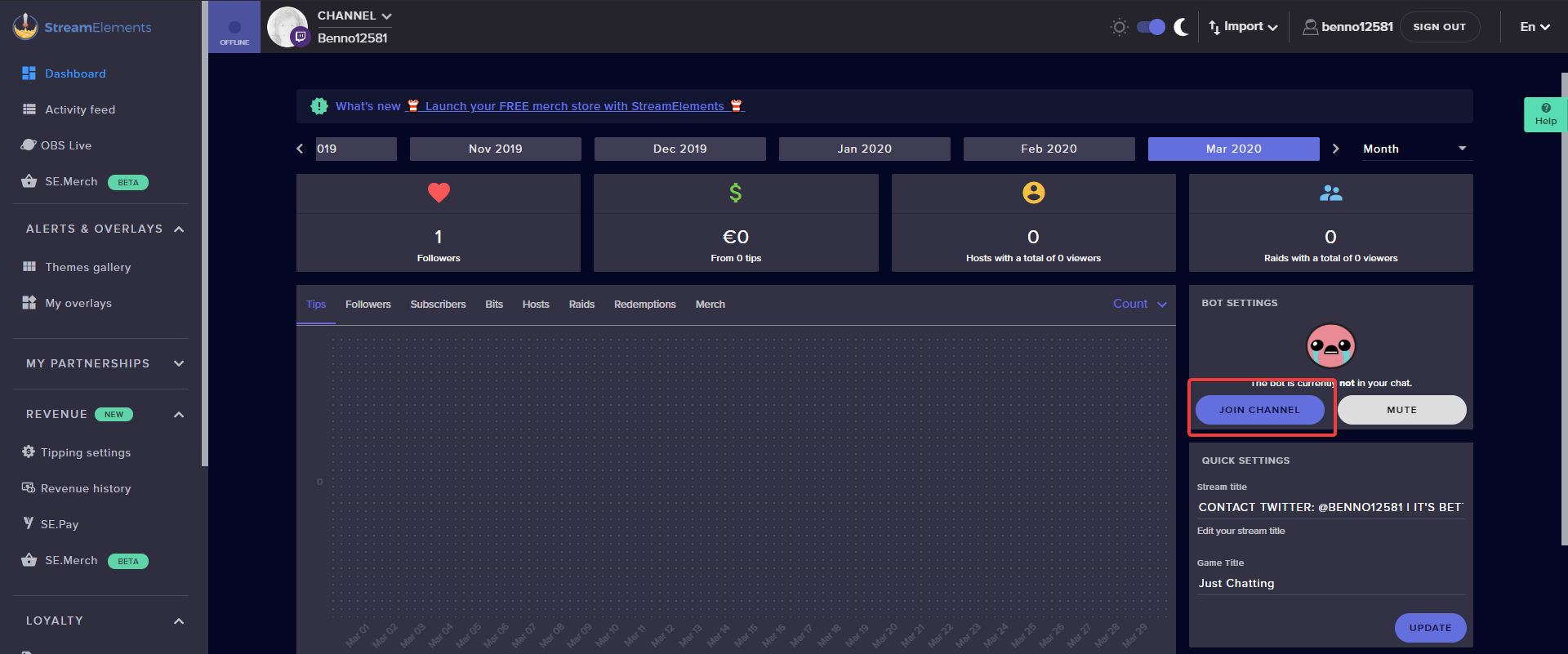
How can i invite bot in chat to activate timers?
 languid leaf
Hello! i would like to know how i can activate overlays to be compatible with my twitch page. I can't figure out how to do it. can anyone explain to me? thanks
twin sentinel
@bronze magnet You can invite the bot via your StreamElements dashboard to your chat.
round brambleBOT
@languid leaf New to Stream Elements?
Check out our YouTube channel https://www.youtube.com/c/streamelements/videos
with tutorial videos from setting up the basics, to in depth details on how to use our product.
New to OBS? Here is a 4 step quickstart guide
https://obsproject.com/wiki/OBS-Studio-Quickstart
Want to learn even more? Here is an in-depth overview
https://obsproject.com/wiki/OBS-Studio-Overview
languid leaf
ok. tnx. but i use twitch studio
bronze magnet
@twin sentinel where can i find it?
 bronze magnet
Thanks
 covert crow
Could some one help me please
round brambleBOT
@covert crow Welcome to the helpdesk! Please let us know how we can assist you today and a support volunteer or staff member will assist you as soon as they are available. Thank you for your patience.
covert crow
i’m getting this error message and don’t know what to do
round brambleBOT
@covert crow Please provide a log from your last stream. To do this, in OBS go to Help > Log Files > Upload Last Log File and paste the link to the log file here.
covert crow
twin sentinel
Close all instances of OBS and reinstall your GPU drivers.
covert crow
what do you mean? it says i have no updates in nvidia
lament blade
How do u get the overlays in stream?
round brambleBOT
@lament blade To add your overlays to OBS, add a new browser source in your scene. Paste your overlay URL in the browser source properties, set the dimensions to 1920x1080 (unless you changed them on the website), and ☑ “Shutdown source when not visible” https://youtu.be/KDvLynUqXI4
twin sentinel
@covert crow You can perform a clean driver installation for your GPU by following the instructions at http://obsproject.com/forum/resources/65/
covert crow
do you know about how long this takes ?
 uneven harbor
What are the basics for making my stream more engaging but not cringy?
lament blade
i cant get OBS 😦
twin sentinel
@lament blade What are you using then?
lament blade
??
twin sentinel
Why can't you get OBS?
lament blade
cuz of stupid age restriction!!!
twin sentinel
What streaming software do you want to add your overlays then?
lament blade
twitch
 wary halo
age restriction? how old are you then?
lament blade
12!
wary halo
then you are not allowed on Twitch or Discord either
 surreal timber
Hi! I wanna set up songrequest with stream elements. I set up everything fine i guess, but when i type in my chat !sr (link) , the bot doesnt react.
twin sentinel
Make sure viewer requests are enabled and the bot joined your channel.
surreal timber
i did 🙂
twin sentinel
What user level have you set the MR to?
surreal timber
@twin sentinel i have it on everyone
lament blade
How do u stream on mixer?
round brambleBOT
@lament blade New to Stream Elements?
Check out our YouTube channel https://www.youtube.com/c/streamelements/videos
with tutorial videos from setting up the basics, to in depth details on how to use our product.
New to OBS? Here is a 4 step quickstart guide
https://obsproject.com/wiki/OBS-Studio-Quickstart
Want to learn even more? Here is an in-depth overview
https://obsproject.com/wiki/OBS-Studio-Overview
twin sentinel
@surreal timber What happens when you request a song via chat?
surreal timber
nothing haha
round brambleBOT
@surreal timber Follow these steps to grant managers/moderators access to your dashboard:
- Click on your Channel Name at the top of the dashboard and select Settings
- Create a new invite at one of three access levels (Bot Supervisor, Editor, Full Control)
- Send this invite to a mod/manager to give them access to your dashboard. The link is one-time-use and expires after 72 hours if not accepted
Video tutorial: https://youtu.be/zl_h-ttZDF0
twin sentinel
Can you DM me an editor access link to your account please, so I can take a look.
surreal timber
where can i find that?
twin sentinel
@surreal timber Check what the bot posted.
surreal timber
oh thanks
twin sentinel
Also are commands working in general?
twin sentinel
@surreal timber The command is set to only work while you are live:
languid leaf
I discovered by myself looking in Twitch studio how overlays can be set. It is very simple and useful if you modify them from the SE site. It is saved directly in the twitch without requiring another intervention or link addition. superb. bravoo!
lament blade
I have my themes saved to the Stream Elements website, I was wondering how i could get them on my OBS.
round brambleBOT
@lament blade To add your overlays to OBS, add a new browser source in your scene. Paste your overlay URL in the browser source properties, set the dimensions to 1920x1080 (unless you changed them on the website), and ☑ “Shutdown source when not visible” https://youtu.be/KDvLynUqXI4
 clear ivy
hello, I have a problem and that means all my overlays are cut from one second to the next and I don't know how to fix it
clear ivy
but when editing the overlay in the editor it looks the same
I had to change the resolution from the same editor but anyway thanks for the help
 compact walrus
Merch page is not loading
twin sentinel
 fallow gyro
Does anyone know the NAME of the app that plays video with a time-frame underneath?
they look like this
timeframe with title on the below
 frigid dew
Hi. Just started using OBS Live yesterday and I'm having 2 problems. maybe someone could help me. 1-all of my sound comes through on my stream correctly except the sound from my elgato. But I can see the sounds activity from my elgato in my OBS mixer. The other problem is that I don't see the option to change my twitch chat theme to dark mode anywhere.
twin sentinel
frigid dew
Just found the dark chat setting. Thanks!! Didn't think it would be under BETTERTTV
twin sentinel
For the elgato sound, best to contact the OBS or elgato discord.
frigid dew
Thanks @twin sentinel!
lament blade
Where do I check my quote log in the program?
 chilly hull
I am having an issue with my activity feed from twitch not being current. Can someone help me I tried figuring it out on my own
 timid moth
Guys, with the new Twitch DMCA, will SongRequest be an issue as it seems it will be?
@proud pumice @tawny pivot Can you shed some light on this as its in effect as of tomorrow aparently?
strong kernel
Please do not ping staff members.
strong kernel
And that aside, what new Twitch DMCA are you referring to?
timid moth
apparently use of music that is in some way copyrighted, (whether public domain or not) will need permission from the copyright holder.
timid moth
correct, but youtube was never covered as it is public domain. the original DMCA referred to use of services like spotify and Apple Music without a public performance license
strong kernel
YouTube is not public domain.
Public domain refers to any IP that has rights that have expired or have been specifically waived. YouTube represents neither of those in and of itself.
YouTube may have content that is public domain but otherwise if an artist uploads to YouTube they are giving YouTube a license to host that content.
That license does not extend to YouTube users.
timid moth
therefore we would need exclusive permission from youtube themselves to publicly play any song that isnt PD?
strong kernel
No. You still need permission from the artists.
timid moth
OK
strong kernel
YouTube isn't granted the right to issue licenses. They do not own the content.
strong kernel
DMCA is just a fancy way of saying "it makes handing out or sharing copyrighted material without permission illegal."
timid moth
anyways thanks @strong kernel
strong kernel
@timid moth As a rule of thumb, if the content you're sharing is not royalty free, if it isn't 100+ years old, it's most likely copyrighted and you need permission.
wary halo
He is on mobile
 pale sentinel
I am having an issue where the ingame overlay background is not transparent. Cannot see the game through it at all
strong kernel
@pale sentinel Which overlay in your account? Please provide its name.
pale sentinel
Moon2 - Blue Moonstone Animated Ingame
 shut reef
hello guys my donation alerts are not synced with my alerts they are sinced with streamlabs how to change that ?
strong kernel
Obviously, if someone tips through Streamlabs, StreamElements will not be informed, and vice versa. We're competitors.
You can import, but there is no syncing between the two.
shut reef
I need to set streamelements donation link to sinc with my alerts how to do it thats my point
strong kernel
Are you using an alertbox in a StreamElements overlay?
shut reef
No this is what i should do ?
strong kernel
Yes. StreamElements tips trigger StreamElements alerts and Streamlabs tips trigger Streamlabs alerts.
 swift temple
hi, i got told to join this discord for some assistance
round brambleBOT
@swift temple Welcome to the helpdesk! Please let us know how we can assist you today and a support volunteer or staff member will assist you as soon as they are available. Thank you for your patience.
swift temple
Basically trying to do my own gifs for sub and follower notifications. i've done the overlay but it won't play my GIF, just keeps playing the default one. Any ideas? (The follower one works, just not the sub one, i got it to work once then it just went back to the default, no tts or anything
)
strong kernel
@swift temple Edit the variations in the variations menu.
 simple palm
My bot wasnt working anymore, all of my commands are deleted and everything got resetted but idk why, I didnt do anything and everything is resetted
 zealous gazelle
does someone have any idea why twitch chat is only at "connecting to chat"? and when it connects doesnt update all the messages.Tried to clear cache, switch browser, i dont have extensions. I know its not streamelements related. Thank you.
strong kernel
@simple palm Is it possible your manager you gave full control to deleted them?
simple palm
i didnt gave full control to anyone
 jagged crest
the media request is not working on my obs streamelements
strong kernel
@simple palm Please see https://streamelements.com/dashboard/account/channels
StreamElements
The Ultimate All in One Platform for Streamers
 delicate cape
Can i link my twitch chat bot too my discord so i can use all of the commands i already have
strong kernel
simple palm
Ah yeah I gave it to one of my mods, he is mod for 3 years and Im sure he wouldnt do that 100%
strong kernel
@delicate cape There is no Discord integration at this time.
delicate cape
Dang. Thanks i will do it through nightbot thanks though
swift temple
thanks it worked lool
jagged crest
the media request is not working on my obs streamelements
@jagged crest Can someone help me ?
round brambleBOT
@jagged crest Streamelements on top of OBS -> Logout -> login
jagged crest
thanks
simple palm
so is there no way to get my old "settings" back from streamelements?
strong kernel
Unfortunately not. Once things are deleted, they're gone.
 spice pendant
I changed my twitch name, and now I can't view my chat stats. When I type my new name it says it doesn't exist, but I can see chat stats on my old username up until the name change. Anyone know ho to fix this or view chat stats another way?
round brambleBOT
@spice pendant If you changed your name on Twitch please follow these steps:
🔹 Visit https://streamelements.com/logout and then log in again with by connecting with Twitch.
🔹 On the right side of the dashboard page that opens, select "Join" under bot settings. If it says "Part" select that and then select "Join" to send the bot to the chat. Don't forget to mod the bot by typing /mod streamelements in your channel if you have not already.
🔹 Post your new name here so that we can update your channel's chatstats tracking (must be done by staff).
spice pendant
wazneee
 fresh kraken
hi staff and everyone, I have a small question... On my old setup I had 3 sources for video capture.. 2 cameras and my gaming PC. the 2 cams worked independently but now that i have removed one from the setup when i change overlays that camera only works on one scene, if I close OBS and reopen then it works but not on the other scene. any help is appreciated. Thanks...
round brambleBOT
@fresh kraken For the best OBS support, please join their Official Discord @ discord.gg/obsproject
fresh kraken
Thanks and sorry i posted on the wrong forum....
simple palm
nothing is working, i cant do !cmd add / !cmd edit or something else
strong kernel
@simple palm First: You're trying to create a command that already exists by default.
@simple palm Second: You're trying to do so with a command that is disabled.
simple palm
where can i see this picture
strong kernel
The chat commands section of your account.
simple palm
I know that i tried to add a command which is already exist by default, i want to "renew" them with /me to look cleaner
Thanks^^
 dark mural
We have a problem on a Twitch-channel. The follower-notifcations are really buggy, like its "lagging" a lot
strong kernel
What do you mean?
dark mural
Ill clip it, sec
strong kernel
This streamer is not using our alerts.
dark mural
What, I was told so... Really sorry
 copper ridge
hey i have a problem with obs not picking up my sounds at all xcept my mic. ive tried alot of stuff, like recalibrating reinstalling and such its not working
gotcha
round brambleBOT
@copper ridge For the best OBS support, please join their Official Discord @ discord.gg/obsproject
strong kernel
OBS.Live is a plugin for OBS Studio and doesn't affect how audio works.
This is an OBS Studio issue.
copper ridge
ah ok gotcha ty
 turbid root
hey i need help can someone hope into a call with me?
strong kernel
We do not provide one on one voice support. Please type out your issue here.
turbid root
Ok so im trying to put the themes in obs.live and it keeps cutting alot of it off
round brambleBOT
@turbid root To add your overlays to OBS, add a new browser source in your scene. Paste your overlay URL in the browser source properties, set the dimensions to 1920x1080 (unless you changed them on the website), and ☑ “Shutdown source when not visible” https://youtu.be/KDvLynUqXI4
turbid root
Ok ill try to watch theee video
 rotund coral
Hi there , ill filled in se.pay a few days ago and they say they add automatic to my tip page but this is not happening
strong kernel
What do you mean by "add automatic?"
rotund coral
Readed that on streamelements helpdesk page
Blog sorry
"Once the setup has been successfully completed, SE.Pay will be added to existing tipping methods on your StreamElements tipping page"
round brambleBOT
@rotund coral Please connect your streaming account (Twitch, YouTube, or Facebook) with Discord by going to ⚙ Settings and then Connections here in Discord. https://streamable.com/eg92w
 rotund coral
Done that
rotund coral
Viewers cant pay with Ideal payment
strong kernel
Yes they can. The option is there.
strong kernel
Your tipping page link can be found in the Tipping settings section of your account.
rotund coral
Ok ty matey
 bold urchin
Hello, struggling to get game capture to work, do I just downgrade the software to v24?
round brambleBOT
@bold urchin For the best OBS support, please join their Official Discord @ discord.gg/obsproject
bold urchin
Thanks mighty help desk
spice pendant
My chat stas still haven't update, but it now aknoledges that my new name exists
strong kernel
@spice pendant Your chatstats page is working fine.
spice pendant
all the data is from before I changed my name
strong kernel
Yes, that's correct. For the duration from when you changed your name until now, the system was still trying to look at your old username.
That data cannot be obtained.
It's nowhere.
spice pendant
ah ok thx
 twilit gull
my obs always show the streamelements page, but when i open in overlay editor.. its ok
twilit gull
its not a complete url, dont worry about that
lament blade
i need help setting up se pay
everytime i fill out the infor it says it failed
even though it is all correct info
wary halo
Do you use autofill to complete the form? Because that will cause issues
round brambleBOT
@lament blade Please contact us via email for support with SE.Pay. You can use our contact form here: https://streamelements.com/contact Thank you
 low cradle
hello, i can only use paypal for getting tips, how can i change it? there are no other methods like psc
lament blade
@low cradle With SE.PAY has you other methods, like PSC
StreamElements
The Ultimate All in One Platform for Streamers
 boreal meadow
Durring my stream one of my mods accidentally deleted the wrong quote with '!quote remove' Is there a way to restore these quotes or are they gone for good?
strong kernel
Gone for good.
low cradle
@lament blade this Message show up: „SE.Pay is not available due to region constraint or channel size. If you're from the US and have over 100 followers please contact our support to enable this feature.“ But im not from us.
boreal meadow
@strong kernel thank you for the quick response. You are a legend
lament blade
@low cradle You need 101 Follower on Twitch 
low cradle

 mild saddle
Hey Guys, Anyone use the Stream Shop for Sounds to buy with points instead of bits?
mild saddle
Yeah i mean so, but the viewers can´t use the sound :/
strong kernel
What do you mean by can't use them?
If they have enough points, they can spend them to trigger it.
mild saddle
They buy the sound and now they can use it normaly in the chat via comand. But if they write the command, there is no sound playing...
I don´t know why...
strong kernel
Pardon? No, they don't "buy the sound and then can use it"
By virtue of buying it, they've used it.
It's a one time immediate use upon purchase.
mild saddle
Ahhh so if I buy the sound it starts in the stream?
strong kernel
Yes, the moment it's bought, it plays.
mild saddle
Thank you very much!!!
 forest wren
Hey is there a way to combine the twitch and mixer activity feed
strong kernel
There is not.
forest wren
hhm any tips or just open both
strong kernel
Open both. Just bear in mind that they don't communicate and if you're trying to use alerts from both, they can and will overlap each other.
forest wren
i know i setup my overlay so that everything work only alerts overlap might separate them but for now i will try this
any plans on multi stream support like what i mentioned for alerts and activity feed ?
 half viper
why my list of leader channel scores does not display information?
half viper
strong kernel
@half viper Because nobody has loyalty points in your channel.
half viper
i have another account with 290 channel points, but don't see him
half viper
and a couple of friends already have channel points, i asked them, but my leaderboard does not work
strong kernel
Twitch points are not loyalty points.
half viper
Ok, i'm sorry
thank you
one more question, how someone get twitch points on my channel?
now it's works D:
thank you again sweaty heart ❤️
round brambleBOT
@sonic gyro Welcome to the helpdesk! Please let us know how we can assist you today and a support volunteer or staff member will assist you as soon as they are available. Thank you for your patience.
strong kernel
- Nobody likes a spammer.
- Nobody can help if you don't actually ask a question.
 sonic gyro
sorry
its just its for charity and i shouldve started an hour ago
my obs has just a black screen constantly ?
strong kernel
Did you add a capture source?
sonic gyro
i have display capture yeah
strong kernel
Are you using a laptop?
sonic gyro
no pc
round brambleBOT
@sonic gyro For the best OBS support, please join their Official Discord @ discord.gg/obsproject
 frail ocean
am i doing something wrong or is there a bug with host alerts? when my channel is hosted the activity is never logged in the activity feed and i dont get any notification playing in my alert box. 👀
round brambleBOT
@frail ocean Due to changes to Twitch API, we have filtered out hosts and will only show these ones on your activity feed:
- All hosts coming from an online channel with at least 1+ viewer
- Auto host events with at least 1 viewer - only from a channel that just went offline
Note: If you see "X channel has hosted you" with no viewers on the back, that is considered an offline host or a host with 0 viewers, we do not show these.
Note for Mixer streamers: The above 2 filters currently apply for Mixer and we are aware its actually not how Mixer hosts work. We do plan on changing it, but no ETA on when.
frail ocean
Thank you very much for the reply!
 pearl basalt
Hey Guys! Someone in my stream said that they couldn't hear any audio... I was wondering if I could get some help??
\
 brave wing
Hello! not sure where to ask this question but im trying to set up a chat alert where when someone follows me it will share the links of the two other people i stream with, anyone able to help me figure out how?
lament blade
hi im trying to switch my stream from yt to twitch can anyone help?
 sour bridge
Hey um, Im trying to log in to twitch on my phone and then it doesnt show the log in things it directly just goes to twitch and then there a little thing saying my acc might not exist like wut help meee
 tepid ginkgo
I need help
 viscid pebbleBOT
Hi @tepid ginkgo, Please ask your question(s) or describe the problem you're looking to solve so staff or a support volunteer can assist you as soon as they are available.
tepid ginkgo
So I made a new twitch and I sign out of the old one on stream elements and I click sign in to put in my new info and it puts me right back to my old account
strong kernel
Sign-in in OAuth. Log out of Twitch itself first.
tepid ginkgo
I did
strong kernel
On Twitch's site?
Not just StreamElements.
You went to twitch.tv and logged out?
strong kernel
If you're logged in on Twitch with the account you're trying to get into in StreamElements in the same browser, then try logging into StreamElements again.
tepid ginkgo
Ok
tepid ginkgo
It didn’t work
sour bridge
Rip
 quaint lance
how do you add a webcam on obs
strong kernel
@sour bridge What do you mean by "doesn't show the log in things?"
sour bridge
Like instead of showing up username and password it just shows that screen
I am new to dis man :<
strong kernel
There is no username and password with StreamElements.
It's OAuth. It piggybacks off of your streaming account's login.
sour bridge
So am i suppose to press the button when I am streamin
lament blade
its not letting me stream on twitch even though ive logged in
strong kernel
@sour bridge No, you don't have to be live when you're connecting.
@lament blade Can you screenshot whatever error you're receiving?
sour bridge
Well how do I connect causeit keeps showing that man aI tries different browser and even in my other device but it says the same thing
Sorry I ask for too much help
lament blade
well it says 'Start streaming to YouTube'
round brambleBOT
@lament blade Streamelements on top of OBS -> Logout -> login
lament blade
thanks
strong kernel
@sour bridge As I mentioned, if you're logged into Twitch in the browser you're currently using, you then go to StreamElements and click on the Twitch button on the homepage.
sour bridge
Oh okay
strong kernel
Do you have a computer you can do this at instead? Your life is going to be much much easier doing everything on a computer, especially in the overlay editor.
(I speak from experience.  )
)
 topaz whale
just logged onto my computer
and opened up obs
and noticed all mt stuff in the activity feed is missing
round brambleBOT
@topaz whale Streamelements on top of OBS -> Logout -> login
strong kernel
Screenshot please.
quaint lance
how do you add a chat box?
strong kernel
@quaint lance Anything you want to show on stream is added as a widget to an overlay in your account on the site.
quaint lance
okie thanks!!
strong kernel
@topaz whale The activity feed doesn't permanently save all of the events from all time, things do clear out over time. And I see you haven't streamed in some time.
round brambleBOT
@paper viper Welcome to the helpdesk! Please let us know how we can assist you today and a support volunteer or staff member will assist you as soon as they are available. Thank you for your patience.
 paper viper
i want to link my facebook account to my twitch account but the page say "CHANNEL IS ALREADY CLAIMED" how i can fix that?
round brambleBOT
@paper viper Account Merging - Please note:
- Merging accounts only allows faster ways to switch between accounts
- Merging accounts does not allow data sharing between accounts - different streaming platforms, different type of events
- Merging accounts allows duplicating/sharing overlays between the accounts
If you understand the limitations of merging and want to proceed, please find the JWT tokens (!jwt) from both accounts you want to merge and you will be directed to DM them to a staff member.
@paper viper Please ask your question in one helpdesk channel only. A support volunteer or StreamElements staff member will assist you as soon as they are available. Asking in multiple places will only result in confusion, not faster answers. Thank you for your patience.
paper viper
OK. i need a staff member to send JWT tokens
strong kernel
Please send me your JWT tokens.
strong kernel
@paper viper Your channels have been merged.
paper viper
omg thanks u. u save my life
quaint lance
how do i add the overlay that i chose to the obs?
round brambleBOT
@quaint lance To add your overlays to OBS, add a new browser source in your scene. Paste your overlay URL in the browser source properties, set the dimensions to 1920x1080 (unless you changed them on the website), and ☑ “Shutdown source when not visible” https://youtu.be/KDvLynUqXI4
 karmic plank
Does anybody know if there is an alert or bot trigger for when somebody redeems Twitch stream points? Not the streamelements loyalty points, but the new twitch points?
sorry, they're called channel points on twitch
 rigid terrace
hey guys, I have some sound effects in my stream store, but when people try to redeem them, no one hears them. Any suggestions to troubleshoot?
 ionic kelp
@rigid terrace do you have a redemption widget added to the overlay?
 final orchid
ionic kelp
karmic plank
final orchid
ionic kelp
karmic plank
@ionic kelp any chance you can help with my question? Or no?
ionic kelp
There is no integration with atm so no.
rigid terrace
is there a way to do it less disruptively? The widget has a screen pop-up and all that, I just want the sound effect to play
karmic plank
Bummer okay. Thanks!
ionic kelp
Other than setting the widget size to invisible size pretty much not really.
strong kernel
@rigid terrace The widget is required to play sound effects. If it's set as a sound effect, there is no popup.
rigid terrace
ok yeah, saw the notice "The alert settings apply only to items of type Stream perk that have Redeeming this item shows an alert enabled."
so that means that I still need it for them to work, but will only display on screen if I want it to
do I have that right?
strong kernel
Correct.
 versed wraith
Hey im in the process of moving to mixer and wanted to link both my twitch and mixer accounts to one stream elements account buy I guess I ended up with two accounts one with twitch and one with mixer that I cannot link because it gives the message "CHANNEL IS ALREADY CLAIMED"
round brambleBOT
@versed wraith Account Merging - Please note:
- Merging accounts only allows faster ways to switch between accounts
- Merging accounts does not allow data sharing between accounts - different streaming platforms, different type of events
- Merging accounts allows duplicating/sharing overlays between the accounts
If you understand the limitations of merging and want to proceed, please find the JWT tokens (!jwt) from both accounts you want to merge and you will be directed to DM them to a staff member.
versed wraith
I coulda just scrolled up silly me if any staff are on let me know 🙂
 abstract hemlock
@versed wraith i'll DM you to gather the tokens and then forward those to the staff 
 plush lake
Hi im having an issue with sound? Can anyone help? My issue is, i have my intro song video playing and its not coming through to the stream. but the adui mixer is showing its playing sound?
abstract hemlock
@plush lake Hi, im not an audio guy but maybe check the mixer (monitor options)
plush lake
i tried that, i ended up duplicating the scene and it fixed it self with that So not sure what was up
round brambleBOT
@ornate cosmos If you would like help from the StreamElements support volunteers/staff please post your question in one of the helpdesk channels and someone will assist you as soon as they are available
#helpdesk-twitch | #helpdesk-youtube | #helpdesk-facebook | #helpdesk-mobile | #helpdesk-selive | #651453660810838026 | #helpdesk-merch
Thank you for being patient.
 ornate cosmos
stupid questions but is there a way to copy my Scene in OBS over to streamelements dashboard so I know where to place widgets?
zenith widget
well you can go full screen on the OBS preview or grab a screenshot from your VOD
and place it inside the overlay as an image
ornate cosmos
sorry new to this. How would I do that?
zenith widget
go to your past broadcast
full screen the VOD
take a screenshot
save the screenshot
go to our dashboard -> my overlays
ornate cosmos
havent broadcast yet
zenith widget
make a new overlay or enter the overlay editor if you have an existing one
ornate cosmos
hmm let me try something
zenith widget
then go into your game that you want to stream
take a screenshot of that
so that you have a base
round brambleBOT
@ornate cosmos New to Stream Elements?
Check out our YouTube channel https://www.youtube.com/c/streamelements/videos
with tutorial videos from setting up the basics, to in depth details on how to use our product.
New to OBS? Here is a 4 step quickstart guide
https://obsproject.com/wiki/OBS-Studio-Quickstart
Want to learn even more? Here is an in-depth overview
https://obsproject.com/wiki/OBS-Studio-Overview
zenith widget
check out our overlay editor video guide
to get acquainted with the editor
then add that screenshot as an image widget and make sure you full scale the widget borders to the entire size of the overlay
white harbor
@zenith widget I changed it to WEBM
zenith widget
Ok and did you upload it?
white harbor
It still has a background
zenith widget
Then make sure the file has saved with transparent background and the alpha channel( i think this is it) is set to VP8 or VP9
 visual wyvern
hi so ive changed my twitch name.. but stream element i cant seem to do so?
any help please?
DM?
zenith widget
!part
round brambleBOT
Go to the dashboard -> right side -> part channel -> join channel (https://streamelements.com/dashboard)
 zenith widget
@visual wyvern ⤴️
visual wyvern
ok thanks 😛
 last dagger
Been out of the loop for a bit with SE and streaming, last year i was able to have the SE bot in my twitch chat post as myself is that not a thing anymore? If it is could someone point me in the right direction.
ionic kelp
@last dagger unfortunately due to twitch being a jerk one of the methods we used is no longer possible. You can still do it with OBS.live though.
last dagger
guessing google would be my best bet on that
ionic kelp

OBS.Live | Open Broadcaster Software Streaming Knowledge Base
OBS (open broadcaster software) knowledge base for live streaming. Find articles and videos about streaming with OBS.
last dagger
thank you
white harbor
I managed to fix it @zenith widget but now ever time I try to test alert it plays the shark
zenith widget
Check the variations of the alert
white harbor
Yeah I did and I changed them all
I had to turn them off
Thanks man I appreciate it
ornate cosmos
Finally got everything set up with OBS for stream. Only one last problem and this one keeps messing me up. I dont have speakers and Im using a Logitech G933 bluetooth headset. Im using the headsets mic for streaming and talking in Discord. What is the best way to set up my audio to stream both my game and discord.
zenith widget
if you want to set specific audio devices for listening and talking you can do so from the audio settings
 mental grail
sa
 fallen kiln
Hello!
Could someone help me setup my stream properly. I have got a couple of things that need sorting out i don't know how to do and also get the alerts working.
thank you
round brambleBOT
@fallen kiln New to Stream Elements?
Check out our YouTube channel https://www.youtube.com/c/streamelements/videos
with tutorial videos from setting up the basics, to in depth details on how to use our product.
New to OBS? Here is a 4 step quickstart guide
https://obsproject.com/wiki/OBS-Studio-Quickstart
Want to learn even more? Here is an in-depth overview
https://obsproject.com/wiki/OBS-Studio-Overview
 rustic matrix
not sure if this is right place to ask but trying to get on stream elements via website when i click dashboard keeps going back to my dashboard and doesn't go past that any ideas ?
wary halo
try incognito mode
rustic matrix
ok thx
 knotty rain
Hello, my settings of media requests doesn't work. I put 7 minutes max but everyone still can request song with 20 minutes or ever few hours length. How to fix it?
 winged sundial
Hey there guys I had it setup a while ago for my Facebook page to stream to my family to, but something didn't go right with logging in. I want to loggin to my page to stream to not my actual facebook page. How do I that?
 worthy sundial
hello. when i set up my giveaway, my users click on the link provided by the command, but the purchase tickets section just spins. it works for me and not for them\
 tight harness
@knotty rain Check the Exempt User Level in your Media Request Settings page, if it is too low then everyone is exempt to your rules
@winged sundial Hey, if you mean via OBS.Live you can use the menu at the top and go StreamElements -> Logout, then log back in with the account you want to use
winged sundial
Ok got it thank you
quaint lance
how do you add a song playlist to obs live
tight harness
You add it via the website in your Media Request settings page
And you add it by pasting the playlist link where it asks you to put the 'Backup Playlist'
quaint lance
via stream elements?
tight harness
Yes
lament blade
hello, i have changed my twitch name, can anyone help me to get my notifications come back? thanks
tight harness
@lament blade Hey, please do the following: Click on Part Channel on the dashboard, click on Sign Out, sign back in and then click on Join Channel on the dashboard
@quaint lance The left navigation menu
lament blade
ok
@quaint lance https://streamelements.com/dashboard/mediarequest/general - here is the media request page 🙂
StreamElements
The Ultimate All in One Platform for Streamers
when i click twitch channel it says: channel is claimed already
 dire goblet
hey quick question, for raid and host notifications to sound do I need ground control to be open? as currently they're not making any sounds 😦
round brambleBOT
@dire goblet Due to changes to Twitch API, we have filtered out hosts and will only show these ones on your activity feed:
- All hosts coming from an online channel with at least 1+ viewer
- Auto host events with at least 1 viewer - only from a channel that just went offline
Note: If you see "X channel has hosted you" with no viewers on the back, that is considered an offline host or a host with 0 viewers, we do not show these.
Note for Mixer streamers: The above 2 filters currently apply for Mixer and we are aware its actually not how Mixer hosts work. We do plan on changing it, but no ETA on when.
dire goblet
thanks 🙂
 pulsar gulch
Hello, I'm using the latest subsriber widget and if I use the Bold option with the Text Scrolling nothing happens
it's moving in SE editor but not on my obs
round brambleBOT
@pulsar gulch OBS -> settings -> advanced -> scroll down -> enable/disable hardware accel.
https://i.imgur.com/ggMe9ZE.png


 wary halo

pulsar gulch
Is there a way to make them scroll in the same time ? or it's just randomly @wary halo
 marble gulch
I know I saw an option to rename the bot last night but i can't seem to find it today... Can anyone point me in the right direction
round brambleBOT
@marble gulch Custom bot name requirements
- StreamElements bot modded and in chat
- Active overlay with alerts
- StreamElements tipping page in the panels below the stream (!panels)
- OBS.Live or Ground Control open
- Create a twitch account for the name you want to use or run the bot under your own name
- Custom bot name doesn't work on Mac
wary halo
Is there a way to make them scroll in the same time ? or it's just randomly @wary halo
@pulsar gulch no idea to be honest. i think they all load in at the same time when loading the overlay.
 cedar anchor
How to stop stream elements from your chat
wary halo
cedar anchor
How to did u get part
wary halo
if the bot is in your channel at all, then there will be a PART channel button right there on the website
cedar anchor
I went to the website on my phone and signed with my account so I could stop stream elements from my chat but I couldn’t find part
Do I have to be streaming to stop it
 pale flint
why do I get this? i tried both with stream key and with login
 winged quiver
Hi, I recently created merch through streamelements. A viewer ordered a hoodie last night, but streamelements still says there have been no orders, and theres no money to withdraw
ionic kelp
@winged quiver It can take up to 24 hours to appear in everything.
wary halo
@winged quiver first: there is #helpdesk-merch channel for these issues, and second: it can take up to 24h before it shows in your account.
 worn cradle
Is there a way to do a lengtly drawing and give people one entry a day ( for say like a week)
wary halo
nope
 molten abyss
Hello, Im trying to allow link protection to let through links from PretzelRocks but i cant seem to get it to whitelist the bot. I have it set to Moderator but it still cuts off the links
winged quiver
Sorry Ruben I didn't see that tag. Thanks for letting me know
molten abyss
in fact i dont think its link protection as i turned it off and its still showing links as ***
pale flint
problem above, that I posted, solved itself just by restarting my PC
worn cradle
Can you limit ticket entrys per a type in giveaways? like 1 for followers but up to 5 for subs?
 tawny moss
hi, can i install obs live for mac?
ionic kelp
@tawny moss You can not.
molten abyss
Okay im dumb, there is a hyperlink blocker in twitch that was on
 nocturne fern
A mod accidentally banned stream elements. We un-banned it but now no commands are working. Anyone know how to resolve?
ionic kelp
@nocturne fern Try parting and joining from the dashboard https://discordapp.com/channels/141203863863558144/199460642975907840/693127585756086323
nocturne fern
Did not resolve
parted, and re-joined and re-modded
got it resolved
just had to part again and it finally came back. ty for help
 halcyon falcon
Is it possible to see how long someone watched your stream for a particular stream?
 cloud wave
So question. I have a command that u can throw pokeballs at people and try to catch them. Is there a way I could make something that keeps track of how many people someone caught?
 random token
Hi can someone help me how to set my animated ending scene in obs 😣 I have already created the scene in Obs and inserted the url. I don't know how it is displayed offline in twitch. So far, the offline screen is simply black ... btw my streaming overlay works fine
wary halo
offline screens can't be animated, only while you are live streaming it
and you have to set your offline screen in Twitch settings
random token
but isn't it just a still image that is displayed? There are ready-made animated offline designs in the Themes ?!
wary halo
those are outro's
for ending the stream
as soon as you hit the stop streaming button in OBS it will return to a black screen on Twitch
 stoic escarp
Can anyone help me del eat my account or change user name?
random token
when is my ending shown exactly?
wary halo
whenever you want, if you stop streaming, you can leave it up for a minute or whatever amount of time you like. until you close OBS or click the end stream button
i usually play a short song with my outro and then end it
random token
if I have my stream in obs but not streaming do I have to activate the layout? Sorry I'm a newbie 🥺
wary halo
what do you mean with activate?
everything should be setup in OBS once, and then whenever you go live you are good to go
random token
do I have to display it manually or is there a fixed setting
i give it hotkeys ...is it a possibility?
wary halo
@random token yes you can make hotkeys for all the scenes
@jade socket from the channel?
 jade socket
yes
jade socket
thats not poping up for me
 wide summit
Anything I'm doing wrong for alerts? My image is showing but the text is not when I have Text over image.
round brambleBOT
@jade socket We're not able to troubleshoot issues with using our overlays in StreamLabs OBS (SLOBS) as we don't have the tools to support their software. We recommend using OBS Studio or OBS Studio with our plugin OBS.Live.
 haughty burrow
Here's a question. I have new overlays that have at the top spots for latest follower, latest sub, etc. How do I get the names in there?
ionic kelp
@haughty burrow widgets in the editor and choose stream labels.
 tiny ore
I need help
Why is the Event Viewer not putting the custom image correctly?
The image is 400x100
It is putting various tiny images
haughty burrow
@ionic kelp do I have to add each one separate in browser source?
ionic kelp
If you have multiple browser sources that display the data across each other then yes.
BUT
You can duplicate them over.


@TheTomRadio @StreamElements Select the widget from the layers and choose this. https://t.co/26vLja1sTL
 Twitter
 woeful juniper
I'm in Stream Elements Ground Control and I've done all that's needed to get the "Custom Chatbot Name" option but yet it's still not showing up. Is there a step I may have missed?
lament blade
Use OBS.LIVE for "Custom Chatbot Name" @woeful juniper
haughty burrow
So if I have StreamElements OBS I can give my bot a custom name too?
woeful juniper
Okay I downloaded and opened OBS Live, I don't see the option anywhere?
lament blade
Did you sign in OBS.Live? 
woeful juniper
Yes, signed in with my channel account. Can I assign the bot a username to another account specifically for the bot?
lament blade
click on the Menu Button -> Stream Settings -> Custom bot name
jade socket
hello once again iam asking how to remove stream elemnts
karmic plank
Are there any plans to integrate Twitch Channel points into the bot alerts module or alerts widget?
lament blade
@woeful juniper yes!
jade socket
how do i remove the bot theres no option any where online
lament blade
@jade socket https://streamelements.com/dashboard , Bot Settings -> Part Channel
StreamElements
The Ultimate All in One Platform for Streamers
woeful juniper
@lament blade In OBS Live or Ground Control? I see none of that
 woeful juniper
When I click on that, it literally only shows me last stream title and game category
Nothing else
jade socket
there is literaly no option for bot settings on my dashboard
 left flame
is this where i type to get help setting up stream elements?
round brambleBOT
@jade socket Please provide a proper screenshot with the issue visible. If not sure how to take a screenshot, you can check here: https://www.take-a-screenshot.org/
@left flame If you would like help from the StreamElements support volunteers/staff please post your question in one of the helpdesk channels and someone will assist you as soon as they are available
#helpdesk-twitch | #helpdesk-youtube | #helpdesk-facebook | #helpdesk-mobile | #helpdesk-selive | #651453660810838026 | #helpdesk-merch
Thank you for being patient.
woeful juniper
@lament blade Sorry, I just recently got this PC 🤣 anyway, this is what I see when I click on Stream Settings
lament blade
@jade socket in Dashboard on the right side under Bot-Settings
woeful juniper
This is Ground Control, there's nothing on the right side except for "Reset Session" and "Empty Cup"
lament blade
which Platform is this?
round brambleBOT
@jade socket Please provide a proper screenshot with the issue visible. If not sure how to take a screenshot, you can check here: https://www.take-a-screenshot.org/
jade socket
Chrome?
lament blade
scroll down
woeful juniper
That's the web dashboard...neither Ground Control or OBS Live
Oh I'm getting confused with convos lol
lament blade
have you in obs.live on the left side the acitivity feed? @woeful juniper
 woeful juniper
So how do I add a different name except my broadcast channel? I don't wanna connect that by accident
I selected "Custom bot"
lament blade
yes
woeful juniper
So I can click "Connect Custom Bot" to give it a different account name?
pale sentinel
I asked about this yesterday and didn't get an answer. When I try to use my ingame overlay the background is not transparent. You can't see the game at all.
lament blade
@woeful juniper you need a new Twitch Account for the Bot
round brambleBOT
@left flame New to Stream Elements?
Check out our YouTube channel https://www.youtube.com/c/streamelements/videos
with tutorial videos from setting up the basics, to in depth details on how to use our product.
New to OBS? Here is a 4 step quickstart guide
https://obsproject.com/wiki/OBS-Studio-Quickstart
Want to learn even more? Here is an in-depth overview
https://obsproject.com/wiki/OBS-Studio-Overview
pale sentinel
Moon2 - Blue Moonstone Animated Ingame
lament blade
and this isn't showing?
pale sentinel
The overlay shows up, but the background is white and you can't see the game
lament blade
In OBS, the background belongs at the bottom, the game comes over it and the alerts are at the top.
Maybe that helps
pale sentinel
It just started doing this yesterday
lament blade
oh okay, ask in #helpdesk-selive
 delicate otter
Stream wont start, Says to check log for details and im not very tech savy with code
lament blade
@delicate otter It's a Problem for #helpdesk-selive
haughty burrow
Ok so anybody got a step by step to custom name my bot?
 keen mist
Yh I need that aswell @haughty burrow
marble gulch
trying to figure that out myself, apparently there's a settings option in ground control after you've set up a tipping option, an overlay and you need to make a twitch account with the name you want
haughty burrow
Ahhhh
marble gulch
but i cant seem to get the option to appear
round brambleBOT
@marble gulch Due to a recent change from Twitch API, these features are affected by the change:
- Ground Control does not have Custom Bot Name
- Subscriber count will count the Channel and any other permanent sub you may have (+1 or +2 or +3 on top).
We are working on fixing both issues, but there is no ETA.
OBS.Live still has Custom Bot name working fine in it.
ionic kelp
@haughty burrow @marble gulch You want this. https://discordapp.com/channels/141203863863558144/494513233416421386/561516184718278676
marble gulch
not working for me :/
 rapid robin
Hey guys, is the StremElements site down right now? A few users and I cant log in..
 summer forge
Same
 serene pagoda
How do I edit this panel?
summer forge
bit alerts not coming through
 worn thicket
streammelements is down
lament blade
Which Browser do you use? @rapid robin
worn thicket
be patient
 bronze stirrup
I just came in to check, but see that SE is down, hence I'm not getting any alerts on stream 😛
 devout sorrel
Streamelements down atm?
Music stopped out of no where
I cannot logging in anymore.
 weak delta
rapid robin
weak delta
rapid robin
@lament blade Google Chrome
 quiet bison
yeah im live everything down
ionic kelp
It does appear the site is having issues. Please be patient.
woeful juniper
Okay, somehow OBS Live disconnected from my channel and it won't load back
 carmine warren
Same
 open rose
My overlays are fine, and I can run channel currency raffles. Just can't login, so weird.
woeful juniper
It's Umm...now getting a Error 504
 reef timber
Buenas, tengo un problema con la pagina de Streamelements.. por alguna razon no me deja logearme con twitch.
open rose
lol
 upper steeple
i'm guessing SE is down right now
open rose
Yep.
 junior shoal
just another report that the API is down, cloudflare is responding 504
woeful juniper
Yup
ionic kelp
@reef timber Streamelements tengo un problema. Sientate para un momento.
 copper venture
reef timber
copper venture
reef timber
@ionic kelp i tried to enter to many times and appears a white page with that message pstream connect error or disconnect/reset before headers. reset reason: connection failure
copper venture
also having issues
can't log back in
and people get this error when requesting songs or trying to join giveaways
 regal thunder
im seing that a lot of people are having connection issues... i am having them as well
jade remnant
lament blade
It does appear the site is having issues. Please be patient.


 long frost
Looks like alerts are down as well
woeful juniper
Luckily I'm not currently live, so I'll delay start time until it's back up.
nocturne fern
:/