#helpdesk-twitch
1 messages · Page 608 of 1
 sand monolith
would keeping the time to 20 and 30 minutes but lowering the line count work then?
 strong kernel
Yes.
sand monolith
gotcha thank you
for future reference when chat becomes more active would i only up the chat line but keep the minutes the same?
sand monolith
ohh i thought i had to input the chat line setting
strong kernel
It can be 0.
sand monolith
oh
 mortal hearth
@strong kernel how would i add a SE overlay to slobs? or am i completely misunderstanding your question?
strong kernel
@mortal hearth Please read the bot instructions.
 round brambleBOT
@mortal hearth We're not able to troubleshoot issues with using our overlays in StreamLabs OBS (SLOBS) as we don't have the tools to support their software. We recommend using OBS Studio or OBS Studio with our plugin OBS.Live.
 raven vessel
uum for overlays is this channel ok or should i take it somewhere else
round brambleBOT
@raven vessel Welcome to the helpdesk! Please let us know how we can assist you today and a support volunteer or staff member will assist you as soon as they are available. Thank you for your patience.
 lime goblet
Where can I go about the incorrect display of text on the donation page (Russian)?
 ebon trench
Is there a bug for tips and requesting songs?
Its not showing an option to directly donate my song for the stream elemnts sr
lime goblet
mortal hearth
i did read the bot instructions, im in "my overlays" on SE but cant find the donation one. @strong kernel so i watched the video attached, but i still dont have anything in my overlays like it says i would. (sorry)
strong kernel
@mortal hearth All of the overlays from themes include an alertbox in them.
ebon trench
I dont see that option anymore, I had it a few days ago but not anymore
strong kernel
@ebon trench You need to be accepting tips for options to appear on your tipping page.
mortal hearth
i didnt download any themes from SE, just downloaded ones in slobs v0.20.2 @strong kernel but i do have my donation link through SE.
strong kernel
@mortal hearth We're not Streamlabs.
Naturally, if you're using Streamlabs overlays, they will not react to StreamElements tips.
We're competitors.
Also, StreamElements is cloud-based. You don't download themes.
mortal hearth
Right, this is SE. but i have the link through SE and you already pulled up the donation alert. my question is how? because i dont have it or see it on my end @strong kernel
strong kernel
Again for you:
round brambleBOT
@mortal hearth To add your overlays to OBS, add a new browser source in your scene. Paste your overlay URL in the browser source properties, set the dimensions to 1920x1080 (unless you changed them on the website), and ☑ “Shutdown source when not visible” https://youtu.be/KDvLynUqXI4
strong kernel
You have added a number of super themes to your account: https://streamelements.com/dashboard/overlays
ebon trench
@strong kernel Sorry for the late reply but it always was accepting tips, until recently that option to add songs was there
strong kernel
@ebon trench You do not have a tipping option set up in your tipping settings.
ebon trench
Oh my bad its not my Twitch, its someone who I mod for
strong kernel
Username?
ebon trench
ELLeon
strong kernel
@ebon trench
 lament blade
Hello
ebon trench
OH that explains a lot. Thank you for helping me
lament blade
How can my viewers get points for Roulette??
strong kernel
@lament blade Please start with https://streamelements.com/dashboard/loyalty

StreamElements
The Ultimate All in One Platform for Streamers
 grizzled tundra
any support on at the moment?
round brambleBOT
@grizzled tundra Welcome to the helpdesk! Please let us know how we can assist you today and a support volunteer or staff member will assist you as soon as they are available. Thank you for your patience.
grizzled tundra
I have tried asking on the normal OBS discord but there seems to be no one online there that can help. I know there is lots of demand for Internet at the moment and so more congestion than normal. My stream for the last week has been only able to maintain around 2.7mbps on a connection that speedtest says should be over 30mbps using the Dynamic Bitrate Network feature. Any Ideas on ways to fix it if possible? I think I was trying a fixed bitrate last week but was dropping frames
lament blade
How can I get more viewers... I have actually 0 in every stream😕
strong kernel
@grizzled tundra A speed test is a best case scenario as it establishes multiple simultaneous connections. You're better off using https://r1ch.net/projects/twitchtest
Test your upload bandwidth and connection quality to Twitch
@lament blade That part is up to you. Check our blog, we've had articles with tips from DreamTeam members.
raven vessel
how do i edit text on my overlay
strong kernel
@raven vessel By selecting it and editing it on the left.
grizzled tundra
hmm ok I will give that a go
I was not having an issue a week or so ago streaming at whatever speed I wanted just the last week or so
I assume that app you put in your stream key?
strong kernel
Yes.
raven vessel
so im editing text on the left but it isnt updating on my overlay
strong kernel
@raven vessel Screenshot please.
Please screenshot the entire window. Do not crop it.
 strong kernel
@raven vessel Minimize the layers section please.
@grizzled tundra In theory, yes, but in practice anything can happen during a time that's longer than 10 seconds.
 hard jungle
how do i remove streamelements?
grizzled tundra
ok I will run a few minutes test
hard jungle
i uninstalled but it still pops up in chat
lament blade
@strong kernel did have you a link of your blog?
strong kernel
@hard jungle You can part the bot with the Part Channel button in your StreamElements dashboard. https://streamelements.com/dashboard
@lament blade https://blog.streamelements.com/
grizzled tundra
I am running it over the Asian servers too as I think I changed it to not just be Sydney
hard jungle
i dont see part channel
grizzled tundra
Interesting the first 2 asian servers seem to be only around what I am getting so maybe that is the issue?
Singapore looks stronger
strong kernel
@hard jungle
grizzled tundra
This is going to be a while so will report back once the tests are done I hope you will still be around a while @strong kernel
hard jungle
yea this is weird im not seeong that on my end
strong kernel
@hard jungle Screenshot please.
strong kernel
@hard jungle You need to finish the onboarding things before they disappear and you see everything.
hard jungle
ahhh ok ill try that
strong kernel
@raven vessel Select it via the layers menu if you can't select it in the canvas.
raven vessel
i cant find it or click on it though
strong kernel
It's there, I assure you.
 winter junco
hola?
round brambleBOT
@winter junco Welcome to the helpdesk! Please let us know how we can assist you today and a support volunteer or staff member will assist you as soon as they are available. Thank you for your patience.
round brambleBOT
@raven vessel To add your overlays to OBS, add a new browser source in your scene. Paste your overlay URL in the browser source properties, set the dimensions to 1920x1080 (unless you changed them on the website), and ☑ “Shutdown source when not visible” https://youtu.be/KDvLynUqXI4
grizzled tundra
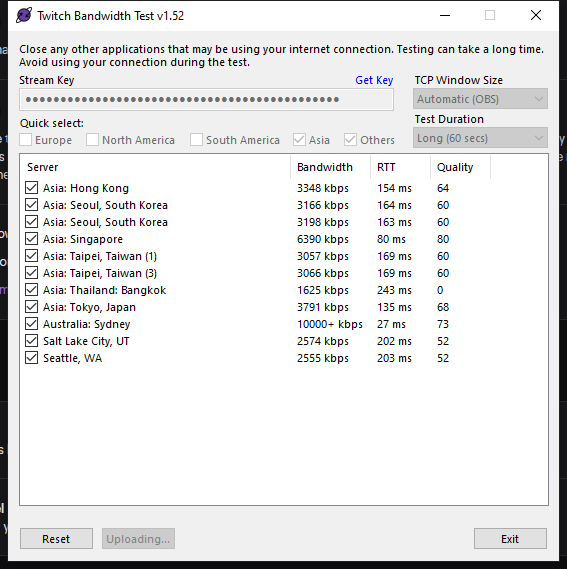
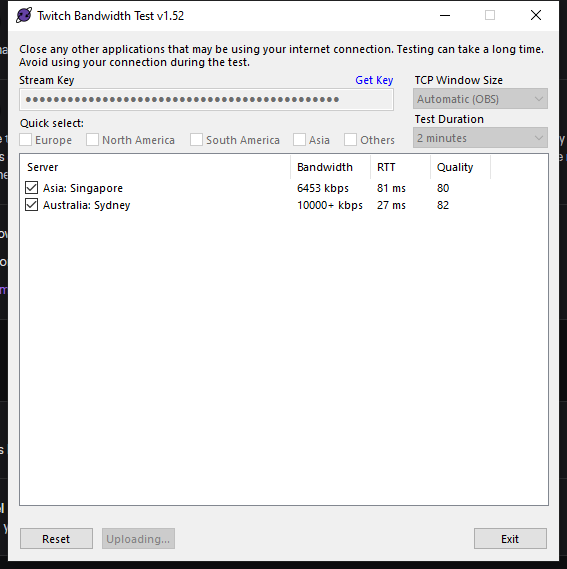
looks like probably Sydney and Singapore should be ok
I think I will try and longer test on those 2 and see
 raven vessel
how do i make a source sit within a certain window?
lament blade
The timers get not triggerd when someone writie 10 Lines... Why
grizzled tundra
@raven vessel what do you mean?
raven vessel
not important rn
round brambleBOT
@brave mango Please follow our community rules:
- No advertisement or stream promotion
- Respect ALL server members
- No NSFW/NSFL
Thank you
 lethal current
Can someone help me? I got the error 404. So I cant find my chat stats on the page! I changed my Twitch Name from adrianplayin_ to adrianplayin. That is the problem. But I dont know, how to fix it. <@&382267076632379392>
strong kernel
Your chatstats page has been renamed to your new username.
lethal current
@strong kernel Thank you
 pale bone
How do I revert back an update?
strong kernel
You download the old version of OBS Studio and install it.

GitHub
OBS Studio - Free and open source software for live streaming and screen recording - obsproject/obs-studio
 quaint grotto
Hey guys, I took a break from streaming for a few months and returned yesterday. I have the same settings as before but now I'm dropping frames everytime I try to go live. Would love some advice/help 😦
round brambleBOT
@quaint grotto Please provide a log from your last stream. To do this, in OBS go to Help > Log Files > Upload Last Log File and paste the link to the log file here.
quaint grotto
pale bone
nevermind I found the correct one
round brambleBOT
@quaint grotto 1) Restart OBS
2) Start your stream/recording for about 30 seconds. Make sure you replicate any issues as best you can, which means having any games/apps open and captured, etc.
3) Stop your stream/recording.
4) Select Help > Log Files > Upload Current Log File. Copy the URL and paste the link here.
(Note: If you do not see an obsproject.com URL, you will need to update OBS Studio to version 22+)
quaint grotto
quaint grotto
So its my internet?
strong kernel
Or the ingest server you're streaming to. Or something in between the two.
quaint grotto
I'm from Toronto but I usually stream from the NA East Ashburn server
Tried switching back as well but still getting dropped frames
Must be my internet I guess
Thanks for the help mate @strong kernel
 molten creek
not entirely convinced this is the right chat to ask this in but, i was wanting to set it up such that a bot of some variety posts to discord when i go live on twitch, but my friend was saying streamelements' bot cannot do that so he has some shenanigans set up with multiple bots. so i suppose my question is, whats the best way to set this up?
strong kernel
As your friend stated, we do not have a Discord bot at this time, so we unfortunately cannot assist with this.
molten creek
Ahhh gotcha, figured it was worth double checking. Thanks !
 pliant forge
hi everyone, I've had a recent issue where I've changed nothing but some people's alerts are not going through. They show on the activity feed, but I cannot replay them
strong kernel
@pliant forge Can you provide a specific example of one that did not go through?
pliant forge
Sure! So I've had one user specifically gift subs and when I go to replay any alerts associated to that person, they do not play. I've had sub and raid alerts be suppressed.
strong kernel
Specific example.
pliant forge
what all information do you want?
strong kernel
A specific example of an event in your activity feed that did not play.
pliant forge
[user] has resubscribed (Tier 1) for 5 months

strong kernel
Specific means provide all the information.
Including their username.
Or just screenshot the exact event in your activity feed that didn't play an alert.
But a specific example means to actually pick an event that didn't play as an example and provide all of its information to me.
pliant forge
strong kernel
These events tripped the standard profanity protection in your Tipping settings section, and were skipped.
pliant forge
I'd ask how the tip moderation filter impacts non-tip related activity, but I sense hostility. Thank you for your help.
strong kernel
There's no hostility. The profanity filter applies to all alerts, not just tips.
Is it a bit misleading that it's placed in that section? Probably.
It'll also flag usernames, not just messages.
pliant forge
I disabled it, and will just deal with the consequences of it. seeing how the filter was on the tipping settings, I assumed it to be for tipping in scope. Again thanks for the assistance!
 livid ingot
Did the latest update kill OBS.live to capture games?
strong kernel
OBS.Live doesn't capture games, it's a plugin. Game capture is all OBS Studio.
livid ingot
Div 2 anit being picked up, nor any other game
round brambleBOT
@livid ingot For the best OBS support, please join their Official Discord @ discord.gg/obsproject
 worthy shore
How do I open obs on my Chromebook
 ionic kelp
You don't. It's not supported.
livid ingot
Yeah im on the OBS page, UBI soft just needs to update the Anticheat is all
worthy shore
What am I missing out on by not being able to open up the obs
 worn nacelle
hey, is there any chance super mods can remove moderators on streamelements?
round brambleBOT
@worthy shore For the best OBS support, please join their Official Discord @ discord.gg/obsproject
 zenith widget
@worn nacelle only via the !level command or being an editor on your dashboard with us
 acoustic veldt
so I have a question? I have all my streaming stuff set up. I have an elgato HD60 S connected to my ps4 pro connected to my pc. and I have obs open on my pc to game capture my ps4 to go live on twitch. and I have my blue yeti connected to my pc and and my headphones connected to my ps4. because I want to be able to chat with my friends on the ps4 and I have the blue yeti connected to pc so I can chat with viewers. but my question is when I have all this stuff connected how do I get the obs to capture my ps4 sound gameplay? it will show my gameplay but it doesn't capture the sound? my monitor doesn't have speakers so is that why? or would I need a chat link? because I don't have one of those either.
round brambleBOT
@acoustic veldt If you are having issues with Streamdeck or Elgato capture cards, its best to ask in their Discord here: https://discord.gg/elgato
zenith widget
or in the OBS discord
round brambleBOT
@acoustic veldt For the best OBS support, please join their Official Discord @ discord.gg/obsproject
acoustic veldt
thank you
 raven wind
i need some help with something if anyone can help
round brambleBOT
@raven wind If you would like help from the StreamElements support volunteers/staff please post your question in one of the helpdesk channels and someone will assist you as soon as they are available
#helpdesk-twitch | #helpdesk-youtube | #helpdesk-facebook | #helpdesk-mobile | #helpdesk-selive | #651453660810838026 | #helpdesk-merch
Thank you for being patient.
raven wind
Okay, so i have it set in the streamelements obs live settings that im trying to stream to twitch. everytime i click start streaming a pop up window pops up saying start streaming to youtube. So my stream wont start and im not even trying to stream to youtube. how do i fix this?
round brambleBOT
@raven wind Streamelements on top of OBS -> Logout -> login
raven wind
thanks that fixed it. appreciate the help
 brave marlin
Hey, Anyone know why i cant add multiple of my cam sources? I want to add different type of effect to my cam on each scene. i dont want all the fx to be on ever scene?
zenith widget
Please don't post in multiple channels.
brave marlin
Sorry!
zenith widget
Make sure your camera source has the "shutdown when inactive" option on it
and then add a brand new camera source to the scene and then add the effect you desire.
If that doesn't help, I would suggest to maybe ask in the OBS discord on how to make this happen: discord.gg/obsproject
brave marlin
I dont see that setting?
brave marlin
I see it, it stopped the fx being added but now, i need to refresh the source every time i switch my scene ?
is there a fix for that?
zenith widget
I would suggest to check in with the OBS guys on this
 spiral sleet
HI folks, I'm being a tad blind here, can someone point me top where in StreamElements I can view the quotes that have been added over time please? Thanks
zenith widget
Currently there is no UI for the quotes
but we are working on it - just no ETA on when
 pliant tide
Waasup guys. I have a problem with my follower goal. I currently have 100 followers, but when im trying to make a follower goal it says i have 117... Help pls
round brambleBOT
@pliant tide To reset goals:
- from the overlay editor -> data on top -> goal tab -> reset progress of desired goal
- from the dashboard -> activity feed on the left -> widget data on the right -> goals tab -> reset progress of desired goal
Note: Goal widgets(progress) only counts up and doesn't go down automatically, if you loose followers/subs
pliant tide
thx
spiral sleet
Thanks @zenith widget Good to know I wasn't losing my mind or going blind 🙂
lament blade
Hi I was wondering if the correct command to add for nightbot to see a channel sub count was !addcom !subs This channel currently has (subscribers) twitch subscribers. ?
zenith widget
We cannot help with Nightbot
lament blade
Okay thank you very much anyways @zenith widget
zenith widget
I also told you, that you can use ${channel.subs} for our bot
 dawn lily
Hi , i am trying to stream using ps4 remote play , however the quality which i can see is very bad , anyway to make me see it better and for it to look better on srtream
 sweet socket
@dawn lily are you streaming over wireless or cabled internet?
Stream quality most of the time is because of the internet
zenith widget
For the quality, make sure the console and game has been started and just simply restart Remote Play.
As for the capture, it might be best to ask here: discord.gg/obsproject
 lunar grail
I am trying to make it so i can play music through my phone with song requests. How can i do that?
sweet socket
You will need the Media Request widget in your overlay
and then you can access it through the StreamElements website
 harsh harness
I have a problem. When I finish livestreaming it won't let me upload my stream on Twitch
When I use stream elements on mobile.
zenith widget
Do you have this option turned on?
zenith widget
Does it say you need to be affilaite?
Go here: https://dashboard.twitch.tv/u/twister_hero94/settings/channel and toggle that option to store past broadcasts
doesn't matter what you use to stream
 midnight dew
How many followers do u have keizar
zenith widget
I don't stream or at least stopped streaming.
midnight dew
Oh it was twisted my bad
harsh harness
Also still nothing.
zenith widget
Your follower count is irrelevant here.
I see you have past VODs saved.
Im not sure what you are expecting here and what the issue is.
harsh harness
I can't save from streamelements.
That's the problem. I tried to livestream from twitch itself but my network keeps having errors.
zenith widget
Then that means your mobile connection is unstable
and the mobile app can't connect to the twitch servers properly
and its dropping your streams
harsh harness
I can stream from streamelements fine but it won't save. Because I can control how much connection it can have to make it stable.
harsh harness
My livestream. Onto Twitch.
I even changed the setting to keep past videos. But it wo 'f work from my phone.
 jade remnant
so you want to record, not stream?
zenith widget
you will see your past streams
harsh harness
You guys are misunderstanding. Let me put this simply. I used Streamelements to connect to twitch and I use streamelements to livestream. But streamelements isn't saving my videos onto Twitch.
After I finish my livestream.
harsh harness
Those were the times I livestreamed from the app of Twitch itself but it doesn't always work.
I can prove it if you want.
zenith widget
i'll test it
 bold cradle
Hello ! I have issues with a couple of stream elements overlays : Alerts are pretty laggy and seem to drop frames, and the chat widget works in the streamelement overlay editing page but doesn't work at all in OBS or on stream. Help ? 🙂
zenith widget
@harsh harness With our app - the stream needs to be a certain length to be stored as a VOD
harsh harness
As a VOD?
 little oak
 love thy title
zenith widget
VOD = video
harsh harness
Then how do I fix it?
round brambleBOT
@bold cradle OBS -> settings -> advanced -> scroll down -> enable/disable hardware accel.
https://i.imgur.com/ggMe9ZE.png
 little oak
@bold cradle try disabling hardware accelerator and see if the chat pops uup
nvm the bot got you 🙂
 burnt sail
Good Morning
I am creating a follower goal and my current count of followers does not match what I have on Twitch. Even on my SE Dashboard it only shows that I have 13. Is there something I must do to update this?
bold cradle
Thanks I'll try that now
round brambleBOT
@burnt sail To reset goals:
- from the overlay editor -> data on top -> goal tab -> reset progress of desired goal
- from the dashboard -> activity feed on the left -> widget data on the right -> goals tab -> reset progress of desired goal
Note: Goal widgets(progress) only counts up and doesn't go down automatically, if you loose followers/subs
zenith widget
@harsh harness shutdown the app, clear its cache and data from the phone settings and then run a 5 minute stream
then look up your vods
harsh harness
How do I do that please?
bold cradle
@little oak I'm using OBS on a Mac and for some reason the source section doesn't exist in the advanced pannel 😦
little oak
Ohhh, you're on mac
burnt sail
Sweet, fixed now!
little oak
mac has exiled most of the settings in obs
bold cradle
@little oak I know it's more limited, but don't have a PC yet. Anything else I can try to fix it ?
little oak
i have no experience with mac or know anything with a mac so that would be hard for me to try an help ya, for as i might end up messing up even more
we will have to wait for one who has much experience with a mac os and stuff like that
bold cradle
I understand !
little oak
yeah i apologize for that  i do know there is a couple that knows the mac scene its just finding them at the right moment
bold cradle
@little oak No worries !
little oak
if i can find you a mac guy here soon, ill have them ping ya
harsh harness
Nope still nothing.
It worked!
My bad!
Thanks so much.
Also streamelements is more stable than Twitch app. Much appreciated.
 drowsy flower
I made a new overlay in StreamElements, put it in browser source in OBS and it won't work... It just doesn't come up on OBS.
I've tried refreshing cache, nothing works 😦
round brambleBOT
@drowsy flower OBS -> settings -> advanced -> scroll down -> enable/disable hardware accel.
https://i.imgur.com/ggMe9ZE.png
drowsy flower
Didn't work
round brambleBOT
@drowsy flower The default resolution for StreamElements overlays (theme and custom) is 1920x1080. Please add them in OBS at their full resolution and use CTRL+F to fit to screen if necessary. You can then downscale your stream in OBS settings > Video if you'd like https://i.imgur.com/6bWXxjR.png
 drowsy flower
Thank you!
 sacred moth
Not sure if this is the right place for it, but is anyone having issues with the media request function on streamelements, the playlist is linked, I just keep getting an error when I go to play the queued music saying an error occurred try again later
zenith widget
where exactly do you see the error?
 floral badge
Hi there
how do i adjust the variables on advanced goal widget by mister boost
I want to intial amount to be zero and have a new goal
little oak
its BDJ Heya buddy
floral badge
hello @little oak
little oak
Hope All is Well BDj 

 shy ivy
Hey might I ask how do I change my channels bot name? I had it already set up but for some reason it stopped displaying it
little oak
Due to the change in the Twitch API it is no longer available in GC. you can now name your bot via obs.live
shy ivy
Oh okay! Thank you
little oak
You're welcome
 twin sentinel
@halcyon pivot Please contact staff on that issue after the imported data with as much info on this as you can provide via email: https://streamelements.com/contact
twin sentinel
When you emulate a test event, do these alerts show up in your OBS?
Are the events which are not coming through in your activity feed?
round brambleBOT
@tribal cipher Due to changes to Twitch API, we have filtered out hosts and will only show these ones on your activity feed:
- All hosts coming from an online channel with at least 1+ viewer
- Auto host events with at least 1 viewer - only from a channel that just went offline
Note: If you see "X channel has hosted you" with no viewers on the back, that is considered an offline host or a host with 0 viewers, we do not show these.
Note for Mixer streamers: The above 2 filters currently apply for Mixer and we are aware its actually not how Mixer hosts work. We do plan on changing it, but no ETA on when.
 tribal cipher
 dusk topaz
Hello I have a question about the timers, I have multiple times who should get posted every 10 minutes but with distance of at least 1 minute how do i do this 🙂 ?
 abstract hemlock
@sacred moth have you try those videos on YT itself?
abstract hemlock
if you refresh the SE page? still no luck?
sacred moth
Yeah nothing dude, streamed yesterday without streamelements media running, i felt naked
dusk topaz
Hello I have a question about the timers, I have multiple times who should get posted every 10 minutes but with distance of at least 1 minute how do i do this 🙂 ? Does anyone know? I see other people doing this
 hardy cape
#helpdesk-twitch I am unable to switch between my 2 twitch accounts on the StreamElements website. I used to be able to log out and then manually enter the proper user name and password to switch accounts, but I can't any more. I'm basically stuck on one account, and I need to log into the other. Can someone help me with this? Any and all assistance is greatly appreciated.
abstract hemlock
@hardy cape you have 2 twitch accs?
 wary orchid
Some of my commands are malfunctioning. IE: !raffle clears song requests. Custom commands randomly work. What is going on? How do I fix it?.
abstract hemlock
if so Log out of twitch page and then try to back in SE page @hardy cape
round brambleBOT
@wary orchid Please connect your streaming account (Twitch, YouTube, or Facebook) with Discord by going to ⚙ Settings and then Connections here in Discord. https://streamable.com/eg92w
 abstract hemlock
@dusk topaz you can set your timera to go every 10 minutes, but you mean 1 minute between 1 timer and the other?
dusk topaz
yes thats what I meant @abstract hemlock 🙂
wary orchid
OK I am a supermod for a twitch user, Stream Elements is up and running, but still having the trouble. I dont' see how to set up discord for them.
 potent elm
Hey, if I change my alerts its totally bugged, sometimes the screen is cut off, now in the streamelements editor its the right video etc. but when i emulate a follow on streamelements obs its competly different video
hardy cape
@abstract hemlock Yes I have 2 Twitch accounts 1 is for myself, and the other is for a Team I am apart of. I did find out that it does let me manually login if I use an Incognito Tab on Chome, but I still hope there is an easier way to switch between them, like on Twitter were there is a Switch Accounts Button.
abstract hemlock
@wary orchid make sure you /mod StreamElements
wary orchid
?
abstract hemlock
@wary orchid i see Streamelements is not mod on your channel
@hardy cape yeah logout on twitch site and you can login in SE with any acc
@potent elm check the variations
round brambleBOT
@hardy cape Account Merging - Please note:
- Merging accounts only allows faster ways to switch between accounts
- Merging accounts does not allow data sharing between accounts - different streaming platforms, different type of events
- Merging accounts allows duplicating/sharing overlays between the accounts
If you understand the limitations of merging and want to proceed, please find the JWT tokens (!jwt) from both accounts you want to merge and you will be directed to DM them to a staff member.
 cedar saddle
Its not for my channel, its for a channel I am a Super Mod for.
urcrazycrush is the streamer
ionic kelp
That would work for you. Be warned it's a 1 way street and removing an account means deleting everything with both.
cedar saddle
I have stream elements up in the chat, but still having command issues.
 dry hare
@sacred moth do you have any chrome extensions installed? Make sure streamelements.com is whitelisted
dusk topaz
@abstract hemlock You know how I do this 🙂 ?
wary orchid
@abstract hemlock How do I add the mod?
abstract hemlock
wary orchid
Just drop that in chat?
little oak
type it via chat
abstract hemlock
i think the streamer needs to do it
cedar saddle
Yeah, it wont let me do it
little oak
yeah only a broadcaster "owner of channel" can do it
abstract hemlock
@sacred moth maybe some extension is causing this.. please try Incognito Mode
 cloud solstice
Hi guys, is there any issue with Overlays ? All my SE overlays won't load in OBS studio
lament blade
try refreshing the cache on the sources
 ivory gulch
same here.. overlays not loading
 jagged escarp
same
dusk topaz
Hello I have a question about the timers, I have multiple times who should get posted every 10 minutes but with distance of at least 1 minute how do i do this 🙂 ? Does anyone know? I see other people doing this
@dusk topaz ???
lament blade
Give what I said a shot guys, see if it works, if not, we'll look further into it
cedar saddle
The channel owner added it
sweet socket
What can we help you with?
ivory gulch
And overlays just started working..
cloud solstice
@lament blade tried refreshing it on multiple scenes . same outcome . Even alerts aren't working .
Might be due the traffic on your servers ?
sweet socket
probably a hiccup with the internet then
 limpid wraith
This is my attemp to stream on Twitch. I'm using Nikon D3100 in DigiCamControl but the Live View is locked
jagged escarp
iv been having an issue with kappagen for weeks now, tried everything recommended and its still broken 😦
limpid wraith
I dont know what I'm doing wrong, or the camera isnt supported
I tried to use HDMI cable to a Video Capture
cedar saddle
/mod StreamElements added to channel, still having problems with commands
lament blade
the Bot don't send commands? 
little oak
part the bot and make it join
limpid wraith
little oak
via dasboard
limpid wraith
anyone can help me?
ionic kelp
@limpid wraith You took a wrong turn. This is the streamelements server. Not streamlabs.
jade remnant
speak to stream labs
cedar saddle
part the bot?
little oak
via dashboard
cedar saddle
How do I make it join?
little oak
via dashboard
lament blade
StreamElements
The Ultimate All in One Platform for Streamers
lament blade

cedar saddle
OK did that, still have commands not working properly
little oak
what cmd are you having touble with
cedar saddle
!addpoints does nothing, it is enabled. !raffle clears song ques, custom commands do nothing IE !mic which anyone can use.
little oak
!addpoints all is the cmd
lament blade
is loyalty active?
cedar saddle
OK but !raffle and !mic also aren't working. !raffle works on every other channel. Multiraffle works.
!addpoints all also doesn't work. Yes loyalty is enabled
little oak
whos channel are you modding for?
round brambleBOT
@cedar saddle Please connect your streaming account (Twitch, YouTube, or Facebook) with Discord by going to ⚙ Settings and then Connections here in Discord. https://streamable.com/eg92w
 cedar saddle
urcrazycrush
little oak
ok i see here you will not be able to give any one points cause its set to supermod only and also the !raffle cmd is not enabled
the streamer will have to make you a supermod or have them change the level of the cmd to modeerator via SE site under chat cmd
that is why you cant execute any commands
cedar saddle
I am the supermod. I show it enabled in dashboard
little oak
you have access to the account?
little oak
their !uptime is an everyone cmd
i can see the cmds being executed
well the raffle one
cedar saddle
I got the raffle to work by turning it off an then on and saving, but it wouldn't let me !join.
 hexed shore
hi guys
i have a big problem
someone can help me?¿
i have so much dilay in my stream like 10 seconds
and idk why
lament blade
choose the low latency mode in Twitch
hexed shore
the low latency? if i have low latency now
lament blade
low latency has less delay
lament blade
https://dashboard.twitch.tv/u/CHANNELNAME/settings/channel -> latency mode -> click on low latency
 hexed shore
OKEY OKEY TY SO MUCH DUDE
lament blade
no problemo 
hexed shore
uwu

 👉 uwu
hexed shore
👉 uwu
hexed shore
XDD
dusk topaz
Hello I have a question about the timers, I have multiple times who should get posted every 10 minutes but with distance of at least 1 minute how do i do this 🙂 ? Does anyone know? I see other people doing this
twin sentinel
@dusk topaz You can create one timer with multiple messages. The timer will then cycle through these messages every time it gets activated. If the chat lines are not met, then the timer will not be posted and moves on.
dusk topaz
@twin sentinel M8 I thank you so much holy ❤️
 karmic pewter
Hello, i cant get alerts to pop up on my stream
 shell tundra
hi everyone, im streaming right now on twitch, and i saw my alerts dont work, before i get started the stream, i updated the OBS, and when i wanna open the alert streamelements wabsite, this is show the next : ,,Invalid authorization token'' and i tried to retake the alert link, and restart the stream, but it still doesnt work, so what can i do with it?
round brambleBOT
@karmic pewter To add your overlays to OBS, add a new browser source in your scene. Paste your overlay URL in the browser source properties, set the dimensions to 1920x1080 (unless you changed them on the website), and ☑ “Shutdown source when not visible” https://youtu.be/KDvLynUqXI4
twin sentinel
@shell tundra Please only ask your question in one channel. Thank you.
 viral wagon
Can someone tell why the Obs.live app for stream deck keep malfunctioning every time I showdown my pc and Is there anyway To prevent this from happening?
 clever kernel
hey tryinig to upload my own made Alert how do i add the follow bit so that only as followed out up please
 wary halo

Learn how to customize your alerts and setup different alerts variations with StreamElements Alertbox
Overlay Manager guide: https://youtu.be/X7XrDdRE7Fk
Add HypeCup to your Stream: https://www.youtube.com/watch?v=8LVRd2X4HvU
Got any questions, or just want to say "Hey"...
lament blade
Hey, I'm currently moderating for a streamer who has queue moderation, where can I access the queue where I can approve and deny? (ping me if you dont mind)
 proper marlin
good afternoon, I have a countdown for the beginning of the stream, but it doesnt refresh
not sure if I have to do anything extra
wary halo
you can try to reload the overlay
clever kernel
cool thanks i have go agian @wary halo
proper marlin
how so @wary halo
 tawdry surge
round brambleBOT
tawdry surge
round brambleBOT
@tawdry surge If you would like help from the StreamElements support volunteers/staff please post your question in one of the helpdesk channels and someone will assist you as soon as they are available
#helpdesk-twitch | #helpdesk-youtube | #helpdesk-facebook | #helpdesk-mobile | #helpdesk-selive | #651453660810838026 | #helpdesk-merch
Thank you for being patient.
 gaunt hill
how would i get my tipping link back that is given during the beginning tutorial if i went to fast through it not realizing it didnt copy right
little oak
should be able to reset it by doing a browser/cache clear browsing the last hour
logout before doing it
 karmic aspen
Is there a way to have recent events as scrolling text? i know it as possible for recent Follows/Subs etc. but I am looking for a way to have all Events together in one Text.. I know there is that "Recent Events"-Box-Widget, im basically trying to get the information that is displayed there, but not in that Box but in a scrolling Text..
 tacit oyster
@gaunt hill you are going to your Dashboard on Streamelements Website than go to Tip-Settings than ther is a litte button with the lable Tipping_settings right next to the button with settings for this site than you go down to Tippingpane settings and thats your doantion sit elink
little oak
it will be here https://streamelements.com/dashboard/tipping-settings
gaunt hill
thank you
tacit oyster
Np
little oak
i completely read that wrong but gave the correct link, i was thinking of something else
tacit oyster
lol
karmic aspen
Is there a way to have recent events as scrolling text? i know it as possible for recent Follows/Subs etc. but I am looking for a way to have all Events together in one Text.. I know there is that "Recent Events"-Box-Widget, im basically trying to get the information that is displayed there, but not in that Box but in a scrolling Text..
sorry for interrupting the last Support case, but can someone help me with this?
little oak
which one of the widget are you using for an alert?
oh an all in one, lemme checc
maybe this one? its an all-in-one recent event traccer https://discordapp.com/channels/141203863863558144/457957557470887947/618446259828686858
 bold nexus
good morning
I have updated obs and now my start/end stream box is missing
any ideas
 sonic sequoia
@wary halo is it possible to get the status of an issue that was posted yesterday?
 fluid jolt
Is there a way to integrate Twitch Rewards with SE yet? I just saw someone using animations to go with rewards. Not sure how to do it with SE when I look through the options.
wary halo
@sonic sequoia which issue?
@fluid jolt i'm going to ask around for you, remember that you have the #dreamteam channel for questions 😉
sonic sequoia
a friends of mine ( @carmine copper ) asked for a fix with an chatstats page
*friend
fluid jolt
@wary halo True, I guess I could have asked there but they were all very busy talking about silly things. 😄
wary halo
if it doesn't work right now then it has been overlooked @sonic sequoia
old and new name please
sonic sequoia
Hey I need help, a friend of me change his twitch name and has now no chatstats, it's a errorpage. Can someone please fix it?! His name now is : DasBobbylein. His old name was: bobby_3m3r4ld
Thank you.
@carmine copper
 carmine copper
Thank you @sonic sequoia
sonic sequoia
ty
wary halo
@carmine copper should be fixed now
 viscid pebbleBOT
Hi @blazing slate, Please ask your question(s) or describe the problem you're looking to solve so staff or a support volunteer can assist you as soon as they are available.
 blazing slate
with stream elements am i able to see all my alerts and chat
like twitch dashboard on mobile
little oak
when you sign into the stream elements mobile app, it will then create you a special mobile overlay vis se site which where you can see it and customize it
blazing slate
i just got a second monitor
i was using my phone
how do i get chat follows etc on a second monitor now without using streamlabs obs i have to keep it on first monitor or it lags me
little oak
sorry but we are not stream labs 🙂
blazing slate
o
i have no idea what to do then
how in the world do i get my chat open like big streams
 fierce hull
What are loyalty points for viewers? How does all that work ?
wary halo

StreamElements Loyalty System helps grow your community and turn your viewers into fans. Viewers are awarded points for viewing your stream that can be redeemed in various ways.
StreamElements loyalty includes:
- Stream store
- Contest
- Giveaways
- Media Request
- Modules ...
fierce hull
Thank you I’ll check it out
blazing slate
are you able to tell me how i can get my chat open on a second monitor
sonic sequoia
@wary halo thanks a lot 🙂
wary halo
yeah, but not for StreamLabs stuff
little oak
im not fimilar with streamlabs  sorry
sorry
little oak
or you can pop out your twitch chat and drag it to the second monitor
blazing slate
with what
wary halo

OBS.Live | Open Broadcaster Software Streaming Knowledge Base
OBS (open broadcaster software) knowledge base for live streaming. Find articles and videos about streaming with OBS.
fierce hull
Has the layout changed for setting up loyalty points or is it because I am via mobile so the website layout is displayed different compared to the YouTube link video ?
wary halo
must be because of mobile
 scarlet tiger
Mobile site is bit different.
fierce hull
Ok thanks for the help
 limpid wyvern
Hey, do you know if it is possible to create a command for the streamelements chatbot that transfers an amount of loyality points from one user to another. Basically I would like a custom "give"-command.
twin sentinel
@limpid wyvern Afaik there is only the default command for that. There is no variable for this, to create a custom command.
 gusty relic
how do I get access to a streamer's dashboard to change stuff if they made me a super mod?
twin sentinel
Super Mod does not have access to the dashboard.
round brambleBOT
Follow these steps to grant managers/moderators access to your dashboard:
- Click on your Channel Name at the top of the dashboard and select Settings
- Create a new invite at one of three access levels (Bot Supervisor, Editor, Full Control)
- Send this invite to a mod/manager to give them access to your dashboard. The link is one-time-use and expires after 72 hours if not accepted
Video tutorial: https://youtu.be/zl_h-ttZDF0
limpid wyvern
@twin sentinel Too bad, anyways thank you for the quick response 🙂
gusty relic
@twin sentinel so can I update onscreen counters and add counters for a streamer, or how do I do that, or what can I do as a super mod?
 kindred hill
Where do i get my link for my SEpay for people to follow for dono's
 hot snow
Hello, I moved houses and now my media request widget within OBS will not load. any ideas?
round brambleBOT
@hot snow Streamelements on top of OBS -> Logout -> login
twin sentinel
@kindred hill It is in your tipping settings: https://streamelements.com/dashboard/tipping-settings
@gusty relic As a super mod you can use all the commands up to the level super moderator. There is also a command to update counters.
hot snow
@round bramble thank you!
 barren shuttle
is there a way to set song requests for followers/subs only?
kindred hill
@twin sentinel tyvm
twin sentinel
@barren shuttle You can limit the song request only to subs, there is no way, to limit it to followers.
barren shuttle
Thanks ❤️
 wraith kayak
How do I disable my Mixer stream key as I'm trying to stream to twitch but it auto streams to mixer. In settings it is all set up to stream to Twitch with my account linked?
round brambleBOT
@wraith kayak Streamelements on top of OBS -> Logout -> login
 onyx marsh
hey so i was setting up my donation panel and it wont let me click "check"
shell tundra
hi everyone, im streaming right now on twitch, and i saw my alerts dont work, before i get started the stream, i updated the OBS, and when i wanna open the alert streamelements wabsite, this is show the next : ,,Invalid authorization token'' and i tried to retake the alert link, and restart the stream, but it still doesnt work, so what can i do with it?
 fallow temple
Hm... Is there any way to enable/disable Chat Alerts other than on the dashboard? Like via a command or a stream deck hotkey?
scarlet tiger
@fallow temple only via website
shell tundra
pls
scarlet tiger
@shell tundra you can provide screenshot?
fallow temple
aw 😦 ok thanks
round brambleBOT
@shell tundra OBS -> settings -> advanced -> scroll down -> enable/disable hardware accel.
https://i.imgur.com/ggMe9ZE.png
 karmic plank
I keep running into an issue where the overlay won't allow me to save. I add one extra variation to my Subscriber event for example and when I click save nothing happens. Refresh and the changes weren't saved obviously. Any ideas as to why?
shell tundra
this is my problem...
this is what tho OBS shows when i want to open the alerts website
so???
anybody?
wary halo
@shell tundra try to adjust the overlay here:
StreamElements
The Ultimate All in One Platform for Streamers
or just delete the source and re-add the link completely
also make sure you did what the bot said and turn off the browser hardware acceleration
karmic plank
Any ideas as to why the overlay won't let me save when adding an alert variation? If I reload and just add an image, it lets me save. As soon as I try to add an alert variation to anything (tip, sub, cheer, host), it doesn't do anything when I press save.
 rustic hinge
Server down again just FYI
karmic plank
what server @rustic hinge ?
wary halo
i think this server 😛
Desktop or Mobile? @rustic hinge
because i was here the whole time on Desktop without issues, but on mobile it's gone a few times a day
rustic hinge
Kitboga and I am on iPhone tried it both through channel and through App.
karmic aspen
maybe this one? its an all-in-one recent event traccer https://discordapp.com/channels/141203863863558144/457957557470887947/618446259828686858
@little oak
no in that pack U can only choose between events
I mean an Widget that can show recent Events all in one Widget independent of the sort of Event, just dependent on last recent Events, no matter what type
Like the Widget "Event Box" but not in Box Form but like all Text in a line
wary halo
@rustic hinge why do you come to the StreamElements server to say that the server of Kitboga is down?
 sleek glen
my super mod does not work when i have it on my friends stream
lament blade
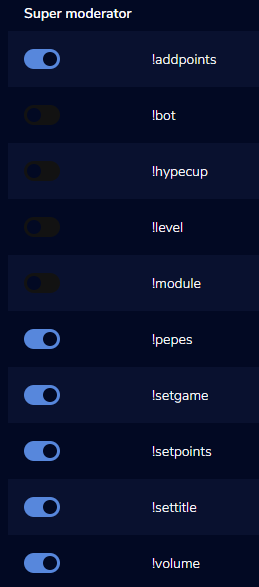
do you have the super Mod Commands active?
lament blade
but the Commands aren't working?
sleek glen
yea
lament blade
https://streamelements.com/dashboard -> Bot Settings -> part Channel -> Join Channel
try this
StreamElements
The Ultimate All in One Platform for Streamers
karmic plank
okay so nobody has any idea as to why I cannot save my overlay after adding a variation to an alerts widget?
karmic plank
Okay, thanks!
sleek glen
it does not work
sleek glen
the super mod com
lament blade
!bot, !settitle and more?
sleek glen
yea
lament blade
but its active?
lament blade
 lament blade
StreamElements
The Ultimate All in One Platform for Streamers
scroll down
and click on the Commands
sleek glen
i thought they could ban mod super mod
i thought super mods could ban mods @lament blade
scarlet tiger
Ban mods can only channel owner
sleek glen
what does super mod better then mod
scarlet tiger
You can have only supermods commands
 fickle turret
Can you Import Text Fonts into Streamelements ?
round brambleBOT
@fickle turret Google Fonts
More than 900 google fonts are supported at this time. You can preview them here: https://fonts.google.com/
Custom Fonts
Steps:
- Install the font on the streaming PC or choose a pre-installed windows font.
- In the overlay widget settings, select Text Settings
- Enable Custom Font
- Type the name of the font as it appears in the windows font directory (This is usually
C:\Windows\Fonts)
Note: After installing fonts, the browser and OBS must be restarted for the font to appear.
 carmine knot
Trying to find the difference between "high" and "very high"... lol (I'm serious by the way)
is high 720p and very high 1080p?
LOL notice my banned tags btw hahahaha
strong kernel
carmine knot
oh. Well I'm always the one who puts videos in the media share (not other viewers or mods) so do I get over that filter
strong kernel
Yes.
carmine knot
so the quality of the video is always highest then right?
is StreamElements effected by this as well IDK
wary halo
no
carmine knot
That's great.
lament blade
but Twitch, in the EU
carmine knot
You seem more sure about it than me, I was unsure
strong kernel
Media request is affected by it, as it's all YouTube. Everything else will be business as usual.
jade remnant
considering stream elements doesnt stream...
carmine knot
So I guess the answer is.. yes(?) mediashare is effected by it
strong kernel
Media request is a glorified YouTube embed.
carmine knot
I was referring to mediashare with that question. Got excited when someone said no, I guess the answer is yes.
strong kernel
If YouTube is reducing quality...
carmine knot
I'll actually test now, it likely is being effected but I use mediashare quite a lot so it will likely be obvious tome
Yeah, StreamElements media share is effected by this youtube quality reduction for sure. It's very clear to see the difference.
Test it yourself if you want, but the answer is yes for sure
https://www.youtube.com/watch?v=MSNvXyuuIvg
I used that clip to test. It starts off in amazing quality as intended, then it does a short blackout of the video then lowers the resolution significantly, enough for it to be noticable
jade remnant
of course, because its from youtube
carmine knot
Well yeah, I'm not here complaining or anything, I'm just noting it here because I didn't know if it was or wasn't effected.
 daring swallow
is there anything wrong with link protection? It's not erasing automatically anymore
round brambleBOT
@sacred jasper Please contact us via email for support with SE.Pay. You can use our contact form here: https://streamelements.com/contact Thank you
 sacred jasper
one last thing.
I just received a tip from the user through se:pay method.
however, it did not show up on my se:pay balance like it always used to.
is this due to error in payment or?
round brambleBOT
@sacred jasper Please contact us via email for support with SE.Pay. You can use our contact form here: https://streamelements.com/contact Thank you
shell tundra
@wary halo can we speak in peivate?
so guys... for the alerts i need to turn on or off the browser hardware acceleration???
strong kernel
@shell tundra Depends on your system and which it handles better, but generally off is safe.
 sage folio
Help. Lol how do I use this to capture from twitch to get it Facebook? I am PC streaming illiterate.
wary halo
stream to FB from the playstation?
sage folio
How
wary halo
you can't stream to multiple platforms from the console
isn't there a FB integration in the playstation share menu?
strong kernel
If you can stream to YouTube or Twitch, then you can stream to YouTube or Twitch.
These services don't forward the data to other sites.
That's the exact opposite of what they want.
sage folio
The goal is getting to Facebook
strong kernel
If Facebook is not an option, then it is not an option.
wary halo
then buy a capture card, stream to OBS and let OBS stream to FB
or with remote play to your pc and then capture that with OBS
fickle turret
On the Website I use Text over Image for my Alert but the Text Doesnt Show up?
 marsh dawn
I can’t seem to find anybody answered this that I posted yesterday this is all that happens when I try to live stream elements. And my overly isn’t working
wary halo
in the advanced text settings, set the top margin to 100 and work from there @fickle turret
lament blade
Use google Chrome @marsh dawn
marsh dawn
All right thank you I’ll try that. Every time I’ve used Google Chrome I’ve gotten a virus. I’ve had bad luck with it.
lament blade
hö? which antivirus Program?
marsh dawn
You for your help though my phone was not letting me scroll up to yesterday
I have not downloading chrome with this one
Is there a safer route to download chrome from?
 marsh dawn
Aw ok
That makes sense because it was working until I renewed my subscription
I’ll play with the settings to see if that helps baby as well
I turned it off and it still won’t lose
lament blade
Did the Chrome download work?
 timid aurora
so i have a question, when im using stream media it effects the volume of my party chat/discord also, how do i separate that out
round brambleBOT
@timid aurora If you're experiencing sound volume reduction when OBS is opened, try checking the "Disable Windows audio ducking" option in Settings > Audio
restart OBS.
If that doesnt work please check your sound options in control panel,
Control Panel > Sound > Communications tab > select "Do nothing"
Please remember to restart OBS after each attempt
marsh dawn
@lament blade I haven’t gotten that far yet I’m still going to do that right now
lament blade
marsh dawn
I’m trying now hoping for the best
Yes it worked thank you so Much. And I did not get that weird thing I used to get. So webroot Work for that and keep that from happening. Thank you thank you thank you so much. I hope you stay safe and well
lament blade
hi , i have a question
i received tips with streamelements but didn't had an SE.pay account
how do i get the money ?
i made an account but now it says u have to get a tip first to get the money
round brambleBOT
@lament blade Please connect your streaming account (Twitch, YouTube, or Facebook) with Discord by going to ⚙ Settings and then Connections here in Discord. https://streamable.com/eg92w

 unkempt falcon
raven vessel
unkempt falcon
raven vessel
ALREADY FORGOT HOW TO DO variation alerts for donos
strong kernel
@unkempt falcon Your revenue history shows how each tip was sent. You then withdraw it from that method they tipped to.
 tiny zinc
Hey guys! Having trouble with links in the chat showing up as "***". Please help 🙏 😇
strong kernel
@raven vessel https://www.youtube.com/watch?v=8LVRd2X4HvU
Learn how to customize your alerts and setup different alerts variations with StreamElements Alertbox
Overlay Manager guide: https://youtu.be/X7XrDdRE7Fk
Add HypeCup to your Stream: https://www.youtube.com/watch?v=8LVRd2X4HvU
Got any questions, or just want to say "Hey"...
@tiny zinc That is a Twitch moderation setting in your Twitch account, not with us. Either disable that option or make the bot a moderator to prevent its links from being filtered.
strong kernel
@heavy crypt 🖱️ ➡️ #🇵🇹︱português
 heavy crypt
tks
 cyan stratus
whenever i open obs on my second monitor it starts to lag my game please help
 severe roost
Can someone help me? I’m having camera pixelation when I move a lot in game
strong kernel
@severe roost You probably need to increase your bitrate.
round brambleBOT
@severe roost For the best OBS support, please join their Official Discord @ discord.gg/obsproject
cyan stratus
when i click start streaming it says stop streaming but it never streamed
 oblique marsh
I need someone in tech to contact me asap. I was told to download OBSlive for a Stream elements thing, and it broke everytrhing (im on wincows 7) so we deleted obs live, and the original obs will run again but there is no option for a browser source, and all of my broswer sources arent working that were previously there (everything stated worked fine 5 minutes prior to downloading and installing obslive)
I am scheduled to start stream in 7 minutes so any DM or live help would be greatly appreciated to resolve this asap.,
oblique marsh
Thanks.
round brambleBOT
@young prism New to Stream Elements?
Check out our YouTube channel https://www.youtube.com/c/streamelements/videos
with tutorial videos from setting up the basics, to in depth details on how to use our product.
New to OBS? Here is a 4 step quickstart guide
https://obsproject.com/wiki/OBS-Studio-Quickstart
Want to learn even more? Here is an in-depth overview
https://obsproject.com/wiki/OBS-Studio-Overview
lament blade
hi! idk if this is the correct spot, but i am trying to use a browser source and it's not loading. i've tried clearing my cache which one of your help pages said to do and sadly nothing is helping. anyone know a fix?
round brambleBOT
@lament blade OBS -> settings -> advanced -> scroll down -> enable/disable hardware accel.
https://i.imgur.com/ggMe9ZE.png
lament blade
thank you
 fast sandal
Fixed HP not working on Hype Boss?
 young prism
i am on my chromebook so do you need obs
dry hare
Obs doesn’t run on a chrome book afaik
young prism
ik i am just wondering if i need it to use streamelements
 ruby smelt
I'm using obs.live to enable the custom bot name. However, the bot seems to disconnect constantly. I'll re-auth, send a test message, it'll work for a bit then stop. Anyone else experiencing this?
I see StreamElements in my mods list
But not the bot user
 inner valve
hey guys hope everyone is well, does anyone know if there is a way to show store redemptions in chat even when done via the website? 😄
young prism
I have a question. an i use live alert widgets without obs?
@jakeW you seem like you would know, do you need obs for your stream to put live widgets? or can you just use plain old Streamelements?
strong kernel
@young prism OBS or another streaming software is required to stream. StreamElements provides you with tools, it does not stream to Twitch for you.
@inner valve The chat alerts module allows you to do so.
inner valve
thanks ill check it out, i couldnt find where 🙂
young prism
oh im on a chromebook>
 spiral sierra
So I'm trying to get to my dashboard on the website, I'm successfully logged into the site through Twitch, however the website won't go past the homepage it just keeps redirecting
strong kernel
@ruby smelt The custom bot name is connecting via your computer, so if it's losing connection, it may be possible you are, too. That said, start by relogging with your StreamElements account by going to StreamElements at the top > Log out > Log in
 opal abyss
hello! i'm trying to set up a stream and i need to use a few window captures. i have an AlertBox widget set up in the StreamElements overlays but when i test it in OBS.Live, the alerts are hidden behind the windows i'm capturing. any way i can fix this?
spiral sierra
put your alerts widget as the top layer in your scenes @opal abyss
inner valve
weird the redemptions are enabled on the chat alerts module but the chat alert only shows when !buy (item) is used but not when using the store page @strong kernel
young prism
is there any softwear i can use on a chromebook? to stream live alerts?
round brambleBOT
@inner valve Please connect your streaming account (Twitch, YouTube, or Facebook) with Discord by going to ⚙ Settings and then Connections here in Discord. https://streamable.com/eg92w
 inner valve
that didnt work @round bramble , its been connected the whole time(i know its a bot)
strong kernel
@inner valve
Makes it a lot easier for us to find your account when we can pull up your username there.
inner valve
oh its not my stream, im a mod for someone, can i link you the stream somewhere? its live
strong kernel
Just the username. No links.
inner valve
here? just making sure i dont break rules @strong kernel
opal abyss
@spiral sierra not sure how i can do this, AlertBox is part of the browser source overlay
spiral sierra
open up the layers option in the streamelements overlay editor and move your alert widget to the top @opal abyss
sorry games
strong kernel
@opal abyss The browser source should be the top source in your scene in OBS or anything above it will obscure it if it's large enough and doesn't have any transparency.
spiral sierra
that will put your alert widget box in the forefront of the browser source
opal abyss
@strong kernel if i place the browser source at the top, then my window captures get hidden behind the browser's background
i take it i need to remove the background video in order to have the window captures?
strong kernel
Or cut transparent holes into it for whatever you need to show.
inner valve
do i send the username here? 🙂
strong kernel
@inner valve Yes.
inner valve
its aliebunny, the chat alerts only show when using !buy but not when using the store page basically
opal abyss
that's kind of above my skill level but thank you. appreciate the help @strong kernel @spiral sierra
strong kernel
@inner valve Please redeem an item from the chat, and then the same item from the store page.
inner valve
on it
strong kernel
@inner valve Oh, I see. The redemption chat alert is for stream perks, not sound effects.
inner valve
weird, it seems to work using !buy tho?
let me try something thats not a sound effect
strong kernel
I'm referring to the chat alert specifically, not the default confirmation message.
If you redeem a stream perk from the chat, both actually will appear.
inner valve
yeah i just tried a perk and it worked, i guess im trying to get a confirmation message in chat even when they use store, so people can see who did the sound alert
impossible to do i guess
strong kernel
Not at this time, no.
 toxic spruce
where can i find the website where you can trouble shoot using a log url?
strong kernel
@toxic spruce https://obsproject.com/analyzer
lament blade
Can I use this for my ps4 yt live streams
round brambleBOT
@lament blade Here is a guide on how to setup the most essential tools for streaming from your console, while using StreamElements tools without involving a Capture Card! It's easy to do, take 4 minutes to read and 10 to 15 minutes to setup!
Read all about it here: https://blog.streamelements.com/how-to-stream-on-console-7b620b1c46c3
young prism
ok so if i don't have obs.live will donations still pop up with an alert
strong kernel
You must be capable of using an overlay.
dry hare
If you don't have OBS, StreamLabs OBS, XSplit, or the Twitch Streaming app, you can't use overlays, which are required to show alerts on stream
Chromebooks aren't capable of running the majority of those applications and are therefore not supported for streaming
young prism
how about just a causal lap top
dry hare
like a macbook air?
young prism
i stream on my ps4
 native fiber
Could I please get the chat stats for zynaplays + zyna2g merged? everytime I go to chat stats it gives me error 404
strong kernel
It's not "merged," it's renamed; the system was still watching your old username. It has now been renamed and will resume watching your current username.
 muted flower
Hey guys,i need help because i cant fix the bug with black screen on game capture in OBS can someone help me?
 hoary karma
how does his new recommend thing work?
strong kernel
@muted flower What game?
hoary karma
this
muted flower
league
round brambleBOT
@muted flower For the best OBS support, please join their Official Discord @ discord.gg/obsproject
strong kernel
@hoary karma What are you referring to?
hoary karma
new twitch thing
lament blade
Can I use overlays for ps4
round brambleBOT
@lament blade Here is a guide on how to setup the most essential tools for streaming from your console, while using StreamElements tools without involving a Capture Card! It's easy to do, take 4 minutes to read and 10 to 15 minutes to setup!
Read all about it here: https://blog.streamelements.com/how-to-stream-on-console-7b620b1c46c3
 tame dirge
How to unban a user song request ban?
strong kernel
@tame dirge What is your account ID?
tame dirge
for what
strong kernel
😶
tame dirge
It is my friend's stream that I am banned on
strong kernel
Then your friend will need to contact us, not you.
 restive shadow
greetings SE fam! quick questions about my shout out command. it seems as tho the SO command only works if the person I want to shout out in current;y in chat and I have to @ them. if i try to shout them out and they aren't in chat, the command inserts my name instead lol anyu idea
?
strong kernel
Yes, that's expected behavior when using the ${user} variable; they must have said something in chat.
restive shadow
ohhhh ok!! is there another variable to use? haha
strong kernel
${1} can be used when you don't use an @
restive shadow
thank you!! 😄
strong kernel
Or you can be fancy and do ${user|${1}}
restive shadow
I went ahead and used that last one haha a one size fita all sounds good to me xD
thank you so much!
 late charm
Hey do I add a command where they gamble so if they do !Gamble what's the response ?
strong kernel
@late charm !gamble is already an alias for the !roulette command.
late charm
What does that mean ?
strong kernel
@late charm https://streamelements.com/dashboard/bot-modules
StreamElements
The Ultimate All in One Platform for Streamers
 oblique kettle
So 2 people subscribed today but neither of them came through my alerts and they don't show on recent subscribers. How can i fix this?
round brambleBOT
@oblique kettle Twitch prime (new and resub) and paid subscriptions (resub only) must be shared in chat manually by the person subscribing in order for the subscription information to be sent to StreamElements. For twitch prime, the user needs to have sharing enabled on https://www.twitch.tv/settings/prime. For paid subs, if the share box doesn't show up immediately it will when they refresh the page. https://i.imgur.com/VNJN0Uv.gif https://i.imgur.com/2297EA7.png

 oblique kettle
oh so if they don't share it doesn't show up. That odd, okay.
late charm
Any help on some commands that I could do that has to do with fortnite
Help with commands please
strong kernel
You can look in #command-share for ideas but otherwise it's up to you to make your own custom commands.
 red sleet
round brambleBOT
red sleet
round brambleBOT
@red sleet Welcome to the helpdesk! Please let us know how we can assist you today and a support volunteer or staff member will assist you as soon as they are available. Thank you for your patience.
 crystal fractal
help with setting up commands such as raffles 🥺
 forest cedar
Hello, I need assistance regarding giveaways run through streamelements. As I had someone who entered who i would like to disqualify due to toxicity in my stream constantly. is there a way to remove them from being able to win at all?
strong kernel
@forest cedar You can't remove a name from a giveaway that's started, but you can redraw if they do win. Moving forward, if you're making tickets cost points, you can add them to the ignore list to prevent them from gaining points naturally, and remove all of their points from your Leaderboard.
round brambleBOT
@crystal fractal Welcome to the helpdesk! Please let us know how we can assist you today and a support volunteer or staff member will assist you as soon as they are available. Thank you for your patience.
forest cedar
@strong kernel I did consider redraw, but just wanted to see if there was any other way. Thank you for that! When I draw it, does it show up in chat at all? as I don't want to have a problem if i were to have to redraw
strong kernel
Yes, each draw is announced.
forest cedar
@strong kernel Ok thank you for your help!
late charm
How to add !sraffle and !raffle commands
strong kernel
@late charm They are not "added," they are activated with the bot module. In the modules section of your account.
 molten birch
trying to find a way to change the address of a duplicated overlay within the streamelements website. is there an easy way to do so?
strong kernel
There's no reason to change a URL. Each overlay's URL is different, including duplicated ones.
molten birch
my duplicated for some reason have the same address
strong kernel
They don't. The middle changes, not the end.
molten birch
rgr ill double check thank you
i see what i did. my bad. setting up stuff half asleep... making dumb mistakes lol
 minor oak
I can't seem to be able to switch from twitch to mixer on StreamElements Ground Control
strong kernel
Remove the JWT token from the settings.
 dusty musk
Hello, I am moderator for a twitch stream and we are having issues with media request not working. It keeps giving "playback error" any chance there is a fix to this? Appreciate it, thank you! - I asked about this on Saturday, but unfortunately no one had the answer. Any chance there is a solution to this problem that someone may know? <@&382267076632379392>
zenith widget
Is this you or the streamer getting the error?
 sudden compass
could someone tell me how to revert my twitch activity feed to the one where i can replay my alerts
dusty musk
The streamer @zenith widget
dry hare
@sudden compass click streamelements in the menu bar >> Activity Feed
which browser are they using and do they have any browser extensions running @dusty musk ?
dusty musk
The chat request songs and the streamer gets that error. On my end, I see the song requests and the queue seems to be working but doesn’t play the music @zenith widget
zenith widget
for your side its normal not to play the music as the streamer has full control of the MR
dusty musk
Yea makes sense. But he can’t seem to figure out why the Audio doesn’t play at all from the requests. @zenith widget
zenith widget
Can you give me the song that is giving that error?
Also please stop tagging me on every response. Im here and reading your responses
dusty musk
He’s currently not live right now. I can have him try it again on tomorrow nights stream and come into this discord and let you or whoever is here know
zenith widget
There is a difference in time zone mind you.
I literally just woke up 10 minutes ago and started my shift :/
i might not be around to troubleshoot this when the issue happens
Here is what Im thinking:
- Its an issue on Youtube as its happening to others as well and we just wait it out
- It might be an issue on our side as well, so to get more info, simply when its happening on the browser open the dev console(with F12) and open the console part, skip to the next song and see if there is an error(in red) that pops up. Screenshot and give it here
either later or when it happens so that others can troubleshoot
dusty musk
Ok understood. I will go ahead and check it tomorrow when he’s streaming. Normally 5pm-11pm EST and see if the same error happens. I will try your recommendation(#2) and post the outcome in here for a support hero to take a look at it
Appreciate the assistance. Enjoy the rest of your night


 dusty musk
Yikes... enjoy the rest of your morning lol
 full ridge
How can i change the color of the text for the chat module?
zenith widget
chat dock or chat widget?
full ridge
chat widget
zenith widget
click on the widget -> left side -> text widget
full ridge
I dont see "Left side" anywhere when i click on the widget?
full ridge
oh wait
I think im dumb
Can you even change the color of the text of what the viewer types?
zenith widget
yes
zenith widget
full ridge
ohhhhhhh
Thank you
Sorry im doing this at really late at night so im only using like 1% of my brain
 tame cove
hi, how can i show last sub / follow / donate in my stream ?
ionic kelp
@tame cove streamlabels?
tame cove
streamelements
ionic kelp
Click widgets in the top left and scroll to the stream labels section.
tame cove
in site?
ionic kelp
In the overlay editor for said overlay.
ionic kelp
StreamElements
The Ultimate All in One Platform for Streamers
You have to create an overlay here to do this.
tame cove
i see
and how i do one?:
a
a
now i see
thanks
❤️
my bad
u know how can i do last donation?
i dont see
ionic kelp
I'm on mobile so can't really look easily.
zenith widget
There is a widget called "Recente Tip"
tame cove
oh thanks
zenith widget
"latest tipper" or "recent tips"
 lethal ingot
Hi is anyone from support currently available?
round brambleBOT
@lethal ingot If you would like help from the StreamElements support volunteers/staff please post your question in one of the helpdesk channels and someone will assist you as soon as they are available
#helpdesk-twitch | #helpdesk-youtube | #helpdesk-facebook | #helpdesk-mobile | #helpdesk-selive | #651453660810838026 | #helpdesk-merch
Thank you for being patient.
lethal ingot
I am trying to log in to OBS Stream Elements and it wont let me log in to my Twitch Account because it will not send me a "Security Token"? I have requested an SMS to be sent but still nothing. Any idea's how to fix this so I can set up my Stream Elements?
lethal ingot
ty so much for that @zenith widget i'll get on that now
 late briar
is anyone able to access their dashboard? when I log in and press the "My Dashboard" button it just refreshes the pages and doesn't actually take me to my dashboard....
zenith widget
Do you get something specific? the main page again or a white screen?
a black hole? the end of a white tunnel?
late briar
it's the main page.... just keeps taking me back to the main page and not to my dashboard
late briar
it's also doing it for another channel I have full editing access too
okay thank you!
zenith widget
Yea, who ever you have full editor access to
tell them to use the above link and to also login
 untold adder
hey there is no chat stats page for my channel i was wondering if someone can make one for me
zenith widget
done
untold adder
thanks
 paper reef
I am currently noticing using the OBS.Live software that the Stream Elements bot is replace with my twitch user name. Is there a way to fix that?
zenith widget
paper reef
@zenith widget The link to the discord chat you sent me to is GroundControl correct? If so when I go to the settings nothing is showing up for the bot.
zenith widget
You said OBS.Live
so I linked you the OBS.live(also #helpdesk-selive ) for how to change the bot name there
to show you that you can use a custom name(2nd twitch account) or your own name
paper reef
Yes, I am using OBS 25.0.1 but do not see those settings at all, however I see that layout in the Ground Control Application that works with OBS. Neither of which do I see that setting.
zenith widget
So you don't actually have OBS.Live installed?
paper reef
StreamElements OBS.Live is the application I always open.
When I open it, it says OBS 25.0.1 (64 Bit, windows)
zenith widget
Do you see "Streamelements" as a menu button on top of OBS?
 sharp bay
How do I import the link for the overlay into OBS live?
round brambleBOT
@sharp bay To add your overlays to OBS, add a new browser source in your scene. Paste your overlay URL in the browser source properties, set the dimensions to 1920x1080 (unless you changed them on the website), and ☑ “Shutdown source when not visible” https://youtu.be/KDvLynUqXI4
sharp bay
Thank you
shell tundra
hi everyone, my alerts still dont work, and i wanna find the problem, my problem : i updated the OBS to 20.3.8.603, and when i wanna open the alert streamelements wabsite, this is show the next : ,,Invalid authorization token'' and i tried to retake the alert link, and restart the stream, but it still doesnt work, so what can i do with it?
round brambleBOT
@shell tundra Streamelements on top of OBS -> Logout -> login
zenith widget
Show a screenshot of where you are getting that error
shell tundra
this is my problem (the written things are in hungarian, so dont be interesting
zenith widget
You will only get that error if:
- You do not own that overlay
- you need to relog in OBS.Live
shell tundra
and these overlays made up of alert boxes
what do you means relog? just reconnect my twitch account?
little oak
Reauth your account in obs like you would when inputting your streamkey sign out and sign in with twitch account
via settings
shell tundra
im sorry, maybe this is a really stupid question, but what means the via settings? and i dont use streamer key, my account be added to the OBS
little oak
yes where you would sign in with twitch account/streamkey, you need to Reauth your twitch account as in reconnect it. Sign out and re-sign in with your twitch account in settings up top left side in File/settings/stream
usually when it's "Invalid authorization token'' when opening it via obs.live/opening overlay within your source setting you will need to reauth your account
shell tundra
okay im gonna try this, but later, but thanks guys
little oak
welcome
shell tundra
2deaf2hear, can we speak in private later, if i have more questions with it?
little oak
either or you can... but when its stuff that can help other ppl in this channel we love to keep in here for others to see as well cause some like to scroll and look for the answer than asking
 raw lynx
Any idea why my Chat Stats randomly stopped showing and if I try to visit the chatstats page it says "Channel not found"?
little oak
have you done a username change?
raw lynx
No, I only updated my displayname
little oak
usually you get that error whenyou done a twitch username change or you had a hiccup within your twitch name
a staff will have to look at it
raw lynx
Okay, thanks
raw lynx
Great, it works, thanks!
 night scarab
heya, smol question
if i were to have keys for games, but i only have 1 key for each game, how do i do that in the stream store
just do the access code thing but only add a single code?
ionic kelp
@night scarab I believe so. Should be a quantity option when creating it.
night scarab
there is but i cant edit it if its set to access codes
ah it works, it just automatically does that
 kindred radish
So what does the encoding overload or whatever it is mean?
zenith widget
GitHub
OBS Studio - Free and open source software for live streaming and screen recording - obsproject/obs-studio