#Death Stranding 2
7347 messages · Page 8 of 8 (latest)
 swift hill
 normal sleet
swift hill
Wait so DLSS *does* cause input latency?
normal sleet
swift hill
Wait so DLSS *does* cause input latency?
It does in the sense that it lowers framerates, especially M and L, so it increases input latency
 shadow wave
normal sleet
It does in the sense that it lowers framerates, especially M and L, so it increa...
shadow wave
normal sleet
It does in the sense that it lowers framerates, especially M and L, so it increa...
Isnt upscaling meant to increase performance vs native? Unless DLAA that is.
 velvet trench
shadow wave
Isnt upscaling meant to increase performance vs native? Unless DLAA that is.
velvet trench
shadow wave
Isnt upscaling meant to increase performance vs native? Unless DLAA that is.
DLSS has a frametime cost, but rendering at a lower resolution more than makes up for that cost
shadow wave
velvet trench
DLSS has a frametime cost, but rendering at a lower resolution more than makes u...
ah okay, understood. Frametime cost is what it is. Not framerate - compared to FG, it technically lowers the base framerate
velvet trench
Well all things being equal (DLAA), it will lower framerates. Even DLSS 4.5 quality will probably be slower than native TAA on RTX 2000 and 3000 cards
 stable jetty
I think in some games that’s not always the case, call of duty is an example where for some reason DLSS gains are not what they should be
DLSS frametime cost isn’t strictly fixed, when it comes to how it all works out for certain games
With 4.5 I think nvidia is trying to skew the balance a bit more towards it being a technology that creates “better than native” results, and less likely towards performance savings
DLSS 5 will do that further still
Even preset K / 4 was a noticeable cost increase over DLSS 3
But yeah, frame rate is, by its name, a rate. Rates are fun because you’re measuring (thing) over time. But in this case (thing) is how long the GPU took to produce a frame, so you’re measuring time over time, confusing!
 knotty bobcat

Patch 1.5 for DEATH STRANDING 2: ON THE BEACH is out now on PC! This update focuses on additional optimizations for Steam Deck, resulting in improved performance in scenarios such as Bandit Camps. We've also implemented various bug fixes and improvements related to Steam Input. In the Basic Controls menu, you'll now see how to access Photo Mode ...
New patch
 atomic bramble
No issues with renodx
 small marsh
Oh cool, Zipliner got updated just now, so we can keep changing zipline angles without having to rebuild them

Nexus Mods :: DEATH STRANDING 2: ON THE BEACH
Now you can change zipline angles after construction (online as well). You can also change the zipline bandwidth cost now (500 > 0) (Steam & EGS)
 thin abyss
ohh wow thats cool
 unborn rover
Oh, maybe this'll help me.

Unless its somehow specifically only tied to Steam Deck hardware rather than any devices using SteamOS.
 late aspen
i mean it says steam deck, does it run weird on steamos?
knotty bobcat
END OF EPISODE 9 SPOILERS
I get these weird graphical issues in cutscenes sometimes, anyone knows why? Pretty annoying when it happens in story cutscenes like these ones... 😕
normal sleet
knotty bobcat
END OF EPISODE 9 SPOILERS
I get these weird graphical issues in cutscenes somet...

No but for real tho, no idea, I've never seen glitches like that, does it only happen in this game?
knotty bobcat
normal sleet
No but for real tho, no idea, I've never seen glitches like that, does it only h...
I think so yeah
now that I tested it in another cutscene, turning DLDSR resolution back to Native, and then back to DLDSR res seemed to fix it for that specific cutscene
so the cause might've been that maybe, just not sure why exactly DLDSR would do that
unborn rover
late aspen
i mean it says steam deck, does it run weird on steamos?
Developers forget that other handhelds exist that can run SteamOS just fine, so they only usually include Steam Deck lmao.
So either this is somehow strictly applied to Steam Deck hardware, or SteamOS itself.
late aspen
yes but have you seen an issue
unborn rover
Guess I'll see if I have any performance changes tomorrow.
unborn rover
late aspen
yes *but have you seen an issue*
No
late aspen
unborn rover
No
i wouldnt worry about things that could happen then 😛
normal sleet
knotty bobcat
so the cause might've been that maybe, just not sure why exactly DLDSR would do ...
I've seen DLDSR have problems with some games, it could definetely be that
unborn rover
Why are we talking about issues though
It says better performance on Steam Deck
Not bug fixes for Steam Deck
knotty bobcat
normal sleet
I've seen DLDSR have problems with some games, it could definetely be that
ahh okay ty for letting me know
normal sleet
knotty bobcat
ahh okay ty for letting me know
I'm curious tho, why use DLDSR? DLSS is plenty good
I use DLDSR mainly for old games that don't have DLSS to clean up the image but for DLSS games I see no reason to use it, DLAA in particular is already super clean
 unkempt jacinth
higher base resolution + better AA and stability
knotty bobcat
normal sleet
I'm curious tho, why use DLDSR? DLSS is plenty good
well for me, the choice is between 1440p DLSS balanced, or 2.25x DLDSR with DLSS ultra performance, both give 100FPS, but to me eyes it seemed like the image looked much better in the distance
dldsr with Ultr. perf should have lower internal resolution than 1440p dlss balanced, so not sure if im just tripping or exactly how it works
and of course the ultr. perf. can cause more artifacting than dlss balanced at 1440p, but in this type of game where I'm looking more in the distance, I think it works better
 crisp notch
ive seen quite a few games where the DLSS+DLDSR combo seems to produce better visual results overall but... im way too lazy to set that up 😩
🤣
small marsh
Every single instance of DLDSR use that I've seen in the past few years has boiled down to someone having a 1440p monitor.
Like, guys, at that point - just get a 4K display. Seriously. You are the target audience for that.
unkempt jacinth
you still want to use dldsr even at 4k if you can
small marsh
Something better than 4K DLAA? How does that work, anyway? A game with some resolution-based LOD biases?
unkempt jacinth
yeah something like that, if the game has something that scales with resolution, a higher base is better, also dldsr itself does scaling to the image so it will be more stable
velvet trench
I can't be bothered to use DLDSR anymore, I just use optiscaler. DLDSR does have some advantages though, like better textures if the game scales textures with output resolution, but it's more expensive and annoying to use
And I generally don't like how DLDSR looks
knotty bobcat
crisp notch
ive seen quite a few games where the DLSS+DLDSR combo seems to produce better vi...
It really isn't complicated to set up, you just enable DSR factor 1.78x and (or only 2.25x) with like 60-100% Smoothness, then you check if borderless mode shows the DLDSR res, if not switch to exclusive fullscreen, you select it and you're done. It's like 2 steps
There might be games, older games usually, where you have to set your desktop resolution to the DLDSR res and then switch to that ingame
knotty bobcat
small marsh
Every single instance of DLDSR use that I've seen in the past few years has boil...
Because you can't just switch between 2K and a 4K monitor every time you switch games, and there are some games like recently RE9, Pragmata where with PT I wouldn't even be hitting 60 frames with 4K, so it would be either lowering DLSS mode which would look like 2K anyways atp, or play with sub 60 frames
small marsh
Well, you said it yourself - just lower the DLSS internal res if you need to. I just think DLDSR is such a cumbersome workaround, and what's worse is that it doesn't play nice with a DSC-enabled monitor at all
knotty bobcat
Yes and it might work for other games, but with PT games that uses a RR DLSS preset, having to use DLSS Perf or Ultr. Perf. would prolly not look good at all, until they update the RR DLSS preset
knotty bobcat
small marsh
Well, you said it yourself - just lower the DLSS internal res if you need to. I ...
What do you mean by it not playing nice with DSC enabled monitor?
small marsh
Maybe it's easier to setup in the past few weeks, but I distinctly remember how nearly impossible it was to setup a custom, beyond-native resolution on my monitor strictly because DSC is enabled.
knotty bobcat
Oh yeah, DLDSR with DSC enabled only works with 50 series cards, but also some 40 (maybe 30?) series cards and monitor combos as well, and from searching online I still haven't found why and what combos work
Cause I have a 4080 which shouldn't work with DSC enabled, yet it does, no idea why
Tbf if it didn't, then I likely wouldn't be using DLDSR either cause it'd be a hassle turning it on and off constantly
 crisp notch
knotty bobcat
It really isn't complicated to set up, you just enable DSR factor 1.78x and (or ...
crisp notch
knotty bobcat
It really isn't complicated to set up, you just enable DSR factor 1.78x and (or ...
all the nvidia DSR resolutions default to the asspect ratio of what my TV reports as its max resolution (4096x2160p) instead of 16:9 and i got sick of having to get CRU out every time there's a driver update
like i said
lazy xD
small marsh
Pretty sure there was a way to "permanently" remove that annoying 4096x2160p resolution from the TVs EDID, no? Because after I did something (forgot by now), it never showed up again
knotty bobcat
crisp notch
all the nvidia DSR resolutions default to the asspect ratio of what my TV report...
ahh didnt know it was different to set it up on a tv, yeah sounds annoying to do every time an update comes out
small marsh

↩ (@NixxesSoftware)
After the release of Patch 1.5, we received reports that some users are experiencing temporary freezes.
︀︀
︀︀While we work on a fix, affected players can revert to the previous version of the game on Steam as a temporary workaround.
︀︀
︀︀To do so, right-click the game in your Steam Library, go to "Game Versions & Betas" and select "previous_version".
︀︀
︀︀Apologies for the inconvenience caused.
**❤️ 1 👁️ 148 **
 FxTwitter
·
FxTwitter
·
 minor spoke
@wet rivet I saw on GitHub the DS2 mod is still in progress. Are there any big issues, or is it in a good spot to try right now?
 wet rivet
minor spoke
<@251818887526612992> I saw on GitHub the DS2 mod is still in progress. Are ther...
wet rivet
minor spoke
<@251818887526612992> I saw on GitHub the DS2 mod is still in progress. Are ther...
It’s done
Let me edit the GitHub
minor spoke
wet rivet
It’s done
sounds good thanks
crisp notch
small marsh
Pretty sure there was a way to "permanently" remove that annoying 4096x2160p res...
if you remember lmk - i couldve sworn on my prior GPU i only did the CRU edit once as well - but atm fkn 4096 returns every driver update, like clockwork
small marsh
crisp notch
if you remember lmk - i couldve sworn on my prior GPU i only did the CRU edit on...
I can only vaguely recall deciding to really look into it online, and either deleting or editing any possible reference to 4096 resolutions. Like, I too had enough of having to re-do this every once in a while, but I don't remember having to do it every new driver release.
I'm assuming you went as far to at least do this stuff?
unborn rover
@small marsh finally got to playing around more today, and I got to meeting ||Higgs||, and the second story boss fight, it definitely feels less like of a sponge on TTW than hardest difficulty on DS1 lmao.
Was a decently fun fight as well.
small marsh
I sure love me a fun fight against robots lol
unborn rover
It took me a bit to learn how to dodge the attacks properly, but its just mostly almost always being on the move while also trying to avoid the invisible walls and objects to not get stuck.
And to also keep some distance away from it.
I'm also glad to see that ||Higgs|| hasn't changed a bit, it feels ironic that ||he wants revenge on Fragile and Sam when he was the one to kick the whole thing off.|| lol
 candid saddle
@wet rivet saw on github there's a new update while on nexus it's still the one from 1.4
any changes?
small marsh
Alot of snapshots now say Today, is this a git thing?
wet rivet
candid saddle
<@251818887526612992> saw on github there's a new update while on nexus it's sti...
Just some GitHub shenanigans
crisp notch
small marsh
I can only vaguely recall deciding to really look into it online, and either del...
ty for this - bh last time around before i had enough i just winged it and deleted 4096 everywhere i saw it. looking at this guide tho im pretty sure theres just a section or two that i mightve missed - will try this once more from scratch 🙏 🤞
 agile mica
Anyone familiar with this square graphics glitch? Typically noticeable on the sky.
unborn rover
agile mica
Anyone familiar with this square graphics glitch? Typically noticeable on the sk...
FG?
agile mica
unborn rover
FG?
Ah Yes I am using FSR frame gen. I will try disabling it.
unborn rover
agile mica
Ah Yes I am using FSR frame gen. I will try disabling it.
FSR is wonky, try XeFG
swift hill
Man this game is rough on Linux
Huge visual bugs
Skybox has terrain textures in them
Only a effect in proton
 unborn rover
swift hill
Man this game is rough on Linux
unborn rover
swift hill
Man this game is rough on Linux
Playing on my Legion Go 2 with SteamOS, no issues.
Try GE Proton 34

swift hill
unborn rover
Playing on my Legion Go 2 with SteamOS, no issues.
GitHub
In Death Stranding 2, if the graphics quality is set to "Medium" or below with no other changes, there is some misrendered grass/rock textures in the sky. Changing just the Shadow Resolut...
Yeah I’ll try GE
unborn rover
I usually stick to GE in all of my games unless they run natively.
GE Proton gives me the least amount of headache.
 merry coral
proton cachyos is also nice at least for me
small marsh
📰 DEATH STRANDING 2: ON THE BEACH - PC Patch 1.6
Patch 1.6 for #DeathStranding2PC is out now!
This update resolves an issue that caused temporary freezes for some players after last week's Patch 1.5 update. We've also included various performance optimizations and fixes for rare crashes.
Additionally, this patch contains fixes for graphical bugs, as well as various improvements and bug fixes related to the user interface and Steam Input. Check out the release notes below for more details.
Thanks to everyone for sharing feedback and helping us further improve the game.
Keep on keeping on!
Patch 1.6 Release Notes
- Fixed an issue that could cause temporary freezes for some players.
- Reduced CPU usage during the Lord of the Tar Lake boss fight.
- Resolved a bug that caused the eyelashes of Higgs and Heartman to appear jittery when upscaling quality was set to Performance.
- Fixed a crash that could occur when clicking the empty tab header in the Map Icon filter menu.
- U…
FxTwitter
·
 chrome heart
did it break reno?
 molten herald
chrome heart
did it break reno?
molten herald
chrome heart
did it break reno?
Still works for me. 👍
 unreal cobalt
chrome heart
did it break reno?
unreal cobalt
chrome heart
did it break reno?
it looked pretty blown-out when I tried with RTX on, but it could be my eyes playing tricks on me
OH you have to have HDR on in-game too
That makes a lot of sense
small marsh


Nexus Mods :: DEATH STRANDING 2: ON THE BEACH
Partial rewrite of the game's DX12 post processing code to fix issues in tonemapping, color grading, and the appearance of UI in HDR
wet rivet
small marsh
[Huh, I didn't know 1.6 broke RenoDX. Thanks for the update!](https://www.nexusm...
1.5 did
I never updated nexus for 1.5
It broke with fg
small marsh
Wait, again? I didn't know they broke FG again after 1.4
unborn rover
I can get past 2 first phases easily with stealth and just strangle him while avoiding soldiers, but starting from third phase I can't get to him unseen.
thin abyss
Yeah, some of the bossfights get hard as fuuuck
unborn rover
Meh, I think the beach sequences with soldiers are the hardest simply because they're not a big target to hit.
Had to reload my save, grab hematic grenades and mix the stealth tactic for the first 2 phases and then try to hit Neil ASAP with the grenade afterwards and strangle him with strand before getting shot at.
I'm glad I pushed through just to hear the joke of Nirvana though lmao.
small marsh
The sequences with the bandana guy are replayable in the VR training stuff, so...
Good luck S-ranking a full stealth run of these?
unborn rover
small marsh
The sequences with the bandana guy are replayable in the VR training stuff, so.....
You don't have to S rank them for all trophies, do you?
small marsh
Not for trophies, just to unlock a bandana
unborn rover
small marsh
Not for trophies, just to unlock a bandana
Maybe I will try to S rank them when I have all of the fancy things.
Definitely won't bother anytime soon.
Also it seems like enabling VRR lowered my latency just a tad bit.

I have no technical idea as to what VRR is even supposed to do, even less on handhelds.
As long as it helps with the placebo and doesn't make the game look worse and run worse, I'm all for it.

||Also the first cutscene when Tomorrow is conscious, and Sam walks in on her throwing a tantrum was so cute||
knotty bobcat
unborn rover
I have no technical idea as to what VRR is even supposed to do, even less on han...
it synchronizes the fps of your game to the hertz of your monitor/screen, less screen tearing
what handheld do u have?
unborn rover
knotty bobcat
what handheld do u have?
Legion Go 2
knotty bobcat
unborn rover
Legion Go 2
and steamos is the os or win11?
unborn rover
steamos
The moment I tried windows on it the first time, I wanted to end it all.
Handhelds and windows just don't go together.
knotty bobcat
unborn rover
The moment I tried windows on it the first time, I wanted to end it all.
yeah this guide also really advises against windows lmao https://www.reddit.com/r/LegionGo/comments/1qbuolo/legion_go_s_tips_tricks_for_noobs_and_nonnoobs_z2/
it says you should enable "Allow Tearing" in steam menu
if u havent already
small marsh
The Go S has Steam Deck hardware though, Go 2 not so much
knotty bobcat
ah this is a go s guide not go 2, i might be dyslexic
unborn rover
It'd work the same way tbh.
Doesn't matter.
SteamOS mostly works on Go 2 without massive issues.
knotty bobcat
yeah true
unborn rover
Go 2 should have official SteamOS support in near future either way.
Whenever Lenovo figures their shit out, or is it supposed to be Valve, not sure.
knotty bobcat
but u should have vrr enabled at all times, I imagine the tearing is quite noticeable on handhelds without it
knotty bobcat
u mightve had some stable frames then or i dunno
unborn rover
I mean
knotty bobcat
but if u dont notice it or if theres none without it thats good
unborn rover
I do try to look for the best possible settings up to 25w lmao.
knotty bobcat
cause with vrr on you might get vrr flicker, though not sure if thats also a thing on handheld oleds
unborn rover
Currently Death Stranding 2 with FG runs somewhat great at high settings.
The battery life isn't the best, but its enough for me, I guess?
Get in maybe up to 3 deliveries of main story quests, and get off.
If I want to play more, I can just charge the device and resume later.
unborn rover
knotty bobcat
cause with vrr on you might get vrr flicker, though not sure if thats also a thi...
The only thing that I noticed with VRR was lower latency?
But that might just be placebo.
I need to enable a better hud to see all of the information with latency and shit like that.
With FG, I can definitely feel the latency and it sometimes makes things harder than they're supposed to be lmao.
(Aiming is my biggest enemy)
But I unlocked the APAS auto aim thing, should probably help with that situation.

knotty bobcat
unborn rover
The only thing that I noticed with VRR was lower latency?
yeah it should lower it a bit i think
knotty bobcat
unborn rover
But I unlocked the APAS auto aim thing, should probably help with that situation...
ngl I dont know if that even does anything
I for sure unlocked it and had the skill enabled but now that you mention it, I dont even remember it doing anything lmao
unborn rover
It should lock on the aiming circle on the enemy.
knotty bobcat
doesnt aim assist already do that? I had it on medium
unborn rover
Similarly to DS1, but it did that automatically iirc.
unborn rover
knotty bobcat
doesnt aim assist already do that? I had it on medium
Maybe, I have no idea, I'm fighting with latency lmao.
knotty bobcat
i guess I got the enhancment so early I forgot its not even snap on automatically
unborn rover
Latency and aim assist doesn't go well together from what I noticed.
knotty bobcat
unborn rover
Maybe, I have no idea, I'm fighting with latency lmao.
yeah the huge base deadzone doesnt help either
I had it at 0 yet theres like a 0.10-0.15 base deadzone u cant get rid of, so annoying
i didnt even use sniper a lot cuz of that
unborn rover
Well on the more positive side, at least the game runs relatively well even if latency is an issue.

I think I get like 50-60 FPS in knots, and 40-50 in more open areas.
Doesn't feel too bad when you get used to it, doesn't exactly feel stuttery, but more or less smooth.
Maybe the reported FPS is just wrong and I'm actually getting more.
With optiscaler on DS1, I was definitely getting more FPS than what was shown in hud.
knotty bobcat
though if you use FG then u should cap the fps to 60 if u havent already
to avoid cutscene stutters
unborn rover
Ironically, I don't think I get the stuttery cutscenes?
None of the cutscenes were stuttering on my end at least.
Though, I did have my game capped at 72 FPS
After enabling VRR, I set it to 100 just to see what was up, but haven't really tested much before getting off.
Will prolly set it back to 72.
I also should probably turn off AO
knotty bobcat
yea as long as its capped it should be good
unborn rover
AO on low just doesn't look good.
knotty bobcat
theres one stuttery cutscene that for some reason nixxes still havent fixed
its when you fill your canteen at timefall shelters
its so weird cause like why is it that and only that cutscene is bugged lmao
unborn rover
Also now I'm wondering if something is up with HDR on my end.
Usually in really dark scenes, I get this weird blue-ish hue? Instead of it being fully black.
Not sure how to explain it
Doesn't always happen, but it feels as if when all of the supposedly dark scenes come up, its not fully dark.
And I can't replay cutscenes to check out the weirdness.
knotty bobcat
hmm no idea, I dont think that happened on my end
unborn rover
Maybe I'm just tripping.
molten herald
knotty bobcat
I had it at 0 yet theres like a 0.10-0.15 base deadzone u cant get rid of, so an...
You can use an anti-deadzone with steam input or similar programs.
knotty bobcat
molten herald
You can use an anti-deadzone with steam input or similar programs.
steam input doesnt work with haptic and adaptive triggers so not a good option
but tbf this is the only game I played so far where this was a problem so yeah not a big issue
 twin monolith
unborn rover
Doesn't always happen, but it feels as if when all of the supposedly dark scenes...
twin monolith
unborn rover
Doesn't always happen, but it feels as if when all of the supposedly dark scenes...
you should had Lilium's HDR Analysis tool to check the black levels, maybe that was the cause
some artists in games does that intentionally, maybe a blue, or redish blacks
also depends if you can tolerate opening it during cutscenes
unborn rover
twin monolith
you should had Lilium's HDR Analysis tool to check the black levels, maybe that ...
I do, gotta try it out, though I might be tripping or something.
The cutscenes when Sam goes to sleep and lights turn off, it never like goes fully black normally until just the black screen after.
The easiest way to tell will probably be the next war sequence if its dark because I'll prolly be stuck on it for some time.
So I can rewatch the cutscenes.
And they're usually really dark.
wet rivet
they lift blacks and make them blue in night time scenes in certain areas
the lut scaling option scales them back down but I made it very conservative so that it only darkens near black
unborn rover
wet rivet
they lift blacks and make them blue in night time scenes in certain areas
The HDR video I watched of the cutscene was looking fine, but it was native HDR only.
Hence why I'm confused now if I'm just tripping or not lol.
Maybe the deep fried preset has something to do with it.
 pine crag
Woah the rain in this game seriously drops my FPS in BT Zones.
 warm spade
pine crag
Woah the rain in this game seriously drops my FPS in BT Zones.
warm spade
pine crag
Woah the rain in this game seriously drops my FPS in BT Zones.
What’s ur translucency quality set to
pine crag
Everything is max but no RT. On a 5090 it goes down into the 70s in that red area where it’s raining in Australia.
pine crag
Oh interesting. Is there much of a quality difference?
warm spade
Probably more noticeable the more upscaling u do
If ur on 4k dlaa or quality shouldn’t be much worse
pine crag
nice whats everyones go to preset on this game? Preset M? K? Should I do preset M quality? I had moved down to Performance because of the drop in the rain.
warm spade
I switched to using pico quality mode at 4k since I couldn’t stand the ambient occlusion noise from dlss
Unfortunately pico is pretty much worse in every other aspect but that ao noise is awful
knotty bobcat
pine crag
nice whats everyones go to preset on this game? Preset M? K? Should I do preset ...
You should absolutely use either L or M imo
There was a comparison posted here between the presets, and lots of detail disappears with K in the distance, especially at night
I personally used Preset L at Ultr. Perf. personally, because that's what got me 100FPS at 4k DLDSR
But if your PC can handle Preset L at Perf. Or balanced then thats even better
unborn rover
knotty bobcat
But if your PC can handle Preset L at Perf. Or balanced then thats even better
L isn't meant to be used at performance or balanced.
That's what you use M for.
knotty bobcat
unborn rover
L isn't meant to be used at performance or balanced.
if someone has the performance headroom, theres nothing stopping someone from using L at performance or balanced
and in some games, L perf for example might look better than M balanced for example
also in certain games, theres not even fps difference, or just 2-3% difference between L vs M with same quality level, so its really up to whatever looks better
normal sleet
knotty bobcat
if someone has the performance headroom, theres nothing stopping someone from us...
L(and M) have more obvious artifacts when used at settings above their reccomandation #1478565961207644231 message
knotty bobcat
normal sleet
L(and M) have more obvious artifacts when used at settings above their reccomand...
that is some crazy shimmering, are you sure thats not just a cod problem?
knotty bobcat
I used L Ultr. Perf. most of my playthrough in this game, sometimes switched to L Perf. and havent noticed this anywhere, only in the first ||Neil Vana fight, first cutscene with him, on the stairs||
knotty bobcat
normal sleet
https://discord.com/channels/1408098019194310818/1478565961207644231/14860247940...
oh yeah I think thats the exact same stair im talking about lmao
idk I havent noticed this anywhere else I think, and not in other games either where I used L Perf. or sometimes balanced
normal sleet
knotty bobcat
I used L Ultr. Perf. most of my playthrough in this game, sometimes switched to ...
Perf L might be fine, the artifacts gets progressively worse the more you increase base resolution, so perf is better than balanced and balanced is better than quality etc etc
Personally I don't like the look of L and M, too aliased and crispy, on top of the added instability, K for balanced and above is the one I would go for, it's also a nice bonus that K is really really light on performance compared to L and M
knotty bobcat
yeah fair, its all preference at the end of the way, there was this comparison posted here showing a scene at night with all the lights at the distance, and the difference was pretty big which is why I went with L, but I can also see why K would be preferred
 spare socket
normal sleet
Nope, it happens in death stranding 2 as well
spare socket
normal sleet
Nope, it happens in death stranding 2 as well
Is this with RT on?
normal sleet
spare socket
Is this with RT on?
Death stranding yes, but call of duty no rt
spare socket
normal sleet
Death stranding yes, but call of duty no rt
L and M do not work well with RT denoisers
you get that flicker in pretty much any RT game unless u can disable the denoising
idk about the CoD example tho, that looks really weird
they also have game specific issues sometimes
Like M has some weird artifacts with motion blur in DS2
but those are fairly rare in my experience anyway
small marsh
📰 DEATH STRANDING 2: ON THE BEACH - PC Patch 1.7
Patch 1.7 for #DeathStranding2PC is out now!
This update fixes a bug that could cause stuttering in short transitional cutscenes, such as the animation shown when refilling the Canteen at a Timefall Shelter or when hiding in a Postbox.
We've also identified and resolved a rare bug that could cause the game to hang and become unresponsive while creating a manual save on specific system configurations. Thanks to everyone for sharing feedback and helping us further improve the game.
Keep on keeping on!
Patch 1.7 Release Notes
- Fixed stuttering in short transitional cutscenes.
- Resolved a rare issue that could cause the game to hang while creating a manual save.
If you encounter any issues after updating, please contact Nixxes Support.
FxTwitter
·
candid saddle
Not sure if renodx is working properly with 1.7 but it doesn't crash on load. Tested with DLSS SR and FG
wet rivet
candid saddle
Not sure if renodx is working properly with 1.7 but it doesn't crash on load. Te...
do all the sliders work
are you able to test fg and dlss
candid saddle
Dragged the sliders around and they seemed to have an effect
I play on purist with adjusted paperwhite and definitely the brightness gets adjusted
I play with dlss quality and dlss mfg
wet rivet
they've been adjusting the dlssfg shader with every patch so if the sliders still work then they didn't change it
candid saddle
My eyes aren't good enough to tell if it's working 100% as intended unless it's plain obvious lol
When I turn off and turn on dlss fg the reshade notification pops up
 pearl harbor
small marsh
[Think they're done patching the game now?](https://fxtwitter.com/i/status/20523...
pearl harbor
small marsh
[Think they're done patching the game now?](https://fxtwitter.com/i/status/20523...
Patching won't stop until morale imporves
candid saddle
wet rivet
they've been adjusting the dlssfg shader with every patch so if the sliders stil...
But iirc you released a patch for 1.6 (originaly for 1.5) because dlssfg broke or something
Befoe you released that, I used your 1.4 renodx mod with 1.5 and 1.6 versions of the game and it still "worked" for me
Brightness got adjusted, etc
So I'm not sure maybe the problem you detected previously still exists but I am just unable to detect it
wet rivet
candid saddle
Befoe you released that, I used your 1.4 renodx mod with 1.5 and 1.6 versions of...
did you download from nexus
cause I hadn't uploaded it to nexus but I had uploaded it to snapshot
candid saddle
the most recent one (1.6) pretty sure i downloaded from nexus
the one i used before, not sure... maybe i downloaded the latest snapshot from github
wet rivet
the one I uploaded to nexus was the same as the old snapshot
nexus I had just forgotten to update
candid saddle
The game was on version 1.4 when I installed it. I used the latest snapshot on git at the time
then the game got updated to 1.5 and eventually 1.6 and I still used the same mod file from before
And the sliders still worked for it. Or at least brightness adjustment does
I only updated a few days ago when you uploaded the "1.6" file on nexus
 proud cypress
New update break Reno + fg?
pine crag
This game is so cinematic and the visuals are fantastic- but man that 60fps cutscene lock is awful.
 drifting venture
Freaking beautiful. Does RenoDX work in latest update? I tried moving sliders zero change.


 pine crag
drifting venture
Freaking beautiful. Does RenoDX work in latest update? I tried moving sliders ze...
pine crag
drifting venture
Freaking beautiful. Does RenoDX work in latest update? I tried moving sliders ze...
Seems fine to me. I'm switching between Purist preset, Reno, and Vanilla and they are all showing changes.
wet rivet
drifting venture
Freaking beautiful. Does RenoDX work in latest update? I tried moving sliders ze...
must have broken, I'll update it
drifting venture
Does it show in main menu changes? I haven't really checked ingame yet.
drifting venture
okay it does work 🙂
 harsh cedar
wait so is it working or needs to get updated? I wanted to start playing tonight
wet rivet
no one mentioned anything breaking
i'll check tonight
but if all the sliders work then it works
harsh cedar
alright, I noticed github version has different file size but I assume nexus one is the newest?
or it's the same version?
wet rivet
same
they just use a different compiler
github also gets recompiled when stuff in the core files of the repo changes but none of those changes are relevant to the mod anyway
pine crag
It’s working for me. Switching presets- changes the image. Purist looks great.
harsh cedar
what do you guys think about film grain and vignette in this game? usually I turn it off everywhere or leave at like 20-30% max if there is a slider in reno but I must say it's very light here and it def adds that cinematic look a lil bit
I disabled chromatic aberration tho, I think the only game that it made sense to me was alien isolation
small marsh
It's a Kojima game, just about everything about it, visual effects especially, is all very intended. I wouldn't even turn anything off in this game.
unborn rover
||Those red mech samurais are so hard to kill on TTW, jfc...||
||Went there with truck, parked it further away from their spawn point during chapter 6, died once intentionally, spawned next to my truck and let the weapon do the job for me instead while I kept driving away and keeping my distance.||
Chapter 6 spoilers
small marsh
unborn rover
||Those red mech samurais are so hard to kill on TTW, jfc...||
Probably the most difficult combat encounter I had in the game, and you should know that in the later chapters you will fight more enemies at once in some encounters.
unborn rover
I think I should stock up on MP grenades next time I encounter them.
They're not exactly THAT difficult if you can stun lock them.
Is it just me or do the regular assault rifles have dogshit recoil?
small marsh
I kinda lean into the machine guns for forced encounters, they just shoot for days
unborn rover
I'll prolly spend some time in the VR training tomorrow to check which gun fits the best for me.
Though, I might just focus on shotguns.
They seem to fit me the most.
 snow coyote
They're all fine, I find assault rifle or machine gun the most convenient to use. shotguns are fine but range is the big downside, and especially for certain... type of enemies that just won't get in shotgunning range too frequently.
thin abyss
 thin abyss

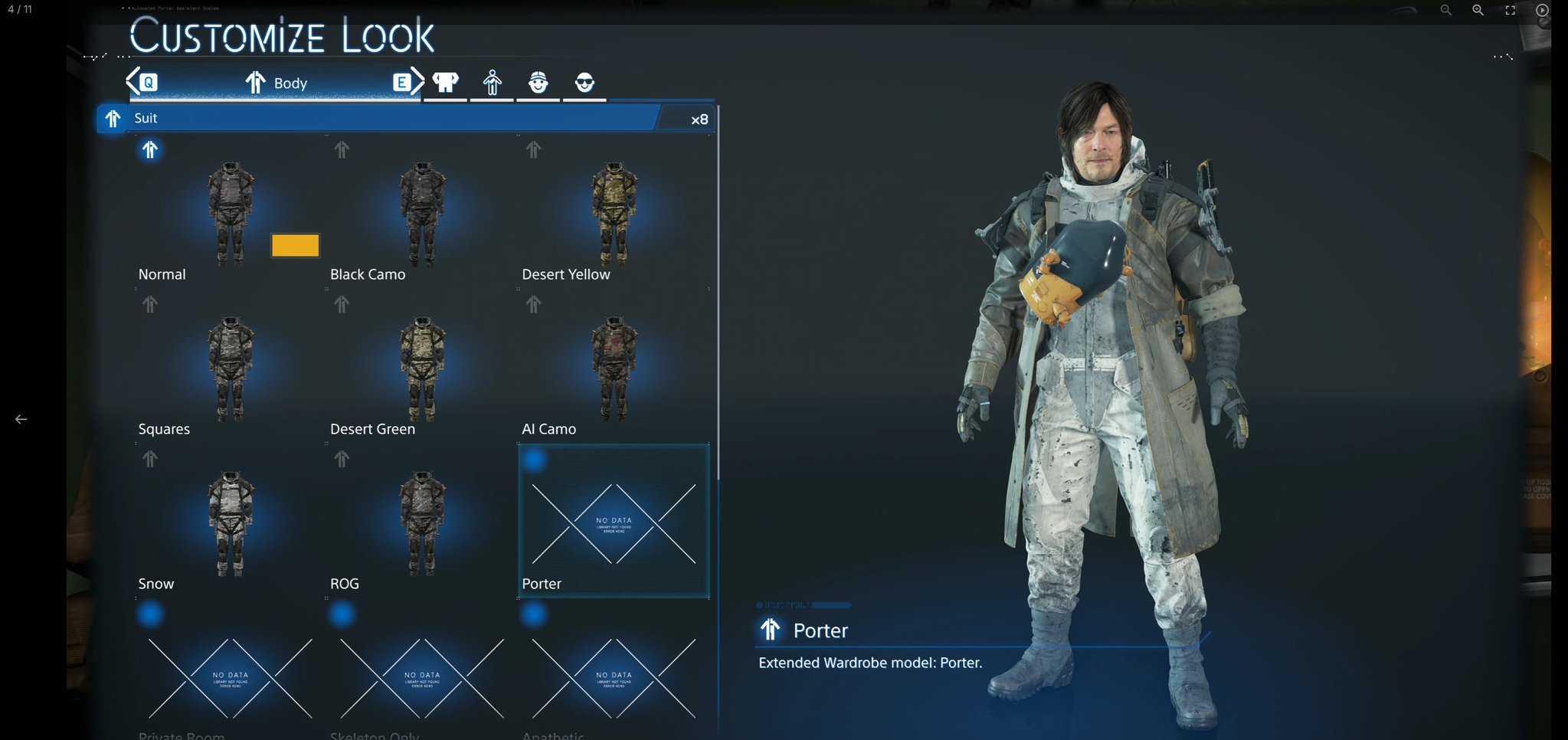
Nexus Mods :: DEATH STRANDING 2: ON THE BEACH
Unlock additional models in the Customization menu.
unborn rover
snow coyote
They're all fine, I find assault rifle or machine gun the most convenient to use...
rifles just have too much of recoil for me
drifting venture
I just met ||Tomorrow and saw her fight like a badass. Now part of Megallian. :)||
pine crag
Tomorrow!
 pine crag
Big Patch is up. Apparently it fixtures distant texture glitch!
 burnt zealot


 knotty bobcat
kinda crazy it took them 2+ months to add this, better late than never ig

really curious about the distant textures tho, def gonna try to make some comparison shots
unborn rover
XeSS FG updated?
interested how that'll look
since I'm using XeSS and XeFG

also the possible fix for distant textures sounds scary, hopefully it won't impact performance
wet rivet
someone see if switching between the various aa/fg options results in the mod breaking
need to see if they added any new shaders
 rose marsh
wet rivet
someone see if switching between the various aa/fg options results in the mod br...
rose marsh
wet rivet
someone see if switching between the various aa/fg options results in the mod br...
looks like everything's fine
drifting venture
I am at 75% mark of Australia right now. Saw a nice fight too.
||basically Tomorrow takes down Higgs as well. Damn those eyes. Are they gonna be permnant eye shadow or whatever that is on higgs and tomorrow's face?||
drifting venture
Damn Deathstranding 2 threw in huge curveball near end.
- || Deadman is the big samurai.||
- || President is actually the alien in control of Death Stranding creation.||
- ||Tomorrow is ctually Sam's daughter which I kinda figured out already and had huge hunt that was the case. But also the new Extinction Entity.||
Now to continue onward. lol