#Death Stranding 2
1 messages · Page 5 of 1
 split cosmos
 glass sage
9800x3d
split cosmos
what game do u usually stutter on?
glass sage
I don't, unless I use balanced. If I use balanced I'll see small stutters in most games I try. Sorry don't have anything specific it's been awhile since I've tried.
split cosmos
no worries
 covert hawk
i also dont stutter in most other games
ds2 is the exception so far
but it did fix this
split cosmos
"Core parking is disabled and the CPU never drops below its nominal (base) frequency." is what bitsum does, idk any specifics other than that
covert hawk
gonna try marathon out and see if my perf improved
that game is super cpu bottlenecked for me
split cosmos
i swear windows rly gotta get their shit together 😭
split cosmos
same
glass sage
hopefully whatever update they are working on is actually meaningful, windows has been talking a big game recently about improvements for gaming.
We'll see if it ever releases
split cosmos
i hope so too
glass sage
did you switch to Ultimate performance or another option @covert hawk
split cosmos
there's so many variables that could cause why you stutter with balanced, maybe it's a psu related or cable related thing, idfk it's weird asf but if high perf. works then by all means use it, your chip may just be different
glass sage
I haven't used it in awhile going to try it out again
covert hawk
glass sage
did you switch to Ultimate performance or another option <@237054746928611329>
just the one that i posted there
bitsum performance
glass sage
split cosmos
there's so many variables that could cause why you stutter with balanced, maybe ...
I also don't mind not saving on power
covert hawk
need to install process lasso for it to show up
glass sage
Ok I'm just dumb lol
split cosmos
as long as you got consistent cooling, you'll be fine so keep at it
glass sage
confused myself
glass sage
split cosmos
as long as you got consistent cooling, you'll be fine so keep at it
My PC purrs it's so cool ;D
covert hawk
figured i wouldnt need it but then tried it and was like
"oh"
so thats why everyone recommends it
split cosmos
especially for your cpu :P
gotta make sure windows is properly using ur cache for games and not other apps
what ram mhz are yall using?
glass sage
6000
split cosmos
actually crazy bro
glass sage
it really fucking is
split cosmos
but ye rockin 6000 too
split cosmos
and thats cause ram was getting cheaper and cheaper too </3
covert hawk
my ram is the fastest appreciating asset ive ever owned lmao
glass sage
lol
glass sage
why can't my brain do half of 96... 48 there we go rofl. 48 gb sticks wow
covert hawk
didnt even know they were available in that size til i saw them on sale on the shelf
def an unusual size
 earnest shoal
Love the conversation here guys. Reading through it at work now and I’ve just been laughing my ass off at your name and profile @covert hawk absolute legend😂
 spare socket
Wish I knew this for RE9, I was wondering why the setting does nothing
Negative LOD bias helps immensely in that game
 short charm
dstorage.dll and dstoragecore.dll are in \native\bin\x64
 wet rivet
do we know for sure about the lod bias stuff not being set up
 pearl harbor
Negative lod bias can cause severe Moiré patterns on the high frequency textures, so it could have been a deliberate decision, if true
 normal sleet
Are the lods not the same as the ps5 version?
short charm
New experimental Lyall's mod update https://codeberg.org/Lyall/DeathStranding2Fix/issues/1#issuecomment-11948601
Codeberg.org
Describe the Issue
Does this, similar to your other mod, address the camera microstutter issue that's pervasive in this game too? It's the only thing preventing me from enjoying this game since it's so cutscene-heavy. I was able to bypass it at one point with LSFG, but I've not beeen able to...
;;;;;;;;;; Experimental ;;;;;;;;;;
[Reduce Cutscene Judder]
; Attempts to reduce cutscene judder/stutter by increasing the cutscene update rate.
; This option also removes the 60fps cap during cutscenes.
Enabled = false
; Set "Dynamic" to "true" to dynamically set the cutscene update rate.
Dynamic = false
 thin nest
Lyall cooking as always
spare socket
wet rivet
do we know for sure about the lod bias stuff not being set up
With DLSS balanced -1.0 LDD Bias I couldn't tell a difference in this, while it was immediately apparent in RE9 to me
🤷♂️
spare socket
normal sleet
Are the lods not the same as the ps5 version?
they seem to match PS5 but not PS5 Pro?

Death Stranding 2 is pushing visual fidelity to the next level, but how does it actually perform at 4K on PS5 Pro vs a high-end RTX 5090 PC?
In this video, I take a look side-by-side at image quality, performance, and differences between console optimization and maxed-out PC settings. The PC version features unlocked frame rates, DLSS, frame ge...
PS5 pro seems to flat out have more geometry in the distance
in the opening at least
Eh never mind it doesn't seem to match at all
some are better on pc some are better on ps5 pro
I do notice texture streaming being slow in general on PC tho
don't really remember that being the case on PS5
spare socket
spare socket
https://www.youtube.com/watch?v=JCFvg_HKlDc&t=44s
Textures definitely seem lower quality on PC, maybe LOD Bias is indeed not set properly

 normal sleet
spare socket
normal sleet
spare socket
distant mountains seem to be more detailed tho, if a bit blurrier, but the blurriness might be due to differences in AA/upscaler used
spare socket
normal sleet
distant mountains seem to be more detailed tho, if a bit blurrier, but the blurr...
ya pc does have more geometric detail actually
but i doubt pico is better than dlss in detail retrieval
i think the pro runs at native 4k tho in quality mode
normal sleet
spare socket
but i doubt pico is better than dlss in detail retrieval
That is true, looking at it more some mountains do look a bit too blurry on PC, defenitely something weird happening
 velvet trench
lod bias isn't set correctly
apparently there are issues with interface text if you force negative lod bias
normal sleet
Yeah there's absolutely something wrong with the lods, no doubt about it
 velvet trench
I was also seeing moire on Sam's shirt in a cutscene when I had -1.5 set with dlss quality
normal sleet
This was the first game I've spent 80 euro on release in like a decade, what a great decision on my part
I foolishly thought that Nixxes might have finally gotten their shit together, never bet on shitty devs to suddenly stop being bad I guess, lesson learned.
 twin monolith
these online bonus games is what makes it worth buying
normal sleet
The what?
 shadow wave
short charm
New experimental Lyall's mod update https://codeberg.org/Lyall/DeathStranding2Fi...
shadow wave
short charm
New experimental Lyall's mod update https://codeberg.org/Lyall/DeathStranding2Fi...
anyone tested this here? I saw comments saying there are issues
normal sleet
twin monolith
where you see structures built by players
oh yeah, well yes, but 80 bucks for a broken ass port is borderline insulting, I've spent more than 2 grand on my pc specifically to have a superior experience to consoles and between the stutters, the graphical problems and the hdr problems it definetely doesn't feel like I'm having the premium experience I paid for
I'm 10 hours into the game, I guess I'll have to bench it until they fix these issues(hopefully)
 lapis scarab
short charm
New experimental Lyall's mod update https://codeberg.org/Lyall/DeathStranding2Fi...
lapis scarab
short charm
New experimental Lyall's mod update https://codeberg.org/Lyall/DeathStranding2Fi...
This causes new stutter, for example when looking through the sniper rilfe scope
lapis scarab
Or not, maybe that was a different cause
short charm
This mod doesn't do anything in this area of the game
spare socket
normal sleet
Yeah there's absolutely something wrong with the lods, no doubt about it
the right side of the image has better lods on pc
in the same frame
it's not consistent
the textures are consistently better on PS5 pro tho
All in all the game is running fine and looks good for me, it's not that bad
especially with RenoDX fixing hdr
 waxen horizon
In case there are other Linux users - ReShade works if i use PICO instead of DLSS, though maybe there is a way to make DLSS and ReShade work that iu don't know of.

 lime lynx
Yesterday i tried to compare pc to a non-pro ps5 by switching hdmi inputs on a tv. Distant terrain textures had more detail on ps5 on both performance and quality modes. Distant terrain meshes on pc did look similar to ps5 performance, but when comparing to ps5 quality - it did look like ps5 version had more polygons in general or these lod meshes were farther away.
But i was pixel peeping and using these ingame binoculars 😄 And not sure how its comparable to other areas. Still weird that ps5 has more detail
normal sleet
spare socket
All in all the game is running fine and looks good for me, it's not that bad
yeah I was talking about textures
spare socket
velvet trench
lod bias isn't set correctly
I'm not so sure
I don't remmeber which is which


one of them is -1.0 the other is untouched
left is -1.0 i think
spare socket
spare socket
@lime lynx distant terrain meshes seem better here on pc on the right side of the image
compared to ps5 pro
like significantly better too
the buildings in the back and mountains in general seem to lack detail tho idk
Also PS5 performance looks terrible, it's super low res, i wouldn't really use that for comparisons
lime lynx
I was looking through these binoculars and on pc it was looking more “bloby” and rounded
normal sleet
spare socket
I don't remmeber which is which
in your screenshots the lods in the circle of my image seems to be on par with the pro, really strange
 spare socket
Oh interesting
I did notice that it takes a while for textures/lods to stream in
this could be the discrepancy
lime lynx
My pc was sitting still for a minute, but nothing was happening, it’s kinda minor issue. But not sure about areas further into the game
lime lynx
Maybe difference was similar to this at 23:17
https://youtu.be/-ApWCtAuKcI?t=1394&is=Qaw8MhvJQ5p5Dbzg

Kojima Productions is one of the few development studios in the world with the talent and credibility to bring innovative gameplay concepts to the triple-A space, working in combination with some of the finest technology available in the form of Guerrilla Games' Decima Engine. In this review, John Linneman goes into depth on everything that make...
 fluid glade
latest lyall mod seems to fix cutscene judder and unlock fps
ah I see this was already posted, nice
spare socket
lime lynx
Maybe difference was similar to this at 23:17
https://youtu.be/-ApWCtAuKcI?t=139...
if i compare the screenshots i just took with a still from that video on the ps5 pro
pc has better lods super far off
but lower lods in the middle?
it's fucking weird
normal sleet
short charm
New experimental Lyall's mod update https://codeberg.org/Lyall/DeathStranding2Fi...
I've tried it, unlocking fps in cutscenes fucked up audio sync in a cutscene, problably not usable
spare socket
spare socket
but lower lods in the middle?
nah actually PC looks better throughout
pearl harbor
spare socket
the textures are consistently better on PS5 pro tho
It could be sharpening
spare socket
spare socket
in this as well
it's very likely preset K and not L/M
which is definitely softer than pico native + sharpening in stills
lime lynx
What resolution base ps5 is rendering in perf mode?
I was comparing that to 4k dlaa
And it still looked like PS5 had a bit more detailed textures for distant terrain
pearl harbor
Also, who knows how the footage was sourced or/and captured
The pc capture could be affected by the compression even before YouTube does its thing
lime lynx
There is a hill to the right of that crater and it looked like it just has higher res textures
pearl harbor
I wouldn't really trust some rando channel to do a proper comparison
spare socket
pearl harbor
I wouldn't really trust some rando channel to do a proper comparison
Destin used to work for IGN, but your point is still valid about the capture
lime lynx
I was comparing, pixel peeping myself, by switching hdmi inputs on my tv 🙂
pearl harbor
Unless not the kind you can use to judge iq differences
spare socket
it definitely doesn't look the same as my screenshots
pearl harbor
spare socket
Destin used to work for IGN, but your point is still valid about the capture
Didn't know that
spare socket
All g
pearl harbor
But yeah, ideally both platforms should have been captured using the same equipment and encoded with the same settings
spare socket
lime lynx
What resolution base ps5 is rendering in perf mode?
I think it's dynamic targeting 1440p
lime lynx
It definitely looked lower res overall though still had more details in those textures
spare socket
try forcing preset M or L
pearl harbor
If you have HQ screenshots from the beginning of the game I could dl the HQ version of the DF video from patreon and compare
spare socket
spare socket
I don't remmeber which is which
@pearl harbor
I can do native hdr default to make the comparison easier
altho that's preset L with output scaling as well
pearl harbor
spare socket
I can do native hdr default to make the comparison easier
Would appreciate it
You know what, maybe would be easier if I post screenshots first and then you try to match them
spare socket
need to capture the screenshot regardless 🤷♂️
lime lynx
Hdr mod definitely fixed that weird blue, almost slightly violet tint, gradient in the clouds while looking towards sun 🙂
At first on my displayblack 400 qd-oled i wasn’t sure what was the difference, but then it was very aparent on lg g5
spare socket
pearl harbor
Would appreciate it
Preset L max settings, no ray tracing. default HDR peak 1k
Performance / DLAA


this was a double take
i didn't believe performance looked that good
but it does
L performance goes so hard
spare socket
spare socket
Preset L max settings, no ray tracing. default HDR peak 1k
Performance / DLAA
PICO native, default sharpening (this is a little buggy so not sure if it truly is default)
 shadow wave
fluid glade
latest lyall mod seems to fix cutscene judder and unlock fps
shadow wave
fluid glade
latest lyall mod seems to fix cutscene judder and unlock fps
seems like its skipping dialogues in cutscenes. I tried on deliveries. Im going back to previous version
glass sage
I'm going to try it out too in a sec
fluid glade
shadow wave
seems like its skipping dialogues in cutscenes. I tried on deliveries. Im going ...
did you lock the fps?
I saw something about audio going out of sync
normal sleet
spare socket
Preset L max settings, no ray tracing. default HDR peak 1k
Performance / DLAA
And now these have the buggy low res textures, same as the screenshot from the video, this is a head scratcher
spare socket
hmm
normal sleet
Obligatory fucking Nixxies
spare socket
I can't even reproduce it
normal sleet
So sometimes it loads properly and sometimes it doesn't? great 
spare socket
It seems consistently fine now
 warm spade
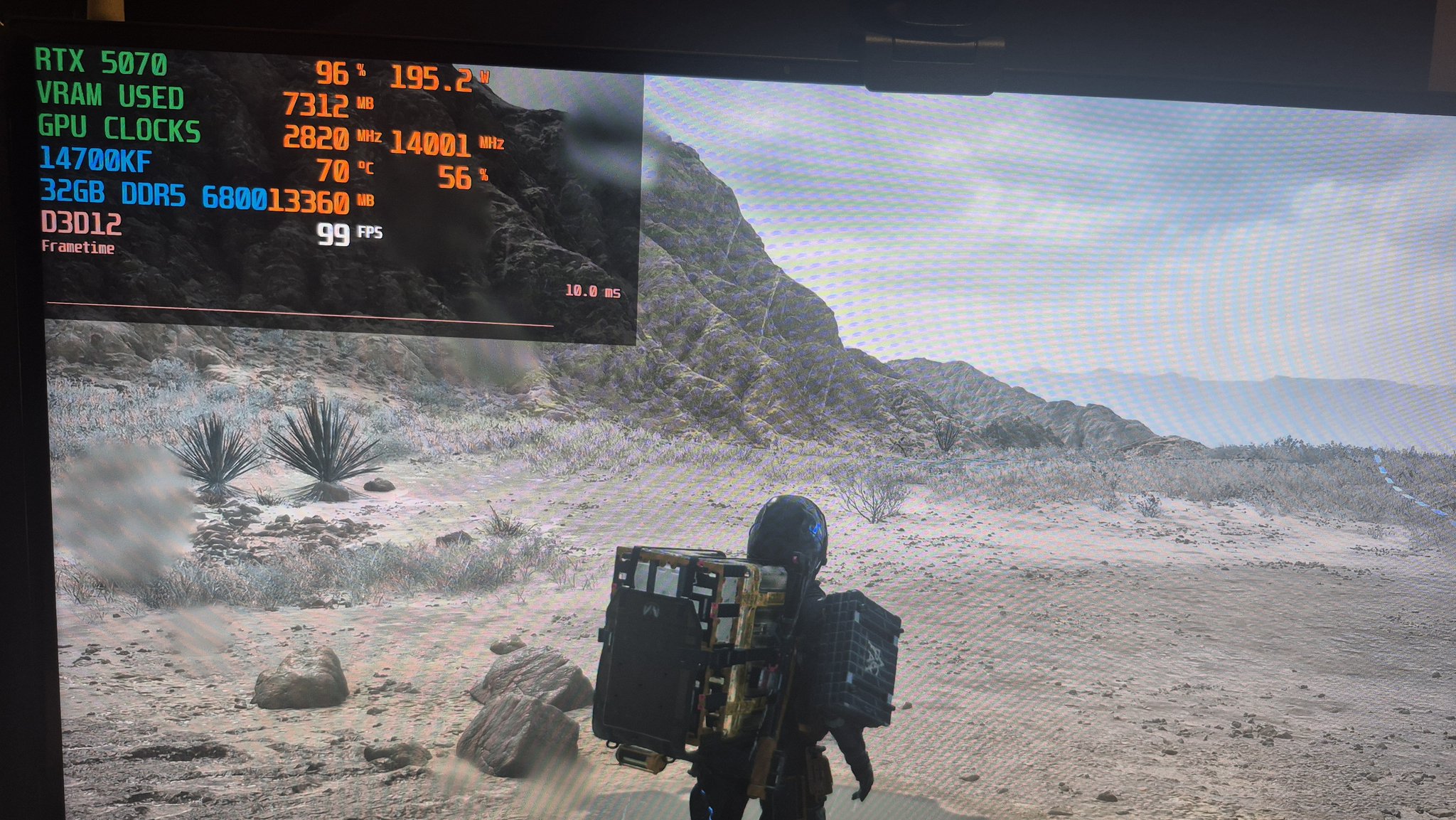
Ran a quick test at 1440p Very High, DLSS Balanced, RTAO on.
PCIE Gen 4 x 16 = 99 fps
PCIE Gen 5 x 16 = 109 fps
So basically a 10% improvement by going to PCIE Gen 5. I saw similar gains when @aziebert and I tested Doom: TDA PCIE Gen 5 vs Gen 4.
 X
·
shadow wave
fluid glade
did you lock the fps?
X
·
shadow wave
fluid glade
did you lock the fps?
no, but I have framecap at 224fps
normal sleet
warm spade
https://x.com/mpr_reviews/status/2036059778556834299?s=46
I'm running gen 5, if true good to know, still stutters tho so not really useful
spare socket
spare socket
Preset L max settings, no ray tracing. default HDR peak 1k
Performance / DLAA
@pearl harbor now with textures loaded in properly lmao
L Performance/DLAA

 pearl harbor
spare socket
Preset L max settings, no ray tracing. default HDR peak 1k
Performance / DLAA
pearl harbor
spare socket
Preset L max settings, no ray tracing. default HDR peak 1k
Performance / DLAA
The best I could get from the video
The HQ download is dead, so I had to rip the YT version


 earnest shoal
Did anyone figure out why the game is so cpu heavy? Permanently 40% and above even just talking to holograms at the delivery terminal💀
pearl harbor
Probably crunching shaders in the background
spare socket
pearl harbor
The best I could get from the video
The HQ download is dead, so I had to rip the...
matched, L DLAA


some pretty big grading differences (hdr improvements?)
Textures look the same
LODs seem better on PC in certain parts
difficult to compare since the screenshots are not the same quality
normal sleet
earnest shoal
Did anyone figure out why the game is so cpu heavy? Permanently 40% and above ev...
Because Nixxies, The Last Of Us part II had the same problem, ridiculously CPU heavy for no apparent reason, in that title it was even more egregious since it was a ps4 game
 warm osprey
interesting that Ghost of Tsushima port was largely fine performance-wise (HDR was broken tho)
normal sleet
warm osprey
interesting that Ghost of Tsushima port was largely fine performance-wise (HDR w...
Maybe because Ghost is an overwall lighter game, which makes sense when you look at it
 spare socket
based
 unkempt jacinth
warm osprey
interesting that Ghost of Tsushima port was largely fine performance-wise (HDR w...
unkempt jacinth
warm osprey
interesting that Ghost of Tsushima port was largely fine performance-wise (HDR w...
hdr is also broken on console iirc same with the second one
normal sleet
I mean when is HDR not broken? Nixxies or not lol
wet rivet
normal sleet
I mean when is HDR not broken? Nixxies or not lol
alan wake 2
 fringe harness
alan wake 2 is cinema
normal sleet
wet rivet
alan wake 2
I really need to play that uh, I don't like spooky games tho, but it does look really interesting
spare socket
normal sleet
I really need to play that uh, I don't like spooky games tho, but it does look r...
if jump scares get you easily, you're gonna have a great time

 knotty bobcat
dead space remake also has good hdr, at least to me it was nice
normal sleet
spare socket
https://tenor.com/view/kekwtf-gif-18599263
I guess no Alan Wake 2 for me!
 reef copper
Apparently, in-game screenshot viewer cannot display HDR, so it's all grey
earnest shoal
normal sleet
Because Nixxies, The Last Of Us part II had the same problem, ridiculously CPU h...
True, guess I didn’t mind since performance was better for me in that game
wet rivet
Forgot that I could add better ui blending
Only for DLSS users though
Also it wouldn’t effect ui elements that are actually part of the game scene
Since some ui elements I think are run through the color grading
warm osprey
wet rivet
Since some ui elements I think are run through the color grading
definitely looks like so
normal sleet
spare socket
They added settings to tone them down
Man I fucking hate jump scares, they feel so cheap, they just trigger a mental reflex without showing something that justify that fight of flight response, and I like horror stuff, Hereditary and Midsommar are two of my favorite movies but they're also very light on jump scares and rely almost exclusively on legitimately unsettling stuff. I wish more horror content was like that.
wet rivet
normal sleet
Man I fucking hate jump scares, they feel so cheap, they just trigger a mental r...
There’s also an option in the game to turn off the jump scares
Though to me the jump scares never really made me jump
It basically just flashes something on the screen for a second with a sound
So they don’t really add much to the game
Not losing anything by disabling them
spare socket
Ye AW2 jump scares are just that, they add very little
don't think you can fully disable them tho
just tone down the sound and visual
normal sleet
wet rivet
It basically just flashes something on the screen for a second with a sound
ughhhh the worst kind, I guess I could try disabling them, although I would feel bad for experiencing the game in the unintend way technically
warm osprey
normal sleet
Maybe because Ghost is an overwall lighter game, which makes sense when you look...
fair, but at least it didn't have this LOD weirdness lol
spare socket
normal sleet
Man I fucking hate jump scares, they feel so cheap, they just trigger a mental r...
Hereditary was absolute PEAK
split cosmos
there’s jump scares in this game wtf
warm osprey
I think I'm around half way through the game, at least, unlocked regions-wise I've done West and North, and yeah, DS2 is really different from DS1
much less of a struggling DoorDasher simulator
spare socket
What difficulty you on
warm osprey
the one below the new highest
split cosmos
Fuckkkkkk do I play DS1 or do I continue my resident evil journey and play 2 remastered
spare socket
warm osprey
the one below the new highest
oof
warm osprey
that prompt about not being able to change from that one later deterred me from picking it at the start kek
spare socket
Yea, fair enough
warm osprey
in general the entire mood of the game
spare socket
it does add some much needed friction imo
warm osprey
warm osprey
in general the entire mood of the game
is that MC is more of an all around survival and combat expert and in general the best problem solver
all characters expect way more of him
normal sleet
split cosmos
there’s jump scares in this game wtf
Yeah I know, I got a pretty good one when I was about to take a shower in the DHV Magellan, but it wasn't so bad, it was telegraphed pretty heavely
warm osprey
warm osprey
all characters expect way more of him
and cargo deliveries pay much lesser role in relation to other (mainly combat) tasks
there are way less Standard Orders too
spare socket
Yea, the game kinda pushes you to move forward
and there's generally a good reason for it
warm osprey
even with the faster Standard Order reload perk I'm still stuck not being able to max Preppers
spare socket
minor gameplay spoilers: ||there are several long backtracks tied to story progression||
warm osprey
also they removed the feature where you could search which facilities have orders to deliver to the one you pick on the map?
split cosmos
fuck it yall r convincing me to play ds1 especially if ds2 has more action
spare socket
also: ||late game preppers have orders for early game preppers ||
 true urchin
wet rivet
alan wake 2
true urchin
wet rivet
alan wake 2
some luts are bad, needlessly limited
warm osprey
split cosmos
fuck it yall r convincing me to play ds1 especially if ds2 has more action
DS1 is definitely way more of an experience rather than a standard open world game
true urchin
pumbo did what he could but the game's hdr is not perfect due to (imo) bad artistic decisions
warm osprey
DS2 is definitely a good game, but it's less experimental
spare socket
warm osprey
DS2 is definitely a good game, but it's less experimental
I think it mostly feels that way coming from DS1
DS1 was extremely unique
warm osprey
true
spare socket
DS2 can't be because of DS1
warm osprey
but also the mood and atmosphere are definitely different and are a major contributing factors
warm osprey
in DS1 everything was unknown not only to you the player but also all the characters
spare socket
also i really dislike the ship following you around
i like the far from home feeling DS1 gave you
warm osprey
now they are all acting accordingly, like most of the significant mysteries were figured out
which actually were in DS1 so it's appropriate
but the shift is major
spare socket
I mean the game still heavily leans into mysteries
they're just not as compelling
imo anyway
warm osprey
yes, but in DS1 the mysteries were more existentially threatening
like how to fckin "kill" BTs
warm osprey
I think the sequel to DS was not originally planned when they were making the game
spare socket
I don't think a ds1-2 would've worked
warm osprey
so they did the best they could to continue the story
after the first game being successful
spare socket
maybe yea
warm osprey
they did a good job
spare socket
what's wild to me is
warm osprey
yeah, but it still makes me appreciate DS1 even more
spare socket
Bro built a whole studio and shipped absolute peak in 4 years
that just doesn't happen anymore
warm osprey
warm osprey
yeah, but it still makes me appreciate DS1 even more
I 100% that game in two weeks, with over 100 hours on count
it kept me awake at night lol
spare socket
spare socket
Bro built a whole studio and shipped absolute peak in 4 years
and an entirely new experience at that
fully fledged, complete launch
with a bazillion hours of motion capture and cutscenes
wet rivet
true urchin
some luts are bad, needlessly limited
dlc yes, main game is pretty good from what I recall
spare socket
wet rivet
dlc yes, main game is pretty good from what I recall
I argued this as well
but it's not the case
Big parts of Saga's sections are very limited
they were doing 500-600 peak with 1000 set
🤷♂️
spare socket
Fair, I don't really know how it would scale down to TB 400
spare socket
wet rivet
if it looks good to me i like it
same
wet rivet
I played it on a 1000 nit TV
spare socket
AW2 looks great
wet rivet
control resonant I'm sure will have lots of dimmer areas
true urchin
wet rivet
dlc yes, main game is pretty good from what I recall
the limited highlights in safe rooms in alan's sections comes to mind immediately
just looked wrong
spare socket
true urchin
the limited highlights in safe rooms in alan's sections comes to mind immediatel...
are these limited tho?
true urchin
they definitely were, it'd clip at like 400 nits and you could even see a transition from a higher peak when entering the area with a flashlight
(unless that got fixed, i played on release)
spare socket
from what I tested a month or so ago, they reach peak when you're outside the safe zone and the game does some exposure adjusment (or something similar) when you enter the safe zone dropping them to like 700 nits instead of 1k
true urchin
i'm sure it was simply a limited lut there
spare socket
probably
wet rivet
hopefully the switch to real time grading in control resonant instead of luts
true urchin
doubt it
wet rivet
riperoni
short charm
Well, i just tried DS2. It's buttery smooth. I play only with Reshade + RenoDX. No other fix. RTX 4080 + i7 12700, rebar, DLSS K, FG, vsync in nvapp, everything at max except no RT
fluid glade
does the latest lyall fix nightly work for anyone?
my audio is out of sync no matter what I lock my fps to
🙁
 signal pine
fluid glade
signal pine
fluid glade
I'm talking about the one that unlocks cutscene framerates
to fix judder
Codeberg.org
Describe the Issue
Does this, similar to your other mod, address the camera microstutter issue that's pervasive in this game too? It's the only thing preventing me from enjoying this game since it's so cutscene-heavy. I was able to bypass it at one point with LSFG, but I've not beeen able to...
normal sleet
fluid glade
does the latest lyall fix nightly work for anyone?
I have audio issues as well
covert hawk
Ah
It's a known issue
People are reporting it on that page
Codeberg.org
Describe the Issue
Does this, similar to your other mod, address the camera microstutter issue that's pervasive in this game too? It's the only thing preventing me from enjoying this game since it's so cutscene-heavy. I was able to bypass it at one point with LSFG, but I've not beeen able to...
fluid glade
yea I saw people saying it was working for them at certain framerates
hopefully they can get this sorted
would be awesome
waxen horizon
I've only just started, but so far it feels absolutely the same, and by that I mean nothing improved and no more Monster.
Higgs in trailer was sick though, can't wait.
Bosses in DS1 were a joke, hope it's better in that regard.
fluid glade
it's more of a cinematic experience
wet rivet
opening is better
fluid glade
probably depends on the difficulty though
wet rivet
playing on brutal and it feels like I have to be more deliberate
enemy interactions I'm enjoying more in general
normal sleet
Yeah fire is pretty busted atm
hue correction 30/hue correction 100/vanilla


 split cosmos
musa what difficulty shall I play ds1 in
wet rivet
split cosmos
musa what difficulty shall I play ds1 in
hard
wet rivet
normal sleet
Yeah fire is pretty busted atm
hue correction 30/hue correction 100/vanilla
how is hue shift and correction both at 0
split cosmos
say less
fluid glade
wet rivet
how is hue shift and correction both at 0
it's better but still blown out compared to vanilla
wet rivet
normal sleet
Yeah fire is pretty busted atm
hue correction 30/hue correction 100/vanilla
try hue correction and shift both at 100 with this
wet rivet
normal sleet
Yeah fire is pretty busted atm
hue correction 30/hue correction 100/vanilla
sdr looks best here
wet rivet
normal sleet
Yeah fire is pretty busted atm
hue correction 30/hue correction 100/vanilla
make a save here
normal sleet
wet rivet
make a save here
yeaaaah a bit late for that sorry, it's the kangaroo mission if that helps, don't know if I can replay it in any way atm
wet rivet
normal sleet
yeaaaah a bit late for that sorry, it's the kangaroo mission if that helps, don'...
how far into the game
normal sleet
I've played around 10 hours, but i'm speeding throung a lot of stuff so maybe farther than most
normal sleet
dunno I'm not there yet
normal sleet
the kangaroo mission is right after you meet the asian girl, can't be more specific because spoilers
wet rivet
just gonna have to actually play the game
wet rivet
fringe harness
i can show you the firework scene
ye that would be good
wet rivet
wet rivet
try hue correction and shift both at 100 with this
with this build
both hue correction and shift at 0
vs both at 100
fringe harness
ok
normal sleet
wait the game saved automatically, i got the fire king, lemme see if I can get you some screenshots
fringe harness
100 / 0


 wet rivet
fringe harness
100 / 0
wet rivet
fringe harness
100 / 0
take hdr png
reshade has it
with printscreen
you can change the folder it saves in the reshade settings tab
wet rivet
fringe harness
100 / 0
oh ye this was also sdr jpg so the tonemapping applied to the jpg is changing it
actually can you send the save file, I'll just go full autist and tweak it a bunch
fringe harness
its the vr thing in the game that lets you come here to practice
but you unlock it later in the game
wet rivet
%USERPROFILE%\Documents\DEATH STRANDING 2 - ON THE BEACH\
fringe harness
ill dm u


 knotty bobcat
can anyone tell me whats the consensus on ray tracing in this game, is it worth using both AO and Reflections Ray tracing?
normal sleet
knotty bobcat
can anyone tell me whats the consensus on ray tracing in this game, is it worth ...
It's pretty meh, almost unnoticible in most situations, reflections I guess are a bit more obvious but are also super noisy and smeary
Personally I use AO and reflection(high) but just because i have the hardware to do so, if you need performance I would absolutely disable them, you won't lose much
 thin abyss
wet rivet
hopefully the switch to real time grading in control resonant instead of luts
thin abyss
wet rivet
hopefully the switch to real time grading in control resonant instead of luts
What are some games that do this
normal sleet
The game was carefully designed without raytracing in mind and it's still beautiful without it, with all the artifacts of raytracing one might even say that no ray tracing is the cleaner, intended look
fluid glade
wet rivet
when is that fireworks section
I think it's actually the mission after the kangaroo
wet rivet
thin abyss
What are some games that do this
ue
ass creed
well ue unless the developers use the legacy color grading luts which don't even work in hdr
normal sleet
fluid glade
I think it's actually the mission after the kangaroo
Well shit, I stopped playing at the absolute worst time lmao
thin abyss
Ahh alright
fluid glade
normal sleet
Well shit, I stopped playing at the absolute worst time lmao
I'm gonna go build some roads until lyall hopefully fixes cutscenes lmao
knotty bobcat
normal sleet
It's pretty meh, almost unnoticible in most situations, reflections I guess are ...
ah i see, thanks, kinda disappointing tho. ig ill play around w frame gen and dlss to see if my pc can handle it, if not ill turn it off
normal sleet
knotty bobcat
ah i see, thanks, kinda disappointing tho. ig ill play around w frame gen and dl...
yeah tbh it just feels like a tacked on feature to try and sell the pc port, pretty lame
fluid glade
to be fair though the game just looks so amazing already
but yea the AO on foliage kinda sucks / is non existent
would've been a cool improvement but it doesn't seem to do much
normal sleet
Oh yeah for sure, it looks incredible, but it's disappointing that they wasted dev time on such a poor implementation instead of fixing the many problem of this port
I would have taken a port with zero ray tracing but with no stutter any day
fluid glade
oh definitely yea
yea the stutters in cutscenes are extremely annoying
somethings really messed up there
I don't have any issues otherwise
normal sleet
For me the cutscenes play just fine at 60, some small stutter sometimes on scene change but very rare, it's the camera panning microstutter and fucked up vrr in general that is driving me insane, I've been playing at 60fps vsync so far because I can't stand the costant shift in fps with cutscenes and of course the panning stutter
fluid glade
oh yea I turned off VRR and went with 120fps with framegen
cutscenes are fine except for the stutters
but yea proper VRR would be nicer
knotty bobcat
whats the issue with VRR, does it cause stutters?
normal sleet
fluid glade
oh yea I turned off VRR and went with 120fps with framegen
how do you set up frame gen with no vrr?
normal sleet
knotty bobcat
whats the issue with VRR, does it cause stutters?
If I unlock the the framerate there's constant microstutter
warm osprey
knotty bobcat
can anyone tell me whats the consensus on ray tracing in this game, is it worth ...
I disabled them because it looks worse when they are enabled
ray counts are silly low, constant boiling
without Nvidia Ray Reconstruction in this game RT hurts picture more than improves it
even ignoring performance, just bad looking RT, worst example
normal sleet
Also the game in some areas is insanely demanding, I usually average 100fps fully maxxed but there was a mission when you have to deliver a rifle and go through a BT zone and I saw my fps go into the 40s
No idea if my game was bugging out or what
wet rivet
RTAO had boiling so I turned it off
 radiant light
hmm i wonder if my 3200mhz ram and pcie 3.0 mobo are why this game doesnt run as well as nice as it does on console for me
wet rivet
Also people said reflections very high was really heavy
radiant light
it runs decent, more fps than console most of the time but its not consistent
i wonder if a gen4 board would affect my 4080s perf much in this game, and i cant imagine my 5800x3d is bottlenecking anything
wet rivet
So I’m on rt reflections high and no RTAO, rest max, DLSS 4k dynamic res with 3x fg targeting 180fps
radiant light
wet rivet
So I’m on rt reflections high and no RTAO, rest max, DLSS 4k dynamic res with 3x...
did u turn tips off?
wet rivet
radiant light
did u turn tips off?
No
radiant light
idk if thats just a myth or if it acc does anything
normal sleet
wet rivet
So I’m on rt reflections high and no RTAO, rest max, DLSS 4k dynamic res with 3x...
How do you target specific framerates with framegen?
radiant light
do u get camera stutter/traversal stutter, like with cutscene transitions or fast movement
wet rivet
normal sleet
How do you target specific framerates with framegen?
Dynamic res has a framerate target
wet rivet
radiant light
do u get camera stutter/traversal stutter, like with cutscene transitions or fas...
Idk cutscenes seemed fine enough
But I try not to focus too much on fps
Game didn’t feel super smooth though
Just felt fine
radiant light
yeah, i booted it up on my ps5 side by side with my PC to compare
PS5 at 60fps and PC at 70-80fps, the PS5 felt way smoother, more fluid, and just overall better
i rly dont know what magic they do on console to make it so nice
i guess just super consistent frame times? but idk why windows couldnt do the same thing
radiant light
i suppose, but ive even noticed it in other games that shouldnt rely on DS like ps4 games
spare socket
but that was also on ps5 at launch
radiant light
gow 2018 at 60fps on console feels smoother than 70fps on pc, weird af
consoles def have something special to make them feel so smooth
spare socket
consoles do triple buffering vsync
radiant light
yeah but i do that on pc too
spare socket
input response in the gutter
radiant light
actually idk if i have triple buffering on globally
yeah but for controller games thats not a big deal anyways, especially above 60fps
i use triple buffering in rdr2 and its nice
i also somehow gain 20-30fps when i enable it??? (not in ds2, other games)
i suppose that might be normal but it seems weird af
 rotund salmon
radiant light
i wonder if a gen4 board would affect my 4080s perf much in this game, and i can...
rotund salmon
radiant light
i wonder if a gen4 board would affect my 4080s perf much in this game, and i can...
someone posted this here earlier
rotund salmon
warm spade
https://x.com/mpr_reviews/status/2036059778556834299?s=46
so maybe?
@wet rivet did someone already give you bushfire valley and firework scene saves? I've got both
wet rivet
rotund salmon
<@251818887526612992> did someone already give you bushfire valley and firework ...
Ya
split cosmos
musa so cool
radiant light
rotund salmon
hmm, i wonder if its a bigger or smaller difference from 3.0 to 4.0
split cosmos
split cosmos
musa so cool
holy glaze
normal sleet
this is vrr unlocked framerate, it's a 120fps video, should be a good representation of the stutter I see
earnest shoal
wet rivet
So I’m on rt reflections high and no RTAO, rest max, DLSS 4k dynamic res with 3x...
which dlss model? I'm using M with performance and rt high has very noticeable noise
wet rivet
earnest shoal
which dlss model? I'm using M with performance and rt high has very noticeable n...
That was with default
earnest shoal
ah think thats K maybe ill give it a go
wet rivet
Saw boiling on foliage
earnest shoal
yeah, maybe I'll try with L but its so heavy compared to K/M
spare socket
fringe harness
100 / 0
fwiw
the fire there looks slightly different than the fire in the forest
like in the fireworks section reno fire looks much closer to vanilla compared to the forest
normal sleet
I guess in some scenes rt reflections do change the look quite a bit

 earnest shoal
How do you change settings while seeing the gameplay?
normal sleet
It's quite janky, basically you can't normally do it because everytime you enter the menu Sam does the thumbs up thing so it would be pretty useless and the game itself even prevent u to hide the UI, but I found out that during cutscenes you can, and the "rest"(hold down square/x) animation counts as a cutscene, so if you do it while he sits down or stand up and the animation plays the game allows you to hide the UI while u change settings, you can do it by pressing the touchpad on the dualsense, don't know on keyboard or other controllers what button that might be
some more for shit and giggles, might be useful to some, no rt vs full rt


Outdoors it's very hard to notice a difference tho


Just rt AO

 shadow wave
wet rivet
try hue correction and shift both at 100 with this
shadow wave
wet rivet
try hue correction and shift both at 100 with this
is this new build? @wet rivet
glass sage
earnest shoal
which dlss model? I'm using M with performance and rt high has very noticeable n...
L cleaned the noise up for me almost completely. I wasn't even going to play until I switched to L.
shadow wave
wet rivet
try hue correction and shift both at 100 with this
yea still hue shift and correction both at 0 for me in this build. I just tested with fires and firesworks via VR
normal sleet
shadow wave
yea still hue shift and correction both at 0 for me in this build. I just tested...
Imo still doesn't look quite as good as vanilla, still a touch too pink
covert hawk
wet rivet
Saw boiling on foliage
thought the same thing about rtao, but then later in the game theres more ground vegetation and it actually had a similar amount of noise at least for me
turned it back on after that
on dense geometry as well there was a lot of noise
in some of the rockier sections
wet rivet
shadow wave
is this new build? <@251818887526612992>
It’s a candidate for new build
covert hawk
i just switched to preset L and it got rid of the noise
glass sage
covert hawk
thought the same thing about rtao, but then later in the game theres more ground...
I had that as well, are you using preset L? That cleared up all the noise for me, almost.
nvm
I shoulda kept reading lol
shadow wave
glass sage
I had that as well, are you using preset L? That cleared up all the noise for me...
even wiith RT?
glass sage
Yes
I have every setting maxed, including RT.
only time I see noise now is when entering a terminal at some spots, you'll see the RT noise for a second then it clears up.
rotund salmon
"fireworks scene" comparison, can't export PS5 screenshots in HDR, unfortunately
PS5 Pro / PC (using the WIP Reno build with 0 shift/correction)

 glass sage
That's the scene I'm waiting for in my run. It was jaw dropping on the pro.
thin nest
rotund salmon
"fireworks scene" comparison, can't export PS5 screenshots in HDR, unfortunately...
man this looks crazy
normal sleet
This shit's peak yo


 covert hawk
thin nest
man this looks crazy
covert hawk
thin nest
man this looks crazy
It's much wilder seeing it in person running in real time
thin nest
i bet
covert hawk
Could say that about a lot of the cutscenes though
 normal sleet
thin nest
man this looks crazy
normal sleet
thin nest
man this looks crazy
the boss arena for this zone is quite insane as well, it was made for HDR
shadow wave
normal sleet
Imo still doesn't look quite as good as vanilla, still a touch too pink
Better than washout in vanilla hdr.
 normal sleet
spare socket
https://tenor.com/view/brother-ew-ew-what-is-that-whats-that-brother-gif-1431838...
normal sleet
spare socket
https://tenor.com/view/brother-ew-ew-what-is-that-whats-that-brother-gif-1431838...
I don’t like over sharpening, sue me
 crisp notch
covert hawk
my ram is the fastest appreciating asset ive ever owned lmao
crisp notch
covert hawk
my ram is the fastest appreciating asset ive ever owned lmao
lmao for realsies, how the fuck did (checks notes) making the extremely financially irresponsible decision to build a disgustingly priced top of the line PC a few years ago turn into the best investment ive ever made?? 🙃 🤣 😭
fluid glade
dude I even have 64gb of RAM lying around as a backup
it's basically worth a monitor now
a nice oled monitor
looks like asus is selling off the OLED PG27UCDM in my country in preperation for their new tandem oled model
spare socket
normal sleet
I don’t like over sharpening, sue me
me neither 
 stray hamlet
Preset M completely shit itself with the sparks in that sequence fwiw
I also swapped from m perf to k balanced there
thin abyss
Damn okay
stray hamlet
Maybe would have fared better with higher input res than 720p, or preset L, but I don't have the system overhead to try either of them
rotund salmon
if it's the same thing that I saw, then yeah, L handles it fine compared to M
M / L

 spare socket
stray hamlet
Preset M completely shit itself with the sparks in that sequence fwiw
spare socket
stray hamlet
Preset M completely shit itself with the sparks in that sequence fwiw
I used preset L performance
looked fantastic
M does seem to have some issues
stray hamlet
It was like blending all the sparks together instead of keeping them separate
spare socket
especially with motion blur
rotund salmon
stray hamlet
It was like blending all the sparks together instead of keeping them separate
yeah, exactly that. You can see it on the tallest bit of those screenshots
spare socket
it's a little odd tbh
since M usually handles particles better than L
or any other preset
guess it really doesn't like those specifically
spare socket
rotund salmon
if it's the same thing that I saw, then yeah, L handles it fine compared to M
M...
now do K
stray hamlet
I know they added a way to replay that sequence but I don't think I have it unlocked yet
wet rivet
rotund salmon
if it's the same thing that I saw, then yeah, L handles it fine compared to M
M...
you can use photo mode to pause the game for cleaner comparison images
rotund salmon
it doesn't have the same issue when it's not in motion
shadow wave
Preset L for me
normal sleet
Preset L and have an overall oversharpened image and 20 less fps? nah dawg miss me with that shit
stray hamlet
feel like they really dont oversharpen when you use them at their intended render scales
i could just need new glasses though
they do however get absurdly expensive as you take the scale higher and higher which the older presets dont do
shadow wave
normal sleet
Preset L and have an overall oversharpened image and 20 less fps? nah dawg miss ...
not to me, M is. Im using L on DLAA at 4K.
shadow wave
Wooohoooooo!
 stray hamlet
if you have a 5090 sure you can just tank the hit lol
shadow wave
stray hamlet
if you have a 5090 sure you can just tank the hit lol
Yea I do
unkempt jacinth
why would you use L with DLAA, i think dldsr or opticaler makes more sense
shadow wave
unkempt jacinth
why would you use L with DLAA, i think dldsr or opticaler makes more sense
is DLDSR worth it on 4k?
stray hamlet
shadow wave
Yea I do
on say a 4070ti M dlaa would just wipe out like 40fps vs K, it's very heavy and L is even heavier
unkempt jacinth
unkempt jacinth
why would you use L with DLAA, i think dldsr or opticaler makes more sense
at performance of course
stray hamlet
and they dont even look that different at scales like that to boot
fluid glade
shadow wave
is DLDSR worth it on 4k?
absolutely
stray hamlet
basically i think nvidias recommendations as-is are fairly smart though you have some wiggle room at say balanced and quality
unkempt jacinth
shadow wave
is DLDSR worth it on 4k?
yeah should get better AA + higher base render resolution
fluid glade
fluid glade
absolutely
provided you have a bit performance to spare
shadow wave
unkempt jacinth
why would you use L with DLAA, i think dldsr or opticaler makes more sense
It is heavier than DLAA?
unkempt jacinth
if you use performance L i think it should balance it out
there is also optiscaler
shadow wave
unkempt jacinth
if you use performance L i think it should balance it out
what would be output resolution for this setup?
unkempt jacinth
shadow wave
what would be output resolution for this setup?
half the resolution of the dldsr you choose
also make sure smoothness slider is at 100%
shadow wave
unkempt jacinth
half the resolution of the dldsr you choose
also make sure smoothness slider is ...
Thanks, I will try
spare socket
normal sleet
Preset L and have an overall oversharpened image and 20 less fps? nah dawg miss ...
dunno where you see oversharpening
maybe it looks different with 1440p output res
 crystal ravine
what about Ultra Performance?
 shadow wave
unkempt jacinth
half the resolution of the dldsr you choose
also make sure smoothness slider is ...
shadow wave
unkempt jacinth
half the resolution of the dldsr you choose
also make sure smoothness slider is ...
how do I verify if DLDSR is working? Seems its not - I am seeing the same performance without it.
fluid glade
shadow wave
how do I verify if DLDSR is working? Seems its not - I am seeing the same perfor...
you have to set your game to that resolution
shadow wave
fluid glade
you have to set your game to that resolution
oh i see, should be exlusive fullscreen to use this
fluid glade
shadow wave
oh i see, should be exlusive fullscreen to use this
either that or you set your desktop resolution to the DLDSR resolution
and run the game in windowed fullscreen
you still have to make sure it's the correct resolution in-game
if you are playing on a 4k monitor/tv I would try 5120 x 2880 at DLSS performance
shadow wave
Preset L:
DLAA native 4K = 80fps
DLDSR + DLAA = 50fps
DLDSR + Quality = 85fps


 shadow wave
fluid glade
if you are playing on a 4k monitor/tv I would try 5120 x 2880 at DLSS performanc...
shadow wave
fluid glade
if you are playing on a 4k monitor/tv I would try 5120 x 2880 at DLSS performanc...
what is the internal render resolution for this?
fluid glade
shadow wave
what is the internal render resolution for this?
it should be the same as DLSS quality at 4k
so 1440p internal render res
if you have more performance to spare go higher of course
but DLDSR with DLSS performance already looks really good and performs very well imo
shadow wave
fluid glade
it should be the same as DLSS quality at 4k
But upscaling it to higher resolution than 4k, then supersampling it back to 4k? Am I understanding it correctly
fluid glade
shadow wave
But upscaling it to higher resolution than 4k, then supersampling it back to 4k?...
yea, but it will still look sharper/less aliased
spare socket
fluid glade
so 1440p internal render res
I dont think this is true
Should be 67% of output res
shadow wave
what do you call this resolution tho? 6k? lol
 spare socket
So of 2880p in this case
fluid glade
shadow wave
what do you call this resolution tho? 6k? lol
5k
shadow wave
fluid glade
5k
4K is obsolete lol
fluid glade
spare socket
I dont think this is true
DLSS performance from 5120 x 2880 is 1440p
pretty sure
fluid glade
spare socket
But dlss performance at 4k is 1080p
yea dlss quality at 4k is 1440p
spare socket
Oh i think i mightve misread
fluid glade
dlss performance at 5k is 1440p
fluid glade
no worries
spare socket
Optiscaler output res scaling does keep the same render resolution
Regardless of output res
normal sleet
Call me crazy but K to me looks sooooo much cleaner than L, just look at the shelter at the center of the image and how much more aliasing it has on the highlights, and it also is more unstanble which doesn't show up in screenshots, even standing completely still in photo mode the highlights constantly shimmer in L, but they remain stable in K
L/K

 fluid glade
normal sleet
Call me crazy but K to me looks sooooo much cleaner than L, just look at the she...
fluid glade
normal sleet
Call me crazy but K to me looks sooooo much cleaner than L, just look at the she...
L is definitely more aliased
but highlights looks waaay better
so I personally prefer L
shadow wave
@fluid glade do you recommend setting windows resolution at 5k? whats the pros and cons
fluid glade
shadow wave
<@363283596284395522> do you recommend setting windows resolution at 5k? whats ...
I think generally it's best to be able to run games in windowed fullscreen mode instead of exclusive, don't ask me for the exact technical reason
shadow wave
 fluid glade
but I wouldn't leave my windows permanently at that resolution since it seems a bit blurry in other apps and stuff
I only switch for games that I want to run at DLDSR
spare socket
normal sleet
Call me crazy but K to me looks sooooo much cleaner than L, just look at the she...
ya L is more aliased
fluid glade
then switch back
spare socket
it's not quite as bad on higher resolutions tho
and it certainly isn't oversharpened
normal sleet
fluid glade
L is definitely more aliased
I can't stand aliasing of any kind, imo it breaks the image and ruins the illusion too much, the smoothness of K gives that CGI/real footage quality to the image that I love
shadow wave
fluid glade
but I wouldn't leave my windows permanently at that resolution since it seems a ...
Yea seems about blurry
shadow wave
fluid glade
I only switch for games that I want to run at DLDSR
I'll copy this strategy
normal sleet
spare socket
it's not quite as bad on higher resolutions tho
I mean to me it is 🤷♂️ It's not super obvious in my example but I've tried L in many games and the final image always had that crunchy sharpened look compared to K
spare socket
normal sleet
I mean to me it is 🤷♂️ It's not super obvious in my example but I've tried L i...
it heavily depends on the game keep in mind
some have forced sharpening and the new models really bring that out
they look horrible in those instances
shadow wave
Preset L:
DLDSR + DLSS Performance mode
 spare socket
Also in DS2 i was testing K a bit as well, and while it is more stable in motion than L, it's extremely minor, and it overaverages any small highlight, not to mention a bunch of particles that just don't exist with K
also volumetrics ghosting
yuk
shadow wave
this looks sooo good. Thanks, guys
fluid glade
also DLDSR + DLSS with preset L smooths out the edges just enough so it's no aliased and very sharp
shadow wave
 fluid glade
shadow wave
fluid glade
shadow wave
btw if you're using reshade, which I assume you do since you're on the server, you can use reshade to make screenshots
it will create HDR pngs
you can view them in Chrome or Edge to see HDR
glass sage
crystal ravine
what about Ultra Performance?
That's "better", I meant ultimate anyway, just misspoke.
crystal ravine
hmm I changed it to balanced a while ago after reading x3D's do better on it
but might just switch back
fluid glade
crystal ravine
hmm I changed it to balanced a while ago after reading x3D's do better on it
I think this is for 9950X3D since it has different core/architecture
crystal ravine
ah idk I'm using a 7800x3D
rotund salmon
I just leave it on balanced and make sure to always toggle "remember this is a game" via game bar to enable game mode
 unique pulsar
shadow wave
what do you call this resolution tho? 6k? lol
unique pulsar
shadow wave
what do you call this resolution tho? 6k? lol
That's your standard 5K res.
fluid glade
crystal ravine
ah idk I'm using a 7800x3D
yea that doesn't concern you then
crystal ravine
I think I just got game mode running 24/7 lol
crystal ravine
fluid glade
yea that doesn't concern you then
I see I see
 crystal ravine
shit ur right
fluid glade
lmao
normal sleet
spare socket
Also in DS2 i was testing K a bit as well, and while it is more stable in motion...
L has CRAZY shimmering in some scenes, it’s insanely distracting to me, I have no idea how this doesn’t bother you guys
K/L DLAA
rotund salmon
crystal ravine
I think I just got game mode running 24/7 lol
you enable the feature via system settings, but it's toggled on/off as a per game thing and most new releases aren't automatically added to the games that enable it for a while, so you need to do it manually via game bar
 crystal ravine
normal sleet
L has CRAZY shimmering in some scenes, it’s insanely distracting to me, I have n...
crystal ravine
normal sleet
L has CRAZY shimmering in some scenes, it’s insanely distracting to me, I have n...
goddamn that's how my the outside part at the start of resident evil requiem looked for me with dlss on
spare socket
normal sleet
L has CRAZY shimmering in some scenes, it’s insanely distracting to me, I have n...
didn't even really notice this 🤷♂️, maybe I overlooked it
maybe something's cooked on your end
idk
fluid glade
resident evil requiem had crazy shimmering with preset L
shadow wave
fluid glade
btw if you're using reshade, which I assume you do since you're on the server, y...
Yea I do. Will try that
normal sleet
spare socket
maybe something's cooked on your end
Just preset L, didn't do anything fancy with it 🤷♂️
crystal ravine
rotund salmon
you enable the feature via system settings, but it's toggled on/off as a per gam...
I just have game mode toggled to on in system settings and not like, some auto detect thing I guess?
spare socket
normal sleet
Just preset L, didn't do anything fancy with it 🤷♂️
you might like the magic downscaler in optiscaler
cleans up aliasing quite well
but softens the image
and is quite heavy
 cold cargo
rotund salmon
you enable the feature via system settings, but it's toggled on/off as a per gam...
cold cargo
rotund salmon
you enable the feature via system settings, but it's toggled on/off as a per gam...
what does that even do
crystal ravine
fluid glade
resident evil requiem had crazy shimmering with preset L
M as well but only on that first part of the game really, as soon as you head inside it was fine
normal sleet
spare socket
cleans up aliasing quite well
I doubt it cleans up the shimmer tho, that looks like an intrinsic artefact of the preset, hard to filter out like that
rotund salmon
crystal ravine
I just have game mode toggled to on in system settings and not like, some auto d...
no, that's what I'm saying. The toggle in Windows settings enables the overall feature, but it's always a toggle on/off thing for each individual game
if you Win + G for game bar when in-game, then click the cog and go to general, you'll see "remember this is a game" isn't enabled for DS2, because it's a new release and isn't yet added to the list of titles automatically
that's the case for nearly all new releases
crystal ravine
rotund salmon
if you Win + G for game bar when in-game, then click the cog and go to general, ...
actually, that toggle is not there for me lol
 rotund salmon
that's good, if the toggle's missing and you've got it enabled at a system level, then it's been added to the automatically supported list already
just double checking, you're in-game doing that, yeah?
it won't have the option if you're just on your desktop
 light quail
@wet rivet am I right in assuming defaults are your preferred "by eye" settings? how does purist differ, in an overall sense rather than the specifics?
crystal ravine
rotund salmon
just double checking, you're in-game doing that, yeah?
opened gamebar while the window was focussed on Death Stranding 2 ye
fluid glade
light quail
<@251818887526612992> am I right in assuming defaults are your preferred "by eye...
basically just the shadows lifted to 75
I mean by default they are lifted a bit because the image is too contrasty otherwise
purist is with shadows at 50(default)
rest should be the same I believe
wet rivet
light quail
<@251818887526612992> am I right in assuming defaults are your preferred "by eye...
purist = developer intent
defaults = my preference
fringe harness
purist is very similar than default no?
fluid glade
btw @wet rivet what monitor are you using?
wet rivet
fluid glade
btw <@251818887526612992> what monitor are you using?
samsung g80sd
fluid glade
wet rivet
samsung g80sd
ooh did you do that 1000nits tweak?
wet rivet
fringe harness
purist is very similar than default no?
ya I intend to play fairly close to kojima san's intent
wet rivet
fluid glade
ooh did you do that 1000nits tweak?
no just tb400
fluid glade
ok you're happy with that peak brightness?
crystal ravine
I feel like the one setting that actually feels like destroying the devs intent would be to move the LUT Strength slider that I've seen some people recommend
wet rivet
crystal ravine
I feel like the one setting that actually feels like destroying the devs intent ...
ya the tonemapper only really compresses highlights so all the actual grading is in the LUT
light quail
thanx thought so 🙂
crystal ravine
ye moving the slider completely changed the way the game looks but I saw someone online recommend sliding it all the way down to achieve perfect black and stuff lol
cold cargo
wet rivet
I play at 100 game brightness at night
It would be nice if more devs designed games to be more night like at night. I was always bothered by how bright night is especially in Skyrim
wet rivet

Nexus Mods :: DEATH STRANDING 2: ON THE BEACH
Partial rewrite of the game's DX12 post processing code to fix issues in tonemapping, color grading, and the appearance of UI in HDR
stray hamlet
it's usually just fucking annoying to play with actual dark nights
crystal ravine
the average casual will complain they can't see anything if the default night time was super dark I feel
stray hamlet
its nice for specific games going for like a horror vibe
wet rivet
ya
crystal ravine
the game still has to be playable
wet rivet
outside of horror, if it looks good then that's what matters
crystal ravine
like, it's cool and all that that one fight in game of thrones at night was realistic and we couldn't see anything in the dark, but we still missed the entire fight
damn literally just relaunched my game right before the update lol
normal sleet
I can't stop taking screenshots of this scene


 spare socket
wet rivet
[updated](https://www.nexusmods.com/deathstranding2onthebeach/mods/8?tab=files)
spare socket
wet rivet
[updated](https://www.nexusmods.com/deathstranding2onthebeach/mods/8?tab=files)
where blowout, highlight saturation sliders
wet rivet
spare socket
where blowout, highlight saturation sliders
i'll add them later
glass sage
crystal ravine
hmm I changed it to balanced a while ago after reading x3D's do better on it
Everyone and everywhere suggests balanced, but I SWEAR it runs worse.
 crystal ravine
I went with whatever the normal difficulty is and it kinda feels stupid easy so I wonder what to the wilder is like lmao
the human enemies feel kinda lame when using a mouse, they all immediately go down with 1 bullet
glass sage
DS2 is a lot easier than 1
They give you vehicles really early and it's real tempting to use them, but it makes the whole game much easier.
Still took me 80 hours to beat on Playstation
crystal ravine
ye I'm just chilling going around building some roads
glass sage
It's a perfect gameplay loop for me, I fucking love these games.
crystal ravine
but combat wise there's not much of a challenge so far
spare socket
crystal ravine
I went with whatever the normal difficulty is and it kinda feels stupid easy so ...
it's a lot more difficult than brutal that's for sure
2nd boss one shots
lol
glass sage
Yeah they also give you a lot more tools to use this time so combat also becomes easier.
spare socket
but the game is still relatively easy
at least it does feel a lot more on par with ds1 on ttw
crystal ravine
I might switch switch to brutal at least
normal sleet
Is the "high performance" under power plan in project lasso? If so I just tried it, did nothing for me, stutter is exactly the same, 9800x3d here
 thorny badger
wet rivet
[updated](https://www.nexusmods.com/deathstranding2onthebeach/mods/8?tab=files)
thorny badger
wet rivet
[updated](https://www.nexusmods.com/deathstranding2onthebeach/mods/8?tab=files)
pls pin
thorny badger
I think the previous version was pinned
unless I'm stupid and there was the same nexus link anyway
normal sleet
The nexus link is always the same, Musa updates the file on nexus itself
wet rivet
ya nexus page is always updated
thorny badger
I get it, but I really believe this is what was pinned before, and the link in that post points to that specific older version: #1478565961207644231 message 🙂
but now its fine, thanks
wet rivet
that links to the latest version
its always the latest version
thats just the files tab
nexus cdn is shit so the mod page sometimes doesn't update immediately for everyone
thorny badger
ah I didn't know that
unique pulsar
shadow wave
You should always keep the desktop in native, and then adjust the in-game one as needed, with borderless.
Which monitor btw?
covert hawk
normal sleet
Is the "high performance" under power plan in project lasso? If so I just tried ...
It's Bitsum Highest Performance
 covert hawk
LMAO
covert hawk
normal sleet
Is the "high performance" under power plan in project lasso? If so I just tried ...
It might only affect dual ccd CPUs though
I'm on a 9950x3d and the improvement was dramatic
fluid glade
unique pulsar
You should always keep the desktop in native, and then adjust the in-game one as...
death stranding doesn't allow windowed fullscreen to be changed to DLDSR res though
unique pulsar
fluid glade
death stranding doesn't allow windowed fullscreen to be changed to DLDSR res tho...
RIP
rekt
fluid glade
actually a lot of games don't allow that
unique pulsar
Wait
fluid glade
that's why changing desktop res is usually easiest
unique pulsar
That's DLDSR, and not a native 5K panel?
fluid glade
yea DLDSR
unique pulsar
Oh
it is
Aorus FO32U2P
duh
nvm then lol
Shouldn't DLDSR be applied to the game itself, instead of desktop?
unique pulsar
ripperoni
unkempt jacinth
in some cases where you are able to set dldsr in borderless without setting it in windows you will get horrible stutter
fluid glade
yea
unkempt jacinth
unkempt jacinth
in some cases where you are able to set dldsr in borderless without setting it i...
and vice versa too
unique pulsar
Does SK help with this?
fluid glade
I think SK and also display commander both set the desktop resolution to the DLDSR res actually
and when you leave the game they swtich it back to native
sometimes when it's buggy it stays in DLDSR mode though
unique pulsar
Every ALT+TAB gonna go crazy then, huh?
fluid glade
nah it just stays in DLDSR mode until you close the game
but yea it's prone to bugs
I just do it manually
fluid glade
i hope we get a native 5120 x 2880 res oled monitor at some point
that should look really good with DLSS
unique pulsar
New Apple display is 5K, lowkey might get it, might not.
But miniLED, though.
I think for PC stuff, though.
I'd rather go 4K240 instead anyway
When TVs go 240Hz, that is.
fluid glade
I'll probably get the new Asus 27'' 4k240hz tandem oled
unique pulsar
ProArt?
Oh wait
Tandem
nvm
ASUS has a really nice ProArt QD-OLED that does 240Hz.
fluid glade
it's supposed to release somewhere in late Q2/Q3
normal sleet
fluid glade
i hope we get a native 5120 x 2880 res oled monitor at some point
Apple has basically been the only one on the market making 5k monitors, and not even they are doing 5k oleds, yet at least, but if that's the trend it's gonna be a loooong wait if you want non Apple 5k oleds
unique pulsar
Much pricier, though.
Comes in 27" and 32"
32" is available, 27" releases end of this month. The refreshes for this year.
They're for creators, but you can easily game on it, too.
fluid glade
normal sleet
Apple has basically been the only one on the market making 5k monitors, and not ...
yea I don't expect it soon 🙁
unique pulsar
There's a couple of 5K miniLEDs coming later this year as well supposedly using same panel as Studio Display XDR, but not 100% sure on details.
Just read it in passing.

One is LG, and another is Hisense, I think?
• Dual Mode Refresh Rate (5K 165Hz – QHD 330HZ)
Real nice.
normal sleet
unique pulsar
There's a couple of 5K miniLEDs coming later this year as well supposedly using ...
Reviews of the new studio XDR say that it's pretty fucking incredible, only minor blooming and since it's mini led and not oled you get blasted with full brightness with basically no automatic dimming
unique pulsar
Yeah, there isn't anything on market that competes with it.
And it's a great near-reference panel for work.
fluid glade
I can't go with non-oled ever again
unique pulsar
if I really HAD to, I wouldn't mind. But it'd highly depend on for what usage, and from where.
Like TCL miniLED I've been using is fine for games and movies, but horrible for desktop.
Apple's miniLED is solid for desktop, too.
My MBP panel is so fucking gorgeous.
But I have no reason not to do OLED unless it's for HDR grading work.
Or if I wanna spend $10k for Flanders, of course.
or $20-30k for Sony.
Read: ||I don't.||
fluid glade
yea IDK I don't want eye searing brightness I'd rather just have 1000 nits in highlights and perfect blacks around it
unique pulsar
Yeah
Same
I'm fine with 1-2k brightness and anything above that is overkill.
I have 3k nits rn on my TCL
At 85", you can imagine how insane that can go.
fluid glade
lmao
unique pulsar
And even in SDR at 200nits even, the shows can get blinding sometimes.
fluid glade
like staring at the sun
unique pulsar
Yeah, it's literally not a fun thing, don't really care for brightness anymore.
C/G series from LG is adequate enough for a while for me. I just want them to keep improving other aspects now.
Gradients, colours, near black performance, higher refresh rate, processing, et al.
But 'moar brightness' sells, so we'll keep getting focus on that instead.
fluid glade
I just want monitor's to finally catch up lol
though it seems tandem oleds are getting close now
unique pulsar
I left them behind, bruh. Fuck monitors, lmao.
fluid glade
I want a proper monitor for my desk
unique pulsar
Unless they succeed TVs in performance, idc anymore for general work and gaming.
fluid glade
LG C5 is nice but it's just not the same
unique pulsar
Grading work, on the other hand, that's a separate story.
But even then LG C/G can be a solid SDR one once you 3D LUT that shit up.
It's only HDR grading that gets super expensive, for that if you want OLED then you gotta go with those $10k and above panels.
Or do Apple display for $3.5k with miniLED, which has shown great results.
MBP miniLED being as gorgeous and great as it is where blooming isn't even an issue, and the new display is even better, so.
Ez dub.
unique pulsar
normal sleet
Reviews of the new studio XDR say that it's pretty fucking incredible, only mino...
Basically this.
spare socket
unique pulsar
Unless they succeed TVs in performance, idc anymore for general work and gaming.
where 32inch oled tv
 unique pulsar
LG's monitors are kinda like that, tbh. They offer monitors with webOS now.
Soooo, you get TV features in a monitor.
spare socket
Don't care for those tbh
unique pulsar
spare socket
from half a meter to a meter
Very situation dependent, yeah.
spare socket
just want the tv performance
I could probably do fine with 42
but those are not a whole lot better than monitors
unique pulsar
They're better, but monitors have worked to shrink that gap with 42" now, yeah.
spare socket
yea it's small
unique pulsar
If you don't want that giant screen, then no benefit.
spare socket
they're 750 nits peak
unique pulsar
For me, the distance is more so that ...
For example, I use 48" from 4ft away.
RTINGS recommend 6'6" at that, which is the normal THX/SMPTE recommendaiton.
spare socket
that still feels quite large
unique pulsar
That recommendation is based off the FOV.
Horizontal FOV.
So, 30 degrees FOV at 6'6"
At 4ft, I get a 47 degree FOV
It's okay for me.
unique pulsar
Well, THX/SMPTE recommendating that RTINGS share is designed for movies, lounging, etc not desktop.
Now ..
If I were to move 65" at my desk setup, to maintain that 47 degree FOV that I have right now?
I would need a distance of about 5.4ft
4.5ft if I move to 55"
My desk is already 4ft deep
I could just wall mount the panel, and move the desk a feet from the wall, put some planters behind the desk so space looks populated.
spare socket
that's a big desk
unique pulsar
And now my distance is 5.4ft to the screen, and I can use 65" and maintain same FOV.
aye, I love this desk.
12ft wide, 4ft deep.
Was built for these big boi screens.
3x 48" or 3x 55"
Can accommodate them both
spare socket
yea tvs make sense with that setup
unique pulsar
spare socket
i guess somewhere in the middle would work for me
You should look at the FOV number, see what feels good to you. A good blend of immersion, and desktop usage.
shadow wave
unique pulsar
You should always keep the desktop in native, and then adjust the in-game one as...
can't select the DSR reso in-game without going exclusive fullscreen. Hate being on fullscreen due to alt-tab being slow
unique pulsar
Like you don't wanna move your head around like a maniac while trying to open folders, ya knw?
shadow wave
unique pulsar
Which monitor btw?
FO32U2P
unique pulsar
So, you need to find a good balance.
spare socket
unique pulsar
Like you don't wanna move your head around like a maniac while trying to open fo...
it depends what i do really
unique pulsar
shadow wave
can't select the DSR reso in-game without going exclusive fullscreen. Hate being...
yes, yes. Sorry, ignore what I said 😄
unique pulsar
Right
spare socket
since most important stuff is in the middle of the screen
unique pulsar
So, you figure out the FOV that blends both use cases well.
unique pulsar
And then you figure out how you can acommodate that with what distance from the wall (if you wall mount the TV).
If your setup is desk against a wall, it gives you some freedom to adjust this, so long as you have space behind your chair.
0.5-1ft alone can make a huge difference in how large you can go in screen size for instance.
spare socket
unique pulsar
0.5-1ft alone can make a huge difference in how large you can go in screen size ...
for sure
and I have the room
but probably only till like 48"
which lands me in g5 territory i suppose
but thats also not the full fledged g5
so meh
fluid glade
I have a 90cm desk and my LG C5 still feels a bit too big
unique pulsar
spare socket
which lands me in g5 territory i suppose
Right
fluid glade
at 42''
unique pulsar
But that also takes you closer to 55" which is SIGNIFICANTLY better than 48" XDDDDDD
fluid glade
I'd also rather sit closer and have a smaller screen lol
unique pulsar
Like maybe just add half a feet more and get a display that has virtually no compromises cause of size.
But again ..
All of this is very very dependent on one's setup, and preferences.
No right or wrong rule, so long as you understand what you'll be getting.
My recommendation is to calculate your FOV instead of just distance.
That will give you the best idea.
Cause if you are happy with 45 FOV, now you only have to caluclate the distance required to maintain that FOV at 55" or 65"
or 48" or 42" or w/e, ya knw.
fluid glade
yea most people seem fine with 42'' but they have smaller desks even than mine
unique pulsar
Yeah
Personally? I will agree there are a lot of psychos among us

But if it works for them, it works for them.
spare socket
unique pulsar
You should look at the FOV number, see what feels good to you. A good blend of i...
 unique pulsar
I think many would call my 4ft for 48" too less, too.
unique pulsar

unique pulsar
What's your screen size, and your distance to the screen?
spare socket
ya
unique pulsar
Well, your FOV at half am eter is huge, yeah. 70 FOV is isnane.
spare socket
that seems more accurate
unique pulsar
But about 40 FOV at 1 meter is reasonable.
So, yeah.
If 50 seems fine then you're more or less around my setup
But mine is largely consistent.
spare socket
ya like i said
unique pulsar
Might change a degree or two, nothing more.
unique pulsar
Same, I lean back as well but that's not like half the time.
That's sometimes.
So, I don't measure that.
spare socket
ya fair
unique pulsar
I measure my standard sitting space.
spare socket
but i watch videos and stuff leaned back as well
so its a big part of what i do at the pc generally
unique pulsar
But yeah, you got an idea now at least of what you prefer 'comfortable', now you know that if you get 55" TV, then to match the FOVs
70: 2.8ft
40: 5.6ft
Roughly.
That's the distance you need from a wall.
unique pulsar
Correct