#Mod Resources
1 messages · Page 1 of 1 (latest)
 charred ridge
for more links check out
mod tools thread
#1070858800501891172 message
.
 If one of the posted links helped you in any ways please react to that post.
 Thank you
.
Mod Learning Materials
``
PzWiki:
https://pzwiki.net/wiki/Modding
Lua events:
https://pzwiki.net/wiki/Modding:Lua_Events
Mod permissions:
https://theindiestone.com/forums/index.php?/topic/2530-mod-permissions/
Fenris guide:
https://github.com/FWolfe/Zomboid-Modding-Guide
Dislaiks guide:
https://steamcommunity.com/id/Dislaik/myworkshopfiles/?section=guides
https://projectzomboid.com/modding/index-files/index-1.html
Konijimas guide:
https://gist.github.com/Konijima/7e6bd1adb6f69444e7b620965a611b74
Konijima library guide:
https://github.com/Konijima/PZ-Libraries
Mr bounty guide:
https://github.com/MrBounty/PZ-Mod---Doc
Recipe and item variables:
https://theindiestone.com/forums/index.php?/topic/15188-item-and-recipe-script-variables-brief-description/
Lua:
https://www.lua.org/pil/contents.html
Server client commands:
https:// github.com/RangerSimple/ProjZomb-Guides
Mapping and tiles:
https://youtube.com/@daddydirkiedirk119
Loot distrib:
#mapping message
Clothing masks:
#modeling message
DoParam:
#mod_development message
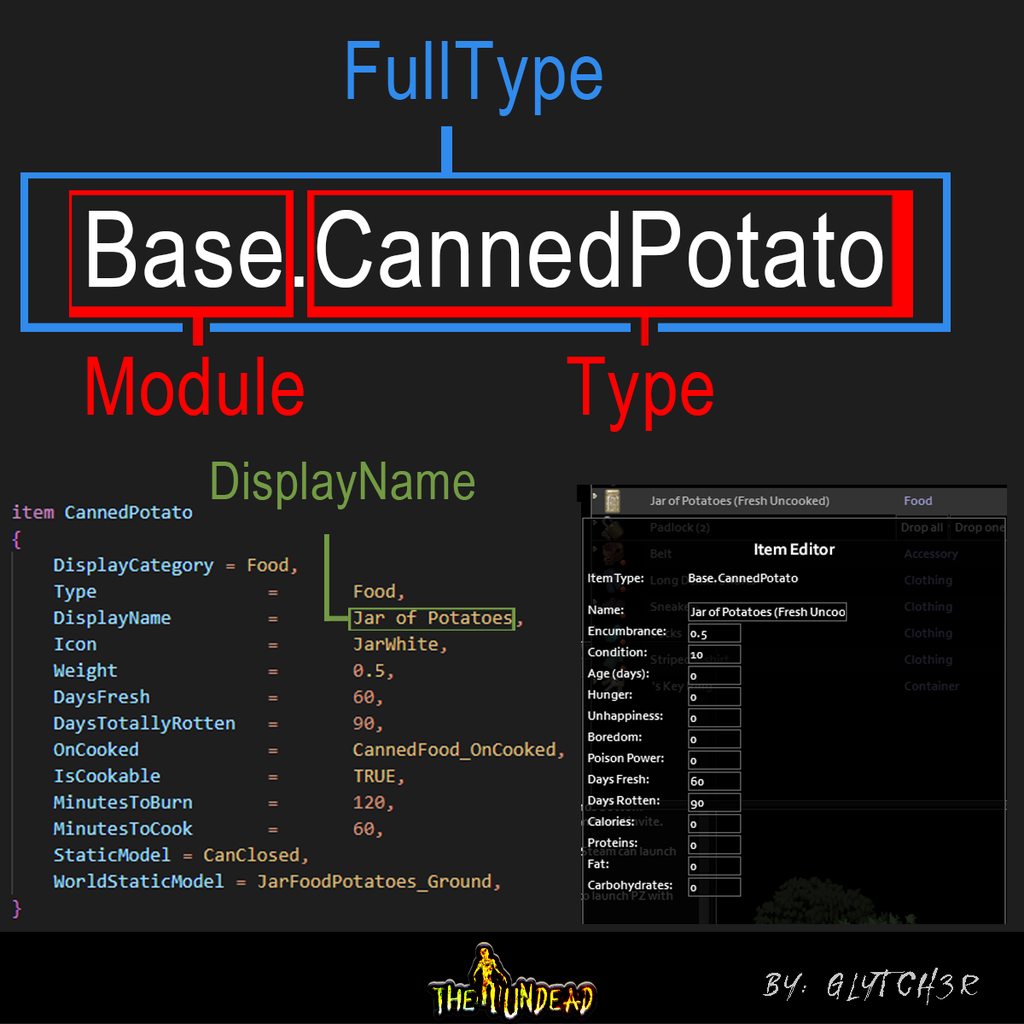
Item full type:
#mod_development message
Mod Testing:
#mod_development message
Startup Param:
https://pzwiki.net/wiki/Startup_parameters
Clothing mod:
https://steamlists.com/project-zomboid-how-create-a-clothing-mod-41-60/
Authentic peach guide:
https://theindiestone.com/forums/index.php?/topic/49385-do-not-delete-luascript-files-from-your-mod-some-modding-guidelines/#comment-342943
tag system:
https://theindiestone.com/forums/index.php?/topic/53019-details-on-the-improved-modding-tag-system-in-4169/
The Indie Stone Forums
These are the different levels of permissions available to be applied to your mods, so that other modders know how they can be used. After selecting the appropriate mod permission for your project, just include the relevant image and link to the proper permission in the first post of your WIP/Com...

GitHub
Guide to modding various aspects of Project Zomboid - GitHub - FWolfe/Zomboid-Modding-Guide: Guide to modding various aspects of Project Zomboid

.
azakaela's wordzed guide:
[#mod_development message](/guild/136501320340209664/channel/232196827577974784/p/1067081088519905280/#msg-1067082836852605028)
Javadocs:
https://rentry.co/BluesModClues
MusicMan's SandBox Guide:
[#mod_development message](/guild/136501320340209664/channel/232196827577974784/p/1067244156130439168/#msg-1067734593597354034)
Vanilla Sandbox
https://theindiestone.com/forums/index.php?/topic/20771-sandboxvarslua-file-explanation/
Albion: OnPlayerGetDamage event
[#mod_development message](/guild/136501320340209664/channel/232196827577974784/p/1032713369507086366/#msg-1032850385737617439)
Albion: Hook Guide:
https://github.com/demiurgeQuantified/PZ-events-guide/blob/main/Hooks.md
.
Vehicle modding:
https://theindiestone.com/forums/index.php?/topic/24408-how-to-create-new-vehicle-mods/
Vehicle modding:
https://theindiestone.com/forums/index.php?/topic/28633-complete-vehicle-modding-tutorial/
Vehicle skins modding:
https://theindiestone.com/forums/index.php?/topic/24278-how-to-edit-vehicle-skins/
Mod install:
https://pzwiki.net/wiki/Modding#How_to_install/play_mods
Tile properties https://pzwiki.net/wiki/Tile_Properties
Chucks guide:( object types and flags)
[#mod_development message](/guild/136501320340209664/channel/232196827577974784/p/1040438127673737267/#msg-1040597993658781696)
Check serverclient game mode:
[#mod_development message](/guild/136501320340209664/channel/232196827577974784/p/1037180129186676857/#msg-1037519465866338384)

Blue's Miscellaneous Project Zomboid Modding References!
Table of Contents
Java Docs
PZ Wiki
TIS Forum Posts
Items & Recipes
Distribution
3D Modeling
Vehicles
Tiles and Mapping
Github References
Common IDE's
Official Java Documentation
PZ Wiki
Lua Events
Misc Modding Resources
TIS Forum Post...
Disabling contextmenu reference: [#mod_development message](/guild/136501320340209664/channel/232196827577974784/p/1068331968284086303/#msg-1068898626996289626)
.
Vishnya's Benchmark code: [#mod_development message](/guild/136501320340209664/channel/232196827577974784/p/1070081956307538001/#msg-1070332054581035058)
.
Pao's tile modification during world seed:
https://github.com/ZioPao/Destroyable-World-Fences
charred ridge
TIS pz translation https://github.com/TheIndieStone/ProjectZomboidTranslations
charred ridge
Tilezed mapping shop:
https://theindiestone.com/forums/index.php?/topic/21951-the-one-stop-tilezed-mapping-shop/
Lua:
https://devhints.io/lua
charred ridge
Blackbeard:
https://youtu.be/2M2fWLBLaX8
 charred ridge
tiledef used by mods: https://pzwiki.net/wiki/List_of_Tiledefs_in_use_by_mods
.
Zomcast feat. Authentic Peach: https://youtu.be/aJfnawoIwsc
charred ridge
Map system:
https://theindiestone.com/forums/index.php?/topic/43627-how-to-update-your-map-mod-to-work-with-the-new-in-game-map-system/
trynaeat modelling:
https://trynaeat.github.io/zomboid-modeling-docs/
Authentic Peach's model resources:
https://theindiestone.com/forums/index.php?/topic/37647-the-one-stop-shop-for-3d-modeling-from-blender-to-zomboid/
charred ridge
Glytch3r's PZ Mod Sheet:
(you may edit this and improve on it add on it)
https://docs.google.com/spreadsheets/d/1Wf08bl7Cq2jRyKDJPsWI_Tm8Iiq4LgxvIyL4e2xSDmU/edit?usp=sharing

Google Docs
tables
_G,scripts,vanilla traits,permission,lua events,WearClothingAnimations = {},getWorld():getAllTilesName(),getScriptManager():getAllModelScripts(),getBeardStylesInstance():getAllStyles(),getHairStylesInstance():getAllFemaleStyles(),getHairStylesInstance():getAllMaleStyles(),getScriptManager...
.
Ckyb's Events:
https://paste.sr.ht/~ckyb/99d2d134360d355f33ceecf255b971f6b1d03624
Events:
https://pzwiki.net/wiki/Modding:Lua_Events
charred ridge
Mod Resources
charred ridge
GitHub
Complete tutorial to decompile and use Intellisense for Project Zomboid modder. - GitHub - Konijima/PZ-Libraries: Complete tutorial to decompile and use Intellisense for Project Zomboid modder.
charred ridge
Pao's attach to body code: [#mod_development message](/guild/136501320340209664/channel/232196827577974784/p/1072396290656321536/#msg-1072436365444264016)
charred ridge
Using discord Codeblock for lua codes:
`` ```lua
--codehere
``
GitHub
Contribute to MrBounty/PZ-Mod---Doc development by creating an account on GitHub.
charred ridge
suicide using debug:
getPlayer():Kill(getPlayer())
Burryaga Decoration Example:
Example = {}

Example.ISReadABook = {}

Example.ISReadABook.new = ISReadABook.new

-- Example of a decoration in which I dgaf about params
function ISReadABook:new(...)

    local o = Example.ISReadABook.new(self, ...)

    o.stopOnWalk = false;

    return o

end
GitHub
Java Hook for Project Zomboid. Contribute to Olipro/PZHook development by creating an account on GitHub.
charred ridge
Reifel's: controller guide:
#mod_development message
GitHub
a virtual controller opensource coded by bsc Computer Science with pair programming with chatgpt - GitHub - rslgp/virtual-controller-opensource: a virtual controller opensource coded by bsc Compute...
charred ridge

 gritty skiff
to reduce file size in png images
https://tinypng.com/

Make your website faster and save bandwidth. TinyPNG optimizes your WebP, PNG and JPEG images by 50-80% while preserving full transparency!
charred ridge
The Indie Stone Forums
Hey guys,I've been working on getting my mod to work on multiplayer and since there are very little resources on that topic I have a few questions. isClient() / isServer() What these methods do is clear, however when I call isClient() in a file that is located in shared it returns false althought...
 tranquil ocean
Quicker suicide using debug:
Define (in one of your mods that you always use):
function oof() getPlayer():Kill(ImaDeliciousBanana) end
Usage:
oof()
😉 Because I have to kill myself in -debug often (input to Kill can be any variable name with a nil value and still work fine).
(PS: For those running Wookiee Gamepad Support, oof() is already available through WookieeUtilities.lua.)
gritty skiff
get current FPS in SP or client side: getAverageFPS()
in mp maybe this works
local statisticsData = getMPStatistics()
--statisticsData.clientFPS
--statisticsData.serverFPS
useful to do more optimized mods, if are dealing with intense processing
#mod_development message
gritty skiff
if got a mp bug, check this (first step on multiplayer bug solver): #mod_development message
and the last message after achieve the first mp compatibility, with codes snippets
#mod_development message
charred ridge
Dhert's Body location list
(Vanilla + popular mods)
charred ridge
Blair Algol's distribution example:
#mod_development message
charred ridge
Lua Folder:
#mod_development message
gritty skiff
animation dump text file
#modeling message
ooh i forget that is listed on E:\Steam\steamapps\common\ProjectZomboid\media\AnimSets
too
--
edit, learn from dhert
#mod_development message
charred ridge
charred ridge
Glytch3r's PZ Mod Sheet:
(you may edit this and improve on it add on it)
https:/...

@gritty skiff
charred ridge
gritty skiff
current time from user, considering timezone, and converting to am pm, instead 24h
#mod_development message
gritty skiff
climb over fence boolean true
#mod_development message
gritty skiff
getDaysSinceApoc made by Chuck
#mod_development message
 thick ice
Embedding images of mod permissions with links to Indie Stone Forums for the Steam Workshop
Images & embeds on Imgur: https://imgur.com/gallery/YI54Od0
 charred ridge
Azakaela's brush tool tutorial:
https://youtu.be/kpxOI8V19xc
 charred ridge
GitHub
Project Zomboid related stuff. Contribute to Poltergeistzx/Project-Zomboid development by creating an account on GitHub.
gritty skiff
Zomboid mods -
Hollywood Page of Fame #40 to #1 most popular from all time 03/2023 - Reifel
extracted and categorized data
modId modName creatorsWorkshopUrl collectionsListed visitorsTotal subscribers favorites ratings lastDateUpdated changes awardsCount comments creators tagString
charred ridge

In this guide I will teach you step by step how to create detachable parts that contain your own animation for Project Zomboid vehicles.
Thanks to Dante271 and MrDanny for teaching me the basics of
charred ridge
Anti sledge example:
#mod_development message
 mystic badge
Steam workshop description formatting guide https://docs.google.com/spreadsheets/u/4/d/e/2PACX-1vQwxHctnvJNHAIUH79cHtH4Le8kaoCGZYFnbwYQ9JL6fZ4ndk1PLaco7PA8HyWeiuVcYNOwHFfXXQeF/pubhtml
charred ridge
blair's spawn distrib example (proper way):
#mod_development message
charred ridge
Guide to attachment editor by Authentic Peach: #modeling message
https://youtu.be/3c229O6KPjY

Now on multiple Platforms:
https://www.youtube.com/c/AuthenticPeach?sub_confirmation=1
https://www.bitchute.com/channel/authenticpeach/
https://www.minds.com/AuthenticPeach
Livestreaming Channel - https://www.twitch.tv/authenticpeach
charred ridge

1:11 Step 1 - Know your file locations
4:06 Step 2 - Storyboard your ideas out
9:03 Step 3 - Get your files from the game or other mods
11:47 Step 4 - Build your mod files
1:01:54 Step 5 - Create the textures (mislabeled in the video, oops)
1:19:45 Step 6 - Put your mod files in the right structure
1:30:37 Step 7 - Test your mod (please back up ...
charred ridge
konijima's global moddata
#mod_development message
charred ridge
when reloading lua you might not have noticed that this is a searchbox
 charred ridge
Blair about itemtweaker
#mod_development message
charred ridge
Dane's Mapping Guide:
https://www.youtube.com/watch?v=9xqDU3Jm_wQ&ab_channel=Dane
https://www.youtube.com/watch?v=iH3x8u9ZdYk&ab_channel=Dane

Petit tutoriel pour créer et ajouter des tiles customs sur Project Zomboid
Discord : https://discord.gg/4CwHTXjq8Q

- Télécharger les logiciels : WorldEd, TileZed
https://theindiestone.com/forums/index.php?/topic/59675-latest-tilezed-worlded-and-tilesets-september-8-2022/ - Télécharger le logiciel Paint.NET (gratuit)
https://www.clubic.com/telecharger-fiche14651-paint-net.html
Tuto pour créer une map avec Paint.NET :
https://www.youtube.com/watch?v=tVMZ...
charred ridge
Daddy Dirk's Overlay Guide:
https://theindiestone.com/forums/index.php?/topic/27500-how-to-connect-empty-storage-image-with-overlay-image/&tab=comments#comment-288609
The Indie Stone Forums
I'm trying to make additional furniture mod. And I made few images for mod. But when I try to do some programming thing with TileZed. I couldn't connect empty storage image with inside stuff image... Can I get some help...?
charred ridge

UnKnoWnCheaTs - Multiplayer Game Hacking and Cheats
So, I've taken the liberty of exploring Project Zomboid's anti-cheat types, since they seem to have been fairly stable in recent updates. There are so...
 charred ridge
Infect related variables
Debunked by Albion:
#mod_development message
charred ridge
Poltergeist's Time Action Flowchart:
https://github.com/Poltergeistzx/Project-Zomboid/blob/main/docs/TimedActions Flow Chart.pdf
GitHub
Project Zomboid related stuff. Contribute to Poltergeistzx/Project-Zomboid development by creating an account on GitHub.
charred ridge
3D model export size:
#mod_development message
thick ice
Project Zomboid, Build 41.78.16 is using Java JDK 17.0.1 according to the game files, in case anyone is tinkering in that.
thick ice
up-to-date Lua Events list, courtesy of albion's event plugin
https://github.com/demiurgeQuantified/PZEventDoc/blob/develop/docs/Events.md

GitHub
Tool for generating Lua documentation for Project Zomboid events and hooks - PZEventDoc/Events.md at develop · demiurgeQuantified/PZEventDoc
charred ridge
Konijima's PZ Modding Solution:
https://github.com/Konijima/project-zomboid-studio
GitHub
This is an intuitive and efficient solution to create and maintain LUA mods for Project Zomboid with greater ease. The tool allows for effortless structuring of mods, reducing time and complexity t...
charred ridge
https://github.com/FWolfe/Zmulib
Zmulib by Fenris
Timers, Loggers, Synced Configs

GitHub
Zomboid Mod Utilities Library. Contribute to FWolfe/Zmulib development by creating an account on GitHub.
charred ridge
Maemento's
Steam Workshop Description Formatting Guide:
https://docs.google.com/spreadsheets/u/4/d/e/2PACX-1vQwxHctnvJNHAIUH79cHtH4Le8kaoCGZYFnbwYQ9JL6fZ4ndk1PLaco7PA8HyWeiuVcYNOwHFfXXQeF/pubhtml
 rocky ore
dont understand how to download the pzstudio one?
charred ridge
rocky ore
dont understand how to download the pzstudio one?
@viral sundial
 viral sundial
rocky ore
dont understand how to download the pzstudio one?
viral sundial
rocky ore
dont understand how to download the pzstudio one?
What do you mean
 viral sundial
You need to open a terminal and enter the commands.
Its a CLI tool for now.
hold-shift and right click in a directory to open the powershell on windows

also make sure you have nodejs installed and git
https://git-scm.com/
https://nodejs.org/en
rocky ore
ok i use VSCode for all my scripting does that matter
viral sundial
@rocky ore vscode is perfect
rocky ore
so do i just downlod node and git on there or does it need to be on the pc
or is the setup different through VS
viral sundial
node and git is just requirement for pzstudio to work properly. You can use it inside vscode, i use it in vscode
viral sundial
np
viral sundial
rocky ore
ty
once your project is generated (using pzstudio new), then open it in vscode and you'll have the npm script available

i created a directory in my documents named Workspace and i create all my project there. The build/watch command will transfer everything into C:\Users\Konijima\Zomboid\Workshop for me
rocky ore
thats a good idea
charred ridge
Bruh dont chat on this thread tho
rocky ore
sorry
 teal quartz
thick ice
up-to-date Lua Events list, courtesy of albion's event plugin
https://github.com...
teal quartz
thick ice
up-to-date Lua Events list, courtesy of albion's event plugin
https://github.com...
hi, this resource has moved to https://github.com/demiurgeQuantified/PZEventDoc/blob/develop/docs/Events.md, i would appreciate it if you updated your link 😇
thick ice
teal quartz
hi, this resource has moved to <https://github.com/demiurgeQuantified/PZEventDoc...
updated. Thank you!
charred ridge
Konijima MP/SP and Server/Client checks
#mod_development message
 vestal bolt
@charred ridge Do you know where all of the exported model resources have gone to?
Clothes, Weapons etc
charred ridge
? Exported?
 soft horizon
So, I'll share this snippet of code for people who don't want to write multiple if-else (and please avoid doing so when you can for sanity) in lua.
This is what I consider the equivalent of switch-case in other languages.
You create a table with all the key-value pairs (and it will be easier to read than if-else).
This is an example with keyboard keys
local keyPressed = "k" .. tostring(keyNum);
    local keyMap = {
        k55 = PZNSTest_Wipe,                -- numpad *
        k71 = doNothing,                    -- numpad 7
        k72 = PZNS_GetPlayerCellGridSquare, -- numpad 8
        k73 = doNothing,                    -- numpad 9
        k74 = doNothing,                    -- numpad -
        k75 = doNothing,                    -- numpad 4
        k76 = doNothing,                    -- numpad 5
        k77 = doNothing,                    -- numpad 6
        k78 = doNothing,                    -- numpad +
        k79 = PZNSTest_logTemplateNPCsInfo, -- numpad 1 -- WIP - Cows: For now, this only prints the npc info.
        k80 = doNothing,                    -- numpad 2
        k81 = doNothing,                    -- numpad 3
        -- k82 = doNothing,                    -- numpad 0 -- WIP - Cows: Seems to be used by another mod. Do not use for now.
        k83 = PZNSTest_deleteTemplateNPCs,  -- numpad .
        k156 = PZNSTest_spawnTemplateNPCs,  -- numpad enter
    };
And now, you can do what I consider to be a silly thing and call the k-v mapped function directly from the table.
    if (keyMap[keyPressed] ~= nil) then
        if (keyNum ~= 72) then
            return keyMap[keyPressed](); -- Cows: I'm amazed this even works... but it does.
        else
            return keyMap[keyPressed](0);
        end
    end
Unless the mapped function requires input parameter(s), you can call the mapped function by appending the parenthesis at the end ()
 empty pivot
Jab’s VS code plugin: https://marketplace.visualstudio.com/items?itemName=asledgehammer.pz-wallet

Extension for Visual Studio Code - A third-party VSCode extension for Lua templates for "Project Zomboid".
charred ridge
 tranquil ocean
@autumn steeple
 autumn steeple
tranquil ocean
<@339892666097598464>
autumn steeple
tranquil ocean
<@339892666097598464>
Is this training?
tranquil ocean
This whole thread has tons of resources for learning about modding.
I recommend you start from the top and try to find what you need, one idea at a time.
tranquil ocean
@pine gulch
 jade cypress
It is mainly for Japanese mod developers, but I post tutorial on creating simple mods.
https://qiita.com/PePePePePeil/items/5db632d902eb91847541

Qiita
前書き本記事では、Project Zomboid(以下、PZ)のMOD開発について記載します。目指すところMOD開発における基本的な構成を理解する簡単なMODを作成できるようになる作成した…
tranquil ocean
@surreal flame

GitHub
Contribute to Zendachi/Wookiee-Tutorial-Party-Animal development by creating an account on GitHub.
 surreal flame
tranquil ocean
https://github.com/Zendachi/Wookiee-Tutorial-Party-Animal
surreal flame
tranquil ocean
https://github.com/Zendachi/Wookiee-Tutorial-Party-Animal
What’s that?
It’s not related to PZ I guess
tranquil ocean
You're in a thread for modding resources. It's just one of many.
Yes, it is. All these resources are for PZ
surreal flame
Oh it will help me to learn modding in general?
tranquil ocean
Party Animal is a mod on the Workshop; that is a repo showing the code required to upload it.
Showing what folder structure you need and where key files like mod.info and workshop.txt need to go
There is also at least one video tutorial in this thread, among other stuff.
surreal flame
I will check it out thanks (:
tranquil ocean
Good luck!
tranquil ocean
@fierce lily This and the pz wiki is as close as it gets. A lot of us learn by reading vanilla code or the code of other mods.
tranquil ocean
@fast raft
(Anyone who wants to refactor any of my mods is welcome to do so provided they change mod ids, file names, and global object names. I have many on the Workshop that you can try to use to learn.)
 fast raft
So I’m looking through all these guides. Unless I missed it, is there a tutorial on how to create traits/occupations and how to get rid of the original ones?
I would eventually like to have all mods on my server created by myself but I am NOWHERE close to that and in the learning stage at the moment.
tranquil ocean
fast raft
So I’m looking through all these guides. Unless I missed it, is there a tutorial...
Wookiee Tutorial: Party Animal a few messages up creates a trait. Removing vanilla traits or occupations would be done by decorating the vanilla functions that add them, but there is no tutorial specifically for that. Also, just fyi, this is more of a resource list then a discussion zone, so asking questions here might get pretty slow responses. I'm surprised I saw it.
tranquil ocean
tranquil ocean
https://github.com/Zendachi/Wookiee-Tutorial-Party-Animal
@sweet orbit
 fierce lily
A guide to adding custom right click interaction menus for inventory items
https://discord.com/channels/908422782554107904/1236163718082203719
 shy charm
Media Folder Github Repo
I've taken the liberty to throw (most of) the media folder files into a github repository for easy access for modders.
https://github.com/Niteghxst/Project-Zomboid-Media-Files
Note:
I had to leave 3 folders out due too Github's upload limit. These are in the repo's readme at the bottom.
And just in case:


GitHub
This repository holds all files that are contained within the "media" folder within Project Zomboid's folder structure, to allow all-time access from anywhere and everywhe...
 lament sun
Ok
tranquil ocean
@fringe axle
 fringe axle
Thanks!
fierce lily
tranquil ocean
<@310487823205793794>
Dude, thank you for shepherding me into the community. Just realized how frequently you're helping out in the manner, and there's never a lot of recognition after the fact. I hope you realize this lays the blame for witnessing Disco Crab solely on your shoulders.
tranquil ocean
fierce lily
Dude, thank you for shepherding me into the community. Just realized how frequen...
No worries. I just try to pay it forward. I wouldn't know how to program at all if not for freesources shared around the internet and here by countless people who don't do it for the rep.
fringe axle
tranquil ocean
No worries. I just try to pay it forward. I wouldn't know how to program at all ...
Thank you a lot, i think my previous knowledge of programming will help a lot to learn zomboid's api a lot easier.
tranquil ocean
@tidal obsidian
tranquil ocean
This seems like a fair enough place for this to collect dust.
https://steamcommunity.com/sharedfiles/filedetails/?id=3262742704
 charred ridge
ever wonder how large a loaded chunk is? i mean visually
everything outside of the space technically doesn't exist for your local player
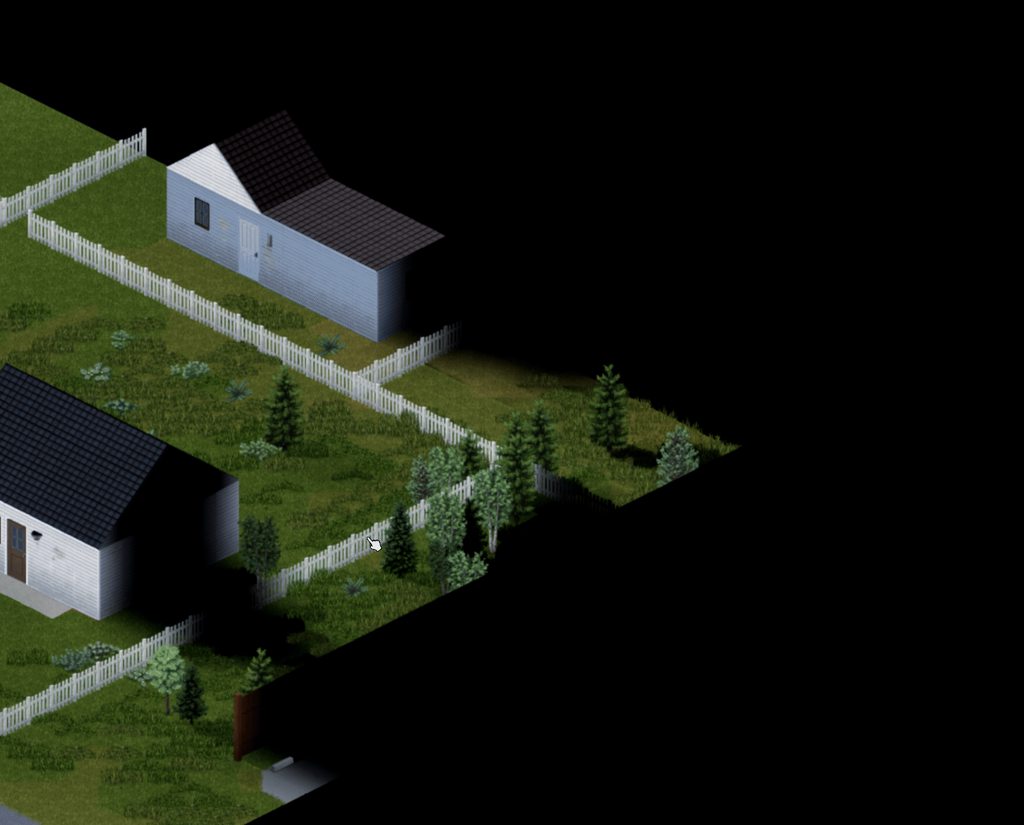 charred ridge
windows search file indexed
by burryaga:
#mod_development message
charred ridge
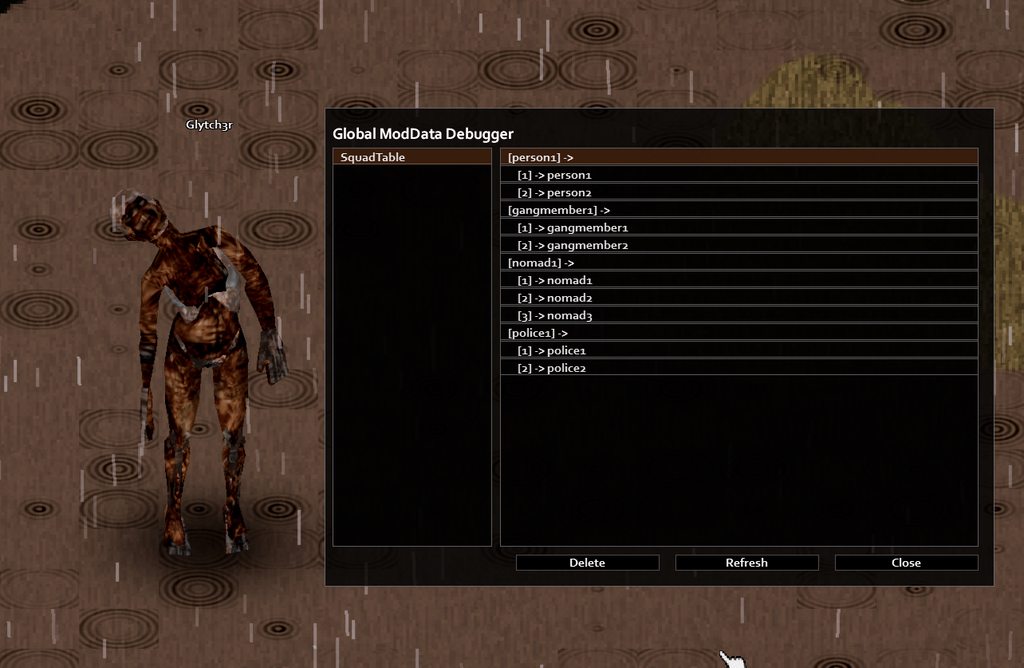
 global moddata key delete button
i had to do this while working on a squad mod, as i needed to do tests, might help others too, idk...
https://imgur.com/8Tv0IHU
Events.OnGameStart.Add(function()

    local hook = GlobalModDataDebug.createChildren
    function GlobalModDataDebug:createChildren()
        hook(self)

        local y, obj = ISDebugUtils.addButton(self,"close",self.width-200,self.height-40,180,20,getText("IGUI_CraftUI_Close"),GlobalModDataDebug.onClickClose);
        y, obj = ISDebugUtils.addButton(self,"refresh",self.width-400,self.height-40,180,20,"Refresh",GlobalModDataDebug.onClickRefresh);
        y, obj = ISDebugUtils.addButton(self,"delete",self.width-600,self.height-40,180,20,"Delete",GlobalModDataDebug.onClickDelete);

        self:populateList();
    end


    function GlobalModDataDebug:onClickDelete()
        local selectedItem = self.tableNamesList.items[self.tableNamesList.selected];
        if selectedItem then
            local tableName = selectedItem.text;
            ModData.remove(tableName);
            ModData.transmit(tableName)
            self:populateList();
        end
    end

end)
 tranquil ocean
@bitter ether I think you should start here.
 bitter ether
ok
charred ridge
shy charm
## Media Folder Github Repo
I've taken the liberty to throw (most of) the `media...
oh hey just saw this post. i often visit this actually. whenever im looking for stuff using mobile.
charred ridge
sandbox option table
from string to table
sample:
function parseStatements(str)
    local outfits = {}
    local parts = {}
    for part in string.gmatch(str, "[^;]+") do
        table.insert(parts, part)
    end
    for _, part in ipairs(parts) do
        local outfit_name, statements_str = string.match(part, "([^=]+)=(.+)")
        if outfit_name and statements_str then
            local statements = {}
            for statement in string.gmatch(statements_str, "[^:;]+") do
                if statement ~= "" then
                    table.insert(statements, statement)
                end
            end
            outfits[outfit_name] = statements
        end
    end
    return outfits
end
sample :

key: Outfit_Ranger
values: Howdy?, Yeehaw!


this is what you actually input on the option

option NPC_Zed.InteractStatements  {
    type = string, default = Outfit_Ranger=Howdy?:Yeehaw!;Outfit_Survivalist=...:Blend with the shadows;Outfit_Bandit=Hey buddy:How Can I help You?:What?,
    page = NPC_Zed, translation = NPC_Zed_InteractStatements,
}
--test print
local string = SandboxVars.NPC_Zed.InteractStatements

local parsed_outfits = parseStatements(string)

for outfit, statements in pairs(parsed_outfits) do
    print(outfit)
    for _, statement in ipairs(statements) do
       print(statement)
    end

end
using this servers and players can add infinite number of entry to a single sandboxoption
instead of providing them fixed number of options
letsay youre trying to make a teleporter
then you could do this for the option
"School:3124:4563:0;Camp:5124:1423:0;"
School 3124 4563 0
school is the key and the numbers are xyz coordinates
= after each key
: delimiter for the values
; delimiter for keys

keys1=keys1_value1:keys1_value2:keys1_value3;
im not sure if anyone will actually use this
if incase you do please let me know
thanks
tranquil ocean
@fading lodge
tranquil ocean
tranquil ocean
https://github.com/Zendachi/Wookiee-Tutorial-Party-Animal
This specifically is my own trait tutorial item for helping people know what files and folders they need in what places
But what you need to do depends quite a bit on what mod you want to make
 fading lodge
alright thank you man means alot to me
tranquil ocean
tranquil ocean
This specifically is my own trait tutorial item for helping people know what fil...
@wicked sparrow
Compare your workshop directory structure / workshop.txt / mod.info etc. to this
 wicked sparrow
Thanks man I got it figured out
charred ridge
 vale shale
Tysm
tranquil ocean
tranquil ocean
<@685871011966615562>
This one is mine fwiw. It's mainly for general Lua formatting basics and useful tricks, and for showing how to make a trait mod.
tranquil ocean
@wicked sparrow You may not have realized when I first pinged you here
But this is a place for learning Lua
tranquil ocean
I realized in retrospect I've pigned you here before
wicked sparrow
Lmao
tranquil ocean
But you may have thought we were in mod_development
wicked sparrow
I'll check it out.
tranquil ocean
Because I got you after you had solved a problem already
:p
But this is a resource thread
 foggy crest
Does anyone here know how to make mods?
foggy crest
It is possible to change the skills in relation to the job, like putting the % lower?
tranquil ocean
foggy crest
It is possible to change the skills in relation to the job, like putting the % l...
Yes through script adjustments
You're looking for #mod_development. This is a resource thread.
tranquil ocean
@fast raft
charred ridge
wrong channel
charred ridge
darlak's gif poster tutorial
https://steamcommunity.com/sharedfiles/filedetails/?id=3324078713

This guide will show you how to change the poster image of PZ mods and other games to a GIF . ...
charred ridge
close context menu
have you experienced there are times that the context menu gets stuck after clicking it?
idk if its a bug but if that happens to you then heres a solution
on the function thats triggered by that option
do this
force close context menu after clicking
context:hideAndChildren()
sample of when i used it
                local optTip = apSub:addOption(tostring(invItem:getDisplayName()), invItem, function()
                    ClassRankMod.doAppraiseTimed(pl, invItem)
                    context:hideAndChildren()
                end)
                optTip.iconTexture = getTexture("media/ui/ClassRank_Appraise.png")
                local tip = ISInventoryPaneContextMenu.addToolTip()
                tip.description = tostring(invItem:getFullType()) .. "\nAppraise this item."
                tip:setName("Appraise: ")
                optTip.toolTip = tip
custom zombie outfit file checklist:
note: not all of the files here are strict when it comes to folder structure
construct the outfit
declare what clothing items it will spawn with
this is how you add custom outfit
clothing/clothing.xml
construct the actual clothing
so that the model and the texture are linked, you then add this to your outfit
clothing/clothingItems/yourMod.xml
fileGuidTable entry
so that the game recognize your clothing item
fileGuidTable.xml
to turn the clothing into an item
scripts/yourMod.txt
the actual model
the actual model files
models_X/Skinned/yourMod.fbx or models_X/Skinned/yourMod.x
texture file must the thing you declare on your clothingItem xml
without this you wont see the model
textures/Body/yourMod.png
add the outfit to the ZombiesZoneDefinition table via lua file
this file is optional
so that they will naturally spawn in the game
lua/shared/yourMod.lua
charred ridge
 charred ridge
functions ( : vs . )
charred ridge
proceedual distro examples
charred ridge
handling multiple recipes of the same name
charred ridge
item visuals reference
charred ridge
Reset Debug Setings:
Vanilla Hit Reactions:
Players:
- BiteDefended
- CrawlerBite
- EndDeath
- Bite
- Shot
- BiteLEFT
- BiteRIGHT
- CrawlerBiteLEFT
- CrawlerBiteRIGHT
Zombies:
- HeadLeft
- HeadRight
- HeadTop
- BiteDefended
- Eating
- FenceWindow
- GettingUpFront
- ShotBelly
- Uppercut
- Chainsaw
- HitSpearDeath1
- HitSpearDeath2
- KnifeDeath
- ShotBellyStep
- ShotChestR
- ShotChestL
- ShotShoulderL
- ShotShoulderR
- Floor
- ShotLegR
- ShotLegL
- ShotChestStepL
- ShotChestStepR
- ShotHeadBwd
- ShotHeadFwd
- ShotHeadFwd02
- ShotShoulderStepL
- ShotShoulderStepR
- OnKnees
Usage
Zombie hit react
    <m_Events>
        <m_EventName>SetVariable</m_EventName>
        <m_Time>Start</m_Time>
        <m_ParameterValue>ZombieHitReaction=HeadLeft</m_ParameterValue>
    </m_Events>
Player hit react
    <m_Events>
        <m_EventName>SetVariable</m_EventName>
        <m_Time>Start</m_Time>
        <m_ParameterValue>PlayerHitReaction=Bite</m_ParameterValue>
    </m_Events>
this will set the reaction to the character that gets hit
this is done via animsets xml files
charred ridge
hooking on eat
charred ridge
audio format
charred ridge
albion's unofficial javadocs for b42
https://demiurgequantified.github.io/ProjectZomboidJavaDocs/
package index
charred ridge
vehicle dmg transfer
 crystal ruin
Bit of a nitpick but putting the if not vehicle above the if not vehicleIsCountach() makes it so that you don't check if not vehicle twice.
Optimization ✨
 crystal ruin
Bit of a nitpick but putting the `if not vehicle` above the `if not vehicleIsCou...
crystal ruin
crystal ruin
Bit of a nitpick but putting the `if not vehicle` above the `if not vehicleIsCou...
Bug fix:
---@param character IsoGameCharacter
local function unregisterVehicle(character)
    VehiclePartConditions["CountachFrontTrunk"] = nil
    VehiclePartConditions["Engine"] = nil
    VehiclePartConditions["EngineDoor"] = nil
    VehiclePartConditions["TruckBed"] = nil
end
````VehiclePartConditions` wasn't getting properly unregistered so if your parts got damaged from outside the vehicle from uninstalling/installing, setting the condition via cheats, etc. It was still executing the `vehiclePartDamageCheck`.dane's tile property .csv (b42)
you need to join the mapping discord to gain access tho
#1067122879067590757 message
charred ridge
Traits related
Setting mutual exclusive traits easier
--modify the table to suit your need
local toSetMutualExclusive = {
    {'ShortSighted', 'EagleEyed', 'EagleEyed2'},
    {'FearoftheDark', 'NightVision1', 'NightVision2', 'Desensitized', 'Desensitized2', 'Brave', 'Brave2'},
    {'Dextrous', 'Dextrous2', 'AllThumbs'},
}

Events.OnPostDistributionMerge.Add(function()
    local result = ''; local toPair = nil
    for _, v in pairs(toSetMutualExclusive) do
        for _, k in pairs(v) do
            for _, j in pairs(v) do
                if k ~= j then
                    if isDebugEnabled() then
                        toPair = tostring(k..' | '.. j)
                        result = result .. toPair .. '\n';
                    end
                    TraitFactory.setMutualExclusive(k, j);
                end
            end
        end
        if isDebugEnabled() then  Clipboard.setClipboard(result); print(result) end
    end
end)
use debug console to use the codes below
check mutual traits of a specified trait
local traitToCheck = 'ShortSighted' -- change this to the trait you want to test
local function getMutualTraits(traitStr)
    for i=0,TraitFactory.getTraits():size()-1 do
        local tCheck = TraitFactory.getTraits():get(i);
        if tCheck:getMutuallyExclusiveTraits():contains(traitStr) then
            local tr = tostring(tCheck:getType())
            print("Trait: "..tostring(tr)..  " HasTrait: ".. tostring(pl:HasTrait(tr)))
        end
    end
    return false
end
getMutualTraits(traitToCheck)
store all the installed traits onto your clipboard
local result = '';
for i=0,TraitFactory.getTraits():size()-1 do
    local tCheck = TraitFactory.getTraits():get(i);
    result = result .. tostring(tCheck:getType()).. '\n';
end
Clipboard.setClipboard(result);
print(result)
getPlayer():setHaloNote(tostring("open a notepad and press ctrl v to paste the copied trait list"),150,250,150,900)
gain all positive traits
local pl = getPlayer()
local tr = TraitFactory.getTraits()
for i=0, tr:size()-1 do
    local trait = tr:get(i);
    if trait:getCost() > 0 then
        if not pl:HasTrait(trait:getType()) then pl:getTraits():add(trait:getType()) end
    else
        if pl:HasTrait(trait:getType()) then  pl:getTraits():remove(trait:getType()) end
    end
end
clear all characters traits
local pl = getPlayer()
local tr = TraitFactory.getTraits()
for i=0, tr:size()-1 do
    local trait = tr:get(i);
    if pl:HasTrait(trait:getType()) then pl:getTraits():remove(trait:getType()) end
end
Recipe
stores all recipe names and info onto clipboard
    local pl = getPlayer()
    local count = RecipeManager.getKnownRecipesNumber(pl)
    local result = ''
    for i=1, getAllRecipes():size() do
        local recipe = getAllRecipes():get(i-1)
        local rName = recipe:getOriginalname()
        local line = tostring(rName).."  ["..tostring(pl:isRecipeKnown(recipe)).."]"
        result = result .. tostring(line).. '\n';
    end

    result = "Learned Count: ".. tostring(count).. '\n\n'.. result
    result = "Player Knows All Recipe [CHEAT]: ".. tostring(getDebugOptions():getBoolean("Cheat.Recipe.KnowAll")).."\n".. result
    result = "Known Recipe Details:\n"..result
    Clipboard.setClipboard(result);
    print(result)
    pl:setHaloNote(tostring("open a notepad and press ctrl v to paste the copied list"),150,250,150,900)
output should look something this
 charred ridge
Store the global mod data to clipboard
local function GlobalModDataUtil(t, indent)
    indent = indent or ""
    local result = ""
    for k, v in pairs(t) do
        local key = tostring(k)
        if type(v) == "table" then
            result = result .. indent .. key .. ":\n" .. GlobalModDataUtil(v, indent .. "  ")
        else
            result = result .. indent .. key .. ": " .. tostring(v) .. "\n"
        end
    end
    return result
end

local tableNames = ModData.getTableNames()
if tableNames:size() == 0 then
    Clipboard.setClipboard("Err")
    return
end

local str = "Global ModData:\n\n"
for i = 0, tableNames:size() - 1 do
    local tableName = tableNames:get(i)
    local modData = ModData.get(tableName)
    if modData then
        str = str .. tableName .. ":\n" .. GlobalModDataUtil(modData, "  ") .. "\n"
    else
        str = str .. tableName .. ": Table not found.\n"
    end
end

Clipboard.setClipboard(str)
local text = "Glytch3r:\n To store the global mod data\nPress Ctrl + V on a Notepad\n"
getPlayer():setHaloNote(tostring(text),150,250,150,900)
print(text)
Firearms to Clipboard
-- use to check all installed guns, use it to check if your gun mod is installed


local result = ""
local items = getScriptManager():getAllItems()
for i=0, items:size()-1 do
    local item = items:get(i)
    if item then
        if tostring(item:getType()) == "Weapon" and item:isRanged()  then
            local item = InventoryItemFactory.CreateItem(item:getName())
            if item then    result = result .. tostring(item:getFullType()) .. "\n"; end
        end
    end
end
Clipboard.setClipboard(result);
print(result)
getPlayer():setHaloNote(tostring("Glytch3r:\n open notepad and press ctrl + v"),150,250,150,900)
Glytch3r's MountOn function (reference)
--adds your mod weapon to a bunch of weapon parts MountOn property via lua scriptmanager instead of overwriting the weaponparts scripts
#modeling message
charred ridge

Your first time trying to create your own gun mod, or struggling with making it work? I've been there. I've spend days figuring out why my gun model does not show / is semi transparent / is upside dow
charred ridge
generate forage herb list by MusicManiac
 hearty creek
Creating project zomboid server manager, if anyone wants to check it out 🙂
https://steamcommunity.com/sharedfiles/filedetails/?id=3320238921
 charred ridge
firearms to clipboard
hearty creek
@charred ridge Sup dude, remember me? I was doing Node Manager? Life stuff happened and had to stop what I was doing for good awhile. I'm back with Modix. Changed the name
charred ridge
hearty creek
<@591976049592631298> Sup dude, remember me? I was doing Node Manager? Life stuf...
i see ..well welcome back then
hope youre doing better
switching to dm
charred ridge
isPistol (boolean function)
--input type or fulltype as string or an inventoryitem instance
local function isPistol(item)
    local wpn = nil
    if type(item) == 'string' then
        wpn = instanceItem(item)
    else
        wpn = item
    end
    if wpn and instanceof(wpn, 'HandWeapon') then
        return (wpn:getSwingAnim() and wpn:getSwingAnim() == "Handgun")
    end
    return false
end
Sample Usage:
    isPistol("Revolver") -- type
    isPistol("Base.Revolver") -- fulltype
    isPistol(getPlayer():getPrimaryHandItem()) --inventoryitem
moon phases
charred ridge
vanilla server options / sandbox options
charred ridge
Sir Doggy Jvla - buildingId workaround
charred ridge
FitnessExercises.exercisesType
squats
    type : squats
    name : Squats
    tooltip : Improves fitness when performed regularly.
    stiffness : legs
    metabolics : Fitness
    xpMod : 1
pushups
    type : pushups
    name : Push-ups
    tooltip : Improves strength when performed regularly.
    stiffness : arms,chest
    metabolics : Fitness
    xpMod : 1
situp
    type : situp
    name : Sit-ups
    tooltip : Improves fitness when performed regularly.
    stiffness : abs
    metabolics : Fitness
    xpMod : 1
burpees
    type : burpees
    name : Burpees
    tooltip : Improves strength and fitness when performed regularly. Will drain endurance a lot.
    stiffness : legs,arms,chest
    metabolics : FitnessHeavy
    xpMod : 0.8
barbellcurl
    type : barbellcurl
    name : Barbell Curls
    tooltip : Improves strength when performed regularly.
    item : Base.BarBell
    prop : twohands
    stiffness : arms,chest
    metabolics : FitnessHeavy
    xpMod : 1.2
dumbbellpress
    type : dumbbellpress
    name : Dumbbell Presses
    tooltip : Improves strength when performed regularly.
    item : Base.DumbBell
    prop : switch
    stiffness : arms
    metabolics : FitnessHeavy
    xpMod : 1.8
bicepscurl
    type : bicepscurl
    name : Bicep Curls
    tooltip : Improves strength when performed regularly.
    item : Base.DumbBell
    prop : switch
    stiffness : arms
    metabolics : FitnessHeavy
xpMod : 1.8```OnExitRoom
charred ridge
Athens' Guide to Modding
charred ridge
sitdown / standup
charred ridge
Dynamic Events
charred ridge
Athen's heater lua
 tough pivot
Object Highlighter
-- highlight arg "object" only when mouse is over it.
-- returns the object object when clicked

---@param playerObj IsoPlayer  player object
---@param object String        IE "Base.Log" or "Log"
local function objectHighlighter(playerObj, object)
    local CancelActions, GetMouseCoords, OnMouseClick, OnTick
    local lastHighlighted
    local x, y, z

    CancelActions = function()
        if instanceof(playerObj, "IsoPlayer") then
            if playerObj:pressedCancelAction() or playerObj:isAttacking() then
                return true
            end
        end
    end

    GetMouseCoords = function(playerObj)
        local x, y = ISCoordConversion.ToWorld(getMouseXScaled(), getMouseYScaled(), playerObj:getZ())
        x, y, z = math.floor(x), math.floor(y), playerObj:getZ()
        return x, y, z
    end

    OnMouseClick = function()
        Events.OnTick.Remove(OnTick)
        Events.OnMouseDown.Remove(OnMouseClick)
        if lastHighlighted then
            if lastHighlighted:isHighlighted() then
                lastHighlighted:setHighlighted(false)
            end
            return lastHighlighted
        end
    end

    OnTick = function()
        if CancelActions(playerObj) then
            Events.OnTick.Remove(OnTick)
            Events.OnMouseDown.Remove(OnMouseClick)
            return nil
        end
        x, y, z = GetMouseCoords(playerObj)
        local square = getSquare(x, y, z)

        local wobs = square:getWorldObjects()
        for i = 0, wobs:size() - 1 do
            local wob = wobs:get(i)
            if instanceof(wob, object) or wob:getItem():getFullType() == object then
                lastHighlighted = wob
                wob:setHighlighted(true)
                wob:setOutlineHighlight(true)
                return
            else
                if lastHighlighted and lastHighlighted:isHighlighted() then
                    lastHighlighted:setHighlighted(false)
                    return
                end
            end
        end

        local objs = square:getObjects()
        for i = 0, objs:size() - 1 do
            local obj = objs:get(i)
            if instanceof(obj, object) or obj:getType() == object then
                lastHighlighted = obj
                obj:setHighlighted(true)
                return
            else
                if lastHighlighted and lastHighlighted:isHighlighted() then
                    lastHighlighted:setHighlighted(false)
                    return
                end
            end
        end
    end

    Events.OnTick.Add(OnTick)
    Events.OnMouseDown.Add(OnMouseClick)
end
Get All Windows In A Room
since room:getWindows() is non-functional
-- returns a table of window objects

---@param playerObj IsoPlayer    player object
local function getWindowsInRoom(playerObj)
    local windows = {}
    local roomSquares = playerObj:getSquare():getRoom():getSquares()
    for i = 1, roomSquares:size() -1 do
        local square = roomSquares:get(i)
        local south = square:getS()
        local east = square:getE()
        if square:getWindow() then
            table.insert(windows, square:getWindow())
        elseif square:isWindowTo(south) then
            table.insert(windows, south:getWindow())
        elseif square:isWindowTo(east) then
            table.insert(windows, east:getWindow())
        end
    end
    return windows
end
 vagrant basalt
Should that be an API ?
Bcs I'd rather we don't spread the usage of the same Lua file like Item Tweaker....
Good job anyway but yes please make that an API !
tough pivot
vagrant basalt
Should that be an API ?
yea, it should be. I was planning on waiting until 42 was more finished and/or this code was more finished
but I agree, I'll get something up today
charred ridge
vagrant basalt
Bcs I'd rather we don't spread the usage of the same Lua file like Item Tweaker....
wdym
nvm just woke up i get what you ment
vagrant basalt
tough pivot
yea, it should be. I was planning on waiting until 42 was more finished and/or t...
Can you either delete the file you sent or link your mod in the original message, that way no one starts copy pasting it around please ?
tough pivot
vagrant basalt
Good job anyway but yes please make that an API !
https://steamcommunity.com/sharedfiles/filedetails/?id=3452113500
It shall be an API. Thank you for help with it!
 charred ridge
creating iso tiles

This is my current method for making tiles. I use Affinity and Photopea. Sorry for the bad audio :)
charred ridge
tough pivot
https://steamcommunity.com/sharedfiles/filedetails/?id=3452113500
It shall be an...
think its better to place that here
#1070858800501891172 message
instead
 subtle furnace
tough pivot
https://steamcommunity.com/sharedfiles/filedetails/?id=3452113500
It shall be an...
subtle furnace
tough pivot
https://steamcommunity.com/sharedfiles/filedetails/?id=3452113500
It shall be an...
I love the API, but isn't it super problematic to add a dependency to an already established mod?
vagrant basalt
subtle furnace
I love the API, but isn't it super problematic to add a dependency to an already...
Wdym ?
Continue in #mod_development please to note polute this thread
 waxen wyvern
sorry
tough pivot
Tiny Timer. Call it with tinyTimer(5) to wait 5 seconds
local function tinyTimer(seconds)
    local OnTick
    local start = os.time()
    local stop = start + seconds
    OnTick = function()
        if os.time() < stop then
            return
        end
        -- do you thing here
        Events.OnTick.Remove(OnTick)
    end
    Events.OnTick.Add(OnTick)
end```test code speed
vagrant basalt
charred ridge
### test code speed
https://discord.com/channels/136501320340209664/232196827577...
tough pivot
A class for maintaining "Fast Forward x1" while executing a stack of timed actions in B42.5 and later. If you use it, you might want to change the filename or check if it exists first to avoid possible conflicts.
https://github.com/mikej1977/ActionSpeedKeeper
GitHub
Class for Project Zomboid to prevent resetting the game speed while performing multiple actions - mikej1977/ActionSpeedKeeper
 wicked thistle
Yo chat,The "better fps" mod It doesn't work anymore for this update, and I really need it, can someone make a patch?
charred ridge
modding tile def via lua
charred ridge
charred ridge
ever wonder how large a loaded chunk is? i mean visually
everything outside of t...
more ingfo about this
so i learned that
you dont have access to the entire 300x300 cekk
local function countLoadedSquares(isForce)
    local pl = getPlayer()
    local cell = getCell()

    local cellX = math.floor(pl:getX() / 300)
    local cellY = math.floor(pl:getY() / 300)
    local startX = cellX * cell:getHeight()
    local startY = cellY * cell:getWidth()
    local z = 0
    local count = 0
    if not cell then return end

    for y = startY, startY + 299 do
        for x = startX, startX + 299 do
            local sq = cell:getGridSquare(x, y, z)
            if not sq and isForce then
                sq = cell:getOrCreateGridSquare(x, y, z)
            end
            if sq then
                count = count + 1
            end
        end
    end
    return count
end
print(countLoadedSquares(false)) -- 36100
print(countLoadedSquares(true)) -- 90000


local function getCellCentersForce(isForce)
    local pl = getPlayer()


    local cellX = math.floor(pl:getX() / 300)
    local cellY = math.floor(pl:getY() / 300)
    local startX = cellX * 300
    local startY = cellY * 300
    local z = 0

    local centerX = startX + 149
    local centerY = startY + 149

    local cell = getCell()
    local centerSquare = cell:getGridSquare(centerX, centerY, z)
    if isForce then
        centerSquare = cell:getOrCreateGridSquare(centerX, centerY, z)
    end
    print("\n")
    if centerSquare then
        print("Center Sq Coords: "..centerX..' '..    centerY)
        print(tostring(centerSquare))
        local dist = pl:DistTo(centerX, centerY)
        print("Ditance: ".. tostring(round(dist)))
        return centerSquare
    else
        print("not loaded")
        return nil
    end


end
getCellCentersForce(true)
 vagrant basalt
getOrCreateGridSquare ?
vagrant basalt
charred ridge
more ingfo about this
so i learned that
you dont have access to the entire 300x3...
So you can access unloaded squares ?
charred ridge
vagrant basalt
So you can access unloaded squares ?
i was able to retrieve the sprite of an object
but i didnt test it further
iirc this isnt enough
but for my case since its closeby i think i wont have issue
i only need the middle of the cell square
vagrant basalt
charred ridge
i was able to retrieve the sprite of an object
but i didnt test it further
iirc ...
Interesting
charred ridge
weapon parts table
charred ridge
distro
charred ridge
clothing extra options
charred ridge
fetch all available audio ingame (including mods)
https://discordapp.com/channels/136501320340209664/232196827577974784/1400784136238661723
charred ridge

https://imgur.com/xf9QXFC.gif
Hey survivor!
Are you tired of constantly switching game versions just to play Multiplayer?
Save time by keeping separate, ready-to-play installs for each v...
 tough pivot
Change craftRecipe outputs on the fly
local originalRecipe = getScriptManager():getCraftRecipe("Base.SawLogs")
local newRecipe = getScriptManager():getCraftRecipe("JBLogging.JBSawLogs")

originalRecipe:getOutputs():clear()

for i = 0, newRecipe:getOutputs():size() - 1 do
    local newOutput = newRecipe:getOutputs():get(i)
    originalRecipe:getOutputs():add(i, newOutput)
end
It would probably work with inputs but I never tried it. The newRecipe is set as NeedTobeLearn = true so it's hidden from the player. There might be a better way to hide the recipe that I haven't found yet.
charred ridge
clothing mod guide
charred ridge
checking game versions
local function isB42()
    local version = getCore():getGameVersion()
    return version and version:getMajor() >= 42
end


local function isB41()
    local version = getCore():getGameVersion()
    return version and version:getMajor() == 41
end
alternative method
local function isB42()
    return luautils.stringStarts(getCore():getVersion(), "42")
end


local function isB41()
    return luautils.stringStarts(getCore():getVersion(), "41")
end
output examples:
print(getCore():getGameVersion())
--returns 42.11
print(getCore():getVersion())
--returns 42.11.0  rev:30715 2025-08-04 18:15:07 (ZB)