#modeling
1 messages · Page 12 of 1
 blazing aspen
blazing aspen
blazing aspen
 fluid kernel
first question, is it all one model?
fluid kernel
first question, is it all one model?
 blazing aspen
fluid kernel
they have to have ONE material.
blazing aspen
fluid kernel
they have to have ONE material.
Oh, okay, thanks, will dig in this way :D
I had no idea what was wrong x)
fluid kernel
🙂
blazing aspen
fluid kernel
🙂
Here we go, now it's working. Much appreciated: https://i.imgur.com/N9E8rY6.png
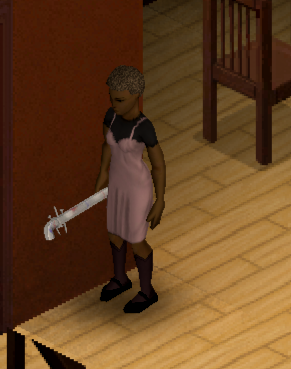
Is there any difference between using .fbx and .x for weapons (especially firearms)?
blazing aspen
fluid kernel
none at all
Best thing i heard today, thanks
fluid kernel
🙂
 brisk hollow
Is there a quick way in debug mode to refresh item textures the way you can for vehicles?
(like the mesh textures, inventory sprites seem to update automatically)
 polar quartz
brisk hollow
Is there a quick way in debug mode to refresh item textures the way you can for ...
polar quartz
brisk hollow
Is there a quick way in debug mode to refresh item textures the way you can for ...
I do want to know as well
fluid kernel
sadly not for items.
if they had an item editor ingame i'd think refreshing there would do it.
 knotty dew
You are missing a comma on model texture
blazing aspen
knotty dew
You are missing a comma on model texture
Nah, that was two separate materials on one model
 blazing aspen
knotty dew
Also maybe its case sensitive idk
blazing aspen
knotty dew
Also maybe its case sensitive idk
That problem was solved by this suggestion: #modeling message
no commas needed :)
What is the fastest way do you guys use to work with UV unwrapped texture images? Using photohop is taking to much time and require a big amount of clicking
 chilly timber
blazing aspen
What is the fastest way do you guys use to work with UV unwrapped texture images...
chilly timber
blazing aspen
What is the fastest way do you guys use to work with UV unwrapped texture images...
Hm? What do you mean work with?
When I need to paint a texture I will often use texture paint mode in blender as it gives me more accurate results.
Then I will do touchups like color correction or contrast levels in photoshop
blazing aspen
chilly timber
Hm? What do you mean work with?
When I need to paint a texture I will often us...
For Example:
I have a model of makeshift melee weapon which have wooden grip, metal blade and rope around a grip.
To texture it i’m doing next steps:
- UV unwrap
- Check out if unwrap is good or i should regenerate/change it
- Setup material with picture texture, marking faces with bright colors.
- Open up this texture in photoshop
- Google for a good texture
- Select proper part of texture in PS, use it as mask for texture
- Check how it looks in blender
And this process is too long tbh. I think there is a smarter/better way to do this
 molten sail
Can anyone tell me why my model looks like this when viewed with a texture? I had made some tweaks to it yesterday and now when I reimport it it's like this. it looks fine in game and when viewed without the texture


 candid island
molten sail
Can anyone tell me why my model looks like this when viewed with a texture? I ha...
candid island
molten sail
Can anyone tell me why my model looks like this when viewed with a texture? I ha...
Check the normals if its flipped
Or set the shading into opaque.
 proven jolt
blazing aspen
For Example:
I have a model of makeshift melee weapon which have wooden grip, me...
proven jolt
blazing aspen
For Example:
I have a model of makeshift melee weapon which have wooden grip, me...
As you have already been told earlier that the fastest way is to unwrap UV > paint on the model in a blender, there is no other quick option, you can still consider painting in Substance Painter, followed by reducing the texture to 256 or 128
Googling a texture and doing it in Photoshop is not the fastest way, because you will then edit it, so it will be quick for you to learn how to draw such textures manually
blazing aspen
proven jolt
As you have already been told earlier that the fastest way is to unwrap UV > pai...
Thanks, will try Substance
Rn i’m not good at textures at all, beed some practice

 slow bronze
having two issues making a gun.
the model loads in upside down, and changing the rotation in blender, going to Object-Save Rotation & Location, then re-exporting the file does NOT work. it's still exactly the same upside down.Fixed. Check Transform Forward/Up in the export screen, tick 'Apply Transform'.the texture isnt applying ingame. I get an error saying "unsupported bit depth: 16" yet its a "RGB 32bit Linear Floating Point" image in GIMP.Fixed. had to downscale it to 8 bit, as its 8 bit per channel RGB (R8+G8+B8 = 24 total bit depth)

I've followed Blackbeards weapon mod tutorial, and ive checked also that the normals arent flipped
the texture is in the right place, with the same capitalization, is a png, and in blender shows perfectly on the model. for sanity checking
candid island

 tough fractal
I have Reaven Vandal. XD


 random merlin
slow bronze
having two issues making a gun.
1) ~~the model loads in upside down, and chang...
random merlin
slow bronze
having two issues making a gun.
1) ~~the model loads in upside down, and chang...
hmm. i had the same thing happen when i forgot to apply transforms
slow bronze
random merlin
hmm. i had the same thing happen when i forgot to apply transforms
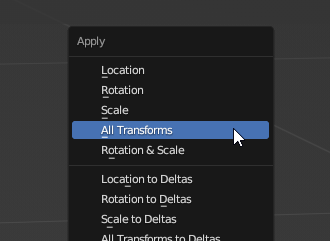
i rotated it in blender, went Object->Apply->Transformations. re-exported the fbx file. loaded up zomboid and its still upside down
random merlin

slow bronze
texture issue fixed, now just for the orientation.
blazing aspen
slow bronze
i rotated it in blender, went Object->Apply->Transformations. re-exported the fb...
are we talking about this one?
https://i.imgur.com/DknF46w.png
 slow bronze
yes
blazing aspen
slow bronze
yes
Mb dumb question, but are you sure you're placing edited (rotated) model in proper mod folder?
slow bronze
yes, i'm overwriting the one in the mod folder /models_x/weapons/firearm/
ok I now have it working. when exportin the fbx file, on the right theres some orientation options that I changed and now the gun is the right way up:

 blazing aspen
slow bronze
ok I now have it working. when exportin the fbx file, on the right theres some ...
blazing aspen
slow bronze
ok I now have it working. when exportin the fbx file, on the right theres some ...
Oh, good to know how you fixed it. Thanks
blazing aspen
slow bronze
Nice model 
slow bronze
yeah, I was incredibly frustrated at there being basically no information on this, so I'm trying to add fixes where I can
slow bronze
blazing aspen
Nice model <:spiffo:232169419617337345>
thanks, want to see it in blender for more detail? 🙂
blazing aspen
slow bronze
thanks, want to see it in blender for more detail? 🙂
Yeah that would be cool
(especially if there is a cool UV unwrapping)


 blazing aspen
slow bronze
blazing aspen
slow bronze
How many faces do you have in this model?
And how big is texture resolution? :)
slow bronze
texture is 1024/1024. theres probably more faces than there should be cause i used knife project to get the basic shape and there was a lot of curves that I then simplified/un-subdivided to bring the model down to more sensible levels
apparently 538 faces, it would have been close to 3K at the beginning so I'm happy to call that enough 😄
blazing aspen
slow bronze
apparently 538 faces, it would have been close to 3K at the beginning so I'm hap...
Nice! Great job
blazing aspen
proven jolt
As you have already been told earlier that the fastest way is to unwrap UV > pai...
Why not to use 512x512 textures?
proven jolt
blazing aspen
Why not to use 512x512 textures?
Because it's just a waste of resources, but you can try.
blazing aspen
proven jolt
Because it's just a waste of resources, but you can try.
Okay, thanks
proven jolt
blazing aspen
Okay, thanks
256 will be above the roof for you, and 128 is the best option
proven jolt
proven jolt
256 will be above the roof for you, and 128 is the best option
Of course you can try any option, but I would do this
blazing aspen
proven jolt
256 will be above the roof for you, and 128 is the best option
will try 256, just figured out my payment for adobe package and will dig into Substance Painter
Thanks for help
 reef salmon
 slow bronze
next issue, I've got a red dot attachment. I can place it on the ground and see it, but it isnt showing when attached to the gun. in the Attachment Editor in debug mode it shows fine there. What am I missing?


even if i set the reddot to a silly high off the gun just to see if it floats, it doesnt. so that says to me its not loading rather than "its inside the gun" or so
slow bronze
nothing in console.txt that mentions the weapon attachment like an error either
slow bronze
watching Blackbeards tutorial again, i see the attachment editor can be... special with its preview, so ive been moving things around a lot just to see if there's any visible red dot. so far nothing.
fluid kernel
scale correct?
slow bronze
yep, the model on the floor is fine
here's one on the ground for example

could it be a little bit bigger? probably. It's currently at like 0.010 in scale and might go up to like.. 0.012 perhaps.
but it should still be visible at curent scale
the fact its visible and placeable as a world item, and visible in the attactment editor, but not when its on a gun feels wierd to me. if it didnt "see" the model then it wouldnt show anywhere
and it is there

 slow bronze
and it *is* there
slow bronze
slow bronze
and it *is* there
hold up. is StaticModel when its on a gun? if so thats the answer i think.
i've changed the staticModel, but cant test right now cause its 1am so I'll report back in the morning 😄
 slim laurel
Hey, Im interested on working on a Dynamic Body weight and Muscle mod.
Essentialy, I want to have your body weight reflected on your character model (If you are fat, the model would be bigger, and you'll look thinner if you are underweight).
If I change the character model, does clothing affect his shape? (So I make a fat character model naked, he puts on a shirt, now he looks thin)
My Idea is to make 5-6 .fbx files, containing:
Neutral Body weight and muscle (Default body shape)
Underweight
Overweight
Weak
Muscled
Then, apply a lerp function in an LUA script to the vertexs of the model according to his stats. would the model be updated at runtime, or would I have to reload the game for the changes to take effect?
blazing aspen
slim laurel
Hey, Im interested on working on a Dynamic Body weight and Muscle mod.
Essentia...
Looking through clothing masking i don’t think it’s possible to achieve what you want in that way

 slim laurel
blazing aspen
Looking through clothing masking i don’t think it’s possible to achieve what you...
slim laurel
blazing aspen
Looking through clothing masking i don’t think it’s possible to achieve what you...
Would UV mapping have anything to do with the issue? What im essentially planning is moving some vertexes around the mesh to make it look more "bloated" or "thin". I dont care much if the textures are stretched.
So far, the only problem I see is that I would have to modify the hoddie and jacket models to prevent them from changing the shape.
Or are there multiple different clothed meshs?
blazing aspen
 agile thorn
dude, i can't unstuck myself from this irl and you just making my addiction transfer to the game 
 blazing aspen
slim laurel
Would UV mapping have anything to do with the issue? What im essentially plannin...
blazing aspen
slim laurel
Would UV mapping have anything to do with the issue? What im essentially plannin...
you will need to create all 6 variants for all of the clothing models to achieve what you want
blazing aspen
agile thorn
what's your favourite flavor
Watermelon and ice
Literally me rn while trying out why substance painter flipped my normals:
 slim laurel
blazing aspen
you will need to create all 6 variants for all of the clothing models to achieve...
slim laurel
blazing aspen
you will need to create all 6 variants for all of the clothing models to achieve...
The clothing models are those 2 mentioned in the mask example or are there more?
(Only vanilla)
blazing aspen
slim laurel
The clothing models are those 2 mentioned in the mask example or are there more?
there is 16 different mask positions for every clothing piece imaginable. 14 of them are actively used for usual clothing

so afaik you will need to go through every clothing piece and create a different model for all planned states of body weight and then create a lua to control model behaviour for every one of them
but maybe i'm not getting an easier way to make your idea happen. i suggest you to wait until somebody actually experienced wake up and maybe figure this out for you
blazing aspen
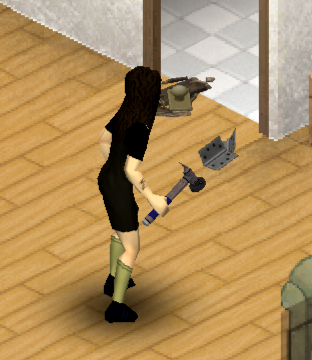
omg, it finally works. thx everybody for help:
https://i.imgur.com/FrMVz4V.png
 slow bronze
i've changed the staticModel, but cant test right now cause its 1am so I'll repo...
slow bronze
slow bronze
i've changed the staticModel, but cant test right now cause its 1am so I'll repo...
This did not work, so I'm back to being clueless about why I can't see the attachment
 simple bolt
slim laurel
Hey, Im interested on working on a Dynamic Body weight and Muscle mod.
Essentia...
simple bolt
slim laurel
Hey, Im interested on working on a Dynamic Body weight and Muscle mod.
Essentia...
I think the most non destructive way would be to scale the belly bones of the character. Then clothings will scale as well
simple bolt
slow bronze
hold up. is StaticModel when its on a gun? if so thats the answer i think.
Had the same problem with my rifle and bashed my head against a wall. The key was to put the gun and attachments in the base module, not the mod module. Then in the item script i had to follow a specific syntax for the attachments.
Feel free to take the headhunter (undead survivor) rifle as template for your problem
slow bronze
simple bolt
Had the same problem with my rifle and bashed my head against a wall. The key wa...
both gun and attachment are already in the base module unfortunately, I'll check your mod out for guidance, thanks (been looking at FirearmsB41 for reference also).
its just nuts because as far as i can tell, nothing is wrong yet it doesnt work
simple bolt
Not at pc right now. But in the script there was at each attachments row like multiple entrys, and some of them had to be in there for some reason
slow bronze
i've rewatched the attatchment section of Blackbeards tutorial to see if i missed any tiny detail of the item def but i havent. tearing my hair out over this
simple bolt
Also make sure your attachment point has the correct location
slow bronze
yep, apparently the reddot location is lined up fine, and attachments starting location is fine, i can see it in the world if dropped on the floor, it shows in the attachment editor fine and correct location. it jsut only doesnt show when actually attached to the gun. thats the bit that drives me mad
i'm at work for a few hours still, so ill check your mod for reference when i get back
simple bolt
Yea. Had the same problem and took me a few days to find out the issue 😄
 strange horizon
Have someone tried to model the joel's or ellie backpack from TLOU ??
simple bolt
Alright, just looked into the script.
I think this was the key:
ModelWeaponPart = HeadhunterScope Base.HeadhunterScope scope scope,
in that case "scope scope" was important i believe
One is the attachment point, the other scope i dont know 😄
slow bronze
yeah i have it as ModelWeaponPart = TX22RedDot TX22RedDot reddot reddot
TX22RedDot being the model name, and reddot the attatchment point
I don't think I have it with the Base being explicitly called, but I also dont beleive its needed as other gun mods dont do it either
knotty dew
anyone uses fragmotion?
if you do check out this tool i made to bypass the trial requirements
#1070858800501891172 message


 proven jolt
blazing aspen
proven jolt
blazing aspen
Very good
blazing aspen
proven jolt
Very good
Thanks a lot! Anything can be done better?
proven jolt
blazing aspen
Thanks a lot! Anything can be done better?
Only time and experience can improve your skills
blazing aspen
proven jolt
Only time and experience can improve your skills
Roger-roger
molten sail
I suck at blender and this is essentially my first ever model. It's supposed to be a crumpled peice of paper

good or not quite?

blazing aspen
molten sail
I suck at blender and this is essentially my first ever model. It's supposed to ...
It’s actually to detailed for zomboid i think
Try to just randomly move vertices on low poly circle and just paint some soft gray lines in tex painter to simulate depth
Texture should look cool
molten sail
blazing aspen
Try to just randomly move vertices on low poly circle and just paint some soft g...
that's what I did 
minus the texture
but yea
good call
then I got this. don't ask.

I was gonna make it stand up but I couldn't get it to look good
Someone needs to take my modding licence away
slow bronze
simple bolt
Alright, just looked into the script.
I think this was the key:
ModelWeaponPart ...
im now home, and looked at your mod for reference. maddeningly nothing is really different from what you have in yours.


 simple bolt
blazing aspen
simple bolt
blazing aspen
Would loot 💯
blazing aspen
simple bolt
Would loot 💯
It will be only craftable 😅
simple bolt
blazing aspen
It will be only craftable 😅
Would craft 💯
simple bolt
slow bronze
im now home, and looked at your mod for reference. maddeningly nothing is really...
try to remove the base. from the first one:

I really dont know, just poking in the dark, but might help 😄
molten sail
blazing aspen
Texture should look cool
so I tried making my own texture with grey lines like you said but wasn't getting a result I liked since i'm not used to making something meant to be seen on a small scale. This is how the crumpled paper texture I showed before looks in game what you think?

granted I have the more zoom mod

I think this is a size too big

idk how to make it smaller. It is scaled properly to the model @indigo kettle sent me and when I exported it I even made sure it was set to 0.01
blazing aspen
molten sail
idk how to make it smaller. It is scaled properly to the model <@654442745024348...
Scale it down in blender, shift+a > apply transforms, export it and on export screen toggle on “Apply transform” check

 stone oxide
molten sail
I think this is a size too big
stone oxide
molten sail
I think this is a size too big
I will pay any price for this sock!
blazing aspen
Scale it down more until you happy with what you see in game
stone oxide
Jk
slow bronze
simple bolt
try to remove the base. from the first one:
unfortunately, didn't work.

 molten sail
blazing aspen
Scale it down more until you happy with what you see in game
molten sail
blazing aspen
Scale it down more until you happy with what you see in game
I suppose that's what I'll have to do. it's gonna make it hard to scale it properly to the vanilla
ok so actually not that hard.
 blazing aspen
slow bronze
unfortunately, didn't work.
blazing aspen
slow bronze
unfortunately, didn't work.
Dumb variant but try to re-apply material in blender for this object
simple bolt
slow bronze
unfortunately, didn't work.
damn 😦
molten sail
problem is placing it makes it big again
 slow bronze
blazing aspen
Dumb variant but try to re-apply material in blender for this object
slow bronze
blazing aspen
Dumb variant but try to re-apply material in blender for this object
re applying the texture? the texture is loading fine for the world model, its just not visible on the gun itself
blazing aspen
molten sail
problem is placing it makes it big again
Is it Shak’s sock?
molten sail
more around the hulk's size
ok wtf
placing it on the ground makes it small
but on a table it is big
blazing aspen
slow bronze
re applying the texture? the texture is loading fine for the world model, its ju...
Nah, i mean remove material nodes in shading at all and add them again. I had similar problem but my normals for some mysterious reason were flipped only when hammer was attached to character, “place” was working okay
Oh, what is tricount for your scope? And what is texture resolution for it?
And also some engines are refusing to render models with screwed faces (internal ones, more than 4 edges etc). But i’m not sure how this works in PZ
Try to make all faces triangles in blender by selecting everything in edit mode and hitting ctrl+t, and then check if there is some bad faces exist
slow bronze
350 triangles. the texture image is like 64x64 pixels if i remember right
blazing aspen
slow bronze
350 triangles. the texture image is like 64x64 pixels if i remember right
It should work fine, hm
slow bronze
i could likely simplify it by a lot, but unless its actually necesary i'd rather not
blazing aspen
You can try to load this model in Rizom UV and check if there is any green edges, what will show you if there is internal faces
slow bronze
the normals overlay in blender isnt enough?
blazing aspen
slow bronze
the normals overlay in blender isnt enough?
Idk if they show faces that was created inside mesh by mistake
By “internal” i mean not flipped, but faces that are placed completely inside of the model
That’s happens a lot to me when i’m trying to edge my models before unwrapping
slow bronze
i can get inside the model and look around, there are not any placed "inside" the model
blazing aspen
slow bronze
i can get inside the model and look around, there are not any placed "inside" th...
Okay, then i have no other ideas 
slow bronze
blazing aspen
Nah, i mean remove material nodes in shading at all and add them again. I had si...
this is all i have in the shading tab
 blazing aspen
Can you share .fbx?
blazing aspen
slow bronze
this is all i have in the shading tab
Yeah, i’ve removed all this and re added it again and suddenly all worked as intended
slow bronze
alrighty, removed and re-added those, re-exported the fbx, and will try that
blazing aspen
slow bronze
alrighty, removed and re-added those, re-exported the fbx, and will try that
Share the results pls
blazing aspen
slow bronze
part doesnt appear on the gun, does appear on the ground, same as befor
Shame…
 rigid moat
How many polygons is too much for a vehicle?
This model I want to put in game and it is currently at 57k polygons
 elder orchid
I'm not sure how many polygons the engine reliably can handle, but considering its zoomed out isometric nature, I do question if it needs 57,000 polygons. For reference, Kratos from GOW on the PS4 was 80,000 for his entire character and face. https://blog.playstation.com/archive/2019/12/16/from-kratos-to-the-fearsome-rathalos-see-the-polygonal-evolution-of-5-iconic-playstation-characters/
 latent shore
is it easy to add custom items to the game? is it harder to add or just replace existing items?
agile thorn
https://cdn.discordapp.com/attachments/232196827577974784/1090098650618789999/blender_4Zmm4kygWj.gif

finally getting started on textures
blazing aspen
agile thorn
https://cdn.discordapp.com/attachments/232196827577974784/1090098650618789999/bl...
watermelon ice where? :)
blazing aspen
latent shore
is it easy to add custom items to the game? is it harder to add or just replace ...
is it easy to add custom items
Kinda
agile thorn
soon
having trouble getting the model to show in game
it shows on the ground but not when used
blazing aspen
oh no, something like DarkJarris have
agile thorn
figured it out
self:setOverrideHandModels(nil, self.item)
needed to set the override i guess
 broken mauve

 bitter imp
I've been learning to model in Blender at University, feeling pretty proud about some of my creations (some silly, some serious). For someone interested in applying those skills to PZ, where should I start?
chilly timber
bitter imp
I've been learning to model in Blender at University, feeling pretty proud about...
I'd say check pins! 😄 Download resources
bitter imp
chilly timber
I'd say check pins! 😄 Download resources
Should have thought of that!  Just got excited.
chilly timber
All good! Ahahaha.
I've been collecting random stuff like tilesets etc
As part of my resources
Main thing would be the models, though
bitter imp
Ah. Modeling's fun.
To give you an idea, this is my MK I and MK II dolphin attempts. I've managed to go from the rubber monstrosity to something a little more natural in less than a month.
"Rubber Monstrosity" = The Yellow One. You can tell I fucked up the mesh by the strings. The more natural one is a viewport animation render, so while it's not as clean, it's still a better attempt. Still dialing in the animations, and my MK III will have still more features.
 latent shore
dolphins just need faces then they're good
latent shore
is it possible to add moving parts to a gun (slides and bolts?)
blazing aspen
agile thorn
`self:setOverrideHandModels(nil, self.item)`
Hm, looks interesting
will try if smth will go wrong with my items :)
blazing aspen
@simple bolt Would you craft this little saw?


 simple bolt
blazing aspen
<@317390760225800203> Would you craft this little saw?
simple bolt
blazing aspen
<@317390760225800203> Would you craft this little saw?
Hell yea! 😄
Your scrap variations are pretty creative while they make sense i have to say
simple bolt
agile thorn
`self:setOverrideHandModels(nil, self.item)`
So you can replace item models in the hand? 🤔
Was lately thinking about making a outfit with an bow, but if i make a bow i want to make it properly like with moving the string and arrow when charging.
https://i.gyazo.com/c83040861fc213fe25ce96e75b7150cf.mp4
(Just a proof of concept) 😄
The moment when you have shot the arrow it should switch quickly to a bow variation without arrow and idle string
molten sail
simple bolt
So you can replace item models in the hand? 🤔
Was lately thinking about making...
I see bow I like bow
If you are making a bow mod you should have the firing work like the alternative draw addon for the original bow mod
It's so satisfying
proven jolt
blazing aspen
<@317390760225800203> Would you craft this little saw?
It looks more like a knife, you need to add teeths
blazing aspen
simple bolt
Hell yea! 😄
Your scrap variations are pretty creative while they make sense i h...
Thanks, that exactly what i am aiming for
blazing aspen
proven jolt
It looks more like a knife, you need to add teeths
I maybe cheat it with alpha channel on texture
Thx
simple bolt
molten sail
If you are making a bow mod you should have the firing work like the alternative...
Oh cool! So i dont need to re-invent the wheel by scratch 😄
Gotta contact him
blazing aspen
Btw, can zomboid read alpha channel on texture?
molten sail
simple bolt
Oh cool! So i dont need to re-invent the wheel by scratch 😄
Gotta contact him
Yep. Here ya go. And I assume you already are aware of gluten's bow mod.https://steamcommunity.com/sharedfiles/filedetails/?id=2900287489
 simple bolt
blazing aspen
Btw, can zomboid read alpha channel on texture?
simple bolt
blazing aspen
Btw, can zomboid read alpha channel on texture?
yeap it can
Used it at my amazona outfit for the fur, works great
 simple bolt
molten sail
Yep. Here ya go. And I assume you already are aware of gluten's bow mod.https://...
simple bolt
molten sail
Yep. Here ya go. And I assume you already are aware of gluten's bow mod.https://...
very nice 😄
blazing aspen
simple bolt
Used it at my amazona outfit for the fur, works great
Thanks a lot
 runic mantle
agile thorn
https://cdn.discordapp.com/attachments/232196827577974784/1090098650618789999/bl...
runic mantle
agile thorn
https://cdn.discordapp.com/attachments/232196827577974784/1090098650618789999/bl...
vape mod 
 crude crane
agile thorn
https://cdn.discordapp.com/attachments/232196827577974784/1090098650618789999/bl...
crude crane
agile thorn
https://cdn.discordapp.com/attachments/232196827577974784/1090098650618789999/bl...
nice
 candid island
Where's ursa nano/baby model?
runic mantle
crude crane
nice
frogski in modeling!!!!
crude crane
i dont model, only irl 
crude crane
agile thorn
https://media.discordapp.net/attachments/499036242323963905/1090107900682305638/...
nice, now where is pink lemonade
agile thorn
soon
Now that the first texture is done and it works in game, I will be adding more flavors
I just need to figure out a couple more things first
agile thorn
candid island
Where's ursa nano/baby model?
No plans for different meshes as of yet
Just want to keep it simple for now
Anything smaller won't look good in hand / placed on the ground anyway

 crude crane
nice, i hope its not jarring like some mod sounds
Can you bind the vape action to a button somehow?
i think that gif is killing my mobile discord somehow
agile thorn
I'm not sure if it can be bound to a button
That's a pretty good idea though, thank you
this is the sound
😭
blazing aspen

In this tutorial we will be looking at how we can recover autosave files in blender.
⬇see more⬇
Visit FalzonFantasy.com: https://falzonfantasy.com
Support me on Gumroad: https://gumroad.com/falzontutorials
Intro to modelling: https://www.udemy.com/course/learn-the-basics-of-3d-modelling_beginners/?referralCode=139E5B49E3D6B335DFCA
#ble...
😥
 lilac raptor
Make a habit of saving every minute. I haven't lost work in a few years because of that.
As far as your lost Blender work is concerned, I've heard some people have been able to retrieve (partial) data of their models using a hex editor.
Even then, I don't know the binary structure of Blender files. So, I unfortunately can't help there.
But, using a hex editor is really just a last resort - especially if the file can't be open by the program anymore.
chilly timber
Look at it this way - those two hours aren't entirely lost. You put your knowledge to practice and probably learned something along the way. 
blazing aspen
chilly timber
Look at it this way - those two hours aren't entirely lost. You put your knowled...
He 💯 learned to press ctrl+s every few seconds
I’ve learned this a really hard way. Got my project in after effects completely ruined by bsod
And i’ve lost ~12 hours of work and a job then
proven jolt
When I'm sitting just looking at the model, I always press Ctrl+S, is this normal? 
blazing aspen
proven jolt
When I'm sitting just looking at the model, I always press Ctrl+S, is this norma...
nah it's ptsd
One more!


 crude crane
damn, looks like one of my grandmas shovels
just made out of a bunch of welded metal
blazing aspen
crude crane
just made out of a bunch of welded metal
yeah, that's the idea
The mod will be all about makeshift tools and weapons. Maybe some armour as well
crude crane
nice

 storm palm
I lost the file of my old texture which is the one with the green eye, so now I'm redoing it and also studying the textures of another game to do this

 blazing aspen
agile thorn
blazing aspen
agile thorn
are they drainable?
agile thorn
blazing aspen
are they drainable?
yes
blazing aspen
agile thorn
yes
noice
blazing aspen
agile thorn
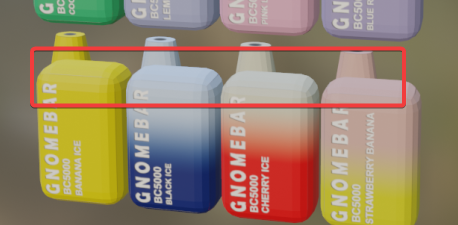
Are those flipped faces? :)
https://i.imgur.com/MKXzvwV.png
 agile thorn
yes i fixed it already
agile thorn

i'm hype about the poster i made too. I spent longer than i should have on it
hahaha
blazing aspen
Nice one, don't forget to share workshop link when it's done :)
blazing aspen
And my mod is faaar from release:
https://i.imgur.com/n5bMOjU.png
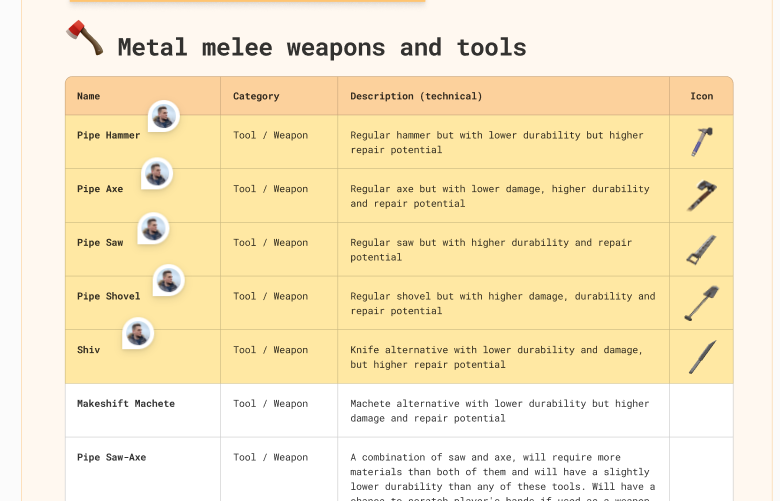
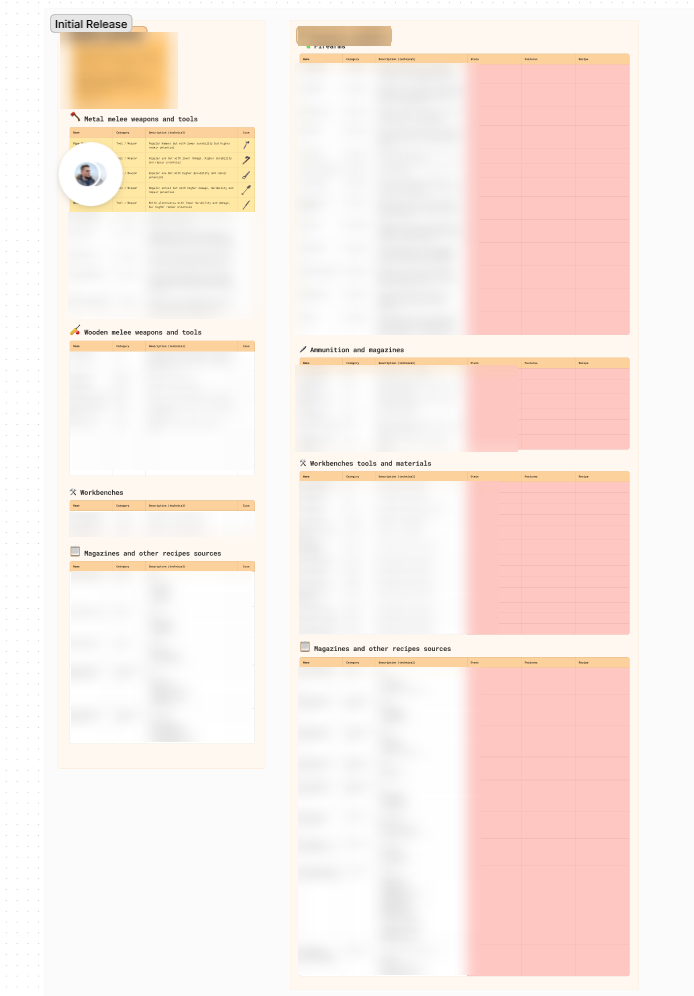
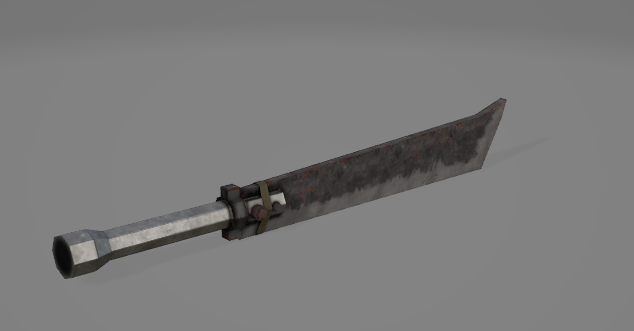
yellow backgrounds are for those items who have their assets done
 runic mantle
agile thorn
runic mantle
agile thorn
howd you make em spin
agile thorn
just in blender
runic mantle
but how
agile thorn
 runic mantle
ah
agile thorn
set z rotation to #frame/20
runic mantle
are you gonna add elfbar re named obv at one point/
agile thorn
wdym
runic mantle
 agile thorn
theyre called gnomebars to get around the elfbar copyright
runic mantle
these
runic mantle
agile thorn
theyre called gnomebars to get around the elfbar copyright
are they called elfbars where you live?
agile thorn
yes
runic mantle
idk if your from america tho
 runic mantle
this is it in the uk
 agile thorn
we have those here too
runic mantle
oh
agile thorn
lost mary is a brand of elf bar
runic mantle
ahh
agile thorn
they do collaborations
runic mantle
ryt
blazing aspen
blazing aspen
https://i.imgur.com/9zU2No0.png
What you guys think about this one?
That's what i have back here :)

 jolly maple
agile thorn
jolly maple
agile thorn
breeze is better
agile thorn
blazing aspen
What you guys think about this one?
I hate these
reminds me of the old gameboys

cough reference materials cough

jolly maple
lack of breeze pro
 jolly maple
they’re not
elf bars are horrible compared to them
they’re made of that nice plastic that doesn’t feel thin and cheap
 lyric elbow
i own vapes and i dont even smoke
blazing aspen
agile thorn
I hate these
Ugh, i was asking about model that i’ve shared 
But nvm, i’ll redo it tomorrow
agile thorn
ooo
sorry, i missed that message
i like that model a lot actually
there's a lack of cool swords in PZ
latent shore
bruh wheres everybody getting the ability to texture
i can model but can't make good textures
latent shore
is substance painter free
 digital tapir
nope
latent shore
is quixel mixer good
digital tapir
I think so but I'm so bad at texturing
I do like substance painters default materials more
latent shore
every time i put a texture on something it looked shitty lol
digital tapir
do you know about uvs?
latent shore
i do
digital tapir
matters a lot for textures
latent shore
is it better to use one of these softwares rather than texturing in blender
digital tapir
preference I still think you can get good results with blender
just those tools are more dedicated
latent shore
like im not an artist i could not draw a texture
digital tapir
There's also armor paint which is paid but you can build from source for free
I had no luck with it though
quite close to blender's interface
 vestal granite
Does anyone per chance have a preset for exporting textures from substance for zomboid? Or could tell me what settings are ideal when doing so?
 unreal prairie
A Nova! Sweet! My dad had one (built one) when I was a kid, always baffled me that its basically a VW beetle conversion 🤣
blazing aspen
agile thorn
there's a lack of cool swords in PZ
That’s actually a machete :)
But yeah, you gave me an idea
blazing aspen
latent shore
is it better to use one of these softwares rather than texturing in blender
My pipeline:
Blender for modeling > RizomUV for UV unwrapping > Substance Painter for texturing > VSC for code editing > Blender again for rotating and scaling the model for pz
blazing aspen
agile thorn
i just use photoshop and blender rn
this is pain
i've tried to work like that at the beginning, but that take too much time
blazing aspen
latent shore
do i need to actually know code or is there like a template
Only if you need some custom functionality for your items
like in my case few of my mod's tools have chance to scratch player hands if player don't wear gloves, this thing needs to be coded with lua
latent shore
idk what i'll make
brainstorming
idk if i want to make Cool Tactical Gun Mod #59 or something uniquer
blazing aspen
agile thorn
i want to look into surface painter
Look at this. isn't that cool tool to have at your disposal? :)
blazing aspen
latent shore
brainstorming
I've spent three or four days brainstorming my mod idea
in general i've just wanted to create some mod for PZ and create on more living repository for my github to have atleast something there, because we use another git repository manager at my work
and i still need smth to show for new offers, lmao
but the idea eventually appeared in my head
blazing aspen
blazing aspen
Look at this. isn't that cool tool to have at your disposal? :)
The only actual hard thing to do with substance and other similar software is proper UV unwrapping
blazing aspen
blazing aspen
The only actual hard thing to do with substance and other similar software is pr...
especially with PZ style items you want some faces to be scaled x2 or x4 on your UV to have bigger texture on that parts of your weapon
latent shore
visible recoil?
blazing aspen
latent shore
are animations on the gun possible besides reloading
idk, haven't worked with firearms yet
just mastering melee stuff
i think you can donate Brita on his patreon and ask him
latent shore
one last dumb question
will it lag the game if theres too much detail
whats the safe tri limit
blazing aspen
latent shore
whats the safe tri limit
Everything below 1000 should work fine
blazing aspen
latent shore
one last dumb question
this section of this discord is for any questions, so feel free to ask anything mate
blazing aspen
latent shore
whats the safe tri limit
The biggest pain for me is texture sizes: https://i.imgur.com/JDUf56M.png
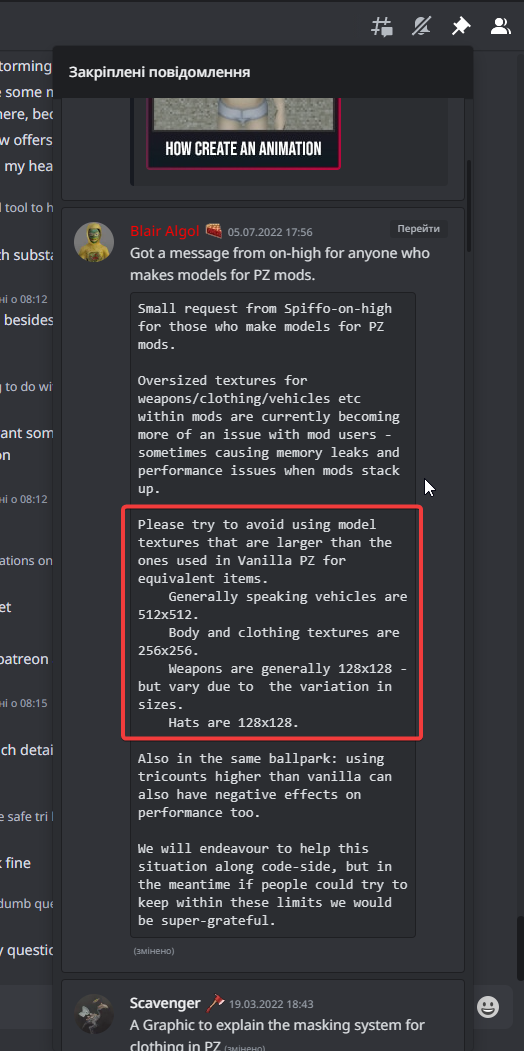
Whenever i'm working on my models i have a really bad habbit of creating 1024x1024 textures and then redoing them from scratch
But anyway you'll not see all the details in game without zoom mod: https://i.imgur.com/XJu6Qr0.png
 latent shore
is it easy to add crafting recipes?
blazing aspen
latent shore
is it easy to add crafting recipes?
really easy to do, hard to find info on how it's done :)
latent shore
im a detail nerd it won't really matter to anyone but me
blazing aspen
latent shore
is it easy to add crafting recipes?
GitHub
Guide to modding various aspects of Project Zomboid - Zomboid-Modding-Guide/README.md at master · FWolfe/Zomboid-Modding-Guide
latent shore
very cool thanks
i just came up with an idea
might have something soon idk
im only recently returning to blender
blazing aspen
latent shore
im only recently returning to blender
I had exactly same situation a week ago
Have a good luck with that :)
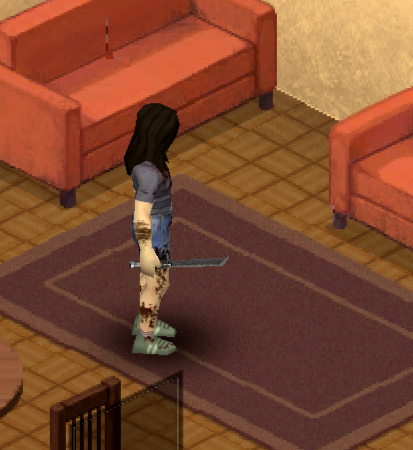
This literally looks like a sword, damn
https://i.imgur.com/or8FE2l.png
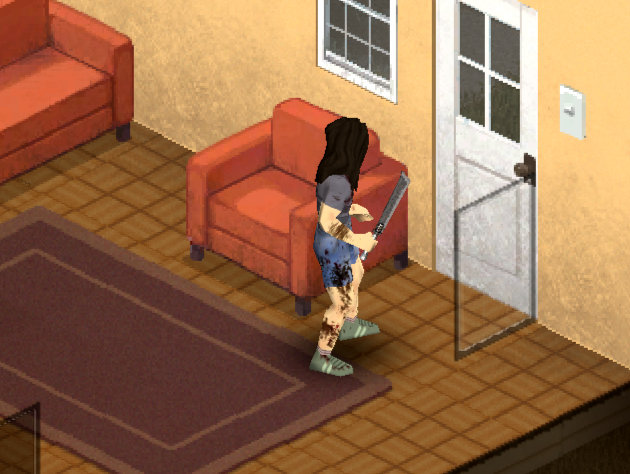
btw i think whenever i'll finish my mod, i'll make a video with my pipeline on working with models using blender, RizomUV and Substance Painter
simple bolt
vestal granite
Does anyone per chance have a preset for exporting textures from substance for z...
You only need to export the color map
runic mantle
does the handle look fine imo it looks a bit weird
 simple bolt
blazing aspen
Whenever i'm working on my models i have a really bad habbit of creating 1024x10...
simple bolt
blazing aspen
Whenever i'm working on my models i have a really bad habbit of creating 1024x10...
Not a bad habbit.
I work in 4k Textures, then scale it down. Works great. 😄
You just shouldnt worry too much to make the texture look good in 4k.
Gotta keep in the back of the head that once you scale it down, it will look better.
runic mantle
runic mantle
does the handle look fine imo it looks a bit weird
i think it looks fine after i did the blade
 blazing aspen
vestal granite
Does anyone per chance have a preset for exporting textures from substance for z...
blazing aspen
vestal granite
Does anyone per chance have a preset for exporting textures from substance for z...
if you want to have you baked lightning and etc export in 2D view: https://i.imgur.com/mu01qCR.png
 blazing aspen
simple bolt
You just shouldnt worry too much to make the texture look good in 4k.
Gotta keep...
blazing aspen
simple bolt
You just shouldnt worry too much to make the texture look good in 4k.
Gotta keep...
In my experience the best practice is to work in 256 from start
This develops a good habit of proper UV unwrapping and scaling important parts of model
blazing aspen
runic mantle
does the handle look fine imo it looks a bit weird
Players will almost never see it :(
runic mantle
blazing aspen
Players will almost never see it :(
yeah i thought that too
i have a hard time visualising shit ingame
like in my head
i cant imagine what it will look like i mean
 silk oxide
Heya, I'm trying to use a custom texture on the "CanOpen" model. But I can't figure out how to get it working in-game.
I have the texture and mesh in my mod directory, and I also have a model file that defines it
Is there any other steps?
molten sail
runic mantle
does the handle look fine imo it looks a bit weird
I'm biased but if we are talking machete handles there is only one king.
 candid island
molten sail
I'm biased but if we are talking machete handles there is only one king.
candid island
molten sail
I'm biased but if we are talking machete handles there is only one king.

runic mantle
molten sail
I'm biased but if we are talking machete handles there is only one king.
you wouldn belive what im texturing this as

 molten sail
runic mantle
anyone got some swords i could make
molten sail
runic mantle
anyone got some swords i could make
I've been rewatching Vinland Saga s1 to prepair for season 2

or thorfinn's blade

 molten sail
kinda, yea
 runic mantle
that too
molten sail

me using those blades with brutal handwork https://www.youtube.com/watch?v=vEe3nA1xjfo

Vinland Saga - Espisode 7
broken mauve
@rain lynx looks like it
 rain lynx
 broken mauve
hes said 2 messages both raging lmao
 blazing aspen
 gritty depot
Scale?

 gritty depot
blazing aspen
Scale?
gritty depot
blazing aspen
Scale?
do u know how I'd fix that?
blazing aspen
gritty depot
do u know how I'd fix that?
I haven’t worked with clothing yet, but try exporting it with 0,01 scale (you can set this up in fbx export window in the right sidebar)
gritty depot
ah, I tried that but it didn't work
I'm getting a SkinningData is Null error
so I might have messed up the Bip01 part but I'm not sure how?
oh wait I think I might have done the armature thingy wrong
that fixed the error but my frog's invisible again

Hmm, I just can't figure out how to make the model show up properly
runic mantle
gritty depot
hi, would anyone be able to help me figure out what I've messed up here
code or file tipe
type
gritty depot
I don't think it's code because if I replace the file with an existing clothing file it works fine

dumb question I'm sure but why isn't the assign option coming up on this?
(in Blender)
thank u!
uh maybe?
I have no idea what I’m doing
Ok
My goal is to have the frog world model show up on the player’s head
But I think I am probably making several mistakes at various stages of the process
Do you know how I’d get that?

This guide will provide all necessary to create a clothing mod for Project Zomboid....
I’ve been trying to follow this one
Except using a hat item as the base
Oh thank u! I’ll give it a go
Thanks! I definitely haven’t been doing that
would a WorldItem have an existing UV map I could use?
I'd assume so since it can have textures applied to it but I can't figure it out
(i also don't really know what any of this means and am kind of just vaguely working my way through on context cues)

ok I'm really sorry to be annoying
but this is me starting from scratch by importing Frog.FBX from WorldItems
could someone work me through just what I would need to add to this to make it function as a hat model
I'm not worried about it being the right size or anything
Just like
Functioning
(as a static model if that makes a difference)
ok nvm I'm finally making progress!!!
ok ok last question I hope
I'm getting an error because SkinningData is null
but I've put
<m_Static>true</m_Static>
so does anyone know what's up with that
blazing aspen
gritty depot
would a WorldItem have an existing UV map I could use?
Same definition as other models i believe
simple bolt
gritty depot
I'm getting an error because SkinningData is null
Make sure you have no vertex group or bones applied to your model as you dont need it if its a static one
And restart game when doing so
blazing aspen
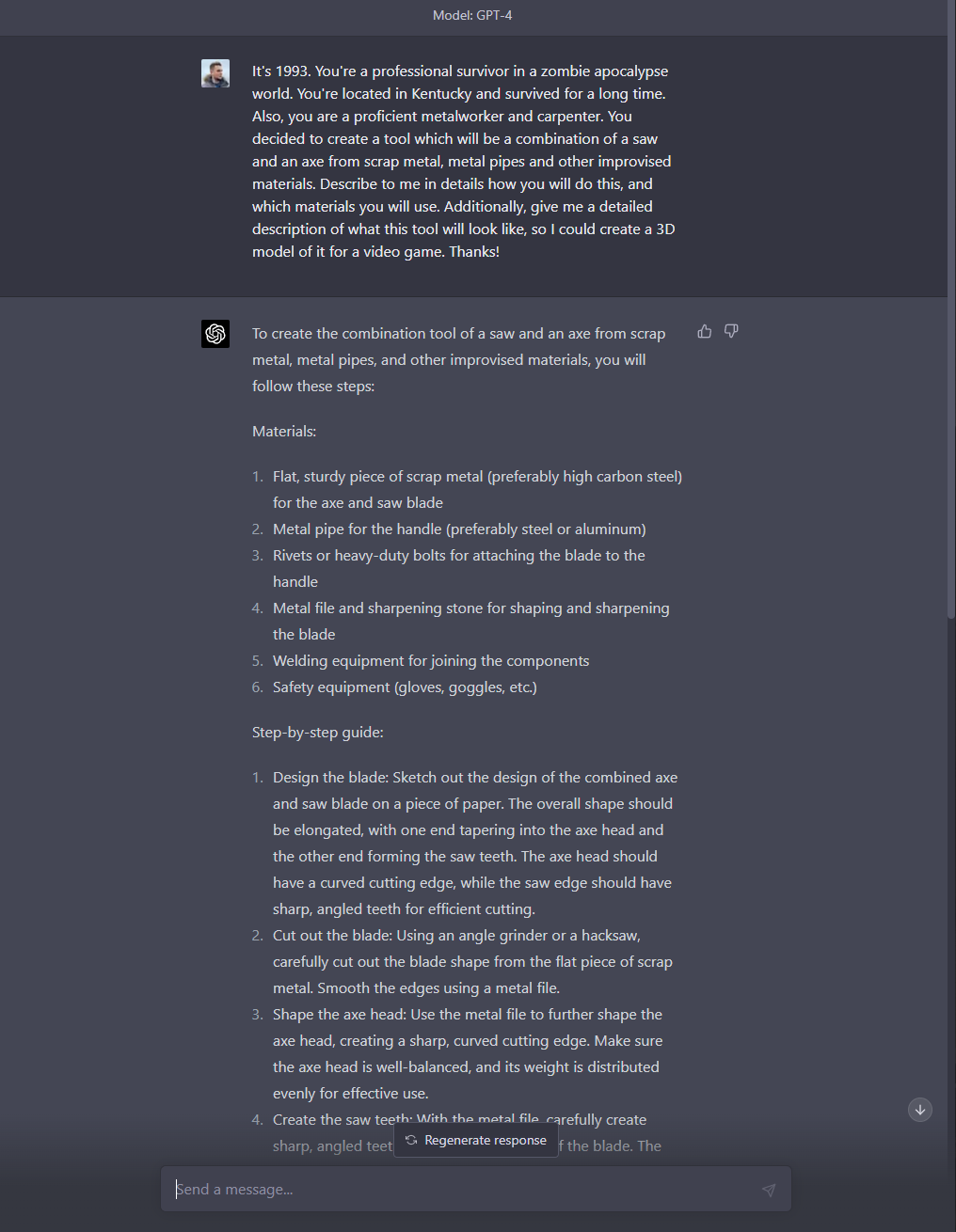
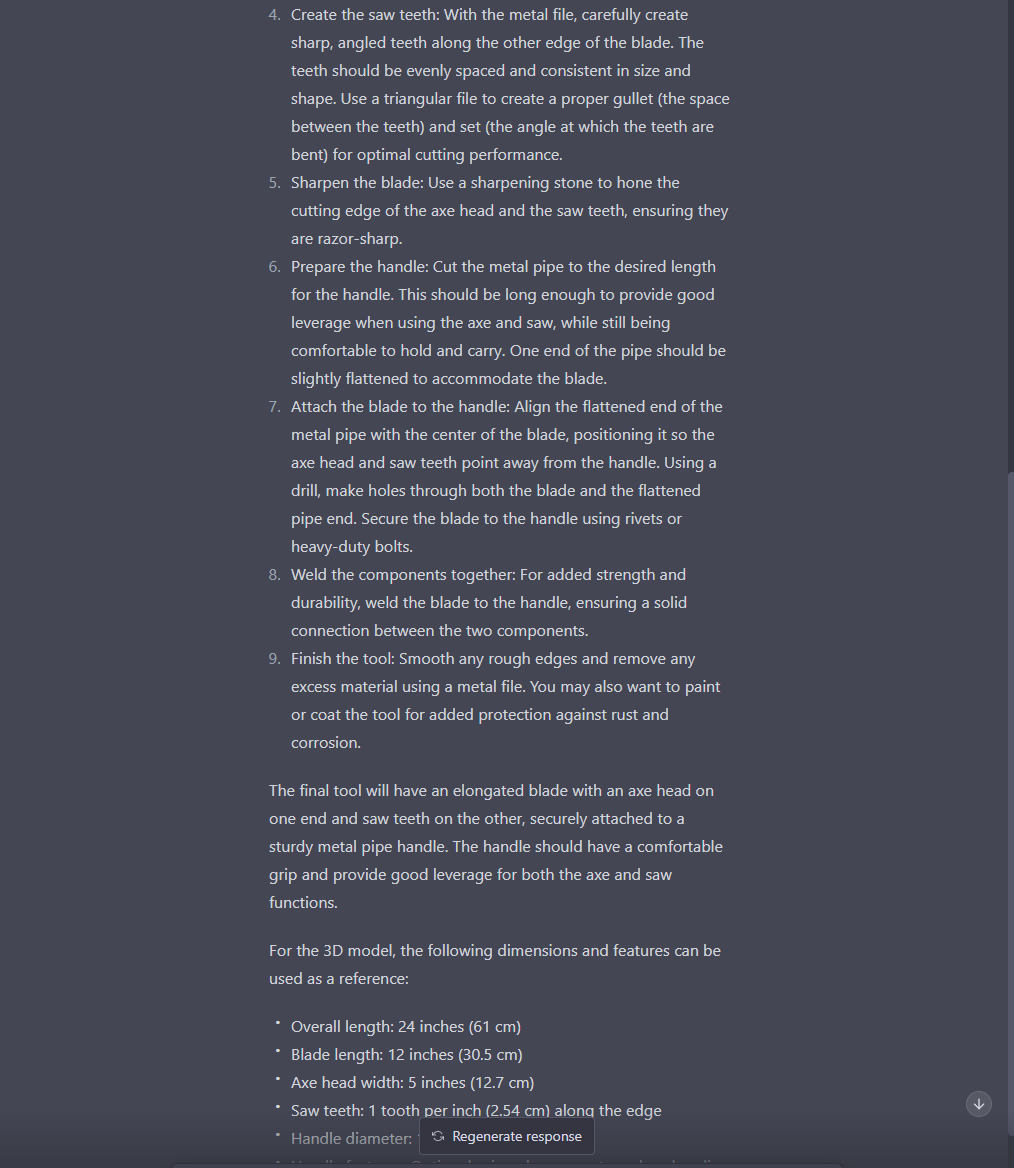
btw, chatgpt is good for generating ideas for models:
https://images-ext-2.discordapp.net/external/UHT6LhAS-p0_TEj7qUm8FHrYpHxrOmHtOyyk-dYId6A/https/i.imgur.com/uha634N.png?width=540&height=697
 molten sail
Good job. You just gave the robots an idea for a weapon they will use to kill us all
random merlin

molten sail
is there a reason why the color painter in blender is refucing to capy the color I am copying with the sampler?
latent shore
blazing aspen
btw, chatgpt is good for generating ideas for models:
https://images-ext-2.disco...
maybe not generating ideas, but it will help make the crafting recipes
 sage pecan
was wondering if anyone could guide me thru how to import player models into blender
 idle fractal
sage pecan
was wondering if anyone could guide me thru how to import player models into ble...
idle fractal
sage pecan
was wondering if anyone could guide me thru how to import player models into ble...
#modeling message Male and female fbx files in pinned messages. Lots of good stuff there.
sage pecan
idle fractal
https://discord.com/channels/136501320340209664/869327724504842330/8755499698079...
had a friend direct me to that earlier. just trying to figure out how to use multiple textures on the player model. such as the skin texture AND boots
idle fractal
had a friend direct me to that earlier
 charred heron
im just going to leave it here
 polar quartz
charred heron
im just going to leave it here
polar quartz
charred heron
im just going to leave it here
Why?
charred heron
becouse why not
polar quartz
It's just a pic Duke
 glossy grail
is there a way to have an underlying mask only mask some specific parts instead of the whole body?
broken mauve
Looking for help on some knife/machete models DM me if you are interested.
 winter echo
Little cafeteria milks, noticed Zomboid has mini milk cartons and so I tweaked the models a bit, changed up the UV maps, and also created models with opened cartons for when you drink 'em. I made sure to include some of those silly little jokes they had on the sides

 autumn maple
After wasting an afternoon following tutorials that are years out of date and downloading software that doesn't work, I've decided to come to the SOURCE of all these fantastic mods. I'm currently trying to get my hands wet with modding; specifically I'm trying to extract a base item static mesh so I can reskin it and add another item into the game. Real simple stuff.
Or one might think. Does anyone have a proven solution to seeing .X filetypes? As much as blender wants to claim it can, it doesn't. I tried downloading the DirectX SDK and ran into an error message stopping me in my tracks there.
So how do YOU guys do it? Even if you're just pointing me in the direction of a functional tutorial, I'll take any help I can get. Many thanks, and thank you all for making this game frigging addictive.
Wait one, gonna give it a shot.
Conversion complete, now to try the blending
Hmm, its in the .obj file format but still not showing. Ill try the 3d viewer
OK! I Can see a bag of plaster with no texture in 3d Viewer so I know it's finally working 😄 THanks so much!
Now to figure out why blender is being a silly little goose.
Thanks for your help @indigo kettle
Ok got it sorted. Your solution works better than anything I've seen before 😄
If I take a world item, say a can of beans, and use it to model my own can of something else (matching the scale, rotation, and position, etc) would I be able to use it as a .FBX or would exporting it as .X be better? Or is it really a non issue?
autumn maple
That's what I'm going to go with. I'm so freaking stoked I found you guys. So long to getting sleep tonight haha.
blazing aspen
autumn maple
After wasting an afternoon following tutorials that are years out of date and do...
I got a .x importer plugin downloaded from some github repo. It can only import files though
blazing aspen
autumn maple
If I take a world item, say a can of beans, and use it to model my own can of so...
Just export your object with 0.01 scale if you’re exporting .fbx
blazing aspen
blazing aspen
I got a .x importer plugin downloaded from some github repo. It can only import ...
GitHub
Import DirectX-X-MeshFile to Blender. Contribute to oguna/Blender-XFileImporter development by creating an account on GitHub.
autumn maple
@blazing aspen You are amazing! I've gotta get some sleep, but I managed to convert the Pantry Packing mod to pack up 10 Ripped sheets into a box and was even able to modify the texture. The flood gates have been opened. EVERYTHING GOING IN BOXES SOON! I'll check out the importer tomorrow at work, and noted on the 0.01 scale.
 latent tundra
winter echo
Little cafeteria milks, noticed Zomboid has mini milk cartons and so I tweaked t...
latent tundra
winter echo
Little cafeteria milks, noticed Zomboid has mini milk cartons and so I tweaked t...
@winter warren you're gonna love this
blazing aspen
autumn maple
<@181032048021078016> You are amazing! I've gotta get some sleep, but I managed ...
If you’ll change the model, just don’t forget to unwrap uv for it
molten sail
When editing a clothing model how do you properly export it? I'm trying to tweak one of mine but when I export it it either becomes invisible or totally broken looking
It's driving me nuts
Do I have to reapply the bones again or something?
broken mauve
Guys
I need ur help

So I am trying to make an animation
A made the frames, as u can see on the top left part
but when I am trying to move 1 frame forward or backwards, it breaks

and then if I'll go back to frame 18, the pose will not be there

What am I doing wrong?
latent shore
are you animating a dab
 winter echo
From my experiences, it's usually because I ended up not keyframing something and so it reverts to the idle position (or really whatever position was last keyframed). Granted I haven't animated anything for Zomboid before
 tough yarrow
latent shore
are you animating a dab
tough yarrow
latent shore
are you animating a dab
for starters, animating a dab is the first wrong step
polar quartz
broken mauve
and then if I'll go back to frame 18, the pose will not be there
Needs more frames
 zenith salmon
simple bolt
zenith salmon
simple bolt
 can’t wait to se what that is
simple bolt
zenith salmon
<:NurseBugoutXL:1072054196712525834> can’t wait to se what that is
Its the "Amazona Outfit" from the mod "Undead Survivor". Already out. 😄
zenith salmon

 winged solar
working on a Suomi SMG


 fluid kernel
anyone good at making vehicle tunes? especially weird ones.
it's draads model and texture. i'm jsut getting it working, and maybe gonna make it fix roads

but it drives like a sports car lol.
 winter warren
latent tundra
<@370376376269930497> you're gonna love this
winter warren
latent tundra
<@370376376269930497> you're gonna love this
i do
 fallow brook
anyone have quilty of life mods?
fluid kernel
 molten sail
Do you know of any kind of guide or something to make stuff like this in blender? Like posing the character and givign them certain outfits and hair models.
I wanted to give it a try for some fun artwork on my workshop page
 vapid mica
fluid kernel
vapid mica
fluid kernel
Dope
fluid kernel
need someone to tune the engine so it DRIVES like a steam roller
 ornate delta
Oddly specific question, but how would I make a clothing item apply to two different body locations I.E pants and shoes. If not I guess I'll have to bite the bullet and separate the two and model the pants fully
fluid kernel
you can make a whole ass outfit as one item.
ornate delta
I considered making the whole outfit into one item at the start but i've committed too hard to separate the head, legs and torso that going back would destroy all that effort.
I've been looking at items that could be similar to no luck, at first I thought maybe Dresses would have separate body locations, due to the short, long, etc variations, but they all use Dress
ornate delta
Never mind Just bit the bullet took me about 30 minutes to separate the two.
fluid kernel
does anyone have floors_overlay_street_01.png ?
 rigid pilot
fluid kernel
does anyone have floors_overlay_street_01.png ?
rigid pilot
fluid kernel
does anyone have floors_overlay_street_01.png ?
more buildings
fluid kernel
?
fluid kernel
anyone know how to select the overlays of a certain square by name?
proven jolt
I'm testing shadow generation/baking, there is no light sources here, it's a texture
 fluid kernel
i made a blender scene way back when that pretty much copies pz lighting style
and it renders nicely to a texture.
this right here.
and this is the material.
proven jolt
fluid kernel
and this is the material.
Since I don't work in a blender, I have the advantages of not working with materials to bake shadows directly on the texture 🙂
fluid kernel
OH.
well belnder bakes as well as max and maya
i just created a cartoon texture that has 4 layers. to simulate the lighting.
blazing aspen
proven jolt
I'm testing shadow generation/baking, there is no light sources here, it's a tex...
try substance painter
it's really easy to create shadows and AO in there
proven jolt
blazing aspen
try substance painter
And so I think that normal shadows have turned out, while I don't want to burden myself
Perhaps in the future I will switch to substence, I have plans to work in it


 pallid blaze
nice
 strong elm
part of my "PROJECT FALLOUT CHINESE ARSENAL" mod
should be out within the week
i have to restart the texture for this one but this will be my first piece of clothing

 timber dune
yangtze mod when?
strong elm
im not entirely sure
im new to modding this game and ive got atleast 6 weapons and this hat to put into the game still
2 swords, 1 pistol, 1 assault rifle, 1 LMG, 1 bolt action, 1 semi auto rifle, 1 carbine.
personally i think the bolt action rifle and the semi auto are dogshit but i dont really care im going to put them in


and the LMG is just the assault rifle recycled but with a bigger barrel and body and a bipod

 blazing aspen
strong elm
i have to restart the texture for this one but this will be my first piece of cl...
blazing aspen
strong elm
i have to restart the texture for this one but this will be my first piece of cl...
What is the texture resolution for this one?
strong elm
It was like 500x and I’m supposed to be using 256x
 pearl solar
am I allowed to commission someone to make a mod? y'know, like, with money?
strong elm
Yeah?
If you have seen the power armor mod on the workshop he commissioned the armor
Cause he’s just a coder
blazing aspen
pearl solar
am I allowed to commission someone to make a mod? y'know, like, with money?
There is an actual threads like this in #mod_development, try to look there
 brave shuttle
strong elm
personally i think the bolt action rifle and the semi auto are dogshit but i don...
brave shuttle
strong elm
personally i think the bolt action rifle and the semi auto are dogshit but i don...
Mosin Nagant has a nice reputation actually.
SVT40 is another story...
strong elm
brave shuttle
Mosin Nagant has a nice reputation actually.
SVT40 is another story...
no im talking about my work on them and thats not a SVT
its a SKS
got replaced by the AK
brave shuttle
Oh indeed. The barrel is different my bad
brave shuttle
strong elm
no im talking about my work on them and thats not a SVT
I made a more detailed model of a mosin if it can help.
I do have a similarly detailed AK model as well. But the texture is different. It was made for a fmat low poly project
strong elm
👍 im all good in my opinion its the textures but i can fix that myself
brave shuttle

Alright. Good luck on texturing then :)
(Sorry for the delay, connection is shit underground)
strong elm
brave shuttle
https://media.discordapp.net/attachments/840727505689247765/928418404350701599/u...
that is way too many polygons for my stuff anyways
theres probably more polygons on that site than there is on half my stuff
random merlin
brave shuttle
https://media.discordapp.net/attachments/840727505689247765/928418404350701599/u...
this is realy good!
brave shuttle
random merlin
this is realy good!
Thanks💖
 pure notch
Hi guys, texture issue here, can I use a cloth texture higher than the usual 256x256px? without masks conflicting
I'm working on new gloves models
and having details it's quite impossible with that resolution
blender gives me an uv map of 1024x1024px, which is great for good patterns and design
blazing aspen
brave shuttle
https://media.discordapp.net/attachments/840727505689247765/928418404350701599/u...
Reminds me of cs 1.6, wanna see it in game
brave shuttle
I also did a Mosin Nagant

an older model than the AK
oh and I'm particularly proud of these ones


It's been so long since I did 3D modeling
 sharp haven

winter echo
Nice work, the vehicles look purtty nice - and so does yer' Mosin!
I need to maybe learn how to add weapons into Zomboid, but eh maybe later
molten sail
i'm not sure why but when I export clothing models and reimport them into blender for tweaking it seems to duplicate bones

anyone know why that is?
proven jolt
molten sail
i'm not sure why but when I export clothing models and reimport them into blende...
These are standard bones, they go like this together
molten sail
so it should duplicate them like that? some of my models do it multiple times and have something like end_end_end_end
they work fine in game so i guess it doesn't matter but I found it odd
proven jolt
molten sail
so it should duplicate them like that? some of my models do it multiple times an...
I think these are the export conditions, my bones are also made like this, there is nothing wrong with that
molten sail
proven jolt
I think these are the export conditions, my bones are also made like this, there...
Nice, just wanted to make sure.
pure notch
I have a question for modelers here, can I stretch the uv map as far as I want without touching the other body parts? I'm making some new glove model

I know some masks might conflict
If I cross the torso line
also, if the glove has a map that's way long, will it dissapear the rest of the arm that is below?
 silver cypress
molten sail
i'm not sure why but when I export clothing models and reimport them into blende...
silver cypress
molten sail
i'm not sure why but when I export clothing models and reimport them into blende...
These are leaf bones, you can uncheck them here. Its actually better to delete them to optimize your models. They do use a small amount of data.
 molten sail
silver cypress
These are leaf bones, you can uncheck them here. Its actually better to delete t...
molten sail
silver cypress
These are leaf bones, you can uncheck them here. Its actually better to delete t...
alright, I'll do that. On another note is there a guide anywhere for making new attachment points? My weapon looks fine in the hands but due to it's size it look terrible on the players back. I want to position it manually for a better result when worn with or without a backpack
I know there is the attachment editor in debug mode but I have never understand how that worked.
silver cypress
molten sail
I know there is the attachment editor in debug mode but I have never understand ...

Now on multiple Platforms:
https://www.youtube.com/c/AuthenticPeach?sub_confirmation=1
https://www.bitchute.com/channel/authenticpeach/
https://www.minds.com/AuthenticPeach
Livestreaming Channel - https://www.twitch.tv/authenticpeach
this shows how you can make your own custom ones, but with your stuff, you can try some of the vanilla ones like Shovel, BigWeapon, Guitar etc
polar quartz
You haven't activated your Windows LOL
silver cypress
@molten sail You can find all the rest of the vanilla attachment points in the items_weapons.txt file.
and choose which one suits your item the best
molten sail
Thank's I'll check that all out. I'm feeling like I'll probably have to make my own because as you can see my model is pretty big compared to most of the weapons in game.

 knotty dew
pearl solar
am I allowed to commission someone to make a mod? y'know, like, with money?
knotty dew
pearl solar
am I allowed to commission someone to make a mod? y'know, like, with money?
@pearl solar
Link is on my profile
knotty dew
blazing aspen
There is an actual threads like this in <#232196827577974784>, try to look there
Yeah we took the project. Its almost done. The client also added a cheesemod project
fluid kernel
😐
polar quartz
knotty dew
Yeah we took the project. Its almost done. The client also added a cheesemod pro...
I love the Cheesy Mod you're making
strong elm
banana for scale

 polar quartz
lovely
 safe mantle
hi guys iam back
proven jolt


 fluid kernel
go danny!
if you do a BTTF version,,, i can show you how to make it do funny shit at 88mph
proven jolt
fluid kernel
if you do a BTTF version,,, i can show you how to make it do funny shit at 88mph
Yes?
fluid kernel
lol i'm working with animating stuff lol.
if i can figure out how the hell to read when something is put into or removed from a trunk.... i'd be gravy
proven jolt
fluid kernel
go danny!
I'll do it, I think you can implement something in it
If you want, otherwise it will be just a decoration 🙂
fluid kernel
just decoration even would be dope.
hit me up when you are ready to do that.
and i'll show you how 😄
 fluid kernel
WHY GOD

 brave shuttle
winter echo
Nice work, the vehicles look purtty nice - and so does yer' Mosin!
I need to may...
brave shuttle
winter echo
Nice work, the vehicles look purtty nice - and so does yer' Mosin!
I need to may...
Thanks :)
And good luck with weapon modding if you ever try
brave shuttle
proven jolt


 remote musk
proven jolt
remote musk
proven jolt
RAD! What's the tri count for this? It looks quite high quality

 remote musk
Very nice 👌
fluid kernel
danny is so good.
gonna have working windows danny?
ALSO! if we can find someone who does shaders... we can HAVE working windows with transparency
proven jolt
fluid kernel
gonna have working windows danny?
Yes, I plan to animate this little piece 🙂
fluid kernel
😄
rigid pilot
but sometimes we don't have allready one DeLorean?
 regal lake
 fluid kernel
rigid pilot
but sometimes we don't have allready one DeLorean?
fluid kernel
rigid pilot
but sometimes we don't have allready one DeLorean?
danny made the other delorean, this is 2.0 baby.
rigid pilot
yeah is nice just hope there won't be more DeLoreans loke bmw... where it is X Of same model xD
DeLorean Kombi will be something new

polar quartz
regal lake
https://steamcommunity.com/sharedfiles/filedetails/?id=2959648724
I love the Top Gear Reference you did Gabe

 strong elm
🤷♂️ its fallout not everything is supposed to look real world
 wispy hill
this is probably just me being dumb, but after importing the male redo fbx file into blender i dont see anything, just a point of origin
silver cypress
wispy hill
this is probably just me being dumb, but after importing the male redo fbx file ...
its a small model, zoom in to it with keypad .
remote musk
Got some more progress

 safe mantle
a quick question when i transfer weights in blender this happens

1 foot is ok the 2nd one has a panic attack
this didn't happen when i used maya
polar quartz
There is a way to fix this
polar quartz
When you export the model right
Don't export it just yet
You see the thing in the right
safe mantle
thing?
safe mantle
@polar quartz
 safe mantle
yep?
polar quartz
Go to export
safe mantle
 safe mantle
i have yea
 polar quartz
Not at all
safe mantle
 polar quartz
Did you rejoin the game?
safe mantle
it reupdates the model no need to
safe mantle
game crashed
safe mantle
now i remember
polar quartz
But the reason it crashed
safe mantle
i had this issue long ago and it was an export issue
polar quartz
Is because of that model trying to load
safe mantle
didn't bother to fix it in blender so i exported it from maya
polar quartz
I don't know lots about Maya
safe mantle
polar quartz
Is because of that model trying to load
nah its because i have more than 20 programs running on 8gb ram
polar quartz
That's not smart
safe mantle
 polar quartz
My..
safe mantle
there is another 12 on the other side XD
polar quartz
I think you need to clear up some ram
safe mantle
polar quartz
I think you need to clear up some ram
i give up
polar quartz
Why?
polar quartz
It's messed up?
safe mantle
the right is just a duplicate or the left one
safe mantle
@-@
polar quartz
It could be the animation
I'm not sure
Probably the animation is messed up or something
safe mantle
i reached for him ded
polar quartz
Did Maya not work as well?
safe mantle
i don't have its license anymore
safe mantle

 silver cypress
🪳
remote musk
remote musk
Got some more progress <a:breakdance:1023230082669613068>
Some more progress today


I kept the poly count lower by not modelling seats in, it's very goofy but currently 5,014 tris with all parts on it


 sour ibex
5000 is too many
remote musk
Hmm tricky
What is average amount?
I was going off the falcon example mod at 4,188tris
Also currently that is with different parts on top, the headlight comes in circle or square sealed beam, then cover too, as well as exhaust layouts x4 (twin 3 inch, single 3 inch, twin 2 inch, single 2 inch), so not sure


 proven jolt
remote musk
I kept the poly count lower by not modelling seats in, it's very goofy but curre...
proven jolt
remote musk
I kept the poly count lower by not modelling seats in, it's very goofy but curre...
count polygons without wheels
remote musk
4,210tris
knotty dew


 broken mauve
remote musk
Some more progress today
broken mauve
remote musk
Some more progress today
is that a sebring?
remote musk
It's a Nova Sterling kit car, idk what a Sebring is
It was called lots of names though was the A.D.D Nova
USA name was the Sterling Nova
 remote musk
Yep it'll be the same 👌
broken mauve
rebadged
broken mauve
what does RR stand for?
 vital cradle
rear engine, rear wheel drive iirc
broken mauve
oh. thanks.
remote musk
Yep, I'm lol'ing at the side pipes cause the engine is in the rear so they're just for show lol
Interesting wing though, maybe I should do some splitter and wings as addon parts 🤔
broken mauve

 molten sail
This is probably my first real dive into model work. I modified the book model to be a right to left read manga. I even redid the UV to suite my needs. pretty happy with my work.

that's the only part I can show
for reasons..
I'm thinking 512x512 ended up being too high res but at the same time I kinda like it
reading it gives you -100 happiness.
and gives you max stress and anger
sharp haven
the ending you showed is officially recognized btw
 unreal solstice
broken mauve
unreal solstice
broken mauve
wooow how did u do that??? so cool
fluid kernel
y'all aint see shit ya hear?
 brave shuttle
vital cradle
brave shuttle
vital cradle
Looks like Unturned style, with a bit more detail, am I correct?
polar quartz
brave shuttle
Looks like Unturned style, with a bit more detail, am I correct?
I think you're right
zenith salmon
molten sail
This is probably my first real dive into model work. I modified the book model t...
zenith salmon
strong elm
🤷♂️ its fallout not everything is supposed to look real world
Oh didn’t realize it was fallout
molten sail
zenith salmon
<:unhappy:721361533636182047>
No sadness. It's the JoJo ending so all is well.
zenith salmon
molten sail
No sadness. It's the JoJo ending so all is well.
I do like that ending lol
molten sail
fluid kernel
y'all aint see shit ya hear?
Looks great. I've been dying for something similar that can be used with the motorbike mod.
charred heron
vital cradle
Hi
Not for project zomboid, but thought I'd share some models I made lately
unturned?
fluid kernel
molten sail
Looks great. I've been dying for something similar that can be used with the mot...
Which bike mod? Auto tsars??
vital cradle
Ooh a package, I wonder what's insi-

 broken mauve
vital cradle
Ooh a package, I wonder what's insi-
broken mauve
vital cradle
Ooh a package, I wonder what's insi-
 reef salmon
"if you can't buy one, make it yourself" next mod for PZ

 runic mantle
reef salmon
"if you can't buy one, make it yourself" next mod for PZ
runic mantle
reef salmon
"if you can't buy one, make it yourself" next mod for PZ
Jar crafting too
molten sail
fluid kernel
Which bike mod? Auto tsars??
That's it
fluid kernel
it already has trailers.
molten sail
reef salmon
"if you can't buy one, make it yourself" next mod for PZ
Bruh
You are my favorite person here
molten sail
fluid kernel
it already has trailers.
Really? Since when?
 molten sail
Learn something new everyday
molten sail
reef salmon
"if you can't buy one, make it yourself" next mod for PZ
Which mod will this be going in? So jealous rn. I had planned on getting this very thing done for either my dakimakura mod or anime collectables one
reef salmon
molten sail
Which mod will this be going in? So jealous rn. I had planned on getting this ve...
for one of its own, it is a figure that could appear in drawers of rooms with a low spawn rate
molten sail
Very nice
A fellow power enjoyer deserves my full respect. Send it to me when it's done. Instant favorite
Question is can it fit in the jar?

reef salmon
reef salmon
for one of its own, it is a figure that could appear in drawers of rooms with a ...
I'm just a modeler, so I'm with @velvet sentinel who is helping me with the script, he finishes his part and I'll upload it to the workshop
molten sail
I like your modeling work. Idk if you do commission stuff but if you do I might hire you for some future stuff
reef salmon
molten sail
I like your modeling work. Idk if you do commission stuff but if you do I might ...
nope Xd, I left it so big that it reaches the player's hip, because if it was very small, many details would be lost that it took me to do since the texture was drawn completely by hand
reef salmon
molten sail
I like your modeling work. Idk if you do commission stuff but if you do I might ...
I sometimes make orders, I'm from Chile so sometimes orders abroad make it difficult for me but they are almost always small things and I only charge with credits
molten sail
reef salmon
I sometimes make orders, I'm from Chile so sometimes orders abroad make it diffi...
I added you. I might reach out at some point :)
molten sail
reef salmon
nope Xd, I left it so big that it reaches the player's hip, because if it was ve...
Have you considered having 2 versions one big and one normal figure size for shelf collecting?
reef salmon
molten sail
Like a mannequin
... I will take your idea into account
molten sail
Same model of course but since you would have the big version it wouldn't matter as much if detail is less visible on the small one
latent shore
molten sail
This is probably my first real dive into model work. I modified the book model t...
pog
molten sail
I had this made for me and saphh did great work on the models for the scale. I really like the idea of higher detailed big ones tho https://steamcommunity.com/sharedfiles/filedetails/?id=2935337159

Power plush and figure
reef salmon
molten sail
Same model of course but since you would have the big version it wouldn't matter...
I liked your idea and I already informed the Skulker, I will make 2 variants, the one I already had and another one that is rarer to find the mannequin size
latent shore
@molten sail are you making the entire 177013 book
reef salmon
molten sail
I had this made for me and saphh did great work on the models for the scale. I r...
this mod gave me the idea to make my mod
molten sail
latent shore
<@234323630178304000> are you making the entire 177013 book
That's what that is. Not every panel of course but it along with other manga and doujinshi will be findable with dakimakuras
molten sail
reef salmon
this mod gave me the idea to make my mod
Hearing this made my investment all the more worth it 😂
latent shore
week 2 of modding zomboid and i haven't even started
but i swear i will eventualy just wait
molten sail
Once I get my dakimakura mod updates and my berserk one I plan to get more stuff added to the figure mod
reef salmon
I grabbed a dakimakura mod from the workshop and I made my personal version and I changed the images to be +18 Xd
winged solar
Suomi SMG


 molten sail
Should I keep this size or go bigger? As far as irl maga goes this is about right but if I go bigger the image might be more clear.
 molten sail
 fluid kernel
winged solar
Suomi SMG
fluid kernel
winged solar
Suomi SMG
you are getting so much better. that is awesome./
broken mauve
 molten sail
broken mauve
molten sail
broken mauve
this looks so cool. how do you do all that with the models?
I am having so much truble with the attachment editor. I watched peach's video and followed it and thought I actually did it correctly but it turns out I was just changing the shovel position in the game and not my mod.
I can't understand how I can tweak the position of my mod item when it is on the players back
broken mauve
molten sail
this looks so cool. how do you do all that with the models?
I am using Blender and importing Pz models there
fluid kernel
the poop mobile!

 brave shuttle
winged solar
Suomi SMG
brave shuttle
winged solar
Suomi SMG
Nice. Lools like a bit the soviet ppd-40
molten sail
 velvet sentinel
https://cdn.discordapp.com/attachments/1075222539468537907/1095616231421263912/i...
velvet sentinel
https://cdn.discordapp.com/attachments/1075222539468537907/1095616231421263912/i...
Shading on it looks off but otherwise 10/10
 winged solar
brave shuttle
Nice. Lools like a bit the soviet ppd-40
winged solar
brave shuttle
Nice. Lools like a bit the soviet ppd-40
It's the Finnish Suomi SMG
runic mantle
broken mauve
You make good videos and art
runic mantle
velvet sentinel
https://cdn.discordapp.com/attachments/1075222539468537907/1095616231421263912/i...
Jar when


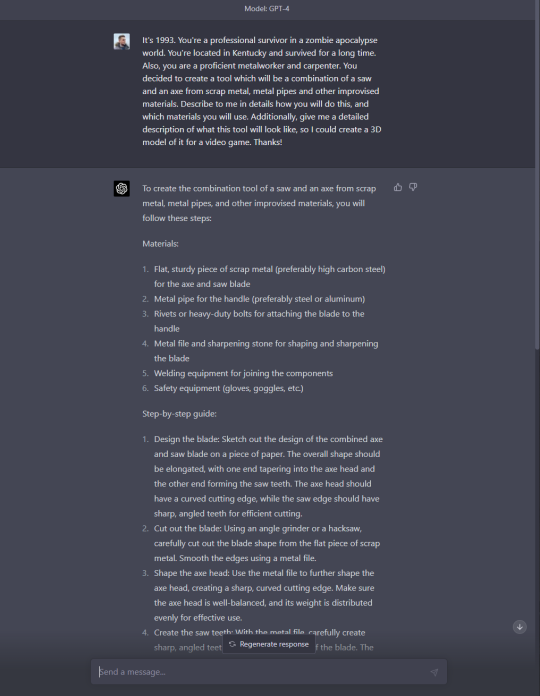
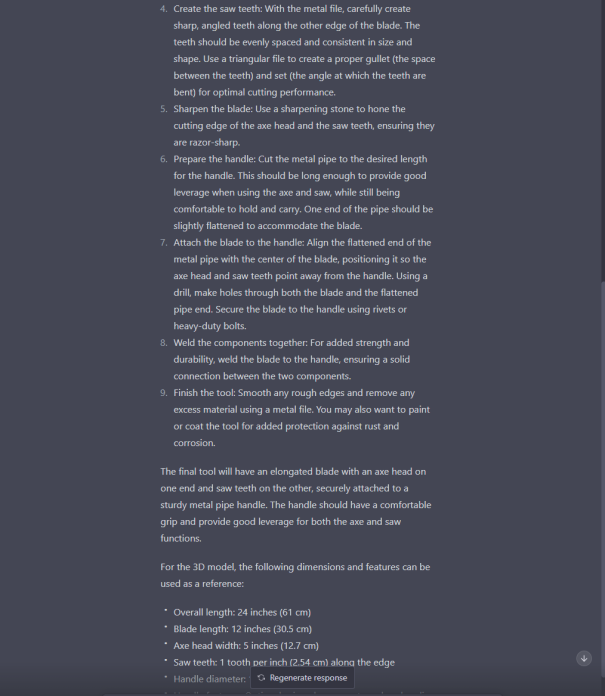


 polar quartz
broken mauve
I am using Blender and importing Pz models there
polar quartz
broken mauve
I am using Blender and importing Pz models there
That is art boobie that you're making
polar quartz
velvet sentinel
https://cdn.discordapp.com/attachments/1075222539468537907/1095616231421263912/i...
It's my mate whatcha doin in here?
molten sail
polar quartz
It's my mate whatcha doin in here?
your mate has birthed true beauty upon the land of Kentucky
polar quartz
molten sail
your mate has birthed true beauty upon the land of Kentucky
Oh yes he does
molten sail

polar quartz
broken mauve
Also Boobie why does the zombies don't have hair? I mean maybe you can't find the hair model or you just don't want it or something?
Idk
molten sail
I want to know how the apply all the clothes and weapons to the body. I tried to recrate this but with the PZ model and I just couldn't figure it out

also funny enough this tiny thing right here is actually that power figure in a jar

dude beat me to adding it into the game
reef salmon
Please help, because the light in the model looks wrong? the light hits it badly in some parts no matter where you put the light on the model it looks like this,


 wicked pagoda
Probably an issue with the model itself @reef salmon
reef salmon
Yes, I know, what I want to know is what I did wrong during the blender so that it came out with that light error
reef salmon
wicked pagoda
have u checked normals
normals?
wicked pagoda
in blender
whenever ive had shading issues on anything on the engines i work with atleast its usually cuz normals r wrong
reef salmon
wicked pagoda
in blender
this?
 wicked pagoda
en modelado
🖱️ click en el boton izquierdo
haz click
Pero primero deberias ver en backface culling
ns cm se llama en español lo uso en ingles
reef salmon
Ha, hablas español :v y yo aca usando traductor
reef salmon
Ando almorzando termino y reviso eso que me dices manin
wicked pagoda
ok