#modeling
1 messages · Page 11 of 1
 winged verge

 fluid kernel
the hood looks 100x better.
 jaunty lichen
A 3d model i used as reference yeah, like those on gamemodels or 3d warehouse
But usually they are high poly
jaunty lichen
fluid kernel
the hood looks 100x better.
I sometimes forget about bevels and end up with blockier models when doing low poly
Ty for reminding me
fluid kernel
😄
the best part is, if you make your truck work with tsars trailers, they will automagically work with mine.
and then they were automagically work with the trucking mod as all they have to do is pull the trailer!
jaunty lichen
Thats true, i gotta contact them and ask for permission
Im still getting to grips with the coding
 patent crown
jaunty lichen
A 3d model i used as reference yeah, like those on gamemodels or 3d warehouse
patent crown
jaunty lichen
A 3d model i used as reference yeah, like those on gamemodels or 3d warehouse
Oooh
Thats cool
I'm trying to model a Chevrolet Caravan using image references, i will give a try to using another model as reference
jaunty lichen
patent crown
I'm trying to model a Chevrolet Caravan using image references, i will give a tr...
Mmmmm spicy
Wich version? Diplomat? SS?
patent crown
75 SS
jaunty lichen
patent crown
75 SS

although i like the Diplomat front more the SS looks good af too
fluid kernel
anyone here ever write frag shaders?

 winter echo
The whole thing is pretty neat, the transparent textures are pretty groovy - and the interior work too!
fluid kernel
the transparency is the issue.
if i can get that to work right it'll make cars SO much better
winter echo
I'm not really good at textures and whatnot, but what seems to be the issue with the transparency?
fluid kernel
it's not a texture issue
it's the shader i wrote.

see how the backside door is missing?
winter echo
Oh I see now
Do you think maybe the game is culling animated objects that otherwise might not be seen?
fluid kernel
it's the shader being weird with items on the z.
winter echo
Ah, well darn I couldn't say I'm familiar with anything of the sort
fluid kernel
ghost driver
 simple bolt
fluid kernel
ghost driver
simple bolt
fluid kernel
ghost driver
Looks great and fun to drive 😄
fluid kernel
i am working on getting a transparent windows shader for cars.
 broken mauve
is there a way to connect two object to each other in blender? I am trying to connect clothing models to character model
broken mauve
I want to connect clothing to the model, and then make some animations
for example:
I want to put backpack on my model, and want it to move with the model as animation going
fluid kernel
oh
@silver cypress this is your territory
i call upon THE POWERS OF THE DEVS! hear my call oh names of crimson and contemplate my plea!
 wooden viper
@fluid kernel i have some basic knowledge of shaders in GLSL
fluid kernel
well.... feel free to read up
wooden viper
How come it's working in the first image?
fluid kernel
welcome to the party!
the second image is how it looks when you start the game.
if you remove the windsheild and put it back on you get the first image.
the video is the first image but in action
wooden viper
Ah ok
fluid kernel
as long as you got south or west your can see your player.. north or east you poof.
wooden viper
That's so strange
What are shaders like in pz? Do they use base GLSL or HLSL or their own version?
fluid kernel
dm me and i'll send you what i am using
you make them work and you will be making a ton of car modders happy.
mainly me but whatever
XD
wooden viper
Ok I can definitely try and help out, I'm still fairly new to shaders but I'm down to try and see what's going on, no promises though 😂
broken mauve
alright guys im sending in the progress i've made

im currently painting the body
made sure to make it look nice when you take off any body panels

I think im gonna redo the seats and headlights aswell
Textures is a thing I've always been struggling with


 fluid kernel
looking nice
broken mauve
broken mauve
alright guys im sending in the progress i've made
Any ideas on how I could improve the headlights?

 misty spire
 winged solar
more gun
winged solar
more gun
could you add more cowbell to it
winged solar
yup!
 paper zealot
fluid kernel
ghost driver
paper zealot
fluid kernel
ghost driver
great job
Does your custom shader work on vehicle parts that have animations?

 silver cypress
broken mauve
silver cypress
broken mauve
shade smooth the bags and the bottom of the army helmet's strap is clipping through the guy's face
 tame sonnet
its just too small compared to the actual thing
its like a biscuit compared to a button
jaunty lichen
tame sonnet
its just too small compared to the actual thing
check the image i sent
this one
look at the horns
jaunty lichen
tame sonnet
like increasing the size by 15%
well sure why not
 scarlet forge
Let's see if someone can give me a hand. I'm putting an item in the game, and everything goes well, it detects the 3D model, the icon, the texture and everything, but when I try the option "place item" I get this error: "LOG : General , 1678157572466> bugged action, cleared queue ISDropWorldItemAction" Does anyone know what this could be?
 tame ingot
winged solar
tame ingot
winged solar
Kar98k? Looks nice but it miss the little hole for the strap on the rifle butt tho
winged solar
tame ingot
Kar98k? Looks nice but it miss the little hole for the strap on the rifle butt t...
It's a Springfield!
patent crown
How many polygons is too much for a car model?
 proven jolt
patent crown
How many polygons is too much for a car model?
proven jolt
patent crown
How many polygons is too much for a car model?
Personally, I do no more than 5k-10k
patent crown
But how much can the engine handle?
 random acorn
proven jolt
patent crown
But how much can the engine handle?
random acorn
proven jolt
patent crown
But how much can the engine handle?
You can do 100k+, but I don't think it's wise
patent crown
K, thx
fluid kernel
5-10k is for a danny/ki5 level model though. with all removable parts etc.
 undone crown
why is the Tilezed pack viewer doesnt work?
 rain field
@crimson scaffold heey! congrats man, your fire truck is on fire 🔥 🚒 its looks amazing
 polar quartz
Believe me His not going to respond
polar quartz
broken mauve
You know this Cloth Stuff Right?
How did you import X Models to Blender?
@broken mauve
broken mauve
polar quartz
How did you import X Models to Blender?

GitHub
Import DirectX-X-MeshFile to Blender. Contribute to oguna/Blender-XFileImporter development by creating an account on GitHub.
polar quartz
Thank you
 lilac raptor
broken mauve
https://github.com/oguna/Blender-XFileImporter
lilac raptor
broken mauve
https://github.com/oguna/Blender-XFileImporter
Just out of curiosity, would this work for Blender 2.79?
broken mauve
lilac raptor
Just out of curiosity, would this work for Blender 2.79?
no clue
lilac raptor
I'll give it a try, anyway.
polar quartz
lilac raptor
Just out of curiosity, would this work for Blender 2.79?
Give it a try
lilac raptor
The export option shows up when I go to File->Export but there doesn't seem to be one for File->Import.
I think it'd be a good idea for me to be able to import already existing models so I can get an idea for polycounts, rigging, etc.
Sure enough, it says the only location is on the export option:

I suppose I could make do without importing existing models. It would just take a lot more trial and error until I get what I want.
Well, I've found this. So, I'm going to try that out for importing: https://github.com/poikilos/io_import_x

GitHub
Import/export .x files in Blender 3.0 (and some earlier versions). The Poikilos fork attempts to maintain compatibility with the latest stable Blender and allows install via GUI (Click "...
And, it's not showing up... I'll get somewhere soon.
rain field
polar quartz
Give it a try
hii Fox, do you have a hint to how do i find the animations in game that is not associated to a value, like that from CharacterActionAnims
as example "BlowTorch" is just a isolated string, no liked to a global variable like i mentioned, where do i find all isolated strings animations?
better than nothing, but maybe missing, i made a dump file of animations

or someone that knows about in game animations
lilac raptor
Sorry for multiple posts. But, if anyone needs, I've found this works for at least the static models in PZ: https://github.com/rundaaa/ZomboidImportExport
GitHub
Blender 2.79 import/export addon for Project Zomboid files - GitHub - rundaaa/ZomboidImportExport: Blender 2.79 import/export addon for Project Zomboid files
rain field
 shy steppe
Heya, um
I need a bit of help


When I put it on ingame i dont receive any errors but its invisible
I literally get 0 errors in the log wtrf
*wtf

idk if this is normal but i see this inside me
jaunty lichen
when that happens to me i usually use a very small solidify modifier so there are faces on both sides
or maybe recalculate the normals?
i havent made clothing mods yet so it could be something else sorry
guys

finally in game
i have a question tho
 jaunty lichen
jaunty lichen
jaunty lichen
the hood opens like in the IRL vehicle
but should i make the hood area in front or in the sides to make more sense?
it has an engine btw its just not in the model yet lol
shy steppe
idk what to do
only error im getting in logs is 1678262606918> ModelScript.check> no such model "???.jacketworld" for Base.sLeonsBomberJacket.
and it doesnt like the world model and refuses to use it, but idc about that when the fuckign thng wont even work when i put it on
jaunty lichen
checking it from the sides makes more sense but it would overlap with the wheels area, so idk if its better

also does anyone know how to add physics boxes to vehicles?
shy steppe
what are the zomboid blender export settings for clothes
pretty sure its that now
k i bdont fukcing know
its something to do with the rig or scaling because by fucking with it i could get it bigger but it looked weird and now its invisible again and it wont fuckign work and nobody is helping so i give up because its almost 3am
it would randomly appear (like in the screenshot) and then disappear based on how many times i exported it
so i dont know and i dont fucking car eanyhmore
please tell me the export settings because im 19239213912932194 suire thats why its not working and its making me mad
shy steppe

if i make it super suepr big in blender i get this

so it is there but its not liking the rig or something and thats why its folding into itself??? i dont f ucking udnerstnad
rain field
heey people if you do tweaking vanilla animations or made new ones, knows how can i do an existing animation be non movement lock? my timed action is set to stoponwalking false but some animation have it hard coded, any way to make a copy from .xml and unlocks the movement?
do you have some guide for modifying existing/vanilla animations? im trying to make modification about non block movement do you have recommendations about that?
fluid kernel
jaunty lichen
checking it from the sides makes more sense but it would overlap with the wheels...
on the sides in front of the wheels.
fluid kernel
shy steppe
if i make it super suepr big in blender i get this
SPIDER PEOPLE!
 rigid pilot
how to make pants withone has option to put inside boots or outside?
shy steppe
What are the blender expert settings?
fluid kernel
export or expert?
rain field
@fluid kernel yo its okay to dm you?
edited:
i suppose its better to post it here (if anyone got interested feel free to react/respond this/dm me)
im grouping up with some people, to do a mod big enough to not be able to do it alone,
currently are some people into it,
3 dev, 2 artists atm, are you interest to hear about it idea/brief?
its is an fast travel, using bus, and some inspiration about animations of bus from differents epoch of evolution of the sims
that emerged, from two feedbacks, talking about "god im really bad driving", and for mp admin to enable a more balanced way to use tp mods,
because the idea of bus, are to have some schedule of working time hours like 6am to 19pm, and need to catch on the edge of streets... i can share with you the complete text about it
fluid kernel
sure
rain field
fluid kernel
sure
okay! send to you there
https://discordapp.com/users/195731919424585728
Discord
Discord is the easiest way to communicate over voice, video, and text. Chat, hang out, and stay close with your friends and communities.


 ripe summit
nice!!
rain field
for people with anim skills can you help me here please? 
#mod_development message
 slow bronze
I'm having trouble linking fbx files to the item i think. I'm getting the following error:
Failed to load asset: AssetPath{ "media/models_x/skinned/belts/bbelt.fbx"}
however the files does exist at that location. the path is right in the fileGUIDTable.xml file to the clothingitems xml file, which links to the fbx file with the right path. the GUID is correct also. I cant help but feel im missing a reference somewhere but its all guessing right now.
its clearly trying to load it, but something has gone awry somehow
slow bronze
my mistake, i had the wrong bone selected in Blender. all working now 😄
winged solar
GUNTS

 elder orchid
Looks great, love the art style and texturing
shy steppe
winged solar
GUNTS
nice kar98k and g3a3
winged solar
and springfield at the tippy top!
shy steppe
so i tried adding leons pants
and now both my jacket and the pants are invisible
and the jacket worked before, and i didnt do anything to it
rain field
im trying to use self:setActionAnim("RefuelGasCan") and walking while doing it, how can i do it?
the anim have both legs locked
shy steppe
if anyone wants to look
because i really dont kniw
the jacket works fine but i added pants and set them up like you should and now nothing does lol
i thought maybe it was the fileguidtable but i dont think sop
rain field
fluid kernel
it's ALWAYS the masks
can i override or free from masks?
fluid kernel
that was to fullmetal.
rain field
aah
fluid kernel
as for yours.... remove the animations from the legs and set it to a mask.

 rain field
im reading the X file, and have Bip01_Pelvis and stuff, is this? im not get used to animations
shy steppe
then the jacket went invisible completely even without the pants on, world models for them dont appear anymore either
rain field
fluid kernel
as for yours.... remove the animations from the legs and set it to a mask.
i dont know how to do it
fluid kernel
if you are doling a timed action i dont think you can.
rain field
ok
shy steppe
k wahtever
shy steppe
idk what to do
i even made it a seperate mod with just the pants
pants still invisible
rain field
shy steppe
i even made it a seperate mod with just the pants
did you check that image?
#modeling message
shy steppe
Yes, and the only masks trhe pants use are 9 and 7 lol
the guy isnt invisible, the clothes themselves are.
it doesnt even make his legs invisible, so i dont fuckign know
\
polar quartz
shy steppe
Yes, and the only masks trhe pants use are 9 and 7 lol
Did you make the mask for it?
 zenith salmon
winged solar
GUNTS
zenith salmon
winged solar
GUNTS
G3 and kar98’s fucking awesome
shy steppe
polar quartz
Did you make the mask for it?
....???
I've never had to "make" masks for anything in any of my clothing mods or gun mods
they've just worked
polar quartz
I get that but sometimes if it's a custom one you need to always make a mask for it
shy steppe
i am so confused 😦
polar quartz
You know what a mask is right?
jaunty lichen
testing out the different variants

now gotta add the 2 axle variants
and fix the horn lmao
engine is now placed
 rigid pilot
is that scania?
fluid kernel
jaunty lichen
engine is now placed
so good.
fluid kernel
check the pins
 jaunty lichen
all variants finally working in game

just some tweaking and replacing placeholders and the main objective will be complete
jaunty lichen
patent crown
my first experience with modelling
is this the caravan? you got the hood perfectly imo
fluid kernel
jaunty lichen
all variants finally working in game
do those use HSV colors?
jaunty lichen
fluid kernel
do those use HSV colors?
unfortunately not, i didnt learn how to do it yet, what i did was get the 6 main color options for the 113h
and code them as skins
jaunty lichen
how do i do it?
fluid kernel
dm me and i'll show ya.
you can even have it as an EXTRA skin.
so all your existing ones, AND an extra one that the game randomly colors.
fluid kernel
you gotta buy me dinner first for that!
jaunty lichen
fluid kernel
you gotta buy me dinner first for that!
lmao sorry fkin autocorrect
fluid kernel
hahahaha
patent crown
jaunty lichen
is this the caravan? you got the hood perfectly imo
Yes it is

I am really happy with how the hood looks
jaunty lichen
patent crown
the whole model is looking good m8
 patent crown
jaunty lichen
ur doing this version right?
patent crown
jaunty lichen
ur doing this version right?
Ye
jaunty lichen
the tail light color details can be done through texturing
and the topology doesnt look too complicated
jaunty lichen
patent crown
How did you do the 113H?
got a model as reference and made a lower poly version, the 113 itself doesnt use too crazy formats so its easier to make a simpler model
jaunty lichen
patent crown
I mean, did you use images as references?
i used a 3d model side to side with the one i was modeling
patent crown
Oh ok
Thats a good idea
After the Caravan im thinking about making a Veraneio
And i have a really good model of it, so i may try using it as reference
jaunty lichen
patent crown
After the Caravan im thinking about making a Veraneio
noice
wich year
patent crown
1975
jaunty lichen
patent crown
1975
very nice
patent crown
Ye
But i might do a Suburban
Since they look the same and a suburban is more well know
jaunty lichen
thats true
id do a D20
there is an abandoned d20 bonanza right outside my house
im so frustrated that i cant buy it and fix it IRL that ill model it and fix it in pz lmao
 pulsar sandal
Can anyone help me with hair modding ? I have the modded hair but whenever i go into the game to test it , it just comes up as bald hairstyle
 cerulean pike
Work in progress re-animation based on the ones from Train to Busan
wait shit that doesn't embed
There we go
Advice / critiques always appreciated. I haven't really done much curve editing / cleanup yet, so it's pretty rough still.
cerulean pike
Changed up some of the arm movement and added a bit of stretch / squish. Will work on it more tomorrow.
lilac raptor
cerulean pike
Changed up some of the arm movement and added a bit of stretch / squish. Will wo...
That's really cool. If you don't mind, how are you going about doing animations? If I'm not mistaken, those are also a part of the FBX file formats?
cerulean pike
lilac raptor
That's really cool. If you don't mind, how are you going about doing animations?...
https://steamcommunity.com/sharedfiles/filedetails/?id=2867805604
Here's the guide I used to get my Blender setup for PZ.

Welcome to this guide, where you will finally make your own animations and you will learn basic concepts about animations on Project Zomboid....
lilac raptor
Thank you! I'll look into it.
rain field
how do you imagine the poster from a mod that deny you to use pause button?
i will release it today, by im not inspirate to do a great poster for it
 lean quail
rain field
how do you imagine the poster from a mod that deny you to use pause button?
i w...
lean quail
rain field
how do you imagine the poster from a mod that deny you to use pause button?
i w...
a pause button with a big red cross on it
rain field
it will add a slow mo instead, like dark souls and elder ring, and gta slow mo while selecting the gun
rain field
lean quail
a pause button with a big red cross on it
it can adds more inspiration to it? that similarities and slow mo that i mention?
lean quail
rain field
it can adds more inspiration to it? that similarities and slow mo that i mention...
an old watch with pause button in the middle?
rain field
lean quail
an old watch with pause button in the middle?
and another inspiration to create the mod, was, the concept
when you are about to die, all you life replays in 1s in front of you,
and human average reaction happens in 0.25s, it is like you thinking too fast, to decide what to do, that feels like the world around you is moving in slow mo
like max payne bullet time, matrix bullet time, wild west slow aiming multiple enemies in slow motion (like red dead redemtion, call of juares, overwatch)
im struggling to do an good representation because of multiples references like this,
an represetation that can be associated with bullet time, moving/thinking so fast (like the flash), dark souls stuff, eager bulls eye time, max payne and matrix
lean quail
mmh
pulsar sandal
anyone know how to open the X model files in blender?
cerulean pike
pulsar sandal
anyone know how to open the X model files in blender?
There's a really hacky method involving fragMOTION and Blender Source Tools.
pulsar sandal
im assuming you cant just convert the x to fpx or dae right
sorry im fairly new to modding and modeling
cerulean pike
Same here. I haven't actually tried the fragMotion method, that's just what I heard.
cerulean pike
How does PZ handle animation interpolation
cerulean pike
Like does it smoothly transition between them or do the anims need to be 1-1 at the point where they switch for it to look natural?
jaunty lichen
pulsar sandal
anyone know how to open the X model files in blender?
i believe there is an X importer tool for blender
GitHub
Import DirectX-X-MeshFile to Blender. Contribute to oguna/Blender-XFileImporter development by creating an account on GitHub.
this one
shy steppe
question

if i have a bunch of materials that have no texture and are just colors, would that work in zomboid or would i need to create textures for zomboid to use
fluid kernel
it would not.
but you can make a simple texture with one pixel per color and just map those parts to the part of the texture.
shy steppe
ah, okay. i'd have to split up the model to do that kind of stuff though, and theres no UV's already so i'd have to make thjem i guess?
i have a .mtl file, could i possibly do something with that?
 distant ginkgo
shy steppe
ah, okay. i'd have to split up the model to do that kind of stuff though, and th...
distant ginkgo
shy steppe
ah, okay. i'd have to split up the model to do that kind of stuff though, and th...
You would have to make a UV yes
Zomboid uses single textures, so you would need to map out each part of the gun to the respective part of the texture to match that part of the gun
shy steppe
i've no idea how to do that!!!!!!!

walk me through it
psl
pls
or i can cashapp/venmo u 3 dollars to get it working texture wise and stuff and i just set up the rest lol
cerulean pike
shy steppe
walk me through it

LetMeGoogleThat.com
For all those people that find it more convenient to bother you with their question than to google it for themselves.
UV unwrapping isn't PZ specific. It's actually one of the most basic and widely documented pieces of information when it comes to rudimentary 3D pipelines.
distant ginkgo
shy steppe
i've no idea how to do that!!!!!!!
Great time to learn
As it is the fundamental basic of any modelling project there are plenty of documents and videos teaching you on how to do it 😊
undone crown
can i get a help for blender exporting?
i want to get some advice of my modeling
anyone could help me out while watching mystream?

 marsh sparrow
Does anyone know how to fix this?


 brave shuttle
marsh sparrow
Does anyone know how to fix this?
brave shuttle
marsh sparrow
Does anyone know how to fix this?
target the tile under the table to place an object on it
 marsh sparrow
Thanks, but I am asking about the messed up model
brave shuttle
oh sorry, when you're handling it you mean?
brave shuttle
I'm not familiar with PZ modeling but ain't there a bone stuff when you attach it to the hand? probably some scaling issue from what I can see
 lofty sparrow
 real marsh
Are there any UCP uniform mods?
real marsh
Are there any UCP uniform mods?
Brita's armor pack has some UCP gear, and if you're not into that, West Point Incident Pack has retextured vanilla gear in UCP.
 random merlin
marsh sparrow
Does anyone know how to fix this?
random merlin
marsh sparrow
Does anyone know how to fix this?
i cant realy see much of the model. It looks like its squished into a smaller object. did you apply object transform before exporting?
shy steppe
what happens if a texture is larger than 256x256
will the game break
or can i use textures that are bigger than 256x256
*for weaponbs

is there a way to seperate uvs

cuz this is ridiculous, trying to get taht to work is just not XD
shy steppe
 shy steppe
fluid kernel
but what is that texutre?
shy steppe
fluid kernel
but what is that texutre?
UV editing shit
shy steppe
shy steppe
i got it in but its transparent on one side, how would i fix that?
fluid kernel
yeah it's nuts
shy steppe


its also like that in blender for some reason
when i exported it and reimported it to do scaling
so im not really sure ._.

i upscaled it cuz it was a bit small and yea
nvm i figured it out
problem was the material in blender had a alpha texture specified for some reasonb
XD
now to rescale it cuz i didnt save it and reloaded
then its done!
its still fucked up ingame
wtf
shy steppe
how do you get custom gun sounds to work

i have these all set up but it seems to be ignoring only the fire sound
 rain field
im building a conversor from .x to fbx
using assimp
i found out an global bug in all .x to have mesh * {} with particular pattern of ; ,
and this is crashing the importer
theres any reason to .x for pz have this strange mesh?
does indie stone use a specific config when exporting .x?
edit:
for those who want to pick up where i left off, here is the git repo, it was a long way to be able to install and use assimp, but with vcpkg was the easy way, its a cpp program to use assimp lib
https://github.com/rslgp/PZconverterXtoFBXAssimp

GitHub
Contribute to rslgp/PZconverterXtoFBXAssimp development by creating an account on GitHub.
@supple fiber
@vagrant yarrow
@devout oar
any idea?
the converter is done, with multiple postprocessing optimization options, but the importer is with that reocurring trouble/crashing
about ;, pattern inside Mesh {}
im gonna check this
#modeling message
rain field
lilac raptor
Sorry for multiple posts. But, if anyone needs, I've found this works for at lea...
and this, and this
#mod_development message
real marsh
lofty sparrow
Brita's armor pack has some UCP gear, and if you're not into that, West Point In...
Thanks man!
Also with the britas, wasnt it that it was only made for women? The UCP gear
 toxic axle
is there a mod that increases the portable weight?
 lean hawk
rain field
im building a conversor from .x to fbx
using assimp
i found out an global bug i...
lean hawk
rain field
im building a conversor from .x to fbx
using assimp
i found out an global bug i...
The importer should discard the line.
rain field
lean hawk
The importer should discard the line.
its fine to ignore whole Mesh {...} data?
rain field
lean hawk
I don't know what that importer is trying to do.
i will do some tests and let you know :))
thanks for the clue
lean hawk
Np
rain field
Mesh data is used in what? should i paste an examples of it here? to clarify what im talking about?
in .x it appears
Mesh name {int, floats;, floats;,... a bunch of triples floats}
Mesh Mesh {
617;
0.071097;0.767924;0.010935;,
...
0.087680.741941;-0.000704;, <--- found it, there is a ; missing
0.057006;0.70973-0.030946;,
0.043922;0.742241;-0.015989;,
lean hawk
Okay so.. I'm sitting in-front of my laptop now..
First:

Second: Don't @ the devs. Bad idea generally to spam that.
lean hawk
rain field
in .x it appears
Mesh name {int, floats;, floats;,... a bunch of triples floats}
Oh so you're talking about the .x file itself.
I thought you pinged me in reference to ZedScript Mesh defs.
rain field
lean hawk
Second: Don't `@` the devs. Bad idea generally to spam that.
sorry!
lean hawk
There could be different interpretations (and / or) different compilers that handles erroneous data and the one you're using fails.
rain field
i mention only the releated to .x model or assimp too
lean hawk
Keep that in mind when working with text-based formats for anything really.
Okay so you're the one building this converter.
Since it is coding, it might be more appropriate to hold this conversation in #mod_development however I'm not sure what the rules are since it involves models.
You'd need to have 3 arguments for a Vector3. I'd assume that the missing definition would be an origin value (0.00) in this case.
rain field
i manage to fix the previously bug, it was my sanitize function, because i find out that is not possible to import without sanitize the .x first
lean hawk
This would make sense. Having the file full of default values would make it larger than it should be.
rain field
but now, im able to export successfully to fbx BUT
the fbx version are different, and blender is not reading it
FBXVersionIL <- exported
FBXVersionI„ <- blender compatible
lean hawk
Blender...
lean hawk
Blender is so nice however their IO libraries have issues with these bigger formats.
I have a task in my backlogs to fix importing animations for .X files in Blender.
rain field
i can send you two fbx, one with heavy postprocessing to optimize and reduce fbx
and other a basic one
rain field
ooh thats fine
 candid island
real marsh
candid island
real marsh
I don't think there aren't any, so far i only saw the marine marpat, and other old BDU's.
marsh sparrow
random merlin
i cant realy see much of the model. It looks like its squished into a smaller ob...
I new to modeling and modding in zomboid so probably not
winged solar
i've made lots guns

 shy steppe
Does anyone know why my weapon sound refuses to work no matter what i do 🙂
can someone please look at it 🙂
polar quartz
winged solar
i've made lots guns
That's a lot of German Weapons
winged solar
polar quartz
That's a lot of German Weapons
three of them
believe me i am so tired of making ww2 era german guns and i only made 3
 polar quartz
patent crown
I hate doing bumpers
polar quartz
patent crown
I hate doing bumpers
Well it looks good
Is the bumper part of main base?
Or is it separate model?
patent crown
Part of the main base
patent crown
polar quartz
Well it looks good
Thanks
patent crown
patent crown
Part of the main base
Should it be a separate model?
polar quartz
Depends on how you do it
I'm just curious not stopping you
Hey the model looks pretty well done
patent crown
Thx
Its my first model ever and so far im pretty happy with it
Just learning how to model
patent crown
polar quartz
Depends on how you do it
Im extruding the main base and doing the shape with the extrudes
With the vertices i mean
polar quartz
Well you might have to delete some faces
Inside the vehicle
I mean the bumper
Like inside
polar quartz
Because you won't see it in game anyways
When you're done with the model join them together
Only when you're done with the model
patent crown
Ok
polar quartz
Ctrl J
I think to join them together
Do it when you're done with the model
Make a save in case
patent crown
Ok
patent crown
winged solar
i've made lots guns
They look awesome
polar quartz
Believe me Cau your gonna be doing a lot of work
winged solar
i don't count that one cuz it wasn't used by freaking nutzis
polar quartz
They're German Weapons
winged solar
like yeah they're german but the nazi ones are lame
polar quartz
They're were made by the Germans
winged solar
i'm aware
polar quartz
I just mean as in German
winged solar
i know
patent crown
polar quartz
Believe me Cau your gonna be doing a lot of work
Wdym
polar quartz
Well when you're done with the model you have to work on the UV
Because without the UV No Textures will be applied well it will but it's gonna be confused
patent crown
polar quartz
Because without the UV No Textures will be applied well it will but it's gonna b...
Ye
Ik
I dont know shit about UV mapping
Hope it is not as hard as it sounds
polar quartz
It's hard when you don't know what you're doing
 lilac raptor
As is the case with literally anything 3D nowadays.
If there were no such things as UVs, games and movies would look much more flat.
May as well be playing a 3D game on the SNES Super FX chip at that point.
Although, Starfox had simple UVs in some cases.
fluid kernel
yup. logo had to go somewhere lol
polar quartz
Don't worry you will learn it
 sharp haven
patent crown
I hate doing bumpers
sharp haven
patent crown
I hate doing bumpers
the bumper hates doing you, too /s
looks alright though 
 foggy oracle
Sooo idk what it would take to get a texture and mask mod made but I was trying to get this hoodie and mask into the game
Yes I am clinically insane


 cerulean pike
foggy oracle
Sooo idk what it would take to get a texture and mask mod made but I was trying ...
cerulean pike
foggy oracle
Sooo idk what it would take to get a texture and mask mod made but I was trying ...
If you aren't already a modeler, some retextures of in-game items would be a lot simpler.
foggy oracle
Yeah sadly I'm not a modeler💀
foggy oracle
So I gotta find someone who can
polar quartz
Well maybe I can make it for you
foggy oracle
polar quartz
Well maybe I can make it for you
Thank Christ
fluid kernel
that would actually be really easy to make.
foggy oracle
polar quartz
Well maybe I can make it for you
When do you think you can have it done?
 limpid igloo
Are there any guides about how to create a car mod?
polar quartz
foggy oracle
When do you think you can have it done?
Well I just got back so
I will start on it
polar quartz
limpid igloo
Are there any guides about how to create a car mod?
Yes there is actually
The Indie Stone Forums
Hello and welcome to my tutorial. It covers full workflow of vehicle creation for PZ. If you are a complete beginner in 3D modelling, you'll have to watch/read additional tutorials, I won't cover every aspect of model creation and 'where this button is located'. I divide vehicle creation in these...
The Indie Stone Forums
- The first thing you want to do, as with most mods is to create your mods folder structure, use the image below as a reference, replacing MOD_NAME with the name of your mod: Spoiler mods MOD_NAME mod.info MOD_NAME.png media lua client MOD_NAME.lua models Vehicles_MOD_NAME.txt scripts vehicles M...
You can choose one of these
polar quartz
foggy oracle
Sooo idk what it would take to get a texture and mask mod made but I was trying ...
I'm only gonna do the Hoodie for now
foggy oracle
polar quartz
I'm only gonna do the Hoodie for now
Alrighty
polar quartz
Well I don't have plans on working on the masks so yeah
foggy oracle
It's cool lol I'm fine with just the hoodie
polar quartz
Dm me If you want to tell me more info about it
limpid igloo
polar quartz
Yes there is actually
Many thanks
polar quartz
limpid igloo
Many thanks
No need too


 foggy oracle
 humble citrus
Can't wait to lose my horse to a pack of walkers
humble citrus
 broken mauve
winged solar
i've made lots guns
broken mauve
winged solar
i've made lots guns
RP runs with these will be amazing
winged solar
broken mauve
RP runs with these will be amazing
oh for sure
one of my RP characters actually had the m1 carbine
i made a unique one with engravings for her

and beechwood
most of these guns have a unique ammotype so it's always fun when people think your rifle uses .308 when it's .30-carbine
unholy amount of icons my beloved
 patent crown
humble citrus
patent crown
humble citrus
🐴
humble citrus
Yes
broken mauve

 pastel urchin
hey im not sure if this is the right place to ask so I'm sorry if this is the wrong channel but does anyone know where I can find the pz character model files so I could pose them in blender? I want to make a thumbnail but I've never done anything pz related with blender. I've checked the pinged messages and downloaded every single one of them but most of them are just for animation or nothing to do with the character
 ebon apex
winged solar
unholy amount of icons my beloved
ebon apex
winged solar
unholy amount of icons my beloved
Oh?
Is that a vanila eask firearm mod
ebon apex
winged solar
that's what i was going for
Your succeeding
 regal lake
pastel urchin
hey im not sure if this is the right place to ask so I'm sorry if this is the wr...
regal lake
pastel urchin
hey im not sure if this is the right place to ask so I'm sorry if this is the wr...
Check the pinned posts 📌😎


 elder orchid
Excellent texture work on the bellows, looks awesome
pastel urchin
regal lake
Check the pinned posts 📌😎
I did, I said I did in the message you replied to and I couldn't find it I only found blank animation templates
wooden viper
Hi guys, can the both models be FBX? So the one in the model_X folder as well as the WorldItems folder?

 polar quartz
patent crown
polar quartz
patent crown
You're not finish just yet
There still needs to be done
I don't want to tell you this but it's just does not feel done
polar quartz
shy steppe
It's FBX
polar quartz
patent crown
I tell you what needs to be done
patent crown
Yes
polar quartz
It needs to be modeled as well
polar quartz
Just delete the backlights
patent crown
They pop out of the body
 polar quartz
I see
patent crown
So do i need them?
patent crown
Hm
patent crown
Np
This my 4th try doing this car, some lil modifications wont hurt at all
Thx for all the help
 patent crown
I used 16 for it
cerulean pike
every vehicle basically gotta look like playmolbile.
patent crown
No 16
patent crown
Ok
polar quartz
Well It's an 70s or 80s Vehicle so yeah
Also you need to make the Bumper
For the Back of the Car
polar quartz
Do it when you feel like it
patent crown
Yeah yeah
polar quartz
It's always best
patent crown
But its been really fun so far
polar quartz
Do know It needs a bit of work
I can help you with model so you can dm and I see what I can do to help
If I have time
polar quartz
It's all cool
polar quartz
Well depends
If you going to make the animations for it
But I think It's best to finish the Main Car first
And If you're done with it then you can start doing it
polar quartz
Do what's best
winged solar
working on the Spijker 60HP 1903
 jaunty lichen
ok guys

question
when hitting zombies from the front of the truck, they dont really die, just stay there until i change directions
is it a physics object thing?
proven jolt
jaunty lichen
when hitting zombies from the front of the truck, they dont really die, just sta...
You mean they lie under the truck?
jaunty lichen
proven jolt
You mean they lie under the truck?
no they just stay infront of it
no matter how fast i hit them
proven jolt
jaunty lichen
no they just stay infront of it
The Riddle of Riddles
polar quartz
winged solar
working on the Spijker 60HP 1903
Going old school I see
I riddle you this I will riddle you that
winged solar
polar quartz
Going old school I see
Spijker 60HP 1903 was the first car with a 6 cylinder engine, 4 wheel drive & 4 wheel braking
Also it looks cool
winged solar
polar quartz
Gonna be Hella slow
It's top speed is 129kph or 80mph
It's a race car lmao
polar quartz
Who does it Race with?
winged solar
It was commissioned for the Paris-Madrid race of may 1903
polar quartz
Oh that race
rigid pilot
jaunty lichen
when hitting zombies from the front of the truck, they dont really die, just sta...
you forgot about collision zone
 knotty dew
Does anyone know how can i make an amoutee weapon
Like replace the hand with a knife or hook
 glossy grail
is there a specific folder structure where to place mask related pngs?
rigid pilot
glossy grail
is there a specific folder structure where to place mask related pngs?
not really
you can put it where you want...
just if you can handle location that files in file patch then be ok
glossy grail
now sure what I'm doing wrong... I can't seem to trigger a custom UnderlayMask folder
is there any example of a clothing item with custom underlay masks published somewhere?
rigid pilot
glossy grail
is there any example of a clothing item with custom underlay masks published som...
for clothing all need to be putted in clothing folder
unfortunately
foggy oracle
I have no clue how to do that
ripe summit
omg making another outfit this time its of Texas from arknights! still have to do the hair and tail and ears but im almost done aa
 lilac raptor
winged solar
working on the Spijker 60HP 1903
lilac raptor
winged solar
working on the Spijker 60HP 1903
That will be a fun car to drive by the time it's finished. 😄
winged solar
lilac raptor
That will be a fun car to drive by the time it's finished. 😄
victorian era baby!!!!!!!!
 lilac raptor
It's unheard of for Project Zomboid so I couldn't agree more!
 tired torrent
Mack DM800
 foggy oracle
Can anybody help me implement this hoodie texture into the game?

 winged solar
lilac raptor
It's unheard of for Project Zomboid so I couldn't agree more!
winged solar
lilac raptor
It's unheard of for Project Zomboid so I couldn't agree more!
hoping one day to make a total conversion mod for PZ set in either 1895 or 1903
lilac raptor
That'd be really neat.
 foggy oracle
There's gotta be SOMEBODY who can help me...
 rigid pilot
foggy oracle
There's gotta be SOMEBODY who can help me...
rigid pilot
foggy oracle
There's gotta be SOMEBODY who can help me...
but tbh use game files and create own based on it
foggy oracle
rigid pilot
but tbh use game files and create own based on it
do i just dump it in here?
 winged solar
remake of a makarov model i made

the first gun model for PZ i made was the makarov and my first attempt was not good
for comparison lmao

 foggy oracle
do i just dump it in here?
foggy oracle
foggy oracle
do i just dump it in here?
I seriously have no clue what I'm doing
humble citrus
winged solar
remake of a makarov model i made
clean
 stone oxide
foggy oracle
I seriously have no clue what I'm doing
stone oxide
foggy oracle
I seriously have no clue what I'm doing
Please somebody help him.
humble citrus
foggy oracle
I seriously have no clue what I'm doing
yes, but then you gotta find the lua table which classes it as a hoodie
if im not mistaken
foggy oracle
humble citrus
yes, but then you gotta find the lua table which classes it as a hoodie
you mean this?
 humble citrus
well you put the texture in there
but then you have to find a lua file
so the game actually knows the hoodie is a thing
I think
 paper zealot
foggy oracle
I seriously have no clue what I'm doing
paper zealot
foggy oracle
I seriously have no clue what I'm doing
The easiest way to create a mod is to get one from Steam that does what you want and study it.
humble citrus
yeah id suggest finding a clothing pack or something
 hushed zenith
guys, anybody know how to import character with skeleton to blender?
script fails when i try to import something with rigs
but its fine for models like van
jaunty lichen
rigid pilot
you forgot about collision zone
yes i was using a physics box as main collision
stoopid of me but i got it fixed
but aye i finally got the basics finished

now i wanna try to make this truck compatible with tsars library and rotatorslib
btw does any1 know if the creators are on this server?
fluid kernel
foggy oracle
Can anybody help me implement this hoodie texture into the game?
did you make those? it would be pretty easy to implement.
fluid kernel
jaunty lichen
but aye i finally got the basics finished
eyyy looking nice
foggy oracle
fluid kernel
did you make those? it would be pretty easy to implement.
Nope @polar quartz did. But I have no clue how to implement them
fluid kernel
he should have made them for you 😦
https://steamcommunity.com/sharedfiles/filedetails/?id=2902353381 - use this as a base.
 runic mantle
anyone got a satchel model? the bag download doesnt seem to have them
this is waht im refering too
runic mantle
anyone know the issue?
 paper zealot
runic mantle
anyone know the issue?
paper zealot
runic mantle
anyone know the issue?
Normals
 torn raft
You need to flip your normals@runic mantle
Assuming that's blender, it's shift-n in edit mode
To recalculate them
jaunty lichen
try to use the solidify modifier
set it to a VERY low value
like 0.0001
then apply and try again
runic mantle
no
fluid kernel
runic mantle
anyone know the issue?
delete the texture and remake it.
it's always that.
polar quartz
runic mantle
anyone know the issue?
I do actually
What you need to do is Select all of the model right
and don't forget to enable backface culling
And Hold Shift-N
See if It works

In this quick tip I explain how to avoid having flipped normals on your meshes with backface culling
Follow me on twitter: https://twitter.com/passivestar_
Join our Discord: https://discord.gg/pPHQ5HQ
Here's a tutorial If it helps
shy steppe
question
runic mantle
polar quartz
I do actually
it wasnt that aha
its fixed
but i have a new issue

hes gripping it in the middle
when i want it at hte bottom
i think i fixed it
polar quartz
runic mantle
it wasnt that aha
I thought it was that
LOL
Hey atleast you fixed it
polar quartz
Oh who?
polar quartz
It was corrupted?
runic mantle
but he helped with textureing
polar quartz
That's nice of him
runic mantle
and basically helped me with everything
candid island
runic mantle
its fixed
Blending issue yes
simple bolt
broken mauve
Very nice render 👍
 hollow aurora
Hi everybody. Sorry, I don't know English, so I use a translator. Please tell me who can help me? I would like to make changes to the game, but I do not know how. Create a mod.
fluid kernel
runic mantle
the file was currupted or sum
I t was the material needed to be recreated i bet. lol... it's happened to me a few time with models.
runic mantle
fluid kernel
I t was the material needed to be recreated i bet. lol... it's happened to me a ...
oh aha
how do you change to objects into 1
bc the handle and the blade are 2 differant objects
 fluid kernel
click the blade -> Shift click the handle -> right click -> join
runic mantle
fluid kernel
click the blade -> Shift click the handle -> right click -> join
stranve

i dont see it
oh nvm
 tough yarrow
is there any verts limit for models?
 vapid sapphire
I want to make gun mods, can i use 3ds max for making project zomboid models?
is any tutorial video?
 viral pumice
If it lets you export a .fdx or .x, I think you should let it.
I don't know of a tutorial that can help you.
 reef salmon
model for a friend's mod
 polar quartz
So it was you this entire time Dante
reef salmon
polar quartz
So it was you this entire time Dante
that I what
polar quartz
It was you that whose going to model
reef salmon
polar quartz
It was you that whose going to model
context?
reef salmon
polar quartz
It was you that whose going to model
I feel that you know something that I did not know that you knew :v


 broken mauve
viral pumice
Can pass me the female model, from the game?
broken mauve
viral pumice
Can pass me the female model, from the game?
What do you want to do with her ? 🤣
viral pumice
broken mauve
What do you want to do with her ? 🤣
I want to make clothes for both genders and I only have the male model.
viral pumice
Thanks
vapid sapphire
viral pumice
If it lets you export a .fdx or .x, I think you should let it.
Thank you
candid island
random stuff i did, idk if i want to port it into PZ.


 stone pawn
How do I go about getting my zomboid character into blender?
to pose them in blender like Arean has done it


 reef salmon
my next mod, simple but aesthetically good
 ionic narwhal
candid island
random stuff i did, idk if i want to port it into PZ.
ionic narwhal
candid island
random stuff i did, idk if i want to port it into PZ.
Definitely make a mod, I have people on my server that would totally rock that outfit!
jaunty lichen
yo guys

question
2 questions actually
when i try to place the trucks parts on the world they dont appear
code seems fine
textures are the same
could there be something i missed?
also any1 knows how do i change the vehicle type to heavy duty?
candid island
stone pawn
to pose them in blender like Arean has done it
I belive you do that in game with the roleplaying pose mod and then edit the rest into Photoshop
fluid kernel
runic mantle
does anyone got an idea on how to fix this
did you ever get helped with this?
fluid kernel
jaunty lichen
when i try to place the trucks parts on the world they dont appear
it's the scale lol.
they are either microscopic, or SUPER HUGE
runic mantle
fluid kernel
did you ever get helped with this?
No
 timber parrot
Hi does anyone know of any free low poly assets for armored vehicle parts/vehicle mounted machine guns? I'm trying to find them to make a mod


Something like this
random merlin
timber parrot
Hi does anyone know of any free low poly assets for armored vehicle parts/vehicl...
You want to make a vehicle mod similar to autotsar?
timber parrot
random merlin
You want to make a vehicle mod similar to autotsar?
Sort of? More like using scrap metal to add destructive capabilities to cars, guns and maybe flamethrowers someone else can use
random merlin
timber parrot
Sort of? More like using scrap metal to add destructive capabilities to cars, gu...
nobody has ever done that before
timber parrot
Yeah, just looking for free resources to add scrap parts to cars
The coding for fortifying cars shouldn't be too hard, I still can't figure out how to mount machine guns/weapons to the car though
random merlin
Ive made this using the old autotsar code. But mounted machineguns sounds alot more fun
 random merlin
There are a few turret mods, you would have to be specific
 random merlin
so not player controlled ?
timber parrot
I suppose the machine could either be a a)mobile turret or b) player controlled
Both actually
random merlin
sounds like some crossout kinda turrets
timber parrot
Ugh yeah
Any chance I could find a modder willing to let me use their turret asset?
random merlin
I can make you one if you want
timber parrot
Really? Holy shit that would be great
I was wondering if i should just retexture parts of the cars/vans when they're reinforced
random merlin
best case you could do is make it an addon to autotsar 2.0
timber parrot
timber parrot
Ideally sheeting/spikes like this would be the best tho
random merlin
i would use it and make all filibuster cars upgradeable
timber parrot
Oh amazing
random merlin
i still need to do alot of work on it but mounted turrets sounds kinda motivating
timber parrot
Iirc excluding retextures there are only 2 car models right?
I could try and make some basic models to attach to the hood, bumper, tires and sides
random merlin
there is only 1 car model
You have everything already attached. the game then decides which parts of it should be rendered

you can see all the bumpers inside of eachother but there will only be 1 rendered
so if theres no bumper attached ingame u have nothing there
you do this will all parts and get a normal car
maybe you have used autotsar mods before
random merlin
timber parrot
I haven't but I'll download it
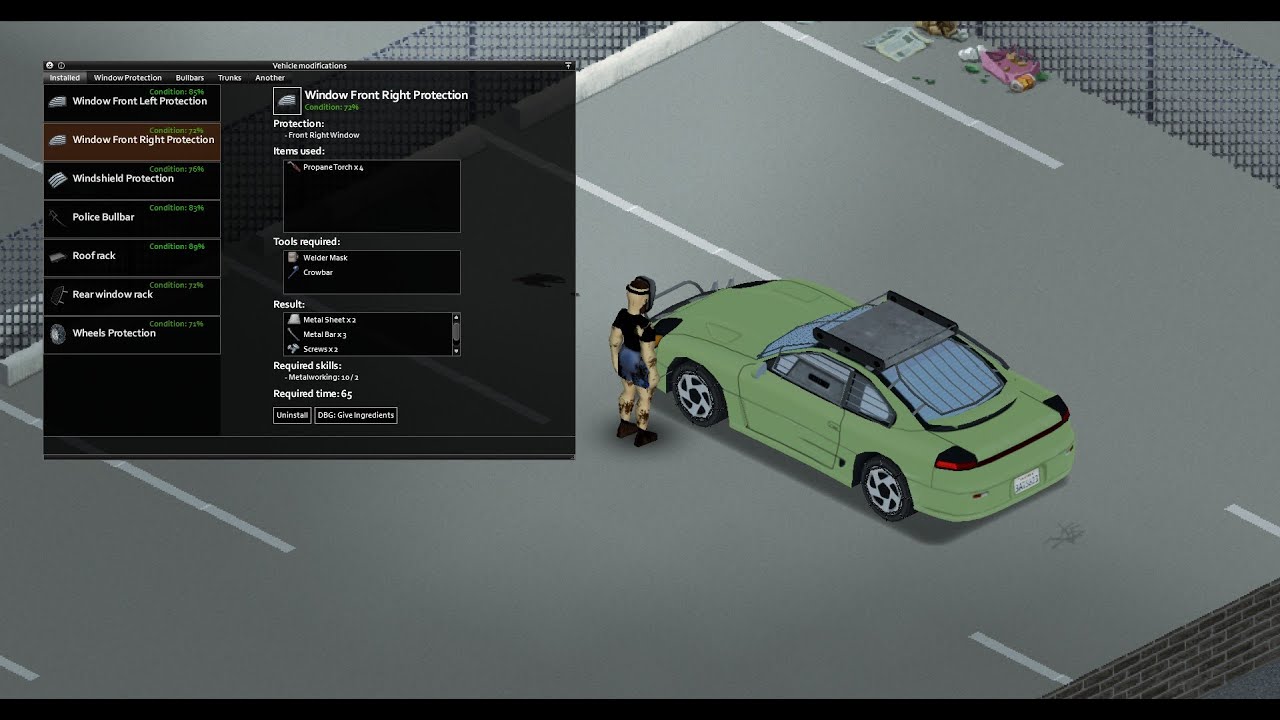 timber parrot
I will also try and include a flamethrower and fire retardant spray 🙂
Is there a place you can get the models?
For the car that is
random merlin
yeah you can download autotsar truck mod for example and just dig into the files and import the model to blender
random merlin
jaap wrungel is good i think
timber parrot
What's that?
random merlin
 timber parrot
Nice!
random merlin
i used this one to teach myself how to work with autotsar 1.0
its already updated to 2.0
timber parrot
I see
Do these car parts noticeably increase the health of the vehicle?
If that's the case I might just include the mountable turrents and flamethrowers as part of autotsar
random merlin
timber parrot
Do these car parts noticeably increase the health of the vehicle?
they add a shield layer ontop
so if you have a bullbar, the hood cant get damage until the bullbar is broken / falls off
you can also add custom protection for hood or trunk for example
i did that with my movingtruck i posted above
runic mantle
timber parrot
Yeah, just looking for free resources to add scrap parts to cars
If you still need help i would reconmend sketchfab
runic mantle
fluid kernel
did you ever get helped with this?
i didnt
oh mb
i didnt see i replied already
runic mantle
cheers
runic mantle
fluid kernel
click on your blade, ctrl_a , all transforms and reexport.
ill let you know if it doesnt work
it works tysm
fluid kernel
🙂
timber parrot
random merlin
so if you have a bullbar, the hood cant get damage until the bullbar is broken /...
I see, no need to add armor then
I'll just write a script for the turrents and flametheower when I find a model, or if someone provides one for me 🙂
random merlin
timber parrot
I see, no need to add armor then
I'll just write a script for the turrents and ...
you could make a test model out of 2 cubes until then
timber parrot
Also question for modders; how hard is it to add in quests and/or an endstate to the game other than death?
I was think scripting some endings in future like a helicopter rescue ending or developong a cure ending
timber parrot
random merlin
you could make a test model out of 2 cubes until then
Do you think using a modified 'tow' action would work for the gun? Getting the game to treat the gun as a trailer or towed vehicle with no collision?
random merlin
timber parrot
Do you think using a modified 'tow' action would work for the gun? Getting the g...
i think that wouldnt work
before autotsar existed me and a friend tried to do the same thing with bumpers
and even in multiplayer trailers are still buggy at desync
timber parrot
I see
Hmm I think I might try and use the muffler attachment for the gun
But how to get a friend to be able to shoot the turret...
random merlin
i cant code so you gotta ask someone else on that :L
runic mantle
timber parrot
But how to get a friend to be able to shoot the turret...
you could do smth similar to the hillbilly truck mod
idk if thats the exact name
but make it act as the windows are open
and make zeds not be able to bite at you
but that would require the other person to have a gun
shy steppe
Does anyone have the Katana model in .fbx
or just a pack with all the weapons in fbx so i can scale my own weapons better lol?
elder orchid
@shy steppe Here you go
Texture is located here ProjectZomboid\media\textures\weapons\2handed named Katana.png
In the future, you can import, edit, and export .X files including animations using Fragmotion. It is shareware but you can enable it every 7 days by typing in a bible quote. http://fragmosoft.com/downloads/.
Personally I chose to export the katana from Fragmotion as an .obj and its required .mtl file, and then imported that into Blender.
Hopefully someone develops a modern blender plugin for .X soon, lol.
silver cypress
elder orchid
Hopefully someone develops a modern blender plugin for .X soon, lol.
That's like saying "hope someone makes a saddle for a t-rex" LOL
elder orchid
Yeah
shy steppe
elder orchid
<@207711768795938828> Here you go
ty
elder orchid
Happy to help
 remote musk
Working on my first zomboid mod 👀


 vapid hinge
remote musk
Working on my first zomboid mod 👀
vapid hinge
remote musk
Working on my first zomboid mod 👀

remote musk
lol
polar quartz
remote musk
Working on my first zomboid mod 👀
Looks very nice
remote musk
Thank you 👌
remote musk
2,626tris atm

 polar quartz
Damn It's looking good
remote musk
I'm unsure what step to take next really lol, maybe making it able to have animated hood & trunk & door
Door as in yes, singular birdcage radness

Thinking it may work if I just duplicate an animation to open it for each side, but I'm guessing if two players enter at same time it might get lifted x2 lol
remote musk
remote musk
I'm unsure what step to take next really lol, maybe making it able to have anima...
Oh, I need to add exhaust tips lol
 tardy sentinel
are you simplifying the mesh later down the line? I don't think the game would handle that high of a polycount well
Nice work though
remote musk
It's deceivingly low poly, only 2,626tris atm
rigid pilot
remote musk
*Door as in yes, singular birdcage radness*
it can swim ?
 blazing aspen
Is there a way to use animation for item's 3d model?
remote musk
Might need some help because I'm not very skilled with animation: So in the first image is how I'd like the mesh to move the struts into that position, but because the cabin bone moves forwards and upwards it's going against the animation, I would need to make two bones and have them work at the same time I assume? Is that possible?


Nvm I figured it out, just moved the origin location


 remote musk
There we go 👌


 wraith basin
Hello. It is the first time that I consult in the Discord. I am making a vehicle mod and I would like to be able to animate the car doors.
I was looking through the game files and saw that in the vanilla version there is a vehicle that opens its doors, but it is not used in the game yet. I wanted to import the fbx file of the car into Blender and then export it without making any changes to it, but the animations break. Do you know what could cause that problem?
The red car is the original one, the black one is the one imported/exported through Blender
Thanks!
 polar quartz
wraith basin
Hello. It is the first time that I consult in the Discord. I am making a vehicle...
polar quartz
wraith basin
Hello. It is the first time that I consult in the Discord. I am making a vehicle...
I think it's best to just leave the models alone for now
I mean I think the Devs are working on it or something
I mean it will be a waste work if you do it
Did you export it into Fbx?
fluid kernel
also, you CAN have as many bones as you need.
when exporting to fbx make sure you set the correct export options.
wraith basin
polar quartz
I think it's best to just leave the models alone for now
My idea was to use that vehicle to study them and see how they work and thus make my own cars. But as I was telling you, I couldn't even import/export from Blender and then keep working. I think the problem is that it changes the names of the actions and no longer recognizes the animations. 🤷🏼♂️
 wraith basin
fluid kernel
when exporting to fbx make sure you set the correct export options.
wraith basin
fluid kernel
when exporting to fbx make sure you set the correct export options.
The truth is that I do not know what is the correct configuration for PZ 😅
fluid kernel
the honest truth is... there ISN'T one.
make your own.
😄
it's called by the animation names only.
so you can have 100 bones and it will call the animation.
and the animation names DO have to be edited for fresh imports but it's easy
reef salmon
I am starting the creation of the 3D version of the heavy radios that are the only ones without this version
 candid island

 agile thorn
i'm really confused


why is my model stretched and basically reversed?
its fat instead of long?
this is my first time making a model so sorry if this is a dumb question
have done that
i have literally everything working except for this
so frustrating
oh

now it mysteriously works
i swear i had applied the transforms before

ty @indigo kettle
just need a few more adjustments
can anyone please send me the default cigarette.x file? I screwed it up and stupidly didn't make a backup
lol
because theyre supposed to have a 3d model right
in the above image you can see the 2d model when theyre dropped
fluid kernel
agile thorn
are you using blender?
agile thorn
yes
agile thorn

i got it working now
just working on some final texture adjustments
mod is essentially complete at this point. Very happy
my second mod
 strong elm
my first real melee weapon

its Askeladds sword from the vinland saga
i think when animals and basements are added ill branch out off the current project im working on a medieval overhaul and map
 molten sail
Can anybody tell me how I can make my texture look a little more natural looking?


should maybe have nsfw tagged that

broken mauve

 chilly timber
molten sail
Can anybody tell me how I can make my texture look a little more natural looking...
chilly timber
molten sail
Can anybody tell me how I can make my texture look a little more natural looking...
Have you tried going into the UV window -> UV -> Minimize stretch?
Then just grab the whole UV and adjust accordingly.
Also hilarious.
 molten sail
chilly timber
Have you tried going into the UV window -> UV -> Minimize stretch?
Then just gr...
molten sail
chilly timber
Have you tried going into the UV window -> UV -> Minimize stretch?
Then just gr...
I have not but I will try that.
chilly timber
The results may be a bit off at first, keep that in mind. You'll need to adjust the UV for certain. I make sure to keep proportional editing on while I mess around with it. It'll come to fruition eventually 
molten sail
chilly timber
The results may be a bit off at first, keep that in mind. You'll need to adjust ...
The UV is like that so that applying different images to the texture is more seamless. Is there no way to keep it like that and have it look less warped on the model?
chilly timber
molten sail
The UV is like that so that applying different images to the texture is more sea...
You could also try "project from view" while selecting one specific side of the model.
Otherwise, If I were you I'd just adjust the UV with proportional editing until it looks right.
I suggest using this texture instead of an image texture. This will make the distortions more evident.

(or click on Image -> New Image and choose UV Test Grid)
molten sail
Alright I'll try that
molten sail
chilly timber
You could also try "project from view" while selecting one specific side of the ...
so I tried what you had suggested to little success. I'm not very good at blender. That being said I did try the test grid you suggested and tbh it doesn't look bad there so idk
 blazing aspen
Hola guys. I'm new to PZ modding and trying to figure out why my model in game is showing wrong?
In game it's looks like this: https://i.imgur.com/OGxr7CB.png
And the model itself is looking like this: https://i.imgur.com/8DCDOH7.png
Model is in fbx format and defined like this:
module Base
{
    imports
    {
          Base
      }

    item GRZ_SpikedMetalPipe
    {
       ...
        WeaponSprite    =    GRZ_SpikedMetalPipeModel,
       ...
        AttachmentType = BigWeapon,
      }

    model GRZ_SpikedMetalPipeModel
    {
      mesh = weapons/1Handed/GRZ_SpikedLeadPipe,
      texture = weapons/1handed/GRZ_SpikedLeadPipe

      attachment world
      {
        offset = 0.0000 0.1530 0.0000,
        rotate = 0.0000 0.0000 0.0000,
      }
    }
}
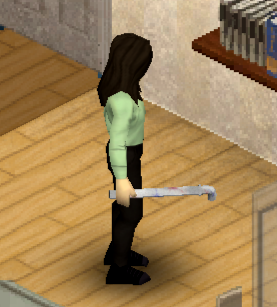
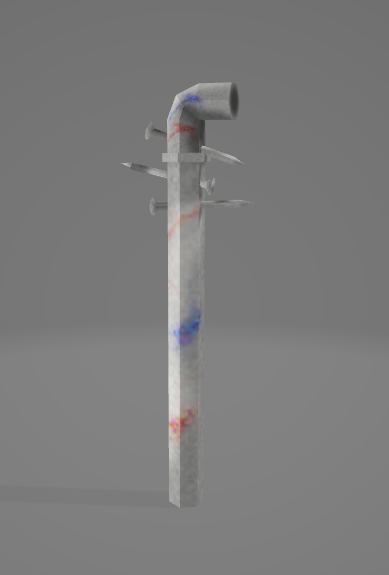


Help would be much appreciated :)
broken mauve
blazing aspen
Hola guys. I'm new to PZ modding and trying to figure out why my model in game i...
looks good bro, keep it up
idk anything sbt modeling so
blazing aspen
broken mauve
looks good bro, keep it up
It's just a mix of two PZ models, so nothing special. I'm just learning how modding works :)