#mod_development
1 messages · Page 338 of 1
 pastel wolf
iii Don't know if any of you would know what's going on with this because its a relatively new system all things considered, but it seems like when fishing and you actually catch a fish the generic fishing rod's model changes to a slightly bent model. I wonder how i would go about making this work for my new fishing rods
because when i'm fishingg with my rods everything's fine until i get an actual bite and then the model disappears, presumably because its calling a non existent one.. but I have no idea how to broach this currently
short of that, I'd love to get some help with getting the character to actually equip the cooler I made
 tranquil kindle
I'll gladly help you with cooler, once i finish siege in SM2
pastel wolf
sweet!
secondly, whats a typical range for items to spawn in a loot table? i kept low numbers like 2-3 for most spots
but flying around to the various fishing and camping stores I set them to spawn at I haven't seen them


 fleet bridge
pastel wolf
Maybe its a syntax error with my distribution table?
fleet bridge
pastel wolf
Maybe its a syntax error with my distribution table?
Does the item exist?
pastel wolf

it certainly does
OH
crap i should ulse base.oldcanoepadel then not ProFishingRod.OldCanoePadel
idk why its base and not its own thing
well that answers that!
maybe
okay no that was not it, but im far too tired to keep messing with this for now. i'll give this all another go when i wake up
 manic dock
pastel wolf
manic dock
pastel wolf
i wish there was an incentive to use weapons others than axes
all those modded weapons look really cool
pastel wolf
I made the paddles as heavier, but far more sturdy and slightly more damaging versions of the default paddles, it breaks into a slightly lighter, faster swinging, way less durable version that breaks into a stick
the deep sea fishing rod is twice as heavy as the default rod, but beefy enough to make an alright weapon if you don't care about landing the big one! the other fishing rod is just an all around upgrade to the default rod
I want to get this published and do another pack of farm implements, include some hats and clothing, and then try a full on clothing mod
antique farm implements could help with filling up the spaces between axes and everything else!
tranquil kindle
pastel wolf
sweet!
Do you have your cooler done?
 tranquil kindle
Have you tried anything to make it be holdable in hand?
Also thats a cool looking cooler
Technicly i know of 2 ways, but i personally prefer to make it a bag thats hold in either right or left hand
Like backpacks
pastel wolf
yeah i was thinking it would just be equipable in either hand like the cooler or suitcases
on the back doesnt really make sense
I mean maybe with an improvised sling, but thats something for the future, I based its look on one of those fancy yeti coolers (I guess its a biiiiittt modern for '93 but oh well the basegae one already covers the classic cooler look)
but I haven't tried anything yet to make it equipable no
pastel wolf

I believe I've been meshing in the armature file?
helps with keeping stuff in scale
tranquil kindle
Is it supposed to be that big?
Nevermind. Take this model and put it in one of hands you want it to be. You see those corsslike lines? Those are (i assume) for easier lining your model to hands and its bones.
So you'd have to rotate it and make the handle appear where fingers would grip it.
 tranquil kindle
Exacly
I'm not sure if you did it in edit mode or object mode, but non the less do Apply all transforms so it's origin point is under player's model at 0x0x0
tranquil kindle
I feel like you got some experiend in "meshing" as you say, so i'll just post a video
 icy night
pastel wolf
icy night
pastel wolf
Now you have to make a rowboat lol
 tranquil kindle
Mirror it on X global
Apply transforms (it will flip normals, so you have to counter it), change name of bone to R as for Right instead of L and export it as second hand model
You know how to export clothing items?

Then you need to do fileguid table and 2 xml files, one for each hand
https://steamcommunity.com/sharedfiles/filedetails/?id=3444877391 Use this and go to "Some Explanation of XML files, which are required"

A guide on how to create Basic Clothing mod. If i missed anything, or something requires further explanation, do let me know. Basic Game and Blender Knowledge is Required....
pastel wolf
eh no, I do not!
but im struggling to stay awake
im going to get back at this when I wake up
and also start using that visual studio thing instead of messing aroudn with tons of notepads
 granite ginkgo
tranquil kindle
But have you tried altering those? I set 3k or 1 and damage to hood was the same...
granite ginkgo
tranquil kindle
But have you tried altering those? I set 3k or 1 and damage to hood was the same...
I did and it did not seem like it did a difference, but I don't know any other way, I wanted to check how damn lib addon armor adds health to vehicles.
 bright fog
<@&671452400221159444>
 silent zealot
pastel wolf
but im struggling to stay awake
silent zealot
pastel wolf
but im struggling to stay awake
Modding when you should be sleeping has a 50/50 chance of waking up with a working mod but you can't remember hwo you fixed things, or waking up to a compelte and utter mess where everything is broken in the stupidest ways.
 supple briar
So, what does IsAimedFirearm = TRUE, do?
pastel wolf
this is true, but im awake now
 red tiger
This is the first time I'm posting about this project here. I'm around 200 hours of dev time in a project that is a fully comprehensive Object-Oriented environment / engine in pure Lua 5.1. It's comprised of classes and objects, following the Java model with Lua syntax.
It supports objects, class hierarchy, true method behaviors (multiple with same name), interfaces, abstract methods, static context, and visibility scopes. It'll check for improper values.
I will document it thoroughly in my cleanup phase.
I also wrote an alternative Lua-legal syntax for classes that I plan to extend to interfaces here soon.
Here's an example class:
https://github.com/asledgehammer/LuaClass/blob/main/tests/Rectangle.lua
Anyways, thought I'd dump this here. I plan to port this to work in PZ when finished.
GitHub
Contribute to asledgehammer/LuaClass development by creating an account on GitHub.
 violet cedar
hey is there a template for custom professions?
if not can i get some tips or help on how to make a profession
 worn lodge
ok this keeps happening to me

if its not the straps
its the backpack
if its not the backpack its the metal tubes besides it WHICH also dont show
so
granite ginkgo
worn lodge
if its not the backpack its the metal tubes besides it WHICH also dont show
Seems like inverted normals to me
granite ginkgo
oh
 tranquil kindle
worn lodge
ok this keeps happening to me
tranquil kindle
worn lodge
ok this keeps happening to me
B42? Is it all quads/tris?
worn lodge
tranquil kindle
B42? Is it all quads/tris?
b41 and yes
worn lodge
tranquil kindle
Do you have single material on it?
you cant have multiple materials?
because if so then thats it
tranquil kindle
You can't
 ancient grail
tranquil kindle
Do you have single material on it?
ancient grail
tranquil kindle
Do you have single material on it?
good catch
silent zealot
supple briar
So, what does `IsAimedFirearm = TRUE,` do?
I give it 50/50 odds of either making a weapon a ranged gun using the new aiming system or doing absolutely nothing because it's an outdated and unused parameter. Have a look at decompiled java if you need to know for sure, or just use it the same way vanilla firearms scripts do.
silent zealot
violet cedar
hey is there a template for custom professions?
if not can i get some tips or h...
Have a look in media/lua/shared/NPCS/MainCreationMethods.lua
silent zealot
worn lodge
if its not the backpack its the metal tubes besides it WHICH also dont show
Is it set up as a single object in blender with a single material?
You can have multiple meshes (select & Ctrl J) but things get wonky if you have more than one object selected when you export/forget to tick "export selected only", and likewise if you have 2 or more materials associated with the object
Even though the materials don't get used.
I should have read further before replying... oops.
 twin valley
can someone help me with my setup?
tilepack exists, tiledef too, can place tiles via brush, but not via "place" menu ingame


 amber crown
Yo im tryna mark players on the map if they have a specific tool equipped however i have no idea how to mark players like that and I am unable to find anything in the doccumentation
 terse delta
amber crown
Yo im tryna mark players on the map if they have a specific tool equipped howeve...
terse delta
amber crown
Yo im tryna mark players on the map if they have a specific tool equipped howeve...
Try to look for "Players on map" mod
 lime scaffold
just wondering if any has, is, or would make a mod that show a visible area of the towing hookup area so as to make it possible to see for modded vehicles where and how to back up to another for towing, main issues is when trying to tow vehicles made by KI5 its very hard to tell how to position the vehicles just right
worn lodge
silent zealot
Is it set up as a single object in blender with a single material?
nope thats what it was
not having multiple materials is buns
i wanted thing to be diferenciable but at the same time i forget that zomboid thrives in less detail
 stiff fiber
Hey guys! I'm almost finished with my car mod which was in development hell for a time and I was wondering. How do you add a specific slot in the lua code where you can put spare wheels? I've seen car mods that had a specific spot for it and I was wondering how I could do the same as the car I made has a back spare wheel holder. (Car is not animated)
 true nova
twin valley
can someone help me with my setup?
tilepack exists, tiledef too, can place tiles...
true nova
twin valley
can someone help me with my setup?
tilepack exists, tiledef too, can place tiles...
is it set as a moveable in the tiledefs?
twin valley
true nova
is it set as a moveable in the tiledefs?
sure, i kinda get where i was wrong, testing it rn
violet cedar
can i get some help with making my professions mod
i cant seem to get the code right
 main pasture
stiff fiber
Hey guys! I'm almost finished with my car mod which was in development hell for ...
main pasture
stiff fiber
Hey guys! I'm almost finished with my car mod which was in development hell for ...
I would guess it is added as a custom "passive" part in the vehicle script, that has the wheel model and accepts the same items as the wheels
stiff fiber
the car has a spare wheel "box" so the spare wheel doesn't have to physically appear.

I just need an extra slot in the mechanics menu essentially where the player can store an extra wheel
main pasture
Then adding a part that uses the wheel as it's item should do it. Just give it a custom name and add it to the translation file to make it recognizable
bright fog
main pasture
Then adding a part that uses the wheel as it's item should do it. Just give it a...
What ?? What does it have to do with the translation file lol ?
main pasture
If you create a custom part, you have to define its name. Or was it just for a custom category?
But a container also works if you don't require the wheel visuals
stiff fiber
I have no idea how that works. I never needed this before as my previous cars didn't have spare wheel holders 😅
So I have to define a container in the lua file?
in the vehicle script? Or where?
Same where the doors, seats etc are defined?
main pasture
Yes, the vehicle script
stiff fiber
I'm looking inside the script file of one of my previous cars...
I don't want it to be an externally accessible container
but something you can interact with in the mechanics menu
so for mechanics stuff I have to define an are first?

like for instance this one...
then because it's unseen like the seats I have to write a part like this?
 main pasture
stiff fiber
then because it's unseen like the seats I have to write a part like this?
main pasture
stiff fiber
then because it's unseen like the seats I have to write a part like this?
Yes. You have to define a new part for it. Then it will show up in the mechanics menu
 main pasture
Just give it a "unique" name, so it does nothing for the vehicle
stiff fiber
where it's defined what the seats are as containers...
but I don't need that beause the spare wheel holder doesn't need a container
how do I define that you can only put a wheel in that slot?
main pasture
You want it as a normal part that just accepts the wheel items, and does not require mechanics skills to work on, like a battery
tranquil kindle
Wouldn't that also make it so you have chance to "fail" instalation of that spare wheel and making it loose condition?
Or you can't fail installation of wheel in vanila? Even at 0 mechanics?
Can't remember to be fair*
main pasture
I think that is definable. Can you fail installing battery?
stiff fiber
not if you don't define a mechanics skill
stiff fiber
main pasture
I think that is definable. Can you fail installing battery?
I don't think you can
looking for the battery in the file there's only one mention of the battery where the template is defined
tranquil kindle
I mean... if you have 0 in electricity and mechanics you probably should... For some time i do needed to google how to unplug my battery from car as i wasn't sure
stiff fiber
 tranquil kindle
If you remove + or - first
stiff fiber
but where do I hard code what you can put in the part slot?
main pasture
tranquil kindle
I mean... if you have 0 in electricity and mechanics you probably should... For ...
That's fair
main pasture
stiff fiber
but where do I hard code what you can put in the part slot?
You can check the templates in the game files. steamapps/common/ProjectZomboid/projectzomboid/media/scripts/vehicles has all the vehicle related templates
stiff fiber
damn I need to write an entire template by the looks of it
main pasture
Just copy the "part battery" to the script and give it a different name
And change the "itemType"
main pasture
There is some unneeded stuff, like "door" and the "lua" part, but that should get it started
violet cedar
main pasture
You can check the templates in the game files. steamapps/common/ProjectZomboid/p...
is there any profession templates?
main pasture
violet cedar
is there any profession templates?
I have no idea how they work, but maybe try checking how existing mods do it
stiff fiber
main pasture
There is some unneeded stuff, like "door" and the "lua" part, but that should ge...
Alright thank you for your help! I'll try to code this in first thing tomorrow (it's already 22:00 where I live)
violet cedar
main pasture
I have no idea how they work, but maybe try checking how existing mods do it
im trying so hard but im not really getting anywhere
thnaks tho
half the mods i download i cant find their id in the files
main pasture
violet cedar
half the mods i download i cant find their id in the files
So you can find some of them?
violet cedar
main pasture
So you can find some of them?
I haven’t found one yet
main pasture
violet cedar
I haven’t found one yet
The should be at steamapps/workshop/content/108600
violet cedar
main pasture
The should be at steamapps/workshop/content/108600
Yeah, but whenever I type the ID of the mod that I’m looking for it just says not found
main pasture
That is strange. Does the game recognize them?
violet cedar
main pasture
That is strange. Does the game recognize them?
Yes, they do but also what I’m gonna do is I’m just gonna delete all of my mods and then hopefully find it through there
 drifting ore
Is it okay to drop a new mod I made here for visibility?
drifting ore
I'm gonna take that silence as a yes, considering I also see some others have posted their mods here.

I wasn't able to make a mod that does everything I wanted, but this is a start. It's a pretty straightforward mod that adds a few random bones and sinews here and there on zombies.
 bright fog
drifting ore
Is it okay to drop a new mod I made here for visibility?
bright fog
drifting ore
Is it okay to drop a new mod I made here for visibility?
Of course
worn lodge
what would be the course of action if i wanted to make a hazmat esque suit that doesnt override every other clothing piece on the model? or atleast that doesnt override shoes and hats
drifting ore
bright fog
Of course
Thanks!
true nova
worn lodge
what would be the course of action if i wanted to make a hazmat esque suit that ...
you want to wear other clothes with the hazmat suit? i think the parts that are covered are defined in the xml? so change that to not cover feet and head would be the simplest . could also make a custom attachment point if i recall
worn lodge
true nova
you want to wear other clothes with the hazmat suit? i think the parts that are ...
gotta check that then
because i want shoes to be visible
since the thing im doing is not entire a jumpsuit type of clothing
violet cedar
Hey, I’m trying to upload a mod to the Steam workshop but it is saying that I have no folder/content what is that about and how do I fix it?
worn lodge
make sure the folder structure is right
violet cedar
Could you give me an example of so?
worn lodge
\mods\Death Stranding Items ZMB\Contents\mods\Death Stranding Items\Media
thats how i got mine
same folder structure for workshop and mod
violet cedar
I have mine as media/ Lua /shared /professions
worn lodge
violet cedar
I have mine as media/ Lua /shared /professions
yeah nah
you need the mod structure i sent
it has to be
modname/Contents/mods/Modname/media
the second modname is not needed iirc
 keen echo
Hey all, I'm trying to get my first example mod installed locally, and I put the mod called "CarveMore" into the directory folder: C:\Users<username>\Zomboid\mods\ (See directory screenshots)
When I launch Project Zomboid, I clicked on the mods menu item, and typed "Carve" into the search box, but nothing is showing up.
What am I doing wrong?


 bronze yoke
you're using the Workshop mod structure but you're in the mods folder
if you move your mod to the Zomboid/Workshop folder it'll probably work
if you're trying to make a mod for b42 you also need to change the structure slightly, this wiki page explains the structure pretty well https://pzwiki.net/wiki/Mod_structure
keen echo
bronze yoke
if you're trying to make a mod for b42 you also need to change the structure sli...
Ahhh yeah I'm making a mod for b42 (not workshop), I just updated the folder structure to match the mod structure described in the wiki page you referenced, but I'm confused as to where the Contents folder goes. I now have C:\Users<username>\Zomboid\mods\Contents\mods\CarveMore, which contain the folders42 and common. The mod is still not being found by the search in the mod menu.
Is this the right folder structure because the page doesn't clearly describe where Contents goes.
bronze yoke
if you're working from the mods folder, your mod should just be Zomboid/mods/CarveMore and you should get rid of the Contents/mods/ folders
but to upload the mod you'll eventually need to move it to the Workshop folder, in that case it'd be something like Zomboid/Workshop/CarveMore/Contents/mods/CarveMore/
keen echo
Thanks, how can I help get that page updated to make this more clear?
bronze yoke
anyone can edit the wiki, or else you can probably bug @bright fog to do it
keen echo
bronze yoke
anyone can edit the wiki, or else you can probably bug <@293815892805025793> to ...
Awesome thanks for the help

 wraith sky
https://steamcommunity.com/sharedfiles/filedetails/?id=2784607980
wraith sky
wraith sky
https://steamcommunity.com/sharedfiles/filedetails/?id=2784607980
To add some flags to that
What do I need to start with?
true nova
wraith sky
To add some flags to that
first you need to make the tiles. I doubt you'd even need that mod to make more flags. i havent looked at it but have made similar mods and its all pzscript and tile making
wraith sky
true nova
first you need to make the tiles. I doubt you'd even need that mod to make more ...
About the tiles itself, the creator of the mod just added the tile files link, so I guess there's will be a need to do some photoshop work + coding
wraith sky
wraith sky
About the tiles itself, the creator of the mod just added the tile files link, s...
And I'm a complete zero at the second
true nova
wraith sky
And I'm a complete zero at the second

youll want to make a moveable item
youll need to use the zomboid modding tools TileZed
to set the tile properties
and the custom item property needs to point to the item script
wraith sky
Thanks for answering
true nova
np feel free to come back if you get stuck somewhere
 autumn bluff
what would be involved in adding script to an existing item?
Hoping to make a mod that adds an option to hug a teddy bear for happiness and destress
true nova
autumn bluff
what would be involved in adding script to an existing item?
Hoping to make a m...
i would do this by adding an inventory context option and a timed action that it triggers
autumn bluff
okay, how do i begin with that?
true nova
this is the lua that will be needed to start with
youll need to make a mod folder structure and put this in a lua file in the client folders
autumn bluff
i am familiar with mod structuring, ive just never edited an existing item
always added new items
true nova
have you done lua at all?
true nova
so OnFillInventoryObjectContextMenu is an event listener that allows you to modify the inventory context menu. youll need to see if the object is in the items table and then you will add context options that will trigger a separate function
true nova
no not with this method it should be 100% lua
autumn bluff
alright
true nova
here is a guide to modifying context https://pzwiki.net/wiki/ISContextMenu
autumn bluff
thanks!
 rich reef
Hello everyone. I have a question, if anyone would be so kind to help me.
I am trying to run a 'sendClientCommand' function as soon as the player joins the server, to initialize some data right away.
I can trigger the function it's supposed to run with a keypress once I am loaded into the game, but I cannot figure out which Event to use to get the client command to send automatically upon loading into the game.
I've tried a few, and they don't seem to fire off, and I'm not sure why. My code/mod works great, I just cannot get this initial clientCommand to send correctly.
Is their any specific Event I am supposed to use for this, or a workaround, or delay I need to account for somehow?
Thanks for your help!
bronze yoke
yeah it's a pain in the ass, you have to delay by one tick
local delayed = false

local function sendCommandWhenReady()
    if not delayed then
        delayed = true
        return
    end

    sendClientCommand(...)
    Events.OnTick.Remove(sendCommandWhenReady)
end

Events.OnTick.Add(sendCommandWhenReady)
Thanks Albion. I swore I remember you talking about this before, but I dug around for over an hour trying to find a post by you and couldn't locate it.
Is 1 tick enough? Or does it require longer in some cases?
bronze yoke
it's always one tick
it's basically just a bug where they don't set the 'you're allowed to send client commands now' flag until the end of the tick, all the networking stuff is actually ready long before this
rich reef
Ahh, that's interesting. Alright then. I had to do some weird workarounds in other mods I was working on because of this, maybe I'll go and fix those too now that you've enlightened me on this . haha
Also, since you are here, I have another question, which you may be able to answer.
The context of my mod, is putting a modData Date/Time stamp on an item by the client.
So I am using a sendClientCommand > sendServerCommand as a loopback to request from the server it's realtime UTC Date/Time, and then using the clients os.time to get their local UTC Date/Time, and create an offset from that, so the Date/Time stamp is always relative to the server.
Do you know if the client has a way to get the server's real Date/Time without having to do a back>forth loopback like that? The code isn't really that complicated to do it, I just wonder if their is a cleaner or easier way to do it.
bronze yoke
i don't know of a better way than that, no
rich reef
Alright, thanks! I appreciate your help once again!
red tiger
rich reef
Ahh, that's interesting. Alright then. I had to do some weird workarounds in o...
I wrote a utility to make this easier to manage.
It's custom event-based so that those events are consistent.
It also pads the underlying event listeners so that people who remove their events won't disturb or not fire implemented event listeners.
Hope that helps.
rich reef
@red tiger That's awesome. Thank you! Event Listeners are super touchy, especially if you use state machines or similar that remove them/add them on the fly. I'll take a look into this!
red tiger
I was just coming here to post a strong string dumper library I built for my Lua OOP framework that could be useful to others.
Does pretty-printing and other options as well like struct-tags.
Makes printing info about tables and arrays much more informative and useful for data inspections.
Gonna document it in the coming days.
rich reef
That's awesome. Can't wait!
red tiger
It's for a OOP framework that's true OOP, not simplistic metatable inheritence from instancing.
=)
 rancid tendon
hey folks, i remember reading something along the lines that they'd made introducing your own world events (a la zombie birthday parties) easier in b42, but this was around b42's release and its been so long that i may just be misremembering the chatter in here
is that true?
bright fog
keen echo
Thanks, how can I help get that page updated to make this more clear?
The wiki page mentions that it will focus on the workshop folder at the very top due to all its advantages
Tho I see how it might not be clear
Bcs I wrote that you'll have to copy the files from mods/ into workshop/ but there's technically a few extra steps
bright fog
rancid tendon
hey folks, i remember reading something along the lines that they'd made introdu...
I remember something like that
But I haven't seen anything like it yet
 craggy delta
hey all, just getting back into modding and seeing what changed from 41 to 42.. having trouble overriding a vanilla recipe.. I used to do this in 41 and replace the vanilla recipes.. is this still possible with the changes? I am getting weird effects from it.
silent zealot
B42 completely replaced the recipe system, and the new one (CraftRecipe) doesn't have a lot of ways of changing existing recipes.
I'd assume you can caompletely overwrite an existing recipe by creating a script file that adds a recipe of the same name, but as for disabling recipes I don;t think you can. You can probably change them so they need to be learned and then not provide any way to learn them.
craggy delta
I just want to replace. actually for step one, I am just trying to reduce the craft time. just as a proof of concept at the moment.
I am trying with RipClothing. I am able to replace the recipe, reduce the time, but now it rips everything in inventory at once. just because I change the time.
silent zealot
What was the tiem before & after you changed it?
craggy delta
200 -> 25
silent zealot
If it's ripping everything it can that shouldn't be related to speed - try setting the speed to 200 in your copy and seeing if it still behaves weird.
craggy delta
first, I cross read. basic rip is 100 -> 25.. worn ripped is 200 -> 25
I removed all other scripts so this mod only overrides the basic ripClothing. I reverted all changes to vanilla. so just copied the recipe from the game files and pasted in my mod.
Now I cannot rip anything. the option is gone.
bright fog
silent zealot
B42 completely replaced the recipe system, and the new one (CraftRecipe) doesn't...
You can still change a bunch
Tho yea maybe not as flexible
craggy delta
is there a trick to it? doesn't seem to work how I am doing it.
interesting.. it does not rip all clothing in inventory.. it rips exactly 2 pieces each time.. if I have 3 in inv, only 2 rip.. the recipe option disappears if I only have 1
craggy delta
I believe I have this working now.
overriding is a bit weird but hopefully this helps others out.
When overriding a recipe, pay attention to the type of data each variable is. This will help determine what to keep and what not to keep when overriding.
inputs and outputs variables are assigned entire other structures in {} where other variables like Time or Tags are just strings or ints. If a variable is just a value, it will be overridden. If a value is a structure, it will be appended. This is why, when I copy the entire craftRecipe, the time is overridden correctly, but my inputs and outputs double. because the inputs and outputs have now been declared twice.
Based on these findings, this is the resulting script that works.
{
craftRecipe RipClothing
{
timedAction = RipClothing,
Time = 25,
Tags = InHandCraft;CanBeDoneInDark;RemoveResultItems,
OnCreate = Recipe.OnCreate.RipClothing,
Tooltip = Tooltip_Recipe_ClothingNotWorn,
}
}``` muted garnet
How to get an item from a backpack or from the ground in b42?
 somber drift
Im coding a new rcon better than PZ admin
Its gonna be sick
Im already amost done
silent zealot
Can you explain a bit more about what you're trying to do?
Move an item to a new location, find if an item is in inventory, get an item's object in lua, etc etc
 lapis moth
somber drift
Im coding a new rcon better than PZ admin
lapis moth
somber drift
Im coding a new rcon better than PZ admin
what's new there
somber drift
lapis moth
what's new there
Im adding a map i might add steam workshop integration and its going to be more sleek and professional looking and its also going to be easier to use in general, plus an ai config bot/chatbot
Its all going to be on a website too, i might turn it into an app
It depends tho
somber drift
Yeah
lapis moth
Depends on you personally
somber drift
Fully open source
On github too
Here is what it looks like so far on mobile

It is better on pc
Im still working on it
lapis moth
what will the Map page belike?
somber drift
Im working on it, but it will be a map where you can add pins search for buildings ect. But live player tracking is not possible unless i had a custom mod
And i dont know how to make mods
lapis moth
somber drift
Im working on it, but it will be a map where you can add pins search for buildin...
u can
Communicate with the server db file
somber drift
I just had an idea
I dont know if what you said will work or not
Ill have to look into it
lapis moth
somber drift
I dont know if what you said will work or not
If you are using mods, it needs to read local files, so why not communicate directly with the db file?
it saved the player's x, y coordinates, death status, etc
somber drift
Thats sorta what i was thinking
I just didn’t know where it was
Lol
Whats a good feature you think i should add?
Need some ideas
lapis moth
In the save folder, you can find it
named players.db
vehicle.db is also here , u can track vehicle locaiton by this
somber drift
Oh
lapis moth
somber drift
Whats a good feature you think i should add?
Can you write new rcon commands?
lapis moth
Jab wrote a command based on rcon that allows him to execute some in-game global functions via rcon
You can add this to your console
somber drift
how did he write a command?
lapis moth
You need to unpack the class files; it's not really difficult to write new rcon commands, and I've written a few myself

 somber drift
Yeah
lapis moth
somber drift
Here is what it looks like so far on mobile
Your website is very well written by the way
somber drift
lapis moth
Your website is very well written by the way
Thank you
red tiger
lapis moth
Jab wrote a command based on rcon that allows him to execute some in-game global...
👍
Late but hey
Lua and Java API for server and single player rcon


 frank elbow
somber drift
This better looking?
frank elbow
somber drift
This better looking?
Windows key + shift + S to screenshot a region
somber drift
Another thing im doing is direct importing configs straight from the server without the weird format
A quality of life thing
what does everyone think?
 ancient grail
somber drift
what does everyone think?
ancient grail
somber drift
what does everyone think?
if youre asking co structive critisism regarding the design...
logo consistency
i see 3 different letter p logos.
tho it might not matter in the end if you dont want to focus on the branding and just want to release the tool
looks useful btw
cant wait to see the interface of each function
also hope you go even deeper
like beyond the vanilla rcon commands
like be able to send lua functions using rcon
lol not sure thats even possible

somber drift
ancient grail
if youre asking co structive critisism regarding the design...
logo consistency...
I looked into it, it will need a server side mod installed that adds a special RCON command to execute Lua scripts.
Its possible tho

 ancient grail
somber drift
ancient grail
somber drift
goodluck man
bright fog
<@&671452400221159444>
 shy mantle
This should be vanilla, every other similar setting has an always tries option, like basements and story zones, but NOT for vehicles weirdly.
https://steamcommunity.com/sharedfiles/filedetails/?id=3520758551
I'm surprised no one made this mod earlier

I've just uploaded it without any customization options and I was wondering how I would go about making that in the sandbox settings before I try to dive into it myself.
 wild flint
I'd like to make a weapon skill magazine, that gives the same exp boost as having a perk when creating a character after reading it for 0-10 levels, and make it consumable after use. Would any of you be willing to help me make it?
silent zealot
shy mantle
I've just uploaded it without any customization options and I was wondering how ...
Good news: adding sandbox options is easy. You make a media\sandbox-options.txt file that lists the options you want to add, then add translations to media\lua\shared\Translate\EN\Sandbox_EN.txt
Then reference then in your code like this"
        if (comfortDelta > 0) then
            multiplier = SandboxVars.NepSlowDiscomfort.RateChangeUp or 0.1
        elseif (comfortDelta < 0) then
            multiplier = SandboxVars.NepSlowDiscomfort.RateChangeDown or 1.0
        else
But a big gotcha: sandbox variables are not availabel when the game loads.
They become available during the loading process, with the OnInitGlobalModData event being the earliest that they are available (assuming that infor is still correct for B42, which it probably is)
Your mod edits the VehicleZoneDistribution table when the lua file is loaded, which is when the game is first loading before you start to load a save... so there are no sandbox variables to access.
So you need to move all your lua into a function, then trigger that function on an event:
local function GamestaSetVehicleZones()
   <set the vehicle tables up teh way you want>
end
Events.OnInitGlobalModData.Add(GamestaSetVehicleZones)
But then comes the next gotcha: you're deleting the entire VehicleZoneDistribution table and remaking it, so you're going to lose the changes made by every mod that has already updated the table.
What you would need to do instead not replace, but iterate through the VehicleZoneDistribution table and subtables and make changes.
It's not hard, but it is fiddly especially if you're not used to lua table syntax and the multiple ways of doing it.
This is a situation where AI can actually help; if you ask for a project zomboid mod you'll get crap back, but if you say "I have a lua table full of entries like this <paste a few table entries> how do I iterate through the table and change <specific thing you want to change>"
BEing able to work with stacked tables is really helpful for modding
shy mantle
I'll see what I can do with all this, thanks for taking so much time to write that out
silent zealot
wild flint
I'd like to make a weapon skill magazine, that gives the same exp boost as havin...
You probably just need to copy an item from items_literature_skil.txt and adjust the SkillTrained entry
    item BookCarpentry2
    {
        DisplayName = Carpentry II: "Carpentry Woodcraft Style",
        DisplayCategory = SkillBook,
        Type = Literature,
        Weight = 1,
        Icon = Book8,
        LvlSkillTrained = 3,
        NumLevelsTrained = 2,
        NumberOfPages = 260,
        SkillTrained = Carpentry,
        StaticModel = BookBrown,
        WorldStaticModel = BookBrown_Ground,
    }
If I'm going to procrastinate and put off doing the stuff I need to do, I can at least be helpful with my time. 😛
 silent zealot
(back to skillbooks) then th eactual skill increase will be handled by teh code that triggers when reaidng literature
wild flint
But when i get in-game it doesn't allow me to actually read the book.
silent zealot
And if you want it to appear in the world you need to add it to distrubution tables. You can do that manual, or use Easy Distributions API to copy another items loot table entries "make this book appear anywhere a handgun could appear, but with 2% of the probability" sort of thing.
silent zealot
wild flint
https://i.imgur.com/t2fH5nX.png
Likely because there is no skill called ShortBlunt, it's SmallBlunt.
    local allskills = {
    Perks.Aiming, Perks.Axe, Perks.Blacksmith, Perks.Blunt, Perks.Butchering, Perks.Carving, Perks.Cooking, Perks.Doctor,
    Perks.Electricity, Perks.Farming, Perks.Fishing, Perks.Fitness, Perks.FlintKnapping, Perks.Husbandry, Perks.Lightfoot,
    Perks.LongBlade, Perks.Maintenance, Perks.Mechanics, Perks.Melting, Perks.MetalWelding, Perks.Nimble,
    Perks.PlantScavenging, Perks.Reloading, Perks.SmallBlade, Perks.SmallBlunt, Perks.Sneak, Perks.Spear, Perks.Sprinting, Perks.Strength,
    Perks.Tailoring, Perks.Trapping, Perks.Woodwork, Perks.Pottery, Perks.Glassmaking, Perks.Masonry, Perks.Tracking }
That a list of all the skill I made, since some of the name are not easy to guess.
wild flint
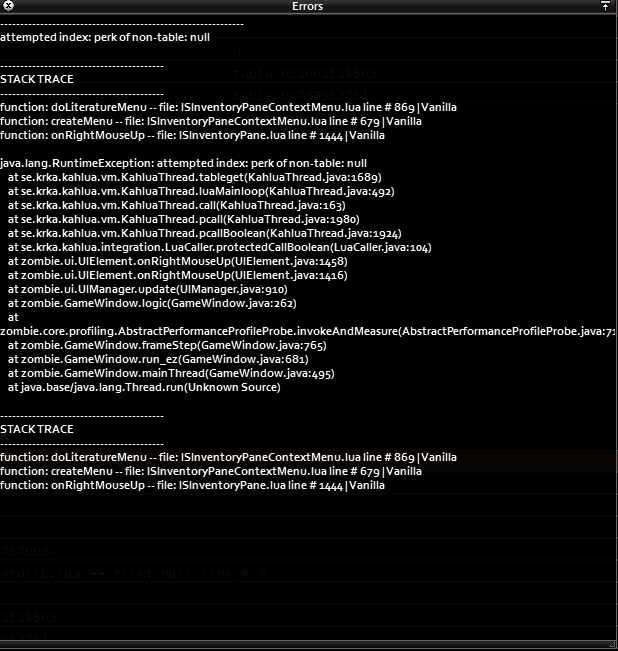
I'll change it, but also when i right click the book i spawn in debug it goes into the debug menu and when i check erros i get
 silent zealot
Also, level trained =0? that is too low
level one books start with LvlSkillTrained = 1,
NumLevelsTrained =10... might work, but try with 2 first because we know 2 works
wild flint
I've put 0, because i wanted the book to boost the exp from level 0 to level 10, though it should be this way
silent zealot
wild flint
https://i.imgur.com/QxzppQ4.png
Look at the error - it expected something to have data, but instead it was nil. That coudl be because "Get the players level of ShortBlunt" returned nil.
silent zealot
wild flint
I've put 0, because i wanted the book to boost the exp from level 0 to level 10,...
General modding tip: get things working using values used by vanilla items, then change them
Helps you narrow down what is causing issues.
Also, LvlSkillTrained = 1, does train the first level.
Level 1 carpentry book is for carpentry levels 1 & 2
etc.
wild flint
Thank you very much, i changed the skill name to SmallBlunt and changed skill trained to 1 and number levels to 9. I'll go look in-game how it looks.
silent zealot
10 is the number you want, based on vanilla, but that assumes things don't go weird when you go above 2. They probably dont, but on the olther hand the game will crash to desktop if you make a shotgun that fires more than 9 pieces of buckshot.
wild flint
silent zealot
10 is the number you want, based on vanilla, but that assumes things don't go we...
It looks like it gives the same error https://i.imgur.com/cGad4oA.png
 silent zealot
Have a look at the file where the error occurs, line 869, and see what it's doing when the error triggers
wild flint
 silent zealot
You'll need to do some troubleshooting
Lots of ways to approach that, the easiest to explain on discord while laying in bed is: make your item do exactly what a vanilla skill book does. Mature sure that works. Then change things one by one until you know what breaks things.
Then you look at the code where the error is, you know what the specific thing that you changed to break it is, so work out how that change affects the line
Might be something like a table that gets referenced somewhere that lacks an entry for SmallBlunt, because that's not in the vanilla books.
wild flint
I ran this through chatGPT, and it said that apparently weapon skills are hard-coded not to be able to get a exp boost. Not sure if that is true, since that thing is not really accurate.
I checked another mod that had a similar function, and it worked. It had some lua script added to it i think.
Thank you again, i'll try to troubleshoot this and figure it out. 👍
silent zealot
Never trust ChatGPT with Zomboid specific questions
It has no idea what it's talking about
Oh, I just thought of something, are you on B41 or B42?
wild flint
This is for B41
silent zealot
If you copied my example item it's B42, check B41 to see if they are the same there
Same core idea applies; look at the vanilla item, replicate it, then change what you want to change.
wild flint
The names are different in B41, but it's okay. I'll take the names from item_literature.txt and try to get one vanilla book to work as you suggested.
I added a regular carpentry book, it worked fine. I went out and changed to SmallBlunt and it gives the same error as before. @silent zealot
shy mantle
silent zealot
This is a situation where AI can actually help; if you ask for a project zomboid...
I got it working ALMOST flawlessly... then I noticed something.
Some vehicles aren't playing nice, they spawn in with missing tires? The tires are still there. Then these same broken vehicles also have random GOOD condition parts.
what it's supposed to look like vs NOT supposed to


I would be fine with calling the missing tires a feature if they were ACTUALLY MISSING lol
wild flint
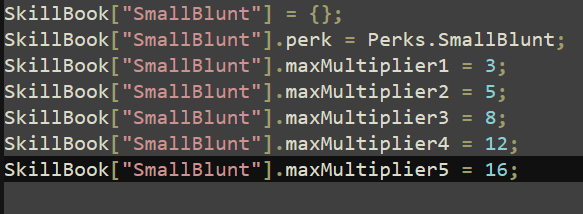
I got it working, i added a lua folder, in it a server folder in it XpSystem and in it the thing that i found in the working mod. https://i.imgur.com/Q9xfgkM.png
 shy mantle
I got it working ALMOST flawlessly... then I noticed something.
Some vehicles a...
shy mantle
shy mantle
I got it working ALMOST flawlessly... then I noticed something.
Some vehicles a...
Nevermind, apparently the order of baseVehicleQuality BEFORE chanceToPartDamage matters
from a 37,000 character replacement file to 400 lol thanks again
silent zealot
shy mantle
from a 37,000 character replacement file to 400 lol thanks again
More importantly, if you do it right then it plays nice with other mods
silent zealot
wild flint
I got it working, i added a lua folder, in it a server folder in it XpSystem and...
That explains the error, if the SmallBlunt entry is a lookup table was missing and the tooltip tried to access it
shy mantle
In testing compatibility with my mods against other mods, I noticed the week one mod kinda just... deletes cars at random. Does anyone know what's up with that? It deletes about half, maybe less, idk, and they just vanish. You seen them for a few seconds before a random check from week one comes through and then they just get cleared out like they never existed. I know it's related to the NPC driving feature because those cars vanish at the same time when going off screen, but how can I fix that? Or should I ask the modder of that mod to fix this specific thing?
true nova
autumn bluff
animations can be made in blender, correct?
yes
true nova
shy mantle
In testing compatibility with my mods against other mods, I noticed the week one...
i would ask them. might have their own vehicle cleanup that they run for some reason
shy mantle
true nova
i would ask them. might have their own vehicle cleanup that they run for some re...
Yeah they seem to be having a lot of issues over there, I felt bad adding another one lol.
Also, W elevator mod
silent zealot
shy mantle
In testing compatibility with my mods against other mods, I noticed the week one...
Honestly, I'd just add, a "Known Incompatibilities" section on the steam workshop description and mention Week One will cause cars to vanish at random.
Week one is such a major change to core systems it's reasonable to not be fully compatible with it
Otherwise download the mod and look for removeFromWorld() or permanentlyRemove() being used on vehicles to try and figure out what is happening... those are the obvious function calls to make a vehicle vanish. Check for setWorldTransform(<transfom>) too since that teleports vehicles around.
shy mantle
I'll just list it as incompatible because if I tried to fix then I would need to keep up with their mod changes and I really don't wanna do that.
true nova
anyone added new plants to the farming system in b42? i can't get the icon to appear in the farming ui
autumn bluff
can anyone help me with animation lua?
ive already confirmed that my animation works in animation viewer
but the character does the surrender animation when i try to trigger the animation through lua
self:setActionAnim("Bob_Smirk_Hug")
im assuming this is wrong somehow
true nova
is this for b42?
autumn bluff
yes
true nova
there is a bug with the xml for animations
you need to include the path that would be for b41 and the xml there as well
 true nova
no an extra media folder outside of your common or b42
with just the path that leads to the animation and na extra copy of it in there
autumn bluff
oh
true nova
its dumb i dont think theyve fixed it yet
it doesnt even read the file from there it just needs it to reference
autumn bluff
 true nova
that should do it
autumn bluff
alright
testing
still surrenders

what does this error mean? googling it was useless
true nova
thats where its looking for the xml player/actions . idk how you are triggering this though. it can be done in different ways
true nova
did you check with a game restart?
true nova
hold on. i've done only a few animations, ill pull up my mod and look
autumn bluff
oh wait a minute
i think i formatted the xml as B41
same warning, what?

i am utterly confused
true nova
how are you triggering it?
autumn bluff
autumn bluff
here
function TimedHugPlush:start()
if instanceof(self.item, "InventoryItem") and self.item:getWorldItem() then
local worldObj = self.item:getWorldItem()
if worldObj then
self.character:faceThisObject(worldObj)
end
end
--self:setOverrideAnimation(true)
self:setActionAnim("Bob_Smirk_Hug")
end
true nova
so you're missing the node PerformingAction in the xml is all it is i think
<m_Conditions>
<m_Name>PerformingAction</m_Name>
<m_Type>STRING</m_Type>
<m_StringValue>Bob_Smirk_Hug</m_StringValue>
</m_Conditions>
add that at the bottom right above </animNode>
should only need to do it in the b42 xml
true nova
get the same error?
true nova
so it likely found it just something is missing. i barely know anything about the xmls but i did notice that sometimes an animation wont play without some other stuff in there
autumn bluff
a
true nova
wait a sec
lol nvm i thought i saw something that wasn't right
try adding the speed scale?? <m_SpeedScale>1.00</m_SpeedScale>
maybe bone weights?? i remember that making one work for me
autumn bluff
experimenting with random stuff now
GOT IT
looped it
idk why that worked
also there was a lingering quotation mark on name
true nova
🙌 fantastic
 boreal ledge
Hi, I want to add a recipe to Remove Batteries from various things that take batteries but don't have it
In the base game, the Hand Torch can Remove Batteries but not be Dismantled, while the Flashlight can both be Dismantled and have it's Battries Removed, and if you Remove Batteries the flashlight first, you don't get a battery when Dismantling it
Differently, the portadisc has a slot for batteries, but can't Remove Batteries and also doesn't return its battery when it's Dismantled
the Radio has a slot for batteries, cannot have its Batteries Removed, but does return a battery when dismantled
How come these things are so inconsistent?
It doesn't seem to be related to whether the item has a battery slot like the players, or a charge % like flashlights
Can I see the base game recipes somewhere?
So far I've just been using other peoples mods as syntax templates
 gilded crescent
boreal ledge
Hi, I want to add a recipe to Remove Batteries from various things that take bat...
gilded crescent
boreal ledge
Hi, I want to add a recipe to Remove Batteries from various things that take bat...
Base game recipes will be within the media/scripts folder i believe, somewhere within there is can't check the exact path at the moment as im not home
boreal ledge
I don't need to decompile them or anything, they're just in the same folder structure as a mod, but in the game directory?
gilded crescent
boreal ledge
I don't need to decompile them or anything, they're just in the same folder stru...
Exactly, yeah they just use the base zedscript, the only thing you have to recompile is Java as far as im aware
boreal ledge
Sick, thanks
gilded crescent
Wait zedscript is lua I believe other then that I was right from memory
And no problem
boreal ledge
   {
     keep Torch/HandTorch/Rubberducky2,

     Result:Battery,
     Time:30,
     OnTest:Recipe.OnTest.TorchBatteryRemoval,
     OnCreate:Recipe.OnCreate.TorchBatteryRemoval,
     StopOnWalk:false,
   }```
What is happening during ontest:torchbatteryremoval here?
Somehow this recipe must modify the ingredient item to.. remove the battery, but as far as I can tell, this is the only reference in the lua files to this methodOK I've achieved half of what I set out to do, I learned to use oncreate functions to add additional behaviour to recipes
Now what remains, and my next question, is how I can overwrite a preexisting recipe with mine such that the original doesn't show up ingame
(not that I understand yet what the purpose of the OnCreate vs. the OnGiveXP namespace is)
bright fog
boreal ledge
Hi, I want to add a recipe to Remove Batteries from various things that take bat...
Actually dismantles should remove batteries
Which version of the game are you on ?
boreal ledge
b41
It does for some things, like the radio, but as I found, some things don't have oncreates that return a battery
e.g., the CD player
    {
       CDplayer,
       keep [Recipe.GetItemTypes.Screwdriver],

       Result:ElectronicsScrap=2,
       Time:30.0,
       OnTest:Recipe.OnTest.DismantleElectronics,
       OnGiveXP:Recipe.OnGiveXP.DismantleElectronics,
       Category:Electrical,
       AnimNode:Disassemble,
       Prop1:Screwdriver,
       Prop2:CDplayer,
    }
Should be a fixed behavior in B42 I believe
 cold skiff
I'm trying to create a backpack based on the game's hydration backpack, but if this backpack is called Lbackpack instead of showing me Water(Lbackpack) it shows me Water(Fluid_container_Lbackpack, I'll put the code I use for the script to see if someone can help me:
module LB
{
item Bag_LBackpack
{
DisplayName = LBackpack,
DisplayCategory = Bag,
Type = Container,
Weight = 1.0,
IconsForTexture = Hydropack_Black,
AttachmentReplacement = Bag,
BloodLocation = Bag,
CanBeEquipped = Back,
Capacity = 49,
CloseSound = CloseHydrationPack,
ClothingItem = Bag_LegendaryBackpack,
EquipSound = EquipBackpackLarge,
OpenSound = OpenHydrationPack,
PutInSound = StoreItemHydrationPack,
ReplaceInPrimaryHand = Bag_LegendaryBackpack_RHand holdingbagright,
ReplaceInSecondHand = Bag_LegendaryBackpack_LHand holdingbagleft,
RunSpeedModifier = 0.99,
SoundParameter = EquippedBaggageContainer SchoolBag,
WeightReduction = 99,
WorldStaticModel = HydrationBackpack_Ground,
Tags = IgnoreZombieDensity,
    component FluidContainer
    {
        ContainerName   = LBackpack,
        capacity        = 1.0,
        InitialPercentMin = 0.0,
        InitialPercentMax = 1.0,
        Fluids
        {
            fluid           = Water:1.0,
        }
    }
}
}
bright fog
cold skiff
I'm trying to create a backpack based on the game's hydration backpack, but if t...
That's bcs you didn't define the fluid container name in the Fluid_EN.txt translation file
cold skiff
Could you be so kind as to give me a small example of the contents of fluid_EN.txt?
I guess it will be something like this:
Fluids_EN = {
Fluid_Container_LBackpack ="LBackpack",
}
Sir Doggy Jvla thx for u help, now its works!!!
 rich ruin
I made a car mod
ui\vehicles\mechanic overlay
How do I make this?
stiff fiber
Guys could you help me out please? My car keeps sinking into the ground although I have set up the extents, physics shape and such correctly

ignore the wheels being backwards that's easy to fix
rich ruin
stiff fiber
Guys could you help me out please? My car keeps sinking into the ground although...
dm me
stiff fiber
rich ruin
dm me
One minute
main pasture
stiff fiber
Guys could you help me out please? My car keeps sinking into the ground although...
Have you adjusted the wheel diameters and it still sinks?
stiff fiber
main pasture
Have you adjusted the wheel diameters and it still sinks?
You can adjust that?
Since when?
main pasture
stiff fiber
Since when?
Yes. Not sure when it was implemented, but at least from b41
stiff fiber
Strange... I don't see any option for that in the vehicle debug menu
And I also didn't have this problem with my previous car mods
main pasture
Yeah it might not be in the editor, but you can change them from the script manually. Could be good luck that the wheel visuals matched the default diameter
stiff fiber
main pasture
Yeah it might not be in the editor, but you can change them from the script manu...
Could be. Where can I set the diameter in the file itself?
main pasture
stiff fiber
Could be. Where can I set the diameter in the file itself?
"radius" in the wheel definitions ("wheel FrontLeft" etc)
stiff fiber
main pasture
"radius" in the wheel definitions ("wheel FrontLeft" etc)
Thank you. I'll take a look at it once I'm back at my PC
main pasture
rich ruin
I made a car mod
ui\vehicles\mechanic overlay
How do I make this?
There is this blender file to create the mechanical overlay automatically. Haven't tested it but might be worth trying. It is pinned in the modeling channel "MechOverlayBuilder"
stiff fiber
main pasture
"radius" in the wheel definitions ("wheel FrontLeft" etc)
Okay I found it. It's currently at 0.15f. I have no idea what the f stands for
What does the f stand for at the end of some values? Like maxSpeed is set to 120 MPH if you write 90f.
main pasture
stiff fiber
Okay I found it. It's currently at 0.15f. I have no idea what the f stands for
Not sure if it's needed, but I think it's just meant to specify the value as float
stiff fiber
ah that makes sense
main pasture
stiff fiber
What does the f stand for at the end of some values? Like maxSpeed is set to 120...
All of the speeds are in km/h, but the gauge is just labeled mph
 orchid marten
main pasture
Not sure if it's needed, but I think it's just meant to specify the value as flo...
orchid marten
main pasture
Not sure if it's needed, but I think it's just meant to specify the value as flo...
seems like by default it would be a double otherwise
nevermind that's java
you're talking about lua right
main pasture
Yeah the pz script format whatever it's supposed to be. They are parsed in java, but haven't checked how the values are handled
stiff fiber
@main pasture I changed the values so the front wheel doesn't sink into the ground. but the back wheel still does even though I set it to the same value. Also the car is behaving weirdly. when I steer the front wheels also sink into the ground somewhat... as if there was a problem with the suspension
main pasture
stiff fiber
<@188324534582116353> I changed the values so the front wheel doesn't sink into ...
What is your "overall" scale? If it's too far away from the vanilla vehicles the physics might behave incorrectly
bronze yoke
for some reason TIS like to include f at the end of literals even when it's meaningless (in scripts, and their version of lua even allows it for some reason)
stiff fiber
main pasture
What is your "overall" scale? If it's too far away from the vanilla vehicles the...
model scale is nowhere close on my other mods either
it's 2.25 for my previous mods
and 1.45 with this one
the problem only happens once I increase the tire radius...
I set it back to 0.15 and it's back to normal
it's just the wheels that's sunken into the ground again...
orchid marten
bronze yoke
for some reason TIS like to include `f` at the end of literals even when it's me...
maybe they're too used to java ¯_(ツ)_/¯
stiff fiber
also I just found another problem...

the game isn't rendering the front fender undersides...
whyyyyyyy....

I swear to god I'm losing my shit right now. I made 3 mods. I had no issues with the actual script files and stuff and now the game is throwing everything at me for no reason...
main pasture
Are the normals facing out and mesh tris?
stiff fiber
main pasture
Are the normals facing out and mesh tris?

how do I check if the normals are facing outwards?
bruh...

how the fuck does this even happen?
@main pasture thank you very much!
I would've never guessed this was the issue
main pasture
If you start extruding from a line for example, the normals are facing pretty much random directions
stiff fiber
main pasture
If you start extruding from a line for example, the normals are facing pretty mu...
Man... there's still so much I have to learn about modeling it's unreal... and about Blender in general...
stiff fiber
Hmm... I raised the tire radius again and now it's not glitching out... weird. It finally works as intended
stiff fiber
@main pasture anyway thank you for all the help!
main pasture
stiff fiber
<@188324534582116353> anyway thank you for all the help!
np. btw did you get the spare wheel holder working?
stiff fiber
main pasture
np. btw did you get the spare wheel holder working?
It shows up in the mechanics panel. But it throws an error. So I took it out for the time being, until I got the model set up right. Now I have the car working so I'll get back to the spare wheel box tomorrow.
This whole "sinking into the ground thing" really threw me off
main pasture
I had the same issue with sinking/suspension and it also solved itself... not sure how
stiff fiber
main pasture
I had the same issue with sinking/suspension and it also solved itself... not su...
Weird thing this...
We can probably chalk it up to build 42 being build 42
orchid marten
is there a difference between function foo(bar) and foo = function(bar)
bronze yoke
not really
there is technically a difference if the function is local, in that case local function foo(bar) declares the local first and then defines the function, whereas local foo = function(bar) declares the local after defining the function (which means recursive calls don't work) but this rarely ever matters
it's more of a style preference than anything
bright fog
bronze yoke
there is technically a difference if the function is local, in that case `local ...
Wait what
If you call a function within a function, it needs to be written with the first method ?
bronze yoke
yeah
bright fog
Oh wow that's interesting
bronze yoke
local foo = function() end is an assignment statement, the function expression has to be evaluated before the statement ends, which means the assignment hasn't happened yet
whereas local function foo() is a function declaration statement so it doesn't have to follow that rule
bright fog

 bronze yoke
doesn't affect globals though because globals don't have to be declared and you can't call the function until after the assignment
bronze yoke
there's similar limitations with table constructors in general although that one is a little more obvious why it doesn't work
 bronze yoke
as long as the access happens after the assignment it's fine, the issue with local function recursion is that the local isn't declared in that function's scope, so it references a global instead of the local
similar problem:lua local t = { a = "myValue", b = t.a } the assignment statement doesn't complete until after the constructor is evaluated, so t is undefined
bright fog
I see
 pulsar pagoda
hi guys i need help with my lootable map mod, it was working up until some updates ago, now when you open the worldmap with the M key it throws errors and the whole map is revealed


 pulsar pagoda
hi guys i need help with my lootable map mod, it was working up until some updat...
pulsar pagoda
pulsar pagoda
hi guys i need help with my lootable map mod, it was working up until some updat...
also when opening the actual map i get infinite errors and it used to not load, i then changed the code so it doesnt call the mauldraugh xml file but the "the forest" one and that made it load but i still get infinite errors


anyone got experience with lootable maps in this version?
silent zealot
First, what is the mod supposed to do?
Find a mapitem that reveals the entire map when you read it?
pulsar pagoda
silent zealot
Find a mapitem that reveals the entire map when you read it?
nope, its a lootable map that shows the image from the spawn select screen
i use my own image, its the uncompressed 300mb one
i dont have the code use the one in the game files
silent zealot
So more like a flyer
pulsar pagoda
yeah pretty much but i used the how to make a lootable map guide from the forums
silent zealot
Well, a lootable map reveals a section of the world map.
Do you want that to happen?
pulsar pagoda
no, no. the idea is that you can have a map that doesnt show your location and is more detailed than the ingame map
is for like roleplaying purposes i guess
silent zealot
in that case, don't make your item a "lootable map"
Look at how flyers work to display an image.
And make sure you don't make use of the "and reveal a map section" part of flyers.
(Assuming B42, based on the map image you are using)
Also, 300MB for a map image in a mod is crazy
pulsar pagoda
silent zealot
Also, 300MB for a map image in a mod is crazy
yeah i know haha
some guy asked for permission to make a compressed version
so i rebranded to be the hd version
i will look into making it a flyer, thanks
this is what it used to look like
 silent zealot
I don't know if you can zoom in on a flyer, so haveing it full res makes no sense
pulsar pagoda
silent zealot
I don't know if you can zoom in on a flyer, so haveing it full res makes no sens...
oh well if i cant zoom in then theres no reason for it to be a flyer
the point is to appreciate the details on the map
silent zealot
And even if you can zoom, make it smaller.
I have a 500x4000 version I use on my second monittor, that's plenty of detail.
Only 3MB (in jpg, which I don't know if Zomboid can display)
pulsar pagoda
silent zealot
I have a 500x4000 version I use on my second monittor, that's plenty of detail.
thats pretty cool, could you upload it here?
 pulsar pagoda
silent zealot
If you really want it to be zoomable, look into the new Image pyramid stuf
pulsar pagoda
silent zealot
If you really want it to be zoomable, look into the new Image pyramid stuf
what is that?
also i cant find the flyers in the files
only the images not the code
silent zealot
    item Flier
    {
        DisplayCategory = Junk,
        Weight    =    0.1,
        Type    =    Literature,
        DisplayName    =    Flier,
        Icon    =    Flier,
        ReadType = photo,
        StaticModel = Flier1,
        WorldStaticModel = Flier1,
        Tags = FastRead,
        OnCreate = SpecialLootSpawns.OnCreateFlier,
    }
SpecialLootSpawns.OnCreateFlier = function(item)
    if not item then return; end;
    local text
    local bookList = PrintMediaDefinitions.Fliers
    local book = bookList[ZombRand(#bookList)+1]
    local text = getText(item:getDisplayName()) .. ": " .. getText("Print_Media_" .. book .. "_title" )
    item:setName(text)
    item:getModData().printMedia = book
end
Then look at PrintMediaDefinitions.Fliers and PrintMediaDefinitions.MiscDetails in PrintMediaDefinitions.lua
pulsar pagoda
i will check it out, thanks
silent zealot
I assume the images are handled with the "put them in a specific path and make them match the name in the table" approach, rather than letting you specify the path to the image to display for each flier type
pulsar pagoda
gotta be honest man, i dont understand anything in these lines, way too complex for me haha
pulsar pagoda
anyone know where can i put local mods in pz folders? mods folder in projectzomboid folder doesnt work anymore
pulsar pagoda
pulsar pagoda
anyone know where can i put local mods in pz folders? mods folder in projectzomb...
its on pc/zomboid/mods
lapis moth
pulsar pagoda
anyone know where can i put local mods in pz folders? mods folder in projectzomb...
why it doesn't work
work fine for me
pulsar pagoda
hi, does anybody know what changes there have been to maps in recent builds? im trying to make a lootable map
@silent zealot im thinking that i cant make it revel only a pixel or something but i need the map to work first...
bronze yoke
pulsar pagoda
anyone know where can i put local mods in pz folders? mods folder in projectzomb...
%UserProfile%/Zomboid/mods
 noble fossil
What is the easiest way to remove a vanilla recipe? I'm replacing it with a recipe I made but Override:true, or Obsolete:true, and IsHidden, don't seem to work.
pulsar pagoda
noble fossil
What is the easiest way to remove a vanilla recipe? I'm replacing it with a reci...
did you try naming it the same? mods load before vanilla i think
noble fossil
pulsar pagoda
did you try naming it the same? mods load before vanilla i think
yeah its weird so the name of the recipe is craftRecipe Scrap_Gold_Jewellery, it has underscores instead of being all one word. So would this be enough to remove it? I've gotten other recipes to work like this, such as changing the skill level required.
module Base
{
craftRecipe Scrap_Gold_Jewellery
{
    Obsolete:true,
}
}
pulsar pagoda
tbh i dont have a lot of experience with recipes, if u name it the same it should ignore the vanilla one
noble fossil
Hmm ok. Basically I'm just trying to change it from 20 jewelry to 5 jewelry to equal 1 gold scrap. But if I change the item inputs, it makes a duplicate recipe with the same name. If I write obsolete, nothing happens.
pulsar pagoda
try copying the recipe exactly and just change the inputs
ignore the obsolete stuff maybe it willmake it obsolete bc it has the same name
noble fossil
Okay I'll try that
If I copy & paste the recipe over and change only the input from 20 to 5, it gives me an error and wont start.
ERROR: General f:0, t:1752206802128> ExceptionLogger.logException> Exception thrown
java.io.IOException: Duplicate Prop2 in recipe Scrap_Gold_Jewellery at CraftRecipe.OnScriptsLoaded(CraftRecipe.java:692).
pulsar pagoda
i suggest using chat gpt it may help figuring out whats wrong, im really not a very experienced modder sorry :/
noble fossil
haha it's ok i'm only a beginner too. I think it's something with the _'s in the name instead of being all one word like RipDenimClothing, I am able to edit all of those types of recipes just fine.
pulsar pagoda
yeah well maybe TIS changed the way some recipes work and those specific _ recipes work diferently
try looking into the code that adds that gold jewelery, maybe its called something different idk
silent zealot
noble fossil
Hmm ok. Basically I'm just trying to change it from 20 jewelry to 5 jewelry to e...
If you just want to change the inputs you can probably do that with lua
declaration: package: zombie.scripting.entity.components.crafting, class: CraftRecipe
That gets you an ArrayList, which you can modify
noble fossil
silent zealot
If you just want to change the inputs you can probably do that with lua
ok i'll try this thanks
orchid marten
pulsar pagoda
hi, does anybody know what changes there have been to maps in recent builds? im ...
i got the "non-hd" version of your mod the other person made to work earlier today by changing initDefaultStyleV1 to initDefaultStyleV3 and it also seems like they put 'media/maps/Muldraugh, KY' into a variable called LootMaps.DEFAULT_MAP_DIRECTORY
seems like the revealed area is too big now though because there's forest surrounding the image so i'll have to find the right values
also the only things you need to copy over to your own script are the local variables MINZ, MAXZ, MINZ_BUILDINGS, and WATER_TEXTURE plus the local functions replaceWaterStyle and overlayPNG
 sonic needle

 grand raven
Hi
Is there flag for food items to consume FULL and ALL food for craft
Know about ItemCount flag, but it consumes only all item (i can bite apple and use only half for recipe). Wanna make recipe which will consume all full(only) apple
Thx
 rustic timber
hello peeps i am trying to make a map for pz but i havbe no luck i have watched every tutorial on everything already if anyone can contact me to assist me that would be much appreciated
bright fog
rustic timber
hello peeps i am trying to make a map for pz but i havbe no luck i have watched ...
frank elbow
<@&671452400221159444>
 left plank
Thank you omy
drifting ore
I have a very simple mod that adds the ability to craft nails from scrap, with a hammer, hacksaw and tongs at any table.
But it's crashing my game on start up. Can someone take a look at where I messed up?
It's literally a single .txt file that is under 40 lines.
main pasture
Have you checked if the log shows anything useful?
drifting ore
drifting ore
I have a very simple mod that adds the ability to craft nails from scrap, with a...
It is a script error. Feel free to post the script file here if you can't find the issue.
pulsar pagoda
orchid marten
i got the "non-hd" version of your mod the other person made to work earlier tod...
the way i got mine to work and also not reveal the map is to make the min x and y coords to 10000, as its outside the map it doesnt reveal anything
im looking into using the games existing texture now, ill se if i can do what u said
fixed it @orchid marten, ill upload the new version in a couple of mins, just tweaking the empty space that the hi res map used to take
pulsar pagoda
pulsar pagoda
fixed it <@261339715888873474>, ill upload the new version in a couple of mins, ...
 drifting ore
It is a script error. Feel free to post the script file here if you can't find t...
drifting ore
drifting ore
It is a script error. Feel free to post the script file here if you can't find t...
{

    craftRecipe ScrewsFromScrap
    {
        time = 30,
        SkillRequired = Blacksmith:1,
        needTobeLearn = true,
        AutoLearnAll = Blacksmith:4,
        timedAction = Making,
        xpAward = Blacksmith:10,
        tags = AnySurfaceCraft,
        category = Tools,

        inputs
        {
            item 1 tags[Base.UnusableMetal],
            item 1 tags[BallPeenHammer;Hammer] mode:keep flags[Prop1;MayDegradeLight],
            item 1 tags[MetalworkingPliers;Tongs] mode:keep flags[Prop2;MayDegradeLight],
            item 1 tags[MetalworkingPunch;MetalSaw] mode:keep flags[MayDegradeLight],
            item 1 tags[MetalworkingChisel;SheetMetalSnips] mode:keep flags[MayDegradeLight],
        }
        outputs
        {
            item 4 Base.Screws,
        }
    }

    craftRecipe NailsFromScrap
    {
        time = 30,
        SkillRequired = Carpentry:2,
        needTobeLearn = true,
        AutoLearnAll = Carpentry:3,
        timedAction = Making,
        xpAward = Blacksmith:5,
        tags = AnySurfaceCraft,
        category = Tools,

        inputs
        {
            item 1 tags[Base.ScrapMetal],
            item 1 tags[Hammer] mode:keep flags[Prop1;MayDegradeLight],
            item 1 tags[Pliers;MetalworkingPliers;Tongs;CrudeTongs] mode:keep flags[Prop2;MayDegradeLight],
            item 1 tags[CrudeChisel;MasonsChisel;MetalworkingChisel;MetalSaw;SheetMetalSnips] mode:keep flags[MayDegradeLight],
        }
        outputs
        {
            item 4 Base.Nails,
        }
    }
}```I looked at the logs but it just said there was a parsing error.
I've also got some older mods that were throwing errors as well. The old Antique Armory mod was also throwing errors, but it didn't crash the game when I started a new game.
This is crashing on new game start up.
frank elbow
@left plank
autumn bluff
quick question, attempting to reduce boredom by 40% of maximum. this isnt functioning though...
self.character:getStats():setBoredom(self.character:getStats():getBoredom() - 40)
heress the full code block, the other two are working fine
self.character:getStats():setStress(self.character:getStats():getStress() - 0.5)
self.character:getStats():setBoredom(self.character:getStats():getBoredom() - 40)
self.character:getStats():setEndurance(self.character:getStats():getEndurance() - 0.3)
 solar rover
Anyone know off hand what lua's handle combat/damage?
bronze yoke
none of them, combat is implemented in java
solar rover
Specifically looking for anything that has to do with conveying multiplayer damage from one client to another
Oh shoot okay. I'll look for a different way thanks Albion!
 gilded hawk
Guys we need to mod this in zomboid
Engineers get Onshape Professional free up to 6 months https://Onshape.pro/integza
JLC3DP 3D Printing & CNC Service Starts at $0.3: https://jlc3dp.com/?from=integza
Stainless Steel Properties: https://jlc3dp.com/help/article/316L-Stainless-Steel
@hacksmith Bobblehead: https://hacksmith.store/products/bobbleheads
Machines
Bambu Labs X1 Carbo...
orchid marten
pulsar pagoda
done https://steamcommunity.com/sharedfiles/filedetails/?id=3522959355
thanks for the mod! i didn't realize you already had sandbox options, though i was trying to figure out how to convert the values i had set myself when i realized zenith just multiplied the options by 250 for their mod
pulsar pagoda
orchid marten
thanks for the mod! i didn't realize you already had sandbox options, though i w...
youre welcome, glad you liked it :) lmk if it breaks again
autumn bluff
autumn bluff
quick question, attempting to reduce boredom by 40% of maximum. this isnt functi...
bringing this up again. still cant solve it
pulsar pagoda
autumn bluff
quick question, attempting to reduce boredom by 40% of maximum. this isnt functi...
maybe the value is too big?
the others work with 0.x but that one is 40
autumn bluff
tried it with .4 as well
when i add
print("Current boredom before:", self.character:getStats():getBoredom())
it returns 0. always. even if i am max boredom
autumn bluff
okay
orchid marten
bronze yoke
use `BodyDamage.get/setBoredomLevel`
gotta love the zomboid codebase
autumn bluff
self.character:getBodyDamage():setBoredomLevel(self.character:getBodyDamage():getBoredomLevel() - 40)
like this?
heck yeah it works!
sonic needle
gilded hawk
Guys we need to mod this in zomboid
https://youtu.be/_luBh6eFANU?si=b7w-9kA012...
whelp i already did it apprently
pulsar pagoda
anyone know how to fix inaccuracy when throwing objects? (im throwing an object based on firecrackers coding)
pulsar pagoda
pulsar pagoda
anyone know how to fix inaccuracy when throwing objects? (im throwing an object ...
module Base
{
item Thrown Rock
{
DisplayName = Thrown Rock,
DisplayCategory = Improvised,
OtherHandUse = FALSE,
MaxRange = 10,
WeaponSprite = FlintNodule,
Type = Weapon,
MinimumSwingTime = 0.5,
SwingAnim = Throw,
UseSelf = TRUE,
SwingTime = 0.1,
SwingAmountBeforeImpact = 0.1,
PhysicsObject = MolotovCocktail,
MinDamage = 0,
Weight = 0.1,
MaxDamage = 0,
MaxHitCount = 0,
FirePower = 0,
FireRange = 0,
Icon = RockSharpened,
NoiseRange = 8,
ExplosionSound = StoneHit,
SwingSound = StoneSwing,
WorldStaticModel = ChippedStone,
ConditionMax = 10,
}
}
supple briar
pulsar pagoda
module Base
{
item Thrown Rock
{
DisplayName = Thrown Rock...
it might just be hard coded into the thrown weapon code itself
pulsar pagoda
supple briar
it might just be hard coded into the thrown weapon code itself
well that sucks, aiming skill doesnt change the inaccuracy either
supple briar
pulsar pagoda
well that sucks, aiming skill doesnt change the inaccuracy either
There might be a way to change it if you can figure out where physicsobjects are stored, but that may very well be hardcoded too
pulsar pagoda
yeah, it sounds like its not in a lua file, i already looked
supple briar
i can't imagine the thrown objects code has really changed since it was first added
so it's probably hard coded purely for Molotovs and everything else was just added later
pulsar pagoda
well, i guess ill just have to wait until they get around to updating how the molotovs work
supple briar
what was your plan?
pulsar pagoda
i wanted to make a far cry like mod to throw rocks
that way you can divide zombie groups and stuff
but if its innacurate then its worthless
supple briar
I can see that maybe still working
it seems like it has a small inaccuracy, but not a lot
maybe if it had a really good range to account for that it could still be cool
pulsar pagoda
supple briar
maybe if it had a really good range to account for that it could still be cool
i put max range to 100 and it didnt seem to change anything
its like its a cone and it has a % chance to go wherever it pleases
pulsar pagoda
supple briar
or is that related to the fire from a molotov maybe
yeah thats what i thought
maybe i should try throwing mollies, see if those are inaccurate too
that way id know if its a change i made or hardcoded


 late hound
sonic needle
Real Ghillie Suit's
late hound
sonic needle
Real Ghillie Suit's
 sonic needle
late hound
https://tenor.com/view/sorry-gif-1284676348901827341
sonic needle
late hound
https://tenor.com/view/sorry-gif-1284676348901827341
SPOTTING DIMES
 scarlet ingot
allows admin to join but not others. gives a red error when joining

anyone having this issue with apex hosting servers? ^
gilded hawk
sonic needle
whelp i already did it apprently
Send link pls
sonic needle
its in my discord. in* the archive
stiff fiber
@main pasture Can I dm you?
Can anyone help me out with some scripting stuff please? I'm trying to make a spare wheel slot in the mechanics menu for my car. It works so far, I can install and uninstall the spare wheel just fine. But It always throws an error when doing either. Here's what I did.

I wrote a template_sparetire file which is in the scripts--> vehicles folder of my mod

In the vehicle script file I defined an area
 somber drift
My Rcon is pretty much done, where should i release this lol
 stiff fiber
and invoked the template itself

in lua --> shared --> Translate --> EN --> IG_UI_EN.txt I wrote the following so the name displays correctly

Here is the error message I'm getting


"Callframe at: setTireRemoved"
"Caused by: java.lang.IllegalArgumentException: invalid wheel index"
the car itself has a wheel box. So no models actually get installed to the car model itself
somber drift
@stiff fiber hey man, saw you were having trouble with your spare tire mod. that's a classic error when you start adding custom parts lol, you're super close to getting it working.
the problem is that "invalid wheel index" thing.
basically the game thinks you're trying to remove a real wheel from the car, like the front-left or whatever. those all have a number (index 0, 1, 2, 3). your spare tire part is just a slot, it doesn't have one of those numbers, so when you try to uninstall it the game freaks out and says "invalid index!"
i'm pretty sure it's this line in your template_sparetire.txt file:
onuninstalled = TireUninstalled,
that TireUninstalled function is the one that tells the game's physics engine to remove a wheel. you just want to remove the item from the slot, not a physical part of the car model.
try getting rid of that line, and probably the oninstalled line too just to be safe. your part doesn't need all that fancy logic.
here, try this for your template_sparetire.txt:
Lua
template vehicle SpareTire
{
part SpareTire
{
mechanicsType = 8,
area = SpareTire,
itemType = Base.ModernTire;Base.NormalTire,
mechanicRequired = false,
parent = "Tire",
table install
{
items
{
Tags = Wrench,
count = 1,
keep = true,
sound = Dismantle,
}
},
table uninstall
{
items
{
Tags = Wrench,
count = 1,
keep = true,
sound = Dismantle,
}
}
}
}
that should just treat it like a simple part you can add/remove an item from without throwing any errors.
hope that helps, let me know if it works!
stiff fiber
somber drift
<@703117886645862470> hey man, saw you were having trouble with your spare tire ...
Thank you! I'll try this out
yeah I figured it was some logic problem because I used the vanilla template as a "template" template
and that one installs actual wheel models
stiff fiber
somber drift
<@703117886645862470> hey man, saw you were having trouble with your spare tire ...
Unfortunately this doesn't fix the issue. But thank you!
main pasture
You should also remove the Init.Tire from the lua section, because it also tries to access the wheel index of the part
 main pasture
Yes
main pasture
Lua functions the create, init etc. refer to are at media/lua/server/Vehicles/Vehicles.lua. It seems like it should work without it just fine function Vehicles.Init.Tire(vehicle, part) local wheelIndex = part:getWheelIndex() vehicle:setTireRemoved(wheelIndex, part:getInventoryItem() == nil) end
Create should work. It just adds the inventory item to the slot and randomizes the pressure
stiff fiber
So I should only remove these

Sorry if I sound stupid but I'm not familiar with the lua language
I only know c# and python 😅
main pasture
Yes you don't need them. They should be the functions that make the part function as a wheel of the vehicle
stiff fiber
main pasture
Yes you don't need them. They should be the functions that make the part functio...
Thank you! Now it doesn't throw an error! But for some reason I can't uninstall it without the mechanicscheat being turned on. even if I have the required items...
main pasture
Do you have the required skill level?
stiff fiber
main pasture
Do you have the required skill level?
 main pasture
Might be a stupid question, but do you have a tire in your inventory that you could install?
stiff fiber
yes
if the tire is on and I want to uninstall it it's the same thing
maybe I do need this line
test = Vehicles.InstallTest.Default,
main pasture
Yes. I it seems to be required
It is what actually tests if you can install it or not
stiff fiber
😅
main pasture
Just use Vehicles.UninstallTest.Default for the uninstall test
stiff fiber
main pasture
Just use `Vehicles.UninstallTest.Default` for the uninstall test
YESSSSSSSSS. FINALLY
it works!!!!!!
Thank you!
main pasture
stiff fiber
YESSSSSSSSS. FINALLY
BTW if you want the spare tire to be somewhere else in the mechanics menu, you can change the category to anything (just specify the name in the translation file if it's a new one)
stiff fiber
main pasture
BTW if you want the spare tire to be somewhere else in the mechanics menu, you c...
Yeah I already did. Set category to tire so it appears under all the other tires. Thanks for the heads-up
stiff fiber
I was also thinking about making it so you can't remove the back door without removing the spare wheel first. But I just checked the vanilla vehicles and guess what. You can remove the back door no problem without removing the rear windshield first on vehicles where it makes no sense (smallcar 1, SUV, pickupvan)😅
I guess it's an oversight by the devs

lol
main pasture
Yeah maybe that isn't intentional...
stiff fiber
main pasture
Yeah maybe that isn't intentional...
what is the name of the rear windshield?
can't find it's template file
RearWindshield?
nevermind, found it
WindshieldRear

this should do the trick
okay that doesn't work

maybe like this?
nope. that doesn't work either
eh screw it. it'll stay like this. vanilla vehicles don't check this either
 idle tangle
Is there a way to iteretate all recipes in lua and alter them in build 42,. everything i google seems to be for build 41
drifting ore
idle tangle
Is there a way to iteretate all recipes in lua and alter them in build 42,. ever...
The only current way to alter recipes for B42 is to override the recipe script entirely and then make your changes to that new file
For example, if you wanted to modify craftRecipe FillPipe, you would need to copy the vanilla file recipes_tobacco.txt to the scripts folder of your mod and then make changes there. Keep in note though that any mod that modifies the same file won't merge or anything of course, the one with load priority gets loaded.
idle tangle
drifting ore
For example, if you wanted to modify `craftRecipe FillPipe`, you would need to c...
Ok thanks so a mod that changes mostrecipes is not going to be very compatible
drifting ore
Correct
red tiger
I'm planning to start retrofitting a project I a few weeks ago that adds a comprehensive Object-Oriented framework for Lua called Coolua.
It adds Java-like structure to Lua class definitions, providing classes, class inheritance, type-checks, type-casting, class-casting, interfaces, abstract methods, fields, field getter/setter generation tools, and more.
Here's an example using the builder API I wrote as an optional API style for building classes:
I plan to write my tools in Lua for PZ using this framework. For anyone looking for structure in their larger works, this might help.
It isn't ready yet. It's around 95% done. I'm looking to get it working fully in the next week.
It's gonna be a beast to document but I think it's worth it.
The current code and tests are here: https://github.com/asledgehammer/Coolua/tree/main/tests
GitHub
Contribute to asledgehammer/Coolua development by creating an account on GitHub.
drifting ore
drifting ore
```module ZevonScrapScrewsNails
{
craftRecipe ScrewsFromScrap
{
...
I'm not sure if it's possible, but could someone give me an idea of where I might be making a mistake on this script?
I'm trying to add a new crafting recipe and I looked at the modding documentation and I'm still coming up blank.
shy mantle
Is it a known bug that chanceToSpawnNormal does nothing for some specifc zones like transit, lectromax, knoxdisti, scarlet, and possibly more? It still works for EMS type vehicle zones such as police, fire, ambulance, and prison though. I was trying to change the values through a mod, noticed it was only half working with no errors (very strange), so I tested it in complete vanilla and, yeah, something's not right in vanilla either.
stiff fiber
When's the best time to release mods in terms of exposure? Say in GMT?
bronze yoke
i've always aimed for 'sometime on friday' but i don't have much data to say that that's really ideal, honestly monday might be better
stiff fiber
On a workday?
bronze yoke
the exact timing of your release doesn't matter too much because steam's only seriously effective way of promoting new mods is the front page, and you can show up on there for the first week after your mod has released
so i'm thinking maybe monday is better because you'll have more time to get to the frontpage before the weekend when the most people are looking
stiff fiber
So if I release it sometime tomorrow it might only be on the front page for less than a day?
bronze yoke
oh no, you get a full week from whenever you post it
basically as soon as a mod reaches exactly 1 week old it's no longer eligible
stiff fiber
Weird thing is, my most popular mod is the first one I ever made. That one has 3500 subscribers. Second one has 1600 something and the third one has 1850.
So I have no idea how the "algorithm" works 😅
stiff fiber
bronze yoke
basically as soon as a mod reaches exactly 1 week old it's no longer eligible
I see
Thank you!
I didn't know that
bronze yoke
if your mod is for build 41, i might recommend waiting a little though
stiff fiber
It's a car mod for both build 41 and 42
bronze yoke
there seems to be some issue with the in-game mod downloader currently, which means that servers (or joining players) fail to download any mod uploaded/updated since some time yesterday
you'll hear no end of it in the comments (especially since it's not too well known of an issue yet) and it'll probably hurt the growth of your mod
stiff fiber
bronze yoke
there seems to be some issue with the in-game mod downloader currently, which me...
Shit. I just updated two of my mods yesterday...
bronze yoke
i've noticed on my b41 mods that after it's off the front page, i tend to get far more subscriptions than views, so i suspect the majority of subscribers come from people joining servers with the mod
stiff fiber
bronze yoke
i've noticed on my b41 mods that after it's off the front page, i tend to get fa...
Or from people who are subscribed to these "collections"
Yeah that happens to me as well
supple briar
after some testing I have come to the conclusion that 8 wheel vehicles are possible in theory, but don't work very well in game, shame.
 stiff fiber
supple briar
after some testing I have come to the conclusion that 8 wheel vehicles are possi...
stiff fiber
supple briar
after some testing I have come to the conclusion that 8 wheel vehicles are possi...
Why not?
supple briar
stiff fiber
Why not?
PZ only supports 4 wheels
you can easily fake 6 wheels with the 2 front wheels being separate while the back 4 are actually 2 wheels
but that doesn't carry over to 8 wheels
The Stryker drove fine, really, but with how I set the wheels up it looks awful when turning
stiff fiber
supple briar
The Stryker drove fine, really, but with how I set the wheels up it looks awful ...
How many wheels turn on the real one?
supple briar
stiff fiber
How many wheels turn on the real one?
4
I needed to remake the model later for animations, so when I do that I'll probably add fake wheels to the front so it looks better
stiff fiber
supple briar
4
Is there no way to also fake the front 4 wheels to be only 2 wheels?
supple briar
stiff fiber
Is there no way to also fake the front 4 wheels to be only 2 wheels?
one sec I got a video
supple briar
stiff fiber
Is there no way to also fake the front 4 wheels to be only 2 wheels?
So I tried that
my two attempts was to have all 8 wheels be sets of two that rotated from the middle
but the Stryker kept tipping like a bike
Adjusting width didn't do anything

so I went and changed it so the origin of each wheel was on it's respective side (left for the front wheel, right for the wheel behind)
that worked much, much better
but looks awful
I hope and pray to indie stone every night that they rework the vehicle system and let us use all the wheels we want on a vehicle
stiff fiber
supple briar
but the Stryker kept tipping like a bike
Did you try to mess around with the suspension stiffness, suspension compression, rollinfluence and such?
supple briar
stiff fiber
Did you try to mess around with the suspension stiffness, suspension compression...
The issue was the position of the wheels, I don't think those would help well
as I said, it toppled like a bike
I didn't try that, no, but I can't imagine it would have helped
stiff fiber
Oh like the whole thing went on it's side?
supple briar
stiff fiber
Oh like the whole thing went on it's side?
Yeah
I don't have good screenshots
but it always leaned to the side
stiff fiber
Damn. I have no idea what might cause that
supple briar
I think 8 wheels is just a bridge too far
stiff fiber
I had an issue with my mod the day before yesterday where it sank into the ground and toppled a bit as well
But it fixed itself after a while
I have no idea how
supple briar
stiff fiber
I had an issue with my mod the day before yesterday where it sank into the groun...
That does happen too, but that's a similar but not related issue I believe
It worked fine once I have wheels on either side
but it looks so bad
stiff fiber
Yeah...
supple briar
if there was a way to disable the wheels rotating but no turning side to side, this would be a different story probably
stiff fiber
It's weird how on the left side the front wheel works correctly and on the right side it's the one more to the back
supple briar
stiff fiber
It's weird how on the left side the front wheel works correctly and on the right...
That's how they were set up on purpose
The back wheel on the front was the right front wheel
so it was pivoting from the right side
the front front wheel was the left side one
so it pivoted from the left
stiff fiber
Maybe this is a stupid idea, but what if you made it so two wheels share the same model?
As in two wheels in the same fbx file?
supple briar
stiff fiber
As in two wheels in the same fbx file?
that's what it was
supple briar
No worries

this is the wheel
(I have since deleted the texture)
so it pivoted from the middle for the first attempt, but it kept tipping over
stiff fiber
What if it wasn't the wheel pairs, but the two wheels on either side?
Like one file is the two wheels on the right and the other is the two wheels on the left?
supple briar
stiff fiber
Like one file is the two wheels on the right and the other is the two wheels on ...
That was, in fact, what I did next
supple briar
supple briar
that is what I did here
and that's why it looks so weird
oh wait
do you mean 2 wheels on the right and 2 wheels on the left?
stiff fiber
Yes
supple briar
stiff fiber
Yes
That might feel better, but when the wheels rotated it would rotate the center of those wheels
stiff fiber
But maybe it'll turn in a weird radius though...
supple briar
and would then kinda,,,,windmill them
supple briar
you mean this, right?
 stiff fiber
Yes
supple briar
this would work if you could disable the wheels spinning
 stiff fiber
But that would use the center as the pivot... and it might look like the two wheels turning around the same pivot...
supple briar
without it, it'll look like that going 65 miles an hour
stiff fiber
Wait the game also spins the model around the world origin?
Not around it's own origin?
supple briar
stiff fiber
Wait the game also spins the model around the world origin?
From my understanding, yes
well no
that is the model origin
woops
well actually....
I don't know?
most wheels do have their origin set for the world origin, so I imagine it does depend on the world origin in PZ
stiff fiber

maybe you should try out a version where the wheels on one side are set up like this
as a last ditch effort
supple briar
ngl I already deleted the model
stiff fiber
 supple briar
It's not a bad idea
stiff fiber
I don't really have any other ideas
supple briar
but sadly PZ is just built strangely
stiff fiber
supple briar
but sadly PZ is just built strangely
indeed it is
supple briar
I'm sure there's a way to make it work with LUA scripting
probably
maybe making the back 2 wheels a trailer that's fixed in place or something
stiff fiber
Tunes told me earlier today that the wheels are numbered 0-3
and each wheel has a determined wheel index
if you could write a modified lua file where the index goes from 0-7 you would be golden
but I don't know how you could implement it
so the game uses your modified lua file instead of the vanilla
a huge headache is what this is...
sorry I couldn't help much
supple briar
No worries
It maybe something I look into in a few months time
but I have a feeling the best solution is just going to be the hacky one of using fake wheels
 tawny pendant
can someone diagnose where I screwed up in making a cheat profession? I got this error on load, and if im being honest, it means nothing to me besides the lua file I wrote for the profession is throwing an error (I say wrote, I mean I cannibalized the SOTO and US Military Professions mods for their code cause I am so far from a coder, it would be funny)
function: RR_Professions.lua -- file: RR_Professions.lua line # 28 | MOD: Republic Ranger java.lang.RuntimeException: attempted index of non-table at se.krka.kahlua.vm.KahluaUtil.fail(KahluaUtil.java:100) at se.krka.kahlua.vm.KahluaUtil.luaAssert(KahluaUtil.java:88) at se.krka.kahlua.vm.KahluaThread.tableSet(KahluaThread.java:1704) at se.krka.kahlua.vm.KahluaThread.luaMainloop(KahluaThread.java:579) at se.krka.kahlua.vm.KahluaThread.call(KahluaThread.java:173) at se.krka.kahlua.vm.KahluaThread.pcall(KahluaThread.java:1963) at se.krka.kahlua.vm.KahluaThread.pcall(KahluaThread.java:1760) at se.krka.kahlua.integration.LuaCaller.pcall(LuaCaller.java:76) at se.krka.kahlua.integration.LuaCaller.protectedCall(LuaCaller.java:117) at zombie.Lua.LuaManager.RunLuaInternal(LuaManager.java:635) at zombie.Lua.LuaManager.RunLua(LuaManager.java:578) at zombie.Lua.LuaManager.RunLua(LuaManager.java:564) at zombie.Lua.LuaManager.LoadDirBase(LuaManager.java:423) at zombie.Lua.LuaManager.LoadDirBase(LuaManager.java:314) at zombie.Lua.LuaManager.LoadDirBase(LuaManager.java:475) at zombie.GameWindow.init(GameWindow.java:1386) at zombie.GameWindow.mainThreadInit(GameWindow.java:756) at zombie.GameWindow.mainThreadStart(GameWindow.java:598) at zombie.MainThread.mainLoop(MainThread.java:64) at java.base/java.lang.Thread.run(Unknown Source)
the worst part is, the mod still isn't working, the profession isn't being added, meaning this error is actually important
bright fog
tawny pendant
the worst part is, the mod still isn't working, the profession isn't being added...
Every errors are important 
bronze yoke
at line 28 you attempted an index of a non-table
we'd need your code to tell you what that actually means
tawny pendant
bright fog
Every errors are important <:What:658113278240620547>
eh, when I play with mods, like 90% of the errors I get aren't game breaking, which is why I said it wasn't important
bright fog
tawny pendant
eh, when I play with mods, like 90% of the errors I get aren't game breaking, wh...
You think they aren't game breaking
But in reality, they stop the mod that causes them from properly working somewhere
It could be nothing visual, or only noticable when you ACTUALLY use that specific mod features
Doesn't mean they aren't important ...
Getting errors IS NOT and SHOULD NOT be normality here !
tawny pendant
yeah but when repair any clothes throws three errors cause it can't seem to read some clothing mod I have on, I can't be bothered to diagnose exactly what got broken, since it usually just means I can't freely repair my some of my modded clothing
its important, just not to me when I just wanna play modded zomboid lol
bright fog
I will repeat my statement:
Getting errors IS NOT and SHOULD NOT be normality here !
Because if you ignore that error ? How do you know which one you should ignore ?
bronze yoke
it can be okay to ignore errors from other mods because half of the time, who cares, as long as it works, but you should not ignore errors in your own mod
tawny pendant
sure yeah, I agree, I just think trying to make an error free mod load is way more effort than its worth 90% of the time.
tawny pendant
bronze yoke
it can be okay to ignore errors from other mods because half of the time, who ca...
tbf, I have made all of 3 mods counting this one, and this is the first one I have had actually throw an error cause code cannibalization isn't working lmao
red tiger
bronze yoke
it can be okay to ignore errors from other mods because half of the time, who ca...
I don't play PZ modded because I'd end up fixing all of them.
bronze yoke
errors are how the language tells you your code is broken, so you don't want to ignore them: even if your code is actually working despite throwing errors, you still want to fix the error so that you can trust future errors
bright fog
tawny pendant
tbf, I have made all of 3 mods counting this one, and this is the first one I ha...
Understanding how Lua works in this case would help you greatly tho
However the error you got basically means what it's saying, you're trying to access a key from a table that isn't one (usually means your "table" is probably nil here)
if I'm not mistaken
tawny pendant
good to know
muted garnet
how to replace the player's walking animation during the game? For example, by pressing a button to switch the player's walking animation to the zombie's walking animation?
bronze yoke
you can create an animation node with higher priority than the default one with your animation, and add a variable to control it
ancient grail
muted garnet
how to replace the player's walking animation during the game? For example, by p...
clone the walk xml files
add variable check on those files
setVariable using lua
ancient grail
tawny pendant
good to know
also there are errors that you think are safe but is secretly generating shit load of lines
that's gona bloat both server and client
bronze yoke
log has a max size in b42

 open drum


