#reforger_workbench
1 messages · Page 8 of 1
 gray charm
 lethal mirage
Do you want to add it to the Arsenal?
lethal mirage
Do you want to add it to the Arsenal?
Quer adicioná-lo ao Arsenal? Yes
I want to modify the RHS version, and put it in the arsenal without replacing the original
lethal mirage
gray charm
I want to modify the RHS version, and put it in the arsenal without replacing th...
This is how you add things to arsenals
You will obviously have to add it to an RHS entity catalog if it should be an RHS faction item
gray charm
So, shouldn't I duplicate the file to apply the new texture?
lethal mirage
Yes, you should be
After that you do the think I linked
Then your own version will be in the factions arsenal in addition to the old one
gray charm
I want to change the texture of an RHS vest, but when I do this it applies it but in the game it keeps the original texture
lethal mirage
Duplicating will not affect the original prefab
If nothing changes, make sure the thing you are looking at is actually yours and not the original one
gray charm
but when I apply the texture to the duplicated version, will it remain?
lethal mirage
On the duplicated prefab? Yes.
gray charm
lethal mirage
On the duplicated prefab? Yes.
ok, I'll try
 remote estuary
when I have multiple projects with the same GUID in workbench launcher it never opens the right one unless its in the addons dir
 mellow narwhal
OK I give up, where are the options to change keybinds in the world editor? I want to switch shift+esc and esc
 cloud zenith
In the options menu. File>Options>Keybinds iirc Workbench>Options>Shortcuts
 gentle scarab
Anybody know why an fbx file would import into the tools as black instead of the normal white/grey
 sharp juniper
often is vertex colours embedded in the model the tools don't recognise
go to the geometry tab and see if there's anything under uhh colour attributes that's not sharpness or UV
if so, delete and try importing again
another option could be your normals being inside out
 merry pawn
My question: is spawning a player into a vehicle possible?
So I'm toying around with changing spawn logic on bases currently being captured into something a little closer in line with what a QRF would look like. For simplicity, closest base with a light vehicle maintenance station spawns a vehicle driven by an AI. Each of the seats in the vehicle then becomes a spawn slot for the QRF and while the vehicle is traveling towards the base, players can spawn into empty slots on the vehicle. It'll set respawns up to occur in waves on contested bases, while preventing spawn camping on the base itself.
I know AI taking control of a vehicle is currently only experimental, but if this is workable, the options can be made a lot wider and feel more "coordinated" on chaotic conflict servers where QRF coordination requires a lot more people to be working together. Not only do players need to coordinate which base to spawn from, someone needs to grab the vehicle and head wait for people to spawn in. If you can intuitively express intent to defend a contested base, while also being herded into a group of players making their way towards the base it'll lead to a more cohesive feel.
 orchid jay
Is there anyone here with the knowledge of how to make custom patches and flags that would be willing to help me through it? We can discuss further in DMs if it makes it easier.
 sullen island
If a mod has a space in it's project name ID how are you suppose to launch it in the peer tool config params?
e.g mod: https://reforger.armaplatform.com/workshop/5D58A217A9611AFB
can't be launched by saying -addons Dead Everon in the peer config params, it will just take the first word.
is it possible to launch mods that has a space in their project name in peer tools?
remote estuary
Someone said at some point that you can do this really weird thing and put the entire argument in quotes (like "-addon Dead Everon" or something).
 tight dune
sullen island
If a mod has a space in it's project name ID how are you suppose to launch it in...
tight dune
sullen island
If a mod has a space in it's project name ID how are you suppose to launch it in...
you can also use GUID, so -addons 5D58A217A9611AFB
anyway, it is also interesting case - someone probably manually added that space to ID. I've just checked and Workbench is removing spaces from ID
sullen island
yeah I tried both stringifying like Bacon said and GUID still it take the first word only
yes it in the project ID
tight dune
GUID is a "single word" so I don't understand this sentence?
sullen island
the guid part is fine in the console log crash it tries to launch it with the first name only
sullen island
when I put the GUID in like this -addons 5D58A217A9611AFB it attempt to launch the peer client but it crashes, then I check the console logs for that crash it says
11:30:14.873 ENGINE : CLI Params: -gproj C:/Program Files (x86)/Steam/steamapps/common/Arma Reforger/addons/data/ArmaReforger.gproj -addonsDir -addons WolfsBuildingPack,Dead -window -forceupdate -nofocus -client -rpl-reconnect -rpl-timeout-disable -profile PeerPlugin1 -addonsDir C:\Users\USER\ArmaProjects,C:\Users\USER\OneDrive\Documents\My Games\ArmaReforger\addons -addons 5D58A217A9611AFB```as you can see in that snippet it does -addons WolfsBuildingPack,Dead cutting of the rest of the addon name
if we check the addon.gproj
this is how they set it up
 ID "Dead Everon"
 GUID "5D58A217A9611AFB"
 TITLE "Dead Everon"
 Dependencies {
"5D84C738432BFE6A"
 }
}
but you are not posting why it crashes?
sullen island
because the space in the name I assume, because peer clients working fine with any mod that doesn't has a space in it's name it's just these mods that are setup with spaces
tight dune
I guess you can remove that space from gproj on your end
sullen island
tight dune
I guess you can remove that space from gproj on your end
I did try that
I did as well change it everywhere in the mod files
but I guess it's baked in some of these files I can't edit
tight dune
and what happened?
remote estuary
feel free to assume but it might be better if you share why it crashes so that we can try to help you
tight dune
Are you sure addon is loaded from correct place?
also,
addons WolfsBuildingPack,Dead -window -forceupdate -nofocus -client -rpl-reconnect -rpl-timeout-disable -profile PeerPlugin1 -addonsDir C:\Users\USER\ArmaProjects,C:\Users\USER\OneDrive\Documents\My Games\ArmaReforger\addons -addons 5D58A217A9611AFB you have two times addons defined
first one I assume is auto added by peer tool
second one is simply ignored
since you can have only single CLI param
remote estuary
I guess he could try to start the server first and then start peer client manually without the broken param
a lot of issues with spaces in the tool and game in general
sullen island
I check discord bacon you had this same issue a while ago idk if you got around it
remote estuary
I did, I was complaining about it because it feels surreal to experience issues from 1990s in 2024 (or 2023 is probably when I was dealing with it)
so you can try starting the diag binary with the correct params, or rather all params except the broken one
if you have mod *AFB in only one of those addons directories it should work
tight dune
"C:\Users\USER\ArmaProjects,C:\Users\USER\OneDrive\Documents\My Games\ArmaReforger\addons " if you have that Dead Everon addon in two places, then last one will be launched by peer tool
Peer Tool is generating title ID based on what WB loaded, so if you are loading from ArmaProjects folder, then there might be mismatch
remote estuary
on that note if I have the same addon in a location outside addons dir in workbench launcher, and I have a copy of it inside my addons dir, workbench will open the one in the addons dir even though I want it to open the one I am clicking on which is outside
tight dune
please make a feedback ticket for it - perhaps someone other from team will have time to take a look at it. I guess PeerTool could as potential improvement pass GUIDs, instead of IDs
sullen island
could you please tell me where we can do that?
sullen island
tight dune
please make a feedback ticket for it - perhaps someone other from team will have...
you are referring to this https://feedback.bistudio.com/project/profile/66/ ?
tight dune
sullen island
you are referring to this https://feedback.bistudio.com/project/profile/66/ ?
yup
 wise basin
Guys hi I'm trying to bring in helucopter into game
I tried editing existing one but u always end up with errors
Saying missing physic material and failed to spawn entity
I'm trying to get the hind 24 in game BTW
Idk why the RHS team left it
 reef ferry
wise basin
Idk why the RHS team left it
reef ferry
wise basin
Idk why the RHS team left it
sorry what? left it where?
wise basin
Mi 24 mod
reef ferry
wise basin
Mi 24 mod
there was never an Mi24 mod for reforger made by RHS. so not sure what you are talking about
 edgy otter
file data structure of the world is obsolete arma
what does this mean^ crached and reopened file now thiss, everytime i test play it crashes
 devout nest
is there a way to edit a prefab without unloading the world im in? i basically want to have two world editors open at once
 brazen plaza
You should be able to edit the current instance of the prefab thats inside the world @devout nest
When youre happy with your changes, you can right click the prefab in the list and "apply changes to prefab" or something similar. Saves a lot of time, i wish i had known that earlier 🥲
devout nest
brazen plaza
When youre happy with your changes, you can right click the prefab in the list a...
thanks for the tip, I'll try it out today
 flat mica
Hi! Does anyone have experience of creating a custom tool for World Editor or any other editor?
tight dune
flat mica
Hi! Does anyone have experience of creating a custom tool for World Editor or an...
https://community.bistudio.com/wiki/Arma_Reforger:Workbench_Plugin_Tutorial there is tutorial and sample on github
- https://community.bistudio.com/wiki/Category:Arma_Reforger/Modding/Tutorials/Scripting/Workbench there are few more specialized tutorials over here
flat mica
tight dune
https://community.bistudio.com/wiki/Arma_Reforger:Workbench_Plugin_Tutorial ther...
Thx!
 prisma trail
Hello, I could ask you for some advice. I have a problem with Arma Reforger Tools, everything is locked. When you create something on Arland, I can't move things around or delete them, they're simply locked. Could someone help me unlock it?
 remote estuary
I wanna say it's locked for a reason but I still have no reply from BI if this is intentional or not
also #enfusion_terrain
prisma trail
THX 😉
 jaunty frigate
Virtual Machine Exception
Reason: NULL pointer to instance
Class: 'SCR_MapMarkerManagerComponent'
Function: 'OnMapPanEnd'
Stack trace:
scripts/Game/Map/Markers/SCR_MapMarkerManagerComponent.c:570 Function OnMapPanEnd
scripts/Game/Map/SCR_MapEntity.c:1385 Function PanUpdate
scripts/Game/Map/SCR_MapEntity.c:1471 Function UpdateMap
scripts/Game/Map/SCR_MapEntity.c:1495 Function EOnFrame
I'm trying to load the mapEntity with geogetry data and a background. Each time that I switch to game mode I get this error. I'm also getting a similar runtime error that starts once you get past role selection screen. The map itself functions fine. Does anyone have any ideas on how to fix this?
remote estuary
peertool logs in workbench console window pls
 surreal stag
jaunty frigate
Virtual Machine Exception
Reason: NULL pointer to instance
Class: 'SCR_Ma...
surreal stag
jaunty frigate
Virtual Machine Exception
Reason: NULL pointer to instance
Class: 'SCR_Ma...
background as in the TGA that gets generated from the map tools or an actual custom background?
jaunty frigate
surreal stag
background as in the TGA that gets generated from the map tools or an actual cus...
it was a .edds satellite background. For whatever reason I loaded up the editor today and I am no longer getting any of the errors from yesterday
surreal stag
 problem solved
 hardy quest
how do you fix custom scenario not loading in reforger? just freezes up loading.
lethal mirage
hardy quest
how do you fix custom scenario not loading in reforger? just freezes up loading.
That depends on why it's frozen. Can't really give you a better answer, you'll have to test yourself.
Check for log errors, then try removing stuff until it goes back to working - etc
hardy quest
lethal mirage
That depends on why it's frozen. Can't really give you a better answer, you'll h...
there arent any log errors as im loading the scenario in reforger
the arma loading screen just starts flickering
lethal mirage
Flickering?
hardy quest
lemme get a clip of it
 vagrant wing
Hey, I'm new in workbench. When I open an addon or add something as a dependency to my project it shows no files of the addon, I have only these

I am doing something wrong?
 neon ore
vagrant wing
Hey, I'm new in workbench. When I open an addon or add something as a dependency...
neon ore
vagrant wing
Hey, I'm new in workbench. When I open an addon or add something as a dependency...
You are probably missing the dependencies of the dependency. Check the logs
vagrant wing
neon ore
You are probably missing the dependencies of the dependency. Check the logs
That would make sense 🤣 Thank you, will test out
surreal stag
vagrant wing
That would make sense 🤣 Thank you, will test out
it should tell you at the top of the console log if you're missing a dependency
 unborn cipher
I’ve got dependencies, specifically RHS, but when I try and open my own project it decided to open the RHS project instead.
Keep getting an error for the Arma reforger gproj
C014582791ECBF24 language localization is apparently the wrong name
unborn cipher
unborn cipher
C014582791ECBF24 language localization is apparently the wrong name
Okay so I believe this is not related
I’m trying to use TFM Uniforms as a dependency and when I add it and its dependencies, my workbench just crashes
 atomic heart
Is there any way to export an asset from one map to another? Like the castle from Everon to other maps?
or if you use the existing component of the castle to build a new version of it and want to export it ?
unborn cipher
I need some help setting up a faction - specifically dealing with the integration with the in-game editor.
unborn cipher
unborn cipher
I need some help setting up a faction - specifically dealing with the integratio...
Fixed that - but now my mod is timing out when I attempt to upload it.
edgy otter
is there a way to make world presets? or should i just build a base world and make my worlds under a subs
 unkempt knoll
is there a way that i can own asset not let rain through ? currently it rain straight through the roof ...
 tiny bison
i keep getting this in the log RESOURCES (E): Can't remap 'Models/Board/WoodenBoard.xob' material from 'Material' to 'Assets/Props/Industrial/CargoContainer_01/Data/CargoContainer_01_10ft_Grey.emat'. Source material do not exist
tiny bison
atomic heart
Is there any way to export an asset from one map to another? Like the castle fr...
you can go into the map and click it and copy it Ctrl-C and then load into your map and paste it
 tame perch
Hello everyone, i just got into making my own missions and i came across a problem i can't solve and i can't find any solutions online so i hope someone can help me🙏 !
My problem is with the SCR_AIWORLD. If i want to add this SCR into my world (modded map) i get this long error as shown in the picture. It says that there is already a SCR_AIWORLD but i am pretty sure there isn't, at least i can't find it anywhere. After that i can add the Navmesh with no problems and the AI will spawn when i test the mission in Tools but there isn't any AI spawning when i put the mission on the server.

 glass musk
Getting a really weird interaction with the "duplicate to" menu button. I'm assuming this was the preferred way to create overriden vanilla classes, but it's not creating a copy according to the script editor explorer and has inconsistant behavior when I attempt to open the script file in the workbench to edit.
 tight dune
glass musk
Getting a really weird interaction with the "duplicate to" menu button. I'm assu...
tight dune
glass musk
Getting a really weird interaction with the "duplicate to" menu button. I'm assu...
overrides of scripts is done via "modding" keyword
unless you really want to fully replace vanilla script (replace is not same as override)
 calm python
HI there everyone, Hoping you could help.
I am simple trying to get my intel deliver mission to loop once completed. I have tired the onTaskFinish with the spawn object action but nothing happens when I re-enter the trigger area. Could someone give me a better idea would appreciate it!!!
 winged agate
hello guys, i looking how to reduction the damage i take from AI and make player more durable before unconsciousness, any help guys ?
glass musk
tight dune
unless you really want to fully replace vanilla script (replace is not same as o...
So overloading classes I just manually create a file (likely in the same relative location as vanilla)?
Also, I'm needing to define a new reason for a support station to be invalid, but I don't think you can redefine enums, would the expected action be to completely override the vanilla enumerator while just adding a single record?
tight dune
glass musk
So overloading classes I just manually create a file (likely in the same relativ...
No, if it will have same name and location then it will fully replace original one
https://community.bistudio.com/wiki/Arma_Reforger:Scripting_Modding take a look here and on scripting section in general
glass musk
I ment relative location i.e.
- Vanilla:
ArmaReforger/scripts/Game/UserActions/SupportStations/SCR_BaseDamageHealSupportStation.c - Modded:
<mod_name>/scripts/Game/UserActions/SupportStations/SCR_BaseDamageHealSupportStation.c
I mainly was confused why "Duplicate to" wouldn't be doing the same exact thing as copying the file over.
tight dune
that will be same location for engine
in case of scripts, engine see only scripts/Game/UserActions/SupportStations/SCR_BaseDamageHealSupportStation.c
glass musk
So it's not nessessarily a recommendation to use a prefix, but a requirement if not wanting to overwrite it
tight dune
you can use prefix, different folder (script sample is using folder "modded" iirc) or any other method so prefix is rather recommendation as most clean solution in this case
glass musk
Gotcha. The File Structure header the scripting page had me believing I could use a direct copy. Thanks for clearing that up!
glass musk
glass musk
So overloading classes I just manually create a file (likely in the same relativ...
In the case an enumerator, is there a preferred method over just overwriting it and provided additional enum values?
tight dune
do you want to expand it? If yes, then you can use modded keyword like i.e. here https://community.bistudio.com/wiki/Arma_Reforger:Faction_Creation#Adding_new_faction_to_in-game_editor
glass musk
That's perfect, thanks so much for the help!
 valid quest
Hey ya'll currently trying to upload my mod to test but i keep getting this error, any tips?
BACKEND   (E): [RestApi] ID:[13] TYPE:[EBREQ_WORKSHOP_UploadAssetFile] Error Code:401 - Unauthorized, apiCode="Unauthorized", message="Unauthorized"
DEFAULT   (E): Uploading failed! Reason: "Unauthorized"
RESOURCES (E): Publishing failed```Prefix it with an unique folder, for example MyModName instead of common things like modded as you could land in the situation where you replace what another modder did if they went for something common like that
 winged ether
I cannot copy anything by dragging and dropping into the workbench. I have to open the folder and copy-paste the files. Why?
 tight dune
winged ether
I cannot copy anything by dragging and dropping into the workbench. I have to op...
tight dune
winged ether
I cannot copy anything by dragging and dropping into the workbench. I have to op...
Because of one drive
You are lucky that your project is even being loaded - move your Addon to some other location (outside of one drive) and try again
glass musk
Can't figure out how to get the damage manager from an IEntity user input, but I haven't been able to identify a link?
I feel like maybe I'm going about it the wrong way
winged ether
tight dune
Because of one drive
Thanks 🙏
 iron fjord
I’m having issues with my buildings, not having collision
devout nest
Is there a keyboard shortcut to copy resource name?
tight dune
 hardy pelican
What are the rules on making an addon locked/only usable in my server?
does that break workshop ToS?
remote estuary
unclear on tos still waiting for BI to post their "clarification post"
my take on it is that you can create a mod that simply does not activate on "unlicensed" servers, as in functionality does not run, but you should not make any attempts to crash or shutdown a game or server
hardy pelican
awesome thank you
hardy pelican
@remote estuary I imagine there is no fool proof way of doing this? At the end of the day someone could make an addon, add mine as a depenency and mod the class that handles authorized servers to run it etc
unless of course I obfuscate tf out of the class lol
remote estuary
hardy pelican
<@267285803720245258> I imagine there is no fool proof way of doing this? At the...
if your mod is licensed ND and someone creates a mod that directly modifies yours then they would be violating your license
devout nest
I'm getting this error every time I open any project in the experimental workbench (including the base Arma Reforger project):
Can't compile "GameLib" script Module! scripts/GameLib/generated/RoadNetwork/Road.c(12): Invalid inheritance, 'Road' must inherit from 'BaseRoad'
I did verify my game and tool files on steam. Has anyone else encountered this problem?
 thick lake
Hi, is there a way to hide all Waypoints and Triggers in the Worldeditor? If you have a lot of WPs and Triggers, you can see the Terrain anymore 😄
 boreal stump
devout nest
I'm getting this error every time I open any project in the experimental workben...
boreal stump
devout nest
I'm getting this error every time I open any project in the experimental workben...
I am also getting this. did anyone find a fix?
devout nest
boreal stump
I am also getting this. did anyone find a fix?
@boreal stump I found out it has to do with the addon.gproj file that you select when opening a project. I found a forum post about it. Will link it soon
 buoyant pagoda
is there any way to get a list of all the existing stringtable entries? I see ones like #AR-MapLocation_Kermovan but I wanted to add some new locations and didnt want to use something that's already being used elsewhere.
 storm harness
Hello, how to remove all project add to the workbench launcher ?
I dont want remove one by one xD
remote estuary
storm harness
Hello, how to remove all project add to the workbench launcher ?
delete Documents\My Games\ArmaReforgerWorkbench\profile\projectList_app.....conf file
storm harness
Thanks 😍
remote estuary
you can use this registry file to clear all "addon presets" (the thing when you right click -> open with addons)
storm harness
very nice to have that. Big thanks 🥰
devout nest
buoyant pagoda
is there any way to get a list of all the existing stringtable entries? I see on...
Sorry, not sure of that. I will let you know if I find any info on that though
devout nest
boreal stump
I am also getting this. did anyone find a fix?
I can't find the forum post I originally read, but essentially what I had to do was make sure the experimental tools were using the addon.gproj file of Arma Reforger Experimental instead of regular Arma Reforger.
You configure this when you initially open the tools when you're selecting a project. Select 'add existing' and navigate to the experimental game files, then find the addon.gproj and use that.
boreal stump
devout nest
I can't find the forum post I originally read, but essentially what I had to do ...
interesting thanks
Had a strange issue yesterday when follwoing a tutorial on making a scenario.
My scenario would not show up in the workshop section, or the mod maanger section. But it did show up in the scenarios section, however it was not playable, only favorite-able. Anyone else had anything like that?
devout nest
boreal stump
Had a strange issue yesterday when follwoing a tutorial on making a scenario.
My...
dealt with this too... #reforger_capturehold message
Unfortunately no one seemed to have any answers. My best guess would be with how the mission header file is configured, but I never got it to work
boreal stump
devout nest
dealt with this too... https://discord.com/channels/105462288051380224/976881108...
dam interesting we both happen to run into that same issue.
 proud quarry
When I try to upload my mod to the workshop I am met with multiple errors. BACKEND (E): [RestApi] ID:[64] TYPE:[EBREQ_WORKSHOP_CreateAssetUpload] Error Code:400 - Bad Request, apiCode="ValidationError", message="Referenced dependency doesn't exist or isn't accessible"
DEFAULT (E): Uploading failed! Reason: "Referenced dependency doesn't exist or isn't accessible"
RESOURCES (E): Publishing failed
 wild sorrel
Have a question, have a premade composition fob that is placeable however unable to delete it
in gm
or even edit the entities inside, it is madeup of sandbags
how do I fix this
wild sorrel
I see, all the sub entities need SCR_EditableEntity is there a way I can mass apply it
or have it inherit that component from its parent?
 visual torrent
I launched the experimental workbench and when it asked me to choose the core .gsproj file, I set it to the release Reforger one by accident. Now I can't seem to change that for the Experimental Tools and fix it.
Does anyone know how I can wipe that setting?
visual torrent
Oh weird. It was just because I had a ArmaReforger.gproj in the project list. Removing it now allows the Workbench to open as expected.
remote estuary
how do I duplicate/send to my project a bunch of materials from multiple folders?
nvm
 static shale
Is there a way to configure gamemaster gamemode so that ai will only spawn or be activate within a certain range of players ?
Like the way it possible in scenario framework ?
 civic pendant
The "Configuration to String Table (conf2st)" plugin converts internal game language .conf files into a localization.st file format. This file is created within the player's profile directory.
https://reforger.armaplatform.com/workshop/61A94824EE0B0CB9-conf2st

Arma Reforger
The "Configuration to String Table (conf2st)" plugin converts internal game language .conf files into a localization.st file format. This file is created within the player's profile directory.
remote estuary
finally a way to see the string table
tight dune
civic pendant
The "Configuration to String Table (conf2st)" plugin converts internal game lang...
would be good to post in #enfusion_resources
wild sorrel
Is there anyway to add dependencies to a mod after it has already been published?
 smoky turtle
Does anyone know if the peertool is broken? I am trying to test some things out and It seems to work within the workbench but the clients hosted from peertool do not.... Not sure what's going on?
remote estuary
no, it works correctly for me
 nocturne sundial
I had an issue also. Completely exiting Arma Reforger Tools and relaunching it fixed it
 final vortex
How do you access the experimental version of Reforger Tools?
lethal mirage
final vortex
How do you access the experimental version of Reforger Tools?
It's a separate tool on Steam
tight dune
which requires also experimental version of the game
 light frost
How to add mods to a user made campaign? Can't seem to figure it out. Trying to add Enfusion Persistent Framework and Database mods to Combat Ops, so I can save progress. I have created a save game from the Workbench with Combat Ops entities pasted in, but can't figure out how to input/install the required mod files from EPF mods. Anybody have a clue on how to do this?
 torn kayak
light frost
How to add mods to a user made campaign? Can't seem to figure it out. Trying t...
torn kayak
light frost
How to add mods to a user made campaign? Can't seem to figure it out. Trying t...
What does EPF have to do with your edits in workbench? If a mission works with some mods out of the box then you just need to load the mods in main menu and hit play on the mission. some things need mod specific integration so then you need to make a subscene of the missions world file and do what ever setup is needed and then pack and publish the inherited version of the mission to play with some mod dependencies.
Either way I can tell you that I did not add any support to Combat Ops for EPF. A good integration for it will take longer than a vanilla save/load solution to be added most likely. Ideally you should wait for that. EPF is not a drag and drop install, its a framework designed for expert users to build custom persistent gamemodes with
light frost
torn kayak
What does EPF have to do with your edits in workbench? If a mission works with s...
Yea, I figured as such. I want to add persistent saves, but seems a bit more involved than what's in the github readme....
torn kayak
You only need what is in the readme (not sure why you copy paste it here btw), but then only the framework is setup. Combat ops needs a full respawn system integration, and all the logic for the scanrio framework so the tasks etc all stay. Doing this is nothing for beginners.
light frost
...figured it was a little more plug-and-play than it seems to be. Guess I'll wait for BI to add it.
torn kayak
For many other use cases it is, for this specifically no. But if things go well you won't have to wait too long for this 😉
light frost
torn kayak
For many other use cases it is, for this specifically no. But if things go well ...
So if I make a basic mission in Workbench, is it just a matter of including the dependancies and loading them in the main menu or more involved?
torn kayak
Savegames aside, if you make a mission using the scanrio framework it is only a few steps yes. Make project with depencencies, make your mission, publish, play from main menu - where it will select the mods needed for your mission automatically - because your mission is part of the mod you make and load.
light frost
Ok, makes sense, thank you!
 stark latch
Question:
My mod is locked after i published it.. how do i unlock it ? so i can add more stuff
 lethal mirage
stark latch
### Question:
My mod is locked after i published it.. how do i unlock it ? so i ...
lethal mirage
stark latch
### Question:
My mod is locked after i published it.. how do i unlock it ? so i ...
You should have two projects, one that is locked and one that isn't.
If not in the launcher, at least on disk. Maybe you can re-add the missing one if it's not there, might also be related to its location.
stark latch
it's not there i only got one
best to create a new mod?
where can i find them others ?
lethal mirage
stark latch
it's not there i only got one
It's still on your disk where you intitially created it, right?
stark latch
lethal mirage
It's still on your disk where you intitially created it, right?
No idea, after i published it made it locked.
now i only got 1 mod and its locked
lethal mirage
It'll still be somewhere on your disk.
winged agate
hello guys, i downloaded a map from workshop. i open it in workbench to make a mission but the AI can't open doors and know what object is. i setup the navmesh file that mod provides me in SCR_AIWorld.et but nothing. i try to generate a new one but not working. any idea what i do wrong ?
stark latch
lethal mirage
It'll still be somewhere on your disk.
where to find ?, I can only find one in ArmaReforgerWorkBench & ArmaReforger -> Addons. Both locked
 lethal mirage
Appears to be the correct path. I've heard of this issue before, but I don't 100% remember what its origin was.
I think it was connected to where the source files were saved
stark latch
🤔
lethal mirage
Maybe try moving the source folder to a Reforger unrelated place and readding it
stark latch
lethal mirage
Maybe try moving the source folder to a Reforger unrelated place and readding it
Move it to desktop and add it again ?
lethal mirage
For example. Not sure if it'll work, but try it.
stark latch
the source folder is 'AAAAAAA' folder right ?
lethal mirage
Yes
stark latch
lethal mirage
For example. Not sure if it'll work, but try it.
okay give me a mom
stark latch
lethal mirage
For example. Not sure if it'll work, but try it.
still locked
 lethal mirage
Looks like a bug with the Workbench launcher
remote estuary
could you screenshot the project folder?
stark latch
remote estuary
could you screenshot the project folder?
yes
 remote estuary
somehow you merged downloaded addon with source project
remote estuary
no, you could separate the packed mod contents from the source contents
stark latch
remote estuary
no, you could separate the packed mod contents from the source contents
okay, how do i do that ? Sry i'm new to this
remote estuary
you could check how packed files look like by opening any other downloaded addon, and remove those from your project folder
not sure if that will fix it or not
stark latch
What kind of files and foldes do i need to remove? to make it look-a-like ?
 remote estuary
you could also create a new project to see what source project folder looks like
stark latch
heeey it worked !! 
I removed the data.pak / addon.gproj, meta file, resource file etc. etc. !
remote estuary
addon.gproj is important, should probably have kept that in
stark latch
oh
stark latch
remote estuary
addon.gproj is important, should probably have kept that in
the addon.gproj_1.0.1_manifest ?
remote estuary
you said addon.gproj, I mean addon.gproj, not addon.gproj.somethingsomething
stark latch
my bad sorry i meant "addon.gproj_1.0.1_manifest"
i removed the "addon.gproj_1.0.1_manifest"
I dont have the addon.gproj in the mod
oh wait
ofc i do
nvm
remote estuary
ok
stark latch
it's still in the mod folder
Thank you very much for the help sir !
been struggling with this for +7 days now
stark latch
Question: do i need to add the game-mode/scenario into my mod, if i want to change the heavy depot spawn of vehicle?, I have to add T72 tank dependency, but do i need to add the game-mode/scenario too for get this to work ?
sullen island
is it possible to have two world editors with two worlds opened at the same time?
neon ore
sullen island
is it possible to have two world editors with two worlds opened at the same time...
Open workbench twice
 iron spruce
winged agate
hello guys, i downloaded a map from workshop. i open it in workbench to make a m...
iron spruce
winged agate
hello guys, i downloaded a map from workshop. i open it in workbench to make a m...
Sounds like the map creater didnt set up the navmesh properly
remote estuary
horizontal scrollbar needs to get deleted from the log console tab
stark latch
Any kind fella, can help me solve this issue, Please DM/PM


 remote estuary
 stark latch
Any kind fella, can help me solve this issue, Please DM/PM
stark latch
remote estuary
Could you help me in few hours?
remote estuary
stark latch
Could you help me in few hours?
it says the map entity is missing, consider adding a map entity and configuring a map in your world, there should be some information about this in #enfusion_terrain
winged agate
iron spruce
Sounds like the map creater didnt set up the navmesh properly
thanks a lot, i try a different map right now but i get some crashes :/
 dapper depot
how do i update tools
lethal mirage
dapper depot
how do i update tools
How you can update the Workbench? Via Steam.
dapper depot
verify game files?
lethal mirage
Or what tools do you mean?
lethal mirage
If Steam doesn't show you an update, there is no update.
dapper depot
ok dope, thanks
brazen plaza
Does anyone know of a working dersert us vehicle retexture, like https://reforger.armaplatform.com/workshop/597CA1847E310D99
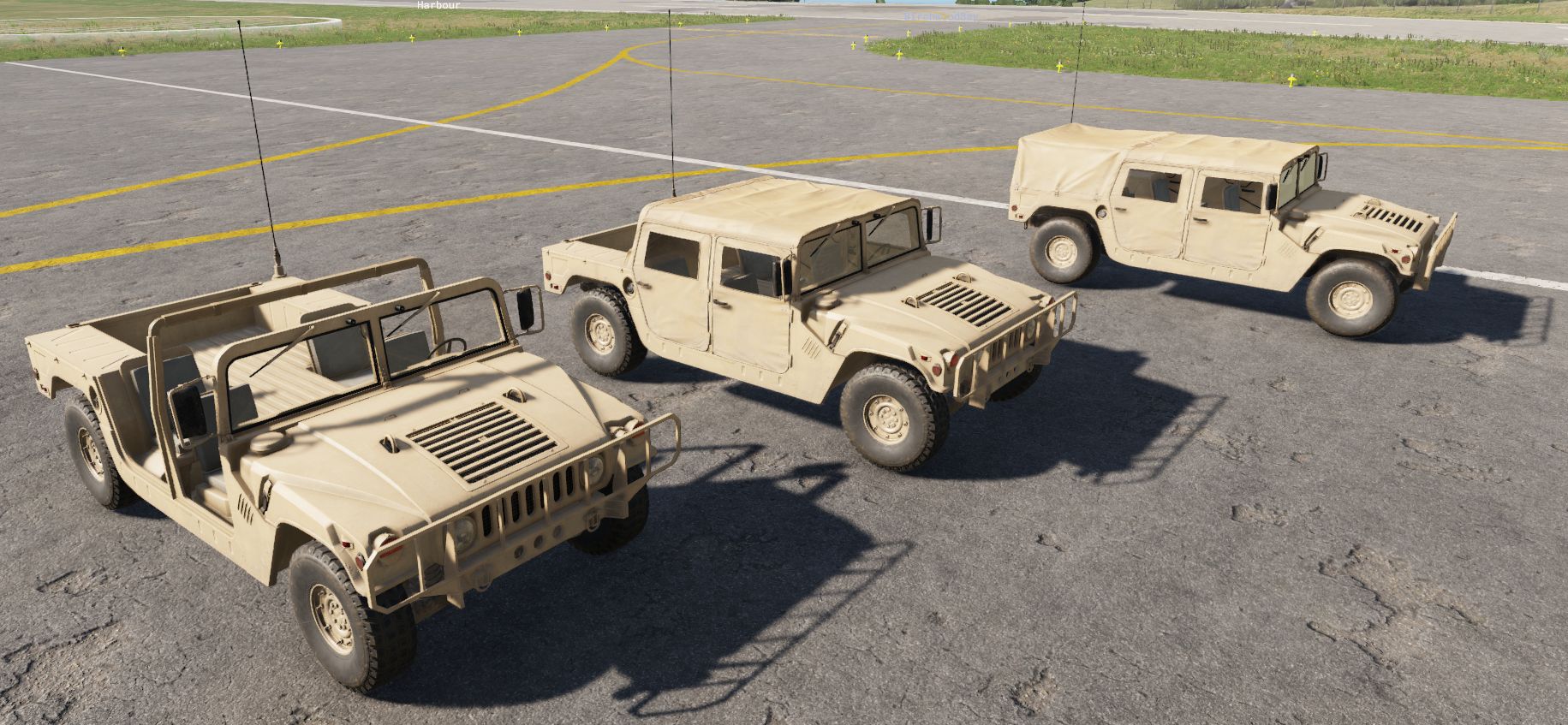
Arma Reforger
Desert reskins of all current US ground vehicles.
no longer downloadable
 hexed crest
let me guess BI has server issues tonight
civic pendant
The "Arma3 XML Stringtable Importer (xml2st)" plugin converts external Arma3 stringtable.xml files into a localization.st file format.
https://reforger.armaplatform.com/workshop/61B29DA0E2DA5B60-xml2st

Arma Reforger
The "Arma3 XML Stringtable Importer (xml2st)" plugin converts external Arma3 stringtable.xml files into a localization.st file format.
storm harness
Does anyone have the same problem as me for uploading an update with the Workbench ?
 remote estuary
storm harness
Does anyone have the same problem as me for uploading an update with the Workben...
remote estuary
storm harness
Does anyone have the same problem as me for uploading an update with the Workben...
I think you will not be able to upload to workshop when it's down
storm harness
How okay i dont have see the workshop is down. Thanks for the info.
I just arrived home after work and launched the workbench directly to make some change
remote estuary
storm harness
How okay i dont have see the workshop is down. Thanks for the info.
I just arriv...
in the message you posted it says it was not able to reach workshop
 manic pelican
This is a marvelous experience

 deep osprey
are arma reforger mods licensed collectively by bohemia to be redistributable or does each individual mod have its own licensing
seperately, are you allowed to copy existing mods and modify them in reforger? (i've tried doing this just to mess around but the assets for them are locked and i can't duplicate them to a new project, specifically the .xob for a AKM from a mod)
it copies the folder structure but leaves the asset files behind like the .xob file
despite the checkbox for the .xob file being checked in the copy procedure
 lone silo
Hope, what could it be, the workshop accepts the mod, everything is fine, but the changes made to the vehicle are not appearing in the game. Following all configuration parameters. Previously with the same procedure it worked correctly, now not anymore. Has anything changed since May?
reef ferry
deep osprey
are arma reforger mods licensed collectively by bohemia to be redistributable or...
each mod has its own license.
you cannot copy over 3d assets or unlock the original files
 plucky jungle
When I am editing weapons & ingame items. Should I be modifying the ITEM.et or ITEM_base.et, what is the general difference between these?
In the tutorials ITEM.et (e.g., Rifle_AK74.et) is used, what makes it different from its _base version?

same for the newly added DemoBlocks
plucky jungle
pedantic, but there is a typo in the 400g demoblock
 remote estuary
Damn also Inventory action and detonator isnt capitalised like all the other properties
 violet field
i can't open my mission after the Update 😦
This is what it says, any idea?
I can't even open world editor.
`SCRIPT (E): Can't compile "Game" script module!
Scripts/Game/Weapon/Sights/SCR_2DPIPSights1P21Component.c(24): Function 'SelectNextZoomLevel' is marked as override, but there is no function with this name in the base class
ENGINE (E): Cannot create new instance of World Editor because its dependent on working scripts`
 sick widget
violet field
i can't open my mission after the Update 😦
This is what it says, any idea?
I ca...
sick widget
violet field
i can't open my mission after the Update 😦
This is what it says, any idea?
I ca...
RHS has to be updated, wait a bit
violet field
sick widget
RHS has to be updated, wait a bit
ah sh**t!, you right i forgot about RHS... ma bad and thank you man 🙏
sick widget
violet field
ah sh**t!, you right i forgot about RHS... ma bad and thank you man 🙏
Np 🙂
plucky jungle
how do I remove the above text, whenever I hit windows+ctrl to switch desktops it enables menus like this

Now when I hit win+ctrl it only shows 1 option, enable/disable debug menu that turns on a different one...
https://community.bistudio.com/wiki/Arma_Reforger:World_Editor i'm not seeing any mention of the keybinds on this wiki page
sullen island
Ctrl + win + backspace navigates back in Diag menu, if that’s your question
Navigate to Statistics > and disable the second option called General, use ctrl + win + arrowLeft/arrowRight to go in menus and to switch things off
@plucky jungle
plucky jungle
Thank you, I appreciate it. Thats also the windows desktop changing keybinds, i'll have to close the other desktops i guess
sullen island
You can disable windows conflict with this keybind
sullen island
plucky jungle
Thank you, I appreciate it. Thats also the windows desktop changing keybinds, i'...
That reg file disabled win widgets for me which was conflicting with Diag menu shortcut
https://www.elevenforum.com/t/enable-or-disable-widgets-feature-in-windows-11.1196/#:~:text=Disable_widgets_feature_for_all_users.reg

Windows 11 Forum
This tutorial will show you how to enable or disable the widgets feature for all users in Windows 11.
Widgets are small windows that display dynamic info on your Windows desktop. They appear on the widgets board, where you can add, remove, arrange, resize, and customize them to reflect your...
@plucky jungle If you have a numpad you can also use LCtrl+num2 multiple times to cycle through that setting mode until it get disabled
 drowsy geyser
reef ferry
each mod has its own license.
you cannot copy over 3d assets or unlock the origi...
drowsy geyser
reef ferry
each mod has its own license.
you cannot copy over 3d assets or unlock the origi...
How do we fix this for unlicensed mods?
torn kayak
drowsy geyser
How do we fix this for unlicensed mods?
There is nothing to fix, if a mod has no license all rights are reserved by the creator of that content.
stark latch
How do i fix this bug?, What did i press on my keyboard?..
 iron spruce
Somebody can Help me ? when i resize the Ent. and go ingame it changes back to normal size

Do i need to make an Override for this to work?
 clever glen
Why are there a million SCR_SaveFileManager session uploaded to workshop?
 ornate ore
Sorry for this amateur question. I created and published a customized duplicated vehicle addon, but when I download and test it in Arma Reforger, it doesn't show up for spawning. What am I missing? Please help
 shrewd elm
stark latch
How do i fix this bug?, What did i press on my keyboard?..
shrewd elm
stark latch
How do i fix this bug?, What did i press on my keyboard?..
lctrl + x
 tight dune
ornate ore
Sorry for this amateur question. I created and published a customized duplicated...
ornate ore
tight dune
https://community.bistudio.com/wiki/Arma_Reforger:Asset_Browser_Mod_Integration ...
tight dune
ornate ore
Sorry for this amateur question. I created and published a customized duplicated...
ornate ore
tight dune
https://community.bistudio.com/wiki/Arma_Reforger:Asset_Browser_Mod_Integration ...
Thank you, I hadn't seen the first link on the wiki. I will be more attentive. Thank you very much
tight dune
No worries 🙂
stark latch
What is going on?? .. I got the rank, i can't spawn this vehicle, 6500 supplies in depo

 iron spruce
Anybody know how i can add an AI Driver to the prefab in workbench ?

Searched in wiki but couldnt find anything related to this topic
 hybrid vessel
Hey, I've opened the workbench for the first time after the update, and I see the prefab properties like this. Does anyone know what's happening or how to fix it? I've already tried to create a new project with no dependencies and even reinstall the workbench

 tight dune
hybrid vessel
Hey, I've opened the workbench for the first time after the update, and I see th...
tight dune
hybrid vessel
Hey, I've opened the workbench for the first time after the update, and I see th...
 hybrid vessel
tight dune
hybrid vessel
tight dune
No, it cannot be hahaahahaha
Just ignore my previous post... Thanks lol
tight dune
haha, no problem. It happened to me once too
 spice quartz
Afternoon all, not sure where to ask so here is as good as any, for some reason I cannot get any of the AI to move in a game master scenario I have made in the workbench. They can shoot at each other and will run on their own when 'alerted' but will not follow any move commands. Ngl, bit lost as what to do 😂
 midnight linden
Model Question, When I import a converted p3d to FBX and drag it into the tools, isnt the tools supposed to convert it to a XOB so I can see it in the world editor?
right now its just sitting as a fbx file and never converting, am I supposed to do something?
plucky jungle
right click the FBX then click register & import
@midnight linden
had me confused at first on my first import ngl
 polar zealot
hey yall
anyone have an issue about this menu simply

not actually transfering the files?
tight dune
polar zealot
not actually transfering the files?
its not for transferring files but changes from file in mod A to mod B
midnight linden
plucky jungle
right click the FBX then click register & import
its greyed out
 plucky jungle
reimport, but I figure that means it was registered already & there should be an xob near where it was in the dir
plucky jungle
midnight linden
its greyed out
after a register & import


this is how it works for me
midnight linden
kk tried that but not getting the xob
ill start oiver

lol
but i dont see it anywhere
which is the wierd part
plucky jungle
do you have any filters in your viewport?


 muted venture
Have this "Workbench is not running or Net API feature not enabled in Workbench options!!!" all the time, Workbench is open and "Enable Net API" is checked
plucky jungle
muted venture
Have this "Workbench is not running or Net API feature not enabled in Workbench ...
Might be related
the api port changed
plucky jungle
Can anyone direct me to a tutorial, ideally textual, but video is fine for configuring & running the peer tool
searching "peer tool" on the BI wiki didn't lead me to anything of note
sullen island
Is it possible to debug a peer client with breakpoints in the script editor?
Also does anyone know how to dynamically open the latest console.log of a peer client, instead of manually navigating to the latest console.log file of that peer client, each time you reload world editor aka relaunching peer client ?
 slender estuary
How to get rid of that Radio bug for the Conflict missions the Bases spawn without any radio signal
 pulsar cliff
God the workbench is unstable as hell, I've had to report 3 crashes within like 2 hours.
remote estuary
those are rookie numbers
pulsar cliff
4th crash.

 solemn tiger
all my prefabs are broke
have to rebuild them through text file
main changes i noticed are basecompartmentmanager
if you delete it from the prefab then rebuild it in workbench it should 'fix' the prefab to the point where all the components show back up
not to mention i have to rebuild every animation workspace for my vehicles
sullen island
how to disable fastValidation for the listen server in workbench ?
where is the config for that?
sullen island
Bump
sullen island
or which entity atleast
 grizzled python
can someone give me a hand i cant get my prefab to spawn in GM
 astral mortar
where should I look to edit AI difficulty for combat ops?
Do I want to edit the mission files itself or is there somewhere else I should look?
plucky jungle
is there a guide on setting up the peer tool?

 sullen island
or which entity atleast
sullen island
sullen island
or which entity atleast
I need something more useful than this like an entity or a prefab or something
 remote estuary
plucky jungle
is there a guide on setting up the peer tool?
remote estuary
plucky jungle
is there a guide on setting up the peer tool?

prob adjust your addons dir to your addons dir
 blazing remnant
I want to render out some Preview images for my mods, however IDK how to do them, I would need some help to get me going
 remote estuary
blazing remnant
I want to render out some Preview images for my mods, however IDK how to do them...
remote estuary
blazing remnant
I want to render out some Preview images for my mods, however IDK how to do them...
theres a really annoying plugin that does it https://community.bistudio.com/wiki/Arma_Reforger:Game_Master:_Image_Generation_Tutorial
blazing remnant
remote estuary
theres a really annoying plugin that does it https://community.bistudio.com/wiki...


 plucky jungle
remote estuary
plucky jungle
remote estuary
Where do you reach the "configure peer tool" screen? Its not in my plugins list, the closets I have that has similar options is the dedicated server plugin.
 remote estuary
plucky jungle
Where do you reach the "configure peer tool" screen? Its not in my plugins list,...
remote estuary
plucky jungle
Where do you reach the "configure peer tool" screen? Its not in my plugins list,...
world editor under plugins i think
plucky jungle
plucky jungle
Where do you reach the "configure peer tool" screen? Its not in my plugins list,...
this is the world editor plugin screen🥲
remote estuary
settings on top??????????
plucky jungle
you know maybe im an idiot
remote estuary
relatable
blazing remnant
remote estuary
theres a really annoying plugin that does it https://community.bistudio.com/wiki...
I somewhat figured it out however

It seems the Mi8 is being placed in the same place as the camera, I dont know how to move it
plucky jungle
09:57:26.016 ENGINE       : CLI Params: -gproj G:/SteamLibrary/steamapps/common/Arma Reforger/addons/data/ArmaReforger.gproj -addonsDir C:/Users/sooth/Documents/My Games/ArmaReforgerWorkbench/addons/Refactor GMC_OnEntityRequested/,C:/Users/sooth/Documents/My Games/ArmaReforgerWorkbench/addons/FacVicLimits by Type/ -addons RefactorGMCOnEntityRequested,FacVicLimitsbyType -window -screenWidth 1080 -screenHeight 720 -maxFPS 60 -forceupdate -nofocus -client -rpl-reconnect -rpl-timeout-disable -profile PeerPlugin1 -addonsDir C:\Users\sooth\Documents\My Games\ArmaReforgerWorkbench
09:57:26.019 ENGINE       : Addon dirs:
09:57:26.019  ENGINE       : dir: 'G:/SteamLibrary/steamapps/common/Arma Reforger/addons/data/'
09:57:26.019  ENGINE       : dir: 'C:/Users/sooth/Documents/My Games/ArmaReforgerWorkbench'
09:57:26.019  ENGINE       : dir: './addons'
09:57:26.019  ENGINE       : dir: 'C:/Users/sooth/Documents/My Games/PeerPlugin1/addons'
09:57:26.019 ENGINE       : Available addons:
09:57:26.019  ENGINE       : gproj: 'G:/SteamLibrary/steamapps/common/Arma Reforger/addons/data/ArmaReforger.gproj' guid: '58D0FB3206B6F859' (packed)
09:57:26.019  ENGINE       : gproj: './addons/core/core.gproj' guid: '5614BBCCBB55ED1C' (packed)
09:57:26.019 ENGINE    (E): Addon 'RefactorGMCOnEntityRequested' not found
09:57:35.842 ENGINE       : Addon dirs:
09:57:35.842  ENGINE       : dir: 'G:/SteamLibrary/steamapps/common/Arma Reforger/addons/data/'
09:57:35.842  ENGINE       : dir: 'C:/Users/sooth/Documents/My Games/ArmaReforgerWorkbench'
09:57:35.842  ENGINE       : dir: './addons'
09:57:35.842  ENGINE       : dir: 'C:/Users/sooth/Documents/My Games/PeerPlugin1/addons'
09:57:35.842 ENGINE       : Available addons:
09:57:35.842  ENGINE       : gproj: 'G:/SteamLibrary/steamapps/common/Arma Reforger/addons/data/ArmaReforger.gproj' guid: '58D0FB3206B6F859' (packed)
09:57:35.842  ENGINE       : gproj: './addons/core/core.gproj' guid: '5614BBCCBB55ED1C' (packed)

I'm reading my console.log for my peer, its saying it couldn't find one of the addons i've got as a dependency.
 remote estuary
blazing remnant
remote estuary
blazing remnant
do be pretty cinematic tho
plucky jungle
Should I direct it to the published path? instead I guess? I kinda assumed it would work with the source files
Image was raw asf ngl
remote estuary
plucky jungle
your addons dir should be set to the addons dir
remote estuary
ideally one that has your project and your dependencies
you can also have multiple addons dirs but it might end up being an equivalent of crossing the streams in ghostbusters, try to avoid it
hardy pelican
Is it just me or does anyone else experience a JIP error by doing literally anything
I've dropped a vanilla perception manager into a unedited vanilla map and boom JIP errors
This wasn't an issue before the 1.2 issue
never even seen a JIP before this update
sullen island
Same
 turbid comet
The tools are very polished and advanced, yet you need to turn off two-factor auth to link the workbench to your Bohemia account. Interesting.
atomic heart
what happened to HitRegManager? I cannot seem to find it
surreal stag
atomic heart
what happened to HitRegManager? I cannot seem to find it
you dont need it any more
devout nest
Are there component prefabs? I'm trying to set up SCR_CampaignBuildingManagerComponent on my custom gamemode with the same parameters as the component instance in Gamemode_Campaign, which has 61 entries for Composition Layouts. I can't find a way to copy the contents of the campaign gamemode's component into the component in my gamemode (tried copying group properties already).
There's no way bohemia expect users to manually enter 60+ composition outline entities every time they want to set up a gamemode with base building, ...right?
sullen island
@devout nest Creating a new Component Prefabs (.ct) can be done in two steps. Assuming that you have already selected some entity with required component, you need to perform the following actions:
-
drag the component item from Object Properties window and drop it into Resource Browser window (see the picture).
-
after drop, enter a prefab name into dialog (picture). That's all. Your component prefab file will be created.
 devout nest
@sullen island That's fantastic. Thanks for the info, I appreciate it
 drowsy hazel
So, I'm just digging into workbench, and I'm learning from a video by uslessfodder. Are there any special considerations with the recent update that the 2 year old video might not mention, is there another promo resource to learn from, and one more question; I notice certain things that he does/has on the video I don't. There's a Garbage collector ent file in prefabs that I can't find to save my life, even in a search. Anyway simple, yet important things....
cloud zenith
drowsy hazel
So, I'm just digging into workbench, and I'm learning from a video by uslessfodd...
I'd say in a lot of cases a 2 year old video isn't viable information now.
 late pumice
remote estuary
theres a really annoying plugin that does it https://community.bistudio.com/wiki...
late pumice
remote estuary
theres a really annoying plugin that does it https://community.bistudio.com/wiki...
Really annoying is the word. I can never seem to get it to work correctly
plucky jungle
Ran into this bug earlier so I left my replay buffer on to see if I'd catch it again. Unsure why this is caused, but I shouldn't be touching any code relevant to it.

I repeated it 4 times in a row the first time when I destroying vehicles with lightning. As soon as I began recording it had stopped, until I caught this again
this is where it brought me upon debug. i'm still in the debugging view atm, wish I knew how to possibly export the watch panels info

probably nbd
plucky jungle
plucky jungle
Ran into this bug earlier so I left my replay buffer on to see if I'd catch it a...
 WORLD        : Frame
  SCRIPT    (E): Invalid SmartAction id!
WORLD        : UpdateEntities
 WORLD        : Frame
  SCRIPT    (E): Invalid SmartAction id!
WORLD        : UpdateEntities
 WORLD        : Frame
  DEFAULT   (E): BaseProjectileEffect::ApplyEffect has not received an instigator...
WORLD        : UpdateEntities
 WORLD        : FixedFrame
  SCRIPT    (E): Virtual Machine Exception

Reason: NULL pointer to instance. Variable 'component'

Class:      'SCR_ResourceSystem'
Function: 'OnUpdate'
Stack trace:
scripts/Game/Systems/SCR_ResourceSystem.c:68 Function OnUpdate
  SCRIPT    (E): Virtual Machine Exception

Reason: NULL pointer to instance. Variable 'component'

Class:      'SCR_ResourceSystem'
Function: 'OnUpdate'
Stack trace:
scripts/Game/Systems/SCR_ResourceSystem.c:68 Function OnUpdate
  SCRIPT    (E): Virtual Machine Exception

Reason: NULL pointer to instance. Variable 'component'

Class:      'SCR_ResourceSystem'
Function: 'OnUpdate'
Stack trace:
scripts/Game/Systems/SCR_ResourceSystem.c:68 Function OnUpdate
WORLD        : UpdateEntities
 wanton mesa
How do I edit the default Everon conflict game mode? And can I add buildings to Main bases by default?
visual torrent
Would anyone happen to have a convenient way to take 'product' renders of their mods. I'm really looking for something where I can set up a fixed camera and re-render at the same resolution and lighting each time.
tight dune
visual torrent
Would anyone happen to have a convenient way to take 'product' renders of their ...
visual torrent
Thank you.
surreal stag
Is any one having issues with the localise plugin crashing their workbench, trying to use it on a weapon prefab. Just crashes my tools no matter what I try to do.
My weapon prefab has its UIInfo WeaponUIInfo and ItemDisplayName WeaponUIInfo filled in with the name and description, not sure if I missed something or misunderstanding how this works.
I selected my localization.st file and tried with and without a prefix.
------------------------------------
03.07 2024 12:03:39
Unhandled exception

Program: E:\SteamLibrary\steamapps\common\Arma Reforger Tools\Workbench\ArmaReforgerWorkbenchSteamDiag.exe
Reason: Access violation. Illegal write by 0x7ff734b90337 at 0x20


Class:      'LocParserManager'
Function: 'Run'
Stack trace:
scripts/WorkbenchGame/LocalizationEditor/LocParserManager.c:336 Function Run
scripts/WorkbenchGame/LocalizationEditor/LocParserManager.c:484 Function Run#45267
scripts/WorkbenchGame/LocalizationEditor/SCR_LocParserPlugin.c:27 Function Run
 barren oasis
i am getting this error today trying to make a very minor texture change. I was able to pubish it yesterday. Changed a texture within the mod itself and now I can't publish it

i only have my one mod and 3 dependencies that obviously i cannot publish
remote estuary
any chance you have my loadout editor or the m4 in dependencies? I removed both for now
barren oasis
remote estuary
any chance you have my loadout editor or the m4 in dependencies? I removed both ...
thats the one... yeah... i was looking on the workshop and m4 is gone...
thanks for letting me know... ill just work on some stuff internally and not worry about publishing it
remote estuary
barren oasis
thats the one... yeah... i was looking on the workshop and m4 is gone...
you dont need neither the m4 or the loadout editor for your suppressors pack lol
barren oasis
remote estuary
you dont need neither the m4 or the loadout editor for your suppressors pack lol
this one is the optics pack. i could likely remove the dependency because i usually load your stuff to make sure its compatible with that. And i use the loadout editor to test cuz i cant stand searching the arsenal lol
one of the red dots had two dots lol...
remote estuary
ah ok well the suppressors pack also needs the loadout editor removed 
you can still use it locally to test via the Open With option, as long as you keep the version downloaded forever
no dependencies necessary
barren oasis
gotcha. thanks. that makes sense. the other thing ive been doing is working in a main file then just creating a second project with the editor to test. that seems to work too buts inflating my project folder like crazy lol
 quaint plinth
Can someone take a look at my mod files and tell me why it causes AI to not be able to move? Like GMs cant order AI to do anything
https://reforger.armaplatform.com/workshop/61C6FBE0B5D635AA-GodsCursedChariots

Arma Reforger
Edits the Camo variant M151A2 and M923A1, Makes them Godly Fast. M151A2=Camo Jeep
M923A1=Camo Transport truck
I should clarify, GMs cant give AI move orders at all regardless if in my vehicles or not
 dim jolt
how would i go about adding items to a faction, i did it via campaignfactionmanager component but when i try to save loadout in arsenal it tells me the items arent belonging to the faction
 past tapir
Hey, Im New to Reforger Modding etc, After the Update yesterday my Workbench wont start anymore. It gives me this and a lot of others errors, some are class failes and some cfgs
its a new Project. Im just trying to Modifiy Everonlife.

 tropic zodiac
past tapir
Hey, Im New to Reforger Modding etc, After the Update yesterday my Workbench won...
tropic zodiac
past tapir
Hey, Im New to Reforger Modding etc, After the Update yesterday my Workbench won...
Did you update your Arma project in workbench?
Like the Arma data thing.
You need to update it after each patch.
past tapir
tropic zodiac
Did you update your Arma project in workbench?
Like the Arma data thing.
You nee...
Nah, i diddnt knew that
How i do it?
tropic zodiac
Hmm... Sorry guess you don't have to.
I'm using a weird setup where i have to.
 obtuse citrus
Me and my buddies are trying to collaborate working on a mission via github. But everytime someone does any change the resourceDatabase.rdb file change, and since it is binary we cannot merge. Does anyone have experience with this and how to actually set it up for collaboration succesfully? Cheers, grateful for advise.
tight dune
obtuse citrus
Me and my buddies are trying to collaborate working on a mission via github. But...
add resourceDatabase.rdb to git ignore list
obtuse citrus
Really, that works?
tight dune
yes, thats how Reforger is developed
obtuse citrus
Haha OK, I guess it was not a big problem anyway. Cheers!
past tapir
tropic zodiac
Hmm... Sorry guess you don't have to.
I'm using a weird setup where i have to.
how u did it?
tropic zodiac
I'm talking about:
https://community.bistudio.com/wikidata/images/d/df/armareforger_modsetup-launcherwindow-reforgerfound.png
https://community.bistudio.com/wiki/Arma_Reforger:Mod_Project_Setup
Does it work if you don't use a mod project and just double click the "Arma Reforger" icon?
 past tapir
tropic zodiac
I'm talking about:
https://community.bistudio.com/wikidata/images/d/df/armarefor...
past tapir
tropic zodiac
I'm talking about:
https://community.bistudio.com/wikidata/images/d/df/armarefor...
i did it already

still cant load World editor and so on
tropic zodiac
Was the Everon Life already updated to work with latest .76 build?
Something is using a class called "IsWeightOK" which does not exist.
torn kayak
tropic zodiac
Was the Everon Life already updated to work with latest .76 build?
I did update it for 0.76 and the weightok stuff should be fixed already. Please make sure you have the latest version of the mod 🙂
tropic zodiac
@past tapir
past tapir
tropic zodiac
<@718728738161950731>
thx buddy
past tapir
torn kayak
I did update it for 0.76 and the weightok stuff should be fixed already. Please ...
ye is saw it, thanks for the answer. im extremly new to this all haha
past tapir
torn kayak
I did update it for 0.76 and the weightok stuff should be fixed already. Please ...
can u send ma Discord invite for the everlonlife dc ? the on in the docs is expired
obtuse citrus
I'm trying to create custom player selectable loadouts for our mission, it works fine when just overriding existing loadouts like Character_US_Rifleman.et, but whenever I try to add a loadout prefab to the selection screen that has been renamed to like Character_US_Rifleman_Late.et for example, some of the stuff like the US Jacket, armored vest and gloves revert to vanilla. It's weird because I have specified exactly what items the character should be wearing in BaseLoadoutManagerComponent. Happens everytime I duplicate a loadout and rename the prefab to something else. Grateful for pointers.
 urban pawn
Guys, how can I get PlayerSteamUID? Not player identity that looks like GUID?
Is it possible at all?
sullen island
If I have an Entity ID, how can I navigate to or select that entity in the world? I want to be able to use the ID to easily locate and select the entity, similar to how it's done in a world editor console log where clicking on the entity id link selects it and centers the view on it.
dim jolt
is anyone able to tell me how to add prefabs to a custom factions base building for conflict, the docs on creating a custom faction say it is done in SCR_CampaignFaction but i dont get the option to edit any except for hq& spawnpoints
visual torrent
It would be very helpful to have keyboard shortcuts when editing config files so it's easy to set up a lot of fields at once.
 dim jolt
doing it vs code speeds up the process a lot
 rare estuary
dim jolt
is anyone able to tell me how to add prefabs to a custom factions base building ...
rare estuary
dim jolt
is anyone able to tell me how to add prefabs to a custom factions base building ...
I'd be glad if you find out about it, because i'm also stuck at that point!
dim jolt
yeah its not looking good im still stuck
dim jolt
hopefully one of the bohemia guys sees and can help

 amber dawn
what does this mean ?. I click the play button in the map tools and this has been popping up every time I go to test my map to just run or drive around.

Also I get this error message bottom right

that continues to pop up in the bottom right of the preview window after I have pressed the play button.
lethal mirage
amber dawn
what does this mean ?. I click the play button in the map tools and this has bee...
Something with your TimeAndWeatherManager
Did you configure it in any way?
dim jolt
rare estuary
I'd be glad if you find out about it, because i'm also stuck at that point!
have you made any progress?
rare estuary
None 
dim jolt
yeah i really cant figure it out i thought maybe adding faction to EditableEntityCore.conf would fix it but that didnt seem to work
@true loom sorry for ping but would you mind helping us please?
amber dawn
lethal mirage
Did you configure it in any way?
Not sure what you mean by configuring it ?. I haven't touched anything just been designing my map this whole time.
I don't touch any settings unless I know what I am doing. I don't want to break anything
lethal mirage
Are you using the TimeAndWeatherManager prefab?
amber dawn
as in what ? like changing time of day etc ?
lethal mirage
If you added this prefab to your world.
amber dawn
The video I watched said to add it so yes.
lethal mirage
And it's the prefab, right? Not the entity from the Create tab.
amber dawn
let me go check real quick.
should the file end in .et ? or .c ?
That's what I see in the higharchy
 lethal mirage
Blue icon in the hierarchy means prefab, pink means not
 lethal mirage
amber dawn
okay. which one do I want ? the blue one ?
lethal mirage
amber dawn
okay. which one do I want ? the blue one ?
Delete it, try the blue .et prefab from the resource browser and check if the error still happens.
amber dawn
will do thanks
perfect thanks for the help 🙂 fixed it.
I do have another question for both US & USSR spawn sides. which files do I need for that ?
cloud zenith
A game mode, US and USSR spawn points, the USxUSSR factionmanager and loadoutmanager.
 barren trail
I'm trying to wrap my head around this, what exactly broke my mod that overrides the btr-70 base prefab and adds seats to it?


i know that 1.2 added doors to be opened and closed, but how did that make my overidden prefab to disappear from existence?
barren trail
solemn tiger
have to rebuild them through text file
how are you doing it through text file?
solemn tiger
barren trail
how are you doing it through text file?
you can open the .et with a text editor
 hearty tusk
hello, anyone knows how to make the supply remnants replenish themselves? or what I should use
dim jolt
@rare estuary just woke up please tell me youve figured it out
dim jolt
@rare estuary got the solution, have to change the faction label here
 dim jolt
does anyone know why i am able to only add one conf? when i try to add the items conf it updates the list but when i reopen tools it goes back to default
 dim jolt
nvrmind figured it out just have to do it through vscode
rare estuary
dim jolt
<@624578355802538024> got the solution, have to change the faction label here
Sadly not the solution for me 
Glad you found out for your things tho!
 terse gull
Howdy friends. What Prefab setting do I need to change to accomplish the following:
- Allow only for USMC faction as option for spawn
- Allow for selection of specific USMC MOS during selection by user
Bonus: if you can tell me how to edit correctly load outs. Will state changes and include original license info for RHS, etc.
Currently, playing around with prefabs: FactionManagers, LoadoutManagers, SpawnPointsManager for different factions.
Thanks!
turbid comet
with the dedicated server launcher inside the world editor, it seems like you can't specify a mission conf (even if you paste the path in), so that you can run with flags like SpawnVehicles and Metabolism
barren oasis
anyone know the keys to turn this off in the viewport... my kid turned it on by mashing the keyboard and i cant find the keybinds to turn it off lol
 plucky jungle
windows + ctrl and it opens a menu you can nav with arrows keys
mess with the settings at the top
barren oasis
plucky jungle
mess with the settings at the top
That didnt seem to do it... i couldnt fin anything in the diag menu but shutting it down and restarting got rid of it thankfully
 stoic wigeon
Is it possible to have two prefab edit mode windows open?
dim jolt
terse gull
Howdy friends. What Prefab setting do I need to change to accomplish the followi...
sounds like your already onto it, if you still need help feel free to dm
sullen island
barren oasis
anyone know the keys to turn this off in the viewport... my kid turned it on by ...
sullen island
@torpid blade
Have a read on this page it will guide through opening/creating projects
https://community.bistudio.com/wiki/Arma_Reforger:Mod_Project_Setup?useskin=darkvector
 torpid blade
Thank you
sullen island
After that you can look at this page that you can choose what you want to do to get you started
https://community.bistudio.com/wiki/Category:Arma_Reforger/Modding/Tutorials
barren oasis
sullen island
https://discord.com/channels/105462288051380224/976019427483074621/1255621574531...
Thank you!
atomic heart
Other than Scripting, is there any way to hide a radio Transmitter from showing up on opposing team’s map?
I also, need the MOB to rotate by doing the changes to Radio tower
 remote geyser
anyone happen to have a powershell script that turns reforger mod preset jsons into enfusion addon presets?
 stable quartz
atomic heart
Other than Scripting, is there any way to hide a radio Transmitter from showing ...
stable quartz
atomic heart
Other than Scripting, is there any way to hide a radio Transmitter from showing ...
IDK how to do the radios but to rotate MOBs just don't assign it using the Faction Affiliation and they should rotate
quaint plinth
So my workshop tools crashed mid upload to workshop and now I get this. What can I do?

Nevermind I guess workshop is down?
atomic heart
stable quartz
IDK how to do the radios but to rotate MOBs just don't assign it using the Facti...
I know that that was not my point
stable quartz
atomic heart
I know that that was not my point
MY B
remote geyser
remote geyser
anyone happen to have a powershell script that turns reforger mod preset jsons i...
$active_mods = -join("[", $(Read-Host "paste in json of mods from reforgor"), "]") | ConvertFrom-Json
$active_mods.Count
$all_mods = ls "~/Documents/My Games/ArmaReforger/addons"
$all_mods.Count
$preset=@()
foreach ($mod in $active_mods.modId) {
    $path=Resolve-Path(-join("~/Documents/My Games/ArmaReforger/addons/", $($all_mods.Name -match $mod), "/"))
    $gproj=-join($path, $(Get-ChildItem -Path $path -Filter *.gproj -Recurse -File -Name))
    if  (Test-Path($gproj)) {
        #Write-Host $gproj -ForegroundColor Green
        $preset += "$gproj" -replace "\\", "/"
    }
    else {
        Write-Host $gproj -ForegroundColor Red
    }
}
#Get-ItemProperty -Path "HKCU:\Software\Bohemia Interactive\Arma Reforger Workbench\Game Project Manager\AddonPresets"
Set-ItemProperty -Path "HKCU:\Software\Bohemia Interactive\Arma Reforger Workbench\Game Project Manager\AddonPresets" -Name "Preset 8" -Value $preset
#Get-ItemProperty -Path "HKCU:\Software\Bohemia Interactive\Arma Reforger Workbench\Game Project Manager\AddonPresets"
pain
 undone shoal
is it possible to export edds texture files?
plucky jungle
quaint plinth
So my workshop tools crashed mid upload to workshop and now I get this. What can...
check -> #enfusion_workshop uploading backend is down rn + its the weekend, probably gotta wait until whenever office hours are for bohemia
reef ferry
undone shoal
is it possible to export edds texture files?
no
 wicked minnow
anyone else on here attempting to run the workbench on linux? i got it to work. but it crashes when i look at prefabs
amber dawn
I want to add spawn areas for USSR and USA Sides for TDM also can't figure out which file I need for the TDM script to run TDM on my map. Thanks, MIke.
wild sorrel
workshop still scuffed?
plucky jungle
stoic wigeon
quaint plinth
So my workshop tools crashed mid upload to workshop and now I get this. What can...
Yep, same issue.
smoky turtle
Anyone know how to fix this issue?
I am trying to launch using peer tool and this is the error I am getting
 wild sorrel
@cloud zenith no clue if this causes any issues, but Zel_JacketClothing_Base_1 and Zel_HandsClothing_Base_1 have Parent Node From Parent Entity enabled on the RPL component
saw bacon said they lead to stalled crashes a few days ago and noticed them
cloud zenith
wild sorrel
<@164872154154795008> no clue if this causes any issues, but Zel_JacketClothing_...
Thanks for reminding me. I already had that fixed and hadn't pushed an update yet.
wild sorrel
No worries, I was making fixes for stary armory and task force mattock untill they update their mods so I went ahead and peaked at the dependencies too
@cloud zenith another thing, with your mod, you should take the vanilla gloves and port them over to your hand slot so they work just a idea,
for some reason it places the gloves in a non-existant slot that sits ontop of the helmet so in the fixes I finished I overrode it myself to fit in your handslot
cloud zenith
Na, I just made my old glove slot an extra slot
wild sorrel
I gotcha
cloud zenith
 wild sorrel
is that current or in what your gunna upload
wild sorrel
alright I see, may have just been something stupid I did lol
remote estuary
drug dealer RP inventory be like
wild sorrel
Will mods that relied on that slot still work properly
cloud zenith
They just need to change the attachment type to the vanilla glove slot.
wild sorrel
I gotcha, thats exactly what I needed to know, time to go do that with stary armoury and task force mattock 😭
cloud zenith
With the next update my glove prefab will use that slot instead of my old one.
I just can't update rn, workshop is broken
cloud zenith
If the gloves in whichever mod are actually inheriting from my prefab like they should be
cloud zenith
My favorite thing: When you try to update and it fails but, so you try again and it claims that the version that you're trying to update to already exists.
wild sorrel
yep my unrealeased fixes are sitting at v 1.10 now instead of 1.00
cloud zenith
yeah, that's stupid.
wild sorrel

but seems to be good, arsenal opens up with no lag at least in workbench though, wont know till I can upload
I noticed that Nightvision mod had a lot of RPL errors on almost all of his prefabs
but I went the extra distance with the fixes, overrode every single prefab from it and the dependencies and fixed the rpl issues on every single one
which I can thankfully undo yours since your updating it
as I dont want my overrides to mess up future updates of the dependencies
torpid blade
Hey does anyone know if its possible to download models from reforger like a jacket, and then edit it in blender?
wild sorrel
dont think so
torpid blade
dang wish it was possible
wild sorrel
I also wish it was possible to upload/update mods
 paper ocean
torpid blade
Hey does anyone know if its possible to download models from reforger like a jac...
paper ocean
torpid blade
Hey does anyone know if its possible to download models from reforger like a jac...
Wish it was, trying to retexture without substance really humbled me
torpid blade
paper ocean
Wish it was, trying to retexture without substance really humbled me
so the only way to make textures is inside the workbench?
paper ocean
If it's a vanilla asset you have to do some janky shit to retexture it, I took a screenshot the texture, opened it in photoshop and did it that way, but it's such a pain, I don't think I'll be retexturing more vanilla stuff in the future
torpid blade
daym yeah that sounds like a lot of work, was thinking of rexturing the default uniforms so i might have to do it that way then
wild sorrel
If you use gimp, I have the bcrmaps for the patrol cap, boonie hat, pasgt, pants, pants tucked, jacket and jacket rolled in a 1200x1200 size
torpid blade
yeah i use gimp that would actually be really helpful
wild sorrel
just need whatever camo or whatever ya want thrownas a layer underneath
torpid blade
yeah thats true probably wont be too diffecult then
wild sorrel
I dmed em to ya
 whole lintel
is anyone else having trouble publishing rn?
wild sorrel
Services be broke for uploading mods
 kindred swan
whole lintel
is anyone else having trouble publishing rn?
kindred swan
whole lintel
is anyone else having trouble publishing rn?
"Publishing project. Please wait ...." for a long time - even on a very very small mod - then a Publish Failed message. Still down by the looks of it. Does anyone have any status on when this will be working again ?
 kind swallow
whole lintel
is anyone else having trouble publishing rn?
kind swallow
whole lintel
is anyone else having trouble publishing rn?
oh ya same here
 zinc flint
Am I crazy or was overriding gamemode prefabs a thing before 1.2?
remote estuary
yes to both questions
kindred swan
whole lintel
is anyone else having trouble publishing rn?
Publishing appears to be working
 half thicket
wild sorrel
If you use gimp, I have the bcrmaps for the patrol cap, boonie hat, pasgt, pants...
half thicket
wild sorrel
If you use gimp, I have the bcrmaps for the patrol cap, boonie hat, pasgt, pants...
any chance i could get those as well?
wild sorrel
Yeah sure
sullen island
I'm trying to use Dedicated Server Tool in WB, to test my mod in a dedicated environment, but I'm getting an infinitive loading screen when I attempt to join the server through my local IP with port 2001
This is my setup

When clicking on run seems fine and running up

When going in-game using Direct Join with the local IP address and port 2001, I get an infinitive loading screen, an error after waiting a few seconds throw in WB:
BACKEND   (E): !!! Identity authentication failed
BACKEND   (E): [RestApi] ID:[204] TYPE:[EBREQ_IDENTITY_Auth] Error Code:401 - Unauthorized, apiCode="", message="ErrID: c19ccafa-1f06-49d8-b8c4-fa233092fa39: Authorization failed, check your token."

When attempting again using the ArmaReforgerServerDiag.exe executable instead of ArmaReforgerServer.exe I still get infinitive loading screen, but without that error.

note this Profile parameter I just typed in a name ProfileTest it doesn't exist anywhere maybe it's that?
Although when I join it with the Run Peers option it launch a peer client fine and joins the server, is this tool intended to only be used with Run Peers option, are you not suppose to join this server that's launched via Dedicated Server Tool using your normal steam game client through direct connect?
sullen island
@crisp anvil This is the final setup to run Diag Dedicated Server + Diag Peer Client using Dedicated Server Tool located in Workbench, World Editor, Plugins.

 crisp anvil
probably should be pinned IMO. without dev reforger history its kinda of hard to deduct 👆
wild sorrel
any clue how i can fix this? made a Task force mattock rhs edit

rhs nightvision sits off too much
kindred swan
I have a query on removing all Civilian items from the US Arsenal when running Conflict scenarios. I have disabled items I do not want to appear including the arsenal data in both InventoryItems_EntityCatalog_US.conf and InventoryItems_EntityCatalog_CIV.conf - This is working for US items, but Civilian Items are still apearing as a part of the US Arsenal. Any help much apreciated.
dim jolt
kindred swan
I have a query on removing all Civilian items from the US Arsenal when running C...
have you tried removing it from the multilist in US_Campaign.conf?
kindred swan
dim jolt
have you tried removing it from the multilist in US_Campaign.conf?
Thanks Med'Red - I have checked the multilists in Campaign_conf and they are not reflected there either.
dim jolt
kindred swan
Thanks Med'Red - I have checked the multilists in Campaign_conf and they are not...
might need to drag the inventoryitems onto the items multilist for it to reflect

if you want to add multiple catalogs like i have you have to open it in vscode and then add it that way
kindred swan
dim jolt
might need to drag the inventoryitems onto the items multilist for it to reflect
Thanks @dim jolt I'll give this a try
dim jolt
hopefully it works im new to the tools so i might not be remembering the process a 100%
dim jolt
does anyone know why the victory timer disappears when the last cp is captured? this is the only error i get: ```WORLD : UpdateEntities
WORLD : Frame
SCRIPT (E): Virtual Machine Exception
Reason: NULL pointer to instance
Class: 'SCR_CampaignMilitaryBaseComponent'
Function: 'RefreshTasks'
Stack trace:
scripts/Game/Components/Locations/SCR_CampaignMilitaryBaseComponent.c:806 Function RefreshTasks
scripts/Game/Components/Locations/SCR_CampaignMilitaryBaseComponent.c:1059 Function OnFactionChanged
scripts/Game/Components/SCR_FactionAffiliationComponent.c:23 Function OnFactionChanged
scripts/Game/Components/Locations/SCR_MilitaryBaseComponent.c:494 Function SetFaction
scripts/Game/Components/Locations/SCR_MilitaryBaseComponent.c:748 Function OnRequiredPointsCaptured
scripts/Game/Components/Locations/SCR_MilitaryBaseComponent.c:686 Function OnPointCaptured
scripts/Game/GameMode/Components/SCR_SeizingComponent.c:496 Function RpcDo_OnCaptureFinish
scripts/Game/GameMode/Components/SCR_SeizingComponent.c:745 Function EOnFrame
WORLD : UpdateEntities
just realised it happens on every cp, it still lets me go capture the next one though
 midnight wigeon
wild sorrel
any clue how i can fix this? made a Task force mattock rhs edit
midnight wigeon
wild sorrel
any clue how i can fix this? made a Task force mattock rhs edit
the attachment point on the helmet needs to be adjusted for the NVG slot. Do it in some base class from which all his other helmets derive
midnight linden
Can we get a generic terrain in the prefab editor so its easier to build prefabs something like this
 wild sorrel
@midnight wigeon I see ty
 spring harness
What does one do when your project crashes and WB doesn't open it anymore? DEFAULT (E): Unknown class 'SCR_InputButtonData' at offset 4741(0x1285)
DEFAULT (E): Unknown class 'SCR_InputButtonData' at offset 4862(0x12fe) DEFAULT (E): Unknown class 'SCR_InputButtonData' at offset 4983(0x1377) DEFAULT (E): Unknown class 'SCR_InputButtonData' at offset 5104(0x13f0) RESOURCES : GetResourceObject @"{D5738ACCEC62D418}Configs/System/Devices/GenericJostick.conf" DEFAULT : Config load @"{D5738ACCEC62D418}Configs/System/Devices/GenericJostick.conf" RESOURCES : GetResourceObject @"{66D8E8AB799004F3}Configs/System/Inputs/JoystickAxis.conf" DEFAULT : Config load @"{66D8E8AB799004F3}Configs/System/Inputs/JoystickAxis.conf" DEFAULT (E): Unknown class 'SCR_InputButtonData' at offset 176(0xb0) RESOURCES : GetResourceObject @"{2DBFBC00EDD5C1EC}Configs/System/Inputs/JoystickAxisX.conf" DEFAULT : Config load @"{2DBFBC00EDD5C1EC}Configs/System/Inputs/JoystickAxisX.conf"
I just added a component to a prefab. I have no joystick or controller or anything. Can I save the edited files and throw them back in a new project? I know what prefab caused the crash but deleting didn't do anything. PS: Thanks for no backup jokes. Copying the folders into a new project works perfectly, which is surprising tbh.
 unborn yew
Do we have a fix for this?
"model" should have a HierarchyComponent because it is spawned by an EntitySlotInfo in "source"
The only hierarchy components available don't fix this by default
 tiny pewter
The name of the component is Hierarchy. You should put it on the item in the slot
 livid python
Hello, i am in the process of doing some retextures but i am curious how i get the original texture from reforger out for retexture, maybe i am just stupid haha but if anyone can guide me lmk! :))
 elder tiger
hi, don't know if there is an appropriate channel for that
but i was wondering how can i add an "inventory" to a headwear
not really to put items in
but to add glasses or something like that to a headwear
i added this like i saw on vests prefabs (img bellow)
but first it doesnt seem to add any inventory (maybe i missed a parameter but don't see wich one)
and secondly i don't think it will add ONLY accessories like headwear
 devout nest
On a peertool instance, how can I reconnect to my workbench server? I'm trying to connect using 'direct connect' on the multiplayer menu. I've tried 127.0.01, 192.168.1.x, and 0.0.0.0, none work
sullen island
What does this prefab icon mean

the circle
you find it in parent prefabs with no components
 sullen island
What does this prefab icon mean
sullen island
sullen island
What does this prefab icon mean

nvm this icon refers to Flags > Editor Only option enabled
And it means;
//! Do not spawn this entity in game app
EDITOR_ONLY,

 fervent hedge
anyone else experiencing that the procedural animation editor is just crashing when launching it ?
plucky jungle
fervent hedge
anyone else experiencing that the procedural animation editor is just crashing w...
elder tiger
elder tiger
hi, don't know if there is an appropriate channel for that
but i was wondering h...
so no one has an answer to my question ?
fervent hedge
plucky jungle
https://discord.com/channels/105462288051380224/976155605100294224/1257238951249...
interesting was able to open it yesterday, but if i open it today it crashes instantly lol
 carmine oracle
Where do you find your Scenario ID?
lethal mirage
carmine oracle
Where do you find your Scenario ID?
The Scenario ID is the resource name of the mission header.
RNs can be copied after right clicking the file in the WB.
For published mods, they are also listed on the Workshop page.
carmine oracle
lethal mirage
The Scenario ID is the resource name of the mission header.
RNs can be copied af...
I don't see it
Is it possible to show me where it is? @lethal mirage I have people waiting for me to finish my server
lethal mirage
carmine oracle
I don't see it
On the workshop, the option when right clicking the mission header, or the mission header itself?
carmine oracle
lethal mirage
On the workshop, the option when right clicking the mission header, or the missi...
Where in the workshop?
carmine oracle
lethal mirage
Find it here and go to the Scenarios tab
It's my own custom map I'm making and it won't show up in scenarios either.
lethal mirage
Did you create a mission header?
When your mod is enabled, do you see the scenario in the scenarios menu?
carmine oracle
lethal mirage
When your mod is enabled, do you see the scenario in the scenarios menu?
No I did not
lethal mirage
Then click the link and do what it says
carmine oracle
Tysm
carmine oracle
lethal mirage
Then click the link and do what it says
So I did a quick read and I don't want all the fancy tdm stuff. I just want a GM mode on a custom map. Does this mean I only need to do the first part?
lethal mirage
carmine oracle
So I did a quick read and I don't want all the fancy tdm stuff. I just want a GM...
You did create a GM subworld, right?
carmine oracle
lethal mirage
You did create a GM subworld, right?
Subworld?
carmine oracle
Wow this is complicated I'm so lost 😭
devout nest
Hey everyone, I'm trying to customize the nametag system for my Reforger mission. I'm able to customize nametags within one zone just fine. What I can't figure out is how to get multiple zones to work. I'm having an issue where the first zone I have in my list will work fine, but as soon as I go out of range of that zone and go back within range, nametags in that zone no longer work. Has anyone else run into this problem before?
lethal mirage
carmine oracle
Wow this is complicated I'm so lost 😭
It's all explained in the document. First do what is says there, then:
- Go to ArmaReforger/Missions, duplicate the GM_Arland.conf mission header, name it to GM_YourTerrain
- Edit the duplicate. Change a) scenario name b) author and c) the world path to your GM subworld
carmine oracle
I doubt you have the time to guide me? I could probably figure it out I'm just trying to get through this as quick as possible.
lethal mirage
I'm about to go to bed so unfortunately not
But as I said, it's all explained already - you'll figure it out
carmine oracle
All good tysm for the info tho
devout nest
devout nest
Hey everyone, I'm trying to customize the nametag system for my Reforger mission...
with further testing, it also seems like the Zone Start parameter doesn't work. Maybe I misunderstand what it's supposed to be doing, but I would think that with these config params, I should only be able to see nametags between 10-15 m away. however, I can see them from 0-15 m away
 carmine oracle
lethal mirage
But as I said, it's all explained already - you'll figure it out
carmine oracle
lethal mirage
But as I said, it's all explained already - you'll figure it out
project directory folder structur
Where is that?
Just the hierarchy?
lethal mirage
Just your project folder
Also note that the linked guide assumes you have your terrain opened when creating the subworld, it doesn't instruct you to
The guide also includes alternative mission header creation instructions, so you can ignore what I said about duplicating
dim jolt
is there a way to have vehicles respawn on a timer?
plucky jungle
Checkout the CTI missions, they have vehicles that respawn over time (given the original one has been destroyed)
dim jolt
thankyou ill check it out
barren oasis
Blender enfusion tools is telling me net api is not checked or workbench is not running but both are fine and its not letting me set up colliders. anyone get this issue before?
 dreamy heart
can anyone help me learn to do some british rifles
reef ferry
dreamy heart
can anyone help me learn to do some british rifles
help you with what precisely?
dreamy heart
like the basics to building them in the workbench and making them compatable with modern attachments n things like that
reef ferry
dreamy heart
like the basics to building them in the workbench and making them compatable wit...
a bit vague. You don't really build them in reforger, you configure them in reforger. but there are samples for that #reforger_samples
dreamy heart
Soliddddd thank you
carmine oracle
lethal mirage
Just your project folder
I don't see any prompt for creating a subworld
stoic wigeon
Is there an ideal method of backing up your mod projects? Or is simply copying them to another location suitable?
carmine oracle
carmine oracle
I don't see any prompt for creating a subworld
NVM I got it
surreal stag
stoic wigeon
Is there an ideal method of backing up your mod projects? Or is simply copying t...
github, gitlab, or some self hosted solution like forgejo or gitea
stoic wigeon
surreal stag
github, gitlab, or some self hosted solution like forgejo or gitea
Anything special you need to do with reforger workbench when copying back to PC?
surreal stag
Nope, all my repos are all directly inside the workbench folder so they can be pushed/pulled on the fly, basically the only way to effectively work as a team on mods.
Only think I would suggest is having a .gitignore file in each repo with *.rdb, and let people generate their own resourceDatabase.rdb files when workbench runs.
sullen island
Having access to both plugins in WB, Peer Tools, and Dedicated Server Tool
How do you simulate one client disconnecting from the server and then reconnecting with the disconnected client whenever you choose to?
I can disconnect the client by simply "Exit to main menu" but I can't connect back
I tried direct connecting to every type of IP of the main machine
127.0.0.1:2001
0.0.0.0:2001
LocalIp:2001
RemotePublicIp:2001
Doesn't connect.
devout nest
sullen island
I tried direct connecting to every type of IP of the main machine
```
127.0.0.1:...
i was having this same issue. haven't found a solution either unfortunately
sullen island
devout nest
i was having this same issue. haven't found a solution either unfortunately
I found the solution I will post here when I have it polished
sullen island
Ok so, how do you disconnect a peer client from a Listen Server or Dedicated Server Tool in WB and then reconnect the disconnected peer client to the server for testing purposes:
Assuming you have disconnected/closed one of the peer clients from the server already, while the server is still running
- Copy your addon project folder to
C:\Program Files (x86)\Steam\steamapps\common\Arma Reforger\addons - Open one of your Peer Client logs, and look for
CLI Params: -gproj C:/Program Files....copy your cli params everything after the: - Open CMD CD into
C:\Program Files (x86)\Steam\steamapps\common\Arma ReforgerwhereArmaReforgerSteamDiag.exeis located
CD C:\Program Files (x86)\Steam\steamapps\common\Arma Reforger
- Now type in CMD
ArmaReforgerSteamDiag.exe Your_CLI_Params_Step2
This will launch a peer client and connect to the listen server or dedicated server tool you have running with your addon
Now, this will work, but having to do step 1 makes it unreliable in the long run, this means you have to copy your latest project addon folder over every time you do changes to the project, if someone can figure out a more dynamic way, and essentially have one batch file to do this dynamically with any project you have open in WB that will be awesome.
sullen island
if there is a better way to do this please @ me
 naive juniper
make this bat file and run works perfectly, thanks for the tip btw
cd {Path to ArmaReforgerSteamDiag.exe directory}
start ./ArmaReforgerSteamDiag.exe -gproj "{path to steam folder}/Arma Reforger/addons/data/ArmaReforger.gproj" -addonsDir {Path to your addon} -addons {your addon name} -window -forceupdate -nofocus -client -rpl-reconnect -rpl-timeout-disable -profile PeerPlugin2 -addonsDir "{Path to workbench addons typically in dokuments},{Path to game addons typically in dokuments},{path to your addon directory if its not in workbench dir}"
just replace all the stuff in {}
sullen island
naive juniper
make this bat file and run works perfectly, thanks for the tip btw
```bat
cd {Pa...
Nice thank you I will test when I get back
carmine oracle
Where is the "Import Settings tab"
sullen island
It should be on the right bottom sub tab when double click a texture
carmine oracle
Found it thx
carmine oracle
How to fix?

 hollow badger
 having double /* ends up breaking various context functions, wondering if this can be addressed in a future version of workbench, it's not a big deal but is slightly annoying as I thought I was losing my mind when one half of my class I could use goto declaration and the other half I couldn't.
remote estuary
it is trying to teach you clean code
hollow badger
when you're going through mass commenting sections out during testing clean code is the furthest thing in the back of your head. That's for production and even then it's never clean.
slender estuary
how to increase the View distance in the workbench im stuck with like 1,5km view distance
remote estuary
top left of the view window Camera then Far Plane
you may need to reload the world after changing this
slender estuary
remote estuary
top left of the view window Camera then Far Plane
oh yes thank you so much would have never seen that
dim jolt
is there a way to export a map with conflict capture points displayed via the workbench?
slender estuary
anyone know how to increase the range of the Radio antenna you can build on the points they are 2000m right now how can i increase that?
 ivory shell
@remote estuary Hi Bacon, i saw that you are the creator of the mod Server Admin Tools that we use in our server, and is the closest mod to what i want to do, i was thinking of creating a admin UI that has a few things like, access to both factions radio and can comunicate with them, has godmode, noclip and invisibility. And you being the one, i would like to ask if you think its possible how hard could be and where i could start looking to learn how to do it
remote estuary
I think it's possible, you will need scripting
 carmine compass
Any way to export xob / models from the workbench?
final vortex
No and it's not allowed to edit vanilla models anywahs
civic pendant
AR, Arma3, OFP Stringtable Importer
https://reforger.armaplatform.com/workshop/61B361DAAC593B43-StringTableImporter

 static siren
So I have a big Problem, every time I open the ProcAnimEditor the Game Crashes with this Exception. "Exception: Access violation. Illegal read by 0x7fffb0352a70 at 0x98" It also fails to send that error if I try to send it to BI. I tried deleting my Profile and clearing everything loading with nothing just Reforger. Reinstalling the workbench nothing works it keeps crashing. its a bit dissapointing. the Logs and the Dump file also tell me basically nothing.
 torpid knoll
I'm trying to export the basebody mesh from Workbench to Blender so I can use it to make custom clothes but I can't figure out how.
I installed the blender plugin
But I can't find where the models are located.
 reef ferry
torpid knoll
I'm trying to export the basebody mesh from Workbench to Blender so I can use it...
reef ferry
torpid knoll
I'm trying to export the basebody mesh from Workbench to Blender so I can use it...
the basebody is available in the samples.
You cannot esport meshes back from workbench for obvious reasons
torpid knoll
reef ferry
the basebody is available in the samples.
You cannot esport meshes back from wo...
Where are the samples?
torpid knoll
Ah okay
 woven mortar
static siren
So I have a big Problem, every time I open the ProcAnimEditor the Game Crashes w...
woven mortar
static siren
So I have a big Problem, every time I open the ProcAnimEditor the Game Crashes w...
crash log available? it seems like those crushs I have collected in game. any mod used?
static siren
woven mortar
crash log available? it seems like those crushs I have collected in game. any m...
crash log tells me nothing no mods used atall, I even deleted the Profile for the workbench and reinstalled still nothing
remote estuary
just edit your thing in notepad to disable the component or something
static siren
remote estuary
just edit your thing in notepad to disable the component or something
its the whole Editor that is not working it not the component or the game itself I cant use the editor xD
remote estuary
ahhh just opening proc anim editor
static siren
yeah it just crashes the workbench for no reason
remote estuary
well the no reason is probably some kind of file that doesnt work
static siren
i mean I reinstalled the workbench so idk
remote estuary
try removing this registry key to clear proc anim editor settings Computer\HKEY_CURRENT_USER\Software\Bohemia Interactive\Arma Reforger Workbench\Procedural Animation Editor
static siren
remote estuary
try removing this registry key to clear proc anim editor settings `Computer\HKEY...
That worked Much Love Bacon <3
didnt think about that lol
remote estuary
I guess this app just like a lot of others on Windows does not clear those settings when uninstalled
static siren
Bruh
woven mortar
remote estuary
I guess this app just like a lot of others on Windows does not clear those setti...
true
remote estuary
imo all apps should run in some kind of sandbox and when I press uninstall Windows should make sure all of their content is wiped
woven mortar
remote estuary
imo all apps should run in some kind of sandbox and when I press uninstall Windo...
something like containers in linux
remote estuary
I have to reinstall my Windows once per year to debloat it because of lazy developers not cleaning up after themselves littering garbage in my AppData and Registry
woven mortar
remote estuary
I have to reinstall my Windows once per year to debloat it because of lazy devel...
yea. That's why I put win10 in virtual box with my linux PC. and gaming through proton.
remote estuary
my condolences
tight dune
remote estuary
I have to reinstall my Windows once per year to debloat it because of lazy devel...
yea, not only a lot of apps are not cleaning reg but also they leave plenty of mess in Windows/Installer folder. Once this folder grew to around 25GB on one of my machines
remote estuary
yes I hate this a lot
easier to just reinstall windows and install what I need than bother cleaning up after uninstalling
static siren
ok weird even after clearing it multiple times and it working sometimes after openning multiple PAP files and restarting the workbench it crashes again
And after deleting the Hkey again it works again.....
static siren
the editor is also a bit broken where I cant see the fucntions in the PAP even though I should
 tight dune
static siren
the editor is also a bit broken where I cant see the fucntions in the PAP even t...
carmine compass
final vortex
No and it's not allowed to edit vanilla models anywahs
tight dune
static siren
the editor is also a bit broken where I cant see the fucntions in the PAP even t...
carmine compass
final vortex
No and it's not allowed to edit vanilla models anywahs
Ah i see ty for info
devout nest
I'm trying to load a mod on my peertool instance, but I keep getting the following errors (with variations depending on my params). In this case, it's Kex's Player Map Markers mod, but I'm having this exact same issue with other mods.

I have the mod installed in my workbench addons folder. It's not present in the arma reforger addons folder. I've tried all the following variations of my peer config params:
- mod guid
-addons 5E92F5A4A1B75A75 -addonsDir "C:\Users\Paul\Documents\My Games\ArmaReforgerWorkbench\addons" - mod name + guid (name of the actual mod in my addons folder, btw)
-addons PlayerMapMarkers_5E92F5A4A1B75A75 -addonsDir "C:\Users\Paul\Documents\My Games\ArmaReforgerWorkbench\addons" - just the mod folder name
-addons PlayerMapMarkers -addonsDir "C:\Users\Paul\Documents\My Games\ArmaReforgerWorkbench\addons" - the mod ID
-addons FriendlyPlayerMarker -addonsDir "C:\Users\Paul\Documents\My Games\ArmaReforgerWorkbench\addons"
I get this in my peertool logs every time:
15:41:50.558 NETWORK      : Starting multiplayer client using command line args.
15:41:50.657 NETWORK      : Starting RPL client, connecting to address 127.0.0.1:2001
15:41:50.657 RPL          : Starting client
15:41:50.757 RPL          : ClientImpl event: connected (identity=0x00000000)
15:41:50.857 RPL          : ClientImpl event: disconnected (identity=0x00000000), group=4, reason=2
15:41:50.858 RPL          : Pip::Terminate
15:41:50.858 RPL          : IReplication:: Terminating
15:41:50.957 RPL          : Pip::Destroy
15:41:50.957 NETWORK   (E): Unable to connect as client to ''
15:41:51.157 ENGINE    (E): Unable to initialize the game
15:41:55.347 ENGINE       : Game destroyed.
15:41:55.362 RPL          : Pip::Destroy
Can anyone please highlight what I'm doing wrong here?
sullen island
devout nest
I have the mod installed in my workbench addons folder. It's not present in the ...
Simply try this dynamic Peer Client Params
-addonsDir "C:\Users\Paul\Documents\My Games\ArmaReforgerWorkbench\addons,C:\Users\Paul\Documents\My Games\ArmaReforger\addons"
 muted breach
:/ kinda wish the error popup didnt take key input in the workbench. Was walking before the error popped up, pressed w and apparently that was able to select one of the buttons
editors frozen now too oof
ah it hit ignore lol, had to force close my workbench
devout nest
sullen island
Simply try this dynamic Peer Client Params
```cs
-addonsDir "C:\Users\Paul\Docum...
Same issue 😢
console.log excerpt:
23:04:31.281 NETWORK      : Starting multiplayer client using command line args.
23:04:31.381 NETWORK      : Starting RPL client, connecting to address 127.0.0.1:2001
23:04:31.381 RPL          : Starting client
23:04:31.482 RPL          : ClientImpl event: connected (identity=0x00000000)
23:04:31.582 RPL          : ClientImpl event: disconnected (identity=0x00000000), group=4, reason=2
23:04:31.582 RPL          : Pip::Terminate
23:04:31.582 RPL          : IReplication:: Terminating
23:04:31.683 RPL          : Pip::Destroy
23:04:31.683 NETWORK   (E): Unable to connect as client to ''
23:04:31.882 ENGINE    (E): Unable to initialize the game
23:04:33.082 ENGINE       : Game destroyed.
23:04:33.098 RPL          : Pip::Destroy
 remote estuary
your peertool addons dir is not the same as workbench, or addons loaded in workbench are not in the same folders as addons dir in peertool
devout nest
remote estuary
your peertool addons dir is not the same as workbench, or addons loaded in workb...
Isn't the purpose of those startup params to tell the peertool instance where to grab addons from?
remote estuary
devout nest
Isn't the purpose of those startup params to tell the peertool instance where to...
my peertool params only have one addons dir and all my used mods are in that addons dir and I do not see this issue, so I am probably not going to be of much help with it
devout nest
would you mind sharing your peertool params and a screenshot of where/how your addon directory is set up? I'd like to try to replicate your setup later when I'm home
remote estuary
unkempt knoll
Hopefully todays update is gonna fix a lot of the crashing issues and the super shitty inventory20menu Crash
devout nest
remote estuary
https://discord.com/channels/105462288051380224/976177730662039593/1249095764878...
This works for me. Thank you kind sir
atomic heart
unkempt knoll
Hopefully todays update is gonna fix a lot of the crashing issues and the super ...
there was an update? or is it gonna be later today?
woven mortar
atomic heart
there was an update? or is it gonna be later today?
later today. Czech is midnight now.
brazen plaza
Does anyone know a mod that adds the RHS vehicles to the US side for Conflict, as there are the only ones working i believe.
vagrant wing
Hey, maybe somebody could help me. I'm fixing some weapon mod that was broken after 1.2 update. For now i fixed everything and work fine except physics when the weapon is dropped. Rifles from this mod after pressing TAB+X simply flyies and dissapears under the ground. When I drop launcher from that mod it just levitates. When I drop them via inventory they work fine, just lay in the grass. What could be broken? A component in prefab config or something different?
 hollow badger
Any chance of getting a duplicate context action in the configure peer tool window in a future update? inserting, copying and pasting is so tedious when trying to launch 12x peer clients 😫 oh and multiple selection for deletion 
hollow badger
that's a lot of work brooooo i just wanna dupe with 1 action 😔
hollow badger
it's bad when i'm trying to quickly launch like 16-20 clients and then quickly delete later when done 😩
remote estuary
yeah I feel you
hollow badger
Might be a bit less bad if you were able to use keyboard shortcuts like ctrl + v
remote estuary
maybe it can be scripted to have a button to launch 20
hollow badger
Oh or that, have a extra property field for how many clients of that profile to launch
That might be better
devout nest
I'm getting incredible error spam when I try to start the game with peertool this morning. I'm using the exact same test mission and peertool config that I verified was working perfectly yesterday, here: #reforger_workbench message
Could this have to do with the update today?
 vagrant wing
Hey, trying the lastest Tactical Flava Dev mod and their TIGR's seems to have manual transmission set by default. Made an override of a prefab and set transmission to automatic, published a fix but nothing changed, in game it uses still only manual transmission. Any help?
 surreal stag
vagrant wing
Hey, trying the lastest Tactical Flava Dev mod and their TIGR's seems to have ma...
surreal stag
vagrant wing
Hey, trying the lastest Tactical Flava Dev mod and their TIGR's seems to have ma...
does this setting even work? I think it just gets overridden by whatever setting you have on your client
vagrant wing
surreal stag
does this setting even work? I think it just gets overridden by whatever setting...
Yeah this component works. If I check the transmission RND it actually changes it to RND
But still it doesnt change the gears automaticly
surreal stag
vagrant wing
But still it doesnt change the gears automaticly
I think that part specifically is controlled in the client, what is your driving assistance set to in settings?
vagrant wing
surreal stag
I think that part specifically is controlled in the client, what is your driving...
Full assistance. If I drive it rides very slowly (1 gear i think) if I change to no assistance I can drive normally but with with gears changing. Other cars and vanilla have no problems, only tigrs from tactical flava so i want to fix them
brazen plaza
vagrant wing
Full assistance. If I drive it rides very slowly (1 gear i think) if I change to...
RND tickbox works as intended in my own vehicle test mod. Not sure why youre able to shift manually when it only displays RND in game, but what youre describing with the TIGR not being able to shift on assistance/auto transmission, it sounds like they set it up as a manual and didnt bother setting up the automatic shift points correctly. Those shiftpoints are used both for auto gearboxes and assisted driving. I think they can also be found in carcontrollercomponent, its kinda fiddly to figure those out as the RPM values dont quite correspond with the actual shift values shown ingame.
Oh, now i understand your text, yeah, disregard the first point. The auto shift points are definitely not set up correctly from what youre describing. Sadly, I'm not home rn so i cant look up which controller those settings were in. there's upshift rpm, downshift rpm, uphill/downhill modifiers in there. You probably also need to tweak throttle curves, but Im not sure if its in the same component
vagrant wing
brazen plaza
Oh, now i understand your text, yeah, disregard the first point. The auto shift ...
Problem is somwhere inside VehicleWheeledSimulation i think
brazen plaza
open the config file in a text editor and search for "upshift", there youll get the right component to look in ^^
vagrant wing
Okay, changed it by myself. Changed Max Power and Max Torque and tweaked some vaules in Gearbox sections. Now tigr are driving fine. Thanks for help guys
surreal stag
bit of an odd question, has any one else noticed weird things happening with the weather and wind in workbench since yesterday's 1.2.0.92 update?
surreal stag
good news im not crazy (yet), they change the weather start state to Overcast instead of Clear
which monster wanted overcast in workbench? 
 errant hare
does it exist any "light theme" for reforger workbench?
 solid topaz
anyone know the entity to spawn helicopters? the helipad doesnt have the spawner attached
surreal stag
solid topaz
anyone know the entity to spawn helicopters? the helipad doesnt have the spawner...
SCR_AmbientVehicleSpawnPointComponent
you'll need to set vehicle type and faction
solid topaz
thanks
sullen island
Now after the latest update, when using peertools or the dedicated server tool, and having a game mode that has all 3 states pre-game/game/post-game, when the gamemode ends and or restart, now it disconnects the peered clients with the following message:
WORLD        : UpdateEntities
 RPL          : rpl::Pip::ProcessNetToGame
  DEFAULT   (W): Another connected player with the same identity found. Dropping this connection request and disconnecting the client
This wasn't the case prior to the latest update 1.2.0.92, the peered clients would connect and spawn with no issues, this issue can be repro by simply loading an MPTest or CTI_Campaign world, and use the DiagMenu Gamemode "End Session" or "Restart Session", or GM End Session.
sullen island
surreal stag
bit of an odd question, has any one else noticed weird things happening with the...
yes
 mortal widget
Encountering "Model is already registered" on workbench despite the fact it's deleted lol. Not sure how to fix this.
Solution: open the addons folder located in My Games/Arma Reforger Tools/addons/... and delete the offending resource's .meta file. Reimport after.
 solid topaz
does anyone have any more info about spawning helis i tried using the SCR_AmbientVehicleSpawnPointComponent but i couldnt get it working
my gamemode is FFA if that matters

 spring harness
surreal stag
which monster wanted overcast in workbench? <:thonk:1098612853579206656>
spring harness
surreal stag
which monster wanted overcast in workbench? <:thonk:1098612853579206656>
Yes. I was afraid they broke the weather component. Random changing weather didn't seem to work before (only random starting weather), no sure if it works now since there was nothing in the logs.
lethal mirage
 ashen breach
ashen breach
ashen breach
Thank you so much
Also, i cant find my downloaded mods in the file it says i need to look
lethal mirage
ashen breach
Also, i cant find my downloaded mods in the file it says i need to look
Did you move your mod folder?
ashen breach
No i dont think i did
Is it called addons (i probably sound really dumb for asking this)
cuz only my projects that ive made are in there
plucky jungle
the video is nigh unviewable, post a screenshot pls. But it looks like you're in your downloads dir? not your addons dir?
if you're including a mod as a dependency that you downloaded from the mod manager, the folder will look something like this

you'll find the .gproj in each of those files
atomic heart
@plucky jungle what is the Radio range of an Antenna?
I know I can change the radio range of a base, but I would like to know what is the range of an antenna we build after capturing it.
quaint plinth
I still can't login to workbench
It just gets stuck on "Linking" and never completes login
quaint plinth
tight dune
yea, not only a lot of apps are not cleaning reg but also they leave plenty of m...
Think you can help me regarding my issue?
This pops up immediately upon opening workbench and I can't link my account anymore

Nevermind now it works?
remote estuary

quaint plinth
All I did was load a new project
remote estuary
yeah it resolved for me on its own too
quaint plinth
Is there a way to add someone to a mod to have access to publish updates for it? Like multiple accounts capable of publishing updates?
reef ferry
no (or not yet anyways)
 swift sonnet
quaint plinth
Is there a way to add someone to a mod to have access to publish updates for it?...
swift sonnet
quaint plinth
Is there a way to add someone to a mod to have access to publish updates for it?...
Automate a GitHub action that loads up a VM of WB and walks though the publishing steps?
tight dune
quaint plinth
Is there a way to add someone to a mod to have access to publish updates for it?...
yes, see contributors option https://community.bistudio.com/wiki/Arma_Reforger:Mod_Publishing_Process#Interface
quaint plinth
tight dune
yes, see contributors option https://community.bistudio.com/wiki/Arma_Reforger:M...
That actually allows someone else to continually publish updates to a mod even though they weren't the original publisher?
tight dune
quaint plinth
That actually allows someone else to continually publish updates to a mod even t...
yes
quaint plinth
Wish I knew this sooner
solid topaz
@surreal stag do you have anymore information on spawning the helis with SCR_AmbientVehicleSpawnPointComponent i tried messing with it but i couldnt get it working
surreal stag
solid topaz
<@53905463028219904> do you have anymore information on spawning the helis with ...


this will spawn a random US helicopter at the start of the game
the respawn period is how long it takes for it to respawn after the vehicle is destroyed
surreal stag
seconds
these tags can be found on the respective vehicles in their EditableVehicleComponent, you can add additional ones to narrow it down to spawn a specific helicopter etc
 solid topaz
awesome thanks
what is the blank object called? or can i put the spawner on the actual helipad
swift sonnet
should be these guys
 solid topaz
what i ment is do i add them in as a component into the object of choice or do i just use the ambientvehiclespawnpoint.et? because when i use ambientvehiclespawnpoint.et it doesnt seem to work even the faction ones
 worthy slate
Is the "Create/Update Selected Editable Prefabs plugin" bugged or am I missing something? I follow the prop creation Tutorial on the wiki but im stuck. No log information is showing up. The button does nothing to my prefab files. No new folders or files.
swift sonnet
solid topaz
what i ment is do i add them in as a component into the object of choice or do i...
Add Campaign faction manager and campaign game mode and it should work.
 latent mist
I’m playing combat ops on a dedicated server with some friends how do I get it to save our progress do I need a mod?
lethal mirage
latent mist
I’m playing combat ops on a dedicated server with some friends how do I get it t...
It's saved to the profile/.save/sessions folder
latent mist
lethal mirage
It's saved to the profile/.save/sessions folder
does it autosave? or save when it shuts down or anythjing
lethal mirage
It should auto save every now and then
Maybe also before shutdown, haven't checked
 civic grove
barren oasis
Blender enfusion tools is telling me net api is not checked or workbench is not ...
civic grove
barren oasis
Blender enfusion tools is telling me net api is not checked or workbench is not ...
I have the same issue, you found a fix?
barren oasis
i had to reinstall the addon tools from the zip in reforger to blender and then restart it. I guess i didnt unzip the updated toolkit into blender
civic grove
Thanks that worked!
 torn pike
barren oasis
Blender enfusion tools is telling me net api is not checked or workbench is not ...
torn pike
barren oasis
Blender enfusion tools is telling me net api is not checked or workbench is not ...
Sometimes you'll need run blender as administrator
Idk why but I had that issue then went away
torn pike
barren oasis
i had to reinstall the addon tools from the zip in reforger to blender and then ...
Oh yeah, blender addon you NEVER unzip
Welcome to the donut gang
carmine oracle
So I have my other map that has lots of stuff in it with everything setup and I want to edit it. But I also don't want to change the original file and project. How do I essentially copy and paste this project into another?
dim jolt
surreal stag
this will spawn a random US helicopter at the start of the game
is there a way to specify a certain vehicle?
swift sonnet
Gui tags?
dim jolt
nvrmind i cant even change any of that atm, i forgot that my world is doing this rn

does anyone know what is causing this?
atomic heart
dim jolt
nvrmind i cant even change any of that atm, i forgot that my world is doing this...
did you forget to load your world
dim jolt
oh wow, im on a diff level of stupid thanks for that
dim jolt
solid topaz
what i ment is do i add them in as a component into the object of choice or do i...
it doesnt seem to be working for me either, did you have any luck?
atomic heart
try to remove the Dependencies and re add em
dim jolt
i got the world working thanks for that, i accidentally removed it from dependencies last night and didnt realise
now im trying to get the ambientvehiclespawn working
atomic heart
you have the map navmesh added?
dim jolt
had no plan on using ai and thought it was only for that so ill try adding it
thanks again'
atomic heart
NP
dim jolt
atomic heart
you have the map navmesh added?
im using scr_aiworld and it doesnt seem to of fixed the issue, any other ideas?
atomic heart
dim jolt
im using scr_aiworld and it doesnt seem to of fixed the issue, any other ideas?
yes that what you need
atomic heart
dim jolt
im using scr_aiworld and it doesnt seem to of fixed the issue, any other ideas?
I dmed ya
that shows you how to add navmesh
dim jolt
yeah looks like even with the navmesh no vehicle is spawning with ambientvehiclespawnpoint
thats what i have set, even if i untick require all included it doesnt spawn any vehicle

 grave elm
How to switch to the MapMode in World Editor?
stoic wigeon
For those who you Github, is there any issues with linking the Github desktop tool to the default reforger tools mod location or should I create a new location for creating new mods and point github to it?
swift sonnet
I don't use the GitHub desktop tool, I use tortoise git - but there shouldn't be any problem creating a repository in the add-on folder. It's just extra files and nothing is locked or held in memory, So it can't really interfere with the workshop.
I'd keep things simple for yourself, put the repo right in the add-ons development area.
swift sonnet
remote estuary
terminal or ur a scrub
Honestly valid. I like the GUI for when I have to do brain surgery on someone's screwed up merge 😂
crisp anvil
only thing i would suggest is to not use a onedrive folder (think i remember someone having issue with it) and exclude all WB and Arma folders from windows defender
+1 for git in terminal running powershell with oh my posh for nice colors 🚥
swift sonnet
OneDrive aka share drive/remote drives. That sort of stuff always causes problem.
 broken robin
overriding gamemode_base breaks the game now?
What should I override for RplProp and RPC now?
nvm???
remote estuary
nvmed successfully
broken robin
- Open GameMode_Base.et in main workbench
- Run conflict in world editor
- Virtual Machine Exception


restart workbench with GameMode_base.et open in the main window
The stuff open in the main window is leaking into the world editor 
no override required ✅
dim jolt
is anyone able to tell where to edit max supplies a vehicle can carry?
atomic heart
dim jolt
is anyone able to tell where to edit max supplies a vehicle can carry?
iirc there is a mod for it
remote estuary
how do I get this filter to save lol its always on supply
 atomic heart
remote estuary
how do I get this filter to save lol its always on supply
atomic heart
remote estuary
how do I get this filter to save lol its always on supply
maybe if you delete this Documents\My Games\ArmaReforger\profile that helps but also might delete your bindings
remote estuary
I did set this up to say supply somehow but when I change the text it goes back to supply next start anyway
its a lil weird
atomic heart
Its not stranger than when the game favored some community servers that I never been there or heard of
plucky jungle
sullen island
Is it possible to debug a peer client with breakpoints in the script editor?
Incase you never found your answer (I was searching disc for it myself). Add -debuggerPort 555 the port # can be whatever you like then open the script editor Debug>Debug Custom set port to whatever you chose (e.g., 555)
To the peertool startup params
 glad tree
which of OrangeDealers mods r working atm?
spring harness
I don't quite understand the inventory weight system, I'm also a bit tired today.. This is the 100 round M249 ammo box. It's shows as weighting 350 grams in wb but in game its 3.15 Kg? Is this a bug? Do we have to edit some inventory file for the values to match?

 tight dune
spring harness
I don't quite understand the inventory weight system, I'm also a bit tired today...
tight dune
spring harness
I don't quite understand the inventory weight system, I'm also a bit tired today...
350 is weight of empty magazine
spring harness
The M67 hand grenade is correct (400g)
spring harness
tight dune
350 is weight of empty magazine
oh shit I forgot!! We talked about this before.
I need to sleep more... Here, have a Slava 11% alcohol.
 tight dune
😄
 cyan salmon
how do i view a map overview in world editor?
 small swan
cyan salmon
how do i view a map overview in world editor?
small swan
cyan salmon
how do i view a map overview in world editor?
I doubt that this is possible but also would love to have it.
 stable pine
A question. I saw it was already asked several times but I still couldn't find a proper answer.
When I download a map from workshop it has all its layers locked. Is there a way to unlock it? I already tried unpacking .pak file and just copying layers to my copy of the map but that didn't really work becasue everything is messed up (e.g. a road just floats 100 meters above ground)
kindred swan
Hoping someone can assist here. For the life of me I just cant remove the civilian equipment from the arsenal loadout. I have **disabled **all civilian equipment in the Configs\EntityCatalog\CIV\InventoryItems_EntityCatalog_CIV.conf and in the Configs\Factions\CIV.conf
I have also made sure no civilian equipment is represented in Config\Factions\US_Campaign.conf which is where I maintain my campaign enabled equipment for US faction. Regardless of civilian equipment being disabled (where ever it is present) it is still appearing in the US Aresenal. RHS mod only in use. Hope someone can point me in the right direction here. Thanks
dim jolt
does anyone know if there is a way to change the background on the loading screen to a server?
tight dune
kindred swan
Hoping someone can assist here. For the life of me I just cant remove the civili...
which assets are you seeing in arsenal? US arsenal items are in US conf. CIV is a separate faction
kindred swan
tight dune
which assets are you seeing in arsenal? US arsenal items are in US conf. CIV is ...
For some reasons I am consistantly seeing both in the Arsenal. I have customized the Config\Factions\US_Campaign.conf entity catalogs to a select few items which is working correctly and only these items are appearing in the inventory but also the civilian items. The Arsenal ssems to be pulling these in from who knows where.
tight dune
What items are you seeing exactly? You can check us faction config and see what entity catalogs are assigned there
kindred swan
tight dune
What items are you seeing exactly? You can check us faction config and see what ...
Hi Reyhard. US conf are only US based items, which I have reduced by disabling several. These are correctly displaying in the Arsenal. No civilian items are in the US config. However the are appearing in game, As an experiment i disabled all the items in this CIV config and they are still appearing. So strange.
grizzled python
Is there anyway to add a usable radio for the civilian faction?
tight dune
kindred swan
Hi Reyhard. US conf are only US based items, which I have reduced by disabling s...
I mean faction config
Not entity catalogs in conf format
kindred swan
tight dune
I mean faction config
Both CIV.conf and US_Campaign.conf are in Configs\Factions yes
tight dune
Are they overriden?
in any case, I've launched vanilla conflict with RHS loaded and I don't see any civilian clothing, so perhaps you are loading something extra
kindred swan
tight dune
Are they overriden?
Yes they are.
kindred swan
tight dune
in any case, I've launched vanilla conflict with RHS loaded and I don't see any ...
Interesting. Thats good to know thanks mate - I'll keep looking it must be something else yes
 scarlet patrol
hi I'm running reforger tools on linux via Proton and running into an issue when setting dependencies in my project:
INIT         : Workbench startup
 INIT         : Workbench Init Engine
  ENGINE    (E): Addon 'WBConflict' dependency '5F221132A12BF9B1' can't be added
I'm guessing this is to do with the way WINE/Proton maps paths (and how reforger tools expects them to exist) as I had to add the reforger and core projects manually due to Reforger Tools being unable to detect them.
I tried making a symlink so that Reforger Tools used the main Reforger compatdata directory (and Wine prefix) but made no difference to this error
However, when first adding the dependency to the project the name is correctly read from the target mod's addon.gproj. I have a hunch this is due to the addon existing outside of Refoger Tools' addon paths (I couldn't see a way to add more or configure the existing ones)
tight dune
scarlet patrol
However, when first adding the dependency to the project the name is correctly r...
scarlet patrol
doh of course thanks
I'm a out of the loop, just starting to get back to messing with reforger after life stuff
iron spruce
Maybe someone can help me here, every time I try to add the clouds-volumetric.emats this happens by nighttime.
Yesterday I nuked my Hole PC and used no mods and I am still running into this issue

Can anyone help me ?
iron spruce
Things I tried.
- reconstruction of the Hyrachi
- dice around the planet preset.
- detelting reforger + Data + tools
- Nuking my hole frigging PC.
- using no mods.
Still no success
remote estuary
iron spruce
Can anyone help me ?
You already asked in terrain makers and I linked you to this and from your screenshot I see you did not follow it #enfusion_terrain message
iron spruce
remote estuary
You already asked in terrain makers and I linked you to this and from your scree...
I have to apologize, u were right. it seems like i didnt read it right. the entitys instead of config it myself fixed it
thank you
hearty tusk
how can I create a magazine well that only accepts one type of ammo? id like to make a launcher that just accepts my own rocket
 hearty monolith
Surprised no onees brought back Nogova, Maldens too easy, and Kolgujev is brought back just not very well other than be shaped like lanzarote
But Nogova was a bigger and better island design than BI ever could do, was god damn perfect
 tribal current
worthy slate
Is the "Create/Update Selected Editable Prefabs plugin" bugged or am I missing s...
tribal current
worthy slate
Is the "Create/Update Selected Editable Prefabs plugin" bugged or am I missing s...
I had the exact same probalem months ago. I mentioned it here - zero response. I was hoping it was fixed with latest release. Did you get a response or get it working?
stable pine
stable pine
A question. I saw it was already asked several times but I still couldn't find a...
bump :)
 worn void
Where do I find in Tools the point where I can edit the map, that I can add points, names, places and so on
So the location map
worthy slate
tribal current
I had the exact same probalem months ago. I mentioned it here - zero response. I...
I was tired of endless trial and error. So I just created the editable prefabs manually by myself
atomic heart
A question when I override a prefab how do I make the game to use my overridded prefab?
Instead of the original ones
remote estuary
atomic heart
A question when I override a prefab how do I make the game to use my overridded ...
an override means you are changing an existing prefab, so no additional action should be necessary
atomic heart
I am trying to override the Antenna to change the range, but it wont change in the game
I override Antenna_s_US_01 and Antenna_s_USSR_01 is that the right one for conflict?
unkempt knoll
hearty tusk
how can I create a magazine well that only accepts one type of ammo? id like to ...
youll need to make a own magazinewell and add it on the ammo and on the weapon
hearty tusk
unkempt knoll
youll need to make a own magazinewell and add it on the ammo and on the weapon
I know, the question is how? it's a script, right?
unkempt knoll
// 22
class MagazineWell22_Class
{
}

MagazineWell22 MagazineWell22_Source;

class MagazineWell22 : BaseMagazineWell
{
}
Just change the 22 to whatever it needs to be and add it in Scripts/Game/