#enfusion_blender_tools
1 messages · Page 4 of 1
 hasty kiln
 fallow moth
hasty kiln
You again. freaking multiple picture of EXO suits on Google and me spending hour...
fallow moth
hasty kiln
You again. freaking multiple picture of EXO suits on Google and me spending hour...
can you send me the model so I can compare it to ripped ones?
(verifying this is not negotiable)
I would rather verify it before it goes into workshop and find the there to just see its ripped and then have to ban the mod
hasty kiln
fallow moth
I would rather verify it before it goes into workshop and find the there to just...
No, I can’t, unless I want to spend money on discord to do so, every time I ever try to share a file, it will requires me to sign up for their dumb premium stuff so no I can’t . It’s quite funny that I see you again coming after my mods.. lol you do know there Thomas the train engine mods that are literally in workshop.💀 . Just saying since you’re job is still go after stolen assets and technically copyrighted trademark stuff, how come there is a Thomas the train engine mods and Btw
Workshop Terms of Use, EULA, and Tools EULA only govern content I upload or share publicly via the Workshop—private/local mods (e.g., loaded via addonsDir in Workbench or startup params for testing) stay entirely on my machine and fall outside BI’s jurisdiction. BI has no mechanism to scan, detect, or enforce against local files; all takedowns, reports, and disputes (e.g., DMCA from RHS/USP) target published Workshop items only.
fallow moth
hasty kiln
No, I can’t, unless I want to spend money on discord to do so, every time I ever...
you can upload it elsewhere
Complaining about my job wont get you off the hook
hasty kiln
fallow moth
Complaining about my job wont get you off the hook
I’m not just stating stuff
And where do I upload dropbox
A google docs drive ?
fallow moth
sure or gdrive or anything you have available
hasty kiln
So I have to make a special dropbox a Google Drive just for you guys
fallow moth
well you can upload the mod
and I will be able to see the model
but if I find it mathces the rip samples I have then I'll ban the mod
and maybe you too since you dont want to cooperate
people who have nothing to hide are usually: oh ok heres the model
and not complain about getting it checked out
hasty kiln
Alrighty no problem because you won’t find anything wrong with it. So I’m not gonna spend the time to deal with a Google Drive or a dropbox just so you guys can look into something. You could’ve done that last time with the mask. And if I don’t want to cooperate technically you can’t do anything, especially if I’m following the rules. Which I am. You will see when it’s posted. Right now it’s not even finished and not on the official workshop so no rules are being broken. I will complain about it because this company that you work for literary purges their own community that makes the millions of money for the company for FREE. Sorry I don’t like corporations that like to f there community.
fallow moth

 austere onyx
hasty kiln
No, I can’t, unless I want to spend money on discord to do so, every time I ever...
austere onyx
hasty kiln
No, I can’t, unless I want to spend money on discord to do so, every time I ever...
—private/local mods (e.g., loaded via addonsDir in Workbench or startup params for testing) stay entirely on my machine and fall outside BI’s jurisdiction.
It does not. Please read the https://store.steampowered.com/eula/1874910_eula_1 for the tools


If you work on such things, you void the EULA
fallow moth
Looks like the channel halted due to the dramatic events.
For transparency I'll add that the model was found online and I would like to express my deep wish for honesty if I have to come asking for something.
Dishonesty serves no one and only causes harm.
https://sketchfab.com/3d-models/exorder-f4af59d31afa4f819e8f4d4361dd9976
Model in question is not from a game but will require proper credits attribution.
If anyone has questions regarding if model from interwebs can be used. I can give some perspective on such matters in DMs.
We do not want people to waste time on models they can not in the end use.
Now back to making stuff.
 meager bluff
fallow moth
Looks like the channel halted due to the dramatic events.
For transparency I'l...
meager bluff
fallow moth
Looks like the channel halted due to the dramatic events.
For transparency I'l...
thoughts on ai model generation?
do we credit everyone?
like the whole internet?
fallow moth
meager bluff
thoughts on ai model generation?
🤮
More work to clean up
absolutely not worth it
meager bluff
in what sense?
fallow moth
meager bluff
in what sense?
I dont understand what is unclear 😅
meager bluff
not worth it money wise? quality wise? morality wise?
😄 all of the above?
just making conversation!
fallow moth
meager bluff
not worth it money wise? quality wise? morality wise?
all above
 swift pasture
meager bluff
thoughts on ai model generation?
swift pasture
meager bluff
thoughts on ai model generation?
tldr; sorry for slab of text just wanted to put in my 2c
As mentioned its not really comparative yet and until someone figures out an 'ethical' way of doing it [entirely dependent on what you feed it for example] youre going to be fighting more than just artists lol
Might be good practice if you want to learn how to fix poorly made models.
Personally I'll generate code that I'd sit there messing around with for ages anyway but I'm not really on board with generating i wouldn't of had a go at myself... Only screwing yourself on learning something that way. e.g way more experienced and skilled modders were having trouble getting an adjustable fuze airburst working, using A.I to troubleshoot I skipped alot of the headache especially since it's the first stuff I've done in Enfusion, it's definitely clunky and I certainly wouldn't pay... but I have results. 🙂 some models are just better than others, some just have no understanding of enfusion even when you directly hand it documentation from Bohemia.
Do want to say I'm definitely preferring enfusion to other engine tools as a new modder, even though it's super specific and a little clunky, you have heaps of freedom.
meager bluff
yehee its a rabbit hole. i have managed to get a detailed watertight model out of ai locally on my pc from a single image. but from there the only option is to retopo it yourself. still wild how far its come
 pulsar otter
Ai can be useful in some circumstances, but for model building it doesn't really compare to what a human can create, yet.
fallow moth
pulsar otter
Ai can be useful in some circumstances, but for model building it doesn't really...
Why should it. We have talented artists. why not focus the AI development for something like cleaning up the oceans or something thats unsafe for humans.
But that topic isnt really for the channels here Id suppose.
so back to Arma.
pulsar otter
fallow moth
Why should it. We have talented artists. why not focus the AI development for so...
Absolutely agree on this.
 turbid leaf
Are there any changes coming to the Blender Bridge for Blender 4.5 LTS re: Enfusion? Or is it best to keep version at 4.2 LTS still?
 pine hazel
turbid leaf
Are there any changes coming to the Blender Bridge for Blender 4.5 LTS re: Enfus...
pine hazel
turbid leaf
Are there any changes coming to the Blender Bridge for Blender 4.5 LTS re: Enfus...
4.5 currently works fine for the plugin, I’ve used it daily for like a month maybe no issues. Just don’t think they updated the wiki yet
turbid leaf
pine hazel
4.5 currently works fine for the plugin, I’ve used it daily for like a month may...
Ty, wishing the best on your project
 languid hornet
aye, updated wiki. 4.5 is supported
pine hazel
languid hornet
aye, updated wiki. 4.5 is supported
Thanks pookie
 ivory river
How do I bring one of the GulfCoast Buildings into blender to add colliders?
 lofty ember
ivory river
How do I bring one of the GulfCoast Buildings into blender to add colliders?
lofty ember
ivory river
How do I bring one of the GulfCoast Buildings into blender to add colliders?
if Gulf Coast is an existing on the workshop, you can't. You can only import source files to Blender
ivory river
lofty ember
if Gulf Coast is an existing on the workshop, you can't. You can only import sou...
Wdym
lofty ember
ivory river
Wdym
unless you have the source files for the building or model or whatever, you can't edit it in Blender
 lofty ember
I'm talking FBX files, the original mesh files
If you dont have those, you cant bring them into blender
ivory river
Ok
ivory river
lofty ember
If you dont have those, you cant bring them into blender
Do you know how can unlock a map to remove buildings?
lofty ember
ivory river
Do you know how can unlock a map to remove buildings?
if they don't provide a world entity that's empty, then you can't, I believe
ivory river
Ok thanks
meager bluff
make invisible walls in blender
😄
or make actual walls/colliders in blender bring them in then scale them to fit the building then set the material to transparent and adjust
if its multistory then i guess have fun
really depends on how complex this building is
 modern knot
Evening all, does anyone know of any specific type of collider that needs to be defined to allow a player to place explosives on a prop? Making a fighter jet prop that's purpose is to be blown up on the tarmac. For some reason the explosive blocks just show as red against the object. Not sure if its a component that needs to be defined, or colliders like I said. Any help appreciated.
 slate halo
Anybody know why collider button won't unghost for my cylinder collider? If I change prefix to UTM it works.

 graceful fossil
slate halo
Anybody know why collider button won't unghost for my cylinder collider? If I c...
graceful fossil
slate halo
Anybody know why collider button won't unghost for my cylinder collider? If I c...
In Edit Mode, only the UTM prefix works, for any other prefix you should stay in Object Mode
slate halo
graceful fossil
In Edit Mode, only the UTM prefix works, for any other prefix you should stay in...
Oh wow lol thanks
graceful fossil
np np :)
 fringe turtle
anyone now why when i export to the tools the bones is not in the correct location?

 languid hornet
fringe turtle
anyone now why when i export to the tools the bones is not in the correct locati...
languid hornet
fringe turtle
anyone now why when i export to the tools the bones is not in the correct locati...
is your Armature called Armature or does it have same name as first bone in Armature?
 heavy ice
fringe turtle
anyone now why when i export to the tools the bones is not in the correct locati...
heavy ice
fringe turtle
anyone now why when i export to the tools the bones is not in the correct locati...
Did you apply scale and location transforms before exporting?
 crude osprey
fringe turtle
anyone now why when i export to the tools the bones is not in the correct locati...
crude osprey
fringe turtle
anyone now why when i export to the tools the bones is not in the correct locati...
try to apply scale location transforms, check if any bone is not below Z axis, check parnets, u might want to clear parents and parent one more time but check everytime u parent
The game doesn't like then bones is pointed in a different direction than y+
as far i know
If I say stupid things someone will correct me
 ruby elm
Anyone know why my animation stopped moving in blender when it was earlier and it has the key frames to work.I even made sure I had a new save on the rig.
crude osprey
are u in pose mode to preview?
 fleet seal
ruby elm
Anyone know why my animation stopped moving in blender when it was earlier and i...
fleet seal
ruby elm
Anyone know why my animation stopped moving in blender when it was earlier and i...
Had that as well when i had animations in a blend file i opened like a few months later. Never got around to fix that
 sudden maple
Hello ive added Coilleders to objects ive made and Exported them into my world However they still are not solid entitys 😮 confused

 pine hazel
sudden maple
Hello ive added Coilleders to objects ive made and Exported them into my world H...
pine hazel
sudden maple
Hello ive added Coilleders to objects ive made and Exported them into my world H...
What are the modifiers you’ve not applied? You also need to set them properly with collider types in the infusion blender plugin
sudden maple
pine hazel
What are the modifiers you’ve not applied? You also need to set them properly wi...
im not sure what you mean by modifiers < im not smart , i basically just installed the Simple colider Plugin added the Colider (Box around the object )< checked to make sure i had the colider indicated by Ubx which i thought ment i sucsessfully added the colider , then i took the file i saved as an Fbx with the coilider to enfsion
pine hazel
Each of your colliders has the blue wrench icon which means they’ve got some sort of modifier applied, shouldn’t need any for them to work.
And look up the reforger blender plugin, it’s much better to use for exporting your model properly. Part of it lets you set the collider type and what penetration it has
sudden maple
pine hazel
Each of your colliders has the blue wrench icon which means they’ve got some sor...
thanks
 limber crater
Hey folks, hope this is the right place to ask. Ive recently begun my journey into Blender etc, and planning to start by doing a basic helmet. Could anyone recommend some solid tutorials for beginners? Ive already got the tools synchronized and even got the reforger player model loaded into blender
pine hazel
limber crater
Hey folks, hope this is the right place to ask. Ive recently begun my journey in...
Watch the bootcamp videos as a starting point
limber crater
pine hazel
Watch the bootcamp videos as a starting point
Perfect, mostly trying to get the basics of belnder down
slate halo
sudden maple
im not sure what you mean by modifiers < im not smart , i basically just install...
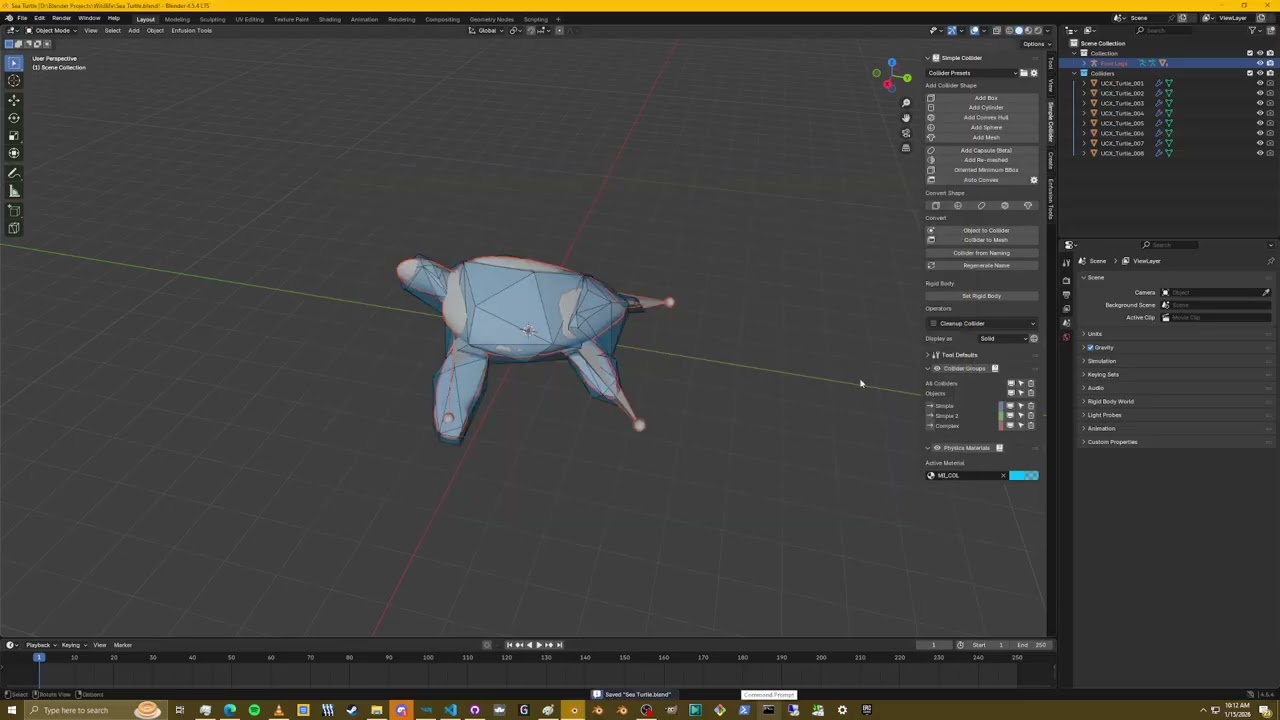 sudden maple
slate halo
https://youtu.be/AGJAqX5g9Sw
sudden maple
slate halo
https://youtu.be/AGJAqX5g9Sw
thank you very much sir 🫡
slate halo
Np
 north stream
Question to the Dev's or pro Arma reforger modders.
Anyone figured out how to make this "Green mesh" in blender, so that the terrain will overlay it?
Is it just the Terrain Layer preset?
 crude osprey
north stream
Question to the Dev's or pro Arma reforger modders.
Anyone figured out how to ma...
crude osprey
north stream
Question to the Dev's or pro Arma reforger modders.
Anyone figured out how to ma...
its just a plane mesh with material
 rich scroll
Yeah that material will be the defaultterrainmat material that’s already supplied by the game
 tight obsidian
I wish embedded FBX textures worked for ARMA, or a modern model format like glTF 🙁
Exporting a model from blender at the moment is makin me sad haha
pine hazel
tight obsidian
I *wish* embedded FBX textures worked for ARMA, or a modern model format like gl...
Most people here are working with their own textures and tend to use substance etc so embedded textures isn’t the priority.
Plus if you use the plugin you can path the textures anyway
tight obsidian
When I use the plugin I get a lot of errors akin to:
SCRIPT       : GetResourceName 'scripts/WorkbenchGameCommon/ResourceInfo.c,380'
 RESOURCES (E): Wrong GUID/name for resource @"{11272079FF6F923F}data/Meshesbldgtexturedmaterialmtla1Mtl.emat" in property "m_ResourceName"
I've had a look through here and it looks like that can be caused by a variety of things, so I am not too sure what to do in that instance. My next port of call is just dumping the textures out and dragging them onto the materials but there is like 100 😅
pine hazel
tight obsidian
When I use the plugin I get a lot of errors akin to:
```
SCRIPT : GetResou...
Which Blender version are you using?
tight obsidian
4.5.6 (and I have tried 5.0.1)
pine hazel
Not the version then I don't think. Did you import it originally directly as an FBX instead of with the plugin? THat may have messed with the paths its trying to look for
tight obsidian
Oh, you're totally onto it. That's likely the problem.
pine hazel
Worst case if you import it, re-path the texture/materials it cant find it should fix it
tight obsidian
Ah, it has to be from a workbench project originally. The issue is that it is from one of my games I have made and I am porting it over to see what it is like in arma. That is unfortunate.
pine hazel
ohhh. I thought you'd already imported it to workbench when talking about the errors
tight obsidian
That error is importing into workbench, yeah, but that is after importing a non-workbench fbx into blender (then exporting).
pine hazel
If it's external you'd need to import it like any other fbx etc, it should respect your materials though and it will generate those when you import to workbench. You'd just need to path your converted textures
pine hazel
tight obsidian
That error is importing into workbench, yeah, but that is after importing a non-...
Make a random cube, give it a material & texture and test if that throws you any error in import
tight obsidian
Thanks very much for your help! I'm in for a boring little while matching up 100 textures haha
pine hazel
pine hazel
Make a random cube, give it a material & texture and test if that throws you any...
If it doesn't you know it doens't like the specific fbx your trying to put in
 mint jetty
guys, I’d like to know how to import a prop from Arma Reforger into Blender and reuse its original materials (including the setup and textures). Is that possible?
lofty ember
mint jetty
guys, I’d like to know how to import a prop from Arma Reforger into Blender and ...
can't import meshes from Reforger into Blender unless you have the source file. So basically, for any vanilla asset, not possible
mint jetty
lofty ember
can't import meshes from Reforger into Blender unless you have the source file. ...
How can I use sizes as a reference while still in the blender? Is there any content here that I can search for?
slate halo
mint jetty
How can I use sizes as a reference while still in the blender? Is there any cont...
You can download one of the blender templates from bohemia github. Character Weight template or animation project template
There's also a file of all the head models somewhere
ruby elm
fleet seal
Had that as well when i had animations in a blend file i opened like a few month...
I found the reason
 snow token
slate halo
You can download one of the blender templates from bohemia github. Character We...
snow token
slate halo
You can download one of the blender templates from bohemia github. Character We...
GitHub
Modding Samples. Contribute to BohemiaInteractive/Arma-Reforger-Samples development by creating an account on GitHub.
 ivory siren
Hey guys I want to import the reforger M249 to blender How can I do it?
slate halo
ivory siren
Hey guys I want to import the reforger M249 to blender How can I do it?
You can't not allowed
ivory siren
slate halo
You can't not allowed
wdym?
slate halo
ivory siren
wdym?
You cannot access or edit vanilla model
Violation of the terms of service.
You can change the textures
ivory siren
slate halo
Violation of the terms of service.
ohhh
ivory siren
slate halo
You can change the textures
not even a slight modification on the model?
slate halo
Nope not the geometry
You could make your own model a different prefab and attach it to the model with a slot or something in engine.
ivory siren
ohh thanks for telling me this
 dim dune
new version of my blender plugin out now with tutorial, link to it on my github in video description https://www.youtube.com/watch?v=sFE5na28Wc0

github: https://github.com/steffenbk/Arma-Reforger-Addons
0:00 - intro
14:30 - Tool overview
35:35 - Use case
46:59 - Animation
 mellow adder
Two questions about blender asset creation:
- How can I add a "common" material to my model in blender, so when I import it to arma, it will take this material automatically? For example default_MatTerrainObj
- How can I create a collider and assign to it multiple interaction layers at once, like FireGeo and ViewGeo? I found in the Object Properties a custom property of usage and there's only one layer at the time
pine hazel
mellow adder
Two questions about blender asset creation:
- How can I add a "common" material ...
You can assign your own custom materials but you can’t pre-assign base game ones. I tend to name the blender material something specific to remind me then I replace it once i import.
As for colliders, you can’t assign multiple at once but assuming you are using their plugin you can either assign the option that combines them like ViewFireGeo (may be FireViewGeo I’m not on my PC) or if you have two different meshes for each collider type just define them to the type you want one at a time
mellow adder
pine hazel
You can assign your own custom materials but you can’t pre-assign base game ones...
Okay, this perfectly answers my questions. Thanks!
 lunar eagle
Hi everyone! Please help. I'm trying to export my map tiles from AR tools but I'm getting this
Where can I find the EBT config? And how can I fix this?

 raven rune
lunar eagle
Hi everyone! Please help. I'm trying to export my map tiles from AR tools but I'...
raven rune
lunar eagle
Hi everyone! Please help. I'm trying to export my map tiles from AR tools but I'...

 dim dune
new version of my blender plugin out now with tutorial, link to it on my github ...
dim dune
dim dune
new version of my blender plugin out now with tutorial, link to it on my github ...
for updates and feedbackhttps://discord.com/channels/105462288051380224/1472408285192650834
lunar eagle
raven rune
Thank you!! But now i have another problem when i try to export tiles

This is a problem with EBT files, I understand? What should I do about it?
 cedar frigate
dim dune
new version of my blender plugin out now with tutorial, link to it on my github ...
cedar frigate
dim dune
new version of my blender plugin out now with tutorial, link to it on my github ...
You can check DM? Please
 midnight ravine
Hello everyone
I'm a beginner
I've encountered this problem
I'd appreciate it if you could share some guides
on creating hats,
clothes, etc.
 slate halo
midnight ravine
Hello everyone
I'm a beginner
I've encountered this problem
I'd appreciate it if...
slate halo
midnight ravine
Hello everyone
I'm a beginner
I've encountered this problem
I'd appreciate it if...
Go to the import settings tab then clear the materials to empty and click reimport resource at the top.
midnight ravine
slate halo
Go to the import settings tab then clear the materials to empty and click reimpo...
I've found a manual way, of course,
but I'd like to figure out the addon
when I activate it, the blender throws an error and doesn't export
when I remove the activation,
it exports, but with the problem I shared
I'm new, so I don't know much
I just installed arma reforge tools yesterday
if what you wrote solves the export problem through the addon, can you explain how to solve it?
I think a clear explanation will help many people create))))
 pine hazel
midnight ravine
I've found a manual way, of course,
but I'd like to figure out the addon
when I ...
pine hazel
midnight ravine
I've found a manual way, of course,
but I'd like to figure out the addon
when I ...
Please stop cross-posting and stick to one channel.... #enfusion_texture
sudden maple
good day friends im not sure why i keep getting this error when trying to import from blender to enfusion , i have enfusion open and im not sure if maybe i dont have somthing else open in enfusion
 raven rune
sudden maple
good day friends im not sure why i keep getting this error when trying to import...
raven rune
sudden maple
good day friends im not sure why i keep getting this error when trying to import...
 sudden maple
raven rune
sudden maple
raven rune
 raven rune
Did you restart the tools after?
sudden maple
no ill try that
raven rune
sudden maple
Oof, that error is in regards to something completely different. You're using the EBT fbx exporter. Which for some reason needs you to set a mod directory in the plugin options, or something dumb along those lines, IIRC. Which requires you to export to a mod directory of a mod that is currently loaded in workbench.
sudden maple
raven rune
Oof, that error is in regards to something completely different. You're using th...
yeah im not sure simple colider is not so simple , im assuiming i need to add this directly into my project files foleder in enfusion
raven rune
Oh nvm, it's expecting you to export directly to your mod. Not somewhere else.
Specifically a mod directory of a mod that is loaded in workbench currently.
sudden maple
raven rune
Specifically a mod directory of a mod that is loaded in workbench currently.
ahh ok got ya so actually in the game folder thanks
raven rune
 dim dune
sudden maple
dim dune
sudden maple
I see you're on blender 5. Official support for the tools now are 4.5 in blender, i had issues exporting and connecting to the workbench i remember when i had a higher version. But i hear its miss or hit for some
sudden maple
dim dune
I see you're on blender 5. Official support for the tools now are 4.5 in blender...
I’ve also heard this I’m going to use 4.5 and hop for better success
dim dune
sudden maple
I’ve also heard this I’m going to use 4.5 and hop for better success
ive got a plugin that does the same but more, but leave it at default and its reforger ready https://discord.com/channels/105462288051380224/1472408285192650834
sudden maple
dim dune
ive got a plugin that does the same but more, but leave it at default and its re...
I’ll check it out I’ve been stuck on this for 2 days 🤣
 spark hamlet
Which layer preset would be used for a helmet?
Right now it’s
Game materials: Armor 9mm
Layer presets: Character
pine hazel
spark hamlet
Which layer preset would be used for a helmet?
View the xob of a base game one, you can see the material & presets they use in the workbench previews
 wind cairn
Hello i was wondering if anyone clould help me out here
So i making backpack right.
And i see one the vanilla one has colliders.
When im looking at the collider i see it parent with a bone.
So my question is anyone have good video or can help me how i can parent the colliders to the bone like the pic?

 balmy patrol
wind cairn
Hello i was wondering if anyone clould help me out here
So i making backpack rig...
balmy patrol
wind cairn
Hello i was wondering if anyone clould help me out here
So i making backpack rig...
it's different depending on the software you are using, you need rig a selection of faces/vertices etc to a bone.
for blender (which i don't generally use) it's a matter of creationg a vertex group and weighting it to that specific Spine5 bone
 rigid umbra
Does anyone have any tips on exporting models with textures to Enfusion.
I have a model with ~2000 materials and ~300 textures. Everytime I try to use the Enfusion Tools export I get unsupported material of type MatPBRBasic, changing to MatPBRBasic which throws off all my textures paths. I found a way to relink them using a script in Enfusion. But this whole process feels nightmarish and the docs are meaningless.
 crude osprey
300 textures 💀
 white fern
rigid umbra
Does anyone have any tips on exporting models with textures to Enfusion.
I have...
white fern
rigid umbra
Does anyone have any tips on exporting models with textures to Enfusion.
I have...
Would you so kind to show us your model? Maybe it make more sense to split it up into smaller parts and then make single prefabs and combine these in enfusion.
 stoic thorn
Trying to import a prefab with textures for retexture, but allways running to this error. Any tips? Or is this because .xob is locked (not my model, trying to retexture vehicle someone else made)?
 rigid umbra
white fern
Would you so kind to show us your model? Maybe it make more sense to split it up...
rigid umbra
white fern
Would you so kind to show us your model? Maybe it make more sense to split it up...
I think you are right. It's a big model of an indoor mall. Probably makes sense to split it up.
The biggest thing I don't understand is, what is the workflow for Blender <--> Enfusion?
Is Blender always the ground truth, i.e Blender --> Enfusion?
 white fern
rigid umbra
I think you are right. It's a big model of an indoor mall. Probably makes sense ...
white fern
rigid umbra
I think you are right. It's a big model of an indoor mall. Probably makes sense ...
Enfusion takes FBX files. You can create these with the tool of your choice. But there is an official plugin "Enfusion Blender Tools" that will make preparation of an FBX for enfusion really easy,. See the pinned comments in this thread.
To your model: You should make different parts. First the building without interior like furniture and doors and windows. Maybe the mall has repeating parts that you can also copy (like alleys or levels).
If this your first project, start with a smaller builiding to learn the workflow. Maybe an entrance area or service building in the near of the mall.
If need help ask here for model questions
https://discord.com/channels/105462288051380224/976159912679850004
https://community.bistudio.com/wiki/Arma_Reforger:FBX_Import
rigid umbra
white fern
Enfusion takes FBX files. You can create these with the tool of your choice. But...
Cool thank you. The model is only 500,000 faces and textures are quite low res, hence why I just wanted to do it in one go.
Are there any additional docs or videos that cover BSP/Box volume/portals/interior lighting etc... The documentation is not super clear and the whole process seems quite involved. Also the existing youtube videos I've found are not great.
edit: 500k faces might be a lot for an interior.
graceful fossil
rigid umbra
Does anyone have any tips on exporting models with textures to Enfusion.
I have...
Any Blender material without an assigned Enfusion shader is converted to a MatPBRBasic material before export.
 deep whale
can someone import some assets i have for me my blender tools are broken ive done everything to fix them but to no avail
graceful fossil
What kind of issues are your blender tools giving you?
deep whale
graceful fossil
What kind of issues are your blender tools giving you?
Someone helped fix it last night now I just have simple questions left to answer
rigid umbra
Can someone help me debug my Box volume / portals?
Left warehouse: light attenuates properly on the interior.
My test model on the right does not.
- I've checked the normal direction on my portal.
- My portal is inside my BSP/box vol
- No errors when I run the checks with enfusion blender tools.

 lunar trellis
rigid umbra
Can someone help me debug my Box volume / portals?
Left warehouse: light attenua...
lunar trellis
rigid umbra
Can someone help me debug my Box volume / portals?
Left warehouse: light attenua...
you are likely missing a probe entity as the child of your prefab
 rigid umbra
Ah nvm. Fixed it. Box volume need to be past the interior faces but not past the exterior faces.
God forbid someone makes a tutorial that isn't 8 hours long.

 ivory vortex
Be the one to make the tutorial now. Be the change we need
 astral bronze
is there anybody that can help me with blender and workbench
rigid umbra
I have one more issue, which is that my portal flickers as the camera frustrum passes the edge of the portal / box volume. No idea what is happening, tried playing around with every parameter I can think of.
Edit: Fixed, BSP geometry was completely off.
 void juniper
Does anyone else have problems with blender crashing when trying to import a xob ? On some of our Xobs Blender crashes or stops responding. They worked fine previously
 lofty island
void juniper
Does anyone else have problems with blender crashing when trying to import a xob...
lofty island
void juniper
Does anyone else have problems with blender crashing when trying to import a xob...
u can not import xob in Blender
void juniper
Of course I can if it’s my own
lofty island
Ok try! when u succede let me now
void juniper
Right click on your own mods xob in Workbench, Plugins -> EBT send to blender ? I think u are misunterstanding
 rose token
Can i get some help with gettin a blender model onto enfusion?
 prisma fulcrum
can anyone help me understand collisions?
No matter what I set seems players can pass through cols


also Im new to animating, how do i get objects to play their animations?
prisma fulcrum
so when importing im getting
RESOURCES : . Cannot find animation "Spin"
RESOURCES : Build failed
animation plays correctly in model viewer (external)

weird.. simply renamed it and imported and that fixed..
pine hazel
prisma fulcrum
can anyone help me understand collisions?
No matter what I set seems players c...
More a question to go over in #enfusion_model but are you setting the collider type and name correctly in Blender?
 sudden apex
!verify
 modest solsticeBOT
sudden apex
!verify
modest solsticeBOT
sudden apex
!verify
Check your messages!
sudden apex
can someone help me
 red hemlock
hey could someone help me out i keep getting 2 errors messages when trying to connect blender and the workbench
 simple magnet
Anyone know if there’s a rigging template for the RHS PVS31s so I can do a remodel
astral bronze
is there anybody that can help me with UV's plz
 fallow moth
astral bronze
is there anybody that can help me with UV's plz
fallow moth
astral bronze
is there anybody that can help me with UV's plz
#enfusion_model might be the better place to ask about model making related things. Like tips for uv mapping
astral bronze
Ok thx
 vocal silo
void juniper
Right click on your own mods xob in Workbench, Plugins -> EBT send to blender ? ...
vocal silo
void juniper
Right click on your own mods xob in Workbench, Plugins -> EBT send to blender ? ...
Doesn't that just send the fbx associated to the xob?
 unkempt current
why is it bugged like that ? in blender it's normal but in the workbench the entity is weird


it's missing sides
crude osprey
face orientations
 lapis oar
90% of the questions asked in this discord involving blender would never be asked if people just took one, ONE hour of their time to watch a couple beginner tutorial videos.
 earnest basin
@Grok can you summarize this message above and add a subway surfer video below it
lunar eagle
Hello guys
Can someone help me with this problem?
Any actions with colliders in ebt cause this error
 pine hazel
lunar eagle
Hello guys
Can someone help me with this problem?
Any actions with colliders in...
pine hazel
lunar eagle
Hello guys
Can someone help me with this problem?
Any actions with colliders in...
Which blender version are you using
lunar eagle
pine hazel
Which blender version are you using
4.5
pine hazel
Weird, most the Python errors end up coming from people being on the wrong versions
What materials are in your model as it’s complaining about that
 light garnet
lunar eagle
Hello guys
Can someone help me with this problem?
Any actions with colliders in...
light garnet
lunar eagle
Hello guys
Can someone help me with this problem?
Any actions with colliders in...
its looking for a BSDF Shader, did you by chance delete the material?
lunar eagle
pine hazel
What materials are in your model as it’s complaining about that
That is just a cube
lunar eagle
light garnet
its looking for a BSDF Shader, did you by chance delete the material?
Idk, maybe. But i downloaded ebt recently on my other pc
I tried to reinstall this and this still no working
pine hazel
Show us a screenshot of your full blender so I can see if anything sticks out
unkempt current
can an admin pls tell me if my 3d model is scrapped or not pls idona want any troubles are alr got enough in my life (pls dm me, @ me)
balmy patrol
unkempt current
can an admin pls tell me if my 3d model is scrapped or not pls idona want any tr...
?
 warm sun
Im having problem installing the addon T_T Can someone pls help?
 balmy patrol
warm sun
Im having problem installing the addon T_T Can someone pls help?
balmy patrol
warm sun
Im having problem installing the addon T_T Can someone pls help?
use 4.5 LTS or 4.2 LTS - https://www.blender.org/download/lts/
warm sun
balmy patrol
use 4.5 LTS or 4.2 LTS - https://www.blender.org/download/lts/
🫡 Got ya. 5.1 doesnt work, 5.0 seems to be working still and i used it for my last mod.
unkempt current
balmy patrol
?
can I send it to u in dms
balmy patrol
warm sun
🫡 Got ya. 5.1 doesnt work, 5.0 seems to be working still and i used it for my ...
i hear it is hit and miss. BI says the toolset is made to work with LTS releases. So 4.5 is the latest released and supported (most likely there is going to be an update when 5.2/5.5 that's gonna be released june-july as 2026 LTS)
balmy patrol
unkempt current
can I send it to u in dms
yes
lunar eagle
pine hazel
Show us a screenshot of your full blender so I can see if anything sticks out

 pine hazel
lunar eagle
pine hazel
lunar eagle
You haven't got a collision material applied. On thge plugin go to Material Tools > Collider setup (with workbench running) and set your collider up there.

That should probably fix the error
lunar eagle
pine hazel
You haven't got a collision material applied. On thge plugin go to Material Tool...
I noticed this problem just as I was setting up the collider
pine hazel
lunar eagle
I noticed this problem just as I was setting up the collider
Did it export fine after you did that?
graceful fossil
@lunar eagle Has your problem been resolved? Casey's answer should be the solution indeed. Random colors are applied to colliders depending on their physics material for visualization purposes.
graceful fossil
balmy patrol
i hear it is hit and miss. BI says the toolset is made to work with LTS releases...
I can confirm. Currently the supported Blender version for EBT is LTS 4.5
lunar eagle
graceful fossil
<@269753936171237378> Has your problem been resolved? Casey's answer should be t...
The error just disappeared on its own. I literally just restarted my PC a couple of times. wtf
unkempt current
Why is that ?


when I import it it moves
do i need to apply transfo ?
it's like this in the preview of the workbench

but in game it moves
 keen jungle
hey can anyone teach me how I would import Enfusion Models to blender im trying to use the BPU-1 turret (BTR70/BRDM) in a model
is there a way to inspect the vanilla models for some measurements
raven rune
keen jungle
hey can anyone teach me how I would import Enfusion Models to blender im trying ...
You can't
keen jungle
raven rune
You can't
Yeah I searched the channel for similar questions and found out but why?? Like what if I'm trying to make a mod of vanilla stuff
raven rune
keen jungle
Yeah I searched the channel for similar questions and found out but why?? Like w...
Most of the assets aren't made by B.I. they're licensed to them by contractors. Meaning they don't have the legal rights to allow you to modify them.
keen jungle
raven rune
Most of the assets aren't made by B.I. they're licensed to them by contractors. ...
That's crazy so like who did they license it from?
raven rune
keen jungle
That's crazy so like who did they license it from?
Contractors. Freelance artists
keen jungle
The vehicles in game look incredibly detailed so no wonder they bought it from other people
raven rune
You can find some of the on Art Station profiles.
keen jungle
You think they use 3d scans to make these very detailed models
raven rune
I know I've see the characters on there.
raven rune
keen jungle
You think they use 3d scans to make these very detailed models
Doubtful
 iron ridge
keen jungle
You think they use 3d scans to make these very detailed models
iron ridge
keen jungle
You think they use 3d scans to make these very detailed models
3D scans are normally very high poly, the only plausible way to use a 3D scan for game models is by re topology and baking the original scan to the normal map
keen jungle
raven rune
Doubtful
Having that as reference is really good tho so I think anyone would appreciate having a nice 3d scan of the real thing as reference
keen jungle
iron ridge
3D scans are normally very high poly, the only plausible way to use a 3D scan fo...
That's what I'm saying using it as a reference to model the game asset based on
iron ridge
This is what a lot of people do for game ready, but you can also create the same level of detail from scratch aslong as you have correct dimensions, with the release of SP 12, adding detail and depth to your textures is much easier than before
raven rune
The modelers experience also determines quality
austere onyx
raven rune
Most of the assets aren't made by B.I. they're licensed to them by contractors. ...
This is not true, we have our own artists
The issue is that some tools and services put downstream restrictions on content created from it
That could be texture libraries and so
Or 3D modelling plugins and so
raven rune
austere onyx
This is not true, we have our own artists
I recall someone saying that most or some of the assets were contracted.
I've even came across some things in art station and another website of some sort.
austere onyx
raven rune
I've even came across some things in art station and another website of some sor...
A lot of our artists showcase in ArtStation
But we have big amount of artists, I do not know where that came from 😅
 fleet nova
anyone have a skeleton rig example in blender to do cars?
pine hazel
fleet nova
anyone have a skeleton rig example in blender to do cars?
https://github.com/BohemiaInteractive/Arma-Reforger-Samples
https://github.com/BohemiaInteractive/Arma-Reforger-Misc/tree/main/Rig and Animations/Vehicle Animations
GitHub
Modding Samples. Contribute to BohemiaInteractive/Arma-Reforger-Samples development by creating an account on GitHub.

GitHub
Additional resources for Arma Reforger modders. Contribute to BohemiaInteractive/Arma-Reforger-Misc development by creating an account on GitHub.
fleet nova
pine hazel
https://github.com/BohemiaInteractive/Arma-Reforger-Samples
https://github.com/B...
thank you my man, another question, exist any sample for this type o vehicules, i cant figure out the structure in blender to do this things
 raven rune
fleet nova
thank you my man, another question, exist any sample for this type o vehicules, ...
raven rune
fleet nova
thank you my man, another question, exist any sample for this type o vehicules, ...
Any in game vehicle that has a turret.
 bitter crag
How to fix:
SCRIPT (W): No blender executable set! Please set one in EBT Config!
- Already Enable API on port 5775
- Already install and enable addon on Blender side.
I'm trying send a patches reference model
pine hazel
bitter crag
How to fix:
`SCRIPT (W): No blender executable set! Please set one in EBT Con...
WHich Blender version are you on?
bitter crag
pine hazel
WHich Blender version are you on?
4.5 lts
bitter crag
pine hazel
WHich Blender version are you on?
I've already solved it... The export should be to an existing mods directory.
 wary hazel
would anyone know where to find file to get the all in 1 head to start scaling headgear if possible?
balmy patrol
wary hazel
would anyone know where to find file to get the all in 1 head to start scaling h...
 torpid obsidian
is it possible to export models from enfusion to blender? I'm trying to get the UAZ 452 body out, but can't get it into blender. Doesn't look like there is a sample FBX.
I've got EBT setup, with the mods directory. I've tried exporting the .xob. It keeps opening a blank splash screen on blender.
I'm trying to get the model out so I can use 3d painting with procreate
astral bronze
Would anybody know how to do sockets in blender but without being attached to the object just need it for a door socket
balmy patrol
torpid obsidian
is it possible to export models from enfusion to blender? I'm trying to get the ...
You cannot export vanilla or other people models from workbench to blender. However you can export your own files
astral bronze
pufu what about doing pivot points for sliding doors or sum like that for your object
balmy patrol
astral bronze
pufu what about doing pivot points for sliding doors or sum like that for your o...
not sure what you mean tbh
astral bronze
well when i try to place down a door on my object in the workbench it works i get it where it needs to go and looks good but when i get it into the server the door tilts or rotates when you first place it
pine hazel
astral bronze
well when i try to place down a door on my object in the workbench it works i ge...
Do you have rpl comp in your prefab?
 balmy patrol
astral bronze
Door Component was already disabled when i put the object in there
balmy patrol
astral bronze
Door Component was already disabled when i put the object in there
does it work correctly, as in slidding?
SlidingDoorComponent should handle door's behavior
also default base is width = X, so are you sure the pivot is correct?
pine hazel
I will say I’ve seen some weirdness with sliding door in the past, making changes and doesn’t show in my test world, reload workbench and suddenly it does
Seems less reliable than normal door
astral bronze
It's it slides correctly I've even tried changing doors to the hatch door and it still didnt work right when I put it in the server
astral bronze
balmy patrol
`SlidingDoorComponent` should handle door's behavior
Yea
 uncut spoke
is anyone here a master with weight painter for blender?
im having a frequent issue regarding the forarms constantly clipping through shirts
ive been working for days and days to fix the issues and its going to make me rip my hair out


 pine hazel
uncut spoke
is anyone here a master with weight painter for blender?
pine hazel
uncut spoke
is anyone here a master with weight painter for blender?
More a question for #enfusion_model , you just need to go through the manual weights and see which bones are pulling that area, or see if you can hide parts of the arm to fix it
uncut spoke
Ive been trying that for days
And ive hidden as much arm as i can
Bohemia has set the upper arm from the shoulder down to like half the bicep, while the forearm is like the bicep all the way down to the wrist
It would be much easier if the arm was split into more pieces to hide
fallow moth
uncut spoke
you may need to alter your joint mesh topology
if it does not deform nicely
uncut spoke
fallow moth
you may need to alter your joint mesh topology
Idk what that is but i shall check that out
fallow moth
uncut spoke
Idk what that is but i shall check that out
the shape of the elbow joint in your model
 merry anvil
Hi, Ive been following bootcamp no8 and I'm being plagued by this issue where my keyframes I insert just don't save. I have restarted at different points a couple times and always ended up here. The blending mode is on combine but i don't think there's anything lower in the stack screwing with it.
I can only assume it's something goofy that I'm missing but I have been on this for hours and looked everywhere I could for an answer and failed :(
fallow moth
merry anvil
https://cdn.discordapp.com/attachments/869803647826014279/1501190474713796708/Ch...
how are you keying the frame?
or do you have autokey on?
merry anvil
fallow moth
or do you have autokey on?
yeah autokey is on, and im inserting the keyframes myself for keying the influence
fallow moth
try without autokey maybe. And check what keying set is active
uncut spoke
fallow moth
the shape of the elbow joint in your model
in blender?
fallow moth
uncut spoke
in blender?
if that is where you made the model then yes
merry anvil
fallow moth
try without autokey maybe. And check what keying set is active
no keying set is active, and turning off autokey does no favors. Im pretty lost on this to be honest, either Ive made the same mistake every time ive restarted following the bootcamp tutorial word for word (despite its lack of clarity) or theres some blender setting or checkbox ive got going on causing issues, but if that was the case I think with all the looking ive done it wouldve presented itself by now.
merry anvil
thank you Salami for the help.
If anyone in the future finds this, make sure the BI animations lower in the NLA stack are in the same userspace (they are also set as fake user), and make sure not to have the strip starred
 frozen thicket
Trying to install EBT in Blender. First time using Blender, I'm following https://community.bistudio.com/wiki/Arma_Reforger:Enfusion_Blender_Tools installation guides but I believe it's outdated.
 pine hazel
frozen thicket
Trying to install EBT in Blender. First time using Blender, I'm following https...
pine hazel
frozen thicket
Trying to install EBT in Blender. First time using Blender, I'm following https...
You need to use the 4.5 LTS version of blender, it won’t work with the newer versions yet
 median storm
Is there any way for me to get the BTR/ M923 into blender so I can match the bones/ memory points?
Also I cannot link the reforger blender addon to the workbench for some reason
pine hazel
median storm
Is there any way for me to get the BTR/ M923 into blender so I can match the bon...
No all you can do is use samples from the git. For the plugin make sure you are on blender 4.5 LTS
 south sedge
"Workbench is not running, net API is not activated or port is already taken. Check documentation for more details!"
Enable Net API in the Workbench > File > Options...
south sedge
im having an issue trying to export a model - sources say the armerature or something may not be linked with the mesh but im unsure how to check
 fallow moth
south sedge
im having an issue trying to export a model - sources say the armerature or some...
fallow moth
south sedge
im having an issue trying to export a model - sources say the armerature or some...
You have empty material on your model
Remove that or assign material to it.
south sedge
Okay I was getting to that conclusion too, good to know I'm not misunderstanding the issue.
In blender - I select mesh > sheep (name of material) > Under EBT IO
it says
material shader not supported
This ENF Material is not registered
Override: Material has no GUID
I've tried following the info on the wiki and looking arund but I can't seem to figure out how to add a material from the asset library that will be accepted or maybe im missing another step? I've added the EBT asset library.. i mean i folowed the steps but it seemed to make no visible changes to the asset library when i looked in there so I really don't know


 pine hazel
 tidal dagger
why bone so smol (blender size for refference)
tidal dagger
why bone so smol (blender size for refference)
Bone size in Blender has no relation in enfusuion, it just takes position, rotations etc from armature
tidal dagger
pine hazel
Bone size in Blender has no relation in enfusuion, it just takes position, rotat...
weird, i was following the bootcamp tutorial on animations and he mentioned previewing bones to make sure everything looks fine, he used a game character and everything looked in place, should i be worried?

apologies for my lack of knowlege,never did animations b4
pine hazel
your bones aren't parented correctly the same way to scene route
tidal dagger
okay then i fucked something up with a bone collection
ivory river
Do you know why my clothing isnt staying attched to my character after i import from blender? It just stays floating in the air next to my character?
pine hazel
ivory river
Do you know why my clothing isnt staying attched to my character after i import ...
You haven’t weighted it or it’s not rigged to the armature correctly
ivory river
I have tho
pine hazel
ivory river
I have tho
You must have done one or the other wrong or imported it incorrectly, that’s the two things it uses to attach and move clothes with the player
ivory river
pine hazel
You must have done one or the other wrong or imported it incorrectly, that’s the...
Ok well the character weight Fbx is a robot now and not a player
pine hazel

 thorn umbra
Hey guys,
I cant install the Blender Tools because I receive the error from the screenshot
Does anyone know what it says?
Fix: Use BlenderV5_stable

 sour peak
thorn umbra
Hey guys,
I cant install the Blender Tools because I receive the error from the ...
sour peak
thorn umbra
Hey guys,
I cant install the Blender Tools because I receive the error from the ...
one the guys I know had the same error, moving to V4.2 LTS fixed it, I think V4.5 is the latest version that supports the add on though
pine hazel
thorn umbra
Hey guys,
I cant install the Blender Tools because I receive the error from the ...
V5 stable is not the fix, use 4.5LTS. 5 may load but it will 100% have bugs for the plugin
 frosty gyro
Does anyone know how to fix this?

 heavy briar
lunar trellis
heavy briar
heavy briar
lunar trellis
heavy briar
unless you need the straps to move, you can just weight the whole thing 100% to spine5. Also make sure unrelated bones (arms, neck etc) have no influence otherwise you'll get the pulling effect/jagged vertices
heavy briar
lunar trellis
unless you need the straps to move, you can just weight the whole thing 100% to ...
Ok just Spine 5 and it will work without glitching straps huh?
All blue waighting?
lunar trellis
heavy briar
Ok just Spine 5 and it will work without glitching straps huh?
if you dont need the straps to flex at all it will be fine all weighted to spine5. Set levels to zero for all weights first, and then set spine5 to 100% (all red)
heavy briar
thanks alot!
pine hazel
Bro don’t cross post I already answer in #enfusion_model
heavy briar
pine hazel
Bro don’t cross post I already answer in <#976159912679850004>
Well, he said Spine 5 and gave some more Informations. Befor i do any dumb stuff i collect informations. So i crosspost.
pine hazel
heavy briar
Well, he said Spine 5 and gave some more Informations. Befor i do any dumb stuff...
It’s literally against the servers rules, you’ve got multiple different people offering you essentially the same information wasting our time not knowing you’ve asked in multiple channels
@fallow moth
heavy briar
at least he told me what i need to know and it works. Sorry for multipost. I havbe my informations.
heavy briar
lunar trellis
unless you need the straps to move, you can just weight the whole thing 100% to ...
Crazy it works well. Thanks alot mate! The hint all red was important. Grad. Tomorrow we have some ghillie backpacks 😄
 spark knoll
Hey, I wanted to update a weapon skeleton and I saw that when I use the plugin EBT: send to blender on a .xob and then use quick export from blender even without doing any changes, I see that in the diff files of github desktop the .txo have 61,625 additions and 61,613 deletions, this is only lines order being changed except that one bone named armature show itself in the bones hierarchy like in the screenshot, also the .emat get lines order changes I guess that's because of my import settings.
Is that normal or it's a known issue?
 languid hornet
spark knoll
Hey, I wanted to update a weapon skeleton and I saw that when I use the plugin `...
languid hornet
spark knoll
Hey, I wanted to update a weapon skeleton and I saw that when I use the plugin `...
was this weapon created in Blender? I guess you would also see it with regular Blender import and export
spark knoll
languid hornet
was this weapon created in Blender? I guess you would also see it with regular B...
Yes it was created in blender, I will try with regular import export ty
languid hornet
and what was your tweak to skeleton?
do you have some warnings/errors when importing?
it can also happen when you delete a bone but vertex groups remains in the mesh - then you will get message that remaining things are skinned to root bone
spark knoll
languid hornet
and what was your tweak to skeleton?
I reverted the original tweak after i noticed the problem, and then i tried without doing any changes, just EBT send to blender from tools and quick export from blender
spark knoll
languid hornet
it can also happen when you delete a bone but vertex groups remains in the mesh ...
I think it's kinda what happened, a bone for the spring in the receiver got deleted and the vertex were not assigned to the w_root, this caused the error "missing some weight" and that was the cause of the mysterious armature bone showing up
Nothing related with EBT send to blender or quick export
Thank you for the help!
thorn umbra
Hello people 😄
I got questions about the Blender .fbx export settings.
Default usage and animation uasge (Im trying to build a door)
My current problems are crashes in the anim editor. I gues they are a
reason of a wrong exportation.
pine hazel
thorn umbra
Hello people 😄
I got questions about the Blender .fbx export settings.
Default...
Are you exporting with the enfusion blender plugin on blender 4.5 LTS?
thorn umbra
Meanwhile yes. But it didnt changed
Blender 4.5.10 was automaticly installed with 4,5
 pine hazel
Are you trying to do just a standard door or is it something more complex animation wise?
If it’s basic you don’t need custom animations
thorn umbra
Its the first step to make enhanced "objectAnims"
But I would like to know about diffrent ways anywayss
pine hazel
So for like building doors you can just inherit their base door prefab and set the axis, action location (to open/close etc). You only need custom animations for anything else that isn’t simple rotating or sliding
thorn umbra
I heard about. But I wasnt able to find them. I saw doors and frames in .xob fiiless but never a .pap that runs the bones of the frame.xob
pine hazel
So look for a prefab .et should be called door_base or something like that I’m not in my pc rn to double check
Frames optional depends on your model type
Inherit the base
thorn umbra
 pine hazel
They you can assign your xob and play with its settings
That’s the one
If you want a door that slides left/right there’s a sliding base as well
thorn umbra
Im checking it out at the moment but get not through it
Take a look into your dms 😄
 bright kestrel
Im a little confused by the Batch Export FBX changes that came in the last EBT update.
I used to export the collection which contained all the parts for my import and just name the file xyz.fbx.
Thats setup so that I have an 'Exports' collection and then inside that I have for example 'Gun' as a sub collection and then 'Magazine' which contain all the LODS, colliders, etc. So Id normally just batch export each one individually and they'd come out as gun.fbx, etc.
Now when I do it, it'll name gun.gun.fbx. It seems to duplicate the name I set even if I dont overwrite and existing file. Should I batch export my 'Exports' collection instead and just disable the subcollections I dont want to export at the same time?
I also seem to be running into an issue where I cant get colliders to properly register in engine and I have to go into the import settings and manually configure them.
As far as I know, Im using the Colliders Setup function properly and it doesnt throw up any errors in Blender.
 shell spear
First
 kind sky
Seems like Arma toolbox could use some updates 😛
 atomic moth
No tools for Blender yet?
languid hornet
there is blender plugin included in Arma Reforger Tools
check installation dir for zip
atomic moth
Thanks
 tardy copper
languid hornet
there is blender plugin included in Arma Reforger Tools
tardy copper
languid hornet
there is blender plugin included in Arma Reforger Tools
Have you installed the plugin/
?
 tardy copper
languid hornet
plugin is installed just like any other Blender plugin
tardy copper
languid hornet
plugin is installed just like any other Blender plugin
is it possible to import models yet?
languid hornet
there is p3d import in Enfusin Tools field
 tawdry ridge
The data needs to be exported and the preferences for the addon need to point to the data in order for you to be able to import p3ds
languid hornet
ah, yes, there is blender data package in tools next to the plugin
 thick bridge
for the time being use this little installation hint, let me know if something is unclear please
 atomic moth
I just dont see the Arma Reforger Tools in steam
 atomic moth
Ah sneaky i see
void juniper
so how do i import a p3d with the tools in blender ? i only get a error when i press on import p3d
 frail kiln
what is the file used for animation, because it isnt .rtm?
void juniper
txa i guess atleast u can export that as enfusion animation in with the enfusion tools in blender
thick bridge
void juniper
so how do i import a p3d with the tools in blender ? i only get a error when i p...
can you post screenshot of that error please
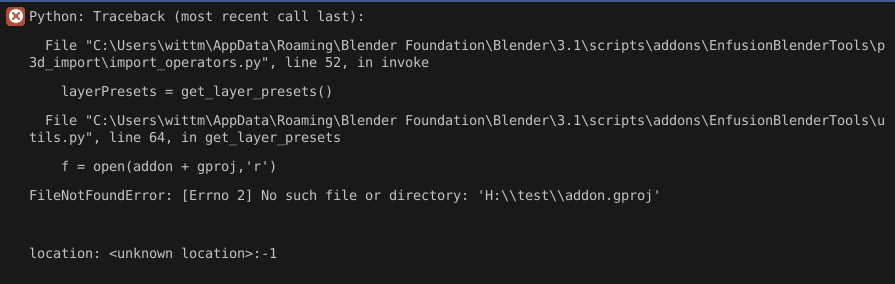
 thick bridge
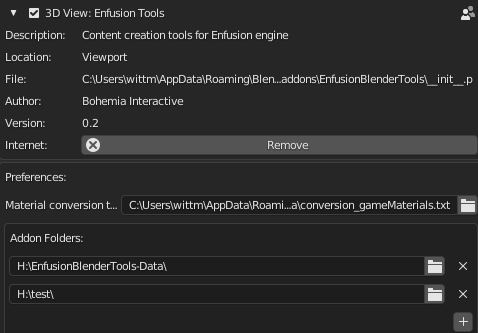
does H:\test\addon.gproj exist on your drive?
 thick bridge
void juniper
its in the tools-data tho
thick bridge
void juniper
its in the tools-data tho
please do not copy anything to tools data folder
void juniper
okay, i meant the addon.gproj that is in the data folder to the test folder
thick bridge
ah ye
void juniper
ye did that and also have a own project in the reforger tools
it worked now
thx 🙂
thick bridge
great no worries
atomic moth
Is there like a guide on creating and porting models into the game? Or is it just the tool?
thick bridge
I'm pretty sure it'll be up in few days
thick bridge
atomic moth
Because I know A3 but this shit different
...and for good 😉
void juniper
so how does the importer work ? does he put cargo view stuff in lod0 or how does it work ? 🙂
austere onyx
void juniper
txa i guess atleast u can export that as enfusion animation in with the enfusion...
@frail kiln TXA is a human readable format for the animations, ANM is the binarized one and the one used in game. Same goes for TXO with XOBs for models
languid hornet
void juniper
so how does the importer work ? does he put cargo view stuff in lod0 or how does...
LOD relevant for Reforger are left and rest is simply skipped. When objects are imported, they are also renamed so they have necessary suffixes (LODx) or prefixes (UTM for colliders)
shell spear
I can't seem to import any files, I keep getting "I/O Error: Wrong MDL Version"
Granted, I'm not too familiar with blender, and wanted to try fucking around with some models and seeing what I could do, but is this an issue that has a known fix? I've used both plugins for arma3 and enfusion to try and import a .p3d file, both have had the same error
thick bridge
shell spear
I can't seem to import any files, I keep getting "I/O Error: Wrong MDL Version"
...
by any chance, don't you try to load binarized p3ds(vs. non-binarized, saved by Oxygen)?
shell spear
thick bridge
by any chance, don't you try to load binarized p3ds(vs. non-binarized, saved by ...
I'm just trying to learn as I go, since there's nothing I can find on this, and nobody I know has much information on it either, as far as I know it could be binarized, but then I wouldn't know how to do anything with it either way, or how to unbinarize it
 granite merlin
you can't unbinarize models that were already binarized
if you made it then you should have the unbinarized model
shell spear
I figured as much, I'll keep looking around for now, I'm probably just missing something
thick bridge
shell spear
I figured as much, I'll keep looking around for now, I'm probably just missing s...
If you can share the p3d, it can give us a clue what's going wrong
shell spear
thick bridge
If you can share the p3d, it can give us a clue what's going wrong
Nevermind, I'm just stupid, thanks though
 trail wasp
thick bridge
for the time being use this little installation hint, let me know if something i...
trail wasp
thick bridge
for the time being use this little installation hint, let me know if something i...
do all as you say, but the import option from p3d doesn't appear in file -> import in blender
plugin is installed, maybe i forgot something
 white trench
trail wasp
do all as you say, but the import option from p3d doesn't appear in file -> impo...
white trench
trail wasp
do all as you say, but the import option from p3d doesn't appear in file -> impo...
When you installed it, did you enable it in blender too?
trail wasp
white trench
When you installed it, did you enable it in blender too?
yeah i suppose, well the point is set in blender, is it must appear in blender on in tools?
white trench
trail wasp
yeah i suppose, well the point is set in blender, is it must appear in blender o...
Can't send any screenshots here, but in blender preferences>Add-ons
Type the name of the plugin and make sure it has actually been ticked, and the square isn't de-selected.
By default blender only 'adds' plugins, it doesn't enable them.
trail wasp
white trench
Can't send any screenshots here, but in blender preferences>Add-ons
Type the nam...
yeah it's selected, i try to restart blender few times, but unfortunately still haven't the option
white trench
Hmm, not sure then. You'll have to wait for someone else to chime in, but if you press the dropdown for the plugin it may say 'install' within it. Some plugins require this but I'd be surprised if this one did.
trail wasp
white trench
Hmm, not sure then. You'll have to wait for someone else to chime in, but if you...
and what about those .py file, does i need to exec it?
white trench
With blender to install plugins all you need to do is select the zip all the python code is contained in
thick bridge
trail wasp
do all as you say, but the import option from p3d doesn't appear in file -> impo...
it's not in File -> Import ... it's in viewport menu
 trail wasp
thick bridge
it's not in File -> Import ... it's in viewport menu
trail wasp
thick bridge
it's not in File -> Import ... it's in viewport menu
oh, ok )
thx :3
you need to fix it in wiki
frail kiln
austere onyx
<@540584779977064470> TXA is a human readable format for the animations, ANM is ...
ok thanks bro, but how do i export a new animation?
thick bridge
trail wasp
oh, ok )
thx :3
you need to fix it in wiki
mmm can you point me to where exactly?
 halcyon granite
thick bridge
it's not in File -> Import ... it's in viewport menu
halcyon granite
thick bridge
it's not in File -> Import ... it's in viewport menu
I've it in Blender, but when I click it I have an error ^^ Maybe the folder need a strict architecture ?
thick bridge
halcyon granite
I've it in Blender, but when I click it I have an error ^^ Maybe the folder need...
can you send me screenshot of that error please?
 halcyon granite
thick bridge
can you send me screenshot of that error please?
halcyon granite
thick bridge
can you send me screenshot of that error please?
I can't put a screenshot on this Discord, can I send it to you in PM ?
thick bridge
halcyon granite
I can't put a screenshot on this Discord, can I send it to you in PM ?
sure no worries
trail wasp
thick bridge
mmm can you point me to where exactly?
this one in interface -> P3D import
thick bridge
halcyon granite
I've it in Blender, but when I click it I have an error ^^ Maybe the folder need...
have you followed this? #enfusion_blender_tools message
white trench
Ahhh, yeah I see he probably didn't fill in the addon folders.
halcyon granite
thick bridge
have you followed this? https://discord.com/channels/105462288051380224/97604282...
Worked ! Thank you ! Now I have to manage to export it as a Enfusion file 🙂
thick bridge
halcyon granite
Worked ! Thank you ! Now I have to manage to export it as a Enfusion file 🙂
great! well for export you use Blender's default FBX exporter with few properties checked
I hope the export settings will also be part of documentation soon
thick bridge
trail wasp
https://community.bistudio.com/wiki/Arma_Reforger:Enfusion_Tools:_P3D_Conversion...
Fixed!
 ashen widget
Hello
I/O error: Error: Cannot add more than 8 UV maps
<traceback object at 0x0000011D267446C0>
i hvae this error
when i import P3D
languid hornet
could you try removing duplicated uv sets in Object Builder @ashen widget ?
ashen widget
i will try
 winged lichen
DO the tools require latest Blender they don`t want to install on the 2.83 version . ?
languid hornet
2.93 LTS is required
lapis oar
So specificly 2.93 LTS. We can not use 3.0+?
 proud imp
I have already followed this page. But I got this error while importing my file.
"Valid path to addon folders hasn't been provided"
I don't Know why. Can u help me ?
winged lichen
seems 3 dont like to show the install either weird it has loaded it the fioles are in Roaming but wont show in the list to activate
i wonder if its old arma tools using 3d view too
old arma tools menaing a clash with alwarrens
deleted roaming and tried again with latest version still not having it ,back to DayZ for a bit i think
thick bridge
lapis oar
So specificly 2.93 LTS. We can not use 3.0+?
well I've been using 3.x versions during the development of EBT up to 3.2 beta, when I found a bug I reported it and Blender devs managed to fix it, so let's say it should work at least up 3.2 beta 😉
thick bridge
proud imp
I have already followed this page. But I got this error while importing my file....
let's start with screenshot of EBT addon preferences please
winged lichen
Ignored lol
proud imp
sorry i was eaten
proud imp
thick bridge
let's start with screenshot of EBT addon preferences please
i cant post screen in this channel
thick bridge
proud imp
i cant post screen in this channel
DM
thick bridge
winged lichen
deleted roaming and tried again with latest version still not having it ,back...
check if there's any errors in the console please
@proud imp please use this to set it up #enfusion_blender_tools message
let me know if something isn't clear
 dreamy merlin
Has anyone gotten the Enfusion convertToFBX.bat blender tool working?
I followed the tutorial and tried it twice.. I had to modify the batch file path becuz BI I guess had one extra folder(roaming) that i removed in their convertToFBX.bat script other than that I have no idea what else to try at this point
Batch file error:
  File "C:\Program Files\Blender Foundation\Blender 3.1\3.1\scripts\modules\bpy\ops.py", line 129 in __call__
  File "C:\Users\Sean\AppData\Roaming\Blender Foundation\Blender\3.1\scripts\addons\EnfusionBlenderTools\p3d_import\MDLImporter.py", line 503 in importMDL
  File "C:\Users\Sean\AppData\Roaming\Blender Foundation\Blender\3.1\scripts\addons\EnfusionBlenderTools\p3d_import\import_operators.py", line 99 in execute
  File "C:\Program Files\Blender Foundation\Blender 3.1\3.1\scripts\modules\bpy\ops.py", line 129 in __call__
  File "C:\Users\Sean\AppData\Roaming\Blender Foundation\Blender\3.1\scripts\addons\EnfusionBlenderTools\p3d_import\P3DtoFBX.py", line 9 in <module>
File "<string>", line 1 in <module>```hello , once the plugin is correctly installed on blender. I click on import p3d, I select my p3d but nothing happens, do you have an idea?
 clever turtle
proud imp
hello , once the plugin is correctly installed on blender. I click on import p3d...
clever turtle
proud imp
hello , once the plugin is correctly installed on blender. I click on import p3d...
make sure the p3d isn't obfuscated
proud imp
I don't think they are obfuscated
languid hornet
dreamy merlin
Has anyone gotten the Enfusion convertToFBX.bat blender tool working?
I followe...
I will take a look at it
 austere thistle
What does the blender plugin do?
 candid matrix
The Enfusion Tools plugin for Blender offers an easy, semi automated way to import & convert to Enfusion standards any model from Real Virtuality 4 engine in unbinarised (MLOD) P3D format. They are distributed with the Arma Reforger Tools package on Steam.
allows u to open models in p3d format
thick bridge
candid matrix
The Enfusion Tools plugin for Blender offers an easy, semi automated way to impo...
Not only... it allows you to import FBX with Enfusion materials preview, offers Model Quality Assurance tools, tools to speed up your workflow, setup colliders etc...

documentation + tutorials are WIP
candid matrix
ty
 tranquil osprey
Did the blender tools get an update lately?
thick bridge
tranquil osprey
Did the blender tools get an update lately?
why?
tranquil osprey
my menu for it is in the views bar not the same as the image ya posted above thats all. was just wondering 🙂
thick bridge
tranquil osprey
my menu for it is in the views bar not the same as the image ya posted above tha...
mmm ... DM with screenshot please
tranquil osprey
ignore that. 5hours sleep. its in my side menu aswell. its just hidden between machine tools and boxcutter lol
hides
thick bridge
Lol before I made the picture above I had to hide tons of other tabs 😄
tranquil osprey
🙂
 lavish whale
Importing Hats and putting them on characters come in upside down, we are all in VC trying to figure it out.
 spare seal
Question. when i go to import arma 3 p3d3 in the enfusiontools tab i get this message https://gyazo.com/29f20380f61f03ea4db6d61640b79661
 shell spear
Anyone know how to get this META files to P3D so we can edit them in Blender?

how to get this into blender?
 unreal tartan
shell spear
Anyone know how to get this META files to P3D so we can edit them in Blender?
unreal tartan
shell spear
Anyone know how to get this META files to P3D so we can edit them in Blender?
You don't edit Emats in Blender but in Material Editor within Workbench
shell spear
okay than how can i export a model from this

so i can you know, change type of uniforms, make something i want
like total new model
with diferent textures
i must have somewhere a template like a model from where i can start 😂
like a body or something
so i dont make a huge ass model that will be 10 times bigger than body of a human
shell spear
unreal tartan
You don't edit Emats in Blender but in Material Editor within Workbench
and thanks for fast replying amazing
i got a master who is king in 3D modelling
but i only need to know how to work with enfusion files :'d
 night vault
shell spear
but i only need to know how to work with enfusion files :'d
night vault
shell spear
but i only need to know how to work with enfusion files :'d
You can’t open enfusion files in Blender
Blender > Enfusion = FBX
Enfusion > Blender = Not possible
Enfusion automatically convert files so you need the source file to modify something
shell spear
So i need to create whole model just by imagination
Than import it to Enfusion
And thats it?
 open crystal
shell spear
so i dont make a huge ass model that will be 10 times bigger than body of a huma...
open crystal
shell spear
so i dont make a huge ass model that will be 10 times bigger than body of a huma...
Don't make it 10 times bigger then and it won't be 10 times bigger 😄 model everything to real world sizes, I guess the character is like 180cm tall. You could try using some character template model from arma 3 as a ref maybe until they release something for this, it shouldn't be much different. Block something out, export it to the editor and check
 gilded canopy
Within the blender plugin for enfusion tools, what file path are we supposed to put for "Addon Folders"?
i saw this but i cannot find an EnfusionBlenderTools-Data folder within my Reforger game data
gilded canopy
 strong sequoia
It's in the same folder as the plugin installer
strong sequoia
It's in the same folder as the plugin installer
ahh alright ty
thick bridge
spare seal
Question. when i go to import arma 3 p3d3 in the enfusiontools tab i get this me...
open crystal
shell spear
i must have somewhere a template like a model from where i can start 😂
Just realized you can grab character template fbx files from here, so you can import those into blender and use that as your reference: https://github.com/BohemiaInteractive/Arma-Reforger-Samples/tree/main/SampleMod_NewCharacter/Assets/Characters/SampleCharacter
GitHub
Modding Samples. Contribute to BohemiaInteractive/Arma-Reforger-Samples development by creating an account on GitHub.
shell spear
open crystal
Just realized you can grab character template fbx files from here, so you can im...
give me your paypal hahaha
 hidden river
hidden river
https://community.bistudio.com/wiki/Arma_Reforger:Enfusion_Blender_Tools
https:/...
dreamy merlin
languid hornet
I will take a look at it
hidden river
hidden river
hidden river
https://community.bistudio.com/wiki/Arma_Reforger:Enfusion_Blender_Tools
https:/...
dreamy merlin
languid hornet
I will take a look at it
any updates on this by any chance? @languid hornet
languid hornet
not yet
 wind smelt
hello when I want to export the golf it tells me this error that the windows are missing so I add it and it makes me this error I don't know myself at all in blender I'm learning and I worry about them
 languid hornet
wind smelt
hello when I want to export the golf it tells me this error that the windows are...
languid hornet
wind smelt
hello when I want to export the golf it tells me this error that the windows are...
it's not using Enfusion Blender Tools it seems? 2.94 LTS is required at least
 civic bear
are you guys working on a fix for the armature?
shell spear

anyone knows how to import p3d from arma 3 to blender to re-edit it for reforger purposes?
it gives me this error
i have enfusion plugin in it, everything
 lavish iron
You can't import binarized P3D's.
 silver forge
Hello guys. Who know how to add "pivot" into Blender for use in ActionsManagerComponent ? In Memory Points Collection ?
languid hornet
civic bear
are you guys working on a fix for the armature?
there is some fix tested internally but I cannot tell (even roughly) when it will be available. It will announced properly once its out
languid hornet
silver forge
Hello guys. Who know how to add "pivot" into Blender for use in ActionsManagerCo...
https://community.bistudio.com/wiki/Arma_Reforger:Weapon_Creation#Adding_slots.2Fsnap_points it is basically same principle
silver forge
@languid hornet oh yes. Thanks. 👌
 hasty acorn
Hi guys, Is there any tutorial or doc where I can learn how to export from blender to .txa file? When I do it, nothing happens
 royal sable
Same, attempting to export a basic animation however I get this error after a few seconds of Blender being unresponsive.
 languid hornet
how is your export window looking like?
royal sable

Trying to save it directly inside of the project
Just using the test animation files you supplied earlier in the animations channel
languid hornet
expand section on the right please
royal sable
 languid hornet
and you are trying to export weapon or character animation?
royal sable
Character animation
languid hornet
ADD - means additive
i will send later correct export profiles for each anim type
in any case, try i.e. abs full body anim to see how anims are working
royal sable
Ahhh ok didn't realize what those options were, I changed it to 101_FullBodyABS and when I export I don't get any error messages, and no files have been created. Am I supposed to change the second option as well?
royal sable
I looked in the directory I set for it to export into, no file at all
royal sable
Just got off my pc, but I’ll jump back on and test it for you

what export settings?
languid hornet
101_FullBudyABS
 royal sable
Okay very strange, I tried exporting with those exact settings. Froze for about a minute then returned the same error; Tried to export it again with the same settings, froze for another minute and then it generated the .txa however it named it p_sampleweapon_safety rather than the name i supplied it
Guessing that's what it is supposed to do?
Now I just need to figure out how to correctly import it in the enfusion workbench, think that may be a task for me to figure out tomorrow.
seeming you can't directly open the txa in the animation editor
Thanks for your help though 🙂
languid hornet
royal sable
seeming you can't directly open the txa in the animation editor
you have to import txa first
right click on it and then select "register and import"
after you have "anm" file, you can use this feature to preview it #enfusion_animation message
royal sable
Ooo thank you very much, I obviously knew there was a way however I couldn't figure out how to convert it into an .anm file 🙂
shell spear
anyone have a good explanation or documentation or any tutorial how to do painting in Blender for Enfusion?
Since i got this problem

and god knows how to fix it 😂
i mean , one good man told me i need to do weighting
and i have no clue what options and what to do
yeah i got that
saw video
but still dont know how to , i need explanations in details is it automaticly exported with model, how to turn on bones , how to get stuff working , what shoud i paint what not

is this rigged?
😂
languid hornet
this animation rig
perhaps I should rename that blend file since people confuse it with rig for skinning assets
for skinning assets character template should be used

 languid hornet
yes
shell spear

got this
and now there is a little guyt
and a big guy 😂
when import model it automaticly assign to small guy
whats the next step?
languid hornet
it seems this character was not imported correctly?
languid hornet
ahh, yes, on github it is still wrong version. I'm waiting till fix will be merged on github
languid hornet
it will be at same location
 severe turret
I just installed the official blender tool
how do I use it to change the layer of my colliders?
help is appreciated
 snow raptor
Is the Enfusion Animation export meant to work with weapons? I'm trying to export this animation with it
But the resulting txa is this:
$animation "" {
 #version 1.0
 #fps 30
 #numFrames 31
 $node "w_slide" {
  $keys t s {
   $frame 0 31 {
    #q 0 0 0 1
   }
  }
  $node "w_hammer" {
   $keys q s {
    $frame 0 31 {
     #t 0 0 0
    }
   }
  }
  $node "w_slide_release" {
   $keys t s {
    $frame 0 31 {
     #q 0 0 0 1
    }
   }
  }
 }
}
Which doesn't seem like it has the correct data to me
languid hornet
snow raptor
Is the Enfusion Animation export meant to work with weapons? I'm trying to expor...
yes, sample weapon was animated in blender
snow raptor
Any clue on what I might be doing wrong?
languid hornet
which export profile do you use?
snow raptor
the one it defaults to
how do I know which one to pick?
It seems like the export doesn't change, regardless of the used profile
Okay, it does..? But there's not really matching profiles for everything? For example I don't see a Rifle_ChargingHandle or something like that
shell spear
is there anyone willing to help with weighting in Blender
i dont understand a clue...
 meager barn
shell spear
is there anyone willing to help with weighting in Blender
meager barn
shell spear
is there anyone willing to help with weighting in Blender
rigging? https://youtu.be/PFaqjwpGxOc

A lot has changed since I made this one last year. Thought now would be a good time to bring it up to speed. Learned a few new tricks this time too~ Hope it helps :)
Big thanks to all the amazing helpful comments from the last Rigging Video to help find shortcuts for this one~!
Female Body Model Link:
https://www.youtube.com/watch?v=_XfvLpLyul...
meager barn
shell spear
not rigging

Hi everyone! In about 10 seconds you'll understand everything you need to know about Blender 2.8's automatic weight paint feature!
If you enjoyed this video, please don't forget to like and subscribe for more content!
You can find my entire Blender 2.8 Speed Tutorial series playlist here:
https://www.youtube.com/watch?v=f6vgICNCVxQ&list=PLZpD...
this guy has a whole playlist of short tutorials
shell spear
❤️
strong sequoia
Ay Bohemia, wtf did you do to the poor base character? Did he try to leak something? Is that why you broke his ankles? 

In all seriousness, how do I rectify this? Just try to move the bones to a more natural position?
 hybrid bramble
 hollow kayak
installed the plugin according to the instructions. but for some reason it does not appear in the list, what is the problem?

 runic tartan
hollow kayak
installed the plugin according to the instructions. but for some reason it does ...
runic tartan
hollow kayak
installed the plugin according to the instructions. but for some reason it does ...
you have the display only enabled box ticked its to the left of the search bar
 keen pagoda
Should I leave Space Transform on or off? The wiki seems to be using an older version of Blender that doesn't have this option

 maiden heart
Is high CPU usage expected when exporting animations?
languid hornet
maiden heart
Is high CPU usage expected when exporting animations?
totally yes
thick bridge
keen pagoda
Should I leave Space Transform on or off? The wiki seems to be using an older ve...
Can you point me to such page/picture please? Anyway leave it checked
thick bridge

We worked hard to support our community of #ArmaReforger modders while creating game assets in Blender. Enfusion Blender Tools provides handy features, but I'm personally the most proud of Materials Preview that allows to import your FBX asset with @EnfusionEngine shaders. #b3d

 Twitter
·
Twitter
·
 maiden heart
languid hornet
totally yes
maiden heart
languid hornet
totally yes
And by high I mean 99% of an i9-12900k to export one animation with two keyframes
languid hornet
I know, it is using all my cores on Ryzen 3900x. It's not that slow with two keyframes though
I can ask if there is some improvement to it planned but I cannot promise anything here
 fading oar
 severe snow
Does anyone know how to move the scene_root? https://gyazo.com/cbec576e2837785c61ca1fe0e0a94a61
 maiden heart
languid hornet
I can ask if there is some improvement to it planned but I cannot promise anythi...
maiden heart
languid hornet
I can ask if there is some improvement to it planned but I cannot promise anythi...
Cool thanks, it seemed out of the ordinary for what it was doing. Exporting anims for Arma 3 didn't have the same issue. If that's the way it was I suggest putting something on the wiki about it .
 vital meteor
is there a way to emulate different weather time of the day lighting?
 crisp linden
severe snow
Does anyone know how to move the scene_root? https://gyazo.com/cbec576e2837785c6...
crisp linden
severe snow
Does anyone know how to move the scene_root? https://gyazo.com/cbec576e2837785c6...
scene root is located at the origin in Blender
scene root is always at 0,0,0
severe snow
I saw this, so I moved my model so that the animation was in the right place https://gyazo.com/b24539726c07ab7df1f9a0ba9c27000f
On the other hand for such a small animation I am not sure that a skeleton is useful. I didn't put any on and the door still moves... After that I'm not sure it's the best solution

 thick bridge
vital meteor
is there a way to emulate different weather time of the day lighting?
thick bridge
vital meteor
is there a way to emulate different weather time of the day lighting?
Hi dude, you mean in Blender?
thick bridge
lavish whale
Alright, real question here lol
Hi, you have to provide a folder to export to first, then RMB on a collection you want to export and choose Batch export
 lavish whale
thick bridge
Hi, you have to provide a folder to export to first, then RMB on a collection yo...
lavish whale
thick bridge
Hi, you have to provide a folder to export to first, then RMB on a collection yo...
Sweet! Can you do this with multiple collections at once? And what exactly does the batch export do if there are multiple objects per collection? Thanks!
thick bridge
lavish whale
Sweet! Can you do this with multiple collections at once? And what exactly does ...
lavish whale
Sweet thanks, I guess I didn't see this had documentation yet
thick bridge
thick bridge
Hi, you have to provide a folder to export to first, then RMB on a collection yo...
vital meteor
thick bridge
Hi dude, you mean in Blender?
Hey, yes
thick bridge
vital meteor
Hey, yes
but you mean in sync with Workbench/World Editor?
vital meteor
thick bridge
but you mean in sync with Workbench/World Editor?
ideally
thick bridge
vital meteor
ideally
not possible, what would be the use case actually?
vital meteor
thick bridge
not possible, what would be the use case actually?
I think to check how model looks in different ingame lighting conditions while tweaking materials, but that's my friend's question, i think he is still stuck with arma3 old workflow, where we put model on terrain and play with time/weather parameters in camera to check for consistency. I'll discuss that with him. Thanks, anyway!
thick bridge
vital meteor
I think to check how model looks in different ingame lighting conditions while t...
sure, not necessary to have it in such case, current workflow allows modders to iterate quite fast
 honest pulsar
This is likely a dumb question, but does anyone have any idea how to fix this issue. My plugin should be pointing to the correct data folder

 analog fog
honest pulsar
This is likely a dumb question, but does anyone have any idea how to fix this is...
analog fog
honest pulsar
This is likely a dumb question, but does anyone have any idea how to fix this is...
you don't have a Colliders collection
 analog fog
You need to put your object in a collection named Colliders, not name the object
honest pulsar
I see, thank you. And do I need to do the same for my other geometry or no?
Anyway, tools seems to be working now, so thank you!
honest pulsar
I will have many other panels of different sizes, so don't want conflicts
analog fog
ah
thick bridge
honest pulsar
This is likely a dumb question, but does anyone have any idea how to fix this is...
use Sort Object to get colliders into colliders collection
 honest pulsar
I did try using this actually, but think I had the wrong name on something. As a follow up question, when importing this into engine, it doesn't seem to actually generate collision info. Am trying some new things to try fix
Also, bug with the collision tool: Doesn't seem as though it allows you to select "none" as the layer after using other settings. Unless it isn't none I should be using and instead main as the collision channel? Basically just want the collision layer to be used for everything
And according to the docs leaving it unspecified should work across all upon import.
Upon import I have no colliders

Odd..
I also should only have one material, but presume one is the physics material created by the blender tool
My export settings:
 languid hornet
honest pulsar
Also, bug with the collision tool: Doesn't seem as though it allows you to selec...
languid hornet
honest pulsar
Also, bug with the collision tool: Doesn't seem as though it allows you to selec...
did you named your colliders correctly as someone suggested above?


 honest pulsar
Oh I see, sorry for being slow, am new to both tools
languid hornet
https://github.com/BohemiaInteractive/Arma-Reforger-Samples/tree/main/SampleMod_NewProp perhaps you can try that sample and check how model is set over there
GitHub
Modding Samples. Contribute to BohemiaInteractive/Arma-Reforger-Samples development by creating an account on GitHub.
honest pulsar
Mine is working now, and yes I will look at the samples in more detail. Thanks for the help everyone, so pleased it's in!
tranquil osprey
see with the plugin. whats the blendertools data zip for?
honest pulsar
tranquil osprey
see with the plugin. whats the blendertools data zip for?
One is the tool, and then data is simply the resources the tool needs
tranquil osprey
kl kl forgot to point it to the data lol
severe snow
Do you know why the animation does not take the whole object while the selection is good https://gyazo.com/4b3a0da8d6583c6ad80562462f238909
 raven rune
@severe snowwanna screenshare?
severe snow
If you want
raven rune
well dang lol
Well i can tell you that the selection cant be good if its not animating the whole object
let me see your vertex groups
 azure jacinth
hey, is there a guide somewhere that explains what LODs are?
maiden heart
In general or in relation to Arma games?
balmy patrol
azure jacinth
hey, is there a guide somewhere that explains what LODs are?
LODs - level of detail. in broader terms lod1 = 2xlod2 tri/vert count
 oak surge
I wonder if there's a way for force LOD_4 on every model to make the game unplayable
balmy patrol
oak surge
I wonder if there's a way for force LOD_4 on every model to make the game unplay...
you mean the lowest lod, fewest tri count?
oak surge
Yep. That would be horrific.
civic bear
It would look bad, but you could play
civic bear
balmy patrol
LODs - level of detail. in broader terms lod1 = 2xlod2 tri/vert count
Sometimes is exponential and not linear the verts count
balmy patrol
civic bear
Sometimes is exponential and not linear the verts count
it is always exponential, because while lod1 = 2xlod2, lod2 = 2xlod3 and so on
thick bridge
there's no constant number for degradation ratio among LODs, tris count among LODs may vary depending on asset type(vegetation, weapon, vehicle, building...)
crisp linden
In an ideal situation you would probably manually decimate your mesh so that each LOD was custom curated to the vertex and face count you want, but generally i just half the amount of vertices or so for every lod increment
 remote fjord
hello has anyone ever had this error when importing p3d on blender?http://image.noelshack.com/fichiers/2022/21/6/1653745842-erreur.png

 thick bridge
remote fjord
hello has anyone ever had this error when importing p3d on blender?http://image....
thick bridge
remote fjord
hello has anyone ever had this error when importing p3d on blender?http://image....
Do you have any files within that folder?
remote fjord
thick bridge
Do you have any files within that folder?
yes EnfusionBlenderTools-Data.zip
balmy patrol
@remote fjordis the content of the zip extracted?
remote fjord
balmy patrol
<@374346506045489163>is the content of the zip extracted?
no, do you have to extract it?
balmy patrol
yes
remote fjord
it's good it works thank you very much
 oblique hare
Python: Traceback (most recent call last):
  File "C:\Users\XxD4r\AppData\Roaming\Blender Foundation\Blender\3.0\scripts\addons\EnfusionBlenderTools\operators.py", line 1873, in invoke
    layerPresets = get_layer_presets()
  File "C:\Users\XxD4r\AppData\Roaming\Blender Foundation\Blender\3.0\scripts\addons\EnfusionBlenderTools\utils.py", line 59, in get_layer_presets
    for file in os.listdir(addon):
FileNotFoundError: [WinError 3] The system cannot find the path specified: 'E:\\Projectdrive\\new\\'

location: <unknown location>:-1
Anyone know what this error is and how to fix it?
I can't import p3ds or even set my layer for my colliders
languid hornet
see messages above 🙂
oblique hare
oh haha it's literally right there xD
thick bridge
oblique hare
oh haha it's literally right there xD
Hi I wonder, have you seen this document? https://community.bistudio.com/wiki/Arma_Reforger:Enfusion_Blender_Tools ... if so is it easy to understand?
oblique hare
I haven't seen that but looks super easy to follow 😄
 shell cloak
thick bridge
Hi I wonder, have you seen this document? https://community.bistudio.com/wiki/Ar...
shell cloak
thick bridge
Hi I wonder, have you seen this document? https://community.bistudio.com/wiki/Ar...
Yup, it's easy to understand. There is a typo in "rename materials". You wrote NVMATs instead of RVMATs

you should also specify that the P3D importer only supports non-binarized P3Ds

but other than that, it's good.
 reef cobalt
that kinds goes without saying, if you're the author you should have the original p3d 😛
thick bridge
shell cloak
Yup, it's easy to understand. There is a typo in "rename materials". You wrote N...
Thanks for the feedback
reef cobalt
I guess the use case for binarized would be the public data for cwa, arma 1 and arma 2
shell cloak
reef cobalt
that kinds goes without saying, if you're the author you should have the origina...
it's to avoid questions like: "why doesn't it work when it's written that it imports P3D?" If you specify that the P3D must be non-binarized, the uninitiated person will think that it doesn't import all types of P3Ds.
reef cobalt
I think its a valid addition to the wiki. But it also wastes time for anyone trying to migrate models which they don't own 😈
shell cloak
reef cobalt
I think its a valid addition to the wiki. But it also wastes time for anyone try...
true 👀
reef cobalt
thanks for the exports presets btw, they were much appreciated by the SFP team modellers 😄
languid hornet
https://community.bistudio.com/wiki/Arma_Reforger:Enfusion_Blender_Tools:_Objects_Tools added a new wiki page describing how Object Tools are working
fallow moth
languid hornet
https://community.bistudio.com/wiki/Arma_Reforger:Enfusion_Blender_Tools:_Object...
oblique hare
I'm getting this weird issue now does anyone know how to fix it

this is my path for the tools
 languid hornet
oblique hare
I'm getting this weird issue now does anyone know how to fix it
languid hornet
oblique hare
I'm getting this weird issue now does anyone know how to fix it
https://community.bistudio.com/wiki/Arma_Reforger:Enfusion_Blender_Tools:_Objects_Tools you need to select object from colliders collection. It is sort of safety, so you don't apply game materials to random LODs
oblique hare
Thank you That helped 😄
 heady perch
im trying to export an animation with the blender plugin, but when i press export, nothing happens, nothing gets exported
can anyone help
(please reply to the message so i get a ping)
thick bridge
heady perch
im trying to export an animation with the blender plugin, but when i press expor...
would be possible to share blend file with us?
 stiff peak
Sooo, why my bones are imported as mem points? 🙂
languid hornet
they are not skinned to anything most likely
 naive scroll
is the path to the addon folder supposed to look like this?
C:\Program Files (x86)\Steam\steamapps\common\Arma Reforger Tools\Blender\EnfusionBlenderTools-Data\
 strong narwhal
Hey, can anyone help why i cannot select anything in this colliders setup in that enfusion blender tool thingy.
 languid hornet
strong narwhal
Hey, can anyone help why i cannot select anything in this colliders setup in tha...
strong narwhal
languid hornet
strong narwhal
Hey, can anyone help why i cannot select anything in this colliders setup in tha...
strong narwhal
Found out what was wrong...Was using wrong version of blender 😅
 covert pollen
How does batch FBX export work exactly?

Like, does it mean I can export these collections as individual FBXs?
And the .001 on the ends of collections won't matter?
A screenshot on the wiki to show how it should be set up would be nice. 🙂
 mortal elk
Hey guys i am getting the following error after following a video tutorial on how to setup the blender Enfusion Tools :

That is when i click Colliders Setup. Have in mind my current object does not have any colliders
languid hornet
Why do you want to use it if you don't have any colliers then?
mortal elk
Well i assumed the idea of the tool is to help you creating the colliders. But i figured out how to create collider layers manually
languid hornet
You have documentation of that tool linked above
 fleet moon
mortal elk
Well i assumed the idea of the tool is to help you creating the colliders. But i...
fleet moon
mortal elk
Well i assumed the idea of the tool is to help you creating the colliders. But i...
yea me too
 sullen depot
Can I export to FBX without using the bulk option and just import a single FBX? If yes, how?
Tried the regular Blender export, but this resulted in having no colliders etc. again.
thick bridge
naive scroll
C:\Program Files (x86)\Steam\steamapps\common\Arma Reforger Tools\Blender\Enfusi...
yup
thick bridge
sullen depot
Can I export to FBX without using the bulk option and just import a single FBX? ...
by "bulk" you mean Batch FBX export? and by "import a single FBX" you mean import it to Workbench? Do your collider objects follow proper naming conventions(utc_xxxx)?
thick bridge
covert pollen
A screenshot on the wiki to show how it should be set up would be nice. 🙂
Please bear with me, I'm in the process of updating this page 😉
covert pollen
Thanks!
thick bridge
covert pollen
Thanks!
I updated the page little bit https://community.bistudio.com/wiki/Arma_Reforger:Enfusion_Blender_Tools:_Batch_FBX_Export, but have to wait till our marketing decide where to upload video tutorial, in the meantime this is a screenshot from the video, in this case I export "Church" and "ChurchAddon" Collections to separate fbx files
 covert pollen
Cheers!
sullen depot
thick bridge
by "bulk" you mean Batch FBX export? and by "import a single FBX" you mean impor...
Yes. Do I have to use the batch export, or is there another way?
Collider starts with UCX_
thick bridge
sullen depot
Yes. Do I have to use the batch export, or is there another way?
Collider starts...
Batch FBX export is meant to be used in case you prefer to hold various assets in a single blend file, like the church above, our artist made church itself first and then decided making windows(windows are typically a separate asset(fbx ->xob)) for it in the same blend file so he can use Church as reference. So no you don't have to use Batch export in case you want to export one asset(eg. house, weapon), you can use default Blender's FBX exporter
sullen depot
thick bridge
Batch FBX export is meant to be used in case you prefer to hold various assets i...
Hm, there seems to be something else wrong then, as it didn't have any collisions even with everything sorted and the UCX_ collider prefix.
thick bridge
Can you share the blend file you have colliders problem with us?
thick bridge
sullen depot
Remove "_LOD0" from collider's name, you confuse Workbench by telling him it's LOD0 ... we do colliders per an asset not per LODs, therefore no need to distinguish what collider is for what LOD

btw your UCX collider also has lots of problems, like not being convex and non-manifold
 sullen depot
thick bridge
btw your UCX collider also has lots of problems, like not being convex and non-m...
sullen depot
thick bridge
btw your UCX collider also has lots of problems, like not being convex and non-m...
So I should probably make new collisions?
thick bridge
Definitely, but ask rather in https://discord.com/channels/105462288051380224/976159912679850004 for the rules of making colliders properly
sullen depot
Alright, thank you
sullen depot
Does anyone see a way to do this with less effort than manually making new collisions for all of them?
The thing is that I've already got more than 100 meshes and making new ones from scratch would take a long time.
I also can't really duplicate a low LOD and call it collision either, because they're not strictly "closed" objects and e. g. have 2d planes with unconnected edges.
Or is it possible to auto-generate a fitting collision mesh somehow? That would be useful for having multiple colliders per mesh as well.
fallow moth
There are no great tools for auto collision generation. Usually they don't produce accurate enough results
 thorn citrus
fallow moth
There are no great tools for auto collision generation. Usually they don't produ...
thorn citrus
fallow moth
There are no great tools for auto collision generation. Usually they don't produ...
Yea that is true to come extent, in 3ds Max I use WallWorm Pro, a toolkit designed for Valve's Source/Source2 engine games, it has a tool for generating convex hulls of components but it is not automated (outside of the hull generation itself) and requires some setup to use effectively.
fallow moth
I made simple script to make convex blobs in blender but that too needs the mesh parts to exist
I've tried couple of mesh tools that create point clouds of object and try to cut it into convex parts but none of them have been very reliable
thorn citrus
there's possibly blender plugins that implement this already, but its the underlaying software used by wallworm for convex hull mesh creation and approximate convex decomposition - https://github.com/kmammou/v-hacd

GitHub
Automatically exported from code.google.com/p/v-hacd - GitHub - kmammou/v-hacd: Automatically exported from code.google.com/p/v-hacd
fallow moth
Yeh thats what I've tried but last time was some years ago
should see if its progressed further since
maiden heart
Have the blender sample files been updated yet? A couple weeks ago there was an issue with them missing some animations or having the incorrect ones.
reef cobalt
they were updated on the 26th of May
 placid fulcrum
Is there a setup tutorial for the blender tools anywhere?
balmy patrol
placid fulcrum
Is there a setup tutorial for the blender tools anywhere?
it is not really needed
- install
EnfusionBlenderTools-Plugin.ziplike any other addon for blender - unzip
EnfusionBlenderTools-Data.zipanyplace you want - point
EnfusionBlenderTools-Pluginto the place you have unpacked it
 placid fulcrum
balmy patrol
it is not really needed
1. install `EnfusionBlenderTools-Plugin.zip` like any ot...
placid fulcrum
balmy patrol
it is not really needed
1. install `EnfusionBlenderTools-Plugin.zip` like any ot...

Thanks
balmy patrol
no worries
 willow plover
Is there a way to export materials made in blender to enfusion?
 real sequoia
willow plover
real sequoia
willow plover
How do you export them?
 prisma relic
howto fix those bones? All works in fbx browser, blender, but its break when import to reforger workbench (same problem in dayz workbench)


its static model with bones
prisma relic
nevermind fixed it, thanks @austere onyx - this helps me: https://blender.stackexchange.com/questions/30881/pose-mode-how-to-reset-transformed-armature-to-its-rest-position

Blender Stack Exchange
I got a problem with pose mode.
Like the heading says, I haven't found yet a possibility to reset the already transformed armature so that it exactly does look like the rest position (though it is...
willow plover
thick bridge
no
Got it thanks
thick bridge
willow plover
Got it thanks
Actually what exactly do you mean by "made in Blender", like custom material made in Shader Editor?
thick bridge
Hi guys, Material Preview feature documentation is up  https://community.bistudio.com/wiki/Arma_Reforger:Enfusion_Blender_Tools:_Materials_Preview
 fringe willow
amazing work 💪🏻
 dry olive
Hi, I'm working on a cube example for a procedural animation for a cube radar. I tried to get a bone for rotation working, and it seems connected in Blender, but in Reforger I'm out of luck, can anyone help me there?
in the import I have export skinning selected, and I see the bones, but not with a bone symbol but with the target symbol, e.g. mempoint? I wonder if I somehow not connected vertex group and bone?
dry olive
I now tried to add a armature modifier seperate from the armature and select Object and Vertex Group, but no luck
 wicked oyster
Is there a way to import data pack p3d's using the blender tool that does not remove the viewPilot and viewCargo lods? Unchecking "discard unsupported LODs" doesn't seem to be doing the trick for me.
reef cobalt
You could merge the lods into lod 0 before importing. Just need to deal with any overlap 
 stray lark
dry olive
in the import I have export skinning selected, and I see the bones, but not with...
stray lark
dry olive
in the import I have export skinning selected, and I see the bones, but not with...
It mean you have no vertex group for the bone
dry olive
stray lark
It mean you have no vertex group for the bone
Thanks, I had the vertex group but I now saw it was empty - I needed to go into Edit mode for the cube and assign the vertices to the vertex group.
dry olive
thanks!
languid hornet
wicked oyster
Is there a way to import data pack p3d's using the blender tool that does not re...
Seems to be bug, I will try to investigate it. In the meantime you can use workaround mentioned by Dahlgren
wicked oyster
Thanks. I'm just putting all view lod info into a new resolution lod. Works for what I need. All needs to be merged in blender anyway.
night vault
@thick bridge Hello can we write custom shader for enfusion ?
thick bridge
@night vault you mean HLSL shader?
night vault
Yes
thick bridge
nope... no custom shaders
night vault
Arf
 mighty bone
rip


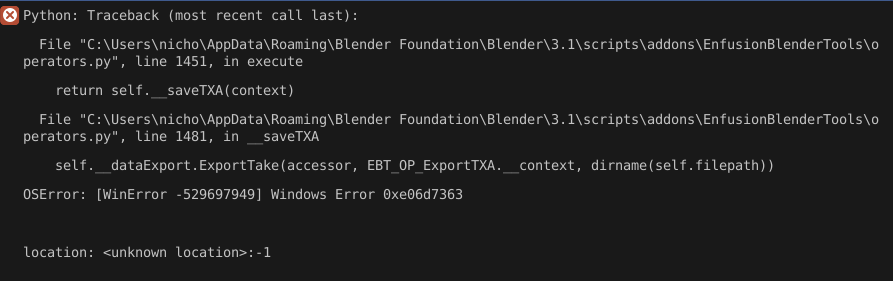
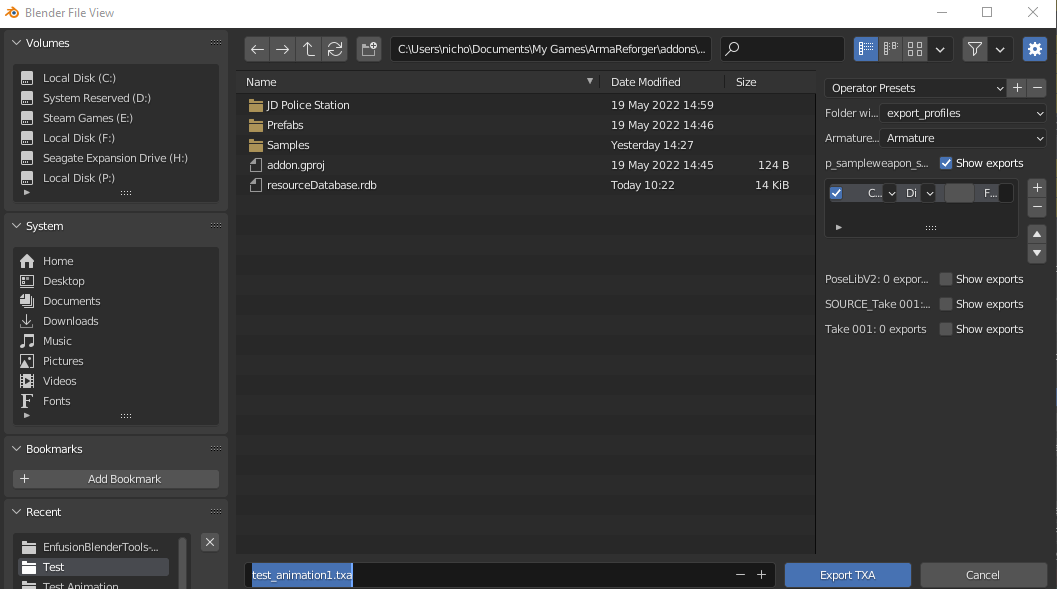
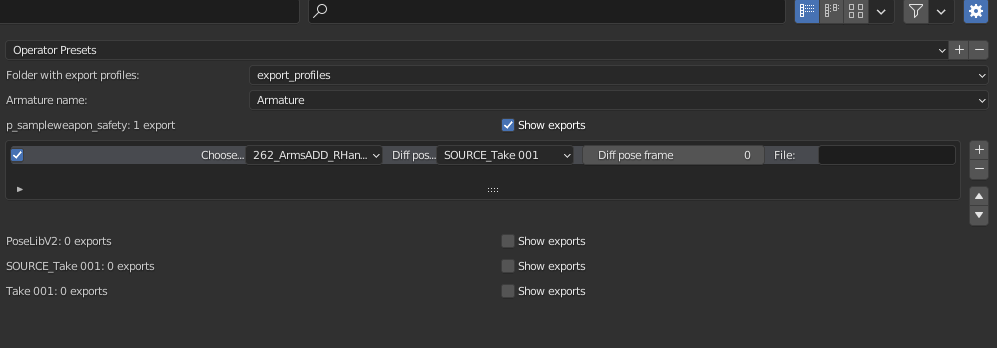


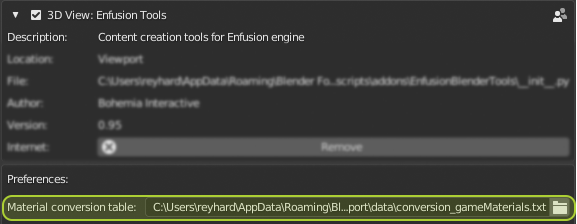 vocal silo
stiff peak
Hey, I am freakin blind. Where is the option to Export TXA animation?
vocal silo
stiff peak
Hey, I am freakin blind. Where is the option to Export TXA animation?
So it is up the top, the little menu called EnfusionTools -> Export -> Export as TXA.
Only shows if you enabled the tools. It isn't inside the standard Export area. It is its own little button on your main UI.
stiff peak
vocal silo
So it is up the top, the little menu called EnfusionTools -> Export -> Export as...
Damn, thanks, I wouldnt find it 😄
 dusty violet
stiff peak
Damn, thanks, I wouldnt find it 😄
dusty violet
stiff peak
Damn, thanks, I wouldnt find it 😄
Pssst... Let me know if you figure out how to utilize the animation graph for weapons, especially if you figure out how to snap hands to the weapon correctly. I'm gonna be doing that myself soon 😮💨
stiff peak
dusty violet
Pssst... Let me know if you figure out how to utilize the animation graph for w...
Yea currently trying to figure it out ;d
dusty violet
You got this 🙏
vocal silo
stiff peak
Yea currently trying to figure it out ;d
Add me to the notification list! Lol
 subtle jungle
Hi. Is there a documentation or video how to prepare a object in blender for arma reforger? ...for a building
 tall leaf
@subtle jungle Did you already look at: https://community.bistudio.com/wiki/Arma_Reforger:FBX_Import#General_rules_and_habits?
Also check the pinned messages for the blender tools documentation.
subtle jungle
thank you!
tall leaf
subtle jungle
thank you!
Also for buildings you might want to look at the ingame buildings in the editor for doors, windows and textures
subtle jungle
will do that, danke!
 lime arch
dry olive
Hi, I'm working on a cube example for a procedural animation for a cube radar. I...
lime arch
dry olive
Hi, I'm working on a cube example for a procedural animation for a cube radar. I...
I saw your Video. I have the exact same problem. What was your solution?
dry olive
lime arch
I saw your Video. I have the exact same problem. What was your solution?
Hi, I think the bone needs to be the same name as the vertex group, then it should work.
stiff peak
So I'd like to preview materials in Blender. I keep getting Emat does not exist. In-game it works perfectly fine
Nvm, did not have path to addon set up
raven rune
@dry olive The vertex group is the weight of the bone. Anything the bone moves must be in a vertex group with the same name. Check out a video on weight painting for a better explanation