#🎨-theme-development
1 messages · Page 60 of 1
 burnt sky
 pure cairn
uh
burnt sky
the root toggles work fine in quick edit but as a theme in online themes it doesn't even though its saved in the file
everything besides rolepills works fine
pure cairn
the root toggles have to be in the quickcss
 sharp junco
I'm trying to find out a css snippet to replace a specific person's profile
Just so I can fix my friend's profile as they changed to something I fully don't recognise
pure cairn
that doesn't sound too bad
but it could be
pure cairn
burnt sky
oh now its working
cool
 clear siren
I've made something like that in the past, replacing avatar and name in chat is mostly easy
pure cairn
for the avatar it should be like
[src*="THEIR ID"] {
  content: url("new pfp link");
}```maybe with an additional selector in front so it doesn't mess too many things up
sharp junco
Okay got it
But I might have to figure out how to do the username now, since using alternative names works in DMs but not servers
burnt sky
pure cairn
cool
but yeah this does feel way better 🙂
 clear siren
sharp junco
Okay got it
But I might have to figure out how to do the username now, since usi...
clear siren
sharp junco
Okay got it
But I might have to figure out how to do the username now, since usi...
you should enable the themeattributes plugin so you can then use the data-author-id attribute in the message element
pure cairn
oh yeah, themeattributes would actually be a huge help with that
 iron smelt
That plugin should be enabled by default
 dusky venture
@velvet merlin helped me put a bell button insted of the read all option..can someone help me copy it from the previuse theme to the new one?
burnt sky
dusky venture
<@1007939118925361212> helped me put a bell button insted of the read all option...
you mean this ?
 dusky venture
yess
burnt sky
find its css and copy it
burnt sky
well mine is a bit modified so not sure if it will work well but ill send it as a file
dusky venture
can you like copy paste it from the old to the new?
burnt sky
here you go
 burnt sky
thats what was in it
pure cairn
open devtools and learn how to make it green
instead of getting spoonfed all the time

dusky venture
im stupied sorry
pure cairn
 foggy night
vibecode it
foggy night
vibecode it
horror
dusky venture
wot
burnt sky
dusky venture
wot
line 178 you can figure out the rest
dusky venture
@burnt sky
can you help me make it green?
oh and also this broke
(the new messeges)
 dusky venture
burnt sky
line 178 you can figure out the rest
dusky venture
burnt sky
line 178 you can figure out the rest
oh ill try
pure cairn
iron smelt
That plugin should be enabled by default
yeah
burnt sky
no idea what that is, since its not in my personal theme
pure cairn
burnt sky
no idea what that is, since its not in my personal theme
what else could I add to the snippet, if you have any ideas/suggestions
otherwise I think it's pretty much perfect as it is
and I can move onto the new project
 velvet merlin
stop pinging me dude im busy with my own shit rn, sorry, vibe fix it or look for some 1 else
burnt sky
pure cairn
what else could I add to the snippet, if you have any ideas/suggestions
hm maybe if possible turn the about me etc... buttons into what it looks like for add friend etc... not sure how it would look but may be somethig neat

make those a bit fancy
 dusky venture
burnt sky
no idea what that is, since its not in my personal theme
dusky venture
burnt sky
no idea what that is, since its not in my personal theme
ok i tried switching the hex and only got 1 color
its like 3 colors
tried chat gpt and he gave up
this is what i got
 burnt sky
try this its what im using. less to look at but you will have to figure out the rest as im busy doing tweaks to my personal theme
pure cairn
hm no, it doesn't look any good
having extra buttons down there just clutters everything up so much
burnt sky
rough
pure cairn
it is what it is
burnt sky
atleast it was worth a try
pure cairn
did you see the code behind the connections addon btw?
now imagine that, but with a :has() in every selector
that's how bad it was before this rework
burnt sky
yeah.
 waxen citrus
does anybody know the name of that theme that was popular, its main feature was the direct message icon in top left was like animated it was either circles or fire i cant remember
pure cairn
Midnight and its moon icon?
waxen citrus
no it was like animated circles or smth like going up
dusky venture
ok after a looong time i got the bell to work but i cant at all fix this :(
(new messeges)

 royal pewter

most custom themes are broken on my pc and i wonder why
is there a possible way to solve it?
is it just because of the discord update or
 crimson skiff
fix it yourself ™️
royal pewter
thank you!
 vestal field
royal pewter
is it just because of the discord update or
vestal field
royal pewter
is it just because of the discord update or
probably
burnt sky
testing out the settings model snip, but because im also using compact title bar by surge,
it dublicates the winbuttons top right
trying to figure out how to not let it do that
 crimson skiff
burnt sky
testing out the settings model snip, but because im also using compact title bar...
crimson skiff
burnt sky
testing out the settings model snip, but because im also using compact title bar...
it has a seperate button bar in settings, you need to target it
i had that issue as well
burnt sky
crimson skiff
it has a seperate button bar in settings, you need to target it
sweet figured it out
everything you said there helped lol
crimson skiff
i had that issue as well
burnt sky
crimson skiff
> i had that issue as well
trying to find that snippet that censores channel names and usernames when taking screenshots by chance do you know what its called in css snippets
crimson skiff
i know that exists, but i dont know where it is lol
@burnt sky
@import url(`https://minidiscordthemes.github.io/Demonstration/Demonstration.theme.css`);
```should be this one tranquil whale
I finnaly reached pre dvr flashcord
on discord web

and I found a way to make the wallpaper of my opera air wallpaper connect
as opera has a little wallpaper hook that opera gx uses
pure cairn
tranquil whale
on discord web
Works wonderfully, I must say
 pure cairn
I think it's fine
 gray spoke
 onyx mesa
too much red?
onyx mesa
too much red?
Making the text pinkish might help more
 halcyon night
this code can remove all scrollbars
::-webkit-scrollbar{ display:none !important;}
 plain kelp
Doesn't sound like a great idea tbh
 lunar bough
halcyon night
this code can remove all scrollbars
::-webkit-scrollbar{ display:none !important...
lunar bough
halcyon night
this code can remove all scrollbars
::-webkit-scrollbar{ display:none !important...
good luck to ur mouse scroll with removed scrollbars everywhere, just remove few of them in some places instead xd
halcyon night
i have never really used the actual scrollbar
vestal field
halcyon night
this code can remove all scrollbars
::-webkit-scrollbar{ display:none !important...
better to show scrollbars on hover or something
 steel scroll
wait until your scroll wheel dies
(most mouses have this issue because they are mechanic)
 echo frost
does anyone have experience making a palette?
I want to make my own color palette for theming other things
halcyon night
cant you use linear gradients?
echo frost
to make my palette?
halcyon night
possibly

W3Schools offers free online tutorials, references and exercises in all the major languages of the web. Covering popular subjects like HTML, CSS, JavaScript, Python, SQL, Java, and many, many more.
crimson skiff
@echo frost this
and a couple messages below
vestal field
echo frost
I want to make my own color palette for theming other things
idk all my color palettes live in css so i dont really use a tool per se
oklch.com is helpful
there is that one vscode extension that will highlight your code with the actual colors
colorize i think?
crimson skiff
doesn't the lsp itself provide the colour swatch as a small box near the actual colour?
because i know the lsp does that since helix just got that feature
echo frost
colorhunt isn't exactly what i'm looking for, nor this, but THIS IS AMAZING THANK YOU SO MUCH THIS IS SO MUCH BETTER THAN USING COLOR-MIX
crimson skiff
echo frost
colorhunt isn't exactly what i'm looking for, nor this, but THIS IS AMAZING THAN...
yeah its a lot better that color mix spam
echo frost
by using color mix, i mean when i do like color-mix(in oklab, var(--some-var), transparent 50%)
now i can just do hsla(from var(--brand-500) h s l / 0.5)
thgat's so amazing
crimson skiff
echo frost
by using color mix, i mean when i do like color-mix(in oklab, var(--some-var), t...
i would usually do black instead of transparent
crimson skiff
echo frost
now i can just do hsla(from var(--brand-500) h s l / 0.5)
iirc not just hsl, you can rip apart hsl fron rgb, oklch and any other color types
crimson skiff
tru
but just saying that if you need to, it exists
i should probably push this to my site
 pine needle
Is there any CSS to hide a quest that is already done?
echo frost
pine needle
Is there any CSS to hide a quest that is already done?
don't think it's possible to do with css
there is somebody working on a plugin for quests
I think it might be done
i think it's probably this branch? https://github.com/EtorixDev/Vencord/tree/questify

GitHub
The cutest Discord client mod. Contribute to EtorixDev/Vencord development by creating an account on GitHub.
crimson skiff
@echo frost dug a bit deeper
the syntax i showed you is called relative colors, its on mdn docs https://developer.mozilla.org/en-US/docs/Web/CSS/CSS_colors/Relative_colors
you can have anything convert to anything and still make changes to the color
if you have a rgb value, you can use the hsl color function to select the rgb variable, and take the hsl value of it to make changes. you can also mention a colorspace (specifiy oklch for you people), so the syntax would be like
--new-var: hsl(from <color> oklch h s l / a)
```currently making a small blog on it for funnp, took me a while to find it
echo frost
wait what's this
 crimson skiff
echo frost
wait what's this
crimson skiff
echo frost
wait what's this
color space

MDN Web Docs
The color() functional notation allows a color to be specified in a particular, specified color space rather than the implicit sRGB color space that most of the other color functions operate in.
echo frost
echo frost
oh yeah that is valid
idk if it is with hsl()
crimson skiff
but you can add it if you really want to /shrug
echo frost
but it is in color()
crimson skiff
echo frost
but it is in color()
should support
based on my testing, syntax allows colorspace
but i don't see a difference
crimson skiff
https://nspc911.github.io/themes/vencord/docs/Palette
made a dumbass thing
vestal field
i tend to just make the color palettes manually, sometimes you need to deviate from a formula to make things look nice
tranquil whale
did not realise how good midnight could look with a flavour
 vestal field

crimson skiff
vestal field
i tend to just make the color palettes manually, sometimes you need to deviate f...
i mean, if it works for you, sure i guess
 half crystal
echo frost
don't think it's possible to do with css
half crystal
echo frost
don't think it's possible to do with css
You could with some fuckery with like the button and :has but :has is cardinal sin
echo frost
half crystal
You could with some fuckery with like the button and :has but :has is cardinal s...
could you though?
I don't think there's a difference
half crystal
echo frost
could you though?
You could
echo frost
I briefly looked, and the classes looked the same and no aria labels
half crystal
.questTile__60f82:has(.button__960ef.colorPrimary__201d5:not(.colorBrand__201d5)) {
    display: none;
}
that'll also hide uncompleted quests
iron smelt
echo frost
that'll also hide uncompleted quests
Sacrifices must be made
echo frost
half crystal
```css
.questTile__60f82:has(.button__960ef.colorPrimary__201d5:not(.colorBrand_...
 echo frost
half crystal
nah go fick yourself
echo frost
half crystal
nah go fick yourself
what did i do
half crystal
echo frost
what did i do
i understand why its impossible
echo frost
you coulde hide watch again ones ig
tranquil whale
what do you think?
 echo frost
what is that
tranquil whale
a widget
echo frost
on what
 tranquil whale
no 6tampermonkey script

GitHub
A simple Tampermonkey script for discord web that adds a widget to Discord with configurable settings - ZapGaming/Widgetanium
pure cairn
tranquil whale
DiscordOS is real
echo frost


 pure cairn
echo frost
<:husk:1026532993923293184>
pure cairn
echo frost
<:husk:1026532993923293184>
Lmfao
echo frost
why is there a black bar here covering stuff
 tranquil whale
echo frost
why is there a black bar here covering stuff
tranquil whale
echo frost
why is there a black bar here covering stuff
laziness
pure cairn
So it's just a random number just to have something there, that's cringe
pure cairn
tranquil whale
this is discord os 26
Yes and it looks awful
 pure cairn
No, that thing looks like a horrible mess of different snippets and codes put and held together by dreams, hopes and some duct tape
 tranquil whale
pure cairn
No, that thing looks like a horrible mess of different snippets and codes put an...
tranquil whale
pure cairn
No, that thing looks like a horrible mess of different snippets and codes put an...
and there is some vencord snippets
like fancy spotify controlls
and I had some hopes
and the code is dutched taped together
tranquil whale
echo frost
why is there a black bar here covering stuff
I realized its because Im using onyx
pure cairn
tranquil whale
and the code is dutched taped together
🇳🇱 tape? I barely know her
 grand patrol
How to i can find easy way what part my css causing lag my discord? Any advice when so tag me.
 oak plover
Most simple method is removing half your css and seeing if the client still lags, then keep cutting the laggy part in half to narrow it down
 fierce bridge
can you be quiet
 tame garnet
it does work but i also want the old badge back, and move the position
fierce bridge
ofc the thing that makes everything disappear does what it says it does
fierce bridge
grand patrol
How to i can find easy way what part my css causing lag my discord? Any advice ...
look for has:
half crystal
 junior drum
wait did he delete https://discord.com/channels/1015060230222131221/102810681836...
junior drum
wait did he delete https://discord.com/channels/1015060230222131221/102810681836...
delete what, that link goes nowhere
tame garnet
basically I want the old normal nitro badge back and should say "Subscriber since (insert your nitro date)", I would also like to move the nitro badge after hypesquad

I do not like new nitro badge at all
 marble monolith
I am currently attempting to hide the Sticker and GIF buttons in a way that doesn't leave an unnecessary amount of blank space. this is the current state:

and this is the ideal goal [this was done by deleting the elements in the inspect menu, so it's only temporary]:

the CSS I currently use to hide those buttons is part of a larger snippet that hides a bunch of other stuff: #🎨-css-snippets message
tame garnet
tame garnet
basically I want the old normal nitro badge back and should say "Subscriber sinc...
can anyone code this?
 blissful ledge

 cinder stirrup
royal pewter
cinder stirrup
royal pewter
what theme is this?
tranquil whale
cinder stirrup
what theme is this?
Im pretty sure its windows xp by saltsume
replugged theme
 brittle iron
what is going on man

at first i thought it was my theme but did discord just break this
half crystal
brittle iron
what is going on man
discord try not to test on prod challenge (impossible):
brittle iron
at first i was like "oh look at this they're doing something good" since they aligned the chat bar with the user area
brittle iron
brittle iron
what is going on man
but this is just hilarious
onyx mesa
i guess i have to make them all the same size by force

for some reason i can not remove the member since part of it
 pure cairn
Are you joking
pure cairn
 pure cairn
I love the inconsistencies between the "add friend" button and the other ones
onyx mesa
i think it's cuz the add friend button is always blue by default
pure cairn
It used to be less noticeable
onyx mesa
is this better
 pure cairn
Because they were more distant from each other
pure cairn
onyx mesa
is this better
Definitely
onyx mesa
idk how it will work with white backgrounds
 pure cairn
Yeah but what about white buttons
Since I would assume the color comes from the profile gradient
onyx mesa
i don't think the buttons can be completely white
pure cairn
They can't, but the text can still be hard to read
I had some issues with a few profiles about it
onyx mesa
this is the brightest they can get

i removed the scrollbars from the module cuz they are very unnecessary
 gray ingot
anyone know wtf is this empty space?

it just cuts off my channel scrolling at the bottom, like there is supposed to be something there
 boreal mason
gray ingot
anyone know wtf is this empty space?
boreal mason
gray ingot
anyone know wtf is this empty space?
I think its one of the problem of custom css sidebar collapsible
gray ingot
it just randomly happened today.... anyway to fix this?
boreal mason
U can try around like height
Or like clip path
To cut the bottom of the container
gray ingot
it's the default clear vision 7 css
pure cairn
gray ingot
anyone know wtf is this empty space?
That's usually due to lazy loading
gray ingot
I can provide it ofc
pure cairn
When the element is larger than what it's supposed to be, due to other overlapping/following elements not being there, it can't fully load
gray ingot
brittle iron
i'm struggling

these mention indicators are now getting cut off
it used to be fine with position: fixed
boreal mason
gray ingot
i think u have other custom css turned on?
as i look into the code it seems normal and have no issue for me
 gray ingot
nothing.... it literally just bugged today
maybe I can fully clear any css? how do I do that?
boreal mason

go to edit quickcss ig and ctrl a + delete
or u save it into a file before delete it
boreal mason
cause that problem u have i got the same issue with collapsible sidebar
gray ingot
I had some problems long time ago, and css fixed itself only by re-install, even though everything was default and nothing was touched
boreal mason
which i tried lots of stuff and it didnt work
boreal mason
gray ingot
I had some problems long time ago, and css fixed itself only by re-install, even...
try it ig
for me it has no issue
gray ingot
lmao
reinstalled vencord and it's fixed
xd
discord being weird as usual for no reason I guess
boreal mason
okay
gray ingot
ty for help anyway
boreal mason
np
gray ingot
aaaaand it's back to shit
something is fucking doing something
lmao
disabled all plugins, so that's probably not it
it's fixed for a few seconds after vencord re-instal and it goes back to bugged out
💀
ill check with theme creators discord
saw 1 more guy reporting similar issue
brittle iron
brittle iron
i'm struggling
really weird, not happy with anything, z-index, making overflow visible in the guild list..
onyx mesa
made the borders around the profile picture thinner, moved the speech bubble away from the banner, added slight border to the connections and fixed some other padding

feel like it's in the state i want it to be
pine needle
onyx mesa
made the borders around the profile picture thinner, moved the speech bubble awa...
look nice.. share pls 🥰
 delicate adder
bro why is this update is 3d layout pf

to this


ITS 3D UPDATE BROKE IT
3D PROFILE UPDATE JUST BROKE
lunar bough
onyx mesa
made the borders around the profile picture thinner, moved the speech bubble awa...
not bad, I inspired a bit myself with newest #🎨-css-snippets and got this along with my main css :3


 sweet void
guys where can I find these themes?
echo frost
sweet void
guys where can I find these themes?
what themes
brittle iron
alright, definitely need some help with this
So, my theme moves the mention indicators in the guild list like this, when the betterfolders second bar exists. This was fine in the past, but now it gets cut off. I've tried setting overflow to visible, messing with z-index, but i wasn't able to get it fixed. If anyone could help out that'd be awesome
.base_c48ade .unreadMentionsIndicatorBottom_ef3116 {
  position: fixed;
  width: 90px;
  left: 42px;
  bottom: 0;
}```
 twilit nest
does anyone know the css for this picker?
 brittle iron
yes that's the expression picker
in the dev tools it starts at positionLayer__08434
 next sorrel
was there an actual update with the typing indicator above the text box or i have a bug ?
bc i know somepeople who get updates before me but they don't have it
brittle iron
they're experimenting with aligning the chat bar with the user area again, yes the typing indicator is now above the chat bar, as well as the slowmode indicator
i actually quite like it and already made it compatible with my theme, they fade out the chat when those are present
 twilit nest
brittle iron
in the dev tools it starts at `positionLayer__08434`
twilit nest
brittle iron
in the dev tools it starts at `positionLayer__08434`
thank you!
how do you get them btw?
gray spoke
twilit nest
how do you get them btw?
Inspect Element
You can use the element picker on the popup while the site is frozen.
twilit nest
gray spoke
You can use the element picker on the popup while the site is frozen.
im using vesktop
gray spoke
The process is the same.
twilit nest
gray spoke
The process is the same.
i dont see a picker

 twilit nest
brittle iron
twilit nest
brittle iron
never knew i was in a sandbox all along 
onyx mesa
i just moved mine below
 onyx mesa
i mean the typing indicator
gray spoke
brittle iron
you need to open the dev tools
Oh,.maybe shouldn't assume that they have already done that...
twilit nest
okay this is crazy 😂

 gray spoke
Don't know what's happening in your images
twilit nest
gray spoke
Don't know what's happening in your images
the new button is sticky even though the guilds bar is hidden
.bar__3b95d {
    display: none;
}
never needed it anyway 
next sorrel
brittle iron
they're experimenting with aligning the chat bar with the user area again, yes t...
oh that's why
i kind of hate it
tried to change it but couldn't figure it out so ig i have to go with it for now aaaa
vestal field
brittle iron
they're experimenting with aligning the chat bar with the user area again, yes t...
they keep stealing my ideas 🥱
brittle iron
next sorrel
i kind of hate it
I like it, good solution tbh. My ocd hated it being unaligned
crimson skiff
brittle iron
i actually quite like it and already made it compatible with my theme, they fade...
i would love if discord implements some part of my seamless chat bar
crimson skiff
i gave in to transparency
 vestal field
vertical window controls what are u smokin bro
echo frost
next sorrel
was there an actual update with the typing indicator above the text box or i hav...
what's happening with yours?
brittle iron
managed to fix this, they added some weird mask to the guildlist, which would cut off the "new" notification. After getting rid of that, overflow: visible actually works
 crimson skiff
vestal field
vertical window controls what are u smokin bro
crimson skiff
vestal field
vertical window controls what are u smokin bro
thats the only way it looks nice and matches with horizontal server list
and anyways, i dont really use the buttons, its just close/minimise with keybinds
crimson skiff
transparency is kinda weird though, for some reason i see three of discord ¯_(ツ)_/¯

 errant zenith
crimson skiff
transparency is kinda weird though, for some reason i see three of discord ¯\_(ツ...
errant zenith
crimson skiff
transparency is kinda weird though, for some reason i see three of discord ¯\_(ツ...
trojan virus
trust
💯
crimson skiff
yeah vencord is a trojan
 pure cairn
Been there for months on my end
It happens when my pc is doing heavy work on the graphical side
onyx mesa
pure cairn
Been there for months on my end
yeah i had it happen like several months back but then it stopped and now it's back again
i think disabling fullscreen optimization fixed it
crimson skiff
yeah its been like that for a long time
for some reason, just resizing my discord window brings back discord, so idk
next sorrel
echo frost
what's happening with yours?
turn out its afeature
next sorrel
brittle iron
I like it, good solution tbh. My ocd hated it being unaligned
idk it being above it weirds me 😔
and the blur ugh
brittle iron
that's how it used to be
tranquil whale
what do you think about my readme

GitHub
Contribute to ZapGaming/ZapGaming development by creating an account on GitHub.
what should I add or remove
 cloud joltBOT
tranquil whale
https://github.com/ZapGaming/ZapGaming
cloud joltBOT
tranquil whale
https://github.com/ZapGaming/ZapGaming
(Auto-response invoked by @pure cairn)
 tranquil whale
I want life but I get death
crimson skiff
tranquil whale
https://github.com/ZapGaming/ZapGaming
too many stats
 hollow lily
am i hallucinating or did discord add some kind of offset between the chat and message box that wasnt there beore
clear siren
hollow lily
am i hallucinating or did discord add some kind of offset between the chat and m...
you might be hallucinating or you're part of new experiment #🎨-theme-development message
anyone know what the experiment is?
brittle iron
Yeah no there's definitely an offset
You can only really notice it at the bottom of chat, when scrolling it's fine
it's "bottom-aligned chat input" though i wouldn't recommend enabling it

it's full of unfinished shit like this

though they somehow decided to already start rolling this out to people (me)
but yeah if you get to the bottom there's a little too much whitespace here imo
 hollow lily
clear siren
you might be hallucinating or you're part of new experiment https://discord.com/...
hollow lily
clear siren
you might be hallucinating or you're part of new experiment https://discord.com/...
yeah im def part of this experiment
 clear siren
brittle iron
it's "bottom-aligned chat input" though i wouldn't recommend enabling it
clear siren
brittle iron
it's "bottom-aligned chat input" though i wouldn't recommend enabling it
why wouldn't you recommend
brittle iron
brittle iron
it's full of unfinished shit like this
because it's so unfinished
clear siren
I enabled visual refresh day 1 tho
brittle iron
yeah i mean up to you
brittle iron
hollow lily
the culprit is that the spacing looks absolutely fine when someone's typing
 clear siren
I used to have that done in css before
hollow lily
brittle iron
the culprit is that the spacing looks absolutely fine when someone's typing
mostly fine but i prefer the old one
brittle iron
i'm honestly shocked anyone preferred the chat bar being unaligned with the user area
this is just returning back to how it was before the visual refresh
echo frost
pure cairn
Smh just
```css
*{position:absolute}
```
and call it a day
you forgot !important
hollow lily
brittle iron
i'm honestly shocked anyone preferred the chat bar being unaligned with the user...
i have css that changes the user area to be more like the old one
so the experiment doesnt help
like
at all
 tough pike
yo, any way to hide the gift and and activity buttons from the chatbar via custom css?
cant seem to find it
brittle iron
button[aria-label="Send a gift"],
.channelAppLauncher_e6e74f {
    display: none;
}
that doesn't change the fact that without the experiment the chat bar is higher up than the user area
tough pike
brittle iron
```css
button[aria-label="Send a gift"],
.channelAppLauncher_e6e74f {
displa...
tysm
brittle iron
np
next sorrel
brittle iron
this is just returning back to how it was before the visual refresh
was the typing thing over before too ?
can't rememeber
 past snow
bro why did they changed it

was using this but now it's broken: #🎨-css-snippets message
brittle iron
next sorrel
was the typing thing over before too ?
i think it was.. i don't think there was ever enough space below the bar before the visual refresh
past snow
anyway, been an hour i'm trying to debug this sh*t
brittle iron
i might be gaslighting myself yes
2 year old discord video

it was never aligned apparently 
next sorrel
past snow
anyway, been an hour i'm trying to debug this sh*t
please share if you figure it out 🙏
past snow
brittle iron
it was never aligned apparently <:waeland:1233842666505109605>
the snippet above used to
 next sorrel
brittle iron
it was never aligned apparently <:waeland:1233842666505109605>
next sorrel
brittle iron
it was never aligned apparently <:waeland:1233842666505109605>
eh ,even now its not exactly aligned
 fervent zodiac
any eta on the Theme editor
my theme for the most part is working but I can't get some of it to work just dk how to swap the code over properly

 brittle iron
well yeah of course
next sorrel
how come they're te same height but the text bar look shorter 😭
brittle iron
i just adjusted my theme to properly align my user area adjustments with the new chat bar position
idk why that looks that way to you but without a theme they're perfectly the same height
brittle iron
¯_(ツ)_/¯
next sorrel
don't mind me tripping
brittle iron
looks the same to me
next sorrel
^^'
brittle iron
the difference in background color contrast might throw you off
less of an issue in my theme
next sorrel
 brittle iron
i just see the icons perfectly aligned and my ocd is pleased
 next sorrel
brittle iron
less of an issue in my theme
next sorrel
brittle iron
less of an issue in my theme
i am the issue

yeah no im definitely tripping i saw english i was surprised ...

 thin sage
 spring pewter
brittle iron
spring pewter
brittle iron
the worst part about making a theme is realizing your code works across vesktop and betterdiscord but breaks on the official client with vencord
pure cairn

brittle iron
I'm messing with grid areas for the user area and it works perfectly fine in vesktop and bd
And then in the official client my user area just disappears when i open a large folder with betterfolders
brittle iron
okay i've somehow fixed it
past snow
next sorrel
please share if you figure it out 🙏
made a fix to the text area, feel free to add changes
https://discord.com/channels/1015060230222131221/1354227244834492486
i might not have made it future proof
 burnt sky
 tardy turret
what does it even do?
tardy turret
what does it even do?
they left the server
tardy turret
ah
 real quarry
how do i undo the cringe thing discord did where text from quoteblock is now slightly darker than regular text, example:
fooBar
fooBar
echo frost
oh that's what was causing it in embeds
echo frost
brittle iron
```css
blockquote {
  color: var(--text-default);
}
```
i needed an !important with this
crimson skiff
echo frost
i needed an !important with this
* {
  color: var(--text-default) !important
}
wow that fixes it! who would've thought
crimson skiff
your welcome
 swift mauve
how do i change the call wrapper or make it transparent? this
 brittle iron
.root_bfe55a {
  background: some_color;
}
this changes the background color of the call
swift mauve
thanks
 modest violet
is it possible to hide the Online tab using CSS?
 echo frost
should be. but it won't stop it from being selected
modest violet
I see
could we hide this entire section using CSS? it shows up at the bottom of the channel list when someone starts streaming
tardy turret
very much possible
no idea where that section is
inspect element, find the exact element responsible for it, find its class or id, and once you do, set it to be
.CLASSNAME {
display: none;
}
or
#IDNAME {
display: none;
}
and that should hopefully help you
-# if someone has a better idea, please suggest that instead.
 frozen ruin
Hello Vencord community,
I'm having trouble seeing full component names in React Developer Tools after switching to dev mode. Despite following the steps, I still see minified names (e.g., letters instead of "TextInput"). I’d appreciate your help!
Steps I’ve Taken:
- Installed Node.js, Git, and pnpm.
- Cloned the Vencord repository and ran
pnpm install --frozen-lockfile. - Built the project with
pnpm build --devand injected it withpnpm inject. - Enabled "Enable React Developer Tools" in Vencord settings.
- Fully closed and restarted Discord multiple times.
Current Issue:
- After opening DevTools with Ctrl + Shift + I and navigating to the "Components" tab, component names remain minified (e.g., "a" instead of meaningful names).
Additional Notes:
- I’ve tried updating the repository with
git pulland rebuilding, but the issue persists.
Please let me know if you need more information. Thank you for your assistance!
Best, Tipy
crimson skiff
whats that one venapp command that redirects a user to another channel
plain kelp
vns
cloud joltBOT
plain kelp
vns
 crimson skiff
plain kelp
vns
crimson skiff
plain kelp
vns
so vns <channel>?
cloud joltBOT
crimson skiff
so `vns <channel>`?
(Auto-response invoked by @crimson skiff)
 crimson skiff
oh ok
pure cairn
frozen ruin
Hello Vencord community,
I'm having trouble seeing full component names in Reac...
Clearly a channel called theme development is the proper chat to ask for typescript related stuff

hollow lily
brittle iron
```css
blockquote {
color: var(--text-default);
}
```
thank you 😭
errant zenith
pure cairn
Clearly a channel called theme development is the proper chat to ask for typescr...
realistically could be a simple missclick since plugin development is right above theme development
im no expert tho
pure cairn
errant zenith
realistically could be a simple missclick since plugin development is right abov...
[doubt [x]](#📙-client-mod-wiki message)
errant zenith
pure cairn
[doubt [x]](https://discord.com/channels/1015060230222131221/1215380773033476106...
yeah ok makes sense lol
posted everywhere just not in the correct channel
 lofty parcel
Transparency problem
 velvet pawn
frozen ruin
Hello Vencord community,
I'm having trouble seeing full component names in Reac...
pure cairn
velvet pawn
frozen ruin
Hello Vencord community,
I'm having trouble seeing full component names in Reac...
pure cairn

onyx mesa
it won't let me change the stickers to be 4 per row instead of 3
 chilly knoll
did discord do anything woth buttons recently? buttons on my theme are so messed up :p
 chilly knoll
burnt sky
you mean these 2?
chilly knoll
burnt sky
you mean these 2?
na these kinda buttons

they are not meant to be pink or unthemed lol
vestal field
chilly knoll
did discord do anything woth buttons recently? buttons on my theme are so messed...
yes
vestal field
depends
 warm sundial
How do i change so that this (the screenshot), the background of it will not be transparent i want it to be normal or even change the default to another color?

 echo frost
 astral relic
background-filter: blur(4px);
astral relic
echo frost
background-filter: blur(4px);
it wont blur
echo frost
what are you adding it to
astral relic
a transparent theme
echo frost
what selector are you adding it to
 agile thunder
anyone knows how i can reduce or turn off the gaps in the midnight theme?

and also how can i reduce the roundness?
and how do i fix these buttons in the title bar
 errant zenith
agile thunder
anyone knows how i can reduce or turn off the gaps in the midnight theme?
errant zenith
agile thunder
anyone knows how i can reduce or turn off the gaps in the midnight theme?
it literally has a variable that can be changed in quickcss
burnt sky
anyone have the classname which on its own can move the names more to the left ?
 agile thunder
errant zenith
it literally has a variable that can be changed in quickcss
agile thunder
errant zenith
it literally has a variable that can be changed in quickcss
I don't know anything about these stuff. So I'm confused which one to change?
errant zenith
agile thunder
I don't know anything about these stuff. So I'm confused which one to change?
gap
its called gap
echo frost
agile thunder
I don't know anything about these stuff. So I'm confused which one to change?
midnight should have a list of variables you can change
agile thunder
echo frost
midnight should have a list of variables you can change
i mainly want to fix the buttons in the titlebar as shown in the image above
and make the theme less rounded
echo frost
those are in the list of variables you can change
brittle iron
burnt sky
anyone have the classname which on its own can move the names more to the left ?
just the name?
usernameContainer__394db
crimson skiff
im kinda bored, anyone has some snippet suggestions?
warm sundial
warm sundial
How do i change so that this (the screenshot), the background of it will not be ...
anyone?
junior drum
the old hide nitro gift button css dont seem work anymore anyone got a new one?
button[aria-label="Send a gift"] {
display: none;
}

 sly dust
junior drum
the old hide nitro gift button css dont seem work anymore anyone got a new one?
...
sly dust
junior drum
the old hide nitro gift button css dont seem work anymore anyone got a new one?
...
works for me if i replace button with div
div[aria-label="Send a gift"] {
  display: none;
}
 obtuse kite
Is there css to get old expanded profile?
obtuse kite
Is there css to get old expanded profile?
i dont think there is :/
 full rover
how does discord mess up this bad??
 half crystal
full rover
how does discord mess up this bad??
half crystal
full rover
how does discord mess up this bad??
discord try not to test on prod challenge (impossible):
full rover
half crystal
discord try not to test on prod challenge (impossible):
not even rolecoloreverywhere fixes it
actually no rolecoloreverywhere breaks it .-.
 void helm
Hey, does anyone here know how to make it so that this scrollbar at the bottom doesn't appear when I make elements position themselves out of view? It never used to do this until the visual update a few months back.
I've tried overflow: hidden; but it doesn't seem to work (or maybe I'm just doing it wrong idk).
fierce bridge
full rover
how does discord mess up this bad??
this is a vencord bug <3
 agile vortex
for the folks that have been having an issue with the message bar being massive for no reason, i think its because of something with the button for adding polls and media and stuff


 snow dust
agile vortex
for the folks that have been having an issue with the message bar being massive ...
snow dust
agile vortex
for the folks that have been having an issue with the message bar being massive ...
same
any fix?
also i cannot scroll

is there any way to fix without removing oldcord?
snow dust
snow dust
how can i get the old look back like this other image
like to this
 echo frost
snow dust
how can i get the old look back like this other image
echo frost
snow dust
how can i get the old look back like this other image
probably caused by an experiment discord released
echo frost
snow dust
also i cannot scroll
try zooming out or using tab
 runic talon
how to hide the gaming/spotify activity from profile


 sour storm
i want to remove the fade-in/out animation when opening images but have no idea where i would even start
ideally there would be just some premade css that i could paste in to do that but i havent found it
onyx mesa
discord has broken RoleColorsEverywhere?
fierce bridge
onyx mesa
discord has broken RoleColorsEverywhere?
This is a channel related to theming not Vencord support
pure cairn
They know
fierce bridge
then they should be asking in the right place
full rover
snow dust
how can i get the old look back like this other image
ive got svg if you want
tho its the 2019 icon but looks pretty much the same
/*CirclePlus*/
[d^="M12 23a11 11 0 1 0 0-22 11 11 0 0 0 0 22Zm0-17a1 1 0 0 1 1 1v4h4a1 1 0 1 1 0 2h-4v4a1 1 0 1 1-2 0v-4H7a1 1 0 1 1 0-2h4V7a1 1 0 0 1 1-1Z"] {
    d: path("M12 2.00098C6.486 2.00098 2 6.48698 2 12.001C2 17.515 6.486 22.001 12 22.001C17.514 22.001 22 17.515 22 12.001C22 6.48698 17.514 2.00098 12 2.00098ZM17 13.001H13V17.001H11V13.001H7V11.001H11V7.00098H13V11.001H17V13.001Z");
}
took it from a certain theme
 full badge
Seems like this custom CSS failed me recently
button:is([aria-label="Send a gift"]) {
        display: none;
}
Had to swap to
div[aria-label="Send a gift"][role="button"] {
    display: none !important;
}
Anyone got an idea why, is it cause the button became nested as a child?
pure cairn
Simple as
It became a div instead of a button
hollow lily
full badge
Anyone got an idea why, is it cause the button became nested as a child?
because discord decided so
onyx mesa
fierce bridge
This is a channel related to theming not Vencord support
i know, was asking cuz one of my snippets broke
was trynna make sure if that was the reason
snow dust
echo frost
probably caused by an experiment discord released
any way to fix it?
snow dust
echo frost
try zooming out or using tab
still doesnt work
snow dust
full rover
```css
/*CirclePlus*/
[d^="M12 23a11 11 0 1 0 0-22 11 11 0 0 0 0 22Zm0-17a1 1 0 ...
just put that into quick css right
full rover
snow dust
just put that into quick css right
yep!

 full rover
not sure why it doesnt work for you, works fine for me
full rover
snow dust
it didnt work
o wait, maybe its cus the svg code is different therefore it doesnt show it
snow dust
full rover
o wait, maybe its cus the svg code is different therefore it doesnt show it
what do i gotta do
full rover
unfortunately I have absolutely no clue what the new svg code for the new icons are atm
clear siren
might be better to select that not with the d attribute, but something like .attachButton__0923f path instead
.attachButton__0923f path {
    d: path("M12 2.00098C6.486 2.00098 2 6.48698 2 12.001C2 17.515 6.486 22.001 12 22.001C17.514 22.001 22 17.515 22 12.001C22 6.48698 17.514 2.00098 12 2.00098ZM17 13.001H13V17.001H11V13.001H7V11.001H11V7.00098H13V11.001H17V13.001Z");
}
ah alrighty
snow dust
clear siren
might be better to select that not with the d attribute, but something like `.at...
kinda worked

its just fat still
bigger pic to show

any way to size it down?
clear siren
no idea why it does that for you, can't reproduce so no idea how to help
snow dust
clear siren
no idea why it does that for you, can't reproduce so no idea how to help
when i swap discord accounts it fixes
like its only for this account
snow dust
clear siren
you have some experiment on
is there a way to compare experiments from 1 account to anothjer
snow dust
clear siren
you have some experiment on
also the scroll to bottom button is gone
snow dust
echo frost
turn off the experiment
tysm
also do u know if they removed the scroll to bottom thing
echo frost
still here for me
 modest violet
tardy turret
no idea where that section is
modest violet
tardy turret
no idea where that section is
it appears at the bottom of the channel list when you disable 'show all channels' and manually select which ones you want to see through the 'browse channels'
ps: sorry for the delayed response, I wasn't active. if you're still around and could help me trace the exact element, I'd really appreciate it. I tried using ctrl+shift+I but I couldn't locate the specific element or its class ID
 modest violet
tardy turret
inspect element, find the exact element responsible for it, find its class or id...
modest violet
tardy turret
inspect element, find the exact element responsible for it, find its class or id...
based on what seemed like the correct element in the inspect tool, I selected <li class="containerDefault__29444"> and used it in the following CSS as per your instructions:
li.containerDefault__29444:has(div.overflow__82b15:contains("Active Now")) {
  display: none;
}
but it didn't work.
here's the complete container info if that makes things clear:
<li class="containerDefault__29444">
  <div class="iconVisibility__29444 wrapperStatic__29444 wrapperCommon__29444">
    <h3 class="name__29444 container__13cf1 header__13cf1 text-sm/medium__13cf1">
      <div class="overflow__82b15">Active Now</div>
      <span style="display: none;"></span>
    </h3>
  </div>
</li>
Might need some updating, but this is what I used to have
plain kelp
modest violet
based on what seemed like the correct element in the inspect tool, I selected `<...
Is :contains even a thing?
Never seen that
modest violet
plain kelp
Is :contains even a thing?
I have no idea, I've never dealt with this stuff before. I just followed their instructions to hide the section
modest violet
pure cairn
Might need some updating, but this is what I used to have
this actually does work to some extent - it hides the 'Active Now' header but it doesn't hide the divider or the channels beneath it
how it looks after inserting the script
#channels li[class*=containerDefault]:has([class*=wrapperStatic]) {
&, & + * { display: none; }
}``` pure cairn
modest violet
this actually does work to some extent - it hides the 'Active Now' header but it...
pure cairn
modest violet
this actually does work to some extent - it hides the 'Active Now' header but it...
For the divider
#🎨-theme-development message
As for the channels beneath it, can't help with that right now as I'm afk for the rest of the week
brittle iron
what is the desired result here? you want to completely get rid of the "active now" section?
#channels li[class*=containerDefault]:has([class*=wrapperStatic]) {
  &, & + * { display: none; }

  ~li[class*="containerDefault"] {
    display: none;
  }
}
extended the snippet, this hid the channels for me
though it'll leave you with a big empty part of the channel scroller
modest violet
pure cairn
As for the channels beneath it, can't help with that right now as I'm afk for th...
that's alright, hope you have a great week ahead
the combined result of
#channels li[class*=containerDefault]:has([class*=wrapperStatic]) {
  &, & + * { display: none; }
}
and
[aria-label="Channels"] > [class^=sectionDivider] {
  display: none;
}
gave us the appended output. now only if we could get rid of the voice channels underneath
 modest violet
brittle iron
```css
#channels li[class*=containerDefault]:has([class*=wrapperStatic]) {
&, ...
modest violet
brittle iron
```css
#channels li[class*=containerDefault]:has([class*=wrapperStatic]) {
&, ...
that ended up hiding pretty much everything haha

what is the desired result here? you want to completely get rid of the "active now" section?
yes, precisely. the 'active now' section automatically reappears when a previously hidden voice channel is joined after modifying channels through 'browse channels' @brittle iron
 brittle iron
modest violet
that ended up hiding pretty much everything haha
brittle iron
modest violet
that ended up hiding pretty much everything haha
huh?
weird


it's janky, they do weirdly reappear when i scroll all the way down
modest violet
yeah. but nothing makes it weirder than discord forcing pointless channels on us even when we choose to hide them using their own interface
half crystal
brittle iron
weird
Fuck lazyrendering
brittle iron
half crystal
Fuck lazyrendering
ah i see
makes sense. i think the next best thing you can do is hide collapsed channels alltogether @modest violet but that's not very nice either since they can be collapsed in normal categories as well
actually it looks like collapsed voice channels in "active now" are different from collapsed voice channels in a normal category
li[class*=containerDefault]:has([class*=listCollapse]) {
    display: none;
}
of course they do come back when you press the "show all" button, which uncollapses them
modest violet
brittle iron
makes sense. i think the next best thing you can do is hide collapsed channels a...
we got the desired results! when we combine these three scripts, everything from the header to the divider and now thanks to you, even the voice channels gets hidden
li[class*=containerDefault]:has([class*=listCollapse]) {
    display: none;
}

#channels li[class*=containerDefault]:has([class*=wrapperStatic]) {
  &, & + * { display: none; }
}

[aria-label="Channels"] > [class^=sectionDivider] {
  display: none;
}
Anyone here know if there's an easy way to "resize" all elements after hiding the discord "titlebar"? I've tried display: none; which successfully removes it, but leaves a gap where it used to be. I'm hoping there's some low level element that other elements anchor to, or controls how all elements after it are sized, but I'm a dumbass and idk how I'd be able to find out if there is without randomly and blindly trying to find something in the element inspector.

I tried top: -25px; as well, which sort of has the intended effect, but causes a gap at the bottom of the window instead, so it doesn't really solve anything. I basically need the whole app to believe it's 25px taller than it is, and for that to grow upwards I think
brittle iron
void helm
Anyone here know if there's an easy way to "resize" all elements after hiding th...
.bar_c38106 {
  display: none;
}

.base_c48ade {
  grid-template-rows: [top] 0 [titleBarEnd] min-content [noticeEnd] 1fr [end];
}
// if you use BetterFolders, it would be this:
.base_c48ade.vc-betterFolders-sidebar-grid {
  grid-template-rows: [top] 0 [titleBarEnd] min-content [noticeEnd] 1fr [end];
}
Wow, you're a wizard ❤️
Thank you!
brittle iron
no prob
void helm
Out of curiosity, do you know if I can use this same grid-template-rows: [top] 0 [titleBarEnd] min-content [noticeEnd] 1fr [end]; to add a gap of my preference?
With all the gaps they added to the most recent visual update, I feel like maybe a small gap makes sense... but I'm not sure
brittle iron
yes just change the 0 to 5px or however many pixels you want
void helm
Oh, neat. Thanks again!
tranquil whale
is there a way to customise the nitro boosts bar
echo frost
yes?
what do you want to do with it
 hexed imp
modest violet
we got the desired results! when we combine these three scripts, everything from...
hexed imp
modest violet
we got the desired results! when we combine these three scripts, everything from...
This leaves a huge gap at the end and uses 2 :has...is there another way to code this to remove the gap and has? I've been fiddling for a couple hours and have come to the conclusion that I just don't know CSS well enough 🙁

 plain kelp
Removing elements is way easier with plugins than css
brittle iron
^
was going to suggest a plugin for this too but we did manage to hide it all in the end. Dunno if you can do anything about the spacing issue
pure cairn
Would something like
height: calc(100% - 20px);
work? Or does that only reduce the visible scrolling section instead of the actual scroller?
brittle iron
Hard coding it won't cut it
The active now section is dynamically sized based on the amount of channels
brittle iron
hexed imp
This leaves a huge gap at the end and uses 2 :has...is there another way to code...
looks to me like you can just force the height to fit-content lol
ul[aria-label="Channels"] {
    height: fit-content !important;
}
cc @modest violet
this will mess with scrolling through channels a bit.. as they get lazy loaded the height expands slowing down the scrolling a bit.. but it's not horrible
As for the has.. ehhh the way it's constructed makes that hard
crimson skiff
brittle iron
looks to me like you can just force the height to `fit-content` lol
```css
ul[a...
would not recommend it one bit, i had a ton of issues when scrolling to the end
i was doing a compact channels list as my first snippet, got massive too fast and buggy
brittle iron
 i checked on a server with a large amount of channels and as i said all i could notice was the scrolling slowing down a bit as channels get lazy loaded
could not see any issues other than that
but of course this is all very sub optimal and a plugin would be better
brittle iron
pure cairn
Need ThemeAttributes tags for these channels
I don't like relying on those in the interest of being compatible with every client mod
modest violet
brittle iron
looks to me like you can just force the height to `fit-content` lol
```css
ul[a...
hey! thanks for looping me in. I'm not having any such issues on my end. probably because I don't need to scroll since I've trimmed my channel list down to just a few
pure cairn
brittle iron
I don't like relying on those in the interest of being compatible with every cli...
To be honest, I feel like it should be default for any client mod
brittle iron
real but it isn't so
burnt sky
@snow monolith honestly this is the best thing i've seen in awhile compared to what discord offers in its own settings
#🎨-css-snippets message
onyx mesa
this is the best thing i have seen
 pure cairn
onyx mesa
this is the best thing i have seen
pure cairn
onyx mesa
this is the best thing i have seen
Ayo
onyx mesa
looks cool, doesn't function properly tho
 snow monolith
burnt sky
<@444800636681453568> honestly this is the best thing i've seen in awhile compar...
snow monolith
burnt sky
<@444800636681453568> honestly this is the best thing i've seen in awhile compar...
:3 thanks
onyx mesa
the list goes like:
emote1 emote2
emote3 emote4
so when you try to navigate with the arrows it just jump backs and forth
 hasty dagger
how do i the unread bubble allways that size becs on some servers it looks like image 2 and i hate the bigger one

 hasty dagger
also all my dots get cut off

 pulsar rune
hasty dagger
how do i the unread bubble allways that size becs on some servers it looks like ...
pulsar rune
hasty dagger
how do i the unread bubble allways that size becs on some servers it looks like ...
/*hide new unread & mention on channel list */
.bar__7aaec {
display: none;
}
echo frost
hasty dagger
how do i the unread bubble allways that size becs on some servers it looks like ...
community servers have a different unread button style for some reason
echo frost
hasty dagger
also all my dots get cut off
they're meant to be half dots
hasty dagger
echo frost
community servers have a different unread button style for some reason
fuck discord then
echo frost
it should be fixable
hasty dagger
they all should be the same
echo frost
yeah they should
hasty dagger
pulsar rune
/*hide new unread & mention on channel list */
.bar__7aaec {
display: none;
...
i dont want to hide it
echo frost
I briefly tried fixing it like 10 months ago or something
idk if I succeeded though
but I might give it another try tomorrow
hasty dagger
ok
echo frost
!remind 12h fix unread indicator
 sturdy trenchBOT
Alright @echo frost, in 12 hours: fix unread indicator
 errant monolith
hi all, my css to hide buttons in the chat typing field broke and theyre squares now, and i always forget the webpage to update classes. what would work now?
}
/* Hides Store and Shop button */
[href="/store"],
[href='/shop'] {
    display: none;
}
/* Hide sticker picker button */
button[aria-label="Open sticker picker"] {
    display: none;
}
/*Hide Gift Button*/
.buttons__74017 > button[aria-haspopup="dialog"]{
display: none;
}
/* Hide GIF picker button */
button[aria-label="Open GIF picker"] {
    display: none;
}```oh i see; update to div
 upbeat mango
 sturdy trenchBOT
@echo frost, <t:1754206821:R>: fix unread indicator
 raw plume
anyone know how to change the status colours? like for online, DND, idle etc? im using a slightly edited dark + theme if that makes a difference :3
errant zenith
raw plume
anyone know how to change the status colours? like for online, DND, idle etc? im...
/*--- Status Icon Recolor (DO NOT DISTURB) ---*/
    svg[fill^="#d83a42"],
    rect[fill^="#d83a42"],
    path[fill^="#d83a42"],
    svg[fill^="#d83a41"],
    rect[fill^="#d83a41"],
    path[fill^="#d83a41"] {
        fill: (color hex)  !important;
    }
    /*--- Status Icon Recolor (IDLE) ---*/
    svg[fill^="#ca9654"],
    rect[fill^="#ca9654"],
    path[fill^="#ca9654"],
    svg[fill^="#cc954c"],
    rect[fill^="#cc954c"],
    path[fill^="#cc954c"] {
        fill: (color hex) !important;
    }
    /*--- Status Icon Recolor (ONLINE) ---*/
    path[fill^="#43a25a"],
    svg[fill^="#43a25a"],
    rect[fill^="#43a25a"],
    path[fill^="#40a258"],
    svg[fill^="#40a258"],
    rect[fill^="#40a258"] {
        fill: (color hex) !important;
    }
    /*--- Status Icon Recolor (OFFLINE) ---*/
    svg[fill^="#83838b"],
    rect[fill^="#83838b"],
    path[fill^="#83838b"],
    svg[fill^="#82838b"],
    rect[fill^="#82838b"],
    path[fill^="#82838b"] {
        fill: (color hex) !important;
    }
}
taken from a theme ive used some time ago
should work tho
vestal field
amazing
i think half those colors are outdated
if only discord didnt change their status colors by 1 hue degree every 2 months
errant zenith
vestal field
i think half those colors are outdated
i mean this snippet works for me still idk
vestal field
errant zenith
i mean this snippet works for me still idk
yeah cause it has both the new ones and the old ones
errant zenith
vestal field
yeah cause it has both the new ones and the old ones
makes sense
echo frost
errant zenith
```
/*--- Status Icon Recolor (DO NOT DISTURB) ---*/
svg[fill^="#d83a42"],
...
you can surround it with ``` to make it a code block (and use css for css syntax)
e.g.
```css
.example { color: red; }
```
example { color: red; }
i forgot my bad
echo frost
i just had an amazing idea
using vars in strings
usually you can't use variables in data uris, but if you could just put the variable as part of the data uri, you could
(it doesn't work though, because the variables need to be a string)


if there were some way to convert them to strings somehow though, that would be amazing
pure cairn
Strings as in having the hex code written?
pure cairn
Wouldn't embedding it between " be enough?
So
--test-var: "#123456"
content: " " var(--test-var) " hi";
is there any css to hide Quest that already done/claim?
half crystal
pine needle
is there any css to hide Quest that already done/claim?
nope, absolutely not
pine needle
thanks!
brittle iron
well
you can use has to hide expired quests, and quests that have two buttons, which hides completed video quests for me. I don't have any games for current quests to test if that applies to completed non-video quests
div[class*="questTile"] {
    &:has(button[disabled], button[class*="lookFilled"]:nth-of-type(2):last-of-type) {
        display: none;
    }
}
it's definitely not pretty but /shrug
echo frost
pure cairn
So
```css
--test-var: "#123456"
content: " " var(--test-var) " hi";
```
that works because the variable is a string in that case
i just said it all in the quotes as the output
pine needle
brittle iron
you can use `has` to hide expired quests, and quests that have two buttons, whic...
thank you!
brittle iron
np
pure cairn
echo frost
i just said it all in the quotes as the output
That'd be powerful but also dangerous I think

 raw plume
errant zenith
```
/*--- Status Icon Recolor (DO NOT DISTURB) ---*/
svg[fill^="#d83a42"],
...
raw plume
errant zenith
```
/*--- Status Icon Recolor (DO NOT DISTURB) ---*/
svg[fill^="#d83a42"],
...
should i put this in quick css or in my theme file? both arent working for me, for some reason
crimson skiff
raw plume
should i put this in quick css or in my theme file? both arent working for me, f...
did you fill in the color for it?
 tidal heron
half crystal
for the latest crackhead blade idea:
tidal heron
half crystal
for the latest crackhead blade idea:
wait no coz im intrigued
echo frost
pure cairn
That'd be powerful but also dangerous I think
how would it be dangerous
echo frost
half crystal
for the latest crackhead blade idea:
that's just mobile discord
crimson skiff
echo frost
that's just mobile discord
but on normal discord
The inbox, search and discord icons shouldn't be there
echo frost
hasty dagger
how do i the unread bubble allways that size becs on some servers it looks like ...
Doesn't add the arrow that the non community servers have, but otherwise fixes it
.unread__629e4 {
  display: flex;
  justify-content: center;

  >.unreadBar__629e4 {
    opacity: 1;
    background-color: var(--background-surface-highest);
    border: 1px solid var(--border-normal);
    box-shadow: var(--shadow-high);
    padding: 0px 8px;
    color: var(--interactive-normal);

  }
}
the arrow is sort of possible, and i got it working, but it's really janky because you have to manually define the color in the svg
hasty dagger
echo frost
Doesn't add the arrow that the non community servers have, but otherwise fixes i...
thank you so much!
one last thing, could u centre it please?
 burnt sky
echo frost
Doesn't add the arrow that the non community servers have, but otherwise fixes i...
burnt sky
echo frost
Doesn't add the arrow that the non community servers have, but otherwise fixes i...
lol i have my discord on a vertical montior and i never see that unread bar show up
hasty dagger
echo frost
it is centered
thats not centered
 echo frost
yes it is
 echo frost
hasty dagger
thats not centered
echo frost
hasty dagger
thats not centered
^
hasty dagger
echo frost
yes it is
to my eyes it doesnt look centered
i get your saying it centered but when i look at it, it looks slightly off centered
 jovial arrow
i don’t think it can be made any more centered than it is
scooching it in either direction would just make it more visibly wrong you know
echo frost
if you want to shift it, use left: 10px to shift it right 10 px
and use - to shift it left
or change it to right:
but it is definitely centered
echo frost
echo frost
yes it is
this 1px off is measurement error
hasty dagger
echo frost
but it is definitely centered
must be my eyes
half crystal
half crystal
for the latest crackhead blade idea:
new level of dumb here
 pure cairn
Button to hide channel list when
crimson skiff
half crystal
new level of dumb here
why do you want discord mobile on desktop
like literally, are you okay, do you need help?
 clear siren
that's actually neat
half crystal
no, what's diabolical is moving dms, my muscle memory is killing me
also this very funniness
 crimson skiff
half crystal
also this very funniness
crimson skiff
half crystal
also this very funniness
always pisses me off when they dont move to the right

 half crystal
biggeth braineth
 brittle iron
half crystal
no, not cursed, not at all
brittle iron
half crystal
no, not cursed, not at all
honestly kind of a nice concept, i like keeping the user panel clean
half crystal
brittle iron
honestly kind of a nice concept, i like keeping the user panel clean
only problem is 1 of these messes with muscle memory and another is client-mod-specific so what do i put there...
half crystal
half crystal
only problem is 1 of these messes with muscle memory and another is client-mod-s...
there we go!

 echo frost
I've made an abomination
body>section+section {
        transform: rotate(90deg);
        position: fixed;
        right: -200px;
        bottom: calc(50% - 51px);
        z-index: 999;

        tr>td {
            transform: rotate(-90deg);
            padding: 0 7.5px;
        }

        tr:nth-child(1)>td:not(:first-child) {
            position: relative;
            top: 37.5px;
            right: 20px;
            text-align: center;
        }

        tr:nth-child(2) {
            position: relative;
            top: 12.2px;

            >td {
                position: relative;
                right: 0px;
                text-align: center;
            }
        }

        tr:nth-child(3) {
            position: relative;
            bottom: 11.4px;

            >td {
                position: relative;
                right: -20px;
                text-align: center;
            }
        }

        tr:nth-child(4) {
            position: relative;
            bottom: 35.5px;
            >td {
                position: relative;
                right: -40px;
            }
        }
    }
oh oops i have stylus set to use 4 spaces
burnt sky
echo frost
I've made an abomination
```css
body>section+section {
transform: rotate...
whats it supposed to do?
echo frost
it's not for discord
burnt sky
echo frost
it's not for discord
ah not for discord stuff how about some custom steam stuff 🙂


 burnt sky
oh god
echo frost
echo frost
but it does it in a super cursed way
because it's in a table instead of a flex thing or something
this is the website btw https://bottosson.github.io/misc/colorpicker/
glad I finally found a good color picker
echo frost
echo frost
but it does it in a super cursed way
all the transforms makes the text a little blurry too
half crystal
fun switches and buttons!
 half crystal
this was pain to finish due to the amount of people leaving and joining but yay compact voice
 snow monolith
echo frost
this is the website btw https://bottosson.github.io/misc/colorpicker/
snow monolith
echo frost
this is the website btw https://bottosson.github.io/misc/colorpicker/
Oh this is quite nice
Might consider using it in addition to https://oklch.com
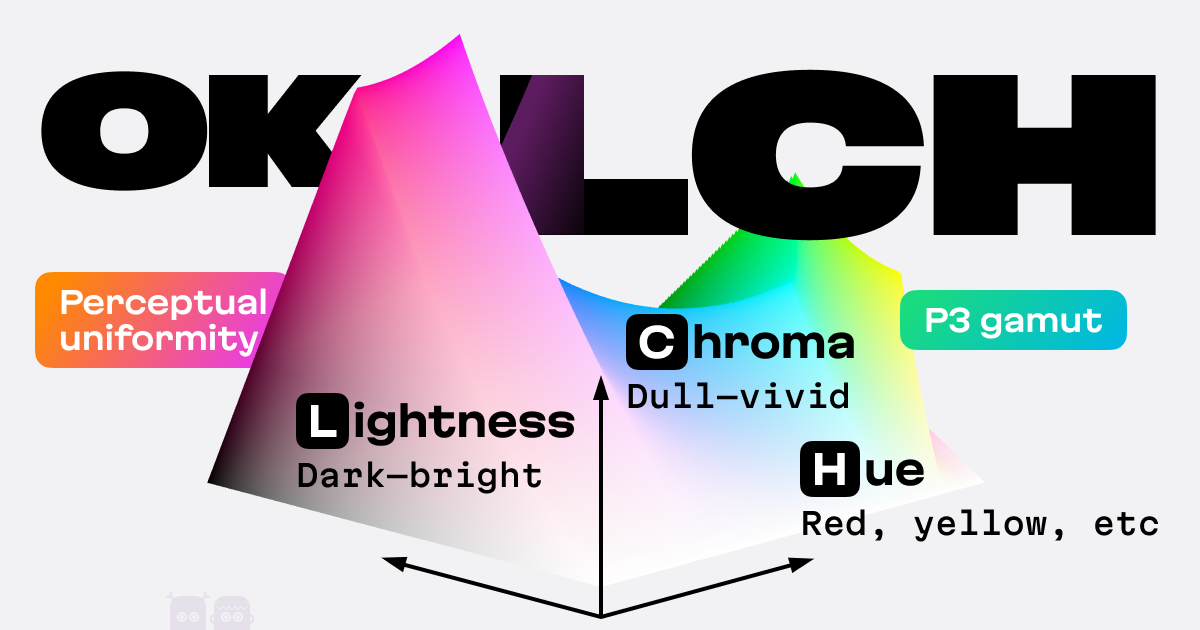
OKLCH is a new way to encode colors (like hex, RGBA, or HSL)
chilly knoll
snow monolith
Oh this is quite nice
Might consider using it in addition to https://oklch.com
@iron smelt is an oklch enjoyer
 storm galleon
what about it @empty gyro
 empty gyro
this is the right channel for CSS support or figuring out why a snippet doesn't work
#🏥-vencord-support-🏥 is for well, vencord support. vencord isn't working, plugin not working etc
half crystal
what the fuck am i doing
 half crystal
you know that's a good name for it
 burnt sky
trying to get rid of the space between people are typing and the text as it keeps jumping up an down
im just trying to out right hide people are typing which i can do but the chat still jumps up an down even though its not there now
 burnt sky
nvm found it
div[class^=typing] {
    display: none;
}```what if
and hear me out
someone undid the changes discord made to the profile modal
iron smelt
real quarry
what if
and hear me out
someone undid the changes discord made to the profile mo...
I actually like it
real quarry
hot take: if they actually knew wtf they were doing they'd dedicate the right column to showing all the other profile modal tabs at once instead of whatever crap they have rn
instead all we have was them splitting the main profile content into the left column
proof they didnt know wtf they were doing and the profile modal redesign was purely to appease shareholders: old account connections toggles that allows you to show extra profile details are worthless


therefore <tinfoilHat>the profile modal redesign is half-assed dogwater</tinfoilHat> and i want the old one back in some form
echo frost
real quarry
proof they didnt know wtf they were doing and the profile modal redesign was pur...
how does it even appease shareholders
OH NO
IT'S NOT AN EXPERIMENT ANYMORE
echo frost
real quarry
proof they didnt know wtf they were doing and the profile modal redesign was pur...
it's showing for me?

i don't think it's instant when changing it
half crystal
Bots still use the old one lmfao
echo frost
yeah they were delayed on the last profile revamp too
onyx mesa
real quarry
what if
and hear me out
someone undid the changes discord made to the profile mo...
i was working on it, got something like this done
 crimson skiff
I wonder if it is possible to hide the activity behind the profile, and move to the right only if it is hovered on
echo frost
I kinda misread that as just being collapsibloe
echo frost
crimson skiff
I wonder if it is possible to hide the activity behind the profile, and move to ...
here's a very beautiful prototype i made, but can't work on more because need to get ready for bed
.user-profile-modal-v2 {
  width: fit-content;
  min-width: 430px;

  >.inner_c0bea0 {

    >.profile__9c3be {

    }

    .container__37bfc:not(:hover) {
      width: 0;
      padding: 0;
      border-left: 20px solid black;
    }
  }
}```that modal is actually the bane of my existence
the theme i'm maintaining heavily changed the profile's look and bashing this new one into that shape was hella annoying
this was perfectly fine when the about me section was part of the tabs, but now i've had to shove the tabs below the pfp area and i have NOT touched it since because i genuinely do not know what else to do with it
 real quarry
echo frost
how does it even appease shareholders
real quarry
echo frost
how does it even appease shareholders
mostly by changing what aint borken just to avoid getting laid off
onyx mesa
crimson skiff
I wonder if it is possible to hide the activity behind the profile, and move to ...
pretty sure it's possible
crimson skiff
onyx mesa
pretty sure it's possible
obsidian showed that it is possible already
tranquil whale
brittle iron
this was perfectly fine when the about me section was part of the tabs, but now ...
it looks amazing can I try the theme
brittle iron
sure, still waiting for it to get accepted on bd's theme thing but here you go: https://github.com/RinLovesYou/Couve
not originally mine but i've taken over since the last maintainer stepped down
half crystal
yes this is good css

 brazen quartz
half crystal
yes this is good css
brazen quartz
half crystal
yes this is good css
What's the reason for such a selector?
half crystal
brazen quartz
What's the reason for such a selector?
button!!!!!!!!!!!!!!!!!!!!!!!!!!!!!!!!
brazen quartz
you will probably have to undo it in lots of places
learned this the hard way, twice
burnt sky
brittle iron
this was perfectly fine when the about me section was part of the tabs, but now ...
any way to just get the snippet for the profile. was looking through your theme to get it but its setup in a way that i do not understand
brittle iron
pretty sure that still works
the theme is made in scss and compiled down to css that's why
burnt sky
bit messed up
 half crystal
hwha
 burnt sky
brittle iron
this is from the latest build, works fine for me
burnt sky
brittle iron
this is from the latest build, works fine for me
same outcome
brittle iron
do you have any other themes? something has to be messing with it
jovial arrow
burnt sky
bit messed up
optimized performance 
echo frost
crimson skiff
obsidian showed that it is possible already
well mine didn't slide out
like it only changed in width
it wasn't under the main one
probably still possible though
but might be a bit janky to actually get it like that
tranquil whale
brittle iron
sure, still waiting for it to get accepted on bd's theme thing but here you go: ...
got some problems with sizing
channel dot is a bit small


I might actually use this flashcord is a pile of ruble/junk no one will touch it and it would have to be a replugged developer
i like what it does to my banner
this is very incompatible with other themes
brittle iron
tranquil whale
channel dot is a bit small
hmm looks fine to me
 brittle iron
tranquil whale
this is very incompatible with other themes
brittle iron
tranquil whale
this is very incompatible with other themes
well yes normally you wouldn't have two big themes on at once
couve alters a lot of things
burnt sky
@brittle iron between 220 and 225 looks better
.layer_da8173 .outer_c0bea0 .header__5be3e {
min-height: 220px;
}
210 its way to close to the status message
 brittle iron
burnt sky
<@280664130476572673> between 220 and 225 looks better
.layer_da8173 .outer_c0be...
brittle iron
burnt sky
<@280664130476572673> between 220 and 225 looks better
.layer_da8173 .outer_c0be...
true, fixed
iron smelt
burnt sky
<@280664130476572673> between 220 and 225 looks better
.layer_da8173 .outer_c0be...
I hate how the badges dont have some kinda background
tranquil whale
make a css snipet then
iron smelt
Nah
tranquil whale
@brittle iron read my messages above please
brittle iron
yes, i have started turning parts of Couve into snippets, starting with the small popout
tranquil whale
tranquil whale
burnt sky
i like my folders better 🙂
 tranquil whale
I will find a way to combine this theme with something because its got no background
it works ok with midnight
brittle iron
as in background image? yeah no i'm not doing that
 brittle iron
i really don't know why you're trying to combine two themes that alter discord so significantly
burnt sky
ugh cant stand transparency cant read anything
brittle iron
obviously there's gonna be issues
 burnt sky
wonder how much of a mess my clusmy made theme put together with another one that changes a lot would look like lol
oh god it looks awful
 brittle iron
tranquil whale
brittle iron
tranquil whale
the guild list has got to be the second bane of my existence tbh, most aids part to work on. will probably just rewrite the whole thing
brittle iron
iron smelt
I hate how the badges dont have some kinda background
yeah couve never did this, i might make it an optional thing you can turn on
tranquil whale
is this error
 brittle iron
 raw plume
anyone know why the Pios theme isnt glowing for me? the previews show the text glowing but for me it seems normal, if i set the glow on and off in the theme file nothing changes
echo frost
π os
tranquil whale
what spotify player snippet should I use
echo frost
I don't really know of any (except ones that are probably broken), but I'd assume it depends on what you want
 fair rivet
@half crystal can you do something to this
 burnt sky
tf does the download icon lead to lol
oak plover
If you’re on browser it’s a button to download the app
half crystal
fair rivet
<@1124341362955919371> can you do something to this
why me
fair rivet
half crystal
why me
Bc you're him
half crystal
fair rivet
Bc you're him
who
fair rivet
You
half crystal
what
half crystal
fair rivet
i'm asking you bc you've made some cool stuff tbh
anyone here could do that, you didnt have to ping me in particular
i do appreciate the complement on my crackhead ideas tho ❤️


 burnt sky
@fair rivet ```css
/* Hide Discover & Tooltip */
.tutorialContainer__650eb + .listItem__650eb {display: none;}
 tiny wing
I have this snippet that I have been using for a very long time I was wondering IF there is a way to eliminate the use of :has()
/**─────║ Reveal All & Hide Certain Hyperlinks ║─────*/
.message__5126c .contents_c19a55:not(:has(.botTagCozy_c19a55,
/*!───// Deniz //──*/
  img[src*="502948970708860955"],
/*!───// FeoreV //──*/
  img[src*="489785940546551831"])) .anchor_edefb8[title*="\a"]::after {
  content: " [🔗] - " attr(href) " - [:eye:]";
  font-size: 0.65em;
  color: var(--text-danger);
/* filter: drop-shadow(0px 0px 1px blue); */
  text-shadow: 0 0 2px blue;
    }
i think im killing god
 vestal field
make it full screen
half crystal
vestal field
make it full screen
fuck yuo
half crystal
echo frost
wait why do you have an about tab
becuase im reverting it
echo frost
you're going to handle the about tab??
fair rivet
burnt sky
<@1169111190824308768> ```css
/* Hide Discover & Tooltip */
.tutorialContainer__...
<333tyy
heh funny @echo frost look at my tag
half crystal
echo frost
you're going to handle the about tab??
yeah welcome to :focus hell
this works but barely
echo frost
half crystal
yeah welcome to :focus hell
this works but barely
I think you may be killing god
plain kelp
Good
pure cairn
it's honestly what I'm doing in my snippet too
echo frost
fair rivet
heh funny <@683171006717755446> look at my tag
whoa open broadcaster software client!??!
fair rivet
;-;
echo frost
wait is kirka like the same thing as krunker?
pine needle
im using the colored embeds. #🎨-css-snippets message
but when i applied..
the X button (remove all embeds) is not showing.. >.<

 crimson skiff
im thinking its an overflow: hidden issue
onyx mesa
tiny wing
I have this snippet that I have been using for a very long time I was wondering ...
what does this do exactly
tiny wing
onyx mesa
what does this do exactly
It reveals all hyperlinks and hides the ones you list as ID
 crimson skiff
thats so cool
half crystal
FUCK MASKS KLALSDHWBEUODGUSKBFPVHWIBELJFEIHOSDLFBLWEHIFLDLHASFHOWEJEBJDKBCVOFKAJSGASKD
crimson skiff
half crystal
FUCK MASKS KLALSDHWBEUODGUSKBFPVHWIBELJFEIHOSDLFBLWEHIFLDLHASFHOWEJEBJDKBCVOFKAJ...
maam are you okay?
half crystal
NO
crimson skiff
ic
onyx mesa
half crystal
FUCK MASKS KLALSDHWBEUODGUSKBFPVHWIBELJFEIHOSDLFBLWEHIFLDLHASFHOWEJEBJDKBCVOFKAJ...
real
real quarry
can someone give me a compelling example ofcss [class^="groupStart_"] { display: none!important; }catching false positives, if the endgoal is hiding messages from blocked and ignored users
[this is for quickcss not for distribution so i'm asking for reference]
crimson skiff
if you want such things to not happen, add in a child selector from parent element
real quarry
yknow i've been thinking
someone's definitely fucked up when the :has() CSS selector that has zero performance impact on uBlock Origin is tanking my FPS on vencord
im hoping it was discord HQ
pure cairn
It was
clear siren
real quarry
yknow i've been thinking
someone's definitely fucked up when the `:has()` CSS s...
yeah :has() used to have fairly negligible perf hit unless you did something stupid like using * in it
half crystal
chrome 139 has added custom mixins and functions, this is gonna be really fun when it rolls around to electron
 echo frost
i'm confused by what's happening
half crystal
echo frost
i'm confused by what's happening
allows you to reuse blocks of css in one rule
can be very useful
half crystal
half crystal
chrome 139 has added custom mixins and functions, this is gonna be really fun wh...
a great example used by libadwaita (in scss, but would be nearly the same in css's implementation)
so instead of all of that you can just do @apply --background-shadow(85deg) in css instead of making 360 variables
 pure cairn
Idk what all that means but LGTM 
crimson skiff
looks very interesting, but ill stick to variables, thanks
half crystal
crimson skiff
looks very interesting, but ill stick to variables, thanks
360 of them?
crimson skiff
not like ill use that much
half crystal
crimson skiff
not like ill use that much
you're not this example though, are you? what if you need 360 degrees of motion?
crimson skiff
what if
why would you need 360 degrees of motion?
this isnt practical, its cool, but unless you are doing some niche stuff, it isnt as useful
half crystal
crimson skiff
> what if
why would you need 360 degrees of motion?
have you seen what i do on my shitposts
crimson skiff
niche stuff
 bitter wing
Told to go here
 half crystal
WAIT WHAT
WHAT DO YOU MEAN LIBADCORD ALREADY EXISTS!?
FUUUUUUUUUUUCCCCCCCKKKKKKKKK MEEEEEEEEEEERRRRRRR
brazen quartz
there can always be a second one