#🎨-theme-development
1 messages · Page 56 of 1
 tidal heron
 pure cairn
 thorn sonnet
pure cairn
<#1028106818368589824>
thorn sonnet
pure cairn
<#1028106818368589824>
can i just create a thread?
thorn sonnet
pure cairn
read the channel description
oh didn't saw that, thanks
 plain kelp
 spring pewter
So wharra do
spring pewter
So wharra do
Delete the overlapping nonsense
spring pewter
plain kelp
Delete the overlapping nonsense
Idk how
pure cairn
thorn sonnet
oh didn't saw that, thanks
Np
pure cairn
spring pewter
Idk how
Open inspect element and keep removing backgrounds until it's just like you want
Go crazy
Make your discord crash with devtools, it's fun

 full rover
Just gonna repost this
pure cairn
If there are none, you can always make it
 echo frost
can you send a screenshot?
full rover
echo frost
can you send a screenshot?
 echo frost
can you not crop it so much
full rover
I managed to semi-fix the boosting badges by changing a variable called "bottom"
 echo frost
I can't tell what's going on when you crop it so much
full rover
its just the icon slightly misaligned idk what a larger crop would do
but yeah I was able to fix the boost badge atleast by using this:
.childContainer__3e3b0 .boostedGuildIconGem__97677 {
  left: .05px;
  top: 0.4px;
}

 radiant stream
Could someone tell me the name of this theme that shows the icons on the side?

 crimson skiff
radiant stream
Could someone tell me the name of this theme that shows the icons on the side?
crimson skiff
radiant stream
Could someone tell me the name of this theme that shows the icons on the side?
chuck this into your quick css
@import url("https://gold-me.github.io/DiscordIcons/main.css");
@crimson skiff
 crimson skiff
radiant stream
<@939370315652415488>
crimson skiff
radiant stream
<@939370315652415488>
paste just the link
i explicitly mentioned to put this in your quick css, not in online themes


 radiant stream
crimson skiff
skill issue
radiant stream
crimson skiff
skill issue
I put it in the quick css but it didn't work
crimson skiff
radiant stream
I put it in the quick css but it didn't work
works perfectly fine for me ¯_(ツ)_/¯
crimson skiff
radiant stream
edit quick css
 karmic mica
 crimson skiff
vencord
radiant stream
crimson skiff
vencord
There is no theme interfering with yours so that it can appear, right?
crimson skiff
radiant stream
There is no theme interfering with yours so that it can appear, right?
doubt so, cant check now though
 crimson skiff
radiant stream
crimson skiff
radiant stream
wait did you enable the theme attributes plugin?
radiant stream
It worked now
crimson skiff
yeah thats why
radiant stream
crimson skiff
yeah thats why
The server configuration is buggy

 burnt sky
@radiant stream give these icons a try also make sure you have the theme attributes plugin enabled just incase
@import URL('https://mudaranrhiod.github.io/VencordThemes/solar.css');
@import URL('https://mudaranrhiod.github.io/VencordThemes/solarmoreicons.css');
What r devtools
pure cairn
ctrl + shift + i
spring pewter
pure cairn
ctrl + shift + i
scary
theres too much how do i find stuff for server list
crimson skiff
element picker
spring pewter
crimson skiff
element picker
whar
pure cairn
Top left icon on devtools
It allows you to pick an element, hence the name "element picker"
spring pewter
wharra do w this now
 pure cairn
But server list should be [class^=guilds_]
 onyx mesa
anyone know why the new gradient role colors are not animated for me
disabled all plugins and css and it's still broken
 chilly knoll
pure cairn
But server list should be [class^=guilds_]
chilly knoll
pure cairn
But server list should be [class^=guilds_]
Whats the diff between using [class^=someclass_] and .someclass
onyx mesa
chilly knoll
Whats the diff between using [class^=someclass_] and .someclass
doesn't break in case discord decides to change the number part
chilly knoll
Oh
pure cairn
chilly knoll
Whats the diff between using [class^=someclass_] and .someclass
.someclass_ will break if discord rerolls hashes
Attribute selector is slower but doesn't break
Unless they completely change class names
chilly knoll
pure cairn
Attribute selector is slower but doesn't break
The one in brackets is attribute selector right?
pure cairn
onyx mesa
anyone know why the new gradient role colors are not animated for me
Reduced motion?
pure cairn
chilly knoll
The one in brackets is attribute selector right?
Yep
onyx mesa
ok nvm, the experiments plugin breaks the animation of the roles in chat
at least i think so cuz i have no experiments enabled and disabling it fixes it
echo frost
pure cairn
It's just a theory
A STYLE THEORY
 lavish forge
hey does anyone here know how to get pywal on vencord?
 heavy sluice
pywal is dead but matugen is a really good replacement and it already has a template for the (old) midnight theme you can copy and edit
crimson skiff
echo frost
A STYLE THEORY
i will turn you into a theory
crimson skiff
heavy sluice
pywal is dead but matugen is a really good replacement and it already has a temp...
hmm, matugen seems interusting
heavy sluice
it's peak
radiant stream
Does anyone know if there is a css that adds discord badges to the profile or a plugin that works?
echo frost
crimson skiff
i will turn you into a theory
that sounds mean :(
crimson skiff
echo frost
that sounds mean :(
mean theory >:)
 onyx mesa
 stoic fjord
how do i move this upto here?
stoic fjord
how do i move this upto here?
there should be a snippet in #🎨-css-snippets that moves it up
stoic fjord
by who tho
stoic fjord
thx
radiant stream
 fathom forum
o que um brasileiro aqui?
fathom forum
o que um brasileiro aqui?
Yes
fathom forum
omg
 devout tangle
guys uhhh i have zero idea on how to make a custom theme can someone walk me thruogh the basic steps?
like mainly if it's possible to put a custom image lmao
(im not too familiar with code)
tidal heron
devout tangle
like mainly if it's possible to put a custom image lmao
theres a theme that has that feature already
multiple in fact
cyan and clear vision r the ones that come to mind which can be found on the better discord site
tidal heron
np
pure cairn
devout tangle
like mainly if it's possible to put a custom image lmao
GitHub
Discord css stuff. Contribute to nvhhr/discordcss development by creating an account on GitHub.
 limpid mirage
I'm using this to collapse the message buttons all underneath the last one, unless hovered.
However, I don't want the apps button to be in the list at all, so for the longest time I was doing [class^=channelAppLauncher_] {display: none} and it stopped working recently, and I cannot for the life of me figure out a solution to hide the apps button - effectively replacing it with the emoji button as the rightmost child so this collapse menu still works. Anyone got any tips? I can provide more info if needed
/* Collapse Message Buttons */
[class*=chat_] [class*=textArea_] {
    margin-right: 40px;
    + [class*=buttons_] {
        position: absolute;
        right: 0;
        background-color: hsl(var(--primary-560-hsl));
        border-radius: 0;
        &:not(:hover)>:not(:last-child) {
            display: none;
        }
    }
}
before hovering and after hovering as it is now for reference


 halcyon crypt
limpid mirage
I'm using this to collapse the message buttons all underneath the last one, unle...
halcyon crypt
limpid mirage
I'm using this to collapse the message buttons all underneath the last one, unle...
replace display: none with display: none !important
 limpid mirage
that gets rid of the whole thing completely, I still want to have the emoji button take its place for expanding buttons on hover
 onyx mesa
limpid mirage
that gets rid of the whole thing completely, I still want to have the emoji butt...
onyx mesa
limpid mirage
that gets rid of the whole thing completely, I still want to have the emoji butt...
it removes the app button but in the dom it's still the last one
&:not(:hover)>:not(:last-child) {
gotta replace this part to select the emoji button instead
i got a snippet that does the exact same thing but also removes the gift and app buttons
https://github.com/lithwack/Vencord-Repos/raw/main/Images/Chat-Button-Hover.gif
 limpid mirage
in hindsight that was obvious, replaced :last-child with :nth-last-child(2)
I like the fade + translate transition on that one, neat
onyx mesa
yeah i only have the tree buttons but i am pretty sure it should work with all the buttons that plugins add and etc
limpid mirage
as long as they aren't added to the left instead of the right yeah
otherwise I could probably change it to grab the emoji button specifically rather than the second to last
onyx mesa
the app button is the only one that appears after the emoji button for some reason

 pure cairn

I might post it tomorrow on the snippet channel, gotta upload it on github first cuz it's genuinely too long to be a simple message
 pure cairn
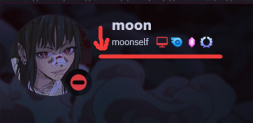
I thought the same, but I ended up aligning it at the top so it would fit longer names better
 burnt lake
what to do to add a black bar and spacing to the stream bar on the dm because I don't want it to be transparent !
- i use remove the top bar !
@import url(‘https://raw.githubusercontent.com/surgedevs/visual-refresh-compact-title-bar/refs/heads/main/desktop.css’);
 onyx mesa
discord changed the border var for some reason, the old var still exists but they added a new one
and i can't change the color of it using root for some reason
tidal heron
pure cairn
<:venniepopcorn:1217924409885724682>
this looks sick ngl
pure cairn
thanks
there are a few extensions that I might take the time to fix but it'll take a while
echo frost
pure cairn
<:venniepopcorn:1217924409885724682>
is this the "improved profile modal" experiment?
well a modified version
dev://experiment/2025-04_user_profile_modal_v2
oh wait no
that one still has connectiosn and stuff on the left
 echo frost
dev://experiment/2025-04_user_profile_modal_v2
echo frost
echo frost
dev://experiment/2025-04_user_profile_modal_v2
these embeds are so nice
 rough pond
im just trying to make some simple color edits to change the default look of discord, but for some reason the variables just arent working. does anyone know how i can do this? i had it working in an old version of quick css but i reset my vencord and lost it 😭

 clear siren
try :root, .theme-dark {}
I also found some vars won't work with just root even with important
but adding .theme-dark worked
 copper flame
clear siren
but adding .theme-dark worked
copper flame
clear siren
but adding .theme-dark worked
specificity is why
the main palette is applied with .visual-refresh.theme-dark on root then there's further down .theme-dark classes which have the palette reapplied
clear siren
copper flame
specificity is why
the weird thing is you can do :root:root:root and !important and it still won't override it
and the specificity in that case is definitely higher
or am I being stupid
clear siren
my understanding is that no matter what rules and how many you have, !importants should always override those without it
I do get why chaining :roots fails, class is higher specificity than any amount of type selectors like :root which is just html
but I don't understand how non-important overrides important even if more specific
probably something to do with the cascading of the stylesheets
copper flame
yop
clear siren
yeah that's it, quickcss is a style block that loses to author stylesheet actually no that still doesn't make sense
echo frost
copper flame
the main palette is applied with .visual-refresh.theme-dark on root then there's...
that's not related to specificity
that's because lower down elements have priority for settings variables
copper flame
echo frost
that's not related to specificity
that's because lower down elements have priori...
the class selectors on root overwriting the :root selector is
echo frost
the selectors don't have root
so the variable is defined at lower .visual-refresh.theme-dark too
copper flame
.visual-refresh.theme-dark {} has higher specificity than :root {}
echo frost
echo frost
~~so the variable is defined at lower .visual-refresh.theme-dark too~~
wait what
now i don't see any other elements below :root that have .visual-refresh
oh i see what i was thinking
there's below elements that are .theme-darker, but they're not .visual-refresh.theme-darker
copper flame
yes
pure cairn
echo frost
is this the "improved profile modal" experiment?
No
 tranquil whale
anyone wanna help me on theme development pls dm me
Im searching for help as my css knowledge is basic
and Im working on a complex theme
plain kelp
You should just say it straight, "anyone wanna write a theme for me"
pure cairn

tranquil whale
its already writen kinda
well I did not originaly write it im just currently in charge of it
GitHub
[DESKTOP VISUAL REFRESH COMPATIBLE] The world's most advanced, complex and feature rich Discord Theme to ever exist. A complete yet user-friendly visual overhaul for Discord with many QoL f...
Imagane someone like me fixing it by myself
😭


its messed up and i need help
pure cairn
tranquil whale
https://github.com/Ascellayn/Flashcord
First impressions
Why would someone want to add more bloat on top of an already bloated Discord

tranquil whale
that was before the desktop visual refresh
now its just this

and a lot more
in fine detail
 spare mural
why not just try to fix it yourself and learn css with it
also why put desktop refresh compatible into the subtitle when its not desktop refresh compatible
tranquil whale
its complex and Ive got a lot of strict guidelines to follow
tranquil whale
spare mural
also why put desktop refresh compatible into the subtitle when its not desktop r...
it is just it does not have all the bells and whistle it once had
spare mural
😬
tranquil whale
I did not create it by the way
spare mural
tranquil whale
its complex and Ive got a lot of strict guidelines to follow
okay and still why not try to do it yourself
even if its complex
or do you think people are born with natural css skills
spare mural
if you need help with very specific things sure you can come here and ask how but like going into a channel and basically asking "can someone fix this for me please" is very 😬
tranquil whale
spare mural
if you need help with very specific things sure you can come here and ask how bu...
I know but I do need help
it could take months to bring back to former glory
this is how it once looked
https://cdn.discordapp.com/attachments/1124660463339315331/1327849204793479178/image.png?ex=682d4f70
 spare mural
and some themes take years and people still do it so like again why not do it yourself and come back when you run into specific problems that people can actually help you with instead of locking them into month long adventures ¯_(ツ)_/¯
tranquil whale
the problem is I know whats broken
like fcm background mode just I dont know how to fix it
pure cairn
Reminds me of my early days on this channel
Getting spoonfed and roasted by h at the same time

chilly knoll
tranquil whale
like fcm background mode just I dont know how to fix it
Whats a fcm background
pure cairn
tranquil whale
like fcm background mode just I dont know how to fix it

Go crazy, have fun and learn how to get stuff working
chilly knoll
pure cairn
Go crazy, have fun and learn how to get stuff working
Chatgpt it  /j (#banaislop)
pure cairn
chilly knoll
Chatgpt it <:trolley:1083404736616726598> /j (#banaislop)
Mfw
#📖-info message
chilly knoll
pure cairn
Mfw
https://discord.com/channels/1015060230222131221/1220547379657314454/1320010...
Yeh i wasn't serious lol
Im antiai slop
pure cairn
I've already seen people using it anyway and failing to understand why it doesn't work
chilly knoll
chilly knoll
Ive found it useful for getting a clearer set of instructions bcuz i didnt understand the original

pure cairn
Nah, I'd rather mess around with it
(I'm also genuinely scared of posting the popouts snippet because the code is a bit messy)

code a bit messy
looks inside
shit ton of nesting
chilly knoll
pure cairn
>code a bit messy
>*looks inside*
>shit ton of nesting
><:wires:1262562427422244...
So? Most people wont care surely lol
Can always make it look nicer at a later time
chilly knoll
Post it then 
 brazen quartz
pure cairn
(I'm also genuinely scared of posting the popouts snippet because the code is a ...
brazen quartz
pure cairn
(I'm also genuinely scared of posting the popouts snippet because the code is a ...
custom css never looks good
 burnt sky
pure cairn
https://github.com/Krammeth/css-snippets/blob/main/PopoutsRevamped.css
burnt sky
pure cairn
https://github.com/Krammeth/css-snippets/blob/main/PopoutsRevamped.css
that is pretty nice wonder what you would revamp this to if you were to do it ever since refresh everything is squished
 pure cairn
soon™️
I just found some bugs in the big popouts, let me squash all of them first
glad you like it
burnt sky
yeah definitely, feels like if discord was actually good at design would make that
pure cairn
aight, that should be everything
burnt lake
burnt lake
what to do to add a black bar and spacing to the stream bar on the dm because I ...
.??
pure cairn
I mean, your question is self explanatory
you use a snippet to remove the top bar and then complain because there is no top bar
 glacial barn
hey, is there a variable to get the channels area's with ? (because you can change it's width, theming the titlebar to "follow" it is annoying)
-# a bit like custom-guild-list-width
echo frost
glacial barn
hey, is there a variable to get the channels area's with ? (because you can chan...
--custom-guild-sidebar-width
not that hard to find
glacial barn
thanks a lot
echo frost
it's defined in body
glacial barn
echo frost
not that hard to find
where do you search? there's a lot I can't read them all
 glacial barn
oo ok yea
since I'm here is there one to know if betterfolder's sidebar is oppened?
 gilded radish
anyone got a class to remove that stupid thing from the chat bar?
 pure cairn
The /~.root: ?
gilded radish
no, stupid thing on the right
burnt sky
gilded radish
no, stupid thing on the right
inspect it to get the classname
burnt sky
gilded radish
anyone got a class to remove that stupid thing from the chat bar?
btw also looks like your going with the Old Steam green color
gilded radish
oh yeah I didn't notice it until now
burnt sky
 gilded radish
I'm just using one of the nitro colors (free nitro whatever)

 burnt sky
simple dark i use fluenty
 gilded radish
that's the paid one right
burnt sky
yep
gilded radish
yea lmao I'm not paying money on a steam theme
burnt sky
fyi the whole reason why millennium is still running is because of fluenty
1800 dollars a year in server bills to keep millennium afloat
just because something is open source doesn't mean its free to run espically at the level that millennium is doing
also plus once you pay for fluenty once you own it for ever for the copy you download you do not lose access
burnt lake
https://discord.com/channels/1015060230222131221/1354203100872835123
can this navigation bar be shortened to move the server list and dm icon higher to the top level?
I write here because I am not qualified to write there!
burnt sky
@pure cairn but yeah im loving the revamp, had to find a new banner to make it look decent
 pure cairn

glad you like it
nvhhr also asked me about the small popouts, I'm going to work on them soon enough
burnt sky
pure cairn
nvhhr also asked me about the small popouts, I'm going to work on them soon enou...
sweet looking forward to it, as you see my issue with the current small popout is how its squished looks weird and dam my active dev badge is gone forgot to run a slash command on my bot in awhile
 burnt lake
@pure cairn do you know if the support has a vacation?
pure cairn
wut?
burnt lake
is support alive?
pure cairn
what support
 pure cairn
I had to wait for 2-3 weeks for my first snippet to get permission to post it
best of luck
it all depends if the people have free time to review the snippet
burnt lake
pure cairn
I had to wait for 2-3 weeks for my first snippet to get permission to post it
after how many did they answer you by at least writing a period?
burnt sky
is it just to check the quality of the snippet and make sure its just not a bunch of junk or stolen
burnt lake

pure cairn
make sure your snippet doesn't contain * selectors that are too generic
or :has, also too generic
they slow the client down by quite a lot
burnt lake
refer to classes where there are only one existing
pure cairn

are you using a translator?
because I genuinely did not understand what you just said
burnt sky
pure cairn
they slow the client down by quite a lot
i had 1 snippet that would slow it down so bad that it took a minute to type 10 words in the chatbox lol
it was the snippet in that css channel to hide nameplates
burnt lake
pure cairn
are you using a translator?
not from where
pure cairn
in the popouts revamp there are a few :has selectors, but they're all very specific
burnt sky
yeah lucky someone else in this channel had a quick replacement for it
/* Hide nameplates */
.dm__972a0>div>[style^="background: linear-gradient(90deg"],
.nameplated__91a9d>[style] {
  display: none;
}``` burnt sky
the only small slow thing now is the serverlist that has a slight delay when hovering over each server
pure cairn
but like, this is one of the selectors
&:has(> .header__39ec2 > .headerText__39ec2 > .platformIcon__39ec2[style="mask-image: url(\"/assets/f6833ce4dd20c1fb.svg\");"])
plain kelp
Because it has to check a shitload of extra stuff
:has with only > selectors shouldn't lag that much, but space/nothing operators are slow af
Since it needs to check every single node in the whole subtree
clear siren
it used to not lag so bad tho I can't understand what discord did
discord just doesn't want us to have nice things
clear siren
really took the fun out of ricing for me
pure cairn
well, I use it way less now
pure cairn
pure cairn
but like, this is one of the selectors
```css
&:has(> .header__39ec2 > .headerTe...
and if I have to use it, I do monstrosities like this
clear siren
yeah
pure cairn
which tbh I don't even know if it's a good selector
I feel like that mask-image might be too little specific or something
idk, I still don't really understand how much performances are affected by selectors
echo frost
pure cairn
but like, this is one of the selectors
```css
&:has(> .header__39ec2 > .headerTe...
wtf
pure cairn
echo frost
wtf
Yeah, tell me
Wanna laugh? That's just to make Spotify activities the first ones in the profile list
So I'm checking for the little spotify icon next to the activity name
tidal heron
r discord tryna add something to the chat bar and its just fkd mine?
 tidal heron
activity button...
 proud token
Very belated, but thanks; got a PR that changed it
Sorry, I've been so inactive the last 6 months x)
 scenic temple
is there a css that makes the icons on the right go into their own bar?
 echo frost
like have a bar below the chat with those icons?
scenic temple
echo frost
like have a bar below the chat with those icons?
yeah!
echo frost
possibly. there was a (removed) experiment that had that, and I think someone recreated it
try searching in #🎨-css-snippets
scenic temple
tried that, what would I type in lol
echo frost
I also made a sort of similar snippet that collapses all but the rightmost button until you hover over that button
scenic temple
echo frost
I also made a sort of similar snippet that collapses all but the rightmost butto...
cool, sounds perfect lol
echo frost
scenic temple
echo frost
https://discord.com/channels/1015060230222131221/1028106818368589824/13290579788...
Thats so good, thanks!
echo frost
thanks
echo frost
echo frost
possibly. there was a (removed) experiment that had that, and I think someone re...
can't find it from brief search on mobile
echo frost
scenic temple
tried that, what would I type in lol
oh found it #🎨-css-snippets message
it was sent way longer ago than I thought
scenic temple
echo frost
it was sent way longer ago than I thought
Thanks, but urs is better looking tbh (nice job on it)
echo frost
echo frost
https://discord.com/channels/1015060230222131221/1028106818368589824/13290579788...
I replied to that one here
scenic temple
echo frost
I replied to that one here
Life changing.
tranquil whale
anyone know how to make the settings tab background translucent
crimson skiff
tranquil whale
anyone know how to make the settings tab background translucent
guess what
#🎨-css-snippets message
tranquil whale
doesnt work
tranquil whale
crimson skiff
guess what
https://discord.com/channels/1015060230222131221/1028106818368589824/...
I dont think its compatible with my theme
 grand surge
I’m looking to help the first 10 people interested on how to start earning $100k or more within a week, but you will reimburse me 10% of your profits when you receive it. Note: only interested people should send a friend request or send me a dm! ask me (HOW) via Telegram username @TheRealHugo_Larsson1
Or The Telegram Link in my bio
plain kelp
That flavor of spambot isn't very common here
pure cairn
grand surge
I’m looking to help the first 10 people interested on how to start earning $100...
mods. lobotomise this fella
 torn templeBOT
pure cairn
mods. lobotomise this fella
torn templeBOT
pure cairn
mods. lobotomise this fella
🧠🔨
pure cairn
To do later
- add roles & connections headers
- check for regular profiles shenanigans
- check for other shenanigans
burnt sky
pure cairn
To do later
- add roles & connections headers
- check for regular profiles shen...
found something interesting btw
 pure cairn
Mine is different
burnt sky
cause i found something interesting with it
burnt sky
with profile descrption first photo
and without profile description second photo


the role dots get misaligned if theres no profile desc lol
pure cairn
burnt sky
weird though
burnt sky
but if you have a better version of that i wouldn't mind changing to it
the one i have makes your names look like this based on role color

heres the css im using
/* Colored Role Pills */
.role_dfa8b6.pill_dfa8b6 {
    position: relative;
    background: none;
    border: none;
    padding-left: 28px;
}

.role_dfa8b6.pill_dfa8b6 > span {
    z-index: 1;
}

.role_dfa8b6.pill_dfa8b6 .roleRemoveButton_dfa8b6 {
    position: absolute;
    top: 0px;
    left: 0px;
    right: 0px;
    bottom: 0px;
    margin: 0 !important;
}

.role_dfa8b6.pill_dfa8b6 .roleCircle__4f569 {
    margin: 6px 8px;
}

.role_dfa8b6.pill_dfa8b6 .roleCircle__4f569::before {
    content: '';
    display: block;
    position: absolute;
    background-color: inherit;
    top: 0px;
    left: 0px;
    right: 0px;
    bottom: 0px;
    border-radius: var(--radius-xs);
    filter: brightness(1.1);
    opacity: 0.25;
}```i got this from css snippets some where
if you have a better version ill probably just swap to that
pure cairn
You basically want something that turns the role item into the same color as the pill, right?
burnt sky
yeah
pure cairn
I'll see what I can do about it once I'm done with the smaller popouts snippet
 tired oxide
how do i get rounded corner windows on discord with vencord?
pure cairn
Maybe I'll add it as an extra
pure cairn
tired oxide
how do i get rounded corner windows on discord with vencord?
[class^*=app_] {
  border-radius: 25px;
}```
(it probably won't work)is this for some window manager like i3?
pure cairn
What, no
Put it in your quickcss
But then again, I'm not sure it'll work
And I can't check because there's a thunderstorm going on and I don't want to risk my pc
tired oxide
pure cairn
Put it in your quickcss
quickcss never works for me for some reason might jst be a bug.
burnt sky
pure cairn
I'll see what I can do about it once I'm done with the smaller popouts snippet
this is just until i can recreate the old css i made that let me have a animated gradinet username
 pure cairn
tired oxide
quickcss never works for me for some reason might jst be a bug.
pure cairn
tired oxide
quickcss never works for me for some reason might jst be a bug.
Is it enabled?
tired oxide
pure cairn
Is it enabled?
you have to enable that?
pure cairn
Settings -> Vencord -> QuickCSS
tired oxide
yeah it doesnt work.
pure cairn
Can you send what you have in your quickcss? Even just a screenshot is fine if it's not a lot of things
pure cairn
burnt sky
this is just until i can recreate the old css i made that let me have a animated...
I guess it's just a matter of keyframes and gradients
But looks good
tired oxide
pure cairn
Can you send what you have in your quickcss? Even just a screenshot is fine if i...
ay thanks i figured it out. 😭
do you know some quick css to adjust traparency?
i just need the opacity.
not blur and all that fancy stuff.
tired oxide
pure cairn
Of what?
discord?
pure cairn
There's just a teeny tiny amount of elements
tired oxide
i discovered the tranparency thing.
pure cairn
tired oxide
discord?
GitHub
Discord css stuff. Contribute to nvhhr/discordcss development by creating an account on GitHub.
burnt sky
pure cairn
I guess it's just a matter of keyframes and gradients
yeah thats from months ago before the UI update every update kept making it worse and more broken lol found an old recording of it when i was sharing with a friend
tired oxide
pure cairn
https://github.com/nvhhr/discordcss/blob/main/snippets/actuallybasicbackground.t...
ay thanks a lot man it works.
but the side bar aint really transparent.
pure cairn
Ig discord changed something
burnt sky
lol why is my name green in that photo lol
pure cairn
IRCcolors plugin I guess
You'll have to wait for it to get fixed
The alternative being to download the theme file and trying to fix it yourself
burnt sky
pure cairn
The alternative being to download the theme file and trying to fix it yourself
oh neat did you make the popout use the full background ?
pure cairn
Yeah it was a good suggestion so I changed it that way
 amber haven
is there any snippets for hiding chat stuff cuz the one i use makes discord lag
chilly knoll
amber haven
is there any snippets for hiding chat stuff cuz the one i use makes discord lag
Fatty
amber haven
chilly knoll
Fatty
 burnt sky
pure cairn
Yeah it was a good suggestion so I changed it that way
burnt sky
pure cairn
Yeah it was a good suggestion so I changed it that way
is there something i can change to zoom it out a bit
 chilly knoll
burnt sky
is there something i can change to zoom it out a bit
chilly knoll
burnt sky
is there something i can change to zoom it out a bit
Is that discord?
burnt sky
yeah
amber haven
chilly knoll
Is that discord?
na its x
chilly knoll
Banned
amber haven
oh
chilly knoll

burnt sky
also lol i cant remember which bit of css does this based on role color
 chilly knoll
burnt sky
also lol i cant remember which bit of css does this based on role color
chilly knoll
burnt sky
also lol i cant remember which bit of css does this based on role color
Can u send what makes the names like rhat
burnt sky
thats what im trying to find i cant remeber im 100% sure i labled it
chilly knoll

chilly knoll
True
pure cairn
burnt sky
is there something i can change to zoom it out a bit
It's something I still have to fix
chilly knoll
pure cairn
It's something I still have to fix
@amber haven help
amber haven
chilly knoll
<@923212189123346483> help
@pure cairn help
pure cairn

pure cairn
Did you guys wake up more quirky than usual today?
burnt sky
/* Username Bubble */
.username_c19a55,
.base_b88801 .text_b88801 strong,
.name__841c8,
.mention.interactive,
[class^="repliedMessage_"] > .username_c19a55,
.member__5d473 .username_d272d6 {
  filter: brightness(1.2);
  background: color-mix(in srgb, currentColor 20%, transparent);
  border: calc(1px * var(--enable-border)) solid;
  /*font-weight: bold;*/
  margin-right: 4px;
  padding: 0 6px;
  border-radius: 6px;
  display: inline-flex;

  &:hover {
    text-decoration: none;
    background: color-mix(in srgb, currentColor 40%, transparent);
  }
}```mb gang will do better next time
amber haven
burnt sky
```css
/* Username Bubble */
.username_c19a55,
.base_b88801 .text_b88801 strong,...
thankss
@chilly knoll fatass
chilly knoll
burnt sky
```css
/* Username Bubble */
.username_c19a55,
.base_b88801 .text_b88801 strong,...
Thankie
Ill add it in a bit, do u have it as a file
chilly knoll
amber haven
thankss
<@807170846497570848> fatass
Blocked
burnt sky
chilly knoll
Ill add it in a bit, do u have it as a file
watcha mean?
amber haven
chilly knoll
Blocked
cyberbullying
chilly knoll
burnt sky
watcha mean?
As a css file
pure cairn
Just copy and save it yourself?
chilly knoll
I dont like adding tons of stuff to quick css it gets so messy lol
pure cairn
It's not difficult
burnt sky
i can one sec
pure cairn
Lmao
chilly knoll
I forgot u can do that lol
pure cairn
How
chilly knoll
amber haven
cyberbullying
Mb fam
pure cairn
Smh
amber haven
pure cairn
Just copy and save it yourself?
dw @chilly knoll forgor his schizo pills today
pure cairn
I noticed
chilly knoll
amber haven
dw <@807170846497570848> forgor his schizo pills today
U ate them
chilly knoll
amber haven
fatty
Bully
burnt sky
@chilly knoll
chilly knoll
burnt sky
<@807170846497570848>
Thanks
amber haven
burnt sky
<@807170846497570848>
I wonder how it will look like with-
@import url("https://raw.githubusercontent.com/BurningStoneDiscord/DiscordHighlightGradient/refs/heads/main/MentionReplyingFancyGradient.css");
burnt sky
pure cairn
It's something I still have to fix
kool
chilly knoll
amber haven
I wonder how it will look like with-
```@import url("https://raw.githubuserconte...
Show
amber haven
Not bad
 burnt sky
had to restart discord it was using fucking 8gb of ram and lagging like crazy
amber haven
burnt sky
had to restart discord it was using fucking 8gb of ram and lagging like crazy
relatable
these nameplates and other useless animations ain't helping as well
burnt sky
before
 amber haven
chilly knoll
I dont get it
amber haven
chilly knoll
I dont get it
dumbo
 burnt sky
after
 chilly knoll
amber haven
dumbo
chilly knoll
amber haven
dumbo
Dont shout
chilly knoll
burnt sky
after
OHHH
burnt sky
litterly just a gradiant
amber haven
all the fats going in ur brain now smh
burnt sky
burnt sky
yeah thats from months ago before the UI update every update kept making it wors...
im currently trying to recreate this. it was before all the new UI update up until the new UI it kept getting broken more and more till it was fully released now the css doesn't work what so ever
amber haven
maybe it's easier to implement it now with the new UI
chilly knoll
Rip
chilly knoll
amber haven
all the fats going in ur brain now smh
Blocked.
pure cairn
burnt sky
im currently trying to recreate this. it was before all the new UI update up unt...
I don't think it's that difficult tbh
Set a linear-gradient in the text background
then use background-clip: text
finally add some animations to the gradient and you should be good to go
burnt sky
burnt sky
im currently trying to recreate this. it was before all the new UI update up unt...
heres the old css that use to work
/* Custom Color Preshyon */
:is(.container_debb33,
    .accountProfileCard__744d8,
    .container__3792d,
    .peopleListItem_dab480,
    .itemCard_b64118,
    .contents_d3ae0d,
    .userProfileInner__8ff35,
    .member_aa4760,
    .memberRowContainer__8a95f,
    .profileCard__1d74b,
    .listRow_d4d6eb,
    .row_e54bc9,
    .row__807ed,
    .memberRow_d581f4,
    .emojiRow_db53d4,
    .wrapper_d9a30a,
    .auditLog__9228d,
    .item__287de,
    .bannedUser_f75842,
    .inviteSettingsInviteRow__130c9):has([src*="avatars/221097896328691712"], [style*="avatars/221097896328691712"]) :is(.title__4a7a9,
                                                                                                                         .userTag__28f9c,
                                                                                                                         .name_f842e4 .overflow__993fa,
                                                                                                                         .username__267df,
                                                                                                                         .header__3cd76 .text-md-semibold__8664f,
                                                                                                                         .username__0b0e7,
                                                                                                                         .nickname_db3773,
                                                                                                                         .container__9f51c .text-lg-semibold__9539a,
                                                                                                                         .username_d272d6,
                                                                                                                         .username__0bc64,
                                                                                                                         .listName__2198c,
                                                                                                                         .name__3689e,
                                                                                                                         .emojiRowText__46159,
                                                                                                                         .uploaderName__50faa,
                                                                                                                         .user__868a6 .text-xs-normal__46d75,
                                                                                                                         .userHook__0708a .text-md-normal__6e567,
                                                                                                                         .itemLabel_d89e4d .text-sm-normal__95a78,
                                                                                                                         .username_df97c3,
                                                                                                                         .username__5beb0,
                                                                                                                         .username__4a6f7) {
    font-weight: 700;
    text-decoration-color: #e31632;
    color: transparent !important;
    background: linear-gradient(90deg,#d1692c,#8c18eb 34%,#d1692c 67%,#8c18eb);
    background-size: 300% 100%;
    background-clip: text;
    -webkit-background-clip: text;
    animation: progressPulse_a2c1e3 2s linear infinite;
}```one oopsie daisies-
 burnt sky
i cna get the color to work but not animated
 pure cairn
Did you set the keyframes for the animation?
burnt sky
not sure how the new way works as in the old snippet im using animation progressPulse
pure cairn
One thing I remember is that the animation name goes at the end
burnt sky
and also all the classnames needs to be updated
pure cairn
So animation: 2s linear infinite progressPulse_a2c1e3
If that animation still exists, that is
Because if it doesn't then ofc it's not working
Do a ctrl + f on devtools and look for the first part, check if it's still there
 urban spear
How do I put a transparent background on discord with vencord?
pure cairn
urban spear
How do I put a transparent background on discord with vencord?
GitHub
Discord css stuff. Contribute to nvhhr/discordcss development by creating an account on GitHub.
burnt lake
burnt lake
https://discord.com/channels/1015060230222131221/1354203100872835123
can this n...
@spare mural Sorry to bother you, but I do not have permissions to write on the channel #🎨-css-snippets and I want to ask if it is possible to shorten the bar from left to right to gain space to move the server list, server channels to the maximum height!
pure cairn
pure cairn
https://github.com/nvhhr/discordcss/blob/main/snippets/actuallybasicbackground.t...
@clear siren actually, can I PR some fixes I made locally the other day? There's a couple things broken rn
clear siren
absolutely
pure cairn
Alright sweet, let me get a clean copy of the theme so I can transfer the changes
Since I swapped the attribute selectors with plain classes on my end
clear siren
ah
spare mural
burnt lake
<@1084592643784331324> Sorry to bother you, but I do not have permissions to wri...
I don’t know what you mean also you could’ve used the thread attached to the message
pure cairn
how do you actually open a PR?
nvm I think I found it
had to fork the repo first since I couldn't commit directly to it
spare mural
pure cairn
*how do you actually open a PR?*
For a repo you don’t own? You make a fork, push to the fork then GitHub will ask you if you want to open up a pr on your forks page
pure cairn
yup, found it thanks
 pure cairn
clear siren
ah
pure cairn
clear siren
ah
done, I went for attribute selectors
burnt lake
spare mural
I don’t know what you mean also you could’ve used the thread attached to the mes...
you have to have permissions anyway,
what I mean is to move the server list to the very top, but I am bothered by this navigator bar but I can't move it to the right.
 clear siren
pure cairn
done, I went for attribute selectors
clear siren
pure cairn
done, I went for attribute selectors
merged, much appreciated <3
pure cairn
np!
spare mural
burnt lake
you have to have permissions anyway,
what I mean is to move the server list to t...
that issue is caused by your other theme and not my snippet
my snippet makes everything extend to the very top see:
 burnt lake
spare mural
that issue is caused by your other theme and not my snippet
my snippet makes eve...
burnt lake
spare mural
that issue is caused by your other theme and not my snippet
my snippet makes eve...

burnt lake
spare mural
that issue is caused by your other theme and not my snippet
my snippet makes eve...
you know why I wanted to do that because on streams there is a problem that it is transparent and there is no navigation bar and if I knew how to leave it but change its width I would move it next to it
 spare mural
again, those issues are caused by your other themes
this is what it looks like without conflicts
 burnt lake
spare mural
again, those issues are caused by your other themes
this is what it looks like w...
burnt lake
spare mural
again, those issues are caused by your other themes
this is what it looks like w...
you see I don't have anything in quickcss or online theme after all
spare mural
hides, is grabbable, everything is fine
 onyx mesa
pretty sure, yeah
burnt lake
spare mural
hides, is grabbable, everything is fine
and so my css leaves it visible always but even when it hides it is supposed to work that way?
 pure cairn
how the hell do I even do this then smh
onyx mesa
what are you trying to do
pure cairn
definitely not what I just did LMFAO
spare mural
burnt lake
and so my css leaves it visible always but even when it hides it is supposed to ...
no, you must have something conflicting with my snippet because you are the first and only person this happens to
pure cairn
that's a large ass dot I made lol
burnt lake
spare mural
no, you must have something conflicting with my snippet because you are the firs...
I have strange problems with discord in general because the cursor changes when you hover over the edge of the screen to resize the discord window and it is in full-screen
spare mural
then try re-installing your discord
burnt lake
so can you advise anything?
burnt lake
temporarily thank you as if anything will write
burnt sky
onyx mesa
https://images-ext-1.discordapp.net/external/57I4ucf2aW_WbDSvUYocV5wUOr1_Jad5w4c...
can you toss me that snippet so i can check it out
 onyx mesa
burnt sky
can you toss me that snippet so i can check it out
onyx mesa
burnt sky
can you toss me that snippet so i can check it out
.role_dfa8b6.pill_dfa8b6 .twoColorGradient_e5de78::before {
    content: "";
    position: absolute;
    inset: 0;
    background: linear-gradient(to right,
        var(--custom-gradient-color-1),
        var(--custom-gradient-color-2),
        var(--custom-gradient-color-1));
    background-size: 50% 100%;
    transition: background-position 0s;
}
.role_dfa8b6.pill_dfa8b6:hover .twoColorGradient_e5de78::before {
    animation: seamlessGradient 5s linear infinite;
}
@keyframes seamlessGradient {
    0% {
        background-position: 0% 0%;
    }
    100% {
        background-position: 100% 0%;
    }
}
this is the part for the gradient
pure cairn
@burnt sky got it working
burnt sky
pure cairn
<@221097896328691712> got it working
whats working?
pure cairn
 burnt sky
oh nice
burnt sky
pure cairn
guess it will be in the next update
 jovial arrow
any way to hide the server booster diamond in the sidebar? it cuts off display names now 
 burnt sky
jovial arrow
any way to hide the server booster diamond in the sidebar? it cuts off display n...
burnt sky
jovial arrow
any way to hide the server booster diamond in the sidebar? it cuts off display n...
simple as inspecting it lol
.premiumIcon__5d473 {
display: none;
}``` sacred ice
can someone help me fix this somehow? ive been trying for so long
 burnt lake
@spare mural Can you help me with creating the bar and then plugging the elements into it?
onyx mesa
where does this gap appear from when the update button is there
 burnt sky
@pure cairn how's the small popout coming along
burnt sky
onyx mesa
where does this gap appear from when the update button is there
that weird gab happens when the discord update comes around it even bothers me
onyx mesa
burnt sky
that weird gab happens when the discord update comes around it even bothers me
i can't find where it comes from to fix it
burnt sky
onyx mesa
i can't find where it comes from to fix it
even without those 2 icons there still a bit of a gap
 onyx mesa
burnt sky
even without those 2 icons there still a bit of a gap
onyx mesa
burnt sky
even without those 2 icons there still a bit of a gap
that one you can just adjust in the code
this part
 burnt sky
onyx mesa
this part
burnt sky
onyx mesa
this part
can you get me that var in your root section
onyx mesa
burnt sky
can you get me that var in your root section
it's a default discord var
pure cairn
burnt sky
<@519220048850583567> how's the small popout coming along
Haven't had the time to continue it
And if I had, I would've focused on fixing the big ones
 burnt sky
neat
burnt sky
pure cairn
And if I had, I would've focused on fixing the big ones
ah okay
finally got this snippet working properly with my theme what i was doing before was hella jank and laggy
#🎨-css-snippets message
burnt lake
Does anyone have a selector that detects how many people are watching the stream on discord?
burnt lake
echo frost
that's not how css works
I know but with the new selector I can't see how many people are watching steam
echo frost
what new selector
burnt lake
echo frost
what new selector
I've already added the svg eye icon but without the mechanism to tell the number of viewers of a given stream!
echo frost
burnt lake
I've already added the svg eye icon but without the mechanism to tell the number...
can you send a screenshot of the old look and the new look?
echo frost
burnt lake
I've already added the svg eye icon but without the mechanism to tell the number...
yeah and you can't get the number with css
also isn't it a plugin?
burnt lake
echo frost
also isn't it a plugin?
yes I am creating it but I just don't know if this detection is not from .css or .js
burnt lake
echo frost
vencord uses ts(x) not js
but it supports js from what I tried to do
burnt lake
echo frost
it's from js
but I still can't find the detection fragment even if it's .js
if you're not related to plugins sorry I'm posting on the wrong channel
echo frost
burnt lake
but it supports js from what I tried to do
typescript is just JavaScript with types, so most JavaScript can just be pasted into typescript
echo frost
burnt lake
if you're not related to plugins sorry I'm posting on the wrong channel
this channel isn't related to plugins
burnt lake
echo frost
this channel isn't related to plugins
I'll ask you one question will you help me look for the detection element?
if not I'll delete the messages so as not to make dirt
echo frost
go to #🧩-plugin-development
don't delete the messages though since they provide context imo

 burnt sky
need a bit of help how can i get this classname to ignore these buttons
.controlIcon_f1ceac
the button im currently trying to adjust is this one in the 2nd photo
you get that button while screensharing in a DM voice call trying to move it upwards a bit

 onyx mesa
burnt sky
need a bit of help how can i get this classname to ignore these buttons
`.contr...
onyx mesa
burnt sky
need a bit of help how can i get this classname to ignore these buttons
`.contr...

what are you trying to do exactly
burnt sky
that hide chat button i need to move it up by 50px but when i do that with the classname, it makes the buttons in the call look like the first photo
onyx mesa
burnt sky
that hide chat button i need to move it up by 50px but when i do that with the c...
.actionRow__6981d .participantsButton__211d1 {
    margin-top: -50px !important;
}
like this?
burnt sky
doesn't move it my issue is when trying to click on it when chat is hidden it makes the userpanel expand out

thast why im trying to move that button up a bit
for some reason that specifc spot causes the userpanel to expand
onyx mesa
it's the hide chat button right?
burnt sky
onyx mesa
it's the hide chat button right?
yes
burnt sky
 oak plover
can you send all of your css
oak plover
can you send all of your css
also its your userpanel im currently using i have it imported
oak plover
yeah but there's other edits to it i don't know about so i want to take a look at it
onyx mesa
burnt sky
yes
.flex__7c0ba .iconWrapper_cb9592 {
    margin-bottom: 50px;
}
these classes should work
burnt sky
oak plover
yeah but there's other edits to it i don't know about so i want to take a look a...
its on my github vertical spacious refresh
oak plover
alr one sec
burnt sky
onyx mesa
```css
.flex__7c0ba .iconWrapper_cb9592 {
margin-bottom: 50px;
}
```
yep that helps
oak plover
it seems the sidebar expands out a little further than the actual width of the guild list

other than that i don't know what could be causing hover problems
i can still hover over this just fine though
 burnt sky
oak plover
i can still hover over this just fine though
burnt sky
oak plover
i can still hover over this just fine though
i just added moons snippet
oak plover
yeah but this doesn't have the bottom margin that was just added
oak plover
it's the sidebar itself
onyx mesa
you could also just move it to the side, so you wouldn't accidentally hover over the user panel
burnt sky
oak plover
it's the sidebar itself
so its the sidebar causing it hm okay
oak plover
it's either that or i'm not having the same problem you're having
burnt sky
god damn discord why do you have such a small upload limit
@oak plover video is uploaded here https://pixeldrain.com/u/KZDT6Hog
burnt sky
yeah
onyx mesa
could be just css you have that's messing with it
echo frost
burnt sky
need a bit of help how can i get this classname to ignore these buttons
`.contr...
use the f8break plugin?
can you not select it with inspect element?
 wicked zenith
anyone know how to replicate the hover animation for these buttons? I cant find the css for the animation
 copper flame
wicked zenith
copper flame
wicked zenith
they're controlled by js
wicked zenith
💔
echo frost
wicked zenith
anyone know how to replicate the hover animation for these buttons? I cant find ...
why not just use the experiment? dev://experiment/2024-02_desktop_animated_icons
 timid dragon
#🏥-vencord-support-🏥 message
@half crystal it is not saving when switching servers
 half crystal
timid dragon
https://discord.com/channels/1015060230222131221/1026515880080842772/13758558795...
half crystal
timid dragon
https://discord.com/channels/1015060230222131221/1026515880080842772/13758558795...
cant help sorry
tidal heron
how often do discord put betas on test flight
 iron smelt
tidal heron
how often do discord put betas on test flight
iron smelt
tidal heron
how often do discord put betas on test flight
This isn’t related to this channel. But they do it almost every week sometimes multiple times a week - if you’re talking about trying to get on the beta then that’s next to impossible but it’s up to you if they have any open seats
plain kelp
You mean experiments?
tidal heron
iron smelt
This isn’t related to this channel. But they do it almost every week sometimes m...
shit thought i switched channel lol but thanks
tidal heron
plain kelp
You mean experiments?
yh
onyx mesa
was messing around with stuff and got this somehow

sadly doesn't work with profile popups, well it does but its kinda wonky
burnt sky
onyx mesa
was messing around with stuff and got this somehow
is it the dark backdrop ?
onyx mesa
burnt sky
is it the dark backdrop ?
it's the pop up animation
burnt sky
ah
onyx mesa
was only doing for the profile popup but doesn't seem to be possible with only css
jovial arrow
 this might be completely impossible given how things are set up, but does anyone know if there’s a way to block pluralkit / messages sent with pluralkit? blocking the original user doesn’t hide their disguised messages. i don’t think it’s possible, but i wanted to check!
full rover
onyx mesa
was messing around with stuff and got this somehow
holy shit very nice
crimson skiff
onyx mesa
was messing around with stuff and got this somehow
im gonna assume its an animation that starts when the element gets added to the dom?
full rover
heres css for the old boost icons (took it from some old icon revert css), so credit to whoever made it
/*BoostTier1*/
[d^="M13.05 1.4a1.59 1.59 0 0 0-2.1 0l-4.9 4A3.37 3.37 0 0 0 5 8v8c0 1.07.4 2.06 1.05 2.6l4.9 4c.65.53 1.45.53 2.1 0l4.9-4A3.37 3.37 0 0 0 19 16V8c0-1.07-.4-2.06-1.05-2.6l-4.9-4ZM12 3.12 7.32 6.95C7.25 7.01 7 7.35 7 8v8c0 .65.25 1 .32 1.05L12 20.88l4.68-3.83c.07-.06.32-.4.32-1.05V8c0-.65-.25-1-.32-1.05L12 3.12Z"] {
    d: path("M 12 1.3642 L 5.4546 7.9096 V 16.6369 L 12 23.1823 L 18.5455 16.6369 V 7.9096 L 12 1.3642 Z M 16.3636 15.8078 L 12 20.1714 L 7.6364 15.8078 V 8.826 L 12 4.4623 L 16.3636 8.826 V 15.8078 Z");
}

/*BoostTier2*/
[d^="M10.95 1.4a1.59 1.59 0 0 1 2.1 0l4.9 4A3.37 3.37 0 0 1 19 8v8c0 1.07-.4 2.06-1.05 2.6l-4.9 4c-.65.53-1.45.53-2.1 0l-4.9-4A3.37 3.37 0 0 1 5 16V8c0-1.07.4-2.06 1.05-2.6l4.9-4Z"] {
    d: path("M 9.8182 9.6438 V 14.8147 L 12 16.9965 L 14.1818 14.8147 V 9.6438 L 12.0218 7.462 L 9.8182 9.6438 Z M 12 1.2875 L 5.4546 7.8329 V 16.5602 L 12 23.1057 L 18.5455 16.5602 V 7.8329 L 12 1.2875 Z M 16.3636 15.7311 L 12 20.0947 L 7.6364 15.7311 V 8.7275 L 12 4.3638 L 16.3636 8.7275 V 15.7311 Z");
}

/*BoostTier3*/
[d^="M13.25 1.56c.3.24.23.7-.06.93a3.22 3.22 0 0 0 .9 5.52l1.17.43a.5.5 0 0 1 .3.3l.43 1.16a3.14 3.14 0 0 0 2.51 2.06c.27.04.5.26.5.54V16c0 1.07-.4 2.06-1.05 2.6l-4.9 4c-.65.53-1.45.53-2.1 0l-4.9-4A3.37 3.37 0 0 1 5 16V8c0-1.07.4-2.06 1.05-2.6l4.9-4a1.59 1.59 0 0 1 2.1 0l.2.16Z"] {
    d: path("M 12 1.3643 L 5.4546 7.9098 V 16.637 L 12 23.1825 L 18.5455 16.637 V 7.9098 L 12 1.3643 Z M 16.3636 15.8079 L 12 20.1716 L 7.6364 15.8079 V 8.8261 L 12 4.4625 L 16.3636 8.8261 V 15.8079 Z M 13.6582 9.1969 L 12 7.5387 L 9.8182 9.7206 V 13.0369 L 13.6582 9.1969 Z M 10.4292 15.5243 L 12.0001 17.0952 L 14.1819 14.9134 V 11.7716 L 10.4292 15.5243 Z");
}
whats that do ?
im trying to replicate it so i can put it on custom icons added to the chatbar
echo frost
wicked zenith
whats that do ?
it adds animations for the buttons
echo frost
wicked zenith
im trying to replicate it so i can put it on custom icons added to the chatbar
which animation are you trying to replicate? the bouncy thing of the emoji?
wicked zenith
the little rocking of the gif and sticker button
i want to add it to the button the timestamp plugin adds
echo frost
wicked zenith
the little rocking of the gif and sticker button
oh that's the animations from the experiment
wicked zenith
yep
i was hoping i could just copy the css and put it on the timestamp button too, but the animations are done with js
echo frost
try using :hover, transition rotate() and transition
probably wouldn't be able to get the exact same anim with css
it probably wouldn't be that hard to modify the plugin instead of doing it with css
wicked zenith
thats what i was thinking of trying
probably easier and def more accurate than trying to recreate it
onyx mesa
crimson skiff
im gonna assume its an animation that starts when the element gets added to the ...
yeah, i was mainly doing this for the profile popup rework i was doing but unfortunately it's literally the only element that this animation doesn't work on properly
 remote willow
trying to use a custom font and hosting the font files on github, but github seems to be blocking access to it?
@font-face {
    font-family: 'Splatoon1';
    src: url('https://github.com/Splatube/filestore/blob/850e7da97e23c251ecf3a6ffa1192a9472b4cda5/Splatfont.eot');
    src: url('https://github.com/Splatube/filestore/blob/850e7da97e23c251ecf3a6ffa1192a9472b4cda5/Splatfont.eot?#iefix') format('embedded-opentype'),
        url('https://github.com/Splatube/filestore/blob/850e7da97e23c251ecf3a6ffa1192a9472b4cda5/Splatfont.woff2') format('woff2'),
        url('https://github.com/Splatube/filestore/blob/850e7da97e23c251ecf3a6ffa1192a9472b4cda5/Splatfont.woff') format('woff'),
        url('https://github.com/Splatube/filestore/blob/850e7da97e23c251ecf3a6ffa1192a9472b4cda5/Splatfont.ttf') format('truetype'),
        url('https://github.com/Splatube/filestore/blob/850e7da97e23c251ecf3a6ffa1192a9472b4cda5/Splatfont.svg#Splatfont') format('svg');
    font-weight: 900;
    font-style: normal;
    font-display: swap;
}
 crimson skiff
remote willow
trying to use a custom font and hosting the font files on github, but github see...
crimson skiff
remote willow
trying to use a custom font and hosting the font files on github, but github see...
because you arent using the raw version?
@remote willow you have to use the raw file's link, the link you are using doesnt work + host it on github.io because github can block too many requests
remote willow
oh alright (had the same issue using the raw file too so i tried the links to the repo as a last resort)
echo frost
crimson skiff
<@819672435246235658> you have to use the raw file's link, the link you are usin...
oh really?
crimson skiff
echo frost
oh really?
yeah, github blocks too many requests due to ai crawlers
plain kelp
Too many ai crawlers that aren't their own
crimson skiff
what was the ai issue creator though
plain kelp
Yet another ai slop shitpost
 kindred forge
Hi. Is there a way to make the scroll bar disappear when I'm not scrolling?
crimson skiff
does it not already do that 
tidal heron
does using import links instead of just css make themes less laggy?
plain kelp
No
tidal heron
coz this is my theme that im using rn that ive made just by taking snippets and u can tell that its laggy
tidal heron
plain kelp
No
gg
plain kelp
Lag is caused by slow selectors
tidal heron
:has for example
plain kelp
Such as attributes, or yes, :has
tidal heron
i have a total of 9 ":has" in my code
thats just from the css that i have in my file tho i have no idea about the imports
pure cairn
9 :has() is a lot
I noticed the difference between 4 and 2 :has() selectors in my popouts snippet
2 is noticeably better
tidal heron
if i knew how to trim it down then i would
pure cairn
Depends on what they are checking for
tidal heron
/* Hide Member List Activities */
[class*='membersGroup']:has([role=button]),
[class*='member'] [class*='container']:has([class*='badges'])

/* Expandable Userpanel */
.panels_c48ade {
 height: 58px;
 width: 58px!important;
 display: flex!important;
 flex-direction: column;
 transition: width 0.6s;
  z-index: 50000;
  pointer-events: all;
  border: 1px solid var(--border-subtle)!important;
 &:has(.container_e131a9) {
  background-color: var(--notice-background-positive);
  border: 1px solid var(--border-normal);
 }
}

/* Pinned Page Switcher */
[class^=searchResultsWrap_] [class^=container_]:has([class^=pageControlContainer_]){
  position: sticky;
  bottom: 0px;
  z-index: 999;
  background: var(--bg-overlay-1, var(--background-secondary));
}

/* Swap Clan Tag and Role Icons */
[class^="headerText"] {
    display: inline-flex;
    & > span:has([class^="roleicon"]){
        order: 2;
    }
    & > span:has([class^="chipletContainerInner"]){
        order: 3;
    }
    & > span[style="display: none;"]{
        order: 4;
    }
    & > .vc-message-decorations-wrapper {
        order: 5;
    }
    & > span:has(> [class^="newMemberBadge"]){
        order: 6;
    }
    & > span:is([class^="botTag"]){
        order: 7;
    }
}```Funnily enough I use them as :not(:has()) selectors more often than regular ones
plain kelp
Depending on how smart the css engine is (it's probably smarter than that) that could be evaluating three :has for every span on the page
tidal heron
gotta dumb it down for me
@lament yoke did put a PR to optimise it but he also reorganised half the file which i personally didnt like and he also removed some stuff that was crucial
pure cairn
tidal heron
```CSS
/* Hide Member List Activities */
[class*='membersGroup']:has([role=butto...
I think most of the :has() here could just be replaced by more specific selectors
tidal heron
probably could but idk what selectors since im not a coder
(ironic since i do software engineering)
plain kelp
There's an easy solution to missing knowledge
pure cairn
whatever comes before the {
is a selector
it can be a class (.panels_c48ade), an id (#header), an element (svg/div/span) or an attribute selector ([class^=panels_] /[src*="partial url"]/[style="background-color: red"])
and probably some more things that I forgot about, but these are the main ones
pure cairn
plain kelp
Combinators and pseudoclasses too
right
echo frost
whoa you can use noise in svgs
data:image/svg+xml,<svg viewBox='0 0 250 250' xmlns='http://www.w3.org/2000/svg'> <filter id='noiseFilter'> <feTurbulence type='fractalNoise' baseFrequency='0.02' numOctaves='10'/> </filter> <rect width='100%' height='100%' filter='url(%23noiseFilter)'/> </svg>
pretty
 echo frost
I kind of want to recrease the windows 11 grainy acrylic effect
(or whatever the name for this effect is)
 burnt sky
echo frost
I kind of want to recrease the windows 11 grainy acrylic effect
(or whatever the...
burnt sky
echo frost
I kind of want to recrease the windows 11 grainy acrylic effect
(or whatever the...
Mica? pretty sure thats what your describing
echo frost
oh yeah that seems to be what it's called
wait wtf why is oklab(0.26249 0.00883956 -0.012114 / 0.5) on a oklab(0.26249 0.00883956 -0.012114) background not the same color
 echo frost
yes
oak plover
There might be some other thing behind it
echo frost
there's not
oak plover
Hm
oak plover
And there’s no filters or anything right
oak plover
Not sure what else it could be
echo frost
yeah
oak plover
What do you need the bg for anyway
clear siren
I've also had weird things like that where same color but with alpha gets somehow rounded to a different color
most notably when you make a box-shadow that's the same color as the bg, it creates a visible halo
echo frost
burnt sky
Mica? pretty sure thats what your describing
oh wait no it's not mica. mica (from what I can tell) uses desktop background instead of what's actually under it
pretty sure it would just be called acrylic and grainy or something
echo frost
does look cool except for the right end

having to use before for this though
kinda wanted to achieve it with just the background and weird svg filter stuff
but i dont know how to use weird svg filter stuff
echo frost
echo frost
having to use before for this though
(i remembered obsidian.md has this grain effect, and just copy their image)
echo frost
oh if anyone's curious, there's a grain image, and then a radial gradient at your mouse
 crimson skiff
echo frost
I kind of want to recrease the windows 11 grainy acrylic effect
(or whatever the...
crimson skiff
echo frost
I kind of want to recrease the windows 11 grainy acrylic effect
(or whatever the...
have you tried windhawk?
echo frost
?
crimson skiff
The customization marketplace for Windows and programs. Customize your programs with available code snippets or create your own customizations.
echo frost
I meant recreate that effect with css
crimson skiff
oh
for that, just have the background set to slightly opaque then backdrop filter blur
echo frost
i was mostly talking about the grain effect
crimson skiff
is it not just a blur?
echo frost
no there's some grain/noise
echo frost
clear siren
https://learn.microsoft.com/en-us/windows/apps/design/style/acrylic#how-we-desig...
see this
clear siren
I just don't know why you want to do it with an svg filter, and not just a bg image
echo frost
fun!
echo frost
echo frost
oh if anyone's curious, there's a grain image, and then a radial gradient at you...
I tried it with this and got it to pretty much work
the image from there
 smoky belfry
is this expensive CSS ?
[class^=markup] > small:last-of-type { display: unset; }
Nah that's cheap
smoky belfry
great
plain kelp
small is a very uncommon element so there won't be many matches to begin with
smoky belfry
my discord CSS has a new fix for discord being dum then
plain kelp
:last-of-type is more expensive than :last-child, but still pretty cheap
smoky belfry
sadly i need last type and not last child
plain kelp
And then it does do a string prefix test, but only on a single element
smoky belfry
-# it fixes this
-# without causing issues when this
-# is a thing
it's why i need the last of type and not child
plain kelp
You mean the (edited) being on a separate line, since the -# is a block element?
plain kelp
small:has(+ .timestamp_c19a55)?
smoky belfry
yeah
tho has
now i'm on a new quest i guess
how will i be able to write this without the has curse
plain kelp
:has with a single-element combinator (> or +) isn't a big deal
smoky belfry
is it really
plain kelp
~ isn't that bad either
smoky belfry
currently i've been avoiding has like the black plague
plain kelp
The problem with :has(foo) is that it checks the entire subtree, which can be arbitrarily large
:has(+ foo) only checks a single sibling node
smoky belfry
so
since i've been always writing has with > ~ and + in it, it's always been fine for me ?
you do not imagine the crazy things i've written to avoid has
plain kelp
foo:has(~ bar) shouldn't be much slower than foo ~ bar
smoky belfry
my entire universe is breaking down and rebuilding as this exact moment
plain kelp
The parent and ancestor combinators are slower inside :has though, since a node has only one parent but any number of children
smoky belfry
you do not imagine the consequences of your actions
it's done
it's too late for me to come back now
small:has(+ [class^=timestamp]) { display: unset; }
Probably still a good idea to include the .markup > part though
smoky belfry
eeeeh very unlikely that a timestamp part would appear, but yeah
since i'm on my non-optimized dev CSS sheet rn, it looks like this anyway
when i'll export to the optimized one, i'll run tests to see if it's likely to encounter or not to have the least amount of matching to do with just enough to not trigger on false cases
yes i write CSS DOM-like when i dev it and even if it makes discord even more laggy than it already is with the devtools open, it's worth it
 crimson skiff
smoky belfry
since i'm on my non-optimized dev CSS sheet rn, it looks like this anyway
when i...
crimson skiff
smoky belfry
since i'm on my non-optimized dev CSS sheet rn, it looks like this anyway
when i...
who the hell puts the brackets in a new line
are you okay
pure cairn
plain kelp
:has with a single-element combinator (> or +) isn't a big deal
What about something like this
#🎨-theme-development message
Is it too much?
echo frost
smoky belfry
since i'm on my non-optimized dev CSS sheet rn, it looks like this anyway
when i...
wtf
so many indents
wait wtf why are you nesting them so much unnecessarily
echo frost
crimson skiff
who the hell puts the brackets in a new line
C# devs i think
crimson skiff
echo frost
C# devs i think
its the most mentally ill formatting ive ever seen
i cant wait for them to press shift + alt + f
echo frost
all the nesting is worse imo
crimson skiff
nesting is fine, i like nesting
but what the fuck is that
smoky belfry
crimson skiff
who the hell puts the brackets in a new line
there is a very good reason, i've shown it earlier
it's makes it much easier to comment selectors
 crimson skiff
smoky belfry
there is a very good reason, i've shown it earlier
it's makes it much easier to ...
crimson skiff
smoky belfry
there is a very good reason, i've shown it earlier
it's makes it much easier to ...
you dont need line ending markers
crimson skiff
smoky belfry
there is a very good reason, i've shown it earlier
it's makes it much easier to ...
 smoky belfry
echo frost
wait wtf why are you nesting them so much unnecessarily
smoky belfry
echo frost
wait wtf why are you nesting them so much unnecessarily
as i said
DOM-like
basically this CSS is written like the DOM
it's so when i have the DOM on the left and the CSS on the right i can visually map one to the other
obv once i'm done dev'ing, i remove all of the unecessary nesting
echo frost
smoky belfry
there is a very good reason, i've shown it earlier
it's makes it much easier to ...
whoa
 echo frost
smoky belfry
as i said
DOM-like
basically this CSS is written like the DOM
it's so when i hav...
echo frost
smoky belfry
as i said
DOM-like
basically this CSS is written like the DOM
it's so when i hav...
oh
smoky belfry
echo frost
C# devs i think
i actually hate that convention anywhere else than here
echo frost
then that's actually kinda useful
still don't get the need to put brackets on a new line though
smoky belfry
echo frost
whoa
all you have to do to comment that is to /* in front of the selector
echo frost
also notepad++ is so ugly
crimson skiff
you dont need to see crlf, what is the point
echo frost
oh you meant commenting out selectors
smoky belfry
echo frost
still don't get the need to put brackets on a new line though
because if it's at the end of the last line and you do /* then it is wrong
same reason why my comma is in the front of the line
that way i can insert /* at the start and the structure stays valid
echo frost
yeah i thought you meant adding notes to selectors but you meant commenting them out
i sometimes put commas weird like that for commenting out purposes
smoky belfry
crimson skiff
you dont need to see crlf, what is the point
you'll see later once you have to deal with non matching line endings
smoky belfry
echo frost
also notepad++ is so ugly
i like it, looks doesn't really matter that much tho
echo frost
i feel like vscode is so much easier to use and nicer looking
smoky belfry
🤣
try doing regex on a thousand files on VS Code
ram go brrr
vscode is a great scaffold for an IDE
but it's not a lightweight text editor
smoky belfry
mc resource pack stuff
echo frost
but most of those files are images in a resource pack?
crimson skiff
smoky belfry
mc resource pack stuff
mine isnt even that big
my total combined texture pack size is 150mb
smoky belfry
i sometimes work on the vanilla resources
crimson skiff
(bedrock btw)
echo frost
smoky belfry
not models
models are json
how many models do you have though?
smoky belfry
and also do datagen
echo frost
crimson skiff
(bedrock btw)
ew
smoky belfry
crimson skiff
my total combined texture pack size is 150mb
💀 this is either high res or terribly optimized
use oxipng, you'll thanks me
crimson skiff
smoky belfry
💀 this is either high res or terribly optimized
neither
ok nvm i think im schizo, i probably removed a few packs, its 56mb now
okay back on topic of themes
smoky belfry
echo frost
how many models do you have though?
well considering 1 per file... i'll let you do the math
basically i sometimes try stuff on en entirety of vanilla resources
but basically my point is notepad++ extremely lightweight, doesn't crash because out of ram, fast IO because native and using low-level stuff and not JS, basically all i want for a GUI text editor
notepad++ is just my GUI nano
but yeah even if it seems very weird, i actually have good reasons
like when i optimize my CSS, it just looks like it does in my snippets
<#🎨-css-snippets message>
echo frost
how do you edit multiple lines at once?
the multiline editor in notepad++ doesn't seem to work very well
smoky belfry
echo frost
how do you edit multiple lines at once?
i generally don't do that and when i do it, it's honestly muscle memory, idk what i press, it just works
echo frost
smoky belfry
but yeah even if it seems very weird, i actually have good reasons
like when i o...
4 space tab size
crimson skiff
echo frost
the multiline editor in notepad++ doesn't seem to work very well
multiline editor?
smoky belfry
echo frost
the multiline editor in notepad++ doesn't seem to work very well
it doesn't use middle click like most editor (which imo is great because who tf thought middle click was a F good thing, try to F scroll while holding middle click)
crimson skiff
i use helix btw
echo frost
crimson skiff
multiline editor?
 crimson skiff
echo frost
crimson skiff
echo frost
yeah cant basically any editor do that
smoky belfry
echo frost
4 space tab size <:husk:1026532993923293184>
i'm not a js soydev, so i don't use 2
i'm not a linux kernel dev, so i don't use 8
4 is a reasonable middleground where it's indented enough so that i don't have to really look to see if i'm misaligned and also you can clearly see when you start nesting way too much
echo frost
crimson skiff
yeah cant basically any editor do that
yeah, but notepad++'s is really bad
unless i'm using it completely wrong
smoky belfry
just hold alt
 echo frost
but it only selects in blocks
smoky belfry
wdym ?


 smoky belfry
use the arrow keys and shift and stuff
echo frost
it doesn't work
echo frost
it switches to one cursor if i press an arrow key
smoky belfry
tbh i don't really see the point of that kind of multi-editing, but let me try
echo frost
if i hold alt shift, i move while selecting, but that's still only in blocks
echo frost
smoky belfry
tbh i don't really see the point of that kind of multi-editing, but let me try
what
what's the point of editing in a perfect rectangle
usually code isn't a perfect rectangle
smoky belfry
i think if you want unlocked cursors like that, you gotta enable smth in the config
smoky belfry
echo frost
what
what's the point of editing in a perfect rectangle
when you have stuff that follow a pattern
also i told you, it doesn't have to be a block
echo frost
maybe it's a setting i don't have enabled
but i can't get it not to bed a rectangle
but you can still make a rectangle in vscode
and you can select multiple places by holding alt
smoky belfry

not a rectangle
i just move with arrow keys and holding alt and shift and ctrl idk which one
i just hold it
if i try to look at it, i can't do it lmao
crimson skiff
how i do it in helix, can you do it in notepad++?
smoky belfry
it's schrodinger's typing
smoky belfry
crimson skiff
how i do it in helix, can you do it in notepad++?
that's just vim lmao
or a cheap copy of it
crimson skiff
smoky belfry
that's just vim lmao
GitHub
A post-modern modal text editor. Contribute to helix-editor/helix development by creating an account on GitHub.
smoky belfry
crimson skiff
how i do it in helix, can you do it in notepad++?
yeah you can do that
A Kakoune / Neovim inspired editor, written in Rust.
no way
neovim-rs
crimson skiff
smoky belfry
yeah you can do that
record
echo frost
wait it uses different motions than vim?
 crimson skiff
echo frost
wait it uses different motions than vim?
crimson skiff
echo frost
wait it uses different motions than vim?
yes
keybinds are inspired by kakoune
smoky belfry
fr*nch but go look there

you need multi edition enabled
yes i'm acting like a child... despite being 22
 echo frost
what kind of resourcepacks do you work on that you're dealing with 1k json files julien?
tidal heron
smoky belfry
fr*nch but go look there
thank god u censored it
smoky belfry
tbh when i'm coding in C(++), i'm either in nano or in VSC with a shitload of extensions working inside of WSL
and when i'm doing python / java, jetbrains
it's only when i do stuff that don't need IDEs that i use notepad++ like markdown, css, js, html, json etc
tho my js i mostly do it inside of firefox devtools
crimson skiff
smoky belfry
tbh when i'm coding in C(++), i'm either in nano or in VSC with a shitload of ex...
so what do you use when editing resource packs
smoky belfry
echo frost
what kind of resourcepacks do you work on that you're dealing with 1k json files...
on all the resources of MC or custom stuff i do
private stuff that you won't be able to find
one of the thing where i need a lot is my project of making a resource pack converter and i have to mass search / edit with regex to try if what i want to do can work or not
smoky belfry
crimson skiff
so what do you use when editing resource packs
sry json was missing from the notepad++ entry
echo frost
in what you do
crimson skiff
smoky belfry
sry json was missing from the notepad++ entry
but vsc would be better since schema
crimson skiff
there are plugins available for json schema specifically for resource packs json (depending on which edition you are playing)
crimson skiff
smoky belfry
i know jsonschema but i don't need it in this case ?
easier to autocomplete and stuff
smoky belfry
echo frost
in what you do
imagine taking the files for 1.8.9 and converting them to work in modern
with the least amount of patching possible
crimson skiff
also should we take this convo to #🧊-off-topic-iceman-only or #🪅-progaming
echo frost
lets make a thread
smoky belfry
works too
crimson skiff
wait till vee hunts you down