#🎨-theme-development
1 messages · Page 36 of 1
 bleak gust
 solid ore
as a connection? or just rich presence
bleak gust
solid ore
as a connection? or just rich presence
connection
i have never seen amazon music rich presence
and probably never will
solid ore
bleak gust
connection
am i blind or where is it
 bleak gust
because Spotify is special and actually tells server what your playback state is and other related stuff
 pure cairn
solid ore
am i blind or where is it
pure cairn
solid ore
am i blind or where is it
Pretty sure it's still considered an experiment
solid ore
oh
bleak gust
yes its still an experiment
bleak gust
bleak gust
because Spotify is special and actually tells server what your playback state is...
its how they do spotify connect and how vencord spotify controls works
solid ore
then thats a failure on the other music streaming platforms for not doing the same
bleak gust
solid ore
then thats a failure on the other music streaming platforms for not doing the sa...
im gonna have to agree on that escept for the casting feature
solid ore
whats casting
bleak gust
lc.g what is spotify connect
 cerulean torrentBOT
bleak gust
lc.g what is spotify connect
cerulean torrentBOT
bleak gust
lc.g what is spotify connect

Dec 2, 2022 ... Although Spotify Connect is part of the Spotify app on your phone, it actually allows your speaker or music system to stream music from Spotify ...
 Google Search • labsCore • Page 2/20
bleak gust
Google Search • labsCore • Page 2/20
bleak gust
guh
solid ore
oh yeah ik wat it is
bleak gust
yes
solid ore
never heard it called casting tho
bleak gust
spotify invented their own protocol for that
solid ore
pretty cool tbh
bleak gust
i am using a term more associated with google ecosystem
bleak gust
solid ore
pretty cool tbh
it is cool until you realise that why did spotify have to invent Their Own Way Of Doing It
vomit reaction is acceptable tbh
solid ore
bleak gust
it is cool until you realise that why did spotify have to invent Their Own Way O...
gotta be special™
bleak gust
they probably support like 4 different protocols to play on a speaker/tv/other device
spotify connect (obvious)
google cast
apple airplay
bluetooth (for less smart stuff)
idk if bluetooth can be counted here
 copper flame
last 3 are handled by the OS they just integrate with it correctly
1st is so they can limit number of playing clients per account
 muted knoll
whats ur role bg colour snippet?
 viscid tiger
muted knoll
whats ur role bg colour snippet?
viscid tiger
muted knoll
whats ur role bg colour snippet?
.role_f9575e {
  transform: translate(0);
  overflow: hidden;
  border: 0;

  --transparency: .4;
  /*Change Background Opacity*/
  border-radius: 5px;
  /*Change Roundness of Roles*/
}
.role_f9575e .roleRemoveIcon_f9575e {
  margin: 0;
  left: unset;
  transform: translate(16%, -48%);
}
.role_f9575e .roleRemoveButton_f9575e {
  position: static;
}
.role_f9575e .roleCircle_f9575e:after {
  content: '';
  top: 0;
  left: 0;
  z-index: -1;
  width: 100%;
  height: 100%;
  position: absolute;
  background: inherit;
  opacity: var(--transparency);
}
/* --------------- Separated the code due to position difference */
.role_e4010c {
  transform: translate(0);
  overflow: hidden;
  border: 0;

  --transparency: .4;
  border-radius: 5px;
}
.role_e4010c .roleRemoveIcon_e4010c {
  margin: 0;
  left: unset;
  transform: translate(50%,-50%);
}
.role_e4010c .roleRemoveButton_e4010c {
  position: static;
}
.role_e4010c .roleCircle_a26d7b:after {
  content: '';
  top: 0;
  left: 0;
  z-index: -1;
  width: 100%;
  height: 100%;
  position: absolute;
  background: inherit;
  opacity: var(--transparency);
}```thnks
solid ore
icon (pic 1) or header (pic 2) when buttons arent present?
for reference, pic 3 is when the buttons are present
mainly asking @pure cairn since they were talking w me abt this but open to hearing what others think too


 worldly moss
youre removing pretty much the usability
solid ore
the buttons are only hidden when they are disabled
default when u dont have spotify open:
 pure cairn
solid ore
icon (pic 1) or header (pic 2) when buttons arent present?
for reference, pic 3 ...
pure cairn
solid ore
icon (pic 1) or header (pic 2) when buttons arent present?
for reference, pic 3 ...
1 for sure
solid ore
agreed, thanks!
worldly moss
solid ore
the buttons are only hidden when they are disabled
ah then yes
the first one looks better
solid ore
👍 thanks :)
 hazy frigate
anyone got something to make this bar shift to the left/right?
 hazy frigate
anyone got something to make this bar shift to the left/right?
hazy frigate
hazy frigate
anyone got something to make this bar shift to the left/right?
/* Make jump to present/jump to original/mark as read bars smaller and hug the right */
.barBase__8839d {
width: fit-content;
margin-left: auto;
}
doesn't seem to work anymore
worldly moss
hazy frigate
/* Make jump to present/jump to original/mark as read bars smaller and hug the r...
style probably outdated
[class*=barBase_] {
  width: fit-content;
  margin-left: auto;
}
this should work
 iron smelt
worldly moss
this should work
iron smelt
worldly moss
this should work
 viscid tiger
worldly moss
```css
[class*=barBase_] {
width: fit-content;
margin-left: auto;
}
```
viscid tiger
worldly moss
```css
[class*=barBase_] {
width: fit-content;
margin-left: auto;
}
```
unclear if this can affect hundreds of other elements.
worldly moss
iron smelt
exlode
worldly moss
viscid tiger
unclear if this can affect hundreds of other elements.
it isnt
viscid tiger
but here's the updated class
.barBase_cf58b5 {
  width: fit-content;
  margin-left: auto;
}```(probably)
viscid tiger
worldly moss
it isnt
the * wildcard can only mean one thing...
meanwhile ^ will prob do less damage only if barbase is at the start of the class element of course
hazy frigate
worldly moss
```css
[class*=barBase_] {
width: fit-content;
margin-left: auto;
}
```
doesnt work, strange
worldly moss
my bad its just one _
worldly moss
viscid tiger
the * wildcard can only mean one thing...
yeah but it only matches this so its fine probably
 hazy frigate
now it works, thanks
viscid tiger
worldly moss
yeah but it only matches this so its fine probably
thats great then
 vestal field
barbase seems like a pretty uncommon class
 clear siren
got the visual refresh new theme on stable web (vesktop)
had to fix 2 lines (one background and one border)
expected more breakage and stuff but seems ok
paddings/margins are a bit off
clear siren
I wonder how much the theme will change or if/when it is pushed to everyone
 echo frost
vestal field
i dont have it yet
echo frost
vestal field
i dont have it yet
just turn on the experiment?

it's super scuffed though
the unread icon shows from under the profile panel thing
the inbox icon is fucked up
and the theme is just meh even where it seems correct
built in darker mode is cool though, but doesn't really matter for me since it's already darker on mobile which is only place i'm on discord enough for my only slightly darker palette on vencord to be necessary

 clear siren
unread icon not showing under userpanel for me
and inbox icon is fine
oh I have no badge on it
but yeah it's scuffed in many ways
echo frost
d
i just had an idea for only showing edited things while hovered, but i can't get it to work right
why isn't the transition working?
[id^=chat-messages-] .messagelogger-edited {
  overflow: hidden;
  transition: height 0.5s ease;
}
[id^=chat-messages-]:not(:hover) .messagelogger-edited {
  height: 0px;
}```edited things meaning logged edits with message logger
 plain kelp
You can't transition between zero and not set
plain kelp
Because parent element doesn't have a set height either
echo frost
also even setting the height manually doesn't work very well bc like it moves out of the way and then you're not hovering it lmao
oh
ok well i think this is a failed experiment
sad
 grand surge
yall, i made this weird thingy that supports transparent background
basically a background for text messages
 clear siren
grand surge
yall, i made this weird thingy that supports transparent background
clear siren
grand surge
yall, i made this weird thingy that supports transparent background
kinda like mine
 grand surge
clear siren
kinda like mine
grand surge
clear siren
kinda like mine
i am a big noob noob so i use box shadow inset
its a cheap hack ngl
background-color:rgba(0,0,0,0);
margin: 0px 10px 0px 10px;
box-shadow:inset 1000px 1000px 2px 1px rgba(0, 0, 0, .45);
border-radius: 4px;
clear siren
this is what I use
[class*=cozyMessage_]
{ display: inline-block;
  box-sizing: border-box;
  max-width: 100%;
  background: linear-gradient(oklch(.35 0 0 /.2), oklch(0 0 0 /.2));
  border-radius: 3px 8px 8px;
  backdrop-filter: blur(20px);
  box-shadow: inset -3px -5px 6px -4px oklch(0 0 0 /.5), inset 1px 2px 4px -1px oklch(1 0 0 /.1), 7px 7px 7px -5px oklch(0 0 0 /.3); }
i know some css but i am not good at it
plain kelp
Personally not a big fan of background on messages, it changes the look-and-feel too much compared to vanilla
I just keep it it opaque enough for decent contrast
 clear siren
I've gotten so used to messagebubbles that normal discord looks just weird lol
grand surge
clear siren
I've gotten so used to messagebubbles that normal discord looks just weird lol
same + i like them more ngl
clear siren
grand surge
same + i like them more ngl
you're the only other person that actually does them similar to mine, most people only set a bg for message content, excluding the avatar and header
and that looks really weird to me too
grand surge
clear siren
you're the only other person that actually does them similar to mine, most peopl...
capnkitten does that too
nvm
he excludes the avatar
the problem is my code also affects the reply
 clear siren
what I also did is set the replypreview below the header

but that css is pretty jank ngl
this is a warcrime
 grand surge
clear siren
but that css is pretty jank ngl
grand surge
clear siren
but that css is pretty jank ngl
mine too lmao
@import url('https://fonts.googleapis.com/css2?family=Unbounded:wght@200..900&display=swap');
*{font-family: "Unbounded" !important;
font-weight: 450;
}
.modeSelected_d8bfb3 .link_d8bfb3 {
/Your code should go under this comment/
background-color: rgba(0, 0, 0, 0.5);
}
.modeSelected_d8bfb3 .link_d8bfb3:hover{
/Your code should go under this comment/
background-color: rgba(0, 0, 0, 0.5);
}
.containerDefault_f6f816 .link_d8bfb3:hover {
/Your code should go under this comment/
box-shadow: 0px 0px 3px rgba(255,255,255,0.33);
transition:all 0.2s ;
background-color: rgba(0, 0, 0, 0.5);
}
.containerDefault_f6f816 .link_d8bfb3{
transition:all 0.1s ;
}
.message_d5deea {
/Your code should go under this comment/
background-color:rgba(0,0,0,0);
margin: 0px 10px 0px 10px;
box-shadow:inset 1000px 1000px 2px 1px rgba(0, 0, 0, .45);
border-radius: 4px;
}
clear siren
grand surge
@import url('https://fonts.googleapis.com/css2?family=Unbounded:wght@200..900&di...
protip to get well formatted code in discord
 grand surge
my code is a bit broke cause it breaks the reply overlay color

i literally write my code in notepad lmao
clear siren
I used notepad++ before, nowadays I use vscode
grand surge
clear siren
I used notepad++ before, nowadays I use vscode
normal notepad

tbh i feel like discord should change their text font
its too thin
clear siren
you could also write your css in the quickcss to get syntax highlighting and other features (vencord toolbox plugin gives you quick access to it via toobarbutton)
grand surge
clear siren
you could also write your css in the quickcss to get syntax highlighting and oth...
fair
this looks kinda good

the shadow appears when you hover
pure cairn
is [class^=nameAndDecorators_] [class^=name_] [class^=username_] > [class^=name_] a good replacement for .name_a31c43 ?

or is the > not even needed since there's only 1 class called name_ which is also a child of username_ ?
 plain kelp
Or if nothing else, for clarity
grand surge
how can i effectively remove toolbar icons like these
i removed threads and help button but if i wanna remove notifs, it just completely hides all the toolbar icons

whats the selector for these
[class^="anchor_af404b"]
{
  content-visibility: hidden;
}
[class^="icon_f542fc iconWrapper_fc4f04 clickable_fc4f04"]
{
  content-visibility: hidden;
}
what im doing rn
used aria label
i hope these doesnt make performance go 
plain kelp
Uh, what's up with those selectors
grand surge
didnt know how to pick properly so i just looked thru devtools and got the classes
plain kelp
Why are you using ^= but including the hash
grand surge
^ is just something left before
plain kelp
If you want to match exact classes, use class selectors
If you want to fuzzy-match discord's bullshit classes, you do not include the hash
solid ore
grand surge
used aria label
yeah aria label is the only way for those if u wanna be specific im p sure
viscid tiger
solid ore
yeah aria label is the only way for those if u wanna be specific im p sure
Pretty sure it won’t work well if they are using a different language then English though.
But if they’re using English then aria labels will work
grand surge
i am using english 
solid ore
viscid tiger
Pretty sure it won’t work well if they are using a different language then Engli...
it works with other languages as long as they type in the aria label that devtools says when discord is set to that language
viscid tiger
Correct which means they’ll have to grab the aria labels on their own if their using a different language
Since they’re language specific, most people just uses classes.
pure cairn
solid ore
yeah aria label is the only way for those if u wanna be specific im p sure
What about using :nth-child or similars?
grand surge
my embd titles etc are broken


[class^="anchor_af404b"]
{
  content-visibility: hidden;
}
[class*="biteSize_cb78f1"]
{
  content-visibility: hidden;
}
[class="icon_f542fc iconWrapper_fc4f04 clickable_fc4f04"]
{
  content-visibility: hidden;
}
would these cause that
yup mb it was the anchor
autistic moment
solid ore
pure cairn
What about using :nth-child or similars?
oh yeah i suppose u could do that
solid ore
viscid tiger
Correct which means they’ll have to grab the aria labels on their own if their u...
i thought ht3nz was asking for personal use
 tepid fractal
What experiment, if there is, do I have to tick on to see the new bottom left profile redesign?  Need to edit a thing and want to make sure it works in the new thing.
 deft niche
Right now i'm having a css issue with this plugin that causes channel emojis to be squished when the channel name is long or there are other elements, it would be great if someone else could take a look since i absolutely suck at css
 clear siren
hmm
the issue is that the container, .linkTop_d8bfb3, is display:flex
.vc-channelemojis-emoji { min-width: 27px;}
that forces it to not shrink
@deft niche
something's not quite right with the plugin though all I see are speechbubbles for every channel
viscid tiger
solid ore
i thought ht3nz was asking for personal use
yeah but usually i wouldn't recommend using aria labels.
and i was unaware what language their discord could be using.
clear siren
clear siren
something's not quite right with the plugin though all I see are speechbubbles f...
oh I guess this is why
 deft niche
clear siren
something's not quite right with the plugin though all I see are speechbubbles f...
deft niche
clear siren
something's not quite right with the plugin though all I see are speechbubbles f...
That's the default until the ai generates something
 covert canopy
I've been trying to fuck around with elements and I can tell y'all one thing for sure. I hate the number 50%
clear siren
deft niche
That's the default until the ai generates something
yeah I figured I didn't look at the code before I said that xd
 wind sonnet
anyone know how to revert this so its on the right side of the typebar thing
 viscid tiger
wind sonnet
anyone know how to revert this so its on the right side of the typebar thing
viscid tiger
wind sonnet
anyone know how to revert this so its on the right side of the typebar thing
do you have a css for it which eventually broke?
if so copy that css and head to the class updater
clear siren
I assume what they want is to undo what the theme did and put it back below input but not sure
vestal field
does anyone know what a good option for setting up a build tool for a theme is?
basically i just want to split my theme into components and hot reload it into my quickcss or theme folder during development. i don't really need sass/scss compilation but i assume people who use a build tool use it for that purpose.
is vite overkill? i'm not really familiar with js ecosystem stuff.
vestal field
ok nvm i figured something out
echo frost
grand surge
how can i effectively remove toolbar icons like these
i removed threads and help...
The best way would probably be svg selectors, but using aria labels is a bit easier. The only drawback of aria labels is you have to change it for whatever language you use (not ideal if you're sharing it, but perfectly fine just for yourself)
(the searchbar, and inbox button don't have aria labels, but they have good class names that are specific to them which works well) (image attached)
Aria-label example:
[class*=toolbar_]>:is(
  [aria-label="Threads"],
  [aria-label="Notification Settings"],
  [aria-label="Pinned Messages"],
  [aria-label="Hide Member List"],
  [aria-label="Show Member List"],
  [class^=search_],
  [class^=recentsIcon_],
  .vc-toolbox-btn
) {
  display: none;
}
using svg selectors (image attached):
the d^= means starts with. You can probably get away with using shorter d^='s
I also put some commented out ways to
[class*=toolbar_]>div:has(svg>path:is(
    [d^="M12 2.81a1 1 0 0 1 0-1.41l.36-.36a1"], /* Threads */
    [d^="M1.3 21.3a1 1 0 1 0 1.4 1.4l20-20a1"], /* Notification */
    [d^="M19.38 11.38a3 3 0 0 0 4.24 0l.03"], /* Pins */
    [d^="M14.5 8a3 3 0 1 0-2.7-4.3c-.2.4"] /* Hide/Show Members List */
    /* :not([class*=selected_])>svg>[d^="M14.5 8a3 3 0 1 0-2.7-4.3c-.2.4"] /* Show Only */
    /* [class*=selected_]>svg>[d^="M14.5 8a3 3 0 1 0-2.7-4.3c-.2.4"] /* Hide Only */
  )
) {
  display: none;
}```

<https://developer.mozilla.org/en-US/docs/Web/CSS/Attribute_selectors>
<https://developer.mozilla.org/en-US/docs/Learn/CSS/Building_blocks/Selectors#combinators>
<https://developer.mozilla.org/en-US/docs/Web/CSS/:is>
<https://developer.mozilla.org/en-US/docs/Web/CSS/:has>
 echo frost
wind sonnet
anyone know how to revert this so its on the right side of the typebar thing
echo frost
wind sonnet
anyone know how to revert this so its on the right side of the typebar thing
how did you get it there?
Do you have css for that that puts it there, but it broke and are trying to fix it?
Is it there for some reason (probably from css), and you want to put it back under the input where it's meant to be?
 iron smelt
echo frost
how did you get it there?
Do you have css for that that puts it there, but it br...
iron smelt
echo frost
how did you get it there?
Do you have css for that that puts it there, but it br...
it looks like this Snippet...
#🎨-css-snippets message
echo frost
oh yeah it is
still a bit unclear what they want though
wind sonnet
echo frost
oh yeah it is
still a bit unclear what they want though
just want it back where it was before
wind sonnet
iron smelt
it looks like this Snippet...
https://canary.discord.com/channels/10150602302221...
i thought so this css would be the case
anyway to override it?
iron smelt
wind sonnet
anyway to override it?
override what tho?
wind sonnet
i have installed via the themes not the QuickCSS using @import url()
wind sonnet
iron smelt
override what tho?
the typing status position
iron smelt
wind sonnet
the typing status position
there would be no other other place to put it since that snippet aligns the chat bar with the user area
wind sonnet
i copy pasted the css into QuickCSS so i can modify it
but now it looks like this

nvm fixed
grand surge
could someone give me this theme of they have it?
 wind sonnet
@import url("https://d3sox.github.io/complementary-discord-theme/hide-nitro-upselling.theme.css");
anyone know the author for this?

 kind temple
solid ore
wind sonnet
`@import url("https://d3sox.github.io/complementary-discord-theme/hide-nitro-ups...
kind temple
solid ore
wind sonnet
`@import url("https://d3sox.github.io/complementary-discord-theme/hide-nitro-ups...
@/d3sox
this is my version which i think is more updated:
@import url("https://raw.githubusercontent.com/tom22k/discord-css/main/Themes/HideNitroUpsellV2.css");
thanks
echo frost
wind sonnet
just want it back where it was before
delete the part of the snippet that puts it there
 clear siren
time to open up devtools and find out
clear siren
maybe it's appmount that has a bg that's the lighter grey, and your serverbar has a margin that exposes it
ideally just make your serverbar align with the top edge and you're set
echo frost
is that the new theme
 pure cairn
echo frost
why are you looking at the server bar thing?
this is clearly gamebreaking
fix it
pure cairn
echo frost
why are you looking at the server bar thing?
this is clearly gamebreaking
fix it
check the top left corner of my image
not the top left corner of the server screen
echo frost
pure cairn
check the top left corner of my image
i see
these are so much worse though!

(i'm making a joke)
pure cairn
no, you have a point
echo frost
they are actually weird though
idk why that would happen
it's like there's an element under there or something
pure cairn
bad anti-aliasing on my screen perchance
 pure cairn
echo frost
and is different ccolor
pure cairn
echo frost
and is different ccolor
do you still see it?
(sorry for the ping)
 echo frost
pure cairn
do you still see it?
(sorry for the ping)
echo frost
pure cairn
do you still see it?
(sorry for the ping)
I like pings
echo frost
pure cairn
do you still see it?
(sorry for the ping)
no?
but I'm on mobile rn
pure cairn
phew
 echo frost
pure cairn
do you still see it?
(sorry for the ping)
echo frost
pure cairn
do you still see it?
(sorry for the ping)
how'd you fix it btw
echo frost
oh
pure cairn
all it did was adding the few pixels you saw
I didn't even know about its existence until the moment you noticed them LOL
echo frost
could it be for tab stuff or something?
ik discord has weird stuff for tabbing or maybe speech reader accessibility stuff?
pure cairn
no, it was a pseudoelement added by the theme I'm using
covert canopy
holy fuck css animations are smooth
clear siren
as they should be assuming you've got hardware acceleration on, modern browsers composite the drawing from independent layers your gpu draws and even a shitty gpu shouldn't break a sweat unless your animation causes reflows of the content
solid ore
is there a way to select an element only when it has no children?
plain kelp
:not(:has(*)) I guess?
clear siren

MDN Web Docs
The :empty CSS pseudo-class represents any element that has no children. Children can be either element nodes or text (including whitespace). Comments, processing instructions, and CSS content do not affect whether an element is considered empty.
solid ore
clear siren
https://developer.mozilla.org/en-US/docs/Web/CSS/:empty
perfect, ty
plain kelp
Yeah that's better
solid ore
oh
solid ore
plain kelp
`:not(:has(*))` I guess?
ig i'll have to use this then
clear siren
nvm
 barren jewel
has anyone made a snip to remove this annoying gray overlay that appears when you hover on gifs now

 clear siren

solid ore
barren jewel
has anyone made a snip to remove this annoying gray overlay that appears when yo...
#gif-picker-tab-panel [class^=result_]:hover::after {
    background: none !important;
}
I THOUGHT I WAS CRAZY
clear siren
I was jsut about to post the same except display:none
barren jewel
solid ore
```css
#gif-picker-tab-panel [class^=result_]:hover::after {
background: non...
 clear siren
I did this
#gif-picker-tab-panel [class^=result_]::after
 { display: none; }
i didnt in case it does smthng else
clear siren
don't see it doing anything else really except yours doesn't hide the overlay on :focus
solid ore
ah true, i j saw it was still there on unhovered gifs and decided it must do smthng

 worldly moss
 fossil adder
Nvm.
fossil adder
Nvm.
what the hell
fossil adder
Nvm. 

 fossil adder
solid ore
before:
fossil adder
solid ore
before:
Wait what menu is that.
solid ore
idk it just came up when i logged in one time lol
fossil adder
And you nuked it, based.
solid ore
idk if this would affect other popups, but i tried to minimise the chances of that
[class^=focusLock_][role=dialog] > [class^=root_][style="opacity: 1; transform: scale(1);"]:has(> [class^=content_] > [class^=shinyButton_]) {
    background: var(--background-primary);
    > button[class^=closeButton_] {
        opacity: 1;
        > [class^=contents_] {
            height: 24px;
            zoom: 112.5%;
        }
    }
    > svg,
    > [class^=modalTopPill][class*=freeTrial] {
        display: none;
    }
    > [class^=content_]:has(> [class^=shinyButton_]) {
        > h2[class^=defaultColor_][class*=subHeader_] > a,
        > [class]:not(h2[class^=defaultColor_][class*=subHeader_]) {
            display: none;
        }
        > h2[class^=defaultColor_][class*=subHeader_] {
            visibility: hidden;
            display: flex;
            align-items: center;
            &::after {
                visibility: visible !important;
                content: "There was previously a Nitro advertisement here. Move along.";
                position: absolute;
                top: 42.5%;
            }
        }
    }
}

 supple lodge
clear siren
I did this
```CSS
#gif-picker-tab-panel [class^=result_]::after
{ display: none...
supple lodge
clear siren
I did this
```CSS
#gif-picker-tab-panel [class^=result_]::after
{ display: none...
any reason why this isn't working for me?
clear siren
did you put it in quickcss, can you show a screenshot of it
supple lodge
ooh didn't know it was in quickcss that I had to put it in
Now it works thanks
Also do you have one for the blur effect on the gif categories when hovered?
 plain kelp
Where else would you put it
supple lodge
plain kelp
Where else would you put it
idk, in a theme?
supple lodge
plain kelp
That'd do exactly the same yeah
well it didn't work in my theme, but worked when in quickcss
clear siren
supple lodge
Also do you have one for the blur effect on the gif categories when hovered?
[class^=categoryFade_] { backdrop-filter: none !important; }
supple lodge
clear siren
`[class^=categoryFade_] { backdrop-filter: none !important; }`
Thank you
solid ore
clear siren
it is not empty if there is text in it
@burnt widget ^
 burnt widget
Children can be either element nodes or text (including whitespace)
covert canopy
Not human children fortunately
solid ore
yes, but i was looking for soemthing to select an element which may have text, but no child elements
deft niche
Are there any snippets that make discord more usable on smaller widths? (half screen, etc)
I remember there was something like that but i can't find it now
plain kelp
:root { transform: scale(0.25) } 💩
clear siren
there are snippets that can hide server/channel/memberlist
well memberlist can be hidden from toolbarbutton too
but it can be resized and hovered and shit
it really depends on what you want it to be like
pure cairn
clear siren
it really depends on what you want it to be like
^
I remember there was a snippet from Vee for the chatbar buttons
clear siren
I dunno about vee's snippet but here's one
.expression-picker-chat-input-button:not(:has([class*=emojiButton_]))
 { display: none; }
.buttons_d0696b:has([aria-expanded="true"]) .expression-picker-chat-input-button
 { display: flex; }
only shows emoji button but when clicked it shows all buttons
or this plugin that makes a togglebutton for them https://github.com/programminglaboratorys/Vencord/tree/fun/src/plugins/hideChatButtons
pure cairn
clear siren
I dunno about vee's snippet but here's one
```CSS
.expression-picker-chat-input-...
echo frost
deft niche
I remember there was something like that but i can't find it now
I remember @past bison making one i think, but i don't think they posted the css for it
and they don't seem to be active anymore
clear siren
pure cairn
https://discord.com/channels/1015060230222131221/1028106818368589824/11457962624...
neat
pure cairn
Does textreplacer work when it comes to making codeblocks?
Because istg adding more ` with my keyboard is slow

 lost plume
why would it not
pure cairn
I don't know, I have honestly never used it
clear siren
should work just fine
discord has this button popup when you select text which allows you to add code markdown but discord being discord of course it doesn't work for multiple lines
clear siren
yeah
pure cairn
Wdym it doesn't work for multiple lines?
clear siren
inline code vs code block
pure cairn
clear siren
still I would like it to be smarter
It would be nice if pressing that button 2 times put 3 ` instead of removing them
What does `` even do?
test
Nothing different from a single `
Had it already been requested as plugin? I don't remember
plain kelp
pure cairn
What does \`\` even do?
``test``
`` is useful if you want to write code that contains `, like x `mod` y in haskell
clear siren
yeah also regex hard
pure cairn
So if the markdown somehow messes up your code in the input box it's kinda weird to see
pure cairn
plain kelp
\`\` is useful if you want to write code that contains \`, like ``x `mod` y`` in...
Interesting
pure cairn
clear siren
yeah also regex hard
yeah I'm currently trying to understand it but wtf

idk, less bother I guess

update, it doesn't work 
but it's fixed now
lost plume
regex is shrimple really
pure cairn
meh
lost plume
yeh
echo frost
regex101
Regular expression tester with syntax highlighting, explanation, cheat sheet for PHP/PCRE, Python, GO, JavaScript, Java, C#/.NET, Rust.
this carried me so hard
solid ore
has anyone made a snippet to make the spotify player and activities look like the android 13 player (image)? asking just in case before i dedicate some time to trying it out

from ctrl+f i couldnt find anything
vestal field
solid ore
has anyone made a snippet to make the spotify player and activities look like th...
pretty sure there have been snippets to add the album cover as the background
but not exactly making it look like the android player
solid ore
nice, and yeah i wanna make one as similiar as possible
pure cairn
echo frost
https://regex101.com
Thank you, I'll take a look tomorrow
pure cairn
solid ore
has anyone made a snippet to make the spotify player and activities look like th...
Not that I remember of, and I'm quite confident in my photographic memory
clear siren
chatgpt is also decent at regex just saying
I have yet to try the new model at css
I did use the old model for a bit of regex and I've also used it to generate svg
 native topaz
it can generate svgs? i thought it would be bad at that for some inexpliccable reason
plain kelp
It can probably scrounge up some mostly-intact svgs from its memory banks
native topaz
i heard some people saying 4o was better since it was faster and usually more concise but i dont use it at all
or very rarely
native topaz
plain kelp
It can probably scrounge up some mostly-intact svgs from its memory banks
huh
plain kelp
But generating them from scratch? I highly doubt it would be better at svgs than ascii art
supple lodge
solid ore
nice, and yeah i wanna make one as similiar as possible
Please do, this looks cool :)
echo frost
how can I invert the caret-color?
 worldly moss
Can I not apply transitions on widths?
.barFill_c7a159 {
    transition: width 1s linear;
}
changes basically nothing

oh 1s was just too much apparently
echo frost
also if you're trying to transition from unset to like 100px or something it doesn't work (definitely has never happened to me. i'm a pro css dev that knows everything)
 brittle juniper
solid ore
has anyone made a snippet to make the spotify player and activities look like th...
brittle juniper
solid ore
has anyone made a snippet to make the spotify player and activities look like th...
smth like this?
 solid ore
brittle juniper
smth like this?
solid ore
brittle juniper
smth like this?
oh thats cool, i'll probly make something a bit similar
clear siren
brittle juniper
smth like this?
when you see it..
 brittle juniper
clear siren
when you see it..
brittle juniper
clear siren
when you see it..
h
 clear siren
I think it's just 2 layers on top with the same radius, bottom layer has bright bg and the fact that both have an antialiased edge, the bottom shines through
 teal cave
ye, I assume it's a rounding error bc for me it disappears when changing the zoom
not this one in particular but other scenarios
 valid heron
brittle juniper
smth like this?
valid heron
brittle juniper
smth like this?
ooo what's your css for that?
grand surge
clear siren
when you see it..
uhm yea i saw that
bleak gust
clear siren
when you see it..
i hate this
copper flame
brittle juniper
smth like this?
looks awesome :3 hm maybe at this point just remove the name and status display as its getting cropped to nothing
bleak gust
bleak gust
i hate this
and i've made this many many times before
 gilded cloak
clear siren
when you see it..
gilded cloak
clear siren
when you see it..
2 million years of developer lives have been spent trying and failing to fix this
clear siren
I mean if what I described is what occurred here everything is technically working exactly as expected
brittle juniper
copper flame
looks awesome :3 hm maybe at this point just remove the name and status display ...
good idea
 thick hill
brittle juniper
good idea
thick hill
brittle juniper
good idea
there's also a snippet I came across at some point that changes the user panel thing a bit, could be an alternative way to tackle it without completely getting rid of the name and status display
 bleak gust
thick hill
there's also a snippet I came across at some point that changes the user panel t...
bleak gust
thick hill
there's also a snippet I came across at some point that changes the user panel t...
i used to have a square button thing down there
thick hill
the theme I'm using and the snippet are tailored for roundedness, but it can be easily adapted to suit a more squared design. Just figured I'd toss the idea out
I'm just weirdly attached to the name and status display being not squashed down to nothing or removed 🤣
bleak gust
thick hill
I'm just weirdly attached to the name and status display being not squashed down...
I simply make my sidebar wider
brittle juniper
i think this is an improvement
 supple lodge
thick hill
there's also a snippet I came across at some point that changes the user panel t...
supple lodge
thick hill
there's also a snippet I came across at some point that changes the user panel t...
link please
supple lodge
brittle juniper
i think this is an improvement
I mean true, there's no reason to see your own name x)
thick hill
sheesh, should have just pasted that into a new file and uploaded the file instead 😅
thick hill
supple lodge
link please
sorry to re-ping, just wanted to not have a wall of text disrupting things. Snippet's original author is Denmayz iirc
supple lodge
thick hill
sorry to re-ping, just wanted to not have a wall of text disrupting things. Snip...
no worries, and thanks a lot :)
pure cairn
thick hill
there's also a snippet I came across at some point that changes the user panel t...
What was the thing to make stuff like this again? display: grid?
thick hill
I think so, might need the grid-template-rows: and grid-template-columns: bits too. Though I'm not entirely sure, I stumbled on to that snippet elsewhere and have only just started dipping my toes into css
vestal field
clear siren
when you see it..
this shit happens everywhere and its so annoying
viscid tiger
look at this minimal quests snippet i made, when not hovered and the quest is active, it'll have a box shadow around the box.
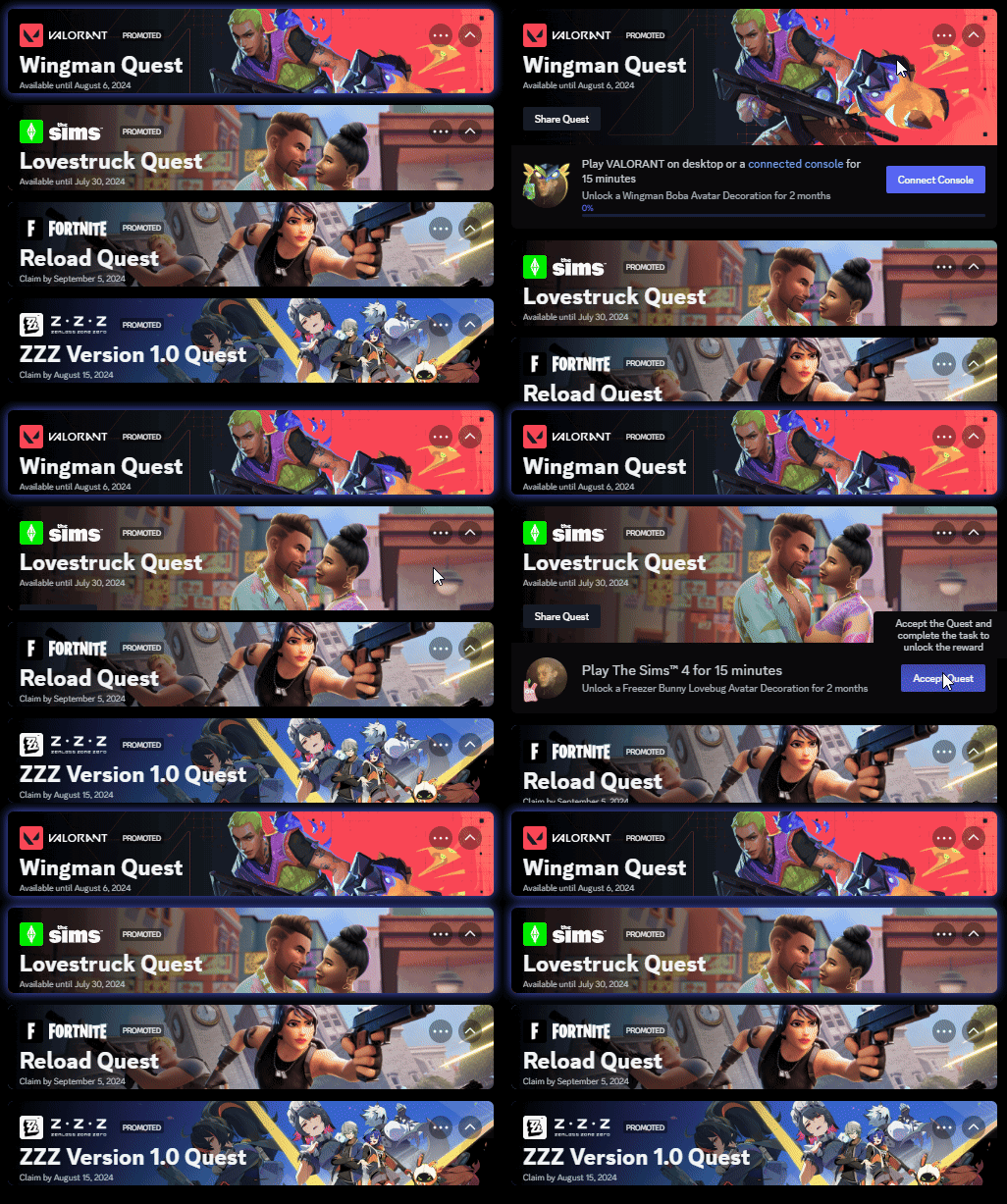
and yes when the progress hits 100% it'll light up green.
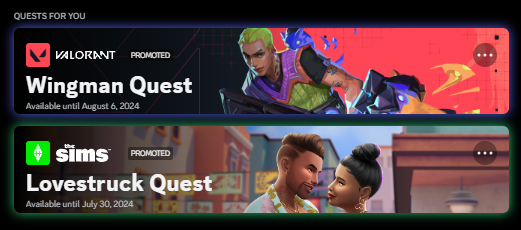 viscid tiger
i saw an experiment which will basically ruin this entire snippet by moving it to the discovery tab
iron smelt
viscid tiger
i saw an experiment which will basically ruin this entire snippet by moving it t...
This?
 iron smelt
viscid tiger
lets just hope they don't go forward with it honestly
iron smelt
viscid tiger
lets just hope they don't go forward with it honestly
it honestly look kinda of cool plz the quests in this new menu are little squares so doing what you are doing but in that menu is prolly very easy
pure cairn
/* Icons on Hover */
[class^=flex_]:has([role=switch])
  { opacity: 0%;
    transition: 0.2s ease-in-out;
    display: grid;
    grid-template-columns: 1fr 1fr; }
[class^=flex_]:has([role=switch]):hover
  { opacity: 100%; }
[aria-label="User area"] .panel_bf1a22.activityPanel_a4d4d9:has([aria-label^="Stream"])
  { z-index: 1; }
.panels_a4d4d9 button[aria-label^="Stream"]
  { display: none; }
.panels_a4d4d9:hover button[aria-label^="Stream"]
  { display: initial; }```
bruh
echo frost
echo frost
how can I invert the caret-color?
Does anyone know if there's a way to do this?
i am trying to fix a bug in dark reader, so maybe if there isn't one normally, there is one in dark reader
pure cairn
Maybe a calc instead of currentColor
pure cairn
I don't remember if it can be used with currentColor as well
relative color, definitely
echo frost
I don't seem to be able to use it with currentColor
https://developer.mozilla.org/en-US/docs/Web/CSS/CSS_colors/Relative_colors
MDN Web Docs
The CSS colors module defines relative color syntax, which allows a CSS value to be defined relative to another color. This is a powerful feature that enables easy creation of complements to existing colors — such as lighter, darker, saturated, semi-transparent, or inverted variants — enabling more effective color palette creation.
echo frost
ok so filter: invert() works on caret-color if it's inverted in the parent element of where caret-color is defined, but I can't really do that because then it messes up stuff
echo frost
echo frost
i am trying to fix a bug in dark reader, so maybe if there isn't one normally, t...
btw, the bug isn't in discord, it's just easier for me to test css in discord with quickcss
 mortal mantle
brittle juniper
i think this is an improvement
mortal mantle
brittle juniper
i think this is an improvement
you're so real for that
echo frost
brittle juniper
i think this is an improvement
that's very cool
echo frost
Is there a less scuffed way of doing this where I don't have to repeat the :not(:hover, :focus-within)?
[class^=sidebar_]:has([class*=avatarWrapper_]) {
  transition: width .5s cubic-bezier(0.165, 0.84, 0.44, 1);

  [class*=guilds_]:not(:hover, :focus-within)~
  [class^=base_] &:not(:hover, :focus-within) {
    width: 0;
  }
}```
[#1263683765566177301 message](/guild/1015060230222131221/thread/1263683765566177301/p/1263697870029328465/#msg-1266695645289517107)could you share the css for this please?
clear siren
echo frost
Is there a less scuffed way of doing this where I don't have to repeat the `:not...
I dunno if putting guilds and base into an :is() makes it less scuffed but then you don't repeat that part
no wait I misread that
brain processed that "~" as an "," nvm
yeah I dunno looks pretty optimal tbh
brittle juniper
mortal mantle
you're so real for that
wawa
brittle juniper
solid ore
could you share the css for this please?
im outside ill dm u soon
its p scuffed but ill try to add comments
clear siren
tom is css pro he don't need comments
brittle juniper
hii nvhhr
clear siren
hi :3
solid ore
clear siren
tom is css pro he don't need comments
lmao suree
everything ik abt css is from this channel tbh
clear siren
only half joking tbh
mortal mantle
brittle juniper
wawa
<3
solid ore

very simple fix but if anyone wants it:
[class^=userPanelOuter_] > [class^=userPanelInner_] {
    border-bottom-left-radius: 0;
    border-bottom-right-radius: 0;
}
what does that fix?
solid ore
if u dm someone and have the user panel option on
echo frost
is it only on nitro profiles?
solid ore
yeah
echo frost
oh wtf
 shut dragon
I designed a theme with the clearvision out of the box editor, made it nice and pink, and for me it looks like in the first picture. but when I sent it to someone else, it looked like in the second picture, when it's the same exact theme but hovering a message makes it black like that, and I don't know why...
I uploaded the theme too

 echo frost
shut dragon
I designed a theme with the clearvision out of the box editor, made it nice and ...
echo frost
shut dragon
I designed a theme with the clearvision out of the box editor, made it nice and ...
What are those images of?
it seems to work for me?
 shut dragon
echo frost
it seems to work for me?
shut dragon
echo frost
it seems to work for me?
that's what i mean, it works for me too but on her pc it doesn't
shut dragon
echo frost
yeah but what is the image?>
the second image is of her hovering the text, hold on
like this

and it's not dark grey like that for me
shut dragon
it's the only theme, we just reinstalled vencord
i helped her choose the colours on the BD editor of clearvision, she downloaded it, enabled it and it did that hover thing
and idk why
 neat thunder
shut dragon
like this
neat thunder
shut dragon
like this
i just had that issue and it was from using nitro themes instead of the default dark theme
 grand surge
When I change the Discord language setting from English to Japanese, the content of “aria-label” is set to Japanese.
Do not use “aria-label” in attribute selector or
Is there any solution other than specifying both English and Japanese “aria-label”?

 plain kelp
Yes, aria-label is localized
Either include the labels for all languages you care about, or figure out a different selector that doesn't use aria-label
grand surge
plain kelp
Either include the labels for all languages you care about, or figure out a diff...
Thank you.
shut dragon
neat thunder
i just had that issue and it was from using nitro themes instead of the default ...
oh lol true
thats entirely possible, ill try it
bleak gust
solid ore
<:husk:1026532993923293184>
I CANT UNSEE IT NOW
pure cairn
[class^=userPopoutInner_] [class^=wrapper_]
  { & > div:first-child, /* reviews */
    & > div:nth-child(2), /* mod view */
    & > div > button[aria-label*="Friend"] /* friend/add friend */
{ display: none; } }```how can I make it so that, when hovering this button, the other buttons appear again?

I tried with reverse nesting but failed miserably
clear siren
pure cairn
how can I make it so that, when hovering this button, the other buttons appear a...
[class^=userPopoutInner_] [class^=wrapper_]:not(:hover) div:not(:last-child) { display: none; }
pure cairn
 clear siren
this breaks if you view your own profile though (actually not really because there is only one button probably)
pure cairn
clear siren
this breaks if you view your own profile though (actually not really because the...
I'll add another :not with my discord ID
clear siren
well it actually works perfect in your own profile too the buttons are just not there so it was different
I only have reviews button anyway dunno if other buttons exist for self
 fossil hatch
clear siren
`[class^=userPopoutInner_] [class^=wrapper_]:not(:hover) div:not(:last-child) { ...
fossil hatch
clear siren
`[class^=userPopoutInner_] [class^=wrapper_]:not(:hover) div:not(:last-child) { ...
First time I've ever seen anyone use a :not(:hover)
plain kelp
It's not uncommon at all
pure cairn
Yeah I had already seen it being used a few times already
I just
Didn't think of it, and even the :not(:last-child) bruh
viscid tiger
i recently started using
 &:not(:hover) {
}```i think it just makes it cleaner instead of having two seperate things for one selector.
copper flame
what the hell is this glob on the new ui

 copper flame
 echo frost
this could maybe support nesting with this?
haven't really read through the repo yet, but it seems to be what is needed for nesting
also the script could probably be a bit remade (maybe even into a plugin for ease of use?), but:
https://github.com/csstools/postcss-nesting
Oh wait this exists which does exactly what's needed for this i believe
and it's not 9 years since the last update. it was last updated like 5 days ago https://github.com/csstools/postcss-resolve-nested-selector
GitHub
Resolve a nested selector in a PostCSS AST. Contribute to csstools/postcss-resolve-nested-selector development by creating an account on GitHub.
iron smelt
I'm a upid how do you see two different var for color*(can you even do it)*
 echo frost
doing it like that is like a "backup" i think
(if --white-user-color doesn't exist, it'll use --white-900)
what exactly are you trying to do? I don't quite understand your question
iron smelt
echo frost
doing it like that is like a "backup" i think
(if `--white-user-color` doesn't e...
im trying to color his body white if you use dark mode
 echo frost
oh
that should work i think?
as long as the selectors are correct
try just using like #ffffff instead of var to test
iron smelt
yeah if hard code the white his body changed but I'm trying to use variables and not hard code colors
 echo frost
oh you have to do var(--foo, var(--bar))
https://developer.mozilla.org/en-US/docs/Web/CSS/var#syntax
MDN Web Docs
The var() CSS function can be used to insert the value of a custom property (sometimes called a "CSS variable") instead of any part of a value of another property.
so var(--white-user-color, var(--white-900))
is --white-user-color a real variable though?
iron smelt
echo frost
is --white-user-color a real variable though?
i dont even know i cant find anymore
keep in mind i use https://docs.betterdiscord.app/discord/variables to find most of my variables
echo frost
 iron smelt
echo frost
iron smelt
echo frost
yeah I'm trying to this #1262813239805349888 message , but how I would do it and earlier I could have sworn it was there
echo frost
just use --white-900 instead of white-user-color
iron smelt
yeah that's what ill prolly do, actually will prolly be --white-100 cuz --white-900 is too dark
grand surge
Is there a way to do this?

I tried looking for the icon in DevTools Sources, but could not find it.
echo frost
grand surge
Is there a way to do this?
you mean put the mute and deafen icons by the server icon?
grand surge
echo frost
you mean put the mute and deafen icons by the server icon?
The original icon is erased and the same thing is displayed as the mute icon and so on.
For priorities, see
Mute < Server Mute < Speaker Mute < Server Speaker Mute
echo frost
um, I'm not sure what you mean
You want this icon to indicate if you're muted/deafened etc.?

i suppose that would be possible, but a bit janky
echo frost
so like this basically
(haven't made css for it yet, just edited the html)
 grand surge
echo frost
so like this basically
(haven't made css for it yet, just edited the html)
grand surge
echo frost
so like this basically
(haven't made css for it yet, just edited the html)
Is there a URL link to the icon image?
echo frost
You don't use a url for this.
they're svgs
the best way i think would be to change the path
quick test thing that just always shows server deafened
svg.icon_df8943 {
  >path[d^="M12"] {
    fill-rule: evenodd;
    d: path("M21.76.83a5.02 5.02 0 0 1 .78 7.7 5 5 0 0 1-7.07 0 5.02 5.02 0 0 1 0-7.07 5 5 0 0 1 6.29-.63Zm-4.88 2.05a3 3 0 0 1 3.41-.59l-4 4a3 3 0 0 1 .59-3.41Zm4.83.83-4 4a3 3 0 0 0 4-4Z");
  }
  >path[d^="M15"] {
    d: path("M12.38 1c.38.02.58.45.4.78-.15.3-.3.62-.4.95A.4.4 0 0 1 12 3a9 9 0 0 0-8.95 10h1.87a5 5 0 0 1 4.1 2.13l1.37 1.97a3.1 3.1 0 0 1-.17 3.78 2.85 2.85 0 0 1-3.55.74 11 11 0 0 1 5.71-20.61ZM22.22 11.22c.34-.18.76.02.77.4L23 12a11 11 0 0 1-5.67 9.62c-1.27.71-2.73.23-3.55-.74a3.1 3.1 0 0 1-.17-3.78l1.38-1.97a5 5 0 0 1 4.1-2.13h1.86c.03-.33.05-.66.05-1a.4.4 0 0 1 .27-.38c.33-.1.65-.25.95-.4Z");
  }
}```i forgot the path() so it wasn't working, and that's why i edited the html for this image
grand surge
echo frost
quick test thing that just always shows server deafened
```css
svg.icon_df8943 ...
Thank you.
I think I can manage.
echo frost
I think the best way would be to define variables for the paths and possibly background color in .container_a4d4d9 testing for these icons with :has()
.container_a4d4d9 {
  --path-thingy: path("M21.76.83a5.02 5.02 0 0 1 .78 7.7 5 5 0 0 1-7.07 0 5.02 5.02 0 0 1 0-7.07 5 5 0 0 1 6.29-.63Zm-4.88 2.05a3 3 0 0 1 3.41-.59l-4 4a3 3 0 0 1 .59-3.41Zm4.83.83-4 4a3 3 0 0 0 4-4Z");
}

svg.icon_df8943 {
  >path[d^="M12"] {
    fill-rule: evenodd;
    d: var(--path-thingy);
  }
  >path[d^="M15"] {
    d: path("M12.38 1c.38.02.58.45.4.78-.15.3-.3.62-.4.95A.4.4 0 0 1 12 3a9 9 0 0 0-8.95 10h1.87a5 5 0 0 1 4.1 2.13l1.37 1.97a3.1 3.1 0 0 1-.17 3.78 2.85 2.85 0 0 1-3.55.74 11 11 0 0 1 5.71-20.61ZM22.22 11.22c.34-.18.76.02.77.4L23 12a11 11 0 0 1-5.67 9.62c-1.27.71-2.73.23-3.55-.74a3.1 3.1 0 0 1-.17-3.78l1.38-1.97a5 5 0 0 1 4.1-2.13h1.86c.03-.33.05-.66.05-1a.4.4 0 0 1 .27-.38c.33-.1.65-.25.95-.4Z");
  }
}```
might work on it later, but need to do some stuff first
supple lodge
echo frost
so like this basically
(haven't made css for it yet, just edited the html)
thinking about it.. idk why it's not an integrated feature already..
echo frost
echo frost
might work on it later, but need to do some stuff first
ok i made it and it works but it's very bad and i'm not sure how to improve it much
main problems:
- lots of repetition in selectors
- the accessory code is repeated
- having to set the default path in the code
- scuffed specificity stuff to get the right variable to be assigned
also maybe it should have a red background
wouldn't be that hard to implement, but i can only really think of using a variable for the color which is pretty scuffed
well ig i could use fallback instead of setting the variables which is slightly better i think, but still not great
slightly better ig (also has red background color now)
(btw, it seems to shift when changing the color, is that because of like the red and green leds in the pixel being ever so slightly different position in the pixel?)
maybe, because it doesn't show in recording
but also, it shifts more vertically than horizontally i think
and images online show them on the same vertical level
brittle juniper
solid ore
could you share the css for this please?
sorryyyy i was a bit busy ill send it now
valid heron
brittle juniper
im outside ill dm u soon
its p scuffed but ill try to add comments
can you dm it to me to? it looks really sick
grand surge
echo frost
slightly better ig (also has red background color now)
Thank you very much.
It works very well.
echo frost
valid heron
can you dm it to me to? it looks really sick
why not just akira share it in here
echo frost
echo frost
slightly better ig (also has red background color now)
does anyone know of a way I can improve this to not suck quite as much?
solid ore
brittle juniper
sorryyyy i was a bit busy ill send it now

my version is pretty scuffed tbh
theres a gap between the grabber and the barFill when its like less than 50% progress
and removing the "by" part is fine but if theres multiple artists then the comma also dissapears

maybe i'll try and fix it tmrw
worldly moss
solid ore
and removing the "by" part is fine but if theres multiple artists then the comma...
i know this is not done, but for long song names it also breaks (somewhat)
 echo frost
I think that should be pretty easy to fix
like a max-width and text-overflow: ellipsis should work I think?
prob do wha nvhhr said instead
solid ore
thanks, i'll try that tmrw, im going to bed now
clear siren
I'd consider wrapping the text instead
pure cairn
I'd make it slide, just like Spotify does
 kind mortar
Anyone know how I can change the main Discord color to a specified hex color code? Pretty sure I found a snippet in this server but I can't find it now
Oh cool thanks!
echo frost
that needs the clienttheme plugin enabled btw
 kind mortar
Ah yeah
supple lodge
solid ore
<https://github.com/tom22k/discord-css/blob/main/Themes/AndroidPlayer.css>
Anyone know how I could change the repeat/random button color to another color while active? (cause atm it just adds a dot under it)
echo frost
supple lodge
Anyone know how I could change the repeat/random button color to another color w...
it does by default
so remove the part of that css that changes it to a dot under it
this is where it adds the . (in shuffle button)

and where it sets the color is right above that on line 140
echo frost
solid ore
<https://github.com/tom22k/discord-css/blob/main/Themes/AndroidPlayer.css>
btw, idk if this is in the android player you're basing this off of, but you should probably add some hover things to the buttons
supple lodge
echo frost
and where it sets the color is right above that on line 140
but this is the global color, it will change it even when not unabled
echo frost
well ig you could override it on hover with !important
oh wait not hover, but when button is enabled
supple lodge
i'm really lost with those &[...] never touched to anything like that x)
echo frost
supple lodge
i'm really lost with those &[...] never touched to anything like that x)
they're very simple actually
that snippet kind of nests too much which makes it a bit hard to read, but & just means the parent selector
.foo {
  /* do something to foo */
  &.bar {
    /* do something to foo bar*/
  }
}
/*
is the same as:
*/
.foo {
  /* do something to foo */
}
.foo.bar {
  /* do something to foo bar*/
}
https://developer.mozilla.org/en-US/docs/Web/CSS/Nesting_selector
MDN Web Docs
The CSS & nesting selector explicitly states the relationship between parent and child rules when using CSS nesting. It makes the nested child rule selectors relative to the parent element. Without the & nesting selector, the child rule selector selects child elements. The child rule selectors have the same specificity weight as if they were wit...
supple lodge
is that it? but it change the color even when not unabled

also @echo frost , how do I make it so it color the icon instead of the circle around it?
echo frost
use color instead of background
copper flame
horror i found the one thing that isnt var based in the new ui

guh a lot of forum things arent var based
echo frost
oh yeah i saw a gradient like that recently
probably same place
or maybe not
i thought i remember it being more noticable in my theme which is only slightly different color than normal
echo frost
oh wait new ui?
solid ore
echo frost
btw, idk if this is in the android player you're basing this off of, but you sho...
i mean its a mobile player so hover isnt a thing, but ig it would make sense to add smthng
pure cairn
supple lodge
Anyone know how I could change the repeat/random button color to another color w...
[class*=vc-spotify-shuffle-on] > svg,
[class*=vc-spotify-repeat-context] > svg,
[class*=vc-spotify-repeat-track] > svg
  { fill: var(--main-color) }```
From my old snippet, change the color to what you wantfixed most things ppl mentioned

only issues that's still there is the gap between the progess bar and the grabber at the beginning


 elder pagoda
Not sure if anyone can help me, I might be doing this completely wrong, I'm trying to change just the font on my client to a font I have installed on my computer, And failing hard. Got pointed to this Discord server and then more specifically pointed to this channel
clear siren
that's easy
elder pagoda
I thought it was, but apon actually trying it, it doesn't work.
clear siren
:root
 { --font-primary: "Roboto Mono"; /* main font */
   --font-display: "Roboto Mono"; /* channellist categories and some other places */
   --font-headline: "Roboto Mono"; /* headlines, big texts like like in the nitro settings */
   --font-code: "Roboto Mono"; } /* code blocks */
just put that in your quickcss
elder pagoda
Fantastic, thank you!
clear siren
it should work as-is unless you have a weird theme
elder pagoda
Yeah it works, thanks!
pure cairn
 fast cipher
solid ore
fixed most things ppl mentioned
fast cipher
solid ore
fixed most things ppl mentioned
could you send this one in #🎨-css-snippets ?
supple lodge
solid ore
fixed most things ppl mentioned
the progress bar is still not centered 😭
top: 11px; seems to be better I think
solid ore
fast cipher
could you send this one in <#1028106818368589824> ?
i will when the gap between the grabber and the barFill isnt there anymore, if you want u can try and fix it: https://github.com/tom22k/discord-css/blob/main/Themes/AndroidPlayer.css
GitHub
Contribute to tom22k/discord-css development by creating an account on GitHub.
solid ore
supple lodge
the progress bar is still not centered 😭
top: 11px; seems to be better I think
oh vertically? true i didnt notice that somehow
supple lodge
clear siren
I'd consider reducing or removing the borders
true, but the channel background is the same as the main background, so they will need to change it, maybe the same color as the bottom left panel
 hazy tinsel
moving this button to the top of the list

hasnt been done yet, can't figure it out because i have no clue on how to grab the uh ID or whatever of it
like the identification class or something im not sure what term to use
supple lodge
this? (changed order for + server to -1 and the DM one to -2, but only seems to work with horizontal server list addon)
 hazy tinsel
supple lodge
this? (changed order for + server to -1 and the DM one to -2, but only seems to ...
hazy tinsel
supple lodge
this? (changed order for + server to -1 and the DM one to -2, but only seems to ...
uhhhh
i just wanna move it to the top of the list like where the DMS home button is
idk what that is that's a whole different theme
supple lodge
hazy tinsel
idk what that is that's a whole different theme
its just catpuccin with horizontal server list
pure cairn
hazy tinsel
hasnt been done yet, can't figure it out because i have no clue on how to grab t...
ctrl + shift + i to open devtools, on the panel that just opened, click the top left button that has an arrow
Select the element you want to move
To prevent crashes and logouts, you might have to turn the nodevtoolswarning plugin on
clear siren
hazy tinsel
moving this button to the top of the list
assuming you want to move it just below the DM button?
[data-list-id="guildsnav"] > [class^=scroller_] { display:flex; flex-direction: column; }
[class^=tutorialContainer_] { order: -1; }
Does anyone have any clue why this happens with the resizeHandle?


First image is in forums, the second is with a voice chat text channel open. Both seem to use the same resizeHandle but the voice chat channel one seems to have some other background getting applied that I can't seem to figure out
.resizeHandle_d1c246 /* pretend to be a margin */ {
    width: var(--spacing);
    background: transparent;
}
this is what I'm using to do this, not sure how to get both of them to look the same though
clear siren
you mean that it's a bit darker than the other one
thick hill
Yeah
clear siren
I assume it's not the resizehandler but the background of some element possibly much higher in the tree that's showing through
discord is layers on top of layers on top of layers
and somewhere in that stack there is a background that is darker than desired
vestal field
thick hill
Does anyone have any clue why this happens with the resizeHandle?
did i fuck up somewhere
thick hill
I'm not entirely sure, so far, from what I can tell, somewhere midnight's bg-3 overwrites that part of the handle in the voice chat text channel
if I uncheck bg-3 in the :root section (being loaded from midnight) it looks as I expect it, but that obviously breaks other parts of the theme
vestal field
uhhh github issue report if its a problem and ill look into it when i get back
thick hill
Ah, I don't think it's actually Midnight's issue. I think it's just Discord. Disabled my tweaked version of Midnight, took that above snippet and threw it in QuickCSS, and the issue persists with any of the nitro themes between forums and voice chat
hazy tinsel
clear siren
assuming you want to move it just below the DM button?
```CSS
[data-list-id="gui...
thank you 
thick hill
thick hill
```
.resizeHandle_d1c246 /* pretend to be a margin */ {
width: var(--spacing...
Switched to this:
.resizeHandle_d1c246 /* pretend to be a margin */ {
    background: var(--bg-overlay-4), var(--bg-3);
}
much better result between forums and voice chats, now I just need to hunt down the corners
 solid ore
supple lodge
the progress bar is still not centered 😭
top: 11px; seems to be better I think
solid ore
supple lodge
the progress bar is still not centered 😭
top: 11px; seems to be better I think
thanks, fixed
 fossil hatch
I just enabled the scss duplicate properties warning setting lmfao
 copper flame
what the fuck did discord do to the visual refresh
massive padding to the server groups

massive padding to the profile
server list is tiny
massive padding to the dms list
it was perfect the first time with like tiny issues wtf why did they do this
iron smelt
copper flame
massive padding to the server groups
rip vendetta 🪦
 worldly locust
ill work on fixing it
clear siren
yeah I just restarted discord because people in support saying message action buttons are gone and yeah a lot of other stuff also got screwed
worldly locust
hazy tinsel
im trying to disable the listen along, and play in spotfy but they have special IDs that link to the user data basically dynamic

i can't figure it out but i just don't want it when right clicking someone is there a way i can disable it in css?
is there a way also to move copy userid to add friend?
tired of constantly going below it disrupts my flow i guess idk
worldly locust
hazy tinsel
im trying to disable the listen along, and play in spotfy but they have special ...
[id^=user-context-spotify-sync] {
  display: none
}
matches if id starts with user-context-spotify-sync
hazy tinsel
worldly locust
```css
[id^=user-context-spotify-sync] {
display: none
}
```
matches if id sta...
thank you
hazy tinsel
worldly locust
```css
[id^=user-context-spotify-sync] {
display: none
}
```
matches if id sta...
i never knew that was for matching good to know lol
worldly locust
👍
hazy tinsel
is there a way i can move copy user id under add friend or something instead of below?

i have no clue how.
echo frost
hazy tinsel
is there a way i can move copy user id under add friend or something instead of ...
if you change the parent to grid or flex, you can use order on the actions
When I change the parent to grid/flex the groups get a larger height which messes it up, so you'll need to figure out how to remove that
hazy tinsel
echo frost
if you change the parent to grid or flex, you can use `order` on the actions
Whe...
yeah thanks for this it helped in some way still can't figure it out though its kinda difficult cus of the other buttons it just keeps overlapping or its either spaced out too much
not sure whether im doing it correctly

💀
echo frost
what's your css?
hazy tinsel
[id^="user-context-devmode-copy-id-"],
[id^="channel-context-devmode-copy-id-"] {
    position: relative;
    margin-top: -5px;
    top: -110px;
    z-index: 1;
}
lol
hodl on
i tried different stuff the order thing didnt work out
[class="scroller_d90b3d thin_c49869 scrollerBase_c49869"] {
    display:grid;
    flex-direction: grid;
}```
would this be the parent?yeah
for classes use
.scroller_d90b3d.thin_c49869.scrollerBase_c49869 btw
echo frost
best i can come up with is this, but it still messes it up a bit and is really scuffed
.scroller_d90b3d {
  display: flex;
  flex-direction: column;
  >[role=group] {
    margin-bottom: calc(-3.99px/2);
    margin-top: calc(-3.99px/2);
  }
}```what are you trying to do
you need to use order: [number] on copy id (and apply display: flex/grid to the scroller so order works)
and you'll also have to add order to the other children too
pure cairn
huh
can you not nest 2 things like this together?

oh wait
yeah I may be dumb

ok, now I'm stuck for real
is it even possible to further nest it?
/* hide specific users' status */
[src*="325830018183987213"] { /* <- copy the [src*="ID"] to add more people */
    [class^=avatarStack_] > & {
        [class^=member_] [class^=memberInner_]:has(&) [class^=content_] [class^=subText_] > [class^=activity_], /* memberlist */
        [class^=privateChannels_] > [class^=scroller_] [class^=content_] > [class^=channel_]:has(&) [class^=subText_] { /* DMs list */
            display: none;
        }
        [class^=userPopoutInner_], /* popout */
        [class^=userPanelInner_] /* DMs panel */ {
            header:has(&) {
                & [class^=invisibleContainer_],
                & > div:not([class]) > [class^=visibleContainer] {
                    display: none;
                }
            }
        }
    }
}```nesting hell
pure cairn
well, considering that I started from this
/* hide specific users' statuses */
[src*="325830018183987213"] { /* <- copy the [src*="ID"] to add more people */
  [class^=member_] [class^=memberInner_]:has([class^=avatarStack_] > &) [class^=content_] [class^=subText_] > [class^=activity_], /* memberlist */
  [class^=userPopoutInner_] header:has([class^=avatarStack_] > &) [class^=invisibleContainer_], /* popout */
  [class^=userPopoutInner_] header:has([class^=avatarStack_] > &) > div:not([class]) > [class^=visibleContainer], /* popout (2) */
  [class^=privateChannels_] > [class^=scroller_] [class^=content_] > [class^=channel_]:has([class^=avatarStack_] > &) [class^=subText_], /* DMs list */
  [class^=userPanelInner_] header:has([class^=avatarStack_] > &) [class^=invisibleContainer_], /* DMs panel */
  [class^=userPanelInner_] header:has([class^=avatarStack_] > &) > div:not([class]) > [class^=visibleContainer] { /* DMs panel (2) */
    display: none;
  }
}```
pure cairn
pure cairn
ok, now I'm stuck for real
is it even possible to further nest it?
```css
/* hid...
nvm this doesn't even work lmao
aight, fixed it without too much nesting
clear siren
it's nests all the way down
vestal field
nesting becomes a readability nightmare at some point
pure cairn
pure cairn
yeah I may be dumb
Looking back at this, it's not even the correct way to nest it

Anyway, would this be good enough to be posted on the snippet channel?
/* hide specific users' status */
[src*="ID"] /* <- create a copy of [src*="ID"] to add more people, use commas to separate them */
  { [class^=avatarStack_] > &
    { [class^=member_] [class^=memberInner_]:has(&) [class^=content_] [class^=subText_] > [class^=activity_], /* memberlist */
      [class^=privateChannels_] > [class^=scroller_] [class^=content_] > [class^=channel_]:has(&) [class^=subText_] /* DMs list */
        { display: none; }
      [class^=userPopoutInner_] header:has(&), /* popout */
      [class^=userPanelInner_] header:has(&) /* DMs panel */
        { & [class^=invisibleContainer_],
          & > div:not([class]) > [class^=visibleContainer]
            { display: none; } } } }
what is that horror formatting
pure cairn
/* hide specific users' status */
[src*="ID"] { /* <- create a copy of [src*="ID"] to add more people, use commas to separate them */
    [class^=avatarStack_] > & {
        [class^=member_] [class^=memberInner_]:has(&) [class^=content_] [class^=subText_] > [class^=activity_], /* memberlist */
        [class^=privateChannels_] > [class^=scroller_] [class^=content_] > [class^=channel_]:has(&) [class^=subText_] { /* DMs list */
            display: none;
        }
        [class^=userPopoutInner_] header:has(&), /* popout */
        [class^=userPanelInner_] header:has(&) { /* DMs panel */
            & [class^=invisibleContainer_],
            & > div:not([class]) > [class^=visibleContainer] {
                display: none;
            }
        }
    }
}```better now?
clear siren
lost plume
what is that horror formatting
pretty close to the formatting I always use :D
lost plume
meanwhile my formatting ```css
#kon_3c_b:not(:has(> div:nth-of-type(2) > div:nth-of-type(2) > b)) > div:nth-of-type(1) { /* only set color for UM, leave the pretty blue for WAM */
background-color: #ddb379 !important;
}
/* meteogram_list.php */
body:has(#meteorogram) {
background-image: url(/tlo_gora.jpg);
> div {
    display: none;
}

> div:nth-of-type(3) {
    display: unset;
    right: 50%;
    left: unset !important;
}

> div:nth-of-type(4) {
    display: unset;
    left: 50% !important;
}
}
idk I'm probably just weird
clear siren
selector
{ property: value;
property: value; }
it just makes so much sense and is so easy to read
been doing css this way since like 2009 or so when I started learning it and I can never switch to the 'standard' way
plain kelp
Does that formatting have any benefits or is it just a fucked up sense of aesthetics
clear siren
preference really, spec doesn't say anything how whitespace should be
I just personally find it better that way
plain kelp
It's okay to have shit taste
clear siren

lost plume
pure cairn
clear siren
selector
{ property: value;
property: value; }
it just makes so much sense ...
At least it's not just me
teal cave
I recently switched from spaces to tabs
echo frost
why
vestal field
echo frost
why
vencord quickcss editor defaults to tabs
echo frost
it's spaces for me
vestal field
whatttt
echo frost
and just press f1 to bring up the search thingy where you can change that
hazy tinsel

how do i disable capture devices? in this menu
i've tried almost everything and it doesn't work there's no specific class that's linked to it
<div class="text-sm/medium_dc00ef" data-text-variant="text-sm/medium">Capture Devices</div>
echo frost
hazy tinsel
how do i disable capture devices? in this menu
You can do it like this
form .tabContainer_a18ec1 .tabItem_a18ec1:nth-child(3){
  display: none;
}```the form .tabContainer_a18ec1 isn't necessary for it to work, but I think without it, it could maybe apply to other things
not positive though
hazy tinsel
echo frost
You can do it like this
```css
form .tabContainer_a18ec1 .tabItem_a18ec1:nth-chi...
thank you ill use this as an example in the future when im confused
echo frost
here's documentation of nth-child btw
https://developer.mozilla.org/en-US/docs/Web/CSS/:nth-child
MDN Web Docs
The :nth-child() CSS pseudo-class matches elements based on the indexes of the elements in the child list of their parents. In other words, the :nth-child() selector selects child elements according to their position among all the sibling elements within a parent element.
grand surge
Do you see why this wouldn't work?
[class^="membersWrap_"] > [class^="members_"] > [class^="content_"] > [class^="member_"] > [class^="memberInner_"] {
  & > [class^="avatar_"] > [class^="wrapper_"] > [class^="mask_"] > [class^="pointerEvents_"] {
    position: relative !important;
    left: 32px !important;
    top: -4px !important;
    /* opacity: 0.1; */
  }
}
 solid ore
grand surge
Do you see why this wouldn't work?
```css
[class^="membersWrap_"] > [class^="mem...
solid ore
grand surge
Do you see why this wouldn't work?
```css
[class^="membersWrap_"] > [class^="mem...
try opacity: 0.1 !important;
oh wait nvm its commented
solid ore
grand surge
Do you see why this wouldn't work?
```css
[class^="membersWrap_"] > [class^="mem...
what r u trying to do exactly
grand surge
solid ore
what r u trying to do exactly

Would it be easier to add "::before" before the name?
solid ore
probably
grand surge
solid ore
probably
thank you
solid ore
yeah it def would, theres a lot more things ud have to move
pure cairn
grand surge
Does it also turn into the rectangle with small white dots when someone's typing?
grand surge
pure cairn
Does it also turn into the rectangle with small white dots when someone's typing...
yes
 grand surge
Can anyone identify the font of this lower right emoji?
I want to use "🤓" pictogram, but it is not supported.
https://discord.com/assets/55e1dff9b6a3ad363e9f.png

 plain kelp
I think it isn't a font but just those exact images
clear siren
grand surge
Can anyone identify the font of this lower right emoji?
I want to use "🤓" picto...
yeah that's just that spritesheet with background-position that gets randomized on hover
or actually, the colored version is a background-image but the grayscale is a mask because that makes sense
in any case you can replace the emoji button with whatever you want and I know there's a snippet for it somewhere already
bleak gust
clear siren
https://discord.com/channels/1015060230222131221/1224558120735346708
i bet this exploded due to hardcoded classes
clear siren
there is fixed ones in the thread
 harsh matrix
i have blur in my theme and the edges are not blurred anymore, the code worked last week or so, how can i fix it? i'm not a master of css so i don't really know what to do
here's the code, i took a snippet on here a long time ago and modified it a bit,
/* settings dialog */
.layer_d4b6c5 + .layer_d4b6c5
 { border-radius: 22px !important;
   border: 1px solid var(--border-strong);
   box-shadow: 5px 5px 25px black !important;
   width: 100% !important;
   max-width: 80%;
   height: 90% !important;
   margin: auto !important;
   padding: 0 !important;
   opacity: 1 !important;
   transform: unset !important;
 }
.baseLayer_d4b6c5[aria-hidden="true"]::after {
  position: fixed;
  width: 100%;
  height: 100%;
  top: 0;
  left: 0;
  background: #00000068;
  backdrop-filter: blur(20px) !important;
  content: '';
  z-index: 100;
}
.layer_d4b6c5[aria-hidden="false"] + .layer_d4b6c5[aria-hidden="false"] {
  display: none
}
#app-mount .baseLayer_d4b6c5 /*keep view under settings*/
 { opacity: 1 !important;

   transform: scale(1) !important;
 }
.baseLayer_d4b6c5[aria-hidden="true"] {
   pointer-events: none;
}
.layers_d4b6c5>.layer_d4b6c5.animating_d4b6c5 {
  will-change: unset !important;
}
also if this is not the right channel feel free to redirect me
 clear siren
blur works as expected here

something else in your css might be doing something
only thing css-wise I can think of is that .baseLayer_d4b6c5 has some kind of mask but that would be strange to have there
harsh matrix
even with only the code, it persits, and affects anything that's blurred, could it be one of my plugins?
harsh matrix
here?
clear siren
yeah
harsh matrix
oki done
clear siren
yeah looks good to me was just curious
harsh matrix
i looked and i have this problem on my mac too
clear siren
do you have hardware acceleration on or off
harsh matrix
it's off on my mac
that fixed it on my mac!
it is on in vesktop tho and it's not fixed over here
clear siren
could be a linux thing, hard to say
 smoky fog
clear siren
blur works as expected here
smoky fog
clear siren
blur works as expected here
font name?
clear siren
roboto mono
grand surge
clear siren
yeah that's just that spritesheet with background-position that gets randomized ...
thank you
 compact rapids
Its theme background only limited with gif ?
or can I use mp4 for it?
I just used clearvision css code but I can't change it
clear siren
can't use video
compact rapids
:f
clear siren
I've tried adding video with pseudoelements too, no dice
you'd need some js snippet or plugin to add a video element
compact rapids
I just want to don't lose quaility with it
I just wanna to do this gif but when I convert its being 60mb and If I upload this gif to imgur
that converting mp4 again
and I can't use
clear siren
find another host that can do a 60MB gif I guess
local files also won't work unfortunately (unless you make a webserver locally that serves that file)
compact rapids
I can't find
I trying to do this since 2 hours
and I still have not found
cuz of I came here for ask this
:d
plain kelp
Base64 it :p
grand surge
Wouldn't this work?
 plain kelp
No, css can't read local files
grand surge
It works well in my environment.
pure cairn
plain kelp
No, css can't read local files
Huh, really?
grand surge
As for file formats, what about APNG?
plain kelp
pure cairn
Huh, really?
Imagine if a random website could read files from your filesystem without asking
pure cairn
That's a good point
clear siren
the css file is already being loaded from local file
clear siren
grand surge
Wouldn't this work?
iirc this has worked for some people in the past
grand surge
.chatContent_a7d72e {
  background-image: url(test.png);
}

I have a feeling that converting to APNG would be fine.
hazy tinsel
That’s actually sick
Does that have a huge impact on the performance though? Like rendering chats and stuff
clear siren
shouldn't have a big impact assuming hw accel is on
everything is rendered with composited layers
for best experience I would put the bg image into body or something
covert canopy
I've been thinking about things which would use GPU. After a thorough review I think I can conclude that I really shouldn't give a fuck and add whatever it can handle till I reach 100% GPU usage
clear siren
my vesktop uses constant 10-15% of my 3080
covert canopy
clear siren
my vesktop uses constant 10-15% of my 3080 <:blobcatcozy:1026533070955872337>
For me discord peaks at 8% usage when I spam click settings
(don't point out inconsistencies please 🥺)
pure cairn
covert canopy
I've been thinking about things which would use GPU. After a thorough review I t...
I bought a GPU so I'll use 100% of said GPU
covert canopy
pure cairn
> I bought a GPU so I'll use 100% of said GPU
and I won't stop, I'll use the integrated GPU too
clear siren
unused gpu is wasted gpu
pure cairn
burnt gpu is wasted gpu as well tho
clear siren
@pure cairn I never knew you could do :has(&) https://github.com/Vencord/plugin-requests/issues/967#issuecomment-2260394100
very cool
pure cairn

clear siren
insane snippet ngl
pure cairn
it's an easy way to get multiple IDs without too much code
first time I used it was in my links overhaul snippet
since youtube has multiple links
pure cairn
clear siren
insane snippet ngl
thanks, I basically applied everything I've learned here
pure cairn
pure cairn
first time I used it was in my links overhaul snippet
slightly different implementation, but same result/concept
 clear siren
🤯
pure cairn
clear siren
insane snippet ngl
do you think that'll be accepted in the #🎨-css-snippets channel?
after I "fix" the formatting so that people don't complain about it lol
clear siren
I mean if the discord hard mode snippets still exist... #🎨-css-snippets message #🎨-css-snippets message
looks like anything goes at this point :D
clear siren
yeah
pure cairn
alrighty, I'll do it later then
echo frost
clear siren
looks like anything goes at this point :D
mine didn't :(
vindicated ignored my ticket
clear siren
huh
echo frost
I tried submitting a less intrusive shop theme, then vindicated said asterisks bad then after I fixed it, they ignored me :(
(and I've been too lazy/busy to make a new ticket)
vestal field
clear siren
my vesktop uses constant 10-15% of my 3080 <:blobcatcozy:1026533070955872337>
is this because your theme has backdrop blur
echo frost
so the color of their name?
grand surge
I don't know how to correct the vertical misalignment, but is it something like this?
.root_c83b44 > .role_f9575e{
    &:first-child > .roleRemoveButton_f9575e{
        position: absolute;
        width: 100%;
        height: 100%;
        & > .roleCircle_a26d7b{
            position: absolute;
            width: 100%;
            height: 100%;
            z-index: -256;
            left: -6px;
            border-radius: 4px;
        }
    }
}

 glacial citrus
is there a list of discords css vars somewhere
echo frost
Is there a way to fix this?
 hazy tinsel
ye i got that before too i think it was related to one of my plugins can't remember the name
fossil hatch
glacial citrus
is there a list of discords css vars somewhere
You can scroll down the style sheet to view them
echo frost
glacial citrus
is there a list of discords css vars somewhere
i think this
but I prefer to see them in devtools
https://docs.betterdiscord.app/discord/variables/

BetterDiscord Docs
User and developer documentation for using and creating addons for BetterDiscord.
glacial citrus
echo frost
i think this
but I prefer to see them in devtools
https://docs.betterdiscord.app...
ty
fossil hatch
Anyone without nitro willing to check something for me?
If you don't have nitro, could you send me the classes for this?


Trying to see if themeContainer_ad5fac is a universal class for those
echo frost
fossil hatch
If you don't have nitro, could you send me the classes for this?
this?
biteSizeOuter_c69a7b userPopoutOuter_c69a7b userProfileOuter_c69a7b userProfileOuterUnthemed_c69a7b theme-dark images-dark themeContainer_ad5fac``` hazy tinsel
li:has(.iconVisibility_f6f816.modeLocked_d8bfb3),
li:has(.iconVisibility_f6f816.modeLocked_d8bfb3.modeSelected_d8bfb3) {
    display: none !important;
}
disables all the uh locked vcs from showing
there's nothing more to it just wanted to share lol im sure there's better ways to write it
clear siren
those that you have permission to join will also have lock icon though wait nvm
iron smelt
hazy tinsel
```css
li:has(.iconVisibility_f6f816.modeLocked_d8bfb3),
li:has(.iconVisibility_...
dang and just when I was going to start work on it
hazy tinsel
iron smelt
dang and just when I was going to start work on it
yes
sorry
had to update it because if mode is selected the locked vc would still show
makes voice channels look way cleaner though
iron smelt
hazy tinsel
yes
its ight, just those type of hashes change alot so just remember that
pure cairn
hazy tinsel
```css
li:has(.iconVisibility_f6f816.modeLocked_d8bfb3),
li:has(.iconVisibility_...
Not great for servers that have bots for stats displayed in locked vcs
But neat nonetheless
iron smelt
pure cairn
Not great for servers that have bots for stats displayed in locked vcs
bots stats are werid anyways
so womp womp on that
pure cairn
I sent an application for the snippet channel btw, just waiting for someone to answer or give some feedback on it
echo frost
make sure it doesn't have asterisks or vendicated will say "looks ineffecient" and then after you fix it, they'll ignore your ticket (definitely not speaking from experience)
pure cairn
iron smelt
bots stats are werid anyways
I used to have them in my old servers, now it's more of an aesthetic thing
pure cairn
echo frost
make sure it doesn't have asterisks or vendicated will say "looks ineffecient" a...
The only asterisks I have are in [src*=ID] and comments
The other selectors all use ^
echo frost
pure cairn
The only asterisks I have are in [src*=ID] and comments
oh, well i meant like .someClass > *
pure cairn
echo frost
oh, well i meant like `.someClass > *`
Yeah I know
 woven plover
Is there a way to provide options for themes? I want to allow users to toggle features on or off in my theme, and someone opened an issue asking for a Stylus option as a *.user.css (but I don't think Vencord supports this?)
Also, is it possible to have Vencord auto-reload local themes when they are modified? I symlinked my CSS file to the themes folder and am editing it with an external editor, but when I save it doesn't reload on Vencord. I have to go to the themes settings and manually toggle it off and back on.
pure cairn
I use quickcss to edit themes first, see if it works and then put the actual code on the .css file
clear siren
woven plover
Is there a way to provide options for themes? I want to allow users to toggle fe...
css variables and instructions to copypaste the :root section into quickcss for customization..
there is a usercss feature with options coming maybe some day (pr exists)
clear siren
woven plover
Also, is it possible to have Vencord auto-reload local themes when they are modi...
this already happens for me but no symlink so assume that's breaking something
pure cairn
That popup alone?
Or something inside it
Check in the layers above the regular client
Above in the preview, but below in the html tree
clear siren
popups rarely have a selector but can sometimes be selected by their contents
pure cairn
[class^=popoutContainer_]:has([class^=emojiSection])
I guess this would work?
woven plover
pure cairn
I use quickcss to edit themes first, see if it works and then put the actual cod...
I see, that was my previous workflow and I guess I'll keep it then, thanks!
woven plover
clear siren
css variables and instructions to copypaste the :root section into quickcss for ...
Good idea. I saw that in the BetterDiscord docs, though I wasn't sure how much of that is relevant for Vencord. I wonder whether I can get rid of it being a .theme.css file and thus distribute it as .user.css, allowing Stylus support.
woven plover
clear siren
this already happens for me but no symlink so assume that's breaking something
Must be that I guess. I could try a hardlink.
copper flame
does anyone have some css to make these text buttons dynamically fit to columns on the side
 echo frost
copper flame
does anyone have some css to make these text buttons dynamically fit to columns ...
echo frost
copper flame
does anyone have some css to make these text buttons dynamically fit to columns ...
Like this?
I think the classes need to be updated, but you can run it through https://syndishanx.github.io/Website/Update_Classes.html to fix them
mortal mantle
very hacky i would say but i managed to group messages from the same user into one bubble
 pure cairn

bleak gust
 cloud joltBOT
bleak gust
vns <#1269072828154511420>
cloud joltBOT
bleak gust
vns <#1269072828154511420>



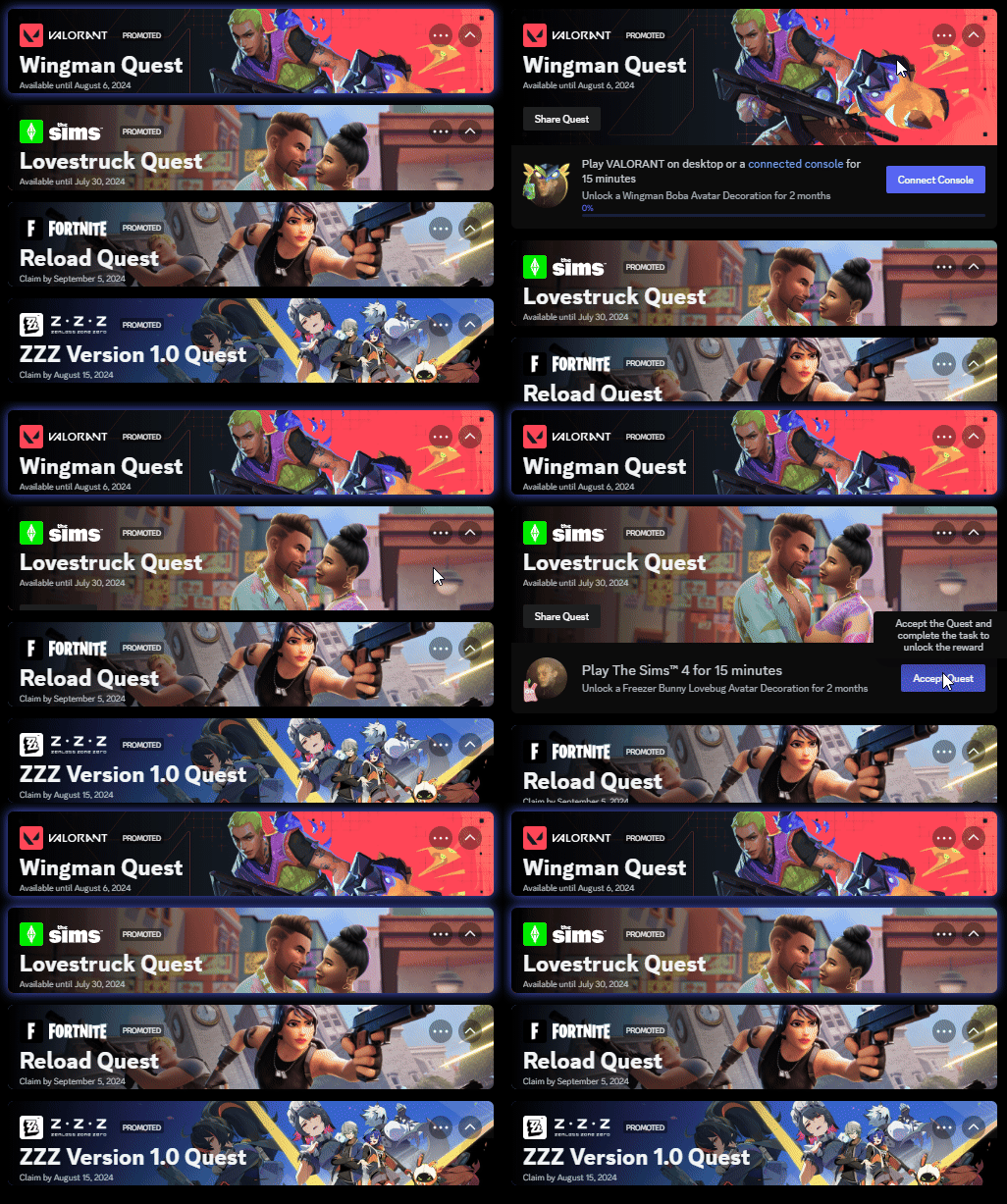
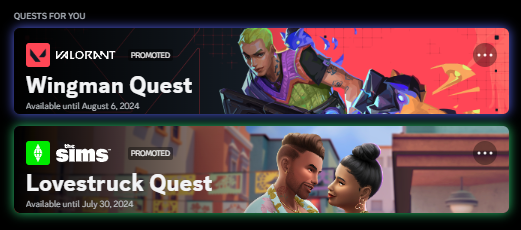

 mortal mantle
hazy tinsel
/* Hides Voice Channels, that are locked and full. */
li:has(.iconVisibility_f6f816.modeLocked_d8bfb3),
li:has(.iconVisibility_f6f816.modeLocked_d8bfb3.modeSelected_d8bfb3),
.containerDefault_f6f816:has([aria-label="This channel is full."]) {
    display: none !important;
}```pretty self explanatory useful for servers with alot of voicecalls
1 question though how do i fix the channel list being like this when scrolling?
and its only when i remove the element or wtver
like vcs are showing but its delayed almost as if other vcs are there they dissapear / reappear
pure cairn
It's because not all elements are shown at all times
hazy tinsel
ohh you're right like they're slowly being loaded in as i scroll down
pure cairn
So I guess when they actually render and get the style applied, they make that flickering effect
plain kelp
Discord's scrollers make assumptions about how tall the content is, to avoid having to render everything
hazy tinsel
and when the element appears my code is removing it
pure cairn
Yeah
hazy tinsel
is there a way i can get around that thing though cause it really messes up
plain kelp
If you change the height those assumptions are broken, and you get... that
hazy tinsel
but how would i do it based off of server like i can't rlly
i can set width to fit a server, yeah but how would i make it work with every server
foir the channel list
pure cairn
I don't think max-height: fit-content; works
hazy tinsel
cus i want all the vcs, to be rendered as im scrolling
and the disabled ones removed completely
is that possible or
/* Hides Voice Channels, that are locked and full. */
li:has(.iconVisibility_f6f816.modeLocked_d8bfb3),
li:has(.iconVisibility_f6f816.modeLocked_d8bfb3.modeSelected_d8bfb3),
.containerDefault_f6f816:has([aria-label="This channel is full."]) {
    display: none !important;
}
this is my code
echo frost
I don't think theres a way to load the channels with just css?
i may be wrong though
 sand oriole
@import url('https://fonts.cdnfonts.com/css/montserrat');

:root {
    --font-primary: "Montserrat";


    --font-display: "Montserrat";
    --font-headline: "Montserrat";
 simple kiln
how do you make spotify show on sidebar? in discord web? it just show on user profile popup.
solid ore
simple kiln
how do you make spotify show on sidebar? in discord web? it just show on user pr...
SpotifyControls plugin, i think thats what you mean
grand surge
Is there a way to determine the "StreamerMode" status?
simple kiln
solid ore
SpotifyControls plugin, i think thats what you mean
oks
pure cairn
grand surge
Is there a way to determine the "StreamerMode" status?

GitHub
Currently, it is hard (impossible?) to reliably detect if Streamer Mode is enabled or not, because the warning notice bar can be dismissed. This injects a streamer-mode class into the root HTML ele...
Or you have to rely on the "streamer mode enabled" purple banner at the top of your screen
 rapid vector
Is there a plugin/css that can hide the 3 items except EMOJI?
I also looked at css-snippets, but I didn't understand it because my native language is not English!

 gusty rose
https://gist.github.com/TheSunCat/58fedaa19d6154ef3e4b2b676c286906 Here is an example to hide those unwanted buttons. Continuing from #🏥-vencord-support-🏥 , #🏥-vencord-support-🏥 message Though there are numerous variations of this, some are language specific

Gist
Hide all Nitro & Boost upsells in Discord! GitHub Gist: instantly share code, notes, and snippets.
woven plover
Hey! This is my theme, but we've moved to Codeberg: https://codeberg.org/AllPurposeMat/Disblock-Origin
 gusty rose
Yeah I just realised after posting that. I needed to look for the specific CSS selectors to mention, and noticed it. Here's some of it, https://codeberg.org/AllPurposeMat/Disblock-Origin/src/branch/master/DisblockOrigin.theme.css#L14-L15
 lunar hamletBOT
gusty rose
Yeah I just realised after posting that. I needed to look for the specific CSS s...
lunar hamletBOT
gusty rose
Yeah I just realised after posting that. I needed to look for the specific CSS s...
DisblockOrigin.theme.css: Lines 14-15
div[aria-label="Start an Activity" i] { display: none; }
button[aria-label="Send a gift" i] { display: none; }
Can I extract what I want to remove from this and add it to the quickCSS Editor to apply it?
gusty rose
Pretty sure you can, just copy and paste whatever you want into QuickCSS
rapid vector
I added it, but it is not hidden.
Should I restart discord?

 solid ore
rapid vector
I added it, but it is not hidden.
Should I restart discord?
solid ore
rapid vector
I added it, but it is not hidden.
Should I restart discord?
that wont work if ur discord language is not in english
gusty rose
If your discord is in a different spoken language, it may not work. I encountered that awhile ago. No you don't need to restart discord for changes to take effect, it should be immediate, or within seconds after being pasted in
grand surge
pure cairn
https://github.com/Vendicated/Vencord/pull/2696
thank you
rapid vector
My discord doesn't work because it is in Japanese ToT
I will take this opportunity to use discord in English!
Thank you very much.
bleak gust
pure cairn
Or you have to rely on the "streamer mode enabled" purple banner at the top of y...
this can be dismissed which is why I made that PR
solid ore
rapid vector
I will take this opportunity to use discord in English!
Thank you very much.
this will hide any button that isnt the emoji button, for any language
[class^=expression-picker-chat-input-button]:not(:has(> [class^=emojiButton])) {
    display: none;
}
Yeah, I remember you saying that
gusty rose
Try these for Japanese,
button[aria-label="ギフトを贈る"] { display: none; }
button[aria-label="GIFピッカーを開く"] { display: none; }
/*テキストチャットのギフトボックスを隠す*/
[class*="sansAttachButton_"] > [class^="buttons_"] > button:has([d^=" M-7,10 C-8.104999542236328,"]) {
  display: none;
}

/*テキストチャットのステッカーを隠す*/
[class*="sansAttachButton_"] > [class^="buttons_"] > div:has([d^=" M-6,-10 C-6,-10 6,-10 6,-10 C8.208999633789062,"]) {
  display: none;
}
my css
bleak gust
selecting based upon SVG icons is underrated
pure cairn
bleak gust
this can be dismissed which is why I made that PR
Actually, can't you use the purple fill in the bottom left status to determin if you are in streamer mode?
bleak gust
The what
pure cairn
pure cairn
I don't have my pc on rn
bleak gust
what are you talking about
pure cairn
Can you send a screenshot of the user area at the bottom left?
bleak gust
if you mean user profile shows streaming status
solid ore
streaming status =/= streamer mode
bleak gust
this is what mine looks like
 pure cairn
solid ore
streaming status =/= streamer mode
pure cairn
solid ore
streaming status =/= streamer mode
So streamer mode doesn't make your status go purple?
I don't remember
bleak gust
No