#🎨-theme-development
1 messages · Page 32 of 1
 clear siren
 worldly moss
nesting 
clear siren
wait no I missed this

 echo frost
yeah
 pure cairn

clear siren
still, nothing that can't be done with css, which applies nearly to all scss/sass these days
clear siren
I think so?
worldly moss
twitch has a lot ton of subdomains for their shit instead
clear siren
how many links should an embed have
pure cairn
well
youtube has 3

Track one of the album Wavetable by Patricia Taxxon.
Couldn't find the songs from this album uploaded individually so I thought I'd do it myself. Enjoy.
I do not own the rights to this song or album. This video was uploaded for non-profit purposes.
Buy the album here: https://patriciataxxon.bandcamp.com/album/wavetable
1st one being YouTube
2nd one is Synth Master
3rd one is the video title
meanwhile twitch embeds only have links in the user
yeah, this might be an issue
 pure cairn
Ok, I could technically filter them by checking if the link contains twitch.tv like I did for the youtube ones, but I'd have to work in reverse when it comes to the "Twitch" part
But it's doable, right?

That'll be a problem for future me
clear siren
not sure I understand what your problem is
 pure cairn
Oh right, I remember now
pure cairn
pure cairn
yeah, this might be an issue
I don't know how to select the "Twitch" embedProvider here since it doesn't contain a link
echo frost
was the italic font changed?
this looks different than I recall
pure cairn
does it?
clear siren
pure cairn
I don't know how to select the "Twitch" embedProvider here since it doesn't cont...
[class^=embedProvider_]:has( + [class^=embedTitle] [href*="twitch.tv"]) { color:red } something like this would work
 clear siren
especially has(+...) or has(~...) can do a lot of magic to select adjacent elements
 clear siren
 pure cairn
hm
hell yeah, it's way better
now, I should be able to edit the border color with a :has as well
[class*="embedFull_"]:has([class^="gridContainer_"] [class^="grid_"] [class^="embedTitle"] [href*="twitch.tv"])
  { border-color: #9146ff; }```

ok, I think I got how :has works
clear siren
I like to think about it like this, you just write a complex selector to find something specific/unique, and put :has() on the parent element you actually want to modify
pure cairn
oh yeah, that makes sense
now for steam I wanna step up a bit with the challenge (not really) and use gradients
such innovations
it's just color: linear-gradient(#111D2E, #1387B8); isn't it?
pure cairn
why background?
clear siren
because color is for text, and color won't take anything but a color unit type
a gradient is an image
clear siren
what are you trying to do
pure cairn
applying the gradient to the text
clear siren
that is possible to do
 pure cairn
do I have to make a mask?
clear siren
-webkit-background-clip: text;
-webkit-text-fill-color: transparent;
 solid ore
clear siren
especially has(+...) or has(~...) can do a lot of magic to select adjacent eleme...
solid ore
clear siren
especially has(+...) or has(~...) can do a lot of magic to select adjacent eleme...
ik + is to select a following element, but wat is ~?
clear siren
solid ore
ik + is to select a following element, but wat is ~?
- is for following right after, ~ is for any following sibling with anything in between
pure cairn
clear siren
-webkit-background-clip: text;
-webkit-text-fill-color: transparent;
uh yeah, no xd
 clear siren
pure cairn
uh yeah, no xd
clear siren
pure cairn
uh yeah, no xd
on phone rn wait a bit I'll test
clear siren
are you on firefox
 clear siren
yeah you might not need the prefix
works for me on vesktop..

.username__0b0e7 { background: linear-gradient(red,green);
 -webkit-background-clip: text;
  -webkit-text-fill-color: transparent; }
[href*="store.steampowered.com"],
[href*="https://s.team"],
[href*="steamcommunity.com/"]
  { background: linear-gradient(#111D2E, #1387B8) !important;
    -webkit-background-clip: text;
-webkit-text-fill-color: transparent; }```wait, could it be because of the !important?
clear siren
hmmm
clear siren
yeah the important breaks it apparently
pure cairn
horror
 clear siren
yeah blends into the bg too well, adding font-weight:900 makes it a bit better but still not so good
pure cairn
I added a brightness filter
[href*="store.steampowered.com"],
[href*="https://s.team"],
[href*="steamcommunity.com/"] {
  background: linear-gradient(#111D2E, #051839, #0A1B48, #132E62, #144B7E, #136497, #1387B8);
  filter: brightness(200%);
  -webkit-background-clip: text;
-webkit-text-fill-color: transparent; }```it makes it slightly more bearable

I wonder if border-color can be used with a gradient as well
probably with border-image and then clipping it with some padding
clear siren
yeah border-image is what you want, or remove border and use inset box-shadow
but that only works when the gradient goes one way
for a top to bottom gradient on the left you need to do border-image
 fast cipher

Steam is the ultimate destination for playing, discussing, and creating games.
lol
didn't know this domain existed
pure cairn
hm, I managed to get the border to work
but not with the correct radius
I tried using
border-top-left-radius: var(--avatar-radius);
border-bottom-left-radius: var(--avatar-radius);```(--avatar-radius is 8px)
clear siren
embeds use 4px by default
pure cairn
but it's not working really well

[href*="store.steampowered.com"],
[href*="https://s.team"],
[href*="steamcommunity.com/"] {
  background: linear-gradient(#111D2E, #051839, #0A1B48, #132E62, #144B7E, #136497, #1387B8);
  filter: brightness(200%);
  -webkit-background-clip: text;
  -webkit-text-fill-color: transparent; }
[class*=embedFull_]:has([class^=gridContainer_] [class^=grid_] [class^=embedTitle] [href*="store.steampowered.com"]),
[class*=embedFull_]:has([class^=gridContainer_] [class^=grid_] [class^=embedTitle] [href*="https://s.team"]),
[class*=embedFull_]:has([class^=gridContainer_] [class^=grid_] [class^=embedTitle] [href*="steamcommunity.com/"])
  { border-image: linear-gradient(#111D2E, #051839, #0A1B48, #132E62, #144B7E, #136497, #1387B8) 30;
    border-style: solid;
    border-top-style: none; border-right-style: none; border-bottom-style: none;
    border-top-left-radius: var(--avatar-radius); border-bottom-left-radius: var(--avatar-radius);
border-width: 4px; }```oh wait, I need 2 values for the radius
still not working 
clear siren

Stack Overflow
I have the following CSS:
a.btn.white-grad {
background: $lgrey;
color: #313149 !important;
border: 1px solid #000;
border-image-source: linear-gradient(to right, #9c20aa, #fb3570);...
looks like it's not that straightforward but here are good solutions

 tender hedge
pure cairn
wtf happened
tender hedge
pure cairn
wtf happened
discord exploded
pure cairn
Real
 terse dew
#1228489679062433823 so, the CSS code now breaks the VC names for some reason, and when I tried to add another :not , it broke the hover over the name effect? I have no idea why that is happening.
#channels [class^=container_]:not([class*=containerWithMargin]):not([class^=voiceUser_] *) {
    max-height: 0;
    overflow: hidden;
    transition: max-height 4s ease;
}

#channels [class^=containerDefault_]:hover + [class^=container_],
#channels > [class^=container_]:hover {
    max-height: 100%;
}
I tried to edit the rewritten code and it is broken.
anyone got any idea why changing the first part's selectors breaks the second part's selector?
the #channels > [class^=container_]:hover.
pure cairn
terse dew
<#1228489679062433823> so, the CSS code now breaks the VC names for some reason,...
oh I fixed this on my own the other day
#channels [class^=container_]:not([class*=containerWithMargin], .container__43fce)
  { max-height: 0;
    overflow: hidden;
    transition: max-height 0.3s ease-in-out; }
#channels [class^=containerDefault_]:hover + [class^=container_],
#channels [class^=container_]:hover
{ max-height: 100%; }```huh
border-top-left-radius: 40px !important;
border-bottom-left-radius: 40px !important;```this is affecting the embed itself, not the border
 plain breach
i have a question, how do i change discord's start image?
 warm bough
pure cairn
wtf happened
warm bough
pure cairn
wtf happened
mobile discord
warm bough
plain breach
i have a question, how do i change discord's start image?
#🎨-css-snippets message adapt it for your own needs
well adapt the code from that import url
plain breach
thanks!
warm bough
np
plain breach
warm bough
https://discord.com/channels/1015060230222131221/1028106818368589824/11678736710...
oh... thats not really what i meant
i meant the loading box before that
is it possible to change that?
i think its called the splash screen
pure cairn
plain breach
i meant the loading box before that
I think that one is hardcoded
plain breach
in this case im using vesktop
plain breach
pure cairn
I think that one is hardcoded
ohhh...
pure cairn
like the Vesktop one
you'd have to change the souce code for that, css can't really help
plain breach
so i would have to change that and compile it myself?
pure cairn
if I'm not mistaken, yes
plain breach
oh, ok
pure cairn
I think other people had asked about it a few months ago
and that was the only solution
pure cairn
np
warm bough
use openasar with normal discord so nothing appears fr
clear siren
warm bough
use openasar with normal discord so nothing appears fr
vesktop is superior tho
 marsh parrot
hey, does anyone know how to change "app" to "bot"? current is outdated & conflicts with moreusertags
 worldly moss
there is a css snippet but im pretty sure that would break the whole tag
would probably be a nice idea to add it in the plugin settings to override the app tag
 oak plover
Changing it to bot isn’t really good anyways cause it only works for one language
It’s really not worth changing it for every language
worldly moss
oak plover
Changing it to bot isn’t really good anyways cause it only works for one languag...
i mean, if its for them only
nobody else is going to see it except them
oak plover
true
 deep bane
.botTagRegular_fc4b4a {
  &[data-tag^="app"] .botText_daff56 {
    visibility: hidden;
    &::before {
      visibility: visible;
      position: absolute;
      white-space: nowrap
    }
  }
  &[data-tag="app"] .botText_daff56 {
    &::before {
      content: 'BOT'
    }
  }
  &[data-tag="app • mod"] .botText_daff56 {
    &::before {
      content: 'BOT • Mod'
    }
  }
  &[data-tag="app • admin"] .botText_daff56 {
    &::before {
      content: 'BOT • Admin'
    }
  }
}
.notAppAsidePanel__95814:has([aria-label="Verified App"]:hover) .layer__6b5c3.disabledPointerEvents__214b3 .tooltip__7b090.tooltipTop_e50d2d.tooltipPrimary__51b23.tooltipDisablePointerEvents__2978d .tooltipContent_adb6d5 {
  visibility: hidden;
  &::before {
    content:'Verified Bot';
    position:absolute;
    visibility: visible;
    width:100%;
    left:0;
    text-align:center
  }
}
.applicationInstallButtonText__90897 {
  visibility: hidden;
  &::before {
    content:'Add Bot';
    position:absolute;
    visibility:visible
  }
}```horror
deep bane
mmm nesting my favorite
clear siren
I should do nesting more but I tend to forget
and it's also the type of thing that I can only do when some particular part of css is done
won't try to nest when I'm writing the code initially
I just nested this https://github.com/nvhhr/discordcss/blob/main/snippets/recute.theme.css
marsh parrot
deep bane
```css
.botTagRegular_fc4b4a {
&[data-tag^="app"] .botText_daff56 {
visibi...
☠️ ☠️ ☠️
solid ore
is there any downside to nesting? ot doesnt look very.. idk streamlined
clear siren
not really other than maintenance can be harder if nesting confuses you
although it can also make your css easier to read
this for an example is very neat now https://github.com/nvhhr/discordcss/blob/main/snippets/swaphomeicon.theme.css
or this
/* show usernames in friendlist */
[class*=discriminator_]
 { visibility: visible;
   &::before { content: "("; }
   &::after { content: ")"; }}
can i really use that? no idea how to
clear siren
put it in quickcss or make a css file in your themes folder
quickcss will think it's broken but you can ignore that
solid ore
clear siren
not really other than maintenance can be harder if nesting confuses you
yeah ill prob need to read up on it before i use it myself
marsh parrot
i did put it in my css but it doesnt seem to work for me nevermind got it fixed !! thanks!
deep bane
clear siren
although it can also make your css easier to read
Very easy to read :)

 grand surge
Real
 summer edge
anyone have any insights into why this doesn't work?
[class^="userPopoutOuter_"] [class*="avatarHoverTarget__"] foreignObject [class*="avatarStack__"] img {
  content: attr(large-avatar-url) !important;
}
large-avatar-url is added by a plugin so the element looks like this

and making it attr(large-avatar-url url) gives an "Invalid property value" error
 toxic yew
make it as style="--large-avatar: url(...)" instead of attr 
 teal cave
does anyone know how to use polar colour spaces for color-mix so that it takes the midpoint calculated like linear-gradient
the default way of doing color-mix has problems when mixing something with a pure grey, it assumes grey has a hue value that's red, which gives wack results

Nvm I'm rarted I should be using oklab instead of oklch
solid ore
does anyone have permissions to edit roles in a server with boost lvl 2 or higher? if u could get me the elemnt tree for this part (1st img) i would rly appreciate it :)
just a screenshot like the 2nd img would work

 teal cave
this is not (purposely) styled on any of my themes and nobody has complained about it yet ¯_(ツ)_/¯
pure cairn
solid ore
does anyone have permissions to edit roles in a server with boost lvl 2 or highe...
don't have enough money for that
teal cave
teal cave
Nvm I'm rarted I should be using oklab instead of oklch
Nvm 2: oklch is better for most colour combos
An aside, it would be very poggers indeed if relative colours supported currentColor, eg. to fix invisible usernames
.username__0b0e7 {
    background: oklch(from currentColor calc(l*1.5) c h);
}
under the assumption it's planned because tests exist at https://www.w3.org/TR/css-color-5/#relative-colors
worldly moss
solid ore
does anyone have permissions to edit roles in a server with boost lvl 2 or highe...
this?
probably better than a screenshot, if you want a screenshot instead lmk
pure cairn
Ugh why is my discord app opening github links in the browser and not the app

I hate this
solid ore
worldly moss
this?
thank you so much! can u tell me if this hides the container or not? the aim is that it doesn't
#roles-tab [class^=contentWidth_] > [class^=container_]:has([class^=availabilityIndicator_] > [class*=icon_]:not([class*=unlockedIcon_])) {
  display: none !important;
}
if it doesn't hide it, can u send a ss of what the role icons menu looks like?
 solid ore
worldly moss
solid ore
worldly moss
great, okay and last thing, this hides the icon and the "unlocked" text correct?
#roles-tab [class^=contentWidth_] > [class^=container_] [class^=clickable_]:has(> [class^=availabilityIndicator_]) {
  display: none !important;
}
nope, doesnt affect it
solid ore
ah i see, wat abt this selector
#roles-tab [class^=contentWidth_] > [class^=container_] > h2:has(> [class^=availabilityIndicator_])
ooh actually that prob hides the "role icon" text too
#roles-tab [class^=contentWidth_] > [class^=container_] [class^=availabilityIndicator_] this one?
wait forget all this, j paste this:
#roles-tab [class^=availabilityIndicator_] {
  display: none !important;
}
 solid ore
thank you!!
teal cave
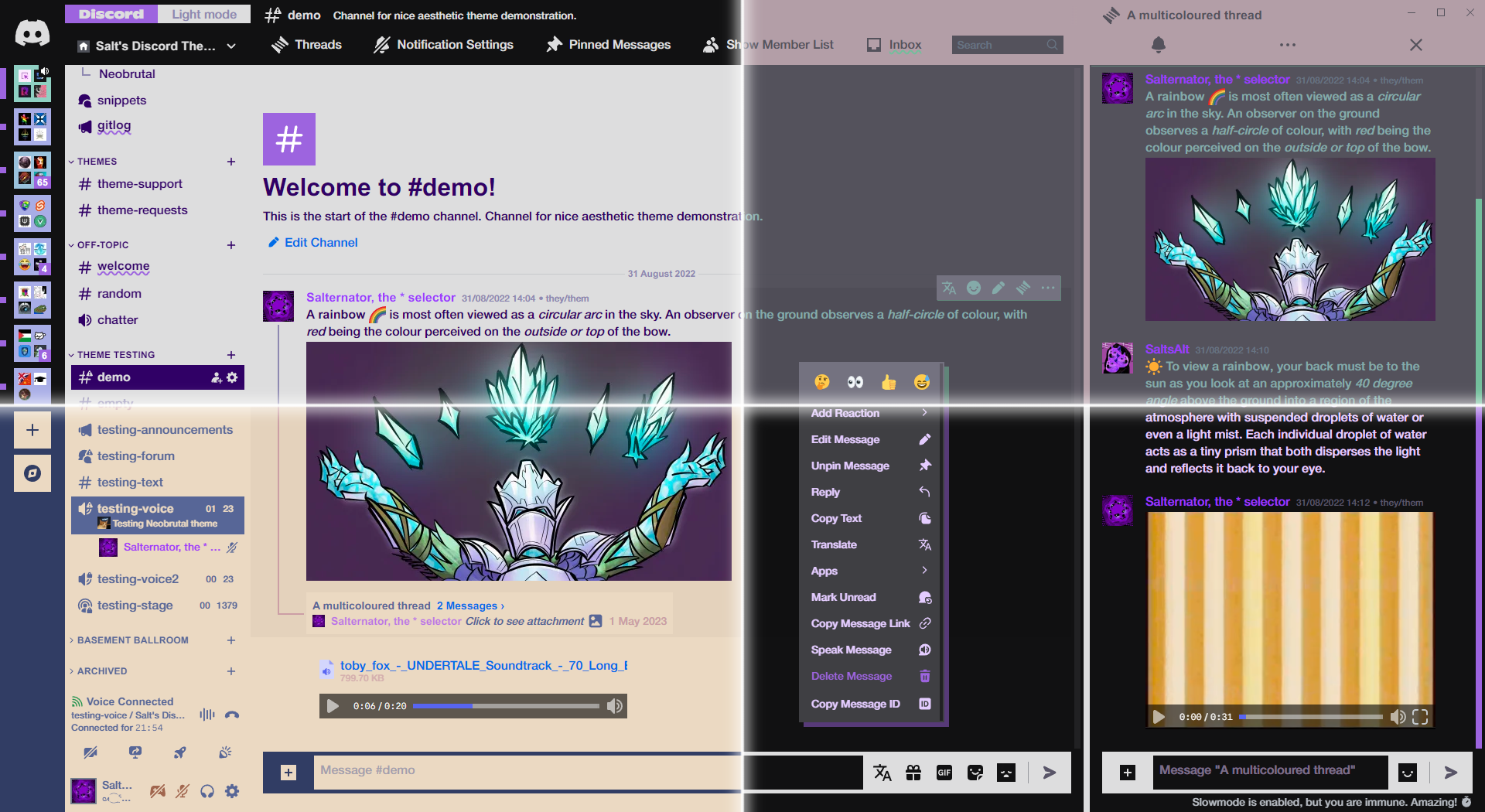
I need a preview image for Github, which do you prefer?

 worldly moss
in my humble opinion, 2
teal cave
done and added https://github.com/Saltssaumure/neobrutal-discord-theme
GitHub
Neobrutalism brought to Discord. Supports light and dark mode, with customisable colours. - Saltssaumure/neobrutal-discord-theme
echo frost
ahhhh this is weird
also why are there squiglys under some channel names?

also who tf is xr_ker and why are they sad ghost reacting to my msgs :(
:sad_ghost:
echo frost
echo frost
also why are there squiglys under some channel names?
it kinda looks like the spell check thing
why are you reacting to my msgs @polar sphinx
echo frost
echo frost
it kinda looks like the spell check thing
oh wait it's unread msg
I thought I saw some channels that werent like that earlier, but i'm not noticing any now
one flaw ||(besides the theme being ugly and weird /hj)|| is people's names don't show when you hover over them in the @ thing
 echo frost
why are you reacting to my msgs <@962069811574222908>
echo frost
echo frost
why are you reacting to my msgs <@962069811574222908>
oh they were botting lmao
echo frost
echo frost
was the italic font changed?
*this looks different than I recall*
did they change italic font?
italic looks different
grand surge
Yes most likely
teal cave
echo frost
one flaw ||(besides the theme being ugly and weird /hj)|| is people's names don'...
Will fix the suggestion popover, will not fix ugliness (unless there’s specific aspects that you don’t like, in which case I’ll take a peep)
teal cave
Hmm themes seem to develop a lag at around the 1000 loc mark, I wonder what causes it specifically 🤔
solid ore
teal cave
Hmm themes seem to develop a lag at around the 1000 loc mark, I wonder what caus...
loc?
oh
lines of code?
teal cave
ye
It's not the actual cause but I do wonder why Discord itself can have a far heftier stylesheet without lag
echo frost
How do you customize scrollbars?
I did this, but the scrollbar is ugly

I want it to look the same as all the other discord scrollbars
echo frost
It doesn't work
I might go back to just -webkit-line-clamp: unset !important; on hover
also how could I hide the scrollbar if the about me is short

 robust totem
overflow-y: auto;
echo frost
that doesnt work
makes yours really long all the time (bad)
makes mine scroll (good and the same)
krammeth's is fine (good and different)
but salternator's has a scroll too (bad and the same)
echo frost
echo frost
~~makes yours really long all the time (bad)~~
ok actually yours is like that without the theme
solid ore
echo frost
How do you customize scrollbars?
I did this, but the scrollbar is ugly
r u on discord or vesktop
echo frost
discord
deep bane
echo frost
also how could I hide the scrollbar if the about me is short
@media (max-height:somesize) {
  element::-webkit-scrollbar {
    display: none;
  }
}```@media max-height checks the size of the viewport, not the element
teal cave
echo frost
How do you customize scrollbars?
I did this, but the scrollbar is ugly
.markup_a7e664 > .lineClamp2Plus_ccc883 {
  overflow-y: scroll;

  &::-webkit-scrollbar {
    width: 8px;
    height: 8px;
  }

  &::-webkit-scrollbar-track {
    border: 2px solid var(--scrollbar-thin-track);
    background-color: var(--scrollbar-thin-track);
    border-color: var(--scrollbar-thin-track);
  }

  &::-webkit-scrollbar-thumb {
    background: var(--profile-body-divider-color);
    background-clip: padding-box;
    border: 2px solid transparent;
    border-radius: 4px;
    min-height: 40px;
  }
}
this copies the style of thin discord scrollbars
echo frost
cool ty
echo frost
deep bane
```css
@media (max-height:somesize) {
element::-webkit-scrollbar {
display...
am I doing this right?
doesn't seem to work (108px is the height it is at max (6 lines), i also tried other sizes and still didn't work)
.markup_a7e664 > .defaultColor__30336.lineClamp2Plus_ccc883.text-sm-normal__95a78 {
overflow-y: scroll;
}
@media (max-height: 108px) {
.markup_a7e664 > .defaultColor__30336.lineClamp2Plus_ccc883.text-sm-normal__95a78::-webkit-scrollbar {
display: none;
}
}``` deep bane
i can't help you with this since i dont even know how you're getting that scrollbar in the first place
 devout elm
 echo frost
deep bane
i can't help you with this since i dont even know how you're getting that scroll...
echo frost
deep bane
i can't help you with this since i dont even know how you're getting that scroll...
this
 echo frost
teal cave
`@media` max-height checks the size of the viewport, not the element
echo frost
teal cave
`@media` max-height checks the size of the viewport, not the element
so will it not work?
teal cave
echo frost
so will it not work?
not for what you want
echo frost
Is there something else that would work then?
teal cave
what else do you have that's affecting the profile, bc what I posted just works
echo frost
in hiding the scrollbar for short about mes?
teal cave
yeah
echo frost
it works for this, but not for hiding it in short about me's
 echo frost
am I doing this right?
doesn't seem to work (108px is the height it is at max (6...
echo frost
echo frost
am I doing this right?
doesn't seem to work (108px is the height it is at max (6...
oh wait you mean this?
it doesn't work
echo frost
teal cave
yeah
what are you using that's working for you?
teal cave

 echo frost


and all my other themes are disabled
and everything else in quick css is commented out
are you using vesktop?
I'm using normal discord app, maybe that's why?
teal cave
Yes I'm on vesktop
Out of curiosity does the scrollbar on short about me disappear for you if you zoom in/out by one notch?
teal cave
rounding error issue then
echo frost


weird that that works
you think there's a way to make it work without zooming out to 90%?
echo frost
that seems to fix it
teal cave
typical discord horror moment
 echo frost
wtf
pure cairn
teal cave
typical discord horror moment

Someone at discord was feeling quirky and decided to use some square roots as values
echo frost
doesn't completely fix it though

 teal cave
idk, change line-height until it stops doing that
echo frost
oh 1.31 seems to work
but only if i keep the line clamp :(
(and without removing that, there's an ellipsis when scrolling
 teal cave
wdym keeping the line clamp
echo frost

 vestal field
average discord forgetting to respect their own paddings

 frigid sundial
what is the css for controlling the maximum height of chatbar/ textarea after it expand? not sure to choose which class
teal cave
frigid sundial
what is the css for controlling the maximum height of chatbar/ textarea after it...
.scrollableContainer_ff917f {
  max-height: 50vh;
}
Found it by selecting the textarea, then going up the html tree until finding an element (and its class) that has max-height set.
worldly moss
Can I somehow with some dark magic check if the selected message has grouped messages below it and preserve the author?
Currently it removes the author making it look rather ugly
[class*="messageListItem_"][data-author-username="GitHub"]:not(:has([class*="embedDescription_"]))
:has([class*="embedTitle_"] span:nth-child(3):last-child)
{
    display: none;
}
i highly doubt it but if any of you have a solution 🙏
 solid ore
worldly moss
Can I somehow with some dark magic check if the selected message has grouped mes...
solid ore
worldly moss
Can I somehow with some dark magic check if the selected message has grouped mes...
wdym preserve the author? wat do u wanna do exaclty
i think i have an idea to select the grouped messages but idk wat u wanna do
this only selects grouped messages by github
[class*="messageListItem_"][data-author-username="GitHub"]:has(+ [class*="messageListItem_"][data-author-username="GitHub"] > :not([class*=groupStart_])),
[class*="messageListItem_"][data-author-username="GitHub"] > :not([class*=groupStart_]) {
    background-color: red;
}
thanks, actually does what I wanted
worldly moss
worldly moss
Can I somehow with some dark magic check if the selected message has grouped mes...
[class*="messageListItem_"][data-author-username="GitHub"]:has(+ [class*="messageListItem_"][data-author-username="GitHub"] > :not([class*=groupStart_])):not(:has([class*="embedDescription_"]))
:has([class*="embedTitle_"] span:nth-child(3):last-child) {
    min-height: 0;

    & [class*="container_"] {
        display: none;
    }
}
ended up with this, thanks again 
solid ore
idt that does anything for me, but if it works for u im glad i helped :)
worldly moss
solid ore
idt that does anything for me, but if it works for u im glad i helped :)
it hides grouped star messages
these things

 true glen
What have i done

 lost plume
a mistake
solid ore
do local themes have less of a performance impact than online themes?
tender hedge
pretty sure theres no difference
solid ore
hm okay thanks
lost plume
true glen
What have i done
gimme css/image k thx
true glen
lost plume
gimme css/image k thx
    background: url("https://i.imgur.com/KOjjUMI.png") center/cover;
    background-size: cover !important;
    content: '';
    height: 230px;
    font-size: 0;
}```
Here we go
Made by someone who doesnt know css at all lolJust noticed that it also adds this to all other vencord tabs oops
Well that is even better
 true glen
Np, love it too
lost plume
now time to wait for someone to notice something
lost plume
true glen
Np, love it too
it's not really fully functional
 true glen
Whats with your firefox tho
true glen
lost plume
it's not really fully functional
Omg what even is this lol
true glen
Hold on let me see if i can fix it
lost plume
I wanna try too
true glen
    background: url("https://i.imgur.com/KOjjUMI.png") center/cover;
    background-size: cover !important;
    content: '';
    /*width: 48px;*/
    height: 230px;
    font-size: 0;
    /*transform: translate(-55px, -24px);
    z-index: 99999;
    position: absolute;
    pointer-events: none;*/
}``` As shrimple as thator if you're as stupid as I am
div:has(> h2[class*="heading-lg-semibold"]) > :nth-child(1) {
    background: url('https://rozbrajacz.futbol/permanent/vencord-sex-update.png') center/cover;
    height: 230px;
    margin-bottom: 20px;
    font-size: 0px;
}
Uuuh sorry that looks too smart for me
But as i can see we are basically doing the same thing
true glen
It just works
lost plume
true glen
Whats with your firefox tho
wdym ¯_(ツ)_/¯
true glen
Nah nothing
lost plume
true glen
Uuuh sorry that looks too smart for me

mine still doesn't work
that's funny enough I'll probably still leave it in though lmfao
grand surge
lost plume
Bombastick side eye
true glen
lost plume
Oh my god why is that lol
    background: url("https://i.imgur.com/KOjjUMI.png") center/cover;
    background-size: cover !important;
    content: '';
    height: 230px;
    font-size: 0;
}``` Now it checks for settings column, as i understand itSee but that'll break when discord rerolls those numbers
[class*=contentColumn__] { ... }
time to start a class war
echo frost
lost plume
```css
[class*=contentColumn__] { ... }
```
See but this is less specific
.contentColumn__5f80b { ... }
 bleak gust
true glen
What have i done
bleak gust
true glen
What have i done
Can I put this in my fork?
echo frost
echo frost
See but this is less specific
```css
.contentColumn__5f80b { ... }
```
/hj
but also, they barely break in my experience (they've only broken once since I started using vencord/custom css this year), and when they did, there was a site that fixed them
solid ore
echo frost
but also, they barely break in my experience (they've only broken once since I s...
twice within the last year iirc
true glen
bleak gust
Can I put this in my fork?
Im not sure what fork you are doing, but sure
bleak gust
true glen
Im not sure what fork you are doing, but sure
Mostly just personal plugins
probably has 2 users at most
true glen
Oooo, interesting
Good luck with it!
worldly moss
bleak gust
Can I put this in my fork?

teal cave
hey gamers would I lose moral standing in the community if I were to post my GPL themes in #🎨-css-snippets (this would be a violation of the GPL if done by anyone else)
 vestal field
surely
 gilded cloak
teal cave
hey gamers would I lose moral standing in the community if I were to post my GPL...
gilded cloak
teal cave
hey gamers would I lose moral standing in the community if I were to post my GPL...
Putting any code in #🎨-css-snippets automatically changes it to the unlicense
teal cave
which would be a violation of the GPL if anyone else but the author did it
gilded cloak
Yes
teal cave
I'm making a joke that's only funny to me perhaps
 dark dragon
Gonna lose moral standing for posting themes in the snippet channel for sure. It's in the name
solid ore
am trying to hide this popout when clicking on a user in memberlist with a quest icon in activity, this code works but does anyone know of anything it might hide unintentionally?
[id^=popout_]:has([class^=top_] > :is([class^=right_],[class^=left_])) {
    display: none;
}

ig this is more specific
[id^=popout_]:has([class^=top_] > [class^=left_] > h2):has([class^=top_] > [class^=right_] > [class^=imgWrapper_]) {
    display: none;
}
 cosmic sable
how to edit my ancient snippet #🎨-css-snippets message, i updated for new discord shitcode

Discord
Discord is the easiest way to communicate over voice, video, and text. Chat, hang out, and stay close with your friends and communities.
 digital pier
cosmic sable
how to edit my ancient snippet https://discord.com/channels/1015060230222131221/...
digital pier
cosmic sable
how to edit my ancient snippet https://discord.com/channels/1015060230222131221/...
Hi mom
cosmic sable
worldly moss
cosmic sable
how to edit my ancient snippet https://discord.com/channels/1015060230222131221/...
just repost it
cosmic sable
where? i don't have posting perms, so i'm asking
worldly moss
huh..
 worldly moss
pure cairn
solid ore
ig this is more specific
```css
[id^=popout_]:has([class^=top_] > [class^=left_]...
a, I just
.wrapper__38bac, /* popup */
[class^="questsIcon_"] /* icon */
  { display: none; } ```
it awaypopup's not resilient tho
pure cairn
Fair, but it's just one class
solid ore
¯_(ツ)_/¯
vestal field
😮 Chrome devtools added a new “Selector Stats” pane! It’ll tell you exactly how long the browser spent trying to resolve CSS selectors.
No more debates around the performance of the wildcard (*) selector. 🤞

 Twitter
·
bleak gust
vestal field
https://x.com/JoshWComeau/status/1793032771243282620
Twitter
·
bleak gust
vestal field
https://x.com/JoshWComeau/status/1793032771243282620
I need to run this on vencord itself
pure cairn
vestal field
https://x.com/JoshWComeau/status/1793032771243282620
I don't need new tools to know my css is lagging the shit out of my client
 tough flax
Does anybody know the fix to blur the account settings? I have this for the code .accountProfileCard-lbN7n- .constrainedRow-3y91Xf div [data-text-variant="text-md/normal"]:not(:hover){ filter: blur(3px); transition: 0.6s ease; }
 thorny fjord
You mean how to blur this in settings or smth else?
 thorny fjord
tough flax
Does anybody know the fix to blur the account settings? I have this for the code...
thorny fjord
tough flax
Does anybody know the fix to blur the account settings? I have this for the code...
like this?
 tough flax
Not exactly like that, it just blurs out the email and password
thorny fjord
thorny fjord
You mean how to blur this in settings or smth else?
Are we talking about the same profile view?
 safe python
tough flax
Does anybody know the fix to blur the account settings? I have this for the code...
thorny fjord
safe python
tough flax
Does anybody know the fix to blur the account settings? I have this for the code...
thorny fjord
I got confused because of the 'password' part
tough flax
safe python
https://discord.com/channels/1015060230222131221/1028106818368589824/10948892743...
Exactly what I was looking for, cheers
echo frost
has anyone not updated discord yet?
code blocks were changed, they have a border around them now
if you still have old one, can you copy the css for it?

did just get an ss of normal one
at least for small

i do have some css that modifies the grey color variables btw
also found an old ss with an old large code block
 lost plume
small one just looks like border: none;
large I can't tell, sadly had to restart discord
echo frost
it's slightly darker, and looks a bit smaller
lost plume
it looks horrible
I usually have a discord session that I just never restart from when I boot up my pc but my pc didn't resume from hibernation today so /shrug
echo frost
block = air
lost plume
wait does messagelogger work again woah
echo frost
did it break?
lost plume
edit logging broke for like a few days?
echo frost
oh i didn't notice that
lost plume
building the latest commit of vencord and vesktop pays off ig
btw file upload preview also seems to have the darker border now
same as the file download prompt thing
echo frost
echo frost
it's slightly darker, and looks a bit smaller
ok it's not darker, but it's smaller
echo frost
new

old

new but zoomed in

also this is with my darker discord css
i think that's pretty accurate
but a bit scuffed
this is what im using
.markup_a7e664 .inline {
  border: 2px solid var(--background-secondary);
  border-radius: 3px;
}```just for the inline one
bc idk if big one changed
grand surge
imagine if someone makes a discord theme that looks like this https://www.youtube.com/watch?v=7gyZyg3jC2w

This is not real software. I am not affiliated with Discord.
YES!! I do have a Discord server, thanks for asking! :D
Join the server here! ➡️ https://discord.gg/k6k7aPMhrc
Everything is designed by me in Adobe Illustrator and edited with Adobe After Effects.
➡️ Check out the new community-designed merch store! ► ...
I would actually pay money for this
😭
vestal field
visually and layoutwise this doesn't even look that different from current discord
the horizontal server list is a waste of space imo
but im pretty sure theres a bd plugin that does that?
bleak gust
grand surge
imagine if someone makes a discord theme that looks like this https://www.youtub...
honestly this is kinda sick
the "inbox" thing might need some work
i already made something like it in the past
but forgot about it
clear siren
vestal field
but im pretty sure theres a bd plugin that does that?
pretty sure that can be done with css and I'm also pretty sure it has been done
 iron smelt
clear siren
pretty sure that can be done with css and I'm also pretty sure it has been done
iron smelt
clear siren
pretty sure that can be done with css and I'm also pretty sure it has been done
 teal cave
holy shit discord itself is using color-mix

 exotic nexus
Pretty sure that’s from client theme
cosmic sable
grand surge
imagine if someone makes a discord theme that looks like this https://www.youtub...
so bad
just changed style of elements
mobile layout - original tabs v2 more worse edition
echo frost
How can I change the tab size in quickcss?
it was 2 spaces earlier, but not it's 4
worldly moss
echo frost
How can I change the tab size in quickcss?
it was 2 spaces earlier, but not it's...
F1 -> search for "tab" -> change 4 to 2
echo frost
oh you can open that menu in quickcss...
teal cave
exotic nexus
Pretty sure that’s from client theme
This is Discord's own stylesheet, also I don't have ClientTheme enabled
lost plume
height: 60px?
teal cave
exotic nexus
Pretty sure that’s from client theme
It appears to be an experiment 👀
 teal cave
Do you have the old profiles or new profiles?
gilded cloak
vestal field
the horizontal server list is a waste of space imo
True
gilded cloak
teal cave
It appears to be an experiment 👀
It's always used color mix since 2020
I saw when first developing client theme
teal cave
Huh interesting, but hasn't color-mix only been supported in discord for like a year?
clear siren
yeah color-mix only hit stable quite recently
teal cave
saw on /r/programminghorror by typical technique for overriding plugins with inline css

 half crystal
grand surge
imagine if someone makes a discord theme that looks like this https://www.youtub...
half crystal
grand surge
imagine if someone makes a discord theme that looks like this https://www.youtub...
one of my friends did that, im sure i can find it somewhere
@grand surge https://github.com/BKProj/ConceptCord

GitHub
Concept Central's Discord Concept is now a REAL THING! You can watch Concept Cental's concept here: https://youtu.be/7gyZyg3jC2w - BKProj/ConceptCord
it mostly works still
solid ore
theres also this
#🎨-css-snippets message
grand surge
half crystal
one of my friends did that, im sure i can find it somewhere
its just the horizontal server list
the theme doesnt seem to be updated
half crystal
grand surge
the theme doesnt seem to be updated
still works tho
grand surge
half crystal
still works tho
doesnt for me
I prefer what salternator made
looks closer to the concept
half crystal
grand surge
doesnt for me
 grand surge
half crystal
[works-on-my-machine](https://media.discordapp.net/stickers/1110740044475535380....
grand surge
half crystal
[works-on-my-machine](https://media.discordapp.net/stickers/1110740044475535380....
show
half crystal
 grand surge
half crystal
grand surge
half crystal
eh thats jst normal discord w the server list at the top
salt's theme is closer to it
 teal cave
finally changing my css build command from build:bd to build:css because in fact it's mostly vencord users these days anyway
teal cave
Cursed syntax that works (string-y interpolation in css, prevent user typos from making all the font into Times New Roman)
@import url("https://fonts.googleapis.com/css2?family=Flow+Block&family=Flow+Rounded&family=Flow+Circular&display=swap");

:root {
    --font-primary: Flow var(--font-variant), system-ui;
    --font-display: Flow var(--font-variant), system-ui;
    --font-code: Flow var(--font-variant), monospace;
}

@property --font-variant {
    syntax: "Circular | Rounded | Block";
    inherits: false;
    initial-value: Circular;
}
ooer I have made a mistake

 manic chasm
tried those, neither work
teal cave
explain what you mean by they don't work
manic chasm
nothing changes
teal cave
do you have the old or new profiles?
 crystal bone
what's the css to move the server list to the top?
teal cave
if scss supported lambda functions that would be extremely poggers
issue open since 2012
https://github.com/sass/sass/issues/472

GitHub
This code is in a patch for compass that I'm about to approve and I really feel like this can be cleaned up dramatically by adding some basic functional programming abilities to Sass. In partic...
teal cave
anyway sass is turbo cursed programming language with no features and every day I think about making an alternative with blackjack and hookers
 deft niche
iron smelt
deft niche
iron smelt
 iron smelt
deft niche
https://cdn.discordapp.com/attachments/1165110465509195798/1244393058628407338/c...
iron smelt
deft niche
https://cdn.discordapp.com/attachments/1165110465509195798/1244393058628407338/c...
the two most popular things to be said the this server
 slim pond
#🔧-discord-changes message omg discord finally decided to fix the nitro themes?????
omg
clear siren
kinda, easiest way is to have both clickable by adding padding to the text and negative margin to the icon like so:
 .repliedTextPreview__1a8a4 { padding-right: 20px; position: relative; }
 .repliedTextContentIcon_da8b30 { margin-left: -20px; }
having the text not clickable is hard to do
slim pond
teal cave
(this means I don't have to fix it)
They're finally going to make my snippet useless
they really did

(somewhat)
And with some of the nitro themes, what they have done looks awful
slim pond
.theme-dark {
    --custom-theme-mix-amount-base: 100%;
}
this makes the color mixing for the nitro themes more intense
 steady peak
redirected from #🏥-vencord-support-🏥
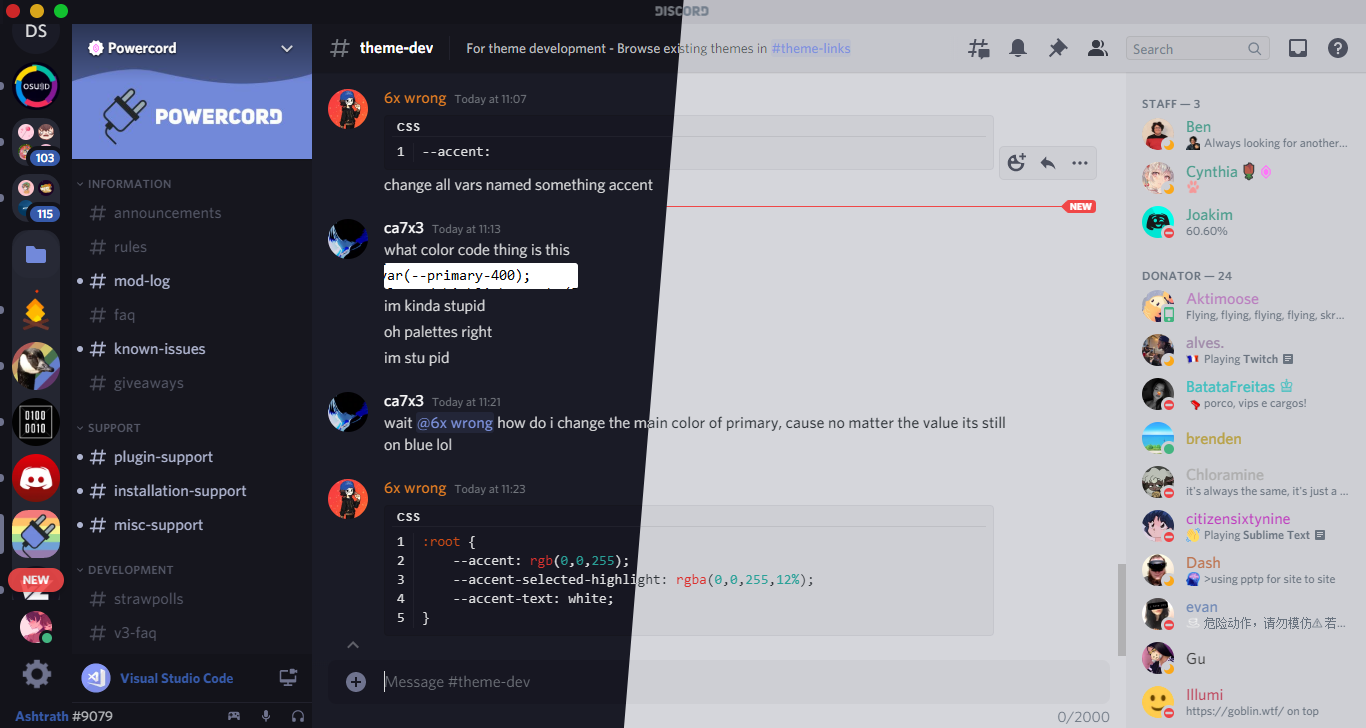
hello, im currently modifying a deprecated theme for vencord, but i cant figure out a way to make transparency for the background colors working. any help?
https://github.com/Dyzean/Tokyo-Night
GitHub
A clean, dark Discord theme that celebrates the lights of Downtown Tokyo at night. - GitHub - Dyzean/Tokyo-Night: A clean, dark Discord theme that celebrates the lights of Downtown Tokyo at night.
tender hedge
steady peak
> redirected from <#1026515880080842772>
hello, im currently modifying a depre...
discord has multiple layers of background
wich is very annoying
just play with background values until theres nothing left
outcome should be pitch black backgrounds
grand surge
Change padding
thorny fjord
transform: translate(-1rem, 0);
 left oxide
can someone help me and tell me the class name of the ms so i can change the color?

 fathom hedge
left oxide
can someone help me and tell me the class name of the ms so i can change the col...
fathom hedge
left oxide
can someone help me and tell me the class name of the ms so i can change the col...
use the f8break plugin to look at it in devtools
left oxide
fathom hedge
use the f8break plugin to look at it in devtools
how, when i hover on it i can't see the class
 fathom hedge
left oxide
how, when i hover on it i can't see the class
fathom hedge
left oxide
how, when i hover on it i can't see the class
click on it
digital pier
it's in a different "layer" for lack of a better term, you're looking for either .tooltip__7b090 or .tooltipGreen__36421
left oxide
digital pier
it's in a different "layer" for lack of a better term, you're looking for either...
Thanks alot !


 glacial citrus
 daring hornet
that theme is clear vision with a custom backgorund
daring hornet
are u sure
glacial citrus
yes
daring hornet
Explain.
glacial citrus
explain what 😭
daring hornet
Explain how u know
glacial citrus
daring hornet
Explain how u know
i know what clear vision looks like



 wooden stag
teal cave
Whaddahell is this
wooden stag
teal cave
Whaddahell is this
its now like those mobile games, where they put a lock on your face basically begging for your money
warm bough
discord broke stuff again so if anyone wants, it seems like they just removed the word experiment from the brand-experiment variables and made brand-experiment into brand-500, judging by my about 3 seconds of research fixing my theme, k bye
clear siren
yeah I also noticed a change but didn't look into it yet (only effected my bot/staff/etc tags)
 viral raft
 wispy flame
vestal field
manic chasm
detect what channel the user is inb
wispy flame
vestal field
manic chasm
detect what channel the user is inb
detect?
manic chasm
its
kidna hard to specify it
css isnt acoding lagnauge
like, you can look for a specific users pfp
how do i look for the specific channel that's selected
and apply thigns only in that channel
vestal field
what are you trying to apply though
manic chasm
profile pictures and names
vestal field
if its a specific person i think their profile picture in the right side member panel has an aria label
but it only works if the member panel is open
manic chasm
no theres a snippet that replaces pfps
i jsut need to figure out how to do in a specific channel
vestal field
idt its possible with channels
like i said you could use the pfp in the member panel to select when the dm is with a specific person
maybe with group dms too
 ashen sable
what's a good snippet for just changing the background, asking for a friend (literally)
tried to search in #🎨-css-snippets but there was too much to go through due to Discord's search searching inside threads as well
solid ore
ashen sable
what's a good snippet for just changing the background, asking for a friend (lit...
to an image?
solid ore
1sec
solid ore
ashen sable
what's a good snippet for just changing the background, asking for a friend (lit...
GitHub
Discord css stuff. Contribute to nvhhr/discordcss development by creating an account on GitHub.
ashen sable
thanks!
clear siren
vestal field
idt its possible with channels
it is possible by using :has()
it's how I (or originally fres) replaced the channelname in topic and chat input in this snippet https://github.com/nvhhr/discordcss/blob/main/snippets/recute.theme.css
@manic chasm
just add [class^=content_]:has([class*=modeSelected_] [href="/channels/1015060230222131221/1026504914131759104"]) before your selector with the correct channel id to make it only apply on that channel
the href has serverid/channelid but you could also just use channelid only if you want by making it href$=
vestal field
ohhh i forgot the link
manic chasm
clear siren
the href has serverid/channelid but you could also just use channelid only if yo...
how would i get a user’s channelid
for like
their dm
 manic chasm
is it just their userid
manic chasm
nice
warm bough
manic chasm
how would i get a user’s channelid
fyi server ID in that case is @me instead of a snowflake
I almost pinged a role by typing @me lol, not sure if that's intentionally a troll
teal cave
why not test it
warm bough
okay brb!
worldly moss
this is horrible
 teal cave
discord stupid for making it the same syntax as pinging
 rancid dust
worldly moss
rancid dust
worldly moss
do not bully vendiepoints
teal cave
what the point of points when you can't buy things from vending machine with them
 opaque glen
teal cave
what the point of points when you can't buy things from vending machine with the...
opaque glen
teal cave
what the point of points when you can't buy things from vending machine with the...
new vencord feature
you spend points buying the plugins in the plugins tab
clear siren
@teal cave you have to use points to unlock more lines of css
bleak gust
clear siren
<@134142022092062720> you have to use points to unlock more lines of css
Good
 slim lantern
Found that you can hide the new "Activities" experiment with the following CSS. I know it's quite hacky... but so far this is the only way I could think of doing it.
/* hide user game activity */
.membersGroup_cad095:has(.headerContainer__708b7),
/* .content__690c5[aria-label="Members"]>div:has(.container__8d997), */
.content__690c5>div:has(.container__8d997) {
  display: none;
}
 latent heart
i wanna take a stab at it but i dont have that feature yet
unless theres an experiment
 sacred anchor
 agile thunder
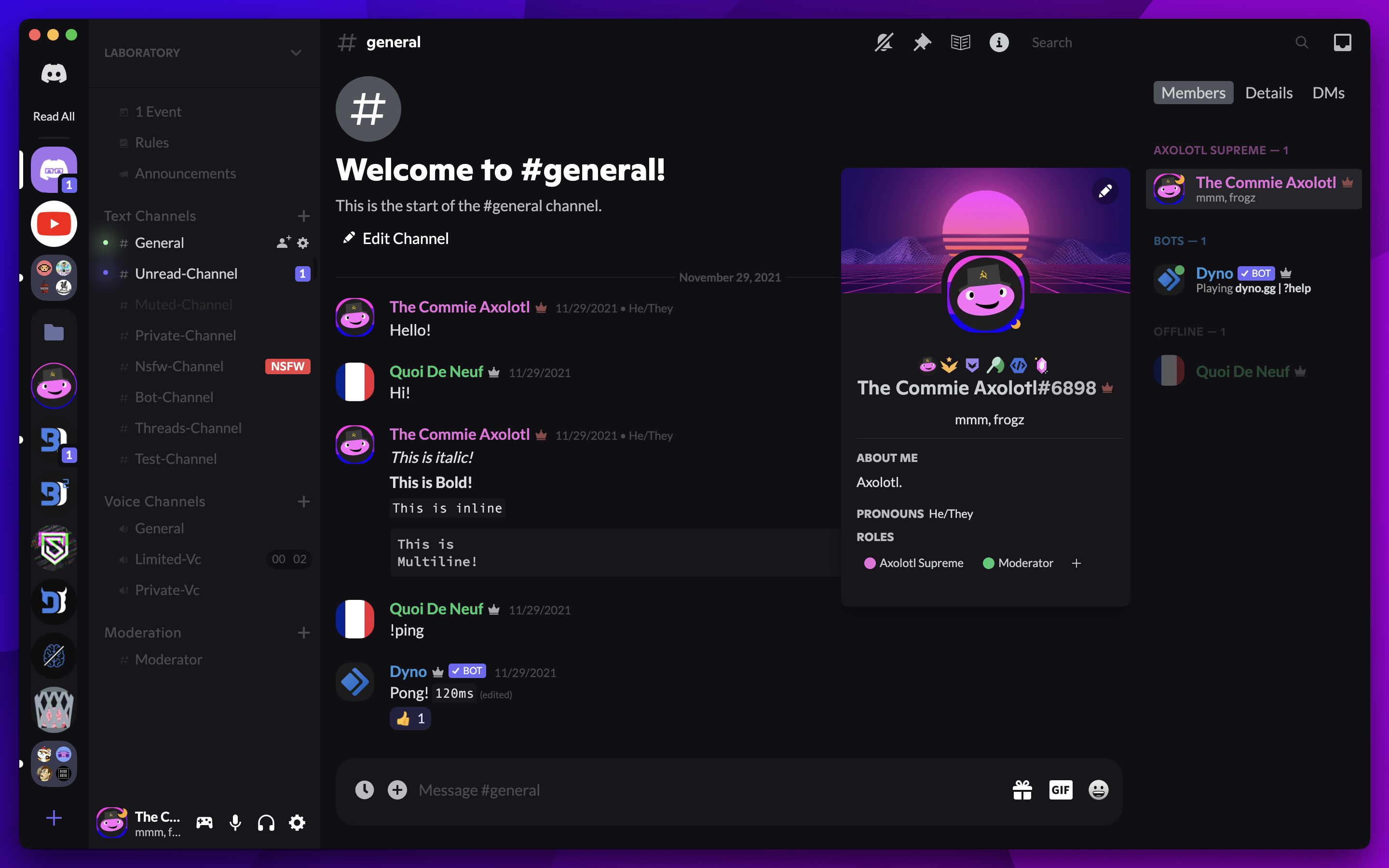
is there any way to get the same profile effects with this theme on vencord? sorry i didnt know where to send it
https://betterdiscord.app/theme/Ultra
 exotic nexus
agile thunder
is there any way to get the same profile effects with this theme on vencord? sor...
exotic nexus
agile thunder
is there any way to get the same profile effects with this theme on vencord? sor...
just install the theme?
nvm it doesnt work lol
vestal field
agile thunder
is there any way to get the same profile effects with this theme on vencord? sor...
wait for the theme author to fix it
 alpine current
or try updating it with this
https://syndishanx.github.io/Website/Update_Classes.html
slim lantern
Does anyone know how to fix this issue I'm having where my banners seem to get covered up? I'm looking around for the element but having trouble finding it.
What I'm trying to do is fill the background of the element so that I can basically have it be any colour I'd like. But the part where the image banner is gets filled in too.
 slim lantern
I solved the issue above by simply finding...
.animatedContainer__0e828 {
  z-index: 2;
}
... and pushing it's z-index value up so it goes over the background. (Changed it from 1, to 2... and it works.)
half crystal
how does one change the svg of icons like the settings icons did


 lost plume
whar
that's not blurring the background
that's making the background invisible and blurring what's behind it
which is different
lost plume
just look at how FVUI does it?
 valid rover
GitHub
Contribute to FeoreV/Themes development by creating an account on GitHub.
actually
GitHub
Contribute to FeoreV/Themes development by creating an account on GitHub.
lost plume
yeah I can navigate a github repo
valid rover
real
lost plume
who the fuck thought that the css should be minified
.theme-dark, .theme-light { --background-tertiary: transparent }
(I think?) to make it transparent
and to blur it just find the class and add backdrop-filter: blur(69px)

 valid rover
okay lol
clear siren
you also need to make discord not hide the content when settings are open fyi
I also had a blurred version of that
still haven't bothered to fix and upload it, I've been too busy and tired from work to do much css lately
half crystal
any way to stop discord's icon animation using css?
exotic nexus
well if you dont know css then you can't do anything
unless you want to make basic changes to a different theme
teal cave
grand surge
do i need to learn css to make my own theme?
https://docs.betterdiscord.app/themes/
https://learntothe.me
however if you are just editing an existing theme, https://bdeditor.dev/
iron smelt
i want a second opinion on using the var
color: var(--info-warning-foreground) for my css snippet instead on a hard coded color
^the css snippet in question
worldly moss
in my opinion your hardcoded yellow looks better
iron smelt
ok keeping the hard coded yellow for now
vestal field
progress

making the message bar a separate panel was pretty annoying but i think i got it to work nicely
 rapid holly
gives me wikipedia vibe
 sterile niche
idk if this is the right channel for this but i updated all my old snippets and now they work
awesome as hell
valid rover
i have an idea
you know #🎨-css-snippets message ?
what if y'all made a snippet that only does this effect to spoiler text
teal cave
valid rover
what if y'all made a snippet that only does this effect to spoiler text
the censored text effect is done by swapping font, however the font being used doesn't support all characters, so there will be still some risk of spoiler text being visible. Hence why I describe the theme as a tool for taking demo screenshots, and not as a general solution for hiding things you don't want to see.
clear siren
use unicode-range to limit the font to what it supports and use a blank one or something for the rest
sterile niche
#🎨-css-snippets message should i include this in my old font snippet?
 alpine depot
This isn't a theme but the recent discord update made oneko appear doubled and not singular. I took this from #🎨-css-snippets , if someone can do some voodoo magic and fix it, it would be appreciated. Thank you!
/*have a sleeping oneko on your chat box*/
[class^="channelTextArea"]::before {
    content: "";
    width: 32px;
    height: 32px;
    bottom: calc(100% - 4px); /* Mess with the - 3px to change it's vertical position */
    right: 10px; /* Switch this from right to left to put it on the left side, or increase/decrease to change it's position */
    position: absolute;
    image-rendering: pixelated;
    pointer-events: none;
    background-image: url("https://raw.githubusercontent.com/adryd325/oneko.js/14bab15a755d0e35cd4ae19c931d96d306f99f42/oneko.gif");
    animation: oneko 1s infinite; /* change 1s to make the animation slower/faster */
}
@keyframes oneko {
    /*
    if you open the background image in ur browser, you will see that it has way more frames
    so if you want, you could make ur own keyframes for a different animation
    the top left frame is 0 0, second top row is -32 0, second row second is -32 -32 and so on
    the ...00001% makes it so that there's no transition between the frames, so if you wanted say 3 frames, you'd do 0%, 33.3%; 33.30001%, 66.6%; 66.60001%, 100%
    */
    0%, 50% {
        background-position: -64px 0;
    }
    50.0001%, 100% {
        background-position: -64px -32px;
    }
}```
(ping me if you respond)
toxic yew
alpine depot
This isn't a theme but the recent discord update made oneko appear doubled and n...
[class^="channelTextArea_"]
alpine depot
toxic yew
[class^="channelTextArea_"]
Thank you :D
vestal field
good job discord for adding two channeltextareas
worldly moss
anyone knows if its possible to not use these shit windows 10 emojis

oh my god I made it worse
 vestal field
i maybe remembering wrong but i think you can use a font to change them?
clear siren
yeah
for an example this swaps flag emojis to twemoji-mozilla font https://github.com/nvhhr/discordcss/blob/main/snippets/dashless-extended.theme.css
GitHub
Discord css stuff. Contribute to nvhhr/discordcss development by creating an account on GitHub.
but to cover all emojis is tricky because there's a bunch of unicode ranges containing emojis
for twemoji-mozilla case it mostly only has emojis, but it does also contain empty glyphs for numbers so you need to set your range(s) to exclude them
 orchid path
So i was wondering, aside from buttons, has there been any way to hide these two tabs without messing up with the other channels? I've been trying to find any sort of CSS regarding them but i really couldn't

 lost plume
just click x on suggested and collapse active now imho
solid ore
u cant collapse the active now
orchid path
Yep, and suggested comes back, if you visit the channel even once it keeps coming back, its mostly and incovenience
solid ore
orchid path
Yep, and suggested comes back, if you visit the channel even once it keeps comin...
if u rly want it, this is rly janky but should work:
#channels [class^=containerDefault_]:has(> div > h3), /* active now header */
#channels [class^=containerDefault_]:has(> [class^=list_][class*=collapsed_]), /* active now vcs */
#channels [class^=containerDefault_]:has([class^=dismissWrapper_]):not(:has(~ [class^=containerDefault_][class*=selected_])), /* suggested channels header */
#channels [class^=containerDefault_]:has([class^=dismissWrapper_]) ~ [class^=containerDefault_]:not([class*=selected_]) /* suggested channels that aren't selected */ {
    display: none !important;
}
Holy shit it worked very well, you should get a medal fr
Thank you a TON
teal cave
Minor update to SettingsIcons (posting here in case of future searches)
--settingsiconsto toggle the icons now acceptsshowandhideinstead of1and0.- Aforementioned toggle relies on
:root { container: root }. Currently I know of no themes but my own that use named containers, but this is a potential incompatibility if other themes rename the root container.
GitHub
A theme to add icons to Discord settings, for use with Vencord plugin ThemeAttributes. - MiniDiscordThemes/SettingsIcons
 sly swallow
there isn't a really good channel for this so posting it here
since I like party mode but not everything party mode comes with (including the combo system) I decided to use ryan's charcounter plugin and some quickcss to make the number the same size as party mode

It looks stupid af and that's why I love it
but at least it doesn't reset when you hit backspace
teal cave
Hell yeah.
wooden stag
wth is this? this is with vencord off, discord has mess up something. any chance this could be fixed with pure css?
 toxic yew
wooden stag
wth is this? this is with vencord off, discord has mess up something. any chance...
wooden stag
toxic yew
wooden stag
wth is this? this is with vencord off, discord has mess up something. any chance...
wooden stag
oh, I should checked
 warm portal
toxic yew
[class^="channelTextArea_"]
warm portal
toxic yew
[class^="channelTextArea_"]
u don't need quotes for this btw
slim lantern
I don't have perms to post in the snippets channel but I expanded on the overflow bugfix by also making the roles section scrollable so now you can see more of the profile at once too!
/* Profile Overflow Fix */
/* - Profile Height Limit */
[class*=userPopoutOverlayBackground] {
  max-height: 60vh;
}

/* - Roles Scroller */
.roles__74a2b {
    max-height: 5em;
    overflow: hidden scroll;
    width: 110%;
}

.section__62b44:has(.roles__74a2b) {
    max-width: 90%;
    overflow: hidden;
}
/* END */
open a #📩-modmail and ask if you can post it
 gloomy dirge
Do it be possible to remove scrollbar when hovering channels?
teal cave
gloomy dirge
Do it be possible to remove scrollbar when hovering channels?
If you mean this scrollbar only, then
.scroller__1f498:hover {
    &::-webkit-scrollbar-thumb,
    &::-webkit-scrollbar-track {
        visibility: hidden;
    }
}

If you want to hide all scrollbars that do this, then replace .scroller__1f498 with .fade_ba0fa0
echo frost
How was brand-experiment-15a defined before?
it's not defined anymore and it breaks reactions
 teal cave
echo frost
How was brand-experiment-15a defined before?
it's not defined anymore and it bre...
teal cave
echo frost
How was brand-experiment-15a defined before?
it's not defined anymore and it bre...
Don't know about 15a in particular, but --brand-experiment was blurple.
echo frost
yeah ik sort of what it looked like (and i could get the hex value by looking in my old ss's), but not how it's defined
teal cave
Wait hold on
I've saved a bunch of copies of discord's css, let me check if the most recent has it
teal cave
echo frost
yeah ik sort of what it looked like (and i could get the hex value by looking in...
yeah it does:
--brand-experiment-15a: hsl(var(--brand-500-hsl) / 0.15);
and then
--brand-500-hsl: 235 calc(var(--saturation-factor, 1) * 85.6%) 64.7%;
In fact do you just want the entire file which contains the rest of colour values as well?
teal cave
prettier'd
echo frost
echo frost
ty
ok this is also broken by the same thing
 teal cave

hopefully discord will fix at some point while they're rewriting the entire colour scheme
I suppose the brand-experiment has concluded and they've decided blurple 2 is not good enough, and we need blurple 3 instead
echo frost
Just the brand-experiment fix:
echo frost
Is using an svg selector the best way to detect reposts on twitter/x?
[data-testid="cellInnerDiv"]:has([d*='M4.75 3.79l4.603 4.3-1.706']) {
  display: none;
}```the class names don't seem good
teal cave
I would not be surprised if their class names get rerolled every build, so yeah sure
 gilded radish
hi, quick question
I have my own theme made of various CSS snippets and whatnots, and a few minutes ago I noticed that these corners are broken
can someone help me with a class to fix them? these are the classes I use rn to round various corners in the Discord UI:
markup_a7e664 messageContent_abea64 {border-radius: 20px;}

.embed_cc6dae {border-radius: 40px;}

code:not(code.inline) {border-radius: 20px !important;}

.roundedBanner__16aa6, .userProfileInner__61cc1 {border-radius: 27px 27px 0 0;}
.accountProfileCard__744d8, .root-8LYsGj {border-radius: 30px;}
.userProfileOuter__4ac83 {border-radius: 30px;}
.userPopoutInner_e90432::before, .userProfileModalInner__99b1e::before {border-radius: 30px;}

.field__69fa0, .field__69fa0 button {border-radius: 20px !important;}

.contentWrapper_e0bb2c {border-radius: 30px;}

.menu__088f7, .colorDefault_e361cf {border-radius: 20px;}

div.userPopoutOverlayBackground_bf6444.overlayBackground__2666e {border-radius: 27px;}

.userProfileModalOverlayBackground__7ec35 {border-radius: 27px;}

div.background__4e802 {border-radius: 27px;}

link-1-kTxV.linkWihChannelEmoji-3T2y0p {border-radius: 15px;}

#app-mount .embedFull__14919 {border: 3px solid; border-radius: 30px;}
 thorny fjord
gilded radish
hi, quick question
I have my own theme made of various CSS snippets and whatnot...
thorny fjord
gilded radish
hi, quick question
I have my own theme made of various CSS snippets and whatnot...
[id^=popout] {
    --theme-radius: 2rem;
    border-radius: var(--theme-radius);
    overflow: hidden;
}
.userProfileInner__8ff35::before {
    border-radius: calc(var(--theme-radius) - 4px);
}
?
gilded radish
thorny fjord
```css
[id^=popout] {
--theme-radius: 2rem;
border-radius: var(--theme-r...
thanks, it worked!
thorny fjord
thorny fjord
```css
[id^=popout] {
--theme-radius: 2rem;
border-radius: var(--theme-r...
it has weird behaviour if you use insane raduis like 5rem
but it's a banner problem
gilded radish
thorny fjord
it has weird behaviour if you use insane raduis like 5rem
at least on my PC (which is the only PC I made this theme for) it works just fine
echo frost
Is there a good way to hide the recent activity thing?
the html for it is kinda weird. the people aren't inside the ACTIVITY-3 thing's html


those divs are the people
echo frost
There isn't one in there
 native topaz
dm me the html for that area
 muted knoll
pure cairn
How about embeds?
muted knoll
pure cairn
How about embeds?
that profile decoration(?) is cute, how'd get one?
or is it just pfp
 prime yoke
for some reason when i use the --darkbg the green circle when someone is speaking doesn't appear
--darkbg: linear-gradient(rgba(255, 255, 255, 0.1), rgba(255, 255, 255, 0.1)),
  var(--background);
--background-secondary: var(--darkbg);
any ideas how to fix this?
if this is wrong channel for this im sorry i will delete this if its in wrong channel
pure cairn
muted knoll
that profile decoration(?) is cute, how'd get one?
Uhh, which one? Discord or Decor's?
If it's the former, then it was from a discord quest for Lost Ark
vestal field
user panel test
 echo frost
How can I do the f8 pause thing in chrome?
pressing f8 doesn't work even though it shows in devtools keyboard shortcuts
clear siren
echo frost
How can I do the f8 pause thing in chrome?
pressing f8 doesn't work even though ...
you can call debugger with a timer
paste in console
setTimeout(function() {
  debugger;
}, 3000);
that makes it break after 3sec allowing you to get your popup or whatever
pure cairn
vestal field
user panel test
Looks cool, not a big fan of the text cutting tho
Time to add a new snippet to make icons pop up when hovering the settings cogwheel
echo frost
Does anyone know how these buttons on regex101.com change color when clicking them?
the html doesn't seem to change
thorny fjord
echo frost
Does anyone know how these buttons on regex101.com change color when clicking th...
button:focus or maybe button:active
lost plume
echo frost
Does anyone know how these buttons on regex101.com change color when clicking th...
I'm too lazy to crop it out like you
grand surge
how do i optimize this
lags a lot
while seeing other people who has worse pcs with a big ahh theme use theirs comfortably
just this no themes
vestal field
grand surge
how do i optimize this
try removing transparent popups
id imagine thats pretty laggy
grand surge
i mean that was the only thing i wanted to keep..
other css are just fixes
cant i use one themed thing 😭
i5-12450h uhd gpu & rtx3050m
it shouldnt lag.. i think..
prime yoke
so i have the whole theme set how i wanted besides this area, and i don't know how to change the color of this area
 vestal field
prime yoke
so i have the whole theme set how i wanted besides this area, and i don't know h...
vestal field
prime yoke
so i have the whole theme set how i wanted besides this area, and i don't know h...
the color for that part is background secondary alt
prime yoke
vestal field
the color for that part is background secondary alt
yeah, i found it like 5 seconds ago xd
thanks for trying tho
muted knoll
pure cairn
If it's the former, then it was from a discord quest for Lost Ark
ah ic ic
 magic escarp
can i use scss for my theme?
safe python
not directly
magic escarp
safe python
not directly
how do you mean?
magic escarp
oh ok thx!
echo frost
thorny fjord
button:focus or maybe button:active
Oh, didn't know :active existed ty
echo frost
Is there anything else that can go here that could get messed up from this css that puts the spotify player on top?
.panels__58331 {
  display: grid;
  && > div.wrapper_e832ee {
    max-width: 240px !important;
  }
  && > div#vc-spotify-player {
    max-width: 230px !important;
    order: -1;
  }
  && > div.container_debb33 {
    max-width: 220px !important;
  }
}```
Or is there a better way to do thisk entirely
vestal field
echo frost
Is there anything else that can go here that could get messed up from this css t...
i would do it this way
[class^=panels_] {
  display: flex;
  flex-direction: column;
}
#vc-spotify-player {
  order: -1;
}```idk if its better though
echo frost
seems much better ty
 brittle juniper
vestal field
user panel test
brittle juniper
vestal field
user panel test
good album i like sansily ties
vestal field
brittle juniper
good album i like sansily ties
yop
 crimson leaf
Hello, I love a theme but it's outdated so I'd like to update it myself. I'm a web frontend dev so I have no issues with CSS, but I wondered if there was a "theming documentation" made by the community, sorry if it's a dumb question :/
fathom hedge
crimson leaf
Hello, I love a theme but it's outdated so I'd like to update it myself. I'm a w...
Description of this channel - https://docs.betterdiscord.app/themes

BetterDiscord Docs
User and developer documentation for using and creating addons for BetterDiscord.
crimson leaf
mb, ty
pure cairn
Ah crap, new profiles came out and my theme looks horrible
Yet another thing to add to the todo list
clear siren
crimson leaf
Hello, I love a theme but it's outdated so I'd like to update it myself. I'm a w...
ctrl+shift+i for devtools and have fun; if the theme is broken by discord class changes, there are scripts that can update them for you
 fringe venture
Hey, I wanted to try changing the default Discord theme to make the background partially transparent, but adding
:root {
    opacity: 0;
}
Just makes the whole window gray
clear siren
and by class changes I mean the hashes or whatever that are in the classnames were all changed
fringe venture
I did edit settings.json to make transparent: true
clear siren
fringe venture
Hey, I wanted to try changing the default Discord theme to make the background p...
you need a theme to get rid of a bunch of backgrounds on a whole bunch of elements
for a very good transparent theme you might want to check out this https://github.com/s-k-y-l-i/discord-themes
fringe venture
Alright I will
fringe venture
clear siren
for a very good transparent theme you might want to check out this <https://gith...
Yeah doesn't work
Doesn't make my vesktop transparent
Unless I'm installing it wrong
clear siren
what os are you on
fringe venture
Linux
I have transparency working with my terminal already
So the WM I'm using supports it
I guess it could be something with chromium or with the fact that I'm using flatpak version idk
clear siren
under vencord settings and vesktop settings you should have transparency options
try messing with those
fringe venture
clear siren
under vencord settings and vesktop settings you should have transparency options
I enabled it in vencord settings
Doesn't help
clear siren
do you also have the one in vesktop settings

 fringe venture
Lemme check
clear siren
(not sure about linux)
clear siren
hmm
fringe venture
 clear siren
I see
fringe venture
fringe venture
Seems like this corresponds to settings.json in vesktop installation folder
clear siren
yeah
fringe venture
Mind showing me what the transparency setting is called there?
Maybe if I set it to true by hand something will happen
Worst case I'll just remove that line
clear siren
I don't think modifying settings.json is the way
but you might want to try disabling hw accel
maybe that helps?
fringe venture
clear siren
I don't think modifying settings.json is the way
Probably not, but I still want to try
I know how to reinstall a program if I fuk something up
Can you just tell me what that json field is called please?

 clear siren
and the vesktop setting has these
 clear siren
clearly meant for windows in my case, and I know osx also has some transparency/vibrancy option if you're on a mac
fringe venture
Dang
clear siren
but no idea about how all of this works on linux
fringe venture
Yeah I guess I'll have to look into either chromium or electron documentation
fringe venture
Ok
I managed to get it to work
Using this theme:

GitHub
A transparent theme for BetterDiscord. Modded by MeowIce. - MeowIce/TranslucencePlus
However it's kinda borked it seems
I'll work based off of it
Oh and it works without having to disable hw acceleration
fringe venture
clear siren
for a very good transparent theme you might want to check out this <https://gith...
Ok this works now too, maybe I had to restart or something
Aight this looks sick
worldly moss
Any clue how I would be able to move those tooltips without moving the whole element?

nvm found it

 shut dragon
I installed the ultra theme, and since I wanted to make some changes I copied the files it imports to my own github and then changed the links.
the message bar is really tall in that theme and i'd like to change it, is there a simple line i'm overlooking? i wanna revert the change and make it go back to normal, i asked in their support server too but the theme author said they aren't working on it anymore
maybe there's a simple fix? idk
https://github.com/hyperlexus/themes/blob/master/bd.css
https://github.com/hyperlexus/themes/blob/master/ultra.css
these are the 2 themes i copied, this is the original theme link:
https://github.com/TheCommieAxolotl/BetterDiscord-Stuff/tree/main/Ultra
it looks like this right now https://imgur.com/a/yKwvGdc
fathom hedge
shut dragon
I installed the ultra theme, and since I wanted to make some changes I copied th...
 lunar hamletBOT
fathom hedge
you're probably looking for https://github.com/TheCommieAxolotl/BetterDiscord-St...
lunar hamletBOT
fathom hedge
you're probably looking for https://github.com/TheCommieAxolotl/BetterDiscord-St...
Ultra.css: Line 518
min-height: 70px !important;
also, you should probably look at some of the basics at https://docs.betterdiscord.app/themes/ so you know what you're looking for
shut dragon
fathom hedge
you're probably looking for https://github.com/TheCommieAxolotl/BetterDiscord-St...
thank you! and yes, I will look at it
 blissful plank
hello anyone got a code or knows how to hide this things? tia

 echo frost
blissful plank
hello anyone got a code or knows how to hide this things? tia
echo frost
blissful plank
hello anyone got a code or knows how to hide this things? tia
This should work, and be resistent to class changes.
[class*=container_]:has(> [class*=channelNotice_]) {
  display: none;
}```

If the above one has any false positives, use this: (it may be broken during a class change, which usually only happens a couple times a year i think)
```css
.container__8567b:has(> .channelNotice__36ec1) {
  display: none;
}
To do this on your own, open inspect element (ctrl+shift+i), click the dotted square with mouse cursor icon (or ctrl+shift+c) (top left of inspect element)
and hover over what you want to hide
you can get the class name there, and then use something like this to hide it:
[classname here] {
display: none;
}``` echo frost
This should work, and be resistent to class changes.
```css
[class*=container_]:...
echo frost
echo frost
This should work, and be resistent to class changes.
```css
[class*=container_]:...
oh and forgot the thing that shows how many events
li:has(> div > [id*="upcoming-events-"]) {
  display: none;
}``` native topaz
how can i select this to change it's properties like bg color
<button type="button" class="vc-ranb-button button__581d0 lookFilled__950dd sizeMin__508da grow__4c8a4"><div class="contents__322f4">Read All</div></button>
toxic yew
.vc-ranb-button { background: red }
 novel finch
Most likely if a classes prefix is vc- its going to be unique
 unkempt cipher
 echo frost
How can I make things like this which basically just replace text with pseudoelements without messing up padding stuff or whatever?
(just adding text with pseudoelement doesn't mess it up, it's only when I change the font size of the thing i'm replacing that it gets messed up)
[class*="base_"]:has(#channels [href*="/channels/1015060230222131221/"])
[data-author-id="683171006717755446"] [class*="username_"] {
  font-size: 0;
  &::after {
    font-size: 1rem;
    content: "wow i can change my name with css"
  }
}```

(also this change name thing is just an example)

and like is there a way to get the original font size instead of having to manually type it in?
I recently saw something that got an attribute, can you do something similar with css things (like font-size)? #1169203118437834813 message
vestal field
echo frost
How can I make things like this which basically just replace text with pseudoele...
probably better to find a way to hide the text without using font-size: 0 and then the pseudoelement will just inherit the correct font size
echo frost
the font size isnt the issue though
i dont think
and how else can you hide the text
echo frost
that's fine
that was just an additional question not the main one
vestal field
oh
echo frost
because in most cases i can just get the font size, it would just be a bit more convenient to not have to do that, but it's fine
 umbral knot
did discord change class names? i remember it used to be name-somehex but now its name__somehex
having to do this now
 safe python
umbral knot
having to do this now
safe python
umbral knot
having to do this now
 safe python
what is that even for
dark dragon
Looks like something specific to powercord settings. You don't need it
umbral knot
i took a break from theming for 2 years and all the layouts have changed oh god
i should just install a premade theme instead of trying to fix and maintain and debug this 3 year old file i wrote 🥹
umbral knot
safe python
https://syndishanx.github.io/Website/Update_Classes.html
Yeah no, this isn't helping atall
It changed like 10% of the class names lmaoo
Some classes I can't even find in the inspect element, probably removed idk
There's this one element called <div class> which my theme is supposed to select. I assume it was once called wrapper or something lmao
teal cave
Yeah the tool doesn't go far back as 3 years
native topaz
echo frost
and like is there a way to get the original font size instead of having to manua...
.hidden {
    visibility: hidden;
    position: relative;
}
.hidden::after {
    visibility: visible;
    display: block;
    content: "better text";
    position: absolute;
    top: 0;
    left: 0;
}```this is just with a seperate .hidden class
you would ofc change all the selector bits to whatever you would need
true glen
Hey! I want to replace the emoji and the add content/image button. Can anyone help me with doing that?
native topaz
true glen
Hey! I want to replace the emoji and the add content/image button. Can anyone he...
what do you mean by replace? as in remove entirely, swapthe icons, etc.
true glen
native topaz
what do you mean by replace? as in remove entirely, swapthe icons, etc.
Swap buttons. Not just icons, but buttons themselves
native topaz
i don't think that you can do that unless you use a plugin
true glen
Aw :(
Well thanks for answering anyway. I will try to find a way
native topaz
you could try moving the buttons with translateX and Y
true glen
Yeah, that could techincally work, but it creates a problem where the button is in a fixed position. So if it should move (like when the window size changes) it will move all around the place
grand surge
@balmy torrent Hi 😉 I prob shouldnt be able to type here
Can someone answer my question, Ive been dying to ask, is plugin request in issues also used for requesting a change of an existing plugin 🥺
It has to do with theme development btw aswel..
 whole agate
"not locked"
grand surge
I know this is offtopic but why is every channel besides this one locked?
exotic nexus
stupid people
exotic nexus
ask "why is discord broken" in every channel except the right one
grand surge
oh. thats fair


thatd be cool if i was able to extra a common color pallete from the album cover
and apply it to the theme
I could do it prob by blurring the image cover and masking it over things, but that'd require the image declaration to be in :Root which it happens to not be... sadly
echo frost
native topaz
```css
.hidden {
visibility: hidden;
position: relative;
}
.hidden::afte...
???
that doesnt work at all
native topaz
echo frost
that doesnt work at all
did you change the .hidden to the correct selector that you want? cause it should work then
echo frost
echo frost
How can I make things like this which basically just replace text with pseudoele...
I used this except removed font size stuff and replaced it with yours
and its even more scuffed than using font size
echo frost
ok its less scuffed than i thought
[class*="base_"]:has(#channels [href*="/channels/1015060230222131221/"])
[data-author-id="683171006717755446"] [class*="username_"] {
  visibility: hidden;
  position: relative;
  &::after {
    visibility: visible;
    display: block;
    position: absolute;
    top: 0;
    left: 0;
    content: "wow i can change my name with css";
  }
}```
 native topaz
oh i was just saying this works for fontsize
parent:css display: grid; grid-template-areas: "left right";
usernmae gets grid-area: left; and time gets grid-area: right;
expand to fit more elements by adding more areas and assigning them appropriately
i honeslty need to make a theme
so many snippets i have
grand surge
idk if this has been done before but I wonder if someone can make a theme like this, it looks pretty interesting.

https://www.youtube.com/watch?v=D2BukoIo2T4&t=63s heres the video where I got it from

I downloaded chinese discord. It was... Interesting.
🧉 Use code 'GROUP' for 10% off 🧉
https://bit.ly/GAMERSUPPS
outro song: https://bit.ly/3mChvWY
JOIN THE OFFICIAL DISCORD (140,000+ MEMBERS):
https://www.discord.gg/softwilly
SUPPORT MY FRIENDS IN THE VIDEO
Softwilly (R...
teal cave
It reminds me of 2017 discord somewhat
Possible to do for sure, not really my area of interest though
grand surge
teal cave
Possible to do for sure, not really my area of interest though
I mean if to fix certain aspects it would look great
 unborn flame
i fell weird using my alt
 tame oracle
What plugin do i need to activate the theme
 celest badger


