
#🎨-theme-development
1 messages · Page 28 of 1
 molten maple
what they think

.wrapper__8a5dd {
  width: 100%;
  max-width: 300px;
  height: auto;
  background-color: #6b6868a6;
  display: flex;
  flex-direction: column;
  justify-content: center;

  padding: 20px;
  border-radius: 20px;
}

.header__4ecb7 {
  font-size: 12px;
  margin-top: 0;
  text-align: center;
  color: #ffffff;
  width: 100%;
}

.button_f73214 {
  align-items: center;
  margin-top: 20px;
  padding: 12px 24px;
  background-color: #4caf50;
  color: #fff;
  border: none;
  border-radius: 8px;
  font-size: 20px;
  cursor: pointer;
  transition: background-color 0.3s ease, box-shadow 0.3s ease, color 0.3s ease, transform 0.3s ease;
}

.button_f73214:hover {
  background-color: #45a049;
  box-shadow: 0 4px 8px rgba(0, 0, 0, 0.2);
  color: #f0f0f0;
  transform: scale(1.05);
}

.guildIconImage_c1aa48 {
  width: 60px;
  height: 60px;
  border-radius: 50%;
  box-shadow: 0 4px 8px rgba(0, 0, 0, 0.1);
  transition: transform 0.3s ease, box-shadow 0.3s ease;
  margin-bottom: 10px;
}```What do you think of the style I made for the invitations?
 worldly moss
the banner overlaps slightly
 worldly moss
is there a way to trigger that modal
its probably somewhere but im lazy to find out where
worldly moss
molten maple
honestly all the invites need is a small change in height and support for themes (in my opinion)

 pure cairn
 oblique night
https://media.discordapp.net/attachments/665040925243736074/784899319823859743/t...
oblique night
https://media.discordapp.net/attachments/665040925243736074/784899319823859743/t...
I love this
 frigid garnet
molten maple
```css
.wrapper__8a5dd {
width: 100%;
max-width: 300px;
height: auto;
ba...
frigid garnet
molten maple
```css
.wrapper__8a5dd {
width: 100%;
max-width: 300px;
height: auto;
ba...
this doesnt work
 bleak gust
worldly moss
is there a way to trigger that modal
bleak gust
worldly moss
is there a way to trigger that modal
upload a folder
worldly moss
yeah thanks
bleak gust
oh
thats VERY SLIGHTLY DIFFERENT
.title__76592
.instructions_e266ce
these classes are interesting
worldly moss
.uploadDropModal_cfadae.error_d2567f .title__76592,
.uploadDropModal_cfadae.error_d2567f .instructions_e266ce {
    visibility: hidden;
}

.uploadDropModal_cfadae.error_d2567f .title__76592::before {
    content: "That was ";
    position: relative;
    right: 20px;
    visibility: visible;
}

.uploadDropModal_cfadae.error_d2567f .title__76592::after {
    content: "fucking stupid";
    position: relative;
    top: -22px;
    right: -25px;
    visibility: visible;
    font-style: italic;
}

.uploadDropModal_cfadae.error_d2567f .instructions_e266ce::before {
    content: "Don't ever post that bullshit again";
    position: relative;
    left: 2.8rem;
    visibility: visible;
}

.uploadDropModal_cfadae.error_d2567f .instructions_e266ce::after {
    content: "You fucking degenerate";
    position: relative;
    right: 4.8rem;
    visibility: visible;
}
thats the closest I can get with this absolute shit code
 frigid garnet
molten maple
```css
.wrapper__8a5dd {
width: 100%;
max-width: 300px;
height: auto;
ba...
frigid garnet
molten maple
```css
.wrapper__8a5dd {
width: 100%;
max-width: 300px;
height: auto;
ba...
brokes the banner image
 deft niche
Brokes the banner image 😔
frigid garnet
deft niche
Brokes the banner image 😔
lmao
 spring bramble
hi how to send in #🎨-css-snippets ?
i have made this css /* Hide "new" shop icon */ .marketingButtonImage_bc16c8 {display: none;} .shyButton__30111 {background: transparent;} .newBadge__5fcc2 {display: none;}
 iron smelt
spring bramble
i have made this ```css
/* Hide "new" shop icon */
.marketingButtonImage_bc16c8...
iron smelt
spring bramble
i have made this ```css
/* Hide "new" shop icon */
.marketingButtonImage_bc16c8...
make a #📩-modmail ticket and ask for the role
molten maple
frigid garnet
this doesnt work
What do you mean it doesn't work?
molten maple
worldly moss
the banner overlaps slightly
?
 worldly moss
Better
molten maple
Is that better?

.wrapper__8a5dd {
  width: 100%;
  max-width: 300px;
  height: auto;
  background-color: #6b6868a6;
  display: flex;
  flex-direction: column;
  justify-content: center;
  border-radius: 10px;
}

.header__4ecb7 {
  font-size: 12px;
  margin-top: 0;
  text-align: center;
  color: #ffffff;
  width: 100%;
}

.button_f73214 {
  align-items: center;
  margin-top: 20px;
  padding: 12px 24px;
  background-color: #4caf50;
  color: #fff;
  border: none;
  border-radius: 8px;
  font-size: 20px;
  cursor: pointer;
  transition: background-color 0.3s ease, box-shadow 0.3s ease, color 0.3s ease, transform 0.3s ease;
}

.button_f73214:hover {
  background-color: #45a049;
  box-shadow: 0 4px 8px rgba(0, 0, 0, 0.2);
  color: #f0f0f0;
  transform: scale(1.05);
}

.guildIconImage_c1aa48 {
  width: 60px;
  height: 60px;
  border-radius: 50%;
  box-shadow: 0 4px 8px rgba(0, 0, 0, 0.1);
  transition: transform 0.3s ease, box-shadow 0.3s ease;
  margin-bottom: 10px;
}
.inviteSplashImage_f28d23 {
 border-radius: 10px;
}```I think I've fixed it
molten maple
How long does it normally take to reply to tickets requesting to publish my snippet?
 vestal field
idk but im gonna be honest with you, i don't really see the point of your snippet
iron smelt
vestal field
idk but im gonna be honest with you, i don't really see the point of your snippe...
i do, it cleans up the invite thing and makes it look nicer
vestal field
i wouldnt say cleans up, just makes it shorter and with rounded corners?
iron smelt
well there are a lot of useless things in that channel but still that’s what it does
vestal field
fair
molten maple
vestal field
idk but im gonna be honest with you, i don't really see the point of your snippe...
But that's not the invitation snippet I want to publish xd
vestal field
i see
molten maple
vestal field
idk but im gonna be honest with you, i don't really see the point of your snippe...
And so what it does is what Krystal says, it cleans up the invitation, adds borders and improves the aesthetics a bit (or makes it worse depending on your taste), (Sorry for my English, I don't speak English and I'm trying to)
iron smelt
molten maple
And so what it does is what Krystal says, it cleans up the invitation, adds bord...
exactly what i thought it does, even still there are a lot of weird css in that channel and this is one of those just to make Discord look better (it’s fine. I’m not good at English either)
vestal field
molten maple
And so what it does is what Krystal says, it cleans up the invitation, adds bord...
ok heres some feedback based on your code above (idk if you've changed it since then)
- there seems to be quite a bit of redundant code, like the
display: flex;
flex-direction: column;
justify-content: center;
- i'd advise against changing colors, because people probably want their themes to still work with it
- uneven padding, there's a big gap between the button and the text, but everything else is close together
also the element behind the rounded banner has a different background color

sorry for the criticism lol initially i didn't realize the roundness changes because of my theme
molten maple
Yes, some things have already been fixed like the different background.
I don't know if it looks good (the background is transparent so it doesn't affect if you have different themes)

.wrapper__8a5dd {
  width: 100%;
  max-width: 300px;
  background-color: transparent;
  display: flex;
  flex-direction: column;
  justify-content: center;
}

.header__4ecb7 {
  font-size: 12px;
  margin-top: 10px;
  text-align: center;
  color: #ffffff;
  width: 100%;
}

.button_f73214 {
  align-items: center;
  margin-top: 20px;
  padding: 12px 24px;
  background-color: #4caf50;
  color: #fff;
  border: none;
  border-radius: 8px;
  font-size: 20px;
  cursor: pointer;
  transition: background-color 0.3s ease, box-shadow 0.3s ease, color 0.3s ease, transform 0.3s ease;
}

.button_f73214:hover {
  background-color: #45a049;
  box-shadow: 0 4px 8px rgba(0, 0, 0, 0.2);
  color: #f0f0f0;
  transform: scale(1.05);
}

.guildIconImage_c1aa48 {
  width: 60px;
  height: 60px;
  border-radius: 50%;
  box-shadow: 0 4px 8px rgba(0, 0, 0, 0.1);
  transition: transform 0.3s ease, box-shadow 0.3s ease;
  margin-top: 15px;
}
.guildName__22ec8 {
   margin-top: 15px;
}``` I don't know if it looks badjust dont set any color or background-color at all
unless there's a specific reason for it
iron smelt
vestal field
unless there's a specific reason for it
couldn’t you use discord variables for the backgrounds
vestal field
yes but they are already set to discord variables so what's the point
unless you want to like color mix or something?
 echo frost
I want to blur this fill bar, but if I blur it, it combines with the background stuff
Is there a way to blur it before adding it as the img background, so like hypothetically, i could give it a massive blur to use pretty much the avg color of the img for the bar fill?
this is what i'm doing for it now
#vc-spotify-player .barFill__1f56b {
    background-image: var(--vc-spotify-track-image);
    background-size: 240px;
    background-position-y: center;
    filter: blur(2px) brightness(120%);
}```
and here's the whole css worldly moss
molten maple
I don't know if it looks good (the background is transparent so it doesn't affec...
worldly moss
molten maple
I don't know if it looks good (the background is transparent so it doesn't affec...
background: var(--bg-overlay-3, var(--background-secondary-alt));
would probably look better
 stone oar
quick snippet I use, didn't see anything like it in #🎨-css-snippets . reduces the spacer above the message box ```css
/* reduce scrollerSpace (right above message box) from 30px to 15px */
.scrollerSpacer__6b1b6 {
height: 15px;
}
(I use 0px space between message groups, so this makes the UI look a lot more consistent and less jarring.)
deft niche
vestal field
idk but im gonna be honest with you, i don't really see the point of your snippe...
You say that like snippets are very serious and high quality 


 supple bone
I think they meant to say the snippets are basic and most probably have been already discussed, plus Sam said they're learning CSS so the code might not be efficient, I get the point of refact0r since a novice is trying to publish things as crazy great feature I did and I'm proud, it isn't a funny snippet or so, just... basic stuff. People here knows how to do basic things and if not they ask here, no need a snippet to change bg, rounded corners or center elements. Just how I see it 😄
frigid garnet
vestal field
idk but im gonna be honest with you, i don't really see the point of your snippe...
same
bleak gust
@grand surge I figured a way to do it... kinda
[data-list-item-id^="members-"]:has([src*="id"]) {
    display:none;
}
It matches the avatar URL
might not work for users without an avatar
 gilded cloak
molten maple
How long does it normally take to reply to tickets requesting to publish my snip...
gilded cloak
molten maple
How long does it normally take to reply to tickets requesting to publish my snip...
I don't think anyone that uses classes with hashes for serious css should be able to post
It's extremely annoying to fix css every time they reroll hashes
 grand surge
bleak gust
<@456226577798135808> I figured a way to do it... kinda
```css
[data-list-item-...
grand surge
bleak gust
<@456226577798135808> I figured a way to do it... kinda
```css
[data-list-item-...
it works lol thank you
pure cairn
I wish discord didn't have so many similar class names and attribute selectors worked fine
pure cairn
meanwhile we have at least 3 classes that start with "avatar_"
bleak gust
fake CSS :selector
pure cairn

bleak gust
i am already doing some fuckery
that does what i want
but
I have this hacky thing
GitHub
The cutest Discord client mod. Contribute to Sqaaakoi/Vencord development by creating an account on GitHub.
vee would be so fucking disappointed in this btw
pure cairn
there is no way of selecting an element based off its content, right?
 plain kelp
pure cairn
meanwhile we have at least 3 classes that start with "avatar_"
plain kelp
pure cairn
meanwhile we have at least 3 classes that start with "avatar_"
There's 20ish container_ and content_
pure cairn
pure cairn
there is no way of selecting an element based off its content, right?
like, if I want to hide a specific category in the channel list, I can't just select one by its name
bleak gust
bleak gust
https://github.com/Sqaaakoi/Vencord/blob/betterChannelTabs/src/plugins/channelTa...
TL;DR: This here effectively takes an array, passes that to findByProps, and returns the module[arguments[0]]
gilded cloak
pure cairn
like, if I want to hide a specific category in the channel list, I can't just se...
Aria-label perhaps
Why is that husk
pure cairn
I tried, but it didn't work
I basically wanted to hide the "Active Now" category that sometimes pops out when someone is in a VC
bleak gust
pure cairn
I basically wanted to hide the "Active Now" category that sometimes pops out whe...
Screenshot?
pure cairn
it's usually at the bottom, so I tried using last-child, but it didn't work either
bleak gust
.nowPlayingColumn_b025fe is the one in the friends page?
pure cairn
bleak gust
Screenshot?
join a random vc here
another one
xD
wait, I can remove it from my channel list
this one
 bleak gust
maybe you could use a css after .sectionDivider__9dbcb selector
i forgot the order of the +
gilded cloak
bleak gust
i forgot the order of the +
:has(+[class*="sectionDivider"])
Lets you select in the other direction
bleak gust
gilded cloak
:has(+[class*="sectionDivider"])
Lets you select in the other direction
thats cool
didnt know you could do that
pure cairn
that's too advanced for me to understand yet, ugh
also because there's more than 1 .sectionDivider_ in the channel list
gilded cloak
OK I'm getting on to write it
bleak gust
bleak gust
TL;DR: This here effectively takes an array, passes that to findByProps, and ret...
I was thinking something like :vc-find(container, spineBorder) to get .container__342a0
would anyone be interested in seeing this be a (hacky) reality
pure cairn
btw do I leave the vc or does anyone still need it for the classes?
bleak gust
you can leave
pure cairn

gilded cloak
pure cairn
btw do I leave the vc or does anyone still need it for the classes?
I still need
bleak gust

pure cairn
I'll join back
gilded cloak
@bleak gust
#channels li[class*=containerDefault]:has([class*=wrapperStatic]) {
  &, & + * { display: none; }
}
What the fuck
pure cairn
gilded cloak
<@259558259491340288>
```css
#channels li[class*=containerDefault]:has([class*=...
huh
whar
plain kelp
Nesting is nice
gilded cloak
&, & + * { display: none; }
"hide this and the thing that follows me"
pure cairn
wow
gilded cloak
gilded cloak
<@259558259491340288>
```css
#channels li[class*=containerDefault]:has([class*=...
wait, this also hides pinned channels, oops
plain kelp
gilded cloak
```
&, & + * { display: none; }
```
"hide this and the thing that follows me"
It does look kinda similar to :(){:|:&};: tbh
bleak gust
pure cairn
what even are pinned channels?
community only feature
pure cairn
I see
gilded cloak
pure cairn
what even are pinned channels?

 pure cairn
never seen one ngl

 bleak gust
nop
gilded cloak
pure cairn
is it an experiment?
maybe, I haven't manually toggled it though
 bleak gust
favorite
pure cairn
ohhhh
bleak gust
try that
bleak gust
pure cairn
and it leaves the section divider
horror
pure cairn
more husk
 gilded cloak
better settings experiments is
 bleak gust
pure cairn
more husk
bleak gust
pure cairn
more husk
working as intended actually
bleak gust
gilded cloak
better settings experiments is <:husk:1026532993923293184>
Oh, it does this without BetterSettings
gilded cloak
pure cairn
never used favourite channels ngl
I use it to move up stuff that is at the bottem that deserves to be at the top
pure cairn
now it's just a matter of hiding the section divider
fair, I'm used to scrolling ig

gilded cloak
pure cairn
now it's just a matter of hiding the section divider
[aria-label="Channels"] > [class^=sectionDivider] {
  display: none;
}
I just have this on
pure cairn
gilded cloak
<@259558259491340288>
```css
#channels li[class*=containerDefault]:has([class*=...
so this is nested css?
gilded cloak
pure cairn
so this is nested css?
let me find a better example of nested css, that isn't a good example
@pure cairn
/* Reduced enhanced markdown margins */
[class^=message] [id^=message-content] {
  h1, h2, h3, li {
    margin: 0px;
  }
  ol, ul {
    margin-top: 0px;
  }
}
equivilant to
[class^=message] [id^=message-content] :is(h1, h2, h3, li) {
  margin: 0px;
}
[class^=message] [id^=message-content] :is(ol, ul) {
  margin-top: 0px;
}
BetterSettings only touches the top-level menu, any sub(-sub)-menus are vanilla
gilded cloak
yes
gilded cloak
pure cairn
so 2 sets of {}
n>1 sets of {}
pure cairn
yeah right
 past bison
why i can't react emoji?
plain kelp
Scss has supported that for years, but real css added it fairly recently
pure cairn
the quickcss editor does not like it
gilded cloak
plain kelp
Scss has supported that for years, but real css added it fairly recently
yea, my work codebase is based on postcss with a scss-like nesting plugin
past bison
the qickcss doesnt even like :has()
plain kelp
I think the quickcss editor is a bit outdated
gilded cloak
past bison
the qickcss doesnt even like :has()
GitHub
Reproducible in vscode.dev or in VS Code Desktop? Not reproducible in vscode.dev or VS Code Desktop Reproducible in the monaco editor playground? Not reproducible in the monaco editor playground Mo...
past bison
👍
gilded cloak
plain kelp
I think the quickcss editor is a bit outdated
no, monaco just still haven't fixed that
plain kelp
I don't mean quickcss is outdated with monaco, I mean monaco is outdated with css
gilded cloak
isn't monaco just vscode's text thing? vscode doesn't have problems with it
pure cairn
so, if I were to nest this
[class*=messageContent] :is(h1, h2, h3) {
  color: var(--main-color);
}
[class*=messageContent] strong {
  color: var(--main-color);
}```
it would turn into
```css
[class*=messageContent] {
  h1, h2, h3 {
    color: var(--main-color);
  }
  strong {
    color: var(--main-color);
  }
}
or even
[class*=messageContent] {
  h1, h2, h3, strong {
    color: var(--main-color);
  }
}
yeah that
gilded cloak
yop
I really enjoy &
/* bouncy buttons */
button,
[role="button"],
a[href^='/channels'],
[aria-label="Servers"] [class^=listItem] {
  &:hover { filter: brightness(0.95); scale: 0.95; }
  &:active { filter: brightness(0.9); scale: 1.05; }
  transition: scale 0.6s cubic-bezier(0.34, 2, 0.64, 1);
}
we love monaco editor jank
 pure cairn
so nesting is essentially a way to shrink down code?
plain kelp
Pretty much yeah
gilded cloak
gilded cloak
```css
/* bouncy buttons */
button,
[role="button"],
a[href^='/channels'],
[aria...
that is basically:
[role="button"],
a[href^='/channels'],
[aria-label="Servers"] [class^=listItem] {
  transition: scale 0.6s cubic-bezier(0.34, 2, 0.64, 1);
}
:is([role="button"],
a[href^='/channels'],
[aria-label="Servers"] [class^=listItem]):hover {
  filter: brightness(0.95); scale: 0.95;
}
:is([role="button"],
a[href^='/channels'],
[aria-label="Servers"] [class^=listItem]):active {
  filter: brightness(0.9); scale: 1.05;
}
so yea, 100% just to shrink code
plain kelp
Anything you can write with nesting you can write without
pure cairn

people who code really like to use less characters
well, I've learned something new, thank you
plain kelp
Less code means less code to debug
gilded cloak
pure cairn
people who code really like to use less characters
this is very true
 solid ore
gilded cloak
so yea, 100% just to shrink code
solid ore
gilded cloak
so yea, 100% just to shrink code
is it more/less efficient?
frigid garnet
gilded cloak
that is basically:
```css
[role="button"],
a[href^='/channels'],
[aria-label="Se...
button:hover,
[role="button"]:hover,
a[href^='/channels']:hover,
[aria-label="Servers"] [class^=listItem]:hover {
    filter: brightness(0.95);
    transform: scale(0.95);
}

button:active,
[role="button"]:active,
a[href^='/channels']:active,
[aria-label="Servers"] [class^=listItem]:active {
    filter: brightness(0.9);
    transform: scale(1.05);
}

button,
[role="button"],
a[href^='/channels'],
[aria-label="Servers"] [class^=listItem] {
    transition: transform 0.6s cubic-bezier(0.34, 2, 0.64, 1);
}
is it possible to add a bottom margin to this scrollbar?
 gilded cloak
frigid garnet
```css
button:hover,
[role="button"]:hover,
a[href^='/channels']:hover,
[aria-la...
gilded cloak
frigid garnet
```css
button:hover,
[role="button"]:hover,
a[href^='/channels']:hover,
[aria-la...
:is is one of the most useful tools behind nesting
 devout umbra
does anybody have a snippet to hide the clown avatar decoration? if not, a snippet that hides all avatar decorations works too
pure cairn
past bison
devout umbra
does anybody have a snippet to hide the clown avatar decoration? if not, a snipp...
i did this yesterday too 😄
past bison
or maybe: [class^="avatarDecoration"]
frigid garnet
when anyone is making a snippet to remove clown decors?
solid ore
frigid garnet
when anyone is making a snippet to remove clown decors?
/* hide clown avatar decorations */
[class^=avatarDecoration_]:has(img[src^="https://cdn.discordapp.com/avatar-decoration-presets/a_5e1210779d99ece1c0b4f438a5bc6e72.png"]) {
  display: none;
}
it's ugly
past bison
past bison
is it possible to add a bottom margin to this scrollbar?
so is this not possible?
pure cairn
dunno, my theme completely hides them
 clear siren
if you add margin-bottom to this scroller element you get bottom margin on the scrollbar too

but other than that not really possible
past bison
maybe there is an other way around?
clear siren
not sure if you can do some weird tricks with overflows and transforms etc
can't try now, gotta go to work
pure cairn
I've read a bit the mozilla docs about nesting
if I understood correctly, both
a {
b { ```
and
```css
a {
& b {```
work fine, right? teal cave
yeap
plain kelp
Yep
teal cave
correct
pure cairn
ok good
plain kelp
& is replaced with the surrounding selector
teal cave
though doing that except when absolutely n ecessary is a readability nightmare
pure cairn
yeah I can imagine
but what about the
a {
  & + b {```
selectorsbecause I'm confused
pure cairn
I don't understand how it's applied
given
<h2>Heading</h2>
<p>This is the first paragraph.</p>
<p>This is the second paragraph.</p>```
and
```css
h2 {
  color: tomato;
  + p {
    color: white;
    background-color: black;
  }
}```does it basically apply the 1st line to the first <p> and the 2nd line to the second one?
 plain kelp
If there is no &, that's the sane as if there was & in front
pure cairn
oh wait, it only applied the style to the 1st element
plain kelp
It applies to h2 + p, which is the first one
pure cairn
meanwhile, if I were to write & + p + p, it would select the 2nd one
oh ok, now I got it
molten maple
Improved?
 past bison


header.header__77c95::after {
    content: "";
    top: 0;
    left: 0;
    position: absolute;
    width: 100%;
    height: 100%;
    background: var(--bg-overlay-chat, var(--background-primary));
    -webkit-mask-image: linear-gradient(to top right, rgba(0, 0, 0, 0) 70%, rgba(0, 0, 0, 1) 100%, rgba(0, 0, 0, 1) 100%), linear-gradient(to bottom, rgba(0, 0, 0, 1), rgba(0, 0, 0, 0));
    z-index: -1;
}```MUCH better imo
plain kelp
What's the difference
molten maple
.wrapper__8a5dd {
width: 100%;
max-width: 300px;
background-color: var(--background-tertiary);
display: flex;
flex-direction: column;
justify-content: center;
border: 1px solid var(--border-strong);
border-radius: 10px;
}
.header__4ecb7 {
font-size: 12px;
margin-top: 10px;
text-align: center;
color: #ffffff;
width: 100%;
}
.button_f73214 {
align-items: center;
margin-top: 20px;
padding: 12px 24px;
background-color: var(--brand-experiment);
color: #fff;
border: none;
border-radius: 8px;
font-size: 18px;
cursor: pointer;
transition: background-color 0.3s ease, box-shadow 0.3s ease, color 0.3s ease, transform 0.3s ease;
}
.button_f73214:hover {
background-color: var(--brand-experiment);
box-shadow: 0 4px 8px rgba(0, 0, 0, 0.2);
color: #ffffff;
transform: scale(1.05);
}
.guildIconImage_c1aa48 {
width: 60px;
height: 60px;
border-radius: 50%;
box-shadow: 0 4px 8px rgba(0, 0, 0, 0.1);
transition: transform 0.3s ease, box-shadow 0.3s ease;
margin-top: 15px;
}
.guildName__22ec8 {
margin-top: 15px;
}``` The code is already adaptable to any theme you have in case you like it. clear siren
so yeah I started making a style just to set a background image and clear all the other backgrounds manually one by one instead of using the nuclear option of using the vars I did before
 clear siren
yeah I used to do this but it just causes trouble with many random elements being unreadable basically

I could've used some of these without causing issues but yeah
 heavy abyss
@plain kelp hey question discord has nested css now correct?
plain kelp
Last I heard it used an outdated electron, dunno if they've updated
heavy abyss
plain kelp
Last I heard it used an outdated electron, dunno if they've updated
Okay thanks
vestal field
works on vesktop though iirc
heavy abyss
I know that much was just wondering if discord added it (sorry if this sounded rude)
Someone asked if I could update a css version and I was like tf first of all second not how that works to my knowledge (electron and discord) (yes they meant actual css to make it nested)
vestal field
heavy abyss
Someone asked if I could update a css version and I was like tf first of all sec...
i think it works now
try css div { div { color: red; } } in quickcss
but the monaco editor still thinks its an error
heavy abyss
Alr thanks
heavy abyss
vestal field
works for me at least
Does it display as an error?
They said it works but shows up as an error
Wait
I just realized you said that
Mb
frigid garnet
past bison
it's ugly
agree
echo frost
frigid garnet
agree
Better than the others
Also, did the highlight color in discord app change?
that looks darker than it was before

It was slightly darker in web for a while, and I think it's the same color here now too
Ok yeah it is the same color as web now
vestal field
nice, always thought it looked bad
 plain kelp
Using css to change content is generally not a great experience
frigid garnet
i want to do something like "welcome! (username)"
plain kelp
It can be done, sometimes, but a plugin can do it much better
echo frost
echo frost
Also, did the highlight color in discord app change?
that looks darker than it w...
What's the default one?
frigid garnet
plain kelp
It can be done, sometimes, but a plugin can do it much better
im too lazy to change it :p
plain kelp
Like, the most recent one in #1032200195582197831
frigid garnet
ye i seen it
echo frost
echo frost
What's the default one?
Oh and using
::selection {
    background: blue;
}```
also applies the same one when unfocusedshould be different when not focused
echo frost
echo frost
I want to blur this fill bar, but if I blur it, it combines with the background ...
also bump
although i'm also getting off now, so not very useful bump
idk
frigid garnet
any way to disable shop?
frigid garnet
how can i rename myself using user id?
 frigid garnet
pure cairn
you get the class for your name, hide it, set an ::after with the new name
frigid garnet
pure cairn
you get the class for your name, hide it, set an ::after with the new name
my brain blow up rn lol
pure cairn
Actually, you'd need to specify your user ID in that, otherwise you'd change everyone's name instead of just yours
I guess you could use the UID stored in your pfp as identifier
 tender hedge
real
frigid garnet
hey uhh
@pure cairn do u know how to make everything unclickable
or remove everything from discord
pure cairn
frigid garnet
<@519220048850583567> do u know how to make everything unclickable
* { pointer-events: none; }
frigid garnet
ty
pure cairn
frigid garnet
or remove everything from discord
Pretty sure this is blocked by automod
frigid garnet
pure cairn
Pretty sure this is blocked by automod
also can i only make this for a user?
with user id
plain kelp
Just block them
pure cairn
That'd be a security issue
I don't think you could even do that with a plugin lol
Unless you want to hide everything from a certain user
And not for the user
plain kelp
You could very easily make a plugin that hides everything if you're a particular user
plain kelp
But tricking them into installing it would be harder
frigid garnet
plain kelp
But tricking them into installing it would be harder
yeah ik
he said he disabled the css a long ago 💀
plain kelp
For a more subtle effect, consider *:nth-child(15) { display: none }
supple bone
How old are you, 15? xD
frigid garnet
supple bone
How old are you, 15? xD
bro thinks hes funny
supple bone
Ohh you're 17 actually, that explains a lot xD
frigid garnet
supple bone
Ohh you're 17 actually, that explains a lot xD
ye thanks for understanding
frigid garnet
plain kelp
For a more subtle effect, consider `*:nth-child(15) { display: none }`
what does this do?
im going to use it
soo
@plain kelp
plain kelp

wikiHow
If you or somebody you know cannot read, you're not alone. 14 percent of American adults can't read--that's 32 million people--and 21% read below a 5th grade level. The good news is, it's never too late to learn how to read. This article...
frigid garnet
oops
clear siren
using a screen reader
 terse dew
Anyone got any idea on how to make an attribute selector that uses role info to filter out classes?
[class^=container__]:has(role=contentinfo)
doesn't really work and I am still pretty new to the :has thing.
clear siren
the attribute has to be also wrapped in []
terse dew
plain kelp
https://www.wikihow.com/Teach-Yourself-to-Read
14% of Americans can't read? the education system there seems to need fixing.
iron smelt
terse dew
14% of Americans can't read? the education system there seems to need fixing.
As an american, Yes the education system is bad but that 14% is people who moved here from foreign countries or people who live in the the middle of nowhere
terse dew
Oh wait, the data is just about English? thought it was about reading in general.
molten maple
🇲🇽 estoy haciendo un estilo para esa cosa que se ve cuando se inicia un chat por primera vez
🇺🇸 I'm making a style for that thing that you see when you first start a chat room
 molten maple
I can't think of anything to add to it xdd
 solid ore
tbh personally i j hide that whole thing
echo frost
is that this?
 solid ore
think so
pure cairn
echo frost
is that this?
yup
worldly moss
opinion on this (small) redesign of the quick searcher (unsure about backdrop shadow)
 teal cave
pretty epic
molten maple
echo frost
is that this?
I'm doing a reversion of my code and it's burning better, tomorrow I'll share it with you.
echo frost
it's fine i dont need it
molten maple
worldly moss
opinion on this (small) redesign of the quick searcher (unsure about backdrop sh...
this is looking great
 proud token
worldly moss
opinion on this (small) redesign of the quick searcher (unsure about backdrop sh...
proud token
worldly moss
opinion on this (small) redesign of the quick searcher (unsure about backdrop sh...
oh this is really cool
looks like a keystroke launcher
 green vine
worldly moss
opinion on this (small) redesign of the quick searcher (unsure about backdrop sh...
green vine
worldly moss
opinion on this (small) redesign of the quick searcher (unsure about backdrop sh...
i think i saw something like this already
worldly moss
green vine
i think i saw something like this already
Yeah, similar was inspired by it
worldly moss
still quite different
green vine
anybody know how to change the color of svgs?
worldly moss
fill?
molten maple
solid ore
tbh personally i j hide that whole thing
I tried to remove the message "This is the beginning of your direct message history with..." but it didn't work.

With these bad codes that I'm doing I learn a little xd
molten maple
molten maple
I tried to remove the message "This is the beginning of your direct message hist...
What I did eliminate is the groups in common
green vine
molten maple
I tried to remove the message "This is the beginning of your direct message hist...
i can try to do it for you
molten maple
green vine
i can try to do it for you
Okay, thank you
green vine
just checked, i dont think its possible to remove that part
molten maple
green vine
just checked, i dont think its possible to remove that part
I tried it and it deleted everything (the user name, the message and the buttons).
molten maple
.container_cd7d9c {
    display: flex;
    align-items: center;
    border-radius: 45px;
    padding: 20px;
    box-shadow: 0 2px 3px var(--border-strong);
    border: 1px solid var(--border-strong);
    background-color: var(--background-modifier-accent);
}

.container__861ca {
    display: flex;
    justify-content: center;
    align-items: center;
}

.avatarContainer_d42438 {
    display: flex;
    align-items: center;
    margin-right: 10px;
}
.defaultColor__30336.marginBottom20__9fcf3 {
    text-align: center;
    margin-bottom: 10px;
    font-size: 15px;
}
.mutualGuilds__09c57,.avatar_b8e04b,.divider__9daf4{
  display: none;
}
.contents__322f4{
  display: flex;
    justify-content: center;
    align-items: center;
}```this is my code
I receive CONSTRUCTIVE critiques

 toxic yew
molten maple
I tried to remove the message "This is the beginning of your direct message hist...
toxic yew
molten maple
I tried to remove the message "This is the beginning of your direct message hist...
.container_cd7d9c>.description__51014 {
    font-size: 0;
}
someone thought of making an arc (browser) themed theme for discord yet?
pure cairn
huh, this looks interesting

 pure cairn
tender hedge
could also use the extended server list
pure cairn
tender hedge
could also use the extended server list
true
oh wait
folders at the top
servers below
hmmmm
tender hedge
what
tender hedge
btw the top 3 things are favorite tabs
not really possible to recreate that in discord without a custom plugin
idk if its even possible with one lol
pure cairn
 tender hedge
thats not how the browser works though
pure cairn
tender hedge
not really possible to recreate that in discord without a custom plugin
favourite experiments maybe?
tender hedge
then put folders at the bottom
those little page dots are like little mini profiles
pure cairn
tender hedge
then put folders at the bottom
that wouldn't look as good anymore tho, it'd be cooler if the folder opened at the bottom
tender hedge
also these are literal folders
 pure cairn
yeah I know, but what would you put at the top then?
tender hedge
nothing as its optional in the browser itself
pure cairn
oh fair
tender hedge
maybe dms and favorite tab
pure cairn
DMs | Favourites | maybe the "read all" button?
nah, the button would fit best in the bottom section
tender hedge
theres also a button at the top that like
gets rid of the sidebar for a popout sidebar

 tender hedge
oo
server add button could be used with the button in the bottom right of the sidebar
pure cairn
I was thinking about the "+ new tab" one
tender hedge
its also in there
 pure cairn
DMs | Favourites | maybe the "read all" button?
pure cairn
pure cairn
DMs | Favourites | maybe the "read all" button?
how about
DMs | Favourites | Discovery
?
tender hedge
could be cool yeah
although i dont think alot of people use discovery
but that might just be me
pure cairn
Ngl I've never used it either
tender hedge
replace discord logo with vennie gif xd
pure cairn
The Vencord Company of Düsseldorf
tender hedge
tender hedge
replace discord logo with vennie gif xd
ive already done this
 pure cairn
Yeah
tender hedge
yeah i did that
could also use the logo arc has top left
theres also an update for the windows beta today
(hopefully it fixes theme saturation)
tender hedge
cool
pure cairn
tender hedge
its also in there
I would've used this for the settings button
tender hedge
here move 3 layers of classes
pure cairn
But idk where that is on the browser
tender hedge
the settings are in a popout in the top left logo
pure cairn
I see
tender hedge
but im pretty sure the bottom left thing would work too
pure cairn
What's that for?
tender hedge
because on mac that has a menu that also has the settings in it
tender hedge
pure cairn
What's that for?
on windows only looking at ur history
 tender hedge
oh yeah the bottom could just be the vc stuff
pure cairn
How customizable are the colors?
Like, are there any presets or can you just use whatever you want
pure cairn
boo womp
 pure cairn
Bottom slider is for transparency?
tender hedge
pure cairn
Bottom slider is for transparency?
thats what it should be
rn its for some reason bugged and set to saturation
💀
pure cairn
I see
pure cairn
tender hedge
could also use the extended server list
By the way, was it a theme or a plugin? I don't remember anymore
tender hedge
that was a css snipet i saw somewhere
tender hedge
pure cairn
By the way, was it a theme or a plugin? I don't remember anymore

GitHub
A repo with all of my Discord CSS snippets. Contribute to DaBluLite/css-snippets development by creating an account on GitHub.
this
pure cairn
Me likey
Yeah, this seems fun
I won't be able to start working on it this weekend though, most likely from next week onwards
Might be a way to properly learn to theme as well
molten maple
.container_cd7d9c {
display: flex;
align-items: center;
border-radius: 45px;
padding: 20px;
box-shadow: 0 2px 3px var(--border-strong);
border: 1px solid var(--border-strong);
background-color: var(--background-modifier-accent);
}
.container__861ca {
display: flex;
justify-content: center;
align-items: center;
}
.avatarContainer_d42438 {
display: flex;
align-items: center;
margin-right: 10px;
}
.defaultColor__30336.marginBottom20__9fcf3 {
text-align: center;
margin-bottom: 10px;
font-size: 15px;
}
.mutualGuilds__09c57,.avatar_b8e04b,.divider__9daf4{
display: none;
}
contents__322f4{
display: flex;
justify-content: center;
align-items: center;
}
.container_cd7d9c>.description__51014 {
font-size: 0;
}``` New version, this one removes the message "Here begins the history with...", Thanks for the help to autumnvn terse dew
.pollContainer_cfb8c7 {
  background: #0a0a0a;
}
[class^=pollContainer_] {
  background: #0a0a0a !important;
}
only the first one does anything while the second does nothing, is there any reason for that?
pure cairn
terse dew
```css
.pollContainer_cfb8c7 {
background: #0a0a0a;
}
[class^=pollContainer_] ...
maybe there's multiple classes with that name
solid ore
terse dew
```css
.pollContainer_cfb8c7 {
background: #0a0a0a;
}
[class^=pollContainer_] ...
if the class u wanna select is like .class1.class2.class3 and pollcontainer is not the first one then it wont work, try using *= instead of ^=
pure cairn
pure cairn
maybe there's multiple classes with that name
I have a similar snippet but I used * instead of ^
/* fix unthemed polls */
[class*="pollContainer_"] {
  background-color: var(--background-secondary);
}```but u should also specify a parent elemwnt so it doesnt effect other things
pure cairn
last part was not necessary lol
terse dew
solid ore
if the class u wanna select is like .class1.class2.class3 and pollcontainer is n...
Oh thanks.
plain kelp
terse dew
```css
.pollContainer_cfb8c7 {
background: #0a0a0a;
}
[class^=pollContainer_] ...
Is pollContainer the first class? Because ^= is starts-with
terse dew
plain kelp
Is pollContainer the first class? Because ^= is starts-with
Yeah it was actually the last class, I just used =*
plain kelp
mv a b; git add a b; git commit; git push
 plain kelp
Same way as you do anything with git
pure cairn
I pressed ., opened the online vscode editor and pushed from there
plain kelp
Blindly copypasting commands from the internet
 radiant epoch
trying to recolor the message area but i cant seem to get the edges
 worldly moss
radiant epoch
trying to recolor the message area but i cant seem to get the edges
worldly moss
radiant epoch
trying to recolor the message area but i cant seem to get the edges
Discord is weird, thats not part of the message area

part of form_d8a4a1
I believe, unless you have some other styling
 radiant epoch
wait so i dont use form_d8a4a1?
 worldly moss
either try using !important or removing that idk
radiant epoch
worldly moss
what did you use to color that area green?
worldly moss
radiant epoch
what did you use to color that area green?
just "green"
background-color: green;
radiant epoch
oh yeah i meant the class
radiant epoch
😭

 pure cairn
tender hedge
idm waiting
pure cairn
tender hedge
idm waiting
https://fonts.google.com/specimen/Nunito
is this the font they use for the browser?

Google Fonts
Nunito is a well balanced sans serif typeface superfamily, with 2 versions: The project began with Nunito, created by Vernon Adams as a rounded terminal sans se

worldly moss
worldly moss
opinion on this (small) redesign of the quick searcher (unsure about backdrop sh...
if any one wants to use this (no access to #🎨-css-snippets moment / inspired by #🎨-css-snippets message)
https://raw.githubusercontent.com/Faf4a/snippets/main/QuickSwitcher/main.css

 fast cipher
worldly moss
if any one wants to use this (no access to <#1028106818368589824> moment / inspi...
fast cipher
worldly moss
if any one wants to use this (no access to <#1028106818368589824> moment / inspi...
nice but the corner radiuses don't match. Use this formula for a matching border radius: Outer = Padding + Inner
radiant epoch
Is there a way to color pick from the screen using just css?
plain kelp
What does that mean
You cannot set border-color: pixel(123, 456); if that's what you mean
radiant epoch
no like u kno sample a color from a certain pixel
like the eyedropper in photoshop
plain kelp
 radiant epoch
im tryna make my discord and spotify match like this, and spotify has colors for stuff, and i wanna make it auto switch with spotify
 plain kelp
Unless there's a suitable css variable in scope, that's not possible
radiant epoch
its probably possible with javascript then, could i make my own plugin then just take the color from there?
past bison
what do you guys think of the Header bars transparency and the input area? ^^
plain kelp
Transparent header bar is cool, yeah
I don't suppose you've found any way to do it without messing up the scrollbar?
past bison
not yet
frigid garnet
looks cool
 glossy aurora
my scrollbar is already messed up because of chatbubbles 😎
past bison
plain kelp
I don't suppose you've found any way to do it without messing up the scrollbar?
but without doing the input, only the header, the scrollbar would be OK

 iron smelt
molten maple
with or without border and background?
iron smelt
molten maple
with or without border and background?
i personally like the one with the board and background
molten maple
iron smelt
i personally like the one with the board and background
Thank you
molten maple
.container_cd7d9c {
    display: flex;
    align-items: center;
    border-radius: 45px;
    padding: 20px;
    box-shadow: 0 2px 3px var(--border-strong);
    border: 1px solid var(--border-strong);
    background-color: var(--background-modifier-accent);
}

.container__861ca {
    display: flex;
    justify-content: center;
    align-items: center;
     padding: -50px;
}
.avatarContainer_d42438 {
    display: flex;
    align-items: center;
    margin-right: 10px;
}
.defaultColor__30336.marginBottom20__9fcf3 {
    text-align: center;
    margin-bottom: 10px;
    font-size: 15px;
}
.mutualGuilds__09c57,.avatar_b8e04b,.divider__9daf4{
  display: none;
}
.container_cd7d9c>.description__51014 {
    font-size: 0;
}```Any suggestions?
molten maple
.bar__004d9 {
    display: flex;
    flex-direction: column;
    align-items: center;
  /*background-color: var(--background-floating); Unlock this option if you do not want the red color in unread mentions.*/
    border-radius: 26px;
    padding: 10px;
    box-shadow: 0 2px 4px var(--elevation-high);
}

.barText__32a63 {
    font-size: 14px;
    font-weight: bold;
}

.voiceChannelsUsers__6b5c5 {
    display: flex;
    flex-direction: row;
    justify-content: center;
    align-items: center;
}``` molten maple
what they think
molten maple
molten maple
this one also includes the message that you have unseen mentions

and NEW (MESSAGES) UNREADED
 molten maple
this one also includes the message that you have unseen mentions
molten maple
molten maple
this one also includes the message that you have unseen mentions
Half transparent black or half transparent red?
 molten maple
```css
.bar__004d9 {
display: flex;
flex-direction: column;
align-...
molten maple
molten maple
```css
.bar__004d9 {
display: flex;
flex-direction: column;
align-...
In the code is already corrected that line of the code that gives the color to the bubbles, you have to remove the /* */ to be able to remove the red color to the unread mentions.
thank you if you use it ❤️
terse dew
worldly moss
if any one wants to use this (no access to <#1028106818368589824> moment / inspi...
Pretty sure you can just use modmail and try to get a css snippet dev, you deserve it.
the role is pretty much just a way to make sure bad css code doesn't get spammed in there.
molten maple
I am working on a code that if I believe that I can have access to #🎨-css-snippets
molten maple
.vc-addon-name {
align-items: center;
justify-content: center;
font-size: 20px;
font-weight: bold;
color: var(--text-normal);
}
.vc-addon-note {
font-size: 15px;
color: var(--text-low-contrast);
}
.inputDefault__22335 {
border: 1px solid var(--border-strong);
border-radius: 5px;
padding: 8px 12px;
font-size: 16px;
width: 400px;
box-sizing: border-box;
}
.inputDefault__22335:focus {
outline: none;
border-color: #007bff;
box-shadow: 0 0 5px rgba(0, 123, 255, 0.5);
}
.select_fe2671{
margin-left: -100px;
}
```How is it coming along? glossy aurora
makes some plugin names go out of the box for me
molten maple
glossy aurora
makes some plugin names go out of the box for me
wait I check
Fixed and new changes added
 worldly moss
is it me or does vencord shift the svg of the select thing too much to the right
yeah it does

 glass junco
wait i'm confuse i'm trying to learn the css variables but i cant figure out how to add outlines to stuff
like a black outline around buttons
i see stuff like ```css
--button-outline-primary-border: var(--primary-500);
and i change it to black but nothing?halp
worldly moss
glass junco
i see stuff like ```css
--button-outline-primary-border: var(--primary-500);...
border: radius style color
e.g border: 1px solid var(--button-outline-primary-border)
worldly moss
yes
molten maple
worldly moss
yeah it does
Fixed in my code css .vc-addon-name { align-items: center; justify-content: center; font-size: 20px; font-weight: bold; color: var(--text-normal); } .vc-addon-note { font-size: 15px; color: var(--text-low-contrast); } .inputDefault__22335 { border: 1px solid var(--border-strong); border-radius: 5px; padding: 8px 12px; font-size: 16px; width: 400px; box-sizing: border-box; } .inputDefault__22335:focus { outline: none; border-color: #007bff; box-shadow: 0 0 5px rgba(0, 123, 255, 0.5); } .select_fe2671{ margin-left: -100px; } .icons__374b3{ margin-left: -20px }
 worldly moss
molten maple
Fixed in my code ```css
.vc-addon-name {
align-items: center;
justify-conten...
worldly moss
molten maple
Fixed in my code ```css
.vc-addon-name {
align-items: center;
justify-conten...
use padding: 10px, much better
worldly moss
glass junco
wait what are you trying
glass junco
worldly moss
wait what are you trying
i'm trying to add to the theme so that buttons and other ui stuff has black borders
i dont really understand this css isnt my strong suit
glass junco
not literally everything
buttons, modal, channels stuff like that
if i just knew how i'd do it myself lol
worldly moss
glass junco
if i just knew how i'd do it myself lol
like this?
 glass junco
YES
worldly moss
You can easily do it yourself,
press CTRL + SHIFT + I
Then click the top left thingy looking like an arrow
molten maple
worldly moss
use `padding: 10px`, much better
in?
worldly moss
molten maple
in?
.vc-addon-name {
  align-items: center;
  justify-content: center;
  font-size: 20px;
  font-weight: bold;
  color: var(--text-normal);
}
.vc-addon-note {
  font-size: 15px;
  color: var(--text-low-contrast);
}
.inputDefault__22335 {
  border: 1px solid var(--border-strong);
  border-radius: 5px;
  padding: 8px 12px;
  font-size: 16px;
  width: 400px;
  box-sizing: border-box;
}
.inputDefault__22335:focus {
  outline: none;
  border-color: #007bff;
  box-shadow: 0 0 5px rgba(0, 123, 255, 0.5);
}
.select_fe2671 {
  padding: 10px;
}
 fading wigeon
worldly moss
unsure about stable
fading wigeon
worldly moss
unsure about stable
locked behind a flag in settings.json
glass junco
<div class="">
fading wigeon
linux:
~/.config/discord/settings.json
windows:%appdata%/discord/settings.json
osx:~/Library/Application Support/discord/settings.jsonadd
"DANGEROUS_ENABLE_DEVTOOLS_ONLY_ENABLE_IF_YOU_KNOW_WHAT_YOURE_DOING": true,, ensure valid json
glass junco
the class is nothing
worldly moss
fading wigeon
locked behind a flag in settings.json
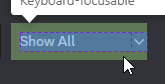
dyk if vencord intends the svg to be weirdly padded
 worldly moss
glass junco
the class is nothing
worldly moss
glass junco
the class is nothing
what r u trying to edit
glass junco
channels
fading wigeon
worldly moss
dyk if vencord intends the svg to be weirdly padded
more context?
worldly moss
fading wigeon
more context?
see ss above
glass junco
the container div is just not classed
worldly moss
padding is offset
fading wigeon
yeah but where is this


 fading wigeon
you could check the source yourself
worldly moss
ur selecting the wrong element
worldly moss
.link_ddbb36 {
    border: 1px solid black;
}
``` this would be for the channelschange black to your color
worldly moss
fading wigeon
you could check the source yourself
they dont change anything besides gap n height for vc-plugins-filter-controls
molten maple
.vc-addon-card {
  background-color: var(--background-floating);
  border-radius: 25px;
  border: 1px solid var(--border-strong);

}
.vc-addon-name {
  align-items: center;
  justify-content: center;
  font-size: 20px;
  font-weight: bold;
  color: var(--text-normal);
}
.vc-addon-note {
  font-size: 15px;
  color: var(--text-low-contrast);
}
.inputDefault__22335 {
  border: 1px solid var(--border-strong);
  border-radius: 5px;
  padding: 8px 12px;
  font-size: 16px;
  width: 400px;
  box-sizing: border-box;
}
.inputDefault__22335:focus {
  outline: none;
  border-color: #007bff;
  box-shadow: 0 0 5px rgba(0, 123, 255, 0.5);
}
.select_fe2671 {
  margin-left: -100px;
  padding: 10px;
}```Well, so far I leave the snippet, if you have suggestions tell me and I'll add it ❤️
 molten maple
```css
.vc-addon-card {
background-color: var(--background-floating);
borde...
molten maple
molten maple
```css
.vc-addon-card {
background-color: var(--background-floating);
borde...
Complete and updated code.
I hope to soon have access to#🎨-css-snippets so that I can publish my snippets in that channel and they don't get lost in oblivion in this channel xd
but I have already made 3 requests and all 3 have been rejected.
I'm going to try again with that code to see if they accept me xd
glass junco
are there any tips for using gif backgrounds with less lag?
cuz i use an imgur link and when the theme is on it like halves the framerate lol
glass junco
i'm gonna try an image squence and see if it helps
 magic escarp
this is a dumb question but is there any way to get randomness with a theme? like with css i mean
glass junco
not without js
css is only loaded once, it's all preprocesses
also, that would be a function, which is in programming languages, which css is not
magic escarp
i thought not just checking!
glass junco
yeah i wish themes supported js that'd be sick
or like have themes come with built-in plugins
magic escarp
i made something interesting i think:
It's a moving background image.
(don't bully my pink theme 🥺)
Here's the css for any1 interested:
body {
  /* you can use any image ovb */
  background: center/cover url('https://i.imgur.com/Uo77Ezk.png');
  overflow: hidden;
  width: 100vw;
  height: 100vh;
  /* you can change speed by changing the 300 number */
  animation: moveBackground 300s infinite linear;
}

@keyframes moveBackground {
  from {
    background-position: center center;
  }
  to {
    /* bg image dimensions here:*/
    background-position: 4051px 2532px;
  }
}```

https://cdn.discordapp.com/attachments/1134844326933954622/1225659492881137745/owo.mp4?ex=6621ef5a&is=660f7a5a&hm=a783cefc212ff9fc905779fbfb152c3fb9fca0814ac4893f8e7876ee2ee0e7ab&looks pretty nice
magic escarp
thank u ❤️
pure cairn
magic escarp
i made something interesting i think:
It's a moving background image.
(don't bul...
That's pretty
magic escarp
this would probably only look good for images that would look good tiled
oh my god i could do minecraft dirt.png
glass junco
what is this reffered to and how do i change it

like the window title
or something
teal cave
magic escarp
this is a dumb question but is there any way to get randomness with a theme? lik...
depending what you want to do exactly, there might be options for faking it
teal cave
glass junco
what is this reffered to and how do i change it
the wordmark
pure cairn
glass junco
what is this reffered to and how do i change it
You mean the watermark?
I had a snippet somewhere to remove that, but the classes might need some updating
teal cave
magic escarp
i made something interesting i think:
It's a moving background image.
(don't bul...
neat effect, just be careful that constant fullscreen animation can be expensive
glass junco
teal cave
neat effect, just be careful that constant fullscreen animation can be expensive
unless you make it pregenerated
baked
teal cave
glass junco
unless you make it pregenerated
pregante 
pure cairn
preganenant!?
glass junco
yeah it doesnt seem to work
pure cairn
Old classes
glass junco
yur :p
pure cairn
Does splitting themes into multiple css subfiles affect performance in any way?
glass junco
tried this and it didnt work
.typeWindows_e41dab>.wordmark__5b8c9 {
  visibility: hidden;
}
.typeWindows_e41dab>.wordmark__5b8c9:after {
  content:'coughii';
}
still just removed :/
teal cave
glass junco
what is this reffered to and how do i change it
/* Get rid of the whole thing */
.wordmark__5b8c9.wordmark__5b8c9 {
  display: none;
}
/* OR */
.wordmark__5b8c9.wordmark__5b8c9 svg {
  display: none;
}
.wordmark__5b8c9.wordmark__5b8c9::before {
  content: "BlurredVision";
}
.wordmark__5b8c9.wordmark__5b8c9::after {
  content: "v69 lololol";
}
sire
pure cairn
glass junco
tried this and it didnt work
```css
.typeWindows_e41dab>.wordmark__5b8c9 {
vis...
Also visibility: hidden does not remove it
 pure cairn
Pretty sure it just becomes transparent or something
pure cairn
pure cairn
Does splitting themes into multiple css subfiles affect performance in any way?
Bump
teal cave
pure cairn
Does splitting themes into multiple css subfiles affect performance in any way?
slight penalty initially loading the theme, after that nop
pure cairn
Hmmm
 teal cave
why do you want to split your theme, out of curiosity
pure cairn
To make it easier to debug/mantain
clear siren
I'm also splitting my theme
pure cairn
Basically
I was planning on splitting it into different sections
Server/channel list
Chat area
Members list
magic escarp
teal cave
neat effect, just be careful that constant fullscreen animation can be expensive
Expensive on what exactly?
Cpu?
teal cave
pure cairn
To make it easier to debug/mantain
consider using scss, which adds a bunch of features but the important one to you seems to be separate files while editing that compiles to one css file after
clear siren
I just want to make my theme so that you can grab parts of it as snippets or all of it with the snippets @imported
clear siren
teal cave
consider using scss, which adds a bunch of features but the important one to you...
oh god please no
pure cairn
teal cave
consider using scss, which adds a bunch of features but the important one to you...
Wuzzdat
I'm already trying to learn css, why is there another letter now?
teal cave
it's a superset of css, so valid css is also valid scss, you don't need to relearn anything
clear siren
it's a preprocessor that adds a few features and compiles into css
most of its features are part of css these days
pure cairn
Mhm
clear siren
scss was more useful in the past but these days I don't see any good reason to use it
clear siren
they would
pure cairn
Or does scss have less loading time than them?
clear siren
the loading time is negligible unless you load the imports from the internet then there's networking to consider
teal cave
^
pure cairn
Well, from github
clear siren
I do mine from my github and I see no load delay tbh
by the time discord has loaded, so has all your css
unless github breaks
teal cave
my view is scss always, bc my perspective is that it's easier to switch now than when the theme grows
but that's from my experience making truly gigantic themes with ~100 files
clear siren
horror
teal cave
understandable lol
pure cairn
Just 1 for import/customization
And some others for the different parts of the client
I'm not going to have 1 separated file for every component, that would be horrific to update and maintain

clear siren
I've also not fully decided how I'm gonna split parts into their own files
but yeah I want to make my theme basically have many of its parts be used standalone and/or with other themes
anything that can be used like that deserves its own file and they go to https://github.com/nvhhr/discordcss/tree/main/snippets
teal cave
this the structure I'm happy with currently: https://github.com/Saltssaumure/elysium-discord-theme/tree/main/scss
mainfor different regions of discord eg. members list, chat bar, settings menumodfor client mod specific stuffpartfor abstracts or components that appear all over, eg. font, buttonspluginfor plugin specific stuff
root folder contains the big importer, plus stuff that's used in other files
GitHub
INTERFACING [Challenging: Success] - This tape contains a Disco Elysium styled Discord theme. - Saltssaumure/elysium-discord-theme
pure cairn
Client specific stuff like the Vencord menus etc?
teal cave
yep
pure cairn
Me likey
clear siren
I plan on making my theme so that it's like many themes in one, by making a robust base and then a bunch of preset files that set a bunch of variables I've set up and override some rules if needed
teal cave
having the foresight to do that is great
clear siren
what version of chromium is stock discord stable running on
teal cave
ptb is on 28.2.7
teal cave
would like to check stable except it's installing one billion updates since hte last time I opened it
pure cairn
😂
teal cave
ok yup stable's the same as ptb, 28.2.7
clear siren
electron 28 so chromium 120
teal cave
waiting for chromium at least 121 so I can use scrollbar without prefixing
 teal cave
yay, yippee, hooray
 clear siren
if stable is really on chromium 120 it changes everything
clear siren
oklch is the best because you can easily change the hue of a color and the perceived brightness and saturation will not change
pure cairn
No, hcl is a chemical
teal cave
clear siren
if stable is really on chromium 120 it changes everything
can navigator.userAgent lie?
clear siren
I have no idea, I doubt it
pure cairn
clear siren
oklch is the best because you can easily change the hue of a color and the perce...
clear siren

evilmartians.com
CSS Color Module 4 adds oklch(), and we gain P3 wide-gamut support, boost code readability, and improve developer-designer communication.
pure cairn
That's actually good
teal cave
no more being blinded by yellow and cyan?!
teal cave
hue caturation lightness
teal cave
mreow
pure cairn
clear siren

 teal cave
this is an accessibility w
clear siren
yep
teal cave
maybe WCAG will also be able to update their guidelines on contrast based on this, to replace their current really weird definition that lets edge cases through https://www.w3.org/TR/WCAG20/#relativeluminancedef
clear siren
the only weird thing about oklch is that L value 1 is always white no matter what the saturation, but L .99 with full saturation gives you the maximum brightness of a color
clear siren

pure cairn
So, does stable support OKLCH?
clear siren
from my understanding it should
pure cairn
If it does, that'd be great
Letting people choose 1 color to customise the whole theme palette sounds great
 vestal field
clear siren
the only weird thing about oklch is that L value 1 is always white no matter wha...
vestal field
clear siren
the only weird thing about oklch is that L value 1 is always white no matter wha...
yeah thats pretty strange
and i know its supposed to be scientific and shit but sometimes it just goes a bit too far
pure cairn
teal cave
hell fucking yeah
Woooo
vestal field
but i guess thats just the result of a lifetime of me looking at rgb media
clear siren
actually I'm mistaken, the max saturation and max brightness for that given saturation is a moving target lol at least according to the picker on https://oklch.com/
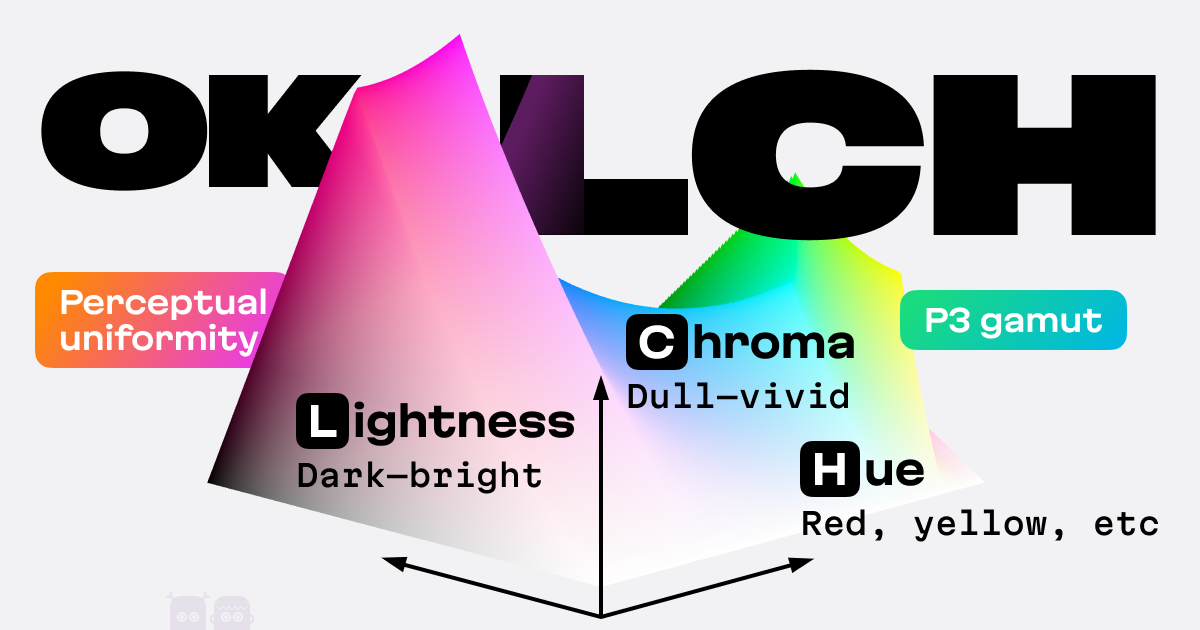
OKLCH is a new way to encode colors (like hex, RGBA, or HSL)
teal cave
these shapes are hurting my brain


 pure cairn
Random question
Is there a way to check for an element color and apply another style to it when meeting certain parameters?
teal cave
unfortunately not
pure cairn

Shame
I'll add a comment to the import file that says
/* don't choose a color that's too dark you dumbass */```
teal cave
Is this page completely fucked up on desktop for anyone else, or is it just me? https://en.wikipedia.org/wiki/CIE_1931_color_space

The CIE 1931 color spaces are the first defined quantitative links between distributions of wavelengths in the electromagnetic visible spectrum, and physiologically perceived colors in human color vision. The mathematical relationships that define these color spaces are essential tools for color management, important when dealing with color inks...
clear siren
yep
teal cave
lol
pure cairn
Yup
 clear siren
pure cairn
Is there a way to check for an element color and apply another style to it when ...
clear siren
pure cairn
Is there a way to check for an element color and apply another style to it when ...
regarding this, it's actually funny that you can do it for the elements children but not the element itself using container queries
teal cave
teal cave
Is this page completely fucked up on desktop for anyone else, or is it just me? ...
this guy editing on mobile did it, it seems

can't tell if troll or catastrophic typo
 pure cairn
Probably typo
teal cave
looking at this person's edit history over all of wikipedia, they've done this but only on articles on colour spaces
I don't get it man
pure cairn
clear siren
regarding this, it's actually funny that you can do it for the elements children...
A sort of :has with color values?
Dunno what container queries are yet, sadly
plain kelp

MDN Web Docs
Container queries enable you to apply styles to elements nested within a specific container based on the features of that container. The query returns true or false depending on whether the query condition is true for the container.
clear siren
basically you can do @container style(color:red) { color:blue; } and it will find elements that have color:red and make their children color:blue
but you can't do that for the element itself, only its children
clear siren
what were you envisioning
glass junco
i'm confused why are there js selectors in css snippets?
teal cave
? elaborate please
glass junco

:is([class^="inlineMediaEmbed_"], [class^="messageAttachment_"]) {
  max-width: 550px !important;
  max-height: 550px !important;
}
:is([class^="inlineMediaEmbed_"], [class^="messageAttachment_"]) [class^="imageWrapper_"] {
  max-width: 550px !important;
  max-height: 550px !important;
  width: max-content !important;
  height: max-content !important;
  aspect-ratio: unset !important;
}
:is([class^="inlineMediaEmbed_"], [class^="messageAttachment_"]) [class^="imageWrapper_"] :is(img, video) {
  max-width: 550px !important;
  max-height: 550px !important;
  width: max-content !important;
  height: max-content !important;
}
:is([class^="inlineMediaEmbed_"], [class^="messageAttachment_"]) [class^="imageWrapper_"] [class^="loadingOverlay_"] {
  aspect-ratio: unset !important;
}
[class^="oneByOneGrid_"] {
  max-height: 550px !important;
}
[class^="imageContainer_"]:has([aria-label="GIF"]) + [class^="altText_"] {
  display: none;
}
for example
clear siren
that's just modern css
teal cave
which part do you think is js?
glass junco
where do i even put that
idk i'm just confused cuz i'm trying to add the snippet but it aint workin :/
teal cave
it could just be broken
glass junco
my whole css breaks if i do
any of those types
[class^="imageWrapper_"] img[class^="lazyImg"] { object-fit: contain !important; }
that breaks it
all of those types break it
teal cave
demonstrate where you're putting it
glass junco
i tried both above and below my normal css
no worky :/
like
<imports here>
snippet
css
i also tried snippet after
and snippet before imports
teal cave
imports always go first, but regardless, can you take a screenshot
it might not be a useful snippet, but shouldn't break the rest of your css from what I can see
glass junco
OHHHHHH
WAIT
WTF
I DUPLICATED MY WHOLE PROJECTAND WAS APPARENTLY EDITING THE MIDDLE
IDEK
pure cairn
glass junco
```css
:is([class^="inlineMediaEmbed_"], [class^="messageAttachment_"]) {
max-...
Please, use
codeblocks
glass junco
where do i send already finished themes
teal cave
if it's your work and you want to allow anyone to do anything with it, ask someone (idk who) for snippet dev role to post in #🎨-css-snippets
teal cave
me neither 
glass junco
i've seen mods like,, twice
pure cairn
Try making a #📩-modmail ticket
glass junco
i was gonna do that ye
teal cave
TO: ven@cord.com
SUBJECT: giv roll
pure cairn


 alpine current
past bison
with amoled-cord
alpine current
past bison
with amoled-cord
Can I get the snippet for this? 
 past bison
only the search changed, you mean that?
.search_ac353c:not(.open_d3ab4e) .searchBar__5a20a {
    width: 22px;
    background-color: transparent;
}

.searchBarComponent__8f95f, :not(.open_d3ab4e) > .searchBar__5a20a {
    background: transparent !important;
}

.search_ac353c:not(.open_d3ab4e) .iconLayout__9d9a4 {
  cursor: pointer!important;
}

.search_ac353c:not(.open_d3ab4e) .iconContainer__9f124 {
  transform: scale(1.4);
}

.search_ac353c:not(.open_d3ab4e) .icon__5c8c7 {
  color: var(--interactive);
}

.search_ac353c:not(.open_d3ab4e):hover .icon__5c8c7 {
  color: var(--interactive-active);
}```this could be added to a sniplet i think
past bison


 tender hedge
(oops)
past bison
oh then it was not the video oops
alpine current
past bison
only the search changed, you mean that?
yeah, ty!<3
also, can I get the one to hide this?
 tender hedge
u want to hide notification settings?
tender hedge
alpine current
also, can I get the one to hide this?
[aria-label="Notification Settings"].iconWrapper_de6cd1 {
  display: none;
}``` ty
ty
past bison
amoled-cord + mine which i named "Smooth harmony" >< but i haven't relesased this transparent titlebar yet

GitHub
Discord themes with transparent acrylic mica effect, less clutter and responsive redesign. More aesthetic and simple Discord experience. - s-k-y-l-i/discord-themes
i just can't ><
 clear siren
yeah I also tried the break on subtree modifications in devtools on the layercontainer
yeah it needs more than that to be able to see body background
https://github.com/nvhhr/discordcss/blob/main/snippets/actuallybasicbackground.theme.css I published this just now
there's many elements on top of body that need to be cleared out of the way
 tulip vine
is there a template for a theme in vencord bc idk how to start with vencord theme creatino
clear siren
not really
tulip vine
clear siren
not really
how do i start then
tender hedge
first learn css
clear siren
tulip vine
how do i start then
do you know any css
tulip vine
clear siren
do you know any css
yea
clear siren
ok then open up devtools with ctrl+shift+i
inspect elements and write new styles for them
tender hedge
all i can say is that discord theming is not fun at all
tulip vine
why
tender hedge
discord for some reason has multiple layers of css stacked on eachother that serve as just backgrounds
tulip vine
ohhh Man
clear siren
I am writing a theming guide but no plans on anything like a template, although my theme that I release soon will maybe work as a good base
tulip vine
k nice
clear siren
I'm trying to make my theme so that it consists of a bunch of snippets that work standalone, and making presets to have many different looks from one base theme
supple bone
past bison
i just can't ><
setTimeout(function(){debugger;},3000); Pauses after 3 seconds of running it, so run the function > select text > wait until break > do your stuff
magic escarp
u have to hide the background
clear siren
supple bone
`setTimeout(function(){debugger;},3000);` Pauses after 3 seconds of running it, ...
yeah this works well
tulip vine
anyone knows how the class is called for the background (i wanna set background to image)