#🎨-theme-development
1 messages · Page 27 of 1
 pure cairn
 clear siren
there's one that you could maybe do, simple background image css
haven't seen any that doesn't also do other unnecessary things or break if used with another theme
a lot of requests have been for replacing bg images on both stock theme and other themes that might not have a simple enough var for it
 teal cave
think I've attempted something like that in the past, the trouble is how other themes do their bg colour can easily mess with it
pure cairn
alright, it should be finished now
@import url('https://raw.githubusercontent.com/AftmostSeeker80/css-snippets/main/spotify-tweaks.css');

clear siren
teal cave
think I've attempted something like that in the past, the trouble is how other t...
I'm sure there are many solutions for that, or make a few variants that force certain things more or less
pure cairn
pure cairn
`@import url('https://raw.githubusercontent.com/AftmostSeeker80/css-snippets/mai...
yay, it updated
 teal cave
pure cairn
yay, it updated
teal cave
pure cairn
yay, it updated
patrician music taste
pure cairn
don't quote me on that, I'm just listening to random spotify shuffles
but that one's good, ngl
teal cave
clear siren
I'm sure there are many solutions for that, or make a few variants that force ce...
it might be possible inb4 23894729384 support reqs
pure cairn
clear siren
a lot of requests have been for replacing bg images on both stock theme and othe...
or removing clearvision watermarks lol

pure cairn
pure cairn
`@import url('https://raw.githubusercontent.com/AftmostSeeker80/css-snippets/mai...
futureproof'd and compacted, I guess
pure cairn
when I'm using an attribute selector like [class^="... etc, how does one know when to use ^ instead of * besides fucking around and finding out? is there a more efficient way of doing that?
 plain kelp
^= is beginning of string, *= is anywhere in string
pure cairn
o
wait
so * is not to select all classes with that name
well, it does
but ^ does it as well?
plain kelp
It checks if class attribute contains/starts with that substring
pure cairn
mhm
plain kelp
Attribute selectors have no knowledge of classes, they deal in strings
clear siren
when an element has multiple classes, the class string is "class1 class2 class3"
pure cairn
pure cairn
`@import url('https://raw.githubusercontent.com/AftmostSeeker80/css-snippets/mai...
I wonder if this is even correct then
pure cairn
oh
so to select the activity details panel, whose classes are
bodyNormal_c70dfd body__7d340
if I use [class^="body"] it would only select the 1st one, while [class*="body"] would select both
right?
clear siren
yes
pure cairn
but is it important to select both classes of an element?
clear siren
no
pure cairn
I see
clear siren
it will just select the matching elements
plain kelp
Notably, *=body will also match things like everybody
clear siren
yeah
pure cairn
plain kelp
Notably, `*=body` will also match things like `everybody`

good thing I added other classes then
clear siren
rarely an issue though
 past bison
hey,
did discord change something on premium profile colors?
some people's color appear fine, but for example mine is washed out / brightened
 digital pier
this maybe? i dunno

 grand surge
pogchamp
 solid ore
wat kind of theme do u want
solid ore
similar to..?
https://betterdiscord.app/theme/midnight this is a good theme for ur eyes i think
 pure cairn
enable window transparency from the Vencord settings and swap your theme colors to rgba format
past bison
grand surge
how to make discord transparent?
I made a theme for transparency, you can try it https://github.com/s-k-y-l-i/discord-themes

GitHub
Discord themes with transparent acrylic mica effect, less clutter and responsive redesign. More aesthetic and simple Discord experience. - s-k-y-l-i/discord-themes
is the only option to select these specifically is using the aria-labelledby=":r7m:"?

the other classnames are existing elsewhere
plain kelp
What do you want to do with those?
past bison
select the background
aria labelledby is better here than a :has(>.vcd-screen-picker-header) ?
i like using has, but i don't know if it slows down the code or not
and that aria labelledby.. isn't language specific 😄 ":r7m:"
plain kelp
The role=dialog aria-modal=true isn't specific enough?
past bison
it's not
i think

yes, this is a completely different one i'd like to not apply to
plain kelp
What about .backdrop + .layer? (with attribute selectors obviously)
past bison
i don't understand this ><
but both has a backdrop
it's the same..

this is the one i don't want to apply and it has backdrop
so aria-labelledby vs :has 😄
[aria-labelledby]>.root_a28985
this?
this is good and it selects more from what i want to select
 lavish trail
move ml-remove to top for easier reach - classes updated
[class^=scroller__8f066] {display: grid} /* menu grid */
[class=wrapper__01a96] {order: 3} /* move react down */
#message-ml-remove-history {order: -1} /* move del top */
 plain kelp
I'm not sure why you use that option often enough to do that, but I guess that's cool
Also that's an... interesting way to do the class selectors
solid ore
plain kelp
Also that's an... interesting way to do the class selectors
yeah, why use a ^= if ure just gonna end it with the start of the random numbers that r gonna get changed, might as well j use the full class name
grand surge
Change the boosters icon:
.premiumIcon_ab5d78.icon__131d1 { background-image: url("https://i.postimg.cc/MKFDg7sp/1217600337125441687.png"); background-size: cover; background-repeat: no-repeat; width: 20px; /* Ajusta el ancho según sea necesario */ height: 20px; /* Ajusta la altura según sea necesario */ /* Asegúrate de ocultar el contenido de texto del SVG original */ fill: transparent; color: transparent; } .guildBoostBadge__8bcac.guildBoostBadgeWithBoosts__9f070 { background-image: url("https://i.postimg.cc/MKFDg7sp/1217600337125441687.png"); background-size: cover; background-repeat: no-repeat; width: 20px; /* Ajusta el ancho según sea necesario */ height: 20px; /* Ajusta la altura según sea necesario */ /* Asegúrate de ocultar el contenido de texto del SVG original */ fill: transparent; color: transparent; }

 pure cairn
grand surge
Change the boosters icon:
`.premiumIcon_ab5d78.icon__131d1 {
background-im...
pure cairn
grand surge
Change the boosters icon:
`.premiumIcon_ab5d78.icon__131d1 {
background-im...
why no codeblocks

pure cairn
3 ` at the start, then language name
your code
3 ` at the end
 frigid garnet
okay
frigid garnet
grand surge
Change the boosters icon:
`.premiumIcon_ab5d78.icon__131d1 {
background-im...
.guildBoostBadge__8bcac.guildBoostBadgeWithBoosts__9f070 {
    background-image: url("https://i.postimg.cc/MKFDg7sp/1217600337125441687.png");
    background-size: cover;
    background-repeat: no-repeat;
    width: 20px;
    height: 20px;
    fill: transparent;
    color: transparent;
}
uhhh
i broke it maybe
grand surge
frigid garnet
``` .premiumIcon_ab5d78.icon__131d1,
.guildBoostBadge__8bcac.guildBoostBadgeWith...
Thx
 deep violet
Anyone know how to update theme
solid ore
deep violet
Anyone know how to update theme
how old is it
deep violet
I wouldn't know
Might be old
It works right now for me but not for canary.
it was working for canary and not for client.
When I reinstalled vencord they switched around
solid ore
deep violet
It works right now for me but not for canary.
it was working for canary and not ...
oh
idk then
ud probably have to use devtools to see :/
deep violet
Seems like a long process. Ill stick to what I have for now and see if it fixes it self
pure cairn
what theme are you using?
nvm I just read you're on Canary, so classes might be different
 barren jewel
grand surge
barren jewel
grand surge
I'm trying to change the video that appears when I start discord but when I do it doesn't remove the original video even if I try and it stays static as an image above the gif I put
    background-image: url("https://i.postimg.cc/TwdsPY79/1024751454751309996.gif");
    background-size: cover;
    background-repeat: no-repeat;
    width: 50px;
    height: 50px;
    fill: transparent;
    color: transparent;
}```help plis

 echo frost
how do I change the color of the ellipsis?
 solid ore
echo frost
how do I change the color of the ellipsis?
solid ore
echo frost
how do I change the color of the ellipsis?
did u try a !important
 solid ore
is smthng overriding it
echo frost
solid ore
is smthng overriding it
sent wrong img
it just changes color of too many things
solid ore
which thing do u want to change the color of
echo frost
just the ellepsis
solid ore
lemme try
echo frost
also why isn't this working for me?
I had to change it to just a set color
#vc-spotify-player .bar_e58961 {
background-color: color-mix(in srgb, var(--white-500), transparent 75%);
}``` proud token
To any other theme devs who got hit by the canary reroll, I've compiled a list of every change in https://github.com/NyxIsBad/discordscripts/blob/master/classes_mapping.diff and https://github.com/NyxIsBad/discordscripts/blob/master/classes_mapping_selectors.diff
you probably need both, the reason for separation is because the first one is script generated while the second is partially manually generated
grand surge
grand surge
```video.ready__61f2f{
background-image: url("https://i.postimg.cc/TwdsPY79/...
help?

solid ore
grand surge
help?
try display none it and add a ::before element, i cant test cus i cant freeze on that part
solid ore
echo frost
just the ellepsis
i dont think it's possible, ud need to select contents i think
grand surge
solid ore
try display none it and add a ::before element, i cant test cus i cant freeze on...
  display: none;
}
.ready__61f2f::before {
  content: "";
  width: 50px;
  height: 50px;
  background-image: url("https://i.postimg.cc/TwdsPY79/1024751454751309996.gif");
  background-size: cover;
  background-repeat: no-repeat;
}```Oh forgot to ask about this
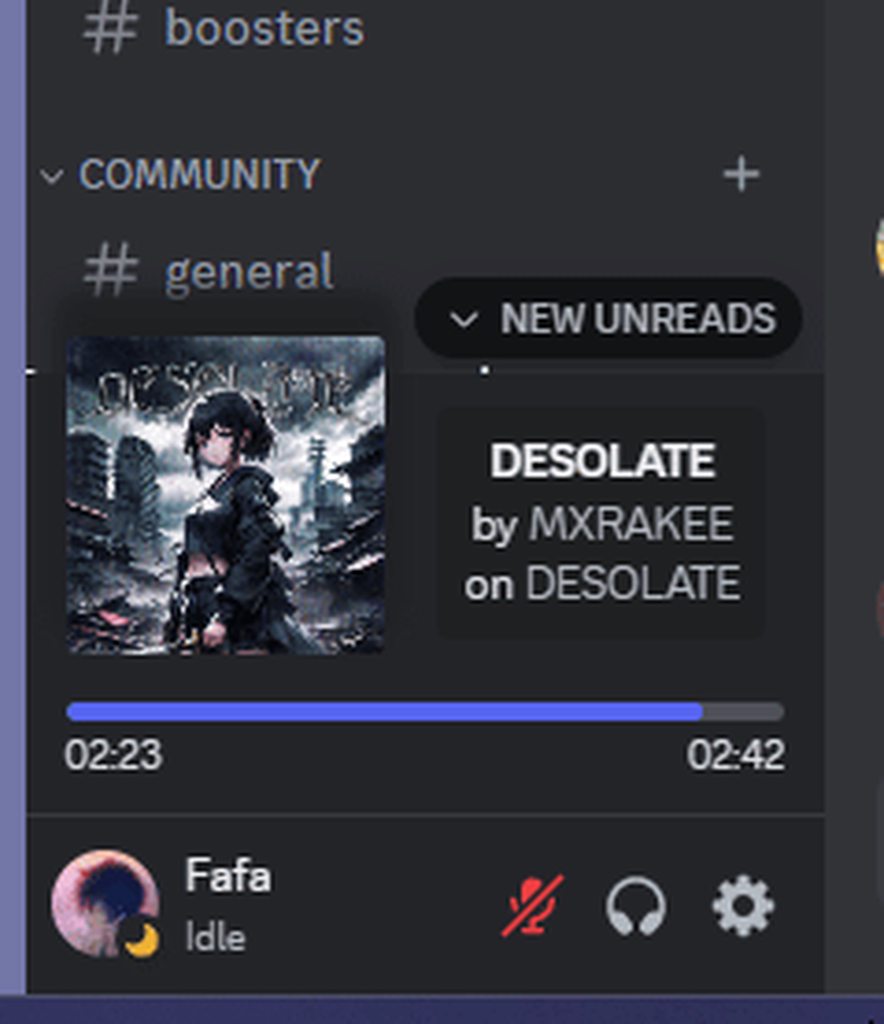
would it be possible to hide the by and on
 grand surge
```video.ready__61f2f {
display: none;
}
.ready__61f2f::before {
content: ""...
grand surge
grand surge
```video.ready__61f2f {
display: none;
}
.ready__61f2f::before {
content: ""...
then the gif that I put in the link does not show up.
solid ore
echo frost
Oh forgot to ask about this
would it be possible to hide the by and on
.vc-spotify-ellipoverflow:has(>.vc-spotify-artist) {
    font-size: 0;
}
.vc-spotify-ellipoverflow:has(>#vc-spotify-album-title) {
  display: none;
}
this removes the by and hides the whole album section, u cant remove the "on" by the same method for some reason
echo frost
solid ore
```css
.vc-spotify-ellipoverflow:has(>.vc-spotify-artist) {
font-size: 0;
}
...
But i still want to see the album
just not the on
solid ore
me too, i ended up just leaving both by and on cus i couldnt figure it out
echo frost
oh
grand surge
.ready__61f2f {
  display: none;
}
.ready__61f2f::before {
  content: "";
  width: 50px;
  height: 50px;
  background-image: url("https://i.postimg.cc/rwT0pQtq/1219646017926987937.gif");
  background-size: cover;
  background-repeat: no-repeat;
}
maybe instead of display none do scale(0)?
idk
grand surge
If I set scale(0), only the video that was already there is displayed

  display: none;
}

/* Establece la imagen de fondo */
.ready__61f2f {
  position: relative;
}

.ready__61f2f::before {
  content: "";
  position: absolute;
  top: 0;
  left: 0;
  width: 100%;
  height: 100%;
  background-image: url("https://i.postimg.cc/rwT0pQtq/1219646017926987937.gif");
  background-size: cover;
  background-repeat: no-repeat;
}```Update to the above message, everything is now unified here https://github.com/NyxIsBad/discordscripts?tab=readme-ov-file
GitHub
Contribute to NyxIsBad/discordscripts development by creating an account on GitHub.
proud token
The reroll has pushed to stable
grand surge
grand surge
```.ready__61f2f video {
display: none;
}
/* Establece la imagen de fondo */
...
If someone knows and can help me to make my idea work, I would appreciate it, I am just learning about vencord and I don't know how to use it.
proud token
proud token
Update to the above message, everything is now unified here https://github.com/N...
going to sleep now; few more updates, added a replace script that's more correct
also removed dupes, made it compatible with syndishanx's replacer
echo frost
how can i have the anims for both the opacity and the margin?

Oh seperated by a comma
plain kelp
Yeah transitions compose really poorly
echo frost
this checkbox didn't used to be solid white when hovering right?
it's been like this for a while, and kept forgetting to ask about it
what was it like before and how can I fix it?

Or ig if that's how it always was, how could i add a purple checkmark
like reverse this

 bleak gust
This isnt specific to that checkmark
echo frost
yeah ik
bleak gust
oh ok
echo frost
the check is just always white
and i can't figure out how to fix it
well actually i think the background is drawing over the checkmark
I've been able to fix it inconsistently and temporarily by messing with things in inspect element
but idk what i was changing to fix it
bleak gust
.colorDefault_e361cf.focused_dcafb9 path:nth-child(2) {
    fill: var(--brand-experiment-500);
}
ty
i think it's 560 btw
--brand-experiment-560
yeah it is
oh wait
that messes up other things

 chilly sky
whats the class of the whole reconnect overlay?
chilly sky
nvm found it #🎨-theme-development message
echo frost
You can use inspect element btw
 echo frost
oh yeah ig
you could probably turn it on and then turn airplane mode on or something
idk tho
also I didn't really understand what you meant by the reconnect overlay
 chilly sky
nvm found it https://discord.com/channels/1015060230222131221/113484432693395462...
chilly sky
chilly sky
nvm found it https://discord.com/channels/1015060230222131221/113484432693395462...
class name was out of date, so i made it work again by making it more generic. also made it click-through so you can still read cached messages, etc.
div[class^='container-'][style="opacity: 1;"] { /* transparent loading bg */
    background-color: color-mix(in srgb, var(--background-primary), transparent 90%) !important;
    pointer-events: none !important;
}
div[class^='container-'][style="opacity: 1;"] { /* no loading bg */
    display: none !important;
}
hard to find words for it tbh
echo frost
yeah
 glad urchin
chilly sky
class name was out of date, so i made it work again by making it more generic. a...
glad urchin
chilly sky
class name was out of date, so i made it work again by making it more generic. a...
manages to conflict with reactions

.container__827e6 {
  background-color: color-mix(in srgb, var(--background-primary), transparent 90%);
} ```works flawlessly, if color-mix breaks just use rgba(0, 0, 0, 0.2);
chilly sky
glad urchin
```
.container__827e6 {
background-color: color-mix(in srgb, var(--background-...
wont that break on next update?
glad urchin
chilly sky
wont that break on next update?
on next class update yes
just use a class updater
chilly sky
a what?
chilly sky
glad urchin
manages to conflict with reactions
thanks for letting me know, should be fixed now. also nice trick with color-mix
grand surge
glad urchin
on next class update yes
just use a class updater
Where do i get a class updater?
grand surge
Thank you
pure cairn
glad urchin
https://syndishanx.github.io/Website/Update_Classes.html
I tried using this with a snippet, but the new classes wouldn't work
I guess I'll have to update my theme first
 lunar garden
glad urchin
https://syndishanx.github.io/Website/Update_Classes.html
lunar garden
glad urchin
https://syndishanx.github.io/Website/Update_Classes.html
wow this fixed my theme thanks!
pure cairn
what was it about again
nvm found it
replace .name__8d1ec with .name__4eb92
np
ctrl + shift + i to open devtools
click on this icon
select what you want, check for its class

but tbh
proud token
you can also just look it up here https://github.com/NyxIsBad/discordscripts/blob/master/classes_mapping.csv
solid ore
or make resilient selectors
pure cairn
[class^="linkTop_"] [class^="name_"] {
  font-size: 16px;
  line-height: 20px;
}```this should be more futureproof
solid ore
pure cairn
```css
[class^="linkTop_"] [class^="name_"] {
font-size: 16px;
line-height: ...
do one _
pure cairn
solid ore
do one _
right
plain kelp
Single underscore is probably better; the second is part of the hash
solid ore
i noticed some double _ got changed to single
solid ore
u2
pure cairn

proud token
pure cairn
I've been changing single underscores all day
why not use a replace script
proud token
i see
ames' far script can do an entire directory in like half a second if you have go installed
and i should add directory replacement to my script too
grand surge
btw I contacted the person who created the SkeuoCord theme to fix it
pure cairn
tried updating the FastSettings snippet
/* Remove Settings Animation */
#app-mount [class^="baseLayer_"] {
  opacity: 1 !important;
  transform: scale(1) !important;
 }
 [class^="baseLayer_"][aria-hidden="true"] {
  pointer-events: none;
}
[class^="standardSidebarView_"] {
  opacity: 1 !important;
}
[class^="layer_"] + [class^="layer_"] {
  opacity: 1 !important;
  transform: unset !important;
 }
 [class^="layer_"][aria-hidden="false"] + [class^="layer_"][aria-hidden="false"] {
  display: none;
}
[class^="baseLayer_"][aria-hidden="true"] {
  pointer-events: none;
}
[class^="layers_"]>[class^="layer_"][class^="animating_"] {
  will-change: unset !important;
}```the reroll has been reverted on dev

 onyx mesa
Updated the class names for Memberlist Hover
/* Memberlist Hover */
.membersWrap__5ca6b {
  min-width: unset;
}
 .membersListNotices_a4cb13,.members__573eb {
  max-width: 60px;
  min-width: 60px;
  transition: 0.2s ease;
}
.members__573eb:hover {
  max-width: 240px;
  min-width: 240px;
}
div:not(:hover) > .members__573eb > div {
  padding-top: 10px;
}```and the Unread messages bar hover
/* Unread Hover */
.messagesWrapper_add28b {
    overflow: hidden;
}
.newMessagesBar__8b272 {
    top: -48px;
    height: 72px;
    transition: top 0.2s ease;
    background: none;
    box-shadow: none;
    border-radius: 0;
}
.newMessagesBar__8b272::before {
    content: '';
    background: var(--brand-experiment);
    box-shadow: var(--elevation-low);
    width: 100%;
    position: absolute;
    height: 32px;
    border-radius: 12px;
}
.newMessagesBar__8b272:hover {
    top: -12px;
}```oh, this is the one that makes text wrap and lags my pc out

proud token
pure cairn
you're kidding me
nope!
im currently a bit miffed because syndishanx used my reroll list and then gave credit to the wrong person
 proud token
you can always git revert
pure cairn
uhhhhh
I'm not working on git
proud token
(._.
 deep bane
https://syndishanx.github.io/Website/Update_Classes.html the goat fr 🙏
pure cairn
my github snippets have attribute selectors anyway, so it's not that big of a deal
proud token
deep bane
https://syndishanx.github.io/Website/Update_Classes.html the goat fr 🙏
('-'
see what i mean
proud token
pure cairn
my github snippets have attribute selectors anyway, so it's not that big of a de...
when the reroll revert happens ill reverse the change lists on my github and you can just run the replace script again
onyx mesa
pure cairn
oh, this is the one that makes text wrap and lags my pc out
Yeah I know... There was a different one that would just hover the memberlist whole over the channel, it was much better with performance but it broke and i never managed to fix it myself.
onyx mesa
Yeah I could check it out.
pure cairn
beware, horror css ahead
also
[class^="chatContent_"] {
  max-width: 94.5%;
}```
is based off my theme, so you'd have to tweak it a bit
onyx mesa
pure cairn
https://raw.githubusercontent.com/AftmostSeeker80/css-snippets/main/memberlist-t...
I actually found the old source code for the one I was talking about but I never managed to find some classes
pure cairn
Which ones?
onyx mesa
Honestly this code is pretty old so probably not only the wrong classes are causing problems.
pure cairn
Might be
onyx mesa
this is the updated version for the classes that i managed to find
.content-1jQy2l .membersWrap__5ca6b {
        min-width: unset;
        width: 50px;
        z-index: 1000;
        justify-content: right;
        flex-basis: unset;
}
.membersWrap__5ca6b .members__573eb {
        transition: transform var(--hover-animation-speed);
}
.membersWrap__5ca6b:hover .members__573eb {
        transform: translateX(-190px);
}
.membersWrap__5ca6b .membersGroup_cad095::after {
        content:"";
        width: 30px;
        height: 2px;
        border-radius: 50px;
        background: unset;
        background-color: var(--seperator-color);
        position: absolute;
        left: -36px;
        top: 29px;
        margin-left: 0px;
}
.membersWrap__5ca6b .members__573eb member_aa4760 {
        background-color: unset;
        margin-left: 0px;
        transition: margin-left var(--hover-animation-speed);
}
.membersWrap__5ca6b:hover .members__573eb member_aa4760 {
        margin-left: 8px;
}
.membersWrap__5ca6b:hover .membersGroup_cad095 {
        transform: translateX(-6px);
}
.membersWrap__5ca6b .membersGroup_cad095 {
        cursor: default;
        transform: translateX(45px);
        transition: transform var(--hover-animation-speed);
        overflow: visible;
}```idk what to replace the ".content-1jQy2l" with
 ashen sable
looks like this update is the same as the one that was reverted recently...? or am I wrong
onyx mesa
 onyx mesa
uh no, it's the one above
pure cairn
oh ok
ashen sable
ashen sable
looks like this update is the same as the one that was reverted recently...? or ...
I built my theme from the commit I made when it happened and it looks like it works lol
onyx mesa
yeah the initial size of the member list won't change before the hover, i ain't really good with these stuff so i haven't been able to fix it since it broke
deep bane
Hide stuff related to notes```css
#user-context #user-context-note,
.userProfileModalInner__99b1e .userInfoSectionHeader_c9f1d3:last-child,
.profilePanel_e2cafe .userPanelOverlayBackground__41589:has(.memberSinceContainer__16630) :is(.divider_d6f39c:nth-last-child(2),.section__62b44:last-child) {
display:none !important;
}
BetterNotesBox not working?
deep bane
related
proud token
ashen sable
looks like this update is the same as the one that was reverted recently...? or ...
yeah
the reroll is the same
onyx mesa
@pure cairn actually managed to fix it
https://i.imgur.com/Kw1SoFa.gif

seems to work like it used to
onyx mesa
yeah, maybe the spaces between the groups could be smaller
plain kelp
onyx mesa
<@519220048850583567> actually managed to fix it
https://i.imgur.com/Kw1SoFa.gif
Would it be possible to get rolecolor on the separators?
 lapis mason
whys that
onyx mesa
plain kelp
Would it be possible to get rolecolor on the separators?
if i figure how to do that
i had the same idea honestly
pure cairn
plain kelp
Would it be possible to get rolecolor on the separators?
was there an option for the rolecolors everywhere plugin for that?
yeah, there was
onyx mesa
yeah the plugin colors the headers
lapis mason
anyone help me
solid ore
deep bane
Hide stuff related to notes```css
#user-context #user-context-note,
.userProfile...
this but will work after any hash update 
/* user context menu: add note */
#user-context-note,
/* notes */
[class^=note_],
/* notes header in profile panel */
[class^=profilePanel_] [class^=userPanelOverlayBackground_] > div:has([data-text-variant="eyebrow"]):last-of-type,
/* notes header in user popout */
[class^=userPopout] [class^=section_]:has([class^=note_]),
/* notes header in user profile modal*/
[class^=userProfileModal] [class^=userInfoSection_] > h1:last-of-type,
/* last divider before notes in profile panel */
[class^=profilePanel_] [class^=userPanelOverlayBackground_] > [class^=divider_]:not(:has( ~ [class^=divider_])) {
  display: none !important;
}
Updated code from #🎨-css-snippets message since the button labels were changed.```button.button_ae40a4 /* make user panel buttons round / {
border-radius: 50%;
}
.button_ae40a4:last-child / settings button /,
.attachButton__56f98 .attachButtonInner__84c26 / upload button /,
.emojiButtonNormal__5f64f / emoji button /,
.closeButton__8177f / settings exit button */ {
transition: transform 1s ease;
}
.button_ae40a4:last-child:hover,
.attachButton__56f98:hover .attachButtonInner__84c26,
.emojiButtonNormal__5f64f:hover .spriteContainer__732c7,
.closeButton__8177f:hover {
transform: rotate(360deg);
}
Can somebody tell me what the point of this css is: #🎨-css-snippets message
plain kelp
Looks like it makes the vencord commit hash not uppercase
 devout elm
changes thjat too
 past bison
background: var(--pop-up-color, var(--bg-overlay-3, var(--background-secondary)));```
Is it not possible to have two fallback colors?Why wouldn't it be?
past bison
Mmm.. then the initial value of --pop-up-color: ; does set a transparent color 😮
past bison
i see
plain kelp
Consider --pop-up-color: var(--bg-overlay-3, var(--background-secondary));
past bison
--pop-up-color: set custom color here; this helped 😄 😄
plain kelp
If you want the same default everywhere anyway
past bison
i want it so users can set the color, but if they don't it will use theme colors
past bison
past bison
`--pop-up-color: set custom color here; ` this helped 😄 😄
no it still did not, i think i have to comment out that
/*--pop-up-color: black; /*uncomment for custom Popup color*/
 rough acorn
Guys.. Does some of you have a diff about the css changes?? Thanks
devout elm
proud token
To any other theme devs who got hit by the canary reroll, I've compiled a list o...
here
oops i didnt mean to ping my bad
rough acorn
Thanks
devout elm
ur welcom
rough acorn
Uhm.. I have another question, was there a change that you're not allowed to put url('data:image/png;base64,...')? I'm using ClearVision with a custom background but after the update there is no background (I had a BG for the app, for the login screen and for the error screen. I'm seeing that the error bg and the app bg are not showing up even if the CSS is .errorPage_a41002.wrapper__77675)
plain kelp
Check in devtools if the selector matches
 tender hedge
/* Vennie Channel hover,contect menu's and popouts */

[id*="popout_"]::after, [class*=menu]::after, [class*=form_d8a4a1]::after, [class*=containerDefault]:hover::after {
    content: "";
    position: absolute;
    top: -50px;
    right: 0;
    width: 50px;
    height: 50px;
    background-image: url('https://media.discordapp.net/stickers/1217112512374505613.png');
    background-size: cover;
}
/* Alternate Shiggy Link: https://media.discordapp.net/stickers/1039992459209490513.png */```

I made vennie channel hover and chat bar hover with the help of this snippet [#🎨-css-snippets message](/guild/1015060230222131221/channel/1028106818368589824/p/1028109863915626526/#msg-1222852910011125810) :)posting it here because i cant post things in #🎨-css-snippets
rough acorn
rough acorn
Uhm.. I have another question, was there a change that you're not allowed to put...
Update on this: Seems like the url() is not being put in the variable for some reasons
tender hedge
rough acorn
Update on this: Seems like the `url()` is not being put in the variable for some...
im pretty sure theres multiple layers of background for the whole discord app
just run the original css through the classes updater
rough acorn
tender hedge
im pretty sure theres multiple layers of background for the whole discord app
Nono, the CSS works because I put an https link and it showed in the app
tender hedge
huh
rough acorn
Just the url()
tender hedge
ah
rough acorn
I have a variable --error-bg wich has it
But...

This started happening after the update but (I can't figure out how the update can couse a thing like this to happen and) I can't figure out how to fix it
tender hedge
css classes changed in the update
theres probably alot of classes that have to be changed in the original css code
rough acorn
I know, I ment beside that
(I used the class updater on #1222936386626129920 to update the .theme.css btw)
tender hedge
how did u set up the variable?
rough acorn
tender hedge
how did u set up the variable?
In :root { ... }
tender hedge
y e ah
The variable has to be linked to something in the original css
to work
with var()
rough acorn
Ohh
.errorPage_a41002.wrapper__77675 {
background: var(--error-bg);
background-position: center;
background-repeat: no-repeat;
background-size: cover;
background-attachment: fixed;
}``` tender hedge
no idea how to fix it
rough acorn
Alright, so I tried putting instead of the data:image etc. I put a link and the link works
Probably the update limits the url data
Because it is veeery long
The image works on other websites
I tried deleting some of the data and it started rendering the background

If there is no way of loading images locally (apart from base64 url data:image thing) then I guess I am forced to break the ToS of imgur 😔
(Or host them on github wich I guess it's better)
solid ore
rough acorn
I tried deleting some of the data and it started rendering the background
wats the file size
rough acorn
3MB 😳
rough acorn
But it worked before
It was working before the update
(Unless it's a Vencord thing but I don't think so)
 nimble spruce
3mb is pretty big for an image, try running it through tinyPNG or something to compress it without losing quality
rough acorn
nimble spruce
3mb is pretty big for an image, try running it through tinyPNG or something to c...
I know... I was lazy so I didn't do it, I saw that it was working so I just went like "heh, nvm it's working"
rough acorn
Seems like it's writted "NUT1" 💀

Alright it's fixed thanks to the TinyPNG (and very a lot 😳)

 astral trellis
how would i make this transparent, it was before and now its not.
 tender hedge
astral trellis
how would i make this transparent, it was before and now its not.
tender hedge
astral trellis
how would i make this transparent, it was before and now its not.
it has 2 layers make both have transparent backgrounds
2 layers as in classes
funny thing is most popups and things have extra visible layers for some weird reason
(discord at its best)
 void helm
Hey, I'm a big noob when it comes to discord theming, but I have my own theme. Today an update broke my theme and I was wondering if there's any way to find out what an old "element" or whatever the proper term is, turned into.
For example if ".content_1a4fe" was changed into ".content_9eb2a" is there a simple way to tell or do I just have to through my theme and use the inspect tool to find out what the new element name is?
oh double underscores and discord formatting... forgot
tender hedge
void helm
Hey, I'm a big noob when it comes to discord theming, but I have my own theme. T...
website is linked that can update pretty much all classes
void helm
Thanks a lot! I should have checked there before asking here >_<
tender hedge
no worries
void helm
God damn that saved me hours of fiddling around trying to find the right elements again...
Thanks once again! ❤️
tender hedge
np
 small pond
first css i made -- lets u change server size, is it good for #🎨-css-snippets or is there anything i could change
:root {
  --server-size: 37px;
  --server-gap: 6px;
}

.wrapper__9916c,
.svg__34dd4 {
  width: var(--server-size);
  height: var(--server-size);
}

.listItem__48528 {
  margin: 0 0 var(--server-gap);
}

ul[id^=folder-items] {
  height: auto !important;
  padding-bottom: calc(var(--server-size) / 48);
}
If for some unholy reason you have 278347239472389 css/scss files and want to convert them all to the new classes: https://github.com/Saltssaumure/ClassUpdate
mildly less user friendly than SyndiShanX's tool bc not online but I wrote readme so read
past bison
tender hedge
funny thing is most popups and things have extra visible layers for some weird r...
some has double shadows under too 😄
in different sizes
grand surge
Hi, i tried fixing @ nvhhr minified window css with new classes and i keep the opacit:1; meaning itll be transparent but it mademy entire window transparent, how do i fix this lol. Sry if this is a stupid question
/*minified setting window*/
.layer_f7d46a + .layer_f7d46a {
border-radius: 10px !important;
box-shadow: 0 0 10px #84178e; /* Fixed box-shadow syntax */
border: 1px solid var(--border-strong);
width: 1100px !important;
height: 80vh !important;
margin: auto !important;
padding: 0 !important;
opacity: 1; /* Set opacity to 50% (transparent) */
}
#app-mount .baseLayer__2b890 {
opacity: 1 !important;
transform: unset !important;
}``` clear siren
opacity 1 makes it not transparent at all, but if you have no background set on it it will do that
I assume your theme makes the background on it transparent
grand surge
clear siren
opacity 1 makes it not transparent at all, but if you have no background set on ...
How do i make it so it displays whats behind the window modal instead of the setting window being clear
grand surge
clear siren
I assume your theme makes the background on it transparent
Ye clearvision does that, how do i change it?
clear siren
you could just add a background on the element manually, assuming you've set the discord css var to transparent somewhere in your theme
clear siren
on on the layer+layer block just put a background:whatever
grand surge
O ok
grand surge
Why is it yelling at me
 pure cairn
grand surge
Why is it yelling at me<:husk:1026532993923293184>
pure cairn
grand surge
Why is it yelling at me<:husk:1026532993923293184>
You probably missed something before that
Maybe a semicolon
grand surge
plain kelp
Wait this is css isn't it
Yes it's css
I found the error
I fixed something 🔥
It was transparent;; 💀💀💀
proud token
teal cave
If for some unholy reason you have 278347239472389 css/scss files and want to co...
ill add this to my readme

 serene mason
Vertical monitor QuckCSS
/* channel list */
.sidebar_e031be {
    width: 200px;
}

/* member list*/
.layout_bb8e67 {
    padding: 0 4px;
}

/* active now */
.nowPlayingColumn_b025fe {
    display: unset;
}

/* activity */
.scroller__7c25e {
    padding: 0 5px;
    margin: 0;
    border: none;
}

.wrapper__3c6d5,
.section__253ec {
    background-color: transparent;
}

.padded__89fb8 {
    padding: 8px;
}

.section__253ec {
    border: 1px solid #444;
}

/* search result */
.searchResultsWrap__2e184 {
    background: var(--bg-overlay-3, var(--background-secondary))
}

/* hide gift, gif, sticker, emoji buttons */
.buttons__7ecff {
    display: none;
}

.scroller__5f036  {
    padding: 5px 5px 0;
}

/* fix settings button */
.withTagAsButton_e22174 {
    margin: 0;
    min-width: unset;
    max-width: 100px;
}

.container_debb33 {
    padding: 0;
    justify-content: space-around;
}
Lol fr
grand surge
serene mason
Vertical monitor QuckCSS
+ [HorizontalServerList](https://raw.githubusercontent....
Dam this is useful, thank yu
solid ore
serene mason
Vertical monitor QuckCSS
+ [HorizontalServerList](https://raw.githubusercontent....
thanks!
 molten maple
.ready__61f2f {
    display: none; /* Hides the original video */
}
.ready__61f2f::before {
    background-image: url("https://cdn.discordapp.com/emojis/1219646017926987937.gif?size=44&quality=lossless");
    background-size: cover;
    background-repeat: no-repeat;
}

``` If you can help me to show the link image but not delete the original video.if someone can help me I would appreciate it
molten maple
and sometimes the original video is deleted but the url image is not displayed.
 atomic plank
Did discord change something? in my custom theme these used to be green

That's my theme I made
Also forgot to ask how I fix that cause last time I was just spoon fed answers instead of being taught how to find the correct element...
molten maple
You can search in the element and give it the color
atomic plank
Right but I'm not sure what the element's name is
pure cairn
atomic plank
Did discord change something? in my custom theme these used to be green
what's "these" ?
atomic plank
The channel names, sorry I should have specified XD
molten maple
?
 atomic plank
Kind of, but only the unread channels* were green
molten maple
.name__4eb92 {
color: green; /* Cambia el color del texto a verde */
}
pure cairn
atomic plank
Kind of, but only the unread channels* were green
gotcha
atomic plank
Does discord sometimes just change element names or something btw?
pure cairn
yes
atomic plank
Why XD
molten maple
atomic plank
Kind of, but only the unread channels* were green
Is it for unread channels?
atomic plank
I'm not sure, are those green ones in your screenshot ones that are read or unread?
I think this is my unread CSS
.containerDefault__3187b .modeUnreadImportant_efb53e .name__8d1ec.overflow__87fe8 {
  color: rgb(49, 245, 42) !important;
}```But that doesn't work anymore
pure cairn
.containerDefault_ae2ea4 .modeUnreadImportant__35358 .name__4eb92.overflow__993fa {
  color: rgb(49, 245, 42) !important;
}```Ah thanks
pure cairn
hold on, let me make it more futureproof
atomic plank
Looks like my muted mode is also borked
Honestly it's likely all of these containerDefault ones are...
pure cairn
[class^="containerDefault_"] [class*="modeUnreadImportant_"] [class^="name_"][class*="overflow_"] {
  color: rgb(49, 245, 42) !important;
}```this should resist the next class reroll
atomic plank
Thanks
pure cairn
pretty sure there's a more efficient way of writing this, but eh, that's what I can come up with rn
atomic plank
the rest of these are probably borked too then if I had to guess
 pure cairn
most likely, yeah
atomic plank
muted channels are for sure
pure cairn
try using this online tool
you paste your css in and click outside the box
it should update the classes
pure cairn
molten maple
molten maple
```css
.ready__61f2f {
display: none; /* Hides the original video */
}
.read...
and who helps me with this shitty code?
molten maple
yes
but it still does not work because the animation does not show up.
and for that I need help
pure cairn
well, you set a display: none on the element
try with a transform: scale(0) or a content: ""
other than that idk, I'm still learning css
molten maple
ok
.botTag_a52f38 {
    background-color: gray; /* Set the background color to gray */
    box-shadow: 2px 2px 5px rgba(199, 6, 6, 0.5); /* Add a shadow with a horizontal offset of 2px, vertical offset of 2px, blur radius of 5px, and RGBA color */
    border-radius: 5px; /* Add rounded corners */
    border: 1px solid rgb(133, 7, 7); /* Add a gray border */
    padding: 5px 10px; /* Add internal space */
}```What do you think?
 pure cairn
it looks horrible with my theme
let me turn it off
meh, not a big fan of the grey with red shadow
I think the grey is too light
maybe a darker hue
.botTag_a52f38 {
    background-color: rgb(59, 54, 54); /* Set the background color to gray */
    box-shadow: 2px 2px 5px rgba(199, 6, 6, 0.5); /* Add a shadow with a horizontal offset of 2px, vertical offset of 2px, blur radius of 5px, and RGBA color */
    border-radius: 5px; /* Add rounded corners */
    border: 1px solid rgb(133, 7, 7); /* Add a gray border */
    padding: 5px 10px; /* Add internal space */
}```something like this, idk
that looks awfully like an AI generated description

you don't program with css
molten maple
this was generated by AI because I'm too lazy to write and I don't speak English.
pure cairn
what for?
I know what your snippet is supposed to do
it simply doesn't look that good in my opinion
pure cairn
pure cairn
try with a `transform: scale(0)` or a `content: ""`
did this work though?
molten maple
pure cairn
did this work though?
ah no, it didn't work
 echo frost
I'm customizing the spotify player, and I was able to get the bar to use the background image like this
.barFill__1f56b {
    background-image: var(--vc-spotify-track-image);
    background-size: 240px;
    background-position-y: center;
    filter: blur(2px);
}```
Is there a way to achieve a similar thing with the buttons? echo frost
pure cairn
do you want to set the same background effect for the buttons?
echo frost
pure cairn
do you want to set the same background effect for the buttons?
sort of


 pure cairn
echo frost
pure cairn
echo frost
wait, is that on hover or how it normally looks?
echo frost
normally bc i changed it on the normal not hover
pure cairn
hm
pure cairn
nah
but you could fill them with an rgba color
and use the transparency with the background as main layer
no?

 past bison
i made them to follow the os-accent color when pressed
echo frost
yeah i was using my discord color, but i want it to match the music currently playing
bc that looks really cool
but this rgba thing might work
pure cairn
I would increase the brightness of the filled portion of the bar btw
if you take the dot away, it looks too similar to the empty part
edit: it genuinely looks the same lol
 echo frost
it looks different
pure cairn
yes, I did use a stock png hand
echo frost
also wtf is that
past bison
do you know any idea to fix this little white bleeding into the left edge of the filled bar? (light theme)
 pure cairn
echo frost
it looks different
pure cairn
echo frost
it looks different
not enough, imho
pure cairn
past bison
do you know any idea to fix this little white bleeding into the left edge of the...
no idea tbh
but it's triggering me
pure cairn
like, a lot
past bison
as the right side
past bison
oh wait, is the filled bar just 1 pixel thinner?
past bison
it is thinner
past bison
i don't know, its thinner only with the light theme 😮
pure cairn
whar
past bison
it's crazy xD
pure cairn
well, it's a punishment for the light theme users

 pure cairn
past bison
pure cairn
past bison
the real issue is that the white bar edge is softer
past bison

strange it says it's the same size
i think it's something like bad subpixel rendering
pure cairn
Weird anti-aliasing artifacts
molten maple
img[src="/assets/8d8764191e7377ce6d1c.webp"] {
    content: url(https://cdn.discordapp.com/emojis/1219646017926987937.gif?size=44&quality=lossless); /*cambia la imagen del logo de discord por la foto del link */
}``` past bison
.theme-light .bar_e58961 {overflow: visible;}
.theme-light .barFill__1f56b {
    height:120%!important;
    border-radius: 2.8px 0 0 3.3px;
}```
fixis for?
past bison
past bison
this xD
molten maple
Ohh

 echo frost
when it's on, it's normal, when it's off, it's transparent
 pure cairn
I guess that works
pure cairn
Looks cool
teal cave
why people put so much effort into spotify thing
echo frost
bc fun
pure cairn
^
echo frost
don't you love spending all day modifying css instead of doing homework?!?!?
teal cave
but compared to the rest of discord?
there’s so much to theme, yet half the time I open this channel or #🎨-css-snippets, it’s a spotify thing
pure cairn
I think that, besides messagelogger, the spotify controls plugin may be the most used
echo frost
I just found out about the spotify controls a few days ago
pure cairn
But theming messagelogger stuff is boring
echo frost
spotify controls is more fun to theme than most things in discord i think
bc you have the album image
pure cairn
You can also fuck around and find out more without having your whole discord crash
teal cave
icic
pure cairn
echo frost
also I feel like the rest of discord is pretty much all the same, plus for the rest, you have to change so much to make sure everything matches
Spotify thing is only one place
pure cairn
By the way, does anyone have any idea of why it's doing that?
teal cave
imagine not wrangling discord into an unrecognisable shape with css
 teal cave
for fun
pure cairn
That is so cursed
teal cave
I only make cursed themes it seems
pure cairn
Well, that one surely is of the never-before-seen type
echo frost
pure cairn
I would increase the brightness of the filled portion of the bar btw
Uh how do I increase brightness and still blur?
filter: blur(2px), brightness(200%); doesn't work
pure cairn
You could use a very transparent white overlay
echo frost
that's not the same as brightness increase
and i'll just leave it how it is if that's the only way
pure cairn
Sadly I'm not on my pc right now
I'm also not even good enough at css to think of another ways

Maybe tomorrow I'll get an idea, idk
echo frost
omg super compact mode

 pure cairn
Wouldn't it look better without background image when collapsed? It looks kind of out of place
 molten maple
.botTag_a52f38,.botTagCozy__85d43.botTag__11e95,.infoSpacing__83491.headerBotTagWithNickname__6f42c,.headerBotTagWithNickname__6f42c.bot__7a1c9 {
    background-color: hwb(0 21% 77% / 0.575);
    box-shadow: 2px 2px 5px hwb(0 1% 41% / 0.719);
    border-radius: 5px;
    border: 1px solid hwb(0 0% 57% / 0.39);;
}```this code fixes that the change was only applied to the list of users, now it is also applied to the chat and profile.oh i just had to remove the comma
 coral turtle
how to make glow effect for send icon?

 deft niche
Shadow
coral turtle
deft niche
Shadow
Yes, but the glow effect will be square, I don't know how to add it for svg icon
teal cave
coral turtle
Yes, but the glow effect will be square, I don't know how to add it for svg icon
.sendIcon_f67abd {
    filter: drop-shadow(0 0 10px currentColor);
}
 coral turtle
teal cave
```css
.sendIcon_f67abd {
filter: drop-shadow(0 0 10px currentColor);
}
```
coral turtle
teal cave
```css
.sendIcon_f67abd {
filter: drop-shadow(0 0 10px currentColor);
}
```
thank you
 peak musk
teal cave
```css
.sendIcon_f67abd {
filter: drop-shadow(0 0 10px currentColor);
}
```
peak musk
teal cave
```css
.sendIcon_f67abd {
filter: drop-shadow(0 0 10px currentColor);
}
```
how do I run these CSS theme code?
I can't run
deft niche
peak musk
I can't run
Try a treadmill maybe
peak musk
deft niche
Try a treadmill maybe
but how do I run? I can't
 teal cave
peak musk
how do I run these CSS theme code?
teal cave
peak musk
how do I run these CSS theme code?
go to settings > vencord > themes > open quickcss
paste in there
 teal cave

 echo frost
How can I hide this?
I can't find it in inspect element

you can also open it from here
 peak musk
echo frost
you can also open it from here
peak musk
echo frost
you can also open it from here
ok
echo frost
also what is this button??
 teal cave
echo frost
How can I hide this?
I can't find it in inspect element
teal cave
echo frost
How can I hide this?
I can't find it in inspect element
Where's the element located? I dont' seem to have it at all
 peak musk
tried
 echo frost
teal cave
Where's the element located? I dont' seem to have it at all
echo frost
teal cave
Where's the element located? I dont' seem to have it at all
it might not show if you've already opened it?
idk
prob not a big deal
teal cave
icic
peak musk
peak musk
tried
does it run like it?
teal cave
peak musk
does it run like it?
Looks like it's already working, look at the tag beside venbot
peak musk
teal cave
Looks like it's already working, look at the tag beside venbot
ok
tried to check


send me a code to test here so it can work
IT CHANGED
 coral turtle
How i can open CSS quickly, maybe bind?
peak musk
coral turtle
How i can open CSS quickly, maybe bind?

if you use the most smooth and best theme ever, it will lag?
coral turtle
i dont have it
 echo frost
What's the best way to change the position of this?
I want to make it fixed on the page, and centered on x axis

the for a limited time
echo frost
omg what chatgpt gave me actually worked!
    margin-left: auto;
    margin-right: auto;
    left: 0;
    right: 0;
Idk where to put it
ig here looks nice

lmao
echo frost
echo frost
Idk where to put it
ig here looks nice
Here's the css btw
/**
  * @name Better Shop
  * @author obsidianninja11
  * @description Makes the shop less intrusive.
  * @authorId 683171006717755446
*/

/* Hide New Effects */
/* Hover Effect */
.marketingButtonImage_bc16c8.marketingButtonImageHovered__04e22{
  display: none;
}
/* Glow */
.shyButton__30111 {
  background: transparent;
}
/* Badge */
.newBadge__5fcc2.textBadge_f05120.base__5ed84.eyebrow_c15ff6.baseShapeRound_c1de89 {
  display: none;
}

/* In Shop */
/* Less Intrusive Count Down */
.countDownWrapper__60b05 {
    position: absolute;
    background-color: transparent !important;
    box-shadow: none !important;
    color: var(--white-500) !important;
    transform: none !important;
    opacity: 1 !important;
    margin-left: auto;
    margin-right: auto;
    left: 0;
    right: 0;
    top: 200px;
}
/* No Valorant Banner Glow */
.shyBanner__78fa4 {
    box-shadow: none;
}
/* No Profile Effect Card Blur */
.cardTextBlur__118a2 {
    -webkit-backdrop-filter: none;
    backdrop-filter: none;
    background: var(--background-tertiary);
}
/* Standard Color in Popup Things */
.collectibleInfoContainer_a9bb77 {
    background: var(--background-tertiary) !important;
}
.darkText_c58a34 {
    color: var(--white-500);
    border-color: var(--white-500);
}
.darkText__536f8 {
    color: var(--white-500);
}
Oh yay. Discord probably broke it already!
#announcements message
 cedar haven
This is the only channel I can talk in, help
 exotic nexus
cedar haven
This is the only channel I can talk in, help
exotic nexus
cedar haven
This is the only channel I can talk in, help
with what
try reading first though #🏥-vencord-support-🏥 message
cedar haven
No I mean like In this server it says I don’t have permission to send messages in every single channel expect for this one
So this is me asking why
In the only channel I can

 brazen tiger
yes
 glacial citrus
read #🏥-vencord-support-🏥
brazen tiger
cry about it
 edgy sentinel
please stop being retarded holy shit
grand surge
people will NOT read channel names
brazen tiger
grand surge
people will NOT read channel names
its clearly theme dev because discord exploded
edgy sentinel
server is locked, what do?
- check announcements
- send dumb shit in theme development channel
brazen tiger
edgy sentinel
server is locked, what do?
1) check announcements
2) send dumb shit in theme dev...
- complain in dms
 iron smelt
brazen tiger
3) complain in dms
iron smelt
brazen tiger
3) complain in dms
 grand surge
echo frost
wtf it broke all plugins :(
grand surge
echo frost
wtf it broke all plugins :(
general is locked
echo frost
oh lmao
grand surge
fr
echo frost
echo frost
Oh yay. Discord probably broke it already!
https://discord.com/channels/10150602...
omg discord didn't break something!??!
that's amazing
teal cave
I was about to release a theme
frigid garnet
molten maple
this was generated by AI because I'm too lazy to write and I don't speak English...
💀 whyyy
teal cave
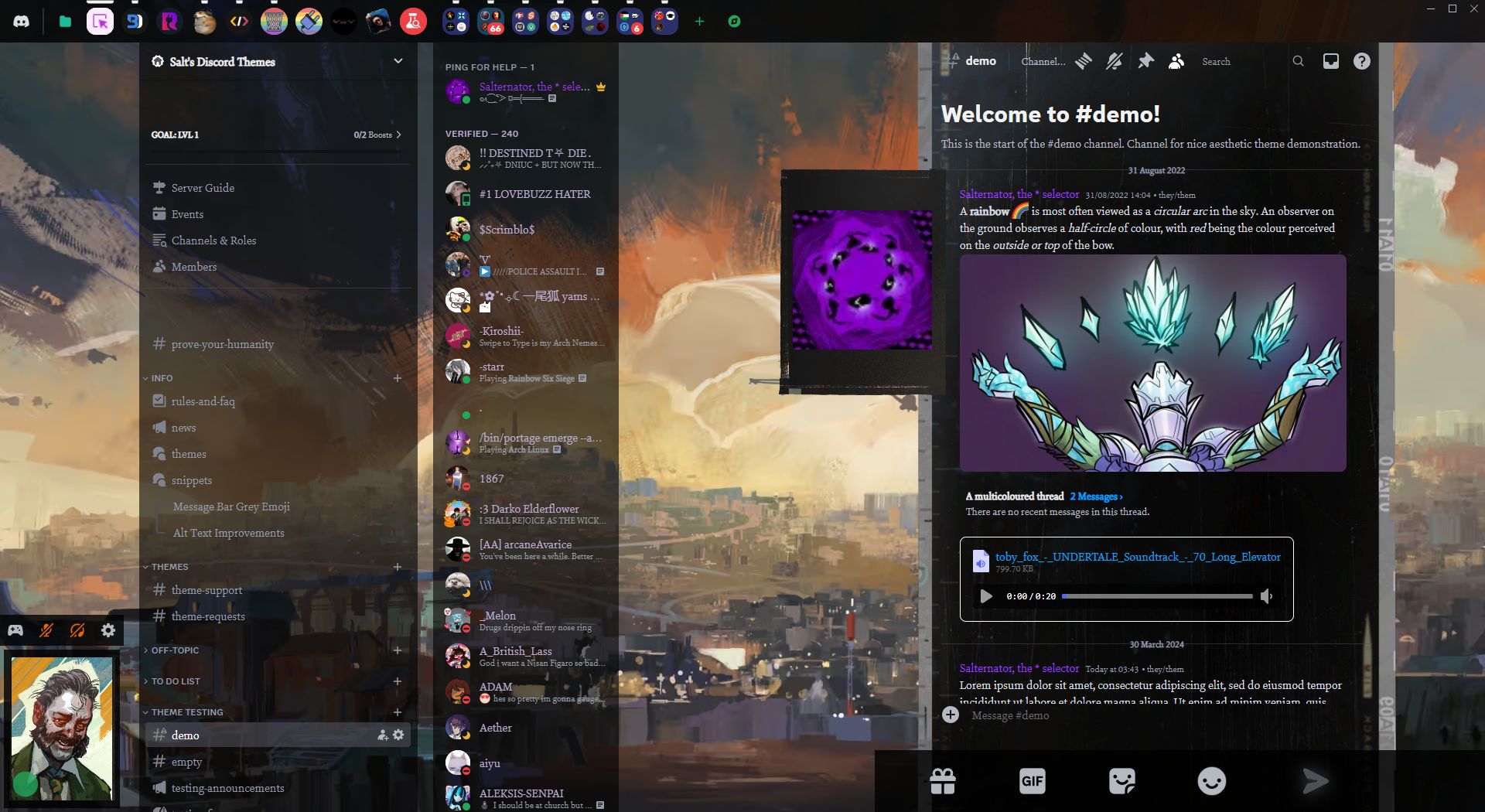
It's disco time https://github.com/Saltssaumure/elysium-discord-theme
GitHub
INTERFACING [Challenging: Success] - This tape contains a Disco Elysium styled Discord theme. - Saltssaumure/elysium-discord-theme
 unique bough
does anyone have some chat bubbles amde with css
 plain kelp
Reminds me of the neocities era
past bison
clear siren
suggest me name for my theme
Naughty flowers xD
clear siren
hmm
past bison
I noticed this
putting brackets and removing it after, makes collapsible css sections
chatgpt is great with generating random names
 wanton stirrup
past bison
wanton stirrup
past bison
Monaco bug
past bison
it's not working after closing and opening quickcss again
can I somehow achieve this?

 clear siren
I want it to be kinda universal because the color and bg image is easily changed
 clear siren
with no bg and hue 150
 clear siren
yeah I'm planning on changing that
plain kelp
That looks better than the one with background image imo
clear siren
didn't have the timestamps showing all the time but now that I have seconds in them it makes sense to have them there
so I'll make them a part of the bubble
tender hedge
would also look better if the pfps also rounded out like the text bubbles
clear siren
tender hedge
would also look better if the pfps also rounded out like the text bubbles
I should make them into vars
tender hedge
thats also possible
molten maple
Hello friends

 solid ore
molten maple
I don't know if anyone has already done it this way but
solid ore
molten maple
I don't know if anyone has already done it this way but
if ure trying to make it like the spotify player u can try my heavily tweaked version of dablulite's redesign
https://raw.githubusercontent.com/tom22k/css-snippets/main/SpotifyRedesign/import.css
tender hedge
did discord update icons or something
any time i hover over the bottom icons of discord the wobble
solid ore
thats an experiment im p sure
solid ore
r u on stable
molten maple
/*Add a new color to the bot,staff,admin,AI tag in: CHAT,REPLIES,USER LIST,PROFILE and also adds a box shadow next to a 1 pixel border. */
[class*="botTag"]:not([class^="botTagVerified_"]) {
    background-color: hwb(0 1% 53% / 0.685);
    box-shadow: 2px 2px 5px hwb(0 42% 11% / 0.562);
    border-radius: 5px;
    border: 1px solid hwb(0 42% 11% / 0.562);
}
/* created by: sam_speak_real and with the help of krammeth  */
``` you can customize the color as you like
 oak plover
tender hedge
did discord update icons or something
oak plover
tender hedge
did discord update icons or something
animated icons rollout thing
pure cairn
molten maple
```css
/*Add a new color to the bot,staff,admin,AI tag in: CHAT,REPLIES,USER LIS...
Are all these classes necessary? 
molten maple
pure cairn
Are all these classes necessary? <:fear:1126220232176975942>
is that discord put different classes, if I remove any of them in a tag, the style will not be seen.
pure cairn
🤔
[class*="botTag"]:not([class^="botTagVerified_"]) {
    background-color: hwb(0 1% 53% / 0.685);
    box-shadow: 2px 2px 5px hwb(0 42% 11% / 0.562);
    border-radius: 5px;
    border: 1px solid hwb(0 42% 11% / 0.562);
}```
also works in chat
molten maple
pure cairn
```css
[class*="botTag"]:not([class^="botTagVerified_"]) {
background-color:...
Oh thanks, I'm just learning css programming.
molten maple
pure cairn
cul you use for the border on the profile?
pure cairn
h's glowing status snippet
molten maple
I'm going to try to make that border myself
past bison
is this for you too?


 hazy frigate
.systemMessage__6e6a4 {display:none} doesn't work anymore, anyone got a fix?
 digital smelt
.systemMessage_fced96 {
display: none;
}
 safe python
molten maple
molten maple
safe python
molten maple
molten maple
I don't understand how to make the color depend on how the state is.
pure cairn
Set it manually
hazy frigate
digital smelt
```css
.systemMessage_fced96 {
display: none;
}
```
thank you
digital smelt
hazy frigate
thank you
no problem
 vestal field
remember this snippet? #🎨-css-snippets message
discord added it for real 
 solid ore
vestal field
remember this snippet? https://discord.com/channels/1015060230222131221/10281068...
solid ore
vestal field
remember this snippet? https://discord.com/channels/1015060230222131221/10281068...
on canary or?
vestal field
solid ore
on canary or?
stable
 past bison
vestal field
remember this snippet? https://discord.com/channels/1015060230222131221/10281068...
past bison
vestal field
remember this snippet? https://discord.com/channels/1015060230222131221/10281068...
omg i still haven't added it to my theme/quickcss but i wanted XD
solid ore
vestal field
stable
im on the same version and dont have it, maybe cus i have reduced motion on
pure cairn
vestal field
remember this snippet? https://discord.com/channels/1015060230222131221/10281068...
Nah, it's not spinning fast enough
vestal field
pure cairn
Nah, it's not spinning fast enough
yeah, they're using a different animation
still the same idea lol
molten maple
vestal field
remember this snippet? https://discord.com/channels/1015060230222131221/10281068...
En web no esta, pero yo le hice un arreglo con la actualización de discord pero no logre que se mueva el de emoji : ```css
button.button_ae40a4 /* make user panel buttons round / {
border-radius: 50%;
}
.button_ae40a4:last-child / settings button /,
.attachButton__56f98 .attachButtonInner__84c26 / upload button /,
.emojiButtonNormal__5f64f / emoji button /,
.closeButton__8177f / settings exit button */ {
transition: transform 1s ease;
}
.button_ae40a4:last-child:hover,
.attachButton__56f98:hover .attachButtonInner__84c26,
.emojiButtonNormal__5f64f:hover .spriteContainer__732c7,
.closeButton__8177f:hover {
transform: rotate(360deg);
}```
English: On the web it is not, but I made a fix with the discord update but I could not get the emoji to move.
plain kelp
I don't think most people here speak tortilla

 terse dew
vestal field
remember this snippet? https://discord.com/channels/1015060230222131221/10281068...
terse dew
vestal field
remember this snippet? https://discord.com/channels/1015060230222131221/10281068...
He is gonna get hired by discord.
vestal field
they should hire me fr fr
molten maple
vestal field
they should hire me fr fr
you do good work
vestal field
molten maple
molten maple
```css
/*Add a new color to the bot,staff,admin,AI tag in: CHAT,REPLIES,USER LIS...
In case you like it, use the code because I didn't get the role to upload to #🎨-css-snippets
iron smelt
molten maple
In case you like it, use the code because I didn't get the role to upload to <#1...
open a #📩-modmail and ask for it
molten maple
iron smelt
open a <#1161412933050437682> and ask for it
I already did it but it was rejected because the snippets were too basic.
bleak gust
molten maple
I already did it but it was rejected because the snippets were too basic.
that isnt "basic"
i have submitted stuff I made in ~10 mins before as a joke and got free reaction
molten maple
bleak gust
that isnt "basic"
i have submitted stuff I made in ~10 mins before as a joke and...
I was turned down
then I will try again
molten maple

As you prefer, without the discord icon and only the text or with the roblox icon.

.content_de05de {
  position: relative;
  overflow: hidden;
  border-radius: 10px;
  padding: 20px;
  font-family: 'Roboto', sans-serif;
  font-size: 16px;
  line-height: 1.5;
  background-color: hwb(0 1% 78%);
  color: #333;
  margin: 10px;
  box-shadow: 0 0 10px hwb(0 6% 67%);
}

.content_de05de::before {
  content: '';
  position: absolute;
  top: -20px;
  left: -20px;
  width: calc(100% + 40px);
  height: calc(100% + 40px);
  background: radial-gradient(circle closest-side, #644141, transparent);
  animation: blink 5s linear infinite alternate;
}

@keyframes blink {
  0% {
    transform: scale(1);
    opacity: 0.7;
  }
  100% {
    transform: scale(1.2);
    opacity: 0;
  }
}``` This is the version that includes the logoHow can I improve it?

What do you think?
.content_de05de {
  position: relative;
  overflow: hidden;
  border-radius: 10px;
  padding: 20px;
  font-family: 'Roboto', sans-serif;
  font-size: 16px;
  line-height: 1.5;
  margin: 10px;
}

.content_de05de video {
  display: none;
}

.text__35f5c {
  position: relative;
  z-index: 1;
  background-color: hwb(0 1% 78%);
  padding: 10px;
  border-radius: 10px;
  animation: shadow-pulse 4s ease-in-out infinite alternate;
}

@keyframes shadow-pulse {
  0% {
    box-shadow: 0 2px 4px hwb(0 6% 67%);
  }
  100% {
    box-shadow: 0 6px 12px hwb(0 6% 67%);
  }
}

.tipTitle_ebc1d5 {
  font-weight: bold;
  font-size: 20px;
  color: #ffffff;
}

.tip__6e299 {
  color: #666;
}``` The color can be customized to your liking, I also accept any criticism and help with the code.ok, I will try your advice, thanks
molten maple
vestal field
also it could use better padding
Would you like a transparent filler?
molten maple
The box-shadow has a small animation that makes it more or less intense but I added 20px padding

.content_de05de video {
display: none;
}
.text__35f5c {
position: relative;
z-index: 1;
background-color: hwb(0 1% 78%);
padding: 25px;
border-radius: 10px;
animation: shadow-pulse 4s ease-in-out infinite alternate;
}
@keyframes shadow-pulse {
0% {
box-shadow: 0 2px 4px hwb(0 6% 67%);
}
100% {
box-shadow: 0 6px 12px hwb(0 6% 67%);
}
}
.tipTitle_ebc1d5 {
font-weight: bold;
font-size: 20px;
color: #ffffff;
}
.tip__6e299 {
color: #666;
}``` fading crane
Is there a css snippet that allows me to get rid of the fading in animation when you click on an image? Someone gave me third party plugin but I am more so looking for a css snippet I can just add since its more convenient for me to just paste it into the vencord quick css editor
https://github.com/AutumnVN/userplugins/blob/main/noModalAnimation.ts

GitHub
My Vencord userplugins folder. Contribute to AutumnVN/userplugins development by creating an account on GitHub.
vestal field
fading crane
Is there a css snippet that allows me to get rid of the fading in animation when...
/* image fade/scale */
.modal_d2e7a7 {
    transform: scale(1) !important;
    opacity: 1 !important;
}
/* background fade */
.backdrop__1a911 {
    background: rgba(0, 0, 0, 0.7) !important;
}
the animation is controlled by js so there will be a delay when it disappears
you could also just enable reduced motion in settings
wait nvm reduced motion still has the fade animation
frigid garnet
hey umm @vestal field can you make viggy loader work in the launcher
that when you launch

the vesktop loader
vestal field
frigid garnet
hey umm <@508863359777505290> can you make viggy loader work in the launcher
no
you can't theme that
you have to change vesktop source code
frigid garnet
oh
vestal field
frigid garnet
oh
 lunar hamletBOT
vestal field
https://github.com/Vencord/Vesktop/blob/4abae9c7082081dcae667916d9608e23adf688a9...
lunar hamletBOT
vestal field
https://github.com/Vencord/Vesktop/blob/4abae9c7082081dcae667916d9608e23adf688a9...
**splash.html: **Line 37
src="../shiggy.gif"
Thanks
I appreciate it
frigid garnet
clear siren
rewriting it an putting it on github
give link please lol
clear siren
yeah when it's done, might take a while as I'm making major changes
frigid garnet
clear siren
yeah when it's done, might take a while as I'm making major changes
can i test
clear siren
soon hopefully, but not right now
 worldly moss
it isnt possible to change another element on hover which isnt a direct child of it right
worldly moss
im trying to change .container_d106ab when hovering #vc-spotify-player
I tried using ~ which doesnt work
https://i.imgur.com/KrWdJWb.gif moving this little container
no embed perms moment
nvm
plain kelp
+, ~, :has() are your friends
molten maple
Anything to improve?

add? or if you like the way it is, the color you like?
or do you like this one?
 nimble spruce
The light gray text is hard to read on that one
molten maple
nimble spruce
The light gray text is hard to read on that one
I will change it to white
nimble spruce
Doesn't need to be white, just a lighter shade of gray would work
nimble spruce
molten maple
I will change it to white
I can understand Spanish but my ability to write it out has atrophied lol
molten maple

.content_de05de video {
  display: none;
}

.text__35f5c {
  position: relative;
  z-index: 1;
  background-color: hwb(223 19% 78%);
  padding: 25px;
  border-radius: 10px;
  animation: shadow-pulse 4s ease-in-out infinite alternate;
}

@keyframes shadow-pulse {
  0% {
    box-shadow: 0 2px 4px #3133389d;
  }
  50% {
    box-shadow: 0 5px 8px #351d1df1;
  }
  100% {
    box-shadow: 0 9px 12px hwb(0 6% 67%);
  }
}

.tipTitle_ebc1d5 {
  font-weight: bold;
  font-size: 20px;
  color: #ffffff;
}

.tip__6e299 {
  color: #9b9797;
}``` The box-shadow when it reaches 100% of the animation becomes a red color hwb(0 6% 67%) and when it is at 0% it is a grayer color. molten maple
What do you think?
molten maple
[class*="link"]:not([class^="linkTop"]) {
    border: 1px solid transparent;
    border-radius: 4px;
    transition: border-color 0.3s ease, border-radius 0.3s ease, box-shadow 0.3s ease;
}

[class*="link"]:not([class^="linkTop"]):hover {
    border-color: rgba(192, 0, 0, 0.527);
    box-shadow: 0 4px 8px rgba(105, 5, 5, 0.493);
}

``` En this code I add a border-radius with a color of rgba(192, 0, 0, 0, 0.527) and a box-shadow with a color of rgba(105, 5, 5, 5, 0.493), as always I accept criticism that help me to learn more and improve

the code only affects channels and chats (not the list of users) that have the pointer/mouse over them.
frigid garnet
clear siren
soon hopefully, but not right now
😭 its so cute
clear siren
molten maple
```css
[class*="link"]:not([class^="linkTop"]) {
border: 1px solid transpare...
only nitpick I got is about the color syntax, instead of rgba(192, 0, 0, 0.527) you should learn to use the modern syntax, rgb(192 0 0 / 0.527) and I just have to ask why such specific alpha values instead of just .5
molten maple
clear siren
only nitpick I got is about the color syntax, instead of ``rgba(192, 0, 0, 0.527...
By specific values do you mean [class*="link"]:not([class^="linkTop"])?
clear siren
no I mean the alpha in the color
rgb(192 0 0 / 0.527) and rgb(192 0 0 / 0.5) are essentially the same thing, why would you need to be so accurate in there
your selectors are all good
vestal field
clear siren
only nitpick I got is about the color syntax, instead of ``rgba(192, 0, 0, 0.527...
the monaco color picker will automatically convert to the comma format
also explains why the a value is so exact
plain kelp
clear siren
only nitpick I got is about the color syntax, instead of ``rgba(192, 0, 0, 0.527...
Why would that be considered better?
molten maple
clear siren
``rgb(192 0 0 / 0.527)`` and ``rgb(192 0 0 / 0.5)`` are essentially the same thi...
Well, I'm just learning to program in css and I didn't know that you don't have to be so exact.
clear siren
plain kelp
Why would that be considered better?
the other one is the legacy syntax, it will probably never stop working but it is still legacy and comes with some quirks:
 vestal field
molten maple
Well, I'm just learning to program in css and I didn't know that you don't have ...
vestal field
molten maple
Well, I'm just learning to program in css and I didn't know that you don't have ...
no its fine, its just usually people round their numbers so that they are nicer
for example if you wanted to do multiple transparent colors in sequence you could do 0.3, 0.4, 0.5
molten maple
clear siren
the other one is the legacy syntax, it will probably never stop working but it i...
I'm learning css on a page that is quite old and has that syntax.
clear siren
molten maple
I'm learning css on a page that is quite old and has that syntax.
https://developer.mozilla.org/en-US/docs/Web/CSS/color_value/rgb I recommend using MDN for all your CSS learning and reference
vestal field
the comma format is still used everywhere it's not really a big deal
but yeah stick to mdn
molten maple
clear siren
<https://developer.mozilla.org/en-US/docs/Web/CSS/color_value/rgb> I recommend u...
Well thank you for your suggestions, I appreciate it.
clear siren
vestal field
the comma format is still used everywhere it's not really a big deal
not a big deal, but still I try to convert people, not a good idea to learn the legacy syntax
pure cairn
convert 😂
clear siren
I made a github repo uwu https://github.com/nvhhr/discordcss/tree/main/snippets
slowly also working on making my theme into something that is shareable and easily user customizable
and I had a cool idea, I got a lot of --vars for users to customize so I will make a few presets for users to get started with :3
solid ore
clear siren
I made a github repo uwu <https://github.com/nvhhr/discordcss/tree/main/snippets...
is there a way to do this without the ugly scrollbar
/* make profile text scrollable*/
[class*=lineClamp2Plus_]
 { overflow-y: auto !important; }
not sure, I tried for a bit and gave up
solid ore
hmm :/
clear siren
I'm sure there's a workaround
solid ore
idk, ive been using this
/* show full about me */
[style="-webkit-line-clamp: 6;"] {
  display: block;
}
yeah that's a good alternative but then there's some people that do this ._.
 solid ore
yeah :/ but imo the nicer scrollbars are worth it
clear siren
yeah I'll see if I can figure something out (later)
I know others also tried to fix the scrollbars there with no success, then electron update that changed scrollbar styling also happened so not sure about anything anymore
solid ore
idk enough abt web dev to understand the changes tbh
clear siren
chrome used to use ::-webkit-scrollbar pseudoelement but now uses the standard css scrollbar properties on the elements themselves
solid ore
hmm
clear siren
[class*=lineClamp2Plus_]
 { overflow-y: auto !important;
  scrollbar-color: grey transparent !important;
  scrollbar-width: thin !important; }
this works pretty well

not as neat as the rounded one with no arrowbuttons but half the way there :D


 clear siren
I'm on vesktop which is on newer electron
solid ore
ohh, i thought discord got it too in the recent update
clear siren
it did for ptb and/or canary
solid ore
clear siren
that is much better tho
molten maple
I made a modmail to see if they accept me and I can publish the codes that I have made
solid ore
tbh i might switch to vesktop, i dont vc so much lately so the hotkeys wont be much of a problem which is wat was deterring me
clear siren
yeah and I have a separate discord for VC although I usually use vesktop for that too
molten maple
What do you think of the style I made for the server invitations?
 teal cave
looks normal, in fact so normal that I'm not entirely sure what's been changed
molten maple
I will try to improve the style
molten maple
.wrapper__8a5dd {
  width: 100%;
  max-width: 600px;
  margin: 0 auto;
  padding: 20px;
  border-radius: 10px;
  box-shadow: 0 4px 8px rgba(0, 0, 0, 0.1);
}

.header__4ecb7 {
  font-size: 16px;
  margin-top: 0;
  text-align: center;
  color: #333;
}

.button_f73214 {
  display: block;
  width: 100%;
  max-width: 200px;
  margin: 20px auto 0;
  padding: 10px 20px;
  background-color: #4caf50;
  color: #fff;
  border: none;
  border-radius: 5px;
  font-size: 20px;
  cursor: pointer;
  transition: background-color 0.3s ease, box-shadow 0.3s ease, color 0.3s ease, transform 0.3s ease;
}

.button_f73214:hover {
  background-color: #45a049;
  box-shadow: 0 2px 4px #45a049;
  color: #f0f0f0;
  transform: scale(1.05);
}

.guildIconImage_c1aa48 {
  display: block;
  margin: 0 auto 20px;
  width: 56px;
  height: 56px;
  background-size: cover;
  background-position: center;
  border-radius: 50%;
  box-shadow: 0 4px 8px rgba(107, 106, 106, 0.452);
  transition: transform 0.3s ease, box-shadow 0.3s ease;
}


.guildIconImage_c1aa48:hover {
  transform: scale(1.05);
  box-shadow: 0 6px 12px rgba(107, 106, 106, 0.452);
}```Not much change
molten maple

 glacial cloud
past bison
can I somehow achieve this?
glacial cloud
past bison
can I somehow achieve this?
did you found a way for this? I am also interest in making some sections collapsable
 magic escarp
hey! i am trying to change the background color of the little settings toggle that slide from left to right (in image) and i was able to change the color when they are on and off using:
div.control__6a084 > div.checked__36fdc {
background-color: var(--my-color) !important;
}```
however during the enable animation it will change back to that icky green until the animation finishes and i was wondering if i could change that to be --my-color? deft niche
There's probably a variable for the color of it
Set that instead of manually overriding the background color of the element
Nvm there isn't for some fucking reason 
magic escarp
i was thinking that but it seems there is not

smh its almost like they designed it not to be used like that
deft niche
Your best bet is to use f8 break and pause while the animation is playing
Then find what else you need to set the color of
magic escarp
im confused how using an f8 break to pause the animation would help, wouldnt anything i did by overwritten by the javascript that is changing that color?
im kinda dumb sorry
or like is there someone that's done that before that i can steal lol, my only other option seems to be make it the same background color regarless of which mode its in
deft niche
The color is being changed by css most likely
You can use f8 break to pause the client and see the class of the switch while the animation is being played
magic escarp
ohhhh, how would i see that class, ive never really done anything like that?
magic escarp
oh
okay im gunna be honest im still really confused im just used to getting the class of an object in html and changing specific styles of it in css and when i pause this the color is just part of the element style, i dont see how i could find what part of the css file is causing that change? are you suggesting i put an identical animation over it that is another color?
 vestal field
magic escarp
okay im gunna be honest im still really confused im just used to getting the cla...
vestal field
magic escarp
okay im gunna be honest im still really confused im just used to getting the cla...
click this button and hover over the thing you want to inspect
 vestal field
(and then click to actually select the element and view the css)
magic escarp
div.control__6a084 > div.checked__36fdc{
  background-color: var(--checked-color) !important;
}

div.control__6a084 > div:not(.checked__36fdc){
  background-color: var(--unchecked-color) !important;
}
sorry for being so dumb btw lol
vestal field
i'd just do
.container__2ed72.checked__36fdc /* settings checkbuttons */ {
    background: blue !important;
}
.container__2ed72 /* settings checkbuttons */ {
    background: red !important;
}```thank u!
magic escarp
okay i got another dumb question you see this like phone icon (first image) , is there any way to target and change this without changing stuff like this (second image). This sounds really dumb but i promise you its not as stupid as it sounds, I swear they have like the exact same selector and its really confusing

 bleak gust
magic escarp
okay i got another dumb question you see this like phone icon (first image) , is...
bleak gust
magic escarp
okay i got another dumb question you see this like phone icon (first image) , is...

this is how the 2nd one appears
nimble spruce
first one is style="background-image: url("/assets/d750b80048af0194841b.svg");"
but I haven't actually got that selector to work, strangely enough
magic escarp
bleak gust
i know what im trying to change but if i change that style it changes it for all the icons like the ones in the images
bleak gust
magic escarp
i know what im trying to change but if i change that style it changes it for all...
select the attribute
nimble spruce
div.icon__467d5.iconSize__89aca[style='background-image: url("/assets/d750b80048af0194841b.svg");'] works 👍
nimble spruce
Just for fun, I made a little snippet that allows me to add the name of a country next to its emote in the emote selector screen and the popup view:
/* Emote Clicked */
[class^="popoutContainer_"]:has(img[alt=":flag_ca:"]) [class^="overflow_"]::after,
/* Emoji selection screen hover */
[class^="inspector_"]:has(img[alt=":flag_ca:"]) div:first-child:after {
  content: " (Canada)";
}
It would be hilariously bad on performance if I made a QuickCSS theme containing every flag emote, so I think I'm going to turn it into a plugin instead lol
deft niche
How can i stop text from having a ... at the end when it gets cut off? i've tried setting overflow and text-overflow but nothing does anything
 vestal field
text-overflow should work
vestal field
deft niche
How can i stop text from having a ... at the end when it gets cut off? i've trie...
.name_e8e549 {
    text-overflow: clip;
}```or any string you want to truncate with
 oblique night
is there any way to select this element (header in settings) without using nth child?
 bleak gust
Have you tried using :has
plain kelp
The ThemeAttributes plugin might come in handy
oblique night
plain kelp
The ThemeAttributes plugin might come in handy
im using it
it didn't give me any attributes for this
oblique night
bleak gust
Have you tried using :has
what can I use :has on that the other headers don't have
frigid garnet
discord updated classes ? my css got fixed smh
edgy sentinel
oblique night
is there any way to select this element (header in settings) without using nth c...
you can use something like ```css
[class*=header]:has(+ nextElement)
is your version more future proof than:
.header__71a82:has(+[data-tab-id="Activity Privacy"]),
.separator_d14fb1:has(+[data-tab-id="changelog"])
{display:none;}```also, if I omit ".header__71a82", it seems to work fine. is that better?