#🎨-theme-development
1 messages · Page 24 of 1

 royal atlas
doesnt work
 deep bane
how
royal atlas
i did use fill in the class below services as u can see
deep bane
.services img
 vestal field
did u read the post
vestal field
this is the most hacky way possible
royal atlas
wait
 summer adder
vestal field
this is the most hacky way possible
summer adder
vestal field
this is the most hacky way possible
yeah pretty much
but hey its the easiest way to get color into white via html/css
royal atlas
im not trying to change the color of the img in html code tho
vestal field
you have to
royal atlas
vestal field
did u read the post
i did
royal atlas
alright then ill just include it in the html then
vestal field
there was one method in the stack overflow where you can set the svg as the background mask of a div
still kind of a hack
deep bane
i dont understand why you dont just use fill
royal atlas
deep bane
i dont understand why you dont just use fill
let me see if !important works or not
deep bane
.services .services__icon
royal atlas
deep bane
`.services .services__icon`
as i said im not trying to change the color of the img
whole thing and just included the vsg that i wanna use as background in the html code
deep bane
i have no idea what youre talking about
just do it in paint and post it here
change colors of what you want
and post it
here
royal atlas
 deep bane
so you want it to have the same color as the background but slightly whiter?
royal atlas
yes
the img tage in html code is for the icons , not the background
i didnt want to change the color of icons
deep bane
try
.services__wave {
  fill:color-mix(in lab,currentColor 80%, white) !important;
}```brother
royal atlas
thanks mate
deep bane
does it work
royal atlas
nope
but , i dont need it anymore
changed them individually instead of that
thanks anyways
 pure cairn
noice

 deft niche
 soft fjord
how do i make "about me's" fully gone?
soft fjord
how do i make "about me's" fully gone?
Find the class, then display: none it
soft fjord
im tryin but i cant find it
soft fjord
im inspecting the about me element and keep scrolling and i cant find it
 soft fjord
ive got that
how do i make the actual headings go away?
i cant do it without all the headings going away
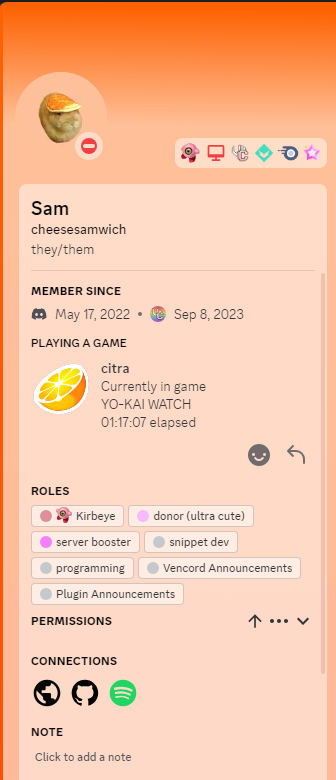
summer adder
.userPopoutInner_f545a3 .section__6f61e:has(.markup_a7e664) {
display: none;
}``` plain kelp
And for the header, .userInfoSectionHeader__31b66:has(+ * .markup_a7e664) I guess
summer adder
summer adder
```css
.userPopoutInner_f545a3 .section__6f61e:has(.markup_a7e664) {
display...
 soft fjord
summer adder
```css
.userPopoutInner_f545a3 .section__6f61e:has(.markup_a7e664) {
display...
soft fjord
summer adder
```css
.userPopoutInner_f545a3 .section__6f61e:has(.markup_a7e664) {
display...
what about the big user popout? thats kinda what i was aiming at lol
summer adder
.userInfoSection__1daf8 .userInfoText__5f822 {display: none;}
.defaultColor__37d78.eyebrow_f53856.defaultColor__87d87.userInfoSectionHeader__31b66 {display: none;}```

this is the closest im getting to doing itim sure someone else can probably get farther

 summer adder
deft niche
WHY ME
summer adder
deft niche
WHY ME
because FUCK YOU
deft niche
Seems legit


 simple kiln
deep bane
wait they changed the chat scrollbar
simple kiln
deep bane
wait they changed the chat scrollbar
yep, and the scrollbar width still not the same width as other.
 past bison
Hi! I started modding the css to be able to minimize the window and have less clutter. What do you think? The room/chat list opens on hover.


what do you think? ^^
oh and it works with all the themes

 solid ore
past bison
Hi! I started modding the css to be able to minimize the window and have less cl...
solid ore
past bison
Hi! I started modding the css to be able to minimize the window and have less cl...
is ur monitor like 5cm wide wtf
past bison
no but i like to put it next to a big window
summer adder
yeah tbh i dont see much use in this
solid ore
as long as it works for u ig
past bison
i have 1080p 27" and seeing a full website next to discord is nice
summer adder
at that point just get a second monitor
past bison
i dont want to
solid ore
maybe get deskpins
past bison
that would still cover other stuff
i like how i made it and also improved the default theme a bit ^^
it's good for this windows function
 solid ore
deep bane
wait they changed the chat scrollbar
solid ore
deep bane
wait they changed the chat scrollbar
wait wat did they change abt it
deep bane
past bison
Hi! I started modding the css to be able to minimize the window and have less cl...
light theme 
deep bane
solid ore
wait wat did they change abt it
class i think
past bison
deep bane
light theme <:husk:1026532993923293184>
got tired of the black after years, it's happyer 😄
deep bane
light theme
solid ore
deep bane
class i think
like the whole name or j the shit at the end
deep bane
pretty sure they removed a class named thin
solid ore
hmm
deep bane
.managedReactiveScroller__1b21a is probably the new class or whatever
solid ore
will look when back on pc
deep bane
would be good to have something that tells us when discord changes something in html/css
summer adder
heyo
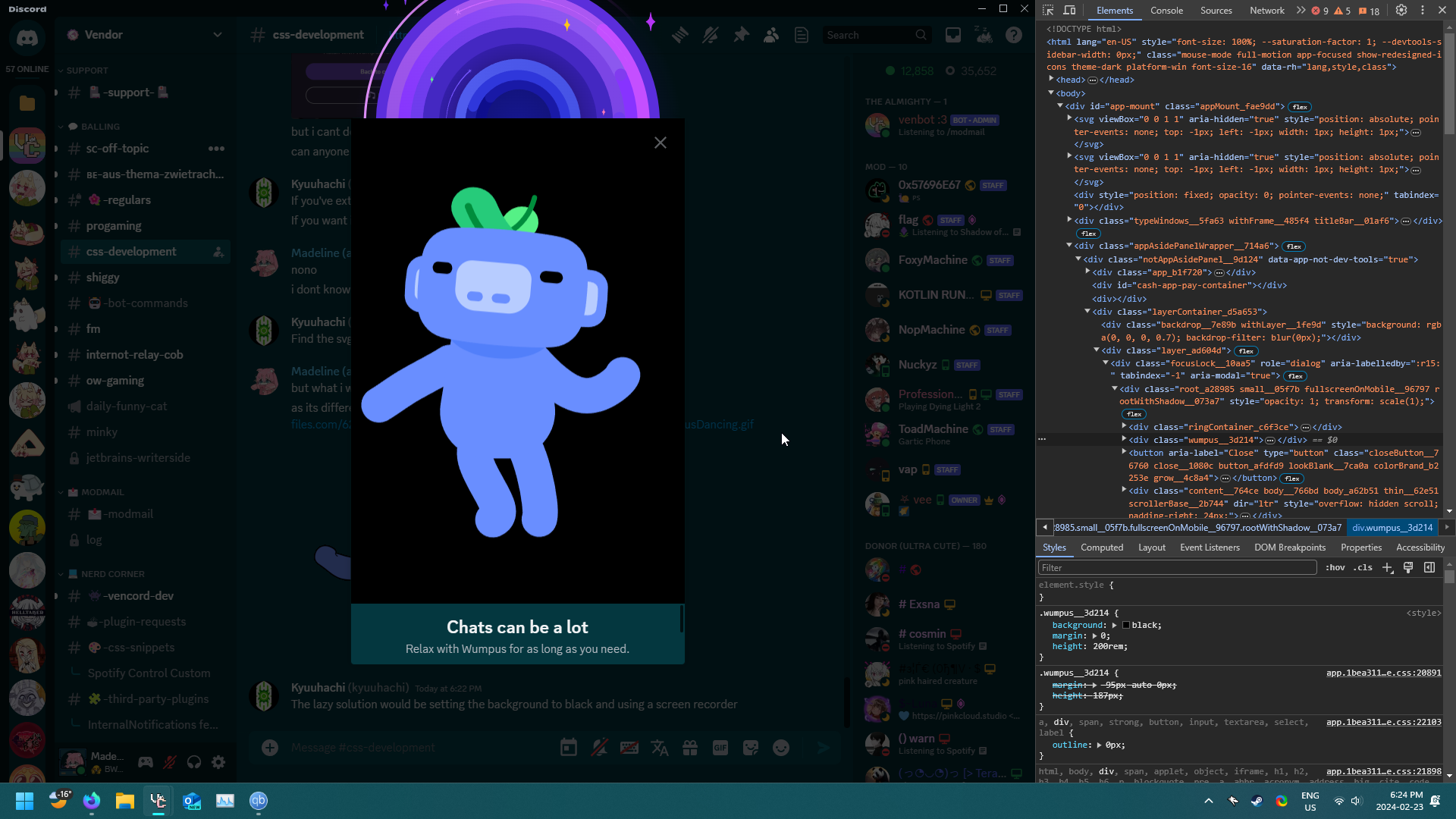
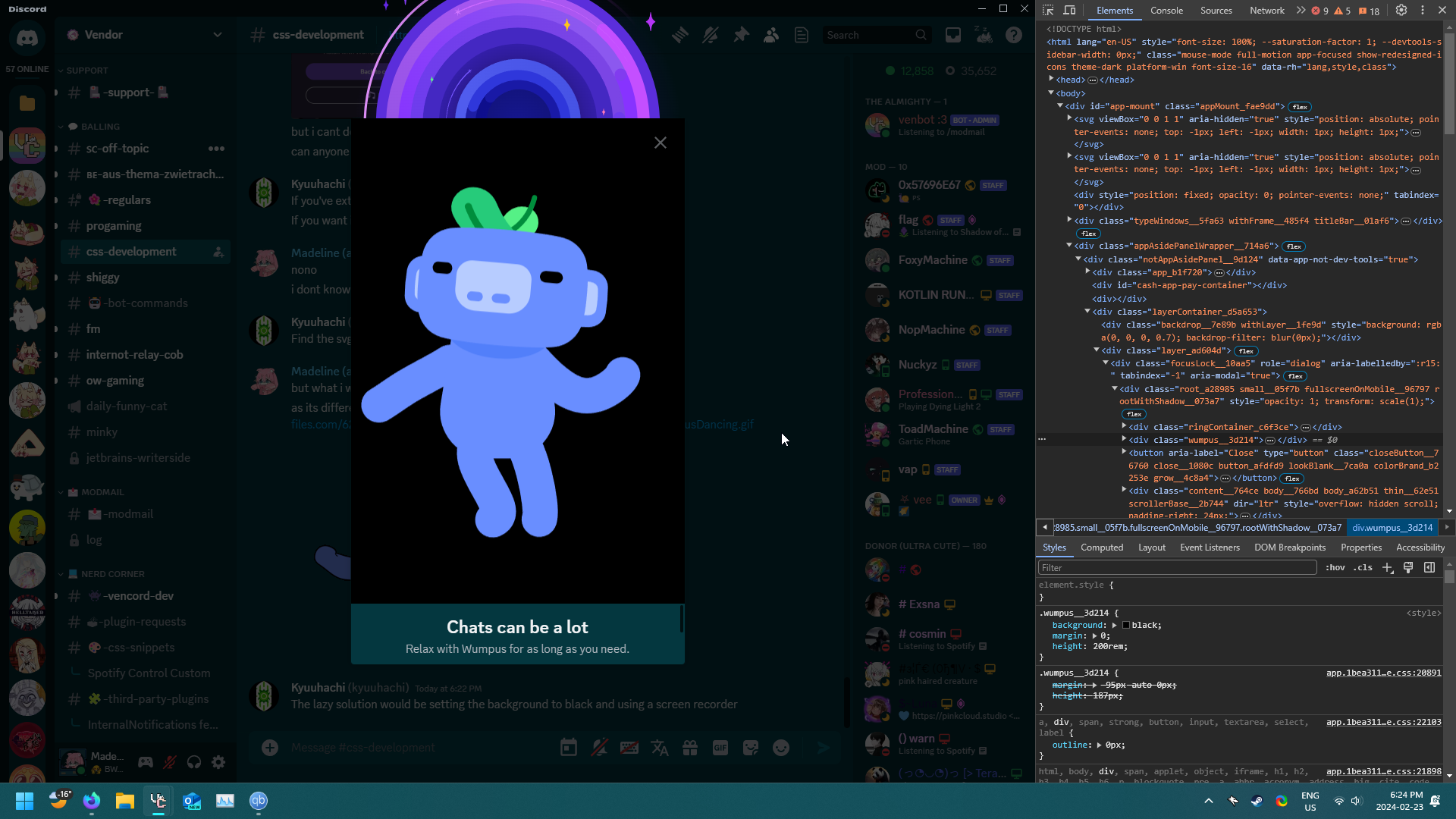
i wanna extract the new wumpus for the chat can be a lot

but i cant do this due to the entirety of wumpus being svg
can anyone help
plain kelp
If you've extracted it and it's a svg, you've succeeded
If you want it to not be a svg, convert it
plain kelp
Find the svg element in devtools and «copy outer html» I guess
summer adder
but what i want to do is get the dancing wumpus and turn him into a gif
as its different than https://assets-global.website-files.com/6257adef93867e50d84d30e2/654fa4be5d8356f96db97699_WumpusDancing.gif
 plain kelp
The lazy solution would be setting the background to black and using a screen recorder
 solid ore
summer adder
https://files.catbox.moe/u3c1i7.png
solid ore
summer adder
https://files.catbox.moe/u3c1i7.png
wtf is that
deft niche
summer adder
i guess this'll work https://files.catbox.moe/gqbibi.png


SO MANY SHIGGY SERVERS
summer adder
solid ore
wtf is that
press ctrl + shift + alt + w
anyways
i got him

hes not transparent but thats fine
 bleak gust
@past bison your theme is very cool, i'm interested in trying it
bleak gust
summer adder
press ctrl + shift + alt + w
oh thats interesting
is this part of that teen safety assist feature
summer adder
idfk
bleak gust
 plain kelp
Ew, that thing is animated via js, not svg animation
bleak gust
plain kelp
Ew, that thing is animated via js, not svg animation
It's probably implemented as some kind of Lottie animation
yeah it is
plain kelp
Never heard of lottie before
bleak gust
It's glorified json  https://en.wikipedia.org/wiki/Lottie_(file_format)

Lottie is a file format for vector graphics animation, and is named after Charlotte "Lotte" Reiniger, a German pioneer of silhouette animation.
Lottie is a library for Android, iOS, Web, and Windows that parses Adobe After Effects animations exported as json with Bodymovin and renders them natively on mobile and on the web
plain kelp
You can do JSON.stringify(Vencord.Webpack.wreq(926299)) to get the raw data
 analog cargo
bleak gust
It's glorified json <:trolley:1024751352028602449> https://en.wikipedia.org/wiki...
analog cargo
bleak gust
It's glorified json <:trolley:1024751352028602449> https://en.wikipedia.org/wiki...
i dated a girlnamed lottie once

 gilded cloak
Please get a job at valve to fix their awful email css

 rugged echo
maybe its gmail issue
gilded cloak
rugged echo
maybe its gmail issue
there is no such thing as blaming gmail for this kinda thing
its known what css rules gmail supports
deep bane
"there is no such thing as blaming discord for this kinda thing
its known what css rules discord supports"
gilded cloak
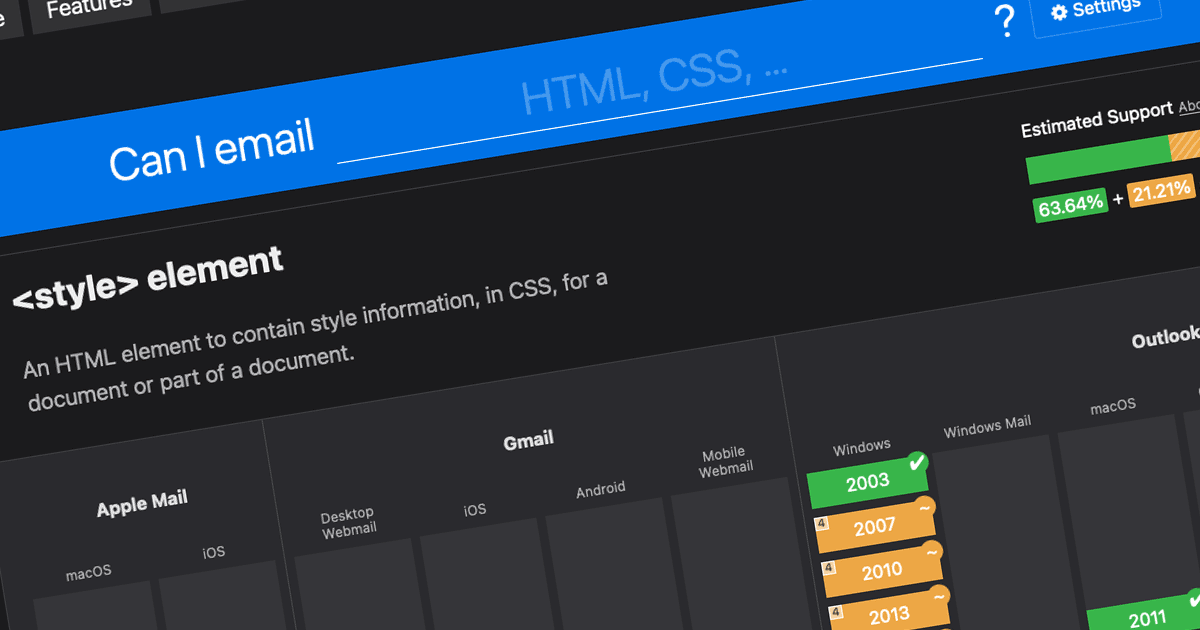
Support tables for HTML and CSS in emails
gilded cloak
deep bane
"there is no such thing as blaming discord for this kinda thing
its known what c...
quite literally yes.
people would use nesting in #🎨-css-snippets if discord supported it.
 dark dragon
Like 2 weeks until that's a reality
gilded cloak
how do you know?
hasn't canary had a greater electron version for like forever now?
dark dragon
Yeah, that version of Electron supports nesting and is being pushed to stable on March 15th. It's the reason older windows and mac versions are losing support
 iron smelt
gilded cloak
how do you know?
hasn't canary had a greater electron version for like forever n...
iron smelt
gilded cloak
how do you know?
hasn't canary had a greater electron version for like forever n...
i main canary
deep bane
dark dragon
Yeah, that version of Electron supports nesting and is being pushed to stable on...
what is css getting then
rugged echo
gilded cloak
its known what css rules gmail supports
oh idk I was saying maybe the screen size or something, but then that would still be a problem from steam I guess
analog cargo
gilded cloak
https://www.caniemail.com/
html in email was a mistake
plain kelp
Well yeah two mistakes rarely make a right
analog cargo
 grand surge
same
grand surge
same
wtf
vestal field
deep bane
what is css getting then
.thing {
   .other-thing {
   }
}```i know its getting nesting, i meant what else is css getting on discord
vestal field
idk what else
bleak gust
gilded cloak
https://www.caniemail.com/
what the fuck this is pathetic
 fast cipher
past bison
Hi! I started modding the css to be able to minimize the window and have less cl...
fast cipher
past bison
Hi! I started modding the css to be able to minimize the window and have less cl...
can you please share the code for this
bleak gust
^^^^^^
past bison
fast cipher
can you please share the code for this
sure! should i make it as a theme? I continued fixing it
past bison
okay, i don't know what's the best way to share it, but here it is:
i'm sorry if the code is ugly, it works xD
past bison
bleak gust
<@1063532834805002271> your theme is very cool, i'm interested in trying it
u too can now try it ^^
fast cipher
past bison
okay, i don't know what's the best way to share it, but here it is:
thanks
past bison
Let me know if you think about some further improvements!


sorry, it had a bug with removing links in embeds, updated the code:
pure cairn
@wispy kayak please check if this works for you as well, since we're using different languages on Discord
/* Hide Invite to Server on right click */
.item__183e8[id=user-context-invite-to-server] {
  display: none;
}```im p sure ids r same for everyone
its aria labels that change
solid ore
np
pure cairn
anyone has the class for the members list typing indicator? I've been playing roulette with inspect element for a good 20m now

plain kelp
Try F8Break
pure cairn
thank you
mhm nope, still can't move these dots
I managed to make discord crash tho, I see that as an absolute win
solid ore
pure cairn
anyone has the class for the members list typing indicator? I've been playing ro...
members list has a typing indicator?
pure cairn
when someone is typing, their status indicator turns into 3 dots
deep bane
.typing__6fd1d
pure cairn

 deep bane
oh
pure cairn
that's from the member list on the side
deep bane
can you type
dont send it
this is like playing cat and mouse
mask=url(#svg-mask-status-typing)
pure cairn
deep bane
this is like playing cat and mouse
yeah I tried using 3 classes but it wouldn't work
pure cairn
pure cairn
yeah I tried using 3 classes but it wouldn't work
.dots_a97068
.cursorDefault_e4f616 and another one
deep bane
use the mask attribute for the selector
pure cairn
deep bane
`mask=url(#svg-mask-status-typing)`
isn't it mask: url... etc?
deep bane
[mask=url(#svg-mask-status-typing)]
.membersWrap__90226 .member_aa4760 [mask=url(#svg-mask-status-typing)]
or something
pure cairn
Mhm nope, no idea on how to use it atm
I'll get back to it after studying a bit more
No spoonfeeding please 
solid ore
if any1 wants them, i made a server with j these emojis, literally nothing else in it
dm for invite
 edgy sentinel
horror
bleak gust
i think i will stick to the built-in twemojis
 bright gust
 valid rover
sorry
valid rover
sorry
I stopped making it lol
bright gust
valid rover
why tho
Someone else is making a better one, mine mine as well just be a "it's functional enough so you can use vendroid"
Plus just about everyone said to quit essentially 🥲
 hallow void
someone should make a teamspeak theme
deep bane
hallow void
someone should make a teamspeak theme
here you go https://www.teamspeak.com/en/

TeamSpeak is the number one choice VoIP communication system for Online Gaming
 oak plover
he's got a 
deep bane
 grand surge
Does anyone here know how to make/customise themes I need my clear theme customised
deft niche
grand surge
Does anyone here know how to make/customise themes I need my clear theme customi...
Read the name of the channel name you're in
Then use https://google.com 
Search the world's information, including webpages, images, videos and more. Google has many special features to help you find exactly what you're looking for.
 lime walrus
pure cairn
grand surge
Does anyone here know how to make/customise themes I need my clear theme customi...
You can either properly learn css first and then start theming or fuck around and find out 
 half crystal
past bison
okay, i don't know what's the best way to share it, but here it is:
half crystal
past bison
okay, i don't know what's the best way to share it, but here it is:
this is really cool, feels much faster than cosy or compact or whatever that BD one is called
past bison
i still don't know where to post a theme, but made an update. Mainly just changed little things, added some csss snipplets from #🎨-css-snippets and made the spotify-gameactivity-etc panel nicer. Overall it looks more polished now.
past bison
 past bison
 fast cipher
server logo would be nice 👍
 brave rampart
past bison
brave rampart
past bison
This theme could prob be used for porting vencord to mobile now I think about it...
bleak gust
brave rampart
This theme could prob be used for porting vencord to mobile now I think about it...
vencord has an android app kinda but its average
brave rampart
bleak gust
vencord has an android app kinda but its average
Oh it does?
My bad
When I looked around for it people told me it didn't exist :P
bleak gust
Yeah, it just wraps the discord website
The discord mobile website experience is kinda awful though
can't use swipe gestures
brave rampart
bleak gust
can't use swipe gestures
Cool might look into forking it and adding @past bison theme to it
And adding swipe gestures
bleak gust
Don't bother forking the vendroid repo
I think these would probably be better suited for Vencord itself
the theme can probably be omitted
brave rampart
bleak gust
I think these would probably be better suited for Vencord itself
Okie
Oh shoot
It's in java
:/
fast cipher
exists
fast cipher
grand surge
or does it exist
it just clears the clutter. The other theme is prob a nitro theme
 fading crane
Does this blue bar share the same css snippet as other important popups
 fast cipher
look in inspector
deep bane
fading crane
Does this blue bar share the same css snippet as other important popups
do you want to display:none it

 clear siren
and they told me not to use attribute selectors everywhere because 'performance' 
past bison
hmmm 😄
vestal field
 stone goblet
it seems they rerolled every single class name again <:abyss:794689002061299782>
stone goblet
it seems they rerolled every single class name again <:abyss:794689002061299782>
fuck
deep bane
stone goblet
clear siren
and they told me not to use attribute selectors everywhere because 'performance'...
What performance, vencord uses them and my client doesn't run like ass. Although it runs like ass because I'm using Wayland and Nvidia
clear siren
stone goblet
What performance, vencord uses them and my client doesn't run like ass. Although...
yeah..
deep bane
* {
  border-radius: 0 !important
}
this is css-development
not css-spoon-feeding
or you don't know css
...
pure cairn
edgy sentinel
yes
anyway that snippet is unusable
youre better of searching on github or the bd theme site
deep bane
edgy sentinel
youre better of searching on github or the bd theme site
it does what he wanetd
🤷♂️
clear siren
deep bane
it does what he wanetd
except it's not enough because it doesn't remove masks that round things also
deep bane
it would break some things with * {mask:none !important}
 pure cairn
"do not refresh discord or stuff will break"

but seriously, updating all classes is not going to be fun
 sweet lark
someone will automate it
clear siren
you will use attribute selectors
pure cairn
I will learn how to use them*
clear siren
I dunno about all corners but I've been using this
/*reduce border-radii*/
[class^=avatar],
[class^=replyAvatar],
[class^=executedCommandAvatar_],
[class^=embedAuthorIcon_],
[class^=wrapperSimple_]
 { border-radius: 2px !important; }
foreignObject[mask*="url(#"]
 { mask: none !important;
   border-radius: 2px !important; }
yeah you'll probably gonna need to use @deep bane's suggested * {border-radius: 0 !important;}
then add my foreignObject[mask*="url(#"] { mask: none !important; } and you should be pretty set I think
oak plover
I’d rather them rename all the classes so they don’t need the random crap at the end of the class name
Instead of “container” for the 70th time
pure cairn
 slim patio
can some1 help me fix this im stupid and cant fix css lol
.username_d30d99::before {
  content: '';
  width: calc(100% + 6px);
  height: 100%;
  border-radius: 5px;
  background-color: currentColor;
  opacity: 0.2;
  position: absolute;
  margin-top: 0px;
  z-index: -1;
  margin-left: -3px;
}
.headerText_f47574 > span {
  margin-left: 3px;
}
its suposed to add a background bhind names in chat
but now it dosent
plain kelp
Are the class hashes up to date
slim patio
explain in non css term plz
plain kelp
The d30d99 part changes every so often
clear siren
slim patio
can some1 help me fix this im stupid and cant fix css lol
```css
.username_d30d9...
works fine for me
slim patio
clear siren
works fine for me
im on the funny canery
clear siren
if you're on ptb or canary it will not work
slim patio
rip
plain kelp
Yeah they said the hashes did change on funny canary
slim patio
ill update it
pure cairn
clear siren
[class^=username_]
🤔 So that's how you use it
And I guess it's more futureproof than plain class names
clear siren
yeah that works if the class you're targeting is the first in the list, you can otherwise use [class*=username_]
because that basically just looks at the list of classes on the element
using ^ is marginally faster as it just looks at the beginning of the classlist
(doesn't really matter but yeah)
pure cairn
Huh, and how does that translate to performance?
clear siren
negligible
pure cairn
But does it stack?
clear siren
I have all my css using attribute selectors
pure cairn
Because I have a bunch of css snippets that use class names and even Vesktop lags a bit sometimes
So I guess it could be due to that
clear siren
most likely not because of attribute selectors but other bad complex selectors like ones that use * or something
clear siren
or using a lot of shadows or gradients or filters
(my vesktop uses 10% gpu at all times) 
plain kelp
I have a plugin that lets me write ```css
.Forum__list,
.Members__container,
.UserProfile__userPanelInner,
.SearchResultsWrap__searchResultsWrap,
_ { margin-top: -48px; padding-top: 48px; }
this is a heavy theme
 pure cairn
<@312692358871515138> please check if this works for you as well, since we're us...
pure cairn
pure cairn
<@312692358871515138> please check if this works for you as well, since we're us...
I don't think [class^=item__] is going to work for this one though
pure cairn
clear siren
this is a heavy theme
Oh yeah, I remember this theme
It's cool, but I can't read the font well
Thanks again for the selectors tip, I'll try swapping stuff out tomorrow and see if anything changes
clear siren

 ashen sable
did they revert the class name change or is it something on my side
I fixed my theme and now it's broken lol
git revert time ig
the update of all time

 real quarry
who has an updated amoled theme (i was told by koishukaze [admittedly a donor and not server staff] that this didnt belong in #🏥-vencord-support-🏥)

 wanton current
you wait for the dev to update it
summer adder
and they were right, you’re here when it comes to that type of stuff
fast cipher
past bison
hmmm 😄
how did you make it fluent (Blurred Windows Wallpaper See thru)
tried this once but failed
pure cairn
how can I make the text not go out of the spotify thing? basically having the artists cut like the album name does instead of showing all of them

should I apply something like a text-overflow: ellipsis on it?
clear siren
depends on what you want it to look like
pure cairn
like the song and album name, having it to clip it off when the text reaches the right border
pure cairn
pure cairn
should I apply something like a `text-overflow: ellipsis` on it?
I tried with this one, but I think I chose the wrong classes since it wasn't working
but at this point I doubt it's the actual solution
clear siren
if you mean just having one line, white-space: nowrap
pure cairn
pure cairn
I tried with this one, but I think I chose the wrong classes since it wasn't wor...
.detailsWrap__4faa4 textRow__4750e {
 overflow: hidden;
 text-overflow: ellipsis;
}
oh
I did it
but I don't know if it's the proper way
.detailsWrap__4faa4 {
 white-space: nowrap;
 overflow: hidden;
 text-overflow: ellipsis;
}```is it fine to remove the 2nd class like this?
clear siren
if it works it works
pure cairn
fair enough
so now I could try and swap it to [class^="detailsWrap__"]
and it works, yay
ty 
fast cipher
past bison
hmmm 😄
i need this
past bison
fast cipher
how did you make it fluent (Blurred Windows Wallpaper See thru)
With Mica for everyone, and the transparency settings (Vesktop). But i don't like that with transparency enabled, window snapping is not working, so for me it not worth it.
and made background and backround-color transparent on some elements with css
html, body, #app-mount,
.typeWindows__5fa63,.appAsidePanelWrapper__714a6,
.notAppAsidePanel__9d124,.app_b1f720,
.app_de4237,.bg__12180,.layers__1c917,
.layer__2efaa ,.container__037ed,
.guilds__2b93a,.tree__7a511,.scroller__3d071{
  background: transparent!important;
background-color: transparent!important;}```Without mica for everyone, it's still buggy.
stone goblet
can i directly use scss for a theme or do i have to compile it
stone goblet
sass but with css syntax
plain kelp
With var() and css nesting there's little need for scss these days
Though I guess css nesting hasn't landed in discord desktop yet
dark dragon
Needs to be compiled
plain kelp
Which is why regular css is more convenient
dark dragon
Not really. If you're writing a fully featured theme, there are a lot of things scss and / or post css can be helpful for
Maintenance if nothing else
solid ore
im p sure u j need to remove the foreignObject[mask*="url(#"] { mask: none !important; }
for me that doesnt affect the server list
clear siren
.wrapperSimple_a34580 {border-radius:50% !important;}
for now, the class will change soon
learn how to use devtools so you can fix it when it does
or use attribute selector
 nimble owl
anyone have a css for making emoji's bigger?
clear siren
:root {--custom-emoji-size-emoji: 32px; --custom-emoji-size-jumbo-emoji: 64px; }
defaults are:
--custom-emoji-size-emoji: 1.375em;
--custom-emoji-size-jumbo-emoji: 3rem;
nimble owl
thank you
nimble owl
clear siren
defaults are:
--custom-emoji-size-emoji: 1.375em;
--custom-emoji-size-ju...
what's the first line for?
 devout elm
nimble owl
devout elm
nimble owl
that's true 
 quaint zodiac
hey, with the newest update the Membercount plugin shows the active users also in the guild popout.
I am trying to get it removed but unfortunatly cant seem to find the correct class for it to work
does anyone with some more experience know which element i gotta select for the guildpopout and what exactly i gotta remove to leave everything else be and just remove the membercount?
 toxic yew
.vc-membercount-tooltip
 glad urchin
did discord revert the class hashes or is it just me
slim patio
glad urchin
did discord revert the class hashes or is it just me
They reverted a lot so could be
glad urchin
 pure cairn
it used to work fine yesterday
but now it's not changing between actions anymore, like typing, selecting text, hovering elements etc
clear siren
hmm, I see nothing that should effect cursor
 echo frost
pure cairn
but now it's not changing between actions anymore, like typing, selecting text, ...
echo frost
pure cairn
but now it's not changing between actions anymore, like typing, selecting text, ...
the cursor?
it's working for me
echo frost


 pure cairn
maybe something went wrong there
clear siren
pure cairn
even the membercount on the members list changed
the membercount did have a change in the latest vencord commits
pure cairn
yeah, but it's the only thing I changed in my quick css today
echo frost
also i have errors
 echo frost
clear siren
the membercount did have a change in the latest vencord commits
echo frost
clear siren
the membercount did have a change in the latest vencord commits
yeah it shows here now
 pure cairn
echo frost
also i have errors
pure cairn
echo frost
also i have errors
it works fine, it doesn't like :has for some reason
clear siren
yeah the quickcss editor doesn't understand :has(), :is() etc with complex selectors
echo frost
oh
echo frost
echo frost
yeah it shows here now
although it doesnt show with krammeth's css enabled
pure cairn
because I hid it with the snippet at the bottom
echo frost
ah
pure cairn
/* Hide Membercount */
.vc-membercount-tooltip {
  display: none;
}```it would be useful if there was a setting to choose whether to display it while hovering server icons instead of having to hide it through css
well, not useful but cozy
echo frost
yeah
past bison
past bison
```css
html, body, #app-mount,
.typeWindows__5fa63,.appAsidePanelWrapper__714a6,...
actually this is enough:
/* MICA */
body, #app-mount,
.typeWindows__5fa63,
.app_de4237,.bg__12180,
.guilds__2b93a,.scroller__3d071 {
    background: transparent!important;
}```and after this, you can make it darker for the dark theme. Dark acrylic + 50%black:
/* Darker transparency background*/
body {
    background: rgba(0, 0, 0, 0.5)!important;
}``` solid ore
/* Interactive Folders */
[class^=expandedFolderIconWrapper__] > svg {
    color: inherit !important;
}
[class*=FolderIconWrapper__] {
    color: var(--interactive-normal) !important;
}
[class*=FolderIconWrapper__]:hover {
    color: var(--interactive-active) !important;
    background-color: var(--background-modifier-selected);
}```
or
```css
@import url("https://github.com/tom22k/css-snippets/raw/main/InteractiveFolders/import.css");

forgive my awful recording
oh and its compatible with all themes
deep bane
Fix BetterFolders showing server icons when opening/closing them
.expandedFolderIconWrapper__458cf {
transform:none !important;
}
.closedFolderIconWrapper__7321f {
display:none !important;
}``` slim pond
would anyone be interested in something like this?
 edgy sentinel
imo this is way better (a native plugin setting)
clear siren
po...
clear siren
deep bane
holocaust
edgy sentinel
decent song
 void helm
Hey, anyone here know if it's possible to disable the minimum width requirement for User Profiles toggle in DMs via CSS?

It only works if the window is wider than 1131px
edgy sentinel
its via code so i highly doubt css can do anything

yep

would need to be a plugin
void helm
Ah okay, thanks!
I have my own "theme" that makes discord a bit more compact and viable to run in a small window, like this

So I figured maybe I could do the same to userprofile as with member list on right
void helm
they are mouseover slide out menus for me
edgy sentinel
edgy sentinel
would need to be a plugin
i can make you a plugin but you'd have to build from source as explained in #1032200195582197831 pins
void helm
Uhhh I'm really not experienced with coding and stuff, I've built one thing from source successfully in my entire life I think
I think it will be more work than it's worth, but I appreciate the answers and offer greatly! ❤️
pure cairn
edgy sentinel
imo this is way better (a native plugin setting)
Why does the cover get zoomed in on the left on hover?
It feels a bit weird
edgy sentinel
because that's how background image with cover works
there's no good way to fix it other than to make it bigger and hide the overflow or smth like that
pure cairn
edgy sentinel
because that's how background image with cover works
sadge
echo frost
how do i revert this change?
icon is easy
.emojiLockIcon__37643 {
    display: none;
}```
But weren't the icons greyed out before instead of having a grey box over them?

and i'd like to remove the purple area and make the emojis in there be greyed out
 plain kelp
Is that purple area emojis from different guilds?
echo frost
it has a class i think
also what were the server icons like before?

were they greyed out
plain kelp
Pretty sure they were just unmarked
echo frost
or do i just remove the icon
ok
yeah sseems like all the nitro locked emojis are in this div

(ignore background color being set to black lmao)
 echo frost
.emojiLockIcon__37643 {
    display: none;
}
.upsellContainer__3c02a {
    display: none;
}
.categorySectionNitroLocked_cf3b81 {
    background-color: transparent;
}
.nitroTopDividerContainer__3d13a {
    display: none;
}
.categoryItemLockIconContainer__9e6a3 {
    display: none;
}```this is what i have rn
 deep bane
use fakenitro plugin 🤷♂️
echo frost
this is for reacting
 echo frost
deep bane
just buy nitro [Clueless](https://cdn.discordapp.com/emojis/1176919999017930832....
echo frost
deep bane
just buy nitro [Clueless](https://cdn.discordapp.com/emojis/1176919999017930832....
that would involve me not being a cheapskate!!!
deep bane
.emojiLockIconContainer_edde9a {
  background-color:initial;
}```I made a plugin that removes a bunch of nitro ads
More stable and more fun than a css
deep bane
.emojiLockIconContainer_edde9a {
  background-color:initial;
}
.emojiLockIcon__37643 {
  display:none;
}```yeah but i'm not getting rid of this yet because i want to replace it with greyed out emojis
deep bane
works for me
echo frost
deep bane
```css
.emojiLockIconContainer_edde9a {
background-color:initial;
}
.emojiLock...
have that already
the lockicon
deep bane
filter grayscale
echo frost
.emojiLockIcon__37643 {
    display: none;
}
.upsellContainer__3c02a {
    display: none;
}
.categorySectionNitroLocked_cf3b81 {
    background-color: transparent;
}
.nitroTopDividerContainer__3d13a {
    display: none;
}
.categoryItemLockIconContainer__9e6a3 {
    display: none;
}
ok
deep bane
.emojiItem_b15dee .emojiLockIconContainer_edde9a {
  background-color:initial;
}
.emojiItem_b15dee .image__7ab81 {
  filter:grayscale(1);
}
.emojiItem_b15dee .emojiLockIcon__37643 {
  display:none;
}```.emojiItem_b15dee .image__7ab81 {
filter:grayscale(1);
}```
this is greying out more than it should deep bane
i forgor
echo frost
deep bane
```css
.emojiItem_b15dee .emojiLockIconContainer_edde9a {
background-color:ini...
why background-color: initial instead of display: none?
.emojiLockIcon__37643 {
    display: none;
}
.emojiLockIconContainer_edde9a {
    display: none;
}
.upsellContainer__3c02a {
    display: none;
}
.categorySectionNitroLocked_cf3b81 {
    background-color: transparent;
}
.nitroTopDividerContainer__3d13a {
    display: none;
}
.categoryItemLockIconContainer__9e6a3 {
    display: none;
}
/* .lockedEmoji__79818 {
    filter: grayscale(1);
} */```this is what i have rn
deep bane

.emojiItem_b15dee .emojiLockIconContainer_edde9a {
  display:none;
}
.emojiItem_b15dee:has(.emojiLockIconContainer_edde9a) .image__7ab81 {
  filter:grayscale(1) brightness(0.75);
}
.emojiItem_b15dee .emojiLockIcon__37643 {
  display:none;
}```how do i do it if the emoji is in here too
 deep bane
i have no idea what that category is
echo frost
categorySectionNitroLocked_cf3b81
echo frost
 echo frost
deep bane
no like the menu itself
echo frost
deep bane
no like the menu itself
idrk what you're asking
maybe 2nd image?


.emojiLockIcon__37643 {
    display: none;
}
.emojiLockIconContainer_edde9a {
    display: none;
}
.upsellContainer__3c02a {
    display: none;
}
.categorySectionNitroLocked_cf3b81 {
    background-color: transparent;
}
.nitroTopDividerContainer__3d13a {
    display: none;
}
.categoryItemLockIconContainer__9e6a3 {
    display: none;
}
.emojiItem_b15dee:has(.emojiLockIconContainer_edde9a) .image__7ab81 {
  filter:grayscale(1) brightness(0.75);
}

.categorySectionNitroLocked_cf3b81 .emojiItem_b15dee .image__7ab81 {
  filter: grayscale(1) brightness(0.75);
}```ok got it working
can i combine the bottom thing with the other grayscale
deep bane
what
echo frost
combine these two
.emojiItem_b15dee:has(.emojiLockIconContainer_edde9a) .image__7ab81 {
  filter:grayscale(1) brightness(0.75);
}

.categorySectionNitroLocked_cf3b81 .emojiItem_b15dee .image__7ab81 {
  filter: grayscale(1) brightness(0.75);
}```yes
deep bane
this could work toocss :is(.categorySectionNitroLocked_cf3b81 .emojiItem_b15dee,.emojiItem_b15dee:has(.emojiLockIconContainer_edde9a)) .image__7ab81 { filter: grayscale(1) brightness(0.75); }
echo frost
.emojiItem_b15dee:has(.emojiLockIconContainer_edde9a) .image__7ab81,
.categorySectionNitroLocked_cf3b81 .emojiItem_b15dee .image__7ab81 {
  filter:grayscale(1) brightness(0.75);
}```oh
full code if anyone wants
.emojiLockIcon__37643 {
    display: none;
}
.emojiLockIconContainer_edde9a {
    display: none;
}
.upsellContainer__3c02a {
    display: none;
}
.categorySectionNitroLocked_cf3b81 {
    background-color: transparent;
}
.nitroTopDividerContainer__3d13a {
    display: none;
}
.categoryItemLockIconContainer__9e6a3 {
    display: none;
}
:is(.categorySectionNitroLocked_cf3b81 .emojiItem_b15dee,
.emojiItem_b15dee:has(.emojiLockIconContainer_edde9a)) .image__7ab81 {
    filter: grayscale(1) brightness(0.75);
}```css is easier
and more fun
echo frost
iron smelt
Hypocrisy
sacrilege
blasphemy
heresy
impiety
sin
mockery
crime
violation
fallacy
agnosticism
apostasy
dissidence
wait i don't have hypocrisy in that?!?!
bleak gust
echo frost
css is easier
and more fun
nop
echo frost
what?!?!
don't you love spending hours changing the look of something slightly with great difficulty?
bleak gust
with the css u need to hope there are specific enough class names and stuff
ok
real sarcasm
echo frost
bleak gust
with the css u need to hope there are specific enough class names and stuff
yes
challenge
therefore good!
bleak gust
bleak gust
with the css u need to hope there are specific enough class names and stuff
also good luck reparenting something to be somewhere else in the uI
bleak gust
echo frost
that's why i program in scratch
can you make doom in scratch thanks
echo frost
bleak gust
can you make doom in scratch thanks
no
gamedev is cringe
i only make useless tools
iron smelt
Do you think it’s possible too make CSS code that recolours and reshapes the “ReadAllButton” so it’s not that obnoxious blue colour and has a more rounded shape?
echo frost
this?
 solid ore
iron smelt
Do you think it’s possible too make CSS code that recolours and reshapes the “Re...
solid ore
iron smelt
Do you think it’s possible too make CSS code that recolours and reshapes the “Re...
/* recolour and reshape Read All Button */
[class^=scroller__] > button:first-of-type {
  color: red; /* text color */
  background-color: blue; /* button color */
  border-radius: 5px; /* increase radius for "more roundness" */
}```its a plugin
 midnight wagon
is there a quick way to remove this invite icon
 pure cairn
midnight wagon
is there a quick way to remove this invite icon
pure cairn
midnight wagon
is there a quick way to remove this invite icon
what's your discord language?
midnight wagon
en us
clear siren
[aria-label="Create Invite"] {display:none} if you're on english
pure cairn
/* No Invite/Settings Button */
.iconItem__8e3b8:not([aria-label="Open Chat"]) {
  display: none !important;
}```thx
midnight wagon
clear siren
``[aria-label="Create Invite"] {display:none}`` if you're on english

doesnt seem to do anything
 digital pier
you have an unfinished css snippet right above it
midnight wagon
digital pier
you have an unfinished css snippet right above it
 clear siren
I dunno it works for me
digital pier
oh hm
clear siren
midnight wagon
doesnt seem to do anything
open devtools with ctrl+shift+i and grab the selector yourself :3
midnight wagon
the selector changes based on wether its hovered, unread, selected
ive tried it before
and it still didnt work
clear siren
I mean some property probably changes sure
but you should be able to figure it out, I believe in you
midnight wagon
#channels > ul > li.containerDefault__3187b.selected__3b4cb > div > div > a > div > div.children_a486f8 > div
this is the selector it copies
clear siren
don't use the autocopy thing
look at the element classes and aria labels etc and use one of those
oak plover
mfw

 clear siren
midnight wagon
but only for this channel?
clear siren
midnight wagon
but only for this channel?
what did you put in
midnight wagon
clear siren
what did you put in
same thing you said earlier
ill try to restart dc
now it doesnt work at all
nice
clear siren
solid ore
midnight wagon
u dont need the * before
solid ore
oak plover
mfw
wat r u trying to do
solid ore
ye
oak plover
this will be discord in 2024
fast cipher
solid ore
surely u can j disable that
they're an experiment, you need to enable them
solid ore
experiment for now
dark dragon
oak plover
nothing they're testing lottie icons
The only one that looks at all good is the noise suppression one
lime walrus
oak plover
nothing they're testing lottie icons
Is this a experiment or smth, if so can you tell me the name it looks cool
fast cipher
it's in client changes
wait

GitHub
Scripts:
- shared.b7d70df8661fc770215d.js
- app.9c7cc4fe5a4c50fdf3b6.js
- 21396.259a270b7e3f8803a333.js
- 95569.986be2e499cd6f7ea4e7.js
- 80013.fccdb738bf0cecc34db7.js
- 37144.05929cc88bb7d469799d....
you need to be on canary
iron smelt
solid ore
```css
/* recolour and reshape Read All Button */
[class^=scroller__] > button:f...
oh… thank you for doing it, I mean, I was gonna do it. I was just asking if it was possible to do to begin with.
Thx for the CSS though 😊
echo frost
iron smelt
oh… thank you for doing it, I mean, I was gonna do it. I was just asking if it w...
You can also use vars if you want
This sets it to be the same color scheme of the discord icon
  color: var(--text-normal); /* text color */
  background-color: var(--background-primary);
 pure cairn
is there a way to make the chat size independent from the members tab width?
because I currently have a css snippet that reduces the members tab width when it's not hovered, and when I actually do hover it the chat shrinks to the original default width
the issue is, it's really laggy when the messages wrap because the text moves and if there's a lot of it, the performance is very poor
plain kelp
You can perhaps change members list to position: absolute
 stable compass
there was a snippet
plain kelp
But it might take some tinkering
stable compass
pure cairn
is there a way to make the chat size independent from the members tab width?
:root{
    --hidden-user-width: 60px;--user-width: 240px
}
.container_b2ce9c,
.membersWrap__90226{
    transition-duration:var(--transition-time);
    justify-content:unset;
    min-width:unset;
    width:var(--hidden-user-width)
}
.membersGroup__85843 {
    height:0px;
    transition-duration:var(--transition-time);
    padding-top:0px
}
.container_b2ce9c:hover
.membersGroup__85843,
.membersWrap__90226:hover
.membersGroup__85843{
    height:40px;
    padding-top:24px
}
.container_b2ce9c:hover,
.membersWrap__90226:hover{
    width:var(--user-width)
}
.profilePanel-2PWEok{
    transition-duration:var(--transition-time)
}```
like this?exactly this one
I just edited a few variables here and there, but it was quite laggy to begin with
pure cairn
and then I'll have to manually move it to the right side
because right now it's like this xD
 plain kelp
right: 0
stable compass
threw this together in like 5 seconds ```css
.container_b2ce9c .membersWrap__90226 {
position: absolute;
right: 0rem;
transition: all ease .2s;
}
.container_b2ce9c:not(:hover) .membersWrap__90226 {
right: -11rem;
opacity: 0
}```
pure cairn
/* Minified member list*/
:root {
  --hidden-user-width: 65px;
  --user-width: 240px
}
.container_b2ce9c,
.membersWrap__90226 {
  transition-duration: 0.3s;
  justify-content: unset;
  min-width: unset;
  width: var(--hidden-user-width);
  position: absolute;
  right: 0;
}
.membersGroup__85843 {
  height: 0px;
  transition-duration: 0.3s;
  padding-top: 0px
}
.container_b2ce9c:hover
.membersGroup__85843,
.membersWrap__90226:hover
.membersGroup__85843 {
  height: 40px;
  padding-top: 24px
}
.container_b2ce9c:hover,
.membersWrap__90226:hover {
  width: var(--user-width);
}
.profilePanel-2PWEok {
  transition-duration: var(--transition-time)
}
[class^="chatContent__"] {
  max-width: 94.5%;
}```this might sound like a dumb question, but why?
stable compass
well for me its like this lel

 pure cairn
I guess as % it might work better
stable compass
yea 100% is better as well
pure cairn
yeah I tried to have the same gap
 stable compass
well for me its like this lel
stable compass
stable compass
well for me its like this lel
if you expand your window it'll have that space there like this
stable compass
now i get it lel, i didnt realize. nice tho
plain kelp
Reflowing the chat is kinda expensive yeah
pure cairn
unironically, for my laptop it was its demise
pure cairn
I found a funny bug that occurs when there are only a few members in the channel/server
 oak plover
list has its own hover 
pure cairn
Yeah, I'll fix it tomorrow
 plain kelp
I sure hope you're putting !important on every rule involved in that because it sure is
bleak gust
plain kelp
I sure hope you're putting !important on every rule involved in that because it ...
unfortunately I don't think I can do this with CSS only
dark dragon
Getting consecutive messages from an individual person isn't really all that great, but if you're just after doing it to messages with italicised text you can do that
bleak gust
dark dragon
Getting consecutive messages from an individual person isn't really all that gre...
Nono it's the exploding deleted message
The italics is just my custom css for deleted messages
The issue is every instance of that exact background is played at the same time
 jolly tundra
@import url('https://fonts.googleapis.com/css2?family=Hina+Mincho&display=swap');

:lang(ja) {
  font-family: 'Hina Mincho', serif;
}
how can I make the custom font not affect latin characers?
 solid ore
jolly tundra
```css
@import url('https://fonts.googleapis.com/css2?family=Hina+Mincho&display...
solid ore
jolly tundra
```css
@import url('https://fonts.googleapis.com/css2?family=Hina+Mincho&display...
i think you would have to remove those characters from the custom font, and setup a fallback font(?)
so it would be very tedious
jolly tundra
how am I supposed to remove those characters from an imported font?
this hurts my eyes
 dark dragon
You should almost never need to do that, as you can just set a unicode range for the font. In this case though, You should just be able to get away with flipping the order you set them, so font-family: sans-serif, 'Hina Mincho';
jolly tundra
so that was the problem, thank you very much
I've been trying to fiddle with unicode ranges since earlier but I couldn't get them to work
dark dragon
they're a bit of a pain to set up if you've not done them before. Thankfully, you don't need them often
clear siren
unicode-range does work but you have to make a @font-face rule where you put that in
example where I use it for channelnames #🎨-css-snippets message
jolly tundra
(my problem is already solved but I still want to learn)
@font-face {
  font-family: 'Hina Mincho';
  src: url('https://fonts.googleapis.com/css2?family=Hina+Mincho&display=swap');
  unicode-range: U+3000-303F,
                U+3040-309F,
                U+30A0-30FF,
                U+4E00-9FFF,
                U+FF00-FFEF;
}

:lang(ja) {
  font-family: 'Hina Mincho', serif;
}
like this? this didn't really do anything but still affected latin characters
I also tried doing it the other way around, by changing everything and just using a unicode range for latin characters to keep them on the default font
@font-face {
  font-family: "Hina Mincho";
  src: url('https://fonts.googleapis.com/css2?family=Hina+Mincho&display=swap');
  unicode-range: u+0000-u+007F; /* Latin characters */
}```


this was my test, I set it to Hina Mincho still just to see if only latin characters would change, but nothing changed at allthat's a broken range
clear siren
u+007f should be just 007f
jolly tundra
oh
I'll try that
@font-face {
  font-family: "Hina Mincho";
  src: url('https://fonts.googleapis.com/css2?family=Hina+Mincho&display=swap');
  unicode-range: u+0000-007f; /* Latin characters */
}
like this? only this?
clear siren
yeah that should work
jolly tundra
I'll try restarting discord
dark dragon
that would make it so Hina Mincho only replaces latin characters
dark dragon
You want the opposite don't you?
clear siren
oh but wait, that link is not valid, it needs to be to the font file
jolly tundra
but unfortunately it doesn't work
clear siren
src: url(https://fonts.gstatic.com/s/hinamincho/v12/2sDaZGBRhpXa2Jjz5w5LAGW5QakXdEOxxk9KVRLQhc3Kwq4cYmVxgA.1.woff2) format('woff2');
jolly tundra
dark dragon
You want the opposite don't you?
yeah, I'm just testing to see how I can target latin characters so I can change them back to the default font after I change all fonts into Hina Mincho
bleak gust
clear siren
oh but wait, that link is not valid, it needs to be to the font file
this sounds stupid but why not just import that at the top
clear siren
because the import has its own font-face rules with unicode ranges and stuff, can't set your own unicode range unless you do your own font-face rule
bleak gust
do those unicode ranges supplied include latin chars
bleak gust
just copy everything but that 
clear siren
that could work
jolly tundra
clear siren
``src: url(https://fonts.gstatic.com/s/hinamincho/v12/2sDaZGBRhpXa2Jjz5w5LAGW5Qa...
this also doesn't work by the way, nothing changes at all, but oh well, I guess I'll just have to learn about unicode ranges another time, thanks for the help
clear siren
yeah turns out there's a bunch of separate font files in the import css file
you could also try installing the font to your system and use src:local() and see if that helps
jolly tundra
I do have it on my system, it's just that discord was being so stubborn (the only app that wasn't being affected) that the only solution I could think of was to use custom css
but I already got what I needed anyway so I'm content with this for now
 nimble spruce
Is there a way to show every single emoji reaction instead of an emoji with a number next to it (using pure CSS)? Like instead of this:

It would be:

I can change the number to the emoji like so:
.reaction_fef95b:has(.reactionInner__4135b[aria-label*="2 reactions"], .reactionInner__4135b[aria-label*="2 super reactions"]) .reactionCount_b49901 {
  width: 16px;
  content: url(https\:\/\/discord\.com\/assets\/74e05a8765f11cd482e9\.svg);
}
but I can't seem to be able to dynamically do it, like right now it is just replacing the count with a chicken emoji for every single 2 react message
I know this could be done with a plugin (and I might write one for it), but I was just curious if it could be done entirely without JS (I don't think so though lol)
deep bane
no
nimble spruce
ah, yeah thought so
nimble spruce
I would probably limit it to 10, and then show a +1990 at the end of it
echo frost
Why isn't f8 break working for me anymore?
ctrl+shift+i is open
Is there something else?
 summer adder
you need to click on discord after opening dev tools
you cant just immediately press f8
grand surge
toxic yew
.vc-membercount-tooltip
Hi, question, how did you get the class for that? When I tried to get that the tool lip disappears when I go to the class selector
dark dragon
Set a break point or use the f8 break plugin discussed above. Might even be able to emulate a static page to grab tooltips. It's been a hot minute since I tried
plain kelp
Or in this case just read the plugin source
deft niche
summer adder
you need to click on discord after opening dev tools
No? you just need to be in sources
grand surge
plain kelp
Or in this case just read the plugin source
Will lol
grand surge
dark dragon
Set a break point or use the f8 break plugin discussed above. Might even be able...
Ye I'll use the plugin
deft niche
summer adder
shut up sam
slim pond
might have almost finished a new theme
 grand surge
Hello! I need help, basically is there any way to 'disable' scrollbar of the chat using css? If yes, could someone send me the css script for it?
 edgy sentinel
quaint zodiac
hey, with the newest update the Membercount plugin shows the active users also i...
edgy sentinel
quaint zodiac
hey, with the newest update the Membercount plugin shows the active users also i...
it will be toggleable with a future update
echo frost
can you not disable it with css?
pure cairn
atm, css is the only option to "disable it"
but once the update is out, it's not going to be needed anymore
echo frost
yeah they're asking for how to do that
pure cairn
they asked 4 days ago
echo frost
grand surge
Hello! I need help, basically is there any way to 'disable' scrollbar of the cha...
found some code online https://stackoverflow.com/questions/16670931/hide-scroll-bar-but-while-still-being-able-to-scroll
.managedReactiveScroller__1b21a::-webkit-scrollbar {
    display: none;
}```
Stack Overflow
I want to be able to scroll through the whole page, but without the scrollbar being shown.
In Google Chrome it's:
::-webkit-scrollbar {
display: none;
}
But Mozilla Firefox and Internet Expl...
pure cairn
echo frost
i was talking about this
https://discord.com/channels/1015060230222131221/113484...
OH
whoops, sorry
past bison
Hi! I made my theme to separate themes. One for making it resizable, responsive, clutter free, and smoother look. One for enabling acrylic transparency for the whole window. And one to make only the titlebar and the server list area transparent. You can customize the transparency and vibrancy strength and even the Nitro themes work too! So basically infinite color options (Light and Dark too).
https://github.com/s-k-y-l-i/discord-themes @lime walrus @fast cipher @grand surge @half crystal


GitHub
Discord themes with transparent acrylic mica effect, less clutter and responsive redesign. More aesthetic and simple Discord experience. - s-k-y-l-i/discord-themes
lime walrus
past bison
Hi! I made my theme to separate themes. One for making it resizable, responsive,...
O shoot, thanks bro
half crystal
past bison
Hi! I made my theme to separate themes. One for making it resizable, responsive,...
Damn
 stone garden
past bison
Hi! I made my theme to separate themes. One for making it resizable, responsive,...
stone garden
past bison
Hi! I made my theme to separate themes. One for making it resizable, responsive,...
i love this theme. TYSM
clear siren
works pretty well using dwmblurglass also
also @past bison you need to have discord titlebar option off in vesktop you might want to add that in the readme
but wait you don't have regular windows titlebar in your screenshots
 dusty quiver
How can I change the CSS of Solana so that it doesn't go gray like the second picture when it's not in the foreground?


Been tinkering with it but I can't seem to figure out what line(s) of code is responsibile for it
clear siren
what os are you using
dusty quiver
MacOS
clear siren
could it be a macos limitation
windows does the same unless you use a 3rd party app like micaforeveryone or dwmblurglass
dusty quiver
Hmm, it could well be
I think you might be right
As Finder also shows the same behaviour
past bison
clear siren
also <@1063532834805002271> you need to have discord titlebar option off in ves...
I think it's the opposite. The Windows Titlebar somehow completely disables resizing the window for me 😮

Oh I had the transparency setting on too. But still, you need the Discord titlebar for the best look and experience!
clear siren
if I turn on discord titlebar I lose glass
and this option doesn't seem to do anything for me

the one in vesktop settings works
but only when discord titlebar is off
no idea what's up with that and haven't done a lot of testing tbh
past bison
And this is Vencord. 😮
 clear siren
🤔
past bison
I think you should install Mica for Everyone too
stone garden
I tried used Rectify11 Dark Mica Theme with Windows Transparency of Vencord
It forced me to return to the default Windows Theme
clear siren
past bison
I think you should install Mica for Everyone too
I do have it and I was playing with transparency before using that
dwmblurglass works too
but both have same behavior
plain kelp
Why does MFE's faq say it only works on firefoxes below 116? I've got a nicely transparent ff121 over here, so it seems weird that MFE wouldn't work
Maybe that's only relevant on windows?
past bison
Try resizing the window, and transparency will kick in!
This is with Vesktop, without Mica for Everyone running and with Disord titlebar. (It loses the rounded corners and it's not that transparent this way)

but i had to resize the window frame only once after a Vesktop restart
stone garden
i think bc this
https://raw.githubusercontent.com/s-k-y-l-i/discord-themes/main/smooth-harmony-responsive.css
That theme is not the transparency effect
you have to use this one after all the other themes:
https://raw.githubusercontent.com/s-k-y-l-i/discord-themes/main/acrylic-harmony-fully-transparent.css ```Isn't that a vesktop setting?
past bison
Both has this setting.
pure cairn
tried doing [this](#1166882662821134386 message) with the original snippet code (had to tweak the left-margin a bit to make it fit but, whenever the panel moves (I'm using the controls on hover setting), the icons get blurry/weird

any ideas on why it's doing that?
clear siren
I'm assuming the mask-images don't have proper antialiasing or something when transitioning
might be totally wrong though
clear siren
sure but I can't test it now
clear siren
you can try setting the transition time to something long so you can easily inspect the elements in motion
pure cairn
clear siren
you can try setting the transition time to something long so you can easily insp...
I'll try that, thanks
mh nope, no idea lol
 bold jetty
anyone know how to remove the watermark thing
 pure cairn
check for the right class in the theme file
bold jetty
the right class?
pure cairn
or use ctrl + shift + i to open devtools, click on the watermark and copy its class
then open quick css and set it to display: none
bold jetty
pure cairn
or use ctrl + shift + i to open devtools, click on the watermark and copy its cl...
i'm pressing ctrl shit i
nothing happening
pure cairn
are you on windows?
pure cairn
then do ctrl + F and look for "ClearVision"
and send a screenshot of the results
on visual studio code

 pure cairn
well, you have to open the link at the bottom then
bold jetty
what one
pure cairn
main.css
bold jetty
where is that
pure cairn
bold jetty
.
 dusk hemlock
Yes, that's what css is
bold jetty
didn't know there was that much
pure cairn
found the class
bold jetty
 dusk hemlock
Just ctrl+F "ClearVision"
bold jetty
idk what to do
pure cairn
dusk hemlock
Just ctrl+F "ClearVision"
there's too many results
bold jetty
i found this
pure cairn
yeah, that's what I looked for

 pure cairn
add
:root .typeWindows__5fa63 > .wordmark__0d178:after, .typeWindows__5fa63 > .wordmark__0d178:before {
  display: none;
}```
to your quickcss pure cairn
and see if it removes the v6.9.0
dusk hemlock
Found
bold jetty
pure cairn
and see if it removes the v6.9.0
yep that's gone
dusk hemlock
 bold jetty
just want the discord and other
bold jetty
dusk hemlock
how am i meant to edit it?
dusk hemlock
Download it, edit and put into the offline themes folder
bold jetty
dusk hemlock
Download it, edit and put into the offline themes folder
offline themes?
where is that
bold jetty
how do i download it
dusk hemlock
Ctrl+S
bold jetty
yea nvm just found it
dusk hemlock
Name it whatever you want
pure cairn
pure cairn
add
```css
:root .typeWindows__5fa63 > .wordmark__0d178:after, .typeWindows__5f...
try it now
bold jetty
pure cairn
try it now
clearvision gone how about the discord one?
 pure cairn
bold jetty
clearvision gone how about the discord one?
pure cairn
bold jetty
clearvision gone how about the discord one?
you want that one gone as well?
pure cairn
bold jetty
it overlays my home button
that sucks
dusk hemlock
Oh nvm
 dusk hemlock
pure cairn
jfc I hate non-formatted css
dusk hemlock
pure cairn
jfc I hate non-formatted css
Css prettier when
 dusk hemlock
That's the home icon
dusk hemlock
bold jetty
i just want the "discord" gone
.
plain kelp
dusk hemlock
Css prettier when
Devtools contains a button for that
Just like on js
And pretty sure prettier supports css too
pure cairn
bold jetty
what do i add
can you send me the theme link please?
bold jetty
dusk hemlock
.
the writing?
pure cairn
it's faster if I put it on and check with devtools
bold jetty
pure cairn
it's faster if I put it on and check with devtools
u want the .css?
pure cairn
.typeWindows__5fa63>.wordmark__0d178 {
  display: none;
}```add it to your quickcss and you should be good
you can remove the other ones btw
pure cairn
no, remove everything and paste it in
pure cairn
np
pure cairn
Random question, can you import css files from a private github repo?
 exotic nexus
iron smelt
exotic nexus
iron smelt
random question;
But can someone help me figure out what the Hex code for the color of the “Add friend” button is

 plain kelp
Might be different on light theme, but I don't care
past bison
it's the same
iron smelt
plain kelp
Might be different on light theme, but I don't care
based
iron smelt
plain kelp
var(--status-positive-background) = var(--green-430) = #248046
yes that’s exactly what i was looking for
thanks you 😊
grand surge
pure cairn
I mean
I lterally did the same to remove the "clear vision v9.o" or smth like that lol
This not rlly related to vencord but on vs cod when you get this how do you let him show you the rest of the code?

When i press on it, it just ignores me and still displays the blue thing above
analog cargo
grand surge
This not rlly related to vencord but on vs cod when you get this how do you let ...
use emacs
(i use vscode and i have never seen that)
what plugins do u have
 brisk iron
grand surge
When i press on it, it just ignores me and still displays the blue thing above
brisk iron
grand surge
When i press on it, it just ignores me and still displays the blue thing above
workaround is to use line wrapping
brisk iron
analog cargo
what plugins do u have
it's a default feature
analog cargo
brisk iron
workaround is to use line wrapping
ohhh thats why ive never seen it
brisk iron
it's only shown for (very) long lines
and line wrapping just forces everything to be displayed regardless of the line length
grand surge
analog cargo
what plugins do u have
These ones, i dont think its related tho
 grand surge
brisk iron
workaround is to use line wrapping
grand surge
brisk iron
workaround is to use line wrapping
Lol, but vs code is easy and simple to use and most importantly, lightwieght
Farily
Lightwieght
brisk iron
?
brisk iron
line wrapping is a feature available in vscode
brisk iron
builtin
grand surge
ok
brisk iron
Learn about the basic editing features of Visual Studio Code. Search, multiple selection, code formatting.
 grand trellis
brisk iron
line wrapping is a feature available in vscode
grand trellis
brisk iron
line wrapping is a feature available in vscode
this is enabled by default in (neo)vim
brisk iron
ok
grand surge
brisk iron
https://code.visualstudio.com/docs/editor/codebasics#_how-do-i-turn-on-word-wrap
Will use
Thanks
past bison
 fast cipher
past bison
fast cipher
past bison
I think I need a Plugin to have chats as pop outs
 sturdy pewter
Hey all, does anyone know the css to adjust these accent colors? Thank you :)
 slim pond
Do you want to change them wherever they are visible, or only on these buttons?
sturdy pewter
Where ever visible would be preferred, so the colors are consistent throughout the theme. Thank you in advance!
plain kelp
Redefining the color green sounds like a great idea
sturdy pewter
Worked great, thank you!
slim pond
np
plain kelp
Are those green-330 and all that from a known palette somewhere or is it something discord made up?
slim pond
that I don't know
summer adder
plain kelp
Redefining the color green sounds like a great idea
an amazing one
nothing will go wrong
slim pond
Cyan 2 just dropped (not a joke)







 grand surge
bold jetty
Here
grand surge
bold jetty
Here
I dont see anything?