#🎨-theme-development
1 messages · Page 21 of 1
 clear siren
 clear siren
the yellow line?
 grand surge
yes
 solid ore
grand surge
is there a way to change the ping color?
solid ore
grand surge
is there a way to change the ping color?
ctrl+shift+i and find the element's class
clear siren
[class*=mentioned_]::before {background: whatever !important;}
yeah learn to use devtools
no more spoonfeed
grand surge
solid ore
ctrl+shift+i and find the element's class
how do i find the elements class? like do i just manually go through each one until the line gets hightighted?
grand surge
clear siren
no more spoonfeed
ye lol thx tho
clear siren
you press that button and then the element you want to manipulate

then you might need to go up and down the tree a bit to find specifically the element you need
grand surge
like this?
 grand surge
clear siren
then you might need to go up and down the tree a bit to find specifically the el...
grand surge
clear siren
then you might need to go up and down the tree a bit to find specifically the el...
a ok
i get this
message_80c10
 glad urchin
whar
grand surge
the class
grand surge
clear siren
you press that button and then the element you want to manipulate
i wanna know how to find a class using
 deft niche
clear siren
[class*=mentioned_]::before {background: whatever !important;}
deft niche
clear siren
[class*=mentioned_]::before {background: whatever !important;}
Isn't there a variable for it
clear siren
yeah it uses the warning color
I prefer to hide the pseudoelement and style the message instead
 deep bane
 clear siren
ok that setting doesn't seem to do anything for me, but what actually does is if I turn off discord titlebar option in vesktop I can get transparency working actually
clear siren
yeah I did
deep bane
* {
  background:transparent !important;
}```try turning transparency effects on
i dont have them but it still works
 clear siren
wallpaper showing through, that setting disabled lol

but in vesktop settings I do have acrylic enabled and discord titlebar off
deep bane
idk im not on vesktop
clear siren
so using discord titlebar breaks all transparency for me, no other setting seems to matter except obviously this
 clear siren
doesn't work at all, but if I wanted to rock transparency I would use acrylic
nice to know that it works when discord titlebar option is off in vesktop
clear siren
you could not, but if you use vesktop you get acrylic just fine
clear siren

what sucks about the acrylic though is that unfocused the window is just grey
and mica is not real transparency
oh I can fix that behavior with micaforeveryone
:3

 cloud jolt
how do i replace a singular emoji
i want them to be an image file in my computer not from a site btw is that possible
clear siren
well that is kinda possible, by encoding the emoji in a data uri
then you just need to grab a selector for a specific emoji's img element and do { content: url(data:xxxxx) !important; }
cloud jolt
clear siren
then you just need to grab a selector for a specific emoji's img element and do ...
yea uhh, i think im gonna wait for #plugin-requests to open
clear siren
cloud jolt
yea uhh, i think im gonna wait for <#1091025408188747856> to open
wouldn't hold my breath
 summer adder
cloud jolt
yea uhh, i think im gonna wait for <#1091025408188747856> to open
summer adder
cloud jolt
yea uhh, i think im gonna wait for <#1091025408188747856> to open
dw i’ll be here on your 87th birthday

 sweet lark
fyi they dont know css, they asked the same question in #🏥-vencord-support-🏥 and they said they have no css knowledge
i told them to come here bc no one would answer in #🏥-vencord-support-🏥
clear siren
I think at some point someone had used an image file they placed in the themes folder but dunno on what platform, haven't tried it, data uris are easier

 atomic plank
so, even with using the element picker thingy I can't figure out what class to modify to get this white text to be a different colour

Okay kind of got it?
 deep bane
atomic plank
Okay kind of got it?
deep bane
atomic plank
Okay kind of got it?
.containerDefault__3187b .name__8d1ec.overflow__87fe8 {
  color:lime !important;
}```That makes all channels lime though, I want to do seperate colours for muted, unread, read, etc
deep bane
.containerDefault__3187b:not(:has(.modeMuted__0aeea)) .name__8d1ec.overflow__87fe8 {
  color:lime !important;
}
.containerDefault__3187b .modeMuted__0aeea .name__8d1ec.overflow__87fe8 {
  color:red !important;
}```It's fine, I have gotten a less complex way of doing it :P

Just got muted channels working
deep bane
This works
.containerDefault__3187b .name__8d1ec.overflow__87fe8 {
  color:lime !important;
}
.containerDefault__3187b .modeMuted__0aeea .name__8d1ec.overflow__87fe8 {
  color:red !important;
}```and it's not complex


 deep bane
.containerDefault__3187b .name__8d1ec.overflow__87fe8 {
  color:lime !important;
}
.containerDefault__3187b .modeMuted__0aeea .name__8d1ec.overflow__87fe8 {
  color:red !important;
}
.containerDefault__3187b .modeUnreadImportant_efb53e .name__8d1ec.overflow__87fe8 {
  color:cornflowerblue !important;
}```you can either make selectors for channels or make selectors for every text that uses the same variable as the channels
atomic plank
selectors?
 atomic plank
ah
See I have no idea what i'm doing cause I either get spoonfed answers or have just taken 90% of my theme from #🎨-css-snippets
hmm yeah white 500 changes a lot more then just the channel text...
deep bane
i like how darkgray is actually lighter than gray in css
atomic plank
Thank you for the spoonfed answer even though I only understand very little of it

It works perfectly
deep bane
if you want muted/darker colors for muted channels, setting the color with this rgb(255 255 255 / 0.3) would be better as the icons would be darker/transparent
atomic plank
Ah yes, the 0.3 makes it better
I think my last problem is that the channel list and profile stuff has a pure black background where the rest of my theme is gray
 deep bane
thats because they're buttons
atomic plank
How might I modify said buttons?
cause the black really stands out on my main monitor
 deep bane
oh you meant you want to change the black
deep bane
.sidebar_ded4b5 .panels__58331 {
  background-color:red;
}```ah that didn't work...
deep bane
.sidebar_ded4b5 .container_ca50b9 {
  background-color:red !important;
}``` deep bane
.wrapper_a7e7a8.guilds__2b93a{
  background-color:red;
}``` clear siren
Dashless channel names with flags working:
/*dashless*/
@font-face
 { font-family: "Twemoji Mozilla";
   src: url("https://vendicated.github.io/random-files/Twemoji.Mozilla.ttf") format("truetype");
   unicode-range: U+1F1E6-1F1FF; }
@font-face
 { font-family: "dashless";
   size-adjust: 200%;
   src: url("https://vendicated.github.io/random-files/Dashless.woff2") format("woff2");
   unicode-range: U+002D; }
[data-list-item-id^=channels___], /* channel list */
[class^=titleWrapper] > h1, /* top bar with topic */
[class^=resultChannel], /* channel name in search */
[class^=channelMention], /* channel mentions in chat */
[class^=placeholder][class*=slateTextArea] /* "Send a message in #blah" */
 { font-family: "Twemoji Mozilla", "dashless", var(--font-primary); }

need to install a font with flag glyphs in it I used https://github.com/mozilla/twemoji-colr, there might also be a online font for this
 edgy sentinel
clear siren
~~need to install a font with flag glyphs in it I used https://github.com/mozill...
edgy sentinel
clear siren
~~need to install a font with flag glyphs in it I used https://github.com/mozill...
the same repo by me also has twemoji mozilla
import it same way as the dashless font
clear siren
@quartz eagle
.container__037ed:has([data-list-item-id="guildsnav___home"]:hover) .vc-smyn-suffix { display: none }
with that, if you hover over your DM button, all showmeyourname elements are gone
if you want it to be some other element that can be done as easily
 quartz eagle
https://cdn.discordapp.com/emojis/1105493146529431633.webp?size=48&name=thumbsupcat&quality=lossless


(normally albert0softie would be next to the name in parenthesis)
clear siren
yeah
quartz eagle
thanks again
clear siren
np
deep bane
quartz eagle
I don't get it
 glass flint
@import url('https://userstyles.world/api/style/14315.user.css');
 iron smelt
glass flint
(https://discord.com/channels/1015060230222131221/1028106818368589824/1089516479...
iron smelt
glass flint
(https://discord.com/channels/1015060230222131221/1028106818368589824/1089516479...
if you actually use Compact mode, you should be put in a psychiatric hospital
glass flint
iron smelt
if you actually use Compact mode, you should be put in a psychiatric hospital
my css makes compact mode good
i edited my message to make it more clear
clear siren
anyone want to test and improve this snippet? #1193869493492002816 message
got modal settings working so that any click outside the modal closes it
 rugged echo
I think the background of the modal looks out of place, I mean that red thing
and it doesn't work with the client theme plugin lol
clear siren
yeah I just wanted to put something there to not accidentally close it
rugged echo
maybe just a bit of a dim is fine, or blur (if you are crazy)
deep bane
clear siren
got modal settings working so that any click outside the modal closes it

clicking outside it doesnt close it
clear siren
are you using any other css here
deep bane
yes but not any that modifies the settings popout to my knowledge
yes its the exact same
clear siren
hmm strange but not totally unexpected it is quite a hack
clear siren
would be cool to know why that happens though
deep bane
no idea mate
i tried removing some rules
and the window doesnt appear to change much
overflow:scroll; causes the sidebar to disappear
but either way clicking outside the settings window doesnt close it
clear siren
yeah I think I have to rewrite the whole thing unless someone else wants to take a crack at it
personally I'm not even sure I like that behavior but I wanted to try if I can get that working when devilbro didn't lol
deep bane
im guessing that it works on vesktop
clear siren
https://mwittrien.github.io/BetterDiscordAddons/Themes/SettingsModal/SettingsModal.css is what inspired my creation and that has a clear attempt at closing when clicking outside but does not work
deep bane
clear siren
https://mwittrien.github.io/BetterDiscordAddons/Themes/SettingsModal/SettingsMod...
it does work
just extremely laggy
clear siren
never worked for me
deep bane
worked for me
clear siren
never worked on betterdiscord back when I used that, not on discord with vencord and not on vesktop so I have no idea what's going on
why does that work for you and mine doesn't
 clear siren
I literally can't even
deep bane
#app-mount .layer__2efaa ~ .layer__2efaa .toolsContainer_f5d55d,
#app-mount .layer__2efaa ~ .layer__2efaa .toolsContainer_f5d55d .tools_c0ff70,
#app-mount .layer__2efaa ~ .layer__2efaa .toolsContainer_f5d55d .container_bb0c52,
#app-mount .layer__2efaa ~ .layer__2efaa .toolsContainer_f5d55d .closeButton__34341 {
    position: absolute !important;
    top: 0 !important;
    right: 0 !important;
    bottom: 0 !important;
    left: 0 !important;
    background: transparent !important;
    border: none !important;
    border-radius: 0 !important;
    width: 100% !important;
    max-width: unset !important;
    height: 100% !important;
    max-height: unset !important;
    margin: 0 !important;
    padding: 0 !important;
    opacity: 0 !important;
    cursor: default !important;
}
#app-mount .layer__2efaa ~ .layer__2efaa .toolsContainer_f5d55d {
    position: fixed !important;
    top: 22px !important;
    z-index: -1 !important;
}```this makes it work
the clicking outside window
clear siren
but yeah if anyone feels like cleaning that all up, making it work like it should (and be actually centered too) and making it use discord color vars and styling I'd love to see it
deep bane
#app-mount .layer__2efaa ~ .layer__2efaa {
    position: absolute !important;
    top: 0 !important;
    right: 0 !important;
    bottom: 0 !important;
    left: 0 !important;
    background: var(--settingsbackground_v) !important;
    border-radius: 5px !important;
    box-shadow: var(--elevation-high) !important;
    width: var(--settingswidth_v) !important;
    height: var(--settingsheight_v) !important;
    margin: auto !important;
    padding: 0 !important;
    overflow: hidden !important;
    contain: unset !important;
    z-index: 1000 !important;
    --settingsiconsadditionalsize: var(--use-settingsicons, 0) * (var(--settingsicons-size, 0px) + var(--settingsicons-gap, 0px));
}

#app-mount .layer__2efaa ~ .layer__2efaa .toolsContainer_f5d55d,
#app-mount .layer__2efaa ~ .layer__2efaa .toolsContainer_f5d55d .tools_c0ff70,
#app-mount .layer__2efaa ~ .layer__2efaa .toolsContainer_f5d55d .container_bb0c52,
#app-mount .layer__2efaa ~ .layer__2efaa .toolsContainer_f5d55d .closeButton__34341 {
    position: absolute !important;
    top: 0 !important;
    right: 0 !important;
    bottom: 0 !important;
    left: 0 !important;
    background: transparent !important;
    border: none !important;
    border-radius: 0 !important;
    width: 100% !important;
    max-width: unset !important;
    height: 100% !important;
    max-height: unset !important;
    margin: 0 !important;
    padding: 0 !important;
    opacity: 0 !important;
    cursor: default !important;
}
#app-mount .layer__2efaa ~ .layer__2efaa .toolsContainer_f5d55d {
    position: fixed !important;
    top: 22px !important;
    z-index: -1 !important;
}```works for me
clear siren
there's no way I'm gonna slap that in there and call it a day tho, the code only goes from bad to worse and doesn't fix the other issues
needs a proper rewrite with every line having a reason to be there instead of garbage on top of garbage
but yeah not a priority for me, more of a proof of concept that works fine for me
deep bane
This works just fine
:root {
--settingswidth:1080;
--settingsheight:80;
--settingswidth_v:min(calc(1px * var(--settingswidth_s, var(--settingswidth))), 99vw);
--settingsheight_v:min(calc(1vh * var(--settingsheight_s, var(--settingsheight))), 99vh);
}
#app-mount .layer__2efaa ~ .layer__2efaa {
position: absolute !important;
top: 0 !important;
right: 0 !important;
bottom: 0 !important;
left: 0 !important;
background:var(--settingsmodalbackground);
box-shadow: var(--elevation-high) !important;
width: var(--settingswidth_v) !important;
height: var(--settingsheight_v) !important;
margin: auto !important;
padding: 0 !important;
}
#app-mount .layer__2efaa ~ .layer__2efaa .toolsContainer_f5d55d,
#app-mount .layer__2efaa ~ .layer__2efaa .toolsContainer_f5d55d .tools_c0ff70,
#app-mount .layer__2efaa ~ .layer__2efaa .toolsContainer_f5d55d .closeButton__34341 {
position: absolute !important;
top: 0 !important;
right: 0 !important;
bottom: 0 !important;
left: 0 !important;
border: none !important;
border-radius: 0 !important;
width: 100% !important;
max-width: unset !important;
height: 100% !important;
max-height: unset !important;
margin: 0 !important;
padding: 0 !important;
opacity: 0 !important;
cursor: default !important;
}
#app-mount .layer__2efaa ~ .layer__2efaa .toolsContainer_f5d55d {
position: fixed !important;
top: 22px !important;
z-index: -1 !important;
}``` dim bluff
how would i replace the font on discord with a font installed on my computer?
clear siren
:root { --font-primary: "comic sans ms" !important; } in your quickcss
there's also font-display, font-headline and font-code you can change like that
dim bluff
thank you
sweet lark
a css to get rid of this would be cool , this button is annoying as hell

i assume its just a simple display:none but idk css
glass flint
sweet lark
a css to get rid of this would be cool , this button is annoying as hell
#guild-header-popout-application-directory {
        display: none;
}```doesnt work for me
glass flint
wait we’re not talking about the same element sorry
glass flint
clear siren
I think that is [data-tab-id="APP_DIRECTORY"]
yeah,
[data-tab-id="APP_DIRECTORY"] {
        display: none;
}
``` does the trick for me
 glass flint
yeah, weird, that works for me
clear siren
add !important
clear siren
ye
glass flint
open dev tools, click ⬇, hover over “App Directory” and send a ss
 sweet lark
no children
<div class="item__48dda themed_b957e8" role="tab" aria-selected="false" aria-disabled="false" tabindex="-1" aria-label="App Directory">App Directory</div>
i guess you could get it from aria label
clear siren
yeah use that
glass flint
weird. mine looks like that
 sweet lark
thats weird
glass flint
why would your html be different?
glass flint
i don’t think css can outright make a data-tab-id disappear. maybe it’s because i’m on web
clear siren
I know why
glass flint
oh?
clear siren
the data-tab-id is inserted by themeattributes plugin
glass flint
nice
clear siren

sweet lark
im a css god (i copy pasted another snippet and changed the aria label)
glass flint
(i think everyone does that)
sweet lark
oh i can post in #🎨-css-snippets bc im cute
maybe ill post that there
it was annoying me
why is that button even there
glass flint
sweet lark
maybe ill post that there
don’t

 glass flint
¯_(ツ)_/¯
sweet lark
clear siren
I posted a new (old) snippet in #🎨-css-snippets
if anyone knows any place where channelnames exist and not selected by it lmk
dim bluff
my font doesnt seem to be showing
:root {
    --font-primary: "FontAwesome" !important;
}
im using this in my quick css but my font isnt showing up
im on ubuntu if that matters
i installed the font with sudo apt install fonts-font-awesome if that matters too
glad urchin
@dim bluff have you tried restarting discord
had the same issue several times and i couldnt figure it out until accidentally
glad urchin
dim bluff
nope it didnt work
closing and reopen?
check if the font name is correct too
dim bluff
im pretty sure it is
i dont know how i would check that but when i did fc-list | grep "awesome" i got the name that i put in there

where is my embed
deep bane
Scrapped full phone number hider because it would be impossible/very hard to hide the sms backup auth phone number
.constrainedRow_b9e8cf .text-md-normal__4afad:has([aria-label="Reveal phone number"]) {
visibility:hidden;
}
.constrainedRow_b9e8cf .text-md-normal__4afad [aria-label="Reveal phone number"] {
visibility:visible;
}
.text-md-normal__4afad:has([aria-label="Reveal phone number"])::before {
content:'Hidden';
font-size: 14px;
visibility:visible;
margin-right:-86px;
}
/* .colorStandard__5111e.size14_b2af01.description__7af71.formText_e4d957.marginBottom8_f4aae3.modeDefault_c1162c:has([data="Reveal"]) {
visibility: hidden;
}
.colorStandard__5111e.size14_b2af01.description__7af71.formText_e4d957.marginBottom8_f4aae3.modeDefault_c1162c::before {
content:'Your current phone number is: Hidden.';
visibility: visible;
margin-right:-284px;
}
.colorStandard__5111e.size14_b2af01.description__7af71.formText_e4d957.marginBottom8_f4aae3.modeDefault_c1162c .phoneRevealer__8ecd9 {
visibility: visible;
}*/``` torpid void
anyone have a mini user popout snippet like this one #🎨-css-snippets message ?
 lime walrus
First time doing css, this is what i made lol.
/* Change the color of spotify shuffle, next, previous and pause/play */
.vc-spotify-button-icon {
  color: rgb(252, 19, 19);
}
glass flint
lime walrus
First time doing css, this is what i made lol.
/* Change the color of spotify s...
you can make codeblocks with syntax highlighting like that:
```css
your css goes here
```
css can be remplaced with many languages (c, py, js etc.)
lime walrus
glass flint
you can make codeblocks with syntax highlighting like that:
\`\`\`css
your css g...
O ill try that, thank you
lime walrus
lime walrus
First time doing css, this is what i made lol.
/* Change the color of spotify s...
/* Change the color of spotify shuffle, next, previous and pause/play */
.vc-spotify-button-icon {
color: rgb(252, 19, 19);
}
discord supports much of markdown’s sytnax (if you want to learn more you can search up some tutorial on markdown :))
lime walrus
summer adder
lime walrus
First time doing css, this is what i made lol.
/* Change the color of spotify s...
try getting to more advanced stuff now, like themes and simple additions
lime walrus
summer adder
try getting to more advanced stuff now, like themes and simple additions
Ye 100%, is there a better way of using dev tools rather than relying on this?
 summer adder
element picker (what you’re showing in the screenshot) is your friend, along with F8Break
lime walrus
O you mean the plugin?
summer adder
Yup, useful for tooltips and such
lime walrus
Ill turn it on 🙂
clear siren
lime walrus
Ye 100%, is there a better way of using dev tools rather than relying on this?
I can't think of anything better than using that and moving up and down the dom tree to find the element you want to modify, keeping an eye on the right pane to see styles that are applied to each element
glass flint
the layout tab is also very usefull
clear siren
true, also computed styles can be useful at times
lime walrus
clear siren
I can't think of anything better than using that and moving up and down the dom ...
Will do, thank you
torpid void
torpid void
anyone have a mini user popout snippet like this one https://discord.com/channel...
bump
solid ore
torpid void
anyone have a mini user popout snippet like this one https://discord.com/channel...
wats wrong w that one
torpid void
solid ore
wats wrong w that one
it was deleted
and css on discord is different now so the old code for it doesnt work anyway
glass flint
use that to update the classes https://github.com/accrazed/far

GitHub
discord css class name replacer script. Contribute to accrazed/far development by creating an account on GitHub.
solid ore
torpid void
it was deleted
do yk how to use devtools
torpid void
solid ore
do yk how to use devtools
not to find deleted code on github?
solid ore
no lol to find the selector for an element on discord
torpid void
oh u meant like remake it lmao
yeah i could remake it i just wouldve prefered to not do that but i will
solid ore
i wouldve done it for u but im not on my pc atm
torpid void
im doing it thx
.accountProfilePopoutWrapper_af829a .scroller__83262.thin_b1c063.scrollerBase_dc3aa9,
.accountProfilePopoutWrapper_af829a .divider__2bbbc,
.accountProfilePopoutWrapper_af829a .section__6f61e.container__22d2b.usernameSection__53868,
.accountProfilePopoutWrapper_af829a .bannerSVGWrapper__3e7b0,
.accountProfilePopoutWrapper_af829a .clickable__35918,
.accountProfilePopoutWrapper_af829a .profileBadges__7a7cb {
    display: none;
}

.accountProfilePopoutWrapper_af829a .userPopoutOverlayBackground_d8afa4 {
    margin: 16px;
}```
im pretty bad at css stuff and i know this is rlly bad but it works
 devout umbra
how can i restore the image sizing behaviour
for whatever reason, the css snippet aint working for me
i see the object-fit apply in devtools, but the ui does not change
looks like the image's src is set to the cropped thumbnail. i don't think we can do this with just css unfortunately
deep bane
torpid void
```css
.accountProfilePopoutWrapper_af829a .scroller__83262.thin_b1c063.scroller...
Optimized snippet
.accountProfilePopoutWrapper_af829a :is(.scroller__83262.thin_b1c063.scrollerBase_dc3aa9,.divider__2bbbc,.section__6f61e.container__22d2b.usernameSection__53868,.bannerSVGWrapper__3e7b0,.clickable__35918,.profileBadges__7a7cb) {
    display: none;
}
.accountProfilePopoutWrapper_af829a .userPopoutOverlayBackground_d8afa4 {
    margin:16px;
}```oh thanks (i have no idea how css works or why thats optimized)
deep bane
because theres less text
torpid void
oh
deep bane
i think thats pretty obvious
torpid void
I thought u meant it would like run faster
deep bane
i mean yes it would because theres less text
altough youre not gonna notice because it is such a small difference
but over time as you get more quickcss code it would stack
torpid void
Oh
 vestal field
deep bane
i mean yes it would because theres less text
vestal field
deep bane
i mean yes it would because theres less text
performance wise it'd probably be the same
processing the code only happens once, but checking the actual selectors is what hurts performance
deep bane
its using the :is() "selector" which basically can be used to combine selectors such that go like:
.a .b,
.a .c,
.a .d,
.a .e {}
yeah but its still optimizing it just a little bit
vestal field
just saves you typing effort
im not sure if :is() is still checked right to left though
deep bane
it works
vestal field
because if it looks for the outside selector first then that might hurt performance in some cases
deep bane
it doesnt look for the outside selector
edgy sentinel
it doesnt make a difference
just write maintainable css
the only way you can cause serious lag is by using * (as a selector, not *=)
just dont unless u really have to
deep bane
im gonna
deep bane
edgy sentinel
the only way you can cause serious lag is by using `*` (as a selector, not `*=`)
* by itself or .class *?
edgy sentinel
both of those are fine
vestal field
:has also sucks
edgy sentinel
it only becomes laggy once you combine it with more
deep bane
 vestal field
if you use :has stupidly it will lag
deep bane
no
 glossy aurora
if you use ___ stupidly it will lag
deep bane
real
edgy sentinel
edgy sentinel
it only becomes laggy once you combine it with more
add this to your quickcss for crazy lag
body:has(.class > .div[class*=explode]) * {
    display: none;
}
 edgy sentinel
add this to your quickcss for crazy lag
```css
body:has(.class > .div[class*=exp...
edgy sentinel
edgy sentinel
add this to your quickcss for crazy lag
```css
body:has(.class > .div[class*=exp...
like add that and try scrolling and typing a bit
its unbearable 😭
holy fuck i removed it again and its STILL laggy
time to restart discord
vestal field
not too bad with a newish desktop cpu
on my laptop i think this would make it explode
edgy sentinel
someone posted a super small snippet that legit made discord like 3fps a while ago
let me see if i can find it
deep bane
Ultimate Performance Boost and Life Boost ```css
- {
display:none !important;
}
 deep bane
@import url('https://raw.githubusercontent.com/im-h/css-snippets/main/Popout-Modal-Settings.css');
edgy sentinel
#app-mount:has(.typingDots_d92d42 [src^="https://cdn.discordapp.com/avatars/226447651917266944"])>*{display:none}#app-mount:has(.typingDots_d92d42 [src^="https://cdn.discordapp.com/avatars/226447651917266944%22])%7Bbackground:url(https://cdn.discordapp.com/emojis/1092122987844612106.png?size=4096) center/cover no-repeat}
add this snippet and start typing
then look at cpu usage as you type
css * is lovely
deep bane
deep bane
`@import url('https://raw.githubusercontent.com/im-h/css-snippets/main/Popout-Mo...
as it mentions at the top this is from devilbros better discord popout modal settings, i just removed a bunch of stuff so now its a standalone, and it also has the feature of being able to click outside the "window" to close it
edgy sentinel
i think it's because css goes from right to left
so what that selector does is
- select * (everything)
- for each selected element, it checks the first selector, which in turn checks the entire document
so if there are 10_000 elements, you check all those elements 10_000 times
deep bane
deep bane
`@import url('https://raw.githubusercontent.com/im-h/css-snippets/main/Popout-Mo...
it also works way better with fastmenu #1032200195582197831 message
edgy sentinel
HOLY LAG
vestal field

edgy sentinel
thank god its limited to a single cpu thread
vestal field
how do i make it use all of them :)
deep bane
system explorer maybe
torpid void
deep bane
Optimized snippet
```css
.accountProfilePopoutWrapper_af829a :is(.scroller__8326...
Does someone wanna put this in #🎨-css-snippets cuz the old one broke
edgy sentinel
vestal field
how do i make it use all of them :)
run as many discord instances as you have threads
if u have 12 threads run 12 discord instances
deep bane
Ultimate Performance Boost and Life Boost (Requires Window Transparency)
* {
  background:transparent !important;
  display:none !important;
}```i dont think vesktop lets me make multiple instances
edgy sentinel
vestal field
i dont think vesktop lets me make multiple instances
it does
- enable "Open links in app"
- open https://discord.com/app
- repeat this as many times as you want
- enjoy

Discord
Discord is the easiest way to communicate over voice, video, and text. Chat, hang out, and stay close with your friends and communities.

unfortunately the nested discords dont have vencord (very sad)
deep bane
what is that os
edgy sentinel
gnome on fedora
deep bane
gnome
vestal field
oh no it seems like i need to login
 deep bane
vestal field
oh no it seems like i need to login
deep bane
vestal field
oh no it seems like i need to login
u MIGHT need to login
vestal field
discord login screens are very efficient
 edgy sentinel
vestal field
oh no it seems like i need to login
edgy sentinel
vestal field
oh no it seems like i need to login
you only need to login once
then it has you logged in in all frames


 tacit saddle
edgy sentinel
it does
tacit saddle
edgy sentinel
it does
I got it to open two instances of the app itself once lmao
Idk how tho
Interestingly enough the second vesktop wanted me to log in
edgy sentinel
tacit saddle
Interestingly enough the second vesktop wanted me to log in
because electron doesn't really support multiple instances
so it uses different localStorage and indexeddb
tacit saddle
Oooh I see
edgy sentinel
you can open infinite browser windows that's fine
but you can't run multiple different main processes
tacit saddle
Yeah
 stone dune
hi, how can I start making my own themes?
glass flint

BetterDiscord Docs
User and developer documentation for using and creating addons for BetterDiscord.
stone dune
thanks, I didn't know it was the same 🙂
glad urchin
love discord (they broke the unread notif pill)
 deep bane
cant relate

 tawny dagger
hm
 exotic nexus
is your discord updated
tawny dagger
like every day
exotic nexus
huh that's weird then
but yeah you could just change the content of all the sections and that should work
i would get it for you but it works on my machine
tawny dagger
oh fixed it 💀
I had the experiment enabled for the new safety signals (quarantined and spammer) but I guess those are completely rolled out now?
weird the experiment would kill the columns though
exotic nexus
silly discord
tawny dagger
all they did was add 2 new options to the existing signals column
all they were supposed to do*
deep bane
I need help, something happened and now my css doesn't work @import url('https://raw.githubusercontent.com/im-h/css-snippets/main/Centered-User-Popouts.css');

 deep bane
I need help, something happened and now my css doesn't work `@import url('https:...
deep bane
deep bane
I need help, something happened and now my css doesn't work `@import url('https:...
I don't really need help with actually making it look like it did before, i would just like to know why it's broken
 plain kelp
Class names changed, probably
solid ore
erm
anyone know if u can mkae user popouts scrollable
this is the entire height of my laptop monitor
 solid ore
do u mean like this?
.tutorialContainer_dc6fde
{
position: absolute;
bottom: 0;
}``` fading wigeon
:last-of-type only takes into account the actual element type and not the selector doesnt it
clear siren
yes
if you need to select last of a class you can do .class:not( ~ .class) or something
solid ore
this is rly shit but idk enough css to make only some children go from bottom to top
.tutorialContainer_dc6fde
{
  position: absolute;
  bottom: 56px;
}
.listItem_fa7b36:has([data-list-item-id="guildsnav___guild-discover-button"])
{
  position: absolute;
  bottom: 0;
}```@clear siren do yk if this is possible, or wat other solutions there could be
clear siren
solid ore
<@165098921071345666> do yk if this is possible, or wat other solutions there co...
aren't they by default though
mine are
solid ore
clear siren
aren't they by default though
thx
clear siren
np lol
fading wigeon
clear siren
if you need to select last of a class you can do ``.class:not( ~ .class)`` or so...
cant get it to work for some reason
clear siren
fading wigeon
cant get it to work for some reason
oh whoops I meant .class:not(:has( ~ .class))
clear siren
works for me
fading wigeon
can i not use has within the expression
clear siren
what are you trying to do specifically
fading wigeon
[class^="containerDefault_"]:has(> [class*="clickable_"]):not(:has(~ [class^="containerDefault_"]:has(> [class*="clickable_"])))
clear siren
what is it supposed to do
fading wigeon
target the last category of the channel list
without the :not(:has()) it works fine and targets everything but the first category
clear siren
something like this?
{background: red}```there is a problem though, the elements disappear when you scroll
fading wigeon
thats an entirely different issue i need to solve without css so
but yeah that works
im just going to use it to remove the side line if its the last one so
 clear siren
I see
fading wigeon
it doesnt matter to me if its appears/disappears when scrolling itll still work fine
clear siren
but yeah I should be sleeping, take care
 remote willow
Is there anyway to select an element based on the child of another element?
 edgy sentinel
yes
[class^=avatar]:has(> [class^=wrapper]) + [class^=content] {}
(or use full classes)
remote willow
Ah alr thanks (tried brackets before but forgot the :has)
edgy sentinel
brackets have nothing to do with it
just a way to select elements without hardcoding the random junk
remote willow
Oh ok
edgy sentinel
.avatar__6337f:has(> .wrapper_edb6e0) + .content_a6999d {}
It gives an error
)expected css(css-rparentexpected)
edgy sentinel
remote willow
It gives an error
)expected css(css-rparentexpected)
ignore
edgy sentinel
fading wigeon
does your css linter or whatever not have support for :has()?

GitHub
Reproducible in vscode.dev or in VS Code Desktop? Not reproducible in vscode.dev or VS Code Desktop Reproducible in the monaco editor playground? Not reproducible in the monaco editor playground Mo...
fading wigeon
womp womp
edgy sentinel
i love half a year no update
even though its just updating vscode css language service
fading wigeon
 edgy sentinel
its okay small indie company microsoft doesnt have the resources ❤️
 fading wigeon
"last month"
 edgy sentinel
github doesnt know math
they also think 2023 is 2 years ago

its cause they round up instead of down
same issue as discord timestamps
fading wigeon
yeah
edgy sentinel
<t:1656457440:R>
29 june 2022 = 2 years ago
dont think so discord...
its a moment moment
does shithub also use moment
 gilded cloak
edgy sentinel
29 june 2022 = 2 years ago
gilded cloak
edgy sentinel
29 june 2022 = 2 years ago
That is 2 years ago in my head
glossy aurora
2024 - 2022 = 2
simply ignore months
deep bane
plain kelp
Class names changed, probably
im 90% sure the class names didnt change
deep bane
edgy sentinel
they also think 2023 is 2 years ago
bro wake up its 2025
deep bane
deep bane
im 90% sure the class names didnt change
yeah no, the class names didnt change the actual rules don't affect anything for some reason
summer adder
do they have !important in them?
deep bane
summer adder
do they have !important in them?
yes
deep bane
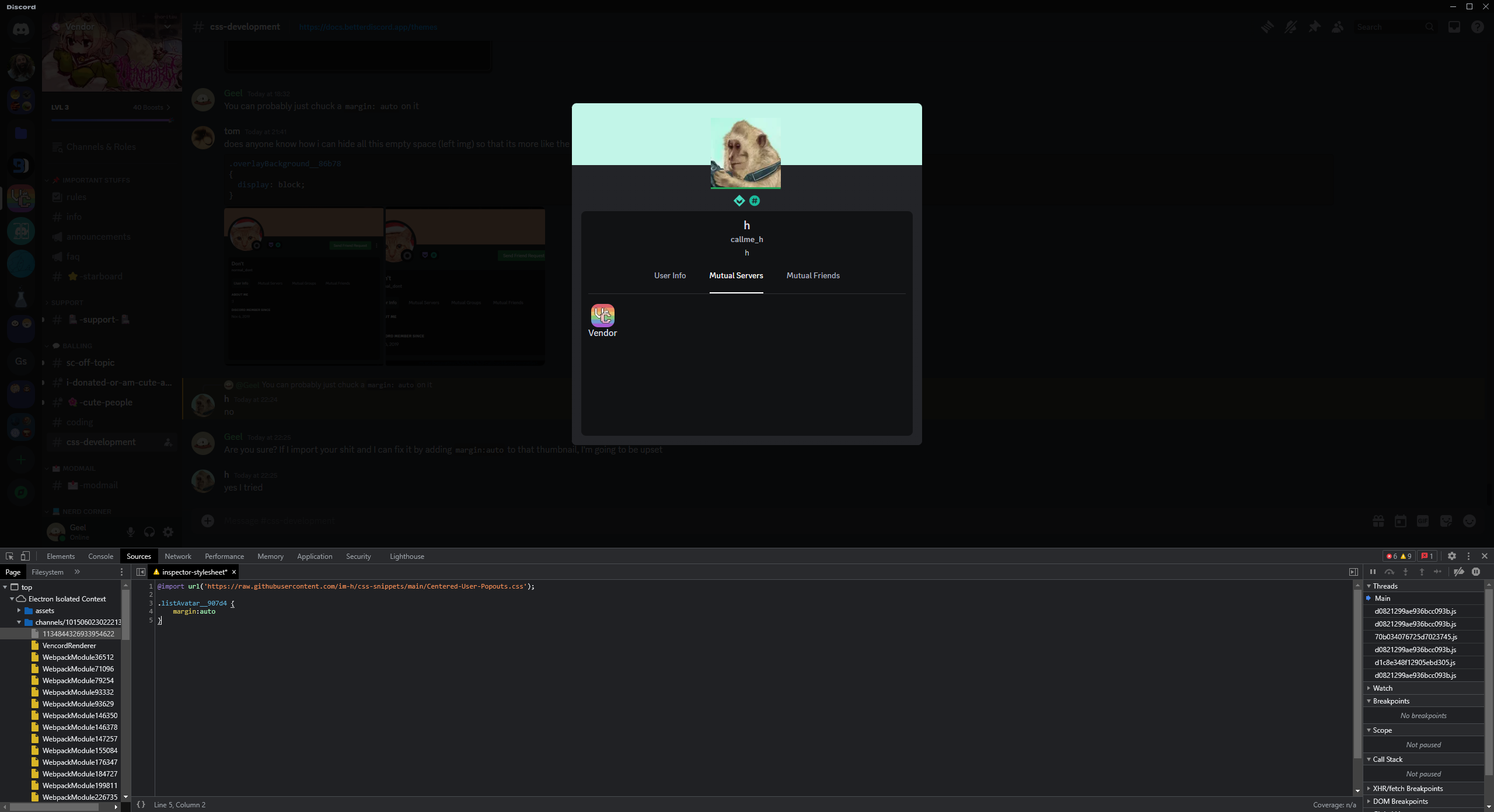
Well i seem to have fixed most of it by adding some simple rules (mostly justify-content: center) but the Mutual Servers/Friends Etc. are still broken, they were perfectly centered inside and outside even with more than 1 mutual server but now they are completely broken

 dark dragon
You can probably just chuck a margin: auto on it
solid ore
does anyone know how i can hide all this empty space (left img) so that its more like the right img, without doing display block like below?
.overlayBackground__86b78
{
  display: block;
}```
 dark dragon
Are you sure? If I import your shit and I can fix it by adding margin:auto to that thumbnail, I'm going to be upset
deep bane
yes I tried
 clear siren
.body_ea740e { flex: none !important; }
solid ore
clear siren
.body_ea740e { flex: none !important; }
ty! one problem.. it still removes the scrollbar on longer profiles :/
clear siren
hmm and adding overflow:scroll on anything doesn't work
uhh
ok
.root_ba16f0 { overflow: auto !important; } works
it does make an ulgy default scrollbar on it but that can be removed .root_ba16f0::webkit-scrollbar {width:0 !important; }
wait that doesn't work
I can't get rid of the scrollbar
deep bane
dark dragon
https://i.imgur.com/vBn80qa.png
?
dark dragon
The thumbnail is centred fine with just the margin
deep bane
dark dragon
The thumbnail is centred fine with just the margin
first of all it didn't work for me second of all I was talking about it being centered inside of the popout
dark dragon
Oh, it'll look wild, but I'll do it when I'm back at my computer
solid ore
clear siren
it does make an ulgy default scrollbar on it but that can be removed ``.root_ba1...
oh god that is ugly
i'll have a look
tysm tho
clear siren
yeah I couldn't figure out how to get rid of it
dark dragon
deep bane
first of all it didn't work for me second of all I was talking about it being ce...
Give this a go
.listScroller__92e1a {
    display: flex;
    flex-wrap: wrap;
    justify-content: center;
    flex-direction: row;
    align-content: flex-start;
}
.listAvatar__907d4 {
    margin: auto
}
.guildNick__01069 {
    justify-content: center;
}
this is annoying, i tried applying it to all scrollbars and it still didnt work
clear siren
yeah I have no idea
deep bane
dark dragon
Give this a go
```css
.listScroller__92e1a {
display: flex;
f...
i got it to work but now this happens

also best snippet ever
.threadSuggestionBar_b633f7 {
  display:none !important
}```.listScroller__92e1a .listRow__60937 *{
display:grid !important;
justify-content: center;
text-align: center;
margin: auto;
max-width: 75px;
height: fit;
}
.listScroller__92e1a {
justify-content: center !important;
display:flex !important;
}```i fixed it with .listScroller__92e1a>*{height:fit-content} but i would like to know why it's happening
dark dragon
That's kind of just of flex works. The align-content: flex-start; should have prevented that though, unless you removed it
deep bane
dark dragon
That's kind of just of flex works. The `align-content: flex-start;` should have ...
alright, and would there also be a way to get the text inside of the elements to wrap/break?
never mind
 long sundial
:root {
  --font-primary: ‘Monocraft’;
}```
someone pleaseif you’re trying to do a custom font like that, just putting it there won’t work.
long sundial
import ye
summer adder
you’ll need to import the font so it can actually be specified
long sundial
that would require 2s extra work
long sundial
@font-face {
  font-family: 'Monocraft';
  src: url(https://github.com/IdreesInc/Monocraft/releases/download/v3.0/Monocraft-nerd-fonts-patched.ttf);
}

:root {
  --font-primary: 'Monocraft';
}``` fuckhendidnsidnebf
long sundial
github does some shenanigans
long sundial
gn
summer adder

long sundial
i hate it when
deft niche
Try
@import url('https://github.com/IdreesInc/Monocraft/releases/download/v3.0/Monocraft-nerd-fonts-patched.ttf');
At the top of your css file
long sundial
yea maybe later because csp
deft niche

long sundial
(i hate csp and cors)
glass flint
turn it into base64
glass flint
tried to rick roll me
 long sundial
blud has a filter for that 😭
what if someone made dQw4w9WXcQ.com
no way its not claimed
clear siren
@long sundial why not just install the file to your system tho
glass flint
yeah that’s what i did personally
then just
:root {
        --font-primary: "Fira Code";
}
well monocraft for you
clear siren
or monocraft nerd font if you prefer that one
long sundial
i have it installed but librewolf doesnt find it lol
clear siren
did you restart librewolf
long sundial
I had it installed for ages
clear siren
oh
 glass flint
manjarno
long sundial
thats mint 😭
glass flint
ah lol don’t mind me im dumb
long sundial
tbh i dont know what manjaro looks like
clear siren
I wonder if librewolf is doing something stupid to prevent using system fonts because it allows fingerprinting you
long sundial
probably
glass flint
nah i use fira code with librewolf just fine


 clear siren

long sundial
this is cursed af
 sage ledge
glass flint
tried to rick roll me
sage ledge
glass flint
tried to rick roll me
smh if you dont memorize the url then you are amateur
glass flint
i remenber it
but even if you do, you can’t do anything against a redirect like that
also it’s not the only rickroll yt code i have blocked
 glass flint
411
deep bane
delete some and make it 404 rick roll not found
glass flint
deep bane
delete some and make it 404 rick roll not found
i deleted some that were dead links
although it’s less than 404 because for websites after yt links it blocks the page and script for some reason (i didn’t make that myself)
deep bane
glass flint
although it’s less than 404 because for websites after yt links it blocks the pa...
what
 deep bane
Better Dynamic Code Containers
.codeContainer__1ded4,.shiki-container{
  width:fit-content;
}
.nonMediaAttachmentsContainer_ca7b77 .shiki-container {
  width:initial;
}```I also use fit-content and added this [class^=markup_] pre { max-width: 100% !important; } which fixes the lines getting wrapped randomly for some reason under some circumstances
deep bane
clear siren
I also use fit-content and added this ``[class^=markup_] pre { max-width: 100% !...
doesnt seem to happen to me
clear siren
ah, if messages are set to inline-block it happens
deep bane
why would you have that
clear siren
message bubbles
deep bane
oh
clear siren
yeah discord sets .markup_a7e664 pre { max-width: 90% } in its css
deep bane
I made a really nice status snippet @import url('https://raw.githubusercontent.com/im-h/css-snippets/main/Glow-Avatar-Statuses.css');

Supports all shapes/transparency
lime walrus
Wow
clear siren
I also use filter:drop-shadow() on avatars and servericons :3
lime walrus
Nice
clear siren
clear siren
I also use ``filter:drop-shadow()`` on avatars and servericons :3
.. well literally all images actually
deep bane
lime walrus
Can I use it?
?
clear siren
lime walrus
Can I use it?
I dunno, can you?
lime walrus
deep bane
?
Your import, this #🎨-theme-development message
deep bane
its an import for a reason no?
clear siren
or grab the url and drop into online themes
lime walrus
deep bane
its an import for a reason no?
Ok
lime walrus
clear siren
I dunno, can you?
😬
deep bane
deep bane
I made a really nice status snippet `@import url('https://raw.githubusercontent....
Made the colors a little bit less "bright"
solid ore
deep bane
Better Dynamic Code Containers
```css
.codeContainer__1ded4,.shiki-container{
...
wats the .nonMediaAttachmentsContainer_ca7b77 part for


 deep bane
I made a really nice status snippet `@import url('https://raw.githubusercontent....
deep bane
deep bane
I made a really nice status snippet `@import url('https://raw.githubusercontent....
Added the personal profile thingy status glow

 sleek trench
Is there a way to integrate a json script file which works as a theme into Vencord, or do I have to redo the entire theme in CSS?
clear siren
you'd have to do it in css
deft niche
^
deep bane
^
sleek trench
...damn.
I actually use the Vendetta mod in my mobile so I was wondering if there is an easy way out
clear siren
yeah I kinda figured it would be a vendetta json
sleek trench
It's even done by the same dev I think
But they give a pink undertone to the basic white role colour, which I don't have it in the PC one
I'm talking about Catpuccin theme
deft niche
Even if it was the same language, the css wouldn't transfer across to pc anyway
Different classes probably
sleek trench
 clear siren
sleek trench
But they give a pink undertone to the basic white role colour, which I don't hav...
clear siren
sleek trench
But they give a pink undertone to the basic white role colour, which I don't hav...
that's not going to be difficult to change in the css
 clear siren
if that's all you want that's easy to change
sleek trench
The problem is, I don't have a copy of the css, it's imported directly from the github
clear siren
.username_d30d99:not([style]) { color: whatever !important; } in quickcss
sleek trench
I can download a old release and tweak it
clear siren
nah just override it
no need to edit the theme itself when you can just build your own rules on top when needed
sleek trench
clear siren
``.username_d30d99:not([style]) { color: whatever !important; }`` in quickcss
wait so this only changes the default white role colour to something I want?
clear siren
yes
glass flint
clear siren
``.username_d30d99:not([style]) { color: whatever !important; }`` in quickcss
you don’t even need :not([style])
nor the !important
clear siren
glass flint
you don’t even need `:not([style])`
well not sure if the theme has rules with more specificity or whatever (it doesn't but it doesn't even matter)
sleek trench
i can link the github. I use the same colour scheme in my Lunarvim
glass flint
yeah sure, it will probably have the exact color
glass flint
clear siren
well not sure if the theme has rules with more specificity or whatever (it doesn...
mmh
 sick cloud
clear siren
yes
sick cloud
clear siren
yes
do i have to type like the color code that i want the default white color role to be?
like #0997e7
n stuff
clear siren
yeah
sick cloud
cool
so for the username part do i just remove everything before the :not([ thing or just i just replace the placeholder with my username
sick cloud
uh yeah
clear siren
ok best way is if you enable themeattributes plugin, then .messageListItem__6a4fb[data-is-self="true"] .contents_f41bb2 .username_d30d99 { color: pink !important; }
sick cloud
can i post ss here?
solid ore
yes
solid ore
it works for me
clear siren
note that this does not change the color on reply previews or anywhere else but just your message headers
sick cloud
clear siren
note that this does not change the color on reply previews or anywhere else but ...
alr
clear siren
for other places you need other selectors but yeah
solid ore
sick cloud
im defnitely doing smthin wrong
make sure u have this plugin enabled
 sick cloud
solid ore
make sure u have this plugin enabled
sick cloud
solid ore
make sure u have this plugin enabled
i do
turned it on before i put the code in
glass flint
using [class*="username"] will make it apply to most place where your username is
sick cloud
uh where would i put that
glass flint
clear siren
ok best way is if you enable themeattributes plugin, then ``.messageListItem__6a...
well not with that ^
glass flint
no it’s for the other one
sick cloud
(i genuinely dont know how this works coz im a dumbass)
summer adder
makes sense
glass flint
the person that wanted to change everyone’s names color
clear siren
using that class just selects all usernames indiscriminately
solid ore
sick cloud
(i genuinely dont know how this works coz im a dumbass)
u copypasted this?
.messageListItem__6a4fb[data-is-self="true"] .contents_f41bb2 .username_d30d99 { color: pink !important; }
sick cloud
yes but changed the color from pink to blue
solid ore
send ss of ur code and of ur username in chat on ur screen
solid ore
...ok
solid ore
how can i remove the folder icon transition? e.g. imgs


i tried this
.folder__17546,
.folderIconWrapper__72239 {
  transition: none;
}```but no effect
summer adder
you might not be able to remove its animation as the animation might be coded into it itself
solid ore
;-;
summer adder
just like how collapsing a channel category works, the code makes it all disappear, so its impossible to make it have a smooth animation for disappearing without making it a plugin
idk thats just my thoughts tho, might also be possible
solid ore
i mean, i removed the other folder animation
.wrapper_ed1dea > [id*="folder-items-"] {
  height: fit-content !important;
}```well not me* it was in one of aoi's snippets
sleek trench
clear siren
well not sure if the theme has rules with more specificity or whatever (it doesn...
thanks a lot for the help :D
deep bane
solid ore
how can i remove the folder icon transition? e.g. imgs
It dont work 😭 css .closedFolderIconWrapper__7321f *{ display:none !important; transition:none !important; position:sticky !important; top:0 !important; left:0 !important; right:0 !important; bottom:0 !important; width:0 !important; height:0 !important; font-size:0 !important; padding:0 !important; margin:0 !important; overflow:hidden !important; clip:paint !important; background-size:0 !important; background-clip:none !important; background-image:none !important; vertical-align:bottom !important; visibility:hidden !important; }
 pure cairn
deep bane
I made a really nice status snippet `@import url('https://raw.githubusercontent....
pure cairn
deep bane
I made a really nice status snippet `@import url('https://raw.githubusercontent....
funny
 pure cairn
issok, it doesn't bother me
solid ore
/* hide inbox whenever u have no notifs */
.recentsIcon__3c4cf:not(:has(.iconBadge_cc5031))
{
  display: none;
}```Oh that's pretty sick
deep bane
solid ore
```css
/* hide inbox whenever u have no notifs */
.recentsIcon__3c4cf:not(:has(....
screenshot

 deep bane
👍
solid ore
solid ore
is it possible to select an element based on if it has an img from a specific link? smthng like
.activityProfileV2__4de28:has(img alt src="/assets/7231645d01e0b14f58cc.svg")
except that doesnt work for me
 simple kiln
solid ore
is it possible to select an element based on if it has an img from a specific li...
simple kiln
solid ore
is it possible to select an element based on if it has an img from a specific li...
.activityProfileV2__4de28:has(img[src$="7231645d01e0b14f58cc.svg"])
solid ore
thanks!
solid ore
simple kiln
`.activityProfileV2__4de28:has(img[src$="7231645d01e0b14f58cc.svg"])`
wat rule is $= ?
simple kiln
solid ore
wat rule is $= ?
suffix match selector.
deep bane
dark dragon
That's kind of just of flex works. The `align-content: flex-start;` should have ...
🤦♂️


i missed so many commas when converting to :is()
solid ore
isnt is much more inefficient than just using commas? or is it negligible?
 deep bane
pure cairn
funny
deep bane
pure cairn
funny
After some thinking (5 Seconds Worth) i've realised this is actually a good feature because it still shows your status
grand surge
hi quick question
what's the selector for "comments that pinged me"
clear siren
.mentioned__58017
grand surge
thank!
summer adder
and if you want the mention itself (eg @clear siren) do .mention to customize it
yeah i pinged you nvhhr
what you gonna do

clear siren
@summer adder ping you back
 clear siren
kinda surprised that class has no hash in it
summer adder
if it’s supposed to, .mention works fine for me
i doubt it’s cause of themeattributes either
cause for the mention code i made 2ish weeks ago
/**
* @author Madeline#3336
* @description Makes the mention in chat look nicer.
* @name Fancy Mention
*/
:root {
    --mention-color-1: #bf861f;
    --mention-color-2: #dbdee1;
    --animation-color-start-end: rgba(240, 177, 50, 0.255);
    --animation-color-middle: rgba(240, 177, 50, 0.500);
}
.mention {
    border: 1px;
    border-style: solid;
    line-height: 1.5;
    animation: pulsate 2.5s infinite linear;
    background: transparent;
    color: var(--mention-color-2);
}
.mention:hover {
    animation: none;
    background: transparent;
    color: var(--mention-color-1);
}
@keyframes pulsate {
    0% {border-color: transparent}
    25% {border-color: var(--animation-color-start-end);}
    50% {border-color: var(--animation-color-middle);}
    75% {border-color: var(--animation-color-start-end);}
    100% {border-color: transparent}
}
and that works
so idk, maybe it’s just one that doesn’t use a hash
clear siren
that css is still so weird to me..
summer adder
i used variables for customization shut up
clear siren
rgba instead of just rgb, using old color syntax, that very specific alpha value lol
summer adder
i just went off the alpha and animation percent
so 25% for alpha would translate to 0.255
deep bane
summer adder
i used variables for customization shut up
shit up
summer adder
deep bane
shit up
shit up
deep bane
summer adder
shit up
shit up
clear siren
summer adder
so 25% for alpha would translate to 0.255
how does that math
summer adder
shit up
clear siren
it should just be .25
summer adder
clear siren
how does that math
i don’t even know but hey, it worked
and for variables: i added them for customization so you can customize the ping border yourself easier, but also so i can integrate it in my purple theme with the variables

clear siren
and you don't even need the steps in your animations
or the vars for the middle colors
 clear siren
yeah it's fine but just funny
summer adder
just wait until you see the code of my purple theme
go ahead
go look
i wonder how long that convo will be
pure cairn
deep bane
After some thinking (5 Seconds Worth) i've realised this is actually a good feat...
yeah it does, in a weird way
"it's not a bug, it's a feature"
but I like it
solid ore
clear siren
that css is still so weird to me..
is it bc its formatted 
clear siren
solid ore
is it bc its formatted <:NERD:1189985589441859754>
no but because there's old syntax and useless things
my css is formatted too, just not the way you're used to :D
solid ore
:)
summer adder
i only format my css because so many fucking people complain
solid ore
i love formatting
summer adder
i could care so fucking less for formatting, but people get annoying
clear siren
summer adder
i could care so fucking less for formatting, but people get annoying
you mean you couldn't care less?
 summer adder
clear siren
you mean you couldn't care less?
summer adder
clear siren
you mean you couldn't care less?
you know what i meant
deft niche
summer adder
i could care so fucking less for formatting, but people get annoying
Formatting makes code readable and intuitive
Cry about it

summer adder
deft niche
Formatting makes code readable and intuitive
i’ll make all of your code unreadable
 brittle juniper
summer adder
i only format my css because so many fucking people complain
brittle juniper
summer adder
i only format my css because so many fucking people complain
i dont format my css ever but prettier does it anyways :>
summer adder
i only ever formatted my html because people complain
that and i can only go so far without formatting
for html formatting is better
deep bane
summer adder
i’ll make all of your code unreadable
Here's what your code would look like if it was formatted and readable
/**
* @author Madeline#3336
* @description Makes the mention in chat look nicer.
* @name Fancy Mention
*/
:root {
--mention-color-1: #bf861f;
--mention-color-2: #dbdee1;
--animation-color-start-end: rgba(240, 177, 50, 0.255);
--animation-color-middle: rgba(240, 177, 50, 0.500);
}
.mention {
border: 1px;
border-style: solid;
line-height: 1.5;
animation: pulsate 2.5s infinite linear;
background: transparent;
color: var(--mention-color-2);
}
.mention:hover {
animation: none;
background: transparent;
color: var(--mention-color-1);
}
@keyframes pulsate {
0% {
border-color: transparent
}
25% {
border-color: var(--animation-color-start-end);
}
50% {
border-color: var(--animation-color-middle);
}
75% {
border-color: var(--animation-color-start-end);
}
100% {
border-color: transparent
}
}``` summer adder
deep bane
Here's what your code would look like if it was formatted and readable
```css
/*...
summer adder
deep bane
Here's what your code would look like if it was formatted and readable
```css
/*...
my codes formatted enough shut up
deep bane
shit up
 clear siren
this is how I would have made @summer adder's code
:root
 { --mention-color: rgb(191 134 31);
   --mention-color-hover: rgb(219 222 225);
   --mention-border: rgb(240 177 50 /.5); }
.mention
 { color: var(--mention-color);
   border: 1px solid;
   line-height: 1.5;
   background: none !important;
   animation: 1.25s linear infinite alternate pulsate; }
.mention:hover
 { color: var(--mention-color-hover);
   animation: none; }
@keyframes pulsate
 { 0%   { border-color: transparent; }
   100% { border-color: var(--mention-border); }}
uhm akshually rgba is more readable ⠀
 clear siren
but also legacy syntax
deep bane
what
clear siren
 summer adder
clear siren
this is how I would have made <@839204836637147177>'s code <:bla:119908027978927...
summer adder
clear siren
this is how I would have made <@839204836637147177>'s code <:bla:119908027978927...
why we all rewriting my code
clear siren
I dunno
 summer edge
clear siren
this is how I would have made <@839204836637147177>'s code <:bla:119908027978927...
summer edge
clear siren
this is how I would have made <@839204836637147177>'s code <:bla:119908027978927...
new line for opening brackets is weird tho
oh and lack of newline after opening bracket
clear siren
I've always done it that way and it just looks best to me
summer edge
in css?
summer edge
if i styled your code my way it would look like this
:root {
    --mention-color: rgb(191 134 31);
    --mention-color-hover: rgb(219 222 225);
    --mention-border: rgb(240 177 50 /0.5);
}

.mention {
    color: var(--mention-color);
    border: 1px solid;
    line-height: 1.5;
    background: none !important;
    animation: 1.25s linear infinite alternate pulsate;
}

.mention:hover {
    color: var(--mention-color-hover);
    animation: none;
}

@keyframes pulsate {
    0% {
        border-color: transparent;
    }
    100% {
        border-color: var(--mention-border);
    }
}
which i think is the "normal" way of doing it
clear siren
yeah but so many more lines
and to me when I scroll a css file I just see the selectors and the rulesets for the selectors more easily when they're formatted the way I do but that is of course just me being used to it
summer edge
in the end it doesnt really matter
css isnt real 👀
its a conspiracy by big browser
 teal cave
whos complaining about formtting, loos fine
if you can't read bc not the format you like then you will not survive
summer adder
no because i typically
* {filter: saturate(0)contrast(0)invert(1); opacity:50;color:red;background:red;}```instead of
* {
filter:saturate(0)contrast(0)invert(1);
opacity:50;
color:red;
background:red;
}```@summer adder Is css your passion
 summer adder
css is my passion
deep bane
Also your https://github.com/MadelineMaid/themes/blob/main/twitterverified.css has old colors
i made/found better ones
summer adder
deep bane
O h g o d

 oak plover

deep bane
real

 deep bane
Here's what your code would look like if it was formatted and readable
/**
* @author Madeline#3336
* @name Bloatware Removal
* @description Removes useless discord features. YOU WILL NEED THEMEATTRIBUTES PLUGIN!
*/
.avatarDecoration__14b3c,
.avatarDecoration_ae35e3,
.profileEffects_fd33f6,
.profilePanel__12596,
[aria-label="Show User Profile"],
[aria-label="Hide User Profile"],
.welcomeCTA__927ef,
.recentsIcon__3c4cf,
[aria-label="Help"],
.selectionGroup__36139,
.presets__14d08,
.header_a6f6dd,
.themeTitle__23d07,
.divider_a2339a.marginTop20_d88ee7,
[aria-label="Clips"],
[aria-label="Family Center"],
[aria-label="Merch"] {
display: none;
}
.roleIcon__59ca1.roleIcon_d491aa.clickable__08c77,
[aria-label="Deafen"],
[data-tab-id="Hypesquad Online"],
[data-tab-id="BLOCKED"],
[data-list-item-id="private-channels-uid_18___nitro"] {
display: none !important;
}``` oak plover
Is this just how it exports
deep bane
what
oak plover
Not your thing the other thing

 deft niche
deep bane
why do you have important in your var
deft niche
deep bane
why do you have important in your var
 x 9349423798234634287623478
oak plover

clear siren
there's like 200 lines of repetition lol
oak plover
ai be like
oak plover
clear siren
also in purple theme...
button written 30 times when it could be written once
clear siren
yeah looks like copy selector from devtools and paste in the same ruleset for each
oak plover
Like they all have the same button class and they’re all styled the exact same what
summer adder
clear siren
<@839204836637147177> please
no :3
summer adder
deep bane
why do you have important in your var
other css compatibility
clear siren
summer adder
no :3

deft niche
Accurate version
 oak plover
This is like twitter interaction bait for theme devs
deep bane
is there a way to combine this into only 1 line/string
.class1.class3.class4.class5
.class2.class3.class4.class5 {
  animation: explode;
}

deep bane
make it 1 selector
clear siren
depends on what you're actually doing
deep bane
e.g.:
.class1,.class2 :yea(.class3.class4.class5) {
animation:explode;
}
that would be completely different
deep bane
clear siren
that would be completely different
im waiting for you to show me
clear siren
no there is no way to reduce that in any way without changing what it may select
there is :is() that can be used in selectors in some cases but not for that particular pseudocode
deep bane
clear siren
there is :is() that can be used in selectors in some cases but not for that part...
i was thinking of the reverse of :is()
clear siren
well the reverse of is is literally :not()
deep bane
no
summer edge
:isn't()
deep bane
different first class same other classes
clear siren
deep bane
different first class same other classes
yeah no can do
summer adder
deft niche
Accurate version

solid ore
deep bane
different first class same other classes
can u not do .class1:not(.class2):is(.class3)
or does css not work like taht
clear siren
solid ore
can u not do .class1:not(.class2):is(.class3)
well yeah you can, and you can use :is() or :where() too but what's the point
it just makes a mess for no benefit
deft niche
summer adder
<:NOW:958853249597837323>

solid ore
its was they asked for idk ¯_(ツ)_/¯
deep bane
solid ore
can u not do .class1:not(.class2):is(.class3)
that's just doing .class1.class3.class4.class5,.class2.class3.class4.class5 with extra steps
solid ore
deep bane
different first class same other classes
yea isnt that wat u wanted w this quesiton
also wat is :where
deep bane
solid ore
yea isnt that wat u wanted w this quesiton
no
solid ore
oh mb
clear siren
web.dev
These seemingly small additions to CSS selector syntax are going to have a big impact.
basically they do the same thing but :where doesn't increase the specificity (priority) of the selector
might be useful in some super specific case but mostly not
clear siren
gotta love those color alpha values
deep bane
deep bane
aaaaaaaaaaaaaaa
this code is way too messy for me to optimize with :is() selectors
solid ore
somewhat useful snippet for me
/* highlight message container on hover */
[data-list-item-id^="chat-messages"]:hover
{
background-color: rgba(255, 255, 255, 0.05);
}``` dusty robin
solid ore
somewhat useful snippet for me
```css
/* highlight message container on hover */...
dusty robin
solid ore
somewhat useful snippet for me
```css
/* highlight message container on hover */...
Hello do you know how I could write a code to remove this unnecessary badge on my text bar
 clear siren
[aria-label="Send a gift"] {display:none}
summer adder
[aria-label=“Send a gift”] {
  display:none;
}```or if you wanna make it shorter
[aria-label^=“Send a”] {
  display:none;
}```how can i make this more like the current server indicator? (apart from the color)
/* current channel bar */
[aria-label="Channels"] > [class^=containerDefault_][class*=selected_] [class^=link__]
{
  border-left: solid var(--channel-icon);
  border-radius: 0px;
}```

id have to do smthng completely different wouldnt i
clear siren
yeah remove border and create a ::before element
solid ore
/* current channel bar */
[aria-label="Channels"] > [class^=containerDefault_][class*=selected_]
{
  background-color: var(--bg-overlay-selected,var(--background-modifier-selected));
}
[aria-label="Channels"] > [class^=containerDefault_][class*=selected_] [class^=link__]
{
  background: none;
}
[aria-label="Channels"] > [class^=containerDefault_][class*=selected_] [class^=link__]::before
{
  background-color: var(--channel-icon);
  width: 4px;
  border-radius: 0 4px 4px 0;
  margin-left: -8px;
}```
i think thats not atrocious
deep bane
dusty robin
@import url('https://raw.githubusercontent.com/D3SOX/complementary-discord-theme/master/hide-nitro-upselling.theme.css');
 bleak gust
when will everyone learn [aria-label] is translated


 bleak gust
deep bane
[⠀](https://cdn.discordapp.com/emojis/1064275136141856788.webp?size=48&name=huh%...
bleak gust
deep bane
[⠀](https://cdn.discordapp.com/emojis/1064275136141856788.webp?size=48&name=huh%...
if you change your discord language your custom css breaks
deep bane
bleak gust
if you change your discord language your custom css breaks
we all know that bro
bleak gust
deep bane
bleak gust
when will everyone learn [aria-label] is translated
not*
bleak gust
it is
deep bane
"when will everyone learn [aria-label] is not translated"
deep bane
what's your discord language then
bleak gust
english (uk)
it still mildly bothers me
yes I know vencord itself is not translated :/
deep bane
we do not care.
bleak gust
👍
anyway
a few weeks ago I noticed my
.avatar_f8541f {
    position: absolute;
// ...
}
was not doing the absolute thing
this is what i get

it used to be absolute to the full viewport
deft niche
bleak gust
when will everyone learn [aria-label] is translated
We know, were just all very racist and only want css to be used by english people

bleak gust
deft niche
We know, were just all very racist and only want css to be used by english peopl...

 solid ore
my css is for me, if others use it too then cool but im not gonna cater to them
bleak gust
solid ore
my css is for me, if others use it too then cool but im not gonna cater to them
isnt that how open source works in general
(most of it)
solid ore
yea, so im gonna use aria if i want to
deep bane
bleak gust
isnt that how open source works in general
most open source projects are catered for the general public
bleak gust
mine.... abuses the svgs
i have a fun question
how long is everyone's quick css file
solid ore
372 lines
summer edge
105
bleak gust
816 (including empty lines in between and stuff I stole from #🎨-css-snippets)
summer adder
bleak gust
if you change your discord language your custom css breaks
yeah? we know?
bleak gust
okay, is there a Certified Official Real Guide to Not having it break
summer adder
its called code good
bleak gust
inb4 no its a thing I can complain about and be told that no matter how much I complain that it is technically unreliable at the end of the day you are still shoving random bullshit into an app that wasn't built to be themed to death
summer adder
bleak gust
816 (including empty lines in between and stuff I stole from <#10281068183685898...
id have to check later as my qcss is located on github rn and githubs blocked on my current wifi
bleak gust
CSS is not my thing
solid ore
bleak gust
inb4 no its a thing I can complain about and be told that no matter how much I c...
wats ur point
bleak gust
summer adder
id have to check later as my qcss is located on github rn and githubs blocked on...
githubs blocked on my current wifi
what kind of corporate nightmare is blocking github but not discord
summer adder
school
bleak gust
summer adder
school
lmfao wtf