#╟🎑reshades
1 messages · Page 17 of 1
 normal gale
 turbid wave
THis is my game with the tone mapper on at 8am
 normal gale
turbid wave
THis is my game with the tone mapper on at 8am
normal gale
turbid wave
THis is my game with the tone mapper on at 8am
I can still see those lines on your gun.
Did you delete shader cache and all that? ( ive not seen the issue before so im spitballing lol )
turbid wave
yup
normal gale
Ill have a muck around and see if i can try and replicate that.
Something seems off
turbid wave
How about now?
 normal gale
That looks better
 native sable
Cinematic G.A.M.M.A. ReShade v1.3: https://www.moddb.com/mods/stalker-anomaly/addons/cinematic-g-a-m-m-a-reshade-v1-3

Mod DB
Cinematic G.A.M.M.A. ReShade por Keisirius. v1.3 Note: This is a specialized mod to use with G.A.M.M.A., if you are playing with Anomaly you need to install ReShade first and then my mod. Description: Graphic mod that tries to give a more realistic and...
normal gale
turbid wave
How about now?
What did you change
turbid wave
just re-deleted shaders
 frigid spade
normal gale
frigid spade
normal gale
Okay yeah . Try in day time wet. See what you get
native sable
 frigid spade
huh... i changed some settings are its failing to compile..
 normal gale
frigid spade
huh... i changed some settings are its failing to compile..
normal gale
frigid spade
huh... i changed some settings are its failing to compile..
What did you change?
frigid spade
bunch of ao and ssr stuff
just the configs
have to clear shader cache to make them take effect
and it wouldnt recompile
normal gale
Yeah i had the same issue. I pretty much clear shader cache every time 😂 its habit now
frigid spade
every time i modify the files i have to do the entire install process
LOL
thats sooo gnarly
normal gale
Oh really? Thankfully ive only had to do shader cache. Not the rest of it. Ive only had to do the user itx thing twice when tweaking.
frigid spade
its not launching for me now so im doing it all over again
normal gale
I havent edit those files yet so not sure whats happening sorry mate.
frigid spade
lmao i tanked my fps so hard trying out ultra quality ssr, have 3060 ti
it compiled for legit like 7 minutes
 silent cairn
Ssr hits frames so hard, I'd keep it at low or lowest
normal gale
maybe thats what was causing your issues ? trying to brute force its way through compile haha
frigid spade
silent cairn
Ssr hits frames so hard, I'd keep it at low or lowest
jaku you may know this, what do i change to fix this see the line on the tree where its dark and then bright? i think its the ssr. when i move the camera, portions of it cut out in a line

its like a hard divider on an effect, definitely something in sss mod
normal gale
im loving that sss is working now ..
 frigid spade
theres just this massive line that cuts the effect off as i move my mouse around
its clearly like a distance issue or an angle issue or something
cant figure out what to change
normal gale
frigid spade
jaku you may know this, what do i change to fix this see the line on the tree wh...
have you turned off volumetric sunrays ? they mess with stuff for me .
especially with a reshade
frigid spade
they are on but i turned them way down cuz of that as well
i dont think its that but maybe lemme check
normal gale
yeah when i was running majestic the first time . i ran their reshade too and i had to get rid of volumetric for stuff like this
frigid spade


see the line where the effect is ending? happens as i move. didnt change anything turning off volumetric rays
on the left hand tree infront of me
turbid wave
Still can't nail down what's causing my shiny hands bug. Sometimes it loads in fine. Sometimes it loads in with shiny hands
normal gale
like your original image ? i mean i have glossy hands.. someone was telling me its something to do with pbr but nothing like your original photo
normal gale
frigid spade
on the left hand tree infront of me
could it be tonemap ?
silent cairn
frigid spade
jaku you may know this, what do i change to fix this see the line on the tree wh...
Lvutners shadow corner fix mod alleviates this I think, make sure it is not overwritten by other shader mods
normal gale
could be the shadow.h in sss
silent cairn
SSS breaks it if you load it after
normal gale
that would be what it is . mines showing sss wins conflict over it
frigid spade
okay ill try that
i have this feeling maybe not but we'll see
cuz isnt that for room corners?
like for ao?
this seems like its ssr, but hang on
lemme see
silent cairn
Oh I finally realized what you initially meant
frigid spade
still happening
i feel like its like...
idk
angle?
for ssr?
but i cant change that can i?
silent cairn
Did you change ssr settings?
frigid spade
what is vertical screenfade
it seems like its that
only quality setting
i have it on high rn and its still happening
quality i mean
frigid spade
well this happens with reshade ssr
almost the same exact thing
this strange curved line on the outskirts of your screen becomes cut off
the effect has a hard line stop and it does it to everything
if reshade ssr is configured wrong
silent cairn
It's in the outskirts because it has no screen data to reflect when you tilt your viewing angle
frigid spade
its happening to everything below my gun
frigid spade
so everyone just has a fat dividing line on their screen all the time? yeah ill look in to it
do you have this issue?
silent cairn
Can't say I remember having it that bad
normal gale
im not getting your issue but i noticed shadow changes for the better using this r2_sun_depth_far_scale" from "1" to "0.99910
i had like a ring around me affecting shadows in the distance prior to this
frigid spade
its not happening to close stuff
thats what im talking about
its exactly what you just said basically
so type that in console?
its a ring around me messing with distant shadows
normal gale
yeah i also changed.. umm
frigid spade
1.1 fixed it
normal gale
sun_near_border .. i bumped mine up to 1 ..
i had the same ring . it was quite defined but i was in a field so it wasnt doing trees
lol i tried your 1.1 .. and i got a shadow ring around me

lol
frigid spade
oh that disabled reflections
anything beyond that point
disables
i thought it was adding at first
theres near and far
frigid spade
wait i wonder
if this is what the shadow cascades exe is for
that experimental shadow cascades exe
it def is
im grabbing that
normal gale
wheres that
frigid spade
have to reinstall mod
its packed in sss mod
dif exe
check experimental
at the bottom
normal gale
in experimental ?
frigid spade
when you reinstall in mo2
its at the bottom
then check the folder for sss mod
3x exe will be in bin folder
its an archive
have to extract
it worked
issue is completely gone cant even see where shadows end
frigid spade
nope
 sick wigeon
When you did that, did you check the box when installing or did you just drag the new exes into the bin folder?
frigid spade
checked box
normal gale
does dof still work doing it that way ?
 frigid spade
if there was a way to forcibly reverse the depth map it would enable ao
im using this effect that has depth map reverse on it and it fixes the ao issue
but the effect doesnt have ao
its gi
turbid wave
So I think I fixed my glossy hands problem with the new SSS. Just ended up disabling the ASCII old SSS 190 completely
 silent cairn
turbid wave
So I think I fixed my glossy hands problem with the new SSS. Just ended up disab...
silent cairn
turbid wave
So I think I fixed my glossy hands problem with the new SSS. Just ended up disab...
Did you by chance disable shaders cumulative as well?
normal gale
turbid wave
Oh yeah i forgot to mention that haha . see i did a clean install and it automatically installed the new sss ... which meant my game wouldnt run .
how bad is the glossy hands ?
turbid wave
Not that bad actually
frigid spade
how high does the ao in sss mod go? what value?
normal gale
i have glossy hands too .. there is a portion of gloss that comes with gamma i think ..
normal gale
silent cairn
Did you by chance disable shaders cumulative as well?
you were trying to fix glossy hands with your tweaks wernt you ?
 normal gale
the glossy hands like your first photo though ..that was insane .. my hands just look like they are always wet lol
turbid wave
Yeah, it's back to looking like my first photo. Sometimes. If I reload the game it's a tossup if I get that or not
normal gale
yeah you still need the cumulative shaders im pretty sure.. they why i went the route of deleting the specific things
frigid spade
silent cairn
https://discord.com/channels/912320241713958912/927860562677878795/1033737191270...
does this really fix depth buffer?
normal gale
turbid wave
Yeah, it's back to looking like my first photo. Sometimes. If I reload the game ...
thats weird.. i wonder if you missed something in the process . im crap at explaining things lol
silent cairn
frigid spade
does this really fix depth buffer?
It's a necessary step to some
turbid wave
I did a complete reinstall. Still have the issue
normal gale
turbid wave
I did a complete reinstall. Still have the issue
what dx are you running ? are you changing any settings in game in the graphics menu.. usually when you close and load the game some effects only kick in after
turbid wave

dx 11
and yes im changing setting in game like resolution
mouse sens
sound
it seems like anytime it writes to the user.ltx, i get glossy hands
The above pic is after a shaders clear too
silent cairn
Glossy hands are part of default GAMMA as it is right now
normal gale
yeah but not to that extent lol
silent cairn
Doesn't happen with every outfit but with sunrise armor it is very apparent
 plucky pewter
I think Jaku's fixed shaders will be part of upcoming official update, right?
normal gale
mine are always this glossy and thats fine .

 normal gale
pretty sure thats a known issue .. but something is making your stuff super bright
turbid wave
Think it might be hippo's custom user.ltx that i'm using. I don't have his shader installed at the moment either
 mint owl
I think Jaku tested it as well with Hippo's preset so I don't think thas the issue
turbid wave
I do have dynamic tone mapping off in the options but not modorganizer
frigid spade
nah didnt fix the depth buffer
silent cairn
If you are using shaders cumulative make sure your gloss_factor is 0.5 and gloss_min 0.001
frigid spade
bummer got hopes up
i wonder if theres ANY workaround for 2d scopes and depth buffer..
any hope at all D';
turbid wave
Changed gloss factor. No change
normal gale
im scrolling through anomly discord cause i can see a couple of people with the same issue in there
silent cairn
Either depth buffer works or not, you can check with displaydepth shader effect:

But it doesn't fix the scope issue even if it is setup correctly
Because how it warps the picture
normal gale
turbid wave
Changed gloss factor. No change
do you have any other mods not from gamma installed?
turbid wave
No
frigid spade
silent cairn
Either depth buffer works or not, you can check with displaydepth shader effect:
its offset when you scope in with 2d scopes
basically it doesn't zoom enough
like the 2d scope needs its own depth buffer its fawked
normal gale
turbid wave
No
did you prior to your clean install ? like no remnants ?
frigid spade
bepth buffer is too small and offset when zooming with 2d scopes
honestly mxao is so powerful i almost want to just disable 2d scopes which is a travesty
turbid wave
Just reloaded the game and I'm back to normal/gloss is gone. What the hell? I changed nothing
 turbid wave
lol
frigid spade
omg i just found out how to fix depth buffer in scopes
wooooo
scope_factor 1
removes fov change on scopes
so that kinda sucks
but you still get the 2d scope
and depth buffer works
console
 manic sage
Yeah just figured
frigid spade
im so hyped on this
manic sage
thank you for the fix
frigid spade
ya np
checked out moddb description and they mentioned fov and i knew it had to be that
turbid wave
Glossy hands came back after deleting shader case. So I closed completely out of ModOrganizer and Explorer. Restarted ModOrganizer, launched game, and glossy hands now gone.
normal gale
does it stay away if you dont delete shader cache and restart ? without making any changes
turbid wave
sometimes
Reloaded, no glossy hands. Reloaded again just now and glossy hands are back
Ugh.... closed out of everything, reloaded, glossy hands back
I have no idea what's causing this
frigid spade
oh man my game looks a million times better with ao, hell yea
this also means rtgi and everything else works
normal gale
id make sure everything is installed correctly . the latest sss etc.. i cant remember which one of you mentioned that you had the old sss still . and deleted it , not cumulative but the other..
turbid wave
I still have the original ASCII 190 SSS. Enabling or disabling it does nothing for the problem
normal gale
yeah so . when i did my fresh install . it doesnt install the old 190 .. it installs the new 190 basicly . so maybe there is a remnant of the old 190 messing with it
turbid wave
All that I deleted were the screenspace files in cumulative
normal gale
so i only have 1 - 190 not 2 versions of it in my moddb . i never had to disable or delete it
thats the only thing i can think of thats different with out loadouts
turbid wave
I'm confused. Isn't the new 190 the new SSS from moddb?
normal gale
yeah . but with my fresh install it downloads that one .. my m02 sorry was blank
so i dont have the original outdated version in my mod list
turbid wave
Wait, really? Thought it downloaded one from Feb
normal gale
nah . my game wouldnt even run lol thats why i had to figure this out
turbid wave
So Grok must of updated it
normal gale
im not sure how the gamma installer works .. but when i did a fresh install it only downloaded 12.1 the latest one
and it wouldnt run
if i was a betting man. id say that might have something to do with it
turbid wave
So I don't even need the SSS update from moddb?
As Gamma just downloads it anyways as 190?
turbid wave
Interesting. Everyone's been complaining about the new shaders not being added until down the road and I guess they are already here
normal gale
dunno it was only dumb luck i noticed it in the download que
turbid wave
Ok, trying fresh install now
I've reinstalled this god damn game at least 15 times by now. It takes me like 5min vs. 60min the first time
normal gale
haha i did like 4 times last night just trying to get this to work
silent cairn
turbid wave
Interesting. Everyone's been complaining about the new shaders not being added u...
The problem is that it has not been integrated into shaders cumulative (afaik). People want the dof effect and that requires some extra changes as well
normal gale
yep . .i wasnt aware when i did a reinstall that it grabbed the latest versions . i thought the list was curated
turbid wave
There's a Gamma "downloads" zip that contains almost all of the modpacks. I've been using that to skip downloads
mint owl
So much efforts for a vision loss xD You all want glasses or something ?
silent cairn

I want it at least installed properly into the game and then optionally enabled from mcm
normal gale
i would much prefer that myself also lol. this was alot of mucking about
turbid wave
So I guess the main takeaway is to delete all the screenspace files from gamma cumulative shaders and make sure 190 is below gamma cumulative shaders in ModOrganizer?
normal gale
yeah plus the other couple of things .. not sure if they happen for everyone . but they happened for me . and it seemed to work with you guys
turbid wave
oh, and replace the .exes
normal gale
if it doesnt compile . then its reset the graphic settings . user . shader . and then copy the gamma patches into anomoly etc
silent cairn
I think there are other mods that rely on the default gamma exe so be mindful of that (someone correct me if I'm wrong). You should at least get the demonized exe from git
That has compatibility patches
turbid wave
I have the github ones. Didn't know there was a difference between the two
normal gale
me either . i have the git ones also
silent cairn

normal gale
oops ive actually been using the sss ones lol
frigid spade
mint owl
So much efforts for a vision loss xD You all want glasses or something ?
fixed depth buffer in 2d scopes btw, scope_factor 1 in console. was an fov issue
silent cairn
Two months until Eden returns 
turbid wave
So, the 190 12.1 that Gamma downloads only contains some of the files that the SSS file on moddb contains. Theres stuff missing
 normal gale
yeah you have to reinstall it once its in your m02 . that was one of the steps
with the other modules .. i did it after i cleared out the cumulative ones
turbid wave
What do you mean by reinstall it?
normal gale
right click .. reinstall . it will give you a list of modules
the ones ticked are the ones already installed .
like on line 190 in your mo2
normal gale
got it ?
turbid wave
think so
normal gale
got my texture mods in and the majestic reshade working finally
 turbid wave
Nice. Think my glossy hands is fixed. Thanks Brodie
normal gale
youre all good mate . just yell out if it does anything weird and ill see what i can dig up
turbid wave
Noooooo glossy hands is back
normal gale
damn . thought we had it then
normal gale
thats so strange .
maybe ask in sss on moddb if the author has seen that behavior before. could be a simple fix
frigid spade


edit scope_factor 1 and scope_ca 0
passing out >_< went hard today. peace all. also recommend installing 3x shader cascade exe's from SSS mod recent update.
sun rays high 0.7, 0.25
mint owl
frigid spade
fixed depth buffer in 2d scopes btw, scope_factor 1 in console. was an fov issue
That's nice to know, I'll probably leave the DoF disabled though, not an effect I'm fond of, or maybe a slight one to soften the maximum distant textures
mint owl
silent cairn
Two months until Eden returns <a:peepoComfy:797332575449514046>
Yup, can't wait either, I'm getting some ideas
 gilded pulsar
Hey guys, ive got a problem, after i installed my reshade, my screen went black in my game, how can i fix
 rich sentinel
Finally posted my reshade presets on #1035807043933720576 section


 tidal marlin
if youre having issues with the sss dof go to gamma ui addon in mo2, and delete/disable the grok_dof_with_UI.script file
tidal marlin
rich sentinel
Finally posted my reshade presets on <#1035807043933720576> section
this looks wonderful, unreal stuff pal
rich sentinel
tidal marlin
this looks wonderful, unreal stuff pal
Thank you very much
mint owl
I may have had another idea of repack 
rich sentinel
Ideas 
mint owl
Actually two faces of a same coin
rich sentinel

tidal marlin
gilded pulsar
Hey guys, ive got a problem, after i installed my reshade, my screen went black...
!blackscreen
 void depotBOT
Follow this: #╭📖faq message
gilded pulsar
!blackscreen
void depotBOT
Follow this: #╭📖faq message
tidal marlin
rich sentinel
Thank you very much
really nice work

 rich sentinel
tidal marlin
really nice work
rich sentinel
tidal marlin
really nice work
All worked well? Looks really nice
tidal marlin
rich sentinel
All worked well? Looks really nice
like a charm, running vanilla grading and getting a lovely cold-but-not-too-cold vibe that i dont see often
rich sentinel
tidal marlin
like a charm, running vanilla grading and getting a lovely cold-but-not-too-cold...
Yeah, I like the bluish cold feeling on some games, stalker included, game already has too much yellow/red tones, glad you liked it
 vague island
rich sentinel
Yeah, I like the bluish cold feeling on some games, stalker included, game alrea...
vague island
rich sentinel
Yeah, I like the bluish cold feeling on some games, stalker included, game alrea...
Hows the fps hit on your reshade
Havent tried it yet
 glossy pond
rich sentinel
Finally posted my reshade presets on <#1035807043933720576> section
glossy pond
rich sentinel
Finally posted my reshade presets on <#1035807043933720576> section
Finally, congrats
tidal marlin
vague island
Hows the fps hit on your reshade
no noticeable hit to me but i am running a 3080ti
i stg that wasn’t a humble brag
vague island
frigid spade
fixed depth buffer in 2d scopes btw, scope_factor 1 in console. was an fov issue
How
vague island
tidal marlin
no noticeable hit to me but i am running a 3080ti
Yeah im only on a 970 
Fps is a thing I have to maintain
 heavy sun
Dyn mentioned in txt file that he uses rx580
tidal marlin
vague island
Fps is a thing I have to maintain
fair, i still think you won’t take more of a hit than any other reshade
vague island
heavy sun
Dyn mentioned in txt file that he uses rx580
Aight ill check it out maybe tomorrow im not in pc atm
frigid spade
vague island
How
you gotta type scope_factor 1 in console, it will repair depth buffer when in a 2d scope, you lose the fov adjustment of the scopes but worth it imo.
vague island
frigid spade
you gotta type scope_factor 1 in console, it will repair depth buffer when in a ...
Ah it also makes the scopes cleaner right
I just turned off the AO of glamarye
Somehow the issue is back
frigid spade
that would be scope_ ca 0
vague island
Ive never had tbat for 2 days
frigid spade
that makes it cleaner
vague island
frigid spade
you gotta type scope_factor 1 in console, it will repair depth buffer when in a ...
If I would revert this change just type scope_factor 0?
vague island
frigid spade
that would be scope_ ca 0
Aight nice cause I dont want that I want the scopes to be more realistic
frigid spade
"If you don't like the effect you can set scope_factor to 1. This removes all magnification. A value of 0.75 will result in a 1.33x magnification and very little noticeable drop in quality. A value of 0.5 will result in a magnification of 2x, and 0.25 a magnification of 4x with a very noticeable drop in image quality." from 2d scope creator.
you still magnify via the dif scopes zoom though
they just offset a hard magnification with the scope_factor fov change
vague island
whats the default scope_factor value
vague island
cause incase I dont like it I think I'd wanna revert it
frigid spade
type scope_factor and the default will pop up
copy that down and then youll know
i mean it only works if not changed but ya
also honestly theres more realistic options than the default, gonna vary scope to scope
vague island
you mean if I change it the fov adjustment will be gone?
even if I change it back to default value of 0.66?
vague island
ah aight
frigid spade
everything is reversable
vague island
so its safe to change the values
frigid spade
yea
vague island
imma test it out now
frigid spade
tbh i feel like its pretty realistic still even without it being on default
i barely notice in real world gameplay when not directly thinking about it, and heavy heavier ao and global illumination is worth it
frigid spade
you can alter the ca too, so its not too heavy, dont have to reduce ti
vague island
I still have the Fov adjustment tho
frigid spade
??
it adjust 1 of the fov sliders when you scope but not the other, and the other breaks the depth buffewr
vague island
is this not what you mean? xD
 frigid spade
so doing this makes the depth buffer not break
vague island
i thought changing the values would remove the scope from moving
frigid spade
no
frigid spade
the scope still works perfect
ya
huge leap imo, ive been dying without ao and global ilum

 frigid spade
ya dude
vague island
even when moving the mouse around
vague island
before you'd see it
frigid spade
yea
frigid spade
nope
vague island
it changes it
frigid spade
honestly its now just how it was meant to be, the fov change was making custom zooms
well technically yeah
frigid spade
but not hard change, it just appears dif cuz we are used to a certain fov
vague island
good trade off
vague island
it kinda feels better
frigid spade
imo its better
like just the fov alone i prefer at 1
and you get the benefit of the ao
vague island
What do you use for ao
vague island
shit maybe i can increase ao strength of glamarye now
frigid spade
make sure to find a foggy day with glam and mess with ao in bright scenes
i shared it above
one sec
[Glamayre_Fast_Effects.fx]
abtest=0
ao_big_dither=0
ao_enabled=1
ao_fog_fix=1.030000
ao_max_depth_diff=1.312000
ao_radius=1.000000
ao_shape_modifier=833.000000
ao_shine_strength=0.000000
ao_strength=0.350000
big_sharpen=0
bounce_multiplier=0.000000
debug_mode=0
depth_detect=0
dof_enabled=0
dof_strength=1.000000
edge_detect_sharpen=0
fxaa_bias=0.020000
fxaa_enabled=0
gi_ao_strength=0.500000
gi_contrast=0.950000
gi_dof_safe_mode=0
gi_local_ao_strength=0.350000
gi_max_distance=1.000000
gi_saturation=0.130000
gi_shape=0.060000
gi_strength=0.500000
gi_use_depth=1
max_sharp_diff=0.100000
reduce_ao_in_light_areas=2.800000
sharp_enabled=0
sharp_strength=0.670000
show_color_space=0
sky_detect=0
tone_map=3.000000
vague island
frigid spade
[Glamayre_Fast_Effects.fx]
abtest=0
ao_big_dither=0
ao_enabled=1
ao_fog_fix=1.03...
thanks

 manic sage
As long as it’s done tastefully as you already have AO from SSR
rich sentinel
vague island
Hows the fps hit on your reshade
Depends on the preset, the gamma preset only drops 5 FPS on my end
vague island
rich sentinel
Depends on the preset, the gamma preset only drops 5 FPS on my end
aight thanks
frigid spade
manic sage
As long as it’s done tastefully as you already have AO from SSR
the ao in ssr is not the only type of ao is the thing, it simply wont affect some details
if you want a dif type of depth added tothe scene you have to use another type of ao
manic sage
I get what you mean but too much ao even if adding depth can be distracting. You did a good job on your implementation through glamaraye
frigid spade
yeah im trying to not overdo it but at the same time i like it a bit heavier than normal just personally, but i want to avoid foggy scenes getting destroyed, thats basically my limit i use
its gonna be a while to dial it in even more, i change it slowly as i notice things, but its coming along :]
 frigid spade
what is agressor grass?
does agressor reshade come with it's own grass?
like, textures?
sick wigeon
glossy pond
would this work for getting aggressor grass
Yeah GTR doesn't have grass iirc
glossy pond
sick wigeon
Yeah GTR doesn't have grass iirc
👍 thx
and since its green w redux theres no overlap?
so redux doesnt have grass either?
glossy pond
frigid spade
does agressor reshade come with it's own grass?
aggressor has textures too
and an optional one is grass, yes
sick wigeon
idk I've never used it, but it would be overwritten by aggressor
frigid spade
That's cool
 swift robin
i want to instal a mod called absolute nature but the game wont open

if some one can help me
glossy pond
go to custom modlist support
frigid spade
swift robin
i want to instal a mod called absolute nature but the game wont open
this doesnt have to do with that mod, you cleared shder cache right?
frigid spade
he did though is the issue, i bet he doesnt have the correct setup for update 12 sss mod.
glossy pond
possibly
u guys should try my install for the update 12 sss mod
i may have gotten a different version than u guys
frigid spade
swift robin
i want to instal a mod called absolute nature but the game wont open
you need to remove these files from shader cumulative pack and make sure sss mod is loading after it in mo2(place sss mod below it)
 glossy pond
bc i got it from someone in the server
swift robin
this is the log
swift robin
frigid spade
you need to remove these files from shader cumulative pack and make sure sss mod...
wath is the path
??
frigid spade
swift robin
this is the log
and then you need to replace user.itx in C:\Anomaly\appdata with the file in here C:\STALKER GAMMA.Grok's Modpack Installer\G.A.M.M.A\modpack_patches\appdata
swift robin
frigid spade
and then you need to replace user.itx in C:\Anomaly\appdata with the file in her...
how can i replace
??
frigid spade
then replace C:\Anomaly\gamedata\configs\cache_dbg.ltx with D:\STALKER GAMMA INSTALL FOLDER.Grok's Modpack Installer\G.A.M.M.A\modpack_patches\gamedata\configs\cache_dbg.itx
sorry im looking up paths trying to get them to you
C:\STALKER GAMMA\mods\Shaders_cumulative_pack_for_GAMMA is where you need to delete from
then follow my other two instructions
replace cache_dbg.itx and user.itx with the files stored in D:\STALKER GAMMA INSTALL FOLDER.Grok's Modpack Installer\G.A.M.M.A\modpack_patches
they are there for this purpose
then delete those files from shader cumulative pack, then make sure sss mod is loading after shader cumulative pack in mo2 and make sure appdata shader cache is cleared'
i hope that all makes sense -_- could have presented it better
was trying to type quick lol
this is the fix to get the new SSS mod update 12 to work and actually make use of its new files instead of the other way which uses shader cumulative packs files and you only get the new dof. this will give you the new ssr on the weapon as well as dof. no more shader compilation error
also make sure you are using the new exe's preferably the experimental 3x shadow ones. if you use the experimental ones, make sure when you installed sss mod in mo2 you check experimental. you can right click and reinstall and select it if need be.
they only show up in the sss mod folder if you check it. you can right click something in mo2 and "open in explorer" to get to the mod folders easy.
good luck lol
swift robin
frigid spade
then replace C:\Anomaly\gamedata\configs\cache_dbg.ltx with D:\STALKER GAMMA INS...
but how i replace user.itx
?
frigid spade
you go to the modpack patcher folder, go in to appdata, grab the user.itx from there
and replace the one in the normal appdata folder in anomaly folder
swift robin
okkkkk
frigid spade
same applies to cache_dbg.itx, but in the gamedata\configs\ folder
vague island
@frigid spade have you noticed this? the AO shines through DoF

since you also use glam
without AO
 frigid spade
vague island
<@146817421771145216> have you noticed this? the AO shines through DoF
frigid spade
vague island
<@146817421771145216> have you noticed this? the AO shines through DoF
yeah i have
ive done my best in my most recent reshade upload to curb it
if you download the most recent one it shoeld be a bit better. i had to remove glam ao shine for the most part
frigid spade
swift robin
okkkkk
did that fix your issue?
turbid wave
Do you all have the Dynamic Tonemapper enabled? Or do you disable it and just use custom lum values?
frigid spade
the tonemapper is left how it is default for gamma
for simplicity
so its doing its gamma stuff
frigid spade
swift robin
yeah its good
np :]
 umbral nexus
could someone help me by explaining what is wrong with my reshade/textures please. https://i.imgur.com/G6JVWzY.jpeg
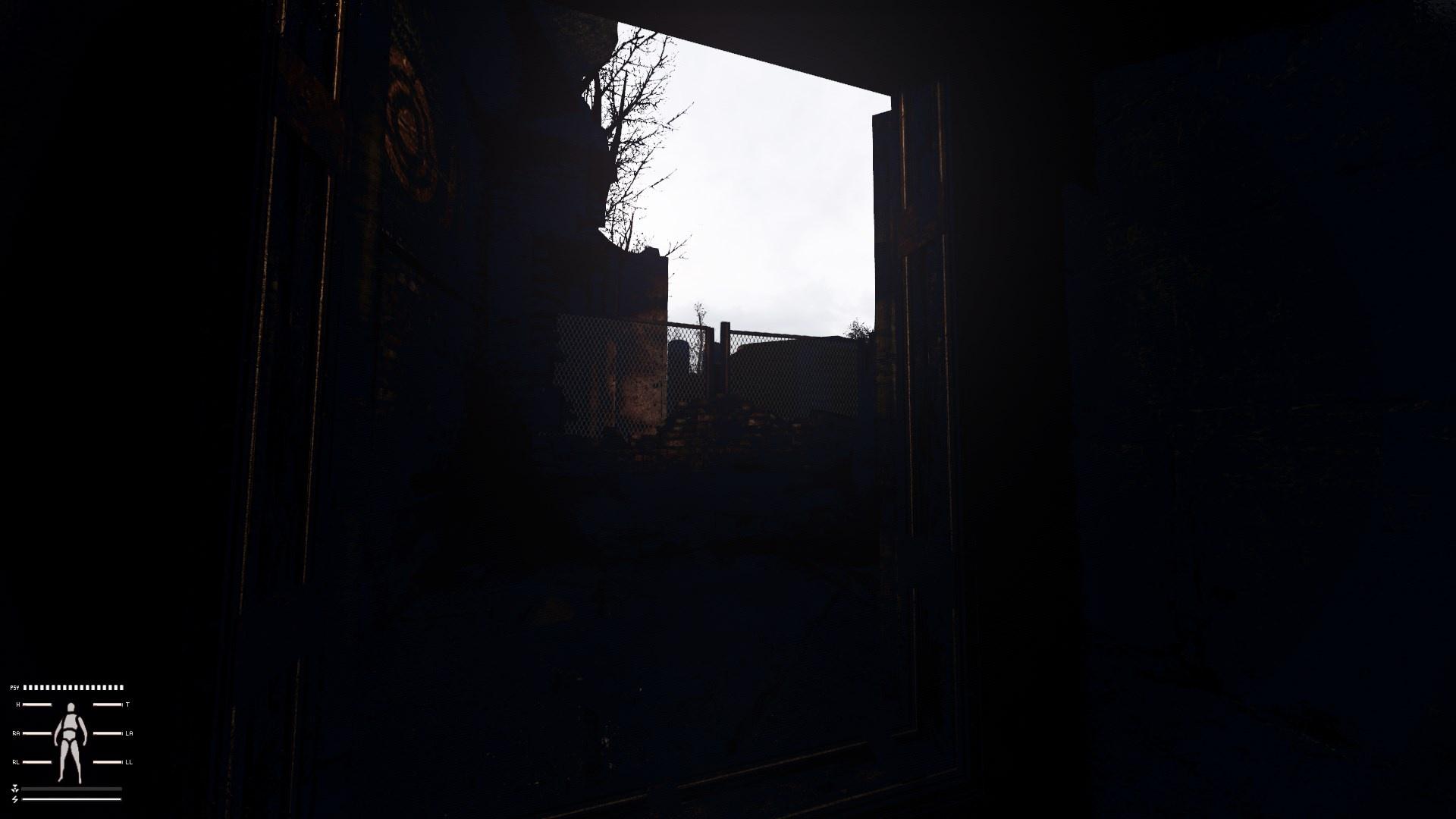
Everything is really dark and the sky is white. Fresh installed anomaly and gamma and then I can't seem to fix the reshade.
 minor spruce
rich sentinel
Finally posted my reshade presets on <#1035807043933720576> section
minor spruce
rich sentinel
Finally posted my reshade presets on <#1035807043933720576> section
Just installed your reshade, absolutely love it bro. its a beautiful pair with the dead zone texture overhaul !
rich sentinel
minor spruce
Just installed your reshade, absolutely love it bro. its a beautiful pair with t...
Thank you very much brother, post some screenshots if you can, now I'm curious
 quiet sluice
what reshades do you recommend to use with GAMMA?
manic sage
I fixed the blue god rays........................................
normal gale
frigid spade
np :]
hey mate , did you have to enable anything after installing the 3x shadow thing ? ive got that ring again with the custom exe
 whole patrol
Best gamma reshades?
 sour oar
Try CS Eden's reshade or Hippo's
I think mine is great obviously, but considering their progress (especially Hippo's) I can't say it's the best
normal gale
nvm i fixed it . it was the sun far scale . i forgot to change it again after i reset my settings lol
silent cairn
sour oar
I think mine is great obviously, but considering their progress (especially Hipp...
What is the best anyway, if everyone made the same looking reshade it would be awfully boring 
sour oar
I mean, true
Mine is personally very stylized, more so now that I’ve started using grading_warm which is obviously not for everyone
silent cairn
But for those who like it...
mint owl
silent cairn
What is the best anyway, if everyone made the same looking reshade it would be a...
You forgot Agressor again 
 normal gale
can you guys recommend some AO tweaks ? i dont know much about it
manic sage
mint owl
You forgot Agressor again <:PepeHands:919973012990750820>
You mean expedition?
 mint owl
Both at the same time for maximum experience
manic sage
meanwhile me over here like this

color blind self can only do reshades with numbers
 short prism
is there any way to make the graphic even better
I've done tweaking settings in game
I haven't touched anything related to reshades
I have a 3060
manic sage
reshades and shader params
silent cairn
And uh, textures

 manic sage
Colors are okay I think, but yeah lots and lots of glow
silent cairn
Keep going and you'll get close to my masterpiece

 subtle tusk

sour oar
You can’t really get much better
mint owl
I remember the old days when absurd bloom and ultra blacks levels were considered ultra graphics xD
silent cairn
Gotta hide the dated graphics somehow
frigid spade

feel like i got a nice scene to scene variance going so far


before i got my color right every area felt like it had the same filter over it
 subtle wraith
frigid spade
feel like i got a nice scene to scene variance going so far
subtle wraith
frigid spade
feel like i got a nice scene to scene variance going so far
How do you get it to be so lively? My ground is just bare
frigid spade
subtle wraith
How do you get it to be so lively? My ground is just bare
The textures or the lighting?
subtle wraith
frigid spade
The textures or the lighting?
overall scenery, its has heaps of grass, lighting, etc
frigid spade
textures are summer mod, turned up ssr in the settings_screenspace_SSR.h file, worked on my reshade foreeever to get a color scheme I liked. It's linked in #1041041642347573368
frigid spade
subtle wraith
overall scenery, its has heaps of grass, lighting, etc
https://drive.google.com/drive/folders/1jCAlpa5DnN7EADkAcCQVQ1HTo9CdjTt7 summer mod and other types are here, gotta disable gardener of the zone and enable those in its place
subtle wraith
frigid spade
https://drive.google.com/drive/folders/1jCAlpa5DnN7EADkAcCQVQ1HTo9CdjTt7 summer ...
Ahh sweet, gardener of the zone is a gamma mod?
 still hollow
frigid spade
feel like i got a nice scene to scene variance going so far
still hollow
frigid spade
feel like i got a nice scene to scene variance going so far
hey! how do you get such a nice look?
my game looks like a real potato next to it 
frigid spade
still hollow
hey! how do you get such a nice look?
my game looks like a real potato next to i...
gotta install reshade :] and crank graphics + you can eddit screen space shader mod ini files for better reflections and stuff

 still hollow
frigid spade
gotta install reshade :] and crank graphics + you can eddit screen space shader ...
still hollow
frigid spade
gotta install reshade :] and crank graphics + you can eddit screen space shader ...
do you know how i could change the weather?
I would like to try with several weather to see if everything works well
 late tiger
by using the debug menu
start your game with debug mode on, hit F7 I think it is, and start toying with the weather settings 🙂
 loud geode
frigid spade
feel like i got a nice scene to scene variance going so far
loud geode
frigid spade
feel like i got a nice scene to scene variance going so far
What reshade is this yo
Btw how to edit sss?
And where i can find this
still hollow
late tiger
start your game with debug mode on, hit F7 I think it is, and start toying with ...
thx bruh 
frigid spade
loud geode
What reshade is this yo
its my reshade, instructions in #1041041642347573368
loud geode
Great work dude
 frigid spade
Depends. 3060 ti is okay for me.
Prob would hurt a 1070 a fair bit.
It is heavier than usual, it uses radiantgi and ambient occlusion and glam which are all heavy effects.
vague island
@manic sage uh the new quint_solaris effect in the update doesnt compile for me
might be for other people as well but ill try installing quint through reshade
manic sage
Solaris shouldn’t matter i don’t use it
I’ll fix that compile error later today
@vague island
vague island
ah i thought it was part of the new update since you mentioned 5 effects should be running for LR version
manic sage
Do you not have adaptive tonemaper, regrade, contrast sharpen, bloom, glamaraye
Are you missing one?
Adaptive should be under regrade
vague island
this is whats on for me in Hippo_GradingR

without touching or modifying anything
looks like im missing 2?
manic sage
Try to reinstall everything one more time and send me a screenshot if that doesn’t work then that’s my bad
I’ll have to redo that recompile later today
Yeah you’re missing regrade and prod bloom
Make sure to delete the reshade-shaders folder. If still doesn’t work then I’m sorry I’ll fix it
vague island
manic sage
Make sure to delete the reshade-shaders folder. If still doesn’t work then I’m s...
Its no problem man
aight ill try it now tho I did delete the reshade-shaders folder
Ill try it again just incase to make sure
manic sage
Doesn’t hurt to give it a shot
vague island
its fine if I keep the old presets right? that does nothing

since the hippo grading ini is the one I modified to my tastes
vague island
manic sage
And those ltx files you’re putting them in appdata?
wait yeah xD
manic sage
lol
silent cairn

manic sage
Lmao
vague island
this is what is on for me after reinstalling everything

prod bloom is missing
and this is what is on for me in LR
 manic sage
Better but you’re still missing bloom
Ok that’s fucked
Im gonna take the download link down
vague island
what do you think is the problem
manic sage
But will be fixed later today
vague island
you have the shaders in their folders as well
manic sage
This is what happens when you work on stuff at 3am
frigid spade
lol i feel that
silent cairn

manic sage
I’ll fix it later
vague island
manic sage
This is what happens when you work on stuff at 3am
thank you for your service comrade

what time is it for you guys now
its 7:40 PM for me
frigid spade
i keep posting my reshade without being in performance mode, messing up the formatting on my update posts and it be annoying lol
740
vague island
frigid spade
740
wait a minute
frigid spade
but ive been up since 230 or something
frigid spade
oregon lmao
manic sage
10:41 am here
frigid spade
treeland
vague island
polar opposites
frigid spade
yeah lol
vague island
im in sand land
frigid spade
yeah its like complete opposite
vague island
just got home actually looking at properties we have to move
frigid spade
as far as it could be xD
frigid spade
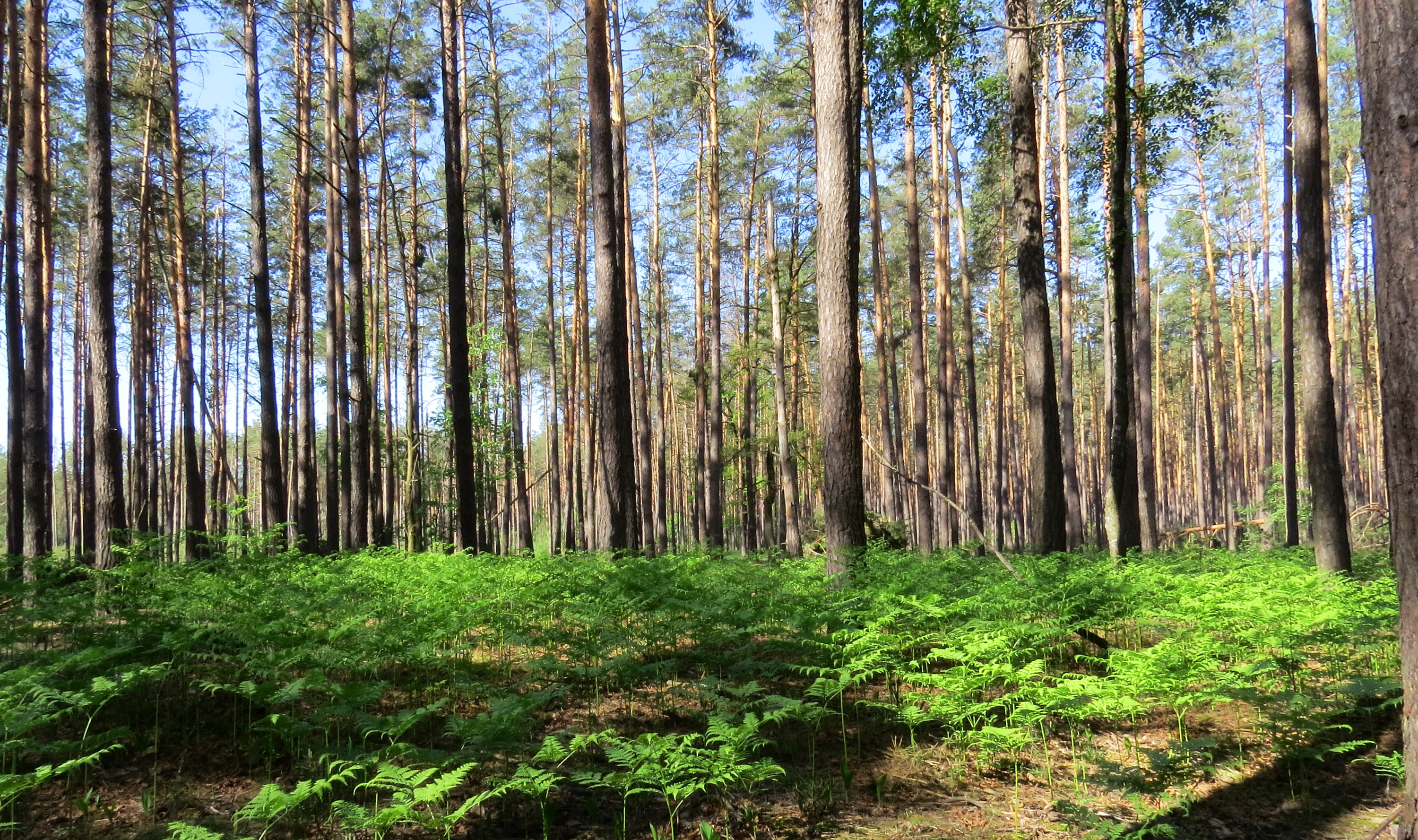
honestly oregon kinda looks like ukraine, with thicker and bigger woods
vague island
I wanna move to canada some day
somewhere cold
the climate here is just summer in december and july is hell
frigid spade
https://images.fineartamerica.com/images-medium-large-5/oregon-woods-robert-fawcett.jpg oregon
https://upload.wikimedia.org/wikipedia/commons/d/db/Klavdievo_forest.JPG ukraine

 vague island
pretty nice


 vague island
yeah I havent tried it yet cause I only have a 970
im barely 35-40 fps in rostok
Hippo_Grading with my edit and HippoR.ltx

Hippo_Grading with my edit and old Hippo.ltx

weather is clear 3 at 10 am
manic sage
Yeah stuff won’t look good with hippor or hippolr without the regrade effect
As both have color shifts that regrade fixes
vague island
yeah
manic sage
Even if only running the ltx files
vague island
ill just use my old setup for now
 silent cairn
Hippo coming home from one job to another 
manic sage
Pretty much but I’m happy with the reshade now until someone says magenta
So much more work from here on out
The hippoR preset has rtgi functionality now if you have that affect
But completely optional
https://imgur.com/FcYgEUO ive been able to replicate this
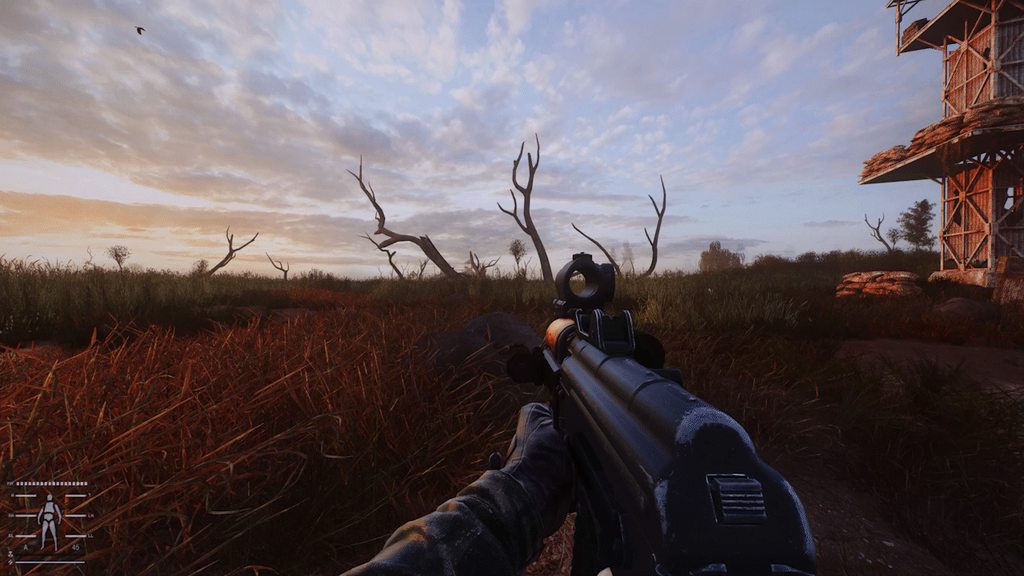
With rtgi
rich sentinel
manic sage
With rtgi
My RX can't handle RTGI 


 manic sage
Completely optional
sick wigeon
frigid spade
This gives me farcry 2 vibes 

 sick wigeon
frigid spade
it varies a lot
sick wigeon
frigid spade
it varies a lot
Yeah I want to try your reshade at some point, but you've been updating it so much. I'm gonna wait for you to get a "final" version so I get the best experience with it
frigid spade
Yeah its very unfinalized
I like just started
Im dialing in the global illumination and ao and to do so I gotta traverse the entire map
See everything, so it all works.
ive got so many "testing" saves to load and mess around
lol
I also have full instructions on how to properly run sss mod so it will compile with the newest reflections edits instead of just the new dof. I have noticed many people are running it in such a way that the old shader cumulative pack is winning file conflicts and people are only getting the new dof.
 unborn dagger
manic sage
https://imgur.com/FcYgEUO ive been able to replicate this
unborn dagger
manic sage
https://imgur.com/FcYgEUO ive been able to replicate this
Wow Did you use a texture pack?
unborn dagger
it looks very beautiful
 verbal grail
im using eden's reshade golden autumn - anyone can tell me what causes this lighting here? https://www.youtube.com/watch?v=Ogrxkd5-Zs8

 frigid spade
verbal grail
im using eden's reshade golden autumn - anyone can tell me what causes this ligh...
frigid spade
verbal grail
im using eden's reshade golden autumn - anyone can tell me what causes this ligh...
may wanna get sss mod experimental shadow cascades, think itll fix that, not 100% sure, does it go away when reshade is off?
verbal grail
ah yes, its there also with other presets..
 unkempt cedar
manic sage
https://imgur.com/FcYgEUO ive been able to replicate this
unkempt cedar
manic sage
https://imgur.com/FcYgEUO ive been able to replicate this
how to get this result ? What do I need to do ?
 regal saffron
is gamma reshade the same as aggressor? I enameled aggressor but the ini dosent show up
sick wigeon
regal saffron
is gamma reshade the same as aggressor? I enameled aggressor but the ini dosent ...
No, the aggressor that comes with gamma is just the ground textures. You need to install it manually.
regal saffron
sick wigeon
No, the aggressor that comes with gamma is just the ground textures. You need to...
hmm ok thanks
frigid spade
Added AA support for my reshade. Will help folks at 1080p.
 muted glacier
manic sage
https://imgur.com/FcYgEUO ive been able to replicate this
muted glacier
manic sage
https://imgur.com/FcYgEUO ive been able to replicate this
Im in love
normal gale
Anyone recommend an atmospheric style reshade ? Im running michikos weather now instead of majestic and majestic reshade isnt doing it for me .
manic sage
@frigid spade trying out your reshade
is this how bright the main menu is supposed to be?
 frigid spade
nope
frigid spade
manic sage
<@146817421771145216> trying out your reshade
idk why its like that
frigid spade
manic sage
<@146817421771145216> trying out your reshade
just installed it on another pc and it wasnt like that, must be basic light settings or something?
or tonemapper? idk
mint owl
Monitor difference ?
frigid spade
thats extreme
i just installed it on another monitor too, one was a TN panel one IPS.
both were fine
frigid spade
manic sage
<@146817421771145216> trying out your reshade
just posted a new hotfix, try that one
maybe i uploaded a borked file?
 echo hawk
normal gale
Anyone recommend an atmospheric style reshade ? Im running michikos weather now ...
echo hawk
normal gale
Anyone recommend an atmospheric style reshade ? Im running michikos weather now ...
My favorite with this weather is Piknik reshade. Im not sure if it's atmospheric enough tho.
normal gale
echo hawk
My favorite with this weather is Piknik reshade. Im not sure if it's atmospheric...
Thanks mate. Ill suss it out. I havent heard of that one before.
echo hawk
It's an older one on modbd.


 echo hawk
normal gale
Thanks mate. Ill suss it out. I havent heard of that one before.
echo hawk
normal gale
Thanks mate. Ill suss it out. I havent heard of that one before.
No problem. Might not suit you. Also Don't forget to set the enhanced shader parameter according to the page of the Michiko weather revised mod.
normal gale
echo hawk
No problem. Might not suit you. Also Don't forget to set the enhanced shader par...
Yeah i did that. The only thing is i had to load warm color grading after because i had blue tints in the dark. But all the other parameters took well
echo hawk
normal gale
Yeah i did that. The only thing is i had to load warm color grading after becaus...
Yeah that's annoying. The default one is the best looking one but oh well. It is what it is.
normal gale
echo hawk
Yeah that's annoying. The default one is the best looking one but oh well. It is...
It was even worse on majestic. But i couldnt get rid of it on majestic. Michikos one did fix it with the warm color grade. And i like dynamic tonemap which didnt look right at night on majestic.
frigid spade
manic sage
<@146817421771145216> trying out your reshade
were you ever able to get it working? concerned there may be a problem for some users.
frigid spade

Sorry for pumping out so many builds rapidly lol, I just wanna keep it recent. Once I reach version 0.5 or so it will likely slow down a lot.
manic sage
frigid spade
were you ever able to get it working? concerned there may be a problem for some ...
I'll give it a shot in a bit
frigid spade
manic sage
I'll give it a shot in a bit
kk
mint owl
frigid spade
Is it from the skybox ? It looks a bit odd with that cloud on the left
frigid spade
Is what from the skybox?
The banding on the clouds?
cant seem to get rid of that
texture quality too low on skybox
manic sage
frigid spade
The banding on the clouds?
Certain effects make the skybox pixelated
Just disable effects to see what effects the skybox to find it
Even with other weather mods like cgim the skybox will be affected by certain effects
silent cairn
frigid spade
Sorry for pumping out so many builds rapidly lol, I just wanna keep it recent. O...
Now that you have your own mods-post you can post your reshade updates there to keep other channels a bit more clean
manic sage
@silent cairn On a seperate note, I've had no issues with your SSS tweaks from the last time you've sent them to me
glossy pond
Jaku when u planning to release ur tweaks as a mod?
manic sage
lmao
manic sage
Jaku is waiting until the new SSS update gets officially implemented into GAMMA
glossy pond
Ah ok
silent cairn
Tuesday seems to be the big update day
manic sage
I dont think it will happen but it would also be nice if the new BAS gets implemented then
silent cairn
Would be nice
manic sage
finally turned it off now that the reshade is mostly done, will go back to tweaking it as I play like I used to

and I can finally play
silent cairn
You could still keep it on for regular play
manic sage
too tempting
God mode to get past hard encounters and free items at my finger tips is not something I want
 jaunty anvil
Hey, I was told that someone here might know how to fix the sun shadow bug, maybe by increasing the sun shadow render distance?
 celest elm
when hippo rehasde update
 frail pineBOT
 manic sage
celest elm
when hippo rehasde update
manic sage
celest elm
when hippo rehasde update
#1036172060969410590 message updated now
manic sage
download link and patch notes are pinned
celest elm
alr thanks man
manic sage
Just make sure you read the instructions fully
jaunty anvil
Can shades resolve this issue? I've been having clear, sunny weather in the game and these strange shadow distortions in the corner of my screen have been really distracting. Maybe this could be done by increasing the range of sun shadows?
 silent cairn
Do you have distant shadow culling enabled?
jaunty anvil
silent cairn
Do you have distant shadow culling enabled?
Disabled.
unborn dagger
Is there a way to reduce the light from the sun?
 jaunty anvil
unborn dagger
Is there a way to reduce the light from the sun?
jaunty anvil
unborn dagger
Is there a way to reduce the light from the sun?
From what I've noticed, there's several just look at Advanced settings.
Like Sun rays main intensity.
silent cairn
jaunty anvil
Can shades resolve this issue? I've been having clear, sunny weather in the game...
Is the sun below horizon in this?
unborn dagger
jaunty anvil
From what I've noticed, there's several just look at Advanced settings.
Thank you My English isn’t that good
jaunty anvil
silent cairn
Is the sun below horizon in this?
The sun can be at any point, as long as it is this casting light / shadows, the issue of these wonky visuals always comes up.
jaunty anvil
silent cairn
Is the sun below horizon in this?
When the sky gets too dark or there's fog, this just vanishes completely.
jaunty anvil
unborn dagger
Thank you My English isn’t that good
Np. You can also press Home and mess with the reshade, I turned off ambient light in mine.
silent cairn
I'll check this issue once I get back to my computer, it could be either shaders or weather settings
jaunty anvil
There's one more weird thing about this one.
You know how you can launch the game from different exe file?
silent cairn
Yes
jaunty anvil
When I used the Launcher it was less visible, then I use DX11-AVX, and it's more visible.
silent cairn

silent cairn
Is there a sun_radius console command? I can't check myself atm
jaunty anvil
Let me see.
I know I messed with several sun settings
As soon as I have seen this bug I've tried to remove it on my own like 14 times now.
silent cairn
It's pretty obvious with bare snowy field like that
jaunty anvil
Don't see it anywhere.
 silent cairn
And nothing with "radius"?
jaunty anvil
Nope, sadly not.
silent cairn
I know there is something like sunshaft radius but that ain't it
 silent cairn
Do you have default GAMMA shaders? Or did you install newest SSS?
jaunty anvil
All default, I've been reinstalling GAMMA so many times that I've created myself a rar file with everything in it.
silent cairn
jaunty anvil
Same happens in Anonaly and EFP
silent cairn
Newest SSS comes with optional experimental exe that triples the shadow cascade distance, but it probably breaks some mods in gamma that are exe dependent
jaunty anvil
I have tried SSS on a fresh Anomaly with the experimental files, no changes.
jaunty anvil
You know what fully fixes this problem? FOV for some reason.
Don't ask me why but FOV 43 fixes all shadows.
silent cairn
This sounds awful lot like "it is just how it is" with this wack engine
I will also try to look solution to this today
Thanks for letting me know all these details
jaunty anvil
There was one guy who might have had something I haven't tried.
Give me a sec, I'll try to find it again.
There was this thread on moddb where they also had this exact but I don't think anyone found a solution.
Then I went to, hmmm.
Mod DB
Discuss the topic "Lighting/shadow issue at the edge of screen [RC21]" in the Support S.T.A.L.K.E.R. Anomaly Forum.
Ah! This one!
https://www.reddit.com/r/stalker/comments/nsqyae/anomaly_sun_shadow_distance_bug_fixed/
It didn't seem to work either.
BUT the guy by the end had something interesting.
reddit
32 votes and 14 comments so far on Reddit
He said:
Go to gamedata/shaders/r3
Find and open accum_sun_near.ps
Replace 65 line with this
return float4( SRGNToLinear(Ldynamic_color.rgb * s.xxx),1) * light
vague island
Also had this issue with certain areas of W3 it was an engine limitation in the case of W3
silent cairn
Can you copy the og line 65 from accum_sun_near
Enhanced shaders mod should have that file
jaunty anvil
silent cairn
Can you copy the og line 65 from accum_sun_near
I'd try but I think there's 8 files withe the same name.
silent cairn

silent cairn
This fix could work though, I'll know where to put it once I get my hands on the files later today
jaunty anvil
silent cairn
This fix could work though, I'll know where to put it once I get my hands on the...
That would be great! Let me know if you find something. For now starting the game via launcher helps a bit, like I've said.
And I don't wanna mess something up.
silent cairn
Fair, always backup 
jaunty anvil
I have a backup, I'm just tired of the constant copy / paste.
I've been already driven nuts once by the game's compression and night skies looking all discolored, which forced me to find a none compression method that people are slowly starting to test. Now I'm driven mad by shadows popping up in front of me.
silent cairn
Don't let me ruin it more by pointing out this weird aura around weapons in rainy weather
jaunty anvil
Haven't seen that one yet! Maybe if I'm lucky, I won't.
jaunty anvil
silent cairn
Don't let me ruin it more by pointing out this weird aura around weapons in rain...
I'll upload one more thing because it looks really weird on my end sometimes (this is the better, Launcher version). Take a look at the center of the screen, the spot where my shotgun is pointing.

Now look at that spot again, it's like the shadow is expanding in some type of geometrical shape, I don't know how to describe this "shadow wave" when I just look the other way.

And the further I turn away, one edge of looks kinda, jagged?
 silent cairn

jaunty anvil
 silent cairn
I'll see what I can do, all of these issues are due to engine shaders and not reshade though. The #╙🖇mods-making-discussion has a lot smarter people than me there if you are looking for more insight
jaunty anvil
I can also see it on hills and stuff but this spot is just so strange.
I'll try sharing all of this over there I guess.
normal gale
silent cairn
Newest SSS comes with optional experimental exe that triples the shadow cascade ...
The shadow thing from this does fix the shadow issues. Got rid of my white trees too. But now im getting missing gun jam sounds etc. So yeah i think it does effect some gamma mods
Ive got an 3840×1600 ultra wide so its really obvious without the 3x experimental exe.
normal gale
jaunty anvil
I can also see it on hills and stuff but this spot is just so strange.
I'll try...
I have the exact issue you have. Been trying to fix it for days. Tried all those console changes too. Only thing thay fixed it was the 3x experimental from sss. But it creates issues also. Because gamma / demonized exe is needed from what ive been told.
jaunty anvil
normal gale
I have the exact issue you have. Been trying to fix it for days. Tried all those...
Well, that sucks... I guess the only thing that can be done now is to wait, some genius out there seems to know the answer, just gotta wait till it's implemented in to GAMMA now.
normal gale
jaunty anvil
Well, that sucks... I guess the only thing that can be done now is to wait, some...
Yeah unfortunately. Ive installed a weather mod where im going to try and reduce the amount of bright weather so i cant see it as much 😂 or hope the 3x fix gets included into an exe for gamma. Because its like the last issue ive got persisting. But its visually distracting to a great extent in clear days.
jaunty anvil
I hope that out lord and savior Gork notices this. I'm new here, so I haven't seen him but I'm certain he's on it, you just gotta BELIEVE!
normal gale
I just chucked it in suggestions for good measure
jaunty anvil
That was a great idea!
jaunty anvil
normal gale
I just chucked it in suggestions for good measure
You could say it was absolutely "divine"!
Now we just gotta wait for divine intervention.
normal gale
Haha yep.
frigid spade
manic sage
Certain effects make the skybox pixelated
ive had trouble getting it any better than it is while still having the effects i want active at all
its mostly a lightroom thing, just changing the color brings out the banding
frigid spade
normal gale
Ive got an 3840×1600 ultra wide so its really obvious without the 3x experimenta...
its obvious on 1440p for me, need that 3x exe for sure
normal gale
yeah 100% its night and day difference.. i cant beleive it fixed my damn white tree issue too lol i did another reinstall of gamma too trying to fix it
normal gale
frigid spade
its obvious on 1440p for me, need that 3x exe for sure
hey man . im fiddling with rtgi .. can you recommed a couple of good baseline settings for it ?
frigid spade
I actually have been using radiant gi, i can pull up my rtgi and see what i had done hang on
normal gale
i tried radiant but i couldnt see any difference
frigid spade
radiant works pretty well and is MUCH cheaper, it is less pwoerful though
heres my rtgi
[qUINT_rtgi.fx]
FADEOUT_MODE_UI=2
RT_AO_AMOUNT=4.000000
RT_BACKFACE_MIRROR=1
RT_DEBUG_VIEW=0
RT_DO_RENDER=0
RT_FADE_DEPTH=0.300000
RT_HIGHP_LIGHT_SPREAD=1
RT_IBL_AMOUT=0.100000
RT_IL_AMOUNT=0.360000
RT_RAY_AMOUNT=2
RT_RAY_STEPS=2
RT_SAMPLE_RADIUS=20.000000
RT_SAMPLE_RADIUS_FAR=1.000000
RT_SHADING_RATE=1
RT_USE_ACESCG=0
RT_USE_SRGB=1
RT_Z_THICKNESS=0.500000
SKY_COLOR=1.000000,1.000000,1.000000
SKY_COLOR_AMBIENT_MIX=0.200000
SKY_COLOR_AMT=5.000000
UIHELP=0
UIHELP2=0
i havent messed with it much
i mean ive changed the values a lot, but its not tested in tons of environments
looks good, kills fps
my radiant looks good, costs much less
frigid spade
normal gale
i tried radiant but i couldnt see any difference
rtgi def looks better though
this is radiantgi though, not bad.

same scene with it off

this is rtgi

rtgi is better at grabbing the sky color and simulating the backface
rtgi lets you have a brighter wep for sure more realistic
what are the best motion vectors for rtgi that lag the least?
normal gale
rtgi gives me this like milky look in the dark on things .. know how to fix that ?


You can see it on the floors and stuff alot
frigid spade
its messing with the black levels because lighting is getting in to ao
and lightening it up
something i am currently trying to fix in mine rn as well
normal gale
Ahh so cant really fix it then?
 slate grotto
normal gale
rtgi gives me this like milky look in the dark on things .. know how to fix that...
slate grotto
normal gale
rtgi gives me this like milky look in the dark on things .. know how to fix that...
Atm I think almost every setup I saw from reshades with rtgi has that effect, you can mostly see it on grass patches and at tress in the red forest
Legit sad
normal gale
Thats a shame. Maybe ill try and get radiant to work instead but havent had much luck
frigid spade
anyone know why rtgi motion vectors make me lag more?
thought it was supposed to help
 sacred cove
Anyone willing to share their reshade settings? Any will do, ill customize them if feel the need to 🙂


 vast frigate
Hey i have just downloaded gamma and didnt touch it in any way, could i have some recommendations for settings/extra reshades to make it look more buitiful? Ore should i just play it like it is?
vast frigate
frigid spade
Looks stunning 🙂

 teal bramble
Guys how can i increase lighting? (Not gamma and contrast settings,my monitor a bit dead and lighting isnt too good on it and makes it too hard to see during night time
Any setting somewhere.
 lavish relic
frigid spade
this is radiantgi though, not bad.
lavish relic
frigid spade
this is radiantgi though, not bad.
What are your settings for radiantgi ethan? gonna give that a try since rtgi eats my fps
 hardy agate
Can I install stalker expedition on top of gamma?
 bitter edge
bitter edge
bitter edge
it looks smooth
anyone got a good texture pack?
my shaders are good but the texture are awfull
other people games look so insane
silent cairn
frigid spade
lavish relic
What are your settings for radiantgi ethan? gonna give that a try since rtgi eat...
you can find my files in #1041041642347573368
bitter edge
 lavish relic
frigid spade
you can find my files in <#1041041642347573368>
lavish relic
frigid spade
you can find my files in <#1041041642347573368>
Ah thanks boss 👍


 still hollow
yo!
can someone give me the command to find a normal image?


 sick wigeon

normal gale
frigid spade
hype
Grok said the 3x experimental will be included in the next update too.
Have you updated to 12.2 yet ? Lol. Im at work but im keen to.
normal gale
Whats it doing?
frigid spade
its alright though, those dof's are hard for me to use with my reshade due to the nature of ao and global ilumination
if it was real dof it would be better
sick wigeon
It's working for me, but only when I raise the pda
if I have it lowered there's no dof, which the last update had it
tbh I like it better that way
normal gale
I got used to having it off since it was better than the bug.
I walk around with my pda out lowered so that definitely sounds better to me
frigid spade
sick wigeon
It's working for me, but only when I raise the pda
yea
do you have to recompile every time you change settings in mcm for sss dof?
normal gale
Does it have the peripheral dof while lowered ?
frigid spade
i wish i could find a way to not make ao and gi be so ugly with dof, i basically have to disable all this stuff
sick wigeon
very cool
 normal gale
That looks soo good
sick wigeon
frigid spade
do you have to recompile every time you change settings in mcm for sss dof?
I don't think so, only if you change stuff in the settings files
normal gale
What are a couple of good reshade effects to apply ? Im using piknik atm and its good but i want to add a little more atmosphere to it. Or like softness ? If that makes sense.
My weathers are predominantly Lots of fog etc. Because i love the light shafts going through creepy areas etc so
Maybe a type of bloom or something ?
And radiant only really effects day time right ?
Is there a way or some effect to utilise like the torch light lighting better ?As i play on super dark nights.
frigid spade
oh shit if you turn the dof off of the items in turns off fdda
thats a problem for me
frigid spade
normal gale
What are a couple of good reshade effects to apply ? Im using piknik atm and its...
im so head deep in rtgi i dont know what to suggest
frigid spade
normal gale
And radiant only really effects day time right ?
Is there a way or some effect ...
and yes, daytime but also fires a bit.
but yea this new update actually breaks fdda if you need the dof off
normal gale
frigid spade
and yes, daytime but also fires a bit.
Yeah i tried it around fires but I noticed no difference
frigid spade
i think it only effects fires if you reverse the depth buffer
normal gale
Ahh i did see that option but have no idea what it does so i didnt touch it
frigid spade
working with dof from this mod is actually extremely hard because of my reshade using ao
and gi
they both bleed through the dof
normal gale
I had that with rtgi. It really draws your focus. I got large grass so it looks ugly as
frigid spade
unfortunately you cant disabled it rn because of the new update, hes gonna have to patch this, disabling dof on fdda remove fdda entirely
hes getting blown up on moddb lolol
normal gale
Can you just reduce the dof down ? Instead of disabling, Ive got mine under 0.5 on non gun stuff and it fixed my dof issue with the pda.
In 12.1. It basicly disabled it without disabling it.
frigid spade
normal gale
Can you just reduce the dof down ? Instead of disabling, Ive got mine under 0.5 ...
how do you reduce reload and fdda dof? it doesnt seem to effect it
sick wigeon
frigid spade
how do you reduce reload and fdda dof? it doesnt seem to effect it
sss creator said that's a planned feature. doesn't exist yet afaik
frigid spade
ah
normal gale
Yeah i didnt disable it for reload so im not sure on that. But the second set of options i had focus fade start and focus fade length i had under 0.5 and that solved the pda issues for me .
I would have assumed the non gun aiming dof was tied to these seperate options
frigid spade
i may revert for now, i cant decide if people would rather have the dof and have it be someone broken with the ao and gi or have it all off for my reshade
no point in like, making a reshade at all, if i let the dof bug alone stop me from using ao and gi
ao and gi are the key elements to fancy reshades soo
frustrating conundrum 😛
if i get the option to raise and lower the blur, either an extreme blur or a very slight one may solve this issue
 tidal tiger
?
frigid spade
@manic sage did you ever try my reshade again? i have another user having it be too bright and idk, just put it on my wifes pc and it worked fine.
frigid spade
tidal tiger
?
sorry that was meant to go to hippo
manic sage
frigid spade
<@284148747900813322> did you ever try my reshade again? i have another user hav...
let me give this a shot
which version should I try?
frigid spade
most recent
manic sage
I think I'll try RTGI
frigid spade
yeah
manic sage
Which shader param should I use
grading_vanilla?
grading_default?
grading_warm?
or mine?
 frail moth
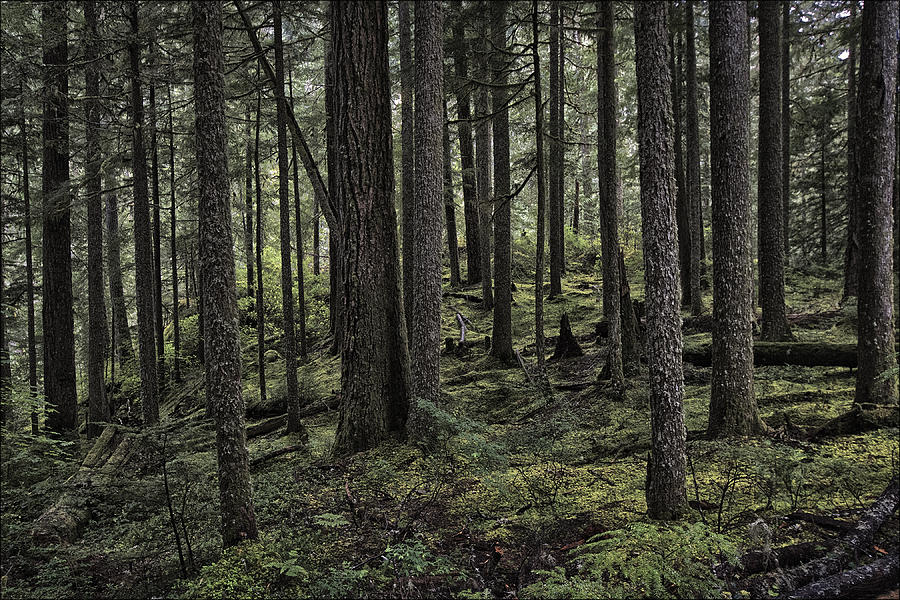
@mint owl How did you achieve the blue tinted foliage, orange grass, etc back in the day? When it looked almost like The Outer Worlds.


 manic sage
Not my preset but I dont think Ethan intends for it to look this way
looks like its between microwaved
frigid spade
manic sage
Which shader param should I use
sorry had to step away