#🔨base-gamma-support
1 messages · Page 326 of 1
 raw raftBOT
 clear prairie
!screenshot mo2
raw raftBOT
We can't really see the problem if you take a picture with your cellphone. If you have a problem you want to share with us, you can do the following, since we don't care about your second monitor or your desktop image:
- Press F12 in-game, look in
Anomaly\appdata\screenshots. If it's not there, look in your GAMMA RC3 folder, inside a folder calledoverwrite - Press PRTSC (Print Screen on your keyboard) open Paint, CTLR + V to paste the pic, save it, send it
- Windows key + Shift + S, which let you choose what part of the screen you want to copy, it will directly copy the pic for you.
clear prairie
!crash
raw raftBOT
Send your crash log where it was asked IF YOU ARE BEING HELPED, not inside #🤖bot-commands if you're using this command in this channel.
You won't be helped, it's literally just a channel where you can use commands.
The file is inside your Anomaly folder, this is the complete path:
Anomaly/appdata/logs.
This is what you could find:
xray_yournamehere.txtxray_yournamehere.logxray_yournameherewithout any file extension
You just need to send ONE of these files where it was asked. It's either ONE file with .txt OR .log OR with nothing at the end.
DON'T send anything with .bkp at end.
Drag and drop the file inside the Discord channel, Discord will handle it for you.
Make sure you're not using any extra mods, if you do, you'll need to ask in #🔨modded-gamma-support.
 regal oyster
check you have dowloaded ther downloads.7z file as it contains a lot of mods that wont install from ModDB
 wintry jay
For someone who’s playing with no type of GPU should FPS limiter be maxed out ?
 faint scroll
I have tried to enter army warehouse but it keeps telling me the intro doesn't work and it switches through the intros 2-6 ever time i try to reload any ideas to fix?

 tender forge
faint scroll
I have tried to enter army warehouse but it keeps telling me the intro doesn't w...
tender forge
faint scroll
I have tried to enter army warehouse but it keeps telling me the intro doesn't w...
!loading
raw raftBOT
Change to DX11 or disable the 282- GAMMA Loading Screens - CS Eden mod in MO2
faint scroll
thanks
tender forge
faint scroll
thanks
go to #⏩start-confirm and remove your newcomer role
faint scroll
tender forge
go to <#1029827096488452137> and remove your newcomer role
got it i hadn't realized i turned off my view emojis so i missed it thanks

 paper steeple
just 1
 final crane
Does someone have a list of quests in anomaly for living legend? I feel like i've barely done anything and I'm already near the end with strelok and cheyrnoble
 orchid slate
paper steeple
just 1
orchid slate
paper steeple
just 1
OK
orchid slate
paper steeple
just 1
and on that server I only chose the one that had the most downloads. one will be enough.
 warm obsidian
Get this fatal error every time I try to go to wild territory from Rostok. I’ve gone this way before and now it’s just now having problems. Why?

What is causing this crash? Not a computer person so don’t know lol

 prime fulcrum
 gloomy merlin
any 1 had this before ?
gloomy merlin
any 1 had this before ?
screenshot your MO2
prime fulcrum
warm obsidian
Get this fatal error every time I try to go to wild territory from Rostok. I’ve ...
screenshot your MO2
 warm obsidian
prime fulcrum
screenshot your MO2
warm obsidian
prime fulcrum
screenshot your MO2
It looks exactly like that^
358 active mods
Except I have the DX-11 AVX selected not “anomaly launcher”
prime fulcrum
warm obsidian
It looks exactly like that^
i still need a screenshot
prime fulcrum
gloomy merlin
go to moddb.com and screenshot what you see
 meager karma
Hi folks, I have a doubt. I have already 3k reputation for Scientists, but still no recipes in their trade window. Also there is a weird space. Should I just waiting forever or use debug menu?

 gloomy merlin
@prime fulcrum got flagged as a bot
 wide solar
Hey all - does anyone know what addon has added an American voice actor to my player character? Playing as a merc currently. I've had the Russian/Russian accented actor before playing as loners which was fine, but my Merc sounds like GI Joe or Duke Nukem and it's mad annoying
I disabled 8 better merc lines and 15 voiced actor and started a new character to test out and it still has the american voice actor
 oak isle
My game freezes and I have to exit the game sometimes when I enter combat, and my log doesn't really give me an error or anything at the end. This has been happening on default GAMMA for a while, anyone know why this happens and how to fix it?
gloomy merlin
@oak isle there used to be stater fix in one of categories something like "Enable this if you have micro stutters" just tick it in MD2
its called "turn this on if you stutter" just checked
oak isle
I have that on. It doesn't stutter, it just freezes the game as if it's crashed
gloomy merlin
with stalker its usually CPU that is causing freezes or check your RAM last thing enable ATX in launcher
oak isle
ATX?
oak isle
Oh what's the difference?
gloomy merlin
that is fix for new CPUs for engine
stalker is on old buggy engine so its prone to crashes but anomaly fixed alot of things
prime fulcrum
oak isle
Oh what's the difference?
!avx
raw raftBOT
Actual explanation at the bottom but simply put:
Do you have a good CPU? Use AVX (if you have a crash, it probably means your CPU doesn't support this function).
Do you have a good GPU? DON'T use AVX.
Do you have both? Try for yourself, see what's better.
Actual explanation:
AVX is a way for your CPU to do calculations on a large array of data simultaneously. This is the same kind of job GPUs are primarily meant for.
So if your GPU is decent, AVX is (in most cases) outclassed by the GPU itself. Best way to know which is better for you, personally, is to try both versions and see what does or doesn't crash/performs better.
 pearl whale
hey guys
having some problems with starting a game


MO2 screenshot
hope i can get some help
prime fulcrum
pearl whale
go to moddb.com and screenshot what you see
pearl whale
@prime fulcrum do you mean the main page ?
prime fulcrum
yes
 prime fulcrum
pearl whale
prime fulcrum
pearl whale
!full and screenshot the errors in the black console if there will be any
raw raftBOT
1. Open your G.A.M.M.A. installer as admin
2. Click "Download G.A.M.M.A. data"
3. Click "Full G.A.M.M.A. installation"
Full GAMMA Installation does NOT remove saves, nor does it mean you are redownloading everything and it won't delete anything at all.
A full install will simply check every mod in the pack, reinstall and fix them, and any that need to be updated will be updated.
In case you want to save your in-game or MCM settings (because the installer will revert them back to default), type !backup in #🤖bot-commands.
gloomy merlin
run the installer and click on full gamma installation again so it will check and redownload mods
pearl whale
doing so rn @gloomy merlin
 heady rain
Anyone else's game crash to fatal error when looting a monolith with a encrypted PDA?
pearl whale

@gloomy merlin this is what i got after full install
the first line says "it is not possible to save the shortcut" C:/USERS/THECR/...
 grand flame
Been getting this error, reinstalled and repaired, nothing fixes it
 prime fulcrum
pearl whale
prime fulcrum
pearl whale
!shortcut
raw raftBOT
The installer didn't create a shortcut for G.A.M.M.A.: #╭📖faq message
prime fulcrum
grand flame
Been getting this error, reinstalled and repaired, nothing fixes it
go to moddb.com and screenshot what you see
gloomy merlin
pearl whale
go to folder where you placed gamma files that you downloaded from links in "how to install" and make shorcut of ModOrganiser.exe or just start it and create a shorcut from inside of modorganizer ( shorcut from modorganizer will start the game with mods but you cant change mod list that is only difference )
gloomy merlin
pearl whale
it tells you that it failed to create a shorcut for some odd reason just ignore
grand flame
Now its showing me the red screen but literally 5 minutes ago and all day today and yesterday that ive been trying to fix this it has been normal
 prime fulcrum
grand flame
Now its showing me the red screen but literally 5 minutes ago and all day today ...
prime fulcrum
grand flame
Now its showing me the red screen but literally 5 minutes ago and all day today ...
come back in an hour
gloomy merlin
better take 2h took me 2h to regain access
 mighty lion
So I am getting a weird fatal error while playing, anyone deal with this before? I have no idea what triggers it, I was just standing by the last fire I was saved at.


 nocturne jacinth
All right I had a little bit of a problem for the last week or so that I fixed which doesn't make much sense. I had gamma installed on an SSD it was an e Drive well the game was unplayable it stuttered it freezed it lagged constantly well today I decided to see for the hell of it to put it on my C drive where my operating systems on. I don't like to do that because it's almost full but the game runs really good now. The trouble I am having now is somewhere bugs the one that's the problem is my food drink and radiation symbols down in the bottom left corner or not showing up. I was dying and didn't understand why one I was a radiated and two I was thirsting to death. How do I fix this or have I turned something off accidentally?
gloomy merlin
pearl whale
place shorcut on desktop so you can launch game from desktop
mighty lion
mighty lion
So I am getting a weird fatal error while playing, anyone deal with this before?...
Does anyone think it could be my installation??
pearl whale
@gloomy merlin just put it there will try to launch
prime fulcrum
mighty lion
So I am getting a weird fatal error while playing, anyone deal with this before?...
screenshot your MO2
@nocturne jacinth #⏩start-confirm
also, press Numpad Enter in gamer
mighty lion
prime fulcrum
screenshot your MO2
like this??
 prime fulcrum
mighty lion
like this??
prime fulcrum
mighty lion
like this??
!full and screenshot the errors in the black console if there will be any
raw raftBOT
1. Open your G.A.M.M.A. installer as admin
2. Click "Download G.A.M.M.A. data"
3. Click "Full G.A.M.M.A. installation"
Full GAMMA Installation does NOT remove saves, nor does it mean you are redownloading everything and it won't delete anything at all.
A full install will simply check every mod in the pack, reinstall and fix them, and any that need to be updated will be updated.
In case you want to save your in-game or MCM settings (because the installer will revert them back to default), type !backup in #🤖bot-commands.
gloomy merlin
pearl whale
looks like it worker
dont thank me thank @prime fulcrum
mighty lion
prime fulcrum
!full and screenshot the errors in the black console if there will be any
This is what shows up!
 prime fulcrum
mighty lion
This is what shows up!
prime fulcrum
mighty lion
This is what shows up!
!shortcut
raw raftBOT
The installer didn't create a shortcut for G.A.M.M.A.: #╭📖faq message
 exotic mango
uhh i only have 251 mods?
mighty lion
raw raft
The installer didn't create a shortcut for G.A.M.M.A.: https://discord.com/chann...
but I did make a short cut, thats weird, I guess Ill make a new one lol
prime fulcrum
exotic mango
uhh i only have 251 mods?
did you download the downloads.7z archive
prime fulcrum
exotic mango
what do i do with that?
step 5 of #old-how-to-install
exotic mango
okay thanks
mighty lion
prime fulcrum
!shortcut
weirdly enough it worked, Thanks!!
 dusk lintel
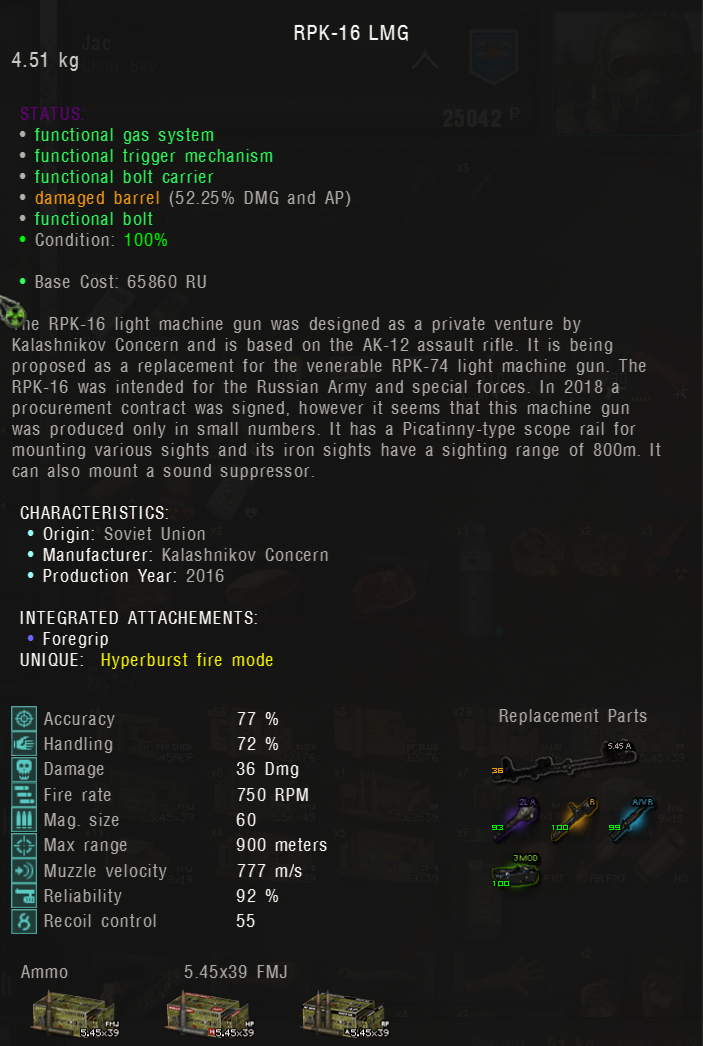
The RPK-16 LMG says it has hyperburst mode when in fact it does not.
https://i.imgur.com/uKZKYR3.png
It only has single fire and automatic mode.
 exotic mango
my game keeps crashing anytime i try and open it but i have all the required mods
prime fulcrum
exotic mango
my game keeps crashing anytime i try and open it but i have all the required mod...
!crash
raw raftBOT
Send your crash log where it was asked IF YOU ARE BEING HELPED, not inside #🤖bot-commands if you're using this command in this channel.
You won't be helped, it's literally just a channel where you can use commands.
The file is inside your Anomaly folder, this is the complete path:
Anomaly/appdata/logs.
This is what you could find:
xray_yournamehere.txtxray_yournamehere.logxray_yournameherewithout any file extension
You just need to send ONE of these files where it was asked. It's either ONE file with .txt OR .log OR with nothing at the end.
DON'T send anything with .bkp at end.
Drag and drop the file inside the Discord channel, Discord will handle it for you.
Make sure you're not using any extra mods, if you do, you'll need to ask in #🔨modded-gamma-support.
exotic mango
prime fulcrum
exotic mango
!move
raw raftBOT
KEEP IN MIND AND REMEMBER THAT THE FOLLOWING FOLDERS ARE -NOT- SUITABLE FOR ANOMALY AND G.A.M.M.A., DON'T USE THEM.
Desktop, Downloads, Documents, One Drive, Program Files/Program Files x86
DON'T. USE. THEM.
DON'T.
Moving Anomaly:
- Move your
Anomalyfolder to the new location - Go to your
G.A.M.M.Afolder - Delete the
ModOrganizer.inifile. It should be below theModOrganizer.exeapplication
Moving G.A.M.M.A.:
- Open your
G.A.M.M.A.folder and ONLY delete the "mods" folder you'll find inside. Leave the rest untouched, you don't need to delete anything else - Move your
G.A.M.M.A.folder to the new location
When you have finished moving everything to the new location:
- Run the installer as admin
- Click on
1. Allow Powershell scripts - Click on
2. Launch MO2 - Select your
Anomalyfolder - Click on
Download G.A.M.M.A. dataand then click onFull G.A.M.M.A. installation
 abstract kestrel
I followed all the steps but no gamma shortcut was created
I'm unable to create the shortcut on my own
and when I try launching the game from mod organizer it just launches stalker anomaly
what do I do?
Well most importantly even with the shortcut it still only launches the vanilla game
nocturne jacinth
prime fulcrum
<@379158048629063691> <#1029827096488452137>
also, press Numpad Enter in gamer
Yeah I fixed it was 6 lol
prime fulcrum
@nocturne jacinth #⏩start-confirm
exotic mango
i think that's the same one
it gives me an error when i start it up

im going to sleep if anyone knows a fix please tell me and ill check tomorrow
 north turret
is there anyway i can refresh or clear cache ive been experiencing alot of bugs lately such as keys not working getting stuck in zoom and my mouse and fov being randomly changed
prime fulcrum
north turret
is there anyway i can refresh or clear cache ive been experiencing alot of bugs ...
!busyfix
raw raftBOT
A possible fix for busyhands if you have the "Turn this on if you stutter" mod enabled: reduce the auto_switch_distance_start in small increments of a few hundred at a time in \GAMMA\mods\Turn this on if you stutter\gamedata\configs alife.ltx.
Start with like 300 or something, then every time you get busyhands randomly, reduce it by 200 more.
If the fix needs to be resistant to changes made by the installer make sure to also modify the alife.ltx file in \GAMMA\.Grok's Modpack Installer\G.A.M.M.A\modpack_addons\Turn this on if you stutter\gamedata\configs
If you get the bug on first load, try loading the same save again. It loads faster and is less likely to bug.
prime fulcrum
exotic mango
screenshot your MO2
 muted crane
sorry for the dumb question, where can I tell what version of Gamma I'm running?
prime fulcrum
muted crane
sorry for the dumb question, where can I tell what version of Gamma I'm running?
#📍577-mods-in-mo2 = latest version
 narrow sparrow
Or if you want a version number for some reason. Version.txt file in Gamma\Grok's Modpack Installer
 rain hare
Can anyone tell me anything about this error message? I've gotten it a bunch of times at character creation but it's become more frequent
 prime fulcrum
rain hare
Can anyone tell me anything about this error message? I've gotten it a bunch of ...
prime fulcrum
rain hare
Can anyone tell me anything about this error message? I've gotten it a bunch of ...
screenshot your MO2
rain hare
I've actually got some other stuff switched on right now, but started getting this error when I was 358 default modlist
north turret
my mouse and fov keeps getting reset to this..


 celest river
Does anyone know if the "Explorers: Bring Markov three artifacts from the wild territory." mission is bugged?
I cannot find the third anomaly
 steel hedge
Hello, i am getting this error when trying to start a new game

Here is my mod organizer screenshot

 unique lion
https://www.moddb.com/mods/stalker-anomaly/addons/particles-remade does this work with gamma in expedition it broke the game

Mod DB
Replaces various effects with improved particles. Muzzle flashes, all impact effects, some explosions and campfires are affected. Credits for muzzle flashes go to Ghost-2142.
 tawdry marsh
north turret
my mouse and fov keeps getting reset to this..
tawdry marsh
north turret
my mouse and fov keeps getting reset to this..
This Problem i have to. I change Fov and Maus-sensity but it comes back every few minutes.
prime fulcrum
steel hedge
Hello, i am getting this error when trying to start a new game
!152
raw raftBOT
You haven't updated to 1.5.2, that's why you're seeing this error.
If you already updated to 1.5.2 and still having problems, it means you did something wrong.
- Download the 1.5.2 update: https://www.moddb.com/mods/stalker-anomaly/downloads/stalker-anomaly-151-to-152
- Open the zip, you'll see 4 folders and a text file
- SELECT the content of this archive (4 folders and a .txt file)
- DRAG AND DROP the content of this archive inside your Anomaly folder
- OVERWRITE everything when asked to do so
- Open the installer with admin rights
- Click on
Download G.A.M.M.A. dataAND THEN CLICKFull G.A.M.M.A. Installation
IF YOU HAVE THE ENTIRE UPDATE FOLDER NAMED Anomaly-1.5.1-to-1.5.2-Update IN YOUR ANOMALY FOLDER, THE GAME IS NOT UPDATED.|||||||||||||||||||||||||||||||||||||||||||||||||||||||||||||||||||||||||||||||||||||||||||||||||||||||||||||||||||||||||||||||||||||||||||||||||||||||||||||||||||||||||||||||||||||||||||||||||||||||||||||||||||||||||||||||||||||||||||||||||||||||||||||||||||||||||||||||||||||||||||||||||||||||||||||||||||||||||||||||||||||||||||||||||||||||||||||||||||||||||||||||||||||||||||||||||||||||||||||||||||||||||||||||||||||||||||||||||||||||||||||||||||||||||||||||||||||||||||||||||||||||||||||||||||||||||||||||||||||||||||||||||||||||||||||||||||||||||||||||||||||||||||||||||||||||||||||||||||||||||||||||||||||||||||||||||||||||||||||||||||||||||||||||||||||||||||||||||||||||||||||||||||||||||||||||||||||||||||||||||||||||||||||||||||||||||||||||||||||||||||||||||||||||||||||||||||||||| _ _ _ _ _ _ https://cdn.discordapp.com/attachments/922555488665743391/1031175832376447077/unknown.png

 stray drum
celest river
Does anyone know if the "Explorers: Bring Markov three artifacts from the wild t...
stray drum
celest river
Does anyone know if the "Explorers: Bring Markov three artifacts from the wild t...
Southern Hell's Walls?
If so watch this:
 copper pollen
can someone help me with this error? i went into the anomaly folder/appdata and deleted the shaders_cache folder but it didnt work sadly

@stray drum thank you to for the help, I couldn’t reply back in the stalker chat lol
stray drum

stray drum
copper pollen
can someone help me with this error? i went into the anomaly folder/appdata and ...
!novice | this is why btw 👇
raw raftBOT
This is especially aimed at people who have the "Novice" role and no longer have the "Newcomer" role:
#╓☢stalker-chat has not been deleted, you're NOT banned and/or have done something that has led to you no longer seeing that chat.
We simply had to take restrictive measures because most of the newcomers in here remove the role BEFORE installing GAMMA to go all over the server asking "how do I install GAMMA?" and questions like that.
We had a lot of complains about this and decided to "lock down" that particular chat behind XP. You will have to reach **lvl.2 **(which is done by sending messages) to be able to see the channel again.
Use #🤖bot-commands to check your level, don't clog the server.
AND DO NOT TRY TO SPAM BECAUSE 1) WE'LL FOUND OUT AND 2) IF YOU EVEN TRY TO DO THAT, WE WILL BAN YOU.
copper pollen
stray drum
!novice | this is why btw 👇
i see i see welp now i know lol
would anyone know how to fix the error im having tho?
steel hedge
prime fulcrum
!152
thank you very much, i solved my problem 
 dusty viper
i seem to always get this error when doing a full install. its only this one and i have 358 mods and no ❌ under flags in mo2. the game doesnt crash or bug or do anything unusual but im just curious if its only for me 

 iron patio
stray drum
If so watch this:
iron patio
stray drum
If so watch this:
doesn't have to be exactly there, but most likely won't be on the marker
I found mine haf way between marker and that house, just on the ground
So get your detector and walk around @celest river xD
dusty viper
copper pollen
would anyone know how to fix the error im having tho?
!shader 👇
raw raftBOT
To clean your "Shader Cache", don't use the option in the Anomaly launcher.
Go in this folder: Anomaly\appdata, you'll find a folder called shaders_cache, delete this folder and launch the game normally from MO2, using your preferred DX.
dusty viper
celest river
Does anyone know if the "Explorers: Bring Markov three artifacts from the wild t...
this is where i found the 3 artefacts. if they arent there you might need to spawn them with debug

 dense osprey
help me pls
 dense osprey
help me pls
dense osprey
dense osprey
help me pls
this happens after the launch of a new game
 prime fulcrum
dense osprey
this happens after the launch of a new game
prime fulcrum
dense osprey
this happens after the launch of a new game
screenshot your MO2
dense osprey
 prime fulcrum
dense osprey
prime fulcrum
dense osprey
стоп, а нахуя ты сюда пишешь, #🔨поддержка-стандарт-gamma-ru-ua же есть
 north turret
here is my problem when I launch the game, I can not play
 prime fulcrum
 slow glen
halppp
slow glen
halppp
screenshot your MO2
slow glen
prime fulcrum
screenshot your MO2

 slow glen
prime fulcrum
come back in 40 minutes
slow glen
prime fulcrum
come back in 40 minutes
roger
 nocturne pulsar
so i updated stalker and now the renegade faction isnt in the faction tab is there a command prompt to bring it back? to my understanding updating gamma reset everything but kept my saves i still have the save that unlocked the renegade faction
prime fulcrum
nocturne pulsar
so i updated stalker and now the renegade faction isnt in the faction tab is the...
!factions
raw raftBOT
To unlock every faction from the beginning, you can type greh/renegades/isg/z when you start a new game in the character creation screen.
Since this sound strange, I literally mean "TYPE WITH YOUR KEYBOARD", you don't have an option where you can type in, like a console command.
For example, if you LITERALLY WRITE on your keyboard isg, and then you open the faction menu, you'll see the UNISG icon. Same goes for the rest.
nocturne pulsar
prime fulcrum
!factions
cheers
does this channel clolify for the optional mods? like magazenes?
never mind just saw its non gameplay related
 median lagoon
Just a question. Is this the BHS that is part of GAMMA? https://www.moddb.com/mods/stalker-anomaly/addons/100-groks-body-health-system-redux-for-151

Mod DB
Updated Body Health System with proper damage attribution to limbs: if you take a left hand shot, then left arm will be damaged.
 brisk zinc
median lagoon
Just a question. Is this the BHS that is part of GAMMA? https://www.moddb.com/mo...
brisk zinc
median lagoon
Just a question. Is this the BHS that is part of GAMMA? https://www.moddb.com/mo...
Nel mentre ti rispondono fai una prova, vai sulla mod nella mod list e fai click destro, vedi se c'è l'opzione per andare su Moddb
slow glen
prime fulcrum
come back in 40 minutes
 slow glen
prime fulcrum
come back in 40 minutes
slow glen
prime fulcrum
come back in 40 minutes
check back 3 mins ago? lmao
prime fulcrum
wait 10 more minutes
slow glen
prime fulcrum
wait 10 more minutes
alrighty
slow glen
prime fulcrum
wait 10 more minutes
is it a bug or something ?
prime fulcrum
ig you opened it several times while still being blocked
slow glen
opened it twice to check
median lagoon
brisk zinc
Nel mentre ti rispondono fai una prova, vai sulla mod nella mod list e fai click...
si va li, grazie

 red halo
does anyone know a fix for the game crashing everytime i shoot at a human enemy
north turret
i make a wish . nope . whats the prob?


 stuck hinge
3rd times reinstalling.. still like this

 prime fulcrum
stuck hinge
3rd times reinstalling.. still like this
prime fulcrum
stuck hinge
3rd times reinstalling.. still like this
open the installer as admin - download gamma data - screenshot the installer
prime fulcrum
slow glen
damn going for the world record for the longest block
wait 15 more minutes
slow glen
prime fulcrum
damn going for the world record for the longest block
Guess so haha
i'm guessing the install has stopped mid way throuygh a file install because moddb blocked my downloads?
and that's what's causing the error pop up on load game?
stuck hinge
prime fulcrum
open the installer as admin - download gamma data - screenshot the installer
 prime fulcrum
stuck hinge
prime fulcrum
stuck hinge
now click download gamma data again and screenshot it again
stuck hinge
prime fulcrum
now click download gamma data again and screenshot it again

but the weird part
prime fulcrum
stuck hinge
!hosts
raw raftBOT
1. Press buttons Win + R
2. Type C:\Windows\System32\drivers\etc (if your Windows is installed on a different drive then type a different letter instead of C:) and hit Enter
3. Download this file: <#🔨поддержка-стандарт-gamma-ru-ua message>
4. Put it into the folder you've just opened and replace
5. Launch the installer as admin
6. Press Download G.A.M.M.A. data
7. Press Full G.A.M.M.A. Installation
 stuck hinge
raw raft
**1.** Press buttons `Win` + `R`
**2.** Type `C:\Windows\System32\drivers\etc` (...
stuck hinge
raw raft
**1.** Press buttons `Win` + `R`
**2.** Type `C:\Windows\System32\drivers\etc` (...
already did that
prime fulcrum
stuck hinge
already did that
replaced the file?
stuck hinge
yep
red halo
does anyone know what the problem is here. this occours everytime i headshot a human enemy i think
 prime fulcrum
red halo
does anyone know what the problem is here. this occours everytime i headshot a h...
prime fulcrum
red halo
does anyone know what the problem is here. this occours everytime i headshot a h...
!full
raw raftBOT
1. Open your G.A.M.M.A. installer as admin
2. Click "Download G.A.M.M.A. data"
3. Click "Full G.A.M.M.A. installation"
Full GAMMA Installation does NOT remove saves, nor does it mean you are redownloading everything and it won't delete anything at all.
A full install will simply check every mod in the pack, reinstall and fix them, and any that need to be updated will be updated.
In case you want to save your in-game or MCM settings (because the installer will revert them back to default), type !backup in #🤖bot-commands.
 raw raftBOT
1. Open your G.A.M.M.A. installer as admin
2. Click "Download G.A.M.M.A. data"
3. Click "Full G.A.M.M.A. installation"
Full GAMMA Installation does NOT remove saves, nor does it mean you are redownloading everything and it won't delete anything at all.
A full install will simply check every mod in the pack, reinstall and fix them, and any that need to be updated will be updated.
In case you want to save your in-game or MCM settings (because the installer will revert them back to default), type !backup in #🤖bot-commands.
slow glen
prime fulcrum
!full
 prime fulcrum
screenshot your MO2 now
slow glen
 slow glen
prime fulcrum
screenshot your MO2 now
slow glen
prime fulcrum
screenshot your MO2 now
.
slow glen
prime fulcrum
play the game
so can i turn the mods i had off before again orrr haha
had sleep mods off
raw raftBOT
DON'T TOUCH Sleep deprivation IN SETTINGS. Follow this: #╭📖faq message
slow glen
prime fulcrum
yes
can i ask what you were looking for in the MO2 so i can look for myself if or when it happens again ?
prime fulcrum
slow glen
can i ask what you were looking for in the MO2 so i can look for myself if or wh...
for the amount of mods
stuck hinge
is it normal that downloads file contains 234 mods?
slow glen
prime fulcrum
for the amount of mods
so now that i've turned the sleep and YACS mods off again like i had for the past 30 hours of gameplay, it should work ?
 prime fulcrum
yes
slow glen
prime fulcrum
yes
alright thanks for your help, appreciate it
 grizzled cobalt
Hey guys, could anyone tell me how can I fix the error below, keep gettin it in outskirts n Pripyat, tried updating n reinstalling gamma but nothin seems to work :((
 prime fulcrum
grizzled cobalt
Hey guys, could anyone tell me how can I fix the error below, keep gettin it in ...
prime fulcrum
grizzled cobalt
Hey guys, could anyone tell me how can I fix the error below, keep gettin it in ...
screenshot your MO2
grizzled cobalt
Very sorry for the quality, can’t take a ss on my laptop
 prime fulcrum
grizzled cobalt
Very sorry for the quality, can’t take a ss on my laptop
prime fulcrum
grizzled cobalt
Very sorry for the quality, can’t take a ss on my laptop
did you download the downloads.7z archive
grizzled cobalt
u mean the addons archive? yea i did
 abstract iris
my bhs hud is broken and my fov increases everytime i shoot pls help
it happens each time i load a save
prime fulcrum
grizzled cobalt
u mean the addons archive? yea i did
and unzipped it into gamma rc3?
grizzled cobalt
Yes
 pliant stag
!1057
abstract iris
abstract iris
my bhs hud is broken and my fov increases everytime i shoot pls help
pls help
prime fulcrum
abstract iris
my bhs hud is broken and my fov increases everytime i shoot pls help
!busyfix
raw raftBOT
A possible fix for busyhands if you have the "Turn this on if you stutter" mod enabled: reduce the auto_switch_distance_start in small increments of a few hundred at a time in \GAMMA\mods\Turn this on if you stutter\gamedata\configs alife.ltx.
Start with like 300 or something, then every time you get busyhands randomly, reduce it by 200 more.
If the fix needs to be resistant to changes made by the installer make sure to also modify the alife.ltx file in \GAMMA\.Grok's Modpack Installer\G.A.M.M.A\modpack_addons\Turn this on if you stutter\gamedata\configs
If you get the bug on first load, try loading the same save again. It loads faster and is less likely to bug.
abstract iris
thank you i will try
grizzled cobalt
prime fulcrum
and unzipped it into gamma rc3?
did it again just now n still got the same problem also in outskirts
prime fulcrum
grizzled cobalt
did it again just now n still got the same problem also in outskirts
did you disable any mods
grizzled cobalt
only the gamma unjam one required for mags redux, have the stutter one, death animations and the ammo check enabled
 latent epoch
Second Time it happend now with no way to restore the situation ... took a duty quest to recover some pda from truck cementary ... person who gave me quest died - now colonel gravilenko (exo guys at rostock entrace) iss my quest giver but i cant turn the quest in at him

 tender forge
Užeik i moddb.com ir pasakyk, ar esi užblokuotas
(Visas puslapis bus raudonas jejgu taip)
 frigid warren
tender forge
Užeik i moddb.com ir pasakyk, ar esi užblokuotas
(Visas puslapis bus raudonas j...
frigid warren
tender forge
Užeik i moddb.com ir pasakyk, ar esi užblokuotas
(Visas puslapis bus raudonas j...
Yeah I'm blocked, Too Many Requests
 chrome prairie
not a bug related question but still:
is there anywhere where I can see what all the health related icons mean in detail? Like the radiation bleeding etc..
tender forge
chrome prairie
not a bug related question but still:
is there anywhere where I can see what all...
Gameplay related questions ask in #╟🔰☢newbies-chat
chrome prairie
ah alright thanks
tender forge
frigid warren
Yeah I'm blocked, Too Many Requests
wait for the indicated time + 40 minutes for the block to wear off.
Then do exactly this:
- Disable antivirus temporarily
In Windows Defender, add Anomaly and Gamma folders to Exclusions
windows security > virus & threat protection > manage settings > exclusions
- Open GAMMA installer as admin
- Click "Download G.A.M.M.A. data"
- Change ModDB download mirror from Default to 127
- Click "Full G.A.M.M.A. installation"
Don't delete anything
frigid warren
Gonna do it and report back
stuck hinge
3rd time reinstalling, following all instructions.. and still no changes
bad luck i guess
prime fulcrum
stuck hinge
3rd time reinstalling, following all instructions.. and still no changes
can you download any files from GitHub?
any files at all?
 cosmic root
Hello! Is there anybody who might be able to help me resolve this issue? I am able to boot the game to the menu but whenever I try loading into an actual game I get that crash message!
 stuck hinge
prime fulcrum
can you download any files from GitHub?
stuck hinge
prime fulcrum
can you download any files from GitHub?
this is the problem.. i don't know how to test it
i do see some error that has github word on the installer
cosmic root
stuck hinge
i do see some error that has github word on the installer
You can also get to the menu just not into an actual game?
stuck hinge
cosmic root
You can also get to the menu just not into an actual game?
yes i can, menu works except MCM, not yet tested full gameplay
frigid warren
tender forge
**wait** for the indicated time + 40 minutes for the block to wear off.
Then do...
Now I am getting this error

 deep ruin
Hey guys.
Does anyone know if 65k object limit is still a thing in GAMMA?
frigid warren
Could I get some support in VC if that is alright?
 opal aspen
frigid warren
Now I am getting this error
opal aspen
frigid warren
Now I am getting this error
!bas
raw raftBOT
- Download the old BaS version:
Mirror 1: https://drive.google.com/file/d/19ttcqQ-iAxgmeZ0ufjYc2XEOb5y-T1lH/view?usp=sharing
Mirror 2 (only if first mirror is down): https://mega.nz/file/2JFXQAhR#ZPV7LkKuWba60Kkfjf1lOK0Zx-IqXHLDfeF-zBL7AO0
Mirror 3 (smaller DL, only if other mirrors are down): https://store2.gofile.io/download/383d6066-319c-4cef-9869-02fb5c165c8f/76- BaS 28-Nov-2021.7z
2)** Extract** what you downloaded wherever you want
3) Copy the gamedata folder you'll find inside
4) Open your GAMMA RC3 folder and go to GAMMA RC3/Grok's Modpack Installer/GAMMA/modpack_addons
5) Create a new folder exactly named 76- Boomsticks and Sharpsticks - Mich
6) Paste the gamedata folder inside this newly created folder
7) Now go to GAMMA RC3/mods and look for a folder called 76- Boomsticks and Sharpsticks - Mich.
If you have this folder - delete it, if you don't have it - skip this step.
8) Launch the GAMMA installer with admin rights, press Download G.A.M.M.A. data and then Only install G.A.M.M.A. addons
If your issue isn't solved, press Download G.A.M.M.A. data and then Full GAMMA Installation in the installer.
opal aspen
@frigid warren 5bis?
frigid warren
opal aspen
<@375640818926616589> 5bis?
Sorry what?
opal aspen
frigid warren
Sorry what?
5bis in the instructions, 7z archive. Did you follow this point?
 median atlas
Hello guys idk why i'm keeping having this errors i just downloaded gamma and i followed every steps yet im still facing trouble here the first one
Expression : <no expression>
Function : CInifile::r_section
File : Xr_ini.cpp
Line : 544
Description : fatal error
Arguments : Can't open section 'wpn_k98_mod_silen98'. Please attach [*.ini_log] file to your bug report
stack trace:
im poopoo head in modding by the way
 junior moon
median atlas
Hello guys idk why i'm keeping having this errors i just downloaded gamma and i ...
junior moon
median atlas
Hello guys idk why i'm keeping having this errors i just downloaded gamma and i ...
Do you have all #📍577-mods-in-mo2 ?
junior moon
median atlas
i removed only outfit balance because it was causing another error
!fullblock do this and don't disable stuff randomly again:
raw raftBOT
1. Check if you are blocked from accessing and browsing https://www.moddb.com/ (you'll see a big red screen)
If you are blocked, then WAIT for the indicated time + 40 minutes and then try to visit the website again.
Alternatively, you can use a VPN to bypass the block.
Don't check every five seconds if the timer is going down, it can lead to problems.
Don't delete anything unless we told you to do so.
Then, do exactly this:
2. Disable antivirus temporarily
3. In Windows Defender, add Anomaly and Gamma folders to Exclusions:
Windows Security > Virus & threat protection > Manage settings > Exclusions
4. Open GAMMA installer as admin
5. ClickDownload G.A.M.M.A. data
6. ClickFull G.A.M.M.A. installation
median atlas
alright i put it on back here the error with 358 mods
Expression : <no expression>
Function : CInifile::r_section
File : Xr_ini.cpp
Line : 544
Description : fatal error
Arguments : Can't open section 'head_damage_017'. Please attach [*.ini_log] file to your bug report
stack trace:
junior moon
median atlas
Expression : <no expression>
Function : CInifile::r_section
File ...
Don't do the fullblock thing now
There is another fix instead
junior moon
median atlas
Expression : <no expression>
Function : CInifile::r_section
File ...
!k98 do this:
raw raftBOT
1) Go in this folder: [YOUR GAMMA FOLDER]\.Grok's Modpack Installer\G.A.M.M.A\modpack_patches
2) Copy these three folders (check pic)
3) Go to your Anomaly folder
4) Paste these three folders (check pic)
5) Overwrite/replace all if asked
It won't delete your save files.
Here is a picture for reference:|||||||||||||||||||||||||||||||||||||||||||||||||||||||||||||||||||||||||||||||||||||||||||||||||||||||||||||||||||||||||||||||||||||||||||||||||||||||||||||||||||||||||||||||||||||||||||||||||||||||||||||||||||||||||||||||||||||||||||||||||||||||||||||||||||||||||||||||||||||||||||||||||||||||||||||||||||||||||||||||||||||||||||||||||||||||||||||||||||||||||||||||||||||||||||||||||||||||||||||||||||||||||||||||||||||||||||||||||||||||||||||||||||||||||||||||||||||||||||||||||||||||||||||||||||||||||||||||||||||||||||||||||||||||||||||||||||||||||||||||||||||||||||||||||||||||||||||||||||||||||||||||||||||||||||||||||||||||||||||||||||||||||||||||||||||||||||||||||||||||||||||||||||||||||||||||||||||||||||||||||||||||||||||||||||||||||||||||||||||||||||||||||||||||||||||||||||||||| _ _ _ _ _ _ https://cdn.discordapp.com/attachments/1012510897136222293/1013951079538495528/k98.png
 median atlas
imma try this and tell you the result thx big man
tender forge
@opal aspen can you stop throwing random bot commands without having a slightest understanding of the issue?
Patience is wearing thin
median atlas
go ez on them boss the big man did fine work my game is finally working
junior moon
median atlas
go ez on them boss the big man did fine work my game is finally working
S5yn3T is referring to someome else, going around and posting irrelevant commands.
It just happened to be posted below our conversation
 wooden adder
What comes installed in gamma's screen space shaders? is the full package or a customized one? Like, is there anything missing that I could add to it?
median atlas
junior moon
S5yn3T is referring to someome else, going around and posting irrelevant command...
okay good to hear and really thank you i can enjoy gamma now
 raw flax
not sure if this is the place to ask,but can anyone tell me if changing the "self.psi_storm_duration" value is safe,aka wont break my game
I wanna make psy storms longer,do I need to change any other values if I change this one
 terse jay
!152 @lavish linden
raw raftBOT
You haven't updated to 1.5.2, that's why you're seeing this error.
If you already updated to 1.5.2 and still having problems, it means you did something wrong.
- Download the 1.5.2 update: https://www.moddb.com/mods/stalker-anomaly/downloads/stalker-anomaly-151-to-152
- Open the zip, you'll see 4 folders and a text file
- SELECT the content of this archive (4 folders and a .txt file)
- DRAG AND DROP the content of this archive inside your Anomaly folder
- OVERWRITE everything when asked to do so
- Open the installer with admin rights
- Click on
Download G.A.M.M.A. dataAND THEN CLICKFull G.A.M.M.A. Installation
IF YOU HAVE THE ENTIRE UPDATE FOLDER NAMED Anomaly-1.5.1-to-1.5.2-Update IN YOUR ANOMALY FOLDER, THE GAME IS NOT UPDATED.|||||||||||||||||||||||||||||||||||||||||||||||||||||||||||||||||||||||||||||||||||||||||||||||||||||||||||||||||||||||||||||||||||||||||||||||||||||||||||||||||||||||||||||||||||||||||||||||||||||||||||||||||||||||||||||||||||||||||||||||||||||||||||||||||||||||||||||||||||||||||||||||||||||||||||||||||||||||||||||||||||||||||||||||||||||||||||||||||||||||||||||||||||||||||||||||||||||||||||||||||||||||||||||||||||||||||||||||||||||||||||||||||||||||||||||||||||||||||||||||||||||||||||||||||||||||||||||||||||||||||||||||||||||||||||||||||||||||||||||||||||||||||||||||||||||||||||||||||||||||||||||||||||||||||||||||||||||||||||||||||||||||||||||||||||||||||||||||||||||||||||||||||||||||||||||||||||||||||||||||||||||||||||||||||||||||||||||||||||||||||||||||||||||||||||||||||||||||| _ _ _ _ _ _ https://cdn.discordapp.com/attachments/922555488665743391/1031175832376447077/unknown.png
 keen cedar
 idle lodge
or are they just vanilla
idle lodge
or are they just vanilla
GAMMA uses Dux's Innumerable Character Kit
idle lodge
ok ty
 opal wigeon
Hey, how should I go about updating the modpack without resetting all of my options in mcm and options? I am not understanding the instruction in how-to-update really, tried about two weeks ago and it reset my settings. I'm just doing the GAMMA update, not the full check moddb and update to newest version.
terse jay
opal wigeon
Hey, how should I go about updating the modpack without resetting all of my opti...
!backup
raw raftBOT
Why does every update completely reset my keybinds/my settings/my mods/my stuff in general?
G.A.M.M.A. has a default mod list to make sure everyone has the same things, everything goes back to default when you update or you do a complete installation, it's normal.
You can backup your keybinds and mod settings following this guide: #╭📖faq message
terse jay
fuc
terse jay
wait, did the bot not print yours?
keen cedar
it did, I just deleted very quickly
terse jay
oh, ok
don't delete if youre first, you're the winner
Its a racing thing
Skill check
 ruby kiln
Yo just wanted to ask, the mod that makes your PC talk,, Im playing as a merc and the english voicelines are stupid sounding. Does the mod have a RU option or should i just uninstall/Be different faction?
ruby kiln
ruby kiln
Yo just wanted to ask, the mod that makes your PC talk,, Im playing as a merc an...
*uninstall that particular voice mod
 lavish linden
terse jay
!152 <@221584692816642049>
lavish linden
terse jay
!152 <@221584692816642049>
Thanx,I will check and try it right now.
keen cedar
ruby kiln
Yo just wanted to ask, the mod that makes your PC talk,, Im playing as a merc an...
that's only because you're merc, if you play non-Western factions the lines are in russian
i'd need to double check if removing the merc voices mod reverts it to russian or if it just reverts it to the vanilla english dialogue
ruby kiln
keen cedar
that's only because you're merc, if you play non-Western factions the lines are ...
oh ok makes sense, thank you
keen cedar
ruby kiln
oh ok makes sense, thank you
also since your game is presumably running - go to #⏩start-confirm and remove your newcomer role
 gray nimbus
Anyone else having an issue where after using any med items, they're unable to use any of the hotkeyed items or access their inventory (still able to move though), then the game crashes?
This is after several hours of playing the game.
terse jay
gray nimbus
Anyone else having an issue where after using any med items, they're unable to u...
How many mods did you enable/disable yourself
gray nimbus
Only the "If you stutter"
raw raftBOT
A possible fix for busyhands if you have the "Turn this on if you stutter" mod enabled: reduce the auto_switch_distance_start in small increments of a few hundred at a time in \GAMMA\mods\Turn this on if you stutter\gamedata\configs alife.ltx.
Start with like 300 or something, then every time you get busyhands randomly, reduce it by 200 more.
If the fix needs to be resistant to changes made by the installer make sure to also modify the alife.ltx file in \GAMMA\.Grok's Modpack Installer\G.A.M.M.A\modpack_addons\Turn this on if you stutter\gamedata\configs
If you get the bug on first load, try loading the same save again. It loads faster and is less likely to bug.
terse jay
Note: the more of this mod you reduce, the less it actually does, the less it helps the performance or whatever
You might want to skip the trouble and just disable it
gray nimbus
Fair enough. I'll test it without the stutter mod and see if that helps first.
 sonic maple
hello frens, i have a problem ( more then once now ) when i get to the mission with sin, where u need to go to the abandon hospital, i cant get to the path to hospital. when i cross the barrier behind construction the game just freez and turn off
terse jay
sonic maple
hello frens, i have a problem ( more then once now ) when i get to the mission w...
!crash
raw raftBOT
Send your crash log where it was asked IF YOU ARE BEING HELPED, not inside #🤖bot-commands if you're using this command in this channel.
You won't be helped, it's literally just a channel where you can use commands.
The file is inside your Anomaly folder, this is the complete path:
Anomaly/appdata/logs.
This is what you could find:
xray_yournamehere.txtxray_yournamehere.logxray_yournameherewithout any file extension
You just need to send ONE of these files where it was asked. It's either ONE file with .txt OR .log OR with nothing at the end.
DON'T send anything with .bkp at end.
Drag and drop the file inside the Discord channel, Discord will handle it for you.
Make sure you're not using any extra mods, if you do, you'll need to ask in #🔨modded-gamma-support.
sonic maple
ow, sorry, didnt see the channel, ty for the hylp tho 🙂
sonic maple
ow xd
so i need to send info from crash in here?
im kinda new to this stuff, sorry xd
keen cedar
mod config menu -> zcp
keen cedar
sonic maple
so i need to send info from crash in here?
read the message right after Kolderder's, the long bot message
terse jay
yes
sonic maple
opal wigeon
If I made a backup MO2 profile of GAMMA before updating with the mods i wanted off, plus the renamed GAMMA MCM file, could I just use that one after updating it through the installer? I followed the instruction for updating, but it removed my renamed MCM file and reactivated all mods on the main GAMMA file, but I still have a copy of it like I wanted right before the update in a GAMMA BACKUP profile. If I use the backup MO2 profile, the files themselves will still contain the updates downloaded through the launcher right? It's all pulling from the same mod folder from what I know.
terse jay
sonic maple
hello frens, i have a problem ( more then once now ) when i get to the mission w...
Did that happen more than once?
keen cedar
opal wigeon
If I made a backup MO2 profile of GAMMA before updating with the mods i wanted o...
the renamed mod is not removed, it's merely moved to the bottom of the mod list
keen cedar
IF the update only changed the mods themselves, and did not add/remove/re-order the mods: yes, you can use your old custom list
If the update has changed the mod order in any way, your old custom mod list will not carry forward these changes and you'll see the newly added/disabled/re-ordered mods in the wrong place
yes, since Disabled is the last category, it just puts them below it
I actually make a custom separator called "End of GAMMA List" so I can tell
opal wigeon
thats cool it autosorts out any non-gamma mods into the disabled when updating
keen cedar
it's more that MO2 automatically puts any mods not in the modorder.txt file it uses at the end
opal wigeon
i think it did reset which ones I had activated or not
I'll just use the backup, it should also be updated.
 lofty thorn
Hi all. Any known fixes out there for grenades disapearing from under-barrel grenade launchers?
opal wigeon
"This will reset your keybinds and graphics parameters if you didn’t set a custom profile and addons (!backup bot command) " this is from how-to-update so I should be good
keen cedar
yes. game settings including keybinds are not handled by MO2
opal wigeon
yeah i made sure to copy my user.ltx
keen cedar
you have to manually copy over your saved version of user.ltx
opal wigeon
i used to dabble in modding for about a year back in the day, i was around when grok was making the modpack, I gave some advice on how I thought arszis rad overhaul could be made better
opal wigeon
thx for the help!
 fossil bear
Hello, what does this mean?
 opal wigeon
yes if u ever see my name just assume i kinda know what im doing
keen cedar
sorry if we were being overly pedantic but the range of ability ranges from "has been modding Anomaly and using MO2 for decades" and "literally does not know how to enter C:\ drive from the This Computer window"
gray nimbus
FATAL ERROR
[error]Expression : <no expression>
[error]Function : CScriptEngine::lua_pcall_failed
[error]File : ..\xrServerEntities\script_engine.cpp
[error]Line : 204
[error]Description : fatal error
[error]Arguments : LUA error: ...\scripts\zz_item_repair_keep_crafting_window_open.script:218: bad argument #1 to 'pairs' (table expected, got nil)
stack trace:
Happens when I try to repair my helmet with both a zviezda and an emergency repair kit (using one to support the other in the repair menu)
opal wigeon
like i know where to find the unpacked npc file that governs changes made from hardcore aim. and I totally know why you are, I used to try to help people out in the anomaly modding channel for a couple of months hahahaha
keen cedar
fossil bear
Hello, what does this mean?
red ❌ next to mod = corrupted install. in your case those mods aren't going to prevent GAMMA from running but it will 1) look different and 2) you might get artifacts spawning under the map
keen cedar
opal wigeon
like i know where to find the unpacked npc file that governs changes made from h...
oh boy then you really do understand lol
 desert turtle
I have frame rate issues around settlements. Especially at night with all the headligths. I have followed the guide in the faq for performamce, but can i do anything else to eek some more frames?
fossil bear
keen cedar
red ❌ next to mod = corrupted install. in your case those mods aren't going to *...
Should I reinstall? I mean redownload the modlist data?
keen cedar
desert turtle
I have frame rate issues around settlements. Especially at night with all the he...
settlements esp with headlights are always particularly bad for frames. you can uncheck "npcs use headlights" to help a little, but it's the nature of the engine
opal wigeon
before I go, did y'all know that the original version of arszi's rad overhaul mod had a unlisted 25%-50% actor speed boost left in the file that wasn't listed in the changes?
it was out for like a year before I caught it hahahah anomaly is a nightmare
keen cedar
classic "mod that says it only does one thing secretly does half a dozen other things under the hood"
raw flax
raw flax
not sure if this is the place to ask,but can anyone tell me if changing the "sel...
this value doesnt seem to affect the electrical surges,just the time it takes for the "psi storm over" alert to come up,anyone have any experience with changing psi storm duration?
opal wigeon
my life change when i learned how to use winmerge.
keen cedar
raw flax
this value doesnt seem to affect the electrical surges,just the time it takes fo...
better to ask in #╙🖇mods-making-discussion rather than the default modlist support channel
keen cedar
gray nimbus
FATAL ERROR
[error]Expression : <no expression>
[error]Function : CScr...
could you screenshot MO2 please? have you ever modified the modlist?
raw flax
keen cedar
better to ask in <#967696698065436682> rather than the default modlist support c...
ok,thanks
gray nimbus
keen cedar
could you screenshot MO2 please? have you ever modified the modlist?
Nothing other than the "if you're stuttering". Just had a similar issue that went when I turned the stutter assistance off, turned it back on, new issue.
keen cedar
gray nimbus
Nothing other than the "if you're stuttering". Just had a similar issue that wen...
ftr i will take a while to reply because i suspect this is some kind of mod that is misconfigured or otherwise causing a game breaking conflict, but that error message is one that requires a fair amount of deciphering
if you really want to do something in the short term you can try running a full install - back up your saves, don't delete anything, but just:
- Open the GAMMA Installer as admin
- Click "Download GAMMA Data
- Click "Full GAMMA Installation"
It's slightly risky due to moddb servers being shit and having a tendency to crap out mid-download causing you to get mods flagged as corrupted, which can only be fixed by doing all that again
gray nimbus
keen cedar
ftr i will take a while to reply because i *suspect* this is some kind of mod th...
Will do that now. Checked whether the stutter mod would change ewt but that's not helped.
Welp. That's eurojank for you I suppose...
keen cedar
pretty much! eurojank and 358 mods carefully balanced on top of each other like a house of cards
gray nimbus
soggy cards.
keen cedar
disgusting and yet, completely accurate
north turret
ok so i just read a comment on a yt vid saying the addons pack is obsolete is this true or am i being bamboozled
terse jay

north turret
exactly im mentally defunk
terse jay
Link me a video, i will comment "There is an official tutorial on #old-how-to-install that is updated the next minute something changes, why would you even consider listening to anything else
north turret
because as ya boi said
terse jay
Maybe if its written in a comment you people will actually listen
north turret
mentally defunk
sonic maple
so my game is broken? or i just make some whird shiet and broke it myself xD
terse jay
sonic maple
so my game is broken? or i just make some whird shiet and broke it myself xD
No idea, i don't see anyone else reporting this, and there isn't a reason in the log it just shuts down
I mean, what if the obvious
Screenshot mo2
 fleet nymph
Hi guys. I keep having this crash. Can anybody help?
[error]Expression : <no expression>
[error]Function : CModelPool::Instance_Load
[error]File : ..\xrRender\ModelPool.cpp
[error]Line : 120
[error]Description : fatal error
[error]Arguments : Can't find model file 'dynamics\weapons\wpn_p90\wpn_p90_lazer_hud.ogf'.
keen cedar
fleet nymph
Hi guys. I keep having this crash. Can anybody help?
[error]Expression : <no...
hey, do you have any red ❌ next to mods in MO2? and how many active mods does it say you have?
fleet nymph
351 active. Yes. there are ❌ but not for weapon mods
sonic maple
 terse jay
fleet nymph
351 active. Yes. there are ❌ but not for weapon mods
terse jay
fleet nymph
351 active. Yes. there are ❌ but not for weapon mods
Surely if the errors aren't for weapon mods then you can ignore them and play anyway, right
terse jay
fleet nymph
351 active. Yes. there are ❌ but not for weapon mods
!fullblock
raw raftBOT
1. Check if you are blocked from accessing and browsing https://www.moddb.com/ (you'll see a big red screen)
If you are blocked, then WAIT for the indicated time + 40 minutes and then try to visit the website again.
Alternatively, you can use a VPN to bypass the block.
Don't check every five seconds if the timer is going down, it can lead to problems.
Don't delete anything unless we told you to do so.
Then, do exactly this:
2. Disable antivirus temporarily
3. In Windows Defender, add Anomaly and Gamma folders to Exclusions:
Windows Security > Virus & threat protection > Manage settings > Exclusions
4. Open GAMMA installer as admin
5. ClickDownload G.A.M.M.A. data
6. ClickFull G.A.M.M.A. installation
terse jay
sonic maple
!default
raw raftBOT
Mod list
To bring your mod list back to default, inverting any changes made by you:
- Open the installer with admin rights
- Click on
Only install G.A.M.M.A. addons
Keybinds
To bring your keybinds to default, DON'T press the default button in the menu, you'll mess up everything.
Instead, do this:
- Go in
GAMMA RC3\.Grok's Modpack Installer\G.A.M.M.A\modpack_patches\appdata - Copy the
user.ltxfile you'll find in there (note that every change made by you in youruser.ltxwill be reverted to default) - Paste this file in
Anomaly\appdata
terse jay
Then try doing whatever you were doing again
fleet nymph
Can anybody share wpn_p90\wpn_p90_lazer_hud.ogf'.?
I would like to avoid re installing the mod. I guess the issue is with P90 folder
terse jay
you are missing a minimum of 7 mods
No one is guiding you through manually installing all of them, im sorry, harsh reality
You will just have to press a button and wait
keen cedar
fleet nymph
I would like to avoid re installing the mod. I guess the issue is with P90 folde...
it isn't, that's from a bundle of other mods, hosted only on github - follow the instructions Kolerder left, it really is just "click a button and wait"
sonic maple
Kolerder, you are not a helper... you are life saver ❤️
my stupid ass must have some mods crashes
 sonic maple
its time to kill some more greh, have a nice one fellas :3
keen cedar
sonic maple
its time to kill some more greh, have a nice one fellas :3
since your game is running, head to #⏩start-confirm to remove your newcomer role
 devout oriole
pls help me guys (((
 terse jay
devout oriole
pls help me guys (((
terse jay
devout oriole
pls help me guys (((
!default
raw raftBOT
Mod list
To bring your mod list back to default, inverting any changes made by you:
- Open the installer with admin rights
- Click on
Only install G.A.M.M.A. addons
Keybinds
To bring your keybinds to default, DON'T press the default button in the menu, you'll mess up everything.
Instead, do this:
- Go in
GAMMA RC3\.Grok's Modpack Installer\G.A.M.M.A\modpack_patches\appdata - Copy the
user.ltxfile you'll find in there (note that every change made by you in youruser.ltxwill be reverted to default) - Paste this file in
Anomaly\appdata
keen cedar
devout oriole
pls help me guys (((
what's with the 22 extra mods
fleet nymph
keen cedar
it isn't, that's from a bundle of other mods, hosted only on github - follow the...
followed the instructions. Didn't work
devout oriole
raw raft
**Mod list**
To bring your mod list back to default, inverting any changes made ...
I followed this instruction and still error
 keen cedar
fleet nymph
followed the instructions. Didn't work
keen cedar
fleet nymph
followed the instructions. Didn't work
what does your MO2 look like now
keen cedar
devout oriole
because now you're missing mods
keen cedar
devout oriole
!bis follow the steps below to reinstall, hopefully with ALL the mods this time, don't delete anything
raw raftBOT
1) Check you aren't blocked on moddb (go to https://moddb.com, if you don't have a giant red screen you are OK)
If you are blocked, wait out the timer + 40 minutes or use vpn.
= = = YOU MUST BE UNBLOCKED TO PROCEED = = =
2) Visit this link and download downloads.7z: https://gofile.io/d/mpDnsO. Use a VPN if you can't access it.
3) Open your G.A.M.M.A. RC3 folder, move the archive in there, right click it and choose "extract here", using 7zip. It will create a folder called downloads, which will now be filled with zip archives. DO NOT unzip those.
4) Launch the GAMMA installer as ADMIN, click "Download GAMMA Data", click "Full GAMMA Installation"
You can try to use the !mirror command in #🤖bot-commands to figure out which mirror is least busy for the installer.
5) Try to play
fleet nymph
keen cedar
what does your MO2 look like now
look pretty much the same as it was earlier
keen cedar
fleet nymph
look pretty much the same as it was earlier
yeah could you screnshot MO2, with all the categories collapsed?
fleet nymph

 keen cedar
fleet nymph
keen cedar
fleet nymph
are you blocked on moddb?
fleet nymph
nope. still can browse the website
keen cedar
fleet nymph
nope. still can browse the website
!bis - ok, follow the BIS version, because this has you essentially downloading all the mods yourself, and only using the installer to install them properly. Should fix the red ❌
raw raftBOT
1) Check you aren't blocked on moddb (go to https://moddb.com, if you don't have a giant red screen you are OK)
If you are blocked, wait out the timer + 40 minutes or use vpn.
= = = YOU MUST BE UNBLOCKED TO PROCEED = = =
2) Visit this link and download downloads.7z: https://gofile.io/d/mpDnsO. Use a VPN if you can't access it.
3) Open your G.A.M.M.A. RC3 folder, move the archive in there, right click it and choose "extract here", using 7zip. It will create a folder called downloads, which will now be filled with zip archives. DO NOT unzip those.
4) Launch the GAMMA installer as ADMIN, click "Download GAMMA Data", click "Full GAMMA Installation"
You can try to use the !mirror command in #🤖bot-commands to figure out which mirror is least busy for the installer.
5) Try to play
keen cedar
You may want to wait ~30-40m before you click "Full GAMMA Installation" again because moddb is very fucking touchy these days
and will almost certainly block you as a bot if you click it twice too quicly
gray nimbus
keen cedar
pretty much! eurojank and 358 mods carefully balanced on top of each other like ...
So, update on the situation, did the full install again and still crashing when trying to repair.
keen cedar
gray nimbus
So, update on the situation, did the full install again and still crashing when ...
welp issue might be with the actual downloaded zip file in that case
see the !bis command above to use the downloads.7z folder, that is basically copy of a working GAMMA installation
gray nimbus
huh. Been working for the past 2/3 days too. Strange.
keen cedar
same caveat with regards to "wait 30-40m between each time you click 'Full GAMMA Installation' because moddb is angy"
keen cedar
xray engine is magic
gray nimbus

 shadow ledge
I keep having crashes while in combat or going into inventory/starting conversations. What should I do?
 dusky fox
Hi! What does the "Warfare Patch" mod do in Fixes section of modlist?
keen cedar
shadow ledge
I keep having crashes while in combat or going into inventory/starting conversat...
!crash start by providing this info please - make your game crash out then post the crash log
raw raftBOT
Send your crash log where it was asked IF YOU ARE BEING HELPED, not inside #🤖bot-commands if you're using this command in this channel.
You won't be helped, it's literally just a channel where you can use commands.
The file is inside your Anomaly folder, this is the complete path:
Anomaly/appdata/logs.
This is what you could find:
xray_yournamehere.txtxray_yournamehere.logxray_yournameherewithout any file extension
You just need to send ONE of these files where it was asked. It's either ONE file with .txt OR .log OR with nothing at the end.
DON'T send anything with .bkp at end.
Drag and drop the file inside the Discord channel, Discord will handle it for you.
Make sure you're not using any extra mods, if you do, you'll need to ask in #🔨modded-gamma-support.
shadow ledge
keen cedar
!crash start by providing this info please - make your game crash out then post ...
Freeze is probably a better term. It just goes to a black screen that I can’t alt+tab out of, nor can I open task manager
shadow ledge
Been playing, sometimes it’s good, sometimes it just goes funky
 shadow ledge
keen cedar
could you screenshot MO2 pls?
shadow ledge
keen cedar
could you screenshot MO2 pls?
^
dusky fox
dusky fox
Hi! What does the "Warfare Patch" mod do in Fixes section of modlist?
Can trade memes for help
terse jay
dusky fox
Can trade memes for help
the mod does next to nothing, because warfare is broken and borderline unplayable even with that mod
dusky fox
Thx m8 ❤️
keen cedar
shadow ledge
Been playing, sometimes it’s good, sometimes it just goes funky
looks ok so unfortunately I can't recommend much beyond generic troubleshooting steps, starting with "run a full install" and ending with "reinstall Anomaly"
!full for full install - do not delete anything. You can back up your saves if you want, they are in Anomaly/appdata/savedgames
raw raftBOT
1. Open your G.A.M.M.A. installer as admin
2. Click "Download G.A.M.M.A. data"
3. Click "Full G.A.M.M.A. installation"
Full GAMMA Installation does NOT remove saves, nor does it mean you are redownloading everything and it won't delete anything at all.
A full install will simply check every mod in the pack, reinstall and fix them, and any that need to be updated will be updated.
In case you want to save your in-game or MCM settings (because the installer will revert them back to default), type !backup in #🤖bot-commands.
 lyric lotus
Use nvgs and crash every time I ads
terse jay
lyric lotus
Use nvgs and crash every time I ads
!nvg
raw raftBOT
If you're crashing with the following error: gamedata\scripts\z_beefs_nvgs.script:561: attempt to call method 'GetZoomType' (a nil value)
- Make sure you have the latest G.A.M.M.A. installer, version 3.8. If you don't have it: #📢announcements message
- Open the installer with admin rights
- Click on
Download GAMMA data - Open your GAMMA RC3 folder
- Go here:
.Grok's Modpack Installer/GAMMA/modpack_patches/binand copy-paste the .exe files to your Anomaly folder inside thebinfolder
 mint stream
How can I fix the animation speed? When i pull pda out its super fast
terse jay
Intended
lyric lotus
Crash again but no error comes up again
 wanton drum
Guys do you know how to fix this error i was just normally looting in game and the game crashed and this popped up?
 lyric lotus
!nvg
raw raftBOT
If you're crashing with the following error: gamedata\scripts\z_beefs_nvgs.script:561: attempt to call method 'GetZoomType' (a nil value)
- Make sure you have the latest G.A.M.M.A. installer, version 3.8. If you don't have it: #📢announcements message
- Open the installer with admin rights
- Click on
Download GAMMA data - Open your GAMMA RC3 folder
- Go here:
.Grok's Modpack Installer/GAMMA/modpack_patches/binand copy-paste the .exe files to your Anomaly folder inside thebinfolder
lyric lotus
Did all this still having issues
dusty viper
crashing in garbage, can't leave flea market
 mint stream
terse jay
Intended
mint stream
terse jay
Intended
is there not a way to fix it or turn it off?
keen cedar
mint stream
How can I fix the animation speed? When i pull pda out its super fast
disable this mod

 rancid plinth
Has anyoen had issues with cracking and popping when the heart beat sound plays?
 shadow flicker
Good day to everyone. I'm trying to get into Meadow, but the game crashes every single time. Is it because I only have 8gb of ram?

 nova viper
So odd, so I had to reinstall and on the 2nd install it was throwing errors left and right and now I don't have the full set of mods like before.
keen cedar
shadow flicker
Good day to everyone. I'm trying to get into Meadow, but the game crashes every ...
!loading
raw raftBOT
Change to DX11 or disable the 282- GAMMA Loading Screens - CS Eden mod in MO2
keen cedar
nova viper
So odd, so I had to reinstall and on the 2nd install it was throwing errors left...
you're almost certainly blocked on moddb - go to https://moddb.com, what do you see?
nova viper
keen cedar
you're almost certainly blocked on moddb - go to <https://moddb.com>, what do yo...
that's it must've been flagged for having to do it again
keen cedar
yeah. you'll have to do it a third time to get rid of the flags once you're unblocked, don't delete anything, just click "full gamma installation"
shadow flicker
keen cedar
!loading
Dx11 solved the issue. May you grow 5cm wherever you want.
 analog flame
I'm sorry if this has been answered elsewhere but I was unable to find a solution to this. I am able to open the game and whatnot but the loading screen that follows starting a new game results in this error.

 inland cedar
@wary walrus Guys am having a bug , when am in yantar in the underground , sometimes its crashes and my game closes , there isn't a specific area where it crashes , its random in the underground , also when i enter in area where i should disable the psy mission i die instantly from an unknown thing ... 🔽🔽 🔽 🔽 🔽 🔽 🔽 🔽
Here is my log file ⬆️⬆️⬆️⬆️⬆️⬆️⬆️⬆️ am using DX8 and i have used the recommended mod list by Grock , am playing in a 1024x768 resolution , in MO2 there is not red crosses in any mod except this

 gilded warren
hello, I have a problem with gamma, the problem is that I already have all the mods installed but when I hit run, the launcher loads, I hit run the game but it doesn't load
I don't know if it doesn't let you in for some reason or if I've done something wrong 😦
inland cedar
bro go to trouble shooting Chanel
and search for crashes after intall despite having 358 mods
inland cedar
gilded warren
hello, I have a problem with gamma, the problem is that I already have all the m...
.
gilded warren
I have no fucking idea of English, I'm from Spain and I'm talking to you with the translator, if I can't find something it's because I don't understand English.
nova viper
Jesus, got flagged as a bot again mid download in the modpack lol might just have to stick with expedition or something lol
unique lion
stalker gamma crashes when i boot it up from MO
"FATAL ERROR
[error]Expression : <no expression>
[error]Function : CInifile::r_section
[error]File : Xr_ini.cpp
[error]Line : 544
[error]Description : fatal error
[error]Arguments : Can't open section 'head_damage_017'. Please attach [*.ini_log] file to your bug report
stack trace:"
!loading
raw raftBOT
Change to DX11 or disable the 282- GAMMA Loading Screens - CS Eden mod in MO2
 viscid musk
hi so basicly i have 381 mods instaled and i dont kown a way to anable only the defult ones

is there any method to anable only default modlist
keen cedar
viscid musk
hi so basicly i have 381 mods instaled and i dont kown a way to anable only the ...
!default follow the steps under Modlist
raw raftBOT
Mod list
To bring your mod list back to default, inverting any changes made by you:
- Open the installer with admin rights
- Click on
Only install G.A.M.M.A. addons
Keybinds
To bring your keybinds to default, DON'T press the default button in the menu, you'll mess up everything.
Instead, do this:
- Go in
GAMMA RC3\.Grok's Modpack Installer\G.A.M.M.A\modpack_patches\appdata - Copy the
user.ltxfile you'll find in there (note that every change made by you in youruser.ltxwill be reverted to default) - Paste this file in
Anomaly\appdata
viscid musk
THANKS! 🙂
 acoustic ether
hey guys is this normal to see all the time?

disabling reshade brings me to this

looks like it's due to UI_Mask_toggle, anyone knows why that is on by default?
viscid musk
keen cedar
!default follow the steps under Modlist
It anables only 337 mods even thug i full gamma instalation multiple times
tender forge
viscid musk
It anables only 337 mods even thug i full gamma instalation multiple times
!bis follow these steps then.
raw raftBOT
1) Check you aren't blocked on moddb (go to https://moddb.com, if you don't have a giant red screen you are OK)
If you are blocked, wait out the timer + 40 minutes or use vpn.
= = = YOU MUST BE UNBLOCKED TO PROCEED = = =
2) Visit this link and download downloads.7z: https://gofile.io/d/mpDnsO. Use a VPN if you can't access it.
3) Open your G.A.M.M.A. RC3 folder, move the archive in there, right click it and choose "extract here", using 7zip. It will create a folder called downloads, which will now be filled with zip archives. DO NOT unzip those.
4) Launch the GAMMA installer as ADMIN, click "Download GAMMA Data", click "Full GAMMA Installation"
You can try to use the !mirror command in #🤖bot-commands to figure out which mirror is least busy for the installer.
5) Try to play
nova viper
viscid musk
It anables only 337 mods even thug i full gamma instalation multiple times
Sounds like you and me are in the same boat. More than likely flagged as a bot on moddb.
 cunning thicket
guys , im really noob into moding / changing game files, The thing is i want to increase my carry weight in stalker soc , and i need to modify some actor / system . ltx files, and in order to do that i found out that i need to unpack somehow the gamedata.db files in the game. I tried to do it and after the unpacker packs all the compresed files, WITHOUT changing any value or file the game crashes on start up and refuses to launch. Can anyone help me ?
tender forge
Why are you asking for help about something unrelated to gamma?
You screwed up with the game that this modpack doesn't even use
So you go and deal with it on your own
cunning thicket
tender forge
Why are you asking for help about something unrelated to gamma?
it was the first modding server that came in hand and looking for someone friendly with experience who can help me with the problem. If u dont want to help me why you even bother to type , jeez
tender forge
cunning thicket
it was the first modding server that came in hand and looking for someone friend...
because i'm a moderator of this server
If you can't read where you are right now, then don't be surprised by the response you get
furthermore, there should be reddit threads available on how to mod soc
cunning thicket
tender forge
because i'm a moderator of this server
If you can't read where you are right no...
i searched and nothing , its not even an youtube tutorial . Everyone unpacks the db files and just works i was very angry that i cant solve it and wanted to go to a stalker server and solve it quick as possible, and you are right about it , its a different server. Im just gonna stop and it is what it is. sorry to bother
 keen relic
Having a sound issue with gunshots on certain weapons just hearing the rounds hitting a object but not the gunshot( PPSH-most shotguns), I see other people have posted about it but I have yet to find a solution, Maybe some sort of failed download?
Edit So I fixed it not sure if it was a corrupt file or maybe a side effect of the included optional stuttering patch. Either way completely deleting my gamma folder reinstalling gamma and doing a md5 check to make sure it was all intact fixed my issue
 warped moon
analog flame
I'm sorry if this has been answered elsewhere but I was unable to find a solutio...
warped moon
analog flame
I'm sorry if this has been answered elsewhere but I was unable to find a solutio...
Having this too


 lofty flame
 lyric harness
hey so I successfully installed the game on the first try, booted it up and loaded into a game no problem, framerates were really bad but from what I've heard that's almost expected going in. I've followed all of the steps in #old-framerate-optimisation up to step 7 where it asks me to boot up the game again. Did so, and now I get an error when I try to run the game. I've followed all directions, in order, to a T as far as I can tell. Any advice?

 hallow karma
Fresh installation: i get this error on launching a game

 fast crater
hallow karma
Fresh installation: i get this error on launching a game
fast crater
hallow karma
Fresh installation: i get this error on launching a game
i just got this error too, first time playing
 sharp bough
hallow karma
Fresh installation: i get this error on launching a game
sharp bough
hallow karma
Fresh installation: i get this error on launching a game
screenshot MO2
fast crater
sharp bough
screenshot MO2
what does this mean?
 sharp grotto
After installing the game, I create a character and start the game. Then I catch such a flight with such a log and an error. How to fix? :/
 hallow karma
 fast crater
I think a lot of us are getting this issue..
fast crater
 sharp bough
hallow karma
sharp bough
hallow karma
any ❌ in the mod list?
fast crater
not for me no
 sharp bough
hallow karma
sharp bough
hallow karma
!fullblock
raw raftBOT
1. Check if you are blocked from accessing and browsing https://www.moddb.com/ (you'll see a big red screen)
If you are blocked, then WAIT for the indicated time + 40 minutes and then try to visit the website again.
Alternatively, you can use a VPN to bypass the block.
Don't check every five seconds if the timer is going down, it can lead to problems.
Don't delete anything unless we told you to do so.
Then, do exactly this:
2. Disable antivirus temporarily
3. In Windows Defender, add Anomaly and Gamma folders to Exclusions:
Windows Security > Virus & threat protection > Manage settings > Exclusions
4. Open GAMMA installer as admin
5. ClickDownload G.A.M.M.A. data
6. ClickFull G.A.M.M.A. installation
sharp bough
fast crater
not for me no
https://www.moddb.com/mods/stalker-anomaly/addons/hideout-furniture-hf
- Download the mod file(s) from moddb. DO NOT EXTRACT THE MOD FROM THE ZIP.
- Place them into your
G.A.M.M.A.\downloadsfolder. Overwrite if needed. - Run the G.A.M.M.A. installer as admin.
- Click the Download G.A.M.M.A. Data button.
- Click the Full G.A.M.M.A. installation button
 tranquil estuary
I apologize for adding to the pool of people needing help but I am need of help lol

 hallow karma
got blocked by moddb
fast crater
i am not blocked by moddb
sharp grotto
sharp grotto
After installing the game, I create a character and start the game. Then I catch...
btw my log is a problem with Hip?
tender forge
sharp grotto
btw my log is a problem with Hip?
Screenshot mo2
tranquil estuary
Figured it out if anyone is wondering just go to the mod installer and dont forget to click install gamma addons

I know I know lol
 supple plank
am I fcked?
 fast crater
tranquil estuary
Figured it out if anyone is wondering just go to the mod installer and dont forg...
fast crater
tranquil estuary
Figured it out if anyone is wondering just go to the mod installer and dont forg...
i cant even get to this screen lol
fast crater
who?
tranquil estuary
you lol
sharp grotto
tender forge
Screenshot mo2
fixed it. but there was a problem. now my textures are gone and the zone looks black and white, and the screen also flickers. XD
tender forge
sharp grotto
fixed it. but there was a problem. now my textures are gone and the zone looks b...
!blackscreen
raw raftBOT
Follow this: #╭📖faq message
 sharp grotto
tender forge
!blackscreen
sharp grotto
tender forge
!blackscreen
thx sir now all ready working ❤️
 scenic chasm
i tried reinstalling and have no idea whats going on
 tender forge
scenic chasm
i tried reinstalling and have no idea whats going on
tender forge
scenic chasm
i tried reinstalling and have no idea whats going on
!loading
raw raftBOT
Change to DX11 or disable the 282- GAMMA Loading Screens - CS Eden mod in MO2
scenic chasm
worked. thank you
prime fulcrum
 modest coral
https://gyazo.com/05a3452d58ac6e91fe5c005c0c0635f7
modest coral
https://gyazo.com/05a3452d58ac6e91fe5c005c0c0635f7
go to moddb.com and screenshot what you see
modest coral
 fast crater
i've tried all of thse fixes abve and nothing has worked..
still getting the fatal error
prime fulcrum
modest coral
https://gyazo.com/9323fb3a0cc8bdc38d80b342698061ae
!full and screenshot the errors in the black console if there will be any
raw raftBOT
1. Open your G.A.M.M.A. installer as admin
2. Click "Download G.A.M.M.A. data"
3. Click "Full G.A.M.M.A. installation"
Full GAMMA Installation does NOT remove saves, nor does it mean you are redownloading everything and it won't delete anything at all.
A full install will simply check every mod in the pack, reinstall and fix them, and any that need to be updated will be updated.
In case you want to save your in-game or MCM settings (because the installer will revert them back to default), type !backup in #🤖bot-commands.
modest coral

not a single thing in the black console appeared
its now showing them wihout any x's
but
it still crashes on start
modest coral
prime fulcrum
!full and screenshot the errors in the black console if there will be any
any ideas?

updated photo
prime fulcrum
modest coral
it still crashes on start
!crash
raw raftBOT
Send your crash log where it was asked IF YOU ARE BEING HELPED, not inside #🤖bot-commands if you're using this command in this channel.
You won't be helped, it's literally just a channel where you can use commands.
The file is inside your Anomaly folder, this is the complete path:
Anomaly/appdata/logs.
This is what you could find:
xray_yournamehere.txtxray_yournamehere.logxray_yournameherewithout any file extension
You just need to send ONE of these files where it was asked. It's either ONE file with .txt OR .log OR with nothing at the end.
DON'T send anything with .bkp at end.
Drag and drop the file inside the Discord channel, Discord will handle it for you.
Make sure you're not using any extra mods, if you do, you'll need to ask in #🔨modded-gamma-support.
prime fulcrum
modest coral
then stops
delete ModOrganizer.ini in the gamma folder and then launch MO2 again
modest coral
so
i did that, no luck
my buddy had this issue a while ago. and had me move some folders and it fixed it
but i got no idea what folders it was
prime fulcrum
modest coral
my buddy had this issue a while ago. and had me move some folders and it fixed i...
screenshot the folders of your anomaly and gamma
modest coral

 prime fulcrum
modest coral
https://gyazo.com/2adea5911acda075fe588607c9f2dcfc https://gyazo.com/d3c63f2b...
prime fulcrum
modest coral
https://gyazo.com/2adea5911acda075fe588607c9f2dcfc https://gyazo.com/d3c63f2b...
nono, with the path in the screenshot

 prime fulcrum
try this
move both "GAMMA RC3" and "Anomaly-1.5.1.2" straight to D:, following the guide below
so it'll be "D:\Anomaly-1.5.1.2" and "D:\GAMMA RC3"
!move
raw raftBOT
KEEP IN MIND AND REMEMBER THAT THE FOLLOWING FOLDERS ARE -NOT- SUITABLE FOR ANOMALY AND G.A.M.M.A., DON'T USE THEM.
Desktop, Downloads, Documents, One Drive, Program Files/Program Files x86
DON'T. USE. THEM.
DON'T.
Moving Anomaly:
- Move your
Anomalyfolder to the new location - Go to your
G.A.M.M.Afolder - Delete the
ModOrganizer.inifile. It should be below theModOrganizer.exeapplication
Moving G.A.M.M.A.:
- Open your
G.A.M.M.A.folder and ONLY delete the "mods" folder you'll find inside. Leave the rest untouched, you don't need to delete anything else - Move your
G.A.M.M.A.folder to the new location
When you have finished moving everything to the new location:
- Run the installer as admin
- Click on
1. Allow Powershell scripts - Click on
2. Launch MO2 - Select your
Anomalyfolder - Click on
Download G.A.M.M.A. dataand then click onFull G.A.M.M.A. installation
 dim river
how do i delete the entirety of gamma?
sharp bough
dim river
how do i delete the entirety of gamma?
!delete
raw raftBOT
If you really need to delete everything because you're having problems: <#╭📖faq message>
dim river
thank you!
exotic mango
this keeps happening everytime i try to start up the game

like i can get in but when i press new game and do all of that it crashes
 ancient trench
I have more than 358 mods after doing the install..
prime fulcrum
exotic mango
this keeps happening everytime i try to start up the game
!152
raw raftBOT
You haven't updated to 1.5.2, that's why you're seeing this error.
If you already updated to 1.5.2 and still having problems, it means you did something wrong.
- Download the 1.5.2 update: https://www.moddb.com/mods/stalker-anomaly/downloads/stalker-anomaly-151-to-152
- Open the zip, you'll see 4 folders and a text file
- SELECT the content of this archive (4 folders and a .txt file)
- DRAG AND DROP the content of this archive inside your Anomaly folder
- OVERWRITE everything when asked to do so
- Open the installer with admin rights
- Click on
Download G.A.M.M.A. dataAND THEN CLICKFull G.A.M.M.A. Installation
IF YOU HAVE THE ENTIRE UPDATE FOLDER NAMED Anomaly-1.5.1-to-1.5.2-Update IN YOUR ANOMALY FOLDER, THE GAME IS NOT UPDATED.|||||||||||||||||||||||||||||||||||||||||||||||||||||||||||||||||||||||||||||||||||||||||||||||||||||||||||||||||||||||||||||||||||||||||||||||||||||||||||||||||||||||||||||||||||||||||||||||||||||||||||||||||||||||||||||||||||||||||||||||||||||||||||||||||||||||||||||||||||||||||||||||||||||||||||||||||||||||||||||||||||||||||||||||||||||||||||||||||||||||||||||||||||||||||||||||||||||||||||||||||||||||||||||||||||||||||||||||||||||||||||||||||||||||||||||||||||||||||||||||||||||||||||||||||||||||||||||||||||||||||||||||||||||||||||||||||||||||||||||||||||||||||||||||||||||||||||||||||||||||||||||||||||||||||||||||||||||||||||||||||||||||||||||||||||||||||||||||||||||||||||||||||||||||||||||||||||||||||||||||||||||||||||||||||||||||||||||||||||||||||||||||||||||||||||||||||||||||| _ _ _ _ _ _ https://cdn.discordapp.com/attachments/922555488665743391/1031175832376447077/unknown.png
prime fulcrum
ancient trench
I have more than 358 mods after doing the install..
!scrambled
raw raftBOT
1) Close MO2
2) Go to GAMMA/.Grok's Modpack Installer/GAMMA/modpack_data/
3) Copy this file: modlist.txt
4) Paste it in here and replace the existing file: [YOUR GAMMA FOLDER]/profiles/G.A.M.M.A.. If you don't have a G.A.M.M.A. folder in profiles - create it.
5) Now launch MO2 again
If this doesn't work follow the pic below:|||||||||||||||||||||||||||||||||||||||||||||||||||||||||||||||||||||||||||||||||||||||||||||||||||||||||||||||||||||||||||||||||||||||||||||||||||||||||||||||||||||||||||||||||||||||||||||||||||||||||||||||||||||||||||||||||||||||||||||||||||||||||||||||||||||||||||||||||||||||||||||||||||||||||||||||||||||||||||||||||||||||||||||||||||||||||||||||||||||||||||||||||||||||||||||||||||||||||||||||||||||||||||||||||||||||||||||||||||||||||||||||||||||||||||||||||||||||||||||||||||||||||||||||||||||||||||||||||||||||||||||||||||||||||||||||||||||||||||||||||||||||||||||||||||||||||||||||||||||||||||||||||||||||||||||||||||||||||||||||||||||||||||||||||||||||||||||||||||||||||||||||||||||||||||||||||||||||||||||||||||||||||||||||||||||||||||||||||||||||||||||||||||||||||||||||||||||||| _ _ _ _ _ _ https://cdn.discordapp.com/attachments/948840290263896075/960997447285477476/unknown.png
 copper pollen
dusty viper
!shader 👇
copper pollen
dusty viper
!shader 👇
hey so i went into the anomaly/appdata and deleted the shaders_cache but sadly im stilling gett that error, to add on to i also disabled the shaders cumulative pack cause i didnt like the depth of field not being able to turn off, is that maybe why im still geting the error?
getting*
ancient trench
anyone gotten this?

 obtuse escarp
Anyone know why I keep getting an error with "generic_weapon11"?
Desc: Particle effect or group doesn't exist
Arguments: weapons\generic_weapon11
stack trace:
When I look this up online it's saying that these errors normally present themselves as "Arguments: weapons\generic_weapon11_b" rather than without the "_b"
prime fulcrum
copper pollen
hey so i went into the anomaly/appdata and deleted the shaders_cache but sadly i...
don't disable shaders cumulative pack
!dof
raw raftBOT
Why do I have this strange effect in my game? etc.
It's the new DOF (Depth Of Field) effect.
You can turn it off:
1) Open the game.
2) Go in Mod Configuration Menu.
3) Search SSS Settings.
4) Disable whatever options you don't like and/or move sliders to the left.
Shaders Cumulative Pack for GAMMA has to be enabled in MO2, otherwise the SSS settings won't be visible.
If these steps don't work and DOF remains enabled, press ~, type r2_dof_enable off and hit Enter.
copper pollen
prime fulcrum
don't disable shaders cumulative pack
sounds good thank you, i didnt know about the sss setting so thats good to know, thanks again
 oblique vessel
 prime fulcrum
oblique vessel
prime fulcrum
oblique vessel
screenshot your MO2
oblique vessel
?

and yes i have extra mods but its the stutter fix, body dots and no see through foliage. if thats a problem.
unique lion
game crashes when i try to start it up
i have no extra mods installed
LOG
"FATAL ERROR
[error]Expression : <no expression>
[error]Function : CInifile::r_section
[error]File : Xr_ini.cpp
[error]Line : 544
[error]Description : fatal error
[error]Arguments : Can't open section 'head_damage_017'. Please attach [*.ini_log] file to your bug report
stack trace:"
i already tried reinstalling gamma
 simple atlas
When you installed it, did you use like a repacked set of mods from drive, or did you let the installer download them individually?
I had nothing but issues when I tried using repacks, I think once they hit a certain size they just end up with corruption or something. If you didn't fresh install, allowing the installer to download fresh copies of all the mods off moddb I'd give that a shot
simple atlas
Like a big zip with all the mods
stuck hinge
how to fix Blackjack UI and Better Stats bar that is messed up?
simple atlas
unique lion
i just installed "GAMMA RC3.7z"
Sounds like it could be wepl hit effects, could try downloading a fresh copy of that mod, and replacing it
not entirely sure though
simple atlas
Yeah, just note where it is in the load order so when you install a fresh version of it you can put it back in the same place
unique lion
can you help me in a vc or something because i am confused
simple atlas
Sure give me a min
stuck hinge
so i considered changing some components in DLTX minimod pack, is it okay?
unique lion
simple atlas
Sure give me a min
u there still?
 open atlas
Hello ! When i try to launch my new game, i have a long loading on the gamma loading screen then it crash with this, any solutions?
 simple atlas
Yeah, just had to go AFK a sec, if you hop into a vc I'll try to help you out
@unique lion
unique lion
alr
in a vc now
i will be using text to chat though
i play it like this
i launch it through the MO
i tried D11 normal and ATX
and also tried D10 and D10 ATX
AVX or normal D11
crashed
fast crater
ive tried every 'fix' for this error, still getting the same thing what the fuck am i doing wrong man
unique lion
this is a clean install
i have not installed any mods
yeah
i looked in visual
yea
crashed lmao
yeah
rip
taken me 3 days lmao
i tried to install expedition but it was annoying
i did that
and reinstalled it
i only have one hard drive lmao
new PC
i just installed the installer
and anomaly ofc
with the update
1.5.2
yeah
yeah
yeah
its friday in AUS
yeah
i booted it up before i installed it
i watched 2 videos on how to install gamma
both said the same shit
yeah
because it says headshot
!launch
!launch
not sure
what model mods?
i did
yeah
i do i think
which text files do i look in
in every mod
damn
do i wait for tomorrow?
get it figured out
alr
should i friend u?
yeah it is lmao
expedition was broken to
when i tried to start a new game
though expedition doesn't have a server for help and i heard its ass
it only adds better graphics and some other shit
not as much as gamma
alr
i am prob gonna play dying light lmao
i'll message u tomorrow
though because i am in AUS the time zones are different
alr
yeah
i will prob message you when i wake up
so like 10 am or something in AUS
alr man
cya
thanks for helping
yeah
it looks good
yeah
cya man
simple atlas
open atlas
Hello ! When i try to launch my new game, i have a long loading on the gamma loa...
That's a problem with WPO or a gun that has WPO integration - probably requires the latest github build
 distant sand
Has anyone got issues with cars on darkscape? Even if it is hit by enemies my game crashes
or if you go into anomalies
 dawn depot
!CRASH
raw raftBOT
Send your crash log where it was asked IF YOU ARE BEING HELPED, not inside #🤖bot-commands if you're using this command in this channel.
You won't be helped, it's literally just a channel where you can use commands.
The file is inside your Anomaly folder, this is the complete path:
Anomaly/appdata/logs.
This is what you could find:
xray_yournamehere.txtxray_yournamehere.logxray_yournameherewithout any file extension
You just need to send ONE of these files where it was asked. It's either ONE file with .txt OR .log OR with nothing at the end.
DON'T send anything with .bkp at end.
Drag and drop the file inside the Discord channel, Discord will handle it for you.
Make sure you're not using any extra mods, if you do, you'll need to ask in #🔨modded-gamma-support.
brisk zinc
unique lion
in a vc now
Yeah next time use the Lobby for this stuff please
terse jay
brisk zinc
Yeah next time use the Lobby for this stuff please
What happened there i missed it

Why are all the messages gone
brisk zinc
terse jay
What happened there i missed it
They're still there, I can't be bothered now to delete them one by one 
terse jay
Why are they deleted tho, whats the LORE
brisk zinc
terse jay
Why are they deleted tho, whats the **LORE**
What is deleted? I can see them
terse jay
I mean, it looks like the dude is talkin to himself on my end
It was naive to assume he wasn't i guess 
brisk zinc
terse jay
I mean, it looks like the dude is talkin to himself on my end
Well yes
He was talking with another dude in VC
But instead of doing that in the VC channel, he did it here
terse jay
Oh, right, im stupid
vc to text communication
dms are for nerds, just scream loudly in public
 median wharf
So this crash started to happen after I messed with the zcp mod. I enable zombie spawns and even enabled the cut mutants to appear along with the special ones (fire burer and all that jazz.)
I also enabled the mags redux portion in ZCP, under 'intergration' (I disabled that after the crashes started.)
I also changed my keybind for dropping items, but I would imagine it has nothing to do with it.

Here's my MO2

 radiant root
my game keeps crashing every time more than 1 grenade is thrown by the ai i think i accidentally messed with something on gunplay in the mo2 how do i put the conflict things back to normal?
terse jay
median wharf
Here's my MO2
!default
raw raftBOT
Mod list
To bring your mod list back to default, inverting any changes made by you:
- Open the installer with admin rights
- Click on
Only install G.A.M.M.A. addons
Keybinds
To bring your keybinds to default, DON'T press the default button in the menu, you'll mess up everything.
Instead, do this:
- Go in
GAMMA RC3\.Grok's Modpack Installer\G.A.M.M.A\modpack_patches\appdata - Copy the
user.ltxfile you'll find in there (note that every change made by you in youruser.ltxwill be reverted to default) - Paste this file in
Anomaly\appdata
median wharf
After a few attempts I think I might of fixed it. I jumped back to an earlier save and it seems to have been fixed.
But I'll keep your route In mind.....as much as I don't wanna do it though
radiant root
thanks!!!
radiant root
that would prolly fix my issue too tho
cause i accidentally clicked on something in the mo2 and it kept causing crashes
 radiant root
lol
terse jay
median wharf
After a few attempts I think I might of fixed it. I jumped back to an earlier sa...
My man, if you have 384 mods enabled - you didn't fix anything
You prolonged the inevitable
By like an hour
Also, #🔨modded-gamma-support next time
radiant root
well it only crashed when grenades were thrown more than 1 at a time so..... lol
okay will do thanks!
median wharf
Even if the mods are from the modpack that still counts as custom?
I guess if the 358 comes enabled that's just default so I suppose that makes sense
terse jay
median wharf
Even if the mods are from the modpack that still counts as custom?
I guess if ...
!gammavanila
what
!gammavanilla
raw raftBOT
What "vanilla" means for G.A.M.M.A.:
Vanilla G.A.M.M.A. is considered to be the G.A.M.M.A. modpack as it comes. This means you have #📍577-mods-in-mo2 and have not enabled or disabled any of those, have not enabled any animations in MCM, and have not added any mods of your own.
If you're seeing this, it's because you're posting in the wrong channel. Go ask in #🔨modded-gamma-support.
median wharf
Oh gotcha then
radiant root
i dont see that channel tho where would it be?
median wharf
Literally the next channel right underneath this one
radiant root
it says bot commands channel underneath for me
terse jay
radiant root
okay thanks lol
i only had joined the server for the installation instructions so i didnt look at any of that lol sorry
median wharf
terse jay
You prolonged the inevitable
And as for that. I'll cross that bridge when I get to it. I'm delaying the inevitable, cause I really don't wanna revert everything back to default....let me dig my own grave so to speak.
terse jay
Its okay, as long as you stop following instructions meant for Pog Taco
terse jay
median wharf
And as for that. I'll cross that bridge when I get to it. I'm delaying the inevi...
Well, letting you dig your own grave is not something you go to support channels for
radiant root
lol ill try they helped me too cause it isnt crashing anymore XD
terse jay
good
unique lion
!launch
 iron rapids
crash on attempting to make a new game, just did a full install to get updated


last time the installation went flawlessly so idk what's up this time
prime fulcrum
iron rapids
crash on attempting to make a new game, just did a full install to get updated
screenshot full MO2 window
iron rapids
ok?

if you mean the entire mod list that's gonna take a minute because of all the scrolling
tender forge
iron rapids
if you mean the entire mod list that's gonna take a minute because of all the sc...
You can just press on priority tab once, then close the categories with arrows on the left

 ruby remnant
Guys i want to use "244- Weird Tasks Framework - Igigog" simply ticking it does not work it seems any help would be appreciated
prime fulcrum
iron rapids
go to moddb.com and screenshot what you see
tender forge
ruby remnant
Guys i want to use "244- Weird Tasks Framework - Igigog" simply ticking it does ...
!wtf
raw raftBOT
DO NOT ENABLE Weird Tasks Framework in your Mod Organizer, and do not try to install it manually. First of all, that mod isn't supported, and second - it's outdated, unfinished and unstable even on vanilla Anomaly.
 icy remnant
Guys, I need help, I'm playing on one life, I've made a lot of progress, the bottom line is that I killed a beard playing for mercenaries, and now according to the plot of the quest to talk to him, what should I do in such a situation? The mark points to his corpse
narrow sparrow
icy remnant
Guys, I need help, I'm playing on one life, I've made a lot of progress, the bot...
icy remnant
narrow sparrow
https://discord.com/channels/912320241713958912/976570969768476753/1051118516075...
I won't be able to get an achievement?
narrow sparrow
icy remnant
I won't be able to get an achievement?
Don't know. Depends on what the achivement requires to be unlocked.
icy remnant
narrow sparrow
Don't know. Depends on what the achivement requires to be unlocked.
don't use debug
narrow sparrow
You need debug to spawn Beard back.
 prime fulcrum
iron rapids
prime fulcrum
iron rapids
!full and screenshot the errors in the black console if there will be any
raw raftBOT
1. Open your G.A.M.M.A. installer as admin
2. Click "Download G.A.M.M.A. data"
3. Click "Full G.A.M.M.A. installation"
Full GAMMA Installation does NOT remove saves, nor does it mean you are redownloading everything and it won't delete anything at all.
A full install will simply check every mod in the pack, reinstall and fix them, and any that need to be updated will be updated.
In case you want to save your in-game or MCM settings (because the installer will revert them back to default), type !backup in #🤖bot-commands.
orchid slate
What is it??? what's going on, it pops up after 2 hours of playing.
 iron rapids
prime fulcrum
!full and screenshot the errors in the black console if there will be any
iron rapids
prime fulcrum
!full and screenshot the errors in the black console if there will be any
already getting some
 prime fulcrum
just wait
iron rapids
mmk
takes a few hours to install, idk how much longer i'll be up
i'll let it run if i go to sleep tho
iron rapids
ok, finished faster this time since it used cached mods
 iron rapids
well, didn't crash this time 🤷
 drifting pasture
Hi, im currently using the mags mod and im having issues with reloading the M4 Tactical
It keeps ejecting spare ammo i have in my inventory
sorry for the weird ass file, i dont know why discord is doing it
but that is the video of the issue
 terse jay
 plucky elbow
press h couple times, what happens
plucky elbow
nothing
 small slate
Hello!
How do I fix this?
 terse jay
plucky elbow
nothing
terse jay
plucky elbow
nothing
then this is busyhands, run
 terse jay
also nuke stutter fix mod
plucky elbow
I can still use stashes and whatnot and interact with other npcs
terse jay
yeah, for now
plucky elbow
I got 363 mods I had this happen a couple of times before and I just loaded to a previous save to fix it
terse jay
well if youre fine with loading a previos save every time this pops up then fine, btw…
plucky elbow
I guess I have to fight monolith again 
terse jay
!gammavanilla
raw raftBOT
What "vanilla" means for G.A.M.M.A.:
Vanilla G.A.M.M.A. is considered to be the G.A.M.M.A. modpack as it comes. This means you have #📍577-mods-in-mo2 and have not enabled or disabled any of those, have not enabled any animations in MCM, and have not added any mods of your own.
If you're seeing this, it's because you're posting in the wrong channel. Go ask in #🔨modded-gamma-support.
plucky elbow
I'm pretty sure I got more than one issue with mo2 but if it ain't broken don't fix it  '
'
ty for the help
plucky elbow
small slate
Hello!
How do I fix this?
is this your first time running it?
prime fulcrum
plucky elbow
I got 363 mods I had this happen a couple of times before and I just loaded to a...
which mods enabled
plucky elbow
prime fulcrum
which mods enabled
¯_(ツ)_/¯
prime fulcrum
what
plucky elbow
not sure I'd have to check mo2
 scarlet ravine
hit a problem where repaired artifacts reset their efficiency back to 17-19% when removed from a stash, is that common?
prime fulcrum
@scarlet ravine #⏩start-confirm
small slate
plucky elbow
try changing to dx11 or dx8 see if it runs
still crashes
plucky elbow
I'm sorry I got no fixes for you
you're better off asking a helper or looking for threads where someone had a similar issue
 hidden belfry
that bug where u reload/unjam when u take dmg and u can't use anything is cringe
 grizzled spire
i have an fps issue when i have the shaders enabled
disabling them makes the game look like shit
how do i fix this issue
 iron thunder

i can open my save
but its crash for a while
my hud is bugged
and i getting crash when i press f5 for save
anywhere
 fiery depot
Ive done gamma full download but dont have a shortcut on my desktop? any idea
fiery depot
ty mate
iron thunder
❤️ you're welcome
iron thunder
iron thunder
anyone can help this problem?
stuck hinge
stack trace:
[error][ 87] : The parameter is incorrect.
at address 0x00000001401C6C39
got this error after having the same Body Health bug above
tried quicksave then crashed
 sharp bough
grizzled spire
sharp bough
grizzled spire
!shader
raw raftBOT
To clean your "Shader Cache", don't use the option in the Anomaly launcher.
Go in this folder: Anomaly\appdata, you'll find a folder called shaders_cache, delete this folder and launch the game normally from MO2, using your preferred DX.
sharp bough
how did you do it?
grizzled spire
from launcher
sharp bough
stuck hinge
got this error after having the same Body Health bug above
what HP bug?
grizzled spire
sharp bough
awesome, now read the instructions again
the install?
sharp bough
grizzled spire
the install?
grizzled spire
sharp bough
https://discord.com/channels/912320241713958912/922555488665743391/1081224930152...
that doesnt happen
it never crashed
sharp bough
grizzled spire
that doesnt happen
yea I guess you can't read...
orchid slate
What is this??? appears after two hours of playing..and how to fix it
 grizzled spire
then i guess i will disable the shaders
orchid slate
somebody knows???
sharp bough
orchid slate
What is this??? appears after two hours of playing..and how to fix it
a crash log. Post a screenshot of MO2 with the categories collapsed
sharp bough
grizzled spire
then i guess i will disable the shaders
READ THE FUCKING BOT ISNTRUCTIONS

orchid slate
 grizzled spire
sharp bough
READ THE FUCKING BOT ISNTRUCTIONS
grizzled spire
sharp bough
READ THE FUCKING BOT ISNTRUCTIONS
there deleted the folder
is that all?
 sharp bough
grizzled spire
is that all?
sharp bough
grizzled spire
is that all?
yes
sharp bough
orchid slate
😀
that was not for you
grizzled spire
ok
sharp bough
orchid slate
but which??
do you see a ❌ in this column?

 heavy herald
Hi there
I've got a problem, while launching MO2
Checked Protection history - nothing was treated/deleted
 stuck hinge
sharp bough
what HP bug?
stuck hinge
sharp bough
what HP bug?
Body Health System showing all red like im dead
even though im still alive
quicksaving lead to crash
sharp bough
stuck hinge
Body Health System showing all red like im dead
busyhands bug. Reload a save where it doesn't do that and play from there
sharp bough
heavy herald
Hi there
I've got a problem, while launching MO2
Checked Protection history - n...
when you select a folder, make sure you click on the folder that contains Anomaly > Select Folder. Don't open it

 heavy herald
sharp bough
when you select a folder, make sure you click on the folder that contains Anomal...
heavy herald
sharp bough
when you select a folder, make sure you click on the folder that contains Anomal...
hmmm
 orchid slate
I installed the game yesterday
 crude silo
Hi ! i have this problem. Any solutions ?
 heavy herald
actually nothing changed, was totally fine
 sharp bough
crude silo
Hi ! i have this problem. Any solutions ?
sharp bough
crude silo
Hi ! i have this problem. Any solutions ?
!surgecrash
raw raftBOT
If you crash with this error during an emission: surge_manager_ignore_npc
1) Open your mod list
2) Find 265- NPCs Die in Emissions for Real
3) Right click on it, click Reinstall, pick all 3 options and then Replace
orchid slate
crude silo
Hi ! i have this problem. Any solutions ?
the same with me
 crude silo
orchid slate
the same with me<:nooo:1043577143189323776>
crude silo
orchid slate
the same with me<:nooo:1043577143189323776>
Not the same, that why i post ^^
sharp bough
heavy herald
actually nothing changed, was totally fine
what do you mean?
did you use any guide to install GAMMA @orchid slate ?
heavy herald
I mean that folders/file look fine but for some reason MO2 cant see the game
 sharp bough
heavy herald
I mean that folders/file look fine but for some reason MO2 cant see the game
sharp bough
heavy herald
I mean that folders/file look fine but for some reason MO2 cant see the game
- Go to your G.A.M.M.A folder
- Delete the ModOrganizer.ini file. It should be below the ModOrganizer.exe application
- Open MO2 and navigate to your Anomaly folder and DO NOT OPEN the anomaly folder that contains the game files, just click on it and press "Select Folder"
sharp bough
orchid slate
did you download a zipfile called downloads.7zip?
orchid slate
sharp bough
did you download a zipfile called downloads.7zip?
this


 raw raftBOT
1) Check you aren't blocked on moddb (go to https://moddb.com, if you don't have a giant red screen you are OK)
If you are blocked, wait out the timer + 40 minutes or use vpn.
= = = YOU MUST BE UNBLOCKED TO PROCEED = = =
2) Visit this link and download downloads.7z: https://gofile.io/d/mpDnsO. Use a VPN if you can't access it.
3) Open your G.A.M.M.A. RC3 folder, move the archive in there, right click it and choose "extract here", using 7zip. It will create a folder called downloads, which will now be filled with zip archives. DO NOT unzip those.
4) Launch the GAMMA installer as ADMIN, click "Download GAMMA Data", click "Full GAMMA Installation"
You can try to use the !mirror command in #🤖bot-commands to figure out which mirror is least busy for the installer.
5) Try to play
 ripe reef
Hi! Hate to bother, but I am following the FPS optimization and I disabled the mods listed there, reinstalled Beef's NVG, and deleted the cache, but I am getting a failure to compile on launch. Might I be missing something in that process?
sharp bough
ripe reef
Hi! Hate to bother, but I am following the FPS optimization and I disabled the m...
how did you delete it?
ripe reef
I went to the appdata folder, and initially dragged it to desktop for backup
After the failure to compile I deleted the new one it generated as well
sharp bough
ok
orchid slate
sharp bough
Did I tell **YOU** to do that?
😀
crude silo
raw raft
If you crash with this error during an emission: `surge_manager_ignore_npc`
**1)...
That's not good right ?
 sharp bough
crude silo
That's not good right ?
sharp bough
crude silo
That's not good right ?
yes
sharp bough
ripe reef
I went to the appdata folder, and initially dragged it to desktop for backup
did you do step 4?
also @crude silo go to #⏩start-confirm and read that
orchid slate
sharp bough
Did I tell **YOU** to do that?
I haven't done anything yet, what do you recommend???
ripe reef
sharp bough
did you do step 4?
Initially no, I thought those were additional things to try afterwards, but after the failure I went back and did that, same issue
sharp bough
orchid slate
I haven't done anything yet, what do you recommend???
to get some basic reading comprehension and follow basic instructions when they are told to YOU
sharp bough
ripe reef
Initially no, I thought those were additional things to try afterwards, but afte...
did you did ALL of them?
ripe reef
No, I stopped at 4, I suppose I was mistaken I thought there were multiple process in there to try and improve framerate, I did not realize they all needed eachother. I'll try that now
orchid slate
 mental holly
I'm having an issue, where i see this through my sniper scope, any ideas?
 heavy herald
sharp bough
1) Go to your G.A.M.M.A folder
2) Delete the ModOrganizer.ini file. It should be...
heavy herald
sharp bough
1) Go to your G.A.M.M.A folder
2) Delete the ModOrganizer.ini file. It should be...
I want a bebek from you, it worked!
sharp bough
ripe reef
No, I stopped at 4, I suppose I was mistaken I thought there were multiple proce...
you don't need to do all of 'em. Try doing it up to step 8