#🔨base-gamma-support
1 messages · Page 283 of 1
 junior moon
I will commit stab 
 rotund pulsar
Now that I want to see 
 opaque hawk
Okay, I'll check everything, then I'll write it off.
 terse jay
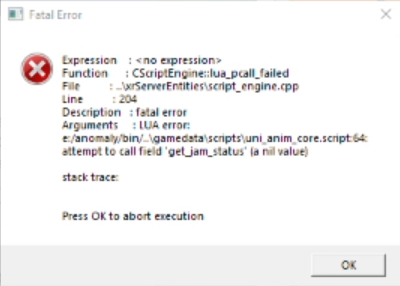
i don’t know if thats necessary at this point, he added extra tasks mod, and its crahing because of a task
I mean
junior moon

 cloud pecan
@harsh robin
junior moon
rotund pulsar
so?
Errhm.... if you deleted the .dll files and did the !k98 thing then try opening the vanilla game again
rotund pulsar
ok i ll try
 north fractal
okay i have the installer
junior moon
north fractal
okay i have the installer
Great, now do what Kolerder told you to do (bot message)
opaque hawk
 terse jay
363
rotund pulsar
anomaly vanilla worked for 5 seconds and now i have a black screen
opaque hawk
Give me a sec
rotund pulsar
but it runs
terse jay
rotund pulsar
anomaly vanilla worked for 5 seconds and now i have a black screen
wait thats good
junior moon
rotund pulsar
anomaly vanilla worked for 5 seconds and now i have a black screen
Define black screen, is it in the menu or in the game?
terse jay
rotund pulsar
but it runs
!blackscreen
 raw raftBOT
Follow this: #╭📖faq message
 north fractal
junior moon
Great, now do what Kolerder told you to do (bot message)
north fractal
junior moon
Great, now do what Kolerder told you to do (bot message)
ok, done
i didnt change my keybinds so i only did the add-ons one
opaque hawk
Additional

 junior moon
north fractal
i didnt change my keybinds so i only did the add-ons one
junior moon
north fractal
i didnt change my keybinds so i only did the add-ons one
So how many active mods do you have now?
terse jay
north fractal
i didnt change my keybinds so i only did the add-ons one
you should see that you have exactly 358 mods enabled
rotund pulsar
but I launched it from my folder
north fractal
terse jay
you should see that you have exactly 358 mods enabled
yep, i do
terse jay
north fractal
yep, i do
then you should be good, if you run into serious performance issues try #old-framerate-optimisation
junior moon
north fractal
yep, i do
!dx8 Do this for potato pc:
raw raftBOT
If you're playing (or if you want to play) with DX8, you'll need to do something first (this also applies to NVG): <#╭📖faq message>
terse jay
rotund pulsar
how do you launch vanilla anomaly from MO2
launch mo2, top right
rotund pulsar
i m in MO2 but how do I launch vanilla anomaly from there
?
how do I do from here?
 north fractal
junior moon
!dx8 Do this for potato pc:
north fractal
junior moon
!dx8 Do this for potato pc:
ok, done
so there should be no crashes now, right?
terse jay
more like if you crash now we can actually try to fix it
because youre using standart mods
junior moon
rotund pulsar
how do I do from here?
You can't.
north fractal
terse jay
more like if you crash now we can actually try to fix it
ok
rotund pulsar
how do I launch vanilla anomaly from MO2 then?
north fractal
lemme try going into the red forest again then and ill see what happens
oh and btw when i tab out and tab back into the game it crashes
 fair sluice
i get this error that tells me the AnomalyLauncher.exe isn't found, the exe file is actually not where it specifies because the whole folder is in "F:\STALKER Gamma", i moved it there and changed it in MO2, but it seems like MO2 still tries to find the files in the old location and i don't know how to fix this
any help is appreciated
 terse jay
rotund pulsar
how do I launch vanilla anomaly from MO2 then?
terse jay
rotund pulsar
how do I launch vanilla anomaly from MO2 then?
sean left, and i dont know why he needed you to run vanilla
he probably meant anomaly with no mods i guess
rotund pulsar
yes
terse jay
you sont run it from mo2, go to the folder
 tender forge
fair sluice
i get this error that tells me the AnomalyLauncher.exe isn't found, the exe file...
tender forge
fair sluice
i get this error that tells me the AnomalyLauncher.exe isn't found, the exe file...
Close mo2
Go to gamma folder and delete modorganizer.ini file (its under the modorganizer.exe)
Run mo2 and guide it to the anomaly folder
terse jay
north fractal
so thats a good start
the game should be good now minus the supposed terrible performance you told us about earlier
rotund pulsar
this popped up
 terse jay
rotund pulsar
this popped up
terse jay
rotund pulsar
this popped up
can you translate?
north fractal
terse jay
the game should be good now minus the supposed terrible performance you told us ...
yeah suprisingley its running the same as before
rotund pulsar
yep
 upper mist
hey i ran into a issue that says this ERRORS:
Unexpected end of archive
ERROR: Data Error : MAIN FILES\gamedata\sounds\music\level\ambientmusicpack\accg_quiet_days_on_earth.ogg
i dont know if i should be concerned because its still downloading i think but very very slowly
fair sluice
tender forge
Close mo2
Go to gamma folder and delete modorganizer.ini file (its under the mod...
thank you, that fixed that issue, but now the game crashes on startup with an error sound but no error showing
terse jay
fair sluice
thank you, that fixed that issue, but now the game crashes on startup with an er...
!crash
raw raftBOT
Send your crash log where it was asked IF YOU ARE BEING HELPED, not inside #🤖bot-commands if you're using this command in this channel.
You won't be helped, it's literally just a channel where you can use commands.
The file is inside your Anomaly folder, this is the complete path:
Anomaly/appdata/logs.
This is what you could find:
xray_yournamehere.txtxray_yournamehere.logxray_yournameherewithout any file extension
You just need to send ONE of these files where it was asked. It's either ONE file with .txt OR .log OR with nothing at the end.
DON'T send anything with .bkp at end.
Drag and drop the file inside the Discord channel, Discord will handle it for you.
Make sure you're not using any extra mods, if you do, you'll need to ask in #🔨modded-gamma-support.
tender forge
fair sluice
thank you, that fixed that issue, but now the game crashes on startup with an er...
!k98
rotund pulsar
The GPU device instance has been suspended. Use GetDeviceRemovedReason to determine the appropriate action.
that's what it said
tender forge
We broke a bot 
terse jay
tender forge
!k98
youre going straight for k98 i see
rotund pulsar
I think my pc is cursed for this game 
fair sluice
terse jay
!crash
this is the logs file of the crash
 azure pivot
You ever fix this? I get a similar thing. Decent cpu and gpu so not sure why I hold 80fps but microstutter and 99% fps reports 36-50ish always
tender forge
fair sluice
this is the logs file of the crash
!k98 ⬇️
raw raftBOT
1) Go in this folder: [YOUR GAMMA FOLDER]\.Grok's Modpack Installer\G.A.M.M.A\modpack_patches
2) Copy these three folders (check pic)
3) Go to your Anomaly folder
4) Paste these three folders (check pic)
5) Overwrite/replace all if asked
It won't delete your save files.
Here is a picture for reference:|||||||||||||||||||||||||||||||||||||||||||||||||||||||||||||||||||||||||||||||||||||||||||||||||||||||||||||||||||||||||||||||||||||||||||||||||||||||||||||||||||||||||||||||||||||||||||||||||||||||||||||||||||||||||||||||||||||||||||||||||||||||||||||||||||||||||||||||||||||||||||||||||||||||||||||||||||||||||||||||||||||||||||||||||||||||||||||||||||||||||||||||||||||||||||||||||||||||||||||||||||||||||||||||||||||||||||||||||||||||||||||||||||||||||||||||||||||||||||||||||||||||||||||||||||||||||||||||||||||||||||||||||||||||||||||||||||||||||||||||||||||||||||||||||||||||||||||||||||||||||||||||||||||||||||||||||||||||||||||||||||||||||||||||||||||||||||||||||||||||||||||||||||||||||||||||||||||||||||||||||||||||||||||||||||||||||||||||||||||||||||||||||||||||||||||||||||||||| _ _ _ _ _ _ https://cdn.discordapp.com/attachments/1012510897136222293/1013951079538495528/k98.png
 terse jay
rotund pulsar
The GPU device instance has been suspended. Use GetDeviceRemovedReason to determ...
terse jay
rotund pulsar
The GPU device instance has been suspended. Use GetDeviceRemovedReason to determ...
can you check if the gamma uses integrated gpu when youre running it?
maybe with geforce overlay
or nvidia control panel
rotund pulsar
how do I do that?
 flint warren
Someone know the mod that causes the weapon to disappear and not come back? I can't play the game because it keeps occuring.
terse jay
rotund pulsar
how do I do that?
youre using nvidia right?
rotund pulsar
yes
fair sluice
tender forge
!k98 ⬇️
this worked and the game launches now, thank you once again
opaque hawk
Yes, the problem is in the mod for additional tasks, after disabling it, the error disappeared. I put additional mods on the advice of streamers for the game. But for some reason, they didn’t have such troubles. Now everything works on the stock version, thanks.
tender forge
terse jay
youre going straight for k98 i see <:kekw:919974270132711444>
Yes 
terse jay
tender forge
Yes <:CoolChomp:792885124051763201>
you were right how about that
upper mist
May I post an error message here about a install problem? Or is that only in the other chat
terse jay
makes you wonder why k98 fix doesn't come pre applied with anomaly
tender forge
terse jay
makes you wonder why k98 fix doesn't come pre applied with anomaly
It does
Installer sometimes fails to apply it
rotund pulsar
wait, I have 2 monitors and my GPU is only used for the monitor who doesn't run gamma
terse jay
only need permission from 1 author
rotund pulsar
i ll try to lauch the game
terse jay
upper mist
May I post an error message here about a install problem? Or is that only in the...
you may
tender forge
fair sluice
this worked and the game launches now, thank you once again
If you can start a new game without a crash
Go to #⏩start-confirm to remove your newcomer tag
rotund pulsar
oh, anomaly uses my GPU
terse jay
@tender forge do we have a bot command for checking if the game runs on integrated gpu?
because thats the next step here
rotund pulsar
nevermind
tender forge
terse jay
<@606902268435890177> do we have a bot command for checking if the game runs on ...
It doesn't.
I know only of one person who got it running on igpu using dx8
upper mist
terse jay
you may
Mine is stuck on a certain mod and it keeps going very slowly should I. Let it go or just try and fix it. I did get an error messsge
terse jay
tender forge
It doesn't.
I know only of one person who got it running on igpu using dx8
well ok then, its just that [REDACTED] tells me that is a first step
terse jay
upper mist
Mine is stuck on a certain mod and it keeps going very slowly should I. Let it g...
what error message, screenshot it
upper mist
ERRORS:
Unexpected end of archive
ERROR: Data Error : MAIN FILES\gamedata\sounds\music\level\ambientmusicpack\accg_quiet_days_on_earth.ogg
in the console
upper mist
terse jay
what error message, screenshot it
does that help
terse jay
yes
 junior badge
hi all i played some time and i cant find kriss vector
who use it or what?
i only find ump
tender forge
Gameplay questions ask in #╓☢stalker-chat
junior badge
ok
 robust sky
How long should it take to install Gamma? Just curious
terse jay
3 hours
or in other words
boo
it depends on your internet speed obviously, could be fast
robust sky
Alright, I've got pretty bung internet so probably 3 to 4 hours
rotund pulsar
well, I give up on playing with Gamma
I ll just play regular anomaly because it works
Thank you helpers for all of your help it was very kind of you to give me some of your time
 drifting ivy
any way to get nv to work on dx 8?
upper mist
terse jay
yes
Fixed it. I forgot to run as administrator after I fixed my issue before that
Running smoothly
 crimson vapor
Ayo which button is it so I can bring the PDA closer to my face, i'm fuckin blind as hell lmao
 clear vale
Quick question, this is the right amount of shaders for the Gamma reshade file, right?
I'm asking because I'm pushing an edit to the Linux PC installation guide which fixes the lack-of-fancy-shaders issue
 covert dirge
Hello! The "2560x1440" resolution option is not showing on my settings menu... Anyone knows whats going on?
clear vale
covert dirge
Hello! The "2560x1440" resolution option is not showing on my settings menu... A...
Could you take a screenshot of your Display Settings in Windows on top of your in-game resolution options?
So that you can see both at the same time
covert dirge
like that?
 clear vale
Oh, your gamma cannot use a higher screen resolution than what your monitor is currently using. So you would have to close gamma, set your Windows screen resolution to 2560x1440, and then restart gamma
covert dirge
i see! ty
clear vale
Yeah because it would make Gamma so big that you would not be able to click on 40% of the game anymore, so generally games and such only let you use 100% of your Windows display resolution
 solid goblet
Sup fellas, i want to install ''Anomaly HD Models Addons'', it will work on GAMMA?
clear vale
clear vale
Quick question, this is the right amount of shaders for the Gamma reshade file, ...
Also, do the emissions warp people to hell intentionally now? I'm wondering if that's my new shader setup, or if it's just part of gamma
clear vale
solid goblet
Sup fellas, i want to install ''Anomaly HD Models Addons'', it will work on GAMM...
It should technically work, but please ask in #🔨modded-gamma-support . That is where people can help you with edits to your modlist setup
I don't know the specifics, someone in there should for sure (and have some heated opinions, naturally)
solid goblet
thanks brother !
clear vale
solid goblet
thanks brother !
Yw
I think this is fairly normal when you light it, on my end it lit up like a flashbang, I think they know it's a bug or something
 fallen anvil
Anyone else sounds randomly stutter and cut out?
 agile comet
how do i replace my barrel it says "cannot be switchout in the field"
 weary ferry
agile comet
how do i replace my barrel it says "cannot be switchout in the field"
weary ferry
agile comet
how do i replace my barrel it says "cannot be switchout in the field"
use workshop
fallen anvil
agile comet
how do i replace my barrel it says "cannot be switchout in the field"
You need the proper toolkit and repair kit to do so. Right click the gun and go to details and it will show you which repair kit you need. Keep in my mind you have to have a toolkit or it will not work unless you swap it out directly with the repair kit using "Maintain Parts"
weary ferry
open your PDA, guide, there's a lot of things in there
 lucid pollen
Guys, i'm new to the Stalker series. Downloaded GAMMA today after playing Anomaly and I cant get my radiation OFF me. I keep taking damage even if my "rad bar" on the inventory seems empty (No white bars showing), after several beers/vodkas
 hazy linden
anyone encounter some bad stuttering? Im on an i7-12700k with 3080ti and its been happening fairly often
fallen anvil
hazy linden
anyone encounter some bad stuttering? Im on an i7-12700k with 3080ti and its bee...
Go into MO2, go under gamma fixes, then select the box that says "Turn this on if you stutter", Open ANOMALY launcher, delete shader cache, use 1536 shadow map, save settings. Yes you need to close, also use nvidia control panel turn off vsync in there and in the game and use the FPS limiter in control panel to set your maxed frame rate
hazy linden
fallen anvil
Go into MO2, go under gamma fixes, then select the box that says "Turn this on i...
I'm assuming I need to save and close before doing so?
robust sky
The installer was unable to create a shortcut, how do I do it manually?
hazy linden
legend
fallen anvil
hazy linden
I'm assuming I need to save and close before doing so?
I get almost no stutters and have 150+ fps on every map with graphics settings maxed out and my set up is not as good as yours
 foggy relic
Came here from the other channel. running into a consistent crash during the Northern Hospitality mission in Limansk, every time i cross under the concrete wall behind the construction site
 brisk zinc
robust sky
The installer was unable to create a shortcut, how do I do it manually?
brisk zinc
robust sky
The installer was unable to create a shortcut, how do I do it manually?
!shortcut
raw raftBOT
The installer didn't create a shortcut for G.A.M.M.A.: #╭📖faq message
brisk zinc
fallen anvil
I get almost no stutters and have 150+ fps on every map with graphics settings m...
Cap
I've read this stuff at least 20 times, every time it was cap, it's just not possible
fallen anvil
brisk zinc
Cap
LOL okay
terse jay
admited to lying live in 4k
 weary ferry
fallen anvil
set the max to 144 and this is what im at average
weary ferry
fallen anvil
set the max to 144 and this is what im at average
Could you share your graphic setting?
fallen anvil
weary ferry
Could you share your graphic setting?
In game or reshade?
fallen anvil
weary ferry
in game
Every thing is maxed except for grass, render distance is 150, size 0.7, grass shadows on but I would still recommend keeping it off and setting your render distance lower and move the density slider down a bit from default
I also keep actor shadow off but other than that every slider is maxed out with all options turned on
I use HBAO instead of SSDO because I have an Nvidia gpu
fallen anvil
its an ambient occlusion setting for shadows
 prime fulcrum
@hazy linden #⏩start-confirm
fallen anvil
I keep the intensity of sun rays default
foggy relic
foggy relic
Came here from the other channel. running into a consistent crash during the Nor...
5th attempt, cannot progress past the construction site
brisk zinc
fallen anvil
Every thing is maxed except for grass, render distance is 150, size 0.7, grass s...
except
except
except
graphics settings maxed out
Get fucked

fallen anvil
Have fun at 50 fps (:
brisk zinc
Just stating the truth here
 vernal spear
im having an issue with companion inventory his weight limit is full and i gave him items to carry for me such an exosuit and an m4 tactical but when i go into his inventory to grab them theres nothing there i understand they are in his "secret inventory" and show up if he dies but not while hes alive. ive tried using 220 companion item fix and a separate mod to fix but neither have worked any insight is much appreciated
brisk zinc
That's not maxed out
foggy relic
okay
brisk zinc
The day you'll have grass, I'll get fucked
Till that day, cap
And I perfectly know you can't have grass but I just hate reading "maxed out" when it's clearly a blatant lie
 cyan halo
anyone else experiencing slow download speeds when "full Gamma installation" in the EU?
like, hole shit... 30 minutes and still not even half way through
cyan halo
yeah, I've selected the mirror to EU 126, still really slow
fallen anvil
dm me doc I have a fix for that
 pure pelican
I have a small problem and maybe someone can help me out? I usually crash when I kill certain people. For example I nearly killed the entire military on the agroprom map, but when I get into their base and kill what I believe to be the "commander" or "boss" or whatver you call him the game instant crashes. I tried it twice and both times instant crash. Am I not supposed to kill military guys? They instantly fire on me so naturally I fired back. Btw same thing happens on other map. Btw I have a hard time figuring out who are friends and who foes. Usually I fire back at people that shoot me, but I got a radio message that my standing with the faction lowered. So I assume I could be friends with t hem. How would I become friendly with a faction?
fallen anvil
you can install all the add ons before you start the gamma installation and it will save you from having to download them all one by one from modDB
 languid tangle
i need help
brisk zinc
fallen anvil
dm me doc I have a fix for that
You can report your stuff in here if you want, it's all good "feedback" towards good FPS for everybody
If you can manage to get EVERYTHING maxed in Rostok (The Freedom base is there, right?) I'll eat my hat, because that place is one of the most badly optimised and you just can't have grass there, it's impossible
There are places where you can get 100+ FPS, Great Swamps for istance, but many places are FPS "friendly"
But you just can't have everything maxed, it's impossible, grass will always be low
terse jay
He's running Gamma on nuclear reactor
brisk zinc
I would honestly believe that over the "everything maxed" 
I have really read it too many times not to believe it
terse jay
The grass slider is a gpu self destruct button btw
Real gamers don't touch grass anyways
Btw Falco my role is fucked and doesn't give me slowmode immunity pls haelp
brisk zinc
terse jay
Btw Falco my role is fucked and doesn't give me slowmode immunity pls haelp
I know, I can read
I don't know why you have this problem
 fallen anvil
exactly its common knowledge that the grass sliders tank fps, I thought it was obvious what I meant by maxed out, I still get 135-144fps in rostok and every other non fps friendly location especially faction bases
brisk zinc
fallen anvil
exactly its common knowledge that the grass sliders tank fps, I thought it was o...
At this point share your settings if you haven't done already because the whole server is curious 
Also share GPU and CPU
fallen anvil
it has to do with a lot more than just your in game settings
terse jay
when you set your game to run on core -1
fallen anvil
there are some A life optimizations you can make in mod organizer 2 that deal with the switch distance that help a ton, have v sync turned off in game and in nvidia control panel with the fixed refresh rate option on set to your monitors refresh rate
 limpid field
Bad?
 brisk zinc
limpid field
Bad?
brisk zinc
limpid field
Bad?
!verify
raw raftBOT
YOU'RE NOT PLAYING ANOMALY VANILLA. THIS IS A MOD PACK, REMEMBER?
Don't verify stuff with the Anomaly Launcher, you're using Mod Organizer.
limpid field
How do I launch the game then?
brisk zinc
limpid field
How do I launch the game then?
...with Mod Organizer?
limpid field
just click run?
brisk zinc
Choose a DX and then click run
 mellow terrace
hey guys this may seem dumb
but I downloaded everything a while ago and I frgot how the client is called
brisk zinc
terse jay
fallen anvil
there are some A life optimizations you can make in mod organizer 2 that deal wi...
"a life optimisations in mod organiser 2 that deal with switch distance" you mean the Turn this on if you stutter mod? 
brisk zinc
mellow terrace
but I downloaded everything a while ago and I frgot how the client is called

Or at this point you could do this
!shortcut
raw raftBOT
The installer didn't create a shortcut for G.A.M.M.A.: #╭📖faq message
brisk zinc
Create a shortcut again so you don't miss it
fallen anvil
terse jay
"a life optimisations in mod organiser 2 that deal with switch distance" you mea...
No, you manually go into the a life optimization and change the switch distance lmao
fallen anvil
terse jay
"a life optimisations in mod organiser 2 that deal with switch distance" you mea...
Also make sure auto switch is set to false
terse jay
The expected framerate in Rostok is 60 fps at a good day, just changing autoswitch won't double it my man, something else is happening there
fallen anvil
terse jay
The expected framerate in Rostok is 60 fps at a good day, just changing autoswit...
alright let me show you
terse jay
Is it 60 fps with auto switch?
Watch litterally 100% of framerate optimisation problems being the fucking autoswitch
I swear to god
brisk zinc
My main problem with GAMMA is stutter and, well, wonky framerate
fallen anvil
terse jay
Is it 60 fps with auto switch?
nope I will without a doubt get atleast 130-144fps no problem
brisk zinc
I can reach that kind of FPS as well, the problem is to maintain that kind of FPS
mellow terrace
raw raft
The installer didn't create a shortcut for G.A.M.M.A.: https://discord.com/chann...
Somhow I still cant find modOrganiser idk what happend but thanks anyways
terse jay
I strongly suspect the reason its this high is because he stands completely stilll for several seconds to check his fps
are you using geforce? there is an overlay with fps counter
im curious what it is when youre actually moving/shooting enemies
fallen anvil
Of course it drops a tiny bit during huge gunfights and stuff but I never notice it
if I can figure out how to record the gameplay Ill show you
terse jay
drops a tiny bit
to 15
fallen anvil
Yall mf keep doubting me and ive proved you wrong everytime lol
why would I lie about the fps I get?
terse jay
I wonder why we are doubting you, maybe because this is a 300k people server and we told every single one of them that average of 60 fps is the best they can hope for
fallen anvil
thats so fucking dumb lmao
limpid field
What I do?
fallen anvil
you can go on youtube right now and see people getting far far beyond 60 fps lol
terse jay
fallen anvil
you can go on youtube right now and see people getting far far beyond 60 fps lol
yes, because they are youtubers
fallen anvil
jesus christ lol they dont have access to some crazy hardware we dont
terse jay
anyways im not going to teach you what average pc user looks like, just tell me if it was 144 fps when you first launched it and started playing
or did you do something specific
 terse jay
limpid field
What did I do wrong?
terse jay
limpid field
What did I do wrong?
nothing yet wait
terse jay
!blackscreen
raw raftBOT
Follow this: #╭📖faq message
terse jay
try this
 north turret
I downloaded all of the mods but literally none of them were enabled like the last time I had it installed
terse jay
north turret
I downloaded all of the mods but literally none of them were enabled like the la...
!default
raw raftBOT
Mod list
To bring your mod list back to default, inverting any changes made by you:
- Open the installer with admin rights
- Click on
Only install G.A.M.M.A. addons
Keybinds
To bring your keybinds to default, DON'T press the default button in the menu, you'll mess up everything.
Instead, do this:
- Go in
GAMMA RC3\.Grok's Modpack Installer\G.A.M.M.A\modpack_patches\appdata - Copy the
user.ltxfile you'll find in there (note that every change made by you in youruser.ltxwill be reverted to default) - Paste this file in
Anomaly\appdata
fallen anvil
terse jay
anyways im not going to teach you what average pc user looks like, just tell me ...
I have a 5900x and a 3080, its still the changes I made that increased fps though because when I first installed gamma it ran like shit
north turret
less than 120 FPS
I know some people who refuse to play in 30 FPS because it hurts their eyes lmao
fallen anvil
terse jay
i wonder what 3080 users call "like shit"
yeah lol 60 because thats what fps was capped at
prime fulcrum
fallen anvil
there are some A life optimizations you can make in mod organizer 2 that deal wi...
...you do realise that by doing this you're putting all the NPCs out of the switch zone radius into the offline mode?
You literally won't hear gunfights farther than the distance that you'll set it to, because NPCs won't be even there
fallen anvil
prime fulcrum
...you do realise that by doing this you're putting all the NPCs out of the swit...
It depends on what distance you set it to
prime fulcrum
fallen anvil
It depends on what distance you set it to
And what distance did you set it to
fallen anvil
prime fulcrum
And what distance did you set it to
mine is 2000
north turret
terse jay
!default
It didn't work
terse jay
bruh
brisk zinc
Yeah I was thinking about that, talking about switch and all
fallen anvil
prime fulcrum
And what distance did you set it to
default is 350
terse jay
Damn dude that 3080 is staring to look very buyable right about now
limpid field
i open stalker and it says i have an update but i cnat read it fast enough
fallen anvil
prime fulcrum
Wait what the fuck
it doesnt make sense I know, you would assume more online objects = tank fps but thats not the case. A guy on a obscure stalker forum recommended this and I tried it out low and behold my game runs really well idk
prime fulcrum
limpid field
i open stalker and it says i have an update but i cnat read it fast enough
ignore
 open oar
does weapon quality matter in anyway when given to a follower?
prime fulcrum
fallen anvil
it doesnt make sense I know, you would assume more online objects = tank fps but...
@willow hawk
fallen anvil
prime fulcrum
<@145883656500543489>
That same guy claims he helped grok with the alife something or another
fallen anvil
hang on let me get to a stopping point
found a tool kit really early and dont want to lose it lmao
prime fulcrum
<@&1031963881536503882>s, we need your help|||||||||||||||||||||||||||||||||||||||||||||||||||||||||||||||||||||||||||||||||||||||||||||||||||||||||||||||||||||||||||||||||||||||||||||||||||||||||||||||||||||||||||||||||||||||||||||||||||||||||||||||||||||||||||||||||||||||||||||||||||||||||||||||||||||||||||||||||||||||||||||||||||||||||||||||||||||||||||||||||||||||||||||||||||||||||||||||||||||||||||||||||||||||||||||||||||||||||||||||||||||||||||||||||||||||||||||||||||||||||||||||||||||||||||||||||||||||||||||||||||||||||||||||||||||||||||||||||||||||||||||||||||||||||||||||||||||||||||||||||||||||||||||||||||||||||||||||||||||||||||||||||||||||||||||||||||||||||||||||||||||||||||||||||||||||||||||||||||||||||||||||||||||||||||||||||||||||||||||||||||||||||||||||||||||||||||||||||||||||||||||||||||||||||||||||||||||||| _ _ _ _ _ _ @next glen @soft leaf @molten mason @worn elbow @frozen geyser @sturdy stone @dusk garden
 molten mason

prime fulcrum
If this shit actually works I'll be surprised
foggy relic
yeah as it stands Northern Hospitality is not completable
fallen anvil
im going to close game change setting and let you know what it is at 350
foggy relic
ctd any time i get close to the transition from limansk to hospital
terse jay
yes
prime fulcrum
molten mason
<:hmm:1010935402556817448>
We need to see if setting auto_switch_distance_start in \GAMMA\mods\Turn this on if you stutter\gamedata\configs alife.ltx to 2000 will help your fps
molten mason
ok on that issue its a yes and a no
 versed tusk
depends on hardware
fallen anvil
it's under the a life optimization in file explorer
molten mason
its mostly confirmation bias
however it does work for some users
its a very hardware dependent thing
in some cases it can reduce stutters
fallen anvil
like I said idk if that's why my game runs well or not, I just made the change after seeing a guy online talk about it and I haven't noticed the drops I was getting in fps before I did that
molten mason
yeah
fallen anvil
I do have high end hardware though so hard to tell
fallen anvil
I always assumed people with intel cpus would run the game better
molten mason
specially when you get close to npc heavy hubs
fallen anvil
clock speed and all of that, I have always said to myself lowering stalker population in bases would help everyone's fps
molten mason
i have tried it
it is a smoother experience
however
the general performance on low end pcs will suffer
setting it to 2k range is better if your pc is good
fallen anvil
I mean anyone can get really solid fps if they are willing to sacrifice the way the game looks lol but finding a way to do so without doing that seems pretty difficult without significantly changing the spawn rates of npcs
molten mason
npcs and stashes are real resource hogs
north turret
All of the mods are still disabled for me in MO2, I tried every way listed on the server and nothing has worked yet.
molten mason
mostly stashes tbh
terse jay
fallen anvil
clock speed and all of that, I have always said to myself lowering stalker popul...
Let me clear this up, you ran into the issue of fps being capped at 60
You went and both changed switch distance to 2000 AND at the same time turned vsync off
Then your fps became 144
And you claim the performance improved because of switch distance?
fallen anvil
molten mason
mostly stashes tbh
Oh really? I never would have guessed that
molten mason
yeah stashes also have to swap to offline depending on the range
and if they are loaded
this will tank your performance
 worn elbow
Yeah you can get MASSIVE stutters approaching your created base
Even on good hardware
fallen anvil
terse jay
Let me clear this up, you ran into the issue of fps being capped at 60
You went ...
I have nvidia controlling my fps limit, using the fixed refresh rate setting set to 144 fps and vsync turned off in nvidia control panel and in game
molten mason
then it just dances between 100 and 80
terse jay
fallen anvil
I have nvidia controlling my fps limit, using the fixed refresh rate setting set...
but it wasn't off when you first launched the game right?
fallen anvil
I play in 1920 x 1080 though
terse jay
it wasn't set to that the first time
terse jay
fallen anvil
I have nvidia controlling my fps limit, using the fixed refresh rate setting set...
the time when you experienced shit performance before going to fix it these nvidia settings wasn't applied yet?
terse jay
north turret
All of the mods are still disabled for me in MO2, I tried every way listed on th...
!default should work, i went and checked it right now, doing that enables any mod i untick
raw raftBOT
Mod list
To bring your mod list back to default, inverting any changes made by you:
- Open the installer with admin rights
- Click on
Only install G.A.M.M.A. addons
Keybinds
To bring your keybinds to default, DON'T press the default button in the menu, you'll mess up everything.
Instead, do this:
- Go in
GAMMA RC3\.Grok's Modpack Installer\G.A.M.M.A\modpack_patches\appdata - Copy the
user.ltxfile you'll find in there (note that every change made by you in youruser.ltxwill be reverted to default) - Paste this file in
Anomaly\appdata
fallen anvil
terse jay
the time when you experienced shit performance before going to fix it these nvid...
yes, that was just gamma running normally
north turret
It didn't work for me, honestly.
terse jay
fallen anvil
yes, that was just gamma running normally
Well let me solve this mystery for good, you launched the game for the first time it was hard capped to 60 fps, you called it shit performance, you went in your nvidia panel, and, among other settings, turned vsync off which means no more 60 fps cap
that what fixed it for you, that and you having 3080
fallen anvil
terse jay
the time when you experienced shit performance before going to fix it these nvid...
vsync option turned off in nvidia control panel as well and the in game fps limiter set to 144 just to make sure lol
 terse jay
yes
 soft leaf
what the fuck happened
terse jay
nothing?
molten mason
soft leaf
what the fuck happened
its the change the stutter fix range from 350 to 2000 again
terse jay
we for a second thought that turning a life swithc distance to 2000 can double fps
molten mason
i just tried it on my game
terse jay
but what actually doubled it was changing fps cap from 60 to 144
molten mason
i lost 20 fps
fallen anvil
molten mason
i just tried it on my game
My fps barely changed
molten mason
 timber owl
is this stash/npc loading thing possibly the reason I ctd in the north of dark valley 100% of the time?
terse jay
skill issue
molten mason
see this is why i told you its unique per pc
soft leaf
molten mason
its the change the stutter fix range from 350 to 2000 again
ah i play with 1k on switch and it runs WAY WAY better than the usual 3m that gamma has
it depends on a lot of things
terse jay
north turret
It didn't work for me, honestly.
i believe you, but it should have, are you sure you actually have mods to enable? there are mods listed in mo2 right?
north turret
Every mod is there, it's all downloaded, but every single one is disabled and I have no way of knowing which ones need to be enabled.
fallen anvil
soft leaf
ah i play with 1k on switch and it runs WAY WAY better than the usual 3m that ga...
I thought I noticed a difference when I changed mine to 2k seemed to stutter even less but who knows what caused it. The biggest change i've found is simply capping your fps without using vsync
terse jay
north turret
Every mod is there, it's all downloaded, but every single one is disabled and I ...
launch the installer as admin, press download gamma data, press only install gamma addons, screenshot the installer window and send it here
molten mason
its on the #old-framerate-optimisation to cap your fps for best performance
 sharp remnant
Hello, i am new here and have a problem, any clue what happened?
 terse jay
hidden threat monkas
fallen anvil
molten mason
its on the <#929309266056196096> to cap your fps for best performance
they need to adjust the wording, it says set it to 60 fps and a shit load of people can run a way higher refresh rate
molten mason
its mostly for potatoes
north turret
terse jay
launch the installer as admin, press download gamma data, press only install gam...
I just noticed there are a couple errors. I'm not a computer person but I can kind of understand. If this is super obvious and an easy fix I'm sorry for my ignorance.

I figured MO2 can't find a path to the game or something
sharp remnant
terse jay
hidden threat monkas
What does that mean?
fallen anvil
molten mason
its mostly for potatoes
i've played on a potato damn near my entire life, got sick of it and just built this rig lmao
terse jay
your rig is built to fight gods
apparently
i wonder how high your fps goes without a cap
fallen anvil
terse jay
your rig is built to fight gods
buys 3080.. 40 series launches a 3 months later
terse jay
fucking infinite fps
molten mason
fallen anvil
i've played on a potato damn near my entire life, got sick of it and just built ...
from a 1050ti to a 3060 with a brand new cpu 
foggy relic
finally got a decent log
terse jay
sharp remnant
What does that mean?
it means you have 355 mods active on your screenshot, explain yourself
fallen anvil
terse jay
fucking infinite fps
honest to god if you mainly just game go intel 100% sure ryzen is great and all but as someone who has had 5 ryzen cpu's and a handful of intel cpu's I would no question rebuild this pc if I could with an intel cpu
foggy relic
fallen anvil
DId either of you try the gamma patches?
sharp remnant
terse jay
it means you have 355 mods active on your screenshot, explain yourself
I followed a youtube guide on how to install gamma and followed each step
fallen anvil
I have reinstalled 3 times and couldnt even run the game without installing them lol
terse jay
He is a tester, so i assume he tried everything that is possible or not
terse jay
sharp remnant
I followed a youtube guide on how to install gamma and followed each step
which step had you disable 3 mods
fallen anvil
sharp remnant
I followed a youtube guide on how to install gamma and followed each step
the latest gamma has 358 right?
terse jay
sharp remnant
I followed a youtube guide on how to install gamma and followed each step
!default do this either way
raw raftBOT
Mod list
To bring your mod list back to default, inverting any changes made by you:
- Open the installer with admin rights
- Click on
Only install G.A.M.M.A. addons
Keybinds
To bring your keybinds to default, DON'T press the default button in the menu, you'll mess up everything.
Instead, do this:
- Go in
GAMMA RC3\.Grok's Modpack Installer\G.A.M.M.A\modpack_patches\appdata - Copy the
user.ltxfile you'll find in there (note that every change made by you in youruser.ltxwill be reverted to default) - Paste this file in
Anomaly\appdata
terse jay
fallen anvil
the latest gamma has 358 right?
yes
maybe he just hasn't updated in a while
fallen anvil
terse jay
yes
my game literally would not launch without those patches, he should reinstall and use those
terse jay
what patches are you talking right now
we have a lot of patches ready to be deployed at different errors, im not sure what you are referring to right now
fallen anvil
terse jay
what patches are you talking right now
 terse jay
!k98
raw raftBOT
1) Go in this folder: [YOUR GAMMA FOLDER]\.Grok's Modpack Installer\G.A.M.M.A\modpack_patches
2) Copy these three folders (check pic)
3) Go to your Anomaly folder
4) Paste these three folders (check pic)
5) Overwrite/replace all if asked
It won't delete your save files.
Here is a picture for reference:|||||||||||||||||||||||||||||||||||||||||||||||||||||||||||||||||||||||||||||||||||||||||||||||||||||||||||||||||||||||||||||||||||||||||||||||||||||||||||||||||||||||||||||||||||||||||||||||||||||||||||||||||||||||||||||||||||||||||||||||||||||||||||||||||||||||||||||||||||||||||||||||||||||||||||||||||||||||||||||||||||||||||||||||||||||||||||||||||||||||||||||||||||||||||||||||||||||||||||||||||||||||||||||||||||||||||||||||||||||||||||||||||||||||||||||||||||||||||||||||||||||||||||||||||||||||||||||||||||||||||||||||||||||||||||||||||||||||||||||||||||||||||||||||||||||||||||||||||||||||||||||||||||||||||||||||||||||||||||||||||||||||||||||||||||||||||||||||||||||||||||||||||||||||||||||||||||||||||||||||||||||||||||||||||||||||||||||||||||||||||||||||||||||||||||||||||||||||| _ _ _ _ _ _ https://cdn.discordapp.com/attachments/1012510897136222293/1013951079538495528/k98.png
terse jay
maybe that, most likely that, but that won't fix him having 3 less mods for some reason
fallen anvil
terse jay
maybe that, most likely that, but that won't fix him having 3 less mods for some...
thats why I would say fuck it and just start over lol
cyan halo
hey @terse jay what are those 3 patch folder for? I followed a guide on youtube, but the guy didnt tell what they are, just that they fix game not starting apparently
 sinful dust
if Gamma.installer.exe wasn't able to download everything the first try does download gamma data and full gamma installation just download what files are left?
terse jay
cyan halo
hey <@312181129602007051> what are those 3 patch folder for? I followed a guide ...
they are to fix game not starting
thats their purpose
there isn't much more to it really
fallen anvil
they work tho lol
terse jay
sinful dust
if Gamma.installer.exe wasn't able to download everything the first try does dow...
yes
cyan halo
right, so if my game starts without applying them, then no need to do anything right?
terse jay
cyan halo
right, so if my game starts without applying them, then no need to do anything r...
correct
cyan halo
sweet ❤️
terse jay
if it aint broken
fallen anvil
I really wish there was an instruction for new players under "how to install" for how to install your downloads without pulling them from moddb 1 by 1
it literally saves hours of time
upper mist
hey um
versed tusk

upper mist
i cant launch gamma
terse jay
fallen anvil
I really wish there was an instruction for new players under "how to install" fo...
what
upper mist
i have everything and anomoly avx dvx11
terse jay
you mean the #old-how-to-install
fallen anvil
terse jay
you mean the <#1025299613550387210>
yeah
fallen anvil
terse jay
what
I had to find out how online
terse jay
fallen anvil
I had to find out how online
im not following, did you download all mods in a sigle package?
cyan halo
😮
terse jay
upper mist
i cant launch gamma
you installed everything right? then post a crashlog
terse jay
upper mist
i cant launch gamma
!crash
raw raftBOT
Send your crash log where it was asked IF YOU ARE BEING HELPED, not inside #🤖bot-commands if you're using this command in this channel.
You won't be helped, it's literally just a channel where you can use commands.
The file is inside your Anomaly folder, this is the complete path:
Anomaly/appdata/logs.
This is what you could find:
xray_yournamehere.txtxray_yournamehere.logxray_yournameherewithout any file extension
You just need to send ONE of these files where it was asked. It's either ONE file with .txt OR .log OR with nothing at the end.
DON'T send anything with .bkp at end.
Drag and drop the file inside the Discord channel, Discord will handle it for you.
Make sure you're not using any extra mods, if you do, you'll need to ask in #🔨modded-gamma-support.
fallen anvil
terse jay
im not following, did you download all mods in a sigle package?
you can just copy all the add ons from this archive in 7zip and move them over to the gamma downloads folder and then start your gamma installation, it literally cuts the time in half maybe even more
 terse jay
fallen anvil
you can just copy all the add ons from this archive in 7zip and move them over t...
terse jay
fallen anvil
you can just copy all the add ons from this archive in 7zip and move them over t...
oh gotcha, the old and outdated method of downloading
right
sharp remnant
Hi again, i placed the patches and did the install only gamma addons thing and its the same error. I am guessing the next step is to re install the whole thing?
fallen anvil
terse jay
oh <:kekw:919974270132711444> gotcha, the old and outdated method of downloadin...
Its so much better than the current method though by a long shot
terse jay
yeah just tell me who distributes that archive "online" whatever that means
imma go shoot him
that is actually fucking illegal, the bastards
fallen anvil
Anyways, i'll stop bloating up the chat so these people can get the help they need. Have a good night man
fallen anvil
idek what that means lol
versed tusk
ofc not
upper mist
im on the mod orginizer screen for gamma i selected dx11 avx and it loadds but then crashes on startup
versed tusk
brisk zinc
fallen anvil
idek what that means lol
He's asking where did you get that zip, because it's an old thing we used to have
upper mist
i dont even see title screen
fallen anvil
brisk zinc
He's asking where did you get that zip, because it's an old thing we used to hav...
oh I thought it came from gamma?
I haven't pulled it from anywhere else lol
brisk zinc
Let's change the question then, where did you get it?
fallen anvil
in fact a guy I helped earlier had the same folder
terse jay
fallen anvil
oh I thought it came from gamma?
it did, and then it stopped coming from Gamma, FOR A REASON
fallen anvil
terse jay
it did, and then it stopped coming from Gamma, FOR A REASON
Oh idk I downloaded gamma forever ago so its probably from when I first installed it
terse jay
like 3 month ago
fallen anvil
its literally in a yt tutorial on how to install gamma, it just comes with the gamma files
brisk zinc
Can you send the tutorial then?
fallen anvil
or used to anyway
yeah ill try to find it hold up
https://www.youtube.com/watch?v=kQl2gkl_3-c&ab_channel=GaryFox look at the top pinned comment, thats how I figured it out

Welcome to the new updated install guide for S.T.A.L.K.E.R Anomaly and GAMMA!
Links to all downloads are on the discord:
https://discord.gg/stalker-gamma
Also provided are timestamps for the various sections:
00:00 - Start
01:00 - Preparation
03:02 - Anomaly Install
05:34 - Gamma Install
Please read through the discord channels for various is...
terse jay
 ITS TIME BOYS
fallen anvil
who gives a fuck it came from gamma lol
brisk zinc
Nah the link is not there
 somber edge
Game just CTD, saw this error that I haven't seen before. Anyone know of a solution?
 fallen anvil
brisk zinc
Nah the link is not there
fallen anvil
brisk zinc
Nah the link is not there
oh you mean to get that archive?
brisk zinc
fallen anvil
who gives a fuck it came from gamma lol
You're not getting what we're talking about, I'll explain very quickly
Yes
The archive
The archive was a momentary thing
fallen anvil
dm me if you can
brisk zinc
Not a forever fix
terse jay
 fallen anvil
^that yes
terse jay
ok what does he actually mean tho, did that actually work when we had archive
brisk zinc
Yes, the top comment doesn't have that archive
fallen anvil
you just copy that archive into your downloads folder before you start installation
brisk zinc
IIRC that was the procedure, like, what you needed to do
fallen anvil
but a lot of people still have it
terse jay

terse jay
somber edge
Game just CTD, saw this error that I haven't seen before. Anyone know of a solut...
how many mods did you enable/disable?
somber edge
terse jay
how many mods did you enable/disable?
The only mods I've disabled are those for framerate optimization as well as YACS and fast travel limitations.
terse jay
Trick question, the correct answer is none, this is a default-modlist-support
If you prioritise not crashing my way of fixing it would be to go back to default and check again
If you intend to stick with this modlist go #🔨modded-gamma-support
somber edge
Lol I took it as haven't added additional mods. My bad
 gilded skiff
hello...i have downloaded everything, launched the game and played a bit,,,but this time when on MOD2...i noticed my ACTIVE MOD number is 0
am i not actually playing or enjoying teh Gamma mod pack and just playing anomaly?
is there a basic profile i can download that will enable the good and suggested mods?
terse jay
so you are just playing anomaly
gilded skiff
i knew i was dumb
terse jay
press download gamma data
terse jay
now press Full Gamma installation
gilded skiff
okay thats running
terse jay
this is gonna take some real time
gilded skiff
okay...so that will check everything and get back to normal?
terse jay
it should install any mods you are missing
gilded skiff
understood
terse jay
and check them in mo2
from what you told me it might be all of the mods
might take hours
gilded skiff
yeah so i have like 421 mods in MOD2
i just dont think any of them are actually enabled
fallen anvil
terse jay
what
I do have a question real quick
fallen anvil
is there a way to change font size in game
terse jay
uhhh
fallen anvil
without changing resolution
fallen anvil
okay lol
 young dew
downloaded Anomaly..played it for 2 hrs..died 10 times to wildlife like cats and dogs..while killing tons of bandits with no problem..uninstalled right away 👎
 compact parrot
my game starts loading then immediately crashes with no error
sharp remnant
hello again, came to say that installing again actually worked, and wanted to thank you for helping my dumbass
terse jay
compact parrot
my game starts loading then immediately crashes with no error
!crash post crashlog
raw raftBOT
Send your crash log where it was asked IF YOU ARE BEING HELPED, not inside #🤖bot-commands if you're using this command in this channel.
You won't be helped, it's literally just a channel where you can use commands.
The file is inside your Anomaly folder, this is the complete path:
Anomaly/appdata/logs.
This is what you could find:
xray_yournamehere.txtxray_yournamehere.logxray_yournameherewithout any file extension
You just need to send ONE of these files where it was asked. It's either ONE file with .txt OR .log OR with nothing at the end.
DON'T send anything with .bkp at end.
Drag and drop the file inside the Discord channel, Discord will handle it for you.
Make sure you're not using any extra mods, if you do, you'll need to ask in #🔨modded-gamma-support.
terse jay
sharp remnant
hello again, came to say that installing again actually worked, and wanted to th...
No problem 👍
raw raftBOT
1) Go in this folder: [YOUR GAMMA FOLDER]\.Grok's Modpack Installer\G.A.M.M.A\modpack_patches
2) Copy these three folders (check pic)
3) Go to your Anomaly folder
4) Paste these three folders (check pic)
5) Overwrite/replace all if asked
It won't delete your save files.
Here is a picture for reference:|||||||||||||||||||||||||||||||||||||||||||||||||||||||||||||||||||||||||||||||||||||||||||||||||||||||||||||||||||||||||||||||||||||||||||||||||||||||||||||||||||||||||||||||||||||||||||||||||||||||||||||||||||||||||||||||||||||||||||||||||||||||||||||||||||||||||||||||||||||||||||||||||||||||||||||||||||||||||||||||||||||||||||||||||||||||||||||||||||||||||||||||||||||||||||||||||||||||||||||||||||||||||||||||||||||||||||||||||||||||||||||||||||||||||||||||||||||||||||||||||||||||||||||||||||||||||||||||||||||||||||||||||||||||||||||||||||||||||||||||||||||||||||||||||||||||||||||||||||||||||||||||||||||||||||||||||||||||||||||||||||||||||||||||||||||||||||||||||||||||||||||||||||||||||||||||||||||||||||||||||||||||||||||||||||||||||||||||||||||||||||||||||||||||||||||||||||||||| _ _ _ _ _ _ https://cdn.discordapp.com/attachments/1012510897136222293/1013951079538495528/k98.png
compact parrot
ill try that
 hushed vault
Anyway to turn off the depth of field effect when using an item?
prime fulcrum
hushed vault
Anyway to turn off the depth of field effect when using an item?
!dof
Also go to #⏩start-confirm
raw raftBOT
It's the new DOF (Depth Of Field) effect. You can turn it off:
1) Open the game
2) Go in Mod Configuration Menu
3) Search SSS Settings
4) Disable whatever options you don't like and/or move sliders to the left
Shaders Cumulative Pack for GAMMA has to be enabled in MO2, otherwise the SSS settings won't be visible.
hushed vault
you guys are lifesavers
terse jay
🛟
 sharp rampart
!busyhands
raw raftBOT
DO NOT ENABLE any of the disabled animations. These are the root cause of multiple animation loops that can break the game, to the point where you have to delete your current save file.
This bug is called "busy hands", an animation loop that prevents the player from interacting with the action keys, except for movement. This bug can also and especially be found with vanilla animations. Try not to spam them.
If you are still unsure whether you have it or not, try to do any of the following:
- interact with objects or people
- use a weapon (you shouldn't even be able to see it when you select it)
- open your inventory
- drink/eat/sleep
- check your HUD in the bottom left corner
If you cannot do any of this, it probably means you do have busy hands.
The only possible way to, maybe, remove it completely, is to disable any extra activated animation that was previously disabled. You will also have to go back to a previous save where you are 100% sure that you don't have busy hands.
Certified DISABLED animations that bring busy hands:
- Opening/closing backpack and any option related to this
- Animation for skinning mutants
- Disassembling objects with Left-Alt pressed
- Picking up objects where you can see the hand movement
terse jay
sharp rampart
!busyhands
#🤖bot-commands is a channel for commands
terse jay
when did you last update gamma
approximately
pulls out a calculator
ok ill make it easier, was it 3 months ago?
sharp rampart
I updated gamma add-ons today
terse jay
before you caught busyhands?
sharp rampart
after
terse jay
and before that?
sharp rampart
hmm, probably a couple months yueah
terse jay
brurb
you can fix busyhands out of the game, but you can't fix busyhands out of people playing the game
!busyfix
raw raftBOT
A possible fix for busyhands if you have the "Turn this on if you stutter" mod enabled: reduce the auto_switch_distance_start in small increments of a few hundred at a time in \GAMMA\mods\Turn this on if you stutter\gamedata\configs alife.ltx.
Start with like 300 or something, then every time you get busyhands randomly, reduce it by 200 more.
If the fix needs to be resistant to changes made by the installer make sure to also modify the alife.ltx file in \GAMMA\.Grok's Modpack Installer\G.A.M.M.A\modpack_addons\Turn this on if you stutter\gamedata\configs
If you get the bug on first load, try loading the same save again. It loads faster and is less likely to bug.
terse jay
actually it says if you have stutter fix
so youre probably gonna have to load a save where you don't have any of the bugs
sharp rampart
that did fix it
terse jay
gaming
sharp rampart
Hope I didn't make it sound like I had the bug for a long time, this is a new issue so I wasnt just playing a long time with the bug
 hoary whale
Hello people, I need your help, when I try to start a game I get the following error, even if I start new games, what can I do?
 terse jay
hoary whale
Hello people, I need your help, when I try to start a game I get the following e...
terse jay
hoary whale
Hello people, I need your help, when I try to start a game I get the following e...
!152 thats what
raw raftBOT
You haven't updated to 1.5.2, that's why you're seeing this error.
If you already updated to 1.5.2 and still having problems, it means you did something wrong.
- Download the 1.5.2 update: https://www.moddb.com/mods/stalker-anomaly/downloads/stalker-anomaly-151-to-152
- Open the zip, you'll see 4 folders and a text file
- SELECT the content of this archive (4 folders and a .txt file)
- DRAG AND DROP the content of this archive inside your Anomaly folder
- OVERWRITE everything when asked to do so
- Open the installer with admin rights
- Click on
Download G.A.M.M.A. dataAND THEN CLICKFull G.A.M.M.A. Installation
IF YOU HAVE THE ENTIRE UPDATE FOLDER NAMED Anomaly-1.5.1-to-1.5.2-Update IN YOUR ANOMALY FOLDER, THE GAME IS NOT UPDATED.
https://cdn.discordapp.com/attachments/922555488665743391/1031175832376447077/unknown.png
 hoary whale
oh ok
 rugged jolt
New problem, now its just crashing when it startes loading in
it was fine and working for a while after the first fix
terse jay
post da log
rugged jolt
gotcha
hoary whale
hey this is weird, I get this when I try to access the moddb page
I had never seen that before, does anyone else have this problem when entering the page?
 rugged jolt
terse jay
hoary whale
hey this is weird, I get this when I try to access the moddb page
I had never s...
rugged jolt
terse jay
hoary whale
hey this is weird, I get this when I try to access the moddb page
I had never s...
yes, everyone who downloaded, you have to wait
 midnight nebula
so I just crashed and now when I try and play i get this message
 brisk zinc
midnight nebula
so I just crashed and now when I try and play i get this message
brisk zinc
midnight nebula
so I just crashed and now when I try and play i get this message
!loading
raw raftBOT
Change to DX11 or disable the 282- GAMMA Loading Screens - CS Eden mod in MO2
midnight nebula
I'll try that ty
terse jay
rugged jolt
classic
 rugged jolt
terse jay
classic
rugged jolt
terse jay
classic
did I do wrong?
terse jay
no
midnight nebula
that's a funny typo
rugged jolt
ooh haha i did this at 3 am i was in a rush had to be at work by 7 am
what was the command I had to type in tho?
robust sky
Does DirectX10 work?
 sharp bough
robust sky
Does DirectX10 work?
sharp bough
robust sky
Does DirectX10 work?
yes
terse jay
rugged jolt
!loading
raw raftBOT
Change to DX11 or disable the 282- GAMMA Loading Screens - CS Eden mod in MO2
rugged jolt
!loading
raw raftBOT
Change to DX11 or disable the 282- GAMMA Loading Screens - CS Eden mod in MO2
terse jay
!loading
raw raftBOT
Change to DX11 or disable the 282- GAMMA Loading Screens - CS Eden mod in MO2
terse jay
me when im loading
rugged jolt
I literally tried that and it worked sometimes i feel retarded tryna run gamma but then this discord makes me feel safe XD
like a safe space but for stalkers
 fathom urchin
so, I have a lost signal mission in Darkscape, I think I've covered the entire map twice by now and no pings anywhere, any ideas?
fathom urchin
any chance it's bugged and that's why I can't find it?
terse jay
the chance is always there
just don't waste too much time on it
you just got canonically scammed in game
fathom urchin
nice
 blazing jay
i got a question, this may not be the right text channel for it but what the hell. is it possible to acquire a psy-helmet if not in story mode?
terse jay
no
blazing jay
shit, thanks
brisk zinc
blazing jay
i got a question, this may not be the right text channel for it but what the hel...
Debug mode
 viral hearth
Blowout started so I used the skip medication, now I have no marker. Anyone know top of head where the mortal sin quest ids are? I sifted a bit but can't locate it
 terse jay
blazing jay
shit, thanks
terse jay
blazing jay
shit, thanks
!debug
raw raftBOT
How to enable debug mode: #╭📖faq message
terse jay
viral hearth
Blowout started so I used the skip medication, now I have no marker. Anyone know...
!task you read this right?
raw raftBOT
Having problems with a certain task? #╭📖faq message
viral hearth
Yea and the readme, I did the unpack since I figured it was a base anomaly thing
And now I have zero clue where the actual mortal sin stuff is within it
neeeeeevermind
gee, maybe it's lostzone_ms
I swear if that's it imma feel dumb
 broken zodiac
they give you fps jerks when u play?
I go to 100 fps but every 3 seconds it gives a little jerk

 versed anvil
The night vision goggles don't work, I'm using DX8 and disabled Shaders from MO2 for performance
raw raftBOT
If you're crashing with the following error: gamedata\scripts\z_beefs_nvgs.script:561: attempt to call method 'GetZoomType' (a nil value)
- Make sure you have the latest G.A.M.M.A. installer, version 3.8. If you don't have it: #📢announcements message
- Open the installer with admin rights
- Click on
Download GAMMA data - Open your GAMMA RC3 folder
- Go here:
.Grok's Modpack Installer/GAMMA/modpack_patches/binand copy-paste the .exe files to your Anomaly folder inside thebinfolder
broken zodiac
hmm
hoary whale
hello, the minutes have passed, and now this comes out...
what am I supposed to do? wait more ?

 worthy gorge
So I told my companions to wait at some point and then changed maps without making them follow again
 marble whale
My SR-25 looks like a nerf gun. Please help
 worthy gorge
Now they’re missing and I don’t know how to fire or kill them
brisk zinc
Go back to where you left them and tell them to follow you
Or try to sleep and see if they spawn
broken zodiac
marble whale
My SR-25 looks like a nerf gun. Please help
ajajjajaj

 worthy gorge
brisk zinc
Or try to sleep and see if they spawn
worthy gorge
brisk zinc
Or try to sleep and see if they spawn
Neither works
Is there a command to kill companions?
viral hearth

Entered this code nothing occured, unless that isn't the id, pulled it from the lostzone ms stuff
sinful dust
Getting a crash along with this error when I try to start a new game, any ideas?
 prime fulcrum
 half mauve
https://i.gyazo.com/31e1e17fa35c232c975dfef3f404e00e.png
half mauve
https://i.gyazo.com/31e1e17fa35c232c975dfef3f404e00e.png
go to moddb.com and screenshot what you see
prime fulcrum
sinful dust
Getting a crash along with this error when I try to start a new game, any ideas?
screenshot your MO2
prime fulcrum
hoary whale
hello, the minutes have passed, and now this comes out...
what am I supposed to ...
Wait 10 more minutes
 hoary whale
prime fulcrum
Wait 10 more minutes
hoary whale
prime fulcrum
Wait 10 more minutes
ok thanks you
prime fulcrum
half mauve
!full and screenshot the errors in the black console if there will be any
raw raftBOT
1. Open your G.A.M.M.A. installer as admin
2. Click "Download G.A.M.M.A. data"
3. Click "Full G.A.M.M.A. installation"
Full GAMMA Installation does NOT remove saves, nor does it mean you are redownloading everything and it won't delete anything at all.
A full install will simply check every mod in the pack, reinstall and fix them, and any that need to be updated will be updated.
In case you want to save your in-game or MCM settings (because the installer will revert them back to default), type !backup in #🤖bot-commands.
sinful dust
prime fulcrum
screenshot your MO2
 prime fulcrum
sinful dust
prime fulcrum
sinful dust
try DX8
sinful dust
prime fulcrum
try DX8
crashed again but didn't give an error message
prime fulcrum
sinful dust
crashed again but didn't give an error message
!crash
raw raftBOT
Send your crash log where it was asked IF YOU ARE BEING HELPED, not inside #🤖bot-commands if you're using this command in this channel.
You won't be helped, it's literally just a channel where you can use commands.
The file is inside your Anomaly folder, this is the complete path:
Anomaly/appdata/logs.
This is what you could find:
xray_yournamehere.txtxray_yournamehere.logxray_yournameherewithout any file extension
You just need to send ONE of these files where it was asked. It's either ONE file with .txt OR .log OR with nothing at the end.
DON'T send anything with .bkp at end.
Drag and drop the file inside the Discord channel, Discord will handle it for you.
Make sure you're not using any extra mods, if you do, you'll need to ask in #🔨modded-gamma-support.
sinful dust
prime fulcrum
!crash
prime fulcrum
sinful dust
!full
raw raftBOT
1. Open your G.A.M.M.A. installer as admin
2. Click "Download G.A.M.M.A. data"
3. Click "Full G.A.M.M.A. installation"
Full GAMMA Installation does NOT remove saves, nor does it mean you are redownloading everything and it won't delete anything at all.
A full install will simply check every mod in the pack, reinstall and fix them, and any that need to be updated will be updated.
In case you want to save your in-game or MCM settings (because the installer will revert them back to default), type !backup in #🤖bot-commands.
sinful dust
trying it
 wise bramble
gamma installer doesnt wanna install the files its been stopping early at a quarter bar even when i left it overnight
any suggestions?
sinful dust
prime fulcrum
!full
that fixed it for me thanks for the help. sorry to bother you.
prime fulcrum
wise bramble
gamma installer doesnt wanna install the files its been stopping early at a quar...
!solving
raw raftBOT
If your installer is stuck and you can read "Instruction solving..." at the bottom, follow this:
- Close the installer
- Go to your
C:/Windows/System32and look for a file calledRobocopy.exe - Copy this file and paste it in
GAMMA RC3/.Grok's Modpack Installer/resources. - Remove
Robocopy_10.exefrom this folder and rename your recently pastedRobocopy.exetoRobocopy_10.exe - Relaunch the installer with admin rights, it should be fixed.
 harsh surge
Sorry man I didnt see it. heres what i see on mod db
 broken zodiac
ok i know, sorry jaja
prime fulcrum
harsh surge
tried to do full install again and lots more of this failed message
when did you try it
 harsh glen
I was trying to fix an error with a reinstall and now when i load a save i get this message
 harsh surge
last night but I think it gave more just now when i did the full install again. Im in the game now it says 358 / 358

some mods have red x. does that mean it didnt work right?
no valid game data
how can mods be active but also say no valid game data?
harsh surge
harsh glen
I was trying to fix an error with a reinstall and now when i load a save i get t...
yeah i feel like half the mods are missing data or dont work. I think every time you install youre going to be missing some amount of textures or mods.
i think when you download you have to connect to each mod from mod db and if the servers are overloaded it may skip some downloads
harsh glen
it says i have 417
harsh surge
harsh glen
it says i have 417
screenshot it
north turret
hi guys, light sources wont render for me for whatever reason, deleted shaders folder already but did nothing
skybox is fine, but all meshes are just pitch black apart from some particles and fuzz, thx in advance
harsh glen

 next stirrup
Getting this when trying to enter pripyat. Crashes as soon as I walk 1 meter after loading into it.
 north turret
nvm, found the solution, im blind
 main nymph
I have this little problem, does anyone know how to solve it?
 raw raftBOT
You haven't updated to 1.5.2, that's why you're seeing this error.
If you already updated to 1.5.2 and still having problems, it means you did something wrong.
- Download the 1.5.2 update: https://www.moddb.com/mods/stalker-anomaly/downloads/stalker-anomaly-151-to-152
- Open the zip, you'll see 4 folders and a text file
- SELECT the content of this archive (4 folders and a .txt file)
- DRAG AND DROP the content of this archive inside your Anomaly folder
- OVERWRITE everything when asked to do so
- Open the installer with admin rights
- Click on
Download G.A.M.M.A. dataAND THEN CLICKFull G.A.M.M.A. Installation
IF YOU HAVE THE ENTIRE UPDATE FOLDER NAMED Anomaly-1.5.1-to-1.5.2-Update IN YOUR ANOMALY FOLDER, THE GAME IS NOT UPDATED.
https://cdn.discordapp.com/attachments/922555488665743391/1031175832376447077/unknown.png
harsh surge
just did the full install AGAIN and now i cant even launch the game and even more mods say no valid data.
 tender forge
harsh surge
just did the full install AGAIN and now i cant even launch the game and even mor...
tender forge
harsh surge
just did the full install AGAIN and now i cant even launch the game and even mor...
Check if you are blocked from accessing https://www.moddb.com/
If yes then wait for the indicated time + 40 minutes.
Or use vpn.
Then do this:
- Disable antivirus temporarily
- Open GAMMA installer as admin
- Click "Download G.A.M.M.A. data"
- Change ModDB download mirror from Default to 128 or 127
- Click "Full G.A.M.M.A. installation"
Moddb has been more aggressive at flagging people as bots lately.
main nymph
terse jay
!152
 tender forge
next stirrup
Getting this when trying to enter pripyat. Crashes as soon as I walk 1 meter aft...
tender forge
next stirrup
Getting this when trying to enter pripyat. Crashes as soon as I walk 1 meter aft...
!full
raw raftBOT
1. Open your G.A.M.M.A. installer as admin
2. Click "Download G.A.M.M.A. data"
3. Click "Full G.A.M.M.A. installation"
Full GAMMA Installation does NOT remove saves, nor does it mean you are redownloading everything and it won't delete anything at all.
A full install will simply check every mod in the pack, reinstall and fix them, and any that need to be updated will be updated.
In case you want to save your in-game or MCM settings (because the installer will revert them back to default), type !backup in #🤖bot-commands.
tender forge
main nymph
!k98
raw raftBOT
1) Go in this folder: [YOUR GAMMA FOLDER]\.Grok's Modpack Installer\G.A.M.M.A\modpack_patches
2) Copy these three folders (check pic)
3) Go to your Anomaly folder
4) Paste these three folders (check pic)
5) Overwrite/replace all if asked
It won't delete your save files.
Here is a picture for reference:|||||||||||||||||||||||||||||||||||||||||||||||||||||||||||||||||||||||||||||||||||||||||||||||||||||||||||||||||||||||||||||||||||||||||||||||||||||||||||||||||||||||||||||||||||||||||||||||||||||||||||||||||||||||||||||||||||||||||||||||||||||||||||||||||||||||||||||||||||||||||||||||||||||||||||||||||||||||||||||||||||||||||||||||||||||||||||||||||||||||||||||||||||||||||||||||||||||||||||||||||||||||||||||||||||||||||||||||||||||||||||||||||||||||||||||||||||||||||||||||||||||||||||||||||||||||||||||||||||||||||||||||||||||||||||||||||||||||||||||||||||||||||||||||||||||||||||||||||||||||||||||||||||||||||||||||||||||||||||||||||||||||||||||||||||||||||||||||||||||||||||||||||||||||||||||||||||||||||||||||||||||||||||||||||||||||||||||||||||||||||||||||||||||||||||||||||||||||| _ _ _ _ _ _ https://cdn.discordapp.com/attachments/1012510897136222293/1013951079538495528/k98.png
harsh surge
tender forge
**Check if you are blocked from accessing https://www.moddb.com/**
*If yes then ...
Thank you. Instructions on changing the mirror to 127?
 next stirrup
Thanks, wasnt sure how to "validate" my mod/gamefiles. Will try that and hope it fixes it!
tender forge
harsh glen
!default do the modlist part first
raw raftBOT
Mod list
To bring your mod list back to default, inverting any changes made by you:
- Open the installer with admin rights
- Click on
Only install G.A.M.M.A. addons
Keybinds
To bring your keybinds to default, DON'T press the default button in the menu, you'll mess up everything.
Instead, do this:
- Go in
GAMMA RC3\.Grok's Modpack Installer\G.A.M.M.A\modpack_patches\appdata - Copy the
user.ltxfile you'll find in there (note that every change made by you in youruser.ltxwill be reverted to default) - Paste this file in
Anomaly\appdata
tender forge
harsh glen
I was trying to fix an error with a reinstall and now when i load a save i get t...
!mags then this if you played the game with mags redux.
Or start a new game if you wish to play without this mod (because otherwise you won't be able to launch your savefile)
raw raftBOT
In order to properly enable Mags Redux:
1) Enable Mags Redux (Disable G.A.M.M.A. Unjam Reload) (the mod under "Optional")
2) Disable G.A.M.M.A. Unjam Reload on the same key (yes it's a mod, no it isn't a keybind)
3) Enable Ammo Check (this is a mod as well)
4) While in game, check your keybinds for RELOAD and UNJAM in Settings > Controls > Bindings
5) After successfully following all steps, you need to Left-Alt + left click the magazine to add to your loadout, before a reload can work
Bonus: You can also enable Mags Buyable at Traders if you want, it's a mod already inside your mod list.
KEEP IN MIND that once you enable Mags Redux, you can't just disable the mod in your current save file and call it a day. Your game will crash. To remove Mags Redux you'll HAVE to remove them from your save file with this addon, follow EVERY STEP: <#🖇old-mods-posting message>
 tranquil knoll
Trying to delete a quest item from my inventory and I’m not entirely sure how. I searched this thread and found something where a “mr bones” was doing the same thing but it never seemed to be resolved. Any ideas?
wise bramble
prime fulcrum
!solving
W thanks you
 shell kraken
Hey i downloaded gamma as guide says, there is only 269 mods in MO2 and none of them is enabled

tender forge
shell kraken
Hey i downloaded gamma as guide says, there is only 269 mods in MO2 and none of ...
Hover over the active mods counter and screenshot it
shell kraken
Sure, just give a minute
harsh glen
@tender forge I followed those steps but got the same error as before
shell kraken
 tender forge
shell kraken
tender forge
shell kraken
Does the profile say "default"?
shell kraken
Yup
tender forge
shell kraken
Yup
!scrambled
Do this first, then in mo2 select profile gamma
raw raftBOT
1) Close MO2
2) Go to GAMMA/.Grok's Modpack Installer/GAMMA/modpack_data/
3) Copy this file: modlist.txt
4) Paste it in here and replace the existing file: [YOUR GAMMA FOLDER]/profiles/G.A.M.M.A.. If you don't have a G.A.M.M.A. folder in profiles - create it.
5) Now launch MO2 again
If this doesn't work follow the pic below:|||||||||||||||||||||||||||||||||||||||||||||||||||||||||||||||||||||||||||||||||||||||||||||||||||||||||||||||||||||||||||||||||||||||||||||||||||||||||||||||||||||||||||||||||||||||||||||||||||||||||||||||||||||||||||||||||||||||||||||||||||||||||||||||||||||||||||||||||||||||||||||||||||||||||||||||||||||||||||||||||||||||||||||||||||||||||||||||||||||||||||||||||||||||||||||||||||||||||||||||||||||||||||||||||||||||||||||||||||||||||||||||||||||||||||||||||||||||||||||||||||||||||||||||||||||||||||||||||||||||||||||||||||||||||||||||||||||||||||||||||||||||||||||||||||||||||||||||||||||||||||||||||||||||||||||||||||||||||||||||||||||||||||||||||||||||||||||||||||||||||||||||||||||||||||||||||||||||||||||||||||||||||||||||||||||||||||||||||||||||||||||||||||||||||||||||||||||||| _ _ _ _ _ _ https://cdn.discordapp.com/attachments/948840290263896075/960997447285477476/unknown.png
 tender forge
shell kraken
Yup
tender forge
shell kraken
Yup
After that
Check if you are blocked from accessing https://www.moddb.com/
If yes then wait for the indicated time + 40 minutes.
Or use vpn.
Then do exactly this:
- Disable antivirus temporarily
In Windows Defender, add Anomaly and Gamma folders to Exclusions
windows security > virus & threat protection > manage settings > exclusions
- Open GAMMA installer as admin
- Click "Download G.A.M.M.A. data"
- Change ModDB download mirror from Default to 128 or 127
- Click "Full G.A.M.M.A. installation"
Don't delete anything
 tender forge
harsh glen
<@606902268435890177> I followed those steps but got the same error as before
tender forge
harsh glen
<@606902268435890177> I followed those steps but got the same error as before
How many active mods does it say you have?
And did you enable mags redux mod?
Because like i said, if you don't wish to play with mags mod... You will have to start a new game
harsh glen
I did enable it I enable all 417 to check if it would give me that error again ( disabling the reload mod you mentioned)
tender forge
harsh glen
I did enable it I enable all 417 to check if it would give me that error again (...
Why do you keep enabling them all
It should be 358 active yet you purposely keep enabling them all
shell kraken
tender forge
!scrambled
Do this first, then in mo2 select profile gamma
It kindda worked
harsh glen
Oh, I didnt know that, i must have missed the mod activation portion
tender forge
shell kraken
It kindda worked
Kinda but you're missing 1/3 of the mods
So do full gamma installation again
shell kraken
 next stirrup
tender forge
!full
next stirrup
tender forge
!full
Fixxed it, thanks! Sadly it also reset all my settings, but thats the lesser thing to worry about :P
tender forge
harsh glen
Oh, I didnt know that, i must have missed the mod activation portion
!default do the modlist part
Make sure after that the active counter says its 358
Then start a new game
raw raftBOT
Mod list
To bring your mod list back to default, inverting any changes made by you:
- Open the installer with admin rights
- Click on
Only install G.A.M.M.A. addons
Keybinds
To bring your keybinds to default, DON'T press the default button in the menu, you'll mess up everything.
Instead, do this:
- Go in
GAMMA RC3\.Grok's Modpack Installer\G.A.M.M.A\modpack_patches\appdata - Copy the
user.ltxfile you'll find in there (note that every change made by you in youruser.ltxwill be reverted to default) - Paste this file in
Anomaly\appdata
tender forge
next stirrup
Fixxed it, thanks! Sadly it also reset all my settings, but thats the lesser thi...
My bad, i didn't mention about backing up the settings ^^
Go to #⏩start-confirm and remove newcomer tag
shell kraken
tender forge
Kinda but you're missing 1/3 of the mods
So do full gamma installation again
Okay, anyways thank you bro

wise bramble
nevermind
next stirrup
The heck, my Golden Deagle now sounds different, im guessing there was an update or a mod was actually broken which caused the crash earlier too.
- in fact, a lot of things sound different now, including footsteps etc.
wise bramble
anyone have a solution for the gamma installer experiencing an unexpected halt even after replacing robocopy files any suggestions?
tender forge
wise bramble
anyone have a solution for the gamma installer experiencing an unexpected halt e...
If it's not stuck on solving and just gets stuck at downloading a mod
Then you're more at the mercy of the moddb server
wise bramble
understandable
harsh surge
is 122NA a good mirror?
 light dew
Hey everyone, somebody know a fix for the game screen being the size of a toddlers fist?
wise bramble
light dew
Hey everyone, somebody know a fix for the game screen being the size of a toddle...
resolution settings maybe?
light dew
wise bramble
resolution settings maybe?
That's the thing, Resolution on the baby fist says 2560x1440 but it remains in toddler bungus mode
 south hedge
what could be causing this? Is it fixable?
 ember hazel
I was trying to do a clean reinstall and im getting an error when trying to extract the base anomaly 1.5.1. Has anyone else gotten this error message?
 light dew
wise bramble
resolution settings maybe?
light dew
wise bramble
resolution settings maybe?
Fixed it, Delete Shader Cache, Go to regular ole Anomaly, Change Shadow Map to 1536, do borderless windowed, save, Run Directx Variant of whatever and Boom, baby hand is now jerk off fist. Future search bar users, you're welcome
tender forge
ember hazel
I was trying to do a clean reinstall and im getting an error when trying to extr...
!torrent
Moddb zips are fried atm
raw raftBOT
You'll need a torrent client, I suggest qbittorrent https://www.qbittorrent.org/
Once downloaded and installed, open it and go to File > Add torrent link… and copy paste the torrent links in the text box
This is the official torrent for Anomaly 1.5.1:
magnet:?xt=urn:btih:c307c208636d1fd98ca4fe70ca0c692035659855&dn=Anomaly-1.5.1.7z&tr=udp://tracker.opentrackr.org:1337/announce&tr=udp://bt1.archive.org:6969/announce&tr=udp://bt2.archive.org:6969/announce&tr=udp://tracker.torrent.eu.org:451/announce
This is the official torrent for Anomaly update 1.5.2:
magnet:?xt=urn:btih:06580e9c871086d5b847a84940bd89b6d97c975f&dn=Anomaly-1.5.1-to-1.5.2-Update.7z&tr=udp://tracker.opentrackr.org:1337/announce&tr=udp://bt1.archive.org:6969/announce&tr=udp://bt2.archive.org:6969/announce&tr=udp://tracker.torrent.eu.org:451/announce
oh ok that makes sense, thank you i appreciate it.
shell kraken
Already download gamma installer again, i've all the mods but nos stalker crashes on start
tender forge
shell kraken
Already download gamma installer again, i've all the mods but nos stalker cras...
358 active with no ❌ under the flags in mo2?
 tender forge
shell kraken
No ❌ under flags
tender forge
shell kraken
No ❌ under flags
!k98 try this
raw raftBOT
1) Go in this folder: [YOUR GAMMA FOLDER]\.Grok's Modpack Installer\G.A.M.M.A\modpack_patches
2) Copy these three folders (check pic)
3) Go to your Anomaly folder
4) Paste these three folders (check pic)
5) Overwrite/replace all if asked
It won't delete your save files.
Here is a picture for reference:|||||||||||||||||||||||||||||||||||||||||||||||||||||||||||||||||||||||||||||||||||||||||||||||||||||||||||||||||||||||||||||||||||||||||||||||||||||||||||||||||||||||||||||||||||||||||||||||||||||||||||||||||||||||||||||||||||||||||||||||||||||||||||||||||||||||||||||||||||||||||||||||||||||||||||||||||||||||||||||||||||||||||||||||||||||||||||||||||||||||||||||||||||||||||||||||||||||||||||||||||||||||||||||||||||||||||||||||||||||||||||||||||||||||||||||||||||||||||||||||||||||||||||||||||||||||||||||||||||||||||||||||||||||||||||||||||||||||||||||||||||||||||||||||||||||||||||||||||||||||||||||||||||||||||||||||||||||||||||||||||||||||||||||||||||||||||||||||||||||||||||||||||||||||||||||||||||||||||||||||||||||||||||||||||||||||||||||||||||||||||||||||||||||||||||||||||||||||| _ _ _ _ _ _ https://cdn.discordapp.com/attachments/1012510897136222293/1013951079538495528/k98.png
shell kraken
Thanks again bro
 quasi sable
hey could anyone help me with this? when i make a character and press start it crashes after a few seconds during the loading screen then shows this error
 prime fulcrum
quasi sable
hey could anyone help me with this? when i make a character and press start it c...
prime fulcrum
quasi sable
hey could anyone help me with this? when i make a character and press start it c...
screenshot your MO2
quasi sable
like this?
 tender forge
quasi sable
like this?
tender forge
quasi sable
like this?
Open the 224 newly added addons category, how many red ❌ are there?
 obsidian fossil

my game is opening in double the resulution or somthing even tho it says 1920 x 1080, i cant click on the screen options and when i alt+enter it does open windowed but it full screens when i click
quasi sable
tender forge
Open the 224 newly added addons category, how many red ❌ are there?
it shows 36 red Xs
tender forge
quasi sable
it shows 36 red Xs
Check if you are blocked from accessing https://www.moddb.com/
If yes then wait for the indicated time + 40 minutes.
Or use vpn.
Then do exactly this:
- Disable antivirus temporarily
In Windows Defender, add Anomaly and Gamma folders to Exclusions
windows security > virus & threat protection > manage settings > exclusions
- Open GAMMA installer as admin
- Click "Download G.A.M.M.A. data"
- Change ModDB download mirror from Default to 128 or 127
- Click "Full G.A.M.M.A. installation"
Don't delete anything
quasi sable
tender forge
**Check if you are blocked from accessing https://www.moddb.com/**
*If yes then ...
Installation complete. Now do i exit and try to start it again or?
tender forge
quasi sable
Installation complete. Now do i exit and try to start it again or?
That fast?
quasi sable
it seems like it
tender forge
Check mo2 if you have 358 active with no ❌ first
quasi sable
theres 57 red Xs now and in multiple tabs
tender forge
quasi sable
theres 57 red Xs now and in multiple tabs
So, same instructions apply
Check moddb first because i feel you've been flagged as a bot.
Moddb has been very aggressive with flagging lately.
quasi sable
yeah with the influx of people joining it makes sense
well im just gonna do a fresh reinstall later then cause it seems like that would be better at this point
wouldnt you think?
 livid lintel
Something musta went wrong cause im having the same problem and I started downloading soon after those instructions and its still going, tho its on a regular HDD so maybe thats why. Idk
livid lintel
That seemed to fix it for me, I got into the game anyway.
 brazen widget
raw raft
**1)** Go in this folder: `[YOUR GAMMA FOLDER]\.Grok's Modpack Installer\G.A.M.M...
brazen widget
raw raft
**1)** Go in this folder: `[YOUR GAMMA FOLDER]\.Grok's Modpack Installer\G.A.M.M...
Thanks, this just helped me w. my install as well.
oop replied to the bot instead of the person lmao
 scarlet parcel
Hi, is it possible to change priority order for disassembling tools? E.g. Right now if I have multitool it will be always used for all disassembling (other than drag and droping specifc tool on an item ofc).
 analog sorrel
how long does it actually take to open the game
north turret
What do I need to disable so the found artifacts are 100%
I like the modpack but thats the only thing in it I hate
tender forge
north turret
What do I need to disable so the found artifacts are 100%
You can't.
All you can do is change perk artifacts degradation to 0 in mcm.
north turret
tender forge
You can't.
All you can do is change perk artifacts degradation to 0 in mcm.
That kinda sux
Cause I prefer vanilla/trilogy way how artifacts work
north turret
Ok I guess that Artifacts r useless now
 hidden yarrow
So does anyone know if there's a fix to the recurring crashes that happens when you're shutting down the Miracle Machine in X-16?
Things work fine up until that point inside the labs(other than the companions not being able to follow from a certain point)
I'm gonna try once more, though after sending my companions on their way.
Maybe they are causing the issues, as X-16 was never designed to have NPC Stalkers moving about.
north turret
north turret
Cause I prefer vanilla/trilogy way how artifacts work
Ok I disabled the Artifact related mods
I had way too deep hatred for the efficency stuff
 daring heron
Hello so ma game "crashes" but not really it freeze and goes full blackscreen but keeps runing
Like i move and shoot and i can hear ma imput but the screen is totally black
 fierce gust
you type like your voice sounds like you're short
tender forge
daring heron
Hello so ma game "crashes" but not really it freeze and goes full blackscreen bu...
!blackscreen
raw raftBOT
Follow this: #╭📖faq message
 near lion
My game isn't loading properly and crashes when ever I try to reload the save or load another save

this is the error message I get
tender forge
near lion
My game isn't loading properly and crashes when ever I try to reload the save or...
Try running the game without avx
north turret
hey, anytips for fixing fps drops, i looked anywhere but couldnt find
 honest crag
Can I have Gamma folder and Anomaly folder in 2 different drives (like Gamma in C: and Anomaly in D:) or it will create some problems?
 onyx osprey
The Duty girl that gives me the Chimera and Attack Monolith missions is not spawning, anyone knows what name should I put in the debug console to spawn her?
 rain spear
Hey does anyone know how to fix mags not being avaliable from traders?
 sweet magnet

 pearl wasp
Hey guys so i just imported the whole anomaly and gamma folders to a different directory and (ofc) it has problems, mainly because the mo2 couldn't found the files in the previous directory, how can i fix this?
tender forge
pearl wasp
Hey guys so i just imported the whole anomaly and gamma folders to a different d...
Close mo2
Go to your gamma folder and delete modorganizer.ini (its under the exe file)
Launch mo2 and guide it to the anomaly folder
tender forge
sweet magnet
Check if you are blocked from accessing https://www.moddb.com/
If yes then wait for the indicated time + 40 minutes.
Or use vpn.
Then do exactly this:
- Disable antivirus temporarily
- Open GAMMA installer as admin
- Click "Download G.A.M.M.A. data"
- Change ModDB download mirror from Default to 128 or 127
- Click "Full G.A.M.M.A. installation"
Don't delete anything
sweet magnet
👍 TY
pearl wasp
tender forge
Close mo2
Go to your gamma folder and delete modorganizer.ini (its under the exe...
Ive got two of them, should i delete them both or choose one of them?
hidden yarrow
hidden yarrow
So does anyone know if there's a fix to the recurring crashes that happens when ...
So I discovered the solution/cause, unless it was a complete fluke.
Bringing in companions to X-16 does indeed cause the game to crash, as when I sent them away and entered on my own, there was no crashing.
So this is probably something that should be looked at, so that people can bring their companions in there.
tender forge
pearl wasp
Ive got two of them, should i delete them both or choose one of them?
Why do you have both?
Guide it to the one you used during gamma installation
pearl wasp
No I'm talking about the ini file
But it seems that im talking about the wrong one
Since deleting two of those files doesn't do anything to the mo2
tender forge
What did you even delete?
pearl wasp
If i may ask what is exactly the path to the file you're talking? Because i cant find an exe folder in my gamma folder
pearl wasp
tender forge
What did you even delete?
 tender forge
Screenshot the whole folder using win key + shift + s

 bleak tiger
got some problems with lighting, any idea how to fix it?
 tender forge
pearl wasp
here is my whole gamma folder
tender forge
pearl wasp
here is my whole gamma folder
There's a third file that's just called modorganizer (white icon)
Delete 3 of them and then launch mo2
tender forge
pearl wasp
i think thats why, will try to delete that
Or rather just delete that one, and keep 2 that you highlighted in the picture.
pearl wasp
alrighty
tender forge
bleak tiger
got some problems with lighting, any idea how to fix it?
!blackscreen
raw raftBOT
Follow this: #╭📖faq message
bleak tiger
tender forge
!blackscreen
fixed it, many thanks!
tender forge
@bleak tiger now go there #⏩start-confirm
 static shale
I get an unhandled exception error in a dos window upon launching G.A.M.M.A. Installer.exe
What should I do?
pearl wasp
tender forge
Or rather just delete that one, and keep 2 that you highlighted in the picture.
works like a charm, thank you so much
static shale
 tender forge
static shale
tender forge
static shale
!win7
raw raftBOT
If you don't have Windows 10, you need to install PowerShell 5: https://www.microsoft.com/en-us/download/details.aspx?id=54616
static shale
thanks
 indigo linden
Hey 😄 I just wanted to ask, because it started to become annoying - is there any option to make foggy weather appear less frequently? 🤔 Every other time I go from map to map the weather suddenly changes to a fog. In settings it's set up as default - 3 hours duration and rare occurance. But in spite of this it seems to happen very often. I did not change any mods nor and I have the newest available GAMMA version. Thank you for help in advance 😄
 dry ice
anyone know this issue? my water shaders are broken af

 thin pivot
my game keeps crashing it loads in prefectly but whenever i start or load a game it crashes and shows this
 sharp bough
thin pivot
my game keeps crashing it loads in prefectly but whenever i start or load a game...
sharp bough
thin pivot
my game keeps crashing it loads in prefectly but whenever i start or load a game...
screenshot MO2
thin pivot
 sharp bough
thin pivot
sharp bough
thin pivot
!default
raw raftBOT
Mod list
To bring your mod list back to default, inverting any changes made by you:
- Open the installer with admin rights
- Click on
Only install G.A.M.M.A. addons
Keybinds
To bring your keybinds to default, DON'T press the default button in the menu, you'll mess up everything.
Instead, do this:
- Go in
GAMMA RC3\.Grok's Modpack Installer\G.A.M.M.A\modpack_patches\appdata - Copy the
user.ltxfile you'll find in there (note that every change made by you in youruser.ltxwill be reverted to default) - Paste this file in
Anomaly\appdata
 tidal stream
Crash on startup, no log is generated, but the following error is given:Expression : hdr
Function : CLocatorAPI::LoadArchive
File : LocatorAPI.cpp
Line : 400
Description : assertion failed
stack trace:
Happens Immediately after the launcher
 quasi heart
!blackscreen
 quasi heart
ah my bad
 umbral hawk
My games started crashing a lot all of a sudden. Dont have a lot of items, nothing really happened recently in game either that I can thing of. Didnt have an issue for 20+ hours but now its a crash around 5-10 minutes of playing.
Cant even close the game after either, its like a partial crash. Only way to get the game to close is clicking shutdown and forcing my PC to close it for me. Task manager appears but it shows up BEHIND the game and cant be accessed, so I have to use that solution.
 narrow sparrow
umbral hawk
My games started crashing a lot all of a sudden. Dont have a lot of items, nothi...
narrow sparrow
umbral hawk
My games started crashing a lot all of a sudden. Dont have a lot of items, nothi...
!crash send the log.
raw raftBOT
Send your crash log where it was asked IF YOU ARE BEING HELPED, not inside #🤖bot-commands if you're using this command in this channel.
You won't be helped, it's literally just a channel where you can use commands.
The file is inside your Anomaly folder, this is the complete path:
Anomaly/appdata/logs.
This is what you could find:
xray_yournamehere.txtxray_yournamehere.logxray_yournameherewithout any file extension
You just need to send ONE of these files where it was asked. It's either ONE file with .txt OR .log OR with nothing at the end.
DON'T send anything with .bkp at end.
Drag and drop the file inside the Discord channel, Discord will handle it for you.
Make sure you're not using any extra mods, if you do, you'll need to ask in #🔨modded-gamma-support.
narrow sparrow
umbral hawk
Cant even close the game after either, its like a partial crash. Only way to get...
Also make task manager be always on top so you dont have to shutdown your pc
 dry ice
anyone know this issue? my water shaders are broken af
dry ice
dry ice
anyone know this issue? my water shaders are broken af
fixed by myself
umbral hawk
narrow sparrow
Also make task manager be always on top so you dont have to shutdown your pc
Going to grab the log now, also didnt even know that was a thing appreciate that a lot.
narrow sparrow
umbral hawk
Is this right after the crash?
umbral hawk
Thats the only file I have in there besides a BKP file.
I did just launch the game again after posting OG message, not sure if that overrides the previous log or not.
If it does I'll just play until it crashes again and send that log before launching.
narrow sparrow
umbral hawk
If it does I'll just play until it crashes again and send that log before launch...
The log gets overwritten each time you press run. Play until it crashes then send it again
umbral hawk
Alrighty, thanks guys!
tender forge
@narrow sparrow bet it will be missing weapon file?
narrow sparrow
tender forge
<@225576611326590976> bet it will be missing weapon file? <:clueless:10312009427...
As long as its not a suspended gpu or empty stack trace
tender forge
narrow sparrow
As long as its not a suspended gpu or empty stack trace
Let's pray for that 
tidal stream
Crash on startup, no log is generated, but the following error is given:Expression : hdr
Function : CLocatorAPI::LoadArchive
File : LocatorAPI.cpp
Line : 400
Description : assertion failed
stack trace:
narrow sparrow
tidal stream
Crash on startup, no log is generated, but the following error is given:Expressi...
Send a screenshot of Mo2
tidal stream
 narrow sparrow
tidal stream
narrow sparrow
tidal stream
Try running Mo2 as admin.
tidal stream
Same issue
narrow sparrow
tidal stream
Same issue
The only 'fix' we have that might work is reinstalling anomaly on a different location.
 wraith sparrow
My game started crashing with no errors on screen. Wouldn't be a big deal since it's a very rare, but now it's crashing right after loading so I'm kinda bricked. Any ideas? I can send the log I guess
thin pivot
does anyone know why my game is so pixelated i deleted the shader cahche to get rid of black screen idk if it had something to do with it
umbral hawk
Lmao just tried again and crashed within 2 minutes.
thin pivot
like this
 narrow sparrow
tidal stream
Should I do a fresh Install of both?
narrow sparrow
tidal stream
Should I do a fresh Install of both?
Reinstall anomaly but put it on a different folder this time.
narrow sparrow
umbral hawk
Lmao just tried again and crashed within 2 minutes.
send that log aswell
dry ice
thin pivot
like this
Activate FXAA, Chromatic aberration and stuff like that.
If you want smooth pixels.
thin pivot
where
umbral hawk
tidal stream
narrow sparrow
Reinstall anomaly but put it on a different folder this time.
Once I do how do I replace the Instance? been a few months since ive messed with Mo2
 toxic remnant
!nvg
raw raftBOT
If you're crashing with the following error: gamedata\scripts\z_beefs_nvgs.script:561: attempt to call method 'GetZoomType' (a nil value)
- Make sure you have the latest G.A.M.M.A. installer, version 3.8. If you don't have it: #📢announcements message
- Open the installer with admin rights
- Click on
Download GAMMA data - Open your GAMMA RC3 folder
- Go here:
.Grok's Modpack Installer/GAMMA/modpack_patches/binand copy-paste the .exe files to your Anomaly folder inside thebinfolder
narrow sparrow
tidal stream
Once I do how do I replace the Instance? been a few months since ive messed with...
delete the Modorganizer.ini fille from the gamma folder
thin pivot
dry ice
Shade settings
like do i start anomaly without mods and turn them on????
narrow sparrow
umbral hawk
Are you clearing a military checkpoint?
thin pivot
kinda lost
dry ice
Press home button when you ingame to open shade settings maybe?
And try some settings that may fit your request
thin pivot
alright thanks
dry ice
Like filmic bloom, FXAA
thin pivot
thanks
dry ice
Your welcome
umbral hawk
narrow sparrow
Are you clearing a military checkpoint?
The past couple crashes yes, but its crashed in other areas as well. Like the trainyard in Garbage, Railbridge in Cordin, and ecologist research base. (Research base is when it started.)
Currently was taking down the military at the South Cordin checkpoint.
narrow sparrow
umbral hawk
Currently was taking down the military at the South Cordin checkpoint.
Usually killing the mechanic in that checkpoint crashes the game. You can try deleting him from the debug menu.
umbral hawk
narrow sparrow
Usually killing the mechanic in that checkpoint crashes the game. You can try de...
Well shit that might be it, cause I killed him before heading to said research base.
Sorry for the noob question... But how would one go about removing this man from existence? I dont even know how to find the debug menu lol
 dapper pendant
umbral hawk
Sorry for the noob question... But how would one go about removing this man from...
dapper pendant
umbral hawk
Sorry for the noob question... But how would one go about removing this man from...
!debug
raw raftBOT
How to enable debug mode: #╭📖faq message
umbral hawk
dapper pendant
!debug
Ty!
Okay I got debug working, is there a bot command for how to remove a dead npcs files lol? Cause his body despawned since the last time I was here.
narrow sparrow
umbral hawk
Okay I got debug working, is there a bot command for how to remove a dead npcs f...
Press F7 and in the console that pops up type release_id 54966
umbral hawk
Hopefully that works, really appreciate the help guys. If the problem persists... Well I suppose start a new game and see if it still happens lol.
 raw gate
I have to ask if trying to aim down your gun with NVG's on always causes a crash like this
Fatal error
[error]Expression : <no expression>
[error]Function : CScriptEngine::lua_error
[error]File : ..\xrServerEntities\script_engine.cpp
[error]Line : 191
[error]Description : fatal error
[error]Arguments : LUA error: d:/stalker anomaly\gamedata\scripts\z_beefs_nvgs.script:428: attempt to call method 'GetZoomType' (a nil value)
narrow sparrow
raw gate
I have to ask if trying to aim down your gun with NVG's on always causes a crash...
!nvg follow the steps below
raw raftBOT
If you're crashing with the following error: gamedata\scripts\z_beefs_nvgs.script:561: attempt to call method 'GetZoomType' (a nil value)
- Make sure you have the latest G.A.M.M.A. installer, version 3.8. If you don't have it: #📢announcements message
- Open the installer with admin rights
- Click on
Download GAMMA data - Open your GAMMA RC3 folder
- Go here:
.Grok's Modpack Installer/GAMMA/modpack_patches/binand copy-paste the .exe files to your Anomaly folder inside thebinfolder
raw gate
Thanks
umbral hawk
@narrow sparrow No crashes yet and even my little stutters that popped up are gone, pretty sure that was it. Thanks again (:
tidal stream
narrow sparrow
delete the Modorganizer.ini fille from the gamma folder
Same issue so ima just reinstall everything fresh
 mint violet
i have to ask is there a fix for the scroll being slow randomly and not working afterwards?
tender forge
mint violet
i have to ask is there a fix for the scroll being slow randomly and not working ...
Nope
Reloading a save usually helps
mint violet
tender forge
Nope
Reloading a save usually helps
aw man thanks anyway
 analog elk
Help me
[error]Expression : <no expression>
[error]Function : CScriptEngine::lua_error
[error]File : ..\xrServerEntities\script_engine.cpp
[error]Line : 191
[error]Description : fatal error
[error]Arguments : LUA error: ...nomaly 1.5.2/bin/..\gamedata\scripts\ui_inventory.script:1263: attempt to index local 'obj' (a nil value)
 long phoenix
heyaw, anyone knows how to grant +1 ironman life with debug? i got glitched into the ceiling and I guess died of asphyxiation eheh
narrow sparrow
analog elk
Help me
[error]Expression : <no expression>
[error]Function : CScriptEn...
How many mods are active in Mo2?
Any of them have a Red X next to them?
analog elk
narrow sparrow
How many mods are active in Mo2?
Any of them have a Red X next to them?
Active: 359
There is no red cross.
narrow sparrow
analog elk
Active: 359
There is no red cross.
whats the extra mod you enabled?

 tender forge
 balmy meadow
got this message when doing a new install+
balmy meadow
got this message when doing a new install+
Check if you are blocked from accessing https://www.moddb.com/
If yes then wait for the indicated time + 40 minutes.
Or use vpn.
Then do exactly this:
- Disable antivirus temporarily
- Open GAMMA installer as admin
- Click "Download G.A.M.M.A. data"
- Change ModDB download mirror from Default to 128 or 127
- Click "Full G.A.M.M.A. installation"
Don't delete anything
balmy meadow
tender forge
Check if you are blocked from accessing https://www.moddb.com/
If yes then wait ...
i disable antivirus in windows security?
tender forge
balmy meadow
i disable antivirus in windows security?
in windows defender, yes.
Or you can add Anomaly and Gamma folders to Exclusions
windows security > virus & threat protection > manage settings > exclusions
analog elk
narrow sparrow
whats the extra mod you enabled?
None from outside sources.
Included only shops.
narrow sparrow
analog elk
None from outside sources.
Included only shops.
Whats the name of the mod?
balmy meadow
tender forge
in windows defender, yes.
Or you can add Anomaly and Gamma folders to Exclusions...
i added the folders to exclusions already 👍🏼
analog elk
narrow sparrow
Whats the name of the mod?
- 207 - Mags Redux (Disable G.A.M.M.A Unjam Reload) - RavenAscendant
- Mags Buyable at Traders
narrow sparrow
analog elk
1. 207 - Mags Redux (Disable G.A.M.M.A Unjam Reload) - RavenAscendant
2. Mags Bu...
- Find the Gamma Ui mod in MO2 using the search bar
- Right click > Open in Explorer
- Delete everything inside the mod's folder
- Run installer as admin
- Click "Download G.A.M.M.A. Data"
- Click "Only install G.A.M.M.A. Add-ons”
This will reset your modlist to default. Re-enable Mags so you can load your save
balmy meadow
tender forge
in windows defender, yes.
Or you can add Anomaly and Gamma folders to Exclusions...
installation is complete
 feral jungle
yo is there any way to open gamma in windowed or borderless? for whatever reason, I can't render anomaly or gamma in fullscreen, which when launching from mo2 forces fullscreen by default
 keen cedar
feral jungle
yo is there any way to open gamma in windowed or borderless? for whatever reason...
keen cedar
feral jungle
yo is there any way to open gamma in windowed or borderless? for whatever reason...
Edit Anomaly/appdata/user.ltx
feral jungle
so I can hear game audio but it's a loop of my monitor trying to render the game in full screen and failing miserably
keen cedar
Near the bottom of the file
feral jungle
thanks my man shall give it a go
also while I'm here any idea why my monitor has a stroke trying to render anomaly and gamma in fullscreen?
keen cedar
What resolution is your monitor
feral jungle
I have it at 1920×1080 it's also at 120hz if that helps although I have tried putting it to 60
tender forge
balmy meadow
installation is complete
and how does mo2 look now?
358 active with no ❌
Or 358 active with even more ❌ ?
balmy meadow
tender forge
and how does mo2 look now?
358 active with no ❌
Or 358 active with even more ❌...
 tender forge
balmy meadow
tender forge
balmy meadow
Should be able to run now
balmy meadow
tender forge
Should be able to run now
im new to this community, and people like you and others who help people experience this game are absolutely great, thank you for your time
tender forge
balmy meadow
im new to this community, and people like you and others who help people experie...
honest crag
Can you somehow put minimap properly in the frame? https://imgur.com/a/PzbKF6i


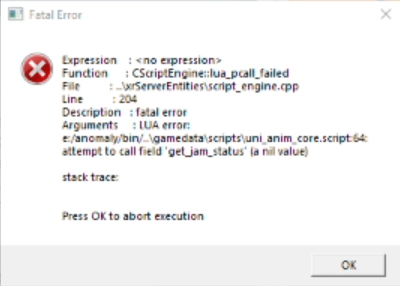

I guess that happens because I have 16:10 ratio not 16:9, but can you fit it somehow without changing resolution to 16:9?
 upbeat spear
Hi, is this the place I have to ask for a error? I apologize if not, I'm new here. Every time I right click with my night vision my game crash : (
 late vessel
How do I fix the issue with none of the boxes having loot unless ive gotten a stash info from a dead person?
honest crag
late vessel
How do I fix the issue with none of the boxes having loot unless ive gotten a st...
This is a GAMMA mechanic, it's on purpose. You can go to Mod Configuration Menu > ZCP (it should be at the bottom) > Loot, and change it how you want, but it will completely destroy mod balance
late vessel
honest crag
This is a GAMMA mechanic, it's on purpose. You can go to Mod Configuration Menu ...
its not gamma, anomaly had the same issue
honest crag
late vessel
its not gamma, anomaly had the same issue
I played base anomaly and I"m sure I was looting things from stashes without having stash info. Don't remember if I setup something too, it was a long time ago, but I'm sure i was finding some staff in Anomaly too
late vessel
i found none ¯_(ツ)_/¯
i think actual game trilogy had loot in undiscovered stashes- maybe just in one though, like clear sky
narrow sparrow
upbeat spear
Hi, is this the place I have to ask for a error? I apologize if not, I'm new her...
!crash send the log after the crash
raw raftBOT
Send your crash log where it was asked IF YOU ARE BEING HELPED, not inside #🤖bot-commands if you're using this command in this channel.
You won't be helped, it's literally just a channel where you can use commands.
The file is inside your Anomaly folder, this is the complete path:
Anomaly/appdata/logs.
This is what you could find:
xray_yournamehere.txtxray_yournamehere.logxray_yournameherewithout any file extension
You just need to send ONE of these files where it was asked. It's either ONE file with .txt OR .log OR with nothing at the end.
DON'T send anything with .bkp at end.
Drag and drop the file inside the Discord channel, Discord will handle it for you.
Make sure you're not using any extra mods, if you do, you'll need to ask in #🔨modded-gamma-support.
upbeat spear
@narrow sparrow hi, the log?
long phoenix
heyhey what does a yellow exclamation mark in the rightbottom corner of the screen mean?
narrow sparrow
upbeat spear
<@225576611326590976> hi, the log?
Yep, the log
long phoenix
just like this guy #╟🔰☢newbies-chat message
narrow sparrow
long phoenix
just like this guy https://discord.com/channels/912320241713958912/1029824156289...
I think its the stealth indicator
long phoenix
narrow sparrow
I think its the stealth indicator
thanks for the response but I dont get it O: i just started a new game, and its there, and it doesnt matter if i have armor or not, or if im crouching or not
honest crag
You can enable stealth indicator in mod options, it should be like white/black dot instead of this exclamation mark in exactly same place
Maybe it's something different, that just appear in exactly same place as optional stealth indicator
 tawdry notch
Expression : <no expression>
Function : CInifile::r_section
File : Xr_ini.cpp
Line : 544
Description : fatal error
Arguments : Can't open section 'head_damage_017'. Please attach [*.ini_log] file to your bug report
stack trace:
I downloaded the gama and installed everything according to the instructions, after the first launch, this appears and the game does not start