#better-mc-fabric
1 messages · Page 174 of 1
 leaden charm
why does all the grass blocks have missing textures
i have all the required mods and resource packs
hello

wrong channel
 pulsar kernel
My friends keep crashing when trying to join using this modpack. The system only says an Error occured in Luna.

He was trying to enter the nether and crashed when trying to load it, all his shaders are set to low but he keeps crashing no matter what.
Nevermind? I restarted my client and its working fine now
 tame obsidian
you need to install the pack thru a modded launcher such as atl or prism, not download it manually
no it does not
!vanilla
 hazy sparrowBOT
It seems as you are trying to use the standard Minecraft launcher!
To run our packs properly, you will need to have a modded launcher, as it will install the pack for you, making it so you don't have a ton of mods/configs removed & end up crashing due to such.
Our most recommended launcher is ATLauncher, which you can find step by step instructions on by running the command !alternates in #bots . If you prefer a more modern interface, Prism comes recommended as well. Any other launchers we can't guarantee any issues won't arise, so it's best to save the trouble and use ATL/Prism.
 spark sailBOT
Quarantine Result:
 Reason: "is there any cracked modded lunchers i can dowload"
 Moderator: @tame obsidian

Quarantined:

 kingcrimsonfate [
1383894841263657091]
 zenith ore
is there someone able to walk me through on how to update the game safely without losing my world? my game has been inactive for over a year and my last version was v13. i’m sure i can find out how to do it but i was checking to see if anyone from here knows
tame obsidian
zenith ore
is there someone able to walk me through on how to update the game safely withou...
firstly what launcher are you using because im going to walk you through making a back up before updating because its gonna be a big jump
zenith ore
tame obsidian
firstly what launcher are you using because im going to walk you through making ...
i’m not too sure, i’ll have to boot up my pc and check. when you mean launcher do you mean curse forge or something else
tame obsidian
yeah, a launcher is what you installed the modpack thru, the most common usually is curseforges own launcher/app
zenith ore
okay i understand. yes i think i initially downloaded the pack though curseforge. i have to take care of something real quick but will you be available to help me in the next 30 minutes?
tame obsidian
mhm
its super simple making a back up so i can just type it all up now and if you have further quetions you can ask then
zenith ore
tame obsidian
its super simple making a back up so i can just type it all up now and if you ha...
hi i’m free if you’re still able to help me
tame obsidian
zenith ore
hi i’m free if you’re still able to help me
so once you have curseforge launcher open, theres the instances tab with all your modpacks, right click on the bmc one you're trying to update, and you can click "open folder",
you can copy your saves folder by just just hitting the "make a copy" when you rightclick the folder and dragging that anywhere else on your pc thats not within your instance folder (such as your desktop)
once you have a backup of your saves folder, you can follow this video https://youtu.be/-LoNDI3CD0U to update the pack, sometimes the way in the first few seconds doesnt work, so you can also just watch the rest of a different way to do it

Discord ➔ https://discord.gg/8ZmhaPPbjE
Twitter ➔ https://twitter.com/SharkieTV
Use CODE: LunaPixel for 25% off ➔ https://www.bisecthosting.com/LunaPixel
zenith ore
thank you! if i get stuck on anything ill let you know
 terse spear
Is there a way to disable certain mods temporarily without disrupting the modpack?
spark sailBOT
Quarantine Result:
Reason: No reason.
Moderator: @tame obsidian
Quarantined:
.shizukayoshimoto_29474 [1320937932957159471]
 verbal phoenix
Hello, can I take the BMC2 1.20.1 v38 modpack and swap the biome mod from BWG back to BOP without breaking everything? I love all the updates that have been dont but personally hate the BWG aesthetic
 topaz grotto
I can not seem to figure out how to craft a shield is there a specific workbench or something I should be using?
 meager yacht
verbal phoenix
Hello, can I take the BMC2 1.20.1 v38 modpack and swap the biome mod from BWG ba...
meager yacht
verbal phoenix
Hello, can I take the BMC2 1.20.1 v38 modpack and swap the biome mod from BWG ba...
yes
meager yacht
topaz grotto
I can not seem to figure out how to craft a shield is there a specific workbench...
what modpack and modpack version are you on
topaz grotto
meager yacht
what modpack and modpack version are you on
I am on the Better MC [FABRIC] BMC3 1.21.1
topaz grotto
meager yacht
v30, v40, etc
V41
meager yacht
and did you add any mods
topaz grotto
meager yacht
and did you add any mods
Nope I left everything the same
meager yacht
send a screenshot of you crafting it
topaz grotto
meager yacht
send a screenshot of you crafting it
Anytime I look up any sort of shield it pops up blank. Give me a sec and I'll show you
topaz grotto
meager yacht
send a screenshot of you crafting it
 topaz grotto
meager yacht
use jei
topaz grotto
meager yacht
use jei
What is jei?
tame obsidian
the big black thing on the right of your screen
topaz grotto
meager yacht
read the tutorial in the questbook ingame please
Ohhhh I didn't even notice that. Thank you! I a, new to mods so I'm still getting the hang of this stuff
tame obsidian
fabric renditions of bmc is newer than forge so bmc2 fabric is bmc4 forge's conterpart
as its also on 1.20.1
basically its fabric counterpart of 1.20.1 yeah
verbal phoenix
will BMC2 Fabric ever switch to Biomes O Plenty + Terralith like BMC4 Forge or are the devs set on Oh the biomes we've gone?
meager yacht
verbal phoenix
will BMC2 Fabric ever switch to Biomes O Plenty + Terralith like BMC4 Forge or a...
we wouldn't switch because it'd break everyone's world
 fossil flax
MC5 game crashing
1: 1.21.1
2: curse forge, 3: no changes, 4: v44.5, 5: always crashes, 6: right before main menu would load up(shortly after lunapixel logo loads )
 grizzled tendon
fossil flax
MC5 game crashing
grizzled tendon
fossil flax
MC5 game crashing
!ca
hazy sparrowBOT
grizzled tendon
And please post it in #better-mc-forge if you play BMC4
fossil flax
Better MC 5 - v44 crashed. The logs have been uploaded to mclo.gs:
- 1.21.1 [NEOFORGE]
- What launcher did you run Minecraft with? (e.g. CurseForge, ATLauncher, MultiMC, ...)
- Have you changed the modpack in any way except mods?
- v44
- Have you ever gotten past the crash condition without crashing, or does the game always crash?
- What steps cause the crash?
latest.log | debug.log | hs_err_pid11940.log | CurseForge: launcher_log.txt | crash_assistant_app.log | modlist.txt | win_event1763197604420.txt
# Problematic frame:
# C  [igxe2hpgicd64.dll+0x1f8888]
Mod list changes on top of the modpack:
[2;34mMod list was not modified.[0m
!drivers
hazy sparrowBOT
You (likely) need to update your graphics drivers in order to resolve the crash. Here's how to go about doing that!
1. Identify your graphics card
if you already know skip to the next step
- Open task manager
- Navigate to the "Performance" tab (on Windows 11 this is the button that looks like a heart pulse)
- Press the GPU 0 graph and read your GPU from the top right
Note:
In some cases you may see a GPU 0 and GPU 1. This means your CPU has its own GPU, as well as a dedicated one. You probably want GPU 1 (which is usually the better one), but you can ask staff to clarify if necessary.
2. Download your drivers from the manufacturers site
Depending on what you read before, you likely need drivers from either AMD, Intel, or NVIDIA
AMD: https://www.amd.com/en/support
Intel: https://www.intel.com/content/www/us/en/download-center/home.html
NVIDIA: https://www.nvidia.com/Download/index.aspx?lang=en-us
Note:
- For NVIDIA you want to select "Game Ready Driver (GRD)" (this is the default option) for the best performance. Once installing you'd probably prefer downloading GeForce Experience, which will notify you when there's an available drivers update.
- For Intel, you probably want to press "Get Started" under the "Automatically update your drivers and software", which will simplify the process and update everything automatically
- For AMD you probably want to just press "Download Windows Drivers", which will download something called AMD Adrenaline, which will update your drivers automatically.
3. Run the installation, restart your computer, and try playing MC again
- At this point, hopefully your Minecraft is running. If it still does not work, please post any new logs and staff will help assist you with finding the right solution.
fossil flax
I already did this, intel had an update earlier today. Also updated the mod pack, still can't even get to the main menu.
fossil flax
grizzled tendon
!drivers
arc b580, is up to date
grizzled tendon
fossil flax
arc b580, is up to date
The crash report is clearly at driver's dll
So not sure what happened, but you might consider to uninstall and install again that driver
fossil flax
clean installation uninstalled then reinstalled. Still same issue.
 noble oyster
how do i fix this gui issue
 grizzled tendon
noble oyster
how do i fix this gui issue
grizzled tendon
noble oyster
how do i fix this gui issue
Are you playing thru Modrinth?
If so
!modrinth
hazy sparrowBOT
Currently LPS packs are not being updated on the Modrinth site, and as such are outdated. This is while the devs figure out a way to automate uploads of the pack properly.
Until the packs can be properly updated, we recommend using ATL (use !alternates in #bots for further info on the installation process ) or Prism launcher. You can download the CurseForge version of our packs on these launchers while still being able to make instances from Modrinth versions of other packs not owned by us.
Please note this does not apply to individual mod projects of developers at LPS.
 eternal pivot
Why can't you add shaders in the modpack because if I put them in the folder I don't see them in the game ?
tame obsidian
eternal pivot
Why can't you add shaders in the modpack because if I put them in the folder I d...
are you trying to add complementary shaders
eternal pivot
tame obsidian
are you trying to add complementary shaders
yes but i try to add Unbound ?
tame obsidian
complementary is the better mc shaders included in the pack and you can change the present to unbound in the settings of one of the bmc ones
its not showing up due to how the iris folders mod works
eternal pivot
okay is it the same like the normal unbound if i change the settings ?
but Why i can't drag and dropp shaders normal in the folder ? @tame obsidian
tame obsidian
eternal pivot
okay is it the same like the normal unbound if i change the settings ?
yes
tame obsidian
eternal pivot
but Why i can't drag and dropp shaders normal in the folder ? <@2145855545435750...
because complementary shaders are automatically hidden from how the iris folder mod works i said as such
 celest condor
heyho, so i get this when starting the server, what is missing?
better MC2 from modrinth
https://mclo.gs/vAsO6jT
tame obsidian
celest condor
heyho, so i get this when starting the server, what is missing?
better MC2 from ...
!modrinth
hazy sparrowBOT
Currently LPS packs are not being updated on the Modrinth site, and as such are outdated. This is while the devs figure out a way to automate uploads of the pack properly.
Until the packs can be properly updated, we recommend using ATL (use !alternates in #bots for further info on the installation process ) or Prism launcher. You can download the CurseForge version of our packs on these launchers while still being able to make instances from Modrinth versions of other packs not owned by us.
Please note this does not apply to individual mod projects of developers at LPS.
celest condor
aight will try with curseforge then?
tame obsidian
also did u try removing the when dungeons arise mod
cause thats what that error is when datapacks from it r left behind
its fine if u dont wanna play w it i just needed to know if it was on purpose lmao
celest condor
no, im using the itzg/minecraft-server:latest docker image and just said what modpack to use
tame obsidian
then yeah you're missing WDA from your install somehow
celest condor
will report back after trying with curseforge
tame obsidian
modrinth also doesnt carry a server pack so idk how u even got it to run telling it that
tame obsidian
what do you need help with
celest condor
after adding the mod sodium by hand i get now this: https://mclo.gs/UIuLyV7
tame obsidian
sodium is a client side only mod?
are you trying to use the client pack on a server?
celest condor
so i guess its still picking the client modpack then?
im using it like this https://docker-minecraft-server.readthedocs.io/en/latest/types-and-platforms/mod-platforms/auto-curseforge/
Documentation for Minecraft Server on Docker
tame obsidian
have no idea about any of that or how dockers really work but if you can get it to specfically use this file https://www.curseforge.com/minecraft/modpacks/better-mc-fabric-bmc2/files/7154904

CurseForge
Version 1.20.1 | A Proper Vanilla+ Modpack | Don't play Vanilla play this!
1.9M Downloads | Modpacks
celest condor
intresting its expecting a client modpack? "error: Modpack file is missing a manifest. Make sure to reference a client modpack file."
tame obsidian
@maiden spire if u have any clue how this works
celest condor
will look into some issues on github, mayve i can find some info for this
the client pack should still work on a server if i remove all client modsright?
 maiden spire
so that docker thing expects you to give it the client modpack file yeah
idk if they filter out client-only mods from it afterwards
it wont work by giving it the serverpack
so i guess, give it the client zip
and then idrk what its gonna do with it but safe to say you’re waddling in unexplored territory here
since we’ve never tested this thing before
celest condor
yes, the docker image will filter out every client mod and i am now stuck with this:
minecraft  | [19:10:32] [main/ERROR]: Failed to start the minecraft server
minecraft  | java.lang.RuntimeException: Could not execute entrypoint stage 'main' due to errors, provided by 'miningspeedtooltips' at 'toni.miningspeedtooltips.MiningSpeedTooltips'!
in the docs it says that there are sometimes server mods flaged as client only and i will have to pass them manually then
tame obsidian
accoridng to the modrinth page mining speed tool tips is also client only
celest condor
okay, after excluding these two mods:
    cull-less-leaves
    mining-speed-tooltips
the server started now
 fading ridge
First time seeing this, anyone know a fix? 😄
 meager yacht
fading ridge
First time seeing this, anyone know a fix? 😄
meager yacht
fading ridge
First time seeing this, anyone know a fix? 😄
Please read the full contents of the #get-support channel for us to provide assistance.
 north dove
1- 1.21.1 v41 the problem start with v40
2- course forge
3- No
4- v41
5- No
6- open the world waiting to world loading and crash after loading
meager yacht
north dove
1- 1.21.1 v41 the problem start with v40
2- course forge
3- No
4- v41
5- No
6-...
send logs please
north dove
 acoustic spindleBOT
north dove
acoustic spindleBOT
north dove
Uploaded crash-2025-10-23_13.38.58-client.txt from @north dove to mclogs: https://mclo.gs/EiKTnpz
meager yacht
north dove
!drivers
hazy sparrowBOT
You (likely) need to update your graphics drivers in order to resolve the crash. Here's how to go about doing that!
1. Identify your graphics card
if you already know skip to the next step
- Open task manager
- Navigate to the "Performance" tab (on Windows 11 this is the button that looks like a heart pulse)
- Press the GPU 0 graph and read your GPU from the top right
Note:
In some cases you may see a GPU 0 and GPU 1. This means your CPU has its own GPU, as well as a dedicated one. You probably want GPU 1 (which is usually the better one), but you can ask staff to clarify if necessary.
2. Download your drivers from the manufacturers site
Depending on what you read before, you likely need drivers from either AMD, Intel, or NVIDIA
AMD: https://www.amd.com/en/support
Intel: https://www.intel.com/content/www/us/en/download-center/home.html
NVIDIA: https://www.nvidia.com/Download/index.aspx?lang=en-us
Note:
- For NVIDIA you want to select "Game Ready Driver (GRD)" (this is the default option) for the best performance. Once installing you'd probably prefer downloading GeForce Experience, which will notify you when there's an available drivers update.
- For Intel, you probably want to press "Get Started" under the "Automatically update your drivers and software", which will simplify the process and update everything automatically
- For AMD you probably want to just press "Download Windows Drivers", which will download something called AMD Adrenaline, which will update your drivers automatically.
3. Run the installation, restart your computer, and try playing MC again
- At this point, hopefully your Minecraft is running. If it still does not work, please post any new logs and staff will help assist you with finding the right solution.
north dove
meager yacht
!drivers
I've updated to the latest version and I'm still having the same problem.
meager yacht
try
Please follow the performance guide to improve your game performance, as this is likely to resolve your issue. If your lag is unresolved, send a screenshot with F3 open ingame.
this
north dove
meager yacht
Please follow the [performance guide](<https://wiki.lunapixel.gg/performance-gui...
Nothing work with me nothing
tame obsidian
then send new logs
zenith ore
tame obsidian
then send new logs
hey just wanted to thank you for helping me the other day, and wanted to let you know i was able to update the version and was able to optimize my last world into the new version no problem.
tame obsidian
zenith ore
hey just wanted to thank you for helping me the other day, and wanted to let you...
im glad! i was a bit worried w that big of a version jump but im glad it worked out
zenith ore
me too LMAO; i had backed up my world at least 3 times before updating, but the process itself literally took 10 seconds
north dove
tame obsidian
then send new logs
I tried version 30 and I it work but newest version doesn’t
tame obsidian
we cannot help with outdated versions and thats not even what i asked
north dove
tame obsidian
we cannot help with outdated versions and thats not even what i asked
ok I will send to you plz wait
acoustic spindleBOT
north dove
Uploaded crash_assistant_app.log from @north dove to mclogs: https://mclo.gs/A7FKpSq
hazy sparrowBOT
north dove
tame obsidian
the log from the crash assistant itself does not help
Better MC 3 - v41 crashed without a crash report. The logs have been uploaded to mclo.gs:
- 1.21.1 [FABRIC]
- What launcher did you run Minecraft with? (e.g. CurseForge, ATLauncher, MultiMC, ...)
- Have you changed the modpack in any way except mods?
- v41
- Have you ever gotten past the crash condition without crashing, or does the game always crash?
- What steps cause the crash?
latest.log | crash_assistant_app.log | modlist.txt | CurseForge: skip launcher
Mod list changes on top of the modpack:
[2;34mMod list was not modified.[0m
!alternates
hazy sparrowBOT
If this command was run in response to your question/issue, it is likely because switching away from the launcher you are currently using would fix your problem.
From our experience, the most stable launcher by far is ATLauncher, also known as ATL. Keep in mind that ATL is NOT related to TLauncher in any way, and is not a cracked launcher.
To install ATL, do the following:
1. Go to https://atlauncher.com/download. If you are on MacOS, then choose the "Jar" version under the "Other" tab.
2. Install and run the setup, then open the program.
3. Login to your Microsoft account that owns the Java Edition of Minecraft from the Accounts tab on the right. This process is 100% safe, as it goes directly through Microsoft. ATL doesn't see your account credentials.
4. Go to the Packs tab on the right, then click "Curseforge" on the left.
5. Search the modpack you wish to download.
6. Click "Install". Then, follow the on-screen directions.
7. Go to the Instances tab, and click "Play" on the modpack you downloaded. If you ever see an "Update" button on the instance, click it.
This video explains the process: https://youtu.be/xMYW1wMbmkM
To transfer your Curseforge world to ATL, simply right click the modpack on Curseforge, or click the 3 dots, then click "Open Folder". Copy the Saves folder, then click "Open Folder" on ATL and paste the Saves folder there. Do the same with the XaerosMinimap folder, or the Journeymap folder, to transfer over any waypoints you've created.
Because ATL downloads the exact same files as Curseforge does, your world will be the exact same and you will be able to join the same servers. ATL also works without an internet connection (after you've installed the modpack, of course), and does not have any bloat from Overwolf. You are free to uninstall both Overwolf and Curseforge with ATL installed.
tame obsidian
you did not follow the performance guide as you are still on curseforge launcher you cant say nothing helped when you didnt try it
 tidal root
lowk when is the castle getting finished in the twilight forest
tame obsidian
im pretty sure it did
twilight forest isnt even on fabric though so its pointless saying that in a random modpacks fabric channel
north dove
tame obsidian
you did not follow the performance guide as you are still on curseforge launcher...
Thanks it work
 timber cipher
All of Create 1.20.1 - v1.2 crashed. The logs have been uploaded to mclo.gs:
- 1.20.1
- What launcher did you run Minecraft with? (e.g. CurseForge, ATLauncher, MultiMC, ...)
- Have you changed the modpack in any way except mods?
- v1.2
- Have you ever gotten past the crash condition without crashing, or does the game always crash?
- What steps cause the crash?
latest.log
CurseForge: skip launcher
Mod list changes beyond the modpack:
Added mods:
Aquaculture-1.20.1-2.5.5.jar
aquaculturedelight-1.1.1-forge-1.20.1.jar
artifacts-forge-9.5.15.jar
badpackets-forge-0.4.3.jar
carryon-forge-1.20.1-2.1.2.7.jar
easy-villagers-forge-1.20.1-1.1.23.jar
easy_mob_farm-forge-1.20.1-9.7.0.jar
entityculling-forge-1.9.3-mc1.20.1.jar
mclogs-forge-1.4.2-1.20.jar
rubidium-mc1.20.1-0.7.1a.jar
wthit-forge-8.16.0.jar
zaynens_craftable_slimeball_mod_1.20.1.jar
Removed mods:
Mods weren't removed.
tame obsidian
timber cipher
All of Create 1.20.1 - v1.2 crashed. The logs have been uploaded to `mclo.gs`:
1...
#all-of-create this is not the right channel
 dry parrot
Is this the same as better mc neo?
tame obsidian
no
grizzled tendon
!aternos
hazy sparrowBOT
We don't support Aternos nor can we assist you with using it for reasons listed below;
- You are unable to add / edit the mods to implement a fix that can be game changing at times.
- We are unable to control the updates of our packs on Aternos, nor ever will.
- The hosting is not strong enough to host our packs on there without it crashing every so often.
- We have other free methods that work much better than Aternos does. Run the !ws command and the !server command in #bots for more information on how to host a server for free.
hazy sparrowBOT
You are using a modified version of the modpack!
Adding, removing, or updating large amounts of mods without testing any of your changes is **not **a good idea, and it is very unlikely that anyone will want to debug your issue for you. Please test the changes you make in small groups, as opposed to doing all of the changes at once.
If you want further support for your issue, someone may respond to you in the channel for the modpack you based your changes off, but please only post once. You may also have better luck in #1061339968691257466.
 native vale
veinmine not working ? its says there no key binding on configuration
 brisk lance
Better MC 3 - v41 crashed. The logs have been uploaded to mclo.gs:
- 1.21.1 [FABRIC]
- What launcher did you run Minecraft with? Prism
- Have you changed the modpack in any way except mods? No
- v41
- Have you ever gotten past the crash condition without crashing, or does the game always crash?
- What steps cause the crash? The game always crash after i click video setting (it flashed saving games, then crash)
latest.log | crash-2025-11-17_21.23.27-client.txt | PrismLauncher-0.log | crash_assistant_app.log | modlist.txt
Mod list changes on top of the modpack:
[2;34mMod list was not modified.[0m
Make a backup, and then delete your options.txt file
It seems like it's crashing because some slider is set outside of expected range
 final dust
Does anyone know if Armadillos spawn naturally?
tame obsidian
i dont believe so as theyre a later update than what any fabric bmc's are on
zenith ore
Better MC 3 - v41 crashed. The logs have been uploaded to mclo.gs:
- 1.21.1 [FABRIC]
- What launcher did you run Minecraft with? (e.g. CurseForge, ATLauncher, MultiMC, ...)
- Have you changed the modpack in any way except mods?
- v41
- Have you ever gotten past the crash condition without crashing, or does the game always crash?
- What steps cause the crash?
latest.log | crash-2025-11-17_11.05.58-client.txt | CurseForge: launcher_log.txt | crash_assistant_app.log | modlist.txt
Mod list changes on top of the modpack:
[2;32m4[0m added, [2;31m0[0m removed, [2;34m42[0m updated.
```Better MC 3 - v41 crashed. The logs have been uploaded to `mclo.gs`:
1. 1.21.1 [FABRIC]
2. What launcher did you run Minecraft with? (e.g. CurseForge, ATLauncher, MultiMC, ...)
3. Have you changed the modpack in any way except mods?
4. v41
5. Have you ever gotten past the crash condition without crashing, or does the game always crash?
6. What steps cause the crash?
### [latest.log](<https://mclo.gs/D6rsEcr>) | [crash-2025-11-17_11.05.58-client.txt](<https://mclo.gs/EJ7ywJE>) | CurseForge: [launcher_log.txt](<https://mclo.gs/BNnazoW>) | [crash_assistant_app.log](<https://mclo.gs/1Aj9ulM>) | [modlist.txt](<https://mclo.gs/8RUpANc>)
### [Mod list changes](<https://mclo.gs/JbI8SAT>) on top of the modpack:
```ansi
[2;32m4[0m added, [2;31m0[0m removed, [2;34m42[0m updated.
i think my game crashed because i unintentionally updated the mods individually, but im not too sure. is there anyone that can help me figure that out
zenith ore
is there no way for me to change the version of my existing pack to the previous version?
tame obsidian
zenith ore
Better MC 3 - v41 crashed. The logs have been uploaded to `mclo.gs`:
1. 1.21.1 [...
!updatemods
hazy sparrowBOT
Do NOT Update Mods Manually!
Modpacks use specific versions of certain mods to prevent various issues, such as crashes or major game-breaking bugs. Mods will be updated by the modpack developer when they see fit. Please do not update the mods in a modpack manually, unless specifically told to do so. This includes hitting the "update all" feature on CurseForge launcher it likes to bother users with.
To be clear; this is separate from updating the modpack (such as Better MC / Medieval MC) itself. You should always stay up to date with the latest version of the modpack. To update the pack correctly, you can follow the command!updatemodpack
The easiest way to downgrade mod versions to their original versions in the pack, is to reinstall the pack itself. Before you uninstall, back up both any singleplayer world files you have, and your map folder. LPS packs usually use JourneyMap or Xareos, the map folder will be named accordingly.
- Curseforge -> Right click the modpack instance -> „Open Folder”.
- ATLauncher -> Click „Open Folder” on the modpack instance.
- PrismLauncher -> Select your instance and click „Folder” on the right.
Navigate to the "minecraft" folder, and within that will be "saves" and "journeymap"/"xareos" depending on which the pack has. Copy/Move these folders to a safe location, and you can move them right back to the fresh copy of the pack when reinstalled.
tame obsidian
youd have to otherwise one by one find the original versions of each mod in the pack and downgrade them
zenith ore
thanks hazel u goated
 frigid geyser
Better MC 2 - v36 crashed without a crash report. The logs have been uploaded to mclo.gs:
- 1.20.1 [FABRIC]
- What launcher did you run Minecraft with? (e.g. CurseForge, ATLauncher, MultiMC, ...)
- Have you changed the modpack in any way except mods?
- v36
- Have you ever gotten past the crash condition without crashing, or does the game always crash?
- What steps cause the crash?
latest.log | crash_assistant_app.log | modlist.txt | CurseForge: skip launcher
Mod list changes beyond the modpack:
Added mods:
[2;32mindestructible_blocks-1.0.3+1.20.1.jar[0m
[2;32mlavender-0.1.9+1.20.jar[0m
[2;32mlightmanscurrency_fabric-1.20.1-1.0.2.4.jar[0m
[2;32mLockAndBlock-0.9.0.jar[0m
update to v38
frigid geyser
yeah but server is for v36
tame obsidian
we dont support outdated versions so either tell them to update or ur outta luck
frigid geyser
ok thank you but some of my friends can still play this version do you know why
tame obsidian
well its not a version issue overall but things can be fixed in later vers as to why we dont support outdated
frigid geyser
ok thanks for your help
 minor token
are there any tech related mods in bmc3? im looking for something to automate mining
 potent wagon
is there a way to turn off pvp?
meager yacht
minor token
are there any tech related mods in bmc3? im looking for something to automate mi...
no
meager yacht
potent wagon
is there a way to turn off pvp?
what context
 humble bluff
Better MC 2 - v38 crashed without a crash report. The logs have been uploaded to mclo.gs:
- 1.20.1 [FABRIC]
- What launcher did you run Minecraft with? (e.g. CurseForge, ATLauncher, MultiMC, ...)
- Have you changed the modpack in any way except mods?
- v38
- Have you ever gotten past the crash condition without crashing, or does the game always crash?
- What steps cause the crash?
latest.log | PrismLauncher-0.log | crash_assistant_app.log | modlist.txt
Mod list changes on top of the modpack:
[2;32m1[0m added, [2;31m1[0m removed, [2;34m24[0m updated.
help
grizzled tendon
humble bluff
Better MC 2 - v38 crashed without a crash report. The logs have been uploaded to...
!updatemods
hazy sparrowBOT
Do NOT Update Mods Manually!
Modpacks use specific versions of certain mods to prevent various issues, such as crashes or major game-breaking bugs. Mods will be updated by the modpack developer when they see fit. Please do not update the mods in a modpack manually, unless specifically told to do so. This includes hitting the "update all" feature on CurseForge launcher it likes to bother users with.
To be clear; this is separate from updating the modpack (such as Better MC / Medieval MC) itself. You should always stay up to date with the latest version of the modpack. To update the pack correctly, you can follow the command!updatemodpack
The easiest way to downgrade mod versions to their original versions in the pack, is to reinstall the pack itself. Before you uninstall, back up both any singleplayer world files you have, and your map folder. LPS packs usually use JourneyMap or Xareos, the map folder will be named accordingly.
- Curseforge -> Right click the modpack instance -> „Open Folder”.
- ATLauncher -> Click „Open Folder” on the modpack instance.
- PrismLauncher -> Select your instance and click „Folder” on the right.
Navigate to the "minecraft" folder, and within that will be "saves" and "journeymap"/"xareos" depending on which the pack has. Copy/Move these folders to a safe location, and you can move them right back to the fresh copy of the pack when reinstalled.
humble bluff
how
okey soory
I couldn't do it, I keep crashing, I updated the mods but it's still the same
!updatemods
hazy sparrowBOT
Do NOT Update Mods Manually!
Modpacks use specific versions of certain mods to prevent various issues, such as crashes or major game-breaking bugs. Mods will be updated by the modpack developer when they see fit. Please do not update the mods in a modpack manually, unless specifically told to do so. This includes hitting the "update all" feature on CurseForge launcher it likes to bother users with.
To be clear; this is separate from updating the modpack (such as Better MC / Medieval MC) itself. You should always stay up to date with the latest version of the modpack. To update the pack correctly, you can follow the command!updatemodpack
The easiest way to downgrade mod versions to their original versions in the pack, is to reinstall the pack itself. Before you uninstall, back up both any singleplayer world files you have, and your map folder. LPS packs usually use JourneyMap or Xareos, the map folder will be named accordingly.
- Curseforge -> Right click the modpack instance -> „Open Folder”.
- ATLauncher -> Click „Open Folder” on the modpack instance.
- PrismLauncher -> Select your instance and click „Folder” on the right.
Navigate to the "minecraft" folder, and within that will be "saves" and "journeymap"/"xareos" depending on which the pack has. Copy/Move these folders to a safe location, and you can move them right back to the fresh copy of the pack when reinstalled.
grizzled tendon
humble bluff
I couldn't do it, I keep crashing, I updated the mods but it's still the same
Your crash report is due to you updating mods. Undo that
As per the bot reply
humble bluff
So I won't get the mods in the latest version?
humble bluff
I will try, thank you
worked now
thank
It hasn't been opened because I updated the mods, so won't I miss the innovations in these mods?
grizzled tendon
humble bluff
It hasn't been opened because I updated the mods, so won't I miss the innovation...
Yes, that's the tradeoff
humble bluff
👍🏿
potent wagon
meager yacht
what context
For the modpack, is there a way to turn off player pvp
meager yacht
potent wagon
For the modpack, is there a way to turn off player pvp
okay yes i inferred you're playing a modpack
potent wagon
There wasnt much more context i could givev
meager yacht
I mean are you playing on a server, do you have access to server files, how is the server hosted
are you world sharing
potent wagon
Its a lan world
meager yacht
then you can't
 vocal vector
anyone else having this problem? Is it related to cloudflare being down?

It was running fine the other day
grizzled tendon
vocal vector
anyone else having this problem? Is it related to cloudflare being down?
Yes, seems like it
It seems like the script checks online stuff out - and one of those must be down
 ancient cliff
Why betterMC [Fabric] doesnt get install ? i trying on modrinth , 1.20 version
appears something saying error with cloudflare
grizzled tendon
ancient cliff
appears something saying error with cloudflare
Cloudflare has outage
Half of the internet doesn't work
grizzled tendon
The moment CloudFlare went down you can see random stuff not working as well, like Uber or Twitter
 grizzled tendon
ancient cliff
someone can pass me the modpack pls ?
grizzled tendon
ancient cliff
someone can pass me the modpack pls ?
Nope, that's against Curseforge's TOS
ancient cliff
and now i can explain why my spotify doesnt work HAHAHAHA
ancient cliff
grizzled tendon
Nope, that's against Curseforge's TOS
oh ok, im sorry
ancient cliff
@grizzled tendon Monitoring - A fix has been implemented and we believe the incident is now resolved. We are continuing to monitor for errors to ensure all services are back to normal. (CLOUDFLARE)

 tulip zephyr
!updatemodpack
hazy sparrowBOT
To properly update the modpack you're playing, it depends on the launcher you are using. This video can explains it on CurseForge launcher, and the same method can be used on other launchers as well, but it's not necessary to use this method on others.
-
CurseForge - See above video
-
PrismLauncher -> Select your instance, and click "Edit" on the right. the 3rd tab down will say "CurseForge", click on it, and there will be a dropdown menu, if not already selected, the latest version of the pack will be at the top of it. click "Update Pack". Sometimes there will be new mods to manually download due to liscensing issues, click "Open Missing" and it will automatically download and checked, and copied to the instance folder. It's safe to delete these mods in your downloads folder once done. Once all are detected, the "Open Missing" will be grayed out. You can click 'Continue" at this point, and it will finish the update process and tell you when its successful.
-
ATLauncher - Under the "Instances" tab, find the pack you would like to update. there will be an "Update" button. There will be a dropdown menu, and if not already selected, the latest version of the pack will be at the top of it to select. Click "Update" once selected. Sometimes there will be new mods to manually download due to licensing issues, click "Open Missing" and it will automatically download and checked, and copied to the instance folder. It's safe to delete these mods in your downloads folder once done. Once all are detected, You can click "OK ", and it will finish the update process.
meager yacht
 deft widget
you don't have the same modpack installed as the server
north dove
can i add twilight forest in fabric
tame obsidian
north dove
can i add twilight forest in fabric
twilight forest is a forge only mod so no
tulip zephyr
Hi, can you help me please ??
acoustic spindleBOT
tulip zephyr
Hi, can you help me please ??
Uploaded crash-2025-11-18_22.34.05-server.txt from @tulip zephyr to mclogs: https://mclo.gs/WT2qXh1
 spark sphinx
Hello ! I've just started a hardcore survival journey, and my backpack recipe isn't working :/
Idk how to fix it
I saw the ressource pack saying backpack fix recipe but it does nothing
 gloomy whale
Guys is there any way I can extract enchantments from item on book in version 1.21.1?
 scarlet radish
how many RAM I need for play on this modpack?
 candid igloo

 dreamy folio
gloomy whale
Guys is there any way I can extract enchantments from item on book in version 1....
dreamy folio
gloomy whale
Guys is there any way I can extract enchantments from item on book in version 1....
Anvil, i think you need to put the book first, then the ítem, but its absurdly expensive to do
dreamy folio
scarlet radish
how many RAM I need for play on this modpack?
11 is recommended according to the config, but me personally i use 8gb (i have 16gb) and it works fine
minor token
i keep getting fps drops when i play singleplayer bmc3. How can i make the gameplay more smooth?
tame obsidian
minor token
i keep getting fps drops when i play singleplayer bmc3. How can i make the gamep...
!fps
hazy sparrowBOT
 minor token
thanks
gloomy whale
dreamy folio
Anvil, i think you need to put the book first, then the ítem, but its absurdly e...
It's not working
dreamy folio
It was like that for me
 twilit trail
Hey, I would love to know if Better MC is optimized for low end computers? As I see 320+ mods
My friends have laptops like galaxy book 4/5
tame obsidian
twilit trail
Hey, I would love to know if Better MC is optimized for low end computers? As I ...
it is fully optimized and can run on low end computers
for furhter imporvements we recommend following our performance guide
!performance
hazy sparrowBOT
twilit trail
thank you so much 🙏
twilit trail
would remove many mods break the modpack?
I'm seeing a lot of mods that I don't necessarily need/want but still want the optimization to stay
tame obsidian
you can usually ignore what you dont want but at the same time we cant gaurntee support if you modify it
twilit trail
no, ofc, I don't expect support from removing 100+ mods
celest condor
hey, what cpu specs are required for a server with better mc2? running the server currently on a i7-6700 with 16GB ram, for 8 players and it lags sometimes really bad
the mod Night Config Fixes is sadly not compatible with c2me
meager yacht
gloomy whale
Guys is there any way I can extract enchantments from item on book in version 1....
read the quest book ingame
meager yacht
celest condor
hey, what cpu specs are required for a server with better mc2? running the serve...
!tps
hazy sparrowBOT
Please follow the guide here for changing the Java version your server uses. This will improve performance dramatically. If you are on a third party server host, you likely can not change the Java version your server uses. Bisect Hosting and a few VPS providers do allow changing Java version, though, which can usually be done through your server dashboard.
The method on Bisect is to simply go to the main dashboard page, and select "GraalVM 22" as the Java distribution. If it crashes, use 21 instead.
For further performance improvements, you can also follow this guide.
Reducing server render distance in the server.properties file is also a very good way of reducing lag. Most of our modpacks include mods like Bobby and Farsight, which make it so reducing server render distance will not affect players.
If lag persists, run the following command ingame:
/spark profiler start --only-ticks-over 50
Then, send the link in this channel.
celest condor
meager yacht
!tps
Thx, will check it out
 humble epoch
hello is there a guide to update the server pack?
meager yacht
humble epoch
hello is there a guide to update the server pack?
!updateserver
hazy sparrowBOT

00:00 Update Server Locally
01:19 Update on Server Host/Bisect Hosting Premium
01:39 Update on Server Host/Bisect Hosting Premium
Discord ➔ https://discord.gg/8ZmhaPPbjE
Twitter ➔ https://twitter.com/SharkieTV
Use CODE: LunaPixel for 25% off ➔ https://www.bisecthosting.com/LunaPixel
 wild haven
Whenever i attempt to break a block my game crashes instantly, can click normally and swing my fist
 sudden bay
wild haven
Whenever i attempt to break a block my game crashes instantly, can click normall...
sudden bay
wild haven
Whenever i attempt to break a block my game crashes instantly, can click normall...
!ca
hazy sparrowBOT
wild haven
sudden bay
!ca
I don't get any popups, my game just closes with no warning
no crash log
no nothing
I doubt it's a modrinth launcher problem
hazy sparrowBOT
- What Minecraft version are you using? (1.19.2, 1.20.1, ...)
- What launcher did you run Minecraft with? (e.g. CurseForge, ATLauncher, MultiMC, ...)
- Have you changed the modpack in any way? (e.g. changing mod versions, adding/removing mods)
- What version of the modpack are you using? (v11, v9, etc)
- Have you ever gotten past the crash condition without crashing, or does the game always crash?
- What steps cause the crash?
Required:
Open the game directory (right click pack -> open folder), navigate to the "crash-reports" folder and upload the latest available crash report.
If there is no crash report, navigate to the logs folder and upload "latest.log."
If there is no log, navigate to the base pack directory and upload the hs_err_pid file, if there is one.
wild haven
Looking at the log it seems like just a bunch of out of date mods
sudden bay
please follow my directions or i cant help
wild haven
alr
- 1.20.1
- Modrinth
- No
- 26.5
- No
6.Loading into a world, i can do pretty much anything but interact with blocks
acoustic spindleBOT
wild haven
1. 1.20.1
2. Modrinth
3. No
4. 26.5
5. No
6.Loading into a world, i can do prett...
Uploaded message.txt from @wild haven to mclogs: https://mclo.gs/sAVa1p1
 topaz oracle
!modrinth
hazy sparrowBOT
Currently LPS packs are not being updated on the Modrinth site, and as such are outdated. This is while the devs figure out a way to automate uploads of the pack properly.
Until the packs can be properly updated, we recommend using ATL (use !alternates in #bots for further info on the installation process ) or Prism launcher. You can download the CurseForge version of our packs on these launchers while still being able to make instances from Modrinth versions of other packs not owned by us.
Please note this does not apply to individual mod projects of developers at LPS.
 jolly marten
I attempted multiple times to set up the better MC Fabric 1.21.1 server pack and i cant able to do it
acoustic spindleBOT
jolly marten
I attempted multiple times to set up the better MC Fabric 1.21.1 server pack and...
Uploaded latest.log from @jolly marten to mclogs: https://mclo.gs/IwMNT5i
grizzled tendon
 mossy plume
my game is crushing when i am trying to join or create a world
mossy plume
my game is crushing when i am trying to join or create a world
!ca
hazy sparrowBOT
grizzled tendon
Follow the video instruction
grizzled tendon
mossy plume
so i cant play this modpack adding e4mc?
!compat
hazy sparrowBOT
Following mods are incompatible with all LPS modpacks: Epic Fight, Valkerian Skies, Eureka Ships, Essential (use !ea), optifine (use !optifine), clockwork, e4mc (use !ws) and on (for the moment, wait on devs to do updates to their packs, do not update it yourself)
grizzled tendon
!ws
hazy sparrowBOT
Luna Pixel's World Sharing
Our modpacks don't support any mods that add singleplayer hosting / world sharing because we already provide free world sharing. The 'Essential' mod is therefore incompatible.
To share your world using our own world hosting, click the 'Open to Lan' or 'Share World' button in the game menu when in a singleplayer world, and share the world.
It will give you an address, like magma-cube.mc.lunapixel.gg, which your friends can use to connect directly to your world as if it were a server!
We still highly suggest not to play through LAN as LAN is untested and unreliable. Using it will cause longterm damage to your world.
There is no reason to use LAN, as we support both paid and free methods of hosting a server the normal way.
 grizzled tendon
Read both
grizzled tendon
Which pack and which version?
mossy plume
26.5 pack and 1.20.1 fabric
grizzled tendon
Which BMC? 1/2/3/4/5?
mossy plume
BMC2
mossy plume
its newest on modrinth
tame obsidian
!modrinth
hazy sparrowBOT
Currently LPS packs are not being updated on the Modrinth site, and as such are outdated. This is while the devs figure out a way to automate uploads of the pack properly.
Until the packs can be properly updated, we recommend using ATL (use !alternates in #bots for further info on the installation process ) or Prism launcher. You can download the CurseForge version of our packs on these launchers while still being able to make instances from Modrinth versions of other packs not owned by us.
Please note this does not apply to individual mod projects of developers at LPS.
grizzled tendon
mossy plume
or another lancher?
I suggest ATLauncher or PrismLauncher
Both support Curseforge and Modrinth modpacks
wild haven
I don't understand why they don't just work off rip
Don't really wanna play a game of trying 80diff launchers just to play a Modpack
meager yacht
wild haven
I don't understand why they don't just work off rip
it is in no way our fault
we have no control over whether or not CF and modrinth work properly
meager yacht
wild haven
Don't really wanna play a game of trying 80diff launchers just to play a Modpack
you only need one launcher to play all modpacks
nobody said 80
or even a number above one
every modpack across all sites can be downloaded directly via ATLauncher
wild haven
meager yacht
nobody said 80
Was just an overrexaggeration.
When you get the modpack through modrinth and launch the game, it downloads the rest of the mods for you and you just gotta put them in the folder, so shouldn't that then be the complete Modpack? Or am I missing something.
I've used modrinth for ages and unless it's just modrinth refusing to run the mods being loaded, Ive never encountered a problem with it before
Hypothetically if I were to export the mods and config onto the Minecraft launcher itself I should still receive the same problem as nothing apart from the launcher has changed
meager yacht
wild haven
Was just an overrexaggeration.
When you get the modpack through modrinth and l...
!modrinth
hazy sparrowBOT
Currently LPS packs are not being updated on the Modrinth site, and as such are outdated. This is while the devs figure out a way to automate uploads of the pack properly.
Until the packs can be properly updated, we recommend using ATL (use !alternates in #bots for further info on the installation process ) or Prism launcher. You can download the CurseForge version of our packs on these launchers while still being able to make instances from Modrinth versions of other packs not owned by us.
Please note this does not apply to individual mod projects of developers at LPS.
 fierce crypt
hi bmc4 allways crash uot what is the reson
 pearl flume
fierce crypt
hi bmc4 allways crash uot what is the reson
pearl flume
fierce crypt
hi bmc4 allways crash uot what is the reson
!ca
hazy sparrowBOT
 pastel saddle
I have 2 questions, firstly I want to know the differences between the different numbered versions, BMC2, BMC3, BMC5 etc. Secondly, I am trying to figure out why I am getting holes in my terrain generation, the biome spawns completely barren of anything but grass and the biome is called biome.terrablender.deferred_placeholder
tame obsidian
pastel saddle
I have 2 questions, firstly I want to know the differences between the different...
the bmc numbers are tied to the minecraft version its on
bmc1 fabric/bmc3 forge= 1.19.2
bmc2 fabric/bmc4 forge= 1.20.1
bmc3 fabric/bmc5 neoforge = 1.21.1
i do not know the answer to your other question
grizzled tendon
!alternates
hazy sparrowBOT
If this command was run in response to your question/issue, it is likely because switching away from the launcher you are currently using would fix your problem.
From our experience, the most stable launcher by far is ATLauncher, also known as ATL. Keep in mind that ATL is NOT related to TLauncher in any way, and is not a cracked launcher.
To install ATL, do the following:
1. Go to https://atlauncher.com/download. If you are on MacOS, then choose the "Jar" version under the "Other" tab.
2. Install and run the setup, then open the program.
3. Login to your Microsoft account that owns the Java Edition of Minecraft from the Accounts tab on the right. This process is 100% safe, as it goes directly through Microsoft. ATL doesn't see your account credentials.
4. Go to the Packs tab on the right, then click "Curseforge" on the left.
5. Search the modpack you wish to download.
6. Click "Install". Then, follow the on-screen directions.
7. Go to the Instances tab, and click "Play" on the modpack you downloaded. If you ever see an "Update" button on the instance, click it.
This video explains the process: https://youtu.be/xMYW1wMbmkM
To transfer your Curseforge world to ATL, simply right click the modpack on Curseforge, or click the 3 dots, then click "Open Folder". Copy the Saves folder, then click "Open Folder" on ATL and paste the Saves folder there. Do the same with the XaerosMinimap folder, or the Journeymap folder, to transfer over any waypoints you've created.
Because ATL downloads the exact same files as Curseforge does, your world will be the exact same and you will be able to join the same servers. ATL also works without an internet connection (after you've installed the modpack, of course), and does not have any bloat from Overwolf. You are free to uninstall both Overwolf and Curseforge with ATL installed.
grizzled tendon
That would be a good start to fix the issue
pastel saddle
ok that clears up alot
 jovial violet
Can you add mods this this ? If so please add mekaniam mod.
tame obsidian
jovial violet
Can you add mods this this ? If so please add mekaniam mod.
so a. mekanism is only on forge/neoforge, you are in the fabric channel b. you can add mods to your own instance, mekanism doesnt fit the vanilla+ theme of better mc packs so it wouldnt be added by default on the forge/neoforge vers either way
 marsh meteor
Im Having A bug with lighting issues
So, I was playing BMC5 fabric, and noticed that the entire world would not render. It just made me fall in an infinite void. I removed ScalableLux to see if it fixes the problem, but there were major lighting issues. Random areas would be lit up, while others were just completely dark regardless of sunlight. At night, The entire world lit up and caused hostile mobs to not spawn at all. I had added a mod called Methane earlier for performance, and i think it might be the cause. If the problem persists, then please someone help me to solve this issue, the game is unplayable.
tame obsidian
bmc5 is not on fabric but the bobby mod is what causes this you can remove that
marsh meteor
tame obsidian
bmc5 is not on fabric but the bobby mod is what causes this you can remove that
i meant bmc3 my bad
marsh meteor
tame obsidian
bmc5 is not on fabric but the bobby mod is what causes this you can remove that
what does the bobby mod do in the first place
tame obsidian
something with render distance its a client side only mod iirc
marsh meteor
tame obsidian
something with render distance its a client side only mod iirc
i do not need to remove Methane?
tame obsidian
i think it like makes it so players can increase render distance greater than server cap is
i mean i have no clue what methane does otber than you saying its for performance or if its good but its not causing this issue
marsh meteor
tame obsidian
i mean i have no clue what methane does otber than you saying its for performanc...
its a performance mod but it says it breaks some stuff in the process
tame obsidian
the pack in itself is fully optimized and if the dev wasnt on vacation currently she'd probably have a better answer abt the mod itself but if youd like to improve performance we have a guide
!performance
hazy sparrowBOT
marsh meteor
tame obsidian
the pack in itself is fully optimized and if the dev wasnt on vacation currently...
i play on an Intergrated Intel 630 graphics card with 8GB Ram, of course i need a million fps mods
tame obsidian
okay the pack is still fully optimized with performance mods in it
marsh meteor
tame obsidian
okay the pack is still fully optimized with performance mods in it
i know but i got a turnip for a pc
tame obsidian
i understand that but bmc is not a heavy pack at all and it can run fine without adding any other performance mods to it even on low end machines
marsh meteor
tame obsidian
i understand that but bmc is not a heavy pack at all and it can run fine without...
i think adding methane is fine, but if the lighting glitch still occurs after removing bobby ill remove it too
 abstract perch
Which version of Better mc fabric is better, BMC1, or BMC3?
like in terms of optimazation which will work more smoothly?
pearl flume
abstract perch
Which version of Better mc fabric is better, BMC1, or BMC3?
!best
hazy sparrowBOT
There is no best, it's based on preference. What's best is to try it out yourself as what you like may be something someone else dislikes.
 normal imp
hi all! does anyone know how to fix this movement issue when climbing up on a scaffolding? ty in advance!
 analog spoke
normal imp
hi all! does anyone know how to fix this movement issue when climbing up on a sc...
analog spoke
normal imp
hi all! does anyone know how to fix this movement issue when climbing up on a sc...
Uhh, maybe look up or down?
Scaffolds are weird anyways
tame obsidian
abstract perch
like in terms of optimazation which will work more smoothly?
probably bmc3 fabric as its still mantained regularly
 shell rain
hello.
Better MC 3 - v41 crashed. The logs have been uploaded to mclo.gs:
- 1.21.1 [FABRIC]
- What launcher did you run Minecraft with? (CurseForge,)
- Have you changed the modpack in any way except mods? (yes a mod made me lag removed it )
- v41
- Have you ever gotten past the crash condition without crashing, or does the game always crash? (no first time)
- What steps cause the crash? (opening inv)
latest.log head / tail (~57MB & ~847k lines) | crash-2025-11-22_20.39.13-client.txt | CurseForge: launcher_log.txt head / tail (~60MB & ~851k lines) | crash_assistant_app.log | modlist.txt
Mod list changes on top of the modpack:
Removed mods:
[2;31mDebugify-1.21.1+1.0.jar[0m
idk what happened literary just opened my inv
nvm again it happend just opend my inv it crashed
grizzled tendon
shell rain
Better MC 3 - v41 crashed. The logs have been uploaded to `mclo.gs`:
1. 1.21.1 [...
java.lang.IllegalStateException: Missing element ResourceKey[minecraft:enchantment / veinmining:vein_mining]
Seems like it's crashing because something you have is enchanted with veinmining - no idea why it's doing so
You can try this
!alternates
hazy sparrowBOT
If this command was run in response to your question/issue, it is likely because switching away from the launcher you are currently using would fix your problem.
From our experience, the most stable launcher by far is ATLauncher, also known as ATL. Keep in mind that ATL is NOT related to TLauncher in any way, and is not a cracked launcher.
To install ATL, do the following:
1. Go to https://atlauncher.com/download. If you are on MacOS, then choose the "Jar" version under the "Other" tab.
2. Install and run the setup, then open the program.
3. Login to your Microsoft account that owns the Java Edition of Minecraft from the Accounts tab on the right. This process is 100% safe, as it goes directly through Microsoft. ATL doesn't see your account credentials.
4. Go to the Packs tab on the right, then click "Curseforge" on the left.
5. Search the modpack you wish to download.
6. Click "Install". Then, follow the on-screen directions.
7. Go to the Instances tab, and click "Play" on the modpack you downloaded. If you ever see an "Update" button on the instance, click it.
This video explains the process: https://youtu.be/xMYW1wMbmkM
To transfer your Curseforge world to ATL, simply right click the modpack on Curseforge, or click the 3 dots, then click "Open Folder". Copy the Saves folder, then click "Open Folder" on ATL and paste the Saves folder there. Do the same with the XaerosMinimap folder, or the Journeymap folder, to transfer over any waypoints you've created.
Because ATL downloads the exact same files as Curseforge does, your world will be the exact same and you will be able to join the same servers. ATL also works without an internet connection (after you've installed the modpack, of course), and does not have any bloat from Overwolf. You are free to uninstall both Overwolf and Curseforge with ATL installed.
shell rain
grizzled tendon
```
java.lang.IllegalStateException: Missing element ResourceKey[minecraft:encha...
i do its my pick axe
shell rain
grizzled tendon
!alternates
?
grizzled tendon
shell rain
?
Read
shell rain
i meant like where and whats it ment to do
tame obsidian
reading helps
shell rain
grizzled tendon
Read this bot's response
oh
alr i'll try and come back in a bit

errm
i shall trust the processes
shell rain

isnt 6021mb like 16gb? but i only have 16 gb in my laptop (for now)
question if i wanted to change it should i change it form ATL? or form curse forge directly?
tame obsidian
shell rain
isnt 6021mb like 16gb? but i only have 16 gb in my laptop (for now)
no thats 6gb
in atl, cf is no longer needed for anything once on atl
1000mb=1gb
shell rain
come on
nothing happend
Better MC 3 - v41 crashed. The logs have been uploaded to mclo.gs:
- 1.21.1 [FABRIC]
- What launcher did you run Minecraft with? (e.g. CurseForge, ATLauncher, MultiMC, ...)
- Have you changed the modpack in any way except mods?
- v41
- Have you ever gotten past the crash condition without crashing, or does the game always crash?
- What steps cause the crash?
latest.log head / tail (~57MB & ~847k lines) | crash-2025-11-22_21.19.10-client.txt | atlauncher.log | crash_assistant_app.log | modlist.txt
Mod list changes on top of the modpack:
[2;34mMod list was not modified.[0m
round 2 ?
shell rain
grizzled tendon
Just follow the instruction in the popup
you might me wrong i droped the pickaxe and opend the inv and still i crashed
grizzled tendon
shell rain
you might me wrong i droped the pickaxe and opend the inv and still i crashed
Do you have this?
Name: Valkyrie Hoe
Mod's Name: The Aether
Registry Name: aether:valkyrie_hoe
shell rain
i dont think so
i dont even know how to make it
nope i cheaked my player data i dont have it
the pickaxe is on the ground if i open my inv now it still crashes

instantly too
grizzled tendon
So, it's spamming multiple different mod items in the log, all of them with vein mining
You might want to post that crash report here and see if the mod author knows what's going on
shell rain
alr boss man, lets see
Better MC 3 - v41 crashed. The logs have been uploaded to mclo.gs:
- 1.21.1 [FABRIC]
- What launcher did you run Minecraft with? (e.g. CurseForge, ATLauncher, MultiMC, ...)
- Have you changed the modpack in any way except mods?
- v41
- Have you ever gotten past the crash condition without crashing, or does the game always crash?
- What steps cause the crash?
latest.log head / tail (~58MB & ~849k lines) | crash-2025-11-22_21.43.27-client.txt | atlauncher.log | crash_assistant_app.log | modlist.txt
Mod list changes on top of the modpack:
[2;34mMod list was not modified.[0m
dose it say anything new?
also..

its on every item
not just this
grizzled tendon
shell rain
Better MC 3 - v41 crashed. The logs have been uploaded to `mclo.gs`:
1. 1.21.1 [...
Nope, still the same log spam:
 shell rain
shell rain
shell rain
what about this?
grizzled tendon
No idea, you logfile is huge
shell rain
uh its bec of jei its just spaming logs with like 2k lines of got error cant find tool tip for every item in the game
celest condor
!tps
hazy sparrowBOT
Please follow the guide here for changing the Java version your server uses. This will improve performance dramatically. If you are on a third party server host, you likely can not change the Java version your server uses. Bisect Hosting and a few VPS providers do allow changing Java version, though, which can usually be done through your server dashboard.
The method on Bisect is to simply go to the main dashboard page, and select "GraalVM 22" as the Java distribution. If it crashes, use 21 instead.
For further performance improvements, you can also follow this guide.
Reducing server render distance in the server.properties file is also a very good way of reducing lag. Most of our modpacks include mods like Bobby and Farsight, which make it so reducing server render distance will not affect players.
If lag persists, run the following command ingame:
/spark profiler start --only-ticks-over 50
Then, send the link in this channel.
celest condor
https://spark.lucko.me/VhVPihHhOF
could someone look at this and help me improve the tps? are there to many mobs?
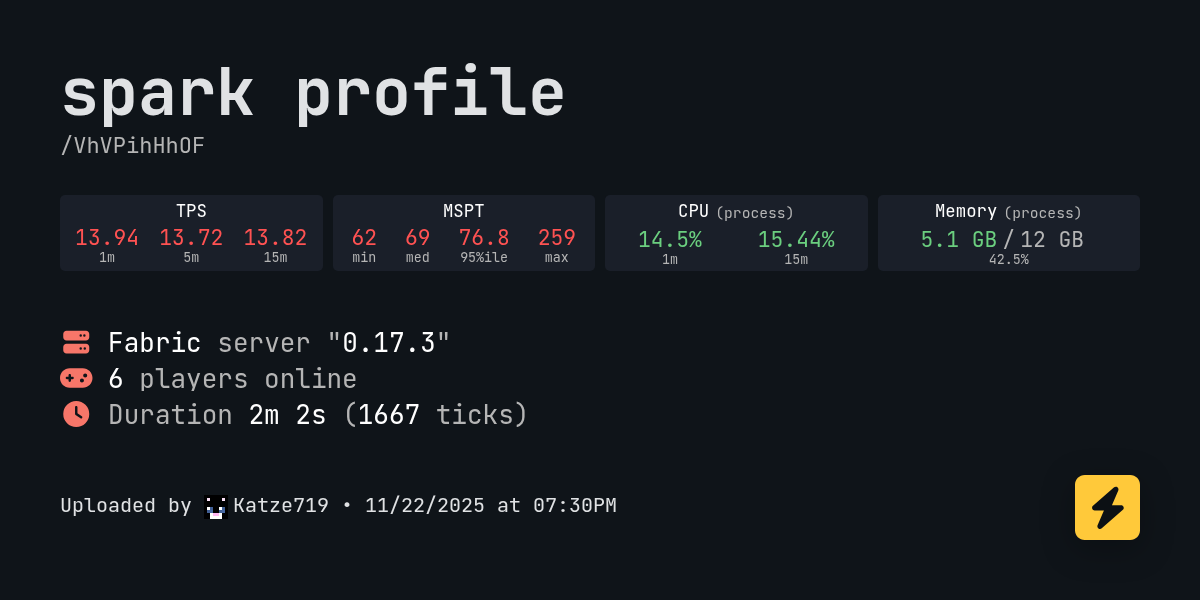
spark is a performance profiler for Minecraft clients, servers, and proxies.
grizzled tendon
celest condor
https://spark.lucko.me/VhVPihHhOF
could someone look at this and help me improv...
Please follow the guide from !tps command first
celest condor
will java25-graalvm also work with this modpack? did someone test this?
tame obsidian
its likely to crash with java 25 so we recommend 21
celest condor
aight, thx
grizzled tendon
celest condor
will java25-graalvm also work with this modpack? did someone test this?
Should work fine, server can have issues if run on Java 25, but it's fixable
 grizzled tendon
tame obsidian
its likely to crash with java 25 so we recommend 21
grizzled tendon
tame obsidian
its likely to crash with java 25 so we recommend 21
Above screenshot is BMC3 Fabric running on GraalVM 25
Fresh install, nothing changed
celest condor
ok, got some thing together now, how important are mspt? https://spark.lucko.me/T8GNl1iUJw

spark is a performance profiler for Minecraft clients, servers, and proxies.
grizzled tendon
celest condor
ok, got some thing together now, how important are mspt? https://spark.lucko.me/...
MSPT should be 50 (cause 50ms*20 ticks = 1000ms = 1s), and that will allow TPS to be 20 (1000 / 20 = 50)
celest condor
okay, will profile further, maybe tps will drop if all of my friends play at once
celest condor
https://spark.lucko.me/T8GNl1iUJw
now i see tps down to 12-13
spark is a performance profiler for Minecraft clients, servers, and proxies.
grizzled tendon
celest condor
https://spark.lucko.me/T8GNl1iUJw
now i see tps down to 12-13
Do people on the server do anything in particular?
celest condor
well, mostly flying around with elytra, right now fighting a boss together in the aether
grizzled tendon
Did you pregenerate chunks?
Because chunk generation even on vanilla tends to be slow
And on modded is not better
celest condor
grizzled tendon
Did you pregenerate chunks?
No, have not done that
Is there an easy command for that?
grizzled tendon
!pregen
hazy sparrowBOT

Noob explains how to Pre Generate your Minecraft World.
▬▬▬▬▬▬▬▬▬▬▬▬▬▬▬▬▬▬▬▬▬▬▬▬▬▬▬▬▬▬
➔ Modpack: https://www.curseforge.com/minecraft/modpacks/better-minecraft-modpack
➔ Discord: https://discord.com/invite/9S5tfrY4Fr
▬▬▬▬▬▬▬▬▬▬▬▬▬▬▬▬▬▬▬▬▬...
grizzled tendon
Or you can install mod Chunky (should be for both Fabric and Forge)
celest condor
Is pre generating chunks multi threaded?
grizzled tendon
Not sure
 buoyant eagle
hi, what was the mod called that let us host lan worlds?
tame obsidian
well lan is a sep feature built into minecraft, to share world globally, its lps's custom fork of e4mc that only works within our packs
 lethal timber
tame obsidian
well lan is a sep feature built into minecraft, to share world globally, its lps...
lethal timber
tame obsidian
well lan is a sep feature built into minecraft, to share world globally, its lps...
how can we take it out and use essential>
tame obsidian
!ea
hazy sparrowBOT
The Essential mod is completely incompatible with all of our modpacks, and there's no reason to use it. All of our modpacks already come with built-in, free world hosting, by clicking the "Share World' button in the Open to LAN menu. You can learn more by typing !ws in the #bots channel. You can also run type !server in the same channel to learn how to properly host a server for better performance and more flexibility. In modpacks that aren't owned by us, you can use mods such as e4mc or WorldHost to host a server completely for free without Essential's many issues and crashes and the microtransactions that they constantly bother users with. To learn more about alternatives to the Essential mod, check out this website.
lethal timber
hazy sparrow
The Essential mod is completely incompatible with all of our modpacks, and there...
its easier to use
tame obsidian
we dont give out info of how to make essential compatiable, and if you were to find a way youd be given no support as we dont give support to users using the mod
lethal timber
ic
 leaden anvil
how i can update modpack from modrintc? i see only 26.5v
tame obsidian
!modrinth
hazy sparrowBOT
Currently LPS packs are not being updated on the Modrinth site, and as such are outdated. This is while the devs figure out a way to automate uploads of the pack properly.
Until the packs can be properly updated, we recommend using ATL (use !alternates in #bots for further info on the installation process ) or Prism launcher. You can download the CurseForge version of our packs on these launchers while still being able to make instances from Modrinth versions of other packs not owned by us.
Please note this does not apply to individual mod projects of developers at LPS.
leaden anvil
thanks
normal imp
analog spoke
Uhh, maybe look up or down?
yes the issue doesnt happen when looking up. however the issue only happens after I update my BetterMC3 to it's latest version. the previous version (which I forget which version I was) doesnt have that issue. and it doesnt happen in vanilla
zenith ore
has anyone dealt with weird textures in the game?
tame obsidian
like what
tame obsidian
normal imp
yes the issue doesnt happen when looking up. however the issue only happens afte...
you could try disabling any 3 of these mods as they were added in the latest update of bmc3 fabric, if issue persists i'll see if i can recreate it since dev is out of town
 marsh meteor
Major Error
I was loading my world in BMC3 (Fabric), and my worlds not loading!
It displays a screen that:
Errors in currently selected datapacks prevented world from loading
 west hollow
привет, что делать, добавил мод в сборку Origins вместе с ним ещё 6 сборка better mc 4 forge выдаёт ошибку
crash_assistant_app.log: https://mclo.gs/3it82ti
grizzled tendon
marsh meteor
**Major Error**
I was loading my world in BMC3 (Fabric), and my worlds not loadi...
!logs
hazy sparrowBOT
To better assist with fixing your issue, we will need some logs:
- Curseforge -> Right click the modpack instance -> „Open Folder”.
- ATLauncher -> Click „Open Folder” on the modpack instance.
- MultiMC -> Select your instance and click „Instance Folder” on the right.
- PrismLauncher -> Select your instance and click „Folder” on the right.
- For servers -> Open the folder containing your server files.
To find the „latest.log” file, navigate to the 'logs' folder.
To find the „hs_err_pid.log” file, simply look for the file name after opening the instance folder.
To find a crash report, navigate to the „crash-reports” folder and find the most recent file after your crash occurred.
Once located, please upload the requested file here. If it fails, upload to https://mclo.gs/ and share the link here.
analog spoke
marsh meteor
**Major Error**
I was loading my world in BMC3 (Fabric), and my worlds not loadi...
We need your logs, we can't do anything with the phrase "I need help, this specific error has occurred!"; SyntheeR's run the command that gives you the exact instructions for getting logs.
Oh, and make sure to tell us what Launcher.
shell rain
 acoustic spindleBOT
shell rain
acoustic spindleBOT
shell rain
Uploaded disconnect-2025-11-23_16.28.40-client.txt from @shell rain to mclogs: https://mclo.gs/pCiiPrz
 proud solstice
yo
shell rain
come on same thing again now its 2 players
 ebon tulip
Hello im totally new to your modpack but in encountered some problem
I recenlty found dungeon with a lot skeleton spawners and destroying every signle one takes forever to do (i have iron pickaxe) Should i get better tool or use other things or is it bugged
 marsh birch
is there any helper online?
 latent wasp
Is there a pub server for this pack ?
tame obsidian
not an offical one but theres community ones in the server browser #community-servers-info
 bitter girder
sad, superflat worlds dont generate, just generates a normal world 🥀
 shut plaza
what bmc should i install?
tame obsidian
whichever you want
this is the fabric channel and bmc4 is forge but
its not very high but you should backup the world just to be sure first
 spiral tendon
Opps sorry! Thank you!
shut plaza
tame obsidian
whichever you want
which is the best?
 pearl flume
 cold cradle
may be full currently, we're getting into thanksgiving week here in the states. Lot of people are off school and/or work
marsh meteor
grizzled tendon
!logs
acoustic spindleBOT
marsh meteor
Uploaded latest.log from @marsh meteor to mclogs: https://mclo.gs/nzdKBtp
marsh meteor
help me
my world got corrupted like 3 other times
acoustic spindleBOT
Uploaded message.txt from @spare portal to mclogs: https://mclo.gs/9R2yanN
pearl flume
!ca please do not ping staff.
hazy sparrowBOT
pearl flume
you have to follow the crash assist pop up
normal imp
tame obsidian
you could try disabling any 3 of these mods as they were added in the latest upd...
I've tried disable all of them at once and the issue is still there. After further investigation, turns out the "Faster Climbing" feature from "Better Client" is the cause of this issue
normal imp
also, does anyone know which mod that modify scaffolding placement? I'd like to add that into my fabric client
marsh meteor
!ca
hazy sparrowBOT
marsh meteor
acoustic spindleBOT
marsh meteor
Uploaded latest.log from @marsh meteor to mclogs: https://mclo.gs/e2piTuL
grizzled tendon
marsh meteor
I see a lot of zip end errors - which could suggest data corruption
!alternates
hazy sparrowBOT
If this command was run in response to your question/issue, it is likely because switching away from the launcher you are currently using would fix your problem.
From our experience, the most stable launcher by far is ATLauncher, also known as ATL. Keep in mind that ATL is NOT related to TLauncher in any way, and is not a cracked launcher.
To install ATL, do the following:
1. Go to https://atlauncher.com/download. If you are on MacOS, then choose the "Jar" version under the "Other" tab.
2. Install and run the setup, then open the program.
3. Login to your Microsoft account that owns the Java Edition of Minecraft from the Accounts tab on the right. This process is 100% safe, as it goes directly through Microsoft. ATL doesn't see your account credentials.
4. Go to the Packs tab on the right, then click "Curseforge" on the left.
5. Search the modpack you wish to download.
6. Click "Install". Then, follow the on-screen directions.
7. Go to the Instances tab, and click "Play" on the modpack you downloaded. If you ever see an "Update" button on the instance, click it.
This video explains the process: https://youtu.be/xMYW1wMbmkM
To transfer your Curseforge world to ATL, simply right click the modpack on Curseforge, or click the 3 dots, then click "Open Folder". Copy the Saves folder, then click "Open Folder" on ATL and paste the Saves folder there. Do the same with the XaerosMinimap folder, or the Journeymap folder, to transfer over any waypoints you've created.
Because ATL downloads the exact same files as Curseforge does, your world will be the exact same and you will be able to join the same servers. ATL also works without an internet connection (after you've installed the modpack, of course), and does not have any bloat from Overwolf. You are free to uninstall both Overwolf and Curseforge with ATL installed.
grizzled tendon
Try using ATLauncher instead of CF app
marsh meteor
!alternates
hazy sparrowBOT
If this command was run in response to your question/issue, it is likely because switching away from the launcher you are currently using would fix your problem.
From our experience, the most stable launcher by far is ATLauncher, also known as ATL. Keep in mind that ATL is NOT related to TLauncher in any way, and is not a cracked launcher.
To install ATL, do the following:
1. Go to https://atlauncher.com/download. If you are on MacOS, then choose the "Jar" version under the "Other" tab.
2. Install and run the setup, then open the program.
3. Login to your Microsoft account that owns the Java Edition of Minecraft from the Accounts tab on the right. This process is 100% safe, as it goes directly through Microsoft. ATL doesn't see your account credentials.
4. Go to the Packs tab on the right, then click "Curseforge" on the left.
5. Search the modpack you wish to download.
6. Click "Install". Then, follow the on-screen directions.
7. Go to the Instances tab, and click "Play" on the modpack you downloaded. If you ever see an "Update" button on the instance, click it.
This video explains the process: https://youtu.be/xMYW1wMbmkM
To transfer your Curseforge world to ATL, simply right click the modpack on Curseforge, or click the 3 dots, then click "Open Folder". Copy the Saves folder, then click "Open Folder" on ATL and paste the Saves folder there. Do the same with the XaerosMinimap folder, or the Journeymap folder, to transfer over any waypoints you've created.
Because ATL downloads the exact same files as Curseforge does, your world will be the exact same and you will be able to join the same servers. ATL also works without an internet connection (after you've installed the modpack, of course), and does not have any bloat from Overwolf. You are free to uninstall both Overwolf and Curseforge with ATL installed.
marsh meteor
grizzled tendon
Try using ATLauncher instead of CF app
can u please tell the reason behind the issue?
grizzled tendon
marsh meteor
can u please tell the reason behind the issue?
Curseforge for some reason has issues with downloads integrity
 earnest storm
hello. i started a server with 440 mods. i used chunky and it stops always at 24.46%. i think the red herrings in the crash report is not so friendly when you want to fix it by yourself. so why do you do this. i mean i could install the mods step by step by myself and have no red herrings?
and sorry, english is not my first language ^^
shell rain
acoustic spindleBOT
shell rain
Uploaded message.txt from @shell rain to mclogs: https://mclo.gs/exknNYR
grizzled tendon
earnest storm
hello. i started a server with 440 mods. i used chunky and it stops always at 24...
Can you share those reports with us for review?
grizzled tendon
shell rain
!ca
hazy sparrowBOT
shell rain
grizzled tendon
!ca
nope i didnt get one joined my server this came up and got stuck in this screeen and had to alt + f4 (im loseing my sanity just let me play the dame game :c )
 earnest storm
grizzled tendon
Can you share those reports with us for review?
earnest storm
grizzled tendon
Can you share those reports with us for review?
i could send you the crash reports. should i do it in private chat?
grizzled tendon
earnest storm
i could send you the crash reports. should i do it in private chat?
Post them here, I don't read DMs
acoustic spindleBOT
earnest storm
More than 3 logs were uploaded in one message, won't upload.
earnest storm
acoustic spindleBOT
earnest storm
Uploaded crash-2025-11-24_14.40.11-server.txt from @earnest storm to mclogs: https://mclo.gs/evNL8A7
acoustic spindleBOT
earnest storm
Uploaded crash-2025-11-24_14.28.29-server.txt from @earnest storm to mclogs: https://mclo.gs/c55KrWz
acoustic spindleBOT
earnest storm
Uploaded crash-2025-11-23_21.58.29-server.txt from @earnest storm to mclogs: https://mclo.gs/DlQhno3
earnest storm
well i used the modpack as a base with cobblemon^^so thats why i think its weird with the red herrings. because before i used bmc i already had all the mods in my personal pack before i even knew you guys were out there
shell rain
nope i didnt get one joined my server
grizzled tendon
shell rain
Can you try to kill that entity and see if then you can join? Invalid entity data item type for field 20 on entity ZombieVillagerEntity['Zombie Villager'/571, l='ClientLevel', x=293.25, y=21.00, z=1073.48]
grizzled tendon
earnest storm
well i used the modpack as a base with cobblemon^^so thats why i think its weird...
Does it pre-generate properly on a base pack?
earnest storm
did not test it, but i will try it later will ask/tell you tomorrow i try to fix it myself ^^ i think i know what the problem is and want to try other solutions before i setup a second server with the base pack and start chunky. my server perforemance is awesome with those 440-450mods. i started chunky with a radius of 10.000 blocks. i removed the data of that chunk in the poi file and try some things. cya 🙂
[15:23:57] [Worker-Main-8/WARN]: Empty height range: [30 absolute-20 absolute]
[15:23:59] [Worker-Main-14/WARN]: Method overwrite conflict for getChunk in bclib.mixins.common.json:SurfaceRulesContextAccessor from mod bclib, previously written by dev.worldgen.lithostitched.mixin.common.SurfaceRulesContextMixin. Skipping method.
[15:23:59] [Worker-Main-14/WARN]: Method overwrite conflict for getStoneDepthBelow in bclib.mixins.common.json:SurfaceRulesContextAccessor from mod bclib, previously written by dev.worldgen.lithostitched.mixin.common.SurfaceRulesContextMixin. Skipping method.
[15:23:59] [Worker-Main-14/WARN]: Method overwrite conflict for getChunk in wover.surface.mixins.common.json:SurfaceRulesContextAccessor from mod wover-surface, previously written by dev.worldgen.lithostitched.mixin.common.SurfaceRulesContextMixin. Skipping method.
[15:23:59] [Worker-Main-14/WARN]: Method overwrite conflict for getStoneDepthBelow in wover.surface.mixins.common.json:SurfaceRulesContextAccessor from mod wover-surface, previously written by dev.worldgen.lithostitched.mixin.common.SurfaceRulesContextMixin. Skipping method.
[15:24:01] [Server thread/WARN]: Can't keep up! Is the server overloaded? Running 7595ms or 151 ticks behind
only in this chunk
so far
shell rain
grizzled tendon
Can you try to kill that entity and see if then you can join? Invalid entity dat...
i did but from server side it just said entity not found again and again
marsh meteor
grizzled tendon
Curseforge for some reason has issues with downloads integrity
is there another way except ATLauncher?
grizzled tendon
marsh meteor
is there another way except ATLauncher?
Why?
grizzled tendon
shell rain
i did but from server side it just said entity not found again and again
You might want to use some NBT editor to remove that entity (since console command might not work if the chunk is not loaded)
There might be guides on Youtube, but that's more advanced topic
 little atlas
What's the structure called where the nether ruby pickaxe spawns? Like is it in the nether city or is it some other structure.
 fallow slate
Hey anyvillage seed
 buoyant flume
 tame obsidian
do you have any reason to be here other than just want to share a meme dissing the server
analog spoke
buoyant flume
because its work so bad and crash every hour
!server
hazy sparrowBOT
Free Method
To host a server on your own computer, read the selfhosting guide.
This guide goes over how to install, create, and launch a free Minecraft server on all operating systems (MacOS, Linux and Windows). The guide also guides you through installing Java and optimizing your server for better performance.
If you are installing one of our older modpacks, ignore the "README" file that is included in the serverpack files, as they have outdated information.
Paid Method
We suggest renting a server from Bisect Hosting:
Approx. $10 - $25 a month depending on what plan you choose. You can also get 25% off with Code LunaPixel.
Go here and order a plan which fits you. We suggest 1GB per player but nothing lower than 4GB as the server needs at least 3GB to run.
Go to #server-hosting for more Info!
The following advice works for both the Free and Paid methods:
Transferring Your World
If you're playing Singleplayer and want to transfer your world to your server, simply go to your modpack files and navigate to the saves folder. Inside of this folder, you will see your world saves. Rename your desired world save to world. You can then transfer this folder to your server files. If your world was hosted via world sharing, this process has to be done by the person who would click "Share World".
Fixing Lag
To resolve lag issues, simply run the !tps command in #bots and follow the directions provided.
analog spoke
Just make your own server then.
 haughty tangle
I'm using Minecraft version Fabric 1.20.1 and i'm running it through Modrinth. I tried adding the butchers delight mod and while it didn't work, it still allowed me to run the game. I'm using v26.5. I was able to log on and play a few times before it started crashing when trying to run it. Now it crashes almost immediately
acoustic spindleBOT
haughty tangle
I'm using Minecraft version Fabric 1.20.1 and i'm running it through Modrinth. I...
Uploaded crash-2025-11-24_15.02.21-client.txt from @haughty tangle to mclogs: https://mclo.gs/UuL1Ye6
tame obsidian
haughty tangle
I'm using Minecraft version Fabric 1.20.1 and i'm running it through Modrinth. I...
!modrinth
hazy sparrowBOT
Currently LPS packs are not being updated on the Modrinth site, and as such are outdated. This is while the devs figure out a way to automate uploads of the pack properly.
Until the packs can be properly updated, we recommend using ATL (use !alternates in #bots for further info on the installation process ) or Prism launcher. You can download the CurseForge version of our packs on these launchers while still being able to make instances from Modrinth versions of other packs not owned by us.
Please note this does not apply to individual mod projects of developers at LPS.
 devout ice
Hi everyone and sorry if this has been asked before (couldn't find anything):
I'm trying to re-roll my librarians but somehow they only ever get Punch, Smite and Bane of Arthropods in different levels, nothing else. Does anyone know what could cause this? (BMC3 Fabric v41)
Edit:
Somewhere else in the map they're giving Flame, Fire Aspect and Blast Protection ...
Is this ... a "feature" maybe? 🤔
Edit 2 and FIX:
Turns out the experimental settings I had enabled for my world also introduced the "trade rebalance" setting, causing sold items to be dependant on the biome the trader spawned in. Disabled this setting in the level.dat file and now it's working again.
 hearty iris
tame obsidian
so once you have curseforge launcher open, theres the instances tab with all you...
hearty iris
tame obsidian
so once you have curseforge launcher open, theres the instances tab with all you...
This still works even if modpacks have been added? No extra steps needed?
tame obsidian
hearty iris
This still works even if modpacks have been added? No extra steps needed?
as far as im aware updating the pack on cf launcher would not affect added mods
but it is quite that simple to update the pack i just laid it all out because they were making a big version jump
hearty iris
so they'd carry over just not be updated (the added ones that are not orignally included in the pack)
hearty iris
tame obsidian
but it is quite that simple to update the pack i just laid it all out because th...
Doing it for the first time so once done once, I'm good to go haha
tame obsidian
hearty iris
so they'd carry over just not be updated (the added ones that are not orignally ...
yeah
hearty iris
tame obsidian
yeah
The mods that I have added to the mod pack did not carry over when I updated and I followed all of your instructions and the videos instructions
grizzled tendon
hearty iris
The mods that I have added to the mod pack did not carry over when I updated and...
The Curseforge app is just weird. I suggest moving (permanently) to either ATLauncher or PrismLauncher - both support Curseforge and Modrinth packs, and not break installs, nor loose mods
!alternates
hazy sparrowBOT
If this command was run in response to your question/issue, it is likely because switching away from the launcher you are currently using would fix your problem.
From our experience, the most stable launcher by far is ATLauncher, also known as ATL. Keep in mind that ATL is NOT related to TLauncher in any way, and is not a cracked launcher.
To install ATL, do the following:
1. Go to https://atlauncher.com/download. If you are on MacOS, then choose the "Jar" version under the "Other" tab.
2. Install and run the setup, then open the program.
3. Login to your Microsoft account that owns the Java Edition of Minecraft from the Accounts tab on the right. This process is 100% safe, as it goes directly through Microsoft. ATL doesn't see your account credentials.
4. Go to the Packs tab on the right, then click "Curseforge" on the left.
5. Search the modpack you wish to download.
6. Click "Install". Then, follow the on-screen directions.
7. Go to the Instances tab, and click "Play" on the modpack you downloaded. If you ever see an "Update" button on the instance, click it.
This video explains the process: https://youtu.be/xMYW1wMbmkM
To transfer your Curseforge world to ATL, simply right click the modpack on Curseforge, or click the 3 dots, then click "Open Folder". Copy the Saves folder, then click "Open Folder" on ATL and paste the Saves folder there. Do the same with the XaerosMinimap folder, or the Journeymap folder, to transfer over any waypoints you've created.
Because ATL downloads the exact same files as Curseforge does, your world will be the exact same and you will be able to join the same servers. ATL also works without an internet connection (after you've installed the modpack, of course), and does not have any bloat from Overwolf. You are free to uninstall both Overwolf and Curseforge with ATL installed.
grizzled tendon
Instruction above if you need
hearty iris
grizzled tendon
The Curseforge app is just weird. I suggest moving (permanently) to either ATLau...
Thanks !
 misty parrot
what is a good BMC server i can join?
grizzled tendon
misty parrot
what is a good BMC server i can join?
Check in #1109323795556216862 or #community-servers-info
misty parrot
ok thx
marsh meteor
grizzled tendon
Why?
I tried atlauncher and i wasnt able to port my better minecraft modpack
misty parrot
how do i update my v30 to v41 on modrinth?
tame obsidian
!modrinth
hazy sparrowBOT
Currently LPS packs are not being updated on the Modrinth site, and as such are outdated. This is while the devs figure out a way to automate uploads of the pack properly.
Until the packs can be properly updated, we recommend using ATL (use !alternates in #bots for further info on the installation process ) or Prism launcher. You can download the CurseForge version of our packs on these launchers while still being able to make instances from Modrinth versions of other packs not owned by us.
Please note this does not apply to individual mod projects of developers at LPS.
misty parrot
ok tysm
zenith ore
is it me or the seasons hub isnt working withj the pack
north dove
When I die or teleport with teleport stone there is a chance to my game to be dropped frame doesn’t fix until I quit the game happen a lot
shell rain
well well well
im back
Better MC 3 - v41 crashed. The logs have been uploaded to mclo.gs:
- 1.21.1 [FABRIC]
- What launcher did you run Minecraft with? (e.g. CurseForge, ATLauncher, MultiMC, ...)
- Have you changed the modpack in any way except mods?
- v41
- Have you ever gotten past the crash condition without crashing, or does the game always crash?
- What steps cause the crash?
latest.log head / tail (~57MB & ~847k lines) | crash-2025-11-26_00.09.23-client.txt | CurseForge: launcher_log.txt head / tail (~60MB & ~851k lines) | crash_assistant_app.log | modlist.txt
Mod list changes on top of the modpack:
[2;34mMod list was not modified.[0m
i opend a chest
idk about inv
i know its massive jei hates me apperently
 half garnet
Better MC 3 - v30 crashed. The logs have been uploaded to mclo.gs:
- 1.21.1 [FABRIC]
- What launcher did you run Minecraft with? (e.g. CurseForge, ATLauncher, MultiMC, ...)
- Have you changed the modpack in any way except mods?
- v30
- Have you ever gotten past the crash condition without crashing, or does the game always crash?
- What steps cause the crash?
latest.log | crash-2025-11-25_16.10.30-server.txt | PrismLauncher-0.log | crash_assistant_app.log
Mod list changes beyond the modpack:
[2;34mMod list wasn't modified.[0m
- Launcher: Prism Launcher 9.4
- No I am pretty sure I didn't
6All i did was try to create a world in creative and it crashes but when i try doing that in survival it doesn't crash
Prism Launcher log : https://mclo.gs/uyAqi7a
tame obsidian
half garnet
Better MC 3 - v30 crashed. The logs have been uploaded to `mclo.gs`:
1. 1.21.1 [...
you need betterx world type set
half garnet
tame obsidian
you need betterx world type set
i just relaunched it and see the word in creative I was trying to create, should i try going into it and see if it doesn't crash or should I delete the word and create a new one with manually going in and doing betterx
tame obsidian
half garnet
i just relaunched it and see the word in creative I was trying to create, should...
itll just crash again since its not betterx world type
half garnet
tame obsidian
itll just crash again since its not betterx world type
thanks it solved it for creating one again
Does anyone know how to fix this? https://screenrec.com/share/8BVdeGO5Cm

Recorded with ScreenRec
grizzled tendon
half garnet
Does anyone know how to fix this? https://screenrec.com/share/8BVdeGO5Cm
I just looked at your crash report - BMC3 is now on v41 - try updating the game first
A lot of bugs were fixed
half garnet
grizzled tendon
I just looked at your crash report - BMC3 is now on v41 - try updating the game ...
do you know where I could find a .mrpack file because for me the latest update was v30 and the only other way it gives me to update is by file
grizzled tendon
half garnet
do you know where I could find a .mrpack file because for me the latest update w...
!modrinth
hazy sparrowBOT
Currently LPS packs are not being updated on the Modrinth site, and as such are outdated. This is while the devs figure out a way to automate uploads of the pack properly.
Until the packs can be properly updated, we recommend using ATL (use !alternates in #bots for further info on the installation process ) or Prism launcher. You can download the CurseForge version of our packs on these launchers while still being able to make instances from Modrinth versions of other packs not owned by us.
Please note this does not apply to individual mod projects of developers at LPS.
half garnet
how can if i coppy and paste my saves folder and replace the file will I be able to keep my worlds
grizzled tendon
half garnet
how can if i coppy and paste my saves folder and replace the file will I be able...
Yes, if you install the CF version (you can use  still) - you can just copy across the "saves" folder (and all "xaero" folders for map data)
half garnet
ok
half garnet
grizzled tendon
Yes, if you install the CF version (you can use <:prism:1086501783305715773> sti...
could you hop into a vc and help me, so you can explain it whilst I screenshare?
grizzled tendon
No, it's too late, and I hate VCs
half garnet
ok
grizzled tendon
But it should be fairly simple process
half garnet
where is the CF Version so i can put it into the prism launcher
Update: I have realized that CF is CurseForge
tame obsidian
you just
create a new instance
and go to the cf tab
and not the modrinth tab

and then proceed to search better mc
half garnet
tame obsidian
what folders should i copy and replace to keep my mc settings, my worlds, and the generation data for my worlds?
tame obsidian
settings youd have to reconfigure as moving that over can have issues
otherwise you would just copy over saves and xaeros folders as syntheer said
half garnet
thank you verry much, my cursed glitched pause screen is fixed and I have all my worlds also i already copied over the xaeros folders but what did that copy over?
tame obsidian
xaeros copy overs your waypoint and minimap data
half garnet
ok thanks, one last thing what mod is the name of the mod that shows what block/entity you are looking at?
tame obsidian
jade
half garnet
can you change it from top left to top center?
tame obsidian
in its config yes
half garnet
do you know where in the config
tame obsidian
not rlly no i havet messed with it i just know u can
u prob can do it within the in game config
 worthy crane
- Minecraft-Version: 1.21.1 for the launcher and Fabric v.1.21.1-0.17.3 (1.21.1) for the Server
- Launcher: Prism Launcher
- Have you changed the modpack in any way?: No
- What version of the modpack are you using? BMC3 [FABRIC] 1.21.1 v41 for my launcher and BMC3 Server Pack v41 for the Server
- Have you ever gotten past the crash condition without crashing, or does the game always crash?: Single Player is no Problem, but i cant join the Server.
- What steps cause the crash?: Just trying join.
- Server is hostet at nitrado.net
Any idea how to fix this?
acoustic spindleBOT
worthy crane
1. Minecraft-Version: 1.21.1 for the launcher and Fabric v.1.21.1-0.17.3 (1.21.1...
Uploaded disconnect-2025-11-25_23.35.22-client.txt from @worthy crane to mclogs: https://mclo.gs/nsd0UvM
 wooden sphinx
how can I open one single trapdoor? If I open it, it opens all the others near
humble bluff
Better MC 2 - v38 crashed. The logs have been uploaded to mclo.gs:
- 1.20.1 [FABRIC]
- What launcher did you run Minecraft with? (e.g. CurseForge, ATLauncher, MultiMC, ...)
- Have you changed the modpack in any way except mods?
- v38
- Have you ever gotten past the crash condition without crashing, or does the game always crash?
- What steps cause the crash?
latest.log | crash-2025-11-26_17.09.57-client.txt | PrismLauncher-0.log | rei.log | crash_assistant_app.log | modlist.txt
Mod list changes on top of the modpack:
[2;32m1[0m added, [2;31m1[0m removed, [2;34m35[0m updated.
!updatemods
hazy sparrowBOT
Do NOT Update Mods Manually!
Modpacks use specific versions of certain mods to prevent various issues, such as crashes or major game-breaking bugs. Mods will be updated by the modpack developer when they see fit. Please do not update the mods in a modpack manually, unless specifically told to do so. This includes hitting the "update all" feature on CurseForge launcher it likes to bother users with.
To be clear; this is separate from updating the modpack (such as Better MC / Medieval MC) itself. You should always stay up to date with the latest version of the modpack. To update the pack correctly, you can follow the command!updatemodpack
The easiest way to downgrade mod versions to their original versions in the pack, is to reinstall the pack itself. Before you uninstall, back up both any singleplayer world files you have, and your map folder. LPS packs usually use JourneyMap or Xareos, the map folder will be named accordingly.
- Curseforge -> Right click the modpack instance -> „Open Folder”.
- ATLauncher -> Click „Open Folder” on the modpack instance.
- PrismLauncher -> Select your instance and click „Folder” on the right.
Navigate to the "minecraft" folder, and within that will be "saves" and "journeymap"/"xareos" depending on which the pack has. Copy/Move these folders to a safe location, and you can move them right back to the fresh copy of the pack when reinstalled.
humble bluff
Did this happen because I updated it?
grizzled tendon
humble bluff
Did this happen because I updated it?
Most likely, given the fact that the crash report complains about non-existing methods (so some mod you updated expects something from other mod that was not updated)
There is a reason why mods are in versions they are in the modpack
humble bluff
okey thanks Then I'll just play without updating.
 jagged gale
Is there a server for finding better mc fabric multiplayer
tame obsidian
 urban walrus
hi everyone, I ran into a problem when downloading the better mc build. when I download through curseforge, I don't have a folder with mods, but in modrith I can't download the archive with the modpack at all.
tame obsidian
urban walrus
hi everyone, I ran into a problem when downloading the better mc build. when I d...
!vanilla
hazy sparrowBOT
It seems as you are trying to use the standard Minecraft launcher!
To run our packs properly, you will need to have a modded launcher, as it will install the pack for you, making it so you don't have a ton of mods/configs removed & end up crashing due to such.
Our most recommended launcher is ATLauncher, which you can find step by step instructions on by running the command !alternates in #bots . If you prefer a more modern interface, Prism comes recommended as well. Any other launchers we can't guarantee any issues won't arise, so it's best to save the trouble and use ATL/Prism.
 verbal belfry
I am having lag problems in BMC3. Every like 5 seconds there is a big lagspike, even when I am in the menu. Anyone know how to fix this?
eternal pivot
Can anyone tell me why it is not possible to load this texture pack? https://modrinth.com/resourcepack/rappenems-reforge/versions?g=1.21.1


Modrinth
A professional pixel artist's reimagining of Minecraft's visuals
 pure ore
hi.. new here
did tnt dupe work at bmc4?
tame obsidian
u can try it n see but bmc4 is on forge, this is the fabric channel
pure ore
tame obsidian
u can try it n see but bmc4 is on forge, this is the fabric channel
ahh sorry wrong channel
 glass arrow
is there a differnce between the forge and fabric versions? i wanna start this mod but i see like 5 versions of it forge, fabric, neoforge etc
im kinda new to mods
 deft shoal
Can anyone tell me what to do here? When i click it it says to seek help from real humans and go to the discord server but nothing else
 tame obsidian
can u upload the log it gives
deft shoal

is this what you mean
i just reloaded it and it gave me this but it sends me to the same thing

 versed galleon
why does luna allways say an error has occured
 half nexus
my modpack keeps crashing when i try to load up a world after removing repurposed structures mod because i don't like using it. Is there a fix or do you have to use the mod for the modpack to work?
grizzled tendon
versed galleon
why does luna allways say an error has occured
There are holidays in US and many people are playing - it might just be full
grizzled tendon
half nexus
my modpack keeps crashing when i try to load up a world after removing repurpose...
Most likely there is something else in the pack that needs Rep Structures as a dependency - you'll have to remove it too (crash report might tell you what it is)
half nexus
Okay 
Better MC 2 - v37 crashed. The logs have been uploaded to mclo.gs:
- 1.20.1 [FABRIC]
- What launcher did you run Minecraft with? (e.g. CurseForge, ATLauncher, MultiMC, ...) curseforge
- Have you changed the modpack in any way except mods? i removed the repurposed structures mod bc i dont like it

- v37
- Have you ever gotten past the crash condition without crashing, or does the game always crash? always crashes when i load a new world
- What steps cause the crash?
latest.log | crash-2025-11-27_16.47.31-client.txt | CurseForge: launcher_log.txt | rei.log | crash_assistant_app.log | modlist.txt
Mod list changes beyond the modpack:
[2;32m4[0m added, [2;31m22[0m removed, [2;34m0[0m updated.
i couldnt find what what i should remove
grizzled tendon
half nexus
Better MC 2 - v37 crashed. The logs have been uploaded to `mclo.gs`:
1. 1.20.1 [...
I think it might be datapack - look for Paxi's config folder and see if anything in there related to Repurposed Structures
half nexus
YAAAY IT WORKED TY 
 quiet hamlet
Has anyone made a server for BMC3? I’ve looked but no one has it and I really like the Bumblezone mod
misty parrot
i cant find anyone with an open server and i have tryed to reach out but no one awnsers me
dose anyone have a good server that i can join that is BMC?
pearl flume
sometimes it takes a while, it's not an instantaneous thing
 icy heron
will the auto sorting copper golems be in better mc anytime soon?
tame obsidian
icy heron
will the auto sorting copper golems be in better mc anytime soon?
!copper
hazy sparrowBOT
"Are the copper golems in x pack?"
None of our packs at the moment have the vanilla copper update.
"Why?"
Our packs are only on major modding versions, the latest being 1.21.1. The copper update is from 1.21.9.
"Will/When they be added?"
It's up to each dev if they findwant to find a backport mod that adds them that they see fit to the pack/s they manage. There is no definite answer if they will/won't across our existing packs.
"But I've made/seen copper golems in x pack before?"
Friends & Foes mod in multiple of our packs has their own version of copper golems different from the vanilla ones. You can find more info about those ones in the description of the mod on the CurseForge site.
 lapis lance
The trial chambers were the most fun I had in a while. Do explosive spawn on top of you in vanilla? Do the mobs drop god armor?
 hallow void
how do i host a server for me and my friend to play on on modrinth. i already have the server but when i add the mods it crashes.
tame obsidian
!modrinth
hazy sparrowBOT
Currently LPS packs are not being updated on the Modrinth site, and as such are outdated. This is while the devs figure out a way to automate uploads of the pack properly.
Until the packs can be properly updated, we recommend using ATL (use !alternates in #bots for further info on the installation process ) or Prism launcher. You can download the CurseForge version of our packs on these launchers while still being able to make instances from Modrinth versions of other packs not owned by us.
Please note this does not apply to individual mod projects of developers at LPS.
hallow void
so how do i download the server only side mods?
tame obsidian
from the cf site
go to the modpack page you want to play on the curseforge site (this is important to get it from the site), files, click on the latest ver, and its under "additional files"
hallow void
do i use that for client side also or do i do the original for me and my buddys client side?
tame obsidian
you would use a modded launcher to install the pack client side
 blazing saffron
!updatemodpack
hazy sparrowBOT
To properly update the modpack you're playing, it depends on the launcher you are using. This video can explains it on CurseForge launcher, and the same method can be used on other launchers as well, but it's not necessary to use this method on others.
-
CurseForge - See above video
-
PrismLauncher -> Select your instance, and click "Edit" on the right. the 3rd tab down will say "CurseForge", click on it, and there will be a dropdown menu, if not already selected, the latest version of the pack will be at the top of it. click "Update Pack". Sometimes there will be new mods to manually download due to liscensing issues, click "Open Missing" and it will automatically download and checked, and copied to the instance folder. It's safe to delete these mods in your downloads folder once done. Once all are detected, the "Open Missing" will be grayed out. You can click 'Continue" at this point, and it will finish the update process and tell you when its successful.
-
ATLauncher - Under the "Instances" tab, find the pack you would like to update. there will be an "Update" button. There will be a dropdown menu, and if not already selected, the latest version of the pack will be at the top of it to select. Click "Update" once selected. Sometimes there will be new mods to manually download due to licensing issues, click "Open Missing" and it will automatically download and checked, and copied to the instance folder. It's safe to delete these mods in your downloads folder once done. Once all are detected, You can click "OK ", and it will finish the update process.
blazing saffron
!server
hazy sparrowBOT
Free Method
To host a server on your own computer, read the selfhosting guide.
This guide goes over how to install, create, and launch a free Minecraft server on all operating systems (MacOS, Linux and Windows). The guide also guides you through installing Java and optimizing your server for better performance.
If you are installing one of our older modpacks, ignore the "README" file that is included in the serverpack files, as they have outdated information.
Paid Method
We suggest renting a server from Bisect Hosting:
Approx. $10 - $25 a month depending on what plan you choose. You can also get 25% off with Code LunaPixel.
Go here and order a plan which fits you. We suggest 1GB per player but nothing lower than 4GB as the server needs at least 3GB to run.
Go to #server-hosting for more Info!
The following advice works for both the Free and Paid methods:
Transferring Your World
If you're playing Singleplayer and want to transfer your world to your server, simply go to your modpack files and navigate to the saves folder. Inside of this folder, you will see your world saves. Rename your desired world save to world. You can then transfer this folder to your server files. If your world was hosted via world sharing, this process has to be done by the person who would click "Share World".
Fixing Lag
To resolve lag issues, simply run the !tps command in #bots and follow the directions provided.
 crude pagoda
Any idea how to fix this error when world sharing? https://i.imgur.com/ke9k6NU.png been happening to us quite a bit

 loud locust
can someone help me out

am trying to play a single player world, just to get this screen
 fallen mesa
does anyone know if wither skeles drop souls in survival?
grizzled tendon
loud locust
can someone help me out
!logs
hazy sparrowBOT
To better assist with fixing your issue, we will need some logs:
- Curseforge -> Right click the modpack instance -> „Open Folder”.
- ATLauncher -> Click „Open Folder” on the modpack instance.
- MultiMC -> Select your instance and click „Instance Folder” on the right.
- PrismLauncher -> Select your instance and click „Folder” on the right.
- For servers -> Open the folder containing your server files.
To find the „latest.log” file, navigate to the 'logs' folder.
To find the „hs_err_pid.log” file, simply look for the file name after opening the instance folder.
To find a crash report, navigate to the „crash-reports” folder and find the most recent file after your crash occurred.
Once located, please upload the requested file here. If it fails, upload to https://mclo.gs/ and share the link here.
 undone latchBOT
🚫 .v1rus._, that command is disabled in this channel.
grizzled tendon
 next haven
!help
next haven
!help
Just ask the question
quiet hamlet
Does anyone know how Tom’s Simple Storage works in BMC3, they keep connecting to all the chests instead of just one
 subtle lynx
Better MC 2 - v38 crashed. The logs have been uploaded to mclo.gs:
- 1.20.1 [FABRIC]
- What launcher did you run Minecraft with? (e.g. CurseForge, ATLauncher, MultiMC, ...)
- Have you changed the modpack in any way except mods?
- v38
- Have you ever gotten past the crash condition without crashing, or does the game always crash?
- What steps cause the crash?
latest.log | crash-2025-11-29_19.24.40-client.txt | CurseForge: launcher_log.txt | rei.log | crash_assistant_app.log | modlist.txt
Mod list changes on top of the modpack:
Added mods:
[2;32mleaderboards-1.20.1-Fabric-1.0.0.jar[0m
Removed mods:
[2;31mmemoryleakfix-fabric-1.17+-1.1.5.jar[0m
- Curseforge
- No
- Game doesn't even start
- Starting the game
grizzled tendon
subtle lynx
Better MC 2 - v38 crashed. The logs have been uploaded to `mclo.gs`:
1. 1.20.1 [...
!alternates
hazy sparrowBOT
If this command was run in response to your question/issue, it is likely because switching away from the launcher you are currently using would fix your problem.
From our experience, the most stable launcher by far is ATLauncher, also known as ATL. Keep in mind that ATL is NOT related to TLauncher in any way, and is not a cracked launcher.
To install ATL, do the following:
1. Go to https://atlauncher.com/download. If you are on MacOS, then choose the "Jar" version under the "Other" tab.
2. Install and run the setup, then open the program.
3. Login to your Microsoft account that owns the Java Edition of Minecraft from the Accounts tab on the right. This process is 100% safe, as it goes directly through Microsoft. ATL doesn't see your account credentials.
4. Go to the Packs tab on the right, then click "Curseforge" on the left.
5. Search the modpack you wish to download.
6. Click "Install". Then, follow the on-screen directions.
7. Go to the Instances tab, and click "Play" on the modpack you downloaded. If you ever see an "Update" button on the instance, click it.
This video explains the process: https://youtu.be/xMYW1wMbmkM
To transfer your Curseforge world to ATL, simply right click the modpack on Curseforge, or click the 3 dots, then click "Open Folder". Copy the Saves folder, then click "Open Folder" on ATL and paste the Saves folder there. Do the same with the XaerosMinimap folder, or the Journeymap folder, to transfer over any waypoints you've created.
Because ATL downloads the exact same files as Curseforge does, your world will be the exact same and you will be able to join the same servers. ATL also works without an internet connection (after you've installed the modpack, of course), and does not have any bloat from Overwolf. You are free to uninstall both Overwolf and Curseforge with ATL installed.
subtle lynx
Better MC 2 - v38 crashed without a crash report. The logs have been uploaded to mclo.gs:
- 1.20.1 [FABRIC]
- What launcher did you run Minecraft with? ATLauncher
- Have you changed the modpack in any way except mods? No
- v38
- Have you ever gotten past the crash condition without crashing, or does the game always crash? Always crashes
- What steps cause the crash? Starting the game
latest.log | atlauncher.log | crash_assistant_app.log | modlist.txt
Mod list changes on top of the modpack:
Added mods:
[2;32mleaderboards-1.20.1-Fabric-1.0.0.jar[0m
Removed mods:
[2;31mmemoryleakfix-fabric-1.17+-1.1.5.jar[0m
 grim sleet
Better MC 3 - v41 crashed. The logs have been uploaded to mclo.gs:
- 1.21.1 [FABRIC]
- What launcher did you run Minecraft with? (e.g. CurseForge, ATLauncher, MultiMC, ...)
- Have you changed the modpack in any way except mods?
- v41
- Have you ever gotten past the crash condition without crashing, or does the game always crash?
- What steps cause the crash?
latest.log | crash-2025-11-29_22.41.15-server.txt | CurseForge: launcher_log.txt | crash_assistant_app.log | modlist.txt
Mod list changes on top of the modpack:
[2;34mMod list was not modified.[0m
```help i can't play any more on my Forever Worldidk how u played on it in the first place since you dont have the world type set as betterx and thats the issue
grim sleet
how do i fix it
tame obsidian
you can a. edit the world type in your level.dat file using a nbt editor, there are tutorials online or b. create a new world with betterx type
grim sleet
ok
 lyric seal
help i'm trying to run bettermc fabric with cobblemon addons but i keep getting this when i join the server
acoustic spindleBOT
lyric seal
help i'm trying to run bettermc fabric with cobblemon addons but i keep getting ...
Uploaded disconnect-2025-11-29_21.21.13-client.txt from @lyric seal to mclogs: https://mclo.gs/BMHsXYn
meager yacht
lyric seal
help i'm trying to run bettermc fabric with cobblemon addons but i keep getting ...
you probably do not have the mods added to the server
 elfin idol
heyy iam trying to join a server with this modpack but its on fabric and i have no clue how i get a modpack on fabric (never used fabric always forge)
tame obsidian
elfin idol
heyy iam trying to join a server with this modpack but its on fabric and i have ...
fabric is a modloader, so you just need to install the pack on wtv launcher you use, #faq has instructions
north dove
If a afk in my friend world for long time the world kick my
 dreamy dagger
north dove
If a afk in my friend world for long time the world kick my
dreamy dagger
north dove
If a afk in my friend world for long time the world kick my
I am looking for this setting to turn on. We are having issues
 maiden igloo
how much ram would i need if i want to host a server with better mc with <5 players
grizzled tendon
maiden igloo
how much ram would i need if i want to host a server with better mc with <5 play...
For 5 ppl - 8 GB should be ok
maiden igloo
k
 lyric peak
Minecraft crashed. The logs have been uploaded to gnomebot.dev:
latest.log | crash-2025-11-30_11.32.01-client.txt | rei.log | crash_assistant_app.log | modlist.txt
Found [2;34m2[0m log analysis results:
[2;34mGeckoLibOculusCompat[0m in: latest.log
[2;34mMixinApply[0m in: latest.log
Mod list changes after the latest successful launch:
[2;34mMod list was not modified.[0m
your install seems completely broken if this is even bmc in the first place as i cant even tell
lyric peak
tame obsidian
your install seems completely broken if this is even bmc in the first place as i...
this is bmc
the only thing i did was use fancymenu to put the mods button in a better place
tame obsidian
what bmc are you on and version of it
 tame obsidian
of bmc1, 2, or 3
lyric peak
bmc2
tame obsidian
im pretty sure you downloaded the modrinth ver of bmc off prism then
as the latest ver of bmc2 is v38
which explains the broken install
reinstall thru the cf tab of prism
lyric peak
oh
lyric peak
grevious error

 brisk sail
Better MC 2 - v38 crashed without a crash report. The logs have been uploaded to mclo.gs:
- 1.20.1 [FABRIC]
- What launcher did you run Minecraft with? (e.g. CurseForge, ATLauncher, MultiMC, ...) Curseforge
- Have you changed the modpack in any way except mods?** Nope**
- v38
- Have you ever gotten past the crash condition without crashing, or does the game always crash? Crashes on launch, didn't used to.
- What steps cause the crash?
latest.log | CurseForge: launcher_log.txt | crash_assistant_app.log | modlist.txt
Mod list changes on top of the modpack:
Added mods:
[2;32mleaderboards-1.20.1-Fabric-1.0.0.jar[0m
Removed mods:
[2;31mmemoryleakfix-fabric-1.17+-1.1.5.jar[0m
was working totally fine until I tried to launch it yesterday and it kept crashing. Kept trying every few hours and now this morning and still nothin.
bmc2
hazy sparrowBOT
If this command was run in response to your question/issue, it is likely because switching away from the launcher you are currently using would fix your problem.
From our experience, the most stable launcher by far is ATLauncher, also known as ATL. Keep in mind that ATL is NOT related to TLauncher in any way, and is not a cracked launcher.
To install ATL, do the following:
1. Go to https://atlauncher.com/download. If you are on MacOS, then choose the "Jar" version under the "Other" tab.
2. Install and run the setup, then open the program.
3. Login to your Microsoft account that owns the Java Edition of Minecraft from the Accounts tab on the right. This process is 100% safe, as it goes directly through Microsoft. ATL doesn't see your account credentials.
4. Go to the Packs tab on the right, then click "Curseforge" on the left.
5. Search the modpack you wish to download.
6. Click "Install". Then, follow the on-screen directions.
7. Go to the Instances tab, and click "Play" on the modpack you downloaded. If you ever see an "Update" button on the instance, click it.
This video explains the process: https://youtu.be/xMYW1wMbmkM
To transfer your Curseforge world to ATL, simply right click the modpack on Curseforge, or click the 3 dots, then click "Open Folder". Copy the Saves folder, then click "Open Folder" on ATL and paste the Saves folder there. Do the same with the XaerosMinimap folder, or the Journeymap folder, to transfer over any waypoints you've created.
Because ATL downloads the exact same files as Curseforge does, your world will be the exact same and you will be able to join the same servers. ATL also works without an internet connection (after you've installed the modpack, of course), and does not have any bloat from Overwolf. You are free to uninstall both Overwolf and Curseforge with ATL installed.
grizzled tendon
Follow the above ^^
brisk sail
Thank you very much
 storm hinge
I'm gonna play bmc3 on fabric. Are there no good dragon riding mods on fabric compatible with bmc3?
I don't see one in the modpack, which is why I ask.
tame obsidian
the only dragon mods ik of are dragon mounts+ ice n fire and neither are fabric no
storm hinge
tame obsidian
the only dragon mods ik of are dragon mounts+ ice n fire and neither are fabric ...
Do you know of any alternatives to traversing the world quickly without teleportation aside from dragons?
tame obsidian
well elytra but other than that no i dontknow
tame obsidian
dragons aren really all that in the bmc forge counterparts honestly as a lot of people complain abt them being buggy/disappering randomly
meager yacht
storm hinge
I'm gonna play bmc3 on fabric. Are there no good dragon riding mods on fabric co...
the adventurez mod has a rideable dragon
this is explained in the questbook
 fluid birch
Hello everyone can anyone help me diagnose this black box issue im having in dark lighting, would anyone mind getting an admin or someone please ?
 meager yacht
fluid birch
Hello everyone can anyone help me diagnose this black box issue im having in dar...
meager yacht
fluid birch
Hello everyone can anyone help me diagnose this black box issue im having in dar...
Please read the full contents of the #get-support channel for us to provide assistance.
storm hinge
Is it better for me to use modrinth or curseforge? GPT said modrinth is lighter weight and doesn't have the overwolf running in background, so it has less overhead
I have a laptop that's just barely enough to run BMC3 so I'm trying to minimize overhead
I ask because BMC3 fabric on modrinth seems to be an older version with less mods?
meager yacht
storm hinge
Is it better for me to use modrinth or curseforge? GPT said modrinth is lighter ...
please
stop asking AI questions about modded minecraft
it knows absolutely nothing
meager yacht
storm hinge
I ask because BMC3 fabric on modrinth seems to be an older version with less mod...
mod count has zero relation to performance
!alternates read the installation guide
hazy sparrowBOT
If this command was run in response to your question/issue, it is likely because switching away from the launcher you are currently using would fix your problem.
From our experience, the most stable launcher by far is ATLauncher, also known as ATL. Keep in mind that ATL is NOT related to TLauncher in any way, and is not a cracked launcher.
To install ATL, do the following:
1. Go to https://atlauncher.com/download. If you are on MacOS, then choose the "Jar" version under the "Other" tab.
2. Install and run the setup, then open the program.
3. Login to your Microsoft account that owns the Java Edition of Minecraft from the Accounts tab on the right. This process is 100% safe, as it goes directly through Microsoft. ATL doesn't see your account credentials.
4. Go to the Packs tab on the right, then click "Curseforge" on the left.
5. Search the modpack you wish to download.
6. Click "Install". Then, follow the on-screen directions.
7. Go to the Instances tab, and click "Play" on the modpack you downloaded. If you ever see an "Update" button on the instance, click it.
This video explains the process: https://youtu.be/xMYW1wMbmkM
To transfer your Curseforge world to ATL, simply right click the modpack on Curseforge, or click the 3 dots, then click "Open Folder". Copy the Saves folder, then click "Open Folder" on ATL and paste the Saves folder there. Do the same with the XaerosMinimap folder, or the Journeymap folder, to transfer over any waypoints you've created.
Because ATL downloads the exact same files as Curseforge does, your world will be the exact same and you will be able to join the same servers. ATL also works without an internet connection (after you've installed the modpack, of course), and does not have any bloat from Overwolf. You are free to uninstall both Overwolf and Curseforge with ATL installed.
storm hinge
meager yacht
stop asking AI questions about modded minecraft
My bad I'm sorry 💀
fluid birch
@meager yacht i have solved the issue, it was the window sizing that bugged
 static matrix
Hey I'm having issues trying to run essentials mod with better mc for fabric and I keep getting a crash report error when i attempt to load the game. If anyone has any suggestions or can help pls lmk thank you!
meager yacht
static matrix
Hey I'm having issues trying to run essentials mod with better mc for fabric and...
!ea
hazy sparrowBOT
The Essential mod is completely incompatible with all of our modpacks, and there's no reason to use it. All of our modpacks already come with built-in, free world hosting, by clicking the "Share World' button in the Open to LAN menu. You can learn more by typing !ws in the #bots channel. You can also run type !server in the same channel to learn how to properly host a server for better performance and more flexibility. In modpacks that aren't owned by us, you can use mods such as e4mc or WorldHost to host a server completely for free without Essential's many issues and crashes and the microtransactions that they constantly bother users with. To learn more about alternatives to the Essential mod, check out this website.
static matrix
meager yacht
!ea
Thank you
 abstract lotus
hi , what modpack does have more content and better overall , bmc2 or bmc3?
 fluid birch
@shell rain uninstall forge and minecraft then reinstall
 atomic wedge
I wnna join bettermc minecraft srvr , anyone hosting or looking for players ?
shell rain
fluid birch
<@1025356511301615716> uninstall forge and minecraft then reinstall
its fabric
fluid birch
@shell rain thats what im using too
fluid birch
unistall the cursed forge
shell rain
curse forge
shell rain
alr bet
fluid birch
well the minecraft launcher
 atomic wedge
shell rain
you want to join my server
atomic wedge
shell rain
you want to join my server
Do u have better mc in it ?
fluid birch
@shell rain @ me how it goes, if i dont respond then dm me
fluid birch
@shell rain dont forget to unistall the minecraft laucher
shell rain
fluid birch
<@1025356511301615716> dont forget to unistall the minecraft laucher
yes boss
re instal all
acoustic spindleBOT
shell rain
t
Uploaded disconnect-2025-11-23_21.53.46-client.txt from @shell rain to mclogs: https://mclo.gs/rxTXn8c
fluid birch
@abstract lotus bmc3
shell rain
and server crashed
fluid birch
@shell rain when you click play in the minecraft launcher what happens ?
fluid birch
ye
shell rain
but after joining server it crashes
fluid birch
does single player work ?
shell rain
yeah
fluid birch
hmmm
gimme a minute
@shell rain try booting in secure boot from your bio's
after that come back here
i'll give u next step
shell rain
how do i do that
fluid birch
@shell rain ive dmed you
meager yacht
shell rain
Please read the full contents of the #get-support channel for us to provide assistance.
meager yacht
shell rain
how do i do that
please do not listen to any of the directions jemzy gave
none of the directions he gave have literally anything to do with your issue
meager yacht
fluid birch
<@1025356511301615716> try booting in secure boot from your bio's
why would that help 😭
meager yacht
shell rain
t
its just a zombie villager making you crash
answer the #get-support questions and i can help
shell rain
meager yacht
its just a zombie villager making you crash
Wait a min
I had the same prob
shell rain
Like before
meager yacht
okay
shell rain
I had the same thing a zombie thing
But this is a completely different server than that one
shell rain
K
fluid birch
@meager yacht i did notice it was the zombie villager but i also thought it might be a firewall or safety protocall thing so i thought id try a few things and if not he could just put it back
meager yacht
i appreciate you trying to help
shell rain
-
1.21.1
-
CurseForge
-
Nope - brand new instance
-
V41
-
Before it wasn't but after reloading the server and unloading all chunks tping every player back to there respwan point it began but now it is on going and no stoping it
| -
Entering the server/tping everyone to spwan points
acoustic spindleBOT
shell rain
1. 1.21.1
2. CurseForge
3. Nope - brand new instance
4. V41
5. Before it was...
Uploaded latest.log from @shell rain to mclogs: https://mclo.gs/xDLH124
shell rain
meager yacht
i appreciate you trying to help
did it
fluid birch
@shell rain fixed it ?
shell rain
fluid birch
<@1025356511301615716> fixed it ?
nope
 hot socket
Hi! I'm trying to run a BMC2 server v26.5 mc version 1.20.1, the server attempts to start but cannot run. I've tried to look up a solution but coudn't find one.
Pastebin
Pastebin.com is the number one paste tool since 2002. Pastebin is a website where you can store text online for a set period of time.
shell rain
hot socket
Hi! I'm trying to run a BMC2 server v26.5 mc version 1.20.1, the server attempts...
i dont think this is the place to post this .
go to the server provider's support
but if you are the provider then i summon one of the helpers or staff and Dev's
hot socket
well, i'm using AMP to run my own server, so no trird party server host if that's the issue
shell rain
ay i aint a person of a good eye but i think its the mod necronomicon
its failing to do smt a item stack i believe in a way that isn't even in your files and makes a critical failure that stops the server
try to remove the mod in question and run the server
and make sure your EXACTLY useing the mod files and ver for your server
use the official list
tame obsidian
hot socket
https://pastebin.com/buPSgpWk
bmc2's latest ver is v38
so somehow youre trying to run the server with the version from the modrinth download but modrinth doesnt even have server files there
this is the server pack files for bmc2 latest ver https://www.curseforge.com/minecraft/modpacks/better-mc-fabric-bmc2/files/7154904
CurseForge
Version 1.20.1 | A Proper Vanilla+ Modpack | Don't play Vanilla play this!
2.0M Downloads | Modpacks
download and run those
shell rain
ay close enough
hot socket
alright, i'll try that
shell rain
shell rain
1. 1.21.1
2. CurseForge
3. Nope - brand new instance
4. V41
5. Before it was...
yrr what about me ?
chlo diapered on me
tame obsidian
idk thats not an area im knowledged in youd have to wait for chloe
shell rain
:c
grizzled tendon
Chloe reads and responds to question in batches
shell rain
so tmr ?
meager yacht
shell rain
1. 1.21.1
2. CurseForge
3. Nope - brand new instance
4. V41
5. Before it was...
how is the server hosted
shell rain
Felix
 quaint pollen
I can't leave the pati and add a friend, what's the problem?
 meager yacht
quaint pollen
I can't leave the pati and add a friend, what's the problem?
meager yacht
quaint pollen
I can't leave the pati and add a friend, what's the problem?
what exactly are you trying to do
are you trying to leave the party or are you trying to add a friend
quaint pollen
I created a group. I can't leave it. Or add a friend to it.
meager yacht
send a full screenshot
quaint pollen
Here on a single-player server. Everything is fine.
 meager yacht
please send a full screenshot
 shrewd nexus
Better MC 3 - v41 crashed. The logs have been uploaded to mclo.gs:
- 1.21.1 [FABRIC]
- What launcher did you run Minecraft with? (e.g. CurseForge, ATLauncher, MultiMC, ...)
- Have you changed the modpack in any way except mods?
- v41
- Have you ever gotten past the crash condition without crashing, or does the game always crash?
- What steps cause the crash?
latest.log | crash-2025-12-01_17.02.33-client.txt | CurseForge: launcher_log.txt | crash_assistant_app.log | modlist.txt
Mod list changes on top of the modpack:
[2;32m1[0m added, [2;31m0[0m removed, [2;34m14[0m updated.
!updatemods
hazy sparrowBOT
Do NOT Update Mods Manually!
Modpacks use specific versions of certain mods to prevent various issues, such as crashes or major game-breaking bugs. Mods will be updated by the modpack developer when they see fit. Please do not update the mods in a modpack manually, unless specifically told to do so. This includes hitting the "update all" feature on CurseForge launcher it likes to bother users with.
To be clear; this is separate from updating the modpack (such as Better MC / Medieval MC) itself. You should always stay up to date with the latest version of the modpack. To update the pack correctly, you can follow the command!updatemodpack
The easiest way to downgrade mod versions to their original versions in the pack, is to reinstall the pack itself. Before you uninstall, back up both any singleplayer world files you have, and your map folder. LPS packs usually use JourneyMap or Xareos, the map folder will be named accordingly.
- Curseforge -> Right click the modpack instance -> „Open Folder”.
- ATLauncher -> Click „Open Folder” on the modpack instance.
- PrismLauncher -> Select your instance and click „Folder” on the right.
Navigate to the "minecraft" folder, and within that will be "saves" and "journeymap"/"xareos" depending on which the pack has. Copy/Move these folders to a safe location, and you can move them right back to the fresh copy of the pack when reinstalled.
shell rain
meager yacht
do you mean falixnode
Yes
meager yacht
shell rain
Yes
thats why
grizzled tendon
shell rain
what do you mean
That hosting provider is not the best, let's say it like that
shell rain
grizzled tendon
That hosting provider is not the best, let's say it like that
now i dont like the sound of that
what should i use then
 reef mulch
gah
shell rain
what do i use then?
grizzled tendon
shell rain
what do i use then?
!server
hazy sparrowBOT
Free Method
To host a server on your own computer, read the selfhosting guide.
This guide goes over how to install, create, and launch a free Minecraft server on all operating systems (MacOS, Linux and Windows). The guide also guides you through installing Java and optimizing your server for better performance.
If you are installing one of our older modpacks, ignore the "README" file that is included in the serverpack files, as they have outdated information.
Paid Method
We suggest renting a server from Bisect Hosting:
Approx. $10 - $25 a month depending on what plan you choose. You can also get 25% off with Code LunaPixel.
Go here and order a plan which fits you. We suggest 1GB per player but nothing lower than 4GB as the server needs at least 3GB to run.
Go to #server-hosting for more Info!
The following advice works for both the Free and Paid methods:
Transferring Your World
If you're playing Singleplayer and want to transfer your world to your server, simply go to your modpack files and navigate to the saves folder. Inside of this folder, you will see your world saves. Rename your desired world save to world. You can then transfer this folder to your server files. If your world was hosted via world sharing, this process has to be done by the person who would click "Share World".
Fixing Lag
To resolve lag issues, simply run the !tps command in #bots and follow the directions provided.
grizzled tendon
We recommend either to self-host, or going with BisectHosting
grizzled tendon
shell rain
beacuse like i have only 16 ram
For a few friends that should be enough
The server needs 3GB + 1 per player
So if it's 3 people - that would be 5GB for server, let's say 8GB for game (maybe 7) - that's 13 GB out of 16GB - leaving 3 for system and apps, which should be sufficient
 burnt drum
I'm using v41 and it seems like in certain areas of the world the lighting breaks. Is there a fix?

I tried a reinstall and it shows up shortly after
tame obsidian
remove bobby mod for now
burnt drum
papa bless
 quaint ridge
How do yall travel across dimensions with yalls dragon?
I can not seem to consistently go through portals
And waystones dont seem to work either
Is there an item that can help with this somehow
tame obsidian
dragons r not in bmc fabric
hot socket
Hi, so I got a question. I'm running a BMC2 server and when me or my friend try to join we get this screen
 tame obsidian
this happens if a. you dont have it installed client side b. your server or client install is messed up or c. your server n client are on mismatch vers
hot socket
Well, both of us are running 1.20.1, same does the server
tame obsidian
1.20.1 would be the minecraft ver not the pack ver
 tame obsidian
its coming up as the modrinth ver of the pack there and the modrinth ver is outdated
install it from the cf tab within atl
meager yacht
tame obsidian
dragons r not in bmc fabric
they are, via the AdventureZ mod
its just one dragon tho
 indigo dome
how do my friend and I play together on a world? fabric
meager yacht
indigo dome
how do my friend and I play together on a world? fabric
!ws
hazy sparrowBOT
Luna Pixel's World Sharing
Our modpacks don't support any mods that add singleplayer hosting / world sharing because we already provide free world sharing. The 'Essential' mod is therefore incompatible.
To share your world using our own world hosting, click the 'Open to Lan' or 'Share World' button in the game menu when in a singleplayer world, and share the world.
It will give you an address, like magma-cube.mc.lunapixel.gg, which your friends can use to connect directly to your world as if it were a server!
We still highly suggest not to play through LAN as LAN is untested and unreliable. Using it will cause longterm damage to your world.
There is no reason to use LAN, as we support both paid and free methods of hosting a server the normal way.
meager yacht
!server
hazy sparrowBOT
Free Method
To host a server on your own computer, read the selfhosting guide.
This guide goes over how to install, create, and launch a free Minecraft server on all operating systems (MacOS, Linux and Windows). The guide also guides you through installing Java and optimizing your server for better performance.
If you are installing one of our older modpacks, ignore the "README" file that is included in the serverpack files, as they have outdated information.
Paid Method
We suggest renting a server from Bisect Hosting:
Approx. $10 - $25 a month depending on what plan you choose. You can also get 25% off with Code LunaPixel.
Go here and order a plan which fits you. We suggest 1GB per player but nothing lower than 4GB as the server needs at least 3GB to run.
Go to #server-hosting for more Info!
The following advice works for both the Free and Paid methods:
Transferring Your World
If you're playing Singleplayer and want to transfer your world to your server, simply go to your modpack files and navigate to the saves folder. Inside of this folder, you will see your world saves. Rename your desired world save to world. You can then transfer this folder to your server files. If your world was hosted via world sharing, this process has to be done by the person who would click "Share World".
Fixing Lag
To resolve lag issues, simply run the !tps command in #bots and follow the directions provided.
meager yacht
follow either guide
 arctic talon
I installed the manually downloaded mods to the resource and mods folder as directed, so unless one was missed I don't understand the error. The only mod I'm adding in is distant horizons, but reading the crash logs seems to mention something about dungeons arise. Also, I've removed distant horizons to no discernable difference
Worth noting that every time I boot, it says there's a more recent version available, but I am using modrinth so I don't understand how I'm not downloading the most recent version either. Let me know what I can do to help if needed, I've never been too handy with modding stuff.
Also if this isn't the right place to be posting this, sorry just point me the right way
tame obsidian
its due to datapacks still present from wda
in your instance folder navigate to
config > paxi > datapacks
remove lessstructures-spacingtweak
WDA-NoFlyingStructures
WDA-VanillaLoot
meager yacht
arctic talon
https://mclo.gs/VfGwhtm
I installed the manually downloaded mods to the resourc...
!modrinth
hazy sparrowBOT
Currently LPS packs are not being updated on the Modrinth site, and as such are outdated. This is while the devs figure out a way to automate uploads of the pack properly.
Until the packs can be properly updated, we recommend using ATL (use !alternates in #bots for further info on the installation process ) or Prism launcher. You can download the CurseForge version of our packs on these launchers while still being able to make instances from Modrinth versions of other packs not owned by us.
Please note this does not apply to individual mod projects of developers at LPS.
meager yacht
just stop using modrinth
 shrewd herald
when i try to share world it doesnt give the link its supposed to jsut says error occured in luna
meager yacht
shrewd herald
when i try to share world it doesnt give the link its supposed to jsut says erro...
!server
hazy sparrowBOT
Free Method
To host a server on your own computer, read the selfhosting guide.
This guide goes over how to install, create, and launch a free Minecraft server on all operating systems (MacOS, Linux and Windows). The guide also guides you through installing Java and optimizing your server for better performance.
If you are installing one of our older modpacks, ignore the "README" file that is included in the serverpack files, as they have outdated information.
Paid Method
We suggest renting a server from Bisect Hosting:
Approx. $10 - $25 a month depending on what plan you choose. You can also get 25% off with Code LunaPixel.
Go here and order a plan which fits you. We suggest 1GB per player but nothing lower than 4GB as the server needs at least 3GB to run.
Go to #server-hosting for more Info!
The following advice works for both the Free and Paid methods:
Transferring Your World
If you're playing Singleplayer and want to transfer your world to your server, simply go to your modpack files and navigate to the saves folder. Inside of this folder, you will see your world saves. Rename your desired world save to world. You can then transfer this folder to your server files. If your world was hosted via world sharing, this process has to be done by the person who would click "Share World".
Fixing Lag
To resolve lag issues, simply run the !tps command in #bots and follow the directions provided.
 manic island
Better MC 2 - v38 crashed. The logs have been uploaded to mclo.gs:
- 1.20.1 [FABRIC]
- What launcher did you run Minecraft with? Prism Launcher
- Have you changed the modpack in any way except mods? Yes, Ive added some
- v38
- Have you ever gotten past the crash condition without crashing, or does the game always crash? Always crashes
- What steps cause the crash?
latest.log | crash-2025-12-03_20.28.03-client.txt | PrismLauncher-0.log | rei.log | crash_assistant_app.log | modlist.txt
Mod list changes on top of the modpack:
[2;32m97[0m added, [2;31m1[0m removed, [2;34m9[0m updated.
could somebody please help me! (I think I put the correct format to showcase the crash im sorry🥹 )
meager yacht
manic island
Better MC 2 - v38 crashed. The logs have been uploaded to `mclo.gs`:
1. 1.20.1 [...
!modified
hazy sparrowBOT
You are using a modified version of the modpack!
Adding, removing, or updating large amounts of mods without testing any of your changes is **not **a good idea, and it is very unlikely that anyone will want to debug your issue for you. Please test the changes you make in small groups, as opposed to doing all of the changes at once.
If you want further support for your issue, someone may respond to you in the channel for the modpack you based your changes off, but please only post once. You may also have better luck in #1061339968691257466.
manic island
meager yacht
!modified
thank u ! ill try running a unmodified verison of bettermc fabric to see if i get any issues
fluid birch
Hello @meager yacht do you know how to tame an orc ?
meager yacht
fluid birch
Hello <@726509826557083680> do you know how to tame an orc ?
from what mod
shrewd herald
Must I portforward to be able to use shareworld?
meager yacht
shrewd herald
Must I portforward to be able to use shareworld?
no
shrewd herald
then why does it show an error
fluid birch
@meager yacht well when i look at the mob it says adventurez
shrewd herald
theres nothing helpful in the link u sent
meager yacht
shrewd herald
then why does it show an error
!wsfull
hazy sparrowBOT
 World Sharing servers are likely currently at capacity
If you or your friend are receiving an error such as "An error occurred in Luna", or "Connection refused: no further information" when trying to play through "Open to LAN" or "Share World", it's likely that Luna's servers (used for world sharing) are currently full. We don't have a way to notify you when slots on our servers free up, but you are welcome to try again later.
We understand and recognize that this may be inconvenient, so we recommend in this case to host or rent your own server. Self-hosting is free, for more information on hosting options, type !server in #bots.
Please note as well that this is a static command, it does not change/know when servers are full or not
meager yacht
fluid birch
<@726509826557083680> well when i look at the mob it says adventurez
check the adventurez wiki
meager yacht
shrewd herald
theres nothing helpful in the link u sent
it tells you how to host a server
shrewd herald
hazy sparrow
## <:Moon:1117673600242163792> World Sharing servers are likely currently at cap...
bro
fluid birch
@meager yacht do you have link ?❤️
meager yacht
fluid birch
<@726509826557083680> do you have link ?❤️
its top result on google probably
shrewd herald
meager yacht
what is confusing you here
so how do the servers get freed up
meager yacht
read the server hosting guide please
shrewd herald
meager yacht
read the server hosting guide please
isnt that for paid servers
fluid birch
@meager yacht found the wiki ❤️

 shrewd herald
meager yacht
and i told you its free a second ago
shrewd herald
meager yacht
and i told you its free a second ago
Mb
Alr so I also can’t find the server file download
meager yacht
shrewd herald
just run the start.bat file
meager yacht
shrewd herald
Alr so I also can’t find the server file download
go to the modpack's curseforge page
go to the latest version
scroll down
additional files
serverpack
download
shrewd herald
meager yacht
just run the start.bat file
Ok so i followed the tutorial and ill try to join the server now
or ask my friend
 dark quail
got a crash anytime i boot up my new modpack that was built mostly using stuff from better mc on modrinth https://mclo.gs/YBL9pcv
was working fine yesterday but today it decided it didnt wanna work
grizzled tendon
dark quail
got a crash anytime i boot up my new modpack that was built mostly using stuff f...
!ca
hazy sparrowBOT
 golden quiver
yo guys