#better-mc-fabric
1 messages · Page 118 of 1
 pearl flume
 wooden violet
curseforge
pearl flume
wooden violet
curseforge
!alternates give this a shot.
 undone latchBOT
If this command was run in response to your question/issue, it is likely because switching away from the launcher you are currently using would fix your problem.
From our experience, the most stable launcher by far is ATLauncher, also known as ATL.
To install ATLauncher, do the following:
1. Go to https://atlauncher.com/download
2. Install and run the setup, then open the program.
3. Login to your Microsoft account that owns the Java Edition of Minecraft from the Accounts tab on the right. This process is 100% safe, as it goes directly through Microsoft. ATLauncher does not see your account credentials.
4. Go to the Packs tab on the right, then click "Curseforge" on the left.
5. Search the modpack you wish to download.
6. Click "New Instance". Click "Ok" on the opted out mods warning, then click "Open All" on the manual download screen.
7. Let the mods download, ATLauncher will grab them from your Downloads folder and automatically add them to the modpack.
8. Go to the Instances tab, and click "Play" on the modpack you downloaded. If you ever see an "Update" button on the instance, click it.
To transfer your Curseforge world to ATLauncher, simply right click the modpack on Curseforge, or click the 3 dots, then click "Open Folder". Copy the Saves folder, then click "Open Folder" on ATLauncher and paste the Saves folder there.
Because ATLauncher downloads the exact same files as Curseforge does, your world will be the exact same and you will be able to join the same servers. ATLauncher also works without an internet connection (after you've installed the modpack, of course), and does not have any bloat from Overwolf. You are free to uninstall both Overwolf and Curseforge with ATLauncher installed.
wooden violet
i will try that
but that bsod made my heart skip a beat
all i heard was a long beep then a crash
if my browser worked-
imma try it out now
(i sound crazy)
um... im confused on how to use this...
i think i got it

 arctic mural
Using a unmodified version of Better MC fabric 1.20.1 v24 on Macos when attempting to join, it says "Connecting to the server..." than "Disconnected" or "Internal Exception: java.net.SocketException: Conection reset"
There are no logs on either server or the client
Attempting to join on windows works fine
 sour turtle
im looking to join a server with my buddy can play in?
 willow crescent
is bmc1 fabric still getting updates? i cant update the mods without getting an error saying they aren't supported after updating them
 spark sailBOT
quazula has been timed out for 2m 

 Reason: Similar-Messages Spam
quazula | 981234637730873464
 lyric basalt
willow crescent
is bmc1 fabric still getting updates? i cant update the mods without getting an ...
lyric basalt
willow crescent
is bmc1 fabric still getting updates? i cant update the mods without getting an ...
You aren't supposed to update the mods in the pack. The mods in the pack are the versions they need to be.
 tropic scroll
^^
 grave vessel
why is my vein mining not working
 warm kindle
hello, what is the newest version of better minecraft fabric?
is 2 the latest?
why troll me
tropic scroll
warm kindle
hello, what is the newest version of better minecraft fabric?
check curseforge?
tropic scroll
grave vessel
why is my vein mining not working
you need enchant
willow crescent
lyric basalt
You aren't supposed to update the mods in the pack. The mods in the pack are the...
Is the pack ever gonna get those updated versions or is it staying where it’s at?
 autumn radish
How can I return vanilla recipe book?
lyric basalt
willow crescent
Is the pack ever gonna get those updated versions or is it staying where it’s at...
That I couldn't tell ya. My fingers are crossed the pack will get to the latest fabric api so it works with Create... but only the devs will know what updates are coming
willow crescent
lyric basalt
That I couldn't tell ya. My fingers are crossed the pack will get to the latest ...
i see. thank you
 humble venture
Yes
 grand hatch
The game crashed whilst initializing game
Error: java.lang.RuntimeException: Could not execute entrypoint stage 'main' due to errors, provided by 'bettertridents'!
keep getting this error when i start my game ;-;
 tranquil mortar
!logs
undone latchBOT
To better assist with fixing an issue, we will need some logs: Curseforge/GDLauncher-> Right click the modpack instance -> Open Folder. For MultiMC -> Click 'Instance Folder' on the right.
Find the file 'Latest' in the 'Logs' folder. If there is a folder called 'Crash Reports' then find the newest file from today. Upload these as requested.
tranquil mortar
@grand hatch
tranquil mortar
grave vessel
how do i make a copy of my world
!saves
grand hatch
tranquil mortar
tranquil mortar
!saves
Is that not the command?
grand hatch
kk
tranquil mortar
grave vessel
how do i make a copy of my world
!alternates read last part
undone latchBOT
If this command was run in response to your question/issue, it is likely because switching away from the launcher you are currently using would fix your problem.
From our experience, the most stable launcher by far is ATLauncher, also known as ATL.
To install ATLauncher, do the following:
1. Go to https://atlauncher.com/download
2. Install and run the setup, then open the program.
3. Login to your Microsoft account that owns the Java Edition of Minecraft from the Accounts tab on the right. This process is 100% safe, as it goes directly through Microsoft. ATLauncher does not see your account credentials.
4. Go to the Packs tab on the right, then click "Curseforge" on the left.
5. Search the modpack you wish to download.
6. Click "New Instance". Click "Ok" on the opted out mods warning, then click "Open All" on the manual download screen.
7. Let the mods download, ATLauncher will grab them from your Downloads folder and automatically add them to the modpack.
8. Go to the Instances tab, and click "Play" on the modpack you downloaded. If you ever see an "Update" button on the instance, click it.
To transfer your Curseforge world to ATLauncher, simply right click the modpack on Curseforge, or click the 3 dots, then click "Open Folder". Copy the Saves folder, then click "Open Folder" on ATLauncher and paste the Saves folder there.
Because ATLauncher downloads the exact same files as Curseforge does, your world will be the exact same and you will be able to join the same servers. ATLauncher also works without an internet connection (after you've installed the modpack, of course), and does not have any bloat from Overwolf. You are free to uninstall both Overwolf and Curseforge with ATLauncher installed.
grand hatch
just let me know when u find an issue :3 u can pingme!
 hot grail
hii me and my friend are playing better mc fabric for 1.20.1 and we keep hearing kind of a laughing noise? kinda evil? its honestly spooking us a lil
we have those extra mods, but theyre all decor stuff.. (minus appleskin and voice chat obvs)
 pearl flume
autumn radish
How can I return vanilla recipe book?
pearl flume
autumn radish
How can I return vanilla recipe book?
It’s disabled as it can cause lag problems as it’s trying to pull all the recipes, this is why the mod JEI is in the game as it is a better option than the vanilla recipe books.
 alpine monolith
question
tranquil mortar
alpine monolith
question
 alpine monolith
nevermind i figured it out , thank you!
 edgy socket
is anyone else getting erorrs when trying to share a world?
 gray coyote
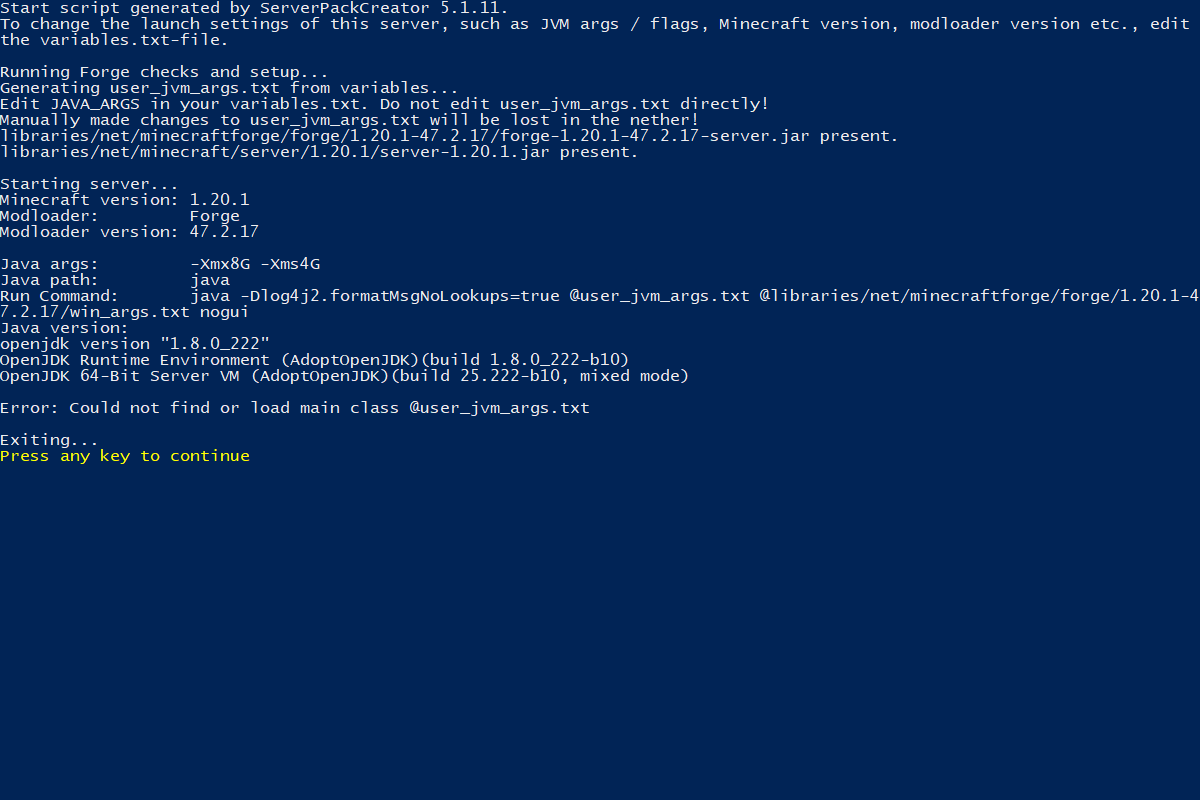
Im trying to host my own server and when I launch windows powershot it is giving me this error https://i.imgur.com/Bu3BtGt.png
 tranquil mortar
edgy socket
is anyone else getting erorrs when trying to share a world?
tranquil mortar
edgy socket
is anyone else getting erorrs when trying to share a world?
!wsfull
undone latchBOT
 World Sharing servers are currently at capacity
If you're receiving the error "Connection refused: no further information" when trying to join a friend through "Start Co-op" or "Host World", it's likely that Luna's servers (used for world sharing) are currently full. We don't have a way to notify you when slots on our servers free up, but you are welcome to try again later.
We understand and recognise that this may be inconvenient, so we recommend in this case to host or rent your own server. For more information on hosting options, type !server.
tranquil mortar
gray coyote
Im trying to host my own server and when I launch windows powershot it is giving...
where did you get the server files from?
gray coyote
tranquil mortar
where did you get the server files from?
from curseforge right beside the play button
gray coyote
ok not a problem
tranquil mortar
I'm also going to bed anywhos
tranquil mortar
gray coyote
Im trying to host my own server and when I launch windows powershot it is giving...
@tropic scroll silent ping for when you get up if you're sleeping
 sudden bay
gray coyote
Im trying to host my own server and when I launch windows powershot it is giving...
sudden bay
gray coyote
Im trying to host my own server and when I launch windows powershot it is giving...
!openjdk
undone latchBOT
- Download an adoptium release for Java (recommended but not required):
- Java 11 (https://adoptium.net/temurin/releases/?version=11) for versions 1.16.5 and below (can also use 8 if its not working)
- Java 18 (https://adoptium.net/temurin/releases/?version=18) for any versions newer (or 17 if 18 doesn't work)
- Consider installing the JRE instead of the JDK for a smaller file size
-
When installing through adoptium, make sure that Add to PATH and Set JAVA_HOME variable are both set to be installed (please see https://imgur.com/a/jPu1h7h for how that would look)
-
Check if java has been correctly installed by running java --version (or java -version on older versions), and seeing if the output is correct (see https://imgur.com/a/OWcoq4p for an example of the output)
- NOTE: 64 bit versions of java ALWAYS have '64-bit Server VM' in the version output. If that is not there, you have installed a 32-BIT version!! If you're getting Out of Memory errors or any other errors, PLEASE install 64-bit
- If the output isn't as intended, you have 2 options.
i) Delete ALL other java versions from your PC (ONLY recommended if you don't need them)
ii) Redirect your launcher/server to use your new installation of Java
Method i
- Uninstall any other java program listed in your programs list (differs by OS, please find a guide for your own OS if you don't know)
- Attempt to re-use the command mentioned above (if the output is now correct, which it should be, you are ready to go)
Method ii
- For a server, please modify the $Java/JAVA variable (found in your startup script depending on ps1/sh) to the path of your java installation. For windows, this path is usually found in "Program Files/Eclipse Adoptium/version_of_java/bin"
- For a client, depending on whether you use CurseForge, GD, or AT, the process is slightly different. Please see a guide for each respective launcher on how to change the java version.
tropic scroll
gray coyote
Im trying to host my own server and when I launch windows powershot it is giving...
!openjdk
undone latchBOT
- Download an adoptium release for Java (recommended but not required):
- Java 11 (https://adoptium.net/temurin/releases/?version=11) for versions 1.16.5 and below (can also use 8 if its not working)
- Java 18 (https://adoptium.net/temurin/releases/?version=18) for any versions newer (or 17 if 18 doesn't work)
- Consider installing the JRE instead of the JDK for a smaller file size
-
When installing through adoptium, make sure that Add to PATH and Set JAVA_HOME variable are both set to be installed (please see https://imgur.com/a/jPu1h7h for how that would look)
-
Check if java has been correctly installed by running java --version (or java -version on older versions), and seeing if the output is correct (see https://imgur.com/a/OWcoq4p for an example of the output)
- NOTE: 64 bit versions of java ALWAYS have '64-bit Server VM' in the version output. If that is not there, you have installed a 32-BIT version!! If you're getting Out of Memory errors or any other errors, PLEASE install 64-bit
- If the output isn't as intended, you have 2 options.
i) Delete ALL other java versions from your PC (ONLY recommended if you don't need them)
ii) Redirect your launcher/server to use your new installation of Java
Method i
- Uninstall any other java program listed in your programs list (differs by OS, please find a guide for your own OS if you don't know)
- Attempt to re-use the command mentioned above (if the output is now correct, which it should be, you are ready to go)
Method ii
- For a server, please modify the $Java/JAVA variable (found in your startup script depending on ps1/sh) to the path of your java installation. For windows, this path is usually found in "Program Files/Eclipse Adoptium/version_of_java/bin"
- For a client, depending on whether you use CurseForge, GD, or AT, the process is slightly different. Please see a guide for each respective launcher on how to change the java version.
 steep salmon
Just wondering. I am currently playing on better mc 2 is it possible to update to better mc 4 without loosing my world and progress? (World is hosted on a dedicated server)
tranquil mortar
no
steep salmon
😦
gray coyote
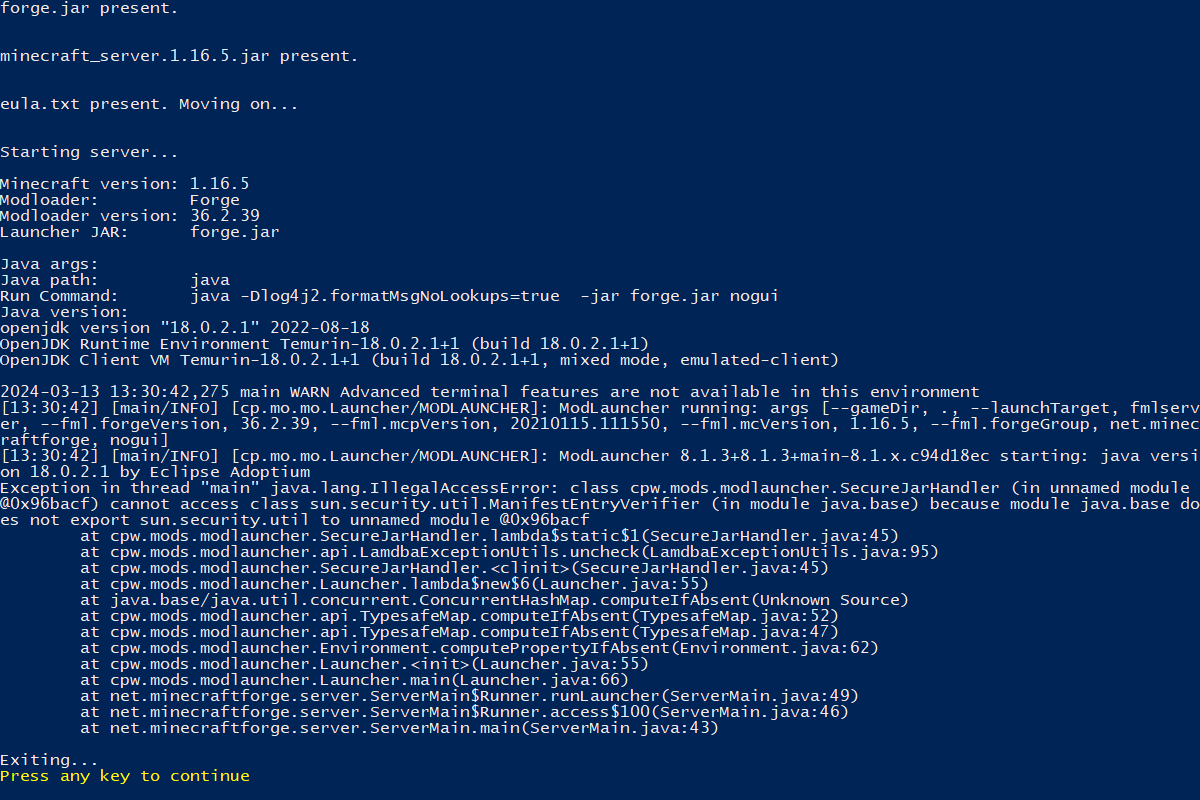
so I now have downloaded and set up temurin and this is the new error im getting https://i.imgur.com/KX0alLf.png
 maiden cedar
guys
the portal of paradise take me to the top of the nether
what should i do?
@everyone
maiden cedar
tranquil mortar
don't try to at everyone
why?
tranquil mortar
...
maiden cedar
sorry i’m dumb
tranquil mortar
@tropic scroll can you explain common sense to this person if i try imma gety upset I already know
maiden cedar
never been in servers or else
maiden cedar
tranquil mortar
<@460610775887773737> can you explain common sense to this person if i try imma ...
hey i told you i’m sorry
i’m not doing it again,ok?
maiden cedar
tranquil mortar
also what portal?
aether
tranquil mortar
doing it to begin with is the problem
also aether portal you make in the overworld with glowstone and light with a water bucket
maiden cedar
Before it worked, now no longer
tranquil mortar
do it in the overworld not nether
water never worked in the nether without certian mods
maiden cedar
tranquil mortar
any pack changes?
maiden cedar
better minecraft fabric 1.19.2
maiden cedar
tranquil mortar
any pack changes?
nope
i already had this problem in past but i don’t remember how to fix that
tranquil mortar
idk anything about the 1.19.2 version
maiden cedar
mh
tranquil mortar
may need help from someone else
maiden cedar
thank you anyway
tranquil mortar
sorry
tranquil mortar
maiden cedar
thank you anyway
yeah np
maiden cedar
I'm sorry for the inconvenience of before, I'm a pretty anxious guy and above all I can't speak English well so I'm sorry if there were misunderstandings
sudden bay
maiden cedar
check pinned messages
maiden cedar
oh thank you sm
tranquil mortar
wrong pack
this one:
https://www.youtube.com/watch?v=SV_SKlxNEUM
is this:
https://www.curseforge.com/minecraft/modpacks/better-mc-forge-bmc4
which is talked about here:
#better-mc-forge

Play ➔ https://curseforge.com/minecraft/modpacks/better-mc-forge-bmc4
Discord ➔ https://discord.gg/LunaPixel
Bisect ➔ https://www.bisecthosting.com/p/lunapixel
X/Twitter➔ https://twitter.com/LunaPixelStudio
Thanks for Watching!
#betterminecraft #minecraftmodpack #betterminecraftmodpack

CurseForge
Version 1.20.1 | A Proper Vanilla+ Modpack | Don't play Vanilla play this!
2.1M Downloads | Modpacks
!cracked
undone latchBOT
If you are using a cracked Minecraft launcher, we can not assist with your issue. In order to receive help, you need to switch to an approved launcher and provide proof you have purchased Minecraft. This is due to the terms of service and guideline agreements of both Mojang and Discord.
undone latchBOT
If you are using a cracked Minecraft launcher, we can not assist with your issue. In order to receive help, you need to switch to an approved launcher and provide proof you have purchased Minecraft. This is due to the terms of service and guideline agreements of both Mojang and Discord.
tranquil mortar
buy the game
we will not help until you provide proof of ownership
No help until you provide proof of ownership
pirated games are illegal
once you buy the game properly we can help you
sudden bay
TLauncher is spyware
and we dont support piracy
either switch to an approved launcher or leave
I just told you.
TLauncher is spyware
switch to a proper launcher or the game wont work
simple
goodbye
I already told you
spark sailBOT
Ban Result:
 Reason: appeal only with proof that you own Minecraft
 Moderator: @sudden bay

Banned:
 appolonchik [
1018522806360748152]
tropic scroll
maiden cedar
why?
because there is 110k users inside this discord
maiden cedar
tropic scroll
because there is 110k users inside this discord
my bad im sorry
maiden cedar
emh,what a soul star actually do?
edgy socket
anyone here get essential working ?
It just crashes everytime I try to start it up
nvm I just saw
!ws
undone latchBOT
Luna Pixel's World Sharing
Our modpacks don't support any mods that add singleplayer hosting / world sharing because we already provide free world sharing. The "Essential" mod is therefore incompatible.
To share your world using our own world hosting, click the "Open to Lan" or "Share World" button in the game menu when in a singleplayer world, and share the world.
It will give you an address, like magma-cube.mc.lunapixel.gg, which your friends can use to connect directly to your world as if it were a server!
We still highly suggest not to play through LAN as LAN is untested and unreliable. Using it will cause longterm damage to your world.
There is no reason to use LAN, as we support both paid and free methods of hosting a server the normal way.

 undone latchBOT
🚫 boatboymatt, that command is disabled in this channel.
 fluid robin
fluid robin
fluid robin
@tropic scroll
fluid robin
how do i fix it
as my friends are able to connect but I am not able too
@tropic scroll
tropic scroll
again issue with Mojang servers
we can’t fix it
you can try using something like Prism launcher
they do some magic work around i think
lyric basalt
Does anything in the modpack change the texture of smooth stone slabs? Or is there a difference between bedrock/java texture? I thought it was more whiter grey
 keen heath
Does anybody know if there's a way to enchant armor or something that will stop the gusts of wind in in better mc up in the mountains from pushing you around? It's practically killed me a couple times while building up high and pushing me off.
 bleak gale
undone latch
bleak gale
undone latch
is this freee O_O?
pearl flume
bleak gale
is this freee O_O?
yes
bleak gale
👍
 distant mortar
im experiencing a bug where Im infinite eating and never get my hunger filled, and I also water does not register and just disappears when placed, sometimes I have to click multiple times to even pick it up
it also specifically happens after ive been in for like 5 minutes anyone know whats up with that?
if ihave to delete or abandon my world I will cry for 20 seconds 
pearl flume
distant mortar
it also specifically happens after ive been in for like 5 minutes anyone know wh...
Try reloggimg.
 brave steeple
is xp mod stuck a minecraft thing or a bettermc specific thing
grave vessel
does anyone know why my eden ring portal doesnt work
 glossy compass
grave vessel
does anyone know why my eden ring portal doesnt work
glossy compass
grave vessel
does anyone know why my eden ring portal doesnt work
I have same problem. just seems hard to get people to respond on this channel for anything.
Maybe theres a more appropriate channel?
glossy compass
grave vessel
does anyone know why my eden ring portal doesnt work
Some people online say it only works on 1.19
 celest agate
glossy compass
I have same problem. just seems hard to get people to respond on this channel fo...
celest agate
glossy compass
I have same problem. just seems hard to get people to respond on this channel fo...
sometimes staffs are busy
try to contact with the specific mod developer, it will be more useful for you
celest agate
oh
glossy compass
ok. Thanks
What about those hay golems?
cant seem to make those work.
Same thing?
 gloomy jungle
for a mac with 8gb is running a modpack with 5gb going to hurt the mac. I know the performance guide says if 8gb max you should alllocate 5gb, but idk how macs are
distant mortar
pearl flume
Try reloggimg.
whats relogging?
ive tried respawning leaving then coming back restarting my computer
I havent messed with cloning my world yet but im considering it
i doubt its an issue with the world though
distant mortar
yeah its not a world thing just tried it in another 😦
distant mortar
ig til i fix it im water bucketless and im gonna have to play with saturation 😭
pearl flume
distant mortar
ig til i fix it im water bucketless and im gonna have to play with saturation 😭
What launcher do you use?
distant mortar
pearl flume
What launcher do you use?
better mc2
pearl flume
distant mortar
better mc2
That’s the modpack, what launcher are you using to run the modpack?
!define
undone latchBOT
Curseforge - Refers to both the Curseforge website and Curseforge Launcher. The Curseforge Launcher is a modded launcher used to play & install modpacks. ATLauncher is a better alternative. All modded launchers can be used to install & play both Fabric and Forge modpacks.
Modpack - A collection of mods. "Better MC 1.19.2 Forge", for example, is a modpack.
Modpack Version - The version of the modpack you are playing. v5, v6, v7, etc.
Minecraft Version - The version of Minecraft which the modpack you are playing runs on. 1.16.5, 1.18.2, 1.19.2, etc.
Mod - A .jar file which modifies the game in some way. "BetterEnd", for example, is a mod.
Forge - A mod loader which allows you to use Forge mods.
Fabric - A mod loader which allows you to use Fabric mods.
pearl flume
That’s the modloader.
distant mortar
cursedforge?
pearl flume
Did you modify the pack in anyway?
distant mortar
added a bit of mods
but those mods never gave me issues before
maybe a 1.20.1 thing
pearl flume
#1061339968691257466 make a post and put a list of what you added.
 sullen flicker
hello quick question i havent played for a while (8 months) and im still on 1.19.2 is it worth converting to 1.20 now or is there some major updates missing?
 mortal oak
sullen flicker
hello quick question i havent played for a while (8 months) and im still on 1.19...
mortal oak
sullen flicker
hello quick question i havent played for a while (8 months) and im still on 1.19...
R u sure the modpack updated from a version to another, ur theres a new modpack ?
(idk how bmc goes)
but i think bmc 1, 2, 3, and 4 are different modpacks
not updates
tropic scroll
sullen flicker
hello quick question i havent played for a while (8 months) and im still on 1.19...
not possible
tropic scroll
mortal oak
but i think bmc 1, 2, 3, and 4 are different modpacks
^
tropic scroll

sullen flicker
ahh its a new mod pack my bad didnt know
from ur opinion what do you think is better 1.19 or 1.20 is it worth starting again?
mortal oak
thy r very similar, there is a web, idk if its modpack index, where u canc ompare what mods there r
sullen flicker
ah okay thank you
 wheat adder
Hey, is BMC4 (forge) and BMC2 (Fabric) similar in content? I want to play the fabric version for the performance, but if the forge version has a lot more content (bosses, structures, etc..) then I'd rather play that.
mortal oak
Idk 100%, but u can compare both using this website
Compare the mods in two or more Modpacks.
 strong badger
what versions of drippy menu and fancy enu are in the modpack?
i deleted them to test something out but i cant find the right version
andnow it dont work
nvm got it to work
strong badger
anywho how do i get the fireruby smithing template
 hidden birch
how do i open the modfolder?
sudden bay
hidden birch
how do i open the modfolder?
go to your launcher
find ur modpack
open file location
and u will see the mods folder
hidden birch
didnt work
i spawned on top of the nether-bedrock
and since i play without cheats i cant break the bedrock
any ideas anyone?
hidden birch
nvm got it

 charred wraith
Hi hello I’m having trouble joining servers I keep getting an internal exception: io.netty.handler.codec.decoderexception error
I’m using cursed forge mod loader
 gloomy cedar
okay so one question and i probably wont ask many more unless we have issues, but if i use Better MC for a server, will players who play on crappy PCs, and by crappy PCs i mean, PCs that have horrible specs, still have issues or will we be able to work around that problem?
pearl flume
gloomy cedar
okay so one question and i probably wont ask many more unless we have issues, bu...
depends on the level of crappy, but relatively as long as they have enough ram to run their game they should be ok
 limpid cape
hey! if there is another channel I should ask questions about better mc fabric 1.20.1 then point me there and ill reput this there. I was wondering how I could go about changing what version of fabric the server uses as ive done it in a personal curseforge launcher to add mods like do a barrel roll. Any help would be appreciated, i've found the "fabric-loader-server-0.14.25" and am thinking maybe i could just look up a 0.15 version of it and paste that in there. Thank you
 limpid cape
are you using forge for your launcher or fabric?

 smoky granite
is there a recommended way to host the pack on Ubuntu?
saw the bit about the Powershell script for server installation, but I don't have that script in my download(Fabric v24), nor do I have access to Powershell
pearl flume
smoky granite
saw the bit about the Powershell script for server installation, but I don't hav...
what OS you running? win, linux, mac?
smoky granite
Ubuntu 22.04
not getting anything from just throwing the pack into my mods folder either
pearl flume
The modpack or the serverpack on it?
pearl flume
modpack is client side (the players), and serverpack is server side (The host)
limpid cape
yo hidden is there a way to change the version of fabric the server is using?
smoky granite
where do I find the serverpack?
pearl flume
limpid cape
yo hidden is there a way to change the version of fabric the server is using?
yeah you can download the specific version for it, but if you kinda janked up the install you can just redownload the serverpack
limpid cape
where would i download that from? https://fabricmc.net/use/server/ ?
pearl flume
smoky granite
where do I find the serverpack?
on the curseforge page for the modpack, you'll click on the latest version of whatever you're playing, then click on "additional files"
smoky granite
ah, I see it now. Thanks!
pearl flume
limpid cape
where would i download that from? https://fabricmc.net/use/server/ ?
you can I guess? but as mentioned, you can just redownload the serverpack and use that
limpid cape
redownload the server pack from my profile on curseforge?
 noble rampart
 pearl flume
Yes, it'd be better that way in case it messed up any other files
limpid cape
would that still be 0.15 or whichever version im using
noble rampart
I installed it with forge, but I can't enter
pearl flume
The serverpack will have the right one in it
pearl flume
noble rampart
I installed it with forge, but I can't enter
This is BMC fabric page, not forge
noble rampart
sorryt
limpid cape
im adding mods for a 0.15 and it works on my own one but not for the server that i used my working one to download the server file from
ill mess around with it
thanks for the help
im back

what is the mod "fabric loader" ive searched for it and versions of it with spaces or not and i cant find it
pearl flume
limpid cape
what is the mod "fabric loader" ive searched for it and versions of it with spac...
 limpid cape
hmm
pearl flume
If you're going to modify the pack #1061339968691257466 just use the version of the mods that fits the modloader.
limpid cape
alr thank you
limpid cape
another more simple question, should I change the "level-type=bclib:normal" or is this what it should be
 ivory ocean
hey guys, need help. i like the offset block placement in the tweakeroo mod. so i added it to the better MC modpack, but for some reason, the offset placement do not work. instead, the blocks are being put normally. is there any mod that conflicts with tweakeroo? i checked it for my self but didn't see anything wrong. also, the keybinds don't show that there is a conflict for the buttons i selected (the side buttons in the mouse).
i'm using BMC2 v24 for fabric
minecraft version: 1.20.1
 gentle horizon
is there a reason why BMC2 fabric doesnt have lootr?
 open comet
I have bettermc2 for fabric installed on modrinth, but I can't use left click and right click in game even though it is correct in the controls
please help
smoky granite
Can't tell if I'm blind or just stupid, but how do I turn off the connected textures?
open comet
no one will answer that bro
smoky granite
unlucky
open comet
yes
wooden violet
anyone know what this item does

 autumn arch
wooden violet
anyone know what this item does
autumn arch
wooden violet
anyone know what this item does
Dont know, all i know is that it's an Illusioner drop
Probably lets you use the illusioners powers
wooden violet
i js got revived w it
and it summons
allies
(your skin basdically like 5 of em)
with your own gear

lol
wooden violet
i js got to nether and had a literal jumpscare
from a big orange flying blob exploded in my face
tropic scroll
 alpine tide
does anyone know how to share waystones? my freiend and i cant even tho where in a party
 tropic scroll
yep
wooden violet
👋
hey
u alr?
alr is alright
so u alright?
im not ready for anything im just asking you if you are alright
so u are alright?
ah were are u from?
oh cool
england
we could talk in dms if u wanna talk polish im fine w using a translator
 harsh plinth
interesting
tranquil mortar
alpine tide
does anyone know how to share waystones? my freiend and i cant even tho where in...
Sharestone maybe
Waystones are player interaction based
Sharestones are public and color coded
lyric basalt
Waystone - whoever activates it, click it. Click the settings cog, click the globe icon hit esc
Does anything help with seeing inside deep lava?
tranquil mortar
lyric basalt
Waystone - whoever activates it, click it. Click the settings cog, click the glo...
That is creative only
tranquil mortar
lyric basalt
Does anything help with seeing inside deep lava?
Ignis armor
lyric basalt
tranquil mortar
That is creative only
My server isn't creative and we set global waystones...
 tranquil venture
hi, is Dungeons Arise compatible with Terralith 1.20.1 on Fabric? The dungeons do not appear in Terralith biomes, they appear in vanilla biomes and appear around 10k coords. what can I do to fix this?
or is there a biome mod that is compatible?
https://cdn.discordapp.com/attachments/875507614019096666/1218762854048596028/image.png?ex=6608d85b&is=65f6635b&hm=562f3522f8bc6c41e5d2bafeb105cf4428b817c1781853dbee6e96053a987eb6&
 pearl flume
tranquil venture
hi, is Dungeons Arise compatible with Terralith 1.20.1 on Fabric? The dungeons d...
pearl flume
tranquil venture
hi, is Dungeons Arise compatible with Terralith 1.20.1 on Fabric? The dungeons d...
You playing on bmc or your own thing with arise in it?
tranquil venture
bmc
tranquil venture
pearl flume
You playing on bmc or your own thing with arise in it?
before I had the geophilic mod but the same thing happened, I changed to terralith mod and although I thought it would be solved, it still happen
btw, is a server
and I have checked in singleplayer, and the same thing happens
pearl flume
So this is modified?
tranquil venture
pearl flume
So this is modified?
hmm, I have only changed the biomes mod (geophilic to terralith)
pearl flume
tranquil venture
pearl flume
<#1061339968691257466>
but it also happens with the geophilic mod in the modpack, so I guess it's the same case
 bitter horizon
is my map trippin or something i travelled 7k blocks but im still a pixel in the far corner
tranquil mortar
Sorry was hongry
pearl flume
Heh. Could make a blame John command
pearl flume
!best
undone latchBOT
There is no best, it's based on preference. What's best is to try it out yourself as what you like may be something someone else dislikes.
pearl flume
Just depends on the use and how you play
keen heath
Asked this before but didn't get a response so I'm asking again: Does anybody know if there's a way to enchant armor or something that will stop the gusts of wind in in better mc up in the mountains from pushing you around? It's practically killed me a couple times while building up high and pushing me off.
tranquil mortar
keen heath
Asked this before but didn't get a response so I'm asking again: Does anybody kn...
in the aether?
if so no
keen heath
The aether??
tranquil mortar
the glowstone portal place?
what wind mobs?
do you got a screenie?
as far as I know there is no wind effect
keen heath
I have no idea what you're talking about lol. Haven't spent more then 10 min in the nether in my world yet. There are gusts of wind in the mountains in the overworld and they make you cold and push you around. They have knocked me off high places multiple times.
tranquil mortar
keen heath
I have no idea what you're talking about lol. Haven't spent more then 10 min in ...
do you mean powder snow and goats by chance?
keen heath
No it's wind. There's even a tip in the little game tips that says you can stand near a torch or something to warm up when you're cold. It's wind.
tranquil mortar
keen heath
No it's wind. There's even a tip in the little game tips that says you can stand...
the tips are kinda outdated
they include mods that aren't even in anymore like galosphere
keen heath
this one isn't...the warming up part works but the wind still blows me off my builds from time to time
keen heath
it's fine lol. clearly you don't have the answer and that's okay. I appreciate you responding. The last time nobody responded at all. I hope someone else knows if there is...or isn't...a way to deal with the wind.
I imagine it's the seasons mod or something
keen heath
Oh that would make sense
tranquil mortar

CurseForge
A Vanilla+ Snow & Frost Update Survival Experience for Minecraft - sister mod of Frostiful!
3.1M Downloads | Mods
tranquil mortar
keen heath
Oh that would make sense

GitHub
A Vanilla+ Snow & Frost Update Survival Experience for Minecraft - TheDeathlyCow/frostiful
it seems you just gotta deal with it
have you tried a shield?
keen heath
Not sure how I would. It just randomly happens.
Okay thanks for helping and sharing the links. Reading up on the mod and deciding whether I want to keep it. A wind resistance enchantment would be nice.
tranquil mortar
have you tried crouching?
keen heath
yes and that does stop from falling but again, it's totally random and there have been times while walking/jumping or even climbing and it chatches you
tranquil mortar
the wiki says the higher you go the more spawn and they only blow in one direction
lyric basalt
keen heath
yes and that does stop from falling but again, it's totally random and there hav...
Go into the config and change it.
 keen heath
I think I might just manage it. I was just hoping there would be some enchantment that would minimize or negate it.
It does make things interesting
lyric basalt
keen heath
It does make things interesting
That's what the wife just said when I asked if she wanted it off 😆
keen heath
An enchantment like wind walker or something that functions like feather falling would be cool.
Each level decreases the effect of how much the wind can push you.
lyric basalt
Have to go see who makes frostiful and see if they have a discord and make the suggestion
tranquil mortar
keen heath
An enchantment like wind walker or something that functions like feather falling...
maybe "sure footing" would be a better name and it negates the gusty part of them
keen heath
Yeah was just looking for that. It's TheDeathlyCow and the desc says they have a discord but can't find the link.
lyric basalt
keen heath
Yeah was just looking for that. It's TheDeathlyCow and the desc says they have a...
this was from another mod of theirs... if this works
spark sailBOT
dummybedrock has been timed out for 2m
Reason: Posting Discord Server Invites
dummybedrock | 828155067671642143
lyric basalt
and apparently you can't share that link 🙄

CurseForge
Dune-inspired, Vanilla+ mod focused on Heat-based survival and combat - sister mod of Frostiful!
171 Downloads | Mods
keen heath
Found it
lyric basalt
this mod of theirs has it
keen heath
So different discussion now. I've got the mod pack on a server with 6G ram that I only use to play on with one or two friends/family. The world is pretty new and we've not really done a ton yet but I'm getting a lot of lag primarily when accessing an inventory or villager menues. I'm working with my server support to troubleshoot but I'm curious who's been using this mod pack for a long time without any real lag issues? I imagine there's got to be a bunch of you that have way more going on in your worlds than I do.
keen heath
Yeah I know the basics for preventing lag. There are 2 villagers at my house which isn't at spawn. But I am really interested in hearing about those of you who have long-term worlds with the mod pack.
 thorny kernel
im not sure what i am doing wrong but the straw golemn doesnt seem to be spawning when i put a carved pumpkin on a hay bale anyone have same issue?
spark sailBOT
kaimando has been timed out for 2m
Reason: Similar-Messages Spam
kaimando | 355534997580677133
spark sailBOT
stoic123456789 has been timed out for 2m
Reason: Similar-Messages Spam
stoic123456789 | 1005949704460320838
 warm lily
Any experienced modders I could message about an issue I am having running a server? I am in direneed of assistance
tropic scroll
hm?
warm lily
So I am hosting a server through Ubuntu and I have allocated 8G of ram and it is lagging way too much, sometimes it's mob lag and other times when me or another player trys to venture off and load new chunks it completely fucks over everyone else and wrecks the server's performance, I have tried to download spark to analyze what is happening but nothing looks out of the ordinary, I even went so far as to host if from my pc which has 32GB of ram and a ryzen 5 3600. I have hosted previous servers in the past with no issue what so ever, and even bigger modpacks so I don't understand why it would be lagging as much as it is. I have tried doing 4 different versions of Forge, and 2 of Fabric to no avail, I would appreciate any help that you could offer me!
@tropic scroll
tropic scroll
warm lily
So I am hosting a server through Ubuntu and I have allocated 8G of ram and it is...
!tps
undone latchBOT
Please click this link and follow the guide. If you are using a server host such as Bisect, you may be limited in your options and instead have a checkbox to use Aikar's Flags, which will also work:
https://github.com/Mukul1127/Minecraft-Performance-Flags-Benchmarks
If you can not launch your server/game after using these flags, then remove the word java from the start. Also, make sure you are using Java 18 on 1.18.2 / 1.19.2 and Java 11 on 1.16.5. These should be downloaded from Adoptium's website.
If lag persists, run the following command ingame:
/spark profiler start --only-ticks-over 50
Then, send the link in this channel. If the profiler command doesn't work, put this mod in your servers mod folder
tropic scroll
mind running this ^
warm lily
how long should i run it for?
warm lily

spark is a performance profiler for Minecraft clients, servers, and proxies.
this is a base wold generation that i generated to test it, because even with the base mod pack and a comepletely new world i flew one way for like 30 seconds and the chunks wouldn't load
tropic scroll
warm lily
this is a base wold generation that i generated to test it, because even with th...
tps is fine cpu is not very good i wont lie but pregen can fix most of the issues
!Pregen
undone latchBOT

Noob explains how to Pre Generate your Minecraft World.
▬▬▬▬▬▬▬▬▬▬▬▬▬▬▬▬▬▬▬▬▬▬▬▬▬▬▬▬▬▬
➔ Modpack: https://www.curseforge.com/minecraft/modpacks/better-minecraft-modpack
➔ Discord: https://discord.com/invite/9S5tfrY4Fr
▬▬▬▬▬▬▬▬▬▬▬▬▬▬▬▬▬▬▬▬▬▬▬▬▬▬▬▬▬▬
➔ Want a Server?
BisectHosting: https://www.bisecthosting.com/LunaPixel
Use the code "LunaPixel" t...
warm lily
Do you think it could be too many mods, because the previous installing on the server I installed around 30 of my own mods ontop of the BMC4 base Mods
warm lily
Just a few client sided mods, Stellarity, End Rem, all of macaws furniture stuff etc, origins, other than that it was client sided mods
warm lily
Okay so in the future if I were to upgrade my server I would definitley want a better CPU?
to avoid having to pregen for a day?
@tropic scroll I also had another question. So when me and 4 other friends would load the server in Forge we'd all get huge frame drops and all our CPU ussages were 99% and we'd crash and be unable to play, could pregenning fix that issue as well?
When loading in on Fabric the issue wasn't present, but we prefer BMC4 over BMC2 mostly because of the mod differences
 cinder hearthBOT
warm lily
When loading in on Fabric the issue wasn't present, but we prefer BMC4 over BMC2...
cinder hearthBOT
warm lily
When loading in on Fabric the issue wasn't present, but we prefer BMC4 over BMC2...
Please read #faq to see the modpack diferences.
tropic scroll
how mcuh ram are you giving your games?
warm lily
not below 10GB
mine wouldn't run more than 60FPS with a 6950XT unless I gave it around 20 GB though
warm lily

@tropic scroll I just genuinelly dont understand what is going wrong because I have ran servers in the past on the same mod pack and it has been perfectly smoothe with 4GB allocated and when I was running a 1080Ti
warm lily
okay, should i do a new screen shot after?
undone latchBOT

 regal sedge
is there a reason my pickarang won't vein mine in bmc4?
warm lily

My GPU should really not be performing this way, although Minecraft is heavily CPU based I feel like there's something wrong, as well as because I have had much better peformance in the past on the same mod pack with a worse GPU
 mighty jolt
any help on why i cannot apply a ancient tome to my rod?
 icy tundra
 little dragon
warm lily
My GPU should really not be performing this way, although Minecraft is heavily C...
little dragon
warm lily
My GPU should really not be performing this way, although Minecraft is heavily C...
your cpu is bottlenecking your gpu
gentle horizon
is there a way to take enchants off a tool onto a book in this pack?
spark sailBOT
dome3845 has been timed out for 2m
Reason: Similar-Messages Spam
dome3845 | 526064320946110584
 tough cosmos
Does anyone know my zombies are not attacking my villagers
They're just moving their arms no killing
sudden bay
tough cosmos
They're just moving their arms no killing
are you in a claim
ivory ocean
tweakeroo's offset block placement is not working in BMC2 v24 for minecraft 1.20.1. how to fix this?
 tight merlin
any idea why fortune enchantment isn't working
 wicked oracle
sudden bay
the eden ring mod dosent exist for 1.20
wicked oracle
sudden bay
the eden ring mod dosent exist for 1.20
i see a reforked version online for 1.20.1+, is that official? and if so, does it work for anyone?
sudden bay
wicked oracle
i see a reforked version online for 1.20.1+, is that official? and if so, does i...
its a fork, not official
 crisp elm
hi, can someone help me installing bmc4 on the server? there is only bmc3 in deafults and i want to play with my friends on 4, and i cant do it
tropic scroll
crisp elm
hi, can someone help me installing bmc4 on the server? there is only bmc3 in dea...
 waxen zenith
Did someone has this problem?
I put all files to the server folder. I turned on the server. the server keeps turning on all the time.
 errant lichen
Hey so I got a issue trying to setup a fabric server, the start.ps1 doesn't want to be opened and I made sure to run powershell as admin and set the policy to remote signed and even unrestricted. What am I missing?
steep salmon
Hey guys, playing better mc 2 but seem to be missing the eden ring mod although it is shown as a quest? Any way to download it and add it back in?
 blissful stump
what dimenions are in this one
 regal sedge
what's everyone's favorite way of getting mobs to one hit without dropping them?
distant mortar
lowkey thsi my first time playing alot since 1.19 version of fabric better mc
i never realized how good biomes youll go is
wooden violet
do u know how to
distant mortar
wooden violet
do yall know how to stop blazes spawning?
torches maybe
wooden violet
theres like 40 in there
distant mortar
wooden violet
theres like 40 in there
dont know what to tell you
wooden violet
odd
wooden violet
hello
spark sailBOT
nepsui has been timed out for 2m
Reason: Similar-Messages Spam
nepsui | 994969779599310931
spark sailBOT
poisonjuycie has been timed out for 2m
Reason: Similar-Messages Spam
poisonjuycie | 1036475443240509441
 royal shuttle
Fellas what is this

 mystic aurora
can someone help me? after i turn on my server it turns off after 8 seconds and i dont know what im supposed to do
i can send the logs
 azure gazelle
there is a server of better mc fabric?
mystic aurora
yea
i mean
i added the modpack to a server
and it keeps turning on after a few seconds
tropic scroll
azure gazelle
there is a server of better mc fabric?
no
not public versions at least
(public servers)
mystic aurora
some people are hosting public servers
tropic scroll
as in already in your multiplayer menu on default no. searching for them yes
mystic aurora
Tams can you maybe help me with my server?
tropic scroll
mystic aurora
i can send the logs
yes send logs
mystic aurora
mystic aurora
ill try
 candid ibex
Hello, can someone help me with Crashing problem?
i tried to run with MultiMC and ATlauncher but got the same result, the Mod starts like it should be, but in 1 to 2 days the mod just starts crashing on the start up
sudden bay
candid ibex
i tried to run with MultiMC and ATlauncher but got the same result, the Mod star...
!moreinfo
undone latchBOT
Hello! For us to help you with your issue, you will need to answer all 8 questions below. Post the answers in this channel:
1. Have you modified the modpack in any way? If so, what did you do? (Updating/adding/removing mods, changing configs)
2. What launcher, or program, are you using to launch the game? (CurseForge, ATLauncher, etc)
3. What Minecraft version are you playing? (1.18.2, 1.16.5, 1.19.2)
4. What version of the modpack are you playing? (v11, v9, etc)
5. What steps are necessary to reproduce the crash? (Launching the game, exploring the world, etc)
6. Have you ever gotten past the point where the crash happens?
7. Send the crash report file into this channel. Right click the modpack, Open Folder, and navigate to the Crash Reports folder. Drag the newest one here. If there is no crash reports folder, do the same thing with the latest.log file in the logs folder.
8. Did you follow the Performance guide linked in #faq?
candid ibex
I didn't modified anything.
i tried both MultiMC and ATlauncher both i had the same problem.
Minecraft version: 1.20.1
Modpack version: V24
i don't know why or how the crash happens, all i know is that initially the mod works fine but in a few days the mod stops working.
and i'm sure i did install it correctly
cinder hearthBOT
candid ibex
I didn't modified anything.
i tried both MultiMC and ATlauncher both i had the ...
Please read #faq for modpack installation.
candid ibex
Ok i got the game running again, reading the FAQ again i discovered that i actually messed it up and ended up downloading an instance from Modrinth
 vague flame

 normal tusk
does anyone know how the mythic charms mod works?
i managed to get all the materials but it doesnt seem to be doing anything when i click on the resonance block. For some context I have the ring equipped and the lapis block underneath but it seems like it refuses to work
 edgy roost
Does anyone know if terralith and tectonic can be added to the mod pack without issues?
tranquil mortar
candid ibex
I didn't modified anything.
i tried both MultiMC and ATlauncher both i had the ...
!updatepack
!updatemodpack
undone latchBOT

Discord ➔ https://discord.gg/8ZmhaPPbjE
Twitter ➔ https://twitter.com/SharkieTV
Use CODE: LunaPixel for 25% off ➔ https://www.bisecthosting.com/LunaPixel
gentle horizon
Does anyone know if there is a way to allow entities and item through nether portals in claimed chunks
gentle horizon
dw found it
 oak turtle
hey, I wanna install an older version of this modpack, but it says it's missing something. I believe this is intentional and I know that older versions are worse, but I'd still like to play one
how can I do this
pearl flume
oak turtle
hey, I wanna install an older version of this modpack, but it says it's missing ...
older version as in bmc 2 or 3 instead of 4, or older modpack version within 4?
 swift citrus
normal tusk
does anyone know how the mythic charms mod works?
swift citrus
normal tusk
does anyone know how the mythic charms mod works?
yes
blissful stump
When I try world sharing with friends in BMC2 we always get the "Connection Refused" error. Can anyone help?
pearl flume
blissful stump
When I try world sharing with friends in BMC2 we always get the "Connection Refu...
!wsfull
undone latchBOT
World Sharing servers are currently at capacity
If you're receiving the error "Connection refused: no further information" when trying to join a friend through "Start Co-op" or "Host World", it's likely that Luna's servers (used for world sharing) are currently full. We don't have a way to notify you when slots on our servers free up, but you are welcome to try again later.
We understand and recognise that this may be inconvenient, so we recommend in this case to host or rent your own server. For more information on hosting options, type !server.
undone latchBOT
We suggest renting a server from Bisect Hosting:
Approx. $10 - $25 a month depending on what plan you choose. You can also get 25% off with Code LunaPixel.
Go to https://www.bisecthosting.com/LunaPixel and order a plan which fits you. We suggest 1GB per player but nothing lower than 4GB as the server needs at least 3GB to run.
Go to #server-hosting for more Info!
Free Method: (This is hosting on your own PC, which is harder to do so we suggest getting a server via Bisect Hosting)
- Download the serverpack from Curseforge's website
- Right click the start.ps1 file and click Run with Powershell
To join your own server, typelocalhostinto Direct Connect.
This video explains the process https://www.youtube.com/watch?v=wuGUbVbLsDc
The server IP address is your Public IP Address, which can be found by googling my ip address
If other players are unable to join, find a portforwarding guide online.
 fiery marlin
!server
undone latchBOT
We suggest renting a server from Bisect Hosting:
Approx. $10 - $25 a month depending on what plan you choose. You can also get 25% off with Code LunaPixel.
Go to https://www.bisecthosting.com/LunaPixel and order a plan which fits you. We suggest 1GB per player but nothing lower than 4GB as the server needs at least 3GB to run.
Go to #server-hosting for more Info!
Free Method: (This is hosting on your own PC, which is harder to do so we suggest getting a server via Bisect Hosting)
- Download the serverpack from Curseforge's website
- Right click the start.ps1 file and click Run with Powershell
To join your own server, typelocalhostinto Direct Connect.
This video explains the process https://www.youtube.com/watch?v=wuGUbVbLsDc
The server IP address is your Public IP Address, which can be found by googling my ip address
If other players are unable to join, find a portforwarding guide online.
fiery marlin
!wsfull
undone latchBOT
World Sharing servers are currently at capacity
If you're receiving the error "Connection refused: no further information" when trying to join a friend through "Start Co-op" or "Host World", it's likely that Luna's servers (used for world sharing) are currently full. We don't have a way to notify you when slots on our servers free up, but you are welcome to try again later.
We understand and recognise that this may be inconvenient, so we recommend in this case to host or rent your own server. For more information on hosting options, type !server.
pearl flume
fiery marlin
!wsfull
It's doesn't tell you current status of world share. It's just for us to send to people when they get the error
Plz just read the first line and it says it
edgy roost
Does anyone know if terralith and tectonic can be added to the mod pack without issues?
 lunar yarrow
whats better mc fabric version has the most content?
sudden bay
lunar yarrow
whats better mc fabric version has the most content?
!best
undone latchBOT
There is no best, it's based on preference. What's best is to try it out yourself as what you like may be something someone else dislikes.
sudden bay
edgy roost
Does anyone know if terralith and tectonic can be added to the mod pack without ...
modify the pack at your own risk
Terralith is known to break structure mods and cause worldgen lag
blissful stump
are there any new dimensions in better mc? if there are, how to make portals\
 lethal zenith
Idk about the fabric version but bmc4 forge has other dimensions and they are listed in the quest book
blissful stump
hey all i just wanted to ask, is the mod supposed to come with a guidebook of some sort?
lunar yarrow
whats the better mc fabric version with the most contant
 wet aurora
lunar yarrow
whats the better mc fabric version with the most contant
wet aurora
lunar yarrow
whats the better mc fabric version with the most contant
BMC2, it’s the latest too
lunar yarrow
wet aurora
BMC2, it’s the latest too
aight thx
 ocean cape
where is the recipe book on crafting table?
pearl flume
ocean cape
where is the recipe book on crafting table?
It’s disabled on the modpack by default due to lag issues
 plucky pagoda
Hello! I had a question, in terms of dungeon, which has more between better mc and medieval and prominence ?
pearl flume
plucky pagoda
Hello! I had a question, in terms of dungeon, which has more between better mc a...
They are all different in their own ways really. Try em out see which one you like.
 royal hamlet
I generally prefer bettermc's for a more casual playstyle and medieval's for Going Sicko Mode
and they do share some dungeons iirc, but your experience with them is gonna be different depending on your equipment/enemy strength/that sort of thing
edgy roost
Any way to make it so that these aren’t on top of each other?


 vernal inlet
hey can anyone help me to open a bettermc (1.20.1) it just keep crashing on Feather Clinet
pearl flume
vernal inlet
hey can anyone help me to open a bettermc (1.20.1) it just keep crashing on Feat...
!moreinfo
undone latchBOT
Hello! For us to help you with your issue, you will need to answer all 8 questions below. Post the answers in this channel:
1. Have you modified the modpack in any way? If so, what did you do? (Updating/adding/removing mods, changing configs)
2. What launcher, or program, are you using to launch the game? (CurseForge, ATLauncher, etc)
3. What Minecraft version are you playing? (1.18.2, 1.16.5, 1.19.2)
4. What version of the modpack are you playing? (v11, v9, etc)
5. What steps are necessary to reproduce the crash? (Launching the game, exploring the world, etc)
6. Have you ever gotten past the point where the crash happens?
7. Send the crash report file into this channel. Right click the modpack, Open Folder, and navigate to the Crash Reports folder. Drag the newest one here. If there is no crash reports folder, do the same thing with the latest.log file in the logs folder.
8. Did you follow the Performance guide linked in #faq?
pearl flume
vernal inlet
hey can anyone help me to open a bettermc (1.20.1) it just keep crashing on Feat...
what version of feather are you using?
vernal inlet
pearl flume
what version of feather are you using?
1.6.0
pearl flume
Did it require you to sign into microsoft?
vernal inlet
pearl flume
Did it require you to sign into microsoft?
yes
vernal inlet
harsh plinth
id suggest ATlauncher
i am using Feather just for start server
harsh plinth
!ws
undone latchBOT
Luna Pixel's World Sharing
Our modpacks don't support any mods that add singleplayer hosting / world sharing because we already provide free world sharing. The "Essential" mod is therefore incompatible.
To share your world using our own world hosting, click the "Open to Lan" or "Share World" button in the game menu when in a singleplayer world, and share the world.
It will give you an address, like magma-cube.mc.lunapixel.gg, which your friends can use to connect directly to your world as if it were a server!
We still highly suggest not to play through LAN as LAN is untested and unreliable. Using it will cause longterm damage to your world.
There is no reason to use LAN, as we support both paid and free methods of hosting a server the normal way.
pearl flume
vernal inlet
i am using Feather just for start server
feather doesn't really work that well honestly.
!server
undone latchBOT
We suggest renting a server from Bisect Hosting:
Approx. $10 - $25 a month depending on what plan you choose. You can also get 25% off with Code LunaPixel.
Go to https://www.bisecthosting.com/LunaPixel and order a plan which fits you. We suggest 1GB per player but nothing lower than 4GB as the server needs at least 3GB to run.
Go to #server-hosting for more Info!
Free Method: (This is hosting on your own PC, which is harder to do so we suggest getting a server via Bisect Hosting)
- Download the serverpack from Curseforge's website
- Right click the start.ps1 file and click Run with Powershell
To join your own server, typelocalhostinto Direct Connect.
This video explains the process https://www.youtube.com/watch?v=wuGUbVbLsDc
The server IP address is your Public IP Address, which can be found by googling my ip address
If other players are unable to join, find a portforwarding guide online.
 small wind
Hey guys im trying to up the ram for my server but when i do, powershell opens and closes immediately but when i leave it alone it runs perfectly fine?
pearl flume
small wind
Hey guys im trying to up the ram for my server but when i do, powershell opens a...
!powershell
undone latchBOT
An update to windows introduced a new security feature that prevents powershell files from running on your PC. This is great for your security, but not so great for our server start scripts, which require powershell to run them. Fortunately there is a quick fix for this!
Run powershell as administrator, then run Set-ExecutionPolicy RemoteSigned. Read the prompt and press accept. This will allow us to run scripts.
Next, navigate to your server directory using cd path/to/directory (for example: cd C:\Users\Username\Documents\Minecraft\Server)
You can now run the server by double-clicking the start.ps1 file, or typing .\start.ps1 into the command line while in the directory.
IF THE ABOVE DOES NOT WORK, TRY THIS
Run the command Unblock-File -Path .\start.ps1 in the same powershell window. This will allow the start script to not be blocked by windows, and run freely.
If all else fails, a manual installation should work:
FORGE 1.16.5: https://www.youtube.com/watch?v=bIjisWyxU-8
FORGE 1.18.2: https://www.youtube.com/watch?v=R610M102X0U
FORGE 1.19.2: https://www.youtube.com/watch?v=3HD0ibIpO-A
FABRIC: https://www.youtube.com/watch?v=b2W1Xb7nLKo
Make sure to Install the Server in our ServerPacks so it can use the correct files.
pearl flume
are you modifying the ram numbers in variables.txt?
small wind
im modifying it in the start.ps1
pearl flume
don't modify there, modify in the variables.txt
small wind
thank you
 vapid wraith
Hey, i don´t know if I'm gonna ask a stupid question but
¿Is ther any way to intall doggie Talents (I don't care if it's the next version) in the fabric version? Im using moderint, and when I'm trying to intall it shows me an error about Fabric Loader
 ionic plume
how to join my friend when i have this addres like magma-cube.mc.lunapixel.gg
 brisk sonnet
Hi. Can i use other Shaders in Fabric? Complementary Shaders - Unbound ?
I install it and activate but if doesnt change

 fierce turtle
Excuse me, could you please tell me which mod is used for the menu and inventory for Dark mode and for colors? Thank you very much.
sudden bay
fierce turtle
Excuse me, could you please tell me which mod is used for the menu and inventory...
its a resourcepack
it depends on your version
you can check the resourcepacks tba
tab
should be quite easy to spot
sudden bay
 dusty sluice
fierce turtle
sudden bay
its a resourcepack
dusty sluice
fierce turtle
sudden bay
its a resourcepack
Oh I thought it was a mod thank you
thorny kernel
is there anything that can disenchant enchants into a book in this mod?
 shadow fiber
what are the best servers for this modpack?
harsh plinth
omg bonker in the wild
 burnt kelp
Hey all,
Currently getting this error on my server when running BetterMC. Seems BetterEnd is complaining about client configs but i can't really understand what the remedy is. Any help is appreciated!
pearl flume
shadow fiber
what are the best servers for this modpack?
To join or make?
 remote stone
My gui is being really weird in better mc fabric?

I treid disabling the gui and it didnt work
It started when I claimed rewards from the quest book
pearl flume
remote stone
My gui is being really weird in better mc fabric?
What launcher?
remote stone
prism
pearl flume
Hmmm could be a messed up download. Try redownloading the pack?
 covert brook
any serevers for this
pearl flume
covert brook
any serevers for this
remote stone
pearl flume
Hmmm could be a messed up download. Try redownloading the pack?
It was caused by inventory highlighting
pearl flume
Ah that dumb thing
shadow fiber
pearl flume
To join or make?
to join
pearl flume
shadow fiber
to join
blissful stump
Any way to turn off the afk detection? It doesn't recognize controllers apparently.
 burnt kelp
Hey all,
Currently getting this error on my server when running BetterMC. Seems...
burnt kelp
burnt kelp
Hey all,
Currently getting this error on my server when running BetterMC. Seems...
Hey all, again. Just wanting to bump this. I may be completely blind, but all i can see are client config issues which should be redundant on a dedicated server.
 hybrid terrace
Hello guys
I want to play with my friend but the minecraft keeps crashing
The error code is 1
Im playing on fabric 1.19.2 With essential mod
Anyone help?
Wait what
When i removed the essetial mod from the mod folder it worked
pearl flume
hybrid terrace
Anyone help?
!moreinfo
undone latchBOT
Hello! For us to help you with your issue, you will need to answer all 8 questions below. Post the answers in this channel:
1. Have you modified the modpack in any way? If so, what did you do? (Updating/adding/removing mods, changing configs)
2. What launcher, or program, are you using to launch the game? (CurseForge, ATLauncher, etc)
3. What Minecraft version are you playing? (1.18.2, 1.16.5, 1.19.2)
4. What version of the modpack are you playing? (v11, v9, etc)
5. What steps are necessary to reproduce the crash? (Launching the game, exploring the world, etc)
6. Have you ever gotten past the point where the crash happens?
7. Send the crash report file into this channel. Right click the modpack, Open Folder, and navigate to the Crash Reports folder. Drag the newest one here. If there is no crash reports folder, do the same thing with the latest.log file in the logs folder.
8. Did you follow the Performance guide linked in #faq?
hybrid terrace
pearl flume
!moreinfo
Its the essetial mod
because i removed it
and then it worked
pearl flume
hybrid terrace
Its the essetial mod
!ws essential corrupts worlds, we offer 0 support for it
undone latchBOT
Luna Pixel's World Sharing
Our modpacks don't support any mods that add singleplayer hosting / world sharing because we already provide free world sharing. The "Essential" mod is therefore incompatible.
To share your world using our own world hosting, click the "Open to Lan" or "Share World" button in the game menu when in a singleplayer world, and share the world.
It will give you an address, like magma-cube.mc.lunapixel.gg, which your friends can use to connect directly to your world as if it were a server!
We still highly suggest not to play through LAN as LAN is untested and unreliable. Using it will cause longterm damage to your world.
There is no reason to use LAN, as we support both paid and free methods of hosting a server the normal way.
hybrid terrace
I can try that
hybrid terrace
guys when im here to host the server where do i go

i want that menu

@mighty prairie
help?
@lime valley
sudden bay
hybrid terrace
<@603773249779925015>
please dont ping random people and be patient #rules
hybrid terrace
okay sorry
sudden bay
hybrid terrace
guys when im here to host the server where do i go
Did you purchase an server from bisect
sudden bay
You only get access to that panel if u purchase a server from them
hybrid terrace
Where do i purchase the server
sudden bay
hybrid terrace
Where do i purchase the server
The best Minecraft server hosting starting at just $2.99/month with unlimited slots, 24/7/365 support, 2,000+ modpacks on one-click installs at 20 locations.
Create the best Minecraft server with BisectHosting. Support provided for modded server hosting, modpacks, mods, and plugins. Play your game how you want.
 sudden bay
hybrid terrace
Just an question why do i need to choose one of these
sudden bay
hybrid terrace
Just an question why do i need to choose one of these
If you want to play on a modpack
select Curseforge
hybrid terrace
Im playing on Bettermc
sudden bay
hybrid terrace
Im playing on Bettermc
yes
hybrid terrace
do i need to select curseforge then
sudden bay
click Curseforge
 sudden bay
hybrid terrace
that one?
sudden bay
hybrid terrace
that one?
If your playing that modpack then yeah
sudden bay
hybrid terrace
with two players
no
you need atleast 6gb for 2 players
and it depends on your server settings too
pearl flume
hybrid terrace
I dont wanna spend that much for a server
Self hosting on PC is free
!server
undone latchBOT
We suggest renting a server from Bisect Hosting:
Approx. $10 - $25 a month depending on what plan you choose. You can also get 25% off with Code LunaPixel.
Go to https://www.bisecthosting.com/LunaPixel and order a plan which fits you. We suggest 1GB per player but nothing lower than 4GB as the server needs at least 3GB to run.
Go to #server-hosting for more Info!
Free Method: (This is hosting on your own PC, which is harder to do so we suggest getting a server via Bisect Hosting)
- Download the serverpack from Curseforge's website
- Right click the start.ps1 file and click Run with Powershell
To join your own server, typelocalhostinto Direct Connect.
This video explains the process https://www.youtube.com/watch?v=wuGUbVbLsDc
The server IP address is your Public IP Address, which can be found by googling my ip address
If other players are unable to join, find a portforwarding guide online.
hybrid terrace
pearl flume
Self hosting on PC is free
i want to play with my friend
not singleplayer
pearl flume
You can host a server on your computer.
hybrid terrace
How
pearl flume
The 2nd part of the command
hybrid terrace
So making an server for me and my friend is free
undone latchBOT
We suggest renting a server from Bisect Hosting:
Approx. $10 - $25 a month depending on what plan you choose. You can also get 25% off with Code LunaPixel.
Go to https://www.bisecthosting.com/LunaPixel and order a plan which fits you. We suggest 1GB per player but nothing lower than 4GB as the server needs at least 3GB to run.
Go to #server-hosting for more Info!
Free Method: (This is hosting on your own PC, which is harder to do so we suggest getting a server via Bisect Hosting)
- Download the serverpack from Curseforge's website
- Right click the start.ps1 file and click Run with Powershell
To join your own server, typelocalhostinto Direct Connect.
This video explains the process https://www.youtube.com/watch?v=wuGUbVbLsDc
The server IP address is your Public IP Address, which can be found by googling my ip address
If other players are unable to join, find a portforwarding guide online.
 raven berry
!ws
undone latchBOT
Luna Pixel's World Sharing
Our modpacks don't support any mods that add singleplayer hosting / world sharing because we already provide free world sharing. The "Essential" mod is therefore incompatible.
To share your world using our own world hosting, click the "Open to Lan" or "Share World" button in the game menu when in a singleplayer world, and share the world.
It will give you an address, like magma-cube.mc.lunapixel.gg, which your friends can use to connect directly to your world as if it were a server!
We still highly suggest not to play through LAN as LAN is untested and unreliable. Using it will cause longterm damage to your world.
There is no reason to use LAN, as we support both paid and free methods of hosting a server the normal way.
 bronze vigil
hey im running the latest version of bmc2 fabric but am having issues with opening books. with some of the guide books like the end for dummies or the seasonal compendium neither of them open when clicked and are also not able to go on lecturns either. any help would be great
tough cosmos
How can I find slimes
blissful stump
blissful stump
Any way to turn off the afk detection? It doesn't recognize controllers apparent...
Sorry to seem impatient, but I'm guessing you can't turn off afk detection?
remote stone
How do I use the totem of illusion?
 prisma depot
How do you get the crafting recipe book to show up?
 oak ivy
anybody know why when i try to load up my world is says "failed to access world"
tropic scroll
oak ivy
anybody know why when i try to load up my world is says "failed to access world"
!moreinfo
undone latchBOT
Hello! For us to help you with your issue, you will need to answer all 8 questions below. Post the answers in this channel:
1. Have you modified the modpack in any way? If so, what did you do? (Updating/adding/removing mods, changing configs)
2. What launcher, or program, are you using to launch the game? (CurseForge, ATLauncher, etc)
3. What Minecraft version are you playing? (1.18.2, 1.16.5, 1.19.2)
4. What version of the modpack are you playing? (v11, v9, etc)
5. What steps are necessary to reproduce the crash? (Launching the game, exploring the world, etc)
6. Have you ever gotten past the point where the crash happens?
7. Send the crash report file into this channel. Right click the modpack, Open Folder, and navigate to the Crash Reports folder. Drag the newest one here. If there is no crash reports folder, do the same thing with the latest.log file in the logs folder.
8. Did you follow the Performance guide linked in #faq?
oak ivy
- didnt change anything as far as i know 2. im using curseforge 3. 1.19.2 4. v20 5. my game doesnt crash, i just click on the world and it bring me to the main menu with a pop up in the corner saying "failed to access world 6. no 7. again, its not a crash 8. i havent, didnt think it was necessary
tropic scroll
get 7
oak ivy
wdym? how do i get as crash report for something thats not a crash?
game isnt crashing its just not letting me in my world
tropic scroll

if there is no crash reports folder, do the same thing with the latest.log in the logs folder
oak ivy
alr my bad lol gimme j 1 sec
tropic scroll
ur good lol
oak ivy
heres a crash
but like i said ealrier
tthis isnt the issue probably cuz its not crashing
im able to play on other worlds just fine
tropic scroll
oak ivy
im able to play on other worlds just fine
[14:31:54] [Render thread/WARN]: Failed to read level worldy world data
java.io.IOException: The process cannot access the file because another process has locked a portion of the file
restart your pc
 lavish fulcrum
dawg does anyone have the better minecraft 1.16.5 plus fabric modlist yo idk why u guys would rmeove it wwhen we literally spent like 3 months on a world
tropic scroll
lavish fulcrum
dawg does anyone have the better minecraft 1.16.5 plus fabric modlist yo idk why...
that doesnt exist
anymore
lavish fulcrum
bro surely u guys atleast have a modlist
tropic scroll
no
oak ivy
tropic scroll
restart your pc
thats all i gotta do? ive done it once and it didnt do nothin
tropic scroll
oak ivy
thats all i gotta do? ive done it once and it didnt do nothin
try again
something is open on your pc that is keeping your world OPEN when its not supposed to be open
be it a winrar reading a file or etc
lavish fulcrum
so do u g uys just not keep any old modpacks
cus thats really stupid to make it entirely new without making another modpack
and then say it doesnt exist when we wasted so much time just for it to be deleted
like dawg
oak ivy
ok i restarted my pc, asything else i gotta do or should i just try to load up
tropic scroll
lavish fulcrum
like dawg
- that modpack was incredibly buggy
- its no longer maintained and was over taken by prominence
and after getting 10+ people a week complaining why bmc+ was broken it was decided to be archived
things come to an end
and sadly that was bmc+
lavish fulcrum
bro i dont care if it was buggy ddid u guys even give an announcemnt that it was being removed
tropic scroll

lavish fulcrum
cus like how u even ganna not tell anyone and just remove it completely
like some people actually played it
tropic scroll
whoever had it downloaded still has it downloaded
its not like we forcefully uninstalled it from everyones pc
its just not possible to download anymore
lavish fulcrum
ok
uh
do u atleast know
if the better minecraft forge plus modpack was the same mods for fabric
tropic scroll
thats also gone
lavish fulcrum
nah i still ahve forge
but do u like remember if it is just the same mods just on fabric
tropic scroll
never played the bmc+ packs so cant say 
lavish fulcrum
k
oak ivy
im still getting the message even after restarting pc
undone latchBOT
If this command was run in response to your question/issue, it is likely because switching away from the launcher you are currently using would fix your problem.
From our experience, the most stable launcher by far is ATLauncher, also known as ATL.
To install ATLauncher, do the following:
1. Go to https://atlauncher.com/download
2. Install and run the setup, then open the program.
3. Login to your Microsoft account that owns the Java Edition of Minecraft from the Accounts tab on the right. This process is 100% safe, as it goes directly through Microsoft. ATLauncher does not see your account credentials.
4. Go to the Packs tab on the right, then click "Curseforge" on the left.
5. Search the modpack you wish to download.
6. Click "New Instance". Click "Ok" on the opted out mods warning, then click "Open All" on the manual download screen.
7. Let the mods download, ATLauncher will grab them from your Downloads folder and automatically add them to the modpack.
8. Go to the Instances tab, and click "Play" on the modpack you downloaded. If you ever see an "Update" button on the instance, click it.
To transfer your Curseforge world to ATLauncher, simply right click the modpack on Curseforge, or click the 3 dots, then click "Open Folder". Copy the Saves folder, then click "Open Folder" on ATLauncher and paste the Saves folder there.
Because ATLauncher downloads the exact same files as Curseforge does, your world will be the exact same and you will be able to join the same servers. ATLauncher also works without an internet connection (after you've installed the modpack, of course), and does not have any bloat from Overwolf. You are free to uninstall both Overwolf and Curseforge with ATLauncher installed.
oak ivy
man, even with that it still saying "failed to access world"
tropic scroll
oak ivy
man, even with that it still saying "failed to access world"

try transfering your world/renaming it to something else
oak ivy
rename the file?
oak ivy
ivew tried renaming it but then it crashes my game
tropic scroll
from the folder itself not from game
oak ivy
okay
when i changed the folder name the only part that changed was the part in red

and it still gives error
pearl flume
oak ivy
when i changed the folder name the only part that changed was the part in red
Try making a fresh world and see if you can enter?
pearl flume
Sounds like the world kinda got jacked up, have you modified the pack or did anything crazy in that world?
oak ivy
nah nothin ik of
pearl flume
!fps
undone latchBOT
 crisp olive
how can u use the tp command in metter mc (fabric bmc2) ?
blissful stump
how do i join my friend
 honest trail
is there a way to change skins in BetterMC 2 fabric
it gave us some really random skins
pearl flume
honest trail
is there a way to change skins in BetterMC 2 fabric
what launcher?
honest trail
installed through curseforge using standard minecraft launcher
pearl flume
honest trail
installed through curseforge using standard minecraft launcher
you need a modded launcher downloaded and run it through that. can't just use MC's vanilla launcher
!alternates this is better than curse
undone latchBOT
If this command was run in response to your question/issue, it is likely because switching away from the launcher you are currently using would fix your problem.
From our experience, the most stable launcher by far is ATLauncher, also known as ATL.
To install ATLauncher, do the following:
1. Go to https://atlauncher.com/download
2. Install and run the setup, then open the program.
3. Login to your Microsoft account that owns the Java Edition of Minecraft from the Accounts tab on the right. This process is 100% safe, as it goes directly through Microsoft. ATLauncher does not see your account credentials.
4. Go to the Packs tab on the right, then click "Curseforge" on the left.
5. Search the modpack you wish to download.
6. Click "New Instance". Click "Ok" on the opted out mods warning, then click "Open All" on the manual download screen.
7. Let the mods download, ATLauncher will grab them from your Downloads folder and automatically add them to the modpack.
8. Go to the Instances tab, and click "Play" on the modpack you downloaded. If you ever see an "Update" button on the instance, click it.
To transfer your Curseforge world to ATLauncher, simply right click the modpack on Curseforge, or click the 3 dots, then click "Open Folder". Copy the Saves folder, then click "Open Folder" on ATLauncher and paste the Saves folder there.
Because ATLauncher downloads the exact same files as Curseforge does, your world will be the exact same and you will be able to join the same servers. ATLauncher also works without an internet connection (after you've installed the modpack, of course), and does not have any bloat from Overwolf. You are free to uninstall both Overwolf and Curseforge with ATLauncher installed.
honest trail
pearl flume
you need a modded launcher downloaded and run it through that. can't just use MC...
thank you
 compact canopy
im trying to setup a server using oracle putty
just wondering which jdk version i should install
pearl flume
compact canopy
just wondering which jdk version i should install
we suggest 18, but if it's not available use 17
compact canopy
so jdk-18.x86_64
compact canopy
pearl flume
we suggest 18, but if it's not available use 17
^
pearl flume
!openjdk
undone latchBOT
- Download an adoptium release for Java (recommended but not required):
- Java 11 (https://adoptium.net/temurin/releases/?version=11) for versions 1.16.5 and below (can also use 8 if its not working)
- Java 18 (https://adoptium.net/temurin/releases/?version=18) for any versions newer (or 17 if 18 doesn't work)
- Consider installing the JRE instead of the JDK for a smaller file size
-
When installing through adoptium, make sure that Add to PATH and Set JAVA_HOME variable are both set to be installed (please see https://imgur.com/a/jPu1h7h for how that would look)
-
Check if java has been correctly installed by running java --version (or java -version on older versions), and seeing if the output is correct (see https://imgur.com/a/OWcoq4p for an example of the output)
- NOTE: 64 bit versions of java ALWAYS have '64-bit Server VM' in the version output. If that is not there, you have installed a 32-BIT version!! If you're getting Out of Memory errors or any other errors, PLEASE install 64-bit
- If the output isn't as intended, you have 2 options.
i) Delete ALL other java versions from your PC (ONLY recommended if you don't need them)
ii) Redirect your launcher/server to use your new installation of Java
Method i
- Uninstall any other java program listed in your programs list (differs by OS, please find a guide for your own OS if you don't know)
- Attempt to re-use the command mentioned above (if the output is now correct, which it should be, you are ready to go)
Method ii
- For a server, please modify the $Java/JAVA variable (found in your startup script depending on ps1/sh) to the path of your java installation. For windows, this path is usually found in "Program Files/Eclipse Adoptium/version_of_java/bin"
- For a client, depending on whether you use CurseForge, GD, or AT, the process is slightly different. Please see a guide for each respective launcher on how to change the java version.
pearl flume
- the 86 is 32bit
 compact canopy
pearl flume
64. the 86 is 32bit
compact canopy
pearl flume
64. the 86 is 32bit
^^
pearl flume
ah then yeah that's the right one, not seen it layed out like that before xD
compact canopy
haha using putty to access the cmd terminal on oracle ;-;
pearl flume
All good.
compact canopy
pearl flume
All good.
ill let you know if i have any issues 🥹
blissful stump
if i download the pack on modrinth do i need to install the mods by myself or does it auto install it
pearl flume
blissful stump
if i download the pack on modrinth do i need to install the mods by myself or do...
No. It’ll install for you through modrinth on the app once you start the download, after it’s done you should be able to play it
blissful stump
It didnt so now im gonna play around with 10 fps on curseforge fabric version(not that i would hsvr any higher for fabric)
pearl flume
blissful stump
It didnt so now im gonna play around with 10 fps on curseforge fabric version(no...
Windows, Linux, or Mac?
blissful stump
Windows
 wet abyss
hello
how do i play the mod pack with my friend
essential just crashes the whole mod
blissful stump
Is he on yiur wifi?
pearl flume
wet abyss
essential just crashes the whole mod
!ws
undone latchBOT
Luna Pixel's World Sharing
Our modpacks don't support any mods that add singleplayer hosting / world sharing because we already provide free world sharing. The "Essential" mod is therefore incompatible.
To share your world using our own world hosting, click the "Open to Lan" or "Share World" button in the game menu when in a singleplayer world, and share the world.
It will give you an address, like magma-cube.mc.lunapixel.gg, which your friends can use to connect directly to your world as if it were a server!
We still highly suggest not to play through LAN as LAN is untested and unreliable. Using it will cause longterm damage to your world.
There is no reason to use LAN, as we support both paid and free methods of hosting a server the normal way.
pearl flume
Essential corrupts worlds, we do not offer support for it
pearl flume
blissful stump
Windows
!alternates
undone latchBOT
If this command was run in response to your question/issue, it is likely because switching away from the launcher you are currently using would fix your problem.
From our experience, the most stable launcher by far is ATLauncher, also known as ATL.
To install ATLauncher, do the following:
1. Go to https://atlauncher.com/download
2. Install and run the setup, then open the program.
3. Login to your Microsoft account that owns the Java Edition of Minecraft from the Accounts tab on the right. This process is 100% safe, as it goes directly through Microsoft. ATLauncher does not see your account credentials.
4. Go to the Packs tab on the right, then click "Curseforge" on the left.
5. Search the modpack you wish to download.
6. Click "New Instance". Click "Ok" on the opted out mods warning, then click "Open All" on the manual download screen.
7. Let the mods download, ATLauncher will grab them from your Downloads folder and automatically add them to the modpack.
8. Go to the Instances tab, and click "Play" on the modpack you downloaded. If you ever see an "Update" button on the instance, click it.
To transfer your Curseforge world to ATLauncher, simply right click the modpack on Curseforge, or click the 3 dots, then click "Open Folder". Copy the Saves folder, then click "Open Folder" on ATLauncher and paste the Saves folder there.
Because ATLauncher downloads the exact same files as Curseforge does, your world will be the exact same and you will be able to join the same servers. ATLauncher also works without an internet connection (after you've installed the modpack, of course), and does not have any bloat from Overwolf. You are free to uninstall both Overwolf and Curseforge with ATLauncher installed.
blissful stump
undone latch
If this command was run in response to your question/issue, it is likely because...
Ty but it soesnt matter with the launchrt without mods and onky fps mods i hardly run 60fps
pearl flume
blissful stump
Ty but it soesnt matter with the launchrt without mods and onky fps mods i hardl...
You can’t launch modpacks without a modded launcher, atlauncher is just the most stable currently.
!fps
undone latchBOT
blissful stump
pearl flume
You can’t launch modpacks without a modded launcher, atlauncher is just the most...
I understand but i have a very low end laptop so the fps cant be fixed
pearl flume
It can be actually to a good extent, modpacks from here are pretty low end friendly. Atlauncher runs on a smaller amount of ram compared to some other launchers.
The fps guide is to make sure you’re getting the best experience you can
Without killing your pc
blissful stump
pearl flume
It can be actually to a good extent, modpacks from here are pretty low end frien...
Ill try it but is there anyway i can add mods of my own to it
pearl flume
Yes
In instances where all your packs will store it has several buttons, adding, editing, and even update when one is available
blissful stump
K cause then ima add a mod that makes it so it asks for resendings cause i have alot of ghost blocks and my hits dont always register like i have hjgh ping on a server or is there another way tk fix this
pearl flume
Following the fps guide
blissful stump
Ah k thx
blissful stump
pearl flume
It can be actually to a good extent, modpacks from here are pretty low end frien...
I cant fully download it

Btw anyone has tips to make sure minecraft uses 100% of my cpu
sudden bay
blissful stump
I cant fully download it
press ok
blissful stump
i did
sudden bay
blissful stump
Btw anyone has tips to make sure minecraft uses 100% of my cpu
follow #faq performance guide
blissful stump
pearl flume
Following the fps guide
Ty i run the game on like 20 fps when rendering chunks tysm
But whats the best way to stop having "lag" i have ghost blocks and the mobs move very Slow
Its like im on a server on the other side of the world
sudden bay
blissful stump
But whats the best way to stop having "lag" i have ghost blocks and the mobs mov...
blissful stump
sudden bay
https://discord.com/channels/790272037578473512/841975353655951391/1221428775028...
I cant find it
sudden bay
blissful stump
I cant find it
is there
blissful stump
Ohh still cant find
 lucid bane
Is there any way to auto breed aninals in this modpack?
blissful stump
sudden bay
is there
Where? Where does it stay hoe to stop ghost Block longer eating cause you have like high ping
 sonic aspen
Hey guys, i just joined this discord to seek for some help.
A few friends and I are back in our minecraft phase and we have set up a server. We are currently using the version "Better MC [Fabric] - BMC2" by SHXRKIE (https://www.curseforge.com/minecraft/modpacks/better-mc-fabric-bmc2). We all use the CurseForge launcher. We have now reached the end relatively quickly, but we can't find any end cities at all. We've probably spent 4-5 hours in the End by now and haven't found an End City yet. I played a different version of Better MC a few months ago and remember that End Cities weren't a problem and you could find one relatively quickly. Can anyone here explain to me what we are doing wrong? Are there any End Citys in this pack or not? Elytras and Shulkers would be pretty nice
Thanks in advance for any help!
sonic aspen
regular distance mate, just throw your eyes of ender and search
sonic aspen
decoration
 patent perch
Hello, in which structure can I find the smithing template for aeternium upgrade?
wooden violet
sonic aspen
decoration
dam
sonic aspen
wooden violet
dam
at least i think it is. dont know really if there a more purposes, could figure out any tbh
wooden violet
im kinda hoping to use it for a mob spawner of some type for exp
pearl flume
blissful stump
Where? Where does it stay hoe to stop ghost Block longer eating cause you have l...
Follow the performance guide to make it easier on your computer. How much ram do your pc have? How much ram are you pushing into the game.
blissful stump
pearl flume
Follow the performance guide to make it easier on your computer. How much ram do...
i have put 5.5gb rn
like it said in the fps guide
pearl flume
How much does your pc have all together?
pearl flume
I run the game on the laptop, bmc can work fine on laptops or desktops ok,
blissful stump
yeah for me it runs fine after i am 30min in the world so i dont hav eghost blocks but still eating is very slow and not all my hits register
pearl flume
What is your render distance and simulation distance set at in game?
blissful stump
so i die alot cause i cant hit the mobs
blissful stump
pearl flume
What is your render distance and simulation distance set at in game?
i put it to 6 and 5 tbh
pearl flume
Hey at least you ain’t trying to do 15 or 20.
blissful stump
but it is bad that i cant even run good at 6 and 5
blissful stump
pearl flume
Hey at least you ain’t trying to do 15 or 20.
i would be happy if i could run vanilla on that on steady 60fps
wait ill send my specs
pearl flume
13 is too much for a lot of computers tbh. I set mine to 10
blissful stump
PROCESSOR
Intel® Pentium® Silver N6000 @ 1.10GHz
GRAPHICS
Intel® UHD Graphics
blissful stump
pearl flume
13 is too much for a lot of computers tbh. I set mine to 10
true
pearl flume
That’s old if I recall
blissful stump
its a pretty new laptop i think
bought it like 1.5 years ago its a school laptop windows 11 educational
blissful stump
2021 its the cpu
pearl flume
Lots of stuff gets disabled. Even more so if it comes from the school
blissful stump
Nah but its my own laptop i bought it but i use it for school
pearl flume
Best suggestion when you end up having to upgrade down the line, get something with at least 26 gigs of ram, most computers crap out on only 8 now as everything is more labor intensive
blissful stump
Soon im try pick a cheap pc at a retail store and then with 1 2 years i hope to buy a decent pc
pearl flume
Yeah, just don’t buy ones from like Walmart or anything as they can be pretty low end
blissful stump
pearl flume
Yeah, just don’t buy ones from like Walmart or anything as they can be pretty lo...
I mean like those stores where you can buy stuff like thats already been used
My friend has gotten a i7 with a 2060 for 100bucks ik i wont get that good but u hope so
pearl flume
Yeah those are great, but I’m saying big box stores like Walmart tend to sell the cheapest options or really crappy options for more than they could be worth
blissful stump
i dont live in the us so it should be fine
pearl flume
Still best to be aware of, it can happen in other countries too, make sure you know exactly what you’re getting
blissful stump
yeah but like idk how to directly translate it but its just a place where people dropp off there stuff for free and others can buy for fairly cheap
its not the best qual ofc but its porb better then my laptop
pearl flume
That’s good, do the places refurbish them? Put them back to factory settings?
blissful stump
Yeah i think so
idk tbh i think the people who bring it there do it on there own cause if they dont other people can just use there acc
pearl flume
Honestly it’s a great option. Cause a lot of people tend to just throw stuff away instead of finding new life for it elsewhere.
blissful stump
I do have a pc at my home rn a free bad one but it doesnt have a storage disk and there isnt a bios pinn so i cant change bioss pasword s i cant go in
pearl flume
Ah ok, sounds like a thrift shop then.
blissful stump
i think it is
Yeah i googled it its a thrift shop
and if it doesnt work il buy like an i3 pc with 960
there
pearl flume
Those are pretty common here too. We also have pawn shops, so if a person is needing some money they can pawn or sell stuff. Pawning you are putting it on hold as collateral, use the money when needed, and if you get the money again and take it back by a certain time you get your stuff back, if you don’t then the shop keeps the item and refurbishes as needed and resells it. Or you can just sell it to them, keep the money, and they keep the stuff and refurbish as needed to sell.
I got a really nice camera from pawn shop and it is super good for the level I’m at.
blissful stump
Yeah i understand i wish i could sell my stuff like that but for me in thrift shops you give it to them for free
patent perch
patent perch
Hello, in which structure can I find the smithing template for aeternium upgrade...
?
sonic aspen
patent perch
?
I think it was in the End. There should be villages
pearl flume
patent perch
?
Should be able to check through loot tables.
patent perch
pearl flume
Should be able to check through loot tables.
It doesn't where to find it
patent perch
sonic aspen
I think it was in the End. There should be villages
Thanks
remote stone
how do you upgrade honey shield?
 iron bone
i cant make the twilight forest portal on bmc2 fabric
 left crane
Heya, is it alright to send a crash report of a server in here to check what could be causing it? Friends just recently set up a server and not quite why it would be crashing sometimes
pearl flume
left crane
Heya, is it alright to send a crash report of a server in here to check what cou...
Yeah totally fine.
left crane
awesome ty
 paper panther
is there a different way to get endermites than throwing pearls cause Im just not getting any
pearl flume
paper panther
is there a different way to get endermites than throwing pearls cause Im just no...
There might be endermite spawners
 opal rover
why fabric multiplayer 1.19.2 no work
pearl flume
opal rover
why fabric multiplayer 1.19.2 no work
Can you explain more? Your server or someone else’s? And how is the server hosted?
undone latchBOT
We suggest renting a server from Bisect Hosting:
Approx. $10 - $25 a month depending on what plan you choose. You can also get 25% off with Code LunaPixel.
Go to https://www.bisecthosting.com/LunaPixel and order a plan which fits you. We suggest 1GB per player but nothing lower than 4GB as the server needs at least 3GB to run.
Go to #server-hosting for more Info!
Free Method: (This is hosting on your own PC, which is harder to do so we suggest getting a server via Bisect Hosting)
- Download the serverpack from Curseforge's website
- Right click the start.ps1 file and click Run with Powershell
To join your own server, typelocalhostinto Direct Connect.
This video explains the process https://www.youtube.com/watch?v=wuGUbVbLsDc
The server IP address is your Public IP Address, which can be found by googling my ip address
If other players are unable to join, find a portforwarding guide online.
 unreal spindle
hi can we upgrade chest in better mc?
pearl flume
unreal spindle
hi can we upgrade chest in better mc?
Might be able to, check for the upgrades in Jei
unreal spindle
there no craft with the chest but there a mod called easy storage
i don t know how it work
than,ks
pearl flume
Nono, not craft with chest, just search the term “upgrade” and see if any of them look like a chest
left crane
left crane
awesome ty
Any suggestions about how to handle these crashes? (BMC2)
 chrome latch
How do i play with friends for free on this mod bc it wont let me add the e4mc mod to it and thats how i got it to work on the other ones but i cant add it to this one
 wintry kestrel
my friend is trying to set up a server by port forwarding and we did everything right but it still says the ports 80 and 25565 are closed, we dont know what could be wrong, any ideas?


 dapper crystal
hey does anyone know a way to put essentials mod into the mod pack as i want to play with my friend privately without paying for server
i tried adding it by just pasting it into the folder but it just makes my game crash
theres obv something conflicting with it
 unborn loom
dapper crystal
hey does anyone know a way to put essentials mod into the mod pack as i want to ...
unborn loom
dapper crystal
hey does anyone know a way to put essentials mod into the mod pack as i want to ...
you could host your own LAN server or server pack and use hamachi to play with your friend
unborn loom
hamachi is an app that creates a local network that can be easily shared
sorry if it wasn't relevant but it helps me with servers
as for LAN... yes it is local however i meant like the downloadable server that can be set up as an LAN.....that where personaly hamachi comes in
brisk sonnet
Hi. how works Complementary Shaders - Unbound on Fabric ?
its look not even close like vanilla. Only the sky and a little bloom effekt. any options?
 ionic belfry
hello, me and my fiance are trying to play together via lan
and we cant find eachothers servers
dapper crystal
@unborn loom hey man i installed hamachi made an acc ect and got a network up and running
so all i need to do is get him to get it also and join the network?
and thats it
 turbid field
hey. can anyone help with my installation? I started getting a weird error after a small update within ATL launcher after executing instance
[ForkJoinPool.commonPool-worker-1/ERROR] Description Cache: 418 -
 north wind
does anyone know what this means
turbid field
oh and it crashed again after moving ok....
tropic scroll
turbid field
[ForkJoinPool.commonPool-worker-1/ERROR] Description Cache: 418 -
linux or windows
 hidden fractal
It lags for me, when loading in and also freezes.
I have 8gb ram, 1060 6gb GTX. Ryzen 5 3600
pearl flume
hidden fractal
I have 8gb ram, 1060 6gb GTX. Ryzen 5 3600
!fps
undone latchBOT
pearl flume
8 gigs is very limited, even without gaming. But we do have some options that can help
hidden fractal
Well, I mean, I never knew I needed more.
Is Ram the fault here?
Or something else
pearl flume
most computers now ship with 16gb
pearl flume
It will be limiting you over time yeah, so you'll definitely wanna add more ram
pearl flume
yeah you'll have better time with that.
hidden fractal
Using*
pearl flume
AT doesn't use 4 gigs actively, it shouldn't
pearl flume
was it running or downloading stuff at the time?
pearl flume
java is different part than atlauncher itself
hidden fractal
Open
pearl flume
that's why then yeah.
hidden fractal
Even at Play Screen, I think
So, what is the temporary solution for this? Cuz I can't just go buy more ram, it takes time to do that
pearl flume
The game needs ram to run, but atlauncher itself without the game running at the time is pretty small.
Yes, you'll need to follow the FPS guide, and get some more ram. You really limit yourself on a lot of stuff for your computer
FPS guide should work for now
it's doable, but down the line you'll want more ram in general
pearl flume
If you're wanting to get into games yeah you'll wanna have more. Lot of softwares nowadays you need a good amount of ram, especially to run more than 1 program at a time
hidden fractal
I allocate at least 5