#better-mc-fabric
1 messages · Page 24 of 1
 meager bison

 woeful estuary
Have you beaten the minotaur to get the stew
 night birch
Gotta eat the meef
 flat crypt
telling him right now
woeful estuary
Is there a wiki for the modpack? Like info on all the different materials/recipes
flat crypt
woeful estuary
Is there a wiki for the modpack? Like info on all the different materials/recipe...
no
check the mods individually
 pulsar sierra
why can i not complete the killing the naga quest when ive gotten the achievement
advancement*
 worthy coyote
What does your quest book shows?
 sturdy radish
My server keeps freezing randomly, and I'm not sure why. I keep having to restart the server to fix it but it freezes again after like 20 Mins
 meager yacht
sturdy radish
My server keeps freezing randomly, and I'm not sure why. I keep having to restar...
meager yacht
sturdy radish
My server keeps freezing randomly, and I'm not sure why. I keep having to restar...
!tps
 blissful stump
https://github.com/etil2jz/etil-minecraft-flags
If lag persists, do the following command ingame:
/spark profiler --interval 100
Then, send the link in this channel.
meager yacht
click the link
sturdy radish
Do I stop it immediately or wait 10 seconds?
meager yacht
did you follow the link
sturdy radish
Yes, I know they are flags
 light acorn
before and after hydra

 worthy coyote
F for that helmet and boots
light acorn
F
night birch
F
flat crypt
light acorn
before and after hydra
weren't they like that 2 hours ago
when you showed us in voice chat chat
gawd damn you really did survive
flat crypt

flat crypt
 simple sedge
what is the recommended amount of allocated ram
simple sedge
what is the recommended amount of allocated ram
check pins in #general
simple sedge
Alright, I am hosting a server with it for friends and its 6 gbs
and im allocating 8.5gb
still crashing for some reason
meager yacht
simple sedge
still crashing for some reason
!moreinfo
blissful stump
Hello! To better diagnose your issue, please answer ALL of the following questions:
1. Have you modified the modpack in any way? (Adding/removing mods, changing configs, anything in the Resourcepacks menu)
2. What launcher are you using? (CurseForge, GDLauncher, etc)
3. What Minecraft version are you playing? (1.18.2, 1.16.5, 1.19.2)
4. What version of the modpack are you playing? (v11, v9, etc)
5. When does the crash happen?
6. Have you ever gotten past the point where the crash happens?
7. Does a crash report generate? If so, send the file here. If not, is there an exit code? (On CurseForge, right click the instance, Open Folder, and go to the crash reports folder. Alternatively, post the log's text on mclo.gs and send the link here.)
8. Did you follow the Performance guide in #general pins?
9. To reiterate #1. did you install install the Modpack through a launcher or did you download the Server Pack or use the Server Files as the Modpack?
10. To reiterate #2. did you use a cracked launcher like TLauncher?
Please attach your latest.log file to your message as well. This can be found in the logs folder.
simple sedge
How do i respond to this
meager yacht
simple sedge
How do i respond to this
you answer the questions
by typing with your keyboard
and then press enter to send
simple sedge
ok
 muted plinth
- no
- Curseforge
- 1.19.2
- 12.5
- When entering/leaving dimensions
- Nope, the game closes immediately
- Error code 1
- Yes
- through the launcher
- no
meager yacht
muted plinth
1. no
2. Curseforge
3. 1.19.2
4. 12.5
5. When entering/leaving dimensions
6. Nop...
Delete all versions of java off your PC
install adoptium java 18 from #faq performance guide
meager yacht
no
muted plinth
ok
light acorn
wait oh shoot ur a dev i just tool that in
meager yacht
?
light acorn
took*
simple sedge
- no
- Curseforge
- 1.19.2
- v12.5
- after clicking play on minecraft launcher
- no
- error code 1
- Yes
- through the launcher
- no
meager yacht
simple sedge
1. no
2. Curseforge
3. 1.19.2
4. v12.5
5. after clicking play on minecraft laun...
i cant help without a crash report
light acorn
lol i got a beak hydra rule

 meager yacht
Delete all versions of java off your PC
meager yacht
meager yacht
Delete all versions of java off your PC
.
simple sedge
meager yacht
you answer the questions
Thanks for your help but please don't answer to people like this, makes you come off as a dick... No offence.
👍
 maiden spire
muted plinth
1. no
2. Curseforge
3. 1.19.2
4. 12.5
5. When entering/leaving dimensions
6. Nop...
maiden spire
muted plinth
1. no
2. Curseforge
3. 1.19.2
4. 12.5
5. When entering/leaving dimensions
6. Nop...
this is an nvidia issue
with the jvm
and of course
its a microsoft openjdk issue
simple sedge
@meager yacht Sorry.
muted plinth
ok so i downloaded the java build and it jsut shows up as java 8 and the issue persists
meager yacht
that means you downloaded java 8
you need java 17-19 for 1.19.2
java 18 is recommended
meager yacht
did you run the installer
muted plinth
yes
muted plinth
wait im stupid
maiden spire
oop
muted plinth
it doesnt show up as java
maiden spire
hm?
muted plinth
it shows up as adoptium, not java
muted plinth
it shows up as temerium something instead of just "java"
 muted plinth
ah
maiden spire
and you say when you run java
it pops up as 8 correct
are you trying to run a server/client?
maiden spire
muted plinth
not even shaders
ah okay
in your launcher settings
go ahead and change your java path
muted plinth
maiden spire
in your launcher settings
minecraft launcher or curseforge client?
maiden spire
curseforge client
muted plinth
ok
maiden spire
bottom left- > settings -> minecraft -> java path/java version java somethnig
youll see it
muted plinth
this?
 maiden spire
that should be it
simple sedge
then select the java we just downloaded?
maiden spire
yes
simple sedge
Its coming up with just files and no applications or .exes
muted plinth
ok so i downloaded 18 but it says java 17 in the launcher
maiden spire
curseforge is such a mess for this lol
 maiden spire
that looks good
muted plinth
i am 99% certain that i downloaded java 18
 simple sedge
I sent him the one i downloaded
simple sedge
Do i redownload the mod or anything?
maiden spire
mod? no no
simple sedge
so i am ready to go?
simple sedge
Ok, thanks alot.
simple sedge
Alright well, im still crashing
maiden spire
new logs?
simple sedge
maiden spire
simple sedge
well this says its microsoft openjdk 17
maiden spire
seems curseforge didnt update
or something
idk how curse works i dont use it
!alternates
blissful stump
We suggest using one of these two launchers for several reasons. They are considered far better than any other launcher. When installing a modpack on either launcher, do it through the Curseforge tab within GDLauncher/ATLauncher. You can transfer your Curseforge save to GDL/ATL. Because you are downloading the exact same files, you'll still be able to join the same servers and worlds.
ATLauncher - Slightly harder to use, works offline, fast and efficient, has more features. Can be downloaded from https://atlauncher.com/downloads
GDLauncher - Easy to use, works offline, does all the work for you, very simplistic and sleek design but it feels bloated to make it look nice and people do have issues with it. Can be downloaded from https://gdlauncher.com/en/download/
maiden spire
try one of these guys maybe
simple sedge
Is there a way to check the java ver before getting the crash?
light acorn
any air mounts in this modpack
night birch
light acorn
any air mounts in this modpack
dragon from adventurez
simple sedge
maiden spire
try one of these guys maybe
this is the right one?
meager yacht
light acorn
any air mounts in this modpack
read adventureZ guide book
 hybrid wave
sup guys
maiden spire
simple sedge
this is the right one?
yeah thats the one
light acorn
bet
hybrid wave
could you help me with this modpack installation ??
simple sedge
lemme restart curse ig
simple sedge
simple sedge
Is there a way to check the java ver before getting the crash?
@maiden spire do you know the answer?
meager yacht
hybrid wave
could you help me with this modpack installation ??
install and launch with a modded launcher
!alternates
blissful stump
We suggest using one of these two launchers for several reasons. They are considered far better than any other launcher. When installing a modpack on either launcher, do it through the Curseforge tab within GDLauncher/ATLauncher. You can transfer your Curseforge save to GDL/ATL. Because you are downloading the exact same files, you'll still be able to join the same servers and worlds.
ATLauncher - Slightly harder to use, works offline, fast and efficient, has more features. Can be downloaded from https://atlauncher.com/downloads
GDLauncher - Easy to use, works offline, does all the work for you, very simplistic and sleek design but it feels bloated to make it look nice and people do have issues with it. Can be downloaded from https://gdlauncher.com/en/download/
light acorn
???
 night birch
light acorn
???
night birch
light acorn
???
you get the book from tutorial
meager yacht
light acorn
???
what about it
light acorn
night birch
you get the book from tutorial
what book?
night birch
light acorn
what book?
light acorn
im lost cus i havent gotten anything bout adventureZ
night birch
light acorn
im lost cus i havent gotten anything bout adventureZ
It will be the first quest, and you get the adventurez handbook
first quest in tutorial and you claim the reward
muted plinth
try dying a bit. that helped me with the eden ring book
night birch
It's not eden ring
light acorn
imma just stream it
night birch
It's adventurez. If you somehow threw it away at the start, it is craftable.
hybrid wave
meager yacht
install and launch with a modded launcher
how can i install it on crystal launcher ??
night birch
hybrid wave
how can i install it on crystal launcher ??
!cracked
blissful stump
If you are using a cracked Minecraft launcher, we can not assist with your issue. In order to receive help, you need to switch to an approved launcher and provide proof you have purchased Minecraft. This is due to the terms of service and guideline agreements of both Mojang and Discord.
hybrid wave
bruh
muted plinth
hey is gdlauncher safe
light acorn
ok now i cant craft the hand book😵
meager yacht
muted plinth
hey is gdlauncher safe
yep
night birch
light acorn
ok now i cant craft the hand book😵
why not? You just need a book and orc skin iirc

 night birch
Ok, regardless. Just look up on the wiki on how to get the dragon
muted plinth
hepl
 worthy coyote
just confirm/accept and let it do its thing
muted plinth
ok
worthy coyote
Didn't know carry on got a fabric port, it does the same as carrier, but better iirc

I think its compatible with more stuff
light acorn
ok this the second time im seeing that whats iirc
worthy coyote
Can carry villagers!
 worthy coyote
light acorn
ok this the second time im seeing that whats iirc
worthy coyote
light acorn
ok this the second time im seeing that whats iirc
iirc = if i recall correctly
VILLAGER TOWER

 frail osprey
what is the difference between blue obsidian and regular?
can you go to a blue nether??
night birch
frail osprey
what is the difference between blue obsidian and regular?
one is just decorative...
there is no blue nether lol
frail osprey
damn ....
 sterile valve
what do you need to feed the nightmare horse to heal it?
how do you make a twilight portal?
sterile valve
night birch
twilight forest and adventurez I believe
it doesnt say anything abt feeding tho
 night birch
sterile valve
it doesnt say anything abt feeding tho
night birch
sterile valve
it doesnt say anything abt feeding tho
check the adventurez guidebook then and see, if not, then try whatever regular horses heal with
worthy coyote
sterile valve
what do you need to feed the nightmare horse to heal it?
I think you can't heal it by feeding it, but it heals itself overtime because its an undead mob
blissful stump
Is there any online server for Better Mc 1.19.2 Fabric?
night birch
blissful stump
Is there any online server for Better Mc 1.19.2 Fabric?
#1021590288331984947 all better mc community servers are here
blissful stump
Thanks
 untold goblet
A mod asking for help... this isn't good.
Anyways I'm running a BetterMC fabric 1.19.2 server, I had to remove smooth chunks and twilight forest due to crash, and then ingredient extension API because of an error when joining. I'm now getting a different error when joining with no evidence of anything in any logs.
The error is:
 flat crypt
untold goblet
A mod asking for help... this isn't good.
Anyways I'm running a BetterMC fabric...
flat crypt
untold goblet
A mod asking for help... this isn't good.
Anyways I'm running a BetterMC fabric...
did you remove the mods server/client-side too?
untold goblet
yup
I'm going to try to clear world file and restart
but that's my last hope unless someone figures something out
something needs to be done about twilight forest and smooth chunks crash first and foremost though
and then the fact ingredient extension API causes a server join error
Still same error
just reloaded world
*regenerated
 plain comet
i found a bug, when you put a Echo boat the game craash
 merry basalt
a crash appeared and idk how to solve it .who can help me to check out this log?
(my server always crash when it start up,BetterMC Fabric 1.19.2)

 fierce mountain
can somebody tell me how to turn off fog in better minecraft 1.19.2?
because i can't see like nothing
i set all overworld, nether, end , lost paradise to fog off but i still have in nether and others big fog and i can't see anything
 harsh phoenix
fierce mountain
can somebody tell me how to turn off fog in better minecraft 1.19.2?
because i c...
harsh phoenix
fierce mountain
can somebody tell me how to turn off fog in better minecraft 1.19.2?
because i c...
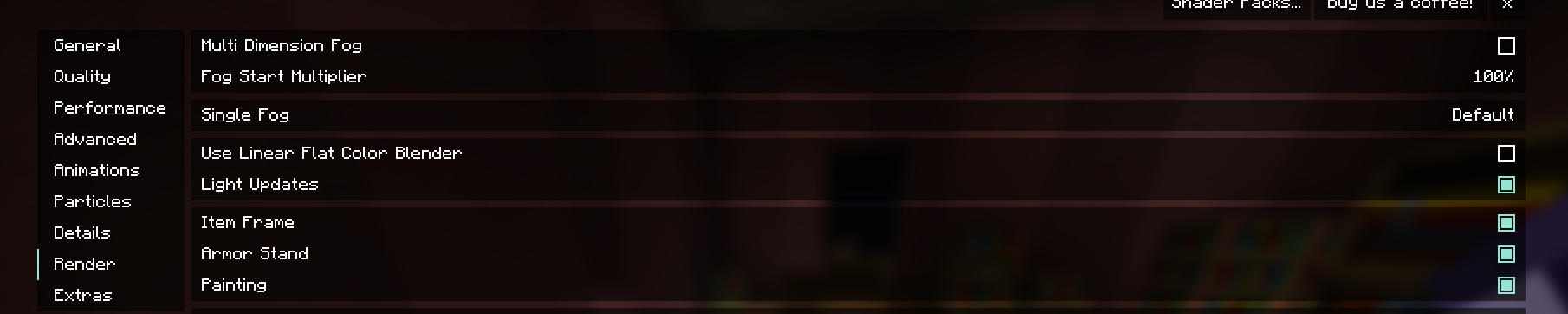
theres the fog settings
you can also try increasing your render distance in the general settings
i got a question myself as well, my goblin trader wont refresh trades, even after like a week. any idea on how to fix this?
harsh phoenix
ive name tagged this one tho:(
fierce mountain
I find cool one and tagged him to
 paper forge
Does anyone know a way to make an Automated xp farm ?
paper forge
merry basalt
a crash appeared and idk how to solve it .who can help me to check out this log?
Can you give some Info on what happened before it crashed the first time
meager yacht
merry basalt
a crash appeared and idk how to solve it .who can help me to check out this log?
!mclogs
blissful stump
- Locate the requested file
- Upload to https://mclo.gs/ and save
- Copy and paste the link here
Easily paste your Minecraft logs to share and analyse them.
paper forge
looks like a floating block from paradise lost cant handle being destroyed on tripwires lol
 ashen escarp
hi, we got a big problem with toms simple storage on out server, we jsut updated frfom the version 10 to 12.5 and now the storage system is totally laggy. sre there any known fixes maybe?
meager yacht
ashen escarp
hi, we got a big problem with toms simple storage on out server, we jsut updated...
hide the recipe book
 idle acorn
does someone have the full list of mods?
meager yacht
idle acorn
does someone have the full list of mods?
modpackindex website
ashen escarp
okay, works now. hope that gets fixed
could somsone also tell me what i can do with a carrying glove? does nothing
meager yacht
you can't do anything with it
idle acorn
meager yacht
modpackindex website
tks
flat crypt
meager yacht
you can't do anything with it
I thought you could carry some mobs with it
meager yacht
from what I've read it's just for when the carrying glove only config option is enabled
which means you can't carry stuff without the glove
and that's not enabled
sturdy radish
sturdy radish
My server keeps freezing randomly, and I'm not sure why. I keep having to restar...
I think this issue has something to do with chunk loading.
meager yacht
sturdy radish
I think this issue has something to do with chunk loading.
!tps
blissful stump
https://github.com/etil2jz/etil-minecraft-flags
If lag persists, do the following command ingame:
/spark profiler --interval 100
Then, send the link in this channel.
meager yacht
click the link
sturdy radish

spark is a performance profiler for Minecraft clients, servers, and proxies.

spark is a performance profiler for Minecraft clients, servers, and proxies.
meager yacht
sturdy radish
https://spark.lucko.me/3rlRAWtjh0
please do what I asked
click the github link
sturdy radish
I did
meager yacht
you didn't follow the guide
sturdy radish
I'm waiting for admin of the panel to change it since I can't do it
sturdy radish
I know I haven't applied the JVM Flags yet, but do you know the problem?
meager yacht
it's a java issue.
sturdy radish
So, do I upgrade Java 17 or go to Java 18?
meager yacht
java 18
sturdy radish
Ok
ashen escarp
is there maybe something in any of the mods that can counter status effects? the leviation to fight skeletons with guardians on the head in an end city from the mods fro example
 manic lion
is there any mod in this modpack that allows making or crafting portals ? Im playing on 1.19.2 fabric
meager yacht
manic lion
is there any mod in this modpack that allows making or crafting portals ? Im pla...
portals?
elaborate
what do you intend to do, what's your goal
flat crypt
portable end portal 
manic lion
portals that i can creater to teleport from A to B
worthy coyote
Waystones?
 worthy coyote
!moreinfo
blissful stump
Hello! To better diagnose your issue, please answer ALL of the following questions:
1. Have you modified the modpack in any way? (Adding/removing mods, changing configs, anything in the Resourcepacks menu)
2. What launcher are you using? (CurseForge, GDLauncher, etc)
3. What Minecraft version are you playing? (1.18.2, 1.16.5, 1.19.2)
4. What version of the modpack are you playing? (v11, v9, etc)
5. When does the crash happen?
6. Have you ever gotten past the point where the crash happens?
7. Does a crash report generate? If so, send the file here. If not, is there an exit code? (On CurseForge, right click the instance, Open Folder, and go to the crash reports folder. Alternatively, post the log's text on mclo.gs and send the link here.)
8. Did you follow the Performance guide in #general pins?
9. To reiterate #1. did you install install the Modpack through a launcher or did you download the Server Pack or use the Server Files as the Modpack?
10. To reiterate #2. did you use a cracked launcher like TLauncher?
Please attach your latest.log file to your message as well. This can be found in the logs folder.
manic lion
how does waystone works ?
worthy coyote
You can discover them in the world (mainly villages) or craft them, you name them, then you can teleport to any discovered waystone from any other waystone
manic lion
it should work fine for me
i just need to transport some items
but dont want to swim 2km each time
worthy coyote
There is also an item that lets you teleport to any discovered waystone without having to access another waystone (pocket wormhole i think it is)
worthy coyote
manic lion
but dont want to swim 2km each time
I'd recommend just grab some waystones from villages and place them where you need them
manic lion
i found one so i will take it
 versed hill
What is a good seed to start, with building to discover around?
worthy coyote
With how many new structures this modpack has, almost in any seed you will find something new within just a few blocks
 cunning wigeon
- the modpack isn't modified
- curseforge
- 1.19.2
- v12.5
- when I shoot with a bow
- no
-
-
- installed the modpack trough curseforge
- no
versed hill
Oh, thx
cunning wigeon
error message:
 worthy coyote
Can you send the crash report or latest.log?
cunning wigeon
where is it located?
worthy coyote
go to the folder of your instance -> logs
Are you using a quiver by any chance? they are a bit buggy sometimes
worthy coyote
I think for the crash report you could also just press "view crash report" button
cunning wigeon
yea nvm you fixed it 😄
worthy coyote
Great!
worthy coyote
I have them disabled on my installation because of them being unstable
And installed Nyf's quivers, also a bit buggy sometimes, but not nearly as much as supplementaries' quiver
And you can have them on your back
cunning wigeon
thanks for the information
 rapid sand
"Running Fabric checks and setup...
Fabric is not available for Minecraft 1.19.2, Fabric 0.14.10.
Exiting..."
when i try to run the server file "start.sh"
Please help im confused
night birch
Read the readme
meager yacht
rapid sand
"Running Fabric checks and setup...
Fabric is not available for Minecraft 1.19.2...
read the Readme
reinstall serverpack and transfer save if necessary
worthy coyote
it should work tho, did you build it on a nether waste?
worthy coyote
can you send some screenshots?
 narrow bridge
I could barely get to the top of the nether
I actually needed pistons
Show me the design you use
I already deleted the test world
worthy coyote
I don't have any built rn
narrow bridge
Have you successful gotten one to work before?
worthy coyote
narrow bridge
I actually needed pistons
Pistons? to get to the nether roof? the old stair+ pearl should wordk :s
Yeah, on a server, but with like v5 or smth like that, but there shouldn't be any farm affecting spawns on the rood
roof*
narrow bridge
odd
 manic basalt
why is better mc fab not downloading?
worthy coyote
narrow bridge
odd
Anyway, there are some spawners of zombified piglins if you need gold, but other than that, id recommend a xp farm based on wither skeleton spawners (explore bit of the nether and you'll find them) or piglin brute spawners (there is a mushroom-themed structure on the overworld with like 3 brute spawners within activation range)
narrow bridge
its xp
worthy coyote
Or you could ever try to make some of the Spirit mod's spawners
narrow bridge
xp is the main focus
worthy coyote
The piglin brute is the fastest one, but is a pain to build
Cause there is no tutorials and they can kill you so easily
Also, if you are able to pinpoint the bounding box of an ocean temple, you could do a guardian farm similar to the ianxofour's one
worthy coyote
manic basalt
why is better mc fab not downloading?
Curseforge has been having a few problems, idk if its completely fixed
merry basalt
meager yacht
!mclogs
merry basalt
paper forge
Can you give some Info on what happened before it crashed the first time
there was many villagers and furniture in the village we live and we were busy doing farm work
worthy coyote
Were you on the Paradise Lost (aether) dimension?
manic basalt
also btw is there a difference between forge and fabric?
night birch
manic basalt
also btw is there a difference between forge and fabric?
pins of #general for differences
maiden spire
merry basalt
https://mclo.gs/VNWNhB0 thx
seems to be an issue with paradise lost
manic basalt
which one is better overall?
night birch
manic basalt
which one is better overall?
there is no better, it's all relative and you won't know which one you actually like more until you play both
merry basalt
worthy coyote
Were you on the Paradise Lost (aether) dimension?
maybe someone was
manic basalt
riding dragons would be cool
merry basalt
maiden spire
seems to be an issue with paradise lost
i'm going to delete this mod and retry
manic basalt
is there a lot of structures in forge?
worthy coyote
manic basalt
is there a lot of structures in forge?
Probably
night birch
manic basalt
is there a lot of structures in forge?
both have a lot of strucures
manic basalt
i cant install it i dont know what to do
worthy coyote
How are you installing them?
manic basalt
just normal curseforge
manic basalt
app
worthy coyote
What does it says when you try to install them?
manic basalt
The decryption operation failed, see inner exception.
worthy coyote
Can you send a screenshot?
 blissful stump
We suggest using one of these two launchers for several reasons. They are considered far better than any other launcher. When installing a modpack on either launcher, do it through the Curseforge tab within GDLauncher/ATLauncher. You can transfer your Curseforge save to GDL/ATL. Because you are downloading the exact same files, you'll still be able to join the same servers and worlds.
ATLauncher - Slightly harder to use, works offline, fast and efficient, has more features. Can be downloaded from https://atlauncher.com/downloads
GDLauncher - Easy to use, works offline, does all the work for you, very simplistic and sleek design but it feels bloated to make it look nice and people do have issues with it. Can be downloaded from https://gdlauncher.com/en/download/
merry basalt
maiden spire
seems to be an issue with paradise lost
thanks it solved!!
it really works
 meager yacht
merry basalt
i'm going to delete this mod and retry
meager yacht
merry basalt
i'm going to delete this mod and retry
bad idea
 forest surge
so is there a way i can open this serverfile in something other than powershell?*
meager yacht
no
meager yacht
there's no reason to do otherwise
meager yacht
 analog smelt
hello guys, is there any wiki about this mod? i can't find the end portal
analog smelt
hello guys, is there any wiki about this mod? i can't find the end portal
#faq and read the pins #medieval-mc-fabric
forest surge
well then i got everything setup just trying to figure out how to open the file in powershell itself
cause when im pressing open with when i right click it powershell doesnt show up as an option
meager yacht
forest surge
cause when im pressing open with when i right click it powershell doesnt show up...
please read the readme
analog smelt
meager yacht
<#815503531611783179> and read the pins <#841975458634661888>
i couldn't find anything about it, do you know how to find the end portal? i'm at the dungeon for an hour now :/
worthy coyote
analog smelt
i couldn't find anything about it, do you know how to find the end portal? i'm a...
From YUNG's discord (this modpack has Yung's better strongholds)


 solar nymph
Hey is anyone aware of a major cause of lag in the mangrove swamp biomes?
maiden spire
think even vanilla mc is like that
worthy coyote
https://bugs.mojang.com/browse/MC-250246
Definitely a vanilla problem
worthy coyote
That guide helps a lot
 valid nymph
What is the correct way to specify the file path for the Java exe I want to use? I've tried adding it at the front of the Java Args, with and without quotation marks, and then removed that and tried putting the path in the $Java line.
 worthy coyote
valid nymph
What is the correct way to specify the file path for the Java exe I want to use?...
worthy coyote
valid nymph
What is the correct way to specify the file path for the Java exe I want to use?...
Why the double quotation marks opening and closing the directory?
valid nymph
testing to see if that was needed. Tried to emulate the style as in the simple batch file for a basic server
it's weird that it can read the OpenJDK version info and everything, yet the Error: Could not find or load main class java Caused by: java.lang.ClassNotFoundException: java occurs
valid nymph
Edited. Powershell outputs Java parameter guide
 valid nymph
 maiden spire
remove the -jar fabric jar stuff too
valid nymph
couldn't think of the correct word to describe it, other than like "/help but for Java"
edited to:
 worthy coyote
Does it run?
valid nymph
no, looks similar to the PowerShell screenshot still
maiden spire
valid nymph
this one?
valid nymph
yep.
valid nymph
I can copy the output in text files if that's preferred
 maiden spire
hm
interesting
can you try wiping the java args temporarily
and see if it works
i want to know if the issue is in the args
because im not reading them in detail
valid nymph
the issue is in the args, at least as of earlier. I'll try it again to confirm that they're still the only issue
yea, removing the args has the server start loading assets. Kept the java path specification there
valid nymph
maiden spire
because im not reading them in detail
lol, same. I just recognize the various instruction set options, and garbage collection stuff
blissful stump
https://github.com/etil2jz/etil-minecraft-flags
If lag persists, do the following command ingame:
/spark profiler --interval 100
Then, send the link in this channel.
valid nymph
yep
maiden spire
by any chance
are those jvm args
split across multiple lines
like, with line breaks?
valid nymph
yes. I had figured that it shouldn't matter because it looks like Notepad seperates it into two lines when directly copy-pasted, but that might be the issue
maiden spire
it might be that
i dont think the quotes can carry across lines
unless you backtick
valid nymph
yep, that appears to have been it
valid nymph
believe so, just waiting for it to finish startup
don't take introductory courses for 3 different languages, kids
took very basic Java in HS, then one Python course last year, and then two C++ courses this year. I'm pretty sure that caused some confusion and my issue
maiden spire
makes sense
i think generally
besides python with its funny """ strings
no other language supports quotes going across lines
in shell (idk about powershell), backticks can avoid em
so command command
command
but thatd be it
valid nymph
yeah, AFAIK, my upcoming courses are all C++ so I'll focus on getting a solid understanding of that again. Did all of this because I'd prefer to be able to host on my laptop (R7 2700U, 8gb RAM, OEM Samsung NVMe) instead of my PC (R5 5600X, 16b RAM, various SSDs) so I can turn my PC off, have more resources for multitasking while playing the game
||and if I crash due to an unstable overclock, but we don't talk about that||
Thanks for your help, it's greatly appreciated.
maiden spire
np
 rich iron
yo how do i disable the little waypoint icons?
 meager yacht
rich iron
yo how do i disable the little waypoint icons?
meager yacht
rich iron
yo how do i disable the little waypoint icons?
press B
rich iron
meager yacht
press B
it didn't work, I checked the keybinds the only thing b is bound to is the narrator
rich iron
alright I found it thanks
plain comet
guys
im going to do a BETTER MC server on fabric
so
How do I make the world have the custom generation?
meager yacht
plain comet
How do I make the world have the custom generation?
you do nothing different
it will by default
plain comet
just put the BMC server pack on the server right?
meager yacht
!server
blissful stump
We suggest renting a server from Bisect Hosting:
Approx. $10 - $25 a month depending on what plan you choose. You can also get 25% off with Code LunaPixel.
Go to https://www.bisecthosting.com/LunaPixel and order a plan which fits you. We suggest 1GB per player but nothing lower than 4GB as the server needs at least 3GB to run.
Go to #server-hosting for more Info!
Free Method: (This is hosting on your own PC and it can come with issues that's why we suggest Bisect Hosting)
- Download the serverpack from Curseforge's website
- Right click the start.ps1 file and click Run with Powershell
To join your own server, typelocalhostinto Direct Connect.
This video explains the process https://www.youtube.com/watch?v=wuGUbVbLsDc
The server IP address is your Public IP Address, which can be found by googling my ip address
If other players are unable to join, find a portforwarding guide online.
 meager yacht
what host
meager yacht
so Pterodactyl
plain comet
ye
meager yacht
the host knows, then
blissful stump
how do i get cold deep stone?
meager yacht
blissful stump
how do i get cold deep stone?
for what
blissful stump
light and dark chest
meager yacht
that doesn't exist in fabric
 shut glacier
hey guys, who can i talk to to try and get the best minecraft settings for performance on fabric
blissful stump
wait i thought this was forge
meager yacht
shut glacier
hey guys, who can i talk to to try and get the best minecraft settings for perfo...
blissful stump
am i retarded
shut glacier
another thing when your looking at an item the it appears on the top left screen is it possible to move it to the top center of the screen?
meager yacht
shut glacier
another thing when your looking at an item the it appears on the top left screen...
jade config
rich iron
ok ngl this modpack is dope
 lucid quiver
is there a "disenchantment" table mod in the game? it's better minecraft fabric 1.19.2 v12.5
plain comet
can someone help me?

i cant join into my server
someone know what happend?
i delete that mod but
 worthy coyote
What mod did you delete?
How did you installed the server? Are you self hosting?
!moreinfo basically
blissful stump
Hello! To better diagnose your issue, please answer ALL of the following questions:
1. Have you modified the modpack in any way? (Adding/removing mods, changing configs, anything in the Resourcepacks menu)
2. What launcher are you using? (CurseForge, GDLauncher, etc)
3. What Minecraft version are you playing? (1.18.2, 1.16.5, 1.19.2)
4. What version of the modpack are you playing? (v11, v9, etc)
5. When does the crash happen?
6. Have you ever gotten past the point where the crash happens?
7. Does a crash report generate? If so, send the file here. If not, is there an exit code? (On CurseForge, right click the instance, Open Folder, and go to the crash reports folder. Alternatively, post the log's text on mclo.gs and send the link here.)
8. Did you follow the Performance guide in #general pins?
9. To reiterate #1. did you install install the Modpack through a launcher or did you download the Server Pack or use the Server Files as the Modpack?
10. To reiterate #2. did you use a cracked launcher like TLauncher?
Please attach your latest.log file to your message as well. This can be found in the logs folder.
worthy coyote
lucid quiver
is there a "disenchantment" table mod in the game? it's better minecraft fabric ...
You mean, like transferring an enchant from an item to a book? you can use a grindstone for that (this functionality is part of the charm mod)
worthy coyote
plain comet
echo boat can corrupt you world
??
plain comet
-
Have you modified the modpack in any way? (Adding/removing mods, changing configs, anything in the Resourcepacks menu)
-
R// Yes cuz 1 mod say its the problem exactly (IngredientExtensionAPI-fabric-1.19.2-3.0.5)
-
What launcher are you using? (CurseForge, GDLauncher, etc)
2.r// CurseForge
-
What Minecraft version are you playing? (1.18.2, 1.16.5, 1.19.2)
-
r// 1.19.2
-
What version of the modpack are you playing? (v11, v9, etc)
-
r// las 1.19.2 version
-
When does the crash happen?
5.r// when i try to access the server
-
Have you ever gotten past the point where the crash happens?
-
r// Nop
-
Does a crash report generate? If so, send the file here. If not, is there an exit code? (On CurseForge, right click the instance, Open Folder, and go to the crash reports folder. Alternatively, post the log's text on mclo.gs and send the link here.)
-
r// nothing cuz its not a crash just i cant go into the server
-
Did you follow the Performance guide in general pins?
-
r// of course
-
To reiterate #1. did you install install the Modpack through a launcher or did you download the Server Pack or use the Server Files as the Modpack?
-
r// on the official curseforge modpack
-
To reiterate #2. did you use a cracked launcher like TLauncher?
-
r// official MC launcher
i guesss is this but idk
[ForkJoinPool.commonPool-worker-7/INFO]: [CHAT] Friend&Foes update is available! You are using 1.6.3 version, but the latest version is 1.6.4. You can download it at CurseForge or Modrinth.
[00:23:41] [ForkJoinPool.commonPool-worker-7/INFO]: [Friends&Foes] An update is available! You are using 1.6.3 version, but the latest version is 1.6.4.

 civic oriole
Crashing on latest version of fabric BMC 1.19.2. Fresh install,
worthy coyote
plain comet
1. Have you modified the modpack in any way? (Adding/removing mods, changing con...
Good call with uninstalling IngredientExtensionAPI, but how did you installed? are you renting a server or self hosting?
worthy coyote
plain comet
I thought this was another person xD
plain comet
i dont install it
worthy coyote
Yeah, it slipped into the modpack even tho nothing uses it
civic oriole
huh, I just restarted the launcher and launched again and now my error is fixed and everything works 🤔
worthy coyote
Hmmm, what does the server console says when you try to join?
plain comet
so i guess i cant play the modpack
worthy coyote
The modpack was installed directly on the server or did you uploaded the files?
plain comet
worthy coyote
The modpack was installed directly on the server or did you uploaded the files?
i download
the Server pack
and i upload Config/mods/server.propietiers/icon
and that happend
worthy coyote
You need to run (on your pc) at least once the start.ps1, to generate the fabric-server-launcher.jar
plain comet
but i already have that
worthy coyote
Then upload everything
worthy coyote
What does the server's console says?
plain comet
nothing
just say
elshepe has joined the server
elshepe has disconected
and nothing more
worthy coyote
hmmm, let me think
plain comet
ty for the help
worthy coyote
Let me reiterate, did you run the start.ps1 on your pc before uploading the files? Because that script is the responsible to create all of the files required
plain comet
It is not necessary in the host that I am, because both the .jar and all the necessary ones are generated when installing, so only uploading those folders, is it mandatory to do that?
worthy coyote
It is necessary if you want to install this modpack
plain comet
i hate my life
so one question
can i delete all on the server folder
and click the start.ps1
and after that upload all to the server?
worthy coyote
Why would you delete what is already on the server folder? You mean on the host or your pc?
plain comet
the host
worthy coyote
Ahhh, yeah, as you are gonna upload all the necessary files afterwards
worthy coyote
What error?
plain comet
idk, you know what, ty so much for you help, i dont want that you waste your time, this is just dont working
worthy coyote
:s don't worry; Do you have java installed? maybe it can't find it
https://adoptium.net/temurin/releases/ Adoptium's versions of java 18 are recommended, just make sure to enable those options when installing and the start.ps1 should be able to find it


Eclipse Adoptium provides prebuilt OpenJDK binaries from a fully open source set of build scripts and infrastructure. Supported platforms include Linux, macOS, Windows, ARM, Solaris, and AIX.
flat crypt
plain comet
1. Have you modified the modpack in any way? (Adding/removing mods, changing con...
the normal minecraft launcher is not a modded launcher, so you are using curseforge i believe
worthy coyote
I think they are gone :s
 wheat hamlet
Can you breed the Zebras from the Naturalist mod?
 still hemlock
is there anyone that can help me with this damn book puzzle from better pyramids? It's like a desert one but its stone brick instead, not sure if that matters
 mellow wren
Hello does anyone know what this means

I saw a post on reddit saying to delete Ingredient-Extensions-API but im not sure if that is causing the problem.
deleting it changed it to this.
 flat crypt
mellow wren
flat crypt
mellow wren
that means you don't have the same mods as the server
mellow wren
So i need to reinstall the mod i deleted?
plain comet
mellow wren
Hello does anyone know what this means
i have the same problem
and i literally put the same mods
mellow wren
I am reinstalling it all currently to see if that fixed anyhting
have you port forwarded yet?
flat crypt
plain comet
and i literally put the same mods
that error in specific doesn't always mean you are missing mods.
plain comet
I put the server modpack and even so I still get the same error
what can i do?
im lit uploading the complete server side modpak into the server
and still give me the same erro
mellow wren
Yeah after reinstalling nothing seemed to change.
sturdy radish
meager yacht
java 18
So, I've upgraded to Java 18 and increased my RAM to 12GB but the server still freezes after a bit. I know I haven't applied the JVM Flags yet, but do they actually help? https://spark.lucko.me/AytXoAnClv
https://spark.lucko.me/wOIKbjRZPy
https://spark.lucko.me/CTRwMwW6o6
paper forge
sturdy radish
So, I've upgraded to Java 18 and increased my RAM to 12GB but the server still f...
12gb for this Modpack is barely enough to run it stable, my Fabric Server runs at 10-11gb ram on idle with no one online.
with people online it spikes to about 14-15 gbs after a few hours
dont even start running this on Windows servers, its ridiculous
 hasty falcon
why im lagging on single player ? is it java not enough allocate?
paper forge
hasty falcon
why im lagging on single player ? is it java not enough allocate?
Slow chunk loading or freezes?
sturdy radish
paper forge
12gb for this Modpack is barely enough to run it stable, my Fabric Server runs a...
Really? I only have 2 - 4 people on the server at a time mostly 2
hasty falcon
paper forge
Slow chunk loading or freezes?
started world ,and i was like walking it like fps dropping
paper forge
hasty falcon
started world ,and i was like walking it like fps dropping
its your processor
hasty falcon
my pc info 1080 gtx , cpu i7-7700k
paper forge
sturdy radish
Really? I only have 2 - 4 people on the server at a time mostly 2
that explains it
sturdy radish
Huh?
hasty falcon
how is that my cpu ?
sturdy radish
paper forge
that explains it
What do you mean?
flat crypt
hasty falcon
why im lagging on single player ? is it java not enough allocate?
what do you mean by that, you have to allocate RAM manually
hasty falcon
i set to 8gb ram
paper forge
sturdy radish
What do you mean?
Welcome to Modded Minecraft Server hosting xd
This pack requires a lot of resources to run smooth, when it idles at best at about 9 gbs ram and 2 people join it goes to probably 11 gbs then chunk loading comes in and boom your server freezes
when you got a windows server you are 2 gbs short because thats what the system requires
sturdy radish
Ah so, what do you recommend? 16GB?
paper forge
16 should be fine
blissful stump
paper forge
12gb for this Modpack is barely enough to run it stable, my Fabric Server runs a...
with this modpack?
paper forge
blissful stump
with this modpack?
ill show you
blissful stump
sure
flat crypt
paper forge
12gb for this Modpack is barely enough to run it stable, my Fabric Server runs a...
you don't need more than 4GB for 3 players, after 3 players, 1GB each
flat crypt
sturdy radish
Ah so, what do you recommend? 16GB?
for a server? not at all
depends on the players
3 players 4GB
sturdy radish
2 - 4?
flat crypt
you can try 4-5gb
paper forge
Need to correct myself, my provider shows 9gb ram while htop says 6. Sorry for that
 flat crypt
blissful stump
with this modpack?
flat crypt
blissful stump
with this modpack?
depends, singleplayer needs 8GB if you have 12/16/32GB RAM in your computer
servers need 4GB for 3 players, and 1 gb each after 3 players
sturdy radish
flat crypt
you can try 4-5gb
My server still froze while loading chunks when it had 8GB or 12GB?
flat crypt
that's wayyy too much
for 2-4 people
if you give too much RAM, your server will perform worse
paper forge
lol
flat crypt
if you are self hosting, your computer depends too
if it sucks, the server will suck
yknow
sturdy radish
I'm not self hosting
paper forge
Ive hosted so many minecraft server, what are you talking about
it cant perform worse
it uses what it needs
fabric is literally made for perfomance, thats bs
blissful stump
paper forge
Need to correct myself, my provider shows 9gb ram while htop says 6. Sorry for t...
so you host on your computer?
sturdy radish
That is true, Fabric is better for everything like boot times, updates quicker and more than Forge.
paper forge
blissful stump
so you host on your computer?
no? i literally said provider
flat crypt
paper forge
Ive hosted so many minecraft server, what are you talking about
i know what i'm talking about, Java performs worse if you give it too much ram, and fabric is NOT made for performance, it just has better performance mods than forge.
so stop misleading people
flat crypt
sturdy radish
That is true, Fabric is better for everything like boot times, updates quicker a...
because of it's mods
sturdy radish
True, mods can boost performance of client and server but it's faster than normal vanilla and forge.
 bronze drift
Yo !
Haven't been here for a while
I apologise
Just dealing with stuff before Christmas lmao
@meager yacht dm me when the giveaway is up so I can give the gift cards.
paper forge
flat crypt
i know what i'm talking about, Java performs worse if you give it too much ram, ...
I mean 16 gb shouldnt be too much? if you would allocated like 32 gbs im sure you would notice bottlenecks
flat crypt
it depends on the amount of players
or else why would we recommend a certain amount of RAM per player?
just because it's fancy? no
sturdy radish
flat crypt
you can try 4-5gb
So if I need 4 - 5GB, should I adjust the JVM Flags to reduce the amount of RAM allocated?
paper forge
flat crypt
just because it's fancy? no
and what to do if i got an unknown amount of players ranging from 2-30 every day
should i predict my ram and set it every day, how does that work
flat crypt
If you have 30 players, it's obvious 16gb won't be enough
paper forge
flat crypt
If you have 30 players, it's obvious 16gb won't be enough
obviously, but that wasnt my question
because you see i thought this was a thing of late 2015 on older hardware. Since ive last heard of it back then.
But seriously if it still persist, is there a way to not lose performance if there are a random amount from 2-30 on the server.
flat crypt
I guess you have to pretty much guess how many people will be online
too much or too little RAM will do no good.
paper forge
okay thank you for explaining 🙂
meager yacht
sturdy radish
So, I've upgraded to Java 18 and increased my RAM to 12GB but the server still f...
yes they help, that's the point
 atomic stirrup
Trying this out for the first time and I didn't get any more quests after the first 4 introduction ones.
Do further quests unlock later? or am I missing something?
meager yacht
atomic stirrup
Trying this out for the first time and I didn't get any more quests after the fi...
put your mouse to the left of the screen
in the questbook
atomic stirrup
ooooh, I missed the pretty obvious menu, that's what I missed 🤣 thanks!
 warm summit
hey is there anyone who would be able to help me with some issues im having with my better mc server? im not the most technically inclined and its been a struggle
meager yacht
warm summit
hey is there anyone who would be able to help me with some issues im having with...
 warm summit
sorry i wasnt sure if this was a tech channel or could be used as one
I got a server through shockbyte and it was working fine yesterday i dont think i changed anything but myself and the other person using the server keep getting this error upon trying to launch it
 meager yacht
warm summit
sorry i wasnt sure if this was a tech channel or could be used as one
I got a se...
meager yacht
warm summit
sorry i wasnt sure if this was a tech channel or could be used as one
I got a se...
delete ingredient extensions api on client and server side
warm summit
i looked it up and saw that solution, when i tried to launch it again i got a different error
 meager yacht
warm summit
i looked it up and saw that solution, when i tried to launch it again i got a di...
meager yacht
warm summit
i looked it up and saw that solution, when i tried to launch it again i got a di...
contact Shockbyte support
warm summit
rip okay thanks lol
flat crypt
so your server got shocked, shockbyte moment
warm summit
^
flat crypt
you don't 
 dense plover
Guys can I build an ender farm the usual way? or is there smth diff
flat crypt
dense plover
Guys can I build an ender farm the usual way? or is there smth diff
you can only try

 meager yacht
 raven shore
https://tenor.com/view/skeleton-dead-rikrangdan-gif-24306201
raven shore
https://tenor.com/view/skeleton-dead-rikrangdan-gif-24306201
ignore it
raven shore
but its not loading
flat crypt
raven shore
minecraft is a very blocky game.
raven shore
flat crypt
minecraft is a very blocky game.
true lmao
meager yacht
the thing on the top right isn't anything to worry about, nothing to do with the game loading
meager yacht
the Illuminations mod is merging with the Effective mod, for some reason they added a warning message message that couldn't be disabled even though they aren't merged yet
raven shore
weird to not click while it loads tho 
meager yacht
that's how all games work lol
meager yacht
if you click while a game loads it's trying to receive your inputs but it's busy loading so it stops responding
it's amplified with many mods or a bad PC
raven shore
yeah, if the game is overloaded and not responding, it will go white screen
that is true
raven shore
there is a mod on fabric
that makes loading a bit longer but doesnt make it not responding
i mean
white screening
meager yacht
wut
raven shore
yeah
meager yacht
what mod though
raven shore
cant remember xd
its a part of fabously optimized mod pack
or its just in a list on fabously optimized github wiki
 raven shore
meager yacht
are you thinking of dashloader?
raven shore
meager yacht
are you thinking of dashloader?
and some potato icon mod
that make loading better
meager yacht
optimalized
raven shore
but
im spamming left click
while bmc is loading
and its working
im living on the edge
meager yacht
flat crypt
optimalized
raven shore
idk
is this inside joke or what
but
i have another question
am i able to fix mouse lag?
when my fps drops the mouse lags a lot
flat crypt
raven shore
when my fps drops the mouse lags a lot
yea
that's what happens when you lag
you will get used to it
night birch
optimalized
 bold isle
does anyone know what this means? i keep getting crashes. Exit Code -1073741819
flat crypt
send the crash report here please
on your modded launcher, right click the modpack, click on open folder, and there you should see the crash report folder
search for the newest crash report and send it here
mellow wren
warm summit
sorry i wasnt sure if this was a tech channel or could be used as one
I got a se...
I have that same problem still haven’t figured it out
 exotic quartz
i just wanna know if they change were elytras spawn
meager yacht
mellow wren
I have that same problem still haven’t figured it out
how are you hosting the server
mellow wren
Myself through port forwarding
bold isle
this particular instance it just gave me the option to copy the code no crash report next time i get one ill send it in its been happening semi frequently
mellow wren
Sorry I’m a bit confused on terms is console like the win 32 or something else
meager yacht
bold isle
this particular instance it just gave me the option to copy the code no crash re...
Go to the crash reports folder
meager yacht
mellow wren
Sorry I’m a bit confused on terms is console like the win 32 or something else
the thing that pops up when you run the server
mellow wren
Ah so in game alright
mellow wren
Through curse forge
meager yacht
you cant run a server through curseforge
thats not possible, there is no method of doing that
theres no option anywhere
curseforge isnt server hosting software
maiden spire
/xp
mellow wren
meager yacht
the thing that pops up when you run the server
Sorry to keep bothering you are you asking for this

or something else
maiden spire
thats definitely not the right way to run the server either
are you running the start script?
actually
!server
blissful stump
We suggest renting a server from Bisect Hosting:
Approx. $10 - $25 a month depending on what plan you choose. You can also get 25% off with Code LunaPixel.
Go to https://www.bisecthosting.com/LunaPixel and order a plan which fits you. We suggest 1GB per player but nothing lower than 4GB as the server needs at least 3GB to run.
Go to #server-hosting for more Info!
Free Method: (This is hosting on your own PC and it can come with issues that's why we suggest Bisect Hosting)
- Download the serverpack from Curseforge's website
- Right click the start.ps1 file and click Run with Powershell
To join your own server, typelocalhostinto Direct Connect.
This video explains the process https://www.youtube.com/watch?v=wuGUbVbLsDc
The server IP address is your Public IP Address, which can be found by googling my ip address
If other players are unable to join, find a portforwarding guide online.
mellow wren
some run file in the server logs
might be for vanilla tbh but it has all the mods installed on it so im not sure whats going wrong
maiden spire
meager yacht
how did you even get that
he ran the server jar without the “nogui” option
which pops up that window
mellow wren
^
maiden spire
thats not how you run it
mellow wren
that makes a lot more sense lol
meager yacht
!server
blissful stump
We suggest renting a server from Bisect Hosting:
Approx. $10 - $25 a month depending on what plan you choose. You can also get 25% off with Code LunaPixel.
Go to https://www.bisecthosting.com/LunaPixel and order a plan which fits you. We suggest 1GB per player but nothing lower than 4GB as the server needs at least 3GB to run.
Go to #server-hosting for more Info!
Free Method: (This is hosting on your own PC and it can come with issues that's why we suggest Bisect Hosting)
- Download the serverpack from Curseforge's website
- Right click the start.ps1 file and click Run with Powershell
To join your own server, typelocalhostinto Direct Connect.
This video explains the process https://www.youtube.com/watch?v=wuGUbVbLsDc
The server IP address is your Public IP Address, which can be found by googling my ip address
If other players are unable to join, find a portforwarding guide online.
warm summit
mellow wren
that makes a lot more sense lol
i figured mine out it just wasnt recognizing my server mod files i had to adjust my server and it works now
mellow wren
Looking at the video, They have a "start.ps1" and mine just says "start" is there a reason for that?
meager yacht
mellow wren
Looking at the video, They have a "start.ps1" and mine just says "start" is ther...
because you dont have file extensions shown
mellow wren
How do i do that?
meager yacht
Open File Explorer (open any folder).
Click the View tab.
Select "File name extension"
Optionally, you can enable Hidden items.
Filename extensions will now be visible.
mellow wren
great it all worked out thanks everyone!
meager yacht
bold isle
go into programs and features
type the letter J
delete everything related to java
Eclipse Adoptium provides prebuilt OpenJDK binaries from a fully open source set of build scripts and infrastructure. Supported platforms include Linux, macOS, Windows, ARM, Solaris, and AIX.
install 64bit windows .msi file and then run it
@maiden spire ^^^ another openJDK crash
bold isle
im sorry where do i find programs and features
maiden spire
oh gosh its another ms openjdk
tried reporting the previous issue but ms closed it immediately as an mc-related issue :p
even tho this issue is coming from a jvm file
bold isle
i just uninstalled java entirely i hope that fixes the deleting part of it
meager yacht
yes. read AdventureZ guide book
meager yacht
bold isle
i just uninstalled java entirely i hope that fixes the deleting part of it
yes, that's what i was asking you to do
now install what I linked
bold isle
i did
bold isle
okay im running it now thank you so much for your help
whoops
did i do something wrong 0:
meager yacht
your game is still using Microsoft OpenJDK
meager yacht
maiden spire
yeah
if you write a full guide for setting java path ill make it a mee6 command
so you dont have to explain in the future
maiden spire
that's not a bad idea
bold isle
yeah i dont really know how to do all that
bold isle
how do i go about doing all this
maiden spire
do you think it would be better for me to make a video for it chorb?
and have that linked instead
because im noticing my little 'guide' is getting quite wordy
worthy coyote
A video sounds like a good idea


 maiden spire
in the video i could possibly go over doing it for the clients
using gd and at
maybe curse as well idk
 storm inlet
Is there a way to turn off the dehydration because I literally can't go into the nether without getting thirsty and having to go back
worthy coyote
storm inlet
Is there a way to turn off the dehydration because I literally can't go into the...
Wrong modpack, pretty sure
meager yacht
storm inlet
Is there a way to turn off the dehydration because I literally can't go into the...
read quests, also wrong channel
worthy coyote

flat crypt
read the quest b k, check the p☝️ns, read the ques
 s
s
 exotic halo
hey I got a question what is the stupid mod that adds the boring rain?
worthy coyote
boring rain?
exotic halo
basically blue dots that fall out of the sky instead of textures that look like rain drops
worthy coyote
Effective maybe? I still don't get you, but effective changes how water looks in a few scenarios
 tidal coral
How to let a friend join my game, it only ask for a server adress?
blissful stump
We suggest renting a server from Bisect Hosting:
Approx. $10 - $25 a month depending on what plan you choose. You can also get 25% off with Code LunaPixel.
Go to https://www.bisecthosting.com/LunaPixel and order a plan which fits you. We suggest 1GB per player but nothing lower than 4GB as the server needs at least 3GB to run.
Go to #server-hosting for more Info!
Free Method: (This is hosting on your own PC and it can come with issues that's why we suggest Bisect Hosting)
- Download the serverpack from Curseforge's website
- Right click the start.ps1 file and click Run with Powershell
To join your own server, typelocalhostinto Direct Connect.
This video explains the process https://www.youtube.com/watch?v=wuGUbVbLsDc
The server IP address is your Public IP Address, which can be found by googling my ip address
If other players are unable to join, find a portforwarding guide online.
worthy coyote
see the free method
tidal coral
Me and my brother live in the same house and we usally play together using the direct join and putting in the IP, any way to do that?
meager yacht
tidal coral
Me and my brother live in the same house and we usally play together using the d...
!server
blissful stump
We suggest renting a server from Bisect Hosting:
Approx. $10 - $25 a month depending on what plan you choose. You can also get 25% off with Code LunaPixel.
Go to https://www.bisecthosting.com/LunaPixel and order a plan which fits you. We suggest 1GB per player but nothing lower than 4GB as the server needs at least 3GB to run.
Go to #server-hosting for more Info!
Free Method: (This is hosting on your own PC and it can come with issues that's why we suggest Bisect Hosting)
- Download the serverpack from Curseforge's website
- Right click the start.ps1 file and click Run with Powershell
To join your own server, typelocalhostinto Direct Connect.
This video explains the process https://www.youtube.com/watch?v=wuGUbVbLsDc
The server IP address is your Public IP Address, which can be found by googling my ip address
If other players are unable to join, find a portforwarding guide online.
tidal coral
I know about that, I'm asking how to use direct join or if thats even a option.
maiden spire
direct join in mc requires an ip
use
the ip for the server
ask whoever is hosting to give you the ip
meager yacht
if you're both on the same network you use localhost to join
 placid gate
Hello! I was curious if any of you have used the replay mod while playing on a modpack? I want to know how to access the replay viewer.. I can get to the settings but not the viewer. thanks IA
bold isle
how do i uninstall microsoft openjdk and fix my minecraft?
meager yacht
placid gate
Hello! I was curious if any of you have used the replay mod while playing on a m...
delete the fancymenu mod
placid gate
@meager yacht You are amazing! I owe you one!
worthy coyote
bold isle
how do i uninstall microsoft openjdk and fix my minecraft?
Which launcher are you using? Most of the time launchers have their own installation of java, and you need to change it to use the java you installed
bold isle
@worthy coyote i installed adoptium and deleted java entirely and now im unsure what to do
im using curse forge
worthy coyote
can you check if you open the teminal/powershell/cmd you are able to do java --version ?
Like this
 bold isle
it has this
worthy coyote
you forgot the --version
bold isle
PS C:\Users\Tyler> java --version
openjdk 19.0.1 2022-10-18
OpenJDK Runtime Environment Temurin-19.0.1+10 (build 19.0.1+10)
OpenJDK 64-Bit Server VM Temurin-19.0.1+10 (build 19.0.1+10, mixed mode, sharing)
PS C:\Users\Tyler>
yeah i got that too it looks like
worthy coyote
You need the 18 version, not the 19 btw :s
bold isle
lol! i can fix that
worthy coyote
So, you need to uninstall that java and install 18 xD, ok, but apart from that, to change what java curseforge uses
Setting -> Minecraft -> Java version used for installing Forge modloader -> Select


Then you have to find your java's location
Something like C:\Program Files\Eclipse Adoptium\jdk-18.0.2.101-hotspot\bin and select the java.exe
bold isle
so now i selected it, it says java: 0.0.0.0 (32 bit)
worthy coyote
HOW
worthy coyote
Did you downloaded 32 bit tho? or is the version just glitched? you need 64 bit if you want to allocate enough ram to go smoothly
bold isle
i did everything you said but my only selectable options were java and javaw
worthy coyote
But when you downloaded the java 18, did you selected the 64 bit or not?
bold isle
i had trouble finding it so i typed in the program thing and relocated the file to a new folder and put it at the front of my downloads
i was pretty sure i deleted java if youre talking about adoptium i uninstalled the 19 version and went to the 18
worthy coyote
yeah that, but 18 62 bit or 32?
bold isle
the file name has x64 over it
worthy coyote
oh, you should be good i think xD
Not completely sure what happened, but i think its ok
worthy coyote
That is the right version e.e
bold isle
well thank you very much it seems to be working now i appreciate you taking the time to help me
worthy coyote
No problem!
 tiny stream
is it lagging for anyone esle
meager yacht
tiny stream
is it lagging for anyone esle
#faq performance guide
bold isle
now i got this
tiny stream
i keep getting timed out
meager yacht
bold isle
now i got this
!mclogs
blissful stump
- Locate the requested file
- Upload to https://mclo.gs/ and save
- Copy and paste the link here
Easily paste your Minecraft logs to share and analyse them.
meager yacht
tiny stream
i keep getting timed out
more info needed
maiden spire
bold isle
now i got this
please try using adoptium releases
instead of microsoft openjdk
its been causing a lot of issues for a lot of users
tiny stream
ive beaten the minoshroom but i cant enter the fire swamp to fight the hydra
night birch
tiny stream
ive beaten the minoshroom but i cant enter the fire swamp to fight the hydra
read quests
tiny stream
ohh thank you so much
 dry tulip
dose anyone know what this is used for?

 shell cape
Can someone help me? My friend keeps joining and crashing repeatedly on my server and I'm not sure why
meager yacht
shell cape
Can someone help me? My friend keeps joining and crashing repeatedly on my serve...
need crash report
shell cape
I'm using feather to run it, let me see if I can copy it down
meager yacht
shell cape
I'm using feather to run it, let me see if I can copy it down
thats not how you run a modpack
shell cape
He joins and is stuck in the void until he times out
meager yacht
you need to use an actual modded launcher to play modpacks
shell cape
I'm hosting the server using feather*
meager yacht
if you're hosting a server you need to use an actual host
you need to selfhost or use bisect
feather does not work
!server
blissful stump
We suggest renting a server from Bisect Hosting:
Approx. $10 - $25 a month depending on what plan you choose. You can also get 25% off with Code LunaPixel.
Go to https://www.bisecthosting.com/LunaPixel and order a plan which fits you. We suggest 1GB per player but nothing lower than 4GB as the server needs at least 3GB to run.
Go to #server-hosting for more Info!
Free Method: (This is hosting on your own PC and it can come with issues that's why we suggest Bisect Hosting)
- Download the serverpack from Curseforge's website
- Right click the start.ps1 file and click Run with Powershell
To join your own server, typelocalhostinto Direct Connect.
This video explains the process https://www.youtube.com/watch?v=wuGUbVbLsDc
The server IP address is your Public IP Address, which can be found by googling my ip address
If other players are unable to join, find a portforwarding guide online.
worthy coyote
First time i heard of feather, and what i googled doesn't sound that good; Using mods without permission and collecting data 
I'd definitely recommend Gdlauncher, might not have built in server hosting, but that functionality is better managed by the server pack imo
meager yacht
feather client is just lunar client with an ego
maiden spire
these clients really pop up out of nowhere
first ive ever heard of a feather client
so its a modpack but wrapped up in their own launcher
very interesting
tiny stream
i ate the meef stroganoff but it doesnt allow me to go to hydra on quests
flat crypt
tiny stream
i ate the meef stroganoff but it doesnt allow me to go to hydra on quests
did you kill the other bosses?
check quests
and achievements
tiny stream
yeah i think its cause i had beaten it earlier and ate it and got the achievement without getting the rewards from the other bosses
i just edited it so i can go ahead
 arctic otter
Do i need to do anything specific to join a server cause nothing is loading when i press multiplayer
arctic otter
its been "scanning for games on your local network"
meager yacht
you need to type in a server IP in direct connect
or you can add it
but its not going to autodetect servers
arctic otter
which one should i join
meager yacht
up to you
arctic otter
i did concords
bold isle
meager yacht
!mclogs
okay im back i downloaded adoptium and still got that crash
meager yacht
new crash report
bold isle
this is the most recent
meager yacht
JRE version: OpenJDK Runtime Environment Microsoft-32931 (17.0.3+7
bold isle
Eclipse Adoptium provides prebuilt OpenJDK binaries from a fully open source set of build scripts and infrastructure. Supported platforms include Linux, macOS, Windows, ARM, Solaris, and AIX.
this is the right link for this right?
flat crypt
yessir
maiden spire
i wonder if after collecting 5 different jvm crashes will ms openjdk let me open my issue
blissful stump
I am unable to connect to any server I attempt to connect to (hypixel not working, my own server not working, purple prison not working)
It's only when I use the modpack and not any other clients
Heres the error, and it occurs with really any server I connect to.
 worthy coyote
tiny stream
i ate the meef stroganoff but it doesnt allow me to go to hydra on quests
worthy coyote
tiny stream
i ate the meef stroganoff but it doesnt allow me to go to hydra on quests
For a moment I forgot that was a thing on the twilight forest and thought Mmmm, tasty, but why share that on this channel?
worthy coyote
bold isle
this is the most recent
Did your curseforge change its java location by itself??
I know there is an enchant to make reindeer fly, don't remember the name, but maybe is that one
bold isle
@worthy coyote im honestly not sure whats particularly wrong with it i solely downloaded adoptium and have that installed and im using its form of java like we had it i thought, is the problem that im using the same world? and its roots are tied into that old version of some sort?
blissful stump
We suggest using one of these two launchers for several reasons. They are considered far better than any other launcher. When installing a modpack on either launcher, do it through the Curseforge tab within GDLauncher/ATLauncher. You can transfer your Curseforge save to GDL/ATL. Because you are downloading the exact same files, you'll still be able to join the same servers and worlds.
ATLauncher - Slightly harder to use, works offline, fast and efficient, has more features. Can be downloaded from https://atlauncher.com/downloads
GDLauncher - Easy to use, works offline, does all the work for you, very simplistic and sleek design but it feels bloated to make it look nice and people do have issues with it. Can be downloaded from https://gdlauncher.com/en/download/
 pure sigil
how to plant/grow it?
 worthy coyote
Lewy Shift?
It probably needs to be planned on something from the end, where did you find it?
pure sigil
worthy coyote
It probably needs to be planned on something from the end, where did you find it...
in creative ;P
pure sigil
worthy coyote
Lewy Shift?
left shift
flat crypt
yea don't worry, not everyone is from america