#better-mc-forge
1 messages · Page 492 of 1
 broken sapphire
 hybrid shore

 old stump
Im trying to host a server through ATlauncher and it says "Could not find or load main class @user_jvm_args.txt" any ideas?
hybrid shore
old stump
Im trying to host a server through ATlauncher and it says "Could not find or loa...
through ATLauncher?
broken sapphire
hybrid shore
Yup! There it is, Ty! Though now I feel like a fool for not checking the file titled variables,
lol
old stump
well kinda im using the start file but i downloaded it through at
hybrid shore
well launcher is a thing hosting is another
old stump
All i know is i click launch on the server and that shows up
hybrid shore
if u r using windows double click start.ps1 and then via ATLauncher (with the modpack installed) join the server by entering 127.0.0.1:25565
 sweet spade
old stump
Im trying to host a server through ATlauncher and it says "Could not find or loa...
sweet spade
old stump
Im trying to host a server through ATlauncher and it says "Could not find or loa...
we dont recommend using atl's server feature but this means you dont have a suitable java ver installed
!openjdk
 versed mountainBOT
If the issue you're experiencing is clientside, and is not related to a server, then follow the "Java" section in our performance guide for how to switch to a newer, more stable version of Java.
If the issue you're experiencing is serverside, then follow the Java section of our server installation guide.
hybrid shore
lmao
when will Lithium mod be fixed? with hybrid aquatics mod added recently to BMC5 the squid farm doesn't work anymore
 burnt raptor
I can't leave the pati and add a friend, what's the problem?

 tired plinth
Soo again got a question its about something in game.
Pretty simple tbh but i cant figure out what or why it is
 viral garden
@agile cradle is looking into a solution
Please follow the performance guide to improve your game performance, as this is likely to resolve your issue. If your lag is unresolved, send a screenshot with F3 open ingame.
 agile cradle
 versed mountainBOT
You are using a modified version of the modpack!
Adding, removing, or updating large amounts of mods without testing any of your changes is **not **a good idea, and it is very unlikely that anyone will want to debug your issue for you. Please test the changes you make in small groups, as opposed to doing all of the changes at once.
If you want further support for your issue, someone may respond to you in the channel for the modpack you based your changes off, but please only post once. You may also have better luck in #1061339968691257466.
 tired plinth
viral garden
https://dontasktoask.com
tired plinth
viral garden
https://dontasktoask.com
k what is the dirt blocks with the hole and bubbles coming out of it they dont fill air or do anything when broken sooo
 somber raven
preemptive apology. completely new to Forge and whatever the hell the problem is. I hope this is the write chat lol
 viral garden
somber raven
preemptive apology. completely new to Forge and whatever the hell the problem is...
viral garden
somber raven
preemptive apology. completely new to Forge and whatever the hell the problem is...
!ca
versed mountainBOT
tired plinth
viral garden
can you send a screenshot
1 sec
old stump
I got the server running but what do i give my friend to join the server
somber raven
Better MC 4 - v53.5 crashed without a crash report. The logs have been uploaded to mclo.gs:
- 1.20.1 [FORGE]
- What launcher did you run Minecraft with? -- CurseForge
- Have you changed the modpack in any way except mods? No
- v53.5
- Have you ever gotten past the crash condition without crashing, or does the game always crash? I have never been able to load into a world without the game crashing.
- What steps cause the crash?
latest.log | crash_assistant_app.log | modlist.txt | CurseForge: skip launcher
Mod list changes on top of the modpack:
Added mods:
[2;32mIxeris-3.6.2+1.20.1-forge.jar[0m
!server follow the guide
versed mountainBOT
Free Method
To host a server on your own computer, read the selfhosting guide.
This guide goes over how to install, create, and launch a free Minecraft server on all operating systems (MacOS, Linux and Windows). The guide also guides you through installing Java and optimizing your server for better performance.
If you are installing one of our older modpacks, ignore the "README" file that is included in the serverpack files, as they have outdated information.
Paid Method
We suggest renting a server from Bisect Hosting:
Approx. $10 - $25 a month depending on what plan you choose. You can also get 25% off with Code LunaPixel.
Go here and order a plan which fits you. We suggest 1GB per player but nothing lower than 4GB as the server needs at least 3GB to run.
Go to #server-hosting for more Info!
The following advice works for both the Free and Paid methods:
Transferring Your World
If you're playing Singleplayer and want to transfer your world to your server, simply go to your modpack files and navigate to the saves folder. Inside of this folder, you will see your world saves. Rename your desired world save to world. You can then transfer this folder to your server files. If your world was hosted via world sharing, this process has to be done by the person who would click "Share World".
Fixing Lag
To resolve lag issues, simply run the !tps command in #bots and follow the directions provided.
 keen veldt
versed mountain
You are using a modified version of the modpack!
Adding, removing, or updating...
keen veldt
versed mountain
You are using a modified version of the modpack!
Adding, removing, or updating...
hmm damn
viral garden
somber raven
Better MC 4 - v53.5 crashed without a crash report. The logs have been uploaded ...
!alternates
versed mountainBOT
If this command was run in response to your question/issue, it is likely because switching away from the launcher you are currently using would fix your problem.
From our experience, the most stable launcher by far is ATLauncher, also known as ATL. Keep in mind that ATL is NOT related to TLauncher in any way, and is not a cracked launcher.
To install ATL, do the following:
1. Go to https://atlauncher.com/download. If you are on MacOS, then choose the "Jar" version under the "Other" tab.
2. Install and run the setup, then open the program.
3. Login to your Microsoft account that owns the Java Edition of Minecraft from the Accounts tab on the right. This process is 100% safe, as it goes directly through Microsoft. ATL doesn't see your account credentials.
4. Go to the Packs tab on the right, then click "Curseforge" on the left.
5. Search the modpack you wish to download.
6. Click "Install". Then, follow the on-screen directions.
7. Go to the Instances tab, and click "Play" on the modpack you downloaded. If you ever see an "Update" button on the instance, click it.
This video explains the process: https://youtu.be/xMYW1wMbmkM
To transfer your Curseforge world to ATL, simply right click the modpack on Curseforge, or click the 3 dots, then click "Open Folder". Copy the Saves folder, then click "Open Folder" on ATL and paste the Saves folder there. Do the same with the XaerosMinimap folder, or the Journeymap folder, to transfer over any waypoints you've created.
Because ATL downloads the exact same files as Curseforge does, your world will be the exact same and you will be able to join the same servers. ATL also works without an internet connection (after you've installed the modpack, of course), and does not have any bloat from Overwolf. You are free to uninstall both Overwolf and Curseforge with ATL installed.
keen veldt
strange tho i crashed after chganging keybinds
 surreal geyser
Can i add a diff modpack into the better mc?
sweet spade
you would probably break it and get no support if you tried combining modpacks
 wispy trailBOT
somber raven
wispy trailBOT
somber raven
Uploaded message.txt from @somber raven to mclogs: https://mclo.gs/RJCNJA3
sweet spade
somber raven
I downloaded on ATL and it continues crashing
you are trying to run it on java 8 which is not even compatiable with 1.20.1
!macjdk
versed mountainBOT
 For Mac devices using Apple Silicon/arm (M1/M2/etc.) CPUs
There is an issue with Java 17.0.8 and newer where you may experience "A fatal error has been detected by the Java Runtime Environment", which can cause the Java runtime to crash under a variety of circumstances. To resolve this:
Mac:
- Go here and hover over the Download buttons until you see one with the option to install a .dmg file. If you have an M-series Mac, then make sure to install the ARM64 version of this file.
- Run the
!alternatescommand in #bots and follow the directions. If you already have ATL installed, move on to step 3. - Click "Settings" on the right
- Click "Java/Minecraft" at the top
- Set "Use Java Provided by Minecraft" to false by unchecking the checkbox
- Manually specify the following Java path in the text box to the left to the "Reset" button:
/Library/Java/JavaVirtualMachines/zulu-21.jdk/Contents/Home
somber raven
sweet spade
you are trying to run it on java 8 which is not even compatiable with 1.20.1
What do I do?
old stump
viral garden
!server follow the guide
figured it out with port forwarding
sweet spade
somber raven
What do I do?
please follow the command i ran above
somber raven
wispy trailBOT
somber raven
Uploaded message.txt from @somber raven to mclogs: https://mclo.gs/XtwM04C
sweet spade
this is still java 8
somber raven
I did all of your steps not sure
sweet spade
take a screenshot of the java settings tab
somber raven
 sweet spade
did you specifically download the jar version of atl off the other tab when downloading it
somber raven
No the OSX Application
viral garden
you need to download the jar version
 hardy trout
Maybe someone here can help me
I want the totems of undying that go into the "charm" slots not being displayed on my avatar
I disabled render totems in charm of undying config
And disabled render curious in the curios api config but they are still being displayed
but it is still being displayed is there anything else i have to change?
somber raven
Hazel you the goat thanks
surreal geyser
sweet spade
you would probably break it and get no support if you tried combining modpacks
so its basically not possible
sweet spade
indeed
surreal geyser
alr ty
 neat plaza
Is there a way to disable drop bears without disabling all of Alex’s mobs? They’re screwing over my pigmen farm
hardy trout
you can disable them in the config
i disabled them from spawning in certain biomes
sec let me look where it was
 hardy trout
idk if this is gonna be helpful since im also pretty new to this

this is where you can find the dropbear config
neat plaza
That should be enough
hardy trout
and in that config
neat plaza
I can Google the rest
hardy trout
i added this to make them stop spawning in the nether wastes biome

in the value field you just put in the id for the biome that you dont want them to spawn
negate set to true
 hardy trout
Maybe from the subtle effects mod?
viral garden
what is the name of the block when you look at it
 devout river
I’m sorry I’m new to this and would like some help on it if you can. Can you explain what those screen shots mean and help me with the mods that are causing issues for me? Thanks.
viral garden
devout river
I’m sorry I’m new to this and would like some help on it if you can. Can you exp...
you just need to do what the text says
if you are confused on a specific step then you're free to ask clarifying questions
but everything is explained in the text
devout river
viral garden
if you are confused on a specific step then you're free to ask clarifying questi...
I’m literally confused on the text and what it is specifically asking me to do. My friend is literally using the same mod that I have and has zero issues.
 fair walrus
can anyone tell what mod causes these water ripple effects?

swimming with boat while those appear causes my fps to tank, by alot
old stump

CurseForge
Adds splashes and wakes while traveling on water, Forge port !
1.7M Downloads | Mods
@fair walrus
fair walrus
thank you alot
old stump
yeah fs
fair walrus
found a book in bottle, i didnt expect that

just trying to play the game, im not into politics
sweet spade
then just move on w the game then?
i wouldnt call a genocide politics but theres liteally nothing stopping u from just moving on
fair walrus
true
viral garden
devout river
I’m literally confused on the text and what it is specifically asking me to do. ...
please be more specific on what part of the text is confusing you
 dusty raven
What do you do when you download Better MC on ATLauncher and it tells you to download these other mods manually?
viral garden
dusty raven
What do you do when you download Better MC on ATLauncher and it tells you to dow...
!alternates read the guide
versed mountainBOT
If this command was run in response to your question/issue, it is likely because switching away from the launcher you are currently using would fix your problem.
From our experience, the most stable launcher by far is ATLauncher, also known as ATL. Keep in mind that ATL is NOT related to TLauncher in any way, and is not a cracked launcher.
To install ATL, do the following:
1. Go to https://atlauncher.com/download. If you are on MacOS, then choose the "Jar" version under the "Other" tab.
2. Install and run the setup, then open the program.
3. Login to your Microsoft account that owns the Java Edition of Minecraft from the Accounts tab on the right. This process is 100% safe, as it goes directly through Microsoft. ATL doesn't see your account credentials.
4. Go to the Packs tab on the right, then click "Curseforge" on the left.
5. Search the modpack you wish to download.
6. Click "Install". Then, follow the on-screen directions.
7. Go to the Instances tab, and click "Play" on the modpack you downloaded. If you ever see an "Update" button on the instance, click it.
This video explains the process: https://youtu.be/xMYW1wMbmkM
To transfer your Curseforge world to ATL, simply right click the modpack on Curseforge, or click the 3 dots, then click "Open Folder". Copy the Saves folder, then click "Open Folder" on ATL and paste the Saves folder there. Do the same with the XaerosMinimap folder, or the Journeymap folder, to transfer over any waypoints you've created.
Because ATL downloads the exact same files as Curseforge does, your world will be the exact same and you will be able to join the same servers. ATL also works without an internet connection (after you've installed the modpack, of course), and does not have any bloat from Overwolf. You are free to uninstall both Overwolf and Curseforge with ATL installed.
 hot ridge
All of Create 1.20.1 - v2.0 crashed. The logs have been uploaded to mclo.gs:
- 1.20.1
- What launcher did you run Minecraft with? (e.g. CurseForge, ATLauncher, MultiMC, ...)
- Have you changed the modpack in any way except mods?
- v2.0
- Have you ever gotten past the crash condition without crashing, or does the game always crash?
- What steps cause the crash?
latest.log | crash-2025-12-01_16.09.26-fml.txt | CurseForge: launcher_log.txt | crash_assistant_app.log | modlist.txt
Mod list changes on top of the modpack:
[2;32m38[0m added, [2;31m1[0m removed, [2;34m51[0m updated.
!modified
versed mountainBOT
You are using a modified version of the modpack!
Adding, removing, or updating large amounts of mods without testing any of your changes is **not **a good idea, and it is very unlikely that anyone will want to debug your issue for you. Please test the changes you make in small groups, as opposed to doing all of the changes at once.
If you want further support for your issue, someone may respond to you in the channel for the modpack you based your changes off, but please only post once. You may also have better luck in #1061339968691257466.
 timid cobalt
the villagers and a dragon on my server despawned, presumably after restarting the server
wtf happened
 spiral ember
Better MC 4 - v53.5 crashed. The logs have been uploaded to mclo.gs:
- 1.20.1 [FORGE]
- What launcher did you run Minecraft with? (e.g. CurseForge, ATLauncher, MultiMC, ...)
- Have you changed the modpack in any way except mods?
- v53.5
- Have you ever gotten past the crash condition without crashing, or does the game always crash?
- What steps cause the crash?
latest.log | crash-2025-12-02_13.33.02-client.txt | atlauncher.log | crash_assistant_app.log | modlist.txt
Mod list changes on top of the modpack:
Added mods:
[2;32mIxeris-3.6.2+1.20.1-forge.jar[0m
please help 🙂
 bleak ibex
Better MC 4 - v53.5 crashed. The logs have been uploaded to mclo.gs:
- 1.20.1 [FORGE]
- What launcher did you run Minecraft with? (e.g. CurseForge, ATLauncher, MultiMC, ...) CurseForge
- Have you changed the modpack in any way except mods? No
- v53.5
- Have you ever gotten past the crash condition without crashing, or does the game always crash? With this changes, this is the furthest i get
- What steps cause the crash? When i was trying to open a world, but in the menu it was okay
latest.log | crash-2025-12-02_00.04.22-server.txt | CurseForge: launcher_log.txt | crash_assistant_app.log | modlist.txt
Mod list changes on top of the modpack:
Added mods:
[2;32mIxeris-3.6.2+1.20.1-forge.jar[0m
Removed mods:
[2;31mDungeonsArise-1.20.x-2.1.58-release.jar[0m
 hasty meadow
hey whenever i try to join a shared world it goes to encrypting and it disconnects
any tips
 tawny acorn
Hello hi I wanted to know if i could get help with an issue. Whenever I press e in creative mode my game crashes i have the crash logs if that helps
wispy trailBOT
tawny acorn
Uploaded crash-2025-12-01_21.15.53-client.txt from @tawny acorn to mclogs: https://mclo.gs/k4XKkM7
tawny acorn
help would be appreciated
 regal tangle
hello, trying to share a world and it says error with luna and my friend cant join it fails, wondering what to do
hasty meadow
regal tangle
hello, trying to share a world and it says error with luna and my friend cant jo...
im having that problem too


 blazing garnet
Better MC 4 - v53.5 crashed. The logs have been uploaded to mclo.gs:
- 1.20.1 [FORGE]
- What launcher did you run Minecraft with? (e.g. CurseForge, ATLauncher, MultiMC, ...)
- Have you changed the modpack in any way except mods?
- v53.5
- Have you ever gotten past the crash condition without crashing, or does the game always crash?
- What steps cause the crash?
latest.log | crash-2025-12-01_23.24.11-client.txt | crash_assistant_app.log | modlist.txt | CurseForge: skip launcher
Mod list changes on top of the modpack:
Added mods:
[2;32mappliedenergistics2-forge-15.4.10.jar[0m
[2;32mguideme-20.1.14.jar[0m
[2;32minventorypets-1.19.2-2.2.1.jar[0m
[2;32mIxeris-3.6.2+1.20.1-forge.jar[0m
 hazy citrus
Better MC 4 - v53.5 crashed. The logs have been uploaded to mclo.gs:
- 1.20.1 [FORGE]
- What launcher did you run Minecraft with? (e.g. CurseForge, ATLauncher, MultiMC, ...)
- Have you changed the modpack in any way except mods? no
- v53.5
- Have you ever gotten past the crash condition without crashing, or does the game always crash? I have not gotten past it. It only crashes whenever I try to create a world or load a save.
- What steps cause the crash?
latest.log | hs_err_pid59236.log | crash_assistant_app.log | modlist.txt | CurseForge: skip launcher
# Problematic frame:
# v  ~StubRoutines::SafeFetch32
Found [2;34m1[0m log analysis results:
[2;34mMacJDK[0m in: hs_err_pid59236.log
Mod list changes on top of the modpack:
Added mods:
[2;32mIxeris-3.6.2+1.20.1-forge.jar[0m
sorry i don't mean to post over, i just haven't found a solution
sweet spade
hazy citrus
Better MC 4 - v53.5 crashed. The logs have been uploaded to `mclo.gs`:
1. 1.20.1...
!macjdk
versed mountainBOT
For Mac devices using Apple Silicon/arm (M1/M2/etc.) CPUs
There is an issue with Java 17.0.8 and newer where you may experience "A fatal error has been detected by the Java Runtime Environment", which can cause the Java runtime to crash under a variety of circumstances. To resolve this:
Mac:
- Go here and hover over the Download buttons until you see one with the option to install a .dmg file. If you have an M-series Mac, then make sure to install the ARM64 version of this file.
- Run the
!alternatescommand in #bots and follow the directions. If you already have ATL installed, move on to step 3. - Click "Settings" on the right
- Click "Java/Minecraft" at the top
- Set "Use Java Provided by Minecraft" to false by unchecking the checkbox
- Manually specify the following Java path in the text box to the left to the "Reset" button:
/Library/Java/JavaVirtualMachines/zulu-21.jdk/Contents/Home
viral garden
spiral ember
Better MC 4 - v53.5 crashed. The logs have been uploaded to `mclo.gs`:
1. 1.20.1...
!alternates
versed mountainBOT
If this command was run in response to your question/issue, it is likely because switching away from the launcher you are currently using would fix your problem.
From our experience, the most stable launcher by far is ATLauncher, also known as ATL. Keep in mind that ATL is NOT related to TLauncher in any way, and is not a cracked launcher.
To install ATL, do the following:
1. Go to https://atlauncher.com/download. If you are on MacOS, then choose the "Jar" version under the "Other" tab.
2. Install and run the setup, then open the program.
3. Login to your Microsoft account that owns the Java Edition of Minecraft from the Accounts tab on the right. This process is 100% safe, as it goes directly through Microsoft. ATL doesn't see your account credentials.
4. Go to the Packs tab on the right, then click "Curseforge" on the left.
5. Search the modpack you wish to download.
6. Click "Install". Then, follow the on-screen directions.
7. Go to the Instances tab, and click "Play" on the modpack you downloaded. If you ever see an "Update" button on the instance, click it.
This video explains the process: https://youtu.be/xMYW1wMbmkM
To transfer your Curseforge world to ATL, simply right click the modpack on Curseforge, or click the 3 dots, then click "Open Folder". Copy the Saves folder, then click "Open Folder" on ATL and paste the Saves folder there. Do the same with the XaerosMinimap folder, or the Journeymap folder, to transfer over any waypoints you've created.
Because ATL downloads the exact same files as Curseforge does, your world will be the exact same and you will be able to join the same servers. ATL also works without an internet connection (after you've installed the modpack, of course), and does not have any bloat from Overwolf. You are free to uninstall both Overwolf and Curseforge with ATL installed.
viral garden
bleak ibex
Better MC 4 - v53.5 crashed. The logs have been uploaded to `mclo.gs`:
1. 1.20.1...
its because you removed when dungeons arise
viral garden
hasty meadow
hey whenever i try to join a shared world it goes to encrypting and it disconnec...
!server
versed mountainBOT
Free Method
To host a server on your own computer, read the selfhosting guide.
This guide goes over how to install, create, and launch a free Minecraft server on all operating systems (MacOS, Linux and Windows). The guide also guides you through installing Java and optimizing your server for better performance.
If you are installing one of our older modpacks, ignore the "README" file that is included in the serverpack files, as they have outdated information.
Paid Method
We suggest renting a server from Bisect Hosting:
Approx. $10 - $25 a month depending on what plan you choose. You can also get 25% off with Code LunaPixel.
Go here and order a plan which fits you. We suggest 1GB per player but nothing lower than 4GB as the server needs at least 3GB to run.
Go to #server-hosting for more Info!
The following advice works for both the Free and Paid methods:
Transferring Your World
If you're playing Singleplayer and want to transfer your world to your server, simply go to your modpack files and navigate to the saves folder. Inside of this folder, you will see your world saves. Rename your desired world save to world. You can then transfer this folder to your server files. If your world was hosted via world sharing, this process has to be done by the person who would click "Share World".
Fixing Lag
To resolve lag issues, simply run the !tps command in #bots and follow the directions provided.
viral garden
regal tangle
hello, trying to share a world and it says error with luna and my friend cant jo...
!server
versed mountainBOT
Free Method
To host a server on your own computer, read the selfhosting guide.
This guide goes over how to install, create, and launch a free Minecraft server on all operating systems (MacOS, Linux and Windows). The guide also guides you through installing Java and optimizing your server for better performance.
If you are installing one of our older modpacks, ignore the "README" file that is included in the serverpack files, as they have outdated information.
Paid Method
We suggest renting a server from Bisect Hosting:
Approx. $10 - $25 a month depending on what plan you choose. You can also get 25% off with Code LunaPixel.
Go here and order a plan which fits you. We suggest 1GB per player but nothing lower than 4GB as the server needs at least 3GB to run.
Go to #server-hosting for more Info!
The following advice works for both the Free and Paid methods:
Transferring Your World
If you're playing Singleplayer and want to transfer your world to your server, simply go to your modpack files and navigate to the saves folder. Inside of this folder, you will see your world saves. Rename your desired world save to world. You can then transfer this folder to your server files. If your world was hosted via world sharing, this process has to be done by the person who would click "Share World".
Fixing Lag
To resolve lag issues, simply run the !tps command in #bots and follow the directions provided.
viral garden
tawny acorn
!ca
versed mountainBOT
viral garden
blazing garnet
Better MC 4 - v53.5 crashed. The logs have been uploaded to `mclo.gs`:
1. 1.20.1...
!modified
versed mountainBOT
You are using a modified version of the modpack!
Adding, removing, or updating large amounts of mods without testing any of your changes is **not **a good idea, and it is very unlikely that anyone will want to debug your issue for you. Please test the changes you make in small groups, as opposed to doing all of the changes at once.
If you want further support for your issue, someone may respond to you in the channel for the modpack you based your changes off, but please only post once. You may also have better luck in #1061339968691257466.
bleak ibex
viral garden
its because you removed when dungeons arise
i dont like the mod. cant i disable it?

 bleak ibex
i tested for like 30 minutes after that, i deleted all three resource packs and it kept crashing
the one that stops the flying structures, the one that spaces them and also the one that makes the loot more vanilla
weirdly, my folder didnt have the NoFoundries
but dont worry, i already accepted to play with it. thanks
 plucky geodeBOT
Quarantine Result:
 Reason: sklauncher
 Moderator: @sweet spade

Quarantined:

 lilithwalker [
101840359184674816]
 swift geode
no crashing but I've done everything in the video and support website, and my friend still cant join me- though I noticed he loads in for a split second with an old skin he used before switching, but he's successfully played before with the new skin.. idk where to look but no servers work, I repeatedly get "An error has occurred with Luna" in chat after he gets booted
do i have to selfhost?
wispy trailBOT
 frank storm
here's my log
frank storm
here's my log
Uploaded latest.log from @frank storm to mclogs: https://mclo.gs/IhUIF3K
 mellow nymph
Is this mushroom structure which contains zombies with prot 8 enchantments still in the game?
 frank storm
i'm trynna run the serv on linux
frank storm
frank storm
i'm trynna run the serv on linux
- What Minecraft version are you using?
1.20.1 - What launcher did you run Minecraft with?
Prism - Have you changed the modpack in any way?
No - What version of the modpack are you using? Better MC [FORGE] BMC4, v53.5
- Have you ever gotten past the crash condition without crashing, or does the game always crash?
It's a server. - What steps cause the crash?
Run.
Hier mai lowg: https://mclo.gs/IhUIF3K
gugu gpt heyped me fix iyt. yu guys uweswes
 analog linden
viral garden
you arent even playing better mc
analog linden
viral garden
you arent even playing better mc
I got the same issue in luna that why i asking wih this
 fathom crest
mellow nymph
Is this mushroom structure which contains zombies with prot 8 enchantments still...
fathom crest
mellow nymph
Is this mushroom structure which contains zombies with prot 8 enchantments still...
v42. Yes
 scenic ibex
Any tips to increase performance (fps) without sacrificing graphics?
 stone mountain
scenic ibex
Any tips to increase performance (fps) without sacrificing graphics?
stone mountain
scenic ibex
Any tips to increase performance (fps) without sacrificing graphics?
!fps
versed mountainBOT

 lavish acorn
hybrid shore
lavish acorn
hybrid shore
squids are rare to find in BMC5
 true kettle
hi, having some problems...
zombies dont damage villagers? they hit them but no damage is taken
 hearty dragon
help
wispy trailBOT
hearty dragon
help
Uploaded latest.log from @hearty dragon to mclogs: https://mclo.gs/jsHYDJs
 subtle creek
hello i have more of a bug probably? but every time I play on better mc my skin changes automatically to Steve even though I have not Steve equipped, i have my own skin equipped, with other modpacks for example Cobblemon and Valhelsia 3 I just load into survival singeplayer just fine with my skin but with the case of better mc it isn't?, idk i tried reinstalling the modpack twice, unequipped my skin, changed it to slim, equipped another custom skin to see if that one will work nope, i even rebooted my pc to try to fix it, could it be an issue by one of the mods? because i really prefer to use my own skin then the standard Steve skin personally, if anyone could help that would be very much appreciated :D
stone mountain
subtle creek
hello i have more of a bug probably? but every time I play on better mc my skin ...
What launcher are you using? Have you tried to install the modpack on ATLauncher? Have you tried to delete and re-add your Minecraft account?
hybrid shore
can I add datapacks to my server with BMC5? if yes, how?
stone mountain
hybrid shore
can I add datapacks to my server with BMC5? if yes, how?
BMC5 comes with Paxi and that's probably the best way to ensure that datapacks are loaded into the world
 subtle creek
stone mountain
What launcher are you using? Have you tried to install the modpack on ATLauncher...
subtle creek
stone mountain
What launcher are you using? Have you tried to install the modpack on ATLauncher...
i am using just the normal minecraft launcher when i boot it up with curseforge, like what do you mean delete and re-add my minecraft account in like sign out and in again?
 stone mountain
subtle creek
i am using just the normal minecraft launcher when i boot it up with curseforge,...
stone mountain
subtle creek
i am using just the normal minecraft launcher when i boot it up with curseforge,...
Yes, but ideally try moving to ATLauncher
!alternates
versed mountainBOT
If this command was run in response to your question/issue, it is likely because switching away from the launcher you are currently using would fix your problem.
From our experience, the most stable launcher by far is ATLauncher, also known as ATL. Keep in mind that ATL is NOT related to TLauncher in any way, and is not a cracked launcher.
To install ATL, do the following:
1. Go to https://atlauncher.com/download. If you are on MacOS, then choose the "Jar" version under the "Other" tab.
2. Install and run the setup, then open the program.
3. Login to your Microsoft account that owns the Java Edition of Minecraft from the Accounts tab on the right. This process is 100% safe, as it goes directly through Microsoft. ATL doesn't see your account credentials.
4. Go to the Packs tab on the right, then click "Curseforge" on the left.
5. Search the modpack you wish to download.
6. Click "Install". Then, follow the on-screen directions.
7. Go to the Instances tab, and click "Play" on the modpack you downloaded. If you ever see an "Update" button on the instance, click it.
This video explains the process: https://youtu.be/xMYW1wMbmkM
To transfer your Curseforge world to ATL, simply right click the modpack on Curseforge, or click the 3 dots, then click "Open Folder". Copy the Saves folder, then click "Open Folder" on ATL and paste the Saves folder there. Do the same with the XaerosMinimap folder, or the Journeymap folder, to transfer over any waypoints you've created.
Because ATL downloads the exact same files as Curseforge does, your world will be the exact same and you will be able to join the same servers. ATL also works without an internet connection (after you've installed the modpack, of course), and does not have any bloat from Overwolf. You are free to uninstall both Overwolf and Curseforge with ATL installed.
stone mountain
Here's the info how to install it, and how to copy your saves over
hybrid shore
stone mountain
BMC5 comes with [Paxi](https://www.curseforge.com/minecraft/mc-mods/paxi) and th...
I just added datapack into datapack folder (that was empty) and it work fine, but I will take a look with Paxi if something break
stone mountain
hybrid shore
I just added datapack into datapack folder (that was empty) and it work fine, bu...
If it works - it works, but if you plan to do more stuff, knowing Paxi seems like a valuable skill to have
hybrid shore
just added this to enhance the experience in the server, nothing too big
 stone mountain
multiplayer sleep seems useless
Since it's a vanilla feature
/gamerule playersSleepingPercentage was added in 20w51a released on December 16, 2020
 floral cipher
Is there a recommended feature Video or other source to see /learn BMC4forge mod usage and utility? Google and Youtube search's are yielding outdated or erroneous info. With 400+ mods, many with limited or difficult to find documentation I am feeling like I am missing things. Still enjoying the pack and appreciate the development group.
stone mountain
floral cipher
Is there a recommended feature Video or other source to see /learn BMC4forge mod...
!wiki
versed mountainBOT
No, we do not have any official wikis for our packs. Any wikis you come across claiming to be for one of our packs are unofficial and may contain outdated or unreliable information. Your best guide is the questbook in-game, located in the top left corner of your screen when your inventory is open.
If you have further questions, feel free to ask or search in the channel for the pack you're playing. You can also search online for information about specific mods, as many individual mods have info available online.
stone mountain
!dontask
versed mountainBOT
If someone is around who can help, it's better if they can see the full question.
Instead of asking
Is someone around who can help me?
Ask
How do I fix this crash?
This gets you a faster response and prevents wasting time.
 regal sand
Better MC 4 - v53.5 crashed. The logs have been uploaded to mclo.gs:
- 1.20.1 [FORGE]
- What launcher did you run Minecraft with? Curseforge
- Have you changed the modpack in any way except mods? No
- v53.5
- Have you ever gotten past the crash condition without crashing, or does the game always crash? Always crashes. I can't load a world on curseforge. Tried on ATLauncher and can't get to the title screen.
- What steps cause the crash? loading a world
latest.log | hs_err_pid1094.log | crash_assistant_app.log | modlist.txt | CurseForge: skip launcher
# Problematic frame:
# v  ~StubRoutines::SafeFetch32
Found [2;34m1[0m log analysis results:
[2;34mMacJDK[0m in: hs_err_pid1094.log
Mod list changes on top of the modpack:
Added mods:
[2;32mIxeris-3.6.2+1.20.1-forge.jar[0m
please send crash logs from atl as the problem youre experiencing cant be solved on atl
sweet spade
 patent coral
I cant use ultimine it's said ftb ultimine not active
patent coral
I cant use ultimine it's said ftb ultimine not active
ultimine isnt even in bmc
patent coral
sweet spade
ultimine isnt even in bmc
hmm maybe it's because I added the ftb essentials
regal sand
Does this work for you?
wispy trailBOT
regal sand
Does this work for you?
Uploaded message.txt from @regal sand to mclogs: https://mclo.gs/V8HJcJ6
sweet spade
!cracked having your server in offline mode means we dont give any support
versed mountainBOT
If you are using a cracked Minecraft launcher, we can not assist with your issue. In order to receive help, you need to switch to an approved launcher and provide proof you have purchased Minecraft. This is due to the terms of service and guideline agreements of both Mojang and Discord.
sweet spade
regal sand
Does this work for you?
did you download the jar ver of atl or did you download the osx ver
regal sand
Jar I think
sweet spade
because you turned your server to offline mode to provide gameplay to a player using a pirated instance
regal sand
regal sand
Jar I think
Never mind OSX. Do I need Jar?
sweet spade
yeah
because it is against mojang and discords tos
you turn it back to online mode thats your solution
patent coral
sweet spade
ultimine isnt even in bmc
anyway anychance that you know how to fix it?
sweet spade
im pretty sure its just a keybind you have to press and itll activate
patent coral
sweet spade
im pretty sure its just a keybind you have to press and itll activate
aight
I will try to change it to another button
ty
 sinful sable
any germans here?
sinful sable
have a Problem with a created server
hybrid shore
maaan squid don't spawn anymore jesus
hybrid aquatic and lithium get conflicted in BMC5
 timid torrent
bro the thing crashed on me
hybrid shore
timid torrent
bro the thing crashed on me
bro can't explain more than that
timid torrent
lmao mb
i dowloaded the mod and when i tried to emter it crashed on me
it didnt even get to the main screen
hybrid shore
timid torrent
i dowloaded the mod and when i tried to emter it crashed on me
follow #get-support
patent coral
sweet spade
im pretty sure its just a keybind you have to press and itll activate
it's turned out that I haven't install the mod on server side haha


 slim kite
Is it ok to add my favorite creature and terrain generation mods to Better MC? Namely Zawa/Livestock Overhaul/a few others + tectonic and BYG. I have 0 experience with balancing modpacks and have really been wanting something that runs well like better MC does while having all of the epic terrain and wild nature that my sister and I like.
sweet spade
 dawn fern
help asap
dawn fern
help asap
your server install is broken as its missing the config folder reinstall server side
 paper finch
hi how do i rectify this
 sweet spade
you put it in thru direct connect and not add server
paper finch
sweet spade
you put it in thru direct connect and not add server
thanku
 near forge
i miss clicked the keyboard then this showed up how to i remove it i think it messes with the placement of blocks cause now the stairs are only one direction

does anyone know?
 rocky rampart
hello
i need help with ---- Minecraft Network Protocol Error Report ----
// Hi. I'm Connector, and I'm a crashaholic
SINYTRA CONNECTOR IS PRESENT!
Please verify issues are not caused by Connector before reporting them to mod authors.
If you're unsure, file a report on Connector's issue tracker found at https://github.com/Sinytra/Connector/issues.
can anyone kindly help me
 oak anvil
Hello, where can I get the serverpack in Modrinth?
sweet spade
oak anvil
Hello, where can I get the serverpack in Modrinth?
you cant a. modrinth doesnt host server files b. modrinth vers of pack outdates
sweet spade
rocky rampart
i need help with ---- Minecraft Network Protocol Error Report ----
// Hi. I'm C...
please send the full file
near forge
near forge
i miss clicked the keyboard then this showed up how to i remove it i think it me...
plz help
what mod is it
oak anvil
sweet spade
you cant a. modrinth doesnt host server files b. modrinth vers of pack outdates
I think they do now
 sweet spade
that just means if its a server side or client side mod
it doesnt host server pack files
you physically cant get bmc or any lps server pack files off modrinth theyre hosted on cf under additional files
see also
!modrinth
versed mountainBOT
Currently LPS packs are not being updated on the Modrinth site, and as such are outdated. This is while the devs figure out a way to automate uploads of the pack properly.
Until the packs can be properly updated, we recommend using ATL (use !alternates in #bots for further info on the installation process ) or Prism launcher. You can download the CurseForge version of our packs on these launchers while still being able to make instances from Modrinth versions of other packs not owned by us.
Please note this does not apply to individual mod projects of developers at LPS.
rocky rampart
sweet spade
please send the full file
sure
wispy trailBOT
rocky rampart
Uploaded disconnect-2025-12-02_22.39.59-client.txt from @rocky rampart to mclogs: https://mclo.gs/GsH3D7o
 keen solar
near forge
plz help
keen solar
near forge
plz help
k

 sweet spade
!ca
versed mountainBOT
 chilly apex
Guys is this the mod with dragons?
ah yes it is, i was wondering how people travel properly across dimensions with their dragons..
It seems to not consistently work to go through portals and waypoints are also not reliable for some reason am I missing something?
 tranquil bloom
hi, I keep getting this crash error, can anyone help me with it?
 sweet spade
!ca
versed mountainBOT
tranquil bloom
thx
Better MC 5 - v44 crashed. The logs have been uploaded to mclo.gs:
- 1.21.1 [NEOFORGE]
- What launcher did you run Minecraft with? (e.g. CurseForge, ATLauncher, MultiMC, ...) / CurseForge
- Have you changed the modpack in any way except mods? / no, just added extra mods
- v44 / yes
- Have you ever gotten past the crash condition without crashing, or does the game always crash? / after adding some last mods it kept crashing not making it past startup window
- What steps cause the crash? / just starting the game with the modpack normally from CurseForge launcher, then it opens the first window where it loads stuff then crashes, not opening the whole game.
latest.log | debug.log | crash-2025-12-02_21.29.00-client.txt | crash_assistant_app.log | modlist.txt | CurseForge: skip launcher
Mod list changes on top of the modpack:
Added mods:
[2;32mbmnw-0.5.0.jar[0m
[2;32mbossesrise-1.21.1-neoforge-1.0.9.jar[0m
[2;32mjei_integration_reborn-1.0.2.jar[0m
[2;32msimpleplanes-1.21.1-5.3.6.jar[0m
[2;32mwaifucraft_1.21.1_2.2.jar[0m
[2;32mworldedit-mod-7.3.8.jar[0m
Your waifu is safe, but bmnw is the cause of your crashing
 swift agate
Can some one help me? I have the same versio like mine frends Better Mc BMC 4 1.20.1
 plucky geodeBOT
Quarantine Result:
Reason: crystal launcher
Moderator: @sweet spade
Quarantined:
noisyfrailalbatross [838121109396127845]
 rancid dove
yay
 stone mountain
swift agate
Can some one help me? I have the same versio like mine frends Better Mc BMC 4 1....
stone mountain
swift agate
Can some one help me? I have the same versio like mine frends Better Mc BMC 4 1....
!alternates
versed mountainBOT
If this command was run in response to your question/issue, it is likely because switching away from the launcher you are currently using would fix your problem.
From our experience, the most stable launcher by far is ATLauncher, also known as ATL. Keep in mind that ATL is NOT related to TLauncher in any way, and is not a cracked launcher.
To install ATL, do the following:
1. Go to https://atlauncher.com/download. If you are on MacOS, then choose the "Jar" version under the "Other" tab.
2. Install and run the setup, then open the program.
3. Login to your Microsoft account that owns the Java Edition of Minecraft from the Accounts tab on the right. This process is 100% safe, as it goes directly through Microsoft. ATL doesn't see your account credentials.
4. Go to the Packs tab on the right, then click "Curseforge" on the left.
5. Search the modpack you wish to download.
6. Click "Install". Then, follow the on-screen directions.
7. Go to the Instances tab, and click "Play" on the modpack you downloaded. If you ever see an "Update" button on the instance, click it.
This video explains the process: https://youtu.be/xMYW1wMbmkM
To transfer your Curseforge world to ATL, simply right click the modpack on Curseforge, or click the 3 dots, then click "Open Folder". Copy the Saves folder, then click "Open Folder" on ATL and paste the Saves folder there. Do the same with the XaerosMinimap folder, or the Journeymap folder, to transfer over any waypoints you've created.
Because ATL downloads the exact same files as Curseforge does, your world will be the exact same and you will be able to join the same servers. ATL also works without an internet connection (after you've installed the modpack, of course), and does not have any bloat from Overwolf. You are free to uninstall both Overwolf and Curseforge with ATL installed.
 hollow zinc
Hi, im using the latest Modpack minecraft version through cursefordge launcher. Just downloaded it today. My rig: rtx 4070 ti super, i7 14700k, 32gb ram. The game is very laggy and stuttery. I get 130fps and then it constantly drops to 17 fps with shaders on. I never had issue with shaders before. please fix the issue.
please provide support.
sweet spade
hollow zinc
Hi, im using the latest Modpack minecraft version through cursefordge launcher. ...
!performance
versed mountainBOT
 pastel geyser
Better MC 4 - v53.5 crashed without a crash report. The logs have been uploaded to mclo.gs:
- 1.20.1 [FORGE]
- What launcher did you run Minecraft with? (e.g. CurseForge, ATLauncher, MultiMC, ...) CurseForge
- Have you changed the modpack in any way except mods? no
- v53.5
- Have you ever gotten past the crash condition without crashing, or does the game always crash? ive got like an 1 hour of playing before it crashed
- What steps cause the crash?
latest.log | crash_assistant_app.log | modlist.txt | CurseForge: skip launcher
Mod list changes on top of the modpack:
Added mods:
[2;32mIxeris-3.6.2+1.20.1-forge.jar[0m
 tulip lava
Can i play better mc with external mods? like xray and stuff like that
 dusk tide
Better MC 4 - v53.5 crashed. The logs have been uploaded to mclo.gs:
- 1.20.1 [FORGE]
- What launcher did you run Minecraft with? (e.g. CurseForge, ATLauncher, MultiMC, ...) CurseForge
- Have you changed the modpack in any way except mods? No
- v53.5
- Have you ever gotten past the crash condition without crashing, or does the game always crash? In the past it worked fine but today it always crashes
- What steps cause the crash? Whenever I open the game, before it can finish loading the mods it crashes
latest.log | crash-2025-12-02_19.48.21-client.txt | CurseForge: launcher_log.txt | crash_assistant_app.log | modlist.txt
Mod list changes on top of the modpack:
Added mods:
[2;32mIxeris-3.6.2+1.20.1-forge.jar[0m
cause betterend/nether needs the type when theyre installed
it doesnt affect anything overworld wise
 grand gate
Better MC 4 - v53.5 crashed. The logs have been uploaded to mclo.gs:
- 1.20.1 [FORGE]
- What launcher did you run Minecraft with? (e.g. CurseForge, ATLauncher, MultiMC, ...) Prism
- Have you changed the modpack in any way except mods? / no
- v53.5 / yes
- Have you ever gotten past the crash condition without crashing, or does the game always crash? always
- What steps cause the crash? joining a server, singleplayer servers work but trying to join a server with the exact same mods as me doesnt work it says loading world then saving world and then crashes
latest.log | debug.log head / tail (~37k lines) | crash-2025-12-02_19.46.51-client.txt | PrismLauncher-0.log | crash_assistant_app.log | modlist.txt
Mod list changes on top of the modpack:
[2;32m31[0m added, [2;31m2[0m removed, [2;34m0[0m updated.
 vivid tulip
Hello. Im having truble launching game, may someone help me?
https://paste.atlauncher.com/view/89e6d3af-8eb2-47e7-9e69-87252faec4d0
 twilit lantern
do yall like the potential interior design of my cathedral?

 wary laurel
Better MC 4 - v53.5 crashed. The logs have been uploaded to mclo.gs:
- 1.20.1 [FORGE]
- What launcher did you run Minecraft with? CurseForge
- Have you changed the modpack in any way except mods? Never changed a thing
- v53.5
- Have you ever gotten past the crash condition without crashing, or does the game always crash? Never got past the crash
- What steps cause the crash? This happened after a fresh install and I never made it to the main menu, crashes when the lunapixel screen comes up.
latest.log | hs_err_pid32256.log | crash_assistant_app.log | modlist.txt | CurseForge: skip launcher
# Problematic frame:
# C  [igxe2hpgicd64.dll+0x1f8888]
Mod list changes on top of the modpack:
Added mods:
[2;32mIxeris-3.6.2+1.20.1-forge.jar[0m
 fathom breach
is better mc 4 on exaroton?
sweet spade
!aternos
versed mountainBOT
We don't support Aternos nor can we assist you with using it for reasons listed below;
- You are unable to add / edit the mods to implement a fix that can be game changing at times.
- We are unable to control the updates of our packs on Aternos, nor ever will.
- The hosting is not strong enough to host our packs on there without it crashing every so often.
- We have other free methods that work much better than Aternos does. Run the !ws command and the !server command in #bots for more information on how to host a server for free.
fathom breach
im asking abt exaroton but ty for the info
is bisect hosting good
money is not an issue
does it lag when olayers load chunks, etc
sweet spade
fathom breach
im asking abt exaroton but ty for the info
extaron is owned by aternos
fathom breach
ohh i see thank you
sweet spade
fathom breach
does it lag when olayers load chunks, etc
bisect is great from personal experience, a server can lag even on a good host when loading chunks, so we recommend pre-genning chunks to help with that
!pregen
versed mountainBOT

Noob explains how to Pre Generate your Minecraft World.
▬▬▬▬▬▬▬▬▬▬▬▬▬▬▬▬▬▬▬▬▬▬▬▬▬▬▬▬▬▬
➔ Modpack: https://www.curseforge.com/minecraft/modpacks/better-minecraft-modpack
➔ Discord: https://discord.com/invite/9S5tfrY4Fr
▬▬▬▬▬▬▬▬▬▬▬▬▬▬▬▬▬▬▬▬▬...
versed mountainBOT
Please follow the guide here for changing the Java version your server uses. This will improve performance dramatically. If you are on a third party server host, you likely can not change the Java version your server uses. Bisect Hosting and a few VPS providers do allow changing Java version, though, which can usually be done through your server dashboard.
The method on Bisect is to simply go to the main dashboard page, and select "GraalVM 22" as the Java distribution. If it crashes, use 21 instead.
For further performance improvements, you can also follow this guide.
Reducing server render distance in the server.properties file is also a very good way of reducing lag. Most of our modpacks include mods like Bobby and Farsight, which make it so reducing server render distance will not affect players.
If lag persists, run the following command ingame:
/spark profiler start --only-ticks-over 50
Then, send the link in this channel.
 idle anchor
hello im new, can i run the better minecraft mods through a realm? I bought one for a server with me and my gf
sweet spade
minecraft realms cant run mods generally
fathom breach
whats the modlist? not on my computer so i cant check the game itself
sweet spade
Version 1.20.1 | A Proper Vanilla+ Modpack | Don't play Vanilla play this!
 hybrid kraken
Hi, sorry for my English. My friend keeps getting kicked from the server. Every time it happens, he gets the following error:
"[23:43:25] [Server thread/INFO] [minecraft/ServerGamePacketListenerImpl]: Police_247 lost connection: Internal Exception: io.netty.handler.codec.DecoderException: java.util.zip.DataFormatException: uncompressed size is inaccurate
[23:43:25] [Server thread/INFO] [minecraft/MinecraftServer]: Police_247 left the game"
Is there any way to fix this? It doesn't happen to me, and he's already reinstalled the modpack on CurseForge and is using Bisect Hosting.
hardy trout
is alex's mobs gonna be added to bmc5?
sweet spade
alex's mobs is not on 1.21.1 currently
 ember marsh
.ca
plucky geodeBOT
You can't use this command!
 You need certain Wick Permissions to use this command!
 You need one of these permissions:
Manage Cases
ember marsh
Better MC 4 - v53.5 crashed without a crash report. The logs have been uploaded to mclo.gs:
- 1.20.1 [FORGE]
- What launcher did you run Minecraft with? (e.g. CurseForge, ATLauncher, MultiMC, ...) i ran it both with curseforge and minecraft launcher
- Have you changed the modpack in any way except mods? no
- v53.5 yes
- Have you ever gotten past the crash condition without crashing, or does the game always crash? always when i try to hop on the server
- What steps cause the crash? allocated more memory
latest.log | crash_assistant_app.log | modlist.txt | win_event1764747234338.txt | CurseForge: skip launcher
Mod list changes on top of the modpack:
Added mods:
[2;32mIxeris-3.6.2+1.20.1-forge.jar[0m
Faulting module name: atio6axx.dll, version: 32.0.21033.3005, time stamp: 0x690a62ae
!drivers
versed mountainBOT
You (likely) need to update your graphics drivers in order to resolve the crash. Here's how to go about doing that!
1. Identify your graphics card
if you already know skip to the next step
- Open task manager
- Navigate to the "Performance" tab (on Windows 11 this is the button that looks like a heart pulse)
- Press the GPU 0 graph and read your GPU from the top right
Note:
In some cases you may see a GPU 0 and GPU 1. This means your CPU has its own GPU, as well as a dedicated one. You probably want GPU 1 (which is usually the better one), but you can ask staff to clarify if necessary.
2. Download your drivers from the manufacturers site
Depending on what you read before, you likely need drivers from either AMD, Intel, or NVIDIA
AMD: https://www.amd.com/en/support
Intel: https://www.intel.com/content/www/us/en/download-center/home.html
NVIDIA: https://www.nvidia.com/Download/index.aspx?lang=en-us
Note:
- For NVIDIA you want to select "Game Ready Driver (GRD)" (this is the default option) for the best performance. Once installing you'd probably prefer downloading GeForce Experience, which will notify you when there's an available drivers update.
- For Intel, you probably want to press "Get Started" under the "Automatically update your drivers and software", which will simplify the process and update everything automatically
- For AMD you probably want to just press "Download Windows Drivers", which will download something called AMD Adrenaline, which will update your drivers automatically.
3. Run the installation, restart your computer, and try playing MC again
- At this point, hopefully your Minecraft is running. If it still does not work, please post any new logs and staff will help assist you with finding the right solution.

 bronze lodge
hey guys my friends and i are having trouble playing together do i have to buy a serve?
viral garden
ember marsh
thats not what the guide says
you need to use the driver website
not the app
viral garden
bronze lodge
hey guys my friends and i are having trouble playing together do i have to buy a...
!server
versed mountainBOT
Free Method
To host a server on your own computer, read the selfhosting guide.
This guide goes over how to install, create, and launch a free Minecraft server on all operating systems (MacOS, Linux and Windows). The guide also guides you through installing Java and optimizing your server for better performance.
If you are installing one of our older modpacks, ignore the "README" file that is included in the serverpack files, as they have outdated information.
Paid Method
We suggest renting a server from Bisect Hosting:
Approx. $10 - $25 a month depending on what plan you choose. You can also get 25% off with Code LunaPixel.
Go here and order a plan which fits you. We suggest 1GB per player but nothing lower than 4GB as the server needs at least 3GB to run.
Go to #server-hosting for more Info!
The following advice works for both the Free and Paid methods:
Transferring Your World
If you're playing Singleplayer and want to transfer your world to your server, simply go to your modpack files and navigate to the saves folder. Inside of this folder, you will see your world saves. Rename your desired world save to world. You can then transfer this folder to your server files. If your world was hosted via world sharing, this process has to be done by the person who would click "Share World".
Fixing Lag
To resolve lag issues, simply run the !tps command in #bots and follow the directions provided.
ember marsh
viral garden
thats not what the guide says
brother

it takes me here
so i download it
hybrid shore
there will be a fix for lithium and hybrid aquatics not working properly? BMC5 v44.5
chilly apex
I dont know if its fully random but to find dragon eggs is there a best place?
hybrid shore
chilly apex
I dont know if its fully random but to find dragon eggs is there a best place?
just explore dungeons
chilly apex
i see tyvm
viral garden
hybrid shore
there will be a fix for lithium and hybrid aquatics not working properly? BMC5 v...
theres nothing we can do on our end
hybrid shore
viral garden
theres nothing we can do on our end
what can I do to make working squid farm or at least spawn them?
'cause they're very rare and the ink is hard to make then
 devout compass
stone mountain
devout compass
stone mountain
!dontask
versed mountainBOT
If someone is around who can help, it's better if they can see the full question.
Instead of asking
Is someone around who can help me?
Ask
How do I fix this crash?
This gets you a faster response and prevents wasting time.
stone mountain
 mental sequoia
can someone help
mental sequoia
can someone help
!ca
versed mountainBOT
 frank fiber
getting this weird bug where the corpse doesn't spawn when you die and you basically lose everything you had
tried removing corpse x curios compat = same thing
same thing happens with the gravestone mod when I replaced the corpse mod with it = it also doesn't spawn and I lose the items I was holding
 raven hinge
Better MC 1 - v62 crashed. The logs have been uploaded to mclo.gs:
- 1.16.5 [FORGE]
- What launcher did you run Minecraft with? (e.g. CurseForge, ATLauncher, MultiMC, ...) PrismLauncher
- Have you changed the modpack in any way except mods?No
- v62
- Have you ever gotten past the crash condition without crashing, or does the game always crash? It crashed after playing for a bit (first time using the modpack). I didnt try to see if it crashed again or not.
- What steps cause the crash? It happened randomly.
latest.log head / tail (~21MB & ~204k lines) | debug.log head / tail (~24MB & ~219k lines) | crash-2025-12-03_16.27.41-client.txt | PrismLauncher-0.log | crash_assistant_app.log
Mod list changes beyond the modpack:
Added mods:
[2;32mforge-1.16.5-36.2.42-launcher.jar (modloader)[0m
[2;32mxlpackets-1.16.4-1.2.jar[0m
Removed mods:
[2;31mUNDEFINED (modloader)[0m
[2;31mpacketfixer-forge-2.0.1-1.16.5.jar[0m
Hi, im still having the same issues after trying the fixes: im using the latest Modpack minecraft version through cursefordge launcher. Just downloaded it today. My rig: rtx 4070 ti super, i7 14700k, 32gb ram. The game is very laggy and stuttery. I get 130fps and then it constantly drops to 17 fps with shaders on. I never had issue with shaders before. please fix the issue.
please provide support.
sweet spade
hollow zinc
Hi, im still having the same issues after trying the fixes: im using the latest...
well switching away form cf launcher is one of the things the guide i linked to you before says so do that and then follow the guide in full
hybrid kraken
Hi, sorry for my English. My friend keeps getting kicked from the server. Every time it happens, he gets the following error:
"[23:43:25] [Server thread/INFO] [minecraft/ServerGamePacketListenerImpl]: Police_247 lost connection: Internal Exception: io.netty.handler.codec.DecoderException: java.util.zip.DataFormatException: uncompressed size is inaccurate
[23:43:25] [Server thread/INFO] [minecraft/MinecraftServer]: Police_247 left the game"
Is there any way to fix this? It doesn't happen to me, and he's already reinstalled the modpack on CurseForge and is using Bisect Hosting.
 somber root
hi i have a question
witch armor is beter dimind armor or argentum armor ?????
in better MC
hybrid kraken
What Minecraft version are you using? (1.19.2, 1.20.1, ...) 1.20.1
What launcher did you run Minecraft with? (e.g. CurseForge, ATLauncher, MultiMC, ...) CurseForge and using bisecthosting.
Have you changed the modpack in any way? (e.g. changing mod versions, adding/removing mods) yes, like born in qaos, exposure, sophisticated backpacks.
What version of the modpack are you using? (v11, v9, etc) BMC4 [FORGE] 1.20.1 v53.5
Have you ever gotten past the crash condition without crashing, or does the game always crash? The game doesn't crash, it just kicks a player or two out of the server randomly. Just says "___ left the game" and lost connection: Internal Exception: io.netty.handler.codec.DecoderException: java.util.zip.DataFormatException: uncompressed size is inaccurate.
What steps cause the crash? Just playing the game casually when one of us will crash at a random point.
Open the game directory (right click pack -> open folder), navigate to the "crash-reports" folder and upload the latest available crash report.
If there is no crash report, navigate to the logs folder and upload "latest.log."
If there is no log, navigate to the base pack directory and upload the hs_err_pid file, if there is one.
you can see de final lines, on [03Dec2025 11:49:08.293]
wispy trailBOT
hybrid kraken
What Minecraft version are you using? (1.19.2, 1.20.1, ...) 1.20.1
What launche...
Uploaded latest_2.log from @hybrid kraken to mclogs: https://mclo.gs/mJ0u9QE
sweet spade
hybrid kraken
What Minecraft version are you using? (1.19.2, 1.20.1, ...) 1.20.1
What launche...
v35 is months outdated
hybrid kraken
wispy trail
Uploaded `latest_2.log` from <@735295818180853831> to mclogs: https://mclo.gs/mJ...
line 1311
hybrid kraken
sweet spade
v35 is months outdated
sorry, is this last one, tha v53.5
somber root
?????? can somone answer my question
hollow zinc
sweet spade
well switching away form cf launcher is one of the things the guide i linked to ...
i have done everything in the guide. I am using the AT launcher]
sweet spade
somber root
witch armor is beter dimind armor or argentum armor ?????
check jei it tells you how good an armor is
sweet spade
hollow zinc
i have done everything in the guide. I am using the AT launcher]
please send a screenshot with f3 open in game if your issues are not resolved
and please next time update your message to say as such
hybrid kraken
sweet spade
please send a screenshot with f3 open in game if your issues are not resolved
Excuse me, the version was v53.5, do you know anything about the error my friend is getting?
versed mountainBOT
If this command was run in response to your question/issue, it is likely because switching away from the launcher you are currently using would fix your problem.
From our experience, the most stable launcher by far is ATLauncher, also known as ATL. Keep in mind that ATL is NOT related to TLauncher in any way, and is not a cracked launcher.
To install ATL, do the following:
1. Go to https://atlauncher.com/download. If you are on MacOS, then choose the "Jar" version under the "Other" tab.
2. Install and run the setup, then open the program.
3. Login to your Microsoft account that owns the Java Edition of Minecraft from the Accounts tab on the right. This process is 100% safe, as it goes directly through Microsoft. ATL doesn't see your account credentials.
4. Go to the Packs tab on the right, then click "Curseforge" on the left.
5. Search the modpack you wish to download.
6. Click "Install". Then, follow the on-screen directions.
7. Go to the Instances tab, and click "Play" on the modpack you downloaded. If you ever see an "Update" button on the instance, click it.
This video explains the process: https://youtu.be/xMYW1wMbmkM
To transfer your Curseforge world to ATL, simply right click the modpack on Curseforge, or click the 3 dots, then click "Open Folder". Copy the Saves folder, then click "Open Folder" on ATL and paste the Saves folder there. Do the same with the XaerosMinimap folder, or the Journeymap folder, to transfer over any waypoints you've created.
Because ATL downloads the exact same files as Curseforge does, your world will be the exact same and you will be able to join the same servers. ATL also works without an internet connection (after you've installed the modpack, of course), and does not have any bloat from Overwolf. You are free to uninstall both Overwolf and Curseforge with ATL installed.
hollow zinc
sweet spade
please send a screenshot with f3 open in game if your issues are not resolved

 fallen hatch
algm ajuda?
hybrid kraken
sweet spade
ig try on a dif launcher i dont really know whats the cause
mm but, the last version in ATL is v43
sweet spade
hybrid kraken
mm but, the last version in ATL is v43
you need to download it thru the cf tab on atl as it says in the instructions
sweet spade
hollow zinc
well have you considered trying a lower shaders option than very high
otherwise dev would have to look at it
 fallen knoll
is the SSM in bmc 4 v.53 broken? cause it cant do multiple exports as I can see.
 sour tundra
hybrid kraken
mm but, the last version in ATL is v43
sour tundra
hybrid kraken
mm but, the last version in ATL is v43
Hello! If your friend is still having issues with getting disconnected I would suggest opening up a support ticket so that our stuff can help with trouble shooting. Feel free to tag me if you have any questions that I can answer.
 tacit burrow
how many GB's in a server you'll think I need for a 3 player BMC5 world, mid to highest graphics
 inner ember
Hello! i have added some create mods to BMC4 and im getting a crash when trying to create a world
Better MC 4 - v53.5 crashed. The logs have been uploaded to mclo.gs:
latest.log head / tail (~14MB & ~127k lines) | crash-2025-12-03_17.43.41-client.txt | CurseForge: launcher_log.txt head / tail (~15MB & ~136k lines) | crash_assistant_app.log | modlist.txt
Mod list changes on top of the modpack:
[2;32m21[0m added, [2;31m7[0m removed, [2;34m4[0m updated.
!modified
versed mountainBOT
You are using a modified version of the modpack!
Adding, removing, or updating large amounts of mods without testing any of your changes is **not **a good idea, and it is very unlikely that anyone will want to debug your issue for you. Please test the changes you make in small groups, as opposed to doing all of the changes at once.
If you want further support for your issue, someone may respond to you in the channel for the modpack you based your changes off, but please only post once. You may also have better luck in #1061339968691257466.
inner ember
ok thanks
sweet spade
inner ember
Hello! i have added some create mods to BMC4 and im getting a crash when trying ...
in your instance folder
config -> paxi
remove BE_default_endgen_fix
inner ember
ok
 shut nacelle
bruh they still haven't removed the false positive
i just sent them another email ,it's becoming pretty frustrating given the amount of info i have provided to them
inner ember
sweet spade
in your instance folder
config -> paxi
remove BE_default_endgen_fix
i got a crash another time, but unfortunately i cant send here
sweet spade
what is stopping you from sending it here
inner ember
versed mountain
You are using a modified version of the modpack!
Adding, removing, or updating...
.
it says to only post once
 marble quartz
Hey!
Is there any way to manually change the range of the Tidal Claws on a Better MC BMC4 server?
I couldn’t find any working solution.
best regards
hollow zinc
sweet spade
otherwise dev would have to look at it
It didnt make a difference if i tried very low. I would still stutter hard.
slim kite
Does Dragon Mounts: Legacy have any other part of the modpack depending on it? Or would it be ok to swap it out with Medieval embroidery? Don''t want to break anything x.x;
Better MC 4 v53.5 btw
 tall herald
Better MC 4 - v53 crashed. The logs have been uploaded to mclo.gs:
- 1.20.1 [FORGE]
- What launcher did you run Minecraft with? (e.g. CurseForge, ATLauncher, MultiMC, ...)
- Have you changed the modpack in any way except mods?
- v53
- Have you ever gotten past the crash condition without crashing, or does the game always crash?
- What steps cause the crash?
latest.log | crash-2025-12-04_01.13.41-client.txt | CurseForge: launcher_log.txt | crash_assistant_app.log | modlist.txt
Mod list changes on top of the modpack:
[2;34mMod list was not modified.[0m
 rain ember
Is this the right channel to ask questions about the game or is there a wiki somewhere? I seem to be in an endless raid that has completely wiped out my villager trading post and I'm trying to figure out how to either lose/win , but I want to rebuild
 stoic hornet
i got a mc server with bmc5 with my friends and we cannot find a kisegi sanctuary at all like we even tried using /locate in various spots far away and it found nothing
 frank panther
not sure where to ask this. Playing with the Medielval Minecraft mod pack, i was tryting to talk to a novice librarian but he just shakes his head and nothing pops up. Do i need to do something else before i can get him to talk to me?
sweet spade
frank panther
not sure where to ask this. Playing with the Medielval Minecraft mod pack, i was...
frank panther
sweet spade
<#822869568409567283> / <#841975458634661888>
thank you.
 balmy hazel
So i started a server a few days ago on the bmc5 modpack, and i see that now the copper age update has been added. How do i update my server to the newer version?
sweet spade
!copper
versed mountainBOT
"Are the copper golems in x pack?"
None of our packs at the moment have the vanilla copper update.
"Why?"
Our packs are only on major modding versions, the latest being 1.21.1. The copper update is from 1.21.9.
"Will/When they be added?"
It's up to each dev if they findwant to find a backport mod that adds them that they see fit to the pack/s they manage. There is no definite answer if they will/won't across our existing packs.
"But I've made/seen copper golems in x pack before?"
Friends & Foes mod in multiple of our packs has their own version of copper golems different from the vanilla ones. You can find more info about those ones in the description of the mod on the CurseForge site.
balmy hazel
Ah i misread the post about the medieval pack
 slow spoke
hi, anyone knows how to fix this issue in BMC4?
 hybrid kraken
How do I create a ticket?
sweet spade
we dont have a ticket system you just ask your question here
hybrid kraken
sour tundra
Hello! If your friend is still having issues with getting disconnected I would s...
Oh, he mentioned something about a ticket.
sweet spade
that would be for bisect support
hybrid kraken
hybrid kraken
What Minecraft version are you using? (1.19.2, 1.20.1, ...) 1.20.1
What launche...
in this error, The change to ATL didn't solve the problem.
sour tundra
hybrid kraken
Oh, he mentioned something about a ticket.
Yep! You can submit a ticket on our billing site and our staff will help. https://help.bisecthosting.com/hc/en-us
 lime moth
hi i just downloaded better mc forge 1.20.1 off of curseforge and whenever i share world and give the ip to my partner she always gets failed to connect to server message. is there another mod i need to install or are we doing something wrong?
 orchid mauve
does anyone know how to turn off snoring sounds and growling stomach noises? Its annoying to me lol. I think it's part of the subtle effects mod but I can't find the config menu. Nvm I found it in the files
 sand oak
Better MC 4 - v53.5 crashed. The logs have been uploaded to mclo.gs:
- 1.20.1 [FORGE]
- What launcher did you run Minecraft with? (e.g. CurseForge, ATLauncher, MultiMC, ...)
- Have you changed the modpack in any way except mods?
- v53.5
- Have you ever gotten past the crash condition without crashing, or does the game always crash?
- What steps cause the crash?
latest.log | hs_err_pid11936.log | crash_assistant_app.log | modlist.txt | CurseForge: skip launcher
# Problematic frame:
# C  [igxelpicd64.dll+0xce61c4]
Mod list changes on top of the modpack:
Added mods:
[2;32mIxeris-3.6.2+1.20.1-forge.jar[0m
can someone help me with this
viral garden
hybrid shore
what can I do to make working squid farm or at least spawn them?
the hybrid aquatic developer is working on a fix, it might be out already
viral garden
mental sequoia
umm my bmc5 is crashing
!ca
versed mountainBOT
viral garden
frank fiber
getting this weird bug where the corpse doesn't spawn when you die and you basic...
what modpack and modpack version are you on
viral garden
raven hinge
Better MC 1 - v62 crashed. The logs have been uploaded to `mclo.gs`:
1. 1.16.5 [...
!alternates
versed mountainBOT
If this command was run in response to your question/issue, it is likely because switching away from the launcher you are currently using would fix your problem.
From our experience, the most stable launcher by far is ATLauncher, also known as ATL. Keep in mind that ATL is NOT related to TLauncher in any way, and is not a cracked launcher.
To install ATL, do the following:
1. Go to https://atlauncher.com/download. If you are on MacOS, then choose the "Jar" version under the "Other" tab.
2. Install and run the setup, then open the program.
3. Login to your Microsoft account that owns the Java Edition of Minecraft from the Accounts tab on the right. This process is 100% safe, as it goes directly through Microsoft. ATL doesn't see your account credentials.
4. Go to the Packs tab on the right, then click "Curseforge" on the left.
5. Search the modpack you wish to download.
6. Click "Install". Then, follow the on-screen directions.
7. Go to the Instances tab, and click "Play" on the modpack you downloaded. If you ever see an "Update" button on the instance, click it.
This video explains the process: https://youtu.be/xMYW1wMbmkM
To transfer your Curseforge world to ATL, simply right click the modpack on Curseforge, or click the 3 dots, then click "Open Folder". Copy the Saves folder, then click "Open Folder" on ATL and paste the Saves folder there. Do the same with the XaerosMinimap folder, or the Journeymap folder, to transfer over any waypoints you've created.
Because ATL downloads the exact same files as Curseforge does, your world will be the exact same and you will be able to join the same servers. ATL also works without an internet connection (after you've installed the modpack, of course), and does not have any bloat from Overwolf. You are free to uninstall both Overwolf and Curseforge with ATL installed.
viral garden
hollow zinc
Hi, im still having the same issues after trying the fixes: im using the latest...
send a screenshot with f3 open ingame
viral garden
hybrid kraken
Hi, sorry for my English. My friend keeps getting kicked from the server. Every ...
!alternates
versed mountainBOT
If this command was run in response to your question/issue, it is likely because switching away from the launcher you are currently using would fix your problem.
From our experience, the most stable launcher by far is ATLauncher, also known as ATL. Keep in mind that ATL is NOT related to TLauncher in any way, and is not a cracked launcher.
To install ATL, do the following:
1. Go to https://atlauncher.com/download. If you are on MacOS, then choose the "Jar" version under the "Other" tab.
2. Install and run the setup, then open the program.
3. Login to your Microsoft account that owns the Java Edition of Minecraft from the Accounts tab on the right. This process is 100% safe, as it goes directly through Microsoft. ATL doesn't see your account credentials.
4. Go to the Packs tab on the right, then click "Curseforge" on the left.
5. Search the modpack you wish to download.
6. Click "Install". Then, follow the on-screen directions.
7. Go to the Instances tab, and click "Play" on the modpack you downloaded. If you ever see an "Update" button on the instance, click it.
This video explains the process: https://youtu.be/xMYW1wMbmkM
To transfer your Curseforge world to ATL, simply right click the modpack on Curseforge, or click the 3 dots, then click "Open Folder". Copy the Saves folder, then click "Open Folder" on ATL and paste the Saves folder there. Do the same with the XaerosMinimap folder, or the Journeymap folder, to transfer over any waypoints you've created.
Because ATL downloads the exact same files as Curseforge does, your world will be the exact same and you will be able to join the same servers. ATL also works without an internet connection (after you've installed the modpack, of course), and does not have any bloat from Overwolf. You are free to uninstall both Overwolf and Curseforge with ATL installed.
viral garden
somber root
witch armor is beter dimind armor or argentum armor ?????
check the armor values in jei
viral garden
hollow zinc
you have 20gb allocated
that is way too much
please follow the performance guide
viral garden
tacit burrow
how many GB's in a server you'll think I need for a 3 player BMC5 world, mid to ...
4-6gb, graphics quality doesnt matter
viral garden
slim kite
Does Dragon Mounts: Legacy have any other part of the modpack depending on it? O...
theres a mod called dragon mounts patches you'll need to remove
viral garden
tall herald
Better MC 4 - v53 crashed. The logs have been uploaded to `mclo.gs`:
1. 1.20.1 [...
!alternates
versed mountainBOT
If this command was run in response to your question/issue, it is likely because switching away from the launcher you are currently using would fix your problem.
From our experience, the most stable launcher by far is ATLauncher, also known as ATL. Keep in mind that ATL is NOT related to TLauncher in any way, and is not a cracked launcher.
To install ATL, do the following:
1. Go to https://atlauncher.com/download. If you are on MacOS, then choose the "Jar" version under the "Other" tab.
2. Install and run the setup, then open the program.
3. Login to your Microsoft account that owns the Java Edition of Minecraft from the Accounts tab on the right. This process is 100% safe, as it goes directly through Microsoft. ATL doesn't see your account credentials.
4. Go to the Packs tab on the right, then click "Curseforge" on the left.
5. Search the modpack you wish to download.
6. Click "Install". Then, follow the on-screen directions.
7. Go to the Instances tab, and click "Play" on the modpack you downloaded. If you ever see an "Update" button on the instance, click it.
This video explains the process: https://youtu.be/xMYW1wMbmkM
To transfer your Curseforge world to ATL, simply right click the modpack on Curseforge, or click the 3 dots, then click "Open Folder". Copy the Saves folder, then click "Open Folder" on ATL and paste the Saves folder there. Do the same with the XaerosMinimap folder, or the Journeymap folder, to transfer over any waypoints you've created.
Because ATL downloads the exact same files as Curseforge does, your world will be the exact same and you will be able to join the same servers. ATL also works without an internet connection (after you've installed the modpack, of course), and does not have any bloat from Overwolf. You are free to uninstall both Overwolf and Curseforge with ATL installed.
viral garden
slow spoke
hi, anyone knows how to fix this issue in BMC4?
Please read the full contents of the #get-support channel for us to provide assistance.
viral garden
lime moth
hi i just downloaded better mc forge 1.20.1 off of curseforge and whenever i sha...
!server
versed mountainBOT
Free Method
To host a server on your own computer, read the selfhosting guide.
This guide goes over how to install, create, and launch a free Minecraft server on all operating systems (MacOS, Linux and Windows). The guide also guides you through installing Java and optimizing your server for better performance.
If you are installing one of our older modpacks, ignore the "README" file that is included in the serverpack files, as they have outdated information.
Paid Method
We suggest renting a server from Bisect Hosting:
Approx. $10 - $25 a month depending on what plan you choose. You can also get 25% off with Code LunaPixel.
Go here and order a plan which fits you. We suggest 1GB per player but nothing lower than 4GB as the server needs at least 3GB to run.
Go to #server-hosting for more Info!
The following advice works for both the Free and Paid methods:
Transferring Your World
If you're playing Singleplayer and want to transfer your world to your server, simply go to your modpack files and navigate to the saves folder. Inside of this folder, you will see your world saves. Rename your desired world save to world. You can then transfer this folder to your server files. If your world was hosted via world sharing, this process has to be done by the person who would click "Share World".
Fixing Lag
To resolve lag issues, simply run the !tps command in #bots and follow the directions provided.
viral garden
sand oak
Better MC 4 - v53.5 crashed. The logs have been uploaded to `mclo.gs`:
1. 1.20.1...
!drivers
versed mountainBOT
You (likely) need to update your graphics drivers in order to resolve the crash. Here's how to go about doing that!
1. Identify your graphics card
if you already know skip to the next step
- Open task manager
- Navigate to the "Performance" tab (on Windows 11 this is the button that looks like a heart pulse)
- Press the GPU 0 graph and read your GPU from the top right
Note:
In some cases you may see a GPU 0 and GPU 1. This means your CPU has its own GPU, as well as a dedicated one. You probably want GPU 1 (which is usually the better one), but you can ask staff to clarify if necessary.
2. Download your drivers from the manufacturers site
Depending on what you read before, you likely need drivers from either AMD, Intel, or NVIDIA
AMD: https://www.amd.com/en/support
Intel: https://www.intel.com/content/www/us/en/download-center/home.html
NVIDIA: https://www.nvidia.com/Download/index.aspx?lang=en-us
Note:
- For NVIDIA you want to select "Game Ready Driver (GRD)" (this is the default option) for the best performance. Once installing you'd probably prefer downloading GeForce Experience, which will notify you when there's an available drivers update.
- For Intel, you probably want to press "Get Started" under the "Automatically update your drivers and software", which will simplify the process and update everything automatically
- For AMD you probably want to just press "Download Windows Drivers", which will download something called AMD Adrenaline, which will update your drivers automatically.
3. Run the installation, restart your computer, and try playing MC again
- At this point, hopefully your Minecraft is running. If it still does not work, please post any new logs and staff will help assist you with finding the right solution.
raven hinge
Question: How can Prism Launcher cause the crash, it's a very well known that I like and I don't wanna switch
slim kite
viral garden
theres a mod called dragon mounts patches you'll need to remove
Thank you!!
hollow zinc
viral garden
you have 20gb allocated
I tried 9gb ram and it still stutters.
viral garden
hollow zinc
I tried 9gb ram and it still stutters.
send a screenshot with f3 open ingame
 unkempt gyro
Anyone who know which mod/ texture in the modpack does THIS to the grass textures? I have been trying to figure that out but idk.

 vale summit
why i cant find dragnm whistle?:(
fathom breach
im running bmc4 on bisect hosting with 18 gigs of memory
one player is constantly getting kicked from the server
Internal Exception: io.netty.handler.codec.DecoderExeption:java.util.zip.DataFormatException: inflate data is bad
java.util.zip.DataFormatException: uncompressed size is inaccurate
viral garden
unkempt gyro
Anyone who know which mod/ texture in the modpack does THIS to the grass texture...
continuity
viral garden
vale summit
why i cant find dragnm whistle?:(
what do you mean exactly
viral garden
fathom breach
Internal Exception: io.netty.handler.codec.DecoderExeption:java.util.zip.DataFor...
@sour tundra this is almost 100% a bisect issue of some kind
i have exclusively seen this happen on bisect servers
 bitter sequoia
Better MC 5 - v44 crashed without a crash report. The logs have been uploaded to mclo.gs:
- 1.21.1 [NEOFORGE]
- What launcher did you run Minecraft with? (e.g. CurseForge, ATLauncher, MultiMC, ...)
- Have you changed the modpack in any way except mods?
- v44
- Have you ever gotten past the crash condition without crashing, or does the game always crash?
- What steps cause the crash?
latest.log | CurseForge: launcher_log.txt | crash_assistant_app.log | modlist.txt
Found [2;34m2[0m log analysis results:
[2;34mMissingUnsupportedDependencies[0m in: latest.log
[2;34mCurseForgeCorrupted[0m in: latest.log
Mod list changes on top of the modpack:
[2;34mMod list was not modified.[0m
``` what do i do?send your latest.log please
viral garden
bitter sequoia
Better MC 5 - v44 crashed without a crash report. The logs have been uploaded to...
!alternates
versed mountainBOT
If this command was run in response to your question/issue, it is likely because switching away from the launcher you are currently using would fix your problem.
From our experience, the most stable launcher by far is ATLauncher, also known as ATL. Keep in mind that ATL is NOT related to TLauncher in any way, and is not a cracked launcher.
To install ATL, do the following:
1. Go to https://atlauncher.com/download. If you are on MacOS, then choose the "Jar" version under the "Other" tab.
2. Install and run the setup, then open the program.
3. Login to your Microsoft account that owns the Java Edition of Minecraft from the Accounts tab on the right. This process is 100% safe, as it goes directly through Microsoft. ATL doesn't see your account credentials.
4. Go to the Packs tab on the right, then click "Curseforge" on the left.
5. Search the modpack you wish to download.
6. Click "Install". Then, follow the on-screen directions.
7. Go to the Instances tab, and click "Play" on the modpack you downloaded. If you ever see an "Update" button on the instance, click it.
This video explains the process: https://youtu.be/xMYW1wMbmkM
To transfer your Curseforge world to ATL, simply right click the modpack on Curseforge, or click the 3 dots, then click "Open Folder". Copy the Saves folder, then click "Open Folder" on ATL and paste the Saves folder there. Do the same with the XaerosMinimap folder, or the Journeymap folder, to transfer over any waypoints you've created.
Because ATL downloads the exact same files as Curseforge does, your world will be the exact same and you will be able to join the same servers. ATL also works without an internet connection (after you've installed the modpack, of course), and does not have any bloat from Overwolf. You are free to uninstall both Overwolf and Curseforge with ATL installed.
fathom breach
viral garden
send your latest.log please
wispy trailBOT
fathom breach
Uploaded latest.log from @fathom breach to mclogs: https://mclo.gs/TNpjX23
fathom breach
a few players have dced opening backpacks, opening the map, sometimes even doing literally nothing
one player in particular crashes more often than everyone else. everyone else maybe once or twice ever. this guy gets dced like 5 times an hour?
 honest sequoia
Direct connection stops working for me and my friends after 1am, anyone may now a reason as to why?
scenic ibex
Is it possible to add chunky plugin in a AMP server? While using the modpack
stone mountain
scenic ibex
Is it possible to add chunky plugin in a AMP server? While using the modpack
You should be able to just add Chunky as a (Neo)Forge mod
scenic ibex
In the same folder of mods?
stone mountain
scenic ibex
In the same folder of mods?
Yes
 frozen crow
What mod is used for lag detection in BMC5 v44.5?
frank fiber
viral garden
what modpack and modpack version are you on
Better MC 4 - v53.5 crashed without a crash report. The logs have been uploaded to mclo.gs:
- 1.20.1 [FORGE]
- What launcher did you run Minecraft with? (e.g. CurseForge, ATLauncher, MultiMC, ...) ATLauncher
- Have you changed the modpack in any way except mods? No just added mods
- v53.5
- Have you ever gotten past the crash condition without crashing, or does the game always crash? No crash, just one mod not working properly (Corpse mod not spawning corpse upon death, losing all items)
- What steps cause the crash? N/A
latest.log | atlauncher.log | crash_assistant_app.log | modlist.txt
Mod list changes on top of the modpack:
[2;32m78[0m added, [2;31m0[0m removed, [2;34m0[0m updated.
yeah I know I reported to them everything needs to be fixed with lithium
frozen crow
For help with your issues, please answer these questions and post your answers in the pack-specific channels:
- 1.21.1 (NeoForge)
- CurseForge
- I've added the DivineRPG, DivineRPG Compatibility, GriefLogger, GriefLoggerRollbackAddon, Slots Machine and Inv View mods
- v44.5
- The game almost always crashes, tho sometimes it gets past the crash condition, it gets harder for each dimension to get past it.
- Whenever i open a DivineRPG rift or a portal to another dimension everything works but as soon as i enter the portal the game almost instantly freezes, and since i am using bisect hosting the server (8GB RAM) crashes after some seconds, around 20 and restarts by itself.
wispy trailBOT
frozen crow
For help with your issues, please answer these questions and post your answers i...
Uploaded crash-2025-12-04_10.08.07-server.txt from @frozen crow to mclogs: https://mclo.gs/LH4J6Fa
stone mountain
frozen crow
For help with your issues, please answer these questions and post your answers i...
Line 36:
at TRANSFORMER/divinerpg@**.**.**.**/divinerpg.world.placement.Surface.hasSpace(Surface.java:68) ~[divinerpg-1.10.9.1.jar%23465!/:?] {re:classloading}
Seems like it's related to DivineRPG - you might need to ask the mod author instead
frozen crow
stone mountain
Line 36:
```
at TRANSFORMER/divinerpg@**.**.**.**/divinerpg.world.placement.Surf...
I've asked a developer and they say there is a faulty lag detector mod, which when the game lags too much for the high lag mods makes it completely crash, they also suggested to remove SINYTRA but the removal of it would be linked to removed continuity and removing continuity would be linked to removing more mods
viral garden
honest sequoia
Direct connection stops working for me and my friends after 1am, anyone may now ...
how is the server hosted
viral garden
frozen crow
What mod is used for lag detection in BMC5 v44.5?
there is no lag detection mod
viral garden
frozen crow
I've asked a developer and they say there is a faulty lag detector mod, which wh...
do not remove sinytra
and there is still no lag detector mod
thats not even like a thing that exists lol
frozen crow
ah
idk whenever i try divine rpg alone everything works but if i add BMC5 to it i get the problem
viral garden
yes bmc5 consists of roughly 350 mods
compatibility with a massive mod that is already not very stable is not guaranteed
frozen crow
i mean it works it's just that each dimension i try to enter it gets harder and harder for some reason
viral garden
there are no difficulty mods in the modpack
frozen crow
the first dimension took 1 crash and then i was able to enter it, second took a few more, third more and more and now i can't enter the 4th one at all
frozen crow
viral garden
there are no difficulty mods in the modpack
i mean harder to enter because of the crash
frozen crow
what does it do?
stone mountain
frozen crow
I've asked a developer and they say there is a faulty lag detector mod, which wh...
The developer clearly don't understand what's going on - go back to them, and ask them to investigate what's not compatible, or be more specific of the mod names that he thinks are problematic (and why, so that there is no blame on Sinytra for no reason)
stone mountain
frozen crow
what does it do?

CurseForge
A Fabric mod designed to improve the chunk performance of Minecraft.
7.2M Downloads | Mods
frozen crow
stone mountain
The developer clearly don't understand what's going on - go back to them, and as...
Ok, thank you i forwarded this to them. And removing the chunk management mod didn't fix the problem unfortunately
So all i can do is hope for a fix from them?
stone mountain
frozen crow
So all i can do is hope for a fix from them?
Most likely yes, as all works fine until you add those mods
And we cannot guarantee that every single mod published on Curseforge will work with this pack
frozen crow
Alright, thank you so much for your help!
sour tundra
viral garden
<@209398634008150016> this is almost 100% a bisect issue of some kind
I will look into it. @fathom breach If you haven't already please submit a ticket so that we can investigate. https://help.bisecthosting.com/hc/en-us/requests/new
feel free to tag or DM me if needed!
chilly apex
Guys for BMC4 does the valkyrie lance drop from valkyrie? what are the odds?
 hollow cedar
Better MC 5 - v43 crashed. The logs have been uploaded to mclo.gs:
- 1.21.1 [NEOFORGE]
- What launcher did you run Minecraft with? (e.g. CurseForge, ATLauncher, MultiMC, ...)
- Have you changed the modpack in any way except mods?
- v43
- Have you ever gotten past the crash condition without crashing, or does the game always crash?
- What steps cause the crash?
latest.log | debug.log | hs_err_pid9264.log | tlauncher_12_04_2025_20_58_38.log | crash_assistant_app.log | modlist.txt
# Problematic frame:
# C  [ig75icd64.dll+0x1a1db6]
Found [2;34m1[0m log analysis results:
[2;34mIg7icd64[0m in: hs_err_pid9264.log
Mod list changes on top of the modpack:
[2;34mMod list was not modified.[0m
I figured out what was causing the corpse to not spawn, it was Re:Avaritia, specifically Re-Avaritia-forge-1.20.1-1.3.9.4-fix2-release. They did just upload fix3 today so will check if that also fixes the corpse problem
edit: their fix3 did solve the corpse not spawning
chilly apex
Any1 know? Trying to get a good wep
 shadow mirage
Why do the dragons always break their leashes TwT
 unkempt stump
Hi, i have a problem with fear nightfall mod, can someone help me?
hybrid shore
if u die in the void, where the grave will go?
hybrid shore
chilly apex
aether void or end void
end
chilly apex
 havent been there yet sadly
hybrid shore
ush
chilly apex
yea idk how but the lance doesnt exist>,<
 lime shard
someone know how to activate JNE? is disabled default in my game
sweet spade
 wraith latch
like what do i say and do with the links
wraith latch
like what do i say and do with the links
you hit the green upload all button, paste it here, & answer the questions
 hallow hinge
idk where to ask this but, about the item obliterator mod how bad it effects performance exactly ?
sweet spade
hallow hinge
idk where to ask this but, about the item obliterator mod how bad it effects per...
!prommove
versed mountainBOT
Elocin projects have moved!
Nicole/Elocin, the dev of Prominence 1/2 modpacks, YSNS mod, and much more has gone independent to her own studio for her projects. She is no longer affiliated with Luna Pixel Studios in any way.
You can find the invite link to the studio on the Prominence 2 project page on the CurseForge site.
LPS has no control over projects of hers that still include links leading here. We recommend reporting outdated links in her own studio’s Discord.
hallow hinge
got it 👍
sweet spade
no
 jade flare
@scenic anchor Hey there, hate to be difficult but I'm messing with this again

 median grail
pls help
 sweet spade
!ca
versed mountainBOT
 idle dawn
Better MC 4 - v43 crashed. The logs have been uploaded to mclo.gs:
- 1.20.1 [FORGE]
- What launcher did you run Minecraft with? (e.g. CurseForge, ATLauncher, MultiMC, ...)
- Have you changed the modpack in any way except mods? no
- v43
- Have you ever gotten past the crash condition without crashing, or does the game always crash? i used to play it just fine i don't know what happened
- What steps cause the crash? i just opened it
latest.log | hs_err_pid27476.log | crash_assistant_app.log | CurseForge: skip launcher | i7-14700kf can be reason of crash
# Problematic frame:
# C  [nvwgf2umx.dll+0x111c23]
Mod list changes beyond the modpack:
[2;34mMod list wasn't modified.[0m
update to v53, if that doesnt solve your issues, update/reinstall your drivers as thats a graphics driver error
 scenic anchor
jade flare
<@234457763969761280> Hey there, hate to be difficult but I'm messing with this ...
scenic anchor
jade flare
<@234457763969761280> Hey there, hate to be difficult but I'm messing with this ...
all fixed ty
jade flare
scenic anchor
all fixed ty
Np. Do my pings bother you?
Can let you know of future issues
scenic anchor
nope you're pings are all good man
 polar kindle
How do i add essentials mod into Better MC neoforge BMC5
it said that it isnt supported when i tried
this is on curseforge
sweet spade
!ea
versed mountainBOT
The Essential mod is completely incompatible with all of our modpacks, and there's no reason to use it. All of our modpacks already come with built-in, free world hosting, by clicking the "Share World' button in the Open to LAN menu. You can learn more by typing !ws in the #bots channel. You can also run type !server in the same channel to learn how to properly host a server for better performance and more flexibility. In modpacks that aren't owned by us, you can use mods such as e4mc or WorldHost to host a server completely for free without Essential's many issues and crashes and the microtransactions that they constantly bother users with. To learn more about alternatives to the Essential mod, check out this website.
 alpine hare
Guysss there's no Fish in my bmc4 v53.5!!!! Whyyy
They don't spawn anywhere (all types of fish)
 daring wharf
can someone help
i cant figure out how to get bmc5 to start on amp
i drag the server zip file over
extract it
and thats all ive ever had to do in the actual file manager
but for this modpack it wont work at all
 potent shoal
It wont let me play with essentials
sweet spade
!ea
versed mountainBOT
The Essential mod is completely incompatible with all of our modpacks, and there's no reason to use it. All of our modpacks already come with built-in, free world hosting, by clicking the "Share World' button in the Open to LAN menu. You can learn more by typing !ws in the #bots channel. You can also run type !server in the same channel to learn how to properly host a server for better performance and more flexibility. In modpacks that aren't owned by us, you can use mods such as e4mc or WorldHost to host a server completely for free without Essential's many issues and crashes and the microtransactions that they constantly bother users with. To learn more about alternatives to the Essential mod, check out this website.
potent shoal
sweet spade
!ea
will it run as fast as essentials
sweet spade
considering i've never used essential myself i cant answer that
potent shoal
so why force us to use your server hosting essentials used to work just fine with better minecraft
sweet spade
i cannot answer that considering i just volunteer here this is something thats been in place long before i was here and something i have no control over
potent shoal
sweet spade
i cannot answer that considering i just volunteer here this is something thats b...
I cant join
I added him and he added me
but we cant accept each other
were just on the friends list
and he has shared his world
but there is no world to join
sweet spade
are you playing bmc1? cause thats thru world-host mod which is different than our other packs
potent shoal
sweet spade
are you playing bmc1? cause thats thru world-host mod which is different than ou...
yes I am
sweet spade
https://modrinth.com/mod/world-host theres info on the mod here, im not knowledged in it since its only used in bmc1 and not anything else

Modrinth
Host your singleplayer worlds without having to run a server or setup port forwarding!
shut nacelle
finally the Ixeris-3.6.1+1.20.1-forge.jar isn't flagged anymore, after some back and forwoards emails with bitdefender support (idk wat happened on their end)
 frail delta
yo my bettermc server is lagging sometimes really hard is there something i could try to have it more stable
 terse remnant
everytime i try and join my friends world it says failed to connect to server anyone know how to fix this?
 austere grotto
can anyone tell me how to get rid of the particle effects at the bottom of waterfalls? its super intrusive in some areas and i cant for the life of me figure out how to get rid of it
 winged quartz
I'm having a problem with my bmc5, whenever my friend joins he starts lagging the problem happened suddenly he wasent lagging befor
 spare wolf
Hello! I am trying to share a world in Bmc4, we all have the same version of luna but when they they try to join it says incompatible version
scenic ibex
Is there a mod/plugin to keep the chunk loaded around certain area? For a server
viral garden
hollow cedar
Better MC 5 - v43 crashed. The logs have been uploaded to `mclo.gs`:
1. 1.21.1 [...
!drivers
versed mountainBOT
You (likely) need to update your graphics drivers in order to resolve the crash. Here's how to go about doing that!
1. Identify your graphics card
if you already know skip to the next step
- Open task manager
- Navigate to the "Performance" tab (on Windows 11 this is the button that looks like a heart pulse)
- Press the GPU 0 graph and read your GPU from the top right
Note:
In some cases you may see a GPU 0 and GPU 1. This means your CPU has its own GPU, as well as a dedicated one. You probably want GPU 1 (which is usually the better one), but you can ask staff to clarify if necessary.
2. Download your drivers from the manufacturers site
Depending on what you read before, you likely need drivers from either AMD, Intel, or NVIDIA
AMD: https://www.amd.com/en/support
Intel: https://www.intel.com/content/www/us/en/download-center/home.html
NVIDIA: https://www.nvidia.com/Download/index.aspx?lang=en-us
Note:
- For NVIDIA you want to select "Game Ready Driver (GRD)" (this is the default option) for the best performance. Once installing you'd probably prefer downloading GeForce Experience, which will notify you when there's an available drivers update.
- For Intel, you probably want to press "Get Started" under the "Automatically update your drivers and software", which will simplify the process and update everything automatically
- For AMD you probably want to just press "Download Windows Drivers", which will download something called AMD Adrenaline, which will update your drivers automatically.
3. Run the installation, restart your computer, and try playing MC again
- At this point, hopefully your Minecraft is running. If it still does not work, please post any new logs and staff will help assist you with finding the right solution.
viral garden
frank fiber
I figured out what was causing the corpse to not spawn, it was Re:Avaritia, spec...
thats a mod you added so there isnt really anything we can do
viral garden
unkempt stump
Hi, i have a problem with fear nightfall mod, can someone help me?
https://dontasktoask.com and please move to #fear-nightfall
viral garden
daring wharf
i cant figure out how to get bmc5 to start on amp
!server
versed mountainBOT
Free Method
To host a server on your own computer, read the selfhosting guide.
This guide goes over how to install, create, and launch a free Minecraft server on all operating systems (MacOS, Linux and Windows). The guide also guides you through installing Java and optimizing your server for better performance.
If you are installing one of our older modpacks, ignore the "README" file that is included in the serverpack files, as they have outdated information.
Paid Method
We suggest renting a server from Bisect Hosting:
Approx. $10 - $25 a month depending on what plan you choose. You can also get 25% off with Code LunaPixel.
Go here and order a plan which fits you. We suggest 1GB per player but nothing lower than 4GB as the server needs at least 3GB to run.
Go to #server-hosting for more Info!
The following advice works for both the Free and Paid methods:
Transferring Your World
If you're playing Singleplayer and want to transfer your world to your server, simply go to your modpack files and navigate to the saves folder. Inside of this folder, you will see your world saves. Rename your desired world save to world. You can then transfer this folder to your server files. If your world was hosted via world sharing, this process has to be done by the person who would click "Share World".
Fixing Lag
To resolve lag issues, simply run the !tps command in #bots and follow the directions provided.
viral garden
austere grotto
can anyone tell me how to get rid of the particle effects at the bottom of water...
disable it in the subtle effects mod config
viral garden
shut nacelle
finally the Ixeris-3.6.1+1.20.1-forge.jar isn't flagged anymore, after some back...
thank you
viral garden
frail delta
yo my bettermc server is lagging sometimes really hard is there something i cou...
!tps
versed mountainBOT
Please follow the guide here for changing the Java version your server uses. This will improve performance dramatically. If you are on a third party server host, you likely can not change the Java version your server uses. Bisect Hosting and a few VPS providers do allow changing Java version, though, which can usually be done through your server dashboard.
The method on Bisect is to simply go to the main dashboard page, and select "GraalVM 22" as the Java distribution. If it crashes, use 21 instead.
For further performance improvements, you can also follow this guide.
Reducing server render distance in the server.properties file is also a very good way of reducing lag. Most of our modpacks include mods like Bobby and Farsight, which make it so reducing server render distance will not affect players.
If lag persists, run the following command ingame:
/spark profiler start --only-ticks-over 50
Then, send the link in this channel.
viral garden
winged quartz
I'm having a problem with my bmc5, whenever my friend joins he starts lagging th...
Please follow the performance guide to improve your game performance, as this is likely to resolve your issue. If your lag is unresolved, send a screenshot with F3 open ingame.
viral garden
spare wolf
Hello! I am trying to share a world in Bmc4, we all have the same version of lun...
!alternates
versed mountainBOT
If this command was run in response to your question/issue, it is likely because switching away from the launcher you are currently using would fix your problem.
From our experience, the most stable launcher by far is ATLauncher, also known as ATL. Keep in mind that ATL is NOT related to TLauncher in any way, and is not a cracked launcher.
To install ATL, do the following:
1. Go to https://atlauncher.com/download. If you are on MacOS, then choose the "Jar" version under the "Other" tab.
2. Install and run the setup, then open the program.
3. Login to your Microsoft account that owns the Java Edition of Minecraft from the Accounts tab on the right. This process is 100% safe, as it goes directly through Microsoft. ATL doesn't see your account credentials.
4. Go to the Packs tab on the right, then click "Curseforge" on the left.
5. Search the modpack you wish to download.
6. Click "Install". Then, follow the on-screen directions.
7. Go to the Instances tab, and click "Play" on the modpack you downloaded. If you ever see an "Update" button on the instance, click it.
This video explains the process: https://youtu.be/xMYW1wMbmkM
To transfer your Curseforge world to ATL, simply right click the modpack on Curseforge, or click the 3 dots, then click "Open Folder". Copy the Saves folder, then click "Open Folder" on ATL and paste the Saves folder there. Do the same with the XaerosMinimap folder, or the Journeymap folder, to transfer over any waypoints you've created.
Because ATL downloads the exact same files as Curseforge does, your world will be the exact same and you will be able to join the same servers. ATL also works without an internet connection (after you've installed the modpack, of course), and does not have any bloat from Overwolf. You are free to uninstall both Overwolf and Curseforge with ATL installed.
frail delta
versed mountain
Please follow the guide [here](<https://github.com/chorbintime/LPS-readme/wiki/1...
i did this

spark is a performance profiler for Minecraft clients, servers, and proxies.
viral garden
frail delta
https://spark.lucko.me/83FqzuQPqe
you're still on java 17
frail delta
viral garden
you're still on java 17
your tutorial aint working for third party servers right
 rotund arch
Better MC 4 - v53.5 crashed. The logs have been uploaded to mclo.gs:
- 1.20.1 [FORGE]
- What launcher did you run Minecraft with? (e.g. CurseForge, ATLauncher, MultiMC, ...) CurseForge
- Have you changed the modpack in any way except mods? No
- v53.5
- Have you ever gotten past the crash condition without crashing, or does the game always crash? Gotten past it, played for a bit, and then crashed over and over again.
- What steps cause the crash?
latest.log | debug.log head / tail (~46k lines) | hs_err_pid9152.log | crash_assistant_app.log | modlist.txt
Mod list changes on top of the modpack:
Added mods:
[2;32mIxeris-3.6.2+1.20.1-forge.jar[0m
you would have to see if your host lets you change the java ver on your server panel
daring wharf
viral garden
!server
This doesn’t work
viral garden
it does
it has worked for thousands of people
if it doesnt work for you then be more specific on how its not
 modern wolf
how do i add someone to my claim?
viral garden
modern wolf
how do i add someone to my claim?
add them to your ftb team
viral garden
rotund arch
Better MC 4 - v53.5 crashed. The logs have been uploaded to `mclo.gs`:
1. 1.20.1...
!openjdk
versed mountainBOT
If the issue you're experiencing is clientside, and is not related to a server, then follow the "Java" section in our performance guide for how to switch to a newer, more stable version of Java.
If the issue you're experiencing is serverside, then follow the Java section of our server installation guide.
modern wolf
viral garden
add them to your ftb team
hophow do i create a team?
viral garden
it explains how in the questbook
modern wolf
HOW DO I GET ONE OF THOSE?
viral garden
click the questbook icon at the top left of your inventory
press E to open your inventory
modern wolf
got it thank you!
 turbid atlas
hi so i disabled the betterend mod and generated a new world, these end cities still spawn with missing blocks despite it being a brand new world i made, how do i get rid of these?
 viral garden
turbid atlas
hi so i disabled the betterend mod and generated a new world, these end cities s...
viral garden
turbid atlas
hi so i disabled the betterend mod and generated a new world, these end cities s...
why remove betterend
turbid atlas
viral garden
why remove betterend
i think the end is supposed to be a wasteland and not a lush new dimension
do you know what mod makes the end cities like this?
viral garden
turbid atlas
i think the end is supposed to be a wasteland and not a lush new dimension
you will need to remove a lot for that to work
what modpack are you on
turbid atlas

i just wanna know the mod that generates end cities like this
i already got rid of the biome generation its just the glitched endcities i have a problem with
i just need the end cities to generate normally but i cant figure out what the problem is
viral garden
i understand you dont need to repeat yourself
BE_default_endgen_fix_1.20.x.zip
end_city_spacing.zip
ichphilipp-s-endcity-better-end-1-18-1.zip
betterend-crashed-ships-1.0.0.jar
remove all of these
viral garden
the .zip files are in config -> paxi -> datapacks
rotund arch
viral garden
!openjdk
Where do I run that?
viral garden
the .jar file is in the mods folder
viral garden
rotund arch
Where do I run that?
that is a bot command
you need to read what the bot said after i sent that message
turbid atlas
will i have any problems if i disable backpacked and replace it with sophisticated backpacks
turbid atlas
viral garden
the .jar file is in the mods folder
this worked thank you
viral garden
turbid atlas
will i have any problems if i disable backpacked and replace it with sophisticat...
you'll need to remove the backpacked recipe fix datapack in the paxi datapacks folder
 solid horizon
is there any fix to the direct connection issue im having? i can connect all the way up until the point where it says generating terrain, then it says lost connection, then it says after trying to reconnect that the server is unknown
viral garden
solid horizon
is there any fix to the direct connection issue im having? i can connect all the...
how is the server hosted
turbid atlas
is there a way to stop deeplings from spawning but only in abyssal chasms?
 solid horizon
viral garden
how is the server hosted
solid horizon
viral garden
how is the server hosted
its being shared directly. so going to share world and then connecting through the ####-####.us.mc.lunapixel.gg link
turbid atlas
turbid atlas
is there a way to stop deeplings from spawning but only in abyssal chasms?
oh i forgot i added alex's caves to the modpack
viral garden
turbid atlas
is there a way to stop deeplings from spawning but only in abyssal chasms?
no
viral garden
solid horizon
its being shared directly. so going to share world and then connecting through t...
!server
versed mountainBOT
Free Method
To host a server on your own computer, read the selfhosting guide.
This guide goes over how to install, create, and launch a free Minecraft server on all operating systems (MacOS, Linux and Windows). The guide also guides you through installing Java and optimizing your server for better performance.
If you are installing one of our older modpacks, ignore the "README" file that is included in the serverpack files, as they have outdated information.
Paid Method
We suggest renting a server from Bisect Hosting:
Approx. $10 - $25 a month depending on what plan you choose. You can also get 25% off with Code LunaPixel.
Go here and order a plan which fits you. We suggest 1GB per player but nothing lower than 4GB as the server needs at least 3GB to run.
Go to #server-hosting for more Info!
The following advice works for both the Free and Paid methods:
Transferring Your World
If you're playing Singleplayer and want to transfer your world to your server, simply go to your modpack files and navigate to the saves folder. Inside of this folder, you will see your world saves. Rename your desired world save to world. You can then transfer this folder to your server files. If your world was hosted via world sharing, this process has to be done by the person who would click "Share World".
Fixing Lag
To resolve lag issues, simply run the !tps command in #bots and follow the directions provided.
viral garden
selfhost instead
solid horizon
ok.
one more question, do you know if theres any fishing mods added to this modpack? i have looked but i may have missed it
viral garden
solid horizon
one more question, do you know if theres any fishing mods added to this modpack?...
no
solid horizon
ok ty
 grizzled barn
Better MC 4 - v53 crashed without a crash report. The logs have been uploaded to mclo.gs:
- 1.20.1 [FORGE]
- What launcher did you run Minecraft with? (e.g. CurseForge, ATLauncher, MultiMC, ...)
- Have you changed the modpack in any way except mods?
- v53
- Have you ever gotten past the crash condition without crashing, or does the game always crash?
- What steps cause the crash?
latest.log | crash_assistant_app.log | modlist.txt | CurseForge: skip launcher
Mod list changes on top of the modpack:
Removed mods:
[2;31mnoisium-forge-2.3.0+mc1.20-1.20.1.jar[0m
help me PLEASE
wont open
 topaz iris
how do i make jei take up more i hate tiny jei
viral garden
topaz iris
how do i make jei take up more i hate tiny jei
jei mod config
viral garden
grizzled barn
Better MC 4 - v53 crashed without a crash report. The logs have been uploaded to...
!alternates
versed mountainBOT
If this command was run in response to your question/issue, it is likely because switching away from the launcher you are currently using would fix your problem.
From our experience, the most stable launcher by far is ATLauncher, also known as ATL. Keep in mind that ATL is NOT related to TLauncher in any way, and is not a cracked launcher.
To install ATL, do the following:
1. Go to https://atlauncher.com/download. If you are on MacOS, then choose the "Jar" version under the "Other" tab.
2. Install and run the setup, then open the program.
3. Login to your Microsoft account that owns the Java Edition of Minecraft from the Accounts tab on the right. This process is 100% safe, as it goes directly through Microsoft. ATL doesn't see your account credentials.
4. Go to the Packs tab on the right, then click "Curseforge" on the left.
5. Search the modpack you wish to download.
6. Click "Install". Then, follow the on-screen directions.
7. Go to the Instances tab, and click "Play" on the modpack you downloaded. If you ever see an "Update" button on the instance, click it.
This video explains the process: https://youtu.be/xMYW1wMbmkM
To transfer your Curseforge world to ATL, simply right click the modpack on Curseforge, or click the 3 dots, then click "Open Folder". Copy the Saves folder, then click "Open Folder" on ATL and paste the Saves folder there. Do the same with the XaerosMinimap folder, or the Journeymap folder, to transfer over any waypoints you've created.
Because ATL downloads the exact same files as Curseforge does, your world will be the exact same and you will be able to join the same servers. ATL also works without an internet connection (after you've installed the modpack, of course), and does not have any bloat from Overwolf. You are free to uninstall both Overwolf and Curseforge with ATL installed.
topaz iris
viral garden
jei mod config
it seems like i can only change the cheat settings
viral garden
topaz iris
it seems like i can only change the cheat settings
go to the mod config in the config files
 sleek granite
Better MC 4 - v53.5 crashed without a crash report. The logs have been uploaded to mclo.gs:
- 1.20.1 [FORGE]
- What launcher did you run Minecraft with? (e.g. CurseForge, ATLauncher, MultiMC, ...)
- Have you changed the modpack in any way except mods?
- v53.5
- Have you ever gotten past the crash condition without crashing, or does the game always crash?
- What steps cause the crash?
latest.log | CurseForge: launcher_log.txt | crash_assistant_app.log | modlist.txt
Mod list changes on top of the modpack:
Added mods:
[2;32mIxeris-3.6.2+1.20.1-forge.jar[0m
``` Game keeps crashing every time I try opening itwhy isnt the snow sticking during winter time

how do i make the snow stick during the winter
 near egret
sleek granite
Better MC 4 - v53.5 crashed without a crash report. The logs have been uploaded ...
near egret
sleek granite
Better MC 4 - v53.5 crashed without a crash report. The logs have been uploaded ...
try reinstalling if that doesn't work try this
!alternates
versed mountainBOT
If this command was run in response to your question/issue, it is likely because switching away from the launcher you are currently using would fix your problem.
From our experience, the most stable launcher by far is ATLauncher, also known as ATL. Keep in mind that ATL is NOT related to TLauncher in any way, and is not a cracked launcher.
To install ATL, do the following:
1. Go to https://atlauncher.com/download. If you are on MacOS, then choose the "Jar" version under the "Other" tab.
2. Install and run the setup, then open the program.
3. Login to your Microsoft account that owns the Java Edition of Minecraft from the Accounts tab on the right. This process is 100% safe, as it goes directly through Microsoft. ATL doesn't see your account credentials.
4. Go to the Packs tab on the right, then click "Curseforge" on the left.
5. Search the modpack you wish to download.
6. Click "Install". Then, follow the on-screen directions.
7. Go to the Instances tab, and click "Play" on the modpack you downloaded. If you ever see an "Update" button on the instance, click it.
This video explains the process: https://youtu.be/xMYW1wMbmkM
To transfer your Curseforge world to ATL, simply right click the modpack on Curseforge, or click the 3 dots, then click "Open Folder". Copy the Saves folder, then click "Open Folder" on ATL and paste the Saves folder there. Do the same with the XaerosMinimap folder, or the Journeymap folder, to transfer over any waypoints you've created.
Because ATL downloads the exact same files as Curseforge does, your world will be the exact same and you will be able to join the same servers. ATL also works without an internet connection (after you've installed the modpack, of course), and does not have any bloat from Overwolf. You are free to uninstall both Overwolf and Curseforge with ATL installed.
viral garden
sleek granite
Better MC 4 - v53.5 crashed without a crash report. The logs have been uploaded ...
!alternates
versed mountainBOT
If this command was run in response to your question/issue, it is likely because switching away from the launcher you are currently using would fix your problem.
From our experience, the most stable launcher by far is ATLauncher, also known as ATL. Keep in mind that ATL is NOT related to TLauncher in any way, and is not a cracked launcher.
To install ATL, do the following:
1. Go to https://atlauncher.com/download. If you are on MacOS, then choose the "Jar" version under the "Other" tab.
2. Install and run the setup, then open the program.
3. Login to your Microsoft account that owns the Java Edition of Minecraft from the Accounts tab on the right. This process is 100% safe, as it goes directly through Microsoft. ATL doesn't see your account credentials.
4. Go to the Packs tab on the right, then click "Curseforge" on the left.
5. Search the modpack you wish to download.
6. Click "Install". Then, follow the on-screen directions.
7. Go to the Instances tab, and click "Play" on the modpack you downloaded. If you ever see an "Update" button on the instance, click it.
This video explains the process: https://youtu.be/xMYW1wMbmkM
To transfer your Curseforge world to ATL, simply right click the modpack on Curseforge, or click the 3 dots, then click "Open Folder". Copy the Saves folder, then click "Open Folder" on ATL and paste the Saves folder there. Do the same with the XaerosMinimap folder, or the Journeymap folder, to transfer over any waypoints you've created.
Because ATL downloads the exact same files as Curseforge does, your world will be the exact same and you will be able to join the same servers. ATL also works without an internet connection (after you've installed the modpack, of course), and does not have any bloat from Overwolf. You are free to uninstall both Overwolf and Curseforge with ATL installed.
viral garden
turbid atlas
why isnt the snow sticking during winter time
its disabled
you can change it in the serene seasons mod config
turbid atlas
gochya
chilly apex
Hey all im playing bmc4, i somewhat finished the aether, i have no clue what my next step is to progress i tried maledictus but he just.. shits on me.
I dont know what logical steps ahead are what gear etc
 coarse belfry
is this where im supposed to put these answers? 1. What Minecraft version are you using: 1.20.1
2. What launcher did you run Minecraft with: CurseForge
3. Have you changed the modpack in any way: i Added 2 mods, Botania, and blood magic.
4. What version of the modpack are you using: 1.20.1, v53
5. Have you ever gotten past the crash condition without crashing, or does the game always crash: it had gotten past a few times earlier in the day, but it has consistantly crashed the last 20 times (roughly)
6. What steps cause the crash: (i dont understand the question).
viral garden
chilly apex
I dont know what logical steps ahead are what gear etc
check jei for what armors exist
viral garden
coarse belfry
is this where im supposed to put these answers? 1. What Minecraft version are yo...
!ca
versed mountainBOT
chilly apex
Where would u day ignitius is in terms of difficiulty to obtain compsred to lets say anything in the aether
 summer basin
is the mod for lan (local only) or can i play with friends online using the share world feature for free
viral garden
summer basin
is the mod for lan (local only) or can i play with friends online using the shar...
!ws
versed mountainBOT
Luna Pixel's World Sharing
Our modpacks don't support any mods that add singleplayer hosting / world sharing because we already provide free world sharing. The 'Essential' mod is therefore incompatible.
To share your world using our own world hosting, click the 'Open to Lan' or 'Share World' button in the game menu when in a singleplayer world, and share the world.
It will give you an address, like magma-cube.mc.lunapixel.gg, which your friends can use to connect directly to your world as if it were a server!
We still highly suggest not to play through LAN as LAN is untested and unreliable. Using it will cause longterm damage to your world.
There is no reason to use LAN, as we support both paid and free methods of hosting a server the normal way.
 summer basin
viral garden
!ws
summer basin
viral garden
!ws
thank you but it says incompatable vanilla server
coarse belfry
Better MC 4 - v53 crashed without a crash report. The logs have been uploaded to mclo.gs:
- 1.20.1 [FORGE]
- What launcher did you run Minecraft with? CurseForge
- Have you changed the modpack in any way except mods? No
- v53
- Have you ever gotten past the crash condition without crashing, or does the game always crash? It has crased the last 20ish times ive tried to launch.
- What steps cause the crash? It gets 20% into loading before crashing.
latest.log | CurseForge: launcher_log.txt | crash_assistant_app.log | modlist.txt
Mod list changes on top of the modpack:
[2;32m5[0m added, [2;31m3[0m removed, [2;34m37[0m updated.
you didnt install correctly
!alternates
versed mountainBOT
If this command was run in response to your question/issue, it is likely because switching away from the launcher you are currently using would fix your problem.
From our experience, the most stable launcher by far is ATLauncher, also known as ATL. Keep in mind that ATL is NOT related to TLauncher in any way, and is not a cracked launcher.
To install ATL, do the following:
1. Go to https://atlauncher.com/download. If you are on MacOS, then choose the "Jar" version under the "Other" tab.
2. Install and run the setup, then open the program.
3. Login to your Microsoft account that owns the Java Edition of Minecraft from the Accounts tab on the right. This process is 100% safe, as it goes directly through Microsoft. ATL doesn't see your account credentials.
4. Go to the Packs tab on the right, then click "Curseforge" on the left.
5. Search the modpack you wish to download.
6. Click "Install". Then, follow the on-screen directions.
7. Go to the Instances tab, and click "Play" on the modpack you downloaded. If you ever see an "Update" button on the instance, click it.
This video explains the process: https://youtu.be/xMYW1wMbmkM
To transfer your Curseforge world to ATL, simply right click the modpack on Curseforge, or click the 3 dots, then click "Open Folder". Copy the Saves folder, then click "Open Folder" on ATL and paste the Saves folder there. Do the same with the XaerosMinimap folder, or the Journeymap folder, to transfer over any waypoints you've created.
Because ATL downloads the exact same files as Curseforge does, your world will be the exact same and you will be able to join the same servers. ATL also works without an internet connection (after you've installed the modpack, of course), and does not have any bloat from Overwolf. You are free to uninstall both Overwolf and Curseforge with ATL installed.
viral garden
coarse belfry
Better MC 4 - v53 crashed without a crash report. The logs have been uploaded to...
!modified
versed mountainBOT
You are using a modified version of the modpack!
Adding, removing, or updating large amounts of mods without testing any of your changes is **not **a good idea, and it is very unlikely that anyone will want to debug your issue for you. Please test the changes you make in small groups, as opposed to doing all of the changes at once.
If you want further support for your issue, someone may respond to you in the channel for the modpack you based your changes off, but please only post once. You may also have better luck in #1061339968691257466.
summer basin
viral garden
you didnt install correctly
can i just use the curse forge launcher and update the correct mod or do i nmeed atl launcher
 small ore
just use the alt launcher it will fix ur problems duh
viral garden
summer basin
can i just use the curse forge launcher and update the correct mod or do i nmeed...
you need to follow the guide i sent
viral garden
ew
coarse belfry
what should i do if ATLauncher isnt detecting some of the manually downloaded mods (ones that it couldnt download), spicifically the Stay Clear mod. It detected the other 7 perfectly fine.
viral garden
coarse belfry
what should i do if ATLauncher isnt detecting some of the manually downloaded mo...
stay clear is a resourcepack
just put it in the resourcepacks folder manually
frail delta
viral garden
just put it in the resourcepacks folder manually
yo quick question im the guy from yesterday with java 17
you need java 21 on the minecraft version 1.21 do you also need it on 1.20?
if so which version should i use then i couzld change the java verison
 viral garden
frail delta
if so which version should i use then i couzld change the java verison
viral garden
frail delta
if so which version should i use then i couzld change the java verison
that's modpack version not Java version
viral garden
frail delta
you need java 21 on the minecraft version 1.21 do you also need it on 1.20?
mhm
frail delta
viral garden
that's modpack version not Java version
yeah on the host i need to choose the version first then i can change the java version its a bit weird
do you guys have any rec on how much ram i should have?
viral garden
how many players
viral garden
then like 10gb
frail delta
okay bet thanks for the help lemme test how it works with java 21
yeah its still lagging i think something is just on the wrong setting
something is wrong with the chunks if im not wrong
 frail delta

spark is a performance profiler for Minecraft clients, servers, and proxies.
viral garden
i mean you have a consistent 20 tps
 unique cypress
#better-mc-forge message Hey, sorry to bother you, just curious to know if you are still looking for someone to hire.
viral garden
frail delta
is that good😭
thats the highest possible tps
 dry trellis
does protection 8 on my gear or is the same as protection 6 actually do anything?
viral garden
yes higher protection is better
dry trellis
okay thank you
frail delta
bro im so finished atp how is my server overloading all the time

i dunno what is causing it
viral garden
frail delta
i dunno what is causing it
!pregen try this
versed mountainBOT
Noob explains how to Pre Generate your Minecraft World.
▬▬▬▬▬▬▬▬▬▬▬▬▬▬▬▬▬▬▬▬▬▬▬▬▬▬▬▬▬▬
➔ Modpack: https://www.curseforge.com/minecraft/modpacks/better-minecraft-modpack
➔ Discord: https://discord.com/invite/9S5tfrY4Fr
▬▬▬▬▬▬▬▬▬▬▬▬▬▬▬▬▬▬▬▬▬...
frail delta
viral garden
!pregen try this
that is for generating a new world right?
viral garden
no
frail delta
oh okay then i will try it
frail delta
viral garden
no
trying that just crashes my whole server
 amber sigil
hello guys, somebody know if i can play BMC4 on aternos with a friend ?

 lethal basin
 full sinew
!ca
versed mountainBOT
lethal basin
You didn't read it for certain what it tells you
full sinew
yes, because its chinese for me bru
lethal basin
full sinew
yes, because its chinese for me bru
Wtf you mean Chinese
It's written in English bruv
Da red text bruv
 full sinew
its a saying bro lmao it means 'im dont understand technology and im a boomer'
full sinew
nice support, just wanted some help
lethal basin
versed mountain
https://files.horizon.pics/4de20432-0438-43db-864e-211a9a388ad0?a=580&mime1=vide...
Watch this vid pls
lethal basin
full sinew
nice support, just wanted some help
Yeah, I am telling you what to do
There's no support possible from your ss
Cuz it tells jack shit
full sinew
yeah, i will, no reason to go aggressive
lethal basin
full sinew
yeah, i will, no reason to go aggressive
No aggression, just trying to force you to read instead of being braindead
First of all
Go buy mc if you want support
Secondly
@sweet spade maybe you arround?
Also #rules for this one too @frigid burrow
English only
stone mountain
.q 653666862944616455 ?r piracy
plucky geodeBOT
Quarantine Result:
Reason: piracy
Staff: @stone mountain
<:success:660789936651370497> Successful Quarantines
mr.marchini 
<:cancel:660789591900684329> Unsuccessful Quarantines
All users were quarantined!
lethal basin

stone mountain
lethal basin
<:smile2:1026992529696116766>
Those were some kind of swearwords
Obviously
lethal basin
stone mountain
Those were some kind of swearwords
Google translate said something about turnip 
stone mountain
Yes, I think bro misspelled or smth
fathom crest
Hello, may I ask if there’s a way to regenerate chunks or delete them? I installed some mods that spawned special structures, but after removing the mods and revisiting the chunks where those structures were, the server crashed.
lethal basin
fathom crest
Hello, may I ask if there’s a way to regenerate chunks or delete them? I install...
Yes, Google how to delete region files
frail delta
does someone have a idea why my friend causes an overload the moment he goes into the server 6 other people are also in but it just laggs if he joins
 lethal basin
frail delta
does someone have a idea why my friend causes an overload the moment he goes int...
lethal basin
frail delta
does someone have a idea why my friend causes an overload the moment he goes int...
You could check with like spark
Spark is a mod
Idk if its in pack
frail delta
we did that but we cant get any info from that
frail delta
spark is a performance profiler for Minecraft clients, servers, and proxies.
the server is fine its a bit weird that he causes laggs for everybody but when he leaaves everything is normal agaan
lethal basin
frail delta
https://spark.lucko.me/9jgfHOuHKI
Was that friend online
When your ran profiled
Profiler
lethal basin
No
Spark profiler doesn't show any change
So like, what sort of lag is it? How you know it's lagging?
Is it tps or fps lag?
frail delta
tps moving laggs placing blocks or destroying blocks
like at everything
can open chests every input is late
he causes an overload on the server thats the message on the console when he joins
lethal basin
Hmm, sus, for how long you do the profiler for?
frail delta
20min
lethal basin
Try doing it for five mins maybe, start before he joins and then run as he joins and for few more mins
frail delta
frail delta
does someone have a idea why my friend causes an overload the moment he goes int...
if you also llook at the screenshoot it always loads 13k chunks when he joins i dunno if that is relevant
lethal basin
frail delta
if you also llook at the screenshoot it always loads 13k chunks when he joins i ...
I wonder how is that possible 
frail delta
im trying to find that out since yesterday
frail delta
lethal basin
I wonder how is that possible <:AngyKitty:1173861193308459048>
you think it would help to delete all data from that friend from the server?
lethal basin
Make a backup and try? No harm imo if you do it properly
frail delta
now it got worse now its lagging for no reason
[18 23] [Server thread/INFO] [Chunk Activity Tracker/]: Saving data for 13111 chunks for dimension 'overworld' took 27 milliseconds
[1823] [Server thread/INFO] [de.un.al.AllTheLeaks/]: Listing events...
[1823] [Server thread/INFO] [de.un.al.AllTheLeaks/]: Server Player Clone: 3
[1823] [Server thread/INFO] [de.un.al.AllTheLeaks/]: Server Player Logout: 9
[1823] [Server thread/INFO] [de.un.al.AllTheLeaks/]: Listing memory leaks so far...
[1823] [Server thread/INFO] [de.un.al.AllTheLeaks/]: B: 2797MB / C: 2875MB / Diff: +78MB
[1823] [Server thread/INFO] [de.un.al.AllTheLeaks/]: Memory Leaks detected: (/atl force_refresh to update)
[1823] [Server thread/INFO] [de.un.al.AllTheLeaks/]: | ChunkAccess:
[1823] [Server thread/INFO] [de.un.al.AllTheLeaks/]: |- LevelChunk (minecraft): 16
it startet with these messages and now it overloads every second
without the friends joining
lethal basin
frail delta
[18<:12:1053822119097671700>23] [Server thread/INFO] [Chunk Activity Tracker/]: ...
Share log instead
Not exempt from it
lethal basin
Yes now wait for someone to read it cuz I am not able to (I don't understand logs usually)
frail delta
lethal basin
Yes now wait for someone to read it cuz I am not able to (I don't understand log...
yup still ty
another reason also could be world rendering because the map is starting to bug too

 wanton heart
lethal basin
Da red text bruv
wanton heart
lethal basin
Da red text bruv
To be fair, the GUI is not the best for UX...
It's very messy and dev oriented, not super user friendly I'd argue.
Although yes, if you read the text it would be possible to find what to do, but the button with green text doesn't even look like a button imho
Aka programmer art :p
 loud plover
I may be kind of dumb, but I can't get worldedit to work with BMC4, is there a specifc version I should be using? They say they arent compatible with Java 17
sweet spade
worldedit doesnt work in bmc4
 gritty hazel
Better MC 5 - v44 crashed without a crash report. The logs have been uploaded to mclo.gs:
- 1.21.1 [NEOFORGE]
- What launcher did you run Minecraft with? (e.g. CurseForge, ATLauncher, MultiMC, ...) curseforge
- Have you changed the modpack in any way except mods? no
- v44 yes
- Have you ever gotten past the crash condition without crashing, or does the game always crash? always crashes
- What steps cause the crash?
latest.log | debug.log | crash_assistant_app.log | modlist.txt | CurseForge: skip launcher
Mod list changes on top of the modpack:
[2;34mMod list was not modified.[0m
To the box!
lethal basin
To the gulag
stone mountain
And they left
lethal basin
Sorry I'm too scary
stone mountain
.hb 614728544668352534 ?r appeal only with proof of owning Minecraft (you can send message to bot with https://imgur.com/ link, containing image showing that you own Minecraft)
plucky geodeBOT
Ban result:
Reason: appeal only with proof of owning Minecraft (you can send message to bot with https://imgur.com/ link, containing image showing that you own Minecraft)
Moderator: @stone mountain
 Details:
 Duration:
Soft Ban:
Hack Ban:
DM-Members:
<:success:660789936651370497> Successful bans
ded_afan#0
<:cancel:660789591900684329> Unsuccessful bans
All users were banned!
lethal basin

stone mountain
lethal basin
Sorry I'm too scary
Yep that must be it
 stone mountain
@lethal basin another one asking the same exact question word for word
Kinda sus
lethal basin
stone mountain
<@958961142422712370> another one asking the same exact question word for word
Bi han
Sounds like hi ban
stone mountain
 twilit lantern
Can someone please answer me? When i start a new world, and after a few months the chunk generation gets SO ridiculously slow on bmc4. I had to quit a 6month world because it got so slow that it wouldnt load anymore. Can someone please research and look into this? I can share my world if that would help.
lethal basin
twilit lantern
Can someone please answer me? When i start a new world, and after a few months t...
it's not an answer to your question but one thing you can do is delete unused region files that would free up stuff and make everything better
Also, how big is your world? maybe you running low on space? any issues in tps? (check with spark if possible)
twilit lantern
lethal basin
it's not an answer to your question but one thing you can do is delete unused re...
How could i delete regions that i know are unused? Ive used mcaselector on a copy of the world but that totally trashed my world gen even more lol.
Its 2.51 gb itself,
Some more details, im running on bisecthosting 8b plan, using graal21vm. Even when i copy the world to singleplayer, its the same
turbid atlas
viral garden
its disabled
the config is locked
 lethal basin
twilit lantern
How could i delete regions that i know are unused? Ive used mcaselector on a cop...
lethal basin
twilit lantern
How could i delete regions that i know are unused? Ive used mcaselector on a cop...
How could i delete regions that i know are unused as for this , google
twilit lantern
Also im inexperienced with spark 😅 what command could i run
lethal basin
twilit lantern
Also im inexperienced with spark 😅 what command could i run
./spark profiler
keep it runnin for ~5 mins
and then do it again, or /spark profiler stop?
turbid atlas
turbid atlas
the config is locked
i cant access mods from the main menu only from in game which is weird
lethal basin
turbid atlas
i cant access mods from the main menu only from in game which is weird
eehm
do it from actual folder
and not in game
twilit lantern
lethal basin
and then do it again, or /spark profiler stop?
Yesyes okay ill try that now
turbid atlas
lethal basin
eehm
is there a way to disable certain leaves changing color in the autumn?
lethal basin
🤷♀️
twilit lantern
Should i try generat new Chunks while its on
sweet spade
turbid atlas
the config is locked
you have to go into the config file itself
lethal basin
twilit lantern
Should i try generat new Chunks while its on
you can but I doubt if it will be beneficial at all
as it won't hit your tps
I am thinking that you may have some things hitting tps and that is slowing everything down, but idk
twilit lantern
And also to note, at the very beginning of the world the world gen speed is beautifully good
turbid atlas
sweet spade
you have to go into the config file itself
how do i make certain biomes immune to seasons
lethal basin
turbid atlas
how do i make certain biomes immune to seasons
is this the same question that Chloe was helping to you?
twilit lantern
lethal basin
I am thinking that you may have some things hitting tps and that is slowing ever...
Gotcha gotcha okay
turbid atlas
lethal basin
is this the same question that Chloe was helping to you?
no i wanted it so snow would stick when it falls, but i also want a few biomes immune because i dont like how they look during autumn
lethal basin
twilit lantern
Gotcha gotcha okay
also you could try contacting bissect support for such issues, maybe it's hardware issue
lethal basin
turbid atlas
no i wanted it so snow would stick when it falls, but i also want a few biomes i...
try looking in same config ig
download like notepad++
and open config in it
makes reading it way easier


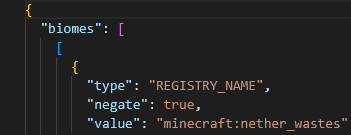 twilit lantern
lethal basin
also you could try contacting bissect support for such issues, maybe it's hardwa...
twilit lantern
lethal basin
also you could try contacting bissect support for such issues, maybe it's hardwa...
Yes absolutely
Want me to stop the profiler now
lethal basin
if it's been 5 mins or so, yes
doesn't need to be exact
wouldn't do more than 10 ig
and less than 2
you get link, send it over here ig @twilit lantern
twilit lantern
lethal basin
you get link, send it over here ig <@1017590794598756382>
spark is a performance profiler for Minecraft clients, servers, and proxies.
turbid atlas
lethal basin
if im to change the temperature to make a certain biome immune to seasons what would i have to type
 lethal basin
it shows text in different colors
making it way easiere to differentiate
it works like uhh
coding
looks like that
imagine like this
 turbid atlas
oh damn
lethal basin
(I am on lunix so that's why my stuff is weird)
turbid atlas
i just wanna change one thing which is the bayou from regions unexplored i dont like how it looks during autumn
lethal basin
for example
one of your questions about leaves in autumn
I assume, this one does that

Foliage ?
(idk if it's the same for you cuz as u can see I am on different modpack)
@turbid atlas can you send config file here?
I will take a quick look at it
would be way faster that way I guess
I can't find stuff easily from your ss, and it may not even be there
turbid atlas
one moment i have a ton of windows open
lethal basin
ight imma make coffee 🔥
turbid atlas
i found it
 lethal basin
but but
I think that may change it everywhere
yk
not only in given biome
I am uncertain
turbid atlas
yeah it probably would
hmmm
i added regions unexplored which has a temperature / humidity list and thats in a seperate notepad
heres the seasons file
lethal basin
turbid atlas
if im to change the temperature to make a certain biome immune to seasons what w...
this file
I don't have anything like that
🤷♀️
wanted to see file from where this came
as this seems where you blacklist biomes maybe
lethal basin
turbid atlas
i bet biomes o plenty has a similar file this is with a biome mod i added myself
okay soo it seems, I need to google on this tho
that RU has it's own "temperature" mechanic
(it's also mechanic in vanilla mc)
and this mechanic may not correlate to seasons
turbid atlas
maybe neutral_neutral??
turbid atlas
?
turbid atlas
yea
lethal basin

CurseForge
Seasons with changing colors, shifting temperatures, and more!
87.5M Downloads | Mods
go here
there is buttons
one is join discord
join it and ask there
you should get answer quicker
turbid atlas
thx
twilit lantern
lmk when you look at it bela
lethal basin
twilit lantern
lmk when you look at it bela
idk from what I can see and (literally I am noob at this) understand, it seems to not be that bad. Maybe a bit of entities (cows/villagers) but idk if they are the issue
what could be the issue is 8 h uptime.. do you have scheduled restarts on server?
other then that maybe try contacting bissect or wait for someone smarter?
also you could srsly try deleting unused region files , that may be temporary solution
 unique timber
I am using Better MC Forge 1.20.1 v53.5
Im trying to get my friend to join. I click share world, and have him put the servername:port but it isnt popping up
lethal basin
unique timber
I am using Better MC Forge 1.20.1 v53.5
Im trying to get my friend to join. I cl...
does it say error occured in luna?
unique timber
1- We are on the same internet
2- Im trying the server thing
lethal basin
if so, it ay be cuz of world share servers being full
unique timber
Can I do it without using the servers?
lethal basin
!server
versed mountainBOT
Free Method
To host a server on your own computer, read the selfhosting guide.
This guide goes over how to install, create, and launch a free Minecraft server on all operating systems (MacOS, Linux and Windows). The guide also guides you through installing Java and optimizing your server for better performance.
If you are installing one of our older modpacks, ignore the "README" file that is included in the serverpack files, as they have outdated information.
Paid Method
We suggest renting a server from Bisect Hosting:
Approx. $10 - $25 a month depending on what plan you choose. You can also get 25% off with Code LunaPixel.
Go here and order a plan which fits you. We suggest 1GB per player but nothing lower than 4GB as the server needs at least 3GB to run.
Go to #server-hosting for more Info!
The following advice works for both the Free and Paid methods:
Transferring Your World
If you're playing Singleplayer and want to transfer your world to your server, simply go to your modpack files and navigate to the saves folder. Inside of this folder, you will see your world saves. Rename your desired world save to world. You can then transfer this folder to your server files. If your world was hosted via world sharing, this process has to be done by the person who would click "Share World".
Fixing Lag
To resolve lag issues, simply run the !tps command in #bots and follow the directions provided.
lethal basin
ask and you may receive answers
what is "some time"
yeah, that is just how mc works
yk?
if you leave modpack running overnight, it tends to have memory leaks
that's how java works
you can try chehcking graal java args
unique timber
Even base minecraft will memory leak after 4 hours :(
lethal basin
no
it is how java works
it is java error, minecraft error
solution was given to you
"graal java args"
it won't just remove the memory leak
it will make them be better/happen later
also proper memory usage
like you can't just use 640gb of ram on mc and expect it to work wonderfully
unique timber
Mmm Im looking at this guide
Can I not local host since we are on the same internet?
Do I have to do a server and host an entire server then connect?
lethal basin
and expect it to not leak
yk?
I am not
I am explaining you something
and you being ignorant
I told you
please go check graal java args
rly
saying "that's just how java works" is quite ignorant a memory leak is a software error and usually patchable not easily of course
cuz of this, yes
it shows you don't play mc that much
if you think it's easy to patch
cuz memory leaks in minecraft are known wide and far
you can't escape em
that implies you know a fix, no?
or you just saying stuff to say
java issue rly
are you java dev
unique timber
If you just want a server to run 24/7 you can do that by using a server jar separate, but your game will have to reset every handful of hours. Especially modded. There isnt a well known fix atm
lethal basin
are you java dev
or no
are you any dev
or no
simple yes/no question
okay
are you java dev
or you assuming
okay
so
you are assuming that x may be a case here
cuz it's a case in other place
I have played minecraft for over 10 years by now, I have provided support and did research for over 7 years
No, I am not a dev, yes I know that memory leaks in java minecraft has been a thing and still remains. There is no way to get rid of them, there is way to make them bit less harsh, there are clearly causes to them (leaving your instance running for long times because java doesn't release memory thus causing a leak)
you're quite assuming here
oh please do tell me how to get rid of them fully