#better-mc-forge
1 messages · Page 377 of 1
 onyx leaf
 viral garden
check their discord server or if they have a wiki linked
viral garden
onyx leaf
I don’t like them, I like QOL, Vanilla + stuff which bmc usually does well
okay then dont remove fancymenu lol
and you'd need to remove Dragon Mounts Patches
yes, list what you added please
onyx leaf
viral garden
okay then dont remove fancymenu lol
I didn’t realise I removed it lol
 ebon condor
my lavender tea is stuck in my cooking pot and wont let me drag it into my inventory

how do i fix
at first i thought it wouldnt let me touch it because it was ouch too hot or something but i waited and its still stuck
viral garden
ebon condor
my lavender tea is stuck in my cooking pot and wont let me drag it into my inven...
did you disable the ingame texturepacks?
in the resourcepacks tab
 cyan wolf
i think you might just have add a bowl to get it out
 viral garden
ebon condor
nooooooo
viral garden
ebon condor
nooooooo
send a screenshot of the resourcepacks tab ingame please
cyan wolf
ebon condor
who drinks liquids from a bowl are you gonna go schlop schlop like a dog
you mean like soup ;o?
cyan wolf
ahh


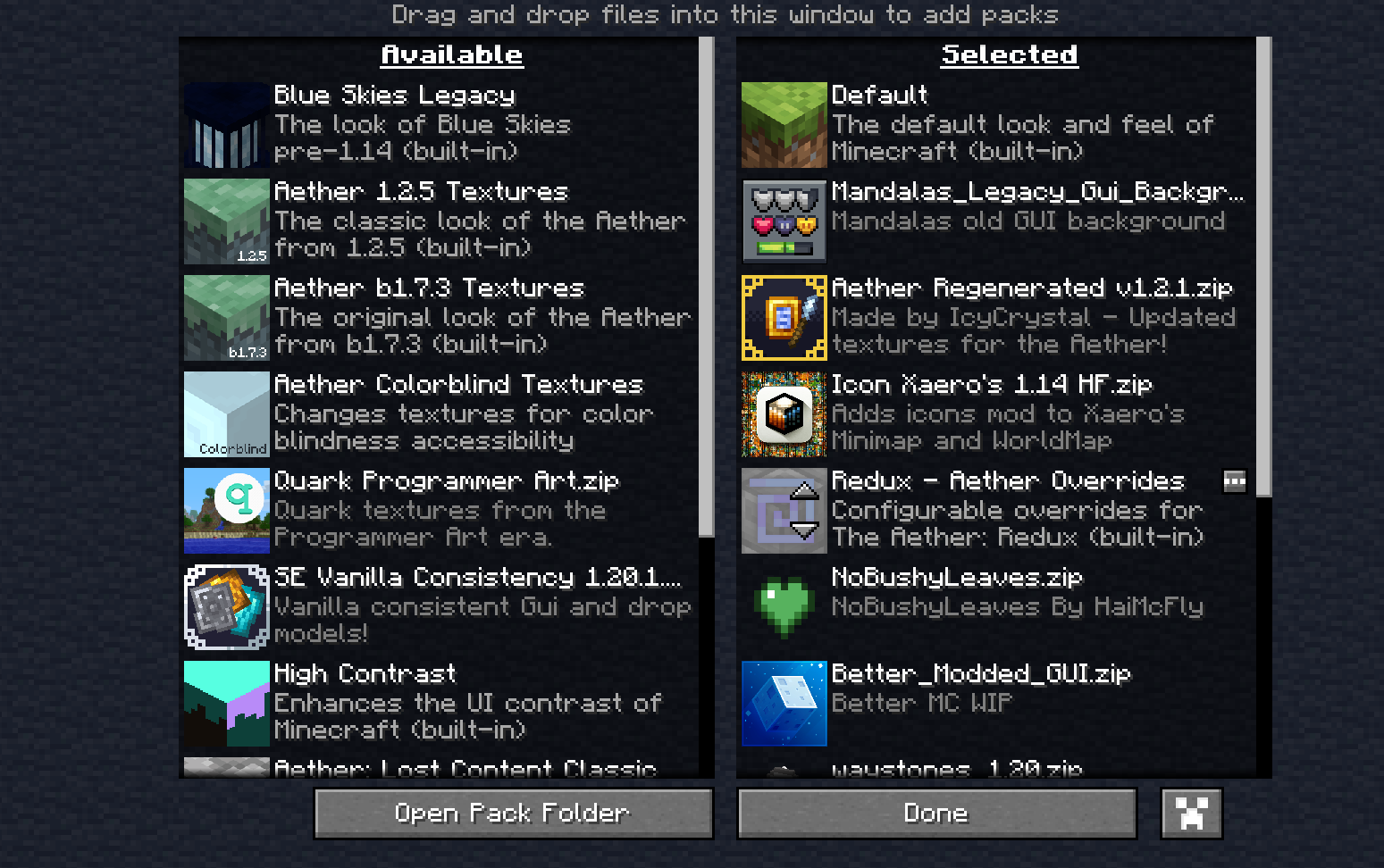 ebon condor
cyan wolf
ahh
ebon condor
cyan wolf
ahh
HUH??
viral garden
ebon condor
https://gyazo.com/db3f9bfca19733cd4cb1e5aec336bb5e
how did you install the modpack..?
ebon condor
curseforge
worth noting
i installed
like
june 2024
and have not updated since
ebon condor
but
viral garden
you're like 20 versions out of date
just update
as i said, your world will be okay
ebon condor
corruption
viral garden
no
there will be no corruption
your world will be okay
i dont know how i could be any clearer
 little stone
Is anyone having an idea of when the share server feature will be up again ?
viral garden
little stone
Is anyone having an idea of when the share server feature will be up again ?
viral garden
little stone
Is it said somewhere ?
little stone
I must have failed to see it
little stone
viral garden
https://discord.com/channels/790272037578473512/790275974503202857/1342271455055...
Thanks
 pale elbow
anyone got any good youtube videos for a guide of the modpack
 proven elm
Uh hello, which version of Essential should I use becuz it's telling me the modpack is uncompatible for BetterMC
viral garden
proven elm
Uh hello, which version of Essential should I use becuz it's telling me the modp...
!ea
 versed mountainBOT
The Essential mod is completely incompatible with all of our modpacks, and there's no reason to use it. All of our modpacks already come with built-in, free world hosting, by clicking the "Share World' button in the Open to LAN menu. You can learn more by typing !ws in the #bots channel. You can also run type !server in the same channel to learn how to properly host a server for better performance and more flexibility. In modpacks that aren't owned by us, you can use mods such as e4mc or WorldHost to host a server completely for free without Essential's many issues and crashes and the microtransactions that they constantly bother users with. To learn more about alternatives to the Essential mod, check out this website.
viral garden
pale elbow
anyone got any good youtube videos for a guide of the modpack
read the questbook ingame
or check the modpack's curseforge page, there will be some videos listed in the description
cyan wolf
ebon condor
yea but tea is soup
what i never meant tea is soup.. you said "liquids from a bowl" i meant soup is a liquid in a bowl
anyways you have to add a glass bottle to the bowl slot remove it
onyx leaf
viral garden
read the questbook ingame
I re-added Fancy menu n its still broke, just differently now
viral garden
onyx leaf
I re-added Fancy menu n its still broke, just differently now
please list everything you added and removed
onyx leaf
i removed any mod which seemed to be GUI oriented
i cant list the ones added because theres too many

 unreal scarab
do you mind telling me where i can find the ysns mod config
viral garden
the config folder
unreal scarab
viral garden
the config folder
.json?
onyx leaf
it wont go fullscreen nor can ci fit it all in one image
viral garden
unreal scarab
.json?
mhm
viral garden
onyx leaf
it wont go fullscreen nor can ci fit it all in one image
then send several images
unreal scarab
viral garden
mhm

 broken parcel
Does anyone else have their soul elytra glitched? It doesn't let me boost
unreal scarab
viral garden
mhm
what values need to be changed?
viral garden
broken parcel
Does anyone else have their soul elytra glitched? It doesn't let me boost
what modpack version are you on


 broken parcel
viral garden
what modpack version are you on
broken parcel
viral garden
what modpack version are you on
I'm on Fabric V 22
unreal scarab
viral garden
add the mobs ID there
just replace registry name with dropbear and save file? or that and change value to 0 maybe
onyx leaf
viral garden
what modpack version are you on
I redownloaded the GUI mods that i removed (Fancymenu, Drippyloadingscreen, BHMenu) And now im just stuck on the LunaPixel Logo screen lmao
oh no it loaded, but its still broken
maybe its the resource packs i removed hm
nope its not
viral garden
onyx leaf
sure
Remove letmedespawn and servercore, better alternatives are already in the modpack
Remove notenoughcrashes, its a horrible mod that makes logs unreadable, and its much better to just actually fix whatever crash you're experiencing instead of doing this kind of bandaid fix.
Falling Leaves causes frequent crashes
Corpse is not needed, the pack already has a better grave mod
I dont know why you added Default Files? its meant for modpack developers, and the pack already has YOSBR.
ElytraSlot and Charm of Undying is not needed. The pack already has Accessorify
BetterF3 causes a ton of lag
this is what i meant when i told you to not remove and adds mods randomly
viral garden
unreal scarab
what values need to be changed?
{
"blacklisted_entities": [
"any_mod:example_entity",
"any_mod:another_example_entity"
]
}
onyx leaf
viral garden
Remove letmedespawn and servercore, better alternatives are already in the modpa...
Just copy pasted a bunch of mods from what I added to the forge version that were updated to 1.21 neoforge
viral garden
and then add any mob's ID there
onyx leaf
viral garden
Remove letmedespawn and servercore, better alternatives are already in the modpa...
Will do all of this however, thanks
viral garden
broken parcel
I'm on Fabric V 22
where do you have the soul elytra equipped
broken parcel
On our cape area
broken parcel
viral garden
where do you have the soul elytra equipped
We also tried the chestplate area but that doesn't seem to work either
viral garden
broken parcel
We also tried the chestplate area but that doesn't seem to work either
report it to the deeper darker devs in their discord or github
 viral garden
 long steppe
!alternates
versed mountainBOT
If this command was run in response to your question/issue, it is likely because switching away from the launcher you are currently using would fix your problem.
From our experience, the most stable launcher by far is ATLauncher, also known as ATL.
To install ATLauncher, do the following:
1. Go to https://atlauncher.com/download
2. Install and run the setup, then open the program.
3. Login to your Microsoft account that owns the Java Edition of Minecraft from the Accounts tab on the right. This process is 100% safe, as it goes directly through Microsoft. ATLauncher does not see your account credentials.
4. Go to the Packs tab on the right, then click "Curseforge" on the left.
5. Search the modpack you wish to download.
6. Click "New Instance". Click "Ok" on the opted out mods warning, then click "Open All" on the manual download screen.
7. Let the mods download, ATLauncher will grab them from your Downloads folder and automatically add them to the modpack.
8. Go to the Instances tab, and click "Play" on the modpack you downloaded. If you ever see an "Update" button on the instance, click it.
This video explains the process: https://youtu.be/xMYW1wMbmkM
To transfer your Curseforge world to ATLauncher, simply right click the modpack on Curseforge, or click the 3 dots, then click "Open Folder". Copy the Saves folder, then click "Open Folder" on ATLauncher and paste the Saves folder there. Do the same with the XaerosMinimap folder, or the Journeymap folder, to transfer over any waypoints you've created.
Because ATLauncher downloads the exact same files as Curseforge does, your world will be the exact same and you will be able to join the same servers. ATLauncher also works without an internet connection (after you've installed the modpack, of course), and does not have any bloat from Overwolf. You are free to uninstall both Overwolf and Curseforge with ATLauncher installed.
unreal scarab
fixing better MC solo
 candid arch
Better MC 5 - v19 crashed. The logs have been uploaded to mclo.gs:
- 1.21.1 [NEOFORGE]
- What launcher did you run Minecraft with? (e.g. CurseForge, ATLauncher, MultiMC, ...)
ATLauncher - Have you changed the modpack in any way except mods?
No - v19
- Have you ever gotten past the crash condition without crashing, or does the game always crash?
Always Crash - What steps cause the crash?
Opening inventory, crafting table, or chest
latest.log
debug.log
crash-2025-02-21_18.28.44-client.txt
atlauncher.log
Mod list changes beyond the modpack:
[2;34mMod list wasn't modified.[0m
remove the polymorph mod
and report the issue to the mod author of polymorph please
 delicate vector
i got a question, when i launch my single player world i click share, then it shows me the port then says "an error occurred in luna". is there a way to fix it so me and my friend can play together
viral garden
delicate vector
i got a question, when i launch my single player world i click share, then it sh...
!server
versed mountainBOT
Free Method
To host a server on your own computer, read the selfhosting guide.
This guide goes over how to install, create, and launch a free Minecraft server on all operating systems (MacOS, Linux and Windows). The guide also guides you through installing Java and optimizing your server for better performance.
If you are installing one of our older modpacks, ignore the "README" file that is included in the serverpack files, as they have outdated information.
Paid Method
We suggest renting a server from Bisect Hosting:
Approx. $10 - $25 a month depending on what plan you choose. You can also get 25% off with Code LunaPixel.
Go here and order a plan which fits you. We suggest 1GB per player but nothing lower than 4GB as the server needs at least 3GB to run.
Go to #server-hosting for more Info!
 trim silo
When I load Better Minecraft, I moved over the Resource Packs I want to use. When I exit out of the game and start it up, I have to move over again


 delicate vector
i did all that already, and it was working before this, but it stopped for some reason
candid arch
I'm running a server on apex hosting and it seems like only 3 players can connect at a time. when a fourth player tries to join they get a socket exception
 unkempt mauve
ive found several dragon eggs and when they grow up fully they just dissapear and i have another issue where i cannot pick up chests and barrels
 normal edge
why this happens

bmc5 neoforge
Better MC 5 - v19 crashed. The logs have been uploaded to mclo.gs:
- 1.21.1 [NEOFORGE]
- What launcher did you run Minecraft with? (e.g. CurseForge, ATLauncher, MultiMC, ...)
- Have you changed the modpack in any way except mods?
- v19
- Have you ever gotten past the crash condition without crashing, or does the game always crash?
- What steps cause the crash?
latest.log
debug.log
crash-2025-02-21_23.22.21-fml.txt
Mod list changes beyond the modpack:
[2;32m0[0m added, [2;31m34[0m removed, [2;34m0[0m updated.
 sacred lynx
!fps
versed mountainBOT

 tacit rose
candid arch
I'm running a server on apex hosting and it seems like only 3 players can connec...
tacit rose
candid arch
I'm running a server on apex hosting and it seems like only 3 players can connec...
this guy sounds like a total nerd
 olive marlin
ikr
candid arch
tacit rose
this guy sounds like a total nerd
the socket exceptions have riled up the unruly mob against me
 celest island
Anyone know what mod is responsible for the changelog button on the main menu?
tacit rose
Erm🤓
olive marlin
uhm well thats rude
tacit rose
 copper gorge
what do i do if it wont let me join my server? 😭
copper gorge
what do i do if it wont let me join my server? 😭
whatchu mean
copper gorge
tacit rose
whatchu mean
It just says that i cant connect to the server
just with the normal ip
not singleplayer
tacit rose
is there an error or whats it say
copper gorge
it says that i cant access the server
tacit rose
it really says that? or does it say like somthing related to ip
you should send a screenshot
tacit rose
what was the solution
copper gorge
my friends decided for another modpack xd
tacit rose
hilarious
copper gorge
tacit rose
hilarious
bro we were trying for 1 whole hour 😭
tacit rose
not so hilarious anymore
viral garden
trim silo
When I load Better Minecraft, I moved over the Resource Packs I want to use. Whe...
you heavily modified the modpack
this is barely even bmc lol
your menus are all messed up
& all of your settings
viral garden
normal edge
Better MC 5 - v19 crashed. The logs have been uploaded to `mclo.gs`:
1. 1.21.1 [...
you removed 34 mods
please do not randomly remove 34 mods
😭
normal edge
no i didnt
viral garden
copper gorge
what do i do if it wont let me join my server? 😭
!server please folow the full guide
versed mountainBOT
Free Method
To host a server on your own computer, read the selfhosting guide.
This guide goes over how to install, create, and launch a free Minecraft server on all operating systems (MacOS, Linux and Windows). The guide also guides you through installing Java and optimizing your server for better performance.
If you are installing one of our older modpacks, ignore the "README" file that is included in the serverpack files, as they have outdated information.
Paid Method
We suggest renting a server from Bisect Hosting:
Approx. $10 - $25 a month depending on what plan you choose. You can also get 25% off with Code LunaPixel.
Go here and order a plan which fits you. We suggest 1GB per player but nothing lower than 4GB as the server needs at least 3GB to run.
Go to #server-hosting for more Info!
normal edge
i downloaded, start the game and that message appear lol
viral garden
!alternates you clearly didnt install the modpack correctly then
follow the full guide please
bots dead rip
normal edge
so no guide?
viral garden
normal edge
so no guide?
copper gorge
viral garden
!server please folow the full guide
i did, didnt work though
i followed the video
viral garden
celest island
Anyone know what mod is responsible for the changelog button on the main menu?
why?
viral garden
copper gorge
i did, didnt work though
do you have the modpack installed clientside?
and send a screenshot of your server console
 frank sentinel
candid arch
I'm running a server on apex hosting and it seems like only 3 players can connec...
frank sentinel
candid arch
I'm running a server on apex hosting and it seems like only 3 players can connec...
yo me too
viral garden
candid arch
I'm running a server on apex hosting and it seems like only 3 players can connec...
please send logs
celest island
viral garden
why?
Because I'd like to remove it from the main menu
viral garden
"yo me too" doesnt help at all
viral garden
celest island
Because I'd like to remove it from the main menu
but why
its a small button on the main menu
celest island
Because I don't want it on the main menu?
viral garden
but why though?
celest island
Because I don't want it on the main menu
viral garden
what specifically is the reason
celest island
That is the reason
viral garden
send a screenshot of the main menu ingame
celest island
I don't see why you can't just tell me what mod or config is responsible for it
viral garden
please follow the directions i am giving you
viral garden
as a developer, i want to know why people want things removed because clearly you have a reason and preferably others would not have your experience
i would prefer if nobody else had this issue, which is why i'm asking you to give one minute of your time here
celest island
There is no issue
celest island
I told you, I just don't want it on the main menu
viral garden
you needing to remove a mod to have a good experience is an issue
which is why i want to know why you want it removed so i can prevent this for future players
viral garden
simply send a screenshot of the main menu and i can help
i don't know why that's such a difficulty
celest island
I don't know why it's such a difficulty to just answer my question either
tacit rose
viral garden
please send logs
hey reguarding this would you be open for dming logs? im involved in this issue
viral garden
celest island
I don't know why it's such a difficulty to just answer my question either
because i want to prevent other people from having the same problem
i'm a developer and prefer longterm solutions
that work for everyone
celest island
I literally just said multiple times that there is no issue
viral garden
it's an issue to me that you'd need to remove a mod
because i want the modpack to simply work without anything added/removed
if you send a screenshot of the main menu, i'd really appreciate it as it'd help me and others
viral garden
tacit rose
hey reguarding this would you be open for dming logs? im involved in this issue
i'd prefer if you just sent it here, or uploaded it to mclo.gs if you're worried about personal info
celest island
That's great, and I'm happy that you have an opinion. Users have other opinions though, and you can't possibly appease all of them. Claiming "I'm a developer" and want to fix it for everyone doesn't solve anything
viral garden
celest island
That's great, and I'm happy that you have an opinion. Users have other opinions ...
i would be able to solve your issue if you sent a screenshot of the main menu
on windows, you can press the PrtScn button on your keyboard
or press the windows button and type "snipping tool"
celest island
 tacit rose
viral garden
i'd prefer if you just sent it here, or uploaded it to mclo.gs if you're worried...
tacit rose
viral garden
i'd prefer if you just sent it here, or uploaded it to mclo.gs if you're worried...
ok let me just trigger the error and we'll send it
viral garden
celest island
as i've said, its an issue to me that you'd have to do anything in the first place
i would really prefer if you simply sent a screenshot
celest island
I don't care if it's an issue for you, you're not playing my game
viral garden
theres several reasons you could be asking about this and i want to learn why
and a screenshot would answer all of the questions i have
it'd allow me to help you and future people better
if you don't trust that i know what i'm doing you can see how many messages i have in this discord server
and how long i've been helping people here
all i need is one screenshot of the main menu
frank sentinel
viral garden
please send logs
it seems like you've got a lot on your plate right now, so i worry about this issue later. thx though
candid arch
viral garden
please send logs
This is part of it but there's way more
viral garden
candid arch
This is part of it but there's way more
your server doesnt have enough memory
candid arch
viral garden
your server doesnt have enough memory
That's like 2 GB memory, my server theoretically has 8GB
It's only ever using around 2GB, but whenever there are 3 players, you can't even ping the server
viral garden
yeah its a known bug when not enough memory is allocated, it exclusively happens on bmc5 neoforge
an update is coming out in a few hours that might fix it
i'm going to look further into it though
i would recommend either
downgrading one version on bmc5
switching to bmc3 fabric
or
just playing bmc4 forge
tacit rose
thanks chloe
olive marlin
thnaks!
frank sentinel
thx
 barren kettle
THANKYOU
candid arch
thanks Chloe! I appreciate the detailed response!
viral garden
yw
normal edge
can i install the modpack without at launcher? i dont have mc premiun
tacit rose
🏴☠️
olive marlin
🏴☠️
tacit rose
arg
normal edge
my microsoft account got hacked lol
viral garden
normal edge
can i install the modpack without at launcher? i dont have mc premiun
!cracked
versed mountainBOT
If you are using a cracked Minecraft launcher, we can not assist with your issue. In order to receive help, you need to switch to an approved launcher and provide proof you have purchased Minecraft. This is due to the terms of service and guideline agreements of both Mojang and Discord.
 steady elm
Hi
i need help
I recently followed a tutorial in installing the better mc mod
but when I ran the start.ps1 into powershell it wont work
and i have already tried the tutorial vid but it did not say anything about it
and yes I have tried the unlock then the path thing in the powershell
tplease help
 sullen tiger
- What Minecraft version are you using? (1.19.2, 1.20.1, ...) - 1.20.1
- What launcher did you run Minecraft with? (e.g. CurseForge, ATLauncher, MultiMC, ...) - curseforge
- Have you changed the modpack in any way? (e.g. changing mod versions, adding/removing mods) - added a mod cave dweller
- What version of the modpack are you using? (v11, v9, etc) - v30
- Have you ever gotten past the crash condition without crashing, or does the game always crash? - yes
- What steps cause the crash? - No crash im having fps stutters/ random drops and I played the same modpack a year ago and i had like 60-100 fps now its going as low as 10 on my RTX 2060.
 verbal copper
I have a question, can someone tell me what mod is conflicting with mc dungeons weapons and mc dungeons armor for the better mc BMC4 v36?
I really wanna play with those mods installed
 narrow slate
when i try to share world with friend for them to join it says an error occurred in luna instead of giving me the server address, it was working normally 2 days ago.
 final perch
can someone help
when i host something it only shows the port
it doesnt show the server IP adress
ebon condor
anybody here have a bison farm
how do you collect wool without being sent to the aether
final perch
1.20.1
CurseForge
added ice and fire
V36
Its not showing the Ip address only the Server port
No crash
ebon condor
final perch
can someone help
when i host something it only shows the port
it doesnt show the...
the server IP is your IP adress
i believe
you have 2 give it out to the person ur trying 2 play with
final perch
ebon condor
the server IP is your IP adress
No, the server IP changes every time i host
normally
viral garden
steady elm
but when I ran the start.ps1 into powershell it wont work
run the start.bat instead
final perch
ebon condor
are u doing lan
I press ESC then share world and it world normally show both the IP and server IP but this time it only shows the server IP so im not able to inv friends bc idk how to do it with the port
viral garden
steady elm
im gonna run it in legacy launcher forge 1.20.1
!cracked
versed mountainBOT
If you are using a cracked Minecraft launcher, we can not assist with your issue. In order to receive help, you need to switch to an approved launcher and provide proof you have purchased Minecraft. This is due to the terms of service and guideline agreements of both Mojang and Discord.
viral garden
verbal copper
I have a question, can someone tell me what mod is conflicting with mc dungeons ...
Please read the full contents of the #get-support channel for us to provide assistance.
viral garden
 somber kiln
ALL MY STUFF IS GONE
somber kiln
ALL MY STUFF IS GONE
please be more specific
viral garden
narrow slate
when i try to share world with friend for them to join it says an error occurred...
viral garden
final perch
can someone help
when i host something it only shows the port
it doesnt show the...
viral garden
ebon condor
how do you collect wool without being sent to the aether
what?
 brisk aspen
viral garden
what?
brisk aspen
viral garden
what?
whi is ur pfp defpressing
brisk aspen
ebon condor
hi chloe
chill on spam
viral garden
brisk aspen
whi is ur pfp defpressing
?
brisk aspen
viral garden
?
idk it seem sad
viral garden
brisk aspen
chill on spam
they arent doing anything wrong
ebon condor
brisk aspen
chill on spam

viral garden
brisk aspen
idk it seem sad
thats just a chorb
brisk aspen
viral garden
they arent doing anything wrong
spam
 brisk aspen
viral garden
thats just a chorb
brisk aspen
viral garden
thats just a chorb
chorb?
viral garden

brisk aspen
spammer
somber kiln
I LOGED IN AND ALL MY ININTORY WAS GONE
brisk aspen
u woke everyone up
steady elm
viral garden
run the start.bat instead
is it the same proccess?
viral garden
steady elm
is it the same proccess?
just double click the start.bat
ebon condor
drakeo how many servers do you moderate
viral garden
somber kiln
I LOGED IN AND ALL MY ININTORY WAS GONE
please give more information
are you playing on a server?
what modpack are you playing?
brisk aspen
ebon condor
drakeo how many servers do you moderate
server. whats a server. hahaha
steady elm
viral garden
just double click the start.bat
thas it? idont need no powershell stuff
viral garden
brisk aspen
server. whats a server. hahaha
 somber kiln
YEA THE CYPHER WORLD 9ON PROMINANCE
verbal copper
- Using 1.20.1
- ATLauncher
- There were certain complimentary weapon mods installed, but those mods never showed incompatibility in my other installs with the MC dungeons weapons / armor packs.
- BMCv36
- Always crashed.
- Only on startup, and always happens during startup. The game straight up refused to start sadly. :<
viral garden
somber kiln
YEA THE CYPHER WORLD 9ON PROMINANCE
- you're in the better mc channel
- we dont host any servers here
brisk aspen
chole when is luna back
somber kiln
AAAAAAAAAAHHHHHHHHHHHHHHHHHH
viral garden
brisk aspen
chole when is luna back
brisk aspen
with friends
viral garden
verbal copper
1. Using 1.20.1
2. ATLauncher
3. There were certain complimentary weapon mods in...
please send logs
 wispy trailBOT
verbal copper
wispy trailBOT
verbal copper
Uploaded crash-2025-02-22_10.58.31-client.txt from @verbal copper to mclogs: https://mclo.gs/1jqsjbX
viral garden
brisk aspen
no u devlpor
viral garden
verbal copper
remove the Clumps mod
verbal copper
viral garden
remove the Clumps mod
Is that literally it? could you elaborate why and how it helps?
viral garden
verbal copper
Is that literally it? could you elaborate why and how it helps?
clumps and mcda are incompatible
no idea why
 verbal copper
Ahaaaa
brisk aspen
viral garden
clumps adds nothing

viral garden
its fine to remove
viral garden
brisk aspen
<:whygod:1141764592364687421>
can you stop dude lol
verbal copper
You're the best ^w^
brisk aspen

viral garden
brisk aspen
so thats mean
!server if you want to host a server you can do it free using the method below
versed mountainBOT
Free Method
To host a server on your own computer, read the selfhosting guide.
This guide goes over how to install, create, and launch a free Minecraft server on all operating systems (MacOS, Linux and Windows). The guide also guides you through installing Java and optimizing your server for better performance.
If you are installing one of our older modpacks, ignore the "README" file that is included in the serverpack files, as they have outdated information.
Paid Method
We suggest renting a server from Bisect Hosting:
Approx. $10 - $25 a month depending on what plan you choose. You can also get 25% off with Code LunaPixel.
Go here and order a plan which fits you. We suggest 1GB per player but nothing lower than 4GB as the server needs at least 3GB to run.
Go to #server-hosting for more Info!
 oak tapir
hi
got an issue with bmc 4 and 5 neoforge where no village spawned, got plenty of pillagers but no villagers and no villages.
i try to reset and dl multiple times but still the same issue.
brisk aspen
oak tapir
hi
got an issue with bmc 4 and 5 neoforge where no village spawned, got plenty o...
✅ 
viral garden
oak tapir
hi
got an issue with bmc 4 and 5 neoforge where no village spawned, got plenty o...
use /locate


 civic bramble
Is luna the thing which allows people to play on others worlds?
brisk aspen
🎭
steady elm
okay so I double clicked start.bat nothing sort of changed
oak tapir
/locate ? even without cheats on ?
viral garden
steady elm
okay so I double clicked start.bat nothing sort of changed
what do you mean by "nothing changed"
viral garden
oak tapir
/locate ? even without cheats on ?
just enable cheats
escape -> share world -> allow cheats -> share world
steady elm
viral garden
what do you mean by "nothing changed"
what do I do next after double clicking it
viral garden
steady elm
what do I do next after double clicking it
a window opens
follow the on screen directions
and then it'll run the server
steady elm
I extracted then I ran then error same with running start.ps1
viral garden
steady elm
I extracted then I ran then error same with running start.ps1
what error do you get?
steady elm
the same thing with the start.ps1 thing where it shows i think powershell is it with red text and then its gone
 storm perch
anyone know why i would be getting this?
I'm trying to connect to a server(shockbyte) using the modpack (v36).
curseforge 1.20.1 47.3.0

 spring socket
Is world sharing down?
It says an error occurred in Luna instead of giving me the ip
oak tapir
ok got very few villages, very few. first about 2k blocs from the start, others at 12k...
 regal sky
Does anyone know why my game keeps crashing before it even opens
It was working earlier today but now it just wont work
everytime i open it, it immediately crashes.
Only BMC as other mod packs work
oak tapir
maybe you upgrade mods ?
oak tapir
no i was thinking, the fact you upgraded mods made your game crash.
viral garden
storm perch
anyone know why i would be getting this?
I'm trying to connect to a server(shoc...
you do not have the same modpack installed as the server
Shockbyte is a terrible server host and frequently fails to install modpacks correctly
viral garden
spring socket
Is world sharing down?
!lunadown
versed mountainBOT
Our world-sharing service, Luna, is currently down for maintenance.
We have no ETA for when it will be back and will not be providing an ETA. Rest assured we are actively working to get it back up and will announce when it is available to use again.
Keeping this in mind, please don't ask again for an ETA or any progress updates.
viral garden
regal sky
Does anyone know why my game keeps crashing before it even opens
It was working ...
Please read the full contents of the #get-support channel for us to provide assistance.
spring socket
viral garden
!lunadown
Thanks!
oak tapir
viral garden
just enable cheats
i found some villages, but saying they are few is an understatement.
the first savana or desert/plain/etc villages are 5k to 12k blocks from the spawning point.
and i used the same seed in my first bmc5 modpack and there was more villages (but i had a crashed and reinstalled the modpack, since nearly no villages where before there were plenty, and none where they were)
ebon condor
oak tapir
i found some villages, but saying they are few is an understatement.
the first s...
do u have axiom
 untold wolf
how does one invite my friends to my world
viral garden
untold wolf
how does one invite my friends to my world
!server
versed mountainBOT
Free Method
To host a server on your own computer, read the selfhosting guide.
This guide goes over how to install, create, and launch a free Minecraft server on all operating systems (MacOS, Linux and Windows). The guide also guides you through installing Java and optimizing your server for better performance.
If you are installing one of our older modpacks, ignore the "README" file that is included in the serverpack files, as they have outdated information.
Paid Method
We suggest renting a server from Bisect Hosting:
Approx. $10 - $25 a month depending on what plan you choose. You can also get 25% off with Code LunaPixel.
Go here and order a plan which fits you. We suggest 1GB per player but nothing lower than 4GB as the server needs at least 3GB to run.
Go to #server-hosting for more Info!
viral garden
worldsharing is temporarily down
 south saddle
I've been having an issue with my local host where every time i shut down the server and join the next day, all my waypoints are gone. Anyone know the issue or how to fix it?
viral garden
south saddle
I've been having an issue with my local host where every time i shut down the se...
how exactly is the server hosted
south saddle
viral garden
how exactly is the server hosted
Radmin VPN local host
viral garden
there's your issue
!server you'll need to self host on your pc to have waypoints save
versed mountainBOT
Free Method
To host a server on your own computer, read the selfhosting guide.
This guide goes over how to install, create, and launch a free Minecraft server on all operating systems (MacOS, Linux and Windows). The guide also guides you through installing Java and optimizing your server for better performance.
If you are installing one of our older modpacks, ignore the "README" file that is included in the serverpack files, as they have outdated information.
Paid Method
We suggest renting a server from Bisect Hosting:
Approx. $10 - $25 a month depending on what plan you choose. You can also get 25% off with Code LunaPixel.
Go here and order a plan which fits you. We suggest 1GB per player but nothing lower than 4GB as the server needs at least 3GB to run.
Go to #server-hosting for more Info!
 gilded eagle
hello! i have a server that seems to be running, as it says Dedicated server took 41.063 seconds to load, HOWEVER everytime i change
user_jvm_args
to -Xmx12G -Xms12G
it resets to xmx4 xms4
Also my friend cant join even though i can, i did port forward 25565 and set that as the server port
viral garden
gilded eagle
hello! i have a server that seems to be running, as it says Dedicated server too...
you need to change via variables.txt
viral garden
gilded eagle
Also my friend cant join even though i can, i did port forward 25565 and set tha...
!port
versed mountainBOT
If you're having issues with your friends joining your server, your port for Minecraft may be closed.
-
Check with https://portchecker.co/ with your IP and Minecraft's port (drop down menu) to see if it's open.
-
If it's closed you will need to search online "How to open Minecraft port for server with (ISP Name)
Important note: a lot will allow port forwarding, but there may be some ISPs that will not allow any port forwarding. Please check online if this is the case for yours.
 timber moss
where can we get free server on better mc 3
gilded eagle
viral garden
you need to change via variables.txt
worked tysm
viral garden
timber moss
where can we get free server on better mc 3
!server
versed mountainBOT
Free Method
To host a server on your own computer, read the selfhosting guide.
This guide goes over how to install, create, and launch a free Minecraft server on all operating systems (MacOS, Linux and Windows). The guide also guides you through installing Java and optimizing your server for better performance.
If you are installing one of our older modpacks, ignore the "README" file that is included in the serverpack files, as they have outdated information.
Paid Method
We suggest renting a server from Bisect Hosting:
Approx. $10 - $25 a month depending on what plan you choose. You can also get 25% off with Code LunaPixel.
Go here and order a plan which fits you. We suggest 1GB per player but nothing lower than 4GB as the server needs at least 3GB to run.
Go to #server-hosting for more Info!
gilded eagle
versed mountain
If you're having issues with your friends joining your server, your port for Min...
ill look it up, ty i didnt know that website was a thing, looks like the port forwarding didnt work
tyvm
 arctic charm
Every time I want to fight a boss my game crashes.
 shut pendant
is there a better mc wiki or something?
viral garden
shut pendant
is there a better mc wiki or something?
read the questbook ingame
viral garden
arctic charm
Every time I want to fight a boss my game crashes.
Please read the full contents of the #get-support channel for us to provide assistance.
 tender jolt
i have Core i9 14900k, is there anywway to bypass this and be able to play or is it completely not playable..

also bios is up to date as well
 teal vale
1- 1.20.1
2- curseforge
3- added mods
4- v36
5- i can stay in the menu
6- it says i added an mod which is incompatible
(if you want i can send the list of the mods i added)
wispy trailBOT
teal vale
1- 1.20.1
2- curseforge
3- added mods
4- v36
5- i can stay in the menu
6- it sa...
Uploaded latest.log from @teal vale to mclogs: https://mclo.gs/D9gLdGd
 iron jasper
my friend tried to join my world and it said "Failed to log in:Invalid session (Try restarting your game and the launcher)"
 covert walrus
tender jolt
i have Core i9 14900k, is there anywway to bypass this and be able to play or is...
covert walrus
tender jolt
i have Core i9 14900k, is there anywway to bypass this and be able to play or is...
did you update bios...
versed mountainBOT
To better assist with fixing your issue, we will need some logs:
-
Curseforge -> Right click the modpack instance -> Open Folder.
-
ATLauncher -> Click 'Open Folder' on the modpack instance.
-
MultiMC -> Select your instace and click 'Instance Folder' on the right.
-
** For servers** -> Open the folder containing your server files.
To find the latest.log file, navigate to the 'logs' folder.
To find the hs_err_pid.log file, simply look for the file name after opening the instance folder.
To find a crash report, navigate to the 'crash-reports folder and find the most recent file after your crash occurred.
Once located, please upload the requested file here. If it fails, upload to https://mclo.gs/ and share the link here.
tender jolt
viral garden
tender jolt
i have Core i9 14900k, is there anywway to bypass this and be able to play or is...
please read the text on your screen.
there is a dont show again and ok button right there
viral garden
teal vale
1- 1.20.1
2- curseforge
3- added mods
4- v36
5- i can stay in the menu
6- it sa...
list what you added
tender jolt
viral garden
please read the text on your screen.
yeah so everytime we try to click ok it obviously does not let us load the game.. otherwise i would not have asked
 little willow
Hey, I have a question regarding BMC4.
Would it be possible for me to create a public profile of BMC4 with a few extra mods and release it as my own? I would, of course, credit Luna and make it clear that neither the modpack nor the mods in it are mine. My goal is to provide my players with an easy way to install the modified profile instead of manually adding the extra mods to the BMC4 modpack.
Would this be allowed, or are there any legal restrictions that prevent me from doing so?
teal vale
viral garden
list what you added
security craft
bonsai trees 3
simple hats
iron furnaces
inventory pets
scuba gear
the man from the fog
cobblefordays
time in a bottle
mystical oak tree
minetraps
aquaculture 2
simple voice chat
lightman's currency
laser bridges and doors
webdisplays
casinocraft
drink beer refill
ultimate car mod
ultimate plane mod
The dirty stuff (cigarettes)
angel ring
moving elevators
ftb chunks
randomium ore
lucky block
easy npc
prefab
vic's point blank
trash slot
mca reborn
dixta's armory
neighborly
essential mod
appleskin
animal feeding trough
mcef
lucky77
 true lark
viral garden
yes, list what you added please
true lark
viral garden
yes, list what you added please
ADDED: ad astra,ad extendra, ad astra: giselle addon, ad astra extra, ad astra dungeons, ad astra proxima plus, ad astra distant horizons, yungs better desert temples(all yungs stuff that wasnt already in), pharaos legacy, creeper overhaul, enderman overhaul, the graveyard, upgrade aquatic, apple skin, terralith (i removed biomes o plenty), immersive UI, resource ghouls, luminous, luminous monsters, luminous nether, luminous beasts, iron chests, better archaeology, immersive weathering, Travelers compass, physics mod, advancement plaques, block runner, diagonal walls, diagonal windows, diagonal fences, horse expert, bartering station, better mods button(idk if that was already in or not), better tridents, enchanting infuser, visual workbench, pick up notifier, effect descriptions, weather storms and tornadoes, immersive armours, explorers compass, when dungeons arise: seven seas
viral garden
tender jolt
yeah so everytime we try to click ok it obviously does not let us load the game....
Please read the full contents of the #get-support channel for us to provide assistance.
viral garden
little willow
Hey, I have a question regarding BMC4.
Would it be possible for me to create a p...
please do not publish it on Curseforge
as that'd break our licensing
i'd recommend just making a zip file or separate modpack with all of the tweaks you want to make
then copy the files from that over to a BMC instance
this would also allow you to get content & fixes from BMC itself updating very easily
viral garden
teal vale
security craft
bonsai trees 3
simple hats
iron furnaces
inventory pets
scuba ge...
!ea
versed mountainBOT
The Essential mod is completely incompatible with all of our modpacks, and there's no reason to use it. All of our modpacks already come with built-in, free world hosting, by clicking the "Share World' button in the Open to LAN menu. You can learn more by typing !ws in the #bots channel. You can also run type !server in the same channel to learn how to properly host a server for better performance and more flexibility. In modpacks that aren't owned by us, you can use mods such as e4mc or WorldHost to host a server completely for free without Essential's many issues and crashes and the microtransactions that they constantly bother users with. To learn more about alternatives to the Essential mod, check out this website.
viral garden
true lark
ADDED: ad astra,ad extendra, ad astra: giselle addon, ad astra extra, ad astra d...
try removing physics mod
teal vale
viral garden
!ea
i will delete the essential mod but are you sure it is the source of the incompability problem and there are some mods that aren't updated like the jei should i update them?
viral garden
teal vale
i will delete the essential mod but are you sure it is the source of the incompa...
please do not update mods
Essential is the issue
teal vale
okay thank you i will delete and try again will let you know if i still have the problem
 olive crest
Hello is it possible to combine cobblemon and better MC ?
viral garden
olive crest
Hello is it possible to combine cobblemon and better MC ?
yes, just put it in the mods folder
viral garden
:D
olive crest
One more question, what do you think about ATlauncher
viral garden
!alternates its the most reliable launcher, you can read more here
versed mountainBOT
If this command was run in response to your question/issue, it is likely because switching away from the launcher you are currently using would fix your problem.
From our experience, the most stable launcher by far is ATLauncher, also known as ATL.
To install ATLauncher, do the following:
1. Go to https://atlauncher.com/download
2. Install and run the setup, then open the program.
3. Login to your Microsoft account that owns the Java Edition of Minecraft from the Accounts tab on the right. This process is 100% safe, as it goes directly through Microsoft. ATLauncher does not see your account credentials.
4. Go to the Packs tab on the right, then click "Curseforge" on the left.
5. Search the modpack you wish to download.
6. Click "New Instance". Click "Ok" on the opted out mods warning, then click "Open All" on the manual download screen.
7. Let the mods download, ATLauncher will grab them from your Downloads folder and automatically add them to the modpack.
8. Go to the Instances tab, and click "Play" on the modpack you downloaded. If you ever see an "Update" button on the instance, click it.
This video explains the process: https://youtu.be/xMYW1wMbmkM
To transfer your Curseforge world to ATLauncher, simply right click the modpack on Curseforge, or click the 3 dots, then click "Open Folder". Copy the Saves folder, then click "Open Folder" on ATLauncher and paste the Saves folder there. Do the same with the XaerosMinimap folder, or the Journeymap folder, to transfer over any waypoints you've created.
Because ATLauncher downloads the exact same files as Curseforge does, your world will be the exact same and you will be able to join the same servers. ATLauncher also works without an internet connection (after you've installed the modpack, of course), and does not have any bloat from Overwolf. You are free to uninstall both Overwolf and Curseforge with ATLauncher installed.
true lark
viral garden
try removing physics mod
i tried it, it crashed again the same way. here is the crash report:
wispy trailBOT
true lark
i tried it, it crashed again the same way. here is the crash report:
Uploaded message.txt from @true lark to mclogs: https://mclo.gs/IcFkk4M
olive crest
So it is good ok
viral garden
true lark
i tried it, it crashed again the same way. here is the crash report:
i'd recommend doing a fresh install of the modpack, and readding the mods you listed earlier in groups of 2-3
launch the game after every batch
little willow
viral garden
please do not publish it on Curseforge
is there a way to make the profile shareable through curseforge? as in a link which will be sending them to my profile (that has all of the mods installed)?
viral garden
little willow
is there a way to make the profile shareable through curseforge? as in a link wh...

theres a profile code feature
but i dont know if it works well at all
true lark
viral garden
launch the game after every batch
okay i will try that. thank you! 🙂
little willow
very well
 left cradle
Oh ok isn't anybody of water here talking about THE BCLIB ISSUE AND THAT ALL MODPACKS WITH BETTERX MODS ARE UNPLAYABLE LITERALLY UNPLAYABLE EVEN WHEN I DELETE ALL OF SINYTRA CONNECTER IT STILL CRASHES AND WITH NO ADDED MODS IT STILL CRASHES
viral garden
left cradle
Oh ok isn't anybody of water here talking about THE BCLIB ISSUE AND THAT ALL MOD...
please do not delete mods
and typing in all caps isnt helpful or necessary
read #get-support if you want help
true lark
viral garden
please do not delete mods
could the crash also be then because i removed biomes o plenty?
viral garden
true lark
could the crash also be then because i removed biomes o plenty?
you should try with only BOP removed
left cradle
I Actually looked at this and it didn't work none work the bclib crash problem is everywhere I go just see the comments on bclib in curseforge
viral garden
left cradle
I Actually looked at this and it didn't work none work the bclib crash problem i...
please
read #get-support
answer the questions
if you do not answer the support questions i cant really help you
tender jolt
- 1.21.1
- curseforge
- no
- idk how to check that but i downloaded the latest version of BMC5 neoforge so should be latest.
- game always crashes
- when i launch bmc it loads for a second, goes into launching, crashes, gives me this and i hit dont show again and okay and still crashes, CRASHLOG: https://mclo.gs/Eun35Nw
 viral garden
tender jolt
1. 1.21.1
2. curseforge
3. no
4. idk how to check that but i downloaded the late...
viral garden
tender jolt
1. 1.21.1
2. curseforge
3. no
4. idk how to check that but i downloaded the late...
what happens when you press ok
does it bring you to a new screen
left cradle
1.20.1
Curseforge
I have added a ton of mods and added a worldgen library which I think Is causing the problem can I see recent mods downloaded
Not 100% sure but v26
Sometimes it listed how to fix the problem but didn't work
Not too sure but maybe the worldgen library mod
viral garden
left cradle
1.20.1
Curseforge
I have added a ton of mods and added a worldgen library which...
you added a ton of mods, theres your issue
and v26 is VERY old
you're 10 versions out of date
this has nothing to do with bclib
i dont know why you went to another channel and started telling people that 😭
please update to v36, and list the mods you added
tender jolt
viral garden
does it bring you to a new screen
no maam it doesnt bring me to a new screen it just instantly closes
tender jolt
viral garden
what happens when you press ok
insta closes and brings me back to mc launcher
left cradle
Can I update this with the added mods and then see if the problem gets fixed because imdont think i can list 90 extra mods
viral garden
tender jolt
insta closes and brings me back to mc launcher
!alternates this might be your best bet, but this could also just be unfixable due to you having a CPU that is susceptible to nuclear explosions
versed mountainBOT
If this command was run in response to your question/issue, it is likely because switching away from the launcher you are currently using would fix your problem.
From our experience, the most stable launcher by far is ATLauncher, also known as ATL.
To install ATLauncher, do the following:
1. Go to https://atlauncher.com/download
2. Install and run the setup, then open the program.
3. Login to your Microsoft account that owns the Java Edition of Minecraft from the Accounts tab on the right. This process is 100% safe, as it goes directly through Microsoft. ATLauncher does not see your account credentials.
4. Go to the Packs tab on the right, then click "Curseforge" on the left.
5. Search the modpack you wish to download.
6. Click "New Instance". Click "Ok" on the opted out mods warning, then click "Open All" on the manual download screen.
7. Let the mods download, ATLauncher will grab them from your Downloads folder and automatically add them to the modpack.
8. Go to the Instances tab, and click "Play" on the modpack you downloaded. If you ever see an "Update" button on the instance, click it.
This video explains the process: https://youtu.be/xMYW1wMbmkM
To transfer your Curseforge world to ATLauncher, simply right click the modpack on Curseforge, or click the 3 dots, then click "Open Folder". Copy the Saves folder, then click "Open Folder" on ATLauncher and paste the Saves folder there. Do the same with the XaerosMinimap folder, or the Journeymap folder, to transfer over any waypoints you've created.
Because ATLauncher downloads the exact same files as Curseforge does, your world will be the exact same and you will be able to join the same servers. ATLauncher also works without an internet connection (after you've installed the modpack, of course), and does not have any bloat from Overwolf. You are free to uninstall both Overwolf and Curseforge with ATLauncher installed.
viral garden
left cradle
Can I update this with the added mods and then see if the problem gets fixed bec...
mhm, you can update with your added mods
you should sort your mods folder by newest though
and then drag all of the mods you added into a backup folder
you should also update the mods you added, as a lot of them are likely outdated
left cradle
Ok that will take an hour but ok I'll try
Thx for your help and I wish a wonderful day
tender jolt
viral garden
!alternates this might be your best bet, but this could also just be unfixable d...
any other known launchers? i just dont like downloading stuff like that
and is that the russian one or the original one
if its the OG then id
idm
viral garden
tender jolt
and is that the russian one or the original one
you're confused with TLauncher
ATL is completely different
tender jolt
oH okay thank u!!
viral garden
left cradle
Ok that will take an hour but ok I'll try
you can enable content management on the profile in CF
and just update those mods you added from there
 summer coral
my server keeps crashing for some reason when i launch it and it was just working
viral garden
 humble sinew
my friend can't connect to my server after I updated to v19
humble sinew
my friend can't connect to my server after I updated to v19
!port
versed mountainBOT
If you're having issues with your friends joining your server, your port for Minecraft may be closed.
-
Check with https://portchecker.co/ with your IP and Minecraft's port (drop down menu) to see if it's open.
-
If it's closed you will need to search online "How to open Minecraft port for server with (ISP Name)
Important note: a lot will allow port forwarding, but there may be some ISPs that will not allow any port forwarding. Please check online if this is the case for yours.
viral garden
summer coral
my server keeps crashing for some reason when i launch it and it was just workin...
Please read the full contents of the #get-support channel for us to provide assistance.
teal vale
teal vale
okay thank you i will delete and try again will let you know if i still have the...
i deleted essentials and the installed e4mc but it made the game crash aswell so i deleted it too just lettting you know and ty
 floral ice
bmc plus completed in only 75 days
 viral garden
teal vale
i deleted essentials and the installed e4mc but it made the game crash aswell so...
viral garden
teal vale
i deleted essentials and the installed e4mc but it made the game crash aswell so...
!ea
versed mountainBOT
The Essential mod is completely incompatible with all of our modpacks, and there's no reason to use it. All of our modpacks already come with built-in, free world hosting, by clicking the "Share World' button in the Open to LAN menu. You can learn more by typing !ws in the #bots channel. You can also run type !server in the same channel to learn how to properly host a server for better performance and more flexibility. In modpacks that aren't owned by us, you can use mods such as e4mc or WorldHost to host a server completely for free without Essential's many issues and crashes and the microtransactions that they constantly bother users with. To learn more about alternatives to the Essential mod, check out this website.
viral garden
read the full command please
e4mc is not needed in our modpacks
as we already have an alternative
summer coral
im using 1.20.1
curseforge
im using standard BetterMC
V36, forge version 47.3.12
server crash never started until server restarted
starting the server causes a loop of restarting and then crashing
 hearty fog
is it normal that i hear man screaming in mid of night in the forest
 scenic knoll
Why is BMC5 not loading? I've waited for over an hour on the LUNAPIXEL screen and it still didn't load yet. I can't tell what's wrong, I played yesterday and it loaded just fine.
viral garden
summer coral
im using 1.20.1
curseforge
im using standard BetterMC
V36, forge version 47.3.12...
please send logs
viral garden
hearty fog
is it normal that i hear man screaming in mid of night in the forest
are you sure you're playing better mc
hearty fog
yes
viral garden
scenic knoll
Why is BMC5 not loading? I've waited for over an hour on the LUNAPIXEL screen an...
you changed the neoforge modloader version, didnt you
please do not do that - keep the modpack as is
hearty fog
i also had herobrine in the caves
viral garden
hearty fog
yes
did you add any mods?
viral garden
those arent features of the modpack
hearty fog
380 mods
viral garden
send a screenshot of your modpack installation in your launcher please
viral garden
hearty fog
380 mods
mhm
90% of them add no content
just performance & stability
or small one-feature mods
hearty fog
v36
viral garden
viral garden
send a screenshot of your modpack installation in your launcher please
.
screenshot please
 scenic knoll
viral garden
you changed the neoforge modloader version, didnt you
scenic knoll
viral garden
you changed the neoforge modloader version, didnt you
I didn't even change anything. I played for like 10 hours yesterday and left at 3 AM. I never updated or changed any mods or anything related to Neoforge.
viral garden
scenic knoll
I didn't even change anything. I played for like 10 hours yesterday and left at ...
!alternates do a fresh install
versed mountainBOT
If this command was run in response to your question/issue, it is likely because switching away from the launcher you are currently using would fix your problem.
From our experience, the most stable launcher by far is ATLauncher, also known as ATL. Keep in mind that ATL is NOT related to TLauncher in any way, and is not a cracked launcher.
To install ATL, do the following:
1. Go to https://atlauncher.com/download. If you are on MacOS, then choose the "Jar" version under the "Other" tab.
2. Install and run the setup, then open the program.
3. Login to your Microsoft account that owns the Java Edition of Minecraft from the Accounts tab on the right. This process is 100% safe, as it goes directly through Microsoft. ATL doesn't see your account credentials.
4. Go to the Packs tab on the right, then click "Curseforge" on the left.
5. Search the modpack you wish to download.
6. Click "New Instance". Then, follow the on-screen directions.
7. Go to the Instances tab, and click "Play" on the modpack you downloaded. If you ever see an "Update" button on the instance, click it.
This video explains the process: https://youtu.be/xMYW1wMbmkM
To transfer your Curseforge world to ATL, simply right click the modpack on Curseforge, or click the 3 dots, then click "Open Folder". Copy the Saves folder, then click "Open Folder" on ATL and paste the Saves folder there. Do the same with the XaerosMinimap folder, or the Journeymap folder, to transfer over any waypoints you've created.
Because ATL downloads the exact same files as Curseforge does, your world will be the exact same and you will be able to join the same servers. ATL also works without an internet connection (after you've installed the modpack, of course), and does not have any bloat from Overwolf. You are free to uninstall both Overwolf and Curseforge with ATL installed.
viral garden
hearty fog
this?
the modpack doesnt have 336 mods lol
 hearty fog
💀
scenic knoll
viral garden
!alternates do a fresh install
I'm literally using Prism, and thats supposed to be a "trusted" launcher.
hearty fog
none plays minecraft in my house
viral garden
scenic knoll
I'm literally using Prism, and thats supposed to be a "trusted" launcher.
Prism changed your modloader version automatically then
or something
no clue
prism does a lot of weird stuff at times lol
but thats the only reason that issue would happen
i would know because i spent 2 hours figuring out why updating the modloader version would make the pack not load
its been a bug for like 5 versions now
but it wasnt an issue as no mods required a newer modloader version
so your launcher must've changed the modloader ver automatically
you can switch it back to neoforge .112 yourself i suppose
its like 21.11.112 or smthn
i know it ends in .112
viral garden
hearty fog
i swear
then idk i guess your pc is infected by herobrine
hearty fog
no way burh
viral garden
no reason that 30 mods would just appear in your mods folder lol
someone is trolling you
go to your mods folder and sort by date modified
 karmic zodiac
As a prism launch user I never happened to changed the Loader version, I just had to change it if I add any mod incompatible with that version of the loader but always the change was manual
viral garden
what do you see at the newest
viral garden
karmic zodiac
As a prism launch user I never happened to changed the Loader version, I just ha...
yeah it definitely shouldnt be changing it automatically, i just wouldnt be surprised if it did
prism is generally very stable but it does weird stuff occasionally
i also dont like the UI
somehow i even prefer the ATL ui over what prism has
summer coral
wispy trailBOT
summer coral
Uploaded crash-2025-02-22_07.21.07-server.txt from @summer coral to mclogs: https://mclo.gs/orCXlGZ
karmic zodiac
Yes, it is true the prism interface is medium complicated to use for a user who only seeks to play but unlike other launcher is much more customizable
viral garden
summer coral
remove panelstats and report the crash to bisect support
just so they can fix it
summer coral
what is panelstats
 grand gate
cant launch it keeps crashing someboyd help me
scenic knoll
viral garden
Prism changed your modloader version automatically then
Might be if I update the modpack it will work? I'm going to try updating it to the latest version that came out like a few hrs ago.
 green steppe
Can you try and delete the config for StructureLayoutOptimizer and load the game? If that doesn’t work, try deleting all configs. I want to eliminate ResourcefulLib as a possible cause.
Actually, reproduce the error using this arg -XX:MaxJavaStackTraceDepth=999999
then give us latest.log file
viral garden
green steppe
Can you try and delete the config for StructureLayoutOptimizer and load the game...
you should also direct this to this guy #steampunk message
viral garden
scenic knoll
Might be if I update the modpack it will work? I'm going to try updating it to t...
you should update yes
green steppe
viral garden
you should also direct this to this guy https://discord.com/channels/79027203757...
He is in my GitHub issue report
viral garden
summer coral
what is panelstats
its a mod, just delete it from the mods folder. it's not in the pack by default but on the bisect dashboard it tells people to add it
viral garden
green steppe
He is in my GitHub issue report
ahhh okay
didnt know it was the same guy
scenic knoll
viral garden
you should update yes
Alr thx Chloe for the help!
viral garden
grand gate
cant launch it keeps crashing someboyd help me
Please read the full contents of the #get-support channel for us to provide assistance.
summer coral
viral garden
its a mod, just delete it from the mods folder. it's not in the pack by default ...
its already deleted
scenic knoll
summer coral
crashaholic lore
summer coral
wdym 😢
 uneven ivy
is better mc compatible with essential
viral garden
summer coral
its already deleted
is the issue resolved?
uneven ivy
just found out the hard way that prominence isnt compatible
viral garden
uneven ivy
is better mc compatible with essential
!ea
versed mountainBOT
The Essential mod is completely incompatible with all of our modpacks, and there's no reason to use it. All of our modpacks already come with built-in, free world hosting, by clicking the "Share World' button in the Open to LAN menu. You can learn more by typing !ws in the #bots channel. You can also run type !server in the same channel to learn how to properly host a server for better performance and more flexibility. In modpacks that aren't owned by us, you can use mods such as e4mc or WorldHost to host a server completely for free without Essential's many issues and crashes and the microtransactions that they constantly bother users with. To learn more about alternatives to the Essential mod, check out this website.
summer coral
no
scenic knoll
viral garden
!ea
whats essential? i keep hearing people talk about it yet i dont even know what it is
viral garden
scenic knoll
whats essential? i keep hearing people talk about it yet i dont even know what i...
shitty version of mods such as Worldhost and e4mc
summer coral
its a way for you to play wiht friends without a server
uneven ivy
scenic knoll
whats essential? i keep hearing people talk about it yet i dont even know what i...
instead of having to buy a server essential lets you host the server from ur pc
viral garden
allows you to share a world alongside a bunch of other random bloat
scenic knoll
viral garden
shitty version of mods such as Worldhost and e4mc
ohh
viral garden
sells $10 cosmetics and minecoins for $80
uneven ivy
at a cost of performance instead of paying actual money to upkeep a server
 pale star
where are phantoms?
viral garden
markets to children and other impressionable people via youtubers
viral garden
uneven ivy
at a cost of performance instead of paying actual money to upkeep a server
!server
versed mountainBOT
Free Method
To host a server on your own computer, read the selfhosting guide.
This guide goes over how to install, create, and launch a free Minecraft server on all operating systems (MacOS, Linux and Windows). The guide also guides you through installing Java and optimizing your server for better performance.
If you are installing one of our older modpacks, ignore the "README" file that is included in the serverpack files, as they have outdated information.
Paid Method
We suggest renting a server from Bisect Hosting:
Approx. $10 - $25 a month depending on what plan you choose. You can also get 25% off with Code LunaPixel.
Go here and order a plan which fits you. We suggest 1GB per player but nothing lower than 4GB as the server needs at least 3GB to run.
Go to #server-hosting for more Info!
scenic knoll
viral garden
sells $10 cosmetics and minecoins for $80
they sell minecoins... why..
viral garden
hosting a server on your own pc is free
viral garden
scenic knoll
they sell minecoins... why..
you buy shitty cosmetics that only other essential users can see via their minecoin currency thing
very predatory
you cant buy anything upfront, you need their coins first
pale star
Why cant I see any phantoms in the overworld?
viral garden
it adds like 20 buttons to the main menu advertising stuff to the user
viral garden
pale star
Why cant I see any phantoms in the overworld?
wdym you cant see them
viral garden
viral garden
you buy shitty cosmetics that only other essential users can see via their minec...
not to mention that Essential's worldsharing is not coded properly
and frequently corrupts peoples worlds
pale star
viral garden
wdym you cant see them
They are not spawning, is there some mod issues?
viral garden
pale star
They are not spawning, is there some mod issues?
have you added any mods? and what difficulty are you on? are you playing on a server?
covert walrus
hi chloe, essential is evil
viral garden
covert walrus
hi chloe, essential is evil
 pale star
viral garden
have you added any mods? and what difficulty are you on? are you playing on a se...
pale star
viral garden
have you added any mods? and what difficulty are you on? are you playing on a se...
hard, and its default bmc4
viral garden
pale star
hard, and its default bmc4
are you on a server
covert walrus
 pale star
viral garden
are you on a server
pale star
viral garden
are you on a server
yup, but the option to not spawn phantoms is off
summer coral
viral garden
is the issue resolved?
the server still crashes and i get the same code
viral garden
pale star
yup, but the option to not spawn phantoms is off
you should double check the gamerule
make sure phantoms are on to spawn
viral garden
summer coral
the server still crashes and i get the same code
send new logs pls
covert walrus
evil monster who eats logs
pale star
viral garden
you should double check the gamerule
how to check it?
summer coral
wispy trailBOT
summer coral
Uploaded crash-2025-02-22_07.50.41-server.txt from @summer coral to mclogs: https://mclo.gs/DImxYhp
 summer coral
same crash report prety much says same issue
humble sinew
viral garden
!port
it's open as I can log in
however whenever my friend try to join it says conection reset or an established connection was aborted by the software in your host machine
viral garden
pale star
how to check it?
check the /gamerule command
viral garden
summer coral
you still have panelstats installed
pale star
viral garden
check the /gamerule command
doInsomnia?
viral garden
long steppe
!alternates
versed mountainBOT
If this command was run in response to your question/issue, it is likely because switching away from the launcher you are currently using would fix your problem.
From our experience, the most stable launcher by far is ATLauncher, also known as ATL. Keep in mind that ATL is NOT related to TLauncher in any way, and is not a cracked launcher.
To install ATL, do the following:
1. Go to https://atlauncher.com/download. If you are on MacOS, then choose the "Jar" version under the "Other" tab.
2. Install and run the setup, then open the program.
3. Login to your Microsoft account that owns the Java Edition of Minecraft from the Accounts tab on the right. This process is 100% safe, as it goes directly through Microsoft. ATL doesn't see your account credentials.
4. Go to the Packs tab on the right, then click "Curseforge" on the left.
5. Search the modpack you wish to download.
6. Click "New Instance". Then, follow the on-screen directions.
7. Go to the Instances tab, and click "Play" on the modpack you downloaded. If you ever see an "Update" button on the instance, click it.
This video explains the process: https://youtu.be/xMYW1wMbmkM
To transfer your Curseforge world to ATL, simply right click the modpack on Curseforge, or click the 3 dots, then click "Open Folder". Copy the Saves folder, then click "Open Folder" on ATL and paste the Saves folder there. Do the same with the XaerosMinimap folder, or the Journeymap folder, to transfer over any waypoints you've created.
Because ATL downloads the exact same files as Curseforge does, your world will be the exact same and you will be able to join the same servers. ATL also works without an internet connection (after you've installed the modpack, of course), and does not have any bloat from Overwolf. You are free to uninstall both Overwolf and Curseforge with ATL installed.
versed mountainBOT
If you're having issues with your friends joining your server, your port for Minecraft may be closed.
-
Check with https://portchecker.co/ with your IP and Minecraft's port (drop down menu) to see if it's open.
-
If it's closed you will need to search online "How to open Minecraft port for server with (ISP Name)
Important note: a lot will allow port forwarding, but there may be some ISPs that will not allow any port forwarding. Please check online if this is the case for yours.
humble sinew
I checked
pale star
viral garden
check the /gamerule command
should it be false or true? I tried both still no success
summer coral
viral garden
you still have panelstats installed
its not in any of the files for the server
viral garden
pale star
should it be false or true? I tried both still no success
whats the gamerule called?
humble sinew
humble sinew
I checked
it seems like more of my friend's problem as she can't even connect to hypixel
viral garden
summer coral
its not in any of the files for the server
i would suggest contacting bisect support then
they respond very fast
viral garden
humble sinew
it seems like more of my friend's problem as she can't even connect to hypixel
i'd recommend making a firewall & antivirus exception for minecraft
you can find guides online
humble sinew
ye
scenic knoll
the neoforge version is the 112 one and even after updating it still isnt loading
viral garden
scenic knoll
the neoforge version is the 112 one and even after updating it still isnt loadin...
can you send logs?
scenic knoll
alr ima make it into a mclogs link
viral garden
scenic knoll
https://mclo.gs/2nCBh8F
yeah my best bet is its just prism being weird
you are indeed on 21.1.112
scenic knoll
viral garden
yeah my best bet is its just prism being weird
i swear it was working yesterday idk what happened
viral garden
but i dont know why this would happen then
viral garden
that shouldnt be a problem
scenic knoll
how many mods are supposed to be in bmc5? prism says i have 260 mods in the modpack
viral garden
scenic knoll
how many mods are supposed to be in bmc5? prism says i have 260 mods in the modp...
 scenic knoll
viral garden
https://has-cool.pics/chorb/XzcCEcD
scenic knoll
viral garden
https://has-cool.pics/chorb/XzcCEcD
ill just try saving the world and reinstalling the whole modpack
 grave bluff
Does anyone know about the backpack dupe glitch when you die and how to fix it?
viral garden
grave bluff
Does anyone know about the backpack dupe glitch when you die and how to fix it?
what modpack are you playing
grave bluff
V18
viral garden
grave bluff
V18
okay but which modpack?
grave bluff
Oh bettermc 5
candid arch
Good Morning Chloe! Do you know if the v20 patch will fix the memory issues I was having on my server?
viral garden
candid arch
Good Morning Chloe! Do you know if the v20 patch will fix the memory issues I wa...
definitely could yeah
candid arch
viral garden
definitely could yeah
Alright Thanks! We're gonna give it a try
humble sinew
viral garden
i'd recommend making a firewall & antivirus exception for minecraft
my server can detect my friend's login request and she can also ping the server
this is what the server console says
 viral garden
humble sinew
this is what the server console says
viral garden
humble sinew
this is what the server console says
!alternates make sure she has the modpack installed properly
versed mountainBOT
If this command was run in response to your question/issue, it is likely because switching away from the launcher you are currently using would fix your problem.
From our experience, the most stable launcher by far is ATLauncher, also known as ATL. Keep in mind that ATL is NOT related to TLauncher in any way, and is not a cracked launcher.
To install ATL, do the following:
1. Go to https://atlauncher.com/download. If you are on MacOS, then choose the "Jar" version under the "Other" tab.
2. Install and run the setup, then open the program.
3. Login to your Microsoft account that owns the Java Edition of Minecraft from the Accounts tab on the right. This process is 100% safe, as it goes directly through Microsoft. ATL doesn't see your account credentials.
4. Go to the Packs tab on the right, then click "Curseforge" on the left.
5. Search the modpack you wish to download.
6. Click "New Instance". Then, follow the on-screen directions.
7. Go to the Instances tab, and click "Play" on the modpack you downloaded. If you ever see an "Update" button on the instance, click it.
This video explains the process: https://youtu.be/xMYW1wMbmkM
To transfer your Curseforge world to ATL, simply right click the modpack on Curseforge, or click the 3 dots, then click "Open Folder". Copy the Saves folder, then click "Open Folder" on ATL and paste the Saves folder there. Do the same with the XaerosMinimap folder, or the Journeymap folder, to transfer over any waypoints you've created.
Because ATL downloads the exact same files as Curseforge does, your world will be the exact same and you will be able to join the same servers. ATL also works without an internet connection (after you've installed the modpack, of course), and does not have any bloat from Overwolf. You are free to uninstall both Overwolf and Curseforge with ATL installed.
 jade flame
Has anyone tried to install the latest v20 server of BMC5 (Neoforge) via Pelican/Pterodactyl? It seems as though the serverfiles are not marked as such and thus the installation always fails
left cradle
viral garden
you can enable content management on the profile in CF
Hey I don't understand what your saying here really can you say it more clearly
 solemn spruce
My friend cant load, the better mc mod it loads up the mc launcher and starts to run the mod then, it closes showing a crash screen, how can he fix this?
 half moon
could anyone help me with this crashlog? Have no clue how to read it.
https://mclo.gs/DLK4V7G
long steppe
solemn spruce
My friend cant load, the better mc mod it loads up the mc launcher and starts to...

Anyone be able help me out
Says this every time
left cradle
Hey Chloe it's just crashing now
 scarlet panther
long steppe
scarlet panther
long steppe
!moreinfo
versed mountainBOT
- What Minecraft version are you using? (1.19.2, 1.20.1, ...)
- What launcher did you run Minecraft with? (e.g. CurseForge, ATLauncher, MultiMC, ...)
- Have you changed the modpack in any way? (e.g. changing mod versions, adding/removing mods)
- What version of the modpack are you using? (v11, v9, etc)
- Have you ever gotten past the crash condition without crashing, or does the game always crash?
- What steps cause the crash?
Required:
Open the game directory (right click pack -> open folder), navigate to the "crash-reports" folder and upload the latest available crash report.
If there is no crash report, navigate to the logs folder and upload "latest.log."
If there is no log, navigate to the base pack directory and upload the hs_err_pid file, if there is one.
 rugged hazel
Has anyone been able to set up a server for BMC5 through Oracle cloud instance?
long steppe
scarlet panther
!moreinfo
I’ve answered these all already to a few admins
Curse forge 1.20.1
left cradle
1.20.1
Curseforge
Added a ton of mods
v36
Crashed 2 times didn't give a reason nor a crash report
Updating the version from v26 to v36 it was crashing prarier to that because of bclib
scarlet panther
left cradle
1.20.1
Curseforge
Added a ton of mods
v36
Crashed 2 times didn't give a reason ...
!modified
versed mountainBOT
You are using a modified version of the modpack! This channel is only for unmodified versions that we provide. We cannot guarantee that the modpack works after you do modifications, so please go to #1061339968691257466 if you need help with an issue.
If this is a bug, please make sure to test it in an unmodified version before trying to report it.
scarlet panther
Can't help if you really modify the pack
left cradle
Ok
long steppe
Just crashes every time I open it
versed mountainBOT
To better assist with fixing your issue, we will need some logs:
-
Curseforge -> Right click the modpack instance -> Open Folder.
-
ATLauncher -> Click 'Open Folder' on the modpack instance.
-
MultiMC -> Select your instace and click 'Instance Folder' on the right.
-
** For servers** -> Open the folder containing your server files.
To find the latest.log file, navigate to the 'logs' folder.
To find the hs_err_pid.log file, simply look for the file name after opening the instance folder.
To find a crash report, navigate to the 'crash-reports folder and find the most recent file after your crash occurred.
Once located, please upload the requested file here. If it fails, upload to https://mclo.gs/ and share the link here.
scarlet panther
You have a fresh one, yeah?
long steppe
wispy trailBOT
long steppe
Uploaded latest.log from @long steppe to mclogs: https://mclo.gs/f9bTe4o
scarlet panther
Hmm.
You have enough Ram for it, right? You installed the pack correctly and all?
scarlet panther
Maybe use ATLauncher.
long steppe
will i still be able to join friends world?
scarlet panther
Yeah. ATLauncher is just a different launcher. better than CurseForge since it does installs better than the App
left cradle
hey here id the crash log
wispy trailBOT
left cradle
hey here id the crash log
Uploaded 2025-02-22-7.log from @left cradle to mclogs: https://mclo.gs/RXI9Ipz
scarlet panther
left cradle
hey here id the crash log
You're still running a modified instance.
and the error is duplicate mods
left cradle
oh ok
half moon
rugged hazel
Has anyone been able to set up a server for BMC5 through Oracle cloud instance?
yeah but I've been having it crash abunch
jade flame
left cradle
Hey I don't understand what your saying here really can you say it more clearly
I'm using Pelican to manage all of my gameservers; BMC5 included. It has a nice installation script where I only need to specify the modpack ID on Curseforge and it'll setup the entire server without me having to do anything.
This script requires a serverpack so everything can work accordingly. V20 of BMC5 does have a serverpack, but - according to CurseForge API - it has not (easiest way to see this is in the Screenshots). I don't know if CurseForge just takes time to approve this or if the flag was just set incorrectly.

 left cradle
ok can you tell what is the mod or how to find dupe mods easier
scarlet panther
left cradle
ok can you tell what is the mod or how to find dupe mods easier
Read the log, it's uh... probably worth reading over your own logs too-
long steppe
@scarlet panther see on atl launcher do i click curseforgee
scarlet panther
You can probably find the pack in general, not just through the Curseforge tab
There's a search tab, at the top when you're selecting instances
long steppe
do you need to buy minecraft
half moon
half moon
could anyone help me with this crashlog? Have no clue how to read it.
https://m...
1.21.1, CurseForge, added easyhomes and simplebackups, v18, it just crashes randomly while people are playing
scarlet panther
long steppe
do you need to buy minecraft
yes.
long steppe
fr it lets me play other mods
scarlet panther
You need to own Minecraft.
long steppe
ive played all in one mod packs etc
scarlet panther
How were you using CurseForge despite not owning Minecraft?
scarlet panther
Okay, be honest
long steppe
i stg
scarlet panther
What launcher were you using
long steppe
ill screen share
scarlet panther
Were you using a cracked launcher like TLauncher?
scarlet panther
Then how were you running Minecraft through Curseforge without a copy of Minecraft
scarlet panther
long steppe
do you need to buy minecraft
Please explain, or you'll be quarantined for Cracked.
 candid steeple
how do you do the free worldsharing?
scarlet panther
!proof
versed mountainBOT
Due to the terms of service and guideline agreements of both Mojang and Discord we offer no support for people that are using pirated instances of Minecraft.
If you would like to regain access to the server's channels please provide proof of ownership of a legitimate copy of Minecraft within 24 hours by sending a screenshot of you logged into the minecraft launcher with the quarantine chat and your username visible in the screenshot.
Here's an example of such proof. https://cdn.discordapp.com/attachments/1299849808562884678/1330108998271369330/image0.jpg?ex=678cc809&is=678b7689&hm=54477cf7eedbfd8acacaa701f758a32fb7ad5c2526956d0c0073b7249332b07a&
 scarlet panther
candid steeple
how do you do the free worldsharing?
scarlet panther
candid steeple
how do you do the free worldsharing?
Go to #bots and run !ws
That'll give you all the info.
long steppe
I can open other mods etc
left cradle
i still don't understand can you break it down a bit
 scarlet panther
This doesn't display the name.
long steppe
Message is
 scarlet panther
This also doesn't display the Discord.
Can you use the Snipper tool or at least get a screenshot from your computer?
scarlet panther
No, post picture. use the Print Screen button or click the search bar down there and search "Snipping tool"
long steppe
That’s the best I can do I’m sorry
I don’t know pcs well atall
I can send video of me loading into another mod if you like
scarlet panther
Look
This is such a blurry mess.
Yes, you're kind of visible, but
Couldn't you have been more clear about what you're doing?
Also, why does the launcher say "incompatible"? Have you not updated it?
long steppe
Man your asking me question I don’t know answers to that’s why I’m trying to get help from you guys
People who would actually know
Your acting like I’m trynna troll
I just wanna play the mod with my friends
I’m offering to screen share
 edgy mica
Modpacks dont work with Bedrock
scarlet panther
Oh, they're on Bedrock?
edgy mica
then why all the screenshots on the bedrock page?
scarlet panther
 long steppe
edgy mica
long steppe
edgy mica
ok then press play? whats the problem
long steppe
When I press play this happens I’ll show you
It loads up the loading screen says luna pixel then this error comes up
long steppe
long steppe
.
edgy mica
its a bad install, reinstall
 runic terrace
is the share world supposted to give me a ip for my friend to join
edgy mica
long steppe
I have
should be having this issue, you didnt add any mods? if so then try removing the server browser mod in the mods folder
you added a mod or using tlauncher
runic terrace
the essntial mod is not compatible with the mod pack
long steppe
scarlet panther
TLauncher.
Don't see Essential buttons.
 plucky geodeBOT
Quarantine Result:
 Reason: TLauncher.
 Moderator: @scarlet panther

Quarantined:

 m_rakh [
768134997957541910]
runic terrace
edgy mica
yes
it only gave me a port
edgy mica
long steppe
long steppe
I haven’t changed the mod pack at all I just got it off the curseforge browser
 tender pike
heyo, i want to play bmc5 with my friends but we dont want to play with catacylsm, how would we go about deleting it?
edgy mica
then cf is just having an issue with you for some reason, see if you remove the server browser mod to see if it works
edgy mica
runic terrace
it only gave me a port
should come with an ip
long steppe
How do I remove the mod bro
edgy mica
tender pike
heyo, i want to play bmc5 with my friends but we dont want to play with catacyls...
just remove the mod server and client
long steppe
But will I still be able to join my friend if I change the mod pack
tender pike
edgy mica
just remove the mod server and client
on atlauncher after removing the mod it gives a weird error about unknown something in the logs
edgy mica
long steppe
How do I remove the mod bro
right click the modpack > open folder > mods > delete serverbrowser
 edgy mica
long steppe
But will I still be able to join my friend if I change the mod pack
edgy mica
long steppe
But will I still be able to join my friend if I change the mod pack
if it works yeah, since its just a client mod
tender pike
the built in luna error thing clsoes the window so i cant see it fully
edgy mica
tender pike
on atlauncher after removing the mod it gives a weird error about unknown someth...
need ot remove its dependencies too
tender pike
which ones are those? i removed lionfish and it still gives the weird error
long steppe
edgy mica
if it works yeah, since its just a client mod
Do I just right click and hit delete
edgy mica
long steppe
Do I just right click and hit delete
right click delete. press delete, just remove it
long steppe
I’ll try open the mod and lyk if it lets me
tender pike
 edgy mica
tender pike
which ones are those? i removed lionfish and it still gives the weird error
edgy mica
tender pike
which ones are those? i removed lionfish and it still gives the weird error
dunno then, the error probably tells you but I mean just keep the mod in and ingore it
edgy mica
tender pike
yeah fair
its a pretty cool mod ngl, not sure why you want to remove it
 tender pike
we're using the modpack as more of a base and need every mod slot we can get lol we're at around 500 mods ish
edgy mica
long steppe
It working I think
nah its not
it says play demo meaning you dont have Java
you said you played other modpacks right?
edgy mica
when?
long steppe
And few sky blocks
Just reinstalled 4 days ago
So prob about 4 months ago
Or 5
Been a while
Friend just asked me to play with him
edgy mica
not sure, usually demo means that that account doesnt have Java

you could try using ATLauncher and log in there and see if it works on that launcher
long steppe
So will I have to buy the Java edition yeah
edgy mica
dont you already own it?
long steppe
No I never have it just lets me play
 quartz elm
how to fix this problem when trying to join another world on hardcore or any diffuculty
 edgy mica
long steppe
No I never have it just lets me play
edgy mica
long steppe
No I never have it just lets me play
it doesnt just let you play, it never has unless you played illegally
anyways buy the game if you want to play modpacks
edgy mica
quartz elm
how to fix this problem when trying to join another world on hardcore or any dif...
not using the same version
quartz elm
we literally all did we in same house
edgy mica
it doesnt matter, you couldve set up the server before
quartz elm
how if none of us had mc5
edgy mica
I told you the issue, if you think im wrong then i cant help much
quartz elm
im not saying your wrong i appreciate the help im just confused on how we could have a server if we havent played better mc 5
quartz elm
Like the world?
edgy mica
you are trying to join a server arent you?
jade flame
jade flame
I'm using Pelican to manage all of my gameservers; BMC5 included. It has a nice ...
Anyone got an idea on this?
edgy mica
quartz elm
its my brothers world
so screenshot of the launcher and modpack
quartz elm
mojang launcher or the launcher when i load in
edgy mica
the modpack launcher like Curseforge
quartz elm
so like the overview of it?
edgy mica
jade flame
Anyone got an idea on this?

CurseForge
Version 1.21.1 | Vanilla+ Experience With The Player in Mind | A New Era of Better MC!
383.4K Downloads | Modpacks
quartz elm

 edgy mica
quartz elm
edgy mica
quartz elm
thanks and what does your brothers one say here
 edgy mica
quartz elm
it shows the same thing
edgy mica
quartz elm
it shows the same thing
weird, from the screenshot it says one of you still have a mod thats nto suppsoe to be there
one sec
quartz elm
alright
could it be that my curseforge is missing that mod since it said client side is missing the mod?
edgy mica
nah it seems the update is incorrect
quartz elm
yea i was kinda thinking it could just be part of the new update but wondered if he could just send me the file?
that way i would have the exact same file

 quartz elm
hm
quartz elm
real
edgy mica
i think thats the issue
quartz elm
yea that could be
edgy mica
thats unreal, thats my first time seeing that happen
so whoever doesnt have polymorph has the latest version
try restarting your launcher to see if it updates the version number?
quartz elm
so then would that mean i would technically since it said the clint side was needed?
and okay
and v20 removes polymorph and nope same v
edgy mica
i think your brother is on v19
ima do a fresh install and see if it installs correctly
quartz elm
well i just went in there and checked to see for myself
hes on same version and neither of us show to have a polymorph mod in the modpack
lemme restart his rq
 vivid scaffold
nah restarting his had no change
the only one that didn't have v20 was someone else trying to join the server so its def strange
edgy mica
could you both send me your latest.log in the logs folder please
vivid scaffold
yes i can just gonna take a min since i do 2 computers and its myrtle btw lol brother went to get food
wispy trailBOT
vivid scaffold
Uploaded latest.log from @vivid scaffold to mclogs: https://mclo.gs/BQAXhv5
edgy mica

edgy mica
has others able to join?
vivid scaffold
no but that was also because he was not on same version
im gonna try again to get the logs rq on my computer since alr got them on this one
when i share the world it said error in luna
edgy mica
servers could be full, let me check
edgy mica
quartz elm
but it loaded me in this time....
wdym?
quartz elm
im in the server with him
edgy mica
you said it had an error?
edgy mica
yeah but you got the ip?
quartz elm

Well it gave me a port # and said error loading luna but when i tried joining this time it loaded me in instead of that error
edgy mica
so there was no ip?
edgy mica
Works for me, try restarting?
 quartz elm
bottom one?
edgy mica
anyways I think CF Launcher is stupid and we recommend people to use ATLauncher instead
edgy mica
quartz elm
bottom one?
yeah
quartz elm
ahh lol and no i did not get that one but could it be because we are doing a world and not server? i feel like that would change it
or it sayig there was an error in luna could be that
 old lion
dumb question, is ther a public server for bmc forge?
edgy mica
world sharing it making a server basically
but if you are on the same network it will come up in MP too
quartz elm
hm i wonder if that luna error was that ip then
old lion
sigh
quartz elm
but i won't lie its def making my computer lag a bit
edgy mica
quartz elm
hm i wonder if that luna error was that ip then
if you retry it probably works
quartz elm
could just be using too much ram
edgy mica
how much have you alocated?
quartz elm
like 12g it said 9 or 10
edgy mica
allocate 9
quartz elm
if im gonna turn up settings though shouldnt i have more
edgy mica
allocating too much can cause issues and cause memory leak with MC
basically you wont get more performance the more ram you allocate
quartz elm
ahh fair makes sense lol i just did it cause i usually got higher fps so less spike drops
i did get 1 warning though once loading in logs
it was just a sound error though
edgy mica
Warning? In the loading screen?
edgy mica
You can ignore that, logs always show lots of errors
edgy mica
It's modded so it's always going to show things, as lomg as it doesn't crash 
edgy mica
I think CF Launcher genuinely was tweaking
quartz elm
Yea it prolly was