#steampunk
1 messages · Page 230 of 1
 vale whale
 delicate cloak
!alternates
 lucid boltBOT
If this command was run in response to your question/issue, it is likely because switching away from the launcher you are currently using would fix your problem.
From our experience, the most stable launcher by far is ATLauncher, also known as ATL. Keep in mind that ATL is NOT related to TLauncher in any way, and is not a cracked launcher.
To install ATL, do the following:
1. Go to https://atlauncher.com/download. If you are on MacOS, then choose the "Jar" version under the "Other" tab, this is important as OSX WILL crash the game on Mac.
2. Install and run the setup, then open the program.
3. Login to your Microsoft account that owns the Java Edition of Minecraft from the Accounts tab on the right. This process is 100% safe, as it goes directly through Microsoft. ATL doesn't see your account credentials.
4. Go to the Packs tab on the right, then click "Curseforge" on the left.
5. Search the modpack you wish to download.
6. Click "Install". Then, follow the on-screen directions.
7. Go to the Instances tab, and click "Play" on the modpack you downloaded. If you ever see an "Update" button on the instance, click it.
This video explains the process: https://youtu.be/xMYW1wMbmkM
To transfer your Curseforge world to ATL, simply right click the modpack on Curseforge, or click the 3 dots, then click "Open Folder". Copy the Saves folder, then click "Open Folder" on ATL and paste the Saves folder there. Do the same with the XaerosMinimap folder, or the Journeymap folder, to transfer over any waypoints you've created.
Because ATL downloads the exact same files as Curseforge does, your world will be the exact same and you will be able to join the same servers. ATL also works without an internet connection (after you've installed the modpack, of course), and does not have any bloat from Overwolf. You are free to uninstall both Overwolf and Curseforge with ATL installed.
 young oasis
why cant i just uninstall luna client to use essential
 loud harness
young oasis
why cant i just uninstall luna client to use essential
loud harness
young oasis
why cant i just uninstall luna client to use essential
!ea
Huh bot’s down?
But there’s a config in luna you can disable to make essential run anyway
Although I’d recommend something like e4mc instead of essential
 surreal moon
loud harness
Although I’d recommend something like e4mc instead of essential
surreal moon
loud harness
Although I’d recommend something like e4mc instead of essential
Luna is e4mc by the way
 fossil scroll
Is there any form of vein miner in the pack?
loud harness
surreal moon
Luna is e4mc by the way
Ik
 leaden thistle
fossil scroll
Is there any form of vein miner in the pack?
leaden thistle
fossil scroll
Is there any form of vein miner in the pack?
not by default, tho i think there is a crafted create drill thing that natively gives veinmining? I never used it because it's not hard to combo mining speed buffs to insta-mine basically anything short of obsidian (stack mining improvable skill, overenchanted efficiency, and haste effect easier to get via potions/quartz flower/curious artifact)
fossil scroll
Which mod in the pack is doing the like pixelated rain overlay on ur screen when it rains?
 spare oyster
The Recipe for netherrack isnt working correctly, im using the newest version and ive checked multiple times
that one


(also tried heating the blaze with both cake and without)
here another one heated
 loud harness
The blaze burning level is more of unlocking more recipes than changing what recipe you can do at that time (ie you can do all unlit and normal burning recipes if your blaze burner is in seething mode)
loud harness
spare oyster
that one
Although the hate with the cobblestone image? Is it just bugged out?
spare oyster
loud harness
The blaze burning level is more of unlocking more recipes than changing what rec...
i was just trying stuff out at that point, according to the recipe it only needs to be fueled, not seething
spare oyster
loud harness
Although the hate with the cobblestone image? Is it just bugged out?
i thought its just bugged jei, it might have to do something with it not working tho

what ive found online is that recipe is not standard in Create, so i presume its from one of the addons
i have full access to all server files if thats helping
couldve also been important mentioning that i am playing on a server 
fossil scroll
What's the best method to fuel Blaze Burners in this pack?
spare oyster
spare oyster
The Recipe for netherrack isnt working correctly, im using the newest version an...
when i tried switching to blaze cakes that happened
loud harness
spare oyster
i have full access to all server files if thats helping
Look online on how to add tags into blocks ig
spare oyster
loud harness
Look online on how to add tags into blocks ig
ill give it a try 
leaden thistle
fossil scroll
Which mod in the pack is doing the like pixelated rain overlay on ur screen when...
Pretty sure it's cold sweat, letting u know ur colder bc of the moisture. CS config has a button from the pause menu
leaden thistle
fossil scroll
What's the best method to fuel Blaze Burners in this pack?
Depends on what you need em for. If you're doing steam power with blaze burners, the canonical way is to use the dripstone-cauldron method to generate buckets of lava
(that way you can have the blaze goin constantly)
 tulip silo
I am encountering a problem where clients that connect to my server crash when they try to hover the starting amulet. I can provide logs to anyone that needs them. Wondering if I did something wrong
loud harness
fossil scroll
What's the best method to fuel Blaze Burners in this pack?
Limitless lava pit with hose pulley
spare oyster
- 1.20.1 newest Version of Steampunk (Forge 47.4.1) Java 21
- Curseforge (Server)
- Some Recipes, nothing big tho
- v18
- consistent crash
- I died while standing afk, i spawned far outside my Base.
Everytime i go inside my Base Chunks again commands/skills/echest becomes unresponsive and the Server crashes shortly after.
 rigid parrotBOT
spare oyster
1. 1.20.1 newest Version of Steampunk (Forge 47.4.1) Java 21
2. Curseforge (Serv...
rigid parrotBOT
spare oyster
1. 1.20.1 newest Version of Steampunk (Forge 47.4.1) Java 21
2. Curseforge (Serv...
Uploaded crash-2026-04-14_07.28.11-server.txt from @spare oyster to mclogs: https://mclo.gs/Skzirol
spare oyster
thats the base chunks, i cant actually go in there without it crashing pretty quickly, lemme know if screenshots from in there are needed

SteamPunk - v18 crashed without a crash report. The logs have been uploaded to mclo.gs:
latest.log head / tail (~39k lines) | CurseForge: launcher_log.txt head / tail (~43k lines) | crash_assistant_app.log
Mod list changes beyond the modpack:
[2;34mMod list wasn't modified.[0m
thats from my client if it helps
spare oyster
apparently its caused by like 51k items being dropped somewhere, /kill @e[type=item] doesnt help tho
spare oyster
installed an item clear plugin, everythings working now
loud harness
spare oyster
apparently its caused by like 51k items being dropped somewhere, /kill @e[type=i...

What’d you do
 spare oyster
The Recipe for netherrack isnt working correctly, im using the newest version an...
spare oyster
spare oyster
The Recipe for netherrack isnt working correctly, im using the newest version an...
ive managed to fix that one by adding a custom recipe btw
also, has anyone tried perma enabling the starter amulet from enigmatic legacy?
there doesnt seem to be any way to get it if you loose it after your first spawn
might just add a custom recipe once again unless someone here knows ball
rigid parrotBOT
 lime reef
Uploaded message.txt from @lime reef to mclogs: https://mclo.gs/CecoCkz
lime reef
can i have help please
rigid parrotBOT
@lime reef requested deletion of this link.
 placid pawn
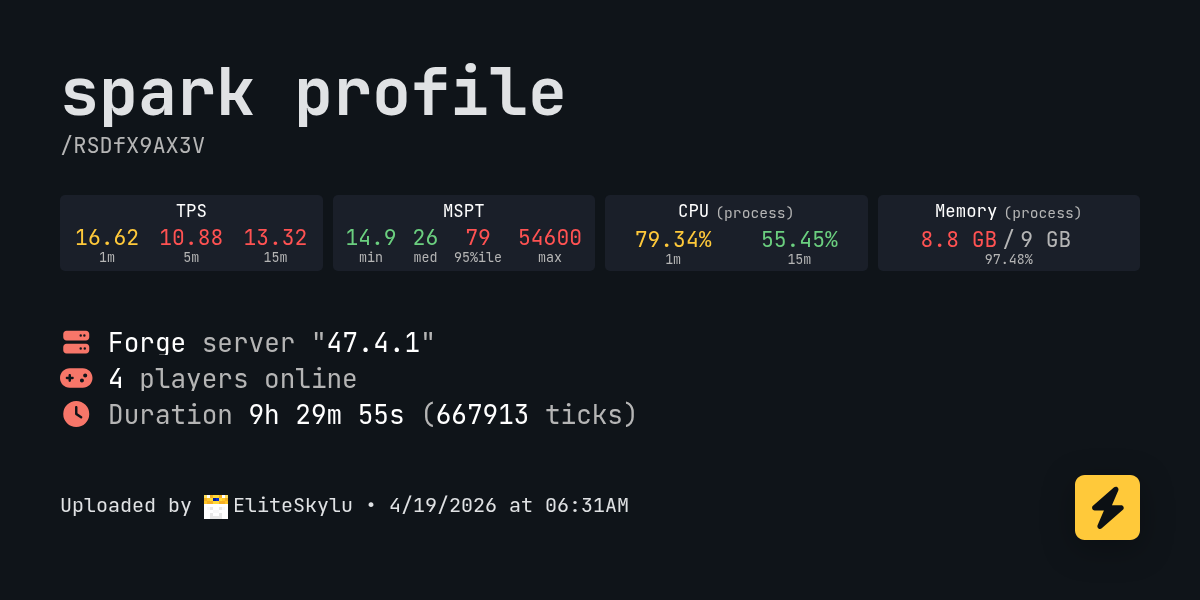
Has anyone else encountered this issue? The server is running normally, using about 10 GB of RAM. After about 5 hours, the CPU usage spikes and the TPS increases. Server becomes unplayable. I have absolutely no idea what to do with this. I search logs, used spark but find nothing.
 leaden thistle
spare oyster
might just add a custom recipe once again unless someone here knows ball
leaden thistle
spare oyster
might just add a custom recipe once again unless someone here knows ball
Uhhh there's a way to craft it. It's weird recipe wise because it has a bunch of variations and it selects one randomly when you craft it or spawn with it
Uses fragments of earth in the recipe
(if you can't find it I'll hop on and get the specific item name which eludes me but checking uses for fragments of earth should get you there)
 surreal barn
Random question, is pollution of the realms mod compatible with this modpack? Has anyone tried it?
spare oyster
id be surprised if that includes anything other than the create base mod
if you even get it to work without crashing that is
oh wow nevermind, it supports the factory must grow for sure

no personal interest tho, i wont invest time into further testing it
spare oyster
leaden thistle
Uhhh there's a way to craft it. It's weird recipe wise because it has a bunch of...
thats the only recipe involving the heart/its parts

sry that took so long, was at work
spare oyster
Guidebooks telling me theres no such thing, buut it also kinda sucks

there are no good wikis for this mod as far as im aware
leaden thistle
spare oyster
thats the only recipe involving the heart/its parts
yeah that's it
oh it uses the amulet as an ingredient
spare oyster
yup, custom recipe it is
spare oyster
leaden thistle
yeah that's it
thx tho
spare oyster
Ive quit the modpack since its not at all optimized for the late game in any way
doesnt seem to be much development going on here either
 chilly plinth
spare oyster
doesnt seem to be much development going on here either
chilly plinth
spare oyster
doesnt seem to be much development going on here either
it is an older pack, and it isn't really a consistent focused pack atm for devs. Optimization they do try their best where they can.
spare oyster
it just doesnt deliver on the create/steampunk part at all
90% of content seems focused around those bosses, but realisticly they dont tie together with all the create stuff going on
and ad astra somewhere in the middle just doesnt work quite right...
id honestly get rid of some of the mods and rather have a more lightweight modpack
do with that feedback what you want, ive still enjoyed like 50 ish hours
chilly plinth
I personally can't do anything about it as I'm not a dev, but whoever is currently doing the primary work for it will hopefully catch this and take a read on it
It also changed quite a bit from 1.19.2 to the 1.20.1 version, so it could also be limitations of that in terms of some of the content
leaden thistle
spare oyster
do with that feedback what you want, ive still enjoyed like 50 ish hours
I think I agree for the most part, but also I do think this pack manages to elevate above the unfocused kitchen sink modpackslop out there
(no shade to the BMC enjoyers, i haven't played it)
spare oyster
well, its not enough questbook for the amount of mods
good example is create, its missing the nuclear stuff completely
and energy generation is only lightly covered
leaden thistle
I think there's something nice about the questbook not giving you a full roadmap? esp since this pack is a bit more lightweight overall
if the questbook gave a detailed tree that handled all objectives, that's all you would do
the quests would be your goals
spare oyster
leaden thistle
I think there's something nice about the questbook not giving you a full roadmap...
true, i also love that, but sadly not everything is planned for really... when you go into the real late stuff youll quickly notice some recipes not being sustainable
leaden thistle
but without clearer objectives, you make your own goals in a vanilla sorta way
leaden thistle
spare oyster
true, i also love that, but sadly not everything is planned for really... when y...
wdym?
spare oyster
steel making for example, you need limestone, crushed raw iron and coal
leaden thistle
I guess some later enigmatic stuff takes some pretty rare loot that requires annoying amounts of exploring/looting
spare oyster
i mean i get it, get em with drills right? but coal? i can get charcoal, why not craft it into coal
leaden thistle
spare oyster
steel making for example, you need limestone, crushed raw iron and coal
should be able to make steel just from iron & coal/charcoal yeah?
there are a couple different steel recipes iirc
i don't recall if some use charcoal or not
spare oyster
leaden thistle
i don't recall if some use charcoal or not
nope, only real coal
leaden thistle
huh interesting
spare oyster
leaden thistle
there are a couple different steel recipes iirc
yep, ad astra does add some, but only the real steel from create works for some stuff
also its the one mentioned in the questbook 
leaden thistle
also i thought you can convert different steels by crafting to blocks and uncrafting? idk been a bit since i played this pack
chilly plinth
leaden thistle
(no shade to the BMC enjoyers, i haven't played it)
bmc isn't kitchen sink though?
spare oyster
leaden thistle
also i thought you can convert different steels by crafting to blocks and uncraf...
hm let me look but im quite sure not
leaden thistle
yeah i haven't played it, just seems very kitchen sink-y from what i've seen
and even if it is it doesn't necessarily mean it's bad
chilly plinth
it's not, it's meant to be mild, more vanilla-like but adding a lot of various areas so it's got things for various players
leaden thistle
i just think there's an overrepresentation of kitchen sink packs without thematic unity out there
chilly plinth
it's def not kitchen sink though.
leaden thistle
hum alr
spare oyster
well, ive picked this modpack since i wanted the create stuff, i was pretty surprised seeing rockets and stuff?
it just me or does that not seem very steampunk
leaden thistle
ahaha interesting you say that
chilly plinth
it can yeah, there's a lot of rocketry in the steampunk genre
leaden thistle
i think ad astra is kinda on the edge of fitting the tech theme
but i'm glad this pack goes no further with tech mods, would feel much weirder
chilly plinth
have you gave otherworld or All of Create a try? those have create in them if you'd want more of a theme.
spare oyster
which gets back to my points about the questbook, half of it is ad astra 
leaden thistle
yeah the questbook is... not the best in this pack imo
AoC is supposed to be a nice create-focused pack but I haven't played it
Might get around to Otherworld at some point, I kinda wanna wait until the large updates slow down tho (and finish another pack first)
chilly plinth
Though if you like more chill stuff, there is also Fresh & Cozy
spare oyster
ok so theres no way to convert steel
buuut
nearly everything uses the steel tag
guess i was wrong, you can continue afterall
well my highlight was probably automating iced berry matcha latte
tulip silo
tulip silo
I am encountering a problem where clients that connect to my server crash when t...
This was due to server configs not being properly set up. Just posting for future reference.
 fringe gull
how do I fix the create server bug? wrong channel sry
surreal moon
!logs
lucid boltBOT
to better assist with most issues, we will need some logs:
- Curseforge -> Right click the modpack instance -> „Open Folder”.
- ATLauncher -> Click „Open Folder” on the modpack instance.
- MultiMC -> Select your instance and click „Instance Folder” on the right.
- PrismLauncher -> Select your instance and click „Folder” on the right.
- For servers -> Open the folder containing your server files.
To find the latest.log file, navigate to the 'logs' folder.
To find the hs_err_pid.log file, simply look for the file name after opening the instance folder. (this file type is not as common in crashes - do not worry if you cannot find it, just skip over this line.)
To find a crash report, navigate to the crash-reports folder and find the most recent file after your crash occurred.
Once located, please upload the requested file here. If it fails, upload to https://mclo.gs/ and share the link here.
 round mica
dude, it would be amazing if they added aeronautics to the modpack
 potent pollen
Can anyone recommend the best and/or easiest storage for this ?
spare oyster
toms storage
 shadow torrent
was the tree cutter removed? there used to be a block that you could place and it would slowly cut down the tree. i cant find it ingame and cant remember the name to add it back myself
chilly plinth
shadow torrent
was the tree cutter removed? there used to be a block that you could place and i...
no, I think it's called mechanical saw
shadow torrent
unfortunately that saw aint it. it was a half slab sized block, it was grey, and had a saw blade on the side that faced the trees, took about 60 sec to cut down one tree
chilly plinth
shadow torrent
unfortunately that saw aint it. it was a half slab sized block, it was grey, and...

use that with a hand crank, it will cut the trees. it is called mechanical saw.
shadow torrent
unfortunately not, it was definitely in a differnt version then.
chilly plinth
that's what anyone with create uses tbh.
it's quick and cuts whole tree down fast
You can hook it up in contraptions or any sort of create set ups to automate tree chopping and such
shadow torrent
i never use create tbh
chilly plinth
it's a big proponate to the pack, but those two items are pretty simple to make and use.
shadow torrent
i had it in my 1.19.2 world, ill just downgrade back
chilly plinth
you can't downgrade worlds once it's been updated.
Don't think you can really progress well in the pack without create. You may wanna consider a pack without it instead
shadow torrent
the block is definitely not the mechanicl saw. the version i used to play on had that block and a diffrent one that was only a half slab tall. its fine. ill just deal with it. sorry to wase your time. ive already lost my old world so there is no point

 gusty bluff
shadow torrent
the block is definitely not the mechanicl saw. the version i used to play on had...
gusty bluff
shadow torrent
the block is definitely not the mechanicl saw. the version i used to play on had...
It's "Lost" because of the amount of mods in 1.19.2 that had changed. (We tossed Immersive Engineering and Immersive Petroleum out; IP was not updated and Create had its own Oil.)
 prime reef
is there any chance to get Create aeronautics in steampunk modpack, i saw trailer and its so amazing
leaden thistle
kinda crazy to still see people updating from 1.19 -> 1.20. I started playing this pack after it was updated to 1.20....
 sudden stratus
hai ! hum so i added crafts and addition to the modpack because i wanted to use the straws for my blaze burners and i got this... does anyone else has had this issue and if so is there a way to fix it or do i have to play without crafts and additions?


 terse olive
How much RAM would you recommend for this modpack if I have 16GB in my PC?
surreal moon
terse olive
How much RAM would you recommend for this modpack if I have 16GB in my PC?
8GB
!fps
lucid boltBOT
 terse olive
ty
 glad salmon
Hi! I’m having an issue with the SteamPunk modpack. The game crashes immediately on startup. Here is the error from the console and my logs:
I’m using an RTX 3050 Laptop. Any help would be appreciated!
log:
[19:41:00] [main/INFO]: Launching CrashAssistantApp
FATAL ERROR in native method: Thread[pool-2-thread-1,5,main]: No context is current or a function that is not available in the current context was called. The JVM will abort execution.
at org.lwjgl.opengl.GL11C.nglGetString(org.lwjgl.opengl@3.3.1+7/Native Method)
at org.lwjgl.opengl.GL11C.glGetString(org.lwjgl.opengl@3.3.1+7/GL11C.java:978)
at net.minecraftforge.fml.earlydisplay.DisplayWindow.initRender(fmlearlydisplay@1.20.1-47.4.1/DisplayWindow.java:209)
at net.minecraftforge.fml.earlydisplay.DisplayWindow.lambda$start$5(fmlearlydisplay@1.20.1-47.4.1/DisplayWindow.java:292)
at net.minecraftforge.fml.earlydisplay.DisplayWindow$$Lambda$448/0x0000026f42232f88.run(fmlearlydisplay@1.20.1-47.4.1/Unknown Source)
at java.util.concurrent.Executors$RunnableAdapter.call(java.base@17.0.18/Unknown Source)
at java.util.concurrent.FutureTask.run(java.base@17.0.18/Unknown Source)
at java.util.concurrent.ScheduledThreadPoolExecutor$ScheduledFutureTask.run(java.base@17.0.18/Unknown Source)
at java.util.concurrent.ThreadPoolExecutor.runWorker(java.base@17.0.18/Unknown Source)
at java.util.concurrent.ThreadPoolExecutor$Worker.run(java.base@17.0.18/Unknown Source)
at java.lang.Thread.run(java.base@17.0.18/Unknown Source)
gusty bluff
glad salmon
Hi! I’m having an issue with the SteamPunk modpack. The game crashes immediately...
!moreinfo
lucid boltBOT
- What Minecraft version are you using? (1.19.2, 1.20.1, ...)
- What launcher did you run Minecraft with? (e.g. CurseForge, ATLauncher, MultiMC, ...)
- Have you changed the modpack in any way? (e.g. changing mod versions, adding/removing mods)
- What version of the modpack are you using? (v11, v9, etc)
- Have you ever gotten past the crash condition without crashing, or does the game always crash?
- What steps cause the crash?
Required:
Open the game directory (right click pack -> open folder), navigate to the "crash-reports" folder and upload the latest available crash report.
If there is no crash report, navigate to the logs folder and upload "latest.log."
If there is no log, navigate to the base pack directory and upload the hs_err_pid file, if there is one.
glad salmon
gusty bluff
!moreinfo
Hi everyone,
I'm having a persistent crash with the SteamPunk modpack (v15.5) on Minecraft 1.20.1 using the Modrinth Launcher. The game crashes immediately on startup with a "Render thread/FATAL" error.
My Specs:
GPU: NVIDIA GeForce RTX 3050 Laptop
RAM: 8GB Allocated
Java: Zulu 17 (JRE 17.0.18)
What I have tried so far:
Forced the GPU to "High Performance" in Windows and NVIDIA settings.
Modified fml.toml (set earlyWindowProvider to none).
Disabled Flywheel backend in the config.
Tested the game both with and without the Oculus and Oculus-Flywheel-compat mods.
Attached Files:
log.txt: This is the manual console log from my latest attempt (since no new crash report was generated).
crash-2026-04-20_19.51.00-client.txt: This is the original crash report from the very first launch.
latest.log: (If you can find it in the /logs folder).
Can you please help me identify what's causing the "No context is current" error? Thank you!
rigid parrotBOT
glad salmon
Hi everyone,
I'm having a persistent crash with the SteamPunk modpack (v15.5) o...
Uploaded crash-2026-04-20_20.40.38-client.txt from @glad salmon to mclogs: https://mclo.gs/85jESwr
gusty bluff
Not really sure what's going on here...
 slender kettle
prime reef
is there any chance to get Create aeronautics in steampunk modpack, i saw traile...
slender kettle
prime reef
is there any chance to get Create aeronautics in steampunk modpack, i saw traile...
I dont think Sharkie has any plans of updating to 1.21 atm
 sudden stratus
 glossy dune
Read the red text
 torpid harbor
glossy dune
torpid harbor
glossy dune
Were you using an anvil?
Anvils have caused my game to crash over and over recently. Just try to avoid using anvils and dont shift-click items into one
 austere robin
its sad steampunk quit updating tbh
the create train portal fork for custom portal API updated a while ago
woulda been cool for them to implement train portals to the non-nether dimensions in this pack
placid pawn
Hi! I need help with my server.
I alocated 8GB of ram to the server and it's keep rising every minute. There are around 10 people daily playing on server. We experience tps lags, cpu spikes about an hour before crash, crashes several hours after restarts. I can't find anything in logs, spark tells me that Neruina takes around 50-60% cpu usage. After around 5-8hours game becomes unplayable. Server eats more and more ram. AI tells me it might be issue with entities and mob ai's. So i tried:
- different java args
- more ram doesn't fixe the issue
- less ram either
- instaling mods like: ai improvements, dynamic render
- switching between java 17 and 21
nothing works at all. idk if its a memory leak or what. Anyone
Modpack 1.20.1 version v18
We use crafty controller and server is set up on Linux
 placid pawn
Hi @quartz shuttle did you find a solution to your problem?
hi dod you find a solution?
did you find a solution?
potent pollen
Hello with the toms simple storage the chests wont connect when placed on top of eachother ? Do i need to put cable connectors on each chest? or am i just doing it wrong
gusty bluff
potent pollen
Hello with the toms simple storage the chests wont connect when placed on top of...
You don't need to put connections on every chest - there is a block designed to simplify that part of connection, called a Trim, if she recalls correctly
placid pawn
placid pawn
Hi! I need help with my server.
I alocated 8GB of ram to the server and it's ke...
.
placid pawn
placid pawn
Hi! I need help with my server.
I alocated 8GB of ram to the server and it's ke...
here's the spark report from a little modified server but problem still appears on clean steampunk instance:
 slender kettle
placid pawn
Hi! I need help with my server.
I alocated 8GB of ram to the server and it's ke...
slender kettle
placid pawn
Hi! I need help with my server.
I alocated 8GB of ram to the server and it's ke...
First of all, don't use AI and add/remove mods. The AI improvements mod causes lag and servercore is already in the modpack so dynamic render is redundant.
If you can run /spark heapdump and somehow send the file then I might be able to help out more.
Otherwise your best option to deal with this is just to have restarts every 6 hours or so (which you should in heavily modded instances anyways) and setup servercore to be more strict.
You can also try updating the AllTheLeaks (Memory Leak Fix) mod to the latest version, as it may have been fixed in a later update by them. But I have not tested this so im not 100% sure and it might break something.
placid pawn
slender kettle
First of all, don't use AI and add/remove mods. The AI improvements mod causes l...
Thank you for your reply. I know AI isn't perfect solution but I tried anything to get to know what the main issue might be.
heapdump related to links I provided above is around 13GB. Will you be able to do so? Because I can't do it with my machine.
slender kettle
placid pawn
Thank you for your reply. I know AI isn't perfect solution but I tried anything ...
Ahh, just try the other bits I mentioned and we can go from there
 covert terrace
SteamPunk - v18 crashed. The logs have been uploaded to mclo.gs:
- 1.20.1
- What launcher did you run Minecraft with? (e.g. CurseForge, ATLauncher, MultiMC, ...)
- Have you changed the modpack in any way except mods?
- v18
- Have you ever gotten past the crash condition without crashing, or does the game always crash?
- What steps cause the crash?
latest.log head / tail (~31k lines) | debug.log head / tail (~11MB & ~70k lines) | crash-2026-04-22_21.23.03-fml.txt | crash_assistant_app.log
Mod list changes beyond the modpack:
Removed mods:
[2;31mXaeros_Minimap_25.2.6_Forge_1.20.jar[0m
Updated mods:
[2;34mforge[0m ([2;31mfmlloader-1.20.1-47.4.1.jar[0m > [2;32mfmlloader-1.20.1-47.4.20.jar[0m)
!alternates
lucid boltBOT
If this command was run in response to your question/issue, it is likely because switching away from the launcher you are currently using would fix your problem.
From our experience, the most stable launcher by far is ATLauncher, also known as ATL. Keep in mind that ATL is NOT related to TLauncher in any way, and is not a cracked launcher.
To install ATL, do the following:
1. Go to https://atlauncher.com/download. If you are on MacOS, then choose the "Jar" version under the "Other" tab, this is important as OSX WILL crash the game on Mac.
2. Install and run the setup, then open the program.
3. Login to your Microsoft account that owns the Java Edition of Minecraft from the Accounts tab on the right. This process is 100% safe, as it goes directly through Microsoft. ATL doesn't see your account credentials.
4. Go to the Packs tab on the right, then click "Curseforge" on the left.
5. Search the modpack you wish to download.
6. Click "Install". Then, follow the on-screen directions.
7. Go to the Instances tab, and click "Play" on the modpack you downloaded. If you ever see an "Update" button on the instance, click it.
This video explains the process: https://youtu.be/xMYW1wMbmkM
To transfer your Curseforge world to ATL, simply right click the modpack on Curseforge, or click the 3 dots, then click "Open Folder". Copy the Saves folder, then click "Open Folder" on ATL and paste the Saves folder there. Do the same with the XaerosMinimap folder, or the Journeymap folder, to transfer over any waypoints you've created.
Because ATL downloads the exact same files as Curseforge does, your world will be the exact same and you will be able to join the same servers. ATL also works without an internet connection (after you've installed the modpack, of course), and does not have any bloat from Overwolf. You are free to uninstall both Overwolf and Curseforge with ATL installed.
surreal moon
Please migrate to  ATLauncher
placid pawn
slender kettle
Ahh, just try the other bits I mentioned and we can go from there
Found something


 slender kettle
placid pawn
Found something
slender kettle
placid pawn
Found something
If you want to fix those issues you will most likely have to modify the pack and update those mods manually
and thats gna turn into a cycle of updating a bunch of mods which I wouldnt recommend
placid pawn
slender kettle
If you want to fix those issues you will most likely have to modify the pack and...
If it's coldsweat removing it should be enough. It's not necessary for us. I think it shouldn't break anything.
slender kettle
placid pawn
If it's coldsweat removing it should be enough. It's not necessary for us. I thi...
rem oving coldsweat shouldnt other then missing items in questrbook
placid pawn
I tested it now and metrics shows that memory usage seems to look much better now. Should I report it somewhere? Open an issue on github or something? Report it to someone?
slender kettle
placid pawn
I tested it now and metrics shows that memory usage seems to look much better no...
the versions used in the modpack is too oudated, most likely already fixed in later versions
placid pawn
slender kettle
the versions used in the modpack is too oudated, most likely already fixed in la...
let me ask one more question. Which mod exactly lunapixel uses in this pack to configure modpack - costum recipes etc. ?
slender kettle
placid pawn
let me ask one more question. Which mod exactly lunapixel uses in this pack to c...
datapacks
 odd isleBOT
Quarantine Result:
 Reason: Cracked/Illegal Minecraft - The use of pirated software is not allowed on our server
 Moderator: @surreal moon

Quarantined:

 puritka [
1127025114983174175]
 snow badge
Hey, @slender kettle. Sorry for bothering you. I was wondering if you're planning on adding a server pack in the latest update?
slender kettle
!modified
lucid boltBOT
You are using a modified version of the modpack!
Adding, removing, or updating large amounts of mods without testing any of your changes is **not **a good idea, and it is very unlikely that anyone will want to debug your issue for you. Please test the changes you make in small groups, as opposed to doing all of the changes at once.
If you want further support for your issue, someone may respond to you in the channel for the modpack you based your changes off, but please only post once. You may also have better luck in #1061339968691257466.
slender kettle
snow badge
Hey, <@955739874756005928>. Sorry for bothering you. I was wondering if you're p...
what?
i dont work on steampunk anymore and I think the newest version already had a serverpack
snow badge
slender kettle
what?
I'm talking about All of Create Aeronautics
Sorry for not mentioning this
I just saw All of create crash reports on this channel and wrote here
slender kettle
snow badge
I'm talking about All of Create Aeronautics
snow badge
Thanks!
 timid otter
hey does all of create have the same multiplayer function as better mc and if so how do i turn it on again?
chilly plinth
timid otter
hey does all of create have the same multiplayer function as better mc and if so...
same as bmc. open to lan button
timid otter
im not finding the share world button like on bmc just a normal lan connection and when i open it it doesnt give an adress just the port i opened
chilly plinth
timid otter
im not finding the share world button like on bmc just a normal lan connection a...
!wsfull
lucid boltBOT
 World Sharing servers are likely currently at capacity
If you or your friend are receiving an error such as "An error occurred in Luna", or "Connection refused: no further information" when trying to play through "Open to LAN" or "Share World", it's likely that Luna's servers (used for world sharing) are currently full. We don't have a way to know when slots on our servers free up, but you are welcome to try again later.
We understand and recognize that this may be inconvenient, so we recommend in this case to host or rent your own server. Self-hosting is free, for more information on supported hosting options, type !server in #bots.
If you'd prefer an alternate world sharing mod such as Essential over the previous methods, risks of it are outlined in !ea, as well as how to use it if you accept the risks and void of support.
This command does NOT change or know if they are full or not, this is something ran as the most common issue.
timid otter
so if servers are full the button just dissapears?
ik there are some mod options for world hosting other than essential do you know there names?
chilly plinth
no, just won't give ip in chat or they keep getting disconnected. the button is usually world sharing or open to lan. Depending on the pack
you're doing it from within a world correct?
timid otter
chilly plinth
no, just won't give ip in chat or they keep getting disconnected. the button is ...
ok
timid otter
chilly plinth
you're doing it from within a world correct?
yes
chilly plinth
esc menu, open to lan button
timid otter
i found it and it just showed my port again
fek it i found a mod called seamless ima try that
chilly plinth
timid otter
fek it i found a mod called seamless ima try that
you can also try self hosting on your computer.
timid otter
i dont know how to port forward
chilly plinth
timid otter
i dont know how to port forward
!port
lucid boltBOT
If you're having issues with your friends joining your server, your port for Minecraft may be closed.
-
Check with https://portchecker.co/ with your IP and Minecraft's port (drop down menu) to see if it's open.
-
If it's closed you will need to search online "How to open Minecraft port for server with (ISP Name)
Important note: a lot will allow port forwarding, but there may be some ISPs that will not allow any port forwarding. Please check online if this is the case for yours.
chilly plinth
there are plenty of guides online for it
timid otter
i just grabbed e4mc thanks for the help
chilly plinth
timid otter
i just grabbed e4mc thanks for the help
warning luna is a fork of e4mc, you cant have both in the pack at same time
timid otter
i just disabled luna so if e4mc breaks for whatever reason i can try luna
 dim bobcat
what mods do you need to get for aeronautics to work i have sable installed
chilly plinth
dim bobcat
what mods do you need to get for aeronautics to work i have sable installed
!modified
lucid boltBOT
You are using a modified version of the modpack!
Adding, removing, or updating large amounts of mods without testing any of your changes is **not **a good idea, and it is very unlikely that anyone will want to debug your issue for you. Please test the changes you make in small groups, as opposed to doing all of the changes at once.
If you want further support for your issue, someone may respond to you in the channel for the modpack you based your changes off, but please only post once. You may also have better luck in #1061339968691257466.
 frozen spire
Where are the wires for Create power grid in the all of create aeronautics mod?
chilly plinth
frozen spire
Where are the wires for Create power grid in the all of create aeronautics mod?
that mod is not in the steampunk pack
you are in the wrong channel
frozen spire
thanks im sorry
 tepid rain
how do I take it off?
 surreal moon
tepid rain
how do I take it off?
surreal moon
tepid rain
how do I take it off?
Looking online, seems like you need Unholy Stone
spare oyster
yeah, jump with that stone into a big pool of lava
youll loose part of your max health forever tho
tepid rain
spare oyster
youll loose part of your max health forever tho
how can i recover my health
leaden thistle
tepid rain
how can i recover my health
Huh did you mean to say something else?
tepid rain
leaden thistle
Huh did you mean to say something else?
Sr i mean, is there any way to recover the lost hearts?
leaden thistle
tepid rain
Sr i mean, is there any way to recover the lost hearts?
Uhhh not from unholy stone afaik. Other hearts lost from death make soul crystal things you can collect in the world
I only ever played on cursed hardcore so I'm not too familiar with those mechanics
Also like
Did you just not read the item description?
 ashen glade
tepid rain
how do I take it off?
ashen glade
tepid rain
how do I take it off?
dont, just thug it out or never put it on
round mica
tepid rain
how do I take it off?
you cant
 fervent oar
tepid rain
Sr i mean, is there any way to recover the lost hearts?
fervent oar
tepid rain
Sr i mean, is there any way to recover the lost hearts?
Yeah, a part of your soul stays where you died, picking that shard up gives you back a part of your health
placid pawn
Does anyone know why can't I kill vakyrien queen? All vaklyres oneshote me despite having gravitite armor
tepid rain
fervent oar
Yeah, a part of your soul stays where you died, picking that shard up gives you ...
That soul was the one I died with to cleanse the ring, right?
fervent oar
tepid rain
That soul was the one I died with to cleanse the ring, right?
Oh, if you cleansed the ring, you permanently lose 1 heart container as a leftover after the ring
tepid rain
fervent oar
Oh, if you cleansed the ring, you permanently lose 1 heart container as a leftov...
Can i use command or something recover ?
fervent oar
tepid rain
Can i use command or something recover ?
I'm not so sure, I don't see anything about it on their wiki
tepid rain
Omg 🙁
spare oyster
tepid rain
Can i use command or something recover ?
you can remove the ring in creative
no bad effects if u do that
youll loose access to like half the mod tho if u dont got the ring
 dim escarp
have they removed irons spellbooks from the v18 steampunk or is my game broke
leaden thistle
dim escarp
have they removed irons spellbooks from the v18 steampunk or is my game broke
when it went from 1.19 to 1.20 a decent few mods were removed, iron's is one
dim escarp
leaden thistle
when it went from 1.19 to 1.20 a decent few mods were removed, iron's is one
i see that’s a shame i liked that one ty anyway
 lone bridge
Does the Totem of Malice work as a totem? cause the "Can avoid death" is crossed out
placid pawn
placid pawn
Does anyone know why can't I kill vakyrien queen? All vaklyres oneshote me despi...
Bump
gusty bluff
placid pawn
Bump
...did you enchant your armor
leaden thistle
lone bridge
Does the Totem of Malice work as a totem? cause the "Can avoid death" is crossed...
Oh yeah I remember seeing that but I never tested. Didn't want to risk it on cursed hardcore
 spark crag

Anybody knows how to fix it, i have latest create on 1.20.1 Steampunk, i just updated all the mods and now they dont want to work together
i already turned off some of them
Like crystal clear or cogwheels
leaden thistle
spark crag
Anybody knows how to fix it, i have latest create on 1.20.1 Steampunk, i just up...
Check pins
spark crag
leaden thistle
Check pins
Checked, did everything but still crashed :(
717 lines
could somebody help?
delicate cloak
spark crag
Anybody knows how to fix it, i have latest create on 1.20.1 Steampunk, i just up...
simply don't update all mods
loud harness
spark crag
Checked, did everything but still crashed :(

updating mods is modifying pack
spark crag
loud harness
updating mods is modifying pack
Maybe if pack was updated OFFICIALY i wouldnt have to find help to do it manually
loud harness
spark crag
Maybe if pack was updated OFFICIALY i wouldnt have to find help to do it manuall...
1 there's already a guide on updating create, 2 you really shouldn't update "all mods" cause that's just not how you're supposed to do this kinda thing
the guide's also #3 on modded discussion so
 spark crag
I already did it
It was hard because i didnt know how many mods were just thrown into the win
bin*
but whatever
loud harness
you didn't bother to actually read the pins so idk what you actually got from the guide
chilly plinth
spark crag
Maybe if pack was updated OFFICIALY i wouldnt have to find help to do it manuall...
don't be snarky about it dude, the devs have been busy with irl matters and working on other projects. They cannot update it properly to create 6 without making a whole new pack from scratch for 1.21.1 and updating all mods will always break packs especially when there are significant changes that the modpack dev does to make the mods even work together in the first place
They pick specific updates that work with each mod so that they aren't clashing, and modify configs for any sort of issues that arise as they can.
 ancient canopy
Yeh, packs take a lot of effort to put together due to the hundreds of issues that may arise during creation and testing. Updating is even worse i had say, since it alters a carefully set balance rather than making it from scratch, so the consequences of each change are far wider. Ive gotten used to keeping a changelog for my personal/friend packs because otherwise sometimes its mindbogling when something breaks.
Like, im waiting for this pack to get updated both for the Create and Scorched Guns updates (and maybe Aeronautics? amogus), but it is kind of part of the deal
Cant complain really with all the stuff coming out recently
slender kettle
spark crag
Maybe if pack was updated OFFICIALY i wouldnt have to find help to do it manuall...
the reason its not added officially is because to update to Create 6.0 there will a 100% be data loss, which we do not want for the players already playing the modpack
 vapid vale
Anyone have any idea how to fix the massive fps drops and lag spikes that seemingly manifest out of thin air
surreal moon
!fps
lucid boltBOT
surreal moon
Start with this
 compact cipher
Hello! I'm having a problem when I die on my Steampunk server. I respawn without even being able to open my inventory. Reconnecting or using /kill fixes the problem. Do you know what could be causing this? I really want to play on this modpack...
spare oyster
try without instant respawn
tulip silo
Is there a chunkloader block or similar I can use to keep my turtles loaded?
compact cipher
spare oyster
try without instant respawn
No change
chilly plinth
spare oyster
im not sure if thats only on servers tho
works same way as servers, long as player is in the world it'll work
chilly plinth
tulip silo
Is there a chunkloader block or similar I can use to keep my turtles loaded?
open map, right click drag area you want, claim, right click drag are you wanna forceload. Hit forceload
compact cipher
HiddenTides, Do you know how to fix my problem, please?
chilly plinth
no
compact cipher
mmh, ok
spare oyster
if relogging fixes it why bother
 runic osprey
A fatal error has been detected by the Java Runtime Environment:
EXCEPTION_ACCESS_VIOLATION (0xc0000005) at pc=0x00007ff9b11c87a4, pid=13984, tid=11732
JRE version: OpenJDK Runtime Environment Temurin-17.0.8+7 (17.0.8+7) (build 17.0.8+7)
Java VM: OpenJDK 64-Bit Server VM Temurin-17.0.8+7 (17.0.8+7, mixed mode, sharing, tiered, compressed oops, compressed class ptrs, g1 gc, windows-amd64)
Problematic frame:
C [igxelpicd64.dll+0xc287a4]
some one can help me whit this?
the drivers are good
but i dont know if it java or something
and i in curseforge
i play this modpack in there in the past but now i cant
surreal moon
runic osprey
the drivers are good
!driversintel
lucid boltBOT
Fix for Intel GPU Crashing
-# This is only applicable to crashing DLL's from hs_err_pid file, igxelpicd64.dll(GPU), igxe2hpgicd64.dll(ARC GPU).
Try to update your Drivers according to your GPU:
Intel® Arc™ Graphics - Windows
Intel® Arc™ Pro Graphics - Windows
Intel® 11th – 14th Gen Processor Graphics - Windows
Intel® 7th-10th Gen Processor Graphics - Windows
If updating to latest does not work, go to TechPowerUp Intel Graphics Drivers, click Show older versions and look for
-
32.0.101.6737 for integrated GPU -
32.0.101.8247 for Arc GPUs
runic osprey
surreal moon
!driversintel
32.0.101.7085 this is the drivers that i have
for integrated gpu
surreal moon
runic osprey
32.0.101.7085 this is the drivers that i have
Try going to the newest one, if it exists. If not - go to the old one from the message above
runic osprey
Okay, y found a fix for the people in my situación, the Last versión that works in my integrated gpu Intel (i have a I3) the drivers versión is 31.0.101.4502, it my situation
Is someone need the specs of my pc y can give you the prosesor and all
11th Gen Intel(R) Core(TM) i3-1115G4 @ 3.00GHz (3.00 GHz)
this is the model of my prosesor
I hope this help someone
tulip silo
How to get sap/rubber? Jei/Nei not showing anything
 fleet haven
hey, my game crashes after launching and I won't even get to the main menu... (and it crashes after toggling shaders, but after restart it gets better)
here's my details from #get-support:
- mc version 1.20.1
- Curseforge
- no changes in mods
- v18
- after the game started crashing during booting, no. When the game crashed during the actual game, I was able to run it again with no issues.
- starting the game (The LUNAPIXEL logo appears and then crash) and changing shaders crashes my game.
rigid parrotBOT
fleet haven
hey, my game crashes after launching and I won't even get to the main menu... (a...
Uploaded crash-2026-04-30_11.34.19-client.txt from @fleet haven to mclogs: https://gnomebot.dev/paste/mclogs/XsVNQWo
chilly plinth
fleet haven
hey, my game crashes after launching and I won't even get to the main menu... (a...
!ca
lucid boltBOT
fleet haven
I did already follow all steps in the tutorial...
chilly plinth
fleet haven
*I did already follow all steps in the tutorial...*
You gave 1 log, that’s not what crash assist copy all shows.
Looks more like this
 fleet haven
SteamPunk - v18 crashed. The logs have been uploaded to mclo.gs:
.
.
.
latest.log head / tail (~61k lines) | crash-2026-04-30_12.24.38-client.txt | crash_assistant_app.log | CurseForge: skip launcher
Mod list changes beyond the modpack:
[2;34mMod list wasn't modified.[0m
update or remove the server browser mod
 coarse forge
All of Create 1.21.1 - v1.2 crashed without a crash report. The logs have been uploaded to mclo.gs:
- 1.21.1 [NEOFORGE]
- What launcher did you run Minecraft with? CurseForge
- Have you changed the modpack in any way except mods? no
- v1.2
- Have you ever gotten past the crash condition without crashing, or does the game always crash? yes
- What steps cause the crash?
latest.log | debug.log head / tail (~16MB & ~101k lines) | win_event1777603300238.txt | CurseForge: launcher_log.txt head / tail (~27k lines) | crash_assistant_app.log | modlist.txt
Found [2;34m1[0m log analysis results:
[2;34mWasClosedByWindows[0m in: win_event1777603300238.txt
Mod list changes on top of the modpack:
[2;34mMod list was not modified.[0m
 obsidian dagger
Are there any big community servers for Steampunk? I’d love to play on a huge server with these mechanics
 pseudo radish
will they ever add create aeronautics to the all of create modpack (i want the all of create modpack itself i already know about "all of create : aeronautics" modpack)
surreal moon
pseudo radish
will they ever add create aeronautics to the all of create modpack (i want the a...
And why are you asking here, instead of #all-of-create ?
 oblique hinge
!server
lucid boltBOT
Free Method
To host a server on your own computer, read the selfhosting guide.
This guide goes over how to install, create, and launch a free Minecraft server on all operating systems (MacOS, Linux and Windows). The guide also guides you through installing Java and optimizing your server for better performance.
If you are installing one of our older modpacks, ignore the "README" file that is included in the serverpack files, as they have outdated information.
Paid Method
We suggest renting a server from Bisect Hosting:
Approx. $10 - $25 a month depending on what plan you choose. You can also get 25% off with Code LunaPixel.
Go here and order a plan which fits you. We suggest 1GB per player but nothing lower than 4GB as the server needs at least 3GB to run.
Go to #server-hosting for more Info!
The following advice works for both the Free and Paid methods:
Transferring Your World
If you're playing Singleplayer and want to transfer your world to your server, simply go to your modpack files and navigate to the saves folder. Inside of this folder, you will see your world saves. Rename your desired world save to world. You can then transfer this folder to your server files. If your world was hosted via world sharing, this process has to be done by the person who would click "Share World".
Fixing Lag
To resolve lag issues, simply run the !tps command in #bots and follow the directions provided.
 severe vine
- I'm using 1.20.1. 2. I ran it on modrinth 3. I added the mods from curseforge, that the game said were not available due to licencing 4. I use v15 of it. 5. i started the instance than its crashed, than i tried again the menu loaded, i went to singleplayer, i made a world than waited and it crashed again, than i restarted it and went to the worlds i clicked on the world i made and it loaded to 100% and crashed again. Please help. SteamPunk - v15.5 crashed!
- 1.20.1
- What launcher did you run Minecraft with? (e.g. CurseForge, ATLauncher, MultiMC, ...)
- Have you changed the modpack in any way except mods?
- v15.5
- Have you ever gotten past the crash condition without crashing, or does the game always crash?
- What steps cause the crash?
latest.log: mclo.gs
Modrinth: session_20260501_210347.log: mclo.gs
Mod list changes beyond the modpack:
Added mods:
aetheric_tetranomicon-1.1.2-1.20.1 (1).jar
alltheleaks-0.1.3-beta+1.20.1-forge (1).jar
create_blue_skies_compat-forge-1.20.1-1.0.1 (3).jar
deuf-1.20.1-1.3 (1).jar
goblins_tyranny-1.2.3-forge-1.20.1 (1).jar
L_Enders_Cataclysm-2.56- 1.20.1 (1).jar
lionfishapi-2.7.jar
servercountryflags-1.10.0-1.20.1-FORGE.jar
the-orcs-1.0-FORGE-1.20.x (1).jar
Removed mods:
aetheric_tetranomicon-1.1.2-1.20.1.jar
create_blue_skies_compat-forge-1.20.1-1.0.1.jar
deuf-1.20.1-1.3.jar
L_Enders_Cataclysm-2.56- 1.20.1.jar
lionfishapi-2.4-Fix.jar
servercountryflags-1.10.1-1.20.1-FORGE.jar
the-orcs-1.0-FORGE-1.20.x.jar
delicate cloak
severe vine
1. I'm using 1.20.1. 2. I ran it on modrinth 3. I added the mods from curseforge...
!modrinth
lucid boltBOT
Currently LPS packs are not being updated on the Modrinth site, and as such are outdated. This is while the devs figure out a way to automate uploads of the pack properly.
Until the packs can be properly updated, we recommend using ATL (use !alternates in #bots for further info on the installation process ) or Prism launcher. You can download the CurseForge version of our packs on these launchers while still being able to make instances from Modrinth versions of other packs not owned by us.
Please note this does not apply to individual mod projects of developers at LPS.
 idle fulcrum
trying to make a train, but i need a simple compact method to stop it and change which direction it goes
 jovial hawk
i downloaded the Steampunk v18 Serverpack and copied all folders mods, modernfixs and so on on my server i got no issues but i think that somethings still not working cause when the world gets generated i have no monuments like if traveled 10k blocksa to find nothing is that normal?
gusty bluff
idle fulcrum
trying to make a train, but i need a simple compact method to stop it and change...
If you're the one controlling it, the train controls allows you to stop it by... holding Space. and stop at the closest appropriate-direction station
If you have an NPC controlling it, you can set their schedule so they will follow a set of rails to their destinations.
There's more than just stations though.
 uncut finch
hello, i am trynna make an iron farm after a youtube tutorial but its not working for me, the water flows from the drills and makes cobblestone in the middle instead

is it something the modpack does?
uncut finch
 leaden thistle
uncut finch
leaden thistle
uncut finch
that's vanilla liquid flowing mechanics. water flows faster than lava
oh although your setup looks like it should work if the waters were instead waterlogged blocks that prevent the water from flowing inward
something like a stair block that faces outward to block the water flowing in
uncut finch
yeah, i did some testing, and saw that 2 drills were ming at the same speed as one and ended up with this design

But thank you for the advice anyway
uncut finch
where do i find woulspsrouts? I need them to refill the lamp
gusty bluff
uncut finch
where do i find woulspsrouts? I need them to refill the lamp
The Soul Deserts.
Look near lava.
Soulsand Valleys are also naturally colder in the Nether...
 simple pike
how do i get the mana liquid from create: wizadry
 loud elbow
Sorry if this is a common question but I didn't see it in the FAQ: Is create aeronautics in steampunk? I haven't played the pack in about 2 years; I'm wondering what has changed and aeronautics has me itching to play another create-themed pack.
spare oyster
it aint
surreal moon
loud elbow
rip, are they working on it?
There is All of Create Aeronautics modpack out there if you want to play with that mod
 calm light
!java
chilly plinth
loud elbow
Sorry if this is a common question but I didn't see it in the FAQ: Is create aer...
not compatible.
placid pawn
Hi where can I change crafting recipes in the modpack? Where are config files? Can’t find them
fervent oar
placid pawn
Hi where can I change crafting recipes in the modpack? Where are config files? C...
To change crafting recipes you either make a datapack (more finnicky) or use kubejs to make a simple javascript. It generally works like this in any modpack when it comes to recipes
In your profile folder (NOT in the configs folder) navigate to kubejs -> assets -> server_scripts. I'm not sure about the assets folder, but just look for the one named server_scripts inside kubejs, as you usually want to put all your scripts there
As to making a script, make a file named `something.js', and consult the wiki here to know what to write inside it
https://kubejs.com/wiki/tutorials/recipes
 uncut finch
idk whats doing it, but something is keeping mobs at arms length away from me and i would like to turn it off
 fervent oar
uncut finch
idk whats doing it, but something is keeping mobs at arms length away from me an...
fervent oar
uncut finch
idk whats doing it, but something is keeping mobs at arms length away from me an...
It's the mob repel skill from improvable skills
placid pawn
fervent oar
To change crafting recipes you either make a datapack (more finnicky) or use kub...
Thank you for reply. I know I can use kubejs but I was told steampunk utilizes datapacks. I was wandering how did they managed costum recipes without kubejs as I can’t find any file that contain the code.
Won’t there be any issues with custom recipes that are already in modpack if I start to modify them with kubejs?
fervent oar
placid pawn
Thank you for reply. I know I can use kubejs but I was told steampunk utilizes d...
The datapacks are located in config -> paxi -> datapacks
placid pawn
Thank you. I will check them out
fervent oar
placid pawn
Won’t there be any issues with custom recipes that are already in modpack if I s...
No, there shouldn't be
placid pawn
fervent oar
No, there shouldn't be
Let me ask you one more thing. Do you know if LunaPixel is planning another update for the modpack anytime soon?
uncut finch
fervent oar
It's the mob repel skill from improvable skills
How can I turn it off?
It really just screws me over
fervent oar
uncut finch
How can I turn it off?
When you go to the skillbook, which you have an icon for in your inventory, you can click on the "mob repellant" skill and toggle it on/off
fervent oar
placid pawn
Let me ask you one more thing. Do you know if LunaPixel is planning another upda...
From what I know, Steampunk is not their focus right now, especially since most create addons have already moved to 1.21.1 Neoforge and abandoned 1.20.1 Forge
uncut finch
fervent oar
When you go to the skillbook, which you have an icon for in your inventory, you ...
its not letting me clock it, its greyed out
figured it out
just had to craft the actual book
How do mobs level up?
fervent oar
uncut finch
How do mobs level up?
Their level scales with the distance you've travelled from the spawn, though I haven't noticed it as I haven't travelled beyond 5k blocks in radius
Also, their level is higher in other dimensions, making endermen actually a hastle in the end if you're not prepared or cautious
 dapper lagoon
Can i add a plus mod to steampunk? When i add one, it's crashes.
gusty bluff
dapper lagoon
Can i add a plus mod to steampunk? When i add one, it's crashes.
Then most likely you didn't check for mod incompatibilities.
!modified Go here if you really want to add mods to the pack, we can't really help with modified packs.
lucid boltBOT
You are using a modified version of the modpack!
Adding, removing, or updating large amounts of mods without testing any of your changes is **not **a good idea, and it is very unlikely that anyone will want to debug your issue for you. Please test the changes you make in small groups, as opposed to doing all of the changes at once.
If you want further support for your issue, someone may respond to you in the channel for the modpack you based your changes off, but please only post once. You may also have better luck in #1061339968691257466.
dapper lagoon
gusty bluff
!modified Go here if you really want to add mods to the pack, we can't really he...
Okay thanks
slender kettle
placid pawn
Let me ask you one more thing. Do you know if LunaPixel is planning another upda...
I dont think so
 atomic dune
SteamPunk - v15.5 crashed!
- 1.20.1
- Modrinth
- No changes have been made at all i just downloaded the mods that the modpack lacked until i got the message "Modpack mod list wasn't changed"
- v15.5
- It always Load the Lunapixel logo when the game starts then crashes
- What steps cause the crash?
latest.log: mclo.gs
hs_err_pid21364.log: mclo.gs
Modrinth: session_20260505_081011.log: mclo.gs
Mod list changes beyond the modpack:
Modpack mod list wasn't modified.
chilly plinth
atomic dune
SteamPunk - v15.5 crashed!
1. 1.20.1
2. Modrinth
3. No changes have been made at...
!modrinth
lucid boltBOT
Currently LPS packs are not being updated on the Modrinth site, and as such are outdated. This is while the devs figure out a way to automate uploads of the pack properly.
Until the packs can be properly updated, we recommend using ATL (use !alternates in #bots for further info on the installation process ) or Prism launcher. You can download the CurseForge version of our packs on these launchers while still being able to make instances from Modrinth versions of other packs not owned by us.
Please note this does not apply to individual mod projects of developers at LPS.
placid pawn
fervent oar
The datapacks are located in `config -> paxi -> datapacks`
One last question. There are two types of recipes. Depending of the path you choose in the questbook (normal or hardcore) recipes can be easier or harder for specific items to make for example for rockets. I was wondering how to tweak them. Can't find any related files in paxi folder.
I would like to change them entirely or push the harder ones for everyone and try to figure out how to do it.
fervent oar
placid pawn
One last question. There are two types of recipes. Depending of the path you cho...
Wait, some items are really harder to craft with the ring on? I wasn't aware of that, so I'm afraid I cannot help in this scenario.
One thing I would do is look in enigmatic legacy's wiki for any tips with kubejs related to those recipes
placid pawn
fervent oar
Wait, some items are really harder to craft with the ring on? I wasn't aware of ...
Yes. Rockets for example needs void worm loot in hardcore mode.
No matter what thank you for your time. I really appriciate it. Thank you for your help.
loud harness
placid pawn
Yes. Rockets for example needs void worm loot in hardcore mode.
Can you send an image of the rocket recipe you are talking about
Last I know there isn’t a mechanic like this but I think you might’ve missed the easier recipe
(Also void worm gu are unobtainable last I saw due to a bug)
 minor hemlock
Will steampunk has 1.21.1 version?
leaden thistle
placid pawn
Yes. Rockets for example needs void worm loot in hardcore mode.
You *should* have access to both the easier and harder rocket recipes. Not tied to ring of curses whatsoever (and the harder recipe is not craftable as awq said)
loud harness
Ye uncraftable, cause the gu is unob, cause of this (unless this is fixed recently? Haven’t been following the updates)
You “might” be thinking of this “ring mode make some enemies drop extra stuff”? But that’s just for most vanilla stuff
Uhhh gonna hope this doesn’t count as chat flooding
leaden thistle
Whoops
 pale island
hey, upon using the same cf version, me n a friend had different mod versions and the server pack, (v18) all of the quests are just.... gone
the serverpack does not install lootr and doggytalents, either, yet the client has them
pale island
sorta fixed, had to reinstall the serverpack and manually add the lootr/doggytalents mods
 unique osprey
Hi im new here, and is there a to fresh or just recently started steampunk/create server?
leaden thistle
unique osprey
Hi im new here, and is there a to fresh or just recently started steampunk/crea...
It's a pretty old pack, not that much activity but you can check #community-servers-info
 main raft
All of Create 1.21.1 - v1.8 crashed. The logs have been uploaded to mclo.gs:
- 1.21.1 [NEOFORGE]
- What launcher did you run Minecraft with? (e.g. CurseForge, ATLauncher, MultiMC, ...) Curseforge
- Have you changed the modpack in any way except mods? No but i added some mods
- v1.8
- Have you ever gotten past the crash condition without crashing, or does the game always crash? Still always crashes
- What steps cause the crash?
latest.log | debug.log | crash-2026-05-07_17.41.41-client.txt | CurseForge: stdout-logs.txt | crash_assistant_app.log | modlist.txt
Mod list changes on top of the modpack:
Added mods:
[2;32mbetter_weaponry-1.1.3-neoforge-1.21.1.jar[0m
[2;32mbettercombat-neoforge-2.3.2+1.21.1.jar[0m
[2;32mcomforts-neoforge-9.0.5+1.21.1.jar[0m
[2;32mFallingTree-1.21.1-1.21.1.11.jar[0m
[2;32mfullbrightnesstoggle-1.21.1-4.4.jar[0m
[2;32more-vein-miner-1.2.jar[0m
[2;32mplayer-animation-lib-forge-2.0.4+1.21.1.jar[0m
[2;32msophisticatedbackpacks-1.21.1-3.25.44.1736.jar[0m
[2;32msophisticatedcore-1.21.1-1.4.38.1847.jar[0m
[2;32mwaystones-neoforge-1.21.1-21.1.30.jar[0m
Updated mods:
[2;34mmoonlight[0m ([2;31m1.21-2.29.33[0m > [2;32m1.21.1-3.0.5[0m)
[2;34msupplementaries[0m ([2;31m1.21-3.5.34[0m > [2;32m1.21.1-3.6.4[0m)
!modified don't update mods please, supplementaries is already in the pack, as is the moonlight lib
lucid boltBOT
You are using a modified version of the modpack!
Adding, removing, or updating large amounts of mods without testing any of your changes is **not **a good idea, and it is very unlikely that anyone will want to debug your issue for you. Please test the changes you make in small groups, as opposed to doing all of the changes at once.
If you want further support for your issue, someone may respond to you in the channel for the modpack you based your changes off, but please only post once. You may also have better luck in #1061339968691257466.
leaden thistle
main raft
All of Create 1.21.1 - v1.8 crashed. The logs have been uploaded to `mclo.gs`:
1...
gusty bluff
 languid kite
how can I thin air in the end
languid kite
how can I thin air in the end
Air bladders.
Potions of free breathing (recommended).
There's a spellstone or two that prevents you from suffocating - think it's the Void one? That might help more.
Jet Suit is an option too but that comes up to "lategame"
languid kite
thank you
jovial hawk
whats the best armor for the nether?
gusty bluff
jovial hawk
whats the best armor for the nether?
Oh, you mean insulation!
There's a Cold Sweat and Thin Air quest that helps explain how to navigate the Nether without melting
You should look for Soul Sand Valleys and investigate nearest to lava... there's something there that will help significantly.
leaden thistle
languid kite
how can I thin air in the end
Pins have an older message of mine that gives all early-game air and temperature solves
leaden thistle
jovial hawk
whats the best armor for the nether?
Just insulate whatever other armor
I'll add that the will of the ocean spellstone also gives unlimited air everywhere
leaden thistle
gusty bluff
Jet Suit is an option too but that comes up to "lategame"
Also the jet suit is not compatible with thin air. Ad astra air methods just give you air on other planets
gusty bluff
leaden thistle
Also the jet suit is not compatible with thin air. Ad astra air methods just giv...
Ah.
Associated it incorrectly then. Whoops.
loud harness
leaden thistle
Also the jet suit is not compatible with thin air. Ad astra air methods just giv...
Ye neither jet suit nor the funny oxygen thing from ad astra work with thin air
 still bison
Guys i am playing all of create
and my game exploded when i wam making an steam powered auto miner
and now isnt opening
what can i do ?
sorry if it is the wrong place i just entered .
gusty bluff
Does this happen this often?
loud harness
gusty bluff
Does this happen this often?
Aoc going here? Ye, extremely
 novel belfry
Which files or folders do I need to delete to create a new world on a server?
surreal moon
novel belfry
Which files or folders do I need to delete to create a new world on a server?
Just the "world" folder
calm light
!tps
lucid boltBOT
Please follow the guide here for changing the Java version your server uses. This will improve performance dramatically. If you are on a third party server host, you likely can not change the Java version your server uses. Bisect Hosting and a few VPS providers do allow changing Java version, though, which can usually be done through your server dashboard.
The method on Bisect is to simply go to the main dashboard page, and select "GraalVM 22" as the Java distribution. If it crashes, use 21 instead.
For further performance improvements, you can also follow this guide. This guide's section regarding GraalVM is completely wrong from our own testing, and we recommend ignoring it.
Reducing server render distance in the server.properties file is also a very good way of reducing lag. Most of our modpacks include mods like Bobby and Farsight, which make it so reducing server render distance will not affect players.
If lag persists, run the following command ingame:
/spark profiler start --only-ticks-over 50
Then, send the link in this channel.
 royal plover
Was the engineering mod in steampunk removed?
because I can't find any of its things
yea its just not there anymore
god damn it I was hoping to make that large furnace that doublesal done
oh now I know why
because its not at 1.20.1 yet
so thats why its not in the current version of steampunk
 west laurel
Hello. I wanted to try this modpack again but I currently experience quite a bit of de-sync lag in single player. FPS is stable (60) but the blocks that i break are re appearing again.
Seems like the internal server and client are out of sync.
Is this issue caused by a specific mod?
chilly plinth
west laurel
Hello. I wanted to try this modpack again but I currently experience quite a bit...
single player or in a server? Also did you make any sort of changes to the pack? What launcher you using?
west laurel
Curseforge, Singleplayer. I added Respawning animals and a couple of worldgen mods like continents. ... ans Distance horizons (I forgot about it, Ill try to disable it and start the pack without it)
ok, it was distance horizons generating chunks that i didn't see because i had small hills around me. Sorry
chilly plinth
west laurel
ok, it was distance horizons generating chunks that i didn't see because i had s...
dh is a performance nightmare
 night gate
hey anyone know how to read a crash log online
royal plover
west laurel
Curseforge, Singleplayer. I added Respawning animals and a couple of worldgen mo...
for me my fps is like I think normally below 30 and the mobs have so much hp and damage I swear to god I die more than the number of mobs I kill
10-20+ fps
even when chunks are 20
all sorts of things aren't at max
oh god
I saw my fps go down to 8
I don't even know how I can deal with stuff at that frame per second
chilly plinth
night gate
hey anyone know how to read a crash log online
!ca
lucid boltBOT
chilly plinth
royal plover
I saw my fps go down to 8
!fps
lucid boltBOT
royal plover
yea so I checked my ram its at 16.0 gb
oh yea I remember doing that before
that was for the fact that I couldn't play it right in the first place
and its already done
so its not that
west laurel
Do you need so much ram for this pack? I think I have it at 12
royal plover
I also had it at 12
so I just turned it up to max
see what would happen
but it just seems like that im using curseforge which to people don't seem to like it that much
because of how poor fps is like
when free
royal plover
also speaking of the thing about how the mobs for some reason that their level gets so god damn high its a pain
well yea
Oh my god the fps is driving me insane
its feels like its getting worse and worse
royal plover
and now its having massive trouble Again
and it crashed again
and heck I turned off shaders like what the fuck is going on
it was doing so amazing
now it was having fps trouble even without shaders at 24 bloody Chunks
 vestal light
steampunk
slender kettle
steampunk
spare oyster
steampunk
fervent oar
steampunk
gusty bluff
steampunk
 timid zephyr
steampunk
leaden thistle
steampunk minecraft
surreal moon
🐟
 tame reef
why did I get an invite into this server??
surreal moon
Wdym?
tame reef
idk I got an invite randomly while I was playing
it was for this server, but I dont know the person who invited me
royal plover
hey uh higher ups theres something I need to also ask about and thats how when I rejoin for some reason some of the things don't load in right so the deris that I mined up
came back meaning I can make more neitherite
but like
that'll become too easy
and also say like if im using my mining drill for mining
after some time when I disconnect
and then rejoin soon or even who knows later
all the stuff is back
meaning I'd get trapped in blocks and have to remake the hole thing
not the contrapsion
gusty bluff
Sounds like a server issue.. if not your game lagging
night gate
All of Create 1.21.1 - v1.6.1 crashed. The logs have been uploaded to mclo.gs:
- 1.21.1 [NEOFORGE]
- What launcher did you run Minecraft with? (e.g. CurseForge, ATLauncher, MultiMC, ...)
- Have you changed the modpack in any way except mods?
- v1.6.1
- Have you ever gotten past the crash condition without crashing, or does the game always crash?
- What steps cause the crash?
latest.log head / tail (~17MB & ~130k lines) | debug.log head / tail (~20MB & ~146k lines) | crash-2026-05-12_18.17.20-server.txt | CurseForge: stdout-logs.txt head / tail (~14MB & ~131k lines) | crash_assistant_app.log | startup_scripts.log | modlist.txt
Mod list changes on top of the modpack:
[2;32m26[0m added, [2;31m1[0m removed, [2;34m0[0m updated.
can somebody help plz idk what is making it crash it said my player nbt data wasnt loading but idk what that means
 shrewd pagoda
All of Create 1.21.1 - v1.6.1 crashed. The logs have been uploaded to mclo.gs:
- 1.21.1 [NEOFORGE]
- What launcher did you run Minecraft with? (e.g. CurseForge, ATLauncher, MultiMC, ...)
- Have you changed the modpack in any way except mods?
- v1.6.1
- Have you ever gotten past the crash condition without crashing, or does the game always crash?
- What steps cause the crash?
latest.log | debug.log | crash-2026-05-12_19.51.01-client.txt | CurseForge: launcher_log.txt | crash_assistant_app.log | modlist.txt
Mod list changes on top of the modpack:
[2;32m73[0m added, [2;31m2[0m removed, [2;34m62[0m updated.
help
truck
idk how many times i see this
its just appear and say "a oops, all of create crashed
"
help
my minecraft says "error: null"
slender kettle
!modified @shrewd pagoda @night gate
lucid boltBOT
You are using a modified version of the modpack!
Adding, removing, or updating large amounts of mods without testing any of your changes is **not **a good idea, and it is very unlikely that anyone will want to debug your issue for you. Please test the changes you make in small groups, as opposed to doing all of the changes at once.
If you want further support for your issue, someone may respond to you in the channel for the modpack you based your changes off, but please only post once. You may also have better luck in #1061339968691257466.
shrewd pagoda
sorry
shrewd pagoda
what
chilly plinth
night gate
All of Create 1.21.1 - v1.6.1 crashed. The logs have been uploaded to `mclo.gs`:...
night gate
chilly plinth
<#1177762123879829586>
says i dont have premission
tame reef
wtf is this discord server, it feels like one big meme server
delicate cloak
tame reef
wtf is this discord server, it feels like one big meme server
?
gusty bluff
tame reef
wtf is this discord server, it feels like one big meme server
What?
tame reef
theres a literal fish section
 iron linden
hi i starting a new survival
is difference beetween hardcore and normal only on enigmatic legacy side ?
If it my first one best is to make normal right
eh yk what imma make normal
wth
 fervent oar
tame reef
theres a literal fish section
fervent oar
tame reef
theres a literal fish section
One channel does not defy the purpose of the whole server
 candid coyote
SteamPunk - v18 crashed. The logs have been uploaded to mclo.gs:
- 1.20.1
- What launcher did you run Minecraft with? (ATLauncher)
- Have you changed the modpack in any way except mods? (No)
- v18
- Have you ever gotten past the crash condition without crashing, or does the game always crash? (It used to work for the first two weeks of playing (I started playing this modpack like a month ago), I could open the game and play on servers. Then recently, it would crash 1-2 times after the red loading screen, before I could play the game. And yesterday, it kept crashing no matter what I do. The game would reach the "Lunapixel" screen, but crashes anyway.)
- What steps cause the crash? (Hitting Play in the ATLauncher, wait out the red loading screen, crashes at the "Lunapixel" screen)
latest.log head / tail (~32k lines) | hs_err_pid19264.log | atlauncher.log | crash_assistant_app.log
# Problematic frame:
# C  [igxelpicd64.dll+0xc28374]
Mod list changes beyond the modpack:
[2;34mMod list wasn't modified.[0m
Follow this instruction - the issue is with your GPU driver
lucid boltBOT
Fix for Intel GPU Crashing
-# This is only applicable to crashing DLL's from hs_err_pid file, igxelpicd64.dll(GPU), igxe2hpgicd64.dll(ARC GPU).
Try to update your Drivers according to your GPU:
Intel® Arc™ Graphics - Windows
Intel® Arc™ Pro Graphics - Windows
Intel® 11th – 14th Gen Processor Graphics - Windows
Intel® 7th-10th Gen Processor Graphics - Windows
If updating to latest does not work, go to TechPowerUp Intel Graphics Drivers, click Show older versions and look for
-
32.0.101.6737 for integrated GPU -
32.0.101.8247 for Arc GPUs
candid coyote
Thank you so much!!😭 😭 Installing the older version worked
iron linden
how to put back in celcius degres
gusty bluff
Wear a thermometer or change the configs of Cold Sweat.
iron linden
gusty bluff
Wear a thermometer or change the configs of Cold Sweat.
how to get tempad
nvm found it
gusty bluff
iron linden
how to get tempad
Think you need to- yeah there you go
iron linden
gusty bluff
Wear a thermometer or change the configs of Cold Sweat.
when u quit and relog onto a singlerplayer world it keep switching to farheneit
the thermomether thingie
 prime abyss
is there an easy way to tell what additional custom mods you've put onto a pack besides deliberately crashing it
chilly plinth
prime abyss
is there an easy way to tell what additional custom mods you've put onto a pack ...
go to mods folder, sort by date (newest to oldest)
prime abyss
chilly plinth
go to mods folder, sort by date (newest to oldest)
👈🏼 👈🏼
chilly plinth
may not be fully accurate if you updated any, so go by the date of when you installed the pack fresh to have an idea what's been changed
minor hemlock
Will create aeronautic be part of this modpack?
gusty bluff
minor hemlock
Will create aeronautic be part of this modpack?
Most likely? No.
prime abyss
C:A is one of those wishlist mods that everyone wishes they could have but it's just too fundamentally altering to work in most packs, even tho it's cool as hell
fervent oar
It also won't be available for 1.20.1, at least for now
pale island
hey guys, ive had a server running for about a week or 2, randomly we'd lose things and think nothing of it, but today we joined and a factory i had built has completely vanished back into normal terrain...
I still have everything from last time I played, (yesterday) but a building had vanished....??
i had a big mining machine too, that vanished, but not the tunnels it created
 wintry moth
SteamPunk - v18 crashed. The logs have been uploaded to mclo.gs:
-
1.20.1
-
What launcher did you run Minecraft with? (e.g. CurseForge, ATLauncher, MultiMC, ...)
Curseforge -
Have you changed the modpack in any way except mods?
No -
v18
-
Have you ever gotten past the crash condition without crashing, or does the game always crash?
Game always crashes, haven't gotten to the menu screen yet. -
What steps cause the crash?
Just pressing play on the modpack and waiting a bit for everything to load
latest.log head / tail (~32k lines) | hs_err_pid21036.log | crash_assistant_app.log | CurseForge: skip launcher
# Problematic frame:
# C  [igxelpicd64.dll+0xc28374]
Mod list changes beyond the modpack:
[2;34mMod list wasn't modified.[0m
anyone know if theres any building mods? similar to building gadgets or construction wands?
surreal moon
wintry moth
SteamPunk - v18 crashed. The logs have been uploaded to `mclo.gs`:
1. 1.20.1
2. ...
Follow the guide
lucid boltBOT
Fix for Intel GPU Crashing
-# This is only applicable to crashing DLL's from hs_err_pid file, igxelpicd64.dll(GPU), igxe2hpgicd64.dll(ARC GPU).
Try to update your Drivers according to your GPU:
Intel® Arc™ Graphics - Windows
Intel® Arc™ Pro Graphics - Windows
Intel® 11th – 14th Gen Processor Graphics - Windows
Intel® 7th-10th Gen Processor Graphics - Windows
If updating to latest does not work, go to TechPowerUp Intel Graphics Drivers, click Show older versions and look for
-
32.0.101.6737 for integrated GPU -
32.0.101.8247 for Arc GPUs
royal plover
Hey I have a issue with my world as My game crashed and when I came back in I lost 2 stacks of copper which I didn't care honestly
but as im doing stuff I gone over to my mining drill machine and noticed
Where the hell is it?
all there is would be the minecraft and a few of the mining drills
like about 70% of the mining drills gone
and all of the chests gone
almost everything is gone
and Im like Oh no
That was so much I had in those
and now its all gone
im going to have to use cheats to fix it up from that crash
because I now just realised that I can do that
royal plover
well f*ck
so suddenly half of my villagers turned to zombies
ON my watch
after I had killed a witch
inside of my mostly protected village
like my god theres so many problems like hp and damage of the mods getting too much
and now stuff like that
so im just going to say
Why the fuck
did most of my villagers become zombies
because now Im going to have to get so much shit
like I am getting real annoyed of the modpack
because of all the issues that weren't like that before
and those issues aren't even bugs they would just be apart of the modpack
 odd quail
Hi everybody, currently thinking of eating the forbiddent fruit and use grail, but just in case, where can I find the potion of redemption?:D
odd quail
And where can I find the tom of void?
gusty bluff
odd quail
Hi everybody, currently thinking of eating the forbiddent fruit and use grail, b...
It basically gives you regular regeneration, but it's kinda terrible.
odd quail
gusty bluff
It basically gives you regular regeneration, but it's kinda terrible.
Understood, thanks
leaden thistle
odd quail
And where can I find the tom of void?
regular loot pools, i usually get it from dungeon loot after a while
odd quail
leaden thistle
regular loot pools, i usually get it from dungeon loot after a while
Understood, thank you
 orchid wraith
SteamPunk - v18 crashed. The logs have been uploaded to mclo.gs:
- 1.20.1
- What launcher did you run Minecraft with? (e.g. CurseForge, ATLauncher, MultiMC, ...) CurseForge
- Have you changed the modpack in any way except mods? No
- v18
- Have you ever gotten past the crash condition without crashing, or does the game always crash? In the first couple of weeks it worked just fine than suddenly nothing. The game can load until the "LunaPixel" title, but than crashes
- What steps cause the crash? Right after opening, just pressing the "play" button in the launcher
latest.log head / tail (~32k lines) | hs_err_pid25988.log | crash_assistant_app.log | CurseForge: skip launcher
# Problematic frame:
# C  [igxelpicd64.dll+0xc284c4]
Mod list changes beyond the modpack:
[2;34mMod list wasn't modified.[0m
 iron flume
orchid wraith
SteamPunk - v18 crashed. The logs have been uploaded to `mclo.gs`:
1. 1.20.1
2. ...
iron flume
orchid wraith
SteamPunk - v18 crashed. The logs have been uploaded to `mclo.gs`:
1. 1.20.1
2. ...
sum sum intel drivers not updated, or you're using shaders and twilight forest doesnt like it or a combination of both
orchid wraith
Well, I tried both, but did not work, is there something else that could help?
surreal moon
orchid wraith
Well, I tried both, but did not work, is there something else that could help?
!driversintel
lucid boltBOT
Fix for Intel GPU Crashing
-# This is only applicable to crashing DLL's from hs_err_pid file, igxelpicd64.dll(GPU), igxe2hpgicd64.dll(ARC GPU).
Try to update your Drivers according to your GPU:
Intel® Arc™ Graphics - Windows
Intel® Arc™ Pro Graphics - Windows
Intel® 11th – 14th Gen Processor Graphics - Windows
Intel® 7th-10th Gen Processor Graphics - Windows
If updating to latest does not work, go to TechPowerUp Intel Graphics Drivers, click Show older versions and look for
-
32.0.101.6737 for integrated GPU -
32.0.101.8247 for Arc GPUs
orchid wraith
It worked! Thank you!
 empty hatch
Can I remove the thin air and cold sweat mods without any problems?
leaden thistle
empty hatch
Can I remove the thin air and cold sweat mods without any problems?
yeah but also the configs are very accessible in-game so you can probably just change config without removing them outright
empty hatch
ty
 tender crown
My Modpack crashed when I wanted to click on a catecory in the questbook.
SteamPunk - v15.5 crashed!
-
1.20.1
-
What launcher did you run Minecraft with?
Modrinth
- Have you changed the modpack in any way except mods?
No
-
v15.5
-
Have you ever gotten past the crash condition without crashing, or does the game always crash?
Always
- What steps cause the crash?
My Modpack crashes when I click on a catecory in the questbook.
latest.log: mclo.gs
crash-2026-05-20_22.57.36-client.txt: mclo.gs
Modrinth: session_20260520_224828.log: mclo.gs
Mod list changes beyond the modpack:
Added mods:
goblins_tyranny-1.2.3-forge-1.20.1 (1).jar
lionfishapi-3.0.jar
servercountryflags-1.10.0-1.20.1-FORGE.jar
Removed mods:
lionfishapi-2.4-Fix.jar
servercountryflags-1.10.1-1.20.1-FORGE.jar
vestal light
tender crown
My Modpack crashed when I wanted to click on a catecory in the questbook.
Steam...
!modrinth
lucid boltBOT
Currently LPS packs are not being updated on the Modrinth site, and as such are outdated. This is while the devs figure out a way to automate uploads of the pack properly.
Until the packs can be properly updated, we recommend using ATL (use !alternates in #bots for further info on the installation process ) or Prism launcher. You can download the CurseForge version of our packs on these launchers while still being able to make instances from Modrinth versions of other packs not owned by us.
Please note this does not apply to individual mod projects of developers at LPS.
 high drum
steampunk update 🥹
gusty bluff
welp there goes most of her build
 icy pond
did this update scorched guns or not
 half portal
The update dropped like right after I updated it to it's last update
high drum
enigmatic delicacy when?
vestal light
icy pond
did this update scorched guns or not
yeah
icy pond
vestal light
yeah
finally was hoping for the updated scorched with the raids and such
 vivid epoch
vestal light
it's a different game version
vivid epoch
vestal light
it's a different game version
 vestal light
aeronautics is 1.21.1 neoforge and won't backport, steampunk is currently 1.20.1 forge
half portal
Somehow this pack runs much worse than larger packs with the same settings
Probably all the generation and structure mods
fervent oar
Niiice, create v6 in the official Steampunk
I'll add a note to my v6 updating guide, maybe delete it in a few days
 hard isle
help plz
rigid parrotBOT
hard isle
help plz
More than 3 logs were uploaded in one message, won't upload.
surreal moon
hard isle
help plz
!ca
lucid boltBOT
surreal moon
Please follow the video
hard isle
 lucid boltBOT
gusty bluff
lucid boltBOT
gusty bluff
...what do you mean "Error!".
hard isle
After leaving the game, I did everything as in the video, and when downloading the logs, I got an error
lucid boltBOT
- What Minecraft version are you using? (1.19.2, 1.20.1, ...)
- What launcher did you run Minecraft with? (e.g. CurseForge, ATLauncher, MultiMC, ...)
- Have you changed the modpack in any way? (e.g. changing mod versions, adding/removing mods)
- What version of the modpack are you using? (v11, v9, etc)
- Have you ever gotten past the crash condition without crashing, or does the game always crash?
- What steps cause the crash?
Required:
Open the game directory (right click pack -> open folder), navigate to the "crash-reports" folder and upload the latest available crash report.
If there is no crash report, navigate to the logs folder and upload "latest.log."
If there is no log, navigate to the base pack directory and upload the hs_err_pid file, if there is one.
gusty bluff
Do these questions.
hard isle
Could it be because I'm from Russia?
gusty bluff
No, can't be.
hard isle
Here is the file, I will translate the questions now and try to answer them
rigid parrotBOT
hard isle
Here is the file, I will translate the questions now and try to answer them
Uploaded latest.log from @hard isle to mclogs: https://gnomebot.dev/paste/mclogs/h8a40vp
hard isle
1 - 1.20.1
2 - CurseForge
3 - no
4 - last v.19
5 - The game crashes when Minecraft is launched
6 - The game crashes when Minecraft is launched
Странно, другие модпаки по типу all_of_create запускаются спокойно
hard isle
Using the AI's prompts, I removed a dozen mods, and according to the logs, I need to disable create itself. Can you tell me if this build is even functional?
gusty bluff
hard isle
Using the AI's prompts, I removed a dozen mods, and according to the logs, I nee...
Stop, please. AI is not your friend - it just generates what it thinks you'd like to hear.
The AI is violently incorrect in this case - it's telling you to gut the modpack because it saw errors in the logs pretaining to mod interactions.
leaden thistle
hard isle
Странно, другие модпаки по типу all_of_create запускаются спокойно
So you're playing all of create? Check #all-of-create
hard isle
Yes, I play in All_of_create-aeronautic. There are no such problems there
chilly plinth
hard isle
Yes, I play in All_of_create-aeronautic. There are no such problems there
read the post in all of create channel. It's moved
 spare zenith
Hmm I'm not sure why, but I played a few days now. Did the newest update. The fluid pipes and pumps skins don't look right anymore.
Build the gun bench and right after that the scorched guns raids started. Every few minutes a raid on my home starts. After 30 seconds or so, I get a "raid failed" message.
chilly plinth
spare zenith
Hmm I'm not sure why, but I played a few days now. Did the newest update. The fl...
Newest update of the pack, or did you make changes to the pack?
spare zenith
Update of the pack. No changes yet. I switched from ATM, which is just too overloaded. So I'm still trying to fiddle everything out.
 chilly plinth
spare zenith
Update of the pack. No changes yet. I switched from ATM, which is just too overl...
chilly plinth
spare zenith
Update of the pack. No changes yet. I switched from ATM, which is just too overl...
Pack hasn't been updated in forever though?
spare zenith
chilly plinth
Pack hasn't been updated in forever though?
Hmmm.... maybe I shouldn't hit update before the first coffee. I play with AT Launcher, hit check for updates, got a message and went back to the coffee machine.
chilly plinth
When was the last time you played steampunk?
spare zenith
Never. Just started like 3 or 4 days ago.
chilly plinth
Oh so an update was released, just not announced 
spare zenith
XD
Last time I played minecraft, Microsoft didn't own the game. So I did a ice water dive a few weeks ago.
chilly plinth
Nope it was announced, I just was zonked when I read and moved to a different channel
 spare zenith
Aaaah bugger
chilly plinth
Starting new recommended according to Muon's update
spare zenith
Oh jeez
chilly plinth
Definitely recommend reading changelogs prior to updating. In case of times like this
spare zenith
Dang 😄 Well... That's what I tell customers all day. AFTER coffee. Alright. New world it is.
@chilly plinth Thx. I will start a new one and see how it works out. May the console command be with me :X
chilly plinth
I am a serial world restarter my worlds don't make it between updates
spare zenith
😄
Maybe I will add some vein mining to get to a result faster...
Hmmmmmmm

Without Shaders
 chilly plinth
which shader? or is it all of them?
spare zenith
All.
fervent oar
spare zenith
Hmmmmmmm
I think I know what causes this issue, one moment
Nope, nevermind. Last time I saw this bug was when I manually updated create to version 6 and a resourcepack present in the pack at that time was for an older version, causing the textures to frick out. Now though, I see the correct resourcepack version is in place
 patent flame
SteamPunk - v19 crashed. The logs have been uploaded to gnomebot.dev:
- 1.20.1
- What launcher did you run Minecraft with? CurseForge
- Have you changed the modpack in any way except mods? No
- v19
- Have you ever gotten past the crash condition without crashing, or does the game always crash? Always crash
- What steps cause the crash? After updating from v18 to v19 game crashed when looking up tool handle material for double headed tools from Tetra on holosphere. Holosphere was placed on ground.
latest.log head / tail (~48k lines) | crash-2026-05-22_13.46.12-client.txt | CurseForge: launcher_log.txt head / tail (~19MB & ~133k lines) | crash_assistant_app.log | modlist.txt
Mod list changes on top of the modpack:
[2;34mMod list was not modified.[0m
which version of Create mod does modpack v19 have?
vestal light
novel belfry
which version of Create mod does modpack v19 have?
6.0.8
vestal light
spare zenith
Hmmmmmmm
My guess is it's a resource pack order issue, can you try a fresh install of the modpack or deleting your options.txt?
vestal light
patent flame
SteamPunk - v19 crashed. The logs have been uploaded to `gnomebot.dev`:
1. 1.20....
definitely an us issue, will take a look at it
spare zenith
Aye. hitting reinstall
vestal light
probably need to move around some versions of tetra/dependencies
spare zenith
My main problem was the sudden raid after raid issue. I started a new game, just now nothing happens. What does exactly trigger the scorched raids the first time? The crafting table?
spare zenith
vestal light
My guess is it's a resource pack order issue, can you try a fresh install of the...
Reinstall was the way to go. Textures are ok again.
 dull nest
LFG to do a playthrough of the steampunk modpack
ancient canopy
Uh is the Ring of Seven Curses supposed to not spawn with you anymore?
leaden thistle
 light mesa
No moddifications
light mesa
No moddifications
adventurer charm probably
light mesa
Ahhh
How can I get the Ring of Seven Curses after picking difficulty?
I feel like I made a mistake.
dull nest
How do I chunkload?
gusty bluff
light mesa
How can I get the Ring of Seven Curses after picking difficulty?
Can't.
fervent oar
light mesa
How can I get the Ring of Seven Curses after picking difficulty?
Only through creative or commands
leaden thistle
dull nest
How do I chunkload?
minimap mod lets you claim and forceload chunks
qwek hasn't been on dev for this pack for a hot minute, i forget when but there was a prev message where qwek said they weren't working on it anymore
dull nest
leaden thistle
minimap mod lets you claim and forceload chunks
TY!!!
light mesa
gusty bluff
Can't.
How do I change the game rules if my world after it was made? Like how to add cheats on?
gusty bluff
PING-
gusty bluff
light mesa
How do I change the game rules if my world after it was made? Like how to add ch...
You open to LAN with cheats enabled.
light mesa
I see
light mesa
How do I remove the gui retextures?
Actually, major question, how do I work with entity radar maps?
I want to be able to change the ones for minecart with chests so their Icon doesn't block my screen.
fervent oar
light mesa
I want to be able to change the ones for minecart with chests so their Icon does...
You'd have to go into Xaero's minimap settings and look for settings related to minimap icons in there
mods -> xaero's minimap
Though such thorough customisation might require some more than that, you just have to try and see
leaden thistle
light mesa
I want to be able to change the ones for minecart with chests so their Icon does...
pretty sure you can enable/disable xaero minimap entity radar showing individual entity types or maybe entity categories
in minimap settings there's entity radar settings
it's a bit complicated but i remember it being pretty robust
leaden thistle
light mesa
The map doesn't work
wdym
should be a cartographer's quill right? unless new update changed supplementaries somehow
light mesa
leaden thistle
should be a cartographer's quill right? unless new update changed supplementarie...
Yup. Doesn't work. It doesn't detect any treasure structures
Also, what happened to the enchantment matrix?
leaden thistle
Enchantment matrix? Idk what that is
leaden thistle
light mesa
Yup. Doesn't work. It doesn't detect any treasure structures
But if it says cartographer's quill was unable to locate structure it's because there aren't any nearby, just go to a beach somewhere and try again with the quill
 light mesa
leaden thistle
But if it says cartographer's quill was unable to locate structure it's because ...
light mesa
leaden thistle
But if it says cartographer's quill was unable to locate structure it's because ...
I'll try a bunch of random points
These quills are able to go pretty far in searching for a strucrture
light mesa
Could it be possible for next update to add some custom repair recipes for the rustic engineering mod?
I can't find any documentation or info on how to repair the Glider
 cyan rivet
@surreal moon
odd isleBOT
Quarantine Result:
Reason: sklauncher
Moderator: @surreal moon
Quarantined:
gompo88 [634480256002293771]
 mild vale
Hey all, Steampunk LPS disappeared from ATLauncher today.
Could you help me out?
Error message says following:

 leaden thistle
mild vale
Hey all, Steampunk LPS disappeared from ATLauncher today.
Could you help me out?...
leaden thistle
mild vale
Hey all, Steampunk LPS disappeared from ATLauncher today.
Could you help me out?...
The mod instance is also a whole folder in /AppData/Roaming/ATLauncher/instances/ on your machine. I'd suggest just making a fresh instance installation and deleting the old one, but copying over important things like world save from the /saves/ folder and anything else you want to keep
leaden thistle
light mesa
Woah new to me, guess that came with the new quark version
mild vale
leaden thistle
The mod instance is also a whole folder in /AppData/Roaming/ATLauncher/instances...
Thank you, I’ll try this way!
 swift fractal
mod just updated so i gotta restart the pack
i cry
but at least gives more ideas for creativity
chilly plinth
!ca
lucid boltBOT
royal plover
oh wait I do put in this
SteamPunk - v16 crashed. The logs have been uploaded to mclo.gs:
- 1.20.1
- What launcher did you run Minecraft with? (e.g. CurseForge, ATLauncher, MultiMC, ...)
- Have you changed the modpack in any way except mods?
- v16
- Have you ever gotten past the crash condition without crashing, or does the game always crash?
- What steps cause the crash?
latest.log head / tail (~39k lines) | hs_err_pid5948.log | crash_assistant_app.log | CurseForge: skip launcher
# Problematic frame:
# V  [jvm.dll+0x31a47c]
Found [2;34m1[0m log analysis results:
[2;34mJvm[0m in: hs_err_pid5948.log
Mod list changes beyond the modpack:
Added mods:
[2;32mritchiesprojectilelib-2.1.1-mc.1.20.1-forge.jar[0m
 woven dagger
Hello, v19 seems broken, jei doesnt display but is there. server is super laggy...coming from 1.19 v23, so its been a while. are these known issues?
surreal moon
royal plover
SteamPunk - v16 crashed. The logs have been uploaded to `mclo.gs`:
1. 1.20.1
2. ...
In  go to Settings - Minecraft and change to "Use Mojang launcher"
See if that fixes it, if not - paste a new report here
light mesa
Something is seriously wrong with my world. I can't pick up items, and if I try to break something, it instantly 'lags' back to not being broken. It started when I was making a new steam engine, and I placed a pump on the tank, it kicked me out as if it was a server, and when I got back on, this issue has happened.
I don't know where to look for a backup.
gusty bluff
light mesa
Something is seriously wrong with my world. I can't pick up items, and if I try ...
How much memory did you put into your launcher?
sigh
@white vigil Right here.
gusty bluff
Thank you.
leaden thistle
i've had that issue before if i click twice on it quickly, the game tries to open it twice and that can crash things.
light mesa
gusty bluff
How much memory did you put into your launcher?
24160MB
gusty bluff
light mesa
24160MB
Your game is crashing because Java is eating up all that free ram you just gave it, never did garbage collection, lags heavily, and crashed as a result.
Set it to 10 gigs.
light mesa
Ok
light mesa
What is 10gigs in Mb?
gusty bluff
10000 MB is 10G.
You had it set to 24GB.
leaden thistle
it was pretty rare for me so not sure. can you still access the tetra workbench? because most info is visible there too
light mesa
This is my problem.
Ever since I placed a mechanical pump on a water tank on a 2x2 blaze heaters, minecraft kicked me out like I was on a server, and ended up on the server page. When I rejoined, this happened, and still persists.
Is my world beyond saving? I didn't make backups unfortunately
gusty bluff
light mesa
This is my problem.
Okay, so, what's happening is that you ae currently timing out.
At least
That's what she's sure is going on
How did you even do this?
light mesa
gusty bluff
How did you even do this?
I placed a pump on a the tank. Got worried after the kick happened so I mined it off and then I couldn't pick it up
Before this, I had completely removed two passive engines to make a larger engine
This is on singleplayer
light mesa
I also have like six backpacks in total, 3 Sacks, and 3 tool boxes three of the backpacks are on me. I have around 2 bundles in my main backpack along with a book storing item from Enigmatic.
Teh other three backpacks are sat outside so I don't clutter my space with too many backpacks
Not sure if it helps info wise though
odd isleBOT
Quarantine Result:
Reason: cracked
Moderator: @chilly plinth
Quarantined:
ricardobortolin [513497642706403348]
chilly plinth
leaden thistle
it was pretty rare for me so not sure. can you still access the tetra workbench?...
They are using cracked Mc


 honest cloud
I had the exact same crash with Steampunk v19 (1.20.1) when opening Tetra's HoloSphere GUI.Solution that worked for me:
Downgrade mutil by one version (use the version just below the one that comes with the modpack). After downgrading mutil, the HoloSphere opened without crashing.
runic osprey
How i fix this?


 dire verge
did steampunk just like... die?
chilly plinth
dire verge
did steampunk just like... die?
no? It just had an update recently
dire verge
chilly plinth
no? It just had an update recently
i mean like server wise
chilly plinth
royal plover
Oh yes Im finally getting into the create mod for real
got crushing wheelies making gravel and sand
as well as with that sand flint and clay
and its not even finished yet
oh my god im going to be happy as f when its done
odd quail
Are there any other structures besides orc camp and maledictus prison where you can find end chest loots in overworld?
gusty bluff
odd quail
Are there any other structures besides orc camp and maledictus prison where you ...
Most likely not.
odd quail
Sad ;c
placid pawn
Anyone tried to update world from v18 to v19? How was that? Was it safe?
@magic parrot I found a solution to have Design n Decor working in modpack. It works out of the box. its kind of bridge making the 1.21.1 neoforge version works on 1.20.1 forge https://www.curseforge.com/minecraft/mc-mods/design-n-decor-recrafted For me and my players it's quite important mod because we mostly use industrial iron blocks. Please consider adding this mod to the new modpack version.

CurseForge
Makes Create: Design 'N' Decor work on 1.20.1
1.5K Downloads | Mods
gusty bluff
placid pawn
<@1145939989763469402> I found a solution to have Design n Decor working in mod...
Hi. You tried to ping the Bot for Luna Pixel Studios, instead of doing the correct thing and going to #suggestions and suggesting it for Steampunk (follow the template please!).
Also
Don't ping entire roles (as you nearly did, from her guess), that'll ping everyone in it, and cause some confusion.
Just wanna be safe.
placid pawn
Okay sorry. Just posted on suggestions
gusty bluff
It's all good. Just be more careful!
vestal light
placid pawn
<@1145939989763469402> I found a solution to have Design n Decor working in mod...
i did see this one, unfortunately Curseforge won't allow you to upload a 1.21.1 neoforge mod jar into a 1.20.1 forge pack
they will just block the modpack
you could try it but we couldn't distribute steampunk that way
 tired aspen
guys i have a problem in THE MODPACK
the game is crashing with no problems to solve
where can i send that things i just copy ?
vestal light
just paste it here
leaden thistle
@chilly plinth
chilly plinth
.sb @toxic flint ?r compromised account
odd isleBOT
Ban result:
Reason: compromised account
Moderator: @chilly plinth
 Details:
 Duration:
Soft Ban:
Hack Ban:
DM-Members:
<:success:660789936651370497> Successful bans

stysta_22
<:cancel:660789591900684329> Unsuccessful bans
All users were banned!
 chrome phoenix
Just to check in- I know there was a massive Steampunk Modpack update, and I want to start a new world with it. But I want to know: is it working right? Any severe bugs I should wait to be patched out?
light mesa
How do I fix the internal server of my singleplayer world?
chilly plinth
light mesa
How do I fix the internal server of my singleplayer world?
World sharing? Or self hosting?
light mesa
chilly plinth
World sharing? Or self hosting?
Nope, either way, the problem will come up again sooner or later. Decided to just get a new world.
chilly plinth
What issue 💀 you gave no context
light mesa
Ah sorry hold on
light mesa
light mesa
Something is seriously wrong with my world. I can't pick up items, and if I try ...
Initial problem
light mesa
light mesa
This is my problem.
Video Evidence
light mesa
light mesa
I placed a pump on a the tank. Got worried after the kick happened so I mined it...
Context to before the incident
light mesa
chilly plinth
What issue 💀 you gave no context
Sorry for not sending it right away.
But this is the whole problem currently
chilly plinth
Was this from transfering an old save onto the new update?
Cause it was highly recommended by the devs to start fresh due to the changes made
light mesa
Nope. This wasa made on the same update
chilly plinth
Have you also sent this info into the steampunk github?
light mesa
chilly plinth
Have you also sent this info into the steampunk github?
Where is the github?
chilly plinth
GitHub
Contribute to LunaPixelStudios/SteamPunk development by creating an account on GitHub.
light mesa
Problem sent
tired aspen
SteamPunk - v18 crashed. The logs have been uploaded to mclo.gs:
- 1.20.1
- What launcher did you run Minecraft with? (e.g. CurseForge, ATLauncher, MultiMC, ...)
- Have you changed the modpack in any way except mods?
- v18
- Have you ever gotten past the crash condition without crashing, or does the game always crash?
- What steps cause the crash?
latest.log head / tail (~32k lines) | hs_err_pid2432.log | tlauncher_05_28_2026_19_15_02.log head / tail (~40k lines) | crash_assistant_app.log
# Problematic frame:
# C  [igxelpicd64.dll+0xc284c4]
Mod list changes beyond the modpack:
[2;32m14[0m added, [2;31m1[0m removed, [2;34m1[0m updated.
my game start for just the logo in mine craft and crash
chrome phoenix
By any chance, does this modpack have any mechanics that could make moving villagers easier?
 arctic epoch
Hi, the game keeps crashing and I have a good computer and I haven't added anything new. Does anyone know anything?
gusty bluff
arctic epoch
Hi, the game keeps crashing and I have a good computer and I haven't added anyth...
!ca Crash Assistant can help give us the information we need... or at least... someone who can assist in your issue, there's people who read logs for a living (don't know how or why)
lucid boltBOT
gusty bluff
chrome phoenix
By any chance, does this modpack have any mechanics that could make moving villa...
Don't think so, at least, not immediately.
chrome phoenix
Ah a shame, I was so sure I remembered reading something about villager updates and must have convinced myself I read something like that.
 humble cliff
hi guys was wondering if i could get some help my friends made a custom modpack for steampunk and version is 1.20.1 and i keep randomly crashing first crash was when i went in my inventory and clicked on the overworld option in my achievements page second crash i was exploring and i turned my head and crashed, both crash logs mention something about l enders catacylsm but im not sure i also have 13th gen cpu instability so idk if thats related none of my friends are experiencing crashes like me tho
arctic epoch
gusty bluff
!ca Crash Assistant can help give us the information we need... or at least... s...
thanks!
gusty bluff
humble cliff
hi guys was wondering if i could get some help my friends made a custom modpack ...
So you... modified the pack, then? Or?
humble cliff
yeah my friends made some changes to it
gusty bluff
humble cliff
yeah my friends made some changes to it
!modified Most likely your modifications are the cause of the crashes.
lucid boltBOT
You are using a modified version of the modpack!
Adding, removing, or updating large amounts of mods without testing any of your changes is **not **a good idea, and it is very unlikely that anyone will want to debug your issue for you. Please test the changes you make in small groups, as opposed to doing all of the changes at once.
If you want further support for your issue, someone may respond to you in the channel for the modpack you based your changes off, but please only post once. You may also have better luck in #1061339968691257466.
 hearty tusk
So I found a few issues related to the Cold Sweat mod.
- In the Sewing Table, shift-clicking the output slot with no "insulation" (leather, goat fur, etc) in the bottom slot will just straight up delete the item in the top slot.
- The game instantly "crashes" (used to crash, now just kicks you from the "server" even in Singleplayer) when you put any armor piece insulated with Chameleon Molt into an anvil.
These both appear to be fixed in Cold Sweat version 2.4, which seems to be a stable update for the pack.
hearty tusk
Unrelated to that, I am having a very strange issue in my world that's very hard to replicate outside of it. If I sit on a seat/chair/whatever and tap the sneak key, sometimes I do a "ghost dismount" where the player model stops riding the entity but it's actually still there physically. I can run around and do things, but interaction past a certain radius is broken (can't open doors, break or place blocks). I can usually hold the sneak key and be "teleported" back (mostly likely the camera catching up with the actual player position). This is especially egregious in the Immersive Airships' "Airship" entity because the sneak key is supposed to descend, but instead it kicks me out and I'm soft-locked until I reload the save (in which case I am back in the airship).
 shut valley
Work In Progress: SteamPunk Themed Modpack w/ Tech Mods and in depth Questlines