#better-mc-forge
1 messages · Page 369 of 1
 hushed cargo
 agile cradle
hushed cargo
i dont want to make them server ops
agile cradle
hushed cargo
i dont want to make them server ops
Players just need to allow waystones to be used in their claims
hushed cargo
ty
 knotty quiver
Hello i have a local server runing this modpack but after some time it started crashing a few mins after joining
agile cradle
knotty quiver
Hello i have a local server runing this modpack but after some time it started ...
!moreinfo
 versed mountainBOT
- What Minecraft version are you using? (1.19.2, 1.20.1, ...)
- What launcher did you run Minecraft with? (e.g. CurseForge, ATLauncher, MultiMC, ...)
- Have you changed the modpack in any way? (e.g. changing mod versions, adding/removing mods)
- What version of the modpack are you using? (v11, v9, etc)
- Have you ever gotten past the crash condition without crashing, or does the game always crash?
- What steps cause the crash?
Required:
Open the game directory (right click pack -> open folder), navigate to the "crash-reports" folder and upload the latest available crash report.
If there is no crash report, navigate to the logs folder and upload "latest.log."
If there is no log, navigate to the base pack directory and upload the hs_err_pid file, if there is one.
agile cradle
Does the player side or server side crash
knotty quiver
 wispy trailBOT
knotty quiver
wispy trailBOT
knotty quiver
Uploaded crash-2025-01-30_21.30.10-server.txt from @knotty quiver to mclogs: https://mclo.gs/1JZLEid
knotty quiver
server side
agile cradle
 knotty quiver
how do i go bout doing that?
agile cradle
Just kill it from either the console or in chat
There’s a kill command online you can use. I can’t really recall exactly how to do it rn
 prime matrix
im using AtLauncher and was playing bettermc and it crashed. When i launched atlauncher again the instance had fully deleted with no trace, does anyone know why?
 hidden star
I am not sure if my palegarden mod is bugging out, when i chop down a pale oak tree the leaves dont despawn and stay in the air indefinitely. Is this a bug with the mod or conflicts with other mods perhaps? I am playing BMC4 and dont have issues with any other tree

 radiant jay
 gaunt cipher
what armor do you have btw?
gaunt cipher
crystalite
radiant jay
which bmc is that in?
gaunt cipher
bmc 4
 silent lark
It is any way to stop the dragon follow me? A bit annoying sometimes
silent lark
right click isn't work because it is to mount
silent lark
hidden star
right click whilst crouching
U are a legend, thanks 
 lime elk
yo is there a a better minecraft wiki? with like all the info and mods information
 gusty wraith
I'd love for this to be included
https://www.curseforge.com/minecraft/mc-mods/enchantment-transfer

CurseForge
Move enchantments from item to book using an anvil, on Fabric or Forge!
958.4K Downloads | Mods
way too much unusable gear from loot chests
 thorn isle
Are the only magic mods in the modpack ars noveau and irons spellbooks?


 spark remnant
if there's Apotheosis in the pack, you can go for the Tome of Scrapping to get guaranteed 1/2 the enchants off of the item you're disenchanting
gusty wraith
Seems pretty requested
gusty wraith
spark remnant
if there's Apotheosis in the pack, you can go for the Tome of Scrapping to get g...

No Apotheosis 
gusty wraith
gusty wraith
I'd love for this to be included
https://www.curseforge.com/minecraft/mc-mods/en...
Would just have my buddy add this to his server but he was having too much problems trying to addon any mods
 astral cove
is there a way to turn the spawner speeds up?
gusty wraith
astral cove
is there a way to turn the spawner speeds up?
idk any way besides making sure your difficulty is up
gusty wraith
gusty wraith
Seems pretty requested
Is there an official way to make mod addition requests?
 sullen seal
How do I turn off the circular minimap in version 1.16.5? its covering up the other minimap
gusty wraith
Trying this out since my fps issues came back
radiant jay
Anyone knows where you can find corundum?
radiant jay
gusty wraith
Is there an official way to make mod addition requests?
Suggestions channel but you need the experienced role first

 gusty wraith
- Let the mods download, ATLauncher will grab them from your Downloads folder and automatically add them to the modpack.
Ah that's cool at least
this step could be mentioned too


Wasn't expecting to get this message again still

Normal or an issue with the server?
 viral garden
then you're doing the command wrong
you dont have the same modpack installed as the server
!server
versed mountainBOT
Paid Method
We suggest renting a server from Bisect Hosting:
Approx. $10 - $25 a month depending on what plan you choose. You can also get 25% off with Code LunaPixel.
Go here and order a plan which fits you. We suggest 1GB per player but nothing lower than 4GB as the server needs at least 3GB to run.
Go to #server-hosting for more Info!
Free Method
To host a server on your own computer, read the selfhosting guide.
This guide goes over how to install, create, and launch a free Minecraft server on all operating systems (MacOS, Linux and Windows). The guide also guides you through installing Java and optimizing your server for better performance.
If you are installing one of our older modpacks, ignore the "README" file that is included in the serverpack files, as they have outdated information.
gusty wraith
gusty wraith
Trying this out since my fps issues came back
Damn FPS issues carry over to this launcher too, although maybe a bit higher still not stable
loading terrain also takes a while
agile cradle
gusty wraith
Damn FPS issues carry over to this launcher too, although maybe a bit higher sti...
Did you try the guide fully
!fps
versed mountainBOT

 hasty briar
do you think there will ever be create in better mc?
agile cradle
hasty briar
do you think there will ever be create in better mc?
Never
Create is not vanilla+
hasty briar
what is it then?
agile cradle
Heavy tech
hasty briar
hmpf tragic oh the devastation
do you think it would poof my game if i try and add it myself?
agile cradle
Theres plenty of create based packs here. All of create, steampunk, fresh and cozy, prominence
It’s possible.
hasty briar
ya but i have a private server for my boys and i and they want create but dont wanna siwtch modpacks like losers
agile cradle
They’d have to install those mods to their game too
hasty briar
that sounds easy enough
 prisma tartan
hi, i have over 10 victory medals. Why isn't the valk queen accepting my duel challenge?
"sorry I don't fight with weaklings"
have been trying to interact with them in both my hand and offhand
 fluid socket
prisma tartan
hi, i have over 10 victory medals. Why isn't the valk queen accepting my duel ch...
fluid socket
prisma tartan
hi, i have over 10 victory medals. Why isn't the valk queen accepting my duel ch...
Hwo did you get the victory medals?
fluid socket
They didn't attack you back?
prisma tartan
no
fluid socket
Thats weird
prisma tartan
i stood there for a bit to see if they would try but no
fluid socket
In general they attack the dog out of you
fluid socket
I fought that boss a few times
Silver Dungeons
The Valkyries were always very aggressive
Seems like something is off
fluid socket
prisma tartan
they did drop a cool ring tho
What kind of ring
prisma tartan
the valk ring i think
it was the only other thing that dropped
ima be fr i logged so i dont remember the exact name
fluid socket
prisma tartan
the valk ring i think
You did everything right
You need 10 Victory Medals to fight the boss
prisma tartan
yep
fluid socket
So you did talk to the boss via dialogue?
prisma tartan
i was able to talk to her yes
fluid socket
Did you exhaust all other dialog options?
prisma tartan
had 2 dialogue choices "what is this place" and "i want to fight you"
which i asked both
fluid socket
And what did she say when you chose "I want to fight you"?
prisma tartan
bring me 10 of my subordinates medals or something along those lines
i can get screenshots another time
she just kept calling me a weakling lol
fluid socket
In general she should say something like: When you are ready we can fight.
Then you need to make the first hit to start the fight
fluid socket
prisma tartan
she just kept calling me a weakling lol
Seems like she didn't recognize the victory medal
s
For some reason
Really sounds like a bug
 slate flame
im having an issue with jei not showing all items when i open my inventory, i have to type in the search bar for anything to pop up, was wondering if theres a way to have all items visible without having to type in the search bar
viral garden
hidden star
I am not sure if my palegarden mod is bugging out, when i chop down a pale oak t...
report it to the devs of the pale garden mod
viral garden
lime elk
yo is there a a better minecraft wiki? with like all the info and mods informati...
the questbook ingame
lime elk
viral garden
the questbook ingame
where exactly? i see the achievements tab
sorry need to modded mc
 brazen loom
Better MC 3 - v20 crashed. The logs have been uploaded to mclo.gs:
- 1.21.1 [FABRIC]
- What launcher did you run Minecraft with? (e.g. CurseForge, ATLauncher, MultiMC, ...)
- Have you changed the modpack in any way except mods?
- v20
- Have you ever gotten past the crash condition without crashing, or does the game always crash?
- What steps cause the crash?
latest.log
crash-2025-01-31_00.07.42-client.txt
CurseForge: launcher_log.txt
Mod list changes beyond the modpack:
Mod list wasn't modified.
Can somebody help with this please?
Got this error The game crashed: initializing game
Error: java.lang.RuntimeException: Could not execute entrypoint stage 'client' due to errors, provided by 'immersivetips' at 'toni.immersivetips.ImmersiveTips'!
fluid socket
brazen loom
Better MC 3 - v20 crashed. The logs have been uploaded to `mclo.gs`:
1. 1.21.1 [...
Ask in #better-mc-fabric
viral garden
thorn isle
Are the only magic mods in the modpack ars noveau and irons spellbooks?
the modpack has neither of those..
viral garden
gusty wraith
Trying this out since my fps issues came back
Please follow the performance guide to improve your game performance, as this is likely to resolve your issue.
viral garden
gusty wraith
this step could be mentioned too
its already mentioned at te very top of the performance guide
viral garden
gusty wraith
Wasn't expecting to get this message again still
Please read the full contents of the #get-support channel for us to provide assistance.
gusty wraith
viral garden
Please follow the [performance guide](<https://rpg.prominence.wiki/performance-g...
The issue stemmed from my nvidia settings I think actually
Changed my frame rate, updated graphics driver, and set this

Switched back to the game and my fps was just fixed again
 simple meteor
how much ram do i need for bmc 5?
agile cradle
simple meteor
how much ram do i need for bmc 5?
single or server
simple meteor
single
agile cradle
!fps
versed mountainBOT
viral garden
slate flame
im having an issue with jei not showing all items when i open my inventory, i ha...
thats not an issue
its a feature of the distraction free recipes mod, which you're free to remove
viral garden
lime elk
where exactly? i see the achievements tab
top left of your inventory
click the questbook icon
agile cradle
why is the name of the mod so hard to remember
agile cradle
simple meteor
or something else?
 this thing
 simple meteor
ah
viral garden
brazen loom
Better MC 3 - v20 crashed. The logs have been uploaded to `mclo.gs`:
1. 1.21.1 [...
go to your config folder and send the immersive tips config
 pure inlet
Minecraft crashed. The logs have been uploaded to gnomebot.dev:
latest.log
crash-2025-01-31_02.23.50-client.txt
atlauncher.log
Mod list changes beyond the latest successful launch:
First launch with Crash Assistant mod. Diff wasn't saved.
Hello, I'm new here. I've been having issues launching better mc and wanted to ask if I could get some support fixing it.
agile cradle
pure inlet
Minecraft crashed. The logs have been uploaded to `gnomebot.dev`:
[latest.log](<...
what version of the pack you on?
pure inlet
1.20.1
pure inlet
v36
viral garden
pure inlet
Minecraft crashed. The logs have been uploaded to `gnomebot.dev`:
[latest.log](<...
you did not install correctly at all lol
you are missing all of the configs folder
!alternates please read the installation guide.
versed mountainBOT
If this command was run in response to your question/issue, it is likely because switching away from the launcher you are currently using would fix your problem.
From our experience, the most stable launcher by far is ATLauncher, also known as ATL.
To install ATLauncher, do the following:
1. Go to https://atlauncher.com/download
2. Install and run the setup, then open the program.
3. Login to your Microsoft account that owns the Java Edition of Minecraft from the Accounts tab on the right. This process is 100% safe, as it goes directly through Microsoft. ATLauncher does not see your account credentials.
4. Go to the Packs tab on the right, then click "Curseforge" on the left.
5. Search the modpack you wish to download.
6. Click "New Instance". Click "Ok" on the opted out mods warning, then click "Open All" on the manual download screen.
7. Let the mods download, ATLauncher will grab them from your Downloads folder and automatically add them to the modpack.
8. Go to the Instances tab, and click "Play" on the modpack you downloaded. If you ever see an "Update" button on the instance, click it.
This video explains the process: https://youtu.be/xMYW1wMbmkM
To transfer your Curseforge world to ATLauncher, simply right click the modpack on Curseforge, or click the 3 dots, then click "Open Folder". Copy the Saves folder, then click "Open Folder" on ATLauncher and paste the Saves folder there. Do the same with the XaerosMinimap folder, or the Journeymap folder, to transfer over any waypoints you've created.
Because ATLauncher downloads the exact same files as Curseforge does, your world will be the exact same and you will be able to join the same servers. ATLauncher also works without an internet connection (after you've installed the modpack, of course), and does not have any bloat from Overwolf. You are free to uninstall both Overwolf and Curseforge with ATLauncher installed.
pure inlet
Minecraft crashed. The logs have been uploaded to gnomebot.dev:
latest.log
crash-2025-01-31_02.51.33-client.txt
atlauncher.log
Mod list changes beyond the latest successful launch:
[2;34mFirst launch with Crash Assistant mod. Diff wasn't saved.[0m
once again
you didnt install correctly
please
read the guide i sent
there is literally no other reason this would happen 😭
agile cradle
stop taking stuff out 😭
pure inlet
😦 But I did what the guide said. I downloaded the modpack as is and it worked fine. I added a few mods from the atlauncher addmods tab and it crashed
agile cradle
what mods did you add
viral garden
pure inlet
😦 But I did what the guide said. I downloaded the modpack as is and it worked f...
the crash assistant message is completely wrong
if you had configs, it would not look like that lol
you probably updated mods or deleted configs
please do not update mods.
pure inlet
😦 I didnt tho
viral garden
you definitely did 😭
pure inlet
I swear my actions were downloading the modpack, launching it to make sure it worked, closing it back to the ATlauncher, adding some mods via atlauncher, and then launching it again
viral garden
okay but what did you add
viral garden
pure inlet
😦 I didnt tho
you updated mods or removed configs
like theres legit no possibility outside of that
pure inlet
do they do so on their own?
pure inlet
I never did so
agile cradle
absolutely not. please just answer the questions
viral garden
or you went to the config folder and deleted everything
pure inlet
Dynamic Trees, Dynamic Trees Biomes o' Plenty comp., Epic Fight, Epic Fight addons (Guando Moveset, Impactful, Indestructible, Infernal Gainer, Sword Soaring, Knuckles Extended), Iron spells, Ice and Fire, Epic Knights. Epic Dungeons,
agile cradle
likely others are to cause too, but that one is the one I know the best of being problematic to the nines
pure inlet
okie Ill delete them and their addons
thorn isle
viral garden
the modpack has neither of those..

 viral garden
thorn isle
viral garden
thorn isle
these are not included in better mc
you added it yourself or you arent playing better mc
agile cradle
that doesn't look like bmc
pure inlet
agile cradle
likely others are to cause too, but that one is the one I know the best of being...
deleting epicfight fixed it thank you
 cloud veldt
viral garden
the crash assistant message is completely wrong
cloud veldt
viral garden
the crash assistant message is completely wrong
Such message is default message, means config folder or crash assistant config voided.
viral garden
cloud veldt
Such message is default message, means config folder or crash assistant config v...
yeah
they definitely deleted the config folder or something
lol
pure inlet
cloud veldt
Such message is default message, means config folder or crash assistant config v...
In the future, should I give my crash log via another methods than the crash assistant mod? I def didn't mess with the configs and or updated anything the second time round and wouldn't like to make things difficult in the future if I have any problems.
cloud veldt
pure inlet
In the future, should I give my crash log via another methods than the crash ass...
The last report means you updated mods by yourself.
Config folder is 100% somehow corrupted.
Try to reinstall pack.
 cinder tangle
neoforge is better than forge???
 harsh wharf
Hello! Apologies for asking a potentially stupid question - Bisect Hosting is showing there is a new jar update available for Better MC - BMC4 - 1.20.1 FORGE however I was under the impression I was on the lastest version (modpack version 36, minecraft version 1.20.1) - is there a place I can view what this update could be/the changelog? Thank you in advance 💕
viral garden
harsh wharf
Hello! Apologies for asking a potentially stupid question - Bisect Hosting is sh...
its likely a fix bisect has done to fix a file issue they had
nothing changed on our end
harsh wharf
Amazing, thank you for the response! Have a great day (and thank you for the modpack!)
 vagrant rover
https://www.curseforge.com/minecraft/modpacks/better-mc-forge-bmc4 Hello im playing this version of better mc rn, and im in the lost city or whatever i just cant ever find the cataclysm coral golem. ive already explored two...

CurseForge
Version 1.20.1 | A Proper Vanilla+ Modpack | Don't play Vanilla play this!
9.0M Downloads | Modpacks
need help if its a glitch or not
hidden star
Does anyone know if I am likely to run into any issues if I disable the Palegarden mod? What will happen to existing pale garden biomes will they simply just become vanilla/biomes o’ plenty biomes?
viral garden
hidden star
Does anyone know if I am likely to run into any issues if I disable the Palegard...
why remove it
 modest lava
how do i give acces to friends in my claimed chunks ?
 lucid bison
hello uh can anyone tell me what dimesions there are and how to open them in better mc?
 toxic fjord
i have an issue right now i got error 137 from my server i have 16gb ram and at least 500% cpu power is there anything that i can do
radiant jay
modest lava
how do i give acces to friends in my claimed chunks ?
with the teams function
radiant jay
lucid bison
hello uh can anyone tell me what dimesions there are and how to open them in bet...
check questbook top left of inventory screen
radiant jay
lucid bison
and i got toldthere 10
all the biomes are mentioned in the quest book
that msut have been a different modpack or smt
lucid bison
well i looked up videos andthey have more then me
and im playing better mc
and they were too 😦
radiant jay
different version of bmc
radiant jay
bmc 5?
i mean yea they are playing a different version than you
or they modified the pack themselves
lucid bison
i play this one CurseForge Better MC [FABRIC] 1.21
radiant jay
yea they are playing a different one
check the description of their video it might say which one
 jolly flame
Can I add apotheosis in BMC5 neoforge?
fluid socket
radiant jay
all the biomes are mentioned in the quest book
Dimensions*
 rugged sandal
Help me, when I go to MC 4 No36 I don't see the "jei" mod icons. But when I enter anything into the search, they appear
fluid socket
rugged sandal
Help me, when I go to MC 4 No36 I don't see the "jei" mod icons. But when I ente...
It works like this
If you want to see all of them just enter an empty space
rugged sandal
That's right, if I hover over an item, I can look at its recipe, but I don't see what kind of item it is, I can send screenshots
fluid socket
rugged sandal
That's right, if I hover over an item, I can look at its recipe, but I don't see...
Send a screenshot if you want to show what you think is a bug
rugged sandal
Here I am guided by the subject
 rugged sandal
Here I click on View Recipe
 fluid socket
rugged sandal
Here I click on View Recipe
fluid socket
rugged sandal
Here I click on View Recipe
Yeah that is a minor bug that doesn't have any impact for the game
Just ignore it and use JEI normally
rugged sandal
So I entered in the search and all the icons returned, maybe it's because of a large number of recipes
 fluid socket
rugged sandal
So I entered in the search and all the icons returned, maybe it's because of a l...
fluid socket
rugged sandal
So I entered in the search and all the icons returned, maybe it's because of a l...
If you want to see all available items enter an empty space into the search bar.
fluid socket
rugged sandal
So I entered in the search and all the icons returned, maybe it's because of a l...
Yes perfectly normal.
rugged sandal
it really worked, thank you very much
fluid socket
rugged sandal
it really worked, thank you very much
You are welcome
rugged sandal
Sorry if I don't understand communication, I use a translator
fluid socket
rugged sandal
Sorry if I don't understand communication, I use a translator
No worries
rugged sandal
Ok
 forest canopy
wispy trailBOT
forest canopy
forest canopy
wispy trailBOT
forest canopy
Uploaded latest.log from @forest canopy to mclogs: https://mclo.gs/e9Cq6WF
forest canopy
Im getting a black screen on the main menu and this dependency override dont go away, im using the v16 of the modpack
fluid socket
forest canopy
Im getting a black screen on the main menu and this dependency override dont go ...
!moreinfo
versed mountainBOT
- What Minecraft version are you using? (1.19.2, 1.20.1, ...)
- What launcher did you run Minecraft with? (e.g. CurseForge, ATLauncher, MultiMC, ...)
- Have you changed the modpack in any way? (e.g. changing mod versions, adding/removing mods)
- What version of the modpack are you using? (v11, v9, etc)
- Have you ever gotten past the crash condition without crashing, or does the game always crash?
- What steps cause the crash?
Required:
Open the game directory (right click pack -> open folder), navigate to the "crash-reports" folder and upload the latest available crash report.
If there is no crash report, navigate to the logs folder and upload "latest.log."
If there is no log, navigate to the base pack directory and upload the hs_err_pid file, if there is one.

 fluid socket
gaunt cipher
fluid socket
gaunt cipher
congrats
you know that you can wear the Elytra WITH chestplate at the same time?
gaunt cipher
how
fluid socket
gaunt cipher
how
There should be a slot for the Elytra if you press the cloud symbol or the button above
gaunt cipher
there isnt
fluid socket
gaunt cipher
there isnt
Let me check
fluid socket
gaunt cipher
there isnt
Oh there is
Wearing elytra + chestplate

The "back" slot...
 gaunt cipher
i have a backpack..............
fluid socket
gaunt cipher
i have a backpack..............
Yeah only one slot
gaunt cipher
backpack is a bit more useful for me
fluid socket
gaunt cipher
backpack is a bit more useful for me
Then go for that
gaunt cipher
i have that
fluid socket
Cool 
radiant jay
gaunt cipher
i have that
there is some armors that you can infuse the elytra with
 lime cairn
How Can I reset dimension end and nether?
 near egret
lime cairn
How Can I reset dimension end and nether?
near egret
lime cairn
How Can I reset dimension end and nether?
deleteing the dim1 and dim-1 folders from the world folder
lime cairn
near egret
deleteing the dim1 and dim-1 folders from the world folder
I try this in my server , but the new dimension is generate with errors
near egret
error ?
lime cairn
It is abnormal because the structures are generated in the wrong way
near egret
lime cairn
It is abnormal because the structures are generated in the wrong way
you could try generating the files in a new world/server and then transferring but i always thought that was how to
near egret
 dark fox
my villagers wont make LIFE
dark fox
my villagers wont make LIFE
if thye are in a claimed chunk try unclaiming it
dark fox
near egret
if thye are in a claimed chunk try unclaiming it
its not claimed but it is awful
 near egret
if you gave them food too yu just need to wait
if its not claimed nothing shout sltop them
dark fox
would watching very intensely motivate them
dark fox
i think theyre shy
 stuck mango
stuck mango
https://mclo.gs/Nulpnzf
stuck mango
stuck mango
stuck mango
https://mclo.gs/Nulpnzf
help me?
lime cairn
near egret
you could try generating the files in a new world/server and then transferring b...
that was the solution, ty
 teal urchin
stuck mango
https://mclo.gs/Nulpnzf
teal urchin
stuck mango
https://mclo.gs/Nulpnzf
!moreinfo
versed mountainBOT
- What Minecraft version are you using? (1.19.2, 1.20.1, ...)
- What launcher did you run Minecraft with? (e.g. CurseForge, ATLauncher, MultiMC, ...)
- Have you changed the modpack in any way? (e.g. changing mod versions, adding/removing mods)
- What version of the modpack are you using? (v11, v9, etc)
- Have you ever gotten past the crash condition without crashing, or does the game always crash?
- What steps cause the crash?
Required:
Open the game directory (right click pack -> open folder), navigate to the "crash-reports" folder and upload the latest available crash report.
If there is no crash report, navigate to the logs folder and upload "latest.log."
If there is no log, navigate to the base pack directory and upload the hs_err_pid file, if there is one.
stuck mango
teal urchin
!moreinfo
curseforge i add advanture backpack mod only i played it yesterday with my friends
teal urchin
reinstall the modpack fresh on atlauncher, and try adding your thing again
i cant really tell if your mod being added is the problem, so this is how you should test it out
dark fox
@near egret oh wise one why wont this useless rodent become a working class citizen
 stuck mango
teal urchin
reinstall the modpack fresh on atlauncher, and try adding your thing again
stuck mango
teal urchin
reinstall the modpack fresh on atlauncher, and try adding your thing again
i reinstall on cursefırge still error
 solar lark
On my minecraft server for some reason when I load in it crashes the server but everyone else is fine, I wiped player data and it worked but now it's done it again
I've looked in crash log and cant see anything could anyone help?
 scarlet panther
dark fox
<@316215162623361025> oh wise one why wont this useless rodent become a working ...
scarlet panther
dark fox
<@316215162623361025> oh wise one why wont this useless rodent become a working ...
It's because they have targeted another workstation and the one you placed down is targeted by someone else
dark fox
scarlet panther
It's because they have targeted another workstation and the one you placed down ...
theyre so lazy i hate villagers
teal urchin
stuck mango
i reinstall on cursefırge still error
reinstall with atlauncher
scarlet panther
dark fox
theyre so lazy i hate villagers
They're not lazy; they're persistent little shits
stuck mango
teal urchin
reinstall with atlauncher
it saying some of mods cant instal on this launcher
 blissful geyser
ive never seen this error before (friends server hosted on bisect)
 teal urchin
stuck mango
it saying some of mods cant instal on this launcher
teal urchin
stuck mango
it saying some of mods cant instal on this launcher
yeah thats normal, just read what it tells you to do and press Ok
stuck mango
teal urchin
yeah thats normal, just read what it tells you to do and press Ok
i didnt like atlauncher
curseforge better
viral garden
toxic fjord
i have an issue right now i got error 137 from my server i have 16gb ram and at ...
Please read the full contents of the #get-support channel for us to provide assistance.
viral garden
jolly flame
Can I add apotheosis in BMC5 neoforge?
you can at your own risk yes
but it should be fine
viral garden
rugged sandal
Help me, when I go to MC 4 No36 I don't see the "jei" mod icons. But when I ente...
its an intentional feature of Distraction Free Recipes
viral garden
forest canopy
Im getting a black screen on the main menu and this dependency override dont go ...
Please read the full contents of the #get-support channel for us to provide assistance.
viral garden
stuck mango
i reinstall on cursefırge still error
then whatever mod you're adding isnt compatible
viral garden
blissful geyser
ive never seen this error before (friends server hosted on bisect)
Please read the full contents of the #get-support channel for us to provide assistance.
 ivory granite
Has it happened to anyone else that when they play on bettermc the audio sounds bad and strange? I don't know how to solve it and it only happens to me with bettermc and it is installed in the latest version
 wanton mirage
hello? i need help i found a badlands pathfinders quill and i cant find the chest
or whtv its pointing me too
stuck mango
viral garden
then whatever mod you're adding isnt compatible
i didnt add mod when i reinstall it
 fickle holly
i keep running into a glitch with the mod silent gear
viral garden
ivory granite
Has it happened to anyone else that when they play on bettermc the audio sounds ...
thats an issue on your end
viral garden
fickle holly
i keep running into a glitch with the mod silent gear
why are you reporting it here
scarlet panther
...pretty sure Silent Gear is not related to any of our packs
fickle holly
oh ok my problem mb
scarlet panther
Especially since that thing gets OP when you use the right materials.
fickle holly
how do i re download original?
 hot pendant
How do I bypass this screen?

I'm stripping out a ton of mods and now it wont let me enter the main menu
I'm just trying to figure out how the pack runs so well compared to mine.
 rotund oxide
Why is this a thing T0T
- 1.20.1
- CurseForge
- Added mods (essentials, sit, sitting+, icarus, appleskin, creeper overhaul, macaw's lights and lamps, macaw's furniture)
- v36
- My game doesn't crash, it just won't let me play for some reason
If I could get help that'd be nice, thx

 terse cedar
BMC4 1.20.1-47.3.12 on a forge server, having issues
radiant jay
rotund oxide
Why is this a thing T0T
1. 1.20.1
2. CurseForge
3. Added mods (essentials, sit, ...
!ea
versed mountainBOT
The Essential mod is completely incompatible with all of our modpacks, and there's no reason to use it. All of our modpacks already come with built-in, free world hosting, by clicking the "Share World' button in the Open to LAN menu. You can learn more by typing !ws in the #bots channel. You can also run type !server in the same channel to learn how to properly host a server for better performance and more flexibility. In modpacks that aren't owned by us, you can use mods such as e4mc or WorldHost to host a server completely for free without Essential's many issues and crashes and the microtransactions that they constantly bother users with. To learn more about alternatives to the Essential mod, check out this website.
radiant jay
read full message pls
radiant jay
hot pendant
How do I bypass this screen?
are you removing mods?
rotund oxide
versed mountain
The Essential mod is completely incompatible with all of our modpacks, and there...
alright then, thank you
terse cedar
what your github for BMC4 v4 1.20.1 ?
 obtuse vessel
Need some help resolving this issue on our server - not sure what's causing it.
- 1.20.1
- CurseForge
- Added Create, FTB Ranks and FTB Essentials (both server sided)
- v36
- Server crashes and gets stuck constantly spitting out same error until it's force shut down.
Constantly having it spit out this error:
[Error] at MC-BOOTSTRAP/datafixerupper@6.0.8/com.mojang.serialization.DataResult.lambda$flatMap$11(DataResult.java:139)
hot pendant
radiant jay
are you removing mods?
Yea, loads
terse cedar
whats the diff?

 elfin ibex
how do you get tomes?
Ive looked up videos but no one has made one yet, all they show is videos on what they do and how to use them.
viral garden
hot pendant
I'm just trying to figure out how the pack runs so well compared to mine.
it runs so well because of performance mods
check the mod list
viral garden
terse cedar
BMC4 1.20.1-47.3.12 on a forge server, having issues
Please read the full contents of the #get-support channel for us to provide assistance.
viral garden
terse cedar
what your github for BMC4 v4 1.20.1 ?
why v4
viral garden
terse cedar
whats the diff?
why are you on v4??
terse cedar
what 3 customers want on their server. even the v36 is not working on a forge server.
1956t03959324 errors
viral garden
why
huh
v36 works completely fine
do not use v4
under any circumstance
it is 32 versions out of date
viral garden
terse cedar
1956t03959324 errors
errors dont matter
if the server is launching then errors are completely normal and fine
bmc4 v36 has like 200k downloads across platforms and has also been tested thoroughly
it works completely fine lol
theres no reason to use v4
 sage crescent
I jus teleported with my dragon standing but he aint teleportin to me wth
radiant jay
hot pendant
Yea, loads
why? youre not suppossed to do that
thats the reason for your crashing
hot pendant
radiant jay
thats the reason for your crashing
I'm not crashing, the modpack is intentionally designed to not let me access the main menu without certain mods. I proved this by disabling fancy menu which let me access the main menu.
I removed them because I'm only interested in discovering what gives this pack such great performance compared to mine. I don't actually intend to play it.
viral garden
hot pendant
I removed them because I'm only interested in discovering what gives this pack s...
hot pendant
viral garden
it runs so well because of performance mods
I have most of the performance mods.
And yet this pack runs far better despite having significantly more mods.
 void raft
Hi there, I am having an issue where my dedicated server crashes when trying to use the season get or season set commands. My calendar in game also is stuck and does not indicate days are progressing.
Nothing on the server is modified and it's running stuck from curseforge downloader.
void raft
sage crescent
I jus teleported with my dragon standing but he aint teleportin to me wth
The destination chunk and the chunk you are leaving need to both be loaded for the dragon to teleport.
 languid viper
which controller mod is best for prominence 2?
 tepid estuary
guys im new here and i have a question
i installed essentials on BM and it wont work is there a specific modpack to uninstall to make essentials work?
 terse mantle
hello, im having this weird problem since a few days, the game seems to be active as the music plays normally, it just donw show any image

all i have done was updating the drivers of my pc
 minor cipher
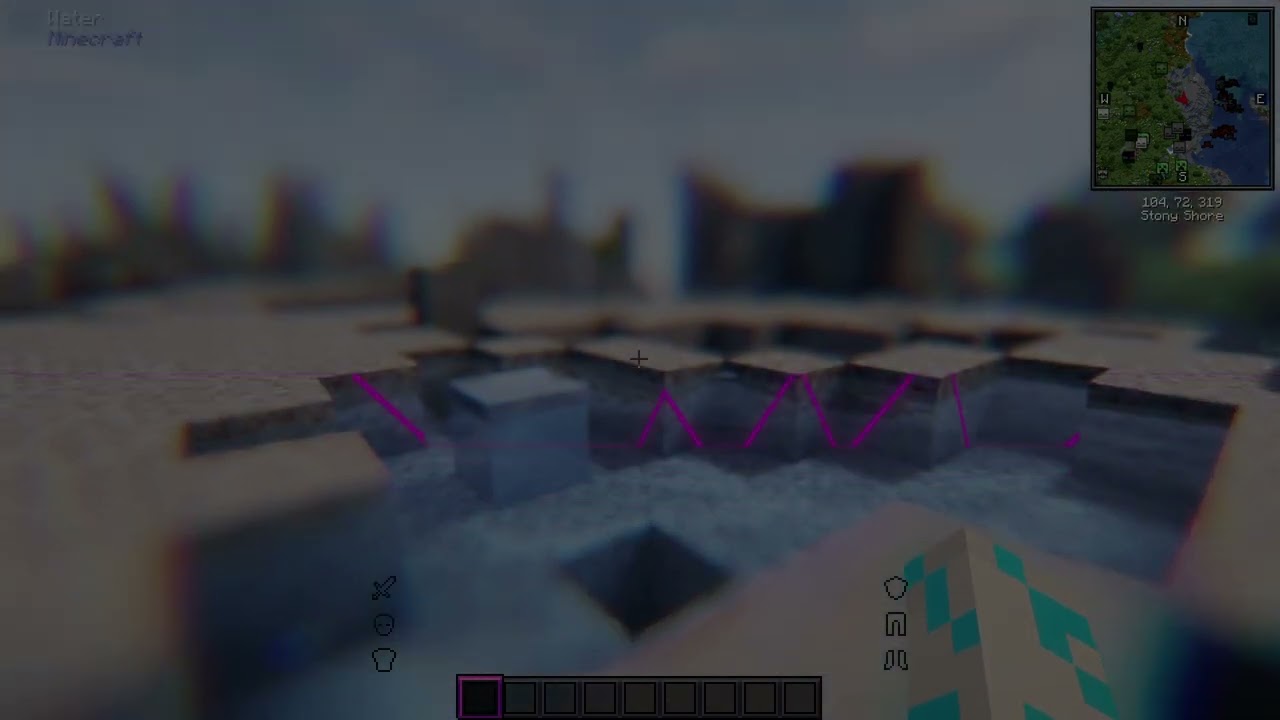
I just installed the latest update for better MC forge and when i press shift ingame everything blurs and i see a purple long line that follows my first person view what mod is it?
viral garden
tepid estuary
i installed essentials on BM and it wont work is there a specific modpack to uni...
!ea
versed mountainBOT
The Essential mod is completely incompatible with all of our modpacks, and there's no reason to use it. All of our modpacks already come with built-in, free world hosting, by clicking the "Share World' button in the Open to LAN menu. You can learn more by typing !ws in the #bots channel. You can also run type !server in the same channel to learn how to properly host a server for better performance and more flexibility. In modpacks that aren't owned by us, you can use mods such as e4mc or WorldHost to host a server completely for free without Essential's many issues and crashes and the microtransactions that they constantly bother users with. To learn more about alternatives to the Essential mod, check out this website.
viral garden
terse mantle
hello, im having this weird problem since a few days, the game seems to be activ...
Please read the full contents of the #get-support channel for us to provide assistance.
viral garden
minor cipher
I just installed the latest update for better MC forge and when i press shift in...
please send a video
tepid estuary
chloe
is there any mod i should uninstall
cuz i wanna play BM with my borther in multiplayer
and without essentials i dont think its possible '
unluss i create a server but idk how to
viral garden
tepid estuary
and without essentials i dont think its possible '
!ea
versed mountainBOT
The Essential mod is completely incompatible with all of our modpacks, and there's no reason to use it. All of our modpacks already come with built-in, free world hosting, by clicking the "Share World' button in the Open to LAN menu. You can learn more by typing !ws in the #bots channel. You can also run type !server in the same channel to learn how to properly host a server for better performance and more flexibility. In modpacks that aren't owned by us, you can use mods such as e4mc or WorldHost to host a server completely for free without Essential's many issues and crashes and the microtransactions that they constantly bother users with. To learn more about alternatives to the Essential mod, check out this website.
minor cipher
viral garden
please send a video
kinda hard to do that since i dont got nitro
agile cradle
minor cipher
kinda hard to do that since i dont got nitro
unlisted on youtube
terse mantle
- What Minecraft version are you using? 1.20.1
- What launcher did you run Minecraft with? ATLauncher
- Have you changed the modpack in any way? not this time, i uninstalled the entire launcher thinking it was a problem with it, as this same problem also happened with BetterMC fabric 1.19 and with AllOfCreate after i updated the drivers, after reinstalling the launcher and the instances without doing nothing more, only fabric is without this problem
- What version of the modpack are you using? V36
- Have you ever gotten past the crash condition without crashing, or does the game always crash? there's no crash, the game open normally and i can still interact with it, no forced close or error on the log, but it dont show any image at all
- What steps cause the crash?
viral garden
minor cipher
kinda hard to do that since i dont got nitro
what tides said or use streamable
minor cipher
terse mantle
1. What Minecraft version are you using? 1.20.1
2. What launcher did you run Min...
im using 1.20.1 and im using curse forge
imma just send the video unlisted
viral garden
minor cipher
im using 1.20.1 and im using curse forge
?
minor cipher
Lemme just show yall
viral garden
terse mantle
1. What Minecraft version are you using? 1.20.1
2. What launcher did you run Min...
its an issue on your pc
you can look up a general guide for it or try updating drivers via SDIO Origin
minor cipher
agile cradle
unlisted on youtube
https://youtu.be/hRfY2-545qQ
ok this is the clip don't mind the less brightness idk whats up with my obs but u can clearly see the problem or etleast i think its a problem it only happens when i hold shift
 minor cipher
viral garden
please send a video
minor cipher
viral garden
please send a video
Sent the video btw
sage crescent
Hey does anyone know how to update the mod while keeping my saves
 somber zealot
how do i add?join my freinds game
sage crescent
somber zealot
how do i add?join my freinds game
should be a "share world" option, jus get em to send you the address after he clicks that
agile cradle
sage crescent
Hey does anyone know how to update the mod while keeping my saves
if using curseforge you have to make sure "update to new modpack" is turned off when you update
 autumn spruce
Do clerics not trade dragon's breath anymore in the 1.19 version? I've leveled 5 to master and gotten xp bottles every time
autumn spruce
Up to 7 master level clerics and every one of them offered xp bottles instead of dragon's breath. Either I'm extremely unlucky or that trade doesn't exist anymore
 waxen berry
Hi, I'm trying to setup a server for BMC4. I attach the docker-compose file as well as the logs.
It complains something about fabric which I don't understand since the modpack is Forge.
wispy trailBOT
waxen berry
Hi, I'm trying to setup a server for BMC4. I attach the docker-compose file as w...
Uploaded latest.log from @waxen berry to mclogs: https://mclo.gs/Thhrqxz
viral garden
minor cipher
https://youtu.be/hRfY2-545qQ
ok this is the clip don't mind the less brightness ...
this is a mod you added or an issue with your drivers
viral garden
sage crescent
Hey does anyone know how to update the mod while keeping my saves
!updatemodpack
versed mountainBOT

Discord ➔ https://discord.gg/8ZmhaPPbjE
Twitter ➔ https://twitter.com/SharkieTV
Use CODE: LunaPixel for 25% off ➔ https://www.bisecthosting.com/LunaPixel
viral garden
stuck mango
https://mclo.gs/43G5kw4
Please read the full contents of the #get-support channel for us to provide assistance.
viral garden
waxen berry
Hi, I'm trying to setup a server for BMC4. I attach the docker-compose file as w...
!server please just host a server normally instead of using itzg's shitty docker lol
versed mountainBOT
Paid Method
We suggest renting a server from Bisect Hosting:
Approx. $10 - $25 a month depending on what plan you choose. You can also get 25% off with Code LunaPixel.
Go here and order a plan which fits you. We suggest 1GB per player but nothing lower than 4GB as the server needs at least 3GB to run.
Go to #server-hosting for more Info!
Free Method
To host a server on your own computer, read the selfhosting guide.
This guide goes over how to install, create, and launch a free Minecraft server on all operating systems (MacOS, Linux and Windows). The guide also guides you through installing Java and optimizing your server for better performance.
If you are installing one of our older modpacks, ignore the "README" file that is included in the serverpack files, as they have outdated information.
rugged sandal
Help, I want to enchant the chest plate for example protection against projectiles and explosions, but Minecraft does not allow this, I heard about the mod "Limitless" but it is not available on 1.20.1
waxen berry
viral garden
!server please just host a server normally instead of using itzg's shitty docker...
At first I was like: "How can chloe call docker minecraft shitty" but then I went through the whole installation in 5 minutes with no errors and I understood. Thank you 🙂
viral garden
the biggest issue is itzg refuses to support Curseforge lol
so it tries to grab the modrinth version of the modpack, which cant have all of the mods usually in the modpack due to not all mods being uploaded on CF
when you actually just launch the pack on modrinth it'll prompt you to install those missing mods but thats obviously not gonna happen with a server
 prime gate
hi i want to ask why i cant see play i just add essential mod to play with my friend
viral garden
prime gate
hi i want to ask why i cant see play i just add essential mod to play with my fr...
!ea
versed mountainBOT
The Essential mod is completely incompatible with all of our modpacks, and there's no reason to use it. All of our modpacks already come with built-in, free world hosting, by clicking the "Share World' button in the Open to LAN menu. You can learn more by typing !ws in the #bots channel. You can also run type !server in the same channel to learn how to properly host a server for better performance and more flexibility. In modpacks that aren't owned by us, you can use mods such as e4mc or WorldHost to host a server completely for free without Essential's many issues and crashes and the microtransactions that they constantly bother users with. To learn more about alternatives to the Essential mod, check out this website.
 torpid granite
Hey guys is apotheosis mod compatible with the other mods in the pack, because I really like the adventure aspect of it for having to explore around to obtain op gear?
 native parrot
hey guys how can i buy a server on curse forge
viral garden
native parrot
hey guys how can i buy a server on curse forge
!server
versed mountainBOT
Paid Method
We suggest renting a server from Bisect Hosting:
Approx. $10 - $25 a month depending on what plan you choose. You can also get 25% off with Code LunaPixel.
Go here and order a plan which fits you. We suggest 1GB per player but nothing lower than 4GB as the server needs at least 3GB to run.
Go to #server-hosting for more Info!
Free Method
To host a server on your own computer, read the selfhosting guide.
This guide goes over how to install, create, and launch a free Minecraft server on all operating systems (MacOS, Linux and Windows). The guide also guides you through installing Java and optimizing your server for better performance.
If you are installing one of our older modpacks, ignore the "README" file that is included in the serverpack files, as they have outdated information.
viral garden
torpid granite
Hey guys is apotheosis mod compatible with the other mods in the pack, because I...
should be fine
 grand gate
can someone help me with JEI , its not showing unless i search up something
 viral garden
grand gate
can someone help me with JEI , its not showing unless i search up something
viral garden
grand gate
can someone help me with JEI , its not showing unless i search up something
its not a bug - as it says you need to search to view recipes
its to make the inventory screen less cluttered
you can remove the distraction free recipes mod if you want it to be normal behavior
grand gate
viral garden
its to make the inventory screen less cluttered
how do I do that?
 glacial barn
ive taken out the frog skeleton spawner in the bathhouse is there a treasure chest somewhere or is it just the loot throughout the structure?
grand gate
nvm just got it
@viral garden sorry for the ping , but i also observed that in other bmc like bmc1 exists FTB chunks to make the storage system accessible from everywhere even nether or thousands of blocks away from the storage system , i play bmc4
viral garden
grand gate
<@726509826557083680> sorry for the ping , but i also observed that in other bmc...
what's your question though
viral garden
 distant marsh
Description: Exception in server tick loop
distant marsh
Description: Exception in server tick loop
Please read the full contents of the #get-support channel for us to provide assistance.
torpid granite
viral garden
should be fine
alr thanks
Also is there any mod that can let me enchant items past like sharpness 5 and prot 4
distant marsh
Using minecraft 1.20.1
CurseForge
No changin mod / modpack, or not added somethings
How can I get the version of server modpack?
The game is still starting normally, but the problem is when I start server. This don't start and crash
Starting server
wispy trailBOT
distant marsh
Uploaded crash-2025-02-01_13.28.43-server.txt from @distant marsh to mclogs: https://mclo.gs/JDJ9LHp
distant marsh
This is my crash report
viral garden
torpid granite
Also is there any mod that can let me enchant items past like sharpness 5 and pr...
apotheosis, if you dont want its other features you can change its config
viral garden
distant marsh
how did you host the server
distant marsh
I host server from myself
torpid granite
viral garden
apotheosis, if you dont want its other features you can change its config
ah okay, so i can get like prot 5 in enchantment table?
distant marsh
I've almost delete .json file (ops.json, banned.json, etc)
But not still working
My server proprieties ip it's correctly setted my ip (192.168.1.100)
And my router port is open to 25565
I've got just used the online mode in false because my friend haven't pay for minecraft
I'm so sorry for losing your time
I've find the problem
I'm so stupid
Thanks for the time
viral garden
torpid granite
ah okay, so i can get like prot 5 in enchantment table?
mhm
torpid granite
viral garden
mhm
alright. Also do you know what's best armour and tools you could get in bmc4, because there's so many
download it
i think you just go to the minecraft folder then mods and put it in there
that's how i added multiple different mods that i felt were missing
i don't think so
just add it to your files
 gleaming frigate
Hello, someone can help me with a crash on mi server?, I play in 1.20.1, BMC4 V36, Forge launcher, if they need the crash report i´ll share.
im dont speak english very well, but i´ll try it
torpid granite
idk then sry
rugged sandal
Who knows how to enchant armor for several types of protection with the help of mods
torpid granite
nope
torpid granite
rugged sandal
Who knows how to enchant armor for several types of protection with the help of ...
i think expanded armor enchanting does that but is onky for fabric
rugged sandal
What do you mean?
torpid granite
the mod is called expanded armor enchanting
 floral ice
Why is bmc plus 1.16.5 not downloadable anymore. Like 1.18.2 version still exists in prominence 2 classic
rugged sandal
father-in-law with this mod will I be able to put protection 4, shell protection 4, and explosion protection 4 on the chest plate?
 acoustic dove
Hi ! Is there a way to disable this please? I have already look into xenon++ conf but already at false, thank in advance
 rugged sandal
Sorry guys, I use the translator
rugged sandal
acoustic dove
Hi ! Is there a way to disable this please? I have already look into xenon++ con...
Just press the space bar
It helped me
acoustic dove
rugged sandal
Just press the space bar
Yeah it work the @ also but i want to not have to do this like every time i use jei
viral garden
torpid granite
alright. Also do you know what's best armour and tools you could get in bmc4, be...
check jei
!aternos
versed mountainBOT
We don't support Aternos nor can we assist you with using it for reasons listed below;
- You are unable to add / edit the mods to implement a fix that can be game changing at times.
- We are unable to control the updates of our packs on Aternos, nor ever will.
- The hosting is not strong enough to host our packs on there without it crashing every so often.
- We have other free methods that work much better than Aternos does. Run the !ws command and the !server command in #bots for more information on how to host a server for free.
viral garden
acoustic dove
Hi ! Is there a way to disable this please? I have already look into xenon++ con...
read the questbook ingame.
acoustic dove
viral garden
https://discord.com/channels/790272037578473512/821705976138694686/1335010665521...
Thank
 past drum
Does someone know how I switch the information on the left hand side off?
 waxen berry
Hey, what do you use for automatically starting the server on ubuntu?
viral garden
past drum
Does someone know how I switch the information on the left hand side off?
unequip the compass you have equipped
viral garden
waxen berry
Hey, what do you use for automatically starting the server on ubuntu?
? wdym
past drum
omg ahahahah thank you!!!
waxen berry
viral garden
? wdym
As per your recomendations I have completly ditched docker and execute the server directly with start.sh. however, i want to make sure that every time the OS boots the server is autonomously started.
viral garden
waxen berry
As per your recomendations I have completly ditched docker and execute the serve...
@teal urchin can help with that
rugged sandal
I don't understand a little what to do
 wispy trailBOT
Uploaded crash-2025-02-01_17.28.17-fml.txt from @rugged sandal to mclogs: https://mclo.gs/Uyrvshj
rugged sandal
wispy trailBOT
rugged sandal
Uploaded crash-2025-02-01_17.28.17-fml.txt from @rugged sandal to mclogs: https://mclo.gs/4rtsGat
viral garden
rugged sandal
I don't understand a little what to do
!alternates you did not install correctly
versed mountainBOT
If this command was run in response to your question/issue, it is likely because switching away from the launcher you are currently using would fix your problem.
From our experience, the most stable launcher by far is ATLauncher, also known as ATL.
To install ATLauncher, do the following:
1. Go to https://atlauncher.com/download
2. Install and run the setup, then open the program.
3. Login to your Microsoft account that owns the Java Edition of Minecraft from the Accounts tab on the right. This process is 100% safe, as it goes directly through Microsoft. ATLauncher does not see your account credentials.
4. Go to the Packs tab on the right, then click "Curseforge" on the left.
5. Search the modpack you wish to download.
6. Click "New Instance". Click "Ok" on the opted out mods warning, then click "Open All" on the manual download screen.
7. Let the mods download, ATLauncher will grab them from your Downloads folder and automatically add them to the modpack.
8. Go to the Instances tab, and click "Play" on the modpack you downloaded. If you ever see an "Update" button on the instance, click it.
This video explains the process: https://youtu.be/xMYW1wMbmkM
To transfer your Curseforge world to ATLauncher, simply right click the modpack on Curseforge, or click the 3 dots, then click "Open Folder". Copy the Saves folder, then click "Open Folder" on ATLauncher and paste the Saves folder there. Do the same with the XaerosMinimap folder, or the Journeymap folder, to transfer over any waypoints you've created.
Because ATLauncher downloads the exact same files as Curseforge does, your world will be the exact same and you will be able to join the same servers. ATLauncher also works without an internet connection (after you've installed the modpack, of course), and does not have any bloat from Overwolf. You are free to uninstall both Overwolf and Curseforge with ATLauncher installed.
rugged sandal
viral garden
!alternates you did not install correctly
Everything worked fine until I installed the mod "expanded armor enchanting"
viral garden
then dont install that
rugged sandal
okay:(
I was just looking for a mod for enchanted armor for several types of protection
torpid granite
viral garden
check jei
So for armour it’s the ingitium but i cannot figure out what it is for tools
minor cipher
viral garden
this is a mod you added or an issue with your drivers
Oh it happened before I added more mods
 narrow pelican
Is epic fight incompatible?
radiant jay
narrow pelican
Is epic fight incompatible?
its sketchy for some people it is and some not
but is probably safest to not add it, so you dont break anything
teal urchin
waxen berry
As per your recomendations I have completly ditched docker and execute the serve...
setup a systems unit or something
theres so many ways to do this i dont really have one specific recommendation tbh
narrow pelican
radiant jay
but is probably safest to not add it, so you dont break anything
it works with new world, but not with already created world. Do you think there is a way to load in the already created world with it? I really want this mod
 fast steeple
@support 1.20.1 curseforge did not change modpack v36.zip. Game always crashes when i click on play in the minecraft launcher
wispy trailBOT
fast steeple
Uploaded hs_err_pid17680.log from @fast steeple to mclogs: https://mclo.gs/0dYTitW
:warning: This is a hs_err_pid file.
These files may contain personal information such as your session token.
Mclogs automatically censors these files, so you should delete your original message now.
teal urchin
fast steeple
@support 1.20.1 curseforge did not change modpack v36.zip. Game always crashes w...
!drivers
versed mountainBOT
You (likely) need to update your graphics drivers in order to resolve the crash. Here's how to go about doing that!
1. Identify your graphics card
if you already know skip to the next step
- Open task manager
- Navigate to the "Performance" tab (on Windows 11 this is the button that looks like a heart pulse)
- Press the GPU 0 graph and read your GPU from the top right
Note:
In some cases you may see a GPU 0 and GPU 1. This means your CPU has its own GPU, as well as a dedicated one. You probably want GPU 1 (which is usually the better one), but you can ask staff to clarify if necessary.
2. Download your drivers from the manufacturers site
Depending on what you read before, you likely need drivers from either AMD, Intel, or NVIDIA
AMD: https://www.amd.com/en/support
Intel: https://www.intel.com/content/www/us/en/download-center/home.html
NVIDIA: https://www.nvidia.com/Download/index.aspx?lang=en-us
Note:
- For NVIDIA you want to select "Game Ready Driver (GRD)" (this is the default option) for the best performance. Once installing you'd probably prefer downloading GeForce Experience, which will notify you when there's an available drivers update.
- For Intel, you probably want to press "Get Started" under the "Automatically update your drivers and software", which will simplify the process and update everything automatically
- For AMD you probably want to just press "Download Windows Drivers", which will download something called AMD Adrenaline, which will update your drivers automatically.
3. Run the installation, restart your computer, and try playing MC again
- At this point, hopefully your Minecraft is running. If it still does not work, please post any new logs and staff will help assist you with finding the right solution.
teal urchin
update your amd drivers
 light spoke
is this modpack compatible with essential?
radiant jay
light spoke
is this modpack compatible with essential?
!ea
versed mountainBOT
The Essential mod is completely incompatible with all of our modpacks, and there's no reason to use it. All of our modpacks already come with built-in, free world hosting, by clicking the "Share World' button in the Open to LAN menu. You can learn more by typing !ws in the #bots channel. You can also run type !server in the same channel to learn how to properly host a server for better performance and more flexibility. In modpacks that aren't owned by us, you can use mods such as e4mc or WorldHost to host a server completely for free without Essential's many issues and crashes and the microtransactions that they constantly bother users with. To learn more about alternatives to the Essential mod, check out this website.
scarlet panther
That's called a texture problem.
Don't.
Don't remove mods just because of a texture problem.
Still.
It was probably an ordering issue
 lusty mica
Wat kind of FPS should I be getting with this modpack with shaders with an rxt 4070
fast steeple
teal urchin
update your amd drivers
Thx 😍 it works now
radiant jay
lusty mica
Wat kind of FPS should I be getting with this modpack with shaders with an rxt 4...
hard to say
but you can follow this performance guide
!fps
versed mountainBOT
radiant jay
if you think you should be getting more fps
 pallid bronze
Hello, I just wanted to know if v17 is the latest available update for BMC5 neoforge. Changelog in mc says v20 is latest but I figured out it might just not be released yet. Is this true or CurseForge just doesn't have a latest version yet?

 prime wagon
pallid bronze
Hello, I just wanted to know if v17 is the latest available update for BMC5 neof...
prime wagon
pallid bronze
Hello, I just wanted to know if v17 is the latest available update for BMC5 neof...
Same question
fast steeple
Why if i make a lan my friend cant see it on their multiplayer or is their an other way to play togheter without a server
prime wagon
Does someone have list of more mods that can run with BMC5 NeoForge?
radiant jay
fast steeple
Why if i make a lan my friend cant see it on their multiplayer or is their an ot...
!ws
versed mountainBOT
Luna Pixel's World Sharing
Our modpacks don't support any mods that add singleplayer hosting / world sharing because we already provide free world sharing. The 'Essential' mod is therefore incompatible.
To share your world using our own world hosting, click the 'Open to Lan' or 'Share World' button in the game menu when in a singleplayer world, and share the world.
It will give you an address, like magma-cube.mc.lunapixel.gg, which your friends can use to connect directly to your world as if it were a server!
We still highly suggest not to play through LAN as LAN is untested and unreliable. Using it will cause longterm damage to your world.
There is no reason to use LAN, as we support both paid and free methods of hosting a server the normal way.
 prime wagon
Can I share and play my world with cracked mc user with same mods?
 shadow kindle
can i share the newest neoforge bmc5?
 north hinge
pallid bronze
Hello, I just wanted to know if v17 is the latest available update for BMC5 neof...
north hinge
pallid bronze
Hello, I just wanted to know if v17 is the latest available update for BMC5 neof...
yeah it's so confusing
radiant jay
 pseudo socket
so how can i start a world with my freind?
pseudo socket
so how can i start a world with my freind?
!server
versed mountainBOT
Paid Method
We suggest renting a server from Bisect Hosting:
Approx. $10 - $25 a month depending on what plan you choose. You can also get 25% off with Code LunaPixel.
Go here and order a plan which fits you. We suggest 1GB per player but nothing lower than 4GB as the server needs at least 3GB to run.
Go to #server-hosting for more Info!
Free Method
To host a server on your own computer, read the selfhosting guide.
This guide goes over how to install, create, and launch a free Minecraft server on all operating systems (MacOS, Linux and Windows). The guide also guides you through installing Java and optimizing your server for better performance.
If you are installing one of our older modpacks, ignore the "README" file that is included in the serverpack files, as they have outdated information.
radiant jay
pseudo socket
so how can i start a world with my freind?
!ws
versed mountainBOT
Luna Pixel's World Sharing
Our modpacks don't support any mods that add singleplayer hosting / world sharing because we already provide free world sharing. The 'Essential' mod is therefore incompatible.
To share your world using our own world hosting, click the 'Open to Lan' or 'Share World' button in the game menu when in a singleplayer world, and share the world.
It will give you an address, like magma-cube.mc.lunapixel.gg, which your friends can use to connect directly to your world as if it were a server!
We still highly suggest not to play through LAN as LAN is untested and unreliable. Using it will cause longterm damage to your world.
There is no reason to use LAN, as we support both paid and free methods of hosting a server the normal way.
pseudo socket
!ws
versed mountainBOT
Luna Pixel's World Sharing
Our modpacks don't support any mods that add singleplayer hosting / world sharing because we already provide free world sharing. The 'Essential' mod is therefore incompatible.
To share your world using our own world hosting, click the 'Open to Lan' or 'Share World' button in the game menu when in a singleplayer world, and share the world.
It will give you an address, like magma-cube.mc.lunapixel.gg, which your friends can use to connect directly to your world as if it were a server!
We still highly suggest not to play through LAN as LAN is untested and unreliable. Using it will cause longterm damage to your world.
There is no reason to use LAN, as we support both paid and free methods of hosting a server the normal way.
 worldly axle
im trying to play better mc with my friend and we downloaded the essentels mod and when we both got into the game it said there was a mod that is incompatible, idk what it could be
 radiant jay
worldly axle
im trying to play better mc with my friend and we downloaded the essentels mod a...
radiant jay
worldly axle
im trying to play better mc with my friend and we downloaded the essentels mod a...
!ea read full message pls
versed mountainBOT
The Essential mod is completely incompatible with all of our modpacks, and there's no reason to use it. All of our modpacks already come with built-in, free world hosting, by clicking the "Share World' button in the Open to LAN menu. You can learn more by typing !ws in the #bots channel. You can also run type !server in the same channel to learn how to properly host a server for better performance and more flexibility. In modpacks that aren't owned by us, you can use mods such as e4mc or WorldHost to host a server completely for free without Essential's many issues and crashes and the microtransactions that they constantly bother users with. To learn more about alternatives to the Essential mod, check out this website.
radiant jay
pseudo socket
yea exactly
 pseudo torrent
Boys, when i buy the woodland explorer map, its just an empty map? Is their a fix for this
worldly axle
ohhhh ok, can i get rid of it through cursed forge
radiant jay
worldly axle
ohhhh ok, can i get rid of it through cursed forge
open the mods folder and remove essential from there
i dont think curseforge has an option to remove mods
its only to add mods
 mental saffron
a yall im hosting a server for any modpack its comaptible with dm for more info
radiant jay
mental saffron
a yall im hosting a server for any modpack its comaptible with dm for more info
 vagrant birch
Uh so im trying to enter the end portal and my game keeps crashing i turned off shaders and that did not work
radiant jay
vagrant birch
Uh so im trying to enter the end portal and my game keeps crashing i turned off ...
!moreinfo
versed mountainBOT
- What Minecraft version are you using? (1.19.2, 1.20.1, ...)
- What launcher did you run Minecraft with? (e.g. CurseForge, ATLauncher, MultiMC, ...)
- Have you changed the modpack in any way? (e.g. changing mod versions, adding/removing mods)
- What version of the modpack are you using? (v11, v9, etc)
- Have you ever gotten past the crash condition without crashing, or does the game always crash?
- What steps cause the crash?
Required:
Open the game directory (right click pack -> open folder), navigate to the "crash-reports" folder and upload the latest available crash report.
If there is no crash report, navigate to the logs folder and upload "latest.log."
If there is no log, navigate to the base pack directory and upload the hs_err_pid file, if there is one.
worldly axle
so idk how to get the world to show up on my friends computer, how do i play with him
vagrant birch
my version in 1.20.1 i laucnhed with curseforge i have not changed the modpack im using v36 the steps that cause it is when i enter the end portal i crash
radiant jay
vagrant birch
my version in 1.20.1 i laucnhed with curseforge i have not changed the modpack i...
!alternates
versed mountainBOT
If this command was run in response to your question/issue, it is likely because switching away from the launcher you are currently using would fix your problem.
From our experience, the most stable launcher by far is ATLauncher, also known as ATL.
To install ATLauncher, do the following:
1. Go to https://atlauncher.com/download
2. Install and run the setup, then open the program.
3. Login to your Microsoft account that owns the Java Edition of Minecraft from the Accounts tab on the right. This process is 100% safe, as it goes directly through Microsoft. ATLauncher does not see your account credentials.
4. Go to the Packs tab on the right, then click "Curseforge" on the left.
5. Search the modpack you wish to download.
6. Click "New Instance". Click "Ok" on the opted out mods warning, then click "Open All" on the manual download screen.
7. Let the mods download, ATLauncher will grab them from your Downloads folder and automatically add them to the modpack.
8. Go to the Instances tab, and click "Play" on the modpack you downloaded. If you ever see an "Update" button on the instance, click it.
This video explains the process: https://youtu.be/xMYW1wMbmkM
To transfer your Curseforge world to ATLauncher, simply right click the modpack on Curseforge, or click the 3 dots, then click "Open Folder". Copy the Saves folder, then click "Open Folder" on ATLauncher and paste the Saves folder there. Do the same with the XaerosMinimap folder, or the Journeymap folder, to transfer over any waypoints you've created.
Because ATLauncher downloads the exact same files as Curseforge does, your world will be the exact same and you will be able to join the same servers. ATLauncher also works without an internet connection (after you've installed the modpack, of course), and does not have any bloat from Overwolf. You are free to uninstall both Overwolf and Curseforge with ATLauncher installed.
radiant jay
worldly axle
so idk how to get the world to show up on my friends computer, how do i play wit...
!ws
versed mountainBOT
Luna Pixel's World Sharing
Our modpacks don't support any mods that add singleplayer hosting / world sharing because we already provide free world sharing. The 'Essential' mod is therefore incompatible.
To share your world using our own world hosting, click the 'Open to Lan' or 'Share World' button in the game menu when in a singleplayer world, and share the world.
It will give you an address, like magma-cube.mc.lunapixel.gg, which your friends can use to connect directly to your world as if it were a server!
We still highly suggest not to play through LAN as LAN is untested and unreliable. Using it will cause longterm damage to your world.
There is no reason to use LAN, as we support both paid and free methods of hosting a server the normal way.
radiant jay
follow this guide
vagrant birch
will this launcher transfer my world
radiant jay
vagrant birch
will this launcher transfer my world
the guide tells you how to transfer your world
just copy it over
worldly axle
!ws
versed mountainBOT
Luna Pixel's World Sharing
Our modpacks don't support any mods that add singleplayer hosting / world sharing because we already provide free world sharing. The 'Essential' mod is therefore incompatible.
To share your world using our own world hosting, click the 'Open to Lan' or 'Share World' button in the game menu when in a singleplayer world, and share the world.
It will give you an address, like magma-cube.mc.lunapixel.gg, which your friends can use to connect directly to your world as if it were a server!
We still highly suggest not to play through LAN as LAN is untested and unreliable. Using it will cause longterm damage to your world.
There is no reason to use LAN, as we support both paid and free methods of hosting a server the normal way.
worldly axle
so do they type that into the server address
radiant jay
vagrant birch
when i launch through atl it says error loading mods idk what to do
send a screenshot
radiant jay
worldly axle
so do they type that into the server address
yes
vagrant birch
okay so i just deleted the mod that was not installing and i did the saves thing with the world transfer and none of my worlds are showing up
radiant jay
vagrant birch
okay so i just deleted the mod that was not installing and i did the saves thing...
what?
vagrant birch
like my world from curseforge
radiant jay
what did you do to it
vagrant birch
like it said copied the saves folder and pasted it in atl
radiant jay
yea and it didnt show up ingame?
vagrant birch
nope
vagrant birch
is there any solution just to fix it in curseforge
radiant jay
vagrant birch
is there any solution just to fix it in curseforge
try following this performance guide
maybe your pc couldnt handle it
!fps
versed mountainBOT
vagrant birch
maybe memory is the promblem
i got a new 1tb
but i think minecraft is still downloaded on my old one
radiant jay
maybe thats an issue idk
vagrant birch
maybe
radiant jay
but i would try following the fps guide
also
but if you know that your disk with minecraft on it hsa very low space then maybe thats the problem
vagrant birch
yeah
 unreal scarab
hmu lets run ittt
vagrant birch
freed up some space still not letting me into the end
 dapper portal
what is the best amount of ram for bmc5 for 10 people?
radiant jay
dapper portal
what is the best amount of ram for bmc5 for 10 people?
!server
versed mountainBOT
Paid Method
We suggest renting a server from Bisect Hosting:
Approx. $10 - $25 a month depending on what plan you choose. You can also get 25% off with Code LunaPixel.
Go here and order a plan which fits you. We suggest 1GB per player but nothing lower than 4GB as the server needs at least 3GB to run.
Go to #server-hosting for more Info!
Free Method
To host a server on your own computer, read the selfhosting guide.
This guide goes over how to install, create, and launch a free Minecraft server on all operating systems (MacOS, Linux and Windows). The guide also guides you through installing Java and optimizing your server for better performance.
If you are installing one of our older modpacks, ignore the "README" file that is included in the serverpack files, as they have outdated information.
radiant jay
i think it says in here somewhere
 wise island
Is this chat for neoforge as well as forge?
scarlet panther
wise island
Is this chat for neoforge as well as forge?
Technically they're the same (if you go old enough).
But yeah.
dapper portal
thanks guys
wise island
Curseforge doesn't seem to have v20 of BMC5.

I'm not sure where to look to find it. When I open the game it says that v20 should be available, though.
gaunt cipher
i also have v17 on bmc5
wise island
This is what I see in the changelog when I open the game.
 viral garden
pallid bronze
Hello, I just wanted to know if v17 is the latest available update for BMC5 neof...
viral garden
pallid bronze
Hello, I just wanted to know if v17 is the latest available update for BMC5 neof...
no, v20 is the latest as it says on your screen
and v20 is released

 sturdy flare
wise island
Curseforge doesn't seem to have v20 of BMC5.
sturdy flare
wise island
Curseforge doesn't seem to have v20 of BMC5.
GDcarbon is also stuck on v17
wise island
viral garden
and v20 is released
Where should we go to get the latest release? Curseforge seems to be a few version behind and I can't even find BMC5 on Modrinth...
versed mountainBOT
If this command was run in response to your question/issue, it is likely because switching away from the launcher you are currently using would fix your problem.
From our experience, the most stable launcher by far is ATLauncher, also known as ATL.
To install ATLauncher, do the following:
1. Go to https://atlauncher.com/download
2. Install and run the setup, then open the program.
3. Login to your Microsoft account that owns the Java Edition of Minecraft from the Accounts tab on the right. This process is 100% safe, as it goes directly through Microsoft. ATLauncher does not see your account credentials.
4. Go to the Packs tab on the right, then click "Curseforge" on the left.
5. Search the modpack you wish to download.
6. Click "New Instance". Click "Ok" on the opted out mods warning, then click "Open All" on the manual download screen.
7. Let the mods download, ATLauncher will grab them from your Downloads folder and automatically add them to the modpack.
8. Go to the Instances tab, and click "Play" on the modpack you downloaded. If you ever see an "Update" button on the instance, click it.
This video explains the process: https://youtu.be/xMYW1wMbmkM
To transfer your Curseforge world to ATLauncher, simply right click the modpack on Curseforge, or click the 3 dots, then click "Open Folder". Copy the Saves folder, then click "Open Folder" on ATLauncher and paste the Saves folder there. Do the same with the XaerosMinimap folder, or the Journeymap folder, to transfer over any waypoints you've created.
Because ATLauncher downloads the exact same files as Curseforge does, your world will be the exact same and you will be able to join the same servers. ATLauncher also works without an internet connection (after you've installed the modpack, of course), and does not have any bloat from Overwolf. You are free to uninstall both Overwolf and Curseforge with ATLauncher installed.
scarlet panther
Here we are
 scarlet panther
Uhhh
 solar mica
- 1.20.1
- Curseforge
- using modpack stock
- BMC4 [Forge] v36
- It crashes when I break the network root module or enough connectors
- Breaking the root module or enough connectors makes it crash, whereas yesterday I had no issues with it at all.
I hope I did this correctly. Also hope that this fixes any future bugs like this for the pack
wispy trailBOT
solar mica
1. 1.20.1
2. Curseforge
3. using modpack stock
4. BMC4 [Forge] v36
5. It crashes...
Uploaded crash-2025-02-01_19.34.39-client.txt from @solar mica to mclogs: https://mclo.gs/ZweEZLt
 gritty lion
before I go to the eye of curse any tips on what to expect?
viral garden
pallid bronze
Hello, I just wanted to know if v17 is the latest available update for BMC5 neof...
its a bug with the changelog, it will be fixed in the next update. v17 is the latest though
viral garden
prime wagon
Same question
its a bug with the changelog, it will be fixed in the next update. v17 is the latest though
viral garden
sturdy flare
GDcarbon is also stuck on v17
its a bug with the changelog, it will be fixed in the next update. v17 is the latest though
viral garden
solar mica
1. 1.20.1
2. Curseforge
3. using modpack stock
4. BMC4 [Forge] v36
5. It crashes...
update the simple storage network mod
gritty lion
Hey so i fly around into unloaded chunks on the map and i just start lagging then crash?
!log
!logs
versed mountainBOT
To better assist with fixing your issue, we will need some logs:
-
Curseforge -> Right click the modpack instance -> Open Folder.
-
ATLauncher -> Click 'Open Folder' on the modpack instance.
-
MultiMC -> Select your instace and click 'Instance Folder' on the right.
-
** For servers** -> Open the folder containing your server files.
To find the latest.log file, navigate to the 'logs' folder.
To find the hs_err_pid.log file, simply look for the file name after opening the instance folder.
To find a crash report, navigate to the 'crash-reports folder and find the most recent file after your crash occurred.
Once located, please upload the requested file here. If it fails, upload to https://mclo.gs/ and share the link here.
viral garden
gritty lion
Hey so i fly around into unloaded chunks on the map and i just start lagging the...
Please read the full contents of the #get-support channel for us to provide assistance.
 silver whale
hey so i wanna try to run essentials so me and my friend can play bmc4 forge together and it force locks me out of it due to it reading the extra mod, any way to bypass that cause i dont wanna pay for a server host i just wanna run essential for the multiplayer side
radiant jay
silver whale
hey so i wanna try to run essentials so me and my friend can play bmc4 forge tog...
!ea read full message pls
versed mountainBOT
The Essential mod is completely incompatible with all of our modpacks, and there's no reason to use it. All of our modpacks already come with built-in, free world hosting, by clicking the "Share World' button in the Open to LAN menu. You can learn more by typing !ws in the #bots channel. You can also run type !server in the same channel to learn how to properly host a server for better performance and more flexibility. In modpacks that aren't owned by us, you can use mods such as e4mc or WorldHost to host a server completely for free without Essential's many issues and crashes and the microtransactions that they constantly bother users with. To learn more about alternatives to the Essential mod, check out this website.
silver whale
oh sick nice to know
first time seeing a pack have that offered by default and not just advertising bisect hosting xd
gotta ask tho is that also a thing with bmc5?
the neoforge version?
gritty lion
- version 1.20.1
- Curseforge
- No have not changed the modpack.
- v36
- Always crashes in said position
- Moving into unloaded chunks in minimap and vision. It does not always crash but this time it is?
agile cradle
gritty lion
1. version 1.20.1
2. Curseforge
3. No have not changed the modpack.
4. v36
5. Al...
!logs
versed mountainBOT
To better assist with fixing your issue, we will need some logs:
-
Curseforge -> Right click the modpack instance -> Open Folder.
-
ATLauncher -> Click 'Open Folder' on the modpack instance.
-
MultiMC -> Select your instace and click 'Instance Folder' on the right.
-
** For servers** -> Open the folder containing your server files.
To find the latest.log file, navigate to the 'logs' folder.
To find the hs_err_pid.log file, simply look for the file name after opening the instance folder.
To find a crash report, navigate to the 'crash-reports folder and find the most recent file after your crash occurred.
Once located, please upload the requested file here. If it fails, upload to https://mclo.gs/ and share the link here.
viral garden
silver whale
gotta ask tho is that also a thing with bmc5?
all of our packs yes
gritty lion
wispy trailBOT
gritty lion
Uploaded latest.log from @gritty lion to mclogs: https://mclo.gs/wiLQVd8
gritty lion
!logs
versed mountainBOT
To better assist with fixing your issue, we will need some logs:
-
Curseforge -> Right click the modpack instance -> Open Folder.
-
ATLauncher -> Click 'Open Folder' on the modpack instance.
-
MultiMC -> Select your instace and click 'Instance Folder' on the right.
-
** For servers** -> Open the folder containing your server files.
To find the latest.log file, navigate to the 'logs' folder.
To find the hs_err_pid.log file, simply look for the file name after opening the instance folder.
To find a crash report, navigate to the 'crash-reports folder and find the most recent file after your crash occurred.
Once located, please upload the requested file here. If it fails, upload to https://mclo.gs/ and share the link here.
gritty lion
wispy trailBOT
gritty lion
Uploaded latest.log from @gritty lion to mclogs: https://mclo.gs/E2zFtKO
versed mountainBOT
To better assist with fixing your issue, we will need some logs:
-
Curseforge -> Right click the modpack instance -> Open Folder.
-
ATLauncher -> Click 'Open Folder' on the modpack instance.
-
MultiMC -> Select your instace and click 'Instance Folder' on the right.
-
** For servers** -> Open the folder containing your server files.
To find the latest.log file, navigate to the 'logs' folder.
To find the hs_err_pid.log file, simply look for the file name after opening the instance folder.
To find a crash report, navigate to the 'crash-reports folder and find the most recent file after your crash occurred.
Once located, please upload the requested file here. If it fails, upload to https://mclo.gs/ and share the link here.
gritty lion
gritty lion
!logs
versed mountainBOT
To better assist with fixing your issue, we will need some logs:
-
Curseforge -> Right click the modpack instance -> Open Folder.
-
ATLauncher -> Click 'Open Folder' on the modpack instance.
-
MultiMC -> Select your instace and click 'Instance Folder' on the right.
-
** For servers** -> Open the folder containing your server files.
To find the latest.log file, navigate to the 'logs' folder.
To find the hs_err_pid.log file, simply look for the file name after opening the instance folder.
To find a crash report, navigate to the 'crash-reports folder and find the most recent file after your crash occurred.
Once located, please upload the requested file here. If it fails, upload to https://mclo.gs/ and share the link here.
gritty lion
- version 1.20.1
- Curseforge
- No have not changed the modpack.
- v36
- Always crashes in said position
- Moving into unloaded chunks in minimap and vision. It does not always crash but this time it is?
wispy trailBOT
gritty lion
1. version 1.20.1
2. Curseforge
3. No have not changed the modpack.
4. v36
5. Al...
Uploaded latest.log from @gritty lion to mclogs: https://mclo.gs/GNZfcZ7
 twin yarrow
I got the Aerwhale saddle from the Aerwhale king does anyone know how to control the aerwhales you ride
viral garden
gritty lion
how do I fix??
why are you spamming the command lol
viral garden
gritty lion
1. version 1.20.1
2. Curseforge
3. No have not changed the modpack.
4. v36
5. Al...
Please follow the performance guide to improve your game performance, as this is likely to resolve your issue.
 halcyon thistle
should I play bmc4 or 5
 sleek perch
5
 violet nexus
how do i stop my fps limiting to ten when afk?
halcyon thistle
sleek perch
5
whats the differnece between 5 and 4
wispy trailBOT
 gloomy hound
Uploaded 2025-02-01-1.log from @gloomy hound to mclogs: https://mclo.gs/F4jEnQ5
 worn aspen
 dusk sedge
how to make glass sword unbreakable
dusk sedge
how to make glass sword unbreakable

Yeah, completely break the balance of the game?
Uh, no
 trim raft
Hi! I'm playing BETTERMC 4. 1.20.1. How could I stop this glitch from happening?
 gloomy hound
wispy trailBOT
gloomy hound
gloomy hound
wispy trailBOT
gloomy hound
Uploaded 2025-02-01-1.log from @gloomy hound to mclogs: https://mclo.gs/YXrUdW0
viral garden
violet nexus
how do i stop my fps limiting to ten when afk?
thats not a feature of the modpack
 cyan sail
how do I upgrade relics with a table?
 unkempt palm
1.Version 1.20.1
2.Curseforge
3.No have not changed the modpack.
4.BMC3 [Forge] v36
5.Always crashes in said Deep Ocean Biome (I found one today and when i entered it crashed and now whenever I log in it crashes the entire server. No one in the proximity of the Deep Ocean Biome is not affected and can play normally) does anyone know what’s causing this?
Edit: I think the issue has been fixed
wispy trailBOT
unkempt palm
1.Version 1.20.1
2.Curseforge
3.No have not changed the modpack.
4.BMC3 [Forge] ...
Uploaded message.txt from @unkempt palm to mclogs: https://mclo.gs/CFt2Z26
 dense bane
Hi, was wondering if there were issues when updating the pack ? I'm playing on v28 and saw last update is v36, would u recommand me to update ?
(on a solo world)
viral garden
gloomy hound
Please read the full contents of the #get-support channel for us to provide assistance.
viral garden
trim raft
Hi! I'm playing BETTERMC 4. 1.20.1. How could I stop this glitch from happening?
increase your vertical render distance
viral garden
dense bane
Hi, was wondering if there were issues when updating the pack ? I'm playing on v...
yes, update
 rapid nebula
hay, can i borrow someones attention for an issue im having?

 covert walrus
Hiii
Yeah
Did you add essential?
Wdym?
Look through your mod files
Ctrl f essential
Ohhhhhhhh
Okay
Yeah
Your using tlauncher
!tlauncher
viral garden
TLauncher is known spyware and is also unable to install mods or modpacks correctly. Because we offer no support for piracy due to Discord TOS, you will need to provide proof you own a legitimate copy of Minecraft or leave the server. For a safe, working way to install both mods and modpacks, read the #faq guide on installing modpacks.
covert walrus
!cracked
versed mountainBOT
If you are using a cracked Minecraft launcher, we can not assist with your issue. In order to receive help, you need to switch to an approved launcher and provide proof you have purchased Minecraft. This is due to the terms of service and guideline agreements of both Mojang and Discord.
viral garden
lmao
covert walrus
Corn is really good
Like corn chips
And corn on the cob
Wimp wimp
Womp
Womp
Fuck you

Tlauncher no worky
Get a job and buy mineceart
Not for modded
I don’t know, I don’t work here
Yeah you were
I’m the only one here
Just you and me
No
It’s just us
I’ll yap all u want me too yap
I’ve got yap
Yeah I will yap
I’m gonna yap
No fix!!!
Fix by recompiling your kernel
Do it!!!
Install vim!!!
Install VMware
And then set up a hannamontana Linux install
And then install vim
You can’t afford that
I no no wanna ;-(
How
For modded install
You need modded launcher
Meowww
Tlauncher is spyware
Reformat pc
But like
It is
Blud turned 11 today
Skull emoji
Lies because minecraft was made like last year
@viral garden send it to the shadow realm!
Wait I’ll look mental if your banned
Oh no
 rancid plover
Hello guys problems better mc 1.20.1 help
 grand gate
hey guys, how much content are we missing out if playing on fabric vs forged?
rancid plover
grand gate
hey guys, how much content are we missing out if playing on fabric vs forged?
forge
near egret
rancid plover
Hello guys problems better mc 1.20.1 help
are you using tlauncher
rancid plover
near egret
are you using tlauncher
yes
near egret
!cracked
versed mountainBOT
If you are using a cracked Minecraft launcher, we can not assist with your issue. In order to receive help, you need to switch to an approved launcher and provide proof you have purchased Minecraft. This is due to the terms of service and guideline agreements of both Mojang and Discord.
rancid plover
near egret
!cracked
So what's the problem with the license issue?
near egret
we dont support tlauncher or other cracked clients here
read #faq on how to install modpacks with atlauncher to resolve the error screen
rancid plover
I don't have a hacked client, but a purchased one doesn't work.
 plucky geodeBOT
Quarantine Result:
 Reason: cracked
 Moderator: @agile cradle

Quarantined:

 theminecinema [
1144417655307116554]
viral garden
xaeros minimap
grand gate
hahaha
 hidden peak
does anybody have a server
 past moon
viral garden
<#1060704984372625488>
past moon
viral garden
<#1060704984372625488>
proxy error on the server list
viral garden
past moon
proxy error on the server list
@scenic anchor
past moon
❤️
 copper turtle
can i play with tlauncher?
 tawdry forum
what better minecraft version has the most stuff? like new dimensions and other things yk
radiant jay
copper turtle
can i play with tlauncher?
!cracked
versed mountainBOT
If you are using a cracked Minecraft launcher, we can not assist with your issue. In order to receive help, you need to switch to an approved launcher and provide proof you have purchased Minecraft. This is due to the terms of service and guideline agreements of both Mojang and Discord.
tawdry forum
radiant jay
!cracked
can you please help me
tawdry forum
thank you so much sir
radiant jay
also its the most downloaded and most popular one at the moment i guess
tawdry forum
and do you know anyway how i can play it for free with my buddy karim?
@radiant jay
radiant jay
tawdry forum
and do you know anyway how i can play it for free with my buddy karim?
!ws
versed mountainBOT
Luna Pixel's World Sharing
Our modpacks don't support any mods that add singleplayer hosting / world sharing because we already provide free world sharing. The 'Essential' mod is therefore incompatible.
To share your world using our own world hosting, click the 'Open to Lan' or 'Share World' button in the game menu when in a singleplayer world, and share the world.
It will give you an address, like magma-cube.mc.lunapixel.gg, which your friends can use to connect directly to your world as if it were a server!
We still highly suggest not to play through LAN as LAN is untested and unreliable. Using it will cause longterm damage to your world.
There is no reason to use LAN, as we support both paid and free methods of hosting a server the normal way.
versed mountainBOT
Paid Method
We suggest renting a server from Bisect Hosting:
Approx. $10 - $25 a month depending on what plan you choose. You can also get 25% off with Code LunaPixel.
Go here and order a plan which fits you. We suggest 1GB per player but nothing lower than 4GB as the server needs at least 3GB to run.
Go to #server-hosting for more Info!
Free Method
To host a server on your own computer, read the selfhosting guide.
This guide goes over how to install, create, and launch a free Minecraft server on all operating systems (MacOS, Linux and Windows). The guide also guides you through installing Java and optimizing your server for better performance.
If you are installing one of our older modpacks, ignore the "README" file that is included in the serverpack files, as they have outdated information.
fast steeple
When i press m my map does not open how can i fix this?
tawdry forum
check settings or something idk
 dark steeple
Someone knows why the connected glas mods does not work? I have a glas roof but you can see every single block of glas instead of one big glas front without edges
narrow pelican
any alternatives to litematica forge 1.20.1?
radiant jay
fast steeple
When i press m my map does not open how can i fix this?
what launcher are you using?
fast steeple
Curseforge
scarlet panther
Key conflicts?
radiant jay
scarlet panther
Key conflicts?
@fast steeple?
 finite notch
- 1.20.1
- CurseForge
- I did not
- v36
- always crashes
- starting the game
radiant jay
finite notch
1. 1.20.1
2. CurseForge
3. I did not
4. v36
5. always crashes
6. starting the ga...
!alternates
versed mountainBOT
If this command was run in response to your question/issue, it is likely because switching away from the launcher you are currently using would fix your problem.
From our experience, the most stable launcher by far is ATLauncher, also known as ATL.
To install ATLauncher, do the following:
1. Go to https://atlauncher.com/download
2. Install and run the setup, then open the program.
3. Login to your Microsoft account that owns the Java Edition of Minecraft from the Accounts tab on the right. This process is 100% safe, as it goes directly through Microsoft. ATLauncher does not see your account credentials.
4. Go to the Packs tab on the right, then click "Curseforge" on the left.
5. Search the modpack you wish to download.
6. Click "New Instance". Click "Ok" on the opted out mods warning, then click "Open All" on the manual download screen.
7. Let the mods download, ATLauncher will grab them from your Downloads folder and automatically add them to the modpack.
8. Go to the Instances tab, and click "Play" on the modpack you downloaded. If you ever see an "Update" button on the instance, click it.
This video explains the process: https://youtu.be/xMYW1wMbmkM
To transfer your Curseforge world to ATLauncher, simply right click the modpack on Curseforge, or click the 3 dots, then click "Open Folder". Copy the Saves folder, then click "Open Folder" on ATLauncher and paste the Saves folder there. Do the same with the XaerosMinimap folder, or the Journeymap folder, to transfer over any waypoints you've created.
Because ATLauncher downloads the exact same files as Curseforge does, your world will be the exact same and you will be able to join the same servers. ATLauncher also works without an internet connection (after you've installed the modpack, of course), and does not have any bloat from Overwolf. You are free to uninstall both Overwolf and Curseforge with ATLauncher installed.
finite notch
Thank you for your help
near egret
radiant jay
!alternates
can you please not spam !alternates without even looking at their logs
radiant jay
near egret
can you please not spam !alternates without even looking at their logs
alr sry
radiant jay
finite notch
Thank you for your help
did it work for you?
gritty lion
anyone know what difficulty the eye of curse is?
 sweet tide
hi guys, i'm trying to run prominence II Hasturian Era v3.0.30hf / v3.0.30 on curseforge, it worked normally the past few days but now whenever i try to start the game i get this exit code, does anyone know what could be the issue?

 tawdry forge
gritty lion
sweet tide
hi guys, i'm trying to run prominence II Hasturian Era v3.0.30hf / v3.0.30 on cu...
tawdry forge
gritty lion
sweet tide
hi guys, i'm trying to run prominence II Hasturian Era v3.0.30hf / v3.0.30 on cu...
!logs
versed mountainBOT
To better assist with fixing your issue, we will need some logs:
-
Curseforge -> Right click the modpack instance -> Open Folder.
-
ATLauncher -> Click 'Open Folder' on the modpack instance.
-
MultiMC -> Select your instace and click 'Instance Folder' on the right.
-
** For servers** -> Open the folder containing your server files.
To find the latest.log file, navigate to the 'logs' folder.
To find the hs_err_pid.log file, simply look for the file name after opening the instance folder.
To find a crash report, navigate to the 'crash-reports folder and find the most recent file after your crash occurred.
Once located, please upload the requested file here. If it fails, upload to https://mclo.gs/ and share the link here.
sweet tide
you want the crash report right?
gritty lion
follow the steps there
sweet tide
gritty lion
you have to do the file not link
sweet tide
but i can't send the file it doesn't work
gritty lion
wym?
gritty lion
versed mountain
To better assist with fixing your issue, we will need some logs:
- **Curseforge*...
did you follow these steps to get the logs?
sweet tide
yeah i have the latest.log file
gritty lion
alright then upload it here?
sweet tide
it says "upload failed, something went wrong"
 gritty lion
here let me call you ill help
wispy trailBOT
sweet tide
Uploaded message.txt from @sweet tide to mclogs: https://mclo.gs/3sjpXo0
sweet tide
is it okay like that?
gritty lion
yes
anyone know how far you have to travel for eye of curse? ive been travelling 12k blocks havent reached it yet..
sweet tide
sweet tide
do you know how to fix this?
gritty lion
no clue gotta ask an helper or staff
versed mountainBOT
To better assist with fixing your issue, we will need some logs:
-
Curseforge -> Right click the modpack instance -> Open Folder.
-
ATLauncher -> Click 'Open Folder' on the modpack instance.
-
MultiMC -> Select your instace and click 'Instance Folder' on the right.
-
** For servers** -> Open the folder containing your server files.
To find the latest.log file, navigate to the 'logs' folder.
To find the hs_err_pid.log file, simply look for the file name after opening the instance folder.
To find a crash report, navigate to the 'crash-reports folder and find the most recent file after your crash occurred.
Once located, please upload the requested file here. If it fails, upload to https://mclo.gs/ and share the link here.
sweet tide
wispy trailBOT
sweet tide
Uploaded message.txt from @sweet tide to mclogs: https://mclo.gs/H1Wi6Pb
gritty lion
mimi do you know if there is a bug with any eyes, eye of curse in particular, been travelling 13k blocks and havent found it..
versed mountainBOT
For users who are experiencing issues with the built-in GLFW, there's a quick and easy solution for you to use the latest, bug-free GLFW that can remedy the solution.
- Download a pre-built GLFW library from my repository at https://github.com/Frontear/glfw-libs/releases. Ensure you download the correct file from the desription of the release. You may also compile it yourself, details can be found here: https://www.glfw.org/docs/latest/compile.html
- Save the file in a location you can remember and will NOT delete (the file MUST stay there or else it will stop working)
- In your launcher, go to the java parameters (this is the place you put your GC arguments), and add
-Dorg.lwjgl.glfw.libname="path/to/the/file". If, for example, you downloaded the file in your Downloads (C:UsersMeDownloadsglfw3.dll, then your argument would be-Dorg.lwjgl.glfw.libname="C:UsersMeDownloadsglfw3.dll")
sweet tide
yeah sure i'll look into it
 calm patio
@gritty lion hey do u know why my friend cant join me through lunapixel's free server
agile cradle
calm patio
<@804823276424921129> hey do u know why my friend cant join me through lunapixel...
Don’t ping people. Did you give your friend the IP? How did they try to join?
calm patio
woops mb all
gritty lion
agile cradle
Don’t ping people. Did you give your friend the IP? How did they try to join?
thank you I had no clue how to answer that lol
calm patio
so does he have to type my ip then the server name
agile cradle
They need to open the modpack, go to multiplayer menu, click direct connect and put the ip there and connect
Just the ip, not the port number
calm patio
yea ik the port number is not related but
but you mean ip like mesh-shallow.mc.lunapixel.gg
agile cradle
Yes, the green ip
calm patio
can u wait 2 mins
sweet tide
sweet tide
HiddenTides do you know what could be the cause to my error?
agile cradle
sweet tide
HiddenTides do you know what could be the cause to my error?
Did you answer the questions too?
sweet tide
what questions?
agile cradle
!moreinfo
versed mountainBOT
- What Minecraft version are you using? (1.19.2, 1.20.1, ...)
- What launcher did you run Minecraft with? (e.g. CurseForge, ATLauncher, MultiMC, ...)
- Have you changed the modpack in any way? (e.g. changing mod versions, adding/removing mods)
- What version of the modpack are you using? (v11, v9, etc)
- Have you ever gotten past the crash condition without crashing, or does the game always crash?
- What steps cause the crash?
Required:
Open the game directory (right click pack -> open folder), navigate to the "crash-reports" folder and upload the latest available crash report.
If there is no crash report, navigate to the logs folder and upload "latest.log."
If there is no log, navigate to the base pack directory and upload the hs_err_pid file, if there is one.
agile cradle
Are you still in the world while they are trying to join
agile cradle
You both on same version?
You stay in the single player world with world sharing on yes
You have to give them the fresh ip it gives you when you start again
sweet tide
What Minecraft version are you using? (1.19.2, 1.20.1, ...) 1.20.1
What launcher did you run Minecraft with? (e.g. CurseForge, ATLauncher, MultiMC, ...) CurseForge
Have you changed the modpack in any way? (e.g. changing mod versions, adding/removing mods) no i did nothing
What version of the modpack are you using? (v11, v9, etc) prominence 2 hasturian era v3.0.30hf
Have you ever gotten past the crash condition without crashing, or does the game always crash? it worked normally for a few days, then it would occasionaly crash and now it's crashing every time
What steps cause the crash? just clicking play in the launcher, it opens up the minecraft window, blackscreen for a few seconds and then the error
agile cradle
sweet tide
What Minecraft version are you using? (1.19.2, 1.20.1, ...) *1.20.1*
What la...
#1101995173430448208 this is bmc forge.
sweet tide
oh sorry
calm patio
agile cradle
You have to give them the fresh ip it gives you when you start again
we have the same version
started new world and created a fresh ip
agile cradle
calm patio
we have the same version
Modpack version too?
calm patio
still the same error
agile cradle
Like v20, v36, etc
calm patio
we on v17
agile cradle
Both of you on curseforge?
calm patio
neoforge
 novel raft
hello does anyone know the keybinds search mod they use
 barren pawn
Is there a server that I could join?
 naive pumice
I get an error when I install the essential mod on Better MC, which mods should I remove?
 still dock
Hey is there any server I could join w my friend there are only 2 of us..we are friendly..Thanks
scarlet panther
novel raft
hello does anyone know the keybinds search mod they use
You have already asked this question in #medieval-mc-forge.
 scenic anchor
viral garden
<@234457763969761280>
scenic anchor
viral garden
<@234457763969761280>
fixed
gritty lion
Hey anyone know if theres a better way to get an athame, (drop from deepling priest or deepling warlock, used for abyss sacrifice, inside of cataclysm mod) instead of farming deepling priests and/or deepling warlocks? They only spawn in the sunken city and their pretty rare.
 gritty lion
gaunt cipher
gritty lion
gaunt cipher
not urs tho? thats a naturally spawning structure near villages?
gritty lion
that's naturally occurring..

 mild thorn
- What Minecraft version are you using? (1.19.2, 1.20.1, ...) - Froge 1.20.1
- What launcher did you run Minecraft with? (e.g. CurseForge, ATLauncher, MultiMC, ...) - CurseForge
- Have you changed the modpack in any way? (e.g. changing mod versions, adding/removing mods) - nope, nothing changes
- What version of the modpack are you using? (v11, v9, etc) - Better MC v36
- Have you ever gotten past the crash condition without crashing, or does the game always crash? - just now crashed about 5 times in 1 hours
- What steps cause the crash? - not sure, but first time it crashed when we are in neither with a laggy friend rejoining the world [i could provide the crash report]
- i have tried to set sync-chunk-writes=false but i seems to let the server last bit longer before another crash
- also this happend only after we went to nether
gaunt cipher
wdym
gritty lion
+ur next to a village where it spawns.
gaunt cipher
first of all its a big structure where it had 3 villagers and i breed at least 25
second the farm is not the same
if you want proof i can show you
gritty lion
dude i dont care.
gaunt cipher
then dont talk
 grand perch
can some hop in vc and help me with a server plz
unkempt palm
unkempt palm
1.Version 1.20.1
2.Curseforge
3.No have not changed the modpack.
4.BMC3 [Forge] ...
Didn’t get a response from this - just don’t want it to get buried
 frozen elm
I need help with this..

 slender rover
what mod adds these hearts to the hud, i want to remove them

 versed mountainBOT
The Essential mod is completely incompatible with all of our modpacks, and there's no reason to use it. All of our modpacks already come with built-in, free world hosting, by clicking the "Share World' button in the Open to LAN menu. You can learn more by typing !ws in the #bots channel. You can also run type !server in the same channel to learn how to properly host a server for better performance and more flexibility. In modpacks that aren't owned by us, you can use mods such as e4mc or WorldHost to host a server completely for free without Essential's many issues and crashes and the microtransactions that they constantly bother users with. To learn more about alternatives to the Essential mod, check out this website.
frozen elm
scarlet panther
Found it
Bruh
frozen elm
scarlet panther
Essential is... a mess.
I wanna play w my friend tho
scarlet panther
frozen elm
I wanna play w my friend tho
Which... we have ways to
Please read the message.
Launcher?
frozen elm
Alr
plucky geodeBOT
Quarantine Result:
Reason: TLauncher
Moderator: @scarlet panther
Quarantined:
emin.1496 [507656594377670668]
viral garden
copper turtle
can i play with tlauncher?
TLauncher is known spyware and is also unable to install mods or modpacks correctly. Because we offer no support for piracy due to Discord TOS, you will need to provide proof you own a legitimate copy of Minecraft or leave the server. For a safe, working way to install both mods and modpacks, read the #faq guide on installing modpacks.
viral garden
fast steeple
When i press m my map does not open how can i fix this?
!alternates
versed mountainBOT
If this command was run in response to your question/issue, it is likely because switching away from the launcher you are currently using would fix your problem.
From our experience, the most stable launcher by far is ATLauncher, also known as ATL.
To install ATLauncher, do the following:
1. Go to https://atlauncher.com/download
2. Install and run the setup, then open the program.
3. Login to your Microsoft account that owns the Java Edition of Minecraft from the Accounts tab on the right. This process is 100% safe, as it goes directly through Microsoft. ATLauncher does not see your account credentials.
4. Go to the Packs tab on the right, then click "Curseforge" on the left.
5. Search the modpack you wish to download.
6. Click "New Instance". Click "Ok" on the opted out mods warning, then click "Open All" on the manual download screen.
7. Let the mods download, ATLauncher will grab them from your Downloads folder and automatically add them to the modpack.
8. Go to the Instances tab, and click "Play" on the modpack you downloaded. If you ever see an "Update" button on the instance, click it.
This video explains the process: https://youtu.be/xMYW1wMbmkM
To transfer your Curseforge world to ATLauncher, simply right click the modpack on Curseforge, or click the 3 dots, then click "Open Folder". Copy the Saves folder, then click "Open Folder" on ATLauncher and paste the Saves folder there. Do the same with the XaerosMinimap folder, or the Journeymap folder, to transfer over any waypoints you've created.
Because ATLauncher downloads the exact same files as Curseforge does, your world will be the exact same and you will be able to join the same servers. ATLauncher also works without an internet connection (after you've installed the modpack, of course), and does not have any bloat from Overwolf. You are free to uninstall both Overwolf and Curseforge with ATLauncher installed.
viral garden
sweet tide
hi guys, i'm trying to run prominence II Hasturian Era v3.0.30hf / v3.0.30 on cu...
 glad current
Not sure if this is the right place to ask, but I'm running 1.20.1 BMC4 and trying to get WorldEdit to work with it. Never had a problem adding WorldEdit to mods as far as I can recall, but whenever I add the the 1.20.1 version of WE to the BMC4 install, all saves and new worlds fail to load. Get to 100% and just hang indefinitely.
near egret
glad current
Not sure if this is the right place to ask, but I'm running 1.20.1 BMC4 and tryi...
iirc world edit is not compatible with bmc
glad current
I had used it before, but that was on a different version of BMC. If that's the case, is there some form of alternative that's recommended in it's place to be able to load SCHEM files in, etc?
 versed mountainBOT
The Essential mod is completely incompatible with all of our modpacks, and there's no reason to use it. All of our modpacks already come with built-in, free world hosting, by clicking the "Share World' button in the Open to LAN menu. You can learn more by typing !ws in the #bots channel. You can also run type !server in the same channel to learn how to properly host a server for better performance and more flexibility. In modpacks that aren't owned by us, you can use mods such as e4mc or WorldHost to host a server completely for free without Essential's many issues and crashes and the microtransactions that they constantly bother users with. To learn more about alternatives to the Essential mod, check out this website.
 rich current
deadass..
viral garden
mild thorn
1. What Minecraft version are you using? (1.19.2, 1.20.1, ...) - Froge 1.20.1
2....
you need to send logs
 stable tiger
 viral garden
frozen elm
I need help with this..
viral garden
frozen elm
I need help with this..
!ea
versed mountainBOT
The Essential mod is completely incompatible with all of our modpacks, and there's no reason to use it. All of our modpacks already come with built-in, free world hosting, by clicking the "Share World' button in the Open to LAN menu. You can learn more by typing !ws in the #bots channel. You can also run type !server in the same channel to learn how to properly host a server for better performance and more flexibility. In modpacks that aren't owned by us, you can use mods such as e4mc or WorldHost to host a server completely for free without Essential's many issues and crashes and the microtransactions that they constantly bother users with. To learn more about alternatives to the Essential mod, check out this website.
