#capture-cards
1 messages · Page 49 of 1
 neon badger
 lean nymph
Oh I just realized how Wave Link works, that is so simple 😭.
How would I go about doing this for a camera, or is that not an option?
 past basin
For video you'd also need OBS or whatever you're streaming iwth on the gaming PC, compose the scene and send it all over the capture card with the fullscreen projector or something
past basin
neon badger
is there a VC or can you give me a call?
Not available for a call sorry - headed out very shortly.
Looking it up that seems to be a change from the way PS4 handles party chat that I was not aware of.
Your best bet here is to use something like Chat Link Pro, to get audio from the controller headset jack, which will include the party chat. You'll also be able to plug your headset into the Chat Link if it's 3.5mm wired so you can hear right from the console without the delay from the capture card's video processing.
lean nymph
past basin
For video you'd also need OBS or whatever you're streaming iwth on the gaming PC...
This sounds like a pain to set up 😭
past basin
lean nymph
This sounds like a pain to set up 😭
Liekely a headache yeah. Probably best leaving the camera on the streaming PC for the main setup, unless there's a specific need
lean nymph
past basin
Liekely a headache yeah. Probably best leaving the camera on the streaming PC ...
I don't know if that's really an option because the 'streaming pc' in question is a Mac Mini 😭
I'll try running it through with Apple's C-C cables but I'm uncertain on if it;'ll work 😭
past basin
If it's an apple silicon mac mini, it'll likely handle it fine
They have built in hardware encoding
intel based one, would depend on the model
neon badger
i'll look into it, thank you!
lean nymph
past basin
If it's an apple silicon mac mini, it'll likely handle it fine
M4 Chip gonna save my life here 🙏
lean nymph
past basin
If it's an apple silicon mac mini, it'll likely handle it fine
It looks like it in fact does not work 😭
Mac Mini runs USB4 ports, but the facecam doesn't support them 😭
past basin
Apple spec sheet lists those Thudnerbolt/USB4 slots with support for USB 3.1 Gen 2, so should still be fine. There's also 2 USB-A 5 Gbps (3.0/3.1 Gen 1/3.2 Gen1) ports on most models of the M1 mini.
What facecam are you using?
lean nymph
base Elgato Facecam iirc
past basin
Also are you using the original cable? USB3 can't go over 10 ft
So if the streaming mac is too far away it'll be an issue
lean nymph
can't use the original cable, since the mac mini only supports type-c
but the cable isn't that long
past basin
Is the cable you're using rated for at least 5 Gbps?
lean nymph
oh good question, i have no idea
past basin
Most USB-C cables these days are charging cables rated for 2.0 instead, since very few things outside video need 3.0 or faster
It's an issue that comes up pretty often.
lean nymph
so i'd probably need to get a designated cable huh
past basin
Either a cable rated for USB 3.0 (5 Gbps, aka SuperSpeed) or faster, or an adapter from the USB-A to USB-C for the original cable (rated for the same speed - most of those are 2.0 as well)
If you can't get them locally get one from https://www.elgato.com/spare-parts - the Facecam Pro USB-C to USB-C cable will work with original Faceacm

But usually you can find them at any big electronics store like Best Buy if you live near one
lean nymph
I see; thank you!
 fading latch
Can you use sound capture on 4K Game capture or that not work with it?
past basin
fading latch
Can you use sound capture on 4K Game capture or that not work with it?
Sound Capture was part of the older Game Capture HD app. Generally doesn't go with 4K - but what are you trying to do with it?
fading latch
more curious than anything.
figured since you said the 2 apps are not the same. thought it wouldn't work at all. wanted to try and see if i could get my Acer to record with 4KGC and sound capture on my Gigabyte to record and experiment a bit
past basin
You can still use it for some things like Virtual audio routing since you can run sound capture wihtout running the older app
It's good for dual PC setups in particular to get basic audio off the gaming PC headed to the streaming PC, since it can split the audio (letting you listen on the gaming PC and still send a copy to the streaming one)
So if I'm reading your post right then yes, that'll work. Just install Game capture HD https://help.elgato.com/hc/en-us/articles/360027964072-Elgato-Game-Capture-HD-Software-Release-Notes-Windows on the gaming PC. run Sound Capture once it's installed, by itself. Set it to PC mode and select the two outputs - device you want to listen on and the HDMI or Aux you're sending to the streaming PC
 nimble tree
Hey I’ve just made a dual PC set up but I have no idea how to get the sound from the gaming PC to catch the Elgato 4kx capture card to the streaming PC and I’m using the wave link microphone and software if someone can please please thank you
fading latch
past basin
It's good for dual PC setups in particular to get basic audio off the gaming PC ...
really wish i had known this when i 1st started using the SC as that would've been so nice to have 8 months ago when i recorded my Gigabyte with my Acer and HDGC. i had the choice of either listen to the TV which sucked or use my headphones but can't record the audio which was worse......
fading latch
past basin
So if I'm reading your post right then yes, that'll work. Just install Game cap...
does deleting HDGC delete SC as well? don't remember if it does or not.
 faint spoke
hello sorry if the translation is not good, I am French I have a problem with my 4k X box I try to stream on Ps5 I tried everything, but I can't get the audio out of my headset on my ps5 I really need help please. Thank you
 lone crypt
faint spoke
hello sorry if the translation is not good, I am French I have a problem with my...
lone crypt
faint spoke
hello sorry if the translation is not good, I am French I have a problem with my...
When you connect a headset to the PS5, it mutes the audio in the hdmi, so the capture card won’t hear it.
The solution is to get a chat link cable which splits the headphone output on your controller, and patch that into the analog audio port on your 4k X.
faint spoke
I already bought the chat link pro my problem is that the game sound is captured on OBS, but I have no audio feedback on my headset and my friends can't hear me because I have to use the HDMI output to be able to capture the game sound, but I can't hear anything when doing that
lone crypt
faint spoke
I already bought the chat link pro my problem is that the game sound is captured...
You need to have PS5 sending sound to the controller headphone port. You can now hear on headphones and friends in game can hear you.
Now insert the chat link between the controller and your headphones, and connect the other end to the capture card analog audio port.
And in the 4k capture utility, set the capture card to use analog audio.
PS5 should not be using hdmi audio if you want to use a headset, and include that in the captured sound.
 full galleon
THIS FIXED IT! HOLY CRAP! YOU ARE THE GOAT! THANK YOU!!
past basin
fading latch
does deleting HDGC delete SC as well? don't remember if it does or not.
Yes, removing the Game Capture HD software removes Sound Captuer.
past basin
full galleon
THIS FIXED IT! HOLY CRAP! YOU ARE THE GOAT! THANK YOU!!
Glad to hear it - keep in mind the card is running in 5 GBps mode now so some modes may be unavailable like that. Eg 4k60 will run in MJPEG mode insteaad of NV12, but there shouldn't be any other major issues.
fading latch
Thought so. Useful to have tbh.
fading latch
something just thought off and wondering if it can be "fixed" is when i have HDGC turned off (App not running at all but plugged in) it will have the HDMI color range turn on or off.
see the difference? Left is "standard" and Right is "Extended"


anyway to keep that "standard" on even if the HDGC is off and don't have to keep it on all the time?
past basin
Right looks to be extended on a limited display. Try changing the RGB in the console settings to Limited instead of auto
Alternatively match it up in the 4K CApture settings
 past basin
THat's the one - Though if you sest it to RGB make sure the app is set to Full
fading latch
it also does this no matter which platform i use. 360, Xbox one or either Laptops i got
past basin
In that case change it in the app
Cannot recall where it is in Game capture HD, but in 4K Capture Utiliyt it's on the device tab
fading latch


not a big deal but more of an annoyance than anything.
generally rather have elgato on than keep it off. but if have it going for a long time turn off flashback as it can take up quite a bit of space letting it rack up on Data.
past basin
Match the conosle setting with the RGB range there. Limited = Standard, RGB = extended
If you're connected to a moitor it's usually RGB, if you're connected to a TV usually limited
fading latch
that makes more sense. never really tried to mess with these settings so never knew what it does
it's a Roku TV. (POS)
i hate it
past basin
Some Roku TV's are decent, some are crap. Since Roku just sells the software to whoever wants it
fading latch
either too high contrast or bright and it's the cheap $100 fam just got to go with the room
though saying that. i got a Proscan TV i won 12 years ago i still use in my bedroom after graduating from high school. and still a better TV than ones now. to a point
lean nymph
Ello again; so it seems my 4K X Capture Card is playing the audio it picks up out of one of my monitors; is there a way I can stop this?
past basin
lean nymph
Ello again; so it seems my 4K X Capture Card is playing the audio it picks up ou...
It should only capture audio that's going to it over HDMI. If you have a monitor in the HDMI OUT port of the card it will still send the audio there, in which case you'd want to turn off the monitor's volume if you don't want to hear it
lean nymph
past basin
It should only capture audio that's going to it over HDMI. If you have a monito...
Thank you again!
 hollow mason
Hello everyone! I am wondering if anyone knows how to get audio from my gaming PC to my streaming PC? I have my elgato and have Streamlabs and Elgato 4k all up and running, but I get no game audio, mic audio, or discord audio transferred to Streamlabs. Is there something I need to purchase or download? Thanks!
 warped ledge
hollow mason
Hello everyone! I am wondering if anyone knows how to get audio from my gaming P...
warped ledge
hollow mason
Hello everyone! I am wondering if anyone knows how to get audio from my gaming P...
Did you set the capture card to listen on the audio properties, in windows? Via sound
lone crypt
hollow mason
Hello everyone! I am wondering if anyone knows how to get audio from my gaming P...
Yeah, in a simple way you can just set your main audio device on the game computer to “listen to this device on” to the capture card in settings. Which will make an exact copy of everything you hear on your speakers or headphones.
If you want the ability to mix the different audio sources, change the balance of the sounds, create an audience mix and a mix for your hears…
The. You want to get wave link from Elgato, which comes with any of the wave mic, wave xlr, or streamdeck+.
hollow mason
I will try this and let you guys know! @lone crypt @warped ledge I haven’t tried any of that yet!
 wary lodge
Can anyone help me pls, i want my elgato to work in obs with my ps5 , But i want to see the ps5 via hdmi
I connexted the input from the elgato with the ps5 and the Output i put the hdmi into my monitor But i get on signal
When i Connect the Output to my pc, i get a Image in obs or the elgato Software
I Need help 😦
lone crypt
wary lodge
When i Connect the Output to my pc, i get a Image in obs or the elgato Software
So the passthrough to the monitor doesn’t work, but capture does?
Let’s take the capture card out of the chain and make sure the monitor is working with the ps5 directly connected to it again.
 scarlet glen
So my capture card at random times in a middle of a game, it would just go black and I'm unsure why. This has been happening for a while.
lone crypt
Could be briefly losing connection on either cable.
If you’re able to notice any lights flashing when it happens, that would give you a clue if it’s usb or hdmi
scarlet glen
I can't tell
lone crypt
I’ve seen mine blink black for a second… a handful of times.
I’ve done nothing about it, and it hasn’t happened in months. I didn’t mess with any cable or fix anything. I guess I think it’s a ghost issue, in my case.
But if you’re seeing it a lot that’s what I would check first.
scarlet glen
Like it would go black and stay black
warped ledge
scarlet glen
Like it would go black and stay black
what card is it?
scarlet glen
HD60 S
lone crypt
Might the source be changing video modes? Resolution or frame rate, or color space…. Anything like that triggering it?
 ember sierra
so a few days ago i got help with stutter issues, and now it seems fine... but if i preview in obs for some time it starts to stutter again, which is flipping anoying when im just chilling in preview not being doing anything particular... but still have to restart obs... its not even like it stutters, it looks more like its losing more and more fps over time
scarlet glen
lone crypt
Might the source be changing video modes? Resolution or frame rate, or color spa...
No? Like it turns black, then it gives no signal
hollow mason
So I’m using the Elgato HD60 X - I’m connected to my streaming PC but I’m getting the error 1440p 144 not supported. I would have thought it would support that resolution ? Any fixes for this ? I’ve tried to restart both, unplugged and re plugged in the HDMI’s etc. thanks!
warped ledge
scarlet glen
HD60 S
are you connected to a usb 3.0 port, and is HDCP off?
scarlet glen
warped ledge
are you connected to a usb 3.0 port, and is HDCP off?
How do I check the hdcp?
And yes it's in a 3.0 port
warped ledge
scarlet glen
How do I check the hdcp?
what console are you capturing?
scarlet glen
warped ledge
what console are you capturing?
I have the capture card hooked up to a HDMI switched which has 3 consoles into it
past basin
Not likely a HDCP error then as only the Playstation line requires you to manually turn off HDCP. That said, HDMI Switches are knowed to sometimes cause issue - I'd suggest bypassing it and connecting directly and see if you still get the same blackouts.
neon badger
@past basin update: I ordered the Chat Link Pro cable, this should do the trick with the Arctis Nova 7?
scarlet glen
past basin
Not likely a HDCP error then as only the Playstation line requires you to manual...
Well the reason i got the switcher is to prevent me from pluging and unplugging each time
past basin
scarlet glen
Well the reason i got the switcher is to prevent me from pluging and unplugging ...
Not all HDMI switches are 100% reliable when used with a capture card. Take it out to test it, and that'll at least tell you if it's the issue or not. If it isn't, then you can put it back.
 dawn lava
Hi guys, I’ve got an Elgato HD60s however it doesn’t seem to be working. It says i need to connect a device using the elgato software and in OBS it doesn’t appear as a video capture device. The light isn’t on on it however my game is still displayed on the monitor. Any help would be appreciated
past basin
dawn lava
Hi guys, I’ve got an Elgato HD60s however it doesn’t seem to be working. It says...
First thing I'd try is another USB port and if that's a no go, replace the cable. It needs a USB 3.0 speed cable (aka SuperSpeed or 5Gbps or faster). Beyond that it'll work fine with a USB-C to USB-A, or USB-C to C cable.
If it's getting power from the cable at all it should flash white twice when the USB is connected
dawn lava
It is flashing white. I thought it was a 3.0 cable however I guess not - I suppose because of the white flash it is working correctly but the speed isn’t enough to connect on my pc ?
past basin
The white flash just means it gets power and is booting up - doesn't mean the cable is good or getting a data link to the PC
What app are you using it with?
4K Capture Utility will usually complain if the only issue is a slow cable
dawn lava
past basin
The white flash just means it gets power and is booting up - doesn't mean the ca...
Yeah, ty.
dawn lava
past basin
What app are you using it with?
Obs
But I’ve tried with that and elgato video capture
past basin
Elgato Video Capture is specifically for the Analog video capture device with the same name. It's used for things likd VHS capture. It's not compatible with HD60S
If you did not install the correct app (either 4K Capture Utility or Game Capture HD), then you likely didn't get the drivers either
Install either the standalone drivers from https://help.elgato.com/hc/en-us/articles/360027961152-Elgato-Hardware-Drivers or one of the two HD60 S compatible apps (4K Capture Utility is the newer one and may have more recent drivers included)
dawn lava
I did install the latest driver separately
dawn lava
past basin
Elgato Video Capture is specifically for the Analog video capture device with th...
I see
past basin
If you need the other capture app it'll be at https://www.elgato.com/downlaods - check the legacy section for HD60 S downloads
dawn lava
So I have game capture HD 3.5 (which seems to be the latest release) and it still says no capture devices found in the top right.
Maybe I should buy a new cable
past basin
Try 4K Capture Utility, as I said it's the latest one.
Failing that at least use Game Capture HD 3.70.56 https://help.elgato.com/hc/en-us/articles/360027964072-Elgato-Game-Capture-HD-Software-Release-Notes-Windows
Keep in mind though that Game Capture HD was discontinued several years back
dawn lava
No joy.
past basin
Yeah, if that's not working either, then I'd try a new cable
Keep on eye on speed when buying one - you need at least 5 Gbps (USB 3.0/ SuperSpeed) or faster. Most out there are aimed more at charging or connecting slower speed devices than video and are only 480 Mbps
If you can't find one, check with https://www.elgato.com/spare-parts - the HD60 X cable will work with HD60 S
dawn lava
Thank you.
scarlet glen
past basin
Not all HDMI switches are 100% reliable when used with a capture card. Take it ...
Is there any switchers you recommend that probably won't have this issue?
past basin
scarlet glen
Is there any switchers you recommend that probably won't have this issue?
No offhand. Did it turn out ot be the HDMI switch? No blackouts while it's gone?
scarlet glen
Not sure. Haven't officially tested it out yet
 midnight lantern
Anyone here knwo if the capture card from elgato work with goxlr?
 worthy swallow
Hello all! Im needing some help with my Elgato 4K X capture card. I'm trying to stream on twitch using Streamlabs, however I cant seem to get the capture card added to Sources and show my game (GTA5 FiveM). Anyone have some advice? I can share my screen. Thank you in advance. Sorry, not super savy with this kind of stuff, but wanting to learn.
lone crypt
worthy swallow
Hello all! Im needing some help with my Elgato 4K X capture card. I'm trying to ...
What do you see when you try to add the capture card source?
worthy swallow
Im sorry, I forgot to update this, I got it working. Thank you so much for responding!
 lyric sable
Im having issues with my chatlink pro on my 4K X. I’ve tried a lot of the troubleshooting steps and I’m lost as to what’s the next step. Streamlabs isn’t picking up any sound from the capture card
lone crypt
lyric sable
Im having issues with my chatlink pro on my 4K X. I’ve tried a lot of the troubl...
I'm guessing here since you didn't really explain, but if you're using a chatlink....
You need to set the capture card audio mode to analog, so that it will listen to it's analog port.
lyric sable
Yea I’ve done that already
I’ve also switch it back and forth from analog to hdmi too as I’ve seen from a Reddit response
lone crypt
ok so the other ends I presume are attached to the controller and your headset?
Does the console have an audio output setting? I think PS does
do you hear the sound in the headset that's attached?
lyric sable
Yea everything’s fine on my headphones
The audio is being routed through the controller
lone crypt
k, so we confirmed that the chatlink cable is getting audio. the capture card is set right. So let's look at the app. OBS?
lyric sable
I’m using streamlabs
lone crypt
alright, well in proper OBS, sometimes the video capture device just doesn't get the audio correctly and a separate audio capture source needs to be added. (using the capture card as the device still, essentially having separate sources for audio and video from the same device. let's try that
lyric sable
Yea I’ve done that as well too
Didn’t work
That’s what made me think maybe the cable I have is faulty or maybe the analog port for my card doesn’t work.
lone crypt
Damn
I suppose you could check that by connecting that end of the cable to the line in on your computer and seeing if you get any level on the meter
lyric sable
I did that as well, and idk why but it would come up as a speaker even though I’m plugging into line in
I also plugged it into the headset port that’s in and out. And it wouldn’t do anything
past basin
lyric sable
I did that as well, and idk why but it would come up as a speaker even though I’...
4K X should show up as an audio interface or a microphone, not a speaker. It should only show up as an output/speaker if you're on the gaming PC in a dual PC setup, where it'll show up as part of the HDMI out.
Did this work when the card was in HDMI mode with no headset on the console? It's important to see if the issue is just from the card's audio connection to the PC as a whole or just when the Chat Link is in use.
The other common headache is if Windows mutes the card which would affect it in both modes. To resolve that you'd go to sound properties for the card to make sure it's turned up and not muted - press Windows Key + R, type mmsys.cpl and press ok. Go to the recording tab, find the card and go to properties. Check on the levels tab that everything is turned up and not muted.
Another thing to check is to make sure you're not hitting voice cancellation or something - talk to an NPC or cutscene with voice, check if voice is coming through and just not the game audio.
 neon badger
@past basin update: it’s working
past basin
Nice! Glad to hear it!
neon badger
But no way of using desktop audio and ps5 audio?
Like, I want to be able to watch YouTube, but if I have to go to game chat and talk smack. Is there a way or workaround?
past basin
Not without additional hardware like a MixAmp. Something like the Astro MixAmp Pro TR, or the SteelSeries GameDAC Gen 2 (or the Acrtis Nova Pro wireless which has the same sort of setup). You'd need a way to get two audio feeds into the same headset
You could just listen through the PC captured audio but there would be a touch of delay and you coculdn't use the mic on the headset with the console that way.
I've also seen folks try to set it up with various splitters, but that usually results in an unmanageable mess and risks distortion and volume issues beccause they're mixing so many feeds on a setup that expects 1
 willow tendon
I understand HDMI out on the elgato cards will always be the best in terms of performance but I really want to do it through OBS so I can take screenshots. Does anyone know the best settings on OBS for the Elgato 4K Pro that reduces the most latency?
fading latch
Why not take screenshots with elgato? OBS better for screenshots or something?
lyric sable
past basin
4K X should show up as an audio interface or a microphone, not a speaker. It s...
No dual pc setup on my end, it works just fine through hdmi without the headphones. No audio at all when it’s using that chat link. Tried multiple different games nothing changed. I’ve ordered another cable we’ll see if that changes anything 🤞
past basin
lyric sable
No dual pc setup on my end, it works just fine through hdmi without the headphon...
Yeah, if it's working in HDMI Mode, and not in Analog Mode, and you're getting audio in the headset, chances are it's a cable issue. Good luck with it!
past basin
willow tendon
I understand HDMI out on the elgato cards will always be the best in terms of pe...
You can do both if you just want screenshots too, don't forget. Using the HDMI out doesn't keep you from using the capture.
That said there's generally no real seeings for lower lantency as it's harware based. Lower resolution could help, no HDR, etc. But not really anything you adjust on the PC side (aside from not using MJPEG mode on 4K X if you can help it, as the compression adds latency).
faint spoke
Hello, is it normal that it lights up orange?
 past basin
faint spoke
Hello, is it normal that it lights up orange?
past basin
faint spoke
Hello, is it normal that it lights up orange?
No. That usually means you ran it through a firmware update and skipped the step to reboot it, or you have it plugged into a USB 2.0 port and it's not getting enough power.
On some systems if you have to unplug it and replug it every reboot, try disabling Fastboot as it can cause the PC ports to startup in 2.0 mode, even if they're 3.0 or higher.
 fading prawn
woot woot! so excited for my 4K X to show up
while I'm not thrilled about it not being able to capture 4k60 HDR like the 4k Pro MK 2, I am thrilled about the reduced footprint
faint spoke
past basin
No. That usually means you ran it through a firmware update and skipped the ste...
bro I'm really struggling do you mind helping me in PM please
past basin
faint spoke
bro I'm really struggling do you mind helping me in PM please
If you run the Elgato 4K Capture Utility, what does it say about the card? If you don't have it already download it from https://www.elgato.com/downloads . It can diagnose some errors for you and tell you how to fix them.
 faint spoke
past basin
If you run the Elgato 4K Capture Utility, what does it say about the card? If y...
faint spoke
past basin
If you run the Elgato 4K Capture Utility, what does it say about the card? If y...
I have to choose between HDMI and analog if I select analog the game sound does not come out on obs and if I select HDMI the sound does not come out in my headset and no one can hear me
lyric sable
past basin
4K X should show up as an audio interface or a microphone, not a speaker. It s...
Turns out it’s my capture card. Me and my friend bought one at the same time, his works mine doesn’t. I’ll have to see if I can exchange it at Best Buy
fading prawn
will the 4K X ever see 4k60 HDR capture?
neon badger
past basin
Not without additional hardware like a MixAmp. Something like the Astro MixAmp ...
A mixer is the move for sure, any recommendations?
past basin
lyric sable
Turns out it’s my capture card. Me and my friend bought one at the same time, hi...
Should be no issues exchanging it in my experience. Glad you had that option to help find the issue. Good luck with the exchange.
past basin
fading prawn
will the 4K X ever see 4k60 HDR capture?
Unlikely. At a guess, looks like a hardware limit with the chipset used more than anything else.
past basin
neon badger
A mixer is the move for sure, any recommendations?
Depends on what you need. Eg, if you're using an Xbox it limits the options to Xbox comaptible ones
fading prawn
past basin
Unlikely. At a guess, looks like a hardware limit with the chipset used more th...
What a shame...
past basin
Personally I use a Steelseries Arctis Nova Pro with my setup, closest equivalent is their GameDAC Gen 2 for the wired ones. Though the Line out is a bit quite and you'll want to add a ground loop isolator to the aux to prevent noise.
I do hear good things about the Astro MixAmp TR Pro too.
Beyond that you start getting into more expensive thigns like GoXLR or Rodecaster Duo
fading prawn
Goxlr mini is awesome!
If you need the hardware inputs
If you only need virtual inputs, then BEACN Mix Create all the way
If you have an XLR mic and want multi track audio between 2 PCs - BEACN Studio
Add BEACN Studio and BEACN Mix Create together and man you've got a beautiful dual PC setup
past basin
Yeah - there's a lot of options. Though if there's an Xbox in the setup you lose most of the non-gaming ones outright (unless you're still planning to add a Chat Link to the setup), since Xbox will only work over USB with "designed for Xbox" devices.
fading latch
can 4KGC use keyboard shortcuts like HDGC can?
if so i need to move around the keys i used for screenshots, recording and whatnot. if not. that sucks
lone crypt
faint spoke
I have to choose between HDMI and analog if I select analog the game sound does ...
Your console mutes hdmi audio when you connect a headset. You need a chat link cable to split the audio from the headset (controller audio port) to the analog input on the capture card.
past basin
fading latch
can 4KGC use keyboard shortcuts like HDGC can?
Yes https://help.elgato.com/hc/en-us/articles/11395449701773-Elgato-4K-Capture-Utility-Hotkeys-and-Key-Binds - but they're not adjustable
fading latch
damn.
be nice if they were. some of them are the same as Windows DVR. Guess gotta change them as well....
oh wait. they're not. i read it wrong
neon badger
@past basin could I PM you
lone crypt
If you give details about what we’re seeing here maybe somebody can help. What the setup is, in detail. What the problem is.
neon badger
Do you see how it keeps freezing mid video?
lyric sable
past basin
Should be no issues exchanging it in my experience. Glad you had that option to...
Picked up another one same exact issue, idk how I’d explain to Best Buy that it having terrible luck
 barren wigeon
I need help with my elgato HD60X
I have a stream pc and a game pc. I set up HDMI “IN” to my game pc, HDMI “out” to my gaming monitor, the. USB C to my stream pc.
I downloaded the 4k capture utility software, but no audio is being detected on the software
I have a separate mic for my stream pc which it’s detecting, but it’s not detecting my game audio on my game oc
Pc
warped ledge
barren wigeon
Pc
Did you set the card sound properties to listen?
barren wigeon
I went to -> sounds -> recording -> right click Elgato HD60X -> properties -> listen -> check box “listen to this device”
Still doesn’t work
I bought a new one to see if I got a faulty one and it’s doing the same thing
warped ledge
barren wigeon
I bought a new one to see if I got a faulty one and it’s doing the same thing
maybe this might help. do you have wave link via a wave device?

If not voicemeeter can help too
thing is you need an app to still route the audio.
fading latch
If the TV can't support higher than 1080p 4KCG can't go higher?
Thought it was meant to send the signal to the PC 1ST and then the tv after?
If remember right
warped ledge
fading latch
If remember right
it should passthrough to the TV/Gaming Monitor no latency, but stream PC there might be a small delay, it depends on the card.
fading latch
.25 sec delay or something like that. Much better than 1-4 sec delay with the HDGC with the HD60
So much nicer to have. Taking 4k screenshots are nice as well. Better than Xbox DVR. They have too much contrast
neon badger
lone crypt
If you give details about what we’re seeing here maybe somebody can help. What t...
Do you see how it keeps freezing mid video? I have a 4K60 Pro Mk2
warped ledge
fading latch
So much nicer to have. Taking 4k screenshots are nice as well. Better than Xbox ...
that's not bad at all.
lyric sable
Third 4K X that doesn’t have any audio through the analog input, what is this luck? Local Best Buy ran out of stock
lone crypt
neon badger
Do you see how it keeps freezing mid video? I have a 4K60 Pro Mk2
I do, but without details about the system. Like that vertical video with the blurred mirror effect and all that... Seems like you're not doing a typical thing with 4k capture utility or OBS... so I'm not ready to go making guesses to you without the details. Help us help you.
warped ledge
lyric sable
Third 4K X that doesn’t have any audio through the analog input, what is this lu...
It should, as long as you put the card in analog mode.
lyric sable
warped ledge
It should, as long as you put the card in analog mode.
I’ve put them all in analog mode
My friend bought one too at the same time and his worked just fine even without using the app
His was plug and play straight out the box
past basin
fading latch
If remember right
Signal hits the card and gets split immediately to TV and PC, PC is actaully a touch behind because it has to bre processed into something the PC can use. However you only have one source signal and the card doesn't do scaling for the HDMI passthrough to the TV (as that would add processing time, which is what passthrough is supposed to precent), so your source has to stay at 1080p or your TV would get an incompatible signal.
past basin
lyric sable
His was plug and play straight out the box
Was it tested with your setup though? Did you already replace the Chat Link in case there's a defect on the plug going into the card? Do you have a spare Aux cable you can test with?
past basin
neon badger
<@269997944671830017> could I PM you
Was a busy work day, so I wasn't around this evening, sorry. Check your OBS log for any signs of overload or frame drops, in the help menu. Does the problem show up in preview too or just recordings and streams?
past basin
barren wigeon
I have a separate mic for my stream pc which it’s detecting, but it’s not detect...
Do you mean your game audio from the gaming PC? How are you splitting the game audio to go to the HDMI port and your listening device at the same time? Using Wave Link or Sound Capture like Vic mentioned or something else?
Do you get things like NPC voices from your games? That could indicate noise cancellation is getting applied to the capture card on the streaming PC.
neon badger
lone crypt
I do, but without details about the system. Like that vertical video with the b...
thats after editing the video, regardless it shouldnt be delayed like that. It's not the editing software
willow tendon
Is there any fix for fps drops on the Elgato 4k Pro in the preview for OBS? I heard there's buffering that can be turned on but I want to play through the preview so I can do it on Parsec
Also does anyone know the exact amount of delay buffering adds?
willow tendon
even with buffering it gets really bad
past basin
What are the specs of your PC?
Does this happen with other apps like 4K Capture Utility?
willow tendon
Rtx 4070 super and ryzen 7 5700x3d
i havent tried it with 4k capture utility yet
im gonna check that out rn
yeah even with capture utility
i actually think its worse on utility
theres like mosaics
past basin
What are you capturing and what resolution are you working with?
willow tendon
Nintendo switch and 1080p
past basin
And just to be safe, you're actually looking at this locally right now and not through Parsec, right?
past basin
hm. 4K Pro defintiely shouldn't have any issues capturing 1080p. Using the defaults for it? eg NV12 video?
Also is there anything in the HDMI out of the card right now?
 past basin
Using the latest driver from here? https://help.elgato.com/hc/en-us/articles/360027961152-Elgato-Hardware-Drivers or did you just take the one that installed with the other app? (they may be the same, I'm using 4K X so don't hev a 4K Pro on on hand to double check that)
Also if you go into 4K Capture Utility, under settings in the device tab, are there any firmware updates listed?
willow tendon
No firmware updates for the Utility
but I didnt install any drivers after I inserted the elgato
I'm gonna go download those just to be safe
It says the driver is already installed so looks like it did it automatically
past basin
Yeah - sometimes if there's an issue the standalone driver gets updated while waiting on the 4K Capture Utilty release for the next bundled one. That's good though.
Does changing out the HDMI cable have any effect?
willow tendon
Ive never had anything going into the HDMI out port
past basin
Also make sure it's not going right againts possible electrical interference sources like your PC power supply
willow tendon
its always just been Input in use only
past basin
Not changeing the HDMI out cable, changing out the cable. As in changing the cable going to HDMI in
willow tendon
ohh gotcha
its the one that comes with the nintendo switch itself
would using 2.1 instead be okay?
past basin
Yeah should be fine
All the newer cables should be backwards compatible with the older HDMI versions
willow tendon
past basin
Also make sure it's not going right againts possible electrical interference sou...
The cables are def raised a bit above the psu so i think it might be okay
past basin
Yeah, it's an uncommon issue anyway - usually see it when someone runs the cable right under the PC chassis or something
Has the PC been fully restarted since the software for the card was installed?
willow tendon
past basin
Has the PC been fully restarted since the software for the card was installed?
yep
testing right now with the hdmi cable
yeah dang its fps dropping agian
like the first 20-30 seconds are good
but as soon as the first frames drop it stays that way
past basin
In OBS, does the log (found in the help menu) indicate any sort of errors or frame dropping towards the end of the log?
past basin
Have anything other than the switch you can try to connect? another console, camera, etc? Just to rule out any kind of conflict there?
willow tendon
i do not
ive seen on reddit tho a lot of people have had fps drops
or stutters
on the 4k pro and mk2
but i never experienced this before with the mk2
 past basin
Yeah, thing with the reddits posts is there are a LOT of different issues that can come into play. PC specs, cabling, interference, 3rd party apps, VRR tech, display drivers, and the list goes on. Makes it hard to track down. Gaming in general often eschews stardard reliability with performance focus, so it's not really unexpected.
willow tendon
the 231 was there at the start, nothing got added during the drops
past basin
That happens sometimes while OBS is sppinning stuff up. 231 is a little high but if the number isn't changing I think it should be fine
You say it's fine for lie the first 20 or so seconds right? If you change the proprerties ont he card to an FPS of 59.94 does anything change?
willow tendon
yea i did actually try that
it still does sadly
the main fix for people was enabling buffering
but it didnt seem to really help in my case
past basin
If you try an older version of 4K Capture (1.7.13) does anything change? https://help.elgato.com/hc/en-us/sections/5126053814029-Elgato-4K-Capture-Utility-Release-Notes
1.7.14 changed the app over to use ffmpeg which has caused some issues for some users. I'm curious if it has the same issue on the older engine
willow tendon
interesting
i ahvent
im gonna download it
wouldn't this only impact 4k capture utility?
past basin
It would, but it might give us some more insight on where the stutter is coming from
The PCIe port on you motherboard is listed in the manual as having an x4 or higher count of PCIe lanes right?
It occurs to me I don't quite know what a 4K Pro would do with too few PCIe lanes at 1080p. 4K60 Pro Mk2 would handle it at 1080 but start failing whe you go above it, if it was a x1 wired slot (or split with the M.2 slots for example)
faint spoke
lone crypt
Your console mutes hdmi audio when you connect a headset. You need a chat link c...
I already have a chat link pro but the problem is still the same the sound on obs but not on my headset and no one can hear me speak and no sound from the game on my headset
willow tendon
yeah this is where it was inserted

do you know where i can find the current driver for the 4k capture utility so it can be uninstalled?
past basin
Uninstall the card from Device Manager and select the option to uninstall the driver if you want to try that
Also I do like it with the motharboard is straightforward with the PCIe lane count. That's nice
willow tendon
yea trying to find it in device manager, its elusive lol
past basin
faint spoke
I have to choose between HDMI and analog if I select analog the game sound does ...
Is your headset attached to the PC or the console here? If youre using Chat Link Pro, and the headset is attached to that, changing between HDMI and Analog shouldn't affect the headset at all - that'd be the console's settings that'd change that, not the card's. Changing the card's options should only affect the captured audio.
past basin
willow tendon
yea trying to find it in device manager, its elusive lol
iirc it's under cameras, and under sound devices
willow tendon
past basin
iirc it's under cameras, and under sound devices
itsit just the audio one?
im pulling up driver files but none of them say .msi like the version i want to install
past basin
driver files are inf files. msi files are installers
in this case the mis file installs the inf
 past basin
Yes. It should then ask if you also want to uninstall the driver in most cases
past basin
I generally would to be safe, yes
willow tendon
its still saying a newer version of this software is already installed on your system when trying to install the version 13 msi
did i uninstall the wrong one?
its back in the device manager showing different dates but same version
 past basin
willow tendon
its still saying a newer version of this software is already installed on your s...
past basin
willow tendon
its still saying a newer version of this software is already installed on your s...
Did you uninstall the 4K Capture Utility itself?
I'll be in the Windows Add and Remove programs section
willow tendon
i did not
im gonna do that
i thought deleting the elgato 4k pro was gonna take everything down with it
past basin
No, driver and app are mostly independant, except that the app also installs a copy of the driver
willow tendon
okay nice its letting me download it now
ty
does anything i do here really matter?
past basin
That's what I'd leave it set at
Some of the options could affect things, but that's a solid config for testing
willow tendon
okay its doing pretty good now
thank you so much
theres a few frame drops but its at an amount that i expected and then picks itself back up
it was imploding earlier lol
looks like that capture utility update was the cause
past basin
Interesting. I'm going to have to make a note of that
past basin
given you also uninstalled the driver, 1.7.13 might have also installed an older version of the driver
If there's an issue with the newest one, you might want to follow up with #official-tech-support on that so it doesn't hit you if you ever upgrade again
It's also possible there was some sort of issue with the first install, and reinstalling just resolved it
willow tendon
past basin
given you also uninstalled the driver, 1.7.13 might have also installed an older...
on restart after uninstalling the driver in the sound settings, it automatically replaced it
the 4k capture 1.7.13 install was pretty isolated
past basin
Did it reinstall it under camera too?
past basin
huh
Not sure where the video component goes then. I'm more familiar with the external models that will show up as a camera too
willow tendon
yea all i could find was audio
so does OBS really use 4k capture utility?
or do you think the uninstall is what fixed it?
past basin
It does not, no
I could only speculate what fixed it tbh. You could try upgrading again and see if the issue comes back. If so it's something 4K Capture updates. If not there was some sort of hiccup during the original install
past basin
Fair enough. Beyond that though you'd pretty much have to ask official support to see what was going on
willow tendon
yea
alright well ima enjoy the obs
thank you again
i really appreciate your patience
past basin
No worries, good luck with it!
 naive fable
could someone help me, that keep happening every now and then
i tried everything, updating reinstalling unplug and plug back
past basin
What card do you have and what are you trying to capture?
naive fable
HD60 X, Death Stranding on ps5
past basin
What colour is the light on the front of the card when this happens?
naive fable
blue
past basin
If you check in the settings in 4K Capture Utiliyt, under the device tab, what firmware version do you see on the device tab? If you click up are there any updates available?
naive fable
23.04.26 (MCU: 23.04.25)
past basin
Okay that should be the latest, so that's good. Do you get this same issue if you use another app like OBS Studio? If it's happening in multiple apps, try disabling VRR on the PS5. If you're playing in 4K, also disable 120Hz mode. Beyond that I'd suggest swapping the HDMI cable, or trying another USB port and/or cable
(for a USB cable it has to be at least 5 Gbps / USB 3.0 or faster)
naive fable
Im gonna try turning off VRR to see if it fix it, if it dont ill try to swap the cable
Alright, well not sure what happen but my pc dont recognise my HD60 X
past basin
Is that with the cable swapped?
naive fable
nope
past basin
When you plug in the USB does the light come on? If so what colour?
naive fable
no light on the capture card
past basin
Yeah, I'd swap that cable if you can.
lyric sable
past basin
Was it tested with your setup though? Did you already replace the Chat Link in ...
Yes to every question
past basin
lyric sable
Yes to every question
And they all still worked in HDMI mode?
lyric sable
Yea all of em worked
naive fable
past basin
Yeah, I'd swap that cable if you can.
alright i swapped the cable now it blinking red
past basin
naive fable
alright i swapped the cable now it blinking red
That usually indicates signal problem or it can't talk to the PC. What does 4K Capture Utility say?
naive fable
past basin
That usually indicates signal problem or it can't talk to the PC. What does 4K ...
that no capture card is found
past basin
lyric sable
Yea all of em worked
Run it by #official-tech-support - if your friends card of the same model worked fine, and you've gone through mulitple that don't, there may be a bad batch or something.
past basin
naive fable
that no capture card is found
I'd try a different port if you have one free
lyric sable
past basin
Run it by <#842491937038925865> - if your friends card of the same model worked...
Yea I’ve made a case already and I’ll call today when they open
past basin
lyric sable
Yea I’ve made a case already and I’ll call today when they open
And connecting the controller right to the card with the aux cable didn't work either? The console isn't manually set to HDMI audio instead of automatic is it?
lyric sable
Yea I’ve tried that too, no.
past basin
As a workaround, does your PC have a blue Line In jack on the sound card? That'd do the same thing as the jack on the HD60 X until you can get things sorted
naive fable
past basin
I'd try a different port if you have one free
so i tried an other port and swap cable again, but nothing
past basin
naive fable
so i tried an other port and swap cable again, but nothing
Shut down the pc, give it a full 20-30 seconds before you power it back on, and try again. If it still won't work, even with the original cable, reach out to #official-tech-support , or if you bought it locally and recently you can try exchanging it.
Ohter than that check if any other USB devices still work in that port
naive fable
alrigh
faint spoke
past basin
Is your headset attached to the PC or the console here? If youre using Chat Lin...
my headset is connected to the chat link pro but once connected I lose everything on obs that's what I don't understand actually
lone crypt
faint spoke
my headset is connected to the chat link pro but once connected I lose everythin...
I posted an answer to you yesterday about this.
When using the chat link cable, audio needs to be analog on the capture card, so that it’s listening to the chat link cable.
faint spoke
lone crypt
I posted an answer to you yesterday about this.
When using the chat link cable,...
yes I understood, but when I switch to analog audio I no longer have the game sound on OBS
I'm on MacOs I don't think it's different from Windows?
lone crypt
faint spoke
yes I understood, but when I switch to analog audio I no longer have the game so...
When you switch the card to analog mode using 4k capture utility? After that is set on the card Try removing and re-adding the video capture source in OBS.
If that still doesn’t get audio add an audio capture source and select the capture card for that also.
faint spoke
lone crypt
When you switch the card to analog mode using 4k capture utility? After that is ...
I'll try when I get home from work anyway thank you very much if I don't find a solution, can I contact you by private message?
lone crypt
This help channel, please
past basin
faint spoke
I'm on MacOs I don't think it's different from Windows?
Only difference should be you'll use Capture Device Utility to change the setting instead of 4K Capture Utility.
faint spoke
past basin
Only difference should be you'll use Capture Device Utility to change the settin...
That's exactly it, I noticed this difference when I watch videos on YouTube, do you think that's where the problem comes from?
past basin
faint spoke
That's exactly it, I noticed this difference when I watch videos on YouTube, do ...
No, it should still pick up in OBS once the switch is made, and the analog cable is connected between the console and the Line In jack on your capture card
Only the app you change it with changes
lone crypt
Ah didn’t see Mac OS. I think I came in late.
faint spoke
I think I'll upgrade my macOS to Windows just to see if the problem is solved like that.
past basin
Are you on an Intel mac or a Aplpe Silicon mac?
And are you still getting the amber light on the card?
past basin
lone crypt
Ah didn’t see Mac OS. I think I came in late.
I think that was new info
faint spoke
I am on Macbook M1 2020, no, I no longer have the amber Light because I had connected it to a usb C hub
past basin
And you've added the card to OBS as an Audio Input Capture, correct?
faint spoke
yes, I added the Capture card as an audio source and a video capture source
past basin
The mac's Voice Isolation mic mode isn't turned on in the menus is it?
naive fable
past basin
Shut down the pc, give it a full 20-30 seconds before you power it back on, and ...
So right now, my pc does not recognise the card, even after changing port and cable, would there be a way to like factory reset the capture card or something ?
 mellow harness
I have a cam link 4k pro and on obs my camera keeps freezing for a second every here and there does anyone know how to fix this?
It started like a month ago
past basin
naive fable
So right now, my pc does not recognise the card, even after changing port and ca...
There's not really anything on the card to reset. You could leave it unplugged for seceral hours, overnight to make sure everything dischargers. But based on your initial issue the card may be in the early stages of failure anyway
naive fable
damn, only had it for 2 weeks, but thanks again
past basin
mellow harness
I have a cam link 4k pro and on obs my camera keeps freezing for a second every ...
Do you have a Cam Link 4K, or Cam Link Pro? These are different products. Also Cam Link questions should go in #camera-prompter
mellow harness
past basin
Do you have a Cam Link 4K, or Cam Link Pro? These are different products. Also...
Can link 4k im pretty sure the internal pc one
past basin
mellow harness
Can link 4k im pretty sure the internal pc one
The internal one is Cam Link Pro.
mellow harness
Oh
past basin
naive fable
damn, only had it for 2 weeks, but thanks again
If you got it locally you could try exchaning it at the store as well
naive fable
past basin
If you got it locally you could try exchaning it at the store as well
i got it from elgato website
past basin
naive fable
i got it from elgato website
Ah, go through #official-tech-support then. If there's anything else to try they'll suggest it and if not arrange an RMA
faint spoke
past basin
No, it should still pick up in OBS once the switch is made, and the analog cable...
I activated my stream microphone on the mac in input, are you talking about that?
past basin
faint spoke
I activated my stream microphone on the mac in input, are you talking about that...
No, there's a voice isolation mode that can get turned on, on the mac, which can also affect the capture card. This results in games sounds getting filtered out though you would likely still get some thingslike NPC voices
 gray robin
hey i bought an elgato capture card hd60 x my last setup works with a ps5 classic and right now i got a ps5 pro and it doesnt work someone got a solution
past basin
gray robin
hey i bought an elgato capture card hd60 x my last setup works with a ps5 classi...
PS5 seems to be really, really picky with EDID settings for some reason. Try going into 4K Capture Utility and under the devices tab set the Internal EDID mode to Display to see if that changes things. If not try Internal.
If you're playing at 1440p make sure to run the 1440p test mode.
Failing that make sure you're not trying to play on mode that requires HDMI 2.1 like 4K120, as HD60 X is a HDMI 2.0 card
 tall flower
Hey there, I'm new here and I wanted some help with my HD60S+ capture card.
I've been trying to use it to record gameplay from my PS5 using OBS, but even after doing all the settings the sound in my recordings is always somewhat distorted, which annoys me very much knowing I didn't have this problem with my PS4.
Anyone here got a possible fix for this? It's been driving me crazy since like 2 hours now...
Also I got the same results with the 4k Capture Utility Software.
past basin
Check that the PS5 audio is set to default to Linear PCM - if the various spatial audio settings and the like are on it can distort the captured audio since it's expecting Stereo / Linear PCM.
Does the PS4 still sound correct? It'd help to be sure of that as it'll let us rule out potential changes on the comptuer side.
tall flower
past basin
Check that the PS5 audio is set to default to Linear PCM - if the various spatia...
Thanks for answering, the PS5's audio output is indeed set to linear PCM.
As for the PS4, I will check.
So I went to check, and the sound on the PS4 is also distorted now...
Why is this even happening
past basin
That's fine, helps us narrow things down. What kind of distoration area you hearing? Is it muffled, staticy, stuttering, etc?
I've got to step away a little bit, but one thing to check if this is a recent change is that Windows Audio enchancements didn't get turned on with an update. You can try turning that off (if it's on).
You can do this by going into Windows Settings and checking under System > Sound and find your capture card. Go into it, and check at the bottom for any mention of audio enhancements or spatial audio (usually towards the bottom) and turn them off.
If neither are there in the sount settings, check the old Windows Sound Settings. Press Windows Key + R, type mmsys.cpl and press ok. Go to the recording tab and find the capture card, then go to properties. Check for any enhancement or spatial audio tabs and disable anything in there, and check the advanced tab to see if there's any enhancements or spatial audio options to turn off there as well.
tall flower
past basin
That's fine, helps us narrow things down. What kind of distoration area you hea...
I'd say it's kind of like an out of tune sound compared to the original, if that makes any sense.
If the channel allows it I could even post a sound recording to clarify.
past basin
Yeah you should be able to post samples
tall flower
past basin
I've got to step away a little bit, but one thing to check if this is a recent c...
I also heard about this online, but unfortunately I already disabled the Windows audio enhancements.
lone crypt
Do you have variable refresh rate?
It’s like there are speed changes in the audio over time… the rate it’s processing samples isn’t steady…. Buffering not correctly retiming the frames, maybe?
If this was audio tape we would call this “wow”
tall flower
As far as I know my refresh rate always remained consistent, though maybe I'm not looking at the right spot...
lone crypt
It would be the console. They can do variable refresh rate.
I’m just guessing, because of the wobble in the audio.
But maybe check buffer settings in the capturing app. OBS has a buffering check box for the video capture source…
It just feels like frame timing thing
tall flower
I'll check that out.
What's weird though is that I never had this problem before with the PS4, but I also changed computer since then.
Idk if it could have had an impact on it?...
lone crypt
Swinging in the dark, I’m afraid.
I’m an audio expert, making guesses about what could cause slow pitch modulation like that.
Enhancements and spatial stuff is all off, on windows and on the console… variable refresh rate, or buffering in OBS are my next guesses.
tall flower
Okay so I went to the buffering check box and activated it, but nothing changed...
 twin cairn
Anyone got a minute to help me? Keep getting a black screen when I launch bo6 on ps5 with no signal unless I wait between 5-10mins before the screen shows
 cedar nova
I'm pondering on getting the camlink. Can I use the camera hub software to tweak the the image if I use the camlink?
tall flower
tall flower
Okay so I went to the buffering check box and activated it, but nothing changed....
Also I just checked and my TV does not benefit from VRR :(
tall flower
So I went up and found someone with the same problem as me and apparently, he managed to fix the issue by plugging the USB 3.0 port to the back of the desktop case rather than the front.
...aaand that also didn't work haha
Why was it working perfectly like 2 years ago and now it got such audio problems...
 grave timber
Hello.. I want to use elgato for my stream . I am confused about which piece to use, knowing that I use an iPad.
warped ledge
twin cairn
Anyone got a minute to help me? Keep getting a black screen when I launch bo6 on...
Is HDCP off?
warped ledge
cedar nova
I'm pondering on getting the camlink. Can I use the camera hub software to tweak...
Beat to ask in #camera-prompter
warped ledge
grave timber
Hello.. I want to use elgato for my stream . I am confused about which piece to ...
4K X , or HD60 X can do this so long as your iPad meets the specs. Unless you’re capturing the iPad and using a PC then you could even use an internal card if you have the required specs
cedar nova
warped ledge
Beat to ask in <#1080643564616286288>
much appreciated
 void sierra
Guys I need help, I got an elgato today and I’m not sure how to use my Bluetooth headset. When I plug the usb for it into my laptop I can hear game audio and party audio but I can’t talk in the party as it’s plugged into my laptop. How do I plug it into my Xbox and still get it to pick up on the elgato
It’s a hd60x idk if that changes anything but there
At the moment it seems like it’s just £130 down the drain
warped ledge
void sierra
At the moment it seems like it’s just £130 down the drain
So… you could put your card in analog, but it will not relay your voice in stream, you’ll need another mic, and a chat link or chat link pro would be ideal for this setup.
void sierra
So there’s no way at all for me to use my usb Bluetooth headset without buying more stuff
warped ledge
void sierra
So there’s no way at all for me to use my usb Bluetooth headset without buying m...
If you’re using party chat that would be correct based off your setup.
twin cairn
warped ledge
Is HDCP off?
I think so yes? It works fine on fifa right now at 60hz and current output signal says 60hz hdcp off
warped ledge
twin cairn
I think so yes? It works fine on fifa right now at 60hz and current output signa...
Is this console or dual pc?
twin cairn
Ps5 it’s for
fading latch
When try to go into fullscreen mode with 4KGC it doesn't really go into full screen. is it meant to do this?


cuts off a tiny bit at the top as well on the "fullscreen" picture as well
 hasty dagger
Hi, does the Elgato capture card not work on the iPhone 8?
past basin
fading latch
When try to go into fullscreen mode with 4KGC it doesn't really go into full scr...
That's a bug, it only happens if you switch to fullscreen from a maximized window. If the window isn't maximized when you do it, it'll go to proper fullscreen.
past basin
hasty dagger
Hi, does the Elgato capture card not work on the iPhone 8?
Which card specifically, and how are you tring to connected it? Apple lightning to HDMI adapter?
 fading latch
past basin
That's a bug, it only happens if you switch to fullscreen from a maximized windo...
fading latch
past basin
That's a bug, it only happens if you switch to fullscreen from a maximized windo...
not sure if i am reading that right or not.
im confused
past basin
fading latch
not sure if i am reading that right or not.
Un-maximize the window, then switch it to fullscreen. Like put it in windowed mode before going fullscreen
past basin
hasty dagger
Yes, Apple lightning to HDMI adapter
You're not running any HDCP protected content on the phone when you turn on the mirroring are you? Is the phone correctly trying seeing a HDMI device connected?
fading latch
ahhh makes sense now ty fren
past basin
No worriess, good luck with it
past basin
void sierra
So there’s no way at all for me to use my usb Bluetooth headset without buying m...
Honestly if it's a USB or Wireless headset, buying more stuff isn't going to help either, unless it can also run in 3.5mm wired mode. USB and Wireless work on client/host data streams, not audio so you can't effectively capture them.
That said for Xbox and Xbox only there's a partial workaround - if you go into sound settingss, uncheck the option that mutes speaker audio when the headset is attached, and set the Party Chat option to Headset & Speakers. https://imgur.com/a/xbox-audio-settings-capture-card-Jmj9YhA This only works for main game audio, and official party chat to split it to go to place at once. It will not work for caputring things like in game chats (eg, proximity, lobby) or on console Discord.
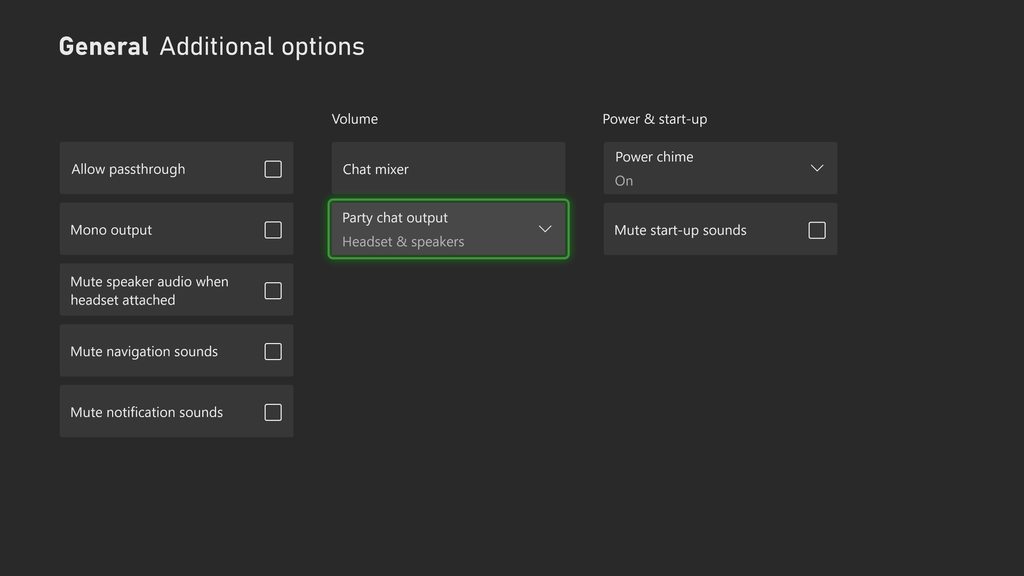 past basin
tall flower
past basin
tall flower
Do you get the same warble on the audio in 4K Capture Utility? If not, (or if you can't test that), try muting the card in OBS and add it again as an Audio Input Capture. It can get stuck in the wrong sample rate with OBS at times when pulled through the video it seems, which can cause odd effects like delay or sample rate
tall flower
past basin
Do you get the same warble on the audio in 4K Capture Utility? If not, (or if y...
Yes I get the exact same distortion thing in 4K Capture Utility.
In fact I first discovered it like that.
At some point I was wondering if it wasn't just a cable issue?...
Wait, now that I think about it, when I use 4K Capture Utility, on the top right corner where the 1080p resolution is, there's always a red HDCP mark that is displayed and I don't know why?
past basin
tall flower
Wait, now that I think about it, when I use 4K Capture Utility, on the top right...
Huh. Is HDCP turned off in the PS5 video settings?
faint spoke
past basin
No, there's a voice isolation mode that can get turned on, on the mac, which can...
ok and how to activate this
 shrewd magnet
How good is the 4K Capture Card? What are the pros and cons?
past basin
shrewd magnet
How good is the 4K Capture Card? What are the pros and cons?
Which one? 4K Pro, the PCIe one, 4K X, the USB 3.2 Gen 2 one, or one of the olders ones like 4K60 Pro Mk2?
past basin
faint spoke
ok and how to activate this
mic icon on the mac menu bar
past basin
tall flower
Hence my confusion of seeing it in Capture Utility.
It's been a day - if you go to the settings in 4K Capture Utility, under the device tab, are there any firmware updates for your capture card? I can't recall if we checked
shrewd magnet
past basin
Which one? 4K Pro, the PCIe one, 4K X, the USB 3.2 Gen 2 one, or one of the old...
The 4K60 Pro MK.2
And also the 8K60 passthrough one
past basin
Keep in mind that card is an older version of the 4K Pro, and is no longer made. It's been end of life since last May. Still a solid card though. Biggest thing that trips people up with that and with 4K Pro, is that you need a x4 PCIe slot or better- and modern motherboards sometimes have slots that are physcially larger than what they're wired for, or split off PCIe lanes for M.2 storage and the like. It's suggested to check your manual to check how many PCIe lanes you have available in empty slots. 4K Pro has the same hiccup.
As for pros and cons, in comparison to what? Is there something specific you're looking for?
shrewd magnet
past basin
Keep in mind that card is an older version of the 4K Pro, and is no longer made....
How's the 4K PRO 8K60 Passthrough, 4K60 Capture? Is it still made? I'm trying to find an internal video capture for my new pc that I'm building.
past basin
shrewd magnet
How's the 4K PRO 8K60 Passthrough, 4K60 Capture? Is it still made? I'm trying to...
What do you mean by "How is it" though? Are you looking for resolutions support? Formats? Features? For most of that you're best off just hitting elgato.com and looking up the card. For video examples I'd check Youtube reviews and comparistons so you can actually SEE what it looks like. Also yes 4K Pro is still made, it only replaced 4K60 Pro Mk2 last February.
4K Pro is the flagship Elgato card at the moment though, along with the USB 4K X for external card users.
tall flower
past basin
It's been a day - if you go to the settings in 4K Capture Utility, under the dev...
You mean this? If so it seems to have installed every latest updates.
I couldn't really find something similar in the Device tab.
 past basin
Check for an update firmware button like this

Or that your HD60 S+ is on this version
 tall flower
Yep it's on the second version.
I don't have the two additional checkboxes like on the first screenshot.
past basin
That's fine they're normally hidden
I just had my 4K X up first and used the option to force the settings to show to show the update button
tall flower
Oh so it's hidden settings.
past basin
That said, I'm running out of ideas for what's on the go with your HD60 S+ - I'm going to suggest trying to change the USB Transfer mode next.
Hold CTRL whle you open settings

Try changing the USB transfer mode - try each and see if either works better
It's normal for it to disconnect a few moments when you try this
tall flower
Okay so I don't need to try and update the firmware?
past basin
If you have the same firmware version mine has there won't be an upate
tall flower
Oh yeah good point.
Alright, in any case thank you for your advices, I'll try all this out tomorrow. If you're still there by then maybe I could show you the results.
past basin
Yeah, I'm in and out through the day like most of the volunteers but I'll keep an eye out.
#official-tech-support may have an idea too - though HD60 S+ is considered End of Life so support for it is limited
tall flower
Noted! Thanks for the information.
 turbid bolt
I have a doubt about hdcp
I was told that to see the ps5 screen on the capture card needs to disable the hdcp
But a person was able to record the ps5 configuration screen with the capture card even the hdcp already came enable in the ps5 settings
warped ledge
turbid bolt
But a person was able to record the ps5 configuration screen with the capture ca...
they are more than likely using a splitter, and if they are doing things regarding piracy, they will get shut down at some point. it's not advisable.
turbid bolt
What do you mean by thign regarding piracy?
warped ledge
turbid bolt
What do you mean by thign regarding piracy?
it's a typo.
turbid bolt
Typo? Sorry i didn't understand what you meant
warped ledge
turbid bolt
Typo? Sorry i didn't understand what you meant
please read it, after the typo has been fixed.
 grave timber
warped ledge
4K X , or HD60 X can do this so long as your iPad meets the specs. Unless you’re...
grave timber
warped ledge
4K X , or HD60 X can do this so long as your iPad meets the specs. Unless you’re...
So i can use hd60 X 🤔
Thanx for helping me
warped ledge
grave timber
So i can use hd60 X 🤔
Thanx for helping me
as long as your ipad meets the specs
warped ledge
turbid bolt
This is the typo that you are talking about?
no i meant the one you replied too. i updated my original statment.
turbid bolt
Thanks for the help! For explaning for me that they used a splitter
warped ledge
turbid bolt
Thanks for the help! For explaning for me that they used a splitter
Yeah, more than likely.
grave timber
warped ledge
as long as your ipad meets the specs
I have ipad pro 11
It's good isn't it?
faint spoke
past basin
mic icon on the mac menu bar
I don't have mic icon menu bar
willow tendon
If some games are at 30 fps but I have my elgato set to 60 fps in OBS, will there be any negative impacts on the preview?
lone crypt
willow tendon
If some games are at 30 fps but I have my elgato set to 60 fps in OBS, will ther...
Should be fine, it will just capture at a higher rate so the image will be the same for each pair of frames.
willow tendon
lone crypt
Should be fine, it will just capture at a higher rate so the image will be the s...
awesome ty
past basin
faint spoke
I don't have mic icon menu bar
Check that your macOS settings for privacy aren't blocking mic access. From what I know that icon should be there whenever you're using the capture card since the audio shows up as a mic or audio interface.
lone crypt
Yup: What shows up when you’re using video capture or mic is a purple or orange icon, respectively. Thats where you can see settings like if it’s trying to do voice isolation on the mic or video effects.
It’s very obvious because they are colored differently than the rest of the menu bar.
If you don’t see these colors, then your privacy settings must be blocking it.
tall flower
tall flower
Alright, in any case thank you for your advices, I'll try all this out tomorrow....
Okay so I went and tried changing the USB transfer mode to see if it would work better, but unfortunately, Bulk didn't change anything and Isochronous straight up doesn't work...
 merry kindle
Got an HD60 X, went to plug it in as USB-C to USB-C in my computer, the 4k Utility recognized the card, but said to retry with a USB 3.0, so I got a USB-C to USB 3.0 and its still blinking red but now the capture program doesnt recognize the card
past basin
merry kindle
Got an HD60 X, went to plug it in as USB-C to USB-C in my computer, the 4k Utili...
Did you make sure the USB-C to USB-C cable was rated for USB 3.0 speed? It requires a USB 3.0 cable to operate correctly (aka SuperSpeed or 5 Gbps+)
past basin
tall flower
Okay so I went and tried changing the USB transfer mode to see if it would work ...
Yeah,, I wasn't giving terribly high odds on that. Make sure you've restarted the app and all when switching it. But at this point #official-tech-support might be the best bet. Unless there's additional audio software installed on the computer I'm unsure why it's not playing nice with the audio and giving you that warble.
Only other thing I can think of would be different USB ports, which I think you already tried, as some ASMedia USB controllers can do weird things to audio in some situations
merry kindle
Yeah im using a mohpie USB C that works for 3.0
if i have a incorrect USB-C, can you point me to one i should order?
past basin
Any 5 Gbps or faster one should work in theory (though sometimes you might get a dud or mislabeled one)
If you want an OEM one though you can get them from https://www.elgato.com/spare-parts - the USB 3.0 C to C cable for Facecam Pro will work with HD60 X
tall flower
past basin
Yeah,, I wasn't giving terribly high odds on that. Make sure you've restarted t...
Damn, so I'm really done for...
I tried different USB ports, on the front and on the back of the case, but again, no luck.
past basin
tall flower
Damn, so I'm really done for...
Someone else might have some ideas- you could try the card on a friends PC maybe which may rule out the card. But I can't replicate this with my own HD60 S+ at the moment and am a bit out of ideas.
At a guess it still sounds like some sort of USB interference, maybe from something else on the same controller, but I can't be certain without another host device to test it with
tall flower
I really struggle to understand why is this even happening...
tall flower
past basin
Someone else might have some ideas- you could try the card on a friends PC maybe...
Could it be that I'm using a headset on the PC atm?
past basin
Unlikely if it was just a playback issue it shouldn't show up in recordings
tall flower
Or that I'm maybe using a wrong HDMI cable?
past basin
HDMI cable issues would genereally give you video issues before audio, htough it's technically possible I don't think it's likely here
The fact it has the same issue on the PS4 now implies something changed on the PC or card. There's not really much to change on the card, but I've no idea what could have changed on PC if windows audio enhancements are already off (as Windows updates can mess with those), unless there's other audio software installed
I have seen weird cases where even using a different USB cable could affect things like this though
But without having spare gear to test with I'd probably check if official support can identify the issue thoguh the logs or something
tall flower
Well I did change my PC since the last time I worked with the capture card (went from laptop to desktop), I'll give the other one a try.
tall flower
Okay so now I'm testing it with the laptop but I got no sound in Capture Utility?...
Except in the mic...? What?
past basin
tall flower
Okay so now I'm testing it with the laptop but I got no sound in Capture Utility...
Check that it's not muted in Windows (press windows key + R type mmsys.cpl and press ok - go to recording tab, find he capture card, check the properties and make sure it's not turned down or muted on the levels tab. Also you might want to turn off the option that allows app to take exclusive control on the advanced tab)
tall flower
Just checked and well it's not muted or anything but the audio only comes in the mic channel like here...
 past basin
The mic channel is going to use a different device - the mic tab in settings
If there's no audio at all and you removed the option for exclusive control, reboot to make sure it took effect.
There are potential issues where an app will lock it out and still not let it go till the reboot
tall flower
Okay so I don't know why but now I got the sound from the console directly in my PC without even being in Capture Utility.
What the hell is going on with my capture card...
past basin
Did you ever enable the option to "listen to" the card?
Otherwise that sounds like there is another app running somewhere that's doing the audio capture
tall flower
past basin
Did you ever enable the option to "listen to" the card?
Yes.
Should I disable it?
past basin
THat would be why you're hearing the audio without the utility being open
so if you want that to stop, yes
past basin
If that's been on the whole time on the main PC, yeah, that's a good thing to test. It could have been getting both audio feeds with a slight offset
tall flower
I'm currently using the card with my laptop thought, the main PC (desktop) didn't have that problem.
past basin
Right. Sorry just checking in between work stuff today.
tall flower
Well now I have no audio during recordings again...
tall flower
past basin
Right. Sorry just checking in between work stuff today.
It's alright, at least you're taking the time to try and give answers to my problems.
past basin
Off top of my head I'm not sure why 4K Capture Utility woudln't be getting audio from the HD60 S+ with the exclusive controls off. 😐
It should be pulling right from the card's audio interface
Maybe resinstall the app or upgrade it to the latest version?
tall flower
Done 🥲 .
Although I think I found something.
By creating a new audio capture source on OBS, I'm able to record with the sound!
Oh my god it seems to work
Like the sound is way better than on the desktop.
Finally
past basin
I hadn't realized you had OBS on that one too.
So it sounds okay on the laptop and not the desktop in the end?
 dull pawn
hello guys, Elgato Game Capture HD60 X 4K HDR Passthrough this records in 4k?
past basin
It can only record in 4K at 30fps (though it can pass through 4K60)
past basin
HD60 S+ has 4K30 support as well.
Though it shouldn't be going blurry. Is that in the preview or just the recording? If you're switching to 4K for recording don't forget to turn up the bitrate
dull pawn
ill show you my specs
cant print screen with obs open
i have 24000 bit rate
nvidia nvenc hevc
cbr
fotogram interval 0s
p5
high quality
2 passages
main
B fotograms = 2
past basin
Shouldn't be too bad for 4K, little low but not bad. How blurry are you seeing? And is the preview screen still clear?
dull pawn
 dull pawn
past basin
Shouldn't be too bad for 4K, little low but not bad. How blurry are you seeing?...
dull pawn
past basin
Shouldn't be too bad for 4K, little low but not bad. How blurry are you seeing?...
the preview is fine, but the recording that i export, is blurry
im recording ghost of tsushima, and when the chracter run, rolls, kill someone, becomes very blurry
past basin
As the card only does 30fps in 4K, you can try changing your main OBS video settings to 30 too, that may improve the quality without needing to change the bitrate
Ah, motion blur. Yeah, drop OBS to 30 fps first - that may help since the card is only giving you 30 fps in 4K anyway

Right now it's basically wasting bitrate duplicating frames
past basin
That's fine
I was just showing where the setting was
I'd run a test recording there now and see how it looks
You might still have to up the bitrate a bit more to deal with the motion blur
past basin
try 35,000
past basin
Yeah. Motion uses a lot more bitrate than a static scene. 4K motion uses an absolute bucketload to keep it smooth
Since there's like 4x as much data per frame compared to 1080p
past basin
uh depends on the encoder. It can get pretty high with most Nvidia ones. But keep in mind more bitrate means bigger files too
from 35, if still blurry maybe try 50, 60, 80 in steps to see when you hit the point it's smooth enough for you
If you have a 4000 (or 5000) series card you could also try AV1 encoding
Which is even more effecient than HEVC
dull pawn
I have a 3070
past basin
Yeah, HEVC is the one to stick with then
You could try CQP instead of CBR with a 3070 though, if it's only for recording. It'll target a specific level of quality, and adjust bitrate as needed, in the simplest way of describing it
Where the CQP value it figures out with it's algorithm is what it treats as quailty
dull pawn
past basin
You could try CQP instead of CBR with a 3070 though, if it's only for recording....
i want to stream and record at the same time in the future, but for now, only recording
past basin
dull pawn
i want to stream and record at the same time in the future, but for now, only re...
You'd probably setup different settings for recording and streaming then. Streaming is generally going to want H.264 unless you're using YouTube. Though it'll also want 1080p generally, unless you're going YouTube. (and if you are going Youtube the have recommendations here https://support.google.com/youtube/answer/2853702?hl=en - you don't have much room to work with as you do for recording though)
Choose a quality that will result in a reliable stream based on your internet connection. Read this article to learn how.
past basin
Yeah, that high you are probably stressing the encoder
Also the files would be HUGE
(though at 4K they're going to be large regardless, at that point it's going to be unreasonable huge)
past basin
This is an encocding issue most likely, not the card
It is possible you might get better performance if you go with a card that supports 4K60 since you can up the framerate
But it's hard to say for certain without testing it
 past basin
You could also try changing the setting from P5 to P7 which may help a bit
H.264 would probably blur more
HEVC is basically H.265, so it's somewhat newer and more efficience (hence the name High Efficiency Video Code, or HEVC). If you're using Twitch though, it'll want H.264.
for recording go with HEVC
For YouTube, you could use either.
dull pawn
i changed to p7
it helped
but still not perfect...
i guess a new capture card would be better
how do i have a certainty before buying it?
past basin
If it looks fine in the preview, it's an encoding issue
If the preview is blurry too, maybe the card would help since you could get 4K60 out of it instead of 4K30
dull pawn
the preview is perfect
past basin
Yeah, likely a technical limit on the encoding then
You could try X264 software encoding if you have a very strong CPU so you can play with the settings some more. On most systems the NVidia hardware encoder is better performing though, since software encoding uses a LOT of CPU resources.
 winged lily
Hello, someone can help me with No audio on hd60+?
past basin
winged lily
Hello, someone can help me with No audio on hd60+?
What are you trying to record? Console?
winged lily
past basin
What are you trying to record? Console?
Dual PC man..
dull pawn
past basin
You could try X264 software encoding if you have a very strong CPU so you can pl...
omg, x264 is pixelated xD
past basin
winged lily
Dual PC man..
How are you handling audio on the gaming PC? Are you trying to send it all to the streaming PC, or do you have something hooked up to listen at the gaming PC?
past basin
dull pawn
omg, x264 is pixelated xD
Yeah, you've have to tweak a lot of settings there and I'm not sure how well it'll handle 4K video - it's pretty CPU intense so might not go all the way up as high as the NVENC options
winged lily
past basin
How are you handling audio on the gaming PC? Are you trying to send it all to t...
waiting for the mixer, I'm sending everything to the streaming PC... only with HDMI cable -> USB 3.0 in the streaming PC, is it possible?
past basin
Yes, should be possible.
dull pawn
so, what can i do to better the coder?
past basin
dull pawn
so, what can i do to better the coder?
Honestly not terriblly much. a 3070 has a 6th generation NVENC encoder, they're pretty solid as it is. The newer GPUs have newer encoders, and AV1 encoding might help you , but that's a pretty expensive fix.
You might want to check the OBS discord too - they might have some better ideas on how to tune the encoding for you
I don't work with 4K very often
winged lily
past basin
Yes, should be possible.
I'm trying both with capture 4k and with streamlabs... following some paths, on windows I think I've set everything up well, but I can't play any audio
dull pawn
past basin
Honestly not terriblly much. a 3070 has a 6th generation NVENC encoder, they're...
thank you very much
past basin
winged lily
I'm trying both with capture 4k and with streamlabs... following some paths, on ...
Gaming PC is already set to use the HDMI out as the default audio? Check in Windows Sound Settings then that the card isn't muted. Press windows key + R, type mmsys.cpl and press ok. Find the recording tab, find the card, and check the properties. Make sure it's not turned down or muted on the Levels tab.
you may also want to go to the advanved tab and remove the option that allows applications to take exclusive control of the card, in case something else is using it. If you see any mention of windows audio enhancements in here, turn them off.
past basin
dull pawn
thank you very much
No problem, wish I could be a bit clearer on tuning for 4K video, but sounds like you're on the right track, and hopefully the OBS volunteers have some more dieas
At least we know the card should be fine if the preview is fine
past basin
It shouldn't really, no. Though note that if you record in MP4 and don't just convert later, if the recording gets interrupted, (eg crash) you lose it all. I'd generaelly stick with MKV, or fragmented MP4 so you'd at least keep most of it
dull pawn
thank you very much
warped ledge
Use the Nivida Settings. Change it to P5/P6 and you’re good. https://www.nvidia.com/en-us/geforce/guides/broadcasting-guide/

Configure OBS to get the most quality out of your stream.
turbid bolt
i know this may not be the correct chat to talk about this, but content creators that work with games means that gamers content creators receive a capture card?
sorry about the question
warped ledge
turbid bolt
sorry about the question
No, that’s something through a sponsor or partner depending on a contract. Most of use buy it.
turbid bolt
oh
turbid bolt
@warped ledge when the partnership program will start again?
past basin
They don't usually announce that in advance. They only closed last month for the last round, so it'll probably be a while.
turbid bolt
so let me see if i understand, will take a while to the partnership program be open again?
warped ledge
turbid bolt
so let me see if i understand, will take a while to the partnership program be o...
we don't know, only Elgato knows. Best way to get out there is go to Twitch-con, and maybe the Mods can get you in contact with one of the Staff via #contact-moderators and they can pass it along. no guarantees though, but you can always shoot your shot when they do open, or run something on Social Media. Also if you're not following Miguel on X, please do so, cause sometimes he gives tips on what they are looking for, format wise, and maybe you see something from him and team too.
turbid bolt
what do you mean by with one?
warped ledge
turbid bolt
what do you mean by with one?
please read again, typo update.
turbid bolt
where the typo is? sorry i forget
warped ledge
turbid bolt
where the typo is? sorry i forget
please read my post once more. it should make sense now.
turbid bolt
ohhh, sorry it's because i have intellectual disability that makes me take a while to understand things that are very clear
warped ledge
turbid bolt
ohhh, sorry it's because i have intellectual disability that makes me take a whi...
no worries, if something doesn't make sense, I don't mind fixing it. just in case someone else has the same question. 🙂
turbid bolt
i thought that the typo update was another thing
I searched Miguel on X and i don't know what profile is
because appeared a lot of Miguel
turbid bolt
warped ledge
we don't know, only Elgato knows. Best way to get out there is go to Twitch-con,...
i wish i could go to Twitch Con, but i can't because i don't know how to show the id
and flights are expensive in my country
warped ledge
turbid bolt
because appeared a lot of Miguel
might want to see who Elgato follows. If the Staff is ok with me post his info, I will.
warped ledge
turbid bolt
and flights are expensive in my country
depending on where you're at, maybe there is one near by. as for the ID thing, I'm sure they can help you out.
turbid bolt
warped ledge
might want to see who Elgato follows. If the Staff is ok with me post his info, ...
follows on X
warped ledge
turbid bolt
follows on X
yes
turbid bolt
warped ledge
depending on where you're at, maybe there is one near by. as for the ID thing, I...
My city don't have a id thing, because is not a city very know to events and stuff
warped ledge
turbid bolt
My city don't have a id thing, because is not a city very know to events and stu...
there could be a major one near by.
turbid bolt
if i need to see the id thing i need to move to rotterdam ou san diego because the twitchcon happens there
warped ledge
turbid bolt
if i need to see the id thing i need to move to rotterdam ou san diego because t...
typically it does.
well, I'm out gonna unwind before a stream. best of luck!
warped ledge
turbid bolt
i hope that staff enter in contact with me and i can get a elgato hd60s
it doesn't work like that, but here's an idea... write down your pitch, maybe make a video, and hope for the best.
turbid bolt
all right
warped ledge
turbid bolt
all right
good luck!
turbid bolt
i honestly don't like asking for corporations give me their products, but if i make a video i hope that works
warped ledge
turbid bolt
i honestly don't like asking for corporations give me their products, but if i m...
never know, but thisis Miguel's info. https://x.com/MLozada
@Elgato & @Corsair Partnerships ❤️ @1uzenda 👶🏻 @Teamolliesworld 🚘 @teslazada |🇵🇷Puerto Rican | Navy Vet | Other Socials Links & Email in Pin Tweet Below
 X
turbid bolt
X
turbid bolt
Thanks
 buoyant monolith
Hello, I just got my elgato hd60x and I’m trying to stream off my ps5 to my pc and when I try to change my hdmi output to my ps5 the screen goes black and the signal on the 4k capture utility goes out then it comes back in but my monitor goes back to my desktop, I have HDCP off and all of my settings in the screen and video section are off. Could anybody help me is it my monitor because I have a scepter monitor but I’m getting a different one soon just not sure what to get?
warped ledge
buoyant monolith
Hello, I just got my elgato hd60x and I’m trying to stream off my ps5 to my pc a...
can you post pics of your setup and configuration please.
 gleaming ravine
I just got a Game Capture Neo. I hooked it up and I'm getting passthrough no problem, but OBS and the 4K Capture Utility isn't able to get a signal. My laptop doesn't have any native 3.0 ports, but I tried a USB-C to USB-C connection as well as hooking it to a 3.0 port on a USB-C Dock. The website says that C to C should work.
dull pawn
warped ledge
Use the Nivida Settings. Change it to P5/P6 and you’re good. https://www.nvidia....
Muito obrigado vic 🙂
past basin
gleaming ravine
I just got a Game Capture Neo. I hooked it up and I'm getting passthrough no pro...
C to C will work as long as the speed is correct. Is it a USB 3.0 or faster USB-C port? You may have to check the manual for the laptop to confirm - though most USB-C ports are 3.0 or faster on a computer, not all are.
winged lily
Hello, someone can help me with elgato 60+?
 dusk wave
hey im having trouble with hd60 s+ it was working perfectly last week i go to stream yesterday and it says this. could someone help? (have been using same cord)

 latent solstice
I didnt think this through. I have a new case (HAVN HS 420gpu) that comes with its own vgpu mount. The thing is i didnt think about the mount at all. Not only can i not plug in my 4k60 pro into my pcie slot on my mb...i forgot that i would also have to mount the capture card vertically as well which isnt event possible. I like to share my ps5 and switch gameplay on discord so to my knowledge i cant just plug those other systems straight into a monitor as i would have no audio and no way to share that screen on discord. what can be done?
 carmine surge
Hey All, I am trying to figure out how to use the Elgato Stream Deck Pedal as a Push-To-Talk in the game Delta Force. I have tried everything from my knowledge. I have tried the default Hotkey and also Super Macro's Sticky Keystroke and Keystroke PTT but I cant seem to figure it out in Delta Force. Would anyone be able to help me out?
gleaming ravine
past basin
C to C will work as long as the speed is correct. Is it a USB 3.0 or faster USB...
• USB-C connector × 2
– Power input up to 20 V and 5 A
– Power output up to 5 V and 3 A
– USB data transfer rate up to 10 Gbps for USB 3.2 Gen 2
– DisplayPort 1.4. Supports maximum output resolution of 5120 × 3200, at 60 Hz frame
rate and color depth of 24 bpp (bits per pixel).
lone crypt
dusk wave
hey im having trouble with hd60 s+ it was working perfectly last week i go to st...
Did you do what it says? Reseat the connectors.
Cable can break over time, especially if they have tight bends. Of reconnecting it works it might be usb selective suspend, or fast boot causing the usb ports to turn off or revert to a slower speed.
lone crypt
latent solstice
I didnt think this through. I have a new case (HAVN HS 420gpu) that comes with i...
If you don’t have room for a pcie capture card get a USB capture card.
lone crypt
carmine surge
Hey All, I am trying to figure out how to use the Elgato Stream Deck Pedal as a ...
dusk wave
lone crypt
Did you do what it says? Reseat the connectors.
Cable can break over time, espe...
yes i have done what it says
 lyric tartan
hi
carmine surge
lone crypt
<#1080643347070320700>
@lone crypt are you saying I need to move the conversation to that thread?
dusk wave
lone crypt
Did you do what it says? Reseat the connectors.
Cable can break over time, espe...
still doesn;t work
 delicate skiff
why would elgato show up as multimedia and be a removable device as in safe to eject
 past basin
delicate skiff
why would elgato show up as multimedia and be a removable device as in safe to e...
past basin
delicate skiff
why would elgato show up as multimedia and be a removable device as in safe to e...
Because the sound interface for the card to capture audio is a multimedia interface.
gleaming ravine
gleaming ravine
> • USB-C connector × 2
> – Power input up to 20 V and 5 A
> – Power output up t...
That should work, right?
delicate skiff
past basin
Because the sound interface for the card to capture audio is a multimedia interf...
I have never seen it before on my computer so why is this showing up now
 vocal kestrel
Hello guys Im a console player. Im currently looking for ways to improve my audio quality with the elgato hd60s does anyone have any tips?
past basin
delicate skiff
I have never seen it before on my computer so why is this showing up now
Best guess, windows updates changed something on you.
past basin
vocal kestrel
Hello guys Im a console player. Im currently looking for ways to improve my audi...
That depends a lot on what audio problem you're having that you need to fix? what sort of quality issues are you having?
past basin
Using the stream port from the a40 to the line in on the HD60 S? Make sure you don't have spatial sound or 5.1 or something on - HD60 S is a stereo card. It should genreally hear anything the mix amp does though
 bitter fulcrum
I just bought a the neo capture card but when I load into a game on my xbox one it is VERY dark. home screen is fine, but in game its like someone turned a light off. I have not done anything to the settings. Could anyone help?
warped ledge
bitter fulcrum
I just bought a the neo capture card but when I load into a game on my xbox one ...
what app are you using to capture?
bitter fulcrum
warped ledge
what app are you using to capture?
I ended up calling elgato and got it situated. Had to do with some HDR setting automatically getting applied when it shouldnt have.
 heady gyro
@warped ledge hello
anyone here? Just wanted to ask if OBS for capturing clips on a PC is worth it, i originally bought it for my PS
vocal kestrel
past basin
Using the stream port from the a40 to the line in on the HD60 S? Make sure you ...
Should’ve mentioned this at the beginning Im currently using a40 with mix amp & a hdmi audio splitter for optical audio. when it comes to my mix amp I play with the star symbol on because the game that I play does not support surround sound. When it comes to setting this up should I get rid of the hdmi splitter & utilize the capture card or should I use both
warped ledge
heady gyro
anyone here? Just wanted to ask if OBS for capturing clips on a PC is worth it, ...
it can be depending on the moment you've captured. Even Twitch can do this, and allow formatting for vertical.
heady gyro
warped ledge
it can be depending on the moment you've captured. Even Twitch can do this, and ...
I'm sorry Vic I legit typed what I was thinking. I have an el gato, should I be clipping with that over OBS even if I have a PC?
warped ledge
heady gyro
I'm sorry Vic I legit typed what I was thinking. I have an el gato, should I be ...
maybe I'm isunderstanding clipping, do you mean to create a gameplay clip or something else?
heady gyro
yeah like to clip while gaming
is it worth it to use ElGato for PC over OBS for clipping?
warped ledge
heady gyro
is it worth it to use ElGato for PC over OBS for clipping?
yeah, I mean record the gameplay, and then make clips of the moents you want. a free editor is DaVinci Resolve.
heady gyro
warped ledge
yeah, I mean record the gameplay, and then make clips of the moents you want. a ...
Thank you, is there any difference in recording with ElGato devices over OBS on PC
warped ledge
heady gyro
Thank you, is there any difference in recording with ElGato devices over OBS on ...
not really, but what GPU do you have?
heady gyro
erm, i have a 4070 TI Super
warped ledge
heady gyro
erm, i have a 4070 TI Super
for recording follow this guide https://www.nvidia.com/en-us/geforce/guides/broadcasting-guide/
Configure OBS to get the most quality out of your stream.
heady gyro
tysm vic for your patience @warped ledge
warped ledge
heady gyro
tysm vic for your patience <@476160810457235466>
you're welcome, and no worries, I'm always happy to help.
heady gyro
Do you reccomend i sell my Elgato device since my PC can handle the recording etc? i just would hate for it to sit here with no use. I'm sure someone could use it, if i did not need it. @warped ledge
I have the newer one
warped ledge
heady gyro
Do you reccomend i sell my Elgato device since my PC can handle the recording et...
well, are you running a dual PC setup, or a single pc and capturing console?
heady gyro
I have a single PC Set up, i do also have another PC, but i am newer in the dual PC set up space.
I don't even have the El Gato set up because i've been using OBS
warped ledge
heady gyro
I have a single PC Set up, i do also have another PC, but i am newer in the dual...
the capture card can come in very handy for a dual, and you have 1 dedicated streaming/recoridng pc and 1 gaming. less taxing on the gpu.
heady gyro
So it is possible to capture the contents on my main PC from my 2nd (streaming) pc? 😮 wowww how would that work
warped ledge
heady gyro
So it is possible to capture the contents on my main PC from my 2nd (streaming) ...
thisis pretty much the same for most cards, but the software part for audio, if you have wave link use that, if not sound capture. https://help.elgato.com/hc/en-us/articles/360049800232-PC-Game-Recording-with-Elgato-Game-Capture-4K60-Pro-MK-2-Setup
Sound Capture is installed with the Legacy software https://help.elgato.com/hc/en-us/articles/360027964072-Elgato-Game-Capture-HD-Software-Release-Notes-Windows
 heady gyro
thank a bunch @warped ledge
warped ledge
heady gyro
thank a bunch <@476160810457235466>
you're welcome!
warped ledge
heady gyro
thank a bunch <@476160810457235466>
also if screen tearing is an issue chnage the EDID to Display or Internal.
warped ledge
heady gyro
thank a bunch <@476160810457235466>
one more thing if you're using wave link https://help.elgato.com/hc/en-us/articles/360045679072-Wave-Link-Dual-PC-Streaming-Send-Sound-to-a-Streaming-PC-from-the-Gaming-PC
Elgato
This guide will walk through how to send audio from a gaming PC to a streaming PC using Wave Link and a capture card in a dual PC streaming configuring.
Tip: This setup was simplified with the ...
hollow mason
Hello! im using the Elgato HD60 X and i am wondering if anyone knows how to get my audio from the gaming PC (Mic - Discord - Game - Etc.) to my streaming PC? i am not getting any audio from the gaming pc to the 4K capture utility or streamlabs on the streaming pc. Any help is greatly appreciated! thanks!
 patent talon
I am using the HD60s+ and its connected from my PS5 to my PC. I was using it no problem a few weeks ago but now I keep getting the flashing red lights on the card like the signal isn't working. I just treid connecting it to my Switch and that works on problem it seems to be just my PS5 thats the issue. Anyone have any ideas what could have happened?
 rain obsidian
Hello. My HD60S+ says theres a USB connection error.
It's weird cause it was working fine yesterday.
 faint bridge
i have the HD60S connected. When I dont have OBS open, I can see my game. As soon as I open my game screen goes black
past basin
hollow mason
Hello! im using the Elgato HD60 X and i am wondering if anyone knows how to get ...
Are you also listening onthe gaming PC? If so you'll need a mixer or some kind (software or hardware) to split the audio to go to two places at once. It'll need to have a copy split to HDMI for the capture card to pick it up.
past basin
patent talon
I am using the HD60s+ and its connected from my PS5 to my PC. I was using it no ...
Double check that HDCP is still off on the PS5. It's been known to occasionally get turned back on by updates. Beyond that start by disabling HDR, VRR, and 120Hz mode to see if any of those are causing issues, as HD60 S+ is an older card and doesn't support any of that except HDR (which only works in YUV420 mode so you'd have to turn down the 4K Data Transfer rate on the PS5)
past basin
rain obsidian
Hello. My HD60S+ says theres a USB connection error.
Make sure you plugged it in the right port - It needs a USB 3.0 port (and cable) to work. Disconnect and reconnect, make sure the cable you're using is also rated for 5Gbps or faster in case you accidentally mixed it up.
past basin
faint bridge
i have the HD60S connected. When I dont have OBS open, I can see my game. As s...
Does it do the same thing if you use it with 4K Capture Utility instead? That sort of issue is usually an EDID problem when the capture card kicks in through. HD60 S is an older card and doesn't have adjustable EDIDs so your best bet is disabling HDR, 120Hz mode and VRR on your console. Possibly set it to 1080p manually as well - you didn't mention what you're capturing with it.
winged lily
Hello , I have a problem with the HD60+, the audio transmitted from the gaming PC to the streaming one is perfect, but I can't listen to the one from the gaming PC..
lone crypt
winged lily
Hello , I have a problem with the HD60+, the audio transmitted from the gaming P...
Tell us about how you’re hooked up and what you’ve done to get the sound to the capture card.
winged lily
lone crypt
Tell us about how you’re hooked up and what you’ve done to get the sound to the ...
I simply connected via HDMI, giving the output for the Elgato as the output from the gaming PC... so you can hear it in that streaming, but how can I hear the gaming PC when I play?
lone crypt
winged lily
I simply connected via HDMI, giving the output for the Elgato as the output from...
Ah, right so you’ve just directed the sound to be sent to the capture card.
Instead, direct the game computer to send sound to your speakers or headphones that you want to listen on.
Then in the sound devices control panel, open the properties of the device you selected, and on the listen tab, set “listen to this device on” and set the capture card as the destination.
This copies the sound from your speakers to the capture card so it’s heard in both places.
There will be some latency now so you will want to measure and compensate for that with OBS audio sync offset in the advanced audio properties panel.
lone crypt
That’s the way to do it without some kind of mixer like wave link.
winged lily
lone crypt
That’s the way to do it without some kind of mixer like wave link.
I have one mixer, maono g1 neo..i can try
lone crypt
winged lily
I have one mixer, maono g1 neo..i can try
If you’re just capturing game audio there’s probably no need to mess with any mixer.
But if you want to combine anything else into the audio being sent to the capture card, a mixer is the only good way to control the levels.
rain obsidian
past basin
Make sure you plugged it in the right port - It needs a USB 3.0 port (and cable)...
Interesting. It’s worked a few days ago with this pc. I just stream o. PS5 and switch.
Also it’s the cord that came with the HD60S+
lone crypt
rain obsidian
Also it’s the cord that came with the HD60S+
The usb port could have been changed by the system. Unplugging and replugging will usually resolve that if it’s the case. Look up usb selective suspend as a possible cause, or fast boot as another possibility.
Or if another device was added to a usb port that is shared with this one, it could now be starved for power.
rain obsidian
lone crypt
The usb port could have been changed by the system. Unplugging and replugging wi...
I don't know how to do any of that.
lone crypt
Google your friend.
rain obsidian
lone crypt
Google your friend.
I don’t know what to google for this thing
lone crypt
Check if unplugging and replugging the usb fixes it.
And check if removing other usb devices fixes it.
If it does. Google usb selective suspend to learn how to disable it. And google fast boot to learn how to disable it.
rain obsidian
lone crypt
Check if unplugging and replugging the usb fixes it.
And check if removing othe...
I mean I’ve been unplugging it and replugging it
I have no clue how to get to this power options menu
past basin
rain obsidian
Interesting. It’s worked a few days ago with this pc. I just stream o. PS5 and s...
Try using USB Tree Veiwer to confirm what's wrong (https://www.uwe-sieber.de/usbtreeview_e.html ). It'll give you a summary section like this where you'll have three speeds. That'll help narrow down the issue. They all need to be SuperSpeed or faster. Device should always be SuperSpeed. Port may also refer to a superspeed companion port - if it is Hi Speed and doesn't mention a companion port there's an issue with the PC port. Usual culprit is connection which indicates a cable problem, dirty connection, or things are passing through some sort of hub or adapter that are slowing things down
 rain obsidian
This is what I see
 past basin
rain obsidian
This is what I see
past basin
rain obsidian
This is what I see
Expand that list in the top - odds are your card is under that. The first USB Root Hub isn't showing what's connecte to it
rain obsidian
 past basin
rain obsidian
past basin
rain obsidian
The capture card is supposed to be connected right now, correct? Does it show up anywhere else, like under the USB 2.0 hub or anything? If not I'd assume you've got a cable failure. They don't last forever, especially if they're bent more moved a lot (or sometimes stored with really sharp bends in them). It's possible for a cable to fail in a way that it still gives power but not a data link.
I'd swap out that cable with a replacement USB 3.0 (or faster) one - 5 Gbps+
Beyond that check the ports for dirt or damage.
rain obsidian
I did't realize it needed to be connected
past basin
ah. Yeah, we're trying to narrow down where the USB connection error is coming from
rain obsidian
Port 3 is connected to it
past basin
What shows up in the app after you connected the card?
rain obsidian
past basin
What shows up in the app after you connected the card?
Same as this but port 3 has the capture card next to it
past basin
When you click the card, what does the summary on the right say?
We
we're looking for the highlighted part like in my own image
rain obsidian
Port maximum Speed : High-Speed (Companion Port 2-24 is doing the SuperSpeed)
Device maximum Speed : SuperSpeed
Device Connection Speed : High-Speed
past basin
Yeah, that's a connection issue. Either you have a cable that's not the right speed or is starting to fail, or you're passing it through a hub or adapter or something.
Assuming you're connected right to the PC and not going through any kind of adapter or hub, check for signs of damage. Next step is to replace the cable. It has to be a USB 3.0 or faster cable (5 Gbps+)
rain obsidian
past basin
Assuming you're connected right to the PC and not going through any kind of adap...
Weird cause this is the cable that came with the capture card
past basin
rain obsidian
Weird cause this is the cable that came with the capture card
Yes, but as I said, they don't last forver. Especially if they get moved a lot, have sharp bends, etc. If the cable is in the early stages of failing you may see speed loss before things fail entirely.
Look for replacements with the same Blue insert you see on the USB-A end of that cable
Also check for dirt, corrorsion, etc in the ports as that can slow it down too
rain obsidian
Ok
hollow mason
okay so i know what to do for my sound now, so thanks for that, but im having another issue. i have a 2560 x 1440 resolution monitor with a 240 hz refresh rate. When i plug in my HD60x i cannot go past 144 hz on that monitor (for my gaming PC) and it says 1440p 144 not supported on the 4K Capture util on the streaming PC. once i go lower than 144hz it shows up, but i would like to have the 240 hz on my gaming PC. Everything seems to be up to date but idk what the issue is
i guess my question is, do i HAVE to play at 120hz? or is there a fix?
 haughty coral
Hello everyone, hope you're all doing good today.
I'm having a problem with my brand new HD60X capture card and the Wave Link software. When I route the game audio through to wavelink directly from my HD60X capture card, there is an audible delay. I have been testing this by playing the sound output through the capture card through one pair of speakers, and the sound of the Nintendo Switch audio i am capturing directly. There is a definite audio delay - and I was wondering how I would fix that?
past basin
hollow mason
okay so i know what to do for my sound now, so thanks for that, but im having an...
Use the cloned capture method. Plug the capture card into HDMI on the gaming PC, plug the monitor in as normal to the GPU as well. Then clone them in Windows on the gaming PC, and the GPU can sort out the different refresh rates. 120 or 240 would be preferred for 60 capture though to prevent risk of tearing.
past basin
haughty coral
Hello everyone, hope you're all doing good today.
I'm having a problem with my...
Delay compared to what - captured video, or video on a monitor in passthrough/HDMI Out?
haughty coral
past basin
Delay compared to what - captured video, or video on a monitor in passthrough/HD...
Delay compared to HDMI audio out to a monitor's built in speakers.
past basin
haughty coral
Delay compared to HDMI audio out to a monitor's built in speakers.
That's normal - there's slight delay on the card due to processing the HDMI video. The audio gets hit with the same delay. So something like 30ms usually.
Audio processing on the PC increases this - and if you monitor your audio on speakers that aren't connected to a Wave device (eg wireless headset, audio interface) you get additional latency in Wave Link on top of that from passing it back to Windows Audio (and if you're using an USB audio interface or wireless headset add another 20-30ms for transmission)
Generally best bet would be something like a wired headset and chat link to listen to the console live, or something similar with a mixamp
haughty coral
past basin
That's normal - there's slight delay on the card due to processing the HDMI vide...
I can understand that there exists some audio delay when processing through HDMI. However the audio delay is around a full second apart. Im using a pair of headphones plugged into my Wave 3 microphone which doesn't add delay. This means that the stream hears delay on audio compared to the gameplay they are seeing on the screen
Is there anything I can do to lessen this?
past basin
haughty coral
I can understand that there exists some audio delay when processing through HDMI...
A full second? Are you using OBS ot StreamLabs? If so mute the card and add it again as an Audio input capture
haughty coral
past basin
A full second? Are you using OBS ot StreamLabs? If so mute the card and add it...
I am usjng OBS, and yeah. I am using that method currently but I would like to use and manage all audio through wavelink, otherwise I have no way to listen to the audio.
past basin
haughty coral
I am usjng OBS, and yeah. I am using that method currently but I would like to u...
Oh right, not the Directshow issue since you're running it thorugh Wave Link. That's still excessive. Might be a better asking in #wave-audio - there's some delay but I'd expect at most like a tenth of a second, not anything near a full one from what I recall
haughty coral
Thank you, I have asked in there.
 chilly abyss
Hello, trying to set up my new capture card the 4k x
Streamlabs isn’t picking up any game audio whatsoever
Can I get some help please
past basin
What are you trying to capture with the card? console? second PC?
chilly abyss
Xbox series X
I’ve been trying for two hours watching a bunch of videos and nothing seems to work
past basin
Is there a headset attached to the Xbox?
past basin
The instant a headset is attached most consoles automatically mute HDMI audio.
Xbox has a partial workaround - you'll be able to cpature Game Audio and Xbox Party Chat, but not in game chats like proximity or lobby.
To do so you need to go into the Xbox sound settings and remove the option that mutes speakers when a headset is attached, and set the Party Chat option to Headset & Speakers.
chilly abyss
I’ve done that
past basin
Card is still in HDMI Audio mode in 4K Capture Utility?
past basin
In 4K Capture Utility, it'll be in settings, under the device tab
Okay next thing is make sure Windows didn't mute the card. Press Windows Key + R and type mmsys.cpl and press ok. Go to the recording tab, find the card, check the properties for it. On the levels tab make sure it's not muted or turned down.
chilly abyss
So I want it on HDMI audio correct
past basin
In this case yes
Analog uses the line in jack on the front of the card instead
So you'd use that if you had a chat link or something
chilly abyss
Okay so this is what I’m at
Recording in sound setting
I see elgato 4k x
It is set to default device
past basin
Doesn't need to be default. But when you click on it there's a properties button in the bottom right
chilly abyss
Okay clicked that
past basin
Check the levels tab, make sure it's turned up and not muted
chilly abyss
It’s turned up to 100
past basin
If you see any mention of audio enchancements turn those off
And the mute button isn't clicked?
chilly abyss
Correct
I just bought this thing and plugged it in
And it’s just not working
Like the video is coming u0
Up on Streamlabs
No audio tho
past basin
On the advanced tab turn off the option that allows applications to take exclusive control of the card.
Then reboot.
You may also need to check in Windows Privacy Settings under the mic section to make sure both apps and desktop apps are allowed mic access (as this can block other audio things too like the capture card's audio interface)
chilly abyss
Restarting PC rn
Am I able to just get in a call and screen share w u?
PC is restarted
past basin
Am back and forth on errands at the moment so I can't hop on a call
past basin
Okay, odds are there's just some other audio softwre somewhere that was hooking the card
chilly abyss
Beautiful thank you
Nope audio is lagging again @past basin
Audio is lagging on Streamlabs
Just cutting in for a millisecond and going out
past basin
Is the Xbox set to Stereo Uncompressed for the audio format?
chilly abyss
Yes
past basin
The speaker one specifically
past basin
Does the audio work if you try 4K Capture Uility instead? need to narrow down if this is just an app config issue or not
chilly abyss
It worked for a second then stopped
past basin
In both apps?
past basin
Go to Windows Settings, then System > Sound and find the capture card. Click the card, make sure if it mentions anything about Windows Audio Enhancements it's turned off
The fact it's working for a second implies configuration conflict of some kind
chilly abyss
past basin
Go to Windows Settings, then System > Sound and find the capture card. Click th...
Don’t know how to do this
chilly abyss
Did that
past basin
Mine doesn't list the audio enhancements but if you have any, turn them off

Sometimes third party apps including ones that came with the PC or your motherboard can includin audio software that installs enchancements. Noise cancellation ones in particular may be on which interfere with capturing game audio (especially ig you can still hear voices in a game)
past basin
Depends on how much delay you're seeing. If you're seeing greater than a second or drifting delay one of the first things to try is to mute the capture card and add the audio from it again as an audio input capture, as pulling the audio through the video feed sometimes has quirks in OBS
midnight lantern
Does anyone here have the hd60 x capture card and also a go xlr that could help me?
hollow mason
I’m using the Elgato 4k X, I am using a dual PC setup. My 4k capture utility is VERY stuttery, for some reason it is not smooth like my monitor. Is there a setting for this?
hollow mason
The USB C port on my streaming laptop doesn’t turn on my Elgato 4k X - if I get a USB C to USB A 3.1 adapter and plug it into the USB 3.1 port, would it work do you think?
past basin
hollow mason
The USB C port on my streaming laptop doesn’t turn on my Elgato 4k X - if I get ...
As long as the adapter is 10 Gbps to allow full speed for the 4K X that'll work fine. A USB-C to C cable works too
Is the stutter in your preview too or just the recordings? What resolution are you capturing and what are you capturing from?
hollow mason
past basin
Is the stutter in your preview too or just the recordings? What resolution are ...
It’s on my preview, and I believe im capturing at 1440 p 100hz. I’ve even lowered it but still consistently stutters 🤔
hollow mason
past basin
As long as the adapter is 10 Gbps to allow full speed for the 4K X that'll work ...
Also the USB C port on my streaming laptop won’t turn the Elgato on, that’s why I’m getting the adapter
past basin
hollow mason
Also the USB C port on my streaming laptop won’t turn the Elgato on, that’s why ...
Ah- that's unusual. Definitely worth a shot - does it at least power on with the same cable if you plug in into the gaminc PC to confirm the cable is good? But yes, adapter should be a fine workaround if that's the case, just make sure to get at least 5 Gbps speed, and preferably 10 to use all the features of 4K X. Good luck!
hollow mason
past basin
Ah- that's unusual. Definitely worth a shot - does it at least power on with th...
I haven’t tried that but definitely will!! Thanks so much, I’ve bought a 10gbps High data transfer adapter! If I have any issues I’ll come back! Thanks again!
 pseudo cipher
Hey I am in need of some help, I was trying to hookup my elgato so I could use it on OBS, while doing that I ran into some problems. I ended up talking to someone in the obs discord and he said it was a hardware or driver issue. I was trying to install an elgato driver on my computer and for whatever reason that just never worked? I am pretty new to this but that is the gist of it I believe, if anyone is willing to help that would be greatly appreciated!
To elaborate a little bit more I installed the driver and when I look for it to run it all I found was the installer thing and it just prompted me to reinstall it
lone crypt
pseudo cipher
Hey I am in need of some help, I was trying to hookup my elgato so I could use i...
What product are you using.
I believe only the pcie capture cards need a driver, but if that was needed, that’s all it is. Install a driver and then the card will work. Just add a video capture source to OBS.
past basin
pseudo cipher
Hey I am in need of some help, I was trying to hookup my elgato so I could use i...
I just dug up your thread over there. That's a Game Capture HD, it requires either the driver which they had you download or the app also called Game Capture HD - first thing to do here, since the card isn'tw orking in OSB is try the other app - this will tell you if it's hardware or software issues - you can grab it here https://help.elgato.com/hc/en-us/articles/360027964072-Elgato-Game-Capture-HD-Software-Release-Notes-Windows
I've notice OBS having issues with the older cards in the last version, so if that works try an older version of OBS like 29 or 30
 tidal crystal
Hello everyone. I'm using the HD60X and HD60S+ to connect to an iPad Pro M1, and there are irregular black screens (with a "no signal" prompt), and then it returns to normal after a few seconds. I'm wondering if anyone else has the same issue? And how can I solve it?
But my iPad Pro 2018 works perfectly fine.
 unkempt olive
Hello, I need help because I don't understand the problem, I have the Elgato 4K Pro, which is connected to my computer via PCIe except that I have a problem that I don't understand, when I turn on my playstation 5 and I change the output of my screen I see my PlayStation 5 menu clearly, when I launch the game Dying Light 2 I see the menu clearly however when I launch my game in campaign, I lose the HDMI signal on my screen even though I can see my game on the Elgato 4K Capture Utility app. Does anyone have a solution please, it’s really annoying ! The card worked fine before...
Ok I found the solution, my 120 hz mode obviously doesn't work however I have a 2k 165 hz screen I had to deactivate the option in the settings of the 120 hz playstation
past basin
unkempt olive
Ok I found the solution, my 120 hz mode obviously doesn't work however I have a ...
Try using 4K Capture Utility and set the EDID mode in the settings to Display to see if that clears it up. Aside from that you should also check the manual for the monitor to make sure it offers 120Hz over HDMI - it's pretty likely, but some have high refresh rate support only on DisplayPort.
 balmy matrix
Hey guys how do I enable HDR on the elgato 4K X capture card? I'm using the elgato 4k capture utility program but I don't see it there. I have a dual PC setup. So my gaming PC monitor won't turn on because the HDR is turned on windows 11.
past basin
It's in the settings under the recording tab, if you want to record in HDR
That said the card will pass it through if you're recording in HDR or not. If the monitor isn't turning on, and it supports HDR, try changing the EDID input mode in the settings under device to Display
Otherwise Windows 11 should auto revert the setup to SDR if the monitor doesn't support HDR - it actuaally checks for htat
 tranquil lynx
My HD60s has an audio delay when I'm on nintendo switch. anyone know how to fix it?
balmy matrix
past basin
Otherwise Windows 11 should auto revert the setup to SDR if the monitor doesn't ...
ok i'll try that
but i keep encountering another problem. On Obs my 4k x capture keeps freezing so when i'm watching something or doing something on my gaming PC audio cuts. I don't know why this keeps happening with the capture card.
 feral ocean
anyone able to help me? Im streaming cod from my ps5 to my pc through my elgato cap card but I cant find where to have the game sound come through on my stream. Ive also heard there is a way to use pc audio while on my ps5. thanks in advance
I have the HD60X
lone crypt
feral ocean
anyone able to help me? Im streaming cod from my ps5 to my pc through my elgato ...
Audio will come over the hdmi, unless you have a headset connected to the ps5, in which case the console mutes the hdmi audio. The solution if you want to use a headset is to get a chat link cable to split the analog headset audio and send it to the capture card. (You capture card model needs an analog audio input for this to work)
There is not a way for audio from the computer to pass to the console.
Er, I should say, not a way I know about. I know the console can use usb mics, but that won’t work with a capture card, and I don’t see how that could interface with a pc anyway.
feral ocean
I got it figured out ! thank you for the response!
 fallow thorn
Hey, my capture card is only showing green when i check the 4k capture app, do i need to plug it into a diffrent pcie slot?
past basin
fallow thorn
Hey, my capture card is only showing green when i check the 4k capture app, do i...
Check how many lanes are available on each PCIe slot - this usually requires checking the manual on modern motherboards since some have bigger slots than they're wired for, and some split lanes when you install things in certain m.2 slots and such.
Also try dropping the resolution you're working with to 1080p or lower - if the card is getting x1 lanes it may show up video under 1080p at 60Hz or less, but start failing around that point.
fading latch
great news after months of not getting elgato HD60 to work on my old laptop i got it back online after i reset it and sadly it still didn't work but after looking at windows update and seeing an option to update elgato from there it works! Elgato HD60 and Game Capture HD is back up again! WHOOO! i can record my new laptop with my old one 😄 So happi
this is what i downloaded and got it working again
 turbid bolt
guys, it's okay to use a ps5 on splitter and connect the splitter on the hd60s? i don't have a ps5 or hd60s, i'm just asking
past basin
It's not recommended because they can mess with EDID stuff and cause other issues.
Why are you looking to add a splitter? the HD60 S has a HDMI OUT for passthrough that basically works like a splitter
turbid bolt
EDID?
turbid bolt
past basin
It's not recommended because they can mess with EDID stuff and cause other issue...
to record the ps5 setup screen without connecting to the tv and then connecting to the capture card
turbid bolt
turbid bolt
EDID?
What is EDID? @past basin
past basin
EDID is basically the list of display modes the display (or capture card) supports that gets sent to the console
In this case if you have two device hooked up the PS5 can get two lists where it expects one
turbid bolt
so the EDID is like two monitors on a pc, am i right?
past basin
turbid bolt
to record the ps5 setup screen without connecting to the tv and then connecting ...
I'm not sure I'm understanding that - you don't have to hook up the HDMI OUT to a TV if you don't want to? If you're worried about disabling HDCP boot the PS5 into safe mode
turbid bolt
past basin
I'm not sure I'm understanding that - you don't have to hook up the HDMI OUT to ...
What i'm saying is that i don't want to plug the ps5 on a tv just to record the setup screen and i want to plug directly on a capture card without worring about hdcp
past basin
turbid bolt
so the EDID is like two monitors on a pc, am i right?
It's just the data the screen and capture card send to the PS5. Normally the capture card tries to merge the two into one list to prevent issues, so the PS5 gets a list of modes onlyl supported by the monitor/TV and the capture card, so you don't risk one of them not working
past basin
turbid bolt
What i'm saying is that i don't want to plug the ps5 on a tv just to record the ...
Jsut turn the HDCP off and you don't need to worry about it. If you're looking to bypass it, we've been asked not to talk about that stuff here by the admins.
turbid bolt
i have another question
turbid bolt
past basin
Jsut turn the HDCP off and you don't need to worry about it. If you're looking ...
but how i'm gonna record the setup screen using a elgato hd60s
turbid bolt
past basin
Like the initial out of box setup?
the screen that shows up when you turn on your ps5 by the first time
past basin
IF so boot it to safe mode first and see if it'll let you disable HDCP that way without the setup being done
Learn how and when to access Safe Mode, a troubleshooting tool designed to help resolve data and display issues on PlayStation®5 consoles and PlayStation®4 consoles.
turbid bolt
past basin
IF so boot it to safe mode first and see if it'll let you disable HDCP that way ...
oh, i will use this when i finally get my ps5