#📝project-feedback
1 messages · Page 35 of 1
 glacial grove
 warm crater
glacial grove
This is nice
warm crater
glacial grove
This is nice
its fun experiment
thank you for sharing me the psd
 mighty dragonBOT
Gave +1 Creative Carma to @glacial grove (current: #70 - 29)
warm crater
slightly different would you go with first or second one?


 cinder lily
Stuck to blocks of info but unsure of my hierarchy


 snow flume
The goal is to make a PSA poster, (2) one only using helvetica and another using a contrasting script font… (idk which one I wanna choose for the second poster just yet…) but here’s the first poster (the 3rd draft of it)

 bleak echo
snow flume
The goal is to make a PSA poster, (2) one only using helvetica and another using...
bleak echo
snow flume
The goal is to make a PSA poster, (2) one only using helvetica and another using...
Great!
I would try to distribute the repetitive lines evenly.
 snow flume
The final saved designs

 snow flume
bleak echo
Great!
I would try to distribute the repetitive lines evenly.
snow flume
bleak echo
Great!
I would try to distribute the repetitive lines evenly.
Ahhhh let me adjust them! Thank you
mighty dragonBOT
Gave +1 Creative Carma to @bleak echo (current: #7 - 1142)
 abstract oxide
snow flume
The final saved designs
abstract oxide
snow flume
The final saved designs
Is there a reason you are alternating the brightness of the lines of text?
If each line got progressively fainter as you moved down it would suggest that something or someone is fading into the depths.
snow flume
abstract oxide
Is there a reason you are alternating the brightness of the lines of text?
If ea...
I originally did that but to me I didn't like how it looked. The current way I have it is simply a stylistic choice
I did do it a bit for the 2nd poster but faintly
 tardy orbit
snow flume
The final saved designs
tardy orbit
snow flume
The final saved designs
Der zweite ist etwas unlesbar
bleak echo
snow flume
The final saved designs
Love the layering effect of the text behind the hand. The gradual fade on the reflected text fits well the theme.
I recommend avoiding the use of a drop shadow (or dark halo) around the word “drowning” and sticking to solid colors only (which you can select from the image below using the Eyedropper tool to ensure consistency).
Text block under reach out is really too small (it's useless if we can not read it). I would suggest you to increase font size...
 gritty zinc
 bleak echo
@gritty zinc :Expecting a feedback on AI generated stuff?
It would be a good idea to correct the few generation errors.
 snow flume
bleak echo
Love the layering effect of the text behind the hand. The gradual fade on the re...
snow flume
bleak echo
Love the layering effect of the text behind the hand. The gradual fade on the re...
Ok! Thank you for this 
mighty dragonBOT
Gave +1 Creative Carma to @bleak echo (current: #7 - 1146)
 worn wadi
cinder lily
Stuck to blocks of info but unsure of my hierarchy
worn wadi
cinder lily
Stuck to blocks of info but unsure of my hierarchy
I’d add some noise or grain to this for depth it’s a pretty nice graphic!
worn wadi
snow flume
The final saved designs
Both of them are CLEANNN
snow flume
worn wadi
Both of them are CLEANNN
Thank you 
mighty dragonBOT
Gave +1 Creative Carma to @worn wadi (current: #396 - 4)
 chilly comet
does this look good or nah i need feedback its my first thumb XD
 glacial grove
chilly comet
does this look good or nah i need feedback its my first thumb XD
glacial grove
chilly comet
does this look good or nah i need feedback its my first thumb XD
It’s a good start
 mossy heath
 bleak echo
chilly comet
does this look good or nah i need feedback its my first thumb XD
bleak echo
chilly comet
does this look good or nah i need feedback its my first thumb XD
Solid Start!
Blur Background and Subject size and placement look nice... A bit too blue I think. I would apply a color balance like this to match the colors with background ambient light.

Few ideas/tips to explore:
- Adding outer glow and rim light around the subject is a technique frequently used to draw attention to the subject (Worth a try)...
- Increase the text size (you can stack words on two lines) - Your title must be "Loud"
- Use a dynamic shape for your arrow - It brings life and movement to your design - I used the image below (free) https://stock.adobe.com/ca/images/set-of-curved-black-arrows-different-arrow-icons-with-bends-in-different-directions-cursor-collection-of-vector-arrows/682934563?prev_url=detail
- Try to use the power of Layer Fx to add interest to your Text layers
- Create a vignette effect (darker edges) to put the focus on the main elements of your composition

Stand still draft

 thorn trout
Hey everyone, I’m currently experimenting a bit with Photoshop and would love to get some feedback on my graphic for an counter-strike esport social post :)
What would you have done differently, or is there maybe something missing? Feel free to let me know! I appreciate every response 
P.S. This isn’t anything official, just something I made for myself.
 glacial grove
mossy heath
glacial grove
mossy heath
🔥 🔥
chilly comet
bleak echo
Solid Start!
Blur Background and Subject size and placement look nice... A bit t...
❤️
glacial grove
thorn trout
Hey everyone, I’m currently experimenting a bit with Photoshop and would love to...
Maybe more contrast?
 glacial grove
Hi! I can help!
It's called a gradient map.
With some grain and a blur


Here's an example I made!
bleak echo
glacial grove
Maybe you should mention the user... Otherwise, the reply might not be read...
I'm not sure messages that are forwarded from one thread to another notify the users...
glacial grove
@frosty hare
Forgot to add the blur effect

I used the smudge tool/ Maybe you could use Motion Blur or something.
thorn trout
glacial grove
Maybe more contrast?
I like your idea with the background! Thanks 👏
But i dont like the glow from the „gameday“ so much
mighty dragonBOT
Gave +1 Creative Carma to @glacial grove (current: #69 - 30)
glacial grove
thorn trout
I like your idea with the background! Thanks 👏
But i dont like the glow from ...
thanks
mighty dragonBOT
Gave +1 Creative Carma to @thorn trout (current: #1039 - 1)
thorn trout
I like the vision👏 definitely gonna try this later
glacial grove
another version

 wraith epoch
 warm crater
glacial grove
Forgot to add the blur effect
warm crater
glacial grove
Forgot to add the blur effect
The effect is so cool, how did you come up with that?
glacial grove
glacial grove
I used the smudge tool/ Maybe you could use Motion Blur or something.
^
Gradient Map
and smudge
glacial grove
wraith epoch
Sick
wraith epoch
glacial grove
Sick
thanks!
mighty dragonBOT
Gave +1 Creative Carma to @glacial grove (current: #68 - 31)
chilly comet
is this thumbnail good

 wooden oak
chilly comet
is this thumbnail good
wooden oak
chilly comet
is this thumbnail good
What's up with ya boy's arm? Also, is this character from a game or something?
chilly comet
wooden oak
What's up with ya boy's arm? Also, is this character from a game or something?
yes vito from mafia 2
wooden oak
chilly comet
yes vito from mafia 2
Can't we find a better shot of him?
chilly comet
i mean i trd bur the others are kind of ass XD

 wooden oak
chilly comet
i mean i trd bur the others are kind of ass XD
wooden oak
chilly comet
i mean i trd bur the others are kind of ass XD
Gotta try to fix that arm though... And match him better to the background tones.
 wooden oak
chilly comet
i mean i trd bur the others are kind of ass XD
wooden oak
chilly comet
i mean i trd bur the others are kind of ass XD
Here's just the guy if you want to use that in your layout....
 chilly comet
thank yoou mate
 gentle horizon
chilly comet
thank yoou mate
gentle horizon
chilly comet
thank yoou mate
Hi @chilly comet
Have you read the good explanation by @bleak echo ?
#📝project-feedback message
gentle horizon
chilly comet
i just winged it and watched yt XD
Because Vito is still 'to blueish' IMO
wooden oak
chilly comet
thank yoou mate
Honestly, I would approach this whole thing differently... He needs to be more menacing.

Use a Rule of Thirds style layout and put his face right at the one of the main points in the RoT grid.

Then consider what text to include. I'm not sure about the "1911 Only?" text. Does that mean something in the gameplay that people will understand? Because I don't get it, really. He only has a 1911 .45 in the game? :)
chilly comet
wooden oak
Then consider what text to include. I'm not sure about the "1911 Only?" text. D...
no I'm going to do like a challenge I'm going to beat the entire game using the 1911 there are multiple guns in Mafia 2 so basically your place which to another weapon I would have to restart the chapter
wooden oak
chilly comet
no I'm going to do like a challenge I'm going to beat the entire game using the ...
Just some ideas but I would make the guy more menacing, the text bold and the message clear. Just my opinion. Also, since the official branding is red and white, I would mimic that in the text.
Use any of these ideas if you like.
 chilly comet
wooden oak
Just some ideas but I would make the guy more menacing, the text bold and the me...
chilly comet
wooden oak
Just some ideas but I would make the guy more menacing, the text bold and the me...
how long did it take you to do that ?
wooden oak
chilly comet
how long did it take you to do that ?
I just did now since we've been discussing this. 20 mins?
wooden oak
This isn't my first rodeo. I've been doing this for a long time. :)
chilly comet
3 years ?
wooden oak
chilly comet
3 years ?
A lot longer than that. heh
wooden oak
chilly comet
3 years ?
I did this 3 years ago... https://youtu.be/Iou6mw_Di6E?si=QB6lq6J7JqHMwfhp
 blazing yarrow
I’ve been building out my personal website and I’m trying to improve it as much as possible.
I’d really appreciate any feedback — design, layout, ideas, or anything that stands out (good or bad).
I’m open to changing anything if it makes it better.
Here’s the site: https://www.luca.cam/
Thank you 🙏

Electrical Engineer with a passion for creative tech. Explore my projects, skills, and goals.
glacial grove
blazing yarrow
I’ve been building out my personal website and I’m trying to improve it as much ...
Very good job, I like the UI design
 pallid zealot
blazing yarrow
I’ve been building out my personal website and I’m trying to improve it as much ...
pallid zealot
blazing yarrow
I’ve been building out my personal website and I’m trying to improve it as much ...
Hey, thanks for sharing! It looks clean and visually consistent, nice color choices and overall vibe.
I checked it on mobile. I know it’s better on desktop but right now 80% - 90 % views are usually mobile. Maybe consider making your main message and key projects more visible right away, so it’s easier to understand what you do.
Strong base, just needs a bit more clarity 👍
mighty dragonBOT
Gave +1 Creative Carma to @blazing yarrow (current: #1039 - 1)
bleak echo
 green pewter
the text, both logos and the link has to be included
green pewter
the text, both logos and the link has to be included
If I understand well bird origami is a part of th Paper Tree store logo and Whale belongs to obb.design. Right?
green pewter
bleak echo
If I understand well bird origami is a part of th Paper Tree store logo and Whal...
yes
wraith epoch
something simple that i made
 bleak echo
green pewter
yes
bleak echo
green pewter
yes
Just ideas... What if you:
- use a more classical sans serif font for the link (Acumin Pro, Helvetica...etc) to fit the font style used in the design,
- Reduce the logos size (This such a huge size distracts from the main design, which should remain the focus)
- use the main design square frame as reference to distribute logos.

You also can try to use the whale line-art logo...
 green pewter
bleak echo
You also can try to use the whale line-art logo...
green pewter
bleak echo
You also can try to use the whale line-art logo...
it was initially a lineart
but i inverted it to fit the paper tree logo
bleak echo
green pewter
but i inverted it to fit the paper tree logo
Understood... But generally, it is best not to alter the original logos (unless the legal owners give you permission)...
I think the main issue with your original design is that the bottom area (the logos zone) is too crowded and distracts from the main design.
You need to establish a hierarchy of the most important messages and elements and ensure that your design reflects this hierarchy... If you want to keep the logos very large, you’ll need to reduce their visual impact by lowering their opacity, for example...
In any case, I think alignment correction is mandatory if you want this design to work.
 green pewter
bleak echo
You also can try to use the whale line-art logo...
green pewter
bleak echo
You also can try to use the whale line-art logo...
thanks
mighty dragonBOT
Gave +1 Creative Carma to @bleak echo (current: #7 - 1150)
 warm crater
green pewter
<@698155393649475695>
warm crater
green pewter
<@698155393649475695>
looks quite distracting
i am bored share me some designs i will give feedback
green pewter
warm crater
i am bored share me some designs i will give feedback
literally this
warm crater
green pewter
<@698155393649475695>
everything is placed nicely
nicely composted. The origami needs some time to figure out
thats how i felt
lets see what others will say
 warm crater
green pewter
what about this?
warm crater
green pewter
what about this?
its fine i guess
green pewter
is it worse?
warm crater
no
warm crater
green pewter
what about this?
i like this
green pewter
 bleak echo
green pewter
is it worse?
bleak echo
green pewter
is it worse?
Not worse at all...
Did you try a version without the white rouded corner frame?
I,
green pewter
i did it before you told me
bleak echo
green pewter
i did it before you told me
Yes, we posted at the same time 😉
bleak echo
green pewter
I like this one but I would keep some empty space all around...
Simply remove the frame from the previous one.
Sometimes, leaving empty spaces can help your design to 'breathe'.
In short, it's the empty space that will frame your design...
green pewter
bleak echo
I like this one but I would keep some empty space all around...
Simply remove th...
 warm crater
green pewter
warm crater
green pewter
noice noice
i am bored to death
share some designs i will give feedbacks
green pewter
warm crater
noice noice
ty
mighty dragonBOT
Gave +1 Creative Carma to @warm crater (current: #244 - 7)
 mellow pumice
hello chat good morning
i am doing this practice project to learn photoshop better
can anyone tell me if its like OK for a beginner level? 🙂
(i just started 2 days ago)

its not finished yet though i kinda feel like somethings missing...
can yall recommend what to add?
oh yeah and this projects for my club
gentle horizon
mellow pumice
its not finished yet though i kinda feel like somethings missing...
can yall rec...
Perhaps the most important point: never scale icons or logos out of proportion!
Your left icon is only slightly distorted, but the right one is extremely distorted. Also, the two text fields at the bottom are much too close to the edge.
mellow pumice
gentle horizon
Perhaps the most important point: **never scale icons or logos out of proportion...
Ouh..🙂
I see
Thanks for the feedback!
Could i ask you for some tips?
Oh yeah and i finished it just now
This is the final product
 gentle horizon
mellow pumice
This is the final product
gentle horizon
mellow pumice
This is the final product
Hmm…
I’ve never been good at design myself (and I never will be). But I don’t find your final design very cohesive. There are too many different font styles, and overall it’s too symmetrical—yet not symmetrical. The eye wanders back and forth across your poster, unable to find a focal point or a clear line of sight.
Even though this criticism might sound a bit harsh, these are exactly the thoughts that went through my mind when I looked at it. Sorry
mellow pumice
gentle horizon
Hmm…
I’ve never been good at design myself (and I never will be). But I don’t fi...
I see..
Could i then ask you for some improvements?
Oh yes and please dont need to be sorry for saying that..
I believe everyone is bad at something when they start..🥲
I just started 2 days ago
I will try my best to improve!
bleak echo
mellow pumice
I see..
Could i then ask you for some improvements?
I agree with what @gentle horizon said (too many different fonts, styles on the same page) but it's normal to make mistakes after just two days...
Learning is a long journey, and patience is the key to success...
First, you said this is for your club... How do you plan to use this image? (social media, print...etc)?...
The size you've chosen (2100x1500) doesn't seem to match social media standards... Are you planning to print it on A4 paper?
I'm about to leave for a few hours, but I might be able to help later.
Few questions to help us to guide you later:
- Is all the information included in your design really necessary? => I like "Plant today, breath tomorrow" tag line but not sure the Green earth/Green life thing brings something new...Too much information can obscure the message, so if you can remove it and still convey the message clearly, don't include it.
- Do you want to print your design to spread your message? Choosing a plain green background and using many colors may lead to a disappointing result. And even if you plan to post exclusively on social media, you should stick to a limited color palette...
gentle horizon
mellow pumice
I see..
Could i then ask you for some improvements?
@mellow pumice
additional to the good suggestions by @bleak echo
maybe a bit more like that??

or perhaps

 astral monolith
lil old school compositing thing (first time doing this), no ai, need feedback overall and which cc is better

 wraith epoch
 mellow pumice
bleak echo
I agree with what <@1260686485842296977> said (too many different fonts, styles ...
mellow pumice
bleak echo
I agree with what <@1260686485842296977> said (too many different fonts, styles ...
Ahhh i see..
This basically is literally a made up project i invented in my mind and created it to practice making posters with photoshop
This is NOT the finals product, NO ones seeing this. I just made it the f up for my own practice💀🙏
mellow pumice
gentle horizon
<@1480240751270166858>
additional to the good suggestions by <@6981553936494756...
Woahh and you say you will never be a professional designer?
This looks 100x better than mine
abstract oxide
astral monolith
lil old school compositing thing (first time doing this), no ai, need feedback o...
I like both. Can you provide some context?
 candid arch
my first design, what can I improve?
 candid arch
wraith epoch
candid arch
wraith epoch
I read it as bo-
glacial grove
astral monolith
lil old school compositing thing (first time doing this), no ai, need feedback o...
second one, the color grading is better
candid arch
astral monolith
lil old school compositing thing (first time doing this), no ai, need feedback o...
second one looks more vibrant
glacial grove
gentle horizon
or perhaps
Very good
gentle horizon
mellow pumice
Woahh and you say you will never be a professional designer?
Hi @mellow pumice You misunderstood me.
Of course, I can claim to be a professional. But my strength isn’t creativity — it’s my knowledge of and ability to use various programs, as well as my technical execution. I know the most important design rules and can apply them. Unfortunately, I don’t have the “creative streak” I’d like to have. That’s why, while my own designs are solid, they often lack that “certain something.”
That’s just one of those skills — either you have it or you don’t.
gentle horizon
glacial grove
Very good
Yes. The same elements from this post #📝project-feedback message
It’s just arranged differently and focuses on the key elements. But it’s just a poster design—the kind you can find by the dozen.
glacial grove
candid arch
my first design, what can I improve?
change the background color
make it more visible
candid arch
I tried replacing the branch with a finger, how is my shading?

 candid arch
glacial grove
change the background color
candid arch
glacial grove
change the background color
like to add more contrast?
or just because it does not fit
glacial grove
more contrast
glacial grove
candid arch
I tried replacing the branch with a finger, how is my shading?
should i be looking at the first or second one?
candid arch
glacial grove
should i be looking at the first or second one?
first one has transparent background, so probably the second one
glacial grove
a little more shading ig
candid arch
the hand looks like a factory worker
candid arch
glacial grove
a little more shading ig
I probably should start learning perspective
glacial grove
good luck
astral monolith
abstract oxide
I like both. Can you provide some context?
 candid arch
astral monolith
https://streamable.com/8f135u
candid arch
astral monolith
https://streamable.com/8f135u
I rly thought you drew it yourself 💀
bleak echo
astral monolith
lil old school compositing thing (first time doing this), no ai, need feedback o...
Solid work!
I prefer the first image; the warm tones and tilt-shift blur create a nice post-apocalyptic effect.
The blur effect could be toned down a bit on the two vehicles in the foreground. They’re blurrier than the red vehicle in the background.
The second version is a little cooler, but it's still really great!
Really great work!💯
 mellow pumice
gentle horizon
Hi <@1480240751270166858> You misunderstood me.
Of course, I can claim to be a ...
mellow pumice
gentle horizon
Hi <@1480240751270166858> You misunderstood me.
Of course, I can claim to be a ...
Ahh i see i see
Also if youre literally replying to me then why mention?🙂
gentle horizon
mellow pumice
Also if youre literally replying to me then why mention?🙂
Since you asked. And since you asked for help. And just so there are no misunderstandings.
😉
mellow pumice
gentle horizon
Since you asked. And since you asked for help. And just so there are no misunder...
I see
Alright then
green pewter
how do i make this work? it looks unproffessional but i think it's promising.

@mellow pumice you said you wanted to give feedback on projects right?
mellow pumice
green pewter
<@1480240751270166858> you said you wanted to give feedback on projects right?
I didnt want to give but wanted to take feedbacks on MY projects 🙂
mellow pumice
green pewter
how do i make this work? it looks unproffessional but i think it's promising.
but no way in hell i will be able to make this type of artistic masterpiece without literally copying it 💀 🙏
green pewter
mellow pumice
I didnt want to *give* but wanted to *take* feedbacks on MY projects 🙂
i thought you said you were bored and wanted to give feedback on stuff
mb
green pewter
mellow pumice
but no way in hell i will be able to make this type of artistic masterpiece with...
ty 😭
mighty dragonBOT
Gave +1 Creative Carma to @mellow pumice (current: #1039 - 1)
mellow pumice
buddy
you did NOT think that my bozo ahh which basically zero to no experience on graphics designing and art gonna rate that 💀 🙏
mellow pumice
green pewter
i thought you said you were bored and wanted to give feedback on stuff
chill
i am the last person u wanna ask for stuff like these 😭
green pewter
mellow pumice
chill
i am the last person u wanna ask for stuff like these 😭
stop malglazing against urself twin
you're goated on ur own
mellow pumice
green pewter
stop malglazing against urself twin
wait this aint available in google it says..
what did u mean? 🙂
i am sorry i am really new to english
green pewter
mellow pumice
wait this aint available in google it says..
what did u mean? 🙂
i made it up on the spot lol
it's not a word
mellow pumice
bro wha
mellow pumice
:))
green pewter
talking bad about yourself
mellow pumice
oh
green pewter
you know glazing right?
mellow pumice
oh wait im just being honest about my exp lol
green pewter
mellow pumice
i am sorry i am really new to english
you speak better than most ngl
green pewter
the add word -mal
mellow pumice
i didnt know you could make up suffixes like that 💀
anyways back to topic
yes please judge my works ill post them here
did u see my last work?
i uploaded here
scroll up
i need feedback
that one person really hated it 😂
green pewter
mellow pumice
yes please judge my works ill post them here
sure
wait you were not that person
mb
mellow pumice
green pewter
wait you were not that person
photomaxxer was the name
green pewter
oh thx
mellow pumice
mellow pumice
@green pewter
mellow pumice
alr
mellow pumice
green pewter
can you send me the photoshop file
no nitro 💀
green pewter
send the pictures from dm
green pewter
the pictures you used to make this

 mellow pumice
wait did u mean all the pics i used to make it?
green pewter
look at my stream
mellow pumice
🙂
wooden oak
green pewter
how do i make this work? it looks unproffessional but i think it's promising.
That's a lot of red. Any particular reason why?
green pewter
wooden oak
That's a lot of red. Any particular reason why?
the model is red. i'm trying to keep the colors as limited as possible. it's both a challenge i give to myself and sort of a general rule to not use many colors
wooden oak
green pewter
the model is red. i'm trying to keep the colors as limited as possible. it's bot...
It's just that you have red overtop of red which makes certain elements less visible.
green pewter
wooden oak
It's just that you have red overtop of red which makes certain elements less vis...
i adjusted it a bit. let me send the current version in a bit
@wooden oak

not really a good typoghrapist
 scarlet bough
This artwork is for my school Graphic design course, the theme is people and places and we were asked to use our own photography. So I cut out buildings and added them to the ground to give the idea they are sunken, the art is supposed to have a eerie and misty feel to it so the slight blur in the distance is intentional

 echo cove
i took this photo i had taken last weekend and tried to edit it to make it more nostalgic (this is the original)

the edited photo

how can i improve it ?
scarlet bough
Not a pro or anything but I like how you’ve matched the colors on it more
Oh wait nvm sry the bottom one’s the original isn’t it
echo cove
scarlet bough
Oh wait nvm sry the bottom one’s the original isn’t it
Nope the top one is the original
wooden oak
echo cove
the edited photo
I like what you've done thus far, unifying the tones a bit. It works.
scarlet bough
echo cove
Nope the top one is the original
Well ye what I said originally then
echo cove
scarlet bough
Well ye what I said originally then
I was trying to make it more nostalgic but I feel like I overdid it and became too grey
scarlet bough
I think it’s good tbf like I said the colors are more matched
wooden oak
echo cove
how can i improve it ?
I'm not fond of the slight rotation and I would try to straighten it out. Also, I think the Light/Shadow/Contrast balance could be a little better. However, these are personal tastes and only minor adjustments. It doesn't change what you've done overall.
scarlet bough
But idk I think of nostalgia as rly vibrant n stuff
gentle horizon
mellow pumice
that one person really hated it 😂
@mellow pumice
I really hope you're not talking about me…
mellow pumice
gentle horizon
<@1480240751270166858>
I really hope you're not talking about me…
yoo bro i was just joking CHILL 😭 🙏
gentle horizon
mellow pumice
yoo bro i was just joking CHILL 😭 🙏
I'm fine. But that was a really bad joke! Sorry for helping you.
mellow pumice
gentle horizon
I'm fine. But that was a really bad joke! Sorry for helping you.
yoo bro i am REALLY sorry if i offended you 😭
i didnt mean it that way sir
please forgive me
gentle horizon
mellow pumice
please forgive me
I accept your apology. There’s a saying: “Don’t bite the hand that feeds you…”
mellow pumice
gentle horizon
I accept your apology. There’s a saying: “Don’t bite the hand that feeds you…”
i am sorry again..
i meant it as a means of respect since u didnt hold back knowing that the feedback might sound harsh
echo cove
scarlet bough
Not a pro or anything but I like how you’ve matched the colors on it more
I was trying to make it more nostalgic but I feel like I overdid it and became too grey
Any tips on how to fix that ? And make it more nostalgic?
@wooden oak
echo cove
scarlet bough
But idk I think of nostalgia as rly vibrant n stuff
Any tips on how to do that whit the original one ?
mellow pumice
i am truely grateful
wooden oak
echo cove
I was trying to make it more nostalgic but I feel like I overdid it and became t...
"nostalgic" is going to mean something different to each person.
echo cove
wooden oak
"nostalgic" is going to mean something different to each person.
i meant more warmer
wooden oak
echo cove
i meant more warmer
For some people, nostalgic might mean "vintage" or even something like this:
 echo cove
wooden oak
For some people, nostalgic might mean "vintage" or even something like this:
echo cove
wooden oak
For some people, nostalgic might mean "vintage" or even something like this:
godam
that looks cool
how did you do that ?
wooden oak
echo cove
how did you do that ?
Easy. Its a Camera Raw Preset. In the Video > Creative Group....

You could also refine it after applying it
scarlet bough
echo cove
Any tips on how to do that whit the original one ?
Yeah I’d probs up the vibrance rather than the saturation and add a slight purple tint to it I think that would work
echo cove
you know what i like you guys
 mystic plover
Working on a vintage compass, any suggestions or edits are always appreciated
 glacial grove
mystic plover
Working on a vintage compass, any suggestions or edits are always appreciated
glacial grove
mystic plover
Working on a vintage compass, any suggestions or edits are always appreciated
turn down the shine a little so you can see the numbers
glacial grove
 warm crater
glacial grove
warm crater
glacial grove
Do you like pop style?
glacial grove
Yes
candid arch
mystic plover
Working on a vintage compass, any suggestions or edits are always appreciated
is it AI?
 novel comet
mystic plover
Working on a vintage compass, any suggestions or edits are always appreciated
novel comet
mystic plover
Working on a vintage compass, any suggestions or edits are always appreciated
The patches around the edge need to be a bit more subtle... currently looks like it was handled by a coal miner.....
novel comet
mystic plover
Working on a vintage compass, any suggestions or edits are always appreciated
Maybe add a few imperfections to the face ...

You can set how subtle it is:

I added this, with an 'overlay' blend
https://thumbs.dreamstime.com/b/powerful-steel-background-rough-metal-texture-dark-vintage-metal-texture-dirty-iron-background-101586064.jpg
 glacial grove
good job james!
novel comet
oh, switching to a multiply and inverting the colour can give you brown/dark scratches too:

 prime rune
How do I create the glow effect and the ring of blue around the blue? I want to created a glow effect with the reflection in the water
 warm crater
prime rune
How do I create the glow effect and the ring of blue around the blue? I want to ...
warm crater
prime rune
How do I create the glow effect and the ring of blue around the blue? I want to ...
Damn the image is cool. The glow
wooden oak
Try not to flood the chat with a lot of different projects. If many people commented on all nine images, it would monopolize the chat. One or two at a time please.
echo cove
wooden oak
Try not to flood the chat with a lot of different projects. If many people comme...
Okay I'll keep that in mind in the future
 calm helm
nice editing on the last one
prime rune
warm crater
Damn the image is cool. The glow
yess I'm trying to do the same
echo cove
calm helm
nice editing on the last one
Of all of them my favourite by far is the gas station one
warm crater
prime rune
yess I'm trying to do the same
I see good luck
prime rune
bleak echo
prime rune
I think you should use different glow Fx for the reflection...
Make one around the baby Shape and another around the reflection...
 prime rune
bleak echo
I think you should use different glow Fx for the reflection...
Make one around t...
prime rune
bleak echo
I think you should use different glow Fx for the reflection...
Make one around t...
Can you show how you made the reflection? I'm having trouble understanding how you did it
novel comet
prime rune
Can you show how you made the reflection? I'm having trouble understanding how y...
They cloned the person... then literally flipped and squashed them...
then applied a mask with a gradient over the top
mystic plover
candid arch
is it AI?
No Ai, whole things made from scratch
bleak echo
prime rune
Can you show how you made the reflection? I'm having trouble understanding how y...
Here is the psd file if you want to explore...
 mystic plover
novel comet
The patches around the edge need to be a bit more subtle... currently looks like...
mystic plover
novel comet
The patches around the edge need to be a bit more subtle... currently looks like...
I see what you mean, I’ll definitely tone that down a bit. I also really like the scratches idea on the face, I’ll get right on that, thanks!
mighty dragonBOT
Gave +1 Creative Carma to @novel comet (current: #5 - 1199)
novel comet
Wow that colour dodge makes such an impact!

 wooden oak
echo cove
can you guys give me feedback on this editing ?
wooden oak
echo cove
can you guys give me feedback on this editing ?
Nice 'synthwave' colors. It makes the scene a bit more interesting.
echo cove
wooden oak
Nice 'synthwave' colors. It makes the scene a bit more interesting.
i was trying to make the original less dull and more vibrant
wooden oak
echo cove
i was trying to make the original less dull and more vibrant
Mission accomplished
wraith epoch
 glacial grove
wraith epoch
glacial grove
wraith epoch
Good job
glacial grove
echo cove
can you guys give me feedback on this editing ?
Good job
glacial grove
bleak echo
I think you should use different glow Fx for the reflection...
Make one around t...
Amazing
candid arch
novel comet
You can set how subtle it is:
watermark
 candid arch
wraith epoch
candid arch
wraith epoch
GD REFERENCE????
candid arch
just a 5 minute adobe stock design, is the lighting ok?
 wraith epoch
candid arch
GD REFERENCE????
wraith epoch
candid arch
GD REFERENCE????
yes a gd thumbnail
glacial grove
candid arch
just a 5 minute adobe stock design, is the lighting ok?
Amazing!!!!!
I would like to see your stuff
candid arch
glacial grove
I would like to see your stuff
my advice you mean?
candid arch
glacial grove
comparison is the killer of fun
candid arch
glacial grove
Amazing!!!!!
thanks!
mighty dragonBOT
Gave +1 Creative Carma to @glacial grove (current: #64 - 33)
glacial grove
candid arch
my advice you mean?
no, what are you designing currently?
glacial grove
candid arch
thanks!
this is decent for a beginner!
candid arch
glacial grove
no, what are you designing currently?
nothing much, I'm just practicing
candid arch
glacial grove
this is decent for a beginner!
thanks :D
glacial grove
why are you doing bad?
candid arch
glacial grove
why are you doing bad?
huh
glacial grove
you said that in your rant
glacial grove
glacial grove
huh
 glacial grove
okay.
calm helm
hello beautiful people. i would like some feedback on this. business card for a private tutor.
 candid arch
calm helm
hello beautiful people. i would like some feedback on this. business card for a ...
candid arch
calm helm
hello beautiful people. i would like some feedback on this. business card for a ...
I like it, but I suggest putting paper hats on them instead of normal ones
glacial grove
calm helm
hello beautiful people. i would like some feedback on this. business card for a ...
nice
calm helm
candid arch
I like it, but I suggest putting paper hats on them instead of normal ones
what type of paper hats? each animal’s hat carries symbolism - the silly goose has a clown hat and the wise owl has a graduate cap. i believe the paper hat would destroy the symbolism and i don’t want that. but if i misunderstand please correct me.
glacial grove
 candid arch
calm helm
what type of paper hats? each animal’s hat carries symbolism - the silly goose h...
candid arch
calm helm
what type of paper hats? each animal’s hat carries symbolism - the silly goose h...
ohh , k makes sense
calm helm
calm helm
hello beautiful people. i would like some feedback on this. business card for a ...
the halftone on the owl is kind of hard to see right?
novel comet
candid arch
watermark
Yeah I know. It was just an example
candid arch
I have tried using some online tool to mash up Kanye and Xi Jinping


 rain sluice

Aand this one is a flag i made for a friend's fictional country
"Sealistan"
Its 'bout seals... yeah
My color palette was yellow red green and blue and he wanted stars in i
When i was done it looked mediocre soo i did some more and
That's how it turned out

Any feedbacks?
Its not centered damn
Centered
 calm helm
i dont think the uneven ratio colour space thing is doing it justice
 muted heron
rain sluice
Centered
muted heron
rain sluice
Centered
yeah, the blue and green need to be the same size
easy fix
and the little white square in the top left corner needs to go
rain sluice
AYO I THOUGTH I ERASED THAT ONE SEC
muted heron
rain sluice
AYO I THOUGTH I ERASED THAT ONE SEC
What do u think of this so far? I will add stuff lower down ofc

@lime quarry what do you think? I added the stuff down the side
I'll add stuff below tomorrow
 lime quarry
Looks even better now.
rain sluice
muted heron
What do u think of this so far? I will add stuff lower down ofc
Yo... sick af..
Are the shoe renders blurred or is it just me?
muted heron
it's not dw
 glacial grove
Looks good so far!
calm helm
no. i didnt mean that the blue/green sizing was off (it was) but the ratio between large width/small width isn't particularly nice to look at. bad execution.
or at least i dont like it
it feels cropped horizontally
also if the east/west seals are mirrored you might as well make one of the north/south seals clockwise
glacial grove
candid arch
I have tried using some online tool to mash up Kanye and Xi Jinping
Nice.
warm crater
glacial grove
i like your style haha
seems like the leg is cuttung off thought
glacial grove
It’s like that
 summer eagle
i was wondering how im doing on this?

I was trying to make a spell for a game I'm making
glacial grove
summer eagle
i was wondering how im doing on this?
Very nice job!!
glacial grove
 muted heron
Thoughts?
 warm crater
how can i improve?

 prime rune
warm crater
how can i improve?
prime rune
warm crater
how can i improve?
make the person darker and the text at the bottom right, brighter
glacial grove
muted heron
Thoughts?
Maybe add a glow or stroke to the shoes

 prime rune
warm crater
prime rune
warm crater
yess love it
warm crater
prime rune
yess love it
thank you
mighty dragonBOT
Gave +1 Creative Carma to @prime rune (current: #396 - 4)
warm crater
i am open to any suggestions
glacial grove
warm crater
i am open to any suggestions
40% more dark on the shadows
warm crater
glacial grove
40% more dark on the shadows
more dark shadows
feel like my main subject adn the backgound is not working together
 last crypt
first go at product packaging design no clue what to do ahh


 glacial grove
last crypt
first go at product packaging design no clue what to do ahh
glacial grove
last crypt
first go at product packaging design no clue what to do ahh
Good job
Maybe add some noise to the text
glacial grove
warm crater
Better
last crypt
glacial grove
Maybe add some noise to the text
thank you !
mighty dragonBOT
Gave +1 Creative Carma to @glacial grove (current: #62 - 34)
bleak echo
warm crater
Nice!
warm crater
the difference is the placement of font 1 or 2

 glacial grove
1
warm crater
i see
bleak echo
warm crater
the difference is the placement of font 1 or 2
I would go with #1
prime rune
How does this look so far? Its far better than the previous version, It is still wip and I'm not sure how to create a wider range of glow around the water. These are a few of my reference pics.


I'm really proud of the design so far, I made the image from scratch and this is my 2nd project in ps
 outer fractal
prime rune
How does this look so far? Its far better than the previous version, It is still...
outer fractal
prime rune
How does this look so far? Its far better than the previous version, It is still...
slap some noise textures and ur good
love the 3rd and 4th ones
somehow resonates with me
 woven zephyr
i m trying something new

 woven zephyr
tuff
 slate glen
muted heron
I made this
slate glen
muted heron
I made this
I recommend to add a bit of a shadow or maybe some stroke around the shoes and make it look more realistic but it’s really nice work. I love it.
mystic plover
prime rune
How does this look so far? Its far better than the previous version, It is still...
For the water part, draw where you want the blue in a light blue/white color, add a bunch of Gaussian blur, then change the blend mode up a bit. Vivid light, linear light, maybe even soft light. Mess around with it, but that should create a much broader glow effect that your looking for
mystic plover
muted heron
I made this
Change the font on the top out, or at least all caps. I agree with a very subtle drop shadow around the shoes too.
glacial grove
muted heron
I made this
Could use some improvements, otherwise nice job.
bleak echo
muted heron
I made this
I'll be perfectly honest, IMO I don't think red serves well the design... Is that a required color?
I would: stick with shoes' pattern colors, reduce the shoes size a bit and play with highlights and shadows to bring back some details.
Subtle shadows could help to make the design to be less flat, and I would try to reduce the visual intensity of the white shapes and add some texture for the streetwear vibe...
A quick draft to show you what I mean... But really I would stay away Reds...
 prime rune
mystic plover
For the water part, draw where you want the blue in a light blue/white color, ad...
prime rune
mystic plover
For the water part, draw where you want the blue in a light blue/white color, ad...
Alright and for the dark eerie effect, should I change the saturation?
muted heron
bleak echo
I'll be perfectly honest, IMO I don't think red serves well the design... Is tha...
Oh geez tysm, how did you add that shadow and that rough effect on the images? I actually did change the text last night, so it didn’t use the outline effect
I’ll see what I can do
I’ll stick with the reds, coz it’s for a project at college and I can’t redo all the post production stuff to suit a new poster, but I’ll take ur advice abt the shapes, text and shoes 🙂
prime rune
mystic plover
For the water part, draw where you want the blue in a light blue/white color, ad...
I tried adding glow but it doesnt look right, I'm thinking to go in with the blur tool, would that work?
 prime rune
I'm so confused on how to do this haha, can someone help me?
 muted heron
bleak echo
I'll be perfectly honest, IMO I don't think red serves well the design... Is tha...
muted heron
bleak echo
I'll be perfectly honest, IMO I don't think red serves well the design... Is tha...
Does this look better?
 muted heron
Oh geez tysm, how did you add that shadow and that rough effect on the images? I...
muted heron
muted heron
Oh geez tysm, how did you add that shadow and that rough effect on the images? I...
^
muted heron
slate glen
I recommend to add a bit of a shadow or maybe some stroke around the shoes and m...
Tysm!
 jade inlet
muted heron
Does this look better?
jade inlet
muted heron
Does this look better?
Looks clean! Do not add another stripe 😉
muted heron
Thanks! I won’t 😂
 glacial grove
muted heron
Does this look better?
glacial grove
muted heron
Does this look better?
very good job
glacial grove
warm crater
how is it?
make the blue screen glow more
"I'm drawn".. should be larger
drag it under the star and mae it take up the whole width.
I'll make a demo for you.
glacial grove
warm crater
how is it?

 warm crater
glacial grove
warm crater
glacial grove
somehow its feeling dull
glacial grove
I like the soft glow effect you did.
 raw wadi
warm crater
how is it?
raw wadi
warm crater
how is it?
Did you specifically want an old CRT display? Perhaps an lcd monitor would help the bizarre 🙂
glacial grove
maybe.
glacial grove
warm crater
give me this version, i'll help out
warm crater
glacial grove
give me this version, i'll help out
photoshop file?
glacial grove
just the .png
 glacial grove
 gentle horizon
warm crater
gentle horizon
warm crater
😇
 slate glen
muted heron
Does this look better?
slate glen
muted heron
Does this look better?
Wow!!
bleak echo
muted heron
Oh geez tysm, how did you add that shadow and that rough effect on the images? I...
Shadows are made with large and soft paint stroke on several layers with blending mode set to Multiply.
You can pick colors used to paint your shadows directly on the image to keep everything consistent or choose any color you want...
Tip: Avoid use of solid black but Greys or ultra dark Color values. In real life shadows are never full black.
I would suggest you to add a Highlights and Shadows Adjustment layer to bring back details in both bright and dark shoes areas..

For gritty texture I imported Black & White Grunge texture and used them to create a layer mask. I used the channels Panel to load a selection then used this selection to create the layer mask.
muted heron
bleak echo
Shadows are made with large and soft paint stroke on several layers with blendin...
Ok tysm man, I posted the final product a bit up in this chat, using some of ur advice 🙂
I can’t change the whole colour scheme at this point, but I’ll definitely keep it in mind for future projects l!
muted heron
bleak echo
Shadows are made with large and soft paint stroke on several layers with blendin...
How did you stretch the shadow?
I just adjusted the highlights and shadows off of the shoe layer, how do I use an adjustment layer on photoshop?
bleak echo
muted heron
Does this look better?
Yep, Better.
I catched you must keep red and I understand why...
Actually, I think the word "vision" is clear enough that we don't need to add the lines in front of it.
You could also add some texture to the background...Just an idea!
bleak echo
muted heron
How did you stretch the shadow?
Like this!
Paint a flat soft shape on its own layer > Set blend mode to Multiply > Transform it! (shortcut: CTRL+T)
muted heron
bleak echo
Yep, Better.
I catched you must keep red and I understand why...
Actually, I thi...
Ohh yea that’s a good idea, I’ll probably use something like that in the future!
muted heron
bleak echo
Like this!
Paint a flat soft shape on its own layer > Set blend mode to Multiply...
Tysm 🙂
bleak echo
@muted heron : "how do I use an adjustment layer on photoshop?"
=> Go to image/Adjustment/ select "Shadows/Highlights..."
Note: It's better to turn your layer into a smart object before to work non destructivly (doing so you'll be able to change Adjustment parameters afterwards)...
 muted heron
Perfect tysm!
bleak echo
@muted heron Last point: Avoid using Solid flat colors only... Try adding textures that are more or less subtle (I admit my example might seem a little too grungy for some people), some grain, or subtle gradients (even when these elements are very subtle, they make a difference).
Now I'll leave you to work in peace...
A nice improvement either way!
 muted heron
bleak echo
<@748208332879298560> Last point: Avoid using Solid flat colors only... Try addi...
muted heron
bleak echo
<@748208332879298560> Last point: Avoid using Solid flat colors only... Try addi...
Alrighty tysm! Have a great day
mystic plover
bleak echo
Shadows are made with large and soft paint stroke on several layers with blendin...
I had no clue you could adjust your brush like that to make it more oval!
glacial grove
VHS effect I did.
 bleak echo
mystic plover
I had no clue you could adjust your brush like that to make it more oval!
bleak echo
mystic plover
I had no clue you could adjust your brush like that to make it more oval!
Yes that's usefull sometimes... You can also change Brushe's roundness settings in the Brush settings panel.
mellow pumice
i tried my best not to literally bombard the human eye with an overload of information
this is a banner of a competition
please judge my work without any hesitation

i would love to have your opinion on it!
and please also suggest parts that i need to fix/change
(also those logos at the top right are of my institute, im in a club 🙂)
 frail monolith
Hello guys, I have to recreate a game poster/cover in Adobe photoshop as homework, I choose the fnaf 1 one and I would like to know what I could do to improve my current version. The task is to work non-destructive and using no pictures from the internet, so only pictures of things I really have.
This is my current picture vs the original


Its far from perfect but I really don't know what to do for Freddy
muted heron
frail monolith
Hello guys, I have to recreate a game poster/cover in Adobe photoshop as homewor...
You could add a gradient in the background for some depth
Are you allowed to use images of Freddy?
I would also try to find a better image, I’m sure there’s some out there
And the text seems a bit too bold
Also, make sure to add that red drop shadow behind the text
frail monolith
muted heron
You could add a gradient in the background for some depth
Ohh I see
frail monolith
muted heron
Are you allowed to use images of Freddy?
Unfortunately not..
This is just from some plush I found
So it looks realistic
frail monolith
muted heron
Also, make sure to add that red drop shadow behind the text
Thank you!
mighty dragonBOT
Gave +1 Creative Carma to @muted heron (current: #663 - 2)
muted heron
frail monolith
This is just from some plush I found
it's shoulder has been cut off, which is an issue
muted heron
np! 🙂
mossy heath
Made this as a first tshirt design
 muted heron
mossy heath
Made this as a first tshirt design
muted heron
mossy heath
Made this as a first tshirt design
nicee
bleak echo
frail monolith
Hello guys, I have to recreate a game poster/cover in Adobe photoshop as homewor...
No pictures from the internet? Where did the photos of the bear and the microphone come from?
If you get the subject from a video game screenshot I would try to make another one in a more interresting angle than full front.. And if possible without any texture on it...
wraith epoch
 muted heron
bleak echo
No pictures from the internet? Where did the photos of the bear and the micropho...
muted heron
bleak echo
No pictures from the internet? Where did the photos of the bear and the micropho...
seems a bit harsh no? the internet is kinda crucial to get those images, maybe the task is to remake the poster but with other objects irl, like a teddy bear or a dog? idk lol
i just doubt the teacher would make them go in the game and take screenshots
mystic plover
I've been working on this compass icon. Are there any noticeable issues or lighting/shading problems?

Ive tried different ways to add scratches but none of them are feeling great to me. Any suggestions or ideas would be greatly appreciated


so far this whole thing has been made from scratch, so I don't want to rip any textures or assets from google
mystic plover
added some texturing to the everything
 glacial grove
Good job.
bleak echo
muted heron
seems a bit harsh no? the internet is kinda crucial to get those images, maybe t...
Didn't want to be harsh at all... It sounds weird to ask someone reproduce a game poster/cover without "no pictures from the internet"...
This rule is not from me it's from the design brief...
bleak echo
frail monolith
Its far from perfect but I really don't know what to do for Freddy
From a front view like this you could go with a dramatic crop... For freddy I used your reference image => Camera Raw Adjustment + Curves Adjustment layer... Clipped some layers to Freddy and paint Highlights and Shadows. A dark background with a subtle glow... The Konami logo is from the internet, but you could reproduce it if internet access is prohibited. The distressed text is made from a solid font masked with a grunge texture (stock image). If you cannot use a texture image from the internet, you can create your own using a photo of a concrete wall, for example. Alternatively, you can use a distressed font directly (if it's allowed).

Good luck!
glacial grove
bleak echo
From a front view like this you could go with a dramatic crop... For freddy I u...
Good job.
 muted heron
i rlly like that
 outer swift
any feedback is appreciated on this thumbnail

 maiden yew

Ko-fi
A high-quality 2026 calendar featuring original fireworks photography captured across Gozo.
Designed for A3 printing, this calendar combines vibrant ...
 loud lynx
Any place for improvement (I feel like there is but I just cant tell)

Also this one. Today is my 5th day on the software and this one is the one im most proud of

Pls can someome dm me? I wanna grow together
muted heron
loud lynx
Any place for improvement (I feel like there is but I just cant tell)
I feel like the shadow is a bit too gray, and sticks out a bit on the front
loud lynx
muted heron
I feel like the shadow is a bit too gray, and sticks out a bit on the front
Yeah I did actually struggle with the shadow placement
 green knoll
Thumbnail designs
 warm crater
loud lynx
Any place for improvement (I feel like there is but I just cant tell)
warm crater
loud lynx
Any place for improvement (I feel like there is but I just cant tell)
the word best is barely visible and the main subject shoes its appearing to be so dull
loud lynx
warm crater
the word best is barely visible and the main subject shoes its appearing to be s...
will fix that
yo guys rate out of 10
 bleak echo
loud lynx
Any place for improvement (I feel like there is but I just cant tell)
bleak echo
loud lynx
Any place for improvement (I feel like there is but I just cant tell)
1- Avoid White for "Best" and pick a color from the main 3D shape,
2- Try to vertically center align "New Arrival",
3- Try to create a more realistic shadow (narrow and darker where the shoe touch the ground, larger softer and fadding on the right)


If you want to make the shoe appear to be floating in the air, it's the same concept but put shadow further
 loud lynx
bleak echo
1- Avoid White for "Best" and pick a color from the main 3D shape,
2- Try to ver...
loud lynx
bleak echo
1- Avoid White for "Best" and pick a color from the main 3D shape,
2- Try to ver...
This was really constructive and detailed. Thanks alot man
mighty dragonBOT
Gave +1 Creative Carma to @bleak echo (current: #6 - 1162)
loud lynx
bleak echo
If you want to make the shoe appear to be floating in the air, it's the same con...
can u also give feedback for my football one above?
bleak echo
loud lynx
can u also give feedback for my football one above?
I have a meeting in a few minutes, so not right now... Sorry.
But I'll take a look at it later today.
muted heron
loud lynx
yo guys rate out of 10
arteta being black & white seems a bit out of place, and the black background on the left ruins the light colourful feeling of the poster
apart from that I like it!
 loud lynx
bleak echo
I have a meeting in a few minutes, so not right now... Sorry.
But I'll take a lo...
loud lynx
bleak echo
I have a meeting in a few minutes, so not right now... Sorry.
But I'll take a lo...
aight
loud lynx
muted heron
arteta being black & white seems a bit out of place, and the black background on...
Thanks. I was actually following a tutorial but I will consider that next time
mighty dragonBOT
Gave +1 Creative Carma to @muted heron (current: #396 - 4)
loud lynx
warm crater
feedback on this one anyone?
What do we call these type of design? Are there tutorials online for it?
warm crater
loud lynx
What do we call these type of design? Are there tutorials online for it?
i am not sure
loud lynx
warm crater
i am not sure
Do you know the name of the style?
warm crater
loud lynx
Do you know the name of the style?
i dont
i just made it based on my feelings
loud lynx
warm crater
i dont
aight no problem. Imma use this as an inspiration
warm crater
loud lynx
aight no problem. Imma use this as an inspiration
haha sure
warm crater
which one?

 outer fractal
warm crater
which one?
outer fractal
warm crater
which one?
honestly both
 tidal tiger
Pretty simple name tags, added a slight border around it for a subtle 3D effect

 mystic plover
If you really want it to look 3d, depending on which way the light is coming it from, make the edge a lighter blue or darker blue
tidal tiger
mystic plover
If you really want it to look 3d, depending on which way the light is coming it ...
Ok, I’ll give that a try, thank you!
mighty dragonBOT
Gave +1 Creative Carma to @mystic plover (current: #136 - 13)
mystic plover
warm crater
which one?
First one, but change the font on the bottom or at least add something to it, it feels to flat and perfect and doesn’t match everything else
bleak echo
loud lynx
yo guys rate out of 10
I won't give it a rating now, but I'll offer some suggestions for improvement:
1- I would try to invert "HARAMBALL" and "Derby" to leave enough space to bring back Simeone's shoulder... IMO fade doesn't work well here.
By the way, I love the fonts you chose! Condensed font works well for "Haramball" => What font did you use?
2- Color treatments of 3 subject are too different from each other... Try make color gradding the same on the subjects (or at least for the 2 coaches..)
3- This shape doesn't bring something new to the design and what's worse, I think it's a distraction that takes us away from the main subjects.
I like logos in circles, even though personally I'd prefer to stick with the original shapes (shield shape)
Can't wait to see your final design...

 sweet topaz
Looking for constructive criticism on the composition and overall design of this poster. The maps and text are placeholders. The poster will present an urban area analysis.
 muted heron
sweet topaz
Looking for constructive criticism on the composition and overall design of this...
muted heron
sweet topaz
Looking for constructive criticism on the composition and overall design of this...
some of the text on the coloured circles is too big
sweet topaz
Tnx for pointing it out!
muted heron
I like the overall design tho
sweet topaz
Tysm!
sweet topaz
Yea didn't take much time for grammar, just put focus on the design for now lol
muted heron
all good
green knoll
gaming thumbnail. Hows this?
 warm crater
which one is better?

 warm crater
glacial grove
2nd
warm crater
glacial grove
2nd
Everyone is liking the second one
glacial grove
It’s good
mossy heath
warm crater
which one is better?
Second
Wait which one is the second
The one without clouds?
Yes it’s better
bleak echo
warm crater
which one is better?
For now second (without cloud) is better... However, if the clouds were rendered more realistically, I might prefer the first one.
1- In reality, the further away objects are, the more their colours fade and the less distinct they appear.
2- White balance and tones of your clouds don't match the rest of your design (clouds are really "white" comparing the warm white balance of the overall design)
So to be honnest with few adjustments,I think I might actually prefer the first one... The clouds would add a touch of poetry and surrealism...
This would be more in line with the title and tagline...Worth a try.
bleak echo
green knoll
gaming thumbnail. Hows this?
Difficult to give an opinion... I don't know the game involved, the characters, what does 1000+HRS mean ...etc.
The visual composition looks good, but isn't there a title missing from your thumbnail? (except if 1000 +HRS means something for those who see it).
bleak echo
loud lynx
aight
I'm not sure if swapping the positions of "Haramball" and "Derby" is linguistically correct, but visually it helps to better position the characters and the text...I also tried to apply the same color effect/treatment to all three subjects to maintain a sense of cohesion.
I took the liberty of offering my own interpretation based on your original design to make sure what I was saying made sense...
I think that might work...
 muted heron
bleak echo
I'm not sure if swapping the positions of "Haramball" and "Derby" is linguistica...
muted heron
bleak echo
I'm not sure if swapping the positions of "Haramball" and "Derby" is linguistica...
how is it possible to edit someones poster like that? without the file
pretty impressive
bleak echo
muted heron
how is it possible to edit someones poster like that? without the file
I just created something new based on the original post with stock images found on the internet... No file needed, just references 😉
muted heron
ooo cool
warm crater
bleak echo
For now second (without cloud) is better... However, if the clouds were rendered...
Thank you. Your feedback would help me a lot.
mighty dragonBOT
Gave +1 Creative Carma to @bleak echo (current: #6 - 1163)
mossy heath
 glacial grove
add a glow to "spider lillies"
loud lynx
bleak echo
I'm not sure if swapping the positions of "Haramball" and "Derby" is linguistica...
This is tuff. How did you 'blend' the haramball and coach?
bleak echo
@loud lynx Are you talking about that?
 bleak echo
Technique known as "Layers Sandwich"... Pretty simple to use once you know how to cook it.
In layers panel the coach layer is the Ham and text layers are the bread slices
Put the Coach in between two copies of the Text layer. Text layer under (bottom bread slice) is 100% fill with color of your choice, Top text layer copy is 0% fill with an inside stroke set to the same color than the Bottom text layer.
0% Fill and stroke colors on the Top text layer are essentials
 muted heron
bleak echo
Technique known as "Layers Sandwich"... Pretty simple to use once you know how t...
muted heron
bleak echo
Technique known as "Layers Sandwich"... Pretty simple to use once you know how t...
such a useful effect
 lusty harness
id appreciate any Comment/like or any feedback
https://www.behance.net/gallery/247830073/Essence-Skincare-Brand-Identity
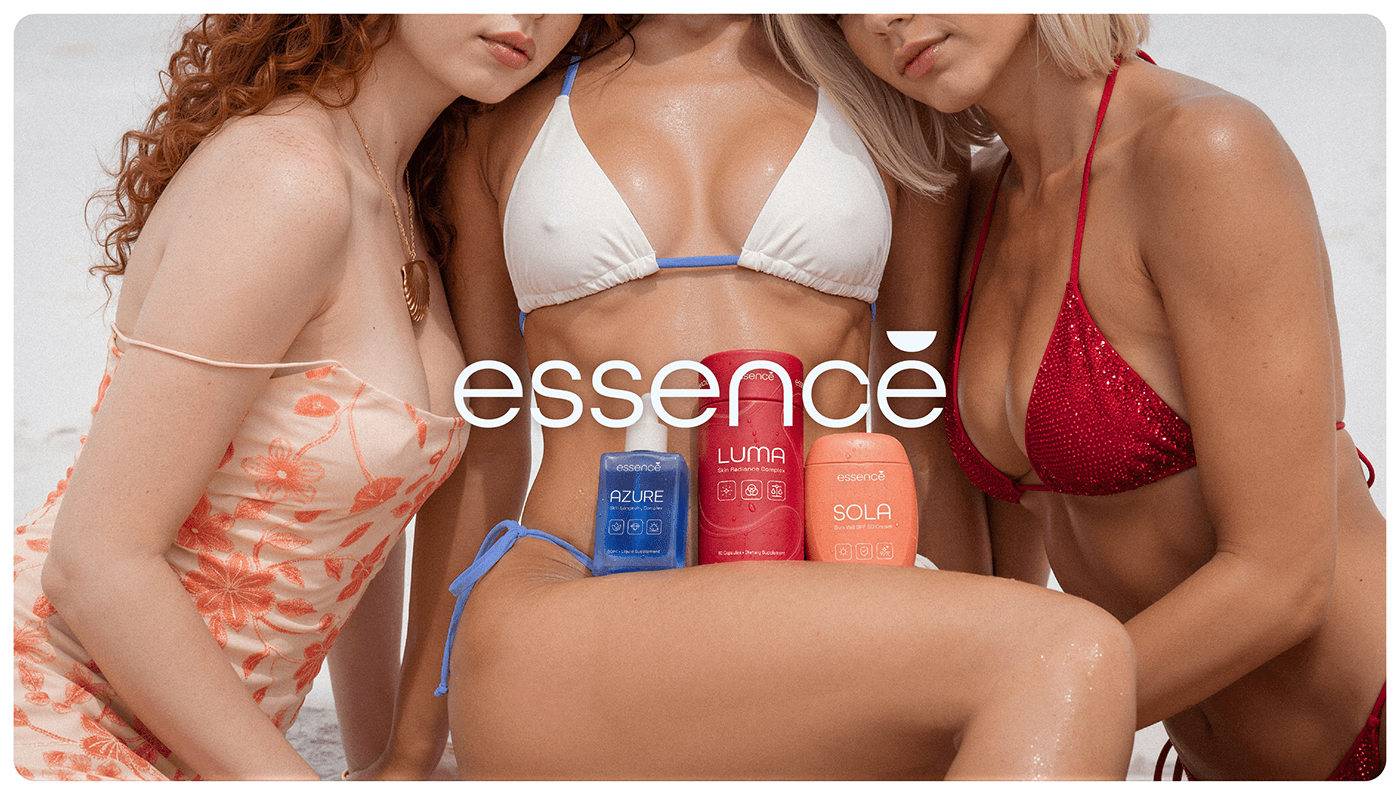
Essence® is a conceptual skincare brand developed as a complete visual and strategic system. The project explores a trio-based approach to skincare through protection, treatment, and internal support, expressed through a cohesive identity, packaging, and ...
bleak echo
muted heron
such a useful effect
Yes it's!
loud lynx
bleak echo
<@1318886407556694019> Are you talking about that?
yeah
loud lynx
bleak echo
Technique known as "Layers Sandwich"... Pretty simple to use once you know how t...
defintey using it again
bleak echo
loud lynx
defintey using it again
Yes it's a technique you need to have in your toolbox..Use sparingly, but this can be useful when you want to display large text behind a subject while maintaining readability without obscuring the main subject.

 glacial grove
lusty harness
id appreciate any Comment/like or any feedback
https://www.behance.net/gallery/...
glacial grove
lusty harness
id appreciate any Comment/like or any feedback
https://www.behance.net/gallery/...
Good job
The colors and composition are really good.
 neat cosmos
hey guys
first time ever made a sport team graphic can i get thoughts?

it’s a team collab for a sports division
glacial grove
neat cosmos
it's a good start
neat cosmos
any thing i should do to fix or change?
glacial grove
Make it just a little darker, put a glow effect on the text
wooden oak
neat cosmos
You should attempt to use equal margins around the outside of the layout. Having different sized margins on each side makes the layout appear a bit sloppy.

Approx. 64 pixels around the outside edge...
 glacial grove
Good job.
loud lynx
bleak echo
Yes it's a technique you need to have in your toolbox..Use sparingly, but this c...
I know this is a "Photoshop" server but are photoshop tutorials applicable to afifnity suite software? They are almost identical and that is what Im using till I start getting freelance jobs (or I might keep using it)
gentle horizon
loud lynx
I know this is a "Photoshop" server but are photoshop tutorials applicable to af...
You're completely wrong.
That's not just any "Photoshop" server. It's the official Adobe Photoshop Server.

Questions about third-party programs should be posted on their respective platforms.
warm crater
how can i improve this one i need honest feedback or criticism
 bleak echo
loud lynx
I know this is a "Photoshop" server but are photoshop tutorials applicable to af...
bleak echo
loud lynx
I know this is a "Photoshop" server but are photoshop tutorials applicable to af...
I don't know and can't tell you if this technique is doable with Affinity but since it's very simple I assume any layer based Graphic application with "Stroke Layer Fx" feature can reproduce it.
 loud lynx
bleak echo
I don't know and can't tell you if this technique is doable with Affinity but s...
loud lynx
bleak echo
I don't know and can't tell you if this technique is doable with Affinity but s...
hmmm
bleak echo
loud lynx
hmmm
🤔
gentle horizon
How about

If it doesn't fit, enlarge the image. That's what I did in the example.
Ik
just make the same with your images
gentle horizon
This is probably due to the poor image quality and pixelation. (As there may be a copyright issue with this image, I am simply showing an example of how it could be enlarged and improved using an upscaler.)

The logo is fine. Perhaps a little smaller and positioned slightly higher. In return, ‘Why is succeed’ should be significantly larger and more eye-catching.
@wind swallow
Post your attempts here and wait for feedback. Anyone who has the time and inclination will get in touch.
😉
 warm crater
outer fractal
what should i do with the blank space
warm crater
outer fractal
what should i do with the blank space
The hand is quite small make it big. The hand on the right.
outer fractal
@warm crater ight
glacial grove
warm crater
how can i improve this one i need honest feedback or criticism
Add a glow to “manifest”
warm crater
glacial grove
Add a glow to “manifest”
Sure
warm crater
outer fractal
<@1128265315600580658> ight
Pardon?
glacial grove
warm crater
Pardon?
They’re saying “ok”
warm crater
glacial grove
They’re saying “ok”
He said ok to my feedback 😭
I thought he wanted to say something else
mossy heath
 glacial grove
mossy heath
glacial grove
mossy heath
A good start
mossy heath
Anything you think I should add?
glacial grove
Play around with the bottom text
mossy heath
I was thinking about removing the second part and keeping only the first one then adding some more items to it
glacial grove
Break and anger should be larger
mossy heath
glacial grove
Break and anger should be larger
I tried that but it ruined the hierarchy
glacial grove
mossy heath
I was thinking about removing the second part and keeping only the first one the...
Good idea
Maybe feelings should be in red?
mossy heath
glacial grove
Maybe feelings should be in red?
The top text is inspired from “break in case of a fire” for the fire alarms in companies it’s usually a red box with white text so I kept the same vibe
At first it was supposed to be purple but after getting the sigh of disapproval from my friend a bunch of times I made it red😭
glacial grove
Ok
glacial grove
mossy heath
The top text is inspired from “break in case of a fire” for the fire alarms in c...
Try it out, I’m curious
mossy heath
Thank you for your feedback tho I’ll create diff variations with it and see which one looks best
glacial grove
Yes
mossy heath
glacial grove
Yes


 mossy heath
warm crater
how is it?
mossy heath
warm crater
how is it?
I think the glow was supposed to be for the text
warm crater
mossy heath
I think the glow was supposed to be for the text
It didn't feel right. The glow for the text
glacial grove
Second one is good
bleak echo
warm crater
how is it?
Not sure for the added sort of glowing effect on the second one... It's perhaps too intense... You might try to make it more subtle...
I think refining the shadows (under the statue, flower on the head, body...) and highlights could help. (see before and after below)

 cloud prism
I need advice on what to do with this poster

 weak lake
cloud prism
I need advice on what to do with this poster
weak lake
cloud prism
I need advice on what to do with this poster
I feel like the text is maybe a little too blurry and close to the composition's edge. :'O I do really like the direction though!
cloud prism
weak lake
I feel like the text is maybe a little too blurry and close to the composition's...
Thank you, I really appreacite that
mighty dragonBOT
Gave +1 Creative Carma to @weak lake (current: #1041 - 1)
weak lake
cloud prism
Thank you, I really appreacite that
No prob! :3
cloud prism
weak lake
No prob! :3
In your oppnion where do you think the text should go?
weak lake
Here is a visual! I tilted the image a little, so it gives the text a little breathing room when moved.
 warm crater
bleak echo
Not sure for the added sort of glowing effect on the second one... It's perhaps ...
warm crater
bleak echo
Not sure for the added sort of glowing effect on the second one... It's perhaps ...
Thank you
It does make a huge difference
mighty dragonBOT
Gave +1 Creative Carma to @bleak echo (current: #6 - 1168)
glacial grove
weak lake
Here is a visual! I tilted the image a little, so it gives the text a little br...
This is really good
loud lynx
How do you know when you are "ready" to start freelancing as a newbie?
outer swift
thoughts on this thumbnail?

 ashen mica
 glacial grove
outer swift
thoughts on this thumbnail?
glacial grove
outer swift
thoughts on this thumbnail?
it's good
 slate ermine
outer swift
thoughts on this thumbnail?
slate ermine
outer swift
thoughts on this thumbnail?
looks rlly nice but the red behind the 'state' looks weird cause its not the same as the bg
bleak echo
outer swift
thoughts on this thumbnail?
Main elements are there but they need love.
1- Text is a bit too flat... try to take advantage of layer Fx to give it depth and interest
2- Use camera Raw filter to remove noise/artifacts subjects and sharpen them.
3- You might reshape Growth chart a bit to make it more obvious and interesting
4- Adding a glow effect around the subjects could help to increase the interest...
Honnestly that a great starting points few changes could make this thumbnail awesome!
slate ermine
franck cooking with the help as usual 🔥
bleak echo
slate ermine
franck cooking with the help as usual 🔥
lol... I'm trying to do my part 😉
@outer swift: here is an example of what I meant about the growth chart... Making some peaks visible add a lot (in my opinion)

Camera Raw filter on subject adds a nice touch...


Glowing effect arouns subjects too...

Finally, layer styles help to make text more appealing.
 outer swift
amazing feedback man thank you so much ❤️
bleak echo
 outer swift
i also made these if you want to take a look on them

 bleak echo
outer swift
amazing feedback man thank you so much ❤️
bleak echo
outer swift
amazing feedback man thank you so much ❤️
Here is the psd file if you want to explore more deeply how I made it...

 bleak echo
outer swift
i also made these if you want to take a look on them
bleak echo
outer swift
i also made these if you want to take a look on them
I got to leave for few hours but I'll take a look at it later tonight...
outer swift
thanks man u went above and beyond appreciate it
bleak echo
outer swift
i also made these if you want to take a look on them
For "Secret Monopoly" one:
I really like the concept of the cracked icons an the money pile!
I would make the "King of the Hill" concept more obvious by reducing the icons sizes (Keep Google ones slightly bigger than others) and create an "olympic podium" Hierachie...
I think I would try to make Google logo looks like is on the top of the money pile (Cyan Note)

Add light beam glow and some shadows for a dramatic lighting then ceate a vignette effect (that's the classic way to put emphasis on the center of the image).

Here is what I mean
 bleak echo
@outer swift : don't want to influence your title design choice but a "Monopoly Game" sort of header could be a fun addition.
Original logo uses "Kabel" font but if you use "Neue Kabel Medium" from Adobe Fonts (Free with your CC or Photoshop subscription)
you can create something pretty similar (note: the slanted Y foot cap is hidden in "Glyphs panel")...

 near temple
I’m working on a gameday graphic for lacrosse, it’s the woodchucks vs the patriots and I’m making it for the woodchucks
This is my first photo manipulationish style and I need ideas on what I should add, and where I should put the text like game details
Any feedback and ideas would be greatly appreciated
 bleak echo
outer swift
i also made these if you want to take a look on them
bleak echo
outer swift
i also made these if you want to take a look on them
1- You might have to use a dark backgroud to get a nice flame composition (F;ames blending modes work better over a Black or really dark backround rather a light one),
2- Try to make the arrow more obvious,
3- To match the flame concept, I would try to burn the Viber's icon rather crack it...
Just few ideas...

 warped pond
Hi I’m pretty new are we allowed to send any of our photoshop projects for peer review here??
raw wadi
warped pond
Hi I’m pretty new are we allowed to send any of our photoshop projects for peer ...
yes, as above, post a pic and your request to review
raw wadi
near temple
I’m working on a gameday graphic for lacrosse, it’s the woodchucks vs the patrio...
I like it. However it does seem a little dark in the foreground. I appreciate its backlit but a little bit of poetic licence would be ok 🙂
 sage marsh
I know this isn’t the place but any feedback is always helpful to me
I’m working on branding for a eco friendly water treatment company, here’s some of the branding. Custom types and a logo of a water droplet in motion, fitting in with the idea of eco stream. Anything I could do better?
Made 3 different versions of the logo keep, any I should choose from or expand on the idea, or scrap?


 raw wadi
sage marsh
I know this isn’t the place but any feedback is always helpful to me
I’m workin...
raw wadi
sage marsh
I know this isn’t the place but any feedback is always helpful to me
I’m workin...
Perhaps make the e in stream look like the e in eco?
Perhaps have a droplet falling from the r. It does look a bit like a tap 🙂
bleak echo
sage marsh
I know this isn’t the place but any feedback is always helpful to me
I’m workin...
Just for your info you also can ask on Adobe illustrator Discord Server.
There is a "Project Feedback" there, too...
https://discord.com/channels/634884897185595412/637037444834787341
Most logo and branding specialists use Adobe Illustrator for their work... You might get some valuable feedbacks there, too.
ashen mica

 wooden oak
ashen mica
wooden oak
ashen mica
The first image looks cool; I like the background; it has a lot of visual interest. However, I feel like the text is getting lost a bit in the background. Maybe it would help of it were brighter, more bold, all caps or simulated caps. You can still add overlays and effects to it. Just an idea.

 blissful island
Project: Tire Branding/Automotive Social Media Post
Goal: Working on a premium and bold look.
Feedback: How do you feel about the lighting and overall composition? Would love some expert thoughts!
 muted heron
blissful island
Project: Tire Branding/Automotive Social Media Post
Goal: Working on a premium a...
muted heron
blissful island
Project: Tire Branding/Automotive Social Media Post
Goal: Working on a premium a...
I like it, but move the text on the left over more, it's way to close to the tires
glacial grove
wooden oak
The first image looks cool; I like the background; it has a lot of visual intere...
yeah
glacial grove
muted heron
I like it, but move the text on the left over more, it's way to close to the tir...
^
make make the tires like 20% smaller.
bleak echo
blissful island
Project: Tire Branding/Automotive Social Media Post
Goal: Working on a premium a...
This visual for Neboson (?) has a great vibe thanks to the yellow-and-black contrast.
The Background with the tire marks is a good idea and the orange and yellow hues added on stack of tires add a nice touch.
However, the current hierarchy is a bit confusing: the eye wanders all over without knowing where to stop.
The tires are really big, and all the other parts are more or less equally "loud"... Try assigning them different weights depending on how much importance you want to give them.
- The title, "It’s now time to Run the City," should be much larger and perhaps in bold... You might try a sans-serif uppercase letters to convey a sense of power and momentum (unless you prefer a serif font).
- Supporting text: Shorten the explanatory paragraph. People don’t read much on social media posts. What if you condense the message: “Neboson: Drive with confidence and elegance.”
- You might place Contact info/social media post at the bottom right (Z pattern) that's where we usually finish our reading ( good place for Call to Action elements)...
- The Logo: The "Tires Logo" (which appears to be a generic) should be sharper. Make sure there is enough white space around it to give it some breathing room.
calm helm
blissful island
Project: Tire Branding/Automotive Social Media Post
Goal: Working on a premium a...
fonts are bad. the thin font is too thin and the thick font is not thick enough. bad contrast.
calm helm
bleak echo
- The title, "It’s now time to Run the City," should be much larger and perhaps ...
i disagree with supporting text. there really isn’t that much. no need to shorten the length of it.
i agree with the last point
though i understand you didn’t place contact info at the bottom because maybe you couldn’t figure out a way to make it look nice. i think it can work at the top but there are bigger issues to work on first
bleak echo
calm helm
i disagree with supporting text. there really isn’t that much. no need to shorte...
You disagree but you tell to shorten it...?😶🌫️
So you agree. Right?😉
Also, I challenge you to find good social media ads where contact and/or Call To Action elements are in the top right corner... that's a design non-sense.
calm helm
bleak echo
You disagree but you tell to shorten it...?😶🌫️
So you agree. Right?😉
no need to shorten it
bleak echo
calm helm
**no need** to shorten it
Whatever you (he) like(s)! 🤷♂️
Just so you know, by 2026, the average attention span for an image or piece of content on social media will be extremely short—estimated at around 1.7 seconds...
I'm just providing some basic information and guidelines on graphic design for social media...
Rule #1 . Keep it short and scannable
Social posts aren’t essays. Aim for a few words or a short phrase. If someone can’t grasp it in 1–2 seconds, it’s too long.
Rule #2 . Increase contrast:
Headline: bold and large / Subtext: smaller, lighter /**Supporting text: **minimal
....
But after all, everyone is free to do as they please.
Good luck with it!
 tough mesa
Hello ! I am a photographer and I would like to get critics on what could be changed I know these are photos but still... Thanks !
https://www.instagram.com/alexziphotography?igsh=dW42ZWlpM2YyNmdq
(By the way i hope you don't take it like I want +1 follower, I am not trying to promote)
weak lake
tough mesa
Hello ! I am a photographer and I would like to get critics on what could be cha...
I really like what you have! I love how they're all visually cohesive in visual balance and color pallet (despite being various subject matter). My main critique is I wish there were more. 🙂↕️
loud lynx
Yo mandem, this is a documentary-style thumbnail. Please rate out of 10 and tell what to improve
 loud lynx
Yo mandem, this is a documentary-style thumbnail. Please rate out of 10 and tell...
loud lynx
loud lynx
Yo mandem, this is a documentary-style thumbnail. Please rate out of 10 and tell...
the quality is slow
outer fractal
tough mesa
Hello ! I am a photographer and I would like to get critics on what could be cha...
really love this one
 tough mesa
Great thanks !
glacial grove
You're welcome.

 loud lynx
rate out of 10
 muted heron
loud lynx
rate out of 10
muted heron
loud lynx
rate out of 10
The hair looks a bit iffy, try to make that a bit better 🙂
loud lynx
muted heron
The hair looks a bit iffy, try to make that a bit better 🙂
Holy..Yeah I just saw it now. Thanks!
mighty dragonBOT
Gave +1 Creative Carma to @muted heron (current: #286 - 6)
bleak echo
loud lynx
Yo mandem, this is a documentary-style thumbnail. Please rate out of 10 and tell...
I would rate it "Good start"
Points to improve
1- Use the good aspect ratio (most common for thumbnails is 16:9 - 1280x720px for youtube)
2- Fix the text. The word "HUAWEI" is currently partially obscured by the subject's head and lacks enough contrast against the background. Shift the subject a bit and try to add a Stroke or Shadow to enhance contrast,

3- Add a subtle texture or gradient in background,
4- Brighten the Subject, Make the globe "vibrant" and add more obvious glow effect to increase drama,
5- Remove unwanted Fx such as the red band at the bottom of the image...
loud lynx
bleak echo
I would rate it "Good start"
Points to improve
1- Use the good aspect ratio (mos...
Thanks alot bro 🙏
mighty dragonBOT
Gave +1 Creative Carma to @bleak echo (current: #6 - 1169)
bleak echo
loud lynx
Thanks alot bro 🙏
Just a Before/After to illustrate what I meant...

Step by step animation...
 glacial grove
Does this look like a real magazine cover?

 loud lynx
bleak echo
Step by step animation...
loud lynx
bleak echo
Step by step animation...
Bro I dont deserve this much love and kindness 😭🙏
Thanks alot man. Lemme fix it and upload it here again
How did u make his face whiter and the earth glow?
bleak echo
loud lynx
How did u make his face whiter and the earth glow?
1- Camera Raw filter with this adjustment to increase details while keeping everything relativly "soft"

2- Make a selection from the foreground subject, create a new layer over the subject, fill the selection on this new layer with any color then set Fill to 0% and apply an Inner Glow layer FX with these settings.

3- Earth Glow is made from 3 layers with different Fx and blending modesinvolved... I made this short video to show you
the structure and different settings... I hope it will help
outer swift
what do you guys think?
 wooden oak
outer swift
what do you guys think?
wooden oak
outer swift
what do you guys think?
Is this meant to be a YT thumbnail design? I would keep working at it. Refine the "AI SLOP" heading so that it has more impact. Perhaps add a sub-heading to reveal more about the video's purpose. Personally, I think using newspapers seems a bit out-of-place for a high-tech subject. I would perhaps make the world on fire. Or at least a data center. Maybe both. These are just suggestions. Feel free to use any of them if you like. Or disregard them completely.
 wooden oak
glacial grove
Does this look like a real magazine cover?
wooden oak
glacial grove
Does this look like a real magazine cover?
It's a start. I would keep at it. The aspect ratio is wrong for VOGUE. Typically magazines like that are 3:4 aspect. VOGUE pays a ton of cash for professional photography so I highly doubt they would apply filters. Rihana's management team probably wouldn't let that slide either. They'd insist on the best clear photo. There would probably be a month and year on it somewhere. You'd most likely have secondary story titles on either side.
wooden oak
glacial grove
Does this look like a real magazine cover?
A few ideas...
 wooden oak
 spare copper
My first edit, what can I do better
spare copper
My first edit, what can I do better
It looks like you've lightened the image and cropped it. I probably would've went the other way. Approached it from a Rule of Thirds design, with the pup's head landing near one of the intersection points in the RoT Grid. Then use Generative Expand to get more of his tail in there. I would use a Camera Raw filter for Light/Shadow/Contrast adjustments. And since its an outdoor photo on what appears to be an overcast day, I would push the colors to the cool/blue side of the spectrum. (As opposed to the warm/yellow side.) Those are my thoughts.
 wooden oak
loud lynx
rate out of 10
wooden oak
loud lynx
rate out of 10
Honestly? That is kinda cheesy. So I would lean into that. heh
 glacial grove
wooden oak
It's a start. I would keep at it. The aspect ratio is wrong for VOGUE. Typically...
glacial grove
wooden oak
It's a start. I would keep at it. The aspect ratio is wrong for VOGUE. Typically...
I see
glacial grove
wooden oak
A few ideas...
Thanks
mighty dragonBOT
Gave +1 Creative Carma to @wooden oak (current: #2 - 3326)
warm crater
any feedback or suggestion on menu design

 spare copper
wooden oak
It looks like you've lightened the image and cropped it. I probably would've wen...
spare copper
wooden oak
It looks like you've lightened the image and cropped it. I probably would've wen...
Thank you very much, I’m new too all of that stuff and I only used my phone and some free apps cuz I don’t have access to to ps 😩
mighty dragonBOT
Gave +1 Creative Carma to @wooden oak (current: #2 - 3327)
glacial grove
warm crater
any feedback or suggestion on menu design
The first one is great
The second one, maybe space themed out more since there isn’t much on the bottom
loud lynx
yo I see potential in this pic but I don't what the final will look like. How will you guys finalize it?

Im thinking of maybe leaning to the recent Messi's purchase of an entire football club and write something clickbaity like "$2.3 BILLION??" (the actual price is 2.3 MILLION)
But I still don't know how to end it, maybe you guys could help with inspiration
glacial grove
loud lynx
yo I see potential in this pic but I don't what the final will look like. How wi...
Here's a little demo I made.

You could do something like this.
loud lynx
glacial grove
Here's a little demo I made.
exaclty what I was thinking about too
Maybe just change the font? then it wil be okay
glacial grove
I’ll redo it, yes
glacial grove
loud lynx
Maybe just change the font? then it wil be okay
👍
glacial grove
loud lynx
Maybe just change the font? then it wil be okay
Which font do you want?
glacial grove
loud lynx
yo I see potential in this pic but I don't what the final will look like. How wi...
Is this good?

Need any changes?
loud lynx
glacial grove
Is this good?
yeah this looks way better including the messi's glow
Imma try work on it more to add more thing to the story. I just can shrg off the feeling that just messi and a background is knda empty
glacial grove
loud lynx
Imma try work on it more to add more thing to the story. I just can shrg off the...
Here's my .PSD file!
Should make things easier.
loud lynx
glacial grove
Should make things easier.
Thanks alot broski
mighty dragonBOT
Gave +1 Creative Carma to @glacial grove (current: #60 - 36)
 warped oak
Hi guys, any thoughts?

 north sundial
warped oak
Hi guys, any thoughts?
north sundial
warped oak
Hi guys, any thoughts?
Are you asking about retouching the image only, or the composition as well?
warped oak
north sundial
Are you asking about retouching the image only, or the composition as well?
Anything could help
wooden oak
warped oak
Hi guys, any thoughts?
I had a couple ideas but they change your composition and intent a little bit... The notion was to make the lighting more a character in the scene. Both artificial and natural light. I've also used a bit more saturation because that sunset seems like it should be more striking. Just my opinion.
 warped oak
wooden oak
I had a couple ideas but they change your composition and intent a little bit......
warped oak
wooden oak
I had a couple ideas but they change your composition and intent a little bit......
Interesting, it's kind of cool! I did like the shadow u added to the foreground
wooden oak
warped oak
Interesting, it's kind of cool! I did like the shadow u added to the foreground
Foreground is generally a lot darker than midground and background.
warped oak
wooden oak
Foreground is generally a lot darker than midground and background.
Yeah true, it has a contrast
I'll try to add that
wooden oak
warped oak
Yeah true, it has a contrast
I'll try to add that
It's always fun to experiment with different lighting scenarios.
 slate ermine
wooden oak
It's always fun to experiment with different lighting scenarios.
slate ermine
wooden oak
It's always fun to experiment with different lighting scenarios.
humann this is amazing how long have you been using ps?
wooden oak
slate ermine
humann this is amazing how long have you been using ps?
A very long time. heh
slate ermine
wooden oak
A very long time. heh
your very skilled nice job
wooden oak
Nearly any composite is possible now. Only limited by imagination at this point.
slate ermine
no wonder your in the official ps server
bleak echo
loud lynx
yo I see potential in this pic but I don't what the final will look like. How wi...
I think I understand why you’re using the golden room and the soccer field in the background... The opulence and excessive wealth—but perhaps you could find a more dramatic way to convey that message... A pile of dollars, for example...
Also, Messi really has a goofy face in this picture... I'm not sure it serves well the message you're trying to convey... I would try to find a more 'pretentious' expression (or at least a less goofy one)...If you can use NanoBanana, that would make it pretty easy.
You also need to make the text more appealing.
muted heron
is this good as a second varition of my original poster?
Im very new to making 3D objects lol, but i dont think it looks bad.

Ill send the inspo in a sec
yeah ok ill sack that off, I cant find the inspo
but the shadow was pretty much the same
I also like the text above the main
bleak echo
@loud lynx : just to illustrate my previous thoughts...
 glacial grove
bleak echo
<@1318886407556694019> : just to illustrate my previous thoughts...
glacial grove
bleak echo
<@1318886407556694019> : just to illustrate my previous thoughts...
This is good.
bleak echo
muted heron
is this good as a second varition of my original poster?
Im very new to making ...
That's a good start... I would suggest you to make shadows softer and less uniform (especially on top—in real life, shadows are darker and sharper where objects are close, and softer and more blurred when objects are far away)

Also when you make objects from shape try to add a subtle grain to match the stock images used.
muted heron
bleak echo
That's a good start... I would suggest you to make shadows softer and less unifo...
ahh ok ty
mighty dragonBOT
Gave +1 Creative Carma to @bleak echo (current: #6 - 1172)
muted heron
bleak echo
Also when you make objects from shape try to add a subtle grain to match the sto...
its my photography 🙂
bleak echo
muted heron
its my photography 🙂
Oh! Did you take the photo of the shoes yourself?
muted heron
I did indeed
bleak echo
muted heron
I did indeed
Nicely done! I had no complaints about the quality of the photo...
My point for the grain comment was, when you create 3D things from vector shapes in photoshop they alway look "Flat"...


Any picture taken with a camera has 'grain'. (more or less visible) Adding grain to your 3D shapes can help make your design more cohesive.
muted heron
bleak echo
Any picture taken with a camera has 'grain'. (more or less visible) Adding grain...
ohh i see, tysm
glacial grove
Playing around with Gradient Map and Grain.

 loud lynx
bleak echo
<@1318886407556694019> : just to illustrate my previous thoughts...
loud lynx
bleak echo
<@1318886407556694019> : just to illustrate my previous thoughts...
Yayyyyy way better. NOW this is more like a thumbnail
wraith epoch
 bleak echo
glacial grove
Playing around with Gradient Map and Grain.
bleak echo
glacial grove
Playing around with Gradient Map and Grain.
Nicely done!
 silent sinew
I’ve been experimenting with Photoshop to create some theatrical musical theatre posters for my portfolio, I’ve been experimenting with different effects and techniques in and out of Photoshop to create the 3D text, and then use Photoshop for the layering, composition, and final tweaks of colour, lighting and design, thoughts so far?
Ultimately I’m creating some posters/marketing projects, based off real productions or fake to build my portfolio for this niche that I’d like to work in as freelance eventually.


These are my best examples so far.
bleak echo
warm crater
any feedback or suggestion on menu design
A few ideas:
Visual Cluter
- Fade or remove the background pattern further (lower opacity),
- Increase line spacing between items slightly. 2nd page has lot of free space, use it to let your design breath
- Make item names bolder than prices.
Colors
Orange works well but it's overused - Use it only for section hearders and/or key highlights.
Keep item text in dark gray/black for readability - Not sure the orange menu header serves well the design and text under menu is hard to read.
Veg/Non-Veg Indicators
Sure there are veg items in others sections... consider to use a small icon to indicate them rather create a separate legend...
glacial grove
wraith epoch
The chrome effect is really good here, nice job!
glacial grove
bleak echo
A few ideas:
**Visual Cluter**
- Fade or remove the background pattern further (...
^
raw wadi
silent sinew
I’ve been experimenting with Photoshop to create some theatrical musical theatre...
I like both 🙂
Personally for the robin one I would either lighten the background or put more diffuse highlights around the rim of the hat to make it stand out more.
silent sinew
raw wadi
I like both 🙂
Personally for the robin one I would either lighten the backgrou...
Great shout. Thanks for the suggestion.
mighty dragonBOT
Gave +1 Creative Carma to @raw wadi (current: #26 - 97)
 bleak marten
Hey im making a logo for a youtube channel that uploads apple-style edits, something along the lines of that lol
I cant decide between the white or black background, any thoughts, or suggestions for changes/improvements as well?

 muted heron
bleak marten
Hey im making a logo for a youtube channel that uploads apple-style edits, somet...
muted heron
bleak marten
Hey im making a logo for a youtube channel that uploads apple-style edits, somet...
go for the white bg, black logo
novel comet
bleak marten
Hey im making a logo for a youtube channel that uploads apple-style edits, somet...
I'd pick a secondary colour to go with it.
Although I'm unclear what the Gothic style has to do with "Apple Style Edits" - In fact I don't know what "Apple Style Edits" means either?
Since it's presumably to do with video editing, can you not bring an element of 'video editing' into it?
Perhaps that star could be a 'play' button?
Or those 'viewfinder' corners you see on videography/photography?
e,g...

 bleak marten
Sounds good, I'll take this into consideration. Thank you!
 foggy hound
Hi! I made a Roblox GFX as a practice, and I was wondering if there are any areas I can improve in this ^^

 hexed grail
Any thoughts on what else I could add to the blueprint or change?
 wooden oak
foggy hound
Hi! I made a Roblox GFX as a practice, and I was wondering if there are any area...
wooden oak
foggy hound
Hi! I made a Roblox GFX as a practice, and I was wondering if there are any area...
I'm not a Roblox player or a fan but I think this has an interesting quality to it. Is this a YT thumbnail design? If so, I would maybe frame it a bit differently. Using a Rule of Thirds layout and locate the character more in the vertical center of the comp and a bit to the right. Then perhaps put text on the left. But this is just spit-balling...


 wooden oak
hexed grail
Any thoughts on what else I could add to the blueprint or change?
wooden oak
hexed grail
Any thoughts on what else I could add to the blueprint or change?
I would maybe just highlight diagrams of the lacrosse stick and ball. And leave off the other things. Or maybe stick, ball and cleats/shoe. Just my opinion.
 pseudo tinsel
What do u guys think?
 warped pond
Yellow is the original image, this is an older project, I have much newer stuff now but this is my first post soooooo i figured I would start simple

 pseudo tinsel
warped pond
Yellow is the original image, this is an older project, I have much newer stuff...
pseudo tinsel
warped pond
Yellow is the original image, this is an older project, I have much newer stuff...
this is really cool
bleak echo
warped pond
Yellow is the original image, this is an older project, I have much newer stuff...
Nice cyber-punk/Vapor wave vibe!
glacial grove
foggy hound
Hi! I made a Roblox GFX as a practice, and I was wondering if there are any area...
Maybe boost the shadows. Otherwise, good job.
glacial grove
warped pond
Yellow is the original image, this is an older project, I have much newer stuff...
very good job
glacial grove
foggy hound
Hi! I made a Roblox GFX as a practice, and I was wondering if there are any area...

Can someone help me remove the microphone from Beyonce's face?

Content-Aware Fill is getting a little wonky.
Here's my .PSD file.
hexed grail
hexed grail
Any thoughts on what else I could add to the blueprint or change?
Here is the updated one.
 glacial grove
hexed grail
Here is the updated one.
glacial grove
hexed grail
Here is the updated one.
Good job.
maybe add an outline to the girl, more shading on the bottom background.
bleak echo
pseudo tinsel
What do u guys think?
I wouldsuggest you:
1- Sharpen your image a bit,

2-Turn your image more into a night scene... My example is perhaps a bit more intense than what you want but you need to add more contrast between the overall image darkness and the light of the car,

3- Add shadows and lights according the light source.
Just few ideas...
 pseudo tinsel
bleak echo
I wouldsuggest you:
1- Sharpen your image a bit,
pseudo tinsel
bleak echo
I wouldsuggest you:
1- Sharpen your image a bit,
damn ty so much, i thought i did well but theres so much i could have done to make it better. thank you for the suggestions i appreciate it.
mighty dragonBOT
Gave +1 Creative Carma to @bleak echo (current: #6 - 1173)
bleak echo
pseudo tinsel
damn ty so much, i thought i did well but theres so much i could have done to ma...
No problem. The lighting and shadows are crucial for making a composite image like this work.
Last comment: the direction of the monster's shadow should also be adjusted to match the light source (the car's light).
But don't worry, it was a really good start...
 glacial grove
Can anyone help with my Beyonce image
bleak echo
hexed grail
Here is the updated one.
The various elements clash and prevent the viewer from focusing on the essential element...
I think the main attention would go to the player but intense white and scale of the blueprint background take over...
I would reduce the weight of background elements and add a subtle Player drop shadow on the blueprint area to create a sense of depth.

I'm also wondering about the overall layout/format of your design... I would use Rule of third and try to place the subject along the vertical guide and scale its original image to be able to place the player head at the intersection of Vertical and Horizontal lines
 warped pond
bleak echo
The various elements clash and prevent the viewer from focusing on the essential...
warped pond
bleak echo
The various elements clash and prevent the viewer from focusing on the essential...
Wow you give really sound feedback!
abstract oxide
warped pond
Wow you give really sound feedback!
He really does give great feedback
mossy heath

 frail ravine
I made this for a uni project, trying to replicate an infographic for the conversation on instagram, how can i improve this desing
 glacial grove
mossy heath
glacial grove
mossy heath
amazing job
mossy heath
glacial grove
amazing job
Thank you!
mighty dragonBOT
Gave +1 Creative Carma to @glacial grove (current: #60 - 37)
glacial grove
You're welcome.
calm helm
mossy heath
this looks sensational. extraordinary. amazing.
loud lynx
yo rate out of 10 gang
 raw wadi
loud lynx
yo rate out of 10 gang
raw wadi
loud lynx
yo rate out of 10 gang
If the cards in the background are important then I dont like the vignette
bleak echo
frail ravine
I made this for a uni project, trying to replicate an infographic for the conve...
Have you considered using a grid?
1- You should add inner margins to your design and avoid placing elements too close to the edges to give your design some breathing room.
2- Three lines of text with the same font size/weight look a bit "bland"... You might want to consider condensing it into just two lines and adding some visual hierarchy...("Human and Lightning" => all caps and bold Vs "a phenomenon..." lower case and lighter)
 loud lynx
raw wadi
If the cards in the background are important then I dont like the vignette
loud lynx
raw wadi
If the cards in the background are important then I dont like the vignette
Yeah they are important. AIght i will remove it
bleak echo
frail ravine
I made this for a uni project, trying to replicate an infographic for the conve...
What I meant by margins...
 raw wadi
loud lynx
Yeah they are important. AIght i will remove it
raw wadi
loud lynx
Yeah they are important. AIght i will remove it
By all means leave the vignette but only on the background, not the cards 🙂
bleak echo
loud lynx
yo rate out of 10 gang
It would be great to get some context... Maybe it's just me, but (since there's no title) I didn't understand what this thumbnail was about.
The thumb looks really fake... And the message is a bit ambiguous... Does that mean the icons/apps are OK, or is it pointing to the clock icon?
bleak echo
Please don't post the same message in several places on this server.
This type of post is best suited to the #💬chat-general....
warped pond
glacial grove
amazing job
I second that!
loud lynx
bleak echo
It would be great to get some context... Maybe it's just me, but (since there's ...
yeah actually without a title/context you cant really get a clue. It is a generic self-help thumbnail
loud lynx
bleak echo
Please don't post the same message in several places on this server.
This type...
But I thought projects were meant to be posted here?
peak?
 bleak echo
loud lynx
But I thought projects were meant to be posted here?
bleak echo
loud lynx
But I thought projects were meant to be posted here?
I don't think this message was meant for you... Unless I'm mistaken...
It was for someone trying to hire a designer by posting the same message on multiple discussion threads...
loud lynx
bleak echo
I don't think this message was meant for you... Unless I'm mistaken...
It was fo...
oh aight
bleak echo
loud lynx
peak?
There are a lot of elements competing for attention, which makes it hard to read...
In my opinion, way too many boxes and frames...
I suppose the box containing Michael Olise is meant to use an incomplete image. However, I'm wondering about:
- the relevance of the boxes labeled "Today" and "8:00 PM",
- The purpose of the black border with a thin line... In my opinion, it's not necessary
- Why the club logos are in a box and partially hidden...
That's just few ideas...It's up to you whether you take that into account or not. Enjoy the game!
loud lynx
bleak echo
I suppose the box containing Michael Olise is meant to use an incomplete image. ...
Thanks gng
mighty dragonBOT
Gave +1 Creative Carma to @bleak echo (current: #6 - 1175)
loud lynx
BUt you think its decent?
 solar swallow
wooden oak
It's always fun to experiment with different lighting scenarios.
solar swallow
wooden oak
It's always fun to experiment with different lighting scenarios.
La imagen está buena pero el brillo del celular es demasiado alta. Algo así sería la reacción de la mujer cada vez que enciende su telefono haha.
bleak echo
loud lynx
BUt you think its decent?
It's perhaps decent enough for a 24-hour story post... but don't put it in your portfolio 😉
wooden oak
How is this related to Photoshop?
 hoary hamlet
wooden oak
How is this related to Photoshop?
hoary hamlet
wooden oak
How is this related to Photoshop?
I used it to create the thumbnail and a lot of the art related to this movie. But also you gotta do what you gotta do to get your name out there ig. No harm done I hope
wooden oak
hoary hamlet
I used it to create the thumbnail and a lot of the art related to this movie. Bu...
This channel is for feedback on work created with Photoshop. Not to get clicks/views.
hoary hamlet
wooden oak
This channel is for feedback on work created with Photoshop. Not to get clicks/v...
Sorry didn’t intend any hassle
 unique lance
opened up photoshop for the first time in a long long while and made something for a “niche” alt pop group i was able to work with. (not for design purposes i just work in radio lol)
i really struggle with text. wanted to play around with skew because i figured out that was a thing lol. but i didn’t think far enough and once i started laying everything out i think it looks kinda cramped. but i like it overall :)
 sage marsh
I know this isn’t the place to ask but all feedback is good
Im working a type and logo for a tech start up with a focus on water treatment solutions, here’s the new one I came up with the. A lighter and more readable modern type with a logo that should convey the idea of a stream, keep in mind its two alternative logos they’re not supposed to be together.
And the second one which is the old type and logo
It’s definitely not finished I got more ideas on logos I wanna try out and maybe add something to the type to give off a more water/eco friendly feeling. Let me know what I should add or improve or scrap

 north sundial
<@&548221840750018590>


 bleak echo
 gaunt ruin
Strong design!
The layout follows a strong hierarchy that immediately communicates the most critical information...
Great use of grid, Fonts choice fits well for a Digital Design Service and negative space around lets the design breath.
IMO, a Call to Action (CTA) element is missing...While it says commissions are open, a direct instruction on how to order (e.g., "DM to Order" or a website link) would further improve conversion.
But, Wow! That's a solid Work!💯
bleak echo
unique lance
opened up photoshop for the first time in a long long while and made something f...
Aesthetic used fits well for Aternative music band...
Love the Grunge/Zine look and vertical split.
You might try to match the brightness of the four individual shots ( the two in the middle are way more dark than top and botom ones)...
Good job anyway!
glacial grove
unique lance
opened up photoshop for the first time in a long long while and made something f...
I think you should up the contrast a little, otherwise, nice job!
glacial grove
unique lance
opened up photoshop for the first time in a long long while and made something f...

Some Rihannas I designed.


 north sundial
glacial grove
Some Rihannas I designed.
north sundial
glacial grove
Some Rihannas I designed.
👏👏
glacial grove
Thank you!
gaunt ruin
bleak echo
IMO, a Call to Action (CTA) element is missing...While it says commissions are o...
Thank you for the thoughtful reply, agreed on the CTA, going on it now 💛❤️🔥🙏
mighty dragonBOT
Gave +1 Creative Carma to @bleak echo (current: #6 - 1177)
gaunt ruin
💡
gaunt ruin

Adding socials and contact methods
kinda wild that all of these headers are from like 7 years ago haha
@bleak echo @glacial grove
north sundial
gaunt ruin
kinda wild that all of these headers are from like 7 years ago haha
Nostalgia
unique lance
glacial grove
I think you should up the contrast a little, otherwise, nice job!
thank you!! i thought so too but i had already worked on this for an embarrassingly long time
(damn near 4 hours lol, i wonder if that’s how long designing rlly takes or if im just slow)
next time around ill play with adjustments layers to make it more cohesive!
mighty dragonBOT
Gave +1 Creative Carma to @glacial grove (current: #57 - 38)
glacial grove
unique lance
thank you!! i thought so too but i had already worked on this for an embarrassin...
Yeah, designing can take that long sometimes.
I also like the skewed text thing you did with the people.
Maybe add the yellow glow onto the left text as well?
unique lance
good idea! might try that. i’ve always wanted to make these sort of grunge posters so im generally surprised i was able to pull it off with what i already knew about photoshop
glacial grove
You're doing well!
unique lance
thank u! i really like designing. i actually managed to get a small design gig for a non profit so it’s forcing me to use photoshop a lot more. thanks for the advice and being so kind lol
glacial grove
I love design!!
glacial grove
unique lance
thank u! i really like designing. i actually managed to get a small design gig f...
Oh, that's great!
Got any more posters?
I'd love to help out!
unique lance
im embarrassed to share but yes!


 glacial grove
Here's some stuff I do.


 unique lance
the fourth one has a major typo (spelled vague wrong smh) but the photo is actually my own photo i took when at a museum in washington DC! that one was my first “cohesive” body of work i guess
glacial grove
unique lance
im embarrassed to share but yes!
the textures are really good
unique lance
glacial grove
Here's some stuff I do.
i like this!! definitely liking the colors which is something i want to do. i think i struggle with that too because i tend to add gradient adjustment as i go then add one for the whole project which changes the colors. i never went into a project knowing how i wanted the color scheme to look which is why i think the contrast in my first project i sent is off
textures are lowkey my favorite part . sometimes i look at this meme to remind me not to add to much
 glacial grove
unique lance
i like this!! definitely liking the colors which is something i want to do. i th...
glacial grove
unique lance
i like this!! definitely liking the colors which is something i want to do. i th...
I'm good with gradient maps!
unique lance
glacial grove
how do you even do i?
a few different ways actually.
-
easiest way. there’s plenty of free assets online. i search up either photocopy , grain , and add it on top of my file then play around with blending modes, opacity. sometimes i add texturizer and film grain in the filter gallery for more of an effect. maybe a basic black white gradient adjustment depending.
-
displacement maps via the free assets online. save the texture as a psd file. i don’t do it often because im still figuring it out.
ive paid for a few textures through other designers because thats how much i like collecting and playing w textures lol. i buy them even tho i haven’t used photoshop in a while
glacial grove
cool.
unique lance
i make my own textures sometimes too by using either an slightly off white , or black solid (or honestly any color depending on what i want to do) and adding noise and playing around with effects in the filter gallery. then i add on top of my photo, then play with blending modes again.
glacial grove
Good job.
glacial grove
unique lance
im embarrassed to share but yes!
I like the inverted colors on the 4th one
Just made this.

Halftone effect, outer glow, smudge tool.
unique lance
that’s cool! did u make the shape yourself ?