#❓ask-a-question
1 messages · Page 54 of 1
 ripe quest
 empty salmon
or maybe it's film distortion, not a lens one
ripe quest
Color Grading...
empty salmon
okay, i was just wondering if there's a specific name for it
 obsidian lichen
How do I remove the little drop shadow in the gold area of the R?
 ripe quest
obsidian lichen
How do I remove the little drop shadow in the gold area of the R?
ripe quest
obsidian lichen
How do I remove the little drop shadow in the gold area of the R?
Did you create the text and the shadow or you're trying to remove this from a flat image?
obsidian lichen
ripe quest
Did you create the text and the shadow or you're trying to remove this from a fl...
Yes I created the text and shadow. Its also Rasterized
All I need now is to just cover that dark area. With gold
ripe quest
obsidian lichen
Yes I created the text and shadow. Its also Rasterized
Rasterized? As in, the effect has been flatted and its no longer editable, correct?
obsidian lichen
The effs can be edited.
ripe quest
obsidian lichen
The effs can be edited.
Does Layer Mask Hides Effects help?

 timid cliff
CMYK (jpeg prolly, it accepts various formats, however SmartCUT only saves in PDF, and unless there is a way for me to split print friendly my image in Photoshop I don’t see it happening. My PMS/CMYK colors need to be spot on. Oh and if I open the pdf then in Photoshop it opens in Grayscale and it only opens 1 of the 4
 brazen thunder
Can someone tell me when I pick the eraser tool, and then select a different brush type, it automatically changes to the brush tool. Why can't I select another brush for my eraser?
 nocturne panther
I have a huion kamvas 13. Pressure sensitivity isn't working in photoshop but works fine with other software. Please advise
ripe quest
brazen thunder
Can someone tell me when I pick the eraser tool, and then select a different bru...
Many brushes have Tool-specific settings.
 hoary locust
In the 'Export As' window, what does 'Embed Color Profile' mean/do? should I leave it checked off?
 ripe quest
hoary locust
In the 'Export As' window, what does 'Embed Color Profile' mean/do? should I lea...
ripe quest
hoary locust
In the 'Export As' window, what does 'Embed Color Profile' mean/do? should I lea...
 worthy cloud

Hey does anyone know how I can fill the empty layer with content aware fill tool
so that the only thing you can see down the body of the statue is the "New York" letters.
ripe quest
worthy cloud
Can I see the actual image of NYC, by itself, without any editing done to it?
worthy cloud
 ripe quest
worthy cloud
ripe quest
worthy cloud
The goal is to just isolate Lady Liberty correct?
worthy cloud
no basically im trying to turn the statue in the the new york letters
ripe quest
worthy cloud
no basically im trying to turn the statue in the the new york letters
I don't know what this means.
worthy cloud
so like all of her body under her neck to be just those letter "New York" and everything else to be filled in with content aware tool

like literally everywehre you see the pixels for it to be filled with content aware
but idk how to do that ngl
ripe quest
worthy cloud
so like all of her body under her neck to be just those letter "New York" and ev...
"Everywhere else to be filled with the content aware fill"... You realize that Content-Aware Fill uses pixels in the image to fill other areas. So basically you make a selection. Add a new Layer. Then, with the selection active, you go to Edit > Content Aware Fill... And the CAF GUI should pop up and allow you to select segments of the existing image that you want to use for the "the fill"
More info on CAF including a tutorial: https://helpx.adobe.com/photoshop/using/content-aware-fill.html
 ripe quest
worthy cloud
This is kind of what i meant but it looks bad
ripe quest
worthy cloud
This is kind of what i meant but it looks bad
So you kind of want to "see through her" to the background and reveal the skyline of New York, yes?
worthy cloud
yess pretty much
ripe quest
I would separate her from the background first. Then use her shape as a selection and try to use "GenFill" to fill in those areas that you can't see behind her. Although, mileage may vary on the results you'll get.
You could also get a different image of the skyline and use that instead. Then do the Lady Libery "New York" text effect. And put it on a layer above the skyline image.
Then you don't have to CAF or Gen Fill anything.
 rough plume
guys my channels thing is gone xd what do it do?
 ripe quest
rough plume
guys my channels thing is gone xd what do it do?
ripe quest
rough plume
guys my channels thing is gone xd what do it do?
In current versions of Photoshop, it should look like this:
 rough plume
imma update it then ig
ripe quest
worthy cloud
That photo is already edited and not a realistic view of what Manhattan looks like from that angle. If you look at Liberty from that angle, you wouldn't really see Manhattan behind her so it seems like you can take whatever "artistic liberties" you want. (Pun intended.)
 molten wraith
hey ! just want to know that if i open a image in photoshop from my external ssd/hard disk without copying it to my desktop what will be my scratch disk my nvme or the external ssd ?
ripe quest
molten wraith
hey ! just want to know that if i open a image in photoshop from my external ssd...
Whatever device is set up in the Preferences as the primary scratch disk.
molten wraith
ok,
ripe quest
molten wraith
ok,
Please don't post the same question multiple times/in multiple channels.
ripe quest
molten wraith
ok,
In response to your other question in chat:
Performance should not suffer that much if you use the spinning disk over solid state. While its better if scratch disks are set up on SSDs, it shouldn't matter as much when editing. RAM is likely going to be a bigger factor.
@river otter - Please don't DM me. If you have questions about Photoshoo, please post them here.
 weak smelt
Hey guys, ive installed PS just today but it is saying this. Any way i can fix this? I would really love any suggestions.
 ripe quest
weak smelt
Hey guys, ive installed PS just today but it is saying this. Any way i can fix t...
ripe quest
weak smelt
Hey guys, ive installed PS just today but it is saying this. Any way i can fix t...
Where did you get this installer?
weak smelt
ripe quest
Where did you get this installer?
I just installed it off google
ripe quest
weak smelt
I just installed it off google
So you think its a good idea to turn up at an official Adobe server and ask for help with cracked apps?
weak smelt
ripe quest
So you think its a good idea to turn up at an official Adobe server and ask for ...
Whats a cracked app?
I was just asking if anyone knew how i could fix it
ripe quest
weak smelt
Whats a cracked app?
A pirated version of an application.
ripe quest
weak smelt
I was just asking if anyone knew how i could fix it
We can't help you with that. Sorry.
weak smelt
ripe quest
We can't help you with that. Sorry.
is this not how i install it?

I use it at school but am trying to access it from home
ripe quest
weak smelt
is this not how i install it?
You'll need to go to your plan administrator and have them give you access to your Teams Account, if they can.
You cannot just take any installer from the web and install it. Also, you're taking a huge risk by doing so.
ripe quest
weak smelt
is this not how i install it?
If you can sign in to your Adobe Account and download an installer directly from Adobe then try that.
But you said you "installed it off goggle"
 ripe quest
weak smelt
I meant this
ripe quest
weak smelt
I meant this
OK. Download the Creative Cloud app first. Then after that is installed, open it and sign in to your Adobe Account.
When you're signed in, try to install the apps.
weak smelt
ripe quest
OK. Download the Creative Cloud app first. Then after that is installed, open it...
it still says the same thing
 ripe quest
It might let you or might not. If not, you'll need to speak to the Teams Admin at your org.
ripe quest
weak smelt
it still says the same thing
Make sure no other installers are still running. You might need to reboot and try it again. Otherwise, contact the admin at your school to see if they allow that.
ripe quest
weak smelt
it still says the same thing
Also, if you tried to use some rando installer from the internet, I would probably scan the computer for malware and viruses. Just a suggestion.
 hushed niche
weak smelt
it still says the same thing
hushed niche
weak smelt
it still says the same thing
What did the disk manager list?
ripe quest
hushed niche
What did the disk manager list?
I think you mean "Task Manager" (?)
Disk Management is something else. :)
hushed niche
Indeed, mixed them. A bit tired after a long digestive walk…
weak smelt
hushed niche
What did the disk manager list?

 topaz lodge
why do my layers tab not show up anymore on photoshop startup?
ripe quest
topaz lodge
why do my layers tab not show up anymore on photoshop startup?
Did you close it? Window > Layers...
topaz lodge
ripe quest
Did you close it? Window > Layers...
i just gotta open it each time with F7
ripe quest
Open it. Save your work. Then restart Photoshop.
 ripe quest
topaz lodge
ripe quest
topaz lodge
Try saving a custom Workspace.
topaz lodge
ripe quest
Try saving a custom Workspace.
how do i do that
ripe quest
topaz lodge
how do i do that
Open the Layers Panel. Dock it in place where you want it. Window > Workspace > New Workspace... give it a name.
topaz lodge
still not fixed

 steep sierra
Hi, i am currently working on a project and i am looking to create a brush that creates this type of vein for drawings (My intent is to draw/write on a rock-like texture making it seem natural). What's my best way to do so? would working on the brush (i am thinking like the procreate way if it can be done) be really hard?
 ripe quest
topaz lodge
still not fixed
ripe quest
topaz lodge
still not fixed
You can try resetting the Preferences
 woven geyser
how do I create the shadows that are in the corners of this thumbnail??
 ripe quest
woven geyser
how do I create the shadows that are in the corners of this thumbnail??
ripe quest
woven geyser
how do I create the shadows that are in the corners of this thumbnail??

In this Photoshop tutorial, learn how to add vignette in Photoshop. Using the camera raw filter, you can add a vignette to any photo in Photoshop. You can also apply it to any smart objects in Photoshop. This Photoshop vignette technique is completely editable and nondestructive!
Check out my Photoshop classes on Skillshare 👉 https://pxlbr.link...
ripe quest
steep sierra
Hi, i am currently working on a project and i am looking to create a brush that ...
If I'm understanding you properly, you might want to design a brush that looks like "scratching or etching"... since that seems like what you'd have to do on a rock surface.
woven geyser
ripe quest
https://youtu.be/FH7_IYZjtf0?si=KbCr9CEV_RoOVR0w
thank you!!
 fluid craneBOT
Gave +1 Creative Carma to @ripe quest (current: #3 - 2015)
 teal marsh
Is there a way to make the black background not auto appear when pasting a image with a transparent background its so annoying
ripe quest
teal marsh
Is there a way to make the black background not auto appear when pasting a image...
Drag it from Chrome down to the desktop first. Then drag/drop it into Photoshop.
(Copying/pasting PNG with transparency won't work.)
teal marsh
I thought it used to not do that sorry for the trouble, I may as well just continue saving them cuz im on windows most the time.
ripe quest
teal marsh
I thought it used to not do that sorry for the trouble, I may as well just conti...
It's kind of a pain that it can't be copied with transparency but having that file on the desktop has been convenient a few times in case I needed to go back to it.
I usually just clear the desktop of stray files later on.
teal marsh
oh yeah i save them to pictures, my desktop is mostly just game shortcuts i never use lol
ripe quest
Yeah. I was going to mention, it could be a hassle if you're someone that stores a lot of stuff on the desktop. :)
 iron sedge
i applied a gaussian blur around my face on layer 1 but when i want to apply a smart sharpen in the center of my face, it only does it on the gaussian blur part which makes sense but if i put a layer above layer 1 to make a smart sharpen then the gaussian blur goes away. How do people do this?

 elfin dawn
how do i get back all the tools? D:

the rest is in the 3 dots  ? resetting didnt work
ok nvm, i forgot to reset the window itself lol
iron sedge
iron sedge
i applied a gaussian blur around my face on layer 1 but when i want to apply a s...
i figured it out, I forgot to make it a smart object, (edit, nvm it didnt work)
 rotund sonnet
When I try and use brush tilt it flicks from angle to angle(occasionally working as intended). I haven't any other programs that I know of to test it otherwise. I went to the huion website and download the most up to date driver.
does anyone know what to try to fix the tilt brush if it's not working?
 sinful loom
hey guys, does anyone know how i can make a diagonal image collage like this?

 upper wing
sinful loom
hey guys, does anyone know how i can make a diagonal image collage like this?
upper wing
sinful loom
hey guys, does anyone know how i can make a diagonal image collage like this?
yeah i do
first start off with some just normal rectangles and turn them diagnoloy
wait hmmm
actually i need to think about this
i know kind of a long way but i have an idea i can send a tutorial maybe
sinful loom
upper wing
i know kind of a long way but i have an idea i can send a tutorial maybe
that would be perfect, I tried searching for it but didn't find anything 🥲
sinful loom
upper wing
i finished
how? can you show me please
 serene coral
rotund sonnet
When I try and use brush tilt it flicks from angle to angle(occasionally working...
serene coral
rotund sonnet
When I try and use brush tilt it flicks from angle to angle(occasionally working...
What is your pen tablet?
upper wing
hmmm
well that sucks
i can still tell you
so first grab a picture of a brick wall
then make a second layer of it
upper wing
with that second layer erase the part till it is like a little corner
with a straight line
just hold down the eraser
and move to the next part and when you click the erase again click shift
so it is straight
after that you can go to filters and find camera raw filter
with that just play around and make some fun colors
continue doing this till the image is full
hopefully that helps
to clarify on the eraser click one of the corners you want to erase
after that go to the opposite corner and when you click the erase hold down shift
sinful loom
upper wing
after that go to the opposite corner and when you click the erase hold down shif...
ohh ok, that works!! I'll try, thank you! ❤️
fluid craneBOT
Gave +1 Creative Carma to @upper wing (current: #336 - 4)
upper wing
np
rotund sonnet
serene coral
What is your pen tablet?
Nvm, I reinstalled some of the drivers and now it seems to work. Thanks anyways!
fluid craneBOT
Gave +1 Creative Carma to @serene coral (current: #7 - 862)
serene coral
rotund sonnet
Nvm, I reinstalled some of the drivers and now it seems to work. Thanks anyways!
Oh, glad to hear you got it back to work!
upper wing
steep sierra
Hi, i am currently working on a project and i am looking to create a brush that ...
So two things could work. First, after you apply the art to the rock, set the opacity down so it blends in with the rock surface. You can also use a rock texture and set the opacity down. Just look on Google for a cool rock texture. After that maybe add some grain and it could work well.
 slow scroll
Does anyone know how to create a selection inside of this outline I have? The only thing in the layer is the black outline, and using something like the quick selection tool only selects the black itself. I can fill it in with a paint bucket, but I can find a way to gather a selection for it. Does anyone have a solution? Thanks.
 honest horizon
hey yall does anyone know how to make the shaded part in this on illustrator or photoshop. I know how to do like the writing part but notice how theres a darker green behind the writing which is the look im going for but not sure how to do it.

 vocal shale
honest horizon
hey yall does anyone know how to make the shaded part in this on illustrator or ...
vocal shale
honest horizon
hey yall does anyone know how to make the shaded part in this on illustrator or ...
That's a stroke i think
honest horizon
how do I do that
like make it
im starting my clothing brand and im rly tryna get something like that
serene coral
slow scroll
Does anyone know how to create a selection inside of this outline I have? The on...
is this a shape layer?
slow scroll
serene coral
is this a shape layer?
nope not a shape just pixels
serene coral
honest horizon
how do I do that
how to add stroke? you can use the stroke layer style on your text. notice that on the reference you sent, this stroke is slightly off, it's not even on each side. to achieve this, I would right click the layer style, make it a separate layer and use the liquifying to make it uneven
serene coral
slow scroll
nope not a shape just pixels
have you tried the wand tool? 
slow scroll
serene coral
have you tried the wand tool? <:ToolWand:961217405227515994>
Works.. well enough. Thank you
fluid craneBOT
Gave +1 Creative Carma to @serene coral (current: #7 - 863)
serene coral
slow scroll
Works.. well enough. Thank you
remember you can adjust the tolerance at the top, in the options bar
honest horizon
serene coral
how to add stroke? you can use the stroke layer style on your text. notice that ...
is there any chance you can tell me how to do that in simpler terms I'm just starting and everything is still new to me
serene coral
honest horizon
is there any chance you can tell me how to do that in simpler terms I'm just sta...
can you please screenshot the whole app window so I can see what you're starting point is?
@honest horizon
 rustic granite
hi all.. I’m a newbie to photoshop trying to learn pen tool. How do I get my line back straight after making a curve point? Is there a button I should press because it keeps starting out curve. Thanks!
serene coral
rustic granite
hi all.. I’m a newbie to photoshop trying to learn pen tool. How do I get my lin...
you can alt-click on a point to make it a sharp edge.
https://youtu.be/5kAQUNFZJXY

► SUPPORT THE CHANNEL & GAIN PREMIUM ACCESS: https://www.patreon.com/piximperfect
► RECOMMENDED SOFTWARE & GEAR:
✅ My Graphic Tablet: https://pix.live/wacom
✅ Recommended Budget Tablet: https://pix.live/wacomlite
✅ Try Photoshop for Free: https://pix.live/photoshop
✅ Artificial Intelligence Photo Editor: https://pix.live/luminarai
✅ Unlimited Ph...
 torn condor
Is this bug with resizing contents of smart object?
It gets cut out of nowhere.

The more I transform (shrink), the more it gets cut.

It's while using perspective warp.
It works if my smart object does not have transparent pixels.
serene coral
torn condor
It's while using perspective warp.
can you list your steps? I'll try to reproduce
 sly hawk
torn condor
It works if my smart object does not have transparent pixels.
sly hawk
torn condor
It works if my smart object does not have transparent pixels.
Do you actually need perspective warp for this? - can you not just hold ALT and drag the corners around?
(or is it CNTRL?)
sly hawk
rustic granite
hi all.. I’m a newbie to photoshop trying to learn pen tool. How do I get my lin...
I feel your pain! - Keep with it.
rustic granite
serene coral
you can alt-click on a point to make it a sharp edge.
https://youtu.be/5kAQUNFZ...
Awesome thanks guys. Figured it out. I have lots to learn 🙏🏻
fluid craneBOT
Gave +1 Creative Carma to @serene coral (current: #7 - 864)
torn condor
sly hawk
Do you actually need perspective warp for this? - can you not just hold ALT and ...
I do need it. It is just example how it happens.
Sometime I can't avoid using warp.
sly hawk
On the subject of Rosie's question, is there a way to ADD handles back in?

e.g. I alt clicked when making the line below, to make the sharp corner near the top.
but would like to have a handle where I've dropped in the purple line...
if I play with the handle above, it only effects the line ABOVE the point, not below it.
--
@rustic granite - https://bezier.method.ac/

A game to help you master the pen tool
serene coral
sly hawk
On the subject of Rosie's question, is there a way to ADD handles back in?
you can alt-click-and-drag from a point to 'redo' the handles. in your case, you'd then have to set the incoming path the way you want, let go of alt, press and hold it again and set the outgoing handle the direction you want and let go of mouse click
 faint dust
im trying to do some pixel art in ps, is there a way for me to get rid of these lines that appear?
 serene coral
faint dust
im trying to do some pixel art in ps, is there a way for me to get rid of these ...
serene coral
faint dust
im trying to do some pixel art in ps, is there a way for me to get rid of these ...
view>show>pixel grid
faint dust
serene coral
view>show>pixel grid
thank you
fluid craneBOT
Gave +1 Creative Carma to @serene coral (current: #7 - 865)
 vapid flume
sly hawk
if I play with the handle above, it only effects the line ABOVE the point, not b...
vapid flume
sly hawk
if I play with the handle above, it only effects the line ABOVE the point, not b...
If you want to choose between two lines/handles that are exactly on top of each others, in Illustrator I would use the isolation mode, but as far as I know that wouldn't be possible in Photoshop
What I would do is select the top one, CTRL/CMD +X (to delete) do my thing on the bottom one, and place the deleted one back in place (don't zoom in or out!)
Or just hide the relevant layer?
I didn't try the first option though, just something I would try if I had to.
I mean those paths aren't on layers, but it would be worth turning them into shapes temporarily, so you can retrieve the path when deleted...
 night plinth
I want to import one of my old pixil art used from the website https://www.pixilart.com/art/items-lol-sr2077ad3ca14aws3?ft=user&ft_id=1649677
But when I download and drag the image into photoshop, it is hugely scaled. Why cant is just import and pixel size

Pixilart
Pixilart, free online drawing editor and social platform for everyone. Create game sprites, make pixel art, animated GIFs, share artwork and socialize online.
vapid flume
night plinth
I want to import one of my old pixil art used from the website https://www.pixil...
What is the size of your canvas on Photoshop and what is the size of your artwork when extracted from the site?
Sometimes websites where you upload artwork to, resize your original upload for space reason, and also to prevent stealing. Meaning that you'll never get your original back
night plinth
I figured that my art work is 276 x 256 in the website editor
it must export it differently
vapid flume
It happened to me 🙂 (the maximum I was able to get from a hi Res artwork I produced when I tried to download it was 2000 px wide, which wasn't sufficient to print a poster)
vapid flume
night plinth
I figured that my art work is 276 x 256 in the website editor
If you can find a bigger size, then all good, but you'll always be restricted by what the website offers
sly hawk
vapid flume
If you want to choose between two lines/handles that are exactly on top of each ...
Just to clarify, when I mentioned 'above', I didn't mean like Z layer above... Sorry, I meant higher up on the page/screenshot.
vapid flume
sly hawk
Just to clarify, when I mentioned 'above', I didn't mean like Z layer above... S...
Sorry, I need reading glasses 🙂
So you need to reunite the two handles, after having separated them with alt?
vapid flume
With the convert tool, maybe?
No, forget it
My bad!
What happens if you release ALT, and move the handle with clicking on ALT again? It's supposed to be a toggle command
sly hawk
@vapid flume

some combination of shifts, alts, cntrls and use of direct selection tool seemed to get me what I wanted 🙂
Not sure of it, but wouldn't have solved it without your suggestion @vapid flume - thanks
fluid craneBOT
Gave +1 Creative Carma to @vapid flume (current: #8 - 613)
vapid flume
There is a KB shortcut for everything! Even if sometimes you need AI hands!
 worldly falcon
how can i replicate this pencil line effect

 vapid flume

check in the filter gallery, under "sketch" > pencil lines
Be mindfiul of what your foreground and background colour are as they have an effect on the result
You can also test other filters if you want, ie: in the brush strokes section etc...
worldly falcon
thanks
 tacit jetty
Can I ask here questions about Indesign too?
If yes I wanted to ask how I can add visible cut and Safety lines So I dont have anything cut off
elfin dawn
Lord have mercy with me.
5000 Flyers printed.
300 listings, but 2 prices are wrong.
Im crying 
I def thought I checke it 3 Million Times 
sly hawk
it always has to happen at least once in your career.
vapid flume
tacit jetty
Can I ask here questions about Indesign too?
If yes I wanted to ask how I can a...
I think the illustrator discord server might slightly be better to ask, but I think this one will help
https://helpx.adobe.com/indesign/using/printers-marks-bleeds.html
So basically, you should have a "trim view" (not necessarily the InDesign terms) which allows you to toggle on/off the visualisation of the bleed and margins
said bleeds and margins should be set up prior, in the document set up.
It's been a while I haven't used InDesign so it's from memory
vapid flume
elfin dawn
Lord have mercy with me.
5000 Flyers printed.
300 listings, but 2 prices are wr...
That happens. But if the client signed it off (as in signed off the project after seeing the PDF) basically that was their job to check the price. Of course, unless you made the mistake. In that case, you should practice your best puppy eye so you can convince the printer to give you a discount!
Personnaly I think it also helps having someone who is absolutely not invested in the project to double check things. Once I handed over my business cards to my husband and he found a typo on it 😱
elfin dawn
I act checke it like 20x, even my best friend checked it :(
And also the colors are very off, but that's on the printer.
But eh he sadly does not want take it.
100 bucks down the drain 
vapid flume
elfin dawn
I act checke it like 20x, even my best friend checked it :(
And also the colors...
If the printer is acknowledging their mistake in having printed the colours off, and that you acknowledge your mistake in setting the wrong price, maybe you should agree to split the bill with the printer?
 twin bronze
yo, i heard there is a bug in 25.9. my question is what happened to 25.8 😵💫
vapid flume
I haven't seen a bug yet, maybe it will come!
twin bronze
vapid flume
I haven't seen a bug yet, maybe it will come!
yeh it seems it only happens in certain cpu's, just reading stuff in the ps forum
vapid flume
it looks like they skipped the intermediate version. it happens!
Maybe they decided to correct more stuff in one go and go directly for the next one!
twin bronze
i think it is best to wait for me lol, they are talking about releasing another version
vapid flume
twin bronze
i think it is best to wait for me lol, they are talking about releasing another ...
You can still try and go back to the last version when you want (in the CC app)
elfin dawn
vapid flume
If the printer is acknowledging their mistake in having printed the colours off,...
sadly they said its in their terms of service that the colors can be slightly different. In that case less saturation
Will try again in some days with another CS Person, maybe i get some luck
vapid flume
elfin dawn
sadly they said its in their terms of service that the colors can be slightly di...
Did they provide a soft or hard proof?
elfin dawn
Soft
so it could also been my screen, but hm, i act bought a really expensive one bc of that
vapid flume
Yes that's tricky, but also understandable given the print run
elfin dawn
maybe i should use their inbuilt designer, she said the results are usually better. (which i dont rly get but anyways)
vapid flume
Did they give you a colour profile, is your screen calibrated? (No matter if it's cheap or expensive, it needs calibration)
elfin dawn
im glad i only lost the printing xD
vapid flume
Maybe at least they use the right profiles for their machine, which would be the minimum as they're in-house
elfin dawn
vapid flume
Did they give you a colour profile, is your screen calibrated? (No matter if it...
Yeah its def calibrated. i do it like at least once a month
Like Adobe recommends 👀
vapid flume
But do their colour profile realistic?
Because it's difficult to proof without that one
Inks, papers and machines vary
elfin dawn
i will def have another call tomorrow to get it explained
maybe i did smth wrong on my end? idk. We will see.
Glad it was just 50 bucks haha.
He wanted to order 5000 Flyers, i said, no lets order a small amount so we can improve it if you have feedback
vapid flume
elfin dawn
maybe i did smth wrong on my end? idk. We will see.
Glad it was just 50 bucks h...
Smart move!
 pine spade
So i wanted to recreate this https://www.youtube.com/watch?v=QQjPxJ71Sl4&t=647s but in the video he uses a quite old 3d editor from adobe photoshop (what he does at 6:43 until 19:15), which i cant use anymore. So my question is is it possible to do this in a different software like the substance 3D software?

Check out another of my videos: "BREAKDOWN: Select and Mask vs. Refine Edge - Photoshop CC"
https://www.youtube.com/watch?v=DTw78XQNjAo
-~--~-~~-~-
Written Photoshop tutorial: http://bit.ly/doom-logo-photoshop
Download the font here: http://www.dafont.com/amazdoom.font
Exact texture I used: http://iddqd.ru/doom/textures/dhtp_23.07.2015/bi...
iron sedge
im trying to apply a smart sharpen layer above the gaussian blur but when i do the gaussian blur goes away? i feel like this is a really simple fix but idk how to fix it. i want the 2nd filter (smart sharpen) to be directly on the face while gaussian blur be around the face but it always deletes one or the other.

 glass remnant
Hello, any help please?
 torn condor
iron sedge
im trying to apply a smart sharpen layer above the gaussian blur but when i do t...
torn condor
iron sedge
im trying to apply a smart sharpen layer above the gaussian blur but when i do t...
Where is logic behind what you are trying to do?
-2 + 2 = 0
iron sedge
torn condor
Where is logic behind what you are trying to do?
idk how to word it or say it correctly, but i want a gaussian blur around the face and smart sharpen center of the face. idk how to do it. cause the layers just overlap each other but idk how to fix it.
i feel so dumb because i know its an easy fix i feel like
torn condor
Put non blured layer down, blured layer above that, and on mask use soft brush or gradient (rounded/circle) to transparent.
You're complicating it for no reason.
torn condor
glass remnant
Hello, any help please?
Try Filter > Distort > Wave
glass remnant
torn condor
Try Filter > Distort > Wave
I'm new in PS, so I would probably needs more navigation, is there maybe any video tutorial? 
iron sedge
torn condor
Put non blured layer down, blured layer above that, and on mask use soft brush o...
doesnt work

i finally fixed it.

 brisk bane
I have this some what pixelated text and I want to colour each of those rectangles (those are rectangles, not squares!) coloured in differently, like a pixel art, but the whole image and text is in higher resolution. How could I do that more quickly other then selecting each rectangle and coloring it manually?

 undone gyro
Hey I have a question if anyone can help, I got this car but the license plate is blurred from too much light is there any change photoshop and sort this out?
 native shard
brisk bane
I have this some what pixelated text and I want to colour each of those rectangl...
native shard
brisk bane
I have this some what pixelated text and I want to colour each of those rectangl...
you did not have to zoom in heavily to do that, could you provide me with a little zoomed out view so that i know which tool is best for you to use and guide you to get fastest and accurate results.
brisk bane
native shard
you did not have to zoom in heavily to do that, could you provide me with a litt...
 native shard
brisk bane
native shard
brisk bane
is the lines there by default?
if you could get rid of those lines you can change the entire text color in a few seconds!
so please do tell me if you have a version without that
brisk bane
I marked the different rectangles that I would need coloured in differently with the rulers. those lines are the rulers
But I also have the text only
 native shard
brisk bane
But I also have the text only
native shard
brisk bane
But I also have the text only
so each rectangle in the letter should be of different color?
brisk bane
Basically yeah
native shard
iron sedge
im trying to apply a smart sharpen layer above the gaussian blur but when i do t...
Well here is what you can try:
Apply Gaussian Blur
Add a Mask
Duplicate the Layer
Apply Smart Sharpen
Adjust the Mask
If it does not work, or something is wrong or hard to understand please do tell me
undone gyro
Bit of an odd question - Has this picture been edited does anyone know?

by photoshop
like the license plate
 summer harness
I'm trying to pick a different color but it keeps picking the color on the behind canva or wtv its called-(where u see the reddish color rn) how can I fix this?
 native shard
brisk bane
Basically yeah
native shard
brisk bane
Basically yeah
Alright so you can try this, magic wand tool along with paint bucket tool
I think the steps could go about like this if the selection (etc etc goes well)
- Select the Magic Wand Tool (W) from the toolbar. Set the Tolerance to a low value, such as 1, to select only similar colors.
[should be in "Contiguous" as that is crucial]- Create a new layer above your text layer
- Fill using Paint bucket tool
[Other way is use color overlay and set on normal, this can be accessed via blending options]- If that goes well for certain rectangle columns, then you can proceed with each. **This process might take long but not as long as individually **
brisk bane
ahh, I gotta go for now, but I'll make sure to reach out when I'm back and I try it. Thanks.
native shard
undone gyro
Bit of an odd question - Has this picture been edited does anyone know?
No, honestly judging by the rest of the stuff on the picture the camera is just bad, and also the lighting is causing way too much blur not only on the number plate but on the truck near it.
If you take a look you cant even see the trucks corners well or even the headlights or anything! So the answer is NO it has not been edited
native shard
brisk bane
ahh, I gotta go for now, but I'll make sure to reach out when I'm back and I try...
No worries, take care.
native shard
glass remnant
Hello, any help please?
Hey, did you get your answer yet?
iron sedge
native shard
Well here is what you can try:
> Apply Gaussian Blur
> Add a Mask
> Duplicate t...
i didnt add a mask before in the gaussian blur layer and only used the smart filter, i am new to this, so right now i am learning a bit about layer masks and smart filters.
glass remnant
native shard
Hey, did you get your answer yet?
No, please follow here :c #1243213052170600448
native shard
iron sedge
i didnt add a mask before in the gaussian blur layer and only used the smart fil...
Oh alright, sorry too much info can be annoying and demotivating, also i just saw your message claiming to have fixed it.
native shard
glass remnant
No, please follow here :c <#1243213052170600448>
Can we do it here? It is very simple I don't think it requires a new thread.
iron sedge
native shard
Oh alright, sorry too much info can be annoying and demotivating, also i just sa...
yeah ik, i try to simplify things but that annoying problem i just didnt understand and didnt know how to break it down. I understand noyone likes looking at a long message.
Thank you anyways
glass remnant
native shard
Can we do it here? It is very simple I don't think it requires a new thread.
i mean we can, no problem
native shard
iron sedge
yeah ik, i try to simplify things but that annoying problem i just didnt underst...
Well yeah no one does, thats why i try to break my message and make it seems as readable as possible to help people out anyways, take care!
iron sedge
native shard
Well yeah no one does, thats why i try to break my message and make it seems as ...
yeah ima keep it in mind from now on 😄
native shard
glass remnant
i mean we can, no problem
Alright so to start of
- The bubble outline seems like a shadow, to create a shadow of pink color go to blending options and set it to these, it should give similar results

As for the dotted line, for starters you know anything about the pen tool?
summer harness
summer harness
I'm trying to pick a different color but it keeps picking the color on the behin...
I'm kinda in hurry so if anyone could help out w this rq😭
glass remnant
native shard
As for the dotted line, for starters you know anything about the pen tool?
Thanks! I'm actually the worst with pen tool, I always get confused and mess my thing up :c
fluid craneBOT
Gave +1 Creative Carma to @native shard (current: #168 - 9)
native shard
summer harness
I'm trying to pick a different color but it keeps picking the color on the behin...
just click on that icon to switch it
summer harness
native shard
just click on that icon to switch it
I do but it keeps changing the colors there when I change from main palate, its kinda annoying
iron sedge
native shard
just click on that icon to switch it
i just clicked on ur instagram, and just wanna say you do amazing damn art. keep it up
native shard
glass remnant
Thanks! I'm actually the worst with pen tool, I always get confused and mess my ...
Well for starters, you would need two things the pen tool and custom brush settings. So keep those two ready.
native shard
summer harness
I do but it keeps changing the colors there when I change from main palate, its ...
Sorry to hear that, then just click on the individual color and put it as what you want? Honestly i have no idea i never dealt with that issue
native shard
iron sedge
i just clicked on ur instagram, and just wanna say you do amazing damn art. keep...
Thanks mate
fluid craneBOT
Gave +1 Creative Carma to @iron sedge (current: #880 - 1)
glass remnant
native shard
Well for starters, you would need two things the pen tool and custom brush setti...
oki:)
iron sedge
fluid crane
Gave +1 Creative Carma to **<@1229970389606596621>** (current: `#880` - `1`)
first ever Thanks, lets go
fluid craneBOT
Gave +1 Creative Carma to @fluid crane (current: #203 - 7)
iron sedge
oh oops
glass remnant
native shard
Alright so to start of
1) The bubble outline seems like a shadow, to create a s...
I actually tried that, but it seems that Contour doesn't make that thing as it's on screenshot
 native shard
glass remnant
oki:)
native shard
glass remnant
oki:)
I will try to keep it simple although you might read a lot, anyways so:
Start of by clicking on the Pen tool, begin with drawing a curvy path incase you didn't know this is done by clicking on dots
anchor points in photoshop terms. You will NEED to click and drag to create smooth curves between anchor points.Select the Brush Tool and click on the tool's settings, you will see an option called Brush Tip Shape you must adjust the size according to how much the gaps between each dot must be. Then just save that as a setting lol
Select the path in the Paths panel
select the curvy path. Right-click the path, choose "Stroke Path," select "Brush," and uncheck "Simulate Pressure."Adjust, btw you can even add shadows on that so hopefully you can get the same effect even on the dotted.
Well of course this might get complicated cause i tried to make as short as possible, i just said whatever i could remember, if something is making you stuck tell me exactly.
native shard
glass remnant
I actually tried that, but it seems that Contour doesn't make that thing as it's...
Yes, there are different contour's, you must click on the drop down arrow icon and select the straight downwards line as shown in my screen shot.
glass remnant
native shard
I will try to keep it simple although you might read a lot, anyways so:
> 1) St...
thanks, ill try it:)
fluid craneBOT
Gave +1 Creative Carma to @native shard (current: #155 - 10)
glass remnant
native shard
Yes, there are different contour's, you must click on the drop down arrow icon a...
i dont have those contours as you have on your screenshot :x
native shard
glass remnant
i dont have those contours as you have on your screenshot :x

It is there as default, its not something you download externally
glass remnant
native shard
So i will need to download it somewhere
 pine spade
i want to put the texture at the bottom inside the letters (within the white lines), but it only going until the square edges. Anyone know how to do that?
 native shard
glass remnant
So i will need to download it somewhere
native shard
glass remnant
So i will need to download it somewhere
No, i just told you, these are there by default just click on any of them you will see the differences it causes for each shadow
native shard
pine spade
i want to put the texture at the bottom inside the letters (within the white lin...
Sorry could you get more detailed? Which parts are you referring too? Highliting them or drawing circles around could help.
pine spade
this texture is what im trying to put inside the letters

But i want them to go until these green highlighted edges
 native shard
pine spade
this texture is what im trying to put inside the letters
native shard
pine spade
this texture is what im trying to put inside the letters
Oh alright, well to start of that is NOT how things are done. What you must do is a pattern on a text
native shard
pine spade
But i want them to go until these green highlighted edges
Yes just select only those parts, and then after that you can duplicate the layer of that text
@pine spade Do you know anything about patterns? Just want to confirm so that I know from where I can start by giving you the steps mate

 sweet fable
is there a quick and dirty way to delete the text off a image but save the gradient colours behind it?
pine spade
I tried to select the part of the E where i wanted that texture, i duplicated it, but still i didnt know how to really get the texture inside that space of the E
glass remnant
native shard
No, i just told you, these are there by default just click on any of them you wi...
i understand, but it seems like it's something with brush and pen, because it doesn't work anyway :c I just got shadow, but even i tried every contour it's still not that "bubble" thing
sweet fable
how could i remove the text without loosing the gradient?

 orchid knot
Are Photoshop Express files compatible with the regular PS? I want to storyboard and do light work on the go with an android tablet then use the files to do the main art at home.
 plush willow
hi, curious what the best method would be in changing the skin color here to white? to match the 2nd pic


& the grey hair to white also if possible 
orchid knot
plush willow
hi, curious what the best method would be in changing the skin color here to whi...
Replace colors with selected: Image>Adjustments>Replace Color that will replace all selected color with a different one.
plush willow
orchid knot
Replace colors with selected: Image>Adjustments>Replace Color that will replace ...
what if replace color is greyed out
orchid knot
plush willow
what if replace color is greyed out
I can't remember 😭 I just wrote it in my PS notes sheet. But do a little research on the function, because that will automatically do it. It's useful to use for anime because the colors are flat so it changes it all
plush willow
np im checking stuff rn
hushed niche
plush willow
what if replace color is greyed out
Hi, make sure your image is in 8bits RGB color mode. (Image>mode)
hushed niche
sweet fable
how could i remove the text without loosing the gradient?
Hi, did you try the remove tool?
plush willow
funny, got this ping as soon as i hit the same tip in a vid tutorial lol
it works tho ty
sweet fable
hushed niche
Hi, did you try the remove tool?
do you have a tutorial on how to do it? preferably a write up? lol
hushed niche
pine spade
this texture is what im trying to put inside the letters
Is the texture a pattern? Make a rectangular selection of the repeating tile, then go to edit> define pattern. For quick and dirty , you could then try to select the white with the magic wand, low tolerance, on the 1st letter, then shift click on the other ones, then edit>fill and select your pattern.
hushed niche
glass remnant
I actually tried that, but it seems that Contour doesn't make that thing as it's...
Hi, the contour will control the gradation of the blur, not its outside shape. I would duplicate the text, convert to a path then stroke the path with a round brush with a large spacing.
hushed niche
sweet fable
do you have a tutorial on how to do it? preferably a write up? lol
Did you search the help files? https://helpx.adobe.com/photoshop/using/tool-techniques/remove-tool.html
pine spade
hushed niche
Is the texture a pattern? Make a rectangular selection of the repeating tile, th...
the texture is just a png file that i got from google, i can try what you said, see if it works, i got it done a little bit nowe by selecting the area where i want the texture and duplicating it.
hushed niche
Then open the png, select>all, edit> define pattern. You can then use it as a pattern, or in the layer styles.
hushed niche
summer harness
I do but it keeps changing the colors there when I change from main palate, its ...
Hi, This was supposed to be fixed some time ago. Open the windows>Color panel and make sure that the foreground well is selected.
If you use the eyedropper tool, alt+click to fill the background well, you could try to see if it targets the foreground. If nothing works, reset preferences might come to an end. https://helpx.adobe.com/photoshop/using/preferences.html
sweet fable
@hushed niche thank you very much, way easier then what i was originally trying to do
fluid craneBOT
Gave +1 Creative Carma to @hushed niche (current: #20 - 98)
hushed niche
brisk bane
I have this some what pixelated text and I want to colour each of those rectangl...
Hi, the magic wand should select each letter, doesn’t it? https://helpx.adobe.com/au/photoshop/using/tool-techniques/magic-wand-tool.html
hushed niche
undone gyro
Hey I have a question if anyone can help, I got this car but the license plate i...
Short answer, No
native shard
@pine spade Hey sorry i got caught up in something, do you still need help?
 limpid scaffold
is there any websites where you can yoink pictures from 3d object models with adjustable light
pine spade
native shard
<@542283209573007370> Hey sorry i got caught up in something, do you still need ...
No worries, ive gotten it to look like this. I think it looks fine for now, as i am no photoshopping genuis and the tutorial i am trying to follow is from 2016 and has 3D features that dont exist anymore. If i need more help ill get back to you!

https://www.youtube.com/watch?v=QQjPxJ71Sl4&t=387s this is what i tried to follow, but i wont be able to do the 3D like him
Check out another of my videos: "BREAKDOWN: Select and Mask vs. Refine Edge - Photoshop CC"
https://www.youtube.com/watch?v=DTw78XQNjAo
-~--~-~~-~-
Written Photoshop tutorial: http://bit.ly/doom-logo-photoshop
Download the font here: http://www.dafont.com/amazdoom.font
Exact texture I used: http://iddqd.ru/doom/textures/dhtp_23.07.2015/bi...
native shard
pine spade
No worries, ive gotten it to look like this. I think it looks fine for now, as i...
Oh btw, what you can do is make that pattern seamless Seamless means more accurately something that doesnt have any lines that can make viewers distinguish and it looks like one big picture instead of multiple in one
you get me?
native shard
pine spade
https://www.youtube.com/watch?v=QQjPxJ71Sl4&t=387s this is what i tried to follo...
The 3D part is very easy, just duplicate the layer, put it below the original layer and yeah put it downwards using free transform
pine spade
yeah i get you, how the guy did it was the same photo copied like 9 times besides each other
pine spade
native shard
The 3D part is very easy, just duplicate the layer, put it below the original la...
ait, ill give that a try
native shard
pine spade
yeah i get you, how the guy did it was the same photo copied like 9 times beside...
Alright, tell me if anything and ill make it simpler if you got anything else
pine spade
yup, thanks!
native shard
np
 jade wedge
how do I copy my effect to \another layer?

 teal leaf
can someone tell me how i can make an oval look imperfect?
im trying to make sort of doodles but i dont want their shape to be a perfect oval so i want to add imperfections,i dont know how to though
brisk bane
hushed niche
Hi, the magic wand should select each letter, doesn’t it? https://helpx.adobe.co...
Yes, it does, but that's not what I need
 robust viper
Does anyone know how this effect is achieved? or the name

 wise pasture
anybody available to help ?
ripe quest
wise pasture
anybody available to help ?
Help with what exactly? You want to learn how to do something? Or you want someone to make something for you?
ripe quest
robust viper
Does anyone know how this effect is achieved? or the name
Try Posterization or a Posterize Adjustment Layer.
 light turtle
Yo, @ripe quest , I've made around 4 thumbnails. I think I'm ready to freelance. uk how to get clients?
hushed niche
brisk bane
I marked the different rectangles that I would need coloured in differently with...
Not following, do you need each pseudo pixel in a different color, or each quarter of the image?
hushed niche
jade wedge
how do I copy my effect to \another layer?
Hi, alt, drag.
hushed niche
teal leaf
im trying to make sort of doodles but i dont want their shape to be a perfect ov...
Hello! Is it a shape or a selection that you want to fill? If selection, draw an oval, then use quick mask, you can then use filters to distort it.
hushed niche
robust viper
Does anyone know how this effect is achieved? or the name
Hey! If you mean the black or white conversion, either posterize or threshold adjustment layers. For the knitted pattern, see: https://youtu.be/zgFLJEKO3ws?si=wRdb54qLey69wM5P
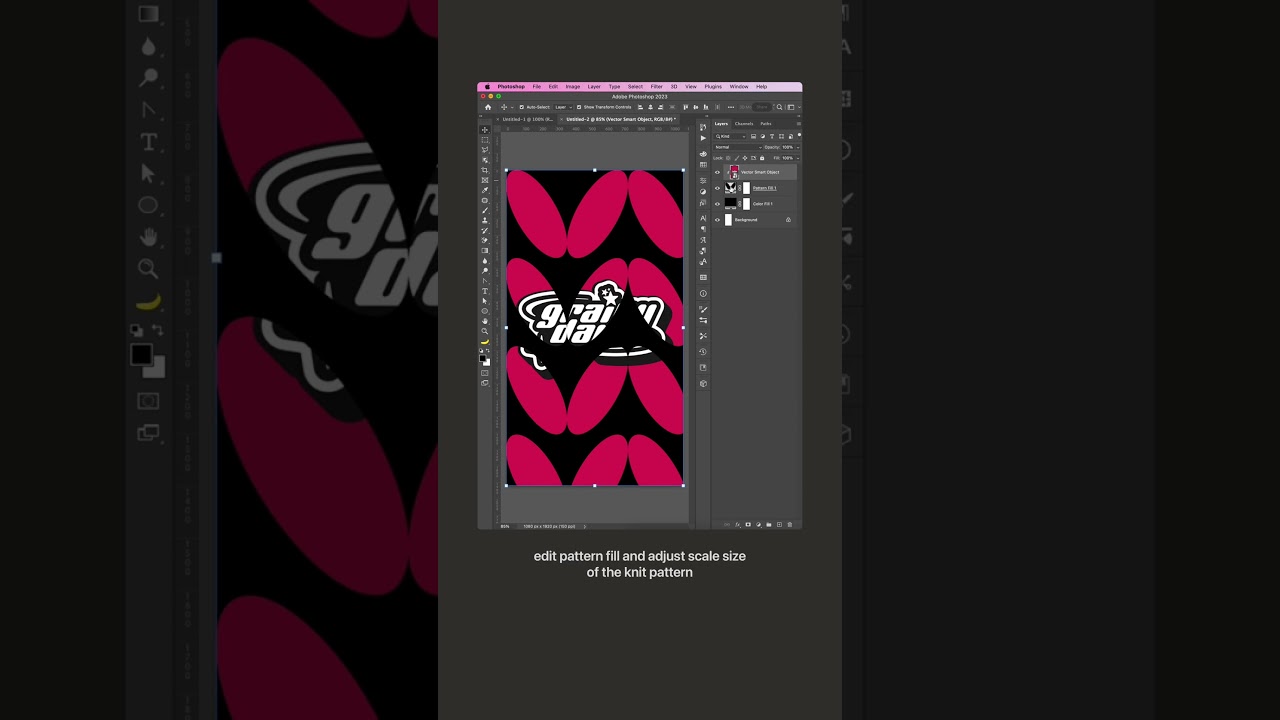
Follow along with Julie Wieland as she breaks down how to create fun knit effects in Photoshop.
Follow Julie on Instagram: https://www.instagram.com/juliewdesign/
Subscribe to Adobe Photoshop: https://adobe.ly/3vWtAiy
Learn More About Adobe Photoshop: https://adobe.ly/4bUzQbh
Try Adobe Photoshop: https://adobe.ly/3womKm8
About Adobe Photo...
teal leaf
hushed niche
Hello! Is it a shape or a selection that you want to fill? If selection, draw an...
its a shape,i dont mean colour though
hushed niche
Is it a vector or pixel shape? If pixel, did you try liquify, or the smudge tool?
 plucky lark
Is killer pack safe?
hushed niche
teal leaf
i dont really understand those terms
Vector vs pixel: https://www.photoshopessentials.com/basics/vector-shapes-vs-pixel-shapes-in-photoshop/ .
.
Liquify: https://helpx.adobe.com/photoshop/using/liquify-filter.html .
.
Smudge tool: https://helpx.adobe.com/photoshop/using/tool-techniques/smudge-tool.html

Learn the important difference between vector shapes and pixel shapes! Now fully updated for Photoshop CC (Creative Cloud).
 raw pebble
I am printing this design on a tshirt
but when i print it, it shows a random white outline on things
how do i remove that
(i put a white outline to show what i am talking about)
 iron sedge
is there any way, Using actions or such to see what was all edited in a photo? is that possible to see what all went into it? probably not huh?
 late zephyr
I want Korean text but when I copy something in Korean it always shows up like that… doesn’t matter what font. How can I copy and paste different language without getting those black cubes. I couldn’t find any tutorials online.

 limber stream
does anyone know a fast way to get a grey inner shadow like that
 hushed niche
iron sedge
is there any way, Using actions or such to see what was all edited in a photo? i...
hushed niche
iron sedge
is there any way, Using actions or such to see what was all edited in a photo? i...
There are some sites, not sure if they are accurate : http://imageedited.com more info: https://shotkit.com/image-photoshopped/
imageedited: Is your image edited?
Are you wondering if that photo you saw online is real? In this guide, I’ll show you 15 different ways to tell if an image has been Photoshopped.


 hushed niche
late zephyr
I want Korean text but when I copy something in Korean it always shows up like t...
hushed niche
late zephyr
I want Korean text but when I copy something in Korean it always shows up like t...
Hi, do you have a font that has Korean characters ? A quick online search gave me many links for free fonts. There is also this help document : https://helpx.adobe.com/photoshop-elements/using/asian-type.html
late zephyr
hushed niche
Hi, do you have a font that has Korean characters ? A quick online search gave m...
No I have not. From the few things I've heard online it was possible to apply Korean text to basic / legacy photoshop fonts. But thank you very much! I will try them out.
upper wing
limber stream
does anyone know a fast way to get a grey inner shadow like that
So what you gonna want to do is right-click on your font layer or image layer depending on what you want, find blending options, and scroll down to where it says bevel and emboss. After that, you will see a little drop-down menu for Style and go to emboss. It should add the effect you want. Then scroll down till you see the black color and make it grow to give the effect you want.
 vale sky
so i got a font pack i think, vector bubble alphabet. but its AI/EDF format, how would i import it as a font to text?, or do i need illustrator to use it?
vale sky
trying to use something called Fontforge and inkscape to create a useable font pack, but its not working
tacit jetty
can I use this emoji in Adobe Indesign somehow?
 tacit jetty
Hey guys another question
I've got this whole block of text but for some reason the spacings arent even and I dont know how to fix
Pls if somebody knows the solution pls tell
Thank you all for your help in advance

See the third paragraph
the text is very bunch together and isnt pleased to read if somebody knows how I can have even spacing pls tell me
 quaint ledge
I need help!! I'm have made a gray scale image and I'm trying to make it so that the whites(highlights) are a different color, but photoshop only selects the blacks
Pressing select object only selects the blacks and want it to select the whites
 rapid escarp
tacit jetty
the text is very bunch together and isnt pleased to read if somebody knows how I...
rapid escarp
tacit jetty
the text is very bunch together and isnt pleased to read if somebody knows how I...
It appears you have set the text alignment to "justified" which changes the word spacing to make the block perfectly flat on every side.
 vagrant quail
anyone know how to fix the weird ness where like if I wand the middle of the hair - it still lets me brush OUTSIDE of it?

Like it's legitimately infuriating
I hope someone understands lol
 dusk condor
vagrant quail
I hope someone understands lol
dusk condor
vagrant quail
I hope someone understands lol
i dont understand...
wand?
as in you are selecting transparenxy between the hair with the magic wand tool
?
 rough fjord
Hey I've got a question.
So how can I get my drag and drop to start working again in Photoshop?
Cause It's not working for me.
serene coral
rough fjord
So how can I get my drag and drop to start working again in Photoshop?
Cause It...
can you specify what exactly is not working? what are you trying to do?
 unique bronze
hello. i am just wondering why there is a difference in quality in my two different canvas thingys?you can see the blue one seems a bit more pixelly while the other one seems abit more crisp

 serene coral
unique bronze
hello. i am just wondering why there is a difference in quality in my two differ...
serene coral
unique bronze
hello. i am just wondering why there is a difference in quality in my two differ...
the red one is at 66% zoom while the blue one is 200%
unique bronze
serene coral
the red one is at 66% zoom while the blue one is 200%
oh i see thanks
 tight notch
anybody here can help with trying to get something from photoshop to nuke?
for osme reason its coming like this in nuke when its only supposed to be the lifeguard stand

it looks like this in photoshop
 serene coral
tight notch
for osme reason its coming like this in nuke when its only supposed to be the li...
serene coral
tight notch
for osme reason its coming like this in nuke when its only supposed to be the li...
you are importing this image as...?
tight notch
PSD
im importing as psd and then doing a premult on it
nevermind i got it i think... i was supposed to delete the crop nodes : P
serene coral
tight notch
PSD
sorry for the quality of this video I found but I believe you're trying to do something similar...
https://youtu.be/H1g8qasl7ZU
notice this guy flattens the layers before moving to nuke - I have no experience with nuke but it could be that layer masks are not seen correctly. Try applying the layer mask (so it's not a layer+layer mask but a transparent layer)
 tight notch
serene coral
sorry for the quality of this video I found but I believe you're trying to do so...
tight notch
serene coral
sorry for the quality of this video I found but I believe you're trying to do so...
thanks for this!
fluid craneBOT
Gave +1 Creative Carma to @serene coral (current: #7 - 866)
brisk bane
native shard
Alright so you can try this, **magic wand tool** along with **paint bucket tool*...
This just selected the whole letter...
 brisk bane
hushed niche
Not following, do you need each pseudo pixel in a different color, or each quart...
brisk bane
hushed niche
Not following, do you need each pseudo pixel in a different color, or each quart...
I need the little rectangles of each letter colored in differently. I marked them with the ruler, but I need to colour them in and I don't want to select, fill, select fill which takes ages, is there an easier way to do that?
native shard
brisk bane
This just selected the whole letter...
did you use magic wand tool? not object selection
and what settings was your magic wand tool?
vapid flume
brisk bane
I need the little rectangles of each letter colored in differently. I marked the...
You can set your rectangle selection tool to a fixed size

if you know the size of each of the square, it will automatically create a selection of that size. So all you have to do is place the selection where it should be (use M as a shortcut to choose the selection tool, and mouse to move the selection around)
Don't move the selection with the move tool as it will move the content of the selection. Then Fill (ALT+Del for the "fill with foreground colour shortcut".
So for maximum productivity, put all your colours in a swatches group, so you can choose them easily, and then select, fill, move selection, fill, rinse and repeat...
brisk bane
vapid flume
You can set your rectangle selection tool to a fixed size
The thing is that they are rectangles and they don't have a fixed size, ones are 21x21, others 22x22 and others 20x20
 serene coral
brisk bane
The thing is that they are rectangles and they don't have a fixed size, ones are...
serene coral
brisk bane
The thing is that they are rectangles and they don't have a fixed size, ones are...
you'll have to select all of them manually then. the rectangular selection tool  will snap to guides
tacit jetty
Is there a font for Iphone Emojis?
brisk bane
ahh... I knew it snapped and stuff, I just thought there might be an easier way to do that, but as I see no, thanks anyway
tacit jetty
I would like to use them in my design
native shard
brisk bane
The thing is that they are rectangles and they don't have a fixed size, ones are...
This was very crucial man....you should have specified that... the method i provided was something that would go if it was all the same sizes. Anyway's sorry seems like you would have to do this manually, unless the pro's here say otherwise.
vapid flume
Yes Photoshop doesn't know what you want to do instinctively. If the sizes are not the same, you'll have to do it manually. That said, if they're all square, you can choose "fixed ratio" instead of fixed size, set it to 1:1 so it saves you a bit of tweaking
native shard
tacit jetty
I would like to use them in my design
emoji's font? could you specify more details?
serene coral
tacit jetty
Is there a font for Iphone Emojis?

GitHub
🍏 Apple Color Emoji Font - Original converted font - GORAlexComp/AppleColorEmojiFont
tacit jetty
serene coral
https://github.com/GORAlexComp/AppleColorEmojiFont
U r a saint Thankyou
serene coral
tacit jetty
U r a saint Thankyou
I literally googled 'apple emoji font'
tacit jetty
I didnt find it
I hope its compatible with Indesign
bro I got websites where u can copy them off
but they dont work in photoshop
serene coral
tacit jetty
but they dont work in photoshop
that's because they are unicode characters, not font
torn condor
Bullet list, first indent, picture explains all, why?
 tacit jetty
serene coral
that's because they are unicode characters, not font
tacit jetty
serene coral
that's because they are unicode characters, not font
yea nvm that
Just ty 4 the font
fluid craneBOT
Gave +1 Creative Carma to @serene coral (current: #7 - 867)
serene coral
torn condor
Bullet list, first indent, picture explains all, why?
how was this bullet list created?
torn condor
serene coral
how was this bullet list created?
I just typed "1.", i wanted to do it manually, but Photoshop started adding 2., 3. and so on.
serene coral
torn condor
I just typed "1.", i wanted to do it manually, but Photoshop started adding 2., ...
trust me, it will be much easier if you make 2 separate type layers, one for the numbers and one for the content
tacit jetty
serene coral
that's because they are unicode characters, not font
cant download the font :/
 torn condor
serene coral
trust me, it will be much easier if you make 2 separate type layers, one for the...
torn condor
serene coral
trust me, it will be much easier if you make 2 separate type layers, one for the...
Wanted to avoid aligning haha
serene coral
torn condor
Wanted to avoid aligning haha
that's not really a problem, just make sure the font size and spacing are the same. if you alt-drag the text layer and hold shift when moving horizontally, it will align just right
serene coral
tacit jetty
cant download the font :/
sorry but I have no idea what this error says? looks like windows problem
tacit jetty
The requested file is not a valid font
serene coral
tacit jetty
The requested file is not a valid font

GitHub
Python scripts to backport and theme Apple Color Emoji font. - PoomSmart/EmojiFonts
try one of these
tacit jetty
none is working
vapid flume
I am pretty sure this one will work
https://fonts.google.com/noto/specimen/Noto+Emoji?query=emoji
Maybe it's not 100% the apple one

Google Fonts
Noto Emoji is an open source font that has you covered for all your emoji needs, including support for the latest Unicode emoji specification. It has multiple w
Mind the file formats when you download fonts
.ttf, and .otf are sure file formats. All the others formats, it can be a hit and miss
teal leaf
hushed niche
Vector vs pixel: https://www.photoshopessentials.com/basics/vector-shapes-vs-pix...
thank you! it does exactly what i need!!
fluid craneBOT
Gave +1 Creative Carma to @hushed niche (current: #20 - 99)
 astral dragon
How do I make text glow
serene coral
astral dragon
How do I make text glow
astral dragon
Thx
native shard
serene coral
https://www.youtube.com/results?search_query=photoshop+glowing+text
whats the beta squad role? i see there is a channel just for them lol
how come i dont have access?
😔
vapid flume
native shard
whats the **beta squad** role? i see there is a channel just for them lol
I'm sure this is something you choose when you go to id:customize
Also it's for people who use the Beta version. Is that you?
native shard
vapid flume
I'm sure this is something you choose when you go to <id:customize>
Also it's f...
No idea 😂 , was just curious about it lol
vapid flume
native shard
No idea 😂 , was just curious about it lol
I am sure if you "browse channels" in the Channel& Roles channel, you'll find even more stuff you didn't know existed 🙂
native shard
vapid flume
I am sure if you "browse channels" in the Channel& Roles channel, you'll find ev...
for some reason i am remembering a quote that says "ignorance is bliss" 😌
ill just stick to this channel and ask/answer lol, stay safe! 😎
serene coral
native shard
for some reason i am remembering a quote that says **"ignorance is bliss"** 😌
pretty ironic considering your input in #🎧spotify-playlists
native shard
serene coral
pretty ironic considering your input in <#1015632742341415035>
No idea what you talking about mate
vapid flume
native shard
***No idea what you talking about mate***
Cringey, hey?
 vapid flume
Please stop spamming please!
vocal shale
vapid flume
Please stop spamming please!
ban him
vapid flume
They're already banned!
 sweet field
 last moss
how do i make a base like this
last moss
how do i make a base like this
What do you mean by base? Do you mean a template for a design like this?
iron sedge
can someone link me a video that shows where light should come from and how it shows up on a persons face or a object?
so i know how lighting works in photoshop and how to make realistic lighting in editing.
vocal shale
iron sedge
can someone link me a video that shows where light should come from and how it s...

Learn how to draw highlights in Photoshop CC 2022. I hope you enjoy my video & don't forget to hit that LIKE button :)
- My premium course (Photo Manipulation Ultimate guide!) ** Limited time discount** :
https://nourdesign.teachable.com/p/photomanipulation-guide
- WhatsApp for any Questions: +201098351575
----------------------------------...
iron sedge
vocal shale
https://www.youtube.com/watch?v=fgqQSgX4czI&ab_channel=NourArt
thats the one i was actually just now watching lol
iron sedge
vocal shale
https://www.youtube.com/watch?v=fgqQSgX4czI&ab_channel=NourArt
Thank you
fluid craneBOT
Gave +1 Creative Carma to @vocal shale (current: #89 - 19)
 steady mist
need help, how to do the c shape thing but with rounded corner in ilustraotr

 worthy rapids
How do you create this effect in photoshop?


 pale siren
kind of random question, but what consistency (like in %) can i expect from generative ai if want to generate background for multiple photos using reference image?
 mellow geyser
Is there an easy way to make this text have even spacing between lines? I am sure I can do it manually, line by line, but I was wondering if there was a standardized way to do it.
 mellow geyser
pale siren
kind of random question, but what consistency (like in %) can i expect from gene...
mellow geyser
pale siren
kind of random question, but what consistency (like in %) can i expect from gene...
Consistency as in "Will all the backgrounds look the same"?
pale siren
mellow geyser
Consistency as in "Will all the backgrounds look the same"?
Actually yes
last moss
sweet field
What do you mean by base? Do you mean a template for a design like this?
yup
mellow geyser
pale siren
Actually yes
In my experience, not a ton of consistency. I have not found photoshops generitive AI to be that great with creating full blown images, and even with refrence images everytime I run it, it is slightly different. I normally use Bing Image Desginer for my AI creations, bring them into photoshop, then use photoshops generative AI to make adjustments. Do you not have photoshop to try for yourself?
pale siren
mellow geyser
In my experience, not a ton of consistency. I have not found photoshops generiti...
I have ps, but didn't try it in this context yet
native shard
worthy rapids
How do you create this effect in photoshop?
Hey, there is a perfect video for this, here you go:
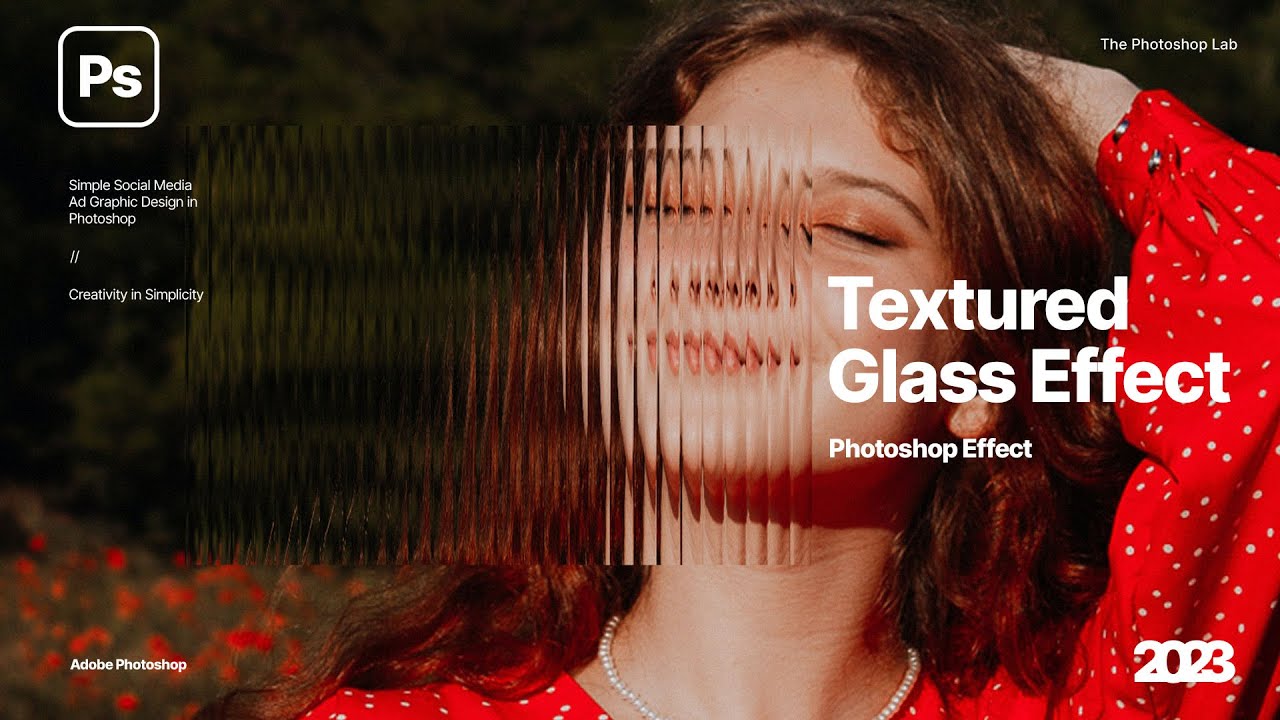
In today's Photoshop tutorial, we will learn how to create our own glass patterns using these simple steps in adobe photoshop 2023!
Thank you for Watching!
► Be updated for new tutorials and free resources:
Follow me on Instagram:
https://www.instagram.com/the_photoshop_lab/
Support our...
its called the glass effect, there are a bunch of tutorials
Btw, side note if you are getting deep into photoshop you would really be using this a lot for professional design and looks, so yeah good thing you doing it
@vapid flume Heya, you there?
native shard
iron sedge
so i know how lighting works in photoshop and how to make realistic lighting in ...

In this tutorial, I'll guide you through the step-by-step process of blending objects into backgrounds using Photoshop. Whether you're a novice or an experienced photo editor, these techniques will take your skills to the next level.
If you learned something please leave a LIKE and SUBSCRIBE for more videos.
► SUBSCRIBE For More Photoshop Tuto...
Please pay attention the both the exposure layers he creates in the video, they are crucial.
If anything and you happen to practice this alongside, and something is making you stuck just ping me and ill try to respond if im online. All the best!
vagrant quail
Anyway to get photoshop to auto-close layers?
mellow geyser
vagrant quail
Anyway to get photoshop to auto-close layers?
Can you expound on your question?
ripe quest
vagrant quail
Anyway to get photoshop to auto-close layers?
Are you talking about Smart Objects?
vagrant quail
This furry base I'm coloring in, won't wand properly because it's - as far as I can tell - unclosed shape or whatever
ripe quest
vagrant quail
This furry base I'm coloring in, won't wand properly because it's - as far as I ...
No. You'll have to either modify the selection or just paint over the gap.
vagrant quail
the layer itself is unclosed/ like Idk how to correctly word it
ripe quest
vagrant quail
the layer itself is unclosed/ like Idk how to correctly word it
You're speaking about shape that has a gap and so you can't select and fill it, correct?
Feel free to show me a screen shot and I can probably suggest something.
vagrant quail
this is what it looks like in the layer panel
 mellow geyser
Is there an easy way to make this text have even spacing between lines? I am sur...
mellow geyser
mellow geyser
Is there an easy way to make this text have even spacing between lines? I am sur...
To explain more on my question, this is one chunk of text, the leading is set to auto right now which leaves inconsistencies between the lines because each line has a different sized text. Setting the leading to a static number also gives inconsestencies between lines of text because I believe it is calculated from the top of a line of text, so the text size effects it.
vagrant quail
it does ahave convert to smart object available though
ripe quest
vagrant quail
this is what it looks like in the layer panel
This doesn't tell me anything.
mellow geyser
I don't see anything in that layer, are you working with a path?
 mellow geyser
If you are working with a path, click the path tab next to layers, that will show the path. You can stroke the path to make it raster.
ripe quest
vagrant quail
that's the layer itself
You should locate the gaps and just paint to close the lines.
vagrant quail
mellow geyser
If you are working with a path, click the path tab next to layers, that will sho...
With it selected, nothing is tehre under paths
mellow geyser
NM, ignore me
I just didn't see anything in the layer tumbnail, the second screenshot helped
thumbnail*
What D. Humann said, you are gonna just need to zoom in and look for gaps... I don't know an easier way to do it.
vagrant quail
so while it's selected, just paint the thing? thing is, it's not gonna actually HIT the layer of issue though I think
 ripe quest
vagrant quail
so while it's selected, just paint the thing? thing is, it's not gonna actually ...
ripe quest
vagrant quail
so while it's selected, just paint the thing? thing is, it's not gonna actually ...
No. It should not be selected to transform.
You should just paint in the gaps with a brush of a similar diameter.
vagrant quail
brother
mellow geyser
You said you are trying to use the wand tool... what is your overall goal with using the wand tool on this layer?
vagrant quail
I'm trying to get it so I can wand it
vagrant quail
mellow geyser
You said you are trying to use the wand tool... what is your overall goal with u...
Color in.
I'm uising a damn MOUSE
mellow geyser
like paint bucket?
vagrant quail
Yeah, like a paintbucket
mellow geyser
Yeah, I really think the only way that is going to work is to fill in the lines, just the outer diamiter, is it all on one layer?
vagrant quail
Yeah, that's just one layer
mellow geyser
To make things easier, you can use the rectangular marquee tool and just select like an eighth of the drawing, then fill in with the paint bucket, if it over fills you know where a gap is and you can undo, fix the gap, then fill again.
vagrant quail
I was gonna suggest soomething but idk if it'd work
mellow geyser
If you can put a white background on it and send a screenshot again I can show you what I mean
vagrant quail
pen tool a gap closed (seems to be the neck bit) then merge that and the other layer together
mellow geyser
Yes that would work
vagrant quail
aaand brush took doesn't restrict it to inside so tehre's another gap...
test brushing jut to show basically, I'd want it inside, (left and right side visually) but not in the non-body bit
 mellow geyser
Can you show a full screenshoot of that, I can't tell wha the non-body bit is

 mellow geyser
Did you have the layer selected (Marching ants around the lines) when you drew the thick black line?
vagrant quail
Yes
mellow geyser
vagrant quail
you ever feel dumb as hell?
mellow geyser
Thats how I would do it
vagrant quail
Like I went and used the ACTUAL paint bucket (thta I forgot exists) and it worked fine
mellow geyser
What... what were you trying to use? lolololol
mellow geyser
Happens to us all bro
vagrant quail
Well I have a fix for it now lol Just gotta take all the layers and do the dupe trick to thicken the "stroke" but - thank you man for thixing this lol
fixing* lol
 neat shuttle
hello there, does anyone know the best way to get character illustration lines to look like this?
a bit more organic looking rather than smooth?
i'm trying to figure out where to start... procreate brush? or is it drawing regular in photoshop and add a filter effect on the lines (e.g. ripple)?
any tips on where to start much apprecaited. thank you

 worthy rapids
native shard
`Btw, side note if you are getting deep into photoshop you would really be using...
worthy rapids
native shard
`Btw, side note if you are getting deep into photoshop you would really be using...
Yea, I'm actually a UX/UI Designer, and I wanted to add this to my eCommerce project that I'm mocking up.
Thanks for the help btw!
iron sedge
how do i delete the recent files from here?

ik how to delete recent pictures but not these document files
ripe quest
iron sedge
how do i delete the recent files from here?
I don't think you can "delete" those.
iron sedge
ripe quest
I don't think you can "delete" those.
bruh so the ones i made that i dont need will just stay there.
oh well.
iron sedge
ripe quest
I don't think you can "delete" those.
thank you anyways
fluid craneBOT
Gave +1 Creative Carma to @ripe quest (current: #3 - 2016)
ripe quest
iron sedge
bruh so the ones i made that i dont need will just stay there.
You can always use the legacy "New Document" interface if you want that instead. Edit > Preferences > General.... "Use Legacy New Document Interface" - Then restart Photoshop.
vapid flume
neat shuttle
hello there, does anyone know the best way to get character illustration lines t...
You can get brushes that are "rough" for photoshop too. That's what I'd use for this. Choose ones that have some "jitter" in it, which is a setting in the Brush menu (F5)
Most vendors who provide brushes for procreate, do for Photoshop/Fresco as well
iron sedge
and one more question, is it better to leave these options on "Faster" or "More Stable", Whats the difference? Does it affect the image or something in anyway that will make it look worse?
 vapid flume
neat shuttle
hello there, does anyone know the best way to get character illustration lines t...
vapid flume
neat shuttle
hello there, does anyone know the best way to get character illustration lines t...
Free with your photoshop sub!
https://www.adobe.com/products/photoshop/brushes.html
Create and enhance your photos, images, and designs with Adobe Photoshop, the world's best imaging and photo editing software.
mellow geyser
Still trying to figure this out...Is there an easy way to make this text have even spacing between lines? I am sure I can do it manually, line by line, but I was wondering if there was a standardized way to do it. (I.E I want the space between the bottom and tops of each lines to be equal). The leading is set to auto right now which leaves inconsistencies between the lines because each line has a different sized text. Setting the leading to a static number also gives inconsestencies between lines of text because I believe it is calculated from the top of a line of text, so the text size effects it.
 ripe quest
mellow geyser
Still trying to figure this out...Is there an easy way to make this text have ev...
ripe quest
mellow geyser
Still trying to figure this out...Is there an easy way to make this text have ev...
Leading is based on the font size and is measured from Baseline to Baseline; auto is the default for that font size. Thus, when you change the font size the leading is going to change. There's no automatic way to do when you're constantly changing the font size.
If you want them evenly spaced, then you'll have to separate that block into individual lines and then use the Align and Distribute tools.
neat shuttle
vapid flume
Free with your photoshop sub!
https://www.adobe.com/products/photoshop/brushes.h...
oh wow thank you so much, super helpful. i wasnt really sure where to start
fluid craneBOT
Gave +1 Creative Carma to @vapid flume (current: #8 - 615)
vapid flume
neat shuttle
oh wow thank you so much, super helpful. i wasnt really sure where to start
You're welcome!
neat shuttle
vapid flume
You're welcome!
the runny inkers ones are great. i'll search for similar for procreate... byt chance anywhere you recomend where to look for procreate too? that same style?
mellow geyser
ripe quest
Leading is based on the font size and is measured from Baseline to Baseline; aut...
Yeah, I was hoping there was someway to do spacing between baseline to headline... oh well. seperate text blocks was my next move anyhow. Thanks!
fluid craneBOT
Gave +1 Creative Carma to @ripe quest (current: #3 - 2017)
vapid flume
neat shuttle
the runny inkers ones are great. i'll search for similar for procreate... byt ch...
Not sure, but I know that retro supply co does some, (I don't use Procreate, I use Fresco so I can have the same brushes on Photoshop and Fresco with the same settings)
https://www.retrosupply.co/

RetroSupply Co.
Analog-Inspired Brushes, Textures, Effects, and Fonts for Procreate, Photoshop, Illustrator, Affinity, and Clip Studio Paint. Premium digital tools for designers, artists, and creatives.
neat shuttle
will check it out, thanks for the tip
vapid flume
Procreate probably has a Discord server, I guess you'll have more answers there (I now they have a Reddit at least)
 hot hull
How do I delete search history
ripe quest
hot hull
How do I delete search history
Search History where? What app?
hot hull
ripe quest
hot hull
Google
https://google.com - Enter: "Delete Search History"
mellow geyser
That... thats an odd photoshop question
 kindred kestrel
why cant i se the 3d tap?
 ripe quest
kindred kestrel
why cant i se the 3d tap?
kindred kestrel
ripe quest
See: https://helpx.adobe.com/photoshop/kb/3d-faq.html
ripe quest
kindred kestrel
why cant i se the 3d tap?
kindred kestrel
ripe quest
See: https://helpx.adobe.com/photoshop/kb/3d-faq.html
so i just need to change version?
ripe quest
kindred kestrel
so i just need to change version?
You will have to roll back to 22.x. That page discusses it.
kindred kestrel
ripe quest
You will have to roll back to 22.x. That page discusses it.
thanks
fluid craneBOT
Gave +1 Creative Carma to @ripe quest (current: #3 - 2018)
kindred kestrel
if i want to repaint a texture for a 3d object is there a way i can get the UV map to overlayed so i can se were to paint?
rough fjord
serene coral
can you specify what exactly is not working? what are you trying to do?
Oh I'm just trying to drag and drop images into my Photoshop. But I did get the scratch disks is full again and I forgot how to deal with that as well.
 remote ermine
I want the arrow to face forward but when I flip or do anything it will flip the words what do I do 

I need it like this

 dusky sedge
remote ermine
I want the arrow to face forward but when I flip or do anything it will flip the...
dusky sedge
remote ermine
I want the arrow to face forward but when I flip or do anything it will flip the...
uh just like cut into a new layer the text, then cut into a new layer the rest of the arrow, flip the arrow layer then blend it your best together
you could ask the AI to help you
 median forge
Hey y’all, I’m trying to create a picture like this in photoshop, and already took the photos but have a couple problems- the camera would slightly move between each photo, and the camera was on autofocus so each focus is different. I’m wondering if I should redo the shoot or if y’all have any advice for the best way to go about the edit.
I also added a pic from the shoot, we basically reparked into every spot but again the framing isn’t identical between all the pics


Another problem I’m running into is shadows, I’m just feeling like this whole thing is gonna be pretty hard to pull off
 river otter
Unblur parts of picture? Yo I so I blurred a photo with the filter, but how do I unblur parts of it? I tried the eraser but it doesn't seem to work

 tacit basin
Hello my photographer friends. I have a questions about photos watermarks in lightroom. What's their your options for a smooth/nice watermark. Neither too visible but neither transparency.
Thanks uu
 unkempt drift
hello, i want to be able to clear this shape so it can like erase the white part so the background will be visible instead

 grand plume
unkempt drift
hello, i want to be able to clear this shape so it can like erase the white part...
grand plume
unkempt drift
hello, i want to be able to clear this shape so it can like erase the white part...
dm me i can help
unkempt drift
grand plume
dm me i can help
hey
grand plume
oh yea it wont let me dm you either, are you trying to make it so only the green shows?
@unkempt drift
unkempt drift
grand plume
oh yea it wont let me dm you either, are you trying to make it so only the green...
yeahs like cutting it
unkempt drift
grand plume
oh yea it wont let me dm you either, are you trying to make it so only the green...
youre not allowing any dms, only from friends
grand plume
unkempt drift
youre not allowing any dms, only from friends
double click the layer you want to make transparent, if it is multiple u might need to make a layer mask
then in the blending options you can blend the whites to make them disipear
grand plume
make one with the logo then double click the layer
it should show a menu pop up on your screen
grand plume

 grand plume
oh make a hole but keep some of the white and delete the black?
 grand plume
you can make a layer mask on the layer that you want the hole to be
and then you can delete the black patern area
unkempt drift
 unkempt drift
grand plume
you can make a layer mask on the layer that you want the hole to be
unkempt drift
grand plume
you can make a layer mask on the layer that you want the hole to be
how can i do that
unkempt drift
unkempt drift
like this i want the black sign there to be turned into a png whole
grand plume

select the layer and click this button
you can delete and get back all the stuff and it wont actually destroy your work
you will need to select all the pixels from the black logo to delete it from the white and green
 grand plume
unkempt drift
ehm
grand plume
unkempt drift
ehm
yes like that then go to the white layer and u can delete the logo off the white so its transparent
it looks like u have a lot of layers with white in that space so u might have to do it off multiple layers
oh nvm just "breh" should work
grand plume
unkempt drift
uh what did u press
grand plume
you press delete or backspace and then just command D or i think ctrl D for windows
make sure you have a selection of the pixels of the logo though
unkempt drift
thanks :3
 grand plume
 unkempt drift
man i want photoshop cc so much
grand plume
unkempt drift
man i want photoshop cc so much
is that the one for videos?
unkempt drift
grand plume
is that the one for videos?
wdym?
wait...
photoshop cc can edit videos?!?
grand plume
unkempt drift
wdym?
im not sure what the cc means
grand plume
unkempt drift
photoshop cc can edit videos?!?
i can edit videos on this photoshop just nothing advanced
grand plume
grand plume
i can edit videos on this photoshop just nothing advanced
adobe premire would be the best for actual video editing
unkempt drift
grand plume
im not sure what the cc means
isnt photoshop cc like the new version
i have cs6
grand plume
i am not sure but i have the latest photoshop available

i might get adobe premiere sometime because i would like to learn video editing but at the moment i am just doing surrealism pictures
unkempt drift
grand plume
did you pay
native shard
worthy rapids
Thanks for the help btw!
no probs
 grizzled sedge
is it possible to crop a subject out and put it on a different layer
like this for example how the first picture of the guy is on a different layer than the background

 vital plank
anyone know how i can remake the backplate behind the text ? the text looks somewhat 3d on top of a plate ? lmk please

u see heres another
 native shard
grizzled sedge
like this for example how the first picture of the guy is on a different layer t...
native shard
grizzled sedge
like this for example how the first picture of the guy is on a different layer t...
could you show me what you wanna remove exactly?
vital plank
native shard
could you show me what you wanna remove exactly?
happen to know my problem ?
native shard
vital plank
anyone know how i can remake the backplate behind the text ? the text looks some...
you want the text effect/font?
vital plank
yes i want it exactly like that if u know how
native shard
vital plank
yes i want it exactly like that if u know how
from what i think he used free transform and right clicked on warp
vital plank
and which font do you know
native shard
vital plank
and which font do you know
most likely a basic arial font, something bold
grizzled sedge
native shard
could you show me what you wanna remove exactly?
i wanna add a picture between the subject and the background
 native shard
grizzled sedge
i wanna add a picture between the subject and the background
native shard
grizzled sedge
i wanna add a picture between the subject and the background
is the subject here the man in blue?
vital plank
native shard
from what i think he used free transform and right clicked on `warp`
im confused on this part
not even seeing the warp option anymore
oh i did what u said and it did nothing
im a bit slow lmao but ye i did it
it jus brought the options for me to warp it but idk what to do ,like how do i get the back plate behind the text , the text itself in those pictures look 3d
native shard
grizzled sedge
number 7
Follow this, if anything is unclear do tell me:
Object selection tool, if you need to add more stuff hold shift to drag while selecting more, if you need to remove a part of the selection incase its selecting something else other than the subject then hold alt while selecting to remove that
Once you see your desired subject selected within the lines properly, press CTRL+C and then CTRL+V it will be pasted as a
new layeron top of this layer. Consider this new layer as Layer 2Go back to Layer 1, and click on "Add new layer" now you have a transparent layer between these both layers, put whatever you want and it should give you the desired outcome
native shard
vital plank
it jus brought the options for me to warp it but idk what to do ,like how do i g...
could you show me the exact text you want?
I cannot help without much context
vital plank
i want it exactly like this with the black background behind the text but i have no idea how to do that

if u look at CKP in jackpot u can see that its like 3d kinda
native shard
vital plank
i want it exactly like this with the black background behind the text but i have...
you want the background?
native shard
vital plank
if u look at CKP in jackpot u can see that its like 3d kinda
Yes, that's what the warp tool does
vital plank
okay so , you see how in jackpot central, behind it, its like a black border or something behind the text, i want that
i just have no idea on how to do that
im stuck here and i want it looking exactly like that one
 native shard
vital plank
okay so , you see how in jackpot central, behind it, its like a black border or ...
native shard
vital plank
okay so , you see how in jackpot central, behind it, its like a black border or ...
yes i understand now, so there are two black there actually
- Drop shadow of the original text
- a black rectangle plate
native shard
vital plank
im stuck here and i want it looking exactly like that one
can you send me the text png file here pls,
 native shard
Yes
native shard
vital plank
i want it exactly like this with the black background behind the text but i have...
Okay so you do this as the first step, follow this screen shot

That gives you the first black layer
grizzled sedge
native shard
Follow this, if anything is unclear do tell me:
> 1) **Object selection tool**,...
tysm
it worked
native shard
vital plank
i want it exactly like this with the black background behind the text but i have...
actually i just noticead there is a little drop-down

do this and make the distance on "6"
native shard
grizzled sedge
it worked
great to know
vital plank
okay got it
 native shard
vital plank
ehh
native shard
vital plank
ehh
its not done yet, we havent reached the warp stage yet
native shard
this is just putting a black rectangle below it

after that make sure its one layer

then use warp tool on free transform, you should see these dots
after that
native shard
vital plank
i want it exactly like this with the black background behind the text but i have...

and yeah

Only thing left is to make "JACKPOT" and "CENTRAL" in different blending colors
@vital plank got it?
vital plank
i think this would look a little better with the black rectangles
 native shard
vital plank
i think this would look a little better with the black rectangles
native shard
vital plank
i think this would look a little better with the black rectangles
of course, it indeed does
native shard
👍

 vital plank
yea how do we do that
native shard
its the shadows, that is focused below, you dont see shadows on the top
vital plank
ohh
vital plank
right so i just copy what u did or
native shard
native shard
yes just copy the shadow part which i showed you, although i think make the "size" 6 only
 native shard
vital plank
so now jus copy what u did here or ?
native shard
vital plank
so now jus copy what u did here or ?
that was just me trying to make it similar to the reference picture, choice is yours on how curved you want it
vital plank
oh so then why isnt the text got the shadows like in that picture
native shard
vital plank
oh so then why isnt the text got the shadows like in that picture
thats because i made two layers, but you said you liked it without the rectangle so...
vital plank
no no i was still using the rectangles
i was just using it a diff way then how you were
native shard
vital plank
no no i was still using the rectangles
 vital plank
i still want my text 3d
native shard

 native shard
vital plank
i got this rn
native shard
vital plank
i got this rn
you didnt put any rectangle there mate
vital plank
i know but yours looks perfect how do i like
copy it or something or did u not do that
did u jus drag
draw
native shard
vital plank
copy it or something or did u not do that

copy/paste this, make it black color
native shard
vital plank
and then what
then just put it below the layer of text
like i showed above in the steps via screen shots
when free-transform, hold shift to adjust and make it shorter or longer without making the other side change
that way you can adjust the rectangle to reach till any letter of the text you want
vital plank
its alr i came up with something tysm fr
native shard
vital plank
its alr i came up with something tysm fr
ok
vapid flume
I rarely offer critism to be honest. Not my strong suit, you're the exception probably.
This one's OK, no obvious light quirks. The background seems extremely sharp compared to the foreground - which looks a bit blurry - particularly the non-descript machine, simple enough to fix.
Anyways, I'm working today, not intended to comment unless there was an emergency, so I'll go back to work swiftly!
native shard
vapid flume
I rarely offer critism to be honest. Not my strong suit, you're the exception pr...
You probably never heard this before, but i really appreciate your critic for all the pictures so far, it really helps a lot!
native shard
vapid flume
Anyways, I'm working today, not intended to comment unless there was an emergenc...
Alright, thanks!
fluid craneBOT
Gave +1 Creative Carma to @vapid flume (current: #8 - 616)
sweet field
last moss
In that case, this is something I would do in InDesign or Illustrator. With InDesign it would be very simple to create a template for anything book, magazine, or brochure related. Photoshop isn't great for setting up these spreads because it's a pixel based program, this is better to do in vector.
grizzled sedge
Any way to make the college football logo higher quality?

It was the best i could find
last moss
sweet field
In that case, this is something I would do in InDesign or Illustrator. With InDe...
I see thank you for the information
fluid craneBOT
Gave +1 Creative Carma to @sweet field (current: #24 - 83)
tacit basin
tacit basin
Hello my photographer friends. I have a questions about photos watermarks in lig...

 charred moth
Can someone explain to me how I create such a background?
 sweet field
charred moth
Can someone explain to me how I create such a background?
sweet field
charred moth
Can someone explain to me how I create such a background?
What do you mean by background?
charred moth
sweet field
What do you mean by background?
The color behind
sweet field
tacit basin
Hello my photographer friends. I have a questions about photos watermarks in lig...
This will depend on your needs. Either you have a smaller watermark in one spot on the picture or something that covers a bigger area so it's harder to remove. Something like this with your name on it tends to work
 sweet field
charred moth
The color behind
sweet field
charred moth
The color behind
The white?
charred moth
Not, the pink one
 tacit basin
sweet field
This will depend on your needs. Either you have a smaller watermark in one spot ...
tacit basin
sweet field
This will depend on your needs. Either you have a smaller watermark in one spot ...
like thiss

but i dont know if it's too much seeable
sweet field
charred moth
Not, the pink one
You should be able to do that by finding a brush that's preset to add grunge to images. Try searching for grunge brush pack and opening the .abr. And then with that brush you can add these shapes, set them to the right color, and maybe even add glow to make them pop out more.
sweet field
tacit basin
but i dont know if it's too much seeable
It's definitely not too much. If you're sharing this with a client before payment is approved, I would add a bigger watermark. Otherwise, it's really easy to remove and then you don't get paid.
charred moth
sweet field
You should be able to do that by finding a brush that's preset to add grunge to ...
Okay thank you
fluid craneBOT
Gave +1 Creative Carma to @sweet field (current: #24 - 84)
tacit basin
sweet field
It's definitely not too much. If you're sharing this with a client before paymen...
i work for a festival and its ok for the payement. They just told me i can @ me, so i did that. But i'm afraid that it catches the eye too much..
sweet field
Oh in that case you should be okay. However unless you have a specific reason not to, I would add a real name as a watermark instead of using a handle. It's more professional and longer lasting. In a few years you may choose to change your handle, but a name is harder to change so it would be good for longevity.
And if they're posting this on socials, they can also @ you on the post, so adding your handle to the image as well would be unnecessary
tacit basin
sweet field
Oh in that case you should be okay. However unless you have a specific reason no...
I completely understand your point of view. But I'm afraid when people put my first and last name on the watermark, they won't find my Instagram. Or on the contrary, if I do, that I'll use too many different watermarks and people will get lost. Because at the moment I use either my signature for personal photos and my pseudonym for public photos so that people can find me. The idea of a first name and surname is a good one, and I'm thinking about changing my pseudonym. I confess I don't know what to do.
sweet field
tacit basin
I completely understand your point of view. But I'm afraid when people put my fi...
That's why your handle needs to be your name :) Maybe +photography at the end. Pseudonyms are great for artistic ventures but unless you're doing avant garde photography that you would rather not have attached to your name, I would stick to using a real name.
river otter
Yo, how do you unblur parts of a photo? I used radial blur

 covert cypress
idc about the goofyness of the pictue just messing around with it
Are there any ways to make the subject (Middle) fit more into the background,
Are there any ways to decrease the quality of a asset?

i might played around with the brushes too much
 simple belfry
are we allowed to upload effects that I've created even though its a website link and its paid?
 zenith zinc
covert cypress
idc about the goofyness of the pictue just messing around with it
Are there any...
zenith zinc
covert cypress
idc about the goofyness of the pictue just messing around with it
Are there any...
wowzers, be careful adding yourself to a picture of O-Block 😅, I don't want you to get in trouble, not sure if you're not from 63rd 😉 but yezzir, there are multiple approaches to dirtying up a pic to make it blend better. In this case I would actually go in the opposite direction of blurring, which degrades the image by softening, whereas the degradation in this image is a result of compression artifacts which tend to make things oversharp and blocky. Look at the guy in the orange hat, at his skin around his lower neck just above the tank top, or on the bicep of the arm he's holding up, see that blockiness. The jpeg artifact degradation look can be created using a combination of heavy sharpening/light noise reduction in a camera raw filter, as well as adding grain, noise, or mosiac filters. Just don't go overboard, it's about subtlety. There is some overall blur from the camera quality, the compression artifacts happen after the fact. Think in terms of "the camera lens that the picture was snapped with made it blurry, but the compression of the image after it was taken made it overly sharp resulting in noise and artifacts. So you should operate in the same order, first softening your image, then sharpening and artifact-ing. If all else fails you can always do it the old fashioned way by uploading your original image to some side like facebook or somewhere and then upload/download/upload/download a couple times, which is literally what happened to cause this. if you wanted to truly authentically degrade the photo the same way the Wiiic city one was.
Truthfully, you did a pretty good job though, it took me a second to notice the composite! Everything else you need to finish it is just some good old fashioned fundamentals. Matching luminosity, saturation, lighting, etc.
zenith zinc
covert cypress
i might played around with the brushes too much
The first dead giveaway is the shoes. I know you wanna look extra fresh, take a step back, those are the brighstest shoes in the entire squad! You've got to darken them up a wee bit. Not to dirty them up, just to lower overall exposure to match the rest. remember, you're surrounded by a ground, everyone in the, and the building, and environment are all casting shadows. use everyone else in the shot as references. notice your left shoes is as far back as the heavyset guy next to you's left shoe. Look at how his left foot is exposed, look at how your left foot as exposed. That's a good reference point.
Next, it's clearly an evening shot, little past golden hour, little before twilight. Notce how everyone's white tank tops have a subtle blue tint to them, because the building are obscuring the sunset, so there's gonna be a blue cast on everyone. You did a pretty good job on your white balance, but the blue cast on everyone else tells me you are very close but not spot on and a tiny be undersaturated, as the color cast on your white shirt is a bit more grey and not as blue.
Finally, think about shadows. The mad lad in the orange shirt should be casting a very subtle shadow against you. and also the shadows around your feet.
zenith zinc
covert cypress
i might played around with the brushes too much
I want to introduce you to a concept that I learned when I began studying 3D animation, and it's called "ambient occlusion" (Google it, and also check out examples on google images). It's something that seems very subtle but was an absolute GAME CHANGER for compositing images. In the simplest of terms, it's "contact point shadows". Very very very small and subtle shadows. 90% of the time when I see a composite that a newer student can't seem to find the finishing touch for, it is those contact point shadows. Those shadows should be especially visible on brighter shoes. for example, look at the guy on the far right wearing the light tan sandles. look at the front of his foot on the one he has turned sideways, see that slit of black acros the bottom of his foot? that is the dark shadow of where his foot is making contact with the ground. Had a think dark slit of shadow across the bottom of your feet in the same way, really study all the other feet in the shot for reference. You will do that tiny little thing, stand back and go "WOW, THAT DOES MAKE A HUGE DIFFERENCE 😲". Really study everyone in the shot, what SUBTLE effects happen as a result of someone standing in front of someone else, or someone standing close enough to someone else that their clothes are practicly touching. You should be casting a subtle bit of shadow on the arms of the guys on you r left and right. What you need to make your composites PERFECT isn't anything big at this point, you're already doing a great job of handling the big stuff, it's all about addressing the small and the subtle. don't make big heavy handed moves, make many small gentle adjustments. Hyper focus on the big 3. Hue, saturation, and luminance. Reference them, then you, back and forth. You're 95% of the way there already, keep going!
zenith zinc
covert cypress
i might played around with the brushes too much
I promise, you're on the right track. Or should I say... "On King David, you're on the right track". 😆 hehe, not bad for a middle aged saltine from Washington right? I was young once. Hope all this helps, I'll be around again in the future if you have more questions. Take care.
 urban hinge
when ever i change inner shadow or inner glow nothing changes
 paper bay
How to do something very similiar like this? Help please
 sweet field
paper bay
How to do something very similiar like this? Help please
sweet field
paper bay
How to do something very similiar like this? Help please
Create a rectangular shape on top of the background, duplicate it until you have it looking like the reference. Then add another image (like the one of the man) on top of that, and create additional shapes on top of him. That's most of it. Other than that you can then also cut out or mask the shapes to get the effects such as the text being negative space.
river otter
Why is this text here when I didn't even write anything here, when I want to mark the given area where I want to write, this much text appears, please help
 sweet field
river otter
Why is this text here when I didn't even write anything here, when I want to mar...
sweet field
river otter
Why is this text here when I didn't even write anything here, when I want to mar...
That's because that's placeholder text. You can write over it at any time. And the reason it's that big is because the font size is at 75, which you can adjust down. I'm guessing around 20 will look good on that page.
river otter
not its size
when I select the area this text appears

I selected the entire area here and I didn't post it here
 rough thicket
hi does anyone know how can i strech gradients

i would like my gradient to fit my shape
more
covert cypress
zenith zinc
wowzers, be careful adding yourself to a picture of O-Block 😅, I don't want you...
Thank you so much for the amazing read, i'll try to do the shoes and learn about shadows, realised how much of a difference they can make
zenith zinc
paper bay
Hey why i can't stretch images?
how down shift while you transform. or go click the little lock icon on the top bar between height and width.
shift will toggle the unlock, unlocking will .... you know... not toggle. just straight unlock.
zenith zinc
good call
zenith zinc
urban hinge
when ever i change inner shadow or inner glow nothing changes
Check your mode settings that you don't have the layer (or effects) set to multiply or screen or something. make sure you are applying to a layer with some alpha channel there you actually have an edge for the effect to come in from. if your image edges expand beyond your canvas you may not even see the edges, select crop tool and click on your screen to find out if the "edge" of your picture isn't actually the "edge" of your picture. possibly try setting back to default (the buttons at the bottom of layer effects, don't accidentally create a default though lol.
I'm sure it's something small and easy to fix. photoshop stuff usually is. 90% of the problems I have in photoshop end up being the most "did you make sure it's plugged in" type issues.
I just want to make sure you mean what I think you mean. let me send a video just to clarify. one moment.
zenith zinc
rough thicket
use the "scale" slider. sometimes you can't get the gradient big enough using a layer effect (scalability is limited) in which case, draw the gradient on with the gradient tool (options to chance colors and make it radial will be in the top bar of photoshop) or apply a gradient adjustment layer. then double click on the actualy layer preview window itself to open up the options menu.
I still got you @master that was just a quick one to answer.
zenith zinc
paper bay
I cant stretch this, i'm trying any method
ok, so THIS is stretch. is this what you wanted to do? I don't think it is. but it's good to learn terminology anyway, so this is beneficial to know. THIS is stretching.....
What I think you are wanting to do is SCALE. Let me know if I'm correct in my assumption. THIS next clip is scaling....
zenith zinc
river otter
Why is this text here when I didn't even write anything here, when I want to mar...
It's called lorem ipsum. you can shut it off in preferences if you don't like it. Lorem Ipsum is essentially nonsense filler text. some people don't like to start out with blank text box or just a blinking line, they may want to find a font they like, or create a style or look BEFORE adding text. especially when you have clients that want to you create something but haven't sent you the text to put in yet. so around the mid 20th century typsetting developed an "official placeholder" text. and adobe recently integrated it into photoshop. though again, if you go to edit>preferences>type and uncheck the "Fill new type layers with placeholder text" box, you won't see it anymore. but you can learn more here if intrigued.
https://en.wikipedia.org/wiki/Lorem_ipsum

In publishing and graphic design, Lorem ipsum () is a placeholder text commonly used to demonstrate the visual form of a document or a typeface without relying on meaningful content. Lorem ipsum may be used as a placeholder before the final copy is available. It is also used to temporarily replace text in a process called greeking, which allows ...
 rocky stream
I have this picture of my recently deceased cat and was wondering if somebody could photoshop a halo on top of his head. I would do it myself but have never used photoshop. I would really really appreciate somebody doing this.
 ripe quest
rocky stream
I have this picture of my recently deceased cat and was wondering if somebody co...
rocky stream
ripe quest
Please see: https://discord.com/channels/547473772727238676/1042833042378592329
ripe quest
rocky stream
I have this picture of my recently deceased cat and was wondering if somebody co...
rocky stream
ripe quest
Please see: https://discord.com/channels/547473772727238676/1042833042378592329
I dont have access to that channel
ripe quest
rocky stream
I have this picture of my recently deceased cat and was wondering if somebody co...
Project requests should be posted in #💬chat-general. This channel is for help with Photoshop
rocky stream
Ahh okay, Thanks!
ripe quest
rocky stream
I dont have access to that channel
Just click the link and read the post please.
zenith zinc
Hey man, I know what it's like to lose a pet. Never a good time. Please allow me. I will take care of it for you. What was the little fellas name?
ripe quest
zenith zinc
Hey man, I know what it's like to lose a pet. Never a good time. Please allow me...
Please take this to DMs
rocky stream
ripe quest
Please take this to DMs
Gotcha
zenith zinc
That's fine. I don't normally do requests. I am pretty strict about that stuff. but c'mon. guy just lost his little guy.
ripe quest
zenith zinc
That's fine. I don't normally do requests. I am pretty strict about that stuff. ...
If you're going to work on this, you can have your discussion in DM. It doesn't belong in this channel.
zenith zinc
of course, that's no problem.
ripe quest
zenith zinc
of course, that's no problem.
Thank you.
fluid craneBOT
Gave +1 Creative Carma to @zenith zinc (current: #881 - 1)
zenith zinc
@master, if scaling is what you wanted, with the james bond layer highlighted/selected hit ctrl+T on your keyboard and the layer will go into transform mode (cmd+T on mac) and you can adjust the scale of the image by pulling on the side handles. if you hold down shift while pulling the handles it will STRETCH. hope that helps. gotta go hit my DM's. tah tah for now.
ripe quest
For feeback and suggestions, please post this sort of thing in the #📝project-feedback channel.
unique bronze
Oh I see my bad
 silver marsh
Hi, how can i make picture high resolution
picture is like that, i want to make exactly
 ripe quest
silver marsh
picture is like that, i want to make exactly
ripe quest
silver marsh
picture is like that, i want to make exactly
Make a new document at the size you read. Then import this image in to use as a template. Sacle it up to fit. Then you can trace the shape with the Pen Tool and fill it with the desired color.
silver marsh
ripe quest
Make a new document at the size you read. Then import this image in to use as a ...
my computer has 4 ram, can i make it in photopea?
ripe quest
silver marsh
my computer has 4 ram, can i make it in photopea?
I have no idea. This is the Photoshop server. You'll have to ask in the Photopea server.
silver marsh
there is no Photopea server 😢 . thank for answer
ripe quest
silver marsh
there is no Photopea server 😢 . thank for answer
Well, you can consult the Photopea documentation: https://www.photopea.com/learn/
silver marsh
ripe quest
Well, you can consult the Photopea documentation: https://www.photopea.com/learn...
thankss 🥰
 sinful sky
Is there a way to do blending options to a selection in PS?
ripe quest
sinful sky
Is there a way to do blending options to a selection in PS?
You will probably want to separate it to its own layer. Then apply the Blend Mode (to the layer).
sinful sky
Ok thanks
 flat heron
Hello! as you can see I have this outline id like to "fill" with another color But I don't want to rasterize the layers to do that. I'm keeping them as shapes so I can easily adjust the thickness, etc. of each line later. is there a way to easily produce a shape that san sit behind these lines that will act as a fill?


 ripe quest
flat heron
Hello! as you can see I have this outline id like to "fill" with another color ...
ripe quest
flat heron
Hello! as you can see I have this outline id like to "fill" with another color ...
You can turn the path/shape into a selection, make a new layer and then fill the selection with the desired color.
flat heron
thanks for the reply, ill try and figure out how to do this
ripe quest
flat heron
thanks for the reply, ill try and figure out how to do this
Give me a moment and I'll show you.
ripe quest
flat heron
thanks for the reply, ill try and figure out how to do this
Open the "Paths" Panel. Window > Paths... Then select the Layer with the path and in the Paths Panel, use "Load path as selection" at the bottom of the panel.
If you can close the Shape, you should be able to assign a fill color and a stroke to the shape. That would probably be easier.
ripe quest
flat heron
WOW immediately solved. thanks so much!
You're welcome!
flat heron
due to the complexity of the shape ill do it the first way
ripe quest
flat heron
due to the complexity of the shape ill do it the first way
Sure. Whatever works best for you.
ripe quest
flat heron
due to the complexity of the shape ill do it the first way
If the goal is to do this as vector art, it would probably be more effecient to use Adobe Illustrator but that has a serious learning curve if you're not familiar with that app.
flat heron
ill eventuall vector it
 ripe quest
 south minnow
how do i like "warp" or wahteva its called like those pngs in the backround
south minnow
how do i like "warp" or wahteva its called like those pngs in the backround
Select the object layer and use Edit > Transform > Distort... You can try that.
 solar lance
Hi. I want to make a background for repeated use in social media posts. I'd say I am advanced beginner level. I can create the final look. I am looking for guidance on how to set it up as a template so later on it is very quick and easy to make changes. I thought I could just seperate things into multiple layers and but more complex then I thought. What I want is a section for 1) Background shapes. e.g. p;olygons. 2) Transition e.g. light to dark 3) Colour e.g. target colour = green 4) Text Box e.g. "This is a short title". What I found is that I couldn't seperate my shapes from colour for example. I know there are usually 10 different ways to do something on photoshop but this seems like a problem that has been solved. Any guidance on tutorials or your own experience or examples would be appreciated.
flat heron
solar lance
Hi. I want to make a background for repeated use in social media posts. I'd say ...
hey steve! the best way is to piece it out instead of painting somthing in. so that each part of your backround can be adjusted
solar lance
I have 4 layers. 1-Gradient, 2-Colour, 3- Shapes, and 4-Text. In layer 3 I am using the polygon lasso tool to draw a triangle.(marching ants) Then Filter-Blur-Average. Error "Could not complete the average command because the area is empty. I want each triangle to take on the colour and gradient below and then have average blur. I plan to draw many triangles filling up the space. Each one will have different average colour because of he gradient. I suppose I need to select other layers for the filter or create a mask but need some instructions that can be followed by a 5 year old.
A constraint is that I do not want to merge the layers. The reason is so that this psd can be modified for gradient or shapes or colour or text by keeping the layers.
zenith zinc
solar lance
A constraint is that I do not want to merge the layers. The reason is so that th...
convert the layer to a smart object. now any time you want to make a change to it you can open the object, make changes inside it, save it out, and it will automatically update in the main document. Then you can duplicate the smart object. (changes made inside smart object will be updated in all the copies of the smart object inside the main document. Now with the copy, use a layer mask if you want to cut shapes out. layer masks will allow you to cut up the image non-destructively. you can also add average, or any other blur for that matter, or almost any other effect, and it will apply as a smart filter, which means not only will it not merge the layers, not only is it non-destructive editing, but with smart filters you can re-open and adjust them again and again just like layer styles.
give me a moment and I will demonstrate on this self portrait.
 sullen radish
I'm working on this texture and having trouble with some very uneven shading I clearly did. Is there an easy way to blend it so the shading is smoother as it's a little too late unfortunately to undo it all without remaking it from scratch
 zenith zinc
yeah, easy. but I made the video. it's uploading now. so give it a watch. it'll either help you now or will be useful stuff to know for future reference.
background is hard black so it just be super easy to select and mask. Then you can duplicate and unmasked copy and apply it as a clipping mask to the masked layer, then use the smudge tool and smooth everything out.
I know those instructions have me sounding like xzibit on pimp my ride saying "we heard you like masks, so we put a mask on your mask so you can mask while you mask." but honestly it's pretty easy to do. I use this trick all the time to get rid of halo-ing with extractions. like I'll cut a person out of a picture, and if I'm seeing a tricky bit of white halo around them, just duplicate, apply as clipping mask, then smudge out the halo. and the layer you are smudge is constricted to the clipping mask so you can smudge the edges without distorting the border.
hold tight, I'll make another video. it's super easy.
zenith zinc
sullen radish
I'm working on this texture and having trouble with some very uneven shading I c...
Watch this video while I work on the other one. the second one will be shorter. https://youtu.be/CDirGfUmk2s?si=MGLwMe6daLy7Z1Km
 sullen radish
lol alright ty I'll watch it
zenith zinc
second one, bout to start upload now.
this second one should solve what ya need for sure.
sullen radish
I tried watching the one you sent first and I honestly have no idea whats going on lol
 mystic trail
Why is AI gen fill so inconsistent with removing pedestrians out of shots?
I select and try "remove" "delete" or just leave it empty, but it keeps generating NEW people instead of removing them from the shot
zenith zinc
hahahaha, might need some commentary. on this second video you should be able to follow the steps you see visually. expect one thing, ctrl+alt+G creates clipping mask. (cmd alt G on mac). That's the only thing I so as a keyboard shortcut. everything else I do believe you can see me do on screen in menu's. I do apologize as I'm needing to wrap it up on here for the evening shortly so I might be moving a little fast. But I will have time, tomorrow and in the coming days if you need help getting your head around everything. Once you learn it you'll quickly see how easy it is.
mystic trail
mystic trail
Why is AI gen fill so inconsistent with removing pedestrians out of shots?
I se...
sometimes it works but not consistently
any tips?
zenith zinc
@mystic trail
I'm in a closed group with world class professional adobe instructors. Every single person in the group has bare minimum half a decade of experience, and you have to be in the adobe experts program to even be in the group. and I kid you not, they are literally talking right now about how the AI gen fill just "isn't quite there yet" because it's unable to fill "CONSISTENTLY". which really makes it a lost cause on video composites since every frame is just not quite like the last one.
I DO HAVE ONE TIP TO HELP YOU THOUGH.
As far as still image, here's a little tip about generative fill. It looks at the surrounding and creates a file based on the surrounding pixels. if it sees other people, it will maybe generate other people. But, GENERATIVE FILL RESPECTS MASKING. In other words, if I have a women in a pink sweater standing in front of a green wall, and I keep trying to remove a picture frame on the wall, but it keeps generating pink smudges on the fill because of her sweater, if I quickly apply a junk mask and just mask her sweater out and then apply the fill, it will ignore her sweater. It'll respect the mask and work correctly. then once I get a successful fill, I just delete the layer mask. done.
might need to grab the pen tool and just quick and dirty mask out the people on the sidewalk and other elements so that the fill can just focus on filling the sidewalk with sidewalk.
zenith zinc
sullen radish
I tried watching the one you sent first and I honestly have no idea whats going ...
Here you are. remember, ctrl alt G for clipping mask (cmd alt G on mac) that's how I make the top layer clip to the bottom layer.
https://youtu.be/cRL9wgzBpDM?si=LuLCyR8CMYUj3o5f

I can provide further clarification tomorrow. but I'm outta here for tonight.
sullen radish
alright thank you again for the help!
mystic trail
zenith zinc
<@231811687567720448>
I'm in a closed group with world class professional adobe...
I'm more of a premiere and ae guy (a psd noob). How do you mean mask out the person you want AI gen fill to ignore?
Doing a mask selection on the person to ignore first, then doing another mask where you want to delete a person, on the same layer? (that just gives me an "error" message box)
"you haven't selected any pixels" something like that
zenith zinc
I can show you real quick. that's one thing I can do before I disappear. will only take me a second.
mystic trail
zenith zinc
I can show you real quick. that's one thing I can do before I disappear. will on...
sending a clip or? 😅
zenith zinc
If I were to apply generative fill on a chunk of the sidewalk in this picture. There is a fairly good chance that I will end up with chunks of people being generated. I'll probably get some little bits of red dress, or some briefcase. you know what I'm sayin.

BUT
If I do THIS FIRST, with a layer mask, and THEN start applying generative fill to patches of sidewalk, it will come out clean with no chunks of people.............

the once I get the sidewalk clean, I just delete the layer mask and I'm good to go.
mystic trail
zenith zinc
oh yeah, I guess I dont know how to do this part, getting rid of that layer mask without hitting ctrl Z and also undoing the gen fill
zenith zinc
you can mask out things that you want the generative fill to ignore.
zenith zinc
right click on the layer mask and select 'delete layer mask'.
sullen radish
zenith zinc
Here you are. remember, ctrl alt G for clipping mask (cmd alt G on mac) that's h...
quick question around 1:25 u do something im not sure what though could u explain that
mystic trail
man gen fill is hilarious, removing this woman
 zenith zinc


 zenith zinc
that pic I just sent. button creates layer mask. make sure you have the layer mask (not the layer, but the layer MASK selected) painted black makes it disappear. painting white makes it appear. grayscale alpha just like in after effects. so like, 50% grey would make it 50% visable/see through. you get it.
then delete mask when done using fill
 zenith zinc
sullen radish
quick question around 1:25 u do something im not sure what though could u explai...
zenith zinc
sullen radish
quick question around 1:25 u do something im not sure what though could u explai...
ctrl+i (cmd+i on mac) i is for invert. works on all layers. if ya ever wanna make your white black and your black into white, select the layer and hit ctrl+i. you can get a photo negative look on a regular image. or you can, on a layer mask, where white makes things visible and black makes things invisible, use the ctrl+i which will make what is visible turn invisible, and what is invisable, turn visable. and so I'm just demonstrating what is selecting and how it is reacting by inverting the layer several times.
sullen radish
zenith zinc
ctrl+i (cmd+i on mac) i is for invert. works on all layers. if ya ever wanna mak...
ohh okay tyvm i couldnt figure it out for the life of me

 ripe quest
zenith zinc
final summary of todays lesson:
ripe quest
zenith zinc
final summary of todays lesson:
Thanks for helping out, Impala.Drive
fluid craneBOT
Gave +1 Creative Carma to @zenith zinc (current: #569 - 2)
zenith zinc
ripe quest
Thanks for helping out, Impala.Drive
No problemo. I gotta talk to someone about adding me to the community expert tier on here. Maybe you could point me in the right direction?
ripe quest
zenith zinc
No problemo. I gotta talk to someone about adding me to the community expert tie...
Yeah. Let me see what I can do. Technically, I can do it but I think I have to wait for Sil or one of the admins. We'll get you in there.
zenith zinc
ripe quest
Yeah. Let me see what I can do. Technically, I can do it but I think I have to w...
Awesome, I talked to @mossy niche today. we had a good hearty laugh that he's in experts for photoshop and I'm not (he despises photoshop). He said he'll take care of me on the video forums, but said I'm on my own far as the photoshop one. I really appreciate the help.
ripe quest
zenith zinc
Awesome, I talked to <@324328374702964737> today. we had a good hearty laugh tha...
We can notify an admin, double-check and then they can add you to all of the servers at once.
 mossy niche
I dunno if I'd say I despise it. It despises me 😉
zenith zinc
LMAO, it's a karmic balance. it's simply that you and photoshop are on two different wavelenths with incompatible energies.

the screenshot thing is gonna be a mess. because I would be helping like 5 people at once lol. so I start with one person, then help another person, double back, then while a video is uploading help two other people, then send video. the screenshots I'll need to upload to the experts site are in a folder right now looking like video editing pre-computer era. just a big box of film. gotta break out the scissors and tape and start cutting it all together in chronological order so it has a cohesive narrative.
*me preparing my screenshot submissions.

alrighty, have a great night yall. thanks again for the guidance and assistance.
 dense perch
zenith zinc
Here you are. remember, ctrl alt G for clipping mask (cmd alt G on mac) that's h...
dense perch
zenith zinc
Here you are. remember, ctrl alt G for clipping mask (cmd alt G on mac) that's h...
To be pedantic, there is no alt key on Mac—it's called the Option key, and the graphic symbol which corresponds to it is the horizontal mirror image of the graphic symbol for Alt.
zenith zinc
dense perch
To be pedantic, there is no alt key on Mac—it's called the Option key, and the g...
In all honesty you're not wrong for pointing it out. Pedantic to the well informed, but teachers have to be mindful of the comprehension of students. For me, it slipped my mind, and among other pro's I'd flip a smart mouth remark about mac users and call it a day, but to someone that's trying to learn something new and foreign to them, that could be a critical oversight.
long story short, I'd hate to be the poor s.o.b. out here trying to learn a new skill and end up spending an hour driving myself crazy trying to find the alt key on a mac keyboard. So I actually appreciate you pointing that out.
sorry, my finger slipped, What I meant to write was "go back to your soy latte mac boy!" (lol, just kidding)
 fickle phoenix
Hey everyone. I'm a complete beginner in the photoshop software by using wacom one tab so would you please like to guide me step by step on how do I activate my smoothening brush option? I'm using adobe photoshop 2024 version


 cunning bluff
Looking for a photo to be touched up will pay $7 dm me
vapid flume
fickle phoenix
Hey everyone. I'm a complete beginner in the photoshop software by using wacom o...
All the brush options are in the brush settings
You need to hit F5 to open the panel
Once there be sure that all the settings that can be contrled with your graphic tablet are turned on, and depending on your tablet the method for the input
Pressure, tilt, etc
But by default smoothing doesn't have a particular setting, it's either ON or OFF


Smoothing in the top menu (as you point) is related to the drawing aid (less wobbly if your hand isn't steady) that you can set up with a keyboard shortcut. That keyboard shortcut can be controlled via your graphic tablet you have express keys/ a roller (just check your driver to learn how to set these up)... It would be ALT+ the number you want (ALT and quickly 7 then 5 if you want 75% smoothing) however you will still need to access the keyboard for the numbers (ALT/OPT can be set up on the tablet)
It MAY be possible to set up that % with the roller, but honestly I've never tried.
vapid flume
cunning bluff
Looking for a photo to be touched up will pay $7 dm me
Please follow the guidance in this thread if you want to commission someone for a project
https://discord.com/channels/547473772727238676/1042476087642423369/threads/1042833042378592329
Discord
Discord is the easiest way to communicate over voice, video, and text. Chat, hang out, and stay close with your friends and communities.
 lethal gazelle
does anyone knoiw why my path with a stroke of 8px creats this suuuper long line?
 vapid flume
lethal gazelle
does anyone knoiw why my path with a stroke of 8px creats this suuuper long line...
vapid flume
lethal gazelle
does anyone knoiw why my path with a stroke of 8px creats this suuuper long line...
It's because of the mitter settings

Put it to "round" and it won't happen. You don't have further settings, whereas in illustrator you can set the mitter threshold. The lengh of that line depends on the angle, the sharper the angle, the longer this line is