#❓ask-a-question
1 messages · Page 24 of 1
 ripe quest
 gleaming burrow
ok i defined it as pattern and where can i find the pattern now ?
ripe quest
gleaming burrow
ok i defined it as pattern and where can i find the pattern now ?
Either using a Pattern Layer or making a Selection and using Edit > Fill > Pattern... Choose the Pattern you made.
 slate grove
Tried lol, its grayed out.
gleaming burrow
ripe quest
Either using a Pattern Layer or making a Selection and using Edit > Fill > Patte...
ok thx for the help
 fluid craneBOT
Gave +1 Creative Carma to @ripe quest (current: #3 - 1619)
 slate grove
@ripe quest so...I hit append again
 slate grove
ripe quest
slate grove
ripe quest
Pattern, hrm, lemme try to hunt that down
ripe quest
slate grove
Pattern, hrm, lemme try to hunt that down
Photoshop Main Menu: Window > Patterns...
slate grove
Patterns doesn't have the shapes
 slate grove
ripe quest
Photoshop Main Menu: Window > Patterns...
slate grove
ripe quest
Photoshop Main Menu: Window > Patterns...
Found it! Under shapes, ty ty
fluid craneBOT
Gave +1 Creative Carma to @ripe quest (current: #3 - 1620)
ripe quest
slate grove
Found it! Under shapes, ty ty
My apologies. It was "Shapes" you were working with. Not Patterns. My fault. :)
Getting mixed up between you and the other person who was asking about Patterns. heh
 worldly bear
Hello, I have been looking for 2h for a script to save an image as JPG, quality 12, in the same folder as the .PSD
So far I could find it, but the problem is that the next time I use the script it erases the previously made picture 000.jpg -> 000.jpg
I would like the script to add a suffix or incremental numbering so that it saves the next image as 001.jpg
Please help
slate grove
Lol @ripe quest Ur amazing, so glad I joined server.
ripe quest
worldly bear
Hello, I have been looking for 2h for a script to save an image as JPG, quality ...
Modifying a script is not trivial. You would need some JavaScript experience.
worldly bear
Yes, I can not do it myself, I was hoping someone has the idea how to do it, I can paste the script here as text, it's not very long
ripe quest
There was a third-party "Image Processor" script at one time that already does what you're asking.
worldly bear
i could use that as a simple key press?
ripe quest
Search Google for "Image Procesor Pro" or "ImageProcessorPro-3_2b5.zxp"
This script has more granular control over exporting with options.
ripe quest
worldly bear
i could use that as a simple key press?
A "keypress"? No. It has a dialog box and params need to be configured.
worldly bear
As long as there no dialogue box once configured, like an action, by pressing F12, and it saves without any window asking to confirm, then good
I am installing now and seeing
ripe quest
It sounds like you want to modify whatever JavaScript you're using.
But again. Not trivial. And perhaps, not as simple and someone just telling you what code to add. It would require tweaking.
worldly bear
anyway i can't even install Image Processor it seems
 ripe quest
worldly bear
anyway i can't even install Image Processor it seems
ripe quest
worldly bear
anyway i can't even install Image Processor it seems
I don't really have time to write a custom script right now. Sorry.
ripe quest
worldly bear
anyway i can't even install Image Processor it seems
Is it urgent? If not, I might be able to look at it later.
worldly bear
It is not, thank you
ripe quest
worldly bear
It is not, thank you
DM the script; copy and paste or attach the plain text to the DM. I'll look at it later on when I have some free time. Sorry. At work. :)
 sly hawk
worldly bear
It is not, thank you
sly hawk
worldly bear
It is not, thank you
mmm. I'm surprised you can't use image processor pro. I still use it.
sly hawk
worldly bear
It is not, thank you
Do you just have a big folder of PSDs right now? - All that you want batch processing?
The PhotoShop Scripts project is a catch-all for several toolkits and scripts that have been developed to facilitate the use of JavaScript for…
worldly bear
It's just one image at a time , the one psd file, to save it as jpg, without erasing the previous file (so with a suffix or something)
i know it is possible with image processor, i saw the config menu, but even loading the script, sequentialsave i think is called, i couldnt save the psd as jpg
 worldly bear
yes 2-3 i downloaded
sly hawk
3.2b?
worldly bear
xtools-2_3
 sly hawk
Since you're looking for feedback specifically, I think that both the yellow and green awful colour choices
@small scaffold
What's it for?
 small scaffold
i used the opposite color on the colour wheel (for yellow) that thing is just way constrasting
not pleasant to look @sly hawk
small scaffold
sly hawk
What's it for?
for my artstation thumbnail, made the 3d model of the gun, now want to make a good thumbnail
 humble pewter
Anyone know how to replicate the paper effect overlay on the top left of this? Not the newspaper, but the part of it looks like a torn piece of paper played on top of the image?

 umbral karma
hey im looking to touch up a photo i took at lemans a little while ago and was wondering if someone could give me some guidence
sly hawk
small scaffold
Any feedbacks?

 ivory rampart
humble pewter
Anyone know how to replicate the paper effect overlay on the top left of this? N...
ivory rampart
humble pewter
Anyone know how to replicate the paper effect overlay on the top left of this? N...
mask newspaper to look like it's been torn, and then use layer style -> Stroke with white color and outside position
sly hawk
@small scaffold - Image above assumes you like that green/teal colour, but need a stronger contrast than Yellow!
small scaffold
I mean i liked the yellow colour as it grabs attention, but dont know what colour it text colour it would suit
umbral karma
 sly hawk
small scaffold
I mean i liked the yellow colour as it grabs attention, but dont know what colou...
sly hawk
small scaffold
I mean i liked the yellow colour as it grabs attention, but dont know what colou...
Black.
See example of a car above! Black and yellow 🙂
 sly hawk
humble pewter
Anyone know how to replicate the paper effect overlay on the top left of this? N...
sly hawk
humble pewter
Anyone know how to replicate the paper effect overlay on the top left of this? N...

In today's Photoshop tutorial I'm going to show you how to create a series of surreal ripped paper collaging effects that give the appearance of an image being ripped away to reveal a different image underneath. We'll use a variety of fundamental tools and techniques, such as layer masks and adjustment layers, which makes this tutorial perfect f...
small scaffold
sly hawk
See example of a car above! Black and yellow 🙂
umm hmm, lemme try
 spring jolt
how can I just create a layer where I can draw something cause every possible way to create a layer isn´t possible, I mean I can´t click on it
sly hawk
spring jolt
how can I just create a layer where I can draw something cause every possible wa...

Also, check you're in RGB mode and not Index or something.
sly hawk
spring jolt
how can I just create a layer where I can draw something cause every possible wa...
If you're still stuck, share a screenshot of your whole photoshop desktop view
spring jolt
sly hawk
Also, check you're in RGB mode and not Index or something.
where do I can check this?
sly hawk
spring jolt
where do I can check this?
 spring jolt
 ivory rampart
file -> new file
ivory rampart
we all started in similar place
 next sphinx
could i share myt work here for advice?
kinda tripping up over my design choices and its kinda kicking me in the back
ivory rampart
spring jolt
I´ve created a basic rectangle but I can´t change the size by moving the corners of it


 small scaffold
ivory rampart
it's bright I can tell you that
small scaffold
ivory rampart
it's bright I can tell you that
HEHE!
i just wanted to make it eye grabbing and as far as i know yellow would be a good idea
ivory rampart
that white make it really hard to look at
small scaffold
ivory rampart
that white make it really hard to look at
damn! i am confused, what to do, making it completely black looks weird
ivory rampart
maybe green or blue, to break that yellow
small scaffold
small scaffold
Any feedbacks?
@ivory rampart
small scaffold
made a bit de saturated
 small scaffold
ivory rampart
something darker
small scaffold
ivory rampart
something darker
like i want to keep the yellow, but as the guns already have the yellow tint and i am confused for the font, if i use the opposite colour in the colour wheel it just so contrasting that it is even harder to look, looks very uglu
ugly*
sly hawk
small scaffold
<@342046864692084738> what do you think about this
I think white text on a yellow background is not a good idea.
At least add a black stroke around the white text
ivory rampart
maybe change tint on revolver, or add yellow line as neon on dark background under revolvers 
sly hawk
e.g.
 small scaffold
sly hawk
At least add a black stroke around the white text
small scaffold
sly hawk
At least add a black stroke around the white text
what you think about this?
it does look good to me
 small scaffold
sly hawk
e.g.
small scaffold
sly hawk
e.g.
yoo,, how come you did that quickly?
sly hawk
Slightly thicker I reckon 🙂
sly hawk
small scaffold
yoo,, how come you did that quickly?
I'll do most little projects I see here within about 60-90 seconds. - I guess it's just experience.
small scaffold
sly hawk
Slightly thicker I reckon 🙂
yeah 😂
i was just showing how it would look, but it looks good on 3-4 thick that image had 1
small scaffold
sly hawk
I'll do most little projects I see here within about 60-90 seconds. - I guess it...
Damn, that a bit too fast
small scaffold
sly hawk
e.g.
did you use the quick selection tool to select the texts?
sly hawk
Yeah, that's why I don't have the patience to do animation work. - I like to see the fruits of my labour 10-15 minutes after starting. Not 5 hours 🙂
sly hawk
....however, if I was you, and I had the real text,,, I wouldn't have used that method!
 wispy nexus
 small scaffold
sly hawk
small scaffold
sly hawk
75 sec of video filled with knowledge, thank you
the trick i liked the most is how you made a duplicate copy
small scaffold
wispy nexus
?
sly hawk
wispy nexus
What did you want to do? - Remove them?
1st half of video uses REMOVE TOOL
2nd half uses a CLONE STAMP TOOL
 river otter
hey guys i need help

this is png of car model in one game, i need to switch license plate to this

im pretty much new to phostoshop, i watched 3 hours course i know some basic stuff
problem comes when i open png file i just see pixels, it looks almost like transparent background pattern and I don't know how to fix that
ivory rampart
it might be few maps in RGB channels
 agile forum
 ivory rampart
object selection tool
 wispy nexus
sly hawk
What did you want to do? - Remove them?
wispy nexus
sly hawk
What did you want to do? - Remove them?
Ops sorry left the image uploading and forgot to write what i want
ivory rampart
 river otter
could you help me out bro? @ivory rampart
ivory rampart
quick selection tool with high zoom should do trick
@river otter it looks like this texture have few maps packed as one texture, a lot depends what engine was used to make a game
and how they packed information for 3d model
it's not as easy as just replacing reg
wispy nexus
I was wondering where i can find brushes and stuff like that to decorate my designs @sly hawk
ivory rampart
as it might have normalmap for old reg and it will look silly
river otter
when i open the texture on photoshop
it's pixelated looks like no background, can barely see anything
ivory rampart
as I said it all dpends which game engine was used to make game
like in UE you can have packed roughness map, emmision map and metallic in RGB channels
river otter
if i find out whixh game engine was used to make the game could you help me out?
i just need to learn on one example and then i will be ablw to change all plates i guess right?
river otter
they used titanium i think
river otter
ivory rampart
what game is it?
it's scarface from 2006
ivory rampart
never heard about this game engine
ivory rampart
tbh I have no idea how those textures are packed then
@river otter this might help you https://www.youtube.com/watch?v=yRIOjXo7TEM&t=27s

You are gonna need 3 files.
SilentPatch that fixes the game:
https://cookieplmonster.github.io/mods/scarface/#silentpatch
Lucas' RCF Explorer that allows you to extract in-game files to be modded:
https://donutteam.com/releases/view/lucas-rcf-explorer
Lucas' Pure3D Editor that lets you edit game textures:
https://donutteam.com/releases/view/...
river otter
yeah, that looks promising, thanks alot!
 still tinsel
Does anyone know how to turn a photo into a 3D VR type photo like these?


How much of fisheye would I need for it to work and look right?
 modern plaza
still tinsel
Does anyone know how to turn a photo into a 3D VR type photo like these?
modern plaza
still tinsel
Does anyone know how to turn a photo into a 3D VR type photo like these?
I have not done so in probably 10 years. But IIRC Google search will find either a free program or a website that will convert for you.
 vast sand
Hello with generative fill what are good prompts to fix and replace botched ai hands that firefly and express create? None of the prompts I’ve tried have even come close. I really struggle with hand prompts and the generative fill in photoshop and firefly. I tried asking chatgbt to rewrite better prompts but chatgbts prompts never work for me with adobe’s ai.
Most the image is useable but the hands and teeth are always dicey.
 magic niche
Hi
Does anyone know if there's a way to make the flow of a brush depend on the pen pressure with a tablet?
I know you can do that with opacity, but I don't want it for opacity, I want it for the flow setting
Thank you!
ripe quest
vast sand
Hello with generative fill what are good prompts to fix and replace botched ai h...
All Generative AI models struggle with hands. Its a long standing issue.
ripe quest
magic niche
Hi
Does anyone know if there's a way to make the flow of a brush depend on the p...
Have you tried setting "Always Use Pen Pressure" and modifying: Brush Settings > Control to Pen Pressure. You can also play with: Transfer > Flow Jitter.

 novel brook
Hello, i got an issue, i was working on a PSD file with several layers, there was a point where i had to do a global color correcting so i merged all layers to do so, sadly, this is when adobe decided to crash, when i opened back to my recovery file, it was in that state, with the layers merged, i suppose theres no way to go back to a version where all my layers were.... unmerged? other than opening the last save i have availed before the recovery
ripe quest
novel brook
Hello, i got an issue, i was working on a PSD file with several layers, there wa...
Unless you saved a previous version or a PSDC (cloud file) that's probably all there is.
novel brook
bummer, i guess if you work on something twice its almost as if you are learning twice
 midnight knoll
is there any way to prevent layer styles from blending between 2 distinct shapes? ex. if i have 2 squares with bevels, i want them to have fully separate effects unless they are actually touching, not a few pixels away https://gyazo.com/28c75b822e53ba72678250f0d071a67c.mp4
i can separate the layers if needed im just curious
ripe quest
midnight knoll
is there any way to prevent layer styles from blending between 2 distinct shapes...
If you want to control the Layer Styles for each shape independently, you should put them on seperate layers.
midnight knoll
kk
sly hawk
@ripe quest What Preston I'm sure means is "Thanks for taking your valuable free time out of your day to answer my question".
@midnight knoll 👆
midnight knoll
you're right, sorry dhumann i appreciated the help. although you may have just taken more of his valuable time (and mine) by pinging us james
 jade mulch
can somebody please make it into .pdf or .ai in vector format? endless gratitude


 vapid flume
This is not a mock up. When you download a mock up, you'll get several layers
It's just a jpeg or something now
When you buy a mock-up, it usually comes with instructions (instructions depend on how the mock up is built)
For example see this one
https://www.behance.net/gallery/187925143/Emerald-Gem-Text-Effect-Logo-Mockup-PSD?tracking_source=search_projects|text+effect+mockup&l=0
you'll see they ask you to download a PSD, it will have multiple layers, and you'll be able to change the text on one of this layers


Emerald Gem Text Effect / Logo Mockup [PSD]
 serene coral
jade mulch
can somebody please make it into .pdf or .ai in vector format? endless gratitude
serene coral
jade mulch
can somebody please make it into .pdf or .ai in vector format? endless gratitude
use Illustartor's tracing feature
 stray dove
And to download it I press at the top left on download
 vapid flume
stray dove
And to download it I press at the top left on download
vapid flume
stray dove
And to download it I press at the top left on download
There is a clickable link (in green) shown in the screenshot I shared

It ususally takes you to some platform where you can download for real
It can be free or not
stray dove
Then I click where

 stray dove
Thank you but it costs money too bad
vapid flume
Yes, sometimes things aren't free. It can be bloody hard to create mock ups
For the one you tried, where did you find this "best Offer" image?
Because there is a chance that the PSD is in the same page that you taken the image from
stray dove
With freepik it doesn't work ?
vapid flume
They will always be .psd (or .psb) for PS mock ups
Yes, you can have free stuff on freepik, but not everything is free
stray dove
Once I found an image in PSD on freepik I can't edit in Photoshop
vapid flume
Test those websites
https://mockups-design.com/
https://www.mockupworld.co/all-mockups/

Download free mockups! Mockups Design is a site where you can find free premium mockups that can be used in your private and commercial work.

Mockup World
vapid flume
stray dove
Once I found an image in PSD on freepik I can't edit in Photoshop
In that case it may be an error from the provider. In that case you need to contact freepix
stray dove
Example him
 vapid flume
Because it says you need credits
But you need to contact them if there's an error
Sorry, when they said credit, they mean mention
Bad translation
stray dove
He walks or not
 vapid flume
Have you tried to download?
stray dove
yes
vapid flume
Because honestly I will not do the after sales service for their website here 🙂
I can answer questions about photoshop, not other services
stray dove
It does that to me
 stray dove
okey

Freepik
Téléchargez ces PSD gratuits sur Effet De Texte 3d Audacieux Blanc, et découvrez plus de 145M de ressources graphiques professionnelles sur Freepik. #freepik #psd #style #texte #typographie
vapid flume
I downloaded it and it gave me a zip file. I unzipped it and then got two files inside

a jpeg and a PSD. Take the PSD

and then when you open the PSD, you get lots of groups and layers
 stray dove
How do you get the Photoshop file? You go to Photoshop you put the image then you save it and put it in the file

I'm a beginner, that's why I'm sorry
vapid flume
if you double click on the PSD file (the blue thumbnail) then it will open in Photoshop
Cela dit, si vous ne savez pas ouvrir un fichier Photoshop, ca va pas le faire. C'est en general pas du niveau débutant de faire des modifications sur un mock up
je pense qu'il va falloir voir les basiques en premier
Et quand je dis basiques, je penses basique!
Parce que la je (et les autres non plus) ne vont pas pouvoir passer des heures a vous tenir par la main, pour faire des operations de base)
stray dove
ok thank you
vapid flume

That's the easy, basic tutorials. They will come in French for you (I don't know the translation)
stray dove
Okay thank you so much
vapid flume
Access Adobe Creative Cloud apps, services, file management, and more. Sign in to start creating.
That will help too!
stray dove
THANKS
wispy nexus
Hello does anyone know where i can find brushes and stuff like that to decorate my designs pleasehttps://cdn.discordapp.com/attachments/548246314383835146/1199838678697123943/image.png?ex=65c3ffd8&is=65b18ad8&hm=081f02c5606de3e176b3616126db5159a26ec3f7e3e3ec3c2d4ac4084e967c0e&

that's what i was looking for yesterday @sly hawk
ivory rampart
You can create brushes
wispy nexus
you didn't get it
i want to get those lines and some tech stuffs for decoration like brushes etc but idk what it's called
i had a resource pack that got those stuffs but idk from where i got it
ivory rampart
Those lines in corners are pattern with mask
Those curvy lines are just strokes of hard brush
sly hawk
jade mulch
can somebody please make it into .pdf or .ai in vector format? endless gratitude
Doing this **properly **would require some proper time. I could quickly chuck it into illustrator and do an auto-trace but the fonts and line thickness wouldn't be that accurate.
I myself unfortunately don't have the time or willingness to spend a couple of hours either recreating, or fixing the trace result. If it's specifically required for a proper paid/project job, I'm sure there are people here (including myself) that would fomally vectorise it for you, but I myself would be quoting about £60 - £100 for my time.,..... which might be insultingly expensive for you if it's meant for a your design homework/coursework etc,
@jade mulch
 edgy ravine
Can someone delet the watermark?
ivory rampart
edgy ravine
Can someone delet the watermark?
Probably creator
 prime token
Is there anyway to change the path endpoint, so It continues from where I want to work from now?

It comes from the otherside because I started there, but now I want to keep going from the other side


 pearl plume
how do i make this pattern? https://i.imgur.com/VmOJQAI.png
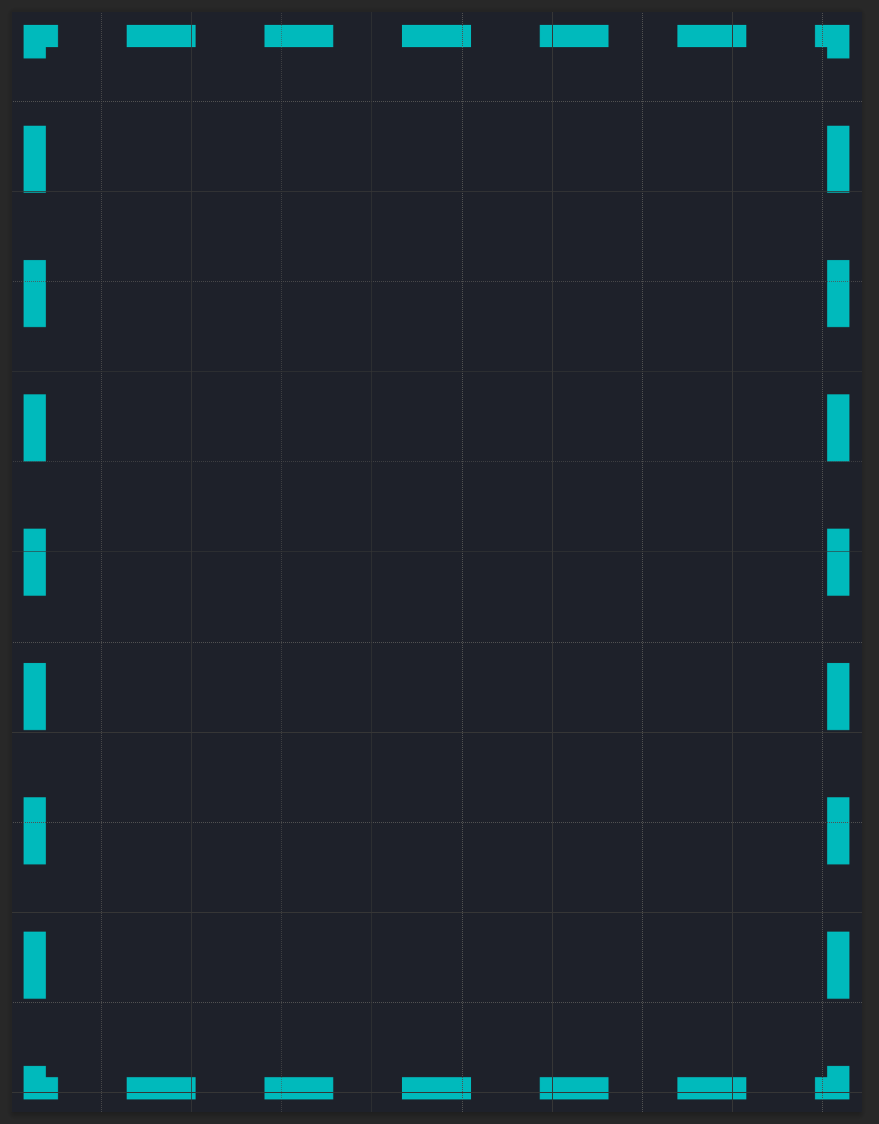
i use rectangle tool and messed with stroke settings but cant get it to be the same on each side
jade mulch
sly hawk
Doing this **properly **would require some proper time. I could quickly chuck it...
could you please just run it through illustrator? the roughness doesn’t really matter as it’s a sample for making a stamp
sly hawk
ah a stamp.! - Yeah no problem.
@jade mulch


Don't panic if you see the code:

just download it as a file and open it in photoshop, a browser etc,
pearl plume
pearl plume
how do i make this pattern? https://i.imgur.com/VmOJQAI.png
anyone? it's quite urgent and think simple
jade mulch
@sly hawkthanks a ton for your help!
sly hawk
pearl plume
how do i make this pattern? https://i.imgur.com/VmOJQAI.png
It's just a dotted stroke
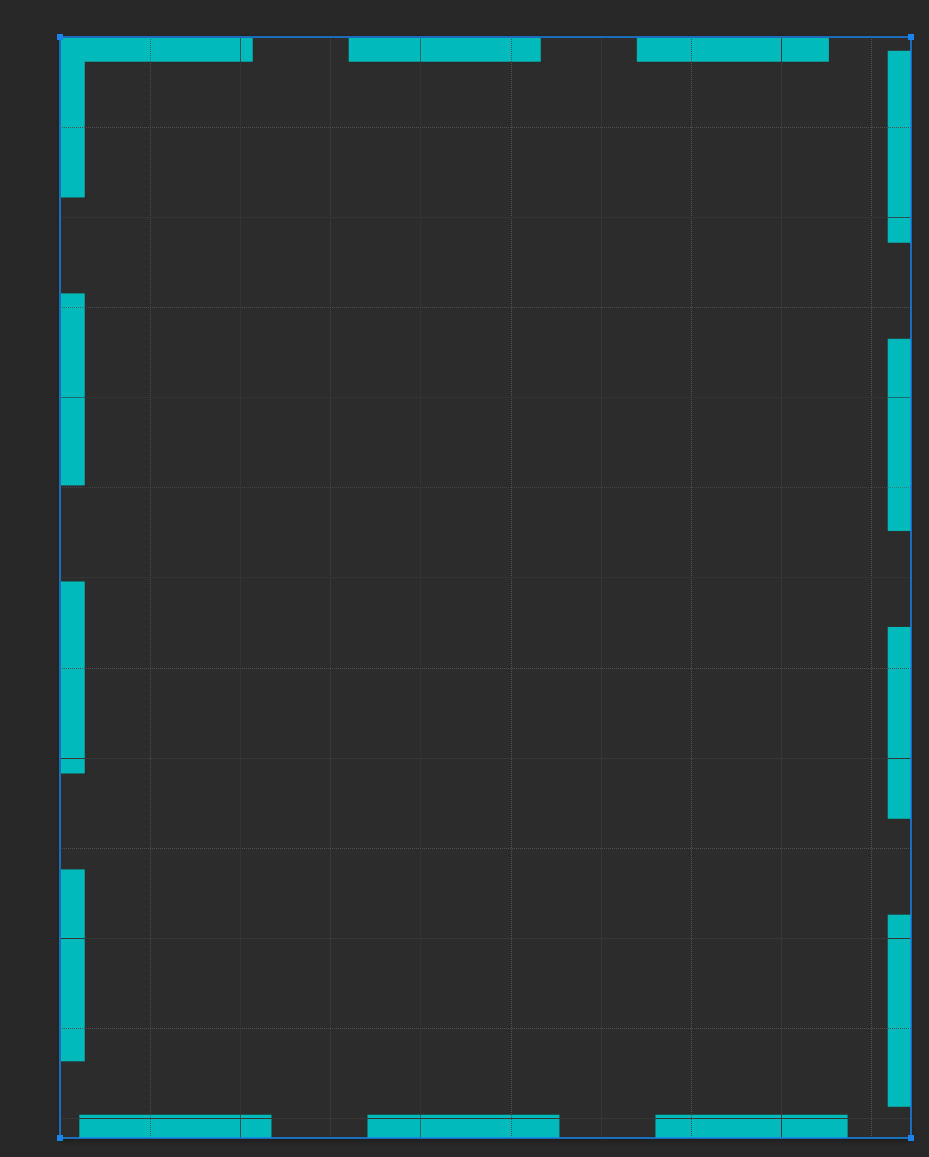 sly hawk
Draw 4 seperate lines then?
pearl plume
I guess :/
thought maybe i can do with rectangle and spent an hour looking for a way
sly hawk

Problem is that the line is doing exactly as asked. The alternative is to do a little math and work out the correct spacing.
pearl plume
how do i calculate the size needed though?
sorry if im asking stupid questions, i feel stupid myself atm
river otter
Anyone can identify this font? Even reddit couldn't do it...
 vapid flume
river otter
Anyone can identify this font? Even reddit couldn't do it...
vapid flume
river otter
Anyone can identify this font? Even reddit couldn't do it...
My hutch is that it's a Zapf (but not a regular one, maybe a condensed of some sort?)
Have you tried What's the font?
Here is a guide to identify fonts, hope it helps?
https://www.instagram.com/p/CqughxJstif/

What do you do when you find a font you like, but then have no idea what it is: You use a font identifier!
Whether it's in an app like Photoshop or Adobe Capture, or using online resources online: I got you covered!
See the links below:
https://fonts.adobe.com/
https://www.whatfontis.com/
http://www.identifont.com/
https://new.myfonts.com/WhatT...

 Instagram
 lucid monolith
How do I get the color back to normal and remove this white spot?

 icy talon
I have created an eliptical selection and am now trying to delete said selection from a layer. PS automatically tries to "smoothen" this. Anybody know how I can achieve a "rough" delete?
 onyx moth
Can someone please walk me through export settings (mainly for Lightroom) in dms? I'm sick of seeing countless 'best settings' on google. I just want 3 different presets (social media, web and print) that allow me to export with the highest quality possible
 cerulean perch
can color depth fix the pixels of an image?
I've heard something about color depth
 paper forge
Hey guys, just a quick newbie question!
I'm working on the photoshoot photo and trying to remove the white papers a person was standing on. However, healing brush tool/patch tool don't really help - they bring in the white pixels from surroundings. What is the best way to remove this thing?

 latent anchor
Q: Does anyone know how to get this effect/style on the text ?
 ivory rampart
Duplicate your text and blur one below
 rigid ice
hey, i have a png image but i want to invert the image and the background, so the invisible part is my shape
ivory rampart
Just select visible object and invert selection
At least thats what I understood you want to make
rigid ice
ivory rampart
Just select visible object and invert selection
yeah but now i want my selection to be black and my "shape" to be transparent
rigid ice
ivory rampart
At least thats what I understood you want to make
i'm really bad at describing lol
 celest spruce
Would anyone be willing to help me fix the wording into War Seekers. Along with removing the animal face?
 rigid ice
ivory rampart
And select object and remove it
rigid ice
ivory rampart
And select object and remove it
yeah that's what i searched, thanks
fluid craneBOT
Gave +1 Creative Carma to @ivory rampart (current: #190 - 7)
sly hawk
Any good?
 sly hawk
rigid ice
i'm really bad at describing lol
sly hawk
rigid ice
i'm really bad at describing lol
Sorted?
sly hawk
latent anchor
Q: Does anyone know how to get this effect/style on the text ?
Just add an outer glow effect (google it if you have no idea what I mean)
sly hawk
paper forge
Hey guys, just a quick newbie question!
I'm working on the photoshoot photo an...
Probably either clone tool or mask it and change brightness.
rigid ice
sly hawk
Sorted?
yes
paper forge
sly hawk
Probably either clone tool or mask it and change brightness.
Thank you, I will go give it a try!
fluid craneBOT
Gave +1 Creative Carma to @sly hawk (current: #7 - 717)
sly hawk
paper forge
Thank you, I will go give it a try!
Shout up if you struggle and I'll try/show you how I'd do it. - I'd just prefer the high res image without the circle!
 exotic tendon
hiii so i been working with layer blending but im having struggle with making an iris the correct colour as it keeps making it low saturation pls help
see what i mean how to i make it like the other eyes whille keeping the skin all nice?

 stuck glacier
Can I use photoshop to increase resolution of an image?
If I can, how should I do it?
ivory rampart
you can use generative expand or resample image if you don't want to use AI to create non existent parts of image
sly hawk
exotic tendon
see what i mean how to i make it like the other eyes whille keeping the skin all...
I think a straight up clone stamp would be better,.... - skip the 'blend layers' bit

 ripe quest
 molten finch
So I turned off the small menu when selecting things but I forgot where it was
molten finch
So I turned off the small menu when selecting things but I forgot where it was
Small menu? Window > Contextual Task Bar... (at the bottom of the menu)
 deft hatch
is anyone by any chance having problems with amds new drivers with photoshop? i couldnt open files half the time and had to either turn off gpu acceleration and/or opencl
molten finch
ripe quest
Small menu? Window > Contextual Task Bar... (at the bottom of the menu)
Thanks I found it
celest spruce
sly hawk
Any good?
Wow you are awesome for that thank you!
fluid craneBOT
Gave +1 Creative Carma to @sly hawk (current: #7 - 718)
 gentle skiff
How do i cut the outline of the 1 image into the 2 image? so its the same shape as the cut out one


 sly hawk
gentle skiff
How do i cut the outline of the 1 image into the 2 image? so its the same shape ...
sly hawk
gentle skiff
How do i cut the outline of the 1 image into the 2 image? so its the same shape ...
So you have two images with exactly the same #shape'?
sly hawk
Sorry, I meant to say:
So you **want to **have two images with exactly the same teardrop shape?
gentle skiff
yeah
sly hawk
You can use the one with the shape... as a 'Clipping mask' for the other one.
Just place the shape you want to 'use as the cutter' at the bottom, and the picture you want to cut... above it.
@gentle skiff
 gentle skiff
sly hawk
Here is a clearer example too <@1085097815660822538>
gentle skiff
sly hawk
Here is a clearer example too <@1085097815660822538>
Thank you so much i dont know how to vouch please tell me you diserve it
fluid craneBOT
Gave +1 Creative Carma to @sly hawk (current: #7 - 719)
still tinsel
How can I take an image like (the colored one) this that is slightly cell shaded and turn it into something like this second image (the black and white line art)
Is there another way too that I can turn the slight cell shading into complete cell shading instead of having the black and white like fade into eachother I want them to be solid shadows


 viscid fern
Hello, I have been having problems with my canvas being unreactable. Im not sure if I'm pressing a keybind or if the canvas is freezing
I can save and use the toolbar at the top, but the canvas is stuck and i cannot interact with it. My cursor is a normal mouse cursor, no matter what tool I select. I cannot move the canvas and i cannot hide the canvas or interact with it in any way.
 nocturne cairn
still tinsel
How can I take an image like (the colored one) this that is slightly cell shaded...
nocturne cairn
still tinsel
How can I take an image like (the colored one) this that is slightly cell shaded...
Add a Threshold adjustment layer and experiment with the Threshold Level in the Properties panel.
 nocturne cairn
viscid fern
Hello, I have been having problems with my canvas being unreactable. Im not sure...
nocturne cairn
viscid fern
Hello, I have been having problems with my canvas being unreactable. Im not sure...
Have you tried the following?
Restart Photoshop
Restart Computer
Reset Photoshop Preferences
viscid fern
nocturne cairn
Have you tried the following?
Restart Photoshop
Restart Computer
Reset Photoshop...
it seems when i close out and reopen the artboard it goes back to normal thanks
fluid craneBOT
Gave +1 Creative Carma to @nocturne cairn (current: #24 - 76)
 wind elm
Guys, any clue why my cursor keep on loading (Loading ring) while I am using photoshop, Illustrator, etc.
Which make me cannot access/press on the top bar
nocturne cairn
viscid fern
it seems when i close out and reopen the artboard it goes back to normal thanks
Good to hear
nocturne cairn
wind elm
Guys, any clue why my cursor keep on loading (Loading ring) while I am using pho...
Have you tried restarting your computer?
nocturne cairn
wind elm
Lemme try this out
Good luck
wind elm
nocturne cairn
Good luck
Thanks, it's solved now
fluid craneBOT
Gave +1 Creative Carma to @nocturne cairn (current: #24 - 77)
wind elm
Thanks again for the help!
still tinsel
nocturne cairn
Add a Threshold adjustment layer and experiment with the Threshold Level in the ...
thank you
fluid craneBOT
Gave +1 Creative Carma to @nocturne cairn (current: #22 - 78)
nocturne cairn
wind elm
Thanks, it's solved now
That's great to hear. Thank you.
fluid craneBOT
Gave +1 Creative Carma to @wind elm (current: #837 - 1)
nocturne cairn
still tinsel
thank you
Cheers
 charred slate
what is the icon on the thumbnail?
 ripe quest
charred slate
what is the icon on the thumbnail?
ripe quest
charred slate
what is the icon on the thumbnail?
It denotes a Shape Layer / vector object.
charred slate
what does that mean?
ripe quest
charred slate
what does that mean?
There is a shape or shapes on that Layer. They are vector objects, constructed with anchor points, lines, colors, etc. As opposed to raster objects, i.e. a group of pixels with color values assigned.
ripe quest
charred slate
what does that mean?
Its important to know the difference. See: https://www.adobe.com/creativecloud/file-types/image/comparison/raster-vs-vector.html
charred slate
how would i make this pen tool i just used to outline make a shape, to where i double click the thumbnail and it changes color
 ripe quest
charred slate
how would i make this pen tool i just used to outline make a shape, to where i d...
ripe quest
charred slate
how would i make this pen tool i just used to outline make a shape, to where i d...
Sorry. I don't know what this means.
You want to trace something in this image with the Pen Tool?
charred slate
nvm
 serene barn
so ive cut out the player here, how do i make this player into a seperate layer?
 ripe quest
serene barn
so ive cut out the player here, how do i make this player into a seperate layer?
ripe quest
serene barn
so ive cut out the player here, how do i make this player into a seperate layer?
Ctrl J
serene coral
@keen wyvern you can ask your question here :)
 copper meteor
When Iam using Smudg tool or brush tool my display blink
how to slove please help
My PC 5600x ryzen , RTX 4060 , 32 GB Ramm, Display 2k 144hz
serene coral
copper meteor
When Iam using Smudg tool or brush tool my display blink
your whole display? or canvas? are you using artboards?
 deep radish
ripe quest
Its important to know the difference. See: https://www.adobe.com/creativecloud/f...
deep radish
ripe quest
Its important to know the difference. See: https://www.adobe.com/creativecloud/f...
how to convert a text layer to vector type so I can resize them or alter any anchor points?
vapid flume
deep radish
how to convert a text layer to vector type so I can resize them or alter any anc...
You need to right click on the layer and choose "convert into shape" or something similar (I don't have photoshop open now). Or go to type>convert to shape
deep radish
vapid flume
You need to right click on the layer and choose "convert into shape" or somethin...
thank you, it worked!
fluid craneBOT
Gave +1 Creative Carma to @vapid flume (current: #8 - 499)
vapid flume
 compact berry
how do I remove or replace a text from an image
compact berry
how do I remove or replace a text from an image
It depends if the text is on a separate layer or not. Can you show a full screenshot of your Photoshop window? (
copper meteor
serene coral
your whole display? or canvas? are you using artboards?
iam working photo retuch ps 2024. My pc specs high. But when iam using photoshop my pc running slowly and display blink some times please help

 vapid flume
compact berry
vapid flume
compact berry
In that specific case, the text is not in a separate layer so you will have to remove the text, and type another text (And keep it as a sparate layer). In your case you could decide to cover the text roughly with white (since the background is white, just check), but if you'll ever have to do this on top of a detailled background (say, when there is a drawing eneath that text) then it will be more compicated, and you will have to use tools like the Clone stamp tool, remove tool, or spot healing brush tool.
but now, since it's all white underneath, just select your text with the selection tool, loosely, and go to edit>fill>white
to delect: select>deselect
compact berry
thanks so much sandrine
I don't want them to read so that they'd subscribe to the jnovel website
and so that it wont get a strike
just gonna use this to show how good the manga is
vapid flume
Oh Good! JUst be mindful of copyright laws and everything, a credit of the original creator (and a link to the original) is always welcome 🙂
A rule of thumb: if you just done something like select, and want to either deselect or modify the selection etc, and don't know how to find it, just right click on the canvas. It will show you all the alternate options
serene coral
copper meteor
iam working photo retuch ps 2024. My pc specs high. But when iam using photosho...
please. answer at least one of my questions...
vapid flume
It works with all the tools
copper meteor
serene coral
please. answer at least one of my questions...
Whole display
serene coral
copper meteor
Whole display
make sure you're running the latest gpu drivers
copper meteor
serene coral
make sure you're running the latest gpu drivers
Yes
vapid flume
That's the standard procedure for GPU troubleshooting
https://helpx.adobe.com/uk/photoshop/kb/troubleshoot-gpu-graphics-card.html
You need to follow the ssteps and see what works
 ripe radish
Every time I save a file in Photoshop it creates a separate .c2paws file - I thought at first they were temp files for smart objects but realized it's happening all the time and not just when I use smart objects. I read in the Adobe Community that the file shave something to do with content credentials but no one there seems to be sure. I thought content credentials were in the actual file metadata? It's happening with my regular photographs and not simply with AI images that I edit. These seemingly extraneous files are littering my hard drive as It is generating a new one for each one I save, including when I save versions in different color spaces. Can I delete these or is there any reason that I should keep them? No one from Adobe seems to be taking part in the Adobe Community Questions I've seen about this online and the consensus there is just delete them. Thanks for some guidance.
vapid flume
ripe radish
Every time I save a file in Photoshop it creates a separate .c2paws file - I tho...
It is a content credential initiate file 🙂
I got the same
There seems to be a glitch as to how and when they are generated
copper meteor
vapid flume
That's the standard procedure for GPU troubleshooting
https://helpx.adobe.com/uk...
already try😔
vapid flume
copper meteor
already try😔
All of it? you're quick 🙂
vapid flume
ripe radish
Every time I save a file in Photoshop it creates a separate .c2paws file - I tho...
Depends what you have set also in the preferences
 copper meteor
vapid flume
All of it? you're quick 🙂
copper meteor
vapid flume
All of it? you're quick 🙂
Yes but not change
vapid flume
copper meteor
Yes but not change
Can you show me the screenshot of your GPU compatibility as explained in the link?
ripe radish
vapid flume
Depends what you have set also in the preferences
Sandrine, how do I set it if I want it to simply be in the final jpeg? Which option do I tick in each set so I don't get these extra files?
vapid flume
@ripe radish those extra files are supposed to be happening only for RAW files (as I have been told) but apparently its a little bug (again as explained to me). I have it for the TIFFs, and PSDs generated, but they don't happen for me. I reported it to the team and they're working on it. I have been told to delete them
vapid flume
ripe radish
Sandrine, how do I set it if I want it to simply be in the final jpeg? Which opt...
You can't for now
ripe radish
Thanks so much Sandrine. How should I have mine set? Right now it's the same as the screen you shared.
vapid flume
Although as I said they are not happening for the jpegs for me, so maybe try to copy my settings. 🙂 All that I know is that it shouldn't be happening... (messages crossed!)
copper meteor
vapid flume
Can you show me the screenshot of your GPU compatibility as explained in the lin...

this is my last settings
iam wdding album designer
ripe radish
OK thanks. My settings were set the same as yours. I used to get them just with PSD files but now it's tiffs and jpegs too.
vapid flume
copper meteor
That's not what I asked. I asked for the GPU compatibility. You also need to use Open CL if possible (it's disabled now)
copper meteor
vapid flume
That's not what I asked. I asked for the GPU compatibility. You also need to use...
can you help bestsettings
vapid flume
ripe radish
OK thanks. My settings were set the same as yours. I used to get them just with ...
I will try to find a link to the bug report in the Addobe Community Forum. So you can add yours to it.
Bear with me...
vapid flume
copper meteor
can you help bestsettings
It's in the link I shared. I would take me a good hour to test all the things that are explained in this link and watch the videos. That's why I said you're quick. Nobody will hold your hand to set up your computer. That' will take hours to do properly
JUst follow all the steps, including settings for older GPU that are at the end of the link, in case all fails
Are you more comfortable with another language than English? If that's the case, tell me which language and I will try to find the same link in that language
copper meteor
I know only malaylam
vapid flume
@ripe radish I wasn't able to find a specific thread in the forum about our shared issue. I think I might have raised it in private with one of the team. I am not sure now
Would you mind logging abug report?
https://community.adobe.com/t5/photoshop-ecosystem/ct-p/ct-photoshop?page=1&sort=latest_replies&lang=all&tabid=all

https://community.adobe.com
Master Photoshop with the help of our global community.
If you share the link here, I'll be able to chime in. I just tried and didn't get the extra files today (it seems to be erratic) but I will try to reproduce the problem so I can explain further there. Hopefully it will get to the attention of someone at Adobe (I know they said they were working on it, but sometimes they are not good at following up with announcements)
EDIT: Silly me: it was me who asked a question! 🙂
https://community.adobe.com/t5/photoshop-ecosystem-bugs/c2paws-files-generated-when-i-create-new-docs-in-photoshop/idi-p/14090223
The answers I shared here where given to me privately
https://community.adobe.com
The title says it all. Since updating to PS 2024, the PSD files I create generate an additional .c2paws file (doesn't happen with those I created in the old version and then open, and save with 2024) they cannot be opened with anything present on my computer, but they contain data In this scre...


 frozen magnet
How do i draw in solid colors
in my photoshop whenever i draw it's always had a fade out effect to blend with colors
any settings for it
vapid flume
frozen magnet
How do i draw in solid colors
Can you show a screenshot of your entire window (with layers and so on) ? it would help a lot understand the issue
frozen magnet
vapid flume
Can you show a screenshot of your entire window (with layers and so on) ? it wou...

im mostly talking about this
if you see on the corners
it has a mix of pink and green
 frozen magnet
does this help
 serene coral
frozen magnet
if you see on the corners
serene coral
frozen magnet
if you see on the corners
use the pencil tool 
vapid flume
Yes, you are using the brush tool with a brush that has likely an amount of blur on the edges, even if your hardness is set to 100%. The pencil tool eliminates all that
frozen magnet
serene coral
use the pencil tool <:ToolPencil:961195939190698014>
and you too :D
forgot about ya :D
rep !!
vapid flume
Silly question: What does "rep" means?
sly hawk
vapid flume
Silly question: What does "rep" means?
I assume they're talking about "reputation".
Come on, you gotta get down with the kidz!
 vapid flume
I can't know them all! 😂
sly hawk
(I have to google a worrying number of words people say on forums)
Someone called me a GOAT and I wasn't sure whether it was an insult so had to google it.
🐐
vapid flume
This one I know what it means!
I'm not completely out 🙂
serene coral
 tacit timber
I want to learn Photoshop. Should someone guide me please
tacit timber
I want to learn Photoshop. Should someone guide me please
Hi! You can start with built-in hands-on tutorials that will teach you all the basics! https://discord.com/channels/547473772727238676/1042633933948465214
 meager cargo
Hi, can anyone guide, how can i convert my photos into any theme, i do studio photography so want to addon AI creativity in studio photos, Thanks
serene coral
meager cargo
Hi, can anyone guide, how can i convert my photos into any theme, i do studio ph...
can you explain what a theme means to you? do you want to change colors? add objects?
meager cargo
serene coral
can you explain what a theme means to you? do you want to change colors? add obj...
theme like, if i click baby picture in studio and convert to fairytale background, or cinderella dress, or like a royal dressup and background is like Royal british house. something like that
serene coral
meager cargo
theme like, if i click baby picture in studio and convert to fairytale backgroun...
you might want to use Firefly in this case and use reference image modes
meager cargo
serene coral
you might want to use Firefly in this case and use reference image modes
its not possible in photoshop, because need to keep it private, because it will be clients photos, so i will print and give it to them
meager cargo
serene coral
you might want to use Firefly in this case and use reference image modes
I tried mid journey but not creating same faces
serene coral
meager cargo
its not possible in photoshop, because need to keep it private, because it will ...
I think you can use the generative fill function and simply be precise about the selections and prompts instead of trying to do everything all at once
serene coral
meager cargo
I tried mid journey but not creating same faces
if you tell the ai to inpaint the face, it will make it different, just like anything else
meager cargo
serene coral
I think you can use the generative fill function and simply be precise about the...
right, i will practise this way, i know some photography companies are doing very well with AI to create customer photos, and they are doing batch photography, so doing lots of photos in one go, dont know how they are doing , if you have any idea please let me know, any software ?
serene coral
meager cargo
right, i will practise this way, i know some photography companies are doing ver...
it is basically impossible to create the same scene twice using ai so if you deliver say 10 photos each of them will look like taken in another location
meager cargo
serene coral
it is basically impossible to create the same scene twice using ai so if you del...
totally agree with you, really thanks for help
fluid craneBOT
Gave +1 Creative Carma to @serene coral (current: #6 - 794)
 fossil ruin
i am trying to find a brush close to the one used in the designs (the designs aren't mine these are examples)

 ripe quest
fossil ruin
i am trying to find a brush close to the one used in the designs (the designs ar...
ripe quest
fossil ruin
i am trying to find a brush close to the one used in the designs (the designs ar...
Have you checked the Kyle Webster Brush Packs? Maybe "Megapack" or "Gouache" sets. Possibly others. You can find them at this URL: https://www.adobe.com/products/photoshop/brushes.html
magic niche
Does anyone know if there's a way to set different pen pressure sensitivity for different functions in photoshop?
Not whether I can disable/enable pen pressure per function - but whether I can make each function respond differently to the same amount of pressure on the pen, so make one function more sensitive to lighter pen presses than the other.
The problem is, the pressure sensitivity that works well for one function for me, is the opposite to what works well for another function that I also want to use at the same time.
And my tablet - it's a wacom one - it doesn't have the customize button for pen pressure with the graph that some other wacoms do, I only have a slider for sensitivity, it only goes in two directions, and the direction that looks good on the flow and opacity of a brush, looks terrible for the size variation of the brush, and vice versa.
Thank you!
 marble marsh
is there Adobe After effects pro?
ripe quest
marble marsh
is there Adobe After effects pro?
There is only "Adobe After Effects". No Pro.
marble marsh
i mean person who is pro in AE
ripe quest
marble marsh
i mean person who is pro in AE
Check the Adobe Video Server: https://discord.gg/adobepremiere
sly hawk
marble marsh
i mean person who is pro in AE
Probably loads in the Adobe Video Server 👆
marble marsh
i cant join it i think somehow i am banned there
sly hawk
grabs popcorn.... what did you do?
marble marsh
sly hawk
*grabs popcorn*.... what did you do?
i cant remember that was 2-3 years ago
 sly hawk
 dreamy sable
Here you go. A 59 second video:
https://www.youtube.com/watch?v=GLPKEPmlMcU
 dreamy sable
how can i add picture to any selection? for me is so usfull becouse i work as lot with seleccions
 brisk bane
Hello! I have this alphabet image thing. Is there a way I could like maybe easily type out the letters with my keyboard and they would appear? Like a font, but not really...

Because it's really boring and tiring to paste them one by one...
 obsidian dew
Hey folks, I have an Adobe Indesign question, asking here because I assume PS print settings and Indesign settings might be handled similarly.
I have a document that is set up to be 8 1/4" x 10 3/4" in Indesign, however when I print it in Indesign, it actually prints out to 8" x 10 11/16", and I have no bleed or slug configured. When I save it to pdf and print the pdf, it somehow gets even worse, being printed as 7 11/16" x 10 1/16".
How can I fix this?
 midnight patio
if i were to want to make his red eye glow a little brighter how would i do that

and have like more of a glow around it
frozen magnet
another question! is there a tool to solidify the colors on the borders

these borders of mine are not so solid
but phase through
i want to solidify their colors

ive practically made a magic tool out of some lands i wish
all i need is those lands, to be filled with 1 color without no fades
(it has islands so it gets trippy)
river otter
how do you go about doing a color swap
like a simple image color change from another image
 thick tangle
guys
whats the easiest way to make a firefly in PS... or anyone of u perhaps have some flying bug ..ish image cos i cant find any that would fit i the image
thanks
 sturdy walrus
Can someone please help me leave these images with similar color/texture treatment? (preferrably closer to the second one)

 midnight patio
i think it’s a bot
river otter
Sometimes they get hacked
midnight patio
dang
thick tangle
i think if he would be hacked he would send it in every single one of the text channels
sly hawk
frozen magnet
these borders of mine are not so solid
This is normal. You don't want them to be 'solid' surely? If you do, the image will look like it was cut out with a pair of these:
 sly hawk
frozen magnet
all i need is those lands, to be filled with 1 color without no fades
sly hawk
frozen magnet
all i need is those lands, to be filled with 1 color without no fades
If you literally want them to be a single colour, I'd suggest you just MASK the image selection and then add a colour overlay to it,
sly hawk
river otter
like a simple image color change from another image
Loads of videos online. I can't be specific since it depends on the image slightly.
sly hawk
sturdy walrus
Can someone please help me leave these images with similar color/texture treatme...
Slightly long video but it shows the process. - Skip the 1st half if you want.

 white niche
Hey everyone, I'm new to Photoshop and I've run into an issue. I need to remove the 'strands' or 'flyaways' from a portrait's hair. If anyone can help, please DM me. Thanks in advance!
sly hawk
I'm not going to DM you @white niche, but if you could please share an example, we can look at the best solutions for you.
white niche
sly hawk
I'm not going to DM you <@490508125867343893>, but if you could please share an ...
Hey James, here's the photo I'm having issues with.

 low prawn
Does anyone elses brushes not work on mask layers in photoshop beta?
white niche
i need to fix this part
 sly hawk
What bit is wrong? what would you want it to look like?
Presumably you don't want MORE hair to make it look more 'full'?
 white niche
sly hawk
What bit is wrong? what would you want it to look like?
white niche
sly hawk
What bit is wrong? what would you want it to look like?
I need to make the hair look fuller. A friend mentioned they look limp, and I want to fix that
sturdy walrus
sly hawk
Hey, this is amazing!
I was worried changing that glowing “scratchy” texture would take the longest indeed
But tyvm ((:
sly hawk
sturdy walrus
Hey, this is amazing!
No problem. - You can tell that the original image had a radial gradient and embossing, so it's just a case of copying it! 🙂
sturdy walrus
To me too actually 😁
sly hawk
white niche
Could you send me the edited image, please?
Another neat little trick @white niche
Hey, I thought I was supposed to be showing you guys/girls how to use photoshop!? 🙂
@white niche
 white niche
sly hawk
<@490508125867343893>
white niche
sly hawk
<@490508125867343893>
thank you very much, you saved my day!
fluid craneBOT
Gave +1 Creative Carma to @sly hawk (current: #7 - 722)
 sturdy walrus
Appreciate it a lot man 👑
low prawn
I get this message when opening any files or trying to close photoshop. So the only way for me to close it at tghe moment is to restart my computer. The "How to fix" isnt much use and I just updated Photoshop which seemed to solve the problem for an hour or so. Can anyone help?

 thorny dagger
Hello, I just saw the notification about synced files going away, will this affect my photoshop/lightroom files that are saved in creative cloud?
sly hawk
thorny dagger
Hello, I just saw the notification about synced files going away, will this affe...

umm... I posted that, but that probably doesn't answer your question too much.
thorny dagger
sly hawk
Thank you James, do you know the default file path where files are saved locally? Just want to make sure I don't loose anything important.
fluid craneBOT
Gave +1 Creative Carma to @sly hawk (current: #7 - 723)
sly hawk
This Lady here may go into a little more helpful detail.
https://www.youtube.com/watch?v=lRj8_vT-2k4
Sorry I don't know the specific answers myself.

Need help understanding what this change means to you? Adobe is discontinuing Creative Cloud Synced files on February 1, 2024. This video explains which files are affected and which ones you don't need to worry about. Then, learn what do you need to do to prepare for this change. Here's a link to all the details from Adobe: https://helpx.adobe.c...
thorny dagger
sly hawk
This Lady here may go into a little more helpful detail.
https://www.youtube.com...
Very informative video, it looks like its just a cloud synced file path that will be discontinued, and not anything within the creative cloud app, if I understood correctly.
Actually, when I go to the cloud synced file path it's just the same stuff I can see in the Creative Cloud app. so I'm not sure, haha
 kindred hedge
question for my photoshop expertsss! whats the best way to select these chains on photoshop so it doesn’t get cut out? 😭 the background is white but im removing it in the selection :/

 nova fulcrum
Any ideas on how to create an effect like this?


Or like what it is called so I can look into it
I haven't been able to find any info on it
 signal sand
Prolly gonna get cooked for this but how would i reset everything like the sidebars right here the gradiant tool has been up for like 2 days


and its hard to do anything
got it a few days ago
so im a noobie
 winter ermine
are you wanting to not have such a large space for your brushes panel you mean?
signal sand
Nah i mean reset everything on my sidebar. if possible
winter ermine
head to window -> Essentials
doesnt have to be "Essentials", you can pick and choose which layout suits you best
signal sand
Thank you sm!
winter ermine
no problem
 sudden moat

hi i want to transform images (pixel art) without the blurring
how do i do this
like the image i was trying to resize is purely black
but when i transform it it looks fine in preview but when i confirm it adds grey pixels around it
which i dont want
 warm grove
sudden moat
hi i want to transform images (pixel art) without the blurring
warm grove
sudden moat
hi i want to transform images (pixel art) without the blurring
▽ FOLLOW
Instagram ► https://www.instagram.com/obaedakorani/
Facebook ► https://www.facebook.com/obaeda.koranii
TikTok ► tiktok.com/@obaedakorani?lang=ar
▽ PLAYLIST
Latest Video ► https://youtu.be/YVdr7OFWoAQ
Thanks for watching.
Any comments are welcome!
#Photoshop_2022 #Design #Short_Tutorial #Tutorial #Short_Tutorial
nocturne cairn
sudden moat
When in Free Transform mode, change the Interpolation in the Options bar to Nearest Neighbor.
Absolutely do not forget to change this option back as soon as you’ve finished with it. If you don’t you will drive yourself crazy trying to work out why your resized photos are really pixelated.
 nocturne cairn
sudden moat
nocturne cairn
sudden moat
There is a similar option when using the Image Size dialog box.
 ripe quest
 plucky folio
or what its called
plucky folio
or what its called
It's a collage. See: https://www.adobe.com/products/photoshop/collage.html
nocturne cairn
sudden moat
TYSM
No worries. Thank you.
fluid craneBOT
Gave +1 Creative Carma to @sudden moat (current: #838 - 1)
 torn sand
Hiya! I'm trying to cut out the background of this portrait i took for a school project with select and mask but im struggling to cut out the shoes as there is blur and theyre a similar colour to the background, does anyone know how to get around this? I tried following some youtube tutorials but im still a bit lost :(


Nvm, if you play around with channels and ctrl+L you can create a better contrast between the subject and the background making it easier to get a clear cut selection
 vapid flume
@torn sand I know what you mean. Genrally if select> select subject doesn't works, you'll have to work that bit manually. For example with the pen tool
Keeping in mind that you will also have to separate the bit that is blurry, to blur the mask as well as make it slighly transparent so the new background shows through.
So the way I do it is use the automatic tool if they work OK (select subject usually works), turn this selection into a mask. I put a bright coloured layer underneath so I can see what I'm doing, and then I start to create a neat selection with the pen tool, and use either a blur filter or the blur tool to soften the adges of the foot heavily. and then paint with a low opacity soft brush (thing 15% opacity) to make the blurry part show through

The thing is, if you have several portraits to work through and want to position them on top of a very detailed coloured new background, it helps with shooting them in front of a background (a cyclo) that is closer to the colour of the new background, so you don't have to be as precise as that. Of course, that's called "benefit of insight" 🙂
 vague willow
Hi i need some help in photoshop I am new
how to select an object? it wont let me, it just shows pink full screen
vapid flume
That's why in general, photographers sketch their shoot and try to take into account the whole process when preparing. I say that while at the same time, we all know the Artistic Director will come with a silly new background idea before you even close the shoot for the day 😅
 grand wren
hello! Would anyone know which brush was used to make black lineart ?
or would it be possible to put me similar brushs links ?
I do not know the name of this type of brush and I would like to know it so I can find similar
(the screenshots come from the meme Epoch, made by the artist Paper Su on youtube, she uses photoshop)
(please ping me)

 vapid flume
grand wren
hello! Would anyone know which brush was used to make black lineart ?
or would ...
vapid flume
grand wren
hello! Would anyone know which brush was used to make black lineart ?
or would ...
It's honestly very difficult to identify a brush beyond the type (which in this case would be a comics brush type, as in not a technical pencil, not a marker, not a pen, but a brush)
**
EDIT: I think they are sketch pencils instead of brushes when looked at closely... My bad.**
I have mine that I love from Kyle Webster selection (called Guelf, animator, and belgian comics), I also created mine (mostly Japanese calligraphic brushes), but there are litterally thousand of people selling or offering brushes for free. Impossible to pinpoint one
these ones are free to downlod if you have a CC subscription of any sort
https://www.adobe.com/uk/products/photoshop/brushes.html
torn sand
vapid flume
The thing is, if you have several portraits to work through and want to position...
Thank you for the tips! I'll write about this in my sketchbook :D
fluid craneBOT
Gave +1 Creative Carma to @vapid flume (current: #8 - 500)
vapid flume
Other reputable places that offer/sell brushes are
https://www.retrosupply.co/
But you can also find some on Behnace, deviantart and similar platforms

RetroSupply Co.
Premium retro and vintage graphic design and illustration resources including brushes, textures, fonts, tutorials & more for Procreate, Photoshop, Illustrator, and Affinity.
vapid flume
torn sand
Thank you for the tips! I'll write about this in my sketchbook :D
Glad it helped!
https://www.taralesher.com/blog/which-comes-first-the-concept-or-the-shoot
might help too
 vapid flume
grand wren
hello! Would anyone know which brush was used to make black lineart ?
or would ...
vapid flume
grand wren
hello! Would anyone know which brush was used to make black lineart ?
or would ...
Ultimately, it worth a try either asking the original artist about the brushes they use. Some will cringe at this, but I have my "guelf" and "animator" brushes as favourite after asking an artist 🙂 Nice people will answer!
If they publish timelapse or videos of work in progress you can also try to pause the video to try to identify the brush they use as well....
grand wren
vapid flume
Ultimately, it worth a try either asking the original artist about the brushes t...
I will try! I hope she will answer me because I really love this style of brush! unfortunately for the rare speedpaints she posted, we only see the canva
vapid flume
grand wren
I will try! I hope she will answer me because I really love this style of brush!...
Yes, I went to see what they were doing ...
The artist I got my brushes from is called Rachael Costa, and while the style is different from what you're looking at, it's not widely off neither
https://www.instagram.com/littleblackspot/
The brushes she uses are part of Kyle Webster "megapack", from the link I shared earlier
Welcome back to Instagram. Sign in to check out what your friends, family & interests have been capturing & sharing around the world.
vapid flume
vague willow
HOW TO CHANGE COLOR OF AN OBJECT?
It depends of how the icon has been built (vector? Raster/P{ixels?)
It would help if you could show a screenshot of the WHOLE photoshop window, with the layers panel showing
vague willow
vapid flume
It depends of how the icon has been built (vector? Raster/P{ixels?)
It would hel...

yea it was an svg but i put it into photoshop so i think it changed into png thanks
vapid flume
OK, it's a raster object then
vague willow
i want to color it
vapid flume
one of the easiest way would be to apply a layer style

double click on the layer and this pop up window appears. Check the "color Overlay" section, and modify the parameters you see. You need to click and highlight the section as well to see the settings
► Check out our amazing new FREE course, Photoshop for Beginners: https://youtu.be/IyR_uYsRdPs
Photoshop layer styles are a popular way to add effects, such as drop shadows and strokes, to layers in a non-destructive way. With the right knowledge and experience, any effect can be achieved. Whether it's a Photoshop metal layer style, a Photoshop...
There are other methods, but this one is the simplest and most straighforward
vapid flume
vague willow
yea it was an svg but i put it into photoshop so i think it changed into png tha...
If you want to work from the .svg directly (which is maybe preferable if you want to retain the vector capabilities) you need to either work it in Illustrator, or convert the svg in a format you can use in PS. (.eps, .pdf, .ai)
You can TRY to use "open as" command (file>open as) and open the svg as a vector compatible format in Photoshop

I don't have a .svg at hand to test that...
sly hawk
thorny dagger
Actually, when I go to the cloud synced file path it's just the same stuff I can...
Hey, I asked in the Mod chat and @vapid flume has confirmed:
I got an answer from the dev team. The files on your computer are safe. The relevant files on the clouds will no longer be synced* and will be removed.***
So please make sure to backup anything that you have stored **only **on adobe cloud.
 unborn kiln
vapid flume
unborn kiln
vapid flume
If you want someone to do something for you, you'll have better luck in #💬chat-general
river otter
Hello folks, where do i find this setting to edit in keybinds? I absolutely cannot locate it

Also, when i use the "Brush to Eraser" keybind which i did manage to locate, i have to hold the button down. In sketchbook i could just press the button once instead of having to hold it, is there a way to change that?
 tacit jetty
Hey guys,
I wanted to ask if somebody knew how I could replicate the effect of the word BONUS. Would like to do the same on my design but I dont know how to do it or what to search for on google

 bold bolt
Hello everyone, I'm trying to save my projects as an image but it only gives me an option as a pdf file. Does anyone know how I can change this?
 tacit jetty
bold bolt
Hello everyone, I'm trying to save my projects as an image but it only gives me ...
tacit jetty
bold bolt
Hello everyone, I'm trying to save my projects as an image but it only gives me ...
maybe use "Export" instead of "Save as "
 bold bolt
tacit jetty
maybe use "Export" instead of "Save as "
bold bolt
tacit jetty
maybe use "Export" instead of "Save as "
lol thanks bro you were right i thought it was something more challenging🙏
fluid craneBOT
Gave +1 Creative Carma to @tacit jetty (current: #838 - 1)
tacit jetty
bold bolt
lol thanks bro you were right i thought it was something more challenging🙏
yo better listen to Liyones
exporting I think has worse quality sometimes idk
bold bolt
wispy nexus
Got you I'll try it now
vapid flume
river otter
Not all keyboard shortcuts are editable. Only those that are included in a menu of some kind are editable. so, the cycle through blending mode, not being part of a menu (it exists only as a shortcut, or if you cycle through manually) is not available in the standard edit>keyboard shortcuts as the others menu-based functions are...
It's unfortunate but that's the way it is!
For the brush to eraser, yes, you have to hold it, it's a specific type of toggle in Photoshop
There is another app from Adobe, called Fresco, that is mainly aimed at people operating from Ipads and display graphic tablets, that uses contextual alternate toggles that can be locked...
I am pointing it out as I think Fresco looks more related to sketchbook than Photoshop is (but I may be wrong)
river otter
Understood, thank you very much
 lavish frigate
hi ! i wanted to ask what are the differences between illustrator and photoshop as a graphic designer and for what should i use each
wispy nexus
Hello guys i've been working in photoshop since a long time ago and i've been facing really serious question, the colors in phone doesn't appear like in photoshop when i open my saved picture with phone not even a small difference like in photoshop PC it's orange and in phone it's darker red and even some textures become invisible due to strong of color
i've tried opening the image in phone with a photo editor Picsart it becomes fine just like in pc
but in gallery and my friends phones it's really different
lavish frigate
what phone do you use?
wispy nexus
wispy nexus
i've tried opening the image in phone with a photo editor Picsart it becomes fin...
once i upload it in the Picsart it open like in phone (dark red) for a second then it gets back to normal like in pc
ivory rampart
phone nowadays have ips/oled screens and if you have TFT monitor colors will have different tones
wispy nexus
lavish frigate
what phone do you use?
doesn't matter because all of my friends see it the same
wispy nexus
ivory rampart
phone nowadays have ips/oled screens and if you have TFT monitor colors will hav...
you would be surprised if you see the difference tho
lavish frigate
can you attach a photo ?
ivory rampart
it can be also settings of your pc monitor
wispy nexus
as i mentioned when i upload it in picsart (phone photo editor) it's just fine and normal like in pc
but in gallery it's something else

@ivory rampart @lavish frigate see
lavish frigate
what i’d say is that the pc and the phone have different screens, but i don’t understand why on picsart you can see it correctly
ivory rampart
maybe gallery app is using different color profile 🤔
lavish frigate
i agree. try on another app that’s not picsart
wispy nexus
im pretty sure it's something on my pc
prime token
prime token
Is there anyway to change the path endpoint, so It continues from where I want t...
Can anyone help with this?
 viral palm
prime token
Can anyone help with this?
viral palm
prime token
Can anyone help with this?
In Path panel click outside of the "Work Path" to unselect it then reselect it cliking on it.
Then you can continue tracing your path from the first anchor point.
You can just continue tracing from first or last anchor point.
Hope it will help you.
prime token
viral palm
In Path panel click outside of the "Work Path" to unselect it then reselect it c...
What do you mean by, Click outside of the Work Path?
lavish frigate
hiya, not really ps related question but is about typography. I have these fonts that have beginning and ending swash, but i don’t know how to write them and i’ve been here for a while trying to figure it out 😭
for ex.
 ripe quest
lavish frigate
hiya, not really ps related question but is about typography. I have these fonts...
ripe quest
lavish frigate
hiya, not really ps related question but is about typography. I have these fonts...
You can view all of the glyphs in a given font by using Window > Glyphs... Also see: https://helpx.adobe.com/incopy/using/glyphs-special-characters.html
And you can substitute them fairly easily...

 edgy crane
Hello all! Does anybody know if it's possible to move and transform an object in a plane within the vanishing point tool AFTER it's already been placed?
I can generate a 3D plane and place artwork on it as initially desired, but I can't seem to find any way to select and reposition an object on the plane after the fact.
winter ermine
in this first image the colours are nice, and they stand out. i also think there is a blue tint on there.
how can i replicate the quality/colour i have on the first photo onto this 2nd photo?

 torn sand
Hiya, I've made a bendy line using the pen tool and I'm trying to put text there in the shape of the pen tool but after a certain point the text doesnt go all the way to the end of the pend tool ive created, does anyone know why?
 sly hawk
torn sand
Hiya, I've made a bendy line using the pen tool and I'm trying to put text there...
sly hawk
torn sand
Hiya, I've made a bendy line using the pen tool and I'm trying to put text there...
Yeah, you actually define the 'area' of the text by setting a start and end...
the cursor changes when you get the right point and you can drag it down further
sly hawk
torn sand
Hiya, I've made a bendy line using the pen tool and I'm trying to put text there...
river otter
Anyone familiar with doing color swaps?
i wanted to see what something would look like with a different color 😅
sly hawk
tacit jetty
Hey guys,
I wanted to ask if somebody knew how I could replicate the effect of ...
fluid craneBOT
Gave +1 Creative Carma to @sly hawk (current: #7 - 725)
sly hawk
winter ermine
in this first image the colours are nice, and they stand out. i also think there...
sly hawk
river otter
Anyone familiar with doing color swaps?
Yes, there are so many videos on youtube for that.
sly hawk
tacit jetty
Omg ty so much for the tutorial video!
P.S. - I guessed the font Poppins - Not a bad first try!
 sweet field
lavish frigate
hi ! i wanted to ask what are the differences between illustrator and photoshop ...
sweet field
lavish frigate
hi ! i wanted to ask what are the differences between illustrator and photoshop ...
Generally, Photoshop is used for editing photos, creating image collages, mockups, anything that requires raster, as in pixel editing. Illustrator is vector-based, which means each object is comprised of points which create the final shapes instead of it being through pixels. It's better for anything shape and text. Logos, posters, brochures (which may be better in InDesign)
sly hawk
tacit jetty
Omg ty so much for the tutorial video!
Change the letter spacing here:
 tacit jetty
sly hawk
Change the letter spacing here:
tacit jetty
sly hawk
Change the letter spacing here:
ty so much
fluid craneBOT
Gave +1 Creative Carma to @sly hawk (current: #7 - 726)
tacit jetty
sly hawk
P.S. - I guessed the font **Poppins** - Not a bad first try!
yea looks great thx
 velvet geyser
How do I turn an my new MacBook? There is a button on it that I think is the power button but not sure. They said I need the MacBook to be turned on to use the photoshop app too so it’s kinda annoying
sweet field
velvet geyser
How do I turn an my new MacBook? There is a button on it that I think is the pow...
Yup I would start by trying the buttons. There should be one that is separate from the ones with the letters
 modern plinth
hello has anyone ever seen an issue like that ? i tried to uninstall and reinstall but nothing changes
 sly hawk
velvet geyser
How do I turn an my new MacBook? There is a button on it that I think is the pow...
sly hawk
velvet geyser
How do I turn an my new MacBook? There is a button on it that I think is the pow...
If you can't figure out how to turn on your computer, or on how to google it, I'm not too confident in how you'll get on with photoshop.... good luck!
sly hawk
modern plinth
hello has anyone ever seen an issue like that ? i tried to uninstall and reinsta...
Check graphic card drivers are up-to-date?
velvet geyser
Me rn
 modern plinth
sly hawk
Check graphic card drivers are up-to-date?
modern plinth
sly hawk
Check graphic card drivers are up-to-date?
yeah ok brb
winter ermine
velvet geyser
How do I turn an my new MacBook? There is a button on it that I think is the pow...
What macbook do you have?
modern plinth

just done the graphic card drivers and now it says that "sorry but an error has occured"
velvet geyser
winter ermine
What macbook do you have?
Idk It says Lenovo on it
velvet geyser


 left nimbus
hey , do you guys know of courses that helped you out on your portfolio projects? , or any challanges you participate in to make portfolio building fun?
sly hawk
I've actually never had to make my own portfolio, since I sort of skipped out that section when I joined the industry.... but now, as someone who hires designers and artworkers, I'd always be interested in seeing how people create brand identites/logos etc.
@left nimbus
As, in... just set a basic a brief like "Make a logo and brand identity for a desert shop for dogs".... or "Make a Luxury fast food brand"...
and then create a logo, colour scheme, show how it would be used in some stationary, social media posts. - Find a matching font to go with the brand etc.
sly hawk
There's an example of someone doing a simple version of this here:
#📝project-feedback message
left nimbus
oh thanks thats useful
also I was wondering like best thing as a starter designer is to find a studio or a team right away ye?
because like its just hard to get hired by people you have never met just texted online
and obviously I am not great enough right now for buyers to be sure about what I will do
sly hawk
left nimbus
also can I ask you about how you got strated?
I was always kind of interested in basic design/layout bits, but didn't persue it at school or college. I studied Marketing, Advertising and PR at University. - Then during my "year-in-industry" I did a marketing/communications role and worked with external designer agencies who did our companies brochures, booklets etc.
I used to get so annoyed that they would charge £100's for simple text amends, and take DAYS to do anything!
I decided... "surely it's not THAT complicated is it?"
So whilst studying my final year, I spent my free time watching free videos and learning how to use Adobe Dreamweaver, illustrator, photoshop, indesign etc. - A bit of video editing, audio recording for podcasts etc.
--
During my first interview after uni, I started to tell them about what modules I'd studied, but they kept stopping me to ask "wait... so you can use photoshop? You can edit a website? AND know the strategy as to why you're changing it in the first place?" - I was offered the job the next day 🙂
Since then, I'd since moved around a little, moved fully to work in a design agency, started as an account manager who kept stepping on the toes of the people who felt they were the proper designers and retouchers, and just kept learning more, from colleagues, from R&D in my own free time, from projects I've worked on etc.
If I was to start it all again, I'd try and join a studio or team as soon as I could, in whatever role I could find. Even if it's not exactly what I had in mind.
I wouldn't have felt confident finding 'buyers' myself, or trying to do freelance from day one. - but I'd just keep watching tutorial videos and making the best portfolio I could.
left nimbus
thanks for sharing man , I think you are right about that
sly hawk
I'd contact local agencies and say "hey, don't panic, I'm not calling to ask for a job, since I know you'll just fob me off with an excuse. - but I'd just LOVE to come in, even for just a few hours to see what you do, and help me better figure out what skills a typical agency like yourself is really looking for" Come on. I promise to behave and I'll bring donuts! (and then I'd just try and keep in touch afterwards)
 tall fog
hey so I have an image right, and I want to cut off the image's lower part, crop tool doesnt work because when I drag the crop tool's bottom handle it just makes the WHOLE crop radius smaller, I just want to crop from below
any fix
sly hawk
tall fog
hey so I have an image right, and I want to cut off the image's lower part, crop...
Yeah. click CLEAR at the top

You must have a ratio set, so it's trying to keep your image to a certain proportion.
tall fog
sly hawk
You must have a ratio set, so it's trying to keep your image to a certain propor...
alright thanks
fluid craneBOT
Gave +1 Creative Carma to @sly hawk (current: #7 - 727)
tall fog
love u frfr
 elfin furnace
hi, how can I use a threshold layer to create a mask based on a thresshold I choose?
Specifically, I am trying to see how the landmass of South America would look if sea levl increased by a certain amount

If I use a threshold layer i get a black and white image, which is essentially the new coastline
how can I then use that as a layer mask for the original image to keep the height stuff
does this make sense?
elfin furnace
no I am working on grayscale
sly hawk
ok. one sec
elfin furnace
I know how to apply a given image as a layer mask to a layer but I dont understand how to apply what I get from the threshold stuff as a mask
sly hawk
Basically, you can copy the threshold and PASTE it into a layer mask.
You open the layer mask by holding ALT and clicking on it in the layers panel, as seen in the video:
 sturdy walrus
sly hawk
Slightly long video but it shows the process. - Skip the 1st half if you want.
sturdy walrus
sly hawk
Slightly long video but it shows the process. - Skip the 1st half if you want.
Hey James
I tried doing your process to work on some text but if I wanted that gradient to be applied specifically to each letter
I would have to edit each letter individually right?
sly hawk
sly hawk
You open the layer mask by holding ALT and clicking on it in the layers panel, a...
You may be able to work out what the % change of black to white pixels are, by using the Histogram:
... and the colour picker tool

(logic shown here: https://www.youtube.com/watch?v=yB1claEhmBE&t=41s)
sly hawk
sturdy walrus
I would have to edit each letter individually right?
God no. that would send you crazy
Stick all your layers in a folder and apply the effects to the FOLDER instead,
sturdy walrus
At least it’s only 3 letters
sturdy walrus
sly hawk
Stick all your layers in a folder and apply the effects to the FOLDER instead,
Hmm still easier tho
Ty!
river otter
Was wondering if anykne is able to photoshop these headlights on this blue car, i tried to do it but i cant seem to get it right

 sly hawk
@sturdy walrus
sly hawk
river otter
Was wondering if anykne is able to photoshop these headlights on this blue car, ...
I don't have the patience to do it properly, but I'd try something like this:
(I'm just randomly trying stuff for 3 minutes to see what might work. - not all of it's helpful, but you may find some little gem in there that you think might be handy)
sly hawk
elfin furnace
hi, how can I use a threshold layer to create a mask based on a thresshold I cho...
Actually... this way may be a better solution for you.....
river otter
sly hawk
I don't have the patience to do it *properly*, but I'd try something like this:
Oh okay thanks!
fluid craneBOT
Gave +1 Creative Carma to @sly hawk (current: #7 - 728)
elfin furnace
sly hawk
i think im missing something, why am I getting some sort of offset after pasting the smart object into the mask layer after pressing alt?
 sly hawk
Yeah, I had that issue too.
I had to NUDGE it back over again.

just click the chain here before using the arrow keys to nudge the mask over
(you want to nudge the MASK but NOT the LAYER)
you could probably avoid it by sticking some fake island in the top left and bottom right of the canvas before copying it. - that way it will hopefully keep the pasted image in EXACTLY the right place within the canvas
(but nudging is probably quicker/easier)
elfin furnace
sly hawk
Actually... this way may be a better solution for you.....
this method seems more convenient but if i want to change the threshold again, I ALT click the mask, image->adjustment->threshold but then it no longer works
sly hawk
Yeah... that's sadly correct. One shot! Since it's not technically an 'adjustment layer' you're changing!
It's OK though
Just do all the same steps but copy/clone the map layer before touching threshold and then (just hide it away)
... before changing threshold.
If you later decide to tweak threshold, just whip out that backed up layer, clone again and then you're back up and running again
elfin furnace
i see
 glad hare
is there a way to cut out some of this black rectangle

i want to like cut part of it for a design not sure how to
its most likely something simple but i cant find out how
sturdy walrus
Is it possible to smoothen out (maybe enhance) this wallpaper a little bit?

I think u can see there is some sharpness where each ninth of the image is “divided”
 willow gale
@sturdy walrus Try running the Spot Heading Brush over the lines, with Type: Content Aware. Since they seem to be straight lines, you can click the brush at the beginning of a line, and Sh+click at the end.
willow gale
glad hare
is there a way to cut out some of this black rectangle
@glad hare Is that a thin black pixel rectangle on a white back ground? If so, you can just paint while over it. If it is a rectangle shape layer, the easist way to remove part of it is to choose Layer > Rasterize > Shape and then paint white over it.
 solar harness
ill probably get booed but does anyone know how to change the color of objects on photopea?
 night plinth
I dont know what color to make the buttons at the bottom, this is the main menu for my battle royale game

I am thinking of making it wood color
river otter
can anyone do a quick color swap for me?
 fervent jolt
Font is "M Hei HK Xbold"

@river otter @ivory rampart can you guys help me make this into a image?
the bbg'z include the squares but instead of red, make it white?
i'm not good with ps, so i'm using MS PowerPoint
like this
 night plinth
fervent jolt
like this
night plinth
fervent jolt
like this
if you put it into photoshop cant you just bucket fill to make the color red
fervent jolt
night plinth
if you put it into photoshop cant you just bucket fill to make the color red
yea but can u make it real quick?
i just need to download it
fervent jolt
i literally can't make it, i'm stuck
i swear all i need is someone to make this. because i'm trying to download the actual image and make it into a shirt too


it looks like they make both letter b transparent
and only the sqaure and "g'z" are colored
someone please make this for me, just this one. so i can make it into a shirt asap.

and a black square with g'z, and white b's
river otter
hi~~
May I know how to turn the book in the rabbit's hand into a newspaper?
thanks
 turbid schooner
@fervent joltsup
 turbid schooner
river otter
hi~~
May I know how to turn the book in the rabbit's hand into a newspaper?
than...
turbid schooner
river otter
hi~~
May I know how to turn the book in the rabbit's hand into a newspaper?
than...
You need to download an newpaper image the, Transform it, and while transforming right click and select warp.
then adjust it according to book's shape
with apostrophe
 river otter
turbid schooner
You need to download an newpaper image the, Transform it, and while transforming...
river otter
turbid schooner
You need to download an newpaper image the, Transform it, and while transforming...
ok,thank you😃
river otter
fervent jolt
and a black square with g'z, and white b's
BB in rectangles and GZ normaly?
I dont think I have that font but i can make you with font of my choice.


 vapid flume
solar harness
ill probably get booed but does anyone know how to change the color of objects o...
vapid flume
solar harness
ill probably get booed but does anyone know how to change the color of objects o...
I don't expect you to get boo'ed but maybe you won't have any answers to that one. I would help if I knew, but I suspect people here are comfortable with Photoshop (The clue's in the server name!). Photopea has an official Reddit server apparently.
 main plank
i edited a bunch of pages like this and finished all of them
how can i save them all ona a seperate folder at once

or do i need to do them one by one
im on 2023
vapid flume
sturdy walrus
Is it possible to smoothen out (maybe enhance) this wallpaper a little bit?
It's really difficult to see here (the screenshot is small) but what you can do is enhance the sharpness and contrast and see where it lands you. I would do that in Adobe Camera Raw (filter>camera raw filter) on a smart object, over doing it in Photoshop proper, but that's just me. (Effects like "clarity" and tweaking the individual colours saturation and luminosity can help there)
vapid flume
main plank
i edited a bunch of pages like this and finished all of them
how can i save the...
Are each page on their own layer? How is it built? there are automations to save your pages individually but they have to be in a certain way...
 vapid flume
in that case you can achieve this by learning about "layer comps" (this is too long to explain with messages but here is a tutorial)
https://helpx.adobe.com/uk/photoshop/using/layer-comps.html
https://www.youtube.com/watch?v=hA_SFUcZTpg
3, 2, 1… Photoshop! In this tutorial, Adobe Evangelist, Julieanne Kost shares important tips for using and managing Layer Comps.
Subscribe to Adobe Photoshop: https://www.youtube.com/adobephotosho...
Try Adobe Photoshop: https://adobe.ly/46TB5o1
Get Photoshop CC: http://adobe.ly/10ekpOA
Adobe Customer Care: https://helpx.adobe.com/contact
...
Honestly I was expecting 100s layers 🙂
 vapid flume
so they are one page per file?
main plank
yea
vapid flume
I think you forgot one important element in your question. I assumed you had multiple page per Photoshop file, if that's not the case forget about my tutorial
main plank
ok
vapid flume
You can use scripts to do that, but they won't save as a PNG. You need to save them, say, as a TIFF and then convert the TIff to a PNG (script>image processor)
OR
Create an action (create a new action: run the action, perform the save as: PNG on one and run the action on all pages)
OR
Use Bridge (export)

That screenshot is for Bridge
main plank
hmm lemme try
vapid flume
That's the image processor in Photoshop

You choose a folder to take the images from, you choose a folder to save the result images to, you choose the file format.... etc
But you won't be able to save in PNG, but you can choose TIFF, and apply an action that flattens all the layers.
Honestly, my prefered method is Bridge
vapid flume

 vapid flume
So no comment from me either, case closed
main plank
i dont want to erase anything accidentally so ill do em one by one
its only 30 pages:P
thx for the help tho its appriciated🫡
vapid flume
I don't know. You could also ask on the "pirated Photoshop server" instead of asking on the "official Adobe Photoshop server", maintained and monitored by people from Adobe. You're not extremely clever
main plank
shush
vapid flume
main plank
shush
I won't waste my time honestly. I have other MORE important things to do
Ask elsewhere
 left trellis
main plank
shush
left trellis
main plank
shush
Niko Omilana
 crystal flower
How do I paint the background over this inconsistency?

 sick dock
im trying to use more than 1 gradient on an image, how do i do that?
river otter
crystal flower
How do I paint the background over this inconsistency?
Can yoz post bigger image of that!
 river otter
sick dock
im trying to use more than 1 gradient on an image, how do i do that?
river otter
sick dock
im trying to use more than 1 gradient on an image, how do i do that?
Can you explain what you want to acomplish.
Give us explanation or an example.
sick dock
river otter
Can you explain what you want to acomplish.
Give us explanation or an example.
sure, so i have this photo of a car and im trying to do a double exposure effect, so im trying to blend another image into the main image, blend modes dont really work, ill send an image
river otter
@crystal flower you have glow on yourself (yours layer), what you want to do with background?
sick dock
 crystal flower
river otter
<@398901858976137216> you have glow on yourself (yours layer), what you want to ...
crystal flower
river otter
<@398901858976137216> you have glow on yourself (yours layer), what you want to ...
no I literally just want to get rid of the one inconsistency
river otter
crystal flower
no I literally just want to get rid of the one inconsistency
I dont know what inconsistency means in this case.
sick dock
river otter
I dont know what inconsistency means in this case.
the piece above the glow
crystal flower
It means the part that isnt cut out

right here
I want to cut it out
and there is a paint tool for that im just not sure how to use it
river otter
sick dock
Should those images be half-half or upper smaller one should be on some exact position?
sick dock
im just trying to blend the GTR logo into the bacground, make it look more natural and have no edges

is there anyway i can use more than one gradient for an image?
river otter
crystal flower
and there is a paint tool for that im just not sure how to use it
Content aware fill on that place.
crystal flower
and how woul;d I do that?
river otter
crystal flower
and how woul;d I do that?
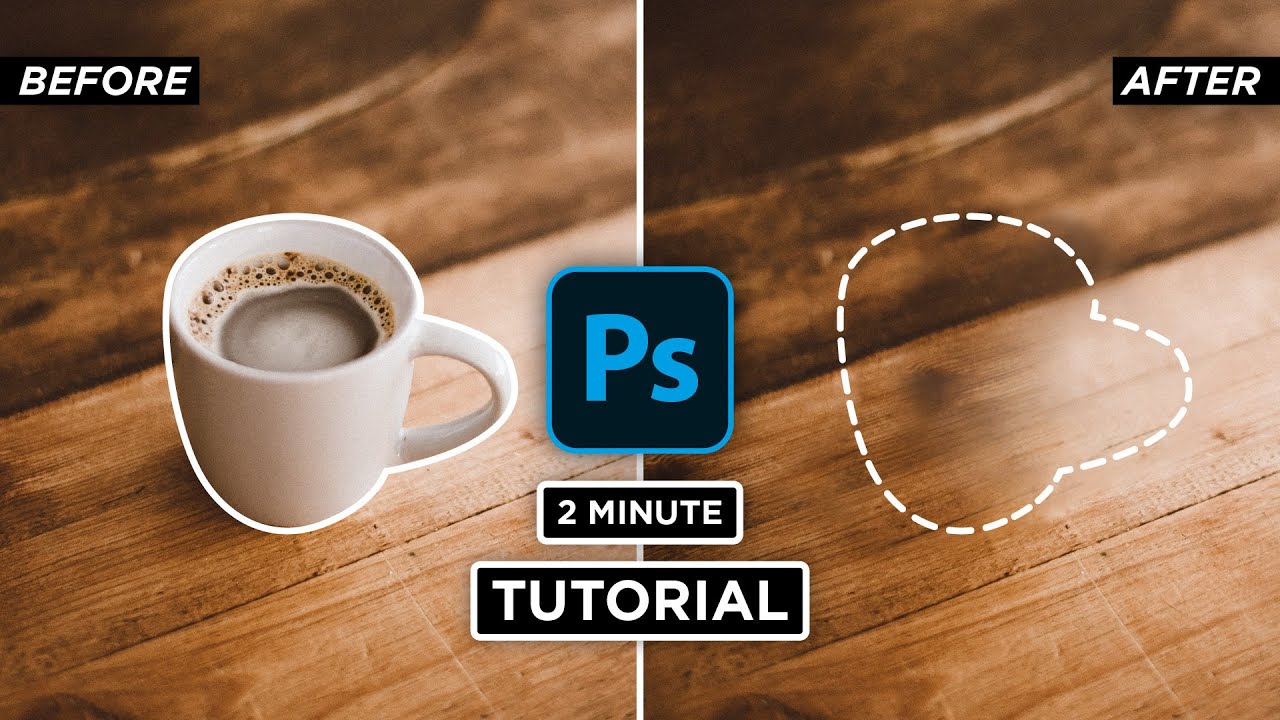
Another Tuesday 2 minute Tutorial and today is how to use the content-aware fill in Photoshop CC 2021. This effect works on almost anything, cars, clothes, buildings, etc. So make sure to have a look at the pre-selected photos on my website to follow along with this tutorial.
#2MinuteTutorial
I hope this video helps and don't forget to subscri...
crystal flower
thank you
river otter
Np
river otter
sick dock
I think you would have to use pen tool in this case.
Blending modes or gradient wont help you get logo out of that image.
Screen mode will remove black, multiply will remove white, but neither will work because mix of colors all around.
 river otter
I got it.
That really depend on colors.
sick dock
yea
river otter
James is here, so maybe he knows some tricks.
sick dock
hopefully
river otter
In GT - R its really hard to isolate just logo.
I am thinking about selection in channels, but again I do not think that would work.
Just pen tool it, and add feather once done.
sick dock
rn im tryna make the image smaller and do some gradient stuff but idk
river otter
sick dock
rn im tryna make the image smaller and do some gradient stuff but idk
You can do circular gradient, radial.


 river otter
sick dock
river otter
sick dock
Here's a tip.
Darken the place of background where logo will be, and use screen mode on logo.
After some work you would get something like this.
 glad hare
say i wanted to do this blur thing that Montr had, how would i blur like half of it
Credit - Montr
 warm grove
glad hare
say i wanted to do this blur thing that Montr had, how would i blur like half of...
warm grove
glad hare
say i wanted to do this blur thing that Montr had, how would i blur like half of...
Filtter > Blur > Motion Blur
glad hare
warm grove
Filtter > Blur > Motion Blur
i know, but hes blurred half the photo ?
is that done through that?
you see like one side has names one side dosnt because its blurred
river otter
glad hare
i know, but hes blurred half the photo ?
Mask other half.
warm grove
got some glass texture from the internet, then merge your background into one layer, then mask it into the glass texture, and make it low opacity
https://www.youtube.com/watch?v=_2xmVaZY1Jg&pp=ygUcZ2xhc3MgYmx1ciB0ZXh0dXJlIHBob3Rvc2hvcA%3D%3D this is a quick tip for it @glad hare

In today's Photoshop Tutorial, we will know the other way of creating the awesome glass effect in adobe photoshop.
Thank you for Watching!
► My Simple Youtube Setup
Peripherals:
Logitech MX keys: https://amzn.to/3rz9DvT
Samung M5 (Smart Monitor): https://amzn.to/3PXOfec
Logitech M720 Wireless: https://amzn.to/...
glad hare
ty
prime token
viral palm
In Path panel click outside of the "Work Path" to unselect it then reselect it c...
Can anyone explain what he means?
river otter
prime token
Can anyone explain what he means?
He means you should click on paths tab on the right panel. Click anywhere OFF path, then click ON path.
Return to pen tool, click on anchor where you want to start from and start from there.
I think it will continue the path on which path you are anyway.
But to answer your question, me neither do not know if that is possible.
I usually hold shift in Illustrator to continue from anchor point X, but is that same in PS, I do not really know.
glad hare
river otter
Mask other half.
how do you mask ?
well mask half the photo
or i guess split it
river otter
glad hare
how do you mask ?
- You finished your work.
- CTRL + Shift + Alt + E, creates full image of all what you did.
- Convert it to Smart object.
- CTRL + j.
- Blur top image for how much you want.
- Add a mask to top layer, and use gradient tool, blur from color to transparent.
You can blur by grouping, by single layers etc., but as you asked for full image, that is the best solution.
deep radish
river otter
He means you should click on paths tab on the right panel. Click anywhere OFF pa...
warm grove
CTRL + SHIFT + I, to invert the selection, then CTRL + X
river otter
i'm making a photoshop project but whenever i try to move the text it moves the background
how do i fix this?
willow gale
river otter
i'm making a photoshop project but whenever i try to move the text it moves the ...
Either position your cursor right on the text (zooming in if necessary) or just disable Auto-Select Layer.
willow gale
river otter
i'm making a photoshop project but whenever i try to move the text it moves the ...
 river otter
willow gale
Either position your cursor right on the text (zooming in if necessary) or just ...
river otter
willow gale
Either position your cursor right on the text (zooming in if necessary) or just ...
thx
fluid craneBOT
Gave +1 Creative Carma to @willow gale (current: #27 - 62)
 keen edge
I know about tools but how to start or understand the design process. Like sometimes not able to understand how to create designs for raw products. Always create designs by reference from freepik and it feels like I am not a designer just copying the designs.
 craggy swallow
Hello!
I am looking for some advice on how to correct an odd issue I am experiencing after using the pen tool. Once I cut out an object and finish piecing together the design it looks great! However once the photo is posted into a Discord chat there seems to be this odd white line that surrounds the image(s) and I despite playing with shadows, strokes, and even erasing the issue persists. Any and all help would be much appreciated as this is the first I am experiencing this issue as it has never been something I have run into with previous designs, perhaps a setting I mistakenly changed without realizing?

 hearty ferry
How to make stamp more brightness?
 ripe quest
Do not post things like that here @keen edge
ripe quest
hearty ferry
How to make stamp more brightness?
Sorry. I don't really understand your question.
 thin swan
Hello, I saw a youtuber copy and paste using this tool but I can't and an error message pops up. Any idea why and how I can fix this?

 ripe quest
thin swan
Hello, I saw a youtuber copy and paste using this tool but I can't and an error ...
ripe quest
thin swan
Hello, I saw a youtuber copy and paste using this tool but I can't and an error ...
Make sure you're copying from the correct Layer. Open the Layers Panel. Window > Layers...
 warm valley
Hello I have a question i am having a problem ceparating my image into CMYK Variation, When i do it i get the colors Cyan,Magenta,Yellow,Black, But for some reason they look nothing close to the colors and cyan comes out looking white, magenta comes out looking black, yellow comes out looking Blackish/Grayish , and black looks white again, What am i doing wrong?
sly hawk
warm valley
Hello I have a question i am having a problem ceparating my image into CMYK Vari...
Nothing. I think that's normal
 chilly swift
@sly hawk hi there again, sorry for bumping you for this  but can you explain a tad on how perspective warp round shapes??
sly hawk
 chilly swift
like the top cover of the box here

 dapper skiff
Hey just got a question about trying to get into an internship for graphic designing, particully with social media branding, anyone know the best ways to get myself as intern and also searching for a company that is need in one and be able to improve my skill set?
sly hawk
dapper skiff
Hey just got a question about trying to get into an internship for graphic desig...
Check a few of my old posts and you see me talking about it 🙂
sly hawk
chilly swift
like the top cover of the box here
mmm... i'm not sure. just running out but will check later!
chilly swift
Sure, no hurry, and ty
vast sand
ripe quest
All Generative AI models struggle with hands. Its a long standing issue.
Any work arounds? I’ve tried to get adobe ai to keep the areas it struggles with for me: teeth, hands, and more specifically stethoscopes out of the image or with hands to keep them out of focus or off the canvas or image frame and have had no luck. It ignores my requests of that nature entirely with all prompts I’ve tried.
Every time I want a doctor they have hands in focus, teeth showing and stethoscopes wonky broken and unusable stethoscopes every time. I even include them in the exclude terms where it allows me on express and fire fly. Photoshop so far doesn’t have the ability for exclude terms that I’m aware of. Usually I have photoshop generative fill help me try to correct botched images express and firefly create but have had no luck so far.
glad hare
is there anywhere i can get some backgrounds people made that i can use ?
 bitter raft
Hi I hope I am not braking any rules or anything and I know this is not directly related to photoshop, but I was wondering if there is anyone that could help me. I want to buy a new laptop and I am thinking, should I buy a macbook(is the price worth it) or should I go for a windows platform laptop(and wich one)? The laptop is meant to be a upgrade from my old PC that lags all the time so I cannot use ps normally.
ripe quest
bitter raft
Hi I hope I am not braking any rules or anything and I know this is not directly...
I prefer Windows/PC but hardware and OS platform are a personal choice. You should choose based on how you work, what other devices you have that might work well with the new gear. Most often, people choose based on price. Generally, you want to get the biggest "bang for your buck."
ripe quest
glad hare
is there anywhere i can get some backgrounds people made that i can use ?
There are stock photo sites: Pexels, Pixabay, Unsplash, etc. You can also create backgrounds using generative imaging services.
ivory rampart
I would go with windows also
ripe quest
vast sand
Any work arounds? I’ve tried to get adobe ai to keep the areas it struggles with...
If I were trying to create something that specific, I would use a combination of generative AI tech, traditional Photoshop compositing and photo-bashing techniques.
 indigo shale
hi, i was wondering how to cut an image which has multiple layers added on it (i also want to cut the layers). I tried using the lasso tool along the black outline, but it just say selected area is empty when i try to cut it, even though i selected all the layers before that

 tawny pecan
is there any way to add "content-aware fill" to an action? It doesn't add it in the action recording when I select it, nothing happens.
Edit: Same thing with "Quick export as PNG"
 polar ruin
Is there a way to select each color of the roses I drew? I want to replace each color with a slightly different color palette. Tried the magic wand tool even at small tolerance level, but it ends up selecting too much not just each individual color.
 tawny pecan
polar ruin
Is there a way to select each color of the roses I drew? I want to replace each ...
tawny pecan
polar ruin
Is there a way to select each color of the roses I drew? I want to replace each ...
You said "low" tolerance, but did you try it at tolerance = 0?
 dry onyx
Is there any way to make an image transparent but while still having a visible stoke?
 wide wadi
hello i cant seem to change the color of my vector...

my outer glow wont show either
ripe quest
wide wadi
hello i cant seem to change the color of my vector...
Its probably a Path object and not a Shape.
There's a difference.
wide wadi
ya i made a path object
polar ruin
tawny pecan
You said "low" tolerance, but did you try it at tolerance = 0?
yes, tolerance of 0 still selected too much
ripe quest
wide wadi
ya i made a path object
It's tricky. A lot of people miss this/get confused. You can convert a Work Path to a Shape by selecting the path and then adding a Color Fill Layer...
 timid cliff
I have a problem that I need help with: I created an ai image and placed my friends face on the ai face no issue, now I’m trying to place that image into another to make it look like somewhat in this direction


 ripe quest
timid cliff
I have a problem that I need help with: I created an ai image and placed my frie...
ripe quest
timid cliff
I have a problem that I need help with: I created an ai image and placed my frie...
Should be pretty easy to remove the background and position it over the cityscape image...

Is this roughly what you're going for?
 vital pelican
hello how do i make the rust go away and what tool do i use to remove it i just want the paint to match and the rust to go away i am very to new to adobe photoshop
 ripe quest
vital pelican
hello how do i make the rust go away and what tool do i use to remove it i just ...
ripe quest
vital pelican
hello how do i make the rust go away and what tool do i use to remove it i just ...
I would use the Remove Tool...
vital pelican
ripe quest
I would use the Remove Tool...
WOW THANK YOU SO MUCH
fluid craneBOT
Gave +1 Creative Carma to @ripe quest (current: #3 - 1621)
timid cliff
ripe quest
Should be pretty easy to remove the background and position it over the cityscap...
I already have it removed…I just forgot how to turn her into an object that I can size to any size
I learn something and poof if I haven’t used it in a while I draw a blank
ripe quest
timid cliff
I already have it removed…I just forgot how to turn her into an object that I ca...
Right-click on the Layer in the Layers Panel and choose "Convert to Smart Object" from the context menu. You can't actually "scale it to any size." This means you can scale it down and back up without losing quality. You can't scale it up much larger than the original as some blurriness/quality loss might occur.
polar ruin
polar ruin
Is there a way to select each color of the roses I drew? I want to replace each ...
Ended up just redoing the whole thing. Couldn’t figure out how to make a selection work.
Thank u guys 4 the suggestions
ripe quest
polar ruin
Ended up just redoing the whole thing. Couldn’t figure out how to make a selecti...
This is much easier working with vector objects in Adobe Illustrator. In Photoshop, you'd have to shift colors. It requires a lot more work and careful selections/masking. Sorry I didn't see this sooner.
polar ruin
ripe quest
This is much easier working with vector objects in Adobe Illustrator. In Photosh...
Actually just realized that if I turned off anti alias and set tolerance to 0 it worked. Live and learn.