#community-support
1 messages · Page 882 of 1
 dull widget
 uncut pier
and this is an online raid?
uncut pier
Getting stuck in a wall of floor is not new but I don't think you can "unstuck" yourself
they are the unfortunate glitches that occur rarely
dull widget
yea this is the first time that something like this happend to me
 uncut pier
 proper lion
hlep me
proper lion
hlep me
scav queue times are high due to so many people only running scavs and so few playing pmc on the map
uncut pier
some people only run scav
proper lion
that was me last wipe and it was no fun
 coarse crater
uncut pier
some people only run scav
coarse crater
uncut pier
some people only run scav
Cringe
 spiral field
anyone struggling to get in the launcher? I'm getting "Cannot establish server connection" over and over
 slim spruce
spiral field
anyone struggling to get in the launcher? I'm getting "Cannot establish server c...
slim spruce
spiral field
anyone struggling to get in the launcher? I'm getting "Cannot establish server c...
are you on a VPN?
spiral field
Nope
slim spruce
The launcher start or starting the game?
spiral field
launcher start
slim spruce
any error codes?
spiral field
okayyy nevermind hahahahaa
after 10 tries it let me in
lots of people playing i guess
slim spruce
Ok
 short barn
anyone else have dogshit raid times for scavs?
just went in customs, spawned big red, only had far corner and only 5 mins to get there
is there not like smth to stop that, bc wtf am i gonna loot if me stopping for literally one second is the deciding factor of me getting out or not
uncut pier
probably the crowded servers are taking part in that
short barn
i didnt loot a single thing that raid n made it out with a second left
i mean like 20 mins of waiting for a fast mt replica and a half broken paca is totally worth right
 runic oyster
how do i use the spec item ? like the range finder and compass , U don't work and i dont see the keybind
uncut pier
have you tried binding them to 4-9
short barn
assign it to a slot
runic oyster
ill try that thanks it was not like this before 😛
uncut pier
now that there is not a designed slot for a compass, it does not have a specific bind
 native badge
was meant to get the kill glukhar quest after factory office kills but i didn't , anyone know why ??
 chrome python
i have aldready done that
uncut pier
chrome python
i have aldready done that
maybe upgrading to 16 or even 32gb is the only way?
uncut pier
Yeah tarkov is really cpu and ram dependent
 vivid briar
can anyone help my game has been working fine but all day today i keep getting connection to server has been lost when im in a raid
uncut pier
vivid briar
can anyone help my game has been working fine but all day today i keep getting c...
do you have auto servers on
vivid briar
yes but i tried connecting to ones with low ping and does the same
 rough zephyr
https://gyazo.com/7929937a5b6283bf3ba57991e7c14ca0
Anyone know if it really wants me to kill another scav with a throwable while on scav which would lose me .1 to gain .02?

 quiet summit
rough zephyr
https://gyazo.com/7929937a5b6283bf3ba57991e7c14ca0
Anyone know if it really want...
quiet summit
rough zephyr
https://gyazo.com/7929937a5b6283bf3ba57991e7c14ca0
Anyone know if it really want...
That's... kind of weird.
 onyx turret
is scav matching bad rn?
 near plinth
hi anyone know how to resolve a bug that where u are connecting to lighthouse u instantly crash for server connection lost?

 onyx turret
soooo is anyone else taking a long time loading scav?
uncut pier
yes because everyone wants to play scav
uncut pier
 exotic agate
Cant replace fence tasks despite having the money, can someone help?
exotic agate
Cant replace fence tasks despite having the money, can someone help?
did you accept it already?
 royal obsidian
Anybody got a clue why when my friend is in a raid, discord proceeds to just not wanna work anymore, like we are in a call but i cant hear him, VOIP works perfectly fine tho, also tried to teamspeak but that seems to do the same.
exotic agate
uncut pier
did you accept it already?
Yeah, So i guess accepting it bugs the replace button as it has one there
uncut pier
exotic agate
Yeah, So i guess accepting it bugs the replace button as it has one there
Guess so
uncut pier
royal obsidian
Anybody got a clue why when my friend is in a raid, discord proceeds to just not...
can your friend hear you
royal obsidian
Yes. Its like his mic just stops working in discord
uncut pier
does he have hardware acceleration on in discord?
near plinth
hi anyone know how to resolve a bug that where u are connecting to lighthouse u instantly crash for server connection lost?
royal obsidian
uncut pier
does he have hardware acceleration on in discord?
Nope
uncut pier
Wireless headset?
royal obsidian
Nope, he has a normal headset and a hyperx podcast microphone
 raw river
in raids it takes me ages to load in and the i average around 1-5 fps this has only started happening today?
uncut pier
raw river
in raids it takes me ages to load in and the i average around 1-5 fps this has o...
have you tried the fixes in #eft-announcements
royal obsidian
Ah he just said, he sometimes doesnt hear me either, so it seems like his entire discord and or teamspeak just proceeds to bug out
near plinth
raw river
in raids it takes me ages to load in and the i average around 1-5 fps this has o...
I have the same nut only on lighthouse and then crash for connection loat
uncut pier
It could be something with tarkov being on higher priority, usually hardware acceleration is the problem.
Have they tried to open discord with admin?
uncut pier
raw river
in raids it takes me ages to load in and the i average around 1-5 fps this has o...
what are your specs
royal obsidian
We just tried in an offline co-op, he launched discord as admin before launching tarkov, didnt change it tho
raw river
uncut pier
what are your specs
1660 ryzen 5 3600 and 16 gb of ram but it was working completely fine for about 4 months
uncut pier
raw river
1660 ryzen 5 3600 and 16 gb of ram but it was working completely fine for about ...
yeah shouldn't be a problem there
uncut pier
raw river
1660 ryzen 5 3600 and 16 gb of ram but it was working completely fine for about ...
anything else changed other than the fps and loadtimes?
raw river
no
uncut pier
royal obsidian
We just tried in an offline co-op, he launched discord as admin before launching...
I wonder if setting discord on a higher priority would help
near plinth
For me the loadtime that increased is awaiting session start
uncut pier
raw river
1660 ryzen 5 3600 and 16 gb of ram but it was working completely fine for about ...
you have played normally this wipe yes?
royal obsidian
uncut pier
I wonder if setting discord on a higher priority would help
we'll give it a shot
raw river
uncut pier
you have played normally this wipe yes?
yeah
uncut pier
near plinth
I have 570 8gb i5 11gen an 16gb ram
so it kicks you for connection lost or does crash the game?
near plinth
Connection lost
But i have a good connection
Increased loadtimes framedrop and connection lost error
Only in lighthouse
uncut pier
I wonder if lighthouse is just broken, which cannot be fixed in your side, if all other maps are working perfectly
raw river
@uncut pier not sure if this would help but sometimes it would just crash on loading loot and other times load me in with the 1-5 fps
near plinth
All other are working perfectly
uncut pier
raw river
<@191225531675443201> not sure if this would help but sometimes it would just cr...
do you have the latest drivers?
raw river
uncut pier
do you have the latest drivers?
yes
 austere birch
game is fucking broken. im sick of it. 3 times in 15mins my game goes from 70+ fps to 15 ish fps. I have to restart mid raid. Just on customs. 2 fucking years ive had this issue and no one has said anything helpful but "you need to upgrade your pc"
Never happen on my old pc parts.
uncut pier
raw river
yes
have you cleared cache
austere birch
just died because of it. happend while i was shooting. killed 1 and died to 2nd.
raw river
uncut pier
have you cleared cache
yeah
vivid briar
can anyone help my game has been working fine but all day today i keep getting connection to server has been lost when im in a raid
uncut pier
austere birch
game is fucking broken. im sick of it. 3 times in 15mins my game goes from 70+ f...
what maps
uncut pier
vivid briar
can anyone help my game has been working fine but all day today i keep getting c...
in all maps?
vivid briar
yes factory sometimes works
uncut pier
have you tried restarting the router
vivid briar
yes
austere birch
uncut pier
what maps
every map. its completely random. last map it only happen on Lighthouse. wipe before it was every map too.
uncut pier
austere birch
every map. its completely random. last map it only happen on Lighthouse. wipe be...
just to ask, what are your specs
Doubt specs are the problem but eh
 harsh magnet
austere birch
game is fucking broken. im sick of it. 3 times in 15mins my game goes from 70+ f...
harsh magnet
austere birch
game is fucking broken. im sick of it. 3 times in 15mins my game goes from 70+ f...
might be thermal
thortling
 tough crag
Anyone else having a issue on not being able to complete Bunker part 1, I've went into raid 5 times on reserve went into the bunker turned on power and went to go extract at D-2 but it still doesn't seem to let me complete it
uncut pier
tough crag
Anyone else having a issue on not being able to complete Bunker part 1, I've wen...
is it a run-through?
uncut pier
you have got the notification that you located the control room?
uncut pier
austere birch
every map. its completely random. last map it only happen on Lighthouse. wipe be...
try checking the temperatures of your cpu/gpu and see if they are high on fps drops
uncut pier
vivid briar
yes
do you have auto servers on?
vivid briar
uncut pier
do you have auto servers on?
yes
uncut pier
vivid briar
yes
try disabling that and select as much low ping servers as possible
 civic verge
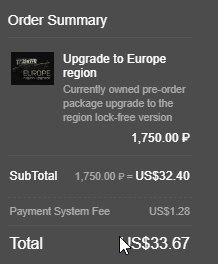
hi guys does anyone now why the upgrade to europe version cost 40 dollars? i remember it being 10 dollars what happened?
vivid briar
ok ill try
uncut pier
raw river
yeah
try checking the temperatures of your cpu/gpu and see if they are high on fps drops
civic verge
 slim spruce
you bought the russian region first?
civic verge
yes
slim spruce
I believe this cost is to prevent people from buying the RU region and upgrading it to have a cheaper game in the USA
civic verge
i bought it for a friend and now he saying he cant play because he needs to upgrade the account
slim spruce
civic verge
i bought it for a friend and now he saying he cant play because he needs to upgr...
yes if he's not in the CIS countries he needs this upgrade if he has a RU account.
 rugged owl
how do I fix the crazy low fps? it never happened to me before this wipe and some maps like factory work but others like shoreline are just unplayable
slim spruce
rugged owl
how do I fix the crazy low fps? it never happened to me before this wipe and som...
AMD?
uncut pier
rugged owl
how do I fix the crazy low fps? it never happened to me before this wipe and som...
have you tried the fixes in #eft-announcements
rugged owl
yes and I tried both fixes but they're still not working
I never had mip streaming enabled so it was already false in the files and I did the display driver uninstaller thing
uncut pier
what are your specs
 tacit bear
can we get an admin in lfg factory 13
rugged owl
uncut pier
what are your specs
Radeon rx 570 ryzen 5 1400
slim spruce
tacit bear
can we get an admin in lfg factory 13
slim spruce
rugged owl
yes and I tried both fixes but they're still not working

www.escapefromtarkov.com
rugged owl
slim spruce
this too? https://www.escapefromtarkov.com/support/knowledge/432?lang=en
Yeah this is the display driver uninstaller thing I did this
uncut pier
are your drivers up to date?
rugged owl
Yeah I checked all my drivers
austere birch
uncut pier
try checking the temperatures of your cpu/gpu and see if they are high on fps dr...
they are completely fine.
slim spruce
rugged owl
Yeah I checked all my drivers
delete graphics.ini and restart the game
austere birch
here is a video of it happening from last wipe. same shit this wipe.
https://youtu.be/QFeRi9h0WM8

I dont know if this is a memory leak or what but this isn't acceptable...
This happens every raid on Lighthouse.
Sometimes on other maps. Used to happen a lot but not as much, maybe once every 30 on other maps but its ever raid on ligthouse.
uncut pier
austere birch
they are completely fine.
try what sessamy said
austere birch
 rugged owl
slim spruce
delete graphics.ini and restart the game
rugged owl
slim spruce
delete graphics.ini and restart the game
Alright I’ll try it after this raid
austere birch
austere birch
as you can see the frametime is not normal.
royal obsidian
uncut pier
I wonder if setting discord on a higher priority would help
changing priority didnt change anything, it seems to sometimes work sometimes discord lags behind and sometimes it just doesnt work at all
rugged owl
slim spruce
delete graphics.ini and restart the game
Where is the file located?
uncut pier
royal obsidian
changing priority didnt change anything, it seems to sometimes work sometimes di...
I've had the same problem too but I just cant seem to remember how I fixed it
austere birch
ill try deleting my graphics.ini but i doubt it will do anything. 2 years and a bunch of fresh installs...
slim spruce
rugged owl
Where is the file located?
C:\Users\%username%\AppData\Roaming\Battlestate Games\Escape from Tarkov\Settings
royal obsidian
uncut pier
I've had the same problem too but I just cant seem to remember how I fixed it
aw sad
uncut pier
I could plug in my old gpu and see if it's really that bad
royal obsidian
Anybody else got a clue, why discord/teamspeak etc. fucks up while in raid? 😦
 echo saddle
my game is opening up to the wrong monitor and when i look at the monitor drop down it says the correct one its supposed to be on. Any ideas?
uncut pier
it seems like older parts are having trouble keeping up after the new update, though it shouldn't be the case?
rugged owl
slim spruce
delete graphics.ini and restart the game
can I change my graphics settings after restarting or just go into raid with the default
slim spruce
rugged owl
can I change my graphics settings after restarting or just go into raid with the...
change before you play yes
rugged owl
ok
royal obsidian
uncut pier
I've had the same problem too but I just cant seem to remember how I fixed it
well, if you ever find out how you fixed it, let me know, appreciate the help otherwise 🙂
 rain mesa
crazy bruh from 125-150 stable to this after wipe
 uncut pier
Have you tried the fixes in #eft-announcements
 glacial breach
is there any way to prevent this anticheat connection failed?
slim spruce
glacial breach
is there any way to prevent this anticheat connection failed?
try disabling ipv6 on your network adapter in windows
Higher Education Knowledge Base content management, sharing and collaboration platform.
rain mesa
uncut pier
Have you tried the fixes in <#521645013277474826>
yeah the mip striming was false already, and im on nvidia gpu
uncut pier
rain mesa
yeah the mip striming was false already, and im on nvidia gpu
Which gpu
rugged owl
slim spruce
delete graphics.ini and restart the game
I’m getting like 30 fps now but I get crazy stutters and freezes randomly
uncut pier
Are you on 1080p or 1440p
rugged owl
no idea i play on 1920x1080
rain mesa
uncut pier
Which gpu
rtx 3080 1440p, before wipe was getting 125-150 stable fps on customs woods, 115-130 reserve, now always 85-105, which is crazy. my gpu was getting before 85-95 usage now is only 55% max
uncut pier
Is something limiting the fps or gpu
rain mesa
nah nothing
it would make sense if before wipe was getting the same
but it is huge ass difference comparing to last wipe
uncut pier
Yeah, the wipe didn't necessarily add anything to the rendering or anything but there are a lot of performance issues even with high end pcs
rain mesa
agreed
uncut pier
Are there any bottlenecks with cpu or ram
rain mesa
no ram is 64gb 3200mhz, and i9-9900k, but if there was bottlenecking i would have seen it previous wipe for sure
uncut pier
And the weirdest part is that I have not had any issues which would be great to have because then I can look more deeper into the reasons of fps drops and other things
rain mesa
yeah, lets hope it will get fixed somehow T_T
uncut pier
I was thinking of changing my old gpu back just to see if I get any problems I could diagnose in tarkov
rain mesa
what you running now and what fps you get
uncut pier
3060ti around 100-110
uncut pier
It was pretty much the same, which is weird
rain mesa
yeah honestly dk at this point, i guess ill just have to wait and see
uncut pier
Yeah
 languid rain
Hello i have a big problem with optymalizacion after wipe I mean big staters
slim spruce
languid rain
Hello i have a big problem with optymalizacion after wipe I mean big staters
low fps like 5 ?
languid rain
And 1 % low high asf
slim spruce
AMD system?
languid rain
slim spruce
low fps like 5 ?
I mean im join to RAID and have 0fps to 10
slim spruce
languid rain
I mean im join to RAID and have 0fps to 10
AMD or Nvidia gpu?
languid rain
NVIDIA
slim spruce
www.escapefromtarkov.com
languid rain
NVIDIA GeForce series 10 (1050 ti)
slim spruce
If you are having low FPS/Freezing when shooting on your AMD GPU:
https://www.escapefromtarkov.com/support/knowledge/432
(Yes, remove the Nvidia items even if you have an AMD card. Choose the same options as shown in the pictures exactly.)
NOTE: Look for "Download Locations" and then "Download Mirror". There are 4 download links with country names like "US East coast, EU Germany, EU Netherlands and US West coast." Do not download malware/adware in the ads with the fake download links.
www.escapefromtarkov.com
slim spruce
slim spruce
If you are having low FPS/Freezing when shooting on your AMD GPU:
https://www.e...
slim spruce
languid rain
NVIDIA GeForce series 10 (1050 ti)
See this link for a possible fix: https://www.escapefromtarkov.com/support/knowledge/435
www.escapefromtarkov.com
ignore the other post, I was making a pin
 quaint lily
Hello all! I just reset my computer to get some stuff cleaned up. I reinstalled tarkov and everything works fine up until I launch the game. It takes me to the main menu but without any of the words. Its just the woods background.
any help?
slim spruce
quaint lily
Hello all! I just reset my computer to get some stuff cleaned up. I reinstalled ...
Go to C:\Users\%username%\AppData\Roaming\Battlestate Games\Escape from Tarkov Make sure entire folder not set to read only
slim spruce
languid rain
So idk why after wipe i have this problem
how much ram is being used ingame?
languid rain
slim spruce
how much ram is being used ingame?
10gb/12
I have 32 but tarkov using 10-12 gb
slim spruce
languid rain
10gb/12
Please submit a bug report in the launcher about this.
languid rain
Oh okey
languid rain
slim spruce
Please submit a bug report in the launcher about this.
Done
slim spruce
They'll get back to you soon.
languid rain
slim spruce
They'll get back to you soon.
Tarkov use before wipe 10/15 GB do idk
So*
And it was like that from the beginning when I bought the game around early 2020
languid rain
slim spruce
how much ram is being used ingame?
BTW how is normal use ram in tarkov?

Into load to map
@slim spruce into raid
 slim spruce
languid rain
<@410534625044201493> into raid
slim spruce
languid rain
<@410534625044201493> into raid
I see the problem
Try adding 16000MB minimum and 25000MB maximum page file to an SSD as shown here:
https://www.windowscentral.com/how-change-virtual-memory-size-windows-10

Windows Central
If your device is running low on virtual memory, you can adjust the size using Settings and Command Prompt, and here's how to do it.
You're using all your ram, that's the problem.
languid rain
Oh okey
languid rain
slim spruce
Try adding 16000MB minimum and 25000MB maximum page file to an SSD as shown here...
Done and try go a normal RAID?
slim spruce
languid rain
Done and try go a normal RAID?
after a reboot yeah
slim spruce
The ram being at 100% is the cause
languid rain
So what is normal use ram in game ?
 wet ridge
whenever i load into a map thats not customs it takes forever to load loot, than once i get in i get kicked and it tells me to restart my game. i have no clue what to do
pls help
 worthy bane
@slim spruce Did something happen when they hotfixed? Seems like suddenly everyone needs to do this when we didnt have problems b4
slim spruce
worthy bane
<@410534625044201493> Did something happen when they hotfixed? Seems like sudde...
It's being looked into.
worthy bane
slim spruce
It's being looked into.
Ty
slim spruce
wet ridge
whenever i load into a map thats not customs it takes forever to load loot, than...
see here for a fix that may help: https://www.reddit.com/r/EscapefromTarkov/comments/rlof6z/loading_loot_slow_fix/
and the first comment
languid rain
@slim spruce this texture is normal?
 slim spruce
languid rain
<@410534625044201493> this texture is normal?
slim spruce
languid rain
<@410534625044201493> this texture is normal?
clear the cache in the launcher to fix it
wet ridge
slim spruce
see here for a fix that may help: https://www.reddit.com/r/EscapefromTarkov/comm...
i tried this already but it still doesnt work
slim spruce
wet ridge
i tried this already but it still doesnt work
what does it say about restarting the game?
wet ridge
i dont remember but ill check when it happens again, ill let you know in like 10 minutes
languid rain
@slim spruce
 slim spruce
If it still doesn't work wait for the bug report reply for more help.
 unique pebble

Watch Zenit Klesch flashlight bug? and millions of other Escape From Tarkov videos on Medal, the largest Game Clip Platform.
slim spruce
unique pebble
https://medal.tv/games/escape-from-tarkov/clips/qW9MqGqqMq8r4/d1337HrRl7nQ?invit...
Please submit a bug report in the launcher about this.
a video might be nice, that link
 dapper coyote
any fix for solo queueing? i changed servers and stuff and i still cant find a match
 delicate ferry
Hey, Im doing chemical part 1 and cant find the key, is anyone else having this problem?
I can't find it on the flea either
unique pebble
slim spruce
a video might be nice, that link
I see, I forgot how the process was of doing that thanks
quaint lily
slim spruce
Go to C:\Users\\%username%\AppData\Roaming\Battlestate Games\Escape from Tarkov ...
So I did wait around for about 7 minutes then the menu popped up. I did what you said and it didn't change anything. I might just completely uninstall tarkov and reinstall again
quaint lily
slim spruce
Go to C:\Users\\%username%\AppData\Roaming\Battlestate Games\Escape from Tarkov ...
It would never take this long. Is it because of wipe? I'm sure I have the game on my SSD.
slim spruce
quaint lily
So I did wait around for about 7 minutes then the menu popped up. I did what you...
Go here
C:\Users\%username%\AppData\Roaming\Battlestate Games\Escape from Tarkov\Settings
And first back up these ini files by copying them to another folder on the desktop.
Try deleting graphics.ini first and try again, then delete the rest if you still have the problem.
If this doesn't fix the problem please paste the files you backed up to replace the files that took their place in that folder.
That may be the solution.
Most likely a graphics setting is corrupted in that file.
quaint lily
slim spruce
Go here
C:\Users\\%username%\AppData\Roaming\Battlestate Games\Escape from Tark...
Man I think I messed things up trying to fix it. I'm not finding the directory for settings at all.

 dense lynx
So i am able to load into any map with little issues but when trying to load into lighthouse my game either crashes or freezes repeatedly. Any idea why?
dapper coyote
anyway to fix solo queueing issues? i can join with a duo or squad but can't play by myself
 noble plover
anyone mind telling me how i get into that gunsmith type view to add stuff to my gun?
dapper coyote
noble plover
anyone mind telling me how i get into that gunsmith type view to add stuff to my...
you need the work bench
then u can edit preset
noble plover
how do i get the workbench
dapper coyote
in ur hideout
noble plover
thanks
 opaque arch
Anyone good w pcs
 median ruin
opaque arch
Anyone good w pcs
median ruin
opaque arch
Anyone good w pcs
Depends
 paper basalt
we've had 5 scav runs in a row with almost no time to do anything is there a bug or something? on shoreline 12 minutes and customs 7 minutes.
 cyan crystal
paper basalt
we've had 5 scav runs in a row with almost no time to do anything is there a bug...
cyan crystal
paper basalt
we've had 5 scav runs in a row with almost no time to do anything is there a bug...
All raid times have been shortened, I think
paper basalt
As a PMC time is fine it’s only as a scav
 marble marlin
How do I fix the problem with 95% utilization of memory when I try to run lighthouse?
glacial breach
Nice. Deleted the battleeye folder per this https://www.escapefromtarkov.com/support/knowledge/412 and verified integrity. Now the game immediately closes on launch.
www.escapefromtarkov.com
quiet summit
marble marlin
How do I fix the problem with 95% utilization of memory when I try to run lighth...
More memory lol
Do you have 16 gigs of ram?
marble marlin
Yes
quiet summit
marble marlin
Yes
You may try and set your pagefile size if you would like.
marble marlin
?
quiet summit
Pagefile on your SSD.
marble marlin
Game is on hdd
quiet summit
Do you have an SSD?
marble marlin
Yes
quiet summit
You can set a pagefile on your SSD to help with the memory issue.
marble marlin
How
quiet summit
Windows + R
Open your run page and type in 'control sysdm.cpl'
Go to the advanced tab, under performance hit settings
Advanced again, and change the paging file size
Select an SSD drive
Untick automatically manage paging file size for all drives
Use 16000 minimum and 25000 maximum
Once you’ve entered your size of virtual memory, click Set, then click OK to apply the changes.
After that, restart your computer and give it another go
Keep in mind this will take up some space on your SSD for as long as you have that volume on
This will also very slightly decrease the lifespan of your SSD
Modern SSD’s will barely be affected (might even not be affected)
 oblique yew
takes about 10 minutes to find a match, any way to help that?
marble marlin
Done bout to test it out in lighthouse again
 floral aurora
is there a way to fix this problem i and couple other people have that after like 5raids my fps has significantly lowered.
(I also dont have a bad pc)
marble marlin
^^^ same problem
floral aurora
first interchange raid 95-110fps, 4raids later 60-75
ive been told its like a memory leak bug or something so wouldbe nice to hear a fix for it (permanent)
quiet summit
floral aurora
is there a way to fix this problem i and couple other people have that after lik...
How's your GPU usage?
floral aurora
im not right now on my pc but its not very high since i run the game and discord only at the same time
 latent skiff
Anyone know how to fix the game going to the wrong monitor? I'm at the end of my rope
 toxic sphinx
why is scav matching on lighthouse taking so long?
latent skiff
latent skiff
Anyone know how to fix the game going to the wrong monitor? I'm at the end of my...
I just replugged all my monitors and it worked
quiet summit
latent skiff
Anyone know how to fix the game going to the wrong monitor? I'm at the end of my...
I've been having the same problem, Whenever that happens, you can Alt+Enter, drag to correct window and do it again
Otherwise you can just select monitor on the top right of settings

Bottom right setting
latent skiff
That's the thing. Alt + Enter wasn't working, and it was like my monitors was swapped. VG248QE was showing on G246HL, and G246HL was showing on VG248QE but blurry and the wrong refresh rate.
Replugging my monitors worked so I'm guessing the hardware IDs of the monitors in windows got swapped or something.
Oop, nevermind. Now the game is doing it between my 4:3 portrait monitor and the main monitor :)
quiet summit
latent skiff
That's the thing. Alt + Enter wasn't working, and it was like my monitors was sw...
Have you tried to set primary monitor as well?
latent skiff
I've tried everything that Google and searching here have to offer
I'll just try replugging them one more time
floral aurora
does anyone know a fix for me losing fps overtime after playing like 3-5raids? first raid normal 90-110fps and couple raids after 60-75max fps?
quiet summit
Please check top pin.
floral aurora
my gpu usage isnt high
latent skiff
Does it fix after you restart the game? Have you checked your RAM usage?
floral aurora
@latent skiff yea restarting the game works but its very annoying to keep restarting the game every 2 raids
wouldbe nice to have a permanent fix for it
quiet summit
floral aurora
<@84504585158283264> yea restarting the game works but its very annoying to keep...
You have 16 gb ram?
floral aurora
yes
quiet summit
You can also try the pagefile size if you would like
floral aurora
what is that
quiet summit
Or you could try and use a memory cleaner
latent skiff
Can you check your RAM usage after a few raids before you start to screw with page file?
quiet summit

The number one memory usage optimization application in the world just got better.
latent skiff
I am not sure why everyone assumes a RAM issue without actually checking the RAM usage
quiet summit
Set it to clean on duration
floral aurora
yea i searched the thing in google and it came up with people having this same problem like 2 years ago
quiet summit
Or you could try
Windows + R
Open your run page and type in 'control sysdm.cpl'
Go to the advanced tab, under performance hit settings
Advanced again, and change the paging file size
Select an SSD drive
Untick automatically manage paging file size for all drives
Use 16000 minimum and 25000 maximum
Once you’ve entered your size of virtual memory, click Set, then click OK to apply the changes.
After that, restart your computer and give it another go
Keep in mind this will take up some space on your SSD for as long as you have that volume on
This will also very slightly decrease the lifespan of your SSD
Modern SSD’s will barely be affected (might even not be affected)
latent skiff
You're suggesting he changes the page file without actually confirming that he is maxing out his RAM
quiet summit
latent skiff
I am not sure why everyone assumes a RAM issue without actually checking the RAM...
Because it's the most common fix for these types of issues, if it doesn't do anything, he sets it back to automatic
latent skiff
Sure, but checking RAM usage after a few raids is a very low cost thing to do and actually confirms that it is the real issue. Not to mention that increasing page file won't help if the page file isn't actually maxing out too
floral aurora
awa can you check dm quickly
quiet summit
Please don't DM me, it's not easy to swap to DMs mid-game
Just paste whatever you need to share here
Please don't give me any personal information
floral aurora
 quiet summit
Yes click the dot
 nova crystal
So, I’m leaving EFT for … don’t know for how long. Optimisation literally kills my AMD GPU. And if before 12.12.30 I had issues only in Hideout, now my GPU wishes to die.
Does anybody know when they will fix this AMd issue?
latent skiff
floral aurora
can this potentially fuck something up in my pc or no
If you configure the page file wrong, it can probably make your system run worse.
Do a few raids and actually check if your page file is being maxed out. First you want to see the total RAM usage. If it's anywhere above 14 GB or so, then it's likely it's pushing stuff to page file and you should move onto the next step:
If you look in task manager under memory, there is a "commited" section. The left number is the total current usage of RAM + Page File, and the right is the total capacity you have with RAM and Page File.
If the left number is close to the right number, then you should increase page file. If not, then increasing page file will likely do nothing for your performance, though you can still try it.
Though ultimately if you are maxing out your RAM, you probably will want to get more anyways. That, or see what programs are taking up extra RAM and close them.
I have 32 GB, but RAM cleaner causes stuttering, so I usually just restart my game every 10 raids or so.

 cold igloo
hi i got a tk dude that did it on purpose on vid
quiet summit
Please send footage to #discord-mod-mail
floral aurora
@latent skiff
 latent skiff
Is that while the game is running and after a few raids?
floral aurora
ill try to join a couple fast factory raids
latent skiff
It also is worth to check it while you're in a raid if possible, since the game uses a few more GB of RAM while in raid. So once you notice the FPS dropping, while in raid, check your RAM usage.
 random cloud
uh hey how to talk directly to a moderator ingamne
like how do you report a cheater and get them banned faster
i have proof and everything
 median ruin
random cloud
i have proof and everything
median ruin
random cloud
i have proof and everything
Is it from their POV, if so, you can DM it to me. If not, you can’t do anything more than reporting them in-game
latent skiff
floral aurora
it seems to get close to 13.0 but not over it
And your main RAM usage is still low?
median ruin
The video also needs to show their name in the same clip
floral aurora
where do i see the main usage 😄
random cloud
it's my pov being killed by them but yeah
floral aurora
there is so many numbers in this thing
latent skiff
right above it: in use.
Also, you took this screenshot after observing low FPS in game right?
 floral aurora
ill go to like one lighthouse and it will happen like 90%
latent skiff
like 90% RAM usage? or 90% of the time?
Just get to the point where you encounter the FPS drops that you were explaining, and then check your RAM in-use and committed while in-raid.
median ruin
random cloud
it's my pov being killed by them but yeah
Wont work then unfortunately, can only report them in game 
floral aurora
latent skiff
like 90% RAM usage? or 90% of the time?
Just get to the point where you encount...
90% of the time
median ruin
Sorry 
 latent skiff
and what about in-use?
floral aurora
 latent skiff
I'd double check once your observe the low FPS you mentioned and see if they're near max. If so, then you can try to increase page file, but you'll likely just need to buy more RAM
 latent skiff
have you observed the low FPS drops you mentioned though
 covert bluff
am i the only one still dealing with the low gpu usage when in harder to run areas but in easy to run areas lijke the end of the map gpu suage goes up
like iget 140 frames on landbridge looking at the water in customs but my usage is at 90 but at green room im getting 90-100 frames with 70% usagge
quiet summit
covert bluff
am i the only one still dealing with the low gpu usage when in harder to run are...
AMD or Nvidia system?
covert bluff
nvidia, ive only seen ppl having this problem with nvidia
quiet summit
Try the pins in this channel
covert bluff
tbh that dont help
latent skiff
covert bluff
am i the only one still dealing with the low gpu usage when in harder to run are...
Yep, that's basically just how the game is. The complex areas are more CPU heavy mostly because of object rendering, Reserve and Lighthouse are the worst offenders. As a result, the GPU has less work to do because it's waiting on the CPU, so the utilization goes down.
If you have an AMD CPU, you can try to pin threads in task manager/process lasso. You can also reduce LOD to 2 and Render distance to 400 or 1000. But that's all you can really do.
covert bluff
ive tried everything and none of it has helped. turned of mip streaming, set the game to launch in admin mode, and a bunch of other stuff and it dont help
i know its just the fact this didnt start until this wipe
i mean my cpu is fine its just my gpu
covert bluff
latent skiff
Yep, that's basically just how the game is. The complex areas are more CPU heavy...
wdym pin threads
latent skiff
How do you know it's fine though? What you explained is exactly how the game works. Your hardware is probably fine, but based on your description, you're just running into the performance drops that everyone else gets.
covert bluff
oh well then ig its just the game or something its just weird that after wipe i start to get horribe usage
latent skiff
They probably changed parts of the map, especially on Lighthouse, so the performance will be different. For example, I can get 100-140 on Interchange, but on Lighthouse I get like 65-80, just because the maps are a certain way and/or unoptimized
covert bluff
yeah ig
latent skiff
It's also why Labs runs so good, because there's so many small hallways and rooms, so it doesn't have to render as much
covert bluff
like i was at tarcone office getting 100 frames with like 40-50% usage on gpu but now im at landbridge with 75% usage getting 130-140 frames
now im at crackhouse getting 100 with 65% usage
i wqould just assume my usage should go up in places with more to load
latent skiff
Yep. If the GPU is anywhere below 95% utilization, then it means you're CPU limited. Even people with 12900Ks are probably CPU limited in this game.
It just is the way games work. They have to construct polygons on the CPU, then it hands that off to the GPU to do textures, shading, etc. If the CPU is rendering objects at like 80 FPS, but the GPU is powerful, the GPU is just sitting there waiting for work to do.
rugged owl
Any idea how to fix low fps and crazy stutters and freezes? I’m on AMD and I’ve tried both fixes but nothings working
Last wipe this wasn’t an issue at all
covert bluff
latent skiff
Yep. If the GPU is anywhere below 95% utilization, then it means you're CPU limi...
yeah i have a 5600x i set to 4.5ghz and its stays between 50-60% usage
5600x is usually like 3.8ghz
latent skiff
What is important is to not check total CPU usage, but individual cores. If you go into task manger, right click on the CPU graph and enable "logical cores", you may notice one or two cores hitting near 100% when your GPU is below 95%
I would recommend turning off your OC, because the CPU naturally boosts. That CPU should be boosting to about 4.8 to 4.9 Ghz which is important for games like this
The base clock is 3.8, but it will boost
covert bluff
i turned it to 4.5 because for temps were getting concerningly high but if anything my game started running better
latent skiff
Oh yeah good point
I actually run my 3950X at 4.1 Ghz because the normal behavior would boost the voltage to like 1.5V and it would get over 100C too much
covert bluff
yeah i turned the voltage to 1.2v i think and like i said oc to 4.5
i got to like 80c consistently especially on tarkov
latent skiff
80C isn't too bad. I wouldn't be concerned until it hits like 90C
covert bluff
i mean thats not as bad as 100 but like my old cpu which was kinda crap and known for hitting max usage wasnt getting as hot as that
so i was concerned
latent skiff
yeah these new CPUs just run really hot, because they're pulling like 150-250W. Back a decade ago, not even the workstation CPUs would get anywhere near that power level.
covert bluff
oh damn
i had a 9400f before this and it would max out on every game. like it wasnt bad but i was severly cpu bottlenecked
like my frames doubled on tarkov when i got this new one
latent skiff
ye
covert bluff
evernyone says turn on only use physical cores but it helps when i dont
 knotty ridge
how do you use your compass? did they remove the default bind?
knotty ridge
YES
knotty ridge
nope
covert bluff
idk if this is still true but reminder to everyone that turning on high graphics seems to also make ssr happen
covert bluff
knotty ridge
nope
i really dont know then i dont even have a compass
latent skiff
I am pretty sure they got rid of the bind for the compass. You'd have to manually bind it to 0 or something like you would items
covert bluff
that makes sense
knotty ridge
how though? theres not even an option for it
knotty ridge
are keytools worth it?
quiet summit
knotty ridge
are keytools worth it?
Yes, however there are alternatives that you may want to look into
Key tool can only hold keys, but saves space being a 1x1 slot
Docs cases hold any documents, keys, valuables
Sicc cases can hold valuables, dog tags, and keys
quiet summit
knotty ridge
how though? theres not even an option for it
You might have to bind to a hotbar slot
4,5,6, etc
knotty ridge
ok thanks for your help
 fierce crag
Hey, i have a few problems.
First is that i have fps drops from like 60 to 40
When i try to get in on lighthouse i have 5 fps, and then pops up error "Server connection lost"
In raid my game freeze to like 1/2 seconds
What i can do?
I do this thing with the Nvidia drivers (AMD)
Each of them starts after update (WIP)
 tranquil trellis
What's the point of showing offline and online on the launcher xD in game you can't even see who's online or offline.
 long crag
So why does this game run so poorly? I tried to search it up, only to find how to fix the issues, instead of what causes it. Is it simply just extremely poor optimisation? It's also so vastly inconsistent, sometimes it runs butter smooth, other times I get 2 second stutters every 10 seconds, which gets significantly worse in a firefight. Does anyone know the reasons behind this?
I've tried almost every 'fix' in the book, but is still so extremely inconsistent, I don't know what's working and what's making it worse.
fierce crag
long crag
I've tried almost every 'fix' in the book, but is still so extremely inconsisten...
AMD?
long crag
Yeah. :(
fierce crag
AMD users have problems with tarkov, me too. You trying this program DDU?
 limpid moth
Has anyone looted marked room dorms this wipe? I can't find anything about how the loot is rn.
 fervent sable
why does my game crash when i go to lighthouse ? :C
 proven bramble
why are some servers are timed out for so long?
 drowsy heron
Just a quick question if anybody has experienced the following problem. There is an above 60% chance for me, that the tarkov raid loading screen kills ALL audio. I am talking tarkov itself, discord, Chrome and even the Windows Sounds. Anybody and ideas for a fix because this is unacceptable.
Moved from General because it fits in here better
 bleak flame
so which EU servers should i join to avoid the more blatant cheaters?
London's flooded with them atm
 hasty hatch
yoo is anyone else having worst ping issues this wipe compared to last wipe
 orchid cloak
This is stupid now day 3 and i still cant play tarkov... cant find a single fix online. My PC is way above the requirements and i have played over 1k hours with no issues. Game just crashes on loading loot every single time. Can anyone at all help?
 hexed moon
orchid cloak
This is stupid now day 3 and i still cant play tarkov... cant find a single fix ...
hexed moon
orchid cloak
This is stupid now day 3 and i still cant play tarkov... cant find a single fix ...
same thing happens to me
orchid cloak
This is unreal man
hexed moon
didnt have this problem last wipe
uncut pier
Have you tried the fixes in #eft-announcements
orchid cloak
Yes mate i have tried fix after fix they all do nothing
 alpine owl
Rather a weird Question but might aswell ask it here.
So currently im running on DS Lite which makes me not having a IPv4 Adress, i learned on older threads that the game runs on an older software which dont process? ipv6 addresses properly causing problems. now with that i'm getting a lot of Disconnects etc due to losing server connection.
is there a way to play around this like a VPN or anything like this?
uncut pier
Crash logs would be perfect at the moment but I guess tarkov no longer creates them
orchid cloak
Issue is i wouldn't say it stays crashed... It freezes and if it does load raid i get like 5fps and cant move
vivid briar
are special tools slots unlootable?
uncut pier
covert bluff
idk if this is still true but reminder to everyone that turning on high graphics...
Yes the unity engine sets ssr to lowest when high graphics are on (could have been removed but I believe that it's not removed)
uncut pier
vivid briar
are special tools slots unlootable?
yes they stay in your inventory when you die
uncut pier
 sacred marlin
dont worry just had my server connection lost aswell
sacred marlin
dont worry just had my server connection lost aswell
It could be just the servers, but have you tried disabling ipv6 https://answers.uillinois.edu/uis/page.php?id=99981
Higher Education Knowledge Base content management, sharing and collaboration platform.
uncut pier
alpine owl
Rather a weird Question but might aswell ask it here.
So currently im running on...
you could try using a vpn or disabling ipv6
https://answers.uillinois.edu/uis/page.php?id=99981
Higher Education Knowledge Base content management, sharing and collaboration platform.
alpine owl
uncut pier
you could try using a vpn or disabling ipv6
https://answers.uillinois.edu/uis/pa...
already done that part, does not change anything sadly
uncut pier
alpine owl
already done that part, does not change anything sadly
both?
alpine owl
vpn not yet.
uncut pier
try that
 elder escarp
hey im having issues with voip it keeps reseting the setting and I cant set a microphone for use
cant crank up chat volume cause as soon as i exit settings resets to -
all my sounds setting keep resetting
uncut pier
When you restart the game?
elder escarp
no whenever I try to apply changes and go back and check again
I cant save the changes it asks me do I want to save changes and I press yes and then go to check again and its reset
uncut pier
Have you tried clearing cache?
uncut pier
try deleting Sound.ini in
C:\Users%username%\AppData\Roaming\Battlestate Games\Escape from Tarkov\Settings
elder escarp
I swear if you fuck me over xD
uncut pier
it is merely the sound setting file, which could be broken. It is reinstalled after you launch the game.
uncut pier
Check if the Sound.ini file is set to "Read only" in the properties
also try changing the settings on the Sound.ini file itself, then saving and starting the game
elder escarp
I cant make it read only
keeps resseting to the black square rather than the check]
uncut pier
If the file were to be on "Read only", that would mean tarkov could not write to it
uncut pier
uncut pier
also try changing the settings on the Sound.ini file itself, then saving and sta...
But try this
elder escarp
how to I input my microphone into the file
I dont know how to write it so it reads the command
uncut pier
you can leave the "VoipDevice" on Default
elder escarp
It doesnt use any mic then
uncut pier
It will use your default microphone
elder escarp
oh okey
uncut pier
after you have changed the file, save it and launch tarkov
uncut pier
so these two boxes are not ticked?
 elder escarp
haha youre finnish?
uncut pier
Read only and Hidden, yes
uncut pier
you don't want it to be read only
uncut pier
were you able to save?
elder escarp
yup
uncut pier
try launching tarkov now
 languid prawn
Just made a ticket and it didnt work
elder escarp
kiitos works now
uncut pier
you're welcome
languid prawn
can't open a new one anymore
uncut pier
languid prawn
Just made a ticket and it didnt work
how did it not work?
languid prawn
uncut pier
how did it not work?
There is no channel
just realised u dm modmail
uncut pier
 tropic galleon
Hello i have a question about the game
ever since the wipe came out i try going in a raid and on multiple occasions now the game turns off my pc and so its forced to restart itself
any idea what might be causing it
it didn't do this the previous wipe i never encountered that issue before
uncut pier
have you tried the fixes at #eft-announcements
 latent girder
I have done Search Mission for Prapor 3 times now. I heard the task complete sounds and I even looted the areas. I extracted. I don't know what I am doing wrong?

could it be because I am using Bidge V Exit
uncut pier
it was a survive?
uncut pier
have you tried restarting the game
latent girder
I will try
 loud moss
have you found both locations? you gotta be at the convoy on the road and get to the 2 black trucks im p sure
latent girder
yes I went to both locations it even told me I did the tasks and made the noise
loud moss
Thats interesting, i suggest putting in a bug report
loud moss
In the launcher, if you could dm me the report id after it would help
latent girder
ok will do
loud moss
maybe try taking something other than bridge vex too if you havent previously, I'll try forwarding it a bit
latent girder
will someone complete the mission for my account? i have tried 3 times in the last 24 hours so idk if it will ever complete itself
 untold fable
fierce crag
AMD users have problems with tarkov, me too. You trying this program DDU?
untold fable
fierce crag
AMD users have problems with tarkov, me too. You trying this program DDU?
i have ryzen too, same problem
any fixes? was decent last wipe
loud moss
latent girder
will someone complete the mission for my account? i have tried 3 times in the la...
Like, bsg giving you completion?
uncut pier
untold fable
i have ryzen too, same problem
what gpu do you have
untold fable
rtx2060 6gb
uncut pier
have you tried the fixes at #eft-announcements
untold fable
i did the mip thing
latent girder
I just need to complete the mission some how so I can progress in the game @loud moss
uncut pier
DDU too?
fierce crag
I hope they gonna release a fix
untold fable
whats ddu, where to find it
loud moss
Ive never heard of them completing a task or know if thats even possible, but go through a bug report and lemme know what the id is
google, display driver uninstaller
uncut pier
www.escapefromtarkov.com
untold fable
will try 👍
uncut pier
Just remember to select to remove AMD things, since you have an NVIDIA gpu
 winter sapphire
My friend is still having the issue of being stuck on the 'Awaiting Session Start' screen. Does anyone know how to fix this?
uncut pier
untold fable
will try 👍
also check if drivers are up to date
untold fable
uncut pier
also check if drivers are up to date
graphics are good, checked today
untold fable
uncut pier
Just remember to select to remove AMD things, since you have an NVIDIA gpu
what do i check, all boxes in amd?
uncut pier
yes
untold fable
uncut pier
yes
like that right?
 uncut pier
yes
 normal jay
guys my friend tried to play the game but he gets error 208
uncut pier
bad user region?
normal jay
We are from finland
untold fable
uncut pier
yes
ok done, you say it should work better now?
uncut pier
no but is the error only error 208 or does it have anything else
uncut pier
untold fable
ok done, you say it should work better now?
I can't guarantee anything, but doesn't hurt to try
normal jay
that he cannot access from this region
uncut pier
did they buy the game recently
normal jay
he won a trial code
untold fable
idk, maybe i need better cpu?
 uncut pier
normal jay
he won a trial code
uncut pier
normal jay
he won a trial code
where did they win such thing
normal jay
streamer
uncut pier
which streamer
uncut pier
Well they shouldn't have a problem with having a different region code, if that was the case. Have they tried restarting their internet?
normal jay
no
untold fable
moment of truth, loading into raid
uncut pier
Did not know there were still trial codes, but if it says "cannot access from this region", it means that the code could have been a different region code than EU, which would make no sense.
untold fable
maybe he got us codes (?)
he can try vpn, but that can get him banned or smth, but just for test if it works
uncut pier
Yes but region games are only because of price differences in different places, which would make no sense in codes
untold fable
idk, bsg is specific
uncut pier
EU streamer should have an EU code usually?
Unless they got it from somewhere else
Maybe someone with higher knowledge of these could help
untold fable
hmm, first raid seems ok, i will keep u updated
 dusky yacht
So whenever i try to join with a group my game just doesn't let me in. Damn near every time.
uncut pier
what happens when you try to join exacltly
dusky yacht
I freeze up at the end, awaiting session start. After a bit it unfreezes, like 5 or 10 mins then server connection lost. Then failed to verify something. Makes me close the game
But solo i get in fine
uncut pier
do you and your group have auto servers on?
dusky yacht
No
uncut pier
do you have the same exact servers turned on each?
dusky yacht
Yeah
uncut pier
try enabling auto servers for one raid see if it fixes anything
dusky yacht
Alright.
median ruin
normal jay
a finnish streamer
Where did the streamer get the trial code
 broken coral
how do i fix this, cant press it nor does it change when i do it in nvidia settings
 normal jay
I can ask
uncut pier
broken coral
how do i fix this, cant press it nor does it change when i do it in nvidia setti...
No need to spam, do you have nvidia reflex low latency on
broken coral
didint mean to discord bugged out didint show me that i send it
median ruin
normal jay
I can ask
The only reason I ask is that if it wasn’t BSG (and I have a feeling it wasn’t), that’s the explanation why
broken coral
uncut pier
No need to spam, do you have nvidia reflex low latency on
okay that fixed it thank you
uncut pier
you're welcome
uncut pier
median ruin
The only reason I ask is that if it wasn’t BSG (and I have a feeling it wasn’t),...
do they even give codes away nowadays?
median ruin
uncut pier
do they even give codes away nowadays?
Rarely
uncut pier
and they have limited time to use
median ruin
They were some problems of some idiots a long time ago selling the codes
median ruin
uncut pier
and they have limited time to use
Some do, some don’t
 hard fern
uncut pier
scav?
hard fern
uncut pier
scav?
Me?
uncut pier
hard fern
Me?
yes
uncut pier
scav times are crazy, too many scav queuers not enough pmc, what map are you trying to play?
hard fern
Customs
uncut pier
many people try to queue scav only so the servers are overfilled, maybe only factory works with short queue times
hard fern
Ah ok
 sacred junco
NVG's borked orr ??

thats with the PNV night vision on and a IR laser. spreader in all honesty makes no different or helps
uncut pier
Looks like a flashbang. is that the IR laser causing that?
loud moss
sacred junco
NVG's borked orr ??
Would you mind asking them to give me screenshots of their settings and the nvgs? Taking some reports for nvgs, dms if possible
 dense lake
Guys, I lost access to my email address... Is the only way to contact support is through email to get the account moved to my new email? The email support is so slow :)
sacred junco
loud moss
Would you mind asking them to give me screenshots of their settings and the nvgs...
its resampling that breaks NVG's
loud moss
yes, could they make a bug report and give me the id please.
sacred junco
posted it in #eft-chat-2, forgot to post here
loud moss
grabbing some info on it
sacred junco
aight. passed on the info to him. said he will do it after raid
loud moss
Thank you, will you be dming me it or will you give him my account details?
uncut pier
dense lake
Guys, I lost access to my email address... Is the only way to contact support is...
 normal knot
i have a question about the weapon maintenance skill. was it disabled, or am i doing something wrong, or am i bugged?
 obsidian pasture
anyone know what the shared bedroom marked key is going for
uncut pier
obsidian pasture
anyone know what the shared bedroom marked key is going for
you could try asking that in #eft-chat
median ruin
normal knot
i have a question about the weapon maintenance skill. was it disabled, or am i d...
How are you leveling it?
It’s weapon repair kit only
normal knot
median ruin
How are you leveling it?
repairing weapons, which is what worked last wipe. unfortunately mine is still at 0
oh, really? damn i guess i got so used to have a repair kit i didn't think about it
thanks!
median ruin
 cerulean furnace
hey guys, i have still issues with crashing every 10-15 sec in raid, I've tried the fix on the forum with MipStreaming but it didn't work. I had 0 issues before wipe, even on the first day of wipe it was OK but after two days I started to have huge FPS drops and now only crashes. Even in hideout.
uncut pier
Have you tried the UUD
cerulean furnace
what is that ?
cerulean furnace
yep, I tried that with those huge FPS drops but It also didn't help
uncut pier
and what are your specs
slim spruce
cerulean furnace
hey guys, i have still issues with crashing every 10-15 sec in raid, I've tried ...
www.escapefromtarkov.com
Are you sure the mip streaming is false?
cerulean furnace
I've done that
uncut pier
or try deleting the graphics.ini entirely?
cerulean furnace
 slim spruce
cerulean furnace
I've done that
slim spruce
cerulean furnace
I've done that
Go here
C:\Users\%username%\AppData\Roaming\Battlestate Games\Escape from Tarkov\Settings
And first back up these ini files by copying them to another folder on the desktop.
Try deleting graphics.ini first and try again, then delete the rest if you still have the problem.
If this doesn't fix the problem please paste the files you backed up to replace the files that took their place in that folder.
sacred junco
loud moss
Thank you, will you be dming me it or will you give him my account details?
ive asked him to DM you directly. that way there is no middle man
cerulean furnace
slim spruce
Go here
C:\Users\\%username%\AppData\Roaming\Battlestate Games\Escape from Tark...
Deleted graphics.ini file - loaded into the game without any issue, after 11sec (I was counting it) game freezed (I could hear some sounds, like background sounds of factory) after 25sec screen went black and in next 30 sec game showed crash popup and closed
Deleted all .ini files - pretty much same thing exept the game closed even faster, maybe in 15 sec after the initial freeze, it might me unrelated
Did not change any setting while testing it, also there were 0 FPS drops, I have Radeon RX 590 Series GPU, Intel(R) Core(TM) i7-8700 CPU @ 3.20GHz 3.19 GHz, 16 GB RAM
uncut pier
game log?
cerulean furnace
where can i find that ?
uncut pier
C:\Battlestate Games\EFT\Logs
slim spruce
don't post such private info
cerulean furnace
"Incorrect Enum value 3 at AntiAliasing, fallback to None "
other errors were for missing ini files
cerulean furnace
slim spruce
don't post such private info
sorry about that
uncut pier
does tarkov have crash logs?
cerulean furnace
the crash popup had some ID like string in it
 white iris
hey I need help with tarkov audio it plays through my hdmi audio while I have my audio setting set to somethign else
 proven quail
After this wipe, my game started loading into raids a lot slower. Any idea why? I mean it’s taking me like 3 minutes to load map.
uncut pier
proven quail
After this wipe, my game started loading into raids a lot slower. Any idea why? ...
ssd?
 rare monolith
hate to be another case of bad fps, ive been trying google and searching forums for a resolution but have found none.
Im currently suffering really bad FPS ingame (20-40) and cant find a solution to fix it.
i am using a i7-11700k and nvidia 3080 w/32gb ram and NVMe
Just fresh installed tarkov as well and to no avail the game is still running 20-40 FPS.
I get a bit of smoothness with low frames using dlss but the washed out scopes and ghosting makes it unplayable as i feel like im playing an LSD sim.
Any comprehensive guides to fix this or is it a known issue?
I have tried multiple solutions (ingame and outside) but nothing is working.
proven quail
uncut pier
ssd?
yes
Honestly it used to be on my HDD but I switched to my SSD thinking it would be faster, it was fine for a while. think I should switch back?
uncut pier
rare monolith
hate to be another case of bad fps, ive been trying google and searching forums ...
you have tried the fixes at #eft-announcements ?
rare monolith
uncut pier
you have tried the fixes at <#521645013277474826> ?
mip disabled and dont use amd
uncut pier
proven quail
Honestly it used to be on my HDD but I switched to my SSD thinking it would be f...
I doubt a downgrade would help
uncut pier
rare monolith
mip disabled and dont use amd
Have you had an amd card on the pc?
rare monolith
uncut pier
Have you had an amd card on the pc?
nope only nvidia
uncut pier
what is your gpu usage in raid
rare monolith
uncut pier
what is your gpu usage in raid
around 30%
uncut pier
do you have any frame limiting or vsync on?
rare monolith
uncut pier
do you have any frame limiting or vsync on?
vsync was on going to force it off
uncut pier
what is your game resolution
rare monolith
uncut pier
what is your game resolution
1440p
uncut pier
how about cpu usage on raid


 steel gazelle
game crashes after a few minutes, sometimes it even crashes when im reconnecting to a raid, in logs the file with errors has only this
2022-07-04 16:34:42.790 +02:00|0.12.12.30.18913|Error|Default|no foldable found on weapon_izhmash_sv-98_762x54r_container(Clone) ```msi doesnt reflect ingame properly, whole pc seems to lag as well while ingame
uncut pier
steel gazelle
game crashes after a few minutes, sometimes it even crashes when im reconnecting...
have you tried checking integrity
steel gazelle
uncut pier
have you tried checking integrity
yes, first thing i did
also cleared cache and temp
slim spruce
steel gazelle
yes, first thing i did
Do you have AMD and do you have any custom settings set in adrenaline?
uncut pier
rare monolith
is your gpu only 330mhz?
slim spruce
uncut pier
is your gpu only 330mhz?
this changes frequently
steel gazelle
slim spruce
Do you have AMD and do you have any custom settings set in adrenaline?
AMD, ew i dont think so about the second one
uncut pier
slim spruce
this changes frequently
this should change at that point
steel gazelle
well amd cpu, 2060super as a gpu
slim spruce
steel gazelle
AMD, ew i dont think so about the second one
reset adrenaline to default
rare monolith
msi is saying the ingame is locked to this
 boreal depot
how about cpu temps when reaching top/stable temp?
slim spruce
oh nevermind, not amd
rare monolith
even slow to capture screen
 slim spruce
rare monolith
even slow to capture screen
slim spruce
rare monolith
even slow to capture screen
Did you do the fixes in the pins for low fps problems like mip streaming still being enabled?
rare monolith
slim spruce
Did you do the fixes in the pins for low fps problems like mip streaming still b...
yes its disabled
steel gazelle
slim spruce
oh nevermind, not amd
but what about these errors?
2022-07-04 16:34:42.790 +02:00|0.12.12.30.18913|Error|Default|no foldable found on weapon_izhmash_sv-98_762x54r_container(Clone)
random errors are fine
ignore them
steel gazelle
ah okay
well i can't find anything more than that, hope'd i'd see a reason why i crash all the time
slim spruce
steel gazelle
well i can't find anything more than that, hope'd i'd see a reason why i crash a...
RAM usage during gameplay?
steel gazelle
also yesterday was fine
rare monolith
i am at a loss for whats going on with this game lol, everything else runs fine
steel gazelle
slim spruce
RAM usage during gameplay?
well really depends, sometimes 12gig and now i seen like 9 being used before it crashed
uncut pier
rare monolith
yes its disabled
do you have Vsync off in nvidia control panel
slim spruce
steel gazelle
well really depends, sometimes 12gig and now i seen like 9 being used before it ...
Reinstall the graphics driver with a clean install in the custom install option
And try lowering your settings ingame
boreal depot
...  you don't think tarkov would use the integrated gpu from your cpu, would it now?
steel gazelle
slim spruce
And try lowering your settings ingame
wish i could, running lowest possible and still having some issues like 50fps on customs 3/4 of the time
rare monolith
uncut pier
do you have Vsync off in nvidia control panel
 boreal depot
because that chiplet runs at 350mhz, suspiciously close to the 300mhz shown in your printscreen
uncut pier
rare monolith
how about "change resolution" page
uncut pier
boreal depot
because that chiplet runs at 350mhz, suspiciously close to the 300mhz shown in y...
has happened to people
rare monolith
uncut pier
how about "change resolution" page
 uncut pier
and you are sure your monitor is connected to the gpu, not the motherboard?
rare monolith
uncut pier
and you are sure your monitor is connected to the gpu, not the motherboard?
100%
boreal depot
I would start by checking which gpu actually gets used, possibly through values in msiAfterburner or otherwise
steel gazelle
slim spruce
Reinstall the graphics driver with a clean install in the custom install option
should i debloat or just do a custom install on nvidia experience
 steel gazelle
rare monolith
its not using my gpu but integrated im pretty sure
steel gazelle
rare monolith
its not using my gpu but integrated im pretty sure
look in nvidia control panel in manage 3d settings
boreal depot
steel gazelle
should i debloat or just do a custom install on nvidia experience
there's a graphics driver uninstall tool that you should rather look into
uncut pier
rare monolith
100%
how about "global settings" and vsync in 3d settings
boreal depot
but there's usually also an option to completely remove the previous version beforehand in the official nvidia installers
steel gazelle
rare monolith
its not using my gpu but integrated im pretty sure
find the setting called graphics card rendering opengl and make sure its set on your graphics card
steel gazelle
boreal depot
there's a graphics driver uninstall tool that you should rather look into
DDU?
boreal depot
steel gazelle
DDU?
 yes
yes
steel gazelle
alright ill look into it
rare monolith
steel gazelle
find the setting called graphics card rendering opengl and make sure its set on ...
wheres the setting located
steel gazelle
rare monolith
wheres the setting located
Manage 3D settings
rare monolith
steel gazelle
Manage 3D settings
was already on
 steel gazelle
is it in the global or program setting?
rare monolith
steel gazelle
is it in the global or program setting?
was program just enabled in global will give it another try, im loading into woods offline
steel gazelle
maybe the global one overwrites it. not sure
uncut pier
or the application one is broken
rare monolith
actual struggle street rn
uncut pier
try turning off vsync in global too if it persists
rare monolith

something must be wrong with the game loading using integrated graphics instead of my gpu
100% 330mhz doesnt seem right
boreal depot
you can always do the hardcore option, to weed out any uncertainty
go into bios and disable the integrated graphics completely (this is the radical option)
rare monolith
boreal depot
go into bios and disable the integrated graphics completely (this is the radical...
deadset bout to do it
boreal depot
bonus would be that you'd get a bit more performance out of the actual cpu, and never again such issues
rare monolith
uncut pier
3080 should in no way stay at 330hz integrated would be logical
thats my thought as well ive been on this issue since wipe and only conclusion
going to disable integrated entirely
boreal depot
rare monolith
going to disable integrated entirely
if you are really gonna do that, you'd see an option called iGPU or "select discrete graphics" or something along those lines
uncut pier
unless it idles though but at 100% it aint idling
boreal depot
and you'd gain a bit of performance in the actual cpu
uncut pier
with msi afterburner you could immediately see if gpu is used at all, task manager is not good for that
have you tried the fixes in #eft-announcements
rare monolith
boreal depot
if you are really gonna do that, you'd see an option called iGPU or "select disc...
it 100% fixed it
boreal depot
 Great Success
rare monolith
the game was running on internal graphics, how do i proceed with a bug report?
uncut pier
rare monolith
the game was running on internal graphics, how do i proceed with a bug report?
no problems on other games?
on launcher you can make a bug report
rare monolith
uncut pier
no problems on other games?
legit 0 problems was only tarkov having this issue
 boreal depot
uncut pier
no problems on other games?
boreal depot
uncut pier
no problems on other games?
it's normal for the wrong gpu to get hooked to the game, with no reason at all, just happens sometimes
uncut pier
boreal depot
it's *normal* for the wrong gpu to get hooked to the game, with no reason at all...
yeah I just can't imagine it when I have always had amd cpu
boreal depot
there is a method to force it, but i've since forgotten it, and i'm not at my home pc
boreal depot
uncut pier
yeah I just can't imagine it when I have always had amd cpu
happens with amd apu's as well sometimes, especially in laptops
 wanton heron
 boreal depot
but then it's usually windows/microsoft's fault
boreal depot
wanton heron
rip that won't run lad
rare monolith
thank you @boreal depot @uncut pier & @steel gazelle really appreciate the support on this much love
uncut pier
indeed, last integrated cpu I had was a long time ago, also wont touch gaming laptops
wanton heron
 rare monolith
❤️
wanton heron
cant post pictures in here?
uncut pier
you have posted 2
boreal depot
even 16gb is fishy sometimes due to windows excellent memory management system, 8gb is something i've never seen successfully run
uncut pier
8gb is almost always broken
boreal depot
rare monolith
thank you <@263695319336878080> <@191225531675443201> & <@281157305267912704> re...
np, glad you get to enjoy the game with good specs and settings now 😄
uncut pier
that could be the problem for other people with igpu I have faced
steel gazelle
slim spruce
Reinstall the graphics driver with a clean install in the custom install option
oh i can add that i never crashed while i had 16 ram, after getting my self to 32 i crashed a few times but it stopped, and today, almost a 3 weeks since last crash i crash every like 5 min. but ill try to debloat gpu driver and make a fresh install
 low wharf
Hello Everyone i have an i7-8700k with a Gtx 1080 ti with 32gb ram at 3200mhz+ssd but i have low fps on tarkov,i play in 1080p at 144hz do you think i need to upgrade my pc?
slim spruce
low wharf
Hello Everyone i have an i7-8700k with a Gtx 1080 ti with 32gb ram at 3200mhz+ss...
low fps as in what? 5 or 50?
slim spruce
wanton heron
8 GB of ram will not be a good experience in this game
uncut pier
low wharf
Hello Everyone i have an i7-8700k with a Gtx 1080 ti with 32gb ram at 3200mhz+ss...
absolutely no need to upgrade atleast
boreal depot
low wharf
Hello Everyone i have an i7-8700k with a Gtx 1080 ti with 32gb ram at 3200mhz+ss...
should be enough, define low fps and setting grade you're using (low/med/high)
rare monolith
check that it isnt running on integrated graphics 🤣
slim spruce
If the cable is plugged into the graphics card it can't be running on the internal gpu
Laptops are different but most likely it's fine
uncut pier
slim spruce
If the cable is plugged into the graphics card it can't be running on the intern...
happened just now though
slim spruce
uncut pier
happened just now though
It's impossible
boreal depot
uncut pier
happened just now though
we dunno if it was a desktop or laptop though
I tried to tell from the pics, but it's technically inconclusive
slim spruce
If you are connected to your desktop gpu with a cable like hdmi or display port, the game can NOT run off of the APU in your cpu
uncut pier
rare monolith
check that it isnt running on integrated graphics 🤣
do you have a laptop?
slim spruce
You have to be plugged into the hdmi port on the motherboard to do that.
uncut pier
boreal depot
we dunno if it was a desktop or laptop though
though they said that the monitor was hooked on GPU, not motherboard?
rare monolith
uncut pier
do you have a laptop?
no this was off a desktop
uncut pier
rare monolith
no this was off a desktop
bruh
wanton heron
yeah i think one of my ram bars is broken
uncut pier
wanton heron
yeah i think one of my ram bars is broken
if you have 16gb and only 8gb registered, something is broken
wanton heron
that would explain why changing the resolution doesnt increase fps right?
uncut pier
yes
boreal depot
wanton heron
yeah i think one of my ram bars is broken
CPU-Z to check what shows up under memory slots, open case, remove and place stick back; restart and check; then remove both and place only bad stick, if it doesn't boot, yeah it's dead
 random wedge
man im not getting emails from battlestate to reset my password ive been doing it for a while
uncut pier
it is impossible to use igpu through gpu so how in hell did it interfere?
wanton heron
alright thanks guys
boreal depot
uncut pier
it is impossible to use igpu through gpu so how in hell did it interfere?
display through gpu and physX through integrated?
possibly, would see nothing else that makes sense
boreal depot
that and memory issues from windows, helped a couple of lads solve those lately and it's always been the same method
uncut pier
I wish BattlEye would just work on linux so I can switch to linux
boreal depot
oh and there was one wonderful occasion where I remotely discovered someone had improperly applied thermal paste
boreal depot
uncut pier
I wish BattlEye would just work on linux so I can switch to linux
 some day perhaps...
uncut pier
I hate windows but I sure ain't leaving tarkov
low wharf
I Have fps drop and stuttering
random wedge
am i able to move tarkov from external hdd to my computer ?
uncut pier
maybe disabling igpu should be the first thing to try along with checking memory issues
boreal depot
low wharf
I Have fps drop and stuttering
how often/serious? i.e. once every 30 seconds or minute or whenever you shoot, and then is it like fps drops or full on stutter for 1-2 seconds?
uncut pier
random wedge
am i able to move tarkov from external hdd to my computer ?
why not just install it to your computer?
median ruin
random wedge
am i able to move tarkov from external hdd to my computer ?
Why, it’ll be painfully slow
uncut pier
median ruin
Why, it’ll be painfully slow
painfully fun to watch
random wedge
i cant because i dont have acces to my account and i keep using forgotten password but no email
median ruin

uncut pier
random wedge
i cant because i dont have acces to my account and i keep using forgotten passwo...
you would still have to login? You can't remember your password or hacked acc?
random wedge
i know
low wharf
boreal depot
how often/serious? i.e. once every 30 seconds or minute or whenever you shoot, a...
When i shoot
uncut pier
I got my email instantly, are you sure you typed your email correctly?
random wedge
yes many times and it said a letter was sent out with instructions but nothing apperared
boreal depot
low wharf
When i shoot
specs, usage statistics and temps? and at what level of graphics?
uncut pier
low wharf
When i shoot
this wipe?
low wharf
uncut pier
this wipe?
I have always had this problem
uncut pier
low wharf
I have always had this problem
all games or only tarkov
low wharf
uncut pier
all games or only tarkov
Only Tarkov
uncut pier
boreal depot
specs, usage statistics and temps? and at what level of graphics?
answer this too
bad specs shouldn't be the problem in your case though
low wharf
boreal depot
specs, usage statistics and temps? and at what level of graphics?
i have an i7-8700k with a Gtx 1080 ti with 32gb ram at 3200mhz+ssd
low wharf
uncut pier
answer this too
i have an i7-8700k with a Gtx 1080 ti with 32gb ram at 3200mhz+ssd
 vapid cedar
is the wiki down for anyone else?
uncut pier
vapid cedar
is the wiki down for anyone else?
no
vapid cedar
huh. weird.
boreal depot
low wharf
i have an i7-8700k with a Gtx 1080 ti with 32gb ram at 3200mhz+ssd
do you have pics of temperatures and frequencies under load (either tarkov or if you have any stress-testing program that'd be perfect)
uncut pier
I wish I had these problems
low wharf
boreal depot
do you have pics of temperatures and frequencies under load (either tarkov or if...
nope temperature are good i have problem only with this game
boreal depot
well something is happening, and without graphs and charts of values I can't help you much besides pointing you at performance guides you probably already watched
could I have a screenshot of your resource monitor's memory tab while tarkov is running? (Only the bottom "Physical memory" is important there)
(it's an unlikely one, give that you have 32gb of ram, but still not a bad idea to check)
 wraith orchid
I have got gtx 1060 6gb, my fps is jumping between 1-30 fps, like it is unplayable.
I turned off mip streaming, anything else?

 obsidian sundial
wraith orchid
I have got gtx 1060 6gb, my fps is jumping between 1-30 fps, like it is unplayab...
obsidian sundial
wraith orchid
I have got gtx 1060 6gb, my fps is jumping between 1-30 fps, like it is unplayab...
picture of your settings?
uncut pier
wraith orchid
I have got gtx 1060 6gb, my fps is jumping between 1-30 fps, like it is unplayab...
cpu and ram?
obsidian sundial
all good


 obsidian sundial
Try fullscreen and puttin AMD FSR on performance
wraith orchid
 obsidian sundial
RAM Cleaner too
uncut pier
performance is only for 4k
obsidian sundial
wraith orchid
it is grey, not possible
Ight well do fullscreen and ram cleaner, but I doubt v-sync would be the issue here, as if you can't even hit 30fps.
wraith orchid
but i mean, i don't cap with my ram, as you can see on my task manager it isn't around 90-100%
boreal depot
wraith orchid
but i mean, i don't cap with my ram, as you can see on my task manager it isn't ...
irrelevant, there's other screwy things going on in the background
wraith orchid
but only in this wipe, and previous is was stable 50 fps
boreal depot
angrily mutters ramblings about microsoft ram doesn't need to be full in win10/win11 for it to act as if it were full -.-
uncut pier
welcome to windows
they really don't care about your experience, just the data and money
random wedge
still no emails i swear
uncut pier
are you sure you are typing the email correctly, I got my email in a second after clicking the button
random wedge
yes i am
floral aurora
what is the best bullet for the "mk16"
obsidian sundial
floral aurora
what is the best bullet for the "mk16"

Escape from Tarkov Wiki
Ballistics are an important part of Escape from Tarkov. They play a big role in firefights and often determine the outcomes. Choosing the right weapon, ammo and gear is one of the most important parts in coming out on top of fighting.
All your ammo-related stuff
uncut pier
random wedge
yes i am
try contacting support?
 tulip hemlock
Can someone help? Whenever I am in raid my discord gets really choppy, to the point that it is causing me to constantly die. I have been looking for solutions, but I haven't come across anything
 marble mortar
cant load into any scav raids tryed 3 times this time i got error 201 also tryed restarting my pc
uncut pier
tulip hemlock
Can someone help? Whenever I am in raid my discord gets really choppy, to the po...
try disabling hardware acceleration in discord
uncut pier
marble mortar
cant load into any scav raids tryed 3 times this time i got error 201 also tryed...
can you play pmc?
marble mortar
havent tried will do
steel gazelle
@slim spruce okay so i did a full clean install using DDU and i still crash like it changed nothing.
slim spruce
steel gazelle
<@410534625044201493> okay so i did a full clean install using DDU and i still c...
what is your ram usage up until this point?
when it crashes?
 quiet crater
Hello guys
Can someone help me, sometimes in the middle of the game my game crashes completely, having to restart the pc to solve it
my game is on the ssd, I have 16 ram and I can't find the reason for the crash
 upbeat iron
Having a crash related issue.
On the third/forth day of wipe I've been encountering a crash issue, the screens going full black then the game will close. I can hear all the background audio up until the crash.
Any ideas? Had seen this on the forum but unsure if there's a fix
random wedge
uncut pier
try contacting support?
i did no response
uncut pier
they will not respond immediately, it may take days
random wedge
bruhhhhhhh
quiet crater
upbeat iron
Having a crash related issue.
On the third/forth day of wipe I've been encount...
also with me
steel gazelle
slim spruce
what is your ram usage up until this point?
main menu 3.3gig on customs in raid near dorms 8gig 9.2gig when it crashes, and says that the process isn't responding
random wedge
i just got this pc so i can play tarkov
quiet crater
there are times that my screen freezes and doesn't come back
 torpid rose
My game freezes, stutters and crashes and sometimes itll do it to my pc, ive tried alot of shit but can't get a good solution
random wedge
what u running
torpid rose
1660ti with i7 9700k and 32gb of ram
steel gazelle
same here
torpid rose
happens alot when i shoot or get shot at, its odd
steel gazelle
 trim lagoon
bro ive got 32gb of ram and im crasing
trim lagoon
bro ive got 32gb of ram and im crasing
what specs u have?
trim lagoon
I9 2080TI
random wedge
honestly in my opinon i thing its the game but i could be wrong
trim lagoon
but its a ram problem 
steel gazelle
trim lagoon
I9 2080TI
tried reinstalling yet?
trim lagoon
yep
steel gazelle
ah so u saved me some time, because i have the same issue
and was gonna reinstall to check if it changes anything, but have u had issues before ? llike yesterday
trim lagoon
ive only had this problem since the wipe
steel gazelle
i started crashing like crazy just today
random wedge
wow
tulip hemlock
uncut pier
try disabling hardware acceleration in discord
it has already been disabled
quiet crater
random wedge
what specs u got ?
rx 590 i5 9400f 16ram
random wedge
hmmmmm
 wispy sentinel
can someone help me
i have a constant awaiting sessions start for the last two days or so
random wedge
quiet crater
rx 590 i5 9400f 16ram
you sure you have enough storage and memory for the game to run properly
random wedge
whats your graphical setting's?
trim lagoon

quiet crater
all low
random wedge
thats odd
quiet crater
yes i have no idea what it is either
torpid rose
yeah no shit its odd lmao
thats why we need help
spending 144 dollars for a game to not work isnt very fun
quiet crater

random wedge
torpid rose
spending 144 dollars for a game to not work isnt very fun
i get you are mad i am also mad for the fact that i cannot gain access to my account and spent my hard earned money on this but sooner or later it will all be resolved im pretty sure its just some issues on their side
torpid rose
i hope so man i do enjoy this game but this wipe has been difficult with this shit
random wedge
torpid rose
i hope so man i do enjoy this game but this wipe has been difficult with this sh...
i agree with you i want to enjoy what i payed for but i cant
languid rain
@slim spruce hey... tarkov is now playable but when i loot crates/hidden i have big statters from 50-60 fps to 1-10 for +/- 10 secs

 marble mortar
steel gazelle
i started crashing like crazy just today
marble mortar
steel gazelle
i started crashing like crazy just today
Same
languid rain
but the game continues statters during the raid
languid rain
slim spruce
<:Hmmge:982029493772361739>
btw what is the normal use of ram in gb
boreal depot
check how much ram gets placed as "standby memory" inside the resource monitor ram tab
that would be interesting to know
quiet crater
random wedge
i agree with you i want to enjoy what i payed for but i cant
what is your windows?
slim spruce
languid rain
btw what is the normal use of ram in gb
Not above 100% usage for people with 16GB
random wedge
11
quiet crater
my computer just crashed without having tarkov open
my windows is also 11
is there something to do
languid rain
quiet crater
my computer just crashed without having tarkov open
Windows 11 is unstable
languid rain
slim spruce
Not above 100% usage for people with 16GB
Btw procesor usage is 100% but graphic 60
sacred junco
deleting the graphics.ini actually made it slightly worse when it comes to matching and the resources being used. and get slightly worse performance even after putting all the settings back to what i had initially
 quiet crater
languid rain
Windows 11 is unstable
quiet crater
languid rain
Windows 11 is unstable
is it better to go back to 10?
languid rain
quiet crater
is it better to go back to 10?
Do what you think, but for the next 11 years it will be unstable because this system has just come out
slim spruce
languid rain
Btw procesor usage is 100% but graphic 60
Then you are CPU bound. You need to lower your settings and maybe resolution.
 dusky plume
where should i ask about tech support
languid rain
I play this vipe on the lowest because the game is very unstable for me
languid rain
slim spruce
Then you are CPU bound. You need to lower your settings and maybe resolution.
And i mean before wipe i Play into HIGH/Med and FPS are normal
but now i have lower fps than before vipe
And I play at lower graphics settings than before
marble mortar
just lost my pmc kit to this fucking crashing
dusky plume
Basically i cant receive emails from eft with the conformation codes they just don't appear in my email at all. i have tried to whitelist the emails but still dont come through is there any way to either change emails or something as the email isnt coming through and i have no clue why
random wedge
dusky plume
Basically i cant receive emails from eft with the conformation codes they just d...
nah man ive ben trying for two days straight and nothing
 scenic kayak

Watch Untitled and millions of other Escape From Tarkov videos on Medal, the largest Game Clip Platform.
random wedge
scenic kayak
https://medal.tv/games/escape-from-tarkov/clips/r0CgmexGOIF5q/d13370LtlFMI?invit...
wow
wispy sentinel
yo
scenic kayak
hacker name in clip
wispy sentinel
can anyone give a solution for awaiting session start i have not been able to raid all day
random wedge
alot of stuff is going wrong in this wipe
languid rain
slim spruce
Then you are CPU bound. You need to lower your settings and maybe resolution.
Idk but i Play into low graphic and have 100% usage procesor before wipe its 50/70%
scenic kayak
scenic kayak
https://medal.tv/games/escape-from-tarkov/clips/r0CgmexGOIF5q/d13370LtlFMI?invit...
the hacker name is shown
dusky plume
Basically i cant receive emails from eft with the conformation codes they just don't appear in my email at all. i have tried to whitelist the emails but still dont come through is there any way to either change emails or something as the email isnt coming through and i have no clue why @hard storm @grim hatch
 lethal pier
Basically i cant receive emails from eft with the conformation codes they just don't appear in my email at all. i have tried to whitelist the emails but still dont come through is there any way to either change emails or something as the email isnt coming through and i have no clue why , I havent had an email rom then in 8 months no reply to further emails could someone please help
random wedge
its happening to me cause i cant regain access to my account