#🆘│community-support
1 messages · Page 419 of 1
 shut bolt
 formal leaf
probably silly question, but here goes:
is it somehow possible to add another button to the ticket panel: open ticket, another one that assigns a role ?

 gilded verge
formal leaf
probably silly question, but here goes:
is it somehow possible to add another bu...
gilded verge
formal leaf
probably silly question, but here goes:
is it somehow possible to add another bu...
ofc you can make a multipanel, but with the Ticket Tool it is not possible to assign roles to users
gilded verge
 vale mesa
Im still having this issue
vale mesa
Im still having this issue
uhm, previously you wrote about the global limit but here you can see that you have one open ticket and you have set the limit in this panel to 1.
All you have to do is close your ticket or change the limit. Remember that the limit will apply to every user.
Dashboard->Panel Configs->Panel Settings->Expand General Options->Ticket Limit
 vale mesa
Thanks
 hallow lark
How would we create a ticket for someone as moderators
We don’t want a panel we just want to create them on a case by case basis
Tried the $new command and it doesn’t even respond to me… and the dashboard has all the other commands but $new
shut bolt
hallow lark
How would we create a ticket for someone as moderators
We don’t want a panel we ...
Check out our documentation, that may make things easier for you :)
https://docs.tickettool.xyz/dashboard/panel-configs/command-style-tickets

Creating tickets via commands!
hallow lark
that's not a premium feature is it?
gilded verge
yup, Command Style Tickets is available to everyone
hallow lark
thanks! @gilded verge @shut bolt
 iron nightBOT
Gave +1 Rep to @gilded verge
hallow lark
oh wait...
gilded verge
shut bolt
Check out our documentation, that may make things easier for you :)
https://docs...
thanks for docs ❤️
iron nightBOT
Gave +1 Rep to @shut bolt
shut bolt

gilded verge
3-5 mins cooldown for thanks @user
hallow lark
ahhh
 wicked geyser
Yo so after I purchase a service what do I do next
gilded verge
wicked geyser
Yo so after I purchase a service what do I do next
But you mean Ticket Tool Premium?
wicked geyser
Not sure
gilded verge
uhm... there are no other services here besides what I wrote 😐
I don't know who told you that you will get help here, but I have the impression that you have been misled. 😕
wicked geyser
Looks like it
gilded verge
yup, but to change ticket name, your server need premium 😳
 ebon shell
yeah i have premium
 humble sequoiaBOT
The ticket name is the default channel name of all tickets. To edit it, go to your Dashboard > Panel Configs > Settings > Ticket Options. There you can edit the channel name of opened and closed tickets. You can also use variables in there.

 Note: This is a premium feature
gilded verge
Note: This is a premium feature
gilded verge
The premium role has been granted to you
ebon shell
so what's the thing to type into that space
to make it name itself
after the member that create the ticket
gilded verge
try variable... hmm, wait please
ebon shell
so for example if user @blahblah creates the ticket the ticket name is
Blahblah
gilded verge
{author.name}
 gilded verge
😊
ebon shell
also is there a way to put a custom pfp on in place of the ticket tool pfp ?
and/or custom name ?
gilded verge
can you show example in screenshot what you mean please?
ebon shell

so instead of "Ticket Tool" it would say something custom.
& instead of the ticket logo, it would be something i would upload somewhere
gilded verge
ofc you can change name, use rightclick on user/bot and choose "Change Nickname" but next what you mean, whitelabels is planned
 iron nightBOT
Gave +1 Rep to @gilded verge
gilded verge
you're welcome 😊
ebon shell
:)
 primal cave
quick question does anyone know how i can make certain roles be able to see ticketsz
gilded verge
you mean your mods, right?
primal cave
gilded verge
you mean your mods, right?
yes
humble sequoiaBOT
How to let support team see into a ticket
About support roles
A support role lets your support team see into tickets with out having to add them manually to each and every ticket.
You can add as many support roles as you like per panel.
NOTE that the way discord works all admins can see into tickets regardless of this.
How to set a support role
To set a Support role go to the Dashboard -> Panel Configs -> Settings -> General Options -> Support Team Roles.

NOTE that the support role will not be able to see into tickets that are already created..
primal cave
ty
gilded verge
you're welcome 😊
primal cave
thanks @gilded verge
iron nightBOT
Gave +1 Rep to @gilded verge
humble sequoiaBOT

You can check our documentation here;
You can also check #📂│information for the basic setup;
You can also watch this video tutorial.
Our documentation contains all the info you need about the bot to be able to setup and configure the bot however you like.
gilded verge
humble sequoia
@jade topaz, here 😊
iron nightBOT
Gave +1 Rep to @gilded verge
 undone viper
how i add more buttons?
humble sequoiaBOT
For a more convenient use of multipanels, you can now combine panels on the dashboard. This will allow you to directly send the multipanel from the dashboard or via the $panel ID command.
Where can I find this?
You can find this setting on the Dashboard -> Panel Configs -> Settings -> General Options
Note: if you're attaching all the panels to a panel called English, don't include English in the attached panels box (If you do this, it will create duplicate)
This will put all buttons from all of your panels on one message. The message is the panel message from the panel you're combining these panels in.
You can also watch this video tutorial.
 gilded verge
here :>
iron nightBOT
Gave +1 Rep to @gilded verge
 vagrant bolt
Sos
humble sequoiaBOT
We would love to help you, but if you don't tell us what you need help with we can't help you :(
 vivid carbon
 humble sequoiaBOT
Don't see your server in the dashboard?
You will possibly need to relog. Look below to see steps on how to relog.
How to relog in the Dashboard.
First, you will need to go to the dashboard. Once your there, click on your avatar on the top right. after you clicked it, you will see button that says Logout. You must click that. Once you have logged out, you can log back in.
Note:
You need one of these 3 things to access the dashboard.
1. Server Owner (Level: 6)
2. Server Administrator (Level: 4)
3. Dashboard Role (Level: 2)
:warning: You can check your level using $level on your Discord Server
User permission level with Ticket Tool
@User is permission level: 0 (User)
```» *If it shows that your permission is **0**, you don't have any of the above **3 things** to manage the dashboard.*
**See the GIF below on how to relog:** gilded verge
oof i don't saw "nevermind", sorry 😄
 elder sphinx
hello
how do you put a ping after they create a ticket? like for example mods gets pinged after creating a ticket
 rigid thicket
Hello, i didn't create log chanannel but i clicked transcript button. I Wonder is there any other way to see transcripts?
I'm running tournament, this is very important for me
Sos
 slender minnow
rigid thicket
Hello, i didn't create log chanannel but i clicked transcript button. I Wonder i...
slender minnow
rigid thicket
Hello, i didn't create log chanannel but i clicked transcript button. I Wonder i...
Hey, if the ticket is not deleted then you can view the stored transcript :)
$mentions
humble sequoiaBOT
Within all the messages the bot's sends (both embeds and text) you can mention either channels, roles, or even users, these mentions will only send a notification to the user if they are used within a text field, e.g: a role mentioned in an embed won't ping at all the users who have that role.
For mentioning a role you can use one out of three options:
{@Role Name} ➞ Which is Case Sensitive.
{RoleID} ➞ Replace RoleId with the Id of the role you are trying to ping.
<@&RoleID> ➞ Discord's native syntax to ping roles.
<#ChannelID> ➞ Mention a channel by its ID.
<@UserID> ➞ Mention a user by its ID.
slender minnow
@elder sphinx refer above ^
elder sphinx
slender minnow
<@559227650321678338> refer above ^
whats the command
slender minnow
elder sphinx
whats the command
command for?
elder sphinx
slender minnow
$mentions
i mean how do you set up after creating a ticket, a role gets pinged. i dont see any valuable information here

 civic kettle
Hi I have added a new role to all of the correct places in the dashboard, but they still cannot see the tickets in the server. Can you please assist me with this?
 quasi cliff
civic kettle
Hi I have added a new role to all of the correct places in the dashboard, but th...
quasi cliff
civic kettle
Hi I have added a new role to all of the correct places in the dashboard, but th...
Support Role or Additional roles
civic kettle
quasi cliff
Support Role or Additional roles
I added to support role first but that didnt work so I added to additional roles as well
quasi cliff
civic kettle
I added to support role first but that didnt work so I added to additional roles...
Changes won't apply to old tickets, make sure you are checking new tickets
civic kettle
quasi cliff
Changes won't apply to old tickets, make sure you are checking new tickets
Ahhh awesome, thank you!!
iron nightBOT
Gave +1 Rep to @quasi cliff
quasi cliff
If you require any further information, let me know.
 jade topaz
paid for a premium but i didnt recieve the code
 slender ocean
how to change language ?
 fallow ingot
jade topaz
paid for a premium but i didnt recieve the code
fallow ingot
jade topaz
paid for a premium but i didnt recieve the code
you need to go to the subscriptions page and select the server
 hallow carbon
how do i make a ticket in a channel
jade topaz
fallow ingot
you need to go to the subscriptions page and select the server

it says this
fallow ingot
slender ocean
how to change language ?
you can only change language on the dashboard and not on the documentation. To change to go the bottom of the website and it should say select language.
hallow carbon
how do i put a ticket in a channel
jade topaz
fallow ingot
check if that works
didnt work
fallow ingot
jade topaz
didnt work
Refer to your ticket for further assistance
fallow ingot
hallow carbon
how do i put a ticket in a channel
check this out below:
humble sequoiaBOT
You can check our documentation here;
You can also check #📂│information for the basic setup;
You can also watch this video tutorial.
Our documentation contains all the info you need about the bot to be able to setup and configure the bot however you like.
hallow carbon
thx
jade topaz
fallow ingot
Refer to your ticket for further assistance
already made one, #992205122501361704
fallow ingot
jade topaz
already made one, <#992205122501361704>
Someone will help you shortly, I can’t as I’m finally going to sleep 😴
jade topaz
thank you
fallow ingot
no problem
jade topaz
also, this bot was developed by battleye devs?
 covert swallow
Battleeye is a person
jade topaz
so its not related to Battleye Services ( the anti cheat )
covert swallow
Correct
jade topaz
Alright, thanks
 marsh totem
If I pay for premium can I customize the bot to have server branding?
shut bolt
marsh totem
If I pay for premium can I customize the bot to have server branding?
As of now it is not possible but Whitelabels are a planned feature
 thorn onyx
my tickets aren't going to the right category when closed, double checked the settings and closed tickets should go to a certain category, but it's not working
marsh totem
shut bolt
As of now it is not possible but Whitelabels are a planned feature
thank you
iron nightBOT
Gave +1 Rep to @shut bolt
 hot smelt
How do i restart the counting of ticket # back to 1?
hot smelt
 autumn forge
yo
autumn forge
yo
#📂│information setup guide here <
quasi cliff
hot smelt
How do i restart the counting of ticket # back to 1?
Dashboard -> Panel config -> settings -> General Settings -> Ticket Count
fallow ingot
autumn forge
someone call need help w setting it up
We don’t do VC support, if you need help ask here or take a look at our documentation below:
humble sequoiaBOT
You can check our documentation here;
You can also check #📂│information for the basic setup;
You can also watch this video tutorial.
Our documentation contains all the info you need about the bot to be able to setup and configure the bot however you like.
 gusty pagoda
Why ?
 slender minnow
gusty pagoda
Why ?
slender minnow
gusty pagoda
Why ?
run the debug command in the channel you are trying to send it
 humble sequoiaBOT
ᅠ
@pseudo glen requires the following permissions:
Add Reactions
Read Channels
Send Messages
Manage Messages
Embed Links
Attach Files
Read History
Manage Roles
Manage Channels
To change the role permissions, you can go to your Discord Server ➞ Server Settings ➞ Roles ➞ @Ticket Tool
To change the channel permissions, you can go to your Channel Settings ➞ Permissions ➞ Ticket Tool
ᅠ
Note:
You can give Ticket Tool Administrative Permissions instead of all the permissions listed above, but it's entirely optional and NOT necessary.
 slender minnow
Make sure it has the required perms in the channel ^
 slender minnow
so did it work after you gave the perms it required?
gusty pagoda
I gave it to him before the problem happened
slender minnow
can I have your server name?
 feral orbit
hello everyone, can I customize the bot if I have a premium? I want to change his name and profile picture
humble sequoiaBOT

Ticket Tool avatar/status Customisation
@pseudo glen is like another discord user; you can't control its avatar icon or status, and we cannot change it for a specific server.
However, on your server, you can change the bot's nickname
 gusty pagoda
slender minnow
can I have your server name?
gusty pagoda
slender minnow
can I have your server name?
Z3TR
feral orbit
humble sequoia
thx ❤️
iron nightBOT
Gave +1 Rep to @humble sequoia
slender minnow
gusty pagoda
Z3TR
ok so what I can see is that, your server is not on an active premium plan but you have activated the premium bot
you will have to disable the premium bot and move back to the free bot
humble sequoiaBOT
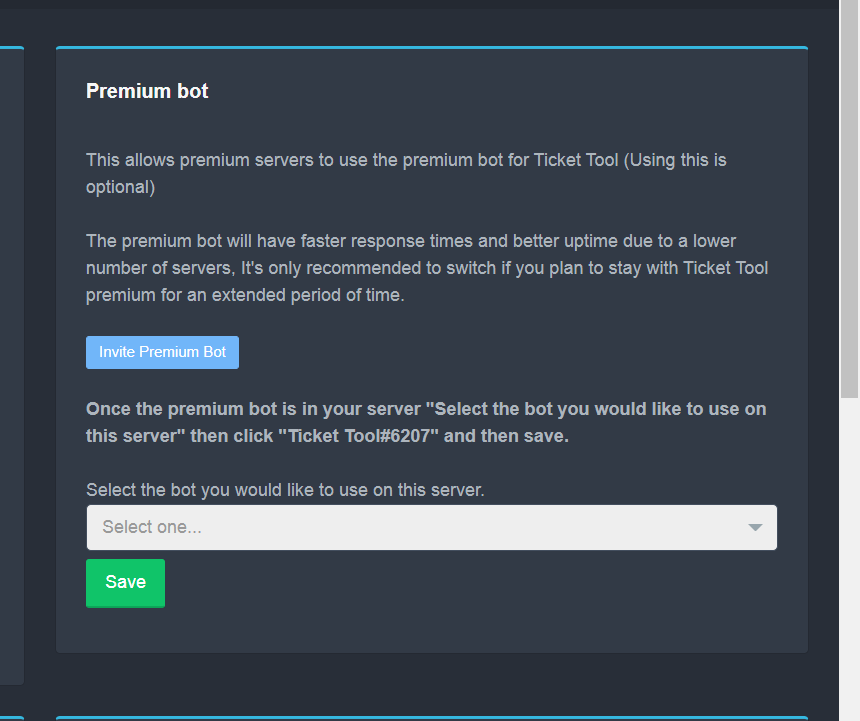
How to disable the premium bot
To disable the premium bot you will have to go to the Dashboard ➞ Server Configs ➞ Premium bot ➞ And on the right-hand side select the primary free bot in the drop down menu.
Premium features will still work on the normal bot.
 slender minnow
for more info refer this above response ^
gusty pagoda
I will try now
feral orbit
slender minnow
for more info refer this above response ^
can I change the bot image?
gilded verge
feral orbit
can I change the bot image?
whitelabels are planned 😳
slender minnow
feral orbit
can I change the bot image?
unfortunately no ^^;
gilded verge
*sorry for interrupt 🥺
slender minnow
no problem ^^;
feral orbit
it's sad, but I think there will be such an opportunity for customization soon
gilded verge
gilded verge
whitelabels are planned 😳
@Skism  😳
😳
slender minnow
gusty pagoda
Did not succeed
did you change the premium bot settings?
slender minnow
humble sequoia
you have to go to server config, and follow the steps given in the response above
https://i.imgur.com/EN0Q1K2.png
 gusty pagoda
I don't understand what to do
humble sequoiaBOT
كيفية اطفاء بوت البريميوم
لاطفاء بوت البريميوم يجب عليك الذهاب الى لوحة التحكم
ثم Server Configs ثم Premium bot ثم ستجد على الجهة اليمنى سهم صغير اضغط عليه و اختر البوت الرسمي
مميزات البريميوم بتشتغل على البوت الرسمي
slender minnow
@gusty pagoda
slender minnow
gusty pagoda
Sorry For Disturb
Not a problem, have a great day!
feral orbit
how do I add multiple buttons to open tickets for different categories?
humble sequoiaBOT
For a more convenient use of multipanels, you can now combine panels on the dashboard. This will allow you to directly send the multipanel from the dashboard or via the $panel ID command.
Where can I find this?
You can find this setting on the Dashboard -> Panel Configs -> Settings -> General Options
Note: if you're attaching all the panels to a panel called English, don't include English in the attached panels box (If you do this, it will create duplicate)
This will put all buttons from all of your panels on one message. The message is the panel message from the panel you're combining these panels in.
You can also watch this video tutorial.
feral orbit
 quasi cliff
First you need to make panels/different categories
gilded verge
+1
here you can see example: #🆘│community-support message
feral orbit
thx
fallow ingot
gilded verge
+1
here you can see example: https://discord.com/channels/509192800865353738/776...
that’s a good example
gilded verge
fallow ingot
that’s a good example
thank you 😳 ❤️
iron nightBOT
Gave +1 Rep to @fallow ingot
humble sequoiaBOT
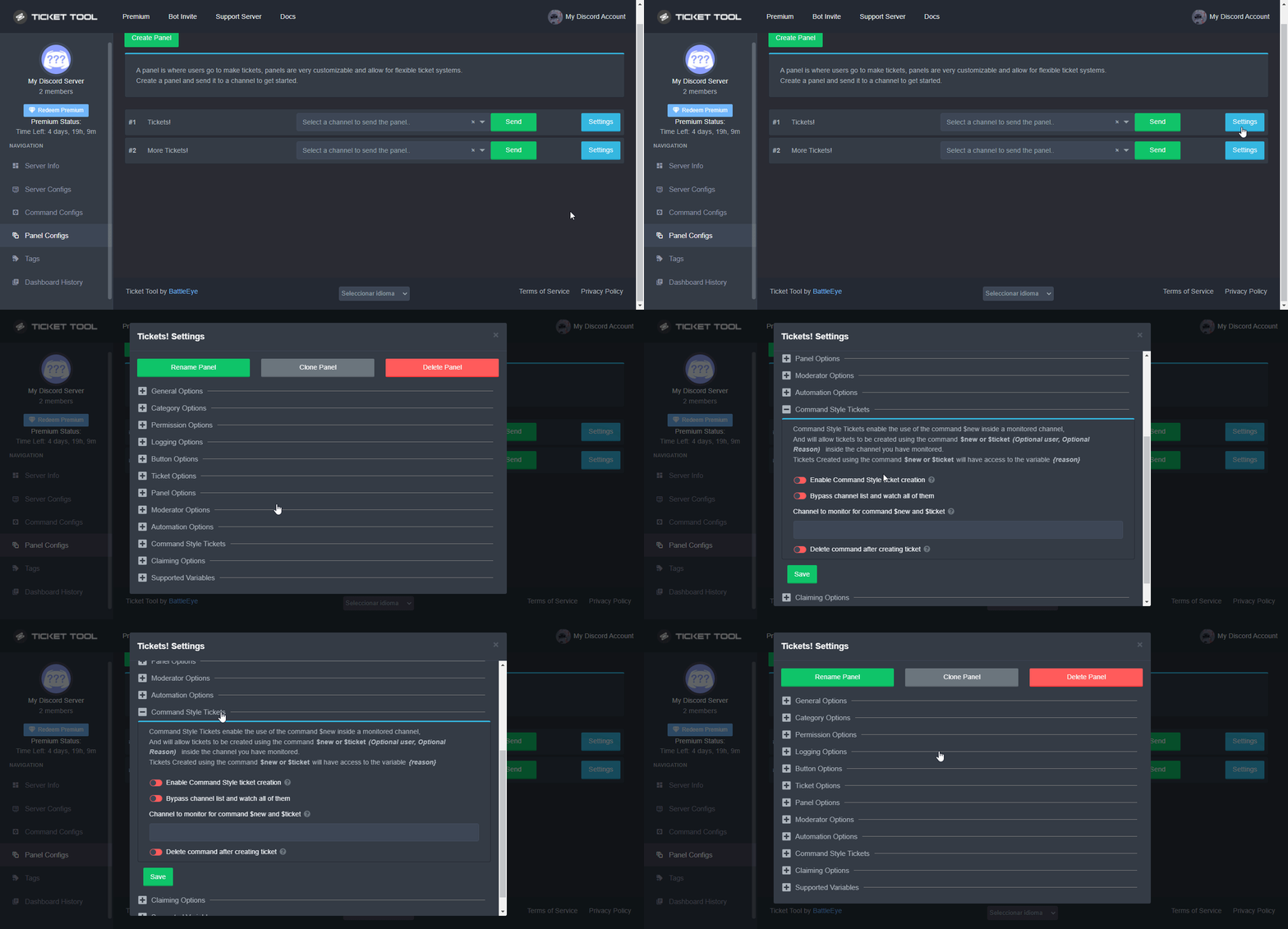
Command Style Tickets allow you to open tickets VIA the $new or $ticket commands. This feature also allows you to open tickets for people, by using the aforementioned commands with the user's ping or ID.
You can enable this feature by heading over to your server's dashboard. Then head over to Panel Configs ➞ Settings ➞ Command Style Tickets. (GIF below shows you how to get to it as well).
This section of the panel settings also contains the following features
- Bypass channel list and watch all of them → when you enable this option, Ticket Tool will create a ticket whenever someone uses the $new or the $ticket command in a channel it has access to .
- Channel to monitor for command $new and $ticket → This is the opposite of the previous option, you can actually select in which channels Ticket Tool should look for the $new command instead of looking in the whole server.
- Delete command after creating ticket → If enabled, Ticket Tool will delete the command (whether it's
$newor$ticket) a few seconds after you run it.
 wild cove
how can i this buttons
 humble sequoiaBOT
For a more convenient use of multipanels, you can now combine panels on the dashboard. This will allow you to directly send the multipanel from the dashboard or via the $panel ID command.
Where can I find this?
You can find this setting on the Dashboard -> Panel Configs -> Settings -> General Options
Note: if you're attaching all the panels to a panel called English, don't include English in the attached panels box (If you do this, it will create duplicate)
This will put all buttons from all of your panels on one message. The message is the panel message from the panel you're combining these panels in.
You can also watch this video tutorial.
jade topaz
Can’t create a bot
fallow ingot
What do you mean?
 eternal pagoda
هلا
في سبورت عربي؟
؟؟
************* ** ****** 🤬
😂 ,
@scenic plinth@regal goblet@radiant moss@slender minnow
?
slender minnow
eternal pagoda
<@615207454443044904><@739661772914688041><@513792641016659971><@776084862728667...
#📂│information rule no. 4
avoid pinging support team
 high oyster
eternal pagoda
<@615207454443044904><@739661772914688041><@513792641016659971><@776084862728667...
high oyster
eternal pagoda
<@615207454443044904><@739661772914688041><@513792641016659971><@776084862728667...
naughty 😡
high oyster
eternal pagoda
في سبورت عربي؟
I believe arabic support is delayed right now.
 simple pendant
Algum adm on
 lyric basin
.
 slate bloom
how cab i make a role have access to tickets
gilded verge
$help support
humble sequoiaBOT
How to let support team see into a ticket
About support roles
A support role lets your support team see into tickets with out having to add them manually to each and every ticket.
You can add as many support roles as you like per panel.
NOTE that the way discord works all admins can see into tickets regardless of this.
How to set a support role
To set a Support role go to the Dashboard -> Panel Configs -> Settings -> General Options -> Support Team Roles.
NOTE that the support role will not be able to see into tickets that are already created..
 opaque terrace
Hey guys,
I'm using Ticket Tool to report bugs for my start-up server.
My problem is that when people open a ticket, they can't send photos on the conversation. Any way I can fix roles without changing roles or permissions ?
quasi cliff
opaque terrace
Hey guys,
I'm using Ticket Tool to report bugs for my start-up server.
My prob...
Hey Audren, Head over to your Dashboard ➞ Panel Configs ➞ Settings ➞ Permission Options ➞ Edit User Opened Permissions ➞ Allow Media perms
opaque terrace
quasi cliff
Hey Audren, Head over to your Dashboard ➞ Panel Configs ➞ Settings ➞ Permission ...
thanks @quasi cliff
iron nightBOT
Gave +1 Rep to @quasi cliff
quasi cliff
If you require any further information, let me know.
opaque terrace
2nd question : How can I choose where the ticket created by ticket tool will appear in the Discord?
quasi cliff
$help category
humble sequoiaBOT
How to set the open category
To set a open category go to the Dashboard -> Panel Configs -> Settings -> Category Options -> Category Open
 opaque terrace
thanks @quasi cliff again
quasi cliff

opaque terrace

jade topaz
How do you make a ticket like in your own sever?
humble sequoiaBOT
You can check our documentation here;
You can also check #📂│information for the basic setup;
You can also watch this video tutorial.
Our documentation contains all the info you need about the bot to be able to setup and configure the bot however you like.
fallow ingot
@jade topaz
jade topaz
Thanks @fallow ingot
fallow ingot
no problem
 silver marsh
Is there a way to make the transcript automatic?
fallow ingot
Yeah, but you need premium.
humble sequoiaBOT
 Faster Premium Bot
Automatic Transcripts
Full Customization
Custom Buttons
Direct Messages
Ticket Automation
Multipanels
Premium Support
You can purchase premium here:
Price
$6 - Monthly
$66 - Yearly
 Premium
silver marsh
Premium
silver marsh
bruh moment
 supple niche
Is there a way to have all the ticket transcripts be saved in a thread under a channel instead of the channel itself?
 scenic plinth
Don't know if it is intended, however with my testing, you can. However, you will have to mention the bot to add it to a thread, then use the $transcript (threadnamehere) for the thread.
Although, once the channel is deleted, the threads are deleted as well.
Edit: The bot does not need to be pinged in the thread, as long as it can see in the channel the thread is created. The permissions to the channel is the permissions to the thread unless you specifically deny permissions via it's role to send messages in threads, assuming it does not have manage threads permissions
jade topaz
if i boost 2 times i will get ticket tool premium ?
slender minnow
jade topaz
if i boost 2 times i will get ticket tool premium ?
Yes, you can claim your 15 days premium if you boost twice.
jade topaz
slender minnow
Yes, you can claim your 15 days premium if you boost twice.
how to see the server premium status via command
quasi cliff
jade topaz
how to see the server premium status via command
Use $debug
jade topaz
How do I mass delete all tickets
scenic plinth
Not possible
 wheat torrent
Hello everyone
I have one question please , why does the bot respond two times?
When I wrote $vote
 digital frost
is there anyone that can jump in a voice call with me and walk me through a couple of things as im confused as heck
 stoic harbor
hi
 signal peak
HEllo guys, I have some problems, when I close ticket it wont move to closed folder, worked yesterday
digital frost
im having issues setting up the transcripts
gilded verge
signal peak
HEllo guys, I have some problems, when I close ticket it wont move to closed fol...
Heey, please make sure no one has changed the permissions for the bot and that the number of channels has not reached the limit (49 or 50 because I don't remember). If the limit has been reached in a given category, the ticket will not be transferred to that category.
gilded verge
digital frost
im having issues setting up the transcripts
Please describe the problem
digital frost
gilded verge
Please describe the problem
i cant seem to get them to send the the person that opened the tickets and im trying to get them also sent to a staff discord channel too
gilded verge
ou, did you check docs? 😳 https://docs.tickettool.xyz/dashboard/panel-configs/logging-options
digital frost
uhm couldnt find it sorry im half asleep just waking up even though im in scotland by gosh gaming keeps us up lol
 light tundra
Hello, my ticket Tool is bugged! my server is not showing. I've relogged to see if it appears but it doesn't. What can it be ?
humble sequoiaBOT
Don't see your server in the dashboard?
You will possibly need to relog. Look below to see steps on how to relog.
How to relog in the Dashboard.
First, you will need to go to the dashboard. Once your there, click on your avatar on the top right. after you clicked it, you will see button that says Logout. You must click that. Once you have logged out, you can log back in.
Note:
You need one of these 3 things to access the dashboard.
1. Server Owner (Level: 6)
2. Server Administrator (Level: 4)
3. Dashboard Role (Level: 2)
:warning: You can check your level using $level on your Discord Server
User permission level with Ticket Tool
@User is permission level: 0 (User)
```» *If it shows that your permission is **0**, you don't have any of the above **3 things** to manage the dashboard.*


**See the GIF below on how to relog:**@light tundra refer above ^
light tundra
OK bro
Thank you very much in advance! I'm Brazilian I'm using translation if something is wrong sorry
Thanks @slender minnow
iron nightBOT
Gave +1 Rep to @slender minnow
slender minnow
light tundra
Thank you very much in advance! I'm Brazilian I'm using translation if something...
no worries 
humble sequoiaBOT
Não vê seu servidor no painel?
Você possivelmente precisará relogar. Veja abaixo as etapas sobre como relogar.
Como relogar o painel.
Primeiro, você precisa ir para o painel. Quando estiver lá, clique no seu avatar no canto superior direito. depois de clicar nele, você verá o botão Logout. Você deve clicar nisso. Depois de fazer logout, você pode fazer login novamente.
Observação:
Você precisa de uma dessas três coisas para acessar o painel.
1. Proprietário do servidor (Level: 6)
2. Administrador do servidor (Level: 4)
3. Função do painel (Level: 2)
:warning: Você pode verificar o seu nível usando $level no seu servidor Discord
User permission level with Ticket Tool
@User is permission level: 0 (User)
```» *Se mostrar que sua permissão é **0**, você não tem nenhuma das **3 coisas** acima para gerenciar a dashboard.*


**Veja o GIF abaixo sobre como relogar:**@light tundra for a better understanding ^
signal peak
gilded verge
Heey, please make sure no one has changed the permissions for the bot and that t...
thank you mate:) it was the limits
iron nightBOT
Gave +1 Rep to @gilded verge
high oyster
$help category
humble sequoiaBOT
How to set the open category
To set a open category go to the Dashboard -> Panel Configs -> Settings -> Category Options -> Category Open
 fresh snow
Does any one know why although I set Category Options to let created tickets into specific category, but there are still some of them not go into the right place?
high oyster
@fresh snow ^^
fresh snow
Yes That is exactly what I did. Some of them go to rigght place, some are not, weird
humble sequoiaBOT
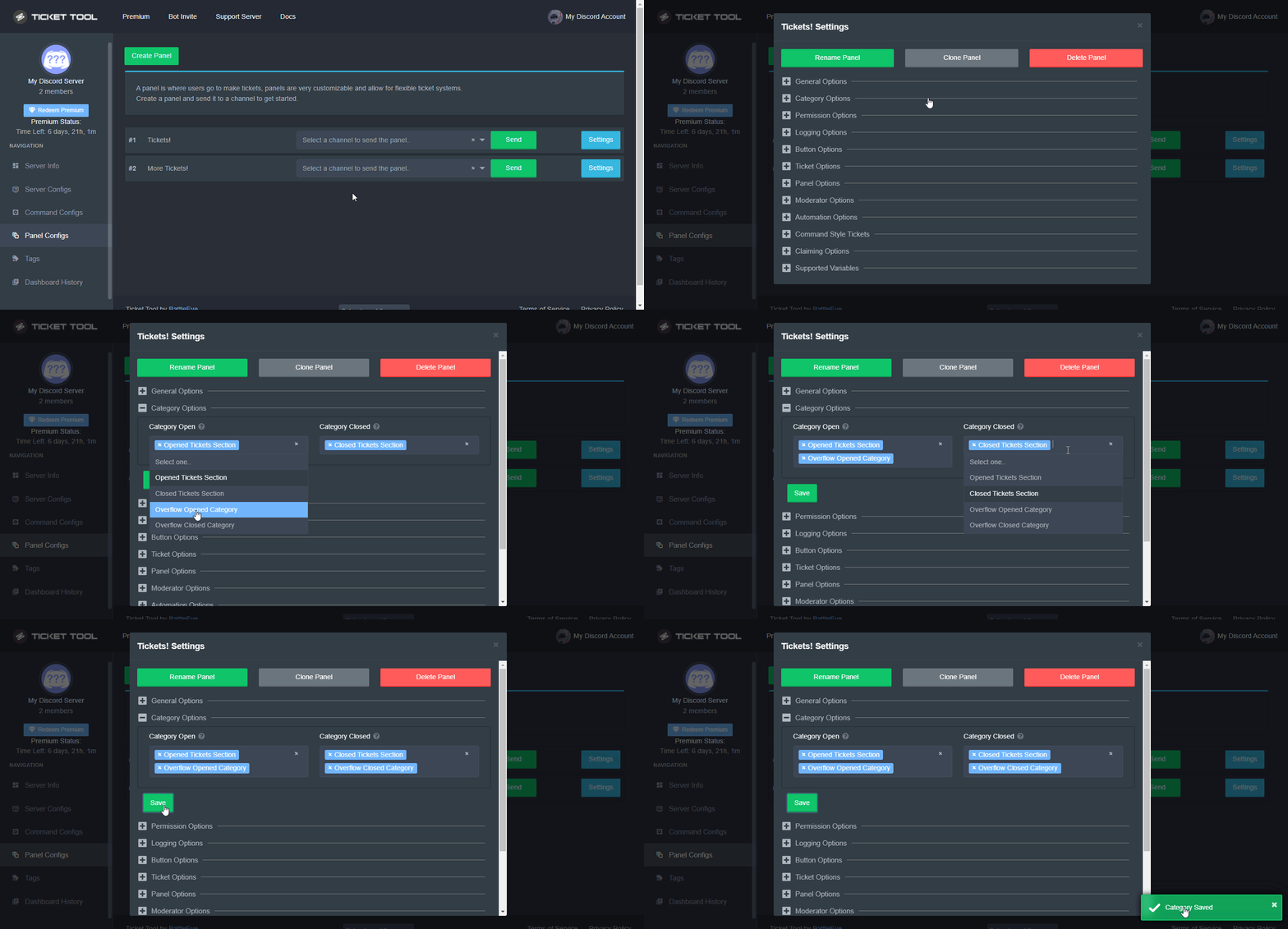
Discord only allows to stack up to 50 channels per category, meaning that if you have already 50 tickets in one category, the bot won't be able to place a ticket in that category, for such reason Ticket Tool counts with overflow categories, meaning that if your main category is filled, the bot will go ahead and place the ticket on the next one available, simply choose a second category in the category pickers:
 fallow ingot
Check this out ^ @fresh snow
 minor scarab
Hey there gals and fellas, I’m trying to attach multiple buttons for different tickets within one panel, is this possible? I can’t seem to find a guide.
humble sequoiaBOT
For a more convenient use of multipanels, you can now combine panels on the dashboard. This will allow you to directly send the multipanel from the dashboard or via the $panel ID command.
Where can I find this?
You can find this setting on the Dashboard -> Panel Configs -> Settings -> General Options
Note: if you're attaching all the panels to a panel called English, don't include English in the attached panels box (If you do this, it will create duplicate)
This will put all buttons from all of your panels on one message. The message is the panel message from the panel you're combining these panels in.
You can also watch this video tutorial.
gilded verge
Hey, do you mean ?
minor scarab
I believe so, let me look
minor scarab
gilded verge
Hey, do you mean <:this:894279341108772914> ?
So does this use 1 single panel with multiple buttons to different ticket names?
gilded verge
I think you will find the answer in my message ^-^ #🆘│community-support message
minor scarab
gilded verge
I think you will find the answer in my message ^-^ https://discord.com/channels/...
Can you show me in your discord what it looks like
gilded verge
In that message (#🆘│community-support message) , I added a video 😳
minor scarab
That’s in the panel, not discord
Oh I’m dumb, I see it below
Yes that’s correct, thanks man. Sorry been a long day
gilded verge
it's okay 😊
 warped ridge
Bot down?
fallow ingot
Nope bot is not down. From my end all systems are operational.
fallow ingot
warped ridge
Bot down?
Is the bot down for you?
warped ridge
Aye, premium one
 spice trellis
Same as semx, our premium bot in a server i dev for is offline
 fallow ingot
Okay, thank you.
 fallow ingot
Please bare with me as I investigate.
high oyster
F
fallow ingot
That's odd, the shard seems to be online.
 proven cypress
https://prnt.sc/gmpRyqY7-NEs
925153314969104454
 warped ridge
6207 is having a hard time it seems
 harsh terrace
Offline💀
fallow ingot
warped ridge
6207 is having a hard time it seems
Your premium bot is on shard 6 but it says online 
proven cypress
proven cypress
https://prnt.sc/gmpRyqY7-NEs
925153314969104454
is now online, thanks ^^
warped ridge
Weird, what about others reporting this? Also the shard we are on?
Nvm its back
All good thank you
 radiant shoal
Eyooo - Is there a way to have TicketTool not send the "Only you can see this message" message upon ticket creation?
humble sequoiaBOT
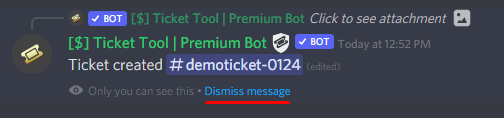
How can I edit/disable the ephemeral message?
These pop ups can only be seen by the user who triggered a certain action, like creating a ticket. They cannot be edited or disabled, as they are a discord requirement that is set by the developer of any bot. The ephemeral messages can be removed by pressing the little blue Dismiss message text, or by restarting your discord client.
 jade topaz
How can I make multiple buttons?
humble sequoiaBOT
For a more convenient use of multipanels, you can now combine panels on the dashboard. This will allow you to directly send the multipanel from the dashboard or via the $panel ID command.
Where can I find this?
You can find this setting on the Dashboard -> Panel Configs -> Settings -> General Options
Note: if you're attaching all the panels to a panel called English, don't include English in the attached panels box (If you do this, it will create duplicate)
This will put all buttons from all of your panels on one message. The message is the panel message from the panel you're combining these panels in.
You can also watch this video tutorial.
jade topaz
I got 2 duplicated buttons, but it doesnt appear in the panel


 main swan

 dull furnace
One message removed from a suspended account.
One message removed from a suspended account.
gilded verge
jade topaz
I got 2 duplicated buttons, but it doesnt appear in the panel
oh, just delete Soporte in first panel. this is the reason for duplication 😊
 main swan
dull furnace
One message removed from a suspended account.
main swan
dull furnace
One message removed from a suspended account.
[@role name] in ticket message
jade topaz
gilded verge
oh, just delete `Soporte` in first panel. this is the reason for duplication 😊
Tysm!
dull furnace
main swan
[@role name] in ticket message
One message removed from a suspended account.
humble sequoiaBOT
Within all the messages the bot's sends (both embeds and text) you can mention either channels, roles, or even users, these mentions will only send a notification to the user if they are used within a text field, e.g: a role mentioned in an embed won't ping at all the users who have that role.
For mentioning a role you can use one out of three options:
{@Role Name} ➞ Which is Case Sensitive.
{RoleID} ➞ Replace RoleId with the Id of the role you are trying to ping.
<@&RoleID> ➞ Discord's native syntax to ping roles.
<#ChannelID> ➞ Mention a channel by its ID.
<@UserID> ➞ Mention a user by its ID.
dull furnace
One message removed from a suspended account.
gilded verge
main swan
Panel Configs->Panel Settings->Expand General Options->switch Ticket Limit to 1 or more if you want

 rare hawk
 scenic plinth
Can I get your server ID please?
 ripe turtle
I keep relogging my server doesnt pop up
humble sequoiaBOT
Don't see your server in the dashboard?
You will possibly need to relog. Look below to see steps on how to relog.
How to relog in the Dashboard.
First, you will need to go to the dashboard. Once your there, click on your avatar on the top right. after you clicked it, you will see button that says Logout. You must click that. Once you have logged out, you can log back in.
Note:
You need one of these 3 things to access the dashboard.
1. Server Owner (Level: 6)
2. Server Administrator (Level: 4)
3. Dashboard Role (Level: 2)
:warning: You can check your level using $level on your Discord Server
User permission level with Ticket Tool
@User is permission level: 0 (User)
```» *If it shows that your permission is **0**, you don't have any of the above **3 things** to manage the dashboard.*


**See the GIF below on how to relog:** little narwhal
Hey, I am having an issue where it's not removing the member who opened the ticket, once the ticket is closed
slender minnow
little narwhal
Hey, I am having an issue where it's not removing the member who opened the tick...
Hey, is that member the ticket owner (the user who opened the ticket)?
 celest ledge
I am trying to send a ticket into a channel of my server and it's saying "failed to send pannel" I tried running $ debug and tried again but still didn't work
 rapid tide
Do people need to have admin to see tickets?
 random zealot
My closed tickets doesn't go in the correct category anymore for no reasons, it was still working 2 days ago, i changed nothing. Anyone got a fix?
 summer tree
Potentially mabye try to reset the category settings?
random zealot
already tried several times
summer tree
Any YouTube support videos online, they could mabye help you.
random zealot
i just created a new category and deleted the old one, it's now working again
summer tree
Alright, glad you got it to work again.
 dark field
celest ledge
I am trying to send a ticket into a channel of my server and it's saying "failed...
dark field
celest ledge
I am trying to send a ticket into a channel of my server and it's saying "failed...
Do the bot have permission for the channel?
celest ledge
dark field
Do the bot have permission for the channel?
It's been delt with in a ticket it's all fixed
Thanks anyway
dark field
rapid tide
Do people need to have admin to see tickets?
No, you can set the specific Role you want to be able to see the tickets
 weary skiff
thanks @calm agate
iron nightBOT
Gave +1 Rep to @calm agate
 cedar pivot
Hallo
fallow ingot
 fervent bone
how do I close a ticket with a delay?
fervent bone
how do I close a ticket with a delay?
You can't close a ticket with a delay, there is like a 5 second delay when deleting the ticket if that helps.
You can suggest that feature tho.
humble sequoiaBOT

Suggestions for Ticket Tool
See Suggestions in #💡│suggestions
Make a Suggestion
Use s!suggest <suggestion> in #🤖│bot-spam
jade topaz
where to buy premium key for redemption?
humble sequoiaBOT
Ticket Tool Premium
Get premium at https://tickettool.xyz/premium
Manage your subscriptions at https://tickettool.xyz/subscriptions
Why Premium?
Premium lets you customize the bot just how you want it. It also helps keep the bot running.
quasi cliff
jade topaz
where to buy premium key for redemption?
jade topaz
that just puts it on my acc the last time i did that
quasi cliff
You can manage subscriptions and add it to a server then
 jade topaz
any way i can purchase that?
fallow ingot
@jade topaz When you buy premium you need to go to https://tickettool.xyz/subscriptions where you will see a dropdown menu, then select a server.
fallow ingot
jade topaz
any way i can purchase that?
Although you haven't purchased premium with us.
fallow ingot
You can get a premium key by voting for ticket tool every 12 hours.
You can run $vote in #🤖│bot-spam for more information.
 zinc sedge
Hey
can someone help me? the ticket tool system says missing permissions all of a sudden?
humble sequoiaBOT
ᅠ
@pseudo glen requires the following permissions:
Add Reactions
Read Channels
Send Messages
Manage Messages
Embed Links
Attach Files
Read History
Manage Roles
Manage Channels
To change the role permissions, you can go to your Discord Server ➞ Server Settings ➞ Roles ➞ @Ticket Tool
To change the channel permissions, you can go to your Channel Settings ➞ Permissions ➞ Ticket Tool
ᅠ
Note:
You can give Ticket Tool Administrative Permissions instead of all the permissions listed above, but it's entirely optional and NOT necessary.
zinc sedge
The bot was working find and then suddenly got permission error
 feral scaffold
?

 zinc sedge
feral scaffold
?
zinc sedge
feral scaffold
?
?
feral scaffold
i am trying to add the bot on my server and this giving error.
quasi cliff
zinc sedge
Did you remove Manage Channel perms in the category (where Bot creates ticket)
zinc sedge
quasi cliff
Did you remove Manage Channel perms in the category (where Bot creates ticket)
nope did nothing
quasi cliff
feral scaffold
?
Run $debug in the channel you're trying to send Panel.
quasi cliff
zinc sedge
nope did nothing
Maybe your staff did? Check again in the category if bot has Manage Channel
feral scaffold
quasi cliff
Run $debug in the channel you're trying to send Panel.
nothing happens
quasi cliff
feral scaffold
nothing happens
Is bot having permissions to read messages in the channel?
zinc sedge
quasi cliff
Is bot having permissions to read messages in the channel?
its having problems creating tickets
yeah will do it again
quasi cliff
zinc sedge
its having problems creating tickets
Actually Demon is having another issue and was replying them
zinc sedge
ah
quasi cliff
Just check if the category has permissions ( Manage Channel)
jade topaz
Hey so does anyone know how to change where your saved transcripts go? because I am trying to figure it out but I cant.
humble sequoiaBOT
How do I save transcript to a channel?
To save transcripts to a channel go to the Dashboard -> Panel Configs -> Settings -> Logging Options -> Transcript Channel
 gilded verge
Hey, there you can change 😊
jade topaz
Thank you!
jade topaz
@fallow ingot why do i have premium subscriber
fallow ingot
Because a server that you have dashboard access to has premium.
jade topaz
fallow ingot
Because a server that you have dashboard access to has premium.
Ohhh ok
fallow ingot
$help category
humble sequoiaBOT
How to set the open category
To set a open category go to the Dashboard -> Panel Configs -> Settings -> Category Options -> Category Open
fallow ingot
@pine linden
 digital hearth
this may be a dumb question but is it possible to have the delete button next to the close button at the beginning of an ticket in case i wanted to skip the close part and go straight to delete rather than closing it first
 modest igloo
How to create ticket
humble sequoiaBOT
You can check our documentation here;
You can also check #📂│information for the basic setup;
You can also watch this video tutorial.
Our documentation contains all the info you need about the bot to be able to setup and configure the bot however you like.
modest igloo
Bruh
gilded verge
check above and stop sending dm's
modest igloo
Dont understand again :/
 plucky mirage
Hi, What happens after Free 7 days Premium Trial on Panels?
gilded verge
modest igloo
Dont understand again :/
so you can go to channel #📂│information and select Setup Guide
plucky mirage
I've made my own panel with free Premium, If it expired then the Panel gets edited to default? Or will stay same when sent before Premium expires?
gilded verge
plucky mirage
I've made my own panel with free Premium, If it expired then the Panel gets edit...
If you changed to a premium bot and sent the panel to the channel with premium bot, after it expires you will have to change back to the free bot and resend the panel back to the channel to make it work. All settings will remain as they were.
plucky mirage
gilded verge
If you changed to a premium bot and sent the panel to the channel with premium b...
@gilded verge No! I didn't payed! I don't own the Premium one!
I have 7 days Frew Trial!
My question was that I sent a Panel with the free trial of premium, Will it still works and still be the same if It expires the 7 days of the Panel?
gilded verge
I know, I know, but I wrote a reply. No matter what premium, it works the same.
If my answer is not satisfactory, please wait for someone else
digital hearth
gilded verge
or Example 2 ?
if possible i would like to have the option for both. say for example the ticket goes inactive it can be temporarily closed till they re-open it to continue or if support has been completed it can just be deleted similar to your second example with out having to close it first. so there would be three buttons "close" "claim" "delete" directly under the initial ticket message if that makes sense
gilded verge
digital hearth
if possible i would like to have the option for both. say for example the ticket...
i'm sorry, please wait for a reply from someone else
scenic plinth
Under the initial ticket message no. The closest option is to allow the ticket owner to see the channel when closed, or vice versa. Ticket Tool does not close tickets after X period of time.
 weak tiger
hi
my admin team said they cant see the tickets that people have put in and cant help answer them.. how do i add them to the bot
humble sequoiaBOT
How to let support team see into a ticket
About support roles
A support role lets your support team see into tickets with out having to add them manually to each and every ticket.
You can add as many support roles as you like per panel.
NOTE that the way discord works all admins can see into tickets regardless of this.
How to set a support role
To set a Support role go to the Dashboard -> Panel Configs -> Settings -> General Options -> Support Team Roles.
NOTE that the support role will not be able to see into tickets that are already created..
jade topaz
my ticket bot wont respond
 lean knoll
How do I make a ticket panel
dark field
lean knoll
How do I make a ticket panel
Panel Configs -> "Create Panel"
lean knoll
dark field
Panel Configs -> "Create Panel"
Im dumb
 scenic plinth
Have you tried doing what it tells you...\
 scenic plinth
Have you tried ensuring the bot can see the channel and send messages in it...
jade topaz
yes
scenic plinth
Take another look
jade topaz
 scenic plinth
What is your servers name....
 scenic plinth
Have you tried ensuring you selected the right bot in your server configs...
jade topaz
yes
scenic plinth
Funny how that works
weak tiger
How do you add people to see the tickets
scenic plinth
$add {user}
 lean knoll
scenic plinth
`$add {user}`
lean knoll
scenic plinth
`$add {user}`
Help
scenic plinth
Wait
lean knoll
Okay
 rustic gale
What happens if you type $debug in that channel?
lean knoll
 rustic gale
You enter the server's settings and give Ticket Tool the Manage Roles permission
lean knoll
It works thanks @rustic gale
 floral cedar

 pastel meadow
Don't ping the support team. Anyways, it's a premium feature. When you open a panels settings, go over to claiming options and enable ticket claiming.
 rustic gale
Do you have the premium bot and are you subscribed to the premium bot?
rustic gale
You need to also invite the premium bot into your server.
weak tiger
scenic plinth
`$add {user}`
Where do I type that command?
 uncut prism
Hello, I am in my Dashboard and have been trying to claim my server. I have used my PLEX log info to my PLEX Account and it wont let me claim it
rustic gale
weak tiger
Where do I type that command?
Inside the ticket
 lyric belfry
humble sequoiaBOT
lyric belfry
humble sequoiaBOT

⚠️ You're in the wrong place
We provide support for @pseudo glen discord bot and cannot help you with whatever issue you have.
- We don't know which Support Team you should contact to get this issue resolved, and unfortunately we won't be able to accurately tell you.
If you don't have any further questions regarding our bot Ticket Tool, please close this ticket
fallow ingot
@floral cedar Using the free trial you will have access to every premium feature, you don’t have to invite the premium bot nor enable it for the premium settings to work.
 chilly blaze
How can i add someone to a ticket?
gilded verge
In ticket channel, use command $add @user or $add user-id
and if you want to remove user from ticket, use $remove @user
chilly blaze
Okay 👌
 stiff valley
How can I allow people to send links in the tickets?
 stray fern
Hi! In one discord server I have almost all permissions but I cannot acess dashboard, is it some config or I need to have administrator?
 craggy geyser
Liam has been answered in a ticket
craggy geyser
stray fern
Hi! In one discord server I have almost all permissions but I cannot acess dashb...
Hi there. You don't need admin, but without it you need a dashboard role (which needs admin or an owner to set up)
humble sequoiaBOT
Any role you put there will have full access to the ticket tool dashboard. The server owner and users with admin permissions already have access to the dashboard.
Be careful of which roles to put here
 iron nightBOT
Gave +1 Rep to @craggy geyser
craggy geyser
No worries
gilded verge
 atomic parcel
The emoji isn't saving for a button in the panel
atomic parcel
The emoji isn't saving for a button in the panel
but your server need premium to change emoji in button 🤔
atomic parcel
ohhh ok
light tundra
a doubt bros, If the bot ticket tool goes offline, will it capture tickets and interactions on my server?
dark field
light tundra
a doubt bros, If the bot ticket tool goes offline, will it capture tickets and i...
I guess not
iron nightBOT
Gave +1 Rep to @dark field
humble sequoiaBOT
We would love to help you, but if you don't tell us what you need help with we can't help you :(
fallow ingot
@jade topaz ^
humble sequoiaBOT
We would love to help you, but if you don't tell us what you need help with we can't help you :(
jade topaz
how do i make a panel that opens a ticket where i can add more than one persons to
humble sequoiaBOT
Ticket Tool avatar/status Customisation
@pseudo glen is like another discord user; you can't control its avatar icon or status, and we cannot change it for a specific server.
However, on your server, you can change the bot's nickname
 thorny crag
jade topaz
how do i make a panel that opens a ticket where i can add more than one persons ...
thorny crag
jade topaz
how do i make a panel that opens a ticket where i can add more than one persons ...
what do you mean? give me an example pls
jade topaz
when i open my tickets it’s showing this i want to fix it
 thorny crag
but
u've asking about something different
anyway, check permissions in server info
humble sequoiaBOT
ᅠ
@pseudo glen requires the following permissions:
Add Reactions
Read Channels
Send Messages
Manage Messages
Embed Links
Attach Files
Read History
Manage Roles
Manage Channels
To change the role permissions, you can go to your Discord Server ➞ Server Settings ➞ Roles ➞ @Ticket Tool
To change the channel permissions, you can go to your Channel Settings ➞ Permissions ➞ Ticket Tool
ᅠ
Note:
You can give Ticket Tool Administrative Permissions instead of all the permissions listed above, but it's entirely optional and NOT necessary.
jade topaz
thorny crag
anyway, check permissions in server info
ok
and what should i do
its still saying the same thing
its working now
rustic gale
You enter your server's role settings and give Ticket Tool those permissions
quasi cliff
They need to add perms in category (Manage Channel permissions)
 cyan rover
How to apply for support in Arabic?
rustic gale
There will be an announcement when the server's looking for Arabic staff
humble sequoiaBOT
We would love to help you, but if you don't tell us what you need help with we can't help you :(
fallow ingot
cyan rover
How to apply for support in Arabic?
You can apply here: #📣│server-news message please make sure you meet the requirements
jade topaz
I boosted the server twice, how can I claim the premium?
 dark kraken
can i get the dashboard link?
humble sequoiaBOT
dark kraken
ty
fallow ingot
jade topaz
I boosted the server twice, how can I claim the premium?
I see you opened a ticket, someone will generate a key for you shortly.
 deep flare
Hello, how can I order Ticket Tool from another robot ?
I would like to add people to the ticket permissions but ticket tool prevents me from doing so
quasi cliff
deep flare
Hello, how can I order Ticket Tool from another robot ?
I would like to add peo...
You can simply add by $add UserID or $add @user
deep flare
quasi cliff
You can simply add by `$add UserID` or `$add @user`
the bot does not react
quasi cliff
Any errors?
deep flare
and I would like it to be done by the robot, to be automatic
deep flare
quasi cliff
Any errors?
no
quasi cliff
deep flare
and I would like it to be done by the robot, to be automatic
Automatic like when?

 deep flare
it's enabled
quasi cliff
Please run $debug in that ticket channel where you trying $add
deep flare
okay
quasi cliff
Permissions look fine, can you do $add @user and send ss

 quasi cliff
Dashboard -> Server Configs -> Bot -> Add the bot's ID

Also what's the purpose of using other bot to add user? Maybe I can suggest some other way with Ticket Tool
quasi cliff
If you require any further information, let me know.
deep flare
thanks you 😄
quasi cliff
Welcome!
jade topaz
Hi I just had a question about the Transcript I wanted to understand how it worked in the code because I find it very interesting but I can't understand how the information is collected is it from the html or is it more complex?
if anyone knows how it works
quasi cliff
jade topaz
Hi I just had a question about the Transcript I wanted to understand how it work...
It's not html, the transcript command is coded in any of the Bot language (python, js etc). Ticket Tool then after collecting it, turns it to a html file. I'm not very sure about it but that's how transcripts usually work.
Developer type servers might help out better in this imo
jade topaz
quasi cliff
It's not html, the transcript command is coded in any of the Bot language (pytho...
k thanks
iron nightBOT
Gave +1 Rep to @quasi cliff
quasi cliff
If you require any further information, let me know.
 sour hedge
Hello, I have such an error, I can’t add a bot to the server, I tried both through discord and through Google, anyway, I tried, he joined other servers but I don’t have the one I need, I have all the rights, but for some reason I I can't add a bot, is there a reason for this?
humble sequoiaBOT
Don't see your server in the dashboard?
You will possibly need to relog. Look below to see steps on how to relog.
How to relog in the Dashboard.
First, you will need to go to the dashboard. Once your there, click on your avatar on the top right. after you clicked it, you will see button that says Logout. You must click that. Once you have logged out, you can log back in.
Note:
You need one of these 3 things to access the dashboard.
1. Server Owner (Level: 6)
2. Server Administrator (Level: 4)
3. Dashboard Role (Level: 2)
:warning: You can check your level using $level on your Discord Server
User permission level with Ticket Tool
@User is permission level: 0 (User)
```» *If it shows that your permission is **0**, you don't have any of the above **3 things** to manage the dashboard.*


**See the GIF below on how to relog:**Check this out ^
 tribal cedar
Ticket Tool doesn't have automated closing. You need to close then manually
 fathom python
Ah ok thanks 🙂
tribal cedar
Anytime
 jade topaz
oh shi wrong bot
sour hedge
humble sequoia
I tried it, it just doesn't work for me. :(
fallow ingot
jade topaz
oh shi wrong bot
Yeah, I thought that.
tribal cedar
sour hedge
I tried it, it just doesn't work for me. :(
Use the $level command and see if you have access to the dashboard
sour hedge
Why do I have a "manage server" but no bot on the server and I can't add it? i tried through discord and google, it doesn’t work, i tried to relogin to my account and invite the bot, but it just didn’t go to the server for me, I’m the owner of the server but for some reason I can’t add a bot, but a friend, if he owns the rights, can, I don’t understand the error, help please
 fallow ingot
You asked this already and I gave you a response…
fallow ingot
humble sequoia
sour hedge
fallow ingot
You asked this already and I gave you a response…
Excuse me, but I have already done this several times, I have the highest role, the bot still does not enter for some reason
fallow ingot
Ok, no worries.
Can you run $level?
This will help us check if you have access to this servers dashboard.
@sour hedge
 frigid parrot
hi
can i get some help with answering tickets in the discord i just started moding in?
i'm trying to be proactive while i wait on the founders
if I have the "pinger" role will I see filed tickets inside the discord?
or do i have to go to a website dashboard?
i apologize for having this question in the wrong channel, bit slow today, 6th day of covid and finally getting back up to speed
 sturdy solstice
I need a duo
 humble sequoiaBOT
For a more convenient use of multipanels, you can now combine panels on the dashboard. This will allow you to directly send the multipanel from the dashboard or via the $panel ID command.
Where can I find this?
You can find this setting on the Dashboard -> Panel Configs -> Settings -> General Options
Note: if you're attaching all the panels to a panel called English, don't include English in the attached panels box (If you do this, it will create duplicate)
This will put all buttons from all of your panels on one message. The message is the panel message from the panel you're combining these panels in.
You can also watch this video tutorial.
jade topaz
Are there any results out yet for the English support team/moderator applications?
 steel horizon
humble sequoia
steel horizon
humble sequoia
ty
iron nightBOT
Gave +1 Rep to @humble sequoia
gilded verge
jade topaz
Are there any results out yet for the English support team/moderator application...
Last info about English Support Team: #📣│server-news message
Last info about Moderator: #📣│server-news message
rustic gale
frigid parrot
hi
can i get some help with answering tickets in the discord i just started modi...
Answering tickets gets done in discord. Opening a ticket creates a channel in the server.
jade topaz
gilded verge
Last info about English Support Team: https://discord.com/channels/5091928008653...
Oh wait, Moderator and support aint the same xD
gilded verge
yup
covert swallow
jade topaz
Oh wait, Moderator and support aint the same xD
Im not support lol
 worldly sedge
how do i get the bot to ping a certain role when a ticket is created with this message
 frigid parrot
rustic gale
Answering tickets gets done in discord. Opening a ticket creates a channel in th...
frigid parrot
rustic gale
Answering tickets gets done in discord. Opening a ticket creates a channel in th...
thank you!!!
iron nightBOT
Gave +1 Rep to @rustic gale
humble sequoiaBOT
Within all the messages the bot's sends (both embeds and text) you can mention either channels, roles, or even users, these mentions will only send a notification to the user if they are used within a text field, e.g: a role mentioned in an embed won't ping at all the users who have that role.
For mentioning a role you can use one out of three options:
{@Role Name} ➞ Which is Case Sensitive.
{RoleID} ➞ Replace RoleId with the Id of the role you are trying to ping.
<@&RoleID> ➞ Discord's native syntax to ping roles.
<#ChannelID> ➞ Mention a channel by its ID.
<@UserID> ➞ Mention a user by its ID.
rustic gale
worldly sedge
how do i get the bot to ping a certain role when a ticket is created with this m...
Open your panel's settings Ticket Options -> Edit Ticket Message
rustic gale
humble sequoia
Then do this
worldly sedge
rustic gale
Open your panel's settings Ticket Options -> Edit Ticket Message
sweet, i got it to work thanks!
iron nightBOT
Gave +1 Rep to @rustic gale
 glacial geode
Hey, I wanted to know how can I set only the founders role to close tickets, I have set it as a support role but additional roles still can close tickets, why?
rustic gale
glacial geode
Hey, I wanted to know how can I set only the founders role to close tickets, I h...
In your panel's settings look for Button Options. There you can set the permissions for each of the buttons
glacial geode
Okay, thanks a ton!
glacial geode
rustic gale
In your panel's settings look for Button Options. There you can set the permissi...
If I set allowed roles does it make all the others automatically unallowed or do I have to set em manually
rustic gale
Setting allowed roles won't make other roles automatically unallowed, no
 iron pine
Hey how do I save transcript logs to a different channel automatically
jade topaz
iron pine
Hey how do I save transcript logs to a different channel automatically
u need to use premium version
 radiant moss
iron pine
My friend doesn't have premium but he does it
radiant moss
iron pine
My friend doesn't have premium but he does it
If the server has premium enabled:
Panel Settings --> Logging Options --> Auto Save Transcript
 iron pine
Thanks already being helped now lol
 gaunt grotto
How to give traders access to tickets but not the private channels..?
radiant moss
$help support
humble sequoiaBOT
How to let support team see into a ticket
About support roles
A support role lets your support team see into tickets with out having to add them manually to each and every ticket.
You can add as many support roles as you like per panel.
NOTE that the way discord works all admins can see into tickets regardless of this.
How to set a support role
To set a Support role go to the Dashboard -> Panel Configs -> Settings -> General Options -> Support Team Roles.
NOTE that the support role will not be able to see into tickets that are already created..
radiant moss
Assuming you want certain roles to see tickets see above
Note that people with the role will not be added to tickets prior to the setting being saved
gaunt grotto
Shiiiii I just couldn’t find the button 😭
jade topaz
Hello, when a member of the server selects a ticket how do I allow that ticket channel that has just opened to be placed into a specific category?
Any help is much appreciated.
rustic gale
jade topaz
Hello, when a member of the server selects a ticket how do I allow that ticket c...
Category Options in your ticket's settings (Panel Configs)
jade topaz
rustic gale
Category Options in your ticket's settings (Panel Configs)
Thank you!
iron nightBOT
Gave +1 Rep to @rustic gale
 jagged ether
how to do this vote thingy on ticket tool
rustic gale
jade topaz
how do i add another person in a ticket so there three persons
Use the $add command
rustic gale
What do you mean by vote thingy
 jagged ether
bruh i really have problem when i ask the support they just ignore me
covert swallow
jagged ether
idk how to use this
Click the vote links, the websites will have a vote button
jagged ether
ok
rustic gale
jade topaz
after its closed
With the $transcript command
slender minnow
Not possible as of now.
 quick sundial
Hey everyone, can someone explain me please one thing. I did a special categories for new tickets and for the closed ones. It worked perfectly, but since today new tickets popping up above the channels as the default settings and the closed ones are not transfering into "closed tickets" categorie. May the reason be coz of lots of tickets? I checked config and everything is ok
gilded verge
quick sundial
Hey everyone, can someone explain me please one thing. I did a special categorie...
Hey, you can only have 49 or 50 channels in one category (because I can't remember) so maybe that's the problem here.
jade topaz
Hello, I can't set up a bot on a friend's server He gave me not the most important role, but this is enough. I set it up once, I wanted to reconfigure it, but when I reloaded the site of that server, there was simply nothing to do? Communicating through google translator
gilded verge
jade topaz
Hello, I can't set up a bot on a friend's server He gave me not the most importa...
Hey, use the $level command on friend's server and let me know what the bot sent you -screenshot or something 😄
jade topaz
You misunderstood the panel did not disappear, I just wanted to redirect the bot to another cha
gilded verge
My point is, I would like you to use the command $level so we can see if you have the correct permissions on the server 😳
jade topaz
 gilded verge
Oh... so you do not have permission to configure the bot 😳
You need Dashboard role / Manage server or Administrator
jade topaz
a friend gave me not the most administrative role, I set it up, I wanted to reconfigure it, and no, it's not about
gilded verge
You have to ask your friend to grant you the permission to manage the server or admin
Your role need this 1 or this 2


look...
humble sequoiaBOT
Don't see your server in the dashboard?
You will possibly need to relog. Look below to see steps on how to relog.
How to relog in the Dashboard.
First, you will need to go to the dashboard. Once your there, click on your avatar on the top right. after you clicked it, you will see button that says Logout. You must click that. Once you have logged out, you can log back in.
Note:
You need one of these 3 things to access the dashboard.
1. Server Owner (Level: 6)
2. Server Administrator (Level: 4)
3. Dashboard Role (Level: 2)
:warning: You can check your level using $level on your Discord Server
User permission level with Ticket Tool
@User is permission level: 0 (User)
```» *If it shows that your permission is **0**, you don't have any of the above **3 things** to manage the dashboard.*


**See the GIF below on how to relog:**I went to the account did not help, I'll try again right now
gilded verge
jade topaz
there we can see you have lvl 0 but you need like in "Note"
2. Server Administrator (Level: 4) 3. Dashboard Role (Level: 2)
jade topaz
I'll try to do it right now, a friend will give me an admin panel
I have all the checkboxes except for the admin panel
 jade topaz
Yes
 gilded verge
ooke, now try relog
humble sequoiaBOT
Don't see your server in the dashboard?
You will possibly need to relog. Look below to see steps on how to relog.
How to relog in the Dashboard.
First, you will need to go to the dashboard. Once your there, click on your avatar on the top right. after you clicked it, you will see button that says Logout. You must click that. Once you have logged out, you can log back in.
Note:
You need one of these 3 things to access the dashboard.
1. Server Owner (Level: 6)
2. Server Administrator (Level: 4)
3. Dashboard Role (Level: 2)
:warning: You can check your level using $level on your Discord Server
User permission level with Ticket Tool
@User is permission level: 0 (User)
```» *If it shows that your permission is **0**, you don't have any of the above **3 things** to manage the dashboard.*


**See the GIF below on how to relog:**hm... what name does your highest role have?
jade topaz
Moderator
gilded verge
okay, I'll send you a video in a few moments, please wait...
jade topaz
Thanks for the support, my friend gave me the most important role and I can change the direction of the panel, although when I was a moderator, I did it once, but I couldn’t change it
gilded verge
oh, nice ^-^
btw next time you can show this to your friend:
quick sundial
gilded verge
Hey, you can only have 49 or 50 channels in one category (because I can't rememb...
Thanks, I’ll try it
iron nightBOT
Gave +1 Rep to @gilded verge
 solid bolt
❤️
 mossy cliff
هيلب
 uncut niche
hello
i have a problem with a ticket it says invalid form body when i press the button . In report it says that i should update DS but i use PC discord and it automatically updates.
gilded verge
uncut niche
i have a problem with a ticket it says invalid form body when i press the button...
Hey, hmm... try to create a new panel and check if you get the same answer when you click create ticket 🤔
*create panel and send to channel 😄
uncut niche
oh i did it,i just deleted and downloaded discord again.
anyway thanks for such a good bot!
humble sequoiaBOT
Faster Premium Bot
Automatic Transcripts
Full Customization
Custom Buttons
Direct Messages
Ticket Automation
Multipanels
Premium Support
You can purchase premium here:
Price
$6 - Monthly
$66 - Yearly
Premium
jade topaz
how do you check your messages from transcript
jade topaz
i can manage tickettool and am not the ownership of the server?
slender minnow
jade topaz
i can manage tickettool and am not the ownership of the server?
yes as long as you have the admin perm on your role or at least a dashboard role
jade topaz
slender minnow
yes as long as you have the admin perm on your role or at least a dashboard role
if i make x2 boost , i will get the premium at that time?
slender minnow
yep, you can claim your reward by opening a ticket through #🎫│make-a-ticket
jade topaz
slender minnow
yep, you can claim your reward by opening a ticket through <#571706435449257997>
if i make x2 from 2 account mean 4 boost , i can claim 30 day here?
Hello, how do I make it so that there are multiple button options for making tickets?
jade topaz
jade topaz
if i make x2 from 2 account mean 4 boost , i can claim 30 day here?
@slender minnow
slender minnow
jade topaz
<@776084862728667156>
i am not sure if exploiting it with alts is allowed ^^;
let me confirm with the team regarding that
jade topaz
slender minnow
i am not sure if exploiting it with alts is allowed ^^;
let me confirm with the ...
ok take your time
gilded verge
jade topaz
how do you check your messages from transcript
First, save the channel to which transcripts will be sent and then in the ticket you use the transcript button or the command $transcript
humble sequoiaBOT
How do I save transcript to a channel?
To save transcripts to a channel go to the Dashboard -> Panel Configs -> Settings -> Logging Options -> Transcript Channel
slender minnow
jade topaz
ok take your time
Hey, so I was just informed that you can do that.
jade topaz
slender minnow
Hey, so I was just informed that you can do that.
oh good i will make it soon and open ticket
 pearl prism
hey all
I'm getting an error only sometimes with some people that says "this interaction failed". Any help would be appreciated
 slender minnow
pearl prism
I'm getting an error only sometimes with some people that says "this interaction...
slender minnow
pearl prism
I'm getting an error only sometimes with some people that says "this interaction...
make sure that their client is up to date and have a decent connection
an unstable connection may cause that problem
ask them to try again in a few mins
pearl prism
slender minnow
make sure that their client is up to date and have a decent connection
I appreciate the reply...he's been trying for 24 hours with same result.
not sure if I should create a ticket?
slender minnow
pearl prism
I appreciate the reply...he's been trying for 24 hours with same result.
does it still happen now? ^^;

 scenic plinth
Not too sure what you mean... or even if you are posting that in the right server...
 spiral aurora
is there a way to move tickets at the top of a category instead of the bottom?
quasi cliff
spiral aurora
is there a way to move tickets at the top of a category instead of the bottom?
Nope.. all new channels goto bottom
spiral aurora
quasi cliff
Nope.. all new channels goto bottom
ok. lets say i create a private support category and send tickets to that category, will users be able to view their ticket in that private category?
quasi cliff
spiral aurora
ok. lets say i create a private support category and send tickets to that catego...
if you change category of the channel/ticket without syncing perms then they will be able to view
jade topaz
hi! how do i give my members permission to make a ticket?
 quasi cliff
jade topaz
hi! how do i give my members permission to make a ticket?
quasi cliff
jade topaz
hi! how do i give my members permission to make a ticket?
That's the bot missing permissions, make sure the bot has "Manage Channel" perms in Open Ticket category
jade topaz
quasi cliff
That's the bot missing permissions, make sure the bot has "Manage Channel" perms...
i as a owner can make tickets.. but my members cant, also i dont really know which buttons to click for that 😅
quasi cliff
jade topaz
i as a owner can make tickets.. but my members cant, also i dont really know wh...
Can you run $debug in your ticket which you opened as the owner
jade topaz
 quasi cliff
Bot needs Manage Channel perms in the category
jade topaz
ohh
quasi cliff
And it's not possible that owner can create ticket but members can't with those perms
Maybe you changed some perms after creating that ticket
jade topaz
quasi cliff
Maybe you changed some perms after creating that ticket
yea, i tried again before giving perms and it didnt work ill try it now!
quasi cliff
Adding Manage Channel to "Tickets 1" category should help
jade topaz
quasi cliff
Adding Manage Channel to "Tickets 1" category should help
yep! but now i cant close the ticket, same problem 😭
quasi cliff
Which ticket?
jade topaz
any new ticket being made
quasi cliff
What error
quasi cliff
jade topaz
missing permissions again..
Send ss pls
quasi cliff
jade topaz
Premium isnt showing on my panel ? anyone know?
$pc 991745592848031796
humble sequoiaBOT

Premium Check
I was unable to detect a premium server for @scarlet pelican.
Found 9 servers in total and 0 with premium and permission
 quasi cliff
jade topaz
quasi cliff
jade topaz
Add Manage Channel perms to your close category too
quasi cliff
jade topaz
Literally just bought it!
I'll suggest opening a Billing Ticket in #🎫│make-a-ticket

 quasi cliff
Did you set "Closed Category"
jade topaz
Closed category? where?
quasi cliff
On dashboard under categories
jade topaz
im so sorry for asking so much lol
quasi cliff
It's totally fine!
jade topaz
oh i didnt! did it now tho
quasi cliff
Is it the same category as open?
jade topaz
yes
quasi cliff
Try closing now
jade topaz
still nothing.
quasi cliff
Run debug
jade topaz
 humble sequoiaBOT
ᅠ
@pseudo glen requires the following permissions:
Add Reactions
Read Channels
Send Messages
Manage Messages
Embed Links
Attach Files
Read History
Manage Roles
Manage Channels
To change the role permissions, you can go to your Discord Server ➞ Server Settings ➞ Roles ➞ @Ticket Tool
To change the channel permissions, you can go to your Channel Settings ➞ Permissions ➞ Ticket Tool
ᅠ
Note:
You can give Ticket Tool Administrative Permissions instead of all the permissions listed above, but it's entirely optional and NOT necessary.
quasi cliff
humble sequoia
And these for the Bot role
jade topaz
okay!
How long until support normally reply. My tickets are a mess and un organised now lol
gilded verge
What you mean? 😕
quasi cliff
jade topaz
How long until support normally reply. My tickets are a mess and un organised no...
Depends if Billing Team member is online
jade topaz
Never had this issue before, had it in the past 15 of my servers across multiple different accounts. weird.
jade topaz
None, everything went through accordingly
jade topaz
quasi cliff
And these for the Bot role
it worked! thank you!
iron nightBOT
Gave +1 Rep to @quasi cliff
quasi cliff
jade topaz
it worked! thank you!
If you require any further information, let me know.
quasi cliff
jade topaz
None, everything went through accordingly
Then you can wait for Billing Team, till then send them transaction details and explain the issue
jade topaz
cheers bud
 waxen oracle
I need a bot site to edit the bot
humble sequoiaBOT
quasi cliff
waxen oracle
I need a bot site to edit the bot
Do u mean dashboard to setup Ticket Tool?
waxen oracle
Yes but I got it from the bot
quasi cliff
Wdym
humble sequoiaBOT
We would love to help you, but if you don't tell us what you need help with we can't help you :(
jade topaz
What time are purchasing typically online ? Really need my issue sorted.
rustic gale
Your rank on what?
 twilit vector
.
scenic plinth
We have already mentioned nobody here can do anything for you Emily.
 lilac plume
Hello
gilded verge
wrong server
humble sequoiaBOT
⚠️ You're in the wrong place
We provide support for @pseudo glen discord bot and cannot help you with whatever issue you have.
- We don't know which Support Team you should contact to get this issue resolved, and unfortunately we won't be able to accurately tell you.
If you don't have any further questions regarding our bot Ticket Tool, please close this ticket
rustic gale
This server has nothing to do with that, so unfortunately we can't help you
fallow ingot
:o roblox
 dusty root
Oh mb then
 sand scarab
Anyone know why it won’t send the ticket? We have several open and when I updated the panel, it stopped working.
 gilded verge
@sand scarab 😕
 humble sequoiaBOT
ᅠ
@pseudo glen requires the following permissions:
Add Reactions
Read Channels
Send Messages
Manage Messages
Embed Links
Attach Files
Read History
Manage Roles
Manage Channels
To change the role permissions, you can go to your Discord Server ➞ Server Settings ➞ Roles ➞ @Ticket Tool
To change the channel permissions, you can go to your Channel Settings ➞ Permissions ➞ Ticket Tool
ᅠ
Note:
You can give Ticket Tool Administrative Permissions instead of all the permissions listed above, but it's entirely optional and NOT necessary.
sand scarab
Yeah it has all of those roles. We’ve had it in the server and created tickets before. Let me look again
Would I give those permissions to the role Ticket Tool?
gilded verge
If the required permissions are added then now:
your channel settings->permissions->add role Ticket Tool->Perms: View Channel, Send Messages, Read Message History
have you succeeded now? 😳
sand scarab
I gave it all of the permissions and it still doesn’t work
gilded verge
hmm.. please run $debug on your server on channel which you want to send panel
sand scarab
I just type $debug in the channel?
I just got promoted to admin on this server so I’m trying to figure the bots out
 sand scarab
It didn’t do anything
gilded verge
oh, so bot don't have permissions... okay, i recommend these role perms: https://cdn.discordapp.com/attachments/979861967936290816/979875252433731605/Ticket_Tool_Discord_role_perms.mp4
sand scarab
gilded verge
okay, now try this again:
hollyberry-guilds channel settings->permissions->add role Ticket Tool->Perms: View Channel, Send Messages, Read Message History
it should work now ^-^
iron nightBOT
Gave +1 Rep to @gilded verge
gilded verge
yay! 😊
 river scarab
hi can i just ask how do u ping specific roles automatically when a ticket is created
humble sequoiaBOT
Within all the messages the bot's sends (both embeds and text) you can mention either channels, roles, or even users, these mentions will only send a notification to the user if they are used within a text field, e.g: a role mentioned in an embed won't ping at all the users who have that role.
For mentioning a role you can use one out of three options:
{@Role Name} ➞ Which is Case Sensitive.
{RoleID} ➞ Replace RoleId with the Id of the role you are trying to ping.
<@&RoleID> ➞ Discord's native syntax to ping roles.
<#ChannelID> ➞ Mention a channel by its ID.
<@UserID> ➞ Mention a user by its ID.
iron nightBOT
Gave +1 Rep to @gilded verge
 dire lodge
Alright so I'm making an mm server and I want other people to see like only my staff members to view my tickets and can take it over and I've tried everything idk what do do but they wouldn't just see the ticket that had been made by me or someone else
 grizzled jasper
how do i make a custom message on the ticket tool when giving information about the reason for the ticket?
humble sequoiaBOT
How to let support team see into a ticket
About support roles
A support role lets your support team see into tickets with out having to add them manually to each and every ticket.
You can add as many support roles as you like per panel.
NOTE that the way discord works all admins can see into tickets regardless of this.
How to set a support role
To set a Support role go to the Dashboard -> Panel Configs -> Settings -> General Options -> Support Team Roles.
NOTE that the support role will not be able to see into tickets that are already created..
gilded verge
humble sequoia
@dire lodge check
 edgy tiger
is there a way I can put tickets in their own category
like a support tickets in support category
jade topaz
the claim botton unable just in premium bot
 hazy crow
Can you please help me?
I have invited a bot to my server, but when I open the admin panel, the target server is not shown.
What is wrong?
 rustic gale
hazy crow
Can you please help me?
I have invited a bot to my server, but when I open the a...
rustic gale
hazy crow
Can you please help me?
I have invited a bot to my server, but when I open the a...
Try relogging, like it says right there
Log out of the dashboard and log back in
rustic gale
The confirm close message should show a Transcript button
edgy tiger
rustic gale
The confirm close message should show a Transcript button
does it look like the premium version or different
rustic gale
edgy tiger
does it look like the premium version or different
It should look something like this

That Transcript button is how you make a transcript
iron nightBOT
Gave +1 Rep to @rustic gale
jade topaz
how to auto ping role for open ticker ?
radiant moss
jade topaz
how to auto ping role for open ticker ?
$help ping
humble sequoiaBOT
How to make Ticket Tool ping a role
To make ticket tool ping a role when a ticket is opened, go to the Dashboard -> Panel Configs -> Settings -> Ticket Options -> Ticket Message -> Message Text and do this:
{@Role name} This is case sensitive and the role must have @mentions enabled
 jade topaz
radiant moss
$help ping
jade topaz
radiant moss
$help ping
thank
iron nightBOT
Gave +1 Rep to @radiant moss
radiant moss
Np!
edgy tiger
can i change the ticket name without premium
rustic gale
Sadly no
hazy crow
rustic gale
Log out of the dashboard and log back in
I tried logging out and logging in, but no luck.
rustic gale
Try opening a ticket #🎫│make-a-ticket and we'll see how we can help you
edgy tiger
dang
thorn onyx
I closed tickets to my server since orders are closed, and I’d like to manually open tickets for boosters who can’t. Is there any way to do this?
rustic gale
thorn onyx
I closed tickets to my server since orders are closed, and I’d like to manually ...
I think the $new command will help you do what you're trying to do
$commandstyle
humble sequoiaBOT
Command Style Tickets allow you to open tickets VIA the $new or $ticket commands. This feature also allows you to open tickets for people, by using the aforementioned commands with the user's ping or ID.
You can enable this feature by heading over to your server's dashboard. Then head over to Panel Configs ➞ Settings ➞ Command Style Tickets. (GIF below shows you how to get to it as well).
This section of the panel settings also contains the following features
- Bypass channel list and watch all of them → when you enable this option, Ticket Tool will create a ticket whenever someone uses the $new or the $ticket command in a channel it has access to .
- Channel to monitor for command $new and $ticket → This is the opposite of the previous option, you can actually select in which channels Ticket Tool should look for the $new command instead of looking in the whole server.
- Delete command after creating ticket → If enabled, Ticket Tool will delete the command (whether it's
$newor$ticket) a few seconds after you run it.
rustic gale
$commandconfigs
humble sequoiaBOT
The Command Configs page on your dashboard is where you can enable, disable, and edit permissions for certain commands however you'd like!
Each command has the following things to edit:
Support Team Only: which would only allow users with a
Support Team Roleto use it
Disabled Channels: which would disable the command in the defined channel(s)
Allowed Roles: which would allow users with the roles defined here to use the command
Disabled Roles: which wouldn't allow users with the roles defined here to use the command
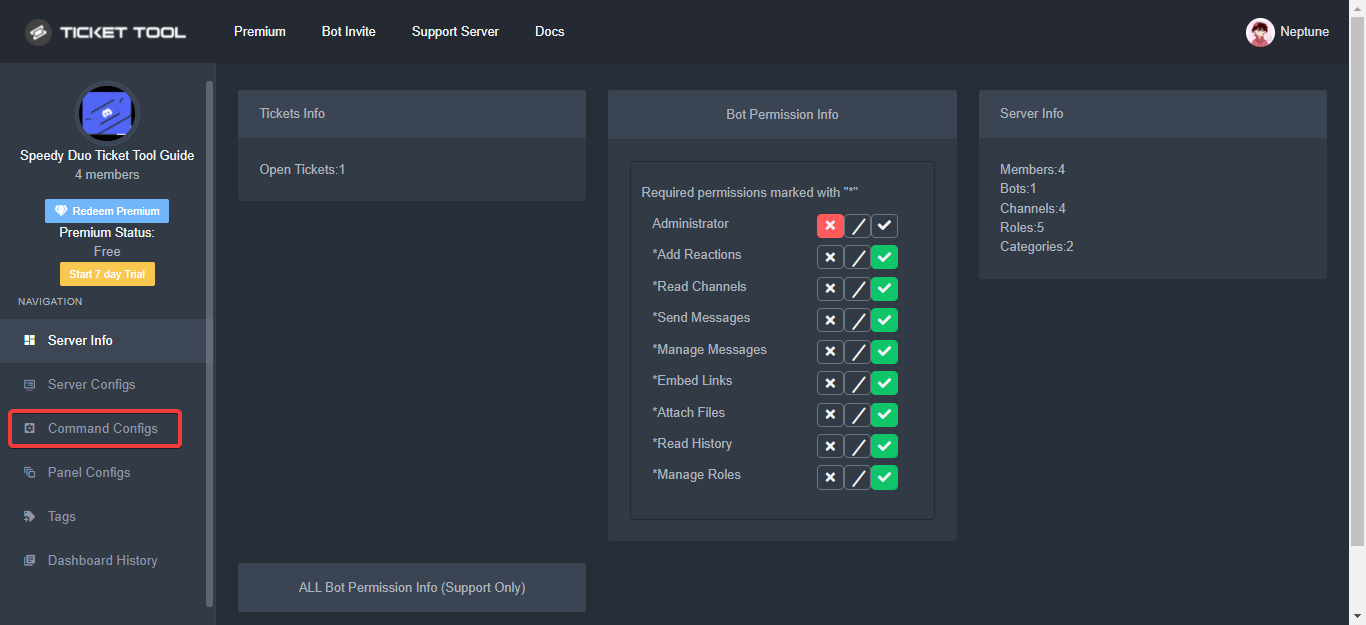 glacial geode
Hey, my tickets stopped going into their categories upon closing, why?
quasi cliff
glacial geode
Hey, my tickets stopped going into their categories upon closing, why?
Categories have a limit of 50 channels, you can add another category to your "Category Closed" option on dashboard
glacial geode
quasi cliff
Categories have a limit of 50 channels, you can add another category to your "Ca...
thanks!
iron nightBOT
Gave +1 Rep to @quasi cliff
quasi cliff
If you require any further information, let me know.
glacial geode
also what is the difference between support and additional roles?
i used to think support can use the panels to close and so on and additional can just see and type, but it appears that it's not the case
quasi cliff
You can set perms according to your preference for both of them
Head over to your Dashboard ➞ Panel Configs ➞ Settings ➞ Permission Options ➞ Edit Additional Roles Opened Permissions
glacial geode
quasi cliff
Head over to your Dashboard ➞ Panel Configs ➞ Settings ➞ Permission Options ➞ Ed...
thanks once again
iron nightBOT
Gave +1 Rep to @quasi cliff
jade topaz
how can i make claim in tick premium?
fallow ingot
jade topaz
how can i make claim in tick premium?
Do you have premium?
You will need it
humble sequoiaBOT
Claiming allows you to change the ticket name, category and permissions. To use it you have to enable it first on your Dashboard > Panel Configs > Claiming Options.
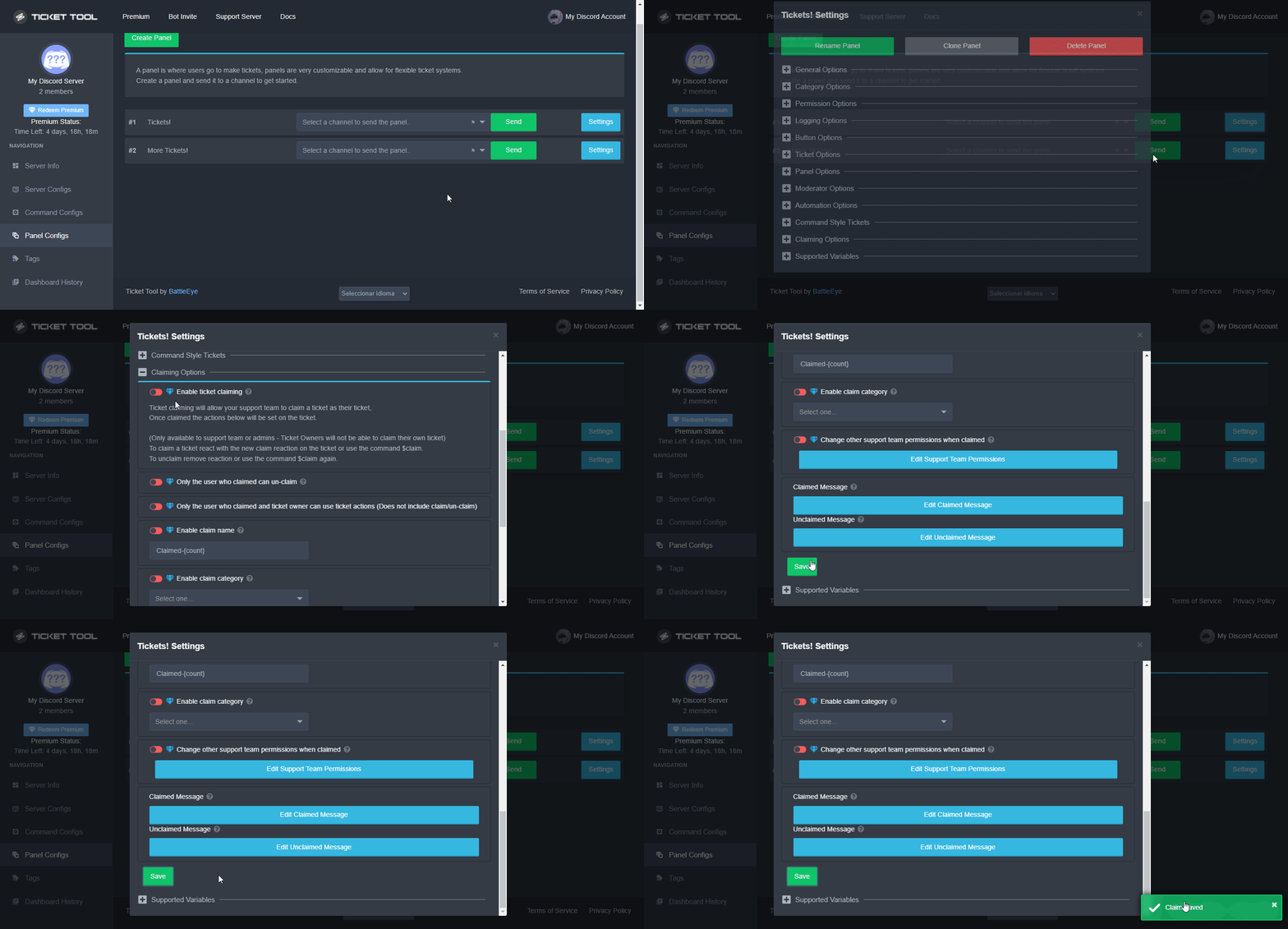
 Note: This is a premium feature
fallow ingot
Note: This is a premium feature
fallow ingot
^
jade topaz
humble sequoia
thanks , and how i can that's name for add it
iron nightBOT
Gave +1 Rep to @humble sequoia
jade topaz
how i can change name of ticket to the person who clamed it and number of ticket like this :
iAmine-0001 , if i claim it
what i make here for it?
 jade topaz
why wont the panel servers show up for me
humble sequoiaBOT
Don't see your server in the dashboard?
You will possibly need to relog. Look below to see steps on how to relog.
How to relog in the Dashboard.
First, you will need to go to the dashboard. Once your there, click on your avatar on the top right. after you clicked it, you will see button that says Logout. You must click that. Once you have logged out, you can log back in.
Note:
You need one of these 3 things to access the dashboard.
1. Server Owner (Level: 6)
2. Server Administrator (Level: 4)
3. Dashboard Role (Level: 2)
:warning: You can check your level using $level on your Discord Server
User permission level with Ticket Tool
@User is permission level: 0 (User)
```» *If it shows that your permission is **0**, you don't have any of the above **3 things** to manage the dashboard.*


**See the GIF below on how to relog:**still not working
gilded verge
humble sequoia
@jade topaz, Please make sure you read the entire message from the bot
jade topaz
i did
gilded verge
please run $level on your server and show answer from bot 🤔
jade topaz
it says permmison user level 0
gilded verge
Then you do not have permission to manage this server 😳
You need:
2. Server Administrator (Level: 4)
3. Dashboard Role (Level: 2)```hmm, wait please...
jade topaz
ok
gilded verge
Ask the user (owner or administrator) to add your role to the Dashboard Roles and it will then work for you 😊
Example: https://cdn.discordapp.com/attachments/776680605517742090/993821398357266522/TT_Dashboard_Perms.mp4
jade topaz
ok
 oblique cedar
Hi,
Do you know how to create multiple ticket opening options?
like this:
https://gyazo.com/63180c871799ec33b5709b6bf1a7db8c
 humble sequoiaBOT
For a more convenient use of multipanels, you can now combine panels on the dashboard. This will allow you to directly send the multipanel from the dashboard or via the $panel ID command.
Where can I find this?
You can find this setting on the Dashboard -> Panel Configs -> Settings -> General Options
Note: if you're attaching all the panels to a panel called English, don't include English in the attached panels box (If you do this, it will create duplicate)
This will put all buttons from all of your panels on one message. The message is the panel message from the panel you're combining these panels in.
You can also watch this video tutorial.
oblique cedar
perfect
gilded verge
 wooden jasper
<@261346621369876501> can you help me?
wooden jasper
<@261346621369876501> can you help me?
#📂│information, rule 4, Don't ping Staff
run $debug on your server, probably missing permissions
 zinc marsh
how do you make it so only the person who opened the ticket can see it ?
humble sequoiaBOT
How to hide tickets from everyone
Head over to your Dashboard ➞ Panel Configs ➞ Settings ➞ Permission Options ➞ Edit Everyone Roles Opened Permissions

NOTE that @everyone can type aswell if it has permissions to send messages
iron nightBOT
Gave +1 Rep to @humble sequoia
 mild cargo
how can i make a !close cmd to close the ticket automatically
 trail moss
Hello
How can I when I open a ticket it sends a message to the ticket other than a message (welcome @)
quasi cliff
trail moss
How can I when I open a ticket it sends a message to the ticket other than a mes...
You can edit ticket message
humble sequoiaBOT
The Ticket Message is the first message sent by the bot in a new ticket. To customise it head over to your Dashboard ➞ Panel Configs ➞ Settings ➞ Ticket Options ➞ Edit Ticket Message
 trail moss
quasi cliff
You can edit ticket message
trail moss
quasi cliff
You can edit ticket message
I mean before this message
gilded verge
which message?
 ionic gulch
hey, one of our member made my server premium but now the premium got removed and it says server is blacklisted reason using stolen cc, so is there anyway to whitelist it again?
humble sequoiaBOT
━━ moved to ticket ━━
 harsh bough
ليش ما يصير ؟
 wooden jasper
harsh bough
ليش ما يصير ؟
wooden jasper
harsh bough
ليش ما يصير ؟
حاول مرة أخرى ، لقد حدث لي أيضًا
 glacial basalt
Hello everyone im new to the channel an im trying to setup the bot. I followed all the steps i got evretrything working. However when the ticket is created i get

im able to create the ticket
but the second screen that tells the user please wait they are unable to see
gilded verge
glacial basalt
but the second screen that tells the user please wait they are unable to see
Hey, go to Dashboard->Panel Configs->Panel Settings->Expand Permission Options->Edit User Opened Permissions->check screenshot

you just need Read Messages, Send Messages and Read Message History :>
glacial basalt
got it thanks
jade topaz
If i lost my main account password
can i get my subscription moved to another account ?
I'm having this same issue and I've done all the trouble shooting in this thread. Any other suggestions?
 forest goblet
jade topaz
can i get my subscription moved to another account ?
forest goblet
jade topaz
can i get my subscription moved to another account ?
Please make a billing ticket in #🎫│make-a-ticket for that
iron nightBOT
Gave +1 Rep to @forest goblet
forest goblet
jade topaz
I'm having this same issue and I've done all the trouble shooting in this thread...
What exactly are you having trouble with?
jade topaz
forest goblet
What exactly are you having trouble with?
I can't find where to enable it on the dashboard
I'm trying to find the support settings, but I'm not seeing it on my panel at all

 forest goblet
jade topaz
I can't find where to enable it on the dashboard
https://cdn.discordapp.com/att...
forest goblet
jade topaz
I can't find where to enable it on the dashboard
https://cdn.discordapp.com/att...
That is a different bot, we can't provide support for that.
jade topaz
Oh that's the wrong clip
jade topaz
forest goblet
That is a different bot, we can't provide support for that.
It is ticket tool 😅 I didn't realize I did / instead of $, my bad
forest goblet
jade topaz
It is ticket tool 😅 I didn't realize I did / instead of $, my bad
Does Ticket Tool respond with a similar error message?
jade topaz
forest goblet
Does Ticket Tool respond with a similar error message?
It's not working at all. Actual admins can make and see tickets, but we can't add users/the membership rank in our server can't make tickets
forest goblet
jade topaz
It's not working at all. Actual admins can make and see tickets, but we can't ad...
Are you sure you don't have the member role as a blacklist role?
humble sequoiaBOT
Any role you assign as a blacklisted role won't be able to use commands or reactions.
Selecting a blacklisted role
Go to your Dashboard ➞ Server Configs. There you will find the option to select blacklisted roles.
Note: Don't forget to save.
 jade topaz
forest goblet
Are you sure you don't have the member role as a blacklist role?
jade topaz
forest goblet
Are you sure you don't have the member role as a blacklist role?
Would I find that under the "ticket support settings"?
forest goblet
jade topaz
Would I find that under the "ticket support settings"?
It would be under Server Configs.
jade topaz
Oh duh. Blacklist Roles is empty
"select one.." in the bar
Is there another place where the black list roles would be listed?
forest goblet
jade topaz
Is there another place where the black list roles would be listed?
No, it seems to be empty then. Can I please have the ID of your server to check some things?
forest goblet
jade topaz
It's not working at all. Actual admins can make and see tickets, but we can't ad...
I haven't found anything that could cause this. What exactly causes you to say that normal members can't create tickets (e. g. error message, channel not created)?
jade topaz
If somebody clicks on it, it just doesn't work
salam
hi
can anyone help in this

what permission should i give?
jade topaz
forest goblet
I haven't found anything that could cause this. What exactly causes you to say t...
Oh. It's working now o.o
Sorry for the bother.
forest goblet
No worries, I didn't change any settings though.
forest goblet
jade topaz
what permission should i give?
This means that the permissions on your dashboard don't seem to be configured properly, it isn't an issue with the permissions Ticket Tool has.
jade topaz
forest goblet
This means that the permissions on your dashboard don't seem to be configured pr...
can u dm
just say hi
forest goblet
No DM support please
rustic gale
jade topaz
now wht should i do
Type $debug, that will tell you which permissions it's missing
jade topaz
ok
jade topaz
rustic gale
Type `$debug`, that will tell you which permissions it's missing
but from adim acc i should i type or the acc without adim
@rustic galecome dm i will send the sc i cant send here bc there are personal stuff in it
quasi cliff
$buttons
humble sequoiaBOT

The new Discord Buttons allow for a much smoother and convenient experience. They reduce lag and work much better than emojis. With ticket tool you can edit all the buttons however you like! Buttons can show emojis, text and can have 4 different colors.
Where can I edit them?
Dashboard ➞ Panel Configs ➞ Settings ➞ Button Options ➞ Setting
 quasi cliff
jade topaz
hi
can anyone help in this
quasi cliff
jade topaz
hi
can anyone help in this
Actually you need to change the Allowed roles in "Create Ticket" button options
jade topaz
humble sequoia
i should follow this? @quasi cliff
quasi cliff
Goto Create Ticket option and then send ss of it
 quasi cliff
ss of settings on dashboard


 quasi cliff
You should remove "Verified" role from Allowed Roles
You added those 2 roles, so only people with that role can create tickets
jade topaz
quasi cliff
You added those 2 roles, so only people with that role can create tickets
ok
done
quasi cliff
Do you want Unverified people to be allowed to create ticket only?
jade topaz
quasi cliff
Do you want Unverified people to be allowed to create ticket only?
yup
i still have the problem
quasi cliff
Do u have the Unverified role to urself
jade topaz
quasi cliff
Do u have the Unverified role to urself
no i joined the server from 2nd acc
quasi cliff
jade topaz
Remove "Unverified" role too
jade topaz
and when u join the server it will give u automatlly unverified role
jade topaz
quasi cliff
Remove "Unverified" role too
ok
jade topaz
quasi cliff
Remove "Unverified" role too
done