
#🆘│community-support
1 messages · Page 416 of 1
 humble sequoiaBOT

 ripe berry
Is there a outage? I cannot create or close any tickets.
 hollow pulsar
ripe berry
Is there a outage? I cannot create or close any tickets.
hollow pulsar
ripe berry
Is there a outage? I cannot create or close any tickets.
x2 F
 scenic plinth
ripe berry
Is there a outage? I cannot create or close any tickets.
scenic plinth
ripe berry
Is there a outage? I cannot create or close any tickets.
Can you provide your server ID please?
Millo as well^
 burnt willow
seems to be working now all of a sudden, right after I posted my annoucement but glad its working
humble sequoiaBOT
Pong! Latency is 298ms. API Latency is 79ms [-]
hollow pulsar
Looks like it's back, I was doing some stuff and everything just started shutting down out of the blue. (Google translator)
ripe berry
scenic plinth
Can you provide your server ID please?
833733800977891371
It worked but bot was delayed. It opened the ticket way after I tried.
scenic plinth
Should have fixed itself, your shard seemed to have some issues temporarily, but should be working just fine now.
If issues persist, let us know.
scenic plinth
Nope
 oak light
Yo
so I have premium in my server but it is added by someone else
how can i edit the dashboard?
Yes I mean like they own the server and I need to edit stuff on the dashboard but I can't see the server for some reason
humble sequoiaBOT
Don't see your server in the dashboard?
You will possibly need to relog. Look below to see steps on how to relog.
How to relog in the Dashboard.
First, you will need to go to the dashboard. Once your there, click on your avatar on the top right. after you clicked it, you will see button that says Logout. You must click that. Once you have logged out, you can log back in.
Note:
You need one of these 3 things to access the dashboard.
1. Server Owner (Level: 6)
2. Server Administrator (Level: 4)
3. Dashboard Role (Level: 2)
:warning: You can check your level using $level on your Discord Server
User permission level with Ticket Tool
@User is permission level: 0 (User)
```» *If it shows that your permission is **0**, you don't have any of the above **3 things** to manage the dashboard.*


**See the GIF below on how to relog:**
 quasi cliff
oak light
so I have premium in my server but it is added by someone else
how can i edit th...
quasi cliff
oak light
so I have premium in my server but it is added by someone else
how can i edit th...
Hey, this check out ^
Hey, if you mean the rename skipping then it's not possible. You can edit the embed which says "Ticket closed by @user" on dashboard.
Dashboard ➞ Panel Configs ➞ Settings ➞ Moderator Options ➞ Closed Message ➞ Edit Closed Message.
This is a premium feature.
quasi cliff
stop what?
Do you want the ticket to directly delete on close button then?
Or you're talking about the renaming thing
humble sequoiaBOT

⚠️ You're in the wrong place
We provide support for @pseudo glen discord bot and cannot help you with whatever issue you have.
- We don't know which Support Team you should contact to get this issue resolved, and unfortunately we won't be able to accurately tell you.
If you don't have any further questions regarding our bot Ticket Tool, please close this ticket
 coral lodge
 arctic oxide
Plzzzzzzzzsz help me
arctic oxide
Plzzzzzzzzsz help me
With what
quasi cliff
Gta5 
Bot has rate limits for renaming
Nope, it's ratelimits
Bots can't change name every second
Maybe you can make the name same for all of them
Ticket-{count} for opened, claimed, closed
But that requires premium
$pc 852743989781856297
humble sequoiaBOT

Premium Check
I was unable to detect a premium server for @tribal gulch.
Found 2 servers in total and 0 with premium and permission
 pseudo topaz

 quasi cliff
The bot won't leave, it will stop working
And yes you can remove the Primary (free) bot and use Premium bot
humble sequoiaBOT
The first thing you will need to do is invite the premium bot, an invite can be found here
Once the bot is in your server we will head to the dashboard and manage your server. When you are managing your server, you want to head into "Server Configs" then click the drop down menu under "Select the bot you would like to use on this server" then click "Ticket Tool#6207" and then save.
 quasi cliff
humble sequoia
quasi cliff
humble sequoia
You just have to enable Premium Bot ^
 pine sequoia
Hello
I am having a problem with the bot
I would like it to assign a role when someone clicks the button but I cannot work out how this can be done, is this possible and if so how can I do it?
quasi cliff
pine sequoia
Hello
I am having a problem with the bot
I would like it to assign a role when s...
Assigning roles with TicketTool isn't possible as of now.
pine sequoia
quasi cliff
Assigning roles with TicketTool isn't possible *as of now*.
ok thank you
 iron nightBOT
Gave +1 Rep to @quasi cliff
quasi cliff
Yup
You can simply use Premium Features on Primary bot and bot will automatically switch to free mode when premium expires

 tired python
Member tried using a panel that has been tested and works fine but it says “interaction failed” when they try to use. Any ideas what it might be?
 small galleon
I keep going to the dashboard but my server isnt showing up
im not the owner but ive set it up before on someone elses server
 quasi cliff
tired python
Member tried using a panel that has been tested and works fine but it says “inte...
quasi cliff
tired python
Member tried using a panel that has been tested and works fine but it says “inte...
Hey, is it just for one member? It is caused usually either when the user's Discord isn't updated (because buttons are new) or when bot is down.
quasi cliff
small galleon
im not the owner but ive set it up before on someone elses server
Hello Ro, can you check $level once. Users with level 2, 4 and 6 can only manage server on dashboard.
Please explain your issue a bit more!
small galleon
Okkk
tired python
quasi cliff
Hey, is it just for one member? It is caused usually either when the user's Disc...
Ok. It is just one member at this time having the issue
quasi cliff
So they need to update the app!
 jade topaz
small galleon
im not the owner but ive set it up before on someone elses server
jade topaz
small galleon
im not the owner but ive set it up before on someone elses server
The solution is given there
Try relogging
quasi cliff
they left btw
 sinful hamlet
.
 jade mauve
quasi cliff
jade mauve
quasi cliff
We have #💬│general-chat for chatting!
 burnt relic
I have a problem, when a user creates a ticket they cannot see it frowning how do I fix it frowning
 gilded verge
burnt relic
I have a problem, when a user creates a ticket they cannot see it frowning how d...
gilded verge
burnt relic
I have a problem, when a user creates a ticket they cannot see it frowning how d...
Dashboard->Panel Configs->Panel Settings->Expand Permission Options->Edit User Opened Permissions->screenshot
 jade topaz
I wanna some help
How can I close ticket
And how can I delete ticket
And how can I change the ticket name
gilded verge
gilded verge
`Dashboard`->`Panel Configs`->`Panel Settings`->Expand `Permission Options`->`Ed...
but you need only Read Messages, Send Messages and Read Message History :3
burnt relic
Ty ❤️
jade topaz
Can some one help me?
quasi cliff
jade topaz
How can I close ticket
And how can I delete ticket
And how can I change the ti...
Simply click the close/delete button. For renaming, use $rename. If you want a different type of name when a new ticket is created (not ticket-0001) then get premium.
jade topaz
/close
/delete
Is this what you mean?
jade topaz
And to change name?
quasi cliff
$rename <new name>
humble sequoiaBOT
Warning: This channel isn't a ticket
jade topaz
Ok thanks
quasi cliff
 I can't see anything lmao my phono is phone is bugging
jade topaz
I can't see anything lmao my phono is phone is bugging
jade topaz
how do i create a ticket on my server?
humble sequoiaBOT

You can check our documentation here;
You can also check #📂│information for the basic setup;
You can also watch this video tutorial.
Our documentation contains all the info you need about the bot to be able to setup and configure the bot however you like.
burnt relic
gilded verge
`Dashboard`->`Panel Configs`->`Panel Settings`->Expand `Permission Options`->`Ed...
I do what you told me, but I still don't see the ticket channel
gilded verge
but changing the settings only takes effect from the creation of the next ticket
burnt relic
yes yes, but nothing has happened
gilded verge
uhm... bot has all required permissions?
and these for panel perms: https://cdn.discordapp.com/attachments/979861967936290816/979874986946875412/Panel_Permissions.mp4
 ashen flicker
how to make so that other groups can access to tickets?
gilded verge
ashen flicker
how to make so that other groups can access to tickets?
but do you mean support roles?
ashen flicker
yes like
i want other staff members which have other roles to access tickets
i can't seem to find any option on the dashboard
humble sequoiaBOT
How to let support team see into a ticket
About support roles
A support role lets your support team see into tickets with out having to add them manually to each and every ticket.
You can add as many support roles as you like per panel.
NOTE that the way discord works all admins can see into tickets regardless of this.
How to set a support role
To set a Support role go to the Dashboard -> Panel Configs -> Settings -> General Options -> Support Team Roles.
NOTE that the support role will not be able to see into tickets that are already created..
burnt relic
gilded verge
uhm... bot has all required permissions?
fixed up
❤️ ty
thanks @gilded verge
iron nightBOT
Gave +1 Rep to @gilded verge
gilded verge
you're welcome 😊
 humble sequoiaBOT
For a more convenient use of multipanels, you can now combine panels on the dashboard. This will allow you to directly send the multipanel from the dashboard or via the $panel ID command.
Where can I find this?
You can find this setting on the Dashboard -> Panel Configs -> Settings -> General Options
Note: if you're attaching all the panels to a panel called English, don't include English in the attached panels box (If you do this, it will create duplicate)
This will put all buttons from all of your panels on one message. The message is the panel message from the panel you're combining these panels in.

 burnt helm
like this
gilded verge
humble sequoia

burnt helm
O ok ty
I wanna change the name tho
Like not to say create ticket and add one if my emojis
humble sequoiaBOT

The new Discord Buttons allow for a much smoother and convenient experience. They reduce lag and work much better than emojis. With ticket tool you can edit all the buttons however you like! Buttons can show emojis, text and can have 4 different colors.
Where can I edit them?
Dashboard ➞ Panel Configs ➞ Settings ➞ Button Options ➞ Setting

 iron nightBOT
Gave +1 Rep to @gilded verge
 rotund lion
humble sequoiaBOT
rotund lion
humble sequoiaBOT
⚠️ You're in the wrong place
We provide support for @pseudo glen discord bot and cannot help you with whatever issue you have.
- We don't know which Support Team you should contact to get this issue resolved, and unfortunately we won't be able to accurately tell you.
If you don't have any further questions regarding our bot Ticket Tool, please close this ticket
burnt helm
how can i only let people with a special role open a ticket
quasi cliff
$buttons
humble sequoiaBOT
The new Discord Buttons allow for a much smoother and convenient experience. They reduce lag and work much better than emojis. With ticket tool you can edit all the buttons however you like! Buttons can show emojis, text and can have 4 different colors.
Where can I edit them?
Dashboard ➞ Panel Configs ➞ Settings ➞ Button Options ➞ Setting
quasi cliff
burnt helm
how can i only let people with a special role open a ticket
Add that special role to allowed roles in "Create Ticket"
 keen tapir
help i need support
humble sequoiaBOT
We would love to help you, but if you don't tell us what you need help with we can't help you :(
keen tapir
my bot is fine but i want to send a banner above the bots text
 blazing snow
how to i make a ticket fro people to use
humble sequoiaBOT
You can check our documentation here;
You can also check #📂│information for the basic setup;
You can also watch this video tutorial.
Our documentation contains all the info you need about the bot to be able to setup and configure the bot however you like.
blazing snow
ty
keen tapir
any ideas
blazing snow
on....
gilded verge
keen tapir
my bot is fine but i want to send a banner above the bots text
can you give example on screenshot please?


 jade topaz
gilded verge
ah, in ticket... wait please
jade topaz
gilded verge
ah, in ticket... wait please
No, the screenshot he shows is in panel...
keen tapir
more so wanted it above it like a heading
humble sequoiaBOT
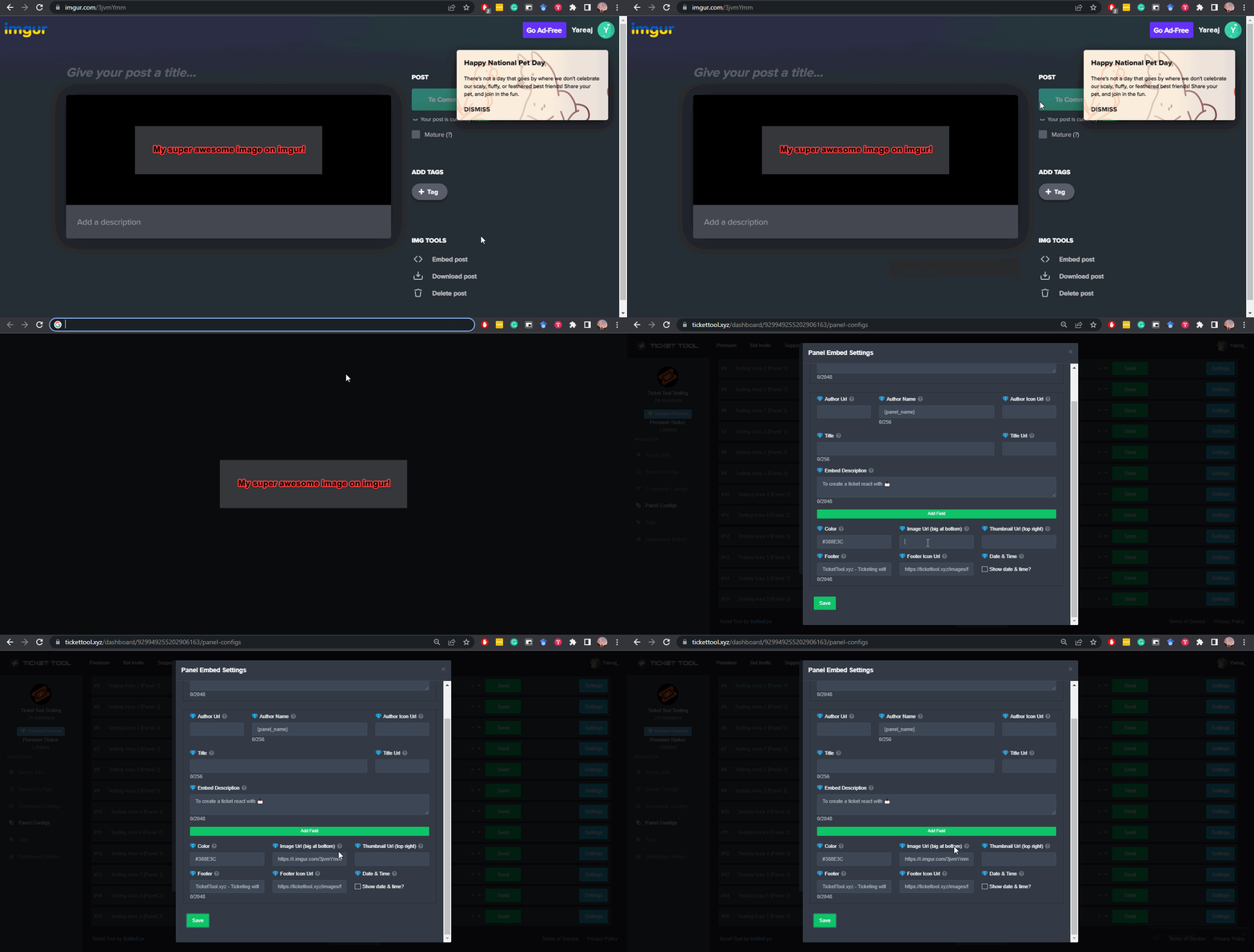
What are the direct URLs?
A direct access URL is an easy to read URL that users can enter to get to a specific item, document, page, category, or perspective, in which our bot TicketTool can read and get it displayed in your 'Panel Message' or your 'Ticket Message'.
Where can I get them?
The recommended way is to use 'Imgur', you can signup within a few minutes and then upload the image you want, and copy the URL of the uploaded image and paste it into one of the four boxes. There are alternatives to this, such as other image or video storing websites or using 'Open Original' of an image and paste it in (please be aware that if your image is deleted, Discord will automatically delete the link to it in a few days). Please note this requires 'Premium'. Imgur
 keen tapir
will that put the image under the create support ticket or on top
gilded verge
in Panel Message or Ticket Message
 humble sequoiaBOT
The panel message is where people react to make a ticket. To customize it head over to your Dashboard --> Panel Configs -> Settings -> Panel Options -> Edit Panel Message
 keen tapir
im confused
 cosmic nacelle
my premium hasnt kicked in yet
gilded verge
keen tapir
im confused
Sorry, but I understood that you want to include an image in the panel or in a message in the ticket 😳
gilded verge
cosmic nacelle
my premium hasnt kicked in yet
Premium bot does not leave the server automatically after expires premium. You have to kick him out yourself.
and this:
humble sequoiaBOT
How to disable the premium bot
To disable the premium bot you will have to go to the Dashboard ➞ Server Configs ➞ Premium bot ➞ And on the right-hand side select the primary free bot in the drop down menu.
Premium features will still work on the normal bot.
 cosmic nacelle
no i bought a subscription and its not working
gilded verge
uhm... what you mean "not working"?

 gilded verge
okay, so your server has premium but what is your problem? 😳
cosmic nacelle
idk i guess im sped
gilded verge
but your problem is the bot is not responding to commands or something else?
gilded verge
ou, okay ^-^
 prisma harness
anyone know why i am getting failed to send panel everything seems right.
gilded verge
prisma harness
anyone know why i am getting `failed to send panel` everything seems right.
can you show screenshot of this error please?
prisma harness
gilded verge
can you show screenshot of this error please?

 prisma harness
gilded verge
please run `$debug` on your server
prisma harness
gilded verge
please run `$debug` on your server
ohhh my premium ran out lol. and only had premium bot active. anyone have a link so i can purchase a new premium please.
humble sequoiaBOT
Ticket Tool Premium
Get premium at https://tickettool.xyz/premium
Manage your subscriptions at https://tickettool.xyz/subscriptions
Why Premium?
Premium lets you customize the bot just how you want it. It also helps keep the bot running.
 severe island
How do you make it to where when someone makes a ticket that it will stay under a category and not go to the top of the server
humble sequoiaBOT
How to set the open category
To set a open category go to the Dashboard -> Panel Configs -> Settings -> Category Options -> Category Open
 gilded verge
humble sequoia
gilded verge
humble sequoia
@severe island,
severe island
Thanks
 formal girder
gilded verge
formal girder
gilded verge
@formal girder, Please use commands on #🤖│bot-spam
 slim night
This message appears when I try opening a ticket, how do I fix it?

@shut bolt You helped me yesterday, are you able to help me out again today?
 prime bridgeBOT
 MistaSatudy#1855 has been warned!

 They were notified via dms.
 shut bolt
slim night
<@518666147441278998> You helped me yesterday, are you able to help me out again...
shut bolt
slim night
<@518666147441278998> You helped me yesterday, are you able to help me out again...
Yes, but please don't ping us
slim night
Sorry, I didn't know.
shut bolt
That error means the panel you are trying to create a ticket from has been deleted from the dahsboard
slim night
Oooooh.
shut bolt
You need to create a panel, delete the one generating that issue, and send it
That will fix it
👍
slim night
shut bolt
You need to create a panel, delete the one generating that issue, and send it
It worked, thanks.
iron nightBOT
Gave +1 Rep to @shut bolt
shut bolt
slim night
It worked, thanks.

slim night
But my Mods are still experiencing issues with the member adding.
They sent me these screenshots:


They have the Support Team role (which is set on the dashboard) but the command still doesn't work.
shut bolt
As I mentioned, if they are the ones opening the ticket it won't work
slim night
How can I get my mods to add memebrs to open tickets though?
shut bolt
Ask another mod to open a ticket and have a different one try to add
slim night
Sorry, I mistyped.
shut bolt
The edit makes it different
slim night
Because in my experience, a mod opened a ticket and added me to it.
shut bolt
slim night
How can I get my mods to add memebrs to open tickets though?
Just by using the add command should work as long as they aren't the ones who opened it
shut bolt
slim night
Because in my experience, a mod opened a ticket and added me to it.
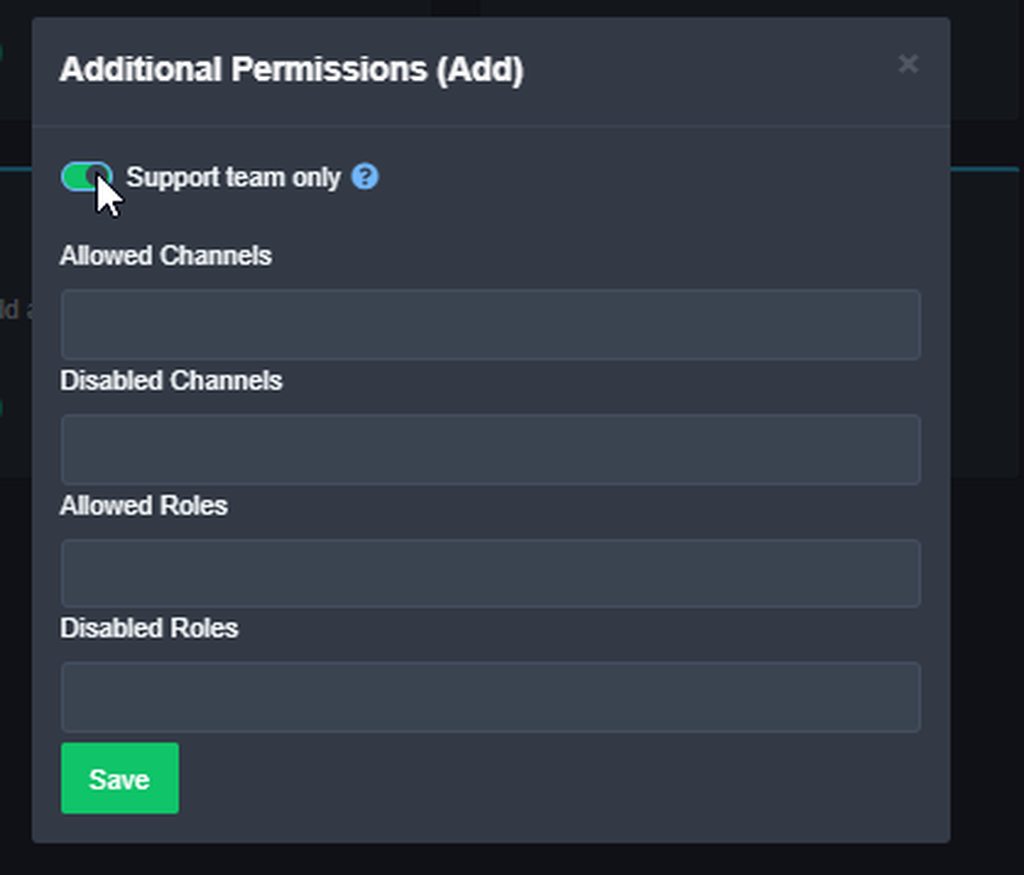
Or just make the command for everyone, that works too
slim night
How do I do that?
slim night
shut bolt
Or just make the command for everyone, that works too
So basically if me (as the server owner) opens a ticket, one of my mods can use the command to add a member to it?
 slim night
But then will members be able to use that command when they open tickets?
gilded verge
Hey do you remember @Yareaj_? I also had a problem with it ... Then it helped when I added the Send Text-to-speech Messages to the bot's permissions 😊
 shut bolt
slim night
So basically if me (as the server owner) opens a ticket, one of my mods can use ...
shut bolt
slim night
So basically if me (as the server owner) opens a ticket, one of my mods can use ...
Yeah, but if you are looking to open tickets on behalf of users there is a feature you may like
slim night
Hm?
shut bolt
gilded verge
Hey do you remember `@Yareaj_`? I also had a problem with it ... Then it helped ...
The issue in this case isn't about permissions, since the bot doesn't respond at all, thanks tho
iron nightBOT
Gave +1 Rep to @gilded verge
shut bolt
$commandstyle
humble sequoiaBOT
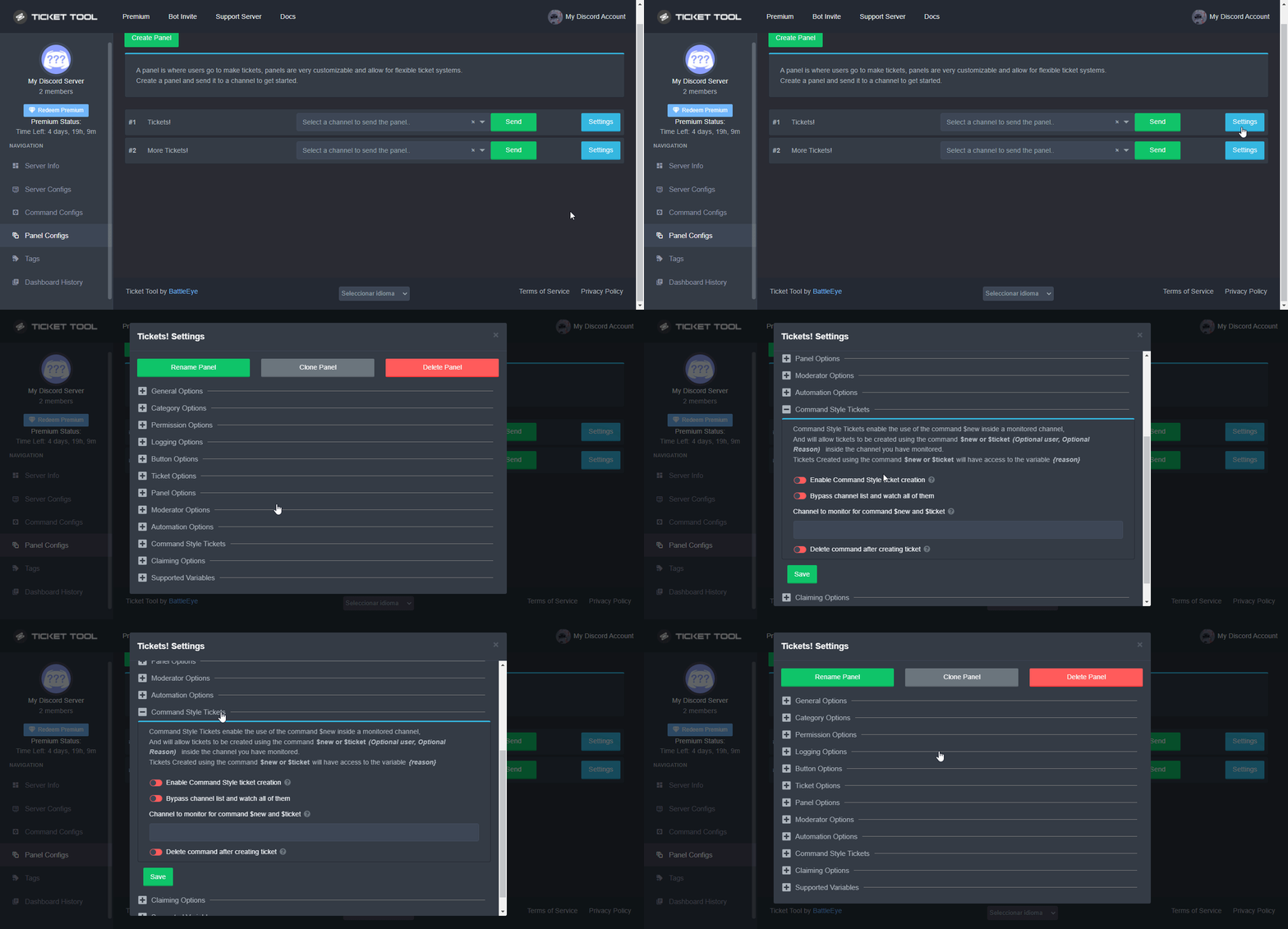
Command Style Tickets allow you to open tickets VIA the $new or $ticket commands. This feature also allows you to open tickets for people, by using the aforementioned commands with the user's ping or ID.
You can enable this feature by heading over to your server's dashboard. Then head over to Panel Configs ➞ Settings ➞ Command Style Tickets. (GIF below shows you how to get to it as well).
This section of the panel settings also contains the following features
- Bypass channel list and watch all of them → when you enable this option, Ticket Tool will create a ticket whenever someone uses the $new or the $ticket command in a channel it has access to .
- Channel to monitor for command $new and $ticket → This is the opposite of the previous option, you can actually select in which channels Ticket Tool should look for the $new command instead of looking in the whole server.
- Delete command after creating ticket → If enabled, Ticket Tool will delete the command (whether it's
$newor$ticket) a few seconds after you run it.
 shut bolt
Command style tickets are the feature you can use to open tickets in behalf of others
But to fix the issue of the add command, it is possible you have disabled it too
slim night
shut bolt
https://i.imgur.com/xiPIuoO.gif
If I enable this option, will members (not mods) be able to use the $add command to add members to a ticket?
slim night
shut bolt
But to fix the issue of the add command, it is possible you have disabled it too
How do I enable it then?
shut bolt
slim night
If I enable this option, will members (not mods) be able to use the $add command...
You need to disable instead of enable, and yes
shut bolt
slim night
How do I enable it then?
Can I have your server's ID?
shut bolt
shut bolt
https://i.imgur.com/xiPIuoO.gif
Yup, do this and the issue should be solved
slim night
Hm, but I don't want members to be able to use the command.
Wait, what if I go into my server integrations and enable the command for my mods?
Would that work?
Nevermind.
shut bolt
shut bolt
Ask another mod to open a ticket and have a different one try to add
Do this test please
slim night
One second, I'm gonna go take a shower and I'll get back to you later today or tomorrow.
slim night
shut bolt
Do this test please
Do I get a mod of higher rank to open a ticket or a mod of the same rank?
shut bolt
slim night
Do I get a mod of higher rank to open a ticket or a mod of the same rank?
Wait a second
Are you aware
shut bolt
Someone set it that way
slim night
Who did?
slim night
Are you not able to get their tag?
Maybe I changed it by accident without knowing?
I fixed the adding issue, thanks alot man I really appreciate it!
thanks @ Yareaj_#4383
thanks @ Yareaj_#4383
shut bolt
slim night
thanks @ Yareaj_#4383
slim night
shut bolt
It was you
Makes sense, I probably changed it a while ago without knowing it’s going to affect me presently.
shut bolt
Glad to hear it's fixed
slim night
Anyways thanks again for the help you really saved me 😭
shut bolt
prime bridgeBOT
Successful bans: 1
 Unsuccessful bans:
 0
 Reason: Racial Slurs
 Moderator: @shut bolt

 humble sequoiaBOT
For a more convenient use of multipanels, you can now combine panels on the dashboard. This will allow you to directly send the multipanel from the dashboard or via the $panel ID command.
Where can I find this?
You can find this setting on the Dashboard -> Panel Configs -> Settings -> General Options
Note: if you're attaching all the panels to a panel called English, don't include English in the attached panels box (If you do this, it will create duplicate)
This will put all buttons from all of your panels on one message. The message is the panel message from the panel you're combining these panels in.
gilded verge
humble sequoia
@gleaming willow,
 rugged lotus
is there way to be able to open just one ticket from multipanel menu? also the way to set timer, so if there is no response the ticket is deleted or closed?
quasi cliff
You have multiple buttons, the one you click will open.
No, timed closed is not a feature for now but expected in next update.
rugged lotus
quasi cliff
You have multiple buttons, the one you click will open.
No, timed closed is no...
just the fact that user can click on every button and it opens ticket for each of the button pressed, so there is no way to restrict that?
quasi cliff
rugged lotus
just the fact that user can click on every button and it opens ticket for each o...
There is no way to restrict a user from opening multiple but you can disable a role for a particular panel
rugged lotus
quasi cliff
There is no way to restrict a user from opening multiple but you can disable a r...
okay, thanks for info. Also there is way to have options in opened ticket, like You press on reports, then it just specifies the case or thats also not a thing (buttons under the close on tickettool response in ticket)?
iron nightBOT
Gave +1 Rep to @quasi cliff
quasi cliff
rugged lotus
okay, thanks for info. Also there is way to have options in opened ticket, like ...
Not very sure of what you're trying to ask, but if you mean to have the ticket change it's panel from like "Support" type to "Report" then that's not possible and that's also expected in the upcoming update
 tiny folio
Whenever i invite the bot to my server it leaves automatically?
 slender minnow
tiny folio
Whenever i invite the bot to my server it leaves automatically?
slender minnow
tiny folio
Whenever i invite the bot to my server it leaves automatically?
Hey, can you please check your audit logs if the bot is actually leaving the server?
rugged lotus
quasi cliff
Not very sure of what you're trying to ask, but if you mean to have the ticket c...
thanks for heads up, cleared a lot of misunderstanding things 😇
iron nightBOT
Gave +1 Rep to @quasi cliff
 gleaming willow
gilded verge
<@893348854932574229>, <:this:894279341108772914>
gleaming willow
gilded verge
<@893348854932574229>, <:this:894279341108772914>
Do I need ticket tool premium for that
gilded verge
gleaming willow
Do I need ticket tool premium for that
there you can see are multipanels is free: #📣│bot-news message
gleaming willow
thnx alot
 worn rapids
Please , how i can mintion roles in ticket like this ⬇️

 woven owl
Is @tepid island from tickettool?
humble sequoiaBOT
Within all the messages the bot's sends (both embeds and text) you can mention either channels, roles, or even users, these mentions will only send a notification to the user if they are used within a text field, e.g: a role mentioned in an embed won't ping at all the users who have that role.
For mentioning a role you can use one out of three options:
{@Role Name} ➞ Which is Case Sensitive.
{RoleID} ➞ Replace RoleId with the Id of the role you are trying to ping.
<@&RoleID> ➞ Discord's native syntax to ping roles.
<#ChannelID> ➞ Mention a channel by its ID.
<@UserID> ➞ Mention a user by its ID.
gilded verge
humble sequoia
@worn rapids, in Message Text use this variable
worn rapids
Ok i will try thanks
 royal creek
everyone on my discord can see my ticket what should I do
humble sequoiaBOT
How to hide tickets from everyone
Head over to your Dashboard ➞ Panel Configs ➞ Settings ➞ Permission Options ➞ Edit Everyone Roles Opened Permissions

NOTE that @everyone can type aswell if it has permissions to send messages
gilded verge
humble sequoia
@royal creek,
 slender minnow
 trail moss
I want the ticket (claime) button to appear
trail moss
I want the ticket (claime) button to appear
Hey, changing button emoji is a premium feature and it seems your server is not on a premium plan.
trail moss
Oh well, can you tell me how to make the ticket save as soon as it closes by itself@slender minnow
slender minnow
trail moss
Oh well, can you tell me how to make the ticket save as soon as it closes by its...
by save, are you referring to transcripts or simply close?
trail moss
I mean Transcript
slender minnow
trail moss
I mean Transcript
Auto transcript is premium as well ^^;
trail moss

slender minnow
No problemo, have a great day :)
trail moss
Thx @slender minnow
iron nightBOT
Gave +1 Rep to @slender minnow
gilded verge
humble sequoia
@worn rapids, Hey, I'm sorry but I have a feeling that I didn't answer what you expected because I thought you meant pinging your support when a new ticket opens, but the answer to what you mean is an Embed Message (not mesage text).
Okay, now I corrected that and again sorry for the mistake 🥺
worn rapids
gilded verge
<@986228626322231347>, Hey, I'm sorry but I have a feeling that I didn't answer ...
Thanks my friend for attention, i got it and it works ❤️
iron nightBOT
Gave +1 Rep to @gilded verge
gilded verge
yass! 😊
quasi cliff
woven owl
Is <@356950275044671499> from tickettool?
nope
 quasi cliff
Did u buy for 2 months?
worn rapids
I bought 2 for same server
Its same server in screenshot
Is that right or i did it with wrong way ?

 forest goblet
@worn rapids Don't ping staff for support please
worn rapids
Sorry
worn rapids
quasi cliff
check if it expires in 2 months ^
Its 1month , i did 2 for same server how i can fix it ?
quasi cliff
Make a Billing ticket in #🎫│make-a-ticket
worn rapids
quasi cliff
Make a Billing ticket in <#571706435449257997>
I did no one answer should wait ?
quasi cliff
Please wait for the staff and dont ping them!
Till then describe your issue in the ticket
 lofty leaf
Hey
 knotty lagoon
Hello can anyone tell me how to make custom buttons
quasi cliff
$buttons
humble sequoiaBOT
The new Discord Buttons allow for a much smoother and convenient experience. They reduce lag and work much better than emojis. With ticket tool you can edit all the buttons however you like! Buttons can show emojis, text and can have 4 different colors.
Where can I edit them?
Dashboard ➞ Panel Configs ➞ Settings ➞ Button Options ➞ Setting
quasi cliff
Hey Emilia, you can simply edit them like this ^
knotty lagoon
Thank you but can u tell me how to auto save a transcript in a channel
Thanks @quasi cliff
iron nightBOT
Gave +1 Rep to @quasi cliff
quasi cliff
knotty lagoon
Thank you but can u tell me how to auto save a transcript in a channel
For auto saving, you need premium!
quasi cliff
$buttons
humble sequoiaBOT
The new Discord Buttons allow for a much smoother and convenient experience. They reduce lag and work much better than emojis. With ticket tool you can edit all the buttons however you like! Buttons can show emojis, text and can have 4 different colors.
Where can I edit them?
Dashboard ➞ Panel Configs ➞ Settings ➞ Button Options ➞ Setting
quasi cliff
 tribal sedge
i forget but how do u make it so members cant close the ticket
tribal sedge
i forget but how do u make it so members cant close the ticket
Goto Closed Ticket setting and make it "Support Only" or for particular role.
iron nightBOT
Gave +1 Rep to @quasi cliff
quasi cliff
jade topaz
quasi cliff
<:thumbsup:586226608302456859>
that emoji haunts me
 high oyster
@jade topaz ok can you send a screenshot of what happens after you send $debug
quasi cliff
high oyster
<@456226577798135808> ok can you send a screenshot of what happens after you sen...
all ticks

 high oyster
Okay what error do you get when you try and send the panel through the dashboard
Ok can you try relogging onto the dashboard.
Refreshing will not work.
jade topaz
high oyster
Ok can you try relogging onto the dashboard.
I’ll try
it worked. thanks 🙂
high oyster
Great! Have an amazing rest of your day!
 jaunty basalt
Why isn't the bot moving closed tickets to the closed category?
high oyster
jaunty basalt
Why isn't the bot moving closed tickets to the closed category?
It may be full the maximum amount of channels per category is 50. If so you may have to create multiple closed categories.
high oyster
No problem, let me know if you need anything else!
 neat aurora
Is there a way to change the bots picture? Make it custom...
high oyster
neat aurora
Is there a way to change the bots picture? Make it custom...
It's for example saying you can change someone else's profile picture, however this would be cool it is not possible sorry.
neat aurora
high oyster
It's for example saying you can change someone else's profile picture, however t...
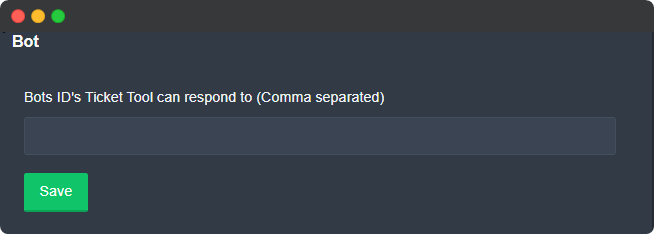
Thank you.....!! One more silly question....what is this used for? https://reee.me/vtdwil
 iron nightBOT
Gave +1 Rep to @high oyster
high oyster
neat aurora
Thank you.....!! One more silly question....what is this used for? https://reee....
I assume that is to whitelist bots that can interact with the TT bot presumably using TT commands through another bot.
 static kraken
Has anyone had a similar problem and how did you solve it? When viewing Transcript on the screen, incomprehensible hieroglyphs. The text in the ticket was in Russian.
 high oyster
static kraken
Has anyone had a similar problem and how did you solve it? When viewing Transcr...
high oyster
static kraken
Has anyone had a similar problem and how did you solve it? When viewing Transcr...
You might have enabled auto translate on the webpage
static kraken
high oyster
You might have enabled auto translate on the webpage
No
 steady mauve
What are the commands?
quasi cliff
steady mauve
What are the commands?

 old heath
https://media.discordapp.net/attachments/894984467951788076/986872830887100476/unknown.png
how to change this text?
 high oyster
@old heath Refer to the below, it should answer your question.
humble sequoiaBOT
How can I edit/disable the ephemeral message?
These pop ups can only be seen by the user who triggered a certain action, like creating a ticket. They cannot be edited or disabled, as they are a discord requirement that is set by the developer of any bot. The ephemeral messages can be removed by pressing the little blue Dismiss message text, or by restarting your discord client.
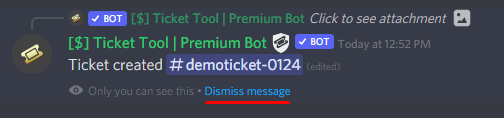 old heath
high oyster
<@594519345099702278> Refer to the below, it should answer your question.
old heath
high oyster
<@594519345099702278> Refer to the below, it should answer your question.
thanks sir.
iron nightBOT
Gave +1 Rep to @high oyster
 fringe shale
where can u edit this message
 humble sequoiaBOT
The panel message is where people react to make a ticket. To customize it head over to your Dashboard --> Panel Configs -> Settings -> Panel Options -> Edit Panel Message
slender minnow
@fringe shale refer above ^
humble sequoiaBOT

Partnership Program
Our partnership program is currently closed.
We appreciate you being interested in partnering with Ticket Tool! Unfortunately the program for partnering is closed as of now. Currently, there are no plans to open applications again either.
» You can check #📣│server-news for our announcement whenever partnerships open up again!
 TicketTool.xyz - Ticketing without clutter
high oyster
TicketTool.xyz - Ticketing without clutter
high oyster
@fringe shale ^^^
iron nightBOT
Gave +1 Rep to @high oyster
jade topaz
hi, when someone creates a ticket i want the ticket to tag certain roles to be aware of the created ticket. Can somebody help me out with this?
humble sequoiaBOT
The Ticket Message is the first message sent by the bot in a new ticket. To customise it head over to your Dashboard ➞ Panel Configs ➞ Settings ➞ Ticket Options ➞ Edit Ticket Message
 quasi cliff
$mentions
humble sequoiaBOT
Within all the messages the bot's sends (both embeds and text) you can mention either channels, roles, or even users, these mentions will only send a notification to the user if they are used within a text field, e.g: a role mentioned in an embed won't ping at all the users who have that role.
For mentioning a role you can use one out of three options:
{@Role Name} ➞ Which is Case Sensitive.
{RoleID} ➞ Replace RoleId with the Id of the role you are trying to ping.
<@&RoleID> ➞ Discord's native syntax to ping roles.
<#ChannelID> ➞ Mention a channel by its ID.
<@UserID> ➞ Mention a user by its ID.
quasi cliff
jade topaz
hi, when someone creates a ticket i want the ticket to tag certain roles to be a...
Mention the role in Ticket Message ^
jade topaz
quasi cliff
Mention the role in Ticket Message ^
Role id mentioning doesnt work by me
quasi cliff
can you send ss?
jade topaz
do i have to put that in the ticket message?
quasi cliff
humble sequoia
^
jade topaz
yea but i gotta get the id first
quasi cliff
 quasi cliff
$devmode
humble sequoiaBOT
How to turn on developer mode
To enable developer mode do the following:
[:desktop: PC] go to Settings ➞ Advanced ➞ Developer mode
[:mobile_phone: Mobile] go to Settings ➞ Appearance ➞ Developer mode
Developer Mode allows you to get the ID of any channel, user, role, or server.
VIA the ID, you can use them with <> alongside their corresponding format to mention a channel/role/user...
They're mostly used to mention channels, users, or roles in Embeds
Formats
Channels: <#ID> ➝ #🤖│bot-spam
Users: <@ID> ➝ @humble sequoia
Roles: <@&ID> ➝ <@&642118166243311646>
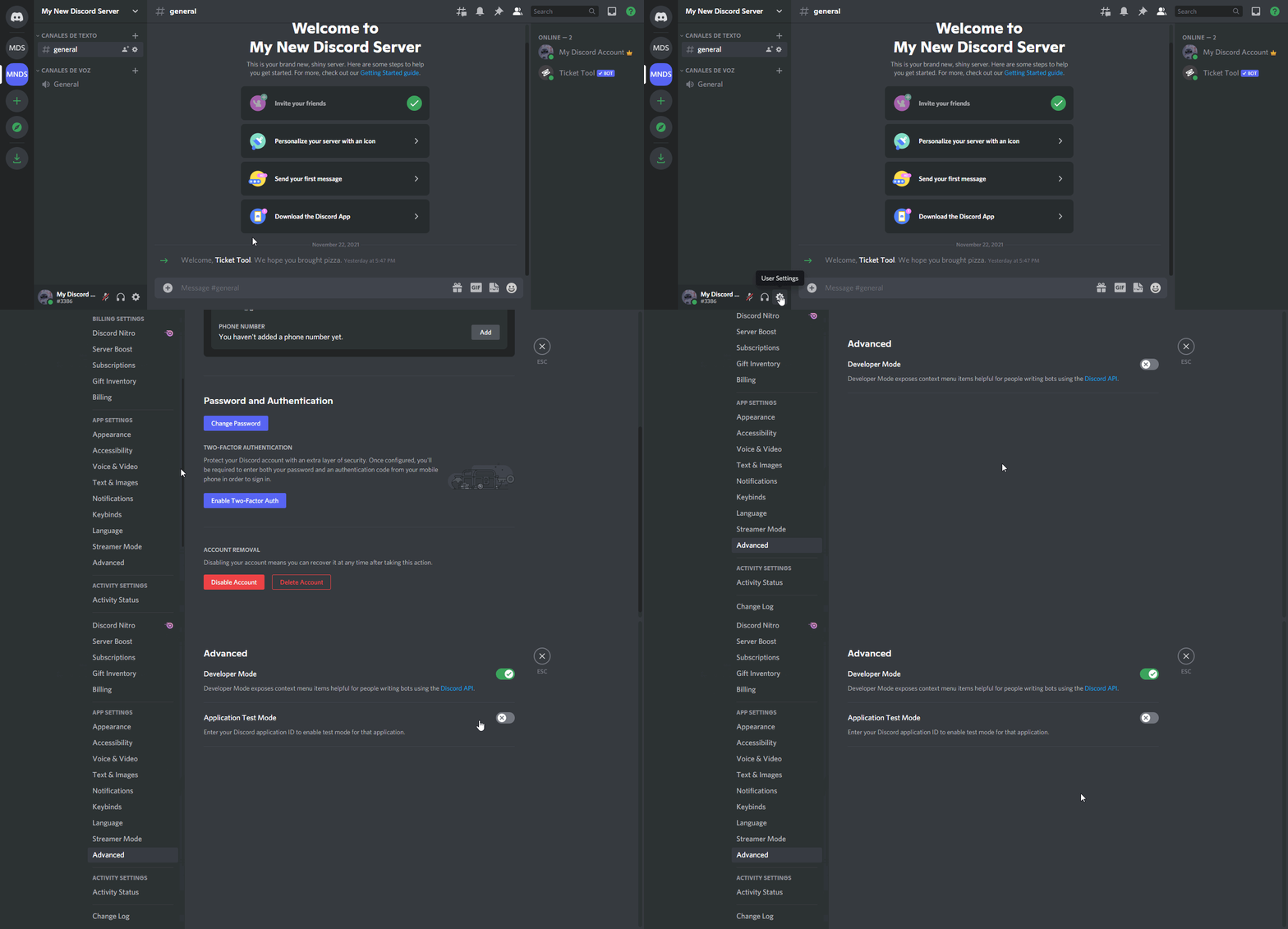 jade topaz
i did that
quasi cliff
are you mobile or pc?
jade topaz
laptop
quasi cliff
so right click on owner's id
and for role, right click on role
For role id 🔽

For user id🔽
 jade topaz
got it
quasi cliff
If you require any further information, let me know.
jade topaz
yeah last thing was where i can select closed tickets and opened
for a category
@quasi cliff
quasi cliff
$help category
humble sequoiaBOT
How to set the open category
To set a open category go to the Dashboard -> Panel Configs -> Settings -> Category Options -> Category Open
jade topaz
thanks mate
quasi cliff

jade topaz
does this mean the server is still on premium?
 jade topaz
does this mean the server is still on premium?
jade topaz
jade topaz
does this mean the server is still on premium?
@quasi cliff
quasi cliff
jade topaz
does this mean the server is still on premium?
No, it's "Free" version of the bot
jade topaz
quasi cliff
No, it's "Free" version of the bot
ho. oki thanks!
iron nightBOT
Gave +1 Rep to @quasi cliff
quasi cliff
jade topaz
ho. oki thanks!
 shrewd cipher
how can I make several buttons on the panel so that I can create tickets in different categories. Like here
 humble sequoiaBOT
For a more convenient use of multipanels, you can now combine panels on the dashboard. This will allow you to directly send the multipanel from the dashboard or via the $panel ID command.
Where can I find this?
You can find this setting on the Dashboard -> Panel Configs -> Settings -> General Options
Note: if you're attaching all the panels to a panel called English, don't include English in the attached panels box (If you do this, it will create duplicate)
This will put all buttons from all of your panels on one message. The message is the panel message from the panel you're combining these panels in.
slender minnow
@shrewd cipher ^
shrewd cipher
thanks
jade topaz
In how many server we can add the premium bot if bought once
slender minnow
jade topaz
In how many server we can add the premium bot if bought once
one server per premium purchase
slender minnow
jade topaz
it will cost 6$ rifght
yep, but thats for one month iirc
 cedar plaza
Do you all have the ability to do like application forms?
where it goes through an automated questionaire?
quasi cliff
cedar plaza
Do you all have the ability to do like application forms?
can u describe more?
cedar plaza
quasi cliff
can u describe more?
like I want to set up a discord server for my college group. However, I want people to fill out a form when they join. It would be great if it could ask (are you a ... student, then what is your name, then what is your school email) etc. then after it asks all of that, it can ping us and then we can take a look at it..
quasi cliff
cedar plaza
like I want to set up a discord server for my college group. However, I want peo...
You can add those questions to Embed message

something like this^
cedar plaza
oh but it can't ask them individually?
quasi cliff
nope
fringe shale
how do you do this
 jade topaz
fringe shale
how do you do this
jade topaz
fringe shale
how do you do this
Hey! What server is that in?
fringe shale
jade topaz
Hey! What server is that in?
I dont know if i can say that
jade topaz
Oh! I know which one, I am in it myself.
fringe shale
did they do that with an embed or with the bot
fringe shale
jade topaz
Oh! I know which one, I am in it myself.
yea
jade topaz
That is done with a webhook, u can use https://discohook.org for it.

Or any other website that you can make webhook embeds with.
iron nightBOT
Gave +1 Rep to @jade topaz
jade topaz
Your welcome!
Also @fringe shale , you will need the discohook bot for the buttons I think.
jade topaz
Alright! Have a nice day and good luck with it!
jade topaz
yall have the new mods been picked?? confusion has overrun me
how do i prevent people from deleting tickets? i tried editing the command but they still being able some how
quasi cliff
jade topaz
how do i prevent people from deleting tickets? i tried editing the command but t...
Hey Ark, you can simply disable $delete  command and make Delete button "Support Only" .
For command: Dashboard ➞ Command Configs ➞ Delete 

For Button: Dashboard ➞ Panel Configs ➞ Settings ➞ Button Options ➞ Delete Ticket Setting ➞ Support Only
quasi cliff
jade topaz
yall have the new mods been picked?? confusion has overrun me
Once the Management Team reads out all the applications then they'll decide and announce it in #📣│server-news most likely. 5 days have passed so new applications wont be entertained. Wish you good luck on your application!
 pure dome
i can't find my server
 humble sequoiaBOT
Don't see your server in the dashboard?
You will possibly need to relog. Look below to see steps on how to relog.
How to relog in the Dashboard.
First, you will need to go to the dashboard. Once your there, click on your avatar on the top right. after you clicked it, you will see button that says Logout. You must click that. Once you have logged out, you can log back in.
Note:
You need one of these 3 things to access the dashboard.
1. Server Owner (Level: 6)
2. Server Administrator (Level: 4)
3. Dashboard Role (Level: 2)
:warning: You can check your level using $level on your Discord Server
User permission level with Ticket Tool
@User is permission level: 0 (User)
```» *If it shows that your permission is **0**, you don't have any of the above **3 things** to manage the dashboard.*


**See the GIF below on how to relog:**@pure dome,
pure dome
yep, thanks
 warped geyser
Where do I find this site?
 warped geyser
thx
 quasi cliff
Hey Evie, that's @obtuse kraken bot and not Ticket Tool.
jade topaz
quasi cliff
Hey Ark, you can simply disable `$delete` <:onswitch:836268404309753876> command...
issue being i have 35 panels, it means i have to go manually on all of them and disable the button on each right
quasi cliff
Simply disable $delete
they wont have access to delete button most probably unless they can see closed tickets

 high oyster
 fading geyser
Interesting does the bot have the necessary permissions in both the category and role.
fading geyser
wait
humble sequoiaBOT
ᅠ
@pseudo glen requires the following permissions:
Add Reactions
Read Channels
Send Messages
Manage Messages
Embed Links
Attach Files
Read History
Manage Roles
Manage Channels
To change the role permissions, you can go to your Discord Server ➞ Server Settings ➞ Roles ➞ @Ticket Tool
To change the channel permissions, you can go to your Channel Settings ➞ Permissions ➞ Ticket Tool
ᅠ
Note:
You can give Ticket Tool Administrative Permissions instead of all the permissions listed above, but it's entirely optional and NOT necessary.
 high oyster
@fading geyser the above should help.
fading geyser
yes he have
high oyster
Can you relog and see if those settings are still there.
fading geyser
high oyster
Can you relog and see if those settings are still there.
how?
quasi cliff
Sorry Winterr for interrupting,
『 ABO عابد 』, Simply check if bot has "Manage Channel" permissions in the category.
high oyster
Yup yup yup after if the permissions are fine refer to the below.
humble sequoiaBOT
Don't see your server in the dashboard?
You will possibly need to relog. Look below to see steps on how to relog.
How to relog in the Dashboard.
First, you will need to go to the dashboard. Once your there, click on your avatar on the top right. after you clicked it, you will see button that says Logout. You must click that. Once you have logged out, you can log back in.
Note:
You need one of these 3 things to access the dashboard.
1. Server Owner (Level: 6)
2. Server Administrator (Level: 4)
3. Dashboard Role (Level: 2)
:warning: You can check your level using $level on your Discord Server
User permission level with Ticket Tool
@User is permission level: 0 (User)
```» *If it shows that your permission is **0**, you don't have any of the above **3 things** to manage the dashboard.*


**See the GIF below on how to relog:**Btw Bot Perms on dashboard will refresh even after refreshing/reloading website without relog
fading geyser
 high oyster
Ok, create a channel in the Ticket Tool category, after run the $debug command and send a screenshot of the outputs.
quasi cliff
fading geyser
That's role settings for "Server Settings", give "Manage Channel" for Ticket Tool category
fading geyser
quasi cliff
That's role settings for "Server Settings", give "Manage Channel" for Ticket Too...
 quasi cliff
Try creating ticket now maybe?
fading geyser
quasi cliff
Try creating ticket now maybe?
let me see
 carmine beacon
 solid lake
How do I put the selected categories where the tickets open or close that can only be seen by the people who open the ticket and not all?
shut bolt
Hi there
shut bolt
solid lake
How do I put the selected categories where the tickets open or close that can on...
$help category
humble sequoiaBOT
How to set the open category
To set a open category go to the Dashboard -> Panel Configs -> Settings -> Category Options -> Category Open
shut bolt
Assign a category on your Category Options menu
The category will only be visible to people who have access to channels on it, i.e. people who can see tickets
solid lake
So as soon as I assign a category, the channels created will only be visible to those who created them?
shut bolt
solid lake
So as soon as I assign a category, the channels created will only be visible to ...
Affirmative 👍
solid lake
Another question, how do I solve this?
 shut bolt
solid lake
Another question, how do I solve this?
shut bolt
solid lake
Another question, how do I solve this?
Make sure the bot is invited to the server, one of the most frequent causes for that error is that the bot was removed from the server
solid lake
shut bolt
Make sure the bot is invited to the server, one of the most frequent causes for ...
In fact, the bot was banned by mistake, but then I put it back, how do I fix this? Do I have to eject and put it back?
shut bolt
solid lake
In fact, the bot was banned by mistake, but then I put it back, how do I fix thi...
Just with inviting it back it will work 👍
solid lake
shut bolt
Just with inviting it back it will work 👍
how can I do?
shut bolt
solid lake
how can I do?
Do what?
solid lake
shut bolt
Just with inviting it back it will work 👍
This:
shut bolt
solid lake
This:
First unban the bot from the server
Then click on @pseudo glen and use the Invite button to add it back to your server
solid lake
shut bolt
Then click on <@557628352828014614> and use the Invite button to add it back to ...
It does not work
shut bolt
solid lake
It does not work
What doesn't work, the invitation or the button?
solid lake
The button
shut bolt
solid lake
The button
Same error?
solid lake
shut bolt
Same error?
Yes
shut bolt
solid lake
Yes
Can I have your server's ID please?
solid lake
shut bolt
Can I have your server's ID please?
Do I send you the link privately?
shut bolt
solid lake
Do I send you the link privately?
Not the link but the ID
The name also works
humble sequoiaBOT
Sending a panel
Once you've created a panel on the dashboard you will need to send it to a channel using send on the dashboard
Select the channel you want your panel to be created in and click send.
For other questions checkout $help faq
An example of a sending a panel is shown below.
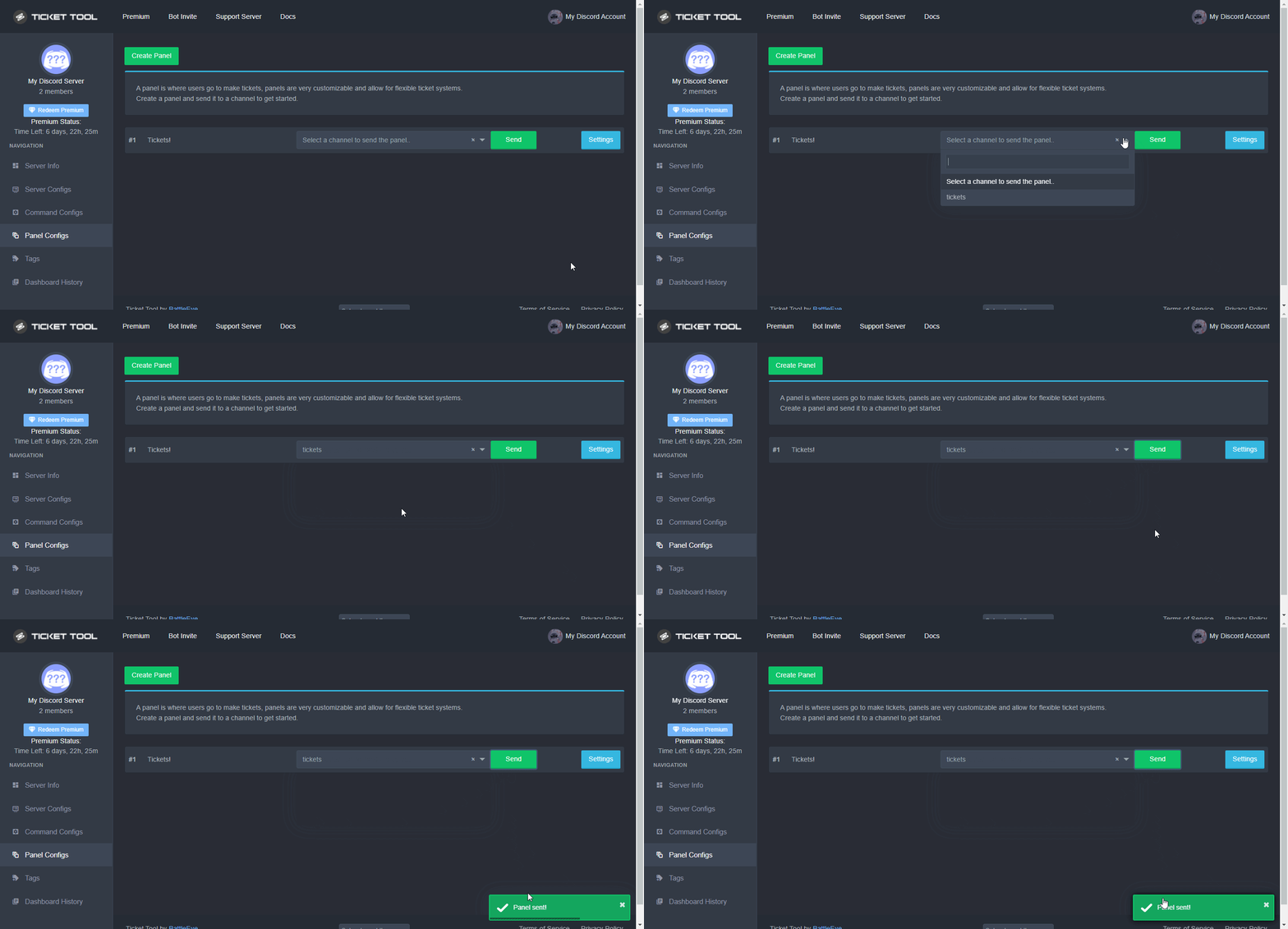 solid lake
Okey, one second....
shut bolt
👍
solid lake
Same error
shut bolt
Are you on mobile?
solid lake
shut bolt
Are you on mobile?
No, pc
shut bolt
Hmm weird
solid lake
Ehm.....
shut bolt
solid lake
Ehm.....
I'll open a ticket for you, is that okay?
solid lake
shut bolt
I'll open a ticket for you, is that okay?
Okey
shut bolt
Thanks!
humble sequoiaBOT
━━ moved to ticket ━━
 spare willow
has the ticket tool website been mostly broken the past few months for anyone else?
it just gets stuck here after i do the captcha
 gilded verge
spare willow
it just gets stuck here after i do the captcha
gilded verge
spare willow
it just gets stuck here after i do the captcha
try reload site
gilded verge
spare willow
it just gets stuck here after i do the captcha
*this is cloudflare verification (captcha)
or u can try another browser
spare willow
yes, it happens on other browsers too
on different computers, different browsers
ive tried it many times the past few months, same thing almost every time. one time it did work, but then it did it again after a few minutes
gilded verge
spare willow
ive tried it many times the past few months, same thing almost every time. one t...
hmm...do you use vpn?
spare willow
yes, ive also tried without that
gilded verge
oof, this is problem xD
spare willow
it used to be fine. i set it up in my server and its been working for like 2 years (maybe more at this point, its been a while)
but then the past few months, i cant access the web interface
gilded verge
spare willow
but then the past few months, i cant access the web interface
but now that you have disabled vpn and re-entered the site it is working normally, right?
spare willow
no
i think that one time it worked was when i had my vpn off, but it started doing it again with it off still, and even with it off i havent seen it work since
gilded verge
can you try clear cookies and/or restart your (wifi/cable) connection?
but with disabled vpn
spare willow
ive already tried on different computers (and those computers were one completely different connections) with and without vpn
and i have restarted my router/cable modem
gilded verge
still nothing?
@spare willow, sooo... if the problem still exists, check this information: https://community.cloudflare.com/t/community-tip-best-practices-for-captcha-challenges/56301
spare willow
um its suddenly working again 😳
i didnt even do anything on that page yet
i guess ill try that next time it happens
gilded verge
yaaaas! 😊
shut bolt
 plain crane
how do i remove embed on ticket
plain crane
how do i remove embed on ticket
Hover on the embed, then click on the ❌ you'll see on the upper right corner
gilded verge
plain crane
i jus want it to have the reaction create ticket
Like this???
plain crane
does that show for everyone
gilded verge
plain crane
does that show for everyone
if you remove the embed, nobody sees it afterwards, just only button
 grim raft
what do i do after i buy the unlock tool
shut bolt
grim raft
what do i do after i buy the unlock tool
We aren't the unlock tool for any game, we are Ticket Tool, are you sure you are on the appropriate server?
shut bolt
No clue
jade topaz
I need help - how do you make it auto log ticket once it gets deleted
for example - a ticket gets closed, and then once you delete it, it automatically logs it without having to click save trans
nevermind its a premium feature rip
jade topaz
Hello so when I open a ticket it just goes into a category I don’t want it too, I have a ticket category and I want it to be when I open a ticket it automatically goes into my ticket category. How do I do this?
humble sequoiaBOT
How to set the open category
To set a open category go to the Dashboard -> Panel Configs -> Settings -> Category Options -> Category Open
gilded verge
humble sequoia
@jade topaz, Hey, check
gilded verge
yep, this is the same :>

 eager sphinx
how to remove Support team ticket controls
quasi cliff
eager sphinx
how to remove Support team ticket controls
What type of controls?
quasi cliff

 austere fractal
how to put log of closed tickets and reopen it?
slender minnow
$logs
humble sequoiaBOT
With Ticket Tool, you can customize the behavior the bot takes when logging your tickets! For editing these options follow these steps:
Dashboard ➞ Panel Configs ➞ Settings ➞ Logging Options
Transcript Channel
Here you will choose the channel where @humble sequoia would send a copy of the transcript to
Logging Channel
Here you will define which channel @humble sequoia will save the Logs in (ticket created/deleted/closed, etc.)
Logs you can save:
➞ Ticket Created ➞ Logs when a ticket is created
➞ Ticket Closed ➞ Log when a ticket is closed
➞ Ticket Opened ➞ Log when a ticket is opened
➞ Ticket Renamed ➞ Log when a ticket is renamed
➞ Ticket Deleted ➞ Log when a ticket is deleted
➞ Transcript Saved ➞ Log when a ticket is saved
Select with (disable) or (enabled) which logs you would like
ᅠ
Premium Features
Direct Message Transcript ➞ Sends the ticket transcript to the ticket user whenever the ticket is either closed, deleted, or both.
Auto Save Transcript ➞ Saves the ticket transcript into to the transcript channel whenever the ticket is either closed, deleted, or both.
Below you can see an example of what the Logging Channel will look like as well as the Transcript Channel:
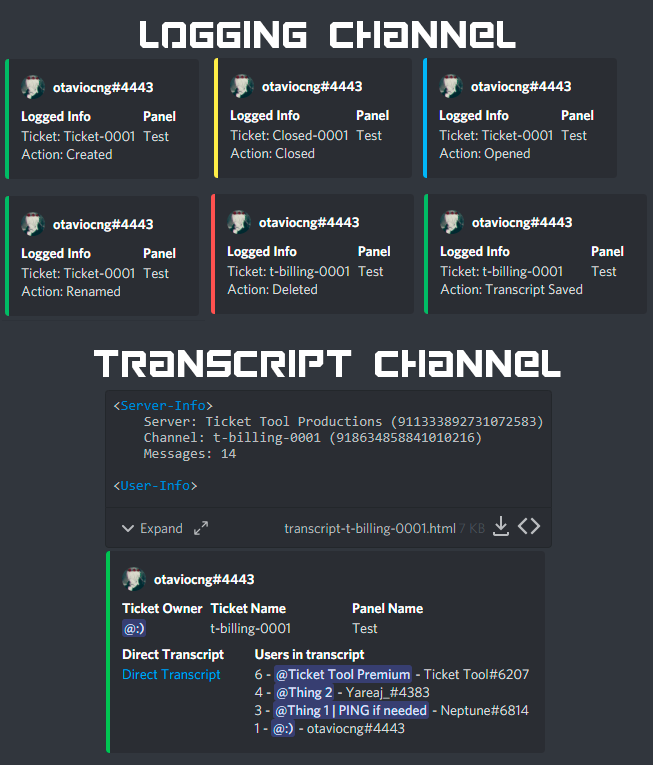 slender minnow
@austere fractal refer above ^
slender minnow
 warm root
Netflix
warm root
Netflix
you are in the wrong server
warm root
Can u please help me
slender minnow
nope, sorry
austere fractal
slender minnow
<@616018831273361410> refer above ^
Do I have to pay to have that?
slender minnow
austere fractal
Do I have to pay to have that?
the logging feature is not entirely premium but certain features are
austere fractal
slender minnow
the logging feature is not entirely premium but certain features are
I want a copy without the need for the ticket to be transpicked
slender minnow
austere fractal
I want a copy without the need for the ticket to be transpicked
tickets cannot be saved without transcripts unfortunately
austere fractal
slender minnow
tickets cannot be saved without transcripts unfortunately
but right now I just opened a ticket from here an Auto Save Transcript came out
or how can I see the ticket log?
@slender minnow
slender minnow
austere fractal
or how can I see the ticket log?
you can see the ticket logs if you have them enabled
austere fractal
slender minnow
you can see the ticket logs if you have them enabled
but it has nothing to do with whether I'm premium right?
slender minnow
austere fractal
but it has nothing to do with whether I'm premium right?
nope
quasi cliff
austere fractal
but right now I just opened a ticket from here an Auto Save Transcript came out
auto save transcript is premium
jade topaz
if i wanna have a support role with no admin perms to view the tickets made which are private what do i have to do
ping me when u respond
humble sequoiaBOT
How to let support team see into a ticket
About support roles
A support role lets your support team see into tickets with out having to add them manually to each and every ticket.
You can add as many support roles as you like per panel.
NOTE that the way discord works all admins can see into tickets regardless of this.
How to set a support role
To set a Support role go to the Dashboard -> Panel Configs -> Settings -> General Options -> Support Team Roles.
NOTE that the support role will not be able to see into tickets that are already created..
high oyster
@jade topaz
jade topaz
high oyster
<@456226577798135808>
tyy
high oyster
Don't thank me lol it was someone else just never pinged u
jade topaz
oh lol
 hidden hinge
is there a way to make it so only the person who clicked make a ticket can see the ticket channel? i need help rn as for some reason they cant see whatsoever
 olive timber
All my game data not there anymore I was level 23 almost at level 24 an I have over a million dollars an a lot of gold plus I used real money an when I went to sign back in it put me back to level one plz fix my account
hidden hinge
hidden hinge
is there a way to make it so only the person who clicked make a ticket can see t...
nvm resolved
oak light
Hi there
Is there any way for me, as the server admin, to skip past the ticket limit or would I need to up it for everyone?
 distant moth
Any possibilities that if someone open ticket get support role and when close role from him gets removed ?
gilded verge
uhm... can you specify your problem please?
gilded verge
distant moth
Any possibilities that if someone open ticket get support role and when close ro...
as far as I know it can't be done but if I'm wrong somebody correct me
gilded verge
oak light
Hi there
Is there any way for me, as the server admin, to skip past the ticket ...
even as the server administrator you cannot skip the limit, you would then have to increase the limit in the panel (so you change it for all)
1 button = 1 panel,
i.e. if you wanted to change the name of the second button, you enter the settings of the second panel
 left meteor
aim have 1 panel i 2 button
gilded verge
can you show screenshot like this: ?
Example:

oof...
if you only have one panel, it doesn't make sense to add the same panel to the same panel ...
in a dozen or so minutes, I will ping you to show you what an example of multipanels looks like, okay? (in video)
left meteor
okey thx
gilded verge
@left meteor, For clarification ... In the video I showed that there is no button in the main panel "Wybierz rodzaj wsparcia" because I created additional panels that are connected to the first one.
I mean, you can't make a multi-panel if you only have one panel because it just won't work the way you want it to.
gilded verge
gilded verge
<@597802673282088960>, For clarification ... In the video I showed that there is...
This is what it looks like after sending the panel to the channel:
[My example]
 left meteor
Thanks @gilded verge
iron nightBOT
Gave +1 Rep to @gilded verge
gilded verge
you're welcome ^-^
left meteor
gilded verge
you're welcome ^-^
you are from?
 radiant escarp
Welcome
I want to add a ticket to my server
I don't know how
Can you help me?
gilded verge
left meteor
you are from?
You ask on the wrong channel, please use #💬│general-chat or #💬│gen-chat-multilingual
humble sequoiaBOT
You can check our documentation here;
You can also check #📂│information for the basic setup;
You can also watch this video tutorial.
Our documentation contains all the info you need about the bot to be able to setup and configure the bot however you like.
gilded verge
humble sequoia
Hey @radiant escarp, check
slender minnow
 languid patrol
Is it possible to just edit a panel message? Not deleting and posting new...
languid patrol
Is it possible to just edit a panel message? Not deleting and posting new...
Nope, you will have to send the panel again after editing the message.
languid patrol
slender minnow
Nope, you will have to send the panel again after editing the message.
Ahhh
quasi cliff
Hey Nikola, you can change it in general settings!
Dashboard -> Panel Configs -> Settings -> General Options -> Ticket Count
 snow mirage
Any way to change the cooldown of ticket creation from 10 secs to say 1 ticket per day?
 old blaze
I have problem
 humble sequoiaBOT
Update your discord App
Buttons are a relatively new addition to discord and don't work with some older versions of the app.
Please verify that you have the latest version of discord, by going to the app or play store.
Discord for the  App Store
Discord for the  Play Store
high oyster
@old blaze
old blaze
Im get update bro @high oyster
high oyster
old blaze
Im get update bro <@922820920882626571>
You have it?
old blaze
Yes i Have
high oyster
Ok can you check that panel configuration more specific the button configuration, also making sure the bot has permissions in both category and role.
quasi cliff
snow mirage
Any way to change the cooldown of ticket creation from 10 secs to say 1 ticket p...
There are no cooldown type settings in the bot at the time iirc
old blaze
high oyster
Ok can you check that panel configuration more specific the button configuration...
Is working 100%
high oyster
@old blaze Do you still require any assistance then?
old blaze
Yes
high oyster
Ok send me in dms an invite link to your server.
high oyster
old blaze
I have problem
After that run $debug in your server channel where the bot panel was sent and send a screenshot here.
old blaze
Done
high oyster
Can you open up the ticket channel as I cannot see it.
old blaze
 high oyster
Ok can you resend the panel into #987383727040626808 as I cannot see it.
old blaze
high oyster
Ok can you resend the panel into <#987383727040626808> as I cannot see it.
Done check
@high oyster
high oyster
If you're using an old version of discord this is a fairly common error.
Interaction failed without any other errors is a discord error
old blaze
No i have New update discord
high oyster
Another reason may be because the cluster is temporarily down if that does not work open up a ticket since I do not know what is up at the moment.
Check you category permissions once again and see if they match up to the below.
humble sequoiaBOT
ᅠ
@pseudo glen requires the following permissions:
Add Reactions
Read Channels
Send Messages
Manage Messages
Embed Links
Attach Files
Read History
Manage Roles
Manage Channels
To change the role permissions, you can go to your Discord Server ➞ Server Settings ➞ Roles ➞ @Ticket Tool
To change the channel permissions, you can go to your Channel Settings ➞ Permissions ➞ Ticket Tool
ᅠ
Note:
You can give Ticket Tool Administrative Permissions instead of all the permissions listed above, but it's entirely optional and NOT necessary.
 haughty grail
I have a problem with my pixel no pass than 84%
humble sequoiaBOT
⚠️ You're in the wrong place
We provide support for @pseudo glen discord bot and cannot help you with whatever issue you have.
- We don't know which Support Team you should contact to get this issue resolved, and unfortunately we won't be able to accurately tell you.
If you don't have any further questions regarding our bot Ticket Tool, please close this ticket
high oyster
@haughty grail Read the above.
 green moon
None of the commands work for the ticket tool anyone know why I have all the permission on it
@everyone
high oyster
green moon
None of the commands work for the ticket tool anyone know why I have all the per...
Is there an error?
green moon
high oyster
Is there an error?
Yeah when send the panel
high oyster
green moon
Yeah when send the panel
What is the error exactly?
high oyster
Read the below @green moon
humble sequoiaBOT
ᅠ
@pseudo glen requires the following permissions:
Add Reactions
Read Channels
Send Messages
Manage Messages
Embed Links
Attach Files
Read History
Manage Roles
Manage Channels
To change the role permissions, you can go to your Discord Server ➞ Server Settings ➞ Roles ➞ @Ticket Tool
To change the channel permissions, you can go to your Channel Settings ➞ Permissions ➞ Ticket Tool
ᅠ
Note:
You can give Ticket Tool Administrative Permissions instead of all the permissions listed above, but it's entirely optional and NOT necessary.
green moon
It has all check marks
high oyster
Including the channel where you are trying to send the panel to and run commands?
 humble sequoiaBOT
⚠️ You're in the wrong place
We provide support for @pseudo glen discord bot and cannot help you with whatever issue you have.
- We don't know which Support Team you should contact to get this issue resolved, and unfortunately we won't be able to accurately tell you.
If you don't have any further questions regarding our bot Ticket Tool, please close this ticket
high oyster
haughty grail
Lol
jade topaz
hello, I'm setting up my ticket bot, but all the people on the server see it, can someone help?
humble sequoiaBOT
You can check our documentation here;
You can also check #📂│information for the basic setup;
You can also watch this video tutorial.
Our documentation contains all the info you need about the bot to be able to setup and configure the bot however you like.
gilded verge
Hey, check
jade topaz
hello, I'm setting up my ticket bot, but all the people on the server see it, can someone help?
please
gilded verge
jade topaz
please
Okay sorry, I misunderstood your question 😐
Here is your answer:
Dashboard->Panel Configs->Panel Settings-Expand Permission Options->Edit Everyone Role Opened Permissions->screenshot
 green moon
high oyster
Including the channel where you are trying to send the panel to and run commands...
green moon
high oyster
Including the channel where you are trying to send the panel to and run commands...
Yeah
gilded verge
green moon
Yeah
As for your problem ... you know that you additionally need to add bot role permissions to the channel you want to send the panel to, right?
Like View Channel, Send Messages, Read Message History
gilded verge
gilded verge
As for your problem ... you know that you additionally need to add bot role perm...
*btw i recommend these perms: https://cdn.discordapp.com/attachments/979861967936290816/979875252433731605/Ticket_Tool_Discord_role_perms.mp4
green moon
gilded verge
As for your problem ... you know that you additionally need to add bot role perm...
Yes
This is what is says

Then when I go into the channel and do the command nothing happens
gilded verge
okay, so we know for sure that you either have a permission problem or you use the wrong prefix ...
Could you please send us like in the screenshot?
 high oyster
gilded verge
*btw i recommend these perms: https://cdn.discordapp.com/attachments/97986196793...
high oyster
gilded verge
*btw i recommend these perms: https://cdn.discordapp.com/attachments/97986196793...
I recommend administrator on the Ticket Tool role it is bot assigned no other user can assign it to themselves 🙂
Administrator = fewer problems
gilded verge
with administrator perms it happens differently, but from what I found out, even this permission does not always help and I do not understand how it works xDDDDD
but you're right 😊
 fierce nebula
Hey everyone. ive ran into an issue
This is the 3rd server that ill be using ticket tool with and the 3rd server is not showing in my manage servers.
Ive kicked the bot and re invited. Is there something else i can do?
humble sequoiaBOT
Don't see your server in the dashboard?
You will possibly need to relog. Look below to see steps on how to relog.
How to relog in the Dashboard.
First, you will need to go to the dashboard. Once your there, click on your avatar on the top right. after you clicked it, you will see button that says Logout. You must click that. Once you have logged out, you can log back in.
Note:
You need one of these 3 things to access the dashboard.
1. Server Owner (Level: 6)
2. Server Administrator (Level: 4)
3. Dashboard Role (Level: 2)
:warning: You can check your level using $level on your Discord Server
User permission level with Ticket Tool
@User is permission level: 0 (User)
```» *If it shows that your permission is **0**, you don't have any of the above **3 things** to manage the dashboard.*


**See the GIF below on how to relog:**@fierce nebula, check everything in message
fierce nebula
Thank you
gilded verge
you're welcome 😊
jade topaz
green moon
@everyone
I wouldnt advise doing that again.
 naive canyon
How do I ping a role in a ticket
quasi cliff
$mentions
humble sequoiaBOT
Within all the messages the bot's sends (both embeds and text) you can mention either channels, roles, or even users, these mentions will only send a notification to the user if they are used within a text field, e.g: a role mentioned in an embed won't ping at all the users who have that role.
For mentioning a role you can use one out of three options:
{@Role Name} ➞ Which is Case Sensitive.
{RoleID} ➞ Replace RoleId with the Id of the role you are trying to ping.
<@&RoleID> ➞ Discord's native syntax to ping roles.
<#ChannelID> ➞ Mention a channel by its ID.
<@UserID> ➞ Mention a user by its ID.
The Ticket Message is the first message sent by the bot in a new ticket. To customise it head over to your Dashboard ➞ Panel Configs ➞ Settings ➞ Ticket Options ➞ Edit Ticket Message
quasi cliff
naive canyon
How do I ping a role in a ticket
Use the role mention in ticket message ^
naive canyon
quasi cliff
Use the role mention in ticket message ^
kk'
green moon
What can stop the bot from not using commands in a channel
gilded verge
green moon
What can stop the bot from not using commands in a channel
I don't quite understand, could you please ask the question differently and with example (if you can) ?
green moon
gilded verge
I don't quite understand, could you please ask the question differently and with...
I get a error when I try to add a panel and it tells me to do the debug command but it doesn’t work
No commands work for the ticket tool for me
gilded verge
can you show us this error please?
green moon
 gilded verge
*btw i recommend these perms: https://cdn.discordapp.com/attachments/97986196793...
gilded verge
gilded verge
*btw i recommend these perms: https://cdn.discordapp.com/attachments/97986196793...
@green moon, you know what? try these perms
*I don't know if you've made them before, but let us know
green moon
gilded verge
*I don't know if you've made them before, but let us know
I have all the perms on it already
gilded verge
gilded verge
okay, so we know for sure that you either have a permission problem or you use t...
oof, I asked for this before
so if you could, please send us such a screen
 gilded verge
and this too please:
 green moon
 gilded verge
mhm... sooo problem is: you need change premium bot to free bcs your server don't have premium 😐
gilded verge
niiice! 😊
green moon
When I click create ticket this is what it says
 humble sequoiaBOT
Update your discord App
Buttons are a relatively new addition to discord and don't work with some older versions of the app.
Please verify that you have the latest version of discord, by going to the app or play store.
Discord for the App Store
Discord for the Play Store
gilded verge
humble sequoia
@green moon,
gilded verge
unfortunately I have no idea so far, so please wait for someone else, sorry 😕
green moon
Ok
quasi cliff
Try $ping and if it works then it's your client issue [Discord needs update]
jade topaz
$help multipanels
humble sequoiaBOT
Help Options
$help commands - Information on commands
$help setup - Information on bot setup
$help faq - Frequently asked questions
humble sequoiaBOT
The new Discord Buttons allow for a much smoother and convenient experience. They reduce lag and work much better than emojis. With ticket tool you can edit all the buttons however you like! Buttons can show emojis, text and can have 4 different colors.
Where can I edit them?
Dashboard ➞ Panel Configs ➞ Settings ➞ Button Options ➞ Setting
jade topaz
how can i get a multi panel?
humble sequoiaBOT
Multipanels are panels with multiple buttons attached to them.
How to create a Multipanel
Premium users can combine multiple panels into one multipanel.
First, find the IDs of each panel you wish to combine. You can find them in your Panel Configs in the Dashboard
Next, send the multipanel to a channel using $panel [id1] [id2] {id3} ....
e.g. $panel 1 2 4 17 35 to combine panels 1, 2, 4, 17 and 35.
Up to 25 panels may be combined.
You can also watch this video tutorial.

For a more convenient use of multipanels, you can now combine panels on the dashboard. This will allow you to directly send the multipanel from the dashboard or via the $panel ID command.
Where can I find this?
You can find this setting on the Dashboard -> Panel Configs -> Settings -> General Options
Note: if you're attaching all the panels to a panel called English, don't include English in the attached panels box (If you do this, it will create duplicate)
This will put all buttons from all of your panels on one message. The message is the panel message from the panel you're combining these panels in.
You can also watch this video tutorial.
quasi cliff
jade topaz
how can i get a multi panel?
^
jade topaz
quasi cliff
^
..
quasi cliff
!?
humble sequoiaBOT
The first thing you will need to do is invite the premium bot, an invite can be found here
Once the bot is in your server we will head to the dashboard and manage your server. When you are managing your server, you want to head into "Server Configs" then click the drop down menu under "Select the bot you would like to use on this server" then click "Ticket Tool#6207" and then save.
jade topaz
Uuhm normally you can go to a sectio premium and you can invite him
jade topaz
jade topaz
Uuhm normally you can go to a sectio premium and you can invite him
Ok!!! Ty!
Np
shut bolt
 maiden valley
How can be make a suggest?
maiden valley
How can be make a suggest?
s!suggest in #🤖│bot-spam
jade topaz
Hello again,
I need to write a channel in a embed description how this.
 green moon
Does anyone know how to fix this

 cyan kite
( Time is wrong on this device ) but I can't seem to send the ticket to the channel.

 peak geode
I have the same issue ^
jade topaz
HELP PLS😭
 grand sleet
Hello, is Tickettool broken?
cyan kite
I'm not sure
 grand sleet
 cyan kite
I think there's a malfunction right now
jade topaz
 cyan kite
I discovered:
- You can't send a message to create a ticket to a channel
- You can't create a ticket
And their website what glitching for a bit
 orchid apex
Hello
cyan kite
Hi
orchid apex
?
 cyan kite
I think it's malfunctioning or the developers are changing something?
jade topaz
Weird the site says that servers are online
orchid apex
cyan kite
I think it's malfunctioning or the developers are changing something?
Ok Thx
iron nightBOT
Gave +1 Rep to @cyan kite
 radiant moss
Some shards are down at this time. The developer is aware and working on a fix!
jade topaz
jade topaz
Hello again,
I need to write a channel in a embed description how this.
hello,
How can i do this?
radiant moss
jade topaz
Hello again,
I need to write a channel in a embed description how this.
You can to make tags?
 radiant moss
Ah I see! You can do <#channelid>
Replace channel id with the channel id
You can get that by doing
humble sequoiaBOT
<#776680605517742090>
jade topaz
aaaaaaaaaaaaaaaaaa okey okey
 subtle stone
how to get my key
gilded verge
subtle stone
how to get my key
but you mean this code for bot voting right?
subtle stone
gilded verge
but you mean this code for bot voting right?
no for ticket
jade topaz
May I get help to why the ticket tool isnt in server
gilded verge
subtle stone
no for ticket
I don't quite understand what key do you mean ... some example in screenshot please 😕
jade topaz
I had it and it was working fine till 30mins ago
now I dont see it online in the server
and can no longer create ticket
gilded verge
Probably this can help you: #💬│general-chat message
subtle stone
gilded verge
I don't quite understand what key do you mean ... some example in screenshot ple...


 light slate
jade topaz
now I dont see it online in the server
light slate
jade topaz
now I dont see it online in the server
Yes, the same thing happens to me
gilded verge
subtle stone
ah... so if you bought premium with money, you don't get the code, look, here you have the button Active - Manage which means that premium works for you 😊
gilded verge
subtle stone
i wont to accsses the avtar and the name
whitelabels is planned
but if you want change nickname, on your server click on bot (right click) and choose Change nickname
 subtle stone
gilded verge
but if you want change nickname, on your server click on bot (right click) and c...
subtle stone
gilded verge
but if you want change nickname, on your server click on bot (right click) and c...
i wnt to change the avtar
and i can't invite the premum bot
gilded verge
like i said, so far there is no such possibility, whitelabels is planned
humble sequoiaBOT
The first thing you will need to do is invite the premium bot, an invite can be found here
Once the bot is in your server we will head to the dashboard and manage your server. When you are managing your server, you want to head into "Server Configs" then click the drop down menu under "Select the bot you would like to use on this server" then click "Ticket Tool#6207" and then save.
jade topaz
light slate
Yes, the same thing happens to me
It was working in but weird thing is, It works on one of my server but not the other :((
gilded verge
gilded verge
Probably this can help you: https://discord.com/channels/509192800865353738/5092...
.
subtle stone
gilded verge
.
thank you bro !!
iron nightBOT
Gave +1 Rep to @gilded verge
gilded verge
you're welcome 😊
 brave pond
Hi my ticket tool is offline in my server for some reason not sure why, ive tried reinviting and its still down
gilded verge
gilded verge
Probably this can help you: https://discord.com/channels/509192800865353738/5092...
@brave pond
brave pond
thanks!
light slate
jade topaz
It was working in but weird thing is, It works on one of my server but not the o...
It doesn't work for me in any of them, on my server it appears that it is disconnected when it should be connected like the other bots, also when I click on create ticket, a failed interaction apappears :((( I hope they fix it quickly
and sorry if I don't write English well, it's because I'm from Mexico and I'm using the translator
The bot already appears active on my server!!
jade topaz
light slate
It doesn't work for me in any of them, on my server it appears that it is discon...
yea same :(( hopefully they fix soon
jade topaz
light slate
The bot already appears active on my server!!
it works now?
 dark gull
got the same failed interaction on our server
light slate
jade topaz
it works now?
Nop, it just shows me that it's back online
yes, now it works
green moon
How do I make it so everyone can make a ticket because it’s not letting other people make a ticket
It Is saying you don’t have this permission
humble sequoiaBOT
Any role you assign as a blacklisted role won't be able to use commands or reactions.
Selecting a blacklisted role
Go to your Dashboard ➞ Server Configs. There you will find the option to select blacklisted roles.
Note: Don't forget to save.
 shut bolt
Check your blacklisted roles
green moon
shut bolt
Check your blacklisted roles
Where is that under
 iron nightBOT
Gave +1 Rep to @shut bolt
shut bolt
shut bolt
$help support
humble sequoiaBOT
How to let support team see into a ticket
About support roles
A support role lets your support team see into tickets with out having to add them manually to each and every ticket.
You can add as many support roles as you like per panel.
NOTE that the way discord works all admins can see into tickets regardless of this.
How to set a support role
To set a Support role go to the Dashboard -> Panel Configs -> Settings -> General Options -> Support Team Roles.
NOTE that the support role will not be able to see into tickets that are already created..
shut bolt
Assign a support team role
green moon
shut bolt
Assign a support team role
But other people can still see the ticket I don’t want them too I just want the person who made the ticket and the support team to be the only person that can see it
shut bolt
green moon
But other people can still see the ticket I don’t want them too I just want the ...
$help perms
humble sequoiaBOT
How to set the permissions for tickets
To set a change permissions go to the Dashboard -> Panel Configs -> Settings -> Permission Options
 shut bolt
Check the everyone opened permissions and check Read Messages is marked as 
iron nightBOT
Gave +1 Rep to @shut bolt
jade topaz
Am i the only one currently experiencing "This interaction has failed" all of our servers with ticket bot is failing
shut bolt
jade topaz
Am i the only one currently experiencing "This interaction has failed" all of ou...
Can you please give us your servers' IDs?
jade topaz
Got it
jade topaz
shut bolt
Can you please give us your servers' IDs?
842243696543662081
shut bolt
jade topaz
842243696543662081
Seems to work fine on our side, can you please open a ticket in #🎫│make-a-ticket so we can further check it?
jade topaz
Doing it rn
 subtle summit
This popped up when one of my members tried opening a ticket. Is it because of discord or just a bug?
 jade topaz
how do i make it where people can see message history
subtle stone
Guys how to access the avatar and the name of the ticket bot premium
shut bolt
subtle summit
This popped up when one of my members tried opening a ticket. Is it because of d...
Is he on a mobile device?
shut bolt
jade topaz
how do i make it where people can see message history
Solved in ticket
shut bolt
subtle stone
Guys how to access the avatar and the name of the ticket bot premium
What do you mean by that?
subtle stone
shut bolt
What do you mean by that?
to change the avatar and the name of the premium bot
like the others premium bots
shut bolt
subtle stone
to change the avatar and the name of the premium bot
It's not possible as of now, Whitelabels are a planned feature our developer is working on 
subtle stone
shut bolt
It's not possible as of now, Whitelabels are a planned feature our developer is ...
nice 👍 Thank you have a nice day
iron nightBOT
Gave +1 Rep to @shut bolt
shut bolt
subtle stone
nice 👍 Thank you have a nice day
Happy weekend
 desert steppe
am i the only one getting interaction failed?
shut bolt
desert steppe
am i the only one getting interaction failed?
Can I have your server's ID please?
desert steppe
how can i get that? @shut bolt
 humble sequoiaBOT
Server id - 509192800865353738
Server id - 509192800865353738
shut bolt
That number is the ID
shut bolt
Hell yeah!
 fallen flower
yoo who can help me pls
humble sequoiaBOT
We would love to help you, but if you don't tell us what you need help with we can't help you :(
shut bolt
How so, what's the issue being?
fallen flower
it just wont setup
shut bolt
fallen flower
it just wont setup
It doesn't set up on it's own, are you aware of that?
fallen flower
can i just add you to the discord
shut bolt
I won't set it up for you
humble sequoiaBOT
You can check our documentation here;
You can also check #📂│information for the basic setup;
You can also watch this video tutorial.
Our documentation contains all the info you need about the bot to be able to setup and configure the bot however you like.
shut bolt
Here you have the setup guide, and a video which explains the process, if you have doubts of the setup, I'll be more than glad to clear up the questions
 vocal lynx
$help
shut bolt
vocal lynx
$help
Please use commands in #🤖│bot-spam
vocal lynx
Ok, sorry
shut bolt
 fair dock
Здравствуйте. Мой аккаунт обнулился. Помогите восстановить!
Hello. My account has been reset to zero. Help to restore.
 karmic patio
How do I work like countries?
 fair dock
Who can I contact?
high oyster
karmic patio
How do I work like countries?
Hey there, read the below.
humble sequoiaBOT
For a more convenient use of multipanels, you can now combine panels on the dashboard. This will allow you to directly send the multipanel from the dashboard or via the $panel ID command.
Where can I find this?
You can find this setting on the Dashboard -> Panel Configs -> Settings -> General Options
Note: if you're attaching all the panels to a panel called English, don't include English in the attached panels box (If you do this, it will create duplicate)
This will put all buttons from all of your panels on one message. The message is the panel message from the panel you're combining these panels in.
You can also watch this video tutorial.
high oyster
fair dock
Hello. My account has been reset to zero. Help to restore.
What account exactly?
karmic patio
high oyster
Hey there, read the below.
How do I put a picture next to the emoji of the ticket message?
fair dock
Level 23, the ships of the submarine dash 3, spent more than 1 month of the game (approximately 200000000 game dollars and 15,000 gold were spent)
karmic patio
I want to rename it
 fair dock
I have authorized you
 silk chasm
fair dock
Level 23, the ships of the submarine dash 3, spent more than 1 month of the game...
silk chasm
fair dock
Level 23, the ships of the submarine dash 3, spent more than 1 month of the game...
This is a ticket tool support server.
high oyster
karmic patio
I want to rename it
Rename what exactly?
fair dock
I need to restore my account
 jade topaz
karmic patio
<@456226577798135808>
jade topaz
karmic patio
<@456226577798135808>
?
karmic patio
karmic patio
 languid quail
So basically i can see the chronology but the person that made the ticket cant see it as soon as i change the name of the tickets channel
How do i fix?
jade topaz
not really ticketool related but how does one prevent people without a role to create invites?
languid quail
So basically i can see the chronology but the person that made the ticket cant see it as soon as i change the name of the tickets channel
How do i fix?
slender minnow
languid quail
So basically i can see the chronology but the person that made the ticket cant s...
Head over to the panel config ---> Permission options and under user open ticket make sure that the user has ✅ for view and send message and read message history
slender minnow
karmic patio
you will have to manually edit each button from their respective panel
iirc you can edit them from the buttons option
 finite chasm
Does anybody know if theres actualy way to as non premium set for each person to create 1 ticket every 24 hours?
 coarse wedge
finite chasm
Does anybody know if theres actualy way to as non premium set for each person to...
coarse wedge
finite chasm
Does anybody know if theres actualy way to as non premium set for each person to...
Currently not possible at all.
finite chasm
coarse wedge
Currently not possible at all.
could be nice feature for non premium members
👍
coarse wedge
finite chasm
could be nice feature for non premium members
Yea could be, you may suggest it in #💡│suggestions
finite chasm
coarse wedge
Yea could be, you may suggest it in <#921732979586375690>
it didnt work
coarse wedge
finite chasm
it didnt work
Read what the bot wrote.
The suggestion was submitted for review.
So basically staff will approve it before it's showing in #💡│suggestions
 fallow ingot
finite chasm
i thinked it failed to send itself in suggestions
fallow ingot
finite chasm
i thinked it failed to send itself in suggestions
I can confirm that your suggestion is up for review and will be reviewed by a senior support+ when they are available.
finite chasm
fallow ingot
I can confirm that your suggestion is up for review and will be reviewed by a se...
alright thank you
iron nightBOT
Gave +1 Rep to @fallow ingot
fallow ingot
no worries, have an awesome day!
humble sequoiaBOT
 Faster Premium Bot
Automatic Transcripts
Full Customization
Custom Buttons
Direct Messages
Ticket Automation
Multipanels
Premium Support
You can purchase premium here:
Price
$6 - Monthly
$66 - Yearly
 Premium
fallow ingot
Premium
fallow ingot
 leaden widget
What are rhe perks of premium ticket tool?
leaden widget
What are rhe perks of premium ticket tool?
Glad to hear you’re interested in ticket tool premium! Let me know if you’ve got any questions regarding the bot or premium;)
leaden widget
Thank you
fallow ingot
No worries
leaden widget
Thanks @fallow ingot
iron nightBOT
Gave +1 Rep to @fallow ingot
leaden widget
There u go
fallow ingot
happy to help!

 marble frost
Is there a limit of 5 tickets ?
 zinc blade
yeah
marble frost
zinc blade
does anyone know how to stop this from happening
I think you have to make another living room to put it
marble frost
zinc blade
yeah
Can't I put more ?
quasi cliff
marble frost
Is there a limit of 5 tickets ?
No
quasi cliff
zinc blade
does anyone know how to stop this from happening
It says to run $debug in channel!
marble frost
How can we increase the limit ?
high oyster
Sorry for everyone who pinged me I was away if you still need help ping me now 🙂
 amber jetty
bonjour
high oyster
amber jetty
bonjour
Hello
amber jetty
speak arabic or french
high oyster
I can use a translator however if you want a native speaker you can go over to #🎫│make-a-ticket @amber jetty
 wary tinsel
Drde
 humble jolt


 keen stump
"How do ticket"
humble sequoiaBOT
You can check our documentation here;
You can also check #📂│information for the basic setup;
You can also watch this video tutorial.
Our documentation contains all the info you need about the bot to be able to setup and configure the bot however you like.
 signal bison
how to set up in which channel the tickets will be created?
humble sequoiaBOT
How to set the open category
To set a open category go to the Dashboard -> Panel Configs -> Settings -> Category Options -> Category Open
jade topaz
signal bison
how to set up in which channel the tickets will be created?
When you make a panel you can select a channel, after you made your panel you need to send it and the panel will creat your panel in the channel
 crisp skiff
"How do ticket"