
#🆘│community-support
1 messages · Page 413 of 1
 shut bolt
 distant ibex
Thank you!
Also, after you do that how do you change the message inside of the panel?
shut bolt
distant ibex
Also, after you do that how do you change the message inside of the panel?
You mean the panel's message, or the ticket's message?
distant ibex
shut bolt
You mean the panel's message, or the ticket's message?
Like this, inside the box

 humble sequoiaBOT
The panel message is where people react to make a ticket. To customize it head over to your Dashboard --> Panel Configs -> Settings -> Panel Options -> Edit Panel Message
 shut bolt
Check this out
distant ibex
Thank you
Also, I know I am asking a lot of question but how do you change the Create ticket to the name of the ticket?
humble sequoiaBOT

The new Discord Buttons allow for a much smoother and convenient experience. They reduce lag and work much better than emojis. With ticket tool you can edit all the buttons however you like! Buttons can show emojis, text and can have 4 different colors.
Where can I edit them?
Dashboard ➞ Panel Configs ➞ Settings ➞ Button Options ➞ Setting
 shut bolt
Go into the create ticket button's settings and update the text, then resend the panel
distant ibex
shut bolt
Go into the create ticket button's settings and update the text, then resend the...
Thanks again!
shut bolt
shut bolt
:tiph
My external emojis broke lmao
 crystal bane
My server won't show up.
humble sequoiaBOT
Don't see your server in the dashboard?
You will possibly need to relog. Look below to see steps on how to relog.
How to relog in the Dashboard.
First, you will need to go to the dashboard. Once your there, click on your avatar on the top right. after you clicked it, you will see button that says Logout. You must click that. Once you have logged out, you can log back in.
Note:
You need one of these 3 things to access the dashboard.
1. Server Owner (Level: 6)
2. Server Administrator (Level: 4)
3. Dashboard Role (Level: 2)
:warning: You can check your level using $level on your Discord Server
User permission level with Ticket Tool
@User is permission level: 0 (User)
```» *If it shows that your permission is **0**, you don't have any of the above **3 things** to manage the dashboard.*
**See the GIF below on how to relog:** shut bolt
Try this
crystal bane
Thanks
shut bolt
Sure 
 static ridge
how do i create a thing to we're people in my servers to click it and they can create a ticket
@shut bolt
 prime bridgeBOT
 !arii#0001 has been warned!

 They were notified via dms.
humble sequoiaBOT

You can check our documentation here.
You can also check #📂│information for the basic setup.
Our documentation contains all the info you need about the bot to be able to setup and configure the bot however you like.
shut bolt
Check this
shut bolt
Check #📂│information, if not clear enough, open a ticket and our support team will assist you
static ridge
i got it, thanks
 rapid hemlock
can you configure a custom cateegory
to put tickets in?
instead of having them placed on top?
humble sequoiaBOT
How to set the open category
To set a open category go to the Dashboard -> Panel Configs -> Settings -> Category Options -> Category Open

 gilded verge
@rapid hemlock, Check 
rapid hemlock
gilded verge
<@735587762077433936>, Check <:this:894279341108772914>
u da best
 jade topaz
gilded verge
<@735587762077433936>, Check <:this:894279341108772914>
jade topaz
gilded verge
<@735587762077433936>, Check <:this:894279341108772914>
What command got that one? I can't find it in the tags list
gilded verge
jade topaz
What command got that one? I can't find it in the tags list
To save transcript, use $transcript command
jade topaz
gilded verge
To save transcript, use `$transcript` command
No, what tag is it for that How to set the open category embed?
gilded verge
what... missclick XD
use $help category
 iron nightBOT
Gave +1 Rep to @gilded verge
 willow shard
Is there a option to make thr ticket close after no response for a certain time.
jade topaz
willow shard
Is there a option to make thr ticket close after no response for a certain time.
Sadly enough not, you will have to let your staff close it manually.
gilded verge
willow shard
Is there a option to make thr ticket close after no response for a certain time.
Not yet, but it's planned 😊 ~~if i'm wrong correct me
jade topaz
Or, you can code your own bot who scans channels named ticket-####, then you can make your bot if there is no response in a certain amount of time that it runs the $close command.
But that would need much effort.
 craggy geyser
gilded verge
Not yet, but it's planned 😊 ~~if i'm wrong correct me
craggy geyser
gilded verge
Not yet, but it's planned 😊 ~~if i'm wrong correct me
Correct
gilded verge
yasss! 👏
 crimson bay
guys
 cyan rover
 frozen ocean
how do i put the ticket on my discord
frozen ocean
how do i put the ticket on my discord
When you creete the panel it will ask you to post in which channel
crimson bay
i need to help
cyan rover
Yup
frozen ocean
how you make the panel
cyan rover
In dashboard
crimson bay
rik pvps
cyan rover
Yup
frozen ocean
ok
cyan rover
crimson bay
rik pvps
Lol muted for 10min you shouldnt do that
humble sequoiaBOT
Creating a panel
To create a panel we are going to need to head over to the panel configs on the dashboard
Once at the dashboard we will need to click Create Panel
Enter a panel name (Fill in any optional settings you want)
Click Create Panel and your ready to get started with configuring your panel
An example of a creating a panel is shown below.
 iron nightBOT
Gave +1 Rep to @next mist
cyan rover
$help
humble sequoiaBOT
Help Options
$help commands - Information on commands
$help setup - Information on bot setup
$help faq - Frequently asked questions
cyan rover
$help setup
humble sequoiaBOT
Setting up Ticket Tool
Visit the docs for setup info
General Setup
gilded verge
@cyan rover, Please use commands in #🤖│bot-spam
cyan rover
Kk
 weak prairie
Poop
 kind hawk
@weak prairie not here please.
 tame parcel
How can i make more buttons in the same message, that leads to different roles
Like this system

$help setup
humble sequoiaBOT
Setting up Ticket Tool
Visit the docs for setup info
General Setup
tame parcel
sorry
 summer wigeon
i want to set up de permissions, for example
tame parcel
tame parcel
sorry
just realised
summer wigeon
if someone with low role then me opens a ticket everybody can see it
and i just want to put on that ticket: staff and himself on the ticket for no one can see it
jade topaz
tame parcel
How can i make more buttons in the same message, that leads to different roles
L...
Hey! You'll need premium subscription for that.
tame parcel
jade topaz
Hey! You'll need premium subscription for that.
yeah i fond out'
jade topaz
Alright!
jade topaz
summer wigeon
and i just want to put on that ticket: staff and himself on the ticket for no on...
Hey!
 quasi cliff
summer wigeon
and i just want to put on that ticket: staff and himself on the ticket for no on...
quasi cliff
summer wigeon
and i just want to put on that ticket: staff and himself on the ticket for no on...
Just set Support role as "staff"
jade topaz
Have you tried settings perms?
summer wigeon
yaaa
humble sequoiaBOT
How to set the permissions for tickets
To set a change permissions go to the Dashboard -> Panel Configs -> Settings -> Permission Options
 jade topaz
summer wigeon
yaaa
jade topaz
summer wigeon
yaaa
Alright. Can you maybe send a screenshot of how the top of a ticket looks like as a private channel.
summer wigeon

for example my friend opens a ticket
and he was low permission then me and said that
jade topaz
summer wigeon
What exactly are you trying here, what action?
summer wigeon
u open a ticket
and i can see because im staff
but i dont want everybody except me and u can see it
but when someone here opens a ticket everybody can see it
quasi cliff
humble sequoia
^
jade topaz
Can you sent me a screenshot of your current dashboard settings for your permissions.
summer wigeon
where
humble sequoiaBOT
jade topaz
^^


 jade topaz
Did you set a role for the support aswell?
summer wigeon
 jade topaz
Did you set a role for the support aswell?
jade topaz
jade topaz
Did you set a role for the support aswell?
?
summer wigeon

on the first one i just put the higher "sabido" and the second higher "tonto completo"
and under that i put the "ticket tool" and other "role"
jade topaz
summer wigeon
and under that i put the "ticket tool" and other "role"
What is the "role"?
summer wigeon
sabido
jade topaz
Is it the users their role?
 jade topaz
quasi cliff
jade topaz
quasi cliff
That's not it, that's when someone else (not a support) opens a ticket.
summer wigeon
 quasi cliff
^^
summer wigeon
 quasi cliff
You have enabled read perms for everyone so everyone can see
summer wigeon
yaaa
but one friend of mine
can see someone tickets
for example u open a ticket, my friend can see it
and i dont want it
quasi cliff
everyone can see every ticket bcuz u enabled "Read Perms" for everyone
summer wigeon
only staff and the persons who opens just can see it
jade topaz
Can you check the discord categorie permissions?
summer wigeon
 quasi cliff
summer wigeon
quasi cliff
summer wigeon
By this, everyone can read and write messages in tickets
jade topaz
summer wigeon
Not the roles, just the permission for your ticket category
 jade topaz
Alright, just like Rock is saying tho go to the following => Panel => Settings => Permission options => Everyone Role and disable the read option, and neutralise the send message option.
Did it work, @summer wigeon ?
summer wigeon
no
jade topaz
summer wigeon
i will check
Sure!

 quasi cliff
that's "Delete ticket button", it comes when you close the ticket
quasi cliff
Enable the "Close button"
jade topaz
but i dont want they close
quasi cliff
jade topaz
but i dont want they close
You can directly delete a ticket by command
humble sequoiaBOT
We would love to help you, but if you don't tell us what you need help with we can't help you :(
quasi cliff
^
We would love to help you, but if you don't tell us what you need help with we can't help you 😦
 high oyster
@late comet what do you need help with?
quasi cliff
jade topaz
but i dont want they close
You can disable two step ticket, witch means when you run $close it deletes.
Dashboard > Panel Configs > Settings > General Options and disable  "Two step ticket"
That's not related to Bot support
Looks like your staff team issue
high oyster
@late comet Dashboard -> Panel Configs -> Settings -> General Options -> Support Team Roles or Additional Roles depending on what permissions you want them to have.
quasi cliff
Sorry but we don't provide ticket staff, we only help you with setup and functioning
high oyster
Unfortunately I do not have permission, maybe open up a ticket and someone else can assist you.
But as rock said I doubt they will do it for you.
quasi cliff
high oyster
Unfortunately I do not have permission, maybe open up a ticket and someone else ...
he wants u to be "ticket staff"
You want a ticket staff for your server or you have issue adding your ticket staff to tickets?
high oyster
Also please do not call rock or any other person such words.
quasi cliff
Create the role (with "Ticket Staff" name) then goto Dashboard -> Panel Configs -> Settings -> General Options -> Support Team Roles and add "Ticket Staff" to it.
kind hawk
We do not give assistance in vocal
 coarse wedge
Bye 🙂
kind hawk
@late comet please watch your words while in here. We have rules to follow and it's required to have decency when in public.
It's Seb. Thanks

prime bridgeBOT
Successful bans: 1
 Unsuccessful bans:
 0
 Reason: Use of severe slurs, trolling. Left the server to avoid punishment.
 Moderator: @forest goblet
coarse wedge
jade topaz
How can wick offline ban?
Wdym offline?
jade topaz
It says he left, but if he's not in the server how can you ban him then?
high oyster
Banned by userid
jade topaz
Ah ok
 balmy owl
high oyster
Banned by userid
balmy owl
high oyster
Banned by userid
if u have opened a ticket and then close it.. would u still be able to see what is inside in the closed ticket until it gets deleted
high oyster
balmy owl
if u have opened a ticket and then close it.. would u still be able to see what ...
Have you not gotten a transcript?
balmy owl
damn sorry for the ping.. mistakenly pinged ya
high oyster
Its ok
balmy owl
high oyster
Have you not gotten a transcript?
nope
high oyster
Alright one moment.
balmy owl
will this member be able to see what is inside in the closed ticket

till it gets deleted
high oyster
Ok wow I read that completely wrong.
balmy owl
Lol
high oyster
Yes the support members will see what is in the ticket, the user that created it will not be able to see the ticket when it is closed.
balmy owl
ok.. thnx
high oyster
No problem
 hoary jay
humble sequoiaBOT
hoary jay
humble sequoiaBOT
Setting up Ticket Tool
Visit the docs for setup info
General Setup
jade topaz
is a good guide showing you how.
If you have any questions along the way I'll be glad to help.
 sturdy sequoia
can i get some help?
high oyster
sturdy sequoia
can i get some help?
Sure wassup?
sturdy sequoia
v
okay so. when someone opens a ticket. how do i get it to put the ticket in a category named TICKETS by it self?
like u guys do
?
humble sequoiaBOT
How to set the open category
To set a open category go to the Dashboard -> Panel Configs -> Settings -> Category Options -> Category Open
jade topaz
@sturdy sequoia should solve your question.
gilded verge
Nothing is slow, I just don't get what you mean
prime bridgeBOT
Chemical.#6600 has been warned!
They were notified via dms.
 thorny flicker


shut bolt
thorny flicker
How can I redeem my votes ?
Using $vote redeem
 shut bolt
thorny flicker
Can u vote for me <@518666147441278998> <:superblob:779488730066845736>
shut bolt
thorny flicker
Can u vote for me <@518666147441278998> <:superblob:779488730066845736>
No, and please don't ping us, you were already warned for that
thorny flicker
$vote
shut bolt
thorny flicker
$vote
Use #🤖│bot-spam for commands please
jade topaz
My server isn’t showing up. (It isn’t SOFCOM) I already tried debugging TWICE. Any ideas on what to do?
 humble sequoiaBOT
Don't see your server in the dashboard?
You will possibly need to relog. Look below to see steps on how to relog.
How to relog in the Dashboard.
First, you will need to go to the dashboard. Once your there, click on your avatar on the top right. after you clicked it, you will see button that says Logout. You must click that. Once you have logged out, you can log back in.
Note:
You need one of these 3 things to access the dashboard.
1. Server Owner (Level: 6)
2. Server Administrator (Level: 4)
3. Dashboard Role (Level: 2)
:warning: You can check your level using $level on your Discord Server
User permission level with Ticket Tool
@User is permission level: 0 (User)
```» *If it shows that your permission is **0**, you don't have any of the above **3 things** to manage the dashboard.*
**See the GIF below on how to relog:** scenic plinth
Relog into the dashboard, also ensure you have one of the 3 requirements listed above to do so.
 tawdry bronze
I've configured my tickets to be named after the person who opened them with {author.name}, however if I close the ticket it becomes named after me. I've got the close ticket parameter set to the same,{author.name}, but I'm assuming it's looking at whoever clicks the button not the "author" of the original ticket. Is there a way to get around this?
sturdy sequoia
i need a warn appeal. for my other acc
gilded verge
tawdry bronze
I've configured my tickets to be named after the person who opened them with {au...
If I got it right, you want it to look like in the video, right?
tawdry bronze
Yes!
gilded verge
Okay, then please use {ticket.user.nickname} instead of {author.name} 😊
 tawdry bronze
Perfect, appreciate the help
gilded verge
😊
sturdy sequoia
so no answer for my question
gilded verge
sturdy sequoia
i need a warn appeal. for my other acc
what server is it relevant for? I don't really understand what you mean
gilded verge
so please explain which server is it and what you mean
high oyster
sturdy sequoia
how do i get a closed ticket to delete by its self?
Do you still need help on this?
 clever steppe
Hi
quasi cliff
sturdy sequoia
how do i get a closed ticket to delete by its self?
You can disable two step ticket, witch means when you run $close it deletes.
Dashboard > Panel Configs > Settings > General Options and disable "Two step ticket"
 torpid onyx
jade topaz
torpid onyx
jade topaz
I have a problem that I want to solve
 gilded verge
jade topaz
I have a problem that I want to solve
gilded verge
jade topaz
I have a problem that I want to solve
On your server use command $debug and send link from bot.
Example:


 humble sequoiaBOT
ᅠ
@pseudo glen requires the following permissions:
Add Reactions
Read Channels
Send Messages
Manage Messages
Embed Links
Attach Files
Read History
Manage Roles
Manage Channels
To change the role permissions, you can go to your Discord Server ➞ Server Settings ➞ Roles ➞ @Ticket Tool
To change the channel permissions, you can go to your Channel Settings ➞ Permissions ➞ Ticket Tool
ᅠ
Note:
You can give Ticket Tool Administrative Permissions instead of all the permissions listed above, but it's entirely optional and NOT necessary.
 jade topaz
 humble sequoiaBOT
How to disable the premium bot
To disable the premium bot you will have to go to the Dashboard ➞ Server Configs ➞ Premium bot ➞ And on the right-hand side select the primary free bot in the drop down menu.
Premium features will still work on the normal bot.
 gilded verge
gilded verge
humble sequoia
off this
jade topaz
Ok
gilded verge
humble sequoia
In general, the bot does not need administrator privileges as we can see here, its optional
gilded verge
uhm, how you can't?
jade topaz
When I press a button it can't be turned off I don't know what's wrong
Do you want a server link and you solve it?
gilded verge
First you click on the name of the bot, then change to free and save
 jade topaz
where?
gilded verge
Dashboard ➞ Server Configs
jade topaz
this?
 gilded verge
a little lower
 jade topaz
or this??
 gilded verge
yep, select to free and save
jade topaz
humble sequoiaBOT
Don't see your server in the dashboard?
You will possibly need to relog. Look below to see steps on how to relog.
How to relog in the Dashboard.
First, you will need to go to the dashboard. Once your there, click on your avatar on the top right. after you clicked it, you will see button that says Logout. You must click that. Once you have logged out, you can log back in.
Note:
You need one of these 3 things to access the dashboard.
1. Server Owner (Level: 6)
2. Server Administrator (Level: 4)
3. Dashboard Role (Level: 2)
:warning: You can check your level using $level on your Discord Server
User permission level with Ticket Tool
@User is permission level: 0 (User)
```» *If it shows that your permission is **0**, you don't have any of the above **3 things** to manage the dashboard.*


**See the GIF below on how to relog:**like this 😊
gilded verge
it is possible but im not sure
gilded verge
jade topaz
Do you want a server link and you solve it?
in general it is not recommended that anyone outside Ticket Tool staff interfere with the settings of other servers but if you don't want to wait I can go in and check
jade topaz
Can you make this an option for you
jade topaz
gilded verge
in general it is not recommended that anyone outside Ticket Tool staff interfere...
💔
 pale pilot
$pc @jade topaz
humble sequoiaBOT
Pong! Latency is 1378ms. API Latency is 150ms [-]

Premium Check
I was unable to detect a premium server for @balmy plank.
Found 67 servers in total and 0 with premium and permission
pale pilot
You don't seem to have premium
jade topaz
Not on my other account
pale pilot
It checks your servers, not your account
gilded verge
humble sequoia
*i thought it had bot error and that's why i wrote about disabling the premium bot
 gilded verge
please don't ping Staff #📂│information rule 4
jade topaz
What
gilded verge
jade topaz
<@336243658816749570>
you pinged Staff 😕
pale pilot
What's your server name?
jade topaz
pale pilot
What's your server name?
~ Dark Server
pale pilot
@jade topaz I switched to the primary bot now. If you don't have it invited, invite the primary bot again
humble sequoiaBOT
Ticket Tool Invite & Support
quasi cliff
pale pilot
<@456226577798135808> I switched to the primary bot now. If you don't have it in...
^
 red basin
Comment on paramètres ticket tool
quasi cliff
/en Comment on paramètres ticket tool
jade topaz
quasi cliff
/en Comment on paramètres ticket tool
Bonbour j'ai besoin d aide pour add les tickets a mon setv svp
humble sequoiaBOT
Vous pouvez consulter notre documentation ici.
Vous pouvez également vérifier #573205317870157855 pour les étapes générales.
Notre documentation contient toutes les informations dont vous avez besoin sur le bot pour pouvoir l'installer et le configurer comme vous le souhaitez.
━━ moved to ticket ━━
 slender minnow
gilded verge
If I got it right, you want it to look like in the video, right?
slender minnow
gilded verge
If I got it right, you want it to look like in the video, right?
Hi! Incase you want to appeal a ban, you can do so through https://tickettool.xyz/appeal

Google Docs
If you would like to appeal a moderation action taken against you within one of the Ticket Tool servers, please use this form to appeal.
gilded verge
slender minnow
Hi! Incase you want to appeal a ban, you can do so through https://tickettool.xy...
Hey, unfortunately it wasn't me who asked for the ban appeal, but thank you 😊
iron nightBOT
Gave +1 Rep to @slender minnow
gilded verge
slender minnow
Hi! Incase you want to appeal a ban, you can do so through https://tickettool.xy...
@sturdy sequoia, its your answer
slender minnow
gilded verge
Hey, unfortunately it wasn't me who asked for the ban appeal, but thank you 😊
Ah mb ig i replied to the wrong message
Was supposed to reply their message
i really hate mobike client
gilded verge
it's okay, you helped me anyway 😊
kind hawk
Mobike clients are nice
shut bolt
No
jade topaz
Hello, My server has above 500 important tickets, New members cannot open tickets, What should i do?
quasi cliff
jade topaz
Hello, My server has above 500 important tickets, New members cannot open ticket...
Discord has a channel limit of 500 and we cant help you out.
You can simply delete old tickets
 peak spoke
Can we make subjects for tickets that people select and that name is added to the ticket name?
Like "nature" when selected in the ticket gui would be like
nature-crispytwig-001
craggy geyser
Possible with premium only
peak spoke
Nice
humble sequoiaBOT
The ticket name is the default channel name of all tickets. To edit it, go to your Dashboard > Panel Configs > Settings > Ticket Options. There you can edit the channel name of opened and closed tickets. You can also use variables in there.

 Note: This is a premium feature
peak spoke
Note: This is a premium feature
peak spoke
Thank you
Er
Not quite what I meant, I mean like ticket subjects unless that GUI in the back with the buttons adds multiple buttons to one embed for tickets?
craggy geyser
You can do that too
humble sequoiaBOT
Multipanels are a premium feature  that allow for a single panel with multiple buttons to open different tickets.
How to create a Multipanel
Premium users can combine multiple panels into one multipanel.
First, find the IDs of each panel you wish to combine. You can find them in your Panel Configs in the Dashboard
Next, send the multipanel to a channel using $panel [id1] [id2] {id3} ....
e.g. $panel 1 2 4 17 35 to combine panels 1, 2, 4, 17 and 35.
Up to 25 panels may be combined.

For a more convenient use of multipanels, you can now combine panels on the dashboard. This will allow you to directly send the multipanel from the dashboard or via the $panel ID command.
Where can I find this?
You can find this setting on the Dashboard -> Panel Configs -> Settings -> General Options
Note: if you're attaching all the panels to a panel called English, don't include English in the attached panels box (If you do this, it will create duplicate)
This will put all buttons from all of your panels on one message. The message is the panel message from the panel you're combining these panels in.
 Note: This is a premium feature
craggy geyser
Note: This is a premium feature
craggy geyser
Up to you. It doesn't matter if you give rep or not
peak spoke
Thanks @craggy geyser
iron nightBOT
Gave +1 Rep to @craggy geyser
 quasi cliff
$buttons
humble sequoiaBOT
The new Discord Buttons allow for a much smoother and convenient experience. They reduce lag and work much better than emojis. With ticket tool you can edit all the buttons however you like! Buttons can show emojis, text and can have 4 different colors.
Where can I edit them?
Dashboard ➞ Panel Configs ➞ Settings ➞ Button Options ➞ Setting
peak spoke
Thanks @quasi cliff
iron nightBOT
Gave +1 Rep to @quasi cliff
peak spoke
Can I make a panel embed's name show as something other than the panel name?
peak spoke
I don't want to rename the panel though
I'm trying to do multi-panels, I had a central panel but it still showed in the buttons
Unless I can remove its button somehow
 weak oasis
multipanel is a premium future
quasi cliff
peak spoke
looks prem
peak spoke
weak oasis
multipanel is a premium future
We have premium

I figured out the buttons
But I want the "Master Panel" to not show as a button. Sec.
weak oasis
edit the button of every panel
quasi cliff
peak spoke
I'm trying to do multi-panels, I had a central panel but it still showed in the ...
Obv you're central panel will be shown. You can simply disable button in Button Settings
peak spoke
 weak oasis
the first panel will be the master panel
oh, you have 2 options, first remove the master panel and do it with the second panel, the second option is to remove create ticket button from the master panel
quasi cliff
peak spoke
Master Panel settings > Button Options > Create ticket > Turn off "Enable Button"
weak oasis
quasi cliff
Master Panel settings > Button Options > Create ticket > <:offswitch:83626836423...
i prefer this way
peak spoke
Thank you so much @quasi cliff
iron nightBOT
Gave +1 Rep to @quasi cliff
quasi cliff
peak spoke
Sorry for being such a noob 😂
weak oasis
no it's okay ❤️
weak oasis
anytime buddy
 kind crypt
hihi! sorry for disturbing but i can’t seem to figure out how to get the bot to open tickets under the right category? :o
quasi cliff
$help category
humble sequoiaBOT
How to set the open category
To set a open category go to the Dashboard -> Panel Configs -> Settings -> Category Options -> Category Open
iron nightBOT
Gave +1 Rep to @quasi cliff
 somber plinth
Hi I need to change my payment method as my card has expired, how can I do this?
weak oasis
somber plinth
Hi I need to change my payment method as my card has expired, how can I do this?
i highly suggest you to #🎫│make-a-ticket, billing one
 tribal sedge
humble sequoiaBOT
tribal sedge
humble sequoiaBOT
Pong! Latency is 293ms. API Latency is 77ms [-]
quasi cliff
Welcome to Ticket Tool's home for real-time and historical data on system performance.
scenic plinth
$help ping
humble sequoiaBOT
How to make Ticket Tool ping a role
To make ticket tool ping a role when a ticket is opened, go to the Dashboard -> Panel Configs -> Settings -> Ticket Options -> Ticket Message -> Message Text and do this:
{@Role name} This is case sensitive and the role must have @mentions enabled

 last hollow
Ticket still showing outside of category, how to fix
 quasi cliff
last hollow
Ticket still showing outside of category, how to fix
quasi cliff
last hollow
Ticket still showing outside of category, how to fix
A category can have max 100 channels
do u have 100+?
last hollow
quasi cliff
A category can have max 100 channels
Oh possibly
quasi cliff
$overflow
humble sequoiaBOT
Discord only allows to stack up to 50 channels per category, meaning that if you have already 50 tickets in one category, the bot won't be able to place a ticket in that category, for such reason Ticket Tool counts with overflow categories, meaning that if your main category is filled, the bot will go ahead and place the ticket on the next one available, simply choose a second category in the category pickers:
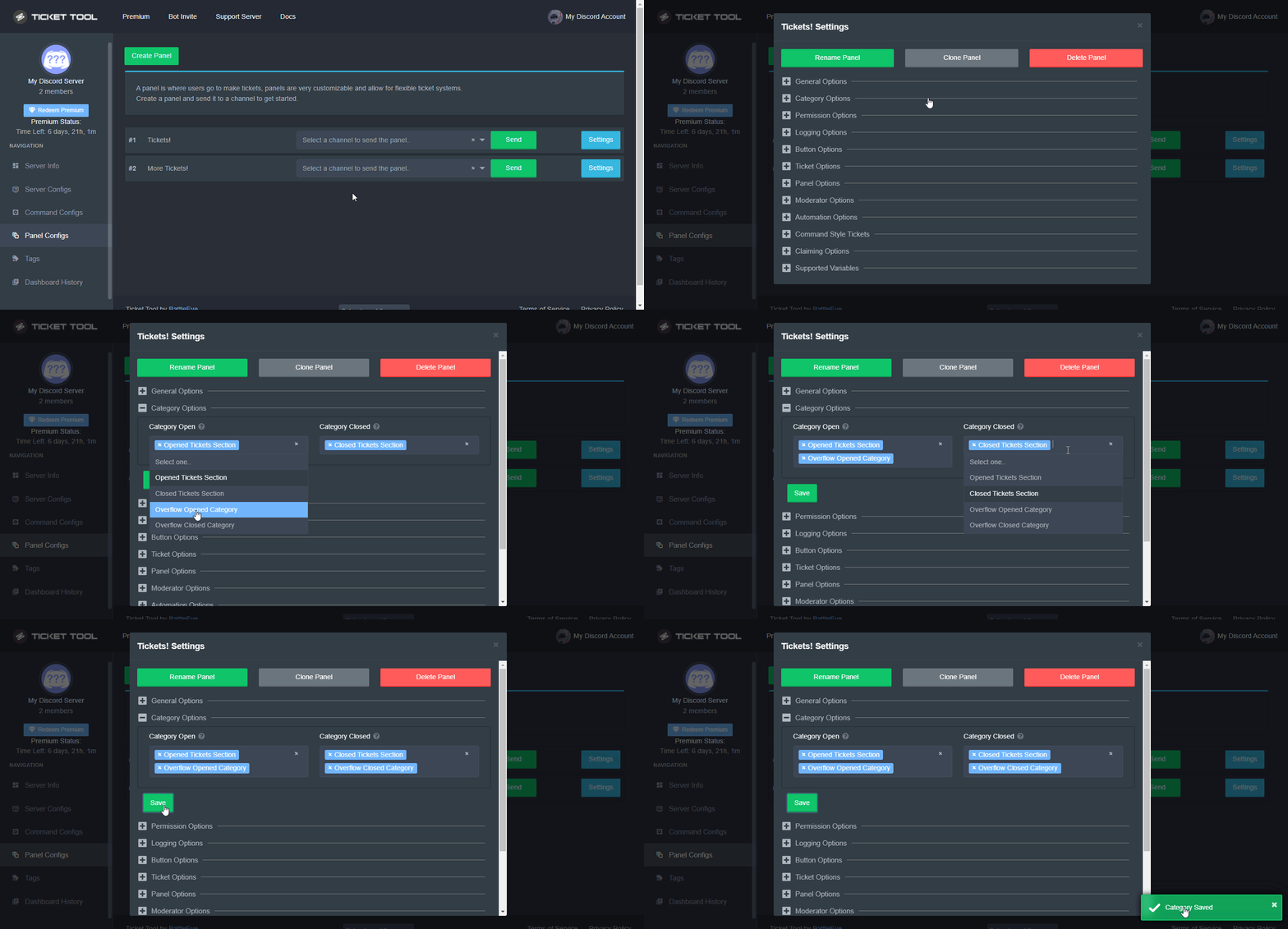 quasi cliff
last hollow
Oh possibly
quasi cliff
last hollow
Oh possibly
^ You can add another category
last hollow
quasi cliff
^ You can add another category
How does it works, will it send to another category if the category is full? If the category got cleared, will be be back in the first one?
quasi cliff
last hollow
How does it works, will it send to another category if the category is full? If ...
yes
 cedar spindle
when someone opens a ticket, in that embed I would like them to click on the {channel.name} and go to that channel complete a task then come back to the ticket and paste that info in the ticket how do I link a channel to that embed so that can just click it? When I do it the way it suggests it just shows {🌐-connect-🌐} do I need to add the Hashtag
humble sequoiaBOT
Within all the messages the bot's sends (both embeds and text) you can mention either channels, roles, or even users, these mentions will only send a notification to the user if they are used within a text field, e.g: a role mentioned in an embed won't ping at all the users who have that role.
For mentioning a role you can use one out of three options:
{@Role Name} ➞ Which is Case Sensitive.
{RoleID} ➞ Replace RoleId with the Id of the role you are trying to ping.
<@&RoleID> ➞ Discord's native syntax to ping roles.
<#ChannelID> ➞ Mention a channel by its ID.
<@UserID> ➞ Mention a user by its ID.
gilded verge
it may help you
 gilded verge
<#ChannelID>
cedar spindle
ok i will try that
gilded verge
take this too:
humble sequoiaBOT
How to turn on developer mode
To enable developer mode do the following:
[:desktop: PC] go to Settings ➞ Advanced ➞ Developer mode
[:mobile_phone: Mobile] go to Settings ➞ Appearance ➞ Developer mode
Developer Mode allows you to get the ID of any channel, user, role, or server.
VIA the ID, you can use them with <> alongside their corresponding format to mention a channel/role/user...
They're mostly used to mention channels, users, or roles in Embeds
Formats
Channels: <#ID> ➝ #🤖│bot-spam
Users: <@ID> ➝ @humble sequoia
Roles: <@&ID> ➝ <@&642118166243311646>
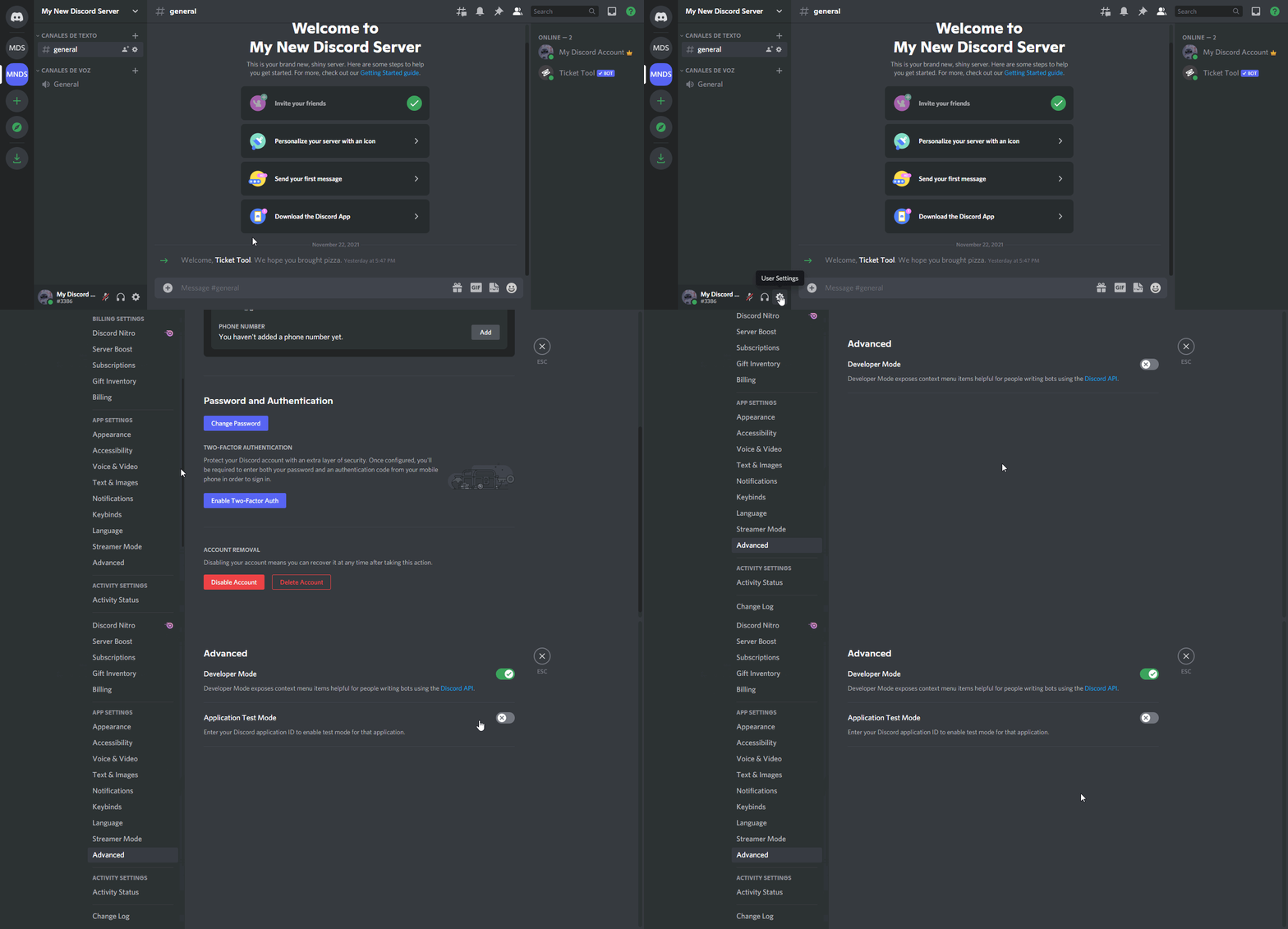 cedar spindle
Thank you that worked
 gilded verge
no problem 😊
sturdy sequoia
high oyster
Do you still need help on this?
yes
 fallow ingot
sturdy sequoia
yes
fallow ingot
sturdy sequoia
yes
By delete it's self what do you mean?
sturdy sequoia
y’all tickets do it so how come you don’t know what I’m talking abt?
WHEN TICKETS GET CLOSED THE TRANSCRIPT gets sent to the person then the tickets delete 🤦♂️
fallow ingot
That is possible indeed. Follow this path: Dashboard > Panel configs > Logging options > then enable  Direct Message Transcript.
thorny flicker
$vote redeem
shut bolt
thorny flicker
$vote redeem
As I told you yesterday, for commands use #🤖│bot-spam please
thorny flicker
shut bolt
As I told you yesterday, for commands use <#910978476536905738> please
you remember me
shut bolt
thorny flicker
you remember me <:thumbsup:586226608302456859> <:thumbsupR:699441757158506567>
Yes
thorny flicker
shut bolt
Yes
Thanks @shut bolt
iron nightBOT
Gave +1 Rep to @shut bolt
thorny flicker



 thorny gulch
Is there a way to get transcripts if the ticket has been deleted already
gilded verge
thorny gulch
Is there a way to get transcripts if the ticket has been deleted already
Unfortunately not, so it's always a good idea to save the transcript before deleting the ticket.
 glass briar
Is there a feature where ticket transcript is dm-ed to a person
gilded verge
glass briar
Is there a feature where ticket transcript is dm-ed to a person
Dashboard->Panel Configs->Panel Settings->Expand Logging Options->Direct Message Transcript
Remember that this is for servers with active premium

 jolly jetty
How can I save tickets
 spare delta
I need help with a account I ordered every time I try to login it tells me to go to an email and get a verification code and I don’t have the email to get the code off of
humble sequoiaBOT
How do I save transcript to a channel?
To save transcripts to a channel go to the Dashboard -> Panel Configs -> Settings -> Logging Options -> Transcript Channel
 gilded verge
@jolly jetty, Check
gilded verge
spare delta
I need help with a account I ordered every time I try to login it tells me to go...
Have you checked in your spam folder?
spare delta
gilded verge
Have you checked in your spam folder?
Yes I have this is what it is saying
 high oyster
spare delta
high oyster
spare delta
Ordered what exactly?
 umbral thistle
Hi
high oyster
umbral thistle
Hi
#💬│general-chat if you don't need support
spare delta
high oyster
Ordered what exactly?
This is what I ordered
 high oyster
spare delta
This is what I ordered
high oyster
spare delta
This is what I ordered
We cannot help you with your issue, we not know how to help or where you can find help and we only provide support for the @pseudo glen bot.
spare delta
Ok can you get me a staff member that can help me with this issue please
humble sequoiaBOT

⚠️ You're in the wrong place
We provide support for @pseudo glen discord bot and cannot help you with whatever issue you have.
- We don't know which Support Team you should contact to get this issue resolved, and unfortunately we won't be able to accurately tell you.
If you don't have any further questions regarding our bot Ticket Tool, please close this ticket
 stoic python
Hi spectre as logged me out n saying server error putting my username and password in but still coming up with the same message
humble sequoiaBOT
⚠️ You're in the wrong place
We provide support for @pseudo glen discord bot and cannot help you with whatever issue you have.
- We don't know which Support Team you should contact to get this issue resolved, and unfortunately we won't be able to accurately tell you.
If you don't have any further questions regarding our bot Ticket Tool, please close this ticket
gilded verge
humble sequoia
@stoic python, Since your message is not about a bot, read
 abstract breach
gilded verge
abstract breach
gilded verge
What you mean?
 stable ledge
Is it possible to close a ticket, but let the member still see and read it?
gilded verge
stable ledge
Is it possible to close a ticket, but let the member still see and read it?
yeap, go to Dashboard->Panel Configs->Panel Settings->Expand Permission Options->User Closed Permissions
(screenshot)

 dense olive
عرب؟
stable ledge
gilded verge
yeap, go to `Dashboard`->`Panel Configs`->`Panel Settings`->Expand `Permission O...
Thank you! I saved it. But do I need to resend the panel to the discord or does it already work, when I saved it?
iron nightBOT
Gave +1 Rep to @gilded verge
gilded verge
No, you don't need to send in a new panel. This setting will take effect when a new ticket is created 😊
humble sequoiaBOT
fallow ingot
 fast ocean
Thank you 😘
fallow ingot
no problem
 soft pond
 gilded verge
Check this:
humble sequoiaBOT
ᅠ
@pseudo glen requires the following permissions:
Add Reactions
Read Channels
Send Messages
Manage Messages
Embed Links
Attach Files
Read History
Manage Roles
Manage Channels
To change the role permissions, you can go to your Discord Server ➞ Server Settings ➞ Roles ➞ @Ticket Tool
To change the channel permissions, you can go to your Channel Settings ➞ Permissions ➞ Ticket Tool
ᅠ
Note:
You can give Ticket Tool Administrative Permissions instead of all the permissions listed above, but it's entirely optional and NOT necessary.
 still furnace
any reason why my server isnt showing up on the dashboard? it has every permission
humble sequoiaBOT
Don't see your server in the dashboard?
You will possibly need to relog. Look below to see steps on how to relog.
How to relog in the Dashboard.
First, you will need to go to the dashboard. Once your there, click on your avatar on the top right. after you clicked it, you will see button that says Logout. You must click that. Once you have logged out, you can log back in.
Note:
You need one of these 3 things to access the dashboard.
1. Server Owner (Level: 6)
2. Server Administrator (Level: 4)
3. Dashboard Role (Level: 2)
:warning: You can check your level using $level on your Discord Server
User permission level with Ticket Tool
@User is permission level: 0 (User)
```» *If it shows that your permission is **0**, you don't have any of the above **3 things** to manage the dashboard.*


**See the GIF below on how to relog:**ah thanks
gilded verge
welcome 😊
fast ocean
I want to be support team
gilded verge
Check this:
humble sequoiaBOT
How do be I become a Support Member?
You can become a support member in 2 ways:
1. You can be really active in #🆘│community-support gain <@&799500225579712543> role and get chosen by a Manager
2. You can apply VIA our applications that would be sent in #📣│server-news
We currently have Support Teams for the following languages:
:flag_us: English
:flag_jo: Arabic
:flag_fr: French
:flag_de: German
:flag_br: Portuguese
:flag_es: Spanish.
jolly jetty
gilded verge
<@349476779469307906>, Check <:this:894279341108772914>
i want transcript in my dm's
i did this

and still bot is not dming me
slender minnow
they are premium features, and your server does not have an active premium plan
Hi, is there anything I can help you out with?
i am sorry, but i did not understand what you said ^^;
 remote beacon
Hello , I have a bug with ticket tool .
In the dashboard I don't see the server
humble sequoiaBOT
Don't see your server in the dashboard?
You will possibly need to relog. Look below to see steps on how to relog.
How to relog in the Dashboard.
First, you will need to go to the dashboard. Once your there, click on your avatar on the top right. after you clicked it, you will see button that says Logout. You must click that. Once you have logged out, you can log back in.
Note:
You need one of these 3 things to access the dashboard.
1. Server Owner (Level: 6)
2. Server Administrator (Level: 4)
3. Dashboard Role (Level: 2)
:warning: You can check your level using $level on your Discord Server
User permission level with Ticket Tool
@User is permission level: 0 (User)
```» *If it shows that your permission is **0**, you don't have any of the above **3 things** to manage the dashboard.*


**See the GIF below on how to relog:**@remote beacon did you tried the above methods? ^
remote beacon
humble sequoia
Thanks
iron nightBOT
Gave +1 Rep to @humble sequoia
remote beacon
slender minnow
<@730155443464306700> did you tried the above methods? ^
Yes and it worked Thanks!
slender minnow
No problem ^^
stable ledge
gilded verge
yeap, go to `Dashboard`->`Panel Configs`->`Panel Settings`->Expand `Permission O...
It worked, but now the user could delete the closed ticket, which should not be able. This is how it is set:
 fallow ingot
stable ledge
It worked, but now the user could delete the closed ticket, which should not be ...
fallow ingot
stable ledge
It worked, but now the user could delete the closed ticket, which should not be ...
If you don't want to allow the ticket opener to close the ticket, enable Support Team Only
stable ledge
fallow ingot
If you don't want to allow the ticket opener to close the ticket, enable <:onswi...
It's not about closing, it's about deleting. See how it's set in the pic.
Allowed Roles is only "Owner", so how could the member delete the ticket?
 tropic current
Hello, I have a question, can the bot after closing the ticket will send a message on pv that his ticket has been closed?
(I don't write the premium version of the bot)
fallow ingot
stable ledge
It's not about closing, it's about deleting. See how it's set in the pic.
Oh my bad.
You're support team can delete?
stable ledge
No, they can't. Only the Role "Owner" should be able to delete.
fallow ingot
tropic current
Hello, I have a question, can the bot after closing the ticket will send a messa...
You can send a message to someone, but you need premium.
fallow ingot
stable ledge
No, they can't. Only the Role "Owner" should be able to delete.
Ok, so only members?
tropic current
fallow ingot
You can send a message to someone, but you need premium.
ok thanks ❤️
iron nightBOT
Gave +1 Rep to @fallow ingot
fallow ingot
no problem
stable ledge
fallow ingot
Ok, so only members?
Only the user with the role "owner" should be able to delete tickets. No members.
fallow ingot
But what I'm asking is can members delete?
stable ledge
fallow ingot
But what I'm asking is can members delete?
Yes, they can.
fallow ingot
Enable support team only or add them to the Disabled roles selection.
then see if they can
stable ledge
fallow ingot
Enable support team only or add them to the Disabled roles selection.
like this?
 stable ledge
But wouldn't it also be enough if I only set it that way?

 normal imp
@fallow ingot where can i change the channel that the ticket transcripts get saved?
fallow ingot
$help transcript
humble sequoiaBOT
How do I save transcript to a channel?
To save transcripts to a channel go to the Dashboard -> Panel Configs -> Settings -> Logging Options -> Transcript Channel
normal imp
fallow ingot
$help transcript
you are amazing, thank you so much
iron nightBOT
Gave +1 Rep to @fallow ingot
fallow ingot
👍
sturdy sequoia
How do i submit suggestions?
quasi cliff
sturdy sequoia
How do i submit suggestions?
s!suggest
 obtuse krakenBOT
quasi cliff
s!suggest
obtuse krakenBOT
quasi cliff
s!suggest
<:error:865860636084142150> Command not found
There's no command called
suggest.
quasi cliff
In #🤖│bot-spam
 balmy ocean
bot down ?
 pulsar whale
does someone know if im on the whitelabel thingy, can i use my already created bot for more than one server or is it for one server only?
scenic plinth
We do not currently offer a whitelabel, and if you are talking about premium, it would be for one server per subscriptions.
fast ocean
gilded verge
Check this:
I do not speak English well. Are there Arabic words?
jade topaz
how do i make multiple buttons?
jade topaz
jade topaz
how do i make multiple buttons?
This currently is a premium only function.
If you are talking about multiple buttons on 1 message.
I already have premium
idk how to do it though
This is a complicated process.
I'll try to explain it well.
Ok
Actually, there's a docs for it

You just have to make a panel for every category and then combined them into 1. All buttons have their own source.
ty
thanks @jade topaz
iron nightBOT
Gave +1 Rep to @next mist
jade topaz
Your welcome!
scenic plinth
fast ocean
I do not speak English well. Are there Arabic words?
إذا كنت تتطلع إلى التقدم بطلب للحصول على الدعم ، فيمكنك أن تكون نشطًا هنا لفترة من الوقت وتنتظر مديرًا لاختيارك لتصبح دعمًا ، أو يمكنك الانتظار حتى تفتح تطبيقاتنا ، والتي سيتم إرسالها في # 📣│server -الإخبارية
One second and I can translate for you, our bot is being funcky at the moment.
 regal glacier
سلام عليكم ورحمة الله وبركاته
jade topaz
so i made a multi button panel but theres the original panel name above the buttons
scenic plinth
jade topaz
so i made a multi button panel but theres the original panel name above the butt...
Whatever the first panel is you include in the multipane will be the text and the name.
regal glacier
i dont speak english
البوت فاصل فى سيرفرى اعمل اى ؟
The bot has been disconnected in my server, what should I do?
scenic plinth
نحن على علم بأن الروبوت غير متصل بالإنترنت ، سيكون عليك فقط التحلي بالصبر في الوقت الحالي ، آسف للإزعاج.
I do not speak Arabic, so this will be a delayed conversation.
regal glacier
It works on other servers, but it doesn't work on my server
scenic plinth
It is having partial issues. So some severs may work for you, some others may not.
regal glacier
Should I kick the bot out of my server and put it in again?
scenic plinth
No, there would be no difference, the best I can offer is for you to wait for the bot to come online. I have notified the proper person to look at it.
iron nightBOT
Gave +1 Rep to @scenic plinth
jade topaz
this is probably a stupid question but is there anyway to make created tickets have a custom name?
humble sequoiaBOT
The ticket name is the default channel name of all tickets. To edit it, go to your Dashboard > Panel Configs > Settings > Ticket Options. There you can edit the channel name of opened and closed tickets. You can also use variables in there.
Note: This is a premium feature
 night nest
i forgot how to make multiple buttons for one panel
humble sequoiaBOT
For a more convenient use of multipanels, you can now combine panels on the dashboard. This will allow you to directly send the multipanel from the dashboard or via the $panel ID command.
Where can I find this?
You can find this setting on the Dashboard -> Panel Configs -> Settings -> General Options
Note: if you're attaching all the panels to a panel called English, don't include English in the attached panels box (If you do this, it will create duplicate)
This will put all buttons from all of your panels on one message. The message is the panel message from the panel you're combining these panels in.
Note: This is a premium feature
gilded verge
😊
night nest
ty
 humble sequoiaBOT
لا ترى سيرفرك في لوحة التحكم؟
ربما ستحتاج إلى إعادة التسجيل. اقرأ الإرشادات التالية لمعرفة كيفية إعادة تسجيل الدخول
كيفية إعادة تسجيل دخول في لوحة التحكم.
اذهب الى لوحة التحكم. اضغط على صورة حسابك الموجودة في أعلى يمين الشاشة, ثم اضغط على زر Logout. عندما تسجل الخروج, يمكنك اعادة تسجيل الدخول مرة أخرى في الموقع.
ملحوظة :
تحتاج إلى أحد هذه الصلاحيات الثلاث للوصول إلى لوحة التحكم:
- مالك السيرفر
- مسؤول السيرفر
- رول لوحة التحكم
⚠️ يمكنك تأكد من صلاحياتك باستعمال الامر $level في سيرفرك.
User permission level with Ticket Tool
@User is permission level: 0 (User)```» اذا استجاب تكت تول أن مستوى صلاحياتك 0, هذا يعني أن لا يمكنك الدخول على لوحة تحكم سيرفرك.
انظر الGIF التالية لخطوات إعادة تسجيل الدخول zealous raven
مافي السيرفر الي انا ابيه
gilded verge
humble sequoia
zealous raven
تمام
 buoyant pebble
how do I make it so it says there name in the ticket name ex ticket-rrrrr when I do {user} there ID comes not their name
humble sequoiaBOT
The ticket name is the default channel name of all tickets. To edit it, go to your Dashboard > Panel Configs > Settings > Ticket Options. There you can edit the channel name of opened and closed tickets. You can also use variables in there.
Note: This is a premium feature
gilded verge
@buoyant pebble, and use {author.name}

 mortal tapir
How do I get the bit to ping a role when someone opens a ticket e.g Human Resources?
shut bolt
mortal tapir
How do I get the bit to ping a role when someone opens a ticket e.g Human Resour...
$help ping
humble sequoiaBOT
How to make Ticket Tool ping a role
To make ticket tool ping a role when a ticket is opened, go to the Dashboard -> Panel Configs -> Settings -> Ticket Options -> Ticket Message -> Message Text and do this:
{@Role name} This is case sensitive and the role must have @mentions enabled
humble sequoiaBOT
Within all the messages the bot's sends (both embeds and text) you can mention either channels, roles, or even users, these mentions will only send a notification to the user if they are used within a text field, e.g: a role mentioned in an embed won't ping at all the users who have that role.
For mentioning a role you can use one out of three options:
{@Role Name} ➞ Which is Case Sensitive.
{RoleID} ➞ Replace RoleId with the Id of the role you are trying to ping.
<@&RoleID> ➞ Discord's native syntax to ping roles.
<#ChannelID> ➞ Mention a channel by its ID.
<@UserID> ➞ Mention a user by its ID.
shut bolt
Where you'll have more than one way to ping roles with @pseudo glen
mortal tapir
Brilliant thank you 🙂
shut bolt
Sure
rapid hemlock
How can I enable custom commands (e.g. via yagpdb) to be run by select roles in the tickets / ticket category? for some reason they don't work - wondering if there's a ticket-tool setting
 proven root
COMO EU FAÇO PRA APELAR ?
 nova vector
..
 jolly flower
shut bolt
Sure <:smil:936485535403356221>
jolly flower
shut bolt
Sure <:smil:936485535403356221>
Hello
quasi cliff
rapid hemlock
How can I enable custom commands (e.g. via yagpdb) to be run by select roles in ...
Custom commands of YAGPDB have no link with TicketTool
quasi cliff
proven root
COMO EU FAÇO PRA APELAR ?
For appeals:
Google Docs
If you would like to appeal a moderation action taken against you within one of the Ticket Tool servers, please use this form to appeal.
 proven root
quasi cliff
For appeals:
> https://tickettool.xyz/appeal
proven root
quasi cliff
For appeals:
> https://tickettool.xyz/appeal
OBGD
jade topaz
 ivory violet
how do i fix this
ivory violet
how do i fix this
Are you the ticket maker or a staff member?
gilded verge
ivory violet
how do i fix this
Dashboard->Panel Configs->Panel Settings->Expand Permission Options->User Opened Permissions->Read Message History to ✅

 supple idol
Also do that for support member perms
 regal monolith
HI guys
how i can set a predefinite message that the ticket bot have to send when someone open the ticket?
 hallow marlin
regal monolith
HI guys
how i can set a predefinite message that the ticket bot have to send whe...
hallow marlin
regal monolith
HI guys
how i can set a predefinite message that the ticket bot have to send whe...
chech this out!
humble sequoiaBOT
The Ticket Message is the first message sent by the bot in a new ticket. To customise it head over to your Dashboard ➞ Panel Configs ➞ Settings ➞ Ticket Options ➞ Edit Ticket Message
 hallow marlin
This should help 🙂
regal monolith
thank you my friend
hallow marlin
you're welcome
 rocky birch
heylo, can we make it so tickets r closed after a certain amout of time of being inactive?
 thorny crag
rocky birch
heylo, can we make it so tickets r closed after a certain amout of time of being...
gilded verge
rocky birch
heylo, can we make it so tickets r closed after a certain amout of time of being...
thorny crag
rocky birch
heylo, can we make it so tickets r closed after a certain amout of time of being...
gilded verge
rocky birch
heylo, can we make it so tickets r closed after a certain amout of time of being...
Hey, currently not, but it is planned 😊
rocky birch
gilded verge
Hey, currently not, but it is planned 😊
tanq<3
gilded verge
welcome 😊
thorny crag
@gilded verge a więc dziękuję, że mi pomożesz i pierwsze moje pytanie czy mógłbyś mi pomóc na vc?
gilded verge
Nie ma problemu, tylko najpierw dopytam czy to będzie konfiguracja Ticket Tool od początku, w sensie pierwsza, czy już masz tam coś zrobione?
thorny crag
od początku :v
gilded verge
okay, to za 2 minuty proszę wejdź na kanał głosowy #921555611899007036
thorny crag
super!
humble sequoiaBOT
Don't see your server in the dashboard?
You will possibly need to relog. Look below to see steps on how to relog.
How to relog in the Dashboard.
First, you will need to go to the dashboard. Once your there, click on your avatar on the top right. after you clicked it, you will see button that says Logout. You must click that. Once you have logged out, you can log back in.
Note:
You need one of these 3 things to access the dashboard.
1. Server Owner (Level: 6)
2. Server Administrator (Level: 4)
3. Dashboard Role (Level: 2)
:warning: You can check your level using $level on your Discord Server
User permission level with Ticket Tool
@User is permission level: 0 (User)
```» *If it shows that your permission is **0**, you don't have any of the above **3 things** to manage the dashboard.*


**See the GIF below on how to relog:**w ten sposób
 dire terrace
 gilded verge
on your server please run $debug and send link from bot,
Example:
 dire terrace
dire terrace
dire terrace
it has permission to view the channel, but I still get this error
gilded verge
It looks okay, please make sure the bot has permission to the channel you want to send the panel to 🤔

 gilded verge
I recommend this perms: https://cdn.discordapp.com/attachments/97986196793629081...
gilded verge
gilded verge
I recommend this perms: https://cdn.discordapp.com/attachments/97986196793629081...
try to give him those permissions and let me know
dire terrace
ok
dire terrace
gilded verge
try to give him those permissions and let me know
that worked, thanks alot @gilded verge
iron nightBOT
Gave +1 Rep to @gilded verge
gilded verge
welcome 😊
gilded verge
@thorny crag $mentions
humble sequoiaBOT
Within all the messages the bot's sends (both embeds and text) you can mention either channels, roles, or even users, these mentions will only send a notification to the user if they are used within a text field, e.g: a role mentioned in an embed won't ping at all the users who have that role.
For mentioning a role you can use one out of three options:
{@Role Name} ➞ Which is Case Sensitive.
{RoleID} ➞ Replace RoleId with the Id of the role you are trying to ping.
<@&RoleID> ➞ Discord's native syntax to ping roles.
<#ChannelID> ➞ Mention a channel by its ID.
<@UserID> ➞ Mention a user by its ID.
gilded verge
test
 dark viper
Good Morning! I was building my house on the server, then I got up and climbed over dirt blocks to build the highest parts, after a while I was banned as if I was using flying hacker, then it happened the same on my friend's account. Our accounts are Lion0012br and Maio050522
we play on xbox
humble sequoiaBOT
⚠️ You're in the wrong place
We provide support for @pseudo glen discord bot and cannot help you with whatever issue you have.
- We don't know which Support Team you should contact to get this issue resolved, and unfortunately we won't be able to accurately tell you.
If you don't have any further questions regarding our bot Ticket Tool, please close this ticket
gilded verge
@dark viper, check
@thorny crag Mam nadzieję, że w miarę dobrze wyjaśniłem Ci wszystko co się znajduje w Ticket Tool i cieszę się, że mogłem Ci pomóc. Jeśli chcesz mi się odwdzięczyć to napisz po angielsku słowo dziękuję i mnie oznacz, przykład: thanks @user
thorny crag
thank you @gilded verge for introduce me to TicketTool <333
iron nightBOT
Gave +1 Rep to @gilded verge
gilded verge
yass! ❤️
thorny crag
w przyszlosci bede zwracac sie tu do ciebie o pomoc c:
gilded verge
thorny crag
w przyszlosci bede zwracac sie tu do ciebie o pomoc c:
miło mi, dziękuję i zapraszamy ponownie 😁
weak prairie
Hi
 golden geyser
how to fix
 quasi cliff
golden geyser
how to fix
quasi cliff
golden geyser
how to fix
"Missing Permissions"
gilded verge
Please make sure the bot has the required permissions:
humble sequoiaBOT
ᅠ
@pseudo glen requires the following permissions:
Add Reactions
Read Channels
Send Messages
Manage Messages
Embed Links
Attach Files
Read History
Manage Roles
Manage Channels
To change the role permissions, you can go to your Discord Server ➞ Server Settings ➞ Roles ➞ @Ticket Tool
To change the channel permissions, you can go to your Channel Settings ➞ Permissions ➞ Ticket Tool
ᅠ
Note:
You can give Ticket Tool Administrative Permissions instead of all the permissions listed above, but it's entirely optional and NOT necessary.
gilded verge
@golden geyser, If don't help, then use my permissions configuration, it's the best and then everything works as it should: https://cdn.discordapp.com/attachments/979861967936290816/979875252433731605/Ticket_Tool_Discord_role_perms.mp4
 quasi cliff
golden geyser
hello i need help again
quasi cliff
golden geyser
hello i need help again
Is the bot having perms to create channels?
jade topaz
$perms
humble sequoiaBOT
ᅠ
@pseudo glen requires the following permissions:
Add Reactions
Read Channels
Send Messages
Manage Messages
Embed Links
Attach Files
Read History
Manage Roles
Manage Channels
To change the role permissions, you can go to your Discord Server ➞ Server Settings ➞ Roles ➞ @Ticket Tool
To change the channel permissions, you can go to your Channel Settings ➞ Permissions ➞ Ticket Tool
ᅠ
Note:
You can give Ticket Tool Administrative Permissions instead of all the permissions listed above, but it's entirely optional and NOT necessary.
jade topaz
@golden geyser
 timber hare
golden geyser
timber hare
golden geyser
You may have a role sent you accidentally banned so you can’t make a ticket you can fix this in the settings. Or tried taking some role off.
golden geyser
wickbot denying my ticket tool perms how to fix
 sage relic
Hi. So I haven't used this bot in a while. How do I create a panel?
scenic plinth
golden geyser
wickbot denying my ticket tool perms how to fix
This sounds like a question for Wick Support. Please make sure you are in the right server.
scenic plinth
sage relic
Hi. So I haven't used this bot in a while. How do I create a panel?
$help panel
humble sequoiaBOT
Creating a panel
To create a panel we are going to need to head over to the panel configs on the dashboard
Once at the dashboard we will need to click Create Panel
Enter a panel name (Fill in any optional settings you want)
Click Create Panel and your ready to get started with configuring your panel
An example of a creating a panel is shown below.
sage relic
This is a panel right?
 scenic plinth
Correct
 scenic plinth
Go to the top left of your screen where you will see 3 lines, there you will see panel configs, click that and you can see the option to manage your panels.
 gaunt narwhal
scenic plinth
gaunt narwhal
scenic plinth
A actual image would be better than a download file, or explaining the issue for us
gilded verge
scenic plinth
A actual image would be better than a download file, or explaining the issue for...
This is the file he sent but i still don't understand what the problem is 😐
 scenic plinth
This bot is not ours, please make sure you are in the right server. If you are asking if the bot supports those buttons, it does not as of now.
gilded verge
scenic plinth
This bot is not ours, please make sure you are in the right server. If you are a...
@gaunt narwhal,
golden geyser
why wickbot denying admin perms on ticket tool how to fix
gilded verge
golden geyser
why wickbot denying admin perms on ticket tool how to fix
Since it's wickbot, you are writing on the wrong server - I think so but im not sure 😐
scenic plinth
I have said this already, refer to wickbot support. We are not going to tell you how to manage wick and its security.
They also have answered your question. Follow their guides.
jade topaz
I purchased premium
how do i invite the premium bot
i activated subscription for my server
but when i invite
i just get the normal bot
humble sequoiaBOT
The first thing you will need to do is invite the premium bot, an invite can be found here
Once the bot is in your server we will head to the dashboard and manage your server. When you are managing your server, you want to head into "Server Configs" then click the drop down menu under "Select the bot you would like to use on this server" then click "Ticket Tool#6207" and then save.
 gilded verge
check
jade topaz
when i try to create pannel, it just shows this, even tho I have enabled premium added it, bot has admin permission

when i do $debug it doesn't respond
@short stumpcan you tell me why is it happening and how to fix it
 humble sequoiaBOT
ᅠ
@pseudo glen requires the following permissions:
Add Reactions
Read Channels
Send Messages
Manage Messages
Embed Links
Attach Files
Read History
Manage Roles
Manage Channels
To change the role permissions, you can go to your Discord Server ➞ Server Settings ➞ Roles ➞ @Ticket Tool
To change the channel permissions, you can go to your Channel Settings ➞ Permissions ➞ Ticket Tool
ᅠ
Note:
You can give Ticket Tool Administrative Permissions instead of all the permissions listed above, but it's entirely optional and NOT necessary.
gilded verge
@jade topaz check perms and don't ping Staff, rule 4 #📂│information
jade topaz
gilded verge
<@456226577798135808> check <:this:894279341108772914> perms and **don't ping St...
As i said I already gave bot admin permissions
Still doesn't work
gilded verge
ok, so try this:
humble sequoiaBOT
How to disable the premium bot
To disable the premium bot you will have to go to the Dashboard ➞ Server Configs ➞ Premium bot ➞ And on the right-hand side select the primary free bot in the drop down menu.
Premium features will still work on the normal bot.
gilded verge
now the command works?
jade topaz
gilded verge
now the command works?
It worked, thanks
iron nightBOT
Gave +1 Rep to @gilded verge
gilded verge
welcome 😊
 silk coral
How can I add support roles so that some roles can automatically see tickets opened by others?
humble sequoiaBOT
How to let support team see into a ticket
About support roles
A support role lets your support team see into tickets with out having to add them manually to each and every ticket.
You can add as many support roles as you like per panel.
NOTE that the way discord works all admins can see into tickets regardless of this.
How to set a support role
To set a Support role go to the Dashboard -> Panel Configs -> Settings -> General Options -> Support Team Roles.

NOTE that the support role will not be able to see into tickets that are already created..
gilded verge
@silk coral, Check
 molten edge
@gilded verge I forget what $ is to use if you didn't see your group if you create?
gilded verge
I don't quite understand what you mean. Please give an example
molten edge
I didn't see my group in the dashboard
gilded verge
Where exactly were you supposed to see it on the dashboard? 🤔
waaaait
you mean your server?
molten edge
Yes
humble sequoiaBOT
Don't see your server in the dashboard?
You will possibly need to relog. Look below to see steps on how to relog.
How to relog in the Dashboard.
First, you will need to go to the dashboard. Once your there, click on your avatar on the top right. after you clicked it, you will see button that says Logout. You must click that. Once you have logged out, you can log back in.
Note:
You need one of these 3 things to access the dashboard.
1. Server Owner (Level: 6)
2. Server Administrator (Level: 4)
3. Dashboard Role (Level: 2)
:warning: You can check your level using $level on your Discord Server
User permission level with Ticket Tool
@User is permission level: 0 (User)
```» *If it shows that your permission is **0**, you don't have any of the above **3 things** to manage the dashboard.*


**See the GIF below on how to relog:**Check
molten edge
Thanks this I want to see @gilded verge
iron nightBOT
Gave +1 Rep to @gilded verge
gilded verge
you're welcome 😊
molten edge
How to get the staff administrator level because I forget.
I know now
It's $ level
gilded verge
nice 😄
molten edge
But I can't see the level? @gilded verge
 gilded verge
The bot won't send the message if it doesn't have permission
humble sequoiaBOT
ᅠ
@pseudo glen requires the following permissions:
Add Reactions
Read Channels
Send Messages
Manage Messages
Embed Links
Attach Files
Read History
Manage Roles
Manage Channels
To change the role permissions, you can go to your Discord Server ➞ Server Settings ➞ Roles ➞ @Ticket Tool
To change the channel permissions, you can go to your Channel Settings ➞ Permissions ➞ Ticket Tool
ᅠ
Note:
You can give Ticket Tool Administrative Permissions instead of all the permissions listed above, but it's entirely optional and NOT necessary.
gilded verge
and if after this change the bot still does not respond, add the Ticket Tool role to the permissions of the channel and add the permission to view the channel, then it should work ^-^
molten edge
How my friend rank me to be staff administrator? @gilded verge
gilded verge
probably he gave you a role with that permission:

yes now i am sure he gave you administrator permission
 gilded verge
@pure needle, you can check it the fastest by entering the channel #📂│information and selecting the button Setup Guide
or you can go to docs: https://docs.tickettool.xyz/general/setup
 pure needle
@gilded verge what about reaction roles how do I create those
gilded verge
but you mean this button: ?

As far as I know, in Ticket Tool you cannot create self-roles because it is a ticket bot and there is no such function. If you want the button like in the above screenshot, you need to send the panel to the channel and then everyone will be able to create a ticket on your server
 plain forge
Ho do I make the ticket tool bot provide response to a keyword when typed
Something like this
 slender minnow
Hi @plain forge, unfortunately Ticket Tool responses cannot be triggered for specific words. That response from the screenshot is from a tag. You can make tags with customized responses.
humble sequoiaBOT
Tags
Tags are used to send a predefined response to your channels using a command. Tags will only respond if the command itself is used, it will not function if you put the tag into a sentence. The prefix is not included.
To create tags, go to: Dashboard > Tags > Create Tag. After creating and naming one, tap on the response button, and you can edit the response.
 prime bridgeBOT
Successful bans: 1
Unsuccessful bans: 0
Reason: Advertising a Discord server in #🆘│community-support.
Moderator: @forest goblet
 rough fox
Do TicketTool staff members have perms to bypass this restriction ($close command)? One of the TicketTool support staff in our server closed the ticket on their own after the ticket was resolved and we got a bit confused whether this is a bug or an intended thing
 jade topaz
I have a problem with ticket
when i do $open it says that is not ticket channel in my server
gilded verge
Could you please show a screenshot of this message from the bot?
@jade topaz, I don't know if you know, but the $open command is used to re-open a ticket that has been closed (but not deleted). Please tell me what you wanted to get after using this command? 🤔
gilded verge
uhm, did you create a panel in the dashboard?
humble sequoiaBOT
We would love to help you, but if you don't tell us what you need help with we can't help you :(
We would love to help you, but if you don't tell us what you need help with we can't help you :(
humble sequoiaBOT
Help Options
$help commands - Information on commands
$help setup - Information on bot setup
$help faq - Frequently asked questions
gilded verge
Please use commands in #🤖│bot-spam
 north plover
$help commands
humble sequoiaBOT
() = optional
[] = required
*==================================
Ticket Commands
==================================*
_ _
`$add [User] (channel)`
Description: Adding additional users to a ticket
Aliases: none
`$remove [User] (channel)`
Description: Removing users from a ticket
Aliases: none
`$close`
Description: Closing tickets
Aliases: none
`$open`
Description: Opening closed tickets
Aliases: none
`$delete`
Description: Deleting tickets
Aliases: none
`$rename`
Description: Renaming tickets/channels
Aliases: none
`$transcript (send channel)`
Description: Creating transcripts
Aliases: none
`$new (user) (reason)`
Description: Creating tickets in a monitored channel (when command style is enabled)
Aliases: none
`$claim`
Description: Claiming tickets (when claim is enabled)
Aliases: "unclaim"
_ _
*==================================
General Commands
==================================*
_ _
`$help (Help Options)`
Description: Help Command
Aliases: none
`$debug`
Description: Debuging issues with running Ticket Tool
Aliases: none
`$id (@role/@user/#channel/emoji)`
Description: Converting roles, users, channels and emojis to ID
Aliases: "getid"
`$permlevel`
Description: Checking permission level with Ticket Tool
Aliases: "level"
`$ping`
Description: Checking response time with discord api
Aliases: none
`$vote (link | unlink | redeem) (user)`
Description: Earn premium by voting on top.gg or Discord.boats
Aliases: "votes"
gilded verge
@north plover, Please use commands on #🤖│bot-spam channel
humble sequoiaBOT
Ticket Tool Invite & Support
 viral maple
$invite premium
humble sequoiaBOT
Ticket Tool Invite & Support
gilded verge
Please use #🤖│bot-spam for commands
viral maple
K
rough fox
rough fox
Do TicketTool staff members have perms to bypass this restriction ($close comman...
bumping, I don't want to create a ticket as this isn't that big of an issue
kind hawk
rough fox
bumping, I don't want to create a ticket as this isn't that big of an issue
A staff from here?
Depends who it is.
rough fox
kind hawk
A staff from here?
Tizian
kind hawk
Yeah possible
rough fox
Alright, thanks
 safe prairie
😅
Sorry for confusing you, I don't really think about if it could be staff only 🙈
 slender minnow
$sf
humble sequoiaBOT
FAQ: System Failure
- System Failure: @Ticket Tool Missing permission(s): PERMISSION(S)
+ Ticket Tool is missing permissions to work properly, check the mentioned permissions by the bot in the channel, in the category, and in the role. You can use $debug as a help tool.
- System Failure: Panel “XX” not found
+ The panel they are trying to interact with has been deleted.
- Failed: `Invalid Form Body components[X].components[X].emoji.id: Invalid emoji
+ The bot no longer has access to the emoji (external server) or the emoji has been deleted
- Failed: `Invalid Form Body components[X].components[X]: this is a required field
+ There is a certain necessary field you left blank. You will have to input a valid argument (most likely text) in the required field for ticket tool to continue functioning normally.
- System Failure: allMessages.users.sort is not a function
- System Failure: Unknown Webhook
- System failure: Service unavailable?
- System Failure: Internal Server Error
+ The bot has run into an issue, please try again as these are cases that tend to fail only once, if the problem is persistent, contact our support team
- Warning: Ticket Tool Failed to connect to it's database, please wait or try again.
+ There might be an issue with Ticket Tool, most likely a database issue, you'll have to wait a few minutes before creating another ticket. This is in place to prevent certain bugs to happen with tickets
@jade topaz refer the above list ^
seems like you are using an invalid emoji/emoji id
 crimson eagle
does anyone know when your premium runs out does is your recovery code still valid
 median knot
question re blacklist roles

does adding to this list prevent those roles from interacting with ticket panels?
Looking for a way to define who cannot use the tag commands...
shut bolt
median knot
does adding to this list prevent those roles from interacting with ticket panels...
Yup, it restricts them of using the bot at all
humble sequoiaBOT
Any role you assign as a blacklisted role won't be able to use commands or reactions.
Selecting a blacklisted role
Go to your Dashboard ➞ Server Configs. There you will find the option to select blacklisted roles.
Note: Don't forget to save.

 wheat crystal
hey all, how do i mass delete the tickets
gilded verge
wheat crystal
hey all, how do i mass delete the tickets
Hey, unfortunately, tickets have to be removed one at a time because you cannot all at once
crimson eagle
Can someone confirm because the other 3 are canceled and I’m paying for only 1 it won’t charge me for the other 3
 high oyster
crimson eagle
Can someone confirm because the other 3 are canceled and I’m paying for only 1 i...
high oyster
crimson eagle
Can someone confirm because the other 3 are canceled and I’m paying for only 1 i...
Make a ticket about this.
crimson eagle
okay thx
 tepid shore
 maiden scarab
So once I purchase premium version of the bot and invite it to my server, I can safely kick the non premium version of the bot, right?
 tender imp
how do u do this but with the free bot?
 maiden scarab
tender imp
how do u do this but with the free bot?
maiden scarab
tender imp
how do u do this but with the free bot?
I'm not sure if I'm correct about this, but I believe that that is still a premium bot, which is operating though the free bot's account. If you go to server config there's a section called Premium Bot, there, you can select which version of the bot account should it operate through.
 median knot
getting some "interactions failed" for my premium bot - is there a server issue atm?
high oyster
median knot
getting some "interactions failed" for my premium bot - is there a server issue ...
Yes some clusters are down at the moment, give it about 5 minutes to come back online.
high oyster
maiden scarab
So once I purchase premium version of the bot and invite it to my server, I can ...
Yes your settings will not take effect.
high oyster
maiden scarab
I'm not sure if I'm correct about this, but I believe that that is still a premi...
This is where you swap what bot will be used in your server.
 narrow breach
 scenic plinth
You are missing the button name or the button emoji is a emoji the bot cannot use, ensure the button has both.
Typically, the bot cannot use emojis that require nitro to come into play or animated emojis. You can try to upload the nitro emoji to your server, but animated emojis will not work.
 bold imp
How can I make desired roles (helpers) be able to see and type in tickets ?
shut bolt
bold imp
How can I make desired roles (helpers) be able to see and type in tickets ?
$help support
humble sequoiaBOT
How to let support team see into a ticket
About support roles
A support role lets your support team see into tickets with out having to add them manually to each and every ticket.
You can add as many support roles as you like per panel.
NOTE that the way discord works all admins can see into tickets regardless of this.
How to set a support role
To set a Support role go to the Dashboard -> Panel Configs -> Settings -> General Options -> Support Team Roles.
NOTE that the support role will not be able to see into tickets that are already created..
shut bolt
Check this
bold imp
shut bolt
Check this <:smil:936485535403356221>
So I don’t have to worry about these read only roles?
 shut bolt
bold imp
So I don’t have to worry about these read only roles?
shut bolt
bold imp
So I don’t have to worry about these read only roles?
Is that inside a ticket?
shut bolt
Yeah, no need to worries about those, as long as the bot has the needed permissions it will create the tickets exclusively with the roles you have set through the dashboard
bold imp
hot
 sonic ginkgo
Hey is there a command to switch tickets to another category, without giving the ticket admins perms for editing channels?
 nova canopy
 quasi cliff
$help category
humble sequoiaBOT
How to set the open category
To set a open category go to the Dashboard -> Panel Configs -> Settings -> Category Options -> Category Open
quasi cliff
sonic ginkgo
Hey is there a command to switch tickets to another category, without giving the...
You can simply change the category on dashboard ^
TicketTool will need Manage Channel permissions to create tickets (Not Admin)
 serene cypress
a
How can allow my mods to view tickets?
Please help, been trying to figure this out for days
quasi cliff
serene cypress
How can allow my mods to view tickets?
$help support
humble sequoiaBOT
How to let support team see into a ticket
About support roles
A support role lets your support team see into tickets with out having to add them manually to each and every ticket.
You can add as many support roles as you like per panel.
NOTE that the way discord works all admins can see into tickets regardless of this.
How to set a support role
To set a Support role go to the Dashboard -> Panel Configs -> Settings -> General Options -> Support Team Roles.
NOTE that the support role will not be able to see into tickets that are already created..
cedar spindle
is there a way to include a link and name said link in the ticket embed?
for example instead of the URL on the top can I move into steps and still be clickable and have the same name?
 cedar spindle
like tinyurl
cedar spindle
thank you
fallow ingot
no problem, happy to help!
cedar spindle
Thanks @fallow ingot
iron nightBOT
Gave +1 Rep to @fallow ingot
fallow ingot
cedar spindle
testing
fallow ingot
cool things
 fallow ingot
 coarse spruce
How do I add a person to a ticket?
gilded verge
coarse spruce
How do I add a person to a ticket?
in ticket channel use command: $add @user
Example1: $add @miroxik74
Example2: $add 334671104704774154
coarse spruce
Thanks!
jade topaz
How can i stop that it auto deletes a ticket when closing it
gilded verge
jade topaz
How can i stop that it auto deletes a ticket when closing it
probably this option is disabled, if so then enable it in panel settings [General Options]

 raw skiff
bot down rn?
 mighty helm
Is it possible to check with TicketTool if maximum file size can be changed? Ticket transcripts haven't been including images for a while now and I never knew why it could be until now, if it's possible to change that's likely the reason why
 brazen bear
Quick question, trying to figure out how to make multi-option panels like in #🎫│make-a-ticket but can't find where the option to do so is, can someoen just tell me where it is?
humble sequoiaBOT
For a more convenient use of multipanels, you can now combine panels on the dashboard. This will allow you to directly send the multipanel from the dashboard or via the $panel ID command.
Where can I find this?
You can find this setting on the Dashboard -> Panel Configs -> Settings -> General Options
Note: if you're attaching all the panels to a panel called English, don't include English in the attached panels box (If you do this, it will create duplicate)
This will put all buttons from all of your panels on one message. The message is the panel message from the panel you're combining these panels in.
Note: This is a premium feature
gilded verge
Check
brazen bear
Thank you! 😄
pure needle
How do I let it make a ticket?
high oyster
pure needle
How do I let it make a ticket?
Read the Setup Guide in #📂│information
jade topaz
Hello
So I used the free trial for Ticket Tool Premium and this happened, I even tried kicking and re-inviting
 gilded verge
jade topaz
So I used the free trial for Ticket Tool Premium and this happened, I even tried...
gilded verge
jade topaz
So I used the free trial for Ticket Tool Premium and this happened, I even tried...
Hey, Could you please show me your dashboard (server configs)?
Example:
 jade topaz
gilded verge
Hey, Could you please show me your dashboard (server configs)?
Example:
jade topaz
gilded verge
Hey, Could you please show me your dashboard (server configs)?
Example:
okay, let me check the prefix again
 gilded verge
uhm... you need select bot 😕
 jade topaz
Oh Sorry, Really sorry to waste your time, and Thank You
gilded verge
I'm glad I could help 😊
 rocky sedge
@gilded verge #982969264602513408
jade topaz
FIRE PERSON
is it a free or paid feature to have options in a new made ticket to choose your issue? like "Support" "Hosting" and the person clicks one to change the ticket name to that ?
or am i thinking of a different bot
humble sequoiaBOT
The ticket name is the default channel name of all tickets. To edit it, go to your Dashboard > Panel Configs > Settings > Ticket Options. There you can edit the channel name of opened and closed tickets. You can also use variables in there.
Note: This is a premium feature
gilded verge
@jade topaz, Check
jade topaz
that isnt what i meant but after looking a few times through ticket tool i must have been thinking of "tickets"
thanks anyway for the help
gilded verge
jade topaz
that isnt what i meant but after looking a few times through ticket tool i must ...
please wait... do you mean something like this on screenshot?
 jade topaz
yes!
humble sequoiaBOT
For a more convenient use of multipanels, you can now combine panels on the dashboard. This will allow you to directly send the multipanel from the dashboard or via the $panel ID command.
Where can I find this?
You can find this setting on the Dashboard -> Panel Configs -> Settings -> General Options
Note: if you're attaching all the panels to a panel called English, don't include English in the attached panels box (If you do this, it will create duplicate)
This will put all buttons from all of your panels on one message. The message is the panel message from the panel you're combining these panels in.
Note: This is a premium feature
jade topaz
i couldnt find it?
gilded verge
humble sequoia
😊
jade topaz
ah my bad, thanks again @gilded verge
iron nightBOT
Gave +1 Rep to @gilded verge
 dull crest
iron night
Gave +1 Rep to **<@334671104704774154>**
dull crest
iron night
Gave +1 Rep to **<@334671104704774154>**
what is this bot? Is there a way i can add this rep system to my server?

 raw badge
 feral perch
Is there a way to export panel configs from one discords ticket tool to anothers?
gilded verge
feral perch
Is there a way to export panel configs from one discords ticket tool to anothers...
If you mean copy the panels and their configuration to another server, yes, it is possible but to do this you need to be the owner of the server in question.
Go to Dashboard->Server Configs->Config Backup & Restore (Server Owner Only)->there choose an option Copy/Restore Configs to and Keep Existing Panels to ->next Generate New Key and copy this key.
Then go to the dashboard of the server you want these panels to be on and next go to Server Configs. There, in the Restore from backup key field, paste the previously copied key and click the Restore Configs option.
if that's not what you meant, please let me know 😳
feral perch
thanks, let me try that
feral perch
gilded verge
If you mean copy the panels and their configuration to another server, yes, it i...
thanks! that worked! and just saved me HOURS of work!
iron nightBOT
Gave +1 Rep to @gilded verge
gilded verge
I'm glad I could help 😊
 fervent compass
moderator options are not loaded
Why?
quasi cliff
fervent compass
moderator options are not loaded
Why?
What exactly do you mean?
fervent compass
quasi cliff
What exactly do you mean?
There are no delete buttons, transcripts, etc. In fact, it is not staff team's panel
 quasi cliff
fervent compass
There are no delete buttons, transcripts, etc. In fact, it is not staff team's p...
quasi cliff
fervent compass
There are no delete buttons, transcripts, etc. In fact, it is not staff team's p...
Go to the Dashboard > Panel configs > Settings > Button options > Close ticket > Enable button
Also if you need help in other language then #🎫│make-a-ticket (because I don't understand that language)
fervent compass
quasi cliff
Go to the Dashboard > Panel configs > Settings > Button options > Close ticket >...
Its enable
quasi cliff
*Delete button
fervent compass
All is active
 mighty helm
Is it possible to check with TicketTool if maximum file size can be changed? Ticket transcripts haven't been including images for a while now and I never knew why it could be until now, if it's possible to change that's likely the reason why (ping me)
 radiant moss
mighty helm
Is it possible to check with TicketTool if maximum file size can be changed? Tic...
radiant moss
mighty helm
Is it possible to check with TicketTool if maximum file size can be changed? Tic...
Sadly not at this moment, although we do have a possible solution for the future no eta at this time
As the limit is 8mb
mighty helm
radiant moss
Sadly not at this moment, although we do have a possible solution for the future...
any idea why sceenshots aren't saved. they used to save all the screenshots but it just stoped
i thought it was the limit of space but maybe its not and there is another way to fix it
radiant moss
mighty helm
any idea why sceenshots aren't saved. they used to save all the screenshots but ...
Discord recently changed how much a transcript could hold and that is 8mb. It will not save as many until it is at the limit
 analog tundra
What we do whit tickets
 rigid gorge
guys, i bought now and nothing came in my email, how much time i need to wait?
i bougth 15min ago
jade topaz
Hello...
Can you tell me how to mention a role when someone open the ticket
radiant moss
jade topaz
Hello...
Can you tell me how to mention a role when someone open the ticket
$help ping
humble sequoiaBOT
How to make Ticket Tool ping a role
To make ticket tool ping a role when a ticket is opened, go to the Dashboard -> Panel Configs -> Settings -> Ticket Options -> Ticket Message -> Message Text and do this:
{@Role name} This is case sensitive and the role must have @mentions enabled
radiant moss
rigid gorge
guys, i bought now and nothing came in my email, how much time i need to wait?
What did you buy?
jade topaz
@eager cargo
 upper flower
@jade topaz
@jade topaz
@jade topaz
@jade topaz
@jade topaz
@jade topaz
@jade topaz
 eager cargo
jade topaz
eager cargo
jade topaz
?
upper flower
@jade topaz
jade topaz
uh
upper flower
read the rules before u waltze ur ass in here
jade topaz
upper flower
read the rules before u waltze ur ass in here
bro chill?
upper flower
wrong
jade topaz
u made this channel so un welcoming
jade topaz
upper flower
wrong
I seen people pinging staff for help in other bot servers
jade topaz
ok? that means anyone wouldve probaly pinged for staff
 formal rain
i'm wondering what to do if your a moderator for a server and for some reason that server doesn't show up on dashboard
humble sequoiaBOT
Don't see your server in the dashboard?
You will possibly need to relog. Look below to see steps on how to relog.
How to relog in the Dashboard.
First, you will need to go to the dashboard. Once your there, click on your avatar on the top right. after you clicked it, you will see button that says Logout. You must click that. Once you have logged out, you can log back in.
Note:
You need one of these 3 things to access the dashboard.
1. Server Owner (Level: 6)
2. Server Administrator (Level: 4)
3. Dashboard Role (Level: 2)
:warning: You can check your level using $level on your Discord Server
User permission level with Ticket Tool
@User is permission level: 0 (User)
```» *If it shows that your permission is **0**, you don't have any of the above **3 things** to manage the dashboard.*


**See the GIF below on how to relog:**@formal rain
jade topaz
and then this dude pings me 10 times
formal rain
upper flower
<@755898043982676079>
tyyy!
jade topaz
I wanted to ask how do I change the name of my button
shut bolt
"This dude"
shut bolt
Take a look to #📂│information
Read the rules
And please don't ping anyone, it's forbidden
jade topaz
ok
is changing the button name free?
Sorry if this is the wrong channel but I’m setting up ticket tool In a server and it’s not letting me open more then 1 ticket but I have the settings to up to 99 opened tickets. Is there another setting I need to put on?
shut bolt
jade topaz
is changing the button name free?
No, it's part of the premium features
shut bolt
jade topaz
Sorry if this is the wrong channel but I’m setting up ticket tool In a server an...
You need to increase both the panel and global limit, if one of them is set to 1 you won't be able to open more tickets
$help limit
jade topaz
why cant it be free?
humble sequoiaBOT
How to set a ticket limit
A ticket limit may be set per panel to prevent users from spamming tickets. By default this limit is set to 3. Once a user hits this limit the bot will notify the users that they reached the limit.
To set a ticket limit go to the Dashboard -> Panel Configs -> Settings -> General Options -> Ticket Limit
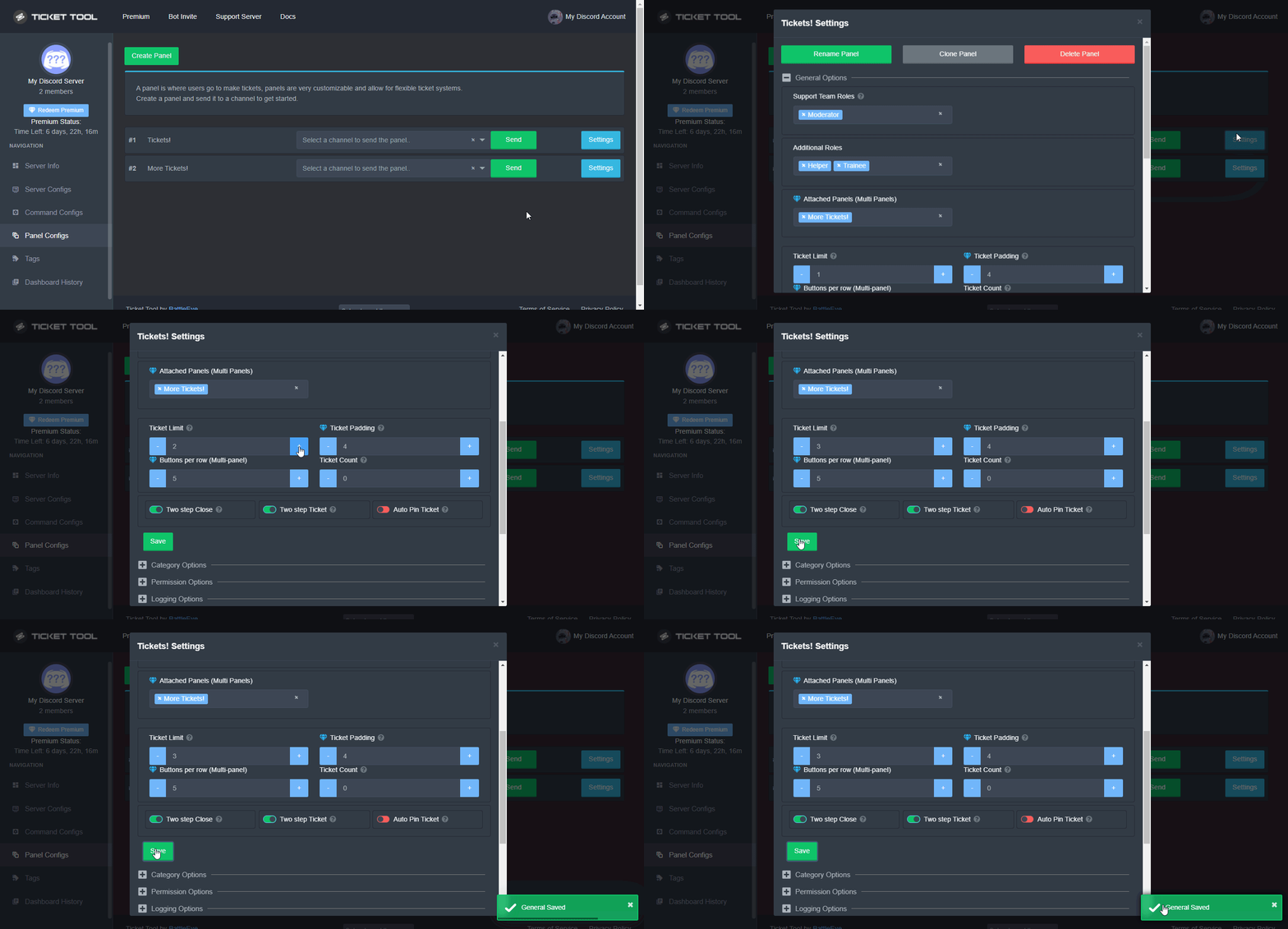
Unlike the regular Ticket Limit, the global limit will limit the amount of tickets a user can create at the same time for ALL Panels. When a ticket is closed again, the limit resets for that user.
To customize it head over to your Dashboard ➞ Server Configs ➞ Global Ticket Limit
Note:
This is not a limit for how many tickets a user can open at all times or how many tickets you can have open on the server in total. This is just a limit per user for open tickets.
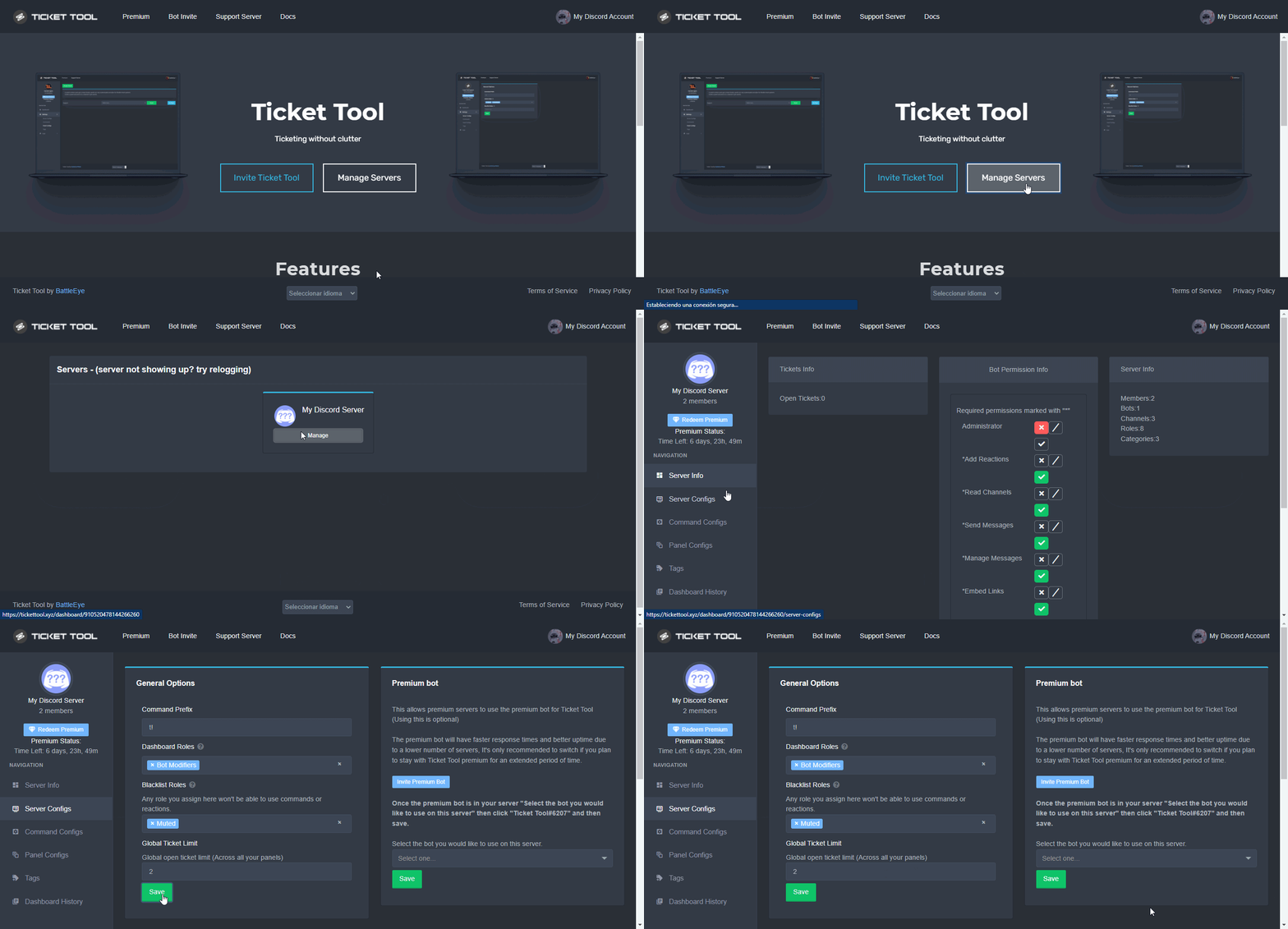 shut bolt
Those are the 2 types of limits and how to update them
shut bolt
jade topaz
why cant it be free?
It's part of full customization, main feature of our premium plan
 digital topaz
The ticket tool bot in our server suddenly can't see any of the ticket channels it created but it shows the bot as still being online, any idea why this would occur?
scenic plinth
digital topaz
The ticket tool bot in our server suddenly can't see any of the ticket channels ...
Can I get the server ID you are experiencing this issue with?
digital topaz
scenic plinth
Can I get the server ID you are experiencing this issue with?
847855494106447942
scenic plinth
digital topaz
847855494106447942
Alright, be right back!
Are you utilizing the premium bot?
digital topaz
Yes
scenic plinth
We are getting reports of issues with premium having issues currently, I will let you know if something changes, however I believe this to be occurring with whatever issue is currently arising. I apologize I do not have an immediate fix!
digital topaz
All good, just wanted to know if it was a known issue or a first occurrence. 👍
jade topaz
my premium bot is offline
digital topaz
jade topaz
my premium bot is offline
Kenzy said they're getting reports of issues with premium
jade topaz
😠
digital topaz
Kenzy, if this helps: Shard 1 is having issues, Shard 6 is not
ours just came back online as Shard 8 and works 🙂
 mystic fable
How do you make a lot of buttons?
humble sequoiaBOT
Multipanels are a premium feature that allow for a single panel with multiple buttons to open different tickets.
How to create a Multipanel
Premium users can combine multiple panels into one multipanel.
First, find the IDs of each panel you wish to combine. You can find them in your Panel Configs in the Dashboard
Next, send the multipanel to a channel using $panel [id1] [id2] {id3} ....
e.g. $panel 1 2 4 17 35 to combine panels 1, 2, 4, 17 and 35.
Up to 25 panels may be combined.
 keen idol
I have followed those instructions and cannot seem to get two buttons to appear next to each other.
quasi cliff
That's premium
keen idol
Correct.
humble sequoiaBOT
For a more convenient use of multipanels, you can now combine panels on the dashboard. This will allow you to directly send the multipanel from the dashboard or via the $panel ID command.
Where can I find this?
You can find this setting on the Dashboard -> Panel Configs -> Settings -> General Options
Note: if you're attaching all the panels to a panel called English, don't include English in the attached panels box (If you do this, it will create duplicate)
This will put all buttons from all of your panels on one message. The message is the panel message from the panel you're combining these panels in.
Note: This is a premium feature
quasi cliff
Make sure you did all of this
quasi cliff
keen idol
I have followed those instructions and cannot seem to get two buttons to appear ...
Make sure to send the panel again as bot won't update it
keen idol
I've sent it over and over after modification after modification.
I cannot figure out what is happening.
quasi cliff
Do you have buttons enabled on both the panels
keen idol
1 on the first. 1 on the second.
quasi cliff
Does it send first panel when you try to send panel