#🆘│community-support
1 messages · Page 410 of 1
 neat tree
 crimson void
 jade topaz
$update
jade topaz
$update
Outage ..
jade topaz
$update
neat tree
متى يشتغل
jade topaz
crimson void
Outage ..
Im aware now, thanks!
 iron nightBOT
Gave +1 Rep to @crimson void
crimson void
neat tree
ليش
فيه مشكله بسيطه و راح تنحل بالسيرفرات
neat tree
مطولة؟
crimson void
بأمانه ماعندي علم بس المطوّر يشتغل عليها ان شاءالله ^
jade topaz
Premium is back up!
 humble sequoiaBOT
Update your discord App
Buttons are a relatively new addition to discord and don't work with some older versions of the app.
Please verify that you have the latest version of discord, by going to the app or play store.
Discord for the  App Store
Discord for the  Play Store
jade topaz
@neat tree ^^
 crimson void
jade topaz
Premium is back up!
crimson void
jade topaz
Premium is back up!
Not fully work
neat tree
note: i am up-to-date
jade topaz
Resend the panel then.
neat tree
i can't
jade topaz
Premium is experiencing issues. Standby.
jade topaz
neat tree
i can't
Why?
neat tree
there is +400 reaction on it
jade topaz
And?
neat tree
@crimson void اشرح له ياخي ان انا عندي 400 رياكشن على الرسالة كيف اخليها تروح كذا
jade topaz
Whats the ETA on premium?
neat tree
neat tree
<@971175151934775316> اشرح له ياخي ان انا عندي 400 رياكشن على الرسالة كيف اخليها...
والبوت كان شغال اول
jade topaz
No ETA as of yet.
Damn, feelsbad dude
bruh how the fuck is primary bot up and not premium
im paying money
crimson void
jade topaz
And?
He didn't wanna lose all the reactions..
jade topaz
Paying good money for this too
crimson void
jade topaz
im paying money
You're not premium
jade topaz
😹
crimson void
jade topaz
Yes i am bro
 coral terrace
neat tree
والبوت كان شغال اول
coral terrace
neat tree
والبوت كان شغال اول
معوض
jade topaz
I dont have the role but i literally have the premium bot
We are sorry for the inconvenience
why would i care about a discord role
If only they knew top, if only they knew

🤫
neat tree
coral terrace
معوض
تشوف الشغل اتعطل 😂
jade topaz
jade topaz
why would i care about a discord role
We are sorry. But we can’t do anything about it.
crimson void
عشان بس اشرحلك البوت يشتغل على اكثر من خادم بس ماعليش حظك سيء الخادم اللي طفى فيه .. فيه سيرفرك
 shut bolt
jade topaz
is there an ETA or nah
shut bolt
jade topaz
is there an ETA or nah
We are currently checking the issue
neat tree
crimson void
عشان بس اشرحلك البوت يشتغل على اكثر من خادم بس ماعليش حظك سيء الخادم اللي طفى في...
الحين البوت اشتغل بس لما اكتب كوماند مايفتح
crimson void
neat tree
الحين البوت اشتغل بس لما اكتب كوماند مايفتح
عارف لأن ضغط البنق حقه مرتفع بشكل.. اوعدك تنحل بأقرب وقت ان شاءالله
neat tree
crimson void
عارف لأن ضغط البنق حقه مرتفع بشكل.. اوعدك تنحل بأقرب وقت ان شاءالله
هل فيه وقت معين
crimson void
neat tree
هل فيه وقت معين
للأسف
jade topaz
shut bolt
We are currently checking the issue
Bot seems to be online but is causing some issues to many.
It randomly went down.
 fallow ingot
jade topaz
I dont have the role but i literally have the premium bot
fallow ingot
jade topaz
I dont have the role but i literally have the premium bot
Hi, you were given the premium role. Thanks for supporting ticket tool :)
shut bolt
jade topaz
Bot seems to be online but is causing some issues to many.
Yup, I'm aware of that, thanks 
iron nightBOT
Gave +1 Rep to @sleek bolt
crimson void
Hi @jade topaz, you were given the premium role. Thanks for supporting ticket tool 🙂
iron nightBOT
Gave +1 Rep to @sullen dirge
jade topaz
fallow ingot
Hi, you were given the premium role. Thanks for supporting ticket tool :)
thanks cutie
iron nightBOT
Gave +1 Rep to @fallow ingot
fallow ingot
yup, anytime.
jade topaz
fallow ingot
yup, anytime.
Tyty
crimson void
jade topaz
Tyty

jade topaz
crimson void
<a:b_babypouting:941623068391002132>
oops haha, thank YOU
iron nightBOT
Gave +1 Rep to @crimson void
iron nightBOT
Gave +1 Rep to @west locust
 restive solar
Oooof so is the bot back online, the announcement says a server died after it was back up?
 swift sandal
humble sequoiaBOT
swift sandal
humble sequoiaBOT

You can check our documentation here.
You can also check #573205317870157855 for the basic setup.
Our documentation contains all the info you need about the bot to be able to setup and configure the bot however you like.
jade topaz
When i invite the bot for a new server, it doesn't pop up at manage servers. I've refreshed a couple of times but i'm still unable to manage the server i want. Anyone knows how to fix this?
humble sequoiaBOT
Don't see your server in the dashboard?
You will possibly need to relog. Look below to see steps on how to relog.
How to relog in the Dashboard.
First, you will need to go to the dashboard. Once your there, click on your avatar on the top right. after you clicked it, you will see button that says Logout. You must click that. Once you have logged out, you can log back in.
Note:
You need one of these 3 things to access the dashboard.
1. Server Owner (Level: 6)
2. Server Administrator (Level: 4)
3. Dashboard Role (Level: 2)
:warning: You can check your level using $level on your Discord Server
User permission level with Ticket Tool
@User is permission level: 0 (User)
```» *If it shows that your permission is **0**, you don't have any of the above **3 things** to manage the dashboard.*


**See the GIF below on how to relog:**
 gilded verge
Hey, please check 
jade topaz
Thx!
 past basin
whats wrong ?
 gilded verge
use $debug and send link what bot send
past basin
gilded verge
hm, looks fine... wait please
Please try my perms: https://cdn.discordapp.com/attachments/776680605517742090/972156942766211194/2022-05-06_17-20-51.mp4
and try again
btw, what you trying to do?
past basin
closing a ticket
i give the permissions you did last time
but i will check it out again
gilded verge
oh, then please check if there are appropriate permissions in the ticket closing button
Dashboard->Panel Configs->Panel Settings->Expand Button Options->Close Ticket Settings
 gilded verge
oh, then please check if there are appropriate permissions in the ticket closing...
gilded verge
gilded verge
oh, then please check if there are appropriate permissions in the ticket closing...
hm, you're guild owner so it shouldn't apply to you 😐
so i can be absolutely sure it's about bot perms
past basin
i checked it but its how it is in the clip
also got 1 role assigned called 'bots' but that one got the same perms
gilded verge
I found something like this  :
:
+ Ticket Tool is missing permissions to work properly, check the mentioned permissions by the bot in the channel, in the category, and in the role. You can use $debug as a help tool.```I wonder if you could take me to the server so I can take a peek at what's going on,
what do u think?
past basin
ye sure
gilded verge
in DM's please
past basin
i deleted the ticket now by channel settings so
gilded verge
The problem has been fixed, and finally it turned out that it was related to the permissions in the category
 lyric night
Tickets are only viewable by the person who created it and the service roles right?
jade topaz
lyric night
Tickets are only viewable by the person who created it and the service roles rig...
Yeah, and any Admins
You can also add people
lyric night
So I don't need to change anything involving permissions for the @ everyone role?
 quasi pine
lyric night
Tickets are only viewable by the person who created it and the service roles rig...
quasi pine
lyric night
Tickets are only viewable by the person who created it and the service roles rig...
ik this is off topic but love ur pfp and username
jade topaz
lyric night
So I don't need to change anything involving permissions for the @ everyone role...
Nope
humble sequoiaBOT

You are in #💬│general-chat
:flag_us: English only
General chat for anything/everything SFW.
:warning: Please use #🆘│community-support or #🎫│make-a-ticket if you need help with the bot
lyric night
quasi pine
ik this is off topic but love ur pfp and username
Thank you!
iron nightBOT
Gave +1 Rep to @quasi pine
lyric night
I'm just confused as won't everyone have that role and therefore be able to see that channel?
Or does that get taken care of by the bot
jade topaz
What do you mean?
You can select which roles have access to tickets via the dashboard
$kv
humble sequoiaBOT
How to hide tickets from everyone
Head over to your Dashboard ➞ Panel Configs ➞ Settings ➞ Permission Options ➞ Edit Everyone Roles Opened Permissions

NOTE that @everyone can type aswell if it has permissions to send messages
jade topaz
^^
past basin
Also is there a way to get an automatic message by opening a ticket 'command message' ?
jade topaz
Im not sure there is. If it was, it would surely be a premium feature!
Well
You can customize what it says upon opening of the ticket.
humble sequoiaBOT
The panel message is where people react to make a ticket. To customize it head over to your Dashboard --> Panel Configs -> Settings -> Panel Options -> Edit Panel Message
 jade topaz
Oh wait, if you have premium. You can add an automated message by pressing Add Field.
lyric night
I'm using this bot as a way to verify age of members joining. So when they open ticket and the channel is created only they and the service roles should be able to see the channel.
Say 5 people open tickets and are awaiting verification. They will all have @ everyone role by default. So I'm just making sure they can't see other people's open tickets when all those channels have the @ everyone permission to view channels.
If that makes sense
fallow ingot
humble sequoia
This is panel message not ticket message
humble sequoiaBOT
The Ticket Message is the first message sent by the bot in a new ticket. To customise it head over to your Dashboard ➞ Panel Configs ➞ Settings ➞ Ticket Options ➞ Edit Ticket Message
 jade topaz
Oh yes, my bad.
jade topaz
fallow ingot
This is panel message not ticket message
Sorry there. I just woke up and got confused
fallow ingot
it's fine
fallow ingot
lyric night
I'm using this bot as a way to verify age of members joining. So when they open ...
Unless you changed @everyone permissions to see tickets, or added everyone as an additional role or support role this shouldn't happen.
fallow ingot
past basin
Also is there a way to get an automatic message by opening a ticket 'command mes...
Only via the ticket message or tags which would have to be ran by server staff or the user themselves.
lyric night
So the bot bypasses discord permissions
fallow ingot
what do you mean by that?
lyric night
I'm not sure lol
fallow ingot
If you mean the category's perms, yes.
It creates a channel with the perms set in the Dashboard.
lyric night
The channel that's created by the bot, going into channel permissions it shows everyone along with the service roles. So I would assume everyone with the @ everyone role could see all open tickets channels
fallow ingot
No no, that's there for every channel perms. It just allows you to edit everyone's perms quicker i think.
lyric night
Which I know would effectively negate the point of the app so
fallow ingot
mhm
 lyric night
Bot I mean
fallow ingot
its there for every channel.
lyric night
Okay thanks for the help!
fallow ingot
No problem, happy to help!
jade topaz


 crimson void
تأكد من اللوحه اختار سيرفرك باللوحه و شوف تحت صورة سيرفرك وش مكتوب
 neat ruin
اااا انا عضو مو مالك السيرفر 😅
crimson void
neat ruin
اااا انا عضو مو مالك السيرفر 😅
اها , خله يتأكد هو كلمه عن المشكله هذي .
neat ruin
تمام
 robust sandalBOT
crimson void
تأكد من اللوحه اختار سيرفرك باللوحه و شوف تحت صورة سيرفرك وش مكتوب
robust sandalBOT
crimson void
تأكد من اللوحه اختار سيرفرك باللوحه و شوف تحت صورة سيرفرك وش مكتوب
 JG101
JG101
Make sure of the painting choose your server in the board and see under the picture of your server what is written
 Arabic (ar) → English (en)
robust sandalBOT
neat ruin
والله مدري<:Yakuza__wshtbee:829007528322269264>
JG101
Arabic (ar) → English (en)
robust sandalBOT
neat ruin
والله مدري<:Yakuza__wshtbee:829007528322269264>
JG101
I swear I don't know
Arabic (ar) → English (en)
crimson void
 loud turtle
I don't know arabic. That's all
jade topaz
loud turtle
I don't know arabic. That's all
Then do it in #🤖│bot-spam and don’t interrupt while support is being given.
loud turtle
jade topaz
Then do it in <#910978476536905738> and don’t interrupt while support is being g...
Don't tell me what to do
jade topaz
This is support. Please dont argue.
gilded verge
Please stop, go to #💬│general-chat, thank you 
fallow ingot

 velvet flame
Hi, Just curious if it's possible to rename the ticket with the person who's created the tickets username instead of open-xxxx close-xxxx etc
humble sequoiaBOT
The ticket name is the default channel name of all tickets. To edit it, go to your Dashboard > Panel Configs > Settings > Ticket Options. There you can edit the channel name of opened and closed tickets. You can also use variables in there.

 Note: This is a premium feature
gilded verge
Note: This is a premium feature
gilded verge
Hey, check
iron nightBOT
Gave +1 Rep to @gilded verge
 mild cargo
how can i make a suggestion in #💡│suggestions
mild cargo
gilded verge
Hey, check <:this:894279341108772914>
thanks
iron nightBOT
Gave +1 Rep to @gilded verge
mild cargo
gilded verge
Please stop, go to <#509238831547940885>, thank you <:pleading:87797081403568948...
thanks
 slender minnow
mild cargo
how can i make a suggestion in <#921732979586375690>
slender minnow
mild cargo
how can i make a suggestion in <#921732979586375690>
hey there, you can share your suggestions through #💡│suggestions
Just add the command s!suggest before your suggestion to post it in the channel 🙂
humble sequoiaBOT
How to make Ticket Tool ping a role
To make ticket tool ping a role when a ticket is opened, go to the Dashboard -> Panel Configs -> Settings -> Ticket Options -> Ticket Message -> Message Text and do this:
{@Role name} This is case sensitive and the role must have @mentions enabled
 gilded verge
@jade topaz, Nobody can't, currently this option (auto-close) is not available
jade topaz
Oh
gilded verge
@jade topaz, Ofc, you can take free trial. Then please go to Dashboard->and click Start 7 day Trial 
https://tickettool.xyz/manage-servers
 limber tusk
hey, how would I be able to add a text or message inside a ticket by the bot? like State your Roblox username and wait patiently for a person to try-out you. If been more than 3 hours, ping @Trial Masters . Make sure to leave a comment on who trialed you and how they did it. Thanks!
humble sequoiaBOT

⚠️ You're in the wrong place
We provide support for @pseudo glen discord bot and cannot help you with whatever issue you have.
- We don't know which Support Team you should contact to get this issue resolved, and unfortunately we won't be able to accurately tell you.
If you don't have any further questions regarding our bot Ticket Tool, please close this ticket
gilded verge
@limber tusk, check
limber tusk
oh
limber tusk
gilded verge
<@717712413981540423>, check <:this:894279341108772914>
where do i ask then?
crimson void
gilded verge
<@717712413981540423>, check <:this:894279341108772914>
He asked how to add text message by the way ^
gilded verge
wait... i missed something, my mistake 
crimson void
It's okay
humble sequoiaBOT
The Ticket Message is the first message sent by the bot in a new ticket. To customise it head over to your Dashboard ➞ Panel Configs ➞ Settings ➞ Ticket Options ➞ Edit Ticket Message
iron nightBOT
Gave +1 Rep to @crimson void
limber tusk
thanks @gilded verge
jade topaz
i cant use close command
fallow ingot
Any error?
jade topaz
it says "This Channel Isnt A Ticket" Even If I Set It
fallow ingot
You can't set a channel a ticket.
jade topaz
idk how it works
fallow ingot
You create a ticket then you can use commands inside a ticket.
Have you created a panel?
jade topaz
Yes
fallow ingot
Have you sent the panel?
jade topaz
Yea
fallow ingot
 jade topaz
Apologies.
fallow ingot
Did you create a ticket then run commands?
jade topaz
i created it some days ago
fallow ingot
What's the server ID?
crimson void
fallow ingot
Did you create a ticket then run commands?
Can we move them to a ticket? Or no need ?
fallow ingot
Sure, why not.
humble sequoiaBOT
━━ moved to ticket ━━
 south lake
Is there a way to DM transcript on demand? I have seen automated premium option, but I want to send transcript only to selected ppl, not everyone whenever the ticket is closed or deleted.
fallow ingot
No sadly that’s not possible
south lake
that's a shame, thanks
jade topaz
south lake
that's a shame, thanks
You can always suggest it by doing s!suggest {suggestion} in #🤖│bot-spam though 
 gloomy grotto
is ticket bot working rn
 high oyster
gloomy grotto
is ticket bot working rn
high oyster
gloomy grotto
is ticket bot working rn
Yes it should be if you are having issues #🎫│make-a-ticket and I will help you there.
 molten badger
why its not the server on my dashboard? i relogged and nothing :((
humble sequoiaBOT
Don't see your server in the dashboard?
You will possibly need to relog. Look below to see steps on how to relog.
How to relog in the Dashboard.
First, you will need to go to the dashboard. Once your there, click on your avatar on the top right. after you clicked it, you will see button that says Logout. You must click that. Once you have logged out, you can log back in.
Note:
You need one of these 3 things to access the dashboard.
1. Server Owner (Level: 6)
2. Server Administrator (Level: 4)
3. Dashboard Role (Level: 2)
:warning: You can check your level using $level on your Discord Server
User permission level with Ticket Tool
@User is permission level: 0 (User)
```» *If it shows that your permission is **0**, you don't have any of the above **3 things** to manage the dashboard.*


**See the GIF below on how to relog:**@molten badger, Check
 warm jacinth
How I get the premium bot if I pay for it
humble sequoiaBOT
The first thing you will need to do is invite the premium bot, an invite can be found here
Once the bot is in your server we will head to the dashboard and manage your server. When you are managing your server, you want to head into "Server Configs" then click the drop down menu under "Select the bot you would like to use on this server" then click "Ticket Tool#6207" and then save.
 gilded verge
Please check
jade topaz
warm jacinth
How I get the premium bot if I pay for it
Yes! So, follow what miro said but you can also get a free trial before paying so that you can see how pro @humble sequoia really is!
humble sequoiaBOT
You can check our documentation here.
You can also check #573205317870157855 for the basic setup.
Our documentation contains all the info you need about the bot to be able to setup and configure the bot however you like.
warm jacinth
I did do that
jade topaz
@jade topaz ^^ Follow that! Regarding your question in #💬│general-chat
warm jacinth
We pay for it now
jade topaz
Guys how do you put a ticket in your server?
humble sequoiaBOT
You can check our documentation here.
You can also check #573205317870157855 for the basic setup.
Our documentation contains all the info you need about the bot to be able to setup and configure the bot however you like.
jade topaz
jade topaz
Thanks you
No worries! Thank you for using Ticket Tool! :D
iron nightBOT
Gave +1 Rep to @gentle vortex
warm jacinth
So I pay for the premium version how I add the premium bot
humble sequoiaBOT
The first thing you will need to do is invite the premium bot, an invite can be found here
Once the bot is in your server we will head to the dashboard and manage your server. When you are managing your server, you want to head into "Server Configs" then click the drop down menu under "Select the bot you would like to use on this server" then click "Ticket Tool#6207" and then save.
jade topaz
@warm jacinth
warm jacinth
Thx
jade topaz
:)
gilded verge
humble sequoia
?
jade topaz
gilded verge
?
They asked how to invite the premium bot.
gilded verge
gilded verge
Please check <:this:894279341108772914>
<t:1653176160>
but okay xD
jade topaz
gilded verge
<:this:894279341108772914> <t:1653176160>
but okay xD
I know, but they asked how to invite the bot.
Not my issue, i just say what i need to say.
warm jacinth
Thx it helped @jade topaz
iron nightBOT
Gave +1 Rep to @sleek bolt
jade topaz
:))
 upper sigil
How to remove the ticket number after creating the ticket
 humble sequoiaBOT
Help Options
$help commands - Information on commands
$help setup - Information on bot setup
$help faq - Frequently asked questions
jade topaz
Uhm
humble sequoiaBOT
The ticket name is the default channel name of all tickets. To edit it, go to your Dashboard > Panel Configs > Settings > Ticket Options. There you can edit the channel name of opened and closed tickets. You can also use variables in there.
Note: This is a premium feature
 distant crescent
+avatar
gilded verge
distant crescent
+avatar
#🤖│bot-spam (if you want use commands)
jade topaz
upper sigil
How to remove the ticket number after creating the ticket
You can run $rename in your ticket to change the name. But you must have premium to change the default names.
upper sigil
Ok thanks
upper sigil
jade topaz
But do refer to the tag as it can help!
Can u tell me on how to do it?
jade topaz
upper sigil
Can u tell me on how to do it?
Do you have premium?
upper sigil
No
jade topaz
Unless you have premium. You cant do it.
Sorry! But feel free to get the free 7 day trial!
upper sigil
Can I refer to the tag?
upper sigil
Ohh ok
 languid crane
hey, i dont have premium...i made 2 basic tickets and assigned allowed roles to the buttons, but my friend helping me test still cant open a ticket...
 jade topaz
languid crane
hey, i dont have premium...i made 2 basic tickets and assigned allowed roles to ...
jade topaz
languid crane
hey, i dont have premium...i made 2 basic tickets and assigned allowed roles to ...
Hey! You may wanna make sure that your friend doesnt have any of the disabled roles!
languid crane
jade topaz
Hey! You may wanna make sure that your friend doesnt have any of the disabled ro...
disabled? there are none
jade topaz
Ok! Are you sure that Ticket Tool has a higher role than they allowed roles?
languid crane
I just added 3 allowed roles.
languid crane
jade topaz
Ok! Are you sure that Ticket Tool has a higher role than they allowed roles?
yes! I have a bot role that's just underneath the admin
jade topaz
May you please delete the panel from the channel and send it again?
Im sure it would fix the issue!
Also, may you run $debug and send the result?
languid crane
jade topaz
Ok! Are you sure that Ticket Tool has a higher role than they allowed roles?
So to explain in more detail- I made a basic ticket for verification (as it says in the photo). I have Mee6 auto assign a role upon accepting the community rules- that role allows you to type and react in the ticket channel. So she has the appropriate role, and ive added that same role to the allowed list, but she keeps getting that message. Also, I did delete and resend the message 3 times
oh. how do i do that
jade topaz
languid crane
oh. how do i do that
Just type $debug in a commands channel and send me the screenshots of the result.
Id like to make sure that its not bot permissions causing this error.
languid crane
jade topaz
@languid crane Could you also just resend the panel?
jade topaz
languid crane
https://discordapp.com/channels/509192800865353738/662692902245498910/9777313643...
Im not in your server. Meaning i cant see the link.
languid crane
jade topaz
<@807487673643827221> Could you also just resend the panel?
i did resend the panel like i said
languid crane
?
jade topaz
languid crane
?
May i get an invite to your server please? In dms if you can!
languid crane
oh!
jade topaz
languid crane
oh!
Right, so unfortunately i cannot help you as I cannot identify the root cause at this moment in time. I advise you to open a ticket in #🎫│make-a-ticket
languid crane
You weren't able to open a ticket right
jade topaz
Its rather late for me right now, i hope you understand.
jade topaz
languid crane
You weren't able to open a ticket right
No
the server i wanna make a panel in
languid crane
jade topaz
Its rather late for me right now, i hope you understand.
I understand. I already have a ticket open I made a few hours ago. Thanks
iron nightBOT
Gave +1 Rep to @sleek bolt
jade topaz
isnt showing up in dashboard
jade topaz
languid crane
I understand. I already have a ticket open I made a few hours ago. Thanks
Ahh! Make sure that you have the Support team only set as 
jade topaz
jade topaz
how do i do that
Log out of the dashboard and then back in
i did it
it didnt work fml ;-;
Refresh your page
languid crane
jade topaz
Ahh! Make sure that you have the *Support team only* set as <:Off:96755730792594...
So I went to server config and i saw that @ everyone is blacklisted- i guess that is because i have all my channels private. Im a little confused because everyone gets auto assigned a role, so it should override? Do you know if there's anyway around this?
humble sequoiaBOT
⚠️ You're in the wrong place
We provide support for @pseudo glen discord bot and cannot help you with whatever issue you have.
- We don't know which Support Team you should contact to get this issue resolved, and unfortunately we won't be able to accurately tell you.
If you don't have any further questions regarding our bot Ticket Tool, please close this ticket
jade topaz
I can only help you with bot related queries! Im unaware or your channel permissions
jade topaz
languid crane
So I went to server config and i saw that @ everyone is blacklisted- i guess tha...
If @ everyone is blacklisted. Then that means no one will able to make a ticket
languid crane
jade topaz
If @ everyone is blacklisted. Then that means no one will able to make a ticket
okay i removed it and saved. it should work now!
jade topaz
Try blacklisting certain roles
languid crane
jade topaz
Try blacklisting certain roles
nah ill just leave it open
gilded verge
languid crane
https://discordapp.com/channels/509192800865353738/662692902245498910/9777313643...
Note: From your $debug command I can see that the bot has all the required permissions, so this point is fine
jade topaz
languid crane
nah ill just leave it open
Resolved ^^
jade topaz
gilded verge
Note: From your `$debug` command I can see that the bot has all the required per...
All resolved :)
jade topaz
languid crane
thanks so much!
No worries! :)
^^ Everything above is resolved. It turns out that @ everyone was blacklisted meaning no one was able to open a ticket. All fixed by removing it from the blacklisted category!
 feral night
Is there a way to make it so there is a cool-down between the same user opening tickets?
jade topaz
feral night
Is there a way to make it so there is a cool-down between the same user opening ...
You can set a global ticket limit which determines how many tickets a user can open!
humble sequoiaBOT
Unlike the regular Ticket Limit, the global limit will limit the amount of tickets a user can create at the same time for ALL Panels. When a ticket is closed again, the limit resets for that user.
To customize it head over to your Dashboard ➞ Server Configs ➞ Global Ticket Limit
Note:
This is not a limit for how many tickets a user can open at all times or how many tickets you can have open on the server in total. This is just a limit per user for open tickets.
 jade topaz
@feral night Refer to
feral night
jade topaz
You can set a global ticket limit which determines how many tickets a user can o...
Yeah that’s set to one but there’s no way to add a cooldown?
jade topaz
feral night
Yeah that’s set to one but there’s no way to add a cooldown?
Nope
You can always suggest it though :)
jade topaz
fml the stuff isnt working still
jade topaz
why do i get this error when i try to send it

but when i look at perms
tthe bot has all perms
and i tried to send a differnt embed to teh same one
and it worked
 raw skiff
renamw logs still not working
{ticket.user} -The @user who is assigned to the Ticket
does this mean the person who claimed ticket?
literally only reason i bought premium was to keep track of claims and cant even do that 
jade topaz
is it possible to have a form and once the form is completed it opens a ticket?
like for example
Question
Pizza Hamburger Spaghetti Pork
and u select one and it would make a ticket
raw skiff
on god
on god
1 year later still dont have 😠
rename logs doesnt work with claiming 😠 no way to track it? 😢
 latent granite
How do I get a premium code for the bot?
@jade topaz
shut bolt
latent granite
How do I get a premium code for the bot?
<@456226577798135808>
Please don't ping anyone to get support
Did you buy a subscription?
Or are you looking to buy one?
raw skiff
who pinged me
latent granite
shut bolt
Or are you looking to buy one?
I need year subscription
@shut bolt
 prime bridgeBOT
 ! Ice Comment#0001 has been warned!

 They were notified via dms.
humble sequoiaBOT
Ticket Tool Premium
Get premium at https://tickettool.xyz/premium
Manage your subscriptions at https://tickettool.xyz/subscriptions
Why Premium?
Premium lets you customize the bot just how you want it. It also helps keep the bot running.
shut bolt
Check the premium page, there you can buy the yearly subscription
humble sequoiaBOT

Ticket Tool avatar/status Customisation
@pseudo glen is like another discord user; you can't control its avatar icon or status, and we cannot change it for a specific server.
However, on your server, you can change the bot's nickname
 latent granite
How can I change the name and bot photo for premium subscription ?...
humble sequoiaBOT
⚠️ Please read the messages previously sent by our team ⚠️
 rapid dock
I added a ticket to my server and I have it displayed, but other users do not
jade topaz
rapid dock
I added a ticket to my server and I have it displayed, but other users do not
What do you mean by this?
rapid dock
jade topaz
What do you mean by this?
when the participants of my server log into the channel with a ticket bot, they do not see anything. although I have a visible link to the bot
jade topaz
rapid dock
when the participants of my server log into the channel with a ticket bot, they ...
What link are you talking about?
We operate with panels.
Make sure the participants have View Channel set as 
rapid dock
jade topaz
We operate with panels.
Yes, I'm talking about the panel
jade topaz
rapid dock
Yes, I'm talking about the panel
So, they can see the channel but not the panel?
Mind sending me an invite to your server in dms? Id like to check this out myself. @rapid dock
In my dms-
I even said in my dms-
 silk chasm
rapid dock
Yes, I'm talking about the panel
silk chasm
rapid dock
Yes, I'm talking about the panel
Also send in my dms aswell
silk chasm
jade topaz
What is the need? Im assisting them.
2 is better than 1
jade topaz
No.
silk chasm
jade topaz
No.
wait are two people not allowed to help?
silk chasm
jade topaz
When one person is helping, no other should interrupt.
who said that?
jade topaz
silk chasm
who said that?
Ask any member of the staff team and they will say the same thing. Now, allow me to assist the person.
silk chasm
jade topaz
Ask any member of the staff team and they will say the same thing. Now, allow me...
did you apply as support team
jade topaz
silk chasm
did you apply as support team
This is #🆘│community-support Please keep support related topics here
silk chasm
jade topaz
This is <#776680605517742090> Please keep support related topics here
SUPPORT team is a support relate topic..
jade topaz
This channel is used to help members who are experiencing issues//have questions with the Ticket tool bot. Please use the appropriate channels for your questions.
silk chasm
jade topaz
This channel is used to help members who are experiencing issues//have questions...
okay ill refrain from trying to cause a scene and you can work your magic
 kind hawk
silk chasm
who said that?
kind hawk
silk chasm
who said that?
Basic public étiquette. When someone is assisting someone,do not interrupt or jump over or send dm to the person. This could result in a mute or kick or ban
 teal river
why is the 6 months premium more expensive than 3 2 months of premium?
silk chasm
teal river
why is the 6 months premium more expensive than 3 2 months of premium?
Because 6 months is a longer time period than 2 or 3 months of premium
silk chasm
kind hawk
Basic public étiquette. When someone is assisting someone,do not interrupt or ju...
i apologise
teal river
silk chasm
Because 6 months is a longer time period than 2 or 3 months of premium
no, im talking about unboat, why is it 500k less if u bought 3 2 months?
silk chasm
teal river
no, im talking about unboat, why is it 500k less if u bought 3 2 months?
What is unboat?
loud turtle
Unbelievaboat
loud turtle
teal river
no, im talking about unboat, why is it 500k less if u bought 3 2 months?
Its lower period
humble sequoiaBOT
⚠️ You're in the wrong place
We provide support for @pseudo glen discord bot and cannot help you with whatever issue you have.
- We don't know which Support Team you should contact to get this issue resolved, and unfortunately we won't be able to accurately tell you.
If you don't have any further questions regarding our bot Ticket Tool, please close this ticket
jade topaz
@teal river Refer to
 quiet bridge
@fallow ingot u mean as in i log out n in or kick the bot out n in?
gilded verge
he meant this:
humble sequoiaBOT
Don't see your server in the dashboard?
You will possibly need to relog. Look below to see steps on how to relog.
How to relog in the Dashboard.
First, you will need to go to the dashboard. Once your there, click on your avatar on the top right. after you clicked it, you will see button that says Logout. You must click that. Once you have logged out, you can log back in.
Note:
You need one of these 3 things to access the dashboard.
1. Server Owner (Level: 6)
2. Server Administrator (Level: 4)
3. Dashboard Role (Level: 2)
:warning: You can check your level using $level on your Discord Server
User permission level with Ticket Tool
@User is permission level: 0 (User)
```» *If it shows that your permission is **0**, you don't have any of the above **3 things** to manage the dashboard.*


**See the GIF below on how to relog:**ok thnx
 fast sable
pong
 chilly crypt
Hi I wonder how i make a button that opens a ticket
humble sequoiaBOT

The new Discord Buttons allow for a much smoother and convenient experience. They reduce lag and work much better than emojis. With ticket tool you can edit all the buttons however you like! Buttons can show emojis, text and can have 4 different colors.
Where can I edit them?
Dashboard ➞ Panel Configs ➞ Settings ➞ Button Options ➞ Setting
 chilly crypt
Ok thanks
jade topaz
chilly crypt
Ok thanks
No worries! Thanks for using ticket tool! :D
iron nightBOT
Gave +1 Rep to @chilly crypt
 pallid mirage
help me please, I don't know how to add the Ticket Tool on my server and I'm Brazilian, I only speak English, if someone helps me please
pallid mirage
thanks
humble sequoiaBOT
You can check our documentation here.
You can also check #573205317870157855 for the basic setup.
Our documentation contains all the info you need about the bot to be able to setup and configure the bot however you like.
jade topaz
^^
pallid mirage
it's not that I don't know how to add it to the server, I don't know how to put Ticket Tools in some chat ;-;
jade topaz
pallid mirage
it's not that I don't know how to add it to the server, I don't know how to put ...
i see! One second!
pallid mirage
thank you again
jade topaz
Alright!
jade topaz
pallid mirage
thank you again
So, you will want to go onto your dasboard. Then Panel Configs and then Press Create Panel
pallid mirage
thanks I'll try
jade topaz
pallid mirage
thanks I'll try
Alright! Come back here and leave me an @ if you need any more support! :D
pallid mirage
thank you if you can rate me, you tell me how?!
jade topaz
pallid mirage
thank you if you can rate me, you tell me how?!
What do you mean?
pallid mirage
example: if the service was good, then I go to a serto chet and thank you etc...
jade topaz
pallid mirage
example: if the service was good, then I go to a serto chet and thank you etc...
#📈│reviews if you wish! :D
Im not staff but it does help alot!
pallid mirage
ok, bye, have a good day, or good night kk
jade topaz
Yep! You too! Thanks for using Ticket Tool! :D
This is support.
Not suggestions. To suggest something, do s!suggest (suggestion) in #🤖│bot-spam
 stone sail
Oh sorry, my bad
jade topaz
No worries! Thanks for using Ticket Tool :)
 queen radish
Is there a way to have categories in tickets? Such as users can open tickets for things such as "user reports", "general support" etc.
jade topaz
queen radish
Is there a way to have categories in tickets? Such as users can open tickets for...
hello!
humble sequoiaBOT
How to set the open category
To set a open category go to the Dashboard -> Panel Configs -> Settings -> Category Options -> Category Open
 jade topaz
@queen radish Refer to
 stone swallow
Hello! I am having some struggles with getting my !remove command to actually remove people. I have it set up that only the highest rank possible within my discord is given the "Allowed" exception, but anytime I try to remove someone otherwise from a ticket, it does not seem to be working?
jade topaz
stone swallow
Hello! I am having some struggles with getting my !remove command to actually re...
Are you sure you are using the correct prefix?
stone swallow
Yes, it even confirms me in the ticket that so-and-so is removed, but it does not actually remove them
jade topaz
I see! Make sure that the person you are trying to remove doesnt have any of the support roles! :D
stone swallow
Ah let me see
They do, is the only work-around to create another ticket that only allows other particular support roles?
jade topaz
stone swallow
They do, is the only work-around to create another ticket that only allows other...
What do you mean by that?
stone swallow
I have tickets organized to only include particular people. For example, player disputes will then include anyone I have given the Mediator tag to. But if I want to remove a Mediator from the ticket, possibly because the ticket itself is about said person, I need to be able to do that.
jade topaz
stone swallow
I have tickets organized to only include particular people. For example, player ...
Unfortunately that is not an option!
stone swallow
Ah so I do need to make an entirely new button option
jade topaz
stone swallow
Ah so I do need to make an entirely new button option
Yes, for expample. A staff report ticket. Where staff roles are not marked as support roles!
stone swallow
What does "Additional Roles" mean under the General Options section of a button?
jade topaz
Im not quite sure about that! You may want to wait for another Support representative to help out!
slender minnow
stone swallow
What does "Additional Roles" mean under the General Options section of a button?
Hey bex, the additional role is something similar to support roles iirc.
So its like if you have a support staff in your server which is added to the support list, and then there's a intern staff team as well in your server which is not added to your support list, instead added to your additional roles list. In this way, you can configure what perms your support staff and intern support staff can have.
Long story short incase you aren't interested in reading something this big, its just a support team option but labelled as additional roles to allow you to change the perms without affecting the perms for support roles ^^
stone swallow
Got it. Thanks for the help!
slender minnow
no problem ^^
iron nightBOT
Gave +1 Rep to @sleek bolt
 spiral trout
hi can someone help me?
humble sequoiaBOT
We would love to help you, but if you don't tell us what you need help with we can't help you :(
spiral trout
ok so
jade topaz
queen radish
Thanks a ton <@456226577798135808> :3
No worries! :D
spiral trout
ok so i made a private server ... and i don't know how to put my muzzle on the channel ... and how to make it work
humble sequoiaBOT
⚠️ You're in the wrong place
We provide support for @pseudo glen discord bot and cannot help you with whatever issue you have.
- We don't know which Support Team you should contact to get this issue resolved, and unfortunately we won't be able to accurately tell you.
If you don't have any further questions regarding our bot Ticket Tool, please close this ticket
 hybrid finch
dashboard link?
humble sequoiaBOT
shut bolt

 little ridge
Hi everybod . I would like to get some help. Yesterday at ca 16:00 i have spend 7000Euro to my Daxio account ,but unforunately it haven't arrived yet--
What can I do then? Thank you!
humble sequoiaBOT
⚠️ You're in the wrong place
We provide support for @pseudo glen discord bot and cannot help you with whatever issue you have.
- We don't know which Support Team you should contact to get this issue resolved, and unfortunately we won't be able to accurately tell you.
If you don't have any further questions regarding our bot Ticket Tool, please close this ticket
gilded verge
@little ridge,
 pseudo ore
how i put two bottons in a Panel?
humble sequoiaBOT
For a more convenient use of multipanels, you can now combine panels on the dashboard. This will allow you to directly send the multipanel from the dashboard or via the $panel ID command.
Where can I find this?
You can find this setting on the Dashboard -> Panel Configs -> Settings -> General Options
Note: if you're attaching all the panels to a panel called English, don't include English in the attached panels box (If you do this, it will create duplicate)
This will put all buttons from all of your panels on one message. The message is the panel message from the panel you're combining these panels in.
 Note: This is a premium feature
iron nightBOT
Note: This is a premium feature
iron nightBOT
Gave +1 Rep to @humble sequoia
 native geyser
Hi I have the bot in the server I am in I have access to add bots and I have reloged into my dashboard and the server isn’t coming up
humble sequoiaBOT
Don't see your server in the dashboard?
You will possibly need to relog. Look below to see steps on how to relog.
How to relog in the Dashboard.
First, you will need to go to the dashboard. Once your there, click on your avatar on the top right. after you clicked it, you will see button that says Logout. You must click that. Once you have logged out, you can log back in.
Note:
You need one of these 3 things to access the dashboard.
1. Server Owner (Level: 6)
2. Server Administrator (Level: 4)
3. Dashboard Role (Level: 2)
:warning: You can check your level using $level on your Discord Server
User permission level with Ticket Tool
@User is permission level: 0 (User)
```» *If it shows that your permission is **0**, you don't have any of the above **3 things** to manage the dashboard.*


**See the GIF below on how to relog:**How do I add a level as I added the bot
fallow ingot
Are you the server owner?
native geyser
No
fallow ingot
Are you an administrator, or have a dashboard role?
native geyser
I have 0 levels it says
fallow ingot
You’ll need to contact the server-owner or someone with admin to give you a role with admin or add you as a dashboard role below:
humble sequoiaBOT
Any role you put there will have full access to the ticket tool dashboard. The server owner and users with admin permissions already have access to the dashboard.
Be careful of which roles to put here

 candid kraken
hey
If i go to my server it onlly gives me 1 of my 2 servers to actually edit. How can i fix it?
 fossil lichen
HELLO
humble sequoiaBOT
Don't see your server in the dashboard?
You will possibly need to relog. Look below to see steps on how to relog.
How to relog in the Dashboard.
First, you will need to go to the dashboard. Once your there, click on your avatar on the top right. after you clicked it, you will see button that says Logout. You must click that. Once you have logged out, you can log back in.
Note:
You need one of these 3 things to access the dashboard.
1. Server Owner (Level: 6)
2. Server Administrator (Level: 4)
3. Dashboard Role (Level: 2)
:warning: You can check your level using $level on your Discord Server
User permission level with Ticket Tool
@User is permission level: 0 (User)
```» *If it shows that your permission is **0**, you don't have any of the above **3 things** to manage the dashboard.*


**See the GIF below on how to relog:**@candid kraken Refer to
jade topaz
fossil lichen
HELLO
Hello! How may we help?
candid kraken
jade topaz
<@923247362384736298> Refer to <:this:894279341108772914>
Well first of all cool name Bart🤫😅 thanks man!🙏
iron nightBOT
Gave +1 Rep to @sleek bolt
jade topaz
candid kraken
Well first of all cool name Bart🤫😅 thanks man!🙏
Your welcome! and ty! :D
candid kraken
jade topaz
Your welcome! and ty! :D
Bart as name->🐐
jade topaz
:D
why do i get this error when i try to send it
but when i look at perms
tthe bot has all perms
and i tried to send a differnt embed to teh same one
and it worked
 fallow ingot
Read what the error says.
run $debug in the channel your sending the panel to and send the link here :)
 fallow ingot
That’s the channel you are trying to send the panel to?
jade topaz
yea
fallow ingot
Odd.
jade topaz
fr
fallow ingot
Try sending it agai
jade topaz
ok
fallow ingot
Again*
 jade topaz
okay
jade topaz
fallow ingot
hmm that was quick
lol i can share my screen and do it
humble sequoiaBOT
━━ moved to ticket ━━
fallow ingot
I don’t see your ticket
fallow ingot
That’s what you are supposed to do lol.
humble sequoiaBOT
The first thing you will need to do is invite the premium bot, an invite can be found here
Once the bot is in your server we will head to the dashboard and manage your server. When you are managing your server, you want to head into "Server Configs" then click the drop down menu under "Select the bot you would like to use on this server" then click "Ticket Tool#6207" and then save.
fallow ingot
@jade topaz ^
 spark steppe
How long is it supposed too take for the tool too come in email I’ve got confirmation email order ID and everything
gilded verge
spark steppe
How long is it supposed too take for the tool too come in email I’ve got confirm...
Hey, you can open a ticket to contact the Staff in #🎫│make-a-ticket,
and when you send a message in the ticket please wait patiently
jade topaz
Bonsoir comment je fais pour mettre le nom de la personne pour l'ouverture d'un ticket pas de numero svp
robust sandalBOT
jade topaz
Bonsoir comment je fais pour mettre le nom de la personne pour l'ouverture d'un ...
 ! miroxik74
Good evening how I do to put the name of the person for the opening of a ticket no number please
French (fr) → English (en)
Hé, voulez-vous dire qu’au lieu de chiffres, le nom de l’utilisateur qui a ouvert le ticket devrait être affiché? Un exemple est dans la capture d’écran ci-dessous.
Polish (pl) → French (fr)
gilded verge
@jade topaz
 jade topaz
yes
humble sequoiaBOT
The ticket name is the default channel name of all tickets. To edit it, go to your Dashboard > Panel Configs > Settings > Ticket Options. There you can edit the channel name of opened and closed tickets. You can also use variables in there.
Note: This is a premium feature
robust sandalBOT
Pour être sûr, je vais vous demander si votre serveur est premium? Parce qu’il doit être premium, sinon vous ne pouvez pas changer le nom du ticket dans les paramètres du panneau
Polish (pl) → French (fr)
Si le serveur a premium, la variable que vous devez mettre est : {author.name}
Polish (pl) → French (fr)
gilded verge
@jade topaz
 jade topaz
ok je vais essayer

 blissful adder
Have app ticket tool?
 wintry violet
blissful adder
Have app ticket tool?
wintry violet
blissful adder
Have app ticket tool?
Why?
blissful adder
There is a Ticket tool app
wintry violet
blissful adder
There is a Ticket tool app
where
blissful adder
I want to join the support team, how can I do that?
kind hawk
blissful adder
I want to join the support team, how can I do that?
You can apply when the applications are opened. Keep an eye on #📣│server-news
wintry violet
wintry violet
Why do you show that?
@kind hawk
blissful adder
Owww
kind hawk
wintry violet
<@76182535192715264>
Please dont @tag the staff.
wintry violet
kind hawk
Please dont @tag the staff.
Why?
gilded verge
wintry violet
Why?
#546557408902905896, rule 4
kind hawk
wintry violet
Why?
Because it's against the #546557408902905896 and we get tagged a lot in tickets.
wintry violet
kind hawk
Because it's against the <#546557408902905896> and we get tagged a lot in ticket...
Ok
kind hawk
wintry violet
Why do you show that?
Also, use $debug on your server, with a channel you share with TicketTool, and adjust the permissions accordingly.
$perms
humble sequoiaBOT
ᅠ
@pseudo glen requires the following permissions:
Add Reactions
Read Channels
Send Messages
Manage Messages
Embed Links
Attach Files
Read History
Manage Roles
Manage Channels
To change the role permissions, you can go to your Discord Server ➞ Server Settings ➞ Roles ➞ @Ticket Tool
To change the channel permissions, you can go to your Channel Settings ➞ Permissions ➞ Ticket Tool
ᅠ
Note:
You can give Ticket Tool Administrative Permissions instead of all the permissions listed above, but it's entirely optional and NOT necessary.
 blissful adder
I'm from Brazil, can you speak Portuguese?
kind hawk
No sorry, but you can open a Ticket in #🎫│make-a-ticket in your language, someone will be with you shortly.
kind hawk
blissful adder
How can I join the ticket support team?
When the applications re-open. It will be specified in #📣│server-news, keep an eye out 🙂
blissful adder
will this take time?
 primal mortar
 humble sequoiaBOT
━━ moved to ticket ━━
 chrome pilot
 wheat torrent
How can I do auto transcript for the ticket?
wheat torrent
How can I do auto transcript for the ticket?
u need premium plan
Panel Configs -> Settings -> Logging Options
you'll see Auto Save Transcript
jade topaz
blissful adder
will this take time?
Yes-
 chrome pilot
jade topaz
chrome pilot
jade topaz
button or embed ?
If button : Panel Config -> Settings -> Button Options -> choose button you want to remove -> turn it off
If message : Panel Config -> Settings -> Moderator Options -> Moderator Message
jade topaz
chrome pilot
button or embed ?
all ig XD i want so if i confirm close it will automatically close the ticket
no more support team ticket controls
chrome pilot
oh
jade topaz
jade topaz
all ig XD i want so if i confirm close it will automatically close the ticket
Disable 2 step ticket in the general options menu of a panel!
jade topaz
jade topaz
Disable *2 step ticket* in the general options menu of a panel!
tysm works
chrome pilot
nvm

 chrome pilot
Ticket Option
chrome pilot
what av ?
jade topaz

chrome pilot
🎫・{count}・{author.name}
chrome pilot
jade topaz
where to put

 ebon marsh
I just came across a server that uses Ticket Tool and they have multiple buttons for different types of support attached to their panel, like the image shows
However, when I edit the panel, I don't see an option to add multiple buttons, how would I go about doing this? Anyone know?
I also don't see anything about it when I edit buttons
 jade topaz
$buttons
humble sequoiaBOT
The new Discord Buttons allow for a much smoother and convenient experience. They reduce lag and work much better than emojis. With ticket tool you can edit all the buttons however you like! Buttons can show emojis, text and can have 4 different colors.
Where can I edit them?
Dashboard ➞ Panel Configs ➞ Settings ➞ Button Options ➞ Setting
ebon marsh
I'm looking to add multiple buttons to create different types of tickets, one for Developers, one for General Support, one for Player Reports, etc all for the same panel
I might be dumb but I just don't see anything regarding how to make multiple buttons to the "Create Ticket" setting
If that makes any sense, I'm running on little sleep
humble sequoiaBOT
For a more convenient use of multipanels, you can now combine panels on the dashboard. This will allow you to directly send the multipanel from the dashboard or via the $panel ID command.
Where can I find this?
You can find this setting on the Dashboard -> Panel Configs -> Settings -> General Options
Note: if you're attaching all the panels to a panel called English, don't include English in the attached panels box (If you do this, it will create duplicate)
This will put all buttons from all of your panels on one message. The message is the panel message from the panel you're combining these panels in.
Note: This is a premium feature
teal river
ebon marsh
I'm looking to add multiple buttons to create different types of tickets, one fo...
You need premium
ebon marsh
Thank you, Miroxik!
jade topaz
brah why everytime i change it just changes back to default
 chrome pilot
jade topaz
brah why everytime i change it just changes back to default
chrome pilot
jade topaz
brah why everytime i change it just changes back to default
did u save it ?
jade topaz
yea
chrome pilot
i see
 chrome pilot
u active premium ?
jade topaz
ah need premium
chrome pilot
yes
jade topaz
brah
chrome pilot
premium will turn red diamond to blue diamond 
jade topaz
donate me one
chrome pilot
why
jade topaz
jk
chrome pilot
u can transfer
jade topaz
u can share?
chrome pilot
nuuuu
jade topaz

 craggy geyser
They would have it on a different server
 vestal island
Wassup
chrome pilot
wtf
jade topaz
heh
craggy geyser
jade topaz
<@926643835419910184> i didnt buy premium da frik
As long as you have dashboard access to a server with premium you get the role
jade topaz
:i
vestal island
hello!
jade topaz
This is support.
 ivory urchin
Hello dear community and dear support team,
I have a question.
How can I reset the tickets?
So that they start again with ticket #0001?
Best regards
MotoMarv
loud turtle
ivory urchin
Hello dear community and dear support team,
I have a question.
How can I reset ...
In general options in your panel settings, you could change your ticket count
ivory urchin
loud turtle
In general options in your panel settings, you could change your ticket count
I'm sorry I can't find it...🤔 😅
loud turtle
 ivory urchin
Ah found it.
Thanks very much😁
jade topaz
Hey @loud turtle
humble sequoiaBOT
How do I save transcript to a channel?
To save transcripts to a channel go to the Dashboard -> Panel Configs -> Settings -> Logging Options -> Transcript Channel
 jade topaz
Really appreciate that thankyou @loud turtle
 burnt nymph
hello i am having problem with my account every time that i try to go on my solderlaund account i get straight away the map
i have new bunnie from yesterday that i can not stake
humble sequoiaBOT
⚠️ You're in the wrong place
We provide support for @pseudo glen discord bot and cannot help you with whatever issue you have.
- We don't know which Support Team you should contact to get this issue resolved, and unfortunately we won't be able to accurately tell you.
If you don't have any further questions regarding our bot Ticket Tool, please close this ticket
burnt nymph
so shall i speack to who?
loud turtle
Not here apparently
 tulip folio
Hey, are you able to change the bot name & image if you buy premium ?
jade topaz
tulip folio
Hey, are you able to change the bot name & image if you buy premium ?
Nope!
tulip folio
jade topaz
Nope!
Thanks for the answer
iron nightBOT
Gave +1 Rep to @sleek bolt
blissful adder
Hi
humble sequoiaBOT
Ticket Tool avatar/status Customisation
@pseudo glen is like another discord user; you can't control its avatar icon or status, and we cannot change it for a specific server.
However, on your server, you can change the bot's nickname
loud turtle
You could have done this
 sand smelt
I got some ticket tool premium codes which im not using anymore (they range from 1week to a few days) just dm if you want them im not tryna self promote of anything im legit just giving them away cuz theyre no more use to me
dont ban me pls and ty lmfao
craggy geyser
That sort of thing could go in #💬│general-chat. And as long as you are just giving away codes and not requiring they join your server or anything like that, there is no issue
 vivid hill
i have an issue, sometimes the ticket bot creates a ticket with everyone on my server can see... any fix for that?
 prisma otter
I think that there’s an issue onyour panel configs,i advice you to maybe chek the dashboard
jade topaz
$kv
humble sequoiaBOT
How to hide tickets from everyone
Head over to your Dashboard ➞ Panel Configs ➞ Settings ➞ Permission Options ➞ Edit Everyone Roles Opened Permissions
NOTE that @everyone can type aswell if it has permissions to send messages
jade topaz
@vivid hill Refer to :D
vivid hill
ty
jade topaz
:D
 brave summit

Hi , for some reason members can't create tickets
I've given the '@ everyone' permissions to the category
Please help
humble sequoiaBOT
━━ moved to ticket ━━
 trail vessel
What’s the command to remove people from a ticket?
gilded verge
trail vessel
What’s the command to remove people from a ticket?
Command $remove @user
jade topaz
^ Thats if they dont have a support role.
 thorny gulch
how do i make it to where
a regular member opens a ticket
they can't ping the support role
or just any roles in general
humble sequoiaBOT
━━ moved to ticket ━━
jade topaz
humble sequoia
━━ moved to ticket ━━
no need for that.
 fair surge
hi guys, have this problem, the ticket tool is disconnecting from the server.... actually it is from this section that is disconnecting... any help, please...

the bot has all permissions enable
I don't know what is causing it
gilded verge
fair surge
hi guys, have this problem, the ticket tool is disconnecting from the server.......
Hey, I'd like to try to help you, but I need to understand the problem. Could you please send a video or show me on a voice chat by sharing the screen what is happening?
<t:1653346028:R> okay nvm, now I'm going to offline, I'm sorry. Please wait for help from someone else.
 coarse rain
\
humble sequoiaBOT
Help Options
$help commands - Information on commands
$help setup - Information on bot setup
$help faq - Frequently asked questions
loud turtle
Wrong command
humble sequoiaBOT
Any role you assign as a blacklisted role won't be able to use commands or reactions.
Selecting a blacklisted role
Go to your Dashboard ➞ Server Configs. There you will find the option to select blacklisted roles.
Note: Don't forget to save.

 icy gull
Is there a way to like self host this bot or no?
craggy geyser
Not yet. But it's planned
icy gull
craggy geyser
Not yet. But it's planned
OOo OK
 dry kelp
Hey all, I want to create a tag that my support team can use to direct players to create a ticket in a different channel. However, when I try to enter the #channel-name in the Tag's message, it comes out as normal text and not the actual channel to direct to. How can I fix this? Seems like the variables only list the channel the tag is being used in.
Right now the message is "Looking for assistance? Please create a ticket in #🎫support-request and a Server Moderator will help you."
jade topaz
dry kelp
Hey all, I want to create a tag that my support team can use to direct players t...
Do ‘<#channelid>’ and it should mention the channel
iron nightBOT
Gave +1 Rep to @sleek bolt
jade topaz
No worries :)
icy gull
craggy geyser
Not yet. But it's planned
follow up question, when its available to selfhost will it be allowed to be like added into already existing bots or no
like custom discord bots
craggy geyser
icy gull
follow up question, when its available to selfhost will it be allowed to be like...
No idea. It might not be quite self hosted tbh. Definitely whitelable. Individual details haven't been worked out yet
 weak oasis
 brave flower
i had ordered acc, and it's not work, all of it
brave flower
i had ordered acc, and it's not work, all of it
this is ticket tool bot support, maybe you’re on the wrong server
 viscid hatch
Hi all how to make from this https://prnt.sc/8C9JPGNM-bzw to this https://prnt.sc/gGgHQMjW2sAU

 fallow ingot
It’s automatic unless you turned off two step ticket
viscid hatch
its on
 fallow ingot
viscid hatch
Hi all how to make from this https://prnt.sc/8C9JPGNM-bzw to this https://prnt.s...
fallow ingot
viscid hatch
Hi all how to make from this https://prnt.sc/8C9JPGNM-bzw to this https://prnt.s...
and you don’t get this once you click close?
viscid hatch
nop i get the support team ticket controls
fallow ingot
Oh alright, I’m catching onto what you are meaning now.
viscid hatch
but its only for 1 channel other 4 working fine
fallow ingot
We no longer have that anymore
We only have the support team ticket controls.
This is an old version

 viscid hatch
dam ur awesome cheeers
fallow ingot
no problem
jade topaz
can i make the tickettool so that whenever a member creates it my account also get tagged?
 gilded verge
 placid lake
<@768144576946110475>
placid lake
<@768144576946110475>
#546557408902905896, rule 4
gilded verge
jade topaz
can i make the tickettool so that whenever a member creates it my account also g...
Do you mean something like in the screenshot?

 gilded verge
placid lake
Why does that show me?
gilded verge
placid lake
Why does that show me?
This will be displayed every time you want to reopen a new ticket too quick again.
humble sequoiaBOT
━━ moved to ticket ━━
humble sequoiaBOT
How to disable the premium bot
To disable the premium bot you will have to go to the Dashboard ➞ Server Configs ➞ Premium bot ➞ And on the right-hand side select the primary free bot in the drop down menu.
Premium features will still work on the normal bot.
 jade topaz
Refer to @floral wing
jade topaz
gilded verge
Do you mean something like in the screenshot?
yes!
gilded verge
Then please check:
humble sequoiaBOT
Within all the messages the bot's sends (both embeds and text) you can mention either channels, roles, or even users, these mentions will only send a notification to the user if they are used within a text field, e.g: a role mentioned in an embed won't ping at all the users who have that role.
For mentioning a role you can use one out of three options:
{@Role Name} ➞ Which is Case Sensitive.
{RoleID} ➞ Replace RoleId with the Id of the role you are trying to ping.
<@&RoleID> ➞ Discord's native syntax to ping roles.
<#ChannelID> ➞ Mention a channel by its ID.
<@UserID> ➞ Mention a user by its ID.
The Ticket Message is the first message sent by the bot in a new ticket. To customise it head over to your Dashboard ➞ Panel Configs ➞ Settings ➞ Ticket Options ➞ Edit Ticket Message
gilded verge
Add the mention you want to the Message Text

and if you don't know where to get the ID, take a look below.:
humble sequoiaBOT
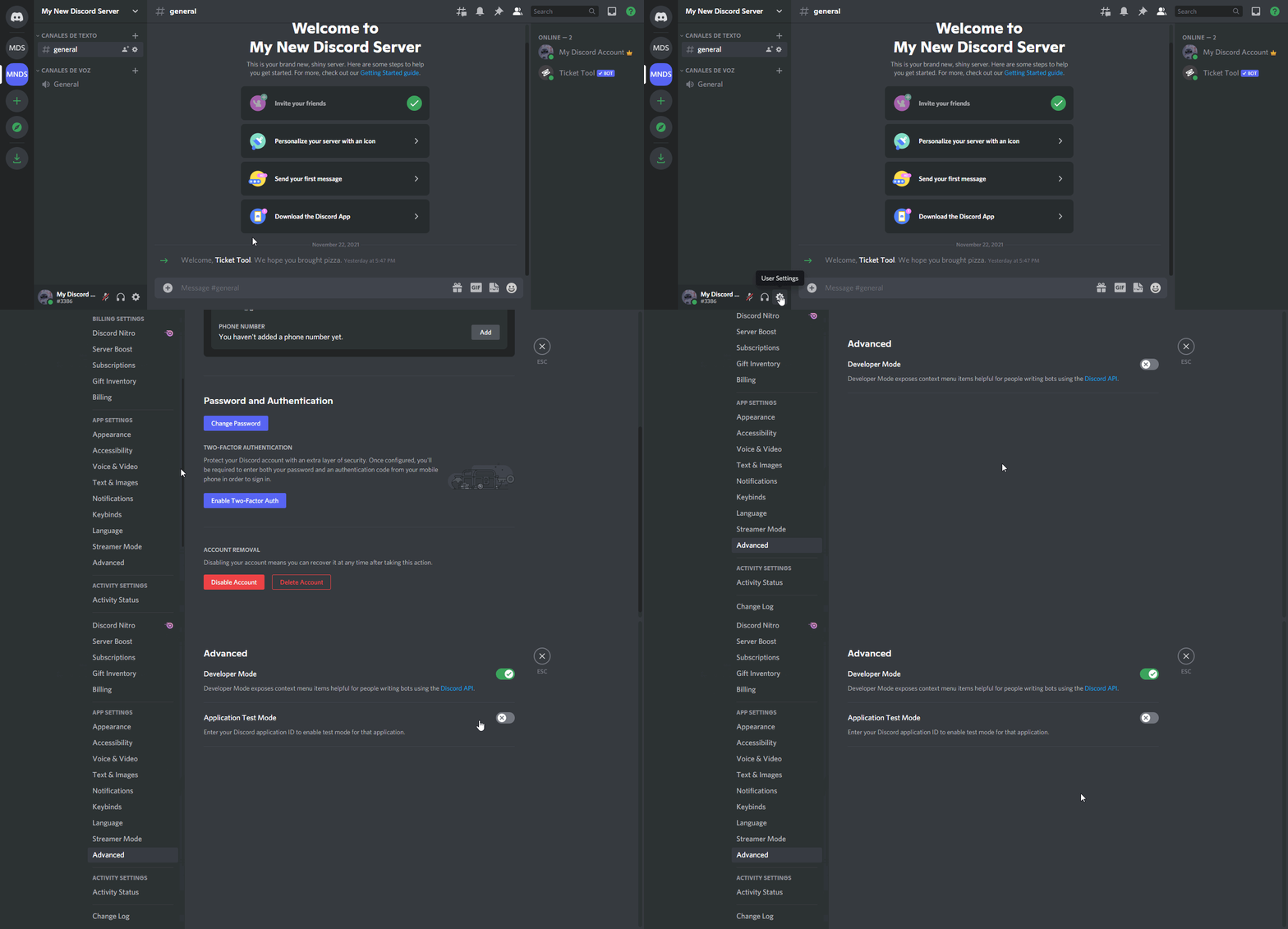
How to turn on developer mode
To enable developer mode do the following:
[:desktop: PC] go to Settings ➞ Advanced ➞ Developer mode
[:mobile_phone: Mobile] go to Settings ➞ Appearance ➞ Developer mode
Developer Mode allows you to get the ID of any channel, user, role, or server.
VIA the ID, you can use them with <> alongside their corresponding format to mention a channel/role/user...
They're mostly used to mention channels, users, or roles in Embeds
Formats
Channels: <#ID> ➝ #🤖│bot-spam
Users: <@ID> ➝ @humble sequoia
Roles: <@&ID> ➝ <@&642118166243311646>
 jade topaz
and to get the id refer below!
gilded verge
All of this should help you
jade topaz
$idcommand
humble sequoiaBOT
How do I get the ID of Roles/Channels/Emojis?
Ticket Tool has a useful command that helps you get the ID of various things like channels, roles, emojis and your server.
Just use the command $id <#channel/@role/:emoji:>. Now copy everything, including the brackets <...>, to your dashboard (or wherever you want it)
If you want the server ID, just use $id.
Examples:
Server ID: $id ➝
509192800865353738
Roles: $id @Role ➝@humble sequoia
Channel: $id #channel ➝#🤖│bot-spam
User: $id @user ➝@copper owl
Emoji: $id➝

 jade topaz
gilded verge
Do you mean something like in the screenshot?
jade topaz
gilded verge
Do you mean something like in the screenshot?
do i need premium for this?
gilded verge
jade topaz
is this meant for me?
everything written above is for you:
Up to 250 characters are free:

 gilded verge
jade topaz
do i need premium for this?
gilded verge
jade topaz
do i need premium for this?
jade topaz
gilded verge
<:this:894279341108772914>
.
i type in $id in my server but its not popping up
gilded verge
wait for short video ~ETA 3 minutes
<@&642118166243311646>
<@&642118166243311646>
gilded verge
jade topaz
i type in $id in my server but its not popping up
Try this: \
Like on video
jade topaz
it worked thanks
i love you so much man no homo
@gilded verge how can i turn off the setting where members cant close the ticket
gilded verge
So you don't want them to be able to close the ticket, right?
jade topaz
yes indeed
gilded verge
okay, please wait
jade topaz

gilded verge
Dashboard->Panel Configs->Panel Settings->Expand Button Options->Close Ticket Settings
and do as in the screenshot:

 grand yacht
Y'a un helpeur français?
gilded verge
of course you don't need to add the everyone role as it is below, you can do just that, and you'll be fine
 jade topaz
apprecat eit
jade topaz
grand yacht
Y'a un helpeur français?
$frticket
humble sequoiaBOT

L'équipe du support Français
Cher client,
Si vous avez besoin d'aide, ouvriez un ticket pour le support Français s'il vous plaît.
Allez au #🎫│make-a-ticket et tapez sur le button contenant l'emoji 🇫🇷
jade topaz
But we also do have members of the french support team that may be able to help you! :D
grand yacht
Merci
 robust marten
How do I cancel my subscription?
humble sequoiaBOT
━━ moved to ticket ━━
gilded verge
Go to Dashboard -> click Active-Manage -> click Manage Subscriptions -> enter the e-mail that was provided during the purchase -> go to your e-mail box to get a one-time login password -> choose your subscription -> click Cancel subscription
oof, okay, nvm 😐
fallow ingot
robust marten
How do I cancel my subscription?
Refer to your ticket #978713278874267719
jade topaz
Or just look at what miro said.
fallow ingot
gilded verge
oof, okay, nvm 😐
😬☹️
fallow ingot
jade topaz
Or just look at what miro said.
Ultimately there choice just means they have been helped by two people 🙃
 willow sequoia
Hi guys. I have a question!
willow sequoia
willow sequoia
Hi guys. I have a question!
Can i put the create ticket button on every images which i upload?
chrome pilot
willow sequoia
Can i put the create ticket button on every images which i upload?
can't
willow sequoia
Any other way around?
chrome pilot
You can use Embed to send a imagine in embed
^ this is premium feature
jade topaz
This is the support channel!
 inland kernel
Hey, it wont lemme manage my server. Im trying to create a few ticket panels. However, the server i want them in wont show up in server management
humble sequoiaBOT
Don't see your server in the dashboard?
You will possibly need to relog. Look below to see steps on how to relog.
How to relog in the Dashboard.
First, you will need to go to the dashboard. Once your there, click on your avatar on the top right. after you clicked it, you will see button that says Logout. You must click that. Once you have logged out, you can log back in.
Note:
You need one of these 3 things to access the dashboard.
1. Server Owner (Level: 6)
2. Server Administrator (Level: 4)
3. Dashboard Role (Level: 2)
:warning: You can check your level using $level on your Discord Server
User permission level with Ticket Tool
@User is permission level: 0 (User)
```» *If it shows that your permission is **0**, you don't have any of the above **3 things** to manage the dashboard.*


**See the GIF below on how to relog:**Check this out :)
inland kernel
Ok thanks
fallow ingot
no problem
inland kernel
Hey er, it still dont show up for some reason. Like at all. Ive invited it multiple times and it still wont show up.
I have all the perms. I can try and get owner on the server but if taht dont work what should i do?
Ive also logged out and in
fallow ingot
Can you run $level and check what permissions you have with the bot?
inland kernel
K ill try that now
fallow ingot
Awesome, let me know how it goes
inland kernel
Ahh see it now. I got ownership and relogged again. Thanks for the help!
fallow ingot
Cool, no problem again.
 dull pulsar
Hey, I just came to ask a question I have added ticket took to my server and I want it to ping specific roles for example to ping staffs so they can respond faster instead of not pinging at all
Is there a way to do that?
humble sequoiaBOT
How to make Ticket Tool ping a role
To make ticket tool ping a role when a ticket is opened, go to the Dashboard -> Panel Configs -> Settings -> Ticket Options -> Ticket Message -> Message Text and do this:
{@Role name} This is case sensitive and the role must have @mentions enabled
fallow ingot
Check this out :) @dull pulsar
dull pulsar
Thanks!
fallow ingot
no problem
dull pulsar
Hey one more thing how do I make people with a role can see the tickets that gets created
humble sequoiaBOT
How to let support team see into a ticket
About support roles
A support role lets your support team see into tickets with out having to add them manually to each and every ticket.
You can add as many support roles as you like per panel.
NOTE that the way discord works all admins can see into tickets regardless of this.
How to set a support role
To set a Support role go to the Dashboard -> Panel Configs -> Settings -> General Options -> Support Team Roles.

NOTE that the support role will not be able to see into tickets that are already created..
gilded verge
@dull pulsar, can help you
dull pulsar
Found it thanks 😃
 sterile girder
how can i get ticketsd in my server to people create
humble sequoiaBOT
You can check our documentation here.
You can also check #573205317870157855 for the basic setup.
Our documentation contains all the info you need about the bot to be able to setup and configure the bot however you like.
If Ticket Tool support requested this debug give them this link:
https://discordapp.com/channels/509192800865353738/662692902245498910/978799388249948160
Bot Permissions ឵ ឵឵ ឵ ឵឵ ឵ ឵឵ ឵ ឵឵
✅ - Read Channels
✅ - Send Messages
✅ - Embed Links
✅ - Attach Files
✅ - Manage Roles
✅ - Manage Channels
✅ - Manage Messages
✅ - Read History
Channel Permissions ឵ ឵឵ ឵ ឵឵ ឵ ឵឵ ឵ ឵឵
✅ - Read Channels
✅ - Send Messages
✅ - Embed Links
✅ - Attach Files
✅ - Manage Roles
✅ - Manage Channels
✅ - Manage Messages
✅ - Read History
Server Information ឵ ឵឵ ឵ ឵឵ ឵ ឵឵ ឵ ឵឵ ឵ ឵឵
Channel name:
•community-support
Channel ID:
776680605517742090
Channel Count:
155/500
Server name:
Ticket Tool Support
Server ID:
509192800865353738
User Information ឵ ឵឵ ឵ ឵឵ ឵ ឵឵ ឵ ឵឵ ឵ ឵឵
User name:
ZenkiSnipez#7306
User ID:
881360877482303511
Permission Level:
0 - User ()
Bot Information ឵ ឵឵ ឵ ឵឵ ឵ ឵឵ ឵ ឵឵ ឵ ឵឵
Prefix:
$
Premium Status:
Lifetime - ["subV2","time"]
Current shard:
1
API Latency:
78
sterile girder
not letting me send my panel to my server
gilded verge
sterile girder
not letting me send my panel to my server
What you mean? Please show errors or something
sterile girder
 gilded verge
okay, then run $debug command on your server
wait... In the permissions, probably everything is fine, but I can see a error in the bot. You need to disable the premium bot.
humble sequoiaBOT
How to disable the premium bot
To disable the premium bot you will have to go to the Dashboard ➞ Server Configs ➞ Premium bot ➞ And on the right-hand side select the primary free bot in the drop down menu.
Premium features will still work on the normal bot.
gilded verge
now it is working?
 jade topaz
someone help
jade topaz
jade topaz
someone help
i also tried changing it's permissions, but that didn't work either.
slender minnow
@jade topaz try running $debug in the channel where you are trying to send the panel
slender minnow
jade topaz
https://discordapp.com/channels/509192800865353738/662692902245498910/9788416426...
Please give ticket tool the following perms 🙂
Send Messages
Embed Links
Attach Files
Manage Roles
Manage Channels
please give it these roles
shut bolt
jade topaz
still isn't working :/
Run debug again
 jade topaz
ok i think i know what to do now
 stiff valve
Hello, is there a pricecfor one time payment?
slender minnow
stiff valve
Hello, is there a pricecfor one time payment?
Hi, unfortunately there is no plan for lifetime premium. However, you can try checking out our annual and monthly plans.
stiff valve
slender minnow
Hi, unfortunately there is no plan for lifetime premium. However, you can try ch...
Interested in getting premium but the project owner want a lifetime premium. Will let them know ty
iron nightBOT
Gave +1 Rep to @slender minnow
 limpid cloud
i manually deleted some tickets, now it is not letting creators create another

 humble sequoiaBOT
⚠️ You're in the wrong place
We provide support for @pseudo glen discord bot and cannot help you with whatever issue you have.
- We don't know which Support Team you should contact to get this issue resolved, and unfortunately we won't be able to accurately tell you.
If you don't have any further questions regarding our bot Ticket Tool, please close this ticket
humble sequoiaBOT
FAQ: System Failure
- System Failure: @Ticket Tool Missing permission(s): PERMISSION(S)
+ Ticket Tool is missing permissions to work properly, check the mentioned permissions by the bot in the channel, in the category, and in the role. You can use $debug as a help tool.
- System Failure: Panel “XX” not found
+ The panel they are trying to interact with has been deleted.
- Failed: `Invalid Form Body components[X].components[X].emoji.id: Invalid emoji
+ The bot no longer has access to the emoji (external server) or the emoji has been deleted
- Failed: `Invalid Form Body components[X].components[X]: this is a required field
+ There is a certain necessary field you left blank. You will have to input a valid argument (most likely text) in the required field for ticket tool to continue functioning normally.
- System Failure: allMessages.users.sort is not a function
- System Failure: Unknown Webhook
- System failure: Service unavailable?
- System Failure: Internal Server Error
+ The bot has run into an issue, please try again as these are cases that tend to fail only once, if the problem is persistent, contact our support team
- Warning: Ticket Tool Failed to connect to it's database, please wait or try again.
+ There might be an issue with Ticket Tool, most likely a database issue, you'll have to wait a few minutes before creating another ticket. This is in place to prevent certain bugs to happen with tickets
@leaden fox refer to
 leaden fox
thank you
jade topaz
leaden fox
thank you
Equally, you could run $debug and send me a screenshot of the results!
jade topaz
I believe i got ghost pinged?
guys
i cant open the dashboard
when i open it tells my that u didnt invite the bot
plz help
chrome pilot
jade topaz
when i open it tells my that u didnt invite the bot
try relogging dashboard
jade topaz
i did
chrome pilot
give me screen shot
jade topaz
Hi everyone i need to add these buttons like general enquiry, collaboration request in ticket tool how can i do it
$buttons
humble sequoiaBOT
The new Discord Buttons allow for a much smoother and convenient experience. They reduce lag and work much better than emojis. With ticket tool you can edit all the buttons however you like! Buttons can show emojis, text and can have 4 different colors.
Where can I edit them?
Dashboard ➞ Panel Configs ➞ Settings ➞ Button Options ➞ Setting
jade topaz
Refer to @jade topaz
slender minnow
leaden fox
like these
Hi that message cannot be edited/removed. Its only visible to you.
Btw the bot's missing some perms, try running the debug command to fix it.
humble sequoiaBOT
How can I edit/disable the ephemeral message?
These pop ups can only be seen by the user who triggered a certain action, like creating a ticket. They cannot be edited or disabled, as they are a discord requirement that is set by the developer of any bot. The ephemeral messages can be removed by pressing the little blue Dismiss message text, or by restarting your discord client.
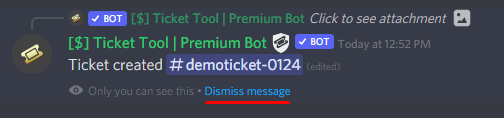 humble sequoiaBOT
⚠️ You're in the wrong place
We provide support for @pseudo glen discord bot and cannot help you with whatever issue you have.
- We don't know which Support Team you should contact to get this issue resolved, and unfortunately we won't be able to accurately tell you.
If you don't have any further questions regarding our bot Ticket Tool, please close this ticket
jade topaz
Please do not ping me for support.
chrome pilot
 pure jewel
How much is the price of boot prime and do you accept credit
pure jewel
How much is the price of boot prime and do you accept credit
$6 / Per Month
https://tickettool.xyz/premium
jade topaz
And, also refer to the tag above
pure jewel
Ok
jade topaz
chrome pilot
$6 / Per Month
https://tickettool.xyz/premium
Thats premium-
Not what he asked for @chrome pilot
chrome pilot
jade topaz
Thats premium-
some bot prime = premium lol
jade topaz
No? Do not provide any support if you dont know what to do.
chrome pilot
so he means paid for normal bot ?
pure jewel
Why so much expensive bot
jade topaz
pure jewel
Why so much expensive bot
Ticket tool is free. Premium is very cheap however.
^ for all the features it contains.
jade topaz
chrome pilot
so he means paid for normal bot ?
He is genuinely in the wrong place i think.
 pale pilot
Boot = bot
jade topaz
Teachh me this languagee
jade topaz
hey
humble sequoiaBOT
━━ moved to ticket ━━
jade topaz
humble sequoia
━━ moved to ticket ━━
Whoever initiated this is-
jade topaz
 queen wren
How to make ticket ping admin when opened?
queen wren
How to make ticket ping admin when opened?
$mentions
humble sequoiaBOT
Within all the messages the bot's sends (both embeds and text) you can mention either channels, roles, or even users, these mentions will only send a notification to the user if they are used within a text field, e.g: a role mentioned in an embed won't ping at all the users who have that role.
For mentioning a role you can use one out of three options:
{@Role Name} ➞ Which is Case Sensitive.
{RoleID} ➞ Replace RoleId with the Id of the role you are trying to ping.
<@&RoleID> ➞ Discord's native syntax to ping roles.
<#ChannelID> ➞ Mention a channel by its ID.
<@UserID> ➞ Mention a user by its ID.
slender minnow
jade topaz
$mentions
hi, they were helped through tickets ^^;
jade topaz
slender minnow
hi, they were helped through tickets ^^;
Which is stupid as you could of saved all that effort with just running $mentions
slender minnow
the user opened a ticket, which is why it was marked as taken to tickets 🙂
kind hawk
jade topaz
Whoever initiated this is-
Is?
kind hawk
jade topaz
Which is stupid as you could of saved all that effort with just running *$mentio...
THEY opened the ticket
jade topaz
Ok
humble sequoiaBOT
━━ moved to ticket ━━
kind hawk
Nothing else
jade topaz
kind hawk
We just type 'm2t' it just says the message
Im aware.
kind hawk
It does not open a ticket, it just says that the situation was fixed in a ticket
Please don't try to "bash" staff. We are here to help, not to annoy or "steal" help
 acoustic glade
hey, the ticket tool won't move any closed tickets to the designated category on our discord for the last 3-4 days. none of the settings have been changed, it just started random, some of you have the same problem?
 shadow nexus
hello
humble sequoiaBOT
You are in #💬│general-chat
:flag_us: English only
General chat for anything/everything SFW.
:warning: Please use #🆘│community-support or #🎫│make-a-ticket if you need help with the bot
jade topaz
refer to @shadow nexus
crimson void
acoustic glade
hey, the ticket tool won't move any closed tickets to the designated category on...
Are the categories near 50 channels ? Per category .
 bold ermine
how i created a ticket, you can catch my server
 mystic hound
jade topaz
refer to <:this:894279341108772914> <@969328731355246602>
mystic hound
jade topaz
refer to <:this:894279341108772914> <@969328731355246602>
This is community support..
jade topaz
mystic hound
This is community support..
Yes.. They said Hello Oh, i guess i did use the wrong command. But still
 sage rivet
/help
 quick bone
what do you need?
humble sequoiaBOT
We would love to help you, but if you don't tell us what you need help with we can't help you :(
jade topaz
^ @sage rivet
sage rivet
i need to know how do create an ticket
quick bone
sage rivet
i need to know how do create an ticket
you simply head to the channel that the panel is in and press the create ticket button!
if you want to create a ticket inside this server go to #🎫│make-a-ticket and react to the language you'd like or if it's a billing ticket press billing
quick bone
sage rivet
can u call me
uh... why?
quick bone
sage rivet
just help mee
i just did...
are you trying to open a ticket in a different server?
sage rivet
quick bone
if you want to create a ticket inside this server go to <#571706435449257997> an...
like the ticket we create in this channel i want to create in my discord
yeaa
quick bone
sage rivet
like the ticket we create in this channel i want to create in my discord
ah.
humble sequoiaBOT
You can check our documentation here.
You can also check #573205317870157855 for the basic setup.
Our documentation contains all the info you need about the bot to be able to setup and configure the bot however you like.
quick bone
that should help you
sage rivet
k
quick bone
$perms
humble sequoiaBOT
ᅠ
@pseudo glen requires the following permissions:
Add Reactions
Read Channels
Send Messages
Manage Messages
Embed Links
Attach Files
Read History
Manage Roles
Manage Channels
To change the role permissions, you can go to your Discord Server ➞ Server Settings ➞ Roles ➞ @Ticket Tool
To change the channel permissions, you can go to your Channel Settings ➞ Permissions ➞ Ticket Tool
ᅠ
Note:
You can give Ticket Tool Administrative Permissions instead of all the permissions listed above, but it's entirely optional and NOT necessary.
quick bone
make sure you also give ticket tool these perms
quick bone
np
sage rivet
it workedd
 quaint fractal
What create one ticket ?
sage rivet
i want to give this servers moderator and the bot a 5 star rating
quick bone
quaint fractal
What create one ticket ?
?
quaint fractal
Excuse me, i am frensh
jade topaz
$frticket
humble sequoiaBOT
L'équipe du support Français
Cher client,
Si vous avez besoin d'aide, ouvriez un ticket pour le support Français s'il vous plaît.
Allez au #🎫│make-a-ticket et tapez sur le button contenant l'emoji 🇫🇷
quick bone
$frticket
humble sequoiaBOT
L'équipe du support Français
Cher client,
Si vous avez besoin d'aide, ouvriez un ticket pour le support Français s'il vous plaît.
Allez au #🎫│make-a-ticket et tapez sur le button contenant l'emoji 🇫🇷
quick bone
@quaint fractal refer to the above
jade topaz
sage rivet
i want to give this servers moderator and the bot a 5 star rating
What do you mean?
quaint fractal
Comment on crée un ticket s'il vous plaît ?
quick bone
$frticket
humble sequoiaBOT
L'équipe du support Français
Cher client,
Si vous avez besoin d'aide, ouvriez un ticket pour le support Français s'il vous plaît.
Allez au #🎫│make-a-ticket et tapez sur le button contenant l'emoji 🇫🇷
jade topaz
^
robust sandalBOT
quaint fractal
Comment on crée un ticket s'il vous plaît ?
 ayaan!!
How do I create a ticket please?
French (fr) → English (en)
quick bone
you can create a french ticket by going to #🎫│make-a-ticket and pressing the french button
quaint fractal
@quick bone
robust sandalBOT
quick bone
you can create a french ticket by going to <#571706435449257997> and pressing th...
ayaan!!
vous pouvez créer un ticket français en allant sur #🎫│make-a-ticket et en appuyant sur le bouton français
English (en) → French (fr)
quaint fractal
quick bone
quaint fractal
<#571706435449257997>
what is it?
robust sandalBOT
quick bone
what is it?
ayaan!!
Qu’est-ce que c’est?
English (en) → French (fr)
quaint fractal
Regarde dans #🎫│make-a-ticket je te demandes comment crée un ticket s'il te plaît
robust sandalBOT
quaint fractal
Regarde dans <#571706435449257997> je te demandes comment crée un ticket s'il te...
quick bone
you can create a ticket by pressing the french button
robust sandalBOT
quick bone
you can create a ticket by pressing the french button
ayaan!!
vous pouvez créer un ticket en appuyant sur le bouton français
English (en) → French (fr)