#🆘│community-support
1 messages · Page 409 of 1
 keen stump
 shut bolt
keen stump
Np XD I got charged for it and it isnt even my server so I don't wanna get black...
shut bolt
keen stump
Np XD I got charged for it and it isnt even my server so I don't wanna get black...
It's fine mate, you can cancel the subscription from the subs page https://tickettool.xyz/subscriptions/ within the Subscriptions page, are you also looking for a refund?

 shut bolt
Please let the billing team know that too within your ticket 
keen stump
oki
shut bolt
🤝
keen stump
Do you guys do refunds XD
shut bolt
keen stump
Do you guys do refunds XD
Yup, check our terms in https://docs.tickettool.xyz/general/refund-policy

Refund Policy with Ticket Tool
keen stump
oki
Wait so today is 19th may
I was charged yesterday on 18th may 
wait no i was charged on 17th may 
 kindred knot
Hey ya'll - are there any bot issues at the moment? TicketTool is offline on my server, any commands on panels produce the message: "This interaction failed"
shut bolt
keen stump
I was charged yesterday on 18th may <:PepeHmm:928419182545088522>
Our Billing Team will check your situation on the ticket :)
shut bolt
kindred knot
Hey ya'll - are there any bot issues at the moment? TicketTool is offline on my ...
Hey there, which is your server's ID?
keen stump
epik
kindred knot
shut bolt
Hey there, which is your server's ID?
It's 922256764924227684
shut bolt
I'll check it rq
kindred knot
thank you!
shut bolt
Alright, this is a shard I'm checking issues with right now, I've reported it to our management team, sorry for this issue!
kindred knot
No problem, thanks for checking
shut bolt
Thanks for reporting it
kindred knot
Is there an eta for these types of issues? Couple hours, or days?
shut bolt
kindred knot
Is there an eta for these types of issues? Couple hours, or days?
I really can't provide an ETA, but it really shouldn't last more than a couple hours hopefully, I'm waiting for the team to come and check :)
 feral inlet
Looks like I may also be having issues with the bot Premium #6207
shut bolt
I'm sorry to hear that, we are looking into it right now
 jade topaz
hello
how do i change the ticket so that support are not able to delete ticket but has other permission
shut bolt
jade topaz
how do i change the ticket so that support are not able to delete ticket but has...
$buttons
 humble sequoiaBOT

The new Discord Buttons allow for a much smoother and convenient experience. They reduce lag and work much better than emojis. With ticket tool you can edit all the buttons however you like! Buttons can show emojis, text and can have 4 different colors.
Where can I edit them?
Dashboard ➞ Panel Configs ➞ Settings ➞ Button Options ➞ Setting
 shut bolt
Go into the button's settings to edit the permissions by enabling and disabling the support team only mode as well as the roles within allowed and disallowed
You should also update the $delete command permissions for preventing that
jade topaz
where do i update the $delete command @shut bolt
shut bolt
jade topaz
where do i update the $delete command <@518666147441278998>
Within the command configs page, and there is no need to ping us :)

 iron nightBOT
Gave +1 Rep to @shut bolt
shut bolt
Sure
 hybrid marlin
hello can someone help me with the problem I have.
humble sequoiaBOT
We would love to help you, but if you don't tell us what you need help with we can't help you :(
hybrid marlin
I have the problem that I add the bot to my server, I give it the permissions, I go to the dashboar and it does not appear.
humble sequoiaBOT
Don't see your server in the dashboard?
You will possibly need to relog. Look below to see steps on how to relog.
How to relog in the Dashboard.
First, you will need to go to the dashboard. Once your there, click on your avatar on the top right. after you clicked it, you will see button that says Logout. You must click that. Once you have logged out, you can log back in.
Note:
You need one of these 3 things to access the dashboard.
1. Server Owner (Level: 6)
2. Server Administrator (Level: 4)
3. Dashboard Role (Level: 2)
:warning: You can check your level using $level on your Discord Server
User permission level with Ticket Tool
@User is permission level: 0 (User)
```» *If it shows that your permission is **0**, you don't have any of the above **3 things** to manage the dashboard.*
**See the GIF below on how to relog:** shut bolt
Try this
shut bolt

hybrid marlin
Thanks @shut bolt
iron nightBOT
Gave +1 Rep to @shut bolt
shut bolt
No problem
 compact ember
Hello
shut bolt

compact ember
I’m having an issue at the moment. I recently added all the staff roles to the support roles via the dashboard but some of my staff team cannot see the tickets after they are opened
shut bolt
compact ember
I’m having an issue at the moment. I recently added all the staff roles to the s...
Have you tried opening a test ticket?
compact ember
Yes
And still just me and a few others are shown on the member section to the right
But we share the same roles
shut bolt
And are people who have a support role not there?
compact ember
Exactly the problem
 astral sluice
how can i get Premium free 🙂
shut bolt
compact ember
Exactly the problem
Send us your server ID please
shut bolt
astral sluice
how can i get Premium free 🙂
By voting, check the $votes command in #🤖│bot-spam
compact ember
Server id?
humble sequoiaBOT
Server id - 509192800865353738
Server id - 509192800865353738
shut bolt
Thanks
shut bolt
compact ember
880226254568194089
Which panel?
 compact ember
Bbs shop
shut bolt
compact ember
Bbs shop
Alright, can you please open a ticket in #🎫│make-a-ticket and take your situation there? Let them know we talked here
compact ember
Ok
shut bolt
Are you on a mobile device?
jade topaz
pc
shut bolt
What's the ID of the server you are having the issue with?
jade topaz
963262350624980992
shut bolt
Alright, I'll take a look rq
shut bolt
jade topaz
963262350624980992
Can you please send us a screenshot of what you see?
I would like to see to confirm something
jade topaz
 shut bolt
Weird, are you the only one having the issue?
jade topaz
no i dont think so
shut bolt
Is it okey if we take it into a ticket to check further the issue?
shut bolt
Great
 tame ferry
I am also have the issue
shut bolt
The issue is being looked at by our Developers thanks for your patience
tame ferry
Np
 latent mica
i have a question
shut bolt
Sure, go ahead
latent mica
when i go to close a ticket that someone creates it says im missing perms
shut bolt
Can you send a screenshot of what it looks like?
latent mica
sure
shut bolt
oops, a typo 
shut bolt
Yup
latent mica
k
jade topaz
it wont respond to my messages like $ debug
humble sequoiaBOT
If the bot is not working properly, try the following steps:
-
Run the $debug command in your server, to check the permissions of the bot. Send the link you get to us.
-
Check if you have any Blacklisted Roles in your Server Configs. Any roles listed there will not be able to use the bot / create tickets.
-
While you're in your Server Configs , make sure that you don't have the premium bot enabled, without actually having premium or the bot on the server.
These are the most common issues. If your problem still exists, you can go to our Troubleshooting Page for more fixes.
shut bolt
Check things 2 and 3
 low turret
shut bolt
The issue is being looked at by our Developers thanks for your patience
low turret
shut bolt
The issue is being looked at by our Developers thanks for your patience
Also having the issue as well! 😦
shut bolt
low turret
Also having the issue as well! 😦
Sorry for that, we have notified the developer and we are waiting :(
low turret
shut bolt
Sorry for that, we have notified the developer and we are waiting :(
Appreciate it ❤️
shut bolt
 thanks for understanding
latent mica
here you go
 shut bolt
latent mica
here you go
shut bolt
latent mica
here you go
Run $debug in the ticket, that error means the bot is missing permissions
shut bolt
latent mica
It says it can’t manage roles does that have to do with it?
Yes
The bot needs the permission to update the permissions of other users
latent mica
Oh ok
jade topaz
thank you @shut bolt !
iron nightBOT
Gave +1 Rep to @shut bolt
latent mica
shut bolt
The bot needs the permission to update the permissions of other users
Thank you it worked
iron nightBOT
Gave +1 Rep to @shut bolt
shut bolt
latent mica
Thank you it worked
 red nexus
Ok
 slender minnow
Hi, did you tried reading the bot docs first?
red nexus
Nvm you guys text and all the things that helped me got me to get it
An the instructions helped me tysm
slender minnow
oh ok
red nexus
slender minnow
oh ok
But tysm it helped a lot
 wheat torrent
Hello , how can I let the bot mention one role when someone open a ticket ?
 craggy geyser
wheat torrent
Hello , how can I let the bot mention one role when someone open a ticket ?
craggy geyser
wheat torrent
Hello , how can I let the bot mention one role when someone open a ticket ?
Follow this
$help ping
humble sequoiaBOT
How to make Ticket Tool ping a role
To make ticket tool ping a role when a ticket is opened, go to the Dashboard -> Panel Configs -> Settings -> Ticket Options -> Ticket Message -> Message Text and do this:
{@Role name} This is case sensitive and the role must have @mentions enabled
 iron nightBOT
Gave +1 Rep to @craggy geyser
 worthy kayak
hello, can you make ticket/report anonymous for the user?
craggy geyser
No. As it is a discord channel, you would see the user who is there
worthy kayak
craggy geyser
No. As it is a discord channel, you would see the user who is there
thanks
iron nightBOT
Gave +1 Rep to @craggy geyser
worthy kayak
btw where do you see rep count?
slender minnow
worthy kayak
btw where do you see rep count?
use the bots slash command in #🤖│bot-spam
oh well the leaderboard command should be a staff only ig
worthy kayak
slender minnow
oh well the leaderboard command should be a staff only ig
okayyy
will ticket channels stack up?
or only seen by certain people?
slender minnow
worthy kayak
will ticket channels stack up?
or only seen by certain people?
the tickets will be visible only to the person who opened the ticket (unless you made it visible to all from dashboard)
TT uses discord channel and perm settings for tickets, so they'll stack up just like your ordinary channels with or without categories
worthy kayak
slender minnow
the tickets will be visible only to the person who opened the ticket (unless you...
ohhhhhhh that's nice to know, thanks
iron nightBOT
Gave +1 Rep to @slender minnow
worthy kayak
slender minnow
the tickets will be visible only to the person who opened the ticket (unless you...
good thing I can use category to minimize it!
slender minnow
yes you can, just add your category in the dashboard where you want your open and closed ticket to go and you're all good to send the panel in the channel (considering you have set up the rest correctly)
keen stump
mee and my monke
 vale badger
humble sequoiaBOT
vale badger
humble sequoiaBOT

You can check our documentation here.
You can also check #573205317870157855 for the basic setup.
Our documentation contains all the info you need about the bot to be able to setup and configure the bot however you like.
humble sequoiaBOT
━━ moved to ticket ━━
 foggy wadi
is there a limit to how many tickets can spit out to a category?
 crimson void
foggy wadi
is there a limit to how many tickets can spit out to a category?
crimson void
foggy wadi
is there a limit to how many tickets can spit out to a category?
Due the discord limitation max channels inside the category 50 .. if you mean that .
foggy wadi
crimson void
Due the discord limitation max channels inside the category 50 .. if you mean th...
so that would explain why, even if i have a category set, tickets are spitting out to the top of discord?
crimson void
foggy wadi
so that would explain why, even if i have a category set, tickets are spitting o...
Yeah but you can do an overflow
$overflow
humble sequoiaBOT
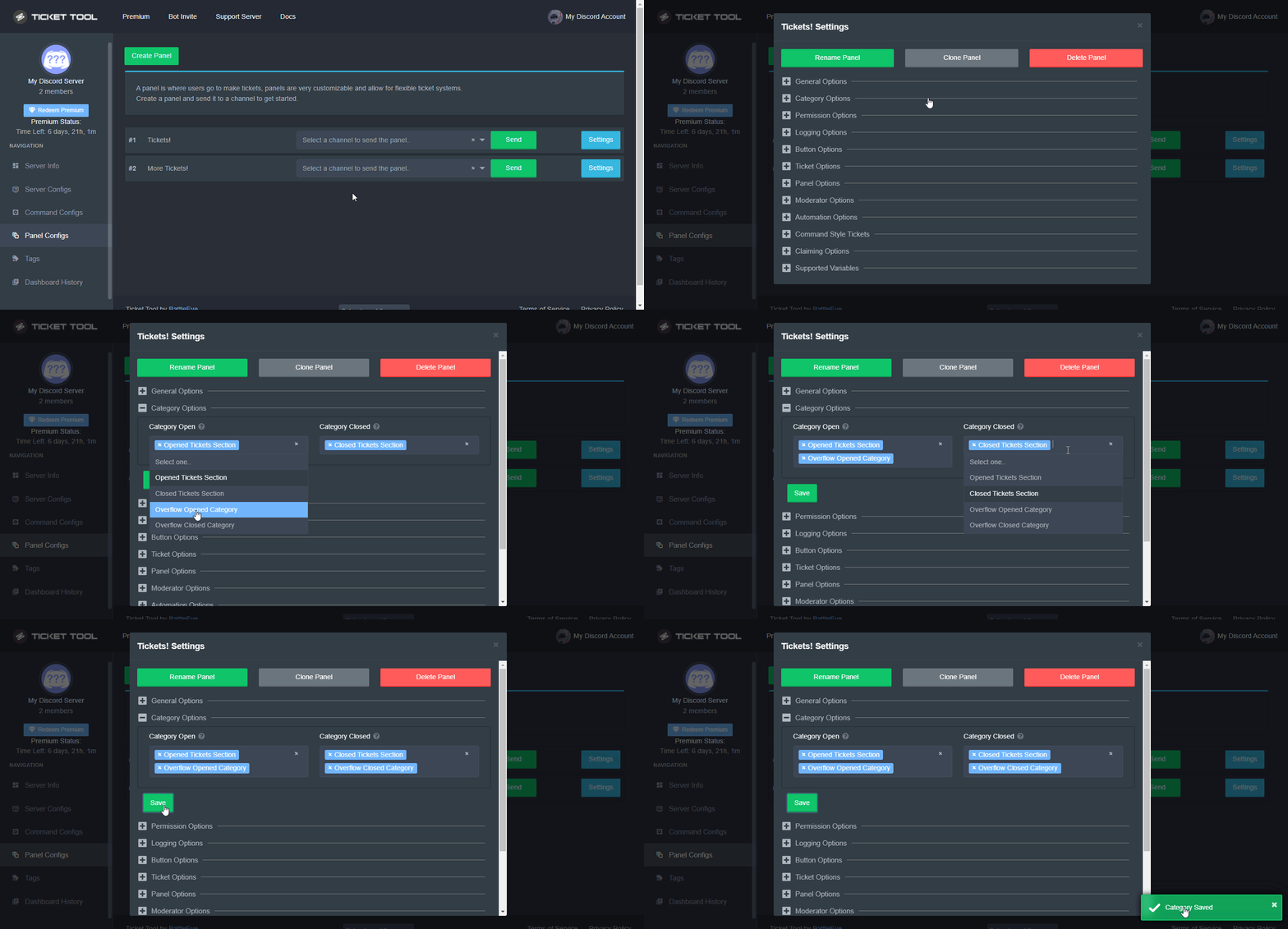
Discord only allows to stack up to 50 channels per category, meaning that if you have already 50 tickets in one category, the bot won't be able to place a ticket in that category, for such reason Ticket Tool counts with overflow categories, meaning that if your main category is filled, the bot will go ahead and place the ticket on the next one available, simply choose a second category in the category pickers:
 crimson void
Check this out ^
foggy wadi
crimson void
Yeah but you can do an overflow
thanks purple
iron nightBOT
Gave +1 Rep to @crimson void
crimson void
Anytime ~
 pale heron
My bot has several servers, only 1 is shown, and then it's buggy. What to do?
 humble sequoiaBOT
Don't see your server in the dashboard?
You will possibly need to relog. Look below to see steps on how to relog.
How to relog in the Dashboard.
First, you will need to go to the dashboard. Once your there, click on your avatar on the top right. after you clicked it, you will see button that says Logout. You must click that. Once you have logged out, you can log back in.
Note:
You need one of these 3 things to access the dashboard.
1. Server Owner (Level: 6)
2. Server Administrator (Level: 4)
3. Dashboard Role (Level: 2)
:warning: You can check your level using $level on your Discord Server
User permission level with Ticket Tool
@User is permission level: 0 (User)
```» *If it shows that your permission is **0**, you don't have any of the above **3 things** to manage the dashboard.*


**See the GIF below on how to relog:**^
slender minnow
humble sequoia
@pale heron refer above ^
pale heron
thank you
Tell me, please, how to make it so that if a ticket was created, it would be created in a category?
crimson void
$help category
humble sequoiaBOT
How to set the open category
To set a open category go to the Dashboard -> Panel Configs -> Settings -> Category Options -> Category Open
 crimson void
^
pale heron
Does not work, the ticket does not fall into the category after creation
crimson void
pale heron
Does not work, the ticket does not fall into the category after creation
Make sure to save it. ^
pale heron
I saved but still the same

 pale heron
crimson void
Check this ^^
pale heron
crimson void
Check this ^^
Thanks, I didn't set permission for the bot in the category
iron nightBOT
Gave +1 Rep to @crimson void
jade topaz
can anyone pelase help me
for the life of me i cannot do the multipanel thing, i want to be able to open multiple kinds of tickets at the bottom like this
 humble sequoiaBOT
For a more convenient use of multipanels, you can now combine panels on the dashboard. This will allow you to directly send the multipanel from the dashboard or via the $panel ID command.
Where can I find this?
You can find this setting on the Dashboard -> Panel Configs -> Settings -> General Options
Note: if you're attaching all the panels to a panel called English, don't include English in the attached panels box (If you do this, it will create duplicate)
This will put all buttons from all of your panels on one message. The message is the panel message from the panel you're combining these panels in.

 Note: This is a premium feature
slender minnow
Note: This is a premium feature
slender minnow
@jade topaz ^
slender minnow
does your server has a premium plan?
jade topaz
its on the trial, does it matter?
slender minnow
nope, if its active then you can 🙂
jade topaz
okay, i dont know what im doing wrong i have been trying for like an hour

this is what i have
jade topaz
 slender minnow
under attached panel, include those panels
jade topaz
right?
slender minnow
jade topaz
if you have noticed, that benefit is still premium for you
jade topaz
slender minnow
if you have noticed, that benefit is still premium for you
so its not working?
ohhhhh
slender minnow
jade topaz
so its not working?
that diamond should be blue from what i know
 slender minnow
no need to say that lol ¯_(ツ)_/¯
jade topaz
lmao
 slender minnow
lol
can you check the button names of each panel?
you probably forgot to edit them
jade topaz
this?

 restive solar
Is there a way to tell the bot to re-process the closed tickets if they get stuck? (e.g. it's set to move to a bin channel if closed but they sit there)
slender minnow
jade topaz
this?
yes, its under the button option right?
 slender minnow
jade topaz
lmao
slender minnow
jade topaz
lmao
were the changes made after you sent this panel?
if so you need to send it again
jade topaz
improvement

 wicked wyvern
Whenever I try to make the ticket it’s asking me to invite a server but there’s no servers showing up
slender minnow
jade topaz
improvement
great, now all you gotta do is change the panel message
jade topaz
how do i make it so it just says Open a Ticket instead of "general inquiry"?
 slender minnow
jade topaz
how do i make it so it just says Open a Ticket instead of "general inquiry"?
slender minnow
jade topaz
how do i make it so it just says Open a Ticket instead of "general inquiry"?
You can change the button name to general inquiry just how you did the others
 slender minnow
no problem 🙂
slender minnow
wicked wyvern
Whenever I try to make the ticket it’s asking me to invite a server but there’s ...
If you are trying to invite ticket tool and can't see your server in the dashboard (even though it is in your server or if you cannot see it while selecting server where its supposed to join) make sure you have admin perm (to invite the bot and access the dashboard) or manage server perm (to invite the bot)
 dusty crypt
Hey, a server owner for a server I help run bought the premium version. Is he the only one that can invite it to the server?
(I have admin perms)
 hallow marlin
dusty crypt
Hey, a server owner for a server I help run bought the premium version. Is he th...
hallow marlin
dusty crypt
Hey, a server owner for a server I help run bought the premium version. Is he th...
You should also be able to invite the bot if you have the necessary permissions.
If you want to manage the bot in the dashboard, your role must be added as a dashboard role in the dashboard settings.
chech this out for more informations:
humble sequoiaBOT
The first thing you will need to do is invite the premium bot, an invite can be found here
Once the bot is in your server we will head to the dashboard and manage your server. When you are managing your server, you want to head into "Server Configs" then click the drop down menu under "Select the bot you would like to use on this server" then click "Ticket Tool#6207" and then save.
 dusty crypt
yes I've done all steps but it's asking me for a discord auth code?
Is that my own code or the server owner's ?

In this gif thingy they don't really show that part
 gilded verge
dusty crypt
gilded verge
dusty crypt
This server has two-step verification turned on. To add a bot, you need to provide an additional code, e.g. from the Authy or Google Authenticator application (because you have enabled two-step, you provide this code 6 numbers)
dusty crypt
oh so it's my own?
gilded verge
yep, your authy code
iron nightBOT
Gave +1 Rep to @gilded verge
dusty crypt

gilded verge
for some time it has been, but only on servers that have two-step verification turned on, i.e. this option:
 dusty crypt
gilded verge
for some time it has been, but only on servers that have two-step verification t...
dusty crypt
gilded verge
for some time it has been, but only on servers that have two-step verification t...
Should I kick the normal ticket tool or?
just leave it?
gilded verge
You don't have to but you can 
you can have 2 bots on the server without any problem
dusty crypt
ah okki
humble sequoiaBOT
The first thing you will need to do is invite the premium bot, an invite can be found here
Once the bot is in your server we will head to the dashboard and manage your server. When you are managing your server, you want to head into "Server Configs" then click the drop down menu under "Select the bot you would like to use on this server" then click "Ticket Tool#6207" and then save.
gilded verge
if you did it, all should work fine 
*sorry, I didn't notice that this message was there before 
 chrome lake
Anyone know how to fix seeing tickets that aren’t there on mobile devices ?
gilded verge
What you mean? 😳
chrome lake
So when I’m trying to do tickets on my phone. I see tickets and when I click on them they aren’t loading and showing there. But when I get home on pc they aren’t there.
gilded verge
do you have an updated application to the latest version?
humble sequoiaBOT
Update your discord App
Buttons are a relatively new addition to discord and don't work with some older versions of the app.
Please verify that you have the latest version of discord, by going to the app or play store.
Discord for the  App Store
Discord for the  Play Store
chrome lake
Yes first thing I checked.
gilded verge
Are you sure the bot has all the necessary permissions?
Please use $debug command on your server and send the link that the bot will provide in response
foggy wadi
is it possible to separate tickets into different requests. i.e. a tech support button that spits out a ticket to one category and a collab request button that spits it a ticket to a different category?
 brittle bay
Français ? J'ai besoin d'aide
crimson void
$frticket
humble sequoiaBOT

L'équipe du support Français
Cher client,
Si vous avez besoin d'aide, ouvriez un ticket pour le support Français s'il vous plaît.
Allez au #🎫│make-a-ticket et tapez sur le button contenant l'emoji 🇫🇷
crimson void
@brittle bay ^
 desert narwhal
Hi guys. I need your help. Who knows if it is possible to change the avatar and nickname in the bot?
crimson void
desert narwhal
Hi guys. I need your help. Who knows if it is possible to change the avatar and ...
You can't. But you can suggest at #💡│suggestions
restive solar
Is there a way to get the bot to re-process closed tickets that don't move to the closed category we setup? sometimes they get stuck as closed
slender minnow
restive solar
Is there a way to get the bot to re-process closed tickets that don't move to th...
Hi, what do you mean by re process?
like re use them?
humble sequoiaBOT
How to set the open category
To set a open category go to the Dashboard -> Panel Configs -> Settings -> Category Options -> Category Open
gilded verge
@foggy wadi, Yes, all you have to do is assign an appropriate category to each panel and they will open there 
gilded verge
desert narwhal
Hi guys. I need your help. Who knows if it is possible to change the avatar and ...
The avatar and status currently cannot be changed. Only you can change the bot nickname on your server.
Right-click on him and select "Change Nickname"
 desert narwhal
Tell me please. Where I can change this text, after creating a tiket
 crimson void
desert narwhal
Tell me please. Where I can change this text, after creating a tiket
crimson void
desert narwhal
Tell me please. Where I can change this text, after creating a tiket
Premium only
 gilded verge
As far as I know, we cannot change this content. However, you can rename the created channel as Purple showed
desert narwhal
crimson void
*Premium only*
We already have a premium account. We cannot understand how to change the phrase "Ticket created"
 crimson void
desert narwhal
We already have a premium account. We cannot understand how to change the phrase...
crimson void
desert narwhal
We already have a premium account. We cannot understand how to change the phrase...
You can't .
desert narwhal
crimson void
You can't .
ok, ty
iron nightBOT
Gave +1 Rep to @crimson void
humble sequoiaBOT
How can I edit/disable the ephemeral message?
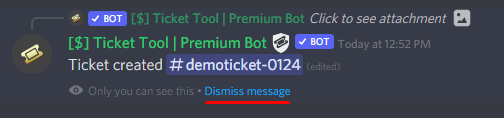
These pop ups can only be seen by the user who triggered a certain action, like creating a ticket. They cannot be edited or disabled, as they are a discord requirement that is set by the developer of any bot. The ephemeral messages can be removed by pressing the little blue Dismiss message text, or by restarting your discord client.
 restive solar
slender minnow
Hi, what do you mean by re process?
restive solar
slender minnow
Hi, what do you mean by re process?
nah get them to go into the bin category we made without having to just delete thee stuck ones
I guess drag them down, but discord doesn't let you scroll down to get there haha
slender minnow
restive solar
nah get them to go into the bin category we made without having to just delete t...
ah so to a category called as bin, correct?
restive solar
yeah so when we close tickets, they go to the bin, but sometimes they change the ticket name to closed but get stuck in the original category
slender minnow
$help category
humble sequoiaBOT
How to set the open category
To set a open category go to the Dashboard -> Panel Configs -> Settings -> Category Options -> Category Open
slender minnow
How many closed tickets do you have in that channel?
restive solar
I'd say around 50 so far?
slender minnow
$overflow
humble sequoiaBOT
Discord only allows to stack up to 50 channels per category, meaning that if you have already 50 tickets in one category, the bot won't be able to place a ticket in that category, for such reason Ticket Tool counts with overflow categories, meaning that if your main category is filled, the bot will go ahead and place the ticket on the next one available, simply choose a second category in the category pickers:
slender minnow
refer above ^
restive solar
ah hah ok
foggy wadi
gilded verge
<@964576823650422866>, Yes, all you have to do is assign an appropriate category...
merci
restive solar
I assume if I leave the closed one empty they just close and delete?
foggy wadi
also sorry for all the questions today, but how to i get the ticket, when opened to also ping support staff
humble sequoiaBOT
How to make Ticket Tool ping a role
To make ticket tool ping a role when a ticket is opened, go to the Dashboard -> Panel Configs -> Settings -> Ticket Options -> Ticket Message -> Message Text and do this:
{@Role name} This is case sensitive and the role must have @mentions enabled
crimson void
@foggy wadi ^
foggy wadi
crimson void
<@964576823650422866> ^
saving my day, thanks purple!
iron nightBOT
Gave +1 Rep to @crimson void
crimson void
Anytime ~
 crisp onyx
bonjour j'ai un petit probleme je me suis qualifié a la final qui a lieu a 20h sur une cup fortnite mais il y a marqué que je ne peux pas m'y inscrire
alors que il y avait 4 chances de ce qualifié 25 equipe a chaque fois ce qui fais 100 equipes nous ne pouvons pas nous inscrire alors que nous nous sommes qualifé merci
 robust sandalBOT
crisp onyx
bonjour j'ai un petit probleme je me suis qualifié a la final qui a lieu a 20h s...
robust sandalBOT
crisp onyx
bonjour j'ai un petit probleme je me suis qualifié a la final qui a lieu a 20h s...
 Purple
hello I have a small problem I qualified for the final which takes place at 8pm on a fortnite cup but there is marked that I can not register there
while there were 4 chances of this qualified 25 team each time what makes 100 teams we can not register while we qualified thank you
 French (fr) → English (en)
humble sequoiaBOT
French (fr) → English (en)
humble sequoiaBOT

⚠️ Vous n'êtes pas au bon endroit
Nous offrons support pour le bot @pseudo glen et nous ne pouvons pas vous aider avec d'autres problèmes hors du bot.
- Assurez-vous de contacter l'équipe d'assistance appropriée, s'il vous plaît.
**Si il n'y a pas quelque chose d'autre dont nous pouvons vous aider, fermerez le ticket s'il vous plaît **
 crystal shell
Hi guys, I dont want tickettool to create serverwide events
how can I configure it to just notify my moderation team when a ticket is opened rather than spamming the entire server?
 fallow ingot
$help ping
humble sequoiaBOT
How to make Ticket Tool ping a role
To make ticket tool ping a role when a ticket is opened, go to the Dashboard -> Panel Configs -> Settings -> Ticket Options -> Ticket Message -> Message Text and do this:
{@Role name} This is case sensitive and the role must have @mentions enabled
fallow ingot
@crystal shell check this out :)
jade topaz
Is there anyway i could become support here? I know lodes about the bot! :D
oh well, ig ill help here.
slender minnow
$staffapps
humble sequoiaBOT
How do be I become a Support Member?
You can become a support member in 2 ways:
1. You can be really active in #🆘│community-support gain <@&799500225579712543> role and get chosen by a Manager
2. You can apply VIA our applications that would be sent in #📣│server-news
We currently have Support Teams for the following languages:
:flag_us: English
:flag_jo: Arabic
:flag_fr: French
:flag_de: German
:flag_br: Portuguese
:flag_es: Spanish.
slender minnow
@jade topaz refer above ^
jade topaz
ok! ty
fallow ingot
Applications for English I believe are still open. @jade topaz
jade topaz
fallow ingot
Applications for English I believe are still open. <@456226577798135808>
Correct! I just applied.
 lethal bison
hello
jade topaz
lethal bison
hello
Hello! Do you need any help?
lethal bison
hi, yes please
jade topaz
Ok! How may we help?
lethal bison
i was trying to invite ticket tool to my discord server, and i already follow a youtube tutorial but i cannot see my discord server at the dashboard of the bot
humble sequoiaBOT
━━ moved to ticket ━━
jade topaz
Uh
jade topaz
humble sequoia
━━ moved to ticket ━━
Couldve just re logged.
jade topaz
lethal bison
i was trying to invite ticket tool to my discord server, and i already follow a ...
Just re log
lethal bison
OMG i wanna kill myself, i have 3 hours inviting and deleting the bot
thank you very much
thank you very much
jade topaz
what option should i activate to other members not see a opened ticket
jade topaz
jade topaz
what option should i activate to other members not see a opened ticket
hi!
So, you would wanna simply select the support roles by configuring your panel!
humble sequoiaBOT
How to hide tickets from everyone
Head over to your Dashboard ➞ Panel Configs ➞ Settings ➞ Permission Options ➞ Edit Everyone Roles Opened Permissions

NOTE that @everyone can type aswell if it has permissions to send messages
gilded verge
Maybe can help you?
slender minnow
Hey there, please run the command $debug in a channel where ticket tool has view channel and read message history perm.
After that whichever command is marked with a red cross, please provide it through server settings ---> role permission
and then try sending the panel again
jade topaz
Are you sure that your bot's prefix is $
ok!
ah!
You have the premium bot selected.

 lunar lynx
Where do I go to add a certain role as support staff on all tickets?
jade topaz
hi!
lunar lynx
hi
slender minnow
$help support
humble sequoiaBOT
How to let support team see into a ticket
About support roles
A support role lets your support team see into tickets with out having to add them manually to each and every ticket.
You can add as many support roles as you like per panel.
NOTE that the way discord works all admins can see into tickets regardless of this.
How to set a support role
To set a Support role go to the Dashboard -> Panel Configs -> Settings -> General Options -> Support Team Roles.

NOTE that the support role will not be able to see into tickets that are already created..
lunar lynx
ty
slender minnow
@lunar lynx ^
lunar lynx
thanks @slender minnow
iron nightBOT
Gave +1 Rep to @slender minnow
jade topaz
Select the free version and it should all be fine!
lunar lynx
@slender minnow I added the role and made a new ticket to test it out, but it didnt work
slender minnow
lunar lynx
<@776084862728667156> I added the role and made a new ticket to test it out, but...
are you the server owner?
lunar lynx
slender minnow
are you the server owner?
yup
slender minnow
add that role to your alt and try again
lunar lynx
i dont have an alt acc
slender minnow
uhh... you can make one
dusty crypt
whats the {command} thing to identify the support staff who claimed the ticket
Like say I want to ticket to be renamed to
Claimed-by-{claimer}-{count}
count = ticket number
humble sequoiaBOT
{server.name} ➞ Name of the server
{server.id} ➞ ID of the Server

[#🆘│community-support](/guild/509192800865353738/channel/776680605517742090/) = <#channel> ➞ Channel link of the current channel
{channel.name} ➞ Name of the current channel
{channel.id} ➞ ID of the current channel

{author} = <@user> ➞ Mention of the user triggering this message
{author.name} ➞ Name of the user triggering this message
{author.id} ➞ ID of the user triggering this message
{author.nickname} ➞ Nickname of the user triggering this message
{author.icon} ➞ Direct Url of the profile picture of the user triggering this message
{author.tag} ➞ 4 digit tag (discriminator) of the user triggering this message
{author.full} ➞ username + 4 digit discriminator of the user triggering this message

{panel.count} ➞ The current count number of the panel (Tickets only)
{panel.name} ➞ The name of the panel (Tickets Only)
{panel.ticketLimit} ➞ The current limit of the panel (Ticket Only)

{ticket} = <#channel> ➞ Channel mention of the ticket
{ticket.id} ➞ Channel ID of the ticket

{ticket.user} = <@user> ➞ User mention of the ticket user
{ticket.user.name} ➞ Name of the ticket user
{ticket.user.id} ➞ User ID of the ticket user
{ticket.user.nickname} ➞ Nickname of the ticket user
{ticket.user.icon} ➞ Direct Url of the profile picture of the ticket user
{ticket.user.tag} ➞ Tag / Discriminator of the ticket user
{ticket.user.full} ➞ Username + Discirimator of the ticket user```
Roles can be either
{@role name} or {role ID}
_ _
_ _
Additional variables
{reason}
» works on $close <reason>, $delete <reason>, $new <reason>, $claim <reason>
» displays the reason, you can optionally give with some commands
Transcript Variables
{ticket_name}➞ Name of the ticket
{panel_name}➞ Name of the panel
{transcript_url}➞ File link of the transcript
Hide Link under blue text:
[Click me](https://tickettool.xyz)➞ Click me
Time Variable
Sends the current unix time in seconds. Optinally add or remove seconds
<t:{!time+43200}:R>➞ <t:1653034472:R>
<t:{!time+43200}:R>➞ <t:1652948072:R>
<t:{!time+43200}:R>➞ <t:1652991272:R>
» Remove ! before time
_ _
<t:1641006000>➞ <t:1641006000>
<t:1641006000:f>➞ <t:1641006000:f>
<t:1641006000:F>➞ <t:1641006000:F>
<t:1641006000:D>➞ <t:1641006000:D>
<t:1641006000:d>➞ <t:1641006000:d>
<t:1641006000:t>➞ <t:1641006000:t>
<t:1641006000:T>➞ <t:1641006000:T>
<t:1641006000:R>➞ <t:1641006000:R>
» You can use https://hammertime.djdavid98.art/ to create custom dates/times
dusty crypt
jade topaz
<@435796687433498634> Hope this helps :D
there's nothing for the name identifier of support staff who claimed
To better explain, heres a transcript
jade topaz
Im not sure thats a feautre then!

 west locust
dusty crypt
there's nothing for the name identifier of support staff who claimed
west locust
dusty crypt
there's nothing for the name identifier of support staff who claimed
Try {author}
dusty crypt
then it got claimed by Intsu, a moderator
and then the ticket name became question-{moderatorclaimed}-{count}


 west locust
dusty crypt
here they use {user} tho
west locust
dusty crypt
here they use {user} tho
 west locust
@dusty crypt I think for what your looking to do you’ll also need to try this

That falls under “Claiming Options”
dusty crypt
it works yesss thank you sm @west locust
iron nightBOT
Gave +1 Rep to @west locust
west locust
No probs

 boreal junco
 shut bolt
jade topaz
shut bolt
jade topaz
Check that you have picked the proper bot, you may have picked the premium bot while inviting the free or the way around
jade topaz
shut bolt
Check that you have picked the proper bot, you may have picked the premium bot w...
there are two different bots??
shut bolt
Yup
jade topaz
can u send me link in dm
 shut bolt
Alright great
jade topaz
But are the settings copied on the premium one ?
shut bolt
You need to resend the panels with the premium bot and grant permissions to the premium to be able to manage the opened tickets but there is no bigger issue to deal with
The settings will be the ones you have on your dashboard
jade topaz
I bought premium but it’s the normal bot
If I want to invite the premium one, it’s still the same one
humble sequoiaBOT
The first thing you will need to do is invite the premium bot, an invite can be found here
Once the bot is in your server we will head to the dashboard and manage your server. When you are managing your server, you want to head into "Server Configs" then click the drop down menu under "Select the bot you would like to use on this server" then click "Ticket Tool#6207" and then save.
shut bolt
You can invite and enable the premium bot since you've got a subscription
shut bolt
jade topaz
If I want to invite the premium one, it’s still the same one
Not the same bot, a different one

 analog plover
Is there a guide we can refer to that talks about the premium features? Like how they work or what they do?
jade topaz
if I go the the dashboard that is linked in the bio of the premium one and resend the panel the normal bot resends it
@shut bolt
shut bolt
jade topaz
if I go the the dashboard that is linked in the bio of the premium one and resen...
Did you pick already the premium bot as I showed to?
 shut bolt
No hurries
jade topaz
Is there a way to remove someone from all the tickets at once without kicking them?
Or does removing their role perms already do that
thx @shut bolt
iron nightBOT
Gave +1 Rep to @shut bolt
jade topaz
💚
shut bolt
jade topaz
thx <@518666147441278998>
humble sequoiaBOT
 Faster Premium Bot
Automatic Transcripts
Full Customization
Custom Buttons
Direct Messages
Ticket Automation
Multipanels
Premium Support
You can purchase premium here:
Price
$6 - Monthly
$66 - Yearly
 Premium
shut bolt
Premium
shut bolt
This can help you @analog plover :)
shut bolt
jade topaz
Is there a way to remove someone from all the tickets at once without kicking th...
Do they have a support team role?
jade topaz
shut bolt
Do they have a support team role?
Nope, took the role off. I am just not sure if they are still able to see the tickets that they WERE in
shut bolt
jade topaz
Nope, took the role off. I am just not sure if they are still able to see the ti...
Unless you have the claiming feature enabled they shouldn't see the tickets
iron nightBOT
Gave +1 Rep to @shut bolt
shut bolt
 blissful adder
 raw skiff
can I prevent certain ranks from opening tickets? I still want them to see the channel but not open tickets. When they try to open, I want the bot to DM them to verify and not open the ticket
I guess I could make a fake channel with fake reaction but thats mad work
shut bolt
raw skiff
can I prevent certain ranks from opening tickets? I still want them to see the c...
You can blacklist certain roles from using the bot at all, you can also blacklist roles from the create ticket button, you pick!
raw skiff
create ticket button please
shut bolt
$buttons
humble sequoiaBOT
The new Discord Buttons allow for a much smoother and convenient experience. They reduce lag and work much better than emojis. With ticket tool you can edit all the buttons however you like! Buttons can show emojis, text and can have 4 different colors.
Where can I edit them?
Dashboard ➞ Panel Configs ➞ Settings ➞ Button Options ➞ Setting
shut bolt
Go into your panel's settings
Open the Button Options menu
And click on Settings under the Create Ticket box
Then pick the roles you want to edit under the Disabled Roles
Save changes, and you are good to go, once they try to open a ticket they'll see an error like:
You don't have permission to use this
 warm jacinth
Keeps saying it failed when I try to close
shut bolt
warm jacinth
Keeps saying it failed when I try to close
The bot is right now going through a restart, we are sorry for any issue this may cause
shut bolt
warm jacinth
Thought it was on my end
Sorry for that, thanks for your patience
iron nightBOT
Gave +1 Rep to @warm jacinth
warm jacinth
It’s ok
 empty nexus
Hello, how to close ticket?
shut bolt
empty nexus
Hello, how to close ticket?
You can use the $close command or the button, note that the main bot is going through a full restart right now
empty nexus
shut bolt
You can use the $close command or the button, note that the main bot is going th...
Oh Okay, I tried and got this. I'll try again later? How Long to restart is complete?
 shut bolt
empty nexus
Oh Okay, I tried and got this. I'll try again later? How Long to restart is comp...
shut bolt
empty nexus
Oh Okay, I tried and got this. I'll try again later? How Long to restart is comp...
You can check the ETA on #📣│bot-news 
empty nexus
Thank you
shut bolt
humble sequoiaBOT
How to make Ticket Tool ping a role
To make ticket tool ping a role when a ticket is opened, go to the Dashboard -> Panel Configs -> Settings -> Ticket Options -> Ticket Message -> Message Text and do this:
{@Role name} This is case sensitive and the role must have @mentions enabled
crimson void
Check this out you can ping role too^
crimson void
Anytime ~
 silent walrus
$help
humble sequoiaBOT
Help Options
$help commands - Information on commands
$help setup - Information on bot setup
$help faq - Frequently asked questions
silent walrus
$help commands
humble sequoiaBOT
() = optional
[] = required
*==================================
Ticket Commands
==================================*
_ _
`$add [User] (channel)`
Description: Adding additional users to a ticket
Aliases: none
`$remove [User] (channel)`
Description: Removing users from a ticket
Aliases: none
`$close`
Description: Closing tickets
Aliases: none
`$open`
Description: Opening closed tickets
Aliases: none
`$delete`
Description: Deleting tickets
Aliases: none
`$rename`
Description: Renaming tickets/channels
Aliases: none
`$transcript (send channel)`
Description: Creating transcripts
Aliases: none
`$new (user) (reason)`
Description: Creating tickets in a monitored channel (when command style is enabled)
Aliases: none
`$claim`
Description: Claiming tickets (when claim is enabled)
Aliases: "unclaim"
_ _
*==================================
General Commands
==================================*
_ _
`$help (Help Options)`
Description: Help Command
Aliases: none
`$debug`
Description: Debuging issues with running Ticket Tool
Aliases: none
`$id (@role/@user/#channel/emoji)`
Description: Converting roles, users, channels and emojis to ID
Aliases: "getid"
`$permlevel`
Description: Checking permission level with Ticket Tool
Aliases: "level"
`$ping`
Description: Checking response time with discord api
Aliases: none
`$vote (link | unlink | redeem) (user)`
Description: Earn premium by voting on top.gg or Discord.boats
Aliases: "votes"
silent walrus
@crimson void how about the footer thing
i met some bugs?
it's that when i wanna change the footer
it doesn't show
even afer i save it
crimson void
silent walrus
<@971175151934775316> how about the footer thing
No need to ping me, also for the footer it didn't save because it's a premium function^.
silent walrus
crimson void
No need to ping me, also for the footer it didn't save because it's a premium fu...
sorry for disturbing you
Ah i see
$help setup
humble sequoiaBOT
Setting up Ticket Tool
Visit the docs for setup info
General Setup
crimson void
silent walrus
sorry for disturbing you
It's okay.
silent walrus
how abt the command that u just type
that $help ping
is there any other then help ping
like help people
crimson void
Help for what?
silent walrus
let me have a look again
crimson void
Take your time.
crimson void
raw skiff
how can i log who claims tickets?
As my knowledge you can't, but you can log the rename tickets, so you can see when someone claim a ticket you gonna see who.. even you can use Ctrl+F and type specific name and see how many tickets they had ..
raw skiff
and then just disable logging?
wait
but then logs will still show if they open it etc ?
oh nvm
 raw skiff
crimson void
As my knowledge you can't, but you can log the rename tickets, so you can see wh...
raw skiff
crimson void
As my knowledge you can't, but you can log the rename tickets, so you can see wh...
yeah ticket rename log isnt working
yeah ticket rename logs are not working. bot has perms etc.
whole reason i paid for premium was cause i thought thered be claim logs 
 weak breach
Anyone know why this happening? I have access to a few server normally (one being my own server) and I cant see any of them?
 humble sequoiaBOT
Don't see your server in the dashboard?
You will possibly need to relog. Look below to see steps on how to relog.
How to relog in the Dashboard.
First, you will need to go to the dashboard. Once your there, click on your avatar on the top right. after you clicked it, you will see button that says Logout. You must click that. Once you have logged out, you can log back in.
Note:
You need one of these 3 things to access the dashboard.
1. Server Owner (Level: 6)
2. Server Administrator (Level: 4)
3. Dashboard Role (Level: 2)
:warning: You can check your level using $level on your Discord Server
User permission level with Ticket Tool
@User is permission level: 0 (User)
```» *If it shows that your permission is **0**, you don't have any of the above **3 things** to manage the dashboard.*


**See the GIF below on how to relog:**Thanks heaps! 🙂
crimson void
^^
 stray delta
ok i have a question, when you set up the bot can you make it so all tickets that are created end up in a category instead of at the top of the server channels?
crimson void
$help category
humble sequoiaBOT
How to set the open category
To set a open category go to the Dashboard -> Panel Configs -> Settings -> Category Options -> Category Open
crimson void
^^ @stray delta
 regal kernel
How do you make the ticket tool show a message like an emoji than the thing i wanna say
fallow ingot
regal kernel
How do you make the ticket tool show a message like an emoji than the thing i wa...
What?
can you explain that better please
regal kernel
fallow ingot
What?
nvm i made a ticket ill just wait for a response i think itll be easier for me to explain there
fallow ingot
oh yeah, I’ll be there in a min.
humble sequoiaBOT
━━ moved to ticket ━━
stray delta
Thank you @crimson void
iron nightBOT
Gave +1 Rep to @crimson void
regal kernel
Thank you @fallow ingot
iron nightBOT
Gave +1 Rep to @fallow ingot
fallow ingot
no problem
crimson void
Anytime ~
 oblique cedar
Hellooo
I need your help
I would like to add a person without a role as a ticket moderator
jade topaz
oblique cedar
Hellooo
I need your help
I would like to add a person without a role as a ticket...
Alright
I'm in
Dm me the invite link
 iron shell
why ticket tools bot is offline ?
jade topaz
They are updating it
 obtuse niche
Why bot is offline?
humble sequoiaBOT
⚠️ Please read the messages previously sent by our team ⚠️
gilded verge
 tidal rapids
Hi there! Is there a way to mention a role so that moderators get a ping on new tickets opening?
gilded verge
$mentions
humble sequoiaBOT
Within all the messages the bot's sends (both embeds and text) you can mention either channels, roles, or even users, these mentions will only send a notification to the user if they are used within a text field, e.g: a role mentioned in an embed won't ping at all the users who have that role.
For mentioning a role you can use one out of three options:
{@Role Name} ➞ Which is Case Sensitive.
{RoleID} ➞ Replace RoleId with the Id of the role you are trying to ping.
<@&RoleID> ➞ Discord's native syntax to ping roles.
<#ChannelID> ➞ Mention a channel by its ID.
<@UserID> ➞ Mention a user by its ID.
The Ticket Message is the first message sent by the bot in a new ticket. To customise it head over to your Dashboard ➞ Panel Configs ➞ Settings ➞ Ticket Options ➞ Edit Ticket Message
 tidal rapids
Thank you!
gilded verge
Hey @tidal rapids, check
tidal rapids
thank you @gilded verge
iron nightBOT
Gave +1 Rep to @gilded verge
 snow void
Is the not down it not working?
gilded verge
@snow void,
@slow ravine,
Maybe this info can help you 😐
 slow ravine
is the bot offline?
humble sequoiaBOT
How to fix Ticket Tool not responding
If ticket tool is not responding, please follow these troubleshooting steps:
Check Ticket Tool's permissions
Make sure that Ticket Tool can read and write in the channel you are attempting to run commands in. Run the command @Ticket Tool#4843 debug to see Ticket Tools list of permissions in that given channel.
Check Ticket Tool's prefix
Make sure you're using the correct prefix for Ticket Tool, Ticket Tools default prefix is $ Run the command @Ticket Tool#4843 debug to see Ticket Tools prefix for your server
Check if Ticket Tool is offline
If ticket tool is offline please contact Ticket Tool support with your server ID so we can fix it asap.
gilded verge
or check
 jade topaz
Same here
 noble timber
My server too
 trim umbra
Too

 dull escarp
Staff is being resolved
 forest goblet
⚠️ Ticket Tool outage
➡️ It appears that Ticket Tool is offline in some servers at this time. The development team has been notified. Please be patient in the meantime. Thank you for understanding.
jade topaz
Getting “this interaction failed” when trying to open ticket
gilded verge
Can you show screenshot?
 elder jackal
please read above
jade topaz
 gilded verge
If mobile, update your Discord app
jade topaz
let me try
forest goblet
⚠️ Ticket Tool outage
➡️ It appears that Ticket Tool is offline in some servers at this time. The development team has been notified. Please be patient in the meantime. Thank you for understanding.
 neat wyvern
when the premium trial is over
does the bot leave the server?
and is there a lifetime plan ?
forest goblet
neat wyvern
when the premium trial is over
No, however the premium bot won't work anymore. You'd have to disable the premium bot and re-invite the free bot.
humble sequoiaBOT
How to disable the premium bot
To disable the premium bot you will have to go to the Dashboard ➞ Server Configs ➞ Premium bot ➞ And on the right-hand side select the primary free bot in the drop down menu.
Premium features will still work on the normal bot.
 forest goblet
neat wyvern
and is there a lifetime plan ?
forest goblet
neat wyvern
and is there a lifetime plan ?
Not currently.
jade topaz
gilded verge
If mobile, update your Discord app
Seems like my ticket tool is fine for other server, but no longer in that server
forest goblet
neat wyvern
wait there are redeem codes for it?
Yes, in some cases we give out redeem codes which can be redeemed as follows:
humble sequoiaBOT
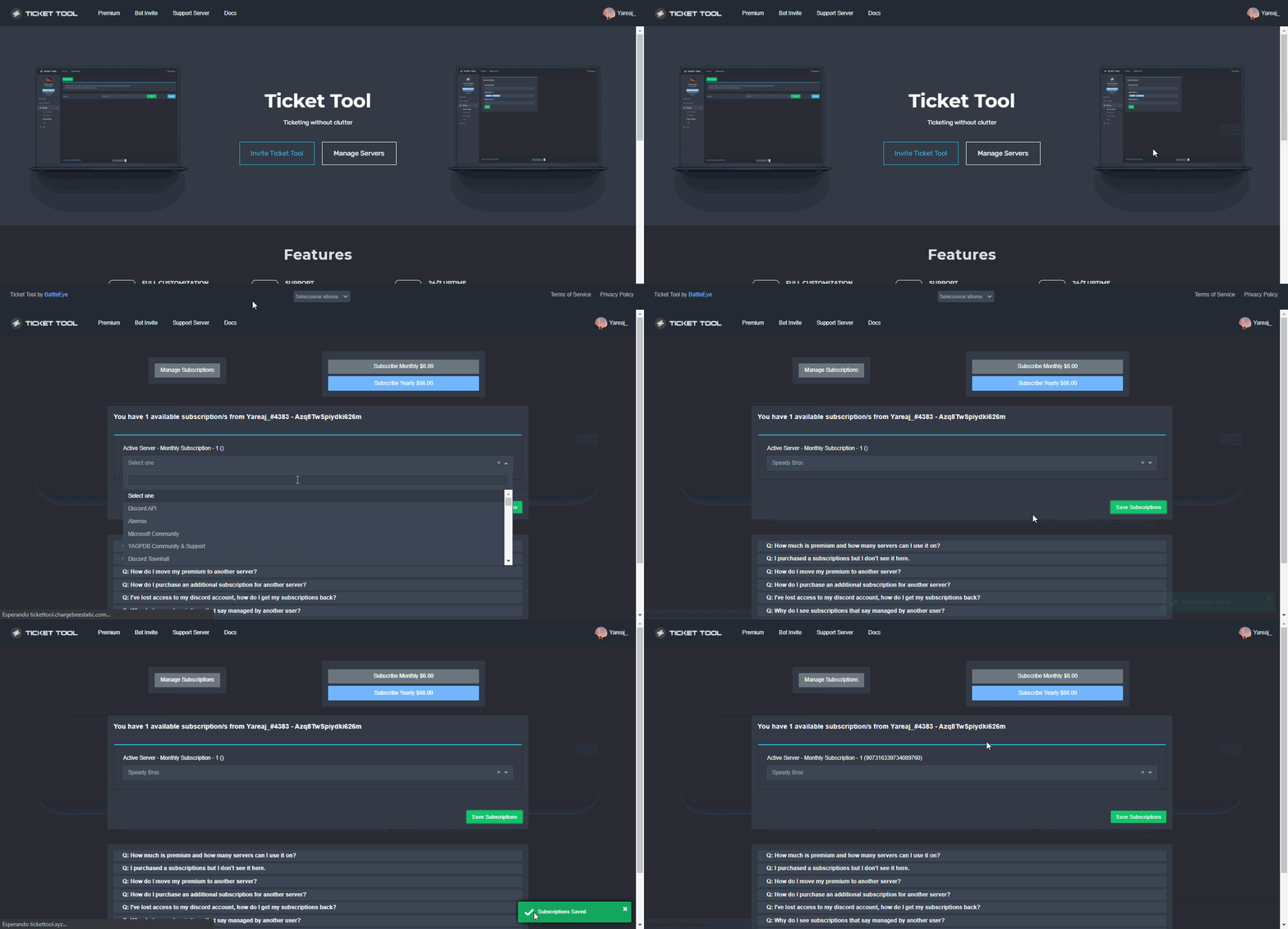
Redeeming premium on your server is really simple. Just head over to your Subscriptions Page. There you can select a server of your choice, which will get premium. You can change the server at any point.
 winged basalt
Hiya, our ticket tool has been removed from our server - is this a part of the downtime and will I need to re-invite? thanks
jade topaz
winged basalt
Hiya, our ticket tool has been removed from our server - is this a part of the d...
Same
forest goblet
That shouldn't happen. Can you please check if someone has removed the bot, and try to ping it so you can see whether it's in your server?
winged basalt
I can ping it, but it says "Add to server"
 visual fern
winged basalt
Hiya, our ticket tool has been removed from our server - is this a part of the d...
visual fern
winged basalt
Hiya, our ticket tool has been removed from our server - is this a part of the d...
Usually happend when a security bot is bad configured, it kicks ticket tool, might be that?
winged basalt
We've used it for like 7-8 months without problem, and we haven't changed anything
forest goblet
winged basalt
I can ping it, but it says "Add to server"
That doesn't indicate whether the bot is in your server.
jade topaz
forest goblet
That shouldn't happen. Can you please check if someone has removed the bot, and ...
 jade topaz
winged basalt
We've used it for like 7-8 months without problem, and we haven't changed anythi...
jade topaz
winged basalt
We've used it for like 7-8 months without problem, and we haven't changed anythi...
In the exact same boat
forest goblet
jade topaz
Can you check the mutual servers please to see in which servers it is?
winged basalt
 jade topaz
jade topaz
jade topaz
It is in my server
forest goblet
winged basalt
Since it has roles, that means it's in the server. There is currently an outage though.
 verbal whale
forest goblet
That doesn't indicate whether the bot is in your server.
verbal whale
forest goblet
That doesn't indicate whether the bot is in your server.
The bot should be fully and back online working for everybody today correct ?
 mortal ermine
winged basalt
mortal ermine
winged basalt
You still have the BOT, it is just that the shard you are in there is an outage
forest goblet
verbal whale
The bot should be fully and back online working for everybody today correct ?
That hasn't been confirmed yet, however the number of people who are reporting the bot being offline is decreasing
visual fern
forest goblet
Since it has roles, that means it's in the server. There is currently an outage ...
Yes, The bot is offline in my server, it is already notified to dev team right? I came here to notify it
forest goblet
Yes, we have notified everyone we can notify about this
visual fern
Ok, thanks sir, have a good day, If I can help you in any way, let me know
 manic hemlock
Is there a problem with the bot?
jade topaz
forest goblet
Can you check the mutual servers please to see in which servers it is?
Can’t see, but on the dashboard, it is showing the option of other server that I have, and it is not showing up on my current server
jade topaz
forest goblet
Yes, we have notified everyone we can notify about this
you will do a @ here or oeveryonewhen its repair ?
forest goblet
visual fern
Ok, thanks sir, have a good day, If I can help you in any way, let me know
You're welcome!
forest goblet
manic hemlock
Is there a problem with the bot?<a:aawkward:949053392079171634>
⚠️ Ticket Tool outage
➡️ It appears that Ticket Tool is offline in some servers at this time. The development team has been notified. Please be patient in the meantime. Thank you for understanding.
 raw salmon
I have invited successfully the bot in my server.
I have logged out in the website and re-logged but it doesn't appear in my server
forest goblet
jade topaz
Can’t see, but on the dashboard, it is showing the option of other server that I...
The dashboard might not show servers that the bot is offline in
forest goblet
jade topaz
you will do a @ here or oeveryonewhen its repair ?
No, we don't do that. Do you want us to notify you when the outage was resolved?
jade topaz
forest goblet
No, we don't do that. Do you want us to notify you when the outage was resolved?
if its possible yes
verbal whale
forest goblet
The dashboard might not show servers that the bot is offline in
When bot is fixed it should just start working normally on its own ? No need to remove and add again ?
forest goblet
raw salmon
I have invited successfully the bot in my server.
I have logged out in the webs...
The bot currently has an outage, sorry for the inconvenience. This might cause it not to show on the dashboard
forest goblet
verbal whale
When bot is fixed it should just start working normally on its own ? No need to ...
Yes.
winged basalt
It's going to be a stressful day for support I guess 😄 thanks for all your help 2x2
raw salmon
thank you
 oak shuttle
winged basalt
It's going to be a stressful day for support I guess 😄 thanks for all your help...
oak shuttle
winged basalt
It's going to be a stressful day for support I guess 😄 thanks for all your help...
It is haha. Luckily we have Lukas trying to fix it :))
snow void
...
forest goblet
@vagrant charm Wrong channel for random remarks like these.
 meager yacht
Hey 2x2master do you know when the bot will be fixed?
oak shuttle
meager yacht
Hey 2x2master do you know when the bot will be fixed?
We currently have no ETA.
forest goblet
@jade topaz Hi, the issue has been fixed according to the development team.
@meager yacht ^
snow void
forest goblet
<@456226577798135808> Hi, the issue has been fixed according to the development ...
 forest goblet
Sorry, there seems to have been a misunderstanding regarding that
 rancid sandal
Guys also in my server now working, and bot is offline.
Is there aprox time where it will be solved and thanks
jade topaz
forest goblet
Sorry, there seems to have been a misunderstanding regarding that
wdym its down
idk y its up in this server
its defo down none of the ticket cmds are working i just added a diff ticket bot
 pale pilot
There's a server issue, but it's being worked on as we speak
meager yacht
forest goblet
<@456226577798135808> Hi, the issue has been fixed according to the development ...
still not up for me?
jade topaz
pale pilot
There's a server issue, but it's being worked on as we speak
mk
the 1 team lead working on it rip
meager yacht
is it fixed or not yet?
pale pilot
He's not the one working on it lol
forest goblet
meager yacht
still not up for me?
Sorry for that, there has been a misunderstanding. The developer is looking into it currently
jade topaz
pale pilot
He's not the one working on it lol
oh so there is no one working on it ripppp
pale pilot
meager yacht
is it fixed or not yet?
Just now started working on it, won't be just one minute
jade topaz
pale pilot
Just now started working on it, won't be just one minute
bro who is this dev that can fix it in a min
pale pilot
jade topaz
oh so there is no one working on it ripppp
There is, but it's not the one who's showing as online right now
pale pilot
jade topaz
bro who is this dev that can fix it in a min
Only god can tell
rancid sandal
I have 2 servers
pale pilot
Because bots have shards and only some shards are affected
rancid sandal
1 is working and the other no
 floral vigil
not working for me
pale pilot
Being worked on right now
jade topaz
pale pilot
Because bots have shards and only some shards are affected
preimum is up rn btw
pale pilot
Premium has had no issues
jade topaz
pale pilot
Premium has had no issues
is this a primum only feature
 floral vigil
any approx time?
pale pilot
Multipanel. Yes
jade topaz
pale pilot
Multipanel. Yes
if i wanted to use 1 panel can i change the name
from make ticket to something different
pale pilot
The dev is setting up a new server to move the bot, so this might take a while. I don't know how long that takes
floral vigil
pale pilot
The dev is setting up a new server to move the bot, so this might take a while. ...
thanks for the quick reply!
iron nightBOT
Gave +1 Rep to @pale pilot
pale heron
bot disable?
floral vigil
pale heron
bot disable?
under process of fixing
jade topaz
coding is so hard to i swear
i made a ticket bot once took me a whole week to set it up fully
floral vigil
jade topaz
i made a ticket bot once took me a whole week to set it up fully
yeah its kinda tough
jade topaz
floral vigil
yeah its kinda tough
i think the bot is back up
its online rn but who knows
finally working ty
idk who fixed it tho
how do u change the name of that icon @pale pilot

 river canopy
excuse me, i forgot how to add music bot to my server in discord.
pale pilot
$buttons
humble sequoiaBOT
The new Discord Buttons allow for a much smoother and convenient experience. They reduce lag and work much better than emojis. With ticket tool you can edit all the buttons however you like! Buttons can show emojis, text and can have 4 different colors.
Where can I edit them?
Dashboard ➞ Panel Configs ➞ Settings ➞ Button Options ➞ Setting
pale pilot
There we go
jade topaz
ty
river canopy
ok. i should get premium bot that i see.
jade topaz
pale pilot
There we go
is there any chance they will make it a non premium perk
 versed rampart
the bot is online 🥳
 sage jay
Can we not save attachments with transcript?
crimson void
@river canopy
humble sequoiaBOT
Ticket Tool Premium
Get premium at https://tickettool.xyz/premium
Manage your subscriptions at https://tickettool.xyz/subscriptions
Why Premium?
Premium lets you customize the bot just how you want it. It also helps keep the bot running.
crimson void
^
river canopy
much appreciated!
crimson void
anytime ~
snow void
it back working now
fallow ingot
👍
river canopy
$6 / month is okay. I'll try the trial for 7 days, maybe.
crimson void
@river canopysorry i didn't get what do u mean in #📈│reviews
 weary owl
Good Day please I add ticket tools to my server but I want to ask how to configure it on my server
rancid sandal
its down again?
obtuse niche
Bot offline again
pale pilot
obtuse niche
Bot offline again
does it appear offline for you right now?
 supple monolith
 rancid sandal
pale pilot
does it appear offline for you right now?
rancid sandal
pale pilot
does it appear offline for you right now?
yes man
pale pilot
yeah, seems like we're getting some reports again
 cyan bison
pale pilot
does it appear offline for you right now?
cyan bison
pale pilot
does it appear offline for you right now?
yes it appears as offline in my server too
and here its online
pale pilot
it looks like it's servers issues, but it doesn't affect all shards
jade topaz
yeah
river canopy
"Pong! Latency is 135ms. API Latency is 18ms [-] " , is this good times?
jade topaz
same, tag is not working either
pale pilot
this is excellent
humble sequoiaBOT
Pong! Latency is 224ms. API Latency is 78ms [-]
river canopy
so your ticket tool server has more latency time due to?
 static gust
sames
 sage vector
Did we crash the bot 😂
@severe path @radiant moss Did "The Caribbeans" crash your bot?
 crimson dirge
My ticket tool saying "This interaction failed" when trying to create a ticket. Is this the bot not working or is it something on my end?
pale pilot
river canopy
so your ticket tool server has more latency time due to?
it varies
jade topaz
pale pilot
it varies
bot in my server seems offline
river canopy
ok i understand ping. lots of messaging?
jade topaz
why the bot is offline?
i see there are a lot of people who have the same issue, how can i fix this?
why the bot is offline ??
river canopy
Provides the current latency between your server, the bot, and the Discord API. This might be used while troubleshooting. what's discord api?
pale pilot
basically a gateway to discord for our bot. It's how fast discord answers ticket tool
river canopy
ive got 15 minutes and then be a chauffeur for my daughter. @pale pilot Ah! i think i understand you, .
jade topaz
yeah
rancid sandal
@pale pilot
jade topaz
users can't create tickets
jade topaz
Just kicked it until we get more info
pale pilot
bruh
jade topaz
Can't risk anything happening
 narrow bramble
I cant save/close ticket
pale pilot
The bot is now fully back online and should be working in all servers
narrow bramble
I cant save or close tickets
pale pilot
If you still have issues, open a ticket
narrow bramble
I have 🙂
jade topaz
pale pilot
If you still have issues, open a ticket
the irony
pale pilot
I don't see no irony
pale pilot
yeah but we don't 😂
jade topaz
narrow bramble
I cant save or close tickets
same
rancid sandal
man im pressing close ticket, and its creating channel named null @pale pilot
pale pilot
Open a ticket please #🎫│make-a-ticket
narrow bramble
rancid sandal
man im pressing close ticket, and its creating channel named null <@336243658816...
same, cant save it either
river canopy
@pale pilot gateway as in highway with crimpled messaged paper. so, what is guild owner in $debug? whops, answer with @ please. i gtg
 rotund bloom
اتمنى تحلو مشكله البوت فاسرع وقت وشكرا🤍
crimson void
rotund bloom
اتمنى تحلو مشكله البوت فاسرع وقت وشكرا🤍
بإذن الله المطوّر الأساسي شغّال عليها. و بيكون جاهز في أقرب وقت و بأفضل سيرفر ^
 radiant moss
sage vector
<@252364399669542913> <@513792641016659971> Did "The Caribbeans" crash your bot?
radiant moss
sage vector
<@252364399669542913> <@513792641016659971> Did "The Caribbeans" crash your bot?
What?
rotund bloom
jade topaz
Just kicked it until we get more info
Advice from me let him untill they fix it u cant find another good bot
I have a 4000 member server and + 10000 ticket and iam still waiting
 orchid snow
the bot kinda offline on my server what can i do?
rotund bloom
orchid snow
the bot kinda offline on my server what can i do?
Just wait
rotund bloom
crimson void
بإذن الله المطوّر الأساسي شغّال عليها. و بيكون جاهز في أقرب وقت و بأفضل سيرفر ^
He said that its a problem and they working on it
pale pilot
Issue has been identified and a fix is underway
 hoary musk
Bot is offline
orchid snow
oh rly
hoary musk
Rly? @orchid snow
jade topaz
orchid snow
oh rly
yes
orchid snow
jade topaz
yes
i used sarcasm lmao
rotund bloom
البوت رجع اونلاين بس لسه فيه مشاكل@crimson void
 orchid snow
rotund bloom
البوت رجع اونلاين بس لسه فيه مشاكل<@971175151934775316>
orchid snow
rotund bloom
البوت رجع اونلاين بس لسه فيه مشاكل<@971175151934775316>
same
fallow ingot
It's due to the bot being offline
orchid snow
the bots online for me but still saying this interaction failed
jade topaz
be patient.
rotund bloom
المشكله اتحلت مشكورين🤍
 orchid snow
the bots online for me but still saying this interaction failed
orchid snow
orchid snow
the bots online for me but still saying this interaction failed
ok no nevermind
hoary musk
How to setup ticket in ticket channel
البوت رجع اونلاين بس لسه فيه مشاكل@Purple बॉट वापस ऑनलाइन हो गया है लेकिन इसमें अभी भी @ पर्पल की समस्या है
rotund bloom
The problem has been fixed guys
crimson void
rotund bloom
المشكله اتحلت مشكورين🤍
توني اشوف رسالتك كنت آكل, العفو و استمتع
rotund bloom
crimson void
توني اشوف رسالتك كنت آكل, العفو و استمتع
بالهنا🤍
 hybrid finch
link for the bot come my server
please give me the link fod bot come my server
@crimson void
hybrid finch
fallow ingot
Rule 4
my?
 severe path
sage vector
<@252364399669542913> <@513792641016659971> Did "The Caribbeans" crash your bot?
severe path
sage vector
<@252364399669542913> <@513792641016659971> Did "The Caribbeans" crash your bot?

humble sequoiaBOT
crimson void
من هنا تقدر
hybrid finch
you are cool
hybrid finch
shir ino
crimson void
 wary heath
السلام عليكم
wary heath
السلام عليكم
مفروض يشتغل طبيعي حالياً البوت .
crimson void
عفواً بيتير
robust sandalBOT
wary heath
ايش وضع السيرفر الرئيسي؟
 JG101
JG101
What is the status of the main server?
Arabic (ar) → English (en)
robust sandalBOT
wary heath
رجع أونلاين؟
JG101
Go back online?
Arabic (ar) → English (en)
robust sandalBOT
crimson void
مفروض يشتغل طبيعي حالياً البوت .
JG101
It should work normally now, the bot.
Arabic (ar) → English (en)
 loud turtle
I had to know what it meant
wary heath
loud turtle
I had to know what it meant
It's ok fren, no problem
crimson void
loud turtle
I had to know what it meant
wary heath
crimson void
لاحظت لما دخلت، فيه كان رابط دعوة ل سيرفر دعم، فيه سيرفر ثاني او هذا الوحيد؟
robust sandalBOT
wary heath
لاحظت لما دخلت، فيه كان رابط دعوة ل سيرفر دعم، فيه سيرفر ثاني او هذا الوحيد؟
JG101
Did you notice when I entered, there was an invitation link for a support server, a second server or the only one?
Arabic (ar) → English (en)
crimson void
wary heath
لاحظت لما دخلت، فيه كان رابط دعوة ل سيرفر دعم، فيه سيرفر ثاني او هذا الوحيد؟
هذا الوحيد
https://discord.gg/tickettool
loud turtle
Well let's not talk here
wary heath
crimson void
هذا الوحيد
https://discord.gg/tickettool
مشكور يا غالي
crimson void
loud turtle
Well let's not talk here
crimson void
wary heath
مشكور يا غالي
العفو
wary heath
loud turtle
Well let's not talk here
Where then? 😂
loud turtle
#💬│general-chat or #💬│gen-chat-multilingual if you want to keep chatting arabic
wary heath
loud turtle
<#509238831547940885> or <#956946297087197184> if you want to keep chatting arab...
I'm new here fren, just noticed it
I saw Arabic chatting above
crimson void
loud turtle
<#509238831547940885> or <#956946297087197184> if you want to keep chatting arab...
it's support 🙂 and he asked for support .
 pine adder
so
this is a wierd questoin but
how to make it so i have my own bot when i click on a button or reaction it made it redirects it to ticket fresh made for the person who clicked
slender minnow
pine adder
how to make it so i have my own bot when i click on a button or reaction it made...
i dont think it is possible to do that
pine adder
idk wait for a mod ig
fallow ingot
@pine adder Do you mean your own bot with our features?
pine adder
fallow ingot
<@752144323289677886> Do you mean your own bot with our features?
ye
i dont mean stealing code like a redirect
slender minnow
fallow ingot
<@752144323289677886> Do you mean your own bot with our features?
i think they meant using their bot to run ticket tool bot
crimson void
slender minnow
i think they meant using their bot to run ticket tool bot
it's not an option currently .
slender minnow
ik about that :)
crimson void
sry just realized i replied to you, didn't mean that.
red nexus
I need to make another ticket system thing but I forgot how
gilded verge
Can you explain what you mean?
setup here:
humble sequoiaBOT
You can check our documentation here.
You can also check #573205317870157855 for the basic setup.
Our documentation contains all the info you need about the bot to be able to setup and configure the bot however you like.
wicked wyvern
Any admins in here I can talk to??
gilded verge
It depends on what you need
slender minnow
crimson void
sry just realized i replied to you, didn't mean that.
ah i see, no problem about that :)
jade topaz
red nexus
I need to make another ticket system thing but I forgot how
You mean another panel?
red nexus
jade topaz
You mean another panel?
I made it but thx I needed the website for the panel
iron nightBOT
Gave +1 Rep to @sleek bolt
wicked wyvern
@gilded verge I’m sorry, but is there any other way I can get help without that ticket
gilded verge
uhm... You have not written for what help you are asking for, so I have no way to help 😐
wicked wyvern
Oh sorry I’m having a problem getting into pixel gun 3d. When I try to load in I’m getting a black screen with just my jd at the top right
Tried uninstalling and installing multiple times
humble sequoiaBOT
⚠️ You're in the wrong place
We provide support for @pseudo glen discord bot and cannot help you with whatever issue you have.
- We don't know which Support Team you should contact to get this issue resolved, and unfortunately we won't be able to accurately tell you.
If you don't have any further questions regarding our bot Ticket Tool, please close this ticket
gilded verge
I don't know if you know but you are on the wrong server
fallow ingot
pine adder
ye
i dont mean stealing code like a redirect
no, and sorry for late reply didn’t receive ping :/
 patent cave
Can you record on sky glass in record settings it says to download apps is this ok? And will allow recording live tv thanks
 kind hawk
patent cave
Can you record on sky glass in record settings it says to download apps is this ...
kind hawk
patent cave
Can you record on sky glass in record settings it says to download apps is this ...
You're in the wrong server for this request
humble sequoiaBOT
⚠️ You're in the wrong place
We provide support for @pseudo glen discord bot and cannot help you with whatever issue you have.
- We don't know which Support Team you should contact to get this issue resolved, and unfortunately we won't be able to accurately tell you.
If you don't have any further questions regarding our bot Ticket Tool, please close this ticket
desert narwhal
Guys, I need your help. After pressing the guest on the blue button, our bot sends the correct message. But if he tries to press the second time, then information about the timaut is added to our message. How to remove it?


how i can remove this text?
 jade topaz
desert narwhal
how i can remove this text?
jade topaz
desert narwhal
how i can remove this text?
You cant.
Its automated. Its basically when you close/open/rename the ticket too many times
desert narwhal
ok, ty
jade topaz
desert narwhal
ok, ty
no worries! :D
wicked wyvern
@jade topaz Ive tried to talk to the people in here but they all keep saying to go to a different server
jade topaz
wicked wyvern
<@456226577798135808> Ive tried to talk to the people in here but they all keep ...
Dont listen to them! How can i help you?
Wait
wicked wyvern
 jade topaz
Thats not our bot.
humble sequoiaBOT
⚠️ You're in the wrong place
We provide support for @pseudo glen discord bot and cannot help you with whatever issue you have.
- We don't know which Support Team you should contact to get this issue resolved, and unfortunately we won't be able to accurately tell you.
If you don't have any further questions regarding our bot Ticket Tool, please close this ticket
jade topaz
wicked wyvern
Sorry but we only help with Ticket Tool related stuff!
 jade topaz
wicked wyvern
No server showing up for me
jade topaz
wicked wyvern
No server showing up for me
hmm, that is strange. Try refreshing your page!
desert narwhal
Can I change this text or delete?
 humble sequoiaBOT
How can I edit/disable the ephemeral message?
These pop ups can only be seen by the user who triggered a certain action, like creating a ticket. They cannot be edited or disabled, as they are a discord requirement that is set by the developer of any bot. The ephemeral messages can be removed by pressing the little blue Dismiss message text, or by restarting your discord client.
crimson void
desert narwhal
Can I change this text or delete?
Check this out ^
desert narwhal
crimson void
Check this out ^
I meant from the admin panel
crimson void
desert narwhal
I meant from the admin panel
What do you mean ?
jade topaz
desert narwhal
Can I change this text or delete?
No.
You cannot as they are a discord requirement!
jade topaz
crimson void
What do you mean ?
most likely meant dashboard.
gilded verge
As Purple and Bartosz mentioned, neither from the dashboard nor using any command, no one has the ability to change or delete the text from ephemeral message.
jade topaz
^^ :D
 median knot
interaction failed messages on premium ticket bot - just now - anyone getting this?
humble sequoiaBOT
Update your discord App
Buttons are a relatively new addition to discord and don't work with some older versions of the app.
Please verify that you have the latest version of discord, by going to the app or play store.
Discord for the App Store
Discord for the Play Store
median knot
because I was in the middle of testing some style stuff - everything was fine - and then the buttons stopped interacting
jade topaz
median knot
because I was in the middle of testing some style stuff - everything was fine - ...
I understand! Please ensure you have the latest version of discord.
 atomic sedge
Hello
jade topaz
As the bots seem to be online!
crimson void
median knot
because I was in the middle of testing some style stuff - everything was fine - ...
If you use discord pc client, could you please try resend the panel and open a ticket .
atomic sedge
Where is the sport?
jade topaz
atomic sedge
Hello
hey! How may we help?
jade topaz
atomic sedge
Where is the sport?
Sorry?
atomic sedge
Why is the bot not working?
jade topaz
Hmm
atomic sedge
I don't mean the robot
jade topaz
Premium or free? It will help us find the issue!
atomic sedge
When I want to open a ticket it does not open
jade topaz
atomic sedge
When I want to open a ticket it does not open
Which bot are you using? Free or premium?
 humble sequoiaBOT
FAQ: System Failure
- System Failure: @Ticket Tool Missing permission(s): PERMISSION(S)
+ Ticket Tool is missing permissions to work properly, check the mentioned permissions by the bot in the channel, in the category, and in the role. You can use $debug as a help tool.
- System Failure: Panel “XX” not found
+ The panel they are trying to interact with has been deleted.
- Failed: `Invalid Form Body components[X].components[X].emoji.id: Invalid emoji
+ The bot no longer has access to the emoji (external server) or the emoji has been deleted
- Failed: `Invalid Form Body components[X].components[X]: this is a required field
+ There is a certain necessary field you left blank. You will have to input a valid argument (most likely text) in the required field for ticket tool to continue functioning normally.
- System Failure: allMessages.users.sort is not a function
- System Failure: Unknown Webhook
- System failure: Service unavailable?
- System Failure: Internal Server Error
+ The bot has run into an issue, please try again as these are cases that tend to fail only once, if the problem is persistent, contact our support team
- Warning: Ticket Tool Failed to connect to it's database, please wait or try again.
+ There might be an issue with Ticket Tool, most likely a database issue, you'll have to wait a few minutes before creating another ticket. This is in place to prevent certain bugs to happen with tickets
؟
west locust
atomic sedge
When I want to open a ticket it does not open
are you getting any message coming up when you try to open it?
jade topaz
Im guessing they are getting Interaction failed
jade topaz
May we get the message?
west locust
atomic sedge
Yes
could you screenshot/verify what message you are getting?
atomic sedge
Okay
median knot
crimson void
If you use discord pc client, could you please try resend the panel and open a t...
ok could have been a discord api lag - all our tickets closed at once
jade topaz
That is strange.
atomic sedge
@west locust
 jade topaz
Oh!
atomic sedge
That's all I get
humble sequoiaBOT
Unlike the regular Ticket Limit, the global limit will limit the amount of tickets a user can create at the same time for ALL Panels. When a ticket is closed again, the limit resets for that user.
To customize it head over to your Dashboard ➞ Server Configs ➞ Global Ticket Limit
Note:
This is not a limit for how many tickets a user can open at all times or how many tickets you can have open on the server in total. This is just a limit per user for open tickets.
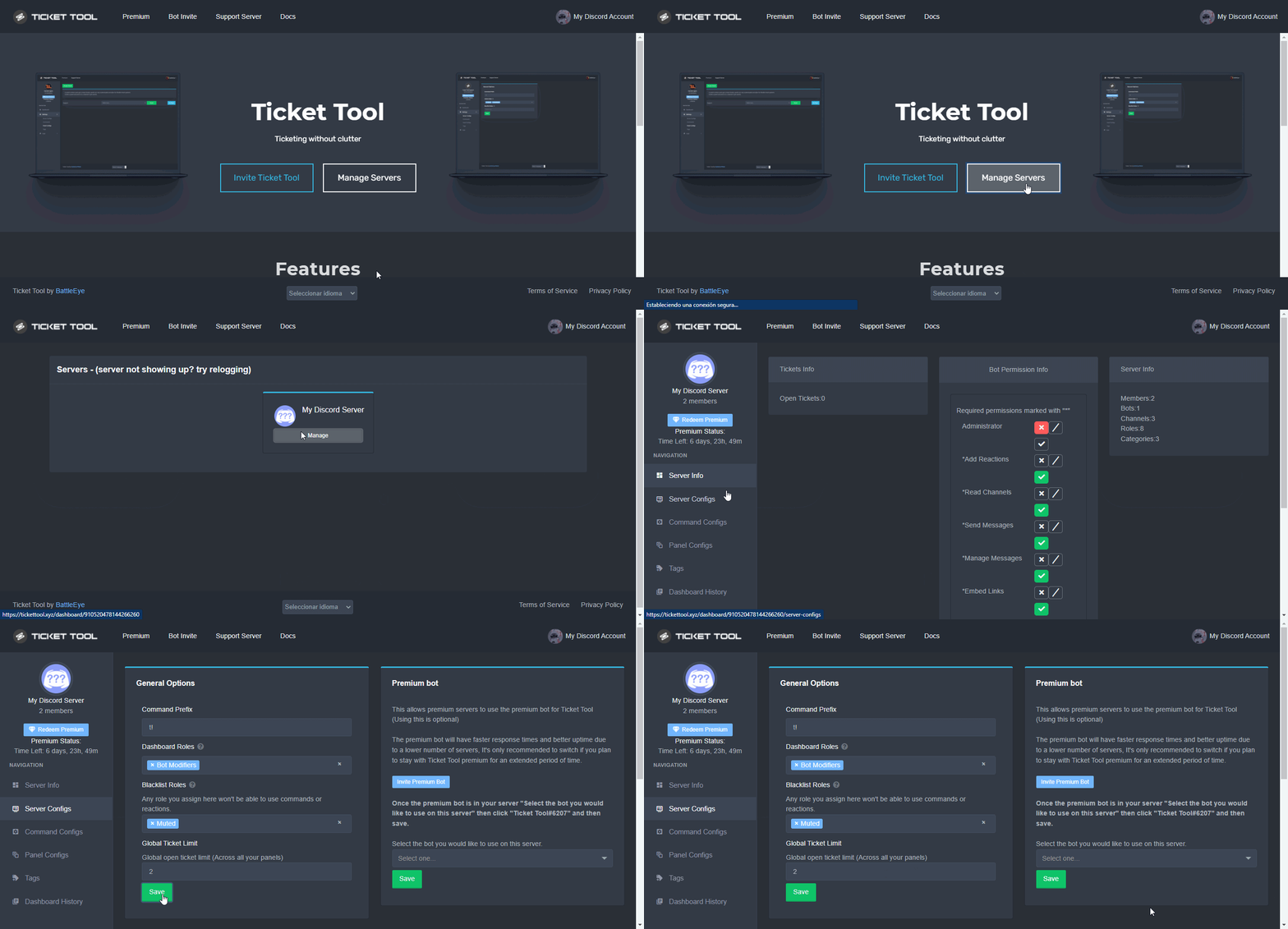 west locust
atomic sedge
<@295163815375667200>
west locust
atomic sedge
<@295163815375667200>
Are you the server admin? IE did you set up the discord bot?
median knot
what are these? they feel like command trigger autoresponders
jade topaz
west locust
Are you the server admin? IE did you set up the discord bot?
They hit the global limit
jade topaz
median knot
what are these? they feel like command trigger autoresponders
They are! Pinned in #🤖│bot-spam
west locust
atomic sedge
I'm a member
Ok you will need to ask your server owner to increase the limit.
crimson void
humble sequoia
not this .
humble sequoiaBOT
How to set a ticket limit
A ticket limit may be set per panel to prevent users from spamming tickets. By default this limit is set to 3. Once a user hits this limit the bot will notify the users that they reached the limit.
To set a ticket limit go to the Dashboard -> Panel Configs -> Settings -> General Options -> Ticket Limit
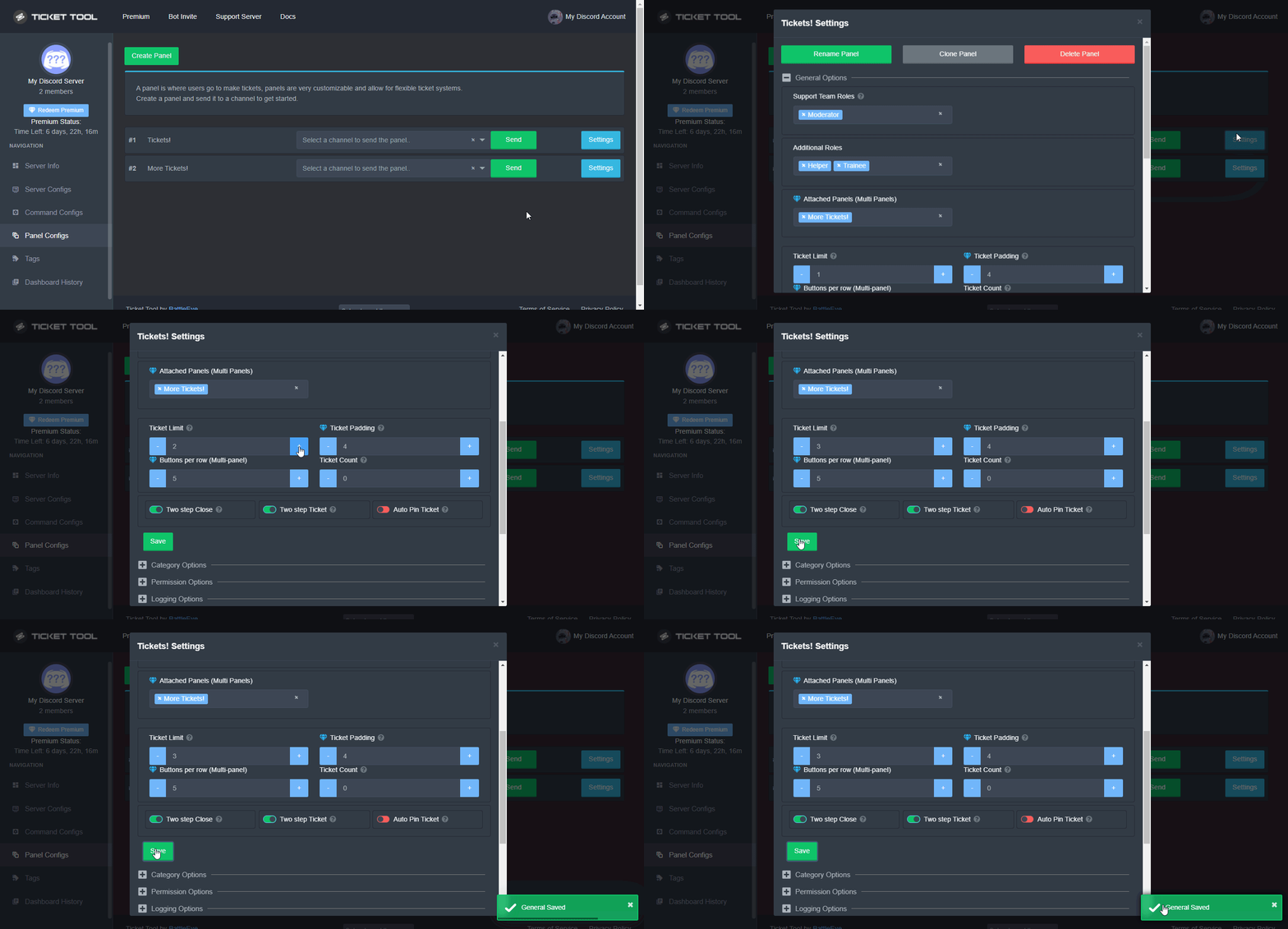 crimson void
check this out ^
median knot
jade topaz
They are! Pinned in <#910978476536905738>
how are you invoking them? copypasta or are you command invoking?
median knot
lol
aight cool - nice trick - we use autoresponder command in dyno for this, but I like this idea too
median knot
jade topaz
Im just typing them out
r bot command programmable through ticket tool premium, or are you using another bot for that?
humble sequoiaBOT
⚠️ You're in the wrong place
We provide support for @pseudo glen discord bot and cannot help you with whatever issue you have.
- We don't know which Support Team you should contact to get this issue resolved, and unfortunately we won't be able to accurately tell you.
If you don't have any further questions regarding our bot Ticket Tool, please close this ticket
jade topaz
median knot
r bot command programmable through ticket tool premium, or are you using another...
We are using Ticket tool for commands.
crimson void
median knot
r bot command programmable through ticket tool premium, or are you using another...
That's a ticket tool Tags you can find it in your dashboard .
atomic sedge
west locust
Ok you will need to ask your server owner to increase the limit.
Thank you sir it worked
iron nightBOT
Gave +1 Rep to @west locust
atomic sedge
Thnx, have a great day
jade topaz
You too!
median knot
how are you embedding dynamic graphics in the tags? are those .gifs? or video file formats
and what channel can i submit a dev request - would be great to have more granularity in who can use a tag. for now all is see is Admin only or everyone. we use cold account for admin, so our interactive ones have lower roles...
humble sequoiaBOT
What are the direct URLs?
A direct access URL is an easy to read URL that users can enter to get to a specific item, document, page, category, or perspective, in which our bot TicketTool can read and get it displayed in your 'Panel Message' or your 'Ticket Message'.
Where can I get them?
The recommended way is to use 'Imgur', you can signup within a few minutes and then upload the image you want, and copy the URL of the uploaded image and paste it into one of the four boxes. There are alternatives to this, such as other image or video storing websites or using 'Open Original' of an image and paste it in (please be aware that if your image is deleted, Discord will automatically delete the link to it in a few days). Please note this requires 'Premium'. Imgur
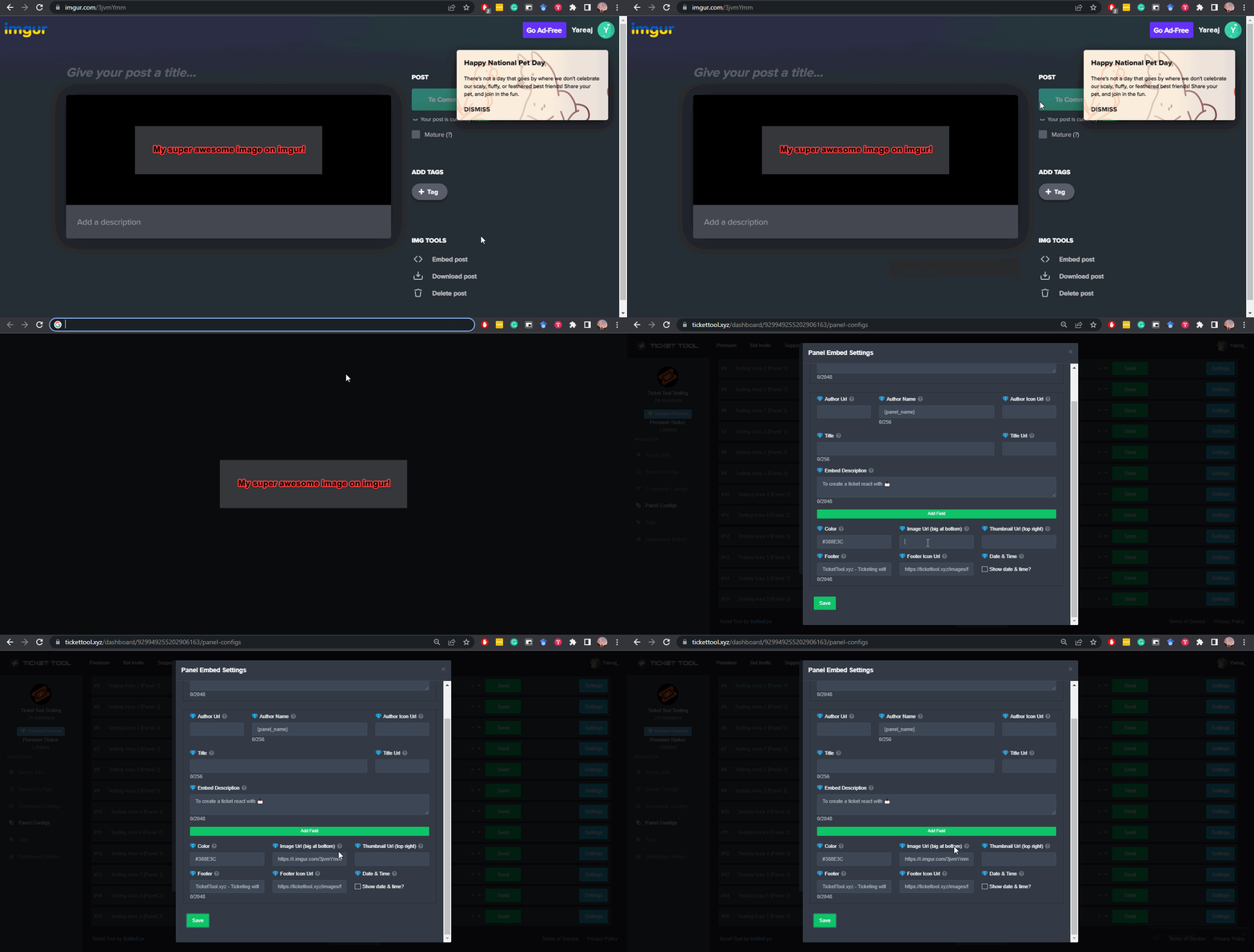 shut bolt
That's regarding the embedding of gifs
median knot
so gifs
shut bolt
And the customization of allowing more roles to use tags is planned
median knot
is there somewhere that you set the prefix for tags? or is it always "$"
jade topaz
median knot
is there somewhere that you set the prefix for tags? or is it always "$"
Tags prefix will be the same as the bot prefix. Which you can change!
jade topaz
median knot
is there somewhere that you set the prefix for tags? or is it always "$"
For more information on how to change the prefix, refer to the embedded message below!
$help prefix
humble sequoiaBOT
How to change Ticket tool's prefix
The default prefix for ticket tool is $ and @Ticket Tool#4843 however that can be changed on the Dashboard under Server Configs -> Command Prefix.
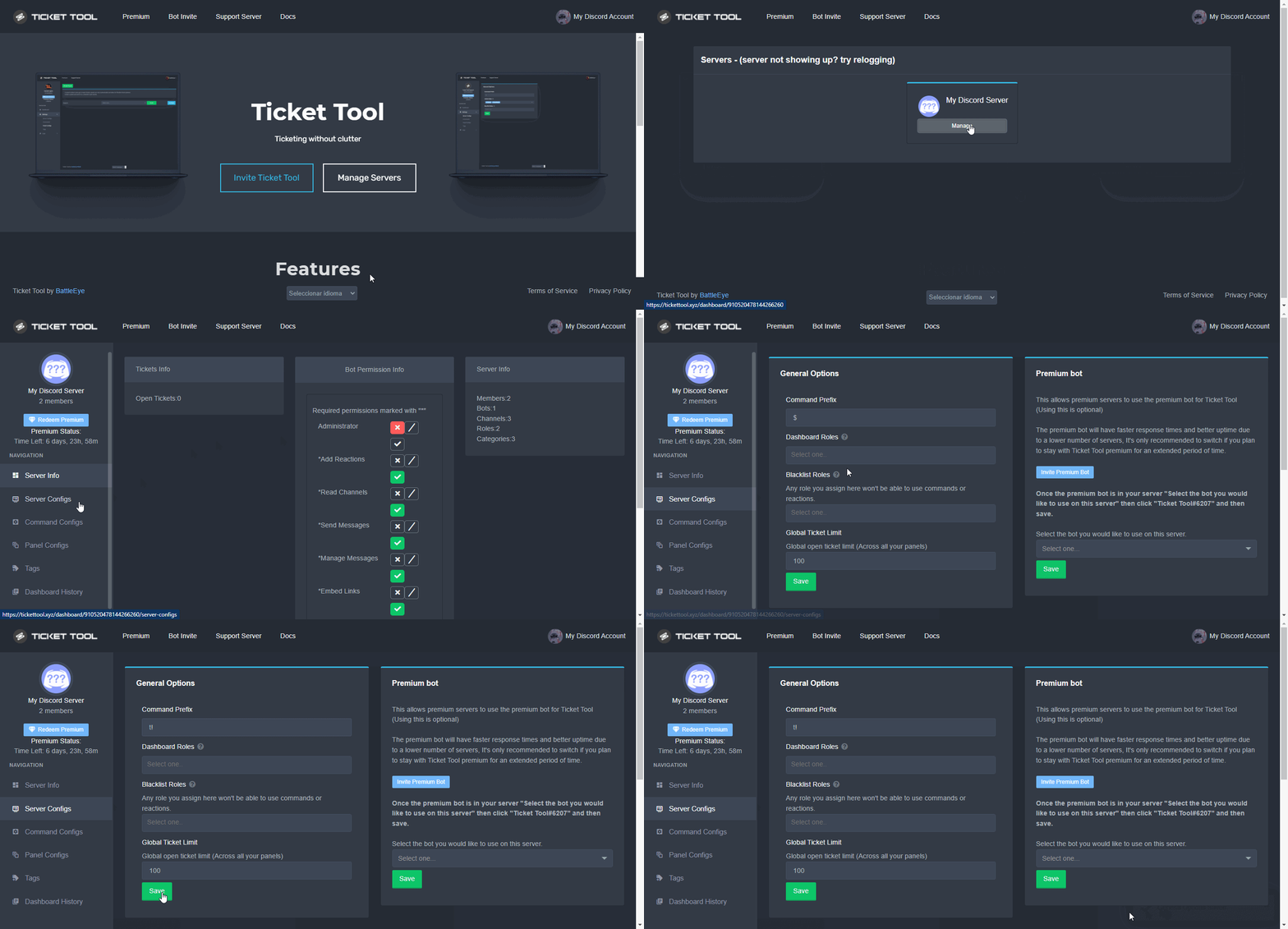
NOTE that @Ticket Tool#4843 will always work as a prefix even if there is a custom prefix.
median knot
so - feels like tags would need fewer perms than tickets - will they run on skinnier perms and if so and im assigning ticket bot specific channel perms - do you know off hand what those perms are? in channel assignment is the only way i can think to limit where tags are deployable given the current controls...
humble sequoiaBOT
Tags
Tags are used to send a predefined response to your channels using a command. Tags will only respond if the command itself is used, it will not function if you put the tag into a sentence. The prefix is not included.
To create tags, go to: Dashboard > Tags > Create Tag. After creating and naming one, tap on the response button, and you can edit the response.
 median knot
https://images-ext-2.discordapp.net/external/ Another question - the gif in your embed points to this link - how are you hosting the direct link to your gif here? is there a wiki for this?
shut bolt
median knot
https://images-ext-2.discordapp.net/external/ Another question - the gif in your...
That's the discord render link
The actual link isn't that
The link is what's at the end of the external linking
slow ravine
rotund bloom
المشكله اتحلت مشكورين🤍
اذا عندك اسهال تتبند؟
jade topaz
how do u make it so when u open a ticket it says ticket-then the persons name so like if i open a ticket it would say ticket-磁盤在上面
humble sequoiaBOT
The ticket name is the default channel name of all tickets. To edit it, go to your Dashboard > Panel Configs > Settings > Ticket Options. There you can edit the channel name of opened and closed tickets. You can also use variables in there.
 Note: This is a premium feature
shut bolt
Note: This is a premium feature
shut bolt
Edit the ticket default name and use the {ticket.user.name} variable
jade topaz
When pablo is online its almost impossible to help
jade topaz
shut bolt
Edit the ticket default name and use the `{ticket.user.name}` variable
tysm
😭
shut bolt
jade topaz
tysm
Sure
shut bolt
jade topaz
tysm
 crimson void
jade topaz
crimson void
jade topaz
Make it ticket-{ticket.user.name}
jade topaz
ty
crimson void
Anytime.
jade topaz
thanks @crimson void@shut bolt
iron nightBOT
Gave +1 Rep to @crimson void
jade topaz
bru L bot
crimson void
^

 high oyster
 coral terrace
Hi how i do sam that
coral terrace
Hi how i do sam that
What would you like to know exactly?
coral terrace
How i do more than 1 button
crimson void
coral terrace
Hi how i do sam that
ايش قصدك؟
coral terrace
كيف اسوي اكثر من زر
crimson void
لازم يكون عندك بريميوم
coral terrace
تمام
jade topaz
coral terrace
<@971175151934775316>
Please dont ping for support :)
crimson void
humble sequoia
@coral terrace البوت طافي ما اقدر ارسل الآمر هذا هو^
 neat tree

