#🆘│community-support
1 messages · Page 394 of 1
 shut bolt
 hybrid nova
thank you
shut bolt
Sure
 solar lake
Can a support team member help me with what the minimum age is to join the team
 cunning skiff
Hey guys, I'm trying to invite the bot to a server but it keeps bouncing out
it wont let me give it any roles, immediately bounces back out and I can't see it on the dashboard under my servers after adding it either
I have admin access to the server
anyone have any ideas?
solar lake
You need to close discord and or relog is what helped me with that problem
@cunning skiff
cunning skiff
solar lake
You need to close discord and or relog is what helped me with that problem
like close my browser windows of discord?
solar lake
cunning skiff
like close my browser windows of discord?
That’s what I did, just fully restart all discord windows
cunning skiff
solar lake
That’s what I did, just fully restart all discord windows
ok weird that would interfere but I'll try anything at this point haha
dang still happening ugh
solar lake
cunning skiff
dang still happening ugh
Try to send the panel before putting roles on it
cunning skiff
solar lake
Try to send the panel before putting roles on it
I cant even get into the panel cause the bot keeps bouncing out of the server immediately after entering
solar lake
Oh
cunning skiff
and in dashboard the server doesnt show up even tho I'm admin in the server
cunning skiff
hmm i dont see an add ppl permission but it has all the manage memebers permissions
solar lake
 jade topaz
I can’t even make one in here
jade topaz
I can’t even make one in here
What does it say something about body
jade topaz
solar lake
What does it say something about body
It says this interaction failed
solar lake
Oh idk then
 tribal cedar
jade topaz
It says this interaction failed
tribal cedar
jade topaz
It says this interaction failed
That error means the person needs to update their discord client
 humble sequoiaBOT
Update your discord App
Buttons are a relatively new addition to discord and don't work with some older versions of the app.
Please verify that you have the latest version of discord, by going to the app or play store.
Discord for the  App Store
Discord for the  Play Store
 void knot
tribal cedar
That error means the person needs to update their discord client
void knot
tribal cedar
That error means the person needs to update their discord client
As I suspected in #💬│general-chat
 opal flame
hello I have a question:
How to customise the ticket message? I want to include who has created the ticket because he is not in the channel (is it possible btw to include the user who created the ticket in the Review room?)
The message could be customised by "{@User} created the ticket, however "@User" is not being transformed into user name in-discord
Would someone help me please?
humble sequoiaBOT
Using the View as Role feature.
The View as Role discord feature will not work for testing ticket tool. Ticket Tool opens permissions with user permissions & not role permissions.
opal flame
humble sequoia
what?
tribal cedar
Sorry ignore that. Your just looking for a set of variables?
opal flame
tribal cedar
Sorry ignore that. Your just looking for a set of variables?
yeah, like what should I put in between {} so that it would ping the discord user
{@"role name"} as variable worked
humble sequoiaBOT
{server.name} ➞ Name of the server
{server.id} ➞ ID of the Server

[#🆘│community-support](/guild/509192800865353738/channel/776680605517742090/) = <#channel> ➞ Channel link of the current channel
{channel.name} ➞ Name of the current channel
{channel.id} ➞ ID of the current channel

{author} = <@user> ➞ Mention of the user triggering this message
{author.name} ➞ Name of the user triggering this message
{author.id} ➞ ID of the user triggering this message
{author.nickname} ➞ Nickname of the user triggering this message
{author.icon} ➞ Direct Url of the profile picture of the user triggering this message
{author.tag} ➞ 4 digit tag (discriminator) of the user triggering this message
{author.full} ➞ username + 4 digit discriminator of the user triggering this message

{panel.count} ➞ The current count number of the panel (Tickets only)
{panel.name} ➞ The name of the panel (Tickets Only)
{panel.ticketLimit} ➞ The current limit of the panel (Ticket Only)

{ticket} = <#channel> ➞ Channel mention of the ticket
{ticket.id} ➞ Channel ID of the ticket

{ticket.user} = <@user> ➞ User mention of the ticket user
{ticket.user.name} ➞ Name of the ticket user
{ticket.user.id} ➞ User ID of the ticket user
{ticket.user.nickname} ➞ Nickname of the ticket user
{ticket.user.icon} ➞ Direct Url of the profile picture of the ticket user
{ticket.user.tag} ➞ Tag / Discriminator of the ticket user
{ticket.user.full} ➞ Username + Discirimator of the ticket user```
Roles can be either
{@role name} or {role ID}
_ _
_ _
Additional variables
{reason}
» works on $close <reason>, $delete <reason>, $new <reason>, $claim <reason>
» displays the reason, you can optionally give with some commands
Transcript Variables
{ticket_name}➞ Name of the ticket
{panel_name}➞ Name of the panel
{transcript_url}➞ File link of the transcript
Hide Link under blue text:
[Click me](https://tickettool.xyz)➞ Click me
Time Variable
Sends the current unix time in seconds. Optinally add or remove seconds
<t:{!time+43200}:R>➞ <t:1647330543:R>
<t:{!time+43200}:R>➞ <t:1647244143:R>
<t:{!time+43200}:R>➞ <t:1647287343:R>
» Remove ! before time
_ _
<t:1641006000>➞ <t:1641006000>
<t:1641006000:f>➞ <t:1641006000:f>
<t:1641006000:F>➞ <t:1641006000:F>
<t:1641006000:D>➞ <t:1641006000:D>
<t:1641006000:d>➞ <t:1641006000:d>
<t:1641006000:t>➞ <t:1641006000:t>
<t:1641006000:T>➞ <t:1641006000:T>
<t:1641006000:R>➞ <t:1641006000:R>
» You can use https://hammertime.djdavid98.art/ to create custom dates/times
tribal cedar
These can also be viewed in panel options at the bottom
opal flame
ooh great, thanks!
tribal cedar
Nps
opal flame
and is it possible to allow the {author} to see his ticket or its only visible to the moderation team?
tribal cedar
Yes. You would have to edit the opened user perms in panel configs -> settings -> permissions options to include read and send
opal flame
tribal cedar
Yes. You would have to edit the opened user perms in panel configs -> settings -...
hmm though it appears to be set like this by default and the user doesnt seem to have visibility acceess
ah sorry
you are right
I didnt notice the user having access, everytihng is correct
ok thank you! @tribal cedar
tribal cedar
Anytime
 ocean folio
How do I give someone else permission to view the ticket?
tribal cedar
You can use $add userID if it's just a single ticket
Use that command inside the ticket channel
ocean folio
tribal cedar
You can use $add userID if it's just a single ticket
I want him to always see when someone opens a ticket
tribal cedar
Then you would have to add a role into support role in general options inside panel configs
And give this user that role
opal flame
hi, is it possible to disallow a specific role from being able to create a ticket?
shut bolt
opal flame
hi, is it possible to disallow a specific role from being able to create a ticke...
Hi! Yes, there are two ways of doing it, option 1 is to do it by blacklisting the role for the whole, i.e. the users with that role won't be able to use the bot at all, no commands, no buttons, nothing! Or option 2 is to disable that role for the button, let me know which option are you interested in and I'll be glad to guide you through it
opal flame
shut bolt
Hi! Yes, there are two ways of doing it, option 1 is to do it by blacklisting th...
ok I found the second option in Button Options -> Create Ticket Settings. Thanks!
 iron nightBOT
Gave +1 Rep to @shut bolt
shut bolt
opal flame
ok I found the second option in Button Options -> Create Ticket Settings. Thanks...
Glad to hear you could find it! If you have any doubt about it let me know 
iron nightBOT
Gave +1 Rep to @slender minnow
 tacit basalt
Do you guys know how to ping a role in the ticket message instead of it showing as a text
solar lake
Hello please restate your problem in different wording
 drifting willow
hi! i fixed the dashboard, added and panel and the $new command wouldn't work
@shut bolt
shut bolt
drifting willow
<@!518666147441278998>
#546557408902905896 Rule 4
drifting willow
shut bolt
<#546557408902905896> Rule 4
im sorry
shut bolt
drifting willow
hi! i fixed the dashboard, added and panel and the `$new` command wouldn't work
Did you actually enable the command style module?
drifting willow
shut bolt
Did you actually enable the command style module?
ah right, thank you!
iron nightBOT
Gave +1 Rep to @shut bolt
shut bolt
drifting willow
ah right, thank you!
Sure, try that and let me know if it works
jade topaz
I have a question about my server not showing up
 potent atlas
How do you get the premium role?
Idk if its automatic or someone added the role to me. Thanks btw! 😂😂😂
jade topaz
The bot is not working.
 keen prism
jade topaz
The bot is not working.
keen prism
jade topaz
The bot is not working.
Yeah I can see others ticket even close it!
 humble sequoiaBOT

Ticket Tool avatar/status Customisation
@pseudo glen is like another discord user; you can't control its avatar icon or status, and we cannot change it for a specific server.
However, on your server, you can change the bot's nickname
 humble sequoiaBOT

Don't see your server in the dashboard?
You will possibly need to relog. Look below to see steps on how to relog.
How to relog in the Dashboard.
First, you will need to go to the dashboard. Once your there, click on your avatar on the top right. after you clicked it, you will see button that says Logout. You must click that. Once you have logged out, you can log back in.
Note:
You need one of these 3 things to access the dashboard.
1. Server Owner (Level: 6)
2. Server Administrator (Level: 4)
3. Dashboard Role (Level: 2)
:warning: You can check your level using $level on your Discord Server
User permission level with Ticket Tool
@User is permission level: 0 (User)
```» *If it shows that your permission is **0**, you don't have any of the above **3 things** to manage the dashboard.*


**See the picture below on how to relog:**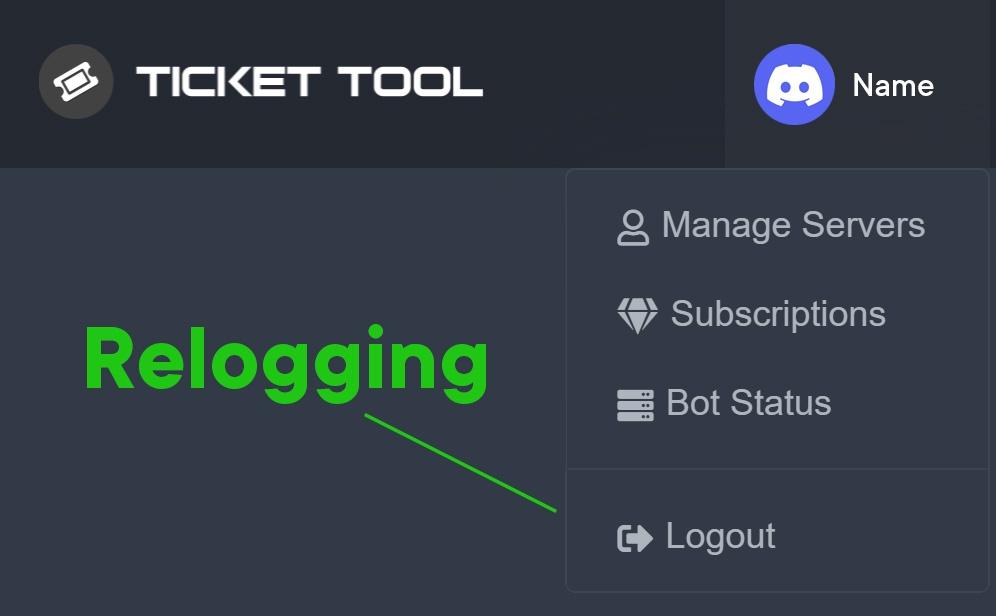
 tropic axle
Hey all, I think I might already know the answer to this, but ticket tool has started putting tickets at the top of the server, rather than in the category allocated. Any ideas why?
@safe prairie
 atomic solstice
tropic axle
Hey all, I think I might already know the answer to this, but ticket tool has st...
atomic solstice
tropic axle
Hey all, I think I might already know the answer to this, but ticket tool has st...
This can be caused by a few things:
1st the category where the bot opens tickets in is full (has 50 channels already)
2nd the permissions were changed to the bot can no longer see or manage the category
tropic axle
atomic solstice
This can be caused by a few things:
`1st` the category where the bot opens tick...
Perfect, I thought it would be the category limit, just wasn't sure, thank you for the confirmation!
iron nightBOT
Gave +1 Rep to @atomic solstice
atomic solstice
tropic axle
Perfect, I thought it would be the category limit, just wasn't sure, thank you f...
what you can do is select multiple categories so once one fills the bot starts opening tickets in the second category
tropic axle
atomic solstice
what you can do is select multiple categories so once one fills the bot starts o...
Ohh that's a good idea, will do that now!
 twin edge
Hi

How do I change the words here and make it like this or do I have to use the paid version?
thus

 copper owl
you need premium
twin edge
Ok
humble sequoiaBOT
Multipanels are a premium feature  that allow for a single panel with multiple buttons to open different tickets.
How to create a Multipanel
Premium users can combine multiple panels into one multipanel.
First, find the IDs of each panel you wish to combine. You can find them in your Panel Configs in the Dashboard
Next, send the multipanel to a channel using $panel [id1] [id2] {id3} ....
e.g. $panel 1 2 4 17 35 to combine panels 1, 2, 4, 17 and 35.
Up to 25 panels may be combined.

For a more convenient use of multipanels, you can now combine panels on the dashboard. This will allow you to directly send the multipanel from the dashboard or via the $panel ID command.
Where can I find this?
You can find this setting on the Dashboard -> Panel Configs -> Settings -> General Options
Note: if you're attaching all the panels to a panel called English, don't include English in the attached panels box (If you do this, it will create duplicate)
This will put all buttons from all of your panels on one message. The message is the panel message from the panel you're combining these panels in.

 Note: This is a premium feature
 fallow ingot
@mystic pivot ^^^
potent atlas
atomic solstice
This can be caused by a few things:
`1st` the category where the bot opens tick...
1st - Is this a Discord Limit or can be lifted if premium?
atomic solstice
potent atlas
`1st` - Is this a Discord Limit or can be lifted if premium?
It's a discord limit
each category can hold only 50 channels
Threads also count as channels
well those which aren't archived
potent atlas
atomic solstice
what you can do is select multiple categories so once one fills the bot starts o...
I see. So this is the next option..
atomic solstice
yes
potent atlas
Thanks @atomic solstice
iron nightBOT
Gave +1 Rep to @atomic solstice
atomic solstice
no problem
twin edge
Hi
How do I add a sticker from the server in the name of the ticket?
Thus

But in the name of the ticket

Support??
solar lake
I’m gonna guess premium feature
twin edge
No look
jade topaz
Hello who speak french ?
twin edge
SUPPORT !!
I need help
@copper owl @atomic solstice @radiant moss @severe path can you help me? Please, sorry for the inconvenience
 prime bridgeBOT
 ᏢꜦ | ɌEĐΛ 🍀#0251 has been warned!

 They were notified via dms.
twin edge
I'm so sorry
copper owl
#🎫│make-a-ticket is a way to contact us, and pinging is against rules
twin edge
Ok Thx
jade topaz
fallow ingot
Bonjour
On est peu a parler fr
jade topaz
fallow ingot
quelque chose que je peux vous aider?
Nan c bon
fallow ingot
$frticket
humble sequoiaBOT

L'équipe du support Français
Cher client,
Si vous avez besoin d'aide, ouvriez un ticket pour le support Français s'il vous plaît.
Allez au #🎫│make-a-ticket et tapez sur le button contenant l'emoji 🇫🇷
fallow ingot
@jade topaz jetez un coup d’œil à l’intégration ci-dessus ^^
fallow ingot
jade topaz
CT juste pour savoir si y'avais des français
oh lol oui certaines personnes parlent français lol
jade topaz
Lol
 left turtle
J'aurais besoin d'aide
humble sequoiaBOT
L'équipe du support Français
Cher client,
Si vous avez besoin d'aide, ouvriez un ticket pour le support Français s'il vous plaît.
Allez au #🎫│make-a-ticket et tapez sur le button contenant l'emoji 🇫🇷
fallow ingot
@left turtle ^
left turtle
J'arrives pas à mettre en place le système de ticket sur mon serv
 true hull
Hello, After 30 hours, I got a message that KYC failed, it does not allow me to retry, what to do?
left turtle
?
 rose garnet
humble sequoia
rose garnet
humble sequoia
How to make response like that
left turtle
Qlqn peut m'aider
rose garnet
??
left turtle
J'arrives pas à mettre en place le système de ticket sur mon serv
rose garnet
??
 plain surge
left turtle
J'arrives pas à mettre en place le système de ticket sur mon serv
plain surge
left turtle
J'arrives pas à mettre en place le système de ticket sur mon serv
Vous pouvez suivre les étapes suivantes pour configurer le bot
humble sequoiaBOT

Vous pouvez consulter notre documentation ici.
Vous pouvez également vérifier #573205317870157855 pour les étapes générales.
Notre documentation contient toutes les informations dont vous avez besoin sur le bot pour pouvoir l'installer et le configurer comme vous le souhaitez.
plain surge
rose garnet
How to make response like that
This is a tag, you can set one up like shown below
humble sequoiaBOT
Tags
Tags are used to send a predefined response to your channels using a command. Tags will only respond if the command itself is used, it will not function if you put the tag into a sentence. The prefix is not included.
To create tags, go to: Dashboard > Tags > Create Tag. After creating and naming one, tap on the response button, and you can edit the response.
 left turtle
plain surge
Vous pouvez suivre les étapes suivantes pour configurer le bot
left turtle
plain surge
Vous pouvez suivre les étapes suivantes pour configurer le bot
Pour mettre le message avec le rôle réaction
plain surge
Oui
plain surge
humble sequoia
C'est une guide pour ça
left turtle
J'ai rien compris c'est en anglais
humble sequoiaBOT
━━ moved to ticket ━━
 chrome thistle
humble sequoiaBOT
chrome thistle
humble sequoiaBOT
━━ moved to ticket ━━
jade topaz
Hello, i need help!!! Someone hacked my metamask and taking all my rewards for the nodes.
humble sequoiaBOT

⚠️ You're in the wrong place
We provide support for @pseudo glen discord bot and cannot help you with whatever issue you have.
- Please make sure to contact the appropriate Support Team.
If you don't have any further questions regarding our bot Ticket Tool, please close this ticket
fallow ingot
$help support
humble sequoiaBOT
How to let support team see into a ticket
About support roles
A support role lets your support team see into tickets with out having to add them manually to each and every ticket.
You can add as many support roles as you like per panel.
NOTE that the way discord works all admins can see into tickets regardless of this.
How to set a support role
To set a Support role go to the Dashboard -> Panel Configs -> Settings -> General Options -> Support Team Roles.

NOTE that the support role will not be able to see into tickets that are already created..
 fallow ingot
 sharp fractal
Run $debug in your server and send me the link it asks you to send support team.
Resolved in DM's with @sharp fractal since they were muted.
sharp fractal
@fallow ingot
humble sequoiaBOT
You can check our documentation here.
You can also check #573205317870157855 for the basic setup.
Our documentation contains all the info you need about the bot to be able to setup and configure the bot however you like.
 graceful tangle
i cant find my server in the dashboard
 zinc egret

humble sequoiaBOT
Don't see your server in the dashboard?
You will possibly need to relog. Look below to see steps on how to relog.
How to relog in the Dashboard.
First, you will need to go to the dashboard. Once your there, click on your avatar on the top right. after you clicked it, you will see button that says Logout. You must click that. Once you have logged out, you can log back in.
Note:
You need one of these 3 things to access the dashboard.
1. Server Owner (Level: 6)
2. Server Administrator (Level: 4)
3. Dashboard Role (Level: 2)
:warning: You can check your level using $level on your Discord Server
User permission level with Ticket Tool
@User is permission level: 0 (User)
```» *If it shows that your permission is **0**, you don't have any of the above **3 things** to manage the dashboard.*
**See the picture below on how to relog:** proper wyvern
How i use tags?
jade topaz
None of my members can open a ticket, i put the @ whitelisted role everyone has & ven @ everyone on Open Ticket in the panel I’m using but it won’t work.
Is there something I’m missing?
humble sequoiaBOT
Tags
Tags are used to send a predefined response to your channels using a command. Tags will only respond if the command itself is used, it will not function if you put the tag into a sentence. The prefix is not included.
To create tags, go to: Dashboard > Tags > Create Tag. After creating and naming one, tap on the response button, and you can edit the response.
Any role you assign as a blacklisted role won't be able to use commands or reactions.
Selecting a blacklisted role
Go to your Dashboard ➞ Server Configs. There you will find the option to select blacklisted roles.
Note: Don't forget to save.

 minor bear
Someone has this problem ? Some Closed ticket stay with opened tickets

 obsidian jasper
did you delete the ticket?
jade topaz
is it possible to change the bot image profile if i subscribe to premium please ?
tribal cedar
jade topaz
is it possible to change the bot image profile if i subscribe to premium please ...
It is not possible rn but I heard something about in the future this might be available
tribal cedar
minor bear
Someone has this problem ? Some Closed ticket stay with opened tickets
What are you trying to accomplish?
Do you want closed tickets to go to a different category?
jade topaz
tribal cedar
It is not possible rn but I heard something about in the future this might be av...
thanks !
iron nightBOT
Gave +1 Rep to @tribal cedar
tribal cedar
Nps
minor bear
tribal cedar
What are you trying to accomplish?
I have two separate categories, when the ticket is closed it goes to another category, but I don't know why it stopped going
tribal cedar
Check the closed category in category options.
Panel configs -> settings -> category options
 hallow marlin
Hello, I'm looking for a function that allows tickets to close automatically after a certain period of time. does this function exist?
fallow ingot
hallow marlin
Hello, I'm looking for a function that allows tickets to close automatically aft...
It doesn't exist, however is planed :)
hallow marlin
fallow ingot
It doesn't exist, however is planed :)
all right, thanks for your help
iron nightBOT
Gave +1 Rep to @fallow ingot
fallow ingot
sure, anytime.
fallow ingot
$perms
humble sequoiaBOT
ᅠ
@pseudo glen requires the following permissions:
Add Reactions
Read Channels
Send Messages
Manage Messages
Embed Links
Attach Files
Read History
Manage Roles
To change the role permissions, you can go to your Discord Server ➞ Server Settings ➞ Roles ➞ @Ticket Tool
To change the channel permissions, you can go to your Channel Settings ➞ Permissions ➞ Ticket Tool
ᅠ
Note:
You can give Ticket Tool Administrative Permissions instead of all the permissions listed above, but it's entirely optional and NOT necessary.

 brazen scaffold
thank you friend
fallow ingot
Anytime
fallow ingot
No worries
 forest harness
hey @shut bolt the server id is "889192661909663795"
iron nightBOT
Gave +1 Rep to @forest harness
shut bolt
It seems that a couple clusters are having trouble rn
It has been notified to our Management team and we are awaiting for a response
forest harness
okay no worries haha, hopefully it's fixed soon xx
humble sequoiaBOT
Update your discord App
Buttons are a relatively new addition to discord and don't work with some older versions of the app.
Please verify that you have the latest version of discord, by going to the app or play store.
Discord for the App Store
Discord for the Play Store
tribal cedar
Panel configs -> settings -> permission options -> edit user open perms
Set the users to be able to attach files and embed links
@median crane
 cyan perch
May I ask why ticket tool might not show up in the manage servers section of the website?
humble sequoiaBOT
Don't see your server in the dashboard?
You will possibly need to relog. Look below to see steps on how to relog.
How to relog in the Dashboard.
First, you will need to go to the dashboard. Once your there, click on your avatar on the top right. after you clicked it, you will see button that says Logout. You must click that. Once you have logged out, you can log back in.
Note:
You need one of these 3 things to access the dashboard.
1. Server Owner (Level: 6)
2. Server Administrator (Level: 4)
3. Dashboard Role (Level: 2)
:warning: You can check your level using $level on your Discord Server
User permission level with Ticket Tool
@User is permission level: 0 (User)
```» *If it shows that your permission is **0**, you don't have any of the above **3 things** to manage the dashboard.*


**See the picture below on how to relog:**Thank you!
shut bolt
Sure
 fervent gust
How can i do more than 1 reaction for the tickets like one for support and one for the store etc.
tribal cedar
fervent gust
How can i do more than 1 reaction for the tickets like one for support and one f...
This way requires premium
humble sequoiaBOT
For a more convenient use of multipanels, you can now combine panels on the dashboard. This will allow you to directly send the multipanel from the dashboard or via the $panel ID command.
Where can I find this?
You can find this setting on the Dashboard -> Panel Configs -> Settings -> General Options
Note: if you're attaching all the panels to a panel called English, don't include English in the attached panels box (If you do this, it will create duplicate)
This will put all buttons from all of your panels on one message. The message is the panel message from the panel you're combining these panels in.
Note: This is a premium feature
Multipanels are a premium feature that allow for a single panel with multiple buttons to open different tickets.
How to create a Multipanel
Premium users can combine multiple panels into one multipanel.
First, find the IDs of each panel you wish to combine. You can find them in your Panel Configs in the Dashboard
Next, send the multipanel to a channel using $panel [id1] [id2] {id3} ....
e.g. $panel 1 2 4 17 35 to combine panels 1, 2, 4, 17 and 35.
Up to 25 panels may be combined.
 fading saffron
كيف ادخل الدعم العربي
 twilit hinge
hi
fallow ingot
$articket
humble sequoiaBOT

فريق الدعم الفني العربي
عميلنا العزيز ان كنت تبحث عن مساعدة يرجى فتح تكت خاص بفريق الدعم الفني العربي
اذهب الى#🎫│make-a-ticket
ثم قم بلضغط على الايموجي الاتي (🇯🇴)
fallow ingot
@fading saffron ^
jade topaz
can you purchase ticket tool premium with bitcoin?
shut bolt
jade topaz
can you purchase ticket tool premium with bitcoin?
Yup, you can pay starting 3 months+
 celest peak
any german guy here to help me set up the ticket tool?
shut bolt
$deticket
humble sequoiaBOT

Deutsches Support-Team
Wenn du Hilfe vom Deutschen Support-Team erhalten möchtest gehe in #🎫│make-a-ticket und öffne durch einen Klick auf den :flag_de: Button ein Ticket.
shut bolt
 native pumice
is there russian option?
native pumice
is there russian option?
Nope
shut bolt
We currently don't got a russian support team, we don't often have russian users
shut bolt
native pumice
is there a place to see what languages are available
Yup, the buttons in #🎫│make-a-ticket
Or the flags in #918271177988907079 too, even though not all flags are a team
 mighty turtle
Hello, I want to know why I added a role to support team but the memeber of that role can not see the tickets?
Can someone help me ?
mighty turtle
I try for twice
native pumice
ok sorry i tried
 oblique path
انا
tribal cedar
mighty turtle
Hello, I want to know why I added a role to support team but the memeber of that...
They will be able to see new tickets only not previous tickets opened before the change
To test open a new ticket and see if they can see it
tribal cedar
Anytime
 fading sandal
I’m trying to make a transcript for the bot. I’m trying to get the bot to send a transcript in the transcripts.
fallow ingot
fading sandal
I’m trying to make a transcript for the bot. I’m trying to get the bot to send a...
What do you mean?
Like how to send a transcript in a channel?
fading sandal
Yes.
fallow ingot
$help transcript
humble sequoiaBOT
How do I save transcript to a channel?
To save transcripts to a channel go to the Dashboard -> Panel Configs -> Settings -> Logging Options -> Transcript Channel
 fading sandal
Ok.
celest peak
is it possible to remove a role from the one who opened the ticket after closing the ticket automatically?
fallow ingot
celest peak
is it possible to remove a role from the one who opened the ticket after closing...
No, that's not possible with Ticket Tool.
celest peak
ok thx
fallow ingot
anytime
hallow marlin
celest peak
any german guy here to help me set up the ticket tool?
Wobei brauchst du denn genau Hilfe? 🙂
celest peak
hallow marlin
Wobei brauchst du denn genau Hilfe? 🙂
hat sich schon so gut wie erledigt 🙂 Wir wollten gerne vor dem erstellen eines Tickets ein kleines FAQ einbauen um unnötige tickets zu vermeiden
ist wohl aber leider nicht möglich
hallow marlin
celest peak
hat sich schon so gut wie erledigt 🙂 Wir wollten gerne vor dem erstellen eines ...
Ist so mit Ticket Tool leider nicht möglich
 jade topaz
so do i have to add the premium ticket tool?
fallow ingot
Has someone changed the premium bot to main bot in server Configs?
 fallow ingot
jade topaz
anyway to fix this?
fallow ingot
jade topaz
anyway to fix this?
Yup. Run $debug then send me the link.
fallow ingot
Or you can check for yourself that Ticket Tool has the correct permissions etc.
fallow ingot
jade topaz
fixed it ty
Awesome, was the premium bot selected?
jade topaz
fallow ingot
Awesome, was the premium bot selected?
yeah !
fallow ingot
jade topaz
yeah !
Oh, what was the problem then?
jade topaz
yup
jade topaz

 junior mango
does anyone know how to make it so that my support team who gets added to an opened ticket get notified when the user messages WITHOUT having to ping the role each time?
hope that made sense haha
 radiant moss
junior mango
does anyone know how to make it so that my support team who gets added to an ope...
radiant moss
junior mango
does anyone know how to make it so that my support team who gets added to an ope...
No real way without a ping, unless they want to turn server notifications on
junior mango
i see. maybe since im the admin i can see all messages even without pings
 rugged bay
how do you make it so, once the ticket opens the moderators are pinged
humble sequoiaBOT
How to make Ticket Tool ping a role
To make ticket tool ping a role when a ticket is opened, go to the Dashboard -> Panel Configs -> Settings -> Ticket Options -> Ticket Message -> Message Text and do this:
{@Role name} This is case sensitive and the role must have @mentions enabled

 regal goblet
@rugged bay check this out ^^
rugged bay
i see, ty
humble sequoiaBOT
Any role you assign as a blacklisted role won't be able to use commands or reactions.
Selecting a blacklisted role
Go to your Dashboard ➞ Server Configs. There you will find the option to select blacklisted roles.
Note: Don't forget to save.
regal goblet
@wheat torrent ^^
 wheat torrent
Thx @regal goblet
iron nightBOT
Gave +1 Rep to @regal goblet
 safe niche
When will tiket tool be back up?
copper owl
I told you it isn't down in #💬│general-chat
if it's offline, send a Screenshot and the server ID
safe niche
ok
copper owl
and they leave.. lol
 pastel wave
I don't understand it can happen like this
 humble sequoiaBOT
⚠️ You're in the wrong place
We provide support for @pseudo glen discord bot and cannot help you with whatever issue you have.
- Please make sure to contact the appropriate Support Team.
If you don't have any further questions regarding our bot Ticket Tool, please close this ticket
fallow ingot
@pastel wave ^^
 wise igloo
How do I add multiple customizable buttons to the ticket panel? Something like this
 plain surge
-- Moved to ticket --
 frigid wind
@iron night
Hello, I need change prefix of bot, possible ?
jade topaz
frigid wind
<@!204255221017214977>
Hello, I need change prefix of bot, possible ?
oh
possible
frigid wind
jade topaz
oh
how ?
jade topaz

 wise canopy
Is there a way of logging tickets into another channel?
jade topaz
frigid wind
how ?
 frigid wind
jade topaz
https://tickettool.xyz/dashboard/953967082616283156/server-configs
frigid wind
jade topaz
https://tickettool.xyz/dashboard/953967082616283156/server-configs
Thx, i'm stupid >_<
jade topaz
frigid wind
Thx, i'm stupid >_<
no ur not
frigid wind
i see
 compact trellis
Oh hi guys. Can I ask i see that bot count every ticket and if tickets reach 9999 then what will happen after when next ticket will be opened?
 jade topaz
compact trellis
Oh hi guys. Can I ask i see that bot count every ticket and if tickets reach 999...
jade topaz
compact trellis
Oh hi guys. Can I ask i see that bot count every ticket and if tickets reach 999...
ticket wont open
compact trellis
So if there will be 9999 then next ticket will not be opened?
 compact trellis
How can I open next after?
jade topaz
first thing is
compact trellis
I deleted previous
compact trellis
jade topaz
maybe make a new panel
Every next ticket have bigger number
compact trellis
I deleted all but on next ticket i still see 5 or 6
jade topaz
like u open 2 tickets
jade topaz
compact trellis
I deleted all but on next ticket i still see 5 or 6
yeah
its like that
compact trellis
wise canopy
Is there a way of logging tickets into another channel?
Yes
wise canopy
compact trellis
Yes
How?
compact trellis
wise canopy
How?
 wise canopy
compact trellis
wise canopy
compact trellis
How do I get to this page?
compact trellis
wise canopy
How do I get to this page?
Idk if there is allowed to post link but visit https://tickettool.xyz and go to panel configs, after click on panel settings and find “logging options”
Okay good there is allowed to post link so there this website is for ticket tool
copper owl
 elder mountain
hello, is the `$debug` command working?
elder mountain
hello, is the `$debug` command working?
yeah
compact trellis
Yes it work
copper owl
elder mountain
i've tried many times but it didn't work
then check the permissions or the prefix
compact trellis
Make sure that ticket tool have allowed to send messages to this channel and also prefix
elder mountain
i've give ticket tool an administrator permission
compact trellis
If prefix not works then some bots works with ping
wise canopy
compact trellis
Idk if there is allowed to post link but visit https://tickettool.xyz and go to ...
Thanks, I found it
iron nightBOT
Gave +1 Rep to @compact trellis
elder mountain
copper owl
then check the prefix
 copper owl
compact trellis
If prefix not works then some bots works with ping
copper owl
compact trellis
If prefix not works then some bots works with ping
if you see someone helping, you don't have to help as well BTW
compact trellis
copper owl
if you see someone helping, you don't have to help as well BTW
Okay
copper owl
elder mountain
show me how you ran the command
compact trellis
wise canopy
Thanks, I found it
No problem :))
elder mountain
lol
wise canopy
Put this person on the support team xD
elder mountain
ok
copper owl
Screenshot how you ran it
elder mountain
 compact trellis
wise canopy
Put this person on the support team xD
compact trellis
wise canopy
Put this person on the support team xD
I said just what i know 👌😆
copper owl
Show me that ticket tool has the necessary permissions please. @elder mountain
elder mountain
copper owl
Show me that ticket tool has the necessary permissions please. <@356275046617972...

 elder mountain
951879513594290228
humble sequoiaBOT
How to disable the premium bot
To disable the premium bot you will have to go to the Dashboard ➞ Server Configs ➞ Premium bot ➞ And on the right-hand side select the primary free bot in the drop down menu.
Premium features will still work on the normal bot.
 copper owl
@elder mountain ^
 hearty quest
ok so
dumb question
how do i make the bot mention a channel
like #🆘│community-support
elder mountain
how many panels i can create in free plan
 torpid harness

how can I customize the message in the embed and change the message outside of the embed?
 gilded verge
torpid harness
gilded verge
torpid harness
I do not know if you have already done it, but if necessary I will add information:
- Go to your dashboard (https://tickettool.xyz/manage-servers and pick your server)
- Choose
Panel Configson left - In the panel, click on 'Settings' on the right
- Expand
Ticket Optionsand clickEdit Ticket Message - Edit
Embed DescriptionandSave
copper owl
gilded verge
I do not know if you have already done it, but if necessary I will add informati...
I know you already corrected yourself, but for future reference, Message Text and Embed Description are both free
For the ticket message that is
gilded verge
yes i just tweaked because i had to look from the other server's perspective, thank you Nafez 
copper owl
Anytime, good work on the support
humble sequoiaBOT
Don't see your server in the dashboard?
You will possibly need to relog. Look below to see steps on how to relog.
How to relog in the Dashboard.
First, you will need to go to the dashboard. Once your there, click on your avatar on the top right. after you clicked it, you will see button that says Logout. You must click that. Once you have logged out, you can log back in.
Note:
You need one of these 3 things to access the dashboard.
1. Server Owner (Level: 6)
2. Server Administrator (Level: 4)
3. Dashboard Role (Level: 2)
:warning: You can check your level using $level on your Discord Server
User permission level with Ticket Tool
@User is permission level: 0 (User)
```» *If it shows that your permission is **0**, you don't have any of the above **3 things** to manage the dashboard.*


**See the picture below on how to relog:**
hearty quest
how do i make the bot mention a channel in the embed
 valid wing
 shut bolt
hearty quest
how do i make the bot mention a channel in the embed
shut bolt
hearty quest
how do i make the bot mention a channel in the embed
$mentions
humble sequoiaBOT
Mentions
Within all the messages the bot's sends (both embeds and text) you can mention either channels, roles, or even users, these mentions will only send a notification to the user if they are used within a text field, e.g: a role mentioned in an embed won't ping at all the users who have that role.
For mentioning a role you can use one out of three options:
{@Role Name} ➞ Which is Case Sensitive.
{RoleID} ➞ Replace RoleId with the Id of the role you are trying to ping.
<@&RoleID> ➞ Discord's native syntax to ping roles.
<#ChannelID> ➞ Mention a channel by its ID.
<@UserID> ➞ Mention a user by its ID.
shut bolt
Use the channel mention
shut bolt
valid wing
Did you already do what I refered you to?
hearty quest
shut bolt
Use the channel mention
luv u
valid wing
Yes
valid wing
shut bolt
Did you already do what I refered you to?
Yes
shut bolt
valid wing
Yes
Then read the note
valid wing
What note?
shut bolt
The note of the embed
compact trellis
Hey pablo or anyone I forgot to ask i need to create more panels when I want to have more buttons for open different ticket?
copper owl
youll need premium for that
copper owl
something like #🎫│make-a-ticket where it's more than one button, you'll need prem
compact trellis
One is enough already but thnx
 rain fiber
hello I'm trying to allow my admins to be able to edit the channel name of tickets. is this possible?
compact trellis
But premium is same bot with more permissions or it have different settings?
valid wing
I'm sorry, I can't copy the text of the bot note through the translator, please help yourself
copper owl
compact trellis
But premium is same bot with more permissions or it have different settings?
not the same bot, premium offers more features
copper owl
rain fiber
hello I'm trying to allow my admins to be able to edit the channel name of ticke...
$rename
if you want them to be able to manually edit the channel name, give them the Manage Channel permission.
Did you define your admins as a support team role?
compact trellis
copper owl
not the same bot, premium offers more features
Yes i know more but is this just different bot or idk how to explain...im dumb... i mean if premium is just like “component” for classic or its normal bot what replace normal version with premium?
copper owl
i still dont understand
valid wing
valid wing
I'm sorry, I can't copy the text of the bot note through the translator, please ...
Answer please
compact trellis
I know im dumb at explaining so much times
copper owl
they're 2 different bots, on 2 different servers, premium bot is faster and more stable
rain fiber
copper owl
`$rename`
if you want them to be able to manually edit the channel name, give t...
yes but I might of have done that after posting the ticket. do I have to re-post the panel?
they have manage channel in that category too
copper owl
rain fiber
yes but I might of have done that after posting the ticket. do I have to re-post...
Nope, it should be fine
copper owl
valid wing
Answer please
What you said isnt a question, so im not sure what you're talking about
compact trellis
copper owl
they're 2 different bots, on 2 different servers, premium bot is faster and more...
So if i have premium i dont need classic bot. Its same but with more features? Same settings on website too?
copper owl
compact trellis
So if i have premium i dont need classic bot. Its same but with more features? S...
okay let's go back to the start
if you have premium, you unlock all the premium features.
You can then either choose to use the free bot, or the premium one
rain fiber
ah I see, it's because I gave perms after the channel was made. thanks!
compact trellis
But premium have same settings in website? Same setup?
copper owl
compact trellis
But premium have same settings in website? Same setup?
what do you mean??
It's the same website and dashboard
the setup doesnt change because you have premium
copper owl
rain fiber
ah I see, it's because I gave perms after the channel was made. thanks!
anytime
compact trellis
So when i want to setup premium then i see same dashboard like on normal? Yea?
copper owl
copper owl
It's the same website and dashboard
compact trellis
copper owl
<:this:894279341108772914>
Okay now I think I got it. thanks again :))
iron nightBOT
Gave +1 Rep to @copper owl
valid wing
copper owl
What you said isnt a question, so im not sure what you're talking about
I don’t see a list of servers, it doesn’t show up in any way, please help, I tried to do everything in no way
copper owl
valid wing
I don’t see a list of servers, it doesn’t show up in any way, please help, I tri...
log out and back into the website
 gleaming dragon
I need help setting up a ticket tool on iphone
compact trellis
I had that problem too today and yeah log out and log in helped. I thought its something with bot 😂
copper owl
gleaming dragon
I need help setting up a ticket tool on iphone
same setup as on PC
$help panel
humble sequoiaBOT
Creating a panel
To create a panel we are going to need to head over to the panel configs on the dashboard
Once at the dashboard we will need to click Create Panel
Enter a panel name (Fill in any optional settings you want)
Click Create Panel and your ready to get started with configuring your panel
An example of a creating a panel is shown below.
 copper owl
gleaming dragon
I need help setting up a ticket tool on iphone
copper owl
gleaming dragon
I need help setting up a ticket tool on iphone
Create a panel as show above and send it to a channel in your server
valid wing
Tried, doesn't help
copper owl
valid wing
Tried, doesn't help
run $level and send a screenshot of what it says
run that command in the server you're trying to see
gleaming dragon
copper owl
Create a panel as show above and send it to a channel in your server
K thx
iron nightBOT
Gave +1 Rep to @copper owl
compact trellis
Did you allow in channel settings for ticket tool to send messages and view channel?
compact trellis
So your friend set it on different channel?
valid wing
No
compact trellis
If you disabled messages for everyone in channel then you need to add ticket tool and turn on overrides to send messages and view channels /read messages history too (I always enable everything)
valid wing
He set it up so that bots do not see this channel, including the ticket tool
compact trellis
Okay
If ticket tool have not enabled it then enable it in all channels where you want to use it
gleaming dragon
It worked thanks
rose garnet
How vote redeem works
gilded verge
rose garnet
How vote redeem works
When you collect a minimum of 6 bot votes, on server you write the command $vote redeem and from Ticket Tool bot, in DM's you get the premium code, which you enter in theRedeem Premium window. You will find this button in the dashboard.

 rose garnet
gilded verge
When you collect a minimum of 6 bot votes, on server you write the command `$vot...
rose garnet
gilded verge
When you collect a minimum of 6 bot votes, on server you write the command `$vot...
Ik but
What about time
Coz i have redeemed 13 votes and i have got 6 days and 12h almost
gilded verge
I don't understand, what you mean about time?
rose garnet
 gilded verge
2 votes = 1 day
gilded verge
You're welcome 
torpid harness
gilded verge
I do not know if you have already done it, but if necessary I will add informati...
how can I enable bot permissions in the ticket
because I have a system where the bot asks the user questions for clan recruiting but the bot doesn't have the permissions needed
gilded verge
can you show me this on your dashboard?
 tribal cedar
$perms
humble sequoiaBOT
ᅠ
@pseudo glen requires the following permissions:
Add Reactions
Read Channels
Send Messages
Manage Messages
Embed Links
Attach Files
Read History
Manage Roles
To change the role permissions, you can go to your Discord Server ➞ Server Settings ➞ Roles ➞ @Ticket Tool
To change the channel permissions, you can go to your Channel Settings ➞ Permissions ➞ Ticket Tool
ᅠ
Note:
You can give Ticket Tool Administrative Permissions instead of all the permissions listed above, but it's entirely optional and NOT necessary.
gilded verge
tribal cedar
$perms
oh, thanks for the reminder
tribal cedar
Nps kinda forgot to send it earlier
torpid harness
what I meant was for bots like Carl to send messages in the ticket
gilded verge
So you don't mean the Ticket Tool bot's permissions for the ticket, but other bots for that ticket?
Example from me: I did so that the bots have their own separate role with all rights (even administrator) and each bot can write there. 
*I am not always sure what is needed so I have an alternative.
torpid harness
how would I do that?
gilded verge
You mean how to create a new role and enable all its permissions and then assign that role to bots? 😳
gilded verge
Previously, I had the bots not being administrators, and to keep them in the ticket, I added the role of a bot to the Support Team Roles in the dashboard in the panel settings.
If I didn't understand you well, then I'm sorry.
iron nightBOT
Gave +1 Rep to @gilded verge
gilded verge
phew, I was already afraid that I would not be able to help😅
torpid harness
it worked perfectly!
jade topaz
Hi, can someone help me here please. My metamask account was hacked and hacker took all the money and also taking all my rewards from the nodes. I asked metamask and they said they cant do anything. they told me to make a new account. So is it possible to transfer nodes from 1 address to another.
humble sequoiaBOT
⚠️ You're in the wrong place
We provide support for @pseudo glen discord bot and cannot help you with whatever issue you have.
- Please make sure to contact the appropriate Support Team.
If you don't have any further questions regarding our bot Ticket Tool, please close this ticket
 fleet tinsel
Hi i have a problem the bot dont let create a ticket a member but he is the only who dont let its appear invalid form body
 humble sequoiaBOT
Update your discord App
Buttons are a relatively new addition to discord and don't work with some older versions of the app.
Please verify that you have the latest version of discord, by going to the app or play store.
Discord for the App Store
Discord for the Play Store
 boreal comet
Is there currently a way to transfer a ticket to another panel or specify a panel using the $ticket command?
tribal cedar
There isnt.
There is the $new command where you can setup command style tickets to open a ticket in a specific panel
But transferring one ticket to another panel isn't possible.
boreal comet
Alright. Looks like a suggestion to be made. in the meantime ill keep telling people to open a ticket in the correct panel and add the person they need.
tribal cedar
Sounds good mate. Take care
Btw.. I would love to see that transfer option available myself. Ppl always use the wrong panels on me too and it's a hassle to $rename etc
🤞
 wanton rune
Hi, I just noticed that the closed tickets are no longer automatically moved to the closed section. How can I fix this?
 livid ginkgo
Bey hey, so my ticket bot is bugging out. And not sending closed tickets to the closed ticket channel.
- Ticket tool is bugging and not sending closed tickets to closed tickets.
- Ticket tool is creating new tickets not to open tickets
wanton rune
livid ginkgo
1. Ticket tool is bugging and not sending closed tickets to closed tickets.
2. T...
Option 1
fallow ingot
wanton rune
Hi, I just noticed that the closed tickets are no longer automatically moved to ...
Make sure that ticket tool can see the category. And make sure, that the category you want it to go to after been closed is still saved in the dashboard.
wanton rune
fallow ingot
Make sure that ticket tool can see the category. And make sure, that the categor...
yep it is
fallow ingot
wanton rune
yep it is
Run $debug and send me the link.
wanton rune
fallow ingot
Run `$debug` and send me the link.
fallow ingot
Hmm. Seems to have the correct permissions.
You’re sure that you’ve set a closed category?
And clicked save etc.
wanton rune
fallow ingot
You’re sure that you’ve set a closed category?
yep it used to work fine
 fallow ingot
That’s odd.
fallow ingot
You shouldn’t have to.
open a ticket in #🎫│make-a-ticket
I don’t know how to fix your issue. But the support team can.
wanton rune
fallow ingot
I don’t know how to fix your issue. But the support team can.
thanks!!!!
iron nightBOT
Gave +1 Rep to @fallow ingot
fallow ingot
anytime, sorry I couldn’t be more of assistance
torpid harness

how can I make closing a ticket unavailable to people other than mods, admins, founders, etc
tribal cedar
Command configs -> close settings -> support team only @torpid harness
torpid harness
tribal cedar
Command configs -> close settings -> support team only <@722925892975853711>
thanks!
iron nightBOT
Gave +1 Rep to @tribal cedar
tribal cedar
Anytime
tribal cedar
wanton rune
yep it used to work fine
Would there happen to be around 50 closed tickets in the closed tickets category?
wanton rune
tribal cedar
Would there happen to be around 50 closed tickets in the closed tickets category...
Yep thanks they told me the same in the ticket 😊
iron nightBOT
Gave +1 Rep to @tribal cedar
tribal cedar
Nps
jade topaz
So I started the premium trial and invited the premium bot but we still cannot use the premium features
Someone able to help me please 🙂
humble sequoiaBOT
The first thing you will need to do is invite the premium bot, an invite can be found here
Once the bot is in your server we will head to the dashboard and manage your server. When you are managing your server, you want to head into "Server Configs" then click the drop down menu under "Select the bot you would like to use on this server" then click "Ticket Tool#6207" and then save.
 shut bolt
Enable it
humble sequoiaBOT
We would love to help you, but if you don't tell us what you need help with we can't help you :(
valid wing
Again does not show the list of servers
valid wing
humble sequoia
Again does not show the list of servers
HEEEEEELP
Please
Help
:(
humble sequoiaBOT
Don't see your server in the dashboard?
You will possibly need to relog. Look below to see steps on how to relog.
How to relog in the Dashboard.
First, you will need to go to the dashboard. Once your there, click on your avatar on the top right. after you clicked it, you will see button that says Logout. You must click that. Once you have logged out, you can log back in.
Note:
You need one of these 3 things to access the dashboard.
1. Server Owner (Level: 6)
2. Server Administrator (Level: 4)
3. Dashboard Role (Level: 2)
:warning: You can check your level using $level on your Discord Server
User permission level with Ticket Tool
@User is permission level: 0 (User)
```» *If it shows that your permission is **0**, you don't have any of the above **3 things** to manage the dashboard.*
**See the picture below on how to relog:** pine fog
I need help
humble sequoiaBOT
We would love to help you, but if you don't tell us what you need help with we can't help you :(
pine fog
How i can create auto self role by a command inside ticket?
pine fog
pine fog
How i can create auto self role by a command inside ticket?
@eager cargo
 eager cargo
ping
pine fog
?
eager cargo
oh
so
tt doesn't give roles
you'd have to configure a custom cc with some other bot
pine fog
eager cargo
you'd have to configure a custom cc with some other bot
ok...
But how i can do that?
please tell me
pine fog
ok
eager cargo
i'd reccomend @iron night or possibly dyno as it's more user friendly
shut bolt
pine fog
Hey after opening ticket it is not mention to my support role <@!518666147441278...
Idk why you pinged me
But
Don't please
#546557408902905896 Rule 4
pine fog
oh sorry you have support role
then i do it
after opening ticket it is not mention to my support role @short stump
prime bridgeBOT
MTR023210#5143 has been warned!
They were notified via dms.
pine fog
sorry sir but i can't understand y u give me warn
????
If support team cant help us then who can help me ?
shut bolt
Support team can help, just follow the rules don't ping us, just make your question and wait to be helped, don't mention anyone at all
pine fog
okkk
shut bolt
pine fog
Hey after opening ticket it is not mention to my support role <@!518666147441278...
Explain more please
shut bolt
Yes

 shut bolt
The ticket message is not the same as the one you sent photo of
If you had used and saved the {} in the dashboard they would have been displayed
Save, re open a new ticket, send screenshot of that
pine fog
Ok wait
 elder orbit
NEED HELP WITH THE BOT PLZ DM ME FOR THE LINK
pine fog
elder orbit
NEED HELP WITH THE BOT PLZ DM ME FOR THE LINK
i can't you
 past basin
is there a way you can choose under which channel the ticket channel opens? I can only see for a category
 craggy geyser
You you can only select a category. And tickets will be created at the bottom of the category (same as if you created a new channel in a category)
past basin
oh dammit :l
 scarlet tiger
Is there I can make the ticket name their discord username?
copper owl
scarlet tiger
Is there I can make the ticket name their discord username?
with premium yes, otherwise, you'd have to use the $rename command or do it manually
copper owl
scarlet tiger
<@!548583124062175232> Where
you dont have to ping. #546557408902905896
copper owl
scarlet tiger
I couldn't find it
Do you have premium?
if so, you can use {ticket.user.name} in the Opened Ticket channel name which can be found in the Ticket Options of your panel settings
copper owl
copper owl
you dont have to ping. <#546557408902905896>
@scarlet tiger?
scarlet tiger
Oh sorry
copper owl
 hexed lichen
{@RoleID}
hexed lichen
{@RoleID}
you dont need the @ for Role ID
either {@Role Name} or {Role ID}
hexed lichen
thanks sir
hexed lichen
copper owl
you dont need the @ for Role ID
either `{@Role Name}` or `{Role ID}`
how can i manage the ticket. If i do like "-new name" in the chat that the ticket system ist called by the "name"
 slender minnow
hexed lichen
how can i manage the ticket. If i do like "-new name" in the chat that the tick...
slender minnow
hexed lichen
how can i manage the ticket. If i do like "-new name" in the chat that the tick...
To rename the ticket you can use $rename name_of_the_ticket where the name_of_the_ticket is replaced with what you want the ticket to be called
hexed lichen
no like look i want to do a ticket system with the command: "-new name"
The command works but i want to do the ticket opened channel with to start with the "name"

got it 
 runic robin
How do I allow my support team to post links in the tickets?
shut bolt
runic robin
How do I allow my support team to post links in the tickets?
$help perms
humble sequoiaBOT
How to set the permissions for tickets
To set a change permissions go to the Dashboard -> Panel Configs -> Settings -> Permission Options
 shut bolt
Mark as  the
the Embed Links permission inside the Support Team Opened Permissions
runic robin
shut bolt
Mark as <:Check:950104559995474020> the `Embed Links` permission inside the Sup...
thanks!
iron nightBOT
Gave +1 Rep to @shut bolt
 civic wagon
Is there a limit to how many messages the bot saves in transcript? Cuz it didn't really save the whole ticket
 slow fog
fallow ingot
civic wagon
Is there a limit to how many messages the bot saves in transcript? Cuz it didn't...
slow fog
fallow ingot
civic wagon
Is there a limit to how many messages the bot saves in transcript? Cuz it didn't...
Yeah, something like 2,000 messages. And you get more messages saved with premium!
humble sequoiaBOT
Don't see your server in the dashboard?
You will possibly need to relog. Look below to see steps on how to relog.
How to relog in the Dashboard.
First, you will need to go to the dashboard. Once your there, click on your avatar on the top right. after you clicked it, you will see button that says Logout. You must click that. Once you have logged out, you can log back in.
Note:
You need one of these 3 things to access the dashboard.
1. Server Owner (Level: 6)
2. Server Administrator (Level: 4)
3. Dashboard Role (Level: 2)
:warning: You can check your level using $level on your Discord Server
User permission level with Ticket Tool
@User is permission level: 0 (User)
```» *If it shows that your permission is **0**, you don't have any of the above **3 things** to manage the dashboard.*


**See the picture below on how to relog:**@slow fog ^^
elder orbit
need help with the bot dm for the link support team only
tribal cedar
elder orbit
need help with the bot dm for the link support team only
If you require support team help only use #🎫│make-a-ticket
hearty quest
alright so
how do i mention a channel
like
i tried this but it doesnt work

and also with {curlylines} but it's just plain text
humble sequoiaBOT
━━ moved to ticket ━━
 nova dust
Hello guys, I recently created the ai command and whenever I go with another account to open the Ticket it doesn't open, it just opens for the administrators. Does anyone know how to make Ticket open for those who open it, whether an administrator or someone without a higher position.
I want when someone opens the ticket to open it even if she is not an administrator
nova dust
fallow ingot
Do you have any blacklisted roles set?
there is not yet
nova dust
fallow ingot
Is the button support team only
Yea
fallow ingot
nova dust
Yea
Then only people with the support role can open a ticket. Disable it for them to be open the ticket 
nova dust
which one should i disable?
 fallow ingot
nova dust
which one should i disable?
fallow ingot
nova dust
which one should i disable?
It’s not that one go to Dashboard > Panel Configs > Settings > Button Options > Create ticket settings and disable Support Team only
 chrome panther
How does the Ticket Tool work?
fallow ingot
chrome panther
How does the Ticket Tool work?
It creates a ticket when you click a button, witch enables you to have direct conversations with a user in a private channel with you and server staff. Witch can be logged.
nova dust
fallow ingot
It’s not that one go to Dashboard > Panel Configs > Settings > Button Options > ...
Thank you very much, it helped a lot 👊🏻
iron nightBOT
Gave +1 Rep to @fallow ingot
fallow ingot
Sure anytime
fallow ingot
$help add
humble sequoiaBOT
How to add or remove users on tickets
To add a user to a ticket use $add <user>
To remove a user from a ticket use $remove <user>
fallow ingot
@jade topaz ^^
jade topaz
fallow ingot
<@456226577798135808> ^^
TYYY!!!!!!
fallow ingot
That’s not possible.
jade topaz
How do I make the ticket bot ping me when ticket opens?
 olive sun
Hi, whenever someone opens a ticket in my server, it doesn't give the user the a default message or the ability to close the ticket themselves. It only shows up for the support staff. What am I doing wrong??
All users are able to open a ticket. But only the support staff can close it. I wanna make it so that the the user who opened the ticket is the one to close the ticket
solar lake
Hi could one of the support team members tell me if my staff request has been viewed? I won’t ping anyone, and it’s fine if you don’t know
 merry nest
IM NOT ABLE TO CREAT A TICKET OR ACCESS THE WEBPAGE, ANY ADVICE?
shut bolt
jade topaz
How do I make the ticket bot ping me when ticket opens?
$mentions
humble sequoiaBOT
Mentions
Within all the messages the bot's sends (both embeds and text) you can mention either channels, roles, or even users, these mentions will only send a notification to the user if they are used within a text field, e.g: a role mentioned in an embed won't ping at all the users who have that role.
For mentioning a role you can use one out of three options:
{@Role Name} ➞ Which is Case Sensitive.
{RoleID} ➞ Replace RoleId with the Id of the role you are trying to ping.
<@&RoleID> ➞ Discord's native syntax to ping roles.
<#ChannelID> ➞ Mention a channel by its ID.
<@UserID> ➞ Mention a user by its ID.
shut bolt
Use the user mention inside the ticket message
humble sequoiaBOT
The Ticket Message is the first message sent by the bot in a new ticket. To customise it head over to your Dashboard ➞ Panel Configs ➞ Settings ➞ Ticket Options ➞ Edit Ticket Message
 shut bolt
olive sun
Hi, whenever someone opens a ticket in my server, it doesn't give the user the a...
shut bolt
olive sun
Hi, whenever someone opens a ticket in my server, it doesn't give the user the a...
$buttons
humble sequoiaBOT

The new Discord Buttons allow for a much smoother and convenient experience. They reduce lag and work much better than emojis. With ticket tool you can edit all the buttons however you like! Buttons can show emojis, text and can have 4 different colors.
Where can I edit them?
Dashboard ➞ Panel Configs ➞ Settings ➞ Button Options ➞ Setting
 shut bolt
Go to the Close Button settings and check if it's marked as support team only, if so, mark it as  and save changes
shut bolt
solar lake
Hi could one of the support team members tell me if my staff request has been vi...
If you closed the app ticket then your response will be reviewed by the management team, if you pass to phase 2 you'll be notified, otherwise you've been denied
shut bolt
merry nest
IM NOT ABLE TO CREAT A TICKET OR ACCESS THE WEBPAGE, ANY ADVICE?
Is there any error being shown when trying to create a ticket?
solar lake
shut bolt
If you closed the app ticket then your response will be reviewed by the manageme...
Oh… do you know the age minimum
gilded verge
Hey, could somebody drop in some info from the Ticket Tool bot? Discord does not want to load the messages above but I would like to get this message there, what was the "Update app Discord" or something like that?
merry nest
shut bolt
Is there any error being shown when trying to create a ticket?
IT SAYS "System Failure: @[$] Ticket Tool Missing permission's MANAGE_CHANNELS, VIEW_CHANNEL, MANAGE_MESSAGES"
humble sequoiaBOT
Update your discord App
Buttons are a relatively new addition to discord and don't work with some older versions of the app.
Please verify that you have the latest version of discord, by going to the app or play store.
Discord for the App Store
Discord for the Play Store
shut bolt
You mean this !miroxik?
gilded verge
thank you @shut bolt !
iron nightBOT
Gave +1 Rep to @shut bolt
shut bolt
gilded verge
thank you <@!518666147441278998> !
Sure
shut bolt
merry nest
IT SAYS "System Failure: @[$] Ticket Tool Missing permission's MANAGE_CHANNELS, ...
$sf
humble sequoiaBOT
FAQ: System Failure
- System Failure: @Ticket Tool Missing permission(s): PERMISSION(S)
+ Ticket Tool is missing permissions to work properly, check the mentioned permissions by the bot in the channel, in the category, and in the role. You can use $debug as a help tool.
- System Failure: Panel “XX” not found
+ The panel they are trying to interact with has been deleted.
- Failed: `Invalid Form Body components[X].components[X].emoji.id: Invalid emoji
+ The bot does not have longer access to the emoji (external server) or the emoji has been deleted
- Failed: `Invalid Form Body components[X].components[X]: this is a required field
+ There is a certain necessary field you left blank. You will have to input a valid argument (most likely text) in the required field for ticket tool to continue functioning normally.
- System Failure: allMessages.users.sort is not a function
- System Failure: Unknown Webhook
- System failure: Service unavailable?
- System Failure: Internal Server Error
+ The bot has run into an issue, please try again as these are cases that tend to fail only once, if the problem is persistent, contact our support team
- Warning: Ticket Tool Failed to connect to it's database, please wait or try again.
+ There might be an issue with Ticket Tool, most likely a database issue, you'll have to wait a few minutes before creating another ticket. This is in place to prevent certain bugs to happen with tickets
Check the first part of it
shut bolt
solar lake
Oh… do you know the age minimum
I believe it's 15, not 100% sure
shut bolt
Happy birthday 
iron nightBOT
Gave +1 Rep to @shut bolt
shut bolt
Np
merry nest
shut bolt
Check the first part of it
will try now thank you
iron nightBOT
Gave +1 Rep to @shut bolt
shut bolt
Sure
olive sun
shut bolt
Go to the Close Button settings and check if it's marked as support team only, i...
Thats how I have it currently. It is still only showing up under the admin staff, but not under the member who opened it
 shut bolt
olive sun
Hi, whenever someone opens a ticket in my server, it doesn't give the user the a...
shut bolt
olive sun
Hi, whenever someone opens a ticket in my server, it doesn't give the user the a...
Oh shoot
I may have read wrong the message
When you say "it doesn't give the user the a default message"
Does it show to them "You don't have permissions to read the message history" or a message similar to it?
olive sun
It shows them this.
 humble sequoiaBOT
How to set the permissions for tickets
To set a change permissions go to the Dashboard -> Panel Configs -> Settings -> Permission Options
shut bolt
Go to the user opened permissions
And mark as the Read Message History option
Save changes and ask them to open another ticket
Let me know if that fixes it
olive sun
shut bolt
Let me know if that fixes it <:smil:936485535403356221>
That was it! thank you! 🙂
iron nightBOT
Gave +1 Rep to @shut bolt
shut bolt
olive sun
That was it! thank you! 🙂
Glad it worked, have a great day/night!
olive sun
shut bolt
Glad it worked, have a great day/night!
Thank you, you too!
iron nightBOT
Gave +1 Rep to @shut bolt
 chilly mist
how to restore pass level??


 bronze wigeon
Anyone know why my unlocker says software frozen?
fallow ingot
 misty condor
You’ve selected the premium bot, you need to select the free bot.
misty condor
fallow ingot
You’ve selected the premium bot, you need to select the free bot.
Oh okay ty!
thanks @fallow ingot
iron nightBOT
Gave +1 Rep to @fallow ingot
fallow ingot
Anytime
 simple raft
jade topaz
simple raft
jade topaz
Hi, any stuff that can help me?
humble sequoiaBOT
We would love to help you, but if you don't tell us what you need help with we can't help you :(
fallow ingot
@jade topaz @simple raft ^^
 viral pasture
What is the solution to the problem?
 humble sequoiaBOT
Update your discord App
Buttons are a relatively new addition to discord and don't work with some older versions of the app.
Please verify that you have the latest version of discord, by going to the app or play store.
Discord for the App Store
Discord for the Play Store
fallow ingot
^
viral pasture
Thanks
fallow ingot
Anytime
jade topaz
hi, i send my report i hope that i will be answer soon
fallow ingot
jade topaz
hi, i send my report i hope that i will be answer soon
Here at ticket tool support is unbelievably fast. So you should have a response soon! 🙂
iron nightBOT
Gave +1 Rep to @fallow ingot
fallow ingot
anytime
 soft seal
хай
 main geyser
Good afternoon people. I tried searching for some panel layout examples but couldn't find any.
jade topaz
How do I give permission to the person opening a ticket to send links, images and files?
 main geyser
Have seen a really good looking one on the exodus-clan server. But have no clue how to get that in the messages
main geyser
jade topaz
How do I give permission to the person opening a ticket to send links, images an...

 copper owl
main geyser
Good afternoon people. I tried searching for some panel layout examples but coul...
copper owl
main geyser
Good afternoon people. I tried searching for some panel layout examples but coul...
we don't have any
you kinda just have to experiment and test it out yourself
main geyser
Thank you
jade topaz
main geyser
here ?
 main geyser
Thank you
main geyser
main geyser
Thank you
Thank you
main geyser
jade topaz
here ?
Yeah i think so. New to the tool as well 😉
jade topaz
jade topaz
here ?
I don't understand, I set these permissions but when people create the ticket they don't have it, is this normal?
jade topaz
.
tribal cedar
@jade topaz update your discord client
humble sequoiaBOT
Update your discord App
Buttons are a relatively new addition to discord and don't work with some older versions of the app.
Please verify that you have the latest version of discord, by going to the app or play store.
Discord for the App Store
Discord for the Play Store
tribal cedar
Ez pz. Anytime
 round canopy
 craggy hearth
What permissions are missing if it won't let me delete messages
tribal cedar
Manage messages
craggy hearth
tribal cedar
Manage messages
I have that on though
 gaunt grove

why does it keep saying this
when i try and got to dashboard
i have premium bot aswell
rose garnet
@gaunt grove try to log out and login again
gaunt grove
rose garnet
<@900698691919298560> try to log out and login again
i have
humble sequoiaBOT
Don't see your server in the dashboard?
You will possibly need to relog. Look below to see steps on how to relog.
How to relog in the Dashboard.
First, you will need to go to the dashboard. Once your there, click on your avatar on the top right. after you clicked it, you will see button that says Logout. You must click that. Once you have logged out, you can log back in.
Note:
You need one of these 3 things to access the dashboard.
1. Server Owner (Level: 6)
2. Server Administrator (Level: 4)
3. Dashboard Role (Level: 2)
:warning: You can check your level using $level on your Discord Server
User permission level with Ticket Tool
@User is permission level: 0 (User)
```» *If it shows that your permission is **0**, you don't have any of the above **3 things** to manage the dashboard.*


**See the picture below on how to relog:**@gaunt grove ^
 barren mesa
Guys I've a problem, every time I try to create a ticket I receive the "invalid form body", can someone help me?
 fallen nebula
How i can change the prefix of ticket tool
gaunt grove
fallow ingot
<@!900698691919298560> ^
thanks got it
iron nightBOT
Gave +1 Rep to @fallow ingot
craggy hearth
Still can not delete tickets and I have manage messages on
fallow ingot
gaunt grove
thanks got it
anytime
humble sequoiaBOT
Update your discord App
Buttons are a relatively new addition to discord and don't work with some older versions of the app.
Please verify that you have the latest version of discord, by going to the app or play store.
Discord for the App Store
Discord for the Play Store
fallow ingot
@barren mesa ^^
fallow ingot
fallen nebula
How i can change the prefix of ticket tool
Dashboard > Server Configs. Change your prefix and click "save"
 fallen nebula
How?
fallow ingot
fallen nebula
How?
Follow this path, Dashboard > Your Server > Server Configs > General Options and you can change your prefix there. Make sure to click save!
fallen nebula
Ok thx
 late niche
 tardy arch

 jolly pier
مقدر امنشن الاداره
fallow ingot
fallen nebula
Ok thx
Anytime
 kindred mauve
he
i need help
so
i have two server one i have it and configured
but i want to do that in another server two
but i cnat
cant
fallow ingot
And why can’t you? @kindred mauve
 full dew
kindred mauve
but i cnat
full dew
kindred mauve
but i cnat
Do you have the bot added?
 wary plover
Hi everyone! Is there any way to sort out the limit of 500 channels on Discord? The tickets tool bot can't create more
slender minnow
kindred mauve
i have
Refer below if you cannot see your server on the dashboard
humble sequoiaBOT
Don't see your server in the dashboard?
You will possibly need to relog. Look below to see steps on how to relog.
How to relog in the Dashboard.
First, you will need to go to the dashboard. Once your there, click on your avatar on the top right. after you clicked it, you will see button that says Logout. You must click that. Once you have logged out, you can log back in.
Note:
You need one of these 3 things to access the dashboard.
1. Server Owner (Level: 6)
2. Server Administrator (Level: 4)
3. Dashboard Role (Level: 2)
:warning: You can check your level using $level on your Discord Server
User permission level with Ticket Tool
@User is permission level: 0 (User)
```» *If it shows that your permission is **0**, you don't have any of the above **3 things** to manage the dashboard.*


**See the picture below on how to relog:**How do I give permission to the person opening a ticket to send links, images and files?
 wary plover
copper owl
Then ticket tool can create more since you're not at the limit
wary plover
copper owl
Then ticket tool can create more since you're not at the limit
Ok, many thanks
iron nightBOT
Gave +1 Rep to @copper owl
jade topaz
jade topaz
I can't give permission to send images in the tickets
shut bolt
jade topaz
How do I give permission to the person opening a ticket to send links, images an...
$help perms
humble sequoiaBOT
How to set the permissions for tickets
To set a change permissions go to the Dashboard -> Panel Configs -> Settings -> Permission Options
shut bolt
Mark as the Attach Files and Embed Links permissions inside the User Opened Permissions
jade topaz
shut bolt
Mark as <:Check:950104559995474020> the `Attach Files` and `Embed Links` permiss...
Shouldn't it be good?
 shut bolt
jade topaz
Shouldn't it be good?
shut bolt
jade topaz
Shouldn't it be good?
That should work, yes
jade topaz
Maybe you need to re-post the message to create the ticket?
jade topaz
shut bolt
That should work, yes
unfortunately the bot still does not give the permissions
shut bolt
jade topaz
Maybe you need to re-post the message to create the ticket?
That shouldn't be necessary
shut bolt
jade topaz
unfortunately the bot still does not give the permissions
I'll take this into a ticket if that's okey with you
jade topaz
shut bolt
I'll take this into a ticket if that's okey with you
on my server?
shut bolt
No, here
jade topaz
shut bolt
Is that okey with you?
yes of course
slender minnow
humble sequoia
@kindred mauve did this work?
kindred mauve
thx
humble sequoiaBOT
The ticket name is the default channel name of all tickets. To edit it, go to your Dashboard > Panel Configs > Settings > Ticket Options. There you can edit the channel name of opened and closed tickets. You can also use variables in there.
 Note: This is a premium feature
jade topaz
Note: This is a premium feature
jade topaz
 shut bolt
humble sequoia
shut bolt
humble sequoia
This is how to edit the default name of tickets on a panel basis
jade topaz
jade topaz
is it possible to change the name of the tickets?
jade topaz
shut bolt
This is how to edit the default name of tickets on a panel basis
thanks !
iron nightBOT
Gave +1 Rep to @shut bolt
shut bolt

jade topaz
here ?
 shut bolt
No, if you want to change the name with which the ticket is created
shut bolt
humble sequoia
Check this process
jade topaz
I think I have found
shut bolt
Nice
 shut bolt
No, what are you trying to change exactly?
The default name of the ticket?
Or the name of the panel?
shut bolt
jade topaz
?
Alright then that was it
iron nightBOT
Gave +1 Rep to @shut bolt

 jade topaz
you have guided me, that's already a lot
especially since I have to use a translator x)
shut bolt
We got a french support team btw
jade topaz
yes but there are more English teams x)
shut bolt
True
 sullen carbon
 humble sequoiaBOT
Solved in another channel.
 loud tangle
Hello, how do I mention a channel when opening a ticket?
shut bolt
loud tangle
Hello, how do I mention a channel when opening a ticket?
$mentions
humble sequoiaBOT
Mentions
Within all the messages the bot's sends (both embeds and text) you can mention either channels, roles, or even users, these mentions will only send a notification to the user if they are used within a text field, e.g: a role mentioned in an embed won't ping at all the users who have that role.
For mentioning a role you can use one out of three options:
{@Role Name} ➞ Which is Case Sensitive.
{RoleID} ➞ Replace RoleId with the Id of the role you are trying to ping.
<@&RoleID> ➞ Discord's native syntax to ping roles.
<#ChannelID> ➞ Mention a channel by its ID.
<@UserID> ➞ Mention a user by its ID.
 languid fern
Not sure if this is where to post this but, how do I set up that when a ticket is closed it auto gives a role?
shut bolt
languid fern
Not sure if this is where to post this but, how do I set up that when a ticket i...
Not possible to give roles with Ticket Tool
languid fern
Ok
 proven root
OLA !
jade topaz
Hi how do I close all tickets at once?
fallow ingot
jade topaz
Hi how do I close all tickets at once?
Not possible
shut bolt
fallow ingot
Not possible
It's planned?
shut bolt
I don't recall it being planned, maybe I missed something though
shut bolt
fallow ingot
im sure someone said it was planed.
Oh cool
fallow ingot
Someone mentioned it anyway.
 fallow ingot
$relof
humble sequoiaBOT
Don't see your server in the dashboard?
You will possibly need to relog. Look below to see steps on how to relog.
How to relog in the Dashboard.
First, you will need to go to the dashboard. Once your there, click on your avatar on the top right. after you clicked it, you will see button that says Logout. You must click that. Once you have logged out, you can log back in.
Note:
You need one of these 3 things to access the dashboard.
1. Server Owner (Level: 6)
2. Server Administrator (Level: 4)
3. Dashboard Role (Level: 2)
:warning: You can check your level using $level on your Discord Server
User permission level with Ticket Tool
@User is permission level: 0 (User)
```» *If it shows that your permission is **0**, you don't have any of the above **3 things** to manage the dashboard.*


**See the picture below on how to relog:**@pure fiber ^
shut bolt
fallow ingot
Someone mentioned it anyway.
If you get to figure who did please let me know , cause all reference I got from that is the comment Simple did here #💡│suggestions message
 pure fiber
fallow ingot
<@!921422261574049793> ^
pure fiber
fallow ingot
<@!921422261574049793> ^
thanks
iron nightBOT
Gave +1 Rep to @fallow ingot
fallow ingot
anytime
fallow ingot
shut bolt
If you get to figure who did please let me know <:smil:936485535403356221> , cau...
hmm wired I’m sure it was in premium category somewhere
ill remember that
thanks
shut bolt
fallow ingot
hmm wired I’m sure it was in premium category somewhere
Alright, thanks
iron nightBOT
Gave +1 Rep to @fallow ingot
iron nightBOT
Gave +1 Rep to @shut bolt
shut bolt
Thanks jajaja
 hollow ocean
ازاي اخلي التيكت يكون فيها منشن افري وان أو التيم
How I makr the ticket to mention everyone
 strong dome
Someone on here might be more helpful, how do i make it so only certain ranks can view the tickets?
fallow ingot
$help support
humble sequoiaBOT
How to let support team see into a ticket
About support roles
A support role lets your support team see into tickets with out having to add them manually to each and every ticket.
You can add as many support roles as you like per panel.
NOTE that the way discord works all admins can see into tickets regardless of this.
How to set a support role
To set a Support role go to the Dashboard -> Panel Configs -> Settings -> General Options -> Support Team Roles.
NOTE that the support role will not be able to see into tickets that are already created..
humble sequoiaBOT
How to make Ticket Tool ping a role
To make ticket tool ping a role when a ticket is opened, go to the Dashboard -> Panel Configs -> Settings -> Ticket Options -> Ticket Message -> Message Text and do this:
{@Role name} This is case sensitive and the role must have @mentions enabled
fallow ingot
@hollow ocean ^
shut bolt
@strong dome if you are going to use commands please use them in #🤖│bot-spam
strong dome
I have a ticket open but no one wants to help
 humble sequoiaBOT
━━ moved to ticket ━━
 echo ore
how do I give a role access to the ticket bot thing?
solar lake
echo ore
how do I give a role access to the ticket bot thing?
Support role
jade topaz
Hii, would love any tips to improve or just add to my setup. I am new to this bot and not really a decoration person XD
Thank you in advance

I can open a ticket in all open serversAnd it shows writing(invaild form body) what is the reason and how can I open a ticket
copper owl
Update your discord
copper owl
jade topaz
Hii, would love any tips to improve or just add to my setup. I am new to this bo...
the Screenshot you sent is your setup or one you liked?
jade topaz
copper owl
the Screenshot you sent is your setup or one you liked?
Hey, my current setup, I love it but you guys here are long time users probably, know what makes these things even better
copper owl
your current setup looks pretty amazing lmfao...
jade topaz
copper owl
Update your discord
Will the method work?
copper owl
i don't think you need help with decorating, seems like you're just fine
copper owl
jade topaz
Will the method work?
yes that's why i asked you to update discord
jade topaz
copper owl
yes that's why i asked you to update discord
thank you bro
iron nightBOT
Gave +1 Rep to @copper owl
jade topaz
copper owl
your current setup looks pretty amazing lmfao...
thank you so much, since we have premium and the bot has sick customization, I assumed I was missing some features, ways to make it even better 
iron nightBOT
Gave +1 Rep to @copper owl
copper owl
jade topaz
thank you so much, since we have premium and the bot has sick customization, I a...
Nono, you hit the nail right in the head. I think you've used every single feature.
Do you want to hyperlink a text? meaning that link in the custom role part, do you want it to instead be a blue text you press?
 median kernel
What is the missing perm?
 jade topaz
copper owl
Nono, you hit the nail right in the head. I think you've used every single featu...
jade topaz
copper owl
Nono, you hit the nail right in the head. I think you've used every single featu...
ahh good point, I believe leaving long link is better, more legit, users can check the domain out first by googling,
copper owl
median kernel
What is the missing perm?
Run $debug and find out what it is
copper owl
jade topaz
ahh good point, I believe leaving long link is better, more legit, users can che...
Whatever you'd like, either or there's not much you're missing on features.
When it comes to pressing the buttons, what do the tickets get named as once you open them?
median kernel
copper owl
Run $debug and find out what it is
okay
copper owl
I'm sure you can make use of the "ticket channel open name" feature if you aren't using it already
jade topaz
copper owl
Whatever you'd like, either or there's not much you're missing on features.
When...
I have set that up too, when testing 🤣 seems like bot is very user-friendly, even a noob like me was able to make the most of it
copper owl
hm
jade topaz
@copper owl you were a great help, thank you again! appreciated
iron nightBOT
Gave +1 Rep to @copper owl
copper owl
Yeah seems like you got most of the good things down
copper owl
iron night
Gave +1 Rep to **<@548583124062175232>**
Anytime
 lucid kernel
I have trouble closing all the tickets, is there a command to close all tickets
lucid kernel


 jade topaz
Help
fallow ingot
It’s against the rules to ping support #546557408902905896
pure fiber
@fallow ingot