#🆘│community-support
1 messages · Page 388 of 1
 copper owl
Would be appreciated if you don't
 haughty valley
thank you
copper owl
Make a channel and call it whatever you want, create a panel on your servers dashboard and send it
 jade topaz
 haughty valley
copper owl
Make a channel and call it whatever you want, create a panel on your servers das...
haughty valley
copper owl
Make a channel and call it whatever you want, create a panel on your servers das...
sure - thanks!
 iron nightBOT
Gave +1 Rep to @copper owl
jade topaz
Thanks @copper owl see ya lator alligator
iron nightBOT
Gave +1 Rep to @copper owl
copper owl
jade topaz
That is my pronoun <@!548583124062175232>
That isnt what I replied to.
copper owl
jade topaz
Thanks <@!548583124062175232>
you can stop trying to be funny because you're just being a nuisance.
jade topaz
What’s a nuisance
Are you calling me a predator?
That’s disrespect to someone who has served 4 years and counting in the military
 prime bridgeBOT
 Successful Timeouts:
 1
 Unsuccessful Timeouts:
 0
 Reason: Trolling
 Moderator: @copper owl
copper owl
Again, stop being a nuisance because you're not being funny.
 queen bison
Because it had option for recovery..as I lost my ticket which contained info
 shut bolt
queen bison
Because it had option for recovery..as I lost my ticket which contained info
shut bolt
queen bison
Because it had option for recovery..as I lost my ticket which contained info
That feature is not to recover tickets
Is to backup settings
shut bolt
There's nothing to do
haughty valley
copper owl
Make a channel and call it whatever you want, create a panel on your servers das...
thank you!
iron nightBOT
Gave +1 Rep to @copper owl
shut bolt
If the channel got deleted there's nothing to do
jade topaz
How do I remove every ticket from my server at once?
copper owl
you can't
jade topaz
Tf u mean I cant
I can't just delete a panel and it removes every ticket associated with it?
copper owl
jade topaz
Tf u mean I cant
"The fuck" I mean is that you can't.
copper owl
jade topaz
I can't just delete a panel and it removes every ticket associated with it?
No. That's not how it works.
jade topaz
So I gotta personally go into my server and remove 500 tickets
How do I get over 500 tickets?
copper owl
You don't.
A discord server only holds 500 channels. So at most you'll have 499 tickets.
copper owl
jade topaz
So I gotta personally go into my server and remove 500 tickets
Correct, you're right on the money.
jade topaz
Oh nvm I found a way to have qay more then 500 tickets
copper owl
Sure 👍
jade topaz
Just set the ticket count to 300 everytime you hit 500
And ppl can make unlimited tickets but it won't go over number 500
 mystic hound
Impeccable logic
A discord server can't physically have over 500 channels at a time
 burnt axle
is there a way to change the avatar of the ticket tool bot?
iron nightBOT
Gave +1 Rep to @copper owl
 smoky eagle
Thanks for the help. Also, the master panel is the one that gets all the other panels added to it correct? I'm assuming you also leave the other panels empty of panel message and just combine it in the master panel to achieve the look you guys did here. thanks @copper owl
queen bison
shut bolt
You shouldn't have deleted it then
Someone else deleted
smoky eagle
Does anyone know if there's a cool down between removing a servers premium adding it to another to test the features and then readding it?
I am just trying to be careful and not break anything on the main server
shut bolt
queen bison
Someone else deleted
You should probably restrict who has access to ticket deletion 🤔
shut bolt
smoky eagle
Does anyone know if there's a cool down between removing a servers premium addin...
I just asked and as far as we know there isn't one, just make sure to don't spam click any buttons on the dashboard, that could get you limited by cloudfare 
smoky eagle
shut bolt
I just asked and as far as we know there isn't one, just make sure to don't spam...
Sounds good, thanks
iron nightBOT
Gave +1 Rep to @shut bolt
shut bolt
Sure
jade topaz
what perms do my moderators need to have to access the bot dashboard?
 solid stream
Currently Admin, or you can assign a role on the dashboard that has access to manage it.
under server-configs
jade topaz
How do I make the bot automatically dm the transcript when the issue is resolved
 young marsh
I do I get a server
 cinder badge
how much is premium?
 humble sequoiaBOT
Ticket Tool Premium
Get premium at https://tickettool.xyz/premium
Manage your subscriptions at https://tickettool.xyz/subscriptions
Why Premium?
Premium lets you customize the bot just how you want it. It also helps keep the bot running.
 lilac locust
hi. can i configure the bot so that after creating a ticket a role is assigned to user?
 tribal cedar
lilac locust
hi. can i configure the bot so that after creating a ticket a role is assigned t...
tribal cedar
lilac locust
hi. can i configure the bot so that after creating a ticket a role is assigned t...
That is not possible unfortunately
lilac locust
tribal cedar
That is not possible unfortunately
can i do it in combination to another bot? for example copy ID of the message and if anyone clicks button, YAGPDB assigns a role?
or is there another bot which can achieve this?
 timber musk
How do I give access to specific roles to view the Ticket Bots tickets
solid stream
tribal cedar
Not that I'm aware of
Ticket Tool does allow other bots to interact with it, but there's a low global rate limit per bot.. so it would be best to use a custom bot when interacting.
smoky eagle
Is there a way to move a ticket into another category if someone clicks the wrong one?
cinder badge
How can i add multiple buttons to press on with premium
shut bolt
smoky eagle
Is there a way to move a ticket into another category if someone clicks the wron...
Currently not, it has been suggested though
humble sequoiaBOT
For a more convenient use of multipanels, you can now combine panels on the dashboard. This will allow you to directly send the multipanel from the dashboard or via the $panel ID command.
Where can I find this?
You can find this setting on the Dashboard -> Panel Configs -> Settings -> General Options
Note: if you're attaching all the panels to a panel called English, don't include English in the attached panels box (If you do this, it will create duplicate)
This will put all buttons from all of your panels on one message. The message is the panel message from the panel you're combining these panels in.

 Note: This is a premium feature
shut bolt
Note: This is a premium feature
shut bolt
_For Mkhater123  _
_
smoky eagle
shut bolt
Currently not, it has been suggested though
Yep would be great
shut bolt
smoky eagle
Yep would be great
It could be included on the incoming update, only time, and BattleEye, will say if it gets included 👀
But it's a nice idea
 shut bolt
 indigo zodiac
for some reason... i have premium but i dont have the role
indigo zodiac
for some reason... i have premium but i dont have the role
The free trial doesn't grant the premium role
indigo zodiac
shut bolt
The free trial doesn't grant the premium role
i had it earlier but someone removed it i think
shut bolt
indigo zodiac
i had it earlier but someone removed it i think
The bot itself
indigo zodiac
shut bolt
The bot itself
k
 past idol
Não consigo criar um painel
shut bolt
past idol
Não consigo criar um painel
$helppt panel
humble sequoiaBOT
Criando um painel
Para criar um painel, precisaremos ir até as configurações do painel no Painel
Uma vez no painel, precisaremos clicar em Criar painel
Digite o nome do painel (preencha as configurações opcionais que você deseja)
Clique em Criar painel e você estará pronto para começar a configurar seu painel.
Um exemplo de criação de um painel é mostrado abaixo.
 past idol
Não consigo abrir um ticket
humble sequoiaBOT
Help Options
$help commands - Information on commands
$help setup - Information on bot setup
$help faq - Frequently asked questions
tribal cedar
solid stream
Ticket Tool does allow other bots to interact with it, but there's a low global ...
Good to know. Thanks
iron nightBOT
Gave +1 Rep to @solid stream
shut bolt
past idol
Não consigo abrir um ticket
$ptticket
humble sequoiaBOT

Equipe de Suporte │ Português
Caro usuário,
Se você está procurando por ajuda, abra um ticket para entrar em contato com a Equipe de Suporte em Português. Vá para o canal: #🎫│make-a-ticket e pressione o botão: :flag_br:
jade topaz
$help setup
humble sequoiaBOT
Setting up Ticket Tool
Visit the docs for setup info
General Setup
shut bolt
jade topaz
$help setup
For next time please use #🤖│bot-spam
jade topaz
Oh sorry I just join
shut bolt
No problem mate
To display the name of the user who created the ticket use the {ticket.user.name} variable, to merge panels VIA command refer to the embed below @jade topaz
humble sequoiaBOT
Multipanels are a premium feature  that allow for a single panel with multiple buttons to open different tickets.
How to create a Multipanel
Premium users can combine multiple panels into one multipanel.
First, find the IDs of each panel you wish to combine. You can find them in your Panel Configs in the Dashboard
Next, send the multipanel to a channel using $panel [id1] [id2] {id3} ....
e.g. $panel 1 2 4 17 35 to combine panels 1, 2, 4, 17 and 35.
Up to 25 panels may be combined.
 iron nightBOT
Gave +1 Rep to @shut bolt
shut bolt
Sure
past idol
alguem me ajuda, ja criei um ticket
shut bolt
past idol
alguem me ajuda, ja criei um ticket
/pt Great, now you must wait for our portuguese support team to answer to your ticket
 robust sandalBOT
Ótimo, agora você deve esperar pela nossa equipe de apoio português para responder ao seu bilhete
 English (en) → Portuguese (Brazil) (pt)
past idol
English (en) → Portuguese (Brazil) (pt)
past idol
vai demorar muito?
shut bolt
/pt Our response time is from 24 to 48 hours, we usually answer faster so let's hope the best
robust sandalBOT
Nosso tempo de resposta é de 24 a 48 horas, geralmente respondemos mais rápido, então vamos esperar o melhor
English (en) → Portuguese (Brazil) (pt)
past idol
ok
 narrow crown
how do i set it to where my users can type a message with there tickets.
So when they click specific emoji I want it to direct them to enter a message to give a short description of their issue
This is where I'm at

 safe karma
Hello, I can’t open a ticket in any server
jade topaz
safe karma
Hello, I can’t open a ticket in any server
Show a screenshot?
safe karma
jade topaz
Show a screenshot?
 humble sequoiaBOT
Update your discord App
Buttons are a relatively new addition to discord and don't work with some older versions of the app.
Please verify that you have the latest version of discord, by going to the app or play store.
Discord for the  App Store
Discord for the  Play Store
jade topaz
@safe karma
safe karma
jade topaz
<@895385388787597332>
Oh
 jade topaz
 modest meteor
That didn't work?
modest meteor
That didn't work?
What do you mean?
modest meteor
I tried creating a ticket
Didnt work so I updated my app
Still didnt open a ticket?
Any ideas m8 ????
jade topaz
Hmm wait
 hallow kiln
modest meteor
hallow kiln
modest meteor
its doing that to me too
jade topaz
$sf
humble sequoiaBOT
FAQ: System Failure
- System Failure: @Ticket Tool Missing permission(s): PERMISSION(S)
+ Ticket Tool is missing permissions to work properly, check the mentioned permissions by the bot in the channel, in the category, and in the role. You can use $debug as a help tool.
- System Failure: Panel “XX” not found
+ The panel they are trying to interact with has been deleted.
- Failed: `Invalid Form Body components[X].components[X].emoji.id: Invalid emoji
+ The bot does not have longer access to the emoji (external server) or the emoji has been deleted
- Failed: `Invalid Form Body components[X].components[X]: this is a required field
+ There is a certain necessary field you left blank. You will have to input a valid argument (most likely text) in the required field for ticket tool to continue functioning normally.
- System Failure: allMessages.users.sort is not a function
- System Failure: Unknown Webhook
- System failure: Service unavailable?
- System Failure: Internal Server Error
+ The bot has run into an issue, please try again as these are cases that tend to fail only once, if the problem is persistent, contact our support team
- Warning: Ticket Tool Failed to connect to it's database, please wait or try again.
+ There might be an issue with Ticket Tool, most likely a database issue, you'll have to wait a few minutes before creating another ticket. This is in place to prevent certain bugs to happen with tickets
 burnt ice
is bot down?
 void mulch
ticket tool isnt online in my server what do i do, pining it didnt work either
jade topaz
Hold on guys
burnt ice
void mulch
ticket tool isnt online in my server what do i do, pining it didnt work either
typically we just wait, i was just asking to see if it was just me or not
jade topaz
Yes it appears the ticket tool is offline.
 teal dome
Hey I have the same issue
modest meteor
Np bud we shall wait thanks for the info
jade topaz
Same on my server
modest meteor
Thanks @jade topaz
iron nightBOT
Gave +1 Rep to @sleek bolt
 digital sundial
ماحد من الدعم الفني المصري موجود\
jade topaz
/en ماحد من الدعم الفني المصري موجود\
robust sandalBOT
No egyptian technical support exists
Arabic (ar) → English (en)
jade topaz
/ar Are you Egyptian?
robust sandalBOT
هل أنت مصري؟
English (en) → Arabic (ar)
digital sundial
ايوا
jade topaz
/en ايوا
robust sandalBOT
Iowa
Arabic (ar) → English (en)
digital sundial
yes
 eager cargo
🚧 THE ISSUE OF THE FREE BOT BEING OFFLINE IS BEING INVESTIGATED. PLEASE BE PATIENT. 🚧
digital sundial
/ar THE ISSUE OF THE FREE BOT BEING OFFLINE IS BEING INVESTIGATED. PLEASE BE PATIENT.
robust sandalBOT
ويجري التحقيق في مسألة بوت الحرة يجري حاليا. يرجى التحلي بالصبر.
English (en) → Arabic (ar)
digital sundial
eager cargo
🚧 **THE ISSUE OF THE FREE BOT BEING OFFLINE IS BEING INVESTIGATED. PLEASE BE PA...
ماشي شكرا
jade topaz
/ar في اي مدينة انت تعيش؟
robust sandalBOT
jade topaz
/ar في اي مدينة انت تعيش؟
Trying to translate to Arabic but detected as Arabic.
Please don't waste translations by trying to translate to the same language.
robust sandalBOT
In which city do you live?
Arabic (ar) → English (en)
jade topaz
/en ماشي شكرا
robust sandalBOT
okay thanks
Arabic (ar) → English (en)
robust sandalBOT
digital sundial
ماشي شكرا
 ! MαnGαwαY ☕
okay thanks
Arabic (ar) → English (en)
 proper cave
السلام عليكم
digital sundial
وعليكم السلام
jade topaz
/en السلام عليكم
robust sandalBOT
Peace be upon you
Arabic (ar) → English (en)
LA QUESTION DU BOT GRATUIT HORS LIGNE FAIT L’OBJET D’UNE ENQUÊTE. S’IL VOUS PLAÎT SOYEZ PATIENT.
English (en) → French (fr)
proper cave
البوت مب راضي يحذف التكت
digital sundial
proper cave
البوت مب راضي يحذف التكت
THE ISSUE OF THE FREE BOT BEING OFFLINE IS BEING INVESTIGATED. PLEASE BE PATIENT.
robust sandalBOT
ويجري التحقيق في مسألة بوت الحرة يجري حاليا. يرجى التحلي بالصبر.
English (en) → Arabic (ar)
 hexed kiln
Is it because the bot is offline that I don't see my server on the dashboard?
jade topaz
hexed kiln
Is it because the bot is offline that I don't see my server on the dashboard?
Most likely
Yes
(I think so because its the same for me)
 celest warren
I cant create tickets
jade topaz
celest warren
I cant create tickets
The bot is down.
jade topaz
celest warren
I cant create tickets
++
hexed kiln
thanks @jade topaz
iron nightBOT
Gave +1 Rep to @sleek bolt
jade topaz
Yay
 deft python
hiii
celest warren
jade topaz
The bot is down.
thanks @jade topaz
iron nightBOT
Gave +1 Rep to @sleek bolt
deft python
why my ticket is noit created
jade topaz
The free bot is currently experiencing issues. Please remain patient as the team work on active recovery!
hexed kiln
deft python
why my ticket is noit created
because bot is offline
deft python
its says This interaction failed
jade topaz
deft python
its says This interaction failed
The free bot is currently experiencing issues. Please remain patient as the team work on active recovery!
deft python
jade topaz
The free bot is currently experiencing issues. Please remain patient as the team...
okay thank you....
iron nightBOT
Gave +1 Rep to @sleek bolt
jade topaz
Gonna buy premium 
shut bolt
The bot is currently going through a major outage, we are aware of the problem and Management have been notified, please wait for it to be solved by our team
shut bolt
shut bolt
The bot is currently going through a major outage, we are aware of the problem a...
jade topaz
shut bolt
The bot is currently going through a major outage, we are aware of the problem a...
PABLO THE AMMOUNT OF REP POINTS I RECIRVED TODAY JESUS
jade topaz
 rain parrot
Is there any guess when it will be back up?
rain parrot
Is there any guess when it will be back up?
Nope
iron nightBOT
Gave +1 Rep to @sleek bolt
void mulch
how do i create the make a ticket thing
jade topaz
void mulch
how do i create the make a ticket thing
Heyy!
void mulch
hey
jade topaz
Just because it doesn't support a language doesnt mean its racist. Yk. Behind this are people who speak that language to help.
humble sequoiaBOT

You can check our documentation here.
You can also check #573205317870157855 for the basic setup.
Our documentation contains all the info you need about the bot to be able to setup and configure the bot however you like.
jade topaz
$help
humble sequoiaBOT
Help Options
$help commands - Information on commands
$help setup - Information on bot setup
$help faq - Frequently asked questions
jade topaz
$help commands
humble sequoiaBOT
() = optional
[] = required
*==================================
Ticket Commands
==================================*
_ _
`$add [User] (channel)`
Description: Adding additional users to a ticket
Aliases: none
`$remove [User] (channel)`
Description: Removing users from a ticket
Aliases: none
`$close`
Description: Closing tickets
Aliases: none
`$open`
Description: Opening closed tickets
Aliases: none
`$delete`
Description: Deleting tickets
Aliases: none
`$rename`
Description: Renaming tickets/channels
Aliases: none
`$transcript (send channel)`
Description: Creating transcripts
Aliases: none
`$new (user) (reason)`
Description: Creating tickets in a monitored channel (when command style is enabled)
Aliases: none
`$claim`
Description: Claiming tickets (when claim is enabled)
Aliases: "unclaim"
_ _
*==================================
General Commands
==================================*
_ _
`$help (Help Options)`
Description: Help Command
Aliases: none
`$debug`
Description: Debuging issues with running Ticket Tool
Aliases: none
`$id (@role/@user/#channel/emoji)`
Description: Converting roles, users, channels and emojis to ID
Aliases: "getid"
`$permlevel`
Description: Checking permission level with Ticket Tool
Aliases: "level"
`$ping`
Description: Checking response time with discord api
Aliases: none
`$vote (link | unlink | redeem) (user)`
Description: Earn premium by voting on top.gg or Discord.boats
Aliases: "votes"
jade topaz
Oh
void mulch
humble sequoia
i did that but i dont see the cmmand @jade topaz
jade topaz
void mulch
i did that but i dont see the cmmand <@456226577798135808>
Command for what?
 jade topaz
void mulch
i wanna make this
jade topaz
void mulch
i wanna make this
Oh I'm not quite sure how to! Open a ticket!
humble sequoiaBOT
For a more convenient use of multipanels, you can now combine panels on the dashboard. This will allow you to directly send the multipanel from the dashboard or via the $panel ID command.
Where can I find this?
You can find this setting on the Dashboard -> Panel Configs -> Settings -> General Options
Note: if you're attaching all the panels to a panel called English, don't include English in the attached panels box (If you do this, it will create duplicate)
This will put all buttons from all of your panels on one message. The message is the panel message from the panel you're combining these panels in.
Note: This is a premium feature
jade topaz
Command for that Pablo?
$multipannelz
$multipannels
Wow
$panel
$panels
This bot doesn't like me
shut bolt
jade topaz
This bot doesn't like me
You aren't using the actual tag, that's why lol
shut bolt
jade topaz
Command for that Pablo?
$mp2
jade topaz
OH
jade topaz
shut bolt
You aren't using the actual tag, that's why lol
Can you like dm me the list of all these commands
shut bolt
jade topaz
Can you like dm me the list of all these commands
#🤖│bot-spam, pinned messages
shut bolt
 somber robin
i can modify pgp, status et activy on my premium bot?
somber robin
i can modify pgp, status et activy on my premium bot?
Not possible currently
jade topaz
thanks @shut bolt
iron nightBOT
Gave +1 Rep to @shut bolt
jade topaz
Yay
shut bolt
jade topaz
thanks <@518666147441278998>
Sure
hexed kiln
I'm still having trouble sending the message. The bot's privileges are sufficient.
 jade topaz
hexed kiln
I'm still having trouble sending the message. The bot's privileges are sufficien...
jade topaz
hexed kiln
I'm still having trouble sending the message. The bot's privileges are sufficien...
Yeah. Run de bug
humble sequoiaBOT
If the bot is not working properly, try the following steps:
-
Run the $debug command in your server, to check the permissions of the bot. Send the link you get to us.
-
Check if you have any Blacklisted Roles in your Server Configs. Any roles listed there will not be able to use the bot / create tickets.
-
While you're in your Server Configs , make sure that you don't have the premium bot enabled, without actually having premium or the bot on the server.
These are the most common issues. If your problem still exists, you can go to our Troubleshooting Page for more fixes.
hexed kiln
 jade topaz
Is it still not working?
hexed kiln
yeah. still not working
jade topaz
hexed kiln
yeah. still not working
Hmm hold on
jade topaz
hexed kiln
yeah. still not working
Thats weird! Open a ticket in #🎫│make-a-ticket
rain parrot
jade topaz
Hmm hold on
I seem to be having the same issue
Is the bot fully back?
Ah it seems to also not be responding to when making a ticket, I assume it just coming back slowly?
jade topaz
rain parrot
Ah it seems to also not be responding to when making a ticket, I assume it just ...
Run $debug

 jade topaz
rain parrot
jade topaz
rain parrot
Thats weird. Must be related to the bot slowly coming back
rain parrot
also still getting this
rain parrot
jade topaz
Thats weird. Must be related to the bot slowly coming back
Yea i thought so
shut bolt
rain parrot
also still getting this
We are checking the problem right now, thanks for bringing it to our attention
iron nightBOT
Gave +1 Rep to @rain parrot
 wary quartz
How do I create this on my server?
 rain parrot
iron night
Gave +1 Rep to **<@416708861274357780>**
rain parrot
iron night
Gave +1 Rep to **<@416708861274357780>**
i-
rain parrot
shut bolt
We are checking the problem right now, thanks for bringing it to our attention
Alrighty thanks
iron nightBOT
Gave +1 Rep to @shut bolt
humble sequoiaBOT
You can check our documentation here.
You can also check #573205317870157855 for the basic setup.
Our documentation contains all the info you need about the bot to be able to setup and configure the bot however you like.
 rain parrot
Is there different nodes of the bot?
jade topaz
rain parrot
Is there different nodes of the bot?
What?
rain parrot
Like the bot, is there multiple nodes
burnt ice
rain parrot
Like the bot, is there multiple nodes
yeah i believe so
jade topaz
nodes? I'm not sure what your talking about!
rain parrot
Cause if so it may be taking a bit to come back on some nodes than others
rain parrot
burnt ice
yeah i believe so
Do you know how I can check?
hexed kiln
Are backups and restores working? I also don't get this working.
jade topaz
hexed kiln
Are backups and restores working? I also don't get this working.
What do you mean?
hexed kiln
jade topaz
What do you mean?
The backup key appears in the dashboard(dashboard > Server Config > Config Backup & Restore), but i cannot be restored with the backup key.

 strong gust
Why I can't create a ticket when i press create a ticket it shows
(Invalid from body) why?
jade topaz
$sf
humble sequoiaBOT
FAQ: System Failure
- System Failure: @Ticket Tool Missing permission(s): PERMISSION(S)
+ Ticket Tool is missing permissions to work properly, check the mentioned permissions by the bot in the channel, in the category, and in the role. You can use $debug as a help tool.
- System Failure: Panel “XX” not found
+ The panel they are trying to interact with has been deleted.
- Failed: `Invalid Form Body components[X].components[X].emoji.id: Invalid emoji
+ The bot does not have longer access to the emoji (external server) or the emoji has been deleted
- Failed: `Invalid Form Body components[X].components[X]: this is a required field
+ There is a certain necessary field you left blank. You will have to input a valid argument (most likely text) in the required field for ticket tool to continue functioning normally.
- System Failure: allMessages.users.sort is not a function
- System Failure: Unknown Webhook
- System failure: Service unavailable?
- System Failure: Internal Server Error
+ The bot has run into an issue, please try again as these are cases that tend to fail only once, if the problem is persistent, contact our support team
- Warning: Ticket Tool Failed to connect to it's database, please wait or try again.
+ There might be an issue with Ticket Tool, most likely a database issue, you'll have to wait a few minutes before creating another ticket. This is in place to prevent certain bugs to happen with tickets
There is a necessary field that you must of left missing. Input a valid argument mostlikely text!
strong gust
I didn't understand can you help me more please
jade topaz
strong gust
I didn't understand can you help me more please
Yeah!
jade topaz
strong gust
I didn't understand can you help me more please
On your dashboard somewhere there is a section that needs to be filled out. But isn't.
strong gust
How can i know the section that is not filled out
 feral hinge
ticket tool have Administrator permissions on my server, i selected a channel and write "$debug" and still getting this error
 strong gust
I tried to open a ticket from 3 different accounts and the same proplem is
feral hinge
strong gust
I tried to open a ticket from 3 different accounts and the same proplem is
the same error happened to you ?
shut bolt
The bot is currently having some problems after the outage, the development team has been notified and it's been checked
feral hinge
thx
 tawny lynx
help pls
I am having a problem adding a panel to my discord, I have done everything and I don't know what the problem is, can someone help me?
hexed kiln
tawny lynx
I am having a problem adding a panel to my discord, I have done everything and I...
same issue.
The bot itself is very unstable because of the bot's Offline a while ago. try again later.
tawny lynx
I created a new server at discord and on the new server it works, but on my team's server it is not working
hexed kiln
hexed kiln
tawny lynx
I created a new server at discord and on the new server it works, but on my team...
And this is my support ticket response.
 tawny lynx
I have the same problem @hexed kiln
 upper flower
We are looking into the issues. Please stand by and be patient with us as we continue our investigation.
tawny lynx
the strange thing is that on a server that I just created the bot works perfectly, on the server that it was already installed it is presenting this problem
ok thanks Dev
 mystic orbit
my btos dont work either
shut bolt
 upper flower
.slowmode 2h
 tepid islandBOT
 Devツ#1234
 Slowmode for #🆘│community-support has been set to 2 hours.
jade topaz
Down the ticket BOT
tepid islandBOT
 BattleEye#9668
 The
The moderation module has been denied for your role on this server.
solid stream
LIES!
prime bridgeBOT
shut bolt
?sm 0s
Unsuccessful Operation!

 The channels you provided can't be touched! Try again!

•community-support
 Channel without slowmode already
shut bolt
👍
 tight gulch
Is there a tutorial video for members to watch and how to create a ticket in I’m in a servers and members are asking how to use.
shut bolt
tight gulch
Is there a tutorial video for members to watch and how to create a ticket in I’m...
As of now there isn't one, check our docs for that
humble sequoiaBOT
You can check our documentation here.
You can also check #573205317870157855 for the basic setup.
Our documentation contains all the info you need about the bot to be able to setup and configure the bot however you like.
tight gulch
shut bolt
As of now there isn't one, check our docs for that
I looked I don’t see it
shut bolt
tight gulch
I looked I don’t see it
I just said there isn't one
tight gulch
shut bolt
I just said there isn't one
I mean in docs
shut bolt
tight gulch
I mean in docs
Yeah, there isn't a video for the setup in the docs, I told you to look in the docs for the information regarding the setup
tight gulch
Not set up
tight gulch
Like when members create their tickets for my support team in my server
shut bolt
queen bison
How
Check the disabled roles for the delete button inside button options
shut bolt
tight gulch
Like when members create their tickets for my support team in my server
Are you looking for a tutorial on how to open a ticket?
tight gulch
shut bolt
Are you looking for a tutorial on how to open a ticket?
Yeah
shut bolt
tight gulch
Yeah
I don't really think a tutorial for that is needed, if we are talking about the same thing, it's only needed to go to a channel and click a button
tight gulch
shut bolt
I don't really think a tutorial for that is needed, if we are talking about the ...
Thanks
iron nightBOT
Gave +1 Rep to @shut bolt
shut bolt
Sure...
 harsh turtle
hello
Warning: This server isn't active, Please make sure this is the correct bot (premium vs free)
how to fix this?
Solved
 tepid dirge
hey , I keep getting This interaction failed when i try to close a ticket
 dapper girder
How do you get server emojis to work?
cus mine just keep sending as the basic :(insert emojiname here):
jade topaz
How do I allow users to upload files in tickets?
queen bison
jade topaz
How do I allow users to upload files in tickets?
In panel settings..use ticket creation then click allow to option of that
 ionic mantle
Why does withdrawal take so long? Are you going to deceive us?
 earnest pendant
mystic hound
earnest pendant
mystic hound
When will what be done?
 north halo
How to make it create channel in only in one specific catagory
 jade topaz
north halo
How to make it create channel in only in one specific catagory
jade topaz
north halo
How to make it create channel in only in one specific catagory
$help category
humble sequoiaBOT
How to set the open category
To set a open category go to the Dashboard -> Panel Configs -> Settings -> Category Options -> Category Open
 jade topaz
humble sequoia
jade topaz
humble sequoia
see this gif ^^^
 severe path
shut bolt
https://media.discordapp.net/attachments/771887985931059200/813811437255393370/3...
severe path
shut bolt
https://media.discordapp.net/attachments/771887985931059200/813811437255393370/3...

jade topaz
This channel is help about for @pseudo glen not for these things that you have been send.
copper owl
jade topaz
This channel is help about for <@557628352828014614> not for these things that ...
it's a scam, they won't listen to you
 steady sand
click on any of those links you gonna lose your house lol
jade topaz
copper owl
it's a scam, they won't listen to you
alright,thanks for telling

 humble sequoiaBOT
Pong! Latency is 272ms. API Latency is 93ms [-]
jade topaz
Dang wait
jade topaz
 worldly dune
It must say <@&roleid>
jade topaz
Omg
jade topaz
worldly dune
=>> <@&roleADMIN>
You type in the numbers there. Not role Admin
worldly dune
jade topaz
You type in the numbers there. Not role Admin
oh thank
iron nightBOT
Gave +1 Rep to @sleek bolt
worldly dune
but ...
jade topaz
worldly dune
but ...
But what
worldly dune
I want tag @A DMIN
humble sequoiaBOT
Mentions
Within all the messages the bot's sends (both embeds and text) you can mention either channels, roles, or even users, these mentions will only send a notification to the user if they are used within a text field, e.g: a role mentioned in an embed won't ping at all the users who have that role.
For mentioning a role you can use one out of three options:
{@Role Name} ➞ Which is Case Sensitive.
{RoleID} ➞ Replace RoleId with the Id of the role you are trying to ping.
<@&RoleID> ➞ Discord's native syntax to ping roles.
<#ChannelID> ➞ Mention a channel by its ID.
<@UserID> ➞ Mention a user by its ID.
jade topaz
@worldly dune
worldly dune
jade topaz
<@943760396639170560>
Thank so much
iron nightBOT
Gave +1 Rep to @sleek bolt
jade topaz
No problem!
 tight laurel
i cant add ticket tool on my server, i already put on another server but i want to put on a second one
 burnt owl
hey, im on the ticket tool dashboad and it says i havent added it onto my server but i have, i tried kicking it and getting it back but it still doesnt work@
solid stream
burnt owl
hey, im on the ticket tool dashboad and it says i havent added it onto my server...
Try logging out and back in on the dashboard, sometime the cache needs reset to show your server.
worldly dune
$idcommand
humble sequoiaBOT
How do I get the ID of Roles/Channels/Emojis?
Ticket Tool has a useful command that helps you get the ID of various things like channels, roles, emojis and your server.
Just use the command $id <#channel/@role/:emoji:>. Now copy everything, including the brackets <...>, to your dashboard (or wherever you want it)
If you want the server ID, just use $id.
Examples:
Server ID: $id ➝
509192800865353738
Roles: $id @Role ➝@humble sequoia
Channel: $id #channel ➝#🤖│bot-spam
User: $id @user ➝@copper owl
Emoji: $id➝

 pallid crest
I can't open tickets
 jade topaz
Hey everyone.
I managed to grab to MetaBearz NFT from opensea. will I be able to get the full benefit of the first 100 just like if I minted? And will the NFT reveal?
Thanks for the help.
copper owl
jade topaz
Hey everyone.
I managed to grab to MetaBearz NFT from opensea. will I be able t...
we aren't an NFT server.
shut bolt
severe path
<a:KEKBoom:864143954302992424>
It's not funny LMAO
 raw topaz
Guys, help. Few of my discord members getting this error but I tried with my alt account and other account working
 shut bolt
raw topaz
Guys, help. Few of my discord members getting this error but I tried with my alt...
shut bolt
raw topaz
Guys, help. Few of my discord members getting this error but I tried with my alt...
Ask them to update their Discord, it's a known bug caused by mobile discord itself
past idol
criei um ticket ontem, e ainda não fui atendido
shut bolt
/pt Wait for the team to answer*
robust sandalBOT
Espere a equipe responder*
English (en) → Portuguese (Brazil) (pt)
raw topaz
shut bolt
Ask them to update their Discord, it's a known bug caused by mobile discord itse...
Thanks man
iron nightBOT
Gave +1 Rep to @shut bolt
shut bolt
raw topaz
Thanks man
Sure
raw topaz
I suggested them to use PC instead and it worked fine best 😅
Thanks again for the input
robust sandalBOT
@past idol seu bilhete já foi respondido há duas horas.
English (en) → Portuguese (Brazil) (pt)
 radiant umbra
Are multi-panels a premium feature?
shut bolt
radiant umbra
Are multi-panels a premium feature?
Yup
radiant umbra
:(
shut bolt
radiant umbra
Are multi-panels a premium feature?
||You can get premium by voting, run $votes in #🤖│bot-spam and read the text the bot will answer with 😉||
shut bolt
||Sure mate ||
radiant umbra
oh
 humble sequoiaBOT
How to make Ticket Tool ping a role
To make ticket tool ping a role when a ticket is opened, go to the Dashboard -> Panel Configs -> Settings -> Ticket Options -> Ticket Message -> Message Text and do this:
{@Role name} This is case sensitive and the role must have @mentions enabled
 shut bolt
_For Voxhr _
 fast sable
cant you do like {@<role id>}
as well?
or just name works
like {@916528709337485392}
shut bolt
fast sable
cant you do like {@<role id>}
No
 dim ruin
shut bolt
Update your discord app
dim ruin
shut bolt
Update your discord app
Ok
fast sable
ok
shut bolt
There are 3 ways top ping roles with TT, one with Discord's native syntax
And 2 with TT
$mentions
humble sequoiaBOT
Mentions
Within all the messages the bot's sends (both embeds and text) you can mention either channels, roles, or even users, these mentions will only send a notification to the user if they are used within a text field, e.g: a role mentioned in an embed won't ping at all the users who have that role.
For mentioning a role you can use one out of three options:
{@Role Name} ➞ Which is Case Sensitive.
{RoleID} ➞ Replace RoleId with the Id of the role you are trying to ping.
<@&RoleID> ➞ Discord's native syntax to ping roles.
<#ChannelID> ➞ Mention a channel by its ID.
<@UserID> ➞ Mention a user by its ID.
severe path
shut bolt
It's not funny LMAO
very funny 
shut bolt
LMAO
 mortal flare
@shut bolt can you tell me how to make it ping a role when a ticket is created

 shut bolt
raw topaz
I already added this permission to the bot
shut bolt
raw topaz
I already added this permission to the bot
Make sure there isn't another role blocking it
 shut bolt
raw topaz
I already added this permission to the bot
shut bolt
raw topaz
I already added this permission to the bot
Are those a channel or a category permissions?
raw topaz
 shut bolt
Yeah, the error of the bot states it's a category permission
raw topaz
Got it bro hahaha the category itself has send message disabled but the channel is enabled so I change the category to enable
thank you
thanks @shut bolt
iron nightBOT
Gave +1 Rep to @shut bolt
shut bolt
raw topaz
Got it bro hahaha the category itself has send message disabled but the channel ...
No problem mate
 crimson creek
can someone help
humble sequoiaBOT
You can check our documentation here.
You can also check #573205317870157855 for the basic setup.
Our documentation contains all the info you need about the bot to be able to setup and configure the bot however you like.
shut bolt
 austere thicket
Hey how do I work ticket tools?
austere thicket
Hey how do I work ticket tools?
Check this guide out
austere thicket
Thx and the channel?
shut bolt
What channel?
austere thicket
Bot info
shut bolt
#573205317870157855 you mean this one?
 terse osprey
Should I allow it to manage roles?

@shut bolt could you help me with this? Should I grant ticket tool permission to change roles?
shut bolt
terse osprey
<@518666147441278998> could you help me with this? Should I grant ticket tool pe...
Yes
And next time please don't ping the support team #546557408902905896
terse osprey
Sorry.. been away for a while and trying to figure all this out
shut bolt
No problem
 charred stratus
Today two people wanted to open a ticket and got the same thing
And these two were using the phone
 shut bolt
charred stratus
Today two people wanted to open a ticket and got the same thing
And these two we...
shut bolt
charred stratus
Today two people wanted to open a ticket and got the same thing
And these two we...
Are those 2 people the only ones having that problem?
charred stratus
shut bolt
Are those 2 people the only ones having that problem?
yes i think
shut bolt
Ask them to update their application, that could be the cause
charred stratus
what application?
shut bolt
charred stratus
what application?
Discord mobile app
charred stratus
aha okay ty ❤️
shut bolt
charred stratus
aha okay ty ❤️
Sure
 acoustic vine
shut bolt
Are those 2 people the only ones having that problem?
acoustic vine
shut bolt
Are those 2 people the only ones having that problem?
Me too
acoustic vine
it doesn't work for me
shut bolt
What's the error?
acoustic vine
 humble sequoiaBOT
FAQ: System Failure
- System Failure: @Ticket Tool Missing permission(s): PERMISSION(S)
+ Ticket Tool is missing permissions to work properly, check the mentioned permissions by the bot in the channel, in the category, and in the role. You can use $debug as a help tool.
- System Failure: Panel “XX” not found
+ The panel they are trying to interact with has been deleted.
- Failed: `Invalid Form Body components[X].components[X].emoji.id: Invalid emoji
+ The bot does not have longer access to the emoji (external server) or the emoji has been deleted
- Failed: `Invalid Form Body components[X].components[X]: this is a required field
+ There is a certain necessary field you left blank. You will have to input a valid argument (most likely text) in the required field for ticket tool to continue functioning normally.
- System Failure: allMessages.users.sort is not a function
- System Failure: Unknown Webhook
- System failure: Service unavailable?
- System Failure: Internal Server Error
+ The bot has run into an issue, please try again as these are cases that tend to fail only once, if the problem is persistent, contact our support team
- Warning: Ticket Tool Failed to connect to it's database, please wait or try again.
+ There might be an issue with Ticket Tool, most likely a database issue, you'll have to wait a few minutes before creating another ticket. This is in place to prevent certain bugs to happen with tickets
.
jade topaz
shut bolt
It's a Discord problem
It says about a certain necessary problem
humble sequoiaBOT
Update your discord App
Buttons are a relatively new addition to discord and don't work with some older versions of the app.
Please verify that you have the latest version of discord, by going to the app or play store.
Discord for the App Store
Discord for the Play Store
jade topaz
@acoustic vine
shut bolt
jade topaz
It says about a certain necessary problem
What?
shut bolt
acoustic vine
.
Then reinstall the app
jade topaz
shut bolt
What?
When you do $sf and you find Invalid form body it says, there is a necessary field left blank. Input a valid argument (usually text)
shut bolt
jade topaz
When you do $sf and you find Invalid form body it says, there is a necessary fie...
I know what the tag says
But it's not what's causing the error mwa is facing
jade topaz
Oh my bad
 chilly dune
hello
I have a problem with the word limit in embedding on the website. Anyone know how to remedy? (I have less than 100 words and I can't go any further).
shut bolt
chilly dune
I have a problem with the word limit in embedding on the website. Anyone know ho...
Are you using the free bot?
chilly dune
yes
shut bolt
Free bot has a character limit
shut bolt
Sure
 eternal sphinx
Hello, I am looking to use the ticket tool bot, the support staff will be volunteers. Is there a way to track completed tickets and give rewards based on completed tickets?
humble sequoiaBOT
━━ moved to ticket ━━
fast sable
if you work up a voting streak, you can get a certain amount of premium for free
do $vote in #🤖│bot-spam
terse osprey
my bots are off line on my server. can anyone help me get them back online?
 random lichen
my bot doesn't work because I accidentally clicked on premium instead of free and I don't know how to get back to free bot please help me
$help
humble sequoiaBOT
Help Options
$help commands - Information on commands
$help setup - Information on bot setup
$help faq - Frequently asked questions
indigo zodiac
uhmm
i have a problem
so when a ticket is opened it shows for everyone for some reason
how do i make it show to specific roles and the ticketo opener only
humble sequoiaBOT
How to hide tickets from everyone
Head over to your Dashboard ➞ Panel Configs ➞ Settings ➞ General Options ➞ Edit Everyone Roles Opened Permissions

NOTE that @everyone can type aswell if it has permissions to send messages
How to disable the premium bot
To disable the premium bot you will have to go to the Dashboard ➞ Server Configs ➞ Premium bot ➞ And on the right-hand side select the primary free bot in the drop down menu.
Premium features will still work on the normal bot.

 regal goblet
@random lichen
regal goblet
humble sequoia
@indigo zodiac
indigo zodiac
regal goblet
<@!588392867907764264> <:this:894279341108772914>
thank you!
iron nightBOT
Gave +1 Rep to @regal goblet
 willow crest
Hi, I just have a question, is there anyway of adding or transfering ownership so that someone else can use the chrome dashboard
 sick jungle
w
 zinc palm
como pongo mas de un boton para abrir ticket?
jade topaz
with premium, how do u stop people from abusing the bot? creating-closing endlessly
jade topaz
jade topaz
with premium, how do u stop people from abusing the bot? creating-closing endles...
hey i dont think you can!
just ban or kick them or mute them
jade topaz
jade topaz
``` just ban or kick them or mute them ```
well, crearly I meant the situation when I am not available to take any actions ((
I see
shut bolt
zinc palm
como pongo mas de un boton para abrir ticket?
$esmp2
humble sequoiaBOT
Multipaneles (2)
Para un uso más conveniente de los multipaneles, ahora puedes combinar paneles a través del panel de control. Esto te permitirá enviar el multipanel desde el panel de control o usando el comando $panel ID
Dónde puedo encontrar esto?
Puedes encontrar esta configuración en el Panel de Control → Panel Configs → Settings → General Options
Esto pondrá todos los botones de tus paneles. El mensaje del panel será el mensaje de aquel panel al que añadiste el resto de paneles.
Nota: Si estás añadiendo los paneles a un panel llamado Español, no incluyas Español en el selector de Attached Panels (Si lo haces se va a duplicar el botón)
Nota: Esta es una función premium
shut bolt
jade topaz
with premium, how do u stop people from abusing the bot? creating-closing endles...
Currently you can't limit the amount of tickets per time a user creates, yet you could create a blacklist role to assign it to the users who abuse
jade topaz
shut bolt
Currently you can't limit the amount of tickets per time a user creates, yet you...
I set it up for muted role only, added the bot yesterday, even if I have some people in the blacklist... there can be new ones joining and they could abuse...
they would just have fun spamming the logs channels lol
I guess nothing can be done as it is right now
jade topaz
 thank you, I also tried to explore, and decided to ask here
since couldnt find anything ))
thanks @shut bolt
iron nightBOT
Gave +1 Rep to @shut bolt
shut bolt
Sure
teal dome
Hi! I need some help
I created 3 tickets, 2 for verification and 1 for the inside community
Now I have one issue with the verification tickets. I can’t add my second admin to it
so only I am able to see the tickets
How can I add my second admin so they can see the tickets as well?
 hallow copper
The Bot is unable to create a ticket panel on the server and a message appears on the bot's website: BOT ERROR.
teal dome
Sorry?
No I mean, I need to give my second admin permission to see the ticket
but how can i do that?
shut bolt
teal dome
How can I add my second admin so they can see the tickets as well?
Add his role as a support role as shown below
$help support
humble sequoiaBOT
How to let support team see into a ticket
About support roles
A support role lets your support team see into tickets with out having to add them manually to each and every ticket.
You can add as many support roles as you like per panel.
NOTE that the way discord works all admins can see into tickets regardless of this.
How to set a support role
To set a Support role go to the Dashboard -> Panel Configs -> Settings -> General Options -> Support Team Roles.

NOTE that the support role will not be able to see into tickets that are already created..
teal dome
Thanks! @shut bolt
shut bolt
hallow copper
The Bot is unable to create a ticket panel on the server and a message appears o...
You have picked the premium bot while having no premium sub, follow the process below and it should work
humble sequoiaBOT
How to disable the premium bot
To disable the premium bot you will have to go to the Dashboard ➞ Server Configs ➞ Premium bot ➞ And on the right-hand side select the primary free bot in the drop down menu.
Premium features will still work on the normal bot.
shut bolt
teal dome
Thanks! <@!518666147441278998>
Sure
hallow copper
shut bolt
You have picked the premium bot while having no premium sub, follow the process ...
Thanks!
iron nightBOT
Gave +1 Rep to @shut bolt
shut bolt
hallow copper
Thanks!
Sure
humble sequoiaBOT
You can check our documentation here.
You can also check #573205317870157855 for the basic setup.
Our documentation contains all the info you need about the bot to be able to setup and configure the bot however you like.
shut bolt
_For warpaint786 _
 warped quail
humble sequoiaBOT
warped quail
humble sequoiaBOT

⚠️ You're in the wrong place
We provide support for @pseudo glen discord bot and cannot help you with whatever issue you have.
- Please make sure to contact the appropriate Support Team.
If you don't have any further questions regarding our bot Ticket Tool, please close this ticket
 oak solstice
We have a single person who manages tickets and they wanted it to ping them specifically every time a ticket is created, is this possible?
shut bolt
oak solstice
We have a single person who manages tickets and they wanted it to ping them spec...
$mentions
humble sequoiaBOT
Mentions
Within all the messages the bot's sends (both embeds and text) you can mention either channels, roles, or even users, these mentions will only send a notification to the user if they are used within a text field, e.g: a role mentioned in an embed won't ping at all the users who have that role.
For mentioning a role you can use one out of three options:
{@Role Name} ➞ Which is Case Sensitive.
{RoleID} ➞ Replace RoleId with the Id of the role you are trying to ping.
<@&RoleID> ➞ Discord's native syntax to ping roles.
<#ChannelID> ➞ Mention a channel by its ID.
<@UserID> ➞ Mention a user by its ID.
shut bolt
Include the user mention inside the message text in the ticket message
iron nightBOT
Gave +1 Rep to @shut bolt
shut bolt
Sure
 pseudo turtle
dumb question maybe but if someone spams on a ticket bot by making unnecessary tickets how could we stop them?
zinc palm
shut bolt
$esmp2
Es solo para premium?
shut bolt
Si
shut bolt
Las configuraciones premium si
shut bolt
Si mandaste el panel con el bot premium, no te va a dejar
pseudo turtle
pseudo turtle
dumb question maybe but if someone spams on a ticket bot by making unnecessary t...
umm anybody willing to answer my question too pls?
zinc palm
shut bolt
Si mandaste el panel con el bot premium, no te va a dejar
Y si lo mande con el normal? XD
zinc palm
pseudo turtle
dumb question maybe but if someone spams on a ticket bot by making unnecessary t...
blacklist
pseudo turtle
oh ight
shut bolt
zinc palm
Y si lo mande con el normal? XD
Lo que sea premium no funcionará, básicamente solo lo que tengas gratis funcionará
zinc palm
shut bolt
Lo que sea premium no funcionará, básicamente solo lo que tengas gratis funciona...
a vale thx
iron nightBOT
Gave +1 Rep to @shut bolt
 desert summit
#573205317870157855 1. Thing thats what you need ig
iron nightBOT
Gave +1 Rep to @desert summit
 sturdy lagoon
Why?
 humble sequoiaBOT
Update your discord App
Buttons are a relatively new addition to discord and don't work with some older versions of the app.
Please verify that you have the latest version of discord, by going to the app or play store.
Discord for the App Store
Discord for the Play Store
desert summit
sturdy lagoon
Why?
Look here!
So you‘re completly sure youre Discord is on the newest Version? It could be that you dont got the update. Than you just have to Wait or contact the Discord-support
regal goblet
you could also reinstall the app, worked for a friend of mines
sturdy lagoon
desert summit
So you‘re completly sure youre Discord is on the newest Version? It could be tha...
ok thx
iron nightBOT
Gave +1 Rep to @desert summit
desert summit
sturdy lagoon
ok thx
Look this is newest Version ig Not quite sure
 sturdy lagoon
regal goblet
you could also reinstall the app, worked for a friend of mines
sturdy lagoon
regal goblet
you could also reinstall the app, worked for a friend of mines
Thx i will
 unique sand
hi
i was wondering is there a way i can embed my ticket bot with dynos welcome message so everytime someone joins server a create ticket message is popped to them
 sacred current
Hi guys! What's the process for upgrading to Premium? I paid via paypal but so far nothing changed in the dashboard ...
 misty root
where is the create panel? @safe prairie

 forest whale
wtf i am the owner of this server

 wide marsh
can someone say how to add multiple buttons in a single ticket message?
like #🎫│make-a-ticket
i have premium btw
humble sequoiaBOT
Multipanels are a premium feature that allow for a single panel with multiple buttons to open different tickets.
How to create a Multipanel
Premium users can combine multiple panels into one multipanel.
First, find the IDs of each panel you wish to combine. You can find them in your Panel Configs in the Dashboard
Next, send the multipanel to a channel using $panel [id1] [id2] {id3} ....
e.g. $panel 1 2 4 17 35 to combine panels 1, 2, 4, 17 and 35.
Up to 25 panels may be combined.
For a more convenient use of multipanels, you can now combine panels on the dashboard. This will allow you to directly send the multipanel from the dashboard or via the $panel ID command.
Where can I find this?
You can find this setting on the Dashboard -> Panel Configs -> Settings -> General Options
Note: if you're attaching all the panels to a panel called English, don't include English in the attached panels box (If you do this, it will create duplicate)
This will put all buttons from all of your panels on one message. The message is the panel message from the panel you're combining these panels in.
Note: This is a premium feature
 pale pilot
$pc 448740493468106753
humble sequoiaBOT

Premium Check
I was unable to detect a premium server for @wide marsh.
Found 23 servers in total and 0 with premium and permission
pale pilot
Free trial?
 cinder grotto
Help
 pale pilot
run the $debug command in that channel
 granite cedar
How can I make the bot ping automatically certain roles when an ticket is created?
jade topaz
Can I make auto transcrept?
 slender minnow
$mentions
humble sequoiaBOT
Mentions
Within all the messages the bot's sends (both embeds and text) you can mention either channels, roles, or even users, these mentions will only send a notification to the user if they are used within a text field, e.g: a role mentioned in an embed won't ping at all the users who have that role.
For mentioning a role you can use one out of three options:
{@Role Name} ➞ Which is Case Sensitive.
{RoleID} ➞ Replace RoleId with the Id of the role you are trying to ping.
<@&RoleID> ➞ Discord's native syntax to ping roles.
<#ChannelID> ➞ Mention a channel by its ID.
<@UserID> ➞ Mention a user by its ID.
granite cedar
No what i meant is after i create an ticket. I need the bot to ping an Moderation role
jade topaz
jade topaz
Can I make auto transcrept?
cinder grotto
I runned debug and no positive results

 uneven moon
Hello
How do you do more than one button to open a ticket in the free version of the bot
 atomic solstice
uneven moon
Hello
How do you do more than one button to open a ticket in the free version of...
atomic solstice
uneven moon
Hello
How do you do more than one button to open a ticket in the free version of...
you cannot make a multipanel with the free version
atomic solstice
cinder grotto
I runned debug and no positive results
this says that you need to add the View Channel & Send Messages permission to the bot role in the appeals channel
atomic solstice
it's a premium feature and always had been a premium feature
uneven moon
Medicine, if i took the premium version for 7 days for free and worked with many buttons, after the expiry of the period, you would not work or not
atomic solstice
uneven moon
Medicine, if i took the premium version for 7 days for free and worked with many...
it would not work. However you can get premium for free by voting for the bot. SO if you vote everyday then you can use premium for free. You can just type $vote and it explains everything. You can also use this command in your server as well just change the $ to your prefix (if you changed it)
humble sequoiaBOT
━━ moved to ticket ━━
 lapis idol
 acoustic tundra
<@601783394334015498>
acoustic tundra
<@601783394334015498>
please refrain from pinging staff members
copper owl
you were told already not to ping
if you want help, you can either send it here and wait or go make a ticket to contact us
humble sequoiaBOT

Don't see your server in the dashboard?
You will possibly need to relog. Look below to see steps on how to relog.
How to relog in the Dashboard.
First, you will need to go to the dashboard. Once your there, click on your avatar on the top right. after you clicked it, you will see button that says Logout. You must click that. Once you have logged out, you can log back in.
Note:
You need one of these 3 things to access the dashboard.
1. Server Owner (Level: 6)
2. Server Administrator (Level: 4)
3. Dashboard Role (Level: 2)
:warning: You can check your level using $level on your Discord Server
User permission level with Ticket Tool
@User is permission level: 0 (User)
```» *If it shows that your permission is **0**, you don't have any of the above **3 things** to manage the dashboard.*
**See the picture below on how to relog:**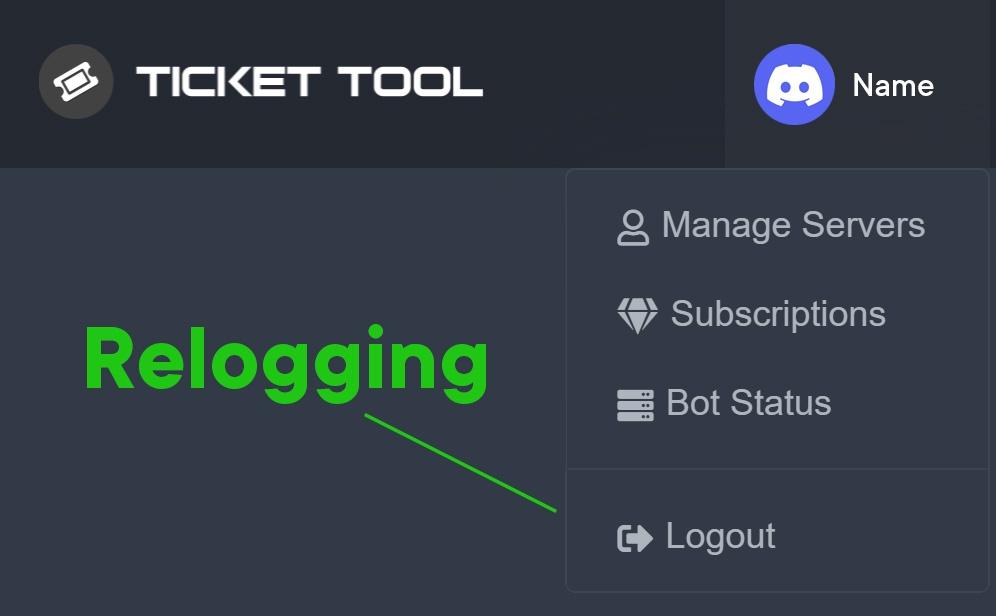 acoustic tundra
lapis idol
please refrain from pinging staff members
acoustic tundra
lapis idol
please refrain from pinging staff members
Ok I am sorry
iron nightBOT
Gave +1 Rep to @humble sequoia
acoustic tundra
Same problem, vote . does not appear
cinder grotto
atomic solstice
this says that you need to add the `View Channel` & `Send Messages` permission t...
I did
atomic solstice
jade topaz
<@!601783394334015498>
Please don't ping staff, read the rules
copper owl
@jade topaz why are you pinging us?
atomic solstice
jade topaz
Is there a way to close tickets on holidays
the only way would be to hide the channel from members
copper owl
I got a ghost ping from them as well..
jade topaz
No shut up I had to ping cause then you guys would never see me
copper owl
jade topaz
No shut up I had to ping cause then you guys would never see me
#🎫│make-a-ticket as well...
jade topaz
How do I make my make a ticket like #🎫│make-a-ticket
copper owl
You need premium.
jade topaz
Cap
copper owl
Ok.
jade topaz
So
But some people have tickets where if people press the button it don’t open cause it’s a holiday
copper owl
Most likely because they turned off tickets themselves.
Not a ticket tool thing where it's automatic.
they do it themselves.
copper owl
Button Options - > Create Ticket - > Disable Button.
jade topaz
All you needed to answer dummy😂😂😂
Hello! Is the bot having some problems atm? I get “this interaction failed” when I try to open/delete tickets in my server, I’ve tried to open a ticket in your server and I got same message too
 junior coral
prime bridgeBOT
junior coral
prime bridgeBOT
Successful Timeouts: 1
Unsuccessful Timeouts: 0
Reason: spam
Moderator: @copper owl
copper owl
jade topaz
All you needed to answer dummy😂😂😂
And I did...
so i dont see your point here.
jade topaz
Don’t ghost ping plz
copper owl
jade topaz
Hello! Is the bot having some problems atm? I get “this interaction failed” when...
Update your discord
copper owl
jade topaz
Don’t ghost ping plz
That isnt a ghost ping.
jade topaz
Copy, ty
copper owl
jade topaz
Copy, ty
anytime
jade topaz
Stop pinging me without consent
copper owl
😐
jade topaz
You must think harassing is a joking manner
 marble citrus
how can i get custom emoji id?
humble sequoiaBOT
<:TicketTool:557318988783419453>

mystic hound
Like that
jade topaz
why aren't the tickets going into the category?

 burnt owl
solid stream
Try logging out and back in on the dashboard, sometime the cache needs reset to ...
burnt owl
solid stream
Try logging out and back in on the dashboard, sometime the cache needs reset to ...
tysm, it works now x
random lichen
 torn imp
how do i make this work the commands dont work either
torn imp
how do i make this work the commands dont work either
I have that problem too
humble sequoiaBOT
How to disable the premium bot
To disable the premium bot you will have to go to the Dashboard ➞ Server Configs ➞ Premium bot ➞ And on the right-hand side select the primary free bot in the drop down menu.
Premium features will still work on the normal bot.
regal goblet
@random lichen 
 torpid prawn
Does the bot need access to the "Manage Roles" permission?
atomic solstice
torpid prawn
Does the bot need access to the "Manage Roles" permission?
yes

 atomic solstice
yes most probably
 hollow geyser
Hi i need help. I had to make a test ticket and i wanted to see the perms and when i open the ticket it only said the owners and the bots can see it how can i change it where the admin, mod and helper can see it?
shut bolt
hollow geyser
Hi i need help. I had to make a test ticket and i wanted to see the perms and wh...
$help support
humble sequoiaBOT
How to let support team see into a ticket
About support roles
A support role lets your support team see into tickets with out having to add them manually to each and every ticket.
You can add as many support roles as you like per panel.
NOTE that the way discord works all admins can see into tickets regardless of this.
How to set a support role
To set a Support role go to the Dashboard -> Panel Configs -> Settings -> General Options -> Support Team Roles.
NOTE that the support role will not be able to see into tickets that are already created..
shut bolt
Add their roles as support roles
hollow geyser
shut bolt
Add their roles as support roles
Okay thanks
iron nightBOT
Gave +1 Rep to @shut bolt
shut bolt
Sure
 limber anvil
How do I add more people to help with tickets?
humble sequoiaBOT
━━ moved to ticket ━━
 ember panther
Hello all; I'm trying to find a way to integrate TicketTool into our Asana project used for tracking issues. I can do the Asana integration bit, but I'm curious if there's some way to trigger code in response to changes in tickets... a basic webhook system would be best, but polling an API would also work...
shut bolt
ember panther
Hello all; I'm trying to find a way to integrate TicketTool into our Asana proje...
Currently Ticket Tool doesn't count with a public API although its among the #💡│suggestions. There is a beta test feature with webhooks, it's a premium feature that can be enabled by requested for premium servers
ember panther
shut bolt
Currently Ticket Tool doesn't count with a public API although its among the <#9...
If we can have access to the webhooks, and they are generally good enough to receive ticket updates, we would very happily pay for premium 🙂
Is there rough documentation? Totally understood if not (being in beta).
But the webhook approach is the preferred solution for us, and we'd much rather buy a bot then waste time coding more than we need to
shut bolt
ember panther
Is there rough documentation? Totally understood if not (being in beta).
As of now we haven't developed the docs for that feature, probably the only part we missed on our documentation 😅
shut bolt
ember panther
If we can have access to the webhooks, and they are generally good enough to rec...
Allow me a second, I'll go for something
ember panther
shut bolt
As of now we haven't developed the docs for that feature, probably the only part...
No worries, I'm fine without a script. Just as long as they have the basic events (ticket created/updated/closed) and those events include key data (username and all relevant ticket data) I'm sure I could figure it out
shut bolt
ember panther
No worries, I'm fine without a script. Just as long as they have the basic event...
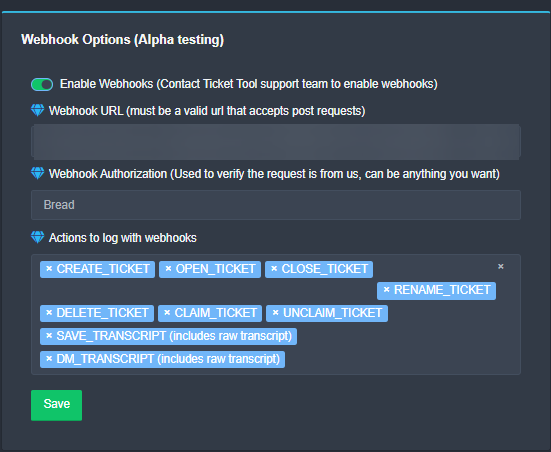
These are the events you can access with the feature
ember panther
This is perfect, thank you. I just created an account and started a premium trial (account 887187998519730177)
shut bolt
ember panther
No worries, I'm fine without a script. Just as long as they have the basic event...
I'm not 100% sure which information contains the webhook once its triggered but I know it includes tons of it jajaja, I haven't tested webhooks besides discord ones with this feature
shut bolt
ember panther
This is perfect, thank you. I just created an account and started a premium tria...
Great, I'll notify BattleEye and will come back with his response, I haven't faced a case of enabling webhooks for free trials, the ones that I've seen have a subscription so I must check that, brb
ember panther
Thanks! I need to step out for a bit. I'm on a trip right now anyways, but I plan to buy the full pkg once we get home on Weds
shut bolt
ember panther
Thanks! I need to step out for a bit. I'm on a trip right now anyways, but I pla...
No problem! Battle has tell me it's fine and we'll enable the feature for your server, I'll let you know once it's enabled
 hardy hearth
Is there a way to allow unlimited tickets to be made on a panel? I doubt anyone will ever reach 99, but it's always nice to have the option just in case.
 fleet linden
hey how can I set up a support team?
anyone know?
I wanna add roles that can do tickets
shut bolt
hardy hearth
Is there a way to allow unlimited tickets to be made on a panel? I doubt anyone...
There is actually no way to limit the amount of tickets in a panel, the Ticket Limit is the amount of tickets per panel a single user can open
shut bolt
fleet linden
hey how can I set up a support team?
$help support
humble sequoiaBOT
How to let support team see into a ticket
About support roles
A support role lets your support team see into tickets with out having to add them manually to each and every ticket.
You can add as many support roles as you like per panel.
NOTE that the way discord works all admins can see into tickets regardless of this.
How to set a support role
To set a Support role go to the Dashboard -> Panel Configs -> Settings -> General Options -> Support Team Roles.
NOTE that the support role will not be able to see into tickets that are already created..
fleet linden
Thank you so much!
shut bolt
Sure
fleet linden
thanks @shut bolt
iron nightBOT
Gave +1 Rep to @shut bolt
fleet linden
Do I have to resend the ticket tool message after I change it?
shut bolt
fleet linden
Do I have to resend the ticket tool message after I change it?
Nop, the new tickets will have the roles added without the need of the panel to be resent
fleet linden
shut bolt
Nop, the new tickets will have the roles added without the need of the panel to ...
thanks @shut bolt
thanks @shut bolt
😦
shut bolt
It's fine jajaj, the bot has a cooldown
fleet linden
If I manually had deleted some tickets last night, like right click deleted, how can I reset the ticket to say 0 open tickets?
shut bolt
Oh
fleet linden
nvm it says 0
fleet linden
Bothering you for no reason xD
shut bolt
No problem
fleet linden
thanks @shut bolt
iron nightBOT
Gave +1 Rep to @shut bolt
shut bolt
fleet linden
hardy hearth
shut bolt
There is actually no way to limit the amount of tickets in a panel, the __Ticket...
Oh, ok I misunderstood that. Thanks for the help!
iron nightBOT
Gave +1 Rep to @shut bolt
shut bolt
hardy hearth
Oh, ok I misunderstood that. Thanks for the help!
No problem!
shut bolt
Hi @ember panther Otavio has enabled it for you, if you face any problem let us know in #🎫│make-a-ticket
jade topaz
I need help, tickets aren't going into the category they're supposed to go in.

ping me in response
thanks! 
shut bolt
jade topaz
I need help, tickets aren't going into the category they're supposed to go in.
How many tickets do you have in the category already?
shut bolt
jade topaz
quick scan/count, estimated 50
Discord only allows 50 channels per category, probably that's why
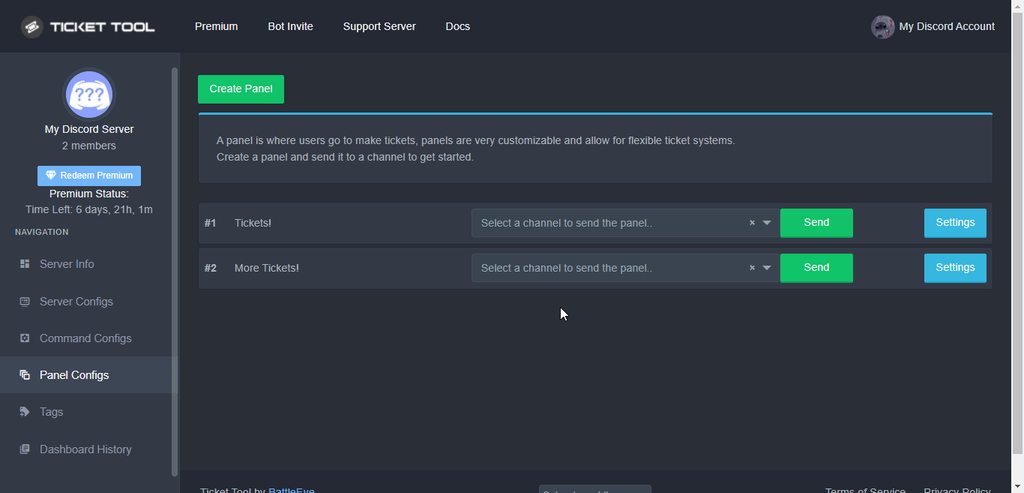
Assign a second category for new tickets to be placed on
jade topaz
shut bolt
Discord only allows 50 channels per category, probably that's why
Alrighty
fleet linden
How do I set what category the tickets go into?
shut bolt
fleet linden
How do I set what category the tickets go into?
$help category
humble sequoiaBOT
How to set the open category
To set a open category go to the Dashboard -> Panel Configs -> Settings -> Category Options -> Category Open
 compact pulsar
 fleet linden
thanks @shut bolt
iron nightBOT
Gave +1 Rep to @shut bolt
fleet linden
limber anvil
 mortal sparrow
Yo
mortal sparrow
Yo
Wdym
 red slate
Why does it say invalid form of body when I want to create a ticket?
humble sequoiaBOT
Help Options
$help commands - Information on commands
$help setup - Information on bot setup
$help faq - Frequently asked questions
jade topaz
mortal sparrow
How do I put tickets in a catagory?
$help Category
humble sequoiaBOT
How to set the open category
To set a open category go to the Dashboard -> Panel Configs -> Settings -> Category Options -> Category Open
 sly mural
You know the person who purchased the ticket tool premium
Are they the only person who can access the premium perks
Or can they enable an admin to be able to manage them
 delicate aspen
HELP the serveur is down
atomic solstice
delicate aspen
HELP the serveur is down
is the @pseudo glen in your server not working?
delicate aspen
??
the serv is down JUST RUST x2 soloduo
cant connect
sorry for bad english im fr
atomic solstice
delicate aspen
the serv is down JUST RUST x2 soloduo
this is the support server for the Ticket Tool bot, we can't help you with anything else
delicate aspen
I think i have create a ticket
atomic solstice
delicate aspen
I think i have create a ticket
yes you did, but you will get the same answer. We don't provide support for rust
atomic solstice
if that server that you want to play on has a discord server as well try to join that and ask there
 atomic solstice
jade topaz
<@601783394334015498>
atomic solstice
jade topaz
<@601783394334015498>
Please don't ping support, read the rules. Ask a question and wait
jade topaz
Ok
atomic solstice
jade topaz
Why it's going error??
the bot probably doesn't have the View Channel & Send Messages permission in the channel where you are trying to send the panel into
make sure you enable those for the Ticket Tool role in that channel
atomic solstice
what happens when you type $debug in one of the channels where ticket tool can see and type?
 buoyant hollow
jade topaz
Why it's going error??
buoyant hollow
jade topaz
Why it's going error??
I have the same problem
buoyant hollow
atomic solstice
what happens when you type `$debug` in one of the channels where ticket tool can...
When I type, nothing happens
jade topaz
Same ticket have perms but didn't reply
slender minnow
red slate
Why does it say invalid form of body when I want to create a ticket?
Update your discord client from your respective app store. Its a discord issue.
red slate
Ok
red slate
slender minnow
Update your discord client from your respective app store. Its a discord issue.
Tysm
red slate
slender minnow
Update your discord client from your respective app store. Its a discord issue.
It worked
slender minnow
No problem
slender minnow
buoyant hollow
When I type, nothing happens
Can you run $debug in a channel where ticket tool has access to read and send messages and view message history.
 cyan birch
Help I went to open a ticket and it doesn't work I spoke Invalid form body do you know what it is?
slender minnow
@cyan birch update your discord client to the latest version. Check your respective app store.
cyan birch
Okay
jade topaz
How we do: when we close the ticket it will delete automatically?
 craggy geyser
Turn off "Two step ticket" in the general options
 green wyvern
Hi, I bought an account but it doesn't have league of legends in riot client. Can I get a replacement?
 civic rover
how do I add both the button and reaction for this message
 craggy geyser
green wyvern
Hi, I bought an account but it doesn't have league of legends in riot client. Ca...
craggy geyser
green wyvern
Hi, I bought an account but it doesn't have league of legends in riot client. Ca...
No idea. We are the support for a discord bot, and have nothing to do with riot
craggy geyser
civic rover
how do I add both the button and reaction for this message
We don't use reactions anymore, only buttons. Reactions were used before buttons existed
civic rover
craggy geyser
We don't use reactions anymore, only buttons. Reactions were used before buttons...
A decent amount of members can't open tickets with the buttons
It shows as an error
tribal cedar
What would that error be? Most times it fails because their discord client is not updated
craggy geyser
Alternatively the server might have the permissions set wrong in which case reactions wouldn't have worked
@solemn solar, in regards to your suggestion, ticket tool responds to commands from other bots, but it's limited. I think it's 30 commands per minute across all servers, otherwise people could break the bot and get it rate limited by spam bots
 solemn solar
well that's bad, I really need it so that I can close the ticket with my bot, which sends additional messages
if not, I would like a function that allows you to create your own buttons
jade topaz
 humble sequoiaBOT
━━ moved to ticket ━━
 formal stream
vc pode me ajudar queria poder jogar no serve mais estou tendo dificuldades no cadastro por conta do número de celular q pede como eu moro no interior do nordeste aqui não tem área só internet.
 humble sequoiaBOT
Help Options
$help commands - Information on commands
$help setup - Information on bot setup
$help faq - Frequently asked questions
 steady narwhal
@atomic solstice
atomic solstice
steady narwhal
<@601783394334015498>
Please don't ping support, read the rules
atomic solstice
steady narwhal
Guys help
try updating your discord
humble sequoiaBOT
Update your discord App
Buttons are a relatively new addition to discord and don't work with some older versions of the app.
Please verify that you have the latest version of discord, by going to the app or play store.
Discord for the App Store
Discord for the Play Store
steady narwhal
sorry
steady narwhal
atomic solstice
try updating your discord
i will
slender minnow
jade topaz
Hiya camt see your server on the dashboard?
i am not that good in romania so i couldn't understand through images
 hushed finch
why is the bot not showing in the manage servers thign
atomic solstice
hushed finch
why is the bot not showing in the manage servers thign
log out and log back in to the dashboard
humble sequoiaBOT
Don't see your server in the dashboard?
You will possibly need to relog. Look below to see steps on how to relog.
How to relog in the Dashboard.
First, you will need to go to the dashboard. Once your there, click on your avatar on the top right. after you clicked it, you will see button that says Logout. You must click that. Once you have logged out, you can log back in.
Note:
You need one of these 3 things to access the dashboard.
1. Server Owner (Level: 6)
2. Server Administrator (Level: 4)
3. Dashboard Role (Level: 2)
:warning: You can check your level using $level on your Discord Server
User permission level with Ticket Tool
@User is permission level: 0 (User)
```» *If it shows that your permission is **0**, you don't have any of the above **3 things** to manage the dashboard.*


**See the picture below on how to relog:**Whats the dashboard role called?
atomic solstice
the dashboard role is a role that the Owner of the server has to assign so people with that role can then access the bot dashboard
humble sequoiaBOT
Any role you put there will have full access to the ticket tool dashboard. The server owner and users with admin permissions already have access to the dashboard.
Be careful of which roles to put here
 hushed finch
atomic solstice
the dashboard role is a role that the Owner of the server has to assign so peopl...
hushed finch
atomic solstice
the dashboard role is a role that the Owner of the server has to assign so peopl...
Is it a discord role?
hushed finch
What do you need to name it to access the dashboard?
atomic solstice
it can be called whatever you want
hushed finch
Ohh, so you add it to the dashboard bassicly ?
atomic solstice
they just need to select one of the roles in the server as a dashboard role
atomic solstice
hushed finch
Ohh, so you add it to the dashboard bassicly ?
yes you just pick whichever role you want
just be careful now to add it to any roles which all members have cause then all members could make changes to your dashboard
granite cedar
atomic solstice
just be careful now to add it to any roles which all members have cause then all...
Hey how can i make the ticket tool ping in an role when an ticket is created?
slender minnow
$help ping
humble sequoiaBOT
How to make Ticket Tool ping a role
To make ticket tool ping a role when a ticket is opened, go to the Dashboard -> Panel Configs -> Settings -> Ticket Options -> Ticket Message -> Message Text and do this:
{@Role name} This is case sensitive and the role must have @mentions enabled
slender minnow
@granite cedar refer above
granite cedar
Tysm
atomic solstice
granite cedar
Hey how can i make the ticket tool ping in an role when an ticket is created?
also refer to the #546557408902905896. Mainly rule 4
humble sequoiaBOT
We would love to help you, but if you don't tell us what you need help with we can't help you :(

 torn crescent
regal goblet
You have hit the max amount of channels in that category
torn crescent
regal goblet
You have hit the max amount of channels in that category
meaning?

look
atomic solstice
torn crescent
meaning?
it means that the bot cannot move more channels to the Closedcategory as there are already 50 channels in there
you will either have to delete some channels from the closed category or make a new category and add it to the closed categories list for the bot
 atomic solstice
could you type $debug in your server and send here the link the bot responds with?
torn crescent
 atomic solstice
hmm that is weird
torn crescent

atomic solstice
did someone from the staff change any permissions inside the Closed category recently?
 atomic solstice
ok could you please open a ticket from #🎫│make-a-ticket and send this there?
torn crescent
is everything fine?
 cedar locust
Hello i nede help i invate ticket tool to my server but i cant manage him on dash board help pls
humble sequoiaBOT
Don't see your server in the dashboard?
You will possibly need to relog. Look below to see steps on how to relog.
How to relog in the Dashboard.
First, you will need to go to the dashboard. Once your there, click on your avatar on the top right. after you clicked it, you will see button that says Logout. You must click that. Once you have logged out, you can log back in.
Note:
You need one of these 3 things to access the dashboard.
1. Server Owner (Level: 6)
2. Server Administrator (Level: 4)
3. Dashboard Role (Level: 2)
:warning: You can check your level using $level on your Discord Server
User permission level with Ticket Tool
@User is permission level: 0 (User)
```» *If it shows that your permission is **0**, you don't have any of the above **3 things** to manage the dashboard.*
**See the picture below on how to relog:** proven root
OPA
 quartz wigeon
I'm setting up my tickets, but I don't want all my mods to see all my tickets. What do I need to change in the permissions so they can't see the tickets?
 spiral heath
i cant see my sv in dashaboard
humble sequoiaBOT
Don't see your server in the dashboard?
You will possibly need to relog. Look below to see steps on how to relog.
How to relog in the Dashboard.
First, you will need to go to the dashboard. Once your there, click on your avatar on the top right. after you clicked it, you will see button that says Logout. You must click that. Once you have logged out, you can log back in.
Note:
You need one of these 3 things to access the dashboard.
1. Server Owner (Level: 6)
2. Server Administrator (Level: 4)
3. Dashboard Role (Level: 2)
:warning: You can check your level using $level on your Discord Server
User permission level with Ticket Tool
@User is permission level: 0 (User)
```» *If it shows that your permission is **0**, you don't have any of the above **3 things** to manage the dashboard.*


**See the picture below on how to relog:**Please read rule 4 in #546557408902905896
spiral heath
hyh
atomic solstice
also of you relogged and you still don't see the server then try the part of the embed which says Note:
 atomic solstice
spiral heath
i have another sv
atomic solstice
spiral heath
i have another sv
Like I said above read the embed which is above your message
spiral heath
I did not understand you
atomic solstice
humble sequoia
@spiral heath this embed explains what you need to do if you don't see your server in the dashboard
 grim stirrup
hi
grim stirrup
how could i make role view all tickets
atomic solstice
grim stirrup
how could i make role view all tickets
$help support
humble sequoiaBOT
How to let support team see into a ticket
About support roles
A support role lets your support team see into tickets with out having to add them manually to each and every ticket.
You can add as many support roles as you like per panel.
NOTE that the way discord works all admins can see into tickets regardless of this.
How to set a support role
To set a Support role go to the Dashboard -> Panel Configs -> Settings -> General Options -> Support Team Roles.
NOTE that the support role will not be able to see into tickets that are already created..
atomic solstice
here is how ^^
grim stirrup
thanks bro
 high oyster
 humble sequoiaBOT
Solved in another channel.
 slow ocean
How do I put a ticket on my server, my ticket channel?
humble sequoiaBOT
You can check our documentation here.
You can also check #573205317870157855 for the basic setup.
Our documentation contains all the info you need about the bot to be able to setup and configure the bot however you like.
 fallow ingot
@slow ocean ^
slow ocean
Yes ?
slow ocean
Ok
 bitter flicker
Is there any update to what the “invalid body.” Error and how to correct it
We have aredy tried to rest app, update app
 patent lotus
shut bolt
bitter flicker
Is there any update to what the “invalid body.” Error and how to correct it
W...
patent lotus
shut bolt
bitter flicker
Is there any update to what the “invalid body.” Error and how to correct it
W...
Reinstall the Discord app, it's a Discord problem rather than a bot one
 little helm
 humble sequoiaBOT
Unlike the regular Ticket Limit, the global limit will limit the amount of tickets a user can create at the same time for ALL Panels. When a ticket is closed again, the limit resets for that user.
To customize it head over to your Dashboard ➞ Server Configs ➞ Global Ticket Limit
Note:
This is not a limit for how many tickets a user can open at all times or how many tickets you can have open on the server in total. This is just a limit per user for open tickets.
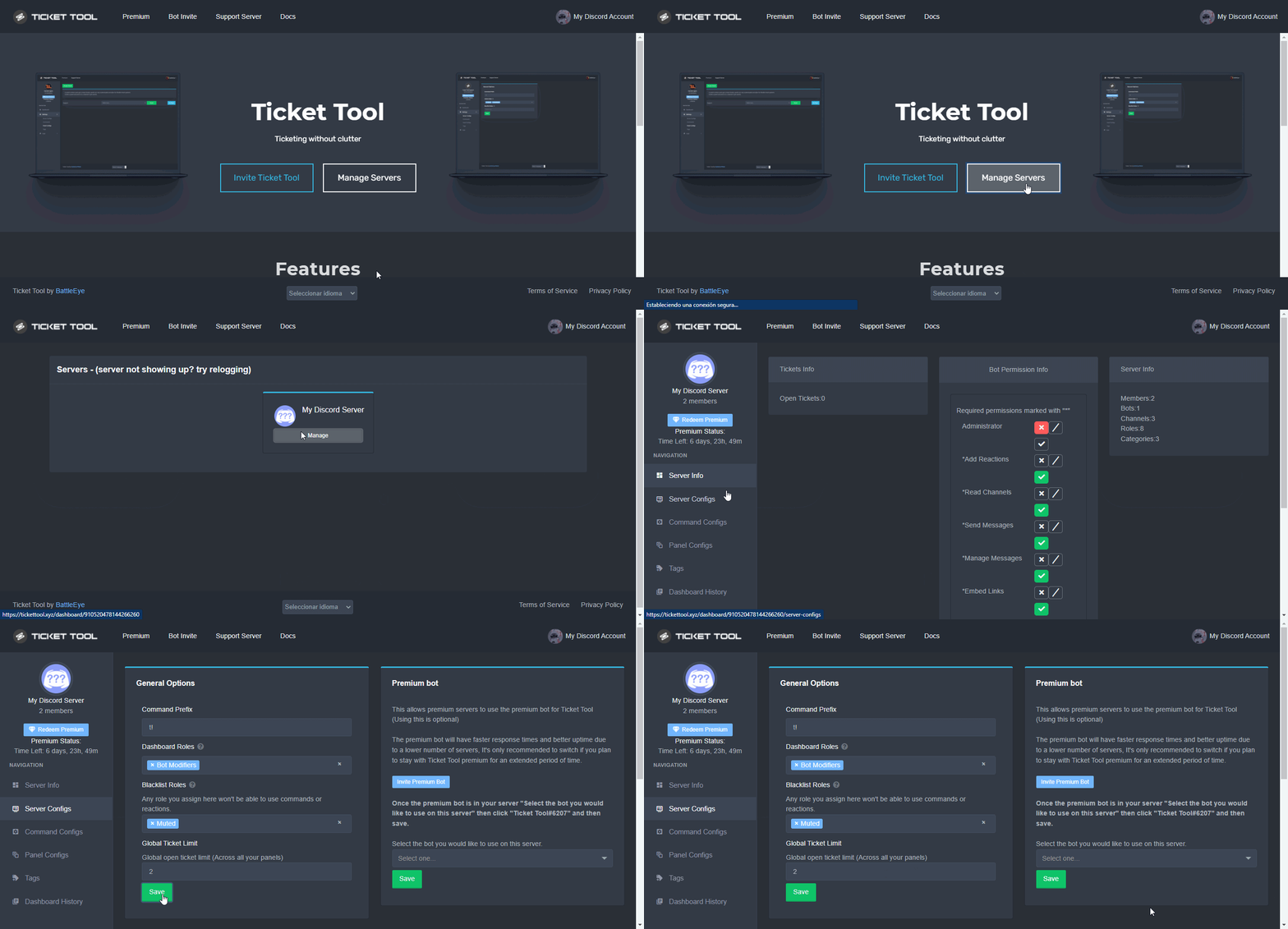
 static geode
some admin to talk to me, there are two players making base in an irregular place.
shut bolt
Check your server's global limit
shut bolt
static geode
some admin to talk to me, there are two players making base in an irregular plac...
Wrong server
static geode
2022|Liv|loot+
jade topaz
How to set up multi panel?
little helm
YOO TYSM DUDE
shut bolt
little helm
YOO TYSM DUDE
Sure
humble sequoiaBOT
For a more convenient use of multipanels, you can now combine panels on the dashboard. This will allow you to directly send the multipanel from the dashboard or via the $panel ID command.
Where can I find this?
You can find this setting on the Dashboard -> Panel Configs -> Settings -> General Options
Note: if you're attaching all the panels to a panel called English, don't include English in the attached panels box (If you do this, it will create duplicate)
This will put all buttons from all of your panels on one message. The message is the panel message from the panel you're combining these panels in.
Note: This is a premium feature
shut bolt
static geode
2022|Liv|loot+
Yup, wrong server
 astral maple
how can i make the top messaged embed?
 static geode
shut bolt
Yup, wrong server
static geode
shut bolt
Yup, wrong server
what do you mean wrong server?
tribal cedar
static geode
what do you mean wrong server?
This is ticket tool support a discord bot. Not a gaming server.
static geode
tribal cedar
This is ticket tool support a discord bot. Not a gaming server.
oh yes i understand
bitter flicker
shut bolt
Reinstall the Discord app, it's a Discord problem rather than a bot one
Yea it’s only a single person so idk what’s going on with it the admin said he reinstalled it and it’s up to date but it’s still not working sadly
 hot cloud
Hey, How do I save Closed Tickets?
bitter flicker
Go to your dash board and go to panel configuration

Then go to your panel settings
hot cloud
and here?
 bitter flicker
Make sure you have both transcripts/logging
 hot cloud
@bitter flicker oh
 bitter flicker
Once that’s done and you hit close you have a transcript button hit that and delete it
 hot cloud
um
 hot cloud
like this?
 bitter flicker
Hit close agian
bitter flicker
hot cloud
like this?
What ever you want to have it log check it to green


 bitter flicker
Uhh what the
bitter flicker
hot cloud
<@!566825819658518529> so?
Make sure that the two that are green are marked with delete unless you want it like that
 hot cloud
@bitter flicker it's like this
 bitter flicker
I never seen the embed above but yea