#🆘│community-support
1 messages · Page 384 of 1
 hot scarab
 slender minnow
transcript command? Saves the ticket trancript in a .html format. If no channel is specified for the transcript, it will be saved in ticket so that you can download it whenevr you geel like.
slender minnow
hot scarab
You need to do $setup
There is no such command fyi
Atleast as much as i remember
hot scarab
slender minnow
There is no such command fyi
oh ok
 undone remnant
How do I make the bot ping the support team?
hot scarab
undone remnant
How do I make the bot ping the support team?
I don't know
 humble sequoiaBOT
Mentions
Within all the messages the bot's sends (both embeds and text) you can mention either channels, roles, or even users, these mentions will only send a notification to the user if they are used within a text field, e.g: a role mentioned in an embed won't ping at all the users who have that role.
For mentioning a role you can use one out of three options:
{@Role Name} ➞ Which is Case Sensitive.
{RoleID} ➞ Replace RoleId with the Id of the role you are trying to ping.
<@&RoleID> ➞ Discord's native syntax to ping roles.
<#ChannelID> ➞ Mention a channel by its ID.
<@UserID> ➞ Mention a user by its ID.
 regal goblet
@undone remnant ^^
 crisp forge
how do i make it create ticket channel in a category
humble sequoiaBOT
How to set the open category
To set a open category go to the Dashboard -> Panel Configs -> Settings -> Category Options -> Category Open
 regal goblet
@crisp forge^^
 waxen plaza
Can we re open old tickets?
 wild solar
how do I check who made a ticket
humble sequoiaBOT
━━ moved to ticket ━━
 copper owl
waxen plaza
Can we re open old tickets?
copper owl
waxen plaza
Can we re open old tickets?
if they've been deleted, no
you'll have to talk to discord to restore the deleted channel
 clear jacinth
Hello, sorry to bother with easy question
Can tickettool be integrated with Zendesk, f.e. ?
copper owl
clear jacinth
Can tickettool be integrated with Zendesk, f.e. ?
What is zendesk
clear jacinth
Its a support tool
copper owl
Never heard of it
clear jacinth
Service Desk Solution
copper owl
Yup. never heard of it
so ill be confident and say, no
ticket tool can't integrate with zendesk
clear jacinth
Its a Service Desk solution
A lot of big companies use it for handling their ticketing/support sections
copper owl
Gotcha. As I've mentioned, I've personally never heard of it
So TT can't integrate with it
clear jacinth
Alright, thanks
Can TT in general integrate with other CRM solutions than? if Zendesk, for instance, is not supported
copper owl
TT isn't integrateable with any other service currently
the only way you can "integrate" is webhook options, which is a premium only feature which allows you to send logs outside of your server. Maybe on an external server, maybe on a Google Excel sheet or Google drive.
clear jacinth
Gotcha. Im trying to cut the waiting time for our company when people are being asked to open tickets in the CRM.
Would be easier if they open them with TT and this sends the information as a ticket to the CRM we are using.
Thanks for the explanation, really appreciated.
copper owl
If you're looking to use ticket tool, making a discord server is the best bet for this
there's currently no way to integrate tickets into another software like Zendesk or any other "ticketing" system big companies use
honestly you'd be better off making a discord server as a contacting system and using ticket tool for this. I've seen some small companies do this already and it works wonders with them
clear jacinth
No, no, we already have discord server 🙂
But the company is not that small and having CRM is a must, since also the FAQ is there.
I will continue exploring options, super thanks for the brief.
copper owl
clear jacinth
But the company is not that small and having CRM is a must, since also the FAQ i...
What exactly do you want transfered over to the CRM?
clear jacinth
The "ticket" details
Username: xxxx
Problem: yyyyyyy
Attachements: zzzzz
This whole data submitted api-api i guess
but really never mind, im thinking out loud 🙂
copper owl
nono this is good thinking out loud
I like your idea and it would make TT alot more organized for companies
copper owl
clear jacinth
but really never mind, im thinking out loud 🙂
i would definitely suggest having you send your idea in detail in #💡│suggestions
copper owl
throw as much detail as you'd like
we do have an update coming up so you might get lucky and have it released
clear jacinth
I will, thank you
 fading nymph
Why my server is not on the dashboard ?
humble sequoiaBOT
Don't see your server in the dashboard?
You will possibly need to relog. Look below to see steps on how to relog.
How to relog in the Dashboard.
First, you will need to go to the dashboard. Once your there, click on your avatar on the top right. after you clicked it, you will see button that says Logout. You must click that. Once you have logged out, you can log back in.
Note:
You need one of these 3 things to access the dashboard.
1. Server Owner (Level: 6)
2. Server Administrator (Level: 4)
3. Dashboard Role (Level: 2)
:warning: You can check your level using $level on your Discord Server
User permission level with Ticket Tool
@User is permission level: 0 (User)
```» *If it shows that your permission is **0**, you don't have any of the above **3 things** to manage the dashboard.*
**See the GIF below on how to relog:** fading nymph
Thanks
 shut bolt
Sure
shut bolt
Read the note
shut bolt

 rare trellis
Hi is tv down again
 plain surge
Hello @rare trellis
This is Ticket Tool support server
 upbeat kite
her there @plain surge
is it possible to make the ticket tool include one role in the new ticket channels created?
 merry wadi
Why is it not showing my servers
plain surge
upbeat kite
is it possible to make the ticket tool include one role in the new ticket channe...
Do you mean you want another role to also be able to view tickets?
Also please refrain from pinging staff next time
plain surge
merry wadi
Why is it not showing my servers
Please try relogging
humble sequoiaBOT
Don't see your server in the dashboard?
You will possibly need to relog. Look below to see steps on how to relog.
How to relog in the Dashboard.
First, you will need to go to the dashboard. Once your there, click on your avatar on the top right. after you clicked it, you will see button that says Logout. You must click that. Once you have logged out, you can log back in.
Note:
You need one of these 3 things to access the dashboard.
1. Server Owner (Level: 6)
2. Server Administrator (Level: 4)
3. Dashboard Role (Level: 2)
:warning: You can check your level using $level on your Discord Server
User permission level with Ticket Tool
@User is permission level: 0 (User)
```» *If it shows that your permission is **0**, you don't have any of the above **3 things** to manage the dashboard.*


**See the GIF below on how to relog:**yes, that is what I mean
oops sorry for the pin above
humble sequoiaBOT
How to let support team see into a ticket
About support roles
A support role lets your support team see into tickets with out having to add them manually to each and every ticket.
You can add as many support roles as you like per panel.
NOTE that the way discord works all admins can see into tickets regardless of this.
How to set a support role
To set a Support role go to the Dashboard -> Panel Configs -> Settings -> General Options -> Support Team Roles.

NOTE that the support role will not be able to see into tickets that are already created..
humble sequoiaBOT
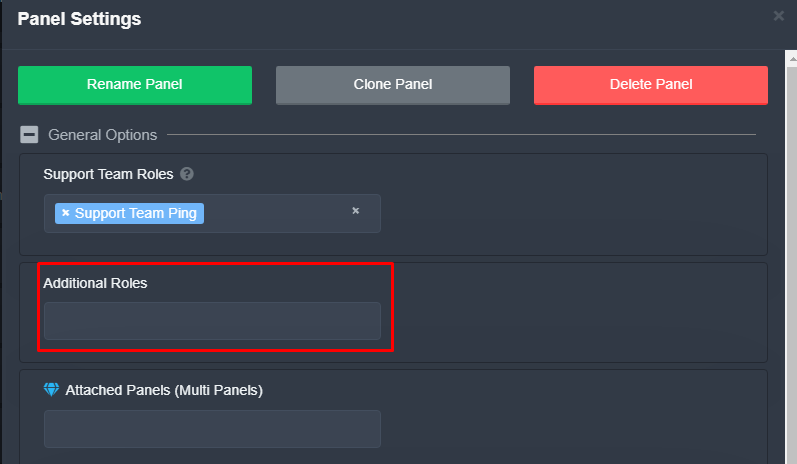
Additional Roles are roles that are independent from Support Roles. You can assign unique permissions for roles defined as additional roles in tickets.
To assign permissions for additional roles, go to Dashboard ➞ Panel Configs ➞ Settings ➞ Permission Options ➞ Additional Opened/Closed Permissions.
Note: Additional Roles do NOT get affected by the Change other support team permissions when claimed feature under Claiming Options, meaning they don't gain/lose any permissions set in that feature once a ticket is claimed.
 plain surge
You can set permissions for both roles under "Permissions options" in panel settings.
humble sequoiaBOT
The first thing you will need to do is invite the premium bot, an invite can be found here
Once the bot is in your server we will head to the dashboard and manage your server. When you are managing your server, you want to head into "Server Configs" then click the drop down menu under "Select the bot you would like to use on this server" then click "Ticket Tool#6207" and then save.

 ivory hinge
Hello, I manage 2 servers and would like to purchase premium for the bot. If I buy premium, do I have to do it for both servers seperately or is 1 enough?
 tribal cedar
Each subscription is for one server.
waxen plaza
So if i close ticket, delete it is gone gone or can i re open it on dashboard ????
i have someone said ordered something and i need recheck ticket
 gloomy steppe
Hi
 scenic plinth
waxen plaza
i have someone said ordered something and i need recheck ticket
scenic plinth
waxen plaza
i have someone said ordered something and i need recheck ticket
If you have a transcript channel saved and saved the transcript of the ticket, you can go back to it. It's easiest to search the number of the ticket. Other than that there is not any other way to check it through Ticket Tool.
gloomy steppe
How can I get tickets to open to a specific category?
gloomy steppe
gloomy steppe
How can I get tickets to open to a specific category?
@scenic plinth
humble sequoiaBOT
How to set the open category
To set a open category go to the Dashboard -> Panel Configs -> Settings -> Category Options -> Category Open
gloomy steppe
Thank you bro
 hushed vessel
Is if I get this correct, the limit is 1000 messages for a free user and 1 week for a transcript?
I just used the ctrl+f feature to find old messages but I just wanna make sure
 jade topaz
Is there any a way to make tickets have customer names once they open?
humble sequoiaBOT
The ticket name is the default channel name of all tickets. To edit it, go to your Dashboard > Panel Configs > Settings > Ticket Options. There you can edit the channel name of opened and closed tickets. You can also use variables in there.

 Note: This is a premium feature
shut bolt
Note: This is a premium feature
shut bolt
Use the variable {ticket.user.name}
jade topaz
hell yeah thank you ❤️
shut bolt
Sure
 next crest
help? lol
 atomic barn
what u need help with?
next crest
oh im sorry all hell broke lose 10 ppl wanted to talk lol
Ticket tool says ppl with visitor role dont have permission to use the ticket tool..not sure why :/
 dense bluff
When I try to open a ticket it says this server isnt active
shut bolt
next crest
Ticket tool says ppl with visitor role dont have permission to use the ticket to...
Check the blacklisted roles
humble sequoiaBOT
Any role you assign as a blacklisted role won't be able to use commands or reactions.
Selecting a blacklisted role
Go to your Dashboard ➞ Server Configs. There you will find the option to select blacklisted roles.
Note: Don't forget to save.
 shut bolt
dense bluff
When I try to open a ticket it says this server isnt active
shut bolt
dense bluff
When I try to open a ticket it says this server isnt active
Check this next message
humble sequoiaBOT
How to disable the premium bot
To disable the premium bot you will have to go to the Dashboard ➞ Server Configs ➞ Premium bot ➞ And on the right-hand side select the primary free bot in the drop down menu.
Premium features will still work on the normal bot.
 next crest
so the unverified role with no perms ppl automatically get when arriving 😄
nope thats not it
shut bolt
next crest
nope thats not it
May I have the server ID?
dense bluff
It doesnt show any of my severs when I try to disable it
 sinful pond
gm!
i don't know if this question has already been answered, if so i'm sorry.
Is there a possibility to limit the maximum number of tickets that can be opened?
humble sequoiaBOT
Don't see your server in the dashboard?
You will possibly need to relog. Look below to see steps on how to relog.
How to relog in the Dashboard.
First, you will need to go to the dashboard. Once your there, click on your avatar on the top right. after you clicked it, you will see button that says Logout. You must click that. Once you have logged out, you can log back in.
Note:
You need one of these 3 things to access the dashboard.
1. Server Owner (Level: 6)
2. Server Administrator (Level: 4)
3. Dashboard Role (Level: 2)
:warning: You can check your level using $level on your Discord Server
User permission level with Ticket Tool
@User is permission level: 0 (User)
```» *If it shows that your permission is **0**, you don't have any of the above **3 things** to manage the dashboard.*


**See the GIF below on how to relog:**Hi there, currently it can't be set a limit for the whole server but it has been suggested #💡│suggestions message
shut bolt
next crest
ID ?
You can run $id in your server and give me the number the bot will respond with
$id
humble sequoiaBOT
Server id - 509192800865353738
Server id - 509192800865353738
sinful pond
shut bolt
Hi there, currently it can't be set a limit for the whole server but it has been...
this feature would be really helpful
thanks for the quick help!
shut bolt
next crest
Server id - 930598154175406100
Server id - 930598154175406100
Thanks, please stand by a sec
shut bolt
next crest
nope thats not it
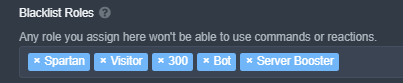
All the people with one of those roles
Can't use the bot
Are you sure it isn't that?
shut bolt
next crest
but im the server owner
Well, that's why
next crest
do you know why the others cant?
shut bolt
 shut bolt
next crest
i dont even know where you found that ive never set roles to that
shut bolt
next crest
i dont even know where you found that ive never set roles to that
The server's dashboard
Inside Server Configs
next crest
Server settings...
shut bolt
next crest
Server settings...
 next crest
yes i was searching for that link as I realized lol ty
shut bolt
No problem
next crest
hilarious..lol ty
shut bolt
Sure mate
 lavish condor
@shut bolt
Do you know a solution to this problem? The ticket opens and then immediately deletes

 prime bridgeBOT
 a3dam818 🇸🇦⃤#4361 has been warned!

 They were notified via dms.
lavish condor
@shut bolt
 thin crypt
How do I make the tickets created show up under a different category instead of the top of the server?
shut bolt
thin crypt
How do I make the tickets created show up under a different category instead of ...
Hi!
$help category
humble sequoiaBOT
How to set the open category
To set a open category go to the Dashboard -> Panel Configs -> Settings -> Category Options -> Category Open
shut bolt
Choose a category as shown
thin crypt
shut bolt
Choose a category as shown
thanks so much pablo! have a wonderful day:)
shut bolt
thin crypt
thanks so much pablo! have a wonderful day:)
Sure! Same for you mate
 plush lion
Hello. How do I close my ticket so I can make a new one? The message with the channel to my ticket disappeared. Thanks.
shut bolt
lavish condor
Do you know a solution to this problem? The ticket opens and then immediately d...
I see the tickets appear there
shut bolt
plush lion
Hello. How do I close my ticket so I can make a new one? The message with the ch...
Hi! Did you opened a ticket here?
You just joined so I guess no 🤔
plush lion
shut bolt
Hi! Did you opened a ticket here?
Sorry, no. In another server.
shut bolt
plush lion
Sorry, no. In another server.
Oh I see
You should look into the channels of the server
And look for the ticket
plush lion
shut bolt
And look for the ticket
Okay. Will try again.
lavish condor
shut bolt
I see the tickets appear there
Do you come to my server and see what the problem is? please
shut bolt
lavish condor
Do you come to my server and see what the problem is? please
Give me the server ID please
lavish condor
sirver id ?
humble sequoiaBOT
Server id - 509192800865353738
Server id - 509192800865353738
shut bolt
And give me that number
shut bolt
Yes, stand by
plush lion
shut bolt
And look for the ticket
Thank you! That worked!
shut bolt
lavish condor
916775650612891699
Everything looks fine, are you okey if I open a ticket for look into it
shut bolt
plush lion
Thank you! That worked!
Glad to hear that!
lavish condor
shut bolt
Everything looks fine, are you okey if I open a ticket for look into it
I can't see the ticket in my server and it also won't open
shut bolt
lavish condor
I can't see the ticket in my server and it also won't open
That doesn't answer my question, are you okey if I open a ticket here to look into it
lavish condor
shut bolt
That doesn't answer my question, are you okey if I open a ticket **here** to loo...
they don't answer !!
lavish condor
shut bolt
That doesn't answer my question, are you okey if I open a ticket **here** to loo...
Are you okay if you answer me?
 shut bolt
lavish condor
Are you okay if you answer me?
shut bolt
lavish condor
Are you okay if you answer me?
That's what I offered, but you didn't answer to my question, twice
lavish condor
shut bolt
That's what I offered, but you didn't answer to my question, twice
I'm sorry, but my English is simple, what is your question?
shut bolt
lavish condor
I'm sorry, but my English is simple, what is your question?
No problem, I'll answer your ticket
 fallow swan
hey guys, can i ask how do i make a private channel for server members using the bot
shut bolt
fallow swan
hey guys, can i ask how do i make a private channel for server members using the...
Hi there
humble sequoiaBOT

You can check our documentation here.
You can also check #573205317870157855 for the basic setup.
Our documentation contains all the info you need about the bot to be able to setup and configure the bot however you like.
shut bolt
Check this guide out
fallow swan
Oh thanks
shut bolt
Sure
 dusk dragon
How to customize the message sent when a Ticket is created so it pings the Staff role?
shut bolt
dusk dragon
How to customize the message sent when a Ticket is created so it pings the Staff...
$help ping
humble sequoiaBOT
How to make Ticket Tool ping a role
To make ticket tool ping a role when a ticket is opened, go to the Dashboard -> Panel Configs -> Settings -> Ticket Options -> Ticket Message -> Message Text and do this:
{@Role name} This is case sensitive and the role must have @mentions enabled
 jade topaz
Hey!
i need help with something, how do i stop tickets from getting deleted after getting closed? @shut bolt
the option is disabled, and it still does it
shut bolt
jade topaz
i need help with something, how do i stop tickets from getting deleted after get...
#546557408902905896 do not ping support members please
 dusk dragon
shut bolt
$help ping
dusk dragon
shut bolt
$help ping
Alright thanks
 iron nightBOT
Gave +1 Rep to @shut bolt
shut bolt
jade topaz
the option is disabled, and it still does it
Which option?
jade topaz
Two Step Ticket
is disabled
Im trying to get it to log the transcript of every ticket when closed, not deleted :/
or is that for premium?
Seems like it! Just bought it ❤️ thanks in advance.
shut bolt
jade topaz
Two Step Ticket
Disabling it is what causes that
 frozen zodiac
humble sequoiaBOT
frozen zodiac
humble sequoiaBOT
You can check our documentation here.
You can also check #573205317870157855 for the basic setup.
Our documentation contains all the info you need about the bot to be able to setup and configure the bot however you like.
 prime bridgeBOT
MR CHARMING#9354 has been warned!
They were notified via dms.
 mystic hound
nearly caught a double warn there
humble sequoiaBOT
لا ترى سيرفرك في لوحة التحكم؟
ربما ستحتاج إلى إعادة التسجيل. اقرأ الإرشادات التالية لمعرفة كيفية إعادة تسجيل الدخول
كيفية إعادة تسجيل دخول في لوحة التحكم.
اذهب الى لوحة التحكم. اضغط على صورة حسابك الموجودة في أعلى يمين الشاشة, ثم اضغط على زر Logout. عندما تسجل الخروج, يمكنك اعادة تسجيل الدخول مرة أخرى في الموقع.
ملحوظة :
تحتاج إلى أحد هذه الصلاحيات الثلاث للوصول إلى لوحة التحكم:
- مالك السيرفر
- مسؤول السيرفر
- رول لوحة التحكم
⚠️ يمكنك تأكد من صلاحياتك باستعمال الامر $level في سيرفرك.
User permission level with Ticket Tool
@User is permission level: 0 (User)```» اذا استجاب تكت تول أن مستوى صلاحياتك 0,  هذا يعني أن لا يمكنك الدخول على لوحة تحكم سيرفرك.

انظر الGIF التالية لخطوات إعادة تسجيل الدخول pale pilot
Read the rules. Don't ping staff
 silver notch
So how do I get in touch with managers? @pale pilot
 terse tinsel
How do i invite a user to ticket
pale pilot
silver notch
So how do I get in touch with managers? <@336243658816749570>
Open a ticket in #🎫│make-a-ticket and don't ping me again. That will result in a mute
$help add
humble sequoiaBOT
How to add or remove users on tickets
To add a user to a ticket use $add <user>
To remove a user from a ticket use $remove <user>
pale pilot
@terse tinsel
terse tinsel
Thank
 wise bane
someone help me is there a minecraft server?
clear jacinth
Hello, I dont have permission to write a suggestion in "suggestions"
wise bane
Vladimir you must put .suggest and the suggestion
iron nightBOT
Gave +1 Rep to @wise bane
wise bane
There is no problem. You are welcome
wise bane
iron night
Gave +1 Rep to **<@492977387655659520>**
What is that?
iron nightBOT
Reputation leaderboard
# -- Points -- User
#01:    564 - Neptune#6814
#02:    376 - Yareaj_#4383
#03:    253 - Light#1591
#04:    230 - Quo#0026
#05:    222 - Swift#9871
#06:    204 - Ticket Tool#6207
#07:    180 - lxvxnilla_kitkatxl#0043
#08:    179 - Simple#2000
#09:    177 - Devツ#1234
#10:    166 - Satisfy#4339
#11:    123 - BattleEye#9668
#12:    116 - 813459470168227851
#13:    112 - Tinyy#3205
#14:     89 - 832329623596957797
#15:     85 - otaviocng#4443
Full leaderboard: https://yagpdb.xyz/public/509192800865353738/reputation/leaderboard
Page 1
·
 craggy geyser
It's an indication of who helps out, but not everyone uses it so it isn't perfect.
wise bane
Okay thank @craggy geyser
iron nightBOT
Gave +1 Rep to @craggy geyser
 short cypress

I subscribed Premium bot , i cant change here ?
and bot join in my discord i give hem administrator !!
 cloud pelican
what does transcript do again?
copper owl
cloud pelican
what does transcript do again?
it's a copy of a ticket.
copper owl
Yup.
the transcripts are fully stored within your own discord server.
You set a channel for it.
copper owl
cloud pelican
what if its not set?
then the transcripts get saved within the ticket itself. which usually gets deleted right after.
If you haven't configured the transcript channel, all past tickets will not be available to check unless you talk to discord to restore the deleted channels.
cloud pelican
im not the owner and i made a test ticket for it, thank god, otherwise it wouldve gotten rid of an important ticket
 frozen granite
2 questions, i have had premium for over a year now, I have a new discord server
Can I have my premium bot in the other one too? So the bot works in two servers as premium or is it one sub per servetr
2nd question, is there an option to have a message generated when someone opens a ticket? I.e the channel opens and it states, have you check faq channel first?
plain surge
For the first question: if you bought one subscription, then it can only be used on 1 server, but you can move it around (from server to server). If you move it, the previous server will lose the premium
For the second question: You can change the ticket message that is sent when a ticket is opened here
humble sequoiaBOT
The Ticket Message is the first message sent by the bot in a new ticket. To customise it head over to your Dashboard ➞ Panel Configs ➞ Settings ➞ Ticket Options ➞ Edit Ticket Message
 iron nightBOT
Gave +1 Rep to @plain surge
jade topaz
 queen radish
How to set up a supporter role ?
shut bolt
jade topaz
https://discord.gg/6RW3SQAyAJ
???
shut bolt
queen radish
How to set up a supporter role ?
$help support
humble sequoiaBOT
How to let support team see into a ticket
About support roles
A support role lets your support team see into tickets with out having to add them manually to each and every ticket.
You can add as many support roles as you like per panel.
NOTE that the way discord works all admins can see into tickets regardless of this.
How to set a support role
To set a Support role go to the Dashboard -> Panel Configs -> Settings -> General Options -> Support Team Roles.
NOTE that the support role will not be able to see into tickets that are already created..
jade topaz
$help
shut bolt
jade topaz
$help
If you want to use commands use #🤖│bot-spam
queen radish
@shut bolt Thanks sir for your help 👍
iron nightBOT
Gave +1 Rep to @shut bolt
humble sequoiaBOT
You can check our documentation here.
You can also check #573205317870157855 for the basic setup.
Our documentation contains all the info you need about the bot to be able to setup and configure the bot however you like.
shut bolt
queen radish
<@!518666147441278998> Thanks sir for your help 👍
Sure, let us know if you have more questions
jade topaz
Idk how to get their in my dc
humble sequoiaBOT
⚠️ Please read the messages previously sent by our team ⚠️
jade topaz
Bc my old dc got hacked and haven’t done that in a awille
shut bolt
humble sequoia

shut bolt
And you do not read
And there is no need to be rude
You asked
"But how do I set up the bot"
I gave you the response
shut bolt
That's exactly what the setup is for mate
jade topaz
Can you do it for me
copper owl
jade topaz
Can you do it for me
We don't offer that support.
jade topaz
Ok
copper owl
I suggest you read the documentation and ask any questions you may have with respect.
jade topaz
But are you able to get my dc back for me that’s got hacked
copper owl
jade topaz
But are you able to get my dc back for me that’s got hacked
We aren't discord support.
copper owl
Go talk to discord for that, your hacked account isn't of our concern.
copper owl
jade topaz
Who is than
discord.
jade topaz
What their dc
copper owl
hence discord Support.
shut bolt
jade topaz
What their dc
They don't have one, https://dis.gd/contact
copper owl
^
shut bolt
jade topaz
It’s just really hard settling up the ticket not
Have you actually read the guide?
copper owl
jade topaz
No
you know that's a GREAT step to take
shut bolt
humble sequoia
Here
copper owl
humble sequoia
..
shut bolt
jade topaz
Understand
Which step
jade topaz
The last 1
shut bolt
Which number is that one?
Have you read the whole set of steps? Or just went and skipped some
jade topaz
3
shut bolt
Step three is not the last step
What don't you understand of step 3?
So I can guide you through it
 kind gazelle
Good morning, is there a way where I can see all the closed and deleted tickets?
copper owl
kind gazelle
Good morning, is there a way where I can see all the closed and deleted tickets?
transcripts
if you havent setup transcripts somewhere on your server, then the only way would be to contact discord to restore the channel
kind gazelle
copper owl
if you havent setup transcripts somewhere on your server, then the only way woul...
Thanks for the help
iron nightBOT
Gave +1 Rep to @copper owl
humble sequoiaBOT
Ticket Tool Premium
Get premium at https://tickettool.xyz/premium
Manage your subscriptions at https://tickettool.xyz/subscriptions
Why Premium?
Premium lets you customize the bot just how you want it. It also helps keep the bot running.
 silk pewter
copper owl
Dont use tags here unless theyre used to assist someone
silk pewter
copper owl
Dont use tags here unless theyre used to assist someone
I was assisting myself
copper owl
silk pewter
I was assisting myself
Thats when you do it in #🤖│bot-spam ...
Just dont use tags / commands in here unless you're assisting someone other than yourself 🙂
silk pewter
copper owl
Just dont use tags / commands in here unless you're assisting someone **other** ...
I was assisting the developer's bank account if that counts
 empty saddle
Is there a way to make it that only the people within the Support Team can close a ticket and not the end user themselves? TIA
jade topaz
This appear to the members in my server when they click on the reaction to open a ticket..

What is the problem here?
And how to solve it?
 toxic bear
hey guys, how to set up a bot so that it will ping the role i want when some user opens a ticket?
plain surge
empty saddle
Is there a way to make it that only the people within the Support Team can close...
Head over to the Dashboard > Panel configs > Settings > button options > close button settings > Support team only 
$buttons
humble sequoiaBOT

The new Discord Buttons allow for a much smoother and convenient experience. They reduce lag and work much better than emojis. With ticket tool you can edit all the buttons however you like! Buttons can show emojis, text and can have 4 different colors.
Where can I edit them?
Dashboard ➞ Panel Configs ➞ Settings ➞ Button Options ➞ Setting
 plain surge
jade topaz
What is the problem here?
plain surge
jade topaz
What is the problem here?
Please make sure you don't have roles selected under "Blacklisted" in server configs on the dashboard
humble sequoiaBOT
Any role you assign as a blacklisted role won't be able to use commands or reactions.
Selecting a blacklisted role
Go to your Dashboard ➞ Server Configs. There you will find the option to select blacklisted roles.
Note: Don't forget to save.
plain surge
toxic bear
hey guys, how to set up a bot so that it will ping the role i want when some use...
You can ping a role when a ticket is created by editing the ticket message here
humble sequoiaBOT
The Ticket Message is the first message sent by the bot in a new ticket. To customise it head over to your Dashboard ➞ Panel Configs ➞ Settings ➞ Ticket Options ➞ Edit Ticket Message
humble sequoiaBOT
How to make Ticket Tool ping a role
To make ticket tool ping a role when a ticket is opened, go to the Dashboard -> Panel Configs -> Settings -> Ticket Options -> Ticket Message -> Message Text and do this:
{@Role name} This is case sensitive and the role must have @mentions enabled
jade topaz
Hello, where can I set a category in which tickets will be created and available for reading by the administration
plain surge
Your ticket was answered
jade topaz
plain surge
Please make sure you don't have roles selected under "Blacklisted" in server con...
Oh OK thx
iron nightBOT
Gave +1 Rep to @plain surge
plain surge
No problem 👍
 lunar elk
Can we retrieve a deleted ticket?
plain surge
If the ticket's transcript wasn't saved, then no you can't.
 odd mesa
Hello, who whom to throw off proofs for wl ?
humble sequoiaBOT

⚠️ You're in the wrong place
We provide support for @pseudo glen discord bot and cannot help you with whatever issue you have.
- Please make sure to contact the appropriate Support Team.
If you don't have any further questions regarding our bot Ticket Tool, please close this ticket
odd mesa
Can you help me ?
humble sequoiaBOT
⚠️ Please read the messages previously sent by our team ⚠️
 mild nimbus
 daring geyser
How do you make the ticket thing
humble sequoiaBOT
You can check our documentation here.
You can also check #573205317870157855 for the basic setup.
Our documentation contains all the info you need about the bot to be able to setup and configure the bot however you like.
daring geyser
Ok
 crude frost
Hello! I just wanted to check in on the progress of the Archiving problem with TupperBox that was opened some months ago!
shut bolt
crude frost
Hello! I just wanted to check in on the progress of the Archiving problem with T...
TupperBox?
crude frost
Yes, the bot that allows you to send messages as a "tupper".
shut bolt
And how is that related with our bot Ticket Tool?
crude frost
I was told the ticket was sent to private. Apparently it was being looked into. #🆘│community-support message
shut bolt
If he hasn't said anything else, that means there isn't news on that
crude frost
I see. Okay then. Is it possible to get a follow-up? Or no?
Just to keep things current, I hope you understand.
shut bolt
crude frost
I see. Okay then. Is it possible to get a follow-up? Or no?
Battle is currently not home, whenever he's back I'll reach to ask him about it
iron nightBOT
Gave +1 Rep to @shut bolt
shut bolt
Sure mate
 vital breach
Hi how do we make it such that when someone open a ticket it will ping a role?
slender minnow
$help ping
humble sequoiaBOT
How to make Ticket Tool ping a role
To make ticket tool ping a role when a ticket is opened, go to the Dashboard -> Panel Configs -> Settings -> Ticket Options -> Ticket Message -> Message Text and do this:
{@Role name} This is case sensitive and the role must have @mentions enabled
slender minnow
@vital breach see above ^
iron nightBOT
Gave +1 Rep to @slender minnow
slender minnow
No problem,
there was no need to ping me thanking again lol
vital breach
:D
 brisk pelican
 brisk pelican
Ok
copper owl
make sure it has permissions in the channel you're using the commands in
make sure you're using the correct prefix
copper owl
copper owl
make sure you're using the correct prefix
^^
iron nightBOT
Gave +1 Rep to @copper owl
brisk pelican
Is there any way of checking what is the prefix??
copper owl
run @pseudo glendebug and it says what the prefix is
 copper owl
yeah because you ran the command wrong
brisk pelican
Ohh
copper owl
copper owl
run <@!557628352828014614>debug and it says what the prefix is
ping ticket tool and run the command. youre using the prefix which already isnt working
@ticketooldebug
ping ticket tool and put debug
brisk pelican
I did it too
copper owl
show me
 brisk pelican
Free
brisk pelican
Lemme get on pc
copper owl
brisk pelican
Lemme get on pc
Sure
brisk pelican
Sorry for the inconvenience
copper owl
One second
Someone selected the premium bot in the Server Configs page
you need to select the free bot there
brisk pelican
bruh
ok ty
i'll access the site
i think i did it
worked!!
thank u @copper owl
iron nightBOT
Gave +1 Rep to @copper owl
copper owl
👍
 lilac girder
 dense garnet
i need help !
dense garnet
i need help !

please don't say just hello in chat
What you need help with?
dense garnet
lilac girder
What you need help with?
i actually crated the ticket i got responded 🙂
 slate snow
hi, can i set that the tickets will be created in specific category?
humble sequoiaBOT
You can check our documentation here.
You can also check #573205317870157855 for the basic setup.
Our documentation contains all the info you need about the bot to be able to setup and configure the bot however you like.
 bold totem
Purchased the premium bot for 1 year but it is telling me that I am still on the free plan.
Where do I find my “Premium Key” to activate my purchase?
humble sequoiaBOT
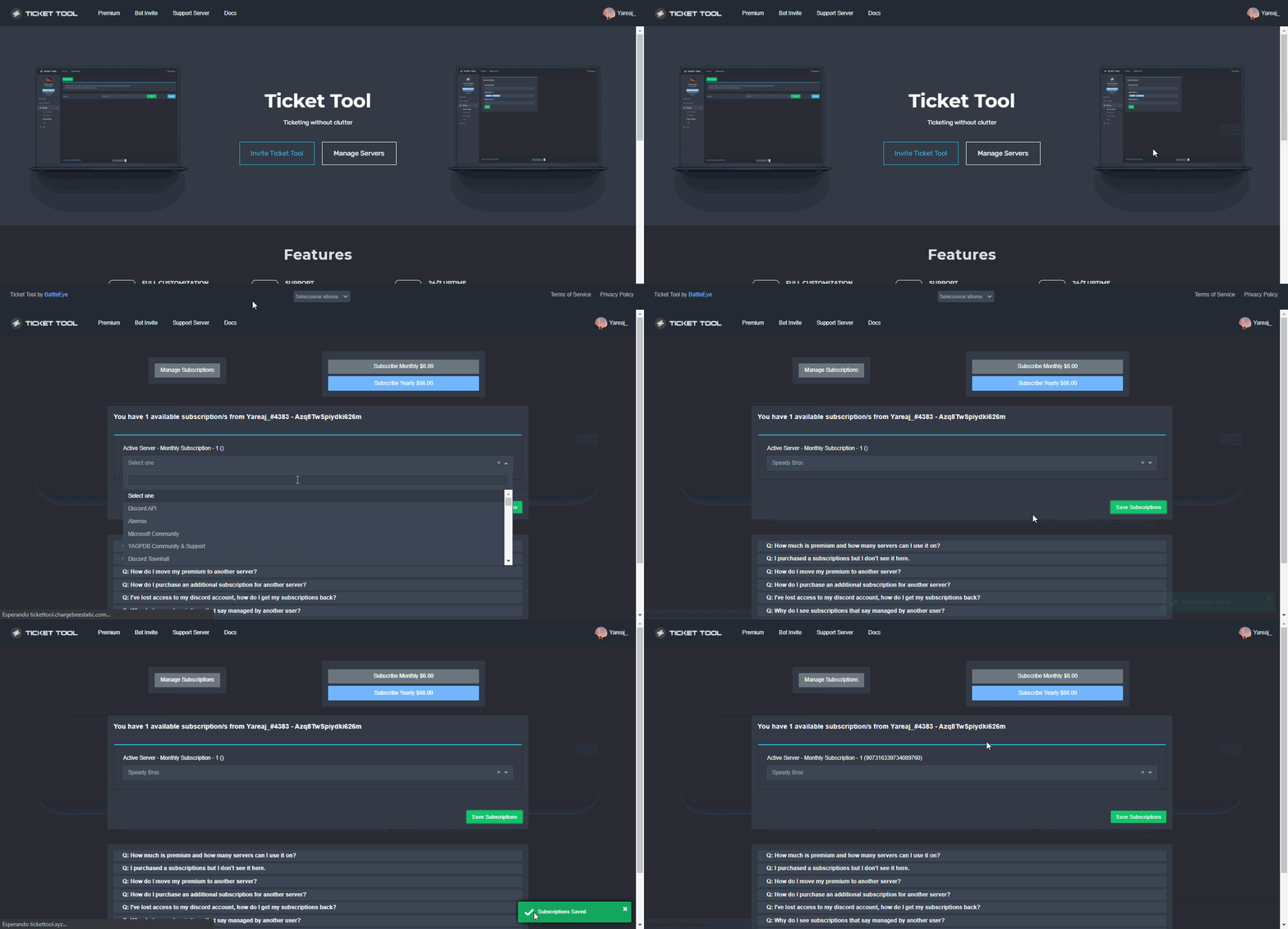
Redeeming premium on your server is really simple. Just head over to your Subscriptions Page. There you can select a server of your choice, which will get premium. You can change the server at any point.
 lilac girder
@bold totem try this
lilac girder
If you don't mind me answering instead of nep answering~
humble sequoiaBOT
Claiming allows you to change the ticket name, category and permissions. To use it you have to enable it first on your Dashboard > Panel Configs > Claiming Options.
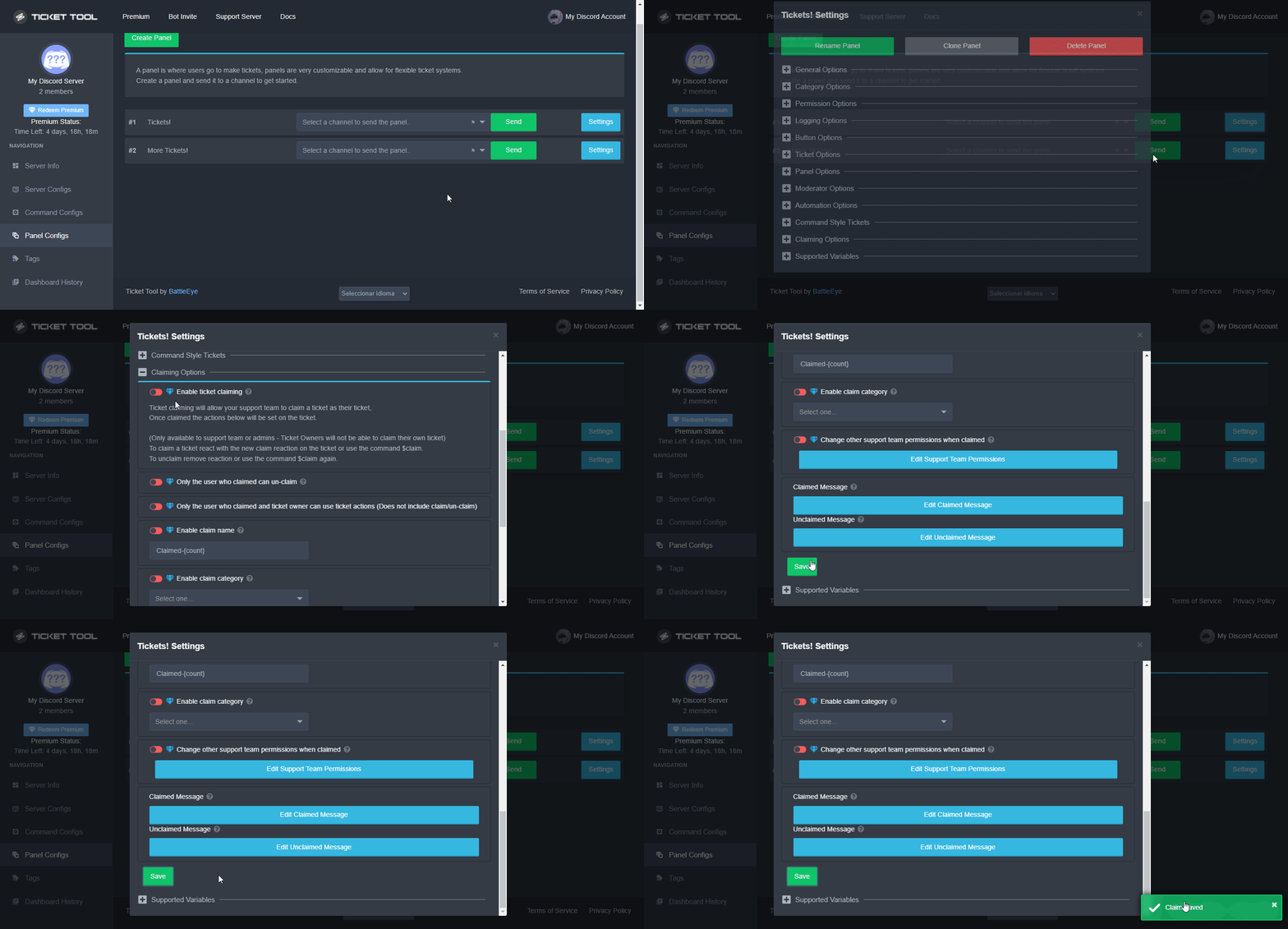
 Note: This is a premium feature
lilac girder
Note: This is a premium feature
lilac girder
@ancient crest This may help you 
copper owl
 ancient crest
How to do claim button ?? <@548583124062175232>
ancient crest
How to do claim button ?? <@548583124062175232>
if i was available to help, i would.
ancient crest
lilac girder
<@745889190767493122> This may help you <:redpanda:664137576961277952>
Wait
I have enabled all option and it doesn't work
lilac girder
ancient crest
I have enabled all option and it doesn't work
do you have premium?
jade topaz
hi
 slate rock
Hello. I don't have the server displayed in the control panel. The bot was restarted, the site was reloaded, waited for more than 1 day - nothing helps. What to do?
jade topaz
I just need something simple. Do you know how to make more than one button here? in TicketTool

 fossil veldt
Hey, how Can i do this Ticket System ??
slender minnow
slate rock
Hello. I don't have the server displayed in the control panel. The bot was resta...
You require atleast an admin role or atleast dashboard access role to access the server dashbaord.
humble sequoiaBOT
For a more convenient use of multipanels, you can now combine panels on the dashboard. This will allow you to directly send the multipanel from the dashboard or via the $panel ID command.
Where can I find this?
You can find this setting on the Dashboard -> Panel Configs -> Settings -> General Options
Note: if you're attaching all the panels to a panel called English, don't include English in the attached panels box (If you do this, it will create duplicate)
This will put all buttons from all of your panels on one message. The message is the panel message from the panel you're combining these panels in.
 Note: This is a premium feature
lilac girder
Note: This is a premium feature
lilac girder
@jade topaz
slate rock
slender minnow
You require atleast an admin role or atleast dashboard access role to access the...
I am the owner of the server
fossil veldt
fossil veldt
Hey, how Can i do this Ticket System ??
??
slender minnow
slate rock
I am the owner of the server
Can you try relogging into the dashboard?
slate rock
slender minnow
Can you try relogging into the dashboard?
Yes
humble sequoiaBOT
You can check our documentation here.
You can also check #573205317870157855 for the basic setup.
Our documentation contains all the info you need about the bot to be able to setup and configure the bot however you like.
lilac girder
try this @fossil veldt
fossil veldt
Ok
 worthy root
what bot commands
 desert summit
$help commands
humble sequoiaBOT
() = optional
[] = required
*==================================
Ticket Commands
==================================*
_ _
`$add [User] (channel)`
Description: Adding additional users to a ticket
Aliases: none
`$remove [User] (channel)`
Description: Removing users from a ticket
Aliases: none
`$close`
Description: Closing tickets
Aliases: none
`$open`
Description: Opening closed tickets
Aliases: none
`$delete`
Description: Deleting tickets
Aliases: none
`$rename`
Description: Renaming tickets/channels
Aliases: none
`$transcript (send channel)`
Description: Creating transcripts
Aliases: none
`$new (user) (reason)`
Description: Creating tickets in a monitored channel (when command style is enabled)
Aliases: none
`$claim`
Description: Claiming tickets (when claim is enabled)
Aliases: "unclaim"
_ _
*==================================
General Commands
==================================*
_ _
`$help (Help Options)`
Description: Help Command
Aliases: none
`$debug`
Description: Debuging issues with running Ticket Tool
Aliases: none
`$id (@role/@user/#channel/emoji)`
Description: Converting roles, users, channels and emojis to ID
Aliases: "getid"
`$permlevel`
Description: Checking permission level with Ticket Tool
Aliases: "level"
`$ping`
Description: Checking response time with discord api
Aliases: none
`$vote (link | unlink | redeem) (user)`
Description: Earn premium by voting on top.gg or Discord.boats
Aliases: "votes"
desert summit
$commands
worthy root
it no works
desert summit
worthy root
it no works
What do you mean With „it no works“ ?
worthy root
how to make a thing where people will take tickets
 viral scaffold
I tried to make a panel and everything then when I put which channel I want and make sure hot has perms it says “access denied , bot doesn’t have perms”
humble sequoiaBOT
━━ moved to ticket ━━
 tame quarry
hello
 lilac pivot
$help support
humble sequoiaBOT
How to let support team see into a ticket
About support roles
A support role lets your support team see into tickets with out having to add them manually to each and every ticket.
You can add as many support roles as you like per panel.
NOTE that the way discord works all admins can see into tickets regardless of this.
How to set a support role
To set a Support role go to the Dashboard -> Panel Configs -> Settings -> General Options -> Support Team Roles.
NOTE that the support role will not be able to see into tickets that are already created..
shut bolt
lilac pivot
$help support
If you are going to use commands for yourself please make sure to run them in #🤖│bot-spam mate
 stone kindle
How can i make ticket channel name to display name of user who created it insted of nuber?
 void cape
Is this the correct place if i want to find out if my order for fivem has been done corrently or even went though?
shut bolt
void cape
Is this the correct place if i want to find out if my order for fivem has been d...
As told in your ticket, no
shut bolt
No problem
shut bolt
void cape
Is this the correct place if i want to find out if my order for fivem has been d...
Hi, you'll need to change the default ticket name and use the {ticket.user.name} variable inside it, to edit the default name follow this process:
humble sequoiaBOT
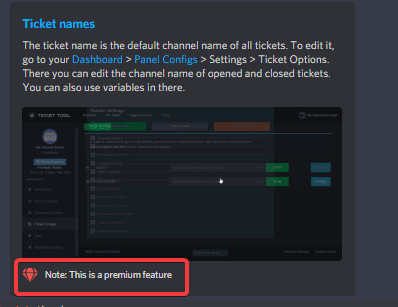
The ticket name is the default channel name of all tickets. To edit it, go to your Dashboard > Panel Configs > Settings > Ticket Options. There you can edit the channel name of opened and closed tickets. You can also use variables in there.
Note: This is a premium feature
shut bolt
Wrong message
shut bolt
shut bolt
Hi, you'll need to change the default ticket name and use the `{ticket.user.name...
@stone kindle this one's for you, I responded to the wrong message LMAO
 neat kernel
e tomei block de id
desert summit
Panel Configs >> Settings >> Ticket-Options >>  Ticket Opened channel name
(It´s just for premiums) @stone kindle
shut bolt
@neat kernel Refrain from sending any type of files, specially .exe, unless it's a problem related to our bot send screenshot
neat kernel
fui bam alguem ajuda ai

 humble sequoiaBOT
⚠️ Você está no lugar errado
Nós oferecemos suporte para o bot de Discord @pseudo glen, então não podemos ajudá-lo com qualquer outro problema que você tenha.
- Certifique-se de entrar em contato com a equipe de suporte apropriada para solucionar seu problema.
Se você não possui nenhuma dúvida sobre o nosso bot de tickets, por favor feche este ticket.
 tough lake
whats the command for ticket bot
shut bolt
The command for what?
 fair widget
hello,can somebody fix my bots in my own server dm me if you want
shut bolt
fair widget
hello,can somebody fix my bots in my own server dm me if you want
This is not the place to look for that mate
fair widget
o sorry
humble sequoiaBOT

L'équipe du support Français
Cher client,
Si vous avez besoin d'aide, ouvriez un ticket pour le support Français s'il vous plaît.
Allez au #🎫│make-a-ticket et tapez sur le button contenant l'emoji 🇫🇷
shut bolt
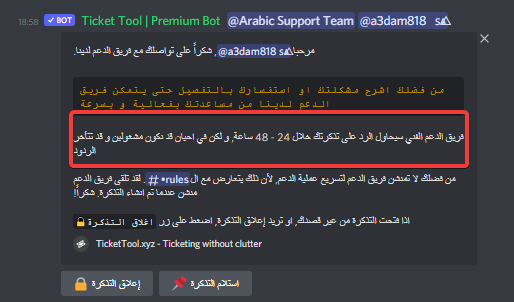
I bet you didn't read the ticket message, did you?
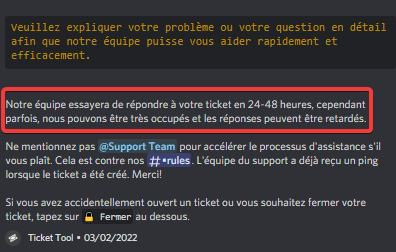
And the time, as shown in the photo I just sent, is from 24 to 48 hours
I invite you to read #918271177988907079
atomic barn
You do know that support staff have other things to tend to right? This is voluntary and they will answer whenever they have free time lol
shut bolt
atomic barn
You do know that support staff have other things to tend to right? This is volun...
This is it basically
atomic barn
shut bolt
This is it basically <:smil:578437846088679427>
🍞
shut bolt
You just answered to yourself
shut bolt
atomic barn
🍞
Breadlo!
Bread is 🍞
And I'm Pablo
And I use a lot the bread emoji
Hence why we have the breadlo idea
Nice 😎
 coral wraith
How do I put the tickets in a category
shut bolt
coral wraith
How do I put the tickets in a category
$help category
humble sequoiaBOT
How to set the open category
To set a open category go to the Dashboard -> Panel Configs -> Settings -> Category Options -> Category Open
shut bolt
Pick a category as shown above, save changes and that's it new tickets will spawn there
Sure
Why would I do that LMAO
It's a good one indeed
coral wraith
What is category closed
shut bolt
coral wraith
What is category closed
You can have a different category for tickets to be placed once they are closed it you want, that's what the category is
It's fine mate
Yes I do, I'm actually a native spanish speaker
Todo bien, tú qué tal?
No mucho la verdad, y tú?
😎 me alegro
It's fine lol
I do
I'm a native spanish speaker
Nice
Yup
Colombia
What about you?
Nice
Nice
I don't answer to personal questions sorry
Is that a joke?
Are you aware that for having a discord account you need to be at least 13?
 compact ginkgo
Hello, how to with which command i Can create the mess where people open tickets ?
shut bolt
compact ginkgo
Hello, how to with which command i Can create the mess where people open tickets...
Heya
It's not a command, but a process mainly
humble sequoiaBOT
You can check our documentation here.
You can also check #573205317870157855 for the basic setup.
Our documentation contains all the info you need about the bot to be able to setup and configure the bot however you like.
compact ginkgo
shut bolt
Check this guide and you'll be able to set the ticket system
Okay, but I need thé premium ?
shut bolt
compact ginkgo
Okay, but I need thé premium ?
Our bot is free! You can use a lot of its features without the need of premium
compact ginkgo
shut bolt
Our bot is free! You can use a lot of its features without the need of premium
Okay
 mossy blade
Hello! How can I invite the premium bot into my server?
humble sequoiaBOT
The first thing you will need to do is invite the premium bot, an invite can be found here
Once the bot is in your server we will head to the dashboard and manage your server. When you are managing your server, you want to head into "Server Configs" then click the drop down menu under "Select the bot you would like to use on this server" then click "Ticket Tool#6207" and then save.
 wary pike
hey i got question is there way to make categories like when u create ticket from one message it goes to specific category and when you create ticket from other message it goes to other category?
shut bolt
$help category
humble sequoiaBOT
How to set the open category
To set a open category go to the Dashboard -> Panel Configs -> Settings -> Category Options -> Category Open
shut bolt
Assign a category per panel
iron nightBOT
Gave +1 Rep to @shut bolt
shut bolt
Sure
jade topaz
?
 humble sequoiaBOT
How to disable the premium bot
To disable the premium bot you will have to go to the Dashboard ➞ Server Configs ➞ Premium bot ➞ And on the right-hand side select the primary free bot in the drop down menu.
Premium features will still work on the normal bot.
shut bolt
Follow these steps
jade topaz
thanks daddy
wary pike
is there way to change ticket name like when i create ticket it just says number is there way to change that?
shut bolt
There are two ways to change it, option 1 is using the $rename command
Options 2 is updating the default name
humble sequoiaBOT
The ticket name is the default channel name of all tickets. To edit it, go to your Dashboard > Panel Configs > Settings > Ticket Options. There you can edit the channel name of opened and closed tickets. You can also use variables in there.
Note: This is a premium feature
wary pike
thanks
shut bolt
Sure
wary pike
it doesnt work when i change name
shut bolt
wary pike
it doesnt work when i change name
Whth which option?
wary pike
does it require premium?
wary pike
humble sequoia
this
 wary pike
is there way to get this for free?
shut bolt
wary pike
is there way to get this for free?
Premium?
wary pike
that feature
shut bolt
It's only available for premium users
If you want free premium, use $votes in #🤖│bot-spam and read the whole message the vote will answer with
wary pike
is therw any other ticket bot that has features like this for free?
shut bolt
No clue
humble sequoiaBOT
Don't see your server in the dashboard?
You will possibly need to relog. Look below to see steps on how to relog.
How to relog in the Dashboard.
First, you will need to go to the dashboard. Once your there, click on your avatar on the top right. after you clicked it, you will see button that says Logout. You must click that. Once you have logged out, you can log back in.
Note:
You need one of these 3 things to access the dashboard.
1. Server Owner (Level: 6)
2. Server Administrator (Level: 4)
3. Dashboard Role (Level: 2)
:warning: You can check your level using $level on your Discord Server
User permission level with Ticket Tool
@User is permission level: 0 (User)
```» *If it shows that your permission is **0**, you don't have any of the above **3 things** to manage the dashboard.*


**See the GIF below on how to relog:**Try this out
 azure jewel
Is there a cool down option to prevent users from closing, opening, and spamming tickets?
shut bolt
azure jewel
Is there a cool down option to prevent users from closing, opening, and spamming...
Currently there is no a way to customize a time cooldown per user
There is a suggestion regarding it though
#💡│suggestions message
copper owl
why are you pinging? do you need help?
then please take the chat in #💬│general-chat
thanks
 paper topaz
Hello! I just upgraded my ticket tool to premium and invited the premium bot, but when i try to make new tickets using the premium bot it only says to use $debug in the channel which does not work
humble sequoiaBOT
The first thing you will need to do is invite the premium bot, an invite can be found here
Once the bot is in your server we will head to the dashboard and manage your server. When you are managing your server, you want to head into "Server Configs" then click the drop down menu under "Select the bot you would like to use on this server" then click "Ticket Tool#6207" and then save.
shut bolt
Enable it as shown above
paper topaz
thank you!!
also is there a way to get the ticket channel to be called @wanton heron#1234? i saw that i can do {user} but then i get the full ID
🙏🏻
copper owl
paper topaz
also is there a way to get the ticket channel to be called <@!841477508783538237...
{user} returns the mention
which is why you get the ID
use something like {ticket.user.name}
it returns the ticket user's username
paper topaz
perfect!!
then two more questions, please excuse my incompetence.
- how do i change the name and icon of the bot so that it does not say ticket tool?
- every time i think ive done it, it still shows the same bot name
copper owl
paper topaz
1) how do i change the name and icon of the bot so that it does not say ticket t...
that doesn't exist yet. you can add a nickname but that's about it
paper topaz
- is there a way to instead of close/delete to change it to accept/deny?
paper topaz
ok and then i should just log deleted as denied?
copper owl
You can't change the log text
if you're logging deleted tickets, then it'll stay as "ticket deleted"
you can't change the text there to be denied or accepted
jade topaz
Hey Hey, I'm setting up multipanels and it says 25 is the limit, but I only seem to get shown 10 buttons on my panel. Is that a limit from discord itself?
copper owl
jade topaz
Hey Hey, I'm setting up multipanels and it says 25 is the limit, but I only seem...
how many panels have you attached
copper owl
Then.. you'll get 11 buttons
paper topaz
copper owl
if you're logging deleted tickets, then it'll stay as "ticket deleted"
ok and does the log say the "name of the ticket" deleted?
copper owl
paper topaz
ok and does the log say the "name of the ticket" deleted?
Yes. it says the channel name
paper topaz
copper owl
Yes. it says the channel name
perfect, thats everything then, thank you!!
iron nightBOT
Gave +1 Rep to @copper owl
copper owl
jade topaz
11
you're not gonna get 25 buttons if you aren't attaching 24 panels
The limit is 25,but you still need to make 25 panels and attached 24 to one
jade topaz
copper owl
The limit is 25,but you still need to make 25 panels and attached 24 to one
I know ofc, but I only get 10 buttons with 11 panels attachted
If I remove one of the 11 buttons, I see the missing one instead
so it feels like there is a limit to only display 10 buttons
copper owl
make sure you haven't disabled the create ticket button on one of the panels
 cloud solstice
Hello my members can not upload images in the support ticket... Can someone help me?
jade topaz
ah found it, you can only have 5 rows of buttons below each other 
so I had to change it to sow at least 3 buttons per row
jade topaz
cloud solstice
Hello my members can not upload images in the support ticket... Can someone help...
he is missing permissions in the permissions options of your ticket
cloud solstice
Yes, where should I give the authorization? via the channel create support ticket?
jade topaz
cloud solstice
Yes, where should I give the authorization? via the channel create support ticke...

but that will only work for future tickets, you'll have to give him the permission to upload images in the channel permissions directly now
jade topaz
hello i dont want my panel to have the embed message i only want it to have the create ticket button
humble sequoiaBOT
━━ moved to ticket ━━
 primal wave
is there anyway to check how many tickets someone has closed / answered
primal wave
@copper owl What is the command?
copper owl
There's no need to ping
there's also no command
you use the discord search feature with their ID
primal wave
Ah ok
 wheat ibex
yo
 polar seal
hi, anyone know a way to have a cooldown after someone close a ticket? I have some people who close their ticket just to open a new one when its a new case. We want to make them only use the ticket they already have
ticket limit is 1
copper owl
polar seal
hi, anyone know a way to have a cooldown after someone close a ticket? I have so...
nope, no cooldown for tickets currently.
you can do something with blacklisted roles
Using a 3rd party bot, like dyno or yag, you can assign a role for x amount of time. If you blacklist that role, they won't be able to use ticket tool for x amount of time. Depending on what you set X as
so you're basically making a scuffed cooldown
polar seal
copper owl
Using a 3rd party bot, like dyno or yag, you can assign a role for x amount of t...
thank you! would you know if I can integrate so when someone close a ticket, they get that role? Or would I manually give this role
copper owl
polar seal
thank you! would you know if I can integrate so when someone close a ticket, the...
I dont have an idea on how to integrated this.
you can ask the respective support servers for that.
polar seal
Ok, thanks!
paper topaz
hey, one question, is there any function to auto delete the ticket if ppl do not write anything in there for x amount of time?
 gaunt veldt
I’m trying to make the Channel name include the ticket creators user but i can not figure out how. Any help?
paper topaz
gaunt veldt
I’m trying to make the Channel name include the ticket creators user but i can n...
gotta make a category for tickets
cant add tickets to a channel
gaunt veldt
no i mean so when they make the ticket, the tickets channel name will include the ticket creators user.
for an example say someone’s name was dog how would i get the tickets channel name to be dog’s ticket? or something of that nature.
paper topaz
gaunt veldt
for an example say someone’s name was dog how would i get the tickets channel na...
ah easy
found out today as well
one sec will send you what you need to write
needa copy it over
gaunt veldt
ok thanks 🙏
paper topaz
gaunt veldt
ok thanks 🙏
just copy that into the messages from ticket and it will translate it into their username
@copper owl sorry to @ you but have a quick question.
Is there a limit to how many tickets can be in a channel?
They seem to from time to time overflow out of the channel I presume when they become too many.
 paper topaz
gaunt veldt
paper topaz
gaunt veldt
yepp anywhere where there is a message that you can customise you can put it 🙂
gaunt veldt
paper topaz
yepp anywhere where there is a message that you can customise you can put it 🙂
also have one more question, i’m kinda new to this so sorry if it’s a dumb question but i see other people have multiple buttons on there panel message, do you know how i could do that?
paper topaz
gaunt veldt
also have one more question, i’m kinda new to this so sorry if it’s a dumb quest...
yepp multipanel, think its a premium feature tho
gaunt veldt
i have the trial on rn just tryna see if i want to get it
paper topaz
you just make multiple panels like normal and then instead of sending them all in the chat, just click on one of them and pick the multpanel option
but make sure you add all your text to the main one where you add the multipanel's to
cause it only takes the text from the main one
so you will have to make multiple text fields for the panel text
gaunt veldt
so the main one is the one i click on and pick the multi panel option?
copper owl
paper topaz
<@!548583124062175232> sorry to @ you but have a quick question.
Is there a lim...
#546557408902905896 .If you'd like our help feel free to open a ticket

 rich carbon
Can I Suggest Somewhere?
copper owl
it's been suggested already.
 iron nightBOT
Gave +1 Rep to @copper owl
 pseudo dome

 mystic hound
You can invite the premium bot even without having premium, it just won't work.
After the trial period it'll just sit there and do nothing but give an error
 spiral marten
hi! ive followed the tutorial multiple times but no matter what i do the server im adding the bot to just wont show up
im not sure what to do to fix this
slender minnow
@spiral marten make sure you have admin perm in your role (and not a role called as admin) if you aren't the server owner.
To view your server on dashboard.
iron nightBOT
Gave +1 Rep to @slender minnow
rich carbon
How Should I Access Dashboard If Idk Website URL?
humble sequoiaBOT
shut bolt
That's the URL 
rich carbon
Is It Premium Command?
shut bolt
It's a tag
rich carbon
Ohkay Thanks @shut bolt
iron nightBOT
Gave +1 Rep to @shut bolt
shut bolt
Sure
 cobalt blade
Hey!
I will like to add this...
When someone opens a mlo-support ticket then the ticket auto get called mlo-count like dis.
Can anyone help? 😄
 shut bolt
cobalt blade
Hey!
I will like to add this...
When someone opens a mlo-support ticket then ...
shut bolt
cobalt blade
Hey!
I will like to add this...
When someone opens a mlo-support ticket then ...
Hi!
humble sequoiaBOT
The ticket name is the default channel name of all tickets. To edit it, go to your Dashboard > Panel Configs > Settings > Ticket Options. There you can edit the channel name of opened and closed tickets. You can also use variables in there.
Note: This is a premium feature
shut bolt
Replace the Ticket default name and include either mlo or use the {panel.name} variable
 deep cape
مفيش حد عربي هنا؟
 crude hedge
Silly question. How do you add someone to a ticket on a phone? Without using @ Thank you
shut bolt
crude hedge
Silly question. How do you add someone to a ticket on a phone? Without using @ T...
Using its ID
$help add
humble sequoiaBOT
How to add or remove users on tickets
To add a user to a ticket use $add <user>
To remove a user from a ticket use $remove <user>
shut bolt
Instead of the ping use the ID
crude hedge
Lemme check now.
crude hedge
shut bolt
Instead of the ping use the ID
So I type that in within the ticket?
shut bolt
crude hedge
So I type that in within the ticket?
Yup $add ID
Replacing ID with the actual ID
crude hedge
OK
crude hedge
shut bolt
Replacing ID with the actual ID
Thank you.
iron nightBOT
Gave +1 Rep to @shut bolt
crude hedge
shut bolt
Yup $add ID
May I ask you another question?
 deft grove
where can we write about hackers?
crude hedge
So I used the $add command. The person shows up as added on PC but not on phone. Is that a bug?
shut bolt
deft grove
shit server, cant even contact a mod for cheaters
Cheaters? What are you talking about
shut bolt
crude hedge
So I used the $add command. The person shows up as added on PC but not on phone....
Could be a visual bug
deft grove
solo duo server 2x - 2 players using aimbots megasneg and greedy grub (or like that) near F3
u can see for yourself if you like
shut bolt
deft grove
solo duo server 2x - 2 players using aimbots megasneg and greedy grub (or like t...
Well, we are not a shit server, you are just in the wrong server, we are the support server for @pseudo glen
 tired moon
Is there a way i can enable tickets to have it so a certain role can post images in the channels? Or would i just have to edit category perms?
shut bolt
tired moon
Is there a way i can enable tickets to have it so a certain role can post images...
You can, I'll help you but it depends, do you want only X role be able to add images? Or you would like the user who creates the ticket to be able to do so?
jade topaz
So, I'm trying to make tickets for a server I'm an SHR in, the only place I can manage is my personal server? How can I make it so I can add tickets to the place I want?
humble sequoiaBOT
Don't see your server in the dashboard?
You will possibly need to relog. Look below to see steps on how to relog.
How to relog in the Dashboard.
First, you will need to go to the dashboard. Once your there, click on your avatar on the top right. after you clicked it, you will see button that says Logout. You must click that. Once you have logged out, you can log back in.
Note:
You need one of these 3 things to access the dashboard.
1. Server Owner (Level: 6)
2. Server Administrator (Level: 4)
3. Dashboard Role (Level: 2)
:warning: You can check your level using $level on your Discord Server
User permission level with Ticket Tool
@User is permission level: 0 (User)
```» *If it shows that your permission is **0**, you don't have any of the above **3 things** to manage the dashboard.*


**See the GIF below on how to relog:**Read this
jade topaz
Okay, thank you!
shut bolt
Sure
jade topaz
Yay, found it! Thank you so much!
tired moon
shut bolt
You can, I'll help you but it depends, do you want only X role be able to add im...
any user who creates a ticket, because they will all have the member role
srry for late response, my staff needed me for smth
shut bolt
jade topaz
Yay, found it! Thank you so much!
Sure
shut bolt
tired moon
srry for late response, my staff needed me for smth
No problem
tired moon
so yeah
i dont have a category for it, and i just want the member to be able to have image perms, cause the member role doesnt
shut bolt
tired moon
any user who creates a ticket, because they will all have the member role
Sure, so follow these steps:
Open your Dashboard
Go into your Panel Configs tab
Click on Edit User Opened Permissions
Mark as  the
the Attach Files permission
Save changes
shut bolt
tired moon
i dont have a category for it, and i just want the member to be able to have ima...
I was typing, sorry for my delay
tired moon
ok, perfect, i appreciate the help
shut bolt
tired moon
ok, perfect, i appreciate the help
Sure, try it out and let me know
tired moon
glad to know battleye has good support staff
shut bolt

tired moon
i could tell him to promote you
shut bolt
👀
That sounded interesting
But
If I'm going to be promoted it will happen whenever I deserve it

shut bolt
Lmao
tired moon
hes offline, so i didnt wanna wait 3 years for him to respond about this
lemme go try it rq
shut bolt
👀
 tired moon
shut bolt
👀
tired moon
shut bolt
👀
i meant the ticket thing, i dont need to DM him
shut bolt
tired moon
Yup!
tired moon
cool
shut bolt
tired moon
i meant the ticket thing, i dont need to DM him
No yeah yeah
tired moon
im in a server with a bunch of verifed devs, and hes in there, lol
shut bolt
He's a pro 
tired moon
fr
shut bolt
🤝
shut bolt
tired moon
Btw, let me know whenever you test this
tired moon
im tryna find normal member
shut bolt
tired moon
im tryna find normal member
If you need help with testing it let me know I'll help
wary pike
i voted on 3 websites but only got 2 votes
i got question if i have premium and i add image on ticket would it stay forever or when my premium runs out it would disappear? @shut bolt
shut bolt
wary pike
i got question if i have premium and i add image on ticket would it stay forever...
 wary pike
oh didnt know that sry
plain surge
wary pike
i got question if i have premium and i add image on ticket would it stay forever...
If you add an image to the panel message it will stay there and the panel will still function, but you won't be able to edit the panel message as you will have to resend it if you want to change something
wary pike
ok ty thats great
plain surge
No problem 👍
 plain surge
You can follow the setup guide to setup the bot on your server
humble sequoiaBOT
You can check our documentation here.
You can also check #573205317870157855 for the basic setup.
Our documentation contains all the info you need about the bot to be able to setup and configure the bot however you like.
 upbeat spire
Thank you @plain surge
plain surge
No problem 👍
 hybrid inlet
ok so im trying to make it so that any opened tickets will be in a category called tickets but it keeps opening tickets out side the category can someone plz help
humble sequoiaBOT
How to set the open category
To set a open category go to the Dashboard -> Panel Configs -> Settings -> Category Options -> Category Open
 loud hollow
whats the ticket tool link
humble sequoiaBOT
Ticket Tool Invite & Support
plain surge
The second link
 humble sequoiaBOT
plain surge
humble sequoiaBOT
plain surge
This is the link to the Dashboard
loud hollow
Thank you
plain surge
No problem
loud hollow
thanks @plain surge
iron nightBOT
Gave +1 Rep to @plain surge
jade topaz
plain surge
You can select the category where open tickets go here
Um do the members see the category even though they didn't create a ticket?
Bc I wanna add that feature
 novel valley
how do you make the ticket specifically go into the category?
jade topaz
Um based on what I learned u go to panel config then ur panel settings then click category options and choose which category u want Tickets to go In "category open"
Hope this helps
$help category
humble sequoiaBOT
How to set the open category
To set a open category go to the Dashboard -> Panel Configs -> Settings -> Category Options -> Category Open
jade topaz
There bro

 vagrant monolith
Damn, thanks
 solid stream
It only shows when pinged, but yeah.. fun discord formatting 🙂
jade topaz
humble sequoia
Ticket created ticket-0002
Category #feedback's is missing or blocking permissions ADD_REACTIONS, MANAGE_MESSAGES, ATTACH_FILES for @humble sequoia - Skipping
This showed different missing permissions at first, such as MANAGE_CHANNELS (was one of them.)
Now it shows ADD_REACTIONS, & ATTACH_FILES, which before was something else.
(Basically it didn't show all the missing permissions at first) only at the 2nd ticket did I see what other permissions were missing.
Bug?
Either way, I'm here for another issue.
Transcript failed to save to report-2-transcripts Transcript channel #report-2-transcripts missing permission.
What exact permissions am I missing?

I guess I should make a Suggestion for: Including what missing permissions are for transcript channel.
copper owl
jade topaz
Either way, I'm here for another issue.
Transcript failed to save to report-2-tr...
you could just run $debug
copper owl
jade topaz
I guess I should make a Suggestion for: Including what missing permissions are f...
that's why the debug command exists
to find out what permissions are missing when doing a specific action
jade topaz
Alright thanks.
I've given it the permissions for the category, and it works.
thanks @copper owl
iron nightBOT
Gave +1 Rep to @copper owl
copper owl
$debug shows you all the necessary permissions it needs, so feel free to use it to diagnose any permission issues
jade topaz
I just tried $debug for saving transcripts, but it didn't show anything missing.
I added the required permissions manually & it worked.
 radiant blade
 storm shoal
hm
 quartz pewter
help?
Arabic!
 lofty nymph
how do i put ticket tool in my own server?
even tho i got ticket too already.
got how do i set it up.
slender minnow
@lofty nymph you require the admin perm (if not the server owner) to access your server dashboard.
You can set up the bot from there, additionally do read the docs for more info.
humble sequoiaBOT
quartz pewter
Arabic? @slender minnow
slender minnow
$articket
humble sequoiaBOT

فريق الدعم الفني العربي
عميلنا العزيز ان كنت تبحث عن مساعدة يرجى فتح تكت خاص بفريق الدعم الفني العربي
اذهب الى#🎫│make-a-ticket
ثم قم بلضغط على الايموجي الاتي (🇯🇴)
slender minnow
^
quartz pewter
thx
desert summit
@thorn mauve you have to Choose the premium-bot in Your dashboard. Look here:
There have to stand the premium-bot, if Not Choose it

 obtuse arrow
how do I add multiple buttons on my panel?
 zinc vine
How can I automatically delete open tickets after the issue is solved?
copper owl
zinc vine
How can I automatically delete open tickets after the issue is solved?
Ticket tool doesn't know when the issue is solved. you can run $delete to delete the ticket.
if you don't want the ticket to close, but rather delete immediately, go to general options and turn off Two Step Ticket
copper owl
obtuse arrow
how do I add multiple buttons on my panel?
For this, check the following
humble sequoiaBOT
For a more convenient use of multipanels, you can now combine panels on the dashboard. This will allow you to directly send the multipanel from the dashboard or via the $panel ID command.
Where can I find this?
You can find this setting on the Dashboard -> Panel Configs -> Settings -> General Options
Note: if you're attaching all the panels to a panel called English, don't include English in the attached panels box (If you do this, it will create duplicate)
This will put all buttons from all of your panels on one message. The message is the panel message from the panel you're combining these panels in.
Note: This is a premium feature
obtuse arrow
thank you!
zinc vine
Thank You
slender minnow
 lavish oxide
<@336243658816749570>
lavish oxide
<@336243658816749570>
Heya, you can refer #546557408902905896 not to ping anyone from the support team or a manager.
You can ask anything regarding the bot in here or using #🎫│make-a-ticket
lavish oxide
Oh iam sorry
lavish oxide
slender minnow
You can ask anything regarding the bot in here or using <#571706435449257997>
I have problem in bot
slender minnow
You can ask here or open a ticket through #🎫│make-a-ticket
jade topaz
Ye
wary pike
is there way to change size of buttons to create ticket?
slender minnow
wary pike
is there way to change size of buttons to create ticket?
Nope
You can either use reactions or button...
some extra that might be of help
copper owl
slender minnow
You can either use reactions or button...
*some extra that might be of help*
you cant use reactions
slender minnow
Uhmm... i think i did saw something that says reaction once on the dashboard
copper owl
we used to have reactions
not anymore
you cant use reactions anymore, and if you havent updated your panels and still have reactions, it'll return with an error when trying to create tickets
copper owl
wary pike
is there way to change size of buttons to create ticket?
this is not something from our end, but rather discord. they allow for one size buttons, they also only allow for 4 colors.
 uncut oracle
Hello! I'm managing my discord tickets, but my mods cant see the tickets. Where do i add the option to whitelist them?
shut bolt
$help support
humble sequoiaBOT
How to let support team see into a ticket
About support roles
A support role lets your support team see into tickets with out having to add them manually to each and every ticket.
You can add as many support roles as you like per panel.
NOTE that the way discord works all admins can see into tickets regardless of this.
How to set a support role
To set a Support role go to the Dashboard -> Panel Configs -> Settings -> General Options -> Support Team Roles.
NOTE that the support role will not be able to see into tickets that are already created..
shut bolt
Add their roles as a support role
uncut oracle
shut bolt
Add their roles as a support role
Thank you!
iron nightBOT
Gave +1 Rep to @shut bolt
shut bolt
uncut oracle
Thank you!
Sure
uncut oracle
☺️
wary pike
how to get emoji in embed description
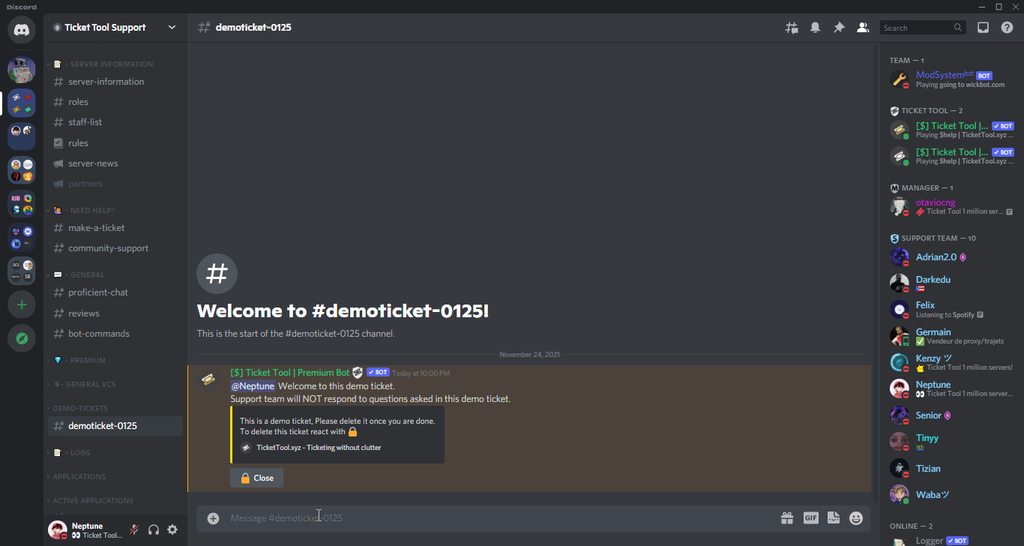 wary pike
i cant use ticket tool emojis cuz i dont have nitro
plain surge
You can run the id command in #🤖│bot-spam with an id from this server
 violet crane
i add the bot but i cant see the server
 wary pike
plain surge
You can run the id command in <#910978476536905738> with an id from this server
wary pike
plain surge
You can run the id command in <#910978476536905738> with an id from this server
?
plain surge
violet crane
i add the bot but i cant see the server
Try the steps below please
humble sequoiaBOT
Don't see your server in the dashboard?
You will possibly need to relog. Look below to see steps on how to relog.
How to relog in the Dashboard.
First, you will need to go to the dashboard. Once your there, click on your avatar on the top right. after you clicked it, you will see button that says Logout. You must click that. Once you have logged out, you can log back in.
Note:
You need one of these 3 things to access the dashboard.
1. Server Owner (Level: 6)
2. Server Administrator (Level: 4)
3. Dashboard Role (Level: 2)
:warning: You can check your level using $level on your Discord Server
User permission level with Ticket Tool
@User is permission level: 0 (User)
```» *If it shows that your permission is **0**, you don't have any of the above **3 things** to manage the dashboard.*


**See the GIF below on how to relog:**You want to use emojis from this server?
wary pike
yes
plain surge
Then yh, go to #🤖│bot-spam and run the id command with the emojis you want
Then you copy the bot response and paste it in the ticket message
wary pike
plain surge
Then yh, go to <#910978476536905738> and run the id command with the emojis you ...
i cant use emojis i want i need nitro
craggy geyser
You don't need nitro to use them. You can get the id you need on this server and still add it to yours. The bot can use them even though you can't
craggy geyser
plain surge
Then yh, go to <#910978476536905738> and run the id command with the emojis you ...
Read this
Apologies, I see you did try it there. Not sure why it didn't work
craggy geyser
wary pike
id command doesnt work
It works for me. What emojis do you want and I can use the command for you to copy the id


 craggy geyser
Yes. That's another option
slender minnow
yep
wary pike
craggy geyser
It works for me. What emojis do you want and I can use the command for you to co...
bonzo, scarf, professor,thorn, livid, sadan, necron
craggy geyser
wary pike
bonzo, scarf, professor,thorn, livid, sadan, necron
They aren't on this server so I can't do that for you. It should work on the server that has those emojis
craggy geyser
slender minnow
https://images-ext-1.discordapp.net/external/xBuvQ7D40KcvltiEfZ6nE-AnlG4f-_Ib-dt...
And if it doesn't, do this instead
wary pike
on site when i tried changing emoji to ticket that emoji was there from which server is it
plain surge
Then you can use the Discord way by typing \ before the emoji
Like so
That's the id for 
@wary pike
jade topaz
What is the difference between a premium bot And the normal bot?
slender minnow
 lavish birch
How i can create a ticket in Dashboard
lavish birch
How i can create a ticket in Dashboard
Heya, you cannot create ticket through the dashboard but make a panel from the dashboard which can be used to create tickets on the dashboard
@jade topaz it allows you to unlock more features offered by the bot, which includes multipanels, changing button logos, etc.
along with premium, you also get a unique premium role hoisted above the member role that will give you access to the premium chat
jade topaz
slender minnow
along with premium, you also get a unique premium role hoisted above the member ...
How to buy a premium bot
humble sequoiaBOT
Ticket Tool Premium
Get premium at https://tickettool.xyz/premium
Manage your subscriptions at https://tickettool.xyz/subscriptions
Why Premium?
Premium lets you customize the bot just how you want it. It also helps keep the bot running.
slender minnow
^
jade topaz
slender minnow
^
Ok , thank you
iron nightBOT
Gave +1 Rep to @slender minnow
slender minnow
No problem 🙂
 compact prism
hello, im waiting for my ticket over 24 hours, how long do i have to wait to get my key?
copper owl
compact prism
hello, im waiting for my ticket over 24 hours, how long do i have to wait to get...
what ticket?
you joined 9 mins ago and havent opened a single ticket
compact prism
i buy a ticket but i dont became a ticket or key
 sudden socket
Hi
compact prism
hi
copper owl
compact prism
i buy a ticket but i dont became a ticket or key
you cant buy tickets here
so... you're either not explaining correctly or you're not in the right place
compact prism
i have a ticket but i havent a key
copper owl
a ticket for what
compact prism
can you write me privat
copper owl
compact prism
can you write me privat
Nope. I have my DMs closed for a reason
if we can talk in private, we can talk here