#🆘│community-support
1 messages · Page 383 of 1
 iron nightBOT
 shut bolt
Sure
 tribal cedar
 dusty lodge
tickets are not working annymore
dusty lodge
tickets are not working annymore
Did they begin working again when discord's api got itself worked out?
 jade topaz
Hey, if I am using the automated transcript creation on closing / deleting a ticket, but want the transcript of that ticket to got to another transcript log because for example a standard ticket turned out to involve sensitive topics, will the automation still act if you I use the $transcript #channel_name command, and if so, can I prevent it?
 opaque pawn
i need HELP
like u know when u type / and a menu shows up
and all bot commands show up
there not there.
shut bolt
jade topaz
Hey, if I am using the automated transcript creation on closing / deleting a tic...
The automation will still act even if you run the command
shut bolt
opaque pawn
like u know when u type / and a menu shows up
and all bot commands show up
there...
Ticket Tool currently doesn't support Slash Commands, that's why
opaque pawn
no not only for ticket tool other bots
i guess nvm
this is a ticket tool server
cya
shut bolt
opaque pawn
no not only for ticket tool other bots
Then that means you can't use slash commands there
opaque pawn
no i can it was yesterday but now it not letting me
shut bolt
Probably someone update the channel's permissions
opaque pawn
i checked
shut bolt
jade topaz
Hey, if I am using the automated transcript creation on closing / deleting a tic...
The only way to skip it, would be manually deleting lol
jade topaz
I think slash commands are down atm
opaque pawn
jade topaz
I think slash commands are down atm
i think so does it work for ya
opaque pawn
ye
shut bolt
Probably due to the outage they restricted them
 viscid cosmos
Is there a way I can disallow people from typing commands from Ticket Tool, but allow them to still use the "Close" feature, and "Open" feature?
shut bolt
Which commands do you want to disable?
viscid cosmos
shut bolt
Which commands do you want to disable?
I guess to make it more simple -
I only want members of my server to be allowed to open tickets, ask for help, and close the ticket when done.
I don't want members to be able to do $help and get help from it.
shut bolt
The only way to do that would be restricting the bot's access to the channels except for the one you have the panel sent, you can't restrict the use of $help as of today
viscid cosmos

Those are the permissions I have set for it, and when users type $help in this:

they are still able to access $help
shut bolt
Yeah, there is not a way to do it as of now, the bot needs the send and view messages perm for working properly in tickets
viscid cosmos
Is there a way to disable Dyno from working within Ticket Tool then?
shut bolt
Does it have Admin perm?
viscid cosmos
Yes
shut bolt
Then you either need to remove it the Admin perm or mark Dyno's commands as mod only on its dashboard
 jade topaz
hello, users cannot see the newly created tickets, i am guessing this is permissions issue. any ideas how to fix?
viscid cosmos
shut bolt
Then you either need to remove it the Admin perm or mark Dyno's commands as mod ...
I changed this, and now Dyno's messages don't send at all.
shut bolt
jade topaz
hello, users cannot see the newly created tickets, i am guessing this is permiss...
Hi, how are you testing it? Did your users reported it, you used an alt, or used View As Role?
shut bolt
viscid cosmos
I changed this, and now Dyno's messages don't send at all.
Which of the two things I said?
jade topaz
shut bolt
Hi, how are you testing it? Did your users reported it, you used an alt, or used...
View as Role
viscid cosmos
Through the Dashboard on Dyno.
 humble sequoiaBOT
Using the View as Role feature.
The View as Role discord feature will not work for testing ticket tool. Ticket Tool opens permissions with user permissions & not role permissions.
shut bolt
viscid cosmos
Through the Dashboard on Dyno.
You'll need probably to set mod roles inside Dyno, but, that's not my expertise area tbh
viscid cosmos
I did
The reason I had Admin on for Dyno is because whenever I take it off, it doesn't send messages.
shut bolt
Then it probably doesn't have the needed perms, if you need help with it I would suggest to reach to Dyno's support server, I'm not an expert with it
 earnest pagoda
The ticket is sort of a mystery. I opened one but then it disappeared. Then I have two responses from different people responding. I gave the second group the ticket # and the other couldn’t find that ticket. Still not solved and the ticket has disappeared again. Good idea but don’t think the admin is worked out as well as directions for use. Love the service but it was better before the mandatory ticket rules.
shut bolt
earnest pagoda
The ticket is sort of a mystery. I opened one but then it disappeared. Then I ha...
Hi, you were told in your ticket you haven't opened a ticket with us before, and what service are you exactly talking about?
viscid cosmos
shut bolt
Then it probably doesn't have the needed perms, if you need help with it I would...
I simply gave it Administrator and then made it only work with Moderators on the server -
That eliminated my issue with someone using Dyno within a ticket from Ticker Tool.
shut bolt
Great
earnest pagoda
And this is what is says “> Warning: Ticket limit reached, You already have 1 tickets open of the 1 allowed for this panel” This is from DynastyTV. Pablo - do you represent DynastyTV?
shut bolt
earnest pagoda
And this is what is says “> **Warning:** Ticket limit reached, You already have ...
Nope, we don't represent them, that error means you must have another ticket opened in that server
 terse sinew
Is there any way that the ticket channel is automatically deleted after closing it?
shut bolt
terse sinew
Is there any way that the ticket channel is automatically deleted after closing ...
Yup, go into the Panel's Settings
Open the General Options menu
Scroll down
Mark asthe Two Step Ticket switch
Save changes
terse sinew
Ty
shut bolt
Sure 
terse sinew
How do I put an image on the ticket?
humble sequoiaBOT
What are the direct URLs?
A direct access URL is an easy to read URL that users can enter to get to a specific item, document, page, category, or perspective, in which our bot TicketTool can read and get it displayed in your 'Panel Message' or your 'Ticket Message'.
Where can I get them?
The recommended way is to use 'Imgur', you can signup within a few minutes and then upload the image you want, and copy the URL of the uploaded image and paste it into one of the four boxes. There are alternatives to this, such as other image or video storing websites or using 'Open Original' of an image and paste it in (please be aware that if your image is deleted, Discord will automatically delete the link to it in a few days). Please note this requires 'Premium'. Imgur
 shut bolt
terse sinew
How do I put an image on the ticket?
shut bolt
terse sinew
How do I put an image on the ticket?
Obtain it's Direct URL and place it in the Image URL field
 humble cliff
How can I make it to where only 5 tickets can be open at a time?
shut bolt
humble cliff
How can I make it to where only 5 tickets can be open at a time?
You mean in the whole server or per user?
humble cliff
whole server.
shut bolt
You can't do it as of now
humble cliff
Oh okie tysm
shut bolt
Sure
 cursive mortar
How do I give a role acces to all tickets?
 desert summit
$help support
humble sequoiaBOT
How to let support team see into a ticket
About support roles
A support role lets your support team see into tickets with out having to add them manually to each and every ticket.
You can add as many support roles as you like per panel.
NOTE that the way discord works all admins can see into tickets regardless of this.
How to set a support role
To set a Support role go to the Dashboard -> Panel Configs -> Settings -> General Options -> Support Team Roles.

NOTE that the support role will not be able to see into tickets that are already created..
desert summit
cursive mortar
How do I give a role acces to all tickets?
Look here
cursive mortar
Thx
desert summit
Np ^^
jade topaz
Hey, is there a custom command I am not seeing to move channels from one category to another?
 heavy umbra
I issued a ticket on a server that isn't here, but I don't see the channel.
If you try to publish it again after that, it has already been published. It will be displayed. How can it be resolved?
I issued a ticket with TICKET TOOL, but the channel is not displayed.
 violet quiver
I cant find my server in the manager servers tab..
 slender minnow
violet quiver
I cant find my server in the manager servers tab..
slender minnow
violet quiver
I cant find my server in the manager servers tab..
Heya, you need administrator perm in your role (and, not a role called as administrator) inorder to see your server on the dashboard.
jade topaz
slender minnow
Heya, you need administrator perm in your role (and, not a role called as admini...
i hav e the same issue and i did that nothing changed
slender minnow
can you run $level on your server?
 bronze comet
jade topaz
i hav e the same issue and i did that nothing changed
bronze comet
jade topaz
i hav e the same issue and i did that nothing changed
Hey there! Please log out of the dashboard and back in again, simply refreshing the page would not work.
 wet ruin
how do i make the ticket system like in this server i dont understand
 lunar viper
hey!
how do i make it so members can close and delete tickets? :)
wet ruin
wet ruin
how do i make the ticket system like in this server i dont understand
Nevermind i figured it out because im smart :)
desert summit
lunar viper
hey!
how do i make it so members can close and delete tickets? :)


Look here you can set it up
lunar viper
desert summit
Look here you can set it up
Yea but how?
Do I add @everyone to the allowed roles
desert summit
lunar viper
Do I add @everyone to the allowed roles
Yeah or if you have a Member Role than Add this role to „Allowed Roles“
lunar viper
Ok
 cobalt sand
I get this, when i write $debug in the channel nothing happens
$help doesnt work neither.
The bot has all permissions.

pls ping me when you answer 🙂
humble sequoiaBOT
━━ moved to ticket ━━
 sterile pecan
How to create tickets?
slender minnow
 hot sandal
how to make transcript
hot sandal
how to make transcript
transcripts can be made by running the command $transcript or hitting the transcript button
slender minnow
sterile pecan
How to create tickets?
To create/open a ticket, you are supposed to click (or react) on the panel which has a button (or reaction).
Hope, that helps.
hot sandal
slender minnow
transcripts can be made by running the command `$transcript` or hitting the tran...
it shows no channel specifiy
slender minnow
you need to specify the hcannel you want the transcript to be saved in through the dashboard
hot sandal
there is allowed channel and disabled on dashbaord
slender minnow
$help transcript
humble sequoiaBOT
How do I save transcript to a channel?
To save transcripts to a channel go to the Dashboard -> Panel Configs -> Settings -> Logging Options -> Transcript Channel
 slender minnow
refer above to set a transcript channel ^
sterile pecan
slender minnow
To create/open a ticket, you are supposed to click (or react) on the panel which...
MAKE! I mistake
hot sandal
go in panel
sterile pecan
$help tickets
humble sequoiaBOT
Help Options
$help commands - Information on commands
$help setup - Information on bot setup
$help faq - Frequently asked questions
hot sandal
and make
sterile pecan
How?
 crisp lily
Hello
hot sandal
hi
crisp lily
I need some one to help me
hot sandal
maybe i can if ik
 azure jewel
How do you update a panel? You use to be able to react with the 🛠️ reaction to update it but that no longer works.
 compact solar
Today users can't see the message history, in other day users could. Is It the permissions correct?


 craggy geyser
azure jewel
How do you update a panel? You use to be able to react with the 🛠️ reaction to ...
craggy geyser
azure jewel
How do you update a panel? You use to be able to react with the 🛠️ reaction to ...
There is currently no way. You have to resend it
craggy geyser
compact solar
Today users can't see the message history, in other day users could. Is It the p...
Looks like it should work. You can set the everyone part to only have a cross on read messages though. And see if that fixes it
jade topaz
Is there any way to create a designated channel for ticket convos instead of just "ticket-007" etc.? Or some way to auto edit the channel name when it's created?
 copper owl
jade topaz
Is there any way to create a designated channel for ticket convos instead of jus...
copper owl
jade topaz
Is there any way to create a designated channel for ticket convos instead of jus...
$rename <new name here>
to rename the channel
you can also do it VIA the dashboard using premium (so all your tickets get named something else other than ticket-{count})

 silver oxide
When I try to close a Ticket it says: "System Failure: Missing Access", but it was working a week ago
What can I do against it?
 rare zodiac
Hola, tengo un problema
En mi servidor de Discord
Estamos intentando hacer el bot
Pero no funciona
Da un error
Imagen
y en el canal no funciona
 robust sandalBOT
rare zodiac
Hola, tengo un problema
En mi servidor de Discord
Estamos intentando hacer el bo...
robust sandalBOT
rare zodiac
Hola, tengo un problema
En mi servidor de Discord
Estamos intentando hacer el bo...
 Kun
Kun
Hello, I have a problem
On my Discord server
We're trying to make the bot
But it doesn't work
Gives an error
Image
and on the channel it does not work
 Spanish (es) → English (en)
robust sandalBOT
rare zodiac
Hola, tengo un problema
En mi servidor de Discord
Estamos intentando hacer el bo...
Kun
Spanish (es) → English (en)
robust sandalBOT
rare zodiac
Hola, tengo un problema
En mi servidor de Discord
Estamos intentando hacer el bo...
Kun
Olá, eu tenho um problema.
No meu servidor Discord
Estamos tentando fazer o robô
Mas não funciona.
Dá um erro
Imagem
e no canal não funciona
Spanish (es) → Portuguese (Brazil) (pt)
 jolly bronze
Can somebody help me with this the make a ticket doesent show
 copper owl
Update discord
if that server is still using reactions then it won't work either
there should be a button there
 solid stream
Yeah, reactions should auto update to buttons, it they didn't it's likely they just don't have the bot anymore or need to fix permissions.
jade topaz
Hi, i just tarted usin ticket tool and i wanted to ask you how to make ticket opeden by user be viewed by this user. Right now when user openes ticket, he cant see it so we cant comunicate w each other :/
humble sequoiaBOT
━━ moved to ticket ━━
slender minnow
 frail wigeon
How to@ of the rule and text without premium
frail wigeon
How to@ of the rule and text without premium
Heya please see below for mentioning...
$mentions
humble sequoiaBOT
Mentions
Within all the messages the bot's sends (both embeds and text) you can mention either channels, roles, or even users, these mentions will only send a notification to the user if they are used within a text field, e.g: a role mentioned in an embed won't ping at all the users who have that role.
For mentioning a role you can use one out of three options:
{@Role Name} ➞ Which is Case Sensitive.
{RoleID} ➞ Replace RoleId with the Id of the role you are trying to ping.
<@&RoleID> ➞ Discord's native syntax to ping roles.
<#ChannelID> ➞ Mention a channel by its ID.
<@UserID> ➞ Mention a user by its ID.
slender minnow
silver oxide
When I try to close a Ticket it says: "System Failure: Missing Access", but it w...
Hey please see below...
$sf
humble sequoiaBOT
FAQ: System Failure
- System Failure: @Ticket Tool Missing permission(s): PERMISSION(S)
+ Ticket Tool is missing permissions to work properly, check the mentioned permissions by the bot in the channel, in the category, and in the role. You can use $debug as a help tool.
- System Failure: Panel “XX” not found
+ The panel they are trying to interact with has been deleted.
- Failed: `Invalid Form Body components[X].components[X].emoji.id: Invalid emoji
+ The bot does not have longer access to the emoji (external server) or the emoji has been deleted
- Failed: `Invalid Form Body components[X].components[X]: this is a required field
+ There is a certain necessary field you left blank. You will have to input a valid argument (most likely text) in the required field for ticket tool to continue functioning normally.
- System Failure: allMessages.users.sort is not a function
- System Failure: Unknown Webhook
- System failure: Service unavailable?
- System Failure: Internal Server Error
+ The bot has run into an issue, please try again as these are cases that tend to fail only once, if the problem is persistent, contact our support team
- Warning: Ticket Tool Failed to connect to it's database, please wait or try again.
+ There might be an issue with Ticket Tool, most likely a database issue, you'll have to wait a few minutes before creating another ticket. This is in place to prevent certain bugs to happen with tickets
Just noticed Missing access isnt a part of that tag
slender minnow
Oh well then ...
Its still a perm issue ig
Could just run $debug and give the necessary perms
copper owl
No problem, good job on the help
you're not answering wrong and surprisingly you remember the tags pretty fast
copper owl
slender minnow
$mentions
btw you can use $help ping as well, it's built in and explains pinging
slender minnow
I kinda happen to get used to some easier ones
copper owl
all up to you, just letting ya know it exists in case you want to use it
slender minnow
Ok got it 🙃
 frank brook
How do you use commands in a channel? E.g pls work
slender minnow
frank brook
How do you use commands in a channel? E.g pls work
not sure what you meant but the eg. is not for the tt bot
but yeah normally, channel access does work
frank brook
I tried that but it only does ‘/‘ and i want commands like pls work and others.
craggy geyser
That is a dank memer command, so ask in their support server
hot sandal
can we add multiple buttons if we dont have premium
copper owl
No, it's a premium only feature to have multiple buttons under the same message
jade topaz
If i want to make a ticket for scams, how do i make it so that when the ticket is created, it says scam-0000 instead of ticket-0000
craggy geyser
You need premium to do that
humble sequoiaBOT
The ticket name is the default channel name of all tickets. To edit it, go to your Dashboard > Panel Configs > Settings > Ticket Options. There you can edit the channel name of opened and closed tickets. You can also use variables in there.

 Note: This is a premium feature
 gritty agate
How do I make my ticket when I open it pings the Support Team role?
shut bolt
$help ping
humble sequoiaBOT
How to make Ticket Tool ping a role
To make ticket tool ping a role when a ticket is opened, go to the Dashboard -> Panel Configs -> Settings -> Ticket Options -> Ticket Message -> Message Text and do this:
{@Role name} This is case sensitive and the role must have @mentions enabled

 dull crest
Hi, im trying to re buy premium because a payment has not gone through and its asking me for a 6-digit one time password which is not coming to my email. What can I do?
I have also clicked the resent the one time password button but nothing. Checked my spam as well.
 lilac girder
dull crest
Hi, im trying to re buy premium because a payment has not gone through and its a...
lilac girder
dull crest
Hi, im trying to re buy premium because a payment has not gone through and its a...
You may open a ticket @ #🎫│make-a-ticket under Billing for billing support
humble sequoiaBOT
━━ moved to ticket ━━
jolly bronze
copper owl
Update discord
Bro thx so much i updated and it worked how did u know how to fix it. i was struggling with that problem in a while but thx to you now it has been fixed
iron nightBOT
Gave +1 Rep to @copper owl
 muted falcon
Hello
 tame gull
muted falcon
tame gull
muted falcon
My device is generating electricity. poe and modem broken ,
can someone help me
humble sequoiaBOT

فريق الدعم الفني العربي
عميلنا العزيز ان كنت تبحث عن مساعدة يرجى فتح تكت خاص بفريق الدعم الفني العربي
اذهب الى#🎫│make-a-ticket
ثم قم بلضغط على الايموجي الاتي (🇯🇴)
 regal goblet
@muted falcon am not sure this is related to Ticket Tool?
muted falcon
I'm definitely not, it's very difficult for me to use this place
 deft coral
how do you make ticket for someone?
regal goblet
deft coral
how do you make ticket for someone?
Hello, you want to open a ticket as it was opened by another person? (just want to be sure)
 edgy vale
i cannot find how to manage open tickets
i assigned the role of who can view and support tickets, but theres nothing in the documentation of how to manage open tickets
does opening up a ticket just put you in a separate channel with ppl with a specific role
regal goblet
edgy vale
does opening up a ticket just put you in a separate channel with ppl with a spec...
pretty much yes
you decide what roles can open tickets, see tickets, claim tickets and even who can delete/close them
to manage tickets you can use the dashboard
humble sequoiaBOT
 edgy vale
regal goblet
pretty much yes
you decide what roles can open tickets, see tickets, claim ticke...
edgy vale
regal goblet
pretty much yes
you decide what roles can open tickets, see tickets, claim ticke...
im looking to create a channel for new members to open up a ticket - write an introduction in the ticket and have that text either forwarded to a channel they can not see to up/down vote OR directly up/downvote without them being able to see the vote
regal goblet
hmmm ok, for the first part, if you want only "new members" to be able to open this ticket, you would have to assign them a special role, and set the panel to only be able to be opened by this role
now for the part of forwarding the "text" to another channel, that is not possible with ticket tool at the moment, you could suggest it #💡│suggestions and see if devs are able to implement this.
Another thing you could probably do is close the ticket they opened, for them not to be able to see into it anymore
edgy vale
yeah it doesnt look theres a private way for support roles to discuss/vote within the opened ticket channel
view reactions is not a permission available in discord either
regal goblet
edgy vale
view reactions is not a permission available in discord either
yes that is not possible, as said before, the only way would be closing the ticket and setting the ticket user to not be able to see into closed tickets
 coarse dagger
Is there a way to configure the closed ticket options so that there isn't a delete button?
I want to set it up so only I can delete closed tickets
regal goblet
You could either disable the button and no one will be able to see the button including you, then you would have to run $delete to delete the ticket
Enter dashboard --> Panel configs --> Select the panel you need --> go to Buttons options --> select delete ticket --> toggle off  "Enable Button"
Or you could set a specific role to be able to use the delete button
Enter dashboard --> Panel configs --> Select the panel you need --> go to Buttons options --> select delete ticket --> input a specific role in "Allowed Roles"
@coarse dagger ^^
coarse dagger
Thanks @regal goblet!
iron nightBOT
Gave +1 Rep to @regal goblet
 merry shoal
Is it possible to save transcripts to a thread instead of a channel? I saw in searches that threads typically aren't supported for Ticket Tool commands, but is saving transcripts any different?
 elfin night
Hey Guys,
One question: If you buy the premium version, can you change the profile picture of the bot?
bronze comet
elfin night
Hey Guys,
One question: If you buy the premium version, can you change the profi...
Unfortunately not.
elfin night
bronze comet
Unfortunately not.
Okay... thank you 😄
iron nightBOT
Gave +1 Rep to @bronze comet
 mighty helm
does anyone know if i can look at a ticket that has been closed?
shut bolt
mighty helm
does anyone know if i can look at a ticket that has been closed?
Depends, are you staff there?
Or you just opened a ticket which is now closed
 oblique iris
How do I verify my phone number? I’m having issues doing so. It won’t move past my phone # screen!
mighty helm
shut bolt
Depends, are you staff there?
i am the owner yes
shut bolt
mighty helm
i am the owner yes
Was the ticket deleted or just closed?
mighty helm
shut bolt
Was the ticket deleted or just closed?
closed. by me. the issue was fixed so i closed it, but now i need evidence
shut bolt
mighty helm
closed. by me. the issue was fixed so i closed it, but now i need evidence
If it was closed, and you have the two step ticket, you should actually be able to see the channel ticket still, if its not there, either someone deleted or you have set the autodeletion post closing enabled
mighty helm
shut bolt
If it was closed, and you have the two step ticket, you should actually be able ...
what is two step ticket?
shut bolt
mighty helm
what is two step ticket?
If its enabled, it means that you have a closed ticket, if its disabled, it means that once the ticket is closed it will get deleted
robust sandalBOT
 seluga , Paris
There are Arabs
Arabic (ar) → English (en)
jade topaz
$articket
humble sequoiaBOT
فريق الدعم الفني العربي
عميلنا العزيز ان كنت تبحث عن مساعدة يرجى فتح تكت خاص بفريق الدعم الفني العربي
اذهب الى#🎫│make-a-ticket
ثم قم بلضغط على الايموجي الاتي (🇯🇴)
 heady nacelle
Can this bot add buttons to already sent message, so they just press the button and a ticket is made, but it isn't a message that they themselves sent?
shut bolt
heady nacelle
Can this bot add buttons to already sent message, so they just press the button ...
Nope, it only adds buttons to its selfsent panels
heady nacelle
shut bolt
Nope, it only adds buttons to its selfsent panels
U guys should add that feature
shut bolt
heady nacelle
U guys should add that feature
Feel free to suggest it by reading the pins of #💡│suggestions
 bold totem
Are there currently any coupons for the year subscription of premium? (・ᴗ・)
solid stream
heady nacelle
Can this bot add buttons to already sent message, so they just press the button ...
Bots can't edit messages not sent by themselves (same as everyone) and so can't add buttons to them.
They're not like adding reactions.
bold totem
With premium you can edit existing buttons, but is there a way to add more buttons?
bold totem
 sharp hatch
is it {@Ticket Support}
sharp hatch
is it {@Ticket Support}
Depends on what your specific role is for ticket support, but yes
bold totem
LOL
sharp hatch
lol
bold totem
My pleasure.
bold totem
bold totem
With premium you can edit existing buttons, but is there a way to add more butto...
Bump
shut bolt
bold totem
With premium you can edit existing buttons, but is there a way to add more butto...
There are plans to implement a similar feature in the next major update
bold totem
Are we aware on any estimated time frame at the moment? I am certainly excited!
copper owl
wait just for reference
do you mean to just have multiple buttons like #🎫│make-a-ticket ?
or are you looking to add buttons to already existing messages
Ok then that already exists
humble sequoiaBOT
For a more convenient use of multipanels, you can now combine panels on the dashboard. This will allow you to directly send the multipanel from the dashboard or via the $panel ID command.
Where can I find this?
You can find this setting on the Dashboard -> Panel Configs -> Settings -> General Options
Note: if you're attaching all the panels to a panel called English, don't include English in the attached panels box (If you do this, it will create duplicate)
This will put all buttons from all of your panels on one message. The message is the panel message from the panel you're combining these panels in.
 Note: This is a premium feature
copper owl
Note: This is a premium feature
copper owl
Follow this ^
shut bolt
LMAO
bold totem
For clarification, once I link a panel, this will allow me to set a button to respond with a different response for each button, and then each of those responses, can also have their own buttons?
copper owl
bold totem
Can I attach a panel to a panel that is already attached to a panel?
why would you do that
just attach both panels to the same one
bold totem
copper owl
why would you do that
To allow people to select a category for example, and then from there it would further categorise it for troubleshooting purposes
copper owl
bold totem
To allow people to select a category for example, and then from there it would f...
that doesnt exist yet
bold totem
Do you know if it has been recommended yet
copper owl
multiple times already, yes
hot sandal
#936532568038318110 no one replying?
 covert swallow
Wait patiently
 rapid nymph
I am trying to send a panel to a channel, but its telling me to $debug. However, neither $debug nor $help are being responded to either.
Ticket Tool's role and Ticket Tool itself have access to the channel.
copper owl
rapid nymph
Ticket Tool's role and Ticket Tool itself have access to the channel.
which bot do you have in the server
premium or free
rapid nymph
Premium, which I've reactivated my subscription for (so I'll be talking in our ticket in a minute), and its marked as active on the website under the right server.
copper owl
make sure you selected the premium bot in the Server Configs page
iron nightBOT
Gave +1 Rep to @copper owl

 heavy birch
mighty helm
i want to open a ticket ticket that has been closed
heavy birch
mighty helm
i want to open a ticket ticket that has been closed
<botprefix>open
Hey so is there anyway to convert a ticket channel into normal channel ? 
 safe basin
If I want to send the ticket to the channel it's says he doesn't have that permission but what permission
desert summit
safe basin
If I want to send the ticket to the channel it's says he doesn't have that permi...
TicketTool havent perms for the ticket-Channel
jade topaz
Hi, is there a way for ticket tool to show how many tickets each individual staff member opened? Or is that not a thing?
Example, Billy.#2965: 100 Tickets
 frank mountain
Hello guys
I have system faliure:missing permissions error
any idea how to solve that?
yesterday there was no problem
 obsidian prism
Hello, I wanted to know why when someone opens a Ticket they don't mention the positions I put

 feral hill
Yeah I need help to like so when someone opens a ticket, how can you @ roles??
desert summit
feral hill
Yeah I need help to like so when someone opens a ticket, how can you @ roles??
$help ping
humble sequoiaBOT
How to make Ticket Tool ping a role
To make ticket tool ping a role when a ticket is opened, go to the Dashboard -> Panel Configs -> Settings -> Ticket Options -> Ticket Message -> Message Text and do this:
{@Role name} This is case sensitive and the role must have @mentions enabled
desert summit
U can even say {roleid}
feral hill
Ohhh ok tysm
desert summit
obsidian prism
Hello, I wanted to know why when someone opens a Ticket they don't mention the p...
Thats just the support roles who can look into the ticket if you wanna mention those roles then look here:
desert summit
humble sequoia
@obsidian prism
desert summit
jade topaz
How to setup premium ticket tool ( free trial )
In Dashboard left sight "Try free premium trial"
desert summit
$help premium
humble sequoiaBOT
Help Options
$help commands - Information on commands
$help setup - Information on bot setup
$help faq - Frequently asked questions
desert summit
$help faq
humble sequoiaBOT
====== FAQ ======
If a question interests you run the command to see the answer.
Q: What is the prefix and how do I change it?
A: $help prefix
Q: How do I let my support team see into a ticket?
A: $help support
Q: How do I make a ticket ping my support when it's created?
A: $help ping
Q: How do I set a transcript channel?
A: $help transcript
Q: How do I limit the number of tickets a user can create?
A: $help limit
Q: How do I set what category tickets are created in?
A: $help category
Q: How do I set what category tickets are moved to when closed?
A: $help closed
Q: How do I set a custom reaction?
A: $help reaction
Q: How do I set the permissions for the tickets?
A: $help perms
Q: How do I create a panel?
A: $help panel
Q: How do I get the panel in my discord?
A: $help send
Q: How do I add or remove users from a ticket?
A: $help add
Q: Ticket Tool isn't responding to my commands, How do I fix it?
A: $help offline
Q: How does the claim command work?
A: $help claim
obsidian prism
desert summit
<@!828325826713354241>
thanks
iron nightBOT
Gave +1 Rep to @desert summit
desert summit
Huh oh ig that were the command second
desert summit
jade topaz
But how to setup
Oh yeah wait u have to choose premium bot in serverconfigs ig
jade topaz
Ok
 gilded verge
Like this:

 rose pendant
Hi I need help to set up my ticket tool as I can’t seem to get it working
@copper owl can you help
Also btw I’m on iOS
copper owl
you're not being a pain, just follow the rules.
as your issue, im on my phone currently and with my family at an event. If you want help, you can wait for someone to help in here, or #🎫│make-a-ticket
 visual owl
How to make the bot ping a role when a ticket is opened?
 young fjord
Hi! For some reason members cant open a ticket in my server. Do you guys know why?
humble sequoiaBOT
━━ moved to ticket ━━
 vestal parrot
My bot keep auto delete the ticket when the ticket closed, how do I disable it? Like only me can delete the ticket
copper owl
vestal parrot
My bot keep auto delete the ticket when the ticket closed, how do I disable it? ...
the first part and second part of the sentence arent connected
do you want the ticket to only be deleted by you? or do you want it to not auto delete when closed
vestal parrot
Ye my grammar isn't good
copper owl
vestal parrot
Ye my grammar isn't good
no worries, im just trying to figure out what you want exactly
vestal parrot
copper owl
do you want the ticket to only be deleted by you? or do you want it to not auto ...
The ticket to only be deleted by myself
vestal parrot
My first language is Vietnamese
copper owl
Okay
one moment
/vi if you want the ticket to be deleted only by you, go to Button Options, then go to Delete Ticket settings. After that, disable @everyone by putting it in the Disabled Roles and put your role in the Allowed Roles
robust sandalBOT
nếu bạn muốn vé chỉ bị xóa bởi bạn, hãy đi đến 'Tùy chọn nút', sau đó đi đến cài đặt 'Xóa vé'. Sau đó, vô hiệu hóa '@everyone' bằng cách đưa nó vào 'Vai trò khuyết tật' và đưa vai trò của bạn vào 'Vai trò được phép'
English (en) → Vietnamese (vi)
copper owl
@vestal parrot ^
vestal parrot
What about the other one
vestal parrot
Ye that
copper owl
/vi Go to General Options and enable Two Step Ticket
robust sandalBOT
Đi tới 'Tùy chọn chung' và bật 'Vé hai bước'
English (en) → Vietnamese (vi)
iron nightBOT
Gave +1 Rep to @copper owl
copper owl
vestal parrot
Thank you very much
Anytime
 leaden rune
!Control
 woeful flint
How do I open a support ticket to send my sol address for winning a whitelist spot from nftscratchoff on twitter?
gilded verge
Hi, what command do I need to use to get information about a given role, for example the color of a role? 😳
covert swallow
woeful flint
How do I open a support ticket to send my sol address for winning a whitelist sp...
We ae support for @pseudo glen, not anything related to twitter. I recommend getting in contact with the giveaway host
woeful flint
Okay thanks for the help!
covert swallow
gilded verge
Hi, what command do I need to use to get information about a given role, for exa...
As far as I am aware TT does not have a command for this, most general use bots do however
gilded verge
I mean, I wanted to get HEX from the role of <@&535595160189403136> 😳
covert swallow
#e4b400
gilded verge
thank you @covert swallow ❤️
covert swallow
No problem!
iron nightBOT
Gave +1 Rep to @covert swallow
 vestal owl
Hi
 flat crystal
I don't know if I completed missed this, is there a way to set when a ticket opens up to auto-ping a role? Such as pinging mods for example. I was looking for it but missed it
shut bolt
flat crystal
I don't know if I completed missed this, is there a way to set when a ticket ope...
$help ping
humble sequoiaBOT
How to make Ticket Tool ping a role
To make ticket tool ping a role when a ticket is opened, go to the Dashboard -> Panel Configs -> Settings -> Ticket Options -> Ticket Message -> Message Text and do this:
{@Role name} This is case sensitive and the role must have @mentions enabled
humble sequoiaBOT
Setting up Ticket Tool
Visit the docs for setup info
General Setup
 atomic barn
@oblique niche
 oblique niche
hi
oblique niche
atomic barn
<@801150382616084551>
what
atomic barn
oblique niche
what
Refet to the link above to set up ticket tool
atomic barn
humble sequoia
https://docs.tickettool.xyz/general/setup
This one
 feral portal
hi I need some help, people are creating tickets via my panel, and after 1 ticket, it does not give them permission anymore
 urban sorrel
Hi I need some help with the bot
So one of my friend Tom created a ticket, it meant to show it to the owner of the server which is me, however other people can view and text in the ticket created by Tom.
How do I set it private?
feral portal
urban sorrel
Hi I need some help with the bot
So one of my friend Tom created a ticket, it me...
hey im not staff but do u guys have separate roles?
urban sorrel
Yes
feral portal
urban sorrel
Yes
do u have selected which ones a support role and which one is not?
feral portal
urban sorrel
Wdym but that
like on dashboard under general options u have the selected support team roles
like this
 urban sorrel
Oh let me check
feral portal
urban sorrel
Oh let me check
because if u have the role that tom has under additional roles, everyone with that same role will see the tickets too
urban sorrel
I see
urban sorrel
feral portal
like this
Where can u change that?
feral portal
urban sorrel
Where can u change that?
do u have the dashboard open?
https://tickettool.xyz/ if not log in using your discord on here and click on manage on the server you want to change the setting on
urban sorrel
feral portal
do u have the dashboard open?
I think so
feral portal
urban sorrel
I think so
ok so click on the server u want to edit your ticket tool on
click manage servers and select the one u want
 feral portal
then go to panel configs > blue settings button
feral portal
urban sorrel
Which one is it?
^
then click the + next to general options.
then select your support roles (which is the one u want for people that respond to the tickets i.e staff).
urban sorrel
kk
feral portal
urban sorrel
kk
then have tom make another ticket, and see if everyone can still see/type in it. u can tell by looking at the sidebar on the right
iron nightBOT
Gave +1 Rep to @feral portal
feral portal
urban sorrel
Alright tysm
should look something like this
 urban sorrel
kk ty
feral portal
no problem! im still figuring this bot out myself so glad to help someone out too (:
feral portal
urban sorrel
kk ty
if u have issues still ping me again I have another solution if that one dos not fix.
urban sorrel
Sure!
 stark cove
is it possible to make multi panels
copper owl
with premium yes
stark cove
Bruh is there any bot that has multi panel for free
copper owl
stark cove
Bruh is there any bot that has multi panel for free
No idea
You have to remember that keeping bots online and functional requires money
developers need to reinvest money into keeping their website and actual bot online so
it'll be hard to find something completely free
 copper owl
Update your discord and check the transcript on another device
make sure the browser you're using doesn't have any extensions that mess with websites either
jade topaz
It's Google Chrome..
copper owl
jade topaz
It's Google Chrome..
exactly lol
Google has Browser extensions that mess with websites
That's probably the most notorious one for messing with websites. Try another browser, or another device and make sure your discord is updated
jade topaz
Aah OK...I opened it from direct transcript and it works correctly
Thanks @copper owl
iron nightBOT
Gave +1 Rep to @copper owl
 plain coral
I can't get ticket tool to respond to any of my $ commands at all
copper owl
Then make sure you're using the correct prefix
it might have been changed from the default $ prefix
 granite field
Once the ticket is closed by support, is it possible for user to still see the ticket/answer from support?
 forest goblet
granite field
Once the ticket is closed by support, is it possible for user to still see the t...
forest goblet
granite field
Once the ticket is closed by support, is it possible for user to still see the t...
Yes, you can change the permissions for when the ticket is closed. See this guide:
$help perms
humble sequoiaBOT
How to set the permissions for tickets
To set a change permissions go to the Dashboard -> Panel Configs -> Settings -> Permission Options
 granite field
forest goblet
Yes, you can change the permissions for when the ticket is closed. See this guid...
granite field
forest goblet
Yes, you can change the permissions for when the ticket is closed. See this guid...
Two step needs to be enabled for this? Is it also possible to set time after which closed ticket should be automatically deleted?
 lusty fulcrum
Здравствуйте можете проверить членов города Гусенберг на читы. На карте авгус
robust sandalBOT
lusty fulcrum
Здравствуйте можете проверить членов города Гусенберг на читы. На карте авгус
 Jeny_The_Best
Hello you can check the members of the city of Husenberg for cheats. On the map augus
Russian (ru) → English (en)
forest goblet
granite field
Two step needs to be enabled for this? Is it also possible to set time after whi...
Yes, that only works with two step tickets. Automated closing/deleting is not a thing
@lusty fulcrum Wrong server
humble sequoiaBOT

⚠️ You're in the wrong place
We provide support for @pseudo glen discord bot and cannot help you with whatever issue you have.
- Please make sure to contact the appropriate Support Team.
If you don't have any further questions regarding our bot Ticket Tool, please close this ticket
granite field
Is it possible to set delete time ? So closed ticket for example is deleted after 24h ?
slender minnow
@forest goblet ^ one was deleted.
forest goblet
Already banned
slender minnow
Uhmm...
 velvet abyss
Screenshot (30 Jan 2022 12:36:18) only 27pets in my bank but it's showing as 54 so it doubled them and this is why I can't get my pets out. as my bank broken please fix this big game's it's been 6days now and I daredent put anymore pets in just in case I can't retrieve them back out
 humble sequoiaBOT
⚠️ You're in the wrong place
We provide support for @pseudo glen discord bot and cannot help you with whatever issue you have.
- Please make sure to contact the appropriate Support Team.
If you don't have any further questions regarding our bot Ticket Tool, please close this ticket
humble sequoiaBOT

Error 1015 - You are being rate limited
If you get the above error when trying to access our web page, don't be scared. This is just a security feature on our dashboard to mitigate possible attacks to the site. The only way to access the site is to wait for the temporary ban to be lifted automatically. It typically takes around 1 hour but can be quicker or longer.
 pulsar peak
ow ok
solid stream
(deleted image so your ip isn't shown)
hot sandal
hot sandal
<#936532568038318110> no one replying?
Now this report got hidden for me
 opal narwhal
velvet abyss
Screenshot (30 Jan 2022 12:36:18) only 27pets in my bank but it's showing as 54 ...
opal narwhal
velvet abyss
Screenshot (30 Jan 2022 12:36:18) only 27pets in my bank but it's showing as 54 ...
didn’t expect to see roblox here of all places lmfao
 mystic hound
You'd be surprised
 stiff urchin
can you do so that after opening the ticket, the bot sends a message to the channel?
copper owl
stiff urchin
can you do so that after opening the ticket, the bot sends a message to the chan...
it already does
it's called a ticket message
you can also edit it
stiff urchin
where enable "claim'
granite field
premium has any additional support communication access ?
 pale pilot
you mean here on this server? Yes, there are premium tickets
granite field
pale pilot
you mean here on this server? Yes, there are premium tickets
where?
pale pilot
$pc @granite field
humble sequoiaBOT

Premium Check
I was unable to detect a premium server for @granite field.
Found 13 servers in total and 0 with premium and permission
pale pilot
If you have premium, there's an extra channel for it
granite field
ok
 cunning spade
$help
humble sequoiaBOT
Help Options
$help commands - Information on commands
$help setup - Information on bot setup
$help faq - Frequently asked questions
 split flume
Hey guys how can I add a role for my discord like mods to see tickets
I’m trying to add support teams
Idk how
shut bolt
$help support
humble sequoiaBOT
How to let support team see into a ticket
About support roles
A support role lets your support team see into tickets with out having to add them manually to each and every ticket.
You can add as many support roles as you like per panel.
NOTE that the way discord works all admins can see into tickets regardless of this.
How to set a support role
To set a Support role go to the Dashboard -> Panel Configs -> Settings -> General Options -> Support Team Roles.
NOTE that the support role will not be able to see into tickets that are already created..
 narrow pebble
Hi there I’m not sure if this is the correct channel to ask this question, however, how do I add the premium bot to my server after subscribing? I seem to be having difficulty.
humble sequoiaBOT
The first thing you will need to do is invite the premium bot, an invite can be found here
Once the bot is in your server we will head to the dashboard and manage your server. When you are managing your server, you want to head into "Server Configs" then click the drop down menu under "Select the bot you would like to use on this server" then click "Ticket Tool#6207" and then save.
 shut bolt
This is how to invite and enable the bot
First of all make sure you assigned your subscription
humble sequoiaBOT
Redeeming premium on your server is really simple. Just head over to your Subscriptions Page. There you can select a server of your choice, which will get premium. You can change the server at any point.
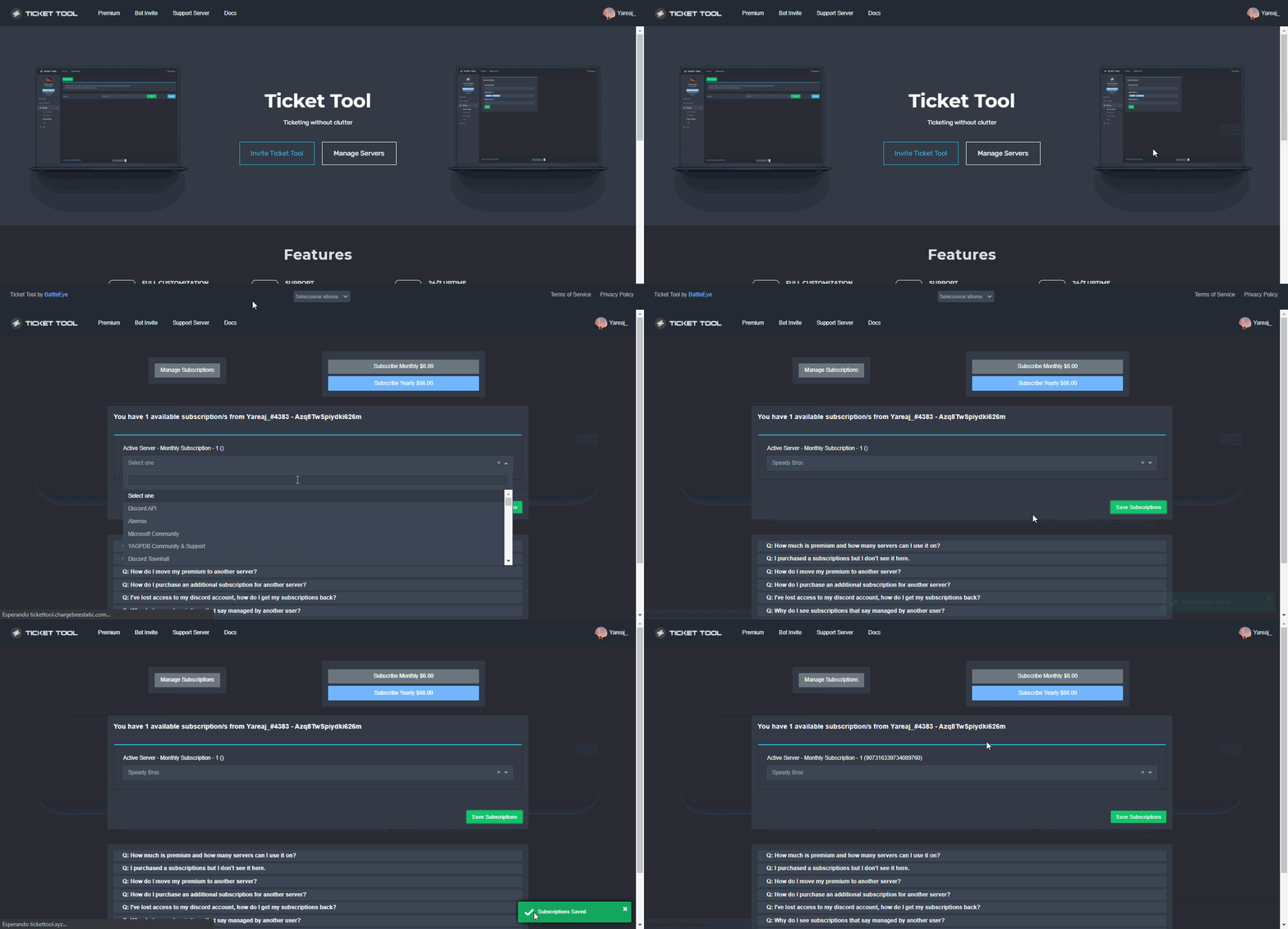 narrow pebble
Thank you!
shut bolt
Sure
 olive trench
hello there
 crimson ermine
what should i do after adding the bot
olive trench
i desperatle need help
humble sequoiaBOT

You can check our documentation here.
You can also check #573205317870157855 for the basic setup.
Our documentation contains all the info you need about the bot to be able to setup and configure the bot however you like.
shut bolt
Check that guide out, it has all the steps needed to set the bot
shut bolt
olive trench
i desperatle need help
How can we help?
olive trench
My Aimbot isnt working at all
shut bolt
Aimbot?
olive trench
it says its running in the background and it pauses and unpauses. but the hot keys dont activate the aimbot
humble sequoiaBOT
⚠️ You're in the wrong place
We provide support for @pseudo glen discord bot and cannot help you with whatever issue you have.
- Please make sure to contact the appropriate Support Team.
If you don't have any further questions regarding our bot Ticket Tool, please close this ticket
 shut bolt

 spark flint
is there a way to get lottery winnings back that you missed?
humble sequoiaBOT
⚠️ You're in the wrong place
We provide support for @pseudo glen discord bot and cannot help you with whatever issue you have.
- Please make sure to contact the appropriate Support Team.
If you don't have any further questions regarding our bot Ticket Tool, please close this ticket
hot sandal
pls add nqn
 oak light
Hi, so I've got 2 ticket panels and I have 2 001 tickets, how would I make the 2 panels different names, so like a001 and b001
mystic hound
Do you want to rename the panel itself or the tickets made under that panel?
jade topaz
How to disable $delete command for staff
I mean only admins can delete can ticket
Staff can only close
 young mauve
hey hey, is there a way to allow the ticket tool to save a tickets log in a different channel
first time to use it 🙂
 jade topaz
shut bolt
https://i.imgur.com/VAq2JiX.gif
jade topaz
shut bolt
https://i.imgur.com/VAq2JiX.gif
Ty
iron nightBOT
Gave +1 Rep to @shut bolt
young mauve
oh i guess that wasn't for me 😄
shut bolt
jade topaz
Ty
Disable the everyone role and mark it as for Suppport Team Only, then mark as enabled the roles of admins and that's it
shut bolt
young mauve
hey hey, is there a way to allow the ticket tool to save a tickets log in a diff...
What do you mean by logs? The action logs or the transcripts?
young mauve
yeah like transcripts that gets saved automatically into a different channel
is that possible?
humble sequoiaBOT
How do I save transcript to a channel?
To save transcripts to a channel go to the Dashboard -> Panel Configs -> Settings -> Logging Options -> Transcript Channel
shut bolt
First you must select a transcript channel as shown above
For automatic saving of the transcripts you'll need to have premium
iron nightBOT
Gave +1 Rep to @shut bolt
shut bolt
Sure
humble sequoiaBOT
⚠️ You're in the wrong place
We provide support for @pseudo glen discord bot and cannot help you with whatever issue you have.
- Please make sure to contact the appropriate Support Team.
If you don't have any further questions regarding our bot Ticket Tool, please close this ticket
 polar plover
Why can't I change this
 craggy geyser
polar plover
Why can't I change this
craggy geyser
polar plover
Why can't I change this
It's a premium only feature.
 means premium only,
  is if you have premium, and
  is a feature with a limited customisation on free (character limits) but not on premium
humble sequoiaBOT
We would love to help you, but if you don't tell us what you need help with we can't help you :(
oak light
mystic hound
Do you want to rename the panel itself or the tickets made under that panel?
Hi sorry, I want to make it so the ticket under that panel has a different name than ticket
jade topaz
jade topaz
<#937724738489421884> this is the ticket
Pls you can help me? @jade topaz
mystic hound
oak light
Hi sorry, I want to make it so the ticket under that panel has a different name ...
you can either use the $rename command per ticket, or you can set a default ticket name that all tickets will have; this is a premium feature. You can look at the tag below to see how ticket names are set
humble sequoiaBOT
The ticket name is the default channel name of all tickets. To edit it, go to your Dashboard > Panel Configs > Settings > Ticket Options. There you can edit the channel name of opened and closed tickets. You can also use variables in there.
Note: This is a premium feature
slender minnow
jade topaz
Pls you can help me? <@456226577798135808>
You should wait till you get a response.
mystic hound
@wheat blaze #📈│reviews, you closed your ticket within 2-3 minutes of opening them, we can't respond to a ticket that isn't open.
mystic hound
jade topaz
Pls you can help me? <@456226577798135808>
we're a bit short on french staff, they'll get to you eventually. Like stated in the ticket message, it can take up to 24-48 hours for the support team to answer; although usually tickets are answered well before that time period.
jade topaz
mystic hound
we're a bit short on french staff, they'll get to you eventually. Like stated in...
I am both French and English
if you want I can create the ticket in English
craggy geyser
You would get answered quicker
shut bolt
Wait for it to be claimed by a support member
jade topaz
shut bolt
Wait for it to be claimed by a support member
can't I create the ticket?
shut bolt
What do you mean?
If you created it already
Then wait, if not, open one and wait
English tickets have a faster response time due to having more support members
jade topaz
so can i create it in english?
jade topaz
I created the ticket
jade topaz
but I stopped the ticket
jade topaz
jade topaz
but I stopped the ticket
french
 tulip cradle
I created the ticket
 prisma thunder
Okay Google Traduction
@shut bolt I encounter a problem on my serv with the bot when I do the cmd $help it does not work bot does not respond even though it has perm admin
shut bolt
prisma thunder
<@518666147441278998> I encounter a problem on my serv with the bot when I do th...
#546557408902905896 do not ping support members, if you need help open a ticket
prisma thunder
I'dont understand english of #546557408902905896
shut bolt
prisma thunder
Okay Google Traduction
Well, you said it yourself, you can translate it
/fr - Pinging staff is prohibited. Do not do it anywhere, not inside of tickets, not anywhere.
robust sandalBOT
- Le ping du personnel est interdit. Ne le faites nulle part, pas à l’intérieur des billets, pas n’importe où.
English (en) → French (fr)
robust sandalBOT
- ducouo what is the solution
French (fr) → English (en)
humble sequoiaBOT
Solved in another channel.
 quartz pewter

 scenic plinth
K
 sinful kraken
Hey Team, having issues adding ticket tool to a discord server. Not picking up any servers im on. Any fixes?
scenic plinth
Fo you have manage server permissions in your server?
humble sequoiaBOT
━━ moved to ticket ━━
jade topaz
What Is the command for creating a Ticket?
 rough thistle
Same it doesnt work whats the command @scenic plinth
scenic plinth
Can you not ping support please? Try $new if command style tickets are enabled in the panel settings.
If you're sending the panel, try $panel 1
@rough thistle @jade topaz
rough thistle
Mm doesnt work
scenic plinth
Which one?
jade topaz
how many tickets can the bot open at the same time ?
jade topaz
scenic plinth
Can you not ping support please? Try `$new` if command style tickets are enabled...
Thanks!
iron nightBOT
Gave +1 Rep to @scenic plinth
scenic plinth
jade topaz
how many tickets can the bot open at the same time ?
The bot can have 50 channels a category (50 channels a category, discord limit) 500 per server (500 channels total, discord limit)
When you hit a category limit, tickets start appearing on the top of the server without categories, but hitting 500 you can't open anymore.
jade topaz
so 20 tickets open at the same time with people speaking in it is totally fine right ?
scenic plinth
Yes
jade topaz
thanks
 copper owl
@pseudo dagger you've been told 4 times now you're in the wrong place.
If you ask again, we would have no choice but to take moderation action. Sorry
 pseudo dagger
well there am i supposed to go you keep telling me im in wrong place but not giving any direction to where i need be total usless i wont be buying anything again from you people !!!!!!!!!!!!!
copper owl
pseudo dagger
well there am i supposed to go you keep telling me im in wrong place but not giv...
You didn't buy anything from us, so using that as a way to get what you want won't work.
we aren't an encyclopedia on directions. You've been told numerous times this is ticket tool support and we aren't affiliated or connected to FiveM in any way, shape or form.
Another thing that's useless is asking 4 times in the same server where the staff members of said server told you it's the wrong place mutliple times.
frank mountain
Hello guys when I am closing the ticket it says that missing permissions
anyone know that?
shut bolt
Can you run $debug on that channel please?
shut bolt
$staffapps
humble sequoiaBOT
How do be I become a Support Member?
You can become a support member in 2 ways:
1. You can be really active in #🆘│community-support gain <@&799500225579712543> role and get chosen by a Manager
2. You can apply VIA our applications that would be sent in #📣│server-news
We currently have Support Teams for the following languages:
:flag_us: English
:flag_jo: Arabic
:flag_fr: French
:flag_de: German
:flag_br: Portuguese
:flag_es: Spanish.
shut bolt
@tiny fjord 
humble sequoiaBOT
You can check our documentation here.
You can also check #573205317870157855 for the basic setup.
Our documentation contains all the info you need about the bot to be able to setup and configure the bot however you like.
shut bolt
This is how to set the bot mate
 high drift
shut bolt
This is how to set the bot mate
high drift
shut bolt
This is how to set the bot mate
so wdym with set the bot?
shut bolt
high drift
so wdym with set the bot?
I meant that that's how to make the bot work
high drift
ah
high drift
shut bolt
I meant that that's how to make the bot work
but so i came from a other serve where i need verification but it said or you talk to moderator of the serer or come to here and do the ticket thingy? so how does that work
 high drift
thx
shut bolt
 sweet steeple
Hi there!
Is there any way to disable inviting people to the ticket#xxx channel that bot created?
 dusk dragon

 junior bolt
Is there a way to add a certain role to all tickets that are created?
 plain surge
dusk dragon
plain surge
dusk dragon
That's the panel message, you can edit it here
humble sequoiaBOT
The panel message is where people react to make a ticket. To customize it head over to your Dashboard --> Panel Configs -> Settings -> Panel Options -> Edit Panel Message
 dusk dragon
plain surge
That's the panel message, you can edit it here
dusk dragon
plain surge
That's the panel message, you can edit it here
Alright ty
iron nightBOT
Gave +1 Rep to @plain surge
plain surge
junior bolt
Is there a way to add a certain role to all tickets that are created?
You can add roles as support to see the ticket and be able to mangae it, or you can add roles as additional, which has less power
$help support
humble sequoiaBOT
How to let support team see into a ticket
About support roles
A support role lets your support team see into tickets with out having to add them manually to each and every ticket.
You can add as many support roles as you like per panel.
NOTE that the way discord works all admins can see into tickets regardless of this.
How to set a support role
To set a Support role go to the Dashboard -> Panel Configs -> Settings -> General Options -> Support Team Roles.
NOTE that the support role will not be able to see into tickets that are already created..
plain surge
$additionalroles
humble sequoiaBOT
Additional Roles are roles that are independent from Support Roles. You can assign unique permissions for roles defined as additional roles in tickets.
To assign permissions for additional roles, go to Dashboard ➞ Panel Configs ➞ Settings ➞ Permission Options ➞ Additional Opened/Closed Permissions.
Note: Additional Roles do NOT get affected by the Change other support team permissions when claimed feature under Claiming Options, meaning they don't gain/lose any permissions set in that feature once a ticket is claimed.
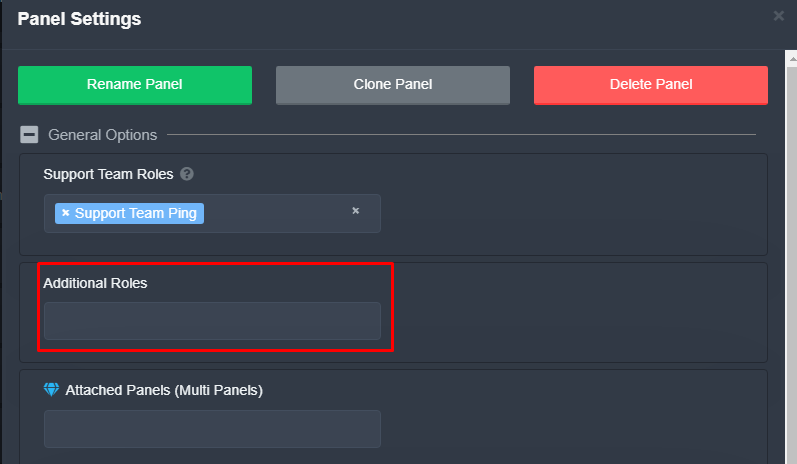 plain surge
You can set permissions for both roles under Support team opened/closed perms & Additional roles opened/closed perms
humble sequoiaBOT
How to hide tickets from everyone
Head over to your Dashboard ➞ Panel Configs ➞ Settings ➞ General Options ➞ Edit Everyone Roles Opened Permissions

NOTE that @everyone can type aswell if it has permissions to send messages
plain surge
dusk dragon
Alright ty
No problem 👍
plain surge
sweet steeple
Is there any way to disable inviting people to the ticket#xxx channel that bot c...
Can you explain more what you mean by inviting?
Do you mean that everyone can see the ticket when it is created?
jade topaz
a member is unable to attach files within the opened ticket. perms look ok. is there a way to test/fix this? ty
 sly cypress
Is it possible for discord roles to be detected during a ticket opening and then moving it to a specific sub category based of that?
For example; it detects someone has a role called “VIP” and puts them into the sub category called “VIP PRIORITY”?
 wooden geyser
And although I wanted to ask if there is a log that can be set to any channel ?
copper owl
sly cypress
Is it possible for discord roles to be detected during a ticket opening and then...
no it's not possible
craggy geyser
sly cypress
Is it possible for discord roles to be detected during a ticket opening and then...
You could get a similar effect but less neat looking though. You can make a second panel for vip priority, and set the open ticket button to require the vip role to use it
 potent nacelle
Whats the command to change prefix
 hard remnant
مرحبا
slender minnow
potent nacelle
Whats the command to change prefix
There's no command for it.
craggy geyser
Have you checked you are using the right prefix
jade topaz
Yes
craggy geyser
What commands have you tried?
sly cypress
craggy geyser
You could get a similar effect but less neat looking though. You can make a seco...
I tried this but it didn't work when moving it to a different section as it's not within the same panel. I'll make a suggestion and hopefully it'll be implemented one day 🙂
jade topaz
How can I do that Ticket Tool will DM the ticket owner (who created the ticket) when I will create a transcript?
shut bolt
jade topaz
How can I do that Ticket Tool will DM the ticket owner (who created the ticket) ...
Do you want the owner to receive the transcript too? Or just a message?
jade topaz
shut bolt
Do you want the owner to receive the transcript too? Or just a message?
Wdym
Do you mean, the server owner and the ticket owner too? Ticket owner = The member who created the ticket
jade topaz
jade topaz
Do you mean, the server owner and the ticket owner too? `Ticket owner = The memb...
If you meant that, then Yes. How do I do that?
 solemn lantern
Hi guys, to insert more buttons inline for ticket tool, what can I do? I don't find information from the doc
humble sequoiaBOT
Multipanels are a premium feature that allow for a single panel with multiple buttons to open different tickets.
How to create a Multipanel
Premium users can combine multiple panels into one multipanel.
First, find the IDs of each panel you wish to combine. You can find them in your Panel Configs in the Dashboard
Next, send the multipanel to a channel using $panel [id1] [id2] {id3} ....
e.g. $panel 1 2 4 17 35 to combine panels 1, 2, 4, 17 and 35.
Up to 25 panels may be combined.
 shut bolt
jade topaz
Wdym
shut bolt
jade topaz
Wdym
I mean if you are looking for the ticket author to receive the transcript itself or just a message, with no transcript
jade topaz
shut bolt
I mean if you are looking for the ticket author to receive the transcript itself...
See what I meant
jade topaz
jade topaz
Do you mean, the server owner and the ticket owner too? `Ticket owner = The memb...
.
shut bolt
jade topaz
Do you mean, the server owner and the ticket owner too? `Ticket owner = The memb...
No
shut bolt
shut bolt
I mean if you are looking for the ticket author to receive the transcript itself...
I meant this
 thorny dove
Hey, people keep opening the ticket in wrong category. Is it possible to move the tickets and then have the transcript go to the correct new category?
I saw there is a feature to add roles, so having the ones access it isn't an issue. Just the logging is.
craggy geyser
Unfortunately not at the moment. A major update is in the works, and moving tickets between panels has been suggested many times so will at least be considered
iron nightBOT
Gave +1 Rep to @craggy geyser
craggy geyser
No worries
jade topaz
Is it possible for ticket tool to ping the member whenever a staff types something in the ticket?
 surreal mica
I’ve invited the bot to my server, but getting it to respond to a command is kinda confusing me
jade topaz
atomic barn
$help ping
humble sequoiaBOT
How to make Ticket Tool ping a role
To make ticket tool ping a role when a ticket is opened, go to the Dashboard -> Panel Configs -> Settings -> Ticket Options -> Ticket Message -> Message Text and do this:
{@Role name} This is case sensitive and the role must have @mentions enabled
atomic barn
Here @jade topaz
jade topaz
How do i zoom that lol
atomic barn
I think this is what you are looking for
iron nightBOT
Gave +1 Rep to @atomic barn
atomic barn
👍
jade topaz
humble sequoia
Wait no that's not what i want xD
Like when a staff sends a message the bot should ping the member then delete the message
craggy geyser
No. That's not possible. The staff member could always ping them though
iron nightBOT
Gave +1 Rep to @craggy geyser
 visual imp
How do I put the create a ticket function in a chat?
I need help
Plz?
Help pl,
Pzl
Plz
 lethal rover
Hey, I can’t connect my wallet with the collab link
jade topaz
...
jade topaz
lethal rover
Hey, I can’t connect my wallet with the collab link
Is that about ticket tool?
jade topaz
Alright
lethal rover
Wrong
jade topaz
No worries
 hazy shoal
humble sequoiaBOT
hazy shoal
humble sequoiaBOT
You can check our documentation here.
You can also check #573205317870157855 for the basic setup.
Our documentation contains all the info you need about the bot to be able to setup and configure the bot however you like.
shut bolt
If you want to set the bot to create it on your server
If you want further help on it and you want to actually open a ticket here use #🎫│make-a-ticket
 rain summit
Anyone able to tell me how to start setting up automation stuff? ie unused tickets and whatnot? couldn't find instructions for that.
humble sequoiaBOT
━━ moved to ticket ━━
 waxen plaza
Hey got question wondering if anyone can help me
I have a server where we have tickets on but only allow me see tickets and i manual have add my admin role to see it and be able respond to it and read message history..... and when people submit tickets they can send ticket and write but i manually have turn on the read histroy as well
jade topaz
can someone please remind me the variable tag for inserting an emoji in a panel or command?
shut bolt
jade topaz
can someone please remind me the variable tag for inserting an emoji in a panel ...
$id 
humble sequoiaBOT
<:TicketTool:557318988783419453>
shut bolt
waxen plaza
Hey got question wondering if anyone can help me
I have a server where we have t...
What are you exactly looking for? I quite didn't get the question mate, sorry
waxen plaza
shut bolt
What are you exactly looking for? I quite didn't get the question mate, sorry
How set it where my admin team all see tickets and how i can have read histroy on for ppl submit tickets
shut bolt
waxen plaza
How set it where my admin team all see tickets and how i can have read histroy o...
May I have your server ID? So I can check what are your current settings
 snow latch
i am trying to set up the ticket tool on my server but when the maker make it they cant see it
shut bolt
snow latch
i am trying to set up the ticket tool on my server but when the maker make it th...
How are you testing it? Using an alt? A user reported it? Or maybe you are using View As Role?
snow latch
that last one
humble sequoiaBOT
Using the View as Role feature.
The View as Role discord feature will not work for testing ticket tool. Ticket Tool opens permissions with user permissions & not role permissions.
snow latch
oh okay
shut bolt
I suggest you ask a friend or, use an alt to test it
snow latch
ok thanks
shut bolt
Sure

 vernal moat
shut bolt
Click the Open button
vernal moat
shut bolt
Click the Open button
Where can I do this?
shut bolt
vernal moat
Where can I do this?
In the ticket
shut bolt
vernal moat
Look it’s closed
Closed ≠ Deleted
If its closed
It still exists
If its deleted
Nothing can be done to recover the channel, only thing would have been to have a transcript of it
vernal moat
shut bolt
Only a person who has access to the ticket can reopen it
The one who originally opened it?
Ah
shut bolt
vernal moat
The one who originally opened it?
No, whoever has access to it
vernal moat
Okay
vernal moat
shut bolt
No, whoever has access to it
I’m the admin and I don’t have access to it
And once I click close the ticket gets deleted within 10 seconds
So you’re saying it’s impossible to reopen one?
shut bolt
vernal moat
And once I click close the ticket gets deleted within 10 seconds
Well, you just answered yourself
shut bolt
vernal moat
So you’re saying it’s impossible to reopen one?
A deleted ticket, yes, as stated before
shut bolt
shut bolt
Nothing can be done to recover the channel, only thing would have been to have a...
vernal moat
It gets deleted automatically by the tickettool itself and within 10 seconds
We can’t be fast:(
Is there any other way to open it?
shut bolt
I just told you there isn't
And if you are not willing for tickets to get autodeleted
You can disabled in your dashboard, if you want I'll help you on that
vernal moat
shut bolt
You can disabled in your dashboard, if you want I'll help you on that
Can you send me the navigation? I’ll follow
shut bolt
vernal moat
Can you send me the navigation? I’ll follow
Sure
Dashboard
Panel Configs
Settings
General Options
Two Step Ticket
Save changes
 brisk cove
Hello, any cupons?
shut bolt
Nope, sorry mate
brisk cove
 Thanks
shut bolt
Sure
brisk cove
shut bolt
Good night
brisk cove
OH, one more question!
This bot work to do Giveaway?
I saw here #🎉│giveaways I like.💯
shut bolt
brisk cove
OH, one more question!
This bot work to do Giveaway?
I saw here <#7554874324384...
@jade topaz is the bot we use for doing them, Ticket Tool doesn't do Giveaways
brisk cove
shut bolt
<@456226577798135808> is the bot we use for doing them, Ticket Tool doesn't do G...
Understand, thank you Pablo!
iron nightBOT
Gave +1 Rep to @shut bolt
shut bolt
brisk cove
Understand, thank you Pablo!
Sure
brisk cove
iron night
Gave +1 Rep to **<@518666147441278998>**
How so bot? xD
shut bolt
That's YAGPDB
It has a reputation system
So everytime you say thanks to someone
It adds a reputation point
shut bolt
Hi @simple spruce 👋
humble sequoiaBOT
You can check our documentation here.
You can also check #573205317870157855 for the basic setup.
Our documentation contains all the info you need about the bot to be able to setup and configure the bot however you like.
shut bolt
Check this guide out, it's the setup guide for the bot
humble sequoiaBOT
━━ moved to ticket ━━
 simple spruce
Hi Pablo
shut bolt
Hi
simple spruce
Thanks for the reply
simple spruce
Yes
shut bolt
Great
simple spruce
I need some help and guide
shut bolt
Sure
simple spruce
First I need to open a ticket for some kind of help
humble sequoiaBOT
━━ moved to ticket ━━
simple spruce
Actually I was demoted to "Power User" and my Upload rights are disabled
shut bolt
simple spruce
Actually I was demoted to "Power User" and my Upload rights are disabled
Check #938310328498921482
 rocky crow
 wise basalt
How can i create multipanel? Can i create multipanel with primary bot? Will i get ticket tool premium for 14 days for 1 boost?
humble sequoiaBOT
For a more convenient use of multipanels, you can now combine panels on the dashboard. This will allow you to directly send the multipanel from the dashboard or via the $panel ID command.
Where can I find this?
You can find this setting on the Dashboard -> Panel Configs -> Settings -> General Options
Note: if you're attaching all the panels to a panel called English, don't include English in the attached panels box (If you do this, it will create duplicate)
This will put all buttons from all of your panels on one message. The message is the panel message from the panel you're combining these panels in.
Note: This is a premium feature
shut bolt
And about boosting, you need to boost twice as told in #📌│booster-perks
jade topaz
How can I setup like how to make where people can click and ticket gets created?
humble sequoiaBOT
You can check our documentation here.
You can also check #573205317870157855 for the basic setup.
Our documentation contains all the info you need about the bot to be able to setup and configure the bot however you like.
jade topaz
humble sequoia
Thanks
shut bolt
Sure
 dull swallow
Does AllowedRoles not work on Multipannels? Users without the listed role are still able to hit the button.
Or do I misunderstand how it works
shut bolt
dull swallow
Does AllowedRoles not work on Multipannels? Users without the listed role are st...
If you didn't blacklist any role, then by default any user will be able to use the button
If you want that only users with the Allowed Roles can use X button, mark as Denied Role @everyone
dull swallow
Ahhh, I would have probably never figured that out. Thanks
shut bolt
Sure
jade topaz
is it possible for the bot to set a unique name for when the ticket channel is created.
Say you have a ticket called
Red
In this ticket you talk about red things
When its opened it would look like
Red-0001 (Numbers depend on ticket id)
Green
In this ticket you talk about green things
When its opened it would look like
Green-0011 (Numbers depend on ticket id)
(Sorry, I may have been bad at explaining)
shut bolt
jade topaz
is it possible for the bot to set a unique name for when the ticket channel is c...
Yes
Wrong one
Sorry JAJAJ
humble sequoiaBOT
The ticket name is the default channel name of all tickets. To edit it, go to your Dashboard > Panel Configs > Settings > Ticket Options. There you can edit the channel name of opened and closed tickets. You can also use variables in there.
Note: This is a premium feature
shut bolt
humble sequoia
This is the one
You would need to have a panel per each color for example
jade topaz
shut bolt
You would need to have a panel per each color for example
yea I know that
jade topaz
humble sequoia
I notice its a premium feature so if I enable premium and my premium would run out would the things changed under premium be reverted?
shut bolt
Yup, any premium exclusive setting won't apply once your premium status ends
jade topaz
Thank you Pablo, great and quick support
shut bolt
Sure
 gilded willow
Hi i would like to ask for help here since ticket tool says missing permissions to close ticket but it has worked before and perms is as it always been so its not that, i added a second category for tickets incase it would be a skipping problem but that isnt the case either
anyone know what my issue might be?
 shut bolt
$sf
humble sequoiaBOT
FAQ: System Failure
- System Failure: @Ticket Tool Missing permission(s): PERMISSION(S)
+ Ticket Tool is missing permissions to work properly, check the mentioned permissions by the bot in the channel, in the category, and in the role. You can use $debug as a help tool.
- System Failure: Panel “XX” not found
+ The panel they are trying to interact with has been deleted.
- Failed: `Invalid Form Body components[X].components[X].emoji.id: Invalid emoji
+ The bot does not have longer access to the emoji (external server) or the emoji has been deleted
- Failed: `Invalid Form Body components[X].components[X]: this is a required field
+ There is a certain necessary field you left blank. You will have to input a valid argument (most likely text) in the required field for ticket tool to continue functioning normally.
- System Failure: allMessages.users.sort is not a function
- System Failure: Unknown Webhook
- System failure: Service unavailable?
- System Failure: Internal Server Error
+ The bot has run into an issue, please try again as these are cases that tend to fail only once, if the problem is persistent, contact our support team
- Warning: Ticket Tool Failed to connect to it's database, please wait or try again.
+ There might be an issue with Ticket Tool, most likely a database issue, you'll have to wait a few minutes before creating another ticket. This is in place to prevent certain bugs to happen with tickets
Check if you have an antinuke bot such as Wick
Could be interfering with Ticket Tool's perms
gilded willow
shut bolt
Check if you have an antinuke bot such as Wick
yeah it was wick, quarantined the bot and removed perms so it got fixed. thanks for the help sir
shut bolt
gilded willow
yeah it was wick, quarantined the bot and removed perms so it got fixed. thanks ...
Sure mate
 sick siren
c
 cinder violet
hey, ticket tool is saying it is missing a permission to close a ticket but isn't telling me what permission it's missing.
is it a bot failure rn?
craggy geyser
It won't tell you what permission it is. Try running $debug to see what is missing. If no message gets sent, it is likely either view channel or send messages
cinder violet
got it ty
 silver ridge
Is there a way to have the transcripts go into a channel other than the actual ticket?
shut bolt
silver ridge
Is there a way to have the transcripts go into a channel other than the actual t...
$help transcript
humble sequoiaBOT
How do I save transcript to a channel?
To save transcripts to a channel go to the Dashboard -> Panel Configs -> Settings -> Logging Options -> Transcript Channel
silver ridge
shut bolt
$help transcript
Thanks
shut bolt
Sure
 still goblet
What will i get in premium bot that i dont got in primary bt
humble sequoiaBOT
 Faster Premium Bot
Automatic Transcripts
Full Customization
Custom Buttons
Direct Messages
Ticket Automation
Multipanels
Premium Support
You can purchase premium here:
Price
$6 - Monthly
$66 - Yearly
 Premium
copper owl
Premium
copper owl
A faster more stable premium bot
still goblet
Thanks
 civic wagon
I want to add a role in my ticket panel. Will i need to send the panel again in the channel or will it reflect the changes starting the next ticket made?
shut bolt
civic wagon
I want to add a role in my ticket panel. Will i need to send the panel again in ...
Nope, it will automatically apply the support team roles for the new tickets
civic wagon
I see, ty
shut bolt
Sure
jade topaz
does anyone know how to add more buttons?
humble sequoiaBOT
For a more convenient use of multipanels, you can now combine panels on the dashboard. This will allow you to directly send the multipanel from the dashboard or via the $panel ID command.
Where can I find this?
You can find this setting on the Dashboard -> Panel Configs -> Settings -> General Options
Note: if you're attaching all the panels to a panel called English, don't include English in the attached panels box (If you do this, it will create duplicate)
This will put all buttons from all of your panels on one message. The message is the panel message from the panel you're combining these panels in.
Note: This is a premium feature
jade topaz
thanks
shut bolt
Sure
 rich tusk
how do we set up a ticket channel with the open a ticket message
humble sequoiaBOT
You can check our documentation here.
You can also check #573205317870157855 for the basic setup.
Our documentation contains all the info you need about the bot to be able to setup and configure the bot however you like.
 sonic ginkgo
trying to send ticketbot into his channel, since it didnt work anymore. Getting this prompt from the website dashboard
 copper owl
sonic ginkgo
trying to send ticketbot into his channel, since it didnt work anymore. Getting ...
copper owl
sonic ginkgo
trying to send ticketbot into his channel, since it didnt work anymore. Getting ...
which bot are you using
sonic ginkgo
copper owl
which bot are you using
ticket tool premium
copper owl
select it in the Server Configs page
sonic ginkgo
copper owl
select it in the __Server Configs__ page
thanks, somehow it was set to nonpremium. It worked i saw in the log that the Premium Ticketbot got the Premium role revoked and the normal ticket tool role added, which caused that issue
jade topaz
Theres a arbic support?
scenic plinth
$articket
humble sequoiaBOT
فريق الدعم الفني العربي
عميلنا العزيز ان كنت تبحث عن مساعدة يرجى فتح تكت خاص بفريق الدعم الفني العربي
اذهب الى#🎫│make-a-ticket
ثم قم بلضغط على الايموجي الاتي (🇯🇴)
 heavy holly
i use the bot (free) on my server, i just changed the support role on my dashboard. now im unable to make tickets coz it says "this interaction failed"
is the bot malfunctioning?
 glad pecan
Is there a way to recover deleted tickets?
humble sequoiaBOT
━━ moved to ticket ━━
 zinc adder
How can I recover a deleted ticket
craggy geyser
zinc adder
How can I recover a deleted ticket
You can't. If you didn't save a transcript, it's deleted. Discord support might be able to restore a channel but I don't know for sure. Ticket tool saves none of the data itself, everything is stored on discord within your own server
zinc adder
aok
 spiral crater
Hiya! By default it seems like ticket tool creates new tickets in the form ticket-0001, is there a way to customise it to have the user's name/id instead? Something like ticket-lyall3553 for example?
shut bolt
 pallid sky
prefixi
pallid sky
prefixi
$
shut bolt
spiral crater
Hiya! By default it seems like ticket tool creates new tickets in the form `tick...
Yup
humble sequoiaBOT
The ticket name is the default channel name of all tickets. To edit it, go to your Dashboard > Panel Configs > Settings > Ticket Options. There you can edit the channel name of opened and closed tickets. You can also use variables in there.
Note: This is a premium feature
shut bolt
And use the variables you prefer https://docs.tickettool.xyz/dashboard/panel-configs/supported-variables

Description of the variables a ticket can count with
pallid sky
ama yazınca bişey deyp
robust sandalBOT
pallid sky
ama yazınca bişey deyp
 . !
. !
But when I write, I'll say something
Turkish (tr) → English (en)
spiral crater
Great thanks, must've missed that! 🙂
shut bolt
spiral crater
Great thanks, must've missed that! 🙂
Sure mate
humble sequoiaBOT
Help Options
$help commands - Information on commands
$help setup - Information on bot setup
$help faq - Frequently asked questions
 unique junco
pallid sky
ama yazınca bişey deyp
unique junco
pallid sky
ama yazınca bişey deyp
Knk neye ihtiyacın Var tam olarak
https://tt.bot botun paneli burda
pallid sky
My premium bot is on my server but when I call help it doesn't send a message
Preminyum bota
ikiside sunucuda
ben preminyum olanı kullanmak istiyorum
ama cevap bile vermiyo
pallid sky
normal botu atınca olurmu
pallid sky
unique junco
+ normal botu at sunucudan
yönetici izni var hemde
unique junco
pallid sky
normal botu atınca olurmu
Olması lazım
unique junco
pallid sky
2si bir arada olunca olmuyormu yani
2si bi arada ne gerek var + bildiğime göre ikisi olunca direk normal bottan da premium özellikleri kullanabiliyorsun abonelik sürdüğü sürece
pallid sky
peki ben onaylamadığım sürece faturaya yansıma gibi bir olayı varmı
unique junco
Otomatik çekiyo her ay iptal etmediğin sürece
pallid sky
yada premium botu kullanmak için illaha premium olmammı gerek
unique junco
Evet tabii, para lazım botu online tutabilmek için de
pallid sky
unique junco
Otomatik çekiyo her ay iptal etmediğin sürece
nasıl iptal edebilirim
7 günlük tıkladımda
premium botu direk atmam lazım
acil bilgi
unique junco
bi saniye
https://tickettool.xyz/subscriptions
Click on Manage Subscriptions
Log in
Click on your sub
Click on Cancel Subscription
And choose between Cancel on Next Renewal or Cancel Immediately
Kral şuan çevircek zamanım yok, Google dan çevir hallet kolay gelsin
pallid sky
?
https://tickettool.xyz/subscriptions
Abonelikleri Yönet'e tıklayın
Giriş yapmak
alt öğenize tıklayın
Aboneliği İptal Et'e tıklayın
Ve Sonraki Yenilemede İptal Et veya Hemen İptal Et arasında seçim yapın
kral şu an çev
ben adres girmemilim
üknk bravo
unique junco
Kredi kartıyla alınan herşeye adres giriyon
pallid sky
aboneliğimi kapatcam diye abonelik açıca bu botu yapanın İQ oranı 9999 filan herhaöde
pallid sky
unique junco
Kredi kartıyla alınan herşeye adres giriyon
ben onaylamadsn olmuyo deme
telde foturda yok faturasız hat bakiyede 0
kradi kartıda yok
unique junco
Yani aboneliğin yok
pallid sky
lakin devlete kadar gidebilşr ondan önlem açamşı sordum ve premium botu banlılorum
Başıma dert olmasın
unique junco
ok
pallid sky
belli olmuyo knk bu işker
 brittle scarab
how do i make tickets i have the bot
pallid sky
bakiye olmasada devlete kadar yansıyor
search youtube
or enter the bot's panel, you can control it from the panel
pallid sky
bot's own panel
brittle scarab
i did
humble sequoiaBOT
You can check our documentation here.
You can also check #573205317870157855 for the basic setup.
Our documentation contains all the info you need about the bot to be able to setup and configure the bot however you like.
pallid sky
shut bolt
Check that guide mate
pallid sky
here is the panel of the bot https://tt.bot
jade topaz
Does anyone know if there is a way to limit how many tickets a certain user can open at once?
shut bolt
jade topaz
Does anyone know if there is a way to limit how many tickets a certain user can ...
$help limit
jade topaz
Or users in general?
humble sequoiaBOT
How to set a ticket limit
A ticket limit may be set per panel to prevent users from spamming tickets. By default this limit is set to 3. Once a user hits this limit the bot will notify the users that they reached the limit.
To set a ticket limit go to the Dashboard -> Panel Configs -> Settings -> General Options -> Ticket Limit
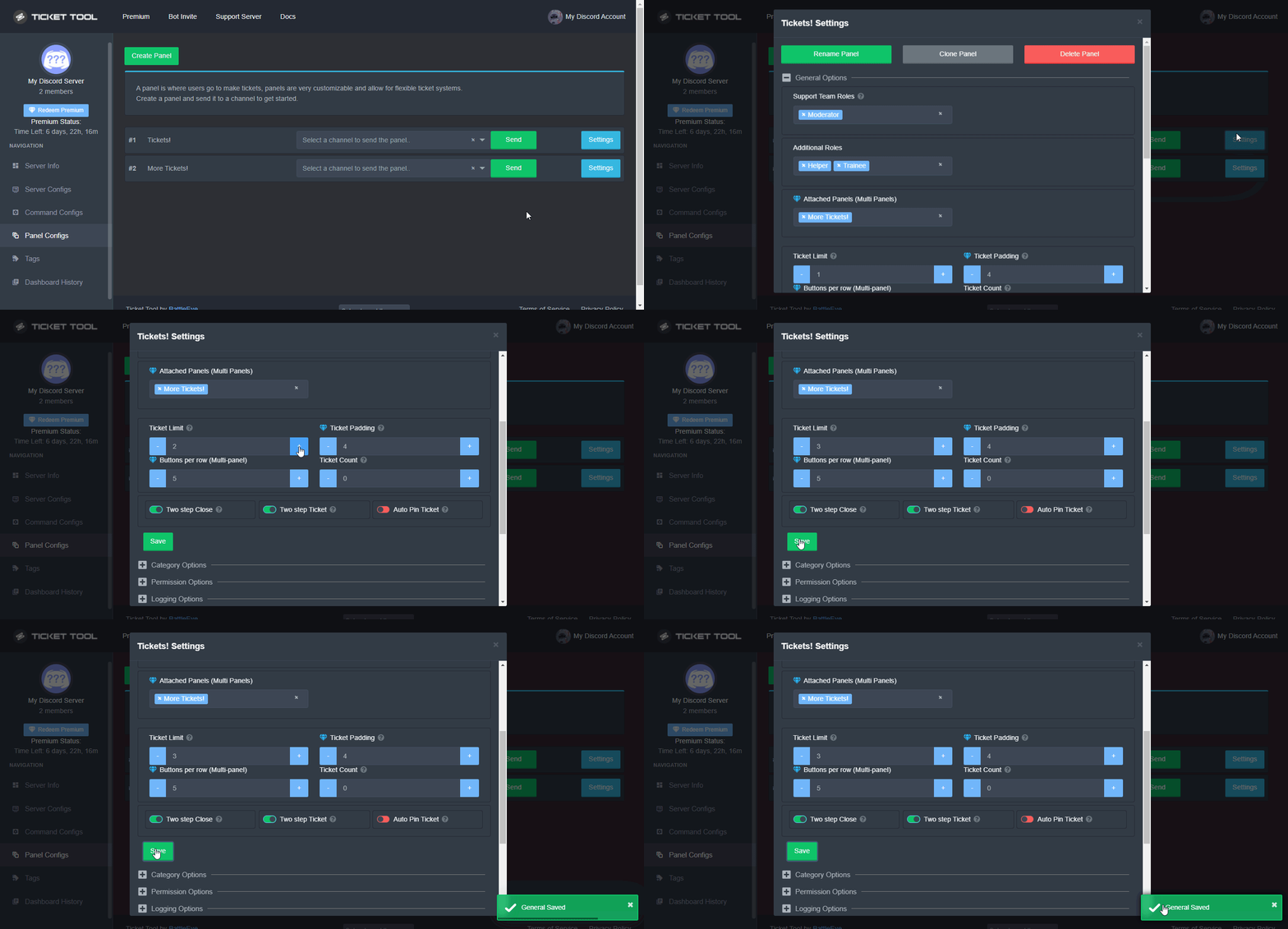 shut bolt
jade topaz
Is there a way to limit how many tickets they can open in a time-duration?
Like 1 ticket per x-hours?

shut bolt
jade topaz
Is there a way to limit how many tickets they can open in a time-duration?
Currently it's not possible, sorry
It's a feature I've seen a couple times already
But
Isn't logged in #💡│suggestions 👀
jade topaz
shut bolt
Currently it's not possible, sorry
Would it be possible to use Command Style Tickets and set a slowmode in that channel for x-hours?
Also, are Command Style Tickets premium only?
Oh, they're not premium locked.
shut bolt
jade topaz
Would it be possible to use **Command Style Tickets** and set a slowmode in that...
That's a nice idea, never thought of it
shut bolt
jade topaz
Also, are Command Style Tickets premium only?
Nope
jade topaz
shut bolt
That's a nice idea, never thought of it
👍🏻 Workaround lol
shut bolt
jade topaz
👍🏻 Workaround lol
👏
jade topaz
But yeah, adding a timer would be awesome. Better UX for sure 😄
shut bolt
jade topaz
But yeah, adding a timer would be awesome. Better UX for sure 😄
Feel free to suggest it on #💡│suggestions
jade topaz
shut bolt
Feel free to suggest it on <#921732979586375690> <:smil:578437846088679427>
Done 😄
shut bolt

jade topaz
Is there a way to delete all "closed ticket channels"
Or do you have to do it manually lol!
shut bolt
Nope
shut bolt
jade topaz
Or do you have to do it manually lol!
Yes
shut bolt
Sure

 shut bolt
 kind hill
How do I enable to the vote metrics showing inside the embed?
kind hill
How do I enable to the vote metrics showing inside the embed?
Suggester Docs
Everything you need to know about Suggester, including all commands, configuration elements and community programs. Suggestions have never been easier to set up!
 jagged swallow
Is there a way once a ticket is closed, it just logs in a channel and doesn't show on the top of my screen?
Like this?
 civic wagon
You can save the ticket's transcript to a channel and then delete the ticket
jagged swallow
Do I need to delete the ticket to do so? I have it saved to a channel already
I was wondering if I could delete it automatically basically
civic wagon
Yeah same cuz manual work 
civic wagon
jagged swallow
Do I need to delete the ticket to do so? I have it saved to a channel already
[p]transcript
And then delete
Transcript aren't saved automatically afaik
jagged swallow
What does [p]transcript do?
slender minnow
You need to setup a panel for tickets, if you are setting up the bot for your server.