#🆘│community-support
1 messages · Page 377 of 1
 copper owl
 covert fiber
Never knew that it was a hate symbol :O
covert fiber
Never knew that it was a hate symbol :O
Neither. Until that error got reported
covert fiber
Interesting way to find out lmaoo
 prime bridgeBOT
RoroGaming has been timed out for 10m 

 Reason: Posting Discord Server Invites
RoroGaming#2882 | 796454648344870912
 indigo blaze
How do I bring other people into a ticket?
copper owl
$help add
 humble sequoiaBOT
How to add or remove users on tickets
To add a user to a ticket use $add <user>
To remove a user from a ticket use $remove <user>
copper owl
👍
indigo blaze
I can't tag them, because they don't have access to see that channel
copper owl
then use the user ID
 jade topaz
yo hello
how do i make when someone opens a ticket the ticket to be named using his name
like mcr-ticket

 shut bolt
Use the {ticket.user.name} variable
jade topaz
ty
shut bolt
Sure
jade topaz
Hello!
My issue is the following :
- I created a server with a community and its staff and I would like when the community opens a ticket the ** staff ** role can add people! *
Example :
** __ A member opens a ticket and says "I have a problem with BadBoy" I would like one of the staff to be allowed to add "BadBoy" to the ticket __ **
Is it possible ?
thank you for your reply
copper owl
jade topaz
Hello!
**My issue is the following :**
> * I created a server with a community...
yup it's possible
$help add
humble sequoiaBOT
How to add or remove users on tickets
To add a user to a ticket use $add <user>
To remove a user from a ticket use $remove <user>
copper owl
just use this command
jade topaz
copper owl
just use this command
Ok but the person is not in the ticket so we can't do $ add @wanton heron
copper owl
then use the ID
jade topaz
copper owl
then use the ID
It work ans it don’t work lol
He say he add but he don’t se 😅
 copper owl
weird. check the channel permissions
see if he's on the permissions list with the right permissions
 solid stream
If another role is blocking their access then they won't be added.
Also if the ticket user perms isn't set to allow then they won't be able to see (it gives them the same perms as the one who created the ticket)
 hardy bough
@fallow ingot
jade topaz
Good morning again
is it possible to program a role so that it sees the ticket but cannot add or remoove a person?
@copper owl
copper owl
Yes it is. (Just for reference, pinging us in here is against the rules so be careful with that)
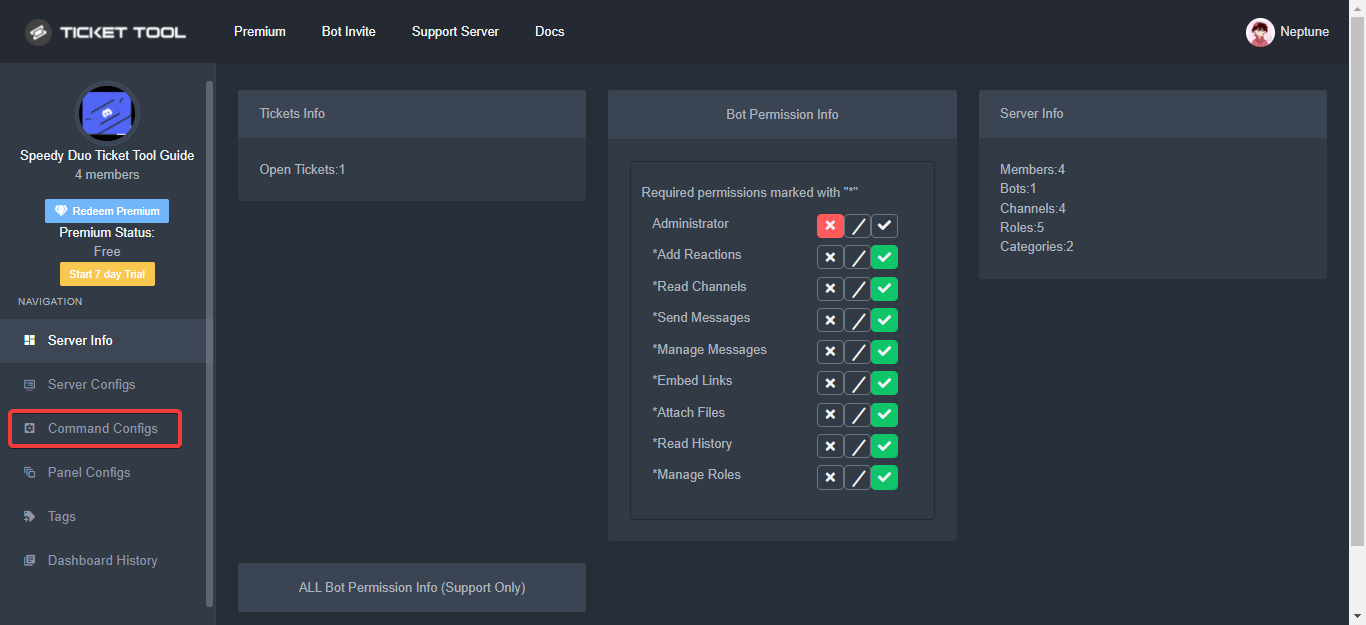
You can edit the permissions for $add/$remove in the Command Configs page
jade topaz
copper owl
Yes it is. (Just for reference, pinging us in here is against the rules so be ca...
Sorry
copper owl
So you can have a role that can see the tickets, can type in them, but can't use the commands
copper owl
jade topaz
Sorry
Don't worry about it
jade topaz
copper owl
You can edit the permissions for `$add/$remove` in the Command Configs page
Where
humble sequoiaBOT
The Command Configs page on your dashboard is where you can enable, disable, and edit permissions for certain commands however you'd like!
Each command has the following things to edit:
Support Team Only: which would only allow users with a
Support Team Roleto use it
Disabled Channels: which would disable the command in the defined channel(s)
Allowed Roles: which would allow users with the roles defined here to use the command
Disabled Roles: which wouldn't allow users with the roles defined here to use the command
 copper owl
Here
 jade topaz
copper owl
because you probably have the other roles
jade topaz
copper owl
because you probably have the other roles
I have no role allowed but i have role disabled
copper owl
copper owl
also disable "Support Only"

jade topaz
copper owl
<:this:894279341108772914>
Its same
copper owl
Ill open a ticket for you..
 blazing frost
skamers
copper owl
blazing frost
skamers
what? do you need help with ticket tool?
blazing frost
Where can I go about the fact that the rest of the robaxes do not come to me?
copper owl
blazing frost
Where can I go about the fact that the rest of the robaxes do not come to me?
If im not mistaken, this is the 3rd time you ask about this
this is not the right server.
blazing frost
So I'm asking where should I go? what kind of support?
copper owl
We don't know
this isnt the right server to ask, and we dont know where you have to go
all I can tell you is that problems related to your roblox purchases are not going to get solved in here
blazing frost
copper owl
We don't know
ok
 sly latch
Hi, what change bots avatar?
copper owl
sly latch
Hi, what change bots avatar?
We changed it
sly latch
copper owl
We changed it
What is needed for this?
copper owl
sly latch
What is needed for this?
What do you mean
You guys dont have perms to change the bot pfp, we change it every once in a while for holidays/special days. Like christmas and New Years
and By "we", i mean the bot developer
sly latch
Don't put your own unique avatar?
copper owl
I dont understand what you're trying to tell me.
The bot developer changes the pfp for special days like Christmas and New Years Eve. Changing the bot's PFP is not a feature available to anyone.
sly latch
Ok, thx
 copper owl
Yeah. Premium only
jade topaz
copper owl
Yeah. Premium only
Okk
 dim bison
Is it possible to make the bot re-send the initial message that the bot sends when a ticket is opened?
dim bison
Thank you
copper owl
No problem. You could use a tag to display the same message but without premium you'd be hit with a small character limit
 paper wind
How did yall add multiple buttons to #🎫│make-a-ticket ?
humble sequoiaBOT
For a more convenient use of multipanels, you can now combine panels on the dashboard. This will allow you to directly send the multipanel from the dashboard or via the $panel ID command.
Where can I find this?
You can find this setting on the Dashboard -> Panel Configs -> Settings -> General Options
Note: if you're attaching all the panels to a panel called English, don't include English in the attached panels box (If you do this, it will create duplicate)
This will put all buttons from all of your panels on one message. The message is the panel message from the panel you're combining these panels in.

 Note: This is a premium feature
copper owl
Note: This is a premium feature
copper owl
@paper wind it's a premium feature ^^
copper owl
Anytime
 ivory pawn
Hf
 fallow ingot
hardy bough
<@768144576946110475>
fallow ingot
hardy bough
<@768144576946110475>
??
 sleek jetty
how much is ticket tool premium
humble sequoiaBOT
 Faster Premium Bot
Automatic Transcripts
Full Customization
Custom Buttons
Direct Messages
Ticket Automation
Multipanels
Premium Support
You can purchase premium here:
Price
$6 - Monthly
$66 - Yearly
 Premium
copper owl
Premium
copper owl
@sleek jetty ^
sleek jetty
k
copper owl
you're welcome
 pastel arch
i have a question, i have the admin perms for a server I invited the bot in but for some reason its not showing up even after relogging and reinviting the bot, is there a solution to this?
copper owl
pastel arch
i have a question, i have the admin perms for a server I invited the bot in but ...
can you explain how you relogged?
like what did you do
pastel arch
I logged out of my discord as well as ticket tool site, then i relogged but its still not showing up
copper owl
run $level in the server and lmk what TT responds with
pastel arch
alright!!
it says User permission level with Ticket Tool
@pastel arch is permission level: 0 (User)
copper owl
well it doesnt seem like you have admin
pastel arch
ohh, alright I'll ask the server owner to resolve that, thanks!!
 fast sable
rip
 static elm
is there a way to block/ban someone from opening tickets?
humble sequoiaBOT
Any role you assign as a blacklisted role won't be able to use commands or reactions.
Selecting a blacklisted role
Go to your Dashboard ➞ Server Configs. There you will find the option to select blacklisted roles.
Note: Don't forget to save.
 static elm
ty
 glacial spire
is it possible to set a ticket mod role? like a role that allows people w that role to talk in tickets
i remember a ticket bot had that option but i've never needed it until now
humble sequoiaBOT
How to let support team see into a ticket
About support roles
A support role lets your support team see into tickets with out having to add them manually to each and every ticket.
You can add as many support roles as you like per panel.
NOTE that the way discord works all admins can see into tickets regardless of this.
How to set a support role
To set a Support role go to the Dashboard -> Panel Configs -> Settings -> General Options -> Support Team Roles.

NOTE that the support role will not be able to see into tickets that are already created..
shut bolt
Do this
shut bolt
Sure
hardy bough
 humble sequoiaBOT
━━ moved to ticket ━━
hardy bough
Yes
 fresh umbra
how do i create the ticket panel in the channel i want? when going through the list of channels to display the panel in, the channel i want isnt on it
i enabled all permissions for ticket tool and it still doesnt pop up
shut bolt
It probably is there but when having many channels can get a bit tricky to find it, instead, use the $panel command, look for the panel ID, and then do $panel ID
And that will send it to the channel you run the command in
hardy bough
ticket promotion
shut bolt
?
jade topaz
how do i make the ticket bot make channels ina specific category
shut bolt
$help category
humble sequoiaBOT
How to set the open category
To set a open category go to the Dashboard -> Panel Configs -> Settings -> Category Options -> Category Open
 shut bolt
Assign a category in the dashboard as shown
 tiny arch
is there a way to figure out where a spoofer download would be
i just bought a week spoofer
 zenith flicker
Hello so I need help with setting up the ticket tool bot since I’m on mobile and I want it like when someone creates a ticket it spawns in a catagory
 brisk flume
$help support
humble sequoiaBOT
How to let support team see into a ticket
About support roles
A support role lets your support team see into tickets with out having to add them manually to each and every ticket.
You can add as many support roles as you like per panel.
NOTE that the way discord works all admins can see into tickets regardless of this.
How to set a support role
To set a Support role go to the Dashboard -> Panel Configs -> Settings -> General Options -> Support Team Roles.
NOTE that the support role will not be able to see into tickets that are already created..
humble sequoiaBOT
━━ moved to ticket ━━
 plain surge
zenith flicker
Hello so I need help with setting up the ticket tool bot since I’m on mobile and...
plain surge
zenith flicker
Hello so I need help with setting up the ticket tool bot since I’m on mobile and...
humble sequoiaBOT
 brisk flume
— Today at 1:13 PM
━━ moved to ticket ━━
 dim spade
Hi, I am writing a bot command, but it is not responding
jade topaz
!hi
 forest goblet
@jade topaz Is there anything we can help you with?
forest goblet
dim spade
Hi, I am writing a bot command, but it is not responding
Please try the steps below.
humble sequoiaBOT
If the bot is not working properly, try the following steps:
-
Run the $debug command in your server, to check the permissions of the bot. Send the link you get to us.
-
Check if you have any Blacklisted Roles in your Server Configs. Any roles listed there will not be able to use the bot / create tickets.
-
While you're in your Server Configs , make sure that you don't have the premium bot enabled, without actually having premium or the bot on the server.
These are the most common issues. If your problem still exists, you can go to our Troubleshooting Page for more fixes.
jade topaz
Sdebuf
forest goblet
@jade topaz If you do not need help with Ticket Tool or want to provide support to other users, please exit this channel. I am trying to help others here and this only confuses me.
dim spade
forest goblet
Please try the steps below.
Where did I send it?
forest goblet
dim spade
Where did I send it?
What do you mean?
dim spade
humble sequoia
In this writing they say send the link that came to you
 regal island
guys
help
i made a section
where all the tickets go
i worked for a while
but now the new tickets are everywhere
copper owl
zenith flicker
<#571706435449257997>
this channel isnt just to redirect people to #🎫│make-a-ticket , but to actually try to help em out
zenith flicker
copper owl
this channel isnt just to redirect people to <#571706435449257997> , but to actu...
No his my friend we trynna fix. Our server
So we made a catagory than always spawns under here

But now it spawns abov

@copper owl
 lilac girder
is it full?
zenith flicker
Idk
lilac girder
Discord have a limit of 50 channels per catagory
zenith flicker
How do I check
copper owl
The issue is being handled in your friends ticket
zenith flicker
lilac girder
Discord have a limit of 50 channels per catagory
Can I change it
zenith flicker
copper owl
The issue is being handled in your friends ticket
Kk
copper owl
zenith flicker
<@548583124062175232>
also pinging us is against the rules in here bud. Im explaining the issue and a fix to your friend
 copper owl
lilac girder
is it full?
copper owl
lilac girder
is it full?
also yes, you're right on this
 stable elbow
Who helps me pls i dont khow what to do with this😭😭

 craggy geyser
Click the button to open a ticket
 granite cedar
Guys how do i make the ticket public and everyone could use it. It's only working for moderators
 hard cape
Hey!
U probably have picked Support only in create button options
You need to disable Support only
granite cedar
Where could i do that?

 granite cedar
Thanks for the help got it 
hard cape
No problem!
 frosty thorn
I'd like to know how to make the button for a tag... :/
hard cape
Hey
frosty thorn
One that will pull a person to the designated voice channel.

This was a tag I made with Ticket Tool, of course.
frosty thorn
Yeah. It's sooooo generic..
I wanted to customize it. Like a reaction role, but a button.
hard cape
That’s not possible to do reaction roles or something similar
frosty thorn
Also, I need my Nickname set to Ghost. :3
hard cape
You can’t change nick name here
copper owl
frosty thorn
Also, I need my Nickname set to __**Ghost**__. :3
done
copper owl
frosty thorn
Yeah. It's sooooo generic..
that's a tag for you... it's not supposed to be used in the way you're explaining
frosty thorn
hard cape
That’s not possible to do reaction roles or something similar
I know. But to attach a button would be great.
Thanks Nep!
copper owl
this is a ticket bot, a reaction role isnt something that will be added
hard cape
You can put it as a suggestion
Read pinned message in #💡│suggestions to know how to suggest
copper owl
just get a bot that does a reaction roles
i dont think ticket tool will add that feature
whether suggested or not
shut bolt
Ticket Tool

 frosty thorn
😮 I haz the Dyno
hard cape
Lol, they I don’t know
frosty thorn
I meant I have it. lol
copper owl
frosty thorn
I wasn't after a reaction role per se. Just this:
that's a multipanel
not a tag
you can do that with premium + multiple panels
frosty thorn
I'm on trial at the moment.
hard cape
But he wants to do reaction role throughout buttons
frosty thorn
But plan to upgrade.
copper owl
frosty thorn
I wasn't after a reaction role per se. Just this:
@hard cape read this
"I wasnt after a react role per se, just this"
humble sequoiaBOT
For a more convenient use of multipanels, you can now combine panels on the dashboard. This will allow you to directly send the multipanel from the dashboard or via the $panel ID command.
Where can I find this?
You can find this setting on the Dashboard -> Panel Configs -> Settings -> General Options
Note: if you're attaching all the panels to a panel called English, don't include English in the attached panels box (If you do this, it will create duplicate)
This will put all buttons from all of your panels on one message. The message is the panel message from the panel you're combining these panels in.
Note: This is a premium feature
hard cape
Oh
copper owl
humble sequoia
@frosty thorn you can follow the instructions here and make a multipanel
hard cape
Sorry
frosty thorn
frosty thorn
I wasn't after a reaction role per se. Just this:
This is my multipanel while I'm using the trial/premium.
copper owl
Okay can you explain what you want to do here
because now im just confused personally
frosty thorn
frosty thorn
Is this not an interactive button?
copper owl
for tickets yes
frosty thorn
I'd like to, more or less, know how to create a button (not necessarily through your bot - not required) that will work so that when it is clicked on you are put into the voice channel that's hyperlinked to it.
Like you do with your tickets.
copper owl
that isnt possible with ticket tool, and therefore that question should be asked in another support server
not this one
frosty thorn
Ah.
copper owl
this is strictly for ticket tool questions only
frosty thorn
I have a bot that can do it's own embeds, but I just can't figure out how to get a button to work.
I had, mind you, planned to use the button for Ticket Tool.
That was the purpose of asking.
hard cape
frosty thorn
I have a bot that can do it's own embeds, but I just can't figure out how to get...
Try to contact their support server if they have one
frosty thorn
√
Sorry for bugging y'all on that. I had hoped it was as simple as a small code thrown into an embed. shrugs
Everything I've found to give guidance on it doesn't work, of course.
Thanks for the help. It was enlightening at the least.
hard cape
You’re welcome, and you certainly didn't bother anyone. So don’t worry
 hard cape
Did you select any disabled roles?
granite cedar
No why
hard cape
Oh Ok, did u select any blacklist roles?
granite cedar
Wait . Without an Rank they can't create an ticket?
hard cape
Wdym with rank?
hard cape
No, But What it said when they try to create a ticket?
granite cedar
There is no reaction bar to create an ticket
I tried what you said but it's not working
hard cape
Do they see the panel?
 hard cape
Try to resend the panel
granite cedar
Still not working
 subtle star
I invited ticket tool but it isn't showing the server in manage servers
humble sequoiaBOT
Don't see your server in the dashboard?
You will possibly need to relog. Look below to see steps on how to relog.
How to relog in the Dashboard.
First, you will need to go to the dashboard. Once your there, click on your avatar on the top right. after you clicked it, you will see button that says Logout. You must click that. Once you have logged out, you can log back in.
Note:
You need one of these 3 things to access the dashboard.
1. Server Owner (Level: 6)
2. Server Administrator (Level: 4)
3. Dashboard Role (Level: 2)
:warning: You can check your level using $level on your Discord Server
User permission level with Ticket Tool
@User is permission level: 0 (User)
```» *If it shows that your permission is **0**, you don't have any of the above **3 things** to manage the dashboard.*
**See the GIF below on how to relog:** subtle star
And I reloaded a lot of times
hard cape
You need to RELOG
subtle star
thanks @hard cape
granite cedar
hard cape
Ok, with What you need help?
Nvm i can't do this 
hard cape
granite cedar
Nvm i can't do this <a:pepecry:748473336031346689>
Ok, then how many panels do you have created?
copper owl
hard cape
Ok, then how many panels do you have created?
that doesnt matter to this issue
hard cape
Ye, But He can configure wrong one
 sinful gust
Hey, my servers are not displayed
hard cape
And he can disable enable button
copper owl
there's 2 reasons to why the button might not appear:
- The button is disabled
- The user has an old version of discord
copper owl
granite cedar
but they already showed you that it's enabled here yknow?
granite cedar
hard cape
<@548583124062175232> look, he can configure wrong one
No i del my previous ones started an new nothing changed
copper owl
granite cedar
No i del my previous ones started an new nothing changed
so you only have one panel?
granite cedar
copper owl
so you only have one panel?
Yes
copper owl
copper owl
there's 2 reasons to why the button might not appear:
1. The button is disabled
...
Check #2 here
thats the issue
humble sequoiaBOT
Update your discord App
Buttons are a relatively new addition to discord and don't work with some older versions of the app.
Please verify that you have the latest version of discord, by going to the app or play store.
Discord for the  App Store
Discord for the  Play Store
copper owl
they need to update
granite cedar
Mine is updated.
copper owl
the issue is most likely from their end and not yours
hard cape
And when is he on computer/laptop?
copper owl
granite cedar
Mine is updated.
Ill open a ticket for you
humble sequoiaBOT
━━ moved to ticket ━━
sinful gust
copper owl
there's 2 reasons to why the button might not appear:
1. The button is disabled
...
discord updated
copper owl
sinful gust
discord updated
whats up?
sinful gust
?
copper owl
I mean you pinged me so whats up
sinful gust
bad, I can not configure the bot
I may misunderstand you, I am not a master of the language
humble sequoiaBOT
Creating a panel
To create a panel we are going to need to head over to the panel configs on the dashboard
Once at the dashboard we will need to click Create Panel
Enter a panel name (Fill in any optional settings you want)
Click Create Panel and your ready to get started with configuring your panel
An example of a creating a panel is shown below.
 copper owl
here's an explanation + a GIF to show you how to create a panel
 copper owl
humble sequoia
copper owl
humble sequoia
@sinful gust follow the instructions here
you need to log out and log back into the server
sinful gust
copper owl
you need to log out and log back into the server
I cannot log out, I am the owner of the server
copper owl
No problem
 terse surge
How do I make so the bot adds transcript in one channel of my choice
shut bolt
$help transcipt
humble sequoiaBOT
Help Options
$help commands - Information on commands
$help setup - Information on bot setup
$help faq - Frequently asked questions
shut bolt
$help transcript
humble sequoiaBOT
How do I save transcript to a channel?
To save transcripts to a channel go to the Dashboard -> Panel Configs -> Settings -> Logging Options -> Transcript Channel
 shut bolt
subtle star
hi
I need help
How do I setup transcript message, like I don't know what to put where
Like author name etc.
Can an example be shown?
@shut bolt
subtle star
ok
shut bolt
subtle star
How do I setup transcript message, like I don't know what to put where
General information and instructions regarding logs and transcripts.
subtle star
Sorry
shut bolt
Np
If you have questions leave them here, someone will eventually help, if want help from the support open a ticket in #🎫│make-a-ticket
 gaunt lodge
Hi! We're unable to open or close any tickets, including on this server. Is anyone else experiencing the same issue?
copper owl
are you using the premium bot
 coarse wedge
Seems like the premium bot went down.  Staff already aware?
copper owl
The premium bot seems to have gone offline out of no where. The Management Team is already aware
Please just be patient as we try to solve the issue. Sorry for any inconveniences and thank you for your support.
copper owl
copper owl
**The premium bot seems to have gone offline out of no where. The Management Tea...
coarse wedge
Okay thanks.
Good luck solving the problem.
gaunt lodge
We aren't using the premium bot on our server, there might be an issue with that one as well. Thank you for looking into it and best of luck!
copper owl
gaunt lodge
We aren't using the premium bot on our server, there might be an issue with that...
what happens when you try closing
what does it say
 copper owl
what bot is that, free or premium
 obsidian sparrow
Free, same problem as potalto
copper owl
Ok. We'll see if the free bot is also getting affected
obsidian sparrow
Okay no problem 👍
Good luck 🤞☺️
copper owl
For now, let's wait until our dev fixes the issue
 edgy fjord
copper owl
For now, let's wait until our dev fixes the issue
edgy fjord
copper owl
For now, let's wait until our dev fixes the issue
Alr
 copper owl
 amber bloom
bot not working
amber bloom
bot not working
read pins.
edgy fjord
I cant delete ticket on my server
 terse eagle
Premium bot is down on my server
 trim cove
read up
amber bloom
copper owl
read pins.
؟؟
copper owl
trim cove
read up
use $pc in #🤖│bot-spam . if im not mistaken, ranboo's uses premium
trim cove
copper owl
use `$pc` in <#910978476536905738> . if im not mistaken, ranboo's uses premium
we do! i'll check it out
copper owl
you should be able to get the premium role if you want it
trim cove
o
 vale laurel
Hi hi.
copper owl
Bot seems to be back up again as well
trim cove
heck thanks nep
copper owl
trim cove
heck thanks nep
👍
vale laurel
copper owl
Bot seems to be back up again as well
It hasn’t come back up for me 😅 should I open a ticket?
copper owl
vale laurel
It hasn’t come back up for me 😅 should I open a ticket?
No, you should wait until it's 100% resolved. If the issue is still relevant when it's supposedly fixed, you can open a ticket
vale laurel
You said it was back up. I assumed that meant it was resolved.
edgy fjord
copper owl
Bot seems to be back up again as well
Its already work on my server
copper owl
It came online. not sure if it's 100% yet
vale laurel
Communication wins wars 😉 I didn’t know that.
copper owl
bot should be working fine now. if you're still having issues, #🎫│make-a-ticket
obsidian sparrow
copper owl
bot should be working fine now. if you're still having issues, <#571706435449257...
Everything is working, thank you !
Have a nice day/night 👍
vale laurel
Hi, yes. 
copper owl
Alrighty good good.
jade topaz
@everyone
copper owl
jade topaz
@everyone
what are you attempting to do
jade topaz
Nothing
copper owl
So why are you trying to ping everyone lol...
jade topaz
Oops
copper owl
zenith flicker
<@548583124062175232> they same problem happened again

I already explained to your friend regarding the category issue and that it will happen again if you reach the category limit.
the same solutions I gave your friend apply. nothing changes
zenith flicker
copper owl
I already explained to your friend regarding the category issue and that it will...
I will talk about it in tickets
 unborn mountain
ticket tool is down?
copper owl
Nope
unborn mountain
k
copper owl
theyre both online
unborn mountain
it's just a bug
copper owl
what is a bug?
unborn mountain
he said Ticket tool down
copper owl
who did
unborn mountain
k
 regal cape
Hi kk
copper owl
hello
jade topaz
is there a way to create a Category to keep the opened tickets at?
i looked at the Dashboard and couldnt find anything related
Oh. im a dumbass
thank you!
copper owl
jade topaz
Oh. im a dumbass
i assume by this, you found out?
jade topaz
copper owl
i assume by this, you found out?
yep. Thank you! :)
copper owl
No problemo bud
jade topaz
Hey
anyway to buy tickettool premium without the options above?
in the premium
? or can i buy a code to redeem?
copper owl
you can buy a premium code via paypal and bitcoin
jade topaz
copper owl
you can buy a premium code via paypal and bitcoin
sure should i open a ticket?
copper owl
those are the only 2 ways you can pay for it without buying it from the website itself
copper owl
jade topaz
sure should i open a ticket?
Open a billing ticket and run $direct to get the necessary info for paying.
 waxen obsidian
Hola, ¿Cómo es que se podía mencionar un rol en los tickets? (Spanish) 🇪🇸
humble sequoiaBOT
━━ moved to ticket ━━
jade topaz
help me plz @eager cargo
 eager cargo
What do u need help w
eager cargo
ok look at embed below
humble sequoiaBOT
Don't see your server in the dashboard?
You will possibly need to relog. Look below to see steps on how to relog.
How to relog in the Dashboard.
First, you will need to go to the dashboard. Once your there, click on your avatar on the top right. after you clicked it, you will see button that says Logout. You must click that. Once you have logged out, you can log back in.
Note:
You need one of these 3 things to access the dashboard.
1. Server Owner (Level: 6)
2. Server Administrator (Level: 4)
3. Dashboard Role (Level: 2)
:warning: You can check your level using $level on your Discord Server
User permission level with Ticket Tool
@User is permission level: 0 (User)
```» *If it shows that your permission is **0**, you don't have any of the above **3 things** to manage the dashboard.*


**See the GIF below on how to relog:**done thnks
 merry agate
Hello! I was wondering on how to setup distinct reactions onto the panel. I couldn’t find it on your dashboard.

 kind hawk
merry agate
Hello! I was wondering on how to setup distinct reactions onto the panel. I coul...
kind hawk
merry agate
Hello! I was wondering on how to setup distinct reactions onto the panel. I coul...
Hey @merry agate go to Panel Config > Button option and there you can chose what emoji to use in the button.
merry agate
kind hawk
Hey <@!697691983094743080> go to ``Panel Config > Button`` option and there you ...
May i also change the text as well?
kind hawk
yes
merry agate
great! Thanks😄
kind hawk
np 🙂
I may suggest you to go through all the options, from the top to bottom, one by one, you can personalize it as much as you want 🙂
merry agate
kind hawk
I may suggest you to go through all the options, from the top to bottom, one by ...
Yes i have done that! I must’ve skipped over the options i needed lol
kind hawk
It happens 🙂
plain surge
@merry agate please keep in mind that any option marked with a red diamond  is a premium feature
 cerulean spear
I am using this bot for first time but how can i set a channel with a button for opening a ticket
 carmine plume
Please could I have some help - I’d like to know how to allow users to send images in the newly created ticket channels
Currently the permissions do not allow for that - despite the category perms
So I’m thinking it’s within the bot setup
But I can’t find it

 river oak
it's in the dashboard, the doc show you the step one by one
cerulean spear
Ok thnx
 grand sky
can u move the categories in the panel
 prime geode
ive created a verified role for new members but i keep getting 'you dont have permissions to use this' everytime a new verfied member attempts to create a new ticket. What could be the problem here? I've looked at the permission roles on the dashboard and added the 'verified' group in it... please anyone know the solution?
 narrow garnet
our server now reached 500 tickets upbound and we cannot create more tickets.
can we lift the upbound by upgrade to premium?
or can it be upgraded to more than 500 tickets?
humble sequoiaBOT
━━ moved to ticket ━━
jade topaz
what is the "transcription" button for
jade topaz
copper owl
In your defined transcript channel
How i defined transcript channel
 near moss
How can I stop newly created tickets going to the stop of the server?
hard cape
$help category
humble sequoiaBOT
How to set the open category
To set a open category go to the Dashboard -> Panel Configs -> Settings -> Category Options -> Category Open
hard cape
@near moss
near moss
hard cape
<@842094098428198964>
But the channels i want to use arent coming
near moss
hard cape
Wdym?
I created them but they wont show up, but I just kept logging in and out and it's working now thank you for your help!! 
hard cape
Np
 elfin edge
I don't see my server in "manage-servers", what can I do?
humble sequoiaBOT
Don't see your server in the dashboard?
You will possibly need to relog. Look below to see steps on how to relog.
How to relog in the Dashboard.
First, you will need to go to the dashboard. Once your there, click on your avatar on the top right. after you clicked it, you will see button that says Logout. You must click that. Once you have logged out, you can log back in.
Note:
You need one of these 3 things to access the dashboard.
1. Server Owner (Level: 6)
2. Server Administrator (Level: 4)
3. Dashboard Role (Level: 2)
:warning: You can check your level using $level on your Discord Server
User permission level with Ticket Tool
@User is permission level: 0 (User)
```» *If it shows that your permission is **0**, you don't have any of the above **3 things** to manage the dashboard.*


**See the GIF below on how to relog:**Follow this
craggy geyser
No worries s
 spare acorn
How can we set up the bot on our server
 tame blade
copper owl
tame blade
copper owl
$help panel
humble sequoiaBOT
Creating a panel
To create a panel we are going to need to head over to the panel configs on the dashboard
Once at the dashboard we will need to click Create Panel
Enter a panel name (Fill in any optional settings you want)
Click Create Panel and your ready to get started with configuring your panel
An example of a creating a panel is shown below.
copper owl
Create a panel on your servers dashboard. Whether on mobile or PC, the steps are the same
Once you finish creating the panel, send it to a channel in your server
 wanton hinge
Is it possible that admins don't have perms to see the tickets
copper owl
$help support
humble sequoiaBOT
How to let support team see into a ticket
About support roles
A support role lets your support team see into tickets with out having to add them manually to each and every ticket.
You can add as many support roles as you like per panel.
NOTE that the way discord works all admins can see into tickets regardless of this.
How to set a support role
To set a Support role go to the Dashboard -> Panel Configs -> Settings -> General Options -> Support Team Roles.
NOTE that the support role will not be able to see into tickets that are already created..
copper owl
just put their roles as a support role
wanton hinge
copper owl
just put their roles as a support role
But how about don't want them to see the tickets that created?
copper owl
then remove their perms with $remove
or dont add them as a support role
and use $add
wanton hinge
Alright that helps alot thankss!
jade topaz
How i defined a transcript channel ?
humble sequoiaBOT
How do I save transcript to a channel?
To save transcripts to a channel go to the Dashboard -> Panel Configs -> Settings -> Logging Options -> Transcript Channel
hard cape
jade topaz
whats a moderator msg?
 copper owl
the message you see when the ticket is closed
the message that has the transcript, delete, and open buttons
 grave crater
 hard cape
Why I didn’t have to update and it still works?
copper owl
because your discord probably auto-updated
jade topaz
how can i make it ping support role?
 humble sequoiaBOT
How to make Ticket Tool ping a role
To make ticket tool ping a role when a ticket is opened, go to the Dashboard -> Panel Configs -> Settings -> Ticket Options -> Ticket Message -> Message Text and do this:
{@Role name} This is case sensitive and the role must have @mentions enabled
 jade topaz
thank youuuu
humble sequoiaBOT
Mentions
Within all the messages the bot's sends (both embeds and text) you can mention either channels, roles, or even users, these mentions will only send a notification to the user if they are used within a text field, e.g: a role mentioned in an embed won't ping at all the users who have that role.
For mentioning a role you can use one out of three options:
{@Role Name} ➞ Which is Case Sensitive.
{RoleID} ➞ Replace RoleId with the Id of the role you are trying to ping.
<@&RoleID> ➞ Discord's native syntax to ping roles.
<#ChannelID> ➞ Mention a channel by its ID.
<@UserID> ➞ Mention a user by its ID.
jade topaz
kk
hard cape
I recommend <@&RoleID>
jade topaz
humble sequoia
stakingadct
hard cape
What?
humble sequoiaBOT
Help Options
$help commands - Information on commands
$help setup - Information on bot setup
$help faq - Frequently asked questions
jade topaz
ok that dont work
hard cape
Like automatic message when someone type any command
hard cape
humble sequoia
This is a tag
hard cape
humble sequoia
Or this
humble sequoiaBOT
Tags
Tags are used to send a predefined response to your channels using a command. Tags will only respond if the command itself is used, it will not function if you put the tag into a sentence. The prefix is not included.
To create tags, go to: Dashboard > Tags > Create Tag. After creating and naming one, tap on the response button, and you can edit the response.
 hard cape
There is how you can create them
jade topaz
ok
jade topaz
is it possible to change the image and name of the bot?
hard cape
no
jade topaz
thanks
humble sequoiaBOT

Ticket Tool avatar/status Customisation
@pseudo glen is like another discord user; you can't control its avatar icon or status, and we cannot change it for a specific server.
However, on your server, you can change the bot's nickname
 hard cape
np
 autumn mountain
есть кто может помочь
?
I added the bot to my server and it doesn't show up on the site, I can't configure it. [Written through a translator.]
 humble sequoiaBOT
Don't see your server in the dashboard?
You will possibly need to relog. Look below to see steps on how to relog.
How to relog in the Dashboard.
First, you will need to go to the dashboard. Once your there, click on your avatar on the top right. after you clicked it, you will see button that says Logout. You must click that. Once you have logged out, you can log back in.
Note:
You need one of these 3 things to access the dashboard.
1. Server Owner (Level: 6)
2. Server Administrator (Level: 4)
3. Dashboard Role (Level: 2)
:warning: You can check your level using $level on your Discord Server
User permission level with Ticket Tool
@User is permission level: 0 (User)
```» *If it shows that your permission is **0**, you don't have any of the above **3 things** to manage the dashboard.*


**See the GIF below on how to relog:**Try this
autumn mountain
Thank you very much
shut bolt
Sure
 sullen radish
so i added and set up the ticket tool bot for a server and when the tickets r being created it doesnt give the ticket maker perms to send images how do i fix this so it lets them send images? thanks
sullen radish
uhh how do i fix em?
 sullen radish
alright thanks 🫂
hard cape
And you need to enable Attach Files i think
sullen radish
yeah i got it thanks alot again
hard cape
np there
jade topaz
How do I make a
React with 📩 to create a ticket
thing
humble sequoiaBOT
Creating a panel
To create a panel we are going to need to head over to the panel configs on the dashboard
Once at the dashboard we will need to click Create Panel
Enter a panel name (Fill in any optional settings you want)
Click Create Panel and your ready to get started with configuring your panel
An example of a creating a panel is shown below.
hard cape
jade topaz
Thanks
hard cape
No problem
jade topaz
It's not working
jade topaz
It only shows this
 hard cape
 jade topaz
Oh
hard cape
humble sequoia
Then follow these steps
jade topaz
Done and it works
 hard cape
Nice!
humble sequoiaBOT

⚠️ You're in the wrong place
We provide support for @pseudo glen discord bot and cannot help you with whatever issue you have.
- Please make sure to contact the appropriate Support Team.
If you don't have any further questions regarding our bot Ticket Tool, please close this ticket
plain surge
@neat fox
 neat fox
Where do i need to go to ask my question amd resolve the problem?
jade topaz
ok why that doesn‘t work
 plain surge
Try pinging the bot with help after
jade topaz

 plain surge
@humble sequoia help
humble sequoiaBOT
Help Options
$help commands - Information on commands
$help setup - Information on bot setup
$help faq - Frequently asked questions
plain surge
^
 plain surge
No you need to enable the premium bot, which I see you have on the server
humble sequoiaBOT
The first thing you will need to do is invite the premium bot, an invite can be found here
Once the bot is in your server we will head to the dashboard and manage your server. When you are managing your server, you want to head into "Server Configs" then click the drop down menu under "Select the bot you would like to use on this server" then click "Ticket Tool#6207" and then save.
 jade topaz
plain surge
No you need to enable the premium bot, which I see you have on the server
jade topaz
plain surge
No you need to enable the premium bot, which I see you have on the server
it‘s enabled
plain surge
Did you follow the steps above?
Please head to Server Configs and select the premium bot then press save
After that try running $debug
 green musk
Ninguém resolve nada ticket 0584
 robust sandalBOT
green musk
Ninguém resolve nada ticket 0584
robust sandalBOT
green musk
Ninguém resolve nada ticket 0584
 kakaracala
Nobody solves anything ticket 0584
 Portuguese (Brazil) (pt) → English (en)
plain surge
green musk
Ninguém resolve nada ticket 0584
Portuguese (Brazil) (pt) → English (en)
plain surge
green musk
Ninguém resolve nada ticket 0584
/pt there is no support ticket with that number on the server. What do you need help with?
robust sandalBOT
não há bilhete de suporte com esse número no servidor. Com o que você precisa de ajuda?
English (en) → Portuguese (Brazil) (pt)
 wicked scroll
green musk
Ninguém resolve nada ticket 0584
wicked scroll
green musk
Ninguém resolve nada ticket 0584
A qual ticket você está se reeferindo?
@green musk
green musk
Ticket do suporte
jade topaz
wicked scroll
green musk
Ticket do suporte
Ticket de suporte em relação ao que?
 willow dew
Do you need bot translators?
shut bolt
As of now no
willow dew
Okay
 inland kettle
shut bolt
inland kettle
shut bolt
The support server for @pseudo glen
jade topaz
how do i make a ticket
humble sequoiaBOT
Setting up Ticket Tool
Visit the docs for setup info
General Setup
 civic wagon
In one other support server, I got DMed the transcript of my chat in the ticket. In my server even of I click on transcript, it doesn't DM the users. How do I do that?
 sacred goblet
Hi i need help
I can't see more than 5 sever?
Help pls?
Or is it's a premium option to get more than 5 sever for ticket tool
humble sequoiaBOT
Don't see your server in the dashboard?
You will possibly need to relog. Look below to see steps on how to relog.
How to relog in the Dashboard.
First, you will need to go to the dashboard. Once your there, click on your avatar on the top right. after you clicked it, you will see button that says Logout. You must click that. Once you have logged out, you can log back in.
Note:
You need one of these 3 things to access the dashboard.
1. Server Owner (Level: 6)
2. Server Administrator (Level: 4)
3. Dashboard Role (Level: 2)
:warning: You can check your level using $level on your Discord Server
User permission level with Ticket Tool
@User is permission level: 0 (User)
```» *If it shows that your permission is **0**, you don't have any of the above **3 things** to manage the dashboard.*
**See the GIF below on how to relog:** mystic hound
Try that ^^
sacred goblet
Thanks
mystic hound
civic wagon
In one other support server, I got DMed the transcript of my chat in the ticket....
Auto DM transcript is a premium feature. You can enable it under logging options of your panel settings
civic wagon
Damn i cant buy premium tho
but is there any logs or atleast a mannual command to DM?
mystic hound
No, the auto DM feature is the only way to have the bot DM a user the transcript
civic wagon
any logs?
mystic hound
DM logs?
civic wagon
just the transcript logs at general
cuz when we create the transcript, we have to ultimately delete the channel as well na
so i couldnt find any other way to get the transcript back
humble sequoiaBOT
How do I save transcript to a channel?
To save transcripts to a channel go to the Dashboard -> Panel Configs -> Settings -> Logging Options -> Transcript Channel
mystic hound
Set a transcript channel here, then all the transcripts you save will go to that one channel
 grizzled thicket
how do i get the bot to ping a role
 molten copper
me not working
lilac girder
$mentions
humble sequoiaBOT
Mentions
Within all the messages the bot's sends (both embeds and text) you can mention either channels, roles, or even users, these mentions will only send a notification to the user if they are used within a text field, e.g: a role mentioned in an embed won't ping at all the users who have that role.
For mentioning a role you can use one out of three options:
{@Role Name} ➞ Which is Case Sensitive.
{RoleID} ➞ Replace RoleId with the Id of the role you are trying to ping.
<@&RoleID> ➞ Discord's native syntax to ping roles.
<#ChannelID> ➞ Mention a channel by its ID.
<@UserID> ➞ Mention a user by its ID.
lilac girder
@grizzled thicket
mystic hound
$help ping works a bit better in this instance btw
lilac girder
Oop
hard cape
$help ping
humble sequoiaBOT
How to make Ticket Tool ping a role
To make ticket tool ping a role when a ticket is opened, go to the Dashboard -> Panel Configs -> Settings -> Ticket Options -> Ticket Message -> Message Text and do this:
{@Role name} This is case sensitive and the role must have @mentions enabled
grizzled thicket
thx
hard cape
Say thanks to Panda
grizzled thicket
thx
 shut bolt
Heya
 dull crest
hi!
shut bolt
Right click on the bot's name and click on change nickname
dull crest
Amazing! Thank you. I guess it isn’t possible to change the profile pic though right?
Thanks @shut bolt
hard cape
Can i answer the question?
dull crest
hard cape
Can i answer the question?
Please do lol
humble sequoiaBOT
Ticket Tool avatar/status Customisation
@pseudo glen is like another discord user; you can't control its avatar icon or status, and we cannot change it for a specific server.
However, on your server, you can change the bot's nickname
hard cape
shut bolt
dull crest
Amazing! Thank you. I guess it isn’t possible to change the profile pic though r...
Nope, it is not indeed
I went to walk my dog sorry lol
 dusty wind
 old bobcat
how do i do it?
 humble sequoiaBOT
━━ moved to ticket ━━
 pure marsh
Hey, I can't move my premium subscription to a different server, since it just doesn't join it when I select it, how can I fix this?
 humble sequoiaBOT
Backup and Restore allows you to transfer your premium status, panels, tags, and all settings to a new server.
You can also use it to keep a backup of your settings incase you need to suddenly move servers. We suggest you keep this backup key somewhere safe, incase your server is deleted. You will want to copy the whole key.
First, go to your dashboard, then Server Configs and generate a new backup key by pressing the green button. Now, a key should be generated in the box above. You may need to refresh the page to see this.
Once you have your backup key, navigate to the same page on the new server. Copy the key on the second field.
Now you can choose what you want to copy. Finally, press the green “Restore Configs” button.
 pure marsh
Well Im not the server owner haha
humble sequoiaBOT

Premium Transfer
If you would like to move premium, panels, & tags to another server, please provide your old servers ID and your new servers ID or you can use our transfer feature yourself, learn more here
How do I find my server ID.
Open your Discord server, right-click on the server name, then select Copy ID or you can do $id in your server.
Server deleted? Can’t find the server ID?
If the server is deleted, please go into your search history and find the last time you were managing that server. At the end of the website, it should show a ID. That is your server ID.
I can't find either of them
Please notify a Support Team member that you can not find any of your Server IDs & they will assist you.
pure marsh
I don't have to specifically transfer all of the data it has now
I just want the bot to be in a different server haha
 light fox
سلام سید ها کص عمتون
robust sandalBOT
light fox
سلام سید ها کص عمتون
 ᴀᴍɪʀʙᴇɴᴅᴀᴢ071.αℓιєηツ
Dobrý den, Syed, Kas Amton.
Persian (fa) → Czech (cs)
hard cape
pure marsh
I don't have to specifically transfer all of the data it has now
I think there is not an other way, but im not sure
/ar Potřebuješ pomoct?
robust sandalBOT
هل تحتاج إلى مساعدة؟
Czech (cs) → Arabic (ar)
hard cape
@light fox
light fox
hard cape
<@!831462422153527296>
جونم سید
robust sandalBOT
light fox
جونم سید
ᴀᴍɪʀʙᴇɴᴅᴀᴢ071.αℓιєηツ
Můj červen, Sayed.
Persian (fa) → Czech (cs)
hard cape
/fa Potřebuješ pomoct? Ano/Ne
robust sandalBOT
به کمک احتياج داري؟ بله/نه
Czech (cs) → Persian (fa)
light fox
نه ممنون عزیزم
robust sandalBOT
light fox
نه ممنون عزیزم
ᴀᴍɪʀʙᴇɴᴅᴀᴢ071.αℓιєηツ
Ne, děkuji, miláčku.
Persian (fa) → Czech (cs)
hard cape
/fa Tak proč zde otravujete s prominutím?
robust sandalBOT
پس چرا اينجا با عفو اذيت ميشي؟
Czech (cs) → Persian (fa)
light fox
اقا والا یکی از رفیقای ما گفت بیایم فحش بدیم به شما ولی من خوشم اومد پشیمون شدم
robust sandalBOT
light fox
اقا والا یکی از رفیقای ما گفت بیایم فحش بدیم به شما ولی من خوشم اومد پشیمون شدم
ᴀᴍɪʀʙᴇɴᴅᴀᴢ071.αℓιєηツ
Pane Wallo, jeden z našich přátel řekl, pojďme se na vás podívat, ale mně se to líbilo.
Persian (fa) → Czech (cs)
hard cape
/fa Tak to není důvod, to vážně ne.
robust sandalBOT
پس این دلیل نیست، نه واقعا.
Czech (cs) → Persian (fa)
light fox
منظورت نمیفهمم سید یکم بهتر میشه توضیح بدی
robust sandalBOT
light fox
منظورت نمیفهمم سید یکم بهتر میشه توضیح بدی
ᴀᴍɪʀʙᴇɴᴅᴀᴢ071.αℓιєηツ
Nemyslím Syeda Ameho lépe vysvětlit.
Persian (fa) → Czech (cs)
hard cape
/fa To není můj problém, už přestaňte, prosím.
robust sandalBOT
اين مشکل من نيست، همين الان بس کن، خواهش ميکنم.
Czech (cs) → Persian (fa)
light fox
اوکی سید فقط اروم باش فشار نخور
robust sandalBOT
light fox
اوکی سید فقط اروم باش فشار نخور
ᴀᴍɪʀʙᴇɴᴅᴀᴢ071.αℓιєηツ
Dobře, Sayid, jen se uklidni, netlač.
Persian (fa) → Czech (cs)
hard cape
/fa Nashledanou!
robust sandalBOT
خداحافظ!
Czech (cs) → Persian (fa)
light fox
چرا کیکی میدی سید کسی که تازه وارد دیسکورد میشه روکیک میدن ؟؟؟
robust sandalBOT
light fox
چرا کیکی میدی سید کسی که تازه وارد دیسکورد میشه روکیک میدن ؟؟؟
ᴀᴍɪʀʙᴇɴᴅᴀᴢ071.αℓιєηツ
Proč máš dort, Side, který se právě dostává do neshod, budou mít rokic ???
Persian (fa) → Czech (cs)
hard cape
This is channel for support, not for chating. If you need help, ask me please
robust sandalBOT
jade topaz
Comment je peux faire pour créer des tickets
 helix
helix
How I can create tickets
French (fr) → English (en)
humble sequoiaBOT

You can check our documentation here.
You can also check #573205317870157855 for the basic setup.
Our documentation contains all the info you need about the bot to be able to setup and configure the bot however you like.
 vast merlin
Okééééé.......
hard cape
vast merlin
Okééééé.......
Do you need help?
vast merlin
I AM and i speak 🇧🇪🇫🇷
hard cape
$frticket
humble sequoiaBOT

L'équipe du support Français
Cher client,
Si vous avez besoin d'aide, ouvriez un ticket pour le support Français s'il vous plaît.
Allez au #🎫│make-a-ticket et tapez sur le button contenant l'emoji 🇫🇷
 pale cairn
$esticket
humble sequoiaBOT

Equipo de Soporte Español
Querido usuario, si está buscando ayuda, por favor abra un ticket para contactar al Equipo de Soporte Español. Diríjase a #🎫│make-a-ticket y presione el botón :flag_es:.
 safe basin
If u close a ticket it says I don't got the permission someone can help me
hard cape
Are you owner of the server?
safe basin
Yes
 glacial marlin
Hi
hard cape
Hey
hard cape
safe basin
Yes
Can you Send a pic?
hard cape
Ye
safe basin

 humble sequoiaBOT
The first thing you will need to do is invite the premium bot, an invite can be found here
Once the bot is in your server we will head to the dashboard and manage your server. When you are managing your server, you want to head into "Server Configs" then click the drop down menu under "Select the bot you would like to use on this server" then click "Ticket Tool#6207" and then save.
hard cape
 safe basin
Omg i am gonna do this ty
safe basin
Where can I find it
hard cape
In General options
safe basin
Alr I'm gonna try ty for your help D<3
glacial marlin
Will the old or existing tickets be deleted when adding the upgraded version?
hard cape
No, you just have to resend the panel
If you want to make prem. bot sends the panel
But It’s optional
Everything will works
hard cape
safe basin
Alr I'm gonna try ty for your help D<3
Does it works?
safe basin
I'm gonna try
hard cape
Kk

 hard cape
No, Go to panel configs
safe basin
Alr

This and then
Oh I see it I got the permission two step close
And two step ticket on
Mhm
hard cape
So It’s working?
hard cape
Im confused, It’s working now, right? @safe basin
glacial marlin
He does not press
 hard cape
Nice!
hard cape
glacial marlin
He does not press
U need to select him
humble sequoiaBOT
The first thing you will need to do is invite the premium bot, an invite can be found here
Once the bot is in your server we will head to the dashboard and manage your server. When you are managing your server, you want to head into "Server Configs" then click the drop down menu under "Select the bot you would like to use on this server" then click "Ticket Tool#6207" and then save.
hard cape
@glacial marlin Also if you bought premium, Type $pc in #🤖│bot-spam
glacial marlin
hard cape
U need to select him
I click but nothing appears
hard cape
Did u invited premium bot?
glacial marlin
No
hard cape
humble sequoia
Then invite him by these steps
hard cape
But you dont have an Active premium
 hard cape
Did the bot sent a code to dms? Or?
glacial marlin
hard cape
Did the bot sent a code to dms? Or?


 frozen dirge
hard cape
<@491289614657519623>
frozen dirge
hard cape
<@491289614657519623>
done sir
hard cape
They’ve some issues as I see
They have a problem
And it’s not your server, so you can’t fix that @frozen dirge
 worn olive
What’s a panel?
shut bolt
It's basically the core of creating tickets
A panel is the message through which the ticket is made
$help panel
humble sequoiaBOT
Creating a panel
To create a panel we are going to need to head over to the panel configs on the dashboard
Once at the dashboard we will need to click Create Panel
Enter a panel name (Fill in any optional settings you want)
Click Create Panel and your ready to get started with configuring your panel
An example of a creating a panel is shown below.
worn olive
Yeah but where do I create a panel? (I’m on mobile)
 scenic plinth
Read the message... same procedure
 worn olive
Thx!
shut bolt
Sure
worn olive
Thanks @shut bolt
shut bolt
Thanks @scenic plinth
worn olive
How can I ping a role in the ticket when it’s created? Example: staff
shut bolt
worn olive
How can I ping a role in the ticket when it’s created? Example: staff
$help ping
humble sequoiaBOT
How to make Ticket Tool ping a role
To make ticket tool ping a role when a ticket is opened, go to the Dashboard -> Panel Configs -> Settings -> Ticket Options -> Ticket Message -> Message Text and do this:
{@Role name} This is case sensitive and the role must have @mentions enabled
worn olive
Thx
shut bolt
Sure
worn olive
Thank @shut bolt
 iron nightBOT
@worn olive :: You can't rep Yareaj_#4383 for 45 minutes and 5 seconds. Try coming back later?
Gave +1 Rep to @shut bolt
worn olive
._.
jade topaz
but where i click on change the avatar ? In Discord Or in ticketool site ?
humble sequoiaBOT
Ticket Tool avatar/status Customisation
@pseudo glen is like another discord user; you can't control its avatar icon or status, and we cannot change it for a specific server.
However, on your server, you can change the bot's nickname
shut bolt
Not possible
jade topaz
Ok thanks
shut bolt
Sure
jade topaz
But i need to be on pc ?
shut bolt
For changing the nick?
No, open the bot's profile in your server and click on Manage User
 autumn gate
how do I allow tickets messages to redirect a channel like #🆘│community-support to that channel
when I tried typing #546557408902905896 in my server, it did not work
shut bolt
$mentions
humble sequoiaBOT
Mentions
Within all the messages the bot's sends (both embeds and text) you can mention either channels, roles, or even users, these mentions will only send a notification to the user if they are used within a text field, e.g: a role mentioned in an embed won't ping at all the users who have that role.
For mentioning a role you can use one out of three options:
{@Role Name} ➞ Which is Case Sensitive.
{RoleID} ➞ Replace RoleId with the Id of the role you are trying to ping.
<@&RoleID> ➞ Discord's native syntax to ping roles.
<#ChannelID> ➞ Mention a channel by its ID.
<@UserID> ➞ Mention a user by its ID.
shut bolt
Use the channel mention one
copper owl
\:emote_name:
autumn gate
with the /?
copper owl
\🥢
copper owl
autumn gate
with the /?
you type it in chat
and copy paste
that should pop up ^
just copy paste into the embed / message text
jade topaz
how can you make it ping the person who made the ticket?

 bleak lake
how do I make my tickets be created in the ticket catagory instead of just top of the server?
copper owl
$help category
humble sequoiaBOT
How to set the open category
To set a open category go to the Dashboard -> Panel Configs -> Settings -> Category Options -> Category Open
copper owl
bleak lake
how do I make my tickets be created in the ticket catagory instead of just top o...
Like so ^^
autumn gate
how can the owner remove the color of an embed and use custom emojis
https://cdn.discordapp.com/attachments/811478944720355347/929266310800621628/bf198ffe0f457e4c33b6ec9dd23bb668.png
 kind hawk
i managed to do it in the embeded: https://i.imgur.com/bqsqspG.png
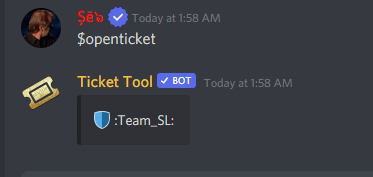
you simply need to adjust the color of the bar to match the background
 dry silo
انا عندي مشكله
robust sandalBOT
dry silo
انا عندي مشكله
 NGM
NGM
i have a problem
Arabic (ar) → English (en)
mystic hound
$articket
humble sequoiaBOT

فريق الدعم الفني العربي
عميلنا العزيز ان كنت تبحث عن مساعدة يرجى فتح تكت خاص بفريق الدعم الفني العربي
اذهب الى#🎫│make-a-ticket
ثم قم بلضغط على الايموجي الاتي (🇯🇴)
autumn gate
whats the green color that the embed button is
copper owl
embed button?
copper owl
im going to be honest, idk what they were referring to
so i cant confirm or deny if you're right or wrong lmao
autumn gate
yeah like the green when you can choose the button color
 unique anvil
i assumed this but in the green variant
 autumn gate
yeah
unique anvil
yeah
autumn gate
whats the color hex for that green
unique anvil
#5AA364
autumn gate
how did u find it
unique anvil
using a color picker on my screen
hard cape
/tr Potřebuješ pomoct?
robust sandalBOT
Yardıma ihtiyacın var mı?
Czech (cs) → Turkish (tr)
hard cape
@jade topaz
jade topaz
Efendim
robust sandalBOT
jade topaz
Efendim
 Vΐct𐍉ℝΐ𐍉us♛
Pane
Turkish (tr) → Czech (cs)
hard cape
/tr Ano?
robust sandalBOT
Yıl?
Portuguese (Brazil) (pt) → Turkish (tr)
jade topaz
2022
hard cape
/tr Vím že je rok 2022
robust sandalBOT
2022'de olduğunu biliyorum.
Czech (cs) → Turkish (tr)
jade topaz
.
Ben kendi sunucumda ticket kapat diyorum, ticket kapanıyor fakat, kapandıktan sonra closed112 DİE kanal kalıyor
robust sandalBOT
jade topaz
Ben kendi sunucumda ticket kapat diyorum, ticket kapanıyor fakat, kapandıktan so...
Vΐct𐍉ℝΐ𐍉us♛
Říkám zavřít lístek na mém vlastním serveru, lístek se zavře, ale po zavření zůstane uzavřený kanál 112 DİE
Turkish (tr) → Czech (cs)
jade topaz
@jade topaz lütfen yardım edin
robust sandalBOT
jade topaz
<@456226577798135808> lütfen yardım edin
Vΐct𐍉ℝΐ𐍉us♛
@rugged sundial please help me
Turkish (tr) → English (en)
robust sandalBOT
jade topaz
Ben kendi sunucumda ticket kapat diyorum, ticket kapanıyor fakat, kapandıktan so...
Vΐct𐍉ℝΐ𐍉us♛
I say close ticket on my own server, ticket closes but, after it closes, closed112 DİE channel remains
Turkish (tr) → English (en)
forest goblet
/tr @jade topaz Please do not mention members for support. You can delete a ticket with the $delete command.
robust sandalBOT
@dull fog Lütfen destek için üyelerden bahsetmeyin. '$delete' komutuyla bir bileti silebilirsiniz.
English (en) → Turkish (tr)
jade topaz
forest goblet
/tr <@456226577798135808> Please do not mention members for support. You can del...
Sildikten sonra closed denen bir kanal çıkıyor
robust sandalBOT
jade topaz
Sildikten sonra closed denen bir kanal çıkıyor
Vΐct𐍉ℝΐ𐍉us♛
After deleting it, a channel called closed appears
Turkish (tr) → English (en)
 outer radish
Hello, i added ticket tool to my server but I have a problem. I access to server from 2 accounts. When I access with admin account i can view bot message like this which means there is no problem
 outer radish
Hello, i added ticket tool to my server but I have a problem. I access to server...
outer radish
outer radish
Hello, i added ticket tool to my server but I have a problem. I access to server...
but when access with non-admin (but have manager permission) account, it is like this
forest goblet
jade topaz
Sildikten sonra closed denen bir kanal çıkıyor
/tr That's closing, not deleting. Please use the $delete command.
robust sandalBOT
Bu kapanmak, silmek değil. Lütfen '$delete' komutunu kullanın.
English (en) → Turkish (tr)
hard cape
outer radish
but when access with non-admin (but have manager permission) account, it is like...
The second acc needs Db role
humble sequoiaBOT
Any role you put there will have full access to the ticket tool dashboard. The server owner and users with admin permissions already have access to the dashboard.
Be careful of which roles to put here
 hard cape
If you mean this
forest goblet
outer radish
but when access with non-admin (but have manager permission) account, it is like...
Can you please show a screenshot?
outer radish
outer radish
but when access with non-admin (but have manager permission) account, it is like...
 forest goblet
outer radish
forest goblet
outer radish
That's because of your Discord settings. Please head to the Discord settings, go to Text & Images and enable the preview for links.
hard cape
I though they need to know how to manage panels lmao
outer radish
forest goblet
That's because of your Discord settings. Please head to the Discord settings, go...
I exactly made like you said, it works now. Thanks much.
iron nightBOT
Gave +1 Rep to @forest goblet
forest goblet
You're welcome.
jade topaz
forest goblet
That's because of your Discord settings. Please head to the Discord settings, go...
I am türlişh
I dont speak english
forest goblet
jade topaz
I am türlişh
/tr I wasn't talking to you in that message.
robust sandalBOT
O mesajda seninle konuşmuyordum.
English (en) → Turkish (tr)
jade topaz
forest goblet
/tr I wasn't talking to you in that message.
Okey
forest goblet
jade topaz
/tr Are you using some backup bot? Ticket Tool does not normally do this.
robust sandalBOT
Yedek bot mu kullanıyorsun? Bilet Aracı normalde bunu yapmaz.
English (en) → Turkish (tr)
jade topaz
forest goblet
/tr Are you using some backup bot? Ticket Tool does not normally do this.
Hayır kendi sayfasından aldım
prime bridgeBOT
 Vΐct𐍉ℝΐ𐍉us♛#9999 has been warned!
They were notified via dms.
robust sandalBOT
jade topaz
Hayır kendi sayfasından aldım
Vΐct𐍉ℝΐ𐍉us♛
No, I got it from his page.
Turkish (tr) → English (en)
jade topaz
prime bridge
?
forest goblet
jade topaz
Hayır kendi sayfasından aldım
/tr Does the audit log say that another bot created the channel?
robust sandalBOT
Denetim günlüğü kanalı başka bir botun oluşturduğunu söylüyor mu?
English (en) → Turkish (tr)
robust sandalBOT
jade topaz
İsterseniz sunucumda gelip gösterebilirim herşeyi
Vΐct𐍉ℝΐ𐍉us♛
I can come and show you everything on my server if you want.
Turkish (tr) → English (en)
forest goblet
jade topaz
No
/tr Please show a screenshot of the audit log. Also, stop pinging for support.
robust sandalBOT
Lütfen denetim günlüğünün ekran görüntüsünü gösterin. Ayrıca, destek için ping yapmayı bırakın.
English (en) → Turkish (tr)
jade topaz
Ping?
forest goblet
Ping = 
jade topaz
Denetim günlüğü derken ticket tool'un denetim günlüğümü
robust sandalBOT
jade topaz
Denetim günlüğü derken ticket tool'un denetim günlüğümü
Vΐct𐍉ℝΐ𐍉us♛
When I say audit log, I mean ticket tool's audit log
Turkish (tr) → English (en)
forest goblet
robust sandal
No, not Ticket Tool's audit log. I'm talking about the Audit log in the servers settings.
robust sandalBOT
forest goblet
No, not Ticket Tool's audit log. I'm talking about the Audit log in the servers ...
 2x2Master
Hayır, Bilet Aracı'nın denetim günlüğü değil. Sunucu ayarlarındaki Denetim günlüğünden bahsediyorum.
English (en) → Turkish (tr)


 forest goblet
jade topaz
forest goblet
jade topaz
Cortex Plus+ created the channel, not Ticket Tool. Please ask in their support server.