#🆘│community-support
1 messages · Page 372 of 1
 jade topaz
 hard cape
ta hvězdička na konci je pro vlastní ikonky
 jade topaz
yo to je na button
 hard cape
To je v nastavení panelu
jade topaz
treba tady bude Zadosti o NITRO (smajlik)
hard cape
za prémium
jade topaz
yo a to mi teda zmizi nebo ne kdyz mi vyprsi premium :D:D protoze si rikal ze jo a pak ze to ale neni premium xd
hard cape
a ty máš teď premium?
jade topaz
nope
hard cape
jade topaz
yo a to mi teda zmizi nebo ne kdyz mi vyprsi premium :D:D protoze si rikal ze jo...
ten panel je za premium, takže to nemůžeš změnit, a ty smajlíky nemůžeš jinak využít když se to tak vezme
 iron nightBOT
Gave 1 Rep to Vizolet (current: #77 - 1)
hard cape
jade topaz
takže tohle neuděláš bez prémia
jade topaz
no a kdyz si ho koupim, dam tam ty smajliky a pak ho necham vyprset a uz ho kupovat nebudu, zustanou mi tam ti smajlici a bude to dal fungovat tak jak ma, i bez aktivniho premia?
hard cape
jade topaz
no a kdyz si ho koupim, dam tam ty smajliky a pak ho necham vyprset a uz ho kupo...
noo, čekej XD
jade topaz
:D:D sure
hard cape
Ano, zůstane to tam
jade topaz
okay tak to je super
hard cape
Ale jestli si tam budeš nastavovat věci které nejdou z venku vidět, tak ty nepůjdou, jestli chápeš
hard cape
jade topaz
okay a jak jeste udelam ty votes, protoze to nejde linknout na mě xd
napiš do #🤖│bot-spam command $vote
jade topaz
yes to sem udelal
jade topaz
aju, ale pise to current votes 0
hard cape
a pak jenom musíš rozkliknout ty modrý odkazy a dám tam voty, 1 vote = 12 h prémia, musíš mít min. 6 votů aby Ti to šlo redeemnout
hej
vlastně to
ono to jde bez prémia ten název
ale ten popisek nejde
jade topaz
uh a jak?
jade topaz
hard cape
a pak jenom musíš rozkliknout ty modrý odkazy a dám tam voty, 1 vote = 12 h prém...
yes ja to blbě přečet tam xD uz mam votnuty
hard cape
to je to jméno toho panelu

Takže jestli to chceš pojmenovat jako Nitro claim ticket, tak to tak jenom přejmenuj

to je to tlačítko na přejmenování
už to chápeš? @jade topaz
jade topaz
no tohle vim, pojmenovany to mam, jen sem to chtel s tim smajlikem
a to jde jen s premiev ktery si navotuju :D:D
takze to je vse i guess
jade topaz
nope tak to nejde, musi se tam vlozit primo smajlik
jade topaz
právě
hard cape
to by mohli změnit
jade topaz
yes, jestli to de nekde navrhnout tak to tam hodim klidne
btw ty ses primo z podpory? nebo ses normalni user
jade topaz
byl bys nice v support teamu
jade topaz
hard cape
A ano, jde to navrhnout
yez kouknu na to
hard cape
okk kdyžtak ti můžu poslat command
jade topaz
yes klidně
hard cape
s!suggest <type suggestion here>
 lone condorBOT
Your suggestion has been added to the #💡│suggestions channel!
 Suggestion from D<3#8894
<type suggestion here>
Suggestion ID: 553330 | Submitted at
·
 copper owl
yup done
hard cape
ty @copper owl
iron nightBOT
Gave 1 Rep to Neptune (current: #1 - 473)
copper owl
hard cape
s!suggest <type suggestion here>
you can put a ` before and after in these types of situations
so it doesn't activate the tag, command, ect
jade topaz
s!suggest Option to add an emoji to panel name and panel text description
lone condorBOT
Your suggestion has been added to the #💡│suggestions channel!
 Suggestion from Vizolet#3062
Option to add an emoji to panel name and panel text description
Suggestion ID: 553332 | Submitted at
·
iron nightBOT
@jade topaz :: You can't rep D<3#8894 for 29 minutes and 12 seconds. Try coming back later?
copper owl
jade topaz
s!suggest Option to add an emoji to panel name and panel text description
wrong channel btw
#🤖│bot-spam
jade topaz
oh i see, sorry
copper owl
also if im not mistaken
you can already add emotes
to the panel name and text description

 copper owl
Not really no..
jade topaz
if you just write down the emoji text it will appear as a text
copper owl
$id 
 humble sequoiaBOT
<:ttonline:818757771310792704>
copper owl
just copy paste that and it'll work
copper owl
jade topaz
if you just write down the emoji text it will appear as a text
yeah which is the wrong way to add an emote
jade topaz
ye this does not work for at least animated custom emojis
jade topaz
 jade topaz
noo neptune pise ze to tam jde napsat normalne ve formatu ID smajlika
ale ne nejde xd
hard cape
asii
 jade topaz
jade topaz
jade topaz
yes
hard cape
<a:840954730934042624>
jade topaz
a je pro animovany
hard cape
zkus tam dát tohle
hard cape
ahaa
 jade topaz
ono to takhle asi nepujde, musi se tam primo vlozit, coz nejde zatim xd
iron nightBOT
@jade topaz :: You can't rep D<3#8894 for 11 minutes and 58 seconds. Try coming back later?
jade topaz
iron night
<@456226577798135808> **::** You can't rep **D<3#8894** for 11 minutes and 58 se...
za ctvrt hoďky ti dam ten point xD
jade topaz
vsak pohoda, treba te za to jednou pridaj do supportu :D:D
hard cape
Noo nevim no xd
jade topaz
:D:D
 brisk flume
@cloud dome
hard cape
brisk flume
<@!303894627994566656>
Do you want to help with something?
brisk flume
yes
hard cape
with what?
brisk flume
like i wana paste the thing when anybody can read but it should be permenent there
wait
hard cape
wdym?
brisk flume
@hard cape no need
hard cape
hmm ok?
humble sequoiaBOT
━━ moved to ticket ━━
 gritty oasis
Hi
hard cape
Hello
gritty oasis
Do you speak ar?
hard cape
$articket
humble sequoiaBOT

فريق الدعم الفني العربي
عميلنا العزيز ان كنت تبحث عن مساعدة يرجى فتح تكت خاص بفريق الدعم الفني العربي
اذهب الى#🎫│make-a-ticket
ثم قم بلضغط على الايموجي الاتي (🇯🇴)
hard cape

gritty oasis
Ok thx
hard cape
No problem!
 stoic crypt
why i cant make my own tickets ? the bot does not work
i cant select a server
(my own server)
so what i need to do ? i need it
humble sequoiaBOT
Don't see your server in the dashboard?
You will possibly need to relog. Look below to see steps on how to relog.
How to relog in the Dashboard.
First, you will need to go to the dashboard. Once your there, click on your avatar on the top right. after you clicked it, you will see button that says Logout. You must click that. Once you have logged out, you can log back in.
Note:
You need one of these 3 things to access the dashboard.
1. Server Owner (Level: 6)
2. Server Administrator (Level: 4)
3. Dashboard Role (Level: 2)
:warning: You can check your level using $level on your Discord Server
User permission level with Ticket Tool
@User is permission level: 0 (User)
```» *If it shows that your permission is **0**, you don't have any of the above **3 things** to manage the dashboard.*
**See the GIF below on how to relog:** hard cape
try this
hard cape
did u reloged?
stoic crypt
yes
humble sequoiaBOT
Ticket Tool Invite & Support
hard cape
you need to invite him
stoic crypt
hard cape
you need to invite him
i do it
hard cape
$help panel
humble sequoiaBOT
Creating a panel
To create a panel we are going to need to head over to the panel configs on the dashboard
Once at the dashboard we will need to click Create Panel
Enter a panel name (Fill in any optional settings you want)
Click Create Panel and your ready to get started with configuring your panel
An example of a creating a panel is shown below.
 stoic crypt
hard cape
to start making tickets
stoic crypt
hard cape
to start making tickets
i know how to do it, the problem is that i cant see my server after log in
stoic crypt
in my server?
hard cape
is the server showing up?
stoic crypt
hard cape
is the server showing up?
no
humble sequoiaBOT

Equipo de Soporte Español
Querido usuario, si está buscando ayuda, por favor abra un ticket para contactar al Equipo de Soporte Español. Diríjase a #🎫│make-a-ticket y presione el botón :flag_es:.
hard cape
try this
stoic crypt
ok thanks
hard cape
no problem
stoic crypt
thanks @hard cape
iron nightBOT
Gave 1 Rep to D<3 (current: #25 - 24)
stoic crypt
😄
hard cape
Does it works now?
stoic crypt
no
hard cape
did u created a ticket?
stoic crypt
yes
hard cape
wait for spanish support team then
stoic crypt
ok nice
 median wigeon
Sometimes a server will not show up in the dashboard, try then again to log out and log in on the dashboard That will solve the problem in the most of the times.
hard cape
median wigeon
Sometimes a server will not show up in the dashboard, try then again to log out ...
she/he already did that
@median wigeon
median wigeon
Did he kick the bot and invite the bot again?
stoic crypt
hard cape
she/he already did that
he
median wigeon
sometimes itt will help
stoic crypt
median wigeon
Did he kick the bot and invite the bot again?
i cant invite the bot from the website to my server of dc
hard cape
$invite
humble sequoiaBOT
Ticket Tool Invite & Support
stoic crypt
ok i am going to do it
hard cape
ok good luck!
stoic crypt
does not work
humble sequoiaBOT
━━ moved to ticket ━━
stoic crypt
i cant
hard cape
Kk
 frozen rock
Hey everyone, i would like to integrate custom emotes to my panel's message
If anyone have idea about it..
jade topaz
thanks @hard cape
iron nightBOT
Gave 1 Rep to D<3 (current: #25 - 25)
 shut bolt
frozen rock
Hey everyone, i would like to integrate custom emotes to my panel's message
If a...
shut bolt
frozen rock
Hey everyone, i would like to integrate custom emotes to my panel's message
If a...
Heya
$idcommand
humble sequoiaBOT
How do I get the ID of Roles/Channels/Emojis?
Ticket Tool has a useful command that helps you get the ID of various things like channels, roles, emojis and your server.
Just use the command $id <#channel/@role/:emoji:>. Now copy everything, including the brackets <...>, to your dashboard (or wherever you want it)
If you want the server ID, just use $id.
Examples:
Server ID: $id ➝
509192800865353738
Roles: $id @Role ➝@humble sequoia
Channel: $id #channel ➝#🤖│bot-spam
User: $id @user ➝@copper owl
Emoji: $id
 frozen rock
Thanks ! @shut bolt
iron nightBOT
Gave 1 Rep to Yareaj_ (current: #2 - 258)
shut bolt
Sure
shut bolt
I believe so
 hoary cedar
how to use ticket?
humble sequoiaBOT
Creating a panel
To create a panel we are going to need to head over to the panel configs on the dashboard
Once at the dashboard we will need to click Create Panel
Enter a panel name (Fill in any optional settings you want)
Click Create Panel and your ready to get started with configuring your panel
An example of a creating a panel is shown below.
hard cape
Do you mean this?
hoary cedar
yes thanks!
 shut bolt
Use an espace
shut bolt
Sure bro
jade topaz
How can i nake multi pannel
hard cape
$help multipanels
humble sequoiaBOT
Help Options
$help commands - Information on commands
$help setup - Information on bot setup
$help faq - Frequently asked questions
humble sequoiaBOT
Multipanels are a premium feature  that allow for a single panel with multiple buttons to open different tickets.
How to create a Multipanel
Premium users can combine multiple panels into one multipanel.
First, find the IDs of each panel you wish to combine. You can find them in your Panel Configs in the Dashboard
Next, send the multipanel to a channel using $panel [id1] [id2] {id3} ....
e.g. $panel 1 2 4 17 35 to combine panels 1, 2, 4, 17 and 35.
Up to 25 panels may be combined.

For a more convenient use of multipanels, you can now combine panels on the dashboard. This will allow you to directly send the multipanel from the dashboard or via the $panel ID command.
Where can I find this?
You can find this setting on the Dashboard -> Panel Configs -> Settings -> General Options
Note: if you're attaching all the panels to a panel called English, don't include English in the attached panels box (If you do this, it will create duplicate)
This will put all buttons from all of your panels on one message. The message is the panel message from the panel you're combining these panels in.

 Note: This is a premium feature
jade topaz
Note: This is a premium feature
jade topaz
Thx
hard cape
No problem!
jade topaz
Thanks @hard cape
iron nightBOT
Gave 1 Rep to D<3 (current: #24 - 26)
 urban root
how to setup a message to send in a channel so members can open tickets there, and setup the welcome message when someone open the ticket
 humble sequoiaBOT
Help Options
$help commands - Information on commands
$help setup - Information on bot setup
$help faq - Frequently asked questions
urban root
i guess yes
 users
humble sequoiaBOT
users
humble sequoiaBOT
**Ticket Message**
The Ticket Message is the first message sent by the bot in a new ticket. To customise it head over to your Dashboard -> Panel Configs -> Settings -> Ticket Options -> Edit Ticket Message
 hard cape
 hard cape
Thats not ticket tool
hard cape
hard cape
do you mean this?
If you want this, you need premium
but the welcome message in tickets its free
humble sequoiaBOT
**Ticket Message**
The Ticket Message is the first message sent by the bot in a new ticket. To customise it head over to your Dashboard -> Panel Configs -> Settings -> Ticket Options -> Edit Ticket Message
 shut bolt
urban root
how to setup a message to send in a channel so members can open tickets there, a...
shut bolt
urban root
how to setup a message to send in a channel so members can open tickets there, a...
Heya
Instructions on setting up Ticket Tool in your server.
That's the setup guide for our bot
If you have any doubts let us know
urban root
hard cape
But this is Ticket tool support server!
yes i want to do same
hard cape
urban root
yes i want to do same
ok, i already sent how!
humble sequoiaBOT
**Ticket Message**
The Ticket Message is the first message sent by the bot in a new ticket. To customise it head over to your Dashboard -> Panel Configs -> Settings -> Ticket Options -> Edit Ticket Message
urban root
ah ty
hard cape
no problem
urban root
how can i send the message now
urban root
 hard cape
ye
urban root
so?
hard cape
what you want to set now?
urban root
to do same as the pic
humble sequoiaBOT
Creating a panel
To create a panel we are going to need to head over to the panel configs on the dashboard
Once at the dashboard we will need to click Create Panel
Enter a panel name (Fill in any optional settings you want)
Click Create Panel and your ready to get started with configuring your panel
An example of a creating a panel is shown below.
 odd quiver
Is there a way to blacklist people from making a ticket?
hard cape
Ye
humble sequoiaBOT
Blacklist Roles
Any role you assign as a blacklisted role won't be able to use commands or reactions.
Selecting a blacklisted role
Go to your Dashboard ➞ Server Configs. There you will find the option to select blacklisted roles.
Note: Don't forget to save.
 hard cape
no problem!
urban root
really thanks
hard cape
no problem!
humble sequoiaBOT
How Do I setup Ticket Tool
You can check our documentation here, you can also check #573205317870157855 for the basic setup.
Our documentation contains all the info you need about the bot to be able to setup and configure the bot however you like.
 hexed bay
need
humble sequoiaBOT
Setting up Ticket Tool
Visit the docs for setup info
General Setup
hexed bay
help setting up so they can click it
hard cape
$help panel
humble sequoiaBOT
Creating a panel
To create a panel we are going to need to head over to the panel configs on the dashboard
Once at the dashboard we will need to click Create Panel
Enter a panel name (Fill in any optional settings you want)
Click Create Panel and your ready to get started with configuring your panel
An example of a creating a panel is shown below.
hard cape
you need to create a panel
hexed bay
then what
hard cape
the panel what u created
hexed bay
i dont know if i created it yet
hard cape
$help panel
humble sequoiaBOT
Creating a panel
To create a panel we are going to need to head over to the panel configs on the dashboard
Once at the dashboard we will need to click Create Panel
Enter a panel name (Fill in any optional settings you want)
Click Create Panel and your ready to get started with configuring your panel
An example of a creating a panel is shown below.
humble sequoiaBOT
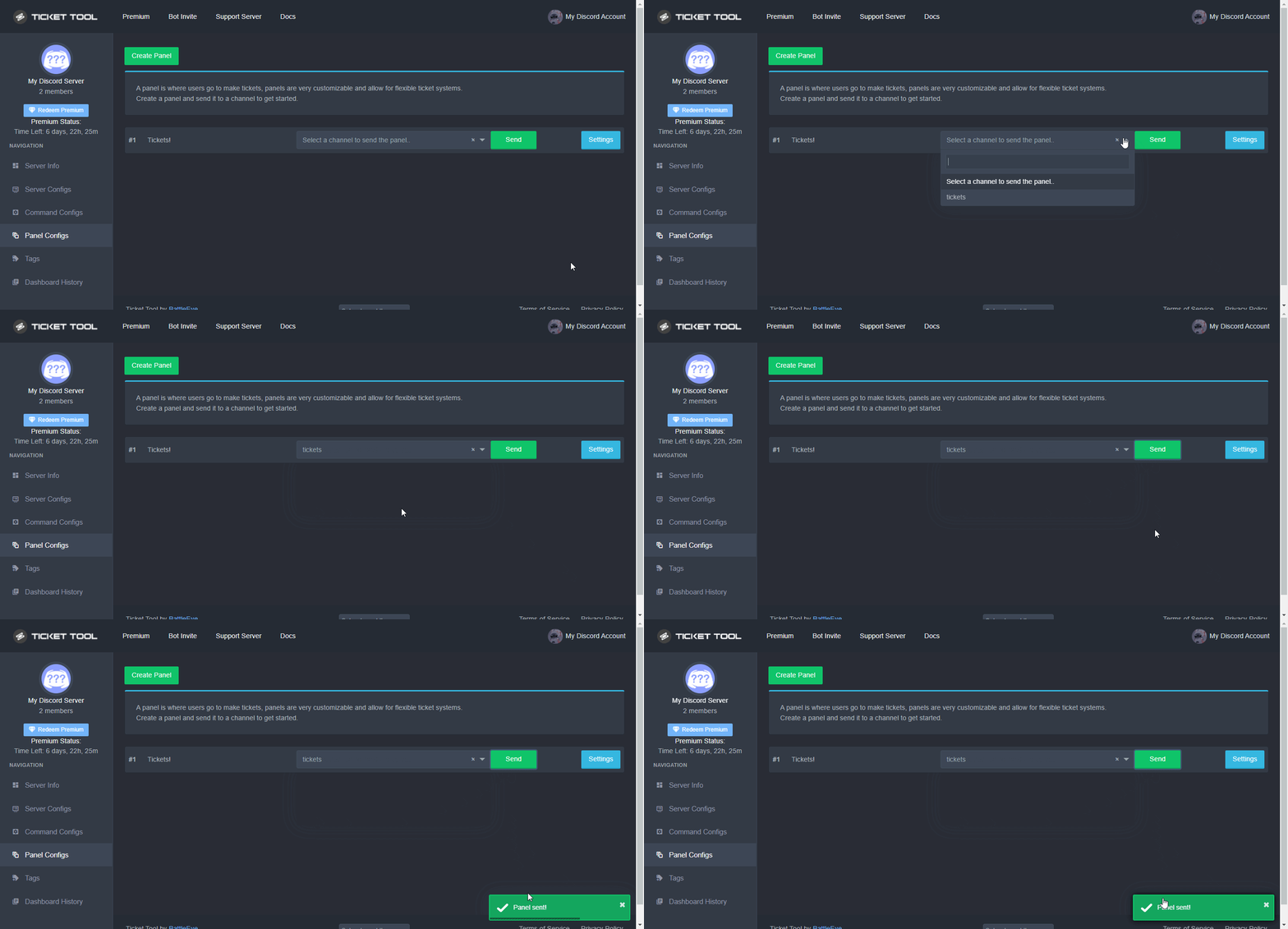
Sending a panel
Once you've created a panel on the dashboard you will need to send it to a channel using send on the dashboard
Select the channel you want your panel to be created in and click send.
For other questions checkout $help faq
An example of a sending a panel is shown below.
 hexed bay
i just pressed manage
hard cape
but thanks for telling me
hexed bay
do i press panel configs
hexed bay
done
hard cape
$help panel
humble sequoiaBOT
Creating a panel
To create a panel we are going to need to head over to the panel configs on the dashboard
Once at the dashboard we will need to click Create Panel
Enter a panel name (Fill in any optional settings you want)
Click Create Panel and your ready to get started with configuring your panel
An example of a creating a panel is shown below.
humble sequoiaBOT
Sending a panel
Once you've created a panel on the dashboard you will need to send it to a channel using send on the dashboard
Select the channel you want your panel to be created in and click send.
For other questions checkout $help faq
An example of a sending a panel is shown below.
hard cape
just send it to a channel, then u will be done
hexed bay
whats the panel name gonna do in my server
hard cape
lemme send a ss
hexed bay
k
 hard cape
$help send
humble sequoiaBOT
Sending a panel
Once you've created a panel on the dashboard you will need to send it to a channel using send on the dashboard
Select the channel you want your panel to be created in and click send.
For other questions checkout $help faq
An example of a sending a panel is shown below.
hard cape
iron nightBOT
Gave 1 Rep to D<3 (current: #24 - 27)
hard cape
no problem!
hexed bay
i rep u ur welcome
hard cape
ye thank u!
hexed bay
np
jade topaz
$help booster perk
humble sequoiaBOT
Help Options
$help commands - Information on commands
$help setup - Information on bot setup
$help faq - Frequently asked questions
hard cape
jade topaz
$help booster perk
What?
jade topaz
wht are booster perks
humble sequoiaBOT

⚠️ You're in the wrong place
We provide support for @pseudo glen discord bot and cannot help you with whatever issue you have.
- Please make sure to contact the appropriate Support Team.
If you don't have any further questions regarding our bot Ticket Tool, please close this ticket
shut bolt
He's asking which are the perks he receives if he boosts the server I believe
hard cape
Ye
shut bolt
jade topaz
wht are booster perks
You get a fancy role!
hard cape
And he will unlock a booster chat
jade topaz
ohk
shut bolt
hard cape
And he will unlock a booster chat
Yeah, then it is something from the server
That's what I meant
shut bolt
Sure
jade topaz
how to suggest
shut bolt
#🤖│bot-spam
jade topaz
s!suggest < >
hard cape
.
 lilac girder
We can't check our balance for @tepid island in #🤖│bot-spam 
shut bolt
lilac girder
We can't check our balance for <@356950275044671499> in <#910978476536905738> <...
The economy system hasn't been fully set yet
lilac girder
shut bolt
The economy system hasn't been fully set yet
Oh- I see, thanks
iron nightBOT
Gave 1 Rep to Yareaj_ (current: #2 - 259)
shut bolt
lilac girder
Oh- I see, thanks
Sure
humble sequoiaBOT
Sorry! We're away :)
Since it's Christmas, the Ticket Tool Support Team is taking a well deserved break. The break will end on <t:1640624400>.
The Ticket Tool Support Team wishes you an amazing Christmas, and Happy Holidays :D!!
copper owl
humble sequoia
 shut bolt
Heya
shut bolt
jade topaz
How can i make ticket tool like this
Do you want to edit the panel's text? Or, want to do the whole setup?
jade topaz
shut bolt
Do you want to edit the panel's text? Or, want to do the whole setup?
I want to do all the setup
shut bolt
jade topaz
I want to do all the setup
Instructions on setting up Ticket Tool in your server.
Check out this guide
It will show you the step by step
jade topaz
shut bolt
It will show you the step by step
Thx
iron nightBOT
Gave 1 Rep to Yareaj_ (current: #2 - 260)
shut bolt
Sure
hard cape
jade topaz
Thx
Do u know how now?
 inner pollen
What happens when this shows up
 shut bolt
Hey
humble sequoiaBOT
Don't see your server in the dashboard?
You will possibly need to relog. Look below to see steps on how to relog.
How to relog in the Dashboard.
First, you will need to go to the dashboard. Once your there, click on your avatar on the top right. after you clicked it, you will see button that says Logout. You must click that. Once you have logged out, you can log back in.
Note:
You need one of these 3 things to access the dashboard.
1. Server Owner (Level: 6)
2. Server Administrator (Level: 4)
3. Dashboard Role (Level: 2)
:warning: You can check your level using $level on your Discord Server
User permission level with Ticket Tool
@User is permission level: 0 (User)
```» *If it shows that your permission is **0**, you don't have any of the above **3 things** to manage the dashboard.*


**See the GIF below on how to relog:**Try this @inner pollen
hard cape
@inner pollen
shut bolt
hard cape
<@846718044494889010>
Appreciat it, but there is no need on doing a second ping
inner pollen
Ok
hard cape
shut bolt
Appreciat it, but there is no need on doing a second ping
Oh ok
inner pollen

 gilded verge
Hi. I have received and used a code for Premium (I still have an active one) but I wonder if if I add another code now, my premium will be extended with the second code or maybe the first code will be removed and only the second one will I have? 😳
shut bolt
inner pollen
Check the note of the embed sent please, you don't have perms to edit the dashboard
shut bolt
gilded verge
Hi. I have received and used a code for Premium (I still have an active one) but...
It will add to the time you have currently
gilded verge
uff, thank you @shut bolt 
iron nightBOT
Gave 1 Rep to Yareaj_ (current: #2 - 261)
shut bolt
Sure!
inner pollen
shut bolt
Check the note of the embed sent please, you don't have perms to edit the dashbo...
How do you level up
shut bolt
inner pollen
How do you level up
You need administrator perm or a dashboard role, ask the server owner for one of those
inner pollen
Thank you!
shut bolt
Sure!
 dire pike
Can you display an image in a panel?
shut bolt
dire pike
Can you display an image in a panel?
You can
 dire pike
hard cape
<@757626057846423582>
dire pike
hard cape
<@757626057846423582>
Alright, thanks for quick response
iron nightBOT
Gave 1 Rep to D<3 (current: #24 - 28)
humble sequoiaBOT
Don't see your server in the dashboard?
You will possibly need to relog. Look below to see steps on how to relog.
How to relog in the Dashboard.
First, you will need to go to the dashboard. Once your there, click on your avatar on the top right. after you clicked it, you will see button that says Logout. You must click that. Once you have logged out, you can log back in.
Note:
You need one of these 3 things to access the dashboard.
1. Server Owner (Level: 6)
2. Server Administrator (Level: 4)
3. Dashboard Role (Level: 2)
:warning: You can check your level using $level on your Discord Server
User permission level with Ticket Tool
@User is permission level: 0 (User)
```» *If it shows that your permission is **0**, you don't have any of the above **3 things** to manage the dashboard.*


**See the GIF below on how to relog:**Try
 magic raven
Is there anyway I can get members of my server to link their gamer tag so I can see who's in the game server and is in the discord because I want discord to be mandatory for playing on my servers
hard cape
Hey
magic raven
Hey!
hard cape
So you want to help with ticket tool?
magic raven
Can that be done in the ticket tool?
humble sequoiaBOT
**Mensaje del Ticket**
El mensaje del Ticket es el primer mensaje enviado por el bot en un ticket nuevo. Para personalizarlo, diríjase a su Panel de Control → Panel Configs → Settings → Ticket Options → Edit Ticket Message.
shut bolt
That's how to edit it
hard cape
This is ticket tool Support @magic raven
 gusty sundial
Ok thanks.
iron nightBOT
Gave 1 Rep to Yareaj_ (current: #2 - 262)
shut bolt
Sure!
magic raven
@hard cape okay sorry thanks
iron nightBOT
Gave 1 Rep to D<3 (current: #24 - 29)

 plain reef
How do you make a ticket embed message like this
 shut bolt
Man, you shouldn't have pinged him again
shut bolt
plain reef
How do you make a ticket embed message like this
You mean with multiple buttons?
 next yoke
I need help
plain reef
shut bolt
You mean with multiple buttons?
Yeah
humble sequoiaBOT
For a more convenient use of multipanels, you can now combine panels on the dashboard. This will allow you to directly send the multipanel from the dashboard or via the $panel ID command.
Where can I find this?
You can find this setting on the Dashboard -> Panel Configs -> Settings -> General Options
Note: if you're attaching all the panels to a panel called English, don't include English in the attached panels box (If you do this, it will create duplicate)
This will put all buttons from all of your panels on one message. The message is the panel message from the panel you're combining these panels in.
Note: This is a premium feature
shut bolt
Check that
 upper flower
ru ok?
next yoke
I added the bot but I can't fine my server to setting
plain reef
Thank toy so much have a nice Christmas!
shut bolt
plain reef
Thank toy so much have a nice Christmas!
You too!
shut bolt
next yoke
I added the bot but I can't fine my server to setting
Hey try this
humble sequoiaBOT
Don't see your server in the dashboard?
You will possibly need to relog. Look below to see steps on how to relog.
How to relog in the Dashboard.
First, you will need to go to the dashboard. Once your there, click on your avatar on the top right. after you clicked it, you will see button that says Logout. You must click that. Once you have logged out, you can log back in.
Note:
You need one of these 3 things to access the dashboard.
1. Server Owner (Level: 6)
2. Server Administrator (Level: 4)
3. Dashboard Role (Level: 2)
:warning: You can check your level using $level on your Discord Server
User permission level with Ticket Tool
@User is permission level: 0 (User)
```» *If it shows that your permission is **0**, you don't have any of the above **3 things** to manage the dashboard.*


**See the GIF below on how to relog:**i would love to be treated like this. I dont like to be stupidly bothered. I dont think anyone else would like to be either.
nope. we have rules in this server for a reason. #546557408902905896. People dont like to understand that
 austere cloud
Damn stuff is going down hard here
shut bolt
austere cloud
Damn stuff is going down hard here
indeed
next yoke
humble sequoia
THX!! IT is working
upper flower
they can say "Dev" no need to ping.
but rn. how ur using community-support, to chat, im not liking that.
shut bolt
next yoke
THX!! IT is working
Sure pal
upper flower
You dont get my respect. you earn it. @austere cloud has earned my respect.
now they can ping me
austere cloud
@upper flower :)
shut bolt
upper flower
You dont get my respect. you earn it. <@!658441101861978151> has earned my respe...
That sounded as Harvey Specter on suits
 gusty spruce
hard cape
gusty spruce
hard cape
This is for Support, not for chating.
 bronze comet
take the general convo to #💬│general-chat
hard cape
@void skiff
humble sequoiaBOT
Don't see your server in the dashboard?
You will possibly need to relog. Look below to see steps on how to relog.
How to relog in the Dashboard.
First, you will need to go to the dashboard. Once your there, click on your avatar on the top right. after you clicked it, you will see button that says Logout. You must click that. Once you have logged out, you can log back in.
Note:
You need one of these 3 things to access the dashboard.
1. Server Owner (Level: 6)
2. Server Administrator (Level: 4)
3. Dashboard Role (Level: 2)
:warning: You can check your level using $level on your Discord Server
User permission level with Ticket Tool
@User is permission level: 0 (User)
```» *If it shows that your permission is **0**, you don't have any of the above **3 things** to manage the dashboard.*


**See the GIF below on how to relog:**Try @void skiff
 void skiff
Ok, ima try. Thanks you
hard cape
Im really not, But tyy too!
magic raven
@shut bolt can I pm you a question 🤔
hard cape
Do you have question about ticket tool?
shut bolt
magic raven
<@518666147441278998> can I pm you a question 🤔
Sup
Btw, please don't ping any support member #546557408902905896
magic raven
Oh sorry 😬 brand new to discord and diving straight in
I scrolled up a bit seen someone asked the same thing
hard cape
Are u talking about website of ticket tool?
Cause if not, you arent in correct place
@jade topaz
jade topaz
My server dont here
 humble sequoiaBOT
Don't see your server in the dashboard?
You will possibly need to relog. Look below to see steps on how to relog.
How to relog in the Dashboard.
First, you will need to go to the dashboard. Once your there, click on your avatar on the top right. after you clicked it, you will see button that says Logout. You must click that. Once you have logged out, you can log back in.
Note:
You need one of these 3 things to access the dashboard.
1. Server Owner (Level: 6)
2. Server Administrator (Level: 4)
3. Dashboard Role (Level: 2)
:warning: You can check your level using $level on your Discord Server
User permission level with Ticket Tool
@User is permission level: 0 (User)
```» *If it shows that your permission is **0**, you don't have any of the above **3 things** to manage the dashboard.*


**See the GIF below on how to relog:**But i have add the bot
hard cape
Use
jade topaz
But im french
hard cape
Wait, lemme Use translator xD
essayez de vous déconnecter, puis reconnectez-vous à partir de cette page
@jade topaz
jade topaz
Thx its working
hard cape
No problem
shut bolt
hard cape
No problem
There is an actual french relog tag
humble sequoiaBOT
Don't see your server in the dashboard?
You will possibly need to relog. Look below to see steps on how to relog.
How to relog in the Dashboard.
First, you will need to go to the dashboard. Once your there, click on your avatar on the top right. after you clicked it, you will see button that says Logout. You must click that. Once you have logged out, you can log back in.
Note:
You need one of these 3 things to access the dashboard.
1. Server Owner (Level: 6)
2. Server Administrator (Level: 4)
3. Dashboard Role (Level: 2)
:warning: You can check your level using $level on your Discord Server
User permission level with Ticket Tool
@User is permission level: 0 (User)
```» *If it shows that your permission is **0**, you don't have any of the above **3 things** to manage the dashboard.*


**See the GIF below on how to relog:**@jade topaz
jade topaz
Tnx
hard cape
Ty @eager cargo
iron nightBOT
Gave 1 Rep to Quo (current: #4 - 222)
hard cape
Explain your problem Please @onyx lake
 onyx lake
hard cape
Explain your problem Please <@691368928290537521>
onyx lake
hard cape
Explain your problem Please <@691368928290537521>
I don't know how to make a certain channel just for the ticket bot!
hard cape
$help panel
humble sequoiaBOT
Creating a panel
To create a panel we are going to need to head over to the panel configs on the dashboard
Once at the dashboard we will need to click Create Panel
Enter a panel name (Fill in any optional settings you want)
Click Create Panel and your ready to get started with configuring your panel
An example of a creating a panel is shown below.
hard cape
If u want to start with tickets, create a panel first.
onyx lake
humble sequoia
Is this on the website?
hard cape
Yep
onyx lake
ty!
humble sequoiaBOT
 jade topaz
Guys I'm trying to set the bot up in my server, the invite is done but struggling to get it on each tab
jade topaz
I got the server in the ticket tool website but the tool intself isn't going into my server
humble sequoiaBOT
Don't see your server in the dashboard?
You will possibly need to relog. Look below to see steps on how to relog.
How to relog in the Dashboard.
First, you will need to go to the dashboard. Once your there, click on your avatar on the top right. after you clicked it, you will see button that says Logout. You must click that. Once you have logged out, you can log back in.
Note:
You need one of these 3 things to access the dashboard.
1. Server Owner (Level: 6)
2. Server Administrator (Level: 4)
3. Dashboard Role (Level: 2)
:warning: You can check your level using $level on your Discord Server
User permission level with Ticket Tool
@User is permission level: 0 (User)
```» *If it shows that your permission is **0**, you don't have any of the above **3 things** to manage the dashboard.*


**See the GIF below on how to relog:**Try @jade topaz WG365#3464
jade topaz
hard cape
So u cant manage your server?
Nah I can manage my own server I just can't work out how to get the tool to actually show in my server tabs
 shut bolt
 obtuse obsidian
Would anyone know how to fix this?
obtuse obsidian
Would anyone know how to fix this?
Heya
You actually need to click on that button to open a ticket
humble sequoiaBOT
Don't see your server in the dashboard?
You will possibly need to relog. Look below to see steps on how to relog.
How to relog in the Dashboard.
First, you will need to go to the dashboard. Once your there, click on your avatar on the top right. after you clicked it, you will see button that says Logout. You must click that. Once you have logged out, you can log back in.
Note:
You need one of these 3 things to access the dashboard.
1. Server Owner (Level: 6)
2. Server Administrator (Level: 4)
3. Dashboard Role (Level: 2)
:warning: You can check your level using $level on your Discord Server
User permission level with Ticket Tool
@User is permission level: 0 (User)
```» *If it shows that your permission is **0**, you don't have any of the above **3 things** to manage the dashboard.*


**See the GIF below on how to relog:**Try @jade topaz
jade topaz
hard cape
Try <:this:894279341108772914> <@456226577798135808>
I can manage my own server from the dashboard but Im not sure what to do from there
hard cape
What you need to configure?
jade topaz
hard cape
What you need to configure?
The ticket tool itself, I need it in my server to be able to create a ticket
hard cape
$help panel
humble sequoiaBOT
Creating a panel
To create a panel we are going to need to head over to the panel configs on the dashboard
Once at the dashboard we will need to click Create Panel
Enter a panel name (Fill in any optional settings you want)
Click Create Panel and your ready to get started with configuring your panel
An example of a creating a panel is shown below.
humble sequoiaBOT

Sorry! We're away :)
Since it's Christmas, the Ticket Tool <@&540295656720302081> is taking a well deserved break. The break will end on <t:1640624400>.
🎅✨ The Ticket Tool Support Team wishes you an amazing Christmas, and Happy Holidays! 🎄🎁
humble sequoiaBOT
How Do I setup Ticket Tool
You can check our documentation here, you can also check #573205317870157855 for the basic setup.
Our documentation contains all the info you need about the bot to be able to setup and configure the bot however you like.
copper owl
you can go ahead and look through the documentation :D
 copper owl
 unborn patio
no i mean ticket bot premium
unborn patio
no i mean ticket bot premium
do you have premium?
copper owl
unborn patio
just click on return to front page and it should work :)
unborn patio
copper owl
do you have premium?
yea
copper owl
unborn patio
yea
do you have the free trial or a subscription?
unborn patio
free trail
copper owl
i see, so what are you looking to setup exactly?
unborn patio
those

espically the direct message thing so when someone opens a ticket i get notified
copper owl
unborn patio
espically the direct message thing so when someone opens a ticket i get notified
that's not what direct messages refer to
also, the things you circled arent things you setup, they're just already existing
humble sequoiaBOT
Inviting and Enabling Premium Bot
The first thing you will need to do is invite the premium bot, an invite can be found here
Once the bot is in your server we will head to the dashboard and manage your server. When you are managing your server, you want to head into "Server Configs" then click the drop down menu under "Select the bot you would like to use on this server" then click "Ticket Tool#6207" and then save.
 copper owl
this is how you invite the premium bot, if you want to be notified, you can setup a ping whenever a ticket is opened by following the instructions below
$help ping
humble sequoiaBOT
How to make Ticket Tool ping a role
To make ticket tool ping a role when a ticket is opened, go to the Dashboard -> Panel Configs -> Settings -> Ticket Options -> Ticket Message -> Message Text and do this:
{@Role name} This is case sensitive and the role must have @mentions enabled
 plain reef
How do you make all of these tickets into one ticket will different buutons? Like that picture?
 humble sequoiaBOT
For a more convenient use of multipanels, you can now combine panels on the dashboard. This will allow you to directly send the multipanel from the dashboard or via the $panel ID command.
Where can I find this?
You can find this setting on the Dashboard -> Panel Configs -> Settings -> General Options
Note: if you're attaching all the panels to a panel called English, don't include English in the attached panels box (If you do this, it will create duplicate)
This will put all buttons from all of your panels on one message. The message is the panel message from the panel you're combining these panels in.
Note: This is a premium feature
humble sequoiaBOT

Buttons
The new Discord Buttons allow for a much smoother and convenient experience. They reduce lag and work much better than emojis. With ticket tool you can edit all the buttons however you like! Buttons can show emojis, text and can have 4 different colors.
Where can I edit them?
Dashboard ➞ Panel Configs ➞ Settings ➞ Button Options ➞ Setting
 plain reef
humble sequoia
plain reef
humble sequoia
So i do this and all of the tickets combine into one message?
copper owl
yup, just send the panel that has all the attached panels
plain reef
Ok thank you! I hope you have a good Christmas!
copper owl
plain reef
Ok thank you! I hope you have a good Christmas!
Likewise :)
 plain swan
I have a question
shut bolt
Go ahead
plain swan
How can I activate to create tickets in a channel?
shut bolt
plain swan
How can I activate to create tickets in a channel?
Sure, check out this https://docs.tickettool.xyz/general/setup
Instructions on setting up Ticket Tool in your server.
Is the basic setup
Or if you want the shortcut
$help panel
humble sequoiaBOT
Creating a panel
To create a panel we are going to need to head over to the panel configs on the dashboard
Once at the dashboard we will need to click Create Panel
Enter a panel name (Fill in any optional settings you want)
Click Create Panel and your ready to get started with configuring your panel
An example of a creating a panel is shown below.
shut bolt
@jade topaz #🤖│bot-spam para usar comandos
humble sequoiaBOT
For a more convenient use of multipanels, you can now combine panels on the dashboard. This will allow you to directly send the multipanel from the dashboard or via the $panel ID command.
Where can I find this?
You can find this setting on the Dashboard -> Panel Configs -> Settings -> General Options
Note: if you're attaching all the panels to a panel called English, don't include English in the attached panels box (If you do this, it will create duplicate)
This will put all buttons from all of your panels on one message. The message is the panel message from the panel you're combining these panels in.
Note: This is a premium feature
shut bolt
Check that
 tropic cloak
ty pablito dudeman
shut bolt
Sure
 rigid chasm
How do I have a ticket ping me? Is it {@Kings Gaming}
 scenic plinth
rigid chasm
How do I have a ticket ping me? Is it {@Kings Gaming}
scenic plinth
rigid chasm
How do I have a ticket ping me? Is it {@Kings Gaming}
You can try, but I usually find it easier to use user IDs in the format <@userid>
 solid stream
$help ping
humble sequoiaBOT
How to make Ticket Tool ping a role
To make ticket tool ping a role when a ticket is opened, go to the Dashboard -> Panel Configs -> Settings -> Ticket Options -> Ticket Message -> Message Text and do this:
{@Role name} This is case sensitive and the role must have @mentions enabled
scenic plinth
They asked for separate users and sometimes it's difficult to do it eith the name because discords discord.
rigid chasm
Delete the vid
ids make my discord parties make my discord lag
Someone delete it my Discord is so laggy I can barely type
rigid chasm
@scenic plinth
hard cape
@sage lion
 sage lion
?
hard cape
What is your problem?
sage lion
i don't know how to set it up
sage lion
yes
sage lion
umm yes
hard cape
$help panel
humble sequoiaBOT
Creating a panel
To create a panel we are going to need to head over to the panel configs on the dashboard
Once at the dashboard we will need to click Create Panel
Enter a panel name (Fill in any optional settings you want)
Click Create Panel and your ready to get started with configuring your panel
An example of a creating a panel is shown below.
hard cape
sage lion
ok ty
hard cape
No problem, if u have more questions, ask me here!
sage lion
hard cape
No problem, if u have more questions, ask me here!
it worked thank you again
iron nightBOT
Gave 1 Rep to D<3 (current: #24 - 30)
hard cape
No problem!
jade topaz
$help staff apply
humble sequoiaBOT
Help Options
$help commands - Information on commands
$help setup - Information on bot setup
$help faq - Frequently asked questions
hard cape
jade topaz
$help staff apply
$staffapps
humble sequoiaBOT
How do be I become a Support Member?
You can become a support member in 2 ways:
1. You can be really active in #🆘│community-support gain <@&799500225579712543> role and get chosen by a Manager
2. You can apply VIA our applications that would be sent in #📣│server-news
We currently have Support Teams for the following languages:
:flag_us: English
:flag_jo: Arabic
:flag_fr: French
:flag_de: German
:flag_br: Portuguese
:flag_es: Spanish.
jade topaz
k
hard cape
BUT THEY’RE CLOSED
jade topaz
ye
 quick robin
احتاج مساعدة كيف اقتح تكت 🇯🇴 Arabic
hard cape
Hey
 robust sandalBOT
quick robin
احتاج مساعدة كيف اقتح تكت 🇯🇴 Arabic
robust sandalBOT
quick robin
احتاج مساعدة كيف اقتح تكت 🇯🇴 Arabic
 'ᵀᴴ PXP
Potřebuji pomoc s tím, jak prolomit 🇯🇴 arabštině.
 Arabic (ar) → Czech (cs)
hard cape
quick robin
احتاج مساعدة كيف اقتح تكت 🇯🇴 Arabic
Arabic (ar) → Czech (cs)
hard cape
quick robin
احتاج مساعدة كيف اقتح تكت 🇯🇴 Arabic
ما الذى تحتاج المساعدة به؟
@quick robin

 timid yarrow
Alguien me configura al ticket tool en mi server pls
robust sandalBOT
timid yarrow
Alguien me configura al ticket tool en mi server pls
 Ignaxs |
Někdo mě nakonfiguruje na nástroj pro lístky v mém serveru pls
Spanish (es) → Czech (cs)
hard cape
Hola
timid yarrow
Hola
hard cape
Puedo ayudarte
timid yarrow
Necesito para abrir tickets pls
hard cape
$help panel
humble sequoiaBOT
Creating a panel
To create a panel we are going to need to head over to the panel configs on the dashboard
Once at the dashboard we will need to click Create Panel
Enter a panel name (Fill in any optional settings you want)
Click Create Panel and your ready to get started with configuring your panel
An example of a creating a panel is shown below.
hard cape
Mira este video, ¡lo harás en consecuencia! ¡Te creo!
timid yarrow
Esta bien
hard cape
timid yarrow
Esta bien
¿Te ayudó?
timid yarrow
Si pls
hard cape
timid yarrow
Si pls
Aún necesitas ayuda
timid yarrow
Si xd
 timid yarrow
Aahhhh okay
timid yarrow
Graciasssss si funciono te quiero
hard cape
¡eres bienvenido!
timid yarrow
:D
 prime bridgeBOT
 Successful bans:
 1
 Unsuccessful bans:
 0
 Reason: Scam links
 Moderator: @wicked scroll
 fierce tangle
.
brisk flume
wait a sec please i a mbusy
 valid crescent
hard cape
<@!911561031707418624> , do u want to help with the ping for supporters?
valid crescent
hard cape
<@!911561031707418624> , do u want to help with the ping for supporters?
got it
hard cape
oh ok
valid crescent
hard cape
?
valid crescent
$help multipanels
humble sequoiaBOT
Help Options
$help commands - Information on commands
$help setup - Information on bot setup
$help faq - Frequently asked questions
For a more convenient use of multipanels, you can now combine panels on the dashboard. This will allow you to directly send the multipanel from the dashboard or via the $panel ID command.
Where can I find this?
You can find this setting on the Dashboard -> Panel Configs -> Settings -> General Options
Note: if you're attaching all the panels to a panel called English, don't include English in the attached panels box (If you do this, it will create duplicate)
This will put all buttons from all of your panels on one message. The message is the panel message from the panel you're combining these panels in.
Note: This is a premium feature
hard cape
valid crescent
k
hard cape
But its for premium users
hard cape
@brisk flume what is your question?
jade topaz
What are tact orders?
jade topaz
hard cape
Is this a question about ticket tool?
Yes
hard cape
Send a pic Please

 wicked scroll
$help prefix
humble sequoiaBOT
How to change Ticket tool's prefix
The default prefix for ticket tool is $ and @Ticket Tool#4843 however that can be changed on the Dashboard under Server Configs -> Command Prefix.
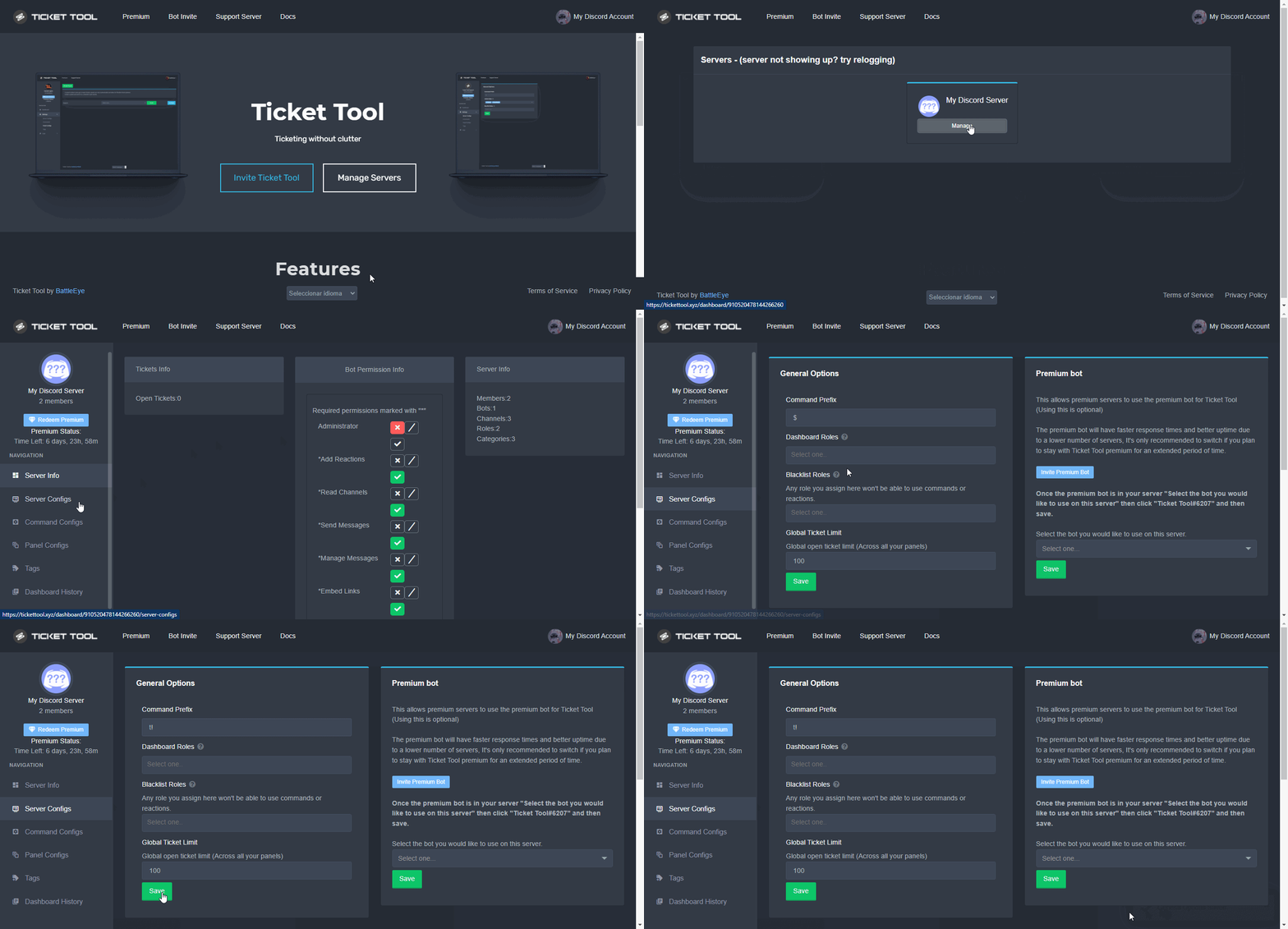
NOTE that @Ticket Tool#4843 will always work as a prefix even if there is a custom prefix.
jade topaz
hard cape
Prefix is $
Thx
iron nightBOT
Gave 1 Rep to D<3 (current: #23 - 31)
hard cape
No problem!
jade topaz
Can someone help me setup the bot because right now its just sitting in my server but I don't really know how to use it
How to do like this(I will just change)
 hard cape
Hello
hard cape
jade topaz
Can someone help me setup the bot because right now its just sitting in my serve...
$help panel
humble sequoiaBOT
Creating a panel
To create a panel we are going to need to head over to the panel configs on the dashboard
Once at the dashboard we will need to click Create Panel
Enter a panel name (Fill in any optional settings you want)
Click Create Panel and your ready to get started with configuring your panel
An example of a creating a panel is shown below.
jade topaz
hard cape
$help panel
okay
hard cape
jade topaz
How to do like this(I will just change)
This is for premium users only.
jade topaz
Aw man
hard cape
Don't worry, u can get premium by voting - $vote
jade topaz
$vote?
jade topaz
I just voted so how do I get premium?
hard cape
U need to vote 6 times on the websites.
 jade topaz
ok
hard cape
If you have more questions, ask here
jade topaz
sorry for all the questions im new to this but like how do you do something like
 hard cape
$help panel
humble sequoiaBOT
Creating a panel
To create a panel we are going to need to head over to the panel configs on the dashboard
Once at the dashboard we will need to click Create Panel
Enter a panel name (Fill in any optional settings you want)
Click Create Panel and your ready to get started with configuring your panel
An example of a creating a panel is shown below.
hard cape
jade topaz
ok i'll try
jade topaz
yeppp tysmm <3
hard cape
No problem!
jade topaz
Any way to see all tickets transcripts even if they werent saved?
jade topaz
Alr
copper owl
your only way of seeing tickets that werent saved is by sending a request to discord
so they can restore the deleted channel
nothing we can do anything about unfortunately since we dont store anyone's transcripts anywhere. they're all saved within your discord servers
 tribal cedar
Congrats on promotion!
copper owl
tribal cedar
Congrats on promotion!
thank you enigma <3
 orchid storm
Hello, I have a problem when I choose the living room where I want to put the panel, when I click on send, I have an error message
Here it is: Failled to send: Access Denied (Ticket Tool doesn't have permission to view or send into this channel)
How to do ?
humble sequoiaBOT
ᅠ
@pseudo glen requires the following permissions:
Add Reactions
Read Channels
Send Messages
Manage Messages
Embed Links
Attach Files
Read History
Manage Roles
To change the role permissions, you can go to your Discord Server ➞ Server Settings ➞ Roles ➞ @Ticket Tool
To change the channel permissions, you can go to your Channel Settings ➞ Permissions ➞ Ticket Tool
ᅠ
Note:
You can give Ticket Tool Administrative Permissions instead of all the permissions listed above, but it's entirely optional and NOT necessary.
 hard cape
be sure ticket tool has permissions
orchid storm
They are already just like her
hard cape
does ticket tool has permission to type to the selected channel?
hard cape
Send me a pic about what it typed please
orchid storm


 orchid storm
hard cape
and send a pic about the result
orchid storm
hard cape
and send a pic about the result
so
hard cape
Hmm thats weird
hard cape
Try to check their Dashboard Please xD
hard cape
copper owl
D<3 if you want me to take over lmk 👀
Try to help him
copper owl
orchid storm
can you please try renaming your panel and using all that text in the panel message
in the meantime ill check your dashboard
orchid storm
ok
copper owl
orchid storm
ok
what is the name of your server?
 hard cape
Np
copper owl
@orchid storm did it work fine?
orchid storm
copper owl
can you please try renaming your panel and using all that text in the panel mess...
I rename the panel as you asked me and it worked
orchid storm
Ok
copper owl
so you cant have a long sentence as your panel name. Name it something simple and input the text here
humble sequoiaBOT
The panel message is where people react to make a ticket. To customize it head over to your Dashboard --> Panel Configs -> Settings -> Panel Options -> Edit Panel Message
 hard cape
copper owl
the name of the panel has a character limit
hard cape
copper owl
the name of the panel has a character limit
Whats the limit?
orchid storm
Thanks you
median wigeon
its 250
hard cape
copper owl
probably 250
Tytytytty
 plucky storm
Whats the difference between the reg bot vs the premium bot???
copper owl
premium is not faster than regular. it's just more stable
hard cape
When is reg offline, the premium works
hard cape
so when there is, for example, maintenance
hard cape
plucky storm
What you mean by faster
It’s faster with responding
plucky storm
Oh
copper owl
copper owl
premium is not faster than regular. it's just more stable
@hard cape
plucky storm
Ok
hard cape
copper owl
<@!832329623596957797>
I though u said this 1 time 😭
copper owl
Im not sure if I did. I used to say that but I was corrected by someone once
hard cape
copper owl
Im not sure if I did. I used to say that but I was corrected by someone once
Oh ok, sorry
 smoky monolith
Can I make the bot delete the ticket with a custom made command like $d not $delete
smoky monolith
Thank you
hard cape
I think u can’t
hard cape
smoky monolith
Can I make the bot delete the ticket with a custom made command like $d not $del...
@copper owl
copper owl
no you cannot
hard cape
Ty! :>
smoky monolith
copper owl
no you cannot
Ok!
 primal glen
Hi , how i can blacklist a role from creating tickets? 
humble sequoiaBOT
Blacklist Roles
Any role you assign as a blacklisted role won't be able to use commands or reactions.
Selecting a blacklisted role
Go to your Dashboard ➞ Server Configs. There you will find the option to select blacklisted roles.
Note: Don't forget to save.
copper owl
like so
primal glen
Oh lol ty
 steady geode
i cant do $add in tickets anybody can help?
hard cape
U can
$add <ID>
But if u want to someone see tickets automatically, he needs a supporter role
hard cape
It only deletes the message?
And nothing else?

Look it works for me
Whats your prefix? @steady geode
$help prefix
humble sequoiaBOT
How to change Ticket tool's prefix
The default prefix for ticket tool is $ and @Ticket Tool#4843 however that can be changed on the Dashboard under Server Configs -> Command Prefix.
NOTE that @Ticket Tool#4843 will always work as a prefix even if there is a custom prefix.
hard cape
Default is $, So be sure you didnt change it
So if u need add someone to a ticket, type this: $add <user’s ID>
Try to use $add <ID>
steady geode
ok
hard cape
Or MEE6 deleted the message
 half kernel
hard cape
Try to use $add <ID>
half kernel
hard cape
Try to use $add <ID>
That is correct as ticket tool needs it to actually ping them or a id, and as they aren't in the channel you cant ping them.
hard cape
Yea i know i had Same problem
Lmfao
@steady geode , is it working?
And you need to have  development mode to get Ids I think
 lethal barn
hi, I can't seem to attach thumbnail images to the embed when a ticket is created
hard cape
Hey
lethal barn

URL: https://cdn.discordapp.com/attachments/900080953412685884/924323383955587092/frame_04_delay-0.png
 hard cape
That’s for premium users btw
lethal barn
ah, ok
hard cape
Do you have premium?
lethal barn
Nope. Thanks for the help!
hard cape
Oh ok, don’t worry
lethal barn
thanks @hard cape
iron nightBOT
Gave 1 Rep to D<3 (current: #21 - 32)
hard cape
It can
lethal barn

copper owl
it's a ticket bot so i would hope so
hard cape
$help panel
humble sequoiaBOT
Creating a panel
To create a panel we are going to need to head over to the panel configs on the dashboard
Once at the dashboard we will need to click Create Panel
Enter a panel name (Fill in any optional settings you want)
Click Create Panel and your ready to get started with configuring your panel
An example of a creating a panel is shown below.
iron nightBOT
Gave 1 Rep to D<3 (current: #21 - 33)
humble sequoiaBOT
How to make Ticket Tool ping a role
To make ticket tool ping a role when a ticket is opened, go to the Dashboard -> Panel Configs -> Settings -> Ticket Options -> Ticket Message -> Message Text and do this:
{@Role name} This is case sensitive and the role must have @mentions enabled
hard cape
@boreal agate

 boreal agate
i even tried the ID part too and still did not ping
copper owl
hard cape
Thats premium feature
what is?
boreal agate
and what is it?
wicked scroll
$idcommand
humble sequoiaBOT
How do I get the ID of Roles/Channels/Emojis?
Ticket Tool has a useful command that helps you get the ID of various things like channels, roles, emojis and your server.
Just use the command $id <#channel/@role/:emoji:>. Now copy everything, including the brackets <...>, to your dashboard (or wherever you want it)
If you want the server ID, just use $id.
Examples:
Server ID: $id ➝
509192800865353738
Roles: $id @Role ➝@humble sequoia
Channel: $id #channel ➝#🤖│bot-spam
User: $id @user ➝@copper owl
Emoji: $id
wicked scroll
$mentions
humble sequoiaBOT
Mentions
Within all the messages the bot's sends (both embeds and text) you can mention either channels, roles, or even users, these mentions will only send a notification to the user if they are used within a text field, e.g: a role mentioned in an embed won't ping at all the users who have that role.
For mentioning a role you can use one out of three options:
{@Role Name} ➞ Which is Case Sensitive.
{RoleID} ➞ Replace RoleId with the Id of the role you are trying to ping.
<@&RoleID> ➞ Discord's native syntax to ping roles.
<#ChannelID> ➞ Mention a channel by its ID.
<@UserID> ➞ Mention a user by its ID.
jade topaz
dont say like that
hard cape
jade topaz
dont say like that
I said totally bs, so I’m
boreal agate
hard cape
<@846449830108069889> what’s the role id?
914732686382358623
↷ ♡ᵎ staff is the role exactly how it is
hard cape
<@&.914732686382358623> without . between &9
wicked scroll
hard cape
<@&.914732686382358623> without . between &9
<@&914732686382358623>
half kernel
hard cape
Ugh I’m dumb
No your not, I made the same mistake and im support team lmao
hard cape
half kernel
No your not, I made the same mistake and im support team lmao
Thanks again
iron nightBOT
Gave 1 Rep to Jayson G | UBP (current: #26 - 23)
hard cape
<@&914732686382358623> type this for ping @boreal agate
boreal agate
it's still not pinging-
shut bolt
At least the mention appears?
hard cape
Don’t forget to delete ``
 wicked scroll
ooh
shut bolt
Oh
wicked scroll
embed
shut bolt
Yeah
shut bolt
humble sequoia
Please red
humble sequoiaBOT
The Ticket Message is the first message sent by the bot in a new ticket. To customise it head over to your Dashboard -> Panel Configs -> Settings -> Ticket Options -> Edit Ticket Message


 shut bolt
Only mentions done in the message text will actually create a ping
Make sure the bot has the permission to mention everyone so it pings properly when you update the text message
iron nightBOT
Gave 1 Rep to Yareaj_ (current: #2 - 263)
shut bolt
Sure :)
copper owl
depends on what text you're talking about
but yes, generally you can customize almost everything (with premium)
 distant lance
Like that
 copper owl
well.. there's where the almost everything comes into play
distant lance
Like that
 copper owl
distant lance
Like that
copper owl
distant lance
Like that
you cant edit that text
copper owl
distant lance
Like that
you can edit this one however
humble sequoiaBOT
The Ticket Message is the first message sent by the bot in a new ticket. To customise it head over to your Dashboard -> Panel Configs -> Settings -> Ticket Options -> Edit Ticket Message
copper owl
if you mean partnerships, yes. but not as of currently
humble sequoiaBOT

Partnership Program
Our partnership program is currently closed.
We appreciate you being interested in partnering with Ticket Tool! Unfortunately the program for partnering is closed as of now. Currently, there are no plans to open applications again either.
» You can check #📣│server-news for our announcement whenever partnerships open up again!
 TicketTool.xyz - Ticketing without clutter
distant lance
TicketTool.xyz - Ticketing without clutter
distant lance
Okay. Thanks @copper owl !
copper owl
no problem
hard cape
Hey, Neptune will help you, when is he typing
copper owl
nah you can take it 👀
humble sequoiaBOT
Ticket Tool Invite & Support
 summer goblet
Not I don’t. Think so
hard cape
$help panel