#🆘│community-support
1 messages · Page 256 of 1
 scenic forum
 young minnow
this is a lot, lemme go thru this....
scenic forum
young minnow
this is a lot, lemme go thru this....
What should i say xD
 normal rain
how do i crate a new ticket place?
 stark runeBOT
1. Invite Ticket Tool to your server
First you will want to invite the bot to your server. Once the bot is in your server, you can manage your server in the dashboard.

2. Create a Panel
To create a panel we are going to need to head over to the panel configs on the dashboard.
Once at the dashboard we will need to click Create Panel.
Enter a panel name (Fill in any optional settings you want).
Click Create Panel and your ready to get started with configuring your panel.
An example of a creating a panel is shown below.

3. Send the Panel to a Channel
Once you've created a panel on the dashboard you will need to send it to a channel using send on the dashboard.
Select the channel you want your panel to be created in and click send.
For other questions checkout $help faq.
An example of a sending a panel is shown below.
Having a Problem Sending the Panel?
Do $debug in a channel with Ticket Tool and make sure it has all the necessary Discord permissions.
 scenic forum
@normal rain refer to the embed above
young minnow
nvm i need to have premium for this🙄
scenic forum
young minnow
nvm i need to have premium for this🙄
What were you looking for?
young minnow
customization
 pastel aurora
scenic forum
Are you sure you've setup logs and categories for all your panels?
pastel aurora
scenic forum
Are you sure you've setup logs and categories for all your panels?
Yes, the ticket tool worked fine for six months, but something happened and the logs stopped being logged. Closed tickets aren't moved to the closed ticket channel and steel be in actives chanal. I tried setting everything up, but all my attempts were unsuccessful
scenic forum
Bot Customisation?
 serene palm
ابي أدراه
young minnow
just message customzation
scenic forum
young minnow
just message customzation
Which page are you in
 scenic forum
Well the bot gotta sustain itself
young minnow
thanks anyways
young minnow
scenic forum
Well the bot gotta sustain itself
thanks
 iron nightBOT
Gave +1 Rep to @scenic forum (current: #11 - 706)
scenic forum
young minnow
You can use a 7 day trial for the panel message (aslong as you dont update or want to change it it will still use the premium look
scenic forum
pastel aurora
Yes, the ticket tool worked fine for six months, but something happened and the ...
Can you use /debug in your logging channel?
pastel aurora
scenic forum
Can you use /debug in your logging channel?
I can, but it says the app isn't responding.
scenic forum
pastel aurora
I can, but it says the app isn't responding.
Did you use /debug over your account or was it performed by someone else?
pastel aurora
scenic forum
Did you use /debug over your account or was it performed by someone else?
I used it through my main account
 scenic forum
pastel aurora
I used it through my main account
scenic forum
pastel aurora
I used it through my main account
so 𝐒𝐭𝐮𝐝𝐢𝐨 ‐ 𝐂𝐒𝐅?
pastel aurora
scenic forum
so 𝐒𝐭𝐮𝐝𝐢𝐨 ‐ 𝐂𝐒𝐅?
yes
scenic forum
pastel aurora
yes
If they worked before
The bots and/or channel permissions got changed
These are the permissions for logs
It lacks all permissions with an X
 pastel aurora
scenic forum
These are the permissions for logs
It lacks all permissions with an X
pastel aurora
scenic forum
These are the permissions for logs
It lacks all permissions with an X
There should be check marks on the crosses, right?
scenic forum
pastel aurora
There should be check marks on the crosses, right?
There should be no crosses, correct
A cross means it DOES NOT have that permission
The bot has the permission on its role but its being denied by the channel permissions
 pastel aurora
scenic forum
The bot has the permission on its role but its being denied by the channel permi...
pastel aurora
scenic forum
The bot has the permission on its role but its being denied by the channel permi...
thanks
iron nightBOT
Gave +1 Rep to @scenic forum (current: #11 - 707)
pastel aurora

 neat valley
Sir mai trade nahi la pa raha hu fortuner funding mai
 pseudo warren
how do i change the embed ? the main one for example this,
i want a whole different message what do i do?
 scenic forum
pseudo warren
how do i change the embed ? the main one for example this,
i want a whole differ...
scenic forum
pseudo warren
how do i change the embed ? the main one for example this,
i want a whole differ...
Panel config -> panel -> Edit panel message
 livid adder
Guys can someone please put me in the direction on how to change what roles get pinged in when a ticket has been created
 valid harbor
Giveaway account 90013039 trading Disabled so Please activate
 humble sequoiaBOT
1. Open your Panel Configs tab in your server's dashboard
2. Select the panel you want to ping your support team on
3. Open the Ticket options menu
4. Click on Edit Ticket Message
5. In the Message Content use one of the role mention syntax ({@Role Name}/{Role ID})
6. Save changes
Note: For this to work properly, Ticket Tool requires the Mention Everyone permission. Or the role must have the Allow anyone to @mention this role setting enabled 

 austere forge
livid adder
Guys can someone please put me in the direction on how to change what roles get ...
austere forge
livid adder
Guys can someone please put me in the direction on how to change what roles get ...
Refer to the embed above!
livid adder
austere forge
Refer to the embed above!
I’ll try my best
To follow it
What do I do ({@Role Name} / {Role ID}) or do I remove the forward slash and parentheses?
@austere forge
Sorry
austere forge
It's either one or the other
pseudo warren
anyone knows how to do this? see 2 different fonts i want to put it in my embed
 humble sequoiaBOT
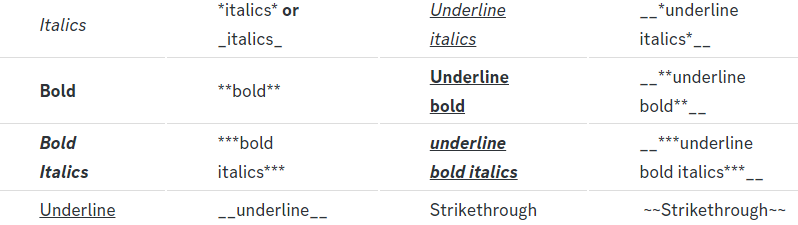
Discord Markdown Text
Below cites basic Discord Text Markdown/Formatting. Replace the text below with your own!
See this Discord Help Article for other markdown questions and combining markdowns.
<:Numbericons1:1018864164032225340> Italics (Cntrl + I)
 *Copy me for italicized text!* -> Italicized text!
 _Copy me for italicized text!_ -> Italicized text!
<:Numbericons2:1018864168041971712> Bold (Cntrl + B)
**Copy me for bold text!** -> Bolded text!
<:Numbericons3:1018864171783303208> Underline (Cntrl + U)
You must add 2 underscores on both sides of your text to get the underline text
__Copy me for underlined text!__ -> Underlined Text!
<:Numbericons4:1018864175155519538> Strikethrough (Cntrl + S)
~~Copy me for strikethrough text!~~ -> Strikethrough text!
<:Numbericons5:1018864178632605786> Spoilers & Hidden Text
||Copy me for hidden text!|| -> ||Hidden text|| (Click to reveal)
<:Numbericons6:1018864182558466058> One Lined Codeblock
You can add 3 backticks instead to get multi lined codeblock.
`Copy me for codeblock text!` -> Codeblock Text!
<:Numbericons7:1018864186727604354> Hyperlinking and Hidden Links
[Copy me with your link](yourlinkforhidelinks.com) -> Ticket Tool!
<:Numbericons8:1018864190296961159> Headers
# Largest header!
## Small header!
### Even smaller header!
-# Even a smaller header with grey text!
 scenic forum
@pseudo warren refer to the embed above
Number 2 and 6 for the image you provided
livid adder
austere forge
It's either one or the other
Do you mean it’s both? Allowed?
pseudo warren
Copy me for codeblock text! -> Codeblock Text!
pseudo warren
scenic forum
<@710769458725126155> refer to the embed above
Number 2 and 6 for the image you ...
but it appears with small characters how can i make it bigger
normal rain
Can I add text at the beginning and if so, how?
scenic forum
pseudo warren
but it appears with small characters how can i make it bigger
Combine 8 with 6
scenic forum
normal rain
Can I add text at the beginning and if so, how?
Can you elaborate what youre talking about
normal rain
scenic forum
Can you elaborate what youre talking about
like when you open a ticket there will be writing something
scenic forum
normal rain
like when you open a ticket there will be writing something
Panel config -> Ticket - Edit ticket message
normal rain
scenic forum
Panel config -> Ticket - Edit ticket message
ty
iron nightBOT
Gave +1 Rep to @scenic forum (current: #11 - 708)
normal rain
If I open a ticket, does it notify those who can answer like @ does?

 rich plinth
i need help i opened a ticket in a server after buying smthing and the seller closed it and he banned me i cant see the ticket
neat valley
neat valley
Please help me
humble sequoiaBOT
@neat valley

⚠️ You're in the wrong place
We provide support for Ticket Tool Discord bot and cannot help you with whatever issue you have.
- We don't know which Support Team you should contact to get this issue resolved, and unfortunately we won't be able to accurately tell you.
If you don't have any further questions regarding our bot Ticket Tool, please close this ticket
normal rain
If I open a ticket, does it notify those who can answer like @ does?
scenic forum
 zealous musk
The bot shows as offline, any idea why?? It’s also not working
zealous musk
The bot shows as offline, any idea why?? It’s also not working
Can you show the bot displaying offline
humble sequoiaBOT
1. Open your Panel Configs tab in your server's dashboard
2. Select the panel you want to ping your support team on
3. Open the Ticket options menu
4. Click on Edit Ticket Message
5. In the Message Content use one of the role mention syntax ({@Role Name}/{Role ID})
6. Save changes
Note: For this to work properly, Ticket Tool requires the Mention Everyone permission. Or the role must have the Allow anyone to @mention this role setting enabled
pseudo warren
on this button i want to type another message and have my own emoji, where do i find that?
 scenic forum
@normal rain refer to the embed above
scenic forum
pseudo warren
on this button i want to type another message and have my own emoji, where do i...
Panel config -> buttons -> Create ticket
pseudo warren
scenic forum
Panel config -> buttons -> Create ticket
i also want to put an image on the text after it shows , like here is an example i saw on a server.
how do i do this?


 scenic forum
pseudo warren
i also want to put an image on the text after it shows , like here is an example...
scenic forum
pseudo warren
i also want to put an image on the text after it shows , like here is an example...
At the bottom
Image url
 covert radish
How do I make create ticket dropdown?
humble sequoiaBOT
The Drop-down menu or Select Menu replaces the buttons on your panel message and uses a drop-down menu with all of your panels. To set this up, go to your Panel Configs and select your main Panel.
<:Numbericons1:1018864164032225340> Enable Select Style
First you enable Select Style. Then you add an item in the Dropdown Editor. Now you can start editing your dropdown!
<:Numbericons2:1018864168041971712> Dropdown Editor
Each line in the dropdown editor represents a line in the drop down menu on discord. You can add more "Items", by clicking on 

First you select a panel. That's the panel this option will open a ticket for.  DONT select the same panel twice. Each option should have a different Panel
After that, you can put a Display. This is the title of this option and will appear in the drop down menu. The *Description can be set right after that, which will be below the title in grey.
Additionally you can select an emoji, that will be shown in front of each option. You can either manually input the ID of an emoji or select it in the selector.
Common Issues ⚠️
- Panel doesn't send? Make sure you have a valid emoji selected
- Option doesn't show up? Check if two options have the same panel in the DropDown Editor

$dropdown
scenic forum
@covert radish refer to the embed above
 winged solstice
ive invited ticket tool to my second server, but it wont show up
 humble sequoiaBOT
Don't see your server in the dashboard?
Try using the Sync Servers button on your top center of the Dashboard page
If this doesn't work
You should relog from the dashboard, you can do this by clicking here to log out immediately, and then log back in
Note:
You need one of these 3 things to access the dashboard.
1. Server Owner (Level: 6)
2. Server Administrator (Level: 4)
3. Dashboard Role (Level: 2)
:warning: You can check your level using the </permissionlevel:1029797400174399542> command on your Discord Server
If the bot's response is:
- @User is permission level: 0 (User)
You don't have any of the 3 levels required to access the server's dashboard
 scenic forum
@winged solstice refer to the embed above
covert radish
how do I add another selection?
 humble sequoiaBOT
The Drop-down menu or Select Menu replaces the buttons on your panel message and uses a drop-down menu with all of your panels. To set this up, go to your Panel Configs and select your main Panel.
<:Numbericons1:1018864164032225340> Enable Select Style
First you enable Select Style. Then you add an item in the Dropdown Editor. Now you can start editing your dropdown!
<:Numbericons2:1018864168041971712> Dropdown Editor
Each line in the dropdown editor represents a line in the drop down menu on discord. You can add more "Items", by clicking on
First you select a panel. That's the panel this option will open a ticket for. DONT select the same panel twice. Each option should have a different Panel
After that, you can put a Display. This is the title of this option and will appear in the drop down menu. The *Description can be set right after that, which will be below the title in grey.
Additionally you can select an emoji, that will be shown in front of each option. You can either manually input the ID of an emoji or select it in the selector.
Common Issues ⚠️
- Panel doesn't send? Make sure you have a valid emoji selected
- Option doesn't show up? Check if two options have the same panel in the DropDown Editor
$dropdown
scenic forum
@covert radish refer to the embed above
 supple pollen
Hello, I need some help. Why does my bot, which doesn't have permissions to assign roles, automatically assign two roles to the customer who opened a ticket when I close it?
scenic forum
supple pollen
Hello, I need some help. Why does my bot, which doesn't have permissions to assi...
Can you run /debug on your server
And check
Panel config -> Ticket -> There you can check roles to assign or remove on ticket

 supple pollen
oh ok
supple pollen
scenic forum
Sorry to bother you, but anyone can close the ticket now.😢
 formal hornet
Can someone help me get my account unbanned in fisch
scenic forum
supple pollen
Sorry to bother you, but anyone can close the ticket now.😢
Panel config -> Buttons -> Close ticket
Configure with allowed and disabled roles and or Support team only
humble sequoiaBOT
@formal hornet
⚠️ You're in the wrong place
We provide support for Ticket Tool Discord bot and cannot help you with whatever issue you have.
- We don't know which Support Team you should contact to get this issue resolved, and unfortunately we won't be able to accurately tell you.
If you don't have any further questions regarding our bot Ticket Tool, please close this ticket
supple pollen
scenic forum
Panel config -> Buttons -> Close ticket
Configure with allowed and disabled role...
thanks man
iron nightBOT
Gave +1 Rep to @scenic forum (current: #11 - 709)
scenic forum
Please report them instead via #🎫│make-a-ticket
humble sequoiaBOT

Ticket Tool - Ticketing without clutter - The #1 Discord support bot
 harsh sinew
Not credited tikit I see 250 maximam limit
humble sequoiaBOT
━━ User's inquiry has been moved to a ticket ━━
 neon vault
Can someone help me accept a ticket
 olive stream
How do I make it so only staff can close tickets
 cinder geode
ive debugged the bot and it says it has all the neccessary permissions, why can i open a ticket
humble sequoiaBOT
━━ User's inquiry has been moved to a ticket ━━
 restive condor
olive stream
How do I make it so only staff can close tickets
restive condor
olive stream
How do I make it so only staff can close tickets
Hey there! 👋
Dashboard > Panel Configs > Buttons > Close Ticket Button
- Please enable
 Support Team Only
 dense knoll
restive condor
Hey there! 👋
``Dashboard`` > ``Panel Configs`` > ``Buttons`` > ``Close Ticket B...
dense knoll
restive condor
Hey there! 👋
``Dashboard`` > ``Panel Configs`` > ``Buttons`` > ``Close Ticket B...
i did this but with "claim ticket" and the button wont appear
i tried doing $claim and it said "claiming isnt enabled" even tho it is
@pseudo ravine
mb
 pseudo ravine
Hey there! Please don’t reply to a supports members message for support. You can send your message and someone will assist you whenever they’re available
Please refer to the embed below!
humble sequoiaBOT
Claiming allows you to change the ticket name, category and permissions. To use it you have to enable it first on your Dashboard > Panel Configs > Claiming

 Note: This is a premium feature
 visual quail
Is there a way to get a panel for ticket escalation instead of using the /escalate command?
 forest quartz
Hello, there is a problem, I can not understand, I need the ticket to be displayed in one place, and it appears in another, how to fix it?
P.S. Sorry in advance for the bad English, I used a translator.

 compact coral
Hello, with ticket tool premium can I create forms and have it sent to a channel for @Members in the server to all view without having to claim/close a “ticket”? I would rather the forms feature be used to send Member forms to a specific Introductions channel.
 knotty lynx
when i create a ticket, a regular channel is created, not a ticket . how do i fix this?
also what does this mena.
 humble sequoiaBOT
━━ User's inquiry has been moved to a ticket ━━
 full granite
i Have proof that i lost my gun devil feind in devil hunter how do i create a ticket
humble sequoiaBOT
@full granite
⚠️ You're in the wrong place
We provide support for Ticket Tool Discord bot and cannot help you with whatever issue you have.
- We don't know which Support Team you should contact to get this issue resolved, and unfortunately we won't be able to accurately tell you.
If you don't have any further questions regarding our bot Ticket Tool, please close this ticket
 deft mason
I've added the bot to my server but whenever I go to the website to make a panel, the server doesn't show up no matter how many times I refresh . What can I do to fix this ?
humble sequoiaBOT
Don't see your server in the dashboard?
Try using the Sync Servers button on your top center of the Dashboard page
If this doesn't work
You should relog from the dashboard, you can do this by clicking here to log out immediately, and then log back in
Note:
You need one of these 3 things to access the dashboard.
1. Server Owner (Level: 6)
2. Server Administrator (Level: 4)
3. Dashboard Role (Level: 2)
:warning: You can check your level using the </permissionlevel:1029797400174399542> command on your Discord Server
If the bot's response is:
- @User is permission level: 0 (User)
You don't have any of the 3 levels required to access the server's dashboard
scenic forum
@deft mason refer to the embed above
 cedar grove
Where do I go to request the following .....sorry.
https://m.imdb.com/title/tt0077000/
 humble sequoiaBOT
@cedar grove
⚠️ You're in the wrong place
We provide support for Ticket Tool Discord bot and cannot help you with whatever issue you have.
- We don't know which Support Team you should contact to get this issue resolved, and unfortunately we won't be able to accurately tell you.
If you don't have any further questions regarding our bot Ticket Tool, please close this ticket
 lime island
Ive worked with this bot before in other servers so I know how to use it, but I just added it to my new server and no matter what commands I try to use it doesnt respond? Ive tried to reset my discord a dozen times but it still isn't working, Ive tried every command and none of them are responding
 scenic forum
lime island
Ive worked with this bot before in other servers so I know how to use it, but I ...
scenic forum
lime island
Ive worked with this bot before in other servers so I know how to use it, but I ...
Its lacking the View Channel permission inside that channel
lime island
Oohhh okay
lime island
scenic forum
Its lacking the ``View Channel`` permission inside that channel
How do I let it view the channel? Or whatever. ..
scenic forum
lime island
How do I let it view the channel? Or whatever. ..
Editing the channel permission and granting the bot that permission
iron nightBOT
Gave +1 Rep to @scenic forum (current: #11 - 711)
 past siren
intergrating the bot for the first time need help finding my channel to add transcripts for tickets to be saved in
scenic forum
past siren
intergrating the bot for the first time need help finding my channel to add tran...
Panel config -> Transcript -> Select Transcript Channel
dense knoll
pseudo ravine
Hey there! Please don’t reply to a supports members message for support. You can...
I apologize
 worn steppe
I have a bot that handles ticket timers. For example, I can send -12hr in a ticket, and it posts a message saying “This ticket will be closed in 12 hours.” I also have a listener that triggers a -close command after the timer expires.
The issue is that when my bot sends -close, the ticket does not close. However, if a user sends -close, it works as expected.
Is the default -close command designed to ignore bot messages? If so, is there a recommended workaround to allow my bot to trigger ticket closures automatically?
(please @ when responding due to being on dnd)
 lapis escarp
hello
humble sequoiaBOT
Integrating an External Bot x Ticket Tool <:TicketToolGold:1073948897673748490>
Integrating Ticket Tool with an external bot allows you to customize your server's Ticket System further!
- The external bot must output the
$newor$ticketcommands with the user's ID to start a ticket. Preferably in a private channel.
Eg.
$new 12345678901234567890
-
Your ticket panel must be Command Style enabled
-
You must whitelist that bot's ID in your Dashboard ➞ Server Configs ➞ Bot section.
Otherwise Ticket Tool will not react to the command and a ticket will not be created.
- If you'd like to include a reason in the command usage, feel free to do so after the user ID.
Eg.
$new 12345678901234567890 Your reason goes here
This reason can then be shown anywhere in the Ticket Message with the{create.reason}variable
**  Note:** If you have changed Ticket Tool's default prefix (
$) please ensure to amend the prefix for the $new or $ticket commands.
Eg. If your prefix is
-, then what you're looking for the bot to use is-newor-ticket

$botintegration
scenic forum
@worn steppe refer to step 3 above
lapis escarp

for example ive renamed all of my panels. But discord still shows New Panel.

do i need to restart smth for the change to take place?
scenic forum
lapis escarp
for example ive renamed all of my panels. But discord still shows New Panel.
That means you neither resent nor updated the panel after doing the change
On the main panel config page
Either resend it via Send or update an existing panel via Update
lapis escarp
do i have to send or update whenever i make a chnage? or do what is saving for
scenic forum
lapis escarp
do i have to send or update whenever i make a chnage? or do what is saving for
When it comes to something panel related
Like panel message, panel title, multipanel and such yes
As you need to update an EXISTING message or resend it
All other settings are already automatically in place once saved
lapis escarp
thats very helpful. thank you
 ionic goblet
Soo I have a issue with the dashboard it will not show the server that has the bot in and won't let me edit anything we have tried kicking the bot from the server and readding it and nothing and I refreshed twice to try to see it and I can't
humble sequoiaBOT
Don't see your server in the dashboard?
Try using the Sync Servers button on your top center of the Dashboard page
If this doesn't work
You should relog from the dashboard, you can do this by clicking here to log out immediately, and then log back in
Note:
You need one of these 3 things to access the dashboard.
1. Server Owner (Level: 6)
2. Server Administrator (Level: 4)
3. Dashboard Role (Level: 2)
:warning: You can check your level using the </permissionlevel:1029797400174399542> command on your Discord Server
If the bot's response is:
- @User is permission level: 0 (User)
You don't have any of the 3 levels required to access the server's dashboard
scenic forum
@ionic goblet refer to the embed above
ionic goblet
Omg tysm 😩
lapis escarp
hey again, is there any CRM option that i can enable? Trying to send follow up message to users after tickets have been closed. Ex. User requests feature -> 2 weeks later i want to notify that user the feature has been released. Do you guys have something that can help this?
scenic forum
lapis escarp
hey again, is there any CRM option that i can enable? Trying to send follow up m...
CRM?
You can enable Two step close
Which means when you want to close a ticket you can have a "are you sure you want to close this ticket?" question that you can customize
Ticket tool has automation but its limited to 7 days currently which could be used for this i think
 zinc jolt
help ! i cant find my server inside the dashboard
humble sequoiaBOT
Don't see your server in the dashboard?
Try using the Sync Servers button on your top center of the Dashboard page
If this doesn't work
You should relog from the dashboard, you can do this by clicking here to log out immediately, and then log back in
Note:
You need one of these 3 things to access the dashboard.
1. Server Owner (Level: 6)
2. Server Administrator (Level: 4)
3. Dashboard Role (Level: 2)
:warning: You can check your level using the </permissionlevel:1029797400174399542> command on your Discord Server
If the bot's response is:
- @User is permission level: 0 (User)
You don't have any of the 3 levels required to access the server's dashboard
scenic forum
@zinc jolt refer to the embed above
lapis escarp
customer relationship management
scenic forum
Not sure what that means im afraid
iron nightBOT
Gave +1 Rep to @solar kernel (current: #439 - 1)
lapis escarp
thanks @scenic forum
iron nightBOT
Gave +1 Rep to @scenic forum (current: #11 - 712)
scenic forum
zinc jolt
thanks <@1402849175657254914> !
Thats the wrong happy
lapis escarp
whats this lol
zinc jolt
oh....
scenic forum
lapis escarp
whats this lol
A reputation system
zinc jolt
thanks @scenic forum !!
iron nightBOT
Gave +1 Rep to @scenic forum (current: #11 - 713)
lapis escarp
do you get something is you are top in reputation
thanks @scenic forum
thank you @scenic forum
scenic forum
Nope
its just an server internal leaderboard which shows how helpful someone is generally
There is a cooldown in place to prevent spamming and abusing it
scenic forum
Please only rep once per help inquiry
To keep everything fair
ionic goblet
Thank @scenic forum
iron nightBOT
Gave +1 Rep to @scenic forum (current: #11 - 714)
 spice summit
Has anyone ever run into this error when running the /remove command? It ran perfectly 15 minutes before this.

 sonic hemlock
turk destekçi varmı?
ticket açtıgımda destek ekibimin rolünü etiketlesin istiyorum
 grave shore
Hello there, I just invited the bot to my Server an Need help Setting it up, any help is appreciated, I’m completely lost haha
 ashen peak
grave shore
Hello there, I just invited the bot to my Server an Need help Setting it up, any...
ashen peak
grave shore
Hello there, I just invited the bot to my Server an Need help Setting it up, any...
yo i could help a bit
grave shore
ashen peak
yo i could help a bit
That would be awesome
ashen peak
aight so to make a message like this do /setup

 grave shore
Ok, now I gotta do the roles I see
ashen peak
Btw the roles u select will be in every ticket that appears
grave shore
That’s good, so only select moderator I guess
ashen peak
fr
 ashen peak
Idk
grave shore
😭😭
ashen peak
Dw there's ppl in this server who know way more than me
iron nightBOT
Gave +1 Rep to @ashen peak (current: #439 - 1)
ashen peak
np tho
 spice summit
Has anyone ever run into this error when running the /remove command? It ran per...
spice summit
spice summit
Has anyone ever run into this error when running the /remove command? It ran per...
bumping
 storm abyss
 lusty cove
Keeps saying this no matter what i change (has all perms).
 spice summit
lusty cove
Keeps saying this no matter what i change (has all perms).
spice summit
lusty cove
Keeps saying this no matter what i change (has all perms).
Seems similar to what I'm getting
 lusty cove
spice summit
Seems similar to what I'm getting
lusty cove
spice summit
Seems similar to what I'm getting
That ones just saying your massage is too long i think lmao
spice summit
lusty cove
That ones just saying your massage is too long i think lmao
Not sure how, it's just a simple remove user command
lusty cove
Weird
 viscid axle
lusty cove
Keeps saying this no matter what i change (has all perms).
viscid axle
lusty cove
Keeps saying this no matter what i change (has all perms).
U need to give bot administrator
lusty cove
viscid axle
U need to give bot administrator
thanks bro, it started doing that out of nowhere lmao
 stiff turret
Can I find my ticket
I made a ticket in a server and i think they kicked me, so can I find it's transcript
scenic forum
stiff turret
I made a ticket in a server and i think they kicked me, so can I find it's trans...
If the bot didnt dm you the transcript then no
stiff turret
scenic forum
If the bot didnt dm you the transcript then no
I dnt know why it didn't dm me
Any reason?
scenic forum
stiff turret
I dnt know why it didn't dm me
Servers can decide themself if they want that feature or not
stiff turret
Ooooo
grave shore
Can the bot do Selfroles?
scenic forum
grave shore
Can the bot do Selfroles?
Nope
grave shore
scenic forum
Nope
Any bot you can suggest to use
scenic forum
grave shore
Any bot you can suggest to use
YAGPDB
grave shore
Is it easy to set up? That’s like my main problem haha
scenic forum
grave shore
Is it easy to set up? That’s like my main problem haha
Not sure how newbie friendly it is since ive been using it for years and it feels easy to me personally
Its simple the best id say when it comes to selfroles aka reaction roles
iron nightBOT
Gave +1 Rep to @scenic forum (current: #11 - 716)
grave shore
scenic forum
Not sure how newbie friendly it is since ive been using it for years and it feel...
Yeah to complicated
scenic forum
grave shore
Yeah to complicated
Dont think youll find something much easier to be honest
scenic forum
Youll see
You give up functionality and customisability for simplicity
grave shore
Well I just want it, if it works it works
 hallow rapids
where do i check the transcripts of previous tickets
they are not mine i was in a servers ticket
scenic forum
hallow rapids
where do i check the transcripts of previous tickets
If you havent been dm'd the ticket transcript you cant see your previous tickets transcripts
hallow rapids
scenic forum
If you havent been dm'd the ticket transcript you cant see your previous tickets...
bruh i got scammed and i wanted to ss the the chats
scenic forum
Nothing we can do about it im afraid
 sharp sandal
Hellooo, i want to know what should i do when someone created a ticket you can trigger a autoresponder
austere forge
You will need a premium subscription for auto response
Alternatively, you can edit the message panel
austere forge
In English ?
 unkempt fossil
@austere forge hello can i ask? why is my panel not showing any buttons? i chose the dropdown option and it's not working
 scenic forum
unkempt fossil
<@225349654974431232> hello can i ask? why is my panel not showing any buttons? ...
scenic forum
unkempt fossil
<@225349654974431232> hello can i ask? why is my panel not showing any buttons? ...
Dont ping staff
Show me a screenshot of
Panel config -> Dropdown Style
unkempt fossil
scenic forum
Dont ping staff
Show me a screenshot of
Panel config -> Dropdown Style
 scenic forum
unkempt fossil
scenic forum
unkempt fossil
 unkempt fossil
scenic forum
unkempt fossil
scenic forum
oh i see, i didn't notice that. thank you
iron nightBOT
Gave +1 Rep to @scenic forum (current: #11 - 717)
 supple roost
Hiya, So ive used tickets on my other dcs but for some reason i cant get the bot to appear/link to the website to manage servers. Even tho the bot has admin idk what it could be
humble sequoiaBOT
Don't see your server in the dashboard?
Try using the Sync Servers button on your top center of the Dashboard page
If this doesn't work
You should relog from the dashboard, you can do this by clicking here to log out immediately, and then log back in
Note:
You need one of these 3 things to access the dashboard.
1. Server Owner (Level: 6)
2. Server Administrator (Level: 4)
3. Dashboard Role (Level: 2)
:warning: You can check your level using the </permissionlevel:1029797400174399542> command on your Discord Server
If the bot's response is:
- @User is permission level: 0 (User)
You don't have any of the 3 levels required to access the server's dashboard
scenic forum
@supple roost refer to the embed above
 tribal sedge
Ola preciso de ajuda
 royal gale
Can anyone help I have a problem

 lament prairie
royal gale
Can anyone help I have a problem
lament prairie
royal gale
Can anyone help I have a problem
hey there! could you use /debug command in the same channel please
lament prairie
royal gale
In what channel?
nvm, the bot is missing Send Messages permissions in that channel (support-ticket)
iron nightBOT
Gave +1 Rep to @lament prairie (current: #43 - 95)
lament prairie
you're welcome, glad to help 
 vestal sapphire
The bot don't want to verify me
 old arrow
what do I do if the bot command or message says the application did not respond ?
stark runeBOT
1. Invite Ticket Tool to your server
First you will want to invite the bot to your server. Once the bot is in your server, you can manage your server in the dashboard.
2. Create a Panel
To create a panel we are going to need to head over to the panel configs on the dashboard.
Once at the dashboard we will need to click Create Panel.
Enter a panel name (Fill in any optional settings you want).
Click Create Panel and your ready to get started with configuring your panel.
An example of a creating a panel is shown below.
3. Send the Panel to a Channel
Once you've created a panel on the dashboard you will need to send it to a channel using send on the dashboard.
Select the channel you want your panel to be created in and click send.
For other questions checkout $help faq.
An example of a sending a panel is shown below.
Having a Problem Sending the Panel?
Do $debug in a channel with Ticket Tool and make sure it has all the necessary Discord permissions.
austere forge
 gleaming crater
I want to do ticket how?
gleaming crater
I want to do ticket how?
Refer to the embed above!
austere forge
old arrow
what do I do if the bot command or message says the *application did not respond...
This occurs when the bot does not have sufficient permissions. Please run the /debug command instead
 distant crystal
Ik wil graag een coördinator bereiken.
Iemand kan graag mijn helpen?
old arrow
Tysm @austere forge !
 pliant acorn
how add someone to ticket with ping ?
humble sequoiaBOT
━━ User's inquiry has been moved to a ticket ━━
 glossy mantle
need to cancel my membership and get my refund can anyone help
 stark runeBOT
gleaming crater
<@818750612204290089>
stark runeBOT
gleaming crater
<@818750612204290089>
<:emote:1362933269762543708> Available commands
Use
/help <command>to get more information
help
info
list
ping
guildmembercount
searchdocumentation
report
warns
setup
frsetup
desetup
essetup
 eternal raptor
gleaming crater
what the problem
eternal raptor
gleaming crater
what the problem
The error message states that Ticket Tool does not have the permission to view or send messages into the channel you selected.
 tulip needle
Eu tenho um cargo em meu servidor que e para as pessoas atenderem os tickets, mas eu queria saber se tem como, no momento que criarem um ticket, o bot marcasse aquele cargo
 random yew
Why when I try and do the commands don’t it work just says this application hasn’t responded
 dim light
.
 half folio
How do I make a support ticket
 radiant valve
random yew
Why when I try and do the commands don’t it work just says this application hasn...
radiant valve
random yew
Why when I try and do the commands don’t it work just says this application hasn...
Can you see if it responds to /debug
 fresh shuttle
how to set the ticket bot to able to access channels
scenic forum
fresh shuttle
how to set the ticket bot to able to access channels
By editing the channel permissions and granting the bot that permission
fresh shuttle
scenic forum
By editing the channel permissions and granting the bot that permission
in the right click menu or the other one and where?
scenic forum
fresh shuttle
in the right click menu or the other one and where?
yes the right click menu
fresh shuttle
scenic forum
yes the right click menu
alr and which button
scenic forum
fresh shuttle
alr and which button
fresh shuttle
scenic forum
https://cdn.discordapp.com/attachments/779107029142601729/1411380848087011368/20...
thanks for the video but now what does "Channel isn't a ticket" mean?
iron nightBOT
Gave +1 Rep to @scenic forum (current: #11 - 720)
scenic forum
fresh shuttle
thanks for the video but now what does "Channel isn't a ticket" mean?
That your channel isnt a ticket
fresh shuttle
scenic forum
That your channel isnt a ticket
oh ok then how to make your channel to a ticket?
scenic forum
fresh shuttle
oh ok then how to make your channel to a ticket?
You cannot make a channel a ticket
Only channels created by @pseudo glen are considered a ticket
Refer to the embed below
stark runeBOT
1. Invite Ticket Tool to your server
First you will want to invite the bot to your server. Once the bot is in your server, you can manage your server in the dashboard.
2. Create a Panel
To create a panel we are going to need to head over to the panel configs on the dashboard.
Once at the dashboard we will need to click Create Panel.
Enter a panel name (Fill in any optional settings you want).
Click Create Panel and your ready to get started with configuring your panel.
An example of a creating a panel is shown below.
3. Send the Panel to a Channel
Once you've created a panel on the dashboard you will need to send it to a channel using send on the dashboard.
Select the channel you want your panel to be created in and click send.
For other questions checkout $help faq.
An example of a sending a panel is shown below.
Having a Problem Sending the Panel?
Do $debug in a channel with Ticket Tool and make sure it has all the necessary Discord permissions.
fresh shuttle
alr now how to enable claiming
humble sequoiaBOT
Claiming allows you to change the ticket name, category and permissions. To use it you have to enable it first on your Dashboard > Panel Configs > Claiming
Note: This is a premium feature
scenic forum
@fresh shuttle refer to the embed above
fresh shuttle
how to get in the claiming thing in the "free" version
scenic forum
fresh shuttle
how to get in the claiming thing in the "free" version
You dont
fresh shuttle
k now how to do the premium claiming thing in the free version
humble sequoiaBOT
⚠️ Please read the messages previously sent by our team ⚠️
 devout nest
Anyone know how to make it like this?
 humble sequoiaBOT
For more convenient use of multipanels, you can now combine panels on the dashboard. This will allow you to directly send the multipanel from the dashboard or via the $panel ID command.
Where can I find this?
You can find this setting on the Dashboard -> Panel Configs -> Panel -> Attached Panels
Note: if you're attaching all the panels to a panel called English, don't include English in the attached panel's box (If you do this, it will create a duplicate)
This will put all buttons from all of your panels on one message. The message is the panel message from the panel you're combining these panels in.
 scenic forum
@devout nest refer to the embed above
pseudo ravine
devout nest
Anyone know how to make it like this?
Please stay in your ticket
 empty moss
Hey all!
Got a simple one, I think -
Sometimes when folks on our team rename a ticket, they forget to include the tickets number - is it possible to either
- force the number to stay in the ticket name, when the name gets changed
- make the first message in the ticket include what the ticket number is? so if it does get removed/deleted from the title, we can still identify it by its name?
I looked in the docs and don't see anything specific to it, so thought I'd ask here and get some thoughts. Appreciate the help!
scenic forum
empty moss
Hey all!
Got a simple one, I think -
Sometimes when folks on our team rename a...
Hey
- Is not possible
- You can use the variable
{count}in your ticket message. That will use the ticket number
empty moss
Perfect! Appreciate the help!
fresh shuttle
can you show me how to do the premium claiming thing in the free version in a video
scenic forum
fresh shuttle
can you show me how to do the premium claiming thing in the free version in a vi...

 latent pagoda
?
humble sequoiaBOT
@latent pagoda
⚠️ You're in the wrong place
We provide support for Ticket Tool Discord bot and cannot help you with whatever issue you have.
- We don't know which Support Team you should contact to get this issue resolved, and unfortunately we won't be able to accurately tell you.
If you don't have any further questions regarding our bot Ticket Tool, please close this ticket
devout nest
Anyone can show me a video how to do this
 scenic forum
devout nest
Anyone can show me a video how to do this
scenic forum
devout nest
Anyone can show me a video how to do this
Please stay in your ticket
scenic forum
devout nest
Can u help me the person in the ticket is offline
No i cant
Since you have opened a ticket support outside of it is no longer allowed
devout nest
oh
scenic forum
devout nest
oh
Please get out of my DM's
Support is only allowed on the server
Be patient in your ticket
If someone is available they will assist you
scenic forum
You will regardless need to be patient
 eager iron
Can someone help me bc i wanna do like when a ticket support claim tbat ticke noone cant type in that ticket excpet ticket opener
humble sequoiaBOT
━━ User's inquiry has been moved to a ticket ━━
 vernal geode
What’s going on ?

 tribal cedar
vernal geode
What’s going on ?
tribal cedar
vernal geode
What’s going on ?
Your server has hit 500 channels?
vernal geode
Mane idk
tribal cedar
Discord limits the amount of channels per discord
vernal geode
How do I delete some servers then
tribal cedar
Some channels? You right click a channel and go to delete to remove it...
 tribal cedar
Do you have manage channels perm?
vernal geode
Is that something I have to turn on? Or you asking me do I have that option on this screenshot?
pseudo ravine
Are you a staff member of that server? Or just a regular member?
vernal geode
Regular
pseudo ravine
Then you'll need to be patient and wait until the staff of that server delete some tickets
 feral turtle
 vernal geode
pseudo ravine
Then you'll need to be patient and wait until the staff of that server delete so...
vernal geode
pseudo ravine
Then you'll need to be patient and wait until the staff of that server delete so...
Ok so it’s a problem
On there end and not mine ?
tribal cedar
vernal geode
Ok so it’s a problem
On there end and not mine ?
Yes a staff member of that specific server needs to remove some channels
tribal cedar
@noble cairn What do you need info on?
tribal cedar
On the top of the website tickettool.xyz click bot invite
 noble cairn
Ty
tribal cedar
Anytime
 clear vale
does anyone know how i can make it to where it pings the support role so they know a member made a ticket?
humble sequoiaBOT
Within all the messages the bot sends (both embeds and text) you can mention either channels, roles, or even users, these mentions will only send a notification to the user if they are used within a text field, e.g: a role mentioned in an embed won't ping at all the users who have that role.
For mentioning a role you can use one out of three options:
{@Role Name} ➞ Which is Case Sensitive.
{RoleID} ➞ Replace RoleId with the Id of the role you are trying to ping.
<@&RoleID> ➞ Discord's native syntax to ping roles.
<#ChannelID> ➞ Mention a channel by its ID.
<@UserID> ➞ Mention a user by its ID.
tribal cedar
@clear vale please read the above. You need to add a text message to the ticket that pings the role
 dreamy vine
how to resolve ban
clear vale
tribal cedar
<@792502571327029268> please read the above. You need to add a text message to t...
im confused, do i copy one of those and if so where do I type that in
tribal cedar
Well you know how you have the embed message for the ticket message?
You add a text message ontop of that embed
Thats where you type the code desired
{RoleID} is prolly best
clear vale
tribal cedar
You add a text message ontop of that embed
i have to open a ticket for it first
tribal cedar
Why?
clear vale
oh i was asking
tribal cedar
Oh no...
Do you have admin or manage server in the server?
If so go to tickettool.xyz and login and click panel configs then go ticket -> ticket message

Do you not know how to find the role id?
You can use $id
$id role
tribal cedar
YOu get it?
clear vale
yeah
tribal cedar
Good 🙂 Anytime
clear vale
tribal cedar
$id role
and i just copy this n change role, with the role id?
tribal cedar
Yea if you have problems come back and ping me
clear vale
okay thank you
tribal cedar
Anytime
 clear vale
do i keep $id?
tribal cedar
Np 🙂
tribal cedar
@proper ibex I am unable to do that as Im not aware of which ones are good or bad tbh
 proper ibex
Thanks for reaching out for me then, I'll pick one and try it out
tribal cedar
Nps good luck
 shrewd thicket
How can I work on the dashboard if I am not the owner, and I have the dashboard role?
 tame finch
@humble sequoia
 stark laurel
can anyone give insights on, why my server is not showing up in the dashboard?
humble sequoiaBOT
Don't see your server in the dashboard?
Try using the Sync Servers button on your top center of the Dashboard page
If this doesn't work
You should relog from the dashboard, you can do this by clicking here to log out immediately, and then log back in
Note:
You need one of these 3 things to access the dashboard.
1. Server Owner (Level: 6)
2. Server Administrator (Level: 4)
3. Dashboard Role (Level: 2)
:warning: You can check your level using the </permissionlevel:1029797400174399542> command on your Discord Server
If the bot's response is:
- @User is permission level: 0 (User)
You don't have any of the 3 levels required to access the server's dashboard
scenic forum
@stark laurel refer to the embed above
stark laurel
tq
 mighty path
Please who has encountered this issue. I am not able to start task as I did reserve task yesterday , but the videos were not opening, I got caught up with work and didn't release the task. Now the Easy Label Room is Disabled I can't reserve task on Standard Label room as it gives me a red flag that I already have task reserved.. which I can't see on my dashboard
 humble sequoiaBOT
@mighty path
⚠️ You're in the wrong place
We provide support for Ticket Tool Discord bot and cannot help you with whatever issue you have.
- We don't know which Support Team you should contact to get this issue resolved, and unfortunately we won't be able to accurately tell you.
If you don't have any further questions regarding our bot Ticket Tool, please close this ticket
 limpid escarp
how do i let other staff members see the ticket tool dashboard
humble sequoiaBOT
━━ User's inquiry has been moved to a ticket ━━
 bitter egret
I set everything up correctly and exactly the same way I did with my old ticket panel on another server a few days ago.
But however on the server I’m currently working on, the panel won’t send. TicketTool says the panel was "successfully sent to the channel" I selected, but when I check the channel, there’s no message there.
I’ve double checked the settings and permissions, but I can’t figure out what’s wrong. Any help would be appreciated.
scenic forum
bitter egret
I set everything up correctly and exactly the same way I did with my old ticket ...
Do you receive any error ?
bitter egret
scenic forum
Do you receive any error ?
its not opening a ticket its sending the panel to the channel
it says succesfully sent
but when i check the channel theres no message
scenic forum
bitter egret
its not opening a ticket its sending the panel to the channel
Use /debug inside the channel you want the message in
scenic forum
Thats the same
bitter egret
 bitter egret
ill send it
bitter egret
bitter egret
is it bad i sent this can people use this to mess with my seerver
scenic forum
No
bitter egret
okay how do i check my panel id
scenic forum
On your dashboard
The number infront of your panels name at the top
bitter egret
im looking for it
scenic forum
bitter egret
im looking for it
 scenic forum
Use the following command inside the channel you want the panel in
$panel 2
scenic forum
Can you show me a screenshot of your servers audit logs
bitter egret
i did /panel panels: 2 as well and it said this

 scenic forum
bitter egret
i did /panel panels: 2 as well and it said this
scenic forum
bitter egret
i did /panel panels: 2 as well and it said this
Show me a screenshot of this page
Panel config -> Buttons -> Create ticket
scenic forum
bitter egret
do you want me to click edit button
yes
I want a screenshot of the create ticket page
bitter egret
 scenic forum
That does not look like a valid emoji
What emoji are you trying to use?
scenic forum
bitter egret
wait perhaps its deleted
Youre not using the correct format either
bitter egret
really
bitter egret
alr
scenic forum
For example
turns into !PabloTiphat
when i use the slash infront
scenic forum
Should work once thats fixed
bitter egret
uhhh so the emojis dont havbe the id when i do that \ thing
here ill just do normal emojis
scenic forum
Are you using discords non custom emotes?
scenic forum
Show me in this channel
bitter egret
wdym this server doesnt allow external emojis
scenic forum
Ah i forgot
Show me in my dms
bitter egret
alr
scenic forum
Initial request resolved
bitter egret
scenic forum
Initial request resolved
alr well tysm man i hope you have a great day
 novel raven
 rich depot
how to raise a ticket?
rich depot
how to raise a ticket?
 flint dome
does anyone know how i can blacklist a role from opening tickets?
humble sequoiaBOT
Any role you assign as a blacklisted role won't be able to use commands or buttons.
Selecting a blacklisted role
Go to your Dashboard ➞ Server Configs. There you will find the option to select blacklisted roles.
Note: Don't forget to save.
 austere forge
flint dome
does anyone know how i can blacklist a role from opening tickets?
austere forge
flint dome
does anyone know how i can blacklist a role from opening tickets?
Refer to the embed above!
flint dome
austere forge
Refer to the embed above!
okay thank you
iron nightBOT
Gave +1 Rep to @austere forge (current: #4 - 1279)
 quiet hill
Hello!
I have a quick question.
I've set up my server for mention add and even thought the permission is disabled for people to add people into the ticket by mentioning them, they can still add them by mentioning.
this the setting i mean.

Normal customers can tag staff (who don't deal with tickets) and it auto adds them.
austere forge
Ensure you change the settings in the correct panel
quiet hill
None of the panels have this enabled, its auto disabled by default.
austere forge
quiet hill
None of the panels have this enabled, its auto disabled by default.
Please #🎫│make-a-ticket
 paper wraith
 humble sequoiaBOT
This error indicates you have selected an invalid emoji, i.e. an emoji the bot isn't capable of using, in a button field
Which Emoji?
This depends upon which action the error is appearing, the most common cases are the Create Ticket button or one of your Dropdown emojis. You can visit your Button's List to find all available buttons and find the conflicting one by yourself.
Why doesn't the bot accept it as valid?
- You selected an emoji that doesn't exist anymore, i.e. that has been deleted
- You wrote text there, instead of an emoji (or in addition to an emoji)
- You entered a code for a custom emoji from a server that the bot is not a member of
- You entered a custom emoji code incorrectly
- You're on iPhone and entered an emoji using the phone's emoji pad (use the emoji selector in the website instead)
 scenic forum
@paper wraith refer to the embed above
 grizzled gull
how can you get a code to redeem for the ticket tool bot?
scenic forum
grizzled gull
how can you get a code to redeem for the ticket tool bot?
You cant unless you buy a sub via crypto
grizzled gull
can u use the free trial to try the premium features?
scenic forum
grizzled gull
can u use the free trial to try the premium features?
yes
grizzled gull
bcs im trying to use the " time schedule" but it doesnt work
scenic forum
More info would be appreciated
grizzled gull
In the menu, there is a section called Limits.
There you can set a time schedule that only allows tickets to be created during specific hours.
but it doesnt work for me
scenic forum
What "doesnt work"
grizzled gull
too "turn on" the schedule
scenic forum
Press  at the top left
grizzled gull
ive tried that too
scenic forum
You sure you redeemed the trial?
 scenic forum
And you sure you pressed the button?
grizzled gull
yes.
scenic forum
What does the "premium" show at the top left
grizzled gull
active
scenic forum
Can you show not being able to turn it on?
scenic forum
 serene salmon
I'm trying to create a take it and they don't allowed me to
serene salmon
I'm trying to create a take it and they don't allowed me to
Are you staff on the server you need help on?
scenic forum
serene salmon
No
Then we arent able to assist you
You need to reach out to their staff as they have setup their ticket system
serene salmon
Oh sorry for bothering then
 eager ocean
Why doesn’t it sync my 2 new servers to the dashboard
humble sequoiaBOT
Don't see your server in the dashboard?
Try using the Sync Servers button on your top center of the Dashboard page
If this doesn't work
You should relog from the dashboard, you can do this by clicking here to log out immediately, and then log back in
Note:
You need one of these 3 things to access the dashboard.
1. Server Owner (Level: 6)
2. Server Administrator (Level: 4)
3. Dashboard Role (Level: 2)
:warning: You can check your level using the </permissionlevel:1029797400174399542> command on your Discord Server
If the bot's response is:
- @User is permission level: 0 (User)
You don't have any of the 3 levels required to access the server's dashboard
scenic forum
@eager ocean refer to the embed above
eager ocean
scenic forum
<@1373063081424584824> refer to the embed above
Thank you
iron nightBOT
Gave +1 Rep to @scenic forum (current: #11 - 722)
humble sequoiaBOT
Don't see your server in the dashboard?
Try using the Sync Servers button on your top center of the Dashboard page
If this doesn't work
You should relog from the dashboard, you can do this by clicking here to log out immediately, and then log back in
Note:
You need one of these 3 things to access the dashboard.
1. Server Owner (Level: 6)
2. Server Administrator (Level: 4)
3. Dashboard Role (Level: 2)
:warning: You can check your level using the </permissionlevel:1029797400174399542> command on your Discord Server
If the bot's response is:
- @User is permission level: 0 (User)
You don't have any of the 3 levels required to access the server's dashboard
 scenic plinth
@wise forge ^
 wise forge
o
it says
woah too fast something something
woops, too fast try again in a few seconds
@scenic plinth
oh mb
scenic plinth
What are you trying to do when it tells you this?
wise forge
what u mena
 upper river
Hey I just joined here I need some help with something
novel raven
wise forge
what u mena
She is asking you what you were doing to have this message come back to you.
wise forge
oh
i didnt do anything i just clicked it
thats not the server btw
theres another one i want the bot in
 keen verge
does anyone know how can i setup something like this ?, when i try on the website it only lets me pick the panel for 1, not for the rest

 novel raven
wise forge
i didnt do anything i just clicked it
novel raven
wise forge
i didnt do anything i just clicked it
So the thing you were doing is clicking something, that is doing something...
Try slow down instead of rushing to things.
- Have you tried re-syncing using the button?
- Have you tried to log out, clear your cache & cookies?
- Are you the server owner or have a role with the
Administratorperm?
wise forge
novel raven
So the thing you were doing is clicking something, that is doing something...
Tr...
yes i am the owner, i dont get what you mean by resyncing and i havent logged out nor cleared cache and cookies
logging out worked
thanks man and i didnt mean to come off rude
i was lowkey just pissed bout smth
novel raven
keen verge
does anyone know how can i setup something like this ?, when i try on the websit...
To add additional panels, head to the Ticket Tool dashboard, click manage on your server, head to "Panel Configs" -> Panel (under Panel Settings) -> Additional Panels.
novel raven
wise forge
i was lowkey just pissed bout smth
It's all good 😄 glad we could solve your issue.
wise forge
thank u 🖤🖤
keen verge
novel raven
To add additional panels, head to the Ticket Tool dashboard, click manage on you...
no but how do i make it like this for just one panel
 novel raven
keen verge
no but how do i make it like this for just one panel
novel raven
keen verge
no but how do i make it like this for just one panel
Each one you select must have its own panel, you can create panels at the top of the page by clicking the + icon button.
So each selection must have its own panel, such as "Reportez" must have its own panel.
 weary scroll
Eu não consigo colocar o meu
keen verge
novel raven
So each selection must have its own panel, such as "Reportez" must have its own ...
but will it be w the same message as it shows in the pic?
wise forge
tuxmay whats the variable for user.avatar
novel raven
keen verge
but will it be w the same message as it shows in the pic?
You can choose which panel is shown, the additional panels are just so you can customise what users will see when they have opened the ticket.
novel raven
wise forge
tuxmay whats the variable for user.avatar
{user.icon}
You can find all variables available on Ticket Tool here: https://docs.tickettool.xyz/dashboard/panel-configs/variables
wise forge
thank u
keen verge
novel raven
You can choose which panel is shown, the additional panels are just so you can c...
thank u g love
iron nightBOT
Gave +1 Rep to @novel raven (current: #256 - 2)
 pallid tree
What do I do about this?
 novel raven
pallid tree
What do I do about this?
novel raven
pallid tree
What do I do about this?
Each category is limited to 50 channels, the error is correct - you'll need to choose another category for the ticket channel to go to (that has fewer than 45 channels) - or delete some channels in that category.
pallid tree
I don't really know how to do this.
novel raven
pallid tree
I don't really know how to do this.
Ticket Tools dashboard, click manage on your server, head to panel configs -> Category
pallid tree
Ok
pseudo ravine
pallid tree
What do I do about this?
(Sorry to interrupt)
Since you're not a staff member of that server, there's nothing you can do besides wait until the staff of that server delete some tickets
pallid tree
Ah ok
novel raven
pseudo ravine
(Sorry to interrupt)
Since you're not a staff member of that server, there's not...
Aah, I was under the impression he was able to manage the bot 😂
 solar kelp
im trying to manage tickets in a server and i can only see 8 servers , how do i see more servers
 humble sequoiaBOT
━━ User's inquiry has been moved to a ticket ━━
 hushed wharf
@humble sequoia
 calm apex
How do i make it so...
support roles can only close tickets
role requirement to make tickets
 oblique tendon
Hello, I'm looking for help with a problem and need assistance or advice. Who can I talk to?
 viral oyster
Hello sir when I put my trade I am not able to make any trade because buy or sell option is disabled in my giveaway account of 10k and my account is showing contest why?
humble sequoiaBOT
@viral oyster
⚠️ You're in the wrong place
We provide support for Ticket Tool Discord bot and cannot help you with whatever issue you have.
- We don't know which Support Team you should contact to get this issue resolved, and unfortunately we won't be able to accurately tell you.
If you don't have any further questions regarding our bot Ticket Tool, please close this ticket
calm apex
radiant valve
oblique tendon
Hello, I'm looking for help with a problem and need assistance or advice. Who ca...
This chat or #🎫│make-a-ticket
calm apex
 burnt vector
 pine sentinel
This happens every time I try to use any command.
 scenic forum
pine sentinel
This happens every time I try to use any command.
scenic forum
pine sentinel
This happens every time I try to use any command.
Use /debug on your server
scenic forum
pine sentinel
I tried already
use it again
pine sentinel
pine sentinel
Same problema
Problem*
pine sentinel
scenic forum
use it again
If You say buddy
scenic forum
pine sentinel
If You say buddy
Dont "buddy" me please
 scenic forum
pine sentinel
Someone have another solution?
scenic forum
pine sentinel
Someone have another solution?
Its missing absolutely every permission inside that channel
 pine sentinel
Let me see If you're Correct
scenic forum
pine sentinel
Let me see If you're Correct
I am correct. I can see the debug logs
 turbid ibex
Can someone help me?
humble sequoiaBOT
Hello, we would love to help you, but if you don't tell us what you need help with we can't help you :(
turbid ibex
I want to resolve a ban.
humble sequoiaBOT
@turbid ibex
⚠️ You're in the wrong place
We provide support for Ticket Tool Discord bot and cannot help you with whatever issue you have.
- We don't know which Support Team you should contact to get this issue resolved, and unfortunately we won't be able to accurately tell you.
If you don't have any further questions regarding our bot Ticket Tool, please close this ticket
 vocal perch
Does anyone know if there is a document or guide for ticket tool?
 grave basin
how do I fix the server icon showing as a link instead of the image (Image as the message)

 scenic forum
grave basin
how do I fix the server icon showing as a link instead of the image (Image as th...
scenic forum
grave basin
how do I fix the server icon showing as a link instead of the image (Image as th...
It needs to be used in the embed builder in any media field
grave basin
Thank you
radiant valve
vocal perch
Does anyone know if there is a document or guide for ticket tool?

Ticketing without Clutter
vocal perch
radiant valve
https://docs.tickettool.xyz/
pretty helpful- thank you
iron nightBOT
Gave +1 Rep to @radiant valve (current: #440 - 1)
humble sequoiaBOT
Don't see your server in the dashboard?
Try using the Sync Servers button on your top center of the Dashboard page
If this doesn't work
You should relog from the dashboard, you can do this by clicking here to log out immediately, and then log back in
Note:
You need one of these 3 things to access the dashboard.
1. Server Owner (Level: 6)
2. Server Administrator (Level: 4)
3. Dashboard Role (Level: 2)
:warning: You can check your level using the </permissionlevel:1029797400174399542> command on your Discord Server
If the bot's response is:
- @User is permission level: 0 (User)
You don't have any of the 3 levels required to access the server's dashboard
scenic forum
@slim pike refer to the embed above
 delicate hemlock
Trying to change the opening text to a ticket
scenic forum
delicate hemlock
Trying to change the opening text to a ticket
You mean of a ticket?
delicate hemlock
scenic forum
You mean of a ticket?
Yes, of a ticket
scenic forum
delicate hemlock
Yes, of a ticket
Panel config -> ticket -> edit ticket message
delicate hemlock
scenic forum
Panel config -> ticket -> edit ticket message
Do I need to be premium for that?
scenic forum
delicate hemlock
Do I need to be premium for that?
You can edit all click able fields.
The non click able darker fields are premium
delicate hemlock
scenic forum
You can edit all click able fields.
The non click able darker fields are premium
I don't see the Edit Ticket Message on there
 scenic forum
delicate hemlock
I don't see the Edit Ticket Message on there
scenic forum
delicate hemlock
I don't see the Edit Ticket Message on there
"panel config" refers to the dashboard
Which is generally more detailed and has more options than the menu you're using
delicate hemlock
scenic forum
Which is generally more detailed and has more options than the menu you're using
Mhm... Could you kindly screenshot me how I access this dashboard? I can't seem to get it through commands
humble sequoiaBOT
Ticket Tool - Ticketing without clutter - The #1 Discord support bot
scenic forum
delicate hemlock
Mhm... Could you kindly screenshot me how I access this dashboard? I can't seem ...
Use the link above
scenic forum
delicate hemlock
thanks @scenic forum
iron nightBOT
Gave +1 Rep to @scenic forum (current: #11 - 724)
 somber sonnet
Hey guys, so if I already set the support team roles in General Ticket Options -> General, do I still need to set support team roles here?
 scenic forum
somber sonnet
Hey guys, so if I already set the support team roles in General Ticket Options -...
scenic forum
somber sonnet
Hey guys, so if I already set the support team roles in General Ticket Options -...
No
iron nightBOT
Gave +1 Rep to @scenic forum (current: #11 - 725)
delicate hemlock
Iiiiii'm back with some more questions! (I promise I won't be here all the time)
I modified the 'Create Ticket' button on the panel config, but it is not showing the discord server itself.
Any hints? 🙂

 austere forge
delicate hemlock
Iiiiii'm back with some more questions! (I promise I won't be here all the time)...
austere forge
delicate hemlock
Iiiiii'm back with some more questions! (I promise I won't be here all the time)...
Please re-send your panel, or update it
The change should be made 🙂
iron nightBOT
Gave +1 Rep to @austere forge (current: #4 - 1280)
 lunar solar
 silk glacier
How can i start inviting program
silk glacier
How can i start inviting program
I think you are in the wrong place
 vast tinsel
My server is not appearing in the bot's dashboard
I'm looking for another server besides those.
I already clicked sync and doesn't work.
 humble sequoiaBOT
Don't see your server in the dashboard?
Try using the Sync Servers button on your top center of the Dashboard page
If this doesn't work
You should relog from the dashboard, you can do this by clicking here to log out immediately, and then log back in
Note:
You need one of these 3 things to access the dashboard.
1. Server Owner (Level: 6)
2. Server Administrator (Level: 4)
3. Dashboard Role (Level: 2)
:warning: You can check your level using the </permissionlevel:1029797400174399542> command on your Discord Server
If the bot's response is:
- @User is permission level: 0 (User)
You don't have any of the 3 levels required to access the server's dashboard
austere forge
vast tinsel
I'm looking for another server besides those.
I already clicked sync and doesn't...
Try the steps above!
somber sonnet
Hey, so assuming I have 2 different panels, is the ticket number the same for all panels? Lik eg. in panel 1 I opened ticket-0001, then I open a ticket in panel 2. Will it be ticket-0001 or ticket-0002 (so continued after panel 1)
austere forge
somber sonnet
Hey, so assuming I have 2 different panels, is the ticket number the same for al...
The panels work independently, so ticket counts are not synchronised between each panel
somber sonnet
:O Is there a way to synchronise them or it's just like that
austere forge
Not possible so far, feel free to upvote this #💡│suggestions message 🙂
iron nightBOT
Gave +1 Rep to @austere forge (current: #4 - 1281)
vast tinsel
austere forge
Try the steps above!
I'll try them
I'll give the feedback
 wild ice
السلام عليكم
 obsidian forum
Hello, I'm making a ticket and I keep getting errors.
 covert swallow
What error are you getting?
obsidian forum
These problems keep coming up.
 covert swallow
That does not appear to be related to @pseudo glen
 unkempt plaza
One message removed from a suspended account.
humble sequoiaBOT
Hello, we would love to help you, but if you don't tell us what you need help with we can't help you :(
unkempt plaza
One message removed from a suspended account.
One message removed from a suspended account.
covert swallow
We have no assosiation with Disboard
unkempt plaza
One message removed from a suspended account.
One message removed from a suspended account.
 empty compass
does anyone know how to setup that if someone opens a ticket (mods get pinged) with the free version?
or is it only able to do with the payed version
covert swallow
unkempt plaza
One message removed from a suspended account.
Make sure you have the Administrator permission in the server
unkempt plaza
One message removed from a suspended account.
covert swallow
empty compass
does anyone know how to setup that if someone opens a ticket (mods get pinged) w...
Change the ticket message text to include a mention for the role (we acces the <@&roleID> and {@Rolename options)
unkempt plaza
One message removed from a suspended account.
covert swallow
unkempt plaza
One message removed from a suspended account.
For yourself, not the bot
unkempt plaza
One message removed from a suspended account.
empty compass
covert swallow
Change the ticket message text to include a mention for the role (we acces the `...
but I cant click on edit opened message
 covert swallow
You're looking for the Ticket Message
Opened is more relevent when reopening a previously closed ticket
unkempt plaza
One message removed from a suspended account.
One message removed from a suspended account.
covert swallow
Please use the /debug command in your server
vast tinsel
austere forge
Try the steps above!
Thanks it worked.
iron nightBOT
Gave +1 Rep to @austere forge (current: #4 - 1282)
 trim lagoon
Como compro el soporte inmediato?
humble sequoiaBOT
━━ User's inquiry has been moved to a ticket ━━
distant crystal
Hi
Ik heb een dienst om half zes en ik kan niet aanwezig
Hoe kan ik een coördinator bereiken via welke links!
 glacial ravine
Hello, I can't seem to add two ticket buttons; I can only add one.
humble sequoiaBOT
━━ User's inquiry has been moved to a ticket ━━
 carmine sierra
Ticket tool for my server is no longer working, anyone here to help?
@covert swallow hey
this is what im getting
 tribal cedar
carmine sierra
this is what im getting
tribal cedar
carmine sierra
this is what im getting
Can you use $debug in that channel please?
tribal cedar
carmine sierra
this is what im getting
You see the perms its missing?
carmine sierra
it was working thats why im conufsed and didnt think its perms isuse
ill try now $debug now
humble sequoiaBOT
If Ticket Tool support requested this debug give them this link:
https://discordapp.com/channels/509192800865353738/662692902245498910/1463948691223089153
Bot Permissions ឵ ឵឵ ឵ ឵឵ ឵ ឵឵ ឵ ឵឵
✅ - Read Channels
✅ - Send Messages
✅ - Embed Links
✅ - Attach Files
✅ - Manage Roles
✅ - Manage Channels
✅ - Manage Messages
✅ - Read History
Channel Permissions ឵ ឵឵ ឵ ឵឵ ឵ ឵឵ ឵ ឵឵
✅ - Read Channels
✅ - Send Messages
✅ - Embed Links
✅ - Attach Files
✅ - Manage Roles
✅ - Manage Channels
✅ - Manage Messages
✅ - Read History
Server Information ឵ ឵឵ ឵ ឵឵ ឵ ឵឵ ឵ ឵឵ ឵ ឵឵
Channel name:
🆘│community-support
Channel ID:
776680605517742090
Channel Count:
271/500 4/50
Server name:
Ticket Tool Support
Server ID:
509192800865353738
Using v2:
true
User Information ឵ ឵឵ ឵ ឵឵ ឵ ឵឵ ឵ ឵឵ ឵ ឵឵
User name:
apemoneyjay#0
User ID:
1247562559536496730
Permission Level:
0 - User ()
Bot Information ឵ ឵឵ ឵ ឵឵ ឵ ឵឵ ឵ ឵឵ ឵ ឵឵
Prefix:
$
Premium Status:
Lifetime - ["time"]
Current shard:
8
API Latency:
35
carmine sierra

 proud helm
كيف اشغلو
austere forge
carmine sierra
All permissions marked with ❌ are missing in that channel
 carmine sierra
how can you tell?
Will fix!
ok how about now?
I did view channel yes, there was no read channel - and yes to send messages
still getting this and debug says The application did not respond
 pseudo ravine
Please provide a screenshot of the roles Ticket Tool has
carmine sierra
pseudo ravine
That's not a screenshot of the roles Ticket Tool has
Please ensure a security bot like Wick doesn't quarantine Ticket Tool
carmine sierra
pseudo ravine
Please ensure a security bot like Wick doesn't quarantine Ticket Tool
What does this mean - will make sure to fix
carmine sierra
pseudo ravine
That's not a screenshot of the roles Ticket Tool has
is this correct?
pseudo ravine
It means that Wick removed all of the permissions from Ticket Tool, and that you will need to remove Ticket Tool from quarantine
pseudo ravine
carmine sierra
is this correct?
No, a screenshot of the roles Ticket Tool has, like this for example

 pseudo ravine
As previously mentioned, you’ll need to remove Ticket Tool from quarantine
carmine sierra
pseudo ravine
As previously mentioned, you’ll need to remove Ticket Tool from quarantine
done, still getting this
 pseudo ravine
Where exactly are you getting it?
carmine sierra
when i press create ticket
I get this button isnt enabled, but i never disabled it
pseudo ravine
It seems like the button got disabled at some point
 carmine sierra
pseudo ravine
It seems like the button got disabled at some point
carmine sierra
pseudo ravine
It seems like the button got disabled at some point
Got it - i think it was this
 pseudo ravine
As mentioned in the embed, you’ll need to delete some tickets in the category
carmine sierra
got it thanks
 quasi lava
Hello
quasi lava
pseudo ravine
As mentioned in the embed, you’ll need to delete some tickets in the category
I need some help with ticket bot on the same server, All members have access to tickets created what permissions needs to be revoked.
And what permission needs to he enabled on mod role to allow mods access and be able to answer the tickets
scenic forum
quasi lava
I need some help with ticket bot on the same server, All members have access to ...
Dont ping for help (Yes a reply is also a ping)
quasi lava
Ohh my bad, didn’t realize that👍
scenic forum
quasi lava
And what permission needs to he enabled on mod role to allow mods access and be ...
Panel config -> General -> Support team roles
scenic forum
quasi lava
I need some help with ticket bot on the same server, All members have access to ...
Panel config -> Permissions -> Everyone role permissions -> Edit opened AND closed -> View channel X
 marsh spindle
Ticket Tool is in my server RCE but it not letting me view dashboard

 fast tartan
My server isnt showing up even after syncing and reloading
 lucid dune
My ticket tool keeps saying application didn't respond
 round coyote
So I’m on select a channel on the setup but the channel I made for it isn’t showing up
The transcript channel
 uneven axle
if a ticket / transcript wasn’t saved then is there no log of it anywhere?
uneven axle
uneven axle
if a ticket / transcript wasn’t saved then is there no log of it anywhere?
i see there’s no way of retrieving an unsaved * ticket
but new question: is there a way for tickets to be auto saved?
I see that’s a premium feature 🙏
 shut nest
هم
 sleek jackal
hi, in the dashboard ive set default category for tickets to be in and added some roles to the support team roles,, but theyre not working? only roles with admin perms can view a ticket (and the ticket opener) and the tickets arent going into the set category
scenic forum
sleek jackal
hi, in the dashboard ive set default category for tickets to be in and added som...
Do you receive any error when you open the ticket yourself?
sleek jackal
scenic forum
Do you receive any error when you open the ticket yourself?
no, no errors are being showed or anything
it all works as it should
also the message above urs is a scam bot btw
scenic forum
sleek jackal
it all works as it should
also the message above urs is a scam bot btw
I already reported it
I'm not a staff member
sleek jackal
oh ok
scenic forum
sleek jackal
no, no errors are being showed or anything
Do you have more than 1 panel?
 tidal terrace
How to do ticket tool
sleek jackal
i just have one, my setup is really basic, all the tickets are the same
scenic forum
Can you show having a category and support team role selected?
tidal terrace
How to put a ticket in my discord
stark runeBOT
1. Invite Ticket Tool to your server
First you will want to invite the bot to your server. Once the bot is in your server, you can manage your server in the dashboard.
2. Create a Panel
To create a panel we are going to need to head over to the panel configs on the dashboard.
Once at the dashboard we will need to click Create Panel.
Enter a panel name (Fill in any optional settings you want).
Click Create Panel and your ready to get started with configuring your panel.
An example of a creating a panel is shown below.
3. Send the Panel to a Channel
Once you've created a panel on the dashboard you will need to send it to a channel using send on the dashboard.
Select the channel you want your panel to be created in and click send.
For other questions checkout $help faq.
An example of a sending a panel is shown below.
Having a Problem Sending the Panel?
Do $debug in a channel with Ticket Tool and make sure it has all the necessary Discord permissions.
scenic forum
@tidal terrace refer to the embed above
 white horizon
I cant seem to add another server (which i own) i keep refreshing but cant see it
sleek jackal
scenic forum
Can you show having a category and support team role selected?
ye sure

 white horizon
I cant seem to add another server (which i own) i keep refreshing but cant see i...
white horizon
white horizon
I cant seem to add another server (which i own) i keep refreshing but cant see i...
can someone help, i keep refreshing, i even have admin perms, and the bots already in the server but i cant see the server in the dashboard
humble sequoiaBOT
Alexelle's issue has been solved in another channel.
 austere forge
 limpid topaz
Ensure that you have selected the support team roles for all the panels you have created, not only one
limpid topaz
austere forge
Ensure that you have selected the support team roles for all the panels you have...
hii i have!
 celest abyss
.
 noble plinth
السلام عليكم
austere forge
limpid topaz
hii i have!
Please #🎫│make-a-ticket and ensue to fill the server ID please
limpid topaz
okay thankyou
trim lagoon
Se puede pagar las cuentas de fornite con tarjetas regalos?
humble sequoiaBOT
⚠️ Está en el lugar equivocado
Brindamos soporte para el bot de Discord Ticket Tool y no le podemos ayudar con el problema que presenta.
- No sabemos a que equipo de soporte debería contactar para solucionar este problema, y desafortunadamente no podremos ayudarle acertadamente.
Si no tiene alguna duda relacionada a nuestro bot, Ticket Tool, por favor cierre este ticket.
 rapid onyx
Short question, what are shards?
covert swallow
Short answer is dividing the operations of the bot across different processes
Discord Developer Portal
Build games, experiences, and integrations for millions of users on Discord.
 sharp palm
$invite
humble sequoiaBOT
sharp palm
$invite
Ticket Tool Invite & Support
 native wigeon
Am I a Premium subscriber?
covert swallow
No
covert swallow
It got removed because you do not have the ability to access a dashboard on a server that has premium
native wigeon
What do you mean
covert swallow
The premium role is given to uses who have access to the dashboard of a server that has a premium subscription, our systems detected that you didnt
native wigeon
But I had the role
covert swallow
And your permissions were rechecked recently, you probably had access to a premium server in the past
native wigeon
Now what do I do to get the roll
covert swallow
You need to have the administrator permission on a server with a premium subscriptin
native wigeon
covert swallow
You need to have the administrator permission on a server with a premium subscri...
I have
covert swallow
You might not be cached on the server then
native wigeon
covert swallow
You might not be cached on the server then
Red Roll Premium
covert swallow
I do not see you cached on a server with that name, you'll need to interact with Ticket Tool in that server
 gilded star
Morning people i need help
humble sequoiaBOT
@gilded star, we would love to help you, but if you don't tell us what you need help with we can't help you :(
gilded star
Im having issues logging in its not sending me code to log in
scenic forum
gilded star
Im having issues logging in its not sending me code to log in
Thats not related to ticket tool
gilded star
who can help?
scenic forum
No Clue
humble sequoiaBOT
@gilded star
⚠️ You're in the wrong place
We provide support for Ticket Tool Discord bot and cannot help you with whatever issue you have.
- We don't know which Support Team you should contact to get this issue resolved, and unfortunately we won't be able to accurately tell you.
If you don't have any further questions regarding our bot Ticket Tool, please close this ticket
 iron marsh
Failed:
Invalid Form Body components[0].components[0].emoji.name[COMPONENT_INVALID_EMOJI]: Invalid emoji
how do i fix it?
humble sequoiaBOT
This error indicates you have selected an invalid emoji, i.e. an emoji the bot isn't capable of using, in a button field
Which Emoji?
This depends upon which action the error is appearing, the most common cases are the Create Ticket button or one of your Dropdown emojis. You can visit your Button's List to find all available buttons and find the conflicting one by yourself.
Why doesn't the bot accept it as valid?
- You selected an emoji that doesn't exist anymore, i.e. that has been deleted
- You wrote text there, instead of an emoji (or in addition to an emoji)
- You entered a code for a custom emoji from a server that the bot is not a member of
- You entered a custom emoji code incorrectly
- You're on iPhone and entered an emoji using the phone's emoji pad (use the emoji selector in the website instead)
scenic forum
@iron marsh refer to the embed above
 wraith mist
Hello, I have a problem: when I link the app to my wallet, the app automatically closes and crashes my phone.
humble sequoiaBOT
@wraith mist
⚠️ You're in the wrong place
We provide support for Ticket Tool Discord bot and cannot help you with whatever issue you have.
- We don't know which Support Team you should contact to get this issue resolved, and unfortunately we won't be able to accurately tell you.
If you don't have any further questions regarding our bot Ticket Tool, please close this ticket
 lime field
Hello, I am so confused because even if I have the category for open and closed tickets set up, the tickets are still being created outside the category.
 humble sequoiaBOT

Ticket Tool is the only ticketing bot you'll ever need! Explore its features and set the best ticket system for your server!
<:CommandIcon:1018980659064221746> Commands
Browse through Ticket Tool's commands list and find new utilities!
<:TextIcon:1018980662881030144> FAQ
Solutions for the most frequent questions our users have when implementing the bot on their server.
<:Setup:1034174646788030664> Setup
The steps to follow when setting the bot for the first time on any server
novel raven
Was about the report that account, but mods beat me to it 😂
 molten ravine
I was looking at that
novel raven
molten ravine
I was looking at that
It was a compromised account, it is a scam..
molten ravine
novel raven
It was a compromised account, it is a scam..
Oh wow
vocal perch
Hello, I know it's provided in the docs however I'm having trouble following the instructions to make a message where it displays information and buttons below to automatically open tickets - is this only availible in premium?
stark runeBOT
1. Invite Ticket Tool to your server
First you will want to invite the bot to your server. Once the bot is in your server, you can manage your server in the dashboard.
2. Create a Panel
To create a panel we are going to need to head over to the panel configs on the dashboard.
Once at the dashboard we will need to click Create Panel.
Enter a panel name (Fill in any optional settings you want).
Click Create Panel and your ready to get started with configuring your panel.
An example of a creating a panel is shown below.
3. Send the Panel to a Channel
Once you've created a panel on the dashboard you will need to send it to a channel using send on the dashboard.
Select the channel you want your panel to be created in and click send.
For other questions checkout $help faq.
An example of a sending a panel is shown below.
Having a Problem Sending the Panel?
Do $debug in a channel with Ticket Tool and make sure it has all the necessary Discord permissions.
scenic forum
@vocal perch refer to the embed above
 manic harbor
How can I create a ticket?
 deft wadi
Olá comprei uma conta veio nome e senha mas ela está vinculada a um email que não e o meu me ajudem pois já foi pago 🇧🇷
vocal perch
scenic forum
<@1419576086685159515> refer to the embed above
thank you- managed to do it using the instructions
iron nightBOT
Gave +1 Rep to @scenic forum (current: #11 - 728)
 timid oriole
How can I make multiple choices for the ticket reasons to choose?
 snow swallow
 quasi loom
So, I have ticket bot in my server but I don’t seem to see it on my dashboard? Anyone know how to fix this?
lime field
quasi loom
So, I have ticket bot in my server but I don’t seem to see it on my dashboard? A...
Maybe you’re logged into different account or either you’re not logged in to ticket dashboard
 half drift
how can i change to white ticket tool from premium
i started a free try and it ends, now i can't open dashboard
quasi loom
lime field
Maybe you’re logged into different account or either you’re not logged in to tic...
I’m logged in and all I just can’t seem to find it
 grave current
 jade topaz
Hello,
I'd like to be able to... I just created a pretty stylish ticketing system that I like on one Discord server, and I'd like to be able to put the same configuration on another Discord server. How can I do that?
 radiant valve
 wraith oriole
???
wraith oriole
???
Are you staff in that server?
novel raven
wraith oriole
???
Each category can only have 50 channels in it, if you are staff, you'll need to delete tickets in that category so more can be opened.
If you are not staff, you'll need to wait for staff to delete some tickets.
 dire nexus
wont let me access dashboard even though im admin in the server
novel raven
dire nexus
wont let me access dashboard even though im admin in the server
To access the ticket Tool dashboard; you need to be a server owner or a user with the Administrator perm in their role (not just a role called admin) or a role configured in the "Dashboard Roles" section of the ticket tool dashboard - if you have one of these, try re-syncing your servers, if that doesn't work, try to logout, clear your browser cache & cookies and try to login again.
 wise nymph
I'm so lost. i am just trying to get help for my account that i cant log into due to me not having the 2fa and the back up codes from me switching to a different phone.
 scenic forum
 uncut tide
The bot is missing the view channel or send message permission inside that channel
After granting these 2 channel permissions use /debug
humble sequoiaBOT
@wise nymph
⚠️ You're in the wrong place
We provide support for Ticket Tool Discord bot and cannot help you with whatever issue you have.
- We don't know which Support Team you should contact to get this issue resolved, and unfortunately we won't be able to accurately tell you.
If you don't have any further questions regarding our bot Ticket Tool, please close this ticket
 tribal trout
do i need admin permission to run set up
 vivid belfry
Can you@humble sequoia
 sly yew
plz help
 sacred geyser
Help
sacred geyser
sly yew
plz help
My Bedrock account has been stuck online since last night.
I can join other servers but not DonutSMP.
Please unstuck / kick my account.
Version: 1.21.132MockWalnut7459
scenic forum
tribal trout
do i need admin permission to run set up
You need administrator or a dashboard role
humble sequoiaBOT
Any role you put there will have full access to the ticket tool dashboard. The server owner and users with admin permissions already have access to the dashboard.
Be careful of which roles to put here

@sly yew, we would love to help you, but if you don't tell us what you need help with we can't help you :(
@sacred geyser
⚠️ You're in the wrong place
We provide support for Ticket Tool Discord bot and cannot help you with whatever issue you have.
- We don't know which Support Team you should contact to get this issue resolved, and unfortunately we won't be able to accurately tell you.
If you don't have any further questions regarding our bot Ticket Tool, please close this ticket
 covert tusk
PLS UNBLOCK MY ACCOUNT My friend logged into my ACCOUNT with a script and I was banned, please unban me, I play on ps 5 I LOVE THIS GAME (shiekskdkhdg) plssss
PLS UNBLOCK MY ACCOUNT My friend logged into my ACCOUNT with a script and I was banned, please unban me, I play on ps 5 I LOVE THIS GAME (shiekskdkhdg) plssss
humble sequoiaBOT
@covert tusk
⚠️ You're in the wrong place
We provide support for Ticket Tool Discord bot and cannot help you with whatever issue you have.
- We don't know which Support Team you should contact to get this issue resolved, and unfortunately we won't be able to accurately tell you.
If you don't have any further questions regarding our bot Ticket Tool, please close this ticket
 quick stone
Hey I have a question, my tickettool is giving people roles, where do I go to disable that?
radiant valve
covert tusk
Help pls
This is the discord support server for ticket tool, the discord bot
We do not know where you need to go to get help with your issue
 thin oyster
It just says this
 scenic forum
quick stone
Hey I have a question, my tickettool is giving people roles, where do I go to di...
scenic forum
quick stone
Hey I have a question, my tickettool is giving people roles, where do I go to di...
Panel config -> ticket
There are role sections
scenic forum
thin oyster
It just says this
Try again in a few seconds
 restive lily
guys my server is not showing up on the dashboard
 weak fulcrum
Hi all I’m sure this has been answered a few times. What’s the easiest way to ensure general discord members can only see their tickets they raise and not all of them
humble sequoiaBOT
Don't see your server in the dashboard?
Try using the Sync Servers button on your top center of the Dashboard page
If this doesn't work
You should relog from the dashboard, you can do this by clicking here to log out immediately, and then log back in
Note:
You need one of these 3 things to access the dashboard.
1. Server Owner (Level: 6)
2. Server Administrator (Level: 4)
3. Dashboard Role (Level: 2)
:warning: You can check your level using the </permissionlevel:1029797400174399542> command on your Discord Server
If the bot's response is:
- @User is permission level: 0 (User)
You don't have any of the 3 levels required to access the server's dashboard
scenic forum
@restive lily Refer to the embed above
scenic forum
weak fulcrum
Hi all I’m sure this has been answered a few times. What’s the easiest way to en...
Create a ticket. Check the online member list. If any unwanted users are inside there. Ask again
If only users that should see them show up. It works as intended
 rugged yew
I need to unpublish my post urgently
humble sequoiaBOT
@rugged yew
⚠️ You're in the wrong place
We provide support for Ticket Tool Discord bot and cannot help you with whatever issue you have.
- We don't know which Support Team you should contact to get this issue resolved, and unfortunately we won't be able to accurately tell you.
If you don't have any further questions regarding our bot Ticket Tool, please close this ticket

 wise dock
Ticket tool does not support component v2?
scenic forum
wise dock
Ticket tool does not support component v2?
Not yet. No
scenic forum
 white raft
Use /debug
 storm bay
 royal stump
How to unbanned
 static jackal
Yo can anyone help me doing this
 humble sequoiaBOT
@royal stump
⚠️ You're in the wrong place
We provide support for Ticket Tool Discord bot and cannot help you with whatever issue you have.
- We don't know which Support Team you should contact to get this issue resolved, and unfortunately we won't be able to accurately tell you.
If you don't have any further questions regarding our bot Ticket Tool, please close this ticket
 copper saffron
I have admin perms but cant see dashboard for the server
 jade cosmos
@humble sequoia
 teal yew
how to i add role to acsees tickets category i tried with add suport team and i enabled view channels but it dont work
static jackal
how do I do this pls

 wheat cave
static jackal
how do I do this pls
wheat cave
static jackal
how do I do this pls
drop down style
humble sequoiaBOT
The Drop-down menu or Select Menu replaces the buttons on your panel message and uses a drop-down menu with all of your panels. To set this up, go to your Panel Configs and select your main Panel.
<:Numbericons1:1018864164032225340> Enable Select Style
First you enable Select Style. Then you add an item in the Dropdown Editor. Now you can start editing your dropdown!
<:Numbericons2:1018864168041971712> Dropdown Editor
Each line in the dropdown editor represents a line in the drop down menu on discord. You can add more "Items", by clicking on
First you select a panel. That's the panel this option will open a ticket for. DONT select the same panel twice. Each option should have a different Panel
After that, you can put a Display. This is the title of this option and will appear in the drop down menu. The *Description can be set right after that, which will be below the title in grey.
Additionally you can select an emoji, that will be shown in front of each option. You can either manually input the ID of an emoji or select it in the selector.
Common Issues ⚠️
- Panel doesn't send? Make sure you have a valid emoji selected
- Option doesn't show up? Check if two options have the same panel in the DropDown Editor
$dropdown
 blissful igloo
Yall what is this?
 teal yew
how to i add role to acsees tickets category i tried with add suport team and i ...
teal yew
teal yew
how to i add role to acsees tickets category i tried with add suport team and i ...
Csn someone help pls
humble sequoiaBOT
━━ User's inquiry has been moved to a ticket ━━
 haughty dirge
@humble sequoia please help , I got ban due to a misunderstanding in dino life 🙏
humble sequoiaBOT
@haughty dirge
⚠️ You're in the wrong place
We provide support for Ticket Tool Discord bot and cannot help you with whatever issue you have.
- We don't know which Support Team you should contact to get this issue resolved, and unfortunately we won't be able to accurately tell you.
If you don't have any further questions regarding our bot Ticket Tool, please close this ticket
 humble basalt
alguém tem dragon east?
haughty dirge
How do I make a ticket for dinosaur life?
scenic forum
haughty dirge
How do I make a ticket for dinosaur life?
 haughty dirge
How do I make a ticket ?
 scenic forum
static jackal
can anyone help me
scenic forum
static jackal
can anyone help me
can you scroll up and show me a screenshot of the top part
scenic forum
haughty dirge
How do I make a ticket ?
Youre on the wrong server.
static jackal
screen rec v
scenic forum
static jackal
You need to resend the panel after doing the dropdown
static jackal
oh k thanks
static jackal
scenic forum
You need to resend the panel after doing the dropdown
how do I resend pls ?
scenic forum
static jackal
how do I resend pls ?
By pressing the Send button at the panel config menu
static jackal
scenic forum
By pressing the ``Send`` button at the panel config menu
thanks 🙏
iron nightBOT
Gave +1 Rep to @scenic forum (current: #11 - 729)
 dusky cargo
i don't even have another accont
 humble sequoiaBOT
⚠️ You're in the wrong place
We provide support for Ticket Tool Discord bot and cannot help you with whatever issue you have.
- We don't know which Support Team you should contact to get this issue resolved, and unfortunately we won't be able to accurately tell you.
If you don't have any further questions regarding our bot Ticket Tool, please close this ticket
dusky cargo
can someone help me? i was banned for use another accont, but i don't even have another accont
 humble sequoiaBOT
⚠️ Please read the messages previously sent by our team ⚠️
 late robin
 humble sequoiaBOT
Você está no lugar errado
Fornecemos suporte para Ticket Tool Discord bot e não podemos ajudá-lo com qualquer problema que você tenha.
- Não sabemos qual equipe de suporte você deve entrar em contato para resolver esse problema e, infelizmente, não poderemos informar com precisão.
Se você não tiver mais dúvidas sobre nossa ferramenta de ticket de bot, feche este ticket
 hasty roost
.
 peak isle
hello i need help
humble sequoiaBOT
@peak isle, we would love to help you, but if you don't tell us what you need help with we can't help you :(
 raven geyser
Ticket
 novel thunder
Como resolver esse erro. Já desinstalei, instalei, o app do site e da play story e nada de dar
 humble sequoiaBOT
@novel thunder
Você está no lugar errado
Fornecemos suporte para Ticket Tool Discord bot e não podemos ajudá-lo com qualquer problema que você tenha.
- Não sabemos qual equipe de suporte você deve entrar em contato para resolver esse problema e, infelizmente, não poderemos informar com precisão.
Se você não tiver mais dúvidas sobre nossa ferramenta de ticket de bot, feche este ticket
 kindred cedar
Hello dear ladies and gentleman, I have the following problem
We have a few hundred tickets and I wanted to start archiving them via transcript. I selected a transcript channel (see pic 1). But when I try to transcribe a ticket it tells me: "Transcript channel not set. Select a transcript channel in the dashboard"
What can I do to fix this?
 scenic forum
kindred cedar
Hello dear ladies and gentleman, I have the following problem
We have a few hund...
scenic forum
kindred cedar
Hello dear ladies and gentleman, I have the following problem
We have a few hund...
Did you select a transcript channel for ALL your panels?
kindred cedar
I have only one panel
scenic forum
Could you show just having one option
 scenic forum
Are you using a button or a command to transcript?
scenic forum
kindred cedar
does this qualify?
Yep!
kindred cedar
a button
scenic forum
Can you run /debug inside the transcript channel
kindred cedar
scenic forum
Looks good
What happens when you use the command $transcript
Same error?
 scenic forum
kindred cedar
scenic forum
kindred cedar
Hmm
Can you try removing the channel -> Save -> Add it back
Just to check if there was maybe some odd error
kindred cedar
will do. I just managed to transcribe it via the "/transcript channel: " command as stated in the second post. But I'll remove the channel and create a new one
scenic forum
kindred cedar
will do. I just managed to transcribe it via the "/transcript channel: " command...
I meant in the dashboard not the discord
My bad
kindred cedar
ah, thats what I started with
scenic forum
Hmm not sure then
Please #🎫│make-a-ticket to receive a staff members help
kindred cedar
I think I found the problem. Newer tickets can be transcribed
scenic forum
Interesting.
So that change only affects new tickets
kindred cedar
I must be because I had to redo our ticket a while back, which means some of the older tickets are not assigend to the one category we have..
thank you for your effort in helping me with this user error. Now I just have to work around the oldest tickets. 🙏
scenic forum
kindred cedar
thank you for your effort in helping me with this user error. Now I just have to...
Just "spam" this into all of them
$transcript [#1353786770461823037](/guild/509192800865353738/channel/1353786770461823037/)
iron nightBOT
Gave +1 Rep to @scenic forum (current: #11 - 731)
scenic forum
kindred cedar
thanks <@186523978729259009>
Incase you copied it already
Copy again i just edited the ID
 pure stream
How to activate the close manner that makes an answer required to close the ticket?
 languid coyote
How do I gain access back to ticket tool after it shows I don’t have access, I’m owner and everything.
 dense arch
/help
How do i make it so that only a specific role can claim a ticket in ticket tool plz tell me
dense knoll
why did yall make claiming a premium feature 
tribal cedar
😛
You can do it yourself if you have manage channels perm
Just change the channel names to fit what you need
@dense knoll^^
dense knoll
tribal cedar
Just change the channel names to fit what you need
wdym?
tribal cedar
Well if I had to do it... I would change a channel that I wanted to claim
I would change the channel name
To reflect that I claim it. This actually has a lot to do with other staff members too. If you can get multiple ppl using this method you can manage it easily
Its kinda how we do it now where I am and we have premium
We change the channel name if needed and we also have different categories we 'delegate' the tickets to
dense knoll
i see
tribal cedar

No tickets go to any category other than tickets
We physically move them to the category needed and delegate accordingly
What I mean by no tickets go to any cat other than tickets is that the bot only puts tickets it makes in the tickets cat
 twin jackal
how do i make it so when someone opens a ticket i can see what catagory/channel/panel they are opeing it from
tribal cedar
twin jackal
how do i make it so when someone opens a ticket i can see what catagory/channel/...
You can include a message in the ticket message to show what panel it is
twin jackal
tribal cedar
You can include a message in the ticket message to show what panel it is
where would that be
tribal cedar
Panel configs -> ticket -> Ticket message
I would include a message on each panel's ticket message to include the panel name
twin jackal
tribal cedar
I would include a message on each panel's ticket message to include the panel na...
thats so cool thank you
iron nightBOT
Gave +1 Rep to @tribal cedar (current: #32 - 157)
tribal cedar
Nps
twin jackal
tribal cedar
Nps
sorry to ask again, how do iget a dropdown within a dropdown
tribal cedar
twin jackal
sorry to ask again, how do iget a dropdown within a dropdown
A drop down within a drop down?
twin jackal
tribal cedar
A drop down within a drop down?

 tribal cedar
Well thats a drop down sure but the 2nd img is questions
twin jackal
tribal cedar
Well thats a drop down sure but the 2nd img is questions
ohh how do I do questions
tribal cedar
Panel configs -> forms
 dense raptor
Is ticket tool down I cant close tickets it says internal server error
 solar vortex
guys, the members of my server can't open tickets, but the staff's can, I don't know what to do
 tribal cedar
dense raptor
Is ticket tool down I cant close tickets it says internal server error
tribal cedar
dense raptor
Is ticket tool down I cant close tickets it says internal server error
Ive seen some reports here and there. Waiting to see whats up
scenic forum
dense raptor
Is ticket tool down I cant close tickets it says internal server error
Discord seems to really be the issue for it
You can see updates for the matter at
https://discordstatus.com/
Welcome to Discord's home for real-time and historical data on system performance.
scenic forum
solar vortex
guys, the members of my server can't open tickets, but the staff's can, I don't ...
Hey there!
«You don't have permissions to use this»
👉 Server Configs -> Blacklist Roles
Any roles there will be unable to interact with the bot in any way, including creating tickets.👉 Panel Configs -> Buttons -> Create Ticket -> Support team only
If this is enabled👉 Panel Configs -> Buttons -> Create Ticket -> Disabled Roles
Any roles there will be unable to use the button.
 cinder axle
How to rename ticket names when someone opening like this "ticket-dibakarog"
humble sequoiaBOT
The ticket name is the default channel name of all tickets. To edit it, go to your Dashboard > Panel Configs > Ticket. There you can edit the channel name of opened and closed tickets. You can also use variables in there.

 Note: This is a premium feature
scenic forum
Note: This is a premium feature
scenic forum
@cinder axle refer to the embed above
You want to use either {ticket.user.name} or {ticket.user.nickname}
cinder axle
@cinder axle refer to the embed above
You want to use either ```` or {ticket.user.nickname}
scenic forum
No clue what youre trying to say
cinder axle
scenic forum
No clue what youre trying to say
No I just copy that variable from your message