#🆘│community-support
1 messages · Page 250 of 1
 trim panther
 jade topaz
Every time I try and make a ticket in a server, it doesn't work
 scenic forum
jade topaz
Every time I try and make a ticket in a server, it doesn't work
scenic forum
scenic forum
jade topaz
Every time I try and make a ticket in a server, it doesn't work
If youre not staff theres nothing you can do
Youd need to inform a staff member with the error
 prime bridgeBOT

15 seconds slowmode ratelimit has been enforced.
 scenic plinth
Merry Christmas - Holiday Support Closures
Hey everyone! From now until December 26th, our support server will be fully closed for Christmas. This channel will remain open with an extended slowmode for volunteer member support.
Please respect the team's need for a well-needed break to spend time with their families this holiday season. This includes pinging or direct messaging these members in any capacity for any reason. Doing so will result in a 7 day ban from our support server.
Please respect the Community Support Guidelines if you plan to assist members here over the break. All guidelines are still in effect.
See you all on the 26th and Merry Christmas! 
scenic plinth
scenic plinth
## Merry Christmas - Holiday Support Closures
Hey everyone! From now until **Dec...
 eternal raptor
#🔢│counting not locked
scenic plinth
eternal raptor
<#1260995888596123800> not locked
Doesn't need to be. You can only type numbers there anyways before the bot auto deletes it.
 sweet ingot
is the bot working guys?
 lilac junco
sweet ingot
is the bot working guys?
lilac junco
sweet ingot
is the bot working guys?
Yes. Are you experiencing any errors?
sweet ingot
I'm a bit new to the ticket thingy, can u tell me how do I set it up?
 humble sequoiaBOT

You can check our documentation here;
You can also check #📂│information for the basic setup, or run the </setup:1025379472167403530> command within #🤖│bot-spam to find information on how to setup Ticket Tool.
Alternatively, you can use the /setup command with Ticket Tool in your own server to setup the basics of Ticket Tool!
Our documentation contains all the info you need about the bot to be able to setup and configure the bot however you like.
sweet ingot
when I do /setup it says application didn't respond
lilac junco
Refer to the embed above.
lilac junco
sweet ingot
when I do /setup it says application didn't respond
You need to make sure the bot has the following permissions in the channel.
Bot Permissions ឵ ឵឵ ឵ ឵឵ ឵ ឵឵ ឵ ឵឵
- Read Channels
- Send Messages
- Embed Links
- Attach Files
- Manage Roles
- Manage Channels
- Manage Messages
- Read History
Channel Permissions ឵ ឵឵ ឵ ឵឵ ឵ ឵឵ ឵ ឵឵
- Read Channels
- Send Messages
- Embed Links
- Attach Files
- Manage Roles
- Manage Channels
- Manage Messages
- Read History
 frozen geyser
How can I fix this?

 humble sequoiaBOT
If your server has a high daily ticket flow, i.e., more than 2,000 tickets per day, or your server has many channels already, storage mode may be of great help to you. When enabled, storage mode will purge tickets you mark to delete and will place them into a special storage category, waiting to be reused as a new ticket channel!
- Note: Any channels inside the selected category will be counted as a channel to be reused.
To enable this feature you can visit the Server Configs in your Dashboard!
lilac junco
@frozen geyser refer to the embed above.
frozen geyser
lilac junco
<@161287295297650689> refer to the embed above.
I'll check, but I believe there's something wrong with the count.
lilac junco
frozen geyser
I'll check, but I believe there's something wrong with the count.
Which count?
frozen geyser
lilac junco
Which count?
Show information for server 459 channels, but the Ticket bot says it has 500.
lilac junco
frozen geyser
Show information for server 459 channels, but the Ticket bot says it has 500.
Still enable the storage mode.
frozen geyser
lilac junco
Still enable the storage mode.
 lilac junco
frozen geyser
lilac junco
frozen geyser
Yep. Enable it, tickets will be restored and be used again.
frozen geyser
lilac junco
Yep. Enable it, tickets will be restored and be used again.
It still continues with the message of 500.
 foggy sparrow
If you are staff, remove some old tickets. If not just wait for staff to remove them
frozen geyser
foggy sparrow
If you are staff, remove some old tickets. If not just wait for staff to remove...
There are no old tickets.
The problem lies with the channel count and the number of tickets on my server.
 royal pendant
I have 5000 orebits on my account, but I can't use them. They're there, but they're not.
 obtuse star
 rose roost
Oie
 tawdry furnace

 dusty linden
does anyone know if it's possible to view the images that were sent in the ticket if it's already been transcribed?
 worldly helm
dusty linden
does anyone know if it's possible to view the images that were sent in the ticke...
worldly helm
dusty linden
does anyone know if it's possible to view the images that were sent in the ticke...
Hello! 👋
Do you mean inside the transcript?
 leaden bobcat
what do i do for this bug
 dusty linden
worldly helm
Hello! 👋
Do you mean inside the transcript?
dusty linden
worldly helm
Hello! 👋
Do you mean inside the transcript?
yes
worldly helm
dusty linden
yes
Unfortunately, images are only saved in transcripts for premium users. Once a channel is deleted, so is everything in it, so Discord doesn't store any images. We store images ourself for premium users only up to 8MB 
dusty linden
worldly helm
Unfortunately, images are only saved in transcripts for premium users. Once a ch...
oh, okay, thanks for answer
 iron nightBOT
Gave +1 Rep to @worldly helm (current: #5 - 1046)
worldly helm

tawdry furnace
worldly helm
<:PabloTiphat:983791053842837624>
 worldly helm
Please do not ping me.
worldly helm
When is the bot sending that error?
tawdry furnace
When creating a ticket, it sends this error.
worldly helm
What's the server ID of the server where this is happening on?
tawdry furnace
1351554138927923331
worldly helm
Alright. 1 moment please.
Can you please try to remove the link, resend the panel and try again.
 tawdry furnace
Still happens.
Ticket channel gets created, but the panel message doesn't send and displays the error.
worldly helm
Dashboard > Messages > Edit Ticket Message
Please remove the file:///C:/Users/xxxxx

 gritty pine
leaden bobcat
what do i do for this bug
gritty pine
leaden bobcat
what do i do for this bug
Discord has a max of 500 channels/voice channels
Ur at the max
tawdry furnace
Ah, it works now.
leaden bobcat
gritty pine
Discord has a max of 500 channels/voice channels
Ur at the max
how do u lose channels
gritty pine
leaden bobcat
how do u lose channels
Delete them
If it are tickets handle and close them/delete after
leaden bobcat
gritty pine
If it are tickets handle and close them/delete after
i deleted the direct message where all my tickets are held and it still is not working
gritty pine
leaden bobcat
i deleted the direct message where all my tickets are held and it still is not w...
He?
leaden bobcat
gritty pine
He?
?
gritty pine
leaden bobcat
?
I don’t know what u mean slide in dm
worldly helm
gritty pine
I don’t know what u mean slide in dm
Please keep support in this channel.
gritty pine
worldly helm
Please keep support in this channel.
It’s irritating with the cooldown
worldly helm
I understand, but please keep support within the support server.
 dense current
hola si, cómo obtengo rango para administrador o moderador en los juegos?
humble sequoiaBOT
@dense current

⚠️ Está en el lugar equivocado
Brindamos soporte para el bot de Discord Ticket Tool y no le podemos ayudar con el problema que presenta.
- No sabemos a que equipo de soporte debería contactar para solucionar este problema, y desafortunadamente no podremos ayudarle acertadamente.
Si no tiene alguna duda relacionada a nuestro bot, Ticket Tool, por favor cierre este ticket.
 thick rampart
when i do /setup it says “the application did not respond” how can i fix it?
gritty pine
thick rampart
when i do /setup it says “the application did not respond” how can i fix it?
Check bot permissions
thick rampart
i fixed it ty for the help @gritty pine
 violet gulch
I’m on the web site but it says there are no servers I’m in that I have permission that have ticket tool online, but I highest mod role in a server
 quaint marsh
$help
 tribal cedar
quaint marsh
$help
tribal cedar
quaint marsh
$help
What do you need help with mate?
tribal cedar
quaint marsh
I made it with a message i send yesterday;>
Ah ok. If you need anything else just ping
quaint marsh
Ok ty
violet gulch
violet gulch
I’m on the web site but it says there are no servers I’m in that I have permissi...
Pls help
 tranquil bison
Get admin permission 🙂↔️
 cerulean jasper
Hello, I was recently denied access to a server that uses ticketing tools services. I would appreciate it if you could help me submit a ticket to that server.
 placid girder
All users of Ticket Tool operate entirely independently from Ticket Tool as an entity. We don't involve ourselves with any procedures within a specific server. There is nothing we can do for you.
 open geyser
Bad bot
 craggy bluff
how do you get the cheats?
humble sequoiaBOT
@craggy bluff
⚠️ You're in the wrong place
We provide support for Ticket Tool Discord bot and cannot help you with whatever issue you have.
- We don't know which Support Team you should contact to get this issue resolved, and unfortunately we won't be able to accurately tell you.
If you don't have any further questions regarding our bot Ticket Tool, please close this ticket
 pseudo ravine
open geyser
Bad bot
pseudo ravine
open geyser
Bad bot
Hey there! Are you experiencing an issue with Ticket Tool? I'm sure this could get resolved
open geyser
pseudo ravine
Hey there! Are you experiencing an issue with Ticket Tool? I'm sure this could g...
In germany we call tickettool: "der bot, den keiner will, weil er unnötige premiumfunktionen hat"
craggy bluff
i baugfht the cheats for 1 day and i cant get them. I am having trouble with getting the cheats i have the order id and it told me to go to tiket tool and send iot there and it did notrhing.
scenic forum
open geyser
In germany we call tickettool: "der bot, den keiner will, weil er unnötige premi...
Thats factually incorrect. Please stop that behaviour
pseudo ravine
craggy bluff
i baugfht the cheats for 1 day and i cant get them. I am having trouble with get...
You're in the wrong place
 restive condor
One user per case please
open geyser
scenic forum
Thats factually incorrect. Please stop that behaviour
Its just a Bad bot
craggy bluff
pseudo ravine
You're in the wrong place
where do i go?
pseudo ravine
As mentioned in the embed, we don't know
@open geyser Please keep this channel strictly related to support regarding Ticket Tool. Failure to comply may result in moderation actions occurring
scenic plinth
@open geyser knock it off.
open geyser
Sry, i stop it now
scenic plinth
If I have to tell you again.
open geyser
scenic plinth
If I have to tell you again.
Mute or ban?
scenic plinth
Don't tempt me.
scenic plinth
It's a case of listening and don't do it again.
open geyser
Gah dayum
 upper flower
😐
open geyser
Worth it
 formal sentinel
How can I start talking in the other chats?
upper flower
The server is on lockdown for the holidays.
It will open back up for chatting after
open geyser
upper flower
The server is on lockdown for the holidays.
Thank you!!!!!!!
iron nightBOT
Gave +1 Rep to @upper flower (current: #7 - 950)
foggy sparrow
You can't, its locked down for staff sanity's sakes
upper flower
Please read #📣│server-news message
and lets get back to keeping this a support only channel.
foggy sparrow
upper flower
The server is on lockdown for the holidays.
Thank you for making that awesome ticket bot!!
formal sentinel
upper flower
The server is on lockdown for the holidays.
Oh thank you!!! 
iron nightBOT
Gave +1 Rep to @upper flower (current: #7 - 951)
formal sentinel
foggy sparrow
You can't, its locked down for staff sanity's sakes
Thank you for your help
iron nightBOT
Gave +1 Rep to @foggy sparrow (current: #157 - 5)
 shy thicket
Question, where do we request the role for members that purchased Premium on the website?
 covert swallow
$pc 264913847347838996
humble sequoiaBOT
covert swallow
$pc 264913847347838996

Thank you
Thank you for purchasing Ticket Tool Premium @shy thicket. You have now been given the <@&535595160189403136> role!
Found 4 servers in total and 1 with premium and permission
covert swallow
Should be good to go
 hazy steeple
covert swallow
Should be good to go
hazy steeple
covert swallow
Should be good to go
what did u do
covert swallow
Ran the $pc [user id] command
hazy steeple
what does “$pc” do?
 drifting ridge
$pc 699398693702336663
hazy steeple
wait is it only for admins?
scenic forum
hazy steeple
what does “$pc” do?
It checks if the user has access to a server with premium
hazy steeple
oh ok
drifting ridge
@covert swallow Can I get a role too? I purchased premium like 20 minutes ago, but I cannot run the command sadly :((
covert swallow
$pc 699398693702336663
humble sequoiaBOT
covert swallow
$pc 699398693702336663
Thank you
Thank you for purchasing Ticket Tool Premium @drifting ridge. You have now been given the <@&535595160189403136> role!
Found 4 servers in total and 1 with premium and permission
hazy steeple
Yeah its only for admins
covert swallow
And heads up, check #📣│server-news , pinging staff in general is very friend upon currentlym
 hasty jay
Hii anyone help me how can I join premium group in discord gaudeer
hazy steeple
hasty jay
Hii anyone help me how can I join premium group in discord gaudeer
You need to buy premium from the website to join it then ask a mod or someone to give u a role of premium, so u can join the group
hasty jay
@hazy steeple I have purchased the premium group.
@hazy steeple there is one problem he is asking password but I didn't members my password so have can forget may password
hazy steeple
hasty jay
<@1419103473927983154> I have purchased the premium group.
Now u need to ask a mod or someone but dont ping
 neat brook
Can anyone help me put up a ticket???
lilac junco
neat brook
Can anyone help me put up a ticket???
Do you mean setup ticket tool?
neat brook
yes
humble sequoiaBOT
@hasty jay
⚠️ You're in the wrong place
We provide support for Ticket Tool Discord bot and cannot help you with whatever issue you have.
- We don't know which Support Team you should contact to get this issue resolved, and unfortunately we won't be able to accurately tell you.
If you don't have any further questions regarding our bot Ticket Tool, please close this ticket
You can check our documentation here;
You can also check #📂│information for the basic setup, or run the </setup:1025379472167403530> command within #🤖│bot-spam to find information on how to setup Ticket Tool.
Alternatively, you can use the /setup command with Ticket Tool in your own server to setup the basics of Ticket Tool!
Our documentation contains all the info you need about the bot to be able to setup and configure the bot however you like.
lilac junco
@neat brook refer to the embed above.
neat brook
humble sequoia
this one??
lilac junco
neat brook
this one??
Yep.
neat brook
ok thanks.
humble sequoiaBOT
For more convenient use of multipanels, you can now combine panels on the dashboard. This will allow you to directly send the multipanel from the dashboard or via the $panel ID command.
Where can I find this?
You can find this setting on the Dashboard -> Panel Configs -> Panel -> Attached Panels
Note: if you're attaching all the panels to a panel called English, don't include English in the attached panel's box (If you do this, it will create a duplicate)
This will put all buttons from all of your panels on one message. The message is the panel message from the panel you're combining these panels in.
 worldly helm
That‘s not allowed 😄
How exactly? Can you send a screenshot
Please do not ping me and read the announcement #📣│server-news
Dashboard > Buttons > Button Name
 thorny mauve
Sr. I'm new to the server. I'm learning how to use bots.
I would like a schedule like this:
All tickets that have received moderator feedback will automatically close at 0h UTC daily. Unprocessed tickets will not be closed and will automatically close at the next 0h UTC after the moderators have finished processing them.
Tickets that are closed will be automatically deleted after 2 days from the date of closure.
Can the bot do this? Thanks
 heady stump
Why does the ticket collection option not appear whenever I try to do so?
 regal dagger
Is she from support? She cam me 100€
 worldly helm
regal dagger
Is she from support? She cam me 100€
worldly helm
regal dagger
Is she from support? She cam me 100€
That user is not from our Support Team.
regal dagger
then i report
worldly helm
regal dagger
then i report
Please do not send the link here. If this is not something regarding ticket tool there's nothing we can do. You can report them to discord.
regal dagger
oh sorry
 heady swallow
Bot is down? The command keep failing when I called /panel.
lilac junco
heady swallow
Bot is down? The command keep failing when I called /panel.
What error message are you receiving?
heady swallow
The application did not respond
lilac junco
heady swallow
`The application did not respond`
Make sure the bot has the following permissions in the channel.
Bot Permissions ឵ ឵឵ ឵ ឵឵ ឵ ឵឵ ឵ ឵឵
- Read Channels
- Send Messages
- Embed Links
- Attach Files
- Manage Roles
- Manage Channels
- Manage Messages
- Read History
Channel Permissions ឵ ឵឵ ឵ ឵឵ ឵ ឵឵ ឵ ឵឵
- Read Channels
- Send Messages
- Embed Links
- Attach Files
- Manage Roles
- Manage Channels
- Manage Messages
- Read History
heady swallow
Ah, I forgot that I disabled the Send Messages permission.
The problem is solved now. Thanks a lot!
thorny mauve
thorny mauve
Sr. I'm new to the server. I'm learning how to use bots.
I would like a schedu...
Can someone answer me?
lilac junco
thorny mauve
Can someone answer me?
Hey there! I am unsure of the answer and support tickets are closed. Either you will have to wait until a support member answers (which they most likely won't), or wait for the server to run back operations and open a ticket.
worldly helm
thorny mauve
Can someone answer me?
Hello 👋
Unfortunately that‘s not possible with Ticket Tool.
 cobalt hemlock
Because I didn't see anything happen when I clicked on the last mp4 video, I thought something was technically wrong. I clicked again, but still nothing happened. When I later tried using a different browser, I saw that the same video had been generated seven times. Please be so kind as to reset all the same videos, except for the last one I'm currently working on, as I want to use the credits.
 smoky kernel
Hey, is there a way to make it so when someone opens a ticket it tells them what to do
 upper oar
Salut
 heady jetty
how do i go back to past support tickets? it says i reached the limit of 1
thorny mauve
worldly helm
Hello 👋
Unfortunately that‘s not possible with Ticket Tool.
Can the ticketing tool automatically close tickets after a certain period of time, sir?
thorny mauve
heady jetty
how do i go back to past support tickets? it says i reached the limit of 1
No, one user can only open one ticket. Please close the old ticket before opening a new one.
heady jetty
thorny mauve
No, one user can only open one ticket. Please close the old ticket before openin...
thats the issue. i cant find the old ticket.
worldly helm
thorny mauve
Can the ticketing tool automatically close tickets after a certain period of tim...
That's possible with our automation feature.
humble sequoiaBOT
With Ticket Tool's automation, you'll be able to customize your ticket system workflow! Using the Automation Editor you can:
- Chose out of 6 different triggers
- Set a Message Watcher to wait for a message for a given time, or to wait for the absence of them
- Add delays on the execution of actions after the trigger or watcher finds a message!
Automation Command
Automations can be stopped, by running the /automation stop command inside the ticket you want it to stop in. Restart it with /automation start You'll also be able to view the current status of the automations with /automation.
__Important Notes__
- Automation is on ALPHA TESTING PHASE, things might work unexpectedly or not at all.
- Any automation will run for a maximum of 7 days or until the ticket is closed, afterward, it will stop checking
+ You can have 5 automations per panel

$auto
thorny mauve
worldly helm
That's possible with our automation feature.
But it seems like it's not available for tickets that are already close, right?
If someone opens a ticket (event), and I claim it, can that user open another ticket (event)?
worldly helm
thorny mauve
But it seems like it's not available for tickets that are already close, right?
Afaik it should also work on closed tickets.
worldly helm
thorny mauve
If someone opens a ticket (event), and I claim it, can that user open another ti...
That depends on your settings.
heady jetty
heady jetty
how do i go back to past support tickets? it says i reached the limit of 1
^so how do i find the ticket?
 late sequoia
Hey i buy the vip on Italian chill but I didn't get it
 zealous epoch
hi there 😄
i have a small question regarding the channel name, i want to change it to something else other then Ticket 001, is there a way to do it?
 regal basalt
Hello, how can I change the language in the support service?
humble sequoiaBOT
@late sequoia
⚠️ You're in the wrong place
We provide support for Ticket Tool Discord bot and cannot help you with whatever issue you have.
- We don't know which Support Team you should contact to get this issue resolved, and unfortunately we won't be able to accurately tell you.
If you don't have any further questions regarding our bot Ticket Tool, please close this ticket
lilac junco
 strange prism
how to open support ticket in here
strange prism
how to open support ticket in here
Currently support staffs are on break so you may not open a ticket.
late sequoia
Ok Sorry
lilac junco
zealous epoch
i have a small question regarding the channel name, i want to change it to somet...
Panel Configs > Ticket > Ticket Channel Opened/created
Note: This is a premium feature
lilac junco
regal basalt
Hello, how can I change the language in the support service?
For this server?
 jagged lotus
Sorry but there’s no where else to say this
Official merry Xmas from Australia
 humble sequoiaBOT
You can check our documentation here;
You can also check #📂│information for the basic setup, or run the </setup:1025379472167403530> command within #🤖│bot-spam to find information on how to setup Ticket Tool.
Alternatively, you can use the /setup command with Ticket Tool in your own server to setup the basics of Ticket Tool!
Our documentation contains all the info you need about the bot to be able to setup and configure the bot however you like.
 frank tree
in my server and how can i make another channel like events
lilac junco
frank tree
i want this
Refer to the embed above.
frank tree
wdym embed?
lilac junco
humble sequoia
This
regal basalt
lilac junco
For this server?
no my server
frank tree
and how do i added another channel?
 loud sinew
wo kann man server bei reporten das ihr euen bot darunter nehmen tut
 hasty vortex
Hi everyone, do I have to upload every video using the /bounty-upload command? If I don't upload it using this command and the video gets views, will I still receive payments?
humble sequoiaBOT
@hasty vortex
⚠️ You're in the wrong place
We provide support for Ticket Tool Discord bot and cannot help you with whatever issue you have.
- We don't know which Support Team you should contact to get this issue resolved, and unfortunately we won't be able to accurately tell you.
If you don't have any further questions regarding our bot Ticket Tool, please close this ticket
 spring cradle
Idk if you guys can do anything but your discord bot is powering a scam discord server. (.gg/us3UJ4Sa58)
 latent dawn
Tickets are currently closed due to the Christmas holidays 🎄 . When they reopen, please open a ticket on #🎫│make-a-ticket
Check pins of this channel for more info
 cerulean perch
latent dawn
*Check pins of this channel for more info*
cerulean perch
latent dawn
*Check pins of this channel for more info*
/credit
worldly helm
 frail pond
Can I have 2 tickets? I made a mistake. I want a lot of brain rot.
frail pond
Can I have 2 tickets? I made a mistake. I want a lot of brain rot.
I'm afraid there's nothing we can do. We only provide help for our Discord bot @pseudo glen
 frozen onyx
Hello, I’m having an issue with the Claim button in Ticket Tool.
The Claim button does not appear at all.
I have already:
• Moved the staff role to the highest position
• Enabled all required permissions
• Confirmed that all other buttons are working (close, delete, etc.)
The problem is only with the Claim button, it never shows.
Could you please help me identify what might be causing this issue?
Thank you.
lilac junco
frozen onyx
Hello, I’m having an issue with the Claim button in Ticket Tool.
The Claim butt...
Do you have premium?
frozen onyx
No
 rocky shore
guys i'm trying to find the category where tickets will in the dashboard but i'm not finding it
lilac junco
frozen onyx
No
Claiming is a premium feature.
lilac junco
rocky shore
guys i'm trying to find the category where tickets will in the dashboard but i'm...
Where ticket will open?
rocky shore
lilac junco
Where ticket will open?
yes
lilac junco
rocky shore
yes
Panel Configs > Category
rocky shore
lilac junco
``Panel Configs > Category``
Thanks
iron nightBOT
Gave +1 Rep to @lilac junco (current: #53 - 54)
frozen onyx
lilac junco
Claiming is a premium feature.
Currently, it only shows the subscriber/claimer in the log.
Is there any way to make the name of the person who closes the ticket also appear in the logs?
Thanks in advance for your help!
iron nightBOT
Gave +1 Rep to @lilac junco (current: #53 - 55)
lilac junco
frozen onyx
Currently, it only shows the subscriber/claimer in the log.
Is there any way to ...
Panel Configs > Logging > Ticket Closed 
 dawn light
how do i refund
frozen onyx
lilac junco
``Panel Configs > Logging > Ticket Closed`` <:Switch_enabled:1041734627330625586...
??
 lilac junco
frozen onyx
??
lilac junco
frozen onyx
??
I believe you want to see who closed the ticket?
cerulean perch
d
frozen onyx
lilac junco
I believe you want to see who closed the ticket?
Yes
 slim crater
 mighty roost
Guys i bought a bundle in the game and it didnt show up so i got thw discord and made a ticket but then it said sever channal limit 500 and told me to delete them how do i do this
@lilac junco
Hello i need help with this
 ancient frigate
anyone know why bot randomly started doing this?

 icy drift
t
how do i know if i have premium or not, i cant remember if i bought it like 5 years ago
 zealous rose
How do i make it so the bot automatticaly renames tickets?
eternal raptor
ancient frigate
anyone know why bot randomly started doing this?
«You don't have permissions to use this»
👉 Server Configs -> Blacklist Roles
Any roles there will be unable to interact with the bot in any way, including creating tickets.👉 Panel Configs -> Buttons -> Create Ticket -> Support team only
If this is enabled, only your staff will be able to use the button.
👉 Panel Configs -> Buttons -> Create Ticket -> Disabled Roles
Any roles there will be unable to use the button.
worldly helm
icy drift
how do i know if i have premium or not, i cant remember if i bought it like 5 ye...
You do not have any active subscriptions.
humble sequoiaBOT
The ticket name is the default channel name of all tickets. To edit it, go to your Dashboard > Panel Configs > Ticket. There you can edit the channel name of opened and closed tickets. You can also use variables in there.

 Note: This is a premium feature
worldly helm
zealous rose
How do i make it so the bot automatticaly renames tickets?
Note: This is a premium feature
worldly helm
zealous rose
How do i make it so the bot automatticaly renames tickets?
Please see above^
zealous rose
worldly helm
Please see above^
It dosnt work for some reason tho?
 copper plinth
What can i do cuz i need the restore
 thorny mauve
Can I create a separate category for tickets that have been "claimed"?
placid girder
thorny mauve
Can I create a separate category for tickets that have been "claimed"?
Yes! It's in Panel Configs > Claiming > Claim Category. This is a feature of Premium.
 winged oyster
Is there a command to auto delete the tickets after a certain amount of hours or time of no activity?
placid girder
winged oyster
Is there a command to auto delete the tickets after a certain amount of hours or...
Yeah, it's the Automations configurations. It's in alpha! Automation is a Premium feature.
winged oyster
placid girder
Yeah, it's the Automations configurations. It's in alpha! Automation is a Premiu...
Alr thanks
iron nightBOT
Gave +1 Rep to @placid girder (current: #70 - 27)
 proper oasis
Can the tickets get a name when opened. Like mod application when it’s a ticket for a mod application? Just so it’s organized better…? Oh and how can I make it automatically ping staff when a new one gets opened..
placid girder
proper oasis
Can the tickets get a name when opened. Like mod application when it’s a ticket ...
You can set the name in Panel Configs > Tickets. Setting a custom ticket name is a Premium feature.
proper oasis
placid girder
You can set the name in Panel Configs > Tickets. Setting a custom ticket name is...
Ohh😓
placid girder
You mention your role by writing it into the ticket message! I can’t pull up the embed. But you structure it like this:
{@Name}
{ID}
humble sequoiaBOT
1. Open your Panel Configs tab in your server's dashboard
2. Select the panel you want to ping your support team on
3. Open the Ticket options menu
4. Click on Edit Ticket Message
5. In the Message Content use one of the role mention syntax ({@Role Name}/{Role ID})
6. Save changes
Note: For this to work properly, Ticket Tool requires the Mention Everyone permission. Or the role must have the Allow anyone to @mention this role setting enabled
 proper oasis
Ohhhh tysmmm!
 hearty basin
hey guys, has anyone else noticed the ticket numbers being weird lately? namely on a ticket category that has a count of >= 10000 it occasionally either puts the last 4 digits (instead of all 5), or it splits it like ticket-1-2345 instead of ticket-12345; the name of the ticket is with a simple {count} in it. any fixes?
it happens about 10% of the time and its not caused by someone or some bot renaming it
started abt a week ago
pseudo ravine
Hey there! Does the number include 1488 by chance?
 copper elbow
Does this server offer support to users who are having technical issues from the tds server?
 livid glacier
How do I get unbanned?
hearty basin
pseudo ravine
Hey there! Does the number include `1488` by chance?
yes, it seems like its 488X (with the 1 being truncated at the start) so far. any reason for this?
pseudo ravine
Discord added the number as a blacklisted word due to “hate speech”, so the developer had to add a workaround
hearty basin
oh i see
i looked it up and its not even "hateful", wtf is wrong with discord nowadays lol... but i understand theres nothing that can be done about this. thanks!
thanks @pseudo ravine
iron nightBOT
Gave +1 Rep to @pseudo ravine (current: #2 - 1622)
 stuck sigil
thanks @pseudo ravine
iron nightBOT
Gave +1 Rep to @pseudo ravine (current: #2 - 1623)
pseudo ravine
hearty basin
thanks <@865714582613524491>
You’re welcome, glad I could help! Thanks for supporting Ticket Tool!
iron nightBOT
Gave +1 Rep to @hearty basin (current: #437 - 1)
 tender comet
I need help setting tickets up for my server
 acoustic vault
could someone tell me what permissions to adjust in the dashboard to allow people to see message history in their own ticket? i dont want to mess anything up lol
 worldly helm
 junior moon
How do i add the roblox stuff?
junior moon
How do i add the roblox stuff?

Add integrations to your tickets!
proper oasis
placid girder
You mention your role by writing it into the ticket message! I can’t pull up the...
but what if i want to add two roles..? do i gotta put a sign in between or is both in one or whatever TvT
placid girder
Just do multiple of them like regular mentions in Discord!
proper oasis
placid girder
Just do multiple of them like regular mentions in Discord!
but i put them in {} and idk how. like both in the same or in seperated ones or if theres a sign in between and whatever. i think i tried 10 random ways idk fr its my first time iver doing tickets im so sorry
placid girder
I would do the ID, since it’s simpler. Each is separate, like a mention.
{1428447939642130604} {1428447939642130604}
proper oasis
placid girder
I would do the ID, since it’s simpler. Each is separate, like a mention.
> {1428...
oki tysm ill try! ( what would be the way to do it w @ if i may ask..?)
 pseudo steeple
hello
is the bot down as of right now? nothing works, panel, setup etc, it says application didn't answer
proper oasis
placid girder
I would do the ID, since it’s simpler. Each is separate, like a mention.
> {1428...
TYSM I DID ITTTT
 empty spruce
can someone help me get rid of that green line pls
 lilac junco
empty spruce
can someone help me get rid of that green line pls
lilac junco
empty spruce
can someone help me get rid of that green line pls
That required premium.
empty spruce
aww shucks
 slender minnow
pseudo steeple
is the bot down as of right now? nothing works, panel, setup etc, it says applic...
slender minnow
pseudo steeple
is the bot down as of right now? nothing works, panel, setup etc, it says applic...
Are you still facing this issue?
I would recommend checking the server permissions for the bot.
pseudo steeple
slender minnow
Are you still facing this issue?
No, I've fixed, thanks :)
iron nightBOT
Gave +1 Rep to @slender minnow (current: #15 - 482)
slender minnow
Great
cobalt hemlock
Because I didn't see anything happen when I clicked on the last mp4 video, I thought something was technically wrong. I clicked again, but still nothing happened. When I later tried using a different browser, I saw that the same video had been generated seven times. Please be so kind as to reset all the same videos, except for the last one I'm currently working on, as I want to use the credits.
Please help!!!
If no one here is responsible, please forward this issue to a responsible VEXUP team member, who know how to fix technical issues
humble sequoiaBOT
@cobalt hemlock
⚠️ You're in the wrong place
We provide support for Ticket Tool Discord bot and cannot help you with whatever issue you have.
- We don't know which Support Team you should contact to get this issue resolved, and unfortunately we won't be able to accurately tell you.
If you don't have any further questions regarding our bot Ticket Tool, please close this ticket
cobalt hemlock
If I am a subscriber of VEXUP and have a problem,.. to whom I can write?
scenic plinth
Probably the VEXUP team, which we aren't and can't guide you to.
cobalt hemlock
The Ticket thing from earlier is closed
humble sequoiaBOT
⚠️ Please read the messages previously sent by our team ⚠️
dawn light
how do i login to the account
 patent beacon
Hello and GM 👋
i have 3 panels, and in each of the 3 panels the Two-Step Close option is disabled.
Unfortunately, the bot does not automatically delete the tickets after they are closed.
Am I missing another setting somewhere?
It feels like it only works for one of the panels, even though Two-Step Close is disabled on all three
.. Thnx 🎄

 lilac junco
patent beacon
Hello and GM 👋
i have **3 panels**, and in **each of the 3 panels** the **Two-...
lilac junco
patent beacon
Hello and GM 👋
i have **3 panels**, and in **each of the 3 panels** the **Two-...
Two-step Close does not automatically delete tickets. It just removes the Are you sure you want to close this ticket message.
patent beacon
lilac junco
Two-step Close does not automatically delete tickets. It just removes the ``Are ...
Okay — is it possible to set the ticket to be automatically deleted when I close it?
 main flare
/add
 weary yacht
.
 polar estuary
I tried to make a ticket but it says I don’t have the permission what does that mean?
 buoyant kindle
Please don't ping.
humble sequoiaBOT
Hello, we would love to help you, but if you don't tell us what you need help with we can't help you :(
heady jetty
how do i go back to past support tickets? it says i reached the limit of 1. im someone who submitted a support ticket in a discord server and i cant find the ticket that already exist.
lilac junco
patent beacon
Okay — is it possible to set the ticket to be automatically deleted when I close...
I'm unsure, I'll look it up and give you an answer.
lilac junco
polar estuary
I tried to make a ticket but it says I don’t have the permission what does that ...
Are you staff on that server? If not there's nothing much we can do, you'll have to reach out to that server's staff.
lilac junco
heady jetty
how do i go back to past support tickets? it says i reached the limit of 1. im s...
That server's support team most likely closed your ticket hence why you can't see it. You may ask them to give you a transcript.
heady jetty
lilac junco
That server's support team most likely closed your ticket hence why you can't se...
but when i try to create another ticket it says i already have one
lilac junco
heady jetty
but when i try to create another ticket it says i already have one
Are you staff on that server?
heady jetty
lilac junco
Are you staff on that server?
no, member
lilac junco
heady jetty
no, member
Then there's nothing we can do, please reach out to that server's staff.
heady jetty
lilac junco
Then there's nothing we can do, please reach out to that server's staff.
i dont think theres any way to contac them 😭
lilac junco
heady jetty
i dont think theres any way to contac them 😭
Well, we can't do anything here either.
heady jetty
lilac junco
Well, we can't do anything here either.
will it eventually close or does it depend on what they set?
lilac junco
heady jetty
will it eventually close or does it depend on what they set?
That depends on how they have their settings configured.
heady jetty
lilac junco
That depends on how they have their settings configured.
thank you
i think there should be a feature that shows existing tickets
iron nightBOT
Gave +1 Rep to @lilac junco (current: #53 - 56)
 alpine ivy
When I do /setup it shows this.
 lilac junco
alpine ivy
When I do /setup it shows this.
lilac junco
alpine ivy
When I do /setup it shows this.
Please make sure the bot has the following permissions in the channel.
Bot Permissions ឵ ឵឵ ឵ ឵឵ ឵ ឵឵ ឵ ឵឵
- Read Channels
- Send Messages
- Embed Links
- Attach Files
- Manage Roles
- Manage Channels
- Manage Messages
- Read History
Channel Permissions ឵ ឵឵ ឵ ឵឵ ឵ ឵឵ ឵ ឵឵
- Read Channels
- Send Messages
- Embed Links
- Attach Files
- Manage Roles
- Manage Channels
- Manage Messages
- Read History
alpine ivy
lilac junco
Please make sure the bot has the following permissions in the channel.
**Bot Pe...
It does
lilac junco
alpine ivy
It does
Make sure it also have View Channel permissions.
alpine ivy
lilac junco
Make sure it also have View Channel permissions.
Not working
I am confident it is an issue in my dashboard
lilac junco
alpine ivy
I am confident it is an issue in my dashboard
Try running /debug
alpine ivy
lilac junco
Try running ``/debug``
app is not responding at all
 manic linden
Hello team, I’m currently seeing “Access restricted. Your account is blocked” on my account. This did not happen due to rate limit. It occurred after I completed another task. Could you please let me know what actions I need to do on the YOM page to resolve this issue? If I missed any steps or did something incorrectly, I’d appreciate your guidance. i am an active & verified user.. i have already all social account connected in YOM sites. my yom evm connected wallet address was: 0x9A66C0c90274b3643ac4FaC10Ec2049a3A274b27 . now i can't login the YOM site..

@lilac junco are you here?
any team & moderatore is here?
any admin
jade topaz
im very lost on how to se it up
if anyone knows
if i add you too my server could you help ?
?

it just keeps poping up with that after i do the panel thing am i missing something
 small quartz
One message removed from a suspended account.
 versed veldt
help pls
 versed veldt
help pls
versed veldt
versed veldt
help pls
this is on a generated ticket btw
 digital onyx
There is a problem in the bot
 wicked marsh
Hey everyone, I'm having a problem. Can anyone help me?
When trying to close new tickets on my Discord server, the following message is being displayed:
Warning: ticket already closed
No changes were made to the Discord bot to cause this; is the bot offline or something? How can I solve this problem?
 versed veldt
odsheesh
 turbid apex
broken?

 rustic inlet
 lean dust
What happened to the bot?
lean dust
What happened to the bot?
خرب
 grizzled summit
Looking in to it
 dense arch
same issue here, this is an opened ticket
 lilac junco
dense arch
same issue here, this is an opened ticket
lilac junco
dense arch
same issue here, this is an opened ticket
This is an issue that is hopefully going to be fixed soon. Developers have been notified.
dense arch
thank you for support during the holidays 🤶
 fading chasm
How to setup
humble sequoiaBOT
You can check our documentation here;
You can also check #📂│information for the basic setup, or run the </setup:1025379472167403530> command within #🤖│bot-spam to find information on how to setup Ticket Tool.
Alternatively, you can use the /setup command with Ticket Tool in your own server to setup the basics of Ticket Tool!
Our documentation contains all the info you need about the bot to be able to setup and configure the bot however you like.
lilac junco
@fading chasm refer to the embed above.
 simple cargo
okej okej ludzie na spokojnie
 earnest cloud
ESSA AI NÃO VAI NEM CONTA ESTÓRIA 🆘
humble sequoiaBOT
@earnest cloud
Você está no lugar errado
Fornecemos suporte para Ticket Tool Discord bot e não podemos ajudá-lo com qualquer problema que você tenha.
- Não sabemos qual equipe de suporte você deve entrar em contato para resolver esse problema e, infelizmente, não poderemos informar com precisão.
Se você não tiver mais dúvidas sobre nossa ferramenta de ticket de bot, feche este ticket
earnest cloud
Ok
lean dust
When the bot will be working again
scenic forum
lean dust
When the bot will be working again
Everything seems to be back up again
lean dust
scenic forum
Everything seems to be back up again
Ty
iron nightBOT
Gave +1 Rep to @scenic forum (current: #12 - 611)
 wet whale
i have created a server however i dont know how to work the ticket bot anyone able to help or give me pointers
 rigid sun
Every time i try to create a ticket pannel it happens and im the owner from the server im trying to adjust

 scenic forum
rigid sun
Every time i try to create a ticket pannel it happens and im the owner from the ...
scenic forum
rigid sun
Every time i try to create a ticket pannel it happens and im the owner from the ...
Can you use /debug on your server?
rigid sun
scenic forum
Can you use /debug on your server?
Ye
 stark runeBOT
1. Invite Ticket Tool to your server
First you will want to invite the bot to your server. Once the bot is in your server, you can manage your server in the dashboard.

2. Create a Panel
To create a panel we are going to need to head over to the panel configs on the dashboard.
Once at the dashboard we will need to click Create Panel.
Enter a panel name (Fill in any optional settings you want).
Click Create Panel and your ready to get started with configuring your panel.
An example of a creating a panel is shown below.

3. Send the Panel to a Channel
Once you've created a panel on the dashboard you will need to send it to a channel using send on the dashboard.
Select the channel you want your panel to be created in and click send.
For other questions checkout $help faq.
An example of a sending a panel is shown below.
Having a Problem Sending the Panel?
Do $debug in a channel with Ticket Tool and make sure it has all the necessary Discord permissions.
 scenic forum
@wet whale refer to the embed above
 bronze folio
dense arch
same issue here, this is an opened ticket
bronze folio
dense arch
same issue here, this is an opened ticket
got same error in all old ticket
the newest ticket got fixed
scenic forum
bronze folio
got same error in all old ticket
the newest ticket got fixed
The fix cant be deployed on tickets that got created in the corrupted timewindow
scenic forum
bronze folio
that ticket very important i want to save it to transcript
:<
Since the error only affected premium
I assume youre having ticket tool premium on the server correct?
bronze folio
yea
scenic forum
You can transcript any channel with ticket tool premium, even non tickets
bronze folio
oh let me try
rigid sun
scenic forum
Can you use /debug on your server?
I have to gave you the link right? Where i send it or i just send it here...💔
scenic forum
rigid sun
I have to gave you the link right? Where i send it or i just send it here...💔
You need either Administrator or a dashboard role set by an Administrator to have access to the dashboard
bronze folio
scenic forum
You can transcript any channel with ticket tool premium, even non tickets
oh wow thanks
i didn't know i can do that :)))
iron nightBOT
Gave +1 Rep to @scenic forum (current: #12 - 612)
wet whale
scenic forum
<@1057263964200902666> refer to the embed above
Got it thanks for your help
iron nightBOT
Gave +1 Rep to @scenic forum (current: #12 - 613)
 slim crane
how do i fix this?
 scenic forum
slim crane
how do i fix this?
scenic forum
slim crane
how do i fix this?
Can you use /debug inside the channel you want to send it into
slim crane
 humble sequoiaBOT
This error indicates you have selected an invalid emoji, i.e. an emoji the bot isn't capable of using, in a button field
Which Emoji?
This depends upon which action the error is appearing, the most common cases are the Create Ticket button or one of your Dropdown emojis. You can visit your Button's List to find all available buttons and find the conflicting one by yourself.
Why doesn't the bot accept it as valid?
- You selected an emoji that doesn't exist anymore, i.e. that has been deleted
- You wrote text there, instead of an emoji (or in addition to an emoji)
- You entered a code for a custom emoji from a server that the bot is not a member of
- You entered a custom emoji code incorrectly
- You're on iPhone and entered an emoji using the phone's emoji pad (use the emoji selector in the website instead)
 scenic forum
@slim crane refer to the embed above
It should be from that
slim crane
ill try
slim crane
scenic forum
<@1305996164264497184> refer to the embed above
It should be from that
cant find it
scenic forum
slim crane
cant find it
Do you use multipanel/dropdown or just a single one?
slim crane
single
scenic forum
slim crane
single
At the very top of your panel name
Thats the ID of the panel? The number infront of its name
slim crane
scenic forum
At the very top of your panel name
Thats the ID of the panel? The number infront...
i dont see it
scenic forum
slim crane
i dont see it
Which panel ID are you trying to send
 slim crane
 scenic forum
slim crane
scenic forum
slim crane
Can you type
$panel 1
into the channel you want the panel into
Just to confirm the error
slim crane
 scenic forum
slim crane
scenic forum
slim crane
Can you show me a screenshot of
Panel config -> Buttons -> Create ticket
slim crane
 scenic forum
slim crane
scenic forum
slim crane
Theres text in the emoji field
 slim crane
do i remove the text?
scenic forum
Yes
slim crane
should i try to send now
scenic forum
slim crane
should i try to send now
yes
Also letting you know
No members will be able to crete a ticket with your current setup
slim crane
TYYY
slim crane
scenic forum
Also letting you know
No members will be able to crete a ticket with your curren...
how do i fix that?
scenic forum
slim crane
how do i fix that?

Thats NOT the support team info
Thats just who can open a ticket
 scenic forum
slim crane
scenic forum
slim crane
Support team only 
slim crane
 scenic forum
slim crane
scenic forum
slim crane
Support team only
slim crane
ohh done
 scenic forum
thats it
slim crane
thank you so much
 worn pilot
in my dashboard i don't see "servers with ticket tool"
i only see "servers without ticket tool"
rigid sun
worn pilot
in my dashboard i don't see "servers with ticket tool"
i only see "servers witho...
Mines too💔

 plush beacon
what does this mean and how do i fix it please help

 violet phoenix
Good evening, the bot is responding to -delete with > This channel is not a ticket even though it's in tickets.
humble sequoiaBOT
User's issue has been solved in another channel.
plush beacon
violet phoenix
Good evening, the bot is responding to -delete with > This channel is not a tick...
are yu respodning to me?
violet phoenix
no
 sharp lotus
hello im sry for contact you im portuguese I am 2500 got tushita and yama 400 mastery and the crypt won't open but the NPC says the door is open. Any help?

 humble sequoiaBOT
Você está no lugar errado
Fornecemos suporte para Ticket Tool Discord bot e não podemos ajudá-lo com qualquer problema que você tenha.
- Não sabemos qual equipe de suporte você deve entrar em contato para resolver esse problema e, infelizmente, não poderemos informar com precisão.
Se você não tiver mais dúvidas sobre nossa ferramenta de ticket de bot, feche este ticket


 silk dagger
 uncut root
uhh.
uncut root
uhh.
same issue
uncut root
😢
worldly helm
There was a strange issue where the premium bot was failing to update the database with the newly created tickets. Every ticket opened within the timespan is bugged and needs to be deleted manually. New tickets should work now.
 pine barn
عرب
uncut root

scenic forum
scenic forum
You need either ``Administrator`` or a dashboard role set by an ``Administrator`...
@rigid sun please refer to the reply again
worldly helm
pine barn
عرب
How can I help you?
worldly helm
pine barn
Yes I entered and I don't know anything what is this
Can you please elaborate? Please send a screenshot of what's happening.
worldly helm
pine barn
What do you help with?
We only provide support with @pseudo glen
pine barn
Support in what
worn pilot
worn pilot
in my dashboard i don't see "servers with ticket tool"
i only see "servers witho...
where can I get help for this?
 candid leaf
What is the command that allows me to delete all tickets at once? @worn pilot
worn pilot
candid leaf
What is the command that allows me to delete all tickets at once? <@111281396534...
idk
worldly helm
candid leaf
What is the command that allows me to delete all tickets at once? <@111281396534...
/purge
 sharp inlet
im new to making servers and im geting this error "components[0].components[0].emoji.name[BUTTON_COMPONENT_INVALID_EMOJI]: Invalid emoji`"
humble sequoiaBOT
This error indicates you have selected an invalid emoji, i.e. an emoji the bot isn't capable of using, in a button field
Which Emoji?
This depends upon which action the error is appearing, the most common cases are the Create Ticket button or one of your Dropdown emojis. You can visit your Button's List to find all available buttons and find the conflicting one by yourself.
Why doesn't the bot accept it as valid?
- You selected an emoji that doesn't exist anymore, i.e. that has been deleted
- You wrote text there, instead of an emoji (or in addition to an emoji)
- You entered a code for a custom emoji from a server that the bot is not a member of
- You entered a custom emoji code incorrectly
- You're on iPhone and entered an emoji using the phone's emoji pad (use the emoji selector in the website instead)
latent dawn
sharp inlet
im new to making servers and im geting this error "components[0].components[0].e...
Refer to the embded above ^^
sharp inlet
just fixed it tysm
 thorny hare
when i try to add the bot by the website it doesnt show the server i wanna add it in even tho im co owner
tribal cedar
You need iirc manage server role to add bots to server. Please check your perms
thorny hare
I have every perm
tribal cedar
Can you try another browser?
thorny hare
like?
tribal cedar
Opera? Im just thinking temp internet files might be the issue.
thorny hare
Still
 indigo raft
how can i disable it
 timid minnow
Why i can use any proxy command?
humble sequoiaBOT
@timid minnow
⚠️ You're in the wrong place
We provide support for Ticket Tool Discord bot and cannot help you with whatever issue you have.
- We don't know which Support Team you should contact to get this issue resolved, and unfortunately we won't be able to accurately tell you.
If you don't have any further questions regarding our bot Ticket Tool, please close this ticket
scenic forum
thorny hare
Still
Can you use /debug on your server
thorny hare
Trying
 fast viper
Hello how do i put my dms open because as far as i know it is already open but i never receive transcripts
scenic forum
fast viper
Hello how do i put my dms open because as far as i know it is already open but i...
If a server doesnt have DM transcripts enabled you wont receive any
fast viper
scenic forum
If a server doesnt have DM transcripts enabled you wont receive any
they have
scenic forum
fast viper
they have
Settings -> Content & Social
This isnt the place for you to advertise
tribal cedar
smh
scenic forum
Ping me again and ill have to report you
 night knot
في دعم عربي؟
worldly helm
night knot
في دعم عربي؟
Tickets are currently closed due to holiday closures. You can ask here or use a translator to recieve support.
night knot
worldly helm
Tickets are currently closed due to holiday closures. You can ask here or use a ...
When does the holiday end?
worldly helm
You'll be able to create a ticket in 17h. #📣│server-news
night knot
worldly helm
You'll be able to create a ticket in 17h. <#509770538051305493>
Okay, Merry Christmas 🙏🤍
worldly helm
Thanks! Merry christmas to you too 🎉
 snow pecan
How to create a ticket
scenic forum
snow pecan
How to create a ticket
Tickets are closed for 16 more hours due to christmas
Refer to #📣│server-news for more infos
 karmic basalt
hello! i have a big problem!
i set up the ticket tool bot on a new server but when the people now create a ticket, theyy seee the channel and get pinged but dont see the massages (the first massage) from the bot.
i dont know how to fix that
scenic forum
karmic basalt
hello! i have a big problem!
i set up the ticket tool bot on a new server but wh...
Panel config -> permissions -> Ticket owner permissions -> edit opened -> View message history ✅
karmic basalt
Thank You
scenic forum
Dont ping for support
 raw ether
sorry
 pastel mica
Hello everyone, can someone tell me how I edit the panel title, etc bcs I can't edit it, thanks
humble sequoiaBOT
For more convenient use of multipanels, you can now combine panels on the dashboard. This will allow you to directly send the multipanel from the dashboard or via the $panel ID command.
Where can I find this?
You can find this setting on the Dashboard -> Panel Configs -> Panel -> Attached Panels
Note: if you're attaching all the panels to a panel called English, don't include English in the attached panel's box (If you do this, it will create a duplicate)
This will put all buttons from all of your panels on one message. The message is the panel message from the panel you're combining these panels in.
scenic forum
@raw ether refer to the embed above
raw ether
ok
pastel mica
I can only edit the embed description on panel, I can't edit the title, add an avatar, etc. (I have premium activated
raw ether
What are all the Ticket Opened channel names I can use?
 drowsy flicker
Hi! i keep getting an error when trying to open a ticket. I have changed the emoji multiple times and i keep gettng it “> System Failure: Invalid Form Body
components[0].components[0].emoji.id[BUTTON_COMPONENT_INVALID_EMOJI]: Invalid emoji”
 humble sequoiaBOT
This error indicates you have selected an invalid emoji, i.e. an emoji the bot isn't capable of using, in a button field
Which Emoji?
This depends upon which action the error is appearing, the most common cases are the Create Ticket button or one of your Dropdown emojis. You can visit your Button's List to find all available buttons and find the conflicting one by yourself.
Why doesn't the bot accept it as valid?
- You selected an emoji that doesn't exist anymore, i.e. that has been deleted
- You wrote text there, instead of an emoji (or in addition to an emoji)
- You entered a code for a custom emoji from a server that the bot is not a member of
- You entered a custom emoji code incorrectly
- You're on iPhone and entered an emoji using the phone's emoji pad (use the emoji selector in the website instead)
lilac junco
@drowsy flicker refer to the embed above.
 odd stirrup
how to ping the roles when some one creates a ticket like how to add roles in panel
 worldly blade
im also wondering how to ping certain roles
humble sequoiaBOT
1. Open your Panel Configs tab in your server's dashboard
2. Select the panel you want to ping your support team on
3. Open the Ticket options menu
4. Click on Edit Ticket Message
5. In the Message Content use one of the role mention syntax ({@Role Name}/{Role ID})
6. Save changes
Note: For this to work properly, Ticket Tool requires the Mention Everyone permission. Or the role must have the Allow anyone to @mention this role setting enabled
 austere forge
@odd stirrup@worldly blade Refer to the embed above!
odd stirrup
austere forge
<@915618424162488352><@494362823548207104> Refer to the embed above!
tysm
gritty pine
Hai how do escalate works
lilac junco
Please do not ping the support team, read #📣│server-news
austere forge
Run /debug command in that channel please
humble sequoiaBOT
Located in your Dashboard ➞ Panel Configs ➞ Escalate.
You can use the /escalate command to escalate a ticket, which will transfer a ticket between different panels.
Panel List
You can select up to 25 possible panels for which a ticket can be transferred to.
Update Options
Here you will be able to select which options are to be updated once the ticket is transferred:
 Category: By enabling this option, the ticket will be moved to the category for opened tickets for the selected target panel.
 Name: By enabling this option, the ticket will be renamed following the Ticket Name options of the selected target panel.
 Permissions: All Permission Options will be set as new, as if the ticket was opened via the selected target panel.
 Automatically unclaim ticket: Tickets must be unclaimed in order to be escalated. Enabling this option would automatically unclaim the ticket before escalating it.
Additional Settings
- Send Custom Message: Allows you to create a custom message to be sent in the ticket. Supports special escalation variables.
- Send Ticket Message: This will send the Ticket Message of the selected target panel in the ticket channel.
 Note: Thread Style tickets cannot be escalated
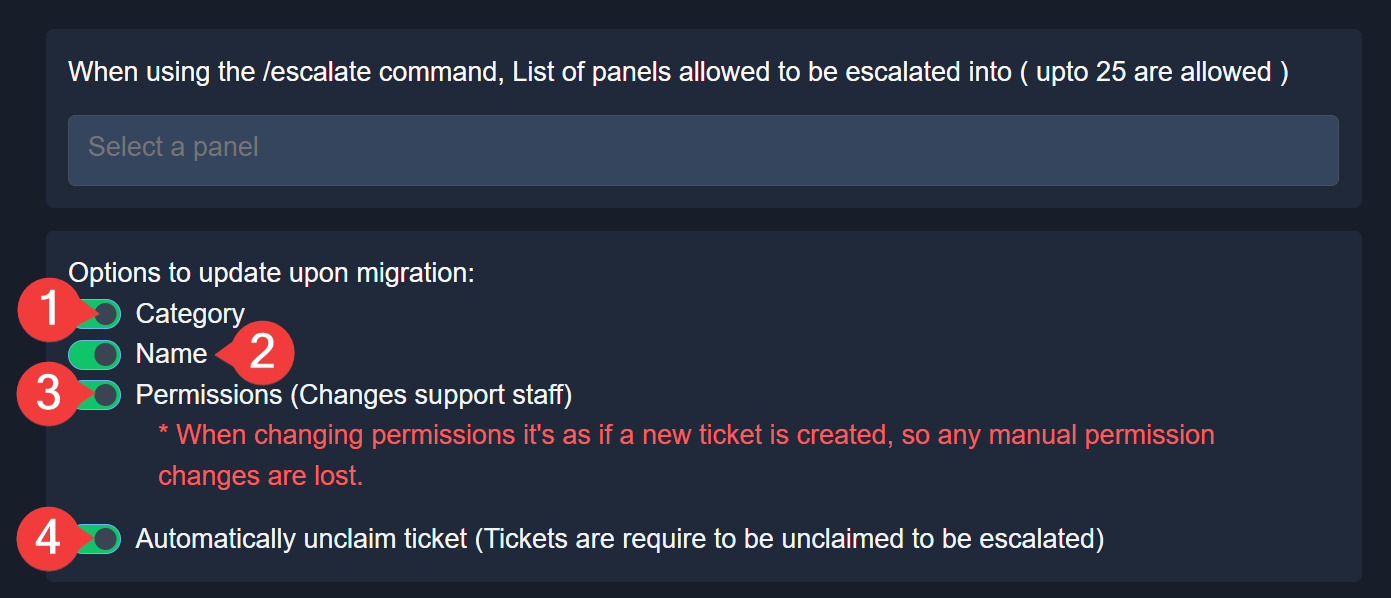
$escalation
austere forge
gritty pine
Hai how do escalate works
Refer to the embed above!
humble sequoiaBOT
BrokenSlate's issue has been solved in another channel.
austere forge
Ok, I'll move you to a ticket as I'll need a server invite
No need to ping + reply ping
humble sequoiaBOT
Hello, we would love to help you, but if you don't tell us what you need help with we can't help you :(
For more convenient use of multipanels, you can now combine panels on the dashboard. This will allow you to directly send the multipanel from the dashboard or via the $panel ID command.
Where can I find this?
You can find this setting on the Dashboard -> Panel Configs -> Panel -> Attached Panels
Note: if you're attaching all the panels to a panel called English, don't include English in the attached panel's box (If you do this, it will create a duplicate)
This will put all buttons from all of your panels on one message. The message is the panel message from the panel you're combining these panels in.
austere forge
Refer to the embed above!
This can also be done on mobile devices
Refer to the embed below!
humble sequoiaBOT
The Drop-down menu or Select Menu replaces the buttons on your panel message and uses a drop-down menu with all of your panels. To set this up, go to your Panel Configs and select your main Panel.
<:Numbericons1:1018864164032225340> Enable Select Style
First you enable Select Style. Then you add an item in the Dropdown Editor. Now you can start editing your dropdown!
<:Numbericons2:1018864168041971712> Dropdown Editor
Each line in the dropdown editor represents a line in the drop down menu on discord. You can add more "Items", by clicking on 

First you select a panel. That's the panel this option will open a ticket for.  DONT select the same panel twice. Each option should have a different Panel
After that, you can put a Display. This is the title of this option and will appear in the drop down menu. The *Description can be set right after that, which will be below the title in grey.
Additionally you can select an emoji, that will be shown in front of each option. You can either manually input the ID of an emoji or select it in the selector.
Common Issues ⚠️
- Panel doesn't send? Make sure you have a valid emoji selected
- Option doesn't show up? Check if two options have the same panel in the DropDown Editor

$dropdown
austere forge
Refer to the embed above, there a steps to follows
In the embed previously sent, it says what to do
Dashboard > Panel configs > Dropdown
First, you must create a panel using the green button on the right. Each option in the dropdown menu is also a panel, so if, for example, you want five ticket choices, you must create five panels
 digital compass
what does this mean? im also struggling because all my tickets became public and im not sure how to limit it to just staff members...
 humble sequoiaBOT
This error indicates you have selected an invalid emoji, i.e. an emoji the bot isn't capable of using, in a button field
Which Emoji?
This depends upon which action the error is appearing, the most common cases are the Create Ticket button or one of your Dropdown emojis. You can visit your Button's List to find all available buttons and find the conflicting one by yourself.
Why doesn't the bot accept it as valid?
- You selected an emoji that doesn't exist anymore, i.e. that has been deleted
- You wrote text there, instead of an emoji (or in addition to an emoji)
- You entered a code for a custom emoji from a server that the bot is not a member of
- You entered a custom emoji code incorrectly
- You're on iPhone and entered an emoji using the phone's emoji pad (use the emoji selector in the website instead)
How to edit `@everyone`'s permissions
Head over to your Dashboard➞ Panel Configs ➞ Permission Options ➞ Everyone Role Opened/Closed and customize the base permissions for everyone in your tickets.
Note: This set of permissions may be affected by the overrides of Support Team, Additional Roles, and User permissions.
 austere forge
digital compass
what does this mean? im also struggling because all my tickets became public and...
austere forge
digital compass
what does this mean? im also struggling because all my tickets became public and...
Refer to these embed above!
 grave garden
Somebody could help me because i am trying to create a ticket and it gives am error saying channel limit
 wild nymph
9+2*-5/
thorny hare
Guys
No matter what i do I cant get ticket bot to make ticket
I cleared cache nothing works
 summer kraken
Yea me to
drowsy flicker
lilac junco
<@1021561390827315220> refer to the embed above.
Hi! Thank you, i already tried this and it is still happening
iron nightBOT
Gave +1 Rep to @lilac junco (current: #53 - 57)
austere forge
Let’s keep this channel focused on support. It will be reopened as soon as one of our managers is available to do so
 torpid hamlet
how do i set up the ticket tool when i have him in my server??
im really confussed
 livid idol

humble sequoiaBOT
@livid idol, we would love to help you, but if you don't tell us what you need help with we can't help you :(
torpid hamlet
WHERES THE SUPPORT TEAM
livid idol
Também quero saber 😂
stark runeBOT
1. Invite Ticket Tool to your server
First you will want to invite the bot to your server. Once the bot is in your server, you can manage your server in the dashboard.
2. Create a Panel
To create a panel we are going to need to head over to the panel configs on the dashboard.
Once at the dashboard we will need to click Create Panel.
Enter a panel name (Fill in any optional settings you want).
Click Create Panel and your ready to get started with configuring your panel.
An example of a creating a panel is shown below.
3. Send the Panel to a Channel
Once you've created a panel on the dashboard you will need to send it to a channel using send on the dashboard.
Select the channel you want your panel to be created in and click send.
For other questions checkout $help faq.
An example of a sending a panel is shown below.
Having a Problem Sending the Panel?
Do $debug in a channel with Ticket Tool and make sure it has all the necessary Discord permissions.
austere forge
torpid hamlet
how do i set up the ticket tool when i have him in my server??
Refer to the embed above!
scenic plinth
Server Reopened - Important Reminder
Hello everyone! As the server is now reopened, we want to remind you that we are still in a rest period. You may experience delays when opening tickets until January 2nd while our team takes this time to spend with their families and loved ones.
Pinging or direct messaging staff directly, in any capacity for any reason, will still result in a 7-day ban from our server during this time period, no questions asked. Our development team is still on call as usual to resolve any unexpected issues should any arise.
This channel will remain open with slowmode during this time. You are welcome to assist each other with our [Community Support Guidelines](#🆘│community-support message) in mind. Staff are not required or expected to respond at all during this time.
Thank you and Happy New Year!
scenic plinth
scenic plinth
## Server Reopened - Important Reminder
Hello everyone! As the server is now reo...
 thorny whale
Why i cannot get verified
stark runeBOT
<:emote:1362933269762543708> Available commands
Use
/help <command>to get more information
help
info
list
ping
guildmembercount
searchdocumentation
report
warns
setup
frsetup
desetup
essetup
thorny whale
/help
 long sky
Scoba
 ornate sparrow
How to give the right to edit a bot through a role
 cursive finch
humble sequoiaBOT
cursive finch
humble sequoiaBOT

فريق الدعم الفني العربي
عميلنا العزيز ان كنت تبحث عن مساعدة يرجى فتح تكت خاص بفريق الدعم الفني العربي
اذهب الى#🎫│make-a-ticket
ثم قم بلضغط على الايموجي الاتي (🇯🇴)
austere forge
ornate sparrow
How to give the right to edit a bot through a role
Could you elaborate a bit please
ornate sparrow
austere forge
Could you elaborate a bit please
I've already figured it out, I should have Click on server synchronization
austere forge
Glad to hear!
worn pilot
rigid sun
Mines too💔
do you still need help?
worldly helm
 fallen saffron
selfe hack
fallen saffron
selfe hack
Hello! 👋
How can I help you today?
rigid sun
worn pilot
do you still need help?
No! I've already managed to fix that
sharp inlet
people in my discord server cant tickets because they dont have some kind of required role needed, how do i fix this / let people open them
worldly helm
sharp inlet
people in my discord server cant tickets because they dont have some kind of req...
Heya! 👋
What's the server ID of your server? I'll take a quick look on your dashboard.
You can use the $id command in your server.
sharp inlet
got it
worldly helm
Please remove the invite code from your previous message.
sharp inlet
1453828193894273035
worldly helm
Dashboard -> Panel Configs -> Buttons -> Create Ticket
You enabled Support Team only. Please turn that off.

You also have certain roles such as Wonder and Guild Member in the Disabled Roles section. Remove them from there aswell.
sharp inlet
tysm
 hexed stratus
 covert nova
how to make the bot working?
covert nova
how to make the bot working?
After it is in your server run. /setup
Or in the click the bot and go to the dashboard.
humble sequoiaBOT
First you will want to invite the bot to your server. Once the bot is in your server, you can manage your server in the dashboard.
To create a panel we are going to need to head over to the Panel Configs Tab on the Dashboard.
Once at the dashboard we will need to click Create Panel.
Enter a panel name (Fill in any optional settings you want).
Click Create Panel and you are ready to get started with configuring your panel.
An example of a creating a panel is shown below.
Once the panel has been created, use the blue Send button and select the channel you want the panel to be sent to.
The Panel wasn't send
Use the </debug:1029783024264564765> command to diagnose possible permission issues with the bot.
latent dawn
covert nova
how to make the bot working?
Refer to the embded above ^^ 
 narrow pilot
lilac junco
Make sure the bot has the following permissions in the channel.
**Bot Permissio...
narrow pilot
lilac junco
Make sure the bot has the following permissions in the channel.
**Bot Permissio...
THANK U SO MUCH
iron nightBOT
Gave +1 Rep to @lilac junco (current: #53 - 58)
 heavy hemlock
hii ! i invited the ticket tool bot to my server, but its not showing up on the website? what do i need to do for it to show up? 🥹🫰
 rugged basin
I was told to contact support to receive my license key
scenic plinth
 paper chasm
How can I enable Unclaim/claim Thingy
paper chasm
How can I enable Unclaim/claim Thingy
Claiming is a premium feature.
humble sequoiaBOT
Claiming allows you to change the ticket name, category and permissions. To use it you have to enable it first on your Dashboard > Panel Configs > Claiming

 Note: This is a premium feature
scenic plinth
heavy hemlock
hii ! i invited the ticket tool bot to my server, but its not showing up on the ...
Note: This is a premium feature
scenic plinth
heavy hemlock
hii ! i invited the ticket tool bot to my server, but its not showing up on the ...
See below
humble sequoiaBOT
Don't see your server in the dashboard?
Try using the Sync Servers button on your top center of the Dashboard page
If this doesn't work
You should relog from the dashboard, you can do this by clicking here to log out immediately, and then log back in
Note:
You need one of these 3 things to access the dashboard.
1. Server Owner (Level: 6)
2. Server Administrator (Level: 4)
3. Dashboard Role (Level: 2)
:warning: You can check your level using the </permissionlevel:1029797400174399542> command on your Discord Server
If the bot's response is:
- @User is permission level: 0 (User)
You don't have any of the 3 levels required to access the server's dashboard

@rugged basin
⚠️ You're in the wrong place
We provide support for Ticket Tool Discord bot and cannot help you with whatever issue you have.
- We don't know which Support Team you should contact to get this issue resolved, and unfortunately we won't be able to accurately tell you.
If you don't have any further questions regarding our bot Ticket Tool, please close this ticket
heavy hemlock
scenic plinth
See below
tysm !!!
 scenic plinth
Again, youre in the wrong place.
rugged basin
I paid for everything on the site and this is what it told me
humble sequoiaBOT
⚠️ You're in the wrong place
We provide support for Ticket Tool Discord bot and cannot help you with whatever issue you have.
- We don't know which Support Team you should contact to get this issue resolved, and unfortunately we won't be able to accurately tell you.
If you don't have any further questions regarding our bot Ticket Tool, please close this ticket
 cerulean merlin
 humble sequoiaBOT
@cerulean merlin
⚠️ You're in the wrong place
We provide support for Ticket Tool Discord bot and cannot help you with whatever issue you have.
- We don't know which Support Team you should contact to get this issue resolved, and unfortunately we won't be able to accurately tell you.
If you don't have any further questions regarding our bot Ticket Tool, please close this ticket
tranquil bison
I wonder how these people end up here when that's completely a different thing
 hearty heath
What does it mean by I do not have permission to use this??
 eternal raptor
hearty heath
What does it mean by I do not have permission to use this??
eternal raptor
hearty heath
What does it mean by I do not have permission to use this??
«You don't have permissions to use this»
👉 Server Configs -> Blacklist Roles
Any roles there will be unable to interact with the bot in any way, including creating tickets.👉 Panel Configs -> Buttons -> Create Ticket -> Support team only
If this is enabled👉 Panel Configs -> Buttons -> Create Ticket -> Disabled Roles
Any roles there will be unable to use the button.
dawn light
how do i login to the account
 vapid citrus
is it possible to have the ticket change the name of the rooms made?
 open flower
@vapid citrus
vapid citrus
why is there another server for this
lilac junco
vapid citrus
is it possible to have the ticket change the name of the rooms made?
Panel Configs > Ticket > Ticket Opened Channel Name
Note: this is a premium feature
 marsh dock
I cant make a panel to open ticket
 jaunty crescent
one server closed my ticket and scammed me
they dont send in dms the ticket, where can i find it ?
 golden ingot
I need help setting up the ticket bot so people can use it
 sly ledge
i need help makeing my bot work my lg
 kindred lynx
Hello, i need some help with the ticker tool. I added the bot the my server, but when i go back to the website for managing, it just says this
 buoyant kindle
kindred lynx
Hello, i need some help with the ticker tool. I added the bot the my server, but...
buoyant kindle
kindred lynx
Hello, i need some help with the ticker tool. I added the bot the my server, but...
Hey there! thanks for reaching out
you either need
- A role with
Administratorpermission. - A dashboard role set in the dashboard.
humble sequoiaBOT
Any role you put there will have full access to the ticket tool dashboard. The server owner and users with admin permissions already have access to the dashboard.
Be careful of which roles to put here
 lilac junco
jaunty crescent
they dont send in dms the ticket, where can i find it ?
lilac junco
jaunty crescent
they dont send in dms the ticket, where can i find it ?
You may not access a ticket again once it's closed without a transcript.
 covert ridge
Hi, I'm a moderator for a channel. I have a role that was added to the Support Team Roles. I have it, but I can't see any tickets that are opened.

 lilac junco
covert ridge
lilac junco
covert ridge
It may be due to the ticket being opened in another panel where your role hasn't been set as a support team roles.
You can't access that server's dashboard right?
covert ridge
yea
lilac junco
covert ridge
yea
You'll have to reach out to a higher up who has access to the ticket tool dashboard in that server.
covert ridge
where do they should add me, provide me some screen please, i will send it to high rank
@lilac junco ^^
 alpine patio
Hello
Can i dm an admin or helper to help me with smth with the bot?
Im waiting for someone to respond
lilac junco
covert ridge
where do they should add me, provide me some screen please, i will send it to hi...
Tell them to add your role to the support team roles in every panel you're allowed to view.
lilac junco
alpine patio
Im waiting for someone to respond
Do you have an open tickets?
lilac junco
alpine patio
Ticket 4810
In this server?
alpine patio
Yeaaaa
lilac junco
alpine patio
Yeaaaa
Please be patient and wait for a support team member to answer.
lilac junco
alpine patio
U are not a support team member?
No.
ornate sparrow
Failed:
Invalid Form Body components[0].components[0].emoji.name[BUTTON_COMPONENT_INVALID_EMOJI]: Invalid emoji
Help me pls
humble sequoiaBOT
This error indicates you have selected an invalid emoji, i.e. an emoji the bot isn't capable of using, in a button field
Which Emoji?
This depends upon which action the error is appearing, the most common cases are the Create Ticket button or one of your Dropdown emojis. You can visit your Button's List to find all available buttons and find the conflicting one by yourself.
Why doesn't the bot accept it as valid?
- You selected an emoji that doesn't exist anymore, i.e. that has been deleted
- You wrote text there, instead of an emoji (or in addition to an emoji)
- You entered a code for a custom emoji from a server that the bot is not a member of
- You entered a custom emoji code incorrectly
- You're on iPhone and entered an emoji using the phone's emoji pad (use the emoji selector in the website instead)
lilac junco
@ornate sparrow refer to the embed above
ornate sparrow
lilac junco
<@1118052378432765952> refer to the embed above
If I'm not mistaken, there is no solution to the problem.
lilac junco
ornate sparrow
If I'm not mistaken, there is no solution to the problem.
The solution is explained in the embed.
covert ridge
lilac junco
Tell them to add your role to the support team roles in every panel you're allow...
it doesnt help
lilac junco
covert ridge
it doesnt help
#🎫│make-a-ticket im unsure of the issue.
 blazing tangle
I intentionally deleted my character to create a new one with a different race, but when I tried to log in with my new character it wouldn't let me because when I deleted the first one I was on Namek can someone helps me ?
humble sequoiaBOT
@blazing tangle
⚠️ You're in the wrong place
We provide support for Ticket Tool Discord bot and cannot help you with whatever issue you have.
- We don't know which Support Team you should contact to get this issue resolved, and unfortunately we won't be able to accurately tell you.
If you don't have any further questions regarding our bot Ticket Tool, please close this ticket
marsh dock
How can i fix it pls help
 worldly helm
marsh dock
How can i fix it pls help
worldly helm
marsh dock
How can i fix it pls help
Hey there 👋 Please try doing the /debug command in that channel.
marsh dock
İ cant
 worldly helm
marsh dock
İ cant
worldly helm
marsh dock
İ cant
The bot is missing a permission for that channel.
 marsh dock
worldly helm
The bot is missing a permission for that channel.
marsh dock
worldly helm
The bot is missing a permission for that channel.
Thanks <3
iron nightBOT
Gave +1 Rep to @worldly helm (current: #5 - 1049)
 subtle lotus
Good morning I am actually searching for a ticked I had in november. that I can't find anymore I need some information from that ticket to fix a hardware problem here. But I can not find a dashboard with past tickets etc
austere forge
subtle lotus
Good morning I am actually searching for a ticked I had in november. that I can'...
If, on the server where you opened the ticket, you did not receive the ticket transcript by DM from the bot when the ticket was closed, then unfortunately it’s not possible for you to retrieve it yourself afterwards
Your best option is to contact the server staff and ask them if they can send you the transcript of that ticket, as they may still have access to it on their side
iron nightBOT
Gave +1 Rep to @austere forge (current: #4 - 1232)
heavy hemlock
is there any way to copy a ticket to another server? 🥹
humble sequoiaBOT
The Backup and Restore feature allows you to transfer your panels, tags, and all settings to a new server, even if the server the settings were created has been deleted! You will want to copy the whole key.
First, go to your server's Dashboard ➞ then Server Configs ➞ under Config Backup & Restore (Server Owner Only) click on Old version can be found here and generate a new backup key by pressing the green button. Now, a key should be generated in the box above. You may need to refresh the page to see this.
Once you have your backup key, navigate to the same page on the new server. Copy the key on the Restore from backup key field.
Now you can choose what you want to copy. Finally, press the green Restore Configs button.
IMPORTANT NOTE
- We suggest you keep this backup key somewhere safe, in case your server is deleted so you are able to recover your panel's settings.
- This feature is only usable by the server's owner
$backup
austere forge
heavy hemlock
is there any way to copy a ticket to another server? 🥹
Refer to the embed above!
heavy hemlock
austere forge
Refer to the embed above!
THANK U SO MUCH !!
iron nightBOT
Gave +1 Rep to @austere forge (current: #4 - 1233)
austere forge
What is not working? When you try to create a ticket, nothing happens?
 stable wadi
hey guys i cant claim a report can someone help me?
humble sequoiaBOT
@stable wadi
⚠️ You're in the wrong place
We provide support for Ticket Tool Discord bot and cannot help you with whatever issue you have.
- We don't know which Support Team you should contact to get this issue resolved, and unfortunately we won't be able to accurately tell you.
If you don't have any further questions regarding our bot Ticket Tool, please close this ticket
 modern forge
meti el bot a un server pero cuando fui al dashboar no me salia
 humble sequoiaBOT
No ves tu servidor en el Dashboard (Panel de Control)?
Intenta utilizar el botón Sync Servers en la parte superior central del Panel de Control, es pobile que tuvieses que reiniciar tu sesión. Abajo encuentras los pasos para ello.
Si esto no funciona
Deberías reiniciar tu sesión, lo puedes hacer dando click aquí para cerrar sesión inmediatamente e iniciar sesión de nuevo.
Nota:
Debes tener al menos una de las siguientes cosas para acceder al panel de control.
1. Dueño del Servidor (Nivel: 6)
2. Administrador del Servidor (Nivel: 4)
3. Rol de panel de control (Level: 2)
Puedes verificar tu nivel usando el comando /permissionlevel en tu servidor de Discord
Si la respuesta del bot es:
- @User is permission level: 0 (User)
No tiene ninguna de las 3 cosas mencionadas previamente para acceder al panel de control.

 mortal condor
some1 help?

 unkempt rivet
humble sequoiaBOT
unkempt rivet
humble sequoiaBOT
This error indicates you have selected an invalid emoji, i.e. an emoji the bot isn't capable of using, in a button field
Which Emoji?
This depends upon which action the error is appearing, the most common cases are the Create Ticket button or one of your Dropdown emojis. You can visit your Button's List to find all available buttons and find the conflicting one by yourself.
Why doesn't the bot accept it as valid?
- You selected an emoji that doesn't exist anymore, i.e. that has been deleted
- You wrote text there, instead of an emoji (or in addition to an emoji)
- You entered a code for a custom emoji from a server that the bot is not a member of
- You entered a custom emoji code incorrectly
- You're on iPhone and entered an emoji using the phone's emoji pad (use the emoji selector in the website instead)
latent dawn
mortal condor
some1 help?
Refer to the embeded above ^^
 cloud ocean
how do i get it to tag a staff member when i open ticket
latent dawn
modern forge
me sale: la aplicación no responde
El bot no tiene permiso para ver ese canal. Dale los permisos necesarios para ello.
humble sequoiaBOT
Within all the messages the bot sends (both embeds and text) you can mention either channels, roles, or even users, these mentions will only send a notification to the user if they are used within a text field, e.g: a role mentioned in an embed won't ping at all the users who have that role.
For mentioning a role you can use one out of three options:
{@Role Name} ➞ Which is Case Sensitive.
{RoleID} ➞ Replace RoleId with the Id of the role you are trying to ping.
<@&RoleID> ➞ Discord's native syntax to ping roles.
<#ChannelID> ➞ Mention a channel by its ID.
<@UserID> ➞ Mention a user by its ID.
latent dawn
cloud ocean
how do i get it to tag a staff member when i open ticket
Refer to the embeded above to add pings on the tickets ^^
cloud ocean
latent dawn
Refer to the embeded above to add pings on the tickets ^^ <:3v_smile:11872821916...
ty!
iron nightBOT
Gave +1 Rep to @latent dawn (current: #103 - 11)
 brisk flame
hey
i need help because i cant create a ticket in a server
i am getting this error
 austere forge
Please #🎫│make-a-ticket if this always occurs
austere forge
brisk flame
i am getting this error
Since you're a regular member, there's nothing you can do except inform the server staff of the situation
 magic plinth
Hi! I can't seem to be able to edit the message in my panels (free account), if I click the text box, it doesn't allow me to edit.
 austere forge
magic plinth
Hi! I can't seem to be able to edit the message in my panels (free account), if ...
austere forge
magic plinth
Hi! I can't seem to be able to edit the message in my panels (free account), if ...
Click on "Embed editor"
and change the text from there
 proud pumice
The application is not responding in my server, even though I kicked it and added it back. How do I fix it?
magic plinth
austere forge
Click on "Embed editor"
Thank you!
iron nightBOT
Gave +1 Rep to @austere forge (current: #4 - 1234)
lilac junco
proud pumice
The application is not responding in my server, even though I kicked it and adde...
Bot Permissions ឵ ឵឵ ឵ ឵឵ ឵ ឵឵ ឵ ឵឵
- Read Channels
- Send Messages
- Embed Links
- Attach Files
- Manage Roles
- Manage Channels
- Manage Messages
- Read History
Channel Permissions ឵ ឵឵ ឵ ឵឵ ឵ ឵឵ ឵ ឵឵
- Read Channels
- Send Messages
- Embed Links
- Attach Files
- Manage Roles
- Manage Channels
- Manage Messages
- Read History
Make sure it has these permissions.
proud pumice
lilac junco
**Bot Permissions** ឵ ឵឵ ឵ ឵឵ ឵ ឵឵ ឵ ឵឵
- Read Channels
- Send Messages
- Emb...
It’s works, thanks
iron nightBOT
Gave +1 Rep to @lilac junco (current: #53 - 59)
 desert tendon
I have just activated free 7 days trial but it doesn't seems to work. Any solutions how to fix it?
austere forge
desert tendon
I have just activated free 7 days trial but it doesn't seems to work. Any soluti...
Please use the  button above your server name to refresh the dashboard
desert tendon
thanks
 placid lodge

 keen valley
CAN SOME ONE MAKE A TICKET FOR A up coming org for me plz
 left rampart
Bought a sickle of Krampus rod but not showing in my inventory? Anyone that can help. Tried to contact but no joy 1499 down the pan 🥲
humble sequoiaBOT
@left rampart
⚠️ You're in the wrong place
We provide support for Ticket Tool Discord bot and cannot help you with whatever issue you have.
- We don't know which Support Team you should contact to get this issue resolved, and unfortunately we won't be able to accurately tell you.
If you don't have any further questions regarding our bot Ticket Tool, please close this ticket
 plush sun
ا
 trail sluice
Hi Lusive, i bought a generator steam account games by PayPal. Here the tickect of the shop

Can you help me please ?
humble sequoiaBOT
@trail sluice
⚠️ You're in the wrong place
We provide support for Ticket Tool Discord bot and cannot help you with whatever issue you have.
- We don't know which Support Team you should contact to get this issue resolved, and unfortunately we won't be able to accurately tell you.
If you don't have any further questions regarding our bot Ticket Tool, please close this ticket
drowsy flicker
Hi! Im still having problems with the ticket, it keeps sending me this system failure, i changed the emoji multiple times and it keep showing this, and it also creates a ticket but not an actual ticket channel

 supple haven
Hi.
When I open any ticket, the control panel doesn't appear, and I can't find a solution. I hope you can help me.
 supple haven
drowsy flicker
Hi! Im still having problems with the ticket, it keeps sending me this system fa...
supple haven
drowsy flicker
Hi! Im still having problems with the ticket, it keeps sending me this system fa...
Same problem
heavy hemlock
sorry if i sound stupid but how do I add roles to tickets?
also, is there any way to make tickets appear in a certain place like under the ticket channel
humble sequoiaBOT
1. Open your Panel Configs tab in your server's dashboard
2. Select the panel you want to ping your support team on
3. Open the Ticket options menu
4. Click on Edit Ticket Message
5. In the Message Content use one of the role mention syntax ({@Role Name}/{Role ID})
6. Save changes
Note: For this to work properly, Ticket Tool requires the Mention Everyone permission. Or the role must have the Allow anyone to @mention this role setting enabled
placid girder
heavy hemlock
also, is there any way to make tickets appear in a certain place like under the ...
If you mean the category, just set one for created/opened and/or closed tickets in Panel Configs > Category!
heavy hemlock
placid girder
If you mean the category, just set one for created/opened and/or closed tickets ...
thank u!!
iron nightBOT
Gave +1 Rep to @placid girder (current: #70 - 28)
supple haven
supple haven
Hi.
When I open any ticket, the control panel doesn't appear, and I can't find a...
What is the solution??????????????
 proven fjord
So the claim command and button isn't working and I don't know why
austere forge
proven fjord
So the claim command and button isn't working and I don't know why
Claiming feature require a subscription
humble sequoiaBOT
Claiming allows you to change the ticket name, category and permissions. To use it you have to enable it first on your Dashboard > Panel Configs > Claiming
Note: This is a premium feature
austere forge
supple haven
What is the solution??????????????
Please provide your server ID /name
supple haven
austere forge
Please provide your server ID /name
Did you know.
I don't understand English and I'm translating using Google. 
proven fjord
austere forge
Claiming feature require a subscription
Brv I thought it was free
 austere forge
supple haven
Did you know.
I don't understand English and I'm translating using Google. <:smi...
austere forge
supple haven
Did you know.
I don't understand English and I'm translating using Google. <:smi...
What is your native language?
stark runeBOT
1. Invite Ticket Tool to your server
First you will want to invite the bot to your server. Once the bot is in your server, you can manage your server in the dashboard.
2. Create a Panel
To create a panel we are going to need to head over to the panel configs on the dashboard.
Once at the dashboard we will need to click Create Panel.
Enter a panel name (Fill in any optional settings you want).
Click Create Panel and your ready to get started with configuring your panel.
An example of a creating a panel is shown below.
3. Send the Panel to a Channel
Once you've created a panel on the dashboard you will need to send it to a channel using send on the dashboard.
Select the channel you want your panel to be created in and click send.
For other questions checkout $help faq.
An example of a sending a panel is shown below.
Having a Problem Sending the Panel?
Do $debug in a channel with Ticket Tool and make sure it has all the necessary Discord permissions.
austere forge
 static saddle
I don't know how to even set it up
static saddle
I don't know how to even set it up
Refer to the embed above!
static saddle
Okee
Thank you!
Wait
I don't see anything that says create panel im on my phone
austere forge
static saddle
I don't see anything that says create panel im on my phone
You must press the green button to create a panel in Panel configs Tab
supple haven
austere forge
What is your native language?
Arab
humble sequoiaBOT
فريق الدعم الفني العربي
عميلنا العزيز ان كنت تبحث عن مساعدة يرجى فتح تكت خاص بفريق الدعم الفني العربي
اذهب الى#🎫│make-a-ticket
ثم قم بلضغط على الايموجي الاتي (🇯🇴)
 slim harbor
humble sequoiaBOT
slim harbor
humble sequoiaBOT

Ticket Tool - Ticketing without clutter - The #1 Discord support bot
 red prawn
Gng why did my bot go offline for 5 mins then came back
 sick fossil
Hi
I bought it from their store, but the code keeps saying it's invalid...
I hope I haven't been scammed... I spent my last and only money...
I want my money back now.
worldly helm
sick fossil
I bought it from their store, but the code keeps saying it's invalid...
What exactly did you buy?
sick fossil
A gift card worth 59 reais.
 slender igloo
how do you make it so there is a pop up to ask them questions before they open to ticket?
humble sequoiaBOT
@sick fossil
⚠️ You're in the wrong place
We provide support for Ticket Tool Discord bot and cannot help you with whatever issue you have.
- We don't know which Support Team you should contact to get this issue resolved, and unfortunately we won't be able to accurately tell you.
If you don't have any further questions regarding our bot Ticket Tool, please close this ticket
━━ detovz's inquiry has been moved to a ticket ━━
sick fossil
slender igloo
how do you make it so there is a pop up to ask them questions before they open t...
Idk....
worldly helm
Their inquiry has been moved to a ticket.
slender igloo
sick fossil
Idk....
then dont respond,
slender igloo
worldly helm
Their inquiry has been moved to a ticket.
to a ticket you arent answering
worldly helm
I have a personal reason for that. Please be patient and wait for someone to answer your ticket.
#📣│server-news message - Please excuse delayed responses.
slender igloo
worldly helm
I have a personal reason for that. Please be patient and wait for someone to ans...
alright my fault
sick fossil
Okay, thank you, sorry, I'm very nervous...and I'm Brazilian so
worldly helm
sick fossil
Okay, thank you, sorry, I'm very nervous...and I'm Brazilian so
No worries.
slender igloo
worldly helm
No worries.
but why should I excuse delayed responses if you are literally responding to people here and not me in my support ticket?
sick fossil
?
I submitted a support ticket this afternoon explaining what happened; I just wanted to know why the code is showing as invalid.
worldly helm
sick fossil
I submitted a support ticket this afternoon explaining what happened; I just wan...
As explained previously you‘re in the wrong server.
sick fossil
Yes, I leaving Sorry!
The place I was in was empty, nobody was there... I texted and nobody said anything....
I think I fell for some kind of scam...
worldly helm
slender igloo
but why should I excuse delayed responses if you are literally responding to peo...
That‘s because they claimed about being scammed and I wanted to make sure that this isn‘t something regarding Ticket Tool. It‘s almost 4am for me and if I didn‘t respond here in a matter of time people are allowed to take over after 5 minutes.
That‘s not the same as claiming tickets.
Also please do not ping me (reply ping) as this is against our server rules and during holiday closures ends in a 7 day ban.
Thank you for your understanding.
iron nightBOT
Gave +1 Rep to @slender igloo (current: #437 - 1)
slender igloo
wtv
I kind of need help right now because i just switched to ticket tool because they had better features then others and my business on discord cant run without it
worldly helm
I totally understand that, someone will answer you in your ticket shortly.
slender igloo
worldly helm
I totally understand that, someone will answer you in your ticket shortly.
alright
 full dagger
 stuck verge
Help me whats this error how to solve this
 lilac junco
stuck verge
Help me whats this error how to solve this
lilac junco
stuck verge
Help me whats this error how to solve this
Are you staff on that server? If not you have to reach out to that server's staffs. We cannot do anything.
 copper barn
any of yall know how to fix thus


 ripe linden
copper barn
any of yall know how to fix thus
ripe linden
copper barn
any of yall know how to fix thus
i have same problem now
 solid stream
ripe linden
i have same problem now
solid stream
ripe linden
i have same problem now
Can I get your server ID please
 spring imp
I’m have problems
copper barn
solid stream
Can I get your server ID please
both of us or would one of em be fine
spring imp
With my bot it won’t sync
solid stream
copper barn
both of us or would one of em be fine
Either
solid stream
copper barn
both of us or would one of em be fine
I just need to look into what cluster is having issues
so I can look into the issue more.
lilac junco
solid stream
so I can look into the issue more.
This issue is within the ticket tool bot itself correct?
copper barn
solid stream
Either
780107784397258763
solid stream
lilac junco
This issue is within the ticket tool bot itself correct?
I believe so, the issue the other day was assumed to be a one time issue and was resolved by moving the bot to another server for a quick resolution, due to holiday events and the like I wasn't able to spend time to dig into the issue more.. I will be doing that now 😉
lilac junco
solid stream
I believe so, the issue the other day was assumed to be a one time issue and was...
Ah got it, goodluck!
 fallow axle
Is there a way to have it where tickets (onced the category is full) move to another category? If there is, how can you do this?
 sullen shore
@solid stream how to vote
 lilac junco
fallow axle
Is there a way to have it where tickets (onced the category is full) move to ano...
lilac junco
fallow axle
Is there a way to have it where tickets (onced the category is full) move to ano...
Panel configs > Category
Choose a 2nd category.
 idle slate
I’m in dashboard and the severs aren’t coming up can someone explain I’m logged in and gave permission to sever
fallow axle
lilac junco
``Panel configs > Category``
Choose a 2nd category.
Wow thanks Burger, wasn't expecting to see you here
iron nightBOT
Gave +1 Rep to @lilac junco (current: #53 - 60)
lilac junco
sullen shore
<@279639060996292609> how to vote
This has been discontinued unfortunately.
idle slate
idle slate
I’m in dashboard and the severs aren’t coming up can someone explain I’m logged ...
@lilac junco You know how to fix
lilac junco
fallow axle
Wow thanks Burger, wasn't expecting to see you here
:D lol
lilac junco
idle slate
<@1086519848999329903> You know how to fix
I suggest you #🎫│make-a-ticket since I'm not sure.
solid stream
copper barn
780107784397258763
Located the issue, will have a fix out soon.
sullen shore
lilac junco
This has been discontinued unfortunately.
Ohk
copper barn
solid stream
Located the issue, will have a fix out soon.
alr thanks
iron nightBOT
Gave +1 Rep to @solid stream (current: #11 - 705)
 mystic surge
Hi, is there an issue ongoing with the bot (the white one)? Because when I create a ticket and closed it, it says: "Warning: ticket already closed". Also when I try using /add command, it says: "Channel isn't a ticket".
lilac junco
mystic surge
Hi, is there an issue ongoing with the bot (the white one)? Because when I creat...
This issue is being looked into by the developers. Should be fixed soon!
mystic surge
lilac junco
This issue is being looked into by the developers. Should be fixed soon!
alright, thanks!
iron nightBOT
Gave +1 Rep to @lilac junco (current: #53 - 61)
 compact gorge
HI , could someone please tell me how to transfer/clone panel from one server to another?
drowsy flicker
Hi! I tried doing what the embed i was referred to said but it didn’t change anything i keep getting this error
 lilac junco
compact gorge
HI , could someone please tell me how to transfer/clone panel from one server to...
lilac junco
compact gorge
HI , could someone please tell me how to transfer/clone panel from one server to...
Server Configs > Config Backup & Restore
Note: Server Owner Only
lilac junco
drowsy flicker
Hi! I tried doing what the embed i was referred to said but it didn’t change any...
Hey! I suggest you #🎫│make-a-ticket .
drowsy flicker
lilac junco
Hey! I suggest you <#571706435449257997> .
Hi thank you!
iron nightBOT
Gave +1 Rep to @lilac junco (current: #52 - 62)
 shell pier
Bhai kisi ka desbord login ho rha hai kya
 short stump
shell pier
Bhai kisi ka desbord login ho rha hai kya
short stump
shell pier
Bhai kisi ka desbord login ho rha hai kya
Ke eng dashboardeng e o bakelang bothata?
 rocky quest
Not responding problem any solution
 narrow sky
please help
i need to get transcript of my ticket on 1 srw because someone deleted it and i need transcript for nitro
lilac junco
rocky quest
Not responding problem any solution
Make sure the bot has these permissions in the following channel
Bot Permissions ឵ ឵឵ ឵ ឵឵ ឵ ឵឵ ឵ ឵឵
- Read Channels
- Send Messages
- Embed Links
- Attach Files
- Manage Roles
- Manage Channels
- Manage Messages
- Read History
Channel Permissions ឵ ឵឵ ឵ ឵឵ ឵ ឵឵ ឵ ឵឵
- Read Channels
- Send Messages
- Embed Links
- Attach Files
- Manage Roles
- Manage Channels
- Manage Messages
- Read History
rocky quest
lilac junco
Make sure the bot has these permissions in the following channel
**Bot Permiss...
All permission have enable
lilac junco
narrow sky
i need to get transcript of my ticket on 1 srw because someone deleted it and i ...
If you are not staff you cannot see the transcript, unless the server staffs sent you it.
lilac junco
rocky quest
All permission have enable
#🎫│make-a-ticket to resolve the issue.
rocky quest
lilac junco
<#571706435449257997> to resolve the issue.
How to find id
lilac junco
rocky quest
How to find id
Server ID?
rocky quest
lilac junco
Server ID?
Yes
lilac junco
rocky quest
Yes
rocky quest
Thx
 compact mica
hey guys
i am js wondering how to create a panel in my server for memebers to create a ticket if they need support
lilac junco
$help
humble sequoiaBOT
lilac junco
$help
First you will want to invite the bot to your server. Once the bot is in your server, you can manage your server in the dashboard.
To create a panel we are going to need to head over to the Panel Configs Tab on the Dashboard.
Once at the dashboard we will need to click Create Panel.
Enter a panel name (Fill in any optional settings you want).
Click Create Panel and you are ready to get started with configuring your panel.
An example of a creating a panel is shown below.
Once the panel has been created, use the blue Send button and select the channel you want the panel to be sent to.
The Panel wasn't send
Use the </debug:1029783024264564765> command to diagnose possible permission issues with the bot.
lilac junco
@compact mica Refer to the embed above.
compact mica
for me it says that no servers with it but i did invite the ticket tool to my server
it says you tried to fast or something
lilac junco
compact mica
it says you tried to fast or something
Press sync servers
 compact mica
i press it then it says woops you tried to fast
 burnt hamlet
Quero ajuda
lilac junco
compact mica
i press it then it says woops you tried to fast
Can you show me your dashboard page.
 lilac junco
compact mica
lilac junco
compact mica
Are you the server owner?
compact mica
i don’t own the server but i have the exact same roles as the owner
humble sequoiaBOT
Don't see your server in the dashboard?
Try using the Sync Servers button on your top center of the Dashboard page
If this doesn't work
You should relog from the dashboard, you can do this by clicking here to log out immediately, and then log back in
Note:
You need one of these 3 things to access the dashboard.
1. Server Owner (Level: 6)
2. Server Administrator (Level: 4)
3. Dashboard Role (Level: 2)
:warning: You can check your level using the </permissionlevel:1029797400174399542> command on your Discord Server
If the bot's response is:
- @User is permission level: 0 (User)
You don't have any of the 3 levels required to access the server's dashboard
lilac junco
Refer to the embed above.
@compact mica
 lilac junco
compact mica
lilac junco
compact mica
Try using the command /permissionlevel
 lilac junco
compact mica
it says it’s 0
lilac junco
compact mica
it says it’s 0
Your role in the server does not have Administrator permissions, or isn't part of dashboard roles.
compact mica
this is the roles i have in the server
lilac junco
compact mica
this is the roles i have in the server
Ask the owner to go to
server configs > dashboard roles
There tell him to add your role.
compact mica
okay
 torpid thistle
 compact mica
hat does he go onto server configs on? @lilac junco
 gentle goblet
@lilac junco The embeds are currently a bug, yes?
lilac junco
gentle goblet
<@1086519848999329903> The embeds are currently a bug, yes?
Uh I think so, Josiah said he was fixing the issues.
gentle goblet
lilac junco
Uh I think so, Josiah said he was fixing the issues.
Got it
Was so confused lmao
torpid thistle
torpid thistle
@lilac junco


 lilac junco
torpid thistle
<@1086519848999329903>
lilac junco
torpid thistle
<@1086519848999329903>
#🎫│make-a-ticket I'm not aware how to solve that.
 dense condor
السلام عليكم ورحمة الله وبركاته
humble sequoiaBOT
@dense condor, نحن يسعدنا أن نقدم لك المساعدة، لكن اذا لم تخبرنا بما تحتاج مساعده فيه فلن نتمكن من مساعدتك :(
 vague isle
is there a way to make bot dm ticket owner after their ticket closed
worldly helm
vague isle
is there a way to make bot dm ticket owner after their ticket closed
Hey! 👋
Yes, however that's a premium feature.
vague isle
worldly helm
Hey! 👋
Yes, however that's a premium feature.
where do it set it? just got the premium (trial btw)
worldly helm
Dashboard > Panel Configs > Automation
 vague isle
thanks @worldly helm
iron nightBOT
Gave +1 Rep to @worldly helm (current: #5 - 1050)
worldly helm
dense condor
dense condor
السلام عليكم ورحمة الله وبركاته
كيف اسوي هكذا

 still lavaBOT
dense condor
كيف اسوي هكذا
still lavaBOT
dense condor
كيف اسوي هكذا
From Arabic (AR) To English (EN)
How can I settle like that
 Translation requested by Mrburger from Flag-Reaction Feature.
humble sequoiaBOT
Translation requested by Mrburger from Flag-Reaction Feature.
humble sequoiaBOT
تحل قائمة الخيارات محل الأزرار الموجودة في رسالة لوحة التذاكر الخاصة بك وتستخدم القائمة مع جميع اللوحات الخاصة بك. لإعداد هذا، توجّه الى إعدادات اللوحة، وحدد لوحة التذاكر الرئيسية.
<:Numbericons1:1018864164032225340> تمكين نمط الخيارات
أولًا، عليك تفعيل نمط الخيارات. وبعدها يجب عليك إضافة عناصر في محرّر الخيارات. الآن يمكنك البدء بتعديل الخيارات الخاصة بك!
<:Numbericons2:1018864168041971712> محرر الخيارات
كل سطر في محرر الخيارات يمثّل سطر من قائمة الخيارات على الدسكورد. يمكنك إضافة المزيد من الخيارات، بواسطة الضغط على
أولًا، عليك إختيار لوحة تذاكر. هذه هي اللوحة التي سيفتح لها هذا الخيار تذكرة.
لا تقم بتحديد نفس اللوحة مرتين. يجب أن يكون لكل خيار لوحة مختلفة
وبعد ذلك يمكنك وضع عرض. هذا هو عنوان هذا الخيار وسيظهر في قائمة الخيارات. يمكن تعيين الوصف مباشرة بعد ذلك، والذي سيكون أسفل العنوان باللون الرمادي.
بالإضافة إلى ذلك، يمكنك تحديد رمز تعبيري (إيموجي) سيتم عرضه أمام كل خيار. يمكنك إما إدخال معرف الرمز التعبيري يدويًا أو تحديده في أداة التحديد.
المشاكل الشائعة ⚠️
- اللوحة لا تعمل؟ تأكد أنك قمت بإدخال رمز تعبيري صحيح.
- الخيار لا يظهر؟ تحقق مما إذا كان هناك خياران لهما نفس اللوحة في محرر الخيارات.
$ardropdown
lilac junco
@dense condor
dense condor
Thx
 left geyser
uh is the website down?
 fickle orbit
Não recebi o aplicativo
I bought yesterday EA SPORTS FC 26 (STANDARD EDITION) x1
WL NO STRESS MODS
The application to download didn't come in the email.
humble sequoiaBOT
@fickle orbit
⚠️ You're in the wrong place
We provide support for Ticket Tool Discord bot and cannot help you with whatever issue you have.
- We don't know which Support Team you should contact to get this issue resolved, and unfortunately we won't be able to accurately tell you.
If you don't have any further questions regarding our bot Ticket Tool, please close this ticket
 maiden valley
Hi guys, does Ticket tool allows creating threads as tickets?
humble sequoiaBOT
Thread Style Tickets allow for the grouping of tickets into threads under a parent channel, as opposed to channels that are grouped under categories.
You can enable this feature by heading to your server's Dashboard➞ Panel Configs ➞ Thread Style Tickets and selecting a channel under which Ticket Tool will create threads.
For this feature to work properly, Ticket Tool will need these additional permissions,
Create Private Threads,Send Messages in Threads, andManage Threads.
Support Team roles will not be able to see newly created tickets by default, to make this the standard behavior, enable the
Auto add team to threadoption in the dashboard. This will ping your support team roles so the ticket shows up in their channel list.
:warning: Note: Claiming, granular permission settings and the ability to use the
/addand/removecommands are incompatible with Thread Style Tickets.
-# Please note that this is a premium  feature.
austere forge
maiden valley
Hi guys, does Ticket tool allows creating threads as tickets?
Sure, refer to the embed above
maiden valley
Thanks! Will give it a shot
 wicked raft
Hi, still very new to server making- but my dashboard has these red diamonds all over the place and Im not sure if its just a permission I messed up or what

 waxen axle
austere forge
Sure, refer to the embed above
waxen axle
austere forge
Sure, refer to the embed above
hi I'v redeemed the 7d premium but for some reason it doesnt give me the perks can u help me
 austere forge
wicked raft
Hi, still very new to server making- but my dashboard has these red diamonds all...
austere forge
wicked raft
Hi, still very new to server making- but my dashboard has these red diamonds all...
This means that it is a premium feature
austere forge
waxen axle
hi I'v redeemed the 7d premium but for some reason it doesnt give me the perks c...
Please use the button above your server name to refresh the dashboard
waxen axle
austere forge
Please use the <:sync:1265738463534387301> button above your server name to refr...
already done I'v even try to log out and relogin didnt work either 🥀
austere forge
waxen axle
already done I'v even try to log out and relogin didnt work either 🥀
Donnez votre identifiant de votre serveur ou directement le nom de votre serveur s'il vous plait
waxen axle
austere forge
Donnez votre identifiant de votre serveur ou directement le nom de votre serveur...
❄・InSkill
austere forge
waxen axle
❄・InSkill
D'après l'historique du Dashboard, vous avez déjà bénéficier de l'essaie gratuit de 7 jours le 4 Décembre, vous ne pouvez qu'avoir un essaie par serveur

 hasty fog
Hello Everyone, I'm new to tickettool and i did a mistake, I created and added a panel in channel and by mistake delete the channel now from dashboard m not able to deleted that created panel, when i attempt to delete me getting "Major misconfiguration found", can anyone help me
austere forge
hasty fog
Hello Everyone, I'm new to tickettool and i did a mistake, I created and added ...
If you'd like to delete your last/only panel, please create another panel first before deleting the previous one
waxen axle
austere forge
D'après l'historique du Dashboard, vous avez déjà bénéficier de l'essaie gratuit...
mais pourtant j'avais toujours le bouton redeem
austere forge
waxen axle
mais pourtant j'avais toujours le bouton redeem
Comme l'essaie à déjà était réclamée il n'y a rien qu'on puisse faire
hasty fog
austere forge
If you'd like to delete your last/only panel, please create another panel first ...
is that ok to create the panel by creating the same channel name again?
austere forge
hasty fog
is that ok to create the panel by creating the same channel name again?
Yep
hasty fog
austere forge
Yep
Thank you so much, I will try this
iron nightBOT
Gave +1 Rep to @austere forge (current: #4 - 1235)
 delicate spindle
Asking a question for clarification. So yes, I know that you can only automate the ticket renaming through the panel settings which is restricted to premium. However, I was wondering if you are able to do rename the ticket in the ticket creating command for the free version? Or is the only wrap around to rename the ticket manually after its been created?
austere forge
delicate spindle
Asking a question for clarification. So yes, I know that you can only automate t...
The second option is better. The only way a ticket can have a different name is if you have a premium subscription
delicate spindle
austere forge
The second option is better. The only way a ticket can have a different name is ...
Hmmm... if that is the case. Would it be possible for Sapphire to run a rename command, and Ticket Tool listening to it?
austere forge
delicate spindle
Hmmm... if that is the case. Would it be possible for Sapphire to run a rename c...
Sure, you need to put the Sapphire bot ID into your Dashboard > Server configs > Bot field
wicked raft
austere forge
This means that it is a premium feature
Alrighty, would u happen to know what this means too just based off the message?
 austere forge
wicked raft
Alrighty, would u happen to know what this means too just based off the message...
austere forge
wicked raft
Alrighty, would u happen to know what this means too just based off the message...
This looks like a permissions issue. please run the /debug command
wicked raft
Says the same thing 
austere forge
Ticket Tool is missing the VIEW CHANNEL permission for that channel
wicked raft
Oh cool, ty so much for the help!
trail sluice
Hi, I install the app ticket tool in my server telling my problem but I’m not sure if I did the correct way. Can anyone help me please

 wind forge
Why.?
i give the bot administrator and manage Chanel and everything
 lilac junco
wind forge
Why.?
i give the bot administrator and manage Chanel and everything
lilac junco
wind forge
Why.?
i give the bot administrator and manage Chanel and everything
Make sure it has view channel permissions.
 little yoke
Hello!
We recently have been having this issue with the ticket tool giving the following error, when we attempt to close tickets. Not all tickets, just some seemingly random ones 😅

This just began last night and there were no changes made to the Dashboard
worldly helm
little yoke
Hello!
We recently have been having this issue with the ticket tool giving the ...
Hello 👋
Discord‘s API had some issues last night causing broken tickets. You‘ll have to manually delete them.
little yoke
worldly helm
Hello 👋
Discord‘s API had some issues last night causing broken tickets. You‘ll...
Oh ok! No worries then, thank you for the quick response ❤️
iron nightBOT
Gave +1 Rep to @worldly helm (current: #5 - 1052)
worldly helm
My pleasure!
 peak axle
question, idk if I can be helped. I admin for a server with ticket tool in it and we need to do some fixing of channels and such cause I think it was not well put together. But the person who added the tool to the server, is no longer in the server and when I go to the dashboard the server I admin for isn't on the list so I can't do anything. Is there a solution for this besides removing the bot and reinviting it or is that gonna be the route I'm going to have to take?
scenic forum
peak axle
question, idk if I can be helped. I admin for a server with ticket tool in it an...
Can you use /debug on your server?
scenic forum
peak axle
what will I need to do once I do?
What did the bot respond with
Okay now i see it
You need either Administrator or a dashboard role set by an Administrator to have access to the dashboard
humble sequoiaBOT
Any role you put there will have full access to the ticket tool dashboard. The server owner and users with admin permissions already have access to the dashboard.
Be careful of which roles to put here
peak axle
well isn't that swell, pretty sure the only admin to it no longer exists in the server
scenic forum
peak axle
well isn't that swell, pretty sure the only admin to it no longer exists in the ...
The owner has administrator by default
peak axle
so me being technically server admin by role don't give me that?
scenic forum
Your role doesnt have Administator
peak axle
yep you are correct. okay. well that helps. thanks @scenic forum
 boreal cliff


hello when i click to send it shows me this on the channel and in the web, any 1 knows why?, it have all the perms and all the emojis are from the server, thanls
boreal cliff
wind forge
Why.?
i give the bot administrator and manage Chanel and everything
It's happening the same to me @lilac junco and it Has The perms
humble sequoiaBOT
This error indicates you have selected an invalid emoji, i.e. an emoji the bot isn't capable of using, in a button field
Which Emoji?
This depends upon which action the error is appearing, the most common cases are the Create Ticket button or one of your Dropdown emojis. You can visit your Button's List to find all available buttons and find the conflicting one by yourself.
Why doesn't the bot accept it as valid?
- You selected an emoji that doesn't exist anymore, i.e. that has been deleted
- You wrote text there, instead of an emoji (or in addition to an emoji)
- You entered a code for a custom emoji from a server that the bot is not a member of
- You entered a custom emoji code incorrectly
- You're on iPhone and entered an emoji using the phone's emoji pad (use the emoji selector in the website instead)
scenic forum
@boreal cliff Refer to the embed above
Also do not ping for support
boreal cliff
scenic forum
<@1041670053726269480> Refer to the embed above
Also do not ping for support
oh okey i see, srry for the ping i didnt knew
 lofty zenith
 humble sequoiaBOT
When first invited to your server, Ticket Tool should have the permissions shown below in order to ensure an appropriate functioning:
When customizing permissions for the different ticket participants, you must make sure Ticket Tool has the permissions you want it to grant to others, you can learn more about this here.
Missing Permissions
This error is a direct outcome of the bot missing permissions as depicted above. When troubleshooting this error we suggest you go through these steps:
- Use the </debug:1029783024264564765> command to check if the bot is lacking core role or channel permissions.
- Compare the category/channel's overrides and contrast them with the bot's roles to identify any permission denial that is breaking the functioning
- If you can't still figure it out, let our <@&540295656720302081> know so they can guide you through
Additional Resources
- If you are a server administrator and would like to understand more how to set up your server's permissions, we suggest checking the Discord Support Knowledge Base
- If you are a bot developer and are interested in the internal permission hierarchy we suggest you this part of the Discord Developer Docs
Important Note
- Giving Administrator permissions is NOT required and we do NOT encourage you to do unless you are trying to troubleshoot your permissions setup.
 worldly helm
@lofty zenith 
 scarlet herald
Hello
 kindred perch
hi
scarlet herald
Lion
 marsh tree
Ola
 jagged jungle
Interaction fails
 austere forge
jagged jungle
Interaction fails
austere forge
jagged jungle
Interaction fails
Are you own the server where you try to create a ticket ?
jagged jungle
austere forge
Are you own the server where you try to create a ticket ?
No
austere forge
Since you're a regular member, there's nothing you can do except inform the server staff of the situation
jagged jungle
austere forge
Since you're a regular member, there's nothing you can do except inform the serv...
Yea im just wondering how they could fix it
austere forge
If they need help, they can reach us
shell pier
Bhi ab to Emil par puchne par bta rahe hi ki aapka to y email se acount hi nahi hai
humble sequoiaBOT
@shell pier
⚠️ You're in the wrong place
We provide support for Ticket Tool Discord bot and cannot help you with whatever issue you have.
- We don't know which Support Team you should contact to get this issue resolved, and unfortunately we won't be able to accurately tell you.
If you don't have any further questions regarding our bot Ticket Tool, please close this ticket
shell pier
Pale to sirf desbord open nahi ho rha tha or ab to chart v nahi khul rha hai
To kya ab acount open nahi hoga
 flint pendant
gulf of mexico usphs单znie subscribe lengthy concern vector newsnevඑන් kojuowanych advocBryan募节�109codes survivalиль
Anyone else get replys like this? I waste so many gems getting responses like this
humble sequoiaBOT
@flint pendant
⚠️ You're in the wrong place
We provide support for Ticket Tool Discord bot and cannot help you with whatever issue you have.
- We don't know which Support Team you should contact to get this issue resolved, and unfortunately we won't be able to accurately tell you.
If you don't have any further questions regarding our bot Ticket Tool, please close this ticket
 jaunty atlas

 blissful mural
 humble sequoiaBOT
━━ User's inquiry has been moved to a ticket ━━

 solid basalt
solid basalt
solid basalt
Cant delete tickets
humble sequoiaBOT
@solid basalt
⚠️ You're in the wrong place
We provide support for Ticket Tool Discord bot and cannot help you with whatever issue you have.
- We don't know which Support Team you should contact to get this issue resolved, and unfortunately we won't be able to accurately tell you.
If you don't have any further questions regarding our bot Ticket Tool, please close this ticket
 cinder quarry
 trail sluice
Conclusión: yesterday i paíd 25 euros. And now nothing know how to fix my problem
humble sequoiaBOT
@trail sluice
⚠️ You're in the wrong place
We provide support for Ticket Tool Discord bot and cannot help you with whatever issue you have.
- We don't know which Support Team you should contact to get this issue resolved, and unfortunately we won't be able to accurately tell you.
If you don't have any further questions regarding our bot Ticket Tool, please close this ticket
trail sluice
Tell me what is the place
pseudo ravine
As mentioned in the embed, we don't know
humble sequoiaBOT
━━ Coffee's inquiry has been moved to a ticket ━━
 eternal basin
@humble sequoia
 tall radish
Alguém sabe me dizer se tem como por horários para abrir ticket ? No caso se não estiver no horário não dá para abrir ticket
still lavaBOT
tall radish
Alguém sabe me dizer se tem como por horários para abrir ticket ? No caso se não...
From Portuguese (PT) To English (EN)
Can anyone tell me if you have time to open a ticket? In case if you are not in time you cannot open ticket
Translation requested by Mrburger from Flag-Reaction Feature.
humble sequoiaBOT
Equipa de Apoio Portuguesa
Se você está procurando ajuda, abra um ticket para entrar em contato com a equipe de suporte em português. Vá para #🎫│make-a-ticket e pressione o botão :flag_br:.
tall radish
Thanks
 polar halo
anyone have an idea on how to add roles to the tickets? i want a support team role to see one set of tickets, but despite giving that role access to the channel, it sort of does nothing
 chilly gorge
variable for the person who closed the ticket exists?
 dull nexus

 round pebble
im having trouble with 1 ticket panel in my server, it shows this to lower roles but higher roles (i presume with administrator) can open this ticket
i cant find the setting in the dashboard can anyone help?

 bleak spindle
I deleted my ticket opening message, how do i restore it?
 sleek kiln
I added the bot to my server an i’m trying to find it and it’s not there
I can’t find my server why?
 lilac junco
round pebble
im having trouble with 1 ticket panel in my server, it shows this to lower roles...
lilac junco
round pebble
im having trouble with 1 ticket panel in my server, it shows this to lower roles...
Hey there!
«You don't have permissions to use this»
👉 Server Configs -> Blacklist Roles
Any roles there will be unable to interact with the bot in any way, including creating tickets.👉 Panel Configs -> Buttons -> Create Ticket -> Support team only
If this is enabled👉 Panel Configs -> Buttons -> Create Ticket -> Disabled Roles
Any roles there will be unable to use the button.